Post Syndicated from digiblurDIY original https://www.youtube.com/watch?v=uF4cGGGFFm8
Welcome to Speed Week and a Waitless Internet
Post Syndicated from John Graham-Cumming original https://blog.cloudflare.com/fastest-internet/


No one likes to wait. Internet impatience is something we all suffer from.
Waiting for an app to update to show when your lunch is arriving; a website that loads slowly on your phone; a movie that hasn’t started to play… yet.
But building a waitless Internet is hard. And that’s where Cloudflare comes in. We’ve built the global network for Internet applications, be they websites, IoT devices or mobile apps. And we’ve optimized it to cut the wait.
If you believe ISP advertising then you’d think that bandwidth (100Mbps! 1Gbps! 2Gbps!) is the be all and end all of Internet speed. That’s a small component of what it takes to deliver the always on, instant experience we want and need.
The reality is you need three things: ample bandwidth, to have content and applications close to the end user, and to make the software as fast as possible. Simple really. Except not, because all three things require a lot of work at different layers.
In this blog post I’ll look at the factors that go into building our fast global network: bandwidth, latency, reliability, caching, cryptography, DNS, preloading, cold starts, and more; and how Cloudflare zeroes in on the most powerful number there is: zero.
I will focus on what happens when you visit a website but most of what I say below applies to the fitness tracker on your wrist sending information up to the cloud, your smart doorbell alerting you to a visitor, or an app getting you the weather forecast.
Faster than the speed of sight
Imagine for a moment you are about to type in the name of a website on your phone or computer. You’ve heard about an exciting new game “Silent Space Marine” and type in silentspacemarine.com.
The very first thing your computer does is translate that name into an IP address. Since computers do absolutely everything with numbers under the hood this “DNS lookup” is the first necessary step.
It involves your computer asking a recursive DNS resolver for the IP address of silentspacemarine.com. That’s the first opportunity for slowness. If the lookup is slow everything else will be slowed down because nothing can start until the IP address is known.
The DNS resolver you use might be one provided by your ISP, or you might have changed it to one of the free public resolvers like Google’s 8.8.8.8. Cloudflare runs the world’s fastest DNS resolver, 1.1.1.1, and you can use it too. Instructions are here.
With fast DNS name resolution set up your computer can move on to the next step in getting the web page you asked for.
Aside: how fast is fast? One way to think about that is to ask yourself how fast you are able to perceive something change. Research says that the eye can make sense of an image in 13ms. High quality video shows at 60 frames per second (about 16ms per image). So the eye is fast!
What that means for the web is that we need to be working in tens of milliseconds not seconds otherwise users will start to see the slowness.
Slowly, desperately slowly it seemed to us as we watched
Why is Cloudflare’s 1.1.1.1 so fast? Not to downplay the work of the engineering team who wrote the DNS resolver software and made it fast, but two things help make it zoom: caching and closeness.
Caching means keeping a copy of data that hasn’t changed, so you don’t have to go ask for it. If lots of people are playing Silent Space Marine then a DNS resolver can keep its IP address in cache so that when a computer asks for the IP address the software can reply instantly. All good DNS resolvers cache information for speed.
But what happens if the IP address isn’t in the resolver’s cache. This happens the first time someone asks for it, or after a timeout period where the resolver needs to check that the IP address hasn’t changed. In order to get the IP address the resolver asks an authoritative DNS server for the information. That server is ‘authoritative’ for a specific domain (like silentspacemarine.com) and knows the correct IP address.
Since DNS resolvers sometimes have to ask authoritative servers for IP addresses it’s also important that those servers are fast too. That’s one reason why Cloudflare runs one of the world’s largest and fastest authoritative DNS services. Slow authoritative DNS could be another reason an end user has to wait.
So much for caching, what about ‘closeness’. Here’s the problem: the speed of light is really slow. Yes, I know everyone tells you that the speed of light is really fast, but that’s because us sentient water-filled carbon lifeforms can’t move very fast.
But electrons shooting through wires, and lasers blasting data down fiber optic cables, send data at or close to light speed. And sadly light speed is slow. And this slowness shows up because in order to get anything on the Internet you need to go back and forth to a server (many, many times).
In the best case of asking for silentspacemarine.com and getting its IP address there’s one roundtrip:
“Hello, can you tell me the address of silentspacemarine.com?”
“Yes, it’s…”
Even if you made the DNS resolver software instantaneous you’d pay the price of the speed of light. Sounds crazy, right? Here’s a quick calculation. Let’s imagine at home I have fiber optic Internet and the nearest DNS resolver to me is the city 100 km’s away. And somehow my ISP has laid the straightest fiber cable from me to the DNS resolver.
The speed of light in fiber is roughly 200,000,000 meters per second. Round trip would be 200,000 meters and so in the best possible case a whole one ms has been eaten up by the speed of light. Now imagine any worse case and the speed of light starts eating into the speed of sight.
The solution is quite simple: move the DNS resolver as close to the end user as possible. That’s partly why Cloudflare has built out (and continues to grow) our network. Today it stands at 250 cities worldwide.
Aside: actually it’s not “quite simple” because there’s another wrinkle. You can put servers all over the globe, but you also have to hook them up to the Internet. The beauty of the Internet is that it’s a network of networks. That also means that you don’t just plug into the Internet and get the lowest latency, you need to connect to multiple ISPs, transit networks and more so that end users, whatever network they use, get the best waitless experience they want.
That’s one reason why Cloudflare’s network isn’t simply all over the world, it’s also one of the most interconnected networks.
So far, in building the waitless Internet, we’ve identified fast DNS resolvers and fast authoritative DNS as two needs. What’s next?
Hello. Hello. OK.
So your web browser knows the IP address of Silent Space Marine and got it quickly. Great. Next step is for it to ask the web server at that IP address for the web page. Not so fast! The first step is to establish a connection to that server.
This is almost always done using a protocol called TCP that was invented in the 1970s. The very first step is for your computer and the server to agree they want to communicate. This is done with something called a three-way handshake.
Your computer sends a message saying, essentially, “Hello”, the server replies “I heard you say Hello” (that’s one round trip) and then your computer replies “I heard you say you heard me say Hello, so now we can chat” (actually it’s SYN then SYN-ACK and then ACK).
So, at least one speed-of-light troubled round trip has occurred. How do we fight the speed of light? We bring the server (in this case, web server) close to the end user. Yet another reason for Cloudflare’s massive global network and high interconnectedness.
Now the web browser can ask the web server for the web page of Silent Space Marine, right? Actually, no. The problem is we don’t just need a fast Internet we also need one that’s secure and so pretty much everything on the Internet uses an encryption protocol called TLS (which some old-timers will call SSL) and so next a secure connection has to be established.
Aside: astute readers might be wondering why I didn’t mention security in the DNS section above. Yep, you’re right, that’s a whole other wrinkle. DNS also needs to be secure (and fast) and resolvers like 1.1.1.1 support the encrypted DNS standards DoH and DoT. Those are built on top of… TLS. So in order to have fast, secure DNS you need the same thing as fast, secure web, and that’s fast TLS.
Oh, and by the way, you don’t want to get into some silly trade off between security and speed. You need both, which is why it’s helpful to use a service provider, like Cloudflare, that does everything.
Is this line secure?
TLS is quite a complicated protocol involving a web browser and a server establishing encryption keys and at least one of them (typically the web server) providing that they are who they purport to be (you wouldn’t want a secure connection to your bank’s website if you couldn’t be sure it was actually your bank).
The back and forth of establishing the secure connection incurs more hits on the speed of light. And so, once again, having servers close to end users is vital. And having really fast encryption software is vital too. Especially since encryption will need to happen on a variety of devices (think an old phone vs. a brand new laptop).
So, staying on top of the latest TLS standard is vital (we’re currently on TLS 1.3), and implementing all the tricks that speed TLS up is important (such as session resumption and 0-RTT resumption), and making sure your software is highly optimized.
So far getting to a waitless Internet has involved fast DNS resolvers, fast authoritative DNS, being close to end users to fast TCP handshakes, optimized TLS using the latest protocols. And we haven’t even asked the web server for the page yet.
If you’ve been counting round trips we’re currently standing at four: one for DNS, one for TCP, two for TLS. Lots of opportunity for the speed of light to be a problem, but also lots of opportunity for wider Internet problems to cause a slow-down.
Skybird, this is Dropkick with a red dash alpha message in two parts
Actually, before we let the web browser finally ask for the web page there are two things we need to worry about. And both are to do with when things go wrong. You may have noticed that sometimes the Internet doesn’t work right. Sometimes it’s slow.
The slowness is usually caused by two things: congestion and packet loss. Dealing with those is also vital to giving the end user the fastest experience possible.
In ancient times, long before the dawn of history, people used to use telephones that had physical wires connected to them. Those wires connected to exchanges and literal electrical connections were made between two phones over long distances. That scaled pretty well for a long time until a bunch of packet heads came along in the 1960s and said “you know you could create a giant shared network and break all communication up into packets and share the network”. The Internet.
But when you share something you can also get congestion and congestion control is a huge part of ensuring that the Internet is shared equitably amongst users. It’s one of the miracles of the Internet that theory done in the 1970s and implemented in the 1980s has allowed the network to support real time gaming and streaming video while allowing simultaneous chat and web browsing.
The flip side of congestion control is that in order to prevent a user from overwhelming the network you have to slow them down. And we’re trying to be as fast as possible! Actually, we need to be as fast as possible while remaining fair.
And congestion control is closely related to packet loss because one way that servers and browsers and computers know that there’s congestion is when their packets get lost.
We stay on top of the latest congestion control algorithms (such as BBR) so that users get the fastest, fairest possible experience. And we do something else: we actively try to work around packet loss.
Technologies like Argo and our private fiber backbone help us route around bad Internet weather that’s causing packet loss and send connections over dedicated fiber optic links that span the globe.
More on that in the coming week.
It’s happening!
And so, finally your web browser asks the web server for the web page with an innocent looking GET / command. And the web server responds with a big blob of HTML and just when you thought things were going to be simple, they are super complicated.
The complexity comes from two places: the HTTP protocol is now on its third major version, and the content of web pages is under the control of the designer.
First, protocols. HTTP/2 and HTTP/3 both provide significant speedups for web sites by introducing parallel request/response handling, better compression and ways to work around congestion and packet loss. Although HTTP/1.1 is still widely used, these newer protocols are the majority of traffic.
Cloudflare Radar shows HTTP/1.1 has dropped into the 20% range globally.
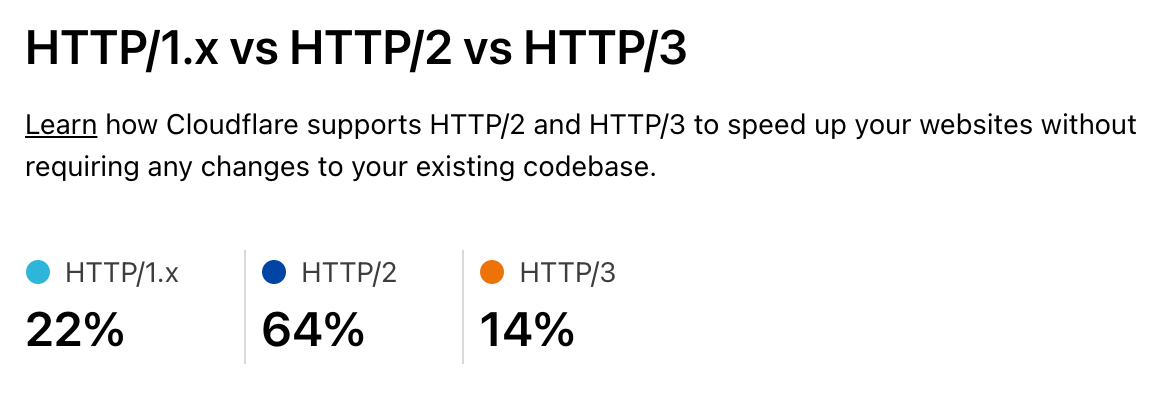
As people upgrade to recent browsers on their computers and devices the new protocols become more and more important. Staying on top of these, and optimizing them is vital as part of the waitless Internet.
And then comes the content of web pages. Images are a vital part of the web and delivering optimized images right-sized and right-formatted for the end user device plays a big part in a fast web.
But before the web browser can start loading the images it has to get and understand the HTML of the web page. This is wasteful as the browser could be downloading images (and other assets like fonts of JavaScript) while still processing the HTML if it knew about them in advance. The solution to that is for the web server to send a hint about what’s needed along with the HTML.
More on that in the coming week.
Imagical
One of the largest categories of content we deliver for our customers consists of static and animated images. And they are also a ripe target for optimization. Images tend to be large and take a while to download and there are a vast variety of end user devices. So getting the right size and format image to the end user really helps with performance.
Getting it there at the right time also means that images can be loaded lazily and only when the user scrolls them into visibility.
But, traditionally, handling different image formats (especially as new ones like WebP and AVIF get invented), different device types (think of all the different screen sizes out there), and different compression schemes has been a mess of services.
And chained services for different aspects of the image pipeline can be slow and expensive. What you really want is simple storage and an integrated way to deliver the right image to the end user tailored just for them.
More on that in the coming week.
Cache me if you can
As I mentioned in the section about DNS, a few thousand words ago, caching is really powerful and caching content near the end user is super powerful. Cloudflare makes extensive use of caching (particularly of images but also things like GraphQL) on its servers. This makes our customers’ websites fast as images can be delivered quickly from servers near the end user.
But it introduces a problem. If you have a lot of servers around the world then the caches need to be filled with content in order for it to be ready for end users. And the more servers you add the harder it gets to keep them all filled. You want the ‘cache hit ratio’ (how often content is served from cache without having to go back to the customer’s server) to be as high as possible.
But if you’ve got the content cached in Casablanca, and a user visits your website in Chennai they won’t have the fastest content delivery. To solve this some service providers make a deliberate decision not to have lots of servers near end users.
Sounds a bit crazy but their logic is “it’s hard to keep all those caches filled in lots of cities, let’s have only a few cities”. Sad. We think smart software can solve that problem and allow you to have your cache and eat it. We’ve used smart software to solve global load balancing problems and are doing the same for global cache. That way we get high cache hit ratios, super low latency to end users and low load on customer web servers.
More on that in the coming week.
Zero Cool
You know what’s cooler than a millisecond? Zero milliseconds.
Back in 2017 Cloudflare launched Workers, our serverless/edge computing platform. Four years on Workers is widely used and entire companies are being built on the technology. We added support for a variety of languages (such as COBOL and Rust), a distributed key-value store, Durable Objects, WebSockets, Cron Triggers and more.
But people were often concerned about cold start times because they were thinking about other serverless platforms that had significant spool up times for code that wasn’t ready to run.
Last year we announced that we eliminated cold starts from Workers. You don’t have to worry. And we’ll go deeper into why Cloudflare Workers is the fastest serverless platform out there.
More on that in the coming week.
And finally…
If you run a large global network and want to know if it’s really the fastest there is, and where you need to do work to keep it fast, the only way is to measure. Although there are third-party measurement tools available they can suffer from biases and their methodology is sometimes unclear.
We decided the only way we could understand our performance vs. other networks was to build our own like-for-like testing tool and measure performance across the Internet’s 70,000+ networks.
We’ll also talk about how we keep everything fast, from lightning quick configuration updates and code deploys to logs you don’t have to wait for to ludicrously fast cache purges to real time analytics.
More on that in the coming week.
Welcome to Speed Week*
*Can’t wait for tomorrow? Go play Silent Space Marine. It uses the technologies mentioned above.
An unusual player for a forgotten ‘70s music format
Post Syndicated from Techmoan original https://www.youtube.com/watch?v=tkkx2h-rIEI
Comic for 2021.09.12
Post Syndicated from Explosm.net original http://explosm.net/comics/5974/
New Cyanide and Happiness Comic
How to hide a body
Post Syndicated from Oglaf! -- Comics. Often dirty. original https://www.oglaf.com/hide-a-body/


9/11 and The History of Firefighting
Post Syndicated from The History Guy: History Deserves to Be Remembered original https://www.youtube.com/watch?v=NLQmfFfSxgE
Записи от OpenFest 2021
Post Syndicated from original https://vasil.ludost.net/blog/?p=3450
Записите са готови (от известно време), в архива и в youtube.
Apple Mail’s iOS15 Privacy Protection Impact to Senders
Post Syndicated from Matt Strzelecki original https://aws.amazon.com/blogs/messaging-and-targeting/apple-mails-ios15-privacy-protection-impact-to-senders-2/
On June 7th at Apple’s Worldwide Developer’s Conference (WWDC 2021) Apple announced that Apple Mail users can now choose to use Apple Mail Privacy Protection. Apple Mail Privacy Protection will allow iOS to privately load remote message content which will hide recipient’s mail activity information like IP and user agent information, including geolocation and device(s) used to engage with the message. Apple Mail Privacy Protection will eliminate the open as being a reliable metric to evaluate user engagement on the sender’s side as all tracking pixels and images will be cached and fired as it hits Apple Mail. Apple is doing this in order to protect user information and increase privacy while also helping to facilitate a richer user experience as Apple Mail user can confidently open, read and engage with messages without all their email interactions are being tracked through remote images and tracking pixels. This will result in all messages that have the Apple Mail Privacy Protection enabled to register an open regardless of whether the recipient has read the email message or not. The end user will also have more confidence in the security of the message including its links.
When a user starts Apple Mail on their iOS device, emails to that user are initiated for download to their device but are first cached by Apple including all images and pixels, to a proxy server that does not expose individual recipient IP addresses but rather a generic IP of the Apple Cache. This happens regardless of if the user actually opens the mail at that time or not. If the user opens the email it pulls the message from the Apple Cache rather than from the original sending source, typically an email service provider (ESP). As a result, senders will not have open tracking insight as all tracking images and pixels will fire as the messages are downloaded to the Apple Cache.
Apple Mail Privacy Protection will apply to email opened on the Apple Mail app. If a user engages messages through another mail application such as the Gmail app, Apple Mail Privacy Protection will not be applied. Apple Mail Privacy Protection is not enabled by default but as you launch the Apple Mail app in iOS 15 initially, the user will be prompted to enable privacy protection which most users will choose to turn on.
Impact to Marketers
There will be a major impact to marketers who rely heavily on open rates as a conversion metric for user engagement as open data will be skewed as messages containing tracking links will fire regardless of if a recipient actually engages with the message or not. However, other data points and user activity will still be available such as click-through rates, onsite activity, and conversion history. These types of metrics will need to be relied upon to supplement open tracking data. Additionally, email deliverability best practices will be more important than ever to help maintain healthy lists and a responsive user base. Best practices such as confirmed opt-in list building, list maintenance & hygiene, consistent sending patterns and cadence, and honoring opt-outs and complaints will be even more important for marketers to adhere to as they adjust to the new Mail Privacy Protection feature.
While Mail Privacy Protection reduces visibility of open rates there are benefits to the user experience as user trust increases in the messages received through Apple Mail. For example, previous users who chose to receive text-only based messages to protect their privacy will now receive the more rich content of the full message providing a better user experience while engaging with the message. Full load of images and content will be sent to the recipients who will have a much higher sense of security in reading/ingesting/actioning the email and its content. Prior to Apple Mail Privacy Protection there could be skepticism of URLs and links within the messages leading to more deletes or false positive, potentially also resulting in more complaints and/or unsubscribes.
There are other benefits of Apple’s Mail Privacy Protection to marketers such as validation of email addresses. Since emails are cached as the messages are initiated for download to a device, and as a result it is downloaded to the Apple Cache and the tracking image or pixel is fired, it validates the existence of that email address. This does not mean you should use this feature as a validation tool as mailbox providers such as Gmail will still evaluate senders in part on list hygiene and high invalid requests will still lead to negative sender reputation with those providers. Confirmed opt-in practices are going to be even more crucial for managing healthy and long-term lists for marketers than it was prior to Apple Mail Privacy Protection. If a marketer is unsure about opt-in status, look into creating a re-confirmation campaign and only add back in recipients that re-confirm the opt-in by clicking a confirmation link in the message.
Conclusion
Email is still the most used tool to communicate whether that’s business-to-business, business-to-consumer or peer-to-peer, especially when it comes to marketing. Marketers need to continue to evolve and be creative when sending messages to their recipients because email, as it it relates to privacy & security, will continue evolve and leave marketers who don’t keep pace behind. While Apple’s Mail Privacy Protection reduces open rate visibility it does provide its user base with more security and confidence in messages passed to their devices. That confidence can allow marketers to focus on developing richer content for a better user experience and drive conversions rather than just opens.
Developing and managing a list with proper confirmed opt-in methods are crucial to developing long-term email lists and the trust of your recipients. The implementation of Apple Mail Privacy Protection reinforces this principle.
Lastly, email privacy & security will continue to advance forward and marketers along with email service providers should not be trying to “get around” these privacy features, rather they need to understand that these features are intended to help the end user and your customers. Work within the ideology of providing the customers what they want to receive and nothing more or less, and you can help your emails thrive. Stay tuned for more updates as they become available.
Няма да се даваме, шефе!
Post Syndicated from Ан Фам original https://toest.bg/nyama-da-se-davame-shefe/
Когато в сряда получих съобщението „Марин си е отишъл в съня си днес сутринта“, първата ми реакция беше „Глупости! Вчера ми писа, че е на Алеята на книгата и е по къси панталони, но с пуловер!“. После дойде осъзнаването. Помете ме като скоростен влак. По-късно разбрах, че с всички е било така. Facebook се напълни със статии, съобщаващи ужасната новина, с негови снимки и стихове, но най-вече – с…
По буквите: Василев, Ефтимов, Стругацки
Post Syndicated from Марин Бодаков original https://toest.bg/po-bukvite-vasilev-eftimov-strugatsky/
От човек до човек, с нова книга в ръка – ходенето по буквите продължава. Два пъти месечно Марин Бодаков представя по три нови литературни заглавия. И пита с какво точно тези книги ни променят. „Шествието“ от Кирил Василев София: Издателство за поезия „ДА“, 2021 Кирил Василев не е между популярните, но безспорно е един от най-сериозните автори у нас. Неговият глас идва от най-мрачните дълбини на…
Kaк да съсипеш собствената си героиня. Дубравка Угрешич към българските читатели
Post Syndicated from Тоест original https://toest.bg/dubravka-ugresic/
До неотдавна световноизвестната писателка Дубравка Угрешич, чиято майка е българка от Варна, трудно скриваше своето раздразнение, че у нас е позната преди всичко с ранните си произведения. А заради своята прямота, безпардонна ерудиция и отказ от социална блазираност Угрешич се радва на истинско уважение в света на образованите автори и читатели – тя например още от 2016 г. е носителка на наградата…
Защо толкова малко ваксинирани? Пет хипотези
Post Syndicated from Станислав Додов original https://toest.bg/zashto-tolkova-malko-vaksinirani-pet-hipotezi/
През последните месеци ваксините срещу COVID-19 вероятно могат да се класират като обществена тема номер едно в България. Въпросите за това при какви условия, колко и кои хора искат или не искат, трябва или не трябва да се ваксинират, тънат в жесток хаос от мнения, провокации и противоречива информация. Традиционно доверието във ваксините в Европа е по-ниско спрямо това в други части на света…
Как работи дезинформацията
Post Syndicated from original https://toest.bg/kak-raboti-dezinformatsiyata/
Зад сложния сюжет на филма „Генезис“ (Inception) има една простичка, но въздействаща идея. Успееш ли незабелязано да посееш зрънце на съмнение (или нова идея), то може да завземе съзнанието и да промени възгледите и поведението на хората. За да подейства истински, е нужно едно: човек да възприеме идеята като своя. Инфодемията действа по много сходен начин. И затова е толкова опасна.
Политиката като правене на вино
Post Syndicated from Венелина Попова original https://toest.bg/politikata-kato-pravene-na-vino/
Изглежда, както в природата, така и в политиката има цикличност. Хора, които в началото на Прехода са били в съзнателна възраст, могат да сравнят политическите събития (както и енергията им) отпреди 30-ина години с днешните. Метафорично те наподобяват процесите, през които преминава гроздовият сок, преди да се превърне във вино – събиране на достатъчно добре узряло грозде…
Президент на всички българи. Парламентарно представен
Post Syndicated from Емилия Милчева original https://toest.bg/prezident-na-vsichki-bulgari-parlamentarno-predstaven/
Всички обичат Румен Радев. Или почти всички. В навечерието на почти безалтернативните президентски избори изглежда, че настоящият държавен глава ще спечели втория си мандат по-лесно от игра на белот. Срещу него ще играе съперникът му от партия ГЕРБ (негови противници) – „няма да е политическа фигура и ще е мъж“. „Демократична България“ (негови съмишленици) също ще издигнат кандидат – недотам…
Седмицата в „Тоест“ (6–10 септември)
Post Syndicated from Тоест original https://toest.bg/editorial-6-10-september-2021/
ще отпътуваме без отговор. (Марин Бодаков, „Наивно изкуство“, ИК „Жанет 45“, 2011) Завръщаме се отново в работен режим след лятната пауза. Но за жалост, с една изключително тъжна вест. На 8 септември завинаги загубихме Марин Бодаков – колега, съмишленик, съветник, приятел. Безценен, непрежалим приятел! Публикуваме няколко думи на главната ни редакторка Ан Фам. Вместо сбогом. Защото „няма как да…
Comic for 2021.09.11
Post Syndicated from Explosm.net original http://explosm.net/comics/5973/
New Cyanide and Happiness Comic
Register now for Flink Forward Global, October 26-27, 2021
Post Syndicated from Deepthi Mohan original https://aws.amazon.com/blogs/big-data/register-now-for-flink-forward-global-october-26-27-2021/

Flink Forward Global 2021 is a 2-day virtual conference for the Apache Flink and stream processing communities. Apache Flink is an open-source distributed engine for processing data streams that can support both streaming and batch workloads. Amazon Kinesis Data Analytics is a fully managed service for Apache Flink on AWS that reduces the complexity of building, managing, and integrating Apache Flink applications with other AWS services. You can use Kinesis Data Analytics for Apache Flink to process data from Amazon Managed Streaming for Apache Kafka (Amazon MSK), Amazon Kinesis Data Streams, and a variety of data sources for use cases such as streaming ETL (extract, transform, and load), log analysis, event-driven applications, and anomaly and fraud detection in real time.
Flink Forward has keynote presentations and talks on production Flink use cases, technical deep dive sessions, and the growth of the Flink ecosystem. You can meet core Flink committers, new and experienced users, and thought leaders who share experiences and best practices in stream processing, real-time analytics, and the management of mission-critical Flink deployments in production.
AWS is a Platinum sponsor for Flink Forward. If you’re interested in learning about real-time data processing at scale, register now to attend.
Friday Squid Blogging: Possible Evidence of Squid Paternal Care
Post Syndicated from Bruce Schneier original https://www.schneier.com/blog/archives/2021/09/friday-squid-blogging-possible-evidence-of-squid-paternal-care.html
Researchers have found possible evidence of paternal care among bigfin reef squid.
As usual, you can also use this squid post to talk about the security stories in the news that I haven’t covered.
Read my blog posting guidelines here.
Enabling parallel file systems in the cloud with Amazon EC2 (Part I: BeeGFS)
Post Syndicated from Ben Peven original https://aws.amazon.com/blogs/compute/enabling-parallel-file-systems-in-the-cloud-with-amazon-ec2-part-i-beegfs/
This post was authored by AWS Solutions Architects Ray Zaman, David Desroches, and Ameer Hakme.
In this blog series, you will discover how to build and manage your own Parallel Virtual File System (PVFS) on AWS. In this post you will learn how to deploy the popular open source parallel file system, BeeGFS, using AWS D3en and I3en EC2 instances. We will also provide a CloudFormation template to automate this BeeGFS deployment.
A PVFS is a type of distributed file system that distributes file data across multiple servers and provides concurrent data access to multiple execution tasks of an application. PVFS focuses on high-performance access to large datasets. It consists of a server process and a client library, which allows the file system to be mounted and used with standard utilities. PVFS on the Linux OS originated in the 1990’s and today several projects are available including Lustre, GlusterFS, and BeeGFS. Workloads such as shared storage for video transcoding and export, batch processing jobs, high frequency online transaction processing (OLTP) systems, and scratch storage for high performance computing (HPC) benefit from the high throughput and performance provided by PVFS.
Implementation of a PVFS can be complex and expensive. There are many variables you will want to take into account when designing a PVFS cluster including the number of nodes, node size (CPU, memory), cluster size, storage characteristics (size, performance), and network bandwidth. Due to the difficulty in estimating the correct configuration, systems procured for on-premises data centers are typically oversized, resulting in additional costs, and underutilized resources. In addition, the hardware procurement process is lengthy and the installation and maintenance of the hardware adds additional overhead.
AWS makes it easy to run and fully manage your parallel file systems by allowing you to choose from a variety of Amazon Elastic Compute Cloud (EC2) instances. EC2 instances are available on-demand and allow you to scale your workload as needed. AWS storage-optimized EC2 instances offer up to 60 TB of NVMe SSD storage per instance and up to 336 TB of local HDD storage per instance. With storage-optimized instances, you can easily deploy PVFS to support workloads requiring high-performance access to large datasets. You can test and iterate on different instances to find the optimal size for your workloads.
D3en instances leverage 2nd-generation Intel Xeon Scalable Processors (Cascade Lake) and provide a sustained all core frequency up to 3.1 GHz. These instances provide up to 336 TB of local HDD storage (which is the highest local storage capacity in EC2), up to 6.2 GiBps of disk throughput, and up to 75 Gbps of network bandwidth.
I3en instances are powered by 1st or 2nd generation Intel® Xeon® Scalable (Skylake or Cascade Lake) processors with 3.1 GHz sustained all-core turbo performance. These instances provide up to 60 TB of NVMe storage, up to 16 GB/s of sequential disk throughput, and up to 100 Gbps of network bandwidth.
BeeGFS, originally released by ThinkParQ in 2014, is an open source, software defined PVFS that runs on Linux. You can scale the size and performance of the BeeGFS file-system by configuring the number of servers and disks in the clusters up to thousands of nodes.
BeeGFS architecture
D3en instances offer HDD storage while I3en instances offer NVMe SSD storage. This diversity allows you to create tiers of storage based on performance requirements. In the example presented in this post you will use four D3en.8xlarge (32 vCPU, 128 GB, 16x14TB HDD, 50 Gbit) and two I3en.12xlarge (48 vCPU, 384 GB, 4 x 7.5-TB NVMe) instances to create two storage tiers. You may choose different sizes and quantities to meet your needs. The I3en instances, with SSD, will be configured as tier 1 and the D3en instances, with HDD, will be configured as tier 2. One disk from each instance will be formatted as ext4 and used for metadata while the remaining disks will be formatted as XFS and used for storage. You may choose to separate metadata and storage on different hosts for workloads where these must scale independently. The array will be configured RAID 0, since it will provide maximum performance. Software replication or other RAID types can be employed for higher durability.

Figure 1: BeeGFS architecture
You will deploy all instances within a single VPC in the same Availability Zone and subnet to minimize latency. Security groups must be configured to allow the following ports:
- Management service (beegfs-mgmtd): 8008
- Metadata service (beegfs-meta): 8005
- Storage service (beegfs-storage): 8003
- Client service (beegfs-client): 8004
You will use the Debian Quick Start Amazon Machine Image (AMI) as it supports BeeGFS. You can enable Amazon CloudWatch to capture metrics.
How to deploy the BeeGFS architecture
Follow the steps below to create the PVFS described above. For automated deployment, use the CloudFormation template located at AWS Samples.
- Use the AWS Management Console or CLI to deploy one D3en.8xlarge instance into a VPC as described above.
- Log in to the instance and update the system:
sudo apt updatesudo apt upgrade
- Install the XFS utilities and load the kernel module:
sudo apt-get -y install xfsprogssudo modprobe -v xfs
Format the first disk ext4 as it is used for metadata, the rest are formatted xfs. The disks will appear as “nvme???” which actually represent the HDD drives on the D3en instances.
4. View a listing of available disks:
-
sudo lsblk
5. Format hard disks:
-
sudo mkfs -t ext4 /dev/nvme0n1sudo mkfs -t xfs /dev/nvme1n1- Repeat this command for disks nvme2n1 through nvme15n1
6. Create file system mount points:
-
sudo mkdir /disk00sudo mkdir /disk01- Repeat this command for disks disk02 through disk15
7. Mount the filesystems:
-
sudo mount /dev/nvme0n1 /disk00sudo mount /dev/nvme0n1 /disk01- Repeat this command for disks disk02 through disk15
Repeat steps 1 through 7 on the remaining nodes. Remember to account for fewer disks for i3en.12xlarge instances or if you decide to use different instance sizes.
8. Add the BeeGFS Repo to each node:
-
sudo apt-get -y install gnupgwget https://www.beegfs.io/release/beegfs_7.2.3/dists/beegfs-deb10.listsudo cp beegfs-deb10.list /etc/apt/sources.list.d/sudo wget -q https://www.beegfs.io/release/latest-stable/gpg/DEB-GPG-KEY-beegfs -O- | sudo apt-key add -sudo apt update
9. Install BeeGFS management (node 1 only):
-
sudo apt-get -y install beegfs-mgmtdsudo mkdir /beegfs-mgmtsudo /opt/beegfs/sbin/beegfs-setup-mgmtd -p /beegfs-mgmt/beegfs/beegfs_mgmtd
10. Install BeeGFS metadata and storage (all nodes):
-
sudo apt-get -y install beegfs-meta beegfs-storage beegfs-meta beegfs-client beegfs-helperd beegfs-utils# -s is unique ID based on node - change this!, -m is hostname of management serversudo /opt/beegfs/sbin/beegfs-setup-meta -p /disk00/beegfs/beegfs_meta -s 1 -m ip-XXX-XXX-XXX-XXX# Change -s to nodeID and -i to (nodeid)0(disk), -m is hostname of management serversudo /opt/beegfs/sbin/beegfs-setup-storage -p /disk01/beegfs_storage -s 1 -i 101 -m ip-XXX-XXX-XXX-XXXsudo /opt/beegfs/sbin/beegfs-setup-storage -p /disk02/beegfs_storage -s 1 -i 102 -m ip-XXX-XXX-XXX-XXX- Repeat this last command for the remaining disks disk03 through disk15
11. Start the services:
-
#Only on node1sudo systemctl start beegfs-mgmtd#All serverssudo systemctl start beegfs-metasudo systemctl start beegfs-storage
At this point, your BeeGFS cluster is running and ready for use by a client system. The client system requires BeeGFS client software in order to mount the cluster.
12. Deploy an m5n.2xlarge instance into the same subnet as the PVFS cluster.
13. Log in to the instance, install, and configure the client:
-
sudo apt updatesudo apt upgradesudo apt-get -y install gnupg#Need linux sources for client compilationsudo apt-get -y install linux-sourcesudo apt-get -y install linux-headers-4.19.0-14-allwget https://www.beegfs.io/release/beegfs_7.2.3/dists/beegfs-deb10.listsudo cp beegfs-deb10.list /etc/apt/sources.list.d/sudo wget -q https://www.beegfs.io/release/latest-stable/gpg/DEB-GPG-KEY-beegfs -O- | sudo apt-key add -sudo apt updatesudo apt-get -y install beegfs-client beegfs-helperd beegfs-utilssudo /opt/beegfs/sbin/beegfs-setup-client -m ip-XXX-XXX-XXX-XX # use the ip address of the management nodesudo systemctl start beegfs-helperdsudo systemctl start beegfs-client
14. Create the storage pools:
-
sudo beegfs-ctl --addstoragepool —desc="tier1" —targets=501,502,503,601,602,603sudo beegfs-ctl --addstoragepool --desc="tier2" --targets=101,102,103,104,105,106,107,108,109,110,111,112,113,114,115,201,202,203,204,205,206,207,208,209,210,
211,212,213,214,215,301,302,303,304,305,306,307,308,309,310,311,312,313,314,315,401,402,403,404,405,406,407,
408,409,410,411,412,413,414,415sudo beegfs-ctl --liststoragepoolsPool ID Pool Description Targets Buddy Groups======= ================== ============================ ============================Defaulttier1 501,502,503,601,602,603tier2 101,102,103,104,105,106,107,108,109,110,111,112,113,114,115,201,202,203,204,205,206,207,208,209,210,211,212,213,214,215,301,302,303,304,305,306,307,308,309,310,311,312,313,314,315,401,402,403,404,405,406,407,408,409,410,411,412,413,414,415
15. Mount the pools to the file system:
-
sudo beegfs-ctl --setpattern --storagepoolid=2 /mnt/beegfs/tier1sudo beegfs-ctl --setpattern --storagepoolid=3 /mnt/beegfs/tier2
The BeeGFS PVFS is now ready to be used by the client system.
How to test your new BeeGFS PVFS
BeeGFS provides StorageBench to evaluate the performance of BeeGFS on the storage targets. This benchmark measures the streaming throughput of the underlying file system and devices independent of the network performance. To simulate client I/O, this benchmark generates read/write locally on the servers without any client communication.
It is possible to benchmark specific targets or all targets together using the “servers” parameter. A “read” or “write” parameter sets the type pf test to perform. The “threads” parameter is set to the number of storage devices.
Try the following commands to test performance:
Write test (1x d3en):
sudo beegfs-ctl --storagebench --servers=1 --write --blocksize=512K —size=20G —threads=15
Write test (4x d3en):
sudo beegfs-ctl --storagebench --alltargets --write --blocksize=512K —size=20G —threads=15
Read test (4x d3en):
sudo beegfs-ctl --storagebench --servers=1,2,3,4 --read --blocksize=512K --size=20G --threads=15
Write test (1x i3en):
sudo beegfs-ctl --storagebench --servers=5 --write --blocksize=512K --size=20G --threads=3
Read test (2x i3en):
sudo beegfs-ctl --storagebench --servers=5,6 --read --blocksize=512K —size=20G —threads=3
StorageBench is a great way to test what the potential performance of a given environment looks like by reducing variables like network throughput and latency, but you may want to test in a more real-world fashion. For this, tools like ‘fio’ can generate mixed read/write workloads against files on the client BeeGFS mountpoint.
First, we need to define which directory goes to which Storage Pool (tier) by setting a pattern:
sudo beegfs-ctl --setpattern --storagepoolid=2 /mnt/beegfs/tier1 sudo beegfs-ctl --setpattern --storagepoolid=3 /mnt/beegfs/tier2
You can see how a file gets striped across the various disks in a pool by adding a file and running the command:
sudo beegfs-ctl —getentryinfo /mnt/beegfs/tier1/myfile.bin
Install fio:
sudo apt-get install -y fio
Now you can run a fio test against one of the tiers. This example command runs eight threads running a 75/25 read/write workload against a 10-GB file:
sudo fio --numjobs=8 --randrepeat=1 --ioengine=libaio --direct=1 --gtod_reduce=1 --name=test --filename=/mnt/beegfs/tier1/test --bs=512k --iodepth=64 --size=10G --readwrite=randrw --rwmixread=75
Cleaning up
To avoid ongoing charges for resources you created, you should:
- Shut down all seven EC2 instances.
- Delete any security groups you created.
- Delete any subnets you created.
- Delete the VPC you created.
Conclusion
In this blog post we demonstrated how to build and manage your own BeeGFS Parallel Virtual File System on AWS. In this example, you created two storage tiers using the I3en and D3en. The I3en was used as the first tier for SSD storage and the D3en was used as a second tier for HDD storage. By using two different tiers, you can optimize performance to meet your application requirements.
Amazon EC2 storage-optimized instances make it easy to deploy the BeeGFS Parallel Virtual File System. Using combinations of SSD and HDD storage available on the I3en and D3en instance types, you can achieve the capacity and performance needed to run the most demanding workloads. Read more about the D3en and I3en instances.