Бих искала да започна оптимистично. От миналата седмица до тази се случиха поне две изненадващи в позитивен смисъл събития. На 7 февруари за председател на БСП беше избран Крум Зарков. Дали той ще допринесе Столетницата да заприлича поне малко на европейска лява партия (и има ли такива намерения изобщо), или ще бъде изкупителна жертва за провала ѝ, още не знаем. Президентката пък посочи Андрей Гюров за служебен премиер – единствения от „домовата книга“, който не е по един или друг начин свързан с ГЕРБ и/или Пеевски.
На избора на Гюров е посветен и тазседмичният политически коментар на Емилия Милчева. Според нея новият служебен премиер трябва да предприеме три важни стъпки: да предложи правосъден министър, който да се заеме със смяната на узурпиралия поста на главния прокурор Борислав Сарафов, да сложи малко ред в МВР и службите и да реагира адекватно на трагедията „Петрохан“.
Изборът на Гюров дава надежда за по-честни избори (от каквито има сметка и доскорошният президент Румен Радев), но пък всякакви реални и имагинерни негативи ще се лепят на ПП–ДБ. Като написах последните думи на предишното изречение, естествено, се сетих за трагедията при Петрохан и Околчица. И се замислих за двойните стандарти.
Случаят се използва за демонизиране на ПП–ДБ и призиви за оставка на кмета на София Васил Терзиев, защото е бил дарител на организацията на Ивайло Калушев, без да има данни някой, свързан с коалицията, да е знаел за случаи на секс с непълнолетни в групата около Калушев (но пък има данни ДАНС да е назнайвала нещо).
Всички сме зациклили около случая „Петрохан“, но кой, ако не Павлина Върбанова ще погледне на темата езиковедски? Замисляте ли се, че хижата е „Петрохан“ – с кавички, а проходът – Петрохан? А (което изглежда още по-странно) гара Подуяне и автогара „Подуяне“? Павлина разяснява някои от чудатите правила за поставяне и непоставяне на кавички.
Понеже и аз още цикля на петроханската тема, се връщам към проблема за двойните стандарти. Разбрахме, че будизмът и „сектите“ са много страшни. А в затворени християнски общности няма ли сексуална злоупотреба с деца? Католическата църква поне се опитва да поеме някаква отговорност за дългогодишните практики на сексуално насилие върху малолетни и непълнолетни.
За случващото се в Българската православна църква не се знае много. Но през 2009 г. величкият епископ Сионий напусна Семинарията в София, на която е ректор, след като родител на ученик в духовното училище е подал срещу него сигнал за сексуална злоупотреба с момчето. На Сионий не само му се даде думата да се защитава в медиите. През 2014 г. националисти, със специалното съдействие на Мартин Карбовски, „прочистиха“, по собствените им думи, Троянския манастир от „хомосексуалисти“. Кой беше новият игумен на манастира, съдействал за „прочистването“? Сионий. Въпреки че срещу него има и друго свидетелство за сексуални посегателства, той не само не е разследван или поне отстранен, ами между 2019 и 2025 г. е единственият духовник в БПЦ досега, който е игумен не на един, а на два манастира наведнъж.
За да отсяваме зърното от плявата, имаме нужда от качествена журналистика. В първата си статия за „Тоест“ Дарина Сарелска обяснява защо тя е дефицитна в България. Разказът ѝ е суров, ненапудрен, безрадостен и според мен – задължителен за четене. С нетърпение очаквам следващите ѝ публикации.
Освен че не е любител на науката, Доналд Тръмп е и враг на всичко, което не му изнася, и вместо неудобни факти предпочита да вижда фалшива реалност. В новия брой на бюлетина си „Гласовете на Америка“ Йоанна Елми разказва за измеренията, до които стига паралелната реалност на властта в САЩ.
В рамките на година една широко разпространена дума се обезсмисли, или поне значението ѝ силно се стесни. Това е прилагателното име „евроатлантически“. Променените позиции на САЩ по отношение на международната сигурност поставят ЕС пред изпитание. Според Анахит Хачикян отношенията между доскорошните близки съюзници може да се сравнят със заглавието на песента на Серж Генсбур и Джейн Бъркин Je t’aime… moi non plus.
И като минахме на любовна вълна – днес е Свети Валентин. Докато се чудя с каква песен да ви поздравя по този повод, се замислих, че има и хора, които нямат какво или с кого да празнуват, както и такива, които просто не харесват този празник. Затова се опитах да подбера за всеки по нещо (е, почти за всеки, защото – по Толстой – всеки е нещастен посвоему):
Ако сте с разбито сърце – любовта убива, пее Фреди Меркюри в саундтрака на Джорджо Мородер към филма на Фриц Ланг „Метрополис“. Ако точно днес любимият ви човек не е с вас, на помощ идват Love с песен за самотата във връзката. Но ето, Глория Гейнър се притичва, за да ни напомни, че раздялата може да се преживее. А духът на Мишел Фуко, въплътен в Майли Сайръс, ни обръща внимание колко важна е любовта към себе си.
Ако пък днес празнувате и вярвате в щастливата любов, Lovesong на The Cure е точно за вас. Робърт Смит я е посветил на годеницата си Мери в края на 80-те. Двамата се запознават на 14-годишна възраст, значи някъде около 1973-та, и вече повече от 50 години са заедно.
А може би не зачитате Свети Валентин, а Трифон Зарезан. И лирическият герой на Lovestruck на Madness обича чашката, което води до… влюбване в улична лампа. В случай че до никаква любов не ви е – кой може да изпее по-нелюбовна песен от Джони Ротън?
Ако искате да изслушате всички тези песни, подредила съм ви ги в плейлист:
Пък ако обичате „Тоест“ и ни подкрепите с месечно дарение, ще ни помогнете да продължаваме да ви отвръщаме със същото.
Over the last year, the Prometheus community has been working hard on several interesting and ambitious changes that previously would have been seen as controversial or not feasible. While there might be little visibility about those from the outside (e.g., it’s not an OpenClaw Prometheus plugin, sorry 🙃), Prometheus developers are, organically, steering Prometheus into a certain, coherent future. Piece by piece, we unexpectedly get closer to goals we never dreamed we would achieve as an open-source project!
This post starts (hopefully!) as a series of blog posts that share a few ambitious shifts that might be exciting to new and existing Prometheus users and developers. In this post, I’d love to focus on the idea of native storage for the composite types which is tidying up a lot of challenges that piled up over time. Make sure to check the provided inlined links on how you can adopt some of those changes early or contribute!
CAUTION: Disclaimer: This post is intended as a fun overview, from my own personal point of view as a Prometheus maintainer. Some of the mentioned changes haven’t been (yet) officially approved by the Prometheus Team; some of them were not proved in production.
NOTE: This post was written by humans; AI was used only for cosmetic and grammar fixes.
Impressively, for a long time Prometheus’ TSDB storage implementation had an explicitly clean and simple data model. The TSDB allowed the storage and retrieval of string-labelled primitive samples containing only float64 values and int64 timestamps. It was completely metric-type-agnostic.
The metric types were implied on top of the TSDB, for humans and best effort tooling for PromQL. For simplicity, let’s call this way of storing types a classic model or representation. In this model:
We have primitive types:
gauge is a “default” type with no special rules, just a float sample with labels.
counter that should have a _total suffix in the name for humans to understand its semantics.
foo_total 17.0
info that needs an _info suffix in the metric name and always has a value of 1.
We have composite types. This is where the fun begins. In the classic representation, composite metrics are represented as a set of primitive float samples:
histogram is a group of counters with certain mandatory suffixes and le labels:
gaugehistogram, summary, and stateset types follow the same logic – a group of special gauges or counters that compose a single metric.
The classic model served the Prometheus project well. It significantly simplified the storage implementation, enabling Prometheus to be one of the most optimized, open-source time-series databases, with distributed versions based on the same data model available in projects like Cortex, Thanos, and Mimir, etc.
Unfortunately, there are always tradeoffs. This classic model has a few limitations:
Efficiency: It tends to yield overhead for composite types because every new piece of data (e.g., new bucket) takes precious index space (it’s a new unique series), whereas samples are significantly more compressible (rarely change, time-oriented).
Functionality: It poses limitations to the shape and flexibility of the data you store (unless we’d go into some JSON-encoded labels, which have massive downsides).
Transactionality: Primitive pieces of composite types (separate counters) are processed independently. While we did a lot of work to ensure write isolation and transactionality for scrapes, transactionality completely breaks apart when data is received or sent via remote write, OTLP protocols, or, to distributed long-term storage, Prometheus solutions. For example, a foo histogram might have been partially sent, but its foo_bucket{le="1.1e+23"} 17 counter series be delayed or dropped accidentally, which risks triggering false positive alerts or no alerts, depending on the situation.
Reliability: Consumers of the TSDB data have to essentially guess the type semantics. There’s nothing stopping users from writing a foo_bucket gauge or foo_total histogram.
A Glimpse of Native Storage for Composite Types
The classic model was challenged by the introduction of native histograms. The TSDB was extended to store composite histogram samples other than float. We tend to call this a native histogram, because TSDB can now “natively” store a full (with sparse and exponential buckets) histogram as an atomic, composite sample.
At that point, the common wisdom was to stop there. The special advanced histogram that’s generally meant to replace the “classic” histograms uses a composite sample, while the rest of the metrics use the classic model. Making other composite types consistent with the new native model felt extremely disruptive to users, with too much work and risks. A common counter-argument was that users will eventually migrate their classic histograms naturally, and summaries are also less useful, given the more powerful bucketing and lower cost of native histograms.
Unfortunately, the migration to native histograms was known to take time, given the slight PromQL change required to use them, and the new bucketing and client changes needed (applications have to define new or edit existing metrics to new histograms). There will also be old software used for a long time that never is never migrated. Eventually, it leaves Prometheus with no chance of deprecating classic histograms, with all the software solutions required to support the classic model, likely for decades.
However, native histograms did push TSDB and the ecosystem into that new composite sample pattern. Some of those changes could be easily adapted to all composite types. Native histograms also gave us a glimpse of the many benefits of that native support. It was tempting to ask ourselves: would it be possible to add native counterparts of the existing composite metrics to replace them, ideally transparently?
Organically, in 2024, for transactionality and efficiency, we introduced a native histogram custom buckets(NHCB) concept that essentially allows storing classic histograms with explicit buckets natively, reusing native histogram composite sample data structures.
NHCB has proven to be at least 30% more efficient than the classic representation, while offering functional parity with
classic histograms. However, two practical challenges emerged that slowed down the adoption:
Expanding, that is converting from NHCB to classic histogram, is relatively trivial, but combining, which is turning a classic histogram into NHCB, is often not feasible. We don’t want to wait for client ecosystem adoption, and also being mindful of legacy, hard to change software, we envisioned NHCB being converted (so combined) on scrape from the classic representation. That has proven to be somewhat expensive on scrape. Additionally, combination logic is practically impossible when receiving “pushes” (e.g., remote write with classic histograms), as you could end up having different parts of the same histogram sample (e.g., buckets and count) sent via different remote write shards or sequential messages. This combination challenge is also why OpenTelemetry collector users see an extra overhead on prometheusreceiver as the OpenTelemetry model strictly follows the composite sample model.
Consumption is slightly different, especially in the PromQL query syntax. Our initial decision was to surface NHCB histograms using a native-histogram-like PromQL syntax. For example the following classic histogram:
When we convert this to NHCB, you can no longer use foo_bucket as your metric name selector. Since NHCB is now stored as a foo metric, you need to use:
histogram_quantile(0.9, sum(foo{job="a"}))

# Old syntax: histogram_quantile(0.9, sum(foo_bucket{job="a"}) by (le))
On top of that, similar problems occur on other Prometheus outputs (federation, remote read, and remote write).
NOTE: Fun fact: Prometheus client data model (SDKs) and PrometheusProto
scrape protocol use the composite sample model already!
Transparent Native Representation
Let’s get straight to the point. Organically, the Prometheus community seems to align with the following two ideas:
We want to eventually move to a fully composite sample model on the storage layer, given all the benefits.
Users needs to be able to switch (e.g., on scrape) from classic to native form in storage without breaking consumption layer. Essentially to help with non-trivial migration pains (finding who use what, double-writing, synchronizing), avoiding tricky, dual mode, protocol changes and to deprecate the classic model ASAP for the sustainability of the Prometheus codebase, we need to ensure eventual consumption migration e.g., PromQL queries — independently to the storage layer.
Let’s go through evidence of this direction, which also represents efforts you can contribute to or adopt early!
We are discussing the “native” summary and stateset to fully eliminate classic model for all composite types. Feel free to join and help on that work!
We are working on the OpenMetrics 2.0 to consolidate and improve the pull protocol scene and apply the new learnings. One of the core changes will be the move to composite values in text, which makes the text format trivial to parse for storages that support composite types natively. This solves the combining challenge. Note that, by default, for now, all composite types will be still “expanded” to classic format on scrape, so there’s no breaking change for users. Feel free to join our WG to help or give feedback.
Prometheus receive and export protocol has been updated. Remote Write 2.0 allows transporting histograms in the “native” form instead of a classic representation (classic one is still supported). In the future versions (e.g. 2.1), we could easily follow a similar pattern and add native summaries and stateset. Contributions are welcome to make Remote Write 2.0 stable!
We are experimenting with the consumption compatibility modes that translate the composite types store as composite samples to classic representation. This is not trivial; there are edge cases, but it might be more feasible (and needed!) than we might have initially anticipated. See:
We need to also consider adding expanding for federation, remote read and other APIs.
In PromQL it might work as follows, for an NHCB that used to be a classic histogram:
# New syntax gives our "foo" NHCB:
histogram_quantile(0.9, sum(foo{job="a"}))
# Old syntax still works, expanding "foo" NHCB to classic representation:
histogram_quantile(0.9, sum(foo_bucket{job="a"}) by (le))
When implemented, it should be possible to fully switch different parts of your metric collection pipeline to native form transparently.
Summary
Moving Prometheus to a native composite type world is not easy and will take time, especially around coding, testing and optimizing. Notably it switches performance characteristics of the metric load from uniform, predictable sample sizes to a sample size that depends on a type. Another challenge is code architecture – maintaining different sample types has already proven to be very verbose (we need unions, Go!).
However, recent work revealed a very clean and possible path that yields clear benefits around functionality, transactionality, reliability, and efficiency in the relatively near future, which is pretty exciting!
If you have any questions around these changes, feel free to:
DM me on Slack.
Visit the #prometheus-dev Slack channel and share your questions.
Comment on related issues, create PRs, also review PRs (the most impactful work!)
The Prometheus community is also at KubeConEU 2026 in Amsterdam! Make sure to:
I’m hoping we can share stories of other important, orthogonal shifts we see in the community in future posts. No promises (and help welcome!), but there’s a lot to cover, such as (random order, not a full list):
Our native start timestamp feature journey that cleanly unblocks native delta temporality without “hacks” like reusing gauges, separate layer of metric types or label annotations e,g., __temporality__.
Optional schematization of Prometheus metrics that attempt to solve a ton of stability problems with metric naming and shape; building on top of OpenTelemetry semconv.
Our metadata storage journey that attempts to improve the OpenTelemetry Entities and resource attributes storage and consumption experience.
Our journey to organize and extend Prometheus scrape pull protocols with the recent ownership move of OpenMetrics.
An incredible TSDB Parquet effort, coming from the three LTS project groups (Cortex, Thanos, Mimir) working together, attempting to improve high-cardinality cases.
Our very own sfewer-r7 has developed an exploit module for the SolarWinds Web Help Desk vulnerabilities CVE-2025-40536 and CVE-2025-40551. On successful exploitation the session will be as running as NT AUTHORITY\SYSTEM. For more information see the Rapid7’s SolarWinds Web Help Desk Vulnerabilities guidance.
Contributions
A big thanks to our contributors who have been adding some great content this release. rudraditya21 has added MITRE ATT&CK metadata to lots of our existing modules. Chocapikk has added support for GHSA (GitHub Security Advisory) references support in Metasploit modules. rudraditya21 also added a change which adds negative caching to the LDAP entry cache, which will now mean missing objects are recorded. It also introduces a missing-entry sentinel, tracks misses per identifier type, and updates AD lookup helpers to short‑circuit on cached misses and record misses when a lookup returns no entry.
New module content (5)
FreeBSD rtsold/rtsol DNSSL Command Injection
Authors: Kevin Day and Lukas Johannes Möller Type: Exploit Pull request: #20798 contributed by JohannesLks Path: freebsd/misc/rtsold_dnssl_cmdinject AttackerKB reference: CVE-2025-14558
Description: This adds a new command-injection exploit in the FreeBDS rtsol/rtsold daemons (CVE-2025-14558). The vulnerability can be triggered by the Domain Name Search List (DNSSL) option in IPv6 Router Advertisement (RA) messages, which is passed to the resolvconf script without sanitization. It requires elevated privilege as it needs to send IPv6 packets. The injected commands are executed as root.
Ivanti Endpoint Manager Mobile (EPMM) unauthenticated RCE
Authors: sfewer-r7 and watchTowr Type: Exploit Pull request: #20932 contributed by sfewer-r7 Path: linux/http/ivanti_epmm_rce AttackerKB reference: CVE-2026-1340
Description: Adds an exploit module for the recent command injection vulnerability, CVE-2026-1281, affecting Ivanti Endpoint Manager Mobile (EPMM), formerly known as MobileIron. Exploited in-the-wild as a zero-day by an unknown threat actor.
GNU Inetutils Telnet Authentication Bypass Exploit CVE-2026-24061
Authors: Kyu Neushwaistein and jheysel-r7 Type: Exploit Pull request: #20929 contributed by jheysel-r7 Path: linux/telnet/gnu_inetutils_auth_bypass AttackerKB reference: CVE-2026-24061
Description: This adds an exploit module for the authentication bypass in GNU Inetutils telnetd tracked as CVE-2026-24061. During negotiation, if the USER environment variable is passed in with a value of “-f root” authentication can be bypassed resulting in command execution as the root user.
SolarWinds Web Help Desk unauthenticated RCE
Authors: Jimi Sebree and sfewer-r7 Type: Exploit Pull request: #20917 contributed by sfewer-r7 Path: multi/http/solarwinds_webhelpdesk_rce AttackerKB reference: CVE-2025-40551
Description: This adds an exploit module for SolarWinds Web Help Desk vulnerable to CVE-2025-40536 and CVE-2025-40551. The exploit triggers session opening as NT AUTHORITY\SYSTEM and root.
Description: This adds three RCE modules for Xerte Online Toolkits affecting versions 3.14.0 and <= 3.13.7. Two are unauthenticated while one is authenticated.
Enhancements and features (10)
#20710 from Chocapikk – Adds support for GHSA (GitHub Security Advisory) and OSV (Open Source Vulnerabilities) references in Metasploit modules.
#20886 from cdelafuente-r7 – Updates services to now also have child services. This allows for more detailed reporting for the services and vulns commands which can now report parent -> child services e.g. SSL -> HTTPS.
#20895 from rudraditya21 – Adds negative caching to the LDAP entry cache so missing objects are recorded and subsequent lookups by DN, sAMAccountName, or SID return nil without re-querying the directory.
#20934 from rudraditya21 – This adds MITRE ATT&CK tags to modules related to LDAP and AD CS. This enables users to find this content using Metasploit’s search functionality and the att&ck keyword.
#20935 from rudraditya21 – Adds the MITRE ATT&CK tag T1558.003 to the kerberoast modules. This enables users to find this content using Metasploit’s search functionality and the att&ck keyword.
#20936 from rudraditya21 – This adds MITRE ATT&CK tags to SMB modules related to accounts. This enables users to find the content by using Metasploit’s search capability and the att&ck keyword.
#20937 from rudraditya21 – This adds MITRE ATT&CK tags to the two existing SCCM modules that fetch NAA credentials using different techniques. This enables users to find this content using Metasploit’s search functionality and the att&ck keyword.
#20941 from rudraditya21 – Adds a MITRE ATT&CK technique reference to the Windows password cracking module to support ATT&CK‑driven discovery.
#20942 from rudraditya21 – Adds MITRE ATT&CK technique references to getsystem, cve_2020_1472_zerologon, and atlassian_confluence_rce_cve_2023_22527 modules to support ATT&CK‑driven discovery.
#20943 from g0tmi1k – Adds affected versions the description in the exploits/unix/webapp/twiki_maketext module.
Bugs fixed (7)
#20599 from BenoitDePaoli – Fixes an issue where running services -p <ports> -u -R to set RHOSTS with values from the database could lead to a silently failing file not found error.
#20775 from rmtsixq – Fixes a database initialization failure when using msfdb init with the –connection-string option to connect to PostgreSQL 15+ instances (e.g., Docker containers).
#20817 from randomstr1ng – Adds a fix to ensure the output of sap_router_portscanner no longer causes module crashes.
#20903 from jheysel-r7 – Fixes an issue so #enum_user_directories no longer returns duplicate directories.
#20906 from rudraditya21 – Implements a fix for SSH command shells dying on cmd_exec when a trailing newline was present.
#20953 from zeroSteiner – Improves the stability of socket channeling support for SSH sessions opened via scanner/ssh/ssh_login.
#20955 from adfoster-r7 – Ensures the cleanup of temporarily created RHOST files when using the services -p <ports> -u -R command to set RHOST values from the database.
Documentation
You can find the latest Metasploit documentation on our docsite at docs.metasploit.com.
Get it
As always, you can update to the latest Metasploit Framework with msfupdate and you can get more details on the changes since the last blog post from GitHub:
Debian Project Leader (DPL) Andreas Tille has announced
a new delegation for Debian’s data projection team:
Following the end of the previous delegation, Debian was left
without an active Data Protection team. This situation has
understandably drawn external attention and highlighted the importance
of having a clearly identified point of contact for data protection
matters within the project.
I am therefore very pleased to announce that new volunteers have
stepped forward, allowing us to re-establish the Debian Data
Protection team with a fresh delegation.
Tille had put out a call for
volunteers in January after all previous members of the team had
stepped down. He has appointed Aigars Mahinovs, Andrew M.A. Cater,
Bart Martens, Emmanuel Arias, Gunnar Wolf, Kiran S Kunjumon, and Salvo
Tomaselli as the new members of the team. The team provides a central
coordination and advisory function around Debian’s data handling,
retention, dealing with deletion requests, and more.
The merge window for Linux 7.0 has opened, and with it
comes a number of interesting improvements and enhancements. At the time of
writing, there have been 7,695 non-merge commits accepted. The 7.0 release is
not special,
according to the kernel’s versioning scheme — just the release
that comes after 6.19. Humans love symbolism and round numbers, though, so it
may feel like something of a milestone.
At FOSDEM 2026 Petya
Kangalova, a senior tech partnership and engagement manager for the Humanitarian OpenStreetMap
Team (HOT) spoke about how
the project helps people map their surroundings to assist in
disaster response and humanitarian aid. The project has
developed a stack of technology to help volunteers collectively map an
area and add in local knowledge metadata. “One of the core things
that we believe is that when we speak about disaster response or
people having access to data is that they really need accessible
technology that’s free and open for anyone to use.”
Какъв пост ще заеме Андрей Гюров при едно редовно правителство, след като приключи с дейността си като служебен премиер, е още рано да се каже. Сигурно е, че ще продължи, засега на преден план е усмивката му, след като президентката Илияна Йотова го номинира за служебен министър-председател.
Безспорно Гюров е доволен от новото стъпало в кариерата си, след като беше депутат, председател на парламентарната група на „Продължаваме промяната“, и подуправител на Българската народна банка за управление „Емисионно“.
„Не съм член на „Продължаваме промяната“, заяви обаче Гюров, след като получи папката с мандата за съставяне на правителство. Тази седмица се чуха прогнози, че може да мине и към проекта на доскорошния президент Румен Радев.
Ако г-н Гюров се справи с провеждането на изборите, мисля, че той може да бъде припознат от новата партия на Румен Радев,
Обаятелен и владеещ чужди езици, той е много различен от председателя на Сметната палата Димитър Главчев, заявил готовност да потрети на „Дондуков“ 1.
Нов и.ф. главен прокурор?
Сега Гюров с облекчение ще напусне БНБ, където изкара една година, а е в неплатен отпуск от година и седем месеца. Причината е правният казус, заплел се, след като закритата вече Антикорупционна комисия установи несъвместимост заради участието му като съдружник в „Йонтех Инженеринг“ ООД и в управата на две сдружения с нестопанска цел. БНБ опита да го освободи, той обжалва, а Върховният административен съд спря делото и по искане на защитата на Гюров се обърна към Съда на ЕС за тълкуване по казуса, след което ВАС ще се произнесе. Развитието на тези събития няма да попречи на Андрей Гюров да изпълнява функциите на служебен премиер. При позитивен за него изход от съдебното дело ще получи и възнагражденията си от БНБ за периода на отстраняване.
Следващата седмица той ще представи състава на кабинета си и се заема с управлението, но най-напред с главния прокурор, МВР и вероятно със службите. Андрей Гюров вече отбеляза колко важна е ролята на бъдещите министри на вътрешните работи и на правосъдието. За първия смята да е човек от системата, а за правосъдния – че трябва да се заеме със смяната на и.ф. главен прокурор Борислав Сарафов, чиято легитимност се оспорва не от вчера.
ПП–ДБ отдавна настояват правосъдният министър да предложи на прокурорската колегия на ВСС да назначидруг изпълняващ длъжността вместо Сарафов. Разбира се, кадровиците може и да не се вслушат, но кой знае… Това е в правомощията на министъра на правосъдието, но настоящият – Георги Георгиев, така и не постави за обсъждане подобна точка в дневния ред на ВСС.
Но Сарафов би могъл да изненада и сам да се оттегли. Със сигурност си дава сметка, че времето му в това кресло е изтекло. Главните прокурори в България винаги са функция на политическите трусове – справка: предшественикът му Иван Гешев беше освободен в разгара на политическите договорки за т.нар. сглобка между ГЕРБ–СДС и ПП–ДБ (накрая и ДПС на Делян Пеевски).
Амбицията на Румен Радев и на кръга около него е ясна – да имат тежката дума при избора на следващия обвинител №1. Неизвестното е с кой коалиционен партньор (или партньори) ще споделят новия състав на ВСС, който да направи възможен този избор. Преди обаче да се стигне дотам, има по-близка и не по-малко важна задача – провеждането на изборите.
МВР, службите, изборите
МВР отново ще се разпердушинва, за да се демонстрират контрол върху купения вот и мобилизация, която да респектира. Както преди всички нови избори ще се сменят шефове на областни дирекции.
Паралелно с това вниманието ще бъде насочено и към службите за сигурност. Там премиерът има по-голяма свобода на действие чрез Министерския съвет, особено по отношение на координацията и кадровите решения, когато законът го допуска.
Какво може да направи Гюров по отношение на службата, около която най-много се шуми в последните дни – Държавна агенция „Национална сигурност“?
Миналата есен мнозинството, което доминираше в 51-вия парламент – ГЕРБ, ДПС – Ново начало, БСП и „Има такъв народ“, отнеха на президента думата при назначаването на шефа на ДАНС. Неговият указ вече не е необходим, решава парламентът.
В момента ДАНС е с и.ф. шеф Деньо Денев, свързван с Пеевски. Денев има двама заместници, креслото на третия е празно. Има спекулации, че парламентът може да го запълни, преди депутатите да излязат в предизборна кампания. Идеята е, че този трети заместник би могъл да стане и следващият и.ф. „титуляр“. По закон заместник-председателите на ДАНС се определят с решение на Министерския съвет за срок от 5 години по предложение на председателя на Агенцията.
Интересна подробност е, че макар кабинетът на Росен Желязков да внесе в парламента предложение Денев да бъде избран за титуляр на поста и даже беше изслушан, то така и не влезе в дневния ред.
Правителството на Гюров няма да е първото, което ще прави промени в службите. През 2024 г. служебният кабинет на свързания с ГЕРБ Димитър Главчев освободи от ДАНС един от заместник-председателите – Петър Петров, бивш депутат от ПП.
Предишният шеф на ДАНС Пламен Тончев беше избор на президента, тъй като получи поста при един от служебните му кабинети. По предложение на служебното правителство на Стефан Янев през 2021 г. беше освободен Димитър Георгиев и назначен Тончев, ръководил дотогава регионалното звено на Агенцията във Враца.
Случаят „Петрохан“
В контекста на трагедията с шестте трупа от случая „Петрохан“ промените в службите изглеждат неизбежни. Откритите тела на мъртвите „рейнджъри“ и свързването им с близки до ПП–ДБ фигури взриви и обществото, и политиците, поляризирайки всички оценки.
За Гюров това е двойно предизвикателство. От една страна, всяка смяна в ДАНС или в ръководството на МВР ще бъде тълкувана политически – като опит за овладяване на системата преди изборите. От друга страна, липсата на реакция би изглеждала като съгласие със статуквото. Балансът между демонстрация на контрол и избягване на политическа чистка ще бъде доста крехък.
Представянето на служебното правителство ще съвпадне с датата 19 февруари, когато американският президент Доналд Тръмп свиква първото заседание на Съвета за мир. България и Унгария са единствените страни членки на ЕС сред учредителите и засега липсва яснота ще има ли представител на България. Правителството на Желязков остави ратификацията на договора за следващия парламент.
Това, върху което се обединихме с Президентството, е, че в служебния кабинет не трябва да има хора на конци, сламени фигури, заплюти територии. Ще работим по най-важните задачи пред държавата, за да има едно плавно предаване на управлението към следващото мнозинство, да се справим с всички кризи, които биха се изправили пред нас, и да осигурим спокойствие.
Осигуряването на спокойствие обаче изглежда трудно постижимо на фона на развихрилите се страсти покрай случая „Петрохан“. Истерията около трагедията достигна такива върхове, че общественото внимание е изцяло погълнато от обвинения, спекулации, лъжи и опити за окалване. На този фон прави впечатление мълчанието на двамата влиятелни политически играчи, срещу които бяха декемврийските протести – Бойко Борисов и Делян Пеевски. Мълчание продължително и многозначително, което често означава изчакване на удобния момент, а не липса на позиция.
В такава среда Андрей Гюров ще трябва да доказва, че служебният кабинет не е временен буфер, а гарант за стабилност. Скоро ще се разбере.
Rapid-fire означава буквално „стрелба с висока скорост, огромна бързина“ – на български имаме прилагателното скорострелен. Rapid-fire могат да бъдат например шеги на комедиант, които идват една след друга; такива могат да бъдат и въпроси в съда. Rapid-fire са и новините, които произвежда Америка – rapid-fire е и нейният президент, за когото дори потребителите в консервативния събредит понякога казват, че трябва да говори по-малко и да работи повече (защото и без това говори глупости – пак думи на потребителите).
Вицепрезидентът на САЩ Джей Ди Ванс беше освиркан по време на зимните олимпийски игри в Милано.
По-рано този месец в града имаше протести срещу присъствието на имиграционната полиция на САЩ в Италия, която според Reuters е изпратена, за да „защитава американците“. Официалната позиция на италианската власт и на Олимпийския и параолимпийски комитет на САЩ е, че такива агенти на имиграционната полиция (ICE) няма; има единствено оперативни служители на Департамента по държавна сигурност, базирани в американските дипломатически мисии в Италия.
Едва ли някой може да обвини имиграционните, че имат нужда от разнообразяване в Италия след убийствата на Рене Гуд и Алекс Прети. По време на изслушването по двата случая във вторник Тод Лайънс, настоящият ръководител на ICE, както и Родни Скот, шефът на американската гранична полиция, отказаха да отговарят на въпроси за убийството на двамата американски граждани. Лайънс отказа да се извини от името на администрацията на Тръмп, която нарече жертвите „терористи“.
На паралелната армия на САЩ вероятно ще ѝ бъде необходимо повече от едни зимни олимпийски игри, за да отмори и да се подготви за „национализацията на изборите“, за която призова президентът Тръмп. Разбира се, симпатизантите на Тръмп ще кажат например, че той просто се шегува и дразни либералите, които, както винаги, му се връзват, защото са точно толкова глупави.
Дали това е така, или не, няма да коментираме – факт е, че през изминалите седмици агенти на ФБР иззеха бюлетини и документи за изборите през 2020 г. от окръг Фултън, Джорджия. Президентът и симпатизантите му твърдят, въпреки наличните доказателства, че именно там е имало изборни измами, които са му коствали поста. Както всеки съвестен лидер, президентът Тръмп разговарял с агентите на ФБР по време на акцията – изразил благодарността си и им направил комплименти. Какво по-нормално от това в крайна сметка?
Напълно в реда на нещата е и изискването на Департамента по правосъдието от множество щати, сред които и Минесота, да предадат избирателните си списъци на федералното правителство, тъй като администрацията на Тръмп се опитва да създаде федерални (национални) избирателни списъци. Според принципите на разделението на властите в САЩ изборите се организират на местно, щатско ниво. Но едва ли има по-подходящ пример за спазването на десния принцип за „малка държава“ и „права на щатите“ (states’ rights) от желанието на президента да национализира изборите. В крайна сметка през март миналата година същият президент подписа указ, с който се опита да направи мащабни промени в изборния кодекс – повечето от тях на този етап са спрени или напълно оборени в съда. В миналото президентът Тръмп е публикувал в социалните мрежи, че иска да ограничи гласуването по пощата, както и изборните машини. Ако сте се объркали дали става въпрос за САЩ, или за България, не сте единствени.
Преначертаването на картите на избирателните райони, което е традиция в САЩ от дълги години насам и се практикува и от двете партии, е в своя апогей. В интервю за The New York Times пък президентът заяви, че е съжалил, че не е пратил националната гвардия да конфискува машините след изборите през 2020 г. Лидерът на най-мощната държава, на свободния свят и т.н. в крайна сметка просто се шегува. Ха-ха-ха!
Откъс от интервюто в The New York Times
Междувременно администрацията празнува премахването на почти всички държавни регулации, свързани с климата. Успехът е дело на хора, които са възмутени от „климатичният алармизъм“ и „ленинисткия заговор“ на опазващото климата законодателство. Вероятно именно заради подобни заключения всяка втора статия в The New York Times съдържа някаква вариация на изречението
В света има научен консенсус, че въглеродният диоксид, метанът и други парникови газове опасно загряват планетата и стават причина за появата на суперурагани, суши, горещи вълни и повишаване на нивото на Световния океан.
Нещо подобно на надписите върху етикетите на дрехите, които ни предупреждават да не ги ядем, да не ги палим и да не използваме ръкавите им, за да се обесим например. Умните политици в крайна сметка са отражение на умните си избиратели – така работи представителната демокрация, ако все още изобщо можем да говорим за такава.
А и конспирациите престават да бъдат интересни, когато се окажат истина. Кой да знае това по-добре от световния политически и икономически елит, който с години се е събирал на купони с малолетни и непълнолетни в именията на осъден сексуален престъпник. Три милиона страници, 180 000 изображения и 2000 видеоклипа бяха пуснати шест седмици след крайния срок, обявен от закона, както и след много закани за превземане на Гренландия (Какво стана с Гренландия? Кой изобщо помни Гренландия?). Разбира се, както след всеки купон, накрая всички отричат, че са били там. Сигурно е, че президентът на САЩ никога не е бил там, разбира се. Разбира се.
Да се върнем на гейовете, имигрантите и цветнокожите, които, както добре знаем, са виновни за всичките мъки на човешкия род и най-вече на средностатистическия републикански избирател, който се отъждествява повече с големите богати мъже, концентриращи богатство и ресурси, отколкото със съседите си, които – ако не дай си боже не мислят като него – са розови либерали, марксисти, комунисти, национални предатели, терористи и т.н.
Флагът на прайда бе премахнат от монумента в Стоунуол, Ню Йорк. Мястото е част от мрежата от национални паркове и исторически паметници в САЩ. Стоунуолските бунтове са сблъсъците между хора от ЛГБТ общността и нюйоркската полиция през 1969 г. и се смятат за повратната точка в борбата на хората с различна сексуална ориентация за равни права.
Премахнати бяха и табелите с историческа информация за робството в САЩ от Филаделфия, където е живял първият президент – Джордж Вашингтон, който е бил и робовладелец. Причината? „Антиамериканска идеология“, разбира се.
Над 18 000 жалби са постъпили в съдебната система на САЩ от имигранти, които твърдят, че са били обект на незаконно и неправомерно задържане. Екип от журналисти „влезе“ в лагера за задържани в Дили, Тексас, и проведе видеоразговори със задържаните деца.
Важното е, че американците са в безопасност – най-вече от реалността, която не им допада. Консервативното движение дори измисли алтернатива на легендарното шоу в полувремето на „Супербоул“. Така някой може би е слушал Кид Рок и е гледал Ерика Кърк, а е пропуснал рекламата, която взриви интернет. Камерите Ring, работещи на принципа на система за разпознаване на сладки кученца (и човешки лица), ви заснемат и разпознават при всяко преминаване, благодарение на което, радват се потребителите, малката държава ще може да става все по-малка – Ringпредоставя данни на местната полиция, която потенциално си сътрудничи с федералната власт и ICE.
What this ad doesn’t show: Ring also rolled out facial recognition for humans. I wrote to them months ago about this. Their answer? They won’t ask for your consent.
Разбира се, повод за притеснения няма и това може би просто е поредната буря в чаша вода – все пак Ring е собственост на Amazon и Джеф Безос, който предприе мащабни съкращения в The Washington Post, като кореспондентът в Украйна например научи, че вече не е кореспондент в Украйна, докато беше на терен в Украйна. Когато подобни мощни технологии са собственост на филантропи и трезвомислещи хора, повод за притеснения най-общо няма. Така че стига с либералната истерия? Все едно когато Мъск купи Twitter и всички предупреждаваха, че социалната мрежа ще се превърне в кошер на пропаганда, дезинформация и измамни реклами, това се случи.
А като стана дума за Илън Мъск, който щеше да направи американските институции ефективни отново, само че му стана скучно, тази седмица той призна, че в крайна сметка няма да стигне до Марс, а само до Луната. Ето един клип на Мъск, който обещава автономни тесли до следващата година:
In 2012, Musk first claimed he would put a man on Mars within about 10 years. Today, after some solid progress, he says the goal is just 20 years away.
To those looking to invest into his next big hype, here's 10 years of him promising fully self-driving Teslas by next year: pic.twitter.com/kt7hPU5y6F
Институциите може да не са ефективни вече, но Америка със сигурност вече е велика.
Големите пари от съвременната икономика отиват при капитала, не при работниците
Това не е подглава от „Капиталът“ на Маркс, а заглавие в десния The Wall Street Journal. Джърнъл, джърнъл, колко пък да е джърнъл – ще го направим и него на алтернативен вестник, както направихме алтернативно шоу и както опраскахме и The Washington Post.
И колкото и да не съм вярвала, че някога ще го кажа, Америка върви толкова на зле, че дори и либертарианците започват да звучат разумно. В пространно есе за The New York Timesглавният редактор на водещото либертарианско списание Reason предупреждава за злоупотребата с власт – която е възможна само след злоупотреба с истината – и подчертава, че въпреки бомбастичните намерения и заявки на администрацията на Тръмп резултатите са повече от плачевни от гледна точка на свободата, справедливостта и изобщо на цялото величие на въпросната Америка.
Редакцията на The New York Times пък е публикувала доста интересно есе за проблемите след легализирането на марихуаната: употребата на веществото е скочила главоломно, причинявайки проблеми със зависимостта и различни свързани заболявания. Редакцията не призовава към повторна забрана, но отчита, че експериментът с легализацията може би има нужда от корекция.
Този rapid-fire може да продължи до безкрай и вероятно поне още три години, докато трупът на Велика Америка не изкърви. Днес обаче бюлетинът ще се вмести в рамките си – понякога голямата история, която може би носи някакво успокоение, трябва да остане настрана и просто да обърнем внимание на историята, която пишем в настоящето. За мен все още е трудно да повярвам, че изборът на толкова хора е да пишат именно тази история – колкото и да разбирам сложността и пластовете на настоящето, както и какво формира възгледите на всеки отделен човек.
Но може би именно това е най-ужасяващото: че най-немислимата жестокост и абсурди се поддържат не от чудовища, а от хора, които са също като нас. Затова ви оставям с един скорошен скеч на Saturday Night Live – не се засмях, но поне се усмихнах. Някои дни и това е нещо.
Абонирайте се, за да получавате този бюлетин на електронната си поща в момента, в който излезе!
Вече сте регистриран потребител на Toest.bg? Може директно от настройките на бюлетините в своя профил да изберете „Гласовете на Америка“ или да натиснете бутона по-долу:
Pre-training gives Large Language Models (LLMs) broad linguistic ability and general world knowledge, but post-training is the phase that actually aligns them to concrete intents, domain constraints, and the reliability requirements of production environments. At Netflix, we are exploring how LLMs can enable new member experiences across recommendation, personalization, and search, which requires adapting generic foundation models so they can better reflect our catalog and the nuances of member interaction histories. At Netflix scale, post-training quickly becomes an engineering problem as much as a modeling one: building and operating complex data pipelines, coordinating distributed state across multi-node GPU clusters, and orchestrating workflows that interleave training and inference. This blog describes the architecture and engineering philosophy of our internal Post-Training Framework, built by the AI Platform team to hide infrastructure complexity so researchers and model developers can focus on model innovation — not distributed systems plumbing.
A Model Developer’s Post-Training Journey
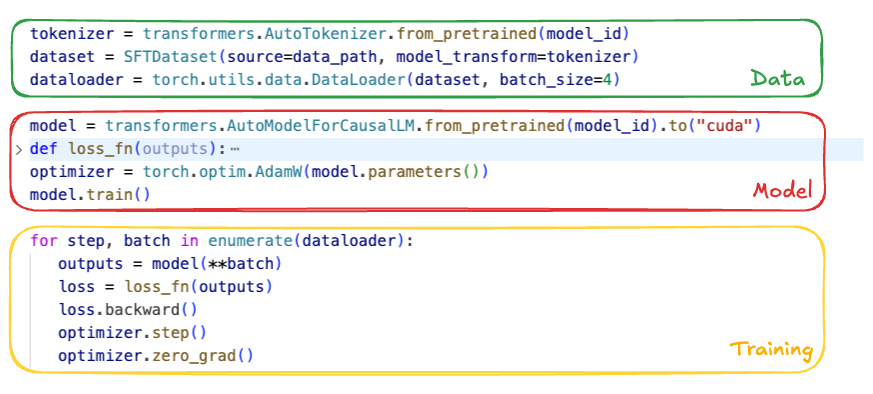
Post-training often starts deceptively simply: curate proprietary domain data, load an open-weight model from Hugging Face, and iterate batches through it. At the experimentation scale, that’s a few lines of code. But when fine-tuning production-grade LLMs at scale, the gap between “running a script” and “robust post-training” becomes an abyss of engineering edge cases.
Figure 1. Simple steps to post-train an open-weight model.
Getting the data right
On paper, post-training is straightforward: choose a tokenizer, preprocess the dataset, and build a dataloader. In practice, data preparation is where things break. High-quality post-training — instruction following, multi-turn dialogue, Chain-of-Thought — depends on precisely controlling which tokens contribute to the loss. Hugging Face chat templates serialize conversations, but don’t specify what to train on versus ignore. The pipeline must apply explicit loss masking so only assistant tokens are optimized; otherwise the model learns from prompts and other non-target text, degrading quality.
Variable sequence length is another pitfall. Padding within a batch can waste compute, and uneven shapes across FSDP workers can cause GPU synchronization overhead. A more GPU-efficient approach is to pack multiple samples into fixed-length sequences and use a “document mask” to prevent cross-attention across samples, reducing padding and keeping shapes consistent.
Setting up the model
Loading an open-source checkpoint sounds simple until the model no longer fits on one GPU. At that point you need a sharding strategy (e.g., FSDP, TP) and must load partial weights directly onto the device mesh to avoid ever materializing the full model on a single device.
After loading, you still need to make the model trainable: choose full fine-tuning vs. LoRA, and apply optimizations like activation checkpointing, compilation, and correct precision settings (often subtle for RL, where rollout and policy precision must align). Large vocabularies (>128k) add a further memory trap: logits are [batch, seq_len, vocab] and can spike peak memory. Common mitigations include dropping ignored tokens before projection and computing logits/loss in chunks along the sequence dimension.
Starting the training
Even with data and models ready, production training is not a simple “for loop”. The system must support everything from SFT’s forward/backward pass to on-policy RL workflows that interleave rollout generation, reward/reference inference, and policy updates.
At Netflix scale, training runs as a distributed job. We use Ray to orchestrate workflows via actors, decoupling modeling logic from hardware. Robust runs also require experiment tracking (model quality metrics like loss and efficiency metrics like MFU) and fault tolerance via standardized checkpoints to resume cleanly after failures.
These challenges motivate a post-training framework that lets developers focus on modeling rather than distributed systems and operational details.
The Netflix Post-Training Framework
We built Netflix’s LLM post-training framework so Netflix model developers can turn ideas like those in Figure 1 into scalable, robust training jobs. It addresses the engineering hurdles described above, and also constraints that are specific to the Netflix ecosystem. Existing tools (e.g., Thinking Machines’ Tinker) work well for standard chat and instruction-tuning, but their structure can limit deeper experimentation. In contrast, our internal use cases often require architectural variation (for example, customizing output projection heads for task-specific objectives), expanded or nonstandard vocabularies driven by semantic IDs or special tokens, and even transformer models pre-trained from scratch on domain-specific, non-natural-language sequences. Supporting this range requires a framework that prioritizes flexibility and extensibility over a fixed fine-tuning paradigm.
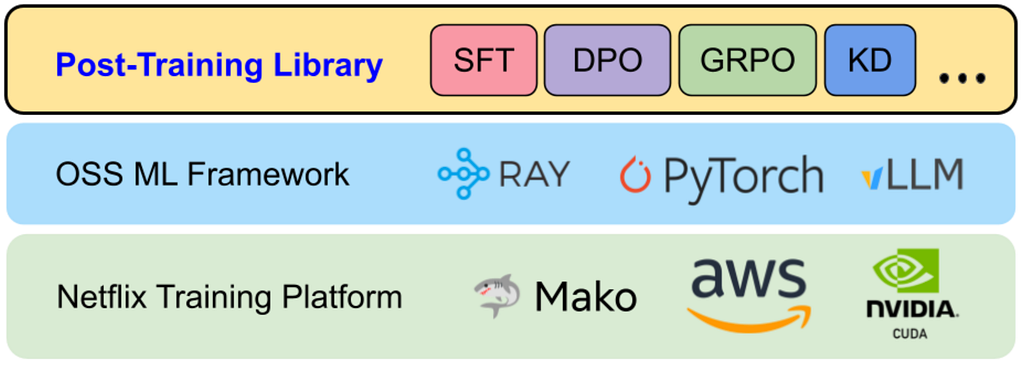
Figure 2. The post-training library within Netflix stack
Figure 2 shows the end-to-end stack from infrastructure to trained models. At the base is Mako, Netflix’s internal ML compute platform, which provisions GPUs on AWS. On top of Mako, we run robust open-source components — PyTorch, Ray, and vLLM — largely out of the box. Our post-training framework sits above these foundations as a library: it provides reusable utilities and standardized training recipes for common workflows such as Supervised Fine-Tuning (SFT), Direct Preference Optimization (DPO), Reinforcement Learning (RL), and Knowledge Distillation. Users typically express jobs as configuration files that select a recipe and plug in task-specific components.
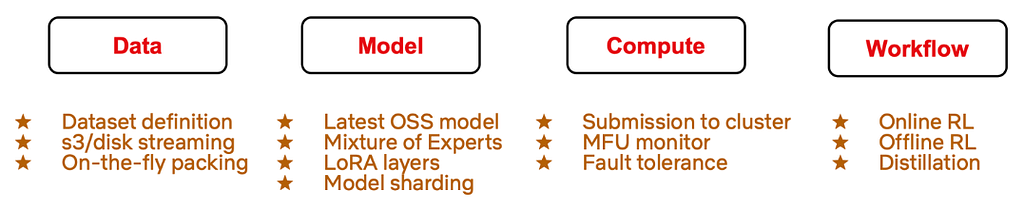
Figure 3. Main components developed for the post-training framework
Figure 3 summarizes the modular components we built to reduce complexity across four dimensions. As with most ML systems, training success hinges on three pillars — Data, Model, and Compute — and the rise of RL fine-tuning adds a fourth pillar: Workflow, to support multi-stage execution patterns that don’t fit a simple training loop. Below, we detail the specific abstractions and features the framework provides for each of these dimensions:
Data: Dataset abstractions for SFT, reward modeling, and RL; high-throughput streaming from cloud and disk for datasets that exceed local storage; and asynchronous, on-the-fly sequence packing to overlap CPU-heavy packing with GPU execution and reduce idle time.
Model: Support for modern architectures (e.g., Qwen3, Gemma3) and Mixture-of-Experts variants (e.g., Qwen3 MoE, GPT-OSS); LoRA integrated into model definitions; and high-level sharding APIs so developers can distribute large models across device meshes without writing low-level distributed code.
Compute: A unified job submission interface that scales from a single node to hundreds of GPUs; MFU (Model FLOPS Utilization) monitoring that remains accurate under custom architectures and LoRA; and comprehensive checkpointing (states of trained parameters, optimizer, dataloader, data mixer, etc.) to enable exact resumption after interruptions.
Workflow: Support for training paradigms beyond SFT, including complex online RL. In particular, we extend Single Program, Multiple Data (SPMD) style SFT workloads to run online RL with a hybrid single-controller + SPMD execution model, which we’ll describe next.
Today, this framework supports research use cases ranging from post-training large-scale foundation models to fine-tuning specialized expert models. By standardizing these workflows, we’ve lowered the barrier for teams to experiment with advanced techniques and iterate more quickly.
Learnings from Building the Post-Training Framework
Building a system of this scope wasn’t a linear implementation exercise. It meant tracking a fast-moving open-source ecosystem, chasing down failure modes that only appear under distributed load, and repeatedly revisiting architectural decisions as the post-training frontier shifted. Below are three engineering learnings and best practices that shaped the framework.
Scaling from SFT to RL
We initially designed the library around Supervised Fine-Tuning (SFT): relatively static data flow, a single training loop, and a Single Program, Multiple Data (SPMD) execution model. That assumption stopped holding in 2025. With DeepSeek-R1 and the broader adoption of efficient on-policy RL methods like GRPO, SFT became table stakes rather than the finish line. Staying close to the frontier required infrastructure that could move from “offline training loop” to “multi-stage, on-policy orchestration.”
SFT’s learning signal is dense and immediate: for each token position we compute logits over the full vocabulary and backpropagate a differentiable loss. Infrastructure-wise, this looks a lot like pre-training and maps cleanly to SPMD — every GPU worker runs the same step function over a different shard of data, synchronizing through Pytorch distributed primitives.
On-policy RL changes the shape of the system. The learning signal is typically sparse and delayed (e.g., a scalar reward at the end of an episode), and the training step depends on data generated by the current policy. Individual sub-stages — policy updates, rollout generation, reference model inference, reward model scoring — can each be implemented as SPMD workloads, but the end-to-end algorithm needs explicit coordination: you’re constantly handing off artifacts (prompts, sampled trajectories, rewards, advantages) across stages and synchronizing their lifecycle.
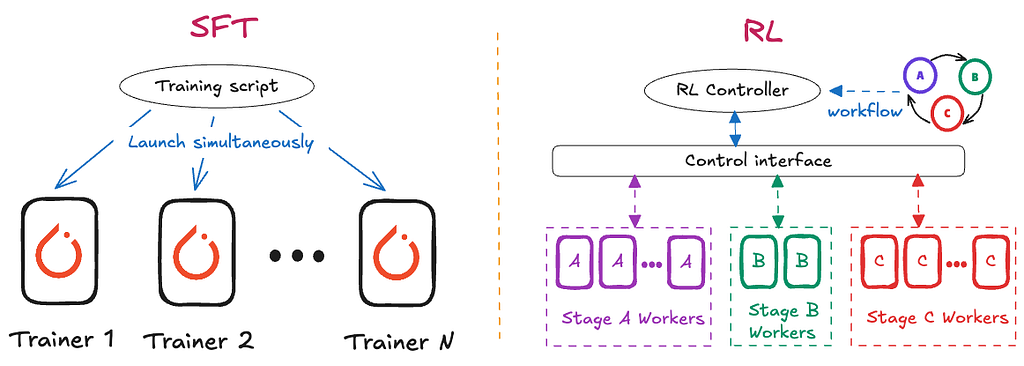
In our original SFT architecture, the driver node was intentionally “thin”: it launched N identical Ray actors, each encapsulating the full training loop, and scaling meant launching more identical workers. That model breaks down for RL. RL required us to decompose the system into distinct roles — Policy, Rollout Workers, Reward Model, Reference Model, etc. — and evolve the driver into an active controller that encodes the control plane: when to generate rollouts, how to batch and score them, when to trigger optimization, and how to manage cluster resources across phases.
Figure 4. Architectural differences of SFT and RL framework
Figure 4 highlights this shift. To add RL support without reinventing distributed orchestration from scratch, we integrated the core infrastructure from the open-source Verl library to manage Ray actor lifecycle and GPU resource allocation. Leveraging Verl’s backend let us focus on the “modeling surface area” — our Data/Model/Compute abstractions and internal optimizations — while keeping orchestration concerns decoupled. The result is a hybrid design: a unified user interface where developers can move between SFT and RL workflows without adopting an entirely different mental model or API set.
Hugging Face-Centric Experience
The Hugging Face Hub has effectively become the default distribution channel for open-weight LLMs, tokenizers, and configs. We designed the framework to stay close to that ecosystem rather than creating an isolated internal standard. Even when we use optimized internal model representations for speed, we load and save checkpoints in standard Hugging Face formats. This avoids “walled garden” friction and lets teams pull in new architectures, weights, and tokenizers quickly.
This philosophy also shaped our tokenizer story. Early on, we bound directly to low-level tokenization libraries (e.g., SentencePiece, tiktoken) to maximize control. In practice, that created a costly failure mode: silent training–serving skew. Our inference stack (vLLM) defaults to Hugging Face AutoTokenizer, and tiny differences in normalization, special token handling, or chat templating can yield different token boundaries — exactly the kind of mismatch that shows up later as inexplicable quality regressions. We fixed this by making Hugging Face AutoTokenizer the single source of truth. We then built a thin compatibility layer (BaseHFModelTokenizer) to handle post-training needs — setting padding tokens, injecting generation markers to support loss masking, and managing special tokens / semantic IDs — while ensuring the byte-level tokenization path matches production.
We do take a different approach for model implementations. Rather than training directly on transformers model classes, we maintain our own optimized, unified model definitions that can still load/save Hugging Face checkpoints. This layer is what enables framework-level optimizations — e.g., FlexAttention, memory-efficient chunked cross-entropy, consistent MFU accounting, and uniform LoRA extensibility — without re-implementing them separately for every model family. A unified module naming convention also makes it feasible to programmatically locate and swap components (Attention, MLP, output heads) across architectures, and provides a consistent surface for Tensor Parallelism and FSDP wrapping policies.
The trade-off is clear: supporting a new model family requires building a bridge between the Hugging Face reference implementation and our internal definition. To reduce that overhead, we use AI coding agents to automate much of the conversion work, with a strict logit verifier as the gate: given random inputs, our internal model must match the Hugging Face logits within tolerance. Because the acceptance criterion is mechanically checkable, agents can iterate autonomously until the implementation is correct, dramatically shortening the time-to-support for new architectures.
Today, this design means we can only train architectures we explicitly support — an intentional constraint shared by other high-performance systems like vLLM, SGLang, and torchtitan. To broaden coverage, we plan to add a fallback Hugging Face backend, similar to the compatibility patterns these projects use: users will be able to run training directly on native transformers models for rapid exploration of novel architectures, with the understanding that some framework optimizations and features may not apply in that mode.
Providing Differential Value
A post-training framework is only worth owning if it delivers clear value beyond assembling OSS components. We build on open source for velocity, but we invest heavily where off-the-shelf tools tend to be weakest: performance tuned to our workload characteristics, and integration with Netflix-specific model and business requirements. Here are some concrete examples:
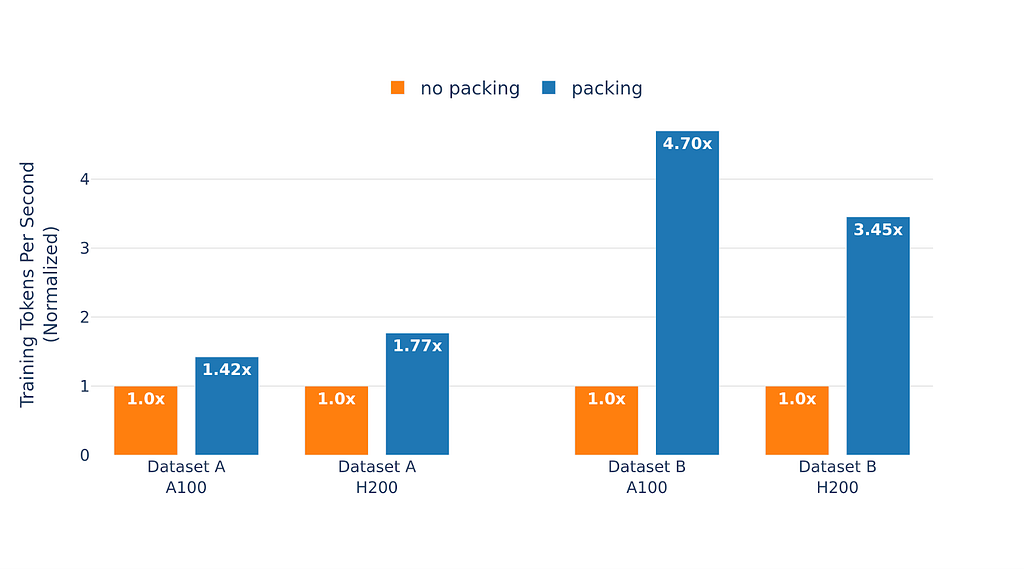
First, we optimize training efficiency for our real use cases. A representative example is extreme variance in sequence length. In FSDP-style training, long-tail sequences create stragglers: faster workers end up waiting at synchronization points for the slowest batch, lowering utilization. Standard bin-packing approaches help, but doing them offline at our data scale can add substantial preprocessing latency and make it harder to keep datasets fresh. Instead, we built on-the-fly sequence packing that streams samples from storage and dynamically packs them in memory. Packing runs asynchronously, overlapping CPU work with GPU compute. Figure 5 shows the impact: for our most skewed dataset, on-the-fly packing improved the effective token throughput by up to 4.7x.
Figure 5. Training throughput on two of our internal datasets on A100 and H200 GPUs
We also encountered subtler performance cliffs around vocabulary expansion. Our workloads frequently add custom tokens and semantic IDs. We found that certain vocabulary sizes could cause the language model head to fall back from a highly optimized cuBLAS kernel to a much slower CUTLASS path, tripling that layer’s execution time. The framework now automatically pads vocabulary sizes to multiples of 64 so the compiler selects the fast kernel, preserving throughput without requiring developers to know these low-level constraints.
Second, owning the framework lets us support “non-standard” transformer use cases that generic LLM tooling rarely targets. For example, some internal models are trained on member interaction event sequences rather than natural language, and may require bespoke RL loops that integrate with highly-customized inference engines and optimize business-defined metrics. These workflows demand custom environments, reward computation, and orchestration patterns — while still needing the same underlying guarantees around performance, tracking, and fault tolerance. The framework is built to accommodate these specialized requirements without fragmenting into one-off pipelines, enabling rapid iteration.
Wrap up
Building the Netflix Post-Training Framework has been a continual exercise in balancing standardization with specialization. By staying anchored to the open-source ecosystem, we’ve avoided drifting into a proprietary stack that diverges from where the community is moving. At the same time, by owning the core abstractions around Data, Model, Compute, and Workflow, we’ve preserved the freedom to optimize for Netflix-scale training and Netflix-specific requirements.
In the process, we’ve moved post-training from a loose collection of scripts into a managed, scalable system. Whether the goal is maximizing SFT throughput, orchestrating multi-stage on-policy RL, or training transformers over member interaction sequences, the framework provides a consistent set of primitives to do so reliably and efficiently. As the field shifts toward more agentic, reasoning-heavy, and multimodal architectures, this foundation will help us translate new ideas into scalable GenAI prototypes — so experimentation is constrained by our imagination, not by operational complexity.
Acknowledgements
This work builds on the momentum of the broader open-source ML community. We’re especially grateful to the teams and contributors behind Torchtune, Torchtitan, and Verl, whose reference implementations and design patterns informed many of our training framework choices — particularly around scalable training recipes, distributed execution, and RL-oriented orchestration. We also thank our partner teams in Netflix AI for Member Systems for close collaboration, feedback, and shared problem-solving throughout the development and rollout of the Post-Training Framework, and the Training Platform team for providing the robust infrastructure and operational foundation that makes large-scale post-training possible.
the process of shedding the old skin (in reptiles) or casting off the outer
cuticle (in insects and other arthropods).
How do you upgrade a network service, handling millions of requests per second around the globe, without disrupting even a single connection?
One of our solutions at Cloudflare to this massive challenge has long been ecdysis, a Rust library that implements graceful process restarts where no live connections are dropped, and no new connections are refused.
Last month, we open-sourced ecdysis, so now anyone can use it. After five years of production use at Cloudflare, ecdysis has proven itself by enabling zero-downtime upgrades across our critical Rust infrastructure, saving millions of requests with every restart across Cloudflare’s global network.
It’s hard to overstate the importance of getting these upgrades right, especially at the scale of Cloudflare’s network. Many of our services perform critical tasks such as traffic routing, TLS lifecycle management, or firewall rules enforcement, and must operate continuously. If one of these services goes down, even for an instant, the cascading impact can be catastrophic. Dropped connections and failed requests quickly lead to degraded customer performance and business impact.
When these services need updates, security patches can’t wait. Bug fixes need deployment and new features must roll out.
The naive approach involves waiting for the old process to be stopped before spinning up the new one, but this creates a window of time where connections are refused and requests are dropped. For a service handling thousands of requests per second in a single location, multiply that across hundreds of data centers, and a brief restart becomes millions of failed requests globally.
Let’s dig into the problem, and how ecdysis has been the solution for us — and maybe will be for you.
The naive approach to restarting a service, as we mentioned, is to stop the old process and start a new one. This works acceptably for simple services that don’t handle real-time requests, but for network services processing live connections, this approach has critical limitations.
First, the naive approach creates a window during which no process is listening for incoming connections. When the old process stops, it closes its listening sockets, which causes the OS to immediately refuse new connections with ECONNREFUSED. Even if the new process starts immediately, there will always be a gap where nothing is accepting connections, whether milliseconds or seconds. For a service handling thousands of requests per second, even a gap of 100ms means hundreds of dropped connections.
Second, stopping the old process kills all already-established connections. A client uploading a large file or streaming video gets abruptly disconnected. Long-lived connections like WebSockets or gRPC streams are terminated mid-operation. From the client’s perspective, the service simply vanishes.
Binding the new process before shutting down the old one appears to solve this, but also introduces additional issues. The kernel normally allows only one process to bind to an address:port combination, but the SO_REUSEPORT socket option permits multiple binds. However, this creates a problem during process transitions that makes it unsuitable for graceful restarts.
When SO_REUSEPORT is used, the kernel creates separate listening sockets for each process and load balances new connections across these sockets. When the initial SYN packet for a connection is received, the kernel will assign it to one of the listening processes. Once the initial handshake is completed, the connection then sits in the accept() queue of the process until the process accepts it. If the process then exits before accepting this connection, it becomes orphaned and is terminated by the kernel. GitHub’s engineering team documented this issue extensively when building their GLB Director load balancer.
How ecdysis works
When we set out to design and build ecdysis, we identified four key goals for the library:
Old code can be completely shut down post-upgrade.
The new process has a grace period for initialization.
New code crashing during initialization is acceptable and shouldn’t affect the running service.
Only a single upgrade runs in parallel to avoid cascading failures.
ecdysis satisfies these requirements following an approach pioneered by NGINX, which has supported graceful upgrades since its early days. The approach is straightforward:
The parent process fork()s a new child process.
The child process replaces itself with a new version of the code with execve().
The child process inherits the socket file descriptors via a named pipe shared with the parent.
The parent process waits for the child process to signal readiness before shutting down.
Crucially, the socket remains open throughout the transition. The child process inherits the listening socket from the parent as a file descriptor shared via a named pipe. During the child’s initialization, both processes share the same underlying kernel data structure, allowing the parent to continue accepting and processing new and existing connections. Once the child completes initialization, it notifies the parent and begins accepting connections. Upon receiving this ready notification, the parent immediately closes its copy of the listening socket and continues handling only existing connections.
This process eliminates coverage gaps while providing the child a safe initialization window. There is a brief window of time when both the parent and child may accept connections concurrently. This is intentional; any connections accepted by the parent are simply handled until completion as part of the draining process.
This model also provides the required crash safety. If the child process fails during initialization (e.g., due to a configuration error), it simply exits. Since the parent never stopped listening, no connections are dropped, and the upgrade can be retried once the problem is fixed.
ecdysis implements the forking model with first-class support for asynchronous programming throughTokio and systemd integration:
Tokio integration: Native async stream wrappers for Tokio. Inherited sockets become listeners without additional glue code. For synchronous services, ecdysis supports operation without async runtime requirements.
systemd-notify support: When the systemd_notify feature is enabled, ecdysis automatically integrates with systemd’s process lifecycle notifications. Setting Type=notify-reload in your service unit file allows systemd to track upgrades correctly.
systemd named sockets: The systemd_sockets feature enables ecdysis to manage systemd-activated sockets. Your service can be socket-activated and support graceful restarts simultaneously.
Platform note: ecdysis relies on Unix-specific syscalls for socket inheritance and process management. It does not work on Windows. This is a fundamental limitation of the forking approach.
Security considerations
Graceful restarts introduce security considerations. The forking model creates a brief window where two process generations coexist, both with access to the same listening sockets and potentially sensitive file descriptors.
ecdysis addresses these concerns through its design:
Fork-then-exec: ecdysis follows the traditional Unix pattern of fork() followed immediately by execve(). This ensures the child process starts with a clean slate: new address space, fresh code, and no inherited memory. Only explicitly-passed file descriptors cross the boundary.
Explicit inheritance: Only listening sockets and communication pipes are inherited. Other file descriptors are closed via CLOEXEC flags. This prevents accidental leakage of sensitive handles.
seccomp compatibility: Services using seccomp filters must allow fork() and execve(). This is a tradeoff: graceful restarts require these syscalls, so they cannot be blocked.
For most network services, these tradeoffs are acceptable. The security of the fork-exec model is well understood and has been battle-tested for decades in software like NGINX and Apache.
Code example
Let’s look at a practical example. Here’s a simplified TCP echo server that supports graceful restarts:
use ecdysis::tokio_ecdysis::{SignalKind, StopOnShutdown, TokioEcdysisBuilder};
use tokio::{net::TcpStream, task::JoinSet};
use futures::StreamExt;
use std::net::SocketAddr;

#[tokio::main]
async fn main() {
    // Create the ecdysis builder
    let mut ecdysis_builder = TokioEcdysisBuilder::new(
        SignalKind::hangup()  // Trigger upgrade/reload on SIGHUP
    ).unwrap();

    // Trigger stop on SIGUSR1
    ecdysis_builder
        .stop_on_signal(SignalKind::user_defined1())
        .unwrap();

    // Create listening socket - will be inherited by children
    let addr: SocketAddr = "0.0.0.0:8080".parse().unwrap();
    let stream = ecdysis_builder
        .build_listen_tcp(StopOnShutdown::Yes, addr, |builder, addr| {
            builder.set_reuse_address(true)?;
            builder.bind(&addr.into())?;
            builder.listen(128)?;
            Ok(builder.into())
        })
        .unwrap();

    // Spawn task to handle connections
    let server_handle = tokio::spawn(async move {
        let mut stream = stream;
        let mut set = JoinSet::new();
        while let Some(Ok(socket)) = stream.next().await {
            set.spawn(handle_connection(socket));
        }
        set.join_all().await;
    });

    // Signal readiness and wait for shutdown
    let (_ecdysis, shutdown_fut) = ecdysis_builder.ready().unwrap();
    let shutdown_reason = shutdown_fut.await;

    log::info!("Shutting down: {:?}", shutdown_reason);

    // Gracefully drain connections
    server_handle.await.unwrap();
}

async fn handle_connection(mut socket: TcpStream) {
    // Echo connection logic here
}
The key points:
build_listen_tcp creates a listener that will be inherited by child processes.
ready() signals to the parent process that initialization is complete and that it can safely exit.
shutdown_fut.await blocks until an upgrade or stop is requested. This future only yields once the process should be shut down, either because an upgrade/reload was executed successfully or because a shutdown signal was received.
When you send SIGHUP to this process, here’s what ecdysis does…
…on the parent process:
Forks and execs a new instance of your binary.
Passes the listening socket to the child.
Waits for the child to call ready().
Drains existing connections, then exits.
…on the child process:
Initializes itself following the same execution flow as the parent, except any sockets owned by ecdysis are inherited and not bound by the child.
Signals readiness to the parent by calling ready().
Blocks waiting for a shutdown or upgrade signal.
Production at scale
ecdysis has been running in production at Cloudflare since 2021. It powers critical Rust infrastructure services deployed across 330+ data centers in 120+ countries. These services handle billions of requests per day and require frequent updates for security patches, feature releases, and configuration changes.
Every restart using ecdysis saves hundreds of thousands of requests that would otherwise be dropped during a naive stop/start cycle. Across our global footprint, this translates to millions of preserved connections and improved reliability for customers.
ecdysis vs alternatives
Graceful restart libraries exist for several ecosystems. Understanding when to use ecdysis versus alternatives is critical to choosing the right tool.
tableflip is our Go library that inspired ecdysis. It implements the same fork-and-inherit model for Go services. If you need Go, tableflip is a great option!
shellflip is Cloudflare’s other Rust graceful restart library, designed specifically for Oxy, our Rust-based proxy. shellflip is more opinionated: it assumes systemd and Tokio, and focuses on transferring arbitrary application state between parent and child. This makes it excellent for complex stateful services, or services that want to apply such aggressive sandboxing that they can’t even open their own sockets, but adds overhead for simpler cases.
Start building
ecdysis brings five years of production-hardened graceful restart capabilities to the Rust ecosystem. It’s the same technology protecting millions of connections across Cloudflare’s global network, now open-sourced and available for anyone!
Full documentation is available at docs.rs/ecdysis, including API reference, examples for common use cases, and steps for integrating with systemd.
The examples directory in the repository contains working code demonstrating TCP listeners, Unix socket listeners, and systemd integration.
The library is actively maintained by the Argo Smart Routing & Orpheus team, with contributions from teams across Cloudflare. We welcome contributions, bug reports, and feature requests on GitHub.
Whether you’re building a high-performance proxy, a long-lived API server, or any network service where uptime matters, ecdysis can provide a foundation for zero-downtime operations.
To provide the best experiences, we use technologies like cookies to store and/or access device information. Consenting to these technologies will allow us to process data such as browsing behavior or unique IDs on this site. Not consenting or withdrawing consent, may adversely affect certain features and functions.
Functional
Always active
The technical storage or access is strictly necessary for the legitimate purpose of enabling the use of a specific service explicitly requested by the subscriber or user, or for the sole purpose of carrying out the transmission of a communication over an electronic communications network.
Preferences
The technical storage or access is necessary for the legitimate purpose of storing preferences that are not requested by the subscriber or user.
Statistics
The technical storage or access that is used exclusively for statistical purposes.The technical storage or access that is used exclusively for anonymous statistical purposes. Without a subpoena, voluntary compliance on the part of your Internet Service Provider, or additional records from a third party, information stored or retrieved for this purpose alone cannot usually be used to identify you.
Marketing
The technical storage or access is required to create user profiles to send advertising, or to track the user on a website or across several websites for similar marketing purposes.

 Емилия Милчева
 Павлина Върбанова
 Дарина Сарелска
 Йоанна Елми
 Анахит Хачикян