Post Syndicated from BeardedTinker original https://www.youtube.com/watch?v=LalrpNAiz3s
Седмицата (21–26 октомври)
Post Syndicated from Надежда Радулова original https://www.toest.bg/sedmitsata-21-26-oktomvri/

В ден като днешния има риск почти всичко, което бих могла да напиша тук, да се приеме като агитация в полза на тази или онази политическа формация. Или пък като очерняне. Затова и няма да споменавам нищо за взривоопасни документални филми, за образователни деятелки/кукловодки, за високотехнологични печатници на банкноти или за люти битки в последната минута между соколи и други едри хищни и хвъркати екземпляри, пък били те пойни…
Вместо това предлагам за миг да си спомним за големия Франк Запа (аз лично винаги го слушам по време на избори) – композитор, китарист, пърформър, импровизатор, експериментатор, сатирик, но и… страстен радетел на свободния вот. От 1971 г. във всеки свой албум той включва призива Register to Vote. С помощта на Лигата на гласуващите жени Запа за първи път урежда места за регистрация на гласоподаватели в залите, където прави концерти.
Нищо не ги плаши повече от възможността да бъдат издухани чрез нашите гласове. Урната с бюлетините продължава да бъде сериозно оръжие, стига да накараш хората да го използват, това е,
казва Запа. Това е – ви казвам и аз и бързо продължавам към съдържанието, което ви предлагаме в тази седмица, нагорещена от предизборни страсти и разпищолени вируси.
Има ли зависимост между нарастващите права на ЛГБТИ хората и спада в раждаемостта? Въпрос, който се оказва особено спекулативен, защото – ще си речете – не е лишен от смисъл… Да, ама не, както казваше забележителният Петко Бочаров. Статистическите данни не сочат нищо такова. И за да се убедите, прочетете анализа на Александър Драганов „Джендърът и раждаемостта – фалшивата връзка“.
Тази седмица отново сме в Украйна с Николета Атанасова. На пръв поглед сме като на екскурзия – разхождаме се из красивия Лвов, почти незасегнат от войната. Зяпаме старите сгради и църкви, пием кафета и коктейли с местните… И така, докато Николета не ни среща с един военен лекар и спомените му от фронта отново ни разказват играта. Особено в момент, в който съдбата на Украйна сякаш се разиграва на руска рулетка, само дето, за голямо съжаление, рулетката вече не е само руска. „Това е войната“!
Връщаме се на домашен терен с разговор на Надежда Цекулова с управителя на НЗОК Станимир Михайлов. Има ли опити за политически намеси в дейността на Касата? Разбира се, че да. Така че борбата е за възстановяване и гарантиране на независимостта на ребуса НЗОК. Има и едно изречение в края на интервюто, което, струва ми се, трябва да е изписано със светещи букви във всяко звено, администриращо здравеопазването: „Когато става въпрос за лечение, времето е лукс.“
Часове преди изборите Емилия Милчева фокусира вниманието ни върху постепенното превръщане на представителната демокрация в България в непредставителна благодарение на ниската избирателна активност, която пък е логична последица от трайното обвързване на олигархични структури с управлението на страната. Какво ни чака след изборите, пита Емилия, докато анализира „Технологията на властта и нейните механици“. И дали предстоящите „сглобки“ ще осигурят достатъчно стабилна конструкция, или ще ни докарат поредния безкраен парламентарен хелоуин… Предстои да видим.
Предложенията на Зорница Христова за този месец са две прекрасни книги, които, за щастие, получаваме в хубав превод на български – „Фердидурке“ на модерния класик Витолд Гомбрович и „За разлика от слоновете“ на голямата немска писателка Дагмар Лойполд. Така че да не губим надежда – рубриката „По буквите“ винаги предлага „листи“ с имена, зад които си струва да застанем с читателския си избор.
Завършваме месеца със стихотворението „Мост“ на Силвия. В него ни плисват тревожни пръски от реката, която се люлее цял живот под краката ни; реката, която стига до коленете на някои, други пък завлича в дълбините си.
Някой нагълтал вода
Някой се дави
А никой не реагира
Така завършва стихотворението на Силвия Чолева. А утре е ден, в който да слезем от високите си мостове, да нагазим в реката и да реагираме.
Приятно четене и не забравяйте – има и избори, които не приключват в неделя. Всеки ден само и единствено вие избирате дали да ни има.
Micas Networks Broadcom Tomahawk 5 CPO Switch Shown
Post Syndicated from Rohit Kumar original https://www.servethehome.com/micas-networks-broadcom-tomahawk-5-cpo-switch-shown/
At OCP Summit 2024, Micas Networks showed off a Broadcom Tomahawk 5 co-packaged optics switch running traffic on the show floor
The post Micas Networks Broadcom Tomahawk 5 CPO Switch Shown appeared first on ServeTheHome.
The Plane Landed Itself.
Post Syndicated from The History Guy: History Deserves to Be Remembered original https://www.youtube.com/watch?v=n6nqfwDP4is
Comic for 2024.10.26 – Quite The Artist
Post Syndicated from Explosm.net original https://explosm.net/comics/quite-the-artist
New Cyanide and Happiness Comic
[$] OSI readies controversial Open AI definition
Post Syndicated from jzb original https://lwn.net/Articles/995159/
The Open Source Initiative
(OSI) has been working on defining Open Source AI—that is what
constitutes an AI system that can be used, studied, modified, and
shared for any purpose—for almost two
years. Its board will
be voting on the Open Source AI Definition (OSAID) on Sunday,
October 27, with the 1.0 version slated to be published on
October 28. It is never possible to please everyone in
such an endeavor, and it would be folly to make that a goal. However,
a number of prominent figures in the open-source community have voiced
concerns that OSI is setting the bar too low with the OSAID—which
will undo decades of community work to cajole vendors into adhering to
or respecting the original Open Source
Definition (OSD).
Friday Squid Blogging: Giant Squid Found on Spanish Beach
Post Syndicated from Bruce Schneier original https://www.schneier.com/blog/archives/2024/10/friday-squid-blogging-giant-squid-found-on-spanish-beach.html
A giant squid has washed up on a beach in Northern Spain.
How to mitigate bot traffic by implementing Challenge actions in your AWS WAF custom rules
Post Syndicated from Javier Sanchez Navarro original https://aws.amazon.com/blogs/security/how-to-mitigate-bot-traffic-by-implementing-challenge-actions-in-your-aws-waf-custom-rules/
If you are new to AWS WAF and are interested in learning how to mitigate bot traffic by implementing Challenge actions in your AWS WAF custom rules, here is a basic, cost-effective way of using this action to help you reduce the impact of bot traffic in your applications. We also cover the basics of using the Bot Control feature to implement Challenge actions as a more sophisticated and robust option for an additional cost.
AWS WAF is a web application firewall that helps you protect against common web exploits and bots that can affect availability, compromise security, or consume excessive resources. In AWS WAF, you can create web access control lists (ACLs) that you can set with managed or custom rules. There are five possible actions you can define to take when the rules are triggered: Allow, Count, Block, CAPTCHA, or Challenge. The Challenge action, which we focus on in this post, is useful for detecting requests from automated tools without affecting the user experience.
Why is it important to mitigate bot traffic?
In cybersecurity, we typically use the term bot to describe a range of tools that allow the automation or simulation of HTTP requests. These bots can be legitimate (such as search engine crawlers that index your app or site) or malicious (tools that are used to automate unwanted requests), but both types have the potential to impact your app availability and performance. By properly handling bot traffic, you can reduce this impact, which can help you optimize costs and improve the stability of your infrastructure and the availability of your business.
Before starting
If you’ve never used AWS WAF before, we recommend that you read Getting started with AWS WAF to learn the basics of how to set up this service.
How does the Challenge action work, and what are the benefits?
When a request matches your rule that contains a Challenge action, the HTTP client is presented with a challenge, which most web browsers or non-automated clients are able to process. After solving that challenge, the client receives a token that will be included in subsequent requests—that’s how AWS WAF considers the request to be non-automated and permits access. Using a Challenge action adds a protection layer because bots and other automated tools typically can’t process the challenge as a legitimate web browser would.
A more effective mechanism against bots is to present a CAPTCHA action, in which the user must solve a puzzle. However, this action affects the user experience because it requires human interaction, and it typically involves higher costs than the Challenge option. Challenge actions, which consist of a JavaScript function that most web browsers can support and process in the background, are a great first step to monitor web requests because they don’t affect the user experience directly and are more economic than CAPTCHA.
Implementation options
In this blog post, we discuss two options for you to start handling the traffic from bots. Although the focus of this post is implementing the Challenge action through a custom rule (a rule you can create and set yourself), we’ve also included basic instructions for implementing the Challenge action through Bot Control, which allows you to directly use client application integration for more sophisticated detections.
Option 1: Implementing the Challenge action through a custom rule
The first step in setting up a custom rule with the Challenge option is to understand and define clearly what the expected normal behaviors are from users who access your app. Specifically, you need to know the expected number of requests in a given period of time from a single IP and the maximum time length of a typical session.
How do I define the normal rate of requests?
Both the maximum session length and the rate of requests expected will vary depending on each webpage or app, and this information needs to come from the business and application teams. When a user browses a page, they might trigger several requests (for example, the user will trigger a separate request for each image the page contains). You can use this information to estimate and define how many requests per IP a valid user can generate in a given time.
Additionally, you can enable web ACL logging, which will allow you to query logs from Amazon CloudWatch Logs Insights. From these logs, you can get an understanding of the current behaviors and trends in your web traffic and compare that with the expected behavior that you defined.
What parameters should I use to trigger the challenge?
- Implementing challenges based on the headers in the request or the user-agent isn’t a good idea. Although you can act based on either of these fields for valid crawlers like those used by search engines, malicious bots might evolve and tamper with these fields as their creators notice they are being stopped.
- Filtering by static IP won’t always work. Only valid crawlers tend to use the same IP range over time and malicious bots often change IP ranges.
- Filtering by path might be a good option. If there are parts of your app that shouldn’t be indexed or crawled, you can declare that in your
robots.txtfile. Bots that disregard these directives can be considered suspicious, and you can present them with the challenge. However, this approach isn’t always good enough: A bot might be set to respect the directives. - A rate-limit rule is an effective option for triggering your challenge when you’re attempting to handle malicious bots. You can define the normal rate of requests that you expect valid users to make as described earlier in this section. Users that go over that rate will be presented with the challenge. You should set this rule as the top priority in order for it to be more efficient.
To create and set the rate-limit rule
- Open the AWS WAF & Shield console, choose Web ACLs, and then choose the web ACL to which you will add the rule.

Figure 1: AWS WAF web ACLs
- On the Web ACL page, choose the Rules tab.
- In the Add rules drop-down list, choose Add my own rules and rule groups. If you already have your rate-based custom rule in place, select the checkbox to the left of the rule, and then choose Edit.
Figure 2: Add your own rules and rule groups
- For Rule type, choose Rule builder. For Rule, enter a name for your rule. For Type, choose Rate-based rule.
Figure 3: Start the rule builder
- Under Rate-limiting criteria, set the rate limit and define the evaluation window, which is customizable.
- For Request aggregation, choose Source IP address. For Scope of inspection and rate limiting, choose Consider all requests.
Figure 4: Set the rate-limiting criteria
- For Action, choose Challenge.
- For Immunity time (which specifies how long a Challenge token is valid before a new one is needed), choose a value according to the maximum time a normal session could last.
When you set a challenge through custom rules and the token expires, subsequent requests will include an invalid cookie and will therefore be rejected until a new session is started. For example, if a normal session’s maximum duration is 5 minutes, you can leave immunity set to the default, but if the maximum duration can be longer (as in an online shop), then you will need to increase the immunity time according to your use case. (Note that SDK application integration, which we cover in the next section, takes care of presenting a new token if the current one expires, without impacting human users.)
Figure 5: Set the action to Challenge
- Choose Add rule.
- Set the rule priority by selecting the rule and moving it up in the list. Note that we’re considering a scenario where you set a web ACL for a single account. In this case, remember to place the rate-limiting rule at the top of the list, so that you prevent undesired traffic from triggering additional rules. This is even more important if you have paid rules later in the list.
Figure 6: Set the rule priority


Option 2: Implementing the Challenge action by using Bot Control
Implementing Challenge actions through the Bot Control feature in AWS WAF is an easier, more robust and flexible solution than using a custom rule. However, it has extra costs associated that you should be aware of and evaluate.
Bot Control is a managed rules group that provides improved visibility and automated detection and mitigation mechanisms for bots. You are charged differently depending on the tier of Bot Control you use (Common or Targeted). The Common tier detects a variety of self-identifying bots by using static request data analysis. The Targeted tier adds active analysis of client blueprints and behavior as well as machine learning, and is capable of detection and mitigation of more sophisticated agents. You can read more about the Bot Control protection levels in the documentation.
Some of the main features of Bot Control include the following:
- The availability of specific metrics for bot categories, giving you more granularity and improved visibility.
- The ability to automatically identify bots based on known patterns and behaviors, such as user-agent, path, or behavior. (For more details, see the Bot Control documentation.)
- The ability to be set through a managed rule.
- The option to set client application integration through the AWS SDK, by providing you with a code snippet you can add to your code for improved efficiency and transparency. (For more details, see Why you should use the application integration SDKs with Bot Control.)
An in-depth explanation of how to use Bot Control is beyond the scope of this post, but we provide instructions on how to enable it here. For further recommendations, see the AWS WAF Bot Control main page and the topics in the AWS WAF Developer Guide.
To enable Bot Control and configure the rule
- Open the WAF & Shield console, choose Web ACLs, and choose the web ACL you want Bot Control enabled on.
- On the Rules tab, in the Add rules drop-down list, instead of adding your own rules, choose Add managed rule groups.
Figure 7: Add managed rule groups to your web ACL
- On the Add managed rule groups page, expand the first option, AWS managed rule groups, and scroll down to find Bot Control. Then select the Add to web ACL toggle button to enable Bot Control.
Figure 8: Enable the Bot Control rule group
- You will need to customize the configuration. To do so, choose Edit.
- First, choose the level of inspection you want to use. Common detects a variety of self-identifying bots, but, in this example, we chose Targeted because it adds advanced detection for sophisticated bots by using machine learning and allows the challenge application integration that we mentioned earlier.
- Choose the scope of inspection. You can keep the scope set to Inspect all web requests or choose to use scope-down statements if you want a more granular filtering.
- Choose the action on a per-bot category basis or choose a single action for all the categories. In this example, we used the same settings for the Challenge action for all the categories.
Figure 9: Set Bot Control actions
- Similar to the recommendations for Option 1 earlier in this post, we recommend that you define your use cases and how you want to handle each bot category in the Common section and each rule in the Targeted The settings need to be aligned with your business needs, with the understanding that your needs can change over time. The settings you choose might also be specific to each application—for example, in the case of search engine bots, you need to consider the impact of blocking or mitigating them on your search engine optimization (SEO) and find a balance with app performance.
Figure 10: Targeted rules
- Choose Save rule and then choose Add rules.
- On the Set rule priority page, set the rule priority by selecting the rule and moving it up or down in the list. Make sure you set the Bot Control managed rule group (AWS-AWSManagedRulesBotControlRuleSet) to be lower in priority than the free rules (both custom and managed). Because Bot Control rules pricing is based on the number of requests processed and the number of CAPTCHA or Challenge actions presented, putting Bot Control rules at the bottom of the list helps you to optimize your costs.
- You can now integrate the challenge into your application by using the SDK. For more information, see AWS WAF client application integration.


Next steps
As your cloud infrastructure grows, you need to start managing your protection at scale and centrally. AWS Firewall Manager provides you with a single place to centrally configure, manage, and monitor your AWS WAF firewall, AWS Shield Advanced protections, Amazon Virtual Private Cloud (Amazon VPC) security groups, VPC network ACLs, AWS Network Firewall instances, and Amazon Route 53 Resolver DNS Firewall rules across multiple AWS accounts and resources.
For more information, see the Security Blog posts Centrally manage AWS WAF and AWS Managed Rules at scale with Firewall Manager and How to enforce a security baseline for an AWS WAF ACL across your organization using AWS Firewall Manager.
Conclusion
In this post, we reviewed how you can mitigate bot traffic by implementing Challenge actions. By implementing this action type through a custom rule, you can set up basic, cost-effective measures to handle basic bots and control automated traffic to your applications. As your business grows, you can achieve higher efficiency and better protection against more sophisticated bots by enabling Bot Control rules, which use machine learning for advanced detection. To learn more about these topics, see the following links.
Recommended reading
- How the AWS WAF CAPTCHA and Challenge rule actions work
- CAPTCHA and Challenge in AWS WAF
- Comparison of options for challenges and token acquisition
- Best practices for using the CAPTCHA and Challenge actions
- Use AWS WAF CAPTCHA to protect your application against common bot traffic
If you have feedback about this post, submit comments in the Comments section below. If you have questions about this post, contact AWS Support.
[$] Kernel optimization with BOLT
Post Syndicated from jake original https://lwn.net/Articles/993828/
A pair of talks in the toolchains
track at the 2024 Linux
Plumbers Conference covered different tools that can be used to
optimize the kernel. First up was Maksim Panchenko to describe the binary
optimization and layout tool (BOLT) that Meta uses on its production
kernels. It optimizes the kernel binary by rearranging it to improve its
code locality for
better performance. A subsequent article will cover the second talk, which
looked at automatic
feedback-directed optimization (AutoFDO) and other related techniques
that are used to optimize Google’s kernels.
Metasploit Weekly Wrap-Up 10/25/2024
Post Syndicated from Brendan Watters original https://blog.rapid7.com/2024/10/25/metasploit-weekly-wrap-up-10-25-2024/
Hackers and Vampires Agree: Every Byte Counts
Headlining the release today is a new exploit module by jheysel-r7 that chains two vulnerabilities to target Magento/Adobe Commerce systems: the first, CVE-2024-34102 is an arbitrary file read used to determine the version and layout of the glibc library, and the second, CVE-2024-2961 is a single-byte buffer overflow, and it is impressive what can be done with a single byte. By creating an intricate heap layout though specific memory allocation calls in php, an attacker can groom the heap contents in such a way that they can use the single-byte overflow to change a flag in the custom_heap structure, which then results in a system call containing arbitrary data.
New module content (1)
CosmicSting: Magento Arbitrary File Read (CVE-2024-34102) + PHP Buffer Overflow in the iconv() function of glibc (CVE-2024-2961)
Authors: Charles Fol, Heyder, Sergey Temnikov, and jheysel-r7
Type: Exploit
Pull request: #19544 contributed by jheysel-r7
Path: linux/http/magento_xxe_to_glibc_buf_overflow
AttackerKB reference: CVE-2024-34102
Description: Adds a new module exploit/linux/http/magento_xxe_to_glibc_buf_overflow which uses a combination of an Arbitrary File Read (CVE-2024-34102) and a Buffer Overflow in glibc (CVE-2024-2961) to gain unauthenticated Remote Code Execution on multiple versions of Magento and Adobe Commerce, including versions less than 2.4.6-p5.
Enhancements and features (2)
- #19536 from GhostlyBox – Updated the
post/windows/gather/enum_unattend.rbmodule to now include checks for ‘.vmimport’ files which may have been created by the AWS EC2 VMIE service which will contain cleartext credentials. - #19567 from bcoles – Adds default vendor passwords for common single-board computers (SBCs) to wordlists.
Bugs fixed (4)
- #19571 from sjanusz-r7 – Fixes an issue that stopped users from using navigational arrow keys in msfconsole on newer Windows 11 installs.
- #19572 from cdelafuente-r7 – Fixes an issue in the
UPDATEaction ofadmin/ldap/ad_cs_cert_template. - #19576 from adfoster-r7 – Fixes crash when importing a Metasploit xml file with Ruby 3.2 and above.
- #19577 from adfoster-r7 – Fixes a crash when running the
shellcommand with a Meterpreter session.
Documentation
You can find the latest Metasploit documentation on our docsite at docs.metasploit.com.
Get it
As always, you can update to the latest Metasploit Framework with msfupdate
and you can get more details on the changes since the last blog post from
GitHub:
If you are a git user, you can clone the Metasploit Framework repo (master branch) for the latest.
To install fresh without using git, you can use the open-source-only Nightly Installers or the
commercial edition Metasploit Pro
Comic for 2024.10.25 – Serving Your Country
Post Syndicated from Explosm.net original https://explosm.net/comics/serving-your-country
New Cyanide and Happiness Comic
Award-winning artist JoJo sat down with us to chat about her new memoir
Post Syndicated from Talks at Google original https://www.youtube.com/watch?v=9L92S_5Zsb0
Analyze Amazon EMR on Amazon EC2 cluster usage with Amazon Athena and Amazon QuickSight
Post Syndicated from Boon Lee Eu original https://aws.amazon.com/blogs/big-data/analyze-amazon-emr-on-amazon-ec2-cluster-usage-with-amazon-athena-and-amazon-quicksight/
Gaining granular visibility into application-level costs on Amazon EMR on Amazon Elastic Compute Cloud (Amazon EC2) clusters presents an opportunity for customers looking for ways to further optimize resource utilization and implement fair cost allocation and chargeback models. By breaking down the usage of individual applications running in your EMR cluster, you can unlock several benefits:
- Informed workload management – Application-level cost insights empower organizations to prioritize and schedule workloads effectively. Resource allocation decisions can be made with a better understanding of cost implications, potentially improving overall cluster performance and cost-efficiency.
- Cost optimization – With granular cost attribution, organizations can identify cost-saving opportunities for individual applications. They can right-size underutilized resources or prioritize optimization efforts for applications that are driving high usage and costs.
- Transparent billing – In multi-tenant environments, organizations can implement fair and transparent cost allocation models based on individual application resource consumption and associated costs. This fosters accountability and enables accurate chargebacks to tenants.
In this post, we guide you through deploying a comprehensive solution in your Amazon Web Services (AWS) environment to analyze Amazon EMR on EC2 cluster usage. By using this solution, you will gain a deep understanding of resource consumption and associated costs of individual applications running on your EMR cluster. This will help you optimize costs, implement fair billing practices, and make informed decisions about workload management, ultimately enhancing the overall efficiency and cost-effectiveness of your Amazon EMR environment. This solution has been only tested on Spark workloads running on EMR on EC2 that uses YARN as its resource manager. It hasn’t been tested on workloads from other frameworks that run on YARN, such as HIVE or TEZ.
Solution overview
The solution works by running a Python script on the EMR cluster’s primary node to collect metrics from the YARN resource manager and correlate them with cost usage details from the AWS Cost and Usage Reports (AWS CUR). The script activated by a cronjob makes HTTP requests to the YARN resource manager to collect two types of metrics from paths /ws/v1/cluster/metrics for cluster metrics and /ws/v1/cluster/apps for application metrics. The cluster metrics contain utilization information of cluster resources, and the application metrics contain utilization information of an application or job. These metrics are stored in an Amazon Simple Storage Service (Amazon S3) bucket.
There are two YARN metrics that capture the resource utilization information of an application or job.
- memorySeconds – This is the memory (in MB) allocated to an application times the number of seconds the application ran
- vcoreSeconds – This is the number of YARN vcores allocated to an application times the number of seconds application ran
The solution uses memorySeconds to derive the cost of running the application or job. It can be modified to use vcoreSeconds instead if necessary.
The metadata of the YARN metrics collected in Amazon S3 is created, stored, and represented as database and tables in AWS Glue Data Catalog, which is in turn available to Amazon Athena for further processing. You can now write SQL queries in Athena to correlate the YARN metrics with the cost usage information from AWS CUR to derive the detailed cost breakdown of your EMR cluster by infrastructure and application. This solution creates two corresponding Athena views of the respective cost breakdown that will become the data source to Amazon QuickSight for visualization.
The following diagram shows the solution architecture.

Prerequisites
To perform the solution, you need the following prerequisites:
- Confirm that a CUR is created in your AWS account. It needs an S3 bucket to store the report files. Follow the steps described in Creating Cost and Usage Reports to create the CUR on the AWS Management Console. When creating the report, make sure the following settings are enabled:
-
- Include resource IDs
- Time granularity is set to hourly
- Report data integration to Athena
It can take up to 24 hours for AWS to start delivering reports to your S3 bucket. Thereafter, your CUR gets updated at least one time a day.
- The solution needs Athena to run queries against the data from the CUR using standard SQL. To automate and streamline the integration of Athena with CUR, AWS provides an AWS CloudFormation template, crawler-cfn.yml, which is automatically generated in the same S3 bucket during CUR creation. Follow the instructions in Setting up Athena using AWS CloudFormation templates to integrate Athena with the CUR. This template will create an AWS Glue database that references to the CUR, an AWS Lambda event and an AWS Glue crawler that gets invoked by S3 event notification to update the AWS Glue database whenever the CUR gets updated.
- Make sure to activate the AWS generated cost allocation tag,
aws:elasticmapreduce:job-flow-id. This enables the field,resource_tags_aws_elasticmapreduce_job_flow_id, in the CUR to be populated with the EMR cluster ID and is used by the SQL queries in the solution. To activate the cost allocation tag from the management console, follow these steps:- Sign in to the payer account’s AWS Management Console and open the AWS Billing and Cost Management console
- In the navigation pane, choose Cost Allocation Tags
- Under AWS generated cost allocation tags, choose the
aws:elasticmapreduce:job-flow-idtag - Choose Activate. It can take up to 24 hours for tags to activate.
The following screenshot shows an example of the aws:elasticmapreduce:job-flow-id tag being activated.

You can now test out this solution on an EMR cluster in a lab environment. If you’re not already familiar with EMR, follow the detailed instructions provided in Tutorial: Getting started with Amazon EMR to launch a new EMR cluster and run a sample Spark job.
Deploying the solution
To deploy the solution, follow the steps in the next sections.
Installing scripts to the EMR cluster
Download two scripts from the GitHub repository and save them into an S3 bucket:
emr_usage_report.py– Python script that makes the HTTP requests to YARN Resource Manageremr_install_report.sh– Bash script that creates a cronjob to run the python script every minute
To install the scripts, add a step to the EMR cluster through the console or AWS Command Line Interface (AWS CLI) using aws emr add-step command.
Replace:
REGIONwith the AWS Regions where the cluster is running (for example, Europe (Ireland)eu-west-1)MY-BUCKETwith the name of the bucket where the script is stored (for example,my.artifact.bucket)MY_REPORT_BUCKETwith the bucket name where you want to collect YARN metrics (for example,my.report.bucket)
You can now run some Spark jobs on your EMR cluster to start generating application usage metrics.
Launching the CloudFormation stack
When the prerequisites are met and you have the scripts deployed so that your EMR clusters are sending YARN metrics to an S3 bucket, the rest of the solution can be deployed using CloudFormation.
Before launching the stack, upload a copy of this QuickSight definition file into an S3 bucket required by the CloudFormation template to build the initial analysis in QuickSight. When ready, proceed to launch your stack to provision the remaining resources of the solution.
- Choose


This automatically launches AWS CloudFormation in your AWS account with a template. It prompts you to sign in as needed and make sure you create the stack in your intended Region.
The CloudFormation stack requires a few parameters, as shown in the following screenshot.

The following table describes the parameters.
| Parameter | Description |
| Stack name | A meaningful name for the stack; for example, EMRUsageReport |
| S3 configuration | |
YARNS3BucketName |
Name of S3 bucket where YARN metrics are stored |
| Cost Usage Report configuration | |
CURDatabaseName |
Name of Cost Usage Report database in AWS Glue |
CURTableName |
Name of Cost Usage Report table in AWS Glue |
| AWS Glue Database configuration | |
EMRUsageDBName |
Name of AWS Glue database to be created for the EMR Cost Usage Report |
EMRInfraTableName |
Name of AWS Glue table to be created for infrastructure usage metrics |
EMRAppTableName |
Name of AWS Glue table to be created for application usage metrics |
| QuickSight configuration | |
QSUserName |
Name of QuickSight user in default namespace to manage the EMR Usage Report resources in QuickSight. |
QSDefinitionsFile |
S3 URI of the definition JSON file for the EMR Usage Report. |
- Enter the parameter values from the preceding table.
- Choose Next.
- On the next screen, enter any necessary tags, an AWS Identity and Access Management (IAM) role, stack failure, or advanced options if necessary. Otherwise, you can leave them as default.
- Choose Next.
- Review the details on the final screen and select the check boxes confirming AWS CloudFormation might create IAM resources with custom names or require
CAPABILITY_AUTO_EXPAND.

- Choose Create.

The stack will take a couple of minutes to create the remaining resources for the solution. After the CloudFormation stack is created, on the Outputs tab, you can find the details of the resources created.
Reviewing the correlation results
The CloudFormation template creates two Athena views containing the correlated cost breakdown details of the YARN cluster and application metrics with the CUR. The CUR aggregates cost hourly and therefore correlation to derive the cost of running an application is prorated based on the hourly running cost of the EMR cluster.
The following screenshot shows the Athena view for the correlated cost breakdown details of YARN cluster metrics.

The following table describes the fields in the Athena view for YARN cluster metrics.
| Field | Type | Description |
cluster_id |
string | ID of the cluster. |
family |
string | Resource type of the cluster. Possible values are compute instance, elastic map reduce instance, storage and data transfer. |
billing_start |
timestamp | Start billing hour of the resource. |
usage_type |
string | A specific type or unit of the resource such as BoxUsage:m5.xlarge of compute instance. |
cost |
string | Cost associated with the resource. |
The following screenshot shows the Athena view for the correlated cost breakdown details of YARN application metrics.

The following table describes the fields in the Athena view for YARN application metrics.
| Field | Type | Description |
cluster_id |
string | ID of the cluster |
id |
string | Unique identifier of the application run |
user |
string | User name |
name |
string | Name of the application |
queue |
string | Queue name from YARN resource manager |
finalstatus |
string | Final status of application |
applicationtype |
string | Type of the application |
startedtime |
timestamp | Start time of the application |
finishedtime |
timestamp | End time of the application |
elapsed_sec |
double | Time taken to run the application |
memoryseconds |
bigint | The memory (in MB) allocated to an application times the number of seconds the application ran |
vcoreseconds |
int | The number of YARN vcores allocated to an application times the number of seconds application ran |
total_memory_mb_avg |
double | Total amount of memory (in MB) available to the cluster in the hour |
memory_sec_cost |
double | Derived unit cost of memoryseconds |
application_cost |
double | Derived cost associated with the application based on memoryseconds |
total_cost |
double | Total cost of resources associated with the cluster for the hour |
Building your own visualization
In QuickSight, the CloudFormation template creates two datasets that reference Athena views as data sources and a sample analysis. The sample analysis has two sheets, EMR Infra Spend and EMR App Spend. They have a prepopulated bar chart and pivot tables to demonstrate how you can use the datasets to build your own visualization to present the cost breakdown details of your EMR clusters.
EMR Infra Spend sheet references to the YARN cluster metrics dataset. There is a filter for date range selection and a filter for cluster ID selection. The sample bar chart shows the consolidated cost breakdown of the resources for each cluster during the period. The pivot table breaks them down further to show their daily expenditure.
The following screenshot shows the EMR Infra Spend sheet from sample analysis created by the CloudFormation template.

EMR App Spend sheet references to the YARN application metrics. There is a filter for date range selection and a filter for cluster ID selection. The pivot table in this sheet shows how you can use the fields in the dataset to present the cost breakdown details of the cluster by users to observe the applications that were run, whether they were completed successfully or not, the time and duration of each run, and the derived cost of the run.
The following screenshot shows the EMR App Spend sheet from sample analysis created by the CloudFormation template.

Cleanup
If you no longer need the resources you created during this walkthrough, delete them to prevent incurring additional charges. To clean up your resources, complete the following steps:
- On the CloudFormation console, delete the stack that you created using the template
- Terminate the EMR cluster
- Empty or delete the S3 bucket used for YARN metrics
Conclusion
In this post, we discussed how to implement a comprehensive cluster usage reporting solution that provides granular visibility into the resource consumption and associated costs of individual applications running on your Amazon EMR on EC2 cluster. By using the power of Athena and QuickSight to correlate YARN metrics with cost usage details from your Cost and Usage Report, this solution empowers organizations to make informed decisions. With these insights, you can optimize resource allocation, implement fair and transparent billing models based on actual application usage, and ultimately achieve greater cost-efficiency in your EMR environments. This solution will help you unlock the full potential of your EMR cluster, driving continuous improvement in your data processing and analytics workflows while maximizing return on investment.
About the authors
 Boon Lee Eu is a Senior Technical Account Manager at Amazon Web Services (AWS). He works closely and proactively with Enterprise Support customers to provide advocacy and strategic technical guidance to help plan and achieve operational excellence in AWS environment based on best practices. Based in Singapore, Boon Lee has over 20 years of experience in IT & Telecom industries.
 Kyara Labrador is a Sr. Analytics Specialist Solutions Architect at Amazon Web Services (AWS) Philippines, specializing in big data and analytics. She helps customers in designing and implementing scalable, secure, and cost-effective data solutions, as well as migrating and modernizing their big data and analytics workloads to AWS. She is passionate about empowering organizations to unlock the full potential of their data.
 Vikas Omer is the Head of Data & AI Solution Architecture for ASEAN at Amazon Web Services (AWS). With over 15 years of experience in the data and AI space, he is a seasoned leader who leverages his expertise to drive innovation and expansion in the region. Vikas is passionate about helping customers and partners succeed in their digital transformation journeys, focusing on cloud-based solutions and emerging technologies.
 Lorenzo Ripani is a Big Data Solution Architect at AWS. He is passionate about distributed systems, open source technologies and security. He spends most of his time working with customers around the world to design, evaluate and optimize scalable and secure data pipelines with Amazon EMR.
Achieve the best price-performance in Amazon Redshift with elastic histograms for selectivity estimation
Post Syndicated from Roger Kim original https://aws.amazon.com/blogs/big-data/achieve-the-best-price-performance-in-amazon-redshift-with-elastic-histograms-for-selectivity-estimation/
Amazon Redshift is a fast, scalable, and fully managed cloud data warehouse that allows you to process and run your complex SQL analytics workloads on structured and semi-structured data. It also helps you securely access your data in operational databases, data lakes, or third-party datasets with minimal movement or copying of data. Tens of thousands of customers use Amazon Redshift to process large amounts of data, modernize their data analytics workloads, and provide insights for their business users.
Amazon Redshift continues to lead in data warehouse price-performance (for examples, see Amazon Redshift continues its price-performance leadership, Amazon Redshift: Lower price, higher performance, and Get up to 3x better price performance with Amazon Redshift than other cloud data warehouses). Amazon Redshift’s advanced Query Optimizer is a crucial part of that leading performance. The Query Optimizer is responsible for finding the fastest way (or plan) to execute a query. It does this by using statistics about the data together with the query to calculate a cost of executing the query for many different plans.
Amazon Redshift has built-in autonomics to collect statistics called automatic analyze (or auto analyze). Auto analyze is a background operation that runs automatically on Redshift tables to keep statistics up-to-date. Statistics collection, however, can be computationally expensive, making it a challenge to keep statistics up-to-date particularly when data is continuously being ingested. As data is ingested into the Redshift data warehouse over time, statistics could become stale, which in turn causes inaccurate selectivity estimations, leading to sub-optimal query plans that impact query performance.
Challenges with stale statistics
Based on Redshift fleet analysis of customer workloads, we found that the staleness of statistics is an especially important factor in the selectivity estimation of predicates with temporal columns such as those with DATE and TIMESTAMP data types. This is due to the following reasons: 1) DATE and TIMESTAMP represent about 11% of predicate columns in the queries in the Amazon Redshift fleet (see Figure 1); 2) More than 40% of query scan volume in the Amazon Redshift fleet have predicates on DATE or TIMESTAMP columns; and 3) Not surprisingly, customer workloads tend to query recent (hot) data more often than historical (cold) data. One such query pattern representative of these customer workloads, derived from the industry standard TPC-H analytics benchmark, is as follows:

Figure 1: Amazon Redshift fleet metrics on temporal vs non-temporal data types
Solution overview
Amazon Redshift introduced a new selectivity estimation technique in Amazon Redshift patch release P183 (v1.0.75379) to address the situation — having up-to-date statistics on temporal columns improving query plans and thereby performance. The new technique captures real-time statistical metadata gathered during data ingestion without incurring additional computational overhead. For queries with range predicates on temporal columns, the query optimizer uses this additional metadata fetched at runtime to complement the existing statistics, elastically adjusting the histogram boundaries, leading to improved selectivity estimations for temporal predicates. See Figures 2 & 3 for the performance improvements that elastic histograms for selectivity estimation delivers. This query processing optimization is enabled by default requiring no configuration changes or user intervention from users to realize the benefits of automatic optimization and improved query performance.
Benchmark evaluation
We evaluated the new selectivity estimation technique on variations of TPC-H queries. In one variation, the query performs an n-way join between lineitem, orders, and other tables with multiple predicates, including on l_shipdate.
When histogram statistics were stale, the selectivity estimations of predicates on l_shipdate were incorrectly predicted. This led to a sub-optimal query plan with a join order involving large network-heavy data redistributions among the compute resources of the Amazon Redshift provisioned cluster or serverless workgroup. With the new selectivity estimation technique, the prediction became much more accurate, leading to an optimal query plan with a join order that minimized the redistribution of results between join steps, resulting in a performance improvement shown in Figure 2.

Figure 2: Relative performance of TPC-H query variant (lower is better)

Figure 3: Query Plan comparison: Before enhancement (left), After enhancement (right)
Conclusion
In this post, we covered new performance optimizations in Redshift data warehouse query processing and how elastic histogram statistics help enhance selectivity estimation and the overall quality of query plans for Amazon Redshift data warehouse queries in the absence of fresh table statistics.
In summary, Amazon Redshift now offers enhanced query performance with optimizations such as Enhanced Histograms for Selectivity Estimation in the absence of fresh statistics by relying on metadata statistics gathered during ingestion. These optimizations are enabled by default and Amazon Redshift users will benefit with better query response times for their workloads. Amazon Redshift is on a mission to continuously improve performance and therefore overall price-performance. The new selectivity estimation enhancement has already improved the performance of hundreds of thousands of customer queries in the Amazon Redshift fleet since its introduction in the patch release P183. It’s worth noting that this is one of the many behind-the-scenes improvements we continually make to keep Redshift the industry leader in price-performance.
We invite you to try the numerous new features introduced in Amazon Redshift together with the new performance enhancements. For more information, reach out to your AWS account team to request a free consultation or a demo of Amazon Redshift. They will be happy to provide additional guidance and support on choosing the right analytics solution that meets your business needs.
About the authors
 Roger Kim is a Software Development Engineer on the Amazon Redshift team focusing on query performance and optimization. He holds a BA in Computer Science and Mathematics from Cornell University.
 Mohammed Alkateb is an Engineering Manager at Amazon Redshift. Prior to joining Amazon, Mohammed had 12 years of industry experience in query optimization and database internals as an Individual Contributor and Engineering Manager. Mohammed has 18 US patents, and he has publications in research and industrial tracks of premier database conferences including EDBT, ICDE, SIGMOD and VLDB. Mohammed holds a PhD in Computer Science from The University of Vermont, and MSc and BSc degrees in Information Systems from Cairo University.
 Mengchu Cai is a principal engineer on the Amazon Redshift team. Mengchu currently works on query optimization and data lake query performance. He also led the development of SQL language features. Mengchu received his PhD in Computer Science and Engineering from the University of Nebraska Lincoln.
 Ravi Animi is a Senior Product Leader on the Amazon Redshift team and manages several functional areas of Amazon Redshift analytics, data, and AI, including spatial analytics, streaming analytics, query performance, Spark integration, and analytics business strategy. He has experience with relational databases, multi-dimensional databases, IoT technologies, storage and compute infrastructure services, and more recently, as a startup founder in the areas of AI and deep learning. Ravi holds dual Bachelors degrees in Physics and Electrical Engineering from Washington University, St. Louis, a Masters in Engineering from Stanford, and an MBA from Chicago Booth.
Борис Бонев в интервю за „Биволъ“: „България е поделена – страната е за Пеевски, София – за Борисов“
Post Syndicated from Николай Марченко original https://bivol.bg/boris-bonev-peevski-borisov.html
петък 25 октомври 2024

България е поделена – страната е за Делян Пеевски, София е за Бойко Борисов. Това заяви общинският съветник в Столичния общински съвет (СОС) и лидер на партията „Спаси София“ Борис…
Ще гласувам в неделя с номер 26
Post Syndicated from Боян Юруков original https://yurukov.net/blog/2024/glasuvam-s-26/

Ще гласувам в неделя.
Ще гласувам с номер 26 и с преференция за Божидар Божанов (107).
Нека обясня защо.
Преди осем години бях поканен да участвам в основаването на Да, България. В разговорите тогава дадох да се разбере, че ще изляза в момента, в който видя, че нещата отвътре тръгват в лоша посока или се търсят само постове и оставане в прожекторите. Многократно съм изтъквал, че във всякаква обществена дейност е важно да имаш план и да работиш за това да станеш излишен или най-малкото да подобриш положението спрямо началната точка. Това важи особено много за неправителствените организации, но също и за политически партии и други формации. В противен случай рискуваш с времето да станеш част от проблема.
За тези осем години не бях съгласен с доста неща. За някои като lgbtq+ темата писах тук. При други съм бил съгласен като принцип с хора напуснали организацията и/или понякога активно работещи в публичното пространство срещу нея, но далеч несъгласен с действията или реакцията им. Вярвам, че абсолютизмите не водят до нищо и политиката е процес на съгласуване и намиране на компромиси с откриване на някаква обща цел или каквото и да е върху което да стъпиш. Вярвам също така и съм бил свидетел как много хора пророкуват принципи и решения без да са готови да извървят пътя до тях или да се опитат да разбират какво всъщност се изисква като процес или съгласие, за да се постигнат.
През всичко това и изминалите години съм виждал немалко стъпки назад и грешки, гласувал съм против определени действия и коалиции именно защото това е част от демократичния процес. Не съм видял обаче нещо, което да ме накара да стана и да си тръгна, както предупредих преди осем години. Почти всичко, което виждам в Да, България е грижа и мисъл за общото благо не заради, а въпреки постове и его. Доколкото това видимо не е било достатъчно до сега да се постигнат предизборни обещания и заявки, в контекста на огромна част от цялата политическа ни класа е нещо за което следва да настояваме. Казват, че пътят към ада е покрит с добри намерения и са прави понякога. Остава неизказано и правим редовно грешката да забравим, че лошите намерения никога никъде другаде не са водели освен в ада.
Отделно ми направи впечатление една формулировка от дебат покрай изборите в щатите. Когато изборния процес, свободата на словото и върховенството на закона са под въпрос всякакви други политики, различия, ляво или дясно остават на заден план. Не защото не са важни, а защото стават безпредметни когато място в парламента, на съдебната скамейка или пред бюджетната каца може просто да се купят. С това се борим в България от десетилетия, но не е чуждо на други страни. Всеки спор и мярка в крайна сметка опира до прокуратурата и съда като имунна система на обществото. Същото важи и за много от темите, които съм обсъждал нашироко в този блог, включително градоустройството.
Затова ще гласувам в неделя отново въпреки несъгласието си с някои от позициите на отделни кандидати от широката листа, въпреки очакваното разпределение на шахматната дъска на парламента и въпреки огромния натиск. Гласувам за хора, в които вярвам и които са показали, че са последователни в усилията и правят всичко за правилните причини.
Повече от заявките на Божидар (номер 26 преференция 107) конкретно ще откриете в блога му.
The post Ще гласувам в неделя с номер 26 first appeared on Блогът на Юруков.
Watermark for LLM-Generated Text
Post Syndicated from Bruce Schneier original https://www.schneier.com/blog/archives/2024/10/watermark-for-llm-generated-text.html
Researchers at Google have developed a watermark for LLM-generated text. The basics are pretty obvious: the LLM chooses between tokens partly based on a cryptographic key, and someone with knowledge of the key can detect those choices. What makes this hard is (1) how much text is required for the watermark to work, and (2) how robust the watermark is to post-generation editing. Google’s version looks pretty good: it’s detectable in text as small as 200 tokens.
Security updates for Friday
Post Syndicated from daroc original https://lwn.net/Articles/995768/
Security updates have been issued by Debian (distro-info-data), Fedora (libtiff), Mageia (firefox and oath-toolkit), Red Hat (krb5), and SUSE (openssl-1_1).
Elephants in tunnels: how Hyperdrive connects to databases inside your VPC networks
Post Syndicated from Andrew Repp original https://blog.cloudflare.com/elephants-in-tunnels-how-hyperdrive-connects-to-databases-inside-your-vpc-networks
With September’s announcement of Hyperdrive’s ability to send database traffic from Workers over Cloudflare Tunnels, we wanted to dive into the details of what it took to make this happen.
Accessing your data from anywhere in Region Earth can be hard. Traditional databases are powerful, familiar, and feature-rich, but your users can be thousands of miles away from your database. This can cause slower connection startup times, slower queries, and connection exhaustion as everything takes longer to accomplish.
Cloudflare Workers is an incredibly lightweight runtime, which enables our customers to deploy their applications globally by default and renders the cold start problem almost irrelevant. The trade-off for these light, ephemeral execution contexts is the lack of persistence for things like database connections. Database connections are also notoriously expensive to spin up, with many round trips required between client and server before any query or result bytes can be exchanged.
Hyperdrive is designed to make the centralized databases you already have feel like they’re global while keeping connections to those databases hot. We use our global network to get faster routes to your database, keep connection pools primed, and cache your most frequently run queries as close to users as possible.
For something as sensitive as your database, exposing access to the public Internet can be uncomfortable. It is common to instead host your database on a private network, and allowlist known-safe IP addresses or configure GRE tunnels to permit traffic to it. This is complex, toilsome, and error-prone.
On Cloudflare’s Developer Platform, we strive for simplicity and ease-of-use. We cannot expect all of our customers to be experts in configuring networking solutions, and so we went in search of a simpler solution. Being your own customer is rarely a bad choice, and it so happens that Cloudflare offers an excellent option for this scenario: Tunnels.
Cloudflare Tunnel is a Zero Trust product that creates a secure connection between your private network and Cloudflare. Exposing services within your private network can be as simple as running a cloudflared binary, or deploying a Docker container running the cloudflared image we distribute.

Integrating with Tunnels to support sending Postgres directly through them was a bit of a new challenge for us. Most of the time, when we use Tunnels internally (more on that later!), we rely on the excellent job cloudflared does of handling all of the mechanics, and we just treat them as pipes. That wouldn’t work for Hyperdrive, though, so we had to dig into how Tunnels actually ingress traffic to build a solution.
Hyperdrive handles Postgres traffic using an entirely custom implementation of the Postgres message protocol. This is necessary, because we sometimes have to alter the specific type or content of messages sent from client to server, or vice versa. Handling individual bytes gives us the flexibility to implement whatever logic any new feature might need.
An additional, perhaps less obvious, benefit of handling Postgres message traffic as just bytes is that we are not bound to the transport layer choices of some ORM or library. One of the nuances of running services in Cloudflare is that we may want to egress traffic over different services or protocols, for a variety of different reasons. In this case, being able to egress traffic via a Tunnel would be pretty challenging if we were stuck with whatever raw TCP socket a library had established for us.
The way we accomplish this relies on a mainstay of Rust: traits (which are how Rust lets developers apply logic across generic functions and types). In the Rust ecosystem, there are two traits that define the behavior Hyperdrive wants out of its transport layers: AsyncRead and AsyncWrite. There are a couple of others we also need, but we’re going to focus on just these two. These traits enable us to code our entire custom handler against a generic stream of data, without the handler needing to know anything about the underlying protocol used to implement the stream. So, we can pass around a WebSocket connection as a generic I/O stream, wherever it might be needed.
As an example, the code to create a generic TCP stream and send a Postgres startup message across it might look like this:
/// Send a startup message to a Postgres server, in the role of a PG client.
/// https://www.postgresql.org/docs/current/protocol-message-formats.html#PROTOCOL-MESSAGE-FORMATS-STARTUPMESSAGE
pub async fn send_startup<S>(stream: &mut S, user_name: &str, db_name: &str, app_name: &str) -> Result<(), ConnectionError>
where
    S: AsyncWrite + Unpin,
{
    let protocol_number = 196608 as i32;
    let user_str = &b"user\0"[..];
    let user_bytes = user_name.as_bytes();
    let db_str = &b"database\0"[..];
    let db_bytes = db_name.as_bytes();
    let app_str = &b"application_name\0"[..];
    let app_bytes = app_name.as_bytes();
    let len = 4 + 4
        + user_str.len() + user_bytes.len() + 1
        + db_str.len() + db_bytes.len() + 1
        + app_str.len() + app_bytes.len() + 1 + 1;

    // Construct a BytesMut of our startup message, then send it
    let mut startup_message = BytesMut::with_capacity(len as usize);
    startup_message.put_i32(len as i32);
    startup_message.put_i32(protocol_number);
    startup_message.put(user_str);
    startup_message.put_slice(user_bytes);
    startup_message.put_u8(0);
    startup_message.put(db_str);
    startup_message.put_slice(db_bytes);
    startup_message.put_u8(0);
    startup_message.put(app_str);
    startup_message.put_slice(app_bytes);
    startup_message.put_u8(0);
    startup_message.put_u8(0);

    match stream.write_all(&startup_message).await {
        Ok(_) => Ok(()),
        Err(err) => {
            error!("Error writing startup to server: {}", err.to_string());
            ConnectionError::InternalError
        }
    }
}

/// Connect to a TCP socket
let stream = match TcpStream::connect(("localhost", 5432)).await {
    Ok(s) => s,
    Err(err) => {
        error!("Error connecting to address: {}", err.to_string());
        return ConnectionError::InternalError;
    }
};
let _ = send_startup(&mut stream, "db_user", "my_db").await;
With this approach, if we wanted to encrypt the stream using TLS before we write to it (upgrading our existing TcpStream connection in-place, to an SslStream), we would only have to change the code we use to create the stream, while generating and sending the traffic would remain unchanged. This is because SslStream also implements AsyncWrite!
/// We're handwaving the SSL setup here. You're welcome.
let conn_config = new_tls_client_config()?;

/// Encrypt the TcpStream, returning an SslStream
let ssl_stream = match tokio_boring::connect(conn_config, domain, stream).await {
    Ok(s) => s,
    Err(err) => {
        error!("Error during websocket TLS handshake: {}", err.to_string());
        return ConnectionError::InternalError;
    }
};
let _ = send_startup(&mut ssl_stream, "db_user", "my_db").await;WebSocket is an application layer protocol that enables bidirectional communication between a client and server. Typically, to establish a WebSocket connection, a client initiates an HTTP request and indicates they wish to upgrade the connection to WebSocket via the “Upgrade” header. Then, once the client and server complete the handshake, both parties can send messages over the connection until one of them terminates it.
Now, it turns out that the way Cloudflare Tunnels work under the hood is that both ends of the tunnel want to speak WebSocket, and rely on a translation layer to convert all traffic to or from WebSocket. The cloudflared daemon you spin up within your private network handles this for us! For Hyperdrive, however, we did not have a suitable translation layer to send Postgres messages across WebSocket, and had to write one.
One of the (many) fantastic things about Rust traits is that the contract they present is very clear. To be AsyncRead, you just need to implement poll_read. To be AsyncWrite, you need to implement only three functions (poll_write, poll_flush, and poll_shutdown). Further, there is excellent support for WebSocket in Rust built on top of the tungstenite-rs library.
Thus, building our custom WebSocket stream such that it can share the same machinery as all our other generic streams just means translating the existing WebSocket support into these poll functions. There are some existing OSS projects that do this, but for multiple reasons we could not use the existing options. The primary reason is that Hyperdrive operates across multiple threads (thanks to the tokio runtime), and so we rely on our connections to also handle Send, Sync, and Unpin. None of the available solutions had all five traits handled. It turns out that most of them went with the paradigm of Sink and Stream, which provide a solid base from which to translate to AsyncRead and AsyncWrite. In fact some of the functions overlap, and can be passed through almost unchanged. For example, poll_flush and poll_shutdown have 1-to-1 analogs, and require almost no engineering effort to convert from Sink to AsyncWrite.
/// We use this struct to implement the traits we need on top of a WebSocketStream
pub struct HyperSocket<S>
where
    S: AsyncRead + AsyncWrite + Send + Sync + Unpin,
{
    inner: WebSocketStream<S>,
    read_state: Option<ReadState>,
    write_err: Option<Error>,
}

impl<S> AsyncWrite for HyperSocket<S>
where
    S: AsyncRead + AsyncWrite + Send + Sync + Unpin,
{
    fn poll_flush(mut self: Pin<&mut Self>, cx: &mut Context<'_>) -> Poll<io::Result<()>> {
        match ready!(Pin::new(&mut self.inner).poll_flush(cx)) {
            Ok(_) => Poll::Ready(Ok(())),
            Err(err) => Poll::Ready(Err(Error::new(ErrorKind::Other, err))),
        }
    }

    fn poll_shutdown(mut self: Pin<&mut Self>, cx: &mut Context<'_>) -> Poll<io::Result<()>> {
        match ready!(Pin::new(&mut self.inner).poll_close(cx)) {
            Ok(_) => Poll::Ready(Ok(())),
            Err(err) => Poll::Ready(Err(Error::new(ErrorKind::Other, err))),
        }
    }
}
With that translation done, we can use an existing WebSocket library to upgrade our SslStream connection to a Cloudflare Tunnel, and wrap the result in our AsyncRead/AsyncWrite implementation. The result can then be used anywhere that our other transport streams would work, without any changes needed to the rest of our codebase!
That would look something like this:
let websocket = match tokio_tungstenite::client_async(request, ssl_stream).await {
    Ok(ws) => Ok(ws),
    Err(err) => {
        error!("Error during websocket conn setup: {}", err.to_string());
        return ConnectionError::InternalError;
    }
};
let websocket_stream = HyperSocket::new(websocket));
let _ = send_startup(&mut websocket_stream, "db_user", "my_db").await;An observant reader might have noticed that in the code example above we snuck in a variable named request that we passed in when upgrading from an SslStream to a WebSocketStream. This is for multiple reasons. The first reason is that Tunnels are assigned a hostname and use this hostname for routing. The second and more interesting reason is that (as mentioned above) when negotiating an upgrade from HTTP to WebSocket, a request must be sent to the server hosting the ingress side of the Tunnel to perform the upgrade. This is pretty universal, but we also add in an extra piece here.
At Cloudflare, we believe that secure defaults and defense in depth are the correct ways to build a better Internet. This is why traffic across Tunnels is encrypted, for example. However, that does not necessarily prevent unwanted traffic from being sent into your Tunnel, and therefore egressing out to your database. While Postgres offers a robust set of access control options for protecting your database, wouldn’t it be best if unwanted traffic never got into your private network in the first place?
To that end, all Tunnels set up for use with Hyperdrive should have a Zero Trust Access Application configured to protect them. These applications should use a Service Token to authorize connections. When setting up a new Hyperdrive, you have the option to provide the token’s ID and Secret, which will be encrypted and stored alongside the rest of your configuration. These will be presented as part of the WebSocket upgrade request to authorize the connection, allowing your database traffic through while preventing unwanted access.
This can be done within the request’s headers, and might look something like this:
let ws_url = format!("wss://{}", host);
let mut request = match ws_url.into_client_request() {
    Ok(req) => req,
    Err(err) => {
        error!(
            "Hostname {} could not be parsed into a valid request URL: {}",
            host,
            err.to_string()
        );
        return ConnectionError::InternalError;
    }
};
request.headers_mut().insert(
    "CF-Access-Client-Id",
    http::header::HeaderValue::from_str(&client_id).unwrap(),
);
request.headers_mut().insert(
    "CF-Access-Client-Secret",
    http::header::HeaderValue::from_str(&client_secret).unwrap(),
);
If you’ve been reading the blog for a long time, some of this might sound a bit familiar. This isn’t the first time that we’ve sent Postgres traffic across a tunnel, it’s something most of us do from our laptops regularly. This works very well for interactive use cases with low traffic volume and a high tolerance for latency, but historically most of our products have not been able to employ the same approach.
Cloudflare operates many data centers around the world, and most services run in every one of those data centers. There are some tasks, however, that make the most sense to run in a more centralized fashion. These include tasks such as managing control plane operations, or storing configuration state. Nearly every Cloudflare product houses its control plane information in Postgres clusters run centrally in a handful of our data centers, and we use a variety of approaches for accessing that centralized data from elsewhere in our network. For example, many services currently use a push-based model to publish updates to Quicksilver, and work through the complexities implied by such a model. This has been a recurring challenge for any team looking to build a new product.
Hyperdrive’s entire reason for being is to make it easy to access such central databases from our global network. When we began exploring Tunnel integrations as a feature, many internal teams spoke up immediately and strongly suggested they’d be interested in using it themselves. This was an excellent opportunity for Cloudflare to scratch its own itch, while also getting a lot of traffic on a new feature before releasing it directly to the public. As always, being “customer zero” means that we get fast feedback, more reliability over time, stronger connections between teams, and an overall better suite of products. We jumped at the chance.
As we rolled out early versions of Tunnel integration, we worked closely with internal teams to get them access to it, and fixed any rough spots they encountered. We’re pleased to share that this first batch of teams have found great success building new or refactored products on Hyperdrive over Tunnels. For example: if you’ve already tried out Workers Builds, or recently submitted an abuse report, you’re among our first users! At the time of this writing, we have several more internal teams working to onboard, and we on the Hyperdrive team are very excited to see all the different ways in which fast and simple connections from Workers to a centralized database can help Cloudflare just as much as they’ve been helping our external customers.
Cloudflare is on a mission to make the Internet faster, safer, and more reliable. Hyperdrive was built to make connecting to centralized databases from the Workers runtime as quick and consistent as possible, and this latest development is designed to help all those who want to use Hyperdrive without directly exposing resources within their virtual private clouds (VPCs) on the public web.
To this end, we chose to build a solution around our suite of industry-leading Zero Trust tools, and were delighted to find how simple it was to implement in our runtime given the power and extensibility of the Rust trait system.
Without waiting for the ink to dry, multiple teams within Cloudflare have adopted this new feature to quickly and easily solve what have historically been complex challenges, and are happily operating it in production today.
And now, if you haven’t already, try setting up Hyperdrive across a Tunnel, and let us know what you think in the Hyperdrive Discord channel!
Building a Custom Risk Prioritization and Risk Scoring Methodology with Surface Command
Post Syndicated from Chaney Edwards original https://blog.rapid7.com/2024/10/25/building-a-custom-risk-prioritization-and-risk-scoring-methodology-with-surface-command/

Over the 15 years I spent as a practitioner and consultant prior to joining Rapid7, a metric that I found to be ever elusive was a true custom prioritization score. You could get close- with enough time, energy, spreadsheets, and logs. But even then it wasn’t without fault. There were still questions like “what if that data isn’t there?” or “which tool do you trust most”. Ultimately it was a challenge and with every vendor having their own risk scores and priority matrices and scoring models, it was hard to make those predetermined elements fit into your particular environment with all the nuances you cared about.
With our recent launch of the Command Platform, Rapid7 now delivers a more comprehensive view of your attack surface, with transparency that you can trust. Anchored by Surface Command, our new unified asset inventory and attack surface management product, customers can get a more complete, vendor agnostic view of their internal and external attack surface—at a disruptive, all-in value.
Surface Command combines internal and external monitoring to build a 360-degree view of your entire environment, with market-leading Cyber Asset Attack Surface Management (CAASM) and External Attack Surface Management (EASM) capabilities in one unified offering. Surface Command combines external visibility from Rapid7’s native internet scanners with a detailed inventory of all your internal assets, continuously ingested and updated from a wide range of security and IT tools.
Surface Command’s ability to both understand and model your entire attack surface fundamentally changes how Rapid7 can help new and existing customers alike as a security partner. That’s why I’m excited to talk about just some of the features and use cases that really stood out to me.
It all starts with a foundation of complete attack surface visibility
If you want to have a true measure of risk or prioritization within your environment, you first have to be able to consume data from multiple sources, companies, and partners. Most exposure management tools today rely on the data being sourced from that vendor itself. The issue with this approach is it leaves out data competing vendors or solutions may have to bring in as well.
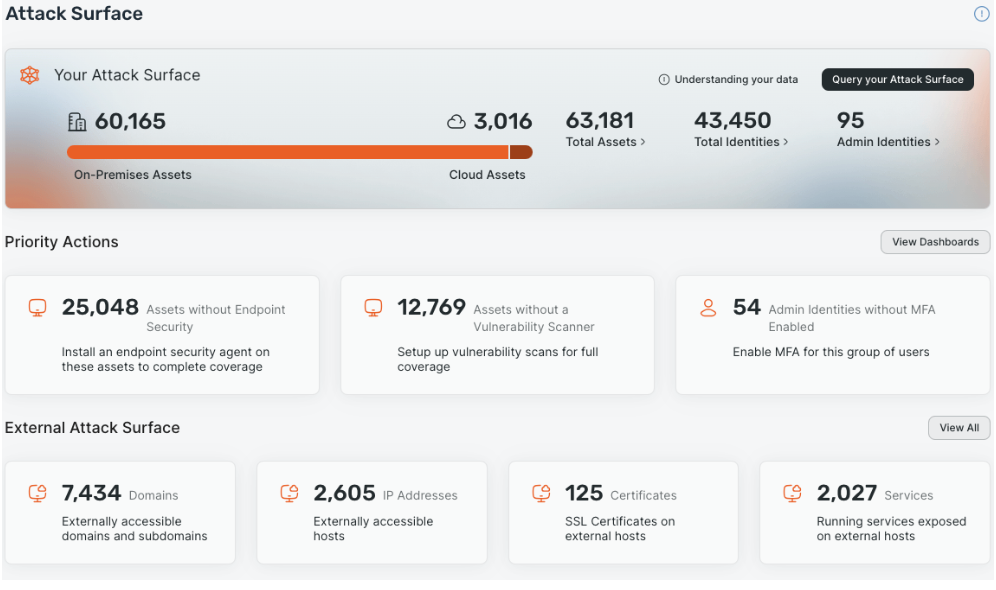
Conversely, Surface Command is wholly vendor agnostic. This allows you to bring in all the data you need from every security tool in your current technology stack, with over 110 connectors available out-of-the-box at time of writing this post and rapidly more being added by the day. You can find and keep up with our growing list of connectors here.
Obviously aggregating all that data means dealing with a substantial amount of information, some of which may be in conflict. So how do we handle this? A powerful, customizable, correlation engine.
Unmatched customizability with a tunable correlation engine
Immediately upon seeing the correlation engine, I knew we had something special. The biggest challenge with large datasets that gather from different tools and vendors is that each tool believes it is correct, as it should. However, in practice, we all know that some tools are great for a lot of the data it provides with some of the other data being… okay. This is very apparent when looking at CMDBs or GRC tools. They struggle to have a clean golden record because attributes are updated by tools with less fidelity than other tools that had already populated that field.
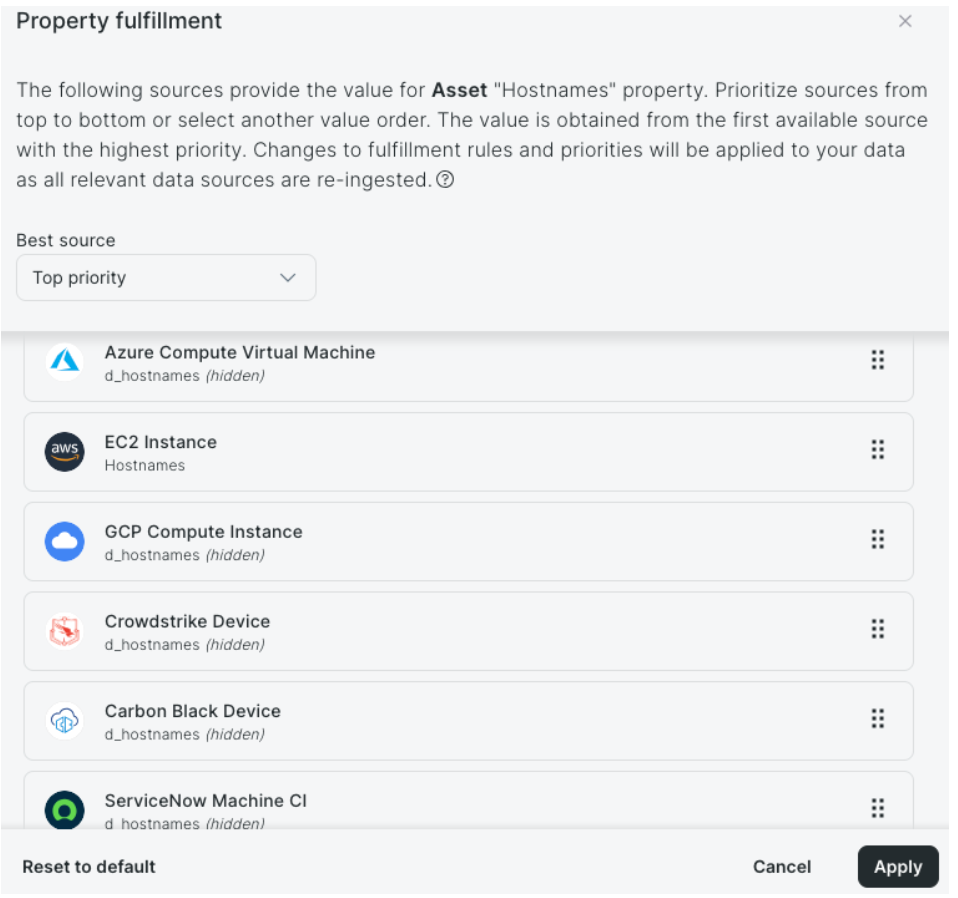
With Surface Command, this is a thing of the past. Each correlated value, such as hostnames, Operating System, Owners, etc. that would normally come from a variety of locations can be individually tuned. Rather than the traditional “last in wins” approach, we have a correlation priority strategy that you get to pick which tool you trust most for that single attribue. This allows for precision when creating your golden record for searching, feeding into your CMDB from a single source now, and also for queries within Surface Command.
Building complex queries with cypher
Surface Command runs on a Graph database and leverages Cypher for the query language. The UI has a very simple and intuitive interface that supports most common query use cases, but you can also select the “advanced query” option to see what that Cypher would look like. I personally used this to teach myself how to build some queries over the course of a week or two. Why? Because I knew what I was after: a custom vendor agnostic prioritization score.
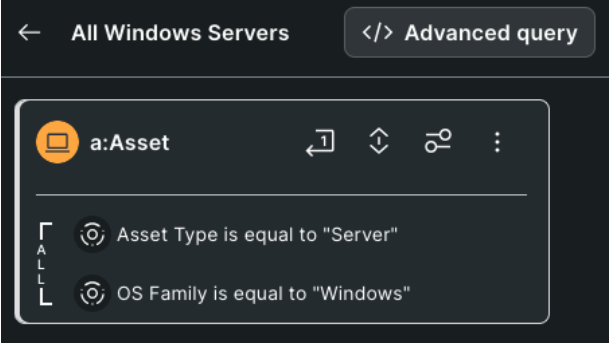
I was able to use the interface above to search through any of the correlations and data points I wanted to filter on. From there I could execute my query, view my results, and then even click the Advanced Query button to move into a Cypher view, as shown below. The ability to move from UI to Query that easily is a perfect way to increase your familiarity with the tool and data.

I started building my query and quickly saw the power of Surface Command. I first looked for mitigations (a searchable attribute) looking for assets without certain controls on them like Antivirus/Antimalware, Vulnerability Scans, etc. Again, this is all vendor agnostic. I didn’t care “which” AV/AM solution, just that it had one. I didn’t care if the vulnerabilities came from Rapid7, Defender, Tanium, Crowdstrike, etc. I just needed to know something was on the host. If not, increase that asset’s prioritization. Or pulling in specific elements like the Crowdstrike Status, something not correlated, but still within the dataset so easy to add. Testing all the IPs that I know from agents running on the asset, what Meraki knew, what AWS/Azure/GCP knew, and seeing if a public IP was on the asset. With each test I created, I assigned a weighing mechanism and score that I determined for my use case. This was it, it was what I had been chasing for so many years.
The Result: A tailored risk score built for YOUR business needs
What you can create is that custom vendor-agnostic prioritization score. You choose which tools you trust most for the attributes in your environment in a single CAASM platform that is vendor agnostic. You decide which data points are priorities to you and your security program. You determine how you want to view those data points and what scores to assign to them. You take control of what a prioritization score should look like, tailored to you and your colleagues at your company taking into account the things you care about most.
As I stated earlier, when I first saw Surface Command and got my hands on it, I knew we had something special. Think about the use case I have here, but let your imagination run. Maybe it’s not just a score you want, maybe it’s dashboards, exports, or feeding back into a CMDB or GRC tool. Maybe it’s taking actions with the data, looking for blindspots where coverage is lacking, or even planning for a budget to see how much of a license you are using or need.
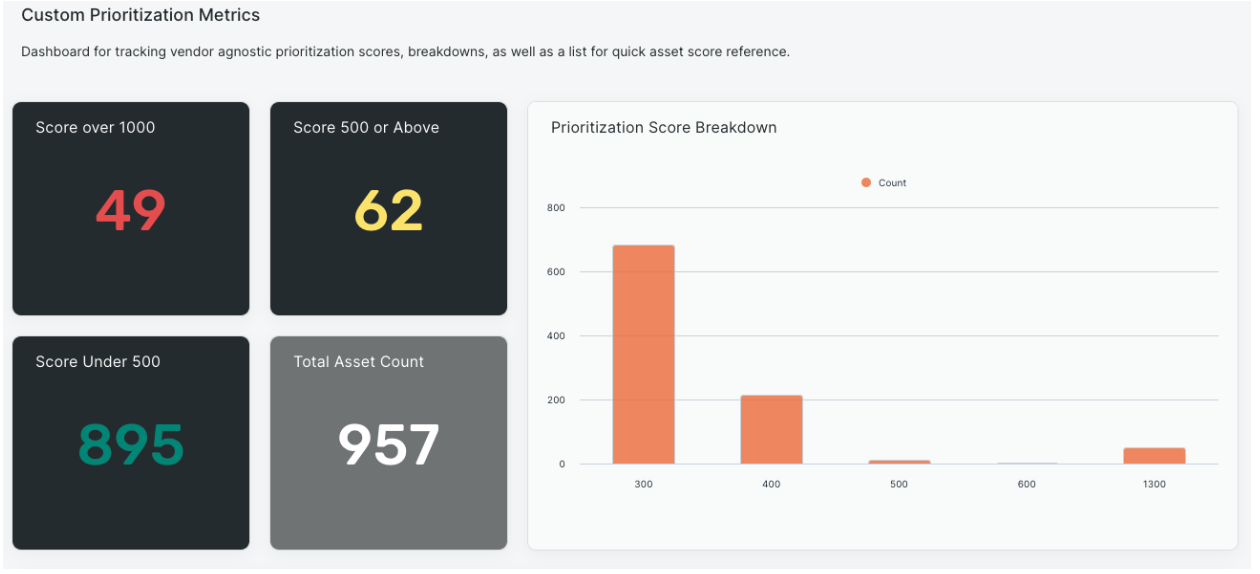
We’d love to show you Surface Command and all that we think it can do, but we’d also love to hear how you would use it! Thanks so much for taking the time to read through this with me today and look forward to speaking with you soon!