Post Syndicated from xkcd.com original https://xkcd.com/3146/
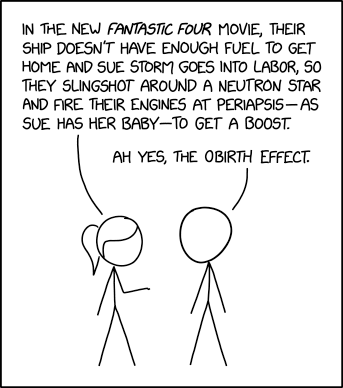
Post Syndicated from xkcd.com original https://xkcd.com/3146/
Post Syndicated from Kyle Shields original https://aws.amazon.com/blogs/security/optimize-security-operations-with-aws-security-incident-response/
Security threats demand swift action, which is why AWS Security Incident Response delivers AWS-native protection that can immediately strengthen your security posture. This comprehensive solution combines automated triage and evaluation logic with your security perimeter metadata to identify critical issues, seamlessly bringing in human expertise when needed. When Security Incident Response is integrated with Amazon GuardDuty and AWS Security Hub within a unified security environment, organizations gain 24/7 access to the AWS Customer Incident Response Team (CIRT) for rapid detection, expert analysis, and efficient threat containment—managed through one intuitive console. Security Incident Response is included with Amazon Managed Services (AMS), which helps organizations adopt and operate AWS at scale efficiently and securely.
In this post, we guide you through enabling Security Incident Response and executing a proof of concept (POC) to quickly enhance your security capabilities while realizing immediate benefits. We explore the service’s functionality, establish POC success criteria, define your configuration, prepare for deployment, enable the service, and optimize effectiveness from day one, helping your organization build confidence throughout the incident response lifecycle while improving recovery time.
AWS Security Incident Response service provides comprehensive threat detection and response capabilities through a streamlined four-step process. It begins by ingesting security findings from GuardDuty and select Security Hub integrations with third-party tools. The service then automatically triages these findings using customer metadata and threat intelligence to identify anomalous behavior and suspicious activities. When potential threats are detected, CIRT members proactively investigate cases through the customer portal to determine whether they are true or false positives. For confirmed threats, the service escalates findings for immediate action, while false positives trigger updates to the auto-triage system and suppression rules for GuardDuty and Security Hub, continuously improving detection accuracy.
Security Incident Response delivers powerful security capabilities through seamless integration with both the AWS threat detection and incident response (TDIR) system and third-party security services such as CrowdStrike, Lacework, and TrendMicro. This solution provides a unified command center for end-to-end incident management—from planning and communication to resolution—while ingesting GuardDuty findings and integrating with external providers through Security Hub. With secure case management and an immutable activity timeline, it significantly enhances your security operations by augmenting your security operations center (SOC) and incident response (IR) teams with improved visibility and access to AWS-proven tools and personnel. The AWS CIRT works collaboratively with your responders during investigations and recovery, freeing your valuable resources for other priorities.
The service delivers continuous value through proactive monitoring and response capabilities. It constantly monitors your environment using GuardDuty and Security Hub findings, with service automation, triage, and analysis working diligently in the background to alert you only for genuine security concerns. This protection provides immediate value during potential incidents without demanding your constant attention.
Getting started is straightforward—the only prerequisite is having AWS Organizations enabled and making sure that you have established Organizations with a fundamental organizational unit (OU) structure encompassing member accounts. This foundation not only enables Security Incident Response deployment but also serves as the cornerstone for implementing a robust TDIR strategy across your organization.
Establishing success criteria helps benchmark the outcomes of the POC with the goals of the business. Some example criteria include:
Review your success criteria to make sure that your goals are realistic given your timeframe and potential constraints that are specific to your organization. For example, do you have full control over the configuration of AWS services that are deployed in an organization? Do you have resources that can dedicate time to implement and test? Is this time convenient for relevant stakeholders to evaluate the service?
After establishing your success criteria and timeline, it’s best practice to define your Security Incident Response configuration. Some important decisions include the following:
After determining success criteria and Security Incident Response configuration, identify stakeholders, desired state, and timeframe. Prepare for deployment by completing:
With preparations in place, you are ready to enable the service.
Access Security Incident Response in the management account:
Complete setup in the delegated administrator account:
Detailed instructions can be found in the YouTube setup video.
Many organizations have well-established processes and application suites for IR and security threat management. To accommodate these pre-existing setups, AWS has developed integrations with popular ITSM and case management applications. Our initial releases enable complete bi-directional integration with both Jira and ServiceNow, with more on the way.
We have provided comprehensive instructions to guide you through the setup process in GitHub.
Immediately after enabling the service, Security Incident Response begins to ingest your GuardDuty and Security Hub findings (from security partners). Your findings are automatically triaged and monitored using deterministic evaluation logic; based on your organization’s unique metadata and security perimeter, high-priority threats are escalated to your Security Incident Response command center for immediate investigation. While your organization receives 24/7 coverage from the start, implementing these recommended optimizations will significantly enhance threat detection accuracy, reduce false positives, accelerate response times, and strengthen your overall security posture through customized protection aligned with your specific business risks and compliance requirements.
To maximize immediate value from Security Incident Response, we suggest using its reactive capabilities beginning at day one. When your team encounters suspicious activities or requires expert investigation, you can create an AWS-supported case through the service portal to engage AWS CIRT specialists directly. These security experts effectively extend your team’s capabilities, providing specialized knowledge and guidance to help you quickly understand, contain, and remediate potential security concerns. This on-demand access to AWS CIRT can reduce your mean time to resolution, minimize potential impact, and make sure you have professional support even for complex security scenarios that might otherwise overwhelm internal resources.
Examples of reactive support queries include:
If you decide to move forward with AWS Security Incident Response and deploy a POC, we recommend the following action items:
In this post, we showed you how to plan and implement an AWS Security Incident Response POC. You learned how to do so through phases, including defining success criteria, configuring Security Incident Response, and validating that Security Incident Response meets your business needs.
As a customer, this guide will help you run a successful POC with Security Incident Response. It guides you in assessing the value and factors to consider when deciding to implement the current features.
If you have feedback about this post, submit comments in the Comments section below. If you have questions about this post, contact AWS Support.
Post Syndicated from The Atlantic original https://www.youtube.com/watch?v=An7Vmnoj_4I
Post Syndicated from The Atlantic original https://www.youtube.com/watch?v=IYac67evq-Q
Post Syndicated from The Atlantic original https://www.youtube.com/watch?v=647AsDiuRXE
Post Syndicated from Ramkumar Nottath original https://aws.amazon.com/blogs/big-data/accelerating-sql-analytics-with-amazon-redshift-mcp-server/
As data analysts and engineers, we often find ourselves switching between multiple tools to explore database schemas, understand table structures, and execute queries across different Amazon Redshift data warehouses. Using natural language to explore metadata and data can simplify this process, but an AI agent often needs the additional context of your Redshift cluster configurations and schemas to successfully discover and build the best execution path.
This is where the Model Context Protocol (MCP) can act as a bridge between the AI agent and your Redshift clusters to provide the necessary information to better support natural language interfaces to your data. MCP is an open standard that enables AI applications to securely connect to external data sources and tools, providing them with rich, real-time context about your specific environment. Unlike static tools, MCP allows AI agents to dynamically discover database structures, understand table relationships, and execute queries with full awareness of your Amazon Redshift setup.
To address these challenges and unlock the full potential of conversational data analysis, Amazon Web Services (AWS) released the Amazon Redshift MCP server, an open source solution that innovates how you interact with Amazon Redshift data warehouses. The Amazon Redshift MCP server integrates seamlessly with Amazon Q Developer command line interface (CLI), Claude Desktop, Kiro, and other MCP-compatible tools. It can enable discover, explore, and analyze your Amazon Redshift metadata and data through natural language conversations with an AI assistant that truly understands your database environment.
In this post, we walk through setting up the Amazon Redshift MCP server and demonstrate how a data analyst can efficiently explore Redshift data warehouses and perform data analysis using natural language queries.
The Amazon Redshift MCP server is a MCP implementation that provides AI agents with safe, structured access to Amazon Redshift resources. It enables:
The MCP server acts as a bridge between Amazon Q CLI and your Amazon Redshift infrastructure, translating natural language requests into appropriate API calls and SQL queries. The following diagram illustrates the high-level architecture.
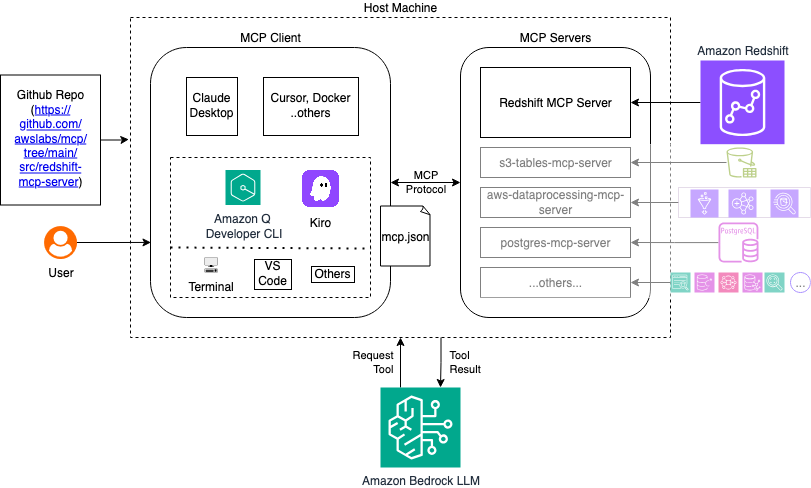
The following video demonstrates the solution outlined in this post.
Before you begin, ensure you have the following:
uv package manager (installation guide)The user identity needs the following IAM permissions in your access policies:
The following section covers the steps required to install and configure Amazon Redshift MCP server.
Complete the following steps to install required dependencies:
uv package manager if you haven’t already:uv python install 3.10
The MCP server can be configured using several MCP supported clients. In this post we discuss the steps using Amazon Q Developer CLI and Claude Desktop.Complete the following instructions to set up Amazon Q Developer CLI on your host machine and access the Amazon Redshift MCP Server:
~/.aws/amazonq/mcp.json:For further details on installation, refer to the Installation section in the Amazon Redshift MCP server README.md.

You should notice the Amazon Redshift MCP server initialize successfully in the startup logs.To set up Amazon Q Developer CLI on your host machine and access the Amazon Redshift MCP Server using Claude Desktop, complete the following steps:
Show me all available Redshift clustersImagine a practical scenario where a data analyst needs to explore customer purchase data across multiple Redshift clusters. The following walkthrough demonstrates how the MCP server simplifies this workflow.As a data analyst at an ecommerce company, you need to:
To accomplish these tasks, you follow these steps:
Amazon Q will use the MCP server to discover your clusters and provide details such as cluster identifiers and types (provisioned or serverless), current status and availability, connection endpoints and configuration, and node types and capacity information.
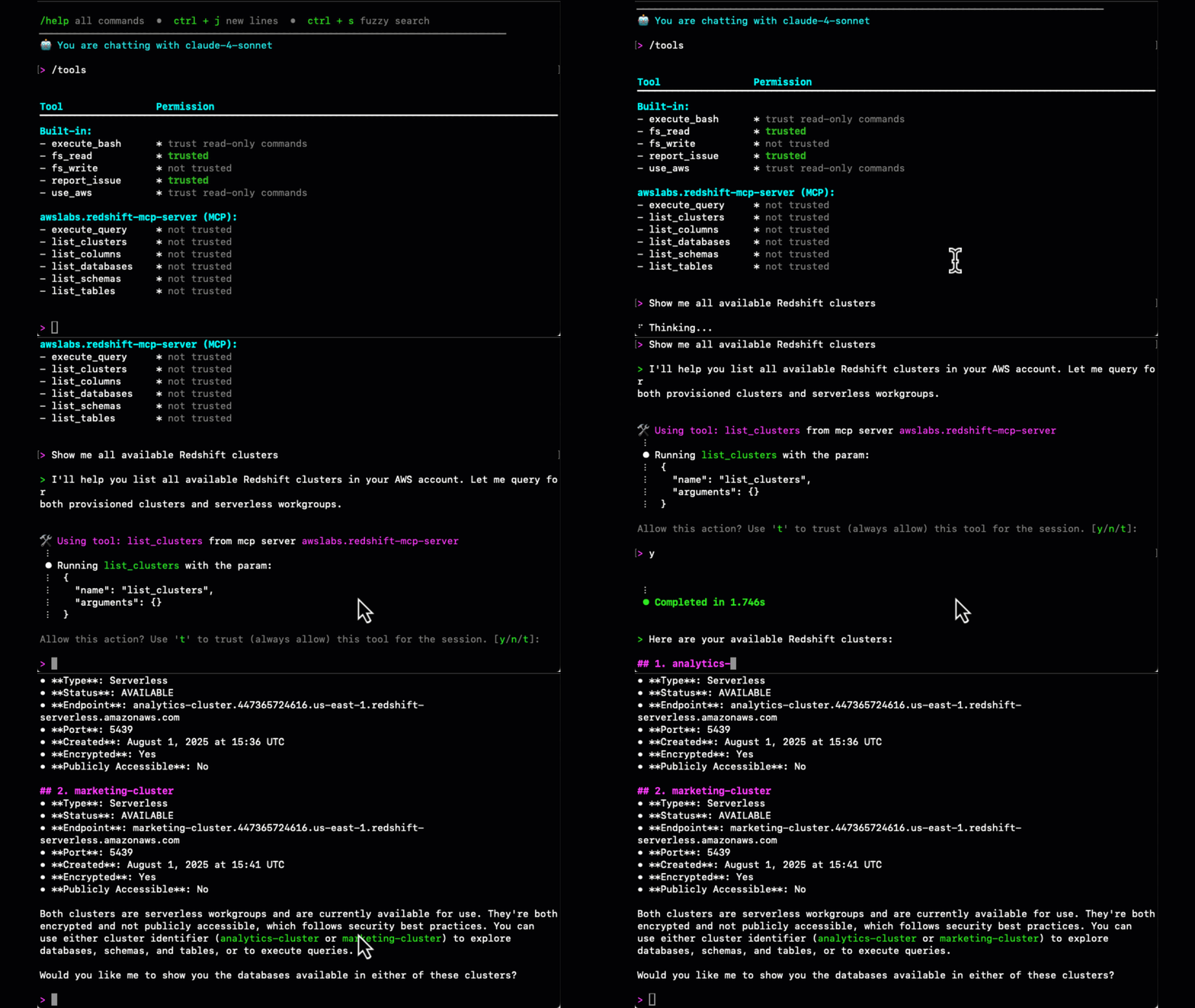
Amazon Q will use the MCP server to systematically explore the objects in the cluster:
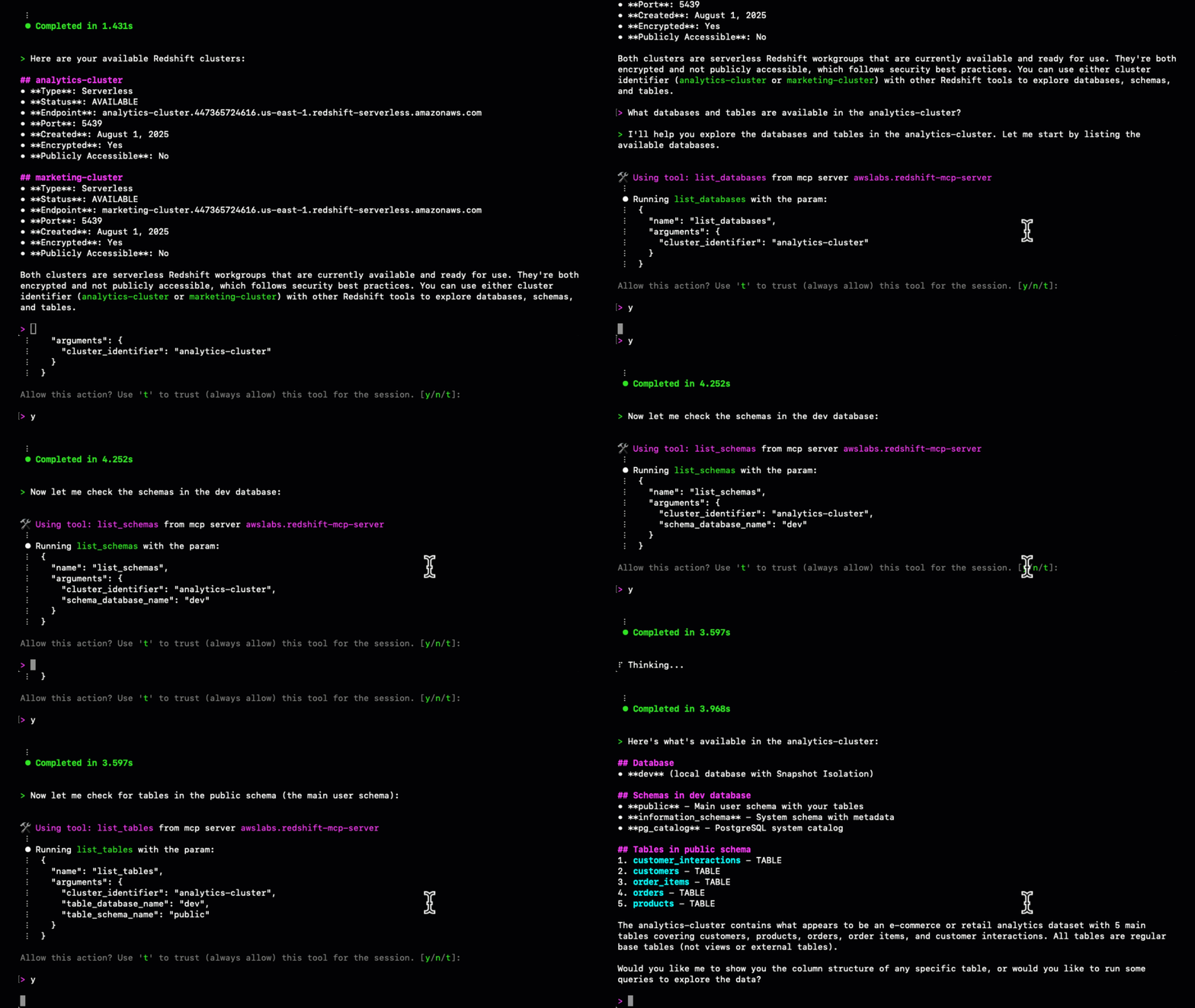
Amazon Q will use the MCP server to will examine the table columns and provide detailed schema information.
Amazon Q will use the MCP server to run the appropriate SQL queries and provide insights.
Amazon Q will use the MCP server to run the appropriate SQL queries compare the data across analytics-cluster and marketing-cluster.
The MCP server comes equipped with several essential safety protections designed to safeguard your data and system performance. The READ ONLY mode serves as a critical safeguard against unintended data modifications, and we recommend enabling this feature when applicable to your use case. To further enhance security, the server implements query validation mechanisms that scrutinize operations for potential harmful impacts, with user-in-loop validation being recommended for optimal safety. For resource management, the server enforces resource limits to prevent performance-impacting runaway queries, again benefiting from user-in-loop validation for best results. In terms of accessibility, the MCP capability maintains broad availability across all AWS Regions where Amazon Redshift Data API is supported, with throttling limits aligned to existing Amazon Redshift Data API service quotas to ensure consistent performance and reliability.For best results, follow these recommendations:
The Amazon Redshift MCP server transforms how data analysts interact with Redshift clusters by enabling natural language data exploration and analysis through agentic tooling like Kiro and Amazon Q CLI. By eliminating the need to manually write SQL queries and navigate complex database structures, analysts can focus on generating insights rather than wrestling with syntax and schema discovery.Whether you’re performing a one-time analysis, generating regular reports, or exploring new datasets, the Amazon Redshift MCP server provides a powerful, intuitive interface for your data analysis workflows.Ready to get started? Here’s what to do next:
Check out these blog posts to help you navigate using natural language with your use cases:
Post Syndicated from The Atlantic original https://www.youtube.com/watch?v=dPKvw_SQxsM
Post Syndicated from Jeronimo De Leon original https://www.backblaze.com/blog/lessons-from-vibe-coding-three-apps-in-three-weeks/

While taking some time for paternity leave in a small village in the middle of Bulgaria, I used my baby’s nap times to dive deeper into vibe coding to see just how fast and close these AI tools can get you to building real, production-ready apps. It led to a serious of articles, LinkedIn posts, and product experiments, all focused on understanding and sharing my insights on the state of programming and product design that leverage AI.
In my previous article, “ColabWithMe: A GPT Specialized in Google Colab for Data Analysis & ML,” I talked about how generative AI is redefining the programming landscape. As the Harvard Business Review noted in “We’re All Programmers Now,” this shift represents more than just enabling non-technical employees to code. The real opportunity lies in developing multi-skilled professionals who can operate across domains, compressing innovation cycles from weeks to days. (I explore this further in “The Shape of AI Training: How Skill Profiles Guide AI Learning Paths.“)
Which brings me to what I actually built during those nap times—three different applications using a variety of AI tools. Rather than focusing on polished user interfaces, I focused on backend functionality and core business logic. I discovered that debugging the frontend and getting it to look how I wanted consumed far more time than implementing core backend features. So, many of these vibe-coded apps work nicely on the backend, but need more polish on the frontend. Let’s dig in.
Vibe coding means building software by describing what you want in natural language and letting AI generate the code. I tested tools across three categories to see how they enable this new way of building.
The first application tackled a common productivity challenge: transforming vague aspirations into actionable SMART goals. The system implements a conversational AI interface that guides users through goal refinement, then automatically generates structured milestones and tasks.
Key features:
Tech stack:
Initially I prototyped across Lovable, Replit, Bolt and GitHub Spark to see what each would generate. I eventually used the code GitHub Spark generated for a cleaner React component structure. Check it out here: https://tickgoals.com
While catching up on email, I noticed my inbox was filled with newsletters that I’d often just skim or summarize, so I built a tool to handle this automatically. The app provides users with personalized email addresses for newsletter subscriptions, then presents content in a newsfeed interface to easily scroll through with AI summarization.
Key features:
Tech stack:
I split this project into separate frontend and backend repos, and found it blazing fast to build out all the backend functionality first before tackling the frontend.
Welcome AI has been my side project since 2017, initially focused on competitive analysis of AI tools. I’ve rebuilt it multiple times, with the latest iteration using retrieval augmented generation (RAG) for content. But, content curation still required manual review, either by me or community contributors, so I built an agent to automate the entire process, identifying, categorizing, and synthesizing AI news into a publication-ready newsletter. View a generated newsletter here. Subscribe at https://newsletter.welcome.ai/
Key Features:
Tech Stack:
This was purely a backend project to test and experiment with the OpenAI Agent SDK, though I diverged from it toward more direct large language model (LLM) tasks by the end.
At a high level, you can definitely see how these tools are going to dramatically speed up development, especially for getting to minimum viable product (MVP) or prototype. You should only need a day or two to get something up and test market traction, especially with prompt app builders.
I found Claude Opus/Claude Code worked best for backend code within the IDE, while Gemini Pro was particularly good at frontend landing page development. Coding agents that make multiple changes across multiple files simultaneously, like those in Cursor, Copilot Agent, or ChatGPT Codex, still felt a bit daunting. I experienced chunks of code being deleted a few times, so I spent considerable time reviewing changes or reverting them.
Prompt app builders like Lovable, Replit, GitHub Spark, and Bolt can get you pretty far, but you can eventually hit a wall where the AI starts breaking more than it fixes, or you need to integrate third-party services that require direct code access. With one project, I started in a prompt builder then moved to an IDE for refinement.
High-level, here are some tips that should help in your vibe coding journey.
Like custom instructions in ChatGPT, each tool benefits from coding guidelines: Claude Code uses CLAUDE.md, Copilot uses configured instructions, and Cursor has rules (templates at https://cursor.directory/rules).
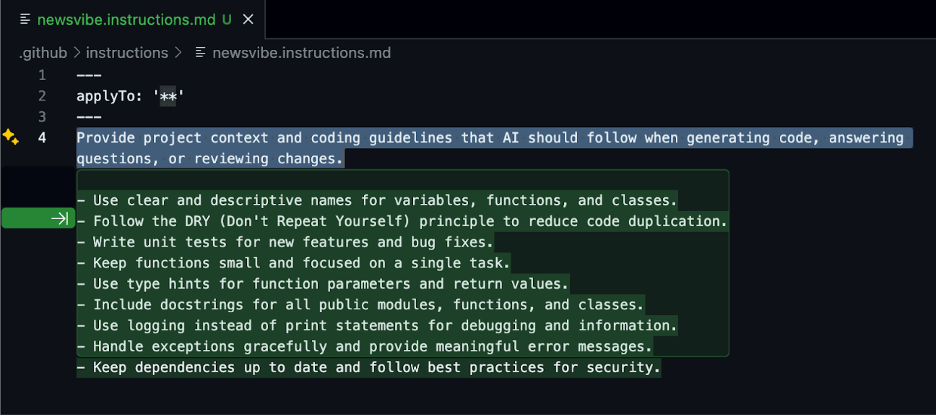
Both Claude Code and Cursor support MCP (Model Context Protocol) for enhanced integrations (Cursor MCP directory: https://cursor.directory/mcp). Some tools can also index documentation folders for deeper context. Set these up first for better code generation.
Before writing any code, spend time iterating with an LLM to generate a thorough PRD. This back-and-forth refinement process goes a long way in providing the context your AI coding tools need. Capture everything: user workflows, UI specifications, technical requirements, and success metrics. Save this in your README.md as your north star.
Prompt app builders like GitHub Spark generate PRDs first from your initial prompt, so the more complete and refined it is, the better.
Work with the LLM to create a structure that follows best practices but stays simple for what you’re building. An MVP doesn’t need enterprise architecture. Map out where components, services, and APIs belong, and include this in your initial prompt.
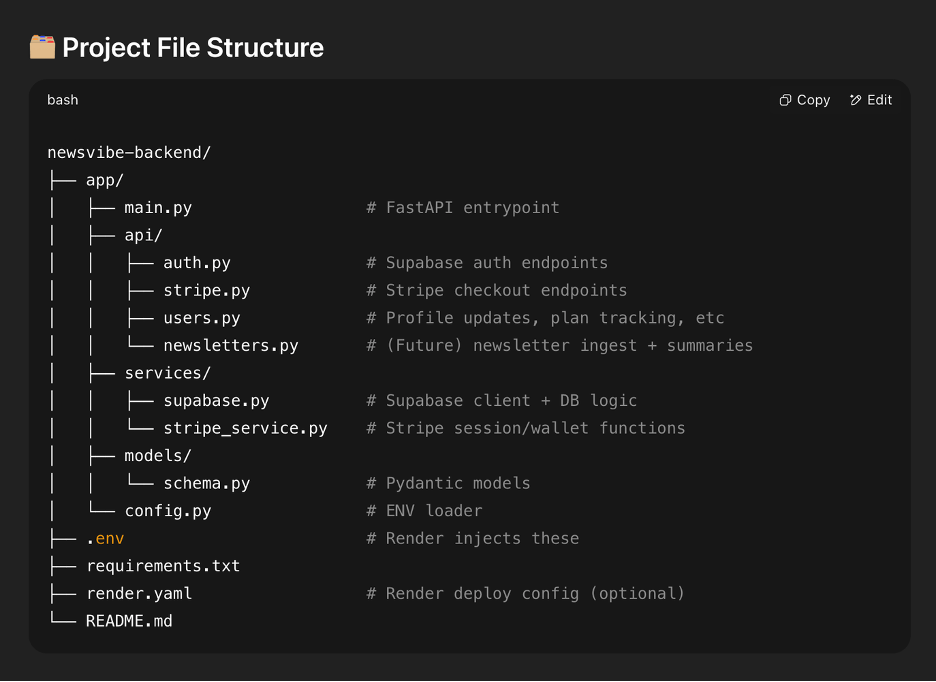
Monitor new file generation closely as AI tools can suggest new files when not needed. When this happens, correct it immediately. Keep the structure as simple as possible. Break up files that are doing too many things, as this makes them harder to read and update later.
Include file paths and descriptions at the top of each file. This helps the AI maintain context when making changes. Add detailed logging at critical points to track what’s happening when things break. Watch for function renames, LLMs often change function names unnecessarily when updating code, breaking references elsewhere.
LLMs can generate outdated code. OpenAI and Pinecone have changed their import syntax, but AI tools still produce the old versions. Have the LLM search for the latest docs, or check them yourself. Knowing how your services currently work helps you catch these mistakes immediately.
Multitasking with AI means juggling code review while it generates more changes. Keep each conversation focused on a single feature unless features are directly related. When the LLM offers to optimize unrelated areas, decline. If the AI gets stuck repeating failed solutions, start fresh rather than fighting it.
When stuck, get code reviews from other LLMs since they can catch different issues. But always review their output carefully. LLMs can duplicate functions across files or, worse, delete essential code. In Agent mode especially, I’ve seen them remove core functionality unrelated to the current task. Give specific instructions about where functions belong and double-check nothing critical disappeared.
The most significant shift with AI-assisted development isn’t the speed; it’s the role change. You’re no longer just implementing; you’re defining what to build, how it should work, and why it matters.
This is the multi-skilled professional evolution I mentioned earlier. When “We’re All Programmers Now,” it means domain experts can build their own solutions, but it also means programmers must become domain experts in product thinking. Success with vibe coding requires clear product vision to articulate requirements, technical knowledge to guide the AI correctly, and relentless focus on user problems.
You become the conductor orchestrating AI capabilities while maintaining the judgment to build what people actually need. The future belongs to these blended roles: product managers who understand engineering deeply enough to guide AI tools, and engineers who think like product managers. These T-shaped and M-shaped professionals operate fluidly across domains. This is how we compress innovation cycles from weeks to days: by eliminating the translation layer between idea and implementation.
The post Lessons from Vibe Coding Three Apps in Three Weeks appeared first on Backblaze Blog | Cloud Storage & Cloud Backup
Post Syndicated from The Atlantic original https://www.youtube.com/watch?v=D2OmrDNdVwk
Post Syndicated from The Atlantic original https://www.youtube.com/watch?v=mXHNg3-2TfU
Post Syndicated from The Atlantic original https://www.youtube.com/watch?v=CYAd6lpugHw
Post Syndicated from The Atlantic original https://www.youtube.com/watch?v=8EqDpcGUCA0
Post Syndicated from The Atlantic original https://www.youtube.com/watch?v=q3ROPgrWo4U
Post Syndicated from The Atlantic original https://www.youtube.com/watch?v=YwJbADv14yM
Post Syndicated from Sam Sabinash original https://www.servethehome.com/crucial-x10-2tb-portable-ssd-review-compact-and-neat/
In our Crucial X10 2TB review, we see how this portable SSD compares to the X10 Pro and other USB SSDs we have tested
The post Crucial X10 2TB Portable SSD Review Compact and Neat appeared first on ServeTheHome.
Post Syndicated from Luis Pastor original https://aws.amazon.com/blogs/security/minimize-risk-through-defense-in-depth-building-a-comprehensive-aws-control-framework/
Security and governance teams across all environments face a common challenge: translating abstract security and governance requirements into a concrete, integrated control framework. AWS services provide capabilities that organizations can use to implement controls across multiple layers of their architecture—from infrastructure provisioning to runtime monitoring. Many organizations deploy multi-account environments with AWS Control Tower, or Landing Zone Accelerator to implement a foundational baseline of controls and security architecture. Once their environment is provisioned, organizations typically look to add additional detective controls from services such as AWS Security Hub and AWS Config based on security, compliance, and operational requirements. While this sequence is a great start, there are more opportunities during this time to implement layered defense-in-depth coverage to enhance your security posture.
Highly regulated industries such as fintech and financial services are often viewed as the gold standard for governance and security controls. While these sectors have established robust frameworks, there’s consistently room for improvement and valuable lessons for other industries looking to enhance their control environments. However, many organizations struggle to move beyond a basic compliance-focused approach. In our experience working with customers across various sectors, this limited perspective often stems from multiple factors, including:
The good news? A more comprehensive approach that uses AWS preventative, proactive, detective, and responsive controls can significantly reduce risk while decreasing operational overhead through automation.
In this post, we outline a practical framework that you can adopt to evolve your security and governance controls strategy. We explore how your organization can mature from a detection-focused security posture to a multi-layered control framework, using real-world examples across the resource lifecycle, including infrastructure-as-code testing and preventative controls such as service control policies (SCPs), resource control policies (RCPs), and declarative policies (DPs).
Drawing from best practices in highly regulated industries while incorporating modern cloud capabilities through services such as AWS Organizations and AWS Control Tower, we provide a structured framework that you can use to elevate your organization’s control environment beyond basic compliance requirements.
Organizations face several significant challenges when attempting to implement a comprehensive control framework in AWS. Let’s explore the main obstacles:
Security teams often find themselves caught between limited resources and expanding responsibilities in the cloud. With constrained budgets and personnel, teams typically gravitate toward quick wins through detective controls, which appear straightforward to implement initially. While this provides immediate visibility, it can leave critical gaps in security posture. Many teams lack comprehensive expertise across all control types, particularly in implementing preventative, proactive, and responsive controls effectively. The pressure to demonstrate immediate security improvements, combined with day-to-day operational demands, frequently results in tactical solutions rather than strategic, layered security approaches.
Deciding which tools to prioritize can be a challenge; the breadth of options and extensive capabilities available across AWS security services and third-party tools can feel overwhelming at times. Security teams struggle to determine the optimal mix of controls for their environment and where to begin implementation. This challenge is compounded by the complexity of mapping technical compliance requirements to cloud-focused capabilities and maintaining visibility into emerging threats as the security landscape evolves. The layers of abstraction created by proliferating security controls can further obscure clear decision-making, leading teams to delay critical security improvements while seeking perfect solutions.
Defense in depth as a concept is good, but it can be misunderstood and difficult to achieve, leading to vulnerabilities in the security architecture. A common misconception is that a single strong control, separation of duties in AWS Identity and Access Management (IAM) roles, least permission in IAM policies, and so on, provide sufficient protection. This overlooks the crucial value of implementing controls at multiple points and how different control types can be combined to create a robust security posture. Teams often miss how organizational controls like SCPs can work in harmony with workload-specific controls to achieve greater protection. The role of preventative controls in guiding technical implementations is frequently under appreciated.
The path to security maturity presents numerous obstacles. Many organizations remain stuck in the early stages, implementing detective controls but never progressing to preventative measures. Security controls are often implemented in isolation, without consideration for the broader security landscape. Organizations struggle to create and follow a clear roadmap for evolving their security posture, and measuring improvement over time proves challenging.
As AWS environments grow, maintaining consistent governance and security becomes increasingly complex. Organizations face mounting challenges in managing exceptions and special cases across their expanding infrastructure. These interrelated challenges often result in controls implementations that fail to achieve their intended risk reduction goals. You need a structured approach to overcome these obstacles and implement comprehensive security controls, which we explore in the following sections.
While implementing comprehensive controls requires an initial investment in time and resources, the long-term benefits fundamentally transform how organizations operate.
The foundation for this transformation begins with establishing baseline controls through proven starting points such as AWS Control Tower and its customization options. AWS Control Tower provides building blocks for secure multi-account architectures with hundreds of security capabilities and proactive controls already built in. Rather than trying to create baselines from scratch by wrangling vast amounts of account-level or resource-specific controls, you can use these accelerators to rapidly establish a strong security foundation. With these baseline controls in place, this transformation extends beyond security teams to enable the entire organization to operate more efficiently. Development and operations teams can deploy faster with confidence when security guardrails are in place. Security becomes an enabler rather than a bottleneck, so that teams across the organization can innovate while maintaining a strong security posture.
As you mature your organization’s control framework through automation and layered defenses, a security transformation occurs. Security teams shift from constant firefighting to proactive risk management. Automated policy enforcement replaces manual reviews, and the time previously spent on routine tasks can be redirected to strategic initiatives.
AWS defines distinct types of controls to build a comprehensive security framework. Let’s examine each type and how they work together, using a common scenario: preventing public Amazon Simple Storage Service (Amazon S3) bucket exposure.
Preventative controls establish the foundation of a secure environment by defining the policies, standards, and requirements that guide security implementations. At their core, these controls encompass corporate security policies that outline acceptable resource configurations across the organization. They work in conjunction with compliance requirements and frameworks to help maintain regulatory alignment, while architectural standards and guidelines provide technical direction for implementations. Data classification policies play a crucial role by determining specific security requirements based on data sensitivity.
To illustrate how preventative controls work in practice, consider a common S3 bucket security requirement. A typical preventative control might establish a corporate policy stating All S3 buckets must be private by default, with public access granted only through an approved exception process. This simple but effective policy sets clear expectations and requirements before a technical implementation begins.
s3:PutObject requests with customer-provided keys unless explicitly allowed, paired with AWS IAM Roles Anywhere for short-term credential enforcement.Proactive controls act as an early warning system, identifying and addressing potential security issues before they manifest in your environment. These controls work by validating configurations and changes against established security requirements during the development and deployment phases. Through automated validation and policy enforcement at build and deploy time, proactive controls help prevent misconfigurations from reaching production environments, reducing the operational overhead of fixing security issues after the fact. Think of proactive controls as your first line of defense in maintaining a secure cloud environment. In AWS, these can be implemented at multiple levels:
Source: aws-guard-rules-registry
Detective controls provide continuous visibility into your security posture by monitoring for and identifying potential security violations or unauthorized changes within your environment. While preventative controls aim to stop issues before they occur, detective controls help you maintain awareness of your security state and can identify when preventative controls have been bypassed or failed. These controls form a critical layer of defense by enabling rapid identification of security issues and providing the visibility needed for effective incident response and compliance reporting. While many organizations start and stop here, detective controls are only part of the solution:
Responsive controls complete the security lifecycle by providing automated and manual mechanisms to address security issues after they’re detected. These controls define and implement the actions taken when security violations are identified, ranging from automated remediation of common misconfigurations to coordinated incident response procedures for complex security events. By establishing clear response patterns and using automation where appropriate, responsive controls help facilitate consistent and timely handling of security issues while reducing the mean time to remediation. Responsive controls address violations when they occur:
The power comes not from implementing these controls in isolation, but from using them together in a coordinated way. This layered approach begins with preventative controls to establish the requirements, followed by proactive controls to block most potential violations at the source. Issues that manage to slip through are caught by detective controls, while responsive controls automatically remediate identified problems. Throughout this process, comprehensive documentation tracks issues, remediation plans, and progress, such as through a plan of action and milestones (POAM), helping to make sure that compliance requirements are met and improvements can be measured over time.
You can follow one of two paths when implementing security controls: starting fresh with a comprehensive approach or evolving from an existing detective-focused implementation. Let’s examine both scenarios.
When starting from scratch, you have a unique opportunity to build your security and governance following an ideal approach. Your team can take advantage of this clean slate to architect controls and processes methodically, free from legacy constraints. The following steps offer guidance though establishing a strong foundation while maintaining the flexibility you need as your business grows.
Most organizations find themselves starting with detective controls and face challenges in maturing from there:
The goal of implementing security controls across multiple layers isn’t just about compliance or following best practices—it’s about creating a robust, resilient security posture that can effectively help prevent, detect, and respond to security issues. Let’s explore why this approach is crucial:
Security controls shouldn’t exist in isolation. When implementing a security requirement, you should consider:
While detective controls are important, they signal that a security violation has already occurred. A mature security posture requires:
You should measure the effectiveness of your control framework through several key performance indicators. Success can be seen in the steady reduction of security findings over time, coupled with decreasing time-to-remediation metrics. The maturity of the framework becomes evident through an increasing percentage of automated remediation activities and a declining number of recurring issues. These improvements manifest in better audit outcomes, providing tangible evidence that the control framework is delivering its intended results.
Let’s examine how to implement a comprehensive control framework using a common security requirement: preventing exposure of sensitive data through public S3 buckets. This example demonstrates how different control types work together to create defense in depth. While not every control might be necessary for every situation, each should be carefully considered and evaluated based on various factors including system criticality, data sensitivity, operational overhead, and organizational risk tolerance. The decision to implement or omit specific controls should be deliberate and documented, rather than occurring by default.
The architecture will have layers and components like the following.
An effective security and compliance strategy includes all four types of security controls. While preventative controls are a first line of defense to help prevent unauthorized access or unwanted changes to your network, it’s important to make sure that you establish detective and responsive controls so that you know when an event occurs and can take immediate and appropriate action to remediate it. Using proactive controls adds another layer of security because it complements preventative controls, which are generally stricter in nature.
Begin by defining your security objectives, then establish clear policies to meet those objectives:
Deploy preventative guardrails:
Deploy proactive guardrails:
Add detective controls by creating a monitoring framework:
Implement responsive controls by automating remediation where possible:
The following table describes control types, what a basic implementation includes, and the services and methods used for advanced implementation.
| Control type | Basic implementation | Advanced implementation |
| Preventative | Documentation, peer reviews | SCPs, RCPs, DPs, IAM policies, and S3 Block Public Access |
| Detective | Security Hub, AWS Config rules | Security Hub, AWS Config, and CloudWatch alerts |
| Responsive | Manual remediation | Auto-remediation through AWS Config, Systems Manager, EventBridge, and Lambda |
| Compliance | One-time checks | CIS/NIST mapping with Security Hub and automation of evidence collection and reporting using AWS Audit Manager |
| Automation | Limited | Full CI/CD Integration (for example, using CloudFormation or Terraform) |
| Cost optimization effort | High (manual effort) | Low (automation reduces overhead) |
As your security and governance program matures, scaling these controls across a growing organization requires thoughtful management and automation. This section explores key considerations for effectively managing your security posture at scale, optimizing costs, and maintaining consistency across your AWS environment. Whether you’re expanding across multiple accounts, business units, or AWS Regions, these practices help you balance security requirements with operational efficiency and cost management.
Use AWS services effectively:
Confidential tag on S3 buckets storing personally identifiable information (PII). Combine this with SCPs that mandate AES-256 encryption for tagged buckets, overriding developer attempts to disable it.Retention=7 years).Manage compliance exceptions:
Optimize costs:
Implementing a comprehensive control framework is a journey, not a destination. Start from your organization’s current position, whether that’s with basic detective controls or a fresh implementation, and focus on progressive improvement rather than attempting to implement everything at once. Success comes from carefully documenting decisions about control implementation, regularly reviewing them, and using automation to reduce operational overhead while improving consistency. Progress can be measured through concrete metrics: reduced findings, faster remediation times, and increased automation.
Remember that the goal extends beyond better security—it’s about transforming security and governance from a reactive operation to a strategic enabler that provides real business value. This transformation manifests through reduced risk from systematic controls, improved operational efficiency through automation, and enhanced visibility and governance. Perhaps most importantly, it frees security teams to focus on strategic initiatives rather than routine operational tasks.
By following this approach, you can build a robust security and governance posture that not only protects your organization’s AWS environment but also supports business innovation and growth. The result is a security program that evolves alongside the business, enabling rather than hindering progress, while maintaining a strong approach that can scale with your organization’s needs.
If you have feedback about this post, submit comments in the Comments section below. If you have questions about this post, contact AWS Support.
Post Syndicated from Donnie Prakoso original https://aws.amazon.com/blogs/aws/accelerate-ai-agent-development-with-the-nova-act-ide-extension/
Today, I’m excited to announce the Nova Act extension — a tool that streamlines the path to build browser automation agents without leaving your IDE. The Nova Act extension integrates directly into IDEs like Visual Studio Code (VS Code), Kiro, and Cursor, helping you to create web-based automation agents using natural language with the Nova Act model.
Here’s a quick look at the Nova Act extension in Visual Studio Code:
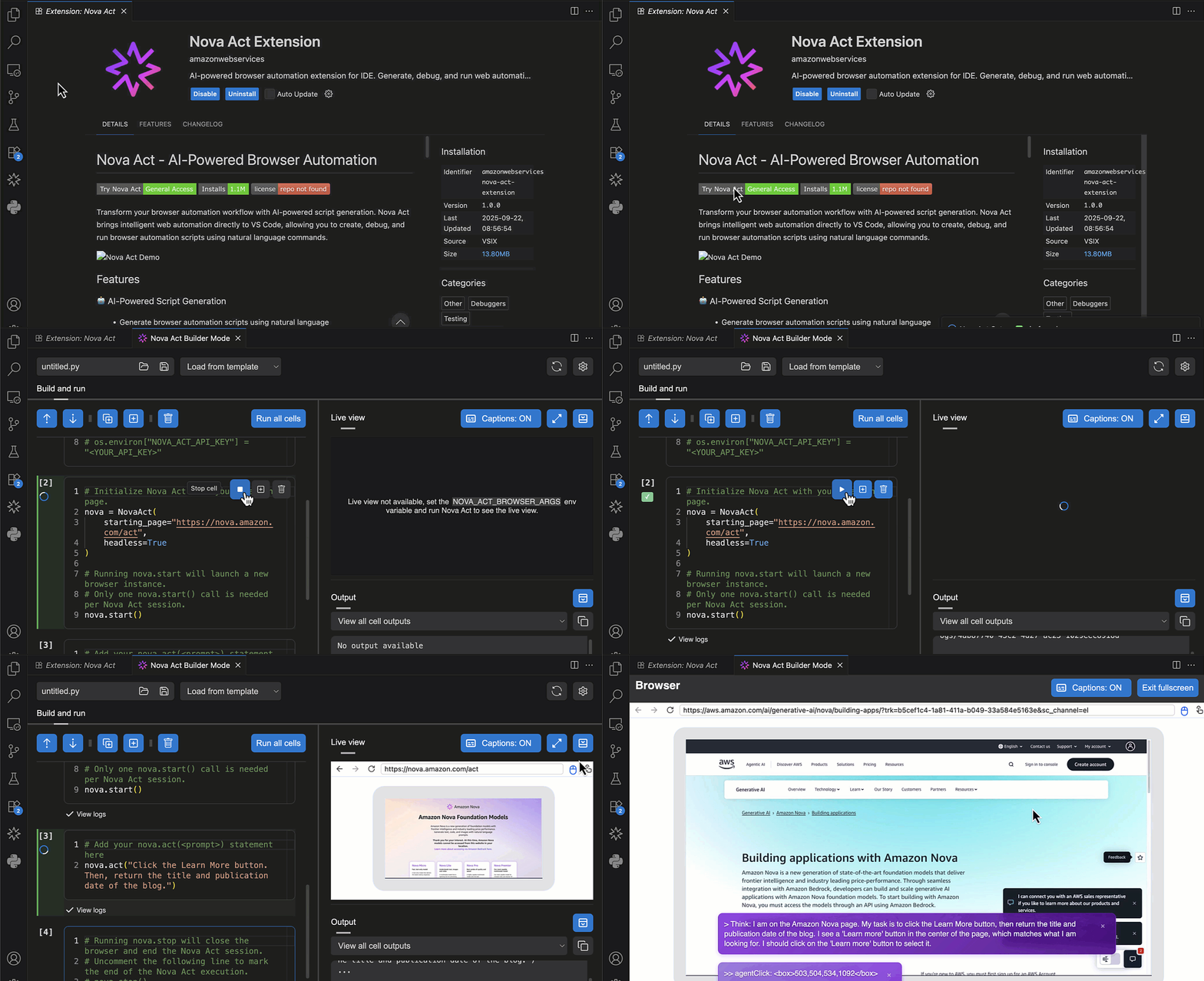
The Nova Act extension is built on top of the Amazon Nova Act SDK (preview), our browser automation agents SDK (Software Development Kit). The Nova Act extension transforms traditional workflow development by eliminating context switching between coding and testing environments. You can now build, customize, and test production-grade agent scripts—all within your IDE—using features like natural language based generation, atomic cell-style editing, and integrated browser testing. This unified experience accelerates development velocity for tasks like form filling, QA automation, search, and complex multi-step workflows.
You can start with the Nova Act extension by describing your workflow in natural language to quickly generate an initial agent script. Customize it using the notebook-style builder mode to integrate APIs, data sources, and authentication, then validate it with local testing tools that simulate real-world conditions, including live step-by-step debugging of lengthy multi-step workflows.
Getting started with the Nova Act extension
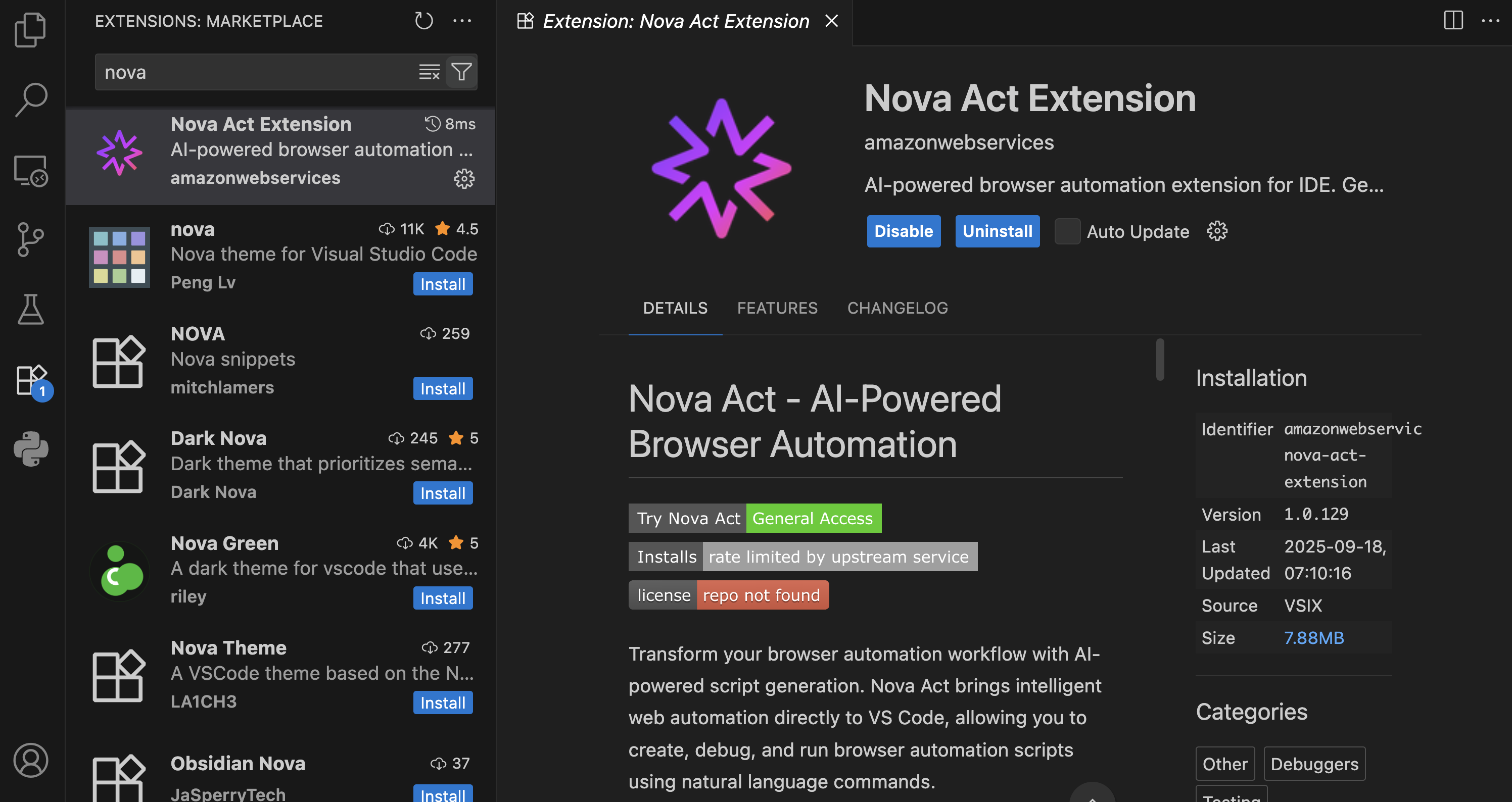
First, I need to install the Nova Act extension from the extension manager in my IDE.
I’m using Visual Studio Code, and after choosing Extensions, I enter Nova Act. Then, I select the extension and choose Install.
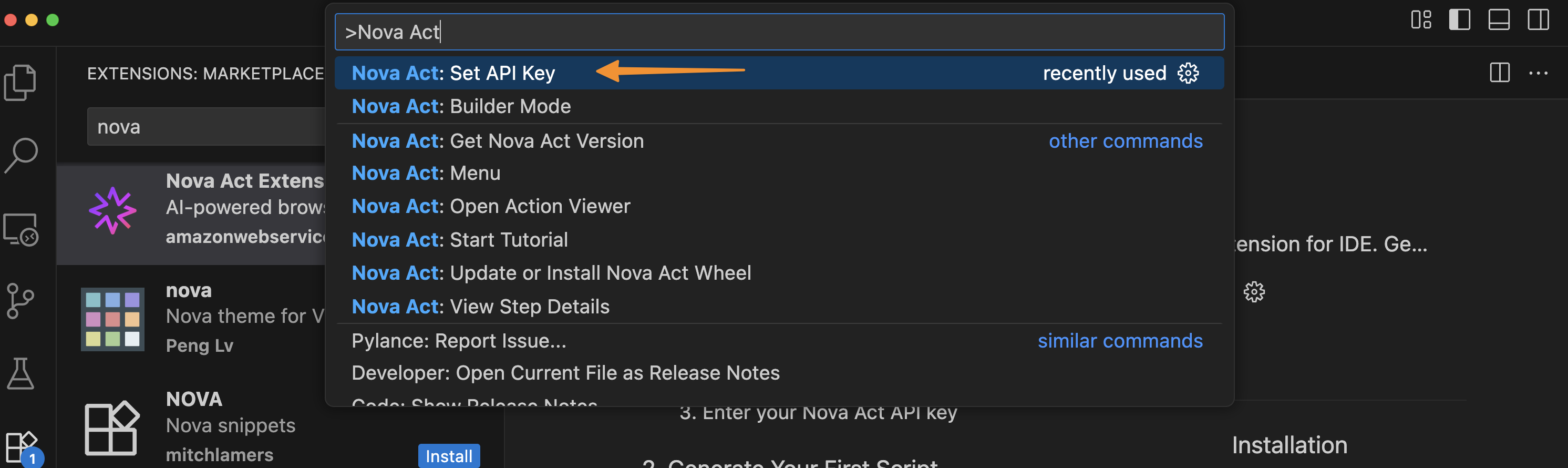
To get started, I need to obtain an API key. To do this, I navigate to the Nova Act page and follow the instructions to get the API key. I select Set API Key by opening the Command Palette with Cmd+Shift+P / Ctrl+Shift+P.
After I’ve entered my API key, I can try Builder Mode. This is a notebook-style builder mode that breaks complex automation scripts into modular cells, allowing me to test and debug each step individually before moving to the next.
Here, I can use the Nova Act SDK to build my agent. On the right side, I have a Live view panel to preview my agent’s actions in the browser and an Output panel to monitor execution logs, including the model’s thinking and actions.
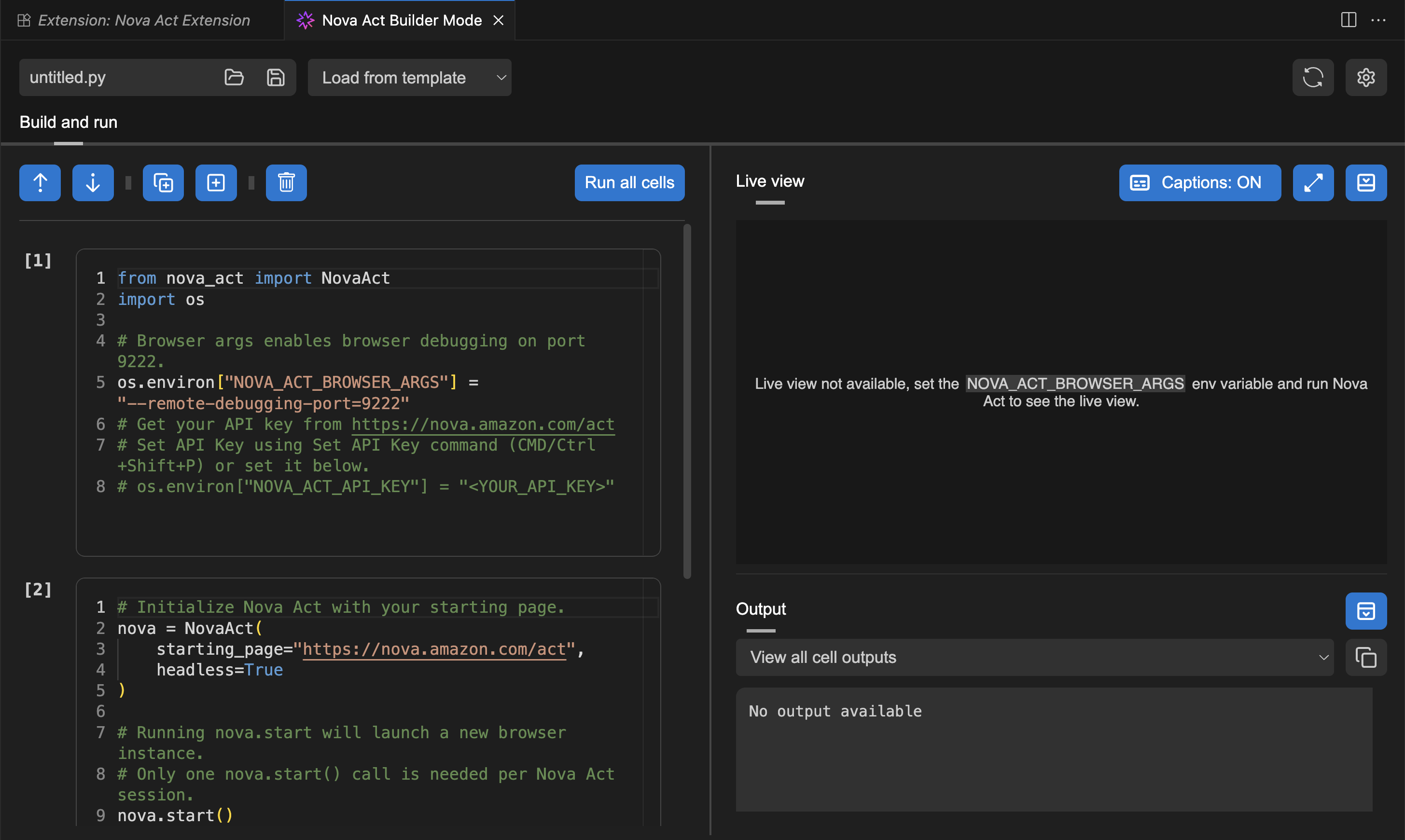
To test the Nova Act extension, I choose Run all cells. This will start a new browser instance and act based on the given prompt.
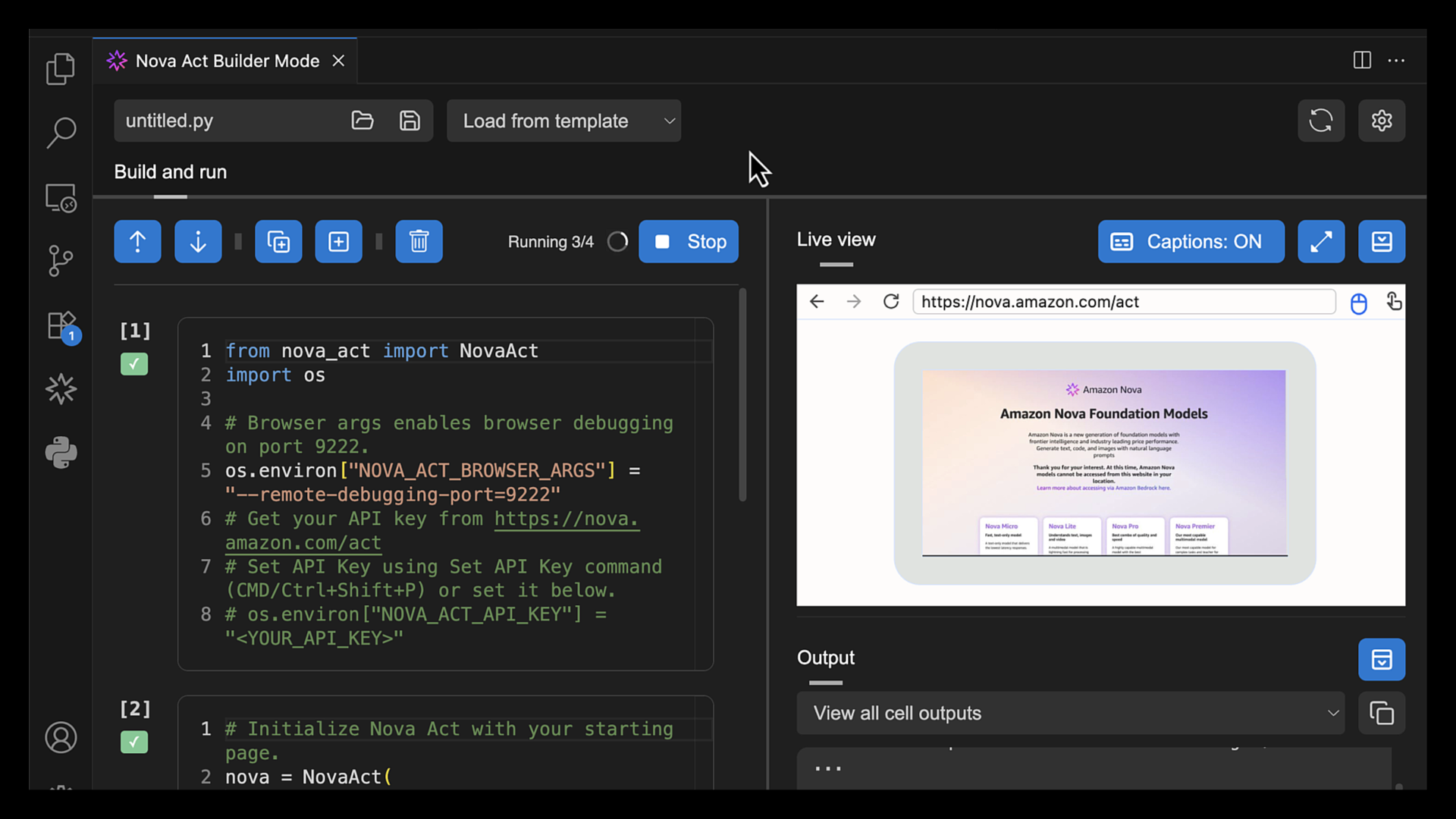
I choose Fullscreen to see how browser automation works.
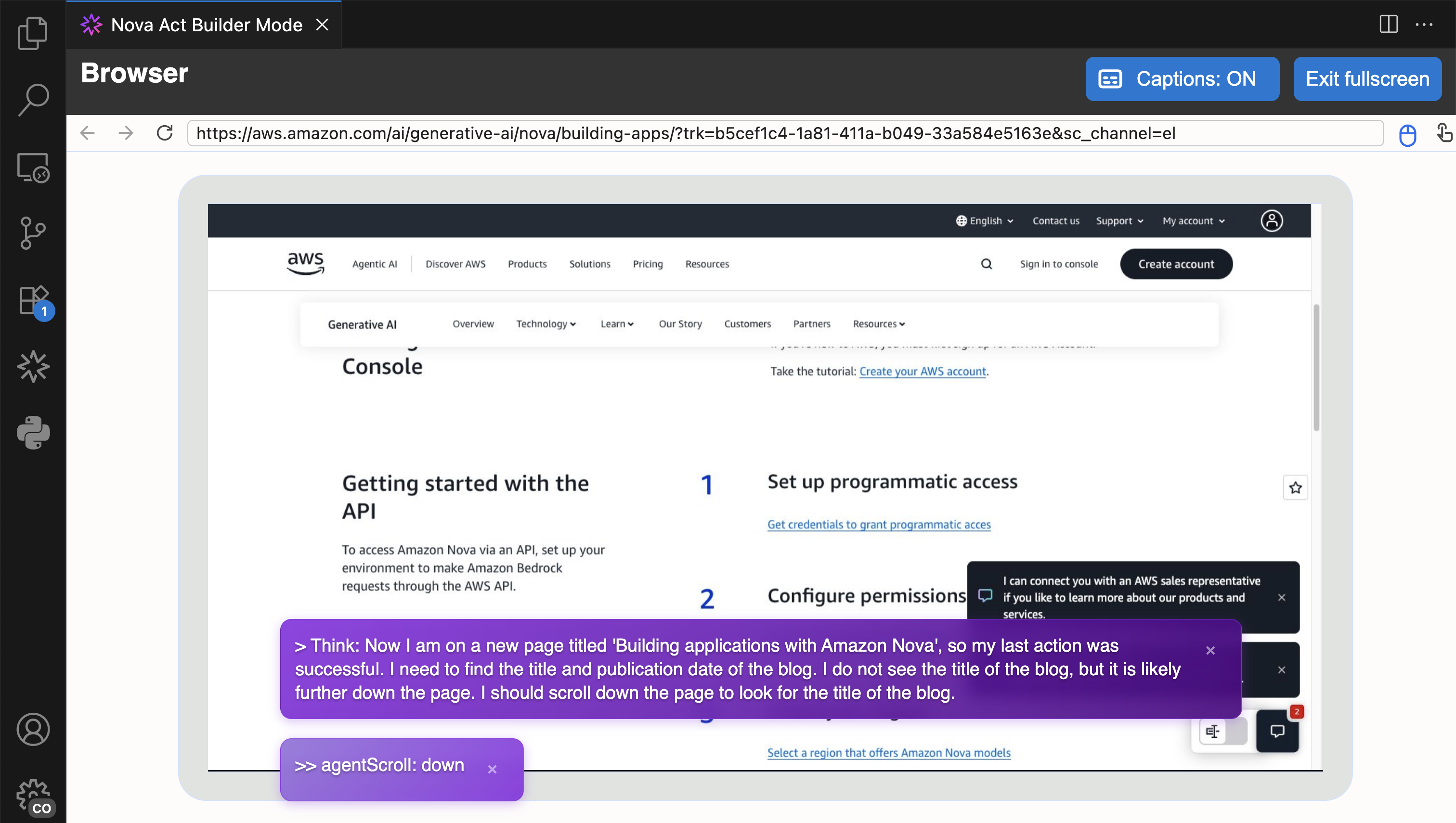
Another useful feature in Builder Mode is that I can navigate to the Output panel and select the cell to see its logs. This helps me debug or review logs specific to the cell I’m working on.
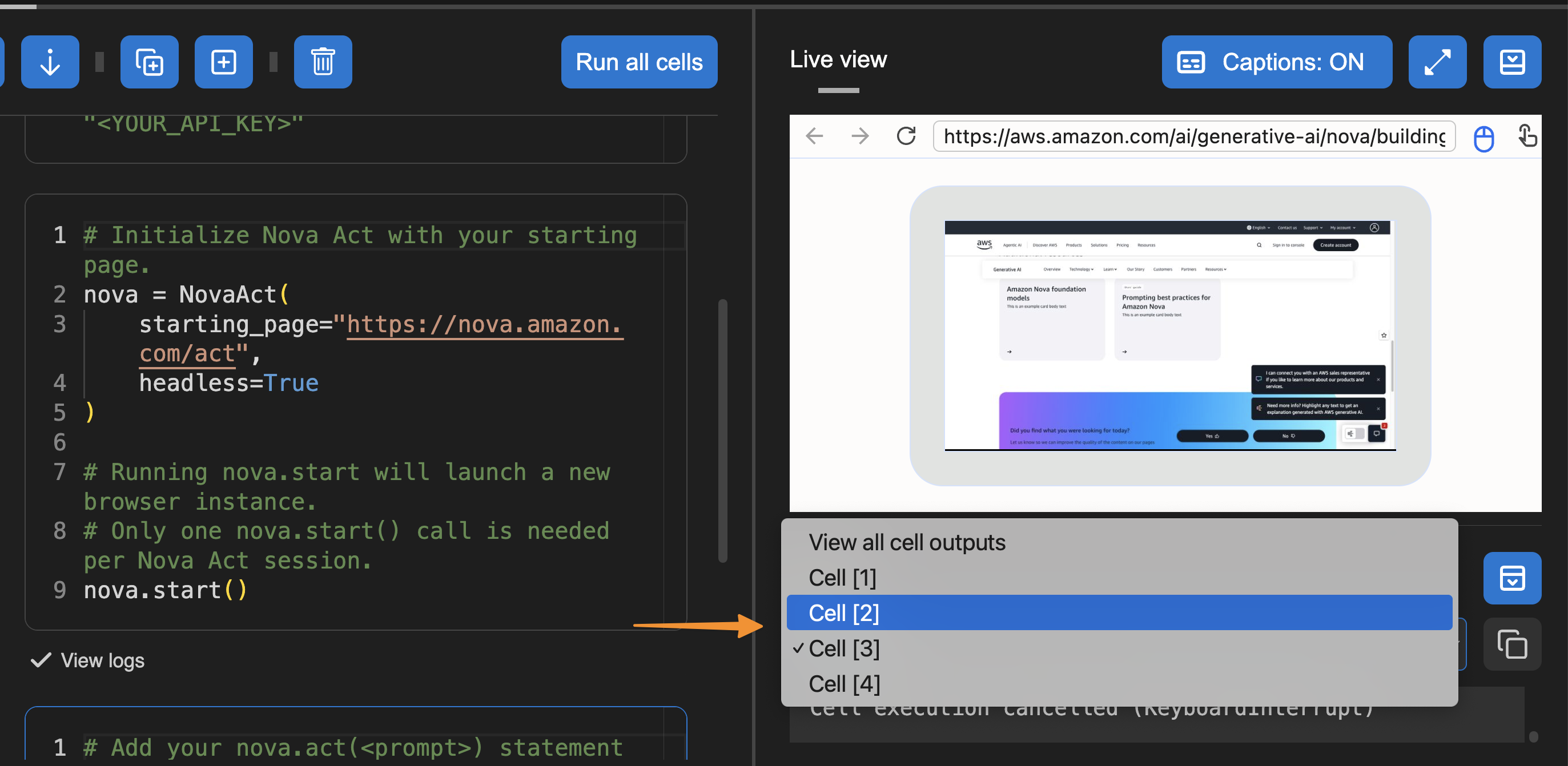
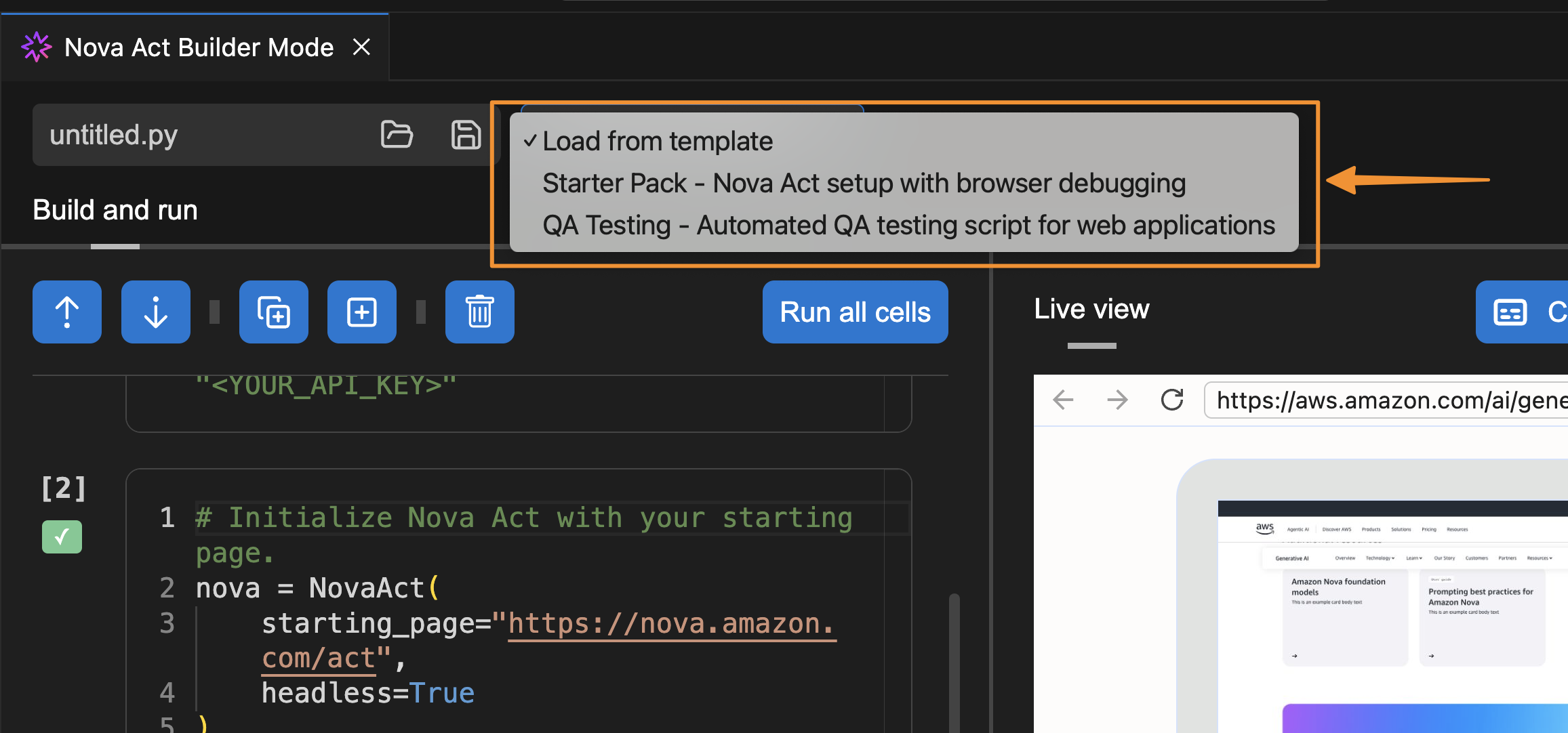
I can also select a template to get started.
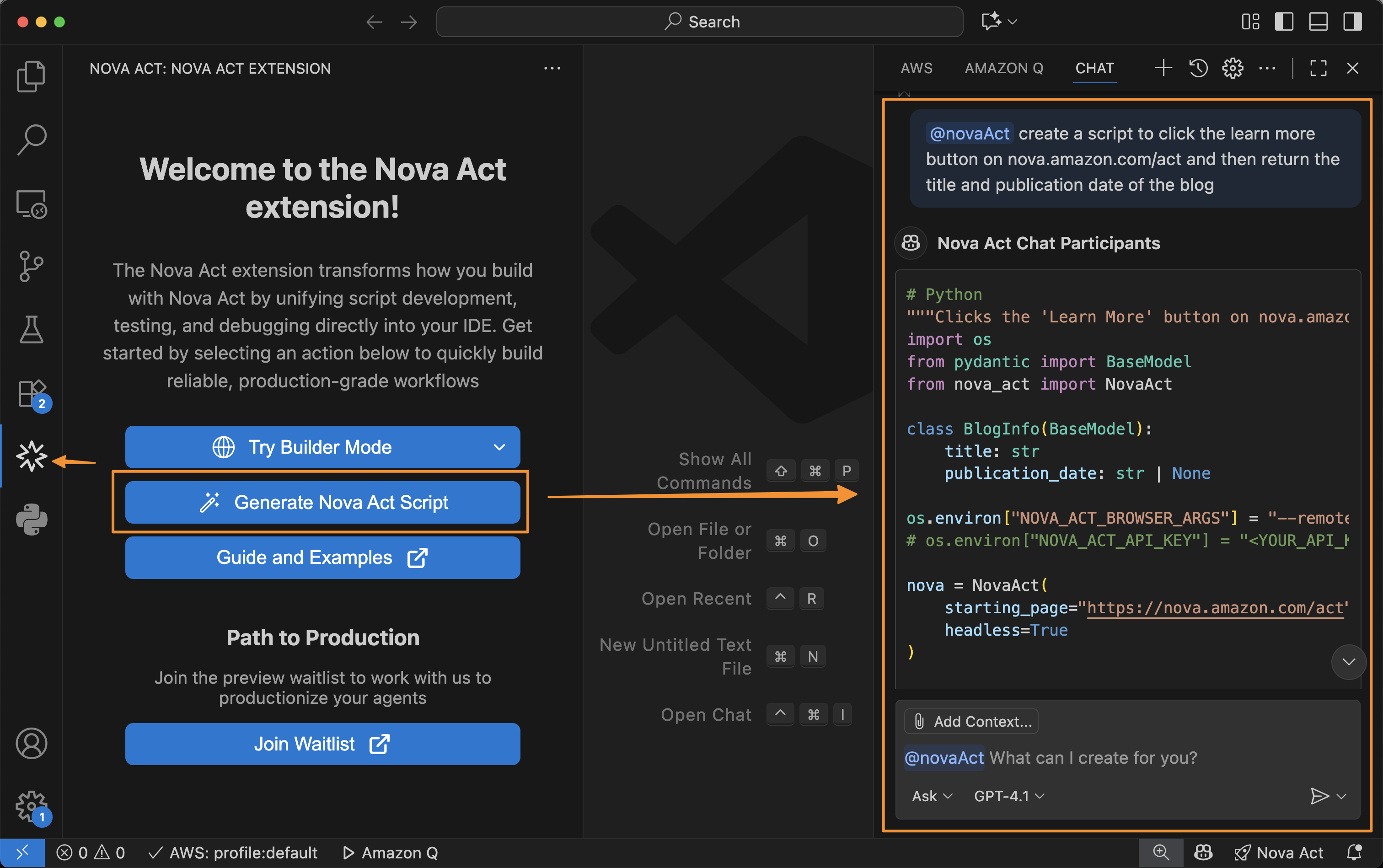
Besides using Builder Mode, I can also chat with Nova Act to create a script for me. To do that, I select the extension and choose Generate Nova Act Script. The Nova Act extension opens a chat dialog in the right panel and automatically creates a script for me.
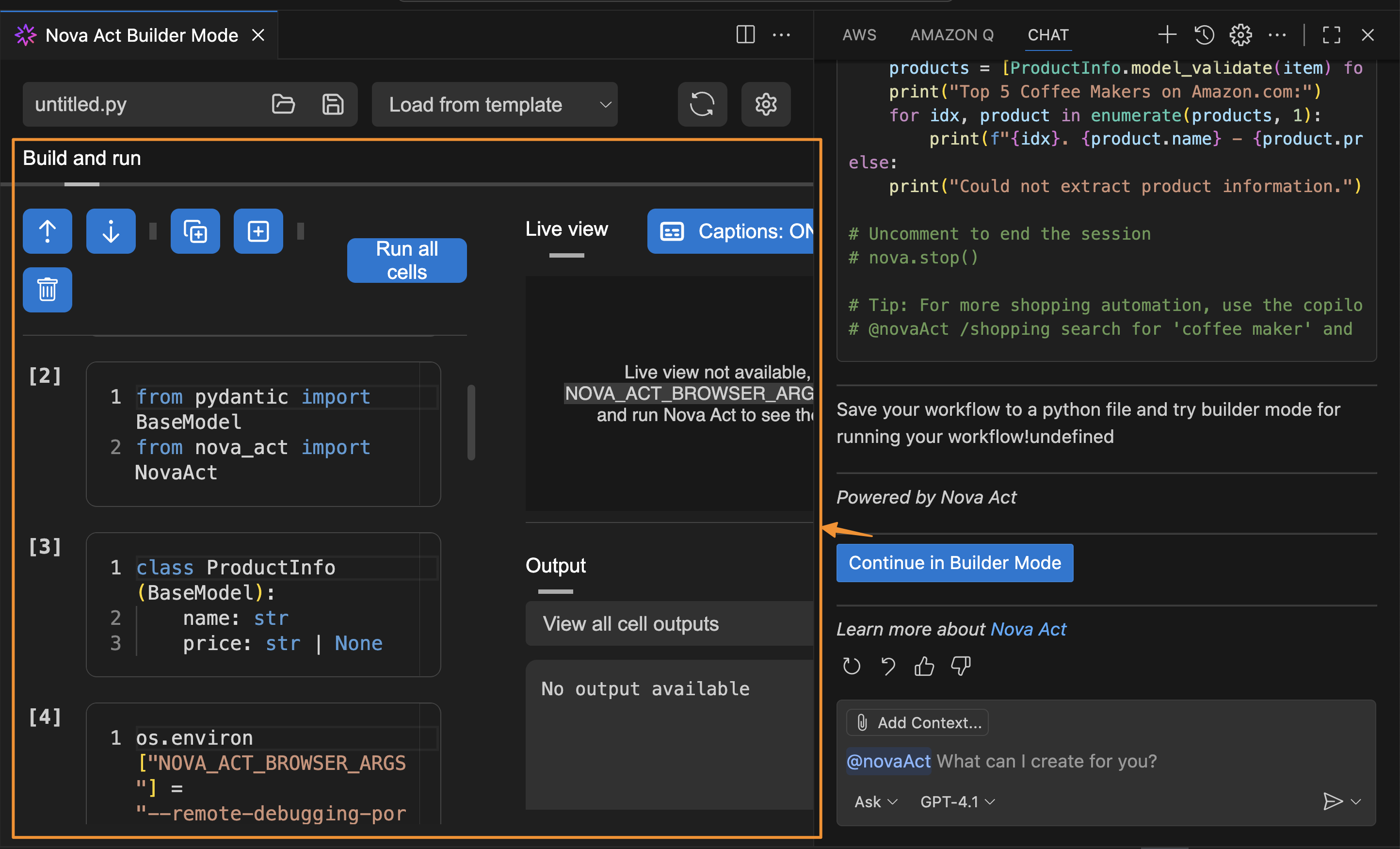
After I finish creating the script, I can choose Start Builder Mode, and the Nova Act extension will help me create a Python file in Builder Mode. This creates a seamless integration because I can switch between chat capability and Builder Mode.
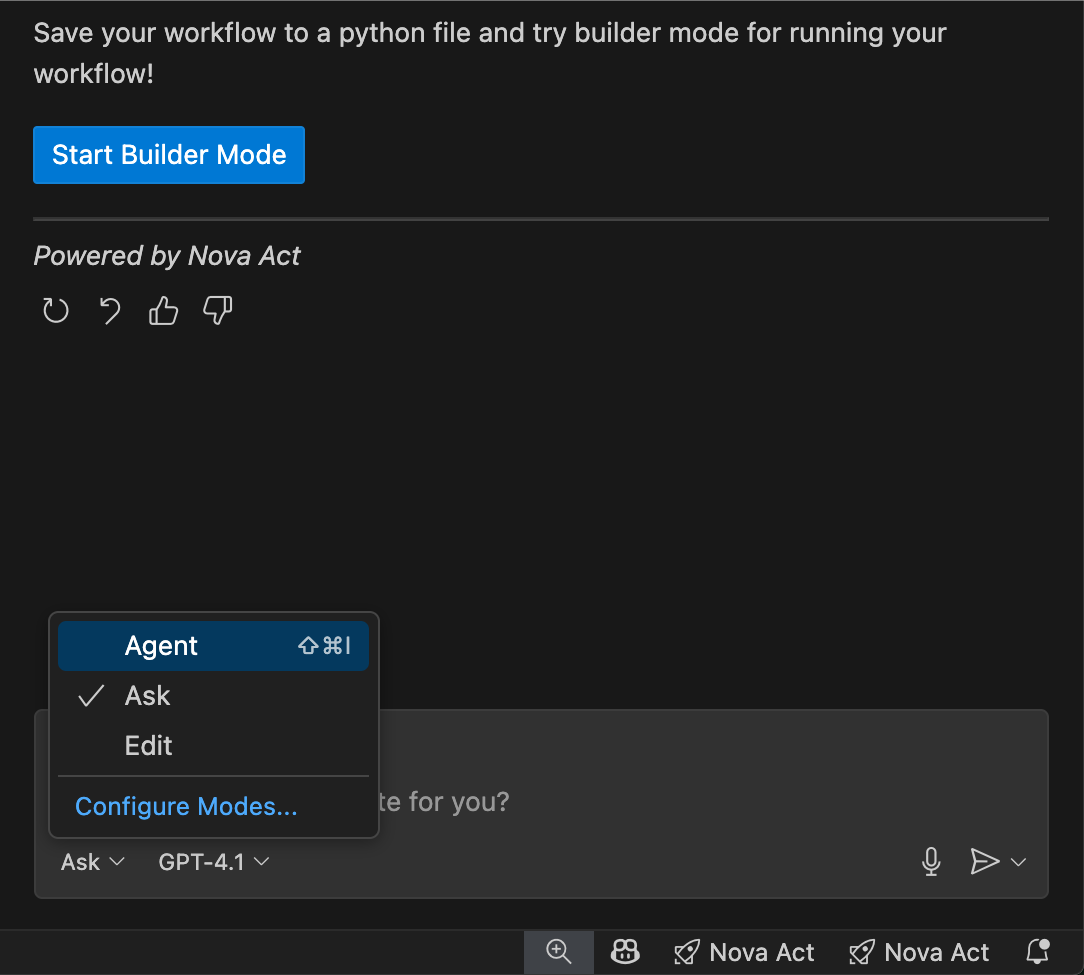
In the chat interface, I see three workflow modes available:
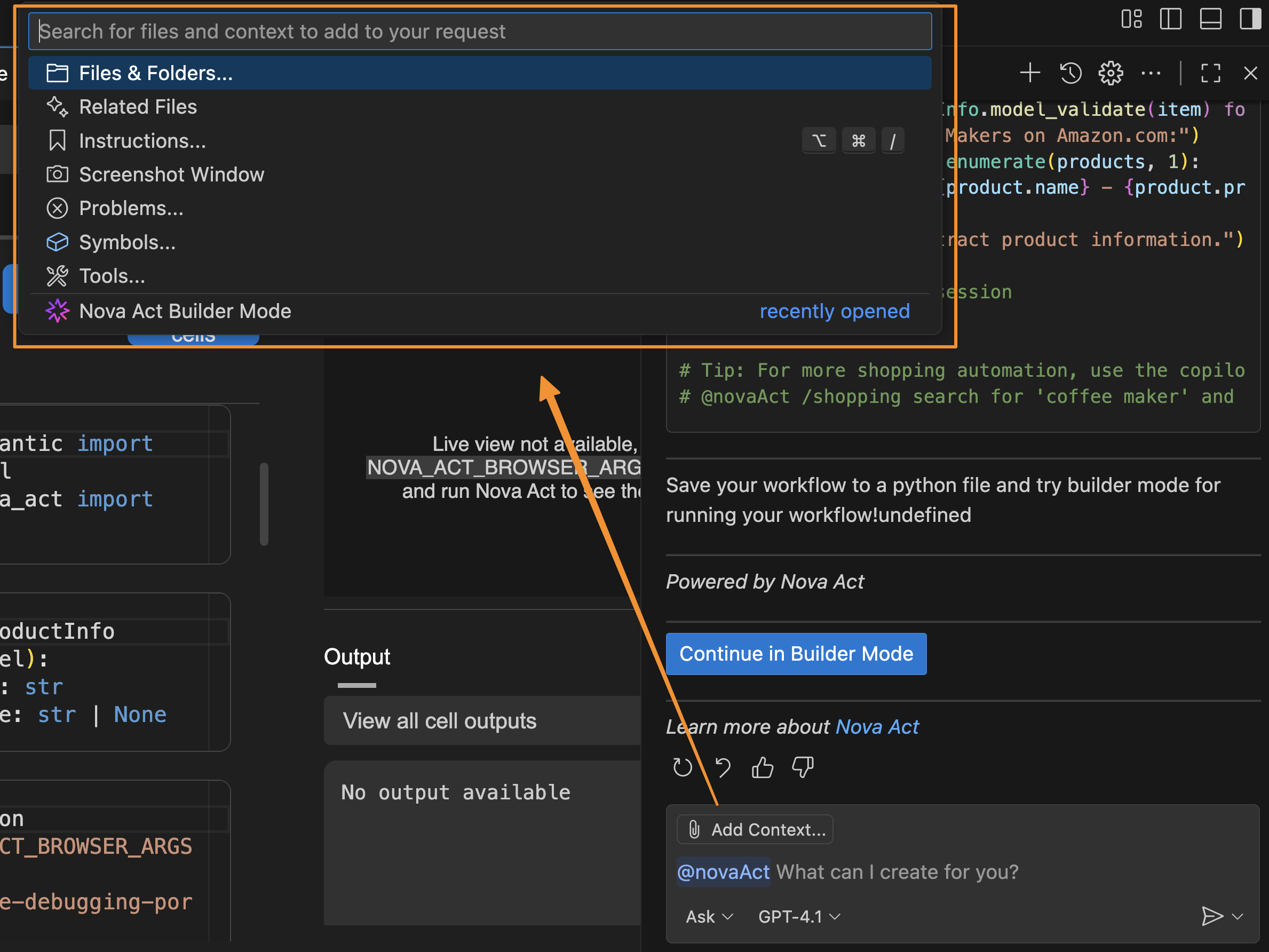
I can also add Context to provide relevant information about my active documents, instructions, problems, or additional Model Context Protocol (MCP) resources the agent can use, plus a screenshot of the current window. Providing this information helps the agent understand any specific requirements for the automation task.
The Nova Act extension also provides a set of predefined templates that I can access by entering / in the chat. These templates are predefined automation scenarios designed to help quickly generate scripts for common web tasks.
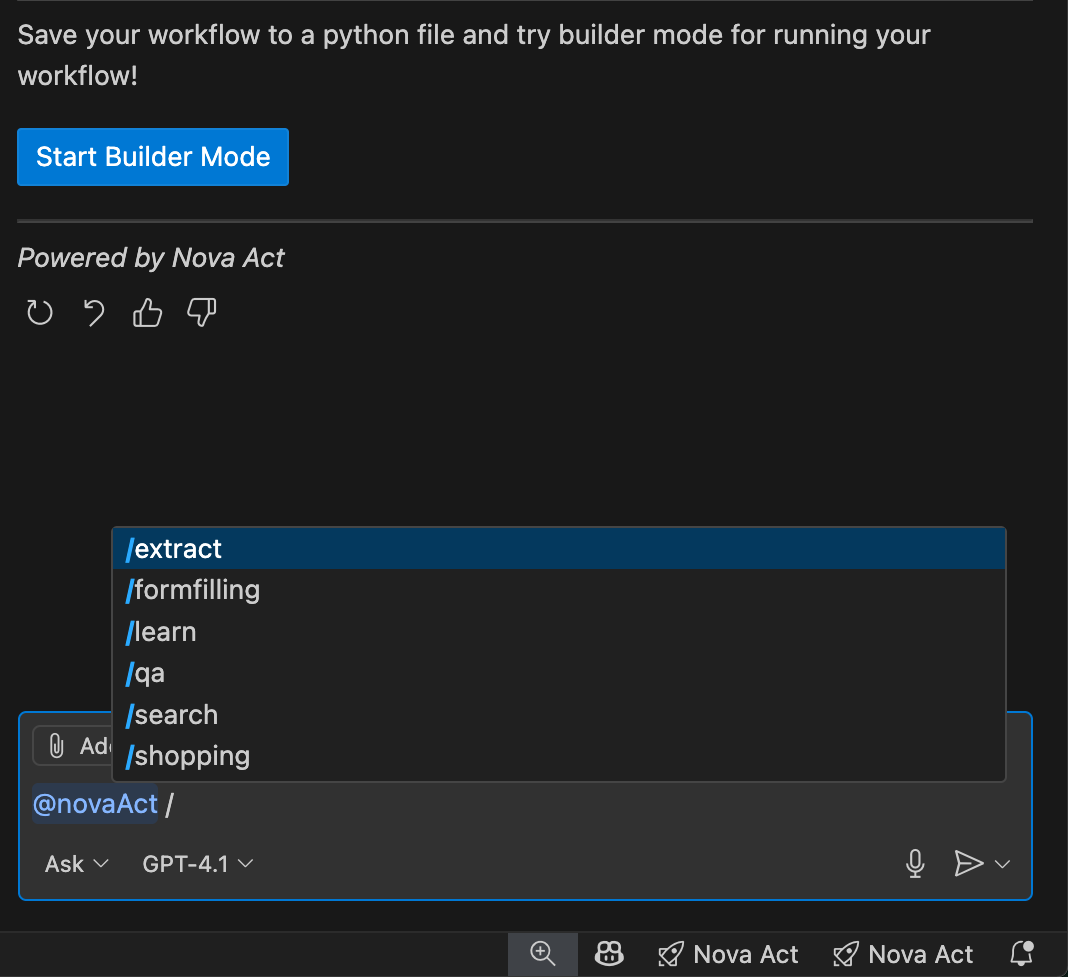
I can use these templates (for example, @novaAct /shopping [my requirements]) to get tailored Python scripts for my workflow. At launch, Nova Act extension provides the following templates:
/shopping: Automates online shopping tasks (searching, comparing, purchasing)/extract: Handles data extraction/search: Performs search and information gathering/qa: Automates quality assurance and testing workflows/formfilling: Completes forms and data entry tasksThis extension transforms my agent development workflow by positioning Nova Act extension as a full-stack agent builder tool—a complete agent IDE for the entire development lifecycle. I can prototype with natural language, customize with modular scripting, and validate with local testing—all without leaving my IDE—ensuring production-grade scripts.
Things to know
Here are key points to note:
Get started with Nova Act extension by installing it from your IDE’s extension marketplace or visiting the GitHub repository for documentation and examples.
Happy automating!
— Donnie
Post Syndicated from BeardedTinker original https://www.youtube.com/shorts/-6MIMJdA13g
Post Syndicated from The Atlantic original https://www.youtube.com/shorts/rjwvFcBaoJk
Post Syndicated from jake original https://lwn.net/Articles/1039127/
The Open Source Security Foundation
(OpenSSF) has put together a joint statement from many of the public
package repositories for various languages about the need for assistance in
maintaining these commons. Services such as PyPI for Python, crates.io for Rust, and many others are
working together to try to find ways to sustain these services in the face
of challenges from “automated CI systems, large-scale dependency
” all downloading enormous
scanners, and ephemeral container builds
amounts of package data, coupled with the rise of generative and agentic AI
“driving a further explosion of machine-driven, often wasteful automated
“. It is not a crisis, yet,
usage, compounding the existing challenges
they say, but it is headed in that direction.
Despite serving billions (perhaps even trillions) of downloads each month (largely driven by commercial-scale consumption), many of these services are funded by a small group of benefactors. Sometimes they are supported by commercial vendors, such as Sonatype (Maven Central), GitHub (npm) or Microsoft (NuGet). At other times, they are supported by nonprofit foundations that rely on grants, donations, and sponsorships to cover their maintenance, operation, and staffing.
Regardless of the operating model, the pattern remains the same: a small number of organizations absorb the majority of infrastructure costs, while the overwhelming majority of large-scale users, including commercial entities that generate demand and extract economic value, consume these services without contributing to their sustainability.