Post Syndicated from original https://xkcd.com/2725/

Post Syndicated from original https://xkcd.com/2725/
Post Syndicated from Cliff Robinson original https://www.servethehome.com/aic-launches-4th-gen-intel-xeon-scalable-sapphire-rapids-servers/
AIC has new 1U, 2U, and 2U 4-node platforms for the 4th Gen Intel Xeon Scalable processors, codenamed Sapphire Rapids
The post AIC Launches 4th Gen Intel Xeon Scalable Sapphire Rapids Servers appeared first on ServeTheHome.
Post Syndicated from original https://mjg59.dreamwidth.org/64660.html
Long-term Linux users may remember that Alan Cox used to write an online diary. This was before the concept of a “Weblog” had really become a thing, and there certainly weren’t any expectations around what one was used for – while now blogging tends to imply a reasonably long-form piece on a specific topic, Alan was just sitting there noting small life concerns or particular technical details in interesting problems he’d solved that day. For me, that was fascinating. I was trying to figure out how to get into kernel development, and was trying to read as much LKML as I could to figure out how kernel developers did stuff. But when you see discussion on LKML, you’re frequently missing the early stages. If an LKML patch is a picture of an owl, I wanted to know how to draw the owl, and most of the conversations about starting in kernel development were very “Draw two circles. Now draw the rest of the owl”. Alan’s musings gave me insight into the thought processes involved in getting from “Here’s the bug” to “Here’s the patch” in ways that really wouldn’t have worked in a more long-form medium.
For the past decade or so, as I moved away from just doing kernel development and focused more on security work instead, Twitter’s filled a similar role for me. I’ve seen people just dumping their thought process as they work through a problem, helping me come up with effective models for solving similar problems. I’ve learned that the smartest people in the field will spend hours (if not days) working on an issue before realising that they misread something back at the beginning and that’s helped me feel like I’m not unusually bad at any of this. It’s helped me learn more about my peers, about my field, and about myself.
Twitter’s now under new ownership that appears to think all the worst bits of Twitter were actually the good bits, so I’ve mostly bailed to the Fediverse instead. There’s no intrinsic length limit on posts there – Mastodon defaults to 500 characters per post, but that’s configurable per instance. But even at 500 characters, it means there’s more room to provide thoughtful context than there is on Twitter, and what I’ve seen so far is more detailed conversation and higher levels of meaningful engagement. Which is great! Except it also seems to discourage some of the posting style that I found so valuable on Twitter – if your timeline is full of nuanced discourse, it feels kind of rude to just scream “THIS FUCKING PIECE OF SHIT IGNORES THE HIGH ADDRESS BIT ON EVERY OTHER WRITE” even though that’s exactly the sort of content I’m there for.
And, yeah, not everything has to be for me. But I worry that as Twitter’s relevance fades for the people I’m most interested in, we’re replacing it with something that’s not equivalent – something that doesn’t encourage just dropping 50 characters or so of your current thought process into a space where it can be seen by thousands of people. And I think that’s a shame.
 comments
Post Syndicated from original https://lwn.net/Articles/920035/
Libre Arts looks
forward to progress in a long list of creative-art projects this year.
2022 was a really busy year for the [GIMP]: late binding for CMYK,
text outlines, Align/Distribute revamp, floating selections gone,
linked layers replaced with layer sets, all the file format support
updates… Phew!There is very little left to do before version 3.0 can be
released. The last major change is rewriting the menus code because
the old way was obsoleted in GTK3. The team also started saying no
to major new features. Most recently, they moved vector layers from
3.0 to 3.0.2. That would be one hell of a minor update!
Post Syndicated from Techmoan original https://www.youtube.com/watch?v=w5L-VDt661o
Post Syndicated from Cliff Robinson original https://www.servethehome.com/asus-has-new-4th-gen-intel-xeon-scalable-sapphire-rapids-servers/
ASUS has new 4th Gen Intel Xeon Scalable servers. This includes 1U, 2U, 2U4N, GPU, and edge platforms for Sapphire Rapids
The post ASUS Has New 4th Gen Intel Xeon Scalable Sapphire Rapids Servers appeared first on ServeTheHome.
Post Syndicated from Explosm.net original https://explosm.net/comics/30805
New Cyanide and Happiness Comic
Post Syndicated from Oglaf! -- Comics. Often dirty. original https://www.oglaf.com/spice/


Post Syndicated from original https://lwn.net/Articles/920010/
The
6.1.6,
5.15.88, and
5.10.163
stable kernel updates have been released; each contains another set of
important fixes.
Post Syndicated from Асен Йорданов original https://bivol.bg/nexo-trenchev-ds-borisov.html

Антони Панайотов Тренчев е баща на основателя на криптобанката Nexo Антоний Тренчев. Последният вероятно ще стане обвиняем в близките дни за създаването на поредната схема с криптовалути за милиарди. Тренчев-баща…
Post Syndicated from original https://yurukov.net/blog/2023/%D0%BF%D1%80%D0%B8%D0%BC%D0%B5%D1%80-%D0%B7%D0%B0-%D1%81%D0%B8%D0%BD%D1%85%D1%80%D0%BE%D0%BD-%D0%B2-%D0%B1%D0%B5%D0%B7%D0%B4%D0%B5%D0%B9%D1%81%D1%82%D0%B2%D0%B8%D0%B5%D1%82%D0%BE-%D0%BD%D0%B0-%D1%81/
Тази седмица имах интересен разговор със СДВР и ЦГМ. Това отново от рубриката „Тука е така… както си го направим“.
Вървях в района на спортен комплекс Диана и минах отново покрай ресторант 101. Тротоарът за преден път беше изцяло зает с джипове на два реда. Пред мен жена с малко дете също се възмути, наложи се да мине по пътното платно и един за малко да я отнесе.
На метри по-надолу имаше патрулка. Спират често там, но на почтително разстояние от 101. Проверяват на случаен принцип. Заради случилото се току-що отбелязах на полицая, че видимо се създава опасност. Още повече, че отсрещният тротоар половината го няма, а другата половина е зает също с коли.
Погледна ме, завъртя се, каза, че нищо не можел да направи. Викам спирането на тротоар е забранено по този начин и го има в правилника за движение по пътищата. Именно негова работа е. Вика, че знае, но за „това място“ трябвало ЦГМ да звънна, чак тогава глоба щял да пише. Завърши с „знаете в каква държава живеем“.
Междувременно се чуват още едни спирачки зад мен и виждам още хора слезли на платното да минат, а кола зад тях нервничи, защото иска и тя да се качи на тротоара да паркира пред въпросния ресторант.
Та звъня на ЦГМ. Обяснявам ситуацията и кое е мястото. Уточнявам, че става въпрос конкретно пред ресторанта, а не отсреща или надолу по Титнява. Паяците обичат да вършеят по улицата, но явно има няколко бели петна в картата им и 101 е едно голямо такова.
Накрая добавям, че на място има патрулка и съм говорил с тях. Отсреща променят тона „Ама полицаи ли има?!“ Увещавам ги още, защото настояват, че им трябвало решение „от горна инстанция“, за да вдигат на това място. Щото то тротоар, правилник, ама… Накрая измрънква „Абе те полицаите като ни видят ще избягат пак.“ Там без патрулка не пипали.
И така със СДВР в комбина с общинското дружество-еманация на лошото управление и корупцията на Софийска община. Заведението на Сталийски покровителствано години наред от Фандъкова, спортни министри и трудоустроени кадри на ГЕРБ си остава бяло петно в полезрението на полиция и община. Също остава и любимо място за сбирки на едни мастити индивиди, които редовия полицай не смее да спре за проверка, защото „не се знае на кого са човек“, а и никой в СДВР няма да го защити, а по-скоро ще „изчезне в някоя канавка“, ако мога да цитирам познат в структурата.
Та тука е така… както си го направим.
The post Пример за синхрон в бездействието на СДВР и ЦГМ first appeared on Блогът на Юруков.
Post Syndicated from Schneier.com Webmaster original https://www.schneier.com/blog/archives/2023/01/upcoming-speaking-engagements-26.html
This is a current list of where and when I am scheduled to speak:
The list is maintained on this page.
Post Syndicated from Bruce Schneier original https://www.schneier.com/blog/archives/2023/01/booklist-review-of-a-hackers-mind.html
Booklist reviews A Hacker’s Mind:
Author and public-interest security technologist Schneier (Data and Goliath, 2015) defines a “hack” as an activity allowed by a system “that subverts the rules or norms of the system […] at the expense of someone else affected by the system.” In accessing the security of a particular system, technologists such as Schneier look at how it might fail. In order to counter a hack, it becomes necessary to think like a hacker. Schneier lays out the ramifications of a variety of hacks, contrasting the hacking of the tax code to benefit the wealthy with hacks in realms such as sports that can innovate and change a game for the better. The key to dealing with hacks is being proactive and providing adequate patches to fix any vulnerabilities. Schneier’s fascinating work illustrates how susceptible many systems are to being hacked and how lives can be altered by these subversions. Schneier’s deep dive into this cross-section of technology and humanity makes for investigative gold.
The book will be published on February 7. Here’s the book’s webpage. You can pre-order a signed copy from me here.
Post Syndicated from Matt Granger original https://www.youtube.com/watch?v=F1ApW_uOqVo
Post Syndicated from Explosm.net original https://explosm.net/comics/white-collar-crime
New Cyanide and Happiness Comic
Post Syndicated from Bruce Schneier original https://www.schneier.com/blog/archives/2023/01/friday-squid-blogging-how-to-buy-fresh-or-frozen-squid.html
Good advice on buying squid. I like to buy whole fresh squid and clean it myself.
As usual, you can also use this squid post to talk about the security stories in the news that I haven’t covered.
Read my blog posting guidelines here.
Post Syndicated from Anne Grahn original https://aws.amazon.com/blogs/security/three-key-security-themes-from-aws-reinvent-2022/
AWS re:Invent returned to Las Vegas, Nevada, November 28 to December 2, 2022. After a virtual event in 2020 and a hybrid 2021 edition, spirits were high as over 51,000 in-person attendees returned to network and learn about the latest AWS innovations.
Now in its 11th year, the conference featured 5 keynotes, 22 leadership sessions, and more than 2,200 breakout sessions and hands-on labs at 6 venues over 5 days.
With well over 100 service and feature announcements—and innumerable best practices shared by AWS executives, customers, and partners—distilling highlights is a challenge. From a security perspective, three key themes emerged.

Security teams are always looking for ways to increase visibility into their security posture and uncover patterns to make more informed decisions. However, as AWS Vice President of Data and Machine Learning, Swami Sivasubramanian, pointed out during his keynote, data often exists in silos; it isn’t always easy to analyze or visualize, which can make it hard to identify correlations that spark new ideas.
“Data is the genesis for modern invention.” – Swami Sivasubramanian, AWS VP of Data and Machine Learning
At AWS re:Invent, we launched new features and services that make it simpler for security teams to store and act on data. One such service is Amazon Security Lake, which brings together security data from cloud, on-premises, and custom sources in a purpose-built data lake stored in your account. The service, which is now in preview, automates the sourcing, aggregation, normalization, enrichment, and management of security-related data across an entire organization for more efficient storage and query performance. It empowers you to use the security analytics solutions of your choice, while retaining control and ownership of your security data.
Amazon Security Lake has adopted the Open Cybersecurity Schema Framework (OCSF), which AWS cofounded with a number of organizations in the cybersecurity industry. The OCSF helps standardize and combine security data from a wide range of security products and services, so that it can be shared and ingested by analytics tools. More than 37 AWS security partners have announced integrations with Amazon Security Lake, enhancing its ability to transform security data into a powerful engine that helps drive business decisions and reduce risk. With Amazon Security Lake, analysts and engineers can gain actionable insights from a broad range of security data and improve threat detection, investigation, and incident response processes.
According to Gartner, by 2026, at least 50% of C-Level executives will have performance requirements related to cybersecurity risk built into their employment contracts. Security is top of mind for organizations across the globe, and as AWS CISO CJ Moses emphasized during his leadership session, we are continuously building new capabilities to help our customers meet security, risk, and compliance goals.
In addition to Amazon Security Lake, several new AWS services announced during the conference are designed to make it simpler for builders and security teams to improve their security posture in multiple areas.
Authorization is a key component of applications. Amazon Verified Permissions is a scalable, fine-grained permissions management and authorization service for custom applications that simplifies policy-based access for developers and centralizes access governance. The new service gives developers a simple-to-use policy and schema management system to define and manage authorization models. The policy-based authorization system that Amazon Verified Permissions offers can shorten development cycles by months, provide a consistent user experience across applications, and facilitate integrated auditing to support stringent compliance and regulatory requirements.
Additional services that make it simpler to define authorization and service communication include Amazon VPC Lattice, an application-layer service that consistently connects, monitors, and secures communications between your services, and AWS Verified Access, which provides secure access to corporate applications without a virtual private network (VPN).
Monitoring for malicious activity and anomalous behavior just got simpler. Amazon GuardDuty RDS Protection expands the threat detection capabilities of GuardDuty by using tailored machine learning (ML) models to detect suspicious logins to Amazon Aurora databases. You can enable the feature with a single click in the GuardDuty console, with no agents to manually deploy, no data sources to enable, and no permissions to configure. When RDS Protection detects a potentially suspicious or anomalous login attempt that indicates a threat to your database instance, GuardDuty generates a new finding with details about the potentially compromised database instance. You can view GuardDuty findings in AWS Security Hub, Amazon Detective (if enabled), and Amazon EventBridge, allowing for integration with existing security event management or workflow systems.
To bolster vulnerability management processes, Amazon Inspector now supports AWS Lambda functions, adding automated vulnerability assessments for serverless compute workloads. With this expanded capability, Amazon Inspector automatically discovers eligible Lambda functions and identifies software vulnerabilities in application package dependencies used in the Lambda function code. Actionable security findings are aggregated in the Amazon Inspector console, and pushed to Security Hub and EventBridge to automate workflows.
The first step to protecting data is to find it. Amazon Macie now automatically discovers sensitive data, providing continual, cost-effective, organization-wide visibility into where sensitive data resides across your Amazon Simple Storage Service (Amazon S3) estate. With this new capability, Macie automatically and intelligently samples and analyzes objects across your S3 buckets, inspecting them for sensitive data such as personally identifiable information (PII), financial data, and AWS credentials. Macie then builds and maintains an interactive data map of your sensitive data in S3 across your accounts and Regions, and provides a sensitivity score for each bucket. This helps you identify and remediate data security risks without manual configuration and reduce monitoring and remediation costs.
Encryption is a critical tool for protecting data and building customer trust. The launch of the end-to-end encrypted enterprise communication service AWS Wickr offers advanced security and administrative controls that can help you protect sensitive messages and files from unauthorized access, while working to meet data retention requirements.
Maintaining compliance with regulatory, security, and operational best practices as you provision cloud resources is key. AWS Config rules, which evaluate the configuration of your resources, have now been extended to support proactive mode, so that they can be incorporated into infrastructure-as-code continuous integration and continuous delivery (CI/CD) pipelines to help identify noncompliant resources prior to provisioning. This can significantly reduce time spent on remediation.
Managing the controls needed to meet your security objectives and comply with frameworks and standards can be challenging. To make it simpler, we launched comprehensive controls management with AWS Control Tower. You can use it to apply managed preventative, detective, and proactive controls to accounts and organizational units (OUs) by service, control objective, or compliance framework. You can also use AWS Control Tower to turn on Security Hub detective controls across accounts in an OU. This new set of features reduces the time that it takes to define and manage the controls required to meet specific objectives, such as supporting the principle of least privilege, restricting network access, and enforcing data encryption.
As we work through macroeconomic conditions, security leaders are facing increased budgetary pressures. In his opening keynote, AWS CEO Adam Selipsky emphasized the effects of the pandemic, inflation, supply chain disruption, energy prices, and geopolitical events that continue to impact organizations.
Now more than ever, it is important to maintain your security posture despite resource constraints. Citing specific customer examples, Selipsky underscored how the AWS Cloud can help organizations move faster and more securely. By moving to the cloud, agricultural machinery manufacturer Agco reduced costs by 78% while increasing data retrieval speed, and multinational HVAC provider Carrier Global experienced a 40% reduction in the cost of running mission-critical ERP systems.
“If you’re looking to tighten your belt, the cloud is the place to do it.” – Adam Selipsky, AWS CEO
Security teams can do more with less by maximizing the value of existing controls, and bolstering security monitoring and analytics capabilities. Services and features announced during AWS re:Invent—including Amazon Security Lake, sensitive data discovery with Amazon Macie, support for Lambda functions in Amazon Inspector, Amazon GuardDuty RDS Protection, and more—can help you get more out of the cloud and address evolving challenges, no matter the economic climate.
AWS re:Invent featured many more highlights on a variety of topics, such as Amazon EventBridge Pipes and the pre-announcement of GuardDuty EKS Runtime protection, as well as Amazon CTO Dr. Werner Vogels’ keynote, and the security partnerships showcased on the Expo floor. It was a whirlwind week, but one thing is clear: AWS is working harder than ever to make our services better and to collaborate on solutions that ease the path to proactive security, so that you can focus on what matters most—your business.
For more security-related announcements and on-demand sessions, see A recap for security, identity, and compliance sessions at AWS re:Invent 2022 and the AWS re:Invent Security, Identity, and Compliance playlist on YouTube.
If you have feedback about this post, submit comments in the Comments section below.
Post Syndicated from Christopher Granleese original https://blog.rapid7.com/2023/01/13/metasploit-weekly-wrap-up-188/
Author: Kali-Team
Type: Post
Pull request: #17337 contributed by cn-kali-team
Description: This adds a post exploit module that retrieves Dbeaver session data from local configuration files. It is able to extract and decrypt credentials stored in these files for any version of Dbeaver installed on Windows or Linux/Unix systems.
Author: Kali-Team
Type: Post
Pull request: #17341 contributed by cn-kali-team
Description: This adds a post module that gathers local credentials stored by the MinIO client on Windows, Linux, and MacOS.
auxiliary/scanner/http/http_header now work as expected.exchange_proxylogon_collector module where it would crash if the LegacyDN was not present in the XML response.smb_enumshares incorrectly truncated file names before storing them into loot. This has been addressed so that only the console output will contain truncated file names, and the loot files will still contain the full file names for reference.You can always find more documentation on our docsite at docs.metasploit.com.
As always, you can update to the latest Metasploit Framework with msfupdate
and you can get more details on the changes since the last blog post from
GitHub:
If you are a git user, you can clone the Metasploit Framework repo (master branch) for the latest.
To install fresh without using git, you can use the open-source-only Nightly Installers or the
binary installers (which also include the commercial edition).
Post Syndicated from Talks at Google original https://www.youtube.com/watch?v=F8smRsbTYMQ
Post Syndicated from Nate Smith original https://github.blog/2023-01-13-new-github-cli-extension-tools/
Since the GitHub CLI 2.0 release, developers and organizations have customized their CLI experience by developing and installing extensions. Since then, the CLI team has been busy shipping several new features to further enhance the experience for both extension consumers and authors. Additionally, we’ve shipped go-gh 1.0 release, a Go library giving extension authors access to the same code that powers the GitHub CLI itself. Finally, the CLI team released the gh/pre-extension-precompile action, which automates the compilation and release of Go, Rust, or C++ extensions.
This blog post provides a tour of what’s new, including an in-depth look at writing a CLI extension with Go.
In the 2.20.0 release of the GitHub CLI, we shipped two new commands, including gh extension browse and gh extension search, to make discovery of extensions easier (all extension commands are aliased under gh ext, so the rest of this post will use that shortened version).
gh ext browse is a new kind of command for the GitHub CLI: a fully interactive Terminal User Interface (TUI). It allows users to explore published extensions interactively right in the terminal.
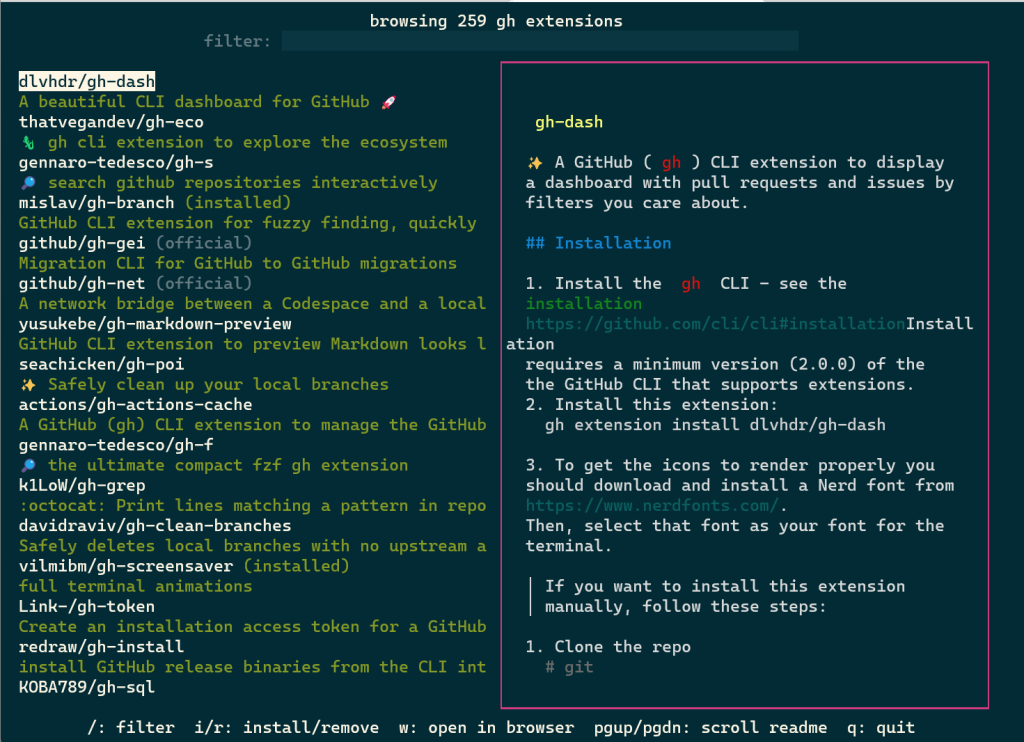
Once gh ext browse has launched and loads extension data, you can browse through all of the GitHub CLI extensions available for installation sorted by star count by pressing the up and down arrows (or k and j).
Pressing / focuses the filter box, allowing you to trim the list down to a search term.
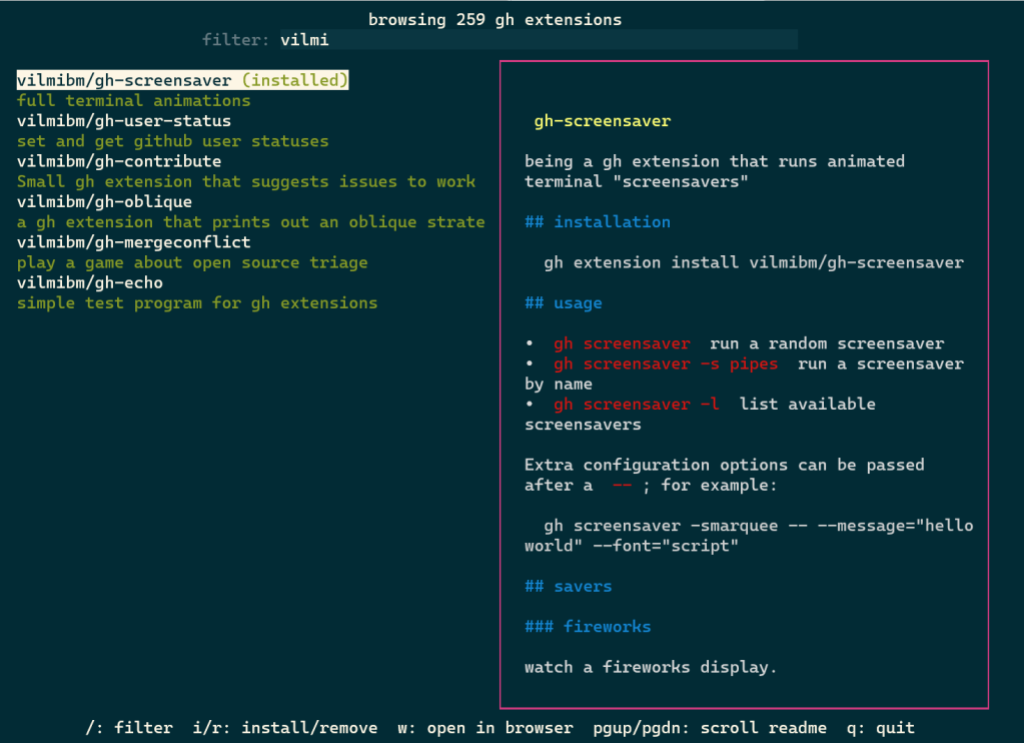
You can select any extension by highlighting it. The selected extension can be installed by pressing i or uninstalled by pressing r. Pressing w will open the currently highlighted extension’s repository page on GitHub in your web browser.
Our hope is that this is a more enjoyable and easy way to discover new extensions and we’d love to hear feedback on the approach we took with this command.
In tandem with gh ext browse we’ve shipped another new command intended for scripting and automation: gh ext search. This is a classic CLI command which, with no arguments, prints out the first 30 extensions available to install sorted by star count.
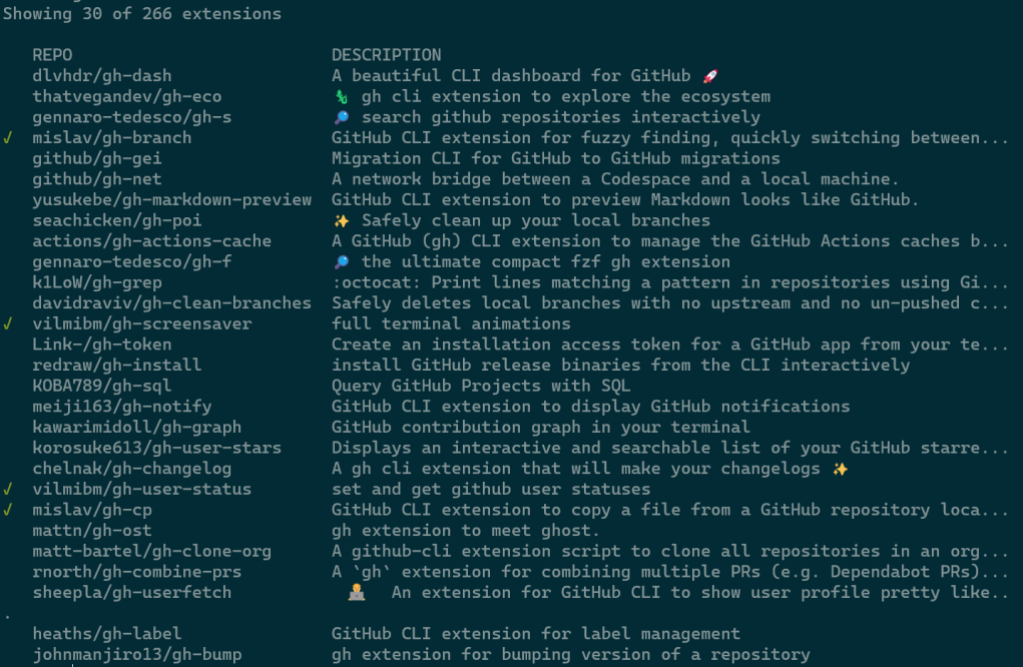
A green check mark on the left indicates that an extension is installed locally.
Any arguments provided narrow the search results:
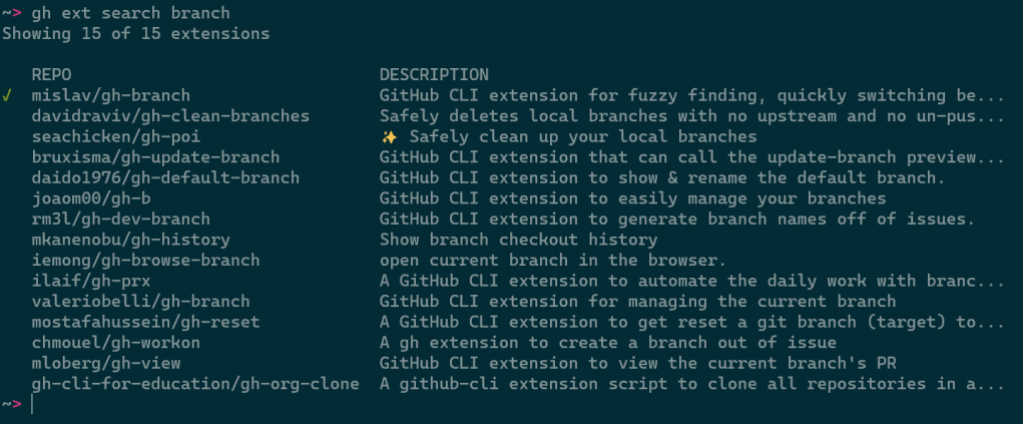
Results can be further refined and processed with flags, like:
--limit, for fetching more results--owner, for only returning extensions by a certain author--sort, for example for sorting by updated--license, to filter extensions by software license--web, for opening search results in your web browser--json, for returning results as JSONThis command is intended to be scripted and will produce composable output if piped. For example, you could install all of the extensions I have written with:
gh ext search --owner vilmibm | cut -f2 | while read -r extension; do gh ext install $extension; done
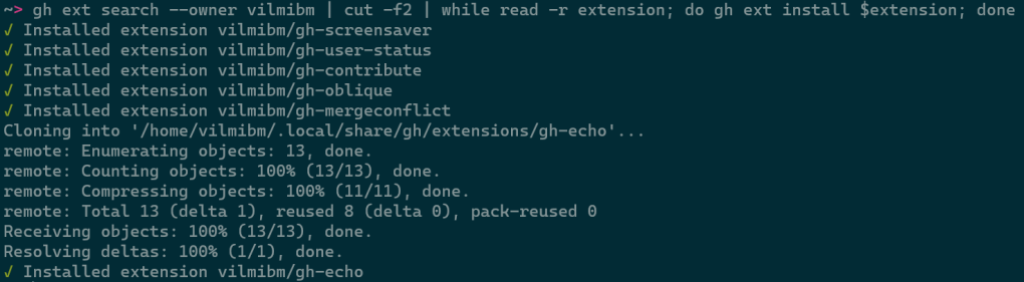
For more information about gh ext search and example usage, see gh help ext search.
The CLI team wanted to accelerate extension development by putting some of the GitHub CLI’s own code into an external library called go-gh for use by extension authors. The GitHub CLI itself is powered by go-gh, ensuring that it is held to a high standard of quality. This library is written in Go just like the CLI itself.
To demonstrate how to make use of this library, I’m going to walk through building an extension from the ground up. I’ll be developing a command called askfor quickly searching the threads in GitHub Discussions. The end result of this exercise lives on GitHub if you want to see the full example.
First, I’ll run gh ext create to get started. I’ll fill in the prompts to name my command “ask” and request scaffolding for a Go project.

Before I edit anything, it would be nice to have this repository on GitHub. I’ll cd gh-ask and run gh repo create, selecting Push an existing local repository to GitHub, and follow the subsequent prompts. It’s okay to make this new repository private for now even if you intend to make it public later; private repositories can still be installed locally with gh ext install but will be unavailable to anyone without read access to that repository.
Opening main.go in my editor, I’ll see the boilerplate that gh ext create made for us:
package main

import (
        "fmt"

        "github.com/cli/go-gh"
)

func main() {
        fmt.Println("hi world, this is the gh-ask extension!")
        client, err := gh.RESTClient(nil)
        if err != nil {
                fmt.Println(err)
                return
        }
        response := struct {Login string}{}
        err = client.Get("user", &response)
        if err != nil {
                fmt.Println(err)
                return
        }
        fmt.Printf("running as %s\n", response.Login)
}
go-gh has already been imported for us and there is an example of its RESTClient function being used.
The goal with this extension is to get a glimpse into threads in a GitHub repository’s discussion area that might be relevant to a particular question. It should work something like this:
$ gh ask actions
…a list of relevant threads from whatever repository you're in locally…

$ gh ask --repo cli/cli ansi
…a list of relevant threads from the cli/cli repository…
First, I’ll make sure that a repository can be selected. I’ll also remove stuff we don’t need right now from the initial boilerplate.
package main

import (
        "flag"
        "fmt"
        "os"

        "github.com/cli/go-gh"
        "github.com/cli/go-gh/pkg/repository"
)

func main() {
    if err := cli(); err != nil {
            fmt.Fprintf(os.Stderr, "gh-ask failed: %s\n", err.Error())
            os.Exit(1)
    }
}

func cli() {
        repoOverride := flag.String(
        "repo", "", "Specify a repository. If omitted, uses current repository")
        flag.Parse()

        var repo repository.Repository
        var err error

        if *repoOverride == "" {
                repo, err = gh.CurrentRepository()
        } else {
                repo, err = repository.Parse(*repoOverride)
        }
        if err != nil {
                return fmt.Errorf("could not determine what repo to use: %w", err.Error())

        }

        fmt.Printf(
       "Going to search discussions in %s/%s\n", repo.Owner(), repo.Name())

}
Running my code, I should see:
$ go run .
Going to search discussions in vilmibm/gh-ask
Adding our repository override flag:
$ go run . --repo cli/cli
Going to search discussions in cli/cli
Now that the extension can be told which repository to query I’ll next handle any arguments passed on the command line. These arguments will be our search term for the Discussions API. This new code replaces the fmt.Printf call.
    // fmt.Printf was here

        if len(flag.Args()) < 1 {
                return errors.New("search term required")
        }
        search := strings.Join(flag.Args(), " ")

        fmt.Printf(
                "Going to search discussions in '%s/%s' for '%s'\n",
            repo.Owner(), repo.Name(), search)

        }
With this change, the command will respect any arguments I pass.
$ go run .
Please specify a search term
exit status 2

$ go run . cats
Going to search discussions in 'vilmibm/gh-ask' for 'cats'

$ go run . fluffy cats
Going to search discussions in 'vilmibm/gh-ask' for 'fluffy cats'
With search term and target repository in hand, I can now ask the GitHub API for some results. I’ll be using the GraphQL API via go-gh’s GQLClient. For now, I’m just printing some basic output. What follows is the new code at the end of the cli function. I’ll delete the call to fmt.Printf that was here for now.
        // fmt.Printf call was here

client, err := gh.GQLClient(nil)
        if err != nil {
                return fmt.Errorf("could not create a graphql client: %w", err)
        }

        query := fmt.Sprintf(`{
                        repository(owner: "%s", name: "%s") {
                                hasDiscussionsEnabled
                                discussions(first: 100) {
                                        edges { node {
                                                title
                                    body
                                    url

    }}}}}`, repo.Owner(), repo.Name())

        type Discussion struct {
                Title string
                URL   string `json:"url"`
                Body  string
        }

        response := struct {
                Repository struct {
                        Discussions struct {
                                Edges []struct {
                                        Node Discussion
                                }
                        }
                        HasDiscussionsEnabled bool
                }
        }{}

        err = client.Do(query, nil, &response)
        if err != nil {
                return fmt.Errorf("failed to talk to the GitHub API: %w", err)
        }

        if !response.Repository.HasDiscussionsEnabled {
                return fmt.Errorf("%s/%s does not have discussions enabled.", repo.Owner(), repo.Name())
        }

        matches := []Discussion{}

        for _, edge := range response.Repository.Discussions.Edges {
                if strings.Contains(edge.Node.Body+edge.Node.Title, search) {
                        matches = append(matches, edge.Node)
                }
        }

        if len(matches) == 0 {
                fmt.Fprintln(os.Stderr, "No matching discussion threads found :(")
            return nil
        }

        for _, d := range matches {
                fmt.Printf("%s %s\n", d.Title, d.URL)
        }
When I run this, my output looks like:
$ go run . --repo cli/cli actions
gh pr create don't trigger `pullrequest:` actions https://github.com/cli/cli/discussions/6575
GitHub CLI 2.19.0 https://github.com/cli/cli/discussions/6561
What permissions are needed to use OOTB GITHUB_TOKEN with gh pr merge --squash --auto https://github.com/cli/cli/discussions/6379
gh actions feedback https://github.com/cli/cli/discussions/3422
Pushing changes to an inbound pull request https://github.com/cli/cli/discussions/5262
getting workflow id and artifact id to reuse in github actions https://github.com/cli/cli/discussions/5735
This is pretty cool! Matching discussions are printed and we can click their URLs. However, I’d prefer the output to be tabular so it’s a little easier to read.
To make this output easier for humans to read and machines to parse, I’d like to print the title of a discussion in one column and then the URL in another.
I’ve replaced that final for loop with some new code that makes use of go-gh’s term and tableprinter packages.
        if len(matches) == 0 {
                fmt.Println("No matching discussion threads found :(")
        }

    // old for loop was here

        isTerminal := term.IsTerminal(os.Stdout)
        tp := tableprinter.New(os.Stdout, isTerminal, 100)


if isTerminal {
                fmt.Printf(
                        "Searching discussions in '%s/%s' for '%s'\n",
                        repo.Owner(), repo.Name(), search)
        }

        fmt.Println()
        for _, d := range matches {
                tp.AddField(d.Title)
                tp.AddField(d.URL)
                tp.EndRow()
        }

        err = tp.Render()
        if err != nil {
                return fmt.Errorf("could not render data: %w", err)
        }
The call to term.IsTerminal(os.Stdout) will return true when a human is sitting at a terminal running this extension. If a user invokes our extension from a script or pipes its output to another program, term.IsTerminal(os.Stdout) will return false. This value then informs the table printer how it should format its output. If the output is a terminal, tableprinter will respect a display width, apply colors if desired, and otherwise assume that a human will be reading what it prints. If the output is not a terminal, values are printed raw and with all color stripped.
Running the extension gives me this result now:
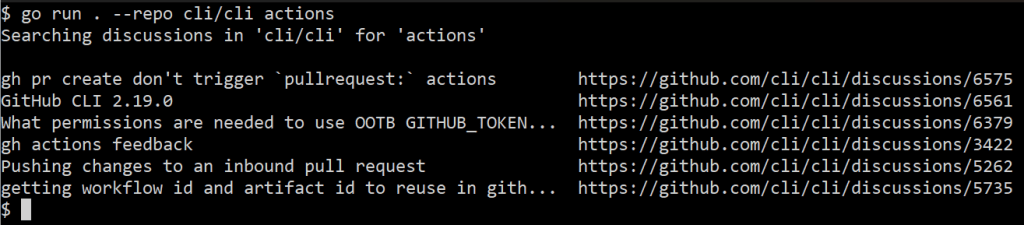
Note how the discussion titles are truncated.
If I pipe this elsewhere, I can use a command like cut to see the discussion titles in full:
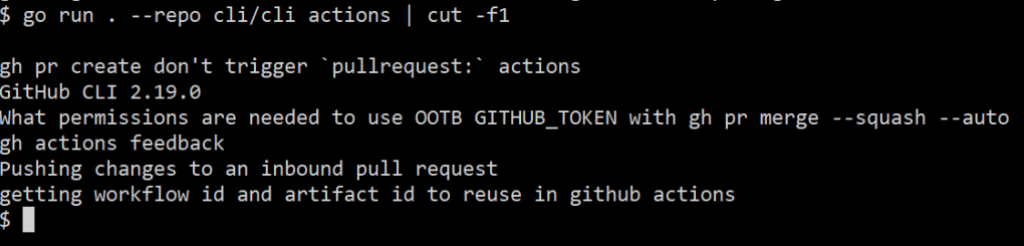
Adding the tableprinter improved both human readability and scriptability of the extension.
Sometimes, opening a browser can be helpful as not everything can be done in a terminal. go-gh has a function for this, which we’ll make use of in a new flag that mimics the “feeling lucky” button of a certain search engine. Specifying this flag means that we’ll open a browser with the first matching result to our search term.
I’ll add a new flag definition to the top of the main function:
func main() {
        lucky := flag.Bool("lucky", false, "Open the first matching result in a web browser")
    // rest of code below here
And, then add this before I set up the table printer:
        if len(matches) == 0 {
                fmt.Println("No matching discussion threads found :(")
        }

        if *lucky {
                b := browser.New("", os.Stdout, os.Stderr)
                b.Browse(matches[0].URL)
                return
        }

    // terminal and table printer code
For extensions with more complex outputs, you could go even further in enabling scripting by exposing JSON output and supporting jq expressions. jq is a general purpose tool for interacting with JSON on the command line. go-gh has a library version of jq built directly in, allowing extension authors to offer their users the power of jq without them having to install it themselves.
I’m adding two new flags: --json and --jq. The first is a boolean and the second a string. They are now the first two lines in main:
func main() {
    jsonFlag := flag.Bool("json", false, "Output JSON")
    jqFlag := flag.String("jq", "", "Process JSON output with a jq expression")
After setting isTerminal, I’m adding this code block:
isTerminal := term.IsTerminal(os.Stdout)
        if *jsonFlag {
                output, err := json.Marshal(matches)
                if err != nil {
                        return fmt.Errorf("could not serialize JSON: %w", err)
                }

                if *jqFlag != "" {
                        return jq.Evaluate(bytes.NewBuffer(output), os.Stdout, *jqFlag)
                }

                return jsonpretty.Format(os.Stdout, bytes.NewBuffer(output), " ", isTerminal)
        }
Now, when I run my code with --json, I get nicely printed JSON output:
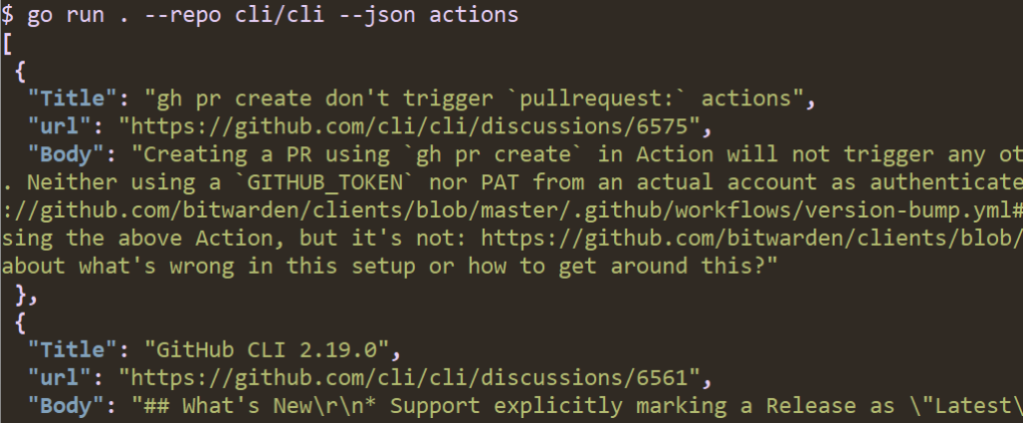
If I specify a jq expression I can process the data. For example, I can limit output to just titles like we did before with cut; this time, I’ll use the jq expression .[]|.Title instead.
![A screenshot of running "go run . --repo cli/cli --json --jq '.[]|.Title' actions" in a terminal. The output is a list of discussion thread titles.](https://github.blog/wp-content/uploads/2023/01/image6.png?w=1024&resize=1024%2C212)
I’ll stop here with gh ask but this isn’t all go-gh can do. To browse its other features, check out this list of packages in the reference documentation. You can see my full code on GitHub at vilmibm/gh-ask.
Now that I have a feature-filled extension, I’d like to make sure it’s easy to create releases for it so others can install it. At this point it’s uninstallable since I have not precompiled any of the Go code.
Before I worry about making a release, I have to make sure that my extension repository has the gh-extension tag. I can add that by running gh repo edit --add-tag gh-extension. Without this topic added to the repository, it won’t show up in commands like gh ext browse or gh ext search.
Since I started this extension by running gh ext create, I already have a GitHub Actions workflow defined for releasing. All that’s left before others can use my extension is pushing a tag to trigger a release. The workflow file contains:
name: release
on:
  push:
    tags:
      - "v*"
permissions:
  contents: write

jobs:
  release:
    runs-on: ubuntu-latest
    steps:
      - uses: actions/checkout@v3
      - uses: cli/gh-extension-precompile@v1
Before tagging a release, make sure:
To release:
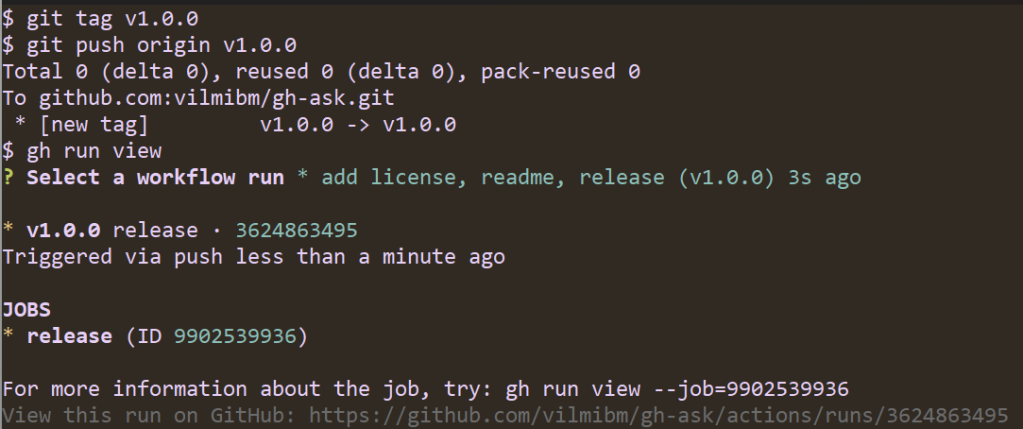
Note that the workflow ran automatically. It looks for tags of the form vX.Y.Z and kicks off a build of your Go code. Once the release is done, I can check it to see that all my code compiled as expected:
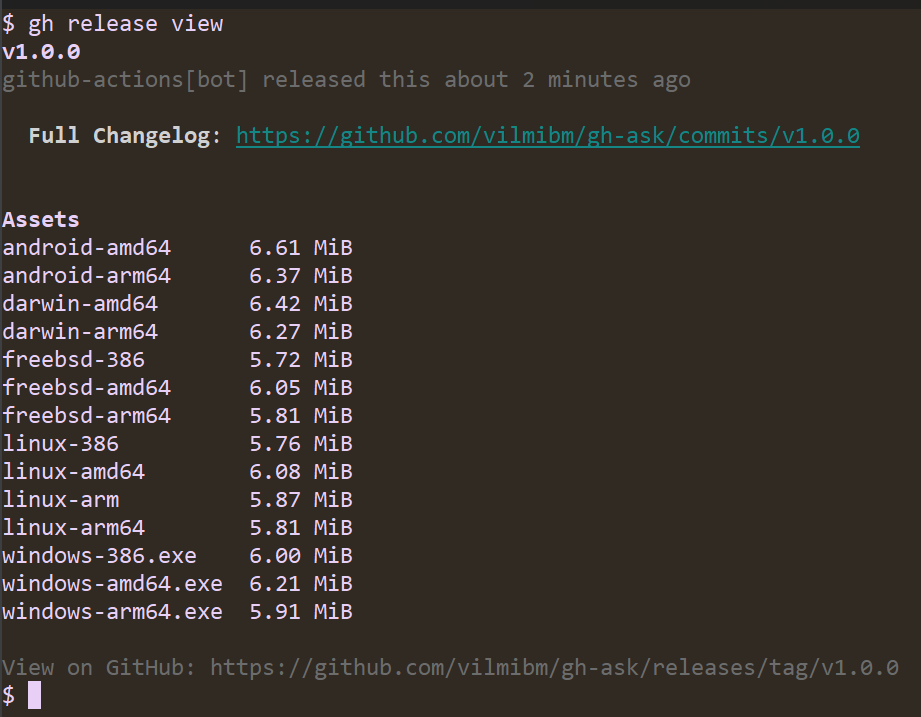
Now, anyone can run gh ext install vilmibm/gh-ask and try out my extension! This is all the work of the gh-extension-precompile action. This action can be used to compile any language, but by default it only knows how to handle Go code.
By default, the action will compile executables for:
To build for a language other than Go, edit .github/workflows/release.yml to add a build_script_override configuration. For example, if my repository had a script at scripts/build.sh, my release.yml would look like:
name: release
on:
  push:
    tags:
      - "v*"

permissions:
  contents: write

jobs:
  release:
    runs-on: ubuntu-latest
    steps:
      - uses: actions/checkout@v3
      - uses: cli/gh-extension-precompile@v1
        with:
          build_script_override: "script/build.sh"
The script specified as build_script_override must produce executables in a dist directory at the root of the extension repository with file names ending with: {os}-{arch}{ext}, where the extension is .exe on Windows and blank on other platforms. For example:
dist/gh-my-ext_v1.0.0_darwin-amd64dist/gh-my-ext_v1.0.0_windows-386.exeExecutables in this directory will be uploaded as release assets on GitHub. For OS and architecture nomenclature, please refer to this list. We use this nomenclature when looking for executables from the GitHub CLI, so it needs to be respected even for non-Go extensions.
The CLI team has some improvements on the horizon for the extensions system in the GitHub CLI. We’re planning a more accessible version of the extension browse command that renders a single column style interface suitable for screen readers. We intend to add support for nested extensions–in other words, an extension called as a subcommand of an existing gh command like gh pr my-extension–making third-party extensions fit more naturally into our command hierarchy. Finally, we’d like to improve the documentation and flexibility of the gh-extension-precompile action.
Are there features you’d like to see? We’d love to hear about it in a discussion or an issue in the cli/cli repository.
It is our hope that the extensions system in the GitHub CLI inspire you to create features beyond our wildest imagination. Please go forth and make something you’re excited about, even if it’s just to make gh do fun things like run screensavers.