Progress on the Block Protocol

Post Syndicated from Joel Spolsky original https://www.joelonsoftware.com/2022/12/19/progress-on-the-block-protocol/

Since the 1990s, the web has been a publishing place for human-readable documents.

Documents published on the web are in HTML. HTML has a little bit of structure, for example, “here is a paragraph” or “emphasize this word.”

Then you stir in some CSS, which adds some pretty decorations to the structure, saying things like: make those paragraphs have tiny gray sans-serif text! And then people think you are hip. Unless they are older, and they can’t read your tiny gray words, so they give up on you.

That’s “structure,” as far as it goes, on the web.

Imagine, for example, that you mention a book on the web.

Goodnight Moon
by Margaret Wise Brown
Illustrated by Clement Hurd
Harper & Brothers, 1947
ISBN 0-06-443017-0

There’s not much structure there. A naive computer program reading this web page might not realize I was even mentioning a book. All I did was make the title bold.

So, also since the 1990s, people have realized that we can make the web a much more useful place to publish information if we applied a bit more structure. As early as 1999, Tim Berners-Lee was writing about the Semantic Web:

“I have a dream for the Web [in which computers] become capable of analyzing all the data on the Web – the content, links, and transactions between people and computers. A ‘Semantic Web’, which makes this possible, has yet to emerge, but when it does, the day-to-day mechanisms of trade, bureaucracy and our daily lives will be handled by machines talking to machines. The ‘intelligent agents’ people have touted for ages will finally materialize.”

Tim Berners-Lee, Weaving The Web, 1999 HarperSanFrancisco (Chapter 12)

Using the Semantic Web you might publish a book title with a lot more detail that makes it computer-readable. To do this, you would probably start by going to schema.org and looking up their idea of a book. Then you could use one of a number of formats, like RDF or JSON-LD, to add additional markup to your HTML saying “hey! here’s a book!”

Ok, well, doing that is kinda hard to figure out, and, to be honest, it’s homework. Once your beautiful blog post is published and human-readable, it’s hard to gather the mental energy to figure out how to add the additional fancy markups that will make your web page computer-readable, and, unless there is already a computer reading your web pages, at this point, you usually give up. So, yeah. That was 1999, and not much progress has been made and there is very little of this semantic markup in the wild.

Well.

We would like to fix this, because human progress depends on getting more and more information in formats that are readily accessible, both by regular humans, their dumb A.I. li’l sibs, and your more traditional computer programs.

Here is something I believe: people will only add semantic markup to their web pages if doing so is easier than not.

In other words, the cost of adding semantic markup has to be zero or negative, or this whole project is not going anywhere.

Now imagine this world for a second:

  • I want to insert a book into my blog post
  • I type /book
  • A search box appears where I start typing in the title of my book and choose from an autocomplete list.
  • Once I find the book, a block gets inserted in my blog post showing details of the book in a format I like, with nice semantic markup behind the scenes.

In this world I did less work to insert a book (because I was assisted by a UI that looked up the details for me).

You can imagine the same scenario applying to literally any other kind of structured data.

  • I want to insert an address into my blog post
  • I type /address
  • A search box appears where I start to type a location, which autocompletes in the way you have seen Instagram and Google Maps and a million other apps do it
  • Once I choose the address, a block gets inserted showing the details of the address complete with semantic markup behind the scenes.

My “address block” might have any visual appearance. Visitors to my web page might see the address, or a little map, or a little map in Japanese, etc. etc. The semantic content is there behind the scenes. So, for example, my web browser might know “gosh this is an address! Maybe you want to do address-y things with it, like go there,” and then my browser might offer me options to summon a self-driving car and even call an ambulance when the self-driving car self-drives into a snowbank.

My two simplistic examples of “book” and “address” are interesting right now because (a) you can probably think of 1,000,000 more data types like this, and (b) none of these things work right now, because even though almost every web editing environment has a concept of “blocks,” none of them are extensible. WordPress has (oh gosh) hundreds of block types, but they don’t have thousands or millions, they don’t have “book” or “address” or “Burning Man Theme Camp” yet, and there’s no ecosystem by which developers and users can contribute new block types.

So I guess I gotta wait around for someone at WordPress to develop all the blocks I want to use. And then someone at Notion, and then someone at Trello, and then someone at Mailchimp, and someone at every other vendor that provides a text editor.

I have a better plan.

The web was built with open protocols. Suppose we all agree on a protocol for blocks.

Any developer that wants to create a new block can conform to this protocol.

Any kind of web-text-editing application can also conform to this protocol.

Then if anyone goes to the trouble of creating a cool “book” or “address” block, we’ll all be able to use it, anywhere.

And we shall dub this protocol, oh I don’t know, the Block Protocol.

And it should be, I think, 100% free, open, and public, so that there is no impediment to anyone on earth using it. And in fact if you want to make blocks that are open source or public, good for you, but if for some reason you would like to make private or commercial blocks, that’s fine too.

Where we’re up to

It’s been about a year since we started talking about the Block Protocol, and we’ve made a lot of progress figuring out how it has to work to do all the things it will need to do, in a clean and straightforward way.

But this is all going nowhere if it requires 93,000,000 humans to cooperate with my crazy scheme just to get it off the ground.

So what we did is build a WordPress Plugin that allows you to embed Block Protocol blocks into posts on your WordPress sites just as easily as you insert any other block.

Since WordPress powers 43% of the web, that means if you build a block for the Block Protocol, it’ll be widely usable right away.

Here’s a video demo:

The WordPress Plugin will be free, and it will be widely available in February, when we’ll also publish version 0.3 of the Block Protocol specification. You can get early access now.

In fact, if you were thinking of writing a plugin for WordPress for your own kind of custom block, you’ll find that using our plugin as your starting point is a lot easier, because you don’t have to know anything about WordPress Plugins or write any PHP code. So even if you don’t care for any of my crazy theories and just want to add a block to WordPress, this is the way to go.

Ultimately, though, we just want to make it easier to add useful semantic, structured information to the web, and this is the first step.

PS We just set up a Discord server for the Block Protocol where you can participate, ask questions, and meet the team.

PPS You can follow me on Mastodon, where I am @[email protected]. I don’t post that much, but I’m enjoying hanging out there in a human-to-human environment where there isn’t an algorithm stirring up righteous indignation about the latest fake-outrage of the day.

How to Surrender to a Drone

Post Syndicated from Bruce Schneier original https://www.schneier.com/blog/archives/2022/12/how-to-surrender-to-a-drone.html

The Ukrainian army has released an instructional video explaining how Russian soldiers should surrender to a drone:

“Seeing the drone in the field of view, make eye contact with it,” the video instructs. Soldiers should then raise their arms and signal they’re ready to follow.

After that the drone will move up and down a few meters, before heading off at walking pace in the direction of the nearest representatives of Ukraine’s army, it says.

The video also warns that the drone’s battery may run low, in which case it will head back to base and the soldiers should stay put and await a fresh one.

That one, too, should be met with eye contact and arms raised, it says.

Incredible.

Apache SpamAssassin 4.0.0 released

Post Syndicated from original https://lwn.net/Articles/918145/

Version 4.0.0 of the Apache SpamAssassin spam filter has been released.

Apache SpamAssassin 4.0.0 contains numerous tweaks and bug fixes over
the past releases. In particular, it includes major changes that
significantly improve the handling of text in international language.

As with any major release, there are countless functional patches and
improvements to upgrade to 4.0.0. Apache SpamAssassin 4.0.0 includes
several years of fixes that significantly improve classification and
performance. It has been thoroughly tested in production systems. We
strongly recommend upgrading as soon as possible.

OCaml 5.0.0 released

Post Syndicated from original https://lwn.net/Articles/918109/

Version
5.0.0
of the OCaml programming language is out.

The highlight of this new major version of OCaml is the
long-awaited runtime support for shared memory parallelism and
effect handlers. This multicore support is the culmination of more
than 8 years of effort, and required a full rewrite of the OCaml
runtime environment. Consequently, OCaml 5.0.0 is expected to be a
more experimental version of OCaml than the usual OCaml releases.

Friday Squid Blogging: Squid in Concert

Post Syndicated from Bruce Schneier original https://www.schneier.com/blog/archives/2022/12/friday-squid-blogging-squid-in-concert.html

Squid is performing a concert in London in February.

If you don’t know what their music is like, try this or this or this.

As usual, you can also use this squid post to talk about the security stories in the news that I haven’t covered.

Read my blog posting guidelines here.

Metasploit Weekly Wrap-Up

Post Syndicated from Brendan Watters original https://blog.rapid7.com/2022/12/16/metasploit-weekly-wrap-up-187/

A sack full of cheer from the Hacking Elves of Metasploit

Metasploit Weekly Wrap-Up

It is clear that the Metasploit elves have been busy this season: Five new modules, six new enhancements, nine new bug fixes, and a partridge in a pear tree are headed out this week! (Partridge nor pear tree included.) In this sack of goodies, we have a gift that keeps on giving: Shelby’s Acronis TrueImage Privilege Escalation works wonderfully, even after the software is uninstalled.

If you prefer elf files to holiday elves, we’ve still got you covered

Jan Rude submitted two modules targeting Syncovery for Linux. One takes advantage of an insecure session token generator and allows for the brute-force creation of a token that matches that of a logged-in user, and the other allows an authenticated user to create a job that will run when a user’s profile is run.

New module content (5)

Enhancements and features (6)

  • #17191 from liangjs – This PR fixes a bug where the Windows Subsystem for Linux crashes when using a reverse_tcp x64 stager because of data in the upper bits of the RDI register when the syscall occurs.
  • #17255 from JustAnda7 – The command payloads have been updated to allow specifying the file system path for several of their commands within datastore options. This should allow users to specify these commands locations should they not be contained within the searchable PATH.
  • #17346 from adfoster-r7 – The logic for counting threads within lib/metasploit/framework/spec/threads/suite.rb has been updated to appropriately count and document the known threads that can be left behind when running the rspec test suite. This fixes an intermittent rspec crash.
  • #17355 from adfoster-r7 – The creds command has been updated to show the full SSH key contents when running the creds -v command or when exporting to a file with creds -o output.txt. Previously only a shortened fingerprint string would be shown to the user.
  • #17357 from adfoster-r7 – The docs site has been updated to support mermaid graphs for rendering diagrams to assist with explanations.
  • #17387 from smashery – The hosts, services, vulns and notes command have been updated to support tab expansion in paths using the ~ character when using the -o option to specify the path to the file to write the output to.

Bugs fixed (9)

  • #17345 from adfoster-r7 – A crash has been fixed when using the report API with verbose mode enabled and no active DB.
  • #17350 from smashery – This updates three UAC bypass modules to remove a hard coded delay in favor of using the module’s builtin cleanup method. This results in the user having access to the interactive session without needing to wait.
  • #17351 from smashery – This fixes an issue in the exploit/windows/local/s4u_persistence module where the default value for FREQUENCY would cause an error.
  • #17352 from smashery – A bug has been fixed in the file_version method for Windows Meterpreter, which would cause the session to crash if it was run on a file that did not exist on the target system.
  • #17361 from jmartin-r7 – A bug has been fixed that would cause a crash when running the exit command from within msfconsole when running msfconsole with a 3.1.x release of Ruby.
  • #17366 from zeroSteiner – The upload and download commands used by shell sessions have been updated to handle directory destinations in the same way as the Meterpreter equivalents do, and to fix some bugs when uploading and downloading files that would prevent errors from being displayed and might cause session crashes.
  • #17368 from adfoster-r7 – Fixes a regression issue with msfvenom payload generation for large payloads taking more than 5 minutes to generate when outputting as hex format. Now it takes a few seconds as normal.
  • #17370 from jmartin-r7 – A bug has been fixed in the smb_enumshares.rb whereby if a SMBv1 connection is used a call was made to the net_share_enum_all function on the wrong object. This has since been updated to address this error.
  • #17378 from gwillcox-r7 – A bug has been fixed in the Meterpreter payloads that was preventing Python Meterpreter from being able to utilize its EventLog API properly. Additionally a bug has been fixed in the COFFLoader that prevented BOFLoader from working with some COFF files.

Get it

As always, you can update to the latest Metasploit Framework with msfupdate
and you can get more details on the changes since the last blog post from
GitHub:

If you are a git user, you can clone the Metasploit Framework repo (master branch) for the latest.
To install fresh without using git, you can use the open-source-only Nightly Installers or the
binary installers (which also include the commercial edition).

Architecting your security model in AWS for legacy application migrations

Post Syndicated from Irfan Saleem original https://aws.amazon.com/blogs/architecture/architecting-your-security-model-in-aws-for-legacy-application-migrations/

Application migrations, especially from legacy/mainframe to the cloud, are done in phases that sometimes span multiple years. Each phase migrates a set of applications, data, and other resources to the cloud. During the transition phases, applications might require access to both on-premises and cloud-based resources to perform their function. While working with our customers, we observed that the most common resources that applications require access to are databases, file storage, and shared services.

This blog post includes architecture guidelines for setting up access to commonly used resources by building a security model in Amazon Web Services (AWS). As you move your legacy applications to the cloud, you can apply Zero Trust concepts and security best practices according to your security needs. With AWS, you can build strong identity and access management with centralized control and set up and manage guardrails and fine-grained access controls for your workforce and applications.

In large organizations, on-premises applications rely on mainframe-based security services, an Identity Provider (IdP) platform, or a combination of both.

  • A mainframe-based control facility enables on-premises applications to:
    • Identify and verify users.
    • Establish an authority (authorize users and backend programs to access protected resources) through privileges defined in the control facility.
    • The backend programs use a unique identifier (or surrogate key) and run under the authority defined by the privileges assigned to the unique identifier.This security mechanism needs to be transformed into a role-based security model in AWS as applications are moved to the cloud. You assign permissions to a role, which is assumed by an application to get access to resources in AWS, similar to an authority defined in the legacy environment.
  • An IdP platform (such as Octa or Ping Identify) provides capabilities such as centralized access management and identity federation using SAML 2.0 or OpenID Connect (OIDC), that builds a system of trust between on-premises IdP and AWS. Once the federation is set up, on-premises applications can access AWS resources using AWS Identity and Access Management (IAM) roles, as explained in the next section.

Setting up a scalable security model in AWS

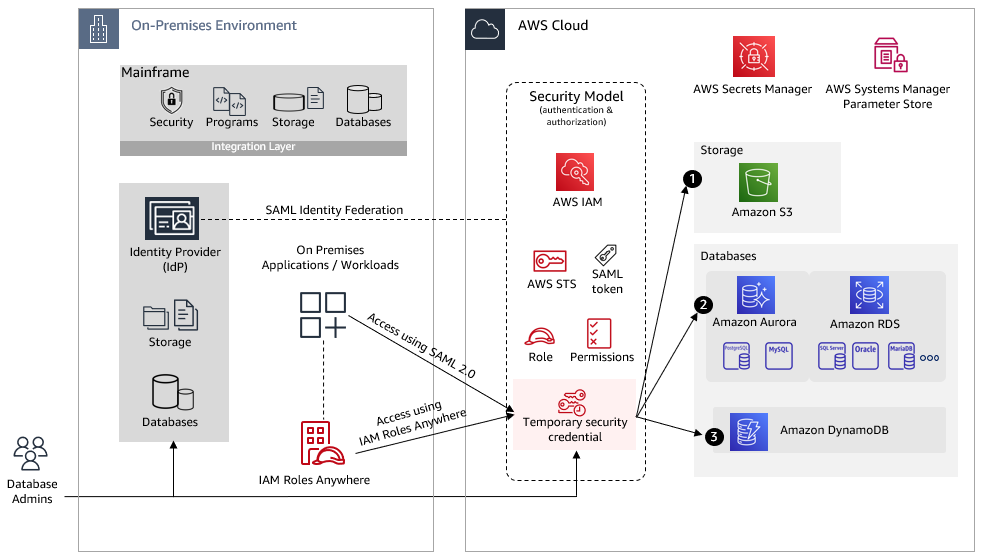
Figure 1 shows an on-premises environment where enterprise identity management is integrated with the mainframe and provides authentication and authorization to applications running off the mainframe. Generally, mainframe-based security controls (users, resources, and profiles) are replicated to the enterprise identity platform and are kept in sync through a change data capture process.

Access to AWS resources from on-premises

Figure 1. Access to AWS resources from on-premises

To enable your on-premises applications to access AWS resources, the applications need valid AWS credentials for making AWS API requests. Avoid using long-term access keys (such as those associated with IAM users) because they remain valid until you remove them. The following two methods can be used to assume an IAM role and get temporary security credentials to gain access to the AWS resources:

  • SAML based Identity federation – AWS supports identity federation with SAML. It allows federated access to users and applications in your organization by assuming an IAM role created for SAML federation to get temporary credentials. This method is helpful:
    • If your application needs to restrict access to AWS resources based on logged in users. You can define attribute mapping and additional attributes as required.
    • If your application uses a service account to manage AWS resource access, regardless of who is logged in.
  • IAM Roles Anywhere – Your on-premises applications will exchange X.509 certificates so that they can assume a role and get temporary credentials. This method is helpful if your application needs access to an AWS resource based on a service account.

In both of these cases, authenticated requests assume an IAM role, get temporary security credentials, and perform certain actions using AWS command line interface (CLI) and AWS SDKs. The IAM role has attached permissions for AWS resources such as Amazon Simple Storage Service (Amazon S3), Amazon DynamoDB, and Amazon Relational Database Service (Amazon RDS).

The temporary credentials expire when the session expires. By default, the session duration is one hour; you can request longer duration and session refresh.

To understand better, let’s consider the use case in Figure 2, where on-premises applications need access to AWS resources.

Access to resources that are created or already migrated to AWS from on-premises

Figure 2. Access to resources that are created or already migrated to AWS from on-premises

Applications can get temporary security credentials through SAML or IAM Roles Anywhere as explained earlier. The next sections explain setting up access to the resources in Figure 2 using temporary credentials.

1. Amazon S3

On-premises applications can access Amazon S3 using the REST API or the AWS SDK to perform certain actions (such as GetObjects or ListObjects):

2. Amazon RDS and Amazon Aurora

AWS Secrets Manager helps you store credentials for Amazon RDS and Amazon Aurora. You can also set up automatic rotation of your database secrets to meet your security and compliance needs. Applications can retrieve secrets using AWS SDKs and AWS CLI.

Additional configuration values can be stored in AWS Systems Manager Parameter Store, which provides secure, hierarchical storage for configuration data management such as passwords, database strings and license codes as parameter values rather than hard coding them in the code.

To access Amazon RDS and Amazon Aurora:

    • You can launch Amazon RDS DB instances into a virtual private cloud (VPC). A client application can access DB instance through the internet or through the private network only using an established connection from on-premises to the AWS environment.
    • On-premises applications can connect to a relational database using a database driver such as Java Database Connectivity (JDBC). The application can retrieve database connection details (such as database URL, port, or credentials) from AWS Secrets Manager and AWS Systems Manager Parameter Store  through API calls and can use them for the database connection.
    • Database admins can access AWS Management Console through an assumed role and can have access to database credentials from AWS Secrets Manager in order to connect directly with the database. For certain administration tasks (such as cluster setup, backup, recovery, maintenance, and management), they will need access to the Amazon RDS management console.
    • Amazon RDS also provides IAM database authentication option for MariaDB, MySQL, and PostgreSQL. You can authenticate without a password when you connect to a DB instance. Instead, you use an authentication token. For more information, go to IAM database authentication.

3. Amazon DynamoDB

Applications can use temporary credentials to invoke certain actions using AWS SDKs for DynamoDB. You can create a VPC endpoint for DynamoDB to access DynamoDB with no exposure to the public internet, then restrict access further by using VPC endpoint and IAM policies.

Conclusion

This blog helps you architect an application security model in AWS to provide on-premises access to commonly used resources in AWS.

You can apply security best practices and Zero Trust concepts as you move your legacy applications to the cloud. With AWS, you can build identity and access management with centralized and fine-grained access controls for your workforce and applications.

Start building your security model on AWS:

Closing out 2022 with our latest Impact Report

Post Syndicated from Andie Goodwin original https://blog.cloudflare.com/impact-report-2022/

Closing out 2022 with our latest Impact Report

Closing out 2022 with our latest Impact Report

To conclude Impact Week, which has been filled with announcements about new initiatives and features that we are thrilled about, today we are publishing our 2022 Impact Report.

In short, the Impact Report is an annual summary highlighting how we are helping build a better Internet and the progress we are making on our environmental, social, and governance priorities. It is where we showcase successes from Cloudflare Impact programs, celebrate awards and recognitions, and explain our approach to fundamental values like transparency and privacy.

We believe that a better Internet is principled, for everyone, and sustainable; these are the three themes around which we constructed the report. The Impact Report also serves as our repository for disclosures consistent with our commitments for the Global Reporting Initiative (GRI), Sustainability Accounting Standards Board (SASB), and UN Global Compact (UNGC).

Check out the full report to:

  • Explore how we are expanding the value and scope of our Cloudflare Impact programs
  • Review our latest diversity statistics — and our newest employee resource group
  • Understand how we are supporting humanitarian and human rights causes
  • Read quick summaries of Impact Week announcements
  • Examine how we calculate and validate emissions data

As fantastic as 2022 has been for scaling up Cloudflare Impact and making strides toward a better Internet, we are aiming even higher in 2023. To keep up with developments throughout the year, follow us on Twitter and LinkedIn, and keep an eye out for updates on our Cloudflare Impact page.

Everything you might have missed during Cloudflare’s Impact Week 2022

Post Syndicated from Lorraine Bellon original https://blog.cloudflare.com/everything-you-might-have-missed-during-cloudflares-impact-week-2022/

Everything you might have missed during Cloudflare's Impact Week 2022

Everything you might have missed during Cloudflare's Impact Week 2022

And that’s a wrap! Impact Week 2022 has come to a close. Over the last week, Cloudflare announced new commitments in our mission to help build a better Internet, including delivering Zero Trust services for the most vulnerable voices and for critical infrastructure providers. We also announced new products and services, and shared technical deep dives.

Were you able to keep up with everything that was announced? Watch the Impact Week 2022 wrap-up video on Cloudflare TV, or read our recap below for anything you may have missed.

Product announcements

Blog Summary
Cloudflare Zero Trust for Project Galileo and the Athenian Project We are making the Cloudflare One Zero Trust suite available to teams that qualify for Project Galileo or Athenian at no cost. Cloudflare One includes the same Zero Trust security and connectivity solutions used by over 10,000 customers today to connect their users and safeguard their data.
Project Safekeeping – protecting the world’s most vulnerable infrastructure with Zero Trust Under-resourced organizations that are vital to the basic functioning of our global communities (such as community hospitals, water treatment facilities, and local energy providers) face relentless cyber attacks, threatening basic needs for health, safety and security. Cloudflare’s mission is to help make a better Internet. We will help support these vulnerable infrastructure by providing our enterprise-level Zero Trust cybersecurity solution to them at no cost, with no time limit.
Cloudflare achieves FedRAMP authorization to secure more of the public sector We are excited to announce our public sector suite of services, Cloudflare for Government, has achieved FedRAMP Moderate Authorization. The Federal Risk and Authorization Management Program (“FedRAMP”) is a US-government-wide program that provides a standardized approach to security assessment, authorization, and continuous monitoring for cloud products and services.
A new, configurable and scalable version of Geo Key Manager, now available in Closed Beta At Cloudflare, we want to give our customers tools that allow them to maintain compliance in this ever-changing environment. That’s why we’re excited to announce a new version of Geo Key Manager — one that allows customers to define boundaries by country, by region, or by standard.

Everything you might have missed during Cloudflare's Impact Week 2022

Technical deep dives

Blog Summary
Cloudflare is joining the AS112 project to help the Internet deal with misdirected DNS queries Cloudflare is participating in the AS112 project, becoming an operator of the loosely coordinated, distributed sink of the reverse lookup (PTR) queries for RFC 1918 addresses, dynamic DNS updates and other ambiguous addresses.
Measuring BGP RPKI Route Origin Validation The Border Gateway Protocol (BGP) is the glue that keeps the entire Internet together. However, despite its vital function, BGP wasn’t originally designed to protect against malicious actors or routing mishaps. It has since been updated to account for this shortcoming with the Resource Public Key Infrastructure (RPKI) framework, but can we declare it to be safe yet?

Customer stories

Blog Summary
Democratizing access to Zero Trust with Project Galileo Learn how organizations under Project Galileo use Cloudflare Zero Trust to protect their organization from cyberattacks.
Securing the inboxes of democracy Cloudflare email security worked hard in the 2022 U.S. midterm elections to ensure that the email inboxes of those seeking office were secure.
Expanding Area 1 email security to the Athenian Project We are excited to share that we have grown our offering under the Athenian Project to include Cloudflare’s Area 1 email security suite to help state and local governments protect against a broad spectrum of phishing attacks to keep voter data safe and secure.
How Cloudflare helps protect small businesses Large-scale cyber attacks on enterprises and governments make the headlines, but the impacts of cyber conflicts can be felt more profoundly and acutely by small businesses that struggle to keep the lights on during normal times. In this blog, we’ll share new research on how small businesses, including those using our free services, have leveraged Cloudflare services to make their businesses more secure and resistant to disruption.

Internet access

Blog Summary
Cloudflare expands Project Pangea to connect and protect (even) more community networks A year and a half ago, Cloudflare launched Project Pangea to help provide Internet services to underserved communities. Today, we’re sharing what we’ve learned by partnering with community networks, and announcing an expansion of the project.
The US government is working on an “Internet for all” plan. We’re on board. The US government has a $65 billion program to get all Americans on the Internet. It’s a great initiative, and we’re on board.
The Montgomery, Alabama Internet Exchange is making the Internet faster. We’re happy to be there. Internet Exchanges are a critical part of a strong Internet. Here’s the story of one of them.
Partnering with civil society to track Internet shutdowns with Radar Alerts and API We want to tell you more about how we work with civil society organizations to provide tools to track and document the scope of these disruptions. We want to support their critical work and provide the tools they need so they can demand accountability and condemn the use of shutdowns to silence dissent.
How Cloudflare helps next-generation markets At Cloudflare, part of our role is to make sure every person on the planet with an Internet connection has a good experience, whether they’re in a next-generation market or a current-gen market. In this blog we talk about how we define next-generation markets, how we help people in these markets get faster access to the websites and applications they use on a daily basis, and how we make it easy for developers to deploy services geographically close to users in next-generation markets.

Everything you might have missed during Cloudflare's Impact Week 2022

Sustainability

Blog Summary
Independent report shows: moving to Cloudflare can cut your carbon footprint We didn’t start out with the goal to reduce the Internet’s environmental impact. But as the Internet has become an ever larger part of our lives, that has changed. Our mission is to help build a better Internet — and a better Internet needs to be a sustainable one.
A more sustainable end-of-life for your legacy hardware appliances with Cloudflare and Iron Mountain We’re excited to announce an opportunity for Cloudflare customers to make it easier to decommission and dispose of their used hardware appliances in a sustainable way. We’re partnering with Iron Mountain to offer preferred pricing and value-back for Cloudflare customers that recycle or remarket legacy hardware through their service.
How we’re making Cloudflare’s infrastructure more sustainable With the incredible growth of the Internet, and the increased usage of Cloudflare’s network, even linear improvements to sustainability in our hardware today will result in exponential gains in the future. We want to use this post to outline how we think about the sustainability impact of the hardware in our network, and what we’re doing to continually mitigate that impact.
Historical emissions offsets (and Scope 3 sneak preview) Last year, Cloudflare committed to removing or offsetting the historical emissions associated with powering our network by 2025. We are excited to announce our first step toward offsetting our historical emissions by investing in 6,060 MTs’ worth of reforestation carbon offsets as part of the Pacajai Reduction of Emissions from Deforestation and forest Degradation (REDD+) Project in the State of Para, Brazil.
How we redesigned our offices to be more sustainable Cloudflare is working hard to ensure that we’re making a positive impact on the environment around us, with the goal of building the most sustainable network. At the same time, we want to make sure that the positive changes that we are making are also something that our local Cloudflare team members can touch and feel, and know that in each of our actions we are having a positive impact on the environment around us. This is why we make sustainability one of the underlying goals of the design, construction, and operations of our global office spaces.
More bots, more trees Once a year, we pull data from our Bot Fight Mode to determine the number of trees we can donate to our partners at One Tree Planted. It’s part of the commitment we made in 2019 to deter malicious bots online by redirecting them to a challenge page that requires them to perform computationally intensive, but meaningless tasks. While we use these tasks to drive up the bill for bot operators, we account for the carbon cost by planting trees.

Policy

Blog Summary
The Challenges of Sanctioning the Internet As governments continue to use sanctions as a foreign policy tool, we think it’s important that policymakers continue to hear from Internet infrastructure companies about how the legal framework is impacting their ability to support a global Internet. Here are some of the key issues we’ve identified and ways that regulators can help balance the policy goals of sanctions with the need to support the free flow of communications for ordinary citizens around the world.
An Update on Cloudflare’s Assistance to Ukraine On February 24, 2022, when Russia invaded Ukraine, Cloudflare jumped into action to provide services that could help prevent potentially destructive cyber attacks and keep the global Internet flowing. During Impact Week, we want to provide an update on where things currently stand, the role of security companies like Cloudflare, and some of our takeaways from the conflict so far.
Two months later: Internet use in Iran during the Mahsa Amini Protests A series of protests began in Iran on September 16, following the death in custody of Mahsa Amini — a 22 year old who had been arrested for violating Iran’s mandatory hijab law. The protests and civil unrest have continued to this day. But the impact hasn’t just been on the ground in Iran — the impact of the civil unrest can be seen in Internet usage inside the country, as well.
How Cloudflare advocates for a better Internet We thought this week would be a great opportunity to share Cloudflare’s principles and our theories behind policy engagement. Because at its core, a public policy approach needs to reflect who the company is through their actions and rhetoric. And as a company, we believe there is real value in helping governments understand how companies work, and helping our employees understand how governments and law-makers work.
Applying Human Rights Frameworks to our approach to abuse What does it mean to apply human rights frameworks to our response to abuse? As we’ll talk about in more detail, we use human rights concepts like access to fair process, proportionality (the idea that actions should be carefully calibrated to minimize any effect on rights), and transparency.
The Unintended Consequences of blocking IP addresses This blog dives into a discussion of IP blocking: why we see it, what it is, what it does, who it affects, and why it’s such a problematic way to address content online.

Everything you might have missed during Cloudflare's Impact Week 2022

Impact

Blog Summary
Closing out 2022 with our latest Impact Report Our Impact Report is an annual summary highlighting how we are trying to build a better Internet and the progress we are making on our environmental, social, and governance priorities.
Working to help the HBCU Smart Cities Challenge The HBCU Smart Cities Challenge invites all HBCUs across the United States to build technological solutions to solve real-world problems.
Introducing Cloudflare’s Third Party Code of Conduct Cloudflare is on a mission to help build a better Internet, and we are committed to doing this with ethics and integrity in everything that we do. This commitment extends beyond our own actions, to third parties acting on our behalf. We are excited to share our Third Party Code of Conduct, specifically formulated with our suppliers, resellers and other partners in mind.
The latest from Cloudflare’s seventeen Employee Resource Groups In this blog post, we highlight a few stories from some of our 17 Employee Resource Groups (ERGs), including the most recent, Persianflare.

What’s next?

That’s it for Impact Week 2022. But let’s keep the conversation going. We want to hear from you!

Visit the Cloudflare Community to share your thoughts about Impact Week 2022, or engage with our team on Facebook, Twitter, LinkedIn, and YouTube.

Or if you’d like to rewatch any Cloudflare TV segments associated with the above stories, visit the Impact Week hub on our website.

Watch on Cloudflare TV

Getting started with AWS Glue Data Quality for ETL Pipelines

Post Syndicated from Deenbandhu Prasad original https://aws.amazon.com/blogs/big-data/getting-started-with-aws-glue-data-quality-for-etl-pipelines/

Today, hundreds of thousands of customers use data lakes for analytics and machine learning. However, data engineers have to cleanse and prepare this data before it can be used. The underlying data has to be accurate and recent for customer to make confident business decisions. Otherwise, data consumers lose trust in the data and make suboptimal or incorrect decisions. It is a common task for data engineers to evaluate whether the data is accurate and recent or not. Today there are various data quality tools. However, common data quality tools usually require manual processes to monitor data quality.

AWS Glue Data Quality is a preview feature of AWS Glue that measures and monitors the data quality of Amazon Simple Storage Service (Amazon S3) data lakes and in AWS Glue extract, transform, and load (ETL) jobs. This is an open preview feature so it is already enabled in your account in the available Regions. You can easily define and measure the data quality checks in AWS Glue Studio console without writing codes. It simplifies your experience of managing data quality.

This post is Part 2 of a four-post series to explain how AWS Glue Data Quality works. Check out the previous post in this series:

Getting started with AWS Glue Data Quality

In this post, we show how to create an AWS Glue job that measures and monitors the data quality of a data pipeline. We also show how to take action based on the data quality results.

Solution overview

Let’s consider an example use case in which a data engineer needs to build a data pipeline to ingest the data from a raw zone to a curated zone in a data lake. As a data engineer, one of your key responsibilities—along with extracting, transforming, and loading data—is validating the quality of data. Identifying data quality issues upfront helps you prevent placing bad data in the curated zone and avoid arduous data corruption incidents.

In this post, you’ll learn how to easily set up built-in and custom data validation checks in your AWS Glue job to prevent bad data from corrupting the downstream high-quality data.

The dataset used for this post is synthetically generated; the following screenshot shows an example of the data.

Set up resources with AWS CloudFormation

This post includes an AWS CloudFormation template for a quick setup. You can review and customize it to suit your needs.

The CloudFormation template generates the following resources:

  • An Amazon Simple Storage Service (Amazon S3) bucket (gluedataqualitystudio-*).
  • The following prefixes and objects in the S3 bucket:
    • datalake/raw/customer/customer.csv
    • datalake/curated/customer/
    • scripts/
    • sparkHistoryLogs/
    • temporary/
  • AWS Identity and Access Management (IAM) users, roles, and policies. The IAM role (GlueDataQualityStudio-*) has permission to read and write from the S3 bucket.
  • AWS Lambda functions and IAM policies required by those functions to create and delete this stack.

To create your resources, complete the following steps:

  1. Sign in to the AWS CloudFormation console in the us-east-1 Region.
  2. Choose Launch Stack:

  3. Select I acknowledge that AWS CloudFormation might create IAM resources.
  4. Choose Create stack and wait for the stack creation step to complete.

Implement the solution

To start configuring your solution, complete the following steps:

  1. On the AWS Glue Studio console, choose Jobs in the navigation pane.
  2. Select Visual with a blank canvas and choose Create.
  3. Choose the Job Details tab to configure the job.
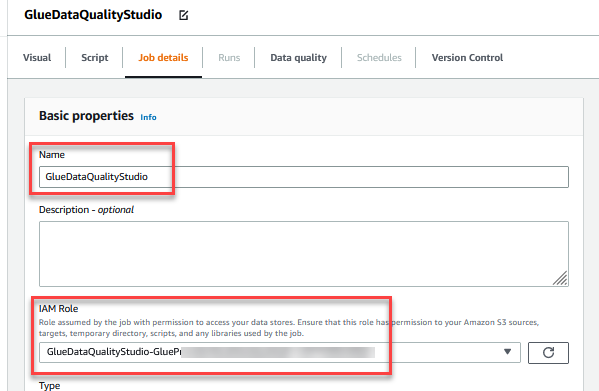
  4. For Name, enter GlueDataQualityStudio.
  5. For IAM Role, choose the role starting with GlueDataQualityStudio-*.
  6. For Glue version, choose Glue 3.0.
  7. For Job bookmark, choose Disable. This allows you to run this job multiple times with the same input dataset.
  8. For Number of retries, enter 0.
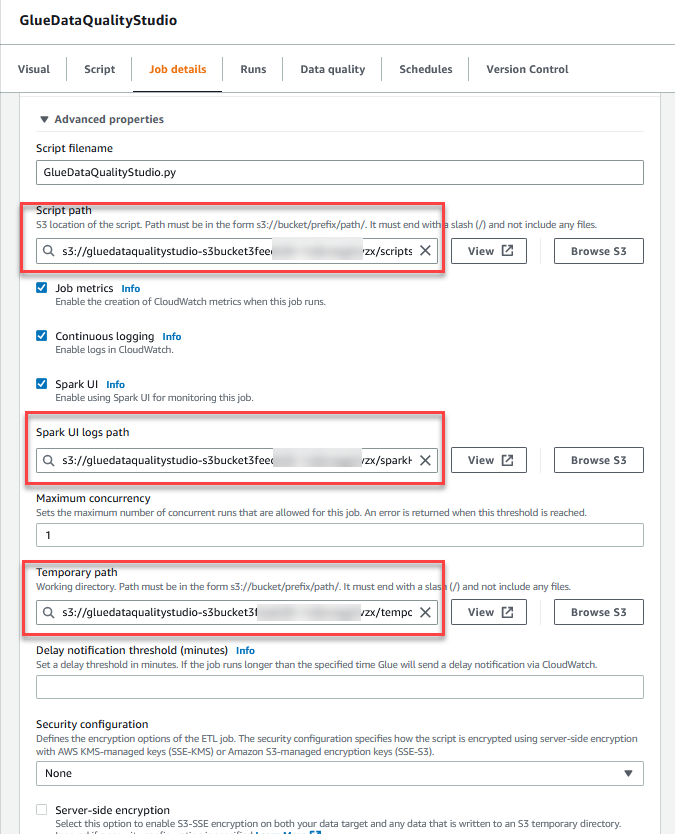
  9. In the Advanced properties section, provide the S3 bucket created by the CloudFormation template (starting with gluedataqualitystudio-*).
  10. Choose Save.
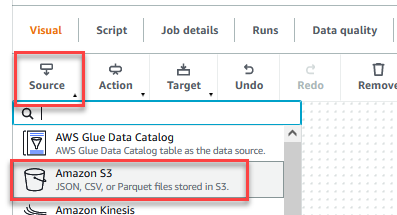
  11. After the job is saved, choose the Visual tab and on the Source menu, choose Amazon S3.
  12. On the Data source properties – S3 tab, for S3 source type, select S3 location.
  13. Choose Browse S3 and navigate to prefix /datalake/raw/customer/ in the S3 bucket starting with gluedataqualitystudio-* .
  14. Choose Infer schema.
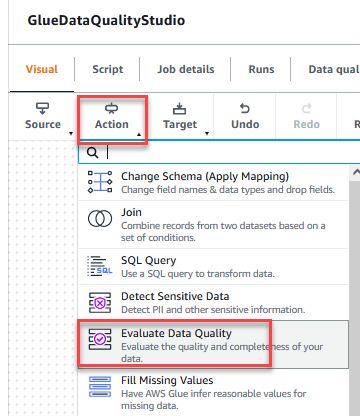
  15. On the Action menu, choose Evaluate Data Quality.
  16. Choose the Evaluate Data Quality node.

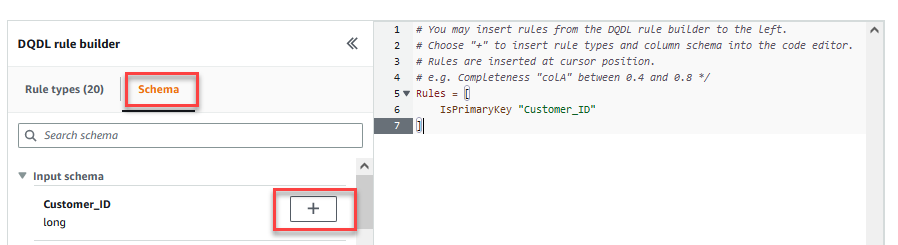
    On the Transform tab, you can now start building data quality rules. The first rule you create is to check if Customer_ID is unique and not null using the isPrimaryKey rule.
  17. On the Rule types tab of the DQDL rule builder, search for isprimarykey and choose the plus sign.
  18. On the Schema tab of the DQDL rule builder, choose the plus sign next to Customer_ID.
  19. In the rule editor, delete id.

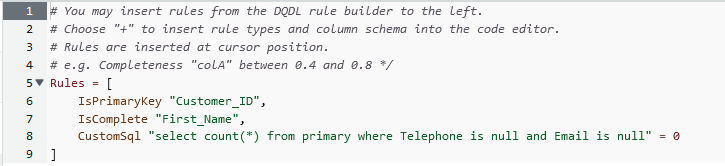
    The next rule we add checks that the First_Name column value is present for all the rows.
  20. You can also enter the data quality rules directly in the rule editor. Add a comma (,) and enter IsComplete "First_Name", after the first rule.

    Next, you add a custom rule to validate that no row exists without Telephone or Email.
  21. Enter the following custom rule in the rule editor:
    CustomSql "select count(*) from primary where Telephone is null and Email is null" = 0


    The Evaluate Data Quality feature provides actions to manage the outcome of a job based on the job quality results.

  22. For this post, select Fail job when data quality fails and choose Fail job without loading target data actions. In the Data quality output setting section, choose Browse S3 and navigate to prefix dqresults in the S3 bucket starting with gluedataqualitystudio-*.
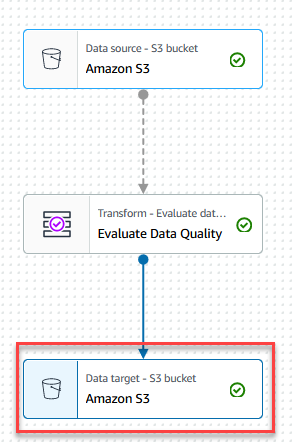
  23. On the Target menu, choose Amazon S3.
  24. Choose the Data target – S3 bucket node.
  25. On the Data target properties – S3 tab, for Format, choose Parquet, and for Compression Type, choose Snappy.
  26. For S3 Target Location, choose Browse S3 and navigate to the prefix /datalake/curated/customer/ in the S3 bucket starting with gluedataqualitystudio-*.
  27. Choose Save, then choose Run.
    You can view the job run details on the Runs tab. In our example, the job fails with the error message “AssertionError: The job failed due to failing DQ rules for node: <node>.”
    You can review the data quality result on the Data quality tab. In our example, the custom data quality validation failed because one of the rows in the dataset had no Telephone or Email value.Evaluate Data Quality results is also written to the S3 bucket in JSON format based on the data quality result location parameter of the node.
  28. Navigate to dqresults prefix under the S3 bucket starting gluedataqualitystudio-*. You will see that the data quality result is partitioned by date.

The following is the output of the JSON file. You can use this file output to build custom data quality visualization dashboards.

You can also monitor the Evaluate Data Quality node through Amazon CloudWatch metrics and set alarms to send notifications about data quality results. To learn more on how to set up CloudWatch alarms, refer to Using Amazon CloudWatch alarms.

Clean up

To avoid incurring future charges and to clean up unused roles and policies, delete the resources you created:

  1. Delete the GlueDataQualityStudio job you created as part of this post.
  2. On the AWS CloudFormation console, delete the GlueDataQualityStudio stack.

Conclusion

AWS Glue Data Quality offers an easy way to measure and monitor the data quality of your ETL pipeline. In this post, you learned how to take necessary actions based on the data quality results, which helps you maintain high data standards and make confident business decisions.

To learn more about AWS Glue Data Quality, check out the documentation:


About the Authors

Deenbandhu Prasad is a Senior Analytics Specialist at AWS, specializing in big data services. He is passionate about helping customers build modern data architecture on the AWS Cloud. He has helped customers of all sizes implement data management, data warehouse, and data lake solutions.

Yannis Mentekidis is a Senior Software Development Engineer on the AWS Glue team.

Getting started with AWS Glue Data Quality from the AWS Glue Data Catalog

Post Syndicated from Aniket Jiddigoudar original https://aws.amazon.com/blogs/big-data/getting-started-with-aws-glue-data-quality-from-the-aws-glue-data-catalog/

AWS Glue is a serverless data integration service that makes it simple to discover, prepare, and combine data for analytics, machine learning (ML), and application development. You can use AWS Glue to create, run, and monitor data integration and ETL (extract, transform, and load) pipelines and catalog your assets across multiple data stores.

Hundreds of thousands of customers use data lakes for analytics and machine learning to make data-driven business decisions. Data consumers lose trust in data if it is not accurate and recent, making data quality essential for undertaking optimal and correct decisions.

Evaluation of the accuracy and freshness of data is a common task for engineers. Currently, there are various tools available to evaluate data quality. However, these tools often require manual processes of data discovery and expertise in data engineering and coding.

We are pleased to announce the public preview launch of AWS Glue Data Quality. You can access this feature today without requesting any additional access in the available Regions. AWS Glue Data Quality is a new preview feature of AWS Glue that measures and monitors the data quality of Amazon S3-based data lakes and in AWS Glue ETL jobs. It does not require any expertise in data engineering or coding. It simplifies your experience of monitoring and evaluating the quality of your data.

This is Part 1 of a four-part series of posts to explain how AWS Glue Data Quality works. Check out the next posts in the series:

Getting started with AWS Glue Data Quality

In this post, we will go over the simplicity of using the AWS Glue Data Quality feature by:

  1. Starting data quality recommendations and runs on your data in AWS Glue Data Catalog.
  2. Creating an Amazon CloudWatch alarm for getting notifications when data quality results are below a certain threshold.
  3. Analyzing your AWS Glue Data Quality run results through Amazon Athena.

Set up resources with AWS CloudFormation

The provided CloudFormation script creates the following resources for you:

  1. The IAM role required to run AWS Glue Data Quality runs
  2. An Amazon Simple Storage Service (Amazon S3) bucket to store the NYC Taxi dataset
  3. An S3 bucket to store and analyze the results of AWS Glue Data Quality runs
  4. An AWS Glue database and table created from the NYC Taxi dataset

Steps:

  1. Open the AWS CloudFormation console.
  2. Choose Create stack and then select With new resources (standard).
  3. For Template source, choose Upload a template File, and provide the above attached template file. Then choose Next.
  4. For Stack name, DataQualityDatabase, and DataQualityTable, leave as default. For DataQualityS3BucketName, enter the name of your S3 bucket. Then choose Next.
  5. On the final screen, make sure to acknowledge that this stack would create IAM resources for you, and choose Submit.
  6. Once the stack is successfully created, navigate to the S3 bucket created by the stack and upload the yellow_tripdata_2022-01.parquet file.

Start an AWS Glue Data Quality run on your data in AWS Glue Data Catalog

In this first section, we will generate data quality rule recommendations from the AWS Glue Data Quality service. Using these recommendations, we will then run a data quality task against our dataset to obtain an analysis of our data.

To get started, complete the following steps:

  1. Open AWS Glue console.
  2. Choose Tables under Data Catalog.
  3. Select the DataQualityTable table created via the CloudFormation stack.
  4. Select the Data quality tab.
  5. Choose Recommend ruleset.
  6. On the Recommend data quality rules page, check Save recommended rules as a ruleset. This will allow us to save the recommended rules in a ruleset automatically, for use in the next steps.
  7. For IAM Role, choose the IAM role that was created from the CloudFormation stack.
  8. For Additional configurations -optional, leave the default number of workers and timeout.
  9. Choose Recommend ruleset. This will start a data quality recommendation run, with the given number of workers.
  10. Wait for the ruleset to be completed.
  11. Once completed, navigate back to the Rulesets tab. You should see a successful recommendation run and a ruleset created.

Understand AWS Glue Data Quality recommendations

AWS Glue Data Quality recommendations are suggestions generated by the AWS Glue Data Quality service and are based on the shape of your data. These recommendations automatically take into account aspects like RowCounts, Mean, Standard Deviation etc. of your data, and generate a set of rules, for you to use as a starting point.

The dataset used here was the NYC Taxi dataset. Based on this, the columns in this dataset, and the values of those columns, AWS Glue Data Quality recommends a set of rules. In total, the recommendation service automatically took into consideration all the columns of the dataset, and recommended 55 rules.

Some of these rules are:

  • “RowCount between <> and <> ” → Expect a count of number of rows based on the data it saw
  • “ColumnValues “VendorID” in [ ] → Expect the ”VendorID“ column to be within a specific set of values
  • IsComplete “VendorID” → Expect the “VendorID” to be a non-null value

How do I use the recommended AWS Glue Data Quality rules?

  1. From the Rulesets section, you should see your generated ruleset. Select the generated ruleset, and choose Evaluate ruleset.
    • If you didn’t check the box to Save recommended rules as a ruleset when you ran the recommendation, you can still click on the recommendation task run and copy the rules to create a new ruleset
  2. For Data quality actions under Data quality properties, select Publish metrics to Amazon CloudWatch. If this box isn’t checked, the data quality run will not publish metrics to Amazon CloudWatch.
  3. For IAM role, select the GlueDataQualityBlogRole created in the AWS CloudFormation stack.
  4. For Requested number of workers under Advanced properties, leave as default. 
  5. For Data quality results location, select the value of the GlueDataQualityResultsS3Bucket location that was created via the AWS CloudFormation stack
  6. Choose Evaluate ruleset.
  7. Once the run begins, you can see the status of the run on the Data quality results tab.
  8. After the run reaches a successful stage, select the completed data quality task run, and view the data quality results shown in Run results.

Our recommendation service suggested that we enforce 55 rules, based on the column values and the data within our NYC Taxi dataset. We then converted the collection of 55 rules into a RuleSet. Then, we ran a Data Quality Evaluation task run using our RuleSet against our dataset. In our results above, we see the status of each within the RuleSet.

You can also utilize the AWS Glue Data Quality APIs to carry out these steps.

Get Amazon SNS notifications for my failing data quality runs through Amazon CloudWatch alarms

Each AWS Glue Data Quality evaluation run from the Data Catalog, emits a pair of metrics named glue.data.quality.rules.passed (indicating a number of rules that passed) and glue.data.quality.rules.failed (indicating the number of failed rules) per data quality run. This emitted metric can be used to create alarms to alert users if a given data quality run falls below a threshold.

To get started with setting up an alarm that would send an email via an Amazon SNS notification, follow the steps below:

  1. Open Amazon CloudWatch console.
  2. Choose All metrics under Metrics. You will see an additional namespace under Custom namespaces titled Glue Data Quality.

Note: When starting an AWS Glue Data Quality run, make sure the Publish metrics to Amazon CloudWatch checkbox is enabled, as shown below. Otherwise, metrics for that particular run will not be published to Amazon CloudWatch.

  1. Under the Glue Data Quality namespace, you should be able to see metrics being emitted per table, per ruleset. For the purpose of our blog, we shall be using the glue.data.quality.rules.failed rule and alarm, if this value goes over 1 (indicating that, if we see a number of failed rule evaluations greater than 1, we would like to be notified).
  2. In order to create the alarm, choose All alarms under Alarms.
  3. Choose Create alarm.
  4. Choose Select metric.
  5. Select the glue.data.quality.rules.failed metric corresponding to the table you’ve created, then choose Select metric.
  6. Under the Specify metric and conditions tab, under the Metrics section:
    1. For Statistic, select Sum.
    2. For Period, select 1 minute.
  7. Under the Conditions section:
    1. For Threshold type, choose Static.
    2. For Whenever glue.data.quality.rules.failed is…, select Greater/Equal.
    3. For than…, enter 1 as the threshold value.
    4. Expand the Additional configurations dropdown and select Treat missing data as good

These selections imply that if the glue.data.quality.rules.failed metric emits a value greater than or equal to 1, we will trigger an alarm. However, if there is no data, we will treat it as acceptable.

  1. Choose Next.
  2. On Configure actions:
    1. For the Alarm state trigger section, select In alarm .
    2. For Send a notification to the following SNS topic, choose Create a new topic to send a notification via a new SNS topic.
    3. For Email endpoints that will receive the notification…, enter your email address. Choose Next.
  3. For Alarm name, enter myFirstDQAlarm, then choose Next.
  4. Finally, you should see a summary of all the selections on the Preview and create screen. Choose Create alarm at the bottom.
  5. You should now be able to see the alarm being created from the Amazon CloudWatch alarms dashboard.

In order to demonstrate AWS Glue Data Quality alarms, we are going to go over a real-world scenario where we have corrupted data being ingested, and how we could use the AWS Glue Data Quality service to get notified of this, using the alarm we created in the previous steps. For this purpose, we will use the provided file malformed_yellow_taxi.parquet that contains data that has been tweaked on purpose.

  1. Navigate to the S3 location DataQualityS3BucketName mentioned in the CloudFormation template supplied at the beginning of the blog post.
  2. Upload the malformed_yellow_tripdata.parquet file to this location. This will help us simulate a flow where we have a file with poor data quality coming into our data lakes via our ETL processes.
  3. Navigate to the AWS Glue Data Catalog console, select the demo_nyc_taxi_data_input that was created via the provided AWS CloudFormation template and then navigate to the Data quality tab.
  4. Select the RuleSet we had created in the first section. Then select Evaluate ruleset.
  5. From the Evaluate data quality screen:
    1. Check the box to Publish metrics to Amazon CloudWatch. This checkbox is needed to ensure that the failure metrics are emitted to Amazon CloudWatch.
    2. Select the IAM role created via the AWS CloudFormation template.
    3. Optionally, select an S3 location to publish your AWS Glue Data Quality results.
    4. Select Evaluate ruleset.
  6.  Navigate to the Data Quality results tab. You should now see two runs, one from the previous steps of this blog and one that we currently triggered. Wait for the current run to complete.
  7. As you see, we have a failed AWS Glue Data Quality run result, with only 52 of our original 55 rules passing. These failures are attributed to the new file we uploaded to S3.
  8. Navigate to the Amazon CloudWatch console and select the alarm we created at the beginning of this section.
  9. As you can see, we configured the alarm to fire every time the glue.data.quality.rules.failed metric crosses a threshold of 1. After the above AWS Glue Data Quality run, we see 3 rules failing, which triggered the alarm. Further, you also should have gotten an email detailing the alarm’s firing.

We have thus demonstrated an example where incoming malformed data, coming into our data lakes can be identified via the AWS Glue Data Quality rules, and subsequent alerting mechanisms can be created to notify appropriate personas.

Analyze your AWS Glue Data Quality run results through Amazon Athena

In scenarios where you have multiple AWS Glue Data Quality run results against a dataset, over a period of time, you might want to track the trends of the dataset’s quality over a period of time. To achieve this, we can export our AWS Glue Data Quality run results to S3, and use Amazon Athena to run analytical queries against the exported run. The results can then be further used in Amazon QuickSight to build dashboards to have a graphical representation of your data quality trends

In the third part of this post, we will see the steps needed to start tracking data on your dataset’s quality:

  1. For our data quality runs that we set up in the previous sections, we set the Data quality results location parameter to the bucket location specified by the AWS CloudFormation stack.
  2. After each successful run, you should see a single JSONL file being exported to your selected S3 location, corresponding to that particular run.
  3. Open the Amazon Athena console.
  4. In the query editor, run the following CREATE TABLE statement (replace the <my_table_name> with a relevant value, and <GlueDataQualityResultsS3Bucket_from_cfn> section with the GlueDataQualityResultsS3Bucket value from the provided AWS CloudFormation template):
    CREATE EXTERNAL TABLE `<my_table_name>`(
    `catalogid` string,
    `databasename` string,
    `tablename` string,
    `dqrunid` string,
    `evaluationstartedon` timestamp,
    `evaluationcompletedon` timestamp,
    `rule` string,
    `outcome` string,
    `failurereason` string,
    `evaluatedmetrics` string)
    PARTITIONED BY (
    `year` string,
    `month` string,
    `day` string)
    ROW FORMAT SERDE
    'org.openx.data.jsonserde.JsonSerDe'
    WITH SERDEPROPERTIES (
    'paths'='catalogId,databaseName,dqRunId,evaluatedMetrics,evaluationCompletedOn,evaluationStartedOn,failureReason,outcome,rule,tableName')
    STORED AS INPUTFORMAT
    'org.apache.hadoop.mapred.TextInputFormat'
    OUTPUTFORMAT
    'org.apache.hadoop.hive.ql.io.HiveIgnoreKeyTextOutputFormat'
    LOCATION
    's3://<GlueDataQualityResultsS3Bucket_from_cfn>/'
    TBLPROPERTIES (
    'classification'='json',
    'compressionType'='none',
    'typeOfData'='file')
    
    MSCK REPAIR TABLE `<my_table_name>`

  5. Once the above table is created, you should be able to run queries to analyze your data quality results.

For example, consider the following query that shows me the failed AWS Glue Data Quality runs against my table demo_nyc_taxi_data_input within a time window:

SELECT * from "<my_table_name>"
WHERE "outcome" = 'Failed'
AND "tablename" = '<my_source_table>'
AND "evaluationcompletedon" between
parse_datetime('2022-12-05 17:00:00:000', 'yyyy-MM-dd HH:mm:ss:SSS') AND parse_datetime('2022-12-05 20:00:00:000', 'yyyy-MM-dd HH:mm:ss:SSS');

The output of the above query shows me details about all the runs with “outcome” = ‘Failed’ that ran against my NYC Taxi dataset table ( “tablename” = ‘demo_nyc_taxi_data_input’ ). The output also gives me information about the failure reason ( failurereason ) and the values it was evaluated against ( evaluatedmetrics ).

As you can see, we are able to get detailed information about our AWS Glue Data Quality runs, via the run results uploaded to S3, perform more detailed analysis and build dashboards on top of the data.

Clean up

  • Navigate to the Amazon Athena console and delete the table created for data quality analysis.
  • Navigate to the Amazon CloudWatch console and delete the alarms created.
  • If you deployed the sample CloudFormation stack, delete the CloudFormation stack via the AWS CloudFormation console. You will need to empty the S3 bucket before you delete the bucket.
  • If you have enabled your AWS Glue Data Quality runs to output to S3, empty those buckets as well.

Conclusion

In this post, we talked about the ease and speed of incorporating data quality rules using the AWS Glue Data Quality feature, into your AWS Glue Data Catalog tables. We also talked about how to run recommendations and evaluate data quality against your tables. We then discussed analyzing the data quality results via Amazon Athena, and the process for setting up alarms via Amazon CloudWatch in order to notify users of failed data quality.

To dive into the AWS Glue Data Quality APIs, take a look at the AWS Glue Data Quality API documentation
To learn more about AWS Glue Data Quality, check out the AWS Glue Data Quality Developer Guide


About the authors

Aniket Jiddigoudar is a Big Data Architect on the AWS Glue team.

Joseph Barlan is a Frontend Engineer at AWS Glue. He has over 5 years of experience helping teams build reusable UI components and is passionate about frontend design systems. In his spare time, he enjoys pencil drawing and binge watching tv shows.

AWS Marketplace Seller Insights team uses Amazon QuickSight Embedded to empower sellers with actionable business insights

Post Syndicated from Snigdha Sahi original https://aws.amazon.com/blogs/big-data/aws-marketplace-seller-insights-team-uses-amazon-quicksight-embedded-to-empower-sellers-with-actionable-business-insights/

AWS Marketplace enables independent software vendors (ISVs), data providers, and consulting partners to sell software, services, and data to millions of AWS customers. Working in partnership with the AWS Partner Network (APN), AWS Marketplace helps ISVs and partners build, market and sell their AWS offerings by providing crucial business, technical, and marketing support.

The AWS Marketplace Seller Insights team helps AWS sellers scale their businesses by providing reports, data feeds, and insights. We share this data directly with sellers through the AWS Marketplace Management Portal (AMMP). In 2013, we launched the first version of reporting insights, delivered monthly via static CSV files. To improve the customer experience, the next iteration of reporting upgrades was launched in 2020 and provided more granular data, refreshed daily and delivered via feeds.

We’ve spent the past few months working closely with the QuickSight team and are excited to now offer AWS Marketplace sellers public preview access to two new Amazon QuickSight dashboards. QuickSight improves the reporting experience for AWS Marketplace sellers by making it easy for users to monitor key metrics, perform ad hoc analysis, and quickly get business insights from data at any time and on any device.

In this post, we discuss our decision to implement QuickSight Embedded, as well as some of the benefits to AWS Marketplace sellers.

Data agility is a key differentiator

Making informed decisions is a business-critical function for successful organizations. Being able to quickly view performance trends and adjust strategies accordingly can make all the difference between hitting or missing business goals. Investing time, effort, and resources in technical data integrations, or creating pivot tables and charts from downloaded raw data, means a slower response rate to analyze shifts in performance trends. The more agile we can be in providing fast, efficient access to key performance indicators, the better positioned AWS Marketplace sellers can be to take action based on what their data tells them.

After reviewing customer feedback on their reporting experience, several trends emerged in what would be most helpful to them. First, sellers wanted a visual representation of their data. Second, though some wanted data feeds available to integrate AWS Marketplace data into their own business intelligence tools, others wanted to be able to access and review data without needing to invest technical business intelligence bandwidth in integrating feeds to create more user-friendly reports. Finally, they wanted the ability to easily filter the data, as well as the option to download it. In researching options to provide the reporting experience AWS Marketplace sellers wanted, we found that QuickSight was a perfect fit.

Doing more with data

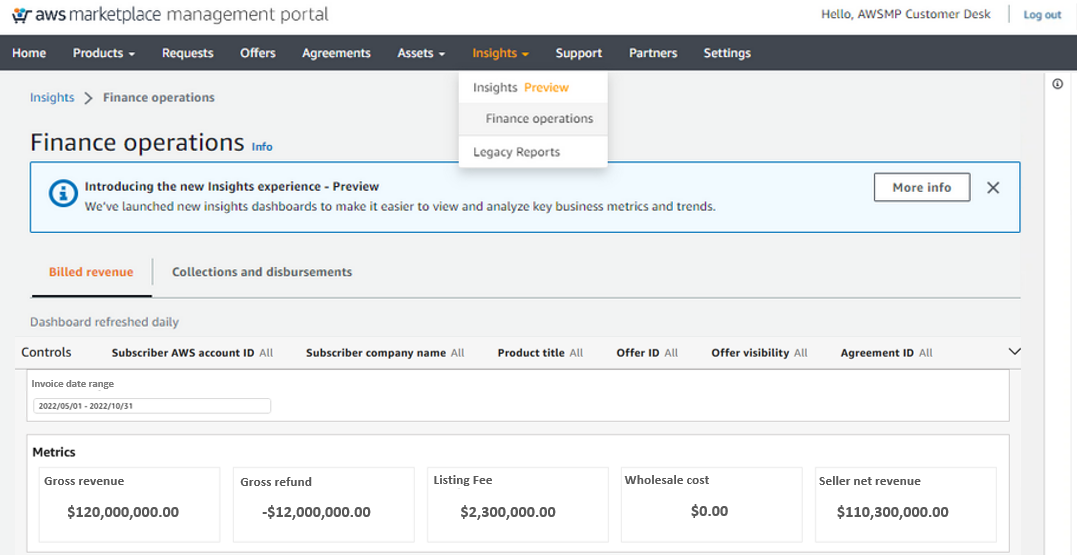
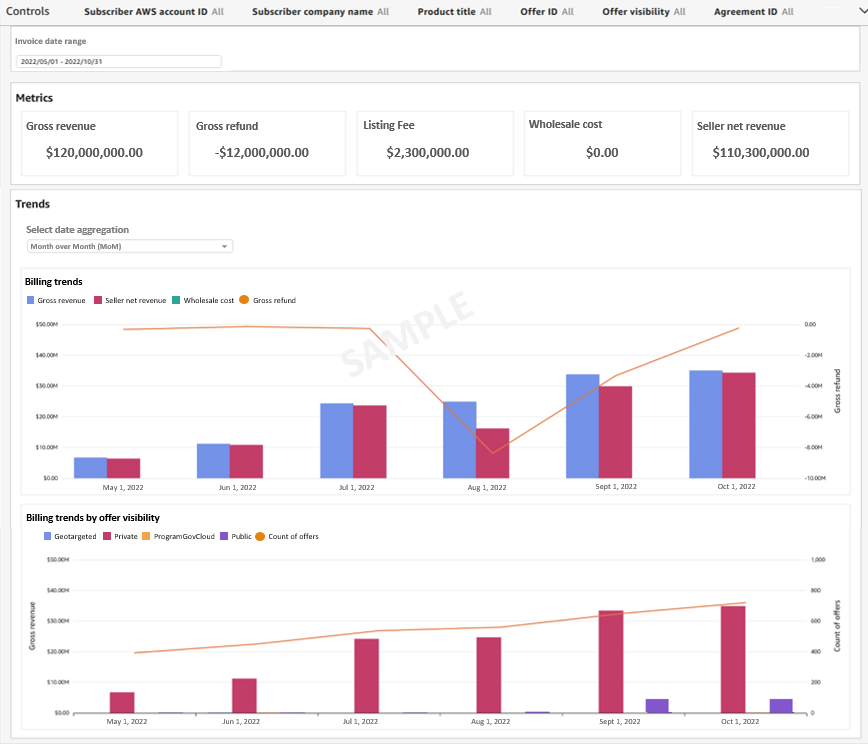
Billed Revenue and the Collections & Disbursements are two new QuickSight dashboards embedded directly into the AWS Marketplace Management Portal (AMMP), accessed via the Insights tab. These dashboards—pre-built with 10+ controls or filters, 15+ visualizations, and powered by daily refreshed data—provide a visual reporting experience for revenue recognition and disbursements tracking.

The following screenshot shows what the dashboards look like in the Finance operations section on the Insights tab within the AMMP.

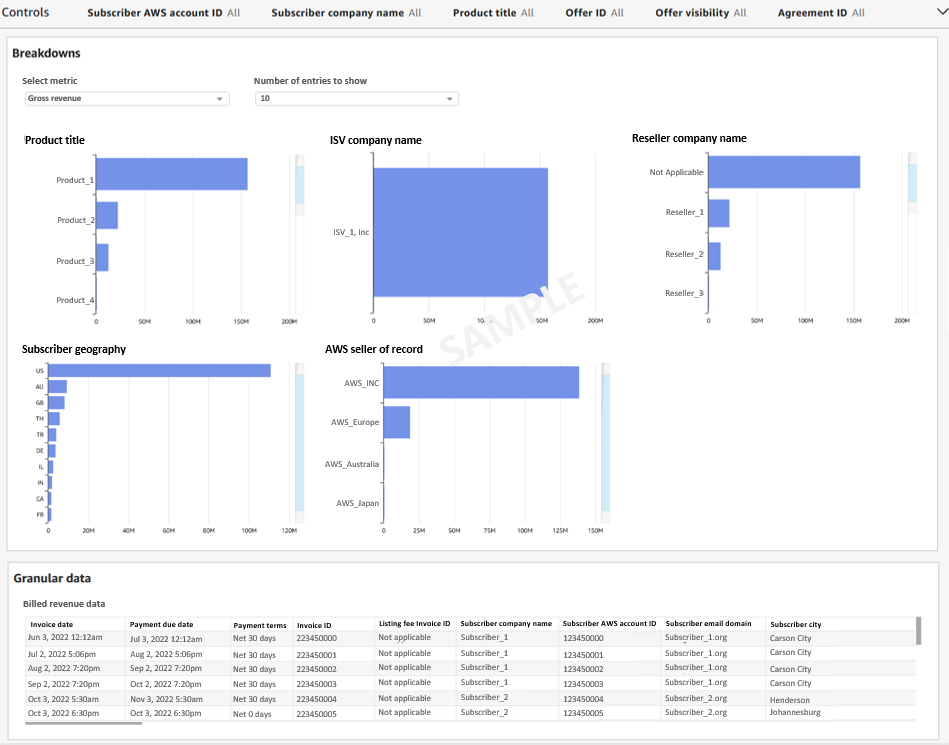
The dashboards are divided into several sections:

  • Controls provides filters to refine your dashboard data.
  • Date Range Filter provides the ability to filter dashboard data based on the dates.
  • Metrics, Trends, and Breakdowns all provide detailed analytics to understand business performance.
  • Granular data provides the option to download the raw data from the dashboard by clicking on the table and choosing the Export to CSV option.

For quick help, sellers can select the Info button to view the side navigation panel with tips on how to use the dashboard. They can also reach out to our team by selecting Contact us from the Info panel.

Improving the customer experience

The Billed Revenue dashboard now reflects changes within 24 hours of a customer being billed or refunded—a major improvement over the 45 days it once took to access this data from the legacy AMMP Billed Revenue report. Similarly, the Collections & Disbursements dashboard provides disbursement information within 24 hours of AWS sending funds to sellers, whereas it used to take up to 4 days from the legacy AMMP Disbursement Report.

Our team’s decision to go with QuickSight was the direct result of a clear alignment between what our sellers told us they wanted and what QuickSight offered. With QuickSight Embedded dashboards, AWS Marketplace sellers now have a visual representation of their data that doesn’t require time or resources dedicated to technical integration implementations, and they can quickly and easily manipulate the data via filters, or they can download it to a CSV if that’s their preference. Embedded dashboards simplify the viewing, analyzing, and tracking of key business metrics and trends related to financial operations. Being able to easily show each seller only their relevant data (using row-level security) provides us with the flexibility we need, with the peace of mind of knowing everything is secure. AWS Marketplace data is hosted in an Amazon Redshift cluster; QuickSight’s seamless integration into Amazon Redshift made it a fantastic choice.

Data-driven decisions with QuickSight

Embedding these new QuickSight dashboards into the AMMP has enabled us to provide at-a-glance metrics to AWS Marketplace sellers in a faster, more efficient, and far more user-friendly way than ever before. QuickSight has made a significant impact on how quickly sellers can access their data, which helps them respond faster to shifting trends.

To learn more about how you can embed customized data visuals, interactive dashboards, and natural language querying into any application, visit Amazon QuickSight Embedded.


About the Authors

Snigdha Sahi is a Senior Product Manager (Technical) with Amazon Web Services (AWS) Marketplace. She has diverse work experience across product management, product development and management consulting. A technology enthusiast, she loves brainstorming and building products that are intuitive and easy to use. In her spare time, she enjoys hiking, solving Sudoku and listening to music.

Vincent Larchet is a Principal Software Development Engineer on the AWS Marketplace team based in Vancouver, BC. Outside of work, he is a passionate wood worker and DIYer.

Organize your AWS Serverless code to prevent merge conflicts

Post Syndicated from Mark Curtis original https://aws.amazon.com/blogs/devops/organize-your-aws-serverless-code-to-prevent-merge-conflicts/

How do you prevent the most common merge conflicts when your team is working on a Serverless application? How do you make sure that your team stays productive and avoids large merge issues while trying to update the same crucial files simultaneously? –The answer to both questions is code organization! You can use cfn-include and swagger-cli to organize, collaborate, and maintain a large serverless application as well as support a large or decentralized development team.

Real life inspiration

WRAP Technologies Inc. (WRAP) creates advanced technologies for the protection and security of public safety. Their WRAP Reality product allows law enforcement agencies to train their officers using virtual reality-based scenarios.

Too many cooks in the kitchen

When multiple developers collaborate on a serverless architecture built with AWS CloudFormation, and its extensions such as the AWS Serverless Application Model (SAM), the nature of specifying resources in both the template.yaml and the optional OpenAPI.yaml specification for Amazon API Gateway leads to merge conflicts, such as the one demonstrated in the following figure  where two developers are adding different API endpoints at the same time. These conflicts detract from the developer’s time and agility. Furthermore, navigating and maintaining the long template files required for a larger serverless architecture slows development  as the developer scans large files to find a particular resource definition.

Figure 1. The frustrating merge conflicts.

Figure 1. The frustrating merge conflicts.

By refactoring and organizing the CloudFormation and OpenAPI files, your development team can realize several benefits:

  • Improve developer efficiency by decomposing large, hard-to-manage files into a series of well-organized and single-purpose files.
  • Enhance developer productivity by allowing each developer to have ownership of their own code, thereby reducing the need to coordinate merges with teammates.
  • Eliminate potential merge issues for files that generate the most conflicts during the development of a typical Serverless API application.

Rapid development

WRAP partnered with AWS to develop and host the backend for their new officer training management platform. This entirely new platform was developed, completed, and available for use in a matter of months. Moreover, it’s a collaboration of developers spread across multiple teams worldwide, all contributing to the same code base. By instituting the norms and techniques of this post, WRAP created a large and maintainable serverless application with minimal developer code collisions.

Development of the WRAP Reality training management system was accomplished using CloudFormation for defining Infrastructure as Code (IaC), and an Amazon API Gateway OpenAPI specification for defining API contracts. The development team for the WRAP Reality training management service leveraged agile development for expediency, including the GitHub Flow branching strategy. However, since project contributors were not co-located, several considerations were put in place to make sure of consistency and speed of code development:

  • The API specifications and contracts were defined in OpenAPI (Swagger) specifications early in the development process, clearly defining the project structure up front, and allowing developers to independently build infrastructure components.
  • The two code assets central to the entire project – the CloudFormation template and the OpenAPI Specification – were decomposed into small, easily manageable components. This enabled components to be organized in a way that enhanced development productivity and practically eliminated the inevitable merge conflicts that come with large source code files that are being modified on a daily basis.

The development process was accelerated by utilizing OpenAPI integrations with AWS Services, as well as techniques for managing the OpenAPI specification and Cloudformation Template files.

Sample project

To demonstrate these techniques, we’ll explore the following sample project comprised of API endpoints for “widget” management, available on GitHub. This project provides the following end points:

  • /widget PUT: Creation of a new widget
  • /widget GET: Retrieval of a new widget
  • /reports/color GET: Retrieval of a set of widgets based on the widget color
  • /reports/filterpage GET: Retrieval of widgets based on specified filters

The overall architecture of the application is shown in the following diagram:

Figure 2. Architecture Diagram

Figure 2. Architecture Diagram

The application comprises:

  • Amazon API Gateway is a fully-managed service that makes it easy for developers to create, publish, maintain, monitor, and secure APIs at any scale. In this example, API Gateway serves as the web service for the API endpoints. The mapping of data to and from the API endpoints to the Lambda functions is formally defined by an OpenAPI specification file.
  • AWS Lambda is a serverless compute service that lets you run code without provisioning or managing servers, creating workload-aware cluster scaling logic, maintaining event integrations, or managing runtimes. In this example, four Lambda functions are used to service each of the four API calls.
  • Amazon DynamoDB is a key-value and document database that delivers single-digit millisecond performance at any scale. DynamoDB is used as a persistent data store for widgets and associated properties.

OpenAPI and AWS service integration

When using API Gateway, developers have the option of using proxy Lambda integrations, or formally defining the API interface in an OpenAPI yaml file. The OpenAPI specification can be leveraged to document the API prior to development, and the example/mock features of the OpenAPI specification facilitates concurrent development by quickly establishing a working infrastructure to build upon. Furthermore, API documentation can be automatically generated from the OpenAPI specification.

As the number of endpoints increases, the OpenAPI specification file can grow in size, reaching thousands of lines of code that must be updated and maintained regularly by multiple developers. To aid in management and usability, the OpenAPI file can be decomposed into separate files for endpoints, responses, fields, and schemas.

Start with a “skeleton” file as an entry point for the OpenAPI definition, and then add a separate file for the definition of each endpoint or construct. For example, the sample project entry point is api/apiSkeleton.yaml, which contains the global definitions and effectively defines a simple list of endpoints and the reference ($ref) file path to each endpoint’s definition.

The application comprises:

/reports/color:
    $ref: './paths/reports/reportsColor.yaml'

  /reports/filterpage:
    $ref: './paths/reports/reportsFilterPage.yaml'

Diving into a file referenced by an endpoint, we see that it contains all of the specification details for that endpoint. Looking at the reportsColor.yaml file reveals the full endpoint specification for /reports/color:

get:
  description: Get widgets by color
  parameters:
    - in: path
      $ref: '../../requestParameters/color.yaml'
  responses:
    200:
      description: Get All the Widgets of a color
      content:
        application/json:
          schema:
            $ref: '../../schemas/widgetList.yaml'
    . . .

In turn, this endpoint specification can include further references to yaml files defining common parameters, schemas, and even full gateway responses. For example, color.yaml defines the color path variable:

  type: string
    description: "The widget's color"
    example: "Red"

To paraphrase a common catch phrase, “With a great many files, comes a great responsibility for organization.” To this end, we offer the following organizational structure as a start. Place all of the related API specifications in an “api” subfolder of your project. Have child subfolders for field, metadata, and gateway response definition files. Then, create child subfolder trees for each branch of your endpoints that mirror the endpoint paths. This will result in a highly-organized directory structure, as seen in the sample project:

├── api
│   ├── apiSkeleton.yaml
│   ├── fields
│   │   ├── color.yaml
│   │   ├── metadata
│   │   │   ├── count.yaml
│   │   │   ├── message.yaml
│   │   └── widgetname.yaml
│   ├── gatewayResponses
│   │   ├── error.yaml
│   │   └── notFound.yaml
│   ├── paths
│   │   ├── reports
│   │   │   ├── reportsColor.yaml
│   │   │   └── reportsFilterPage.yaml
│   │   └── widget
│   │       ├── widgetPut.yaml
│   │       └── widgetWidgetnameGet.yaml

We still need a consolidated single OpenAPI file to provide to CloudFormation during deployment to AWS. Therefore, the multiple files are combined and validated using the swagger-cli bundle command, resulting in a single file for deployment. The bundle command must be executed before a CloudFormation build. This command can also be included as a shortcut in the Makefile as the “buildOpenApi” command:

swagger-cli bundle -o api/api.yaml --dereference --t yaml  api/apiSkeleton.yaml

or

make buildOpenApi

Once compiled, api/api.yaml is then used normally for API Gateway integrations and as a Postman  API Collection import. As api/api.yaml is dynamically compiled, it’s included in .gitignore and not checked in to AWS CodeCommit.

cfn-include and nested stacks

The CloudFormation template that defines the infrastructure for even a simple service can grow to considerable length, perhaps thousands of lines. This presents challenges from a support and continued development perspective, as specific code locations become difficult to find and merge conflicts become commonplace.

CloudFormation Nested Stacks are a method of breaking a large CloudFormation template into separate templates. When there are clear delineations between groups of resources in a stack breaking it into separate nested stacks makes sense. There is also a 500 resource limit in a single CloudFormation stack and in order to go above that nested or separate stacks are necessary. Depending on the complexity of the architecture and frequency of updates however, the Nested Stacks can also become large. Furthermore, in a serverless architecture, the logical separation of architecture layers into separate stacks may not be direct, for example when a Lambda function is triggered by an event sent to an EventBridge event bus, then that Lambda function sends a different event back to the same event bus.

In these cases, CloudFormation templates can be decomposed to further leverage cfn-include . With this technique, the top-level CloudFormation template becomes a skeleton file which contains the stack parameters, global specifications, a list of resource names without properties, and the outputs. The properties of each resource are contained in separate files, referenced by an ‘include’ directive.
CloudFormation template organization

To organize your CloudFormation template, deconstruct the template into one-file-per-resource, with one main “skeleton” file as the main entry point. This skeleton file contains the full parameters, global section, conditions, and output specification. The resources are specified by resource name in this skeleton file, and then an ‘include’ directive points to the file that contains the body of the resource declaration. See the following example of the main skeleton file with two resources:

AWSTemplateFormatVersion: '2010-09-09'
Transform: AWS::Serverless-2016-10-31
Description: >
  Widget API Service
Globals:
  Function:
    Handler: app.lambda_handler
    Runtime: python3.8
Resources:

    WidgetApi:
        !Include ./resources/apigw/widgetApiGW.yaml

    WidgetDdbTable:
        !Include ./resources/dynamodb/widgetDdbTable.yaml

Then, the resource files contain the properties of that specific resource. For example, widgetApiGW.yaml defines an API Gateway:

Type: AWS::Serverless::Api
    Properties:
      DefinitionBody:
        Fn::Transform:
          Name: AWS::Include
          Parameters:
            Location: api/api.yaml
      EndpointConfiguration:
        Type: REGIONAL
      StageName: prod
      TracingEnabled: true

This approach has the benefit of breaking the CloudFormation template into multiple small files, while still maintaining a top-level holistic view. The resource definitions, which normally comprise the majority of the content and can cause merge conflicts, are moved out of the main template.

For organization, you can create a directory in your project to contain the CloudFormation scripts. This directory also contains the entry-point skeleton file. Create further sub-folders for resources, and then further folders by resource type and architecture. We found that placing applicable AWS Identity and Access Management (IAM) role resource definitions in the same folder with the applied resource facilitated easier navigation. For example:

├── cloudformation
│   ├── resources
│   │   ├── apigw
│   │   │   └── widgetApiGW.yaml
│   │   ├── dynamodb
│   │   │   └── widgetDdbTable.yaml
│   │   └── lambda
│   │       ├── layers
│   │       │   └── lambdaDDBEnv.yaml
│   │       ├── reports
│   │       │   ├── reportsColorLambda.yaml
│   │       │   └── reportsColorLambdaRole.yaml
│   │       └── widget
│   │           ├── widgetGetLambda.yaml
│   │           └── widgetGetLambdaRole.yaml
│   └── templateSkeleton.yaml

The files must be reconstituted to a single template.yaml for CloudFormation build and deployment. This is accomplished with the cfn-include command. A convenience command can optionally be included in the Makefile.

cfn-include --yaml  cloudFormation/templateSkeleton.yaml > template.yaml

or

make buildTemplate

As the final template.yaml file is dynamically compiled, it’s included in .gitignore and not checked in to CodeCommit.

Conclusion

This post demonstrates techniques used by WRAP and AWS to rapidly develop and maintain key files in an Serverless architecture. The techniques discussed in this post allowed the WRAP and AWS team to do the following:

  • Improve developer efficiency by decomposing large, hard-to-manage files into a series of well-organized and single purpose files.
  • Enhance developer productivity by allowing each developer to have ownership of their own piece of the code without having to coordinate with teammates.
  • Eliminate potential merge issues on the files that typically generate the most conflicts during the development of a typical Serverless API application.

Applying these techniques was one of the key factors in the rapid development of the WRAP Reality training framework.

About the Authors:

 Tom Romano

Tom Romano is a Solutions Architect from Tampa, FL. Tom is a member the Service Creation team for the World Wide Public Sector, who assists GovTech and EdTech customers as they create new solutions that are cloud-native, event-driven, and serverless. He is an enthusiastic Python programmer for both application development and data analytics. In his free time, Tom flies remote control model airplanes and enjoys vacationing around Florida.

Robert Maefs

Robert Maefs is a lead technologist currently working with Wrap, Inc. developing innovative Virtual Reality training simulations for law enforcement and corrections. He is a repeat entrepreneur with expertise bringing mature technologies to under-served industries. In his personal life, Robert nerds out with board games and 3D printing.

Mark Curtis

Mark Curtis is a Senior Solutions Architect at AWS. At AWS he helps EdTech and GovTech customers architect and modernize their applications using cloud native serverless services. Prior to joining AWS, he spent 18 years developing scalable applications for both EdTech and Government customers.

Juan Peredo

Juan Peredo is a Cloud Application Architect at AWS Professional Services. He enjoys working with customers to design, migrate, and optimize cloud native applications. He is a problem solver at heart who likes using emerging technologies to solve interesting problems.

The collective thoughts of the interwebz