Meta Talks World-Lock Rendering for AR/MR at Hot Chips 2025

Post Syndicated from Ryan Smith original https://www.servethehome.com/meta-talks-world-lock-rendering-for-ar-mr-at-hot-chips-2025/

The final graphics-related talk of the day comes from Meta, who has perhaps the most novel presentation on the graphics track. Rather than talking about GPU architectures that have already been shipping to customers for several months, Meta’s ex-Oculus headset division is at the show to talk about using dedicated ICs for accelerating world-locked rendering […]

The post Meta Talks World-Lock Rendering for AR/MR at Hot Chips 2025 appeared first on ServeTheHome.

NVIDIA GeForce RTX 5090 and the Age of Neural Rendering at Hot Chips 2025

Post Syndicated from Ryan Smith original https://www.servethehome.com/nvidia-geforce-rtx-5090-and-the-age-of-neural-rendering-at-hot-chips-2025/

The second presentation on today’s graphics track comes from NVIDIA. Like AMD, NVIDIA is mid-cycle on its current generation of graphics products, having launched the first of them back in late 2024. As a result, their Hot Chips presentation is more of a recap, with a focus on what the Blackwell architecture offers for graphics […]

The post NVIDIA GeForce RTX 5090 and the Age of Neural Rendering at Hot Chips 2025 appeared first on ServeTheHome.

AMD RDNA 4 GPU Architecture at Hot Chips 2025

Post Syndicated from Ryan Smith original https://www.servethehome.com/amd-rdna-4-gpu-architecture-at-hot-chips-2025/

Kicking off this afternoon’s graphics track at Hot Chips 2025 is AMD. The company launched its RDNA 4 architecture and associated Radeon RX 9000 series video cards earlier this year, releasing two GPUs thus far. As AMD is now well into this generation of Radeon GPUs, the company doesn’t necessarily have any grand revelations to […]

The post AMD RDNA 4 GPU Architecture at Hot Chips 2025 appeared first on ServeTheHome.

Accelerating legacy code modernization: EPAM’s journey with Amazon Q Developer

Post Syndicated from Venugopalan Vasudevan original https://aws.amazon.com/blogs/devops/accelerating-legacy-code-modernization-epams-journey-with-amazon-q-developer/

This post is co-written with Nazariy Popov, Volodymyr Konchuk, and Andrii Davydenko from EPAM

Legacy code modernization presents significant challenges for organizations looking to stay competitive in today’s rapidly evolving digital landscape. Organizations face the dual challenge of maintaining business continuity while modernizing their legacy systems for cloud environments. This transformation requires organizations to carefully navigate between preserving essential business logic and implementing modern architectural patterns. This is where AI-powered development tools can make a transformative impact, as demonstrated in EPAM’s recent legacy modernization project using Amazon Q Developer.

Amazon Q Developer, an AI code assistant, seamlessly integrates into the development pipeline to address these challenges. This innovative AI code assistant helps teams tackle various tasks, from generating new features, automating language upgrades, and refactoring legacy code to fixing bugs and automating deployments. By providing detailed explanations for its code suggestions while maintaining high quality standards, Amazon Q Developer significantly improves developer efficiency across the entire software development lifecycle, resulting in substantial time and effort savings.

EPAM, an AWS Premier Partner, collaborated with one of their customers to modernize their legacy applications to AWS Cloud. The modernization initiative focused on multiple business-critical applications, primarily built in Java 8 with Oracle Database backend.

In this post, you’ll learn how Amazon Q Developer helped EPAM engineers transform these complex legacy systems into modern cloud-native architectures on AWS. The tool enabled the team to autonomously perform a range of tasks—from implementing new microservices and documenting code to testing, reviewing, and refactoring Java code, as well as performing critical platform upgrades.

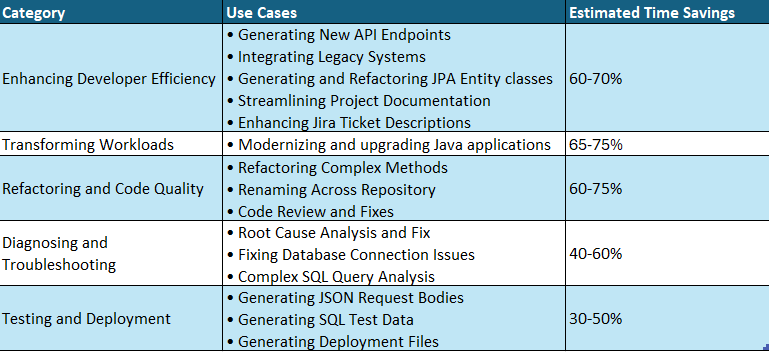
Before diving into the details, here’s an overview of how Amazon Q Developer helped EPAM across various aspects of the modernization project:

Summary of Amazon Q Developer Use Cases in EPAM’s Modernization Journey:

Summary of Amazon Q Developer Use Cases and Savings

Let’s explore each of these areas in detail.

Enhancing developer efficiency (Estimated time savings: 60-70%)

Amazon Q Developer played a crucial role in boosting EPAM’s development productivity. By automating routine tasks and providing intelligent code suggestions, the tool enabled developers to focus on more strategic aspects of the modernization project. Let’s explore how EPAM leveraged these capabilities.

Use Case 1: Generating New API Endpoints

Creating new API endpoints traditionally requires developers to invest 1-2 days per endpoint, involving multiple steps from designing the API contract to writing unit tests and documentation. Using Amazon Q Developer, the team dramatically accelerated this process for three new API endpoints in an existing microservice. Q Developer efficiently generated the initial code implementation along with comprehensive unit test coverage, requiring only minor modifications such as renaming variables, enhancing error handling, and refining test cases. The unit tests generated proved remarkably reliable with minimal adjustments needed. Along with this, Q Developer also generated comprehensive comments/documentation of the code improving the maintainability. This reduced the total development time to just 4 hours for all three endpoints – a 70% time saving compared to the traditional approach, allowing developers to focus on fine-tuning business logic rather than writing boilerplate code.

Use Case 2: Integrating Legacy Systems

Integrating a legacy monolith application with modern microservices traditionally requires developers to manually write extensive integration code, taking 1-2 weeks per integration point. Amazon Q Developer accelerated this process by automatically generating REST API client code in the monolith to consume microservice endpoints, along with data transfer objects (DTOs), error handling, and retry logic with integration test templates. While developers still needed to validate business rules and fine-tune error scenarios, Q Developer’s ability to understand both the legacy monolith’s structure and modern microservice patterns reduced the integration time to 2-3 days per integration point – a 70% time saving. This significantly streamlined the integration process while maintaining the robustness required for production systems.

Use Case 3: Generating and Refactoring JPA Entity Classes

During the modernization effort, new database tables were required to support additional business functionality in both the monolith and microservices. Instead of manually coding the data access layer, Amazon Q Developer automated the process by generating Spring JPA Entity classes from SQL DDL statements. Amazon Q Developer maintained consistency with existing data models by following established naming conventions, applying standard annotations, and implementing required interfaces from the existing codebase. What stood out was Q Developer’s ability to provide detailed explanations for its implementation choices, such as why specific annotations were used or how the new entities aligned with existing persistence patterns, enabling the team to quickly validate the generated code against their architectural standards. Amazon Q Developer generated the complete Java Spring entity class with all the fields. Additionally, Amazon Q Developer refactored the Entity class as well.

Use Case 4: Streamlining Project Documentation

Creating and maintaining up-to-date project documentation is often a time-consuming task for developers. Amazon Q Developer simplified this process by assisting in the generation of README files for the team’s projects. By analyzing the project structure, dependencies, and key components, Q Developer produced initial drafts of README files that included project overviews, setup instructions, and API documentation. This allowed developers to quickly review and refine the documentation, ensuring it met team standards while saving significant time compared to writing everything from scratch.

Use Case 5: Enhancing Jira Ticket Descriptions

Writing detailed, informative Jira ticket descriptions can be a challenge, especially for complex features or bug fixes. Amazon Q Developer aided the team by suggesting detailed descriptions for Jira tickets based on the context of the code changes and related discussions. For example, when creating a ticket for a new feature, Q Developer could propose a description that included the feature’s purpose, key implementation details, and potential impact on other system components. While developers still needed to review and adjust these descriptions, the AI-generated starting point significantly reduced the time spent on ticket management, allowing the team to focus more on actual development work.

Transforming workloads (Estimated time savings: 65-75%)

Moving legacy applications to the cloud requires careful planning and execution. EPAM utilized Amazon Q Developer’s Java upgrade capabilities to streamline the transformation of monolithic applications into modern, cloud-native architectures. Here’s how the Amazon Q Developer facilitated this process.

Use Case 6: Modernizing and upgrading Java applications

Amazon Q Developer assisted in upgrading older Java applications to Java 21 to leverage modern features like Java Streams API and adapting it for Spring Boot tech stack. It not only upgraded the code, but also updated deprecated code components, dependencies and libraries as well. This modernization improved the code’s performance and also aligned it with the current best practices adopted by the development teams. For large monolithic applications, breaking/decomposing the monolith into logical groups while identifying and separating common modules as shared dependencies helped break down the problem into manageable pieces for the agent to do a better job, resulting in a more maintainable and modular structure for the transformation process. This modular approach significantly enhanced Q Developer’s ability to analyze and transform the codebase while reducing the complexity of the modernization effort.

Refactoring Code, Improving Code Quality and Readability (Estimated time savings: 60-75%)

One of the most challenging aspects of modernization is refactoring legacy code and maintaining high code quality standards. Amazon Q Developer assisted EPAM’s team in analyzing complex codebases and suggesting improvements, optimizing the code while preserving business logic and ensuring consistent code quality. The following examples demonstrate this capability in action.

Use Case 7: Refactoring Complex Methods

Legacy code often includes methods with high cyclomatic complexity, making them difficult to maintain. Amazon Q Developer helped the development team refactor large, complex methods into smaller, more readable, and better-structured methods. It also provided a detailed explanation of the changes, highlighting how the refactored code improved maintainability and readability.

Use Case 8: Renaming Across the Repository

When tasked with renaming ‘YTD Tax Report‘ to ‘Withholding Tax Report‘ across the entire repository, Amazon Q Developer demonstrated capabilities beyond simple search and replace functionality found in traditional IDEs. It performed context-aware renaming, distinguishing between instances where ‘YTD Tax Report‘ was part of larger phrases or variable names, while simultaneously updating related components including unit tests, integration tests, and logging statements. The tool intelligently refactored method signatures where the report name was part of method names or parameters, analyzed and updated database queries, and maintained consistency across different file types including Java, XML, and properties files. What set Q Developer apart was its ability to provide detailed change logs explaining each modification and the rationale behind more complex refactoring decisions, significantly reducing the risk of missed references or inconsistencies that often occur with manual search-and-replace operations.

Use Case 9: Code Review and fixes

The code review capabilities of Amazon Q Developer, seamlessly integrated into the IDE, enabled the development team to detect potential issues spanning multiple classes. Beyond merely identifying problems, Q Developer provided actionable fix recommendations that could be easily reviewed and implemented. This proactive approach to code quality allowed the team to address issues during the early stages of development, significantly reducing the likelihood of defects making their way to production environments.

Diagnosing and troubleshooting errors (Estimated time savings: 40-60%)

Quick error resolution is crucial for maintaining development momentum. Amazon Q Developer’s advanced error analysis capabilities helped EPAM’s team identify and fix issues efficiently, reducing debugging time significantly. Here are some examples of how this worked in practice.

Use Case 10: Root Cause Analysis and Fix

During the development phase, the team encountered an unexpected error in one of the Java services: java.lang.IllegalArgumentException: Property 'http://javax.xml.XMLConstants/property/accessExternalDTD' is not recognized. Q Developer conducted a deeper analysis based on the context provided and suggested a more targeted fix and generated the necessary Java code changes, provided unit tests to verify the fix, and outlined potential security implications of the change. This comprehensive solution not only resolved the immediate error but also improved the overall security posture of the XML processing in the application. The team was able to implement and verify the fix within minutes, significantly reducing development.

Use Case 11: Fixing Database Connection Issues

While troubleshooting an issue where the application became unresponsive due to JDBC connection problems, Amazon Q Developer analyzed the project code and identified the missing connection pool configuration. Q Developer suggested implementing essential connection pool parameters like 'maximumPoolSize=20' and 'connectionTimeout=30000' based on the application’s traffic patterns and code. After implementing its suggested configuration, the issue was resolved, significantly improving the application’s stability.

Use Case 12: Complex SQL Query Analysis

Debugging complex SQL queries constructed dynamically in Java code can be challenging. Amazon Q Developer analyzed such queries, broke them down into their component parts, and provided descriptions for query parameters. For instance, when presented with a complex query involving multiple joins and subqueries, Q Developer dissected it into logical blocks, explaining how each part contributed to the overall result set. This made it easier for the team to understand and debug the queries.

Testing and Deployment: Test data generation and Automating Infrastructure Setup (Estimated time savings: 30-50%)

Use Case 13: Generating JSON Request Bodies

When testing new APIs, Amazon Q Developer generated JSON request bodies based on the corresponding Java classes. It provided detailed descriptions of each field and suggested realistic and meaningful default values, making it easier to validate API functionality with real-world scenarios.

Use Case 14: Generating SQL Test Data

Amazon Q Developer generated SQL insert statements with test data based on our existing Java Entity classes. This automation saved us a significant amount of time in creating realistic test data for database validation and integration testing.

Use Case 15: Generating Deployment Files

Amazon Q Developer helped the development team generate essential deployment artifacts, including a Docker file, a startup shell script that was used as an entry point, and a Kubernetes deployment file for a new service. Automating this process not only saves time but also improves consistency across environments.

Ready to transform your developer experience?

EPAM’s experience with Amazon Q Developer has been transformative, significantly accelerating their application modernization efforts while maintaining high code quality. By leveraging Amazon Q Developer, EPAM reduced development time by approximately 70% and improved code quality metrics across the client’s portfolio. This efficiency gains not only accelerated the client’s cloud migration timeline but also resulted in substantial cost savings and faster time-to-market for new features.

Now, it’s your turn to explore Amazon Q Developer:

Schedule a demo: Experience firsthand how Amazon Q Developer can accelerate your development lifecycle. Connect with our team for a personalized demonstration tailored to your specific use case.

Start Your Proof of Concept: Begin your journey with Amazon Q Developer today through a proof of concept. See how it can enhance your team’s productivity and code quality, just as it did for EPAM.

Connect with EPAM: Learn more about EPAM’s success story and best practices for implementing Amazon Q Developer in your organization’s development workflow.

Take the next step in revolutionizing your development process. Visit Amazon Q Developer website or contact your AWS account team to get started.

Authors

EPAM

Nazariy Popov (1) Nazariy Popov, Delivery Head of GenAI Engineering and Modernization Practice Delivery management professional and technology leader with over 15 years of experience in the IT industry. At EPAM, he drives large-scale transformation programs, focusing on enterprise software development, cloud solutions, and AI assisted engineering and modernization.
Volodymyr Konchuk Volodymyr Konchuk, Lead Software Engineer
Java engineer with more than 11 years of production experience in Java-based web and enterprise applications. Has experience in building ecommerce and retail business applications using Java, Spring tech stack, and Amazon Web Services.
Andriy Davydenko

Andrii Davydenko, Delivery Manager
Seasoned delivery lead with over 7 years of experience managing ecommerce modernization projects with a focus on application performance optimization.

AWS

Venugopalan Vasudevan (Venu) is a Senior Specialist Solutions Architect focusing on Next Generation Developer Experience and AWS Generative AI services. In this role, Venu, helps organizations optimize their development processes and accelerate their digital transformation journeys using Amazon Q Developer and other AWS Generative AI Services. Also, Venu partners with enterprises to architect and implement Generative AI solutions while establishing robust development practices.
ArunChandapillai Arun Chandapillai is a Senior Engineering Architect with a strong history of leading cross-functional teams and collaborating with executive stakeholders. He is passionate about helping customers accelerate IT modernization through business-first cloud adoption strategies, with a focus on leveraging generative AI and MLOps. Outside of technology, he is an automotive enthusiast who loves the thrill of the open road, an engaging public speaker, and a philanthropist who lives by the motto ‘you get (back) what you give’.
jasmine Jasmine Rasheed Syed is a Senior Customer Solutions manager, focused in accelerating time to value for the customers in their in cloud journey by adopting best practices and mechanisms to transform their business at scale. Jasmine is a seasoned, result oriented leader with 20+ years of progressive experience in Insurance, Retail & CPG with exemplary track record spanning across Business Development, Cloud/Digital Transformation, Delivery, Operational & Process Excellence and Executive Management.
Oscar Oscar Hernandez is a Senior Account Executive, helping global organizations drive digital and AI transformation at scale. He works closely with executive teams to integrate cloud and AI-driven solutions that address complex business challenges and deliver measurable enterprise-wide impact. With over 15 years of experience across IT, telecom, financial services, retail, and HR technology, he focuses on enabling innovation, optimizing operations, and maximizing the value of emerging technologies.

Microsoft Azure Hardware Security to Help Thwart the World’s 3rd Largest GDP

Post Syndicated from Patrick Kennedy original https://www.servethehome.com/microsoft-azure-hardware-security-to-help-thwart-the-worlds-3rd-largest-gdp/

At Hot Chips 2025, Microsoft went into its Azure Hardware Security that it uses to help keep its cloud services secure

The post Microsoft Azure Hardware Security to Help Thwart the World’s 3rd Largest GDP appeared first on ServeTheHome.

Intel Xeon Clearwater Forest with 288 Cores on Intel 18A at Hot Chips 2025

Post Syndicated from Ryan Smith original https://www.servethehome.com/intel-xeon-clearwater-forest-with-288-cores-on-intel-18a-at-hot-chips-2025/

At Hot Chips 2025, Intel went into its next-gen 288 core processor constructed on Intel 18A process and using 3D packaging technology

The post Intel Xeon Clearwater Forest with 288 Cores on Intel 18A at Hot Chips 2025 appeared first on ServeTheHome.

IBM’s Power11 Processor Architecture at Hot Chips 2025

Post Syndicated from Ryan Smith original https://www.servethehome.com/ibms-power11-processor-architecture-at-hot-chips-2025/

Third up on today’s CPU track is IBM. Big Blue is at the conference to talk about its latest generation Power architecture chip, the Power11. IBM starts off by recapping Power. Why it exists, and what IBM’s goals are for the processor and architecture. IBM is very system-focused, rather than focusing on selling just CPUs. […]

The post IBM’s Power11 Processor Architecture at Hot Chips 2025 appeared first on ServeTheHome.

Best practices for migrating Teradata BTEQ scripts to Amazon Redshift RSQL

Post Syndicated from Ankur Bhanawat original https://aws.amazon.com/blogs/big-data/best-practices-for-migrating-teradata-bteq-scripts-to-amazon-redshift-rsql/

When migrating from Teradata BTEQ (Basic Teradata Query) to Amazon Redshift RSQL, following established best practices helps ensure maintainable, efficient, and reliable code. While the AWS Schema Conversion Tool (AWS SCT) automatically handles the basic conversion of BTEQ scripts to RSQL, it primarily focuses on SQL syntax translation and basic script conversion. However, to achieve optimal performance, better maintainability, and full compatibility with the architecture of Amazon Redshift, additional optimization and standardization are needed.

The best practices that we share in this post complement the automated conversion supplied by AWS SCT by addressing areas such as performance tuning, error handling improvements, script modularity, logging enhancements, and Amazon Redshift-specific optimizations that AWS SCT might not fully implement. These practices can help you transform automatically converted code into production-ready, efficient RSQL scripts that fully use the capabilities of Amazon Redshift.

BTEQ

BTEQ is Teradata’s legacy command-line SQL tool that has served as the primary interface for Teradata databases since the 1980s. It’s a powerful utility that combines SQL querying capabilities with scripting features; you can use it to perform various tasks from data extraction and reporting to complex database administration. BTEQ’s robustness lies in its ability to handle direct database interactions, manage sessions, process variables, and execute conditional logic while providing comprehensive error handling and report formatting capabilities.

RSQL is a modern command-line client tool provided by Amazon Redshift and is specifically designed to execute SQL commands and scripts in the AWS ecosystem. Similar to PostgreSQL’s psql but optimized for the unique architecture of Amazon Redshift, RSQL offers seamless SQL query execution, efficient script processing, and sophisticated result set handling. It stands out for its native integration with AWS services, making it a powerful tool for modern data warehousing operations.

The transition from BTEQ to RSQL has become increasingly relevant as organizations embrace cloud transformation. This migration is driven by several compelling factors. Businesses are moving from on-premises Teradata systems to Amazon Redshift to take advantage of cloud benefits. Cost optimization plays a crucial role in these moves, because Amazon Redshift typically offers more economical data warehousing solutions with its pay-as-you-go pricing model.

Furthermore, organizations want to modernize their data architecture to take advantage of enhanced security features, better scalability, and seamless integration with other AWS services. The migration also brings performance benefits through columnar storage, parallel processing capabilities, and optimized query performance offered by Amazon Redshift, making it an attractive destination for enterprises looking to modernize their data infrastructure.

Best practices for BTEQ to RSQL migration

Let’s explore key practices across code structure, performance optimization, error handling, and Redshift-specific considerations that will help you create robust and efficient RSQL scripts.

Parameter files

Parameters in RSQL function as variables that store and pass values to your scripts, similar to BTEQ’s .SET VARIABLE functionality. Instead of hardcoding schema names, table names, or configuration values directly in RSQL scripts, use dynamic parameters that can be modified for different environments (dev, test, prod). This approach reduces manual errors, simplifies maintenance, and supports better version control by keeping sensitive values separate from code.

Create a separate shell script containing environment variables:

```sh
# rsql_parameters.sh
VIEW_SCHEMA=<SAMPLE_VIEW_SCHEMA>;export VIEW_SCHEMA
STAGING_TABLE_SCHEMA=<SAMPLE_STAGING_TABLE_SCHEMA>;export STAGING_TABLE_SCHEMA
STORED_PROCEDURE_SCHEMA=<SAMPLE_STORED_PROCEDURE_SCHEMA>;export STORED_PROCEDURE_SCHEMA
QUERY_GROUP=<ETL_JOB_NAME>;export QUERY_GROUP
```

Then import these parameters into your RSQL scripts using:

. <file_path>/rsql_parameters.sh
# or
source <file_path>/rsql_parameters.sh

Secure credential management

For better security and maintainability, use JDBC or ODBC temporary AWS Identity and Access Management (IAM) credentials for database authentication. For details, see Connect to a cluster with Amazon Redshift RSQL.

Query logging and debugging

Debugging and troubleshooting SQL scripts can be challenging, especially when dealing with complex queries or error scenarios. To simplify this process, it’s recommended to enable query logging in RSQL scripts.

RSQL provides the echo-queries option, which prints the executed SQL queries along with their execution status. By invoking the RSQL client with this option, you can track the progress of your script and identify potential issues.

rsql --echo-queries -D testiam

Here testiam represents a DSN connection configured in odbc.ini with an IAM profile.

You can store these logs by redirecting the output when executing your RSQL script:

```
sh <path to RSQL file>/<RSQL file name>.sh  >  <log file name>.log
```

With query logging is enabled, you can examine the output and identify the specific query that caused an error or unexpected behavior. This information can be invaluable when troubleshooting and optimizing your RSQL scripts.

Error handling with incremental exit codes

Implement robust error handling using incremental exit codes to identify specific failure points. Proper error handling is crucial in a scripting environment, and RSQL is no exception. In BTEQ scripts, errors were typically handled by checking the error code and taking appropriate actions. However, in RSQL, the approach is slightly different. To help ensure robust error handling and straightforward troubleshooting, it’s recommended that you implement incremental exit codes at the end of each SQL operation.The incremental exit code approach works as follows:

  • After executing a SQL statement (such as SELECT, INSERT, UPDATE, and so on.), check the value of the :ERROR variable.
  • If the :ERROR variable is non-zero, it indicates that an error occurred during the execution of the SQL statement.
  • Print the error message, error code, and additional relevant information using RSQL commands such as \echo, \remark, and so on.
  • Exit the script with an appropriate exit code using the \exit command, where the exit code represents the specific operation that failed.

By using incremental exit codes, you can identify the point of failure within the script. This approach not only aids in troubleshooting but also allows for better integration with continuous integration and deployment (CI/CD) pipelines, where specific exit codes can trigger appropriate actions.

Example:

SELECT * FROM $STAGING_TABLE_SCHEMA.SAMPLE_TABLE;
\if :ERROR <> 0
      \echo 'Error occurred in executing the select operation on table $STAGING_TABLE_SCHEMA.SAMPLE_TABLE'
      \echo :ERRORCODE
      \remark :LAST_ERROR_MESSAGE
      \exit 1  -- Exit code 1 represents a failure in the SELECT operation
\else
      \echo 'Select statement completed successfully'
INSERT INTO $STAGING_TABLE_SCHEMA.ANOTHER_SAMPLE_TABLE 
SELECT * FROM $STAGING_TABLE_SCHEMA.SAMPLE_TABLE;
\if :ERROR <> 0
      \echo 'Error occurred in executing the insert operation on table $STAGING_TABLE_SCHEMA.SAMPLE_TABLE'
      \echo :ERRORCODE
      \remark :LAST_ERROR_MESSAGE
      \exit 2  -- Exit code 2 represents a failure in the INSERT operation
\else
      \echo 'Insert statement completed successfully'

In the preceding example, if the SELECT statement fails, the script will exit with an exit code of 1. If the INSERT statement fails, the script will exit with an exit code of 2. By using unique exit codes for different operations, you can quickly identify the point of failure and take appropriate actions.

Use query groups

When troubleshooting issues in your RSQL scripts, it can be helpful to identify the root cause by analyzing query logs. By using query groups, you can label a group of queries that are run during the same session, which can help pinpoint problematic queries in the logs.

To set a query group at the session level, you can use the following command:

set query_group to $QUERY_GROUP;

By setting a query group, queries executed within that session will be associated with the specified label. This technique can significantly aid in effective troubleshooting when you need to identify the root cause of an issue.

Use a search path

When creating an RSQL script that refers to tables from the same schema multiple times, you can simplify the script by setting a search path. By using a search path, you can directly reference table names without specifying the schema name in your queries (for example, SELECT, INSERT, and so on).

To set the search path at the session level, you can use the following command:

set search_path to $STAGING_TABLE_SCHEMA;

After setting the search path to $STAGING_TABLE_SCHEMA, you can refer to tables within that schema directly, without including the schema name.

For example:

SELECT * FROM STAGING_TABLE;

If you haven’t set a search path, you need to specify the schema name in the query, as shown in the following example:

SELECT * FROM $STAGING_TABLE_SCHEMA.STAGING_TABLE;

It’s recommended to use a fully qualified path for an object in an RSQL script, but adding the search path prevents abrupt execution failure because of not providing a fully qualified path.

Combine multiple UPDATE statements into a single INSERT

In BTEQ scripts, it might have multiple sequential UPDATE statements for the same table. However, this approach can be inefficient and lead to performance issues, especially when dealing with large datasets, because of I/O intensive operations.

To address this concern, it’s recommended to combine all or some of the UPDATE statements into a single INSERT statement. This can be achieved by creating a temporary table, converting the UPDATE statements into a LEFT JOIN with the staging table using a SELECT statement, and then inserting the temporary table data into the staging table.

Example:

The existing BTEQ SQLs in the following example first INSERT the data into staging_table from staging_table1 and then UPDATE the columns for inserted data if certain condition is satisfied:

Insert into SAMPLE_STAGING_TABLE_SCHEMA.staging_table select col1,col2,col3,col4,col5 from SAMPLE_STAGING_TABLE_SCHEMA.staging_table1 where col1=col2;
Update SAMPLE_STAGING_TABLE_SCHEMA.staging_table a from (select col1,col2 from SAMPLE_STAGING_TABLE_SCHEMA.staging_table2 where col1!=col2) b where a.col1=b.col1 set a.col2 =b.col2;
Update SAMPLE_STAGING_TABLE_SCHEMA.staging_table a from (select col3,col2 from SAMPLE_STAGING_TABLE_SCHEMA.staging_table2 where col3!=col1) c where a.col2=c.col2 set a.col3=c.col3;
Update SAMPLE_STAGING_TABLE_SCHEMA.staging_table where col4='no' set col4='yes';
Update SAMPLE_STAGING_TABLE_SCHEMA.staging_table where col1='zyx' set col1 ='nochange';

The following RSQL operation below achieves the same result by first loading the data into a staging table, then executing the UPDATE using a temporary table as an intermediate step and then completes UPDATE using a temporary table. After this, it will truncate staging_tables and insert temporary table staging_table_temp1 data into staging_table.

Insert into $STAGING_TABLE_SCHEMA.staging_table select col1,col2,col3,col4,col5 from $STAGING_TABLE_SCHEMA.staging_table1 where col1=col2;

\if :ERROR <> 0
      \echo 'Error occurred in executing the insert operation on table staging_table'
      \echo :ERRORCODE
      \remark :LAST_ERROR_MESSAGE
      \exit 1
\else
      \echo 'Insert statement completed successfully'

Create temporary table staging_table_temp1 (like $STAGING_TABLE_SCHEMA.staging_table including defaults);

\if :ERROR <> 0
      \echo 'Error occurred in creating the temporary table staging_table_temp1'
      \echo :ERRORCODE
      \remark :LAST_ERROR_MESSAGE
      \exit 2
\else
      \echo 'Temporary table created successfully'
Insert into staging_table_temp1
(
Col1,
Col2,
Col3,
Col4
)
select
case when col1='zyx' then 'nochange'
else a.col1
end as col1,
coalesce(b.col2,a.col2) as col2,
coalesce(c.col3,a.col3) as col3,
case when col4='no' then 'yes'
            else a.col4
end as col4
from $STAGING_TABLE_SCHEMA.staging_table a
left join (select col1,col2 from $STAGING_TABLE_SCHEMA.staging_table2 where col1!=col2) b
      on a.col1=b.col1
left join (select col3,col2 from $STAGING_TABLE_SCHEMA.staging_table2 where col3!=col1) c
      on a.col2=c.col2;
\if :ERROR <> 0
      \echo 'Error occurred in executing the insert operation on temporary table staging_table_temp1'
      \echo :ERRORCODE
      \remark :LAST_ERROR_MESSAGE
      \exit 3
\else
      \echo 'Insert statement completed successfully'
--Truncate table staging_table;
$STORED_PROCEDURE_SCHEMA.sp_truncate_table(‘$STAGING_TABLE_SCHEMA’,’staging_table’)

\if :ERROR <> 0
      \echo 'Error occurred in executing the Truncate operation on table $STAGING_TABLE_SCHEMA.staging_table'
      \echo :ERRORCODE
      \remark :LAST_ERROR_MESSAGE
      \exit 4
\else
      \echo 'Truncate statement completed successfully'

Insert into $STAGING_TABLE_SCHEMA.staging_table(col1,col2,col3,col4) select col1,col2,col3,col4 from staging_table_temp1;

\if :ERROR <> 0
      \echo 'Error occurred in executing the insert operation on table $STAGING_TABLE_SCHEMA.staging_table'
      \echo :ERRORCODE
      \remark :LAST_ERROR_MESSAGE
      \exit 5
\else
      \echo 'Insert statement completed successfully'

The following is an overview of the preceding logic:

  • Create a temporary table with the same structure as the staging table.
  • Execute a single INSERT statement that combines the logic of all the UPDATE statements from the BTEQ script. The INSERT statement uses a LEFT JOIN to merge data from the staging table and the staging_table2 table, applying the necessary transformations and conditions.
  • After inserting the data into the temporary table, truncate the staging table and insert the data from the temporary table into the staging table.

By consolidating multiple UPDATE statements into a single INSERT operation, you can improve the overall performance and efficiency of the script, especially when dealing with large datasets. This approach also promotes better code readability and maintainability.

Execution logs

Troubleshooting and debugging scripts can be a challenging task, especially when dealing with complex logic or error scenarios. To aid in this process, it’s recommended to generate execution logs for RSQL scripts.

Execution logs capture the output and error messages produced during the script’s execution, providing valuable information for identifying and resolving issues. These logs can be especially helpful when running scripts on remote servers or in automated environments, where direct access to the console output might be limited.

To generate execution logs, you can execute the RSQL script from the Amazon Elastic Compute Cloud (Amazon EC2) machine and redirect the output to a log file using the following command:

sample_rsql_script.sh > sample_rsql_script_$(date "+%Y.%m.%d-%H.%M.%S").log

The preceding command executes the RSQL script and redirects the output, including error messages or debugging information to the specified log file. It’s recommended to add a time parameter in the log file name to have distinct files for each run of RSQL script.

By maintaining execution logs, you can review the script’s behavior, track down errors, and gather relevant information for troubleshooting purposes. Additionally, these logs can be shared with teammates or support teams for collaborative debugging efforts.

Capture an audit parameter in the script

Audit parameters such as start time, end time, and the exit code of an RSQL script are important for troubleshooting, monitoring, and performance analysis. You can capture the start time at the beginning of your script and the end time and exit code after the script completes.

Here’s an example of how you can implement this:

# Capture start time
start=$(date +%s)
echo date : $(date)
echo Start Time : $(date +"%T.%N")
. <file_path>/rsql_parameters.
-- Your RSQL script logic goes here
      --End of the RSQL code	
-- Capture exit code and end time
	
rsqlexitcode=$?
echo Exited with error code $rsqlexitcode
echo End Time : $(date +"%T.%N")
end=$(date +%s)
exec=$(($end - $start))
echo Total Time Taken : $exec seconds

The preceding example captures the start time in start= $(date +%s). After the RSQL code is complete, it captures the exit code in rsqlexitcode=$? and the end time in end=$(date +%s).

Sample structure of the script

The following is a sample RSQL script that follows the best practices outlined in the preceding sections:

#bin/bash
#capturing start time of script execution
start=$(date +%s)
 
#Executing and setting rsql parameters script variables
. /<parameter script path>/rsql_parameters.sh
echo date : $(date)
echo Start Time : $(date +"%T.%N")
 
#Logging into Redshift cluster. Here credentials are retrieved from ODBC based temporary 
#IAM credentials which is discussed in Credentials Management section
rsql --echo-queries -D testiam < EOF 
\timing true
 
\echo '\n-----MAIN EXECUTION LOG STARTING HERE-----'
\echo '\n--JOB ${0:2} STARTING--'
 
/* Setting query group. Here $QUERY_GROUP retrieved from RSQL parameters file*/
SET query_group to '$QUERY_GROUP';
\if :ERROR <> 0
\echo 'Setting Query Group to $QUERY_GROUP failed '
\echo 'Error Code -'
\echo :ERRORCODE
\remark :LAST_ERROR_MESSAGE
\exit 1
\else
\remark '\n **** Setting Query Group to $QUERY_GROUP Successfully **** \n'
\endif
 
 
/*Setting search path to Staging table schema*/
SET SEARCH_PATH TO $STAGING_TABLE_SCHEMA, pg_catalog;
 
\if :ERROR <> 0
\echo 'SET SEARCH_PATH TO $STAGING_TABLE_SCHEMA, pg_catalog failed.'
\echo 'Error Code -'
\echo :ERRORCODE
\remark :LAST_ERROR_MESSAGE
\exit 2
\else
\remark '\n **** SET SEARCH_PATH TO $STAGING_TABLE_SCHEMA, pg_catalog executed Successfully **** \n'
\endif
/* Inserting initial data from staging_table1 into staging_table */
Insert into staging_table select col1,col2,col3,col4,col5 from staging_table1 where col1=col2;

\if :ERROR <> 0
      \echo 'Error occurred in executing the insert operation on table staging_table'
      \echo :ERRORCODE
      \remark :LAST_ERROR_MESSAGE
      \exit 3
\else
      \echo 'Insert statement completed successfully'

/* Creating temporary table for handling multiple updates using select statement*/
Create temporary table staging_table_temp1 (like $STAGING_TABLE_SCHEMA.staging_table including defaults);

\if :ERROR <> 0
      \echo 'Error occurred in creating the temporary table staging_table_temp1'
      \echo :ERRORCODE
      \remark :LAST_ERROR_MESSAGE
      \exit 4
\else
      \echo 'Temporary table created successfully'

/* Updates handling using insert and select statement*/

Insert into staging_table_temp1(Col1,Col2,Col3,Col4)
select
case when col1='zyx' then 'nochange' else a.col1 end as col1,
coalesce(b.col2,a.col2) as col2,
coalesce(c.col3,a.col3) as col3,
case when col4='no' then 'yes' else a.col4 end as col4
from $STAGING_TABLE_SCHEMA.staging_table a
left join (select col1,col2 from $STAGING_TABLE_SCHEMA.staging_table2 where col1!=col2) b 
      on a.col1=b.col1
left join (select col3,col2 from $STAGING_TABLE_SCHEMA.staging_table2 where col3!=col1) c
      on a.col2=c.col2;

\if :ERROR <> 0
      \echo 'Error occurred in executing the insert operation on temporary table staging_table_temp1'
      \echo :ERRORCODE
      \remark :LAST_ERROR_MESSAGE
      \exit 5
\else
      \echo 'Insert statement completed successfully'

/*In production, ETL user may not have truncate table permission therefore, to avoid permission issue we are using a stored procedure which can truncate required table by using provided schema name and table name. 
Note: You can create a stored procedure for truncating the tables and refer in all ETL RSQL script */

$STORED_PROCEDURE_SCHEMA.sp_truncate_table(‘$STAGING_TABLE_SCHEMA’,’staging_table’)
\if :ERROR <> 0
      \echo 'Error occurred in executing the Truncate operation on table $STAGING_TABLE_SCHEMA.staging_table'
      \echo :ERRORCODE
      \remark :LAST_ERROR_MESSAGE
      \exit 6
\else
      \echo 'Truncate statement completed successfully'

/* Inserting data from temporary table into staging table staging_table */

Insert into $STAGING_TABLE_SCHEMA.staging_table(col1,col2,col3,col4) select col1,col2,col3,col4 from staging_table_temp1;

\if :ERROR <> 0
      \echo 'Error occurred in executing the insert operation on table $STAGING_TABLE_SCHEMA.staging_table'
      \echo :ERRORCODE
      \remark :LAST_ERROR_MESSAGE
      \exit 7
\else
      \echo 'Insert statement completed successfully'

EOF

#Capture RSQL return code to exit the script with proper error code and message

rsqlexitcode=$?
echo Exited with error code $rsqlexitcode
echo End Time : $(date +"%T.%N")
end=$(date +%s)
exec=$(($end - $start))
echo Total Time Taken : $exec seconds

Conclusion

In this post, we’ve explored crucial best practices for migrating Teradata BTEQ scripts to Amazon Redshift RSQL. We’ve shown you essential techniques including parameter management, secure credential handling, comprehensive logging, and robust error handling with incremental exit codes. We’ve also discussed query optimization strategies and methods that you can use to improve data modification operations. By implementing these practices, you can create efficient, maintainable, and production-ready RSQL scripts that fully use the capabilities of Amazon Redshift. These approaches not only help ensure a successful migration, but also set the foundation for optimized performance and straightforward troubleshooting in your new Amazon Redshift environment.

To get started with your BTEQ to RSQL migration, explore these additional resources:


About the authors

Ankur Bhanawat is a Consultant with the Professional Services team at AWS based out of Pune, India. He’s an AWS certified professional in three areas and specialized in databases and serverless technologies. He has experience in designing, migrating, deploying, and optimizing workloads on the AWS Cloud.

Raj Patel is AWS Lead Consultant for Data Analytics solutions based out of India. He specializes in building and modernizing analytical solutions. His background is in data warehouse architecture, development, and administration. He has been in data and analytical field for over 14 years.

Pezy Computing’s PEZY-SC4s, A MIMD Many-Core Architecture at Hot Chips 2025

Post Syndicated from Ryan Smith original https://www.servethehome.com/pezy-computings-pezy-sc4s-a-mimd-many-core-architecture-at-hot-chips-2025/

Second on today’s Hot Chip 2025 CPU track is Pezy Computing, the quirky Japanese CPU development firm who specializes in Multiple Instructions Multiple Data (MIMD) CPU designs. MIMD is an old concept in CPU design, but it’s not a CPU design we see too much of in the real world. Most designs are variations on […]

The post Pezy Computing’s PEZY-SC4s, A MIMD Many-Core Architecture at Hot Chips 2025 appeared first on ServeTheHome.

Condor Computing’s Cuzco, a High-Perf RISC-V Design at Hot Chip 2025

Post Syndicated from Ryan Smith original https://www.servethehome.com/condor-computings-cuzco-a-high-perf-risc-v-design-at-hot-chip-2025/

Hot Chips, the semiconductor industry’s leading conferences on high-performance microprocessors and related integrated circuits is taking place this week. Living up to its name, the show offers a rather deep look at some of the latest and hottest chips in the industry, from smaller vendors specializing in RISC-V all the way up to the big […]

The post Condor Computing’s Cuzco, a High-Perf RISC-V Design at Hot Chip 2025 appeared first on ServeTheHome.

AWS Weekly Roundup: Amazon Aurora 10th anniversary, Amazon EC2 R8 instances, Amazon Bedrock and more (August 25, 2025)

Post Syndicated from Betty Zheng (郑予彬) original https://aws.amazon.com/blogs/aws/aws-weekly-roundup-amazon-aurora-10th-anniversary-amazon-ec2-r8-instances-amazon-bedrock-and-more-august-25-2025/

As I was preparing for this week’s roundup, I couldn’t help but reflect on how database technology has evolved over the past decade. It’s fascinating to see how architectural decisions made years ago continue to shape the way we build modern applications. This week brings a special milestone that perfectly captures this evolution in cloud database innovation as Amazon Aurora celebrated 10 years of database innovation.

Birthday cake with words Happy Birthday Amazon Aurora!

Amazon Web Services (AWS) Vice President Swami Sivasubramanian reflected on LinkedIn about his journey with Amazon Aurora, calling it “one of the most interesting products” he’s worked on. When Aurora launched in 2015, it shifted the database landscape by separating compute and storage. Now trusted by hundreds of thousands of customers across industries, Aurora has grown from a MySQL-compatible database to a comprehensive platform featuring innovations such as Aurora DSQL, serverless capabilities, I/O-Optimized pricing, zero-ETL integrations, and generative AI support. Last week’s celebration on August 21 highlighted this decade-long transformation that continues to simplify database scaling for customers.

Last week’s launches

In addition to the inspiring celebrations, here are some AWS launches that caught my attention:

  • AWS Billing and Cost Management introduces customizable Dashboards — This new feature consolidates cost data into visual dashboards with multiple widget types and visualization options, combining information from Cost Explorer, Savings Plans, and Reserved Instance reports to help organizations track spending patterns and share standardized cost reporting across accounts.
  • Amazon Bedrock simplifies access to OpenAI open weight models — AWS has streamlined access to OpenAI’s open weight models (gpt-oss-120b and gpt-oss-20b), making them automatically available to all users without manual activation while maintaining administrator control through IAM policies and service control policies.
  • Amazon Bedrock adds batch inference support for Claude Sonnet 4 and GPT-OSS models —This feature provides asynchronous processing of multiple inference requests with 50 percent lower pricing compared to on-demand inference, optimizing high-volume AI tasks such as document analysis, content generation, and data extraction with Amazon CloudWatch metrics for tracking batch workload progress
  • AWS launching Amazon EC2 R8i and R8i-flex memory-optimized instances — Powered by custom Intel Xeon 6 processors, these new instances deliver up to 20 percent better performance and 2.5 times higher memory throughput than R7i instances, making them ideal for memory-intensive workloads like databases and big data analytics, with R8i-flex offering additional cost savings for applications that don’t fully utilize compute resources.
  • Amazon S3 introduces batch data verification feature — A new capability in S3 Batch Operations that offers efficient verification of billions of objects using multiple checksum algorithms without downloading or restoring data, generating detailed integrity reports for compliance and audit purposes regardless of storage class or object size.

Other AWS news

Here are some additional projects and blog posts that you might find interesting:

  • Amazon introduces DeepFleet foundation models for multirobot coordination — Trained on millions of hours of data from Amazon fulfillment and sortation centers, these pioneering models predict future traffic patterns for robot fleets, representing the first foundation models specifically designed for coordinating multiple robots in complex environments.
  • Building Strands Agents with a few lines of code — A new blog demonstrates how to build multi-agent AI systems with a few lines of code, enabling specialized agents to collaborate seamlessly, handle complex workflows, and share information through standardized protocols for creating distributed AI systems beyond individual agent capabilities.
  • AWS Security Incident Response introduces ITSM integrations — New integrations with Jira and ServiceNow provide bidirectional synchronization of security incidents, comments, and attachments, streamlining response while maintaining existing processes, with open source code available on GitHub for customization and extension to additional IT service management (ITSM) platforms.
  • Finding root-causes using a network digital twin graph and agentic AI — A detailed blog post shows how AWS collaborated with NTT DOCOMO to build a network digital twin using graph databases and autonomous AI agents, helping telecom operators to move beyond correlation to identify true root causes of complex network issues, predict future problems, and improve overall service reliability.

Upcoming AWS events
Check your calendars and sign up for these upcoming AWS events:

  • AWS Summits — Join free online and in-person events that bring the cloud computing community together to connect, collaborate, and learn about AWS. Register in your nearest city: Toronto (September 4), Los Angeles (September 17), and Bogotá (October 9).
  • AWS re:Invent 2025 — This flagship annual conference is coming to Las Vegas from December 1–5. The event catalog is now available. Mark your calendars for this not to be missed gathering of the AWS community.
  • AWS Community Days — Join community-led conferences that feature technical discussions, workshops, and hands-on labs led by expert AWS users and industry leaders from around the world: Adria (September 5), Baltic (September 10), Aotearoa (September 18), South Africa (September 20), Bolivia (September 20), Portugal (September 27).

Join the AWS Builder Center to learn, build, and connect with builders in the AWS community. Browse here for upcoming in-person and virtual developer-focused events.

That’s all for this week. Check back next Monday for another Weekly Roundup!

Betty

PyCon US 2025 recap and recordings

Post Syndicated from jzb original https://lwn.net/Articles/1034959/

The PyCon team has announced
that all PyCon US 2025 recordings are now available on its
YouTube channel.

We had an amazing and diverse group of community members join us for
PyCon US 2025, attending from 58 different countries! By the numbers,
we welcomed a total attendance of 2,225 Pythonistas to the David
L. Lawrence Convention Center. We couldn’t be more grateful for all
who supported the Python ecosystem and helped make PyCon US 2025 a
huge success.

See the LWN
conference index
for coverage of some of the talks from
PyCon US 2025.

[$] Linux’s missing CRL infrastructure

Post Syndicated from daroc original https://lwn.net/Articles/1033809/

In July 2024,

Let’s Encrypt
, the nonprofit TLS certificate authority (CA),

announced

that it would be ending support for the

online certificate status protocol

(OCSP), which is used to determine when a server’s signing certificate has been
revoked. This prevents a compromised key from being used to impersonate a web
server.
The organization cited privacy concerns, and recommended that people
rely on

certificate revocation lists
(CRLs)
instead. On August 6, Let’s Encrypt
followed through and disabled its OCSP service. This poses a
problem for Linux systems that must now rely on CRLs because, unlike on other
operating systems, there is no standardized way for Linux programs to share a
CRL cache.

Unmasking the Unseen: Your Guide to Taming Shadow AI with Cloudflare One

Post Syndicated from Noelle Kagan original https://blog.cloudflare.com/shadow-AI-analytics/

The digital landscape of corporate environments has always been a battleground between efficiency and security. For years, this played out in the form of “Shadow IT” — employees using unsanctioned laptops or cloud services to get their jobs done faster. Security teams became masters at hunting these rogue systems, setting up firewalls and policies to bring order to the chaos.

But the new frontier is different, and arguably far more subtle and dangerous.

Imagine a team of engineers, deep into the development of a groundbreaking new product. They’re on a tight deadline, and a junior engineer, trying to optimize his workflow, pastes a snippet of a proprietary algorithm into a popular public AI chatbot, asking it to refactor the code for better performance. The tool quickly returns the revised code, and the engineer, pleased with the result, checks it in. What they don’t realize is that their query, and the snippet of code, is now part of the AI service’s training data, or perhaps logged and stored by the provider. Without anyone noticing, a critical piece of the company’s intellectual property has just been sent outside the organization’s control, a silent and unmonitored data leak.

This isn’t a hypothetical scenario. It’s the new reality. Employees, empowered by these incredibly powerful AI tools, are now using them for everything from summarizing confidential documents to generating marketing copy and, yes, even writing code. The data leaving the company in these interactions is often invisible to traditional security tools, which were never built to understand the nuances of a browser tab interacting with a large language model. This quiet, unmanaged usage is “Shadow AI,” and it represents a new, high-stakes security blind spot.

To combat this, we need a new approach—one that provides visibility into this new class of applications and gives security teams the control they need, without impeding the innovation that makes these tools so valuable.

Shadow AI reporting

This is where the Cloudflare Shadow IT Report comes in. It’s not a list of threats to be blocked, but rather a visibility and analytics tool designed to help you understand the problem before it becomes a crisis. Instead of relying on guesswork or trying to manually hunt down every unsanctioned application, Cloudflare One customers can use the insights from their traffic to gain a clear, data-driven picture of their organization’s application usage.

The report provides a detailed, categorized view of your application activity, and is easily narrowed down to AI activity. We’ve leveraged our network and threat intelligence capabilities to identify and classify AI services, identifying general-purpose models like ChatGPT, code-generation assistants like GitHub Copilot, and specialized tools used for marketing, data analysis, or other content creation, like Leonardo.ai. This granular view allows security teams to see not just that an employee is using an AI app, but which AI app, and what users are accessing it.

How we built it

Sharp eyed users may have noticed that we’ve had a shadow IT feature for a while — so what changed? While Cloudflare Gateway, our secure web gateway (SWG), has recorded some of this data for some time, users have wanted deeper insights and reporting into their organization’s application usage. Cloudflare Gateway processes hundreds of millions of rows of app usage data for our biggest users daily, and that scale was causing issues with queries into larger time windows. Additionally, the original implementation lacked the filtering and customization capabilities to properly investigate the usage of AI applications. We knew this was information that our customers loved, but we weren’t doing a good enough job of showing it to them.

Solving this was a cross-team effort requiring a complete overhaul by our analytics and reporting engineers. You may have seen our work recently in this July 2025 blog post detailing how we adopted TimescaleDB to support our analytics platform, unlocking our analytics, allowing us to aggregate and compress long term data to drastically improve query performance. This solves the issue we originally faced around our scale, letting our biggest customers query their data for long time periods. Our crawler collects the original HTTP traffic data from Gateway, which we store into a Timescale database.

Once the data are in our database, we built specific, materialized views in our database around the Shadow IT and AI use case to support analytics for this feature. Whereas the existing HTTP analytics we built are centered around the HTTP requests on an account, these specific views are centered around the information relevant to applications, for example: Which of my users are going to unapproved applications? How much bandwidth are they consuming? Is there an end-user in an unexpected geographical location interacting with an unreviewed application? What devices are using the most bandwidth?

Over the past year, the team has defined a set framework for the analytics we surface. Our timeseries graphs and top-n graphs are all filterable by duration and the relevant data points shown, allowing users to drill down to specific data points and see the details of their corporate traffic. We overhauled Shadow IT by examining the data we had and researching how AI applications were presenting visibility challenges for customers. From there we leveraged our existing framework and built the Shadow IT dashboard. This delivered the application-level visibility that we know our customers needed.

How to use it

1. Proxy your traffic with Gateway

The core of the system is Cloudflare Gateway, an in-line filter and proxy for all your organization’s Internet traffic, regardless of where your users are. When an employee tries to access an AI application, their traffic flows through Cloudflare’s global network. Cloudflare can inspect the traffic, including the hostname, and map the traffic to our application definitions. TLS inspection is optional for Gateway customers, but it is required for ShadowIT analytics.

Interactions are logged and tied to user identity, device posture, bandwidth consumed and even the geographic location. This rich context is crucial for understanding who is using which AI tools, when, and from where.

2. Review application use

All this granular data is then presented in an our Shadow IT Report within your Cloudflare One dashboard. Simply filter for AI applications so you can:

  • High-Level Overview: Get an immediate sense of your organization’s AI adoption. See the top AI applications in use, overall usage trends, and the volume of data being processed. This will help you identify and target your security and governance efforts.

  • Granular Drill-Downs: Need more detail? Click on any AI application to see specific users or groups accessing it, their usage frequency, location, and the amount of data transferred. This detail helps you pinpoint teams using AI around the company, as well as how much data is flowing to those applications.


ShadowIT analytics dashboard

3. Mark application approval statuses

We understand that not all AI tools are created equal, and your organization’s comfort level will vary. The Shadow AI Report introduces a flexible framework for Application Approval Status, allowing you to formally categorize each detected AI application:

  • Approved: These are the AI applications that have passed your internal security vetting, comply with your policies, and are officially sanctioned for use. 

  • Unapproved: These are the red-light applications. Perhaps they have concerning data privacy policies, a history of vulnerabilities, or simply don’t align with your business objectives.

  • In Review: For those gray-area applications, or newly discovered tools, this status lets your teams acknowledge their usage while conducting thorough due diligence. It buys you time to make an informed decision without immediate disruption.


Review and mark application statuses in the dashboard

4. Enforce policies

These approval statuses come alive when integrated with Cloudflare Gateway policies. This allows you to automatically enforce your AI decisions at the edge of Cloudflare’s network, ensuring consistent security for every employee, anywhere they work.

Here’s how you can translate your decisions into inline protection:

  • Block unapproved AI: The simplest and most direct action. Create a Gateway HTTP policy that blocks all traffic to any AI application marked as “Unapproved.” This immediately shuts down risky data exfiltration.

  • Limit “In Review” exposure: For applications still being assessed, you might not want a hard block, but rather a soft limit on potential risks:

  • Data Loss Prevention (DLP): Cloudflare DLP inspects and analyzes traffic for indicators of sensitive data (e.g., credit card numbers, PII, internal project names, source code) and can then block the transfer. By applying DLP to “In Review” AI applications, you can prevent AI prompts containing this proprietary data, as well as notify the user why the prompt was blocked. This could have saved our poor junior engineer from their well-intended mistake.. 

  • Restrict Specific Actions: Block only file uploads allowing basic interaction but preventing mass data egress. 

  • Isolate Risky Sessions: Route traffic for “In Review” applications through Cloudflare’s Browser Isolation. Browser Isolation executes the browser session in a secure, remote container, isolating all data interactions from your corporate network. With it, you can control file uploads, clipboard actions, reduce keyboard inputs and more, reducing interaction with the application while you review it.

  • Audit “Approved” usage: Even for AI tools you trust, you might want to log all interactions for compliance auditing or apply specific data handling rules to ensure ongoing adherence to internal policies.

This workflow enables your team to consistently audit your organization’s AI usage and easily update policies to quickly and easily reduce security risk.

Forensics with Cloudflare Log Explorer

While the Shadow AI Report provides excellent insights, security teams often need to perform deeper forensic investigations. For these advanced scenarios, we offer Cloudflare Log Explorer.

Log Explorer allows you to store and query your Cloudflare logs directly within the Cloudflare dashboard or via API, eliminating the need to send massive log volumes to third-party SIEMs for every investigation. It provides raw, unsampled log data with full context, enabling rapid and detailed analysis.

Log Explorer customers can dive into Shadow AI logs with pre-populated SQL queries from Cloudflare Analytics, enabling deeper investigations into AI usage:


Log Search’s SQL query interface

How to investigate Shadow AI with Log Explorer:

  • Trace Specific User Activity: If the Shadow AI Report flags a user with high activity on an “In Review” or “Unapproved” AI app, you can jump into Log Explorer and query by user, application category, or specific AI services. 

  • Analyze Data Exfiltration Attempts: If you have DLP policies configured, you can search for DLP matches in conjunction with AI application categories. This helps identify attempts to upload sensitive data to AI applications and pinpoint exactly what data was being transmitted.

  • Identify Anomalous AI Usage: The Shadow AI Report might show a spike in usage for a particular AI application. In Log Explorer, you can filter by application status (In Review or Unapproved) for a specific time range. Then, look for unusual patterns, such as a high number of requests from a single source IP address, or unexpected geographic origins, which could indicate compromised accounts or policy evasion attempts.

If AI visibility is a challenge for your organization, the Shadow AI Report is available now for Cloudflare One customers, as part of our broader shadow IT discovery capabilities. Log in to your dashboard to start regaining visibility and shaping your AI governance strategy today. 

Ready to modernize how you secure access to AI apps? Reach out for a consultation with our Cloudflare One security experts about how to regain visibility and control. 

Or if you’re not ready to talk to someone yet,  nearly every feature in Cloudflare One is available at no cost for up to 50 users. Many of our largest enterprise customers start by exploring the products themselves on our free plan, and you can get started here.

If you’ve got feedback or want to help shape how Cloudflare enhances visibility across shadow AI, please consider joining our user research program

Cloudflare Launching AI Miniseries for Developers (and Everyone Else They Know)

Post Syndicated from Peter Saulitis original https://blog.cloudflare.com/welcome-to-ai-avenue/

If you’re here on the Cloudflare blog, chances are you already understand AI pretty well. But step outside our circle, and you’ll find a surprising number of people who still don’t know what it really is — or why it matters.

We wanted to come up with a way to make AI intuitive, something you can actually see and touch to get what’s going on. Hands on, not just hand-wavy.

The idea we landed on is simple: nothing comes into the world fully formed. Like us, and like the Internet, AI didn’t show up fully formed. So we asked ourselves: what if we told the story of AI as it learns and grows?

Episode by episode, we’d give it new capabilities, explain how those capabilities work, and explore how they change the way AI interacts with the world. Giving it a voice. Letting it see. Helping it learn. And maybe even letting it imagine the future.

So we made AI Avenue, a show where I (Craig) explore the fun, human, and sometimes surprising sides of AI… with a little help from my co-host Yorick, a robot hand with a knack for comic timing and the occasional eye-roll. Together, we travel, talk to incredible people, and get hands-on with AI to show it’s not just something to read about. It’s something you can touch, try, and enjoy.


The idea behind AI Avenue

We wanted to make something that would strip away the jargon and make AI approachable, friendly, and most importantly, fun.

In AI Avenue, we address people’s fears, show them the art of the possible, and highlight the positive human stories where AI is augmenting — not replacing — what people can do. And yes, we even let people touch AI themselves. Also yes, the previous paragraphs “intentionally included” a few em-dashes.

The result? A fast-paced, playful series that mixes demos, interviews, and real-world examples, all showing AI as something you can explore, question, and use in ways that matter to you.

You can sign up now to be notified when each episode drops and learn more about the journey at aiavenue.show.


Who we worked with

We had an absolute blast partnering with some of the most exciting players in the space:

  • Anthropic — on building safe, aligned AI models.

  • Engineered Arts — creators of the humanoid robot Ameca, who makes several appearances throughout the series.

  • ElevenLabs — powering lifelike voice synthesis.

  • HeyGen — creating realistic AI-generated video avatars and translations.

  • Roboflow — enabling computer vision projects with powerful image datasets and tools.

  • Be My Eyes — using AI and volunteers to make the world more accessible for people who are blind or have low vision.

  • Writer — bringing enterprise-grade generative AI into real-world workflows.

Episodes: One Ability at a Time

Across six episodes, we follow Yorick’s upgrades and occasional misadventures as he learns to talk, see, think, and even imagine the future.

Episode 1: Voice — We start in London where Yorick gets his voice and immediately starts chiming in on everything.

Episode 2: Vision — In San Francisco, Yorick tries computer vision for the first time. We watch someone go shopping for the first time.

Episode 3: Thinking — Hosting a live trivia stream online, Yorick begins confidently spouting answers that aren’t quite true. We head to New York City to meet someone whose life was saved by ChatGPT.

Episode 4: Learning — Yorick discovers generative AI and decides he can make the show himself, spawning multiple Craig clones and raising questions about ethics and creativity.

Episode 5: Doing — It turns out everyone we talk to just wants a robot to do their dishes. We dig into what “doing” means in AI and robotics and whether Yorick is on board.

Episode 6: Smell — In our finale, we explore the agentic AI future, quantum computing, and big sci-fi dreams, then hang out with a 9-year-old vibe coder because, well, the children are the future.

Get hands-on

Every episode is paired with developer tutorials so you can experiment with the same AI tools that we feature. No matter your skill level, you can tinker, build, and see for yourself what AI can do. We strongly believe the most important thing you can do right now is to touch AI, play with it. Now is the time.

Follow along the avenue

Yorick and I will be releasing each episode of AI Avenue as it’s ready, and we’d love to have you along for the ride.

Sign up to be notified when new episodes launch and explore more about the show at aiavenue.show.


Bringing Cloudflare’s AI to FedRAMP High

Post Syndicated from Wesley Evans original https://blog.cloudflare.com/fedramphigh-ai/

Two forces are colliding: the rapid rise of generative AI and the uncompromising security and compliance expectations of the US public sector. Agencies want to use AI to improve constituent services, analysis, and mission support — but stitching together GPU capacity, inference services, data stores, and audit trails in a compliant way slows delivery.

Cloudflare’s aim is simple: make secure, serverless AI practical for the US public sector at Internet scale. We will do that through two pillars:

Workers AI. Workers AI is our serverless inference platform that runs models on Cloudflare’s global network — close to users and data — without requiring customer teams to manage servers or GPUs. It’s built for speed, scale, and a great developer experience, with performance features that lower latency and keep costs predictable.

FedRAMP at Cloudflare. Cloudflare for Government maintains FedRAMP Moderate authorization today, and our roadmap includes expanding services aligned to FedRAMP High. Security and compliance aren’t bolt-ons for us; they’re how our platform is designed and operated.

Today, we are announcing our intent to bring the entire suite of AI Developer products including Workers AI, AI Gateway, and Vectorize — into our FedRAMP High and Moderate boundaries in 2026.

Why this matters

While we don’t know what the future holds, we want you to imagine the public sector when the power of AI is placed in the hands of America’s dedicated public servants. Here’s what that future could look like with Cloudflare AI products.

For public sector missions

Agencies can finally modernize public-facing services without waiting on bespoke infrastructure.

Imagine an agency trying to reduce wait times for questions regarding benefits.  With Workers AI, inference runs close to users on Cloudflare’s global network, so a benefits assistant can answer questions quickly and consistently while keeping data inside a FedRAMP boundary. Vectorize grounds those answers in the agency’s own guidance — permits, policy memos, eligibility rules — allowing for accurate and explainable responses. AI Gateway adds the operational layer that production services require: caching to control costs during peak traffic, rate limits to protect upstream systems, and detailed logs to show exactly how inputs and outputs were handled.

The same pattern applies to back-office workflows. Freedom of Information Act (FOIA) queues, case file summaries, and daily briefings can move faster than before with a retrieval-augmented generation flow that ingests documents, stores embeddings in Vectorize, retrieves the most relevant context, and calls a Workers AI LLM to synthesize results — all with audit-ready traces from AI Gateway. In the field, translating forms, redacting PII on upload, or classifying imagery can happen in near-real time because inference executes at the edge; if connectivity wobbles, gateway-level controls provide graceful degradation while Vectorize keeps mission knowledge close to the workload. From day one, traffic can be routed in-region, logs can be scoped to the minimum necessary, and the artifacts required for an Authority to Operate (ATO) evidence are available without building a parallel auditing stack.

For developers

Cloudflare’s Workers AI stack removes undifferentiated heavy lifting, so teams can ship sooner and touch less infrastructure.

Workers AI abstracts GPUs, autoscaling, and placement decisions, letting developers focus on prompts, policies, and products. AI Gateway becomes the control plane in front of any model, providing unified analytics, request policies, safety filters, caching, and spend controls — features you usually have to bolt on late in the project. Vectorize offers a native vector database for fast, affordable semantic search that plugs directly into Workers, which means your retrieval layer doesn’t require a separate cluster or custom glue code.

A repeatable blueprint emerges: chunk and embed documents with Workers AI, store vectors and metadata in Vectorize, retrieve the top-k context, and call your chosen LLM on Workers AI — then evolve that deployment over time by swapping models or tuning policies in AI Gateway without a rewrite. Because these services are first-class citizens on Cloudflare’s platform, you can combine them with Secrets, KV, R2, D1, and Queues, adopt canary routes and retries from the gateway and move from prototype to production with minimal code churn and fewer late surprises.

For security & compliance teams

Targeting FedRAMP Moderate and FedRAMP High for Workers AI aligns cutting-edge capabilities with the federal baselines that agencies already trust elsewhere on our platform. Consolidating inference, routing, and vector search can reduce supplier count and narrow the audit surface, which can directly simplify third-party risk reviews.

AI Gateway provides a consistent enforcement and observability layer across models: the same place to define retention windows, restrict egress, set rate policies, enable safety filters, and produce the logs that demonstrate how requests were processed. Vectorize segments mission data by collection and namespace, carries metadata to support access decisions and lifecycle policies, and keeps retrieval behavior predictable even as models change. Combined with the resiliency of edge execution in Workers AI, gateway-level circuit breakers and caching insulate systems against traffic spikes and upstream instability, so citizen-facing services can remain responsive while core systems stay protected. The result is an architecture you can explain to auditors and rely on in production — without trading away velocity.

Imagine: an AI powered FOIA triage and response drafting system

Freedom of Information Act (FOIA) work is hard. Every request is unique — different date ranges, custodians, keywords, and formats — and the source material sprawls across email archives, shared drives, legacy systems, and scanned PDFs. Metadata is inconsistent or missing, duplicates are everywhere, and sensitive information must be redacted precisely. Staff may have to acknowledge each request, scope it, find likely-responsive records, generate a draft reply with citations, apply privacy and law-enforcement exemptions, and keep an auditable trail, all under statutory timelines. What agencies need is a single path that is fast, explainable, and compliant from the first form submission to the final letter.

Here’s how Workers AI, AI Gateway, and Vectorize could work together to deliver that path. A resident seeks, for example: “All emails between January 2019 and December 2021 regarding water quality monitoring from the Office of Environmental Programs.” A Cloudflare Worker acts as the front door, validates the request, applies lightweight PII scrubbing, and hands off orchestration. The agency’s policies, historical responses, custodian lists, and public documents have already been ingested: a background Worker chunked each file, used Workers AI to generate embeddings in batch, and stored vectors plus provenance metadata in Vectorize.  Originals, meanwhile, live in R2 and relational attributes (custodian, retention, sensitivity labels) live in D1. When the new request arrives, the orchestrator embeds the query with Workers AI, executes a nearest-neighbor search against Vectorize to retrieve the most relevant passages, and assembles a bounded context window that reflects current guidance and past decisions.

The Worker then sends a single normalized call through AI Gateway — prompt, parameters, and a digest of the retrieved context — rather than talking to a model endpoint directly. Gateway is the control and observability layer: it enforces rate limits so a traffic spike on one route won’t starve others, caches identical query-context pairs to control token spend during surges, applies safety and redaction policies, and emits structured logs and metrics with consistent trace IDs. AI Gateway invokes the configured model on Workers AI, which performs the generation close to the user for low latency.

The Worker streams tokens back to staff and the requester: an acknowledgment letter that states the scope it inferred, cites the specific policy passages it used, proposes clarifying questions if needed, and outlines likely custodians and next steps. Staff see the same draft with provenance links to R2 objects and Vectorize IDs; they can click into source snippets, adjust the scope, or kick off downstream collection. Because retrieval (Vectorize) is decoupled from generation (Workers AI), developers can swap to a newer model or tune temperature and max tokens in AI Gateway without re-indexing the corpus or touching application code. Security teams get an audit-ready trail from the web form to the generated letter: what was retrieved, which model ran, how outputs were filtered, where logs are retained, and which regional boundaries were enforced.

The road ahead & our commitment

This is a natural next step in our mission to help build a better Internet for the US public sector. We’ve delivered on FedRAMP before and will continue to invest in the controls, documentation, and operational rigor agencies expect — bringing Workers AI, AI Gateway, and Vectorize into scope methodically as we progress toward 2026.

Secure, serverless AI should be accessible to every agency team — not just those with the largest budgets. If you’re exploring how Workers AI can accelerate your mission, reach out for a consultation or visit Cloudflare for Government to learn more.

The collective thoughts of the interwebz