While wandering the Computex 2026 showfloor, we visited MiTAC’s booth. The prolific server vendor had numerous products on display, including racks of GPU systems, storage, and even diamond cooled servers
In his seminal book “Thinking, Fast and Slow,” Daniel Kahneman describes two systems that drive human cognition: System 1, which operates automatically and quickly with little effort, and System 2, which allocates attention to more challenging mental activities requiring deliberate focus. This dual-process theory has profound implications not just for understanding human behavior, but for designing intelligent systems that must balance immediate responsiveness with strategic foresight. Similar “plan vs. act” decompositions show up in other domains too — for example, robotics and autonomous driving often separate a slower planning layer (setting goals and constraints over longer horizons) from faster control and execution loops, and modern LLM agents frequently pair deliberate planning with rapid, step-by-step tool use and reaction.
At Netflix, our messaging platform faces a similar challenge every day. We send hundreds of millions of personalized notifications — push messages, emails, and in-app alerts — to help members discover content they’ll love. This creates a central tension: optimizing each notification for near-term engagement can conflict with what is best for the member over the long term. Higher message frequency can increase fatigue and opt-out risk, while lower frequency can reduce awareness of relevant titles and features the member would value.
This blog post introduces our framework for personalized notifications — a hierarchical system where a “slow” policy makes strategic, personalized decisions about a member’s weekly messaging plan (e.g., the intended frequency per channel and the resulting pacing over the week), while a “fast” policy handles the tactical, real-time decisions about which specific message to send when a send opportunity occurs. Together, they balance near-term engagement with longer-term member experience.
The Problem:
Before introducing our new framework, it is helpful to ground the discussion in a representative baseline for a personalized notification system. In our previous production system, we used a causal model to make send decisions by predicting the causal effect of a single message over a short time horizon. While this approach is effective as a baseline, it suffers from two fundamental limitations:
Short-Term Reward Horizons
The single-message outcome model is trained to optimize short-horizon metrics, such as immediate user actions occurring shortly after a notification is sent. While this is excellent for driving near-term engagement, it misses the cumulative, long-term effects of a messaging strategy. A message that drives an interaction today might also contribute to notification fatigue, reducing responsiveness in the weeks to follow. Because critical indicators of member satisfaction — like sustained viewing habits or gradual opt-out risk — only surface over extended timeframes, a short-term model will always miss the bigger picture.
Coupled Ranking and Pacing Decisions
When a single system evaluates daily incrementality to decide both whether to send something and, if so, which item to send, an individual member’s weekly message frequency becomes a by-product of those daily decisions rather than an explicit control variable. In our previous single-policy system, frequency was controlled implicitly through a relevance threshold on the model score calibrated to achieve a target aggregate send rate. While effective for managing overall frequency, this mechanism limited the system’s ability to personalize frequency based on individual engagement patterns. Moreover, because send eligibility and message selection were coupled in the same decision rule, adjusting the threshold to control frequency also changed the distribution and quality of selected messages, and vice versa.
To solve these challenges, we needed a system that could separate longer-term strategy from shorter-term decisions. What if we could determine an optimal, personalized message plan for each member, and then focus on selecting the most relevant content within those bounds? In the following sections, we detail how we realized this vision by decoupling our notification engine into a hierarchical ‘System 1’ and ‘System 2’ framework.
The Proposed Method: A Hierarchical Slow-Fast Architecture
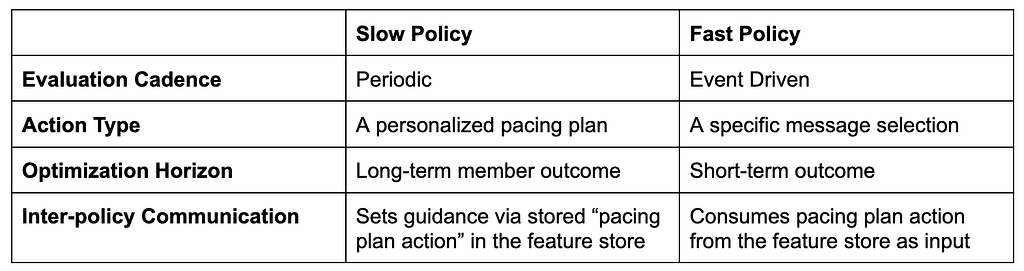
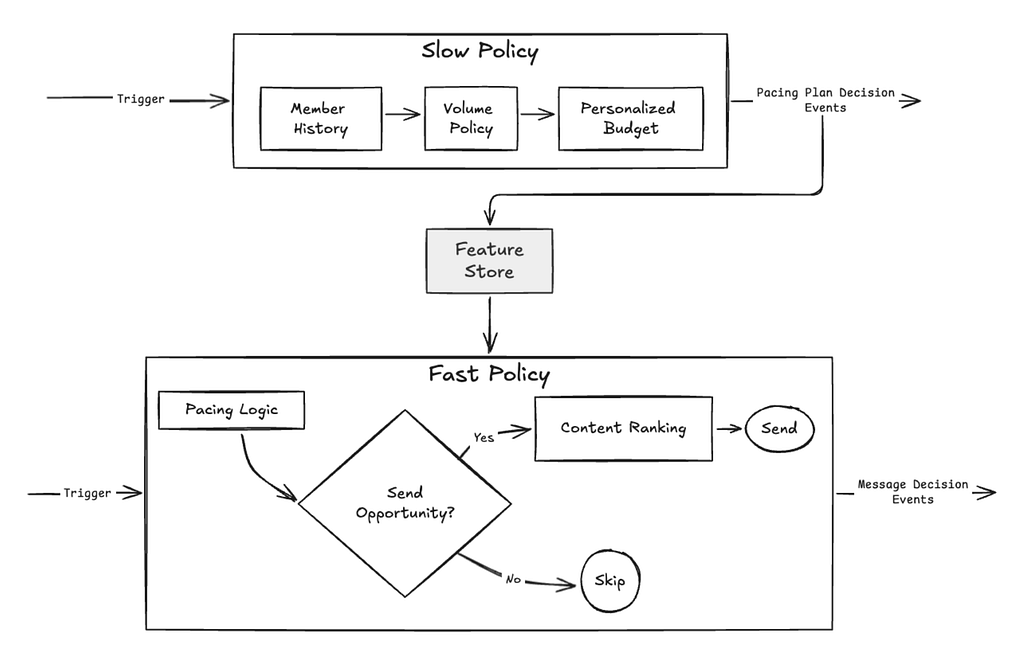
The Slow policy’s primary role is to define a personalized pacing of messages over a defined time horizon. The decisions made by slow policy are consumed by the Fast Policy whose role is to maximize immediate relevance and select the optimal message for the member at any given moment.
To illustrate the Slow Policy in practice: For example, if optimized at a weekly cadence, the policy evaluates a member’s long-term engagement patterns to select a “Pacing Plan Action.” To keep the action space manageable yet expressive, we discretize the decision space into a set of actions that independently specify push and email frequencies. This provides approximately O(100) distinct combinations of cross-channel pacing strategies.
The Utility Function
The Slow policy selects actions by maximizing a personalized utility function. This function explicitly trades off positive engagement signals against the long-term “cost” of messaging.
To capture a holistic view of member health, this utility is composed of:
Positive Signals: Capturing the likelihood that a member will find value in and engage with the platform.
Negative Signals: Capturing the likelihood of member fatigue or a propensity to opt out of a messaging channel.
Ideally, negative signals alone would naturally penalize over-messaging. In practice, however, explicit negative feedback is extremely sparse. Without an additional constraint, the predicted ‘cost’ of an incremental message appears negligible, causing the model to gravitate toward maximum frequency.
To address this, we introduce a universal message cost that is added to the personalized negative‑feedback prediction for every send. This additional cost term keeps the reward function concave and well‑behaved, preventing degenerate “always send” policies. The message cost parameter is empirically tuned using a combination of online experiments and offline evaluation metrics.
Pacing Strategy
The two-stage design naturally allows for optimizing both the average frequency as well as pacing of messages over time. The simplest pacing strategy is uniform random: we translate the frequency target into a per-opportunity send probability and, at each eligible opportunity, effectively flip a weighted coin to decide whether to send. This produces an organically randomized pattern whose expected send rate matches the target.
While uniform pacing provides a clean and robust baseline, the framework readily extends to richer, non-uniform pacing profiles (for example, day-of-week patterns, conditioning on user activity, or launch-aligned bursts) whenever product or user-experience considerations call for more structured temporal distributions.
Policy-to-Policy Communication
The true power of this hierarchy lies in decoupling. By splitting into “Slow” and “Fast” policies, we allow each to focus on what it does best.
To bridge these two worlds asynchronously, decisions are events and state is managed through a low-latency feature store:
The Planner (Slow): The Slow policy calculates a member’s ideal pacing plan. It writes this strategic intent to a feature store
The Executor (Fast): Every day, when a notification opportunity arises, the Fast Policy simply pulls that stored “plan” as a feature. It then executes the tactical send decision within those strategic guardrails.
This architecture provides two critical advantages:
“Stickiness”: It ensures a member receives a consistent experience. The Slow policy will be executed once at a defined cadence; the plan is stored and honored.
Independent Evolution: We can retrain, optimize, or A/B test our weekly pacing strategies (the “Slow” layer) without ever touching the real-time ranking logic (the “Fast” layer).
Figure 1: Schematic of the two-layer message personalization system composed of a slow planning policy (top) and a fast execution policy (bottom). A feature store serves as the communication bridge between the two policies.
Key Results & Takeaways
The transition to a hierarchical architecture resulted in one of our largest production metric lifts to date. We observed several key breakthroughs:
Empowering the “Casual Viewer”: Gains were most significant among members who watch less frequently — a critical cohort where timely, high-relevance awareness of new content is vital.
The Power of Decoupling: Separating frequency planning from message selection was as transformative as the modeling itself. This new architecture unlocks incredible flexibility, allowing us to iterate on content ranking models and pacing strategies as two independent, clean variables.
Respecting the Horizon: The impact of messaging is rarely an isolated event; its effects build up cumulatively based on ongoing interactions between our system and the member. By isolating pacing into a dedicated strategic layer, we now have the mechanism to explicitly manage long-term fatigue and opt-out risk.
Acknowledgments
We could not have delivered this project without the help of our outstanding colleagues, and we sincerely thank them for their contributions.
Everyone’s writing code with AI agents today. But the moment an agent needs to deploy something — and needs to sign up and create an account — it slams face-first into a wall built for humans: a browser-based OAuth flow, a dashboard to click through, an API token to copy-paste, a multi-factor authentication prompt to satisfy. For an interactive copilot sitting next to a developer, that’s annoying. For a background agent, it’s a hard stop.
Today we’re rolling out Temporary Cloudflare Accounts for Agents.
Agents can now deploy websites, APIs, and agents right away, without first needing to sign up for an account.
Any agent can now run wrangler deploy –temporaryand deploy a Worker to Cloudflare. This temporary deployment stays live for 60 minutes, during which time you can claim the temporary account, making it permanently your own. If you don’t, it expires on its own.
Our goal? Let your agent code and ship.
Why frictionless deployments matter for AI agents
Frictionless temporary accounts matter more than it might first seem:
Background AI sessions have no human in the loop, and are becoming the norm. Any auth step that needs a browser, a copy-paste, or “click here in 60 seconds” means an agent gets stuck and may choose to deploy elsewhere.
Trial-and-error is the agent’s superpower. Agents need a tight write → deploy → verify loop. They need cheap, throwaway deployment targets, so they can curl their own output and decide whether they got it right.
Agent platforms are building their own ways for deploying code to “just work” without extra steps or credentials. People are starting to expect that this process just works, without the need to sign up for other services that they’ve not used before or heard of.
How it works
Temporary accounts are built around Wrangler, our Developer Platform command-line interface (CLI) tool that lets developers bootstrap new projects, manage their configurations and resources, and deploy and update them.
Wrangler usage is widely documented online and agents know how to use it very well. But if you hadn’t yet signed in and granted Wrangler permission to your Cloudflare account, when the agent tried to deploy, it would get stuck at the sign-up and authentication step. And you might rightly ask: How do agents and LLMs know that this new –temporary flag in Wrangler exists, so that they actually use it without a human explicitly telling them to do so?
To solve this, we updated Wrangler to prompt the agent with a message that tells it about the –temporary flag:
When the agent discovers this, and then runs wrangler deploy again with the –temporary flag, Cloudflare provisions a temporary account for the agent to use, gives Wrangler an API token to work with, and provides a claim URL that the agent can give back to the human.
Let’s go over every step of the flow
Deploying and iterating on a new project
Make sure you’re using the latest Wrangler release, fire up your favorite coding agent, and write a prompt to deploy a “hello world” app in build mode:
Make a very simple hello world Cloudflare Worker in TypeScript and deploy it using wrangler, don't ask me questions, do the best you can
The agent will run wrangler, pick up the –temporary flag from the output messages, build your script, and deploy it instantly, no human in the loop required:
As you can see, the agent wrote the script, deployed it using the –temporary flag, curled the preview link it got from the output, and verified that the result matches the code.
This is great, but agentic coding is often not about one single deployment. A session can go through a cycle of multiple code changes. This is not a problem: the agent can iterate on the Worker script and redeploy the changes as many times as it wants (within the 60-minute claim window). Type this prompt:
Now change hello world to "hello cloudflare" and redeploy
Look at the agent changing the source code, reusing the previously created temporary account, redeploying a new version and rechecking the result:
Claiming the account
At any point, you can claim the temporary account and make it yours permanently. When you click the claim link you will be taken to a page where you can either sign up for or sign in to Cloudflare, and then claim the temporary account that your Worker was deployed to. This includes claiming not just Workers, but resources like databases and other bindings, too.
If you do not claim these temporary accounts within 60 minutes, they will be automatically deleted.
The road to frictionless agentic deployments
This is just one way we’re eliminating the signup barrier for agents. We recently announced a partnership with Stripe and a new protocol we co-designed that lets agents provision Cloudflare on behalf of their users — creating an account, starting a subscription, registering a domain, and getting an API token to deploy code, with no copy-pasting tokens or entering credit card details. Last month, we collaborated with WorkOS on the launch of auth.md, which anyone can adopt, to let agents provision new accounts using well-established, existing OAuth standards.
There’s a ton going on in this space, and we’re excited to keep making it easier for agents to use Cloudflare, and for developers to make their own apps agent-ready. Temporary accounts are one more step toward frictionless agentic deployments — stay tuned for more.
Temporary accounts have some limitations, and their capabilities may change over time; check the developer documentation for more information and then go build something. Point your agent at Cloudflare, see how far it gets, and tell us what we can improve or what delights you — share what you’ve built on X or hop into the Cloudflare Community.
On June 9th, Anthropic released its Fable generative AI model. Three days later, the US government classified it as a dangerous munition, and used its export-control authority to prohibit any foreign nationals from accessing it. Unable to differentiate between Americans and foreigners, the company shut off access for everyone.
The government’s actions won’t help. The problem isn’t any one particular model; it’s the general trend of increasing AI capabilities. And any real solution requires the sort of collective action that just isn’t possible right now.
Fable is the constrained version of Mythos, the AI model Anthropic announced in April. Anthropic only released it to a few selected organizations, because the company claimed it was so good at finding and exploiting vulnerabilities in computer code that releasing it more generally would be dangerous.
It was an obviously self-serving announcement, and because few were able to verify Anthropic’s claims they were met with someskepticism. Those with access used Mythos to find and patchmanyvulnerabilities in their own software. But one UK group found the latest, already public, OpenAI model to be just as powerful.
Fable is just another incremental improvement in the years-long climb of AI capabilities. But just as important as the AI model is the “harness.” This is typically not AI. It’s ordinary computer code that interfaces with the user. It stitches together AI models, decides how and for what purposes they can be used, and gives them useful tools such as web search and the ability to run their own computer code.
When Mythos first entered limited release, there was widespread debate whether its power came from the model or the harness. With Mythos demonstrating that it was possible, the open-source community scrambled to buildharnesses that could steer other AI models towards similar capabilities. Harness improvements don’t need massive data or data centers.
They largely succeeded. For example, a Prague company was able to replicate Anthropic’s few verifiable cybersecurity capabilities with a much smaller and cheaper model—and a more sophisticated harness. Last week, a group showed that multiple cheaper models harnessed in concert matches Fable’s performance.
The broader community had only a few days with Fable, but that time we learned some aboutitscapabilities. Its difference is less the new model’s raw analytical and problem solving capabilities, and more that the model doesn’t need that sophisticated harness.
Fable requires much less expertise and detailed prompting from the human user. You can give it a difficult goal and it will figure out novel and unexpected ways to satisfy it, finding loopholes in whatever constraints you or the system have imposed on it.
“Relentlessly proactive” is how AI researcher Simon Willison described it. Another descriptor might be “creative.” Experienced AI developers have had that combination of creativity and proactivity sincelastyear, but Fable puts it within easy reach of everyone.
In the hands of someone with a legitimate problem that needs solving, that can be an incredibly useful capability. But in the hands of someone who wants to do harm, it can be equally dangerous. AIs don’t have a moral compass in the same way that people do. They are agents of the wants and desires of the people who prompt them.
That points to the real problem with relentlessly proactive AI. In language, wants and desires are always underspecified. If I ask you to get me some coffee, you would probably pour me a cup from the coffeepot, or buy one from a nearby coffee shop.
You couldn’t buy me a pound of raw beans, or a coffee plantation. You wouldn’t order a cup of coffee for delivery next month. You wouldn’t find a nearby person, rip a cup of coffee out of their hands, and bring it to me. I wouldn’t have to specify any of the million limitations to my request; you would just know.
Human stories are filled with warnings about underspecified desires. King Midas wished that everything he touch turn to gold, forgetting to add “but not my food, drink, and daughter.” And genies are notorious for granting your wish in a way you wish they hadn’t.
The deeper point is that it’s impossible to list all limitations and restrictions, and like a malicious genie, a creative AI will find the ones you forgot. Block a database you don’t want it to have access to, and it might figure out how to bypass your control. Ask it to book a flight, and it might hack the airline because the website says the flight is sold out. Ask it to save money on your cellphone plan, and it might cancel it altogether—or get someone else to pay for it. As far as we know now AI has not done any of this yet, but you get the idea.
Malicious intent is not required. To an AI model, constraints are just things to get around and not general truisms about the world. They are creative problem solvers and natural rule breakers. They “hack” in the sense that they find and exploit loopholes.
Human systems rely on so many norms that we scarcely recognize the existence of until they are broken. AIs naturally think outside the box, because they don’t have any real conception of what the box is or why it’s there in the first place.
There is no foolproof way to prevent people from using AI models to complete harmful tasks. There is no way to prevent the models from incidentally causing harm while completing benign tasks. AI models are no longer isolated from the real world. They browse the internet and answer emails.
They trade stocks and make purchases. They control physical systems. They are, in effect, robots that affect life and property. We have no technical mechanisms to verify the integrity of an AI system. This level of capability and creativity in the hands of us untrustworthy humans will have both great and terrible results.
The problem is not unique to Anthropic. Mythos/Fable might currently be the most capable rules hacker, but more sophisticated harnesses give other models similar capabilities. And we should assume that the other frontier models are no more than a few months behind, and that open-source models are less than a year behind. At best, any ban only serves to delay the problem for a short while.
That delay might be useful if we—as a society, as a planet—would use that time to come together and figure out what to do. This isn’t a US/China arms race problem; this a species-level problem that requires coordinated action at that scale. Unfortunately, we have no mechanism to do that. I first wrote about this problem five years ago, but it was all too futuristic.
Today, when its right in front of us, there is no world government that can impose constraints on the for-profit corporations currently controlling AI models and research. The US has no appetite to effectively and even-handedly regulate those corporations, even as they do catastrophic damage to the environment, democracy, and—in this case—society in general.
This all makes an AI publicoption all the more necessary, and urgent. Today’s AIs can be fast, smart and secure, but only two of the three are possible for any given system. These safety tradeoffs are tightly held secrets of companies racing to beat one another, and they tell us we have to trust them. Instead, the choices and their consequences need to be brought out into the sunlight.
We should be funding open-source harnesses that balance capability and safety—that achieve useful goals without so much power—and open-source AI models whose provenance and biases are public and well understood. We have opened the AI Pandora’s box. Now we have to make the best of it.
A few weeks ago, we published our initial findings from Project Glasswing, looking at what happens when you point frontier security models at an enterprise codebase. We also explored how our defensive structures adapt to protect our infrastructure and customers from threats posed by frontier AI. Since then, the AI ecosystem has continued to shift rapidly — developers who’ve built tightly around a single model have already experienced what happens when that model is no longer available or gets superseded by a more capable one. These market shifts only reinforce our core thesis: no matter which underlying model is leading the pack on any given day, the future of agentic workflows will not be found in standalone models, prompts, or single-agent sessions.
Moving from a localized security “skill” to a continuous, fleet-wide scanning pipeline requires an architecture where models are treated as interchangeable components. Relying on a single model inherently limits defensive coverage, as the same system will tend to look at code paths through the exact same lens. To counter this, models should be frequently interchanged and cross-tested. By varying the models across the pipeline — such as using one model for initial discovery and an entirely different one for validation — we can ensure that vulnerabilities are cross-checked by distinct sets of logic. Furthermore, a true enterprise-scale harness must look beyond isolated repositories to trace vulnerabilities across cross-repo dependencies, ultimately filtering thousands of raw candidates down to a trusted, triaged queue of actionable fixes.
This post serves as a practical look at how to build that model-agnostic layer, focusing on how we manage state controls, eliminate false positives, and coordinate end-to-end triage at scale.
Two objections, up front
The first post made the case for why generic coding agents can’t do this job. The main issue is that agents only hold one hypothesis at a time, fill their context window after covering a sliver of a real repo, and then lose information during context compaction. For more details, read that post.
Before we move forward, we would like to answer two likely questions.
“Why not use subagents instead of a harness?” Subagents are useful, and they are a good starting point. But security analysis needs hundreds of separate investigations that survive across runs, don’t share a context window, and can be re-scoped and cross-referenced later. It needs persistence, deduplication, resumability, and eventually fleet-wide dependency tracing. That’s an orchestration problem, and a prompt can’t get you there.
“Is this blog post just an ad for frontier models?” No. Our approach centers on the harness, not the model. When it comes to vulnerability discovery, we run it with whatever frontier model is currently best at what we need. When we point different models at the same target, they each turn up a different share of the bugs. The harness is the bit that lasts. If you build your own system, design it to be model-agnostic from day one. This will allow you the freedom to use any model of choice without constraints.
It all starts with a skill
We started with a ~450-line security-audit skill that we ran on a single repository, and adjusted the prompts until we surfaced real bugs. Later, we added the orchestration that became the plumbing of the entire system. The real value lives in the prompts themselves, and our prompts continue to carry the initial skill’s attacker scenarios, bug classes, and anti-pattern detections nearly unchanged.
The skill was written to run a 7-phase audit in one session:
Three parallel research agents do recon and write an architecture.md.
One Hunter agent runs per class attack, trying to break the code rather than review it.
Adversarial validators try to disprove each finding.
The survivors are written up as a human-readable vulnerability report.
They’re also emitted as findings.json against a schema, and a mechanical check validates that file.
Finally, a fresh agent independently re-verifies every finding against the source.
The surviving, re-verified findings are submitted to the ingest API.
That first skill maps almost directly onto the later harness:
Skill phase
Harness stage
Recon agents write architecture.md
Recon
Hunters run per attack class
Hunt
Validators disprove findings
Validate
Surviving findings become a report
Report
findings.json is checked mechanically for schema adherence, not correctness
Mechanical validation of line numbers and functions in findings
Fresh agent re-verifies findings
Independent validation
The skill worked, but it quickly revealed its limits. Looking at the coverage metrics, a single run finds only about half the bugs you’d catch across multiple runs. In our experience the ones it did find skewed toward the simpler and less subtle. Once your process is basically “run it ten times and diff by hand,” you probably need to start looking at a real harness.
While running and fine-tuning the skill, we ran into three walls:
Context exhaustion: An hour in, the context window fills up and the model will cannibalize its own memory, instantly forgetting the bugs it spent all morning tracking down. We broke this bottleneck by externalizing the state entirely, treating the LLM as a stateless compute engine.
Persistence: A crash mid-run means starting over. Losing hours of work to one AI rate-limit error or connection flakiness is an incredibly expensive way to realize you need a better architecture.
Cross-repo reasoning: A single repo session is completely blind to the relationships between applications that consume it, and the number of bugs that surface when you inspect the interface between components is probably more than one might expect.
ADVICE: A real but minimal harness consists of just Recon, Hunt, and Validate stages kept in a database, alongside a separate Validator that can’t file its own findings. You should skip cross-repo tracing entirely until you have more than one repository that matters. Skip a dedicated Deduplication agent until you are actively drowning in noise. Start with a skill in your development environment, get your prompts working well, and only build the next architectural stage when not having it is the specific thing slowing you down.
Codifying the skill into a pipeline
Most AI security write-ups in this space are about a single repo or a curated benchmark; running a whole fleet this way, with cross-repo tracing, isn’t something we’ve seen written up elsewhere. Our codebase spans a massive mix of languages — Rust, Go, C, Lua, TypeScript and Python, alongside various configuration management systems, static configs, and all sorts of additional context. So we had to come up with something new that worked for us. Going from that first slash-command run to a fleet scanner that could cover 128 distinct repos, automatically finding and interrogating relevant dependencies, took about six weeks. Codification was mostly mechanical: we lifted each phase of the skill into its own agent, put a database behind it and an orchestrator in front. The mapping was almost one-to-one.
The entire fleet runs on one unified harness with no per-language tuning and traces the dependencies between repos. While offloading syntax to a model makes the system language-agnostic, the differentiator is its ability to trace dependencies between repos. The harness itself doesn’t care if it’s looking at C pointers or a TypeScript file; it focuses on the higher-level logic of security orchestration. This allows us to scale across hundreds of different codebases, without having to write custom language parsing.
A two-stage vulnerability research workflow
Our entire vulnerability research workflow is built on a two-stage operational framework: the Vulnerability Discovery Harness (VDH) and the Vulnerability Validation System (VVS).
The VDH functions as our discovery engine, proactively scanning codebases to surface potential security issues. Once bugs enter the VVS, which allows multiple harnesses to feed into it, they go through stages of Deduplication, Judgment, and finally Fixing, as we’ll talk about later.
We use one model for VDH, but we use a completely different model for VVS, so the models are effectively double-checking each other. There is an obvious security benefit to this: by forcing Model B (VVS) to judge the output of Model A (VDH), you ensure that the finding is evaluated by an entirely different set of logical weights and training data — one that acts as an unbiased, adversarial third party whose sole job is to ruthlessly stress-test Model A’s assumptions. And operationally, we benefit from treating model providers like interchangeable commodities. Model providers can change temperature, caching, and inference effort budgets over time, even within one model version. Instead of building a system that depends on a model behaving predictably over time, our harness is built to absorb downstream volatility without breaking.
Stage 1: Vulnerability Discovery Harness (VDH)
The first post covered what each agent/stage is for, so we’ll talk about the parts it didn’t: the glue between stages, and the handful of details that decide whether any of it works.
Agent/stage
Primary Role
Sub-agents / Tooling
Recon
Maps out the target architecture and maps potential threat vectors
It spawns siblings (these handle between 9% and 20% of fleet-wide tasks depending on the model). It reaches out to and writes to the Wishlist tool.
Validate
Mechanically checks the finding, then adversarially disproves it
Runs in two passes: plain code handles the initial schema/path checks, then a single isolated agent tries to disprove the finding before it can be filed.
Gapfill
Generates new hunt tasks for empty coverage cells
Enqueues fresh hunt tasks for any under-tested (area × attack-class) cells that still look thin
Dedup
Identifies and consolidates overlapping findings
Combines deterministic code and agents to cluster findings by root cause, folding them together in real time
Walks the graph to add hunt tasks inside every identified consumer repo to make sure cross-repo bugs are caught
Feedback
Learns from pre-existing reports and optimizes future runs
Takes validation failures, shallow runs, and repeated misses, and instantly rewrites queued prompts to make future tasks sharper.
Report
Renders human-readable report
Just a script, no model required
Table 1: Vulnerability Discovery Harness (VDH)
Stages four through eight run as a continuous producer-consumer loop. As the initial hunt progresses, the Gapfill, Feedback and Trace agents generate new tasks; Dedup folds overlapping findings back together and the rest of the loop keeps consuming the queue. This ensures a vulnerability discovered late in the cycle is still validated, reported and checked against other code to make sure it doesn’t contain the same bug, all within the same run.
Splitting the pipeline this way guarantees strict context controls. If you fill the context window, the model starts hallucinating. We keep each agent’s job hyper-focused, keeping context usage below 25% of the total window. A naive “read all files” approach will blow past this limit every single time.
One thing that caught us out was that persistence needs to be factored in before parallelism. You do not want to throw away a five-hour run because of an unforeseen error. Every stage writes to one SQLite database keyed by (run_id, repo, stage). Any stage can resume, retry, or get pulled into a later run without redoing work. Findings are streamed and saved as they happen, so a crash costs you the task in flight and nothing else.
ADVICE: Sometimes a transient API error comes back as text in the (200 OK) response stream instead of throwing a code exception. To the orchestrator, this looks exactly like a task that finished cleanly. You must explicitly classify the response text, not just trust the exception type, or you end up logging empty runs as successes.
Dynamic threat modeling
During the Recon stage, the agent writes the threat model instead of being handed one. Beyond about ten built-in attack classes (many forms of injection, memory corruption, protocol parsing, timing side channels, and others), the Recon agent can invent repo-specific classes on the spot, each with its own methodology. It writes a custom taxonomy tailored specifically to that codebase, which is used to more tightly scope the Hunter agents.
Reading source code isn’t enough to understand how it behaves under stress, especially for subtle undefined-behavior bugs in C and other lower-level languages. The Hunter agents move past code reading and transition into active execution. They compile fragments, build small versions, and attack them. The biggest jump in quality came from giving Hunters a sandbox (built on unshare) to crash binaries.
ADVICE: If the harness itself runs inside Docker, that sandbox needs seccomp=unconfined and apparmor=unconfined or it will silently fail to start. It’s a one-line fix that saves you a day of head-scratching if you aren’t an expert in nested containerization, like us.
Micro-forks and the wishlist
Beyond the core pipeline stages, we added two specialized mechanisms that grant the Hunters significant autonomy to adapt their focus and request external resources without derailing an ongoing analysis:
Sibling Forking: This helps ensure that if a Hunter agent trips over an interesting code path that is outside the current scope, it doesn’t wander off track. It uses a tool call to fork a sibling agent with a precise structural seed. Fleet-wide, this accounts for roughly 9% of tasks, though the rate is highly model-dependent — from near-zero to about a fifth, depending on which model is hunting.
The Wishlist: When an agent needs a tool it doesn’t have, often a Validator confirming a Proof of Concept (PoC) or a Hunter wanting to build something (like a specific build environment, a VM, or some prod config files), it writes to a central wishlist. It provides enough context for the system to automatically re-run that exact task once a human provides the dependency. Some of these can be partly self-healing: if the container needs to be rebuilt with some changes, this can autonomously happen after the run by having a generic coding harness monitor the logs.
The wishlist has been written to 25,472 times across 128 repos since the wishlist was added, and it’s the main way the agents talk back to us. One that landed while we were writing this: “I need a FreeBSD VM to confirm this PoC end-to-end.“
Fleet-wide cross-repo tracing
After the initial cleanup, a Tracer agent checks how different software components are connected. It looks for a specific path: can a potential attacker send harmful input from the outside to a vulnerable part of the system? If the answer is yes, the Tracer agent automatically spawns fresh hunt tasks inside the consumer repository. To make this work, you need a unified, cross-repo symbol index and an accurate dependency graph. This allows you to uncover deep, systemic flaws that a standard single-repo scan would miss.
Running our harness across an entire fleet of repos revealed two lessons that only surfaced when this was done at scale.
First, deduplication is its own problem, big enough to need its own agents. When you are scanning a handful of repositories, you can manually eyeball overlapping bugs. Simple string matching or file-path checks won’t save you here. Determining whether two complex logic flaws are actually the exact same root bug sounds trivial, but it isn’t. It requires so much cognitive reasoning that we had to deploy dedicated Dedup agents just to clean up the noise, along with their own heuristics and ways of reducing the work.
The second is to not wire in static analysis early. We plumbed Semgrep all the way through, and the Hunters invoked it zero times in a month of runs. They would rather read and run the code. The wishlist, by contrast, was the single most-used tool in the system. It’s worth paying attention to what the agents actually reach for, rather than what you think they’ll want.
Making findings you can trust
The agent will edit the source code so its own exploit works, then triumphantly report the bug it just created. It will write a test that proves something entirely tautological like “exec() executes things, therefore critical vulnerability”. Or it builds an exploit that runs fine but proves nothing, because the threat model behind it is nonsense. If your harness doesn’t actively fight this, all you’ve built is a faster way to produce junk.
A Hunter has to state the threat model before it’s allowed to file anything. It has to define exactly who the attacker is, and what boundary the vulnerability crosses or what assumption it breaks. The output schema ordering enforces it. This requirement eliminates the vacuous findings, the “if a user has database write access, they can write to the database” kind.
Every confirmed finding ships with a PoC written as a test that runs against the original, untouched codebase. This prevents the agent from editing the source files to force an exploit to land. If there is no working PoC, we treat the finding as fake. In practice, that’s a Hunter compiling a thirty-line parsing loop, running it with memory protection enabled, and demonstrating that the incorrect read stride is originating from a stack address rather than the expected message body. You can re-run it yourself. Furthermore, every confirmed finding must also ship a proposed patch. What actually reaches our review queue is a verified bug, a working test, and a functional git diff, not just a vague text description of a problem.
Before an exploit path survives, deterministic code (written in plain code, not another model) mechanically verifies that the cited files and paths actually exist, and confirms that both the patch and the test parse correctly. This Validator cannot log findings of its own; its sole job is to aggressively disprove the Hunter‘s theory. If a Hunter is allowed to grade its own homework, it will confidently validate everything it outputs.
We don’t claim a false-negative rate for our system. There’s no labeled set of every real bug in a codebase, so any claimed recall number is entirely speculative. What we can watch is whether re-runs keep turning up new bugs (they do) and whether coverage is still growing across runs. It’s all a proxy, as you don’t know for sure how many bugs exist in a single codebase, but it’s a good-enough way of measuring effectiveness.
Stage 2: Vulnerability Validation System (VVS)
A finding coming out of the harness is just the start of the triage process, with all discoveries landing in a single, shared VVS that currently holds 13,841 findings across 145 repos in total. Triaging that volume is its own massive engineering problem, and it matters just as much as the hunting. That triage engine runs on a different model from the harness, broken down into three distinct jobs.
Agent/stage
Primary role
Spawns/ sub-agents/tooling
Dedup
Identifies if a vulnerability is already in the system, or raised as internal Jira ticket already
Deterministic: plain code builds inverted indexes over files, functions, trust boundaries, and rare tokens, then hands each finding a short candidate list
Probabilistic:Dedup agent reasons over that short list, Stable cross-run key reopens existing records
Judgment
Production reachability and validation
Single agent — builds context about the bug from MCP servers, to get the shape of what the service looks like in production. Searches the wiki, Jira, git, config, and all available other sources to try and understand whether a bug is truly applicable to our production environment, and then score the vulnerability against this. It also validates the bug against source code to understand if the bug still exists on the latest main branch.
Fixing
Generates patches, runs regression tests
Runs the regression test before and after (filtered to the affected test; full suite only when per-test filtering isn’t available). It requires a clean fail→pass flip on the target test to clear the gate. If the post-patch test fails, or if a global run detects downstream regressions, the commit is automatically blocked and flagged for human intervention.
Table 2: Vulnerability Validation System (VVS)
Deduping
Comparing every single finding against every other finding using an LLM scales at O(N^2), which falls apart completely at scale. To keep the model off the critical path, deterministic code builds inverted indexes over the structured data (touched files/functions, trust boundary, rare tokens) to generate a short list of real candidates. Only then does an agent look at that short list to see if a single fix would close several of them. Stable cross-run keys ensure re-found bugs reopen existing records rather than spawning new ones.
Contextual judgment
Judgment is a second, independent pass over what survived. The agent rechecks the latest information, pulling from deployment, environment, and config context to determine if the code path is reachable in prod, and identify the repo owner. This process filters “exploitable now” from “real but latent” and from “real but filed against the wrong component.” It’s moving a pile of chaotic findings into a risk-driven orchestration workflow.
Automated fixing
The Fixer takes the proposed patch and unit tests, rewrites them to match the repo’s style, applies the diff, and runs targeted tests. A clean fail→pass flip is the ideal and the only auto-cleanup case; a failing post-patch test blocks the commit. The Fixer never merges code on its own; a human must review the branch. This gate is the non-negotiable, human-in-the-loop safeguard that enables a clean, unbreakable cryptographic trail for change management compliance. Left to patch freely, a model will happily fix a security bug while quietly breaking an unrelated feature or adding dozens of new bugs.
Across all three triage jobs, each agent is confined to one narrow task wrapped in deterministic bookkeeping code, and nothing writes to production without a human signing off on a dry run. While this pipeline moves the engineering bottleneck from finding bugs to reviewing and landing fixes, the Fixer remains the youngest and slowest part of the system.
What it costs
Running hundreds of agents over a fleet of repos is not cheap, but at least the shape of the spend is predictable. Almost all of the compute budget goes directly into the hunt stage. This makes Gapfill our cost-to-coverage lever, as each additional pass costs roughly half as much as the initial hunt.
Because the cost per repository varies wildly, we budget per repo rather than per run. We enforce a strict task cap per repository and spin up a worker pool of anywhere from 50 to 200 workers. That way you can spend money on the repos that are actually finding things, and not waste it on the ones that aren’t.
It’s also why, for us, the big scans are a periodic backlog sweep and not a per-PR check. A full scan of a complex repo can take hours; the worst run took just over 14 hours. Cheaper, smaller harnesses are the right tool for that job.
How we tell it’s working
We measure our system’s effectiveness by tracking how efficiently our automated pipeline filters deliberate engineering noise into high-quality, actionable findings. Because we intentionally tune our Hunters to over-report subtle primitives that could be chained into larger attacks, our true indicator of success is how sharply we can refine that initial mountain of raw data, before it ever reaches a human.
To gauge this, we track exactly how many raw findings survive each validation stage over time. Thanks to better context injection from our Recon phase, our initial validation rejection rate dropped from 40% down to 11%, while the share of high-integrity findings climbed from 35% to 58% (representing ~12,057 lifetime findings).
Here’s the lifetime breakdown from raw candidates to actionable findings, at the point in time this blog post was written.
Vulnerability Discovery Harness (VDH)
Raw candidates: Everything the discovery harness emitted before independent validation.
Needs repro: Findings that appeared plausible but required manual reproduction before being trusted.
Rejected at validation: The validator disproved the threat model, exploit path, affected code, or evidence.
Duplicates: Candidates collapsed onto another finding from the same harness.
Survived validation: Findings that passed the independent validation gate and moved into the VVS.
Bugs that went elsewhere: Findings deliberately routed outside this flow.
Vulnerability Validation System (VVS)
Another vulnerability harness: Other automated sources feeding the same validation system.
Total bugs in system: The combined pool after ingest.
Duplicates: Findings the dedup pass identified as already covered by another canonical finding or ticket.
Wrong repo / other / not a risk: The noise bucket: misattributed findings, defense-in-depth, or latent risks.
Bugs sent to teams: Finalized, clean findings ready for remediation.
Judged Internet-exploitable: High-urgency findings a realistic attacker could trigger in production.
Not judged Internet-exploitable: Lower-urgency, actionable bugs (production issues, dependency risks, or config errors).
Final severity split: The categorization used to assign priority for the engineering teams.
The core metric of the harness isn’t a speculative recall score — it’s keeping the number of unconfirmed findings in front of real humans as close to zero as possible. The architecture needs to be a relentless filtering funnel.
Out of 20,799 raw candidates generated by VDH, only about 12,057 survived validation.
When these were pushed into the VVS, joining findings from another harness, the central pool was brought to 13,841.
The Dedup agent folded away 5,442 findings as duplicates.
1,154 were routed to the queue as ‘wrong-repo’ or ‘low-risk’ and were recycled back into the system where appropriate.
Ultimately this left 7,245 actionable findings for engineering teams to act on.
Traditional compliance rules dictate arbitrary remediation windows based entirely on a static CVSS score (e.g., “Fix all Highs in 30 days”). Our contextual judgment layer turns this compliance checkbox into actual risk management.
The architecture is capable of tracking findings back to their origin, meaning that fixing a single root cause resolves an entire cluster of findings rather than just patching individual issues. VDH system performance is also measured by dividing repos into (area x attack-class) cells and running the Gapfill agent iteratively until it stops producing findings. Whenever we update an underlying prompt, we test it against a held-out repository to see if that total coverage cell number actually moves.
The harness wires automated health signals to catch system failures early in the pipeline. If a hunt finished suspiciously fast and fails to spawn sub-hunts or gap tasks, it usually indicates a crashed dependency rather than a clean codebase. To remedy this, the system flags any Hunter agent that finishes with zero findings as “shallow” and immediately requeues it for a new run.
Finally, our system’s robustness is reinforced by the independent triage pass described earlier. By re-judging all submissions with a different model and separate logical weights, we ensure an unbiased, adversarial verification that is decoupled from the specific model used for discovery, providing a trust layer that persists regardless of which model is in use.
None of this is finished. We change our system constantly, and it is nowhere near a perfect science. But raw candidate findings are cheap now, and the only work worth doing is turning them into sound, verifiable code fixes.
Building your own harness means accepting that AI models are volatile, but your orchestration layer doesn’t have to be. By decoupling your security logic from any single provider, forcing adversarial verification, and automating your triage pipeline, you can turn a mountain of LLM noise into a reliable, fleet-wide defense engine.
Every codebase is a little different, so to show you how this actually works in the real world, we mapped out a realistic benchmark based on a standard repo run. Keep in mind that this represents a single pass on one repo; over time, as the continuous fleet-wide loop deduplicates, filters, and recycles findings, it reduces the volume of lifetime candidates by roughly 65%.
Engineering hours saved via automated patching: Rather than focusing on static baselines, we measure the health of our pipeline by its technical throughput, processing velocity, and its ability to eliminate the manual triage bottleneck:
Initial Validation Cut: For a standard repository (~30k lines of code), this yields 100 initial findings, with a full run taking 3-4 hours, maintaining a hyperfocused context window throughout.
Compression: The Deduplication and Contextual Judgment Layers process these candidates in parallel. Within 3 hours, the system compresses and refines the batch of findings from ~100 raw candidates to 80 distinct, high-fidelity bugs.
Remediation: The automated Fixer processes these 80 distinct bugs at an average rate of 5 minutes per bug. In total, the system can discover, validate, deduplicate, and open functional pull requests in approximately 14 hours.
Shrinking mean-time-to-resolve for critical flaws: Of course, you can’t dump 80 patches into production all at once without breaking things. To keep deployments safe, our system uses a tiered rollout:
Critical Exposure Containment: The system isolates the critical, high, and exploitable bugs (avg. 10 out of 80). We fast-track these for a human review and introduce them into release cycles, getting them fully patched in production in 5 days.
Incremental Hardening: The remaining latent risks, minor config anomalies, and lower-urgency bugs are incrementally rolled into prod over a 15-20 day window to guarantee platform stability.
How we’re handling all of this patching
These findings are the result of an isolated, ring-fenced research experiment designed to stress-test our code. They do not represent active, unpatched vulnerabilities in our live production environment.
Because the harness runs constantly in our test environments, these specific numbers are completely out of date by the time you’re reading this. Every single bug surfaced by the pipeline came attached to a working test case to demonstrate the bug and a draft patch. Our security teams are systematically processing the reports and applying the necessary fixes, meaning the Cloudflare products you use every day are already actively hardened against these vectors.
Along with this blog post, we’re releasing the initial skill we used to develop the harness, it’s been slightly cleaned up before release so it’s easier to understand and integrate, but the skill itself remains substantially the same. Hopefully the harness itself will follow shortly. This could be a starting point for your own vulnerability harness, your own skill, or whatever suits your needs best: github.com/cloudflare/security-audit-skill
If your team is working on the same problems and would like to compare notes, reach out to us at [email protected].
The _index.js payload begins with a large JavaScript block comment containing fake system instructions and policy-triggering content. Because it is inside a comment, it does not affect JavaScript execution. The runtime skips it. The real malware begins after the comment with a try{eval(…)} wrapper around a large character-code array and a ROT-style substitution function.
This header appears designed for AI-mediated analysis, not for Node, Bun, or Python. It attempts to derail scanners or analyst copilots that feed the beginning of a file to a language model without clearly isolating the content as untrusted data. In weak pipelines, this can cause refusal behavior, prompt confusion, context pollution, or premature classification before the scanner reaches the actual malware.
This is not a magical bypass against static detection. YARA rules, entropy checks, AST parsing, string extraction, deobfuscation, and behavioral rules still work. But it is a practical anti-analysis trick against naive LLM-first triage systems.
2026 is the year agent harnesses go to production. The software that controls the model’s access to the outside world — harnesses like Codex, Claude Code, OpenCode, Pi, and Project Think — has matured to the point where teams are deploying agents as real, load-bearing infrastructure, not just prototypes.
But building agents that survive production is hard.
We learned this firsthand building Project Think as our first-party agent harness. In working with our customers to run agents in production, we found a common set of distributed systems problems that every agent faces when running in the cloud. When an agent is interrupted, how can it automatically and gracefully resume from where it left off, without losing context or wasting tokens? How can agents run untrusted code securely? How can agents use the tools they were trained for?
A harness can’t solve these problems on its own. They’re tied to state, storage and compute — which means they’re dependent on the platform the agent runs on. That’s why we’re taking our learnings from hardening Project Think for production and bringing them to the Cloudflare Agents SDK as a base layer. Durable execution, dynamic code execution, a durable filesystem and dynamic workflows, now available to any harness building on Agents SDK.
At the same time, a new layer has emerged above the harness. Frameworks like Flue wrap a harness with the project structures, conventions, integrations and developer experience that make agents productive to build.
To solve these scaling challenges, there’s a new, three-layer stack that is emerging for building production-grade AI. Here is how the pieces fit together, moving from the user-facing developer experience down to the underlying platform primitives:
The framework (Flue) — the project structure, the conventions, the integrations, the CLI and the developer experience for building agents.
The harness(Pi, Project Think) — the agentic loop that calls tools, reads results, manages context and keeps going until the task is done.
The runtime/platform(the Cloudflare Agents SDK) — the compute, state, and storage primitives everything above depends on
The Agents SDK is that bottom layer: it makes primitives like durable execution available to any harness and any framework. Flue, our new open-source framework from the team behind Astro, is the first to build on it. Here’s how.
Flue
Flue shipped 1.0 Beta this week, built on the Pi harness, the same harness that OpenClaw is built on. What makes it different as an agent framework is the approach: you don’t script what your agent does, you describe what it knows. Define the context an agent needs — its model, skills, sandbox, and instructions — and it solves whatever task you give it, autonomously. There’s no orchestration loop to write.
This declarative model is what makes writing agents easy: here’s a triage agent that intercepts a bug report, reproduces it in a sandbox, and diagnoses the issue in under 25 lines.
The Flue developer experience
Flue’s power comes from the fact that agents don’t live in isolation. They are built to exist where your users already work, and integrate with your preferred tooling:
Anywhere agents: Drop your agents into Slack, GitHub, Linear, or Discord with pre-configured Channels that handle event verification and dispatch boilerplate automatically.
Headless, but UI-ready: Agents shouldn’t live in a black box. Flue agents can run completely headlessly for background tasks, but @flue/react provides native frontend hooks that stream an agent’s state, tool execution, and live messages straight into your frontend application, without you having to build custom real-time plumbing from scratch.
Ecosystem-ready: Flue makes it easy to add and upgrade integrations with commands like flue add channel slack, generating a Markdown blueprint that your own coding agent can read, modify, and cleanly integrate straight into your codebase.
Designed for production, not just prototypes
Moving an agent out of a local terminal and into a production ecosystem introduces traditional distributed systems failures. Host crashes, API timeouts from LLM providers, and unexpected restarts threaten to erase the short-term memory of a running agent turn.
Flue solves this via Durable Streams. Each event in the execution history is added to an append-only log. By processing every prompt, tool response and model choice as an unchangeable ledger, an agent’s state is never volatile. If a process dies, another simply picks up the log and continues from the exact step it left off.
Deploy anywhere, including Cloudflare
Flue is a multi-cloud framework. On Node.js, each agent runs as a long-lived process. You can deploy it to any VM or container, run it in GitHub Actions, or embed it on an existing server. But when you target Cloudflare, each agent becomes a Durable Object.
By running each Flue agent inside its own Durable Object, Cloudflare can automatically scale to as many agents as you need, each with their own isolated storage and compute. You don’t have to provision servers, manage sticky sessions, or worry about noisy neighbors. And when Flue agents are deployed to Cloudflare, they get durable execution using Agents SDK’s runFiber(), stash(), and onFiberRecovered() methods. Flue also uses @cloudflare/codemode and @cloudflare/shell for sandboxed code execution against a durable workspace.
What harnesses need out of an agentic platform
Flue’s Cloudflare target works so effectively because it maps cleanly to the core primitives we built into the Agents SDK. You can even dig into the Flue source code to understand how Pi, the underlying harness, is adapted to work on Cloudflare Agents SDK.
Here’s how Flue leverages the Agents SDK under the hood, and what it takes to run any modern agent harness reliably at scale.
Every agent harness needs durable execution
An agent turn is not a single request. The model streams tokens, calls tools, waits for results, maybe asks a human for approval, or delegates work to a subagent. That sequence can take seconds or minutes, and at any point the process can be interrupted or crash. When that happens, all of the agent state that was in memory is gone: the streaming connection, the pending tool calls, where the agent was in its turn. Sure, the conversation history is persisted on disk, but the user sees a spinner that never resolves. That’s a broken user experience.
Fibers solve this problem by providing a native checkpointing mechanism directly inside the Agent’s underlying Durable Object. runFiber() records the progress to the Durable Object’s SQLite storage before the work in the Agent turn starts and checkpoints with stash() as the turn advances. When a fresh agent instance boots after an interruption, onFiberRecovered() delivers the last checkpoint, so your agent knows a turn was interrupted, where it got to, and can decide how to continue.
Flue uses runFiber()on its Cloudflare target for exactly this. With the onFiberRecovered() hook, your harness can decide how to resume the execution of the turn, whether it attempts a full reconstruction model like Project Think that repairs turn state or whether it replays certain parts of the turn.
Executing code is better than overloading agents with tools
Agent harnesses give models access to the outside world through tools. But tool surfaces grow fast, and models get worse at selecting the right tool as the list gets longer and the context window fills up with tool definitions. A better pattern: give the model one tool that executes code. The model writes a TypeScript function that calls the APIs it needs, and the harness runs it. We wrote about this when we introduced Code Mode.
The question is where that code runs. To run LLM-generated code securely, you need a sandbox. But typical sandboxes would be slow, cost-prohibitive and inefficient to run each tool call. That’s why the Agents SDK provides @cloudflare/codemode, which wraps Dynamic Workers, to execute LLM-generated code in its own Worker isolate with only the bindings you provide.
Code Mode creates a fresh Dynamic Worker for each snippet, runs it, and discards it. Isolates start in under 10ms and $0.002 per load, resulting in drastically faster and cheaper cost of execution than booting a container every time your agent needs to execute a short piece of code. Flue uses @cloudflare/codemode on its Cloudflare target to power its code tool. The agent writes JavaScript against the workspace and runs it with Code Mode.
You don’t need a full container for most workspace tasks
Agent harnesses often need a filesystem, whether it’s to read files, write outputs, search through code and understand diffs. Coding agents in particular live in the filesystem. But if the harness is running in a serverless environment, how can it get a durable filesystem that persists across executions?
The usual answer is a container. That works, but it’s expensive for what agents mostly do. The majority of filesystem operations in an agent turn are text. Consider a review agent that reads files, greps through source code, or perhaps writes a patch. You don’t need a full Linux boot for that.
@cloudflare/shell gives your agent a durable virtual filesystem inside its Durable Object, backed by SQLite. It provides typed file operations — read, write, edit, search, grep, diff — that agent harnesses can use as tools.
Instead of calling individual tools, a Flue agent running on the Cloudflare target writes JavaScript against the workspace virtual file state API. By running more operations within the Durable Object, the agent benefits from the isolate model’s more efficient execution process, entirely avoiding container overhead:
async () => {
  const files = await state.glob("src/**/*.ts");
  const results = [];
  for (const file of files) {
    const content = await state.readFile(file);
    const todos = content.match(/\/\/ TODO:.*/g);
    if (todos) results.push({ file, todos });
  }
  return results;
}
This translates into a faster and more cost-efficient sandbox environment for agents that need to run shell and filesystem operations to get their work done. And for agents that need a full OS, to run npm install, git, or compilers, Cloudflare Containers provides that. We’re also building @cloudflare/workspace, to keep the virtual file system of a given Durable Object in sync with a container’s, allowing for seamless transition from lightweight Workers to a Linux environment only when it needs one.
Dynamic Workflows: let agents write their own workflows to repeat tasks consistently
But what happens when an agent needs to do more than read files or execute single code snippets? What happens when it needs to orchestrate a massive, multi-step pipeline that must repeat consistently over time, like a code review that successfully resolves bugs or a research workflow that produces good results? A harness can’t provide durable multi-step execution on its own. It needs the platform to persist each step, retry failures, and resume after interruptions.
This pattern is gaining traction. Claude Code recently shipped dynamic workflows, where Claude writes a JavaScript script at runtime to hand off work to dozens of subagents, and the runtime executes it durably. @cloudflare/dynamic-workflows provides this for any harness running on the Agents SDK. Your agent generates a workflow at runtime, and the Workflows engine persists each step, retries failures, and can sleep for hours or wait for external events like human approval.
From the Agent class, runWorkflow() connects your agent to the Workflows engine. The agent kicks off the workflow and can go to sleep. The workflow calls back into the agent via RPC to report progress, update state, or request approval. When the workflow finishes, the agent wakes up with the result.
Direct access to the Cloudflare ecosystem
Beyond compute and storage, agent harnesses need access to external capabilities: web browsing, email, memory, search, inference. A harness shouldn’t have to integrate each of these separately, manage API keys for each, or worry about credentials leaking through agent-generated code.
The Agent class gives your harness access to the rest of Cloudflare through bindings: AI Gateway for per-agent spend tracking and limits, Browser Run for web automation, Email Service for inbox workflows, Agent Memory for persistent recall, AI Search for retrieval, Containers for workloads that need a full OS, and inference across 14+ model providers. Bindings grant capabilities without exposing credentials: your agent uses them, but the keys never enter agent-generated code.
Bring your agents to the agentic cloud
We know this approach works because it is the exact architectural foundation we used to build Project Think, our first-party agent harness. While Project Think remains our highly optimized, out-of-the-box solution for native Cloudflare agent experiences, the Agents SDK ensures that the broader open-source ecosystem can leverage those exact same battle-tested primitives, including Flue.
If you’re building agents today with Flue, you can deploy in just a few clicks to Cloudflare. And if you’re building your own agent harness or you’re building an agent framework, target the Agents SDK and get the platform integration for free.
On 14 April, the Trump administration quietly acknowledged the widespread use of AI to automate government processes. The office of management and budget (OMB) disclosed a staggering 3,611 active or planned use cases for AI across the federal government. The list has ballooned by 70% from the one published in the final year of the Biden administration, and includes many disturbing-seeming plans to hand over sensitive governmental functions to AI.
Scanning this list, many readers may find many causes for alarm. It represents a transfer of decision processes from human to machine on a massive scale over matters of individual freedom, public health and well-being, nuclear reactor safety and more.
Consider these examples. The Health and Human Services’ (HHS) office of administration for children and families hired the world’s “scariest AI company,” Palantir—notorious for its work on behalf of the military, the CIA and ICE—to scan all grant applications to flag those not ideologically aligned with the administration’s dictates. The Federal Bureau of Prisons is developing an AI system to assess the “potential for misconduct for newly admitted inmates,” routing people into high-security confinement before they have actually done anything wrong in their custody. These read like programs fit for a Philip K Dick or George Orwell novel.
Other use cases insert AI into life-and-death decision making. The Department of Veterans Affairs is developing an AI that will listen in on calls to the veterans crisis line, and then gather information from external databases to assess the mental state and suicide risk of the caller.
The Department of Energy is testing the use of AI to control nuclear reactors, targeting a way to autonomously respond to potential nuclear safety incidents. Here’s one that’s disturbing for its retirement, rather than its deployment: the state department has ended a program to use AI to forecast mass civilian killings, which had been intended to aid conflict prevention.
While it’s easy to raise questions about these and similar uses of AI, the reality is that any of these programs could be implemented responsibly. In some cases, like the HHS system, the AI might be enforcing alignment to a policy prescription that opponents abhor. But that concern is more about the policy itself rather than the idea that agencies should comply with executive orders.
In other cases, there may even be bipartisan agreement on the goal, like taking urgent action to help veterans at risk of self-harm. Lots of work and validation is needed to prove AI safe and effective for these use cases and convince the public it is appropriate, but the idea is plausible.
In other cases, a scary-sounding AI use may not even be new. The use of predictive methods and statistics to assign prisoner security classifications goes back decades, even if such systems are often biased and ineffective.
Using autonomous systems for model predictive control (MPC) of nuclear reactors is a well studied, and a widely applied aspect of nuclear plant management. And the recently disclosed addition of AI was initiated under the Biden administration.
But anyone reviewing the 2025 inventory could be forgiven for leaping to severe conclusions. What matters are the details of how the AI system is used, and here the inventory is severely lacking.
The disclosures carry minimal information, and lack the context necessary to understand their purpose and approach. The descriptions are typically just a sentence, and rarely more than a paragraph.
And while the process theoretically involves some form of public consultation, in reality there is generally none. It would take an eagle-eyed citizen to even come across this disclosure. Unless you read FedScoop regularly, or watch the OMB’s federal chief information officer’s GitHub account, you probably missed it.
Only one of the examples cited above (the DoJ) even proposes to involve the public. Under the administration’s policy, it’s not required for the rest because they are not classified as “high impact” use cases—a label that is applied inconsistently across agencies.
We wrote a book surveying applications of AI to democratic processes worldwide, including executive agencies as well as the courts, legislatures and politics. Our conclusion was that, while there are inappropriate applications of AI in governance that should be resisted, an urgent need to reform the economics of AI, and an imperative for renovating the democratic systems it is being unleashed on, there are also valuable and beneficial use cases for AI in government.
Machine translation is a good example. Customs and Border Protection (CBP) has deployed an AI translation system to help officers when human interpreters are not available. The idea that CBP, an agency under heavy scrutiny for reported abuses of human rights, would direct people to talk to a machine instead of a person may strike many as inhumane.
It’s true that human interpreters have very real advantages when it comes to understanding nuance from physical cues and social context. But an officer with a competent AI translator available immediately is better than one who cannot communicate with the person in front of them.
The Trump administration’s AI use case inventory has 70 such translation use cases, up from 58 in the Biden administration’s 2024 disclosure.
Disclosure of AI use cases could be a means to build public confidence and trust, but only if paired with consistent, meaningful public consultation. Washington DC and California are actively engaging the public to determine where and how it’s appropriate to use AI in government processes, or for government to regulate AI use in society.
Both have held public deliberations on this topic at a wide scale, using AI platforms. These examples demonstrate the potential for capturing broad-based public input to steer AI policy.
The international gold standard was arguably set by the French in 2016, via their Digital Republic Act. The law, itself informed by an online citizen consultation, requires all algorithms used to automate government administrative decisions to be subject to public records requests, to be appealable to a human reviewer, and to have mandatory notification of the use of automation to those affected by the decisions.
Canada offers another example of what more rigorous and participatory disclosure might look like. In 2025, they launched an AI use case registry, not unlike the US inventory. However, Canada also has a federal directive mandating a transparent risk-scoring and impact assessment process for automated systems that make administrative decisions about citizens.
That longstanding directive requires a detailed explanation of risks and benefits as well as consultation with certain stakeholders from the conception of the AI use case. The Canadian system could be improved; it could require a public comment period and an obligation for agencies to respond substantively to feedback before engaging in sensitive uses of AI.
AI offers real potential to improve the efficacy, efficiency and accessibility of government. But, equally, there is legitimate reason for public concern and distrust that can only be addressed through transparency and dialog. The US should adopt, at the federal and state level, algorithmic impact risk assessment procedures and public comment processes to facilitate a safe, trusted, equitable transformation of government agencies to take advantage of modern technology.
This essay was written with Nathan E. Sanders, and originally appeared in The Guardian.
Today, we’re excited to share that key members of the team at Ensemble AI are joining Cloudflare to help accelerate our work in AI infrastructure and make it easier for developers to run powerful AI models efficiently at scale.
Ensemble AI, founded in 2023 in San Francisco, has spent the last few years focused on one of the most important challenges in AI: making large models faster, smaller, and more cost-effective to serve, without sacrificing quality. The team has developed new approaches to model compression and efficient inference that are designed to reduce the memory, compute, and deployment overhead of large language models and multimodal architectures.
As AI becomes a core part of how developers build applications, the economics of inference matter more than ever. Models are getting larger; workloads are becoming more dynamic. And customers increasingly expect AI to be available everywhere: globally distributed, fast, reliable, and affordable. Bringing the Ensemble AI team into Cloudflare strengthens our ability to make that possible.
Incorporating Ensemble’s expertise
The team at Ensemble AI has focused on preserving the structure inside modern AI models while reducing the cost of running them. Instead of treating model efficiency as only a quantization or hardware problem, Ensemble has explored new model building blocks that can make neural networks more compact and efficient at the architectural level.
A core part of this work is NdLinear, a drop-in replacement for standard linear layers in transformer models that operates directly on multidimensional activations rather than flattening structure away. This enables models to preserve meaningful axes, such as heads, channels, spatial dimensions, or other structured representations, while reducing parameter count and compute. Ensemble has also developed NdLinear-LoRA, an efficient adaptation method designed to reduce the trainable parameters required for fine-tuning large models.
These approaches complement other efficiency techniques, including quantization and vector quantization. Together, they point toward a future where developers can run capable AI models with substantially lower memory, compute, and cost requirements.
Making AI inference more efficient
Cloudflare Workers AI gives developers access to serverless GPU-powered inference on Cloudflare’s global network. As developers build more AI-native applications, the ability to serve models efficiently becomes a critical part of the platform.
Inference cost is one of the biggest barriers to scaling AI applications. Every improvement in model size, memory footprint, throughput, and GPU utilization can make AI more accessible to developers and more economical for customers. This is especially important as AI workloads expand beyond simple text generation into agents, multimodal models, personalization, fine-tuning, retrieval, and reinforcement learning.
We are deepening our investment in the core machine learning capabilities needed to make Workers AI faster, more flexible, and more cost-efficient. This builds on top of our existing work on improving model efficiency, including our inference engine Infire, tensor compression techniques like Unweight, and our platform for running extra large language models. The team will focus on improving the economics of serving large language models and other advanced AI architectures, with an emphasis on model efficiency, GPU utilization, and scalable deployment.
Building for the next generation of AI workloads
AI infrastructure is entering a new phase. Developers no longer need only access to models; they need infrastructure that can run models reliably, affordably, and close to users. They need the ability to experiment with different model sizes, fine-tuning approaches, and deployment patterns without being blocked by cost or operational complexity.
Cloudflare is uniquely positioned to help solve this. Our global network, developer platform, and serverless architecture give us the foundation to bring AI closer to where applications already run. The Workers AI Machine Learning Engineering team will help us improve the efficiency layer underneath that experience.
By combining Cloudflare’s global infrastructure with Ensemble’s work in model compression and efficient architectures, we can continue building a platform where developers can deploy AI applications with lower cost, better performance, and less operational overhead.
What’s next
Together, we will continue building the infrastructure needed to make AI more efficient, accessible, and useful for developers everywhere. Our goal is simple: help developers run powerful AI workloads at global scale while improving the economics of inference across the Cloudflare platform. If you want to join us in our mission, check out our careers page.
Let no one accuse Bernie Sanders of ducking the big questions. Writing in the New York Times last week, the senator asked: “Will the future of humanity be determined by a handful of billionaires who have promoted and developed AI, with virtually no democratic input, who stand to become even richer and more powerful than they are today?”
We agree entirely that this is one of the most potent questions facing global democracy today. Our book, Rewiring Democracy, surveys the emerging uses for and impacts of AI in democracy around the world and reaches the same conclusion: that the most urgent risk posed by AI is the concentration of power, wealth and control among tech oligarchs.
And yet we reached a vastly different conclusion than Sanders on what to do about it.
The senator points to a once radical but increasingly popular solution: creating a US sovereign wealth fund by taking 50% stock in AI companies such as Anthropic, OpenAI and xAI. The argument in favor of this is twofold. One: it would establish democratic control over the AI companies, giving the government “the power, through its voting shares and an equal representation on each company’s board, to block decisions that hurt our citizens and to push for policies that help them”. Two: it would return a big chunk of the economic rewards of soaring AI valuations to the public, ensuring “trillions of dollars potentially generated by AI are used to improve the lives of all of us”.
We laud both these goals unreservedly.
We wholeheartedly agree that there must be public influence over the development and use of AI, just as we demand the government intervene to ensure that automakers, drugmakers, airlines and other industries balance profitability with public safety and the public interest. And we credit the senator with recognizing that there are more levers for the government to pull beyond the promulgation of regulation to achieve this.
And we also agree that the obscene, dangerous accumulation of wealth among AI companies needs to be disrupted. As OpenAI and Anthropic race to be minted as the world’s latest trillion-dollar AI companies, we should recognize that—whether or not it constitutes a bubble—these staggering market capitalizations represent a transfer of wealth. The flow of money goes from the smaller businesses and actual people using AI, and being subjected to it, to the owners of these tech companies.
That includes the world’s 86 AI billionaires “seeking to maximize their power and profit” aiming to decide the “fate of humanity behind closed doors in Silicon Valley”, as Sanders said.
And yet, while we do not outright oppose the taking of AI company stock, or of a US sovereign wealth fund, there are better ways to achieve Sanders’ stated goals.
Public ownership of these companies entangles corporate profit and valuation with the public interest. It would incentivize the government to clear regulations, permit the exploitation of workers and users, suppress competition, encourage AI adoption regardless of the responsibleness of the implementation or appropriateness of the use case, and otherwise act on behalf of corporate interests.
After all, if growing, say, Nvidia from its first $5tn in value to its next $5tn also represents a doubling in value of this segment of the sovereign wealth fund, then you can expect the fund managers to support chip sales, foreign and domestic, with the same zeal as the company’s private investors.
This is not an effective way to influence corporations to act in the public interest. In fact, it makes corporate influence on the government more likely.
We should be wary of this possibility because we’ve seen it before. Ownership of substantial stakes in oil companies by the Norwegian sovereign wealth fund, the world’s largest, does not seem to have steered those corporations to pro-environmental policies. Instead, the Norwegian government’s dependence on those companies has inhibited them from taking climate action. Here in the US, public employee pension funds merit the same criticism: the fiduciary duty to generate wealth overwhelms any intention to direct their corporate holdings in the public interest.
A better answer is to separate the two goals. The standard way to share private rewards with the broader society that made them possible is taxation. Senator Elizabeth Warren has proposed an excise tax on datacenters’ energy use. Others have proposed an AI token tax, which has much the same effect.
As to the goal of reshaping AI in the public interest, we have proposed an AI Public Option. The concept is for governments, be it federal or state, to establish publicly developed and operated AI models run by public institutions under democratic control. The idea is not to eliminate corporate AI or to seize it as a public asset, but rather for government to provide a competitive baseline that private AI offerings must meet or exceed to win business—just like the notion of a healthcare public option.
The Swiss have trailblazed this approach. Apertus is a large language model built by Swiss public servants, researchers at Swiss universities, using appropriately licensed training data and pre-existing Swiss public supercomputing infrastructure powered by renewable energy.
While Apertus doesn’t seriously compete with the latest OpenAI and Anthropic models on performance benchmarks, it blows them out of the water in transparency, sustainability and compliance with EU regulations including adherence to copyright. It’s a nascent project, but suggestive of how public institutions can apply competitive pressure for corporate actors to behave responsibly.
Don’t confuse public AI with “sovereign AI“, the notion that every country needs to invest in domestic AI infrastructure. Sovereign AI is often invoked as a marketing scheme for big tech companies looking to sell to governments; it demands public investment without guaranteeing public control.
Sanders is a bold and savvy political operator. So why is he pursuing the sovereign wealth fund strategy when he must be aware of these risks? It may be due to another argument he makes in his op-ed: that the Trump administration and the billionaire owners of AI are aligned to the idea.
It’s expedient to capitalize on rare moments of seeming alignment across diverse political factions, but it also behooves us to ask why the AI billionaires are open to this extraordinary intervention. The answer, of course, is that they believe that for every dollar ceded to government stock expropriation, they will get back more in favorable government policies to protect that newfound investment.
Energy taxation is a straightforward way to make AI companies pay for the social disruption of their technologies. Public AI represents a non-monetary mechanism for governments to shape the development of AI, complementary to direct regulation of private actors, one with a far greater chance of influencing corporate behavior towards the public interest. We urge Sanders and other political leaders to consider them.
This essay was written with Nathan E. Sanders, and originally appeared in The Guardian.
Sparing no expense, Dell’s flagship workstation laptop, the Pro Max 16 Plus, aims to deliver as much performance as is possible in a 16-inch laptop while still being modestly portable
When I first started working with Zabbix in banking and telecommunications over a decade ago, the workflow was always the same: something breaks, an alert fires, you open the dashboard, you diagnose, you fix. Every step required a human sitting in front of a screen reading charts and making decisions.
Then AI came along, and I started asking a simple question. What if I could just talk to my infrastructure and get answers? That question led me down a path from Telegram bots to WhatsApp integrations, and then from chatbots with custom modules to a full mobile application on the Google Play Store.
Along the way, I discovered that the real challenge is not connecting AI to Zabbix – it is defining how they should communicate. That is where protocols like MCP and WebMCP come in, and why they matter for anyone working in infrastructure monitoring today.
Phase 1: Just let me ask a question
The first thing I wanted was simple – to ask about my infrastructure in natural language and get a useful answer. Not parse JSON, not read raw metrics, just ask.
My early integrations used Telegram and WhatsApp as the interface. The AI (initially custom modules, later Gemini) would receive a question like “What alerts do I have right now?”, query the Zabbix API, and respond in plain language. It worked, but it was limited – the AI could only answer what I had explicitly programmed it to answer.
Phase 2: MCP gives AI a standard way to talk to Zabbix
The Model Context Protocol (MCP) developed by Anthropic solves a fundamental problem – how do you give an AI model structured access to external tools and data sources without reinventing the wheel every time?
Before MCP, every AI-to-Zabbix integration was custom. You wrote a script, parsed the API response, and formatted it for the model. If you wanted to switch from one AI provider to another, you started over. MCP standardizes this. You build an MCP server once, and any compatible AI client (Claude Desktop, Gemini CLI, or others) can use it.
The Zabbix community has already embraced this. There are now multiple open source MCP servers for Zabbix available on GitHub. You can request things like:
“Show me all unacknowledged problems with severity High or above”
“Create a maintenance window for host db-01 for 2 hours”
“What changed in the last 24 hours?”
Best of all, you can do it all through natural language and through a standardized protocol.
In my own environment, I set up a WebMCP server that connects a FastAPI backend to the Zabbix API, exposing structured endpoints for hosts, alerts, and problems. The server runs 24/7 alongside my Zabbix instance on a dedicated Proxmox node.
With a simple query to the WebMCP server, I can retrieve the full list of monitored hosts, check active problems, view recent alerts with their severity levels, and get a usage summary – all through clean, structured JSON responses that any AI client can consume.
The WebMCP server exposes structured endpoints for health monitoring, usage tracking, and Zabbix data.A live query to the WebMCP server returning real Zabbix alerts in structured JSON.
Phase 3: WebMCP becomes the interface
Looking ahead, WebMCP is a proposed browser standard (co-created by engineers at Google and Microsoft) that lets websites declare their capabilities as structured tools that AI agents can call directly in the browser.
Think about what this means for Zabbix. Today, the Zabbix frontend is a web application that humans navigate – click on hosts, drill into triggers, check graphs, acknowledge problems. An AI agent trying to use the Zabbix frontend would have to take screenshots, interpret the UI, and guess where to click slow, fragile, and expensive.
With WebMCP, the Zabbix frontend could declare: “Here is a tool called get_active_problems. It needs a severity filter. Call it and I will return structured results.” The AI agent calls the function, gets clean data, and acts on it. No screenshots, no DOM scraping, no guessing.
The key differences from traditional MCP:
WebMCP runs inside the browser tab, not on a separate server. No additional infrastructure to deploy.
It inherits the user’s existing session the same SSO, the same cookies, the same role-based permissions. No separate auth layer.
Tools are contextual on a problems page, the agent sees problem-related tools. On a host configuration page, it sees host tools.
Chrome 146 already ships WebMCP experimentally. Broader stable release in Chrome is expected by the end of 2026.
To explore this concept in practice, I set up a WebMCP server in my environment, connected to my Zabbix instance.
The server exposes Zabbix data through a browser-based interface, allowing agents to query hosts, alerts, and problems directly from the browser tab.
The server itself is monitored by Zabbix, so I can track its resource consumption and ensure it does not impact the rest of the infrastructure closing the loop between the tool and the platform it extends.
A WebMCP demo page displaying live Zabbix alerts fetched through the browser-based backend.A large selection of dashboard widgets enable Zabbix users to create Windows dashboards for different use cases
Why this matters for mobile monitoring
Today, if you want AI-assisted Zabbix monitoring on your phone, you need a dedicated app that connects to the Zabbix API, handles authentication, processes data, and presents it through an AI layer. That is what I built. It works, but it requires significant development effort.
WebMCP opens a different path. Imagine opening the Zabbix frontend in your mobile browser and having an AI assistant that can interact with it natively – no app required, no separate server, just the browser and the protocol. The assistant inherits your Zabbix session, sees only what your user role permits, and can help you triage incidents, assign tasks, and generate reports all through the same web interface you already use.
We are not there yet. WebMCP is still in early preview, and the Zabbix frontend needs to implement the protocol. But the architectural direction is clear. The web is becoming agent-ready, and monitoring tools will benefit enormously from this shift.
The practical roadmap
If you work with Zabbix and want to start integrating AI today, here is how I see the progression:
Right now: Use MCP servers to connect AI assistants to the Zabbix API. The open-source options are mature, support Zabbix 7.x (and experimentally 8.0), and work with multiple AI clients. Start with read-only mode to explore safely.
Near term: Build purpose-specific integrations. Whether it is a mobile app, a chatbot, or a custom dashboard, the Zabbix API combined with models like Gemini or Claude can deliver real value AI-generated weekly reports, intelligent alert triage, natural language infrastructure queries.
Coming soon: Keep an eye on WebMCP. As it matures and browsers ship stable support, it will become the lowest-friction way to add AI capabilities to any web-based monitoring tool. The sites that become agent-ready first will have a compounding advantage.
Closing thoughts
The infrastructure monitoring world is at an inflection point. We have been watching dashboards and reading alerts for decades. The protocols are now emerging – MCP for backend integrations, WebMCP for browser-native interactions that will let our infrastructure genuinely talk back to us.
If you are still running Zabbix 7.0 or previous, this is the year to migrate. Older versions are losing support, and the newer API capabilities in 7.0+ are what make these AI integrations possible. Zabbix offers certification programs through Zabbix Academy, and their partner network can assist with migrations.
A few weeks ago, we wrote about Project Glasswing and what we observed when we pointed cyber frontier models at our own code. Since then, we’ve seen that the part of the post that has resonated most deeply is the argument that the architecture around the vulnerability matters more than the speed of the patch.
In the conversations we’ve had with CISOs and security teams since, the questions have been consistent: what does our architecture actually look like, what should we monitor for, where do we start, and how can Cloudflare help?
Before getting into the details: the architecture below is built almost entirely from Cloudflare’s own products, because Cloudflare security is customer zero for the security products we build. The Cloudflare stack already exists in front of our code, employees, and customer-facing applications. If you’re a Cloudflare customer, every layer below is available to you today. If you’re not, the principles still apply to whatever stack you’ve built.
What a cyber frontier model actually changes
In the previous post, we showed how a cyber frontier model like Mythos changes the attacker’s timeline. It can find vulnerabilities, reason through exploit chains, and generate working proofs faster than earlier models. While models like Mythos do not change the shape of an intrusion — reconnaissance, initial access, lateral movement, persistence, and exfiltration still have to happen — the difference is in the speed and scale. When pointed at the open web, a model can find and hit low-hanging fruit quickly. Against a hardened target, it still has to probe, and adapt, and it often produces more noise than a careful human operator would.
Discovery, exploit chain construction, and proof-of-concept generation used to be the gating constraints on producing a working attack. A frontier model handles all three in a fraction of the time. Work that used to be slow and methodical is now fast and indiscriminate.
While AI is accelerating how fast developer teams at Cloudflare and many other companies can ship code, the security team’s work has not compressed the same way. An attacker only needs one opening to get in, while security teams need to find and close them all. Writing a fix, regressing it, and shipping it without breaking the code around it has constraints that AI doesn’t remove. We learned this the hard way when we let an AI coding assistant write its own patches against our own bugs, as we described at the end of the previous post. Some of those patches fixed the original bug while quietly breaking something else the code depended on.
As these models become more competent and capable, our main focus from a threat standpoint comes down to three things. Each one shapes the architecture we walk through in the rest of this post.
The first is the speed of discovery. Frontier models make it easier to search large bodies of public code, including the open-source libraries that many companies depend on. That does not mean every bug in a library is exploitable, or that library bugs are where most vulnerabilities live. Exploitability still depends on how the code is used, whether attacker-controlled input can reach the vulnerable path, and the protections that sit around it. But widely used open-source libraries and frameworks give attackers a shared surface to study at scale. When a real, reachable vulnerability exists there, a model can help find it, reason about possible exploit paths, and generate proof-of-concept variants faster than maintainers and defenders can review every downstream use. The gap between when an attacker discovers a vulnerability and when defenders learn it exists is what worries us most. If you are not running these models against your own code, it is safe to assume someone else is.
The second is exploitvolume and adaptation. A model can produce thousands of variations of a single exploit and run reconnaissance at the same scale. All that volume gives an attacker an advantage, but it won’t necessarily get them past signature-based detections. Many of those iterations will have the same underlying signature, so a rule that catches the first one will catch the rest. Adaptation is how they will get past signature-based detections. Ask a model to show you a SQL injection, and it will return a textbook example. Tell it there is a WAF in the way, and it will start probing, learning what gets blocked, and rewriting the payload until it can slip past the rule blocking it.
The third is the impact when a vulnerability is inevitably exploited. No architecture catches everything. After the vulnerability is exploited, the question we ask ourselves is: where can the attacker get to with one identity, one path, or one credential, before something else stops them? If the answer is “anywhere they want,” the vulnerability was never the problem. The architecture around the vulnerability was.
Cloudflare’s superpower: visibility
We see roughly a fifth of the world’s web traffic and that traffic tells us, in real time, which payloads are mutating, which patterns are picking up, and where attacker tooling is moving next. Two teams turn that visibility into defense.
First is Cloudforce One, our threat intelligence, research, and operations team, which sits within the Cloudflare security organization. They turn what we see across the network into insights the rest of the stack can act on: tracked adversaries, emerging campaigns, and indicators of compromise (IOCs). The hard part of this work was never knowing what is malicious — it was the delay in mitigation. Knowledge of a new threat normally has to travel from a threat report, into a feed, and then into a company’s defense before it can be used to block anything. Attackers have learned to move faster than that. Our network closes that gap: Cloudflare customers can now use Cloudforce One threat intelligence directly within the WAF to block high-risk traffic.
Second is the team that owns the WAF engine that does the actual detecting: the managed rulesets that run in front of our own properties and are available to every Cloudflare customer, the machine learning behind WAF Attack Score, and the relationships that sometimes let us ship a rule before a CVE is publicly disclosed. The team is globally distributed and moves fast, releasing rules within hours of a proof-of-concept of an attack becoming known. Once a detection is deployed, it reaches our entire network, along with every Cloudflare customer, in under 30 seconds. React2Shell is a recent example: a managed WAF rule was protecting our own properties, and everyone else’s on Cloudflare, hours before the official advisory was published.
The scoring layer, the defenses we put in front of the application, and the containment around the vulnerability all build on what these two teams see.
Scores over signatures
Signature-based defenses were built for a world where novel exploits were scarce and variations took weeks. Cloudflare’s traditional SLA from a fresh proof-of-concept to a live, deployed rule has been 12 hours. With the advent of frontier models, this is not good enough anymore. Detections need to be in place before a CVE is discovered. This is why we layer ML-based detection in front of the traditional signature-based WAF.
The model is trained on a large body of past attack traffic, and it catches new variants of vulnerabilities before they’re publicly known. A novel SQL injection or remote code execution chain is almost always a rearrangement of attack shapes the model has seen before, even when the specific exploit is brand new. We run the model on every request and assign a WAF Attack Score between 1 and 99, based on how closely the request resembles those underlying shapes, not against a list of known-bad signatures. The lower the score, the more aggressively we treat the request. That score determines whether we let the request through. We apply a similar scoring methodology to AI prompts with AI Security for Apps: rather than check each prompt against a list of known malicious prompts, we score how closely a prompt resembles an actual attack.
The architecture around the vulnerability
Those capabilities only matter once they’re stacked in front of an application, and the first layer in our defense-in-depth approach is the WAF. Anything that matches a known-bad pattern gets dropped before it reaches the application, which clears the bulk of the obvious traffic and lets the more specialized layers below focus on what’s left.
On the API surface, we run a positive security model through API Shield. Instead of trying to anticipate every bad request, we describe what a valid request to each API looks like, either from the API’s own definition or learned from our real traffic, and anything that doesn’t fit doesn’t get through. This neutralizes the advantage of frontier AI models: because we only permit validated traffic, generating thousands of new attack variations fails to bypass the system.
Cloudflare’s layered architecture
Bot Management catches probing traffic on our network before frontier models can build a map. It scores every request on how likely it is to be automated, using the same signals across our whole network: how the client behaves, whether it looks like a real browser, and whether the connection matches a known-bad pattern. An attack only lands if it can find a soft spot.
Zero Trust Network Access is used for every internal application. The implicit trust of being inside the network is replaced with explicit per-request identity and policy for every employee accessing every tool. The value of this was clear when one of our engineers shipped a misconfigured tool. A flat network would have exposed everything on the same segment, but in our deployment, the exposure stopped at the tool itself. We built Require Access Protection afterwards so newly deployed or misconfigured applications can’t be reachable before an access policy is in place.
IdP Federation makes that secure by default posture easier to keep consistent across every Cloudflare account — which becomes even more necessary when more people are shipping internal tools quickly. Instead of asking each team to wire up SSO separately, we configure our identity provider (IdP) once and share it across the organization. New accounts get SSO automatically, recipient-side IdP connections are read-only, and Access policies in each account still evaluate the resulting identity as part of the normal request flow.
MCP Server Portal gives teams a controlled way to connect AI agents to enterprise systems. Agents access MCP servers that are centrally managed through a single portal, with every action logged. That way when an agent acts on someone’s behalf, we know what it did, what it touched, and whether it should have been allowed to. The full picture of how we built it is in our post on enterprise MCP.
AI Gateway runs in front of our internal AI tools the same way AI Security for Apps runs in front of customer-facing AI features, with the same scoring and the same visibility. Inside the company, the visibility piece is more useful than the blocking, because we needed to see what engineers were actually building before we could write meaningful policy on it.
Where your teams can start
Frontier models can help attackers find vulnerabilities, adapt payloads, and move faster, but they still have to pass through the layered defense you deploy in front of your application. That is where teams should start:
Put inspection in front of public applications.
Define what valid API traffic looks like.
Use bot detection to limit automated probing.
Require identity and access policy before any internal tool is reachable.
For AI and agentic systems:
Route model traffic through a gateway.
Keep agents connected through approved MCP servers.
Log what they do.
The goal is to make sure that when one layer misses, the next layer limits what the attacker can see, reach, or change.
That is the point of the architecture around the vulnerability: to limit the scope of an attack. The vulnerability may be what starts the attack, but the architecture determines how far it can go.
How do we know this approach works?
Plenty of security stacks look impenetrable on a whiteboard but fall over in practice. That is why we test ours continuously, both at the perimeter and inside our environment, with our red team involved across both.
At the perimeter, frontier models are one tool we use to test our application security stack as an adaptive attacker. These models sit alongside the rest of our red team and detection workflows including: manual testing, threat intelligence, observed traffic patterns, proof-of-concept analysis, and signals from our own network. Together, those inputs help us decide where to aim testing: newly launched products, recently changed surfaces, and the paths an attacker is most likely to probe first. The most important part is the process that follows. When something gets through, we identify the gap, use the right mix of tools to understand it, write the rule or mitigation, ship the update, and test again to make sure the gap is closed.
Inside the environment, our red team starts from the assumption that the perimeter has already failed. They look at what has changed, where sensitive systems carry risk, and whether one compromised identity, path, or credential can reach farther than it should. When we change the architecture based on what they find, they run the scenario again against the new version to confirm the gap is actually closed.
We confirm that this architecture is working by continuously testing its behavior during failures, rather than relying on the perfection of individual layers.
If your team is working on the same problems and would like to compare notes, reach out to us at [email protected].
If you’re a user—owner?—of this cryptocurrency, this is important:
On May 29, the security researcher Taylor Hornby found a critical vulnerability in Zcash Orchard privacy pool using Claude Opus 4.8. The Zcash team hired Hornby specifically to look for this kind of issue. He found one fast enough to be embarrassing.
The Orchard pool is the newest and most advanced shielded transaction system in the cryptocurrency Zcash. Introduced in 2022, it allows users to send and receive ZEC while keeping transaction details private. It uses zero-knowledge proofs to validate transactions without revealing amounts or participants. The bug: a specific check that was supposed to validate transaction inputs wasn’t actually enforcing the rules it appeared to enforce. An attacker could have exploited the flaw to feed false inputs into that check and generate ZEC from nothing, with the zero-knowledge proof system blessing the fraudulent transaction as valid.
It’s fixed; that’s the good news. The bad news is that there’s no way of knowing if anyone exploited the vulnerability to steal money. And this fragility is the fundamental problem that makes blockchain such a bad idea.
In April, Anthropic initated Project Glasswing. The idea was to let companies use their new model to find and fix vulnerabilities in their own software. It was a fantastic PR move, and so many press outlets have uncritically parroted Anthropic’s claims that it’s now common wisdom that Mythos is better at finding software vulnerabilities than other models. Which is just nottrue.
In any case, Anthropic has published a Project Glasswing status report. It’s finding a lot of vulnerabilities in software—yay! Some of them are even dangerous. But almost none of them has been patched. It’s weird. There’s something fishy about the data that I don’t understand. That Anthropic refuses to release details—that it just says “trust us”—is a big problem here.
The collective thoughts of the interwebz
Manage Consent
To provide the best experiences, we use technologies like cookies to store and/or access device information. Consenting to these technologies will allow us to process data such as browsing behavior or unique IDs on this site. Not consenting or withdrawing consent, may adversely affect certain features and functions.
Functional
Always active
The technical storage or access is strictly necessary for the legitimate purpose of enabling the use of a specific service explicitly requested by the subscriber or user, or for the sole purpose of carrying out the transmission of a communication over an electronic communications network.
Preferences
The technical storage or access is necessary for the legitimate purpose of storing preferences that are not requested by the subscriber or user.
Statistics
The technical storage or access that is used exclusively for statistical purposes.The technical storage or access that is used exclusively for anonymous statistical purposes. Without a subpoena, voluntary compliance on the part of your Internet Service Provider, or additional records from a third party, information stored or retrieved for this purpose alone cannot usually be used to identify you.
Marketing
The technical storage or access is required to create user profiles to send advertising, or to track the user on a website or across several websites for similar marketing purposes.