Tag Archives: AWS Transform

Introducing AWS Transform custom: Crush tech debt with AI-powered code modernization

Post Syndicated from Matheus Guimaraes original https://aws.amazon.com/blogs/aws/introducing-aws-transform-custom-crush-tech-debt-with-ai-powered-code-modernization/

Technical debt is one of the most persistent challenges facing enterprise development teams today. Studies show that organizations spend 20% of their IT budget on technical debt instead of advancing new capabilities. Whether it’s upgrading legacy frameworks, migrating to newer runtime versions, or refactoring outdated code patterns, these essential but repetitive tasks consume valuable developer time that could be spent on innovation.

Today, we’re excited to announce AWS Transform custom, a new agent that fundamentally changes how organizations approach modernization at scale. This intelligent agent combines pre-built transformations for Java, Node.js, and Python upgrades with the ability to define custom transformations. By learning specific transformation patterns and automating them across entire codebases, customers using AWS Transform custom have achieved up to 80% reduction in execution time in many cases, freeing developers to focus on innovation.

You can define transformations using your documentation, natural language descriptions, and code samples. The service then applies these specific patterns consistently across hundreds or thousands of repositories, improving its effectiveness through both explicit feedback and implicit signals like developers’ manual fixes within your transformation projects.

AWS Transform custom offers both CLI and web interfaces to suit different modernization needs. You can use the CLI to define transformations through natural language interactions and execute them on local codebases, either interactively or autonomously. You can also integrate it into code modernization pipelines or workflows, making it ideal for machine-driven automation. Meanwhile, the web interface provides comprehensive campaign management capabilities, helping teams track and coordinate transformation progress across multiple repositories at scale.

Language and framework modernization
AWS Transform supports runtime upgrades without the need to provide additional information, understanding not only the syntax changes required but also the subtle behavioral differences and optimization opportunities that come with newer versions. The same intelligent approach applies to Node.js, Python and Java runtime upgrades, and even extends to infrastructure-level transitions, such as migrating workloads from x86 processors to AWS Graviton.

It also navigates framework modernization with sophistication. When organizations need to update their Spring Boot applications to take advantage of newer features and security patches, AWS Transform custom doesn’t merely update version numbers but understands the cascading effects of dependency changes, configuration updates, and API modifications.

For teams facing more dramatic shifts, such as migrating from Angular to React, AWS Transform custom can learn the patterns of component translation, state management conversion, and routing logic transformation that make such migrations successful.

Infrastructure and enterprise-scale transformations
The challenge of keeping up with evolving APIs and SDKs becomes particularly acute in cloud-based environments where services are continuously improving. AWS Transform custom supports AWS SDK updates across a broad spectrum of programming languages that enterprises use including Java, Python, and JavaScript. The service understands not only the mechanical aspects of API changes, but also recognizes best practices and optimization opportunities available in newer SDK versions.

Infrastructure as Code transformations represent another critical capability, especially as organizations evaluate different tooling strategies. Whether you’re converting AWS Cloud Development Kit (AWS CDK) templates to Terraform for standardization purposes, or updating AWS CloudFormation configurations to access new service features, AWS Transform custom understands the declarative nature of these tools and can maintain the intent and structure of your infrastructure definitions.

Beyond these common scenarios, AWS Transform custom excels at addressing the unique, organization-specific code patterns that accumulate over years of development. Every enterprise has its own architectural conventions, utility libraries, and coding standards that need to evolve over time. It can learn these custom patterns and help refactor them systematically so that institutional knowledge and best practices are applied consistently across the entire application portfolio.

AWS Transform custom is designed with enterprise development workflows in mind, enabling center of excellence teams and system integrators to define and execute organization-wide transformations while application developers focus on reviewing and integrating the transformed code. DevOps engineers can then configure integrations with existing continuous integration and continuous delivery (CI/CD) pipelines and source control systems. It also includes pre-built transformations for Java, Node.js and Python runtime updates which can be particularly useful for AWS Lambda functions, along with transformations for AWS SDK modernization to help teams get started immediately.

Getting started
AWS Transform makes complex code transformations manageable through both pre-built and custom transformation capabilities. Let’s start by exploring how to use an existing transformation to address a common modernization challenge: upgrading AWS Lambda functions due to end-of-life (EOL) runtime support.

For this example, I’ll demonstrate migrating a Python 3.8 Lambda function to Python 3.13, as Python 3.8 reached EOL and is no longer receiving security updates. I’ll use the CLI for this demo, but I encourage you to also explore the web interface’s powerful campaign management capabilities.

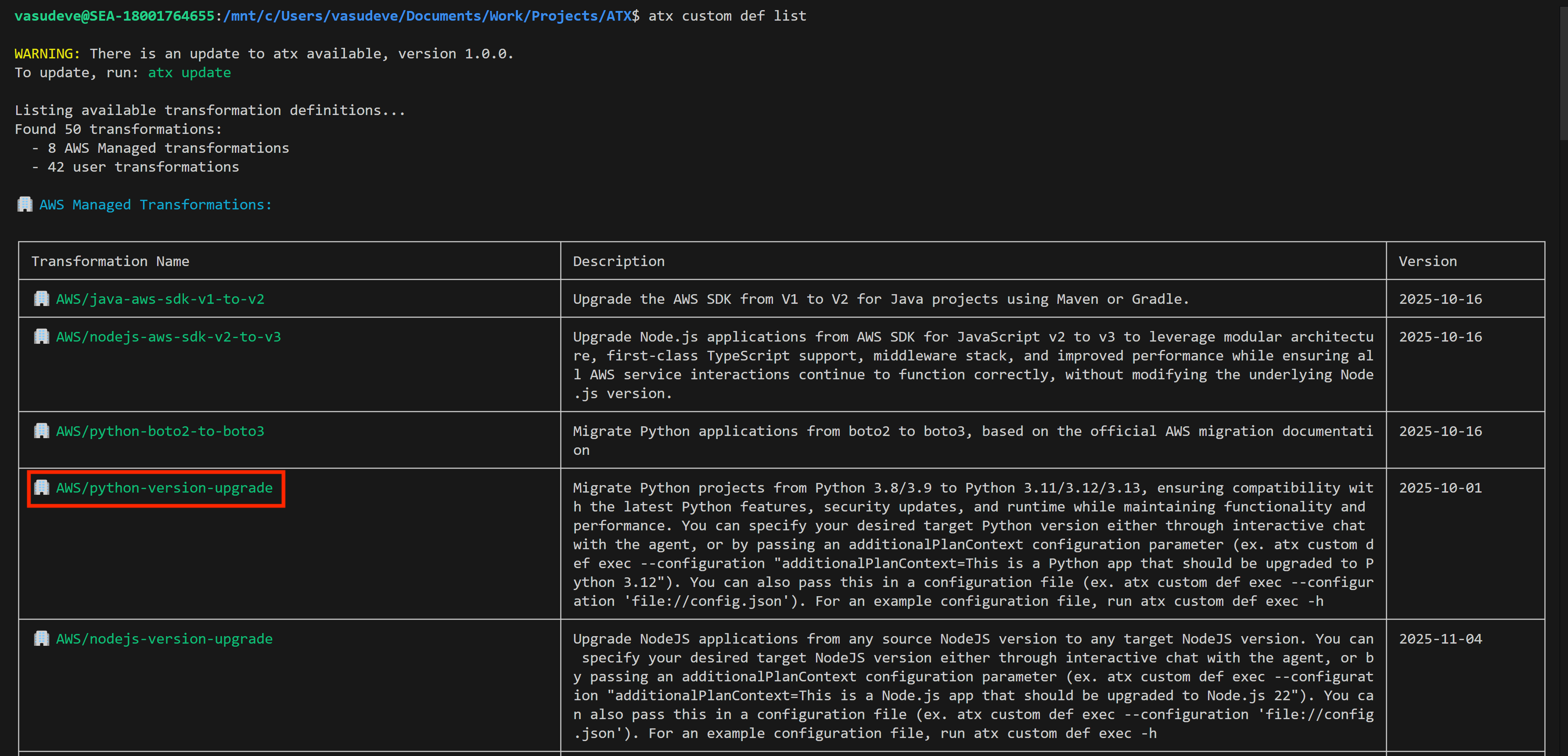
First, I use the command atx custom def list to explore the available transformation definitions. You can also access this functionality through a conversational interface by typing only atx instead of issuing the command directly, if you prefer.

This command displays all available transformations, including both AWS-managed defaults and any existing custom transformations created by users in my organization. AWS-managed transformations are identified by the AWS/ prefix, indicating they’re maintained and updated by AWS. In the results, I can see several options such as AWS/java-version-upgrade for Java runtime modernization, AWS/python-boto2-to-boto3-migration for updating Python AWS SDK usage, AWS/nodejs-version-upgrade for Node.js runtime updates.

For my Python 3.8 to 3.13 migration, I’ll use the AWS/python-version-upgrade transformation.

You run a migration by using the atx custom def exec command.  Please consult the documentation for more details about the command and all its options. Here, I run it against my project repository specifying the transformation name. I also add pytest to run unit tests for validation. More importantly, I use the additionalPlanContext section in the  --configuration input to specify which Python version I want to upgrade to. For reference, here’s the command I have for my demo (I’ve used multiple lines and indented it here for clarity):

atx custom def exec 
-p /mnt/c/Users/vasudeve/Documents/Work/Projects/ATX/lambda/todoapilambda 
-n AWS/python-version-upgrade
-C "pytest" 
--configuration 
    "additionalPlanContext= The target Python version to upgrade to is Python 3.13" 
-x -t

AWS Transform then starts the migration process. It analyzes my Lambda function code, identifies Python 3.8-specific patterns, and automatically applies the necessary changes for Python 3.13 compatibility. This includes updating syntax for deprecated features, modifying import statements, and adjusting any version-specific behaviors.

After execution, it provides a comprehensive summary including a report on dependencies updated in requirements.txt with Python 3.13-compatible package versions, instances of deprecated syntax replaced with current equivalents, updated runtime configuration notes for AWS Lambda deployment, suggested test cases to validate the migration, and more. It also provides a body of evidence that serve as proof of success.

The migrated code lives in a local branch so you can review and merge when satisfied. Alternatively, you can keep providing feedback and reiterating until yo’re happy that the migration is fully complete and meets your expectations.

This automated process changes what would typically require hours of manual work into a streamlined, consistent upgrade that maintains code quality while maintaining compatibility with the newer Python runtime.

Creating a new custom transformation
While AWS-managed transformations handle common scenarios effectively, you can also create custom transformations tailored to your organization’s specific needs. Let’s explore how to create a custom transformation to see how AWS Transform learns from your specific requirements.

I type atx to initialize the atx cli and start the process.

The first thing it asks me is if I want to use one of the existing transformations or create a new one. I choose to create a new one. Notice that from here on the whole conversation takes place using natural language, not commands. I typed new one but I could have typed I want to create a new one and it would’ve understood it exactly the same.

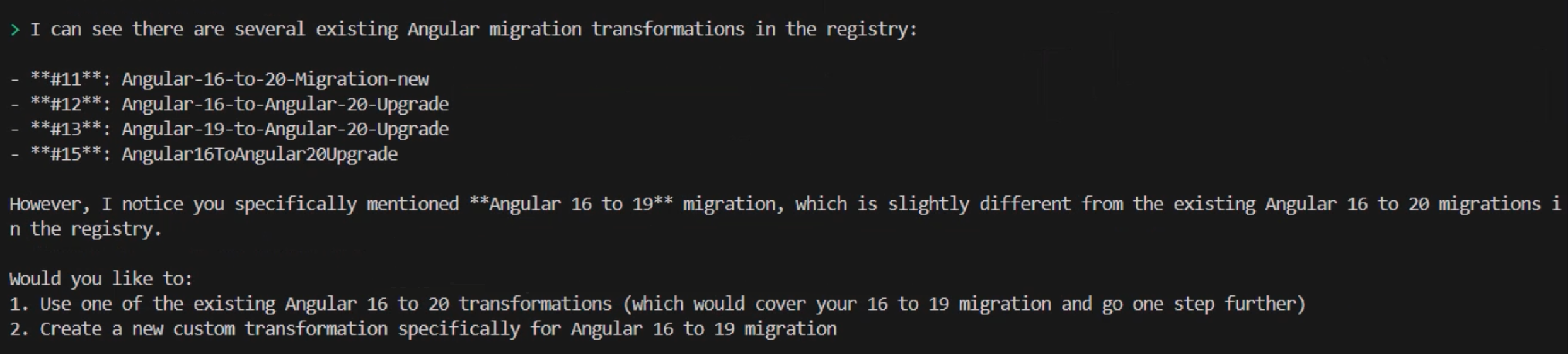
It then prompts me to provide more information about the kind of transformation I’d like to perform. For this demo, I’m going to migrate an Angular application, so I type angular 16 to 19 application migration which prompts the CLI to search for all transformations available for this type of migration. In my case, my team has already created and made available a few Angular migrations, so it shows me those. However, it warns me that none of them is an exact match to my specific request for migrating from Angular 16 to 19. It then asks if I’d like to select from one of the existing transformations listed or create a custom one.

I choose to create a custom one by continuing to use natural language and typing create a new one as a command. Again, this could be any variation of that statement provided that you indicate your intentions clearly. It follows by asking me a few questions including whether I have any useful documentation, example code or migration guides that I can provide to help customize the transformation plan.

For this demo, I’m only going to rely on AWS Transform to provide me with good defaults. I type I don't have these details. Follow best practices. and the CLI responds by telling me that it will create a comprehensive transformation definition for migrating Angular 16 to Angular 19.  Of course, I relied on the pre-trained data to generate results based on best practices. As usual, the recommendation is to provide as much information and relevant data as possible at this stage of the process for better results. However, you don’t need to have all the data upfront. You can keep on providing data at any time› as you iterate through the process of creating the custom transformation definition.

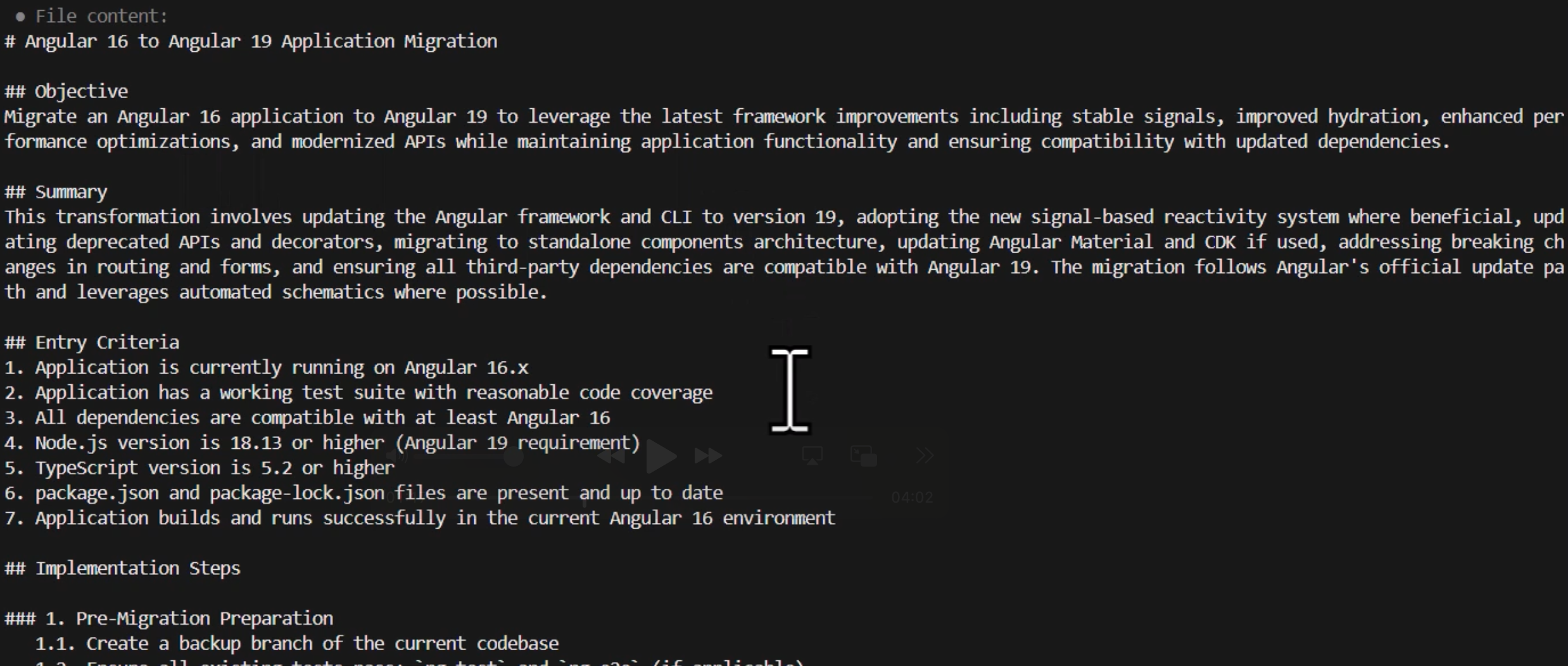
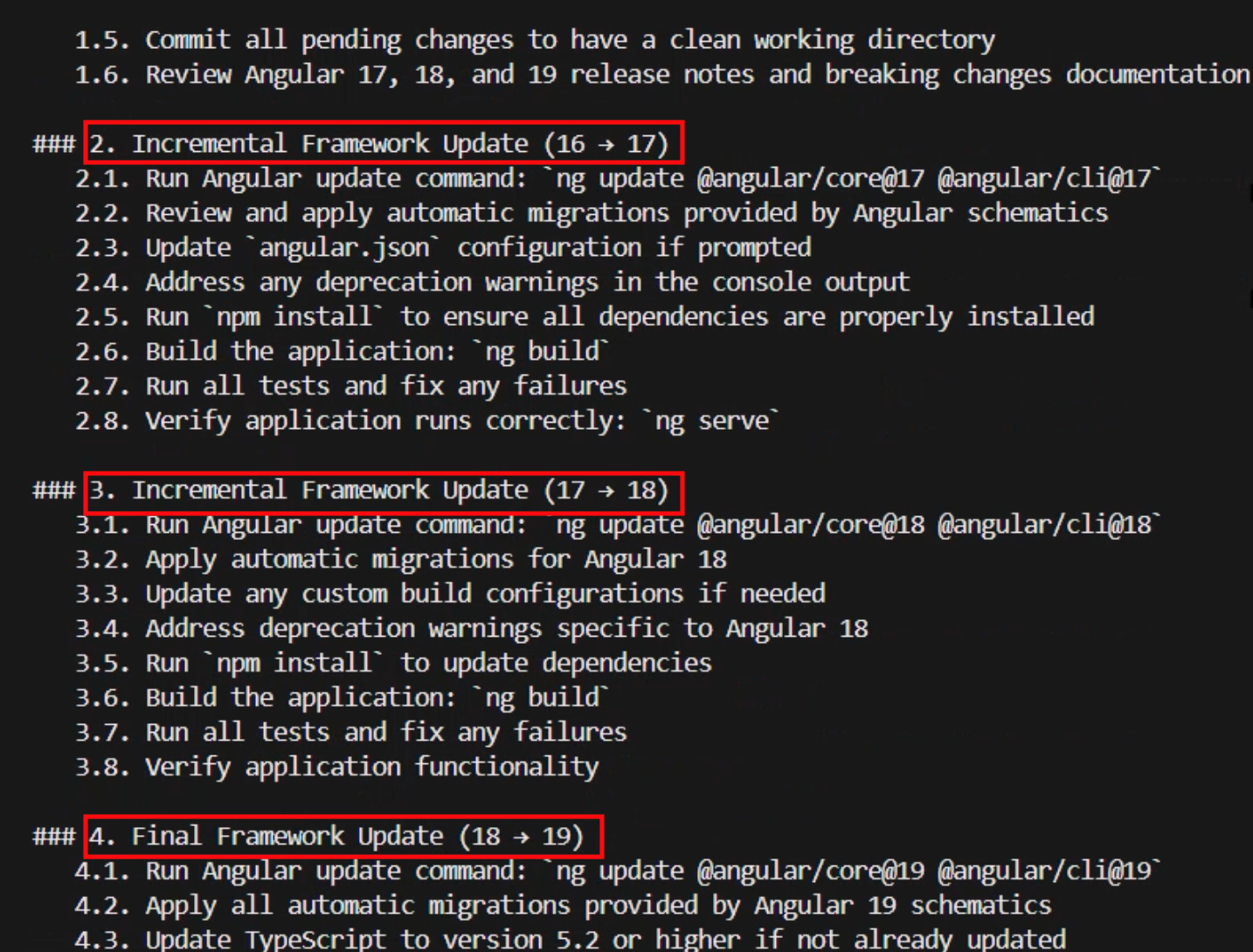
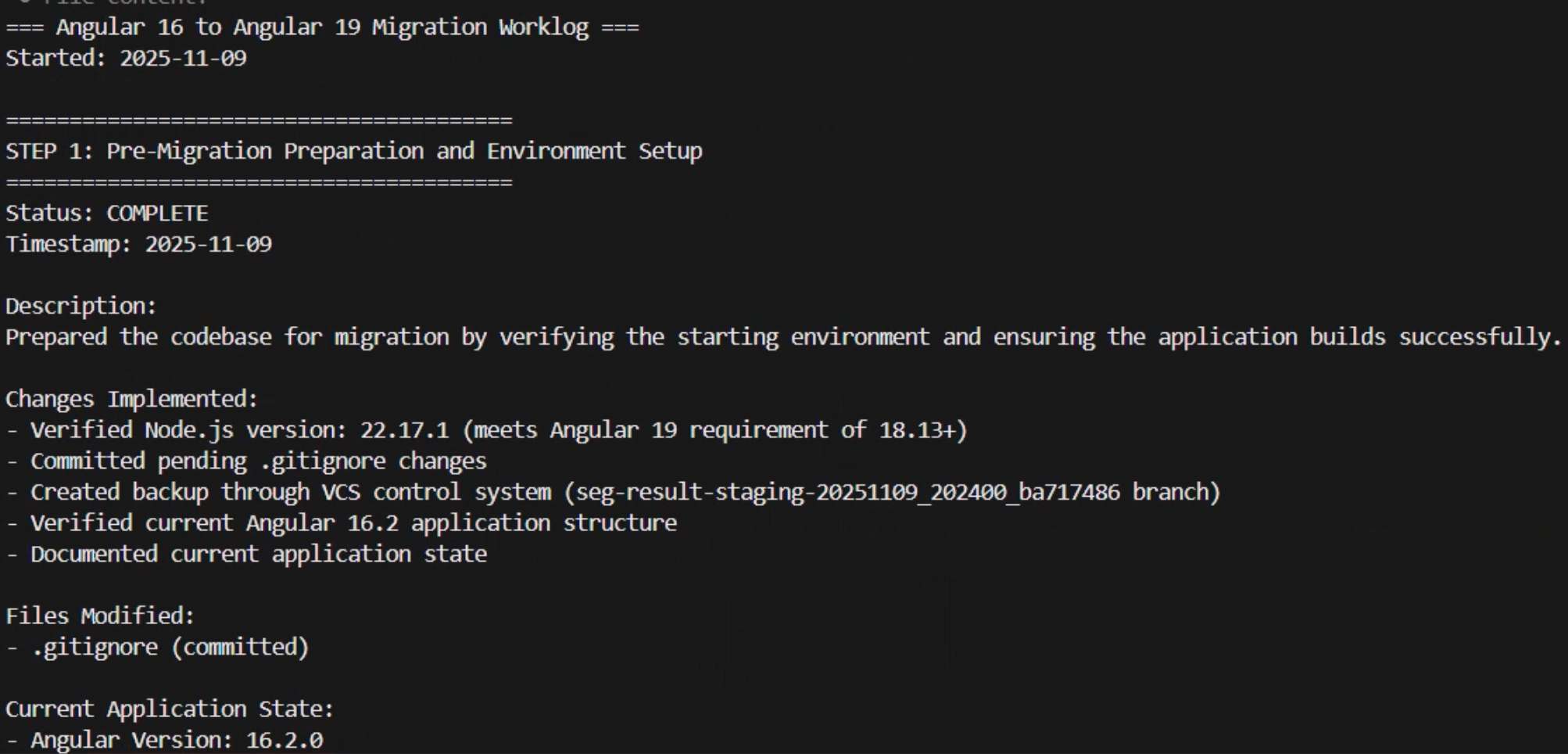
The transformation definition is generated as a markup file containing a summary and a comprehensive sequence of implementation steps grouped logically into phases such as premigration preparation, processing and partitioning, static dependency analysis, searching and applying specific transformation rules, and step-by-step migration and iterative validation.

It’s interesting to see that AWS Transform opted for the best practice of doing incremental framework updates creating steps for migrating the application first to 17 then 18 then 19 instead of trying to go directly from 16 to 19 to minimize issues.

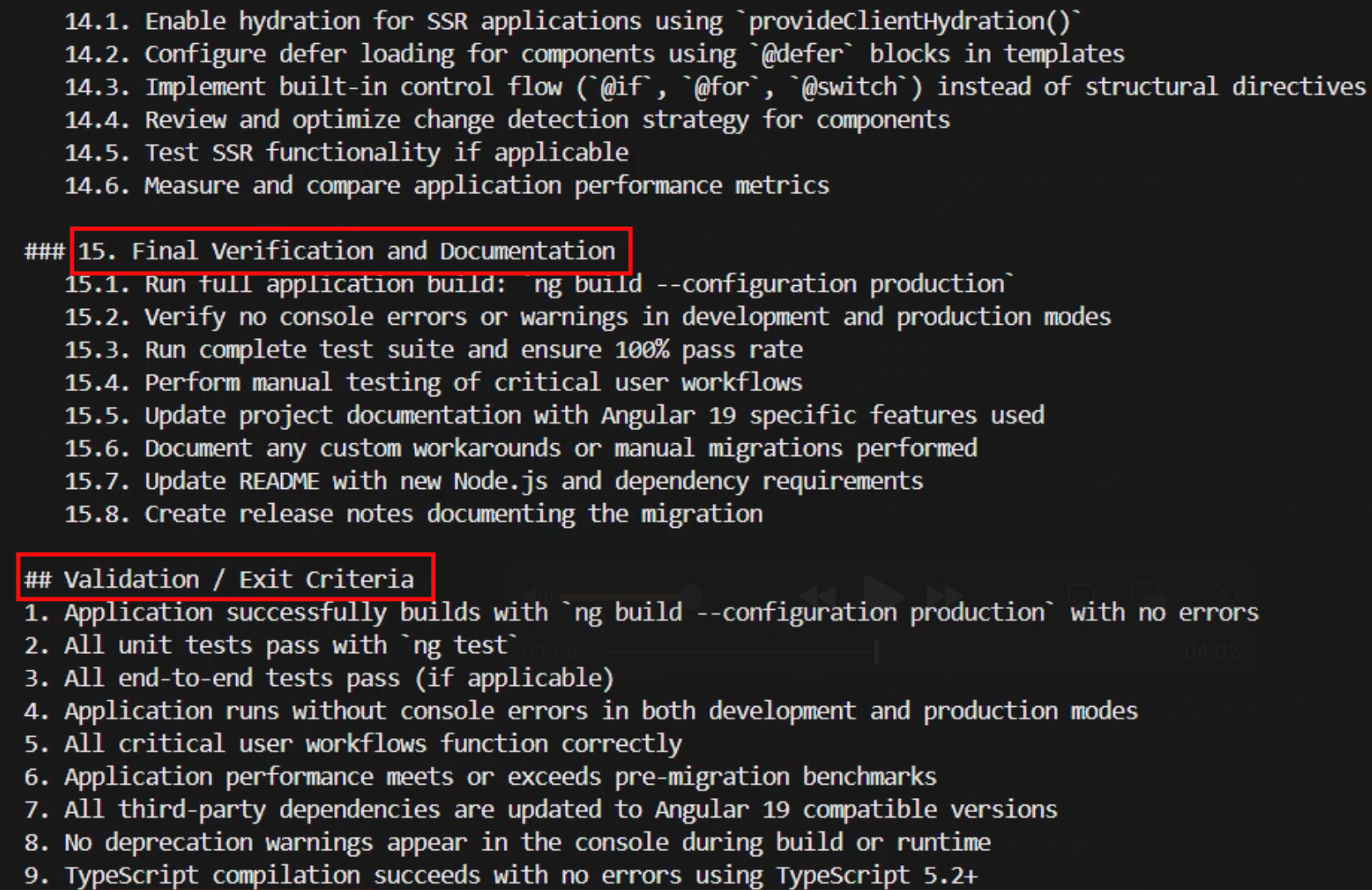
Note that the plan includes various stages of testing and verification to confirm that the various phases can be concluded with confidence. At the very end, it also includes a final validation stage listing exit criteria that performs a comprehensive set of tests against all aspects of the application that will be used to accept the migration as successfully complete.

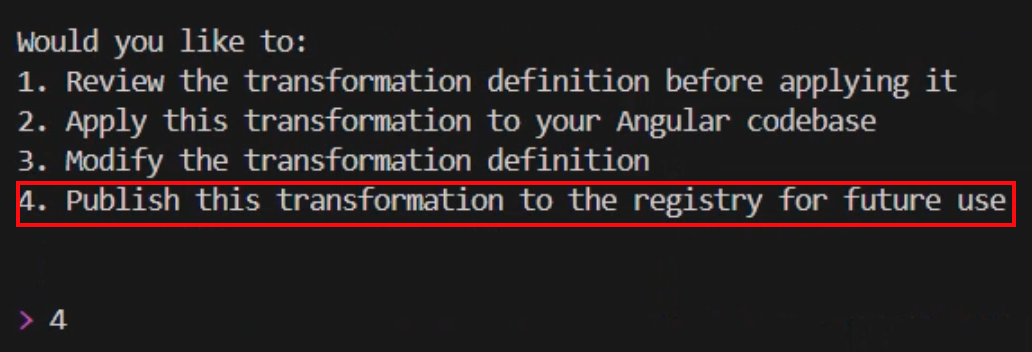
After the transformation definition is created, AWS Transform asks me about what I would like to do next. I can choose to review or modify the transformation definition and I can reiterate through this process as much as I need until I arrive at one that I’m satisfied with. I can also choose to already apply this transformation definition to an Angular codebase. However, first I want to make this transformation available to my team members as well as myself so we can all use it again in the future. So, I choose option 4 to publish this transformation to the registry.

This custom transformation needs a name and a description of its objective which is displayed when users browse the registry. AWS Transforms automatically extracts those from context for me and asks me if I would like to modify them before going ahead. I like the sensible default of “Angular-16-to-19-Migration”, and the objective is clearly stated, so I choose to accept the suggestions and publish it by answering with yes, looks good.

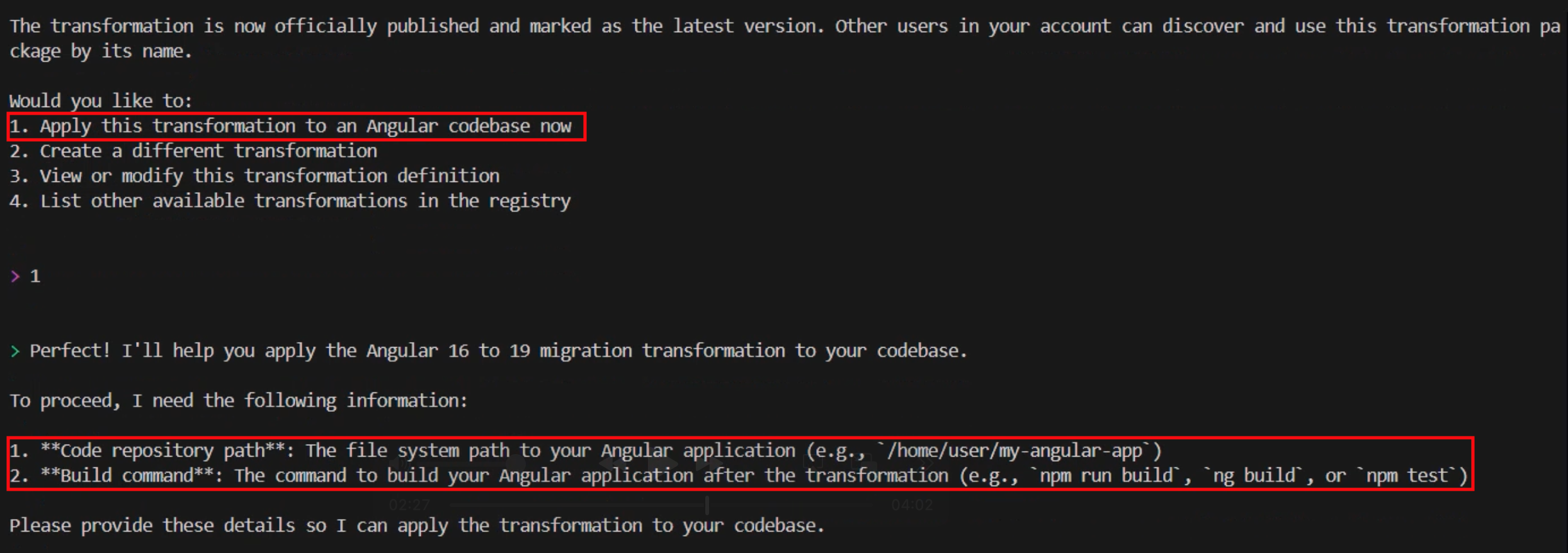
Now that the transformation definition is created and published, I can use it and run it multiple times against any code repository. Let’s apply the transformation to a code repository with a project written in Angular 16. I now choose option 1 from the follow-up prompt and the CLI asks me for the path in my file system to the application that I want to migrate and, optionally, the build command that it should use.

After I provide that information, AWS Transform proceeds to analyze the code base and formulate a thorough step-by-step transformation plan based on the definition created earlier. After it’s done, it creates a JSON file containing the detailed migration plan specifically designed for applying our transformation definition to this code base. Similar to the process of creating the transformation definition, you can review and iterate through this plan as much as you need, providing it with feedback and adjusting it to any specific requirements you might have.

When I’m ready to accept the plan, I can use natural language to tell AWS Transform that we can start the migration process. I type looks good, proceed and watch the progress in my shell as it starts executing the plan and making the changes to my code base one step at a time.

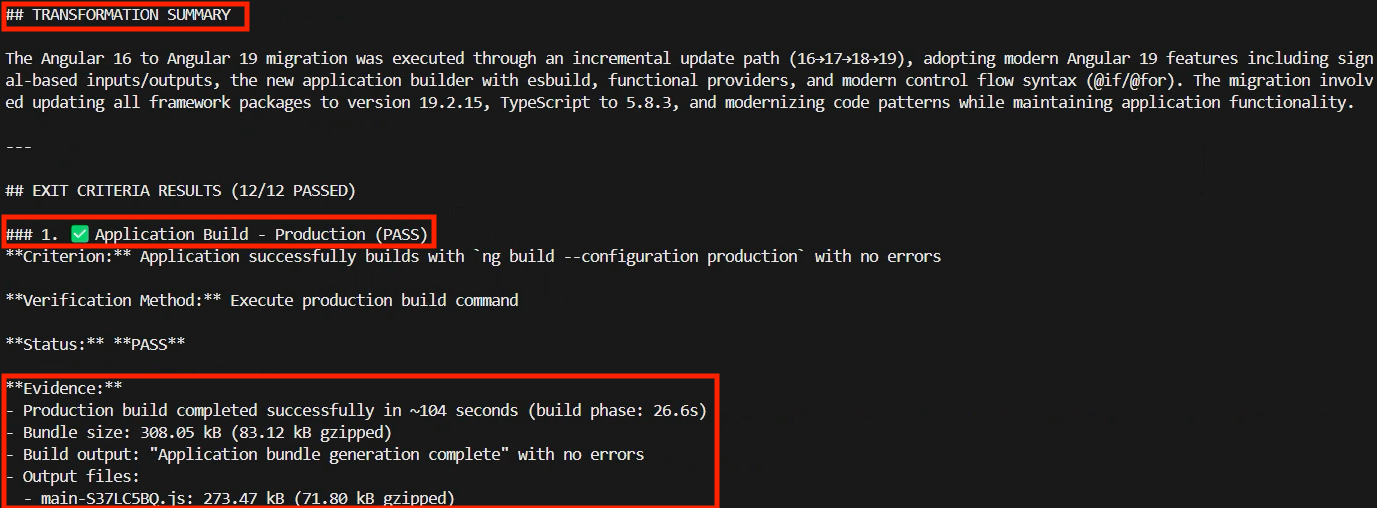
The time it takes will vary depending on the complexity of the application. In my case, it took a few minutes to complete. After it has finished, it provides me with a transformation summary and the status of each one of the exit criteria that were included in the final verification phase of the plan alongside all the evidence to support the reported status. For example, the Application Build – Production criteria was listed as passed and some of the evidence provided included the incremental Git commits, the time that it took to complete the production build, the bundle size, the build output message, and the details about all the output files created.

Conclusion
AWS Transform represents a fundamental shift in how organizations approach code modernization and technical debt. The service helps to transform what was at one time a fragmented, team-by-team effort into a unified, intelligent capability that eliminates knowledge silos, keeping your best practices and institutional knowledge available as scalable assets across the entire organization. This helps to accelerate modernization initiatives while freeing developers to spend more time on innovation and driving business value instead of focusing on repetitive maintenance and modernization tasks.

Things to know

AWS Transform custom is now generally available. Visit the get started guide to start your first transformation campaign or check out the documentation to learn more about setting up custom transformation definitions.

AWS Weekly Roundup: AWS Transform, Amazon Neptune, and more (September 8, 2025)

Post Syndicated from Esra Kayabali original https://aws.amazon.com/blogs/aws/aws-weekly-roundup-aws-transform-amazon-neptune-and-more-september-8-2025/

Summer has drawn to a close here in Utrecht, where I live in the Netherlands. In two weeks, I’ll be attending AWS Community Day 2025, hosted at the Kinepolis Jaarbeurs Utrecht on September 24. The single-day event will bring together over 500 cloud practitioners from across the Netherlands, featuring 25 breakout sessions across five technical tracks. The day will begin with virtual keynotes at 9:00 AM, followed by parallel breakout sessions focused on practical implementations of serverless architectures and container optimization strategies, providing valuable insights regardless of experience level.

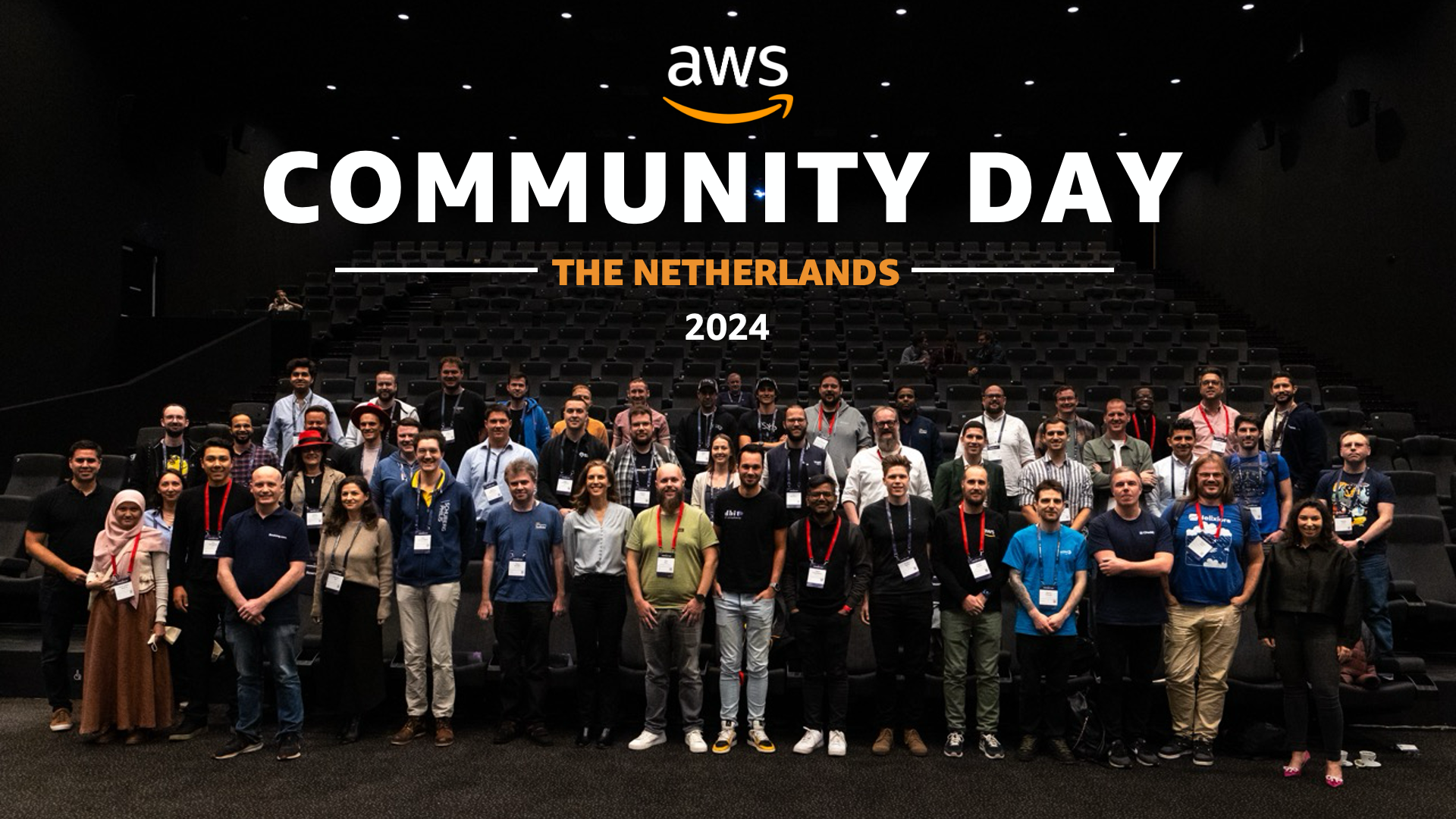
Last year’s AWS Community Day Netherlands 2024 brought together a diverse group of cloud practitioners, speakers, and AWS enthusiasts who contributed to making the community-led conference a valuable knowledge-sharing platform. If you’re planning to attend, feel free to find me there to discuss AWS services or share your cloud implementation experiences!

Let’s look at last week’s new announcements.

Last week’s launches

AWS Transform assessments now includes detached storage analysis – AWS Transform has expanded its assessment capabilities to analyze on-premises detached storage infrastructure, helping customers determine migration total cost of ownership (TCO). The assessment now evaluates Storage Area Network (SAN), Network Attached Storage (NAS), file servers, object storage, and virtual environments, providing migration recommendations to appropriate AWS services including Amazon S3, Amazon EBS, and Amazon FSx. The tool delivers a comprehensive TCO comparison between current and AWS environments, along with performance and cost optimization recommendations. With storage accounting for up to 45% of total migration opportunities, this enhancement helps customers visualize various AWS migration options. AWS Transform assessment is available in US East (N. Virginia) and Europe (Frankfurt) Regions.

Amazon Bedrock introduces Global Cross-Region inference for Anthropic Claude Sonnet 4 – Anthropic’s Claude Sonnet 4 model in Amazon Bedrock now supports Global cross-Region inference, allowing inference requests to route to any supported commercial AWS Region for processing. This enhancement optimizes available resources and enables higher model throughput by distributing traffic across multiple Regions. Previously, you could select cross-Region inference profiles tied to specific geographies (US, EU, or APAC). The new Global cross-Region inference profile provides additional flexibility for generative AI use cases that don’t require geography-specific processing, helping manage unplanned traffic bursts and increase model throughput. For detailed implementation guidance, visit the Amazon Bedrock documentation.

Amazon Neptune Database adds Public Endpoints support – Amazon Neptune now supports Public Endpoints, enabling direct connections to Neptune databases from outside the VPC without complex networking configurations. This feature helps developers securely access their graph databases from development desktops without requiring VPN connections or bastion hosts, while maintaining security through IAM authentication, VPC security groups, and encryption in transit. Public Endpoints can be enabled for Neptune clusters running engine version 1.4.6 or above through the AWS Management Console, AWS CLI, or AWS SDK. The feature is available at no additional cost beyond standard Neptune pricing in all AWS Regions where Neptune Database is offered. Implementation details are available in the Amazon Neptune documentation.

ECS Exec now available in AWS Management Console – Amazon ECS now supports ECS Exec directly in the AWS Management Console, enabling secure, interactive shell access to running containers without requiring inbound ports or SSH key management. Previously available only through API, CLI, or SDKs, this feature streamlines troubleshooting by allowing container access directly from the console interface. You can enable ECS Exec when creating or updating services and standalone tasks, then connect to containers by selecting “Connect” on the task details page, which opens an interactive session through CloudShell. The console also displays the underlying AWS CLI command for use in local terminals. This feature is available in all AWS commercial Regions and documented in the ECS developer guide.

Organizational Notification Configurations for AWS User Notifications now generally available – AWS User Notifications now supports Organizational Notification Configurations, helping AWS Organizations users centrally configure and view notifications across their organization. Management accounts or delegated administrators can configure notifications for specific organizational units or all accounts in an organization. The service supports configuring notifications for any supported Amazon EventBridge event, such as console sign-ins without MFA, with notifications appearing in the admin’s Console Notifications Center and AWS Console Mobile Application. User Notifications supports up to five delegated administrators and is available in all AWS Regions where AWS User Notifications is offered. For implementation details, visit the AWS User Notifications user guide.

For a full list of AWS announcements, be sure to keep an eye on the What’s New at AWS page.

Upcoming AWS events
Check your calendar and sign up for upcoming AWS events.

AWS Summits – Join free online and in-person events that bring the cloud computing community together to connect, collaborate, and learn about AWS. Register in your nearest city: Zurich (September 11), Los Angeles (September 17), and Bogotá (October 9).

AWS re:Invent 2025 – Join us in Las Vegas between December 1–5 as cloud pioneers gather from across the globe for the latest AWS innovations, peer-to-peer learning, expert-led discussions, and invaluable networking opportunities. Don’t forget to explore the event catalog.

AWS Community Days – Join community-led conferences that feature technical discussions, workshops, and hands-on labs led by expert AWS users and industry leaders from around the world: Baltic (September 10), Aotearoa (September 18), South Africa (September 20), Bolivia (September 20), Portugal (September 27).

Browse all upcoming AWS led in-person and virtual events here.

That’s all for this week. Check back next Monday for another Weekly Roundup!

— Esra

This post is part of our Weekly Roundup series. Check back each week for a quick roundup of interesting news and announcements from AWS!

Migrate and modernize VMware workloads with AWS Transform for VMware

Post Syndicated from Kiran Reid original https://aws.amazon.com/blogs/architecture/migrate-and-modernize-vmware-workloads-with-aws-transform-for-vmware/

On May 15, 2025, AWS unveiled a game-changing solution: AWS Transform for VMware. This innovative service tackles head-on the longstanding challenges of cloud migration, ushering in a new era of streamlined, efficient transitions to the AWS Cloud. By significantly reducing manual effort and accelerating the migration of critical VMware workloads, AWS Transform for VMware is set to revolutionize how organizations approach their cloud journey.

Since its general availability announcement, AWS Transform for VMware has ignited enthusiasm across industries, with organizations eager to leverage its capabilities to accelerate their VMware workload migration and modernization initiatives. As we dive into the intricacies of this transformative technology, we’ll uncover how AWS Transform for VMware is not just simplifying migrations, but reshaping the very landscape of cloud adoption and digital transformation.

The VMware migration challenge

Moving enterprise workloads to the cloud isn’t just a technical challenge – it’s a business transformation that demands precision, speed, and minimal disruption. Years of established operational processes have often led to complex environments with poorly documented configurations, inconsistent security practices, and heavy reliance on institutional knowledge. Technical teams must navigate intricate application dependencies, coordinate across multiple stakeholders, and maintain business continuity while executing these transformational projects. The lack of comprehensive documentation and clear understanding of system inter-dependencies frequently results in extended migration timelines and increased project risks. Additionally, the need to balance ongoing operations with migration activities presents challenges. Achieving proper knowledge transfer adds another layer of complexity to these critical initiatives.

Solution overview

Let’s explore how AWS Transform for VMware simplifies application discovery, automates network conversion, and orchestrates complex migrations through its comprehensive architecture in the following diagram.

To understand how these capabilities work together, let’s examine each component of the architecture.

Streamlined discovery and assessment

The journey begins with a thorough discovery and assessment of your VMware environment (1). AWS Transform for VMware (4) supports multiple discovery methods. One option is RVTools for VMware inventory collection. For customers running VMware NSX, there’s optional import/export functionality. Additionally, AWS Application Discovery Service offers both agent-based and agentless discovery options (2) to gather and collect data and dependencies for migration.

The Inventory Discovery capability (5) collects crucial data from your source environment and stores it securely in Amazon Simple Storage Service (Amazon S3) buckets (12) within the AWS Migration Discovery Account (7). This data forms the foundation for informed migration planning and is further processed by AWS Application Discovery Service (15) in the AWS Migration Planning Account. AWS Transform works together with these services to provide a single place to track migration progress and collect server inventory and dependency data, which is essential for successful application grouping and wave planning.

Intelligent network conversion and wave planning

With a comprehensive understanding of your environment, AWS Transform for VMware moves to the next critical phase. The Network Migration capability (19) automates the creation of AWS CloudFormation templates (13, 26) to set up the target network infrastructure. These templates ensure your cloud environment closely mirrors your source setup, simplifying the setup for the migration.

Meanwhile, the Wave Planning capability (6) uses advanced graph neural networks to analyze application dependencies and plan optimal migration waves. This minimizes complex portfolio and application dependency analysis, and provides ready-to-migrate wave plans, resulting in smooth migrations.

Enhanced security and compliance

Security remains paramount throughout the migration process. AWS Key Management Service (AWS KMS) (8, 16, 26) provides robust encryption for stored data, conversation history, and artifacts. By default, AWS managed keys are used, with the option to use customer managed keys (CMKs) for additional control.

AWS Organizations (9) enables centralized management across multiple AWS accounts, and AWS CloudTrail (14, 26) captures and logs API activities for a complete audit trail. Access control is managed through AWS Identity and Access Management (IAM) (26), providing centralized access management across AWS accounts.

Amazon CloudWatch (10, 26) continuously monitors AWS Transform service activities, resource utilization, and operational metrics within the management account, providing full visibility and control throughout the migration process. AWS Identity Center (11) further enhances security by providing centralized access management across all AWS accounts involved in the migration.

Orchestrated migration execution

When it’s time to execute the migration, AWS Transform orchestrates the end-to-end migration by coordinating across various AWS tools and services (20). The AWS Application Migration Service (25) replicates servers from your source environment to Amazon Elastic Compute Cloud (Amazon EC2) instances (21) in the AWS Migration Target Account (18), based on the carefully planned waves and groupings.

The AWS Replication Agent (2) works in tandem with AWS Application Migration Service to ensure efficient and reliable data transfer. Amazon Elastic Block Store (Amazon EBS) (21) provides the necessary storage for the migrated virtual machines, ensuring optimal performance and scalability.

Flexible network configuration

AWS Transform for VMware offers two networking models to suit different requirements:

  • Hub-and-spoke model – AWS Transit Gateway (23) connects virtual private clouds (VPCs) through a central hub VPC with shared NAT gateways. This model is ideal for centralized management and shared services.
  • Isolated model – Each VPC operates independently with no connectivity established. This approach is designed for customers with existing AWS network infrastructure, enabling you to manually connect the new VPCs to your existing network topology.

VPCs (22) created by AWS Transform match your on-premises network segments, providing a seamless transition. NAT gateways (24) provide outbound internet access for private subnets, maintaining security while enabling necessary connectivity. In hub-and-spoke architectures, centralized NAT gateways in the hub VPC can serve multiple spoke VPCs, optimizing costs and simplifying management. For isolated VPC deployments, dedicated NAT gateways must be provisioned within each VPC requiring internet access. In all cases, you must configure route tables to enable egress traffic flow through the NAT gateways

For complete setup instructions and requirements, refer to the AWS Transform User Guide.

Additional considerations

AWS Transform for VMware discovery workspaces are available globally (3). For the most up-to-date information on supported Regions, refer to AWS Services by Region (17).

Throughout the migration process, Amazon S3 buckets (12, 26) in both the AWS Migration Discovery Account and AWS Migration Target Account store key migration artifacts. These include inventory data, dependency mappings, wave plans, and application groupings, as well as Infrastructure as Code templates (AWS CloudFormation and AWS Cloud Development Kit) and per-wave migration plans.

Customers Benefits

AWS Transform for VMware delivers significant advantages:

  • Reduced manual effort – It minimizes human error and frees up valuable IT resources through automation
  • Enhanced accuracy – You can use AI-driven dependency mapping and wave planning for optimal migration strategies
  • Improved collaboration – Centralized management and tracking foster better cross-team coordination
  • Cost optimization – You can right-size instances and take advantage of AWS’s flexible pricing models for immediate and long-term savings
  • Future-proofing – It opens up the opportunity for ongoing modernization and innovation on the AWS Cloud platform

Always review and follow your organization’s security requirements, compliance obligations, and AWS security best practices when implementing any migration solution. For detailed security guidance, consult the AWS Security Documentation and your organization’s security team.

Pricing

AWS Transform accelerates migration and modernization projects for VMware workloads with agentic AI capabilities. Currently, we offer our core features—including assessment and transformation—at no cost* to AWS customers. This allows you to speed up your migration and modernization journey without upfront expenses.

*No cost refers to the AWS Transform service itself. Standard charges apply for AWS services and resources used during migrations.

Summary and Next Steps

AWS Transform for VMware empowers organizations to overcome the complexities of VMware migration and modernization. By providing a comprehensive, automated approach, it enables faster, more reliable transitions to the AWS Cloud. This new service offers the tools and capabilities needed to navigate the changing VMware landscape confidently.

The architecture we explored demonstrates how AWS Transform for VMware tackles key challenges:

  • Streamlines discovery and assessment processes
  • Automates network conversion and intelligent wave planning
  • Orchestrates migration execution with minimal disruption
  • Enhances security and compliance throughout the migration
  • Provides centralized management and monitoring
  • Offers flexible networking options to suit diverse requirements

Ready to accelerate your VMware migration journey? Visit the AWS Transform for VMware product page to learn more and get started today. Check out the following interactive demo of AWS Transform for VMware. If you’re exporting your network configuration from a VMware NSX environment, also refer to Exporting network configuration data with Import/Export for NSX. Our team of experts is ready to guide you through your migration and modernization initiatives, helping you unlock the full potential of the AWS Cloud.


About the authors

AWS Weekly Roundup: Strands Agents, AWS Transform, Amazon Bedrock Guardrails, AWS CodeBuild, and more (May 19, 2025)

Post Syndicated from Danilo Poccia original https://aws.amazon.com/blogs/aws/aws-weekly-roundup-strands-agents-aws-transform-amazon-bedrock-guardrails-aws-codebuild-and-more-may-19-2025/

Many events are taking place in this period! Last week I was at the AI Week in Italy. This week I’ll be in Zurich for the AWS Community Day – Switzerland. On May 22, you can join us remotely for AWS Cloud Infrastructure Day to learn about cutting-edge advances across compute, AI/ML, storage, networking, serverless technologies, and global infrastructure. Look for events near you for an opportunity to share your knowledge and learn from others.

What got me particularly excited last Friday was the introduction of Strands Agents, an open source SDK that you can use to build and run AI agents in just a few lines of code. It can scale from simple to complex use cases, including local development and production deployment. By default, it uses Amazon Bedrock as model provider, but many others are supported, including Ollama (to run models locally), Anthropic, Llama API, and LiteLLM (to provide a unified interface for other providers such as Mistral). With Strands, you can use any Python function as a tool for your agent with the @tool decorator. Strands provides many example tools for manipulating files, making API requests, and interacting with AWS APIs. You can also choose from thousands of published Model Context Protocol (MCP) servers, including this suite of specialized MCP servers that help you get the most out of AWS. Multiple teams at AWS already use Strands for their AI agents in production, including Amazon Q Developer, AWS Glue, and VPC Reachability Analyzer. Read it all in Clare’s post.

Strands Agents SDK agentic loop

Last week’s launches
Here are the other launches that got my attention:

Additional updates
Here are some additional projects, blog posts, and news items that you might find interesting:

  • Securing Amazon S3 presigned URLs for serverless applications – Focusing on the security ramifications of using Amazon S3 presigned URLs, explaining mitigation steps that developers can take to improve the security of their systems using S3 presigned URLs, and walking through an AWS Lambda function that adheres to the provided recommendations.
    Architectural diagram.
  • Running GenAI Inference with AWS Graviton and Arcee AI Models – While large language models (LLMs) are capable of a wide variety of tasks, they require compute resources to support hundreds of billions and sometimes trillions of parameters. Small language models (SLMs) in contrast typically have a range of 3 to 15 billion parameters and can provide responses more efficiently. In this post, we share how to optimize SLM inference workloads using AWS Graviton based instances.
    AWS Graviton processors.

Upcoming AWS events
Check your calendars and sign up for these upcoming AWS events:

  • AWS Summits – Join free online and in-person events that bring the cloud computing community together to connect, collaborate, and learn about AWS. Register in your nearest city: Dubai (May 21), Tel Aviv (May 28), Singapore (May 29), Stockholm (June 4), Sydney (June 4–5), Washington (June 10-11), and Madrid (June 11)
  • AWS Cloud Infrastructure Day – On May 22, discover the latest innovations in AWS Cloud infrastructure technologies at this exclusive technical event.
  • AWS re:Inforce – Mark your calendars for AWS re:Inforce (June 16–18) in Philadelphia, PA. AWS re:Inforce is a learning conference focused on AWS security solutions, cloud security, compliance, and identity.
  • AWS Partners Events – You’ll find a variety of AWS Partner events that will inspire and educate you, whether you’re just getting started on your cloud journey or you’re looking to solve new business challenges.
  • AWS Community Days – Join community-led conferences that feature technical discussions, workshops, and hands-on labs led by expert AWS users and industry leaders from around the world: Zurich, Switzerland (May 22), Bengaluru, India (May 23), Yerevan, Armenia (May 24), Milwaukee, USA (June 5), and Nairobi, Kenya (June 14)

That’s all for this week. Check back next Monday for another Weekly Roundup!

Danilo

AWS Transform for .NET, the first agentic AI service for modernizing .NET applications at scale

Post Syndicated from Prasad Rao original https://aws.amazon.com/blogs/aws/aws-transform-for-net-the-first-agentic-ai-service-for-modernizing-net-applications-at-scale/

I started my career as a .NET developer and have seen .NET evolve over the last couple of decades. Like many of you, I also developed multiple enterprise applications in .NET Framework that ran only on Windows. I fondly remember building my first enterprise application with .NET Framework. Although it served us well, the technology landscape has significantly shifted. Now that there is an open source and cross-platform version of .NET that can run on Linux, these legacy enterprise applications built on .NET Framework need to be ported and modernized.

The benefits of porting to Linux are compelling: applications cost 40 percent less to operate because they save on Windows licensing costs, run 1.5–2 times faster with improved performance, and handle growing workloads with 50 percent better scalability. Having helped port several applications, I can say the effort is worth the rewards.

However, porting .NET Framework applications to cross-platform .NET is a labor-intensive and error-prone process. You have to perform multiple steps, such as analyzing the codebase, detecting incompatibilities, implementing fixes while porting the code, and then validating the changes. For enterprises, the challenge becomes even more complex because they might have hundreds of .NET Framework applications in their portfolio.

At re:Invent 2024, we previewed this capability as Amazon Q Developer transformation capabilities for .NET to help port your .NET applications at scale. The experience is available as a unified web experience for at-scale transformation and within your integrated development environment (IDE) for individual project and solution porting.

Now that we’ve incorporated your valuable feedback and suggestions, we’re excited to announce today the general availability of AWS Transform for .NET. We’ve also added new capabilities to support projects with private NuGet packages, port model-view-controller (MVC) Razor views to ASP .NET Core Razor views, and execute the ported unit tests.

I’ll expand on the key new capabilities in a moment, but let’s first take a quick look at the two porting experiences of AWS Transform for .NET.

Large-scale porting experience for .NET applications
Enterprise digital transformation is typically driven by central teams responsible for modernizing hundreds of applications across multiple business units. Different teams have ownership of different applications and their respective repositories. Success requires close coordination between these teams and the application owners and developers across business units. To accelerate this modernization at scale, AWS Transform for .NET provides a web experience that enables teams to connect directly to source code repositories and efficiently transform multiple applications across the organization. For select applications requiring dedicated developer attention, the same agent capabilities are available to developers as an extension for Visual Studio IDE.

Let’s start by looking at how the web experience of AWS Transform for .NET helps port hundreds of .NET applications at scale.

Web experience of AWS Transform for .NET
To get started with the web experience of AWS Transform, I onboard using the steps outlined in the documentation, sign in using my credentials, and create a job for .NET modernization.

Create a new job for .NET Transformation

AWS Transform for .NET creates a job plan, which is a sequence of steps that the agent will execute to assess, discover, analyze, and transform applications at scale. It then waits for me to set up a connector to connect to my source code repositories.
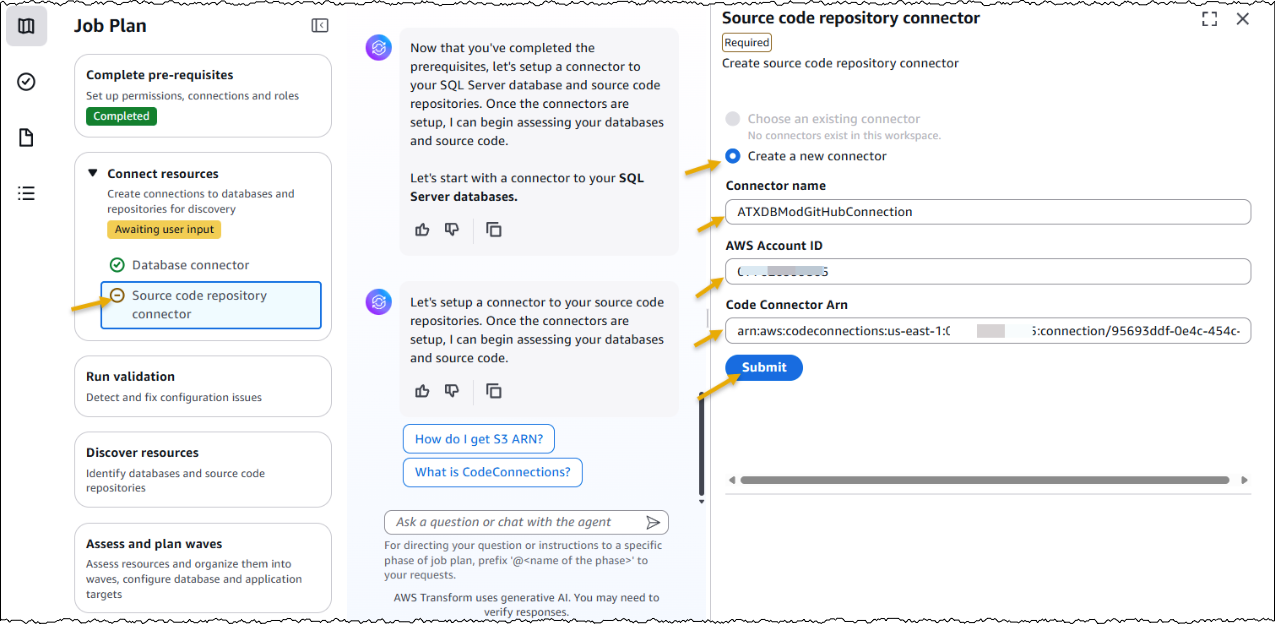
Setup connector to connect to source code repository

After the connector is in place, AWS Transform begins discovering repositories in my account. It conducts an assessment focused on three key areas: repository dependencies, required private packages and third-party libraries, and supported project types within your repositories.

Based on this assessment, it generates a recommended transformation plan. The plan orders repositories according to their last modification dates, dependency relationships, private package requirements, and the presence of supported project types.

AWS Transform for .NET then prepares for the transformation process by requesting specific inputs, such as the target branch destination, target .NET version, and the repositories to be transformed.

To select the repositories to transform, I have two options: use the recommended plan or customize the transformation plan by selecting repositories manually. For selecting repositories manually, I can use the UI or download the repository mapping and upload the customized list.

select the repositories to transform

AWS Transform for .NET automatically ports the application code, builds the ported code, executes unit tests, and commits the ported code to a new branch in my repository. It provides a comprehensive transformation summary, including modified files, test outcomes, and suggested fixes for any remaining work.

While the web experience helps accelerate large-scale porting, some applications may require developer attention. For these cases, the same agent capabilities are available in the Visual Studio IDE.

Visual Studio IDE experience of AWS Transform for .NET
Now, let’s explore how AWS Transform for .NET works within Visual Studio.

To get started, I install the latest version of AWS Toolkit extension for Visual Studio and set up the prerequisites.

I open a .NET Framework solution, and in the Solution Explorer, I see the context menu item Port project with AWS Transform for an individual project.

Context menu for Port project with AWS Transform in Visual Studio

I provide the required inputs, such as the target .NET version and the approval for the agents to autonomously transform code, execute unit tests, generate a transformation summary, and validate Linux-readiness.

Transformation summary after the project is transformed in Visual Studio

I can review the code changes made by the agents locally and continue updating my codebase.

Let’s now explore some of the key new capabilities added to AWS Transform for .NET.

Support for projects with private NuGet package dependencies 
During preview, only projects with public NuGet package dependencies were supported. With general availability, we now support projects with private NuGet package dependencies. This has been one of the most requested features during the preview.

The feature I really love is that AWS Transform can detect cross-repository dependencies. If it finds the source code of my private NuGet package, it automatically transforms that as well. However, if it can’t locate the source code, in the web experience, it provides me the flexibility to upload the required NuGet packages.

AWS Transform displays the missing package dependencies that need to be resolved. There are two ways to do this: I can either use the provided PowerShell script to create and upload packages, or I can build the application locally and upload the NuGet packages from the packages folder in the solution directory.

Upload packages to resolve missing dependencies

After I upload the missing NuGet packages, AWS Transform is able to resolve the dependencies. It’s best to provide both the .NET Framework and cross platform .NET versions of the NuGet packages. If the cross platform .NET version is not available, then at a minimum the .NET Framework version is required for AWS Transform to add it as an assembly reference and proceed for transformation.

Unit test execution
During preview, we supported porting unit tests from .NET Framework to cross-platform .NET. With general availability, we’ve also added support for executing unit tests after the transformation is complete.

After the transformation is complete and the unit tests are executed, I can see the results in the dashboard and view the status of the tests at each individual test project level.

Dashboard after successful transformation in web showing exectuted unit tests

Transformation visibility and summary
After the transformation is complete, I can download a detailed report in JSON format that gives me a list of transformed repositories, details about each repository, and the status of the transformation actions performed for each project within a repository. I can view the natural language transformation summary at the project level to understand AWS Transform output with project-level granularity. The summary provides me with an overview of updates along with key technical changes to the codebase.

detailed report of transformed project highlighting transformation summary of one of the project

Other new features
Let’s have a quick look at other new features we’ve added with general availability:

  • Support for porting UI layer – During preview, you could only port the business logic layers of MVC applications using AWS Transform, and you had to port the UI layer manually. With general availability, you can now use AWS Transform to port MVC Razor views to ASP.NET Core Razor views.
  • Expanded connector support – During preview, you could connect only to GitHub repositories. Now with general availability, you can connect to GitHub, GitLab, and Bitbucket repositories.
  • Cross repository dependency – When you select a repository for transformation, dependent repositories are automatically selected for transformation.
  • Download assessment report – You can download a detailed assessment report of the identified repositories in your account and private NuGet packages referenced in these repositories.
  • Email notifications with deep links – You’ll receive email notifications when a job’s status changes to completed or stopped. These notifications include deep links to the transformed code branches for review and continued transformation in your IDE.

Things to know
Some additional things to know are:

  • Regions – AWS Transform for .NET is generally available today in the Europe (Frankfurt) and US East (N. Virginia) Regions.
  • Pricing – Currently, there is no additional charge for AWS Transform. Any resources you create or continue to use in your AWS account using the output of AWS Transform will be billed according to their standard pricing. For limits and quotas, refer to the documentation.
  • .NET versions supported – AWS Transform for .NET supports transforming applications written using .NET Framework versions 3.5+, .NET Core 3.1, and .NET 5+, and the cross-platform .NET version, .NET 8.
  • Application types supported – AWS Transform for .NET supports porting C# code projects of the following types: console application, class library, unit tests, WebAPI, Windows Communication Foundation (WCF) service, MVC, and single-page application (SPA).
  • Getting started – To get started, visit AWS Transform for .NET User Guide.
  • Webinar – Join the webinar Accelerate .NET Modernization with Agentic AI to experience AWS Transform for .NET through a live demonstration.

– Prasad


How is the News Blog doing? Take this 1 minute survey!

(This survey is hosted by an external company. AWS handles your information as described in the AWS Privacy Notice. AWS will own the data gathered via this survey and will not share the information collected with survey respondents.)