Today, we’re releasing exciting improvements that will streamline your Codespaces experience when working with multi-repository projects and monorepos. Codespaces are instant cloud-powered development environments that aim at maximizing your productivity by eliminating set-up times regardless of the type, size, and complexity of your projects.
With our initial release, we wanted to address the most common type of projects hosted on GitHub: cloud-native applications housed in a singular repository. As organization adoption began to scale, we quickly realized we needed to support additional types of projects that required extensive workarounds. With this latest update, we’re excited to release improved support for multi-repository and monorepo projects.
Codespaces configuration for microservices
Many of you told us that you often work with a number of interwoven repositories for your projects. Maybe there is a billing service, an event service, an authorization service, and they’re all dependent on each other. When developing a feature that spans many of these services, you might want to clone and interact with each repository within your codespace.
With this scenario in mind, we have added the ability for users to configure which permissions their codespace should have on creation. This means that users will no longer have to set up a personal access token inside of their codespace to clone or create pull requests for other repositories.
Even better, you can now specify these repository permissions in your devcontainer.json under the customizations.codespaces.repositories key so that every developer is prompted for the right set of permissions while working on the project.
In the future, we plan to make it even simpler to work with microservices in Codespaces by automatically cloning across multiple services and allowing you to configure how your environment is initialized to run each repository.
Codespaces configuration for monorepos
If you are part of a larger organization and have many teams working in one repository, you may have wished there was an easy way to have a different codespace configuration for each team. We heard you loud and clear and are happy to announce that Codespaces now supports multiple devcontainer.json files inside of your .devcontainer directory, as long as they follow the pattern of .devcontainer/${DIR}/devcontainer.json. If multiple configurations exist, users will be able to select their specific configuration at the time of codespace creation, allowing you to better customize your codespaces to fit the specific needs of your teams.
For example, imagine your docs team works primarily in a few directories and just needs a lightweight configuration to update Markdown files. You could have a devcontainer.json that looks like the following:
This devcontainer.json runs an “onCreateCommand” script specific to setting up the environment for the Docs Team. The script in this scenario uses the permissions granted to “my_org/docs_linter” to pull in a linter repository, which is a useful tool when writing and editing documentation.
Advanced create
As we grow to handle more diverse project types and scenarios, we also want to ensure that we continue to provide the ease of environment creations through simple one-click experiences that don’t require you to spend undue time understanding various configuration options.
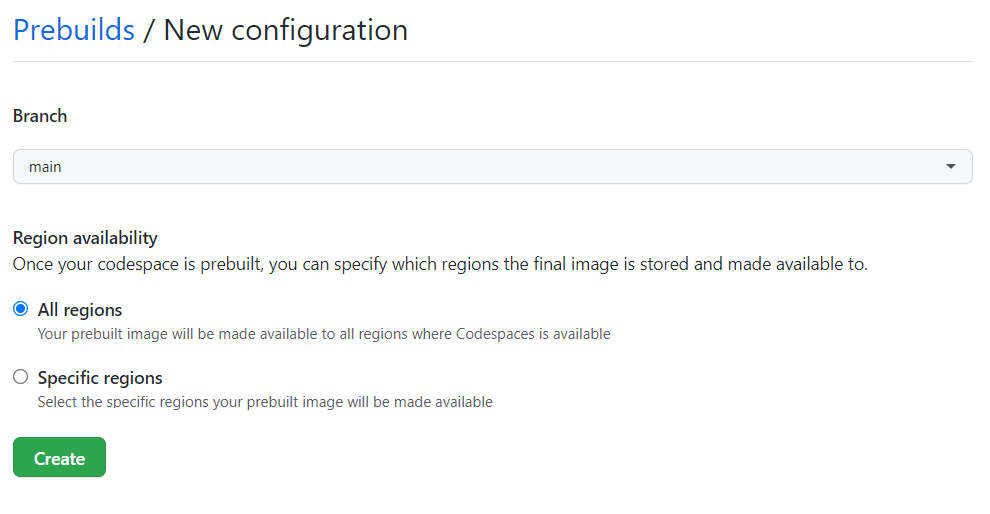
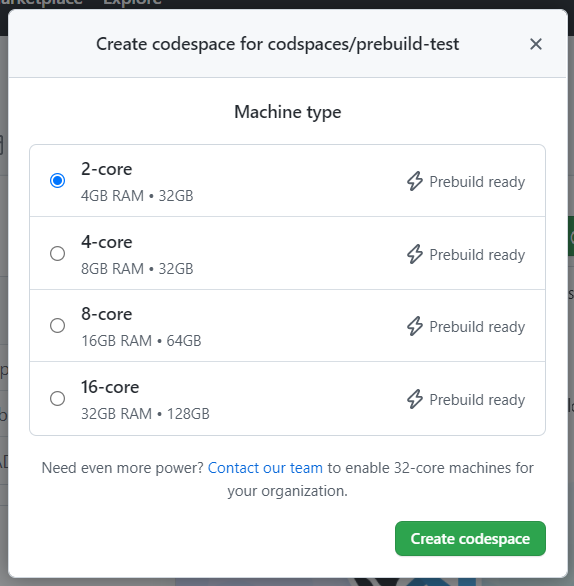
However, if you need more flexibility, we’ve created a new advanced create flow for Codespaces that allows you to select various options, such as branch, region, machine type, and dev container configuration while creating your codespace.
If you want to skip the advanced creation flow, you can easily just select “Create codespace on <branch name>,” and it will create a codespace with the default configuration.
How to get started?
We believe that these three new features will allow for larger organizations to have a smoother experience as they onboard and scale with Codespaces. Repository administrators can create multiple devcontainers, each with permission sets, setup scripts, and a codespace configuration specific for certain teams. And, developers will be able to select the ideal devcontainer, machine type, and region during codespace creation with the advanced creation flow as needed. There’s something for everyone with Codespaces!
Here are some helpful links to help you get started!
Congratulations! You’ve discovered a security bug in your own code before anyone has exploited it. It’s a big relief. You’ve created a CodeQL query to find other places where this happens and ensure this will never happen again, and you’ve deployed your new query to be run on every pull request in your repo to prevent similar mistakes from ever being made again.
What’s the best way to share this knowledge with the community to help protect the open source ecosystem by making sure that the same vulnerability is never introduced into anyone’s codebase, ever?
The short answer: produce a CodeQL pack containing your queries, and publish them to GitHub. CodeQL packaging is a beta feature in the CodeQL ecosystem. With CodeQL packaging, your expertise is documented, concise, executable, and easily shareable.
This is the first post of a two-part series on CodeQL packaging. In this post, we show how to use CodeQL packs to share security expertise. In the next post, we will discuss some of our implementation and design decisions.
The purpose of this query is to detect executables that are potentially vulnerable to Windows binary planting, an exploit where an attacker could inject a malicious executable into a pull request. This query is meant to be evaluated on JavaScript code that is run inside of a GitHub Action. It matches all arguments to calls to the ToolRunner (a GitHub Action API) where the argument has not been sanitized (that is, ensured to be safe) by having been wrapped in a call to safeWhich. The implementation details of this query are not relevant to this post, but you can explore this query and other domain-specific queries like it in the repository.
This query is currently protecting us on every pull request, but in its current form, it is not easily available for others to use. Even though this vulnerability is relatively difficult to attack, the surface area is large, and it could affect any GitHub Action running on Windows in public repositories that accept pull requests. You could write a stern blog post on the dangers of invoking unqualified Windows executables in untrusted pull requests (maybe you’re even reading such a post right now!), but your impact will be much higher if you could share the query to help anyone find the bug in their code. This is where CodeQL packaging comes in. Using CodeQL packaging, not only can developers easily learn about the binary planting pattern, but they can also automatically apply the pattern to find the bug in their own code.
Sharing queries through CodeQL packs
If you think that your query is general purpose and applicable to all repositories in all situations, then it is best to contribute it to our open source CodeQL query repository (and collect a bounty in the process!). That way, your query will be run on every pull request on every repository that has GitHub code scanning enabled.
However, many (if not most) queries are domain specific and not applicable to all repositories. For example, this particular binary planting query is only applicable to GitHub Actions implemented in JavaScript. The best way to share such queries query is by creating a CodeQL pack and publishing it to the CodeQL package registry to make it available to the world. Once published, CodeQL packs are easily shared with others and executed in their CI/CD pipeline.
There are two kinds of CodeQL packs:
Query packs, which contain a set of pre-compiled queries that can be easily evaluated on a CodeQL database.
Library packs, which contain CodeQL libraries (*.qll files), but do not contain any runnable queries. Library packs are meant to be used as building blocks to produce other query packs or library packs.
In the rest of this post, we will show you how to create, share, and consume a CodeQL query pack. Library packs will be introduced in a future blog post.
To create a CodeQL pack, you’ll need to make sure that you’ve installed and set up the CodeQL CLI. You can follow the instructions here.
The next step is to create a qlpack.yml file. This file declares the CodeQL pack and information about it. Any *.ql files in the same directory (or sub-directory) as a qlpack.yml file are considered part of the package. In this case, you can place binary-planting.ql next to the qlpack.yml file.
All CodeQL packs must have a name property. If they are going to be published to the CodeQL registry, then they must have a scope as part of the name. The scope is the part of the package name before the slash (in this example: aeisenberg). It should be the username or organization on github.com that will own this package. Anyone publishing a package must have the proper privileges to do so for that scope. The name part of the package name must be unique within the scope. Additionally, a version, following standard semver rules, is required for publishing.
The dependencies block lists all of the dependencies of this package and their compatible version ranges. Each dependency is referenced as the scope/name of a CodeQL library pack, and each library pack may in turn depend on other library packs declared in their qlpack.yml files. Each query pack must (transitively) depend on exactly one of the core language packs (for example, JavaScript, C#, Ruby, etc.), which determines the language your query can analyze.
In this query pack, the standard JavaScript libraries, codeql/javascript-all, is the only dependency and the semver range ~0.0.10 means any version >= 0.0.10 and < 0.1.0 suffices.
With the qlpack.yml defined, you can now install all of your declared dependencies. Run the codeql pack install command in the root directory of the CodeQL pack:
After making any changes to the query, you can then publish the query to the GitHub registry. You do this by running the codeql pack publish command in the root of the CodeQL pack.
Here is the output of the command:
$ codeql pack publish
Running on packs: aeisenberg/codeql-actions-queries.
Bundling and then publishing qlpack located at '/Users/andrew.eisenberg/git-repos/codeql-actions-queries'.
Bundled qlpack created at '/var/folders/41/kxmfbgxj40dd2l_x63x9fw7c0000gn/T/codeql-docker17755193287422157173/.Docker Package Manager/codeql-actions-queries.1.0.1.tgz'.
Packaging> Package 'aeisenberg/codeql-actions-queries' will be published to registry 'https://ghcr.io/v2/' as 'aeisenberg/codeql-actions-queries'.
Packaging> Package 'aeisenberg/[email protected]' will be published locally to /Users/andrew.eisenberg/.codeql/packages/aeisenberg/codeql-actions-queries/1.0.1
Publish successful.
You have successfully published your first CodeQL pack! It is now available in the registry on GitHub.com for anyone else to run using the CodeQL CLI. You can view your newly-published package on github.com:
At the time of this writing, packages are initially uploaded as private packages. If you want to make it public, you must explicitly change the permissions. To do this, go to the package page, click on package settings, then scroll down to the Danger Zone:
And click Change visibility.
Running queries from CodeQL packs using the CodeQL CLI
Running the queries in a CodeQL pack is simple using the CodeQL CLI. If you already have a database created, just call the codeql database analyze command with the --download option, passing a reference to the package you want to use in your analysis:
The --download option asks CodeQL to download any CodeQL packs that aren’t already available. The ^1.0,0 is optional and specifies that you want to run the latest version of the package that is compatible with ^1.0.1. If no version range is specified, then the latest version is always used. You can also pass a list of packages to evaluate. The CodeQL CLI will download and cache each specified package and then run all queries in their default query suite.
To run a subset of queries in a pack, add a : and a path after it:
Everything after the : is interpreted as a path relative to the root of the pack, and you can specify a single query, a query directory, or a query suite (.qls file).
Evaluating CodeQL packs from code scanning
Run the queries from your CodeQL pack in GitHub code scanning is easy! In your code scanning workflow, in the github/codeql-action/init step, add packs entry to list the packs you want to run:
Note that specifying a path after a colon is not yet supported in the codeql-action, so using this approach, you can only run the default query suite of a pack in this manner.
Conclusion
We’ve shown how easy it is to share your CodeQL queries with the world using two CLI commands: the first resolves and retrieves your dependencies and the second compiles, bundles, and publishes your package.
To recap:
Publishing a CodeQL query pack consists of:
Create the qlpack.yml file.
Run codeql pack install to download dependencies.
Write and test your queries.
Run codeql pack publish to share your package in GHCR.
Using a CodeQL query pack from GHCR on the command line consists of:
Using a CodeQL query pack from GHCR in code-scanning consists of:
Adding a config-file input to the github/codeql-action/init action
Adding a packs block in the config file
The CodeQL Team has already published all of our standard queries as query packs, and all of our core libraries as library packs. Any pack named {*}-queries is a query pack and contains queries that can be used to scan your code. Any pack named {*}-all is a library pack and contains CodeQL libraries (*.qll files) that can be used as the building blocks for your queries. When you are creating your own query packs, you should be adding as a dependency the library pack for the language that your query will scan.
If you are interested in understanding more about how we’ve implemented packaging and some of our design decisions, please check out our second post in this series. Also, if you are interested in learning more or contributing to CodeQL, get involved with the Security Lab.
Sharing your security expertise has never been easier!
This article illustrates how the Cauldron Machine Learning (ML) Platform team uses GitLab parent-child pipelines to dynamically generate GitLab CI files to solve several limitations of GitLab for large repositories, namely:
Limitations to the number of includes (100 by default).
Simplifying the GitLab CI file from 1800 lines to 50 lines.
Reducing the need for nested gitlab-ci yml files.
Introduction
Cauldron is the Machine Learning (ML) Platform team at Grab. The Cauldron team provides tools for ML practitioners to manage the end to end lifecycle of ML models, from training to deployment. GitLab and its tooling are an integral part of our stack, for continuous delivery of machine learning.
One of our core products is MerLin Pipelines. Each team has a dedicated repo to maintain the code for their ML pipelines. Each pipeline has its own subfolder. We rely heavily on GitLab rules to detect specific changes to trigger deployments for the different stages of different pipelines (for example, model serving with Catwalk, and so on).
Background
Approach 1: Nested child files
Our initial approach was to rely heavily on static code generation to generate the child gitlab-ci.yml files in individual stages. See Figure 1 for an example directory structure. These nested yml files are pre-generated by our cli and committed to the repository.
Figure 1: Example directory structure with nested gitlab-ci.yml files.
Child gitlab-ci.yml files are added by using the include keyword.
Figure 2: Example root .gitlab-ci.yml file, and include clauses.
Figure 3: Example child `.gitlab-ci.yml` file for a given stage (Deploy Model) in a pipeline (pipeline 1).
As teams add more pipelines and stages, we soon hit a limitation in this approach:
There was a soft limit in the number of includes that could be in the base .gitlab-ci.yml file.
It became evident that this approach would not scale to our use-cases.
Approach 2: Dynamically generating a big CI file
Our next attempt to solve this problem was to try to inject and inline the nested child gitlab-ci.yml contents into the root gitlab-ci.yml file, so that we no longer needed to rely on the in-built GitLab “include” clause.
To achieve it, we wrote a utility that parsed a raw gitlab-ci file, walked the tree to retrieve all “included” child gitlab-ci files, and to replace the includes to generate a final big gitlab-ci.yml file.
Figure 4 illustrates the resulting file is generated from Figure 3.
Figure 4: “Fat” YAML file generated through this approach, assumes the original raw file of Figure 3.
This approach solved our issues temporarily. Unfortunately, we ended up with GitLab files that were up to 1800 lines long. There is also a soft limit to the size of gitlab-ci.yml files. It became evident that we would eventually hit the limits of this approach.
Solution
Our initial attempt at using static code generation put us partially there. We were able to pre-generate and infer the stage and pipeline names from the information available to us. Code generation was definitely needed, but upfront generation of code had some key limitations, as shown above. We needed a way to improve on this, to somehow generate GitLab stages on the fly. After some research, we stumbled upon Dynamic Child Pipelines.
Quoting the official website:
Instead of running a child pipeline from a static YAML file, you can define a job that runs your own script to generate a YAML file, which is then used to trigger a child pipeline.
This technique can be very powerful in generating pipelines targeting content that changed or to build a matrix of targets and architectures.
We were already on the right track. We just needed to combine code generation with child pipelines, to dynamically generate the necessary stages on the fly.
Architecture details
Figure 5: Flow diagram of how we use dynamic yaml generation. The user raises a merge request in a branch, and subsequently merges the branch to master.
Implementation
The user Git flow can be seen in Figure 5, where the user modifies or adds some files in their respective Git team repo. As a refresher, a typical repo structure consists of pipelines and stages (see Figure 1). We would need to extract the information necessary from the branch environment in Figure 5, and have a stage to programmatically generate the proper stages (for example, Figure 3).
In short, our requirements can be summarized as:
Detecting the files being changed in the Git branch.
Extracting the information needed from the files that have changed.
Passing this to be templated into the necessary stages.
Let’s take a very simple example, where a user is modifying a file in stage_1 in pipeline_1 in Figure 1. Our desired output would be:
Figure 6: Desired output that should be dynamically generated.
Our template would be in the form of:
Figure 7: Example template, and information needed. Let’s call it template_file.yml.
First, we need to detect the files being modified in the branch. We achieve this with native git diff commands, checking against the base of the branch to track what files are being modified in the merge request. The output (let’s call it diff.txt) would be in the form of:
M pipelines/pipeline_1/stage_1/modelserving.yaml
Figure 8: Example diff.txt generated from git diff.
We must extract the yellow and green information from the line, corresponding to pipeline_name and stage_name.
Figure 9: Information that needs to be extracted from the file.
We take a very simple approach here, by introducing a concept called stop patterns.
Stop patterns are defined as a comma separated list of variable names, and the words to stop at. The colon (:) denotes how many levels before the stop word to stop.
For example, the stop pattern:
pipeline_name:pipelines
tells the parser to look for the folder pipelines and stop before that, extracting pipeline_1 from the example above tagged to the variable name pipeline_name.
The stop pattern with two colons (::):
stage_name::pipelines
tells the parser to stop two levels before the folder pipelines, and extract stage_1 as stage_name.
Our cli tool allows the stop patterns to be comma separated, so the final command would be:
We elected to write the util in Rust due to its high performance, and its rich templating libraries (for example, Tera) and decent cli libraries (clap).
Combining all these together, we are able to extract the information needed from git diff, and use stop patterns to extract the necessary information to be passed into the template. Stop patterns are flexible enough to support different types of folder structures.
Figure 10: Example Rust code snippet for parsing the Git diff file.
When triggering pipelines in the master branch (see right side of Figure 5), the flow is the same, with a small caveat that we must retrieve the same diff.txt file from the source branch. We achieve this by using the rich GitLab API, retrieving the pipeline artifacts and using the same util above to generate the necessary GitLab steps dynamically.
Impact
After implementing this change, our biggest success was reducing one of the biggest ML pipeline Git repositories from 1800 lines to 50 lines. This approach keeps the size of the .gitlab-ci.yaml file constant at 50 lines, and ensures that it scales with however many pipelines are added.
Our users, the machine learning practitioners, also find it more productive as they no longer need to worry about GitLab yaml files.
Learnings and conclusion
With some creativity, and the flexibility of GitLab Child Pipelines, we were able to invest some engineering effort into making the configuration re-usable, adhering to DRY principles.
Grab is the leading superapp platform in Southeast Asia, providing everyday services that matter to consumers. More than just a ride-hailing and food delivery app, Grab offers a wide range of on-demand services in the region, including mobility, food, package and grocery delivery services, mobile payments, and financial services across 428 cities in eight countries.
Powered by technology and driven by heart, our mission is to drive Southeast Asia forward by creating economic empowerment for everyone. If this mission speaks to you, join our team today!
The open source Git project just released Git 2.36, with features and bug fixes from over 96 contributors, 26 of them new. We last caught up with you on the latest in Git back when 2.35 was released.
To celebrate this most recent release, here’s GitHub’s look at some of the most interesting features and changes introduced since last time.
Review merge conflict resolution with –remerge-diff
Returning readers may remember our coverage of merge ort, the from-scratch rewrite of Git’s recursive merge engine.
This release brings another new feature powered by ort, which is the --remerge-diff option. To explain what --remerge-diff is and why you might be excited about it, let’s take a step back and talk about git show.
When given a commit git show will print out that commit’s log message as well as its diff. But it has slightly different behavior when given a merge commit, especially one that had merge conflicts. If you’ve ever passed a conflicted merge to git show, you might be familiar with this output:
If you look closely, you might notice that there are actually two columns of diff markers (the + and - characters to indicate lines added and removed). These come from the output of git diff-tree -cc, which is showing us the diff between each parent and the post-image of the given commit simultaneously.
In this particular example, the conflict occurs because one side has an extra argument in the dwim_ref() call, and the other includes an updated comment to use reflect renaming a variable from sha1 to oid. The left-most markers show the latter resolution, and the right-most markers show the former.
But this output can be understandably difficult to interpret. In Git 2.36, --remerge-diff takes a different approach. Instead of showing you the diffs between the merge resolution and each parent simultaneously, --remerge-diff shows you the diff between the file with merge conflicts, and the resolution.
The above shows the output of git show with --remerge-diff on the same conflicted merge commit as before. Here, we can see the diff3-style conflicts (shown in red, since the merge commit removes the conflict markers during resolution) along with the resolution. By more clearly indicating which parts of the conflict were left as-is, we can more easily see how the given commit resolved its conflicts, instead of trying to weave-together the simultaneous diff output from git diff-tree -cc.
Reconstructing these merges is made possible using ort. The ort engine is significantly faster than its predecessor, recursive, and can reconstruct all conflicted merge in linux.git in about 3 seconds (as compared to diff-tree -cc, which takes more than 30 seconds to perform the same operation
[source]).
Give it a whirl in your Git repositories on 2.36 by running git show --remerge-diff on some merge conflicts in your history.
If you have ever looked around in your repository’s .git directory, you’ll notice a variety of files: objects, references, reflogs, packfiles, configuration, and the like. Git writes these objects to keep track of the state of your repository, creating new object files when you make new commits, update references, repack your repository, and so on.
Most likely, you haven’t had to think too hard about how these files are written and updated. If you’re curious about these details, then read on! When any application writes changes to your filesystem, those changes aren’t immediately persisted, since writing to the external storage medium is significantly slower than updating your filesystem’s in-memory caches.
Instead, changes are staged in memory and periodically flushed to disk at which point the changes are (usually, though disks and controllers can have their own write caches, too) written to the physical storage medium.
Aside from following standard best-practices (like writing new files to a temporary location and then atomically moving them into place), Git has had a somewhat limited set of configuration available to tune how and when it calls fsync, mostly limited to core.fsyncObjectFiles, which, when set, causes Git to call fsync() when creating new loose object files. (Git has had non-configurable fsync() calls scattered throughout its codebase for things like writing packfiles, the commit-graph, multi-pack index, and so on).
Git 2.36 introduces a significantly more flexible set of configuration options to tune how and when Git will explicitly fsync lots of different kinds of files, not just if it fsyncs loose objects.
At the heart of this new change are two new configuration variables: core.fsync and core.fsyncMethod. The former lets you pick a comma-separated list of which parts of Git’s internal data structures you want to be explicitly flushed after writing. The full list can be found in the documentation, but you can pick from things like pack (to fsync files in $GIT_DIR/objects/pack) or loose-object (to fsync loose objects), to reference (to fsync references in the $GIT_DIR/refs directory). There are also aggregate options like objects (which implies both loose-object and pack), along with others like derived-metadata, committed, and all.
You can also tune how Git ensures the durability of components included in your core.fsync configuration by setting the core.fsyncMethod to either fsync (which calls fsync(), or issues a special fcntl() on macOS), or writeout-only, which schedules the written data for flushing, though does not guarantee that metadata like directory entries are updated as part of the flush operation.
Most users won’t need to change these defaults. But for server operators who have many Git repositories living on hardware that may suddenly lose power, having these new knobs to tune will provide new opportunities to enhance the durability of written data.
If you haven’t seen our blog post from last week announcing the security patches for versions 2.35 and earlier, let me give you a brief recap.
Beginning in Git 2.35.2, Git changed its default behavior to prevent you from executing git commands in a repository owned by a different user than the current one. This is designed to prevent git invocations from unintentionally executing commands which the repository owner configured.
You can bypass this check by setting the new safe.directory configuration to include trusted repositories owned by other users. If you can’t upgrade immediately, our blog post outlines some steps you can take to mitigate your risk, though the safest thing you can do is upgrade to the latest version of Git.
Since publishing that blog post, the safe.directory option now interprets the value * to consider all Git repositories as safe, regardless of their owner. You can set this in your --global config to opt-out of the new behavior in situations where it makes sense.
Now that we have looked at some of the bigger features in detail, let’s turn to a handful of smaller topics from this release.
If you’ve ever spent time poking around in the internals of one of your Git repositories, you may have come across the git cat-file command. Reminiscent of cat, this command is useful for printing out the raw contents of Git objects in your repository. cat-file has a handful of other modes that go beyond just printing the contents of an object. Instead of printing out one object at a time, it can accept a stream of objects (via stdin) when passed the --batch or --batch-check command-line arguments. These two similarly-named options have slightly different outputs: --batch instructs cat-file to just print out each object’s contents, while --batch-check is used to print out information about the object itself, like its type and size1.
But what if you want to dynamically switch between the two? Before, the only way was to run two separate copies of the cat-file command in the same repository, one in --batch mode and the other in --batch-check mode. In Git 2.36, you no longer need to do this. You can instead run a single git cat-file command with the new --batch-command mode. This mode lets you ask for the type of output you want for each object. Its input looks either like contents <object>, or info <object>, which correspond to the output you’d get from --batch, or --batch-check, respectively.
For server operators who may have long-running cat-file commands intended to service multiple requests, --batch-command accepts a new flush command, which flushes the output buffer upon receipt.
Speaking of Git internals, if you’ve ever needed to script around the contents of a tree object in your repository, then there’s no doubt that git ls-tree has come in handy.
If you aren’t familiar with ls-tree, the gist is that it allows you to list the contents of a tree objects, optionally recursing through nested sub-trees. Its output looks something like this:
Previously, the customizability of ls-tree‘s output was somewhat limited. You could restrict the output to just the filenames with --name-only, print absolute paths with --full-name, or abbreviate the object IDs with --abbrev, but that was about it.
In Git 2.36, you have a lot more control about how ls-tree‘s should look. There’s a new --object-only option to complement --name-only. But if you really want to customize its output, the new --format option is your best bet. You can select from any combination and order of the each entry’s mode, type, name, and size.
Here’s a fun example of where something like this might come in handy. Let’s say you’re interested in the distribution of file-sizes of blobs in your repository. Before, to get a list of object sizes, you would have had to do either:
…showing us that we have 8 files that are between 1-10 KiB in size, 59 files between 10-100 KiB, 53 files between 100 KiB and 1 MiB, and 2 files larger than 1 MiB.
If you’ve ever tried to track down a bug using Git, then you’re familiar with the git bisect command. If you haven’t, here’s a quick primer. git bisect takes two revisions of your repository, one corresponding to a known “good” state, and another corresponding to some broken state. The idea is then to run a binary search between those two points in history to find the first commit which transitioned the good state to the broken state.
If you aren’t a frequent bisect user, you may not have heard of the git bisect run command. Instead of requiring you to classify whether each point along the search is good or bad, you can supply a script which Git will execute for you, using its exit status to classify each revision for you.
This can be useful when trying to figure out which commit broke the build, which you can do by running:
$ git bisect start <bad> <good>
$ git bisect run make
which will run make along the binary search between <bad> and <good>, outputting the first commit which broke compilation.
But what about automating more complicated tests? It can often be useful to write a one-off shell script which runs some test for you, and then hand that off to git bisect. Here, you might do something like:
$ vi test.sh
# type type type
$ git bisect run test.sh
See the problem? We forgot to mark test.sh as executable! In previous versions of Git, git bisect would incorrectly carry on the search, classifying each revision as broken. In Git 2.36, git bisect will detect that you forgot to mark the script as executable, and halt the search early.
When you run git fetch, your Git client communicates with the remote to carry out a process called negotiation to determine which objects the server needs to send to complete your request. Roughly speaking, your client and the server mutually advertise what they have at the tips of each reference, then your client lists which objects it wants, and the server sends back all objects between the requested objects and the ones you already have.
This works well because Git always expects to maintain closure over reachable objects2, meaning that if you have some reachable object in your repository, you also have all of its ancestors.
In other words, it’s fine for the Git server to omit objects you already have, since the combination of the objects it sends along with the ones you already have should be sufficient to assemble the branches and tags your client asked for.
But if your repository is corrupt, then you may need the server to send you objects which are reachable from ones you already have, in which case it isn’t good enough for the server to just send you the objects between what you have and want. In the past, getting into a situation like this may have led you to re-clone your entire repository.
Git 2.36 ships with a new option to git fetch which makes it easier to recover from certain kinds of repository corruption. By passing the new --refetch option, you can instruct git fetch to fetch all objects from the remote, regardless of which objects you already have, which is useful when the contents of your objects directory are suspect.
Over the last handful of releases, more and more commands have become compatible with the sparse index. This release is no exception, with four more Git commands joining the pack. Git 2.36 brings sparse index support to git clean, git checkout-index, git update-index, and git read-tree.
If you haven’t used these commands, there’s no need to worry: adding support to these plumbing commands is designed to lay the ground work for building a sparse index-aware git stash. In the meantime, sparse index support already exists in the commands that you are most likely already familiar with, like git status, git commit, git checkout, and more.
As an added bonus, git sparse-checkout (which is used to enable the sparse checkout feature and dictate which parts of your repository you want checked out) gained support for the command-line completion Git ships in its contrib directory.
Returning readers may remember our previous coverage on partial clones, a relatively new feature in Git which allows you to initialize your clones by downloading just some of the objects in your repository.
If you used this feature in the past with git clone‘s --recurse-submodules flag, the partial clone filter was only applied to the top-level repository, cloning all of the objects in the submodules.
This has been fixed in the latest release, where the --filter specification you use in your top-level clone is applied recursively to any submodules your repository might contain, too.
While we’re talking about partial clones, now is a good time to mention partial bundles, which are new in Git 2.36. You may not have heard of Git bundles, which is a different way of transferring around parts of your repository.
Roughly speaking, a bundle combines the data in a packfile, along with a list of references that are contained in the bundle. This allows you to capture information about the state of your repository into a single file that you can share. For example, the Git project uses bundles to share embargoed security releases with various Linux distribution maintainers. This allows us to send all of the objects which comprise a new release, along with the tags that point at them in a single file over email.
In previous releases of Git, it was impossible to prepare a filtered bundle which you could apply to a partial clone. In Git 2.36, you can now prepare filtered bundles, whose contents are unpacked as if they arrived during a partial clone3. You can’t yet initialize a new clone from a partial bundle, but you can use it to fetch objects into a bare repository:
Lastly, let’s discuss a bug fix concerning Git’s multi-pack reachability bitmaps. If you have started to use this new feature, you may have noticed a handful of new files in your .git/objects/pack directory:
$ ls .git/objects/pack/multi-pack-index*
.git/objects/pack/multi-pack-index
.git/objects/pack/multi-pack-index-33cd13fb5d4166389dbbd51cabdb04b9df882582.bitmap
.git/objects/pack/multi-pack-index-33cd13fb5d4166389dbbd51cabdb04b9df882582.rev
In order, these are: the multi-pack index (MIDX) itself, the reachability bitmap data, and the reverse-index which tells Git which bits correspond to what objects in your repository.
These are all associated back to the MIDX via the MIDX’s checksum, which is how Git knows that the three belong together. This release fixes a bug where the .rev file could fall out-of-sync with the MIDX and its bitmap, leading Git to report incorrect results when using a multi-pack bitmap. This happens when changing the object order of the MIDX without changing the set of objects tracked by the MIDX.
If your .rev file has a modification time that is significantly older than the MIDX and .bitmap, you may have been bitten by this bug4. Luckily this bug can be resolved by dropping and regenerating your bitmaps5. To prevent a MIDX bitmap and its .rev file from falling out of sync again, the contents of the .rev are now included in the MIDX itself, forcing the MIDX’s checksum to change whenever the object order changes.
You can ask for other attributes, too, like %(objectsize:disk) which shows how many bytes it takes Git to store the object on disk (which can be smaller than %(objectsize) if, for example, the object is stored as a delta against some other, similar object). ↩
This isn’t quite true, because of things like shallow and partial clones, along with grafts, but the assumption is good enough for our purposes here. What matters it that outside of scenarios where we expect to be missing objects, the only time we don’t have a reachability closure is when the repository itself is corrupt. ↩
In Git parlance, this would be a packfile from a promisor remote. ↩
This isn’t entirely fool-proof, since it’s possible way of detecting that this bug occurred, since it’s possible your bitmaps were rewritten after first falling out-of-sync. When this happens, it’s possible that the corrupt bitmaps are propagated forward when generating new bitmaps. You can use git rev-list --test-bitmap HEAD to check if your bitmaps are OK. ↩
By first running rm -f .git/objects/pack/multi-pack-index*, and then git repack -d --write-midx --write-bitmap-index. ↩
GitHub is unaffected by these vulnerabilities1. However, you should be aware of them and upgrade your local installation of Git, especially if you are using Git for Windows, or you use Git on a multi-user machine.
CVE-2022-24765
This vulnerability affects users working on multi-user machines where a malicious actor could create a .git directory in a shared location above a victim’s current working directory. On Windows, for example, an attacker could create C:\.git\config, which would cause all git invocations that occur outside of a repository to read its configured values.
Since some configuration variables (such as core.fsmonitor) cause Git to execute arbitrary commands, this can lead to arbitrary command
execution when working on a shared machine.
The most effective way to protect against this vulnerability is to upgrade to Git v2.35.2. This version changes Git’s behavior when looking for a top-level .git directory to stop when its directory traversal changes ownership from the current user. (If you wish to make an exception to this behavior, you can use the new multi-valued safe.directory configuration).
If you can’t upgrade immediately, the most effective ways to reduce your risk are the following:
Avoid running Git on multi-user machines when your current working directory is not within a trusted repository.
Note that many tools (such as the Git for Windows installation of Git Bash, posh-git, and Visual Studio) run Git commands under the hood. If you are on a multi-user machine, avoid using these tools until you have upgraded to the latest release.
Credit for finding this vulnerability goes to 俞晨东.
This vulnerability affects the Git for Windows uninstaller, which runs in the user’s temporary directory. Because the SYSTEM user account inherits the
default permissions of C:\Windows\Temp (which is world-writable), any authenticated user can place malicious .dll files which are loaded when
running the Git for Windows uninstaller when run via the SYSTEM account.
The most effective way to protect against this vulnerability is to upgrade to Git for Windows v2.35.2. If you can’t upgrade
immediately, reduce your risk with the following:
Avoid running the uninstaller until after upgrading
Override the SYSTEM user’s TMP environment variable to a directory which can only be written to by the SYSTEM user
Remove unknown .dll files from C:\Windows\Temp before running the
uninstaller
Run the uninstaller under an administrator account rather than as the SYSTEM user
Credit for finding this vulnerability goes to the Lockheed Martin Red Team.
GitHub does not run git outside of known repositories, so is not susceptible to the attack described by CVE-2022-24765. Likewise, GitHub does not use Git for Windows, and so is unaffected by CVE-2022-24767 entirely. ↩
Performance is an essential aspect of any production application, and GitHub is no exception. In the last year, we’ve been making significant investments to improve the performance of some of our most critical workflows. There’s a lot to share, but today we’re going to focus on a little-known feature of some Rack-powered web servers called rack.after_reply that saved us 30ms p50 and 50ms+ p99 on every request across the site.
The problem
First, let me talk about how we found ourselves looking at this Rack web server functionality. When diving into performance, we often look at flamegraphs that reveal where time is being spent for a given request. Eventually, we started to notice a pattern. It turned out we were spending a significant amount of time sending statsd metrics throughout a request. In fact, it could be up to 65ms per request! While telemetry enables us to improve GitHub, it doesn’t help users directly, especially when it impacts the performance of our page loads.
There’s no need to send telemetry immediately, especially if it’s expensive, so we started discussing ways to remove telemetry network calls out of the critical path. This resulted in the question, “Can we batch all of our telemetry calls and send them at once?” There’s far too much data to use a background job, so we had to look at other potential solutions. We came across Rack::Events and spiked out a proof of concept. Unfortunately, this approach caused any work performed in Rack::Events callbacks to block the response from closing. This resulted in two issues. First, users would see the browser loading indicator until the deferred code was complete. Second, this impacted our metrics since response times still included the time it took to run our deferred code.
A potential path forward
Recognizing the potential, we kept digging. Eventually, we came across a feature that seemed to do exactly what we wanted, rack.after_reply. The Puma source code describesrack.after_reply as: “A rack extension. If the app writes #call’ables to this array, we will invoke them when the request is done.” In other words, this would allow us to collect telemetry metrics during a request and flush them in a single batch after the browser received the full response, avoiding the issue of network calls slowing down response times. There was a problem though. We don’t use Puma at GitHub, we use Unicorn.
We had a clear path forward. All we needed to do was implement rack.after_reply in Unicorn. This functionality has a lot of use cases outside of sending telemetry metrics, so we contributed rack.after_reply back to Unicorn. This allowed us to write a small wrapper class around rack.after_reply, making it easier to use in the application:
class AfterResponse

  def initialize(env)

    env[“rack.after_reply”] ||= []

    env[“rack.after_reply”] << -> do

      self.call

    end

    @to_perform = []

  end

  # Calls each callable defined via #perform

  def call

    @to_perform.each do |block|

      begin

        block.call(self)

      rescue Object => e

        Rails.logger.error(e)

      end

    end

  end

  # Adds given block to the array of callables that will

  # be called after the user has received the response.

  def perform(name, &block)

    @to_perform << block

  end

end
With the hard part completed, we wrote a small wrapper around our telemetry class to buffer all of our stats data. Combining that with a middleware that performs roughly the following, users now receive responses 30ms faster P50 across all pages. P99 response times improved too, with a 50ms+ reduction across the site.
GitHub.after_response.perform do

  GitHub.statsd.flush!

end
In conclusion
There are a few drawbacks to this approach that are worth mentioning. The primary disadvantage is that a Unicorn worker executes the rack.after_reply code, making it unable to serve another HTTP request until your callables finish running. If not kept in check, this can potentially increase HTTP queueing, the time spent waiting for a web server worker to serve a request. We mitigated this by adding timeout behavior to prevent any code from running too long.
It’s a little early to talk about it, but there is progress toward making this functionality an official part of the Rack spec. A recently released gem also implements additional functionality around this feature called maybe_later that’s worth checking out.
Overall, we’re pleased with the results. Unicorn-powered applications now have a new tool at their disposal, and our customers reap the benefits of this performance enhancement!
“Authentication is hard. Hard to debug, hard to test, hard to get right.” – Me
These words were true when I wrote them back in July 2020, and they’re still true today. The goal of Git Credential Manager (GCM) is to make the task of authenticating to your remote Git repositories easy and secure, no matter where your code is stored or how you choose to work. In short, GCM wants to be Git’s universal authentication experience.
In my last blog post, I talked about the risk of proliferating “universal standards” and how introducing Git Credential Manager Core (GCM Core) would mean yet another credential helper in the wild. I’m therefore pleased to say that we’ve managed to successfully replace both GCM for Windows and GCM for Mac and Linux with the new GCM! The source code of the older projects has been archived, and they are no longer shipped with distributions like Git for Windows!
In order to celebrate and reflect this successful unification, we decided to drop the “Core” moniker from the project’s name to become simply Git Credential Manager or GCM for short.
We felt being homed under github.com/microsoft or github.com/github didn’t quite represent the ethos of GCM as an open, universal and agnostic project. All existing issues and pull requests were migrated, and we continue to welcome everyone to contribute to the project.
Interacting with HTTP remotes without the help of a credential helper like GCM is becoming more difficult with the removal of username/password authentication at GitHub and Bitbucket. Using GCM makes it easy, and with exciting developments such as using GitHub Mobile for two-factor authentication and OAuth device code flow support, we are making authentication more seamless.
Hello, Linux!
In the quest to become a universal solution for Git authentication, we’ve worked hard on getting GCM to work well on various Linux distributions, with a primary focus on Debian-based distributions.
Today we have Debian packages available to download from our GitHub releases page, as well as tarballs for other distributions (64-bit Intel only). Being built on the .NET platform means there should be a reduced effort to build and run anywhere the .NET runtime runs. Over time, we hope to expand our support matrix of distributions and CPU architectures (by adding ARM64 support, for example).
Due to the broad and varied nature of Linux distributions, it’s important that GCM offers many different credential storage options. In addition to GPG encrypted files, we added support for the Secret Service API via libsecret (also see the GNOME Keyring), which provides a similar experience to what we provide today in GCM on Windows and macOS.
Windows Subsystem for Linux
In addition to Linux distributions, we also have special support for using GCM with Windows Subsystem for Linux (WSL). Using GCM with WSL means that all your WSL installations can share Git credentials with each other and the Windows host, enabling you to easily mix and match your development environments.
You can read more about using GCM inside of your WSL installations here.
Hello, GitLab
Being universal doesn’t just mean we want to run in more places, but also that we can help more users with whatever Git hosting service they choose to use. We are very lucky to have such an engaged community that is constantly working to make GCM better for everyone.
On that note, I am thrilled to share that through a community contribution, GCM now has support for GitLab. Welcome to the family!
Look Ma, no terminals!
We love the terminal and so does GCM. However, we know that not everyone feels comfortable typing in commands and responding to prompts via the keyboard. Also, many popular tools and IDEs that offer Git integration do so by shelling out to the git executable, which means GCM may be called upon to perform authentication from a GUI app where there is no terminal(!)
GCM has always offered full graphical authentication prompts on Windows, but thanks to our adoption of the Avalonia project that provides a cross-platform .NET XAML framework, we can now present graphical prompts on macOS and Linux.
GCM continues to support terminal prompts as a first-class option for all prompts. We detect environments where there is no GUI (such as when connected over SSH without display forwarding) and instead present the equivalent text-based prompts. You can also manually disable the GUI prompts if you wish.
Securing the software supply chain
Keeping your source code secure is a critical step in maintaining trust in software, whether that be keeping commercially sensitive source code away from prying eyes or protecting against malicious actors making changes in both closed and open source projects that underpin much of the modern world.
In 2020, an extensive cyberattack was exposed that impacted parts of the US federal government as well as several major software companies. The US president’s recent executive order in response to this cyberattack brings into focus the importance of mechanisms such as multi-factor authentication, conditional access policies, and generally securing the software supply chain.
Store ALL the credentials
Git Credential Manager creates and stores credentials to access Git repositories on a host of platforms. We hold in the highest regard the need to keep your credentials and access secure. That’s why we always keep your credentials stored using industry standard encryption and storage APIs.
In addition to these existing mechanisms, we also support several alternatives across supported platforms, giving you the choice of how and where you wish to store your generated credentials (such as GPG-encrypted credential files).
GCM can now also use Git’s git-credential-cache helper that is commonly built and available in many Git distributions. This is a great option for cloud shells or ephemeral environments when you don’t want to persist credentials permanently to disk but still want to avoid a prompt for every git fetch or git push.
Modern windows authentication (experimental)
Another way to keep your credentials safe at rest is with hardware-level support through technologies like the Trusted Platform Module (TPM) or Secure Enclave. Additionally, enterprises wishing to make sure your device or credentials have not been compromised may want to enforce conditional access policies.
Integrating with these kinds of security modules or enforcing policies can be tricky and is platform-dependent. It’s often easier for applications to hand over responsibility for the credential acquisition, storage, and policy
enforcement to an authentication broker.
An authentication broker performs credential negotiation on behalf of an app, simplifying many of these problems, and often comes with the added benefit of deeper integration with operating system features such as biometrics.
I’m happy to announce that GCM has gained experimental support for brokered authentication (Windows-only at the moment)!
On Windows, the authentication broker is a component that was first introduced in Windows 10 and is known as the Web Account Manager (WAM). WAM enables apps like GCM to support modern authentication experiences such as Windows Hello and will apply conditional access policies set by your work or school.
Please note that support for the Windows broker is currently experimental and limited to authentication of Microsoft work and school accounts against Azure DevOps.
Click here to read more about GCM and WAM, including how to opt-in and current known issues.
Even more improvements
GCM has been a hive of activity in the past 18 months, with too many new features and improvements to talk about in detail! Here’s a quick rundown of additional updates since our July 2020 post:
While we’ve made a great deal of progress toward our universal experience goal, we’re not slowing down anytime soon; we’re still full steam ahead with GCM!
Our focus for the next period will be on iterating and improving our authentication broker support, providing stronger protection of credentials, and looking to increase performance and compatibility with more environments and uses.
In March, we experienced a number of incidents that resulted in significant impact and degraded state of availability to some core GitHub services. This blog post includes a detailed follow-up on a series of incidents that occurred due to degraded database stability, and a distinct incident impacting the Actions service.
Database Stability
Last month, we experienced a number of recurring incidents that impacted the availability of our services. We want to acknowledge the impact this had on our customers, and take this opportunity during our monthly report to provide additional details as a result of further investigations and share what we have learned.
Background
The underlying theme of these issues was due to resource contention in our mysql1 cluster, which impacted the performance of a large number of our services and features during periods of peak load.
Each of these incidents resulted in a degraded state of availability for write operations on our primary services (including Git, issues, and pull requests). While some read operations were not impacted, any user who performed a write operation that involved our mysql1 cluster was affected, as the database could not handle the load.
After the other services recovered, GitHub Actions queues were saturated. We enabled the queues gradually to catch up in real time, and as a result our status page noted the multi-hour outages. When Actions are delayed, it can also impact CI completion and a host of other functions.
What we learned
These incidents were characterized by a burst in load during peak hours of GitHub traffic. During these bursts, our mysql1 cluster was not able to handle the load generated by traffic on the system and we were forced to fail-over and take other mitigations, as mentioned in the previous post.
Some of these incidents were related to our efforts to improve visibility on the database, but all of them were related to the low amount of headroom we had on our primary database and thus its susceptibility to a few poorly performing queries.
Optimizing for stability
Because of this, even after we mitigated the initial causes of downtime due to poor query performance, we were still running with low headroom and decided to take a proactive approach to managing load by intentionally slowing down services during peak hours. Furthermore, we took a calculated approach to increase capacity on the database by further optimizing queries.
Rather than risk another site outage, we established lower performance alerting thresholds on the database and proactively throttled webhooks and Actions services (the two largest drivers of automated load on the system) as we approached unsafe margins of error on March 14 14:43 UTC. We understood the potential impact to our customers, but decided it would be safer to proactively limit load on the system rather than risk another outage on multiple services.
In the meantime, we implemented a series of optimizations between March 14 and March 28 that drove queries per second on this database down by over 50% and reduced our transaction volume by 70% at peak load times. Through these performance optimizations, we became more confident in our headroom, but given ongoing investigations, we did not want to chance any unwarranted impacts.
Minimizing impact to our users
After the incidents mentioned above, we took steps to make sure we would be in a position, if necessary, to shut down any services driving high peak load. This meant taking maintenance windows for three services starting on March 24. We proactively paused migrations and team synchronization during peak load due to their potential impact.
We also took maintenance windows for GitHub Actions even though we did not actually throttle any actions and no customers were impacted during these windows. We did this in order to proactively notify customers of possible disruption. While it didn’t end up being the case, we knew we would need to throttle GitHub Actions if we saw any significant database degradation during these time windows. While this may have caused uncertainty for some customers, we wanted to prepare them for any potential impact.
Next steps
Immediate changes
In addition to the improvements mentioned above, we have significantly reduced our database performance alerting thresholds so that we are not “running hot” and will be well positioned to take action before customers are impacted.
We have also accelerated work that was already in progress to continue to shard this particular cluster and apply the learnings from this incident to other clusters that already exist outside of mysql1.
Additional technical and organizational initiatives
Due to the nature of this incident, we have also dedicated a team of engineers to study our internal processes and procedures, observability, and change release processes. While we’re still actively revisiting this incident, we feel confident we have mitigated the initial issues and we have the correct alerting and processes in place to ensure this problem is not likely to occur again.
We understand that the Actions service is critical to many of our customers. With new and ongoing investments across architecture and processes, we’ll continue to bring focus specifically to Actions reliability, including more graceful degradations when other GitHub services are experiencing issues, as well as faster recovery times.
March 29 10:26 UTC (lasting 57 minutes)
During an operation to move GitHub Actions and checks data to its own dedicated, sharded database cluster, a misconfiguration on the new database cluster caused the application to encounter errors. Once we reverted our changes, we were able to recover. This incident resulted in the failure or delay of some queued jobs for a period of time. Once mitigation was initiated, jobs that were queued during the incident were run successfully after the issue was resolved.
The Actions and checks data resides in a multi-tenant database cluster. As part of our efforts to improve reliability and scale, we have been working on functionally partitioning the Actions data to its own sharded database cluster. The switch over to the new cluster involves gradually switching over reads and then switching over writes. Immediately after switching the write traffic, we noticed Actions SLOs were breached and initiated a revert back to the old database. After we reverted back to the old database, we saw an immediate improvement in availability.
Upon further investigation, we discovered that update and delete queries were processed correctly on the new cluster, but insert queries were failing because of missing permissions on the new cluster. All changes processed on the new cluster were replicated back to the old cluster before the switch back, ensuring data integrity.
We have paused any attempts for migrations until we fully investigate and apply our learnings. Furthermore, due to the risk associated with these operations, we will no longer be attempting them during peak traffic hours, which occur between 12:00 and 21:00 UTC. From a technical perspective, we’re looking to scrutinize and improve our operational workflows for these database operations. Additionally, we are going to be performing an audit of our configurations and topology across our environment, to ensure we have properly covered them in our testing strategy. As part of these efforts, we uncovered a gap where we need to extend our pre-migration checklist with a step to verify permissions more thoroughly.
In summary
Every month we share an update on GitHub’s availability, including a description of any incidents that may have occurred and an update on how we are evolving our engineering systems and practices in response. Our hope is that by increasing our transparency and sharing what we’ve learned, everyone can gain from our experiences. At GitHub, we take the trust you place in us very seriously, and we hope this is a way for you to help hold us accountable for continuously improving our operational excellence, as well as our product functionality.
To learn more about our efforts to make GitHub more resilient every day, check out the GitHub engineering blog.
Understanding your supply chain is critical to maintaining the security of your software. Dependabot already alerts you when vulnerabilities are found in your existing dependencies, but what if you add a new dependency with a vulnerability? With the dependency review action, you can proactively block pull requests that introduce dependencies with known vulnerabilities.
How it works
The GitHub Action automates finding and blocking vulnerabilities that are currently only displayed in the rich diff of a pull request. When you add the dependency review action to your repository, it will scan your pull requests for dependency changes. Then, it will check the GitHub Advisory Database to see if any of the new dependencies have existing vulnerabilities. If they do, the action will raise an error so that you can see which dependency has a vulnerability and implement the fix with the contextual intelligence provided. The action is supported by a new API endpoint that diffs the dependencies between any two revisions.
The action can be found on GitHub Marketplace and in your repository’s Actions tab under the Security heading. It is available for all public repositories, as well as private repositories that have Github Advanced Security licensed.
We’re continuously improving the experience
While we’re currently in public beta, we’ll be adding functionality for you to have more control over what causes the action to fail and can set criteria on the vulnerability severity, license type, or other factors We’re also improving how failed action runs are surfaced in the UI and increasing flexibility around when it’s executed.
If you have feedback or questions
We’re very keen to hear any and all feedback! Pop into the feedback discussion, and let us know how the new action is working for you, and how you’d like to see it grow.
Even before we officially released GitHub Actions in 2018, we were already using it to automate all kinds of things behind the scenes at GitHub. If you don’t already know, GitHub Actions brings platform-native automation and CI/CD that responds to any webhook event on GitHub (you can learn more in this article). We’ve seen some incredible GitHub Actions from open source communities and enterprise companies alike with more than 12,000 community-built actions in the GitHub Marketplace.
Now, we want to share a few ways we use GitHub Actions to build GitHub. Let’s dive in.
In short, it’s fair to say our Security Lab team is busy. And it shouldn’t surprise you to know that they’re using GitHub Actions to automate their workflows, tests, and project management processes.
One particularly interesting way our Security Lab team uses GitHub Actions is to automate a number of processes related to reporting vulnerabilities to open source projects. They also use actions to automate processes related to the CodeQL bug bounty program, but I’ll focus on the vulnerability reporting here.
Any GitHub employee who discovers a vulnerability in an open source project can report it via the Security Lab. We help them to create a vulnerability report, take care of reporting it to the project maintainer, and track the fix and the disclosure.
To start this process, we created an issue form template that GitHub employees can use to report a vulnerability:
A screenshot of an Issue template GitHub employees use to report vulnerabilities.
The issue form triggers an action that automatically generates a report template (with details such as the reporter’s name that is filled out automatically). We ask the vulnerability reporter to enter the URL of a private repository, which is where the report template will be created (as an issue), so that the details of the vulnerability can be discussed confidentially.
Every vulnerability report is assigned a unique ID, such as GHSL-2021-1001. The action generates these unique IDs automatically and adds them to the report template. We generate the unique IDs by creating empty issues in a special-purpose repository and use the issue numbers as the IDs. This is a great improvement over our previous system, which involved using a shared spreadsheet to generate GHSL IDs and introduced a lot more potential for error due to having to manually fill out the template.
For most people, reporting a vulnerability is not something that they do every day. The issue form and automatically-generated report template help to guide the reporter, so that they give the Security Lab all the information they need when they report the issue to the maintainer.
2. Automating large-scale regression testing of CodeQL implementation changes
CodeQL plays a big part in keeping the software ecosystem secure—both as a tool we use internally to bolster our own platform security and as a freely available tool for open source communities, companies, and developers to use.
If you’re not familiar, CodeQL is a semantic code analysis engine that enables developers to query code as if it were data. This makes it easier to find vulnerabilities across a codebase and create reusable queries (or leverage queries that others have developed).
The CodeQL Team at GitHub leverages a lot of automation in their day-to-day workflows. Yet one of the most interesting applications they use GitHub Actions for is large-scale regression testing of CodeQL implementation changes. In addition to recurring nightly experiments, most CodeQL pull requests also use custom experiments for investigating the CodeQL performance and output changes a merge would result in.
The typical experiment runs the standard github/codeql-action queries on a curated set of open source projects, recording performance and output metrics to perform comparisons that answers questions such as “how much faster does my optimization make the queries?” and “does my query improvement produce new security alerts?”
Let me repeat that for emphasis: They’ve built an entire regression testing system on GitHub Actions. To do this, they use two kinds of GitHub Actions workflows:
One-off, dynamically-generated workflows that run the github/codeql-action on individual open source projects. These workflows are similar to what codeql-action users would write manually, but also contain additional code that collects data for the experiments.
Periodically run workflows that generate and trigger the above workflows for any ongoing experiments and later compose the resulting data into digestible reports.
The elasticity of GitHub Actions is crucial for making the entire system work, both in terms of compute and storage. Experiments on hundreds of projects trivially parallelize to hundreds of on-demand action runners, causing even large experiments to finish quickly, while the storage of large experiment outputs is handled transparently through workflow artifacts.
Several other GitHub features are used to make the experiments accessible to the engineers through a single platform with the two most visible being:
Issues: The status of every experiment is tracked through an ordinary GitHub issue that is updated automatically by a workflow. Upon completion of the experiment, the relevant engineers are notified. This enables easy discussions of experiment outcomes, and also enables cross-referencing experiments and any associated pull requests.
Rich content: Detailed reports for the changes observed in an experiment are presented as ordinary markdown files in a GitHub repository that can easily be viewed through a browser.
And while this isn’t exactly a typical use case for GitHub Actions, it illustrates how flexible it is—and how much you can do with it. After all, most organizations have dedicated infrastructure to perform regression testing at the scale we do. At GitHub, we’re able to use our own products to solve the problem in a non-standard way.
3. Bringing CI/CD to the GitHub Mobile Team
Every week, the GitHub Mobile Team updates our mobile app with new features, bug fixes, and improvements. Additionally, GitHub Actions plays an integral role in their release process, helping to deliver release candidates to our more than 8,000 beta testers.
Our Mobile team is comparatively small compared to other teams at GitHub, so automating any number of processes is incredibly impactful. It lets them focus more on building code and new features, and removes repetitive tasks that otherwise would take hours to manually process each week.
That means they’ve thought a good deal about how to best leverage GitHub Actions to save the most amount of time possible when building and releasing GitHub Mobile updates.
This chart below shows all the steps included in building and delivering a mobile app update. The gray steps are automated, while the blue steps are manually orchestrated. The automated steps include running a shell command, creating a branch, opening a pull request, creating an issue and GitHub release, and assigning a developer.
A workflow diagram of GitHub’s release process with automated steps represented in gray and manual steps represented in green.
Another thing our team focused on was to make it possible for anyone to be a release captain. By making a computer do things that a human might have to learn or be trained on, makes it easier for any of our engineers to know what to do to get a new version of GitHub Mobile out to users.
This is a great example of CI/CD in action at GitHub. It also shows firsthand what GitHub Actions does best: automating workflows to let developers focus more on coding and less on repetitive tasks.
Of course, we also use GitHub Actions to automate a bunch of non-technical tasks, like spinning up status updates and sending automated notifications on chat applications.
After talking with some of our internal teams, I wanted to showcase some of my favorite internal examples I’ve seen of Hubbers using GitHub Actions to streamline their workflows (and have a bit of fun, too).
Share company updates to GitHub’s intranet
Our Intranet team uses GitHub Actions to add updates to our intranet whenever changes are made to a specified directory. In practice, this means that anyone at GitHub with the right permissions can share messages with the company by adding a file to a repository. This then triggers a GitHub Actions workflow that turns that file into a public-facing message that’s shared to our intranet and automatically to a Slack channel.
Create weekly reports on program status updates
At GitHub, we have technical program management teams that are responsible for making sure the trains arrive on time and things get built and shipped. Part of their job includes building out weekly status reports for visibility into development projects, including progress, anticipated timelines, and potential blockers. To speed up this process, our technical program teams use GitHub Actions to automate the compilation of all of their individual reports into an all-up program status dashboard.
Turn weekly team photos into GIFs and upload to README
Here’s a fun one for you: Our Ecosystem Applications team built a custom GitHub Actions workflow that combines team photos they take at their weekly meetings and turns it into a GIF. And if that wasn’t enough, that same workflow also automatically uploads that GIF to their team README. In the words of our Senior Engineer, Jake Wilkins, “I’m not sure when or why we started taking team photos, but when we got access to GitHub Actions it was an obvious thing to do.”
Start automating your workflows with GitHub Actions
To build a NoOps managed streaming platform in Grab, the Coban team has:
Engineered an ecosystem on top of Apache Kafka.
Successfully adopted it to production for both transactional and analytical use cases.
Made it a battle-tested industrial-standard platform.
In 2021, the Coban team embarked on a new journey (Kafka Connect) that enables and empowers Grabbers to move data in and out of Apache Kafka seamlessly and conveniently.
Kafka Connect stack in Grab
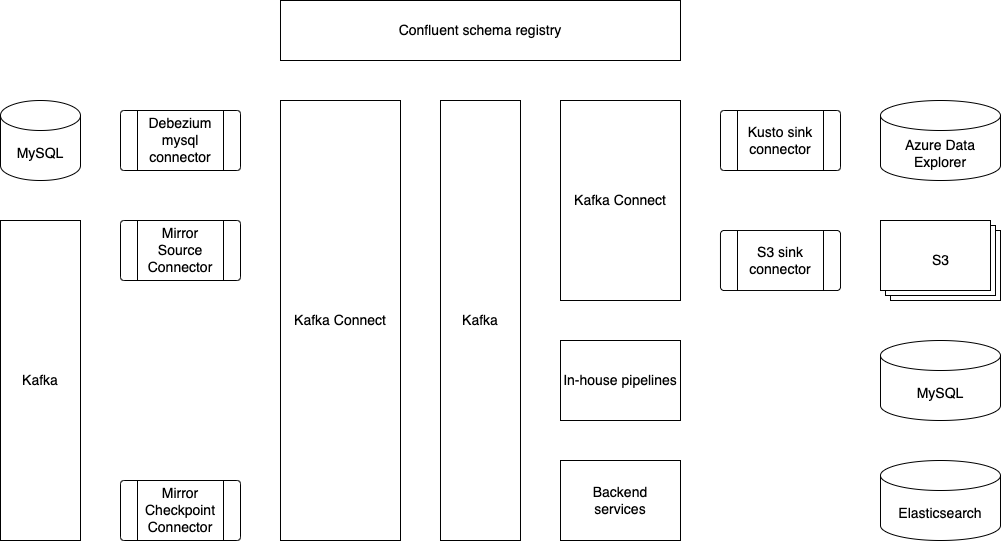
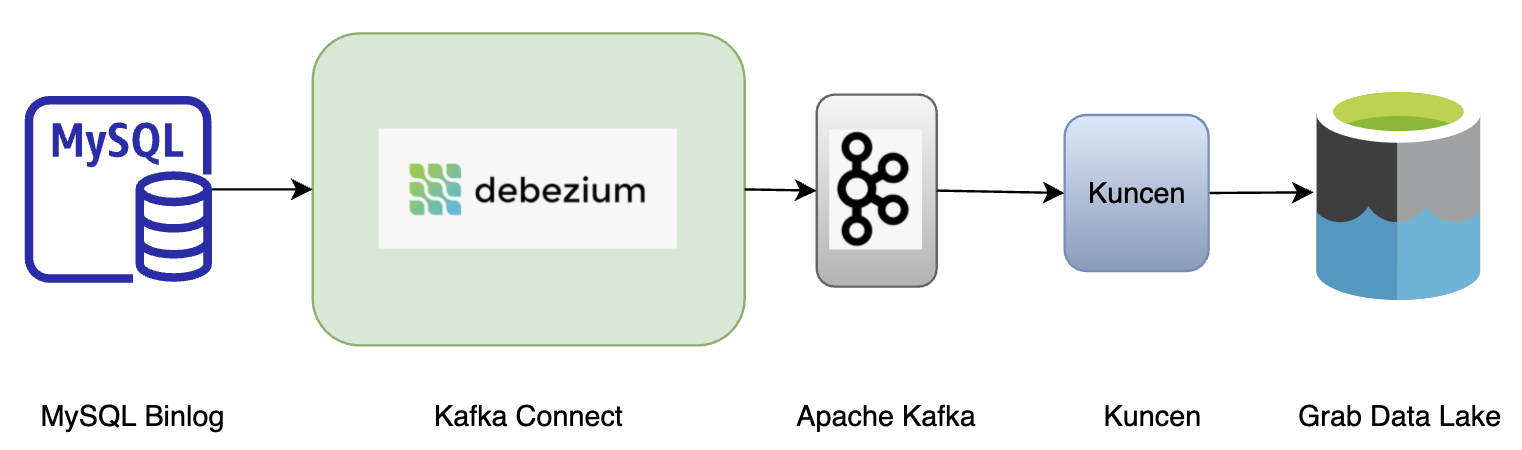
This is what Coban’s Kafka Connect stack looks like today. Multiple data sources and data sinks, such as MySQL, S3 and Azure Data Explorer, have already been supported and productionised.
The Coban team has been using Protobuf as the serialisation-deserialisation (SerDes) format in Kafka. Therefore, the role of Confluent schema registry (shown at the top of the figure) is crucial to the Kafka Connect ecosystem, as it serves as the building block for conversions such as Protobuf-to-Avro, Protobuf-to-JSON and Protobuf-to-Parquet.
What problems are we trying to solve?
Problem 1: Change Data Capture (CDC)
In a big organisation like Grab, we handle large volumes of data and changes across many services on a daily basis, so it is important for these changes to be reflected in real time.
In addition, there are other technical challenges to be addressed:
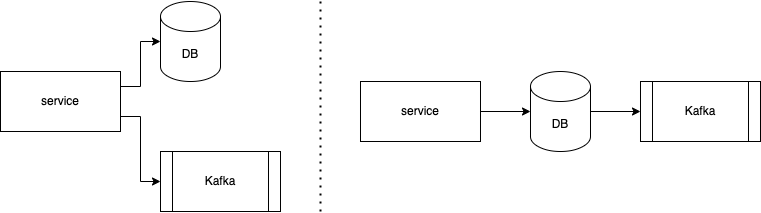
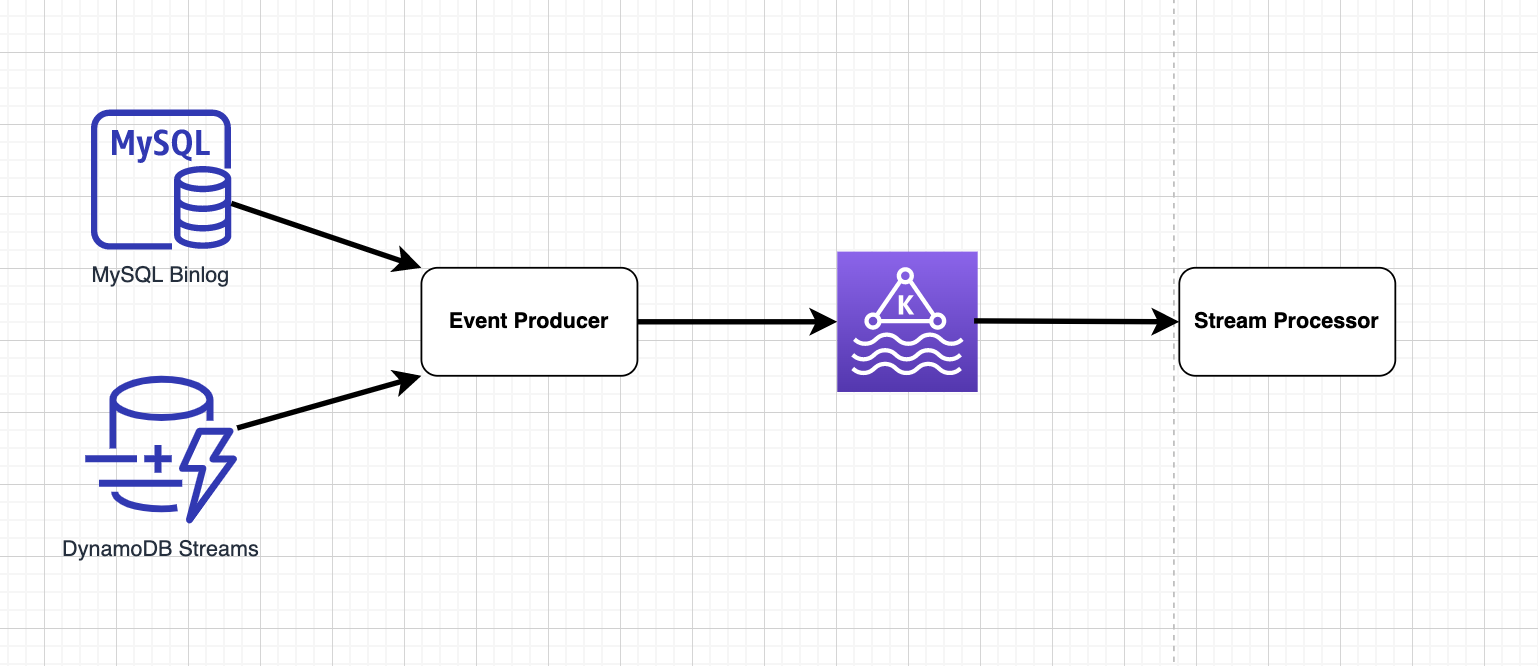
As shown in the figure below, data is written twice in the code base – once into the database (DB) and once as a message into Kafka. In order for the data in the DB and Kafka to be consistent, the two writes have to be atomic in a two-phase commit protocol (or other atomic commitment protocols), which is non-trivial and impacts availability.
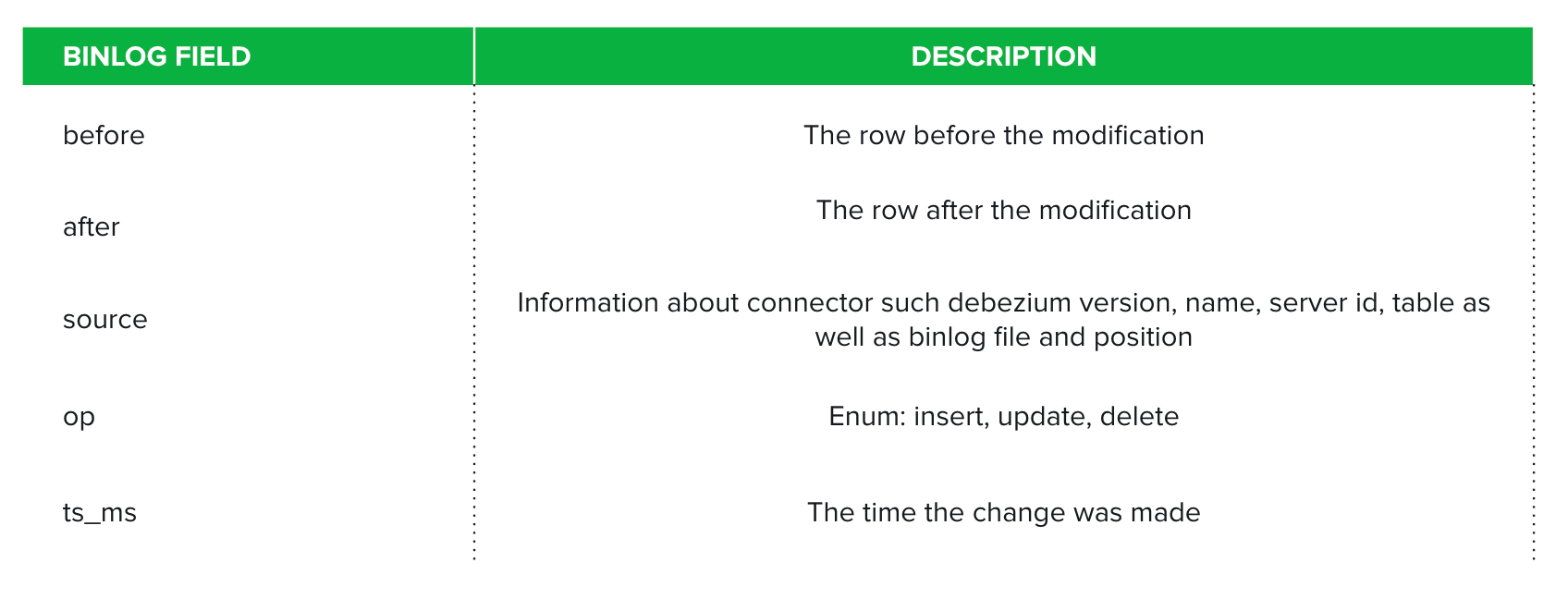
Some use cases require data both before and after a change.
Problem 2: Message mirroring for disaster recovery
The Coban team has done some research on Kafka MirrorMaker, an open-source solution. While it can ensure better data consistency, it takes significant effort to adopt it onto existing Kubernetes infrastructure hosted by the Coban team and achieve high availability.
Another major challenge that the Coban team faces is offset mirroring and translation, which is a known challenge in Kafka communities. In order for Kafka consumers to seamlessly resume their work with a backup Kafka after a disaster, we need to cater for offset translation.
Data ingestion into Azure Event Hubs
Azure Event Hubs has a Kafka-compatible interface and natively supports JSON and Avro schema. The Coban team uses Protobuf as the SerDes framework, which is not supported by Azure Event Hubs. It means that conversions have to be done for message ingestion into Azure Event Hubs.
Solution
To tackle these problems, the Coban team has picked Kafka Connect because:
It is an open-source framework with a relatively big community that we can consult if we run into issues.
It has the ability to plug in transformations and custom conversion logic.
Let us see how Kafka Connect can be used to resolve the previously mentioned problems.
Kafka Connect with Debezium connectors
Debezium is a framework built for capturing data changes on top of Apache Kafka and the Kafka Connect framework. It provides a series of connectors for various databases, such as MySQL, MongoDB and Cassandra.
Here are the benefits of MySQL binlog streams:
They not only provide changes on data, but also give snapshots of data before and after a specific change.
Some producers no longer have to push a message to Kafka after writing a row to a MySQL database. With Debezium connectors, services can choose not to deal with Kafka and only handle MySQL data stores.
Architecture
In case of DB upgrades and outages
DB Data Definition Language (DDL) changes, migrations, splits and outages are common in database operations, and each operation type has a systematic resolution.
The Debezium connector has built-in features to handle DDL changes made by DB migration tools, such as pt-online-schema-change, which is used by the Grab DB Ops team.
To deal with MySQL instance changes and database splits, the Coban team leverages on the Kafka Connect framework’s ability to change the offsets of connectors. By changing the offsets, Debezium connectors can properly function after DB migrations and resume binlog synchronisation from any position in any binlog file on a MySQL instance.
The CDC project on MySQL via Debezium connectors has been greatly successful in Grab. One of the biggest examples is its adoption in the Elasticsearch optimisation carried out by GrabFood, which has been published in another blog.
MirrorMaker2 with offset translation
Kafka MirrorMaker2 (MM2), developed in and shipped together with the Apache Kafka project, is a utility to mirror messages and consumer offsets. However, in the Coban team, the MM2 stack is deployed on the Kafka Connect framework per connector because:
A few Kafka Connect clusters have already been provisioned.
Compared to launching three connectors bundled in MM2, Coban can have finer controls on MirrorSourceConnector and MirrorCheckpointConnector, and manage both of them in an infrastructure-as-code way via Hashicorp Terraform.
Success stories
Ensuring business continuity is a key priority for Grab and this includes the ability to recover from incidents quickly. In 2021H2, there was a campaign that ran across many teams to examine the readiness and robustness of various services and middlewares. Coban’s Kafka is one of these services that proved to be robust after rounds of chaos engineering. With MM2 on Kafka Connect to mirror both messages and consumer offsets, critical services and pipelines could safely be replicated and launched across AWS regions if outages occur.
Because the Coban team has proven itself as the battle-tested Kafka service provider in Grab, other teams have also requested to migrate streams from self-managed Kafka clusters to ones managed by Coban. MM2 has been used in such migrations and brought zero downtime to the streams’ producers and consumers.
Mirror to Azure Event Hubs with an in-house converter
The Analytics team runs some real time ingestion and analytics projects on Azure. To support this cross-cloud use case, the Coban team has adopted MM2 for message mirroring to Azure Event Hubs.
Typically, Event Hubs only accept JSON and Avro bytes, which is incompatible with the existing SerDes framework. The Coban team has developed a custom converter that converts bytes serialised in Protobuf to JSON bytes at runtime.
These steps explain how the converter works:
Deserialise bytes in Kafka to a Protobuf DynamicMessage according to a schema retrieved from the Confluent™ schema registry.
Perform a recursive post-order depth-first-search on each field descriptor in the DynamicMessage.
Convert every Protobuf field descriptor to a JSON node.
Serialise the root JSON node to bytes.
The converter has not been open sourced yet.
Deployment
Docker containers are the Coban team’s preferred infrastructure, especially since some production Kafka clusters are already deployed on Kubernetes. The long-term goal is to provide Kafka in a software-as-a-service (SaaS) model, which is why Kubernetes was picked. The diagram below illustrates how Kafka Connect clusters are built and deployed.
What’s next?
The Coban team is iterating on a unified control plane to manage resources like Kafka topics, clusters and Kafka Connect. In the foreseeable future, internal users should be able to provision Kafka Connect connectors via RESTful APIs and a graphical user interface (GUI).
At the same time, the Coban team is closely working with the Data Engineering team to make Kafka Connect the preferred tool in Grab for moving data in and out of external storages (S3 and Apache Hudi).
Coban is hiring!
The Coban (Real-time Data Platform) team at Grab in Singapore is hiring software and site reliability engineers at all levels as we double down on growing our platform capabilities.
Join us in building state-of-the-art, mission critical, TB/hour scale data platforms that enable thousands of engineers, data scientists, and analysts to serve millions of consumers, businesses, and partners across Southeast Asia!
Join us
Grab is a leading superapp in Southeast Asia, providing everyday services that matter to consumers. More than just a ride-hailing and food delivery app, Grab offers a wide range of on-demand services in the region, including mobility, food, package and grocery delivery services, mobile payments, and financial services across over 400 cities in eight countries.
Powered by technology and driven by heart, our mission is to drive Southeast Asia forward by creating economic empowerment for everyone. If this mission speaks to you, join our team today!
At Grab, we run large marketing campaigns every day. A typical campaign may require executing multiple actions for millions of users all at once. The actions may include sending rewards, awarding points, and sending messages. Here is what a campaign may look like: On 1st Jan 2022, send two ride rewards to all the users in the “heavy users” segment. Then, send them a congratulatory message informing them about the reward.
Years ago, Grab’s marketing team used to stay awake at midnight to manually trigger such campaigns. They would upload a file at 12 am and then wait for a long time for the campaign execution to complete. To solve this pain point and support more capabilities down this line, we developed a “batch job” service, which is part of our in-house real-time automation engine, Trident.
The following are some services we use to support Grab’s marketing teams:
Rewards: responsible for managing rewards.
Messaging: responsible for sending messages to users. For example, push notifications.
Segmentation: responsible for storing and retrieving segments of users based on certain criteria.
For simplicity, only the services above will be referenced for this article. The “batch job” service we built uses rewards and messaging services for executing actions, and uses the segmentation service for fetching users in a segment.
System requirements
Functional requirements
Apply a sequence of actions targeting a large segment of users at a scheduled time, display progress to the campaign manager and provide a final report.
For each user, the actions must be executed in sequence; the latter action can only be executed if the preceding action is successful.
Non-functional requirements
Quick execution and high turnover rate.
Definition of turnover rate: the number of scheduled jobs completed per unit time.
Maximise resource utilisation and balance server load.
For the sake of brevity, we will not cover the scheduling logic, nor the generation of the report. We will focus specifically on executing actions.
Naive approach
Let’s start thinking from the most naive solution, and improve from there to reach an optimised solution.
Here is the pseudocode of a naive action executor.
def executeActionOnSegment(segment, actions):
   for user in fetchUsersInSegment(segment):
       for action in actions:
           success := doAction(user, action)
           if not success:
               break
           recordActionResult(user, action)

def doAction(user, action):
   if action.type == "awardReward":
       rewardService.awardReward(user, action.meta)
   elif action.type == "sendMessage":
       messagingService.sendMessage(user, action.meta)
   else:
       # other action types ...
One may be able to quickly tell that the naive solution does not satisfy our non-functional requirements for the following reasons:
Execution is slow:
The programme is single-threaded.
Actions are executed for users one by one in sequence.
Each call to the rewards and messaging services will incur network trip time, which impacts time cost.
Resource utilisation is low: The actions will only be executed on one server. When we have a cluster of servers, the other servers will sit idle.
Here are our alternatives for fixing the above issues:
Actions for different users should be executed in parallel.
API calls to other services should be minimised.
Distribute the work of executing actions evenly among different servers.
Note: Actions for the same user have to be executed in sequence. For example, if a sequence of required actions are (1) award a reward, (2) send a message informing the user to use the reward, then we can only execute action (2) after action (1) is successfully done for logical reasons and to avoid user confusion.
Our approach
A message queue is a well-suited solution to distribute work among multiple servers. We selected Kafka, among numerous message services, due to its following characteristics:
High throughput: Kafka can accept reads and writes at a very high speed.
Robustness: Events in Kafka are distributedly stored with redundancy, without a need to worry about data loss.
Pull-based consumption: Consumers can consume events at their own speed. This helps to avoid overloading our servers.
When a scheduled campaign is triggered, we retrieve the users from the segment in batches; each batch comprises around 100 users. We write the batches into a Kafka stream, and all our servers consume from the stream to execute the actions for the batches. The following diagram illustrates the overall flow.
Data in Kafka is stored in partitions. The partition configuration is important to ensure that the batches are evenly distributed among servers:
Number of partitions: Ensure that the number of stream partitions is greater than or equal to the max number of servers we will have in our cluster. This is because one Kafka partition can only be consumed by one consumer. If we have more consumers than partitions, some consumers will not receive any data.
Partition key: For each batch, assign a hash value as the partition key to randomly allocate batches into different partitions.
Now that work is distributed among servers in batches, we can consider how to process each batch faster. If we follow the naive logic, for each user in the batch, we need to call the rewards or messaging service to execute the actions. This will create very high QPS (queries per second) to those services, and incur significant network round trip time.
To solve this issue, we decided to build batch endpoints in rewards and messaging services. Each batch endpoint takes in a list of user IDs and action metadata as input parameters, and returns the action result for each user, regardless of success or failure. With that, our batch processing logic looks like the following:
In the implementation of batch endpoints, we also made optimisations to reduce latency. For example, when awarding rewards, we need to write the records of a reward being given to a user in multiple database tables. If we make separate DB queries for each user in the batch, it will cause high QPS to DB and incur high network time cost. Therefore, we grouped all the users in the batch into one DB query for each table update instead.
Benchmark tests show that using the batch DB query reduced API latency by up to 85%.
Further optimisations
As more campaigns started running in the system, we came across various bottlenecks. Here are the optimisations we implemented for some major examples.
Shard stream by action type
Two widely used actions are awarding rewards and sending messages to users. We came across situations where the sending of messages was blocked because a different campaign of awarding rewards had already started. If millions of users were targeted for rewards, this could result in significant waiting time before messages are sent, ultimately leading them to become irrelevant.
We found out the API latency of awarding rewards is significantly higher than sending messages. Hence, to make sure messages are not blocked by long-running awarding jobs, we created a dedicated Kafka topic for messages. By having different Kafka topics based on the action type, we were able to run different types of campaigns in parallel.
Shard stream by country
Grab operates in multiple countries. We came across situations where a campaign of awarding rewards to a small segment of users in one country was delayed by another campaign that targeted a huge segment of users in another country. The campaigns targeting a small set of users are usually more time-sensitive.
Similar to the above solution, we added different Kafka topics for each country to enable the processing of campaigns in different countries in parallel.
Remove unnecessary waiting
We observed that in the case of chained actions, messaging actions are generally the last action in the action list. For example, after awarding a reward, a congratulatory message would be sent to the user.
We realised that it was not necessary to wait for a sending message action to complete before processing the next batch of users. Moreover, the latency of the sending messages API is lower than awarding rewards. Hence, we adjusted the sending messages API to be asynchronous, so that the task of awarding rewards to the next batch of users can start while messages are being sent to the previous batch.
Conclusion
We have architected our batch jobs system in such a way so that it can be enhanced and optimised without redoing its work. For example, although we currently obtain the list of targeted users from a segmentation service, in the future, we may obtain this list from a different source, for example, all Grab Platinum tier members.
Join us
Grab is a leading superapp in Southeast Asia, providing everyday services that matter to consumers. More than just a ride-hailing and food delivery app, Grab offers a wide range of on-demand services in the region, including mobility, food, package and grocery delivery services, mobile payments, and financial services across over 400 cities in eight countries.
Powered by technology and driven by heart, our mission is to drive Southeast Asia forward by creating economic empowerment for everyone. If this mission speaks to you, join our team today!
There are many ways to evaluate an engineering candidate’s skills. One way is to ask them to solve a problem or write some code. We have been striving for a while to make this experience better at GitHub. This blog post talks about how candidates at GitHub do the “take home” portion of their interview—a technical challenge done independently—and how we improved on that process.
We believe the technical interview should be as similar as possible to the way we work at GitHub. That means:
Writing code on GitHub and submitting a pull request.
Using your preferred editor, operating system, and tools.
Using the internet for documentation and help.
Respecting time limits.
In order to make this process seamless for candidates, we automate with a GitHub app called Interview-bot. This app uses the GitHub API and existing GitHub features.
First, candidates get to choose the programming language they’ll use to take the interview. They’ll get an email asking them to take the interview at their convenience by signing into Interview-bot.
Each interview is aimed at being similar to the day-to-day problems that we solve at GitHub. These aren’t problems to trick or test obscure knowledge. Interviews come with a clear set of instructions and a time limit. We place this time limit because we respect your time and want to ensure that we don’t bias toward candidates who have more time to invest in the solution.
The exercise is contained in a repository in a separate organization on GitHub. When the candidate signs in, we make a new repository, grab a copy of the exercise and copy the files, issues, and pull requests into the repository. This is done as a copy and not a fork or clone because we can alter the files in the process to fix things up. It also allows us to remove any Git history that might hide embarrassing clues on how to complete the exercise.
The candidate is given access to the repository, and a timer starts. They can now clone the exercise to their local machine, or use GitHub Codespaces. They are able to use whatever editor, tooling, and operating system they want. Again, we hope to make this as close as possible to how the candidate will be working in a day to day environment at GitHub.
When the candidate is satisfied with their pull request, they can submit it for review. The application will listen for the pull request via webhooks and will confirm that the pull request has been submitted.
At this point, we anonymize the pull request and copy it back to the base repository.
The pull request contains the code changes and comments from the candidate. To further reduce bias, the system anonymizes the submission (as best as it can) by removing the title. The Git commits and pull request will display Interview-bot as the author. To the reviewer, the pull request comes from Interview-bot and not the candidate.
The pull request includes automated tests and a rubric so that interviewers know how to mark it and each submission is evaluated objectively and consistently. The tests run through GitHub Actions and provide a base level for the reviewer.
For each language, we’ve got teams of engineers who review the exercise. Using GitHub’s code review team feature, an engineer at GitHub is assigned to review the code. To mark the code, we provide a clear scorecard on the pull request as a comment. This clear set of marking criteria helps limit any personal bias the interviewer might have. They’ll mark the review based on given technical criteria and apply an “Approve” or “Request changes” status to give the candidate a pass or fail, respectively.
Finally, Interview-bot tracks for changes on the pull request review and then informs the assigned staff member so they can follow up with the candidate, who hopefully moves on to the next stage of the GitHub interview process. At the start of the interview process, Interview-bot associates each candidate with an issue in an internal repository. This means that staff can track candidates and their progress all within GitHub.
Using the existing GitHub APIs and tooling, we created an interview process that mirrors as closely as possible how you’ll work at GitHub, focused on reducing bias and improving the candidate’s experience.
If you’re interested in applying at GitHub, please check out our careers page!
Telematics is a collection of sensor data such as accelerometer data, gyroscope data, and GPS data that a driver’s mobile phone provides, and we collect, during the ride. With this information, we apply data science logic to detect traffic events such as harsh braking, acceleration, cornering, and unsafe lane changes, in order to help improve our consumers’ ride experience.
Introduction
As Grab grows to meet our consumers’ needs, the number of driver-partners has also grown. This requires us to ensure that our consumers’ safety continues to remain the highest priority as we scale. We developed an in-house telematics engine which uses mobile phone sensors to determine, evaluate, and quantify the driving behaviour of our driver-partners. This telemetry data is then evaluated and gives us better insights into our driver-partners’ driving patterns.
Through our data, we hope to improve our driver-partners’ driving habits and reduce the likelihood of driving-related incidents on our platform. This telemetry data also helps us determine optimal insurance premiums for driver-partners with risky driving patterns and reward driver-partners who have better driving habits.
In addition, we also merge telematics data with spatial data to further identify areas where dangerous driving manoeuvres happen frequently. This data is used to inform our driver-partners to be alert and drive more safely in such areas.
Background
With more consumers using the Grab app, we realised that purely relying on passenger feedback is not enough; we had no definitive way to tell which driver-partners were actually driving safely, when they deviated from their routes or even if they had been involved in an accident.
To help address these issues, we developed an in-house telematics engine that analyses telemetry data, identifies driver-partners’ driving behaviour and habits, and provides safety reports for them.
Architecture details
As shown in the diagram, our telematics SDK receives raw sensor data from our driver-partners’ devices and processes it in two ways:
On-device processing for crash detection: Used to determine situations such as if the driver-partner has been in an accident.
Raising traffic events and generating safety reports after each job: Useful for detecting events like speeding and harsh braking.
Note: Safety reports are generated by our backend service using sensor data that is only uploaded as a text file after each ride.
Implementation
Our telematics framework relies on accelerometer, gyroscope and GPS sensors within the mobile device to infer the vehicle’s driving parameters. Both accelerometer and gyroscope are triaxial sensors, and their respective measurements are in the mobile device’s frame of reference.
That being said, the data collected from these sensors have no fixed sample rate, so we need to implement sensor data time synchronisation. For example, there will be temporal misalignment between gyroscope and accelerometer data if they do not share the same timestamp. The sample rate that comes from the accelerometer and gyroscope also varies independently. Therefore, we need to uniformly sample the sensor data to be at the same frequency rate.
This synchronisation process is done in two steps:
Interpolation to uniform time grid at a reasonably higher frequency.
Decimation from the higher frequency to the output data rate for accelerometer and gyroscope data.
We then use the Fourier Transform to transform a signal from time domain to frequency domain for compression. These components are then written to a text file on the mobile device, compressed, and uploaded after the end of each ride.
Learnings/Conclusion
There are a few takeaways that we learned from this project:
Sensor data frequency: There are many device manufacturers out there for Android and each one of them has a different sensor chipset. The frequency of the sensor data may vary from device to device.
Four-wheel (4W) vs two-wheel (2W): The behaviour is different for a driver-partner on 2W vs 4W, so we need different rules for each.
Hardware axis-bias: The device may not be aligned with the vehicle during the ride. It cannot be assumed that the phone will remain in a fixed orientation throughout the trip, so the mobile device sensors might not accurately measure the acceleration/braking or sharp turning of the vehicle.
Sensor noise: There are artifacts in sensor readings, which are basically a single outlier event that represents an error and is not a valid sensor reading.
Time-synchronisation: GPS, accelerometer, and gyroscope events are captured independently by three different sensors and have different time formats. These events will need to be transformed into the same time grid in order to work together. For example, the GPS location from 30 seconds prior to the gyroscope event will not work as they are out of sync.
Data compression and network consumption: Longer rides will contain more telematics data. It will result in a bigger upload size and increase in time for file compression.
What’s next?
There are a few milestones that we want to accomplish with our telematics framework in the future. However, our number one goal is to extend telematics to all bookings across Grab verticals. We are also planning to add more on-device rules and data processing for event detections to further eliminate future delays from backend communication for crash detection.
With the data from our telematics framework, we can improve our passengers’ experience and improve safety for both passengers and driver-partners.
Join us
Grab is a leading superapp in Southeast Asia, providing everyday services that matter to consumers. More than just a ride-hailing and food delivery app, Grab offers a wide range of on-demand services in the region, including mobility, food, package and grocery delivery services, mobile payments, and financial services across over 400 cities in eight countries.
Powered by technology and driven by heart, our mission is to drive Southeast Asia forward by creating economic empowerment for everyone. If this mission speaks to you, join our team today!
Over the past few weeks, we have experienced multiple incidents due to the health of our database, which resulted in degraded service of our platform. We know this impacts many of our customers’ productivity and we take that very seriously. We wanted to share with you what we know about these incidents while our team continues to address these issues.
The underlying theme of our issues over the past few weeks has been due to resource contention in our mysql1 cluster, which impacted the performance of a large number of our services and features during periods of peak load. Over the past several years, we’ve shared how we’ve been partitioning our main database in addition to adding clusters to support our growth, but we are still actively working on this problem today. We will share more in our next Availability Report, but I’d like to be transparent and share what we know now.
Timeline
March 16 14:09 UTC (lasting 5 hours and 36 minutes)
At this time, GitHub saw an increased load during peak hours on our mysql1 database, causing our database proxying technology to reach its maximum number of connections. This particular database is shared by multiple services and receives heavy read/write traffic. All write operations were unable to function during this outage, including git operations, webhooks, pull requests, API requests, issues, GitHub Packages, GitHub Codespaces, GitHub Actions, and GitHub Pages services.
The incident appeared to be related to peak load combined with poor query performance for specific sets of circumstances. Our MySQL clusters use a classic primary-replica set up for high-availability where a single node primary is able to accept writes, while the rest of the cluster consists of replica nodes that serve read traffic. We were able to recover by failing over to a healthy replica and started investigations into traffic patterns at peak load related to query performance during these times.
March 17 13:46 UTC (lasting 2 hours and 28 minutes)
The following day, we saw the same peak traffic pattern and load on mysql1. We were not able to pinpoint and address the query performance issues before this peak, and we decided to proactively failover before the issue escalated. Unfortunately, this caused a new load pattern that introduced connectivity issues on the new failed-over primary, and applications were once again unable to connect to mysql1 while we worked to reset these connections. We were able to identify the load pattern during this incident and subsequently implemented an index to fix the main performance problem.
March 22 15:53 UTC (lasting 2 hours and 53 minutes)
While we had reduced load seen in the previous incidents, we were not fully confident in the mitigations. We wanted to do more to analyze performance on this database to prevent future load patterns or performance issues. In this third incident, we enabled memory profiling on our database proxy in order to look more closely at the performance characteristics during peak load. At the same time, client connections to mysql1 started to fail, and we needed to again perform a primary failover in order to recover.
March 23 14:49 UTC (lasting 2 hours and 51 minutes)
We again saw a recurrence of load characteristics that caused client connections to fail and again performed a primary failover in order to recover. In order to reduce load, we throttled webhook traffic and will continue to use that as a mitigation to prevent future recurrence during peak load times as we continue to investigate further mitigations.
Next steps
In order to prevent these types of incidents from occurring in the future, we have started an audit of load patterns for this particular database during peak hours and a series of performance fixes based on these audits. As part of this, we are moving traffic to other databases in order to reduce load and speed up failover time, as well as reviewing our change management procedures, particularly as it relates to monitoring and changes during high load in production. As the platform continues to grow, we have been working to scale up our infrastructure including sharding our databases and scaling hardware.
In summary
We sincerely apologize for the negative impacts these disruptions have caused. We understand the impact these types of outages have on customers who rely on us to get their work done every day and are committed to efforts ensuring we can gracefully handle disruption and minimize downtime. We look forward to sharing additional information as part of our March Availability Report in the next few weeks.
Typically, modern applications use various database engines for their service needs; within Grab, these would be MySQL, Aurora and DynamoDB. Lately, the Caspian team has observed an increasing need to consume real-time data for many service teams. These real-time changes in database records help to support online and offline business decisions for hundreds of teams.
Because of that, we have invested time into synchronising data from MySQL, Aurora and Dynamodb to the message queue, i.e. Kafka. In this blog, we share how real-time data ingestion has helped since it was launched.
Introduction
Over the last few years, service teams had to write all transactional data twice: once into Kafka and once into the database. This helped to solve the inter-service communication challenges and obtain audit trail logs. However, if the transactions fail, data integrity becomes a prominent issue. Moreover, it is a daunting task for developers to maintain the schema of data written into Kafka.
With real-time ingestion, there is a notably better schema evolution and guaranteed data consistency; service teams no longer need to write data twice.
You might be wondering, why don’t we have a single transaction that spans the services’ databases and Kafka, to make data consistent? This would not work as Kafka does not support being enlisted in distributed transactions. In some situations, we might end up having new data persisting into the services’ databases, but not having the corresponding message sent to Kafka topics.
Instead of registering or modifying the mapped table schema in Golang writer into Kafka beforehand, service teams tend to avoid such schema maintenance tasks entirely. In such cases, real-time ingestion can be adopted where data exchange among the heterogeneous databases or replication between source and replica nodes is required.
While reviewing the key challenges around real-time data ingestion, we realised that there were many potential user requirements to include. To build a standardised solution, we identified several points that we felt were high priority:
Make transactional data readily available in real time to drive business decisions at scale.
Capture audit trails of any given database.
Get rid of the burst read on databases caused by SQL-based query ingestion.
To empower Grabbers with real-time data to drive their business decisions, we decided to take a scalable event-driven approach, which is being facilitated with a bunch of internal products, and designed a solution for real-time ingestion.
Anatomy of architecture
The solution for real-time ingestion has several key components:
Stream data storage
Event producer
Message queue
Stream processor
Figure 1. Real time ingestion architecture
Stream storage
Stream storage acts as a repository that stores the data transactions in order with exactly-once guarantee. However, the level of order in stream storage differs with regards to different databases.
For MySQL or Aurora, transaction data is stored in binlog files in sequence and rotated, thus ensuring global order. Data with global order assures that all MySQL records are ordered and reflects the real life situation. For example, when transaction logs are replayed or consumed by downstream consumers, consumer A’s Grab food order at 12:01:44 pm will always appear before consumer B’s order at 12:01:45 pm.
However, this does not necessarily hold true for DynamoDB stream storage as DynamoDB streams are partitioned. Audit trails of a given record show that they go into the same partition in the same order, ensuring consistent partitioned order. Thus when replay happens, consumer B’s order might appear before consumer A’s.
Moreover, there are multiple formats to choose from for both MySQL binlog and DynamoDB stream records. We eventually set ROW for binlog formats and NEW_AND_OLD_IMAGES for DynamoDB stream records. This depicts the detailed information before and after modifying any given table record. The binlog and DynamoDB stream main fields are tabulated in Figures 2 and 3 respectively.
Figure 2. Binlog record schema
Figure 3. DynamoDB stream record schema
Event producer
Event producers take in binlog messages or stream records and output to the message queue. We evaluated several technologies for the different database engines.
For MySQL or Aurora, three solutions were evaluated: Debezium, Maxwell, and Canal. We chose to onboard Debezium as it is deeply integrated with the Kafka Connect framework. Also, we see the potential of extending solutions among other external systems whenever moving large collections of data in and out of the Kafka cluster.
One such example is the open source project that attempts to build a custom DynamoDB connector extending the Kafka Connect (KC) framework. It self manages checkpointing via an additional DynamoDB table and can be deployed on KC smoothly.
However, the DynamoDB connector fails to exploit the fundamental nature of storage DynamoDB streams: dynamic partitioning and auto-scaling based on the traffic. Instead, it spawns only a single thread task to process all shards of a given DynamoDB table. As a result, downstream services suffer from data latency the most when write traffic surges.
In light of this, the lambda function becomes the most suitable candidate as the event producer. Not only does the concurrency of lambda functions scale in and out based on actual traffic, but the trigger frequency is also adjustable at your discretion.
Kafka
This is the distributed data store optimised for ingesting and processing data in real time. It is widely adopted due to its high scalability, fault-tolerance, and parallelism. The messages in Kafka are abstracted and encoded into Protobuf.
Stream processor
The stream processor consumes messages in Kafka and writes into S3 every minute. There are a number of options readily available in the market; Spark and Flink are the most common choices. Within Grab, we deploy a Golang library to deal with the traffic.
Use cases
Now that we’ve covered how real-time data ingestion is done in Grab, let’s look at some of the situations that could benefit from real-time data ingestion.
1. Data pipelines
We have thousands of pipelines running hourly in Grab. Some tables have significant growth and generate workload beyond what a SQL-based query can handle. An hourly data pipeline would incur a read spike on the production database shared among various services, draining CPU and memory resources. This deteriorates other services’ performance and could even block them from reading. With real-time ingestion, the query from data pipelines would be incremental and span over a period of time.
Another scenario where we switch to real-time ingestion is when a missing index is detected on the table. To speed up the query, SQL-based query ingestion requires indexing on columns such as created_at, updated_at and id. Without indexing, SQL based query ingestion would either result in high CPU and memory usage, or fail entirely.
Although adding indexes for these columns would resolve this issue, it comes with a cost, i.e. a copy of the indexed column and primary key is created on disk and the index is kept in memory. Creating and maintaining an index on a huge table is much costlier than for small tables. With performance consideration in mind, it is not recommended to add indexes to an existing huge table.
Instead, real-time ingestion overshadows SQL-based ingestion. We can spawn a new connector, archiver (Coban team’s Golang library that dumps data from Kafka at minutes-level frequency) and compaction job to bubble up the table record from binlog to the destination table in the Grab data lake.
Figure 4. Using real-time ingestion for data pipelines
2. Drive business decisions
A key use case of enabling real-time ingestion is driving business decisions at scale without even touching the source services. Saga pattern is commonly adopted in the microservice world. Each service has its own database, splitting an overarching database transaction into a series of multiple database transactions. Communication is established among services via message queue i.e. Kafka.
In an earlier tech blog published by the Grab Search team, we talked about how real-time ingestion with Debezium optimised and boosted search capabilities. Each MySQL table is mapped to a Kafka topic and one or multiple topics build up a search index within Elasticsearch.
With this new approach, there is no data loss, i.e. changes via MySQL command line tool or other DB management tools can be captured. Schema evolution is also naturally supported; the new schema defined within a MySQL table is inherited and stored in Kafka. No producer code change is required to make the schema consistent with that in MySQL. Moreover, the database read has been reduced by 90 percent including the efforts of the Data Synchronisation Platform.
Figure 5. Grab Search team use case
The GrabFood team exemplifies mostly similar advantages in the DynamoDB area. The only differences compared to MySQL are that the frequency of the lambda functions is adjustable and parallelism is auto-scaled based on the traffic. By auto-scaling, we mean that more lambda functions will be auto-deployed to cater to a sudden spike in traffic, or destroyed as the traffic falls.
Figure 6. Grab Food team use case
3. Database replication
Another use case we did not originally have in mind is incremental data replication for disaster recovery. Within Grab, we enable DynamoDB streams for tier 0 and critical DynamoDB tables. Any insert, delete, modify operations would be propagated to the disaster recovery table in another availability zone.
When migrating or replicating databases, we use the strangler fig pattern, which offers an incremental, reliable process for migrating databases. This is a method whereby a new system slowly grows on top of an old system and is gradually adopted until the old system is “strangled” and can simply be removed. Figure 7 depicts how DynamoDB streams drive real-time synchronisation between tables in different regions.
Figure 7. Data replication among DynamoDB tables across different regions in DBOps team
4. Deliver audit trails
Reasons for maintaining data audit trails are manifold in Grab: regulatory requirements might mandate businesses to keep complete historical information of a consumer or to apply machine learning techniques to detect fraudulent transactions made by consumers. Figure 8 demonstrates how we deliver audit trails in Grab.
Figure 8. Deliver audit trails in Grab
Summary
Real time ingestion is playing a pivotal role in Grab’s ecosystem. It:
boosts data pipelines with less read pressure imposed on databases shared among various services;
empowers real-time business decisions with assured resource efficiency;
provides data replication among tables residing in various regions; and
delivers audit trails that either keep complete history or help unearth fraudulent operations.
Since this project launched, we have made crucial enhancements to facilitate daily operations with several in-house products that are used for data onboarding, quality checking, maintaining freshness, etc.
We will continuously improve our platform to provide users with a seamless experience in data ingestion, starting with unifying our internal tools. Apart from providing a unified platform, we will also contribute more ideas to the ingestion, extending it to Azure and GCP, supporting multi-catalogue and offering multi-tenancy.
In our next blog, we will drill down to other interesting features of real-time ingestion, such as how ordering is achieved in different cases and custom partitioning in real-time ingestion. Stay tuned!
Join us
Grab is a leading superapp in Southeast Asia, providing everyday services that matter to consumers. More than just a ride-hailing and food delivery app, Grab offers a wide range of on-demand services in the region, including mobility, food, package and grocery delivery services, mobile payments, and financial services across over 400 cities in eight countries.
Powered by technology and driven by heart, our mission is to drive Southeast Asia forward by creating economic empowerment for everyone. If this mission speaks to you, join our team today!
In February, we experienced one incident resulting in significant impact and degraded state of availability for GitHub.com, issues, pull requests, GitHub Actions, and GitHub Codespaces services.
February 2 19:05 UTC (lasting 13 minutes)
As mentioned in our January report, our service monitors detected a high rate of errors affecting a number of GitHub services.
Upon further investigation of this incident, we found that a routine deployment failed to generate the complete set of integrity hashes needed for Subresource Integrity. The resulting output was missing values needed to securely serve Javascript assets on GitHub.com.
As a safety protocol, our default behavior is to error rather than rendering script tags without integrities, if a hash cannot be found in the integrities file. In this case, that means that github.com started serving 500 error pages to all web users. As soon as the errors were detected, we rolled back to the previous deployment and resolved the incident. Throughout the incident, only browser-based access to GitHub.com was impacted, with API and Git access remaining healthy.
Since this incident, we have added additional checks to our build process to ensure that the integrities are accurate and complete. We’ve also added checks for our main Javascript resources to the health check for our deployment containers, and adjusted the build pipeline to ensure the integrity generation process is more robust and will not fail in a similar way in the future.
In summary
Every month, we share an update on GitHub’s availability, including a description of any incidents that may have occurred and an update on how we are evolving our engineering systems and practices in response. Whether in these reports or via our engineering blog, we look forward to keeping you updated on the progress and investments we’re making to ensure the reliability of our services.
You can also follow our status page for the latest on our availability.
Earlier in 2021 we published an article on Trident, Grab’s in-house real-time if this, then that (IFTTT) engine which manages campaigns for the Grab Loyalty Programme. The Grab Loyalty Programme encourages consumers to make Grab transactions by rewarding points when transactions are made. Grab rewards two types of points namely OVOPoints and GrabRewards Points (GRP). OVOPoints are issued for transactions made in Indonesia and GRP are for the transactions that are made in all other markets. In this article, the term GRP will be used to refer to both OVOPoints and GrabRewards Points.
Rewarding GRP is one of the main components of the Grab Loyalty Programme. By rewarding GRP, our consumers are incentivised to transact within the Grab ecosystem. Consumers can then redeem their GRP for a range of exciting items on the GrabRewards catalogue or to offset the cost of their spendings.
As we continue to grow our consumer base and our product offerings, a more robust platform is needed to ensure successful points transactions. In this post, we will share the challenges in rewarding GRP and how Abacus, our Point Issuance platform helps to overcome these challenges while managing various use cases.
Challenges
Growing number of products
The number of Grab’s product offerings has grown as part of Grab’s goal in becoming a superapp. The demand for rewarding GRP increased as each product team looked for ways to retain consumer loyalty. For this, we needed a platform which could support the different requirements from each product team.
External partnerships
Grab’s external partnerships consist of both one- and two-way point exchanges. With selected partners, Grab users are able to convert their GRP for the partner’s loyalty programme points, and the other way around.
Use cases
Besides the need to cater for the growing number of products and external partnerships, Grab needed a centralised points management system which could cater to various use cases of points rewarding. Let’s take a look at the use cases.
Any product, any points
There are many products in Grab and each product should be able to reward different GRP for different scenarios. Each product rewards GRP based on the goal they are trying to achieve.
The following examples illustrate the different scenarios:
GrabCar: Reward 100 GRP for when a driver cancels a booking as a form of compensation or to reward GRP for every ride a consumer makes.
GrabFood: Reward consumers for each meal order.
GrabPay: Reward consumers three times the number of GRP for using GrabPay instead of cash as the mode of payment.
More points for loyal consumers
Another use case is to reward loyal consumers with more points. This incentivises consumers to transact within the Grab ecosystem. One example are membership tiers granted based on the number of GRP a consumer has accumulated. There are four membership tiers: Member, Silver, Gold and Platinum.
Point multiplier
There are different points multipliers for different membership tiers. For example, a Gold member would earn 2.25 GRP for every dollar spent while a Silver member earns only 1.5 GRP for the same amount spent. A consumer can view their membership tier and GRP information from the account page on the Grab app.
GrabRewards Points and membership tier information
Growing number of transactions
Teams within Grab and external partners use GRP in their business. There is a need for a platform that can process millions of transactions every day with high availability rates. Errors can easily impact the issuance of points which may affect our consumers’ trust.
Our solution – Abacus
To overcome the challenges and cater for various use cases, we developed a Points Management System known as Abacus. It offers an interface for external partners with the capability to handle millions of daily transactions without significant downtime.
Points rewarding
There are seven main components of Abacus as shown in the following architectural diagram. Details of each component are explained in this section.
Abacus architecture
Transaction input source
The points rewarding process begins when a transaction is complete. Abacus listens to streams for completed transactions on the Grab platform. Each transaction that abacus receives in the stream carries the data required to calculate the GRP to be rewarded such as country ID, product ID, and payment ID etc.
Apart from computing the number of GRP to be rewarded for a transaction and then rewarding the points, Abacus also allows clients from within the Grab platform and outside of the Grab platform to make an API call to reward GRP to consumers. The client who wants to reward their consumers with GRP will call Abacus with either a specific point value (for example 100 points) or will provide the necessary details like transaction amount and the relevant multipliers for Abacus to compute the points and then reward them.
Point Calculation module
The Point Calculation module calculates the GRP using the data and multipliers that are unique to each transaction.
Point Calculation dependencies for internal services
Point Calculation dependencies are the multipliers needed to calculate the number of points. The Point Calculation module fetches the correct point multipliers for each transaction. The multipliers are configured by specific country teams when the product is launched. They may vary by country to allow country teams the flexibility to achieve their growth and retention targets. There are different types of multipliers.
Vertical multiplier: The multiplier for each vertical. A vertical is a service or product offered by Grab. Examples of verticals are GrabCar and GrabFood. The multiplier can be different for each vertical.
EPPF multiplier: The effective price per fare multiplier. EPPF is the reference conversion rate per point. For example:
EPPF = 1.0; if you are issuing X points per SGD1
EPPF = 0.1; if you are issuing X points per THB10
EPPF = 0.0001; if you are issuing X points per IDR10,000
Payment Type multiplier: The multiplier for different modes of payments.
Tier multiplier: The multiplier for each tier.
Point Calculation formula for internal clients
The Point Calculation module uses a formula to calculate GRP. The formula is the product of all the multipliers and the transaction amount.
Example of multipliers for payment options and tiers
Point Calculation dependencies for external clients
External partners supply the Point Calculation dependencies which are then configured in our backend at the time of integration. These external partners can set their own multipliers instead of using the above mentioned multipliers which are specific to Grab. This document details the APIs which are used to award points for external clients.
Simple Queue Service
Abacus uses Amazon Simple Queue Service (SQS) to ensure that the points system process is robust and fault tolerant.
Point Awarding SQS
If there are no errors during the Point Calculation process, the Point Calculation module will send a message containing the points to be awarded to the Point Awarding SQS.
Retry SQS
The Point Calculation module may not receive the required data when there is a downtime in the Point Calculation dependencies. If this occurs, an error is triggered and the Point Calculation module will send a message to Retry SQS. Messages sent to the Retry SQS will be re-processed by the Point Calculation module. This ensures that the points are properly calculated despite having outages on dependencies. Every message that we push to either the Point Awarding SQS or Retry SQS will have a field called Idempotency key which is used to ensure that we reward the points only once to a particular transaction.
Point Awarding module
The successful calculation of GRP triggers a message to the Point Awarding module via the Point SQS. The Point Awarding module tries to reward GRP to the consumer’s account. Upon successful completion, an ACK is sent back to the Point SQS signalling that the message was successfully processed and triggers deletion of the message. If Point SQS does not receive an ACK, the message is redelivered after an interval. This process ensures that the points system is robust and fault tolerant.
Ledger
GRP is rewarded to the consumer once it is updated in the Ledger. The Ledger tracks how many GRP a consumer has accumulated, what they were earned for, and the running total number of GRP.
Notification service
Once the Ledger is updated, the Notification service sends the consumer a message about the GRP they receive.
Point Kafka stream
For all successful GRP transactions, Abacus sends a message to the Point Kafka stream. Downstream services listen to this stream to identify the consumer’s behaviour and take the appropriate actions. Services of this stream can listen to events they are interested in and execute their business logic accordingly. For example, a service can use the information from the Point Kafka stream to determine a consumer’s membership tier.
Points expiry
Further addition to Abacus is the handling of points expiry. The Expiry Extension module enables activity-based points expiry. This enables GRP to not expire as long as the consumer makes one Grab transaction within the next three or six months from their last transaction.
The Expiry Extension module updates the point expiry date to the database after successfully rewarding GRP to the consumer. At the end of each month, a process loads all consumers whose points will expire in that particular month and sends it to the Point Expiry SQS. The Point Expiry Consumer will then expire all the points for the consumers and this data is updated in the Ledger. This process repeats on a monthly basis.
Expiry Extension module
Points expiry date is always the last day of the third or sixth month. For example, Adam makes a transaction on 10 January. His points expiry date is 31 July which is six months from the month of his last transaction. Adam then makes a transaction on 28 February. His points expiry period is shifted by one month to 31 August.
Points expiry
Conclusion
The Abacus platform enables us to perform millions of GRP transactions on a daily basis. Being able to curate rewards for consumers increases the value proposition of our products and consumer retention. If you have any comments or questions about Abacus, feel free to leave a comment below.
Special thanks to Arianto Wibowo and Vaughn Friesen.
Join us
Grab is a leading superapp in Southeast Asia, providing everyday services that matter to consumers. More than just a ride-hailing and food delivery app, Grab offers a wide range of on-demand services in the region, including mobility, food, package and grocery delivery services, mobile payments, and financial services across over 400 cities in eight countries.
Powered by technology and driven by heart, our mission is to drive Southeast Asia forward by creating economic empowerment for everyone. If this mission speaks to you, join our team today!
Today, the ability to prebuild codespaces is entering public beta. Prebuilding a codespace enables fast environment creation times, regardless of the size or complexity of your repositories. A prebuilt codespace will serve as a “ready-to-go” template where your source code, editor extensions, project dependencies, commands, and configurations have already been downloaded, installed, and applied so that you don’t have to wait for these tasks to finish each time you create a new codespace.
Getting to public beta
Our primary goal with Codespaces is to provide a one-click onboarding solution that enables developers to get started on a project quickly without performing any manual setup. However, because a codespace needs to clone your repository and (optionally) build a custom Dockerfile, install project dependencies and editor extensions, initialize scripts, and so on in order to bootstrap the development environment, there can be significant variability in the startup times that developers actually experience. A lot of this depends on the repository size and the complexity of a configuration.
Prebuilds were a huge part of how we meaningfully reduced the time-to-bootstrap in Codespaces for our core GitHub.com codebase. With that, our next mission was to replicate this success and enable the experience for our customers. Over the past few months, we ran a private preview for prebuilds with approximately 50 organizations. Overall, we received positive feedback on the ability of prebuilds to improve productivity for teams working on complex projects. At the same time, we also received a ton of valuable feedback around the configuration and management of prebuilds, and we’re excited to share those improvements with you today:
You can now identify and quickly get started with a fast create experience by selecting machine types that have a “prebuild ready” tag.
A seamless configuration experience helps repository admins easily set up and manage prebuild configurations for different branches and regions.
To reduce the burden on repository admins around managing Action version updates for each prebuilt branch, we introduced support for GitHub Actions workflows that will be managed by the Codespaces service.
Prebuild configurations are now built on GitHub Actions virtual machines. This enables faster prebuild template creations for each push made to your repository, and also provides repository admins with access to a rich set of logs to help with efficient debugging in case failures occur.
Our goal is to keep iterating on this experience based on the feedback captured during public beta and to continue our mission of enabling a seamless developer onboarding experience.
So how do prebuilds work?
During public beta, repository admins will be able to create prebuild configurations for specific branches and region(s) in their repository.
Prebuild configurations will automatically trigger an associated GitHub Actions workflow, managed by the Codespaces service, that will take care of prebuilding the devcontainer configuration and any subsequent commits for that branch. Associated prebuild templates will be stored in blob storage for each of the selected regions.
Each workflow will provide a rich set of logs to help with debugging in case failures occur.
Every time you request a prebuilt codespace, the service will fetch a prebuilt template and attach it to an existing virtual machine, thus significantly reducing your codespace creation time. To request changes to the prebuild configuration for your branch as per your needs, you can always update its associated devcontainer configuration with a pull request, specifically using the onCreateCommand or updateContentCommand lifecycle scripts.
How to get started
Prebuilds are available to try in public beta for all organizations that are a part of GitHub Enterprise Cloud and Team plans. As an organization or repository admin, you can head over to your repository’s settings page and create prebuild configurations under the “Codespaces” tab. As a developer, you can create a prebuilt codespace by heading over to a prebuild-enabled branch in your repository and selecting a machine type that has the “prebuild ready” label on it.
In large organisations, it is a common practice to isolate the cloud resources of different verticals. Amazon Web Services (AWS) Virtual Private Cloud (VPC) is a convenient way of doing so. At Grab, while our core AWS services reside in a main VPC, a number of Grab Tech Families (TFs) have their own dedicated VPC. One such example is GrabKios. Previously known as “Kudo”, GrabKios was acquired by Grab in 2017 and has always been residing in its own AWS account and dedicated VPC.
In this article, we explore how we exposed an Apache Kafka cluster across multiple Availability Zones (AZs) in Grab’s main VPC, to producers and consumers residing in the GrabKios VPC, via a VPC Endpoint Service. This design is part of Coban unified stream processing platform at Grab.
There are several ways of enabling communication between applications across distinct VPCs; VPC peering is the most straightforward and affordable option. However, it potentially exposes the entire VPC networks to each other, needlessly increasing the attack surface.
Security has always been one of Grab’s top concerns and with Grab’s increasing growth, there is a need to deprecate VPC peering and shift to a method of only exposing services that require remote access. The AWS VPC Endpoint Service allows us to do exactly that for TCP/IPv4 communications within a single AWS region.
Setting up a VPC Endpoint Service compared to VPC peering is already relatively complex. On top of that, we need to expose an Apache Kafka cluster via such an endpoint, which comes with an extra challenge. Apache Kafka requires clients, called producers and consumers, to be able to deterministically establish a TCP connection to all brokers forming the cluster, not just any one of them.
Last but not least, we need a design that optimises performance and cost by limiting data transfer across AZs.
Note: All variable names, port numbers and other details used in this article are only used as examples.
Architecture overview
As shown in this diagram, the Kafka cluster resides in the service provider VPC (Grab’s main VPC) while local Kafka producers and consumers reside in the service consumer VPC (GrabKios VPC).
In Grab’s main VPC, we created a Network Load Balancer (NLB) and set it up across all three AZs, enabling cross-zone load balancing. We then created a VPC Endpoint Service associated with that NLB.
Next, we created a VPC Endpoint Network Interface in the GrabKios VPC, also set up across all three AZs, and attached it to the remote VPC endpoint service in Grab’s main VPC. Apart from this, we also created a Route 53 Private Hosted Zone .grab and a CNAME record kafka.grab that points to the VPC Endpoint Network Interface hostname.
Lastly, we configured producers and consumers to use kafka.grab:10000 as their Kafka bootstrap server endpoint, 10000/tcp being an arbitrary port of our choosing. We will explain the significance of these in later sections.
Network Load Balancer setup
On the NLB in Grab’s main VPC, we set up the corresponding bootstrap listener on port 10000/tcp, associated with a target group containing all of the Kafka brokers forming the cluster. But this listener alone is not enough.
As mentioned earlier, Apache Kafka requires producers and consumers to be able to deterministically establish a TCP connection to all brokers. That’s why we created one listener for every broker in the cluster, incrementing the TCP port number for each new listener, so each broker endpoint would have the same name but with different port numbers, e.g. kafka.grab:10001 and kafka.grab:10002.
We then associated each listener with a dedicated target group containing only the targeted Kafka broker, so that remote producers and consumers could differentiate between the brokers by their TCP port number.
The following listeners and associated target groups were set up on the NLB:
In the Kafka brokers’ Security Group (SG), we added an ingress SG rule allowing 9094/tcp traffic from each of the three private IP addresses of the NLB. As mentioned earlier, the NLB was set up across all three AZs, with each having its own private IP address.
On the GrabKios VPC (consumer side), we created a new SG and attached it to the VPC Endpoint Network Interface. We also added ingress rules to allow all producers and consumers to connect to tcp/10000-10003.
Kafka setup
Kafka brokers typically come with a listener on port 9092/tcp, advertising the brokers by their private IP addresses. We kept that default listener so that local producers and consumers in Grab’s main VPC could still connect directly.
$ kcat -L -b 10.0.0.1:9092
 3 brokers:
 broker 101 at 10.0.0.1:9092 (controller)
 broker 201 at 10.0.0.2:9092
 broker 301 at 10.0.0.3:9092
... truncated output ...
We also configured all brokers with an additional listener on port 9094/tcp that advertises the brokers by:
Their shared private name kafka.grab.
Their distinct TCP ports previously set up on the NLB’s dedicated listeners.
$ kcat -L -b 10.0.0.1:9094
 3 brokers:
 broker 101 at kafka.grab:10001 (controller)
 broker 201 at kafka.grab:10002
 broker 301 at kafka.grab:10003
... truncated output ...
Note that there is a difference in how the broker’s endpoints are advertised in the two outputs above. The latter enables connection to any particular broker from the GrabKios VPC via the VPC Endpoint Service.
It would definitely be possible to advertise the brokers directly with the remote VPC Endpoint Interface hostname instead of kafka.grab, but relying on such a private name presents at least two advantages.
First, it decouples the Kafka deployment in the service provider VPC from the infrastructure deployment in the service consumer VPC. Second, it makes the Kafka cluster easier to expose to other remote VPCs, should we need it in the future.
Limiting data transfer across Availability Zones
At this stage of the setup, our Kafka cluster is fully reachable from producers and consumers in the GrabKios VPC. Yet, the design is not optimal.
When a producer or a consumer in the GrabKios VPC needs to connect to a particular broker, it uses its individual endpoint made up of the shared name kafka.grab and the broker’s dedicated TCP port.
The shared name arbitrarily resolves into one of the three IP addresses of the VPC Endpoint Network Interface, one for each AZ.
Hence, there is a fair chance that the obtained IP address is neither in the client’s AZ nor in that of the target Kafka broker. The probability of this happening can be as high as 2/3 when both client and broker reside in the same AZ and 1/3 when they do not.
While that is of little concern for the initial bootstrap connection, it becomes a serious drawback for actual data transfer, impacting the performance and incurring unnecessary data transfer cost.
For this reason, we created three additional CNAME records in the Private Hosted Zone in the GrabKios VPC, one for each AZ, with each pointing to the VPC Endpoint Network Interface zonal hostname in the corresponding AZ:
kafka-az1.grab
kafka-az2.grab
kafka-az3.grab
Note that we used az1, az2, az3 instead of the typical AWS 1a, 1b, 1c suffixes, because the latter’s mapping is not consistent across AWS accounts.
We also reconfigured each Kafka broker in Grab’s main VPC by setting their 9094/tcp listener to advertise brokers by their new zonal private names.
$ kcat -L -b 10.0.0.1:9094
 3 brokers:
 broker 101 at kafka-az1.grab:10001 (controller)
 broker 201 at kafka-az2.grab:10002
 broker 301 at kafka-az3.grab:10003
... truncated output ...
Our private zonal names are shared by all brokers in the same AZ while TCP ports remain distinct for each broker. However, this is not clearly shown in the output above because our cluster only counts three brokers, one in each AZ.
The previous common name kafka.grab remains in the GrabKios VPC’s Private Hosted Zone and allows connections to any broker via an arbitrary, likely non-optimal route. GrabKios VPC producers and consumers still use that highly-available endpoint to initiate bootstrap connections to the cluster.
Future improvements
For this setup, scalability is our main challenge. If we add a new broker to this Kafka cluster, we would need to:
Assign a new TCP port number to it.
Set up a new dedicated listener on that TCP port on the NLB.
Configure the newly spun up Kafka broker to advertise its service with the same TCP port number and the private zonal name corresponding to its AZ.
Add the new broker to the target group of the bootstrap listener on the NLB.
Update the network SG rules on the service consumer side to allow connections to the newly allocated TCP port.
We rely on Terraform to dynamically deploy all AWS infrastructure and on Jenkins and Ansible to deploy and configure Apache Kafka. There is limited overhead but there are still a few manual actions due to a lack of integration. These include transferring newly allocated TCP ports and their corresponding EC2 instances’ IP addresses to our Ansible inventory, commit them to our codebase and trigger a Jenkins job deploying the new Kafka broker.
Another concern of this setup is that it is only applicable for AWS. As we are aiming to be multi-cloud, we may need to port it to Microsoft Azure and leverage the Azure Private Link service.
In both cases, running Kafka on Kubernetes with the Strimzi operator would be helpful in addressing the scalability challenge and reducing our adherence to one particular cloud provider. We will explain how this solution has helped us address these challenges in a future article.
Special thanks to David Virgil Naranjo whose blog post inspired this work.
Join us
Grab is a leading superapp in Southeast Asia, providing everyday services that matter to consumers. More than just a ride-hailing and food delivery app, Grab offers a wide range of on-demand services in the region, including mobility, food, package and grocery delivery services, mobile payments, and financial services across over 400 cities in eight countries.
Powered by technology and driven by heart, our mission is to drive Southeast Asia forward by creating economic empowerment for everyone. If this mission speaks to you, join our team today!
The collective thoughts of the interwebz
Manage Consent
To provide the best experiences, we use technologies like cookies to store and/or access device information. Consenting to these technologies will allow us to process data such as browsing behavior or unique IDs on this site. Not consenting or withdrawing consent, may adversely affect certain features and functions.
Functional
Always active
The technical storage or access is strictly necessary for the legitimate purpose of enabling the use of a specific service explicitly requested by the subscriber or user, or for the sole purpose of carrying out the transmission of a communication over an electronic communications network.
Preferences
The technical storage or access is necessary for the legitimate purpose of storing preferences that are not requested by the subscriber or user.
Statistics
The technical storage or access that is used exclusively for statistical purposes.The technical storage or access that is used exclusively for anonymous statistical purposes. Without a subpoena, voluntary compliance on the part of your Internet Service Provider, or additional records from a third party, information stored or retrieved for this purpose alone cannot usually be used to identify you.
Marketing
The technical storage or access is required to create user profiles to send advertising, or to track the user on a website or across several websites for similar marketing purposes.
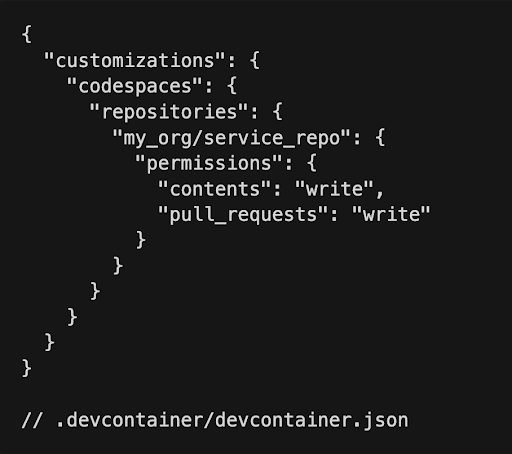
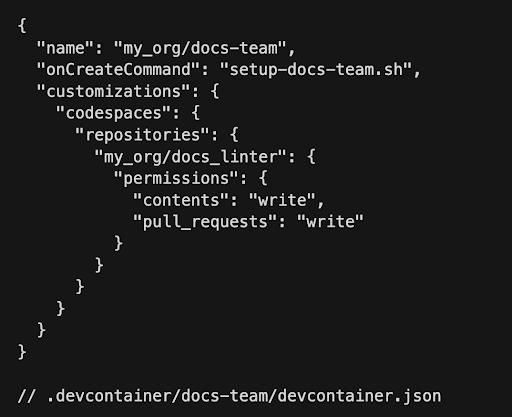
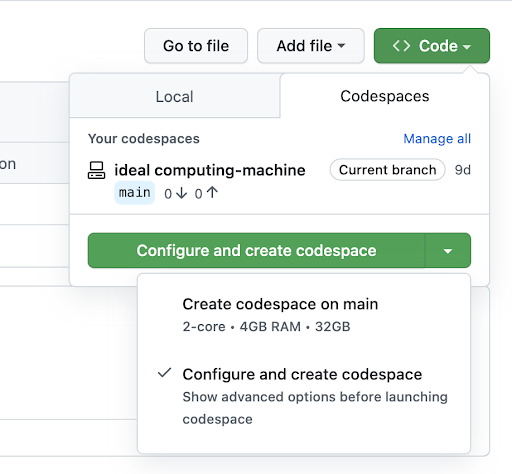
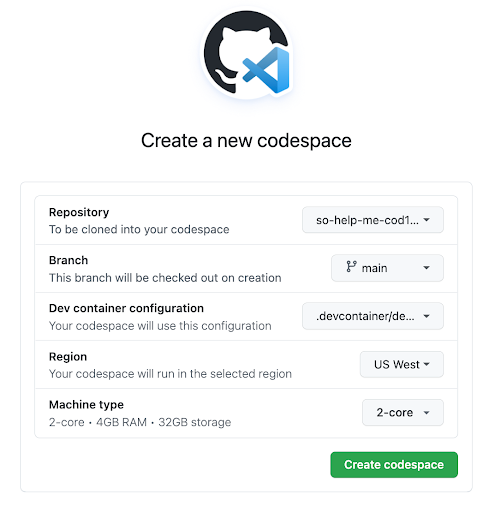


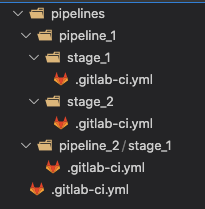
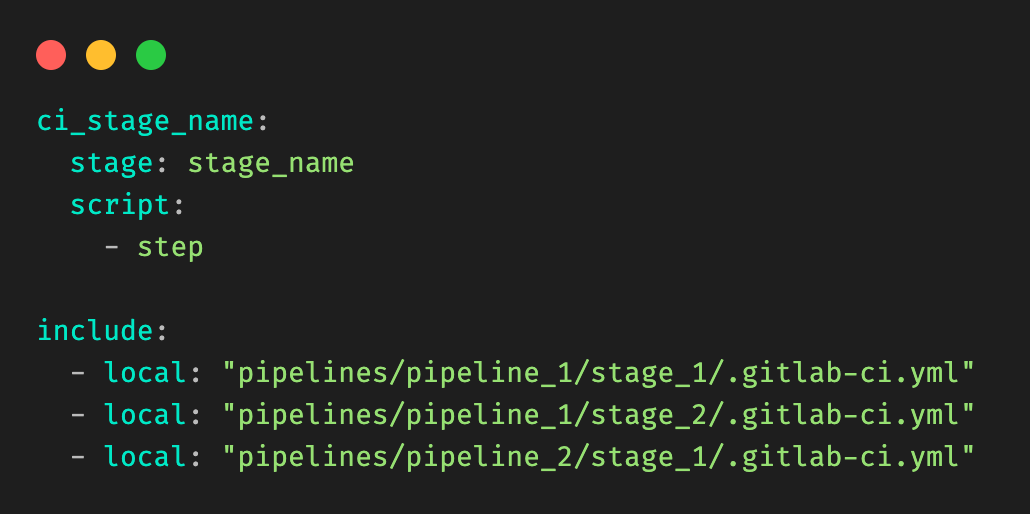
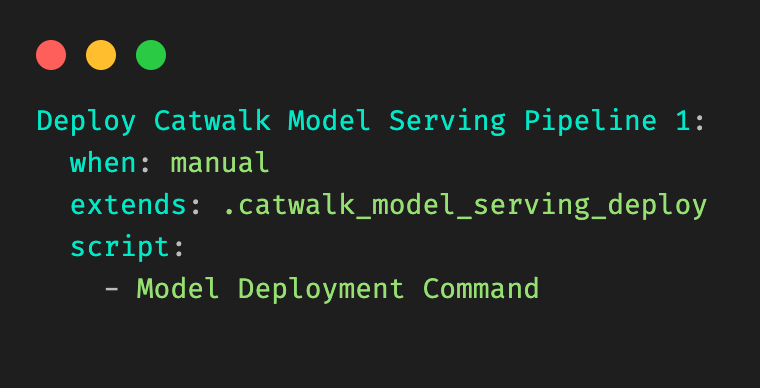
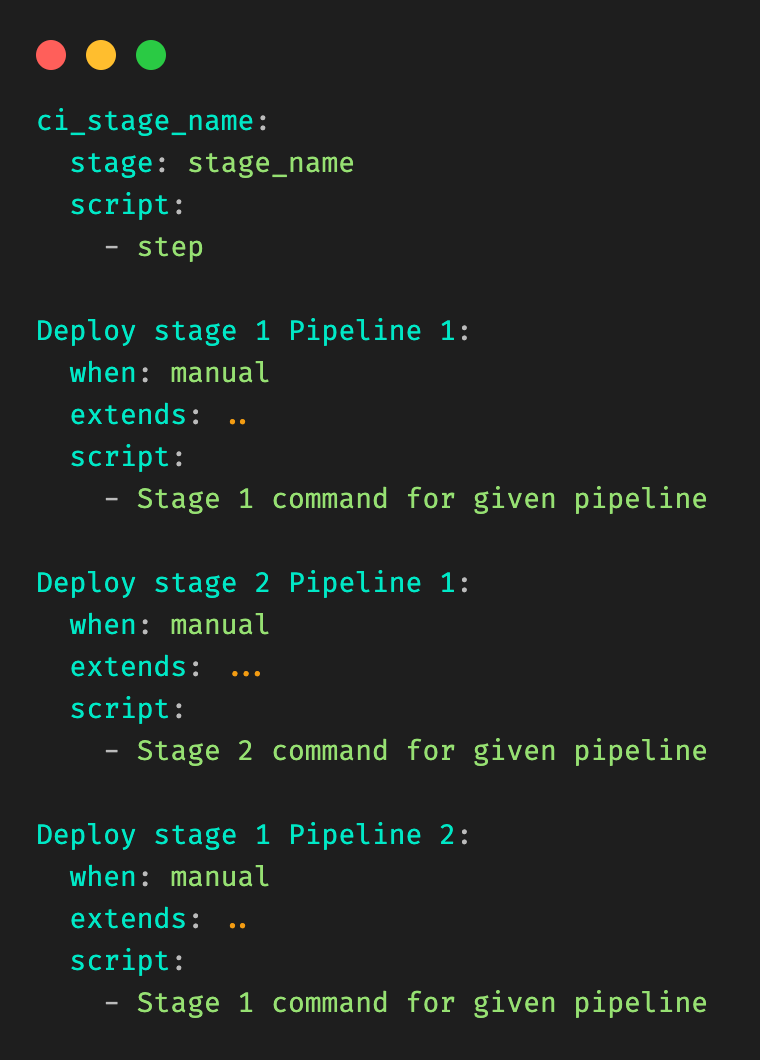
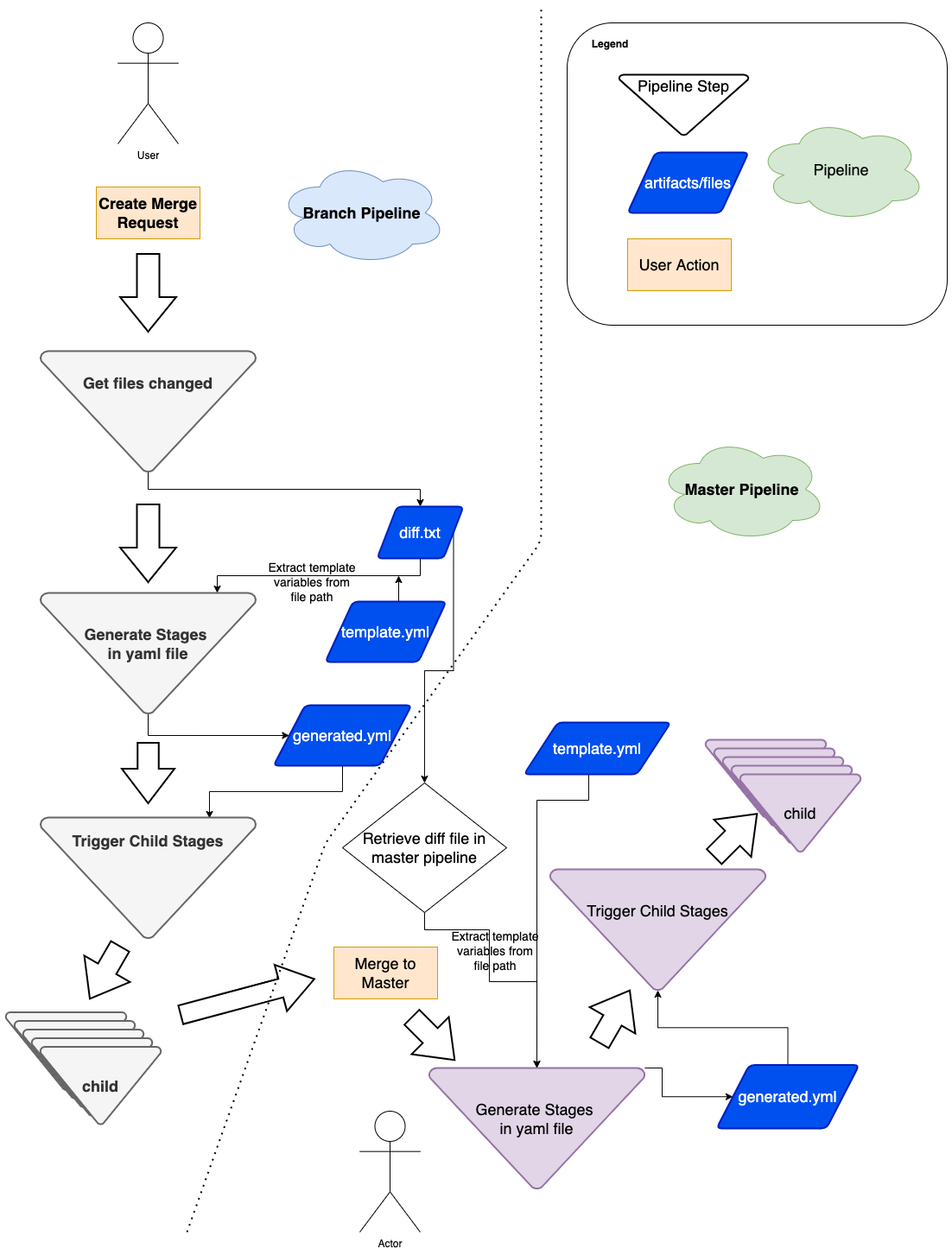
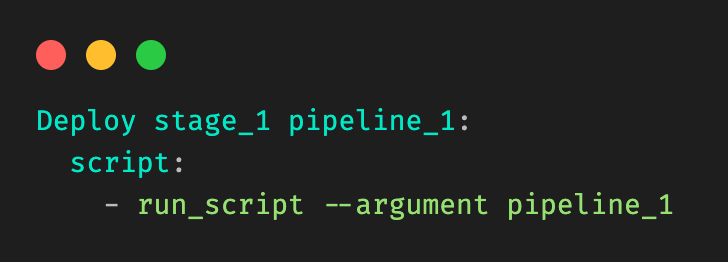
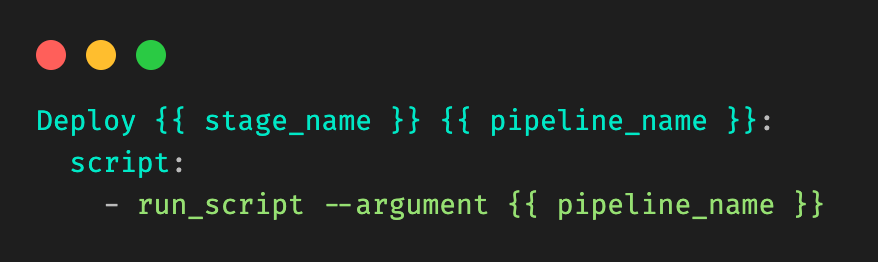

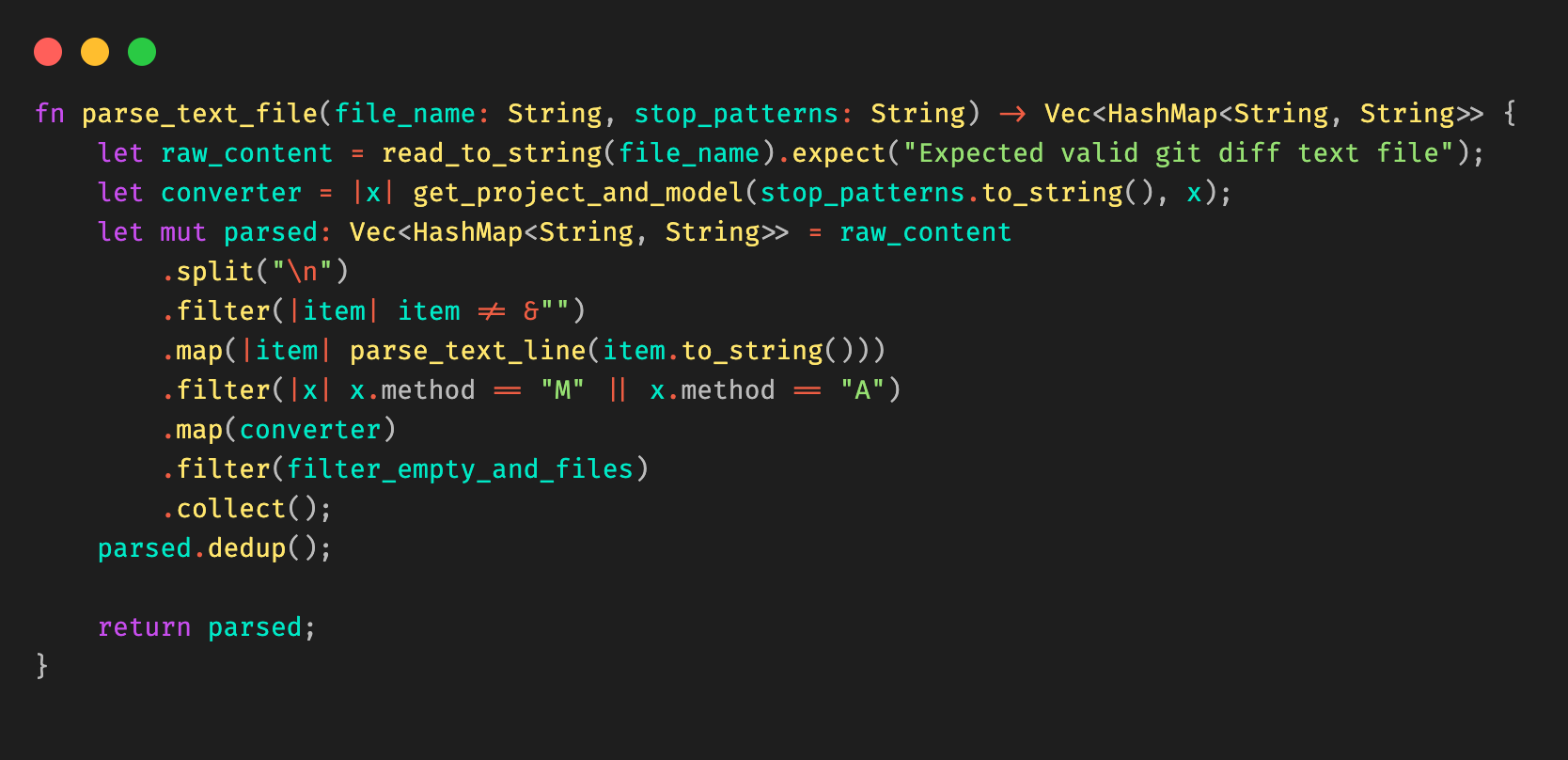
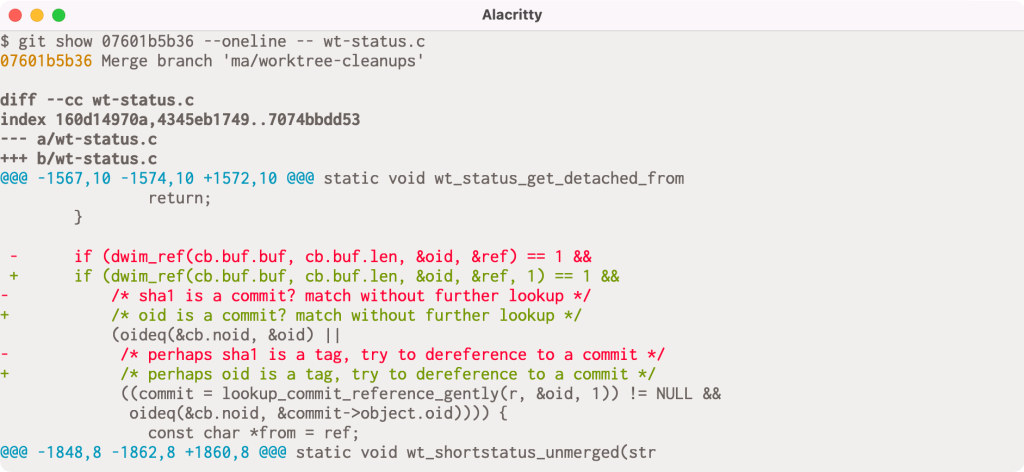
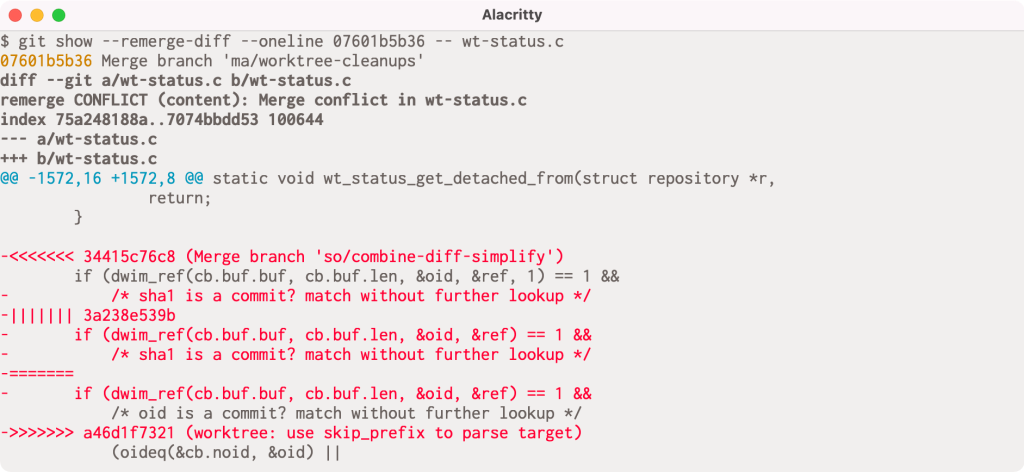



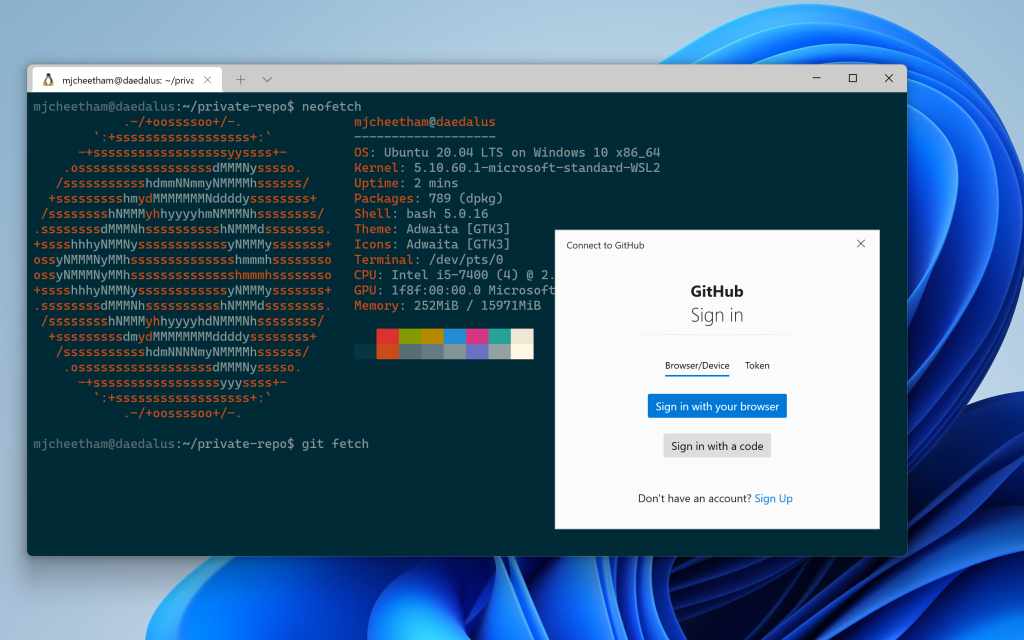
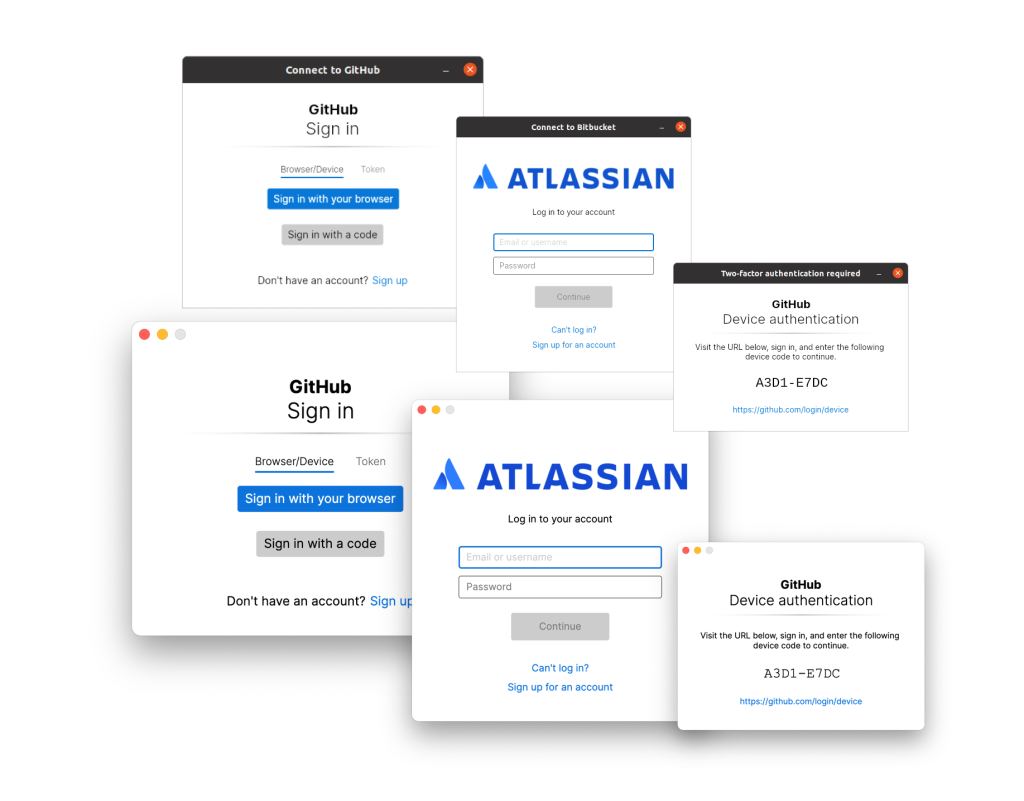

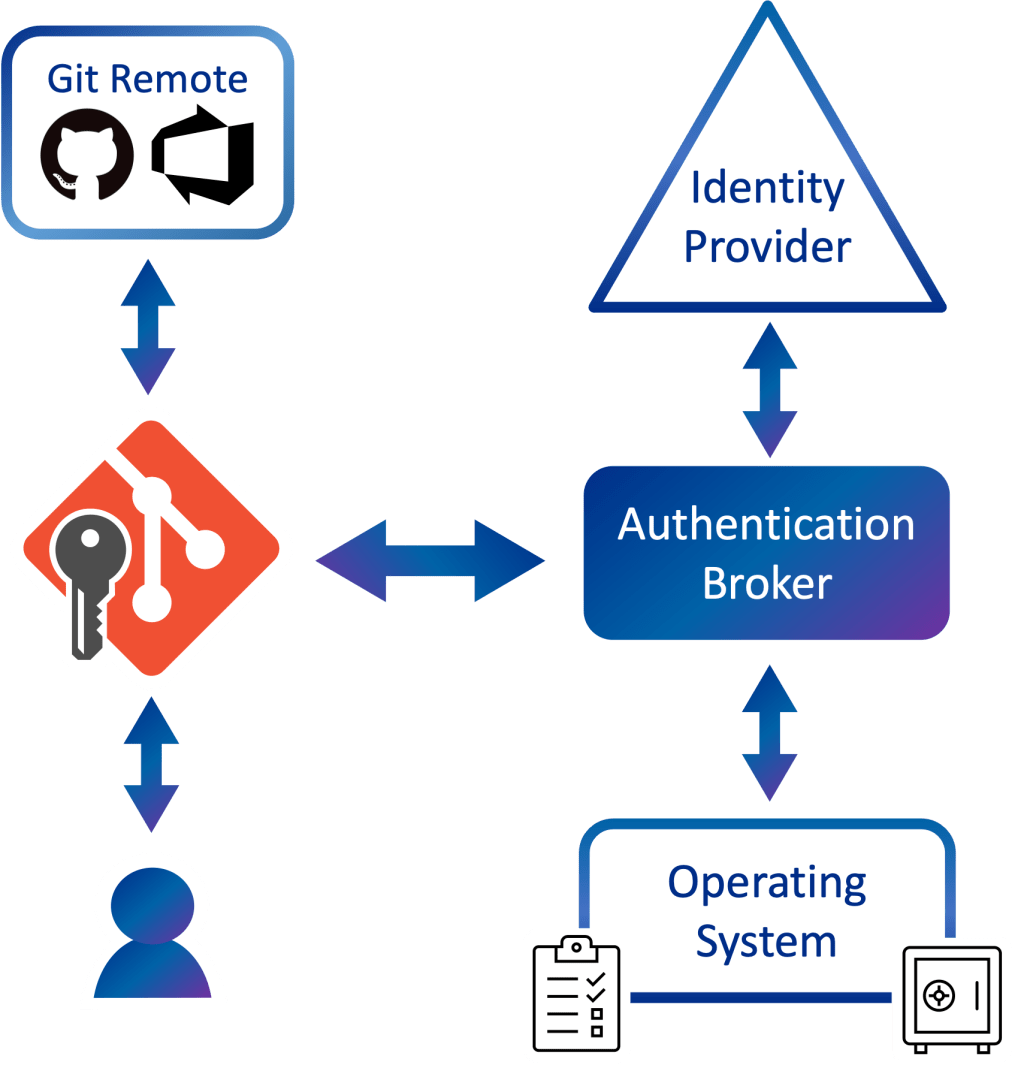
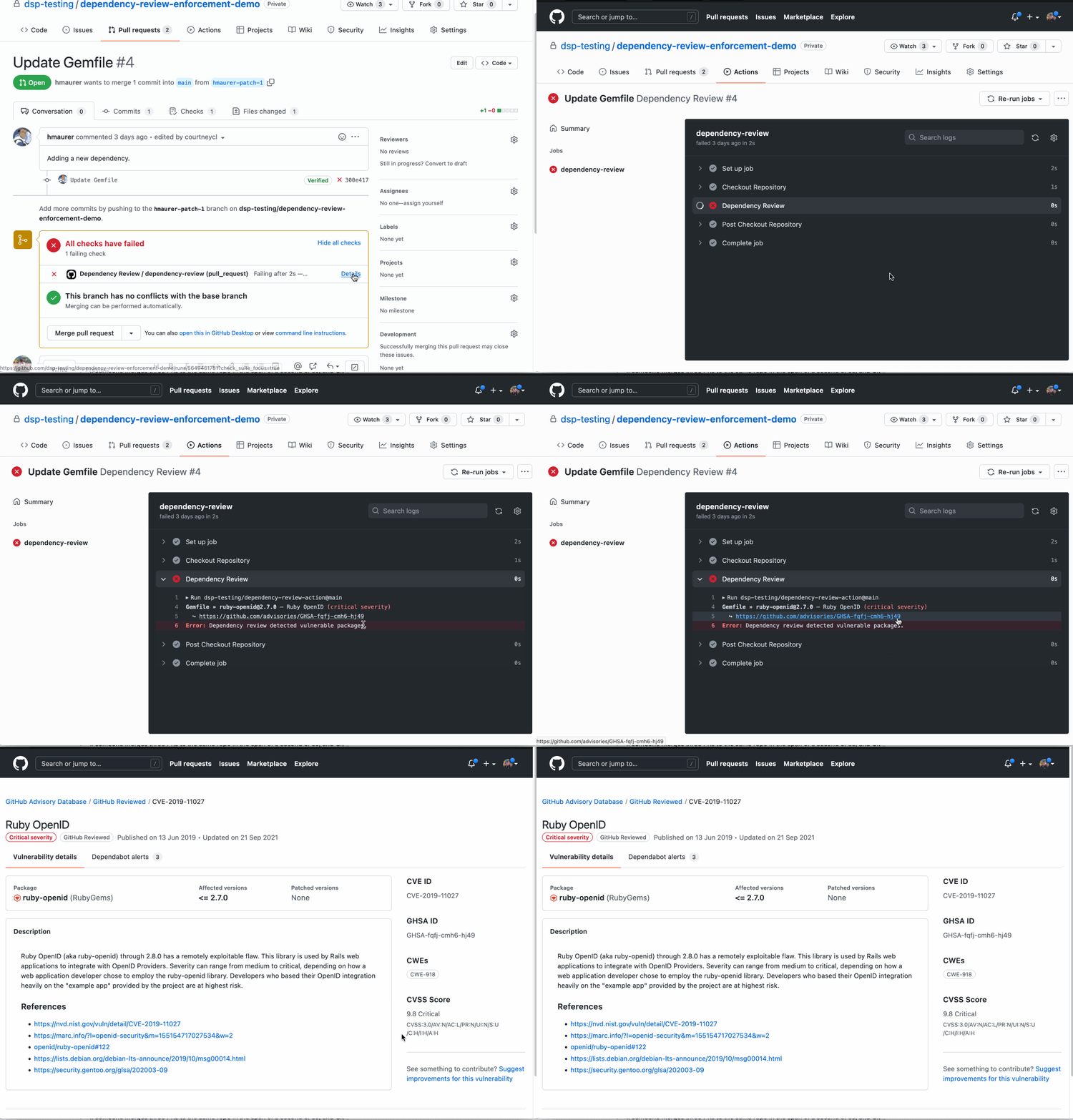

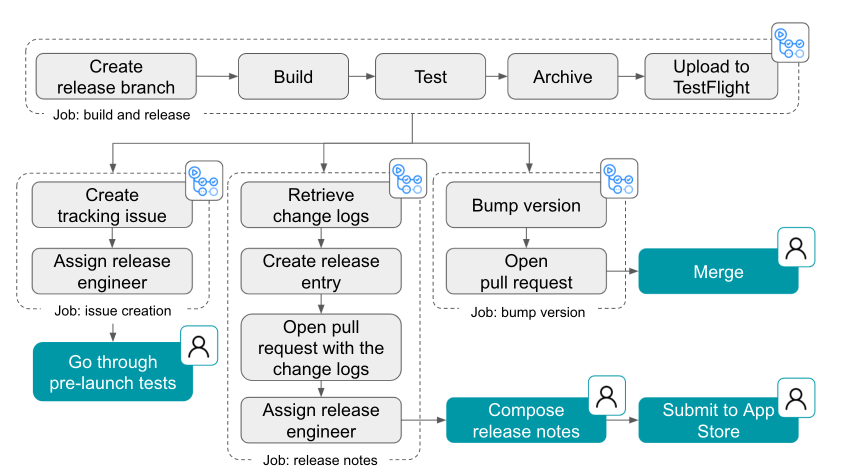
 Share company updates to GitHub’s intranet
 Create weekly reports on program status updates
 Turn weekly team photos into GIFs and upload to README