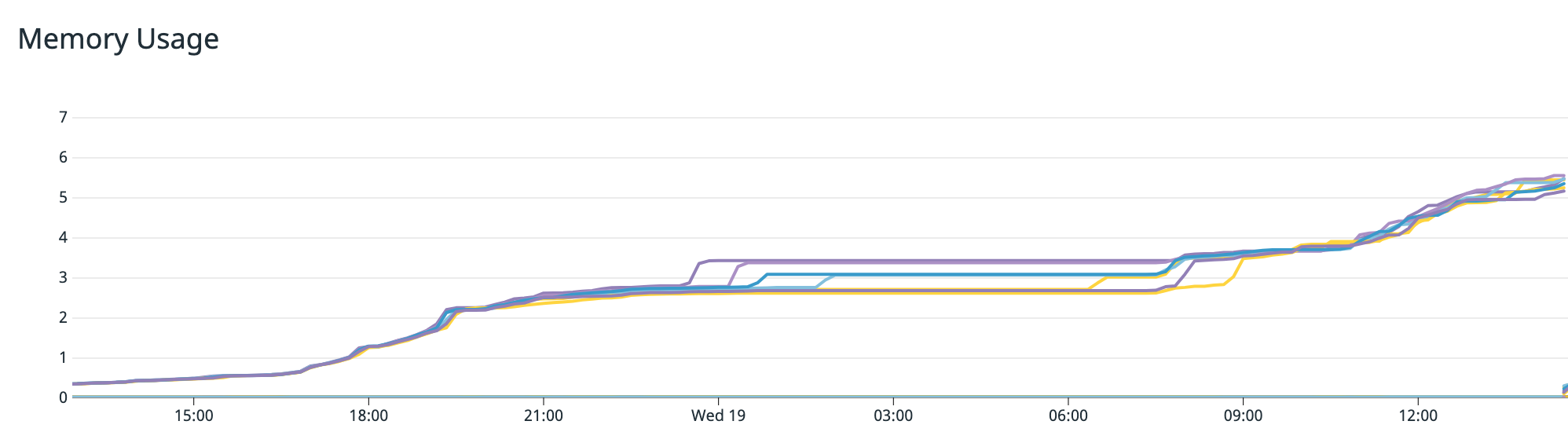
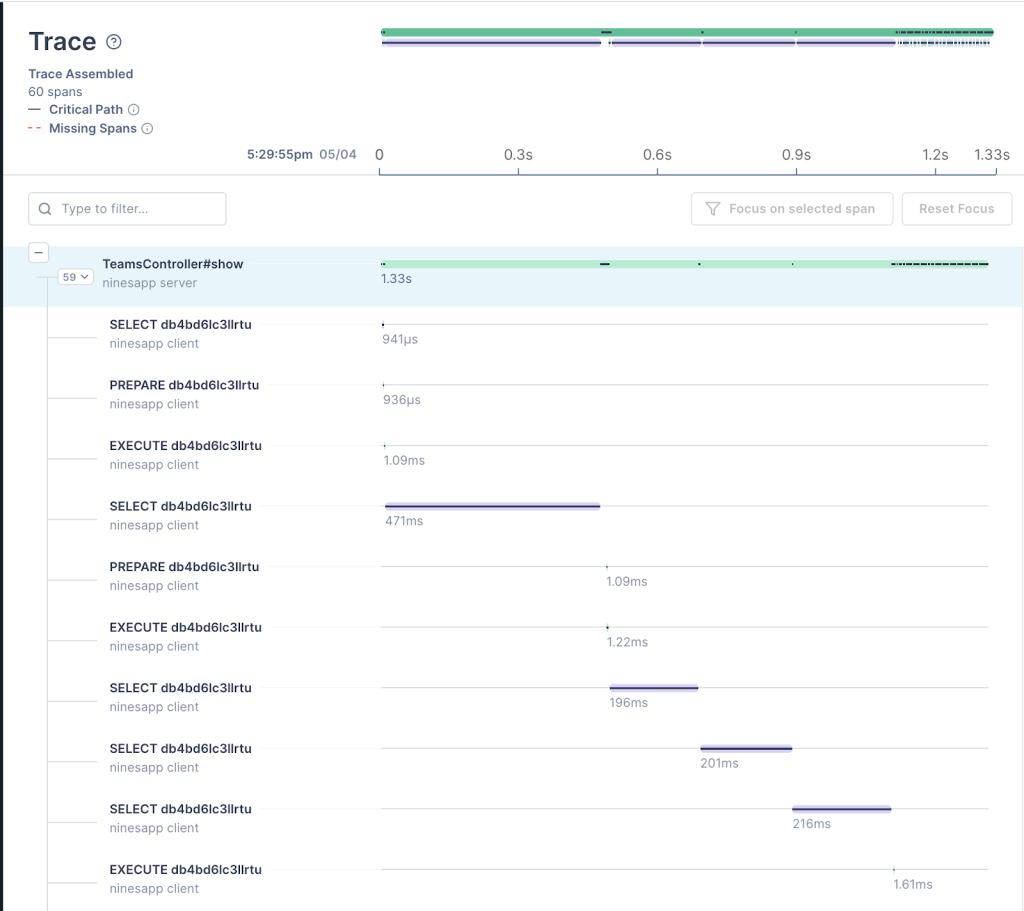
In October, we experienced one incident resulting in significant impact and degraded state of availability for the GitHub Codespaces service.
October 8 17:16 UTC (lasting 1 hour and 36 minutes)
A core Codespaces API response was inadvertently restructured as part of our Codespaces public API launch, impacting existing API clients dependent on a stable schema.
For the duration of the incident, new Codespaces could not be initiated from the Visual Studio Code Desktop client. Connections to the web editor and pre-existing desktop sessions were not impacted, but degraded, with the extension displaying an error message while omitting Codespaces metadata from the Remote Explorer view.
The incident was mitigated once we rolled back the regression, at which point all clients could connect again, including with new Codespaces created during the incident. As our monitoring systems did not initially detect the impact of the regression, a subsequent and unrelated deployment was initiated, delaying our ability to revert the change. To ensure similar breaking changes are not introduced in the future, we are investing in tooling to support more rigorous end-to-end testing with the extension’s use of our API. Additionally, we are expanding our monitoring to better align with the user experience across the relevant internal service boundaries.
In summary
We will continue to keep you updated on the progress and investments we’re making to ensure the reliability of our services. To learn more about what we’re working on, check out the GitHub engineering blog.
More than 10 years ago, GitHub.com started out like many other web applications of that time—built on Ruby on Rails, with a single MySQL database to store most of its data.
Over the years, this architecture went through many iterations to support GitHub’s growth and ever-evolving resiliency requirements. For example, we started storing data for some features (like statuses) in separate MySQL databases, we added read replicas to spread the load across multiple machines, and we started using ProxySQL to reduce the number of connections opened against our primary MySQL instances.
Yet at its core, GitHub.com remained built around one main database cluster (called mysql1) that housed a large portion of the data used by core GitHub features, like user profiles, repositories, issues, and pull requests.
With GitHub’s growth, this inevitably led to challenges. We struggled to keep our database systems adequately sized, always moving to newer and bigger machines to scale up. Any sort of incident negatively affecting mysql1 would affect all features that stored their data on this cluster.
In 2019, in order to meet the growth and availability challenges we faced, we set a plan in motion to improve our tooling and our ability to partition relational databases. As you can imagine, this was a complex challenge necessitating the introduction and creation of various tools as outlined below.
The result, we see in 2021, is a 50% load reduction on database hosts housing the data that once was on mysql1. This contributed significantly to reducing the number of database-related incidents and improved GitHub.com’s reliability for all our users.
Virtual partitions
The first concept we introduced was virtual partitions of database schemas. Before database tables can be moved physically, we have to make sure they are separated virtually in the application layer, and this has to happen without impacting teams working on new or existing features.
To do that, we group database tables that belong together into schema domains and enforce boundaries between the domains with SQL linters. This allows us to safely partition data later without ending up with queries and transactions that span partitions.
Schema domains
Schema domains are a tool we came up with to implement virtual partitions. A schema domain describes a tightly coupled set of database tables that are frequently used together in queries (such as, when using table joins or subqueries) and transactions. For example, the gists schema domain contains all of the tables supporting the GitHub Gist feature–like the gists, gist_comments and starred_gists tables. Since they belong together, they should stay together. A schema domain is the first step to codify that.
Schema domains put clear boundaries in place and expose sometimes-hidden dependencies between features. In the Rails application, the information is stored in a simple YAML configuration located at db/schema-domains.yml. Here’s an example illustrating the contents of that file:
A linter makes sure that the list of tables in this file matches our database schema. In turn, the same linter enforces the assignment of a schema domain to every table.
SQL linters
Building on top of schema domains, two new SQL linters enforce virtual boundaries between domains. They identify any violating queries and transactions that span schema domains by adding a query annotation and treating them as exemptions. If a domain has no violations, it is virtually partitioned and ready to be physically moved to another database cluster.
Query linter
The query linter verifies that only tables belonging to the same schema domain can be referenced in the same database query. If it detects tables from different domains, it throws an exception with a helpful message for the developer to avoid the issue.
Since the linter is only enabled in development and test environments, developers encounter violation errors early in the development process. In addition, during CI runs, the linter ensures that no new violations are introduced by accident.
The linter has a way to suppress the exception by annotating the SQL query with a special comment: /* cross-schema-domain-query-exempted */
Repository.joins(:owner).annotate("cross-schema-domain-query-exempted")
# => SELECT * FROM `repositories` INNER JOIN `users` ON `users`.`id` = `repositories.owner_id` /* cross-schema-domain-query-exempted */
By annotating all queries that cause failures, a backlog of queries needing modification can be built. Here’s a couple approaches we often use to eliminate exemptions:
Sometimes, an exemption can easily be addressed by triggering separate queries instead of joining tables. One example is using ActiveRecord‘s preload method instead of includes.
Another challenge is has_many :through relations that lead to JOINs across tables from different schema domains. For that, we worked on a generic solution that got upstreamed to Rails as well: has_many now has a disable_joins option that tells Active Record not to do any JOIN queries across the underlying tables. Instead, it runs several queries passing primary key values.
Joining data in the application instead of in the database is another common solution. For example, replacing INNER JOIN statements with two separate queries and instead performing the “union” operation in Ruby (for example, A.pluck(:b_id) & B.where(id: ...)).
In some cases, this leads to surprising performance improvements. Depending on the data structure and cardinality, MySQL’s query planner can sometimes create suboptimal query execution plans, whereas an application-side join has a more stable performance cost.
As with almost all reliability and performance-related changes, we ship them behind Scientist experiments that execute both the old and new implementations for a subset of requests, allowing us to assess the performance impact of each change.
Transaction linter
In addition to queries, transactions are a concern as well. Existing application code was written with a certain database schema in mind. MySQL transactions guarantee consistency across tables within a database. If a transaction includes queries to tables that will move to separate databases, it will no longer be able to guarantee consistency.
To understand which transactions need to be reviewed, we introduced a transaction linter. Similar to the query linter, it verifies that all tables which are used together in a given transaction belong to the same schema domain.
This linter runs in production with heavy sampling to keep the performance impact at a minimum. The linting results are collected and analyzed to understand where most cross-domain transactions happen, allowing us to decide to either update certain code paths or adapt our data model.
In cases where transactional consistency guarantees are crucial, we extract data into new tables that belong to the same schema domain. This ensures they stay on the same database cluster and therefore continue to have transactional consistency. This often happens with polymorphic tables that house data from different schema domains (for example, a reactions table storing records for different features like issues, pull requests, discussions, etc.)
Moving data without downtime
A schema domain that is virtually isolated is ready to be physically moved to another database cluster. To move tables on the fly, we use two different approaches: Vitess, and a custom write-cutover process.
Vitess
Vitess is a scaling layer on top of MySQL that helps with sharding needs. We use its vertical sharding feature to move sets of tables together in production without downtime.
To do that, we deploy Vitess’ VTGate in our Kubernetes clusters. These VTGate processes become the endpoint for the application to connect to, instead of direct connections to MySQL. They implement the same MySQL protocol and are indistinguishable from the application side.
The VTGate processes know the current state of the Vitess setup and talk to the MySQL instances via another Vitess component: VTTablet. Behind the scenes, Vitess’ table moving feature is powered by VReplication, which replicates data between database clusters.
Write-cutover process
Because Vitess’ adoption was still in its early stages at the beginning of 2020, we developed an alternative approach to move large sets of tables at once. This mitigated the risk of relying on a single solution to ensure the continued availability of GitHub.com.
We use MySQL’s regular replication feature to feed data to another cluster. Initially, the new cluster is added to the replication tree of the old cluster. Then a script quickly executes a series of changes to effect the cutover.
The MySQL database cluster setup before executing the write-cutover process
Before running the script, we prepare the application and database replication so that a destination cluster called cluster_b is a sub-cluster of the existing cluster_a. ProxySQL is used for multiplexing client connections to MySQL primaries. The ProxySQL instance on cluster_b is configured to route all traffic to the cluster_a primary. The use of ProxySQL allows us to change database traffic routing quickly and with minimal impact on database clients—in our case, the Rails application.
With this setup, we can move database connections to cluster_b without splitting anything. All read traffic still goes to hosts replicating from the cluster_a primary. All write traffic remains with the cluster_a primary too.
In this situation, we run a cutover script executing the following:
Enable read-only mode for the cluster_a primary. At this point, all writes to cluster_a and cluster_b are prevented. All web requests that try to write to these database primaries fail and result in 500s.
Read the last executed MySQL GTID from the cluster_a primary.
Poll the cluster_b primary to verify the last executed GTID has arrived.
Stop replication on the cluster_b primary from cluster_a.
Update ProxySQL routing configuration on cluster_b to direct traffic to the cluster_b primary.
Disable read-only mode for the cluster_a and cluster_b primaries.
Celebrate!
After thorough preparation and exercising, we learned that these six steps execute in only a few tens of milliseconds for our busiest database tables. Since we execute such cutovers during our lowest traffic time of day, we only cause a handful of user-facing errors because of failed writes. The results of this approach were better than we expected.
Learnings
The write-cutover process was used to split up mysql1, our original main database cluster. We moved 130 of our busiest tables at once––those that power GitHub’s core features: repositories, issues, and pull requests. This process was created as a risk-mitigation strategy to have multiple, independent tools at our disposal. In addition, because of factors like deployment topology and read-your-writes support, we didn’t choose Vitess as the tool to move database tables in every case. We anticipate the opportunity to use it for the majority of data migrations in the future though.
Results
The main database cluster mysql1, mentioned in the introduction, housed a large portion of the data used by many of GitHub’s most important features, like users, repositories, issues, and pull requests. Since 2019 we achieved the ability to scale this relational database with the following results:
In 2019, mysql1 answered 950,000 queries/s on average, 900,000 queries/s on replicas, and 50,000 queries/s on the primary.
Today, in 2021, the same database tables are spread across several clusters. In two years, they saw continued growth, accelerating year-over-year. All hosts of these clusters combined answer 1,200,000 queries/s on average (1,125,000 queries/s on replicas, 75,000 queries/s on the primaries). At the same time, the average load on each host halved.
The load reduction contributed significantly to reducing the number of database-related incidents and improved GitHub.com’s reliability for all our users.
More partitioning
In addition to vertical partitioning to move database tables, we also use horizontal partitioning (aka sharding). This allows us to split database tables across multiple clusters, enabling more sustainable growth. We’ll detail the tooling, linters, and Rails improvements related to this in a future blog post.
Conclusion
Over the last 10 years, GitHub has been learning to scale according to its needs. We often choose to leverage “boring” technology that has been proven to work at our scale, as reliability remains the primary concern. But the combination of industry-proven tools with simple changes to our production code and its dependencies has provided us with a path for the continued growth of our databases into the future.
Modern applications commonly utilise various database engines, with each serving a specific need. At Grab Deliveries, MySQL database (DB) is utilised to store canonical forms of data, and ElasticSearch (ES) to provide advanced search capabilities. MySQL serves as the primary data storage for raw data, and ES as the derived storage.
Search data flow
Efforts have been made to synchronise data between MySQL and ES. In this post, a series of techniques will be introduced on how to optimise incremental search data indexing.
Background
The synchronisation of data from the primary data storage to the derived data storage is handled by Food-Puxian, a Data Synchronisation Platform (DSP). In a search service context, it is the synchronisation of data between MySQL and ES.
The data synchronisation process is triggered on every real-time data update to MySQL, which will streamline the updated data to Kafka. DSP consumes the list of Kafka streams and incrementally updates the respective search indexes in ES. This process is also known as Incremental Sync.
Kafka to DSP
DSP uses Kafka streams to implement Incremental Sync. A stream represents an unbounded, continuously updating data set. A stream is ordered, replayable and is a fault-tolerant sequence of immutable.
Data synchronisation process using Kafka
The above diagram depicts the process of data synchronisation using Kafka. The Data Producer creates a Kafka stream for every operation done on MySQL and sends it to Kafka in real-time. DSP creates a stream consumer for each Kafka stream and the consumer reads data updates from respective Kafka streams and synchronises them to ES.
MySQL to ES
Indexes in ES correspond to tables in MySQL. MySQL data is stored in tables, while ES data is stored in indexes. Multiple MySQL tables are joined to form an ES index. The below snippet shows the Entity-Relationship mapping in MySQL and ES. Entity A has a one-to-many relationship with entity B. Entity A has multiple associated tables in MySQL, table A1 and A2, and they are joined into a single ES index A.
ER mapping in MySQL and ES
Sometimes a search index contains both entity A and entity B. In a keyword search query on this index, e.g. “Burger”, objects from both entity A and entity B whose name contains “Burger” are returned in the search response.
Original Incremental Sync
Original Kafka streams
The Data Producers create a Kafka stream for every MySQL table in the ER diagram above. Every time there is an insert/update/delete operation on the MySQL tables, a copy of the data after the operation executes is sent to its Kafka stream. DSP creates different stream consumers for every Kafka stream since their data structures are different.
Stream Consumer infrastructure
Stream Consumer consists of 3 components.
Event Dispatcher: Listens and fetches events from the Kafka stream, pushes them to the Event Buffer and starts a goroutine to run Event Handler for every event whose ID does not exist in the Event Buffer
Event Buffer: Caches events in memory by the primary key (aID, bID, etc). An event is cached in the Buffer until it is picked by a goroutine or replaced when a new event with the same primary key is pushed into the Buffer.
Event Handler: Reads an event from the Event Buffer and the goroutine started by the Event Dispatcher handles it.
Stream consumer infrastructure
Event Buffer procedure
Event Buffer consists of many sub buffers, each with a unique ID which is the primary key of the event cached in it. The maximum size of a sub buffer is 1. This allows Event Buffer to deduplicate events having the same ID in the buffer.
The below diagram shows the procedure of pushing an event to Event Buffer. When a new event is pushed to the buffer, the old event sharing the same ID will be replaced. The replaced event is therefore not handled.
Pushing an event to the Event Buffer
Event Handler procedure
The below flowchart shows the procedures executed by the Event Handler. It consists of the common handler flow (in white), and additional procedures for object B events (in green). After creating a new ES document by data loaded from the database, it will get the original document from ES to compare if any field is changed and decide whether it is necessary to send the new document to ES.
When object B event is being handled, on top of the common handler flow, it also cascades the update to the related object A in the ES index. We name this kind of operation Cascade Update.
Procedures executed by the Event Handler
Issues in the original infrastructure
Data in an ES index can come from multiple MySQL tables as shown below.
Data in an ES index
The original infrastructure came with a few issues.
Heavy DB load: Consumers read from Kafka streams, treat stream events as notifications then use IDs to load data from the DB to create a new ES document. Data in the stream events are not well utilised. Loading data from the DB every time to create a new ES document results in heavy traffic to the DB. The DB becomes a bottleneck.
Data loss: Producers send data copies to Kafka in application code. Data changes made via MySQL command-line tool (CLT) or other DB management tools are lost.
Tight coupling with MySQL table structure: If producers add a new column to an existing table in MySQL and this column needs to be synchronised to ES, DSP is not able to capture the data changes of this column until the producers make the code change and add the column to the related Kafka Stream.
Redundant ES updates: ES data is a subset of MySQL data. Producers publish data to Kafka streams even if changes are made on fields that are not relevant to ES. These stream events that are irrelevant to ES would still be picked up.
Duplicate cascade updates: Consider a case where the search index contains both object A and object B. A large number of updates to object B are created within a short span of time. All the updates will be cascaded to the index containing both objects A and B. This will bring heavy traffic to the DB.
Optimised Incremental Sync
MySQL Binlog
MySQL binary log (Binlog) is a set of log files that contain information about data modifications made to a MySQL server instance. It contains all statements that update data. There are two types of binary logging:
Statement-based logging: Events contain SQL statements that produce data changes (inserts, updates, deletes).
Row-based logging: Events describe changes to individual rows.
The Grab Caspian team (Data Tech) has built a Change Data Capture (CDC) system based on MySQL row-based Binlog. It captures all the data modifications made to MySQL tables.
Current Kafka streams
The Binlog stream event definition is a common data structure with three main fields: Operation, PayloadBefore and PayloadAfter. The Operation enums are Create, Delete, and Update. Payloads are the data in JSON string format. All Binlog streams follow the same stream event definition. Leveraging PayloadBefore and PayloadAfter in the Binlog event, optimisations of incremental sync on DSP becomes possible.
Binlog stream event main fields
Stream Consumer optimisations
Event Handler optimisations
Optimisation 1
Remember that there was a redundant ES updates issue mentioned above where the ES data is a subset of the MySQL data. The first optimisation is to filter out irrelevant stream events by checking if the fields that are different between PayloadBefore and PayloadAfter are in the ES data subset.
Since the payloads in the Binlog event are JSON strings, a data structure only with fields that are present in ES data is defined to parse PayloadBefore and PayloadAfter. By comparing the parsed payloads, it is easy to know whether the change is relevant to ES.
The below diagram shows the optimised Event Handler flows. As shown in the blue flow, when an event is handled, PayloadBefore and PayloadAfter are compared first. An event will be processed only if there is a difference between PayloadBefore and PayloadAfter. Since the irrelevant events are filtered, it is unnecessary to get the original document from ES.
Event Handler optimisation 1
Achievements
No data loss: changes made via MySQL CLT or other DB manage tools can be captured.
No dependency on MySQL table definition: All the data is in JSON string format.
No redundant ES updates and DB reads.
ES reads traffic reduced by 90%: Not a need to get the original document from ES to compare with the newly created document anymore.
55% irrelevant stream events filtered out
DB load reduced by 55%
ES event updates for optimisation 1
Optimisation 2
The PayloadAfter in the event provides updated data. This makes us think about whether a completely new ES document is needed each time, with its data read from several MySQL tables. The second optimisation is to change to a partial update using data differences from the Binlog event.
The below diagram shows the Event Handler procedure flow with a partial update. As shown in the red flow, instead of creating a new ES document for each event, a check on whether the document exists will be performed first. If the document exists, which happens for the majority of the time, the data is changed in this event, provided the comparison between PayloadBefore and PayloadAfter is updated to the existing ES document.
Event Handler optimisation 2
Achievements
Change most ES relevant events to partial update: Use data in stream events to update ES.
ES load reduced: Only fields that have been changed will be sent to ES.
DB load reduced: DB load reduced by 80% based on Optimisation 1.
ES event updates for optimisation 2
Event Buffer optimisation
Instead of replacing the old event, we merge the new event with the old event when the new event is pushed to the Event Buffer.
The size of each sub buffer in Event Buffer is 1. In this optimisation, the stream event is not treated as a notification anymore. We use the Payloads in the event to perform Partial Updates. The old procedure of replacing old events is no longer suitable for the Binlog stream.
When the Event Dispatcher pushes a new event to a non-empty sub buffer in the Event Buffer, it will merge event A in the sub buffer and the new event B into a new Binlog event C, whose PayloadBefore is from Event A and PayloadAfter is from Event B.
Merge operation for Event Buffer optimisation
Cascade Update optimisation
Optimisation
Use a new stream to handle cascade update events.
When the producer sends data to the Kafka stream, data sharing the same ID will be stored at the same partition. Every DSP service instance has only one stream consumer. When Kafka streams are consumed by consumers, one partition will be consumed by only one consumer. So the Cascade Update events sharing the same ID will be consumed by one stream consumer on the same EC2 instance. With this special mechanism, the in-memory Event Buffer is able to deduplicate most of the Cascade Update events sharing the same ID.
The flowchart below shows the optimised Event Handler procedure. Highlighted in green is the original flow while purple highlights the current flow with Cascade Update events.
When handling an object B event, instead of cascading update the related object A directly, the Event Handler will send a Cascade Update event to the new stream. The consumer of the new stream will handle the Cascade Update event and synchronise the data of object A to the ES.
Event Handler with Cascade Update events
Achievements
Cascade Update events deduplicated by 80%
DB load introduced by cascade update reduced
Cascade Update events
Summary
In this article four different DSP optimisations are explained. After switching to MySQL Binlog streams provided by the Coban team and optimising Stream Consumer, DSP has saved about 91% DB reads and 90% ES reads, and the average queries per second (QPS) of stream traffic processed by Stream Consumer increased from 200 to 800. The max QPS at peak hours could go up to 1000+. With a higher QPS, the duration of processing data and the latency of synchronising data from MySQL to ES was reduced. The data synchronisation ability of DSP has greatly improved after optimisation.
Special thanks to Jun Ying Lim and Amira Khazali for proofreading this article.
Join Us
Grab is the leading superapp platform in Southeast Asia, providing everyday services that matter to consumers. More than just a ride-hailing and food delivery app, Grab offers a wide range of on-demand services in the region, including mobility, food, package and grocery delivery services, mobile payments, and financial services across 428 cities in eight countries.
Powered by technology and driven by heart, our mission is to drive Southeast Asia forward by creating economic empowerment for everyone. If this mission speaks to you, join our team today!
You probably already know about using GitHub code scanning to secure your code. But how about using it to make your day-to-day coding easier? We’ve been making internal use of CodeQL, our code analysis engine for code scanning, to keep code quality high by protecting ourselves from those annoying coding mistakes that are easy to make but hard to spot! Read on for some examples of what we’ve done so far and how you can make the most of CodeQL for yourself.
Plugging a memory leak
Go’s defer statement defers the execution of a function until the surrounding function returns. This is useful for cleaning up: For example, closing resources like file handles or completing database transactions.
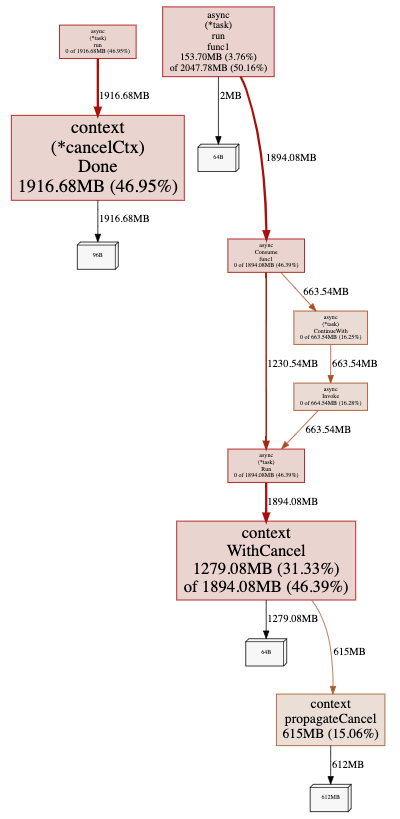
When changing existing code, you can end up moving a defer statement inside a loop. If you do so, you’ll still have to wait until the end of the function for cleanup; it won’t happen at the end of the iteration. We’ve seen this mistake lead to memory leaks in production.
Wouldn’t it be great if this mistake could be pointed out to you? We wanted to live in that happy world, and all it took was four lines of CodeQL.
A nice postscript to this story is that seeing this query led another team at GitHub to add CodeQL to their repository. They’d been bitten by a defer-in-loop memory leak before and didn’t want it to happen again. Once code scanning was set up for them, CodeQL discovered another problem in their codebase, which was similar to the one we’ll discuss next.
The error you can’t ignore
We use GORM, a Go Object Relational Mapper, in some of our codebases. Error handling in GORM is different than in idiomatic Go code, because it has a chainable API. Here’s an example:
As you can imagine, it’s easy to write code like db.Where("name = ?", "jinzhu").First(&user) and not check that Error field.
At least it used to be easy to do that. We’ve now created a CodeQL query which detects GORM calls that don’t check the associated Error field and flags these calls in pull requests. You’ll also find a similar query for error checking functions which return pointers in the security-and-quality query suite for CodeQL.
Loopy performance problems
In addition to protecting against missing error checking, we also want to keep our database-querying code performant. “N+1 queries” are a common performance issue. This is where some expensive operation is performed once for every member of a set, so the code will get slower as the number of items increases. Database calls in a loop are often the culprit here; typically, you’ll get better performance from a batch query outside of the loop instead.
We created a custom CodeQL query, which looks for calls to any of the GORM methods that actually result in a query being performed. We filter that list of calls down to those that happen within a loop and fail CI if any are encountered. What’s nice about CodeQL is that we’re not limited to database calls directly within the body of a loop―calls within functions called directly or indirectly from the loop are caught too.
Using these queries
These queries are experimental, so we’ve not included them in our standard suites. However, you can use them by referencing a special query suite we’ve created.
First, create a file .github/codeql/go-developer-happiness.qls in the repository you would like to analyze:
Are there common “gotchas” in your codebase? Why not ease developer friction with some custom CodeQL queries of your own? You can learn more about writing CodeQL with our documentation and discussions―and also find out more about contributing queries back to the community―in the CodeQL repository at https://github.com/github/codeql. We look forward to seeing what you come up with!
In August, we experienced two distinct incidents resulting in significant impact and degraded state of availability for Git operations, API requests, webhooks, issues, pull requests, GitHub Pages, GitHub Packages, and GitHub Actions services.
August 10 15:16 UTC (lasting one hour and 17 minutes)
This incident was caused when one of our MySQL database primaries entered a degraded state, affecting a number of internal services. This caused an impact to GitHub.com services requiring write access to this particular database cluster, which resulted in some users being unable to perform operations.
Investigation had identified an edge case in one of our most active applications, which caused the generation of a poorly performing query capable of impacting overall database capacity. This combined with application retry and queueing logic meant that the MySQL primary was placed into a state where the cluster was unable to automatically recover.
We have been able to address this query, as well as some of the application retry logic, to reduce the chance of recurrence in the future.
One of the novel elements to this incident was the breadth of impact across multiple services. This led to a discussion about the overall service status as we were reporting it within the incident, and, so we’d like to take this opportunity to discuss the approach we took at the time, as well as the way we look to increase our learning potential after the incident.
When we first introduced the monthly availability report, we aimed to provide post-incident reviews for major incidents that impact service availability, in addition to background on how we’re continuing to evolve the process. As part of our standard post-incident analysis process, we are using this incident as a valuable source of data to evaluate the responsiveness of our internal metrics and alerting. These systems guide our responders during incidents on both when to status and what degree of impact to status for. As a result, we’re continuing to tune and optimize these activities to ensure we are able to status—both quickly and accurately—so that we continue to earn the trust our users place in us everyday.
August 10 19:57 UTC (lasting 3 hours and 6 minutes)
Following ongoing maintenance of the Actions service, our service monitors detected a high error rate on workflow runs for new and in progress jobs, which affected the Actions service. This incident resulted in the failure of all queued jobs for a period of time. This was a new incident, unrelated to the earlier issue on August 10. We immediately reverted recent Actions deployments and started to investigate the issue.
The incident was caused by work to set up a new Actions Premium Runner microservice in the Actions service. The impacting portion of this work involved alterations to the service discovery process within the Actions microservices architecture. A bad service record pushed to this system resulted in many of the microservices being unable to make Service-to-Service calls.
Ultimately, the mitigation for this incident was to remove the bad record from the service discovery infrastructure. After investigating whether this mitigation would address the incident, we were able to confidently confirm that the bad record was the root cause of the issue, and removing it would restore the Actions service with no unintended side effects.
We have prioritized several changes as a result of this incident, including fixing this part of the Actions microservice discovery process to properly handle potential bad records. We’ve also added a broader scope of visibility into what’s changed recently across all of the Actions microservices, so we can quickly focus investigations in the correct place.
In Summary
We will continue to keep you updated on the progress and investments we’re making to ensure the reliability of our services. Please follow our status page for real time updates and watch our blog for next month’s availability report. To learn more about what we’re working on, check out the GitHub Engineering blog.
A/B testing is an experiment where a random e-commerce platform user is given two versions of a variable: a control group and a treatment group, to discover the optimal version that maximizes conversion. When running A/B testing, you can take the Multi-Armed Bandit optimisation approach to minimise the loss of conversion due to low performance.
In the traditional software development process, Multi-Armed Bandit (MAB) testing and rolling out a new feature are usually separate processes. The novel Multi-Armed Bandit System for Recommendation solution, hereafter the Multi-Armed Bandit Optimiser, proposes automating the Multi-Armed Bandit testing simultaneously while rolling out the new feature.
Advantages
Automates the MAB testing process during new feature rollouts.
Selects the optimal parameters based on predefined metrics of each use case, which results in an end-to-end solution without the need for user intervention.
Uses the Batched Multi-Armed Bandit and Monte Carlo Simulation, which enables it to process large-scale business scenarios.
Uses a feedback loop to automatically collect recommendation metrics from user event logs and to feed them to the Multi-Armed Bandit Optimiser.
Uses an adaptive rollout method to automatically roll out the best model to the maximum distribution capacity according to the feedback metrics.
Architecture
The following diagram illustrates the system architecture.
System architecture
The novel Multi-Armed Bandit System for Recommendation solution contains three building blocks.
Stream processing framework
A lightweight system that performs basic operations on Kafka Streams, such as aggregation, filtering, and mapping. The proposed solution relies on this framework to pre-process raw events published by mobile apps and backend processes into the proper format that can be fed into the feedback loop.
Feedback loop
A system that calculates the goal metrics and optimises the model traffic distribution. It runs a metrics server which pulls the data from Stalker, which is a time series database that stores the processed events in the last one hour. The metrics server invokes a Spark Job periodically to run the SQL queries that computes the pre-defined goal metrics: the Clickthrough Rate, Conversion Rate and so on, provided by users. The output of the job is dumped into an S3 bucket, and is picked up by optimiser runtime. It runs the Multi-Armed Bandit Optimiser to optimise the model traffic distribution based on the latest goal metrics.
Dynamic value receiver, or the GrabX variable
Multi-Armed Bandit Optimiser modules
The Multi-Armed Bandit Optimiser consists of the following modules:
Reward Update
Batched Multi-Armed Bandit Agent
Monte-Carlo Simulation
Adaptive Rollout
Multi-Armed Bandit Optimiser modules
The goal of the Multi-Armed Bandit Optimisation is to find the optimal Arm that results in the best predefined metrics, and then allocate the maximum traffic to that Arm.
The solution can be illustrated in the following problem. For K Arm, in which the action space A={1,2,…,K}, the Multi-Arm-Bandit Optimiser goal is to solve the one-shot optimisation problem of .
Reward Update module
The Reward Update module collects a batch of the metrics. It calculates the Success and Failure counts, then updates the Beta distribution of each Arm with the Batched Multi-Armed Bandit algorithm.
Multi-Armed Bandit Agent module
In the Multi-Armed Bandit Agent module, each Arm’s metrics are modelled as a Beta distribution which is sampled with Thompson Sampling. The Beta distribution formula is: .
The Batched Multi-Armed Bandit algorithm updates the Beta distribution with the batch metrics. The optimisation algorithm can be described in the following method.
Batched Multi-Armed Bandit algorithm
Monte-Carlo Simulation module
The Monte-Carlo Simulation module runs the simulation for N repeated times to find the best Arm over a configurable simulation window. Then, it applies the simulated results as each Arm’s distribution percentage for the next round.
To handle different scenarios, we designed two strategies.
Max strategy: We count each Arm’s Success count’s result in Monte-Carlo Simulation, and then compute the next round distribution according to the success rate.
Mean strategy: We average each Arm’s Beta distribution probabilities’s result in Monte-Carlo Simulation, and then compute the next round distribution according to the averaged probabilities of each Arm.
Adaptive Rollout module
The Adaptive Rollout module rolls out the sampled distribution of each Multi-Armed Bandit Arm, in the form of Multi-Armed Bandit Arm Model ID and distribution, to the experimentation platform’s configuration variable. The resulting variable is then read from the online service. The process repeats as it collects feedback from the Adaptive Rollout metrics’ results in the feedback loop.
Multi-Armed Bandit for Recommendation Solution
In the GrabFood Recommended for You widget, there are several food recommendation models that categorise lists of merchants. The choice of the model is controlled through experiments at rollout, and the results of the experiments are analysed offline. After the analysis, data scientists and product managers rectify the model choice based on the experiment results.
The Multi-Armed Bandit System for Recommendation solution improves the process by speeding up the feedback loop with the Multi-Armed Bandit system. Instead of depending on offline data which comes out at T+N, the solution responds to minute-level metrics, and adjusts the model faster.
This results in an optimal solution faster. The proposed Multi-Armed Bandit for Recommendation solution workflow is illustrated in the following diagram.
Multi-Armed Bandit for Recommendation solution workflow
Optimisation metrics
The GrabFood recommendation uses the Effective Conversion Rate metrics as the optimisation objective. The Effective Conversion Rate is defined as the total number of checkouts through the Recommended for You widget, divided by the total widget viewed and multiplied by the coverage rate.
The events of views, clicks, and checkouts are collected over a 30-minute aggregation window and the coverage. A request with a checkout is considered as a success event, while a non-converted request is considered as a failure event.
Multi-Armed Bandit strategy
With the Multi-Armed Bandit Optimiser, the Beta distribution is selected to model the Effective Conversion Rate. The use of the mean strategy in the Monte-Carlo Simulation results in a more stable distribution.
Rollout policy
The Multi-Armed Bandit Optimiser uses the eater ID as the unique entity, applies a policy and assigns different percentages of eaters to each model, based on computed distribution at the beginning of each loop.
Fallback logic
The Multi-Armed Bandit Optimiser first runs model validation to ensure all candidates are suitable for rolling out. If the scheduled MAB job fails, it falls back to a default distribution that is set to 50-50% for each model.
Join us
Grab is more than just the leading ride-hailing and mobile payments platform in Southeast Asia. We use data and technology to improve everything from transportation to payments and financial services across a region of more than 620 million people. We aspire to unlock the true potential of Southeast Asia and look for like-minded individuals to join us on this ride.
If you share our vision of driving South East Asia forward, apply to join our team today.
Today, GitHub is making Codespaces available to Team and Enterprise Cloud plans on github.com. Codespaces provides software teams a faster, more collaborative development environment in the cloud. Read more on our Codespaces page.
The GitHub.com codebase is almost 14 years old. When the first commit for GitHub.com was pushed, Rails was only two years old. AWS was one. Azure and GCP did not yet exist. This might not be long in COBOL time, but in internet time it’s quite a lot.
Over those 14 years, the core repository powering GitHub.com (github/github) has seen over a million commits. The vast majority of those commits come from developers building and testing on macOS.
A classic commit message for a classic commit
But our development platform is evolving. Over the past months, we’ve left our macOS model behind and moved to Codespaces for the majority of GitHub.com development. This has been a fundamental shift for our day-to-day development flow. As a result, the Codespaces product is stronger and we’re well-positioned for the future of GitHub.com development.
The status quo
Over the years, we’ve invested significant time and effort in making local development work well out of the box. Our scripts-to-rule-them-all approach has presented a familiar interface to engineers for some time now—new hires could clone github/github, run setup and bootstrap scripts, and have a local instance of GitHub.com running in a half-day’s time. In most cases things just worked, and when they didn’t, our bootstrap script would open a GitHub issue connecting the new hire with internal support. Our #friction Slack channel—staffed by helpful, kind engineers—could debug nearly any system configuration under the sun.
Run GitHub.com locally (eventually) with this one command!
Yet for all our efforts, local development remained brittle. Any number of seemingly innocuous changes could render a local environment useless and, worse still, require hours of valuable development time to recover. Mysterious breakage was so common and catastrophic that we’d codified an option for our bootstrap script: --nuke-from-orbit. When invoked, the script deletes as much as it responsibly can in an attempt to restore the local environment to a known good state.
And of course, this is a classic story that anyone in the software engineering profession will instantly recognize. Local development environments are fragile. And even when functioning perfectly, a single-context, bespoke local development environment felt increasingly out of step with the instant-on, access-from-anywhere world in which we now operate.
Collaborating on multiple branches across multiple projects was painful. We’d often find ourselves staring down a 45-minute bootstrap when a branch introduced new dependencies, shipped schema changes, or branched from a different SHA. Given how quickly our codebase changes (we’re deploying hundreds of changes per day), this was a regular source of engineering friction.
And we weren’t the only ones to take notice—in building Codespaces, we engaged with several best-in-class engineering organizations who had built Codespaces-like platforms to solve these same types of problems. At any significant scale, removing this type of productivity loss becomes a very clear productivity opportunity, very quickly.
This single log message will cause any GitHub engineer to break out in a cold sweat
Development infrastructure
In the infrastructure world, industry best practices have continued to position servers as a commodity. The idea is that no single server is unique, indispensable, or irreplaceable. Any piece could be taken out and replaced by a comparable piece without fanfare. If a server goes down, that’s ok! Tear it down and replace it with another one.
Our local development environments, however, are each unique, with their own special quirks. As a consequence, they require near constant vigilance to maintain. The next git pull or bootstrap can degrade your environment quickly, requiring an expensive context shift to a recovery effort when you’d rather be building software. There’s no convention of a warm laptop standing by.
But there’s a lot to be said for treating development environments as our own—they’re the context in which we spend the majority of our day! We tweak and tune our workbench in service of productivity but also as an expression of ourselves.
With Codespaces, we saw an opportunity to treat our dev environments much like we do infrastructure—a commodity we can churn—but still maintain the ability to curate our workbench. Visual Studio Code extensions, settings sync, and dotfiles repos bring our environment to our compute. In this context, a broken workbench is a minor inconvenience—now we can provision a new codespace at a known good state and get back to work.
Adopting Codespaces
Migrating to Codespaces addressed the shortcomings in our existing developer environments, motivated us to push the product further, and provided leverage to improve our overall development experience.
And while our migration story has a happy ending, the first stages of our transition were… challenging. The GitHub.com repository is almost 13 GB on disk; simply cloning the repository takes 20 minutes. Combined with dependency setup, bootstrapping a GitHub.com codespace would take upwards of 45 minutes. And once we had a repository successfully mounted into a codespace, the application wouldn’t run.
Those 14 years of macOS-centric assumptions baked into our bootstrapping process were going to have to be undone.
Working through these challenges brought out the best of GitHub. Contributors came from across the company to help us revisit past decisions, question long-held assumptions, and work at the source-level to decouple GitHub development from macOS. Finally, we could (albeit very slowly) provision working GitHub.com codespaces on Linux hosts, connect from Visual Studio Code, and ship some work. Now we had to figure out how to make the thing hum.
45 minutes to 5 minutes
Our goal with Codespaces is to embrace a model where development environments are provisioned on-demand for the task at hand (roughly a 1:1 mapping between branches and codespaces.) To support task-based workflows, we need to get as close to instant-on as possible. 45 minutes wasn’t going to meet our task-based bar, but we could see low-hanging fruit, ripe with potential optimizations.
Up first: changing how Codespaces cloned github/github. Instead of performing a full clone when provisioned, Codespaces would now execute a shallow clone and then, after a codespace was created with the most recent commits, unshallow repository history in the background. Doing so reduced clone time from 20 minutes to 90 seconds.
Our next opportunity: caching the network of software and services that support GitHub.com, inclusive of traditional Gemfile-based dependencies as well as services written in C, Go, and a custom build of Ruby. The solution was a GitHub Action that would run nightly, clone the repository, bootstrap dependencies, and build and push a Docker image of the result. The published image was then used as the base image in github/github’s devcontainer—config-as-code for Codespaces environments. Our codespaces would now be created at 95%+ bootstrapped.
These two changes, along with a handful of app and service level optimizations, took GitHub.com codespace creation time from 45 minutes to five minutes. But five minutes is still quite a distance from “instant-on.” Well-known studies have shown people can sustain roughly ten seconds of wait time before falling out of flow. So while we’d made tremendous strides, we still had a way to go.
5 minutes to 10 seconds
While five minutes represented a significant improvement, these changes involved tradeoffs and hinted at a more general product need.
Our shallow clone approach—useful for quickly launching into Codespaces—still required that we pay the cost of a full clone at some point. Unshallowing post-create generated load with distracting side effects. Any large, complex project would face a similar class of problems during which cloning and bootstrapping created contention for available resources.
What if we could clone and bootstrap the repository ahead of time so that by the time an engineer asked for a codespace we’d already done most of the work?
Enter prebuilds: pools of codespaces, fully cloned and bootstrapped, waiting to be connected with a developer who wants to get to work. The engineering investment we’ve made in prebuilds has returned its value many times over: we can now create reliable, preconfigured codespaces, primed and ready for GitHub.com development in 10 seconds.
New hires can go from zero to a functioning development environment in less time than it takes to install Slack. Engineers can spin off new codespaces for parallel workstreams with no overhead. When an environment falls apart—maybe it’s too far behind, or the test data broke something—our engineers can quickly create a new environment and move on with their day.
Increased leverage
The switch to Codespaces solved some very real problems for us: it eliminated the fragility and single-track model of local development environments, but it also gave us a powerful new point of leverage for improving GitHub’s developer experience.
We now have a wedge for performing additional setup and optimization work that we’d never consider in local environments, where the cost of these optimizations (in both time and patience) is too high. For instance, with prebuilds we now prime our language server cache and gem documentation, run pending database migrations, and enable both GitHub.com and GitHub Enterprise development modes—a task that would typically require yet another loop through bootstrap and setup.
With Codespaces, we can upgrade every engineer’s machine specs with a single configuration change. In the early stages of our Codespaces migration, we used 8 core, 16 GB RAM VMs. Those machines were sufficient, but GitHub.com runs a network of different services and will gladly consume every core and nibble of RAM we’re willing to provide. So we moved to 32 core, 64 GB RAM VMs. By changing a single line of configuration, we upgraded every engineer’s machine.
Instant upgrade—ship config and bypass the global supply chain bottleneck
Codespaces has also started to steal business from our internal “review lab” platform—a production-like environment where we preview changes with internal collaborators. Before Codespaces, GitHub engineers would need to commit and deploy to a review lab instance (which often required peer review) in order to share their work with colleagues. Friction. Now we ctrl+click, grab a preview URL, and send it on to a colleague. No commit, no push, no review, no deploy — just a live look at port 80 on my codespace.
Command line
Visual Studio Code is great. It’s the primary tool GitHub.com engineers use to interface with codespaces. But asking our Vim and Emacs users to commit to a graphical editor is less great. If Codespaces was our future, we had to bring everyone along.
Happily, we could support our shell-based colleagues through a simple update to our prebuilt image which initializes sshd with our GitHub public keys, opens port 22, and forwards the port out of the codespace.
From there, GitHub engineers can run Vim, Emacs, or even ed if they so desire.
This has worked exceedingly well! And, much like how Docker image caching led to prebuilds, the obvious next step is taking what we’ve done for the GitHub.com codespace and making it a first-class experience for every codespace.
Reception
Change is hard, doubly so when it comes to development environments. Thankfully, GitHub engineers are curious and kind—and quickly becoming Codespaces superfans.
I used codespaces yesterday while my dev environment was a little broken and I finished the entire features on codespaces before my dev env was done building lol ~@lindseyb
My friends, I’m here to tell you I was a Codespaces skeptic before this started and now I am not. This is the way. ~@iolsen
I really was more productive with respect to the Rails part of my work this week than I think I ever have been before. Everything was just so fast and reliable. ~@jclem
Whomever has worked on getting codespaces up and running, you enabled me to have an awesome first week! ~@bestra
I do solemnly swear that never again will my CPU have to compile ruby from source. ~@latentflip
Codespaces are now the default development environment for GitHub.com. That #friction Slack channel that we mentioned earlier to help debug local development environment problems? We’re planning to archive it.
We’re onboarding more services and more engineers throughout GitHub every day, and we’re discovering new stories about the value Codespaces can generate along the way. But at the core of each story, you’ll discover a consistent theme that resonates with every engineer: I found a better tool, I’m more productive now, and I’m not going back.
Starting a few years ago, we realised the strong demand to better understand the streets where our drivers and clients go, with the purpose to better fulfil their needs and also to be able to quickly adapt ourselves to the rapidly changing environment in the Southeast Asia cities.
One way to fulfil that demand was to create an image collection platform named KartaView which is Grab Geo’s platform for geotagged imagery. It empowers collection, indexing, storage, retrieval of imagery, and map data extraction.
KartaView is a public, partially open-sourced product, used both internally and externally by the OpenStreetMap community and other users. As of 2021, KartaView has public imagery in over 100 countries with various coverage degrees, and 60+ cities of Southeast Asia. Check it out at www.kartaview.com.
Figure 1 – KartaView platform
Why Image Blurring is Important
Many incidental people and licence plates are in the collected images, whose privacy is a serious concern. We deeply respect all of them and consequently, we are using image obfuscation as the most effective anonymisation method for ensuring privacy protection.
Because manually annotating the regions in the picture where faces and licence plates are located is impractical, this problem should be solved using machine learning and engineering techniques. Hence we detect and blur all faces and licence plates which could be considered as personal data.
Figure 2 – Sample blurred picture
In our case, we have a wide range of picture types: regular planar, very wide and 360 pictures in equirectangular format collected with 360 cameras. Also, because we are collecting imagery globally, the vehicle types, licence plates, and human environments are quite diverse in appearance, and are not handled well by off-the-shelf blurring software. So we built our own custom blurring solution which yielded higher accuracy and better cost-efficiency overall with respect to blurring of personal data.
Figure 3 – Example of equirectangular image where personal data has to be blurred
Behind the scenes, in KartaView, there are a set of cool services which are able to derive useful information from the pictures like image quality, traffic signs, roads, etc. A big part of them are using deep learning algorithms which potentially can be negatively affected by running them over blurred pictures. In fact, based on the assessment we have done so far, the impact is extremely low, similar to the one reported in a well known study of face obfuscation in ImageNet [9].
Outline of Grab’s Blurring Process
Roughly, the processing steps are the following:
Transform each picture into a set of planar images. In this way, we further process all pictures, whatever the format they had, in the same way.
Use an object detector able to detect all faces and licence plates in a planar image having a standard field of view.
Transform the coordinates of the detected regions into original coordinates and blur those regions.
Figure 4 – Picture’s processing steps [8]
In the following section, we are going to describe in detail the interesting aspects of the second step, sharing the challenges and how we were solving them. Let’s start with the first and most important part, the dataset.
Dataset
Our current dataset consists of images from a wide range of cameras, including normal perspective cameras from mobile phones, wide field of view cameras and also 360 degree cameras.
It is the result of a series of data collections contributed by Grab’s data tagging teams, which may contain 2 classes of dataset that are of interest for us: FACE and LICENSE_PLATE.
The data was collected using Grab internal tools, stored in queryable databases, making it a system that gives the possibility to revisit the data and correct it if necessary, but also making it possible for data engineers to select and filter the data of interest.
Dataset Evolution
Each iteration of the dataset was made to address certain issues discovered while having models used in a production environment and observing situations where the model lacked in performance.
Dataset v1
Dataset v2
Dataset v3
Nr. images
15226
17636
30538
Nr. of labels
64119
86676
242534
If the first version was basic, containing a rough tagging strategy we quickly noticed that it was not detecting some special situations that appeared due to the pandemic situation: people wearing masks.
This led to another round of data annotation to include those scenarios.
The third iteration addressed a broader range of issues:
Small regions of interest (objects far away from the camera)
Objects in very dark backgrounds
Rotated objects or even upside down
Variation of the licence plate design due to images from different countries and regions
People wearing masks
Faces in the mirror – see below the mirror of the motorcycle
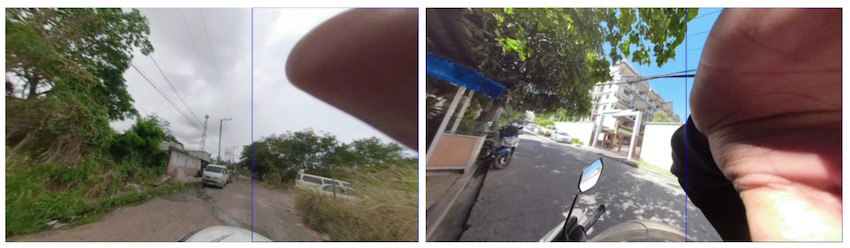
But the main reason was because of a scenario where the recording, at the start or end (but not only), had close-ups of the operator who was checking the camera. This led to images with large regions of interest containing the camera operator’s face – too large to be detected by the model.
An investigation in the dataset structure, by splitting the data into bins based on the bbox sizes (in pixels), made something clear: the dataset was unbalanced.
We made bins for tag sizes with a stride of 100 pixels and went up to the max present in the dataset which accounted for 1 sample of size 2000 pixels. The majority of the labels were small in size and the higher we would go with the size, the less tags we would have. This made it clear that we would need more targeted annotations for our dataset to try to balance it.
All these scenarios required the tagging team to revisit the data multiple times and also change the tagging strategy by including more tags that were considered at a certain limit. It also required them to pay more attention to small details that may have been missed in a previous iteration.
Data Splitting
To better understand the strategy chosen for splitting the data we need to also understand the source of the data. The images come from different devices that are used in different geo locations (different countries) and are from a continuous trip recording. The annotation team used an internal tool to visualise the trips image by image and mark the faces and licence plates present in them. We would then have access to all those images and their respective metadata.
The chosen ratios for splitting are:
Train 70%
Validation 10%
Test 20%
Number of train images
12733
Number of validation images
1682
Number of test images
3221
Number of labeled classes in train set
60630
Number of labeled classes in validation set
7658
Number of of labeled classes in test set
18388
The split is not so trivial as we have some requirements and need to complete some conditions:
An image can have multiple tags from one or both classes but must belong to just one subset.
The tags should be split as close as possible to the desired ratios.
As different images can belong to the same trip in a close geographical relation we need to force them in the same subset, thus avoiding similar tags in train and test subsets, resulting in incorrect evaluations.
Data Augmentation
The application of data augmentation plays a crucial role while training the machine learning model. There are mainly three ways in which data augmentation techniques can be applied. They are:
Offline data augmentation – enriching a dataset by physically multiplying some of its images and applying modifications to them.
Online data augmentation – on the fly modifications of the image during train time with configurable probability for each modification.
Combination of both offline and online data augmentation.
In our case, we are using the third option which is the combination of both.
The first method that contributes to offline augmentation is a method called image view splitting. This is necessary for us due to different image types: perspective camera images, wide field of view images, 360 degree images in equirectangular format. All these formats and field of views with their respective distortions would complicate the data and make it hard for the model to generalise it and also handle different image types that could be added in the future.
For this we defined the concept of image views which are an extracted portion (view) of an image with some predefined properties. For example, the perspective projection of 75 by 75 degrees field of view patches from the original image.
Here we can see a perspective camera image and the image views generated from it:
Figure 5 – Original image
Figure 6 – Two image views generated
The important thing here is that each generated view is an image on its own with the associated tags. They also have an overlapping area so we have a possibility to contain the same tag in two views but from different perspectives. This brings us to an indirect outcome of the first offline augmentation.
The second method for offline augmentation is the oversampling of some of the images (views). As mentioned above, we faced the problem of an unbalanced dataset, specifically we were missing tags that occupied high regions of the image, and even though our tagging teams tried to annotate as many as they could find, these were still scarce.
As our object detection model is an anchor-based detector, we did not even have enough of them to generate the anchor boxes correctly. This could be clearly seen in the accuracy of the previous trained models, as they were performing poorly on bins of big sizes.
By randomly oversampling images that contained big tags, up to a minimum required number, we managed to have better anchors and increase the recall for those scenarios. As described below, the chosen object detector for blurring was YOLOv4 which offers a large variety of online augmentations. The online augmentations used are saturation, exposure, hue, flip and mosaic.
Model
As of summer of 2021, the “to go” solution for object detection in images are convolutional neural networks (CNN), being a mature solution able to fulfil the needs efficiently.
Architecture
Most CNN based object detectors have three main parts: Backbone, Neck and (Dense or Sparse Prediction) Heads. From the input image, the backbone extracts features which can be combined in the neck part to be used by the prediction heads to predict object bounding-boxes and their labels.
Figure 7 – Anatomy of one and two-stage object detectors [1]
The backbone is usually a CNN classification network pretrained on some dataset, like ImageNet-1K. The neck combines features from different layers in order to produce rich representations for both large and small objects. Since the objects to be detected have varying sizes, the topmost features are too coarse to represent smaller objects, so the first CNN based object detectors were fairly weak in detecting small sized objects. The multi-scale, pyramid hierarchy is inherent to CNNs so [2] introduced the Feature Pyramid Network which at marginal costs combines features from multiple scales and makes predictions on them. This or improved variants of this technique is used by most detectors nowadays. The head part does the predictions for bounding boxes and their labels.
YOLO is part of the anchor-based one-stage object detectors family being developed originally in Darknet, an open source neural network framework written in C and CUDA. Back in 2015 it was the first end-to-end differentiable network of this kind that offered a joint learning of object bounding boxes and their labels.
One reason for the big success of newer YOLO versions is that the authors carefully merged new ideas into one architecture, the overall speed of the model being always the north star.
YOLOv4 introduces several changes to its v3 predecessor:
Backbone – CSPDarknet53: YOLOv3 Darknet53 backbone was modified to use Cross Stage Partial Network (CSPNet [5]) strategy, which aims to achieve richer gradient combinations by letting the gradient flow propagate through different network paths.
Multiple configurable augmentation and loss function types, so called “Bag of freebies”, which by changing the training strategy can yield higher accuracy without impacting the inference time.
Configurable necks and different activation functions, they call “Bag of specials”.
Insights
For this task, we found that YOLOv4 gave a good compromise between speed and accuracy as it has doubled the speed of a more accurate two-stage detector while maintaining a very good overall precision/recall. For blurring, the main metric for model selection was the overall recall, while precision and intersection over union (IoU) of the predicted box comes second as we want to catch all personal data even if some are wrong. Having a multitude of possibilities to configure the detector architecture and train it on our own dataset we conducted several experiments with different configurations for backbones, necks, augmentations and loss functions to come up with our current solution.
We faced challenges in training a good model as the dataset posed a large object/box-level scale imbalance, small objects being over-represented in the dataset. As described in [3] and [4], this affects the scales of the estimated regions and the overall detection performance. In [3] several solutions are proposed for this out of which the SPP [6] blocks and PANet [7] neck used in YOLOv4 together with heavy offline data augmentation increased the performance of the actual model in comparison to the former ones.
As we have evaluated the model; it still has some issues:
Occlusion of the object, either by the camera view, head accessories or other elements:
These cases would need extra annotation in the dataset, just like the faces or licence plates that are really close to the camera and occupy a large region of interest in the image.
As we have a limited number of annotations of close objects to the camera view, the model has incorrectly learnt this, sometimes producing false positives in these situations:
Again, one solution for this would be to include more of these scenarios in the dataset.
What’s Next?
Grab spends a lot of effort ensuring privacy protection for its users so we are always looking for ways to further improve our related models and processes.
As far as efficiency is concerned, there are multiple directions to consider for both the dataset and the model. There are two main factors that drive the costs and the quality: further development of the dataset for additional edge cases (e.g. more training data of people wearing masks) and the operational costs of the model.
As the vast majority of current models require a fully labelled dataset, this puts a large work effort on the Data Entry team before creating a new model. Our dataset increased 4x for it’s third version, still there is room for improvement as described in the Dataset section.
As Grab extends its operation in more cities, new data is collected that has to be processed, this puts an increased focus on running detection models more efficiently.
Directions to pursue to increase our efficiency could be the following:
As plenty of unlabelled data is available from imagery collection, a natural direction to explore is self-supervised visual representation learning techniques to derive a general vision backbone with superior transferring performance for our subsequent tasks as detection, classification.
Experiment with optimisation techniques like pruning and quantisation to get a faster model without sacrificing too much on accuracy.
Explore new architectures: YOLOv5, EfficientDet or Swin-Transformer for Object Detection.
Introduce semi-supervised learning techniques to improve our model performance on the long tail of the data.
References
Alexey Bochkovskiy et al.. YOLOv4: Optimal Speed and Accuracy of Object Detection. arXiv:2004.10934v1
Tsung-Yi Lin et al. Feature Pyramid Networks for Object Detection. arXiv:1612.03144v2
Kemal Oksuz et al.. Imbalance Problems in Object Detection: A Review. arXiv:1909.00169v3
Bharat Singh, Larry S. Davis. An Analysis of Scale Invariance in Object Detection – SNIP. arXiv:1711.08189v2
Chien-Yao Wang et al. CSPNet: A New Backbone that can Enhance Learning Capability of CNN. arXiv:1911.11929v1
Kaiming He et al. Spatial Pyramid Pooling in Deep Convolutional Networks for Visual Recognition. arXiv:1406.4729v4
Shu Liu et al. Path Aggregation Network for Instance Segmentation. arXiv:1803.01534v4
Zhenda Xie et al. Self-Supervised Learning with Swin Transformers. arXiv:2105.04553v2
Join Us
Grab is the leading superapp platform in Southeast Asia, providing everyday services that matter to consumers. More than just a ride-hailing and food delivery app, Grab offers a wide range of on-demand services in the region, including mobility, food, package and grocery delivery services, mobile payments, and financial services across 428 cities in eight countries.
Powered by technology and driven by heart, our mission is to drive Southeast Asia forward by creating economic empowerment for everyone. If this mission speaks to you, join our team today!
At Grab, the Lending team is focused towards building products that help finance various segments of users, such as Passengers, Drivers, or Merchants, based on their needs. The team builds products that enable users to avail funds in a seamless and hassle-free way. In order to achieve this, multiple lending microservices continuously interact with each other. Each microservice handles different responsibilities, such as providing offers, storing user information, disbursing availed amounts to a user’s account, and many more.
In this tech blog, we will discuss what Data and Extract, Transform and Load (ETL) pipelines are and how they are used for processing multiple tasks in the Lending Team at Grab. We will also discuss Ratchet, which is a Go library, that helps us in building data pipelines and handling ETL tasks. Let’s start by covering the basis of Data and ETL pipelines.
What is a Data Pipeline?
A Data pipeline is used to describe a system or a process that moves data from one platform to another. In between platforms, data passes through multiple steps based on defined requirements, where it may be subjected to some kind of modification. All the steps in a Data pipeline are automated, and the output from one step acts as an input for the next step.
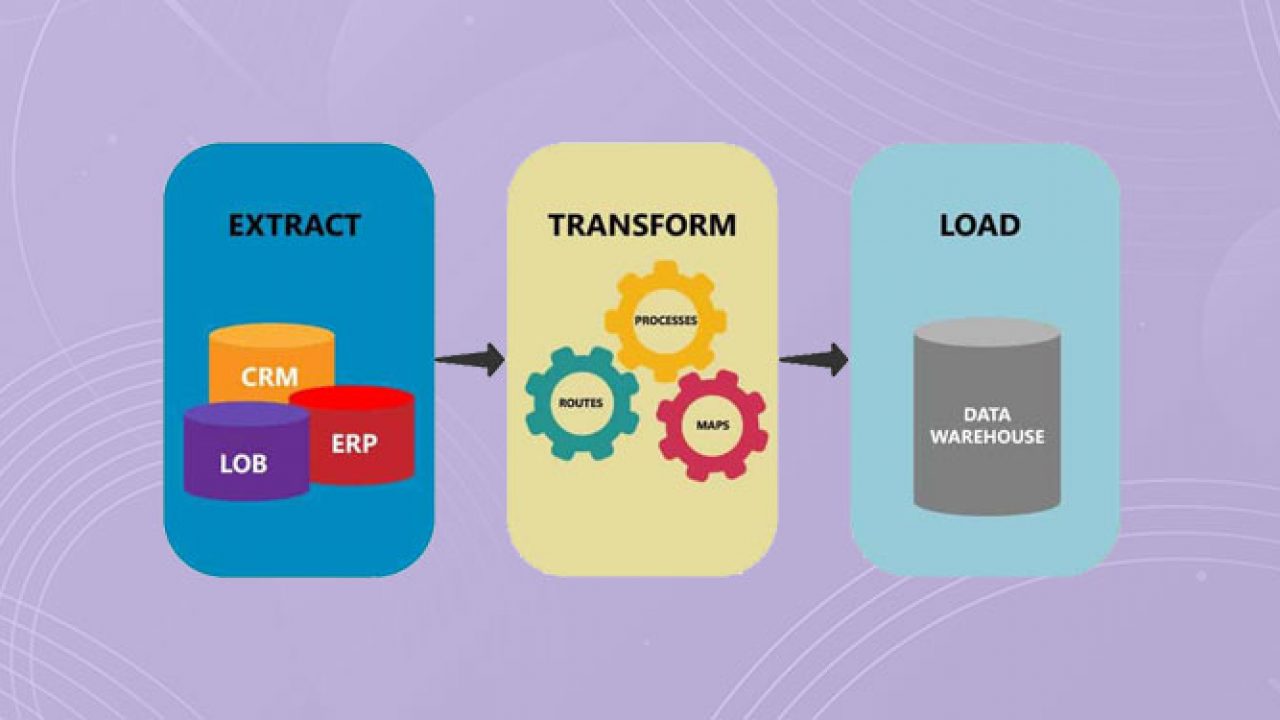
An ETL pipeline is a type of Data pipeline that consists of 3 major steps, namely extraction of data from a source, transformation of that data into the desired format, and finally loading the transformed data to the destination. The destination is also known as the sink.
The combination of steps in an ETL pipeline provides functions to assure that the business requirements of the application are achieved.
Let’s briefly look at each of the steps involved in the ETL pipeline.
Data Extraction
Data extraction is used to fetch data from one or multiple sources with ease. The source of data can vary based on the requirement. Some of the commonly used data sources are:
Database
Web-based storage (S3, Google cloud, etc)
Files
User Feeds, CRM, etc.
The data format can also vary from one use case to another. Some of the most commonly used data formats are:
SQL
CSV
JSON
XML
Once data is extracted in the desired format, it is ready to be fed to the transformation step.
Data Transformation
Data transformation involves applying a set of rules and techniques to convert the extracted data into a more meaningful and structured format for use. The extracted data may not always be ready to use. In order to transform the data, one of the following techniques may be used:
Filtering out unnecessary data.
Preprocessing and cleaning of data.
Performing validations on data.
Deriving a new set of data from the existing one.
Aggregating data from multiple sources into a single uniformly structured format.
Data Loading
The final step of an ETL pipeline involves moving the transformed data to a sink where it can be accessed for its use. Based on requirements, a sink can be one of the following:
Database
File
Web-based storage (S3, Google cloud, etc)
An ETL pipeline may or may not have a loadstep based on its requirements. When the transformed data needs to be stored for further use, the loadstep is used to move the transformed data to the storage of choice. However, in some cases, the transformed data may not be needed for any further use and thus, the loadstep can be skipped.
Now that you understand the basics, let’s go over how we, in the Grab Lending team, use an ETL pipeline.
Why Use Ratchet?
At Grab, we use Golang for most of our backend services. Due to Golang’s simplicity, execution speed, and concurrency support, it is a great choice for building data pipeline systems to perform custom ETL tasks.
Given that Ratchet is also written in Go, it allows us to easily build custom data pipelines.
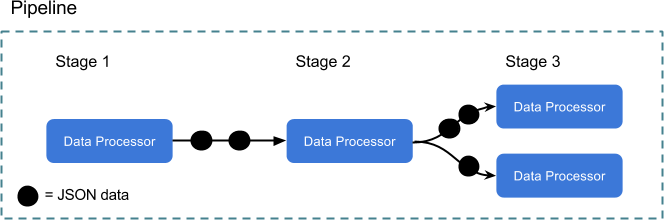
Go channels are connecting each stage of processing, so the syntax for sending data is intuitive for anyone familiar with Go. All data being sent and received is in JSON, providing a nice balance of flexibility and consistency.
Utilising Ratchet for ETL Tasks
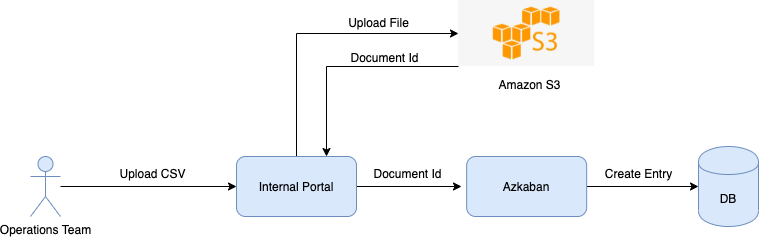
We use Ratchet for multiple ETL tasks like batch processing, restructuring and rescheduling of loans, creating user profiles, and so on. One of the backend services, named Azkaban, is responsible for handling various ETL tasks.
Ratchet uses Data Processors for building a pipeline consisting of multiple stages. Data Processors each run in their own goroutine so all of the data is processed concurrently. Data Processors are organised into stages, and those stages are run within a pipeline. For building an ETL pipeline, each of the three steps (Extract, Transform and Load) use a Data Processor for implementation. Ratchet provides a set of built-in, useful Data Processors, while also providing an interface to implement your own. Usually, the transform stage uses a Custom Data Processor.
Let’s take a look at one of these tasks to understand how we utilise Ratchet for processing an ETL task.
Whitelisting Merchants Through ETL Pipelines
Whitelisting essentially means making the product available to the user by mapping an offer to the user ID. If a merchant in Thailand receives an option to opt for Cash Loan, it is done by whitelisting that merchant. In order to whitelist our merchants, our Operations team uses an internal portal to upload a CSV file with the user IDs of the merchants and other required information. This CSV file is generated by our internal Data and Risk team and handed over to the Operations team. Once the CSV file is uploaded, the user IDs present in the file are whitelisted within minutes. However, a lot of work goes in the background to make this possible.
Data Extraction
Once the Operations team uploads the CSV containing a list of merchant users to be whitelisted, the file is stored in S3 and an entry is created on the Azkaban service with the document ID of the uploaded file.
File upload by Operations team
The data extraction step makes use of a Custom CSV Data Processor that uses the document ID to first create a PreSignedUrl and then uses it to fetch the data from S3. The data extracted is in bytes and we use commas as the delimiter to format the CSV data.
Data Transformation
In order to transform the data, we define a Custom Data Processor that we call a Transformer for each ETL pipeline. Transformers are responsible for applying all necessary transformations to the data before it is ready for loading. The transformations applied in the merchant whitelisting transformers are:
Convert data from bytes to struct.
Check for presence of all mandatory fields in the received data.
Perform validation on the data received.
Make API calls to external microservices for whitelisting the merchant.
As mentioned earlier, the CSV file is uploaded manually by the Operations team. Since this is a manual process, it is prone to human errors. Validation of data in the data transformation step helps avoid these errors and not propagate them further up the pipeline. Since CSV data consists of multiple rows, each row passes through all the steps mentioned above.
Data Loading
Whenever the merchants are whitelisted, we don’t need to store the transformed data. As a result, we don’t have a loadstep for this ETL task, so we just use an Empty Data Processor. However, this is just one of many use cases that we have. In cases where the transformed data needs to be stored for further use, the loadstep will have a Custom Data Processor, which will be responsible for storing the data.
Connecting All Stages
After defining our Data Processors for each of the steps in the ETL pipeline, the final piece is to connect all the stages together. As stated earlier, the ETL tasks have different ETL pipelines and each ETL pipeline consists of 3 stages defined by their Data Processors.
In order to connect these 3 stages, we define a Job Processor for each ETL pipeline. A Job Processor represents the entire ETL pipeline and encompasses Data Processors for each of the 3 stages. Each Job Processor implements the following methods:
SetSource: Assigns the Data Processor for the Extraction stage.
SetTransformer: Assigns the Data Processor for the Transformation stage.
SetDestination: Assigns the Data Processor for the Load stage.
Execute: Runs the ETL pipeline.
Job processors containing Data Processor for each stage in ETL
When the Azkaban service is initialised, we run the SetSource(), SetTransformer() and SetDestination() methods for each of the Job Processors defined. When an ETL task is triggered, the Execute() method of the corresponding Job Processor is run. This triggers the ETL pipeline and gradually runs the 3 stages of ETL pipeline. For each stage, the Data Processor assigned during initialisation is executed.
Conclusion
ETL pipelines help us in streamlining various tasks in our team. As showcased through the example in the above section, an ETL pipeline breaks a task into multiple stages and divides the responsibilities across these stages.
In cases where a task fails in the middle of the process, ETL pipelines help us determine the cause of the failure quickly and accurately. With ETL pipelines, we have reduced the manual effort required for validating data at each step and avoiding propagation of errors towards the end of the pipeline.
Through the use of ETL pipelines and schedulers, we at Lending have been able to automate the entire pipeline for many tasks to run at scheduled intervals without any manual effort involved at all. This has helped us tremendously in reducing human errors, increasing the throughput of the system and making the backend flow more reliable. As we continue to automate more and more of our tasks that have tightly defined stages, we foresee a growth in our ETL pipelines usage.
Grab is the leading superapp platform in Southeast Asia, providing everyday services that matter to consumers. More than just a ride-hailing and food delivery app, Grab offers a wide range of on-demand services in the region, including mobility, food, package and grocery delivery services, mobile payments, and financial services across 428 cities in eight countries.
Powered by technology and driven by heart, our mission is to drive Southeast Asia forward by creating economic empowerment for everyone. If this mission speaks to you, join our team today!
Wanna know how we improved our app’s build time performance and developer experience at Grab? Continue reading…
Where it all began
Imagine you are working on an app that grows continuously as more and more features are added to it, it becomes challenging to manage the code at some point. Code conflicts increase due to coupling, development slows down, releases take longer to ship, collaboration becomes difficult, and so on.
Grab superapp is one such app that offers many services like booking taxis, ordering food, payments using an e-wallet, transferring money to friends/families, paying at merchants, and many more, across Southeast Asia.
Grab app followed a monolithic architecture initially where the entire code was held in a single module containing all the UI and business logic for almost all of its features. But as the app grew, new developers were hired, and more features were built, it became difficult to work on the codebase. We had to think of better ways to maintain the codebase, and that’s when the team decided to modularise the app to solve the issues faced.
What is Modularisation?
Breaking the monolithic app module into smaller, independent, and interchangeable modules to segregate functionality so that every module is responsible for executing a specific functionality and will contain everything necessary to execute that functionality.
Modularising the Grab app was not an easy task as it brought many challenges along with it because of its complicated structure due to the high amount of code coupling.
Approach and Design
We divided the task into the following sub-tasks to ensure that only one out of many functionalities in the app was impacted at a time.
Setting up the infrastructure by creating Base/Core modules for Networking, Analytics, Experimentation, Storage, Config, and so on.
Building Shared Library modules for Styling, Common-UI, Utils, etc.
Incrementally building Feature modules for user-facing features like Payments Home, Wallet Top Up, Peer-to-Merchant (P2M) Payments, GrabCard and many others.
Creating Kit modules for the feature to feature module communication. This step helped us in building the feature modules in parallel.
Finally, the App module is used as a hub to connect all the other modules together using dependency injection (Dagger).
Modularised app structure
In the above diagram, payments-home, wallet top-up, and grabcard are different features provided by the Grab app. top-up-kit and grabcard-kit are bridges that expose functionalities from topup and grabcard modules to the payments-home module, respectively.
In the process of modularising the Grab app, we ensured that a feature module did not directly depend on other feature modules so that they could be built in parallel using the available CPU cores of the machine, hence reducing the overall build time of the app.
With the Kit module approach, we separated our code into independent layers by depending only on abstractions instead of concrete implementation.
Modularisation Benefits
Faster build times and hence faster CI: Gradle build system compiles only the changed modules and uses the binaries of all the non-affected modules from its cache. So the compilation becomes faster. Moreover, independent modules are run in parallel on different threads.
Fine dependency graph: Dependencies of a module are well defined.
Reusability across other apps: Modules can be used across different apps by converting them into an AAR SDK.
Scale and maintainability: Teams can work independently on the modules owned by them without blocking each other.
Well-defined code ownership: Clear responsibility on who owns which code.
Limitations
Requires more effort and time to modularise an app.
Separate configuration files to be maintained for each module.
Gradle sync time starts to grow.
IDE becomes very slow and its memory usage goes up a lot.
Parallel execution of the module depends on the machine’s capabilities.
Where we are now
There are more than 1,000 modules in the Grab app and are still counting.
At Grab, we have many sub-teams which take care of different features available in the app. Grab Financial Group (GFG) is one such sub-team that handles everything related to payments in the app. For example: P2P & P2M money transfers, e-Wallet activation, KYC, and so on.
We started modularising payments further in July 2020 as it was already bombarded with too many features and it was difficult for the team to work on the single payments module. The result of payments modularisation is shown in the following chart.
Build time graph of payments module
As of today, we have about 200+ modules in GFG and more than 95% of the modules take less than 15s to build.
Conclusion
Modularisation has helped us a lot in reducing the overall build time of the app and also, in improving the developer experience by breaking dependencies and allowing us to define code ownership. Having said that, modularisation is not an easy or a small task, especially for large projects with legacy code. However, with careful planning and the right design, modularisation can help in forming a well-structured and maintainable project.
Grab is the leading superapp platform in Southeast Asia, providing everyday services that matter to consumers. More than just a ride-hailing and food delivery app, Grab offers a wide range of on-demand services in the region, including mobility, food, package and grocery delivery services, mobile payments, and financial services across 428 cities in eight countries.
Powered by technology and driven by heart, our mission is to drive Southeast Asia forward by creating economic empowerment for everyone. If this mission speaks to you, join our team today!
Wanna know how we improved our app’s build time performance and developer experience at Grab? Continue reading…
Where it all began
Imagine you are working on an app that grows continuously as more and more features are added to it, it becomes challenging to manage the code at some point. Code conflicts increase due to coupling, development slows down, releases take longer to ship, collaboration becomes difficult, and so on.
Grab superapp is one such app that offers many services like booking taxis, ordering food, payments using an e-wallet, transferring money to friends/families, paying at merchants, and many more, across Southeast Asia.
Grab app followed a monolithic architecture initially where the entire code was held in a single module containing all the UI and business logic for almost all of its features. But as the app grew, new developers were hired, and more features were built, it became difficult to work on the codebase. We had to think of better ways to maintain the codebase, and that’s when the team decided to modularise the app to solve the issues faced.
What is Modularisation?
Breaking the monolithic app module into smaller, independent, and interchangeable modules to segregate functionality so that every module is responsible for executing a specific functionality and will contain everything necessary to execute that functionality.
Modularising the Grab app was not an easy task as it brought many challenges along with it because of its complicated structure due to the high amount of code coupling.
Approach and Design
We divided the task into the following sub-tasks to ensure that only one out of many functionalities in the app was impacted at a time.
Setting up the infrastructure by creating Base/Core modules for Networking, Analytics, Experimentation, Storage, Config, and so on.
Building Shared Library modules for Styling, Common-UI, Utils, etc.
Incrementally building Feature modules for user-facing features like Payments Home, Wallet Top Up, Peer-to-Merchant (P2M) Payments, GrabCard and many others.
Creating Kit modules for the feature to feature module communication. This step helped us in building the feature modules in parallel.
Finally, the App module is used as a hub to connect all the other modules together using dependency injection (Dagger).
Modularised app structure
In the above diagram, payments-home, wallet top-up, and grabcard are different features provided by the Grab app. top-up-kit and grabcard-kit are bridges that expose functionalities from topup and grabcard modules to the payments-home module, respectively.
In the process of modularising the Grab app, we ensured that a feature module did not directly depend on other feature modules so that they could be built in parallel using the available CPU cores of the machine, hence reducing the overall build time of the app.
With the Kit module approach, we separated our code into independent layers by depending only on abstractions instead of concrete implementation.
Modularisation Benefits
Faster build times and hence faster CI: Gradle build system compiles only the changed modules and uses the binaries of all the non-affected modules from its cache. So the compilation becomes faster. Moreover, independent modules are run in parallel on different threads.
Fine dependency graph: Dependencies of a module are well defined.
Reusability across other apps: Modules can be used across different apps by converting them into an AAR SDK.
Scale and maintainability: Teams can work independently on the modules owned by them without blocking each other.
Well-defined code ownership: Clear responsibility on who owns which code.
Limitations
Requires more effort and time to modularise an app.
Separate configuration files to be maintained for each module.
Gradle sync time starts to grow.
IDE becomes very slow and its memory usage goes up a lot.
Parallel execution of the module depends on the machine’s capabilities.
Where we are now
There are more than 1,000 modules in the Grab app and are still counting.
At Grab, we have many sub-teams which take care of different features available in the app. Grab Financial Group (GFG) is one such sub-team that handles everything related to payments in the app. For example: P2P & P2M money transfers, e-Wallet activation, KYC, and so on.
We started modularising payments further in July 2020 as it was already bombarded with too many features and it was difficult for the team to work on the single payments module. The result of payments modularisation is shown in the following chart.
Build time graph of payments module
As of today, we have about 200+ modules in GFG and more than 95% of the modules take less than 15s to build.
Conclusion
Modularisation has helped us a lot in reducing the overall build time of the app and also, in improving the developer experience by breaking dependencies and allowing us to define code ownership. Having said that, modularisation is not an easy or a small task, especially for large projects with legacy code. However, with careful planning and the right design, modularisation can help in forming a well-structured and maintainable project.
Grab is the leading superapp platform in Southeast Asia, providing everyday services that matter to consumers. More than just a ride-hailing and food delivery app, Grab offers a wide range of on-demand services in the region, including mobility, food, package and grocery delivery services, mobile payments, and financial services across 428 cities in eight countries.
Powered by technology and driven by heart, our mission is to drive Southeast Asia forward by creating economic empowerment for everyone. If this mission speaks to you, join our team today!
Ever since we made the leap at GitHub to upgrade off our fork of Rails and worked hard to stay up to date with the latest releases, we’ve consistently looked for ways to improve the Rails framework upstream. We do this in many ways – running GitHub off of Rails main, reporting and fixing bugs we find, and most importantly pushing functionality upstream that the entire Ruby community can benefit from.
Most recently, we extracted internal functionality to disable joining queries when an association crossed multiple databases. Prior to our work in this area, Rails had no support for handling associations that spanned across clusters; teams had to write SQL to achieve this.
Background
At GitHub, we have 30 databases configured in our Rails monolith—15 primaries and 15 replicas. We use “functional partitioning” to split up our data, which means that each of those 15 primaries has a different schema. In contrast, a “horizontal sharding” approach would have 15 shards with the same schema.
While there are some workarounds for joining across clusters in MySQL, they are usually not performant or else they require additional setup. Without these workarounds, attempting to join from a table in cluster A to a table in cluster B would result in an error. To work around this limitation, teams had to write SQL, selecting IDs from the first table to then use in the second query to find the appropriate records. This was extra work and could be error-prone. We had an opportunity to make this process smoother by implementing non-join queries in Rails.
Let’s look at some code to see how this works:
Let’s say we have three models: Dog, Human, and Treat.
# table dogs in database animals
class Dog < AnimalsRecord
  has_many: treats, through: :humans
  has_many :humans
end

# table humans in database people
class Human < PeopleRecord
  has_many :treats
  has_many :dogs
end

# table treats in database default
class Treat < ApplicationRecord
  has_many :dogs, through: :humans
  has_many :humans
end
If our Rails application code loaded the dog.treats association, usually that would automatically perform a join query:
SELECT treats.* FROM treats INNER JOIN humans ON treats.human_id = humans.id WHERE humans.dog_id = 2
Looking at the inheritance chain, we can see that Dog, Treat, and Human all inherit from different base classes. Each of these base classes belongs to a different database connection, which means that records for all three models are stored in different databases.
Since the data is stored across multiple primaries, when the join on dog.treats is run we’ll see an application error:
One of the best features Rails provides out of the box is generating SQL for you. But since GitHub’s data lives in different databases, we could no longer take advantage of this. We had an opportunity to improve Rails in a way that benefited our engineers and everyone else in the Rails community who uses multiple databases.
Implementation
Prior to our work in this area, engineers working on any associations that crossed database boundaries would be forced to manually query IDs rather than using Active Record’s association APIs. Writing SQL can be error prone and defeats the purpose of Active Record’s convenience methods like dog.treats.
A little over two years ago, we started experimenting with an internal gem to disable joins for cross-database associations. We chose to implement this outside of Rails first so that we could work out the majority of bugs before merging to Rails. We wanted to be sure that we could use it successfully in production and that it didn’t cause any significant friction in development or any performance concerns in production. This is how many of Rails’ popular features get developed. We often extract implementations from large production applications – if it’s something we need and something a lot of applications can benefit from, we make it stable first, then upstream it to Rails.
The overall implementation is relatively small. To accomplish disabling joins, we added an option to has_many :through associations called disable_joins. When set to true for an association, Rails will generate separate queries for each database rather than a join query.
This needed to be an option on the association rather than performed at runtime because Rails associations are lazily loaded – the SQL is generated when the association objects are created, which means that by the time Rails runs the SQL to load dog.treats the join will already be generated. After adding the option in Rails, we implemented a new scoping class that would handle the order, limit, scopes, and other options.
Now applications can add the following to their associations to make sure Rails generates two or more queries instead of joins:
class Dog < AnimalsRecord
  has_many: treats, through: :humans, disable_joins: true
  has_many :humans
end
And that’s all that’s needed to disable generating joins for associations that cross database servers!
Now, calls to dog.treats will generate the following SQL:
SELECT "humans"."id" FROM "humans" WHERE "humans"."dog_id" = ?  [["dog_id", 1]]
SELECT "treats".* FROM "treats" WHERE "treats"."human_id" IN (?, ?, ?)  [["human_id", 1], ["human_id", 2], ["human_id", 3]]
Caveats
There are a couple of important caveats to keep in mind when using this new feature. Applications that need to disable joins may see that those associations have slower database performance. This would be true whether you wrote the SQL manually or use Rails’ new disable_joins feature. Fundamentally, if you’re performing multiple queries across multiple databases, that can be slower than performing a single join query on one database. It’s really important to make sure that your queries are efficient and that proper indexes are in place before using this feature. And as always, when making major changes to your database queries, it’s important to benchmark and understand how those changes will affect your application.
Additionally, if your queries rely on an order and limit from the join database you may see a performance impact on requests. When two queries are joined, MySQL can perform the order based on the table that’s joined (i.e., order by humans.human_id which would order the returned treats by the human ID). However, when you’re splitting queries the order can’t be applied by the database. To solve this, Rails orders the records in-memory based on the order they would have been returned if there was a join. This preserves the expected behavior but since the order and limit are performed in-memory, you’ll usually want to avoid performing these actions on hundreds of thousands of records.
Conclusion
Four years ago, contributing to Rails at this level was just something we’d hoped to be able to do one day. We were so far behind in our upgrades that it was difficult to contribute changes to the framework. This might look like a small change but it’s a clear demonstration of the hard work we’ve done to improve the technical debt in our application and ensure that we’re giving back to the community whenever we can.
By adding support for handling associations across databases, we help empower other applications to scale as their traffic and data grow. Additionally, by pushing this code into Rails and out of our private internal gem we’ll find even more improvements and edge cases in applications that aren’t GitHub. As we continue to grow and improve Rails for us at GitHub, we’ll continue to improve it for the entire community. This pull request is just one example of how we intend to do that for years to come.
In June, we experienced no incidents resulting in service downtime to our core services.
Please follow our status page for real time updates and watch our blog for next month’s availability report. To learn more about what we’re working on, check out the GitHub engineering blog.
The Grab support team plays a key role in ensuring our users receive support when things don’t go as expected or whenever there are questions on our products and services.
In the past, when users required real-time support, their only option was to call our hotline and wait in the queue to talk to an agent. But voice support has its downsides: sometimes it is complex to describe an issue in the app, and it requires the user’s full attention on the call.
With chat messaging apps growing massively in the last years, chat has become the expected support channel users are familiar with. It offers real-time support with the option of multitasking and easily explaining the issue by sharing pictures and documents. Compared to voice support, chat provides access to the conversation for future reference.
With chat growth, building a chat system tailored to our support needs and integrated with internal data, seemed to be the next natural move.
We wanted to deliver a product that would fully delight our users. That’s why we decided to build an in-house chat tool that can:
Prevent chat disconnections and ensure a consistent chat experience: Building a native chat experience allowed us to ensure a stable chat session, even when users leave the app. Besides, leveraging on the existing Grab chat infrastructure helped us achieve this fast and ensure the chat experience is consistent throughout the app. You can read more about the chat architecture here.
Improve productivity and provide faster support turnarounds: By building the agent experience in the CRM tool, we could reduce the number of tools the support team uses and build features tailored to our internal processes. This helped to provide faster help for our users.
Allow integration with internal systems and services: Chat can be easily integrated with in-house AI models or chatbot, which helps us personalise the user experience and improve agent productivity.
Route our users to the best support specialist available: Our newly built routing system accounts for all the use cases we were wishing for such as prioritising certain requests, better distribution of the chat load during peak hours, making changes at scale and ensuring each chat is routed to the best support specialist available.
Fail Fast with an MVP
Before building a full-fledged solution, we needed to prove the concept, an MVP that would have the key features and yet, would not take too much effort if it fails. To kick start our experiment, we established the success criteria for our MVP; how do we measure its success or failure?
Defining What Success Looks Like
Any experiment requires a hypothesis – something you’re trying to prove or disprove and it should relate to your final product. To tailor the final product around the success criteria, we need to understand how success is measured in our situation. In our case, disconnections during chat support was one of the key challenges faced so our hypothesis was:
Starting with Design Sprint
Our design sprint aimed to solutionise a series of problem statements, and generate a prototype to validate our hypothesis. To spark ideation, we run sketching exercises such as Crazy 8, Solution sketch and end off with sharing and voting.
Some of the prototypes built during the Design sprint
Defining MVP Scope to Run the Experiment
To test our hypothesis quickly, we had to cut the scope by focusing on the basic functionality of allowing chat message exchanges with one agent.
Here is the main flow and a sneak peek of the design:
Accepting chats
Handling concurrent chats
What We Learnt from the Experiment
During the experiment, we had to constantly put ourselves in our users’ shoes as ‘we are not our users’. We decided to shadow our chat support agents and get a sense of the potential issues our users actually face. By doing so, we learnt a lot about how the tool was used and spotted several problems to address in the next iterations.
In the end, the experiment confirmed our hypothesis that having a native in-app chat was more stable than the previous chat in use, resulting in a better user experience overall.
Starting with the End in Mind
Once the experiment was successful, we focused on scaling. We defined the most critical jobs to be done for our users so that we could scale the product further. When designing solutions to tackle each of them, we ensured that the product would be flexible enough to address future pain points. Would this work for more channels, more users, more products, more countries?
Before scaling, the problems to solve were:
Monitoring the performance of the system in real-time, so that swift operational changes can be made to ensure users receive fast support;
Routing each chat to the best agent available, considering skills, occupancy, as well as issue prioritisation. You can read more about the our routing system design here;
Easily communicate with users and show empathy, for which we built file-sharing capabilities for both users and agents, as well as allowing emojis, which create a more personalised experience.
Scaling Efficiently
We broke down the chat support journey to determine what areas could be improved.
Reducing Waiting Time
When analysing the current wait time, we realised that when there was a surge in support requests, the average waiting time increased drastically. In these cases, most users would be unresponsive by the time an agent finally attends to them.
To solve this problem, the team worked on a dynamic queue limit concept based on Little’s law. The idea is that considering the number of incoming chats and the agents’ capacity, we can forecast the number of users we can handle in a reasonable time, and prevent the remaining from initiating a chat. When this happens, we ensure there’s a backup channel for support so that no user is left unattended.
This allowed us to reduce chat waiting time by ~30% and reduce unresponsive users by ~7%.
Reducing Time to Reply
A big part of the chat time is spent typing the message to send to the user. Although the previous tool had templated messages, we observed that 85% of them were free-typed. This is because agents felt the templates were impersonal and wanted to add their personal style to the messages.
With this information in mind, we knew we could help by providing autocomplete suggestions while the agents are typing. We built a machine learning based feature that considers several factors such as user type, the entry point to support, and the last messages exchanged, to suggest how the agent should complete the sentence. When this feature was first launched, we reduced the average chat time by 12%!
Read this to find out more about how we built this machine learning feature, from defining the problem space to its implementation.
Reducing the Overall Chat Time
Looking at the average chat time, we realised that there was still room for improvement. How can we help our agents to manage their time better so that we can reduce the waiting time for users in the queue?
We needed to provide visibility of chat durations so that our agents could manage their time better. So, we added a timer at the top of each chat window to indicate how long the chat was taking.
Timer in the minimised chat
We also added nudges to remind agents that they had other users to attend to while they were in the chat.
Timer in the maximised chat
By providing visibility via prompts and colour-coded indicators to prevent exceeding the expected chat duration, we reduced the average chat time by 22%!
What We Learnt from this Project
Start with the end in mind. When you embark on a big project like this, have a clear vision of how the end state looks like and plan each step backwards. How does success look like and how are we going to measure it? How do we get there?
Data is king. Data helped us spot issues in real-time and guided us through all the iterations following the MVP. It helped us prioritise the most impactful problems and take the right design decisions. Instrumentation must be part of your MVP scope!
Remote user testing is better than no user testing at all. Ideally, you want to do user testing in the exact environment your users will be using the tool but a pandemic might make things a bit more complex. Don’t let this stop you! The qualitative feedback we received from real users, even with a prototype on a video call, helped us optimise the tool for their needs.
Address the root cause, not the symptoms. Whenever you are tasked with solving a big problem, break it down into its components by asking “Why?” until you find the root cause. In the first phases, we realised the tool had a longer chat time compared to 3rd party softwares. By iteratively splitting the problem into smaller ones, we were able to address the root causes instead of the symptoms.
Shadow your users whenever you can. By looking at the users in action, we learned a ton about their creative ways to go around the tool’s limitations. This allowed us to iterate further on the design and help them be more efficient.
Of course, this would not have been possible without the incredible work of several teams: CSE, CE, Comms platform, Driver and Merchant teams.
Join Us
Grab is the leading superapp platform in Southeast Asia, providing everyday services that matter to consumers. More than just a ride-hailing and food delivery app, Grab offers a wide range of on-demand services in the region, including mobility, food, package and grocery delivery services, mobile payments, and financial services across 428 cities in eight countries.
Powered by technology and driven by heart, our mission is to drive Southeast Asia forward by creating economic empowerment for everyone. If this mission speaks to you, join our team today!
Market-Store is an in-house developed general purpose feature store that is used to serve real-time computed machine learning (ML) features. Market-Store has a stringent SLA around latency, throughput, and availability as it empowers ML models, which are used in Dynamic Pricing and Consumer Experience.
Problem
As Grab continues to grow, introducing new ML models and handling increased traffic, Market-Store started to experience high latency. Market-Store’s SLA states that 99% of transactions should be within 200ms, but our latency increased to 2 seconds. This affected the availability and accuracy of our models that rely on Market-Store for real-time features.
Latency Issue
We used different metrics and logs to debug the latency issue but could not find any abnormalities that directly correlated to the API’s performance. We discovered that the problem went away temporarily when we restarted the service. But during the next peak period, the service began to struggle once again and the problem became more prominent as Market-Store’s query per second (QPS) increased.
The following graph shows an increase in the memory used with time over 12 hours. Even as the system load receded, memory usage continued to increase.
The continuous increase in memory consumption indicated the possibility of a memory leak, which occurs when memory is allocated but not returned after its use is over. This results in consistently increasing consumed memory until the service runs out of memory and crashes.
Although we could restart the service and resolve the issue temporarily, the increasing memory use suggested a deeper underlying root cause. This meant that we needed to conduct further investigation with tools that could provide deeper insights into the memory allocations.
Debugging Using Go Tools
PPROF is a profiling tool by Golang that helps to visualise and analyse profiles from Go programmes. A profile is a collection of stack traces showing the call sequences in your programme that eventually led to instances of a particular event i.e. allocation. It also provides details such as Heap and CPU information, which could provide insights into the bottlenecks of the Go programme.
By default, PPROF is enabled on all Grab Go services, making it the ideal tool to use in our scenario. To understand how memory is allocated, we used PPROF to generate Market-Store’s Heap profile, which can be used to understand how inuse memory was allocated for the programme.
You can collect the Heap profile by running this command:
go tool pprof 'http://localhost:6060/debug/pprof/heap'
The command then generates the Heap profile information as shown in the diagram below:
From this diagram, we noticed that a lot of memory was allocated and held by the child context created from Async Library even after the tasks were completed.
In Market-Store, we used the Async Library, a Grab open-source library, which typically used to run concurrent tasks. Any contexts created by the Async Library should be cleaned up after the background tasks are completed. This way, memory would be returned to the service.
However, as shown in the diagram, memory was not being returned, resulting in a memory leak, which explains the increasing memory usage even as Market-Store’s system load decreased.
Uncovering the Real Issue
So we knew that Market-Store’s latency was affected, but we didn’t know why. From the first graph, we saw that memory usage continued to grow even as Market-Store’s system load decreased. Then, PPROF showed us that the memory held by contexts was not cleaned up, resulting in a memory leak.
Through our investigations, we drew a correlation between the increase in memory usage and a degradation in the server’s API latency. In other words, the memory leak resulted in a high memory consumption and eventually, caused the latency issue.
However, there was no change in our service that would have impacted how contexts are created and cleaned up. So what caused the memory leak?
Debugging the Memory Leak
We needed to look into the Async Library and how it worked. For Market-Store, we updated the cache asynchronously for the write-around caching mechanism. We use the Async Library for running the update tasks in the background.
The following code snippet explains how the Async Library works:
async.Consume(context.Background(),runtime.NumCPU()*4,buffer)// Consume runs the tasks with a specific max concurrencyfuncConsume(ctxcontext.Context,concurrencyint,taskschanTask)Task{// code...returnInvoke(ctx,func(context.Context)(interface{},error){workers:=make(chanint,concurrency)concurrentTasks:=make([]Task,concurrency)// code ...t.Run(ctx).ContinueWith(ctx,func(interface{},error)(interface{},error){// code...})}}funcInvoke(ctxcontext.Context,actionWork)Task{returnNewTask(action).Run(ctx)}func(t*task)Run(ctxcontext.Context)Task{ctx,t.cancel=context.WithCancel(ctx)got.run(ctx)returnt}
Note: Code that is not relevant to this article was replaced with code.
As seen in the code snippet above, the Async Library initialises the Consume method with a background context, which is then passed to all its runners. Background contexts are empty and do not track or have links to child contexts that are created from them.
In Market-Store, we use background contexts because they are not bound by request contexts and can continue running even after a request context is cleaned up. This means that once the task has finished running, the memory consumed by child contexts would be freed up, avoiding the issue of memory leaks altogether.
Identifying the Cause of the Memory Leak
Upon further digging, we discovered an MR that was merged into the library to address a task cancellation issue. As shown in the code snippet below, the Consume method had been modified such that task contexts were being passed to the runners, instead of the empty background contexts.
Before we explain the code snippet, we should briefly explain what Golang contexts are. A context is a standard Golang package that carries deadlines, cancellation signals, and other request-scoped values across API boundaries and between processes. We should always remember to cancel contexts after using them.
Importance of Context Cancellation
When a context is cancelled, all contexts derived from it are also cancelled. This means that there will be no unaccounted contexts or links and it can be achieved by using the Async Library’s CancelFunc.
The Async Library’s CancelFunc method will:
Cancel the created child context and its children
Remove the parent reference from the child context
Stop any associated timers
We should always make sure to call the CancelFunc method after using contexts, to ensure that contexts and memory are not leaked.
Explaining the Impact of the MR
In the previous code snippet, we see that task contexts are passed to runners and they are not being cancelled. The Async Library created task contexts from non-empty contexts, which means the task contexts are tracked by the parent contexts. So, even if the work associated with these task contexts is complete, they will not be cleaned up by the system (garbage collected).
As we started using task contexts instead of background contexts and did not cancel them, the memory used by these contexts was never returned, thus resulting in a memory leak.
It took us several tries to debug and investigate the root cause of Market-Store’s high latency issue and through this incident, we learnt several important things that would help prevent a memory leak from recurring.
Always cancel the contexts you’ve created. Leaving it to garbage collection (system cleanup) may result in unexpected memory leaks.
Go profiling can provide plenty of insights about your programme, especially when you’re not sure where to start troubleshooting.
Always benchmark your dependencies when integrating or updating the versions to ensure they don’t have any performance bottlenecks.
Special thanks to Chip Dong Lim for his contributions and for designing the GIFs included in this article.
Join Us
Grab is the leading superapp platform in Southeast Asia, providing everyday services that matter to consumers. More than just a ride-hailing and food delivery app, Grab offers a wide range of on-demand services in the region, including mobility, food, package and grocery delivery services, mobile payments, and financial services across 428 cities in eight countries.
Powered by technology and driven by heart, our mission is to drive Southeast Asia forward by creating economic empowerment for everyone. If this mission speaks to you, join our team today!
You know that feeling when you make your latest hack project public, and you’re ready to share it with the world? And when you go to Twitter to post a link to your repository, you just see a big picture of yourself? We wanted to make that a better experience.
We recently set about creating a framework and service for automatically generating social sharing images for repositories and other resources on GitHub.
Before the update
Before, when you shared a link to a repository on any social media platform, you’d see something like this:
We heard from you that seeing the author’s face was unexpected. Plus, there’s not a lot of quick information here, aside from the plaintext title and description.
We do have custom repository images, and you can still use those to give your project some bespoke branding—but most people don’t upload a custom image for their repositories, so we wanted to create a better default experience for every repo on GitHub.
After the update
Now, we generate a new image for you on-the-fly when you share a link to a repository somewhere:
We create similar cards for issues, pull requests and commits, with more resources coming soon (like Discussions, Releases and Gists):
Open Graph image for a pull request
Open Graph image for a commit
Open Graph image for, you guessed it, an issue
What’s going on behind the scenes? A quick intro to Open Graph
Open Graph is a set of standards for websites to be able to declare metadata that other platforms can pick out, to get a TL;DR of the page. You’d declare something like this in your HTML:
In addition to the image, we also define a number of other meta tags that are used for rendering information outside of GitHub, like og:title and og:description.
When a crawler (like Twitter’s crawling bot, which activates any time you share a link on Twitter) looks at your page, it’ll see those meta tags and grab the image. Then, when that platform shows a preview of your website, it’ll use the information it found. Twitter is one example, but virtually all social platforms use Open Graph to unfurl rich previews for links.
How does the image generator work?
I’ll show you! We’ve leveraged the magic of open source technologies to string some tools together. There are a ton of services that do image templating on-demand, but we wanted to deploy our own within our own infrastructure, to ensure that we have the control we need to generate any kind of image.
So: our custom Open Graph image service is a little Node.js app that uses the GitHub GraphQL API to collect data, generates some HTML from a template, and pipes it to Puppeteer to “take a screenshot” of that HTML. This is not a novel idea—lots of companies and projects (like vercel/og-image) use a similar process to generate an image.
We have a couple of routes that match patterns similar to what you’d find on GitHub.com:
When our application receives a request that matches one of those routes, we use the GitHub GraphQL API to collect some data based on the route parameters and generate an image using code similar to this:
async function generateImage(template, templateData) {
 // Render some HTML from the relevant template
 const html = compileTemplate(template, templateData);

 // Create a new page
 const page = await browser.newPage();

 // Set the content to our rendered HTML
 await page.setContent(html, { waitUntil: "networkIdle0" });

 const screenshotBuffer = await page.screenshot({
   fullPage: false,
   type: "png",
 });

 await page.close();

 return screenshotBuffer;
}
Some performance gotchas
Puppeteer can be really slow—it’s launching an entire Chrome browser, so some slowness is to be expected. But we quickly saw some performance problems that we just couldn’t live with. Here are a couple of things we did to significantly improve performance of image generation:
waitUntil: networkIdle0 is aggressively patient, so we replaced it
One Saturday night, I was generating and digging through Chromium traces, as one does, to determine why this service was so slow. I dug into these traces with the help of Electron maintainer and semicolon enthusiast @MarshallOfSound. We discovered a huge, two-second block of idle time (in pink):
That’s a trace of everything between browser.newPage() and page.close(). The giant pink bar is “idle time,” and (through trial and error) we determined that this was the waitUntil: networkidle0 option passed to page.setContent(). We needed to set this option to say “only continue once all images, fonts, etc have finished loading,” so that we don’t take screenshots before the pages are actually ready. However, it seemed to add a significant amount of idle time, despite the page being ready for a screenshot 300ms in. Per networkidle0‘s docs:
networkidle0 – consider setting content to be finished when there are no more than 0 network connections for at least 500 ms.
We deduced that that big pink block was due to Puppeteer’s backoff time, where it waits 500ms before considering all network connections complete; but the numbers didn’t really line up. That pink bar shouldn’t be nearly that big, at around two seconds instead of the expected 500-ish milliseconds.
So, how did we fix it? Well, we want to wait until all images/fonts have loaded, but clearly Puppeteer’s method of doing so was a little greedy. It’s hard to see in a still image, but the below screenshot shows that all images have been decoded and render by about ~115ms into the trace:
All we had to do was provide Puppeteer with a different heuristic to know when the page was “done” and ready for a screenshot. Here’s what we came up with:
   // Set the content to our rendered HTML
   await page.setContent(html, { waitUntil: "domcontentloaded" });

   // Wait until all images and fonts have loaded
   await page.evaluate(async () => {
     const selectors = Array.from(document.querySelectorAll("img"));
     await Promise.all([
       document.fonts.ready,
       ...selectors.map((img) => {
         // Image has already finished loading, let’s see if it worked
         if (img.complete) {
           // Image loaded and has presence
           if (img.naturalHeight !== 0) return;
           // Image failed, so it has no height
           throw new Error("Image failed to load");
         }
         // Image hasn’t loaded yet, added an event listener to know when it does
         return new Promise((resolve, reject) => {
           img.addEventListener("load", resolve);
           img.addEventListener("error", reject);
         });
       }),
     ]);
   });
This isn’t magic—it’s standard DOM practices. But it was a much better solution for our use-case than the abstraction provided by Puppeteer. We changed waitUntil to domcontentloaded to ensure that the HTML had finished being parsed, then passed a custom function to page.evaluate. This gets run in the context of the page itself but pipes the return value to the outer context. This meant that we could listen for image load events and pause execution until the Promises have been resolved.
You can see the difference in our performance graphs (going from ~2.25 seconds to ~600ms):
Double your rendering speed with 1mb of memory
More memory means more speed, right? Sure! At GitHub, when we deploy a new service to our internal Kubernetes infrastructure, it gets a default amount of memory: 512MB (technically MiB, but who’s counting?). When we were scaling this service to be enabled for 100% of repositories, we wanted to increase our resource limits to ensure we didn’t see any performance degradations as the service saw more traffic. What we didn’t know was that 512MB was a magic number – and that setting our memory limit to at least 1MB more would unlock significantly better performance within Chromium.
When we bumped that limit, we saw this change:
In production, that was a reduction of almost 500ms to generate an image. It stands to reason that more memory will be “faster” but not that much without any increase in traffic—so what happened? Well, it turns out that Chromium has a flag for devices with less than 512MB of memory and considers these low-spec devices. Chromium uses that flag to run some processes sequentially instead of in parallel, to improve reliability at the cost of performance on devices that couldn’t support increased performance anyway. If you’re interested in running a service like this on your own, check to see if you can bump the memory limit past 512MB – the results are pretty great!
Stats
Generating an image takes 280ms on average. We could go even lower if we wanted to make some other changes, like generating a JPEG instead of a PNG.
The image generator service generates around two million unique-ish images per day. We also return a cached image for 40% of the total requests.
And that’s it! I hope you’re enjoying these images in your Twitter feeds. I know it’s made mine a lot more colorful. If you have any questions or comments, feel free to ping me on Twitter: @JasonEtco!
In May, we experienced two incidents resulting in significant impact and degraded state of availability for API requests, GitHub Pages, GitHub Actions and the GitHub Packages service, specifically the GitHub Packages Container registry service.
May 8 06:46 UTC (46 minutes)
This incident was caused by failures in an underlying MySQL database, which caused some operations to time out for the GitHub Container registry service. During this incident, some customers viewing packages in the UI or interacting with the registry through “docker push” and “docker pull” may have experienced failures as the engineering team investigated the incident. After performing a failover to one of our database replicas, the affected systems were properly restored.
Our internal engineering team is now prioritizing work that will help ensure reduced impact to customers should such underlying outages happen again. This work includes creating internal documentation, dashboards, and enhanced alerts to quickly triage the cause of operation failures. We will also continue to actively maintain and increase replicas in different regions and availability zones that serve as a line of defense against unexpected region outages.
May 16 07:17 UTC (lasting 9 hours 48 minutes)
This incident was caused when a foreign key for scoped tokens exceeded max INT32, which resulted in high failure rates for GitHub Actions and GitHub Pages. It also prevented some access to operations against the GitHub API and low-level git commands, such as “push” and “pull”, using scoped tokens. We mitigated this with a long-running schema migration to change the foreign key to INT64.
Once the foreign key migration was successful, the internal engineering teams then worked to slowly remove token records stored in our cache layer that were considered invalid. After these cached records were removed, newly created API tokens were able to generate new records and API calls resumed working as expected.
Alerting and linting are already in place to help prevent integer overflows in the database. Unfortunately, these mechanisms were not sufficient in this case due to it being a foreign key that predated our linting. In response, we are manually auditing all our INT32 columns and investigating further improvements to our automation to help prevent these types of issues moving forward.
Given the nature of this overflow, only a single GitHub Action used on a single repository received unauthorized access grants for a short period of time. We revoked these grants and confirmed that no unauthorized access was gained through the use of this Action in this repository.
Our internal engineering teams are actively working on reducing the impact and likelihood of this class of issue happening in the future. This work includes tooling to prevent database inconsistencies and improved alerting to allow faster remediation.
Over the years, GitHub engineers have developed many ways to observe how our systems behave. We mostly make use of statsd for metrics, the syslog format for plain text logs and OpenTracing for request traces. While we have somewhat standardized what we emit, we tend to solve the same problems over and over in each new system we develop.
And, while each component serves its individual purpose well, interoperability is a challenge. For example, several pieces of GitHub’s infrastructure use different statsd dialects, which means we have to special-case our telemetry code in different places – a non-trivial amount of work!
Different components can use different vocabularies for similar observability concepts, making investigatory work difficult. For example, there’s quite a bit of complexity around following a GitHub.com request across various telemetry signals, which can include metrics, traces, logs, errors and exceptions. While we emit a lot of telemetry data, it can still be difficult to use in practice.
We needed a solution that would allow us to standardize telemetry usage at GitHub, while making it easy for developers around the organization to instrument their code. The OpenTelemetry project provided us with exactly that!
Introducing OpenTelemetry
OpenTelemetry introduces a common, vendor-neutral format for telemetry signals: OTLP. It also enables telemetry signals to be easily correlated with each other.
Moreover, we can reduce manual work for our engineers by adopting the OpenTelemetry SDKs – their inherent extensibility allows engineers to avoid re-instrumenting their applications if we need to change our telemetry collection backend, and with only one client SDK per-language we can easily propagate best practices among codebases.
OpenTelemetry empowers us to build integrated and opinionated solutions for our engineers. Designing for observability can be at the forefront of our application engineer’s minds, because we can make it so rewarding.
What we’re working on, and why
At the moment, we’re focusing on building out excellent support for the OpenTelemetry tracing signal. We believe that tracing your application should be the main entry point to observability, because we live in a distributed-systems world and tracing illuminates this in a way that’s almost magical.
We believe that tracing allows us to naturally and easily add/derive additional signals once it’s in place: many metrics, for example, can be calculated by backends automatically, tracing events can be converted to detailed logs automatically, and exceptions can automatically be reported to our tracking systems.
We’re building opinionated internal helper libraries for OpenTelemetry, so that engineers can add tracing to their systems quickly, rather than spending hours re-inventing the wheel for unsatisfying results. For example, our helper libraries automatically make sure you’re not emitting traces during your tests, to keep your test suites running smoothly:
# in an initializer, or config/application.rb
OpenTelemetry::SDK.configure do |c|
  if Rails.env.test?
    c.add_span_processor(
      # In production, you almost certainly want BatchSpanProcessor!
      OpenTelemetry::SDK::Trace::Export::SimpleSpanProcessornew(
        OpenTelemetry::SDK::Trace::Export::NoopSpanExporter.new
      )
    )
  end
end
The OpenTelemetry community has started writing libraries that automatically add distributed tracing capabilities to other libraries we rely on – such as the Ruby Postgres adapter, for example. We believe that careful application of auto-instrumentation can yield powerful results that encourage developers to customize tracing to meet their specific needs. Here, in a Rails application that did not previously have any tracing, the following auto-instrumentation was enough for useful, actionable insights:
# in an initializer, or config/application.rb
OpenTelemetry::SDK.configure do |c|
  c.use 'OpenTelemetry::Instrumentation::Rails'
  c.use 'OpenTelemetry::Instrumentation::PG', enable_sql_obfuscation: true
  c.use 'OpenTelemetry::Instrumentation::ActiveJob'
  # This application makes a variety of outbound HTTP calls, with a variety of underlying
  # HTTP client libraries - you may not need this many!
  c.use 'OpenTelemetry::Instrumentation::Faraday'
  c.use 'OpenTelemetry::Instrumentation::Net::HTTP'
  c.use 'OpenTelemetry::Instrumentation::RestClient'
end
This short sample is the standard way to configure the OpenTelemetry SDK—and each c.use line tells the SDK to load and initialize a certain set of auto-instrumentation for us. After that’s happened, we can immediately gain insight into a poorly performing page! This request tracing view below demonstrates a full, crystal-clear trace of database operations from auto-instrumentation alone:
We’re building intelligent automatic correlation of the signals that we have today, with OpenTelemetry tracing as the root. By adding trace identifiers into log lines automatically we can connect request traces to logs for example. We have exciting plans about automatically building useful and relevant dashboards, alerts and tools for teams based on these signals. As our OpenTelemetry efforts progress, we’ll shift our focus towards our logging and metrics systems, for the times when tracing isn’t enough. And we’re contributing as much as we can back to the OpenTelemetry project, for everyone to use!
Why should you be excited and how should you get involved?
OpenTelemetry is a CNCF project and it’s been up and running for quite some time. It’s a project with an incredibly wide scope, and one that we believe has real potential to transform how our entire industry approaches one of the most necessary aspects of our work—how to observe and understand our systems. That’s why we’re so excited about it, and why we’re introducing it to our engineers.
Better, more observable distributed systems are possible, and together we have the opportunity to shape them. If it’s interesting to you, we invite you to join the OpenTelemetry community in improving observability for everyone. And if you want to help us make our internal developer experience better, we invite you to join us!
The collective thoughts of the interwebz
Manage Consent
To provide the best experiences, we use technologies like cookies to store and/or access device information. Consenting to these technologies will allow us to process data such as browsing behavior or unique IDs on this site. Not consenting or withdrawing consent, may adversely affect certain features and functions.
Functional
Always active
The technical storage or access is strictly necessary for the legitimate purpose of enabling the use of a specific service explicitly requested by the subscriber or user, or for the sole purpose of carrying out the transmission of a communication over an electronic communications network.
Preferences
The technical storage or access is necessary for the legitimate purpose of storing preferences that are not requested by the subscriber or user.
Statistics
The technical storage or access that is used exclusively for statistical purposes.The technical storage or access that is used exclusively for anonymous statistical purposes. Without a subpoena, voluntary compliance on the part of your Internet Service Provider, or additional records from a third party, information stored or retrieved for this purpose alone cannot usually be used to identify you.
Marketing
The technical storage or access is required to create user profiles to send advertising, or to track the user on a website or across several websites for similar marketing purposes.
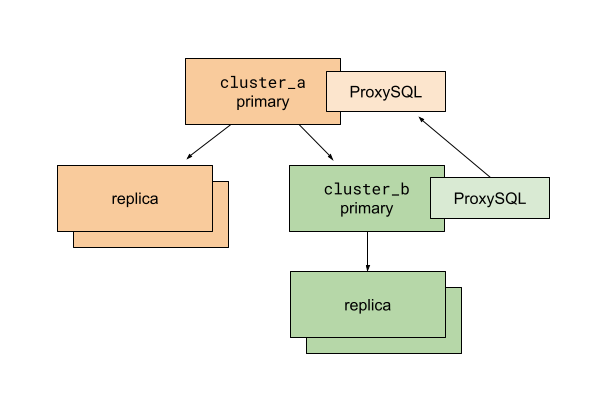
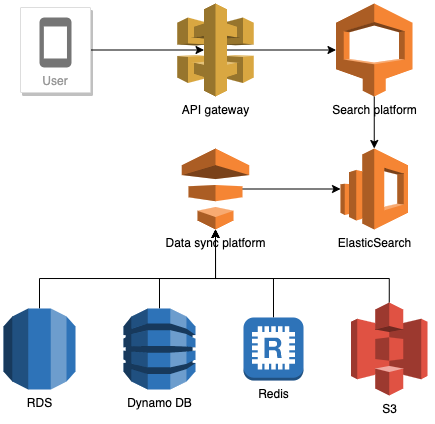

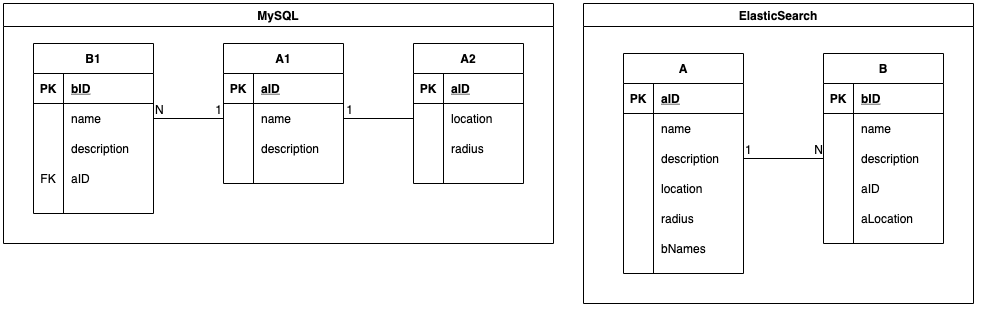
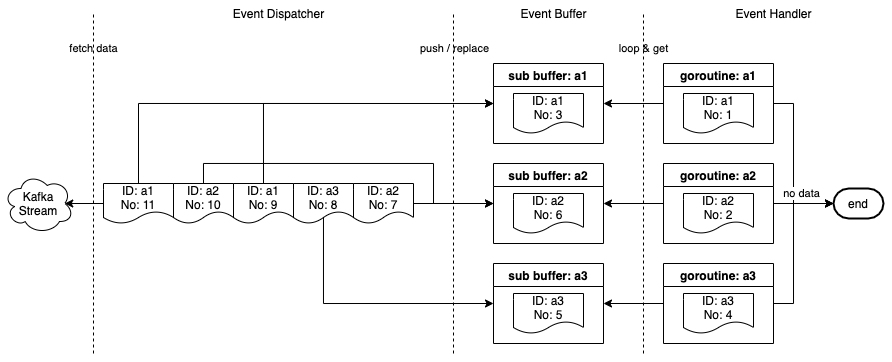
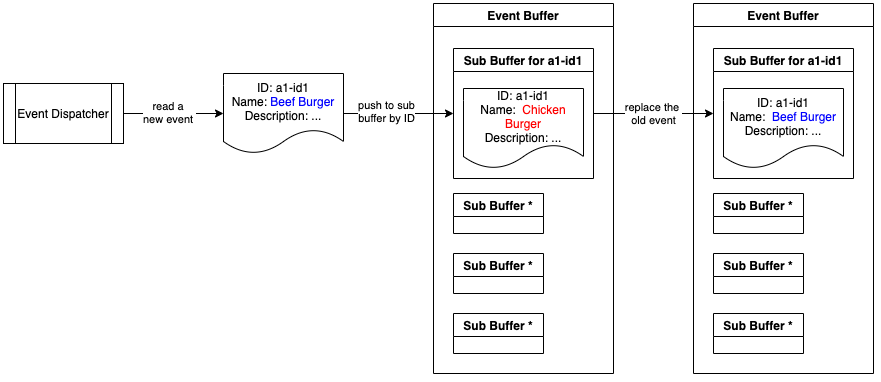
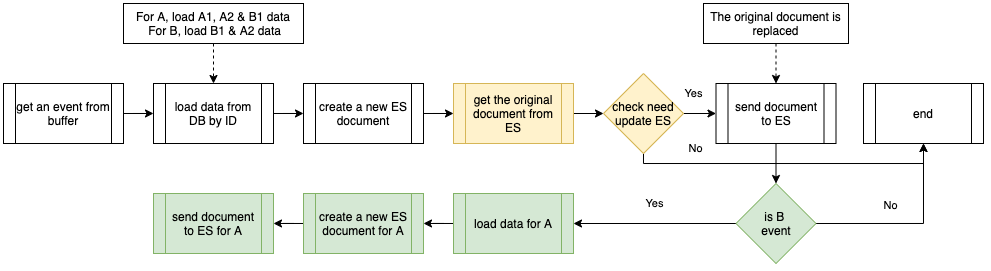
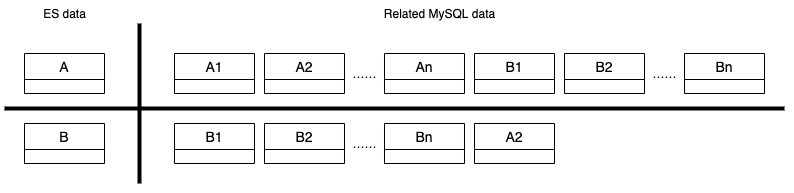
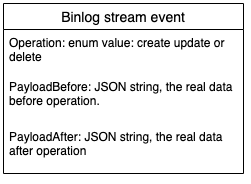
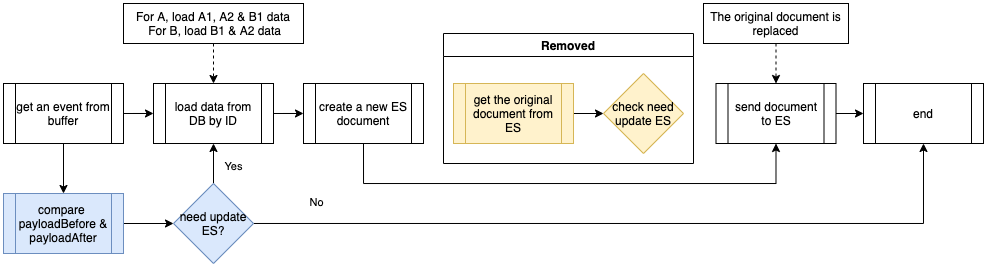
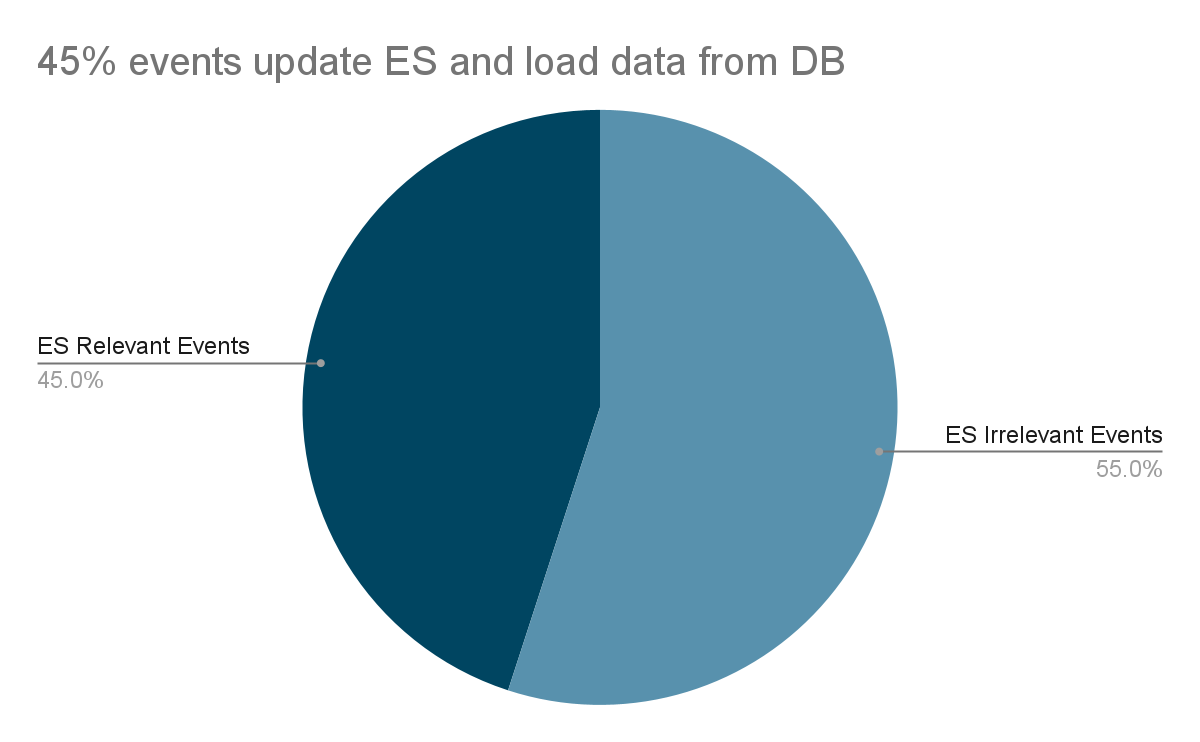
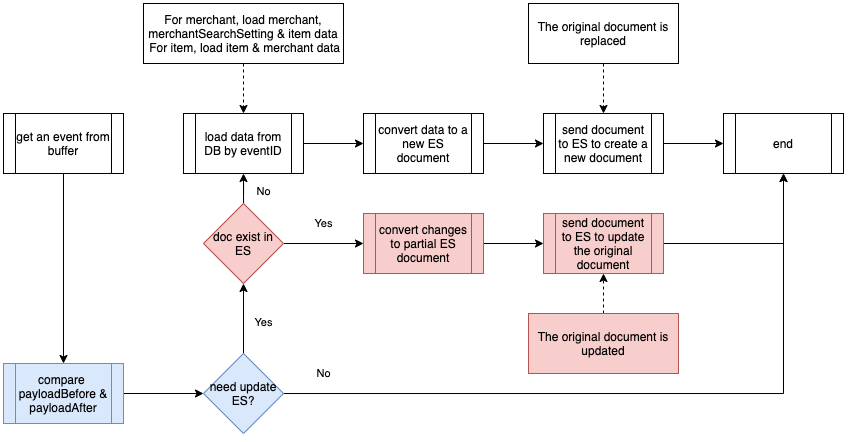
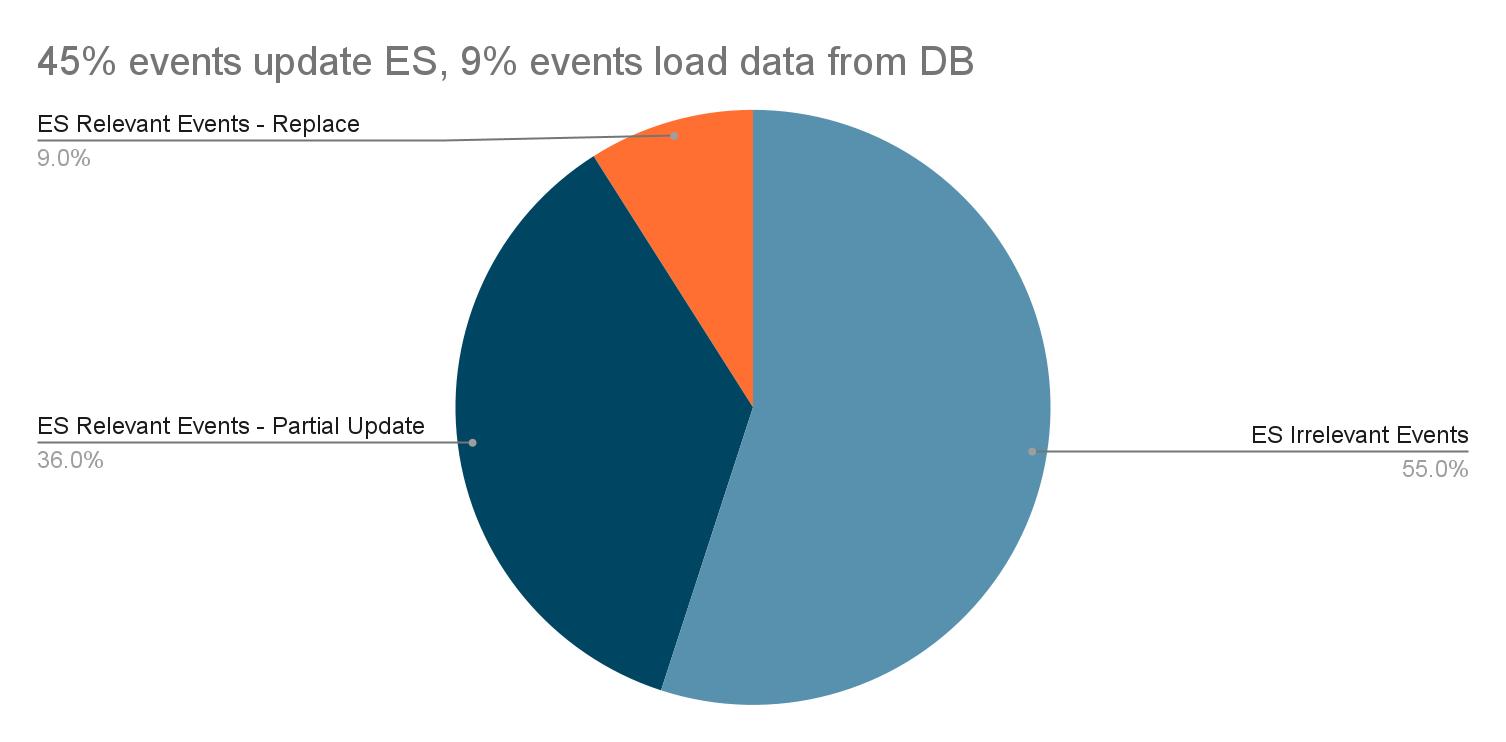
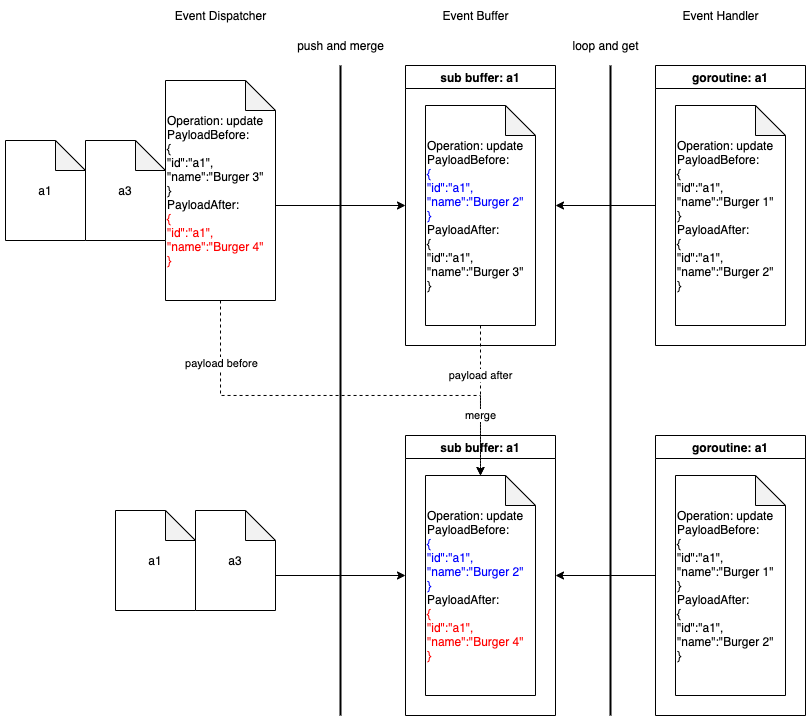
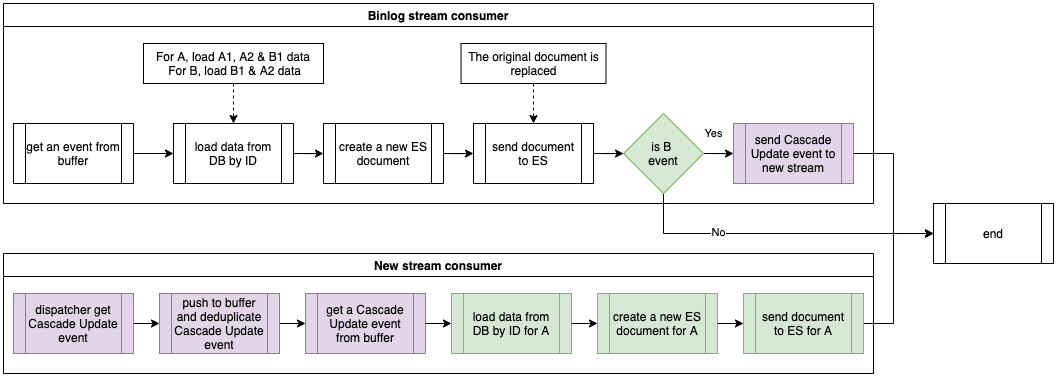
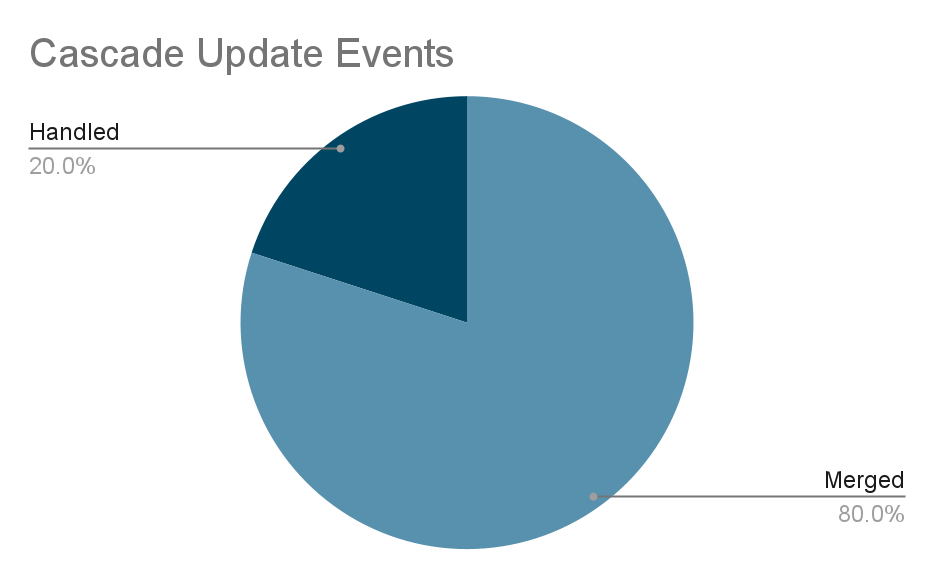

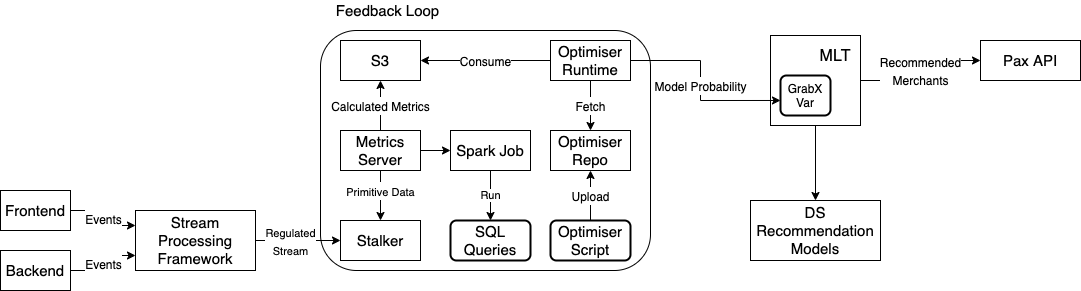

 .
.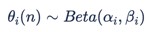 .
.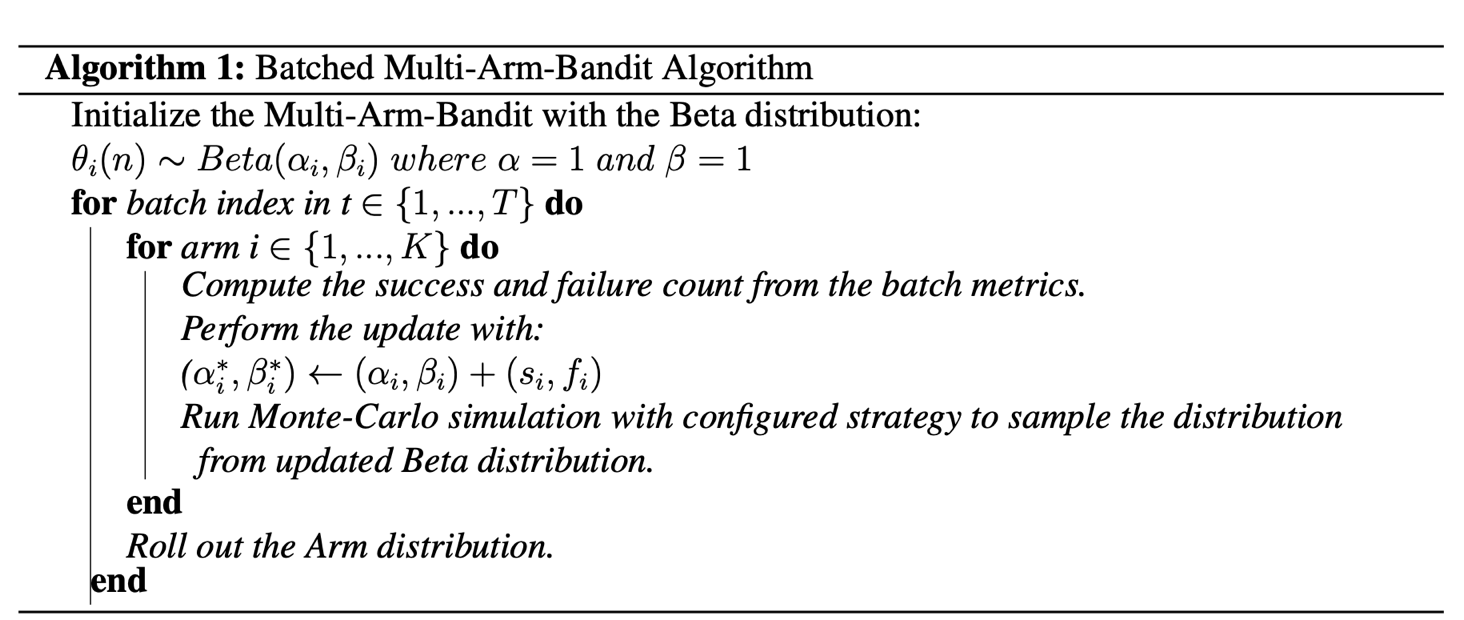
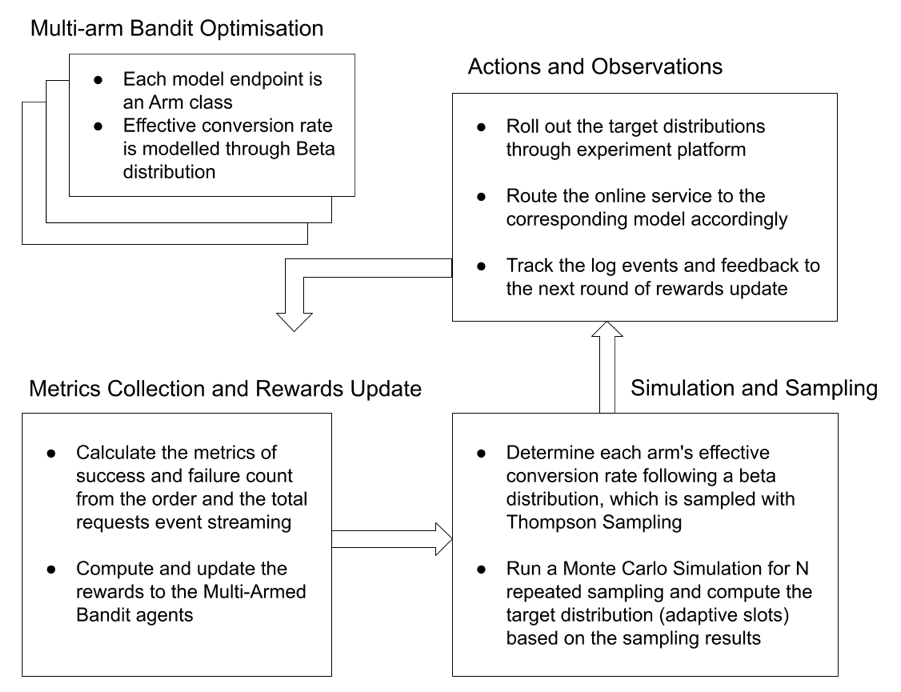





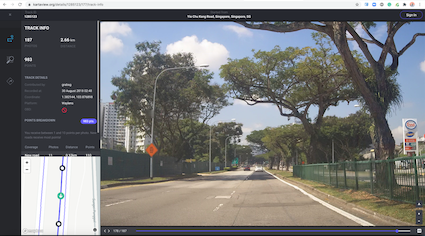
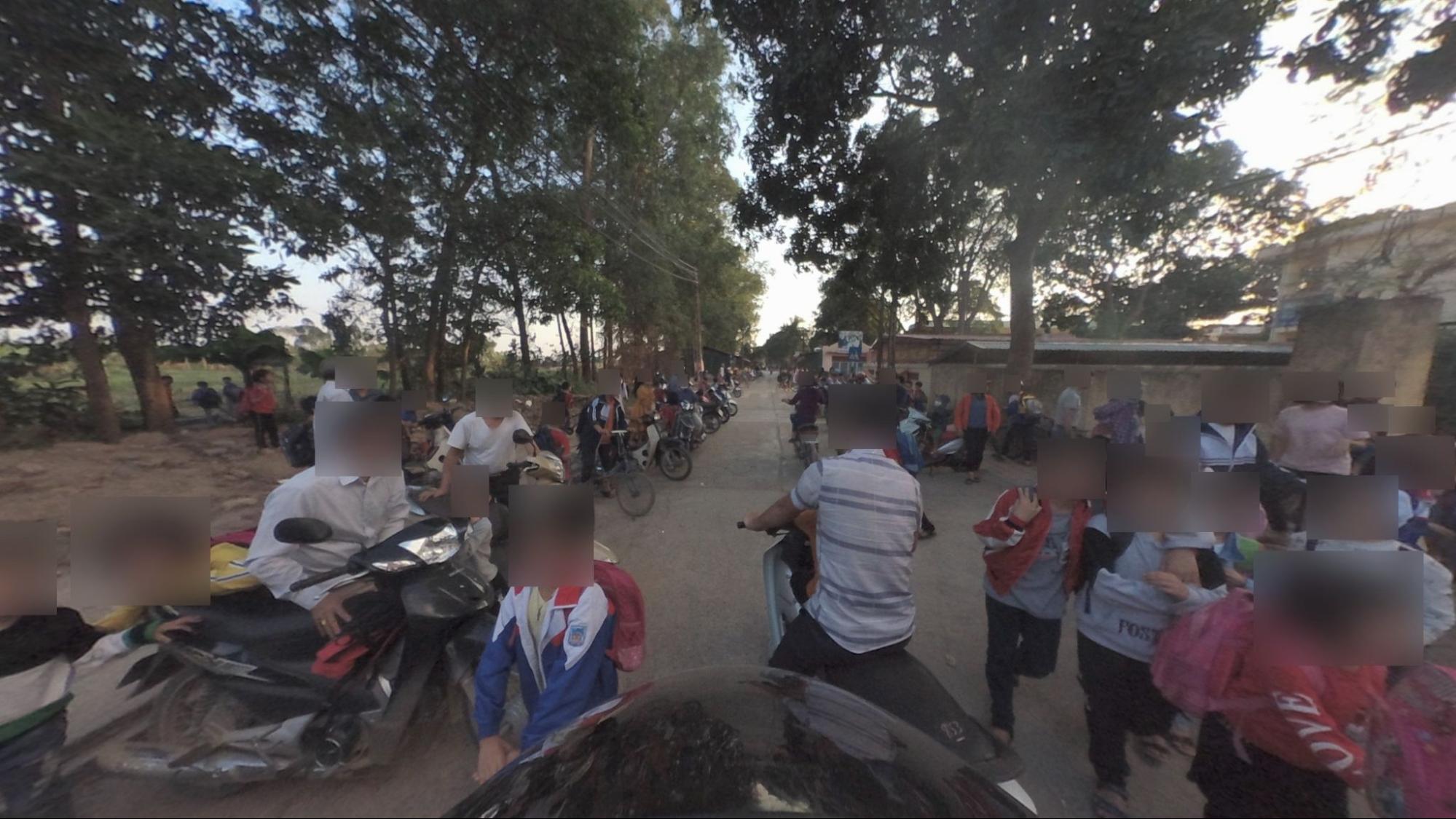

![Figure 4 - Picture’s processing steps [8]](https://engineering.grab.com/img/protecting-personal-data-in-grabs-imagery/figure-4-picture-processing-steps.png)
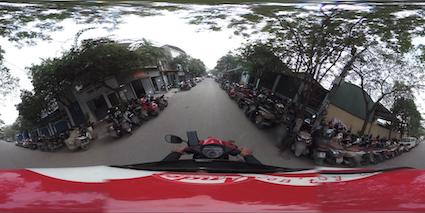
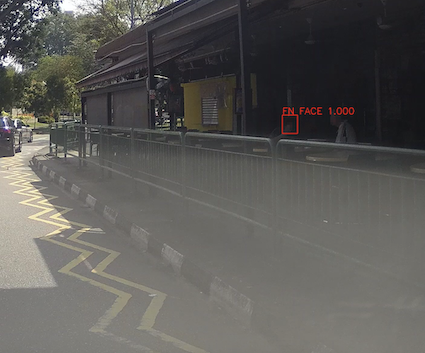
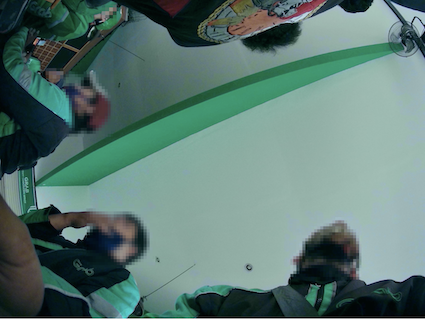




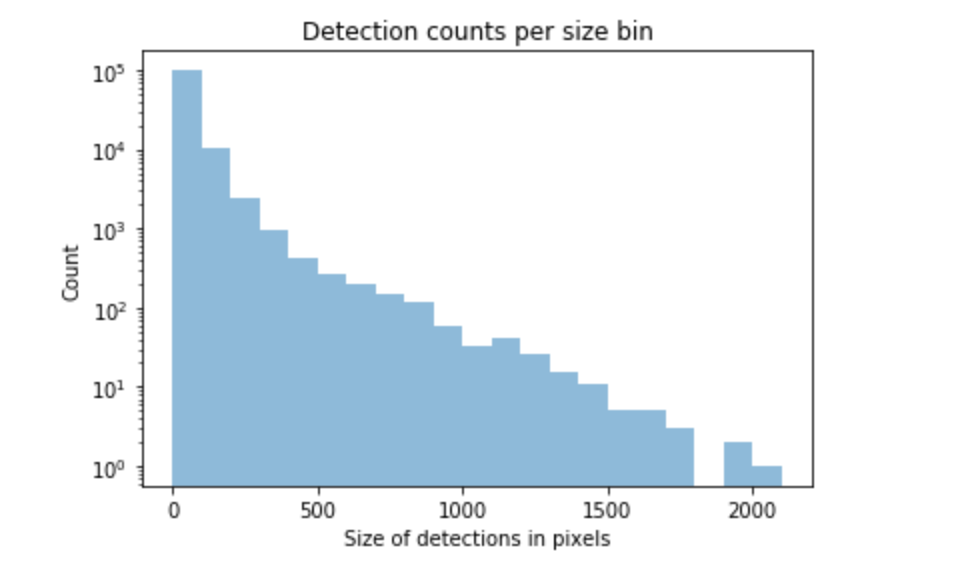

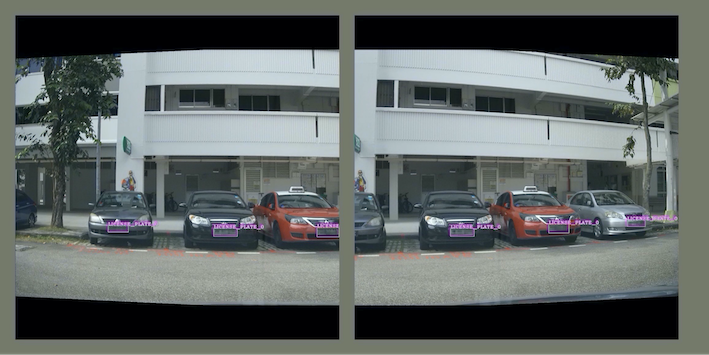
![Figure 7 - Anatomy of one and two-stage object detectors [1]](https://engineering.grab.com/img/protecting-personal-data-in-grabs-imagery/figure-7-anatomy-of-object-detectors.png)