Tag Archives: Engineering

Building a Hyper Self-Service, Distributed Tracing and Feedback System for Rule & Machine Learning (ML) Predictions

Post Syndicated from Grab Tech original https://engineering.grab.com/building-hyper-self-service-distributed-tracing-feedback-system

Introduction

In Grab, the Trust, Identity, Safety, and Security (TISS) is a team of software engineers and AI developers working on fraud detection, login identity check, safety issues, etc. There are many TISS services, like grab-fraud, grab-safety, and grab-id. They make billions of business decisions daily using the Griffin rule engine, which determines if a passenger can book a trip, get a food promotion, or if a driver gets a delivery booking.

There is a natural demand to log down all these important business decisions, store them and query them interactively or in batches. Data analysts and scientists need to use the data to train their machine learning models. RiskOps and customer service teams can query the historical data and help consumers.

That’s where Archivist comes in; it is a new tracing, statistics and feedback system for rule and machine learning-based predictions. It is reliable and performant. Its innovative data schema is flexible for storing events from different business scenarios. Finally, it provides a user-friendly UI, which has access control for classified data.

Here are the impacts Archivist has already made:

  • Currently, there are 2 teams with a total of 5 services and about 50 business scenarios using Archivist. The scenarios include fraud prevention (e.g. DriverBan, PassengerBan), payment checks (e.g. PayoutBlockCheck, PromoCheck), and identity check events like PinTrigger.
  • It takes only a few minutes to onboard a new business scenario (event type), by using the configuration page on the user portal. Previously, it took at least 1 to 2 days.
  • Each day, Archivist logs down 80 million logs to the ElasticSearch cluster, which is about 200GB of data.
  • Each week, Customer Experience (CE)/Risk Ops goes to the user portal and checks Archivist logs for about 2,000 distinct customers. They can search based on numerous dimensions such as the Passenger/DriverID, phone number, request ID, booking code and payment fingerprint.

Background

Each day, TISS services make billions of business decisions (predictions), based on the Griffin rule engine and ML models.

After the predictions are made, there are still some tough questions for these services to answer.

  • If Risk Ops believes a prediction is false-positive, a consumer could be banned. If this happens, how can consumers or Risk Ops report or feedback this information to the new rule and ML model training quickly?
  • As CustomService/Data Scientists investigating any tickets opened due to TISS predictions/decisions, how do you know which rules and data were used? E.g. why the passenger triggered a selfie, or why a booking was blocked.
  • After Data Analysts/Data Scientists (DA/DS) launch a new rule/model, how can they track the performance in fine-granularity and in real-time? E.g. week-over-week rule performance in a country or city.
  • How can DA/DS access all prediction data for data analysis or model training?
  • How can the system keep up with Grab’s business launch speed, with maximum self-service?

Problem

To answer the questions above, TISS services previously used company-wide Kibana to log predictions.  For example, a log looks like: PassengerID:123,Scenario:PinTrigger,Decision:Trigger,.... This logging method had some obvious issues:

  • Logs in plain text don’t have any structure and are not friendly to ML model training as most ML models need processed data to make accurate predictions.
  • Furthermore, there is no fine-granularity access control for developers in Kibana.
  • Developers, DA and DS have no access control while CEs have no access at all. So CE cannot easily see the data and DA/DS cannot easily process the data.

To address all the Kibana log issues, we developed ActionTrace, a code library with a well-structured data schema. The logs, also called documents, are stored in a dedicated ElasticSearch cluster with access control implemented. However, after using it for a while, we found that it still needed some improvements.

  1. Each business scenario involves different types of entities and ActionTrace is not fully self-service. This means that a lot of development work was needed to support fast-launching business scenarios. Here are some examples:
    • The main entities in the taxi business are Driver and Passenger,

    • The main entities in the food business can be Merchant, Driver and Consumer.

    All these entities will need to be manually added into the ActionTrace data schema.

  2.  Each business scenario may have their own custom information logged. Because there is no overlap, each of them will correspond to a new field in the data schema. For example:
    • For any scenario involving payment, a valid payment method and expiration date is logged.
    • For the taxi business, the geohash is logged.
  3.   To store the log data from ActionTrace, different teams need to set up and manage their own ElasticSearch clusters. This increases hardware and maintenance costs.

  4. There was a simple Web UI created for viewing logs from ActionTrace, but there was still no access control in fine granularity.

Solution

We developed Archivist, a new tracing, statistics, and feedback system for ML/rule-based prediction events. It’s centralised, performant and flexible. It answers all the issues mentioned above, and it is an improvement over all the existing solutions we have mentioned previously.

The key improvements are:

  • User-defined entities and custom fields
    • There are no predefined entity types. Users can define up to 5 entity types (E.g. PassengerId, DriverId, PhoneNumber, PaymentMethodId, etc.).
    • Similarly, there are a limited number of custom data fields to use, in addition to the common data fields shared by all business scenarios.
  • A dedicated service shared by all other services
    • Each service writes its prediction events to a Kafka stream. Archivist then reads the stream and writes to the ElasticSearch cluster.
    • The data writes are buffered, so it is easy to handle traffic surges in peak time.
    • Different services share the same Elastic Cloud Enterprise (ECE) cluster, but they create their own daily file indices so the costs can be split fairly.
  • Better support for data mining, prediction stats and feedback
    • Kafka stream data are simultaneously written to AWS S3. DA/DS can use the PrestoDB SQL query engine to mine the data.
    • There is an internal web portal for viewing Archivist logs. Customer service teams and Ops can use no-risk data to address CE tickets, while DA, DS and developers can view high-risk data for code/rule debugging.
  • A reduction of development days to support new business launches
    • Previously, it took a week to modify and deploy the ActionTrace data schema. Now, it only takes several minutes to configure event schemas in the user portal.
  • Saves time in RiskOps/CE investigations
    • With the new web UI which has access control in place, the different roles in the company, like Customer service and Data analysts, can access the Archivist events with different levels of permissions.
    • It takes only a few clicks for them to find the relevant events that impact the drivers/passengers.

Architecture Details

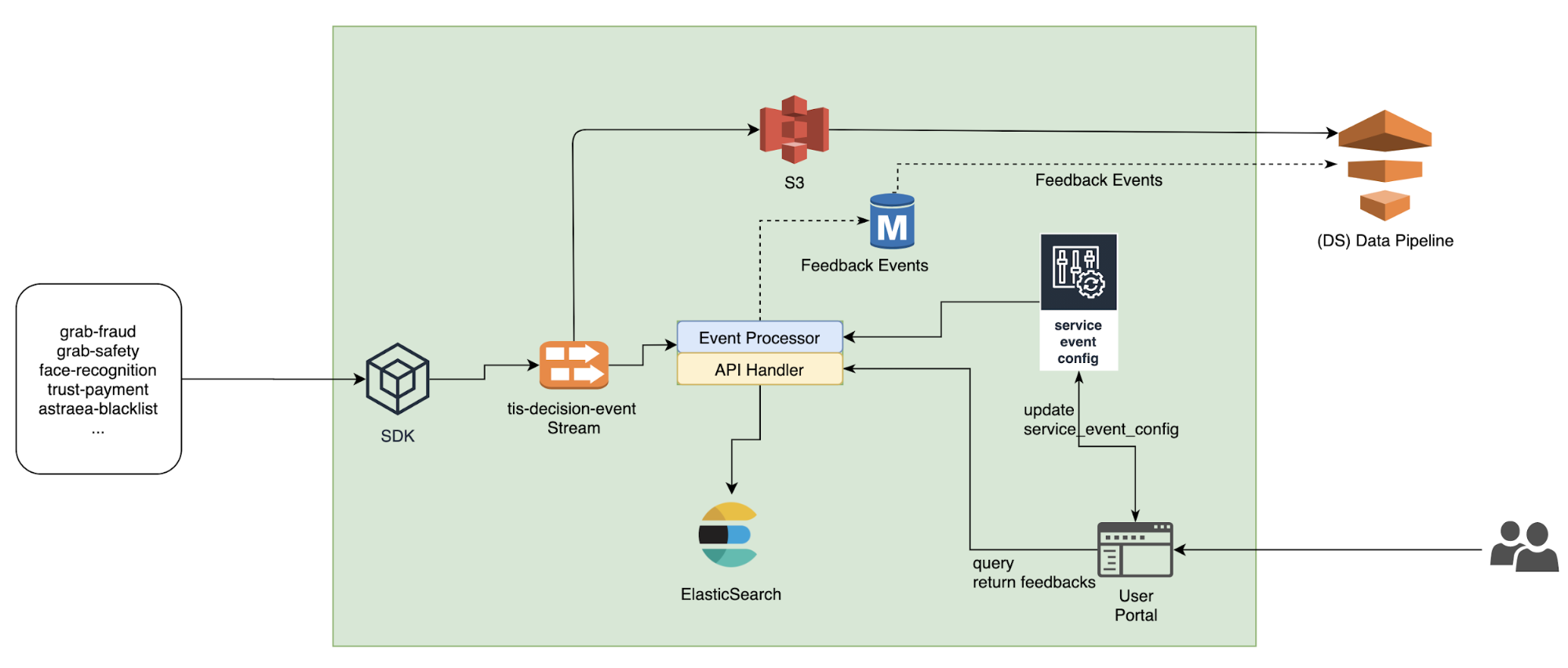
Archivist’s system architecture is shown in the diagram below.

Archivist system architecture
  • Different services (like fraud-detection, safety-allocation, etc.) use a simple SDK to write data to a Kafka stream (the left side of the diagram).
  • In the centre of Archivist is an event processor. It reads data from Kafka, and writes them to ElasticSearch (ES).
  • The Kafka stream writes to the Amazon S3 data lake, so DA/DS can use the Presto SQL query engine to query them.
  • The user portal (bottom right) can be used to view the Archivist log and update configurations. It also sends all the web requests to the API Handler in the centre.

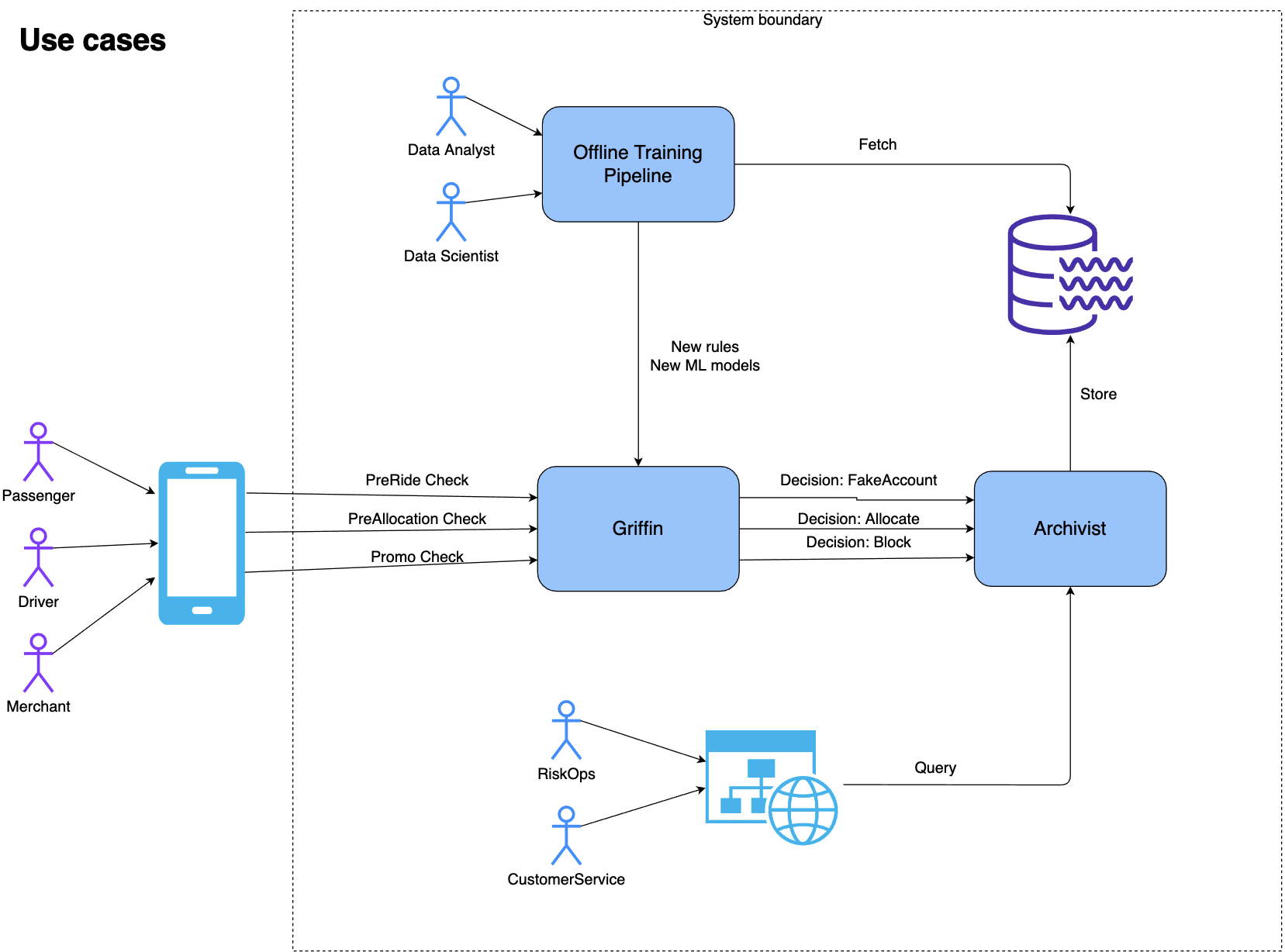
The following diagram shows how internal and external users use Archivist as well as the interaction between the Griffin rule engine and Archivist.

Archivist use cases
Archivist use cases

Flexible Event Schema

In Archivist, a prediction/decision is called an event. The event schema can be divided into 3 main parts conceptually.

  1. Data partitioning: Fields like service_name and event_type categorise data by services and business scenarios.
    Field name Type Example Notes
    service_name string GrabFraud Name of the Service
    event_type string PreRide PaxBan/SafeAllocation
  2. Business decision making: request_id, decisions, reasons, event_content are used to record the business decision, the reason and the context (E.g. The input features of machine learning algorithms).
    Field name Type Example Notes
    request_id string a16756e8-efe2-472b-b614-ec6ae08a5912 a 32-digit id for web requests
    event_content string Event context
    decisions [string] [“NotAllowBook”, “SMS”] A list
    reasons string json payload string of the response from engine.
  3. Customisation: Archivist provides user-defined entities and custom fields that we feel are sufficient and flexible for handling different business scenarios.
    Field name Type Example Notes
    entity_type_1 string Passenger
    entity_id_1 string 12151
    entity_type_2 string Driver
    entity_id_2 string 341521-rdxf36767
    … string
    entity_id_5 string
    custom_field_type_1 string “MessageToUser”
    custom_field_1 string “please contact Ops” User defined fields
    custom_field_type_2 “Prediction rule:”
    custom_field_2 string “ML rule: 123, version:2”
    … string
    custom_field_6 string

A User Portal to Support Querying, Prediction Stats and Feedback

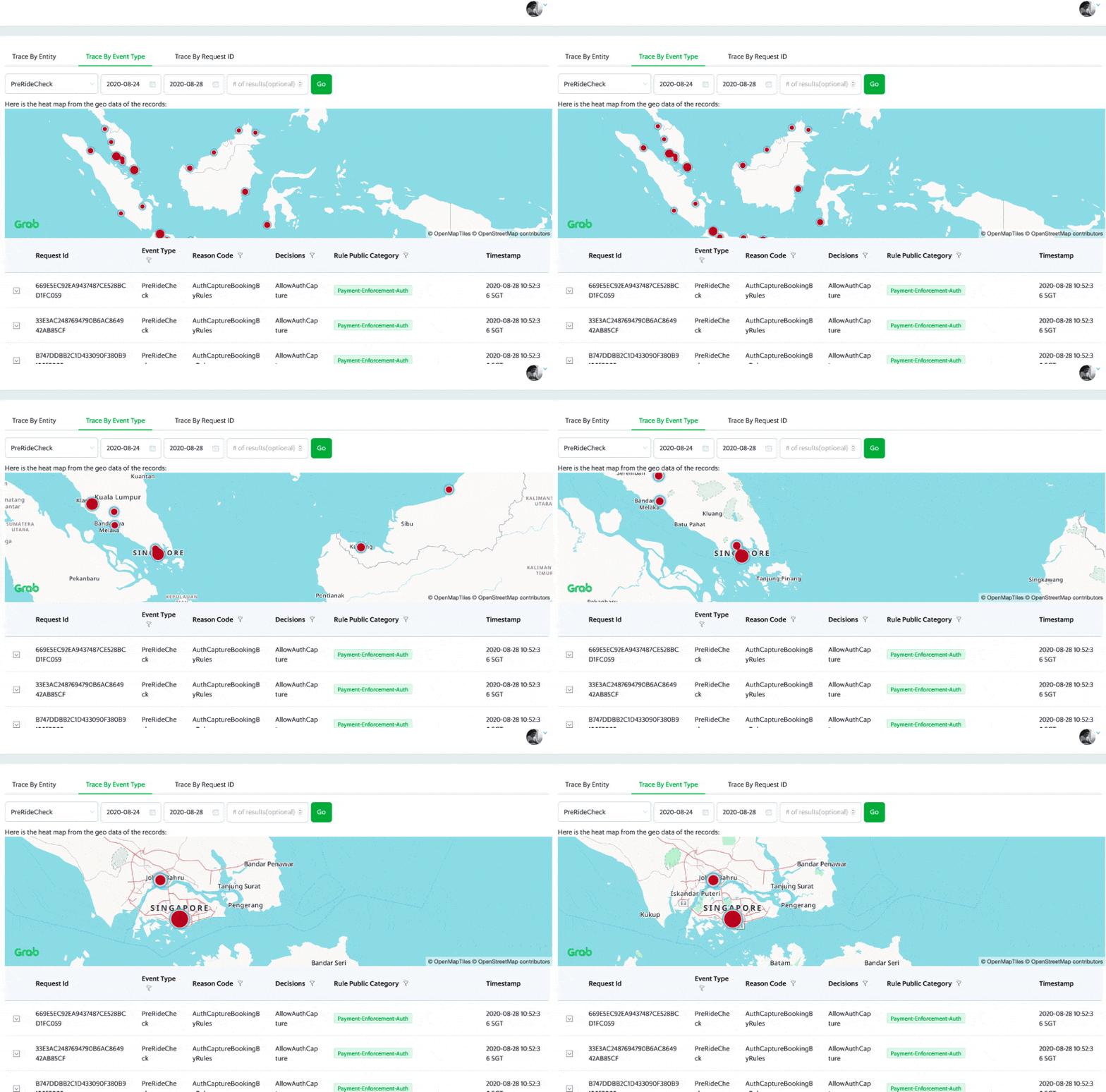
DA, DS, Ops and CE can access the internal user portal to see the prediction events, individually and on an aggregated city level.

A snapshot of the Archivist logs showing the aggregation of the data in each city

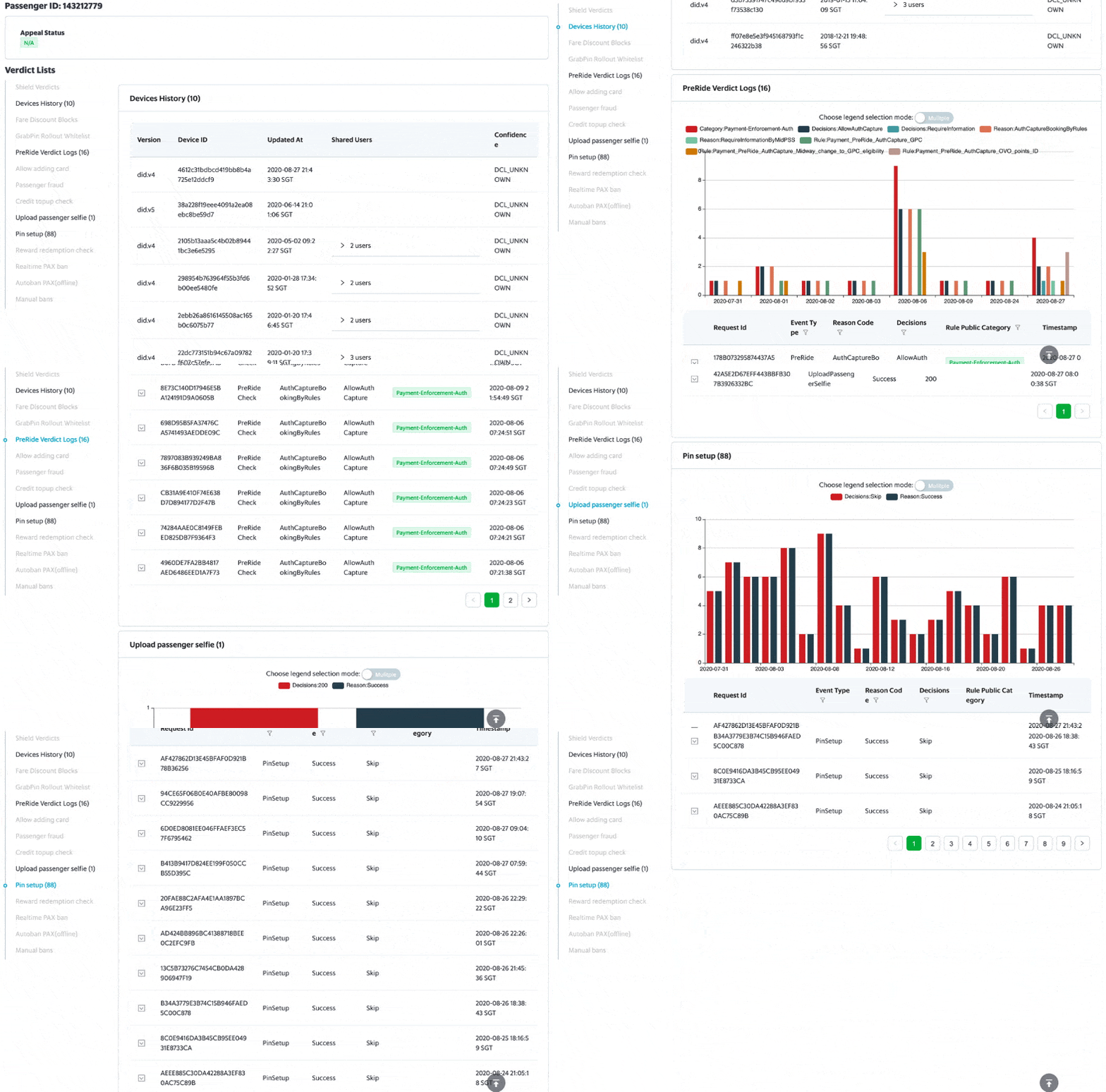
There are graphs on the portal, showing the rule/model performance on individual customers over a period of time.

Rule performance on a customer over a period of time

How to Use Archivist for Your Service

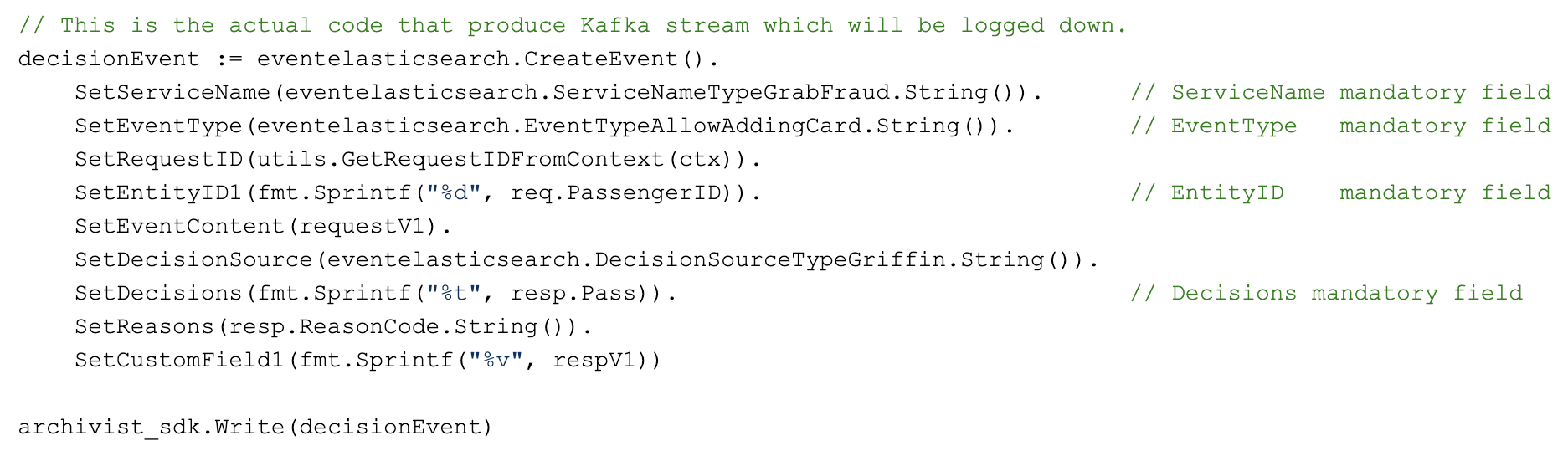
If you want to get onboard Archivist, the coding effort is minimal. Here is an example of a code snippet to log an event:

Code snippet to log an event

Lessons

During the implementation of Archivist, we learnt some things:

  • A good system needs to support multi-tenants from the beginning. Originally, we thought we could use just one Kafka stream, and put all the documents from different teams into one ElasticSearch (ES) index. But after one team insisted on keeping their data separately from others, we created more Kafka streams and ES indexes. We realised that this way, it’s easier for us to manage data and share the cost fairly.
  • Shortly after we launched Archivist, there was an incident where the ES data writes were choked. Because each document write is a goroutine, the number of goroutines increased to 400k and the memory usage reached 100% within minutes. We added a patch (2 lines of code) to limit the maximum number of goroutines in our system. Since then, we haven’t had any more severe incidents in Archivist.

Join Us

Grab is the leading superapp platform in Southeast Asia, providing everyday services that matter to consumers. More than just a ride-hailing and food delivery app, Grab offers a wide range of on-demand services in the region, including mobility, food, package and grocery delivery services, mobile payments, and financial services across 428 cities in eight countries.

Powered by technology and driven by heart, our mission is to drive Southeast Asia forward by creating economic empowerment for everyone. If this mission speaks to you, join our team today!

GitHub Artifact Exporter open source release

Post Syndicated from Jason Macgowan original https://github.blog/2021-05-18-github-artifact-exporter-open-source-release/

GitHub is the home for software development teams and is the place where they collaborate and build. For larger organizations, you might have a dedicated reporting team that wants to export this activity at a granular level, so it can be modified and presented for audits. GitHub provides a powerful API for accessing this data programmatically, but we know that may not be the perfect solution for the many people involved in a given organization. In fact, a common request we’ve seen is for the ability to download issues and other repository data as a CSV file. Sometimes, you just want a spreadsheet!

So, we built the GitHub Artifact Exporter to help reporting teams get the data they need without requiring them to know how to interact with the GitHub API.

What data can you export from GitHub?

GitHub Artifact Exporter provides a CLI and a simple GUI for exporting GitHub Issues and related comments based on a date range, and it supports GitHub’s full search syntax, allowing you to filter results based on your search parameters

The CLI also supports exporting:

  • Commits
  • Milestones, including associated Issues
  • Projects, including associated issues
  • Pull requests, including comments
  • Releases

Exporter format

Both the CLI and GUI support two formats for data exports, JSON and CSV.

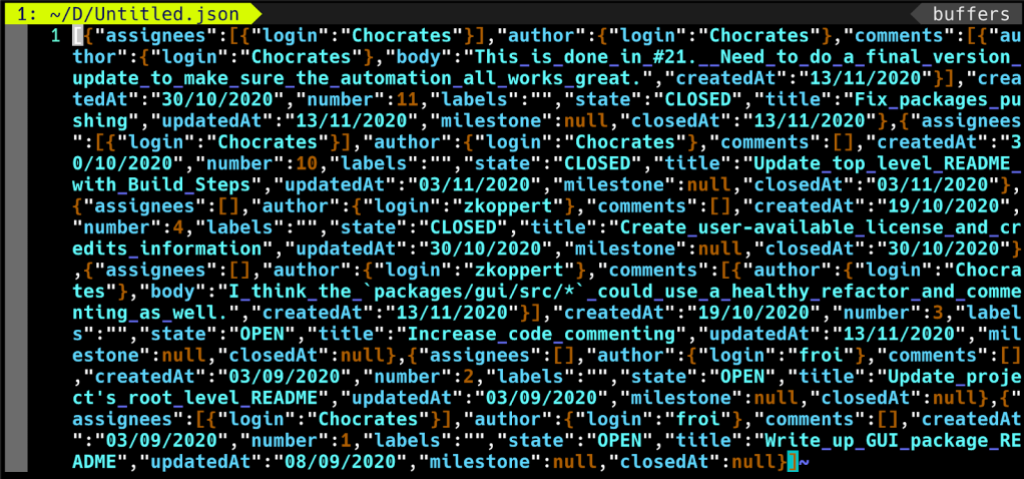
JSON

Newline delimited JSON can be used to process each line.

Screenshot of JSON data export using GitHub Artifact Exporter

CSV

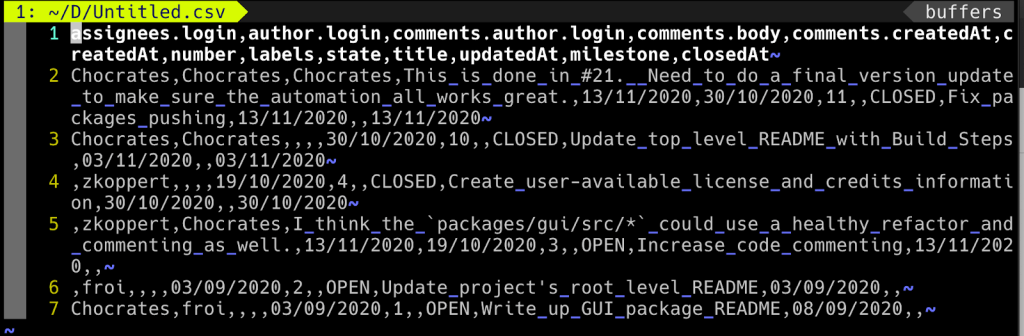
CSV provides a comma-delimited export where each line represents an issue and a single comment.

Screenshot of comma-delimited CSV data export using GitHub Artifact Exporter

Using the GUI

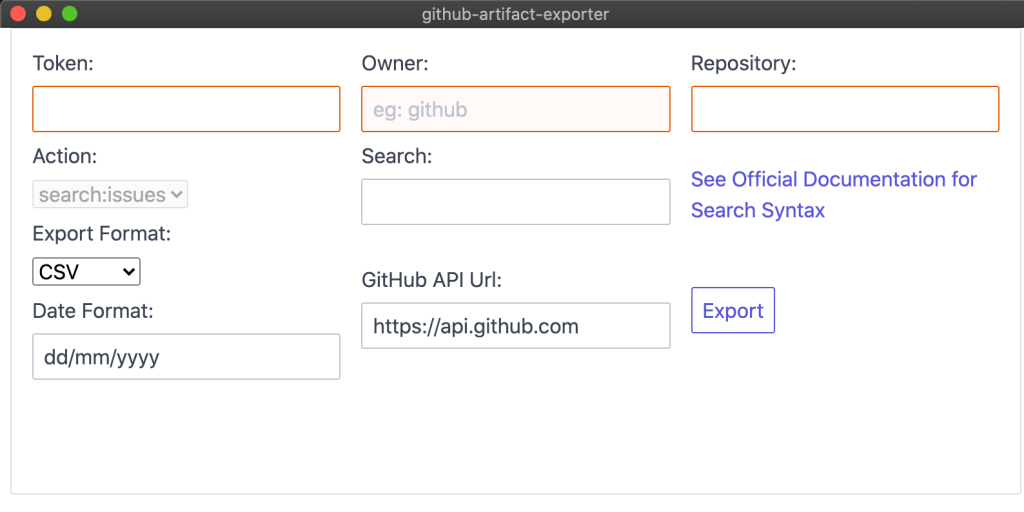
When you open the GUI, you’re greeted with the screen below. You’ll need to fill in a personal access token, the owner of the repository, and the name of the repository itself.

The owner of the repository will either be your personal account name or your organization name. The name of the repository will be the URL slug that you see in the URL bar. The GitHub Artifact Exporter’s Owner and Repository would be “github” and “github-artifact-exporter” respectively.

Next, input a search string to filter the issues in your repository, select whether you want CSV or JSON output, and hit export! You’ll be prompted with a dialogue allowing you to choose the location to save the file.

Screenshot of GUI for GitHub Artifact Exporter, showing the fields described above.

Using the CLI

The CLI can be used to generate the same JSON and CSV data as the GUI, in addition to implementing a handful of other search types. See the usage portion of the README for full details.

For example, to get all the pull requests in your repository, this command could be used:
github-artifact-exporter.exe repo:pulls --owner github --repo github-artifact-exporter --token $GITHUB_TOKEN --format JSON.

Try it out!

We hope that this tool helps your team export your data in an easier fashion. To get started, check out the prerequisites then download the GitHub Artifact Exporter. We would love any suggestions or feedback in the repository.

Security keys are now supported for SSH Git operations

Post Syndicated from Kevin Jones original https://github.blog/2021-05-10-security-keys-supported-ssh-git-operations/

GitHub has been at the forefront of security key adoption for many years. We were an early adopter of Universal 2nd Factor (“U2F”) and were also one of the first sites to transition to Webauthn. We’re always on the lookout for new standards that both increase security and usability. Today we’re taking the next step by shipping support for security keys when using Git over SSH.

What are security keys and how do they work?

Security keys, such as the YubiKey, are portable and transferable between machines in a convenient form factor. Most security keys connect via USB, NFC, or Bluetooth. When used in a web browser with two-factor authentication enabled, security keys provide a strong, convenient, and phishing-proof alternative to one-time passwords provided by applications or SMS. Much of the data on the key is protected from external access and modification, ensuring the secrets cannot be taken from the security key. Security keys should be protected as a credential, so keep track of them and you can be confident that you have usable, strong authentication. As long as you retain access to the security key, you can be confident that it can’t be used by anyone else for any other purpose.

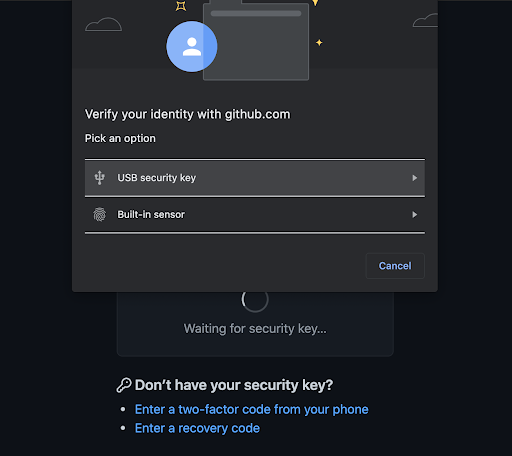
Screenshot of GitHub identity verification screen with security key option

Use your existing security key for Git operations

When used for SSH operations, security keys move the sensitive part of your SSH key from your computer to a secure external security key. SSH keys that are bound to security keys protect you from accidental private key exposure and malware. You perform a gesture, such as a tap on the security key, to indicate when you intend to use the security key to authenticate. This action provides the notion of “user presence.”

Security keys are not limited to a single application, so the same individual security key is available for both web and SSH authentication. You don’t need to acquire a separate security key for each use case. And unlike web authentication, two-factor authentication is not a requirement when using security keys to authenticate to Git. As always, we recommend using a strong password, enrolling in two-factor authentication, and setting up account recovery mechanisms. Conveniently, security keys themselves happen to be a great recovery option for securely retaining access to your two-factor-enabled account if you lose access to your phone and backup codes.

The same SSH keys you already know and love, just a little different

Generating and using security keys for SSH is quite similar to how you generated and used SSH keys in the past. You can password-protect your key and require a security key! According to our data, you likely either use an RSA or ed25519 key. Now you can use two additional key types: ecdsa-sk and ed25519-sk, where the “sk” suffix is short for “security key.”

$ ssh-keygen -t ecdsa-sk -C <email address> 
Generating public/private ecdsa-sk key pair. 
You may need to touch your authenticator to authorize key generation.

Once generated, you add these new keys to your account just like any other SSH key. You’ll still create a public and private key pair, but secret bits are generated and stored in the security key, with the public part stored on your machine like any other SSH public key. There is a private key file stored on your machine, but your private SSH key is a reference to the security key device itself. If your private key file on your computer is stolen, it would be useless without the security key. When using SSH with a security key, none of the sensitive information ever leaves the physical security key device. If you’re the only person with physical access to your security key, it’s safe to leave plugged in at all times.

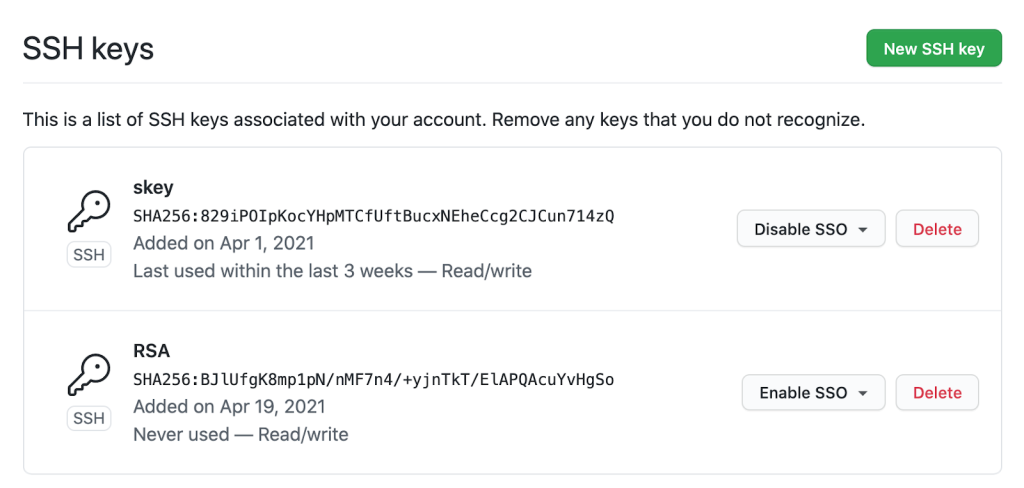
Screenshot of SSH keys associated with GitHub user account

Safer Git access and key management

With security keys, you can achieve a higher level of account security and protection from account takeover. You can take things a step further by removing your previously registered SSH keys, using only SSH keys backed by security keys. Using only SSH keys backed by security keys gives you strong assurance that you are the only person pulling your Git data via SSH as long as you keep the security key safe like any other private key.

Security keys provide meaningful safety assurances even if you only access Git on trusted, consistent systems. At the other end of the spectrum, you might find yourself working in numerous unfamiliar environments where you need to perform Git operations. Security keys dramatically reduce the impact of inadvertent exposure without the need to manage each SSH key on your account carefully. You can confidently generate and leave SSH keys on any system for any length of time and not have to worry about removing access later. We’ll remove unused keys from your account, making key management even easier. Remember to periodically use keys you want to retain over time so we don’t delete them for you.

Protecting against unintended operations

Every remote Git operation will require an additional key tap to ensure that malware cannot initiate requests without your approval. You can still perform local operations, such as checkout, branch, and merge, without interruption. When you’re happy with your code or ready to receive updates, remote operations like push, fetch, and pull will require that you tap your security key before continuing. As always, SSH keys must be present and optionally unlocked with a password for all Git operations. Unlike password-protected SSH keys, clients do not cache security key taps for multiple operations.

$ git clone [email protected]:github/secure_headers.git
Cloning into 'secure_headers'...
Confirm user presence for key ECDSA-SK SHA256:xzg6NAJDyJB1ptnbRNy8UxD6mdm7J/YBdu2p5+fCUa0
User presence confirmed

Already familiar with using SSH keys backed by security keys? In that case, you might wonder why we require verification (via the security key “tap”) when you can configure your security key to allow operations to proceed as long as the security key is present. While we understand the appeal of removing the need for the taps, we determined our current approach to require presence and intention is the best balance between usability and security.

Towards a future with fewer passwords

Today, you can use a password, a personal access token (PAT), or an SSH key to access Git at GitHub. Later this year, as we continue to iterate toward more secure authentication patterns, passwords will no longer be supported for Git operations. We recognize that passwords are convenient, but they are a consistent source of account security challenges. We believe passwords represent the present and past, but not the future. We would rather invest in alternatives, like our Personal Access Tokens, by adding features such as fine-grained access and more control over expiration. It’s a long journey, but every effort to reduce the use of passwords has improved the security of the entire GitHub ecosystem.

By removing password support for Git, as we already successfully did for our API, we will raise the baseline security hygiene for every user and organization, and for the resulting software supply chain. By adding SSH security key support, we have provided a new, more secure, and easy-to-use way to strongly authenticate with Git while preventing unintended and potentially malicious access. If you are ready to make the switch, log in to your account and follow the instructions in our documentation to create a new key and add it to your account.

We wanted to extend our gratitude to Yubico, with whom we’ve partnered several times over the years, for being an early collaborator with us on this feature and providing us valuable feedback to ensure we continue to improve developer security.

Our Journey to Continuous Delivery at Grab (Part 2)

Post Syndicated from Grab Tech original https://engineering.grab.com/our-journey-to-continuous-delivery-at-grab-part2

In the first part of this blog post, you’ve read about the improvements made to our build and staging deployment process, and how plenty of manual tasks routinely taken by engineers have been automated with Conveyor: an in-house continuous delivery solution.

This new post begins with the introduction of the hermeticity principle for our deployments, and how it improves the confidence with promoting changes to production. Changes sent to production via Conveyor’s deployment pipelines are then described in detail.

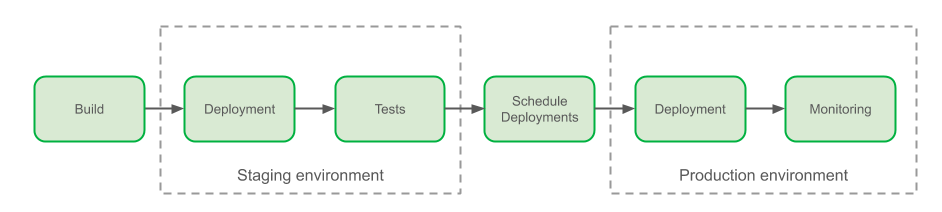
Overview of Grab delivery process

Finally, looking back at the engineering efficiency improvements around velocity and reliability over the last 2 years, we answer the big question – was the investment on a custom continuous delivery solution like Conveyor the right decision for Grab?

Improving Confidence in our Production Deployments with Hermeticity

The term deployment hermeticity is borrowed from build systems. A build system is called hermetic if builds always produce the same artefacts regardless of changes in the environment they run on. Similarly, we call our deployments hermetic if they always result in the same deployed artefacts regardless of the environment’s change or the number of times they are executed.

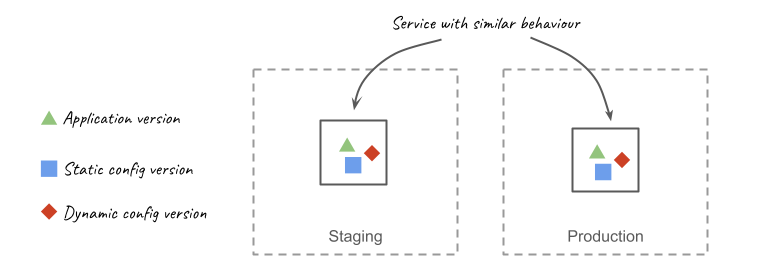
The behaviour of a service is rarely controlled by a single variable. The application that makes up your service is an important driver of its behaviour, but its configuration is an important contributor, for example. The behaviour for traditional microservices at Grab is dictated mainly by 3 versioned artefacts: application code, static and dynamic configuration.

Conveyor has been integrated with the systems that operate changes in each of these parameters. By tracking all 3 parameters at every deployment, Conveyor can reproducibly deploy microservices with similar behaviour: its deployments are hermetic.

Building upon this property, Conveyor can ensure that all deployments made to production have been tested before with the same combination of parameters. This is valuable to us:

  • An outcome of staging deployments for a specific set of parameters is a good predictor of outcomes in production deployments for the same set of parameters and thus it makes testing in staging more relevant.
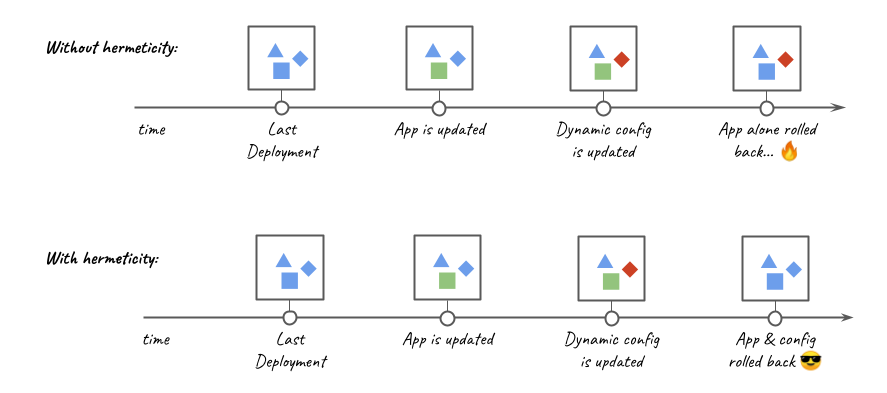
  • Rollbacks are hermetic; we never rollback to a combination of parameters that has not been used previously.

In the past, incidents had resulted from an application rollback not compatible with the current dynamic configuration version; this was aggravating since rollbacks are expected to be a safe recovery mechanism. The introduction of hermetic deployments has largely eliminated this category of problems.

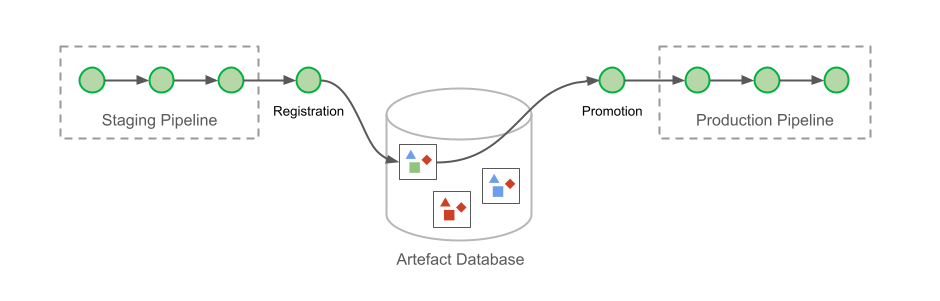
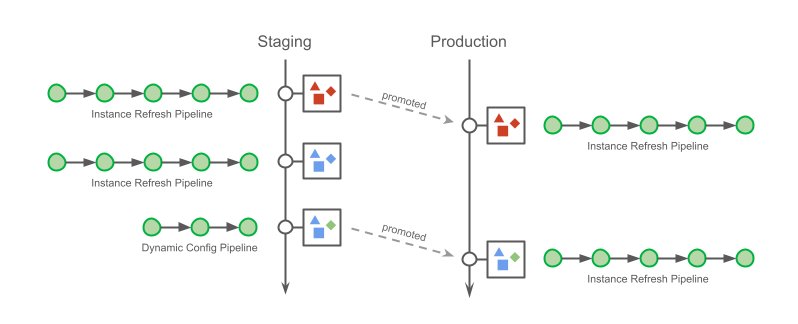
Hermeticity is maintained by registering the deployment parameters as artefacts after each successfully completed pipeline. Users must then select one of the registered deployment metadata to promote to production.

At this point, you might be wondering: why not use a single pipeline that includes both staging and production deployments? This was indeed how it started, with a single pipeline spanning multiple environments. However, engineers soon complained about it.

The most obvious reason for the complaint was that less than 20% of changes deployed in staging will make their way to production. This meant that engineers would have toil associated with each completed staging deployment since the pipeline must be manually cancelled rather than continued to production.

The other reason is that this multi-environment pipeline approach reduced flexibility when promoting changes to production. There are different ways to apply changes to a cluster. For example, lengthy pipelines that refresh instances can be used to deploy any combination of changes, while there are quicker pipelines restricted to dynamic configuration changes (such as feature flags rollouts). Regardless of the order in which the changes are made and how they are applied, Conveyor tracks the change.

Eventually, engineers promote a deployment artefact to production. However they do not need to apply changes in the same sequence with which were applied to staging. Furthermore, to prevent erroneous actions, Conveyor presents only changes that can be applied with the requested pipeline (and sometimes, no changes are available). Not being forced into a specific method of deploying changes is one of added benefits of hermetic deployments.

Returning to Our Journey Towards Engineering Efficiency

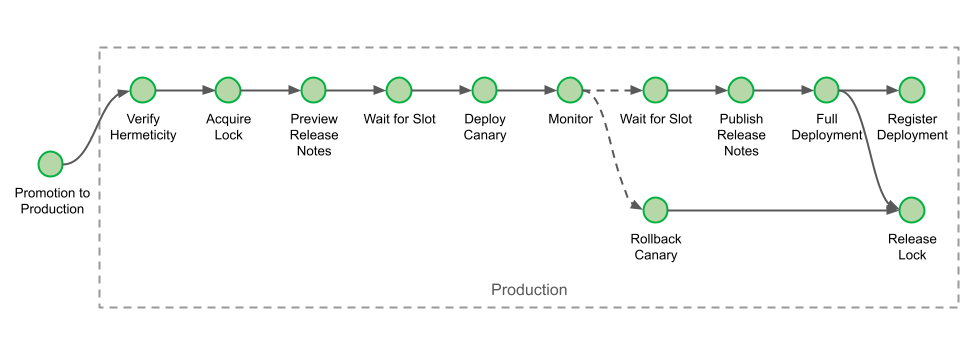
If you can recall, the first part of this blog post series ended with a description of staging deployment. Our deployment to production starts with a verification that we uphold our hermeticity principle, as explained above.

Our production deployment pipelines can run for several hours for large clusters with rolling releases (few run for days), so we start by acquiring locks to ensure there are no concurrent deployments for any given cluster.

Before making any changes to the environment, we automatically generate release notes, giving engineers a chance to abort if the wrong set of changes are sent to production.

The pipeline next waits for a deployment slot. Early on, engineers adopted deployment windows that coincide with office hours, such that if anything goes wrong, there is always someone on hand to help. Prior to the introduction of Conveyor, however, engineers would manually ask a Slack bot for approval. This interaction is now automated, and the only remaining action left is for the engineer to approve that the deployment can proceed via a single click, in line with our hands-off deployment principle.

When the canary is in production, Conveyor automates monitoring it. This process is similar to the one already discussed in the first part of this blog post: Engineers can configure a set of alerts that Conveyor will keep track of. As soon as any one of the alerts is triggered, Conveyor automatically rolls back the service.

If no alert is raised for the duration of the monitoring period, Conveyor waits again for a deployment slot. It then publishes the release notes for that deployment and completes the deployments for the cluster. After the lock is released and the deployment registered, the pipeline finally comes to its successful completion.

Benefits of Our Journey Towards Engineering Efficiency

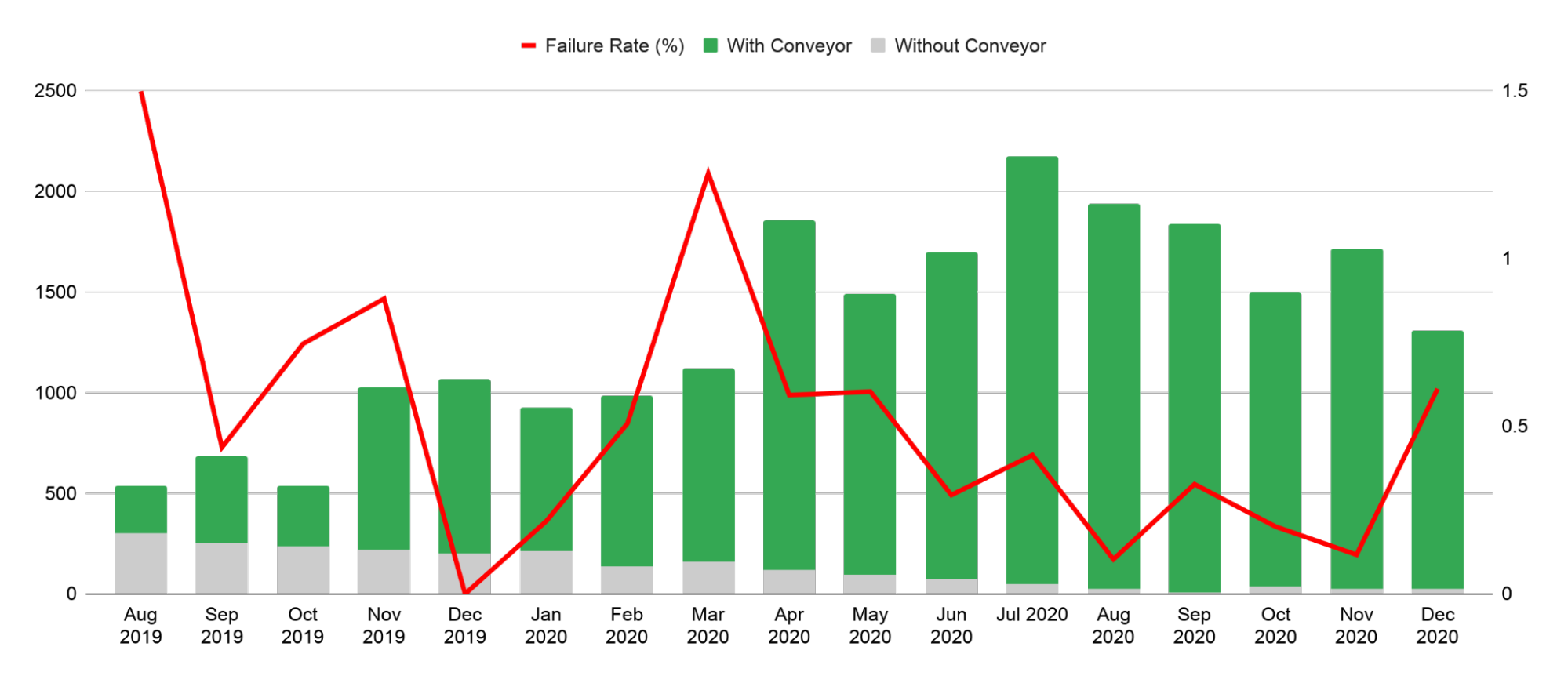
All these improvements made over the last 2 years have reduced the effort spent by engineers on deployment while also reducing the failure rate of our deployments.

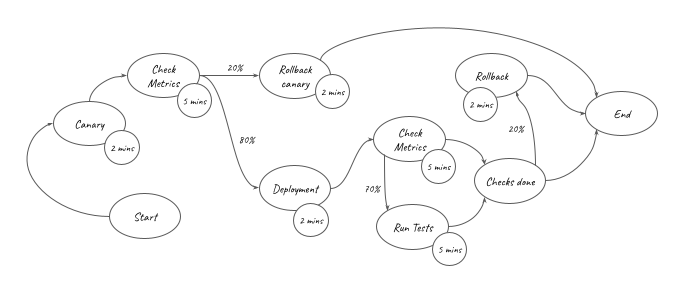
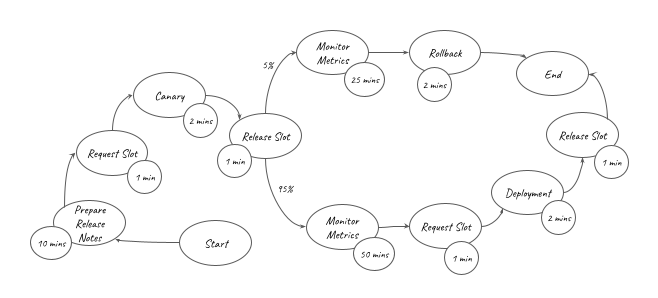
If you are an engineer working on DevOps in your organisation, you know how hard it can be to measure the impact you made on your organisation. To estimate the time saved by our pipelines, we can model the activities that were previously done manually with a rudimentary weighted graph. In this graph, each edge carries a probability of the activity being performed (100% when unspecified), while each vertex carries the time taken for that activity.

Focusing on our regular staging deployments only, such a graph would look like this:

The overall amount of effort automated by the staging pipelines () is represented in the graph above. It can be converted into the equation below:

This equation shows that for each staging deployment, around 16 minutes of work have been saved. Similarly, for regular production deployments, we find that 67 minutes of work were saved for each deployment:

Moreover, efficiency was not the only benefit brought by the use of deployment pipelines for our traditional microservices. Surprisingly perhaps, the rate of failures related to production changes is progressively reducing while the amount of production changes that were made with Conveyor increased across the organisation (starting at 1.5% of failures per deployments, and finishing at 0.3% on average over the last 3 months for the period of data collected):

Keep Calm and Automate

Since the first draft for this post was written, we’ve made many more improvements to our pipelines. We’ve begun automating Database Migrations; we’ve extended our set of hermetic variables to Amazon Machine Image (AMI) updates; and we’re working towards supporting container deployments.

Through automation, all of Conveyor’s deployment pipelines have contributed to save more than 5,000 man-days of efforts in 2020 alone, across all supported teams. That’s around 20 man-years worth of effort, which is around 3 times the capacity of the team working on the project! Investments in our automation pipelines have more than paid for themselves, and the gains go up every year as more workflows are automated and more teams are onboarded.

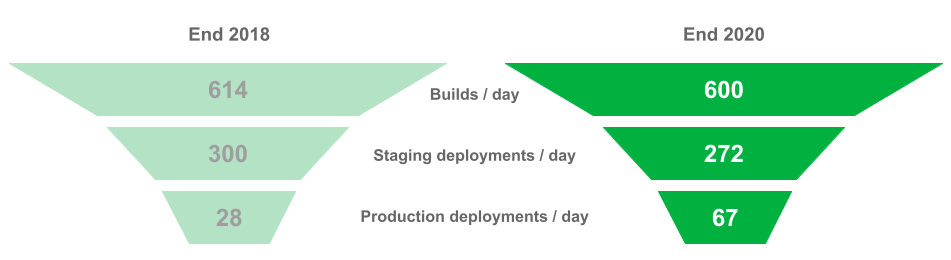
If Conveyor has saved efforts for engineering teams, has it then helped to improve velocity? I had opened the first part of this blog post with figures on the deployment funnel for microservice teams at Grab, towards the end of 2018. So where do the figures stand today for these teams?

In the span of 2 years, the average number of build and staging deployment performed each day has not varied much. However, in the last 3 months of 2020, engineers have sent twice more changes to production than they did for the same period in 2018.

Perhaps the biggest recognition received by the team working on the project, was from Grab’s engineers themselves. In the 2020 internal NPS survey for engineering experience at Grab, Conveyor received the highest score of any tools (built in-house or not).


All these improvements in efficiency for our engineers would never have been possible without the hard work of all team members involved in the project, past and present: Tanun Chalermsinsuwan, Aufar Gilbran, Deepak Ramakrishnaiah, Repon Kumar Roy (Kowshik), Su Han, Voislav Dimitrijevikj, Stanley Goh, Htet Aung Shine, Evan Sebastian, Qijia Wang, Oscar Ng, Jacob Sunny, Subhodip Mandal and many others who have contributed and collaborated with them.


Join Us

Grab is the leading superapp platform in Southeast Asia, providing everyday services that matter to consumers. More than just a ride-hailing and food delivery app, Grab offers a wide range of on-demand services in the region, including mobility, food, package and grocery delivery services, mobile payments, and financial services across 428 cities in eight countries.

Powered by technology and driven by heart, our mission is to drive Southeast Asia forward by creating economic empowerment for everyone. If this mission speaks to you, join our team today!

GitHub Availability Report: April 2021

Post Syndicated from Keith Ballinger original https://github.blog/2021-05-05-github-availability-report-april-2021/

In April, we experienced two incidents resulting in significant impact and degraded state of availability for API requests and the GitHub Packages service, specifically the GitHub Packages Container registry service.

April 1 21:30 UTC (lasting one hour and 34 minutes)

This incident was caused by failures in our DNS resolution, resulting in a degraded state of availability for the GitHub Packages Container registry service. During this incident, some of our internal services that support the Container registry experienced intermittent failures when trying to connect to dependent services. The inability to resolve requests to these services resulted in users being unable to push new container images to the Container registry as well as pull existing images. The Container registry is currently in a public beta, and only beta users were impacted during this incident. The broader GitHub Packages service remained unaffected.

As a next step, we are looking at increasing the cache times of our DNS resolutions to decrease the impact of intermittent DNS resolution failures in the future.

April 22 17:16 UTC (lasting 53 minutes)

Our service monitors detected an elevated error rate when using API requests, which resulted in a degraded state of availability for repository creation. Upon further investigation of this incident, we identified the issue was caused by a bug from a recent data migration. In a data migration to isolate our secret scanning tables into their own cluster, a bug was discovered that broke the ability of the application to successfully write to the secret scanning database. The incident revealed a hitherto unknown dependency that repository creation had upon secret scanning, which makes a call for every repository created. Due to this dependency, repository creation was blocked until we were able to roll back the data migration.

As next steps, we are actively working with our vendor to update the data migration tool and have amended our migration process to include revised steps for remediation, in case similar incidents occur. Furthermore, our application code has been updated to remove the dependency on secret scanning for the creation of repositories.

In summary

From scaling the GitHub API to improving large monorepo performance, we will continue to keep you updated on the progress and investments we’re making to ensure the reliability of our services. To learn more about what we’re working on, check out the GitHub engineering blog.

How we use Web Components at GitHub

Post Syndicated from Kristján Oddsson original https://github.blog/2021-05-04-how-we-use-web-components-at-github/

At GitHub, we pride ourselves on delivering a first-class developer experience. A considerable part of our work is on our front end, which we strive to keep as lightweight, fast, and accessible as possible. For a product as large as GitHub, this can be quite the task. Like many front-end codebases, we leverage components, independent, isolated, and reusable pieces of code that allow application teams to deliver high fidelity UI quickly and efficiently while still keeping to our high standards of quality.

We’re using Web Components in a big way at GitHub. We have over a dozen open-source Web Components and with dozens more that are closed source.

How we got here

When GitHub launched over a decade ago, we had a modest front-end codebase that mostly used jQuery. Ten years and nearly 85,000 lines of code later, we had a large front-end codebase that was starting to show growing pains. We ultimately transitioned away from jQuery (for reasons which we detailed in a blog post at the time) and started using new technologies which could better solve our problems.

We began to dabble with a new technology called Web Components, a set of native browser technologies that allow the development of customized HTML elements, progressively enhanced with JavaScript.

We chose to use Web Components because our codebase was already structured into component-like behaviors. Still, as the GitHub monolith grew in size, we saw the need to implement better encapsulations before the front-end became unmanageable – and Web Components fit the bill. Web Components offered better portability and encapsulation than our existing JavaScript behaviors. We were happy to experiment with Web Components alongside our existing front-end infrastructure since it doesn’t incur any upfront cost or “buy-in” to a specific framework.

Our first two custom elements shipped in 2014: <relative-time> and <local-time>, which show times and dates in friendly formats, and <include-fragment>, which allows us to lazy load HTML fragments. Slowly we realized just how powerful these elements could be and began replacing design patterns within the codebase wholesale, such as replacing our “facebox” modal dialog pattern with <details-dialog>. Our components now range from very generic, multi-purpose behaviors like <remote-input> to specific single-purpose components such as the <markdown-toolbar> element and its siblings.

For the power Web Components affords, there are still pain points and pitfalls. With such a large codebase owned by hundreds of engineers across dozens of teams, we need to provide as much support and tooling as possible, encoding best practices without manual code review becoming a bottleneck.

Improving how we author components

To make engineers effective at writing high-quality Web Components—and encourage best practices—we’ve been working on a few tools to make authoring Web Components much easier.

ViewComponent

We’ve been transitioning our Rails code to using ViewComponent, a framework for building reusable components within Rails. ViewComponent goes hand-in-hand with Web Components since a ViewComponent can have a one-to-one relationship with a Web Component, allowing our developers to work on a single abstraction for both front-end and backend.

Catalyst

Catalyst, our open source library that makes it easier to write web components, has been a driving force that ties together some of our best practices. Catalyst leverages TypeScript to add decorators, which save on a lot of the boilerplate necessary to write Web Components.

Catalyst took inspiration from the excellent Stimulus library, and Google’s LitElement. It is designed to answer the specific set of needs our developers require. Our internal developer experience surveys have shown success in providing a substantial improvement in authoring code over legacy patterns.

You can read more about Catalyst and its conventions, patterns, and anti-patterns in our guide.

Tooling

We provide a set of open-source linter configurations for developers. For general code practices we have eslint-plugin-github. We also have eslint-plugin-custom-elements, which provides further checks for authoring Web Components. Extracting these to open source repositories allows us to remove code from the monolith but remain consistent.

We also have internal tests to verify that developers follow best practices and ensure that they don’t continue to use deprecated patterns and behaviors. One of our tests makes sure that a deprecated “facebox” pattern isn’t introduced to the codebase and suggests using a <details-dialog> element as an alternative.

class FaceboxDeprecationTest < Test::Fast::TestCase
  EXPECTED_NUMBER_OF_FACEBOXES = 44

  # Find facebox triggers set with rel=facebox, in either HTML attributes or
  # as part of hash assignment (for rails helpers)
  REGEX_FOR_FACEBOX_BINDING = %r|rel\s*[=:]>?\s*["']?facebox|
  REGEX_FOR_DATA_FACEBOX = %r|data-facebox\s*=>?\s*|

  def test_limit_facebox
    actual_rel_facebox = grep(REGEX_FOR_FACEBOX_BINDING, options: %w[-In], paths: %w[app/**/*.erb])
    actual_data_facebox = grep(REGEX_FOR_DATA_FACEBOX, options: %w[-In], paths: %w[app/**/*.erb])
    count = actual_rel_facebox.count("\n") + actual_data_facebox.count("\n")

    assert_operator count, :<=, EXPECTED_NUMBER_OF_FACEBOXES, <<-EOL
It looks like you added a facebox. Please use <details-dialog> instead.

If you must increment EXPECTED_NUMBER_OF_FACEBOXES in this test, please
/cc @github/ui-frameworks-reviewers in your pull request, as we may be able to help! Thanks.
EOL

    assert_equal EXPECTED_NUMBER_OF_FACEBOXES, count, <<-EOL
It looks like you removed a facebox. YOU ARE AWESOME! 💖 💖 💖 💖 💖
Please decrement EXPECTED_NUMBER_OF_FACEBOXES in this test and treat yourself to
something special.  You deserve it.
EOL
  end
end

Our new lifecycle of Web Components

The road from an application-specific front-end behavior to an open-source Web Component starts with a Catalyst component inside the monolith codebase. Components that are good candidates for extraction get generalized into a robust, strictly behavioral, dependency-free Web Component.

In the monolith, engineers might prototype ideas and ship them slowly using feature flags while continuously revising them. After the component has been tested in production for some time, we will look for opportunities to lift the component into its own repository. We also regularly assess the codebase to find reusable patterns, generic behaviors, or components that otherwise have a compelling reason to be lifted into their own repositories.

Start with Catalyst

We encourage developers to write Catalyst components while developing user interfaces within the dotcom monolith. The benefits of utilizing Catalyst from the start are that the library abstracts away some common pitfalls of writing Web Components and enforces best practices.

Registering a Web Component can incur some boilerplate, but we make it easier with naming conventions and a sprinkle of TypeScript decorators. Actions in Catalyst make event listening easier than managing global event listeners. Mutating targets for existing HTML is better than rendering HTML templates in the browser.

Extracting a component from the monolith

While contained within our application, components might have application-specific code added to them as they get used in different contexts. Application-specific code is OK when you have specific needs that you need to fulfill, but if a component is supposed to work in other contexts, it needs to be flexible and generalized. Most often, this comes in the form of hard-coded options that should be made configurable. Generalizing a component so that it is more portable is critical to enabling re-use by other teams.

Before extracting the Catalyst component, we remove the Catalyst-specific functionality and convert it to a plain Web Component. Why remove the library that the team claims makes writing Web Components easier? While Catalyst is beneficial for developers, we want our components to have zero dependencies. Requiring developers outside of the GitHub organization to understand Catalyst before contributing code back to the component is extra friction that we don’t want to incur.

Open source components mean specific requirements

While monolith components might be tightly coupled to specific application logic, have third-party dependencies, and lean on existing tests, we have a different set of standards for open source components. Our open source components should have close to 0 dependencies, be framework and library agnostic, lightweight, style free, decoupled from any other components, and should do only one thing and one thing well.

While we want our components to be dependency-free, we also want the same robustness guarantees from the monolith—and that includes types. We include TypeScript definitions with our components, also written using ES modules, to enable bundlers to consume it easily. We also ensure there is a full test suite and linter setup using our standardized configurations.

An excellent example of a component that has gone through the open-source lifecycle is the <typing-effect> element. A product engineering team within GitHub recently prototyped a terminal-inspired UI in which text appeared as if someone were typing it. In a previous project, we used the excellent and robust typed.js for a typing animation, and the team initially reached for that library again.

The parts of the UI that the team already built were lightweight, and our tooling identified that adding typed.js to the page would increase the bundle size fivefold. The UI Systems team asked the product engineering team to consider other options. We found that the functionality we needed for this application was limited enough that it was worth trying to build it ourselves.

The product engineering team wrote the first version of our own typing animation for the new UI. Using Catalyst, it took less than a day and fewer than 40 lines of code. Realizing that other teams could use this effect, we decided to put it through the lifecycle steps. We refactored the component to have zero dependencies, “ejected” it out of the Catalyst library, and open-sourced the component as <typing-effect>.

Results

Overall, we’re thrilled with the changes that we’ve made to the GitHub front-end since our last post. According to the internal developer surveys that we’ve conducted, our developers are pleased with Catalyst and ViewComponent!

Developers enjoy the encapsulation of ViewComponent, making it easier to test UI and increasing developer confidence. Developers feel Catalyst is a welcome change from “old-style” JavaScript without the massive leap to a different framework or paradigm.

What’s next?

We’re continuing to open source more generic open-source behavioral Web Components under the name “GitHub Elements.” We have a collection of these elements on https://github.com/github/github-elements, which syncs to our page on webcomponents.org.

We’re excited about Web Components’ future and continue to monitor proposed changes to the HTML spec. The two proposals we are most excited about these days are the Template Parts and Declarative Shadow DOM proposals. These proposals would make it even easier for engineers to ship Web Components and would solve some common pain points that we have with the current state of Web Components. We’ve implemented the minimum viable bits of Template Parts in a ponyfill, which is being used in production today, and we’re keen to see it gain traction from the broader community.

Special thanks

Thanks to Keith Cirkel for kick-starting this post, Ben Scofield and Joel Hawksley for reviewing it, and Nick Holden for working with us to extract the <typing-effect> element.

Scaling monorepo maintenance

Post Syndicated from Taylor Blau original https://github.blog/2021-04-29-scaling-monorepo-maintenance/

At GitHub, we serve some of the largest Git repositories on the planet. We also serve some of the fastest-growing repositories. Each day, the largest repositories we host become even larger.

About a year ago, we noticed that the job we use to repack Git repositories began hitting our self-imposed timeouts on larger repositories. Even when expanding these timeouts, failing maintenance on these repositories has generally been the cause of degraded performance that is hard to mitigate.

Today, these problems do not exist. GitHub can repack even the largest repositories we host in a fraction of the time it used to take. In this post, we’ll talk about what problems we were encountering, the solutions we built, how we deployed them safely, and describe some possible future directions.

All of our work here is being contributed to the open source Git project, and will be available in an upcoming release.

The problem

Why is GitHub’s maintenance job so expensive in the first place? It’s because we chose to have maintenance repack the entire contents of each repository into a single packfile. Doing so is expensive, but having just one packfile carries some benefits, too. With only one packfile, looking up objects doesn’t require opening and searching through multiple packs to find it. It also means that all objects can be compressed as a delta relative to all other objects (Git’s packfile format supports cross-pack deltas, but currently Git will never store them on disk). But, the most important reason is that reachability bitmaps, a performance-critical data structure, are only compatible with a single pack.

A new feature in Git, multi-pack indexes solves the former problem by making all object lookups go through a single index, but didn’t yet solve the latter. So, we set out to fill in the gaps by bringing bitmap support to multi-pack indexes in order to remove the single-pack limitation on reachability bitmaps.

But in order to build multi-pack bitmaps, we had to solve a number of other interesting problems along the way. First, we had to decide how to arrange the objects in a multi-pack index to achieve good bitmap compression. We also had to figure out how to quickly invert that ordering to translate between bit positions back to the objects they refer to. Some of these steps also yielded notable performance improvements on single-pack repositories, too. Finally, we had to figure out a new repacking strategy that scaled with the size of recent pushes, rather than with the size of the entire repository.

But before we get into all of that, let’s start from the very beginning.

Objects, packs, and fetching

You might be aware that Git stores the contents of your repositories as a set of objects. Each object represents an individual piece of your repository: a single file, tree, commit, or tag. These objects may be stored individually as “loose” objects, or together in a packfile.

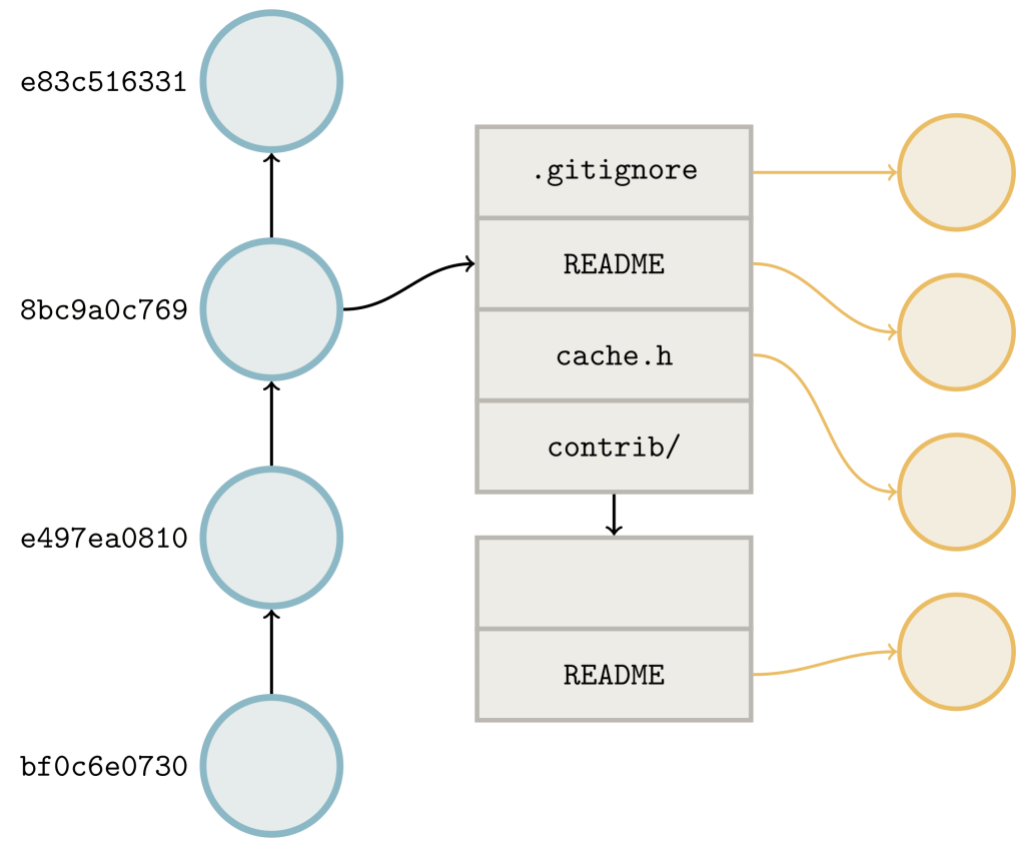
If you’ve ever heard that a Git repository is “nothing more than a directed acyclic graph,” then you know that these objects can refer to one another. A tree refers to a set of blobs (which correspond to files) and other trees (which correspond to sub-directories). A commit refers to a single tree (the repository root), and zero or more other commits which are its parents.

These links help Git figure out which objects it needs to transfer to fulfill a fetch or clone request. When you fetch a repository from GitHub, Git performs a negotiation to figure out which objects to send. The server advertises the objects at the tip of its references (basically the tips of branches and tags). The client does the same, along with the set of references that it wants from the server. Then, the server walks the links between the requested objects and the objects that the client already has in order to figure out what to send.

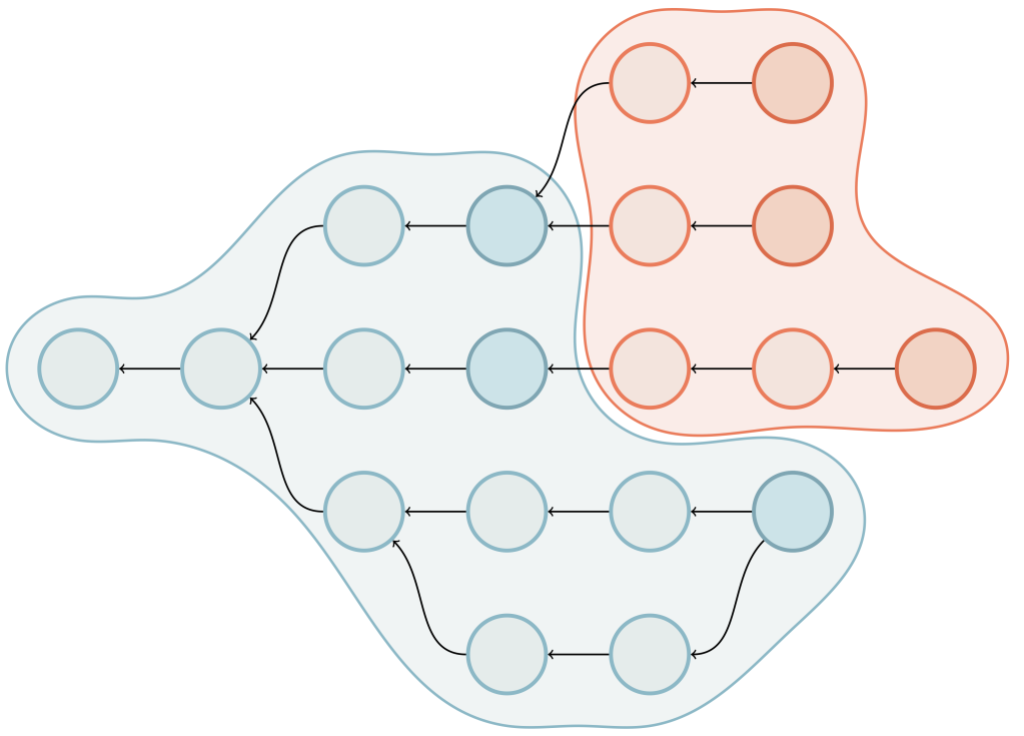
Above is an object graph. The client advertises its ref tips (indicated by the darker blue commits). The server’s advertised references are colored dark red. The blue shaded area represents the result of walking along the edges to obtain the reachability closure of the objects the client already has. The red shaded area represents the same closure from the server’s perspective, excluding objects that the client already has. Objects in this region are the ones which need to be sent to the client.

During a fetch, Git needs to send not just the commits in between what the client has and wants, but also all of the objects that are reachable from those commits. Because Git doesn’t store the list of every reachable object, this may be expensive, especially in the case of a clone. When cloning, the client doesn’t have any objects, so it asks the server for all of the objects reachable from any reference.

In an earlier blog post, we talked about how we use reachability bitmaps to accelerate this negotiation. In case you haven’t read that post, below is a quick primer.

Reachability bitmaps

How does Git handle this special case where the client has nothing and wants everything? Ultimately, the server needs to determine the reachability closure of all of the reference tips. In other words, it needs a list of all of the objects at the reference tips, and all of the ancestors of those objects in order to assemble a complete copy of the repository at the other end.

Unfortunately for us, the larger the repository is, the longer it takes Git to compute the list of objects to send. This isn’t feasible even for medium-sized repositories. Git could handle our case specially by just sending every object it has, but that might result in many unwanted objects being sent, too. (For example, GitHub stores the outcome of “test merges” in special refs which aren’t ordinarily sent during fetches, but whose objects are stored in the same object directory nonetheless.)

Instead, Git stores a set of reachability bitmaps corresponding to some of the commits in a packfile. The idea is rather simple: arrange the objects in a pack in some order (the particular order used is something we’ll discuss shortly in detail). Then, the ith bit in the bitmap corresponding to commit C is 1 if C can reach the ith object, and 0 otherwise.

Having a one-to-one correspondence between objects and bit positions has a couple of appealing properties: taking the union of reachable objects between commits is as simple as ORing their bitmaps together, and taking the difference is as simple as combining AND and NOT. So, when a bitmap exists, Git can dramatically speed up the object negotiation phase:

  • First, OR all of the bitmaps corresponding to the reference tips that the client wants. Call this new bitmap W.
  • Then, do the same with the bitmaps corresponding to the reference tips that the client advertised as already having. Call this bitmap H.
  • Finally, compute W AND NOT H to produce the set of objects the client needs (in other words, everything it wants but does not already have). Then, send those objects.

Because all of the reachability information is encoded directly into the bitmaps, Git saves time by avoiding the need to open up and parse objects, allowing it to produce the same result in a fraction of the time.

This idea has been used since at least the 1970s to speed up queries in relational databases. In Git, reachability bitmaps can provide dramatic speed-ups when walking objects that reside in the same pack: walking all of the objects in the Linux kernel repository took more than 33 seconds without bitmaps, but only 1.57 seconds to perform the same traversal with bitmaps.

The object order

How does Git turn a set of objects into a sequence of bit positions? One way you might imagine to do this is assign bit positions in lexicographic order. The first bit corresponds to 000023961a, the second to 0000d6543f, the third to 000182eacf, and so on in lexical order.

Why not do this? Recall that an object’s ID is determined by a SHA-1 of its contents, which means that reachability of any object in this order is only reachable to nearby objects by chance. And reachability of nearby objects matters: Git compresses the bitmaps using EWAH compression, which relies on having long runs of identical bits. If the object order makes reachability look essentially random from bit to bit, Git won’t be able to efficiently compress the bitmaps.

Pack order—that is, the physical arrangement of objects in a packfile—produces a sequence of bit positions that tends to place reachable objects next to each other. And this produces exactly the kind of long runs of identical bits that make EWAH compression perform well.

The problem

But, all of this creates a problem for us: if the order of bit positions is dictated by a pack, then bitmaps are coupled in implementation and in concept to the existence of a single packfile. So, any objects that accumulate outside of the bitmapped pack won’t benefit from the same speed-ups.

To address this, we periodically repack the repository’s entire contents into a single pack, and then generate a new reachability bitmap. This makes reachability queries in more recent parts of the repository’s history faster.

But generating that new pack takes time; in fact, it’s quadratic. Bigger repositories take longer to repack, but also grow at a faster rate, which means they run maintenance more often. This compounding effect sometimes makes it such that some repositories are constantly undergoing maintenance: by the time one maintenance job has finished, another is already sitting in the queue, waiting to be run.

Since the bottleneck for maintenance is the compression of an entire repository’s contents into a single packfile, what would it take to be able to repack the contents into multiple packfiles instead?

Multi-pack indexes

To order a set of objects spanning multiple packs, we looked to a recent Git feature: multi-pack indexes.

When Git wants to locate an object by name in a single pack, it uses that pack’s index (.idx) file, which provides a binary-searchable list of object locations. Multi-pack indexes work similarly to .idx files, but the location they indicate is a pair containing both the pack containing the object, as well as where in that pack the object can be found.

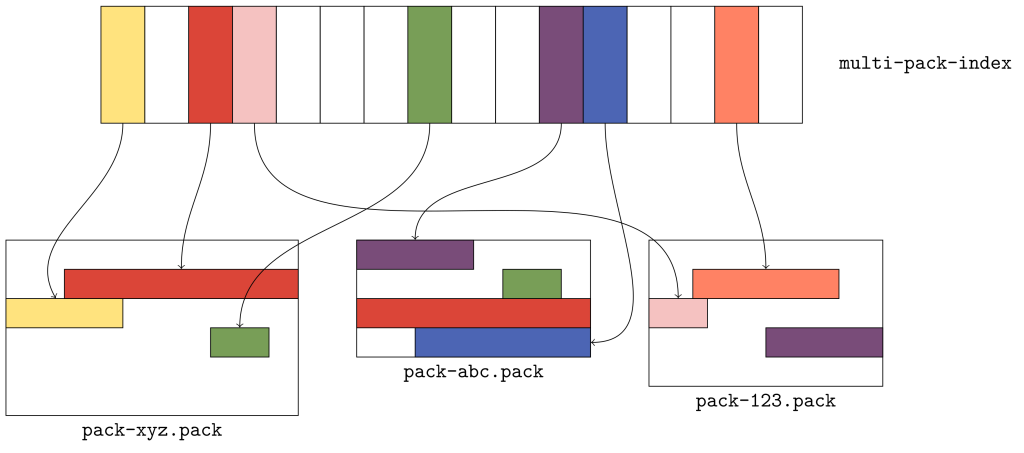
The figure above gives a flavor for what kind of data is organized in a multi-pack index. Here, there are three packs, each with a handful of objects. The multi-pack index stores the location of each unique object among the set of packs. When multiple copies of an object exist (like the green or red objects in packs xyz and abc), ties are broken in favor of the copy in the pack with the earliest modification time.

The order of objects in the multi-pack index differs from the order in each individual pack. Since a pack is free to store objects in any order it wants, the multi-pack index stores objects in lexicographic order so that an object can be found quickly by name using a binary search.

Ordering objects

Given a multi-pack index, how should we order the objects in the packs it contains? We discussed earlier that ordering objects lexicographically results in poor compression. We also noted that objects in packs are ordered topologically, which for our purposes we can consider to imply that individual objects tend to appear near other objects which they reach in this order.

So, any ordering of the objects in a multi-pack index should capture as much of those two properties as possible. With that in mind, we decided on the following order:

  • Objects are first grouped according to which packfile they appear in, and packs are ordered according to the multi-pack index.
  • Objects within the same pack should be ordered according to their locations within that pack.

This effectively concatenates the pack-order of multiple packs together, according to some other ordering defined on the packs themselves.

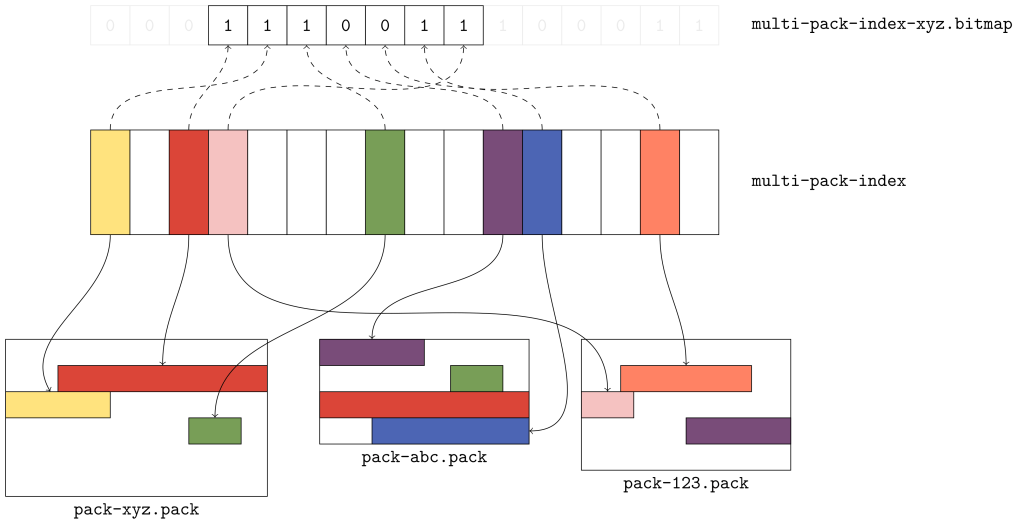
To see what this looks like, let’s overlay a portion of a bitmap that covers the objects in our earlier example:

The first three bits correspond to the red, yellow, and green objects, respectively. Each one of those objects comes from the xyz pack, which means that the xyz pack has the oldest modification among the three. Scanning the bitmap from left to right, these objects appear in pack order; that is, the byte offset of the red object is less than the byte offsets of the yellow and green objects that follow it.

The purple and blue objects come next, since they are in the pack that follows. But note that the copies of the red and green objects in the abc pack don’t correspond to any bits highlighted. Why? Because the multi-pack index selected the copy of those objects in the earlier pack.

Finally, the orange and pink objects appear, also in pack order. And, as we expect, the copy of the purple object that appears in pack 123 isn’t included in the bitmap, because the copy in pack abc was.

This ordering gives us great locality, but we still need to address how to map bit positions back to the objects they represent. For example, let’s look at the fifth bit position, which we know refers to the blue object: how could Git discover this same fact?

You could reasonably imagine that knowing how many total objects are in each pack would be good enough to figure out which objects each bit corresponds to. But that isn’t enough information; we don’t know how many unique objects selected by the multi-pack index appear in each pack, and we also don’t know which non-unique objects are missing. So it’s not good enough to count past the three bits corresponding to objects in pack xyz and then count two more bits up to the fifth bit, because that would point at the copy of the green object in pack abc.

Reverse indexes

To solve this problem, we introduced reverse indexes. In the same way that the pack index provides a mapping from object name to object location, the reverse index maps an object’s location back to its name.

The idea is simple: in addition to the pack’s contents (stored in a .pack file) and index (stored in an .idx file), we’ll write an array of numbers (which comprise the reverse index, and are stored in a new .rev file). These numbers provide a mapping between an object’s position in pack order and its position in lexicographic order.

To better understand this, let’s take a look at an example on a single pack.

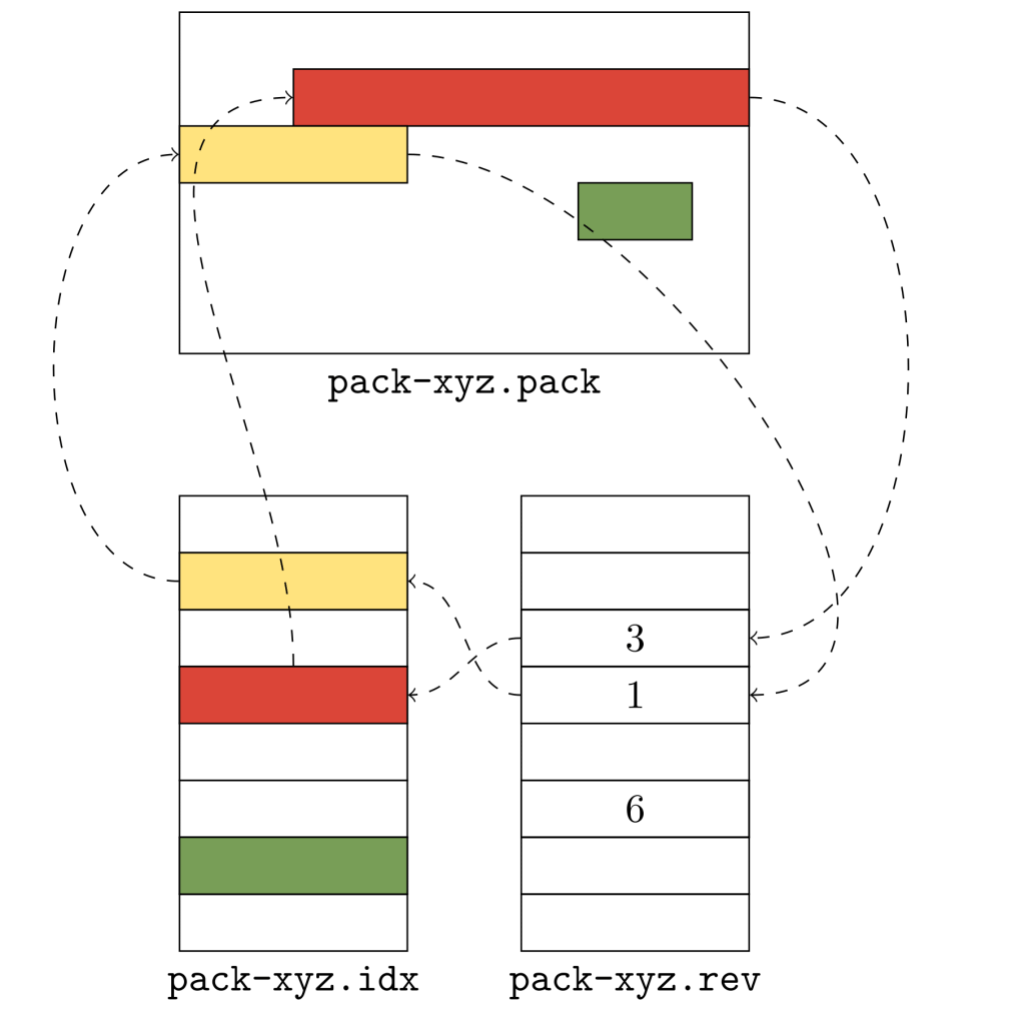
The .idx file (shown in the lower left) lists objects in lexicographic order: the yellow object comes before the red one, and the red one comes before the green one. But their pack order is different: there, the red object comes before the yellow one instead of the other way around. The reverse index helps us unwind the two: it tells us that the red object is in the position 3 in lexicographic order, and the yellow object is in position 1.

The reverse index allows us to map quickly from offsets into the packfile to object positions they correspond to. That allows us to quickly determine the size of a packed object. For example, say that you want to figure out how large the red object is. Because Git doesn’t store that information directly, you have one of two options: either scan linearly through the packed data (inflating its contents until you locate the stream end), or locate the adjacent object (in this case, the yellow one) by name, and measure the difference of their offsets.

Without the reverse index, there is no way to figure out where the adjacent object starts. But with a reverse index, locating the red object is as simple as reading the adjacent entry in the reverse index to discover the offset. Here, that value is 1, which points at an entry in the .idx file, which in turn points at the location in the pack.

Before the on-disk reverse index, Git computed this table on the fly and stored the results in an array in memory. This had a couple of major downsides. To build a reverse index on the fly, Git has to allocate a pair of pack offset and index position. This requires memory and runtime, which both scale relative to the size of the pack. Even though this processes using radix sort, sorting the reverse index entries can be noticeably slow when done once per process.

Some initial testing of these reverse indexes showed that they could enable rather dramatic speed-ups when serving fetches on real-world repositories. To verify our early results, we gradually rolled out reverse indexes on a handful of repositories.

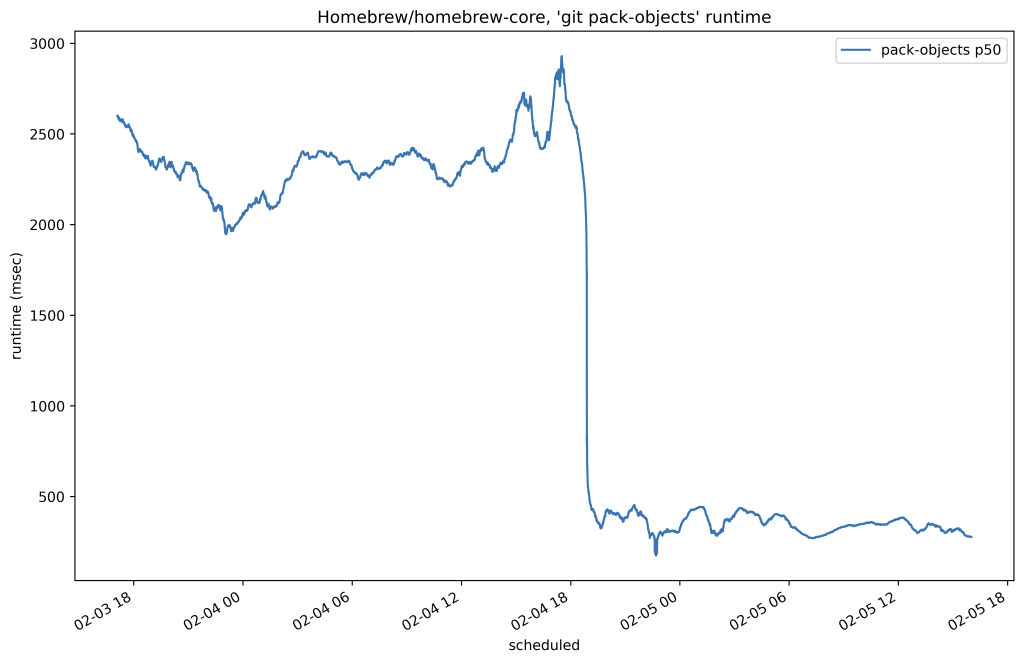
Below is the 50th percentile of CPU time for fetches to Homebrew/homebrew-core on our testing host before and after the change:

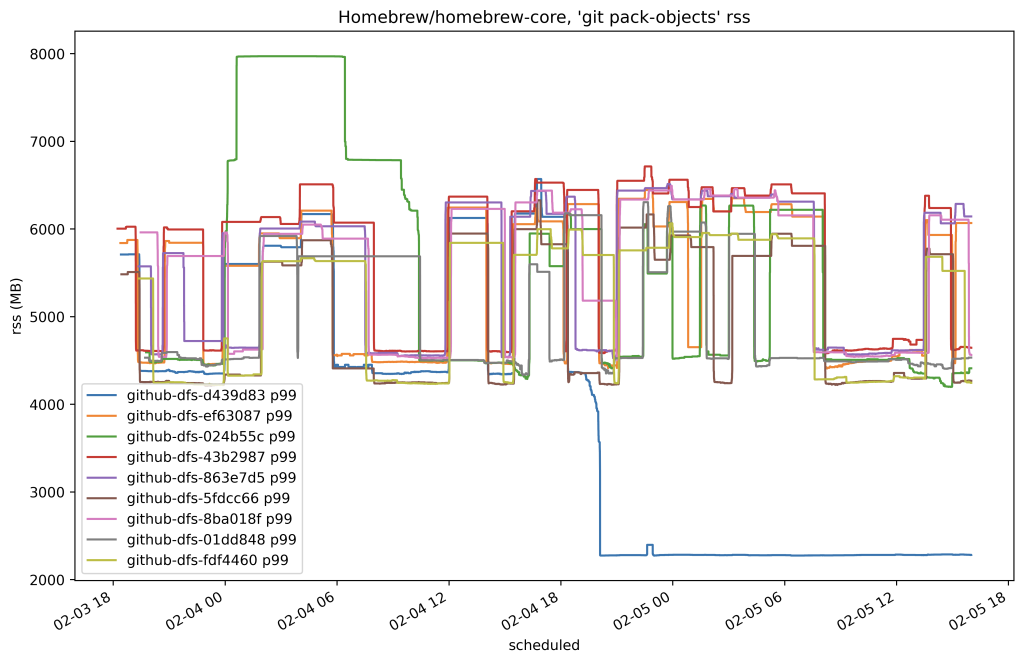
In this case, we reduced the amount of time it took to serve any fetch of that repository by around 80%. Here’s another plot from the same time which shows the resident set size of the program used to serve fetches by replicas of that same repository:

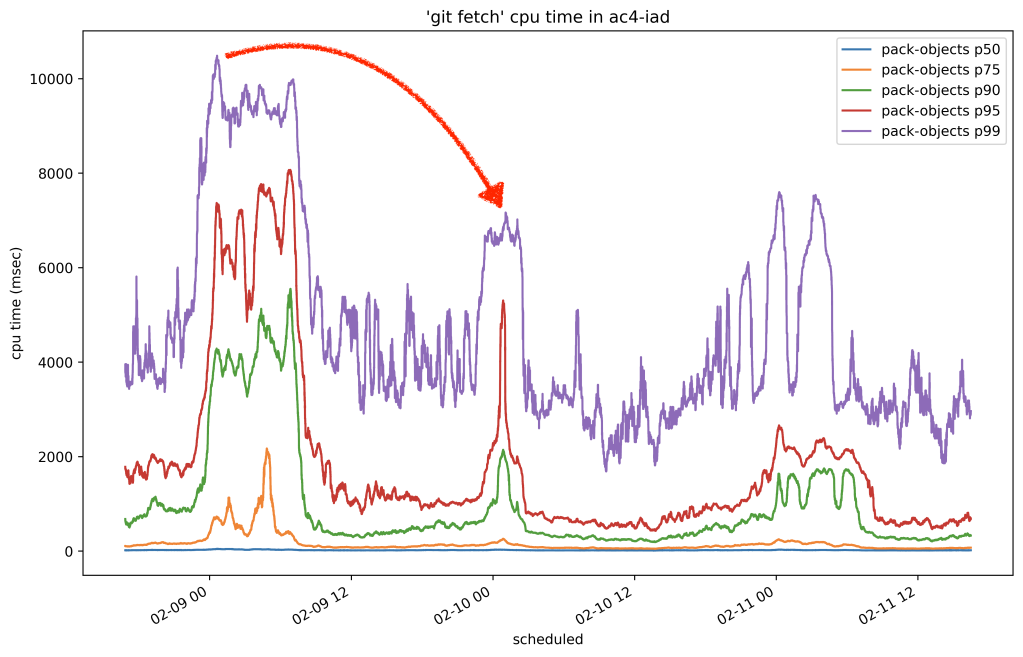
Encouraged by our first results in production, we proceeded to cautiously roll out on-disk reverse indexes to all other replicas. Once we completed the roll-out, we let a couple of days pass in order for replicas to have enough time to generate reverse indexes. Then, we sampled the overall CPU time it took to serve fetches across all repositories and observed the drop we were hoping for:

In the graph above, you can see three 24-hour cycles. The first day was before we rolled out .rev files, and the second two peaks are after. The per-day peaks dropped from around 10.8 seconds to 7 seconds, for a collective savings of around 35% on all repositories.

Multi-pack bitmaps

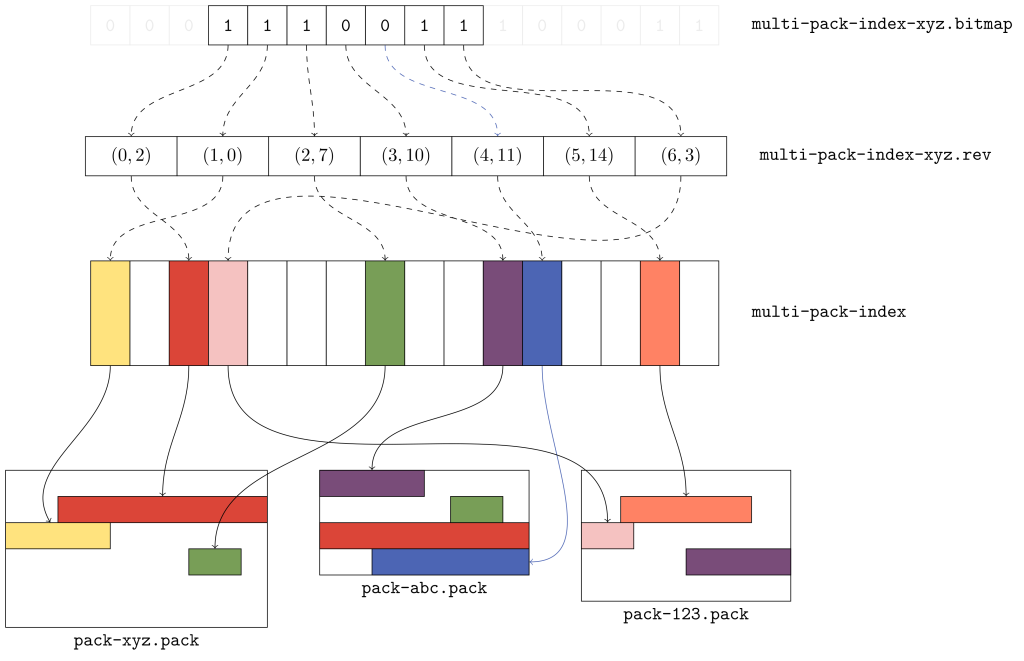
Now that we have a format for .rev files, we can reuse it as the missing piece we need to build multi-pack bitmaps. Instead of writing positions relative to a pack .idx file, a multi-pack reverse index writes positions which are relative to a multi-pack-index file.

This provides exactly the information we need to rediscover the mapping between bit positions and the objects they refer to in the multi-pack index. To see why, let’s take a look at another example:

To figure out that the fifth bit corresponds to the blue object in the above diagram, we read the fifth entry in the multi-pack reverse index and get back that the fifth bit maps to the eleventh object in the multi-pack index. And, sure enough, the 11th object points back to the blue object that we were looking for in pack abc.

Putting it all together, this gives us a bitmap which can refer to objects in multiple packs. Based on its filename, each bitmap knows whether or not it belongs to a pack (and if so, which one) or to a multi-pack index. And based on that information, it can translate its object lookups to be relative to a packfile, or to the multi-pack index via its reverse index.

Since we chose the ordering carefully, these multi-pack bitmaps compress exactly as well as their single-pack counterparts. And they decouple bitmaps from individual packs. So, a repository can still have at most one bitmap, but that bitmap can now correspond to multiple packs.

Geometric repacking

Now that we can include multiple packs in a single bitmap, what’s the best way to repack a repository during maintenance?

With single-pack bitmaps, the only option was to pack everything together into one enormous pack. But now that this restriction no longer exists, we have to figure out the best way to repack the objects. When deciding on a new repacking strategy, we wanted something that struck a balance between two properties:

  • On average, there is a relatively small number of packs in the repository.
  • On average, we create a pack that collects objects that were pushed since the last maintenance run.

We decided on an invariant to ensure that the packs in a repository form a geometric progression by object size. In particular, if you sort the packs by number of objects, with the first pack having the most and the final pack having the least, then each pack will contain at least twice as many objects as the next one.

We taught git repack a new --geometric= mode, which creates exactly this geometric progression. Soon (at the time of writing, these patches are still being submitted and reviewed), you’ll be able to try this yourself on your own repository by running:

$ packsizes() {
    find .git/objects/pack -type f -name '*.pack' |
    while read pack; do
      printf "%7d %s\n" \
        "$(git show-index < ${pack%.pack}.idx | wc -l)" "$pack"
    done | sort -rn
  }
$ packsizes # before
$ git repack --write-midx --write-bitmap-index -d --geometric=2
$ packsizes # after

How does this command work? We select a set of packs and combine their objects into one new pack that replaces the set. But picking this set optimally is NP-hard, so we have to approximate it.

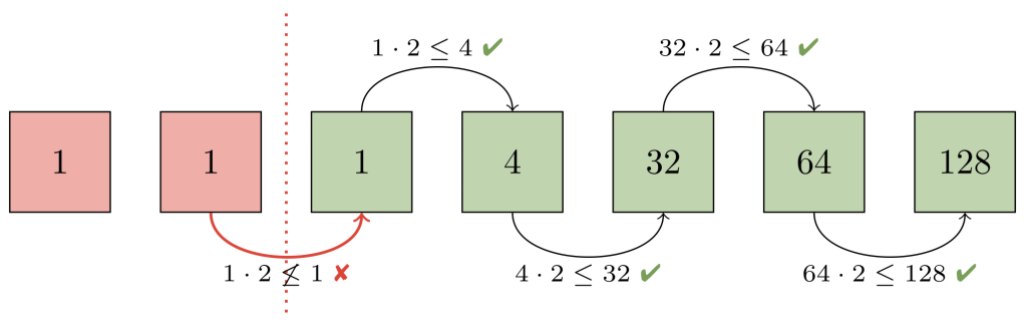
To see how we perform that approximation, let's walk through an example. The first step is to figure out how many packs already form a geometric progression. To do this, imagine ordering packs by how many objects they contain. Then, consider each adjacent pair of packs from largest to smallest. At each step, ask: "is the larger pack at least twice the size of the smaller one?". If so, then every pack from that pair onwards already forms a geometric progression.

In this example, the second and third packs (each containing one object) violate our progression. At that point, we know that the second pack, and any packs below it must be repacked together in order to restore the progression.

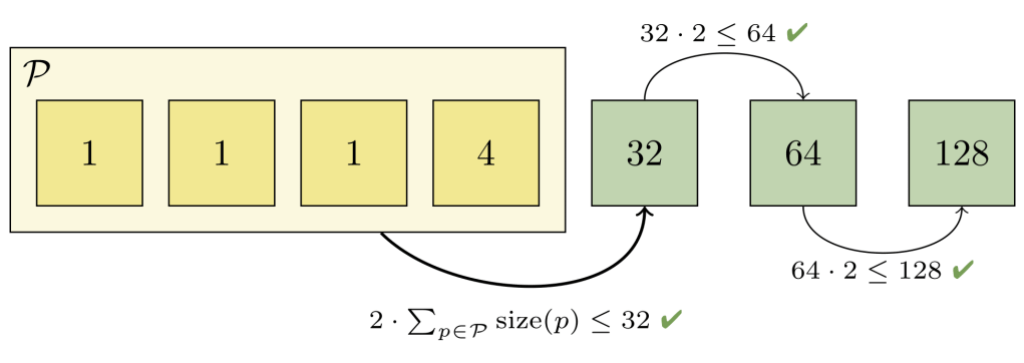
But we can't just repack the first two packs together, since the combined pack would still be too big (it would contain two objects, and the third pack only contains one). So we grow the set of packs to combine until the invariant is restored:

Here, we had to combine the first four packs together in order to restore a geometric progression. Those packs together contain 7 objects, which is less than half of the next-largest pack (which contains 32 objects). And we can't combine any more packs, since doing so would violate the remainder of the progression.

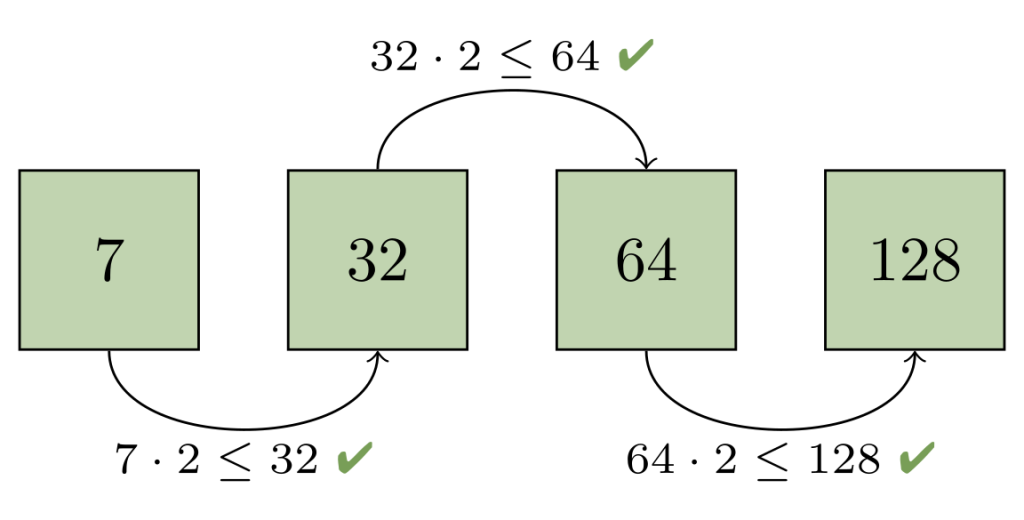
At this point, we can write a new pack containing just the objects in the set of packs we combined in the previous step. After discarding the now-redundant packs, the remaining packs again form a geometric progression:

This means that the number of packs grow logarithmically over time, so a repository will never have too many packs at any one point in time. It also has the appealing property that older objects tend to get pushed into the larger packs, meaning they get repacked less frequently as time passes. An important corollary of this is that each repack tends to focus on the most recently pushed objects. In other words, this strategy tends to make repacking take time proportional to the number of new objects, not the number of overall objects.

In order to keep the repository performing well over many geometric repacks, we intersperse an all-into-one repack once for every eight geometric repacks.

Importantly, this means that even though the classically-slow repacks are still slow, we aren't forced to run them every time we want to repack a repository.

Deploying to production

Now that we have a way to write a bitmap that covers the objects in multiple packs, a way to quickly map between bit positions and the objects they refer to in a multi-pack index, and a repacking strategy which only requires modifying recent additions to the repository, we are ready to put everything together.

Before rolling out a change as large as this one, we performed extensive local testing to ensure that writing bitmaps worked correctly, and that our new repacking strategy wasn't silently corrupting repositories. But our local testing can only go so far: there are endless corner cases when serving fetches and clones, so the real test occurs only after putting real traffic in front of these new paths. Our goal was to design a deployment strategy that simultaneously exercised enough of those cases, while also ensuring that any potential corruption could never occur on a majority of repository replicas.

Our first test cases were internal repositories. We broke our original tests into two phases. In the first phase, we wrote "multi-pack bitmaps" which contained only a single pack. This allowed us to exercise the most basic case of multi-pack bitmaps (having only one pack) without running our new repack code. Once we had built confidence in that approach, we expanded our test to alternate between geometric and full repacks.

After a couple of weeks without any issues, we were confident enough in our change to start testing it on other repositories external to GitHub. We selected first an individual host, and then a whole rack of hosts on which every repack would alternate between geometric and full. At this stage, results were encouraging: the average time to repack had dropped significantly, as had the overall amount of time spent repacking.

By this stage, our roll-out proceeded for several weeks in only one of three data centers. Because we never place a majority of repository replicas in any single datacenter, this configuration made it impossible for our changes to corrupt a majority set of replicas in an unrecoverable fashion, while still putting our changes in the request path for a large amount of traffic.

Finally, after adopting this configuration for a week, we proceeded to enroll percentages of replicas hosted in other datacenters to also use multi-pack bitmaps until all repositories were using multi-pack reachability bitmaps.

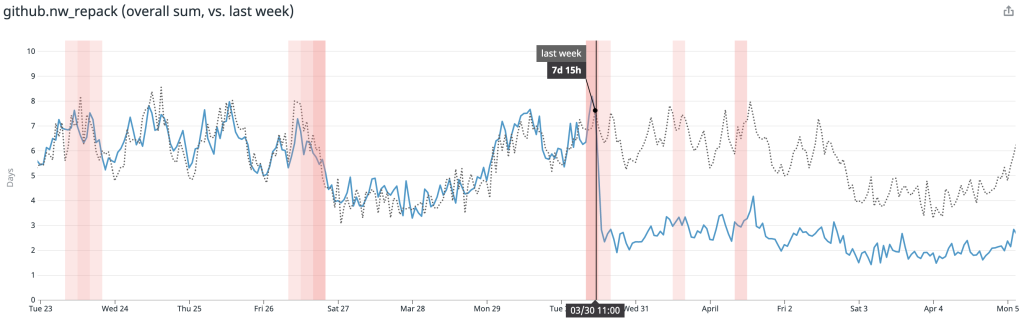
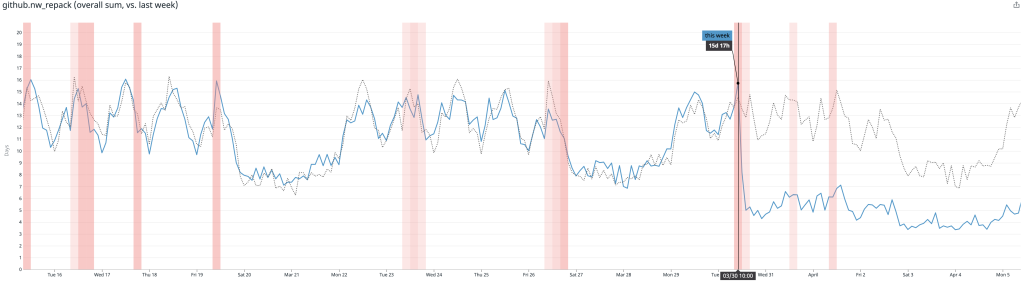
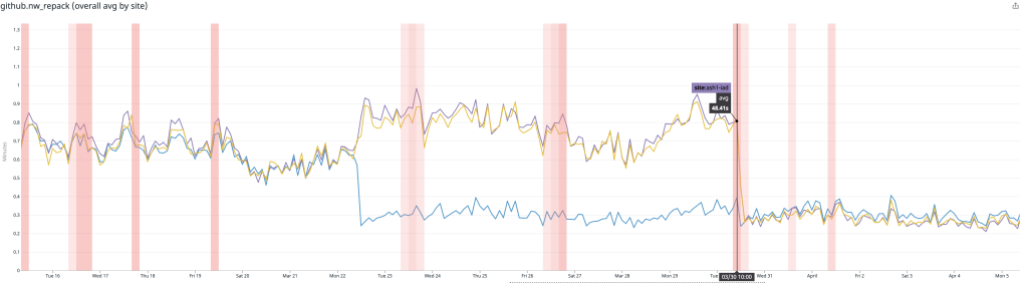
After rolling out our new repacking strategy with multi-pack bitmaps, we saved on average 5.67 CPU days every hour compared to the old strategy.

Likewise, the average time spent repacking any single repository also dropped considerably. Below, the plot is broken out per-site, and you can see when we began testing in a single site, as well as when we expanded our deployment to all sites.

There, the average dropped from around 1 minute to repack a repository to just 15 seconds.

Future directions

There are two major open areas we're considering for the future that will make it possible for further performance improvements:

One open area is the bitmap computation itself. Git's bitmap generation code can reuse existing bitmaps by permuting their bits into a new order, but this operation can still take time proportional to the size of the repository. One way to solve this would be to write bitmaps incrementally, only walking the new objects introduced since the last time a bitmap was written. This problem is tricky because it requires not only that the bitmap file be able to be written incrementally, but also that the object ordering we select is stable: that is, that introducing new bitmaps won't render the existing ones meaningless.

Another open area is the pack structure. Creating packs that form a geometric sequence is a promising step forward that allows us to trade off between full and partial repacks. But some repositories are so large that repacking the whole repository isn't feasible, much less desirable. Designing a strategy which freezes the packs containing the oldest objects in a repository's history will allow us to grow to support even larger repositories in the future.

Thank you

This project would not have been possible without help from the upstream Git community, as well as many engineering teams within GitHub. Each of these changes required extensive review, both to the Git project, as well as to internal GitHub services. Special thanks to Jeff King, Derrick Stolee, Jonathan Tan, Junio Hamano, and others for making this possible.
GitHub Desktop supports hiding whitespace, expanding diffs, and creating repository aliases

Post Syndicated from Billy Griffin original https://github.blog/2021-04-28-github-desktop-hiding-whitespace-expanding-diffs-repo-aliases/

GitHub Desktop 2.8 now includes several new features to make it easier to work with diffs and easier for people who have multiple copies of the same repository.

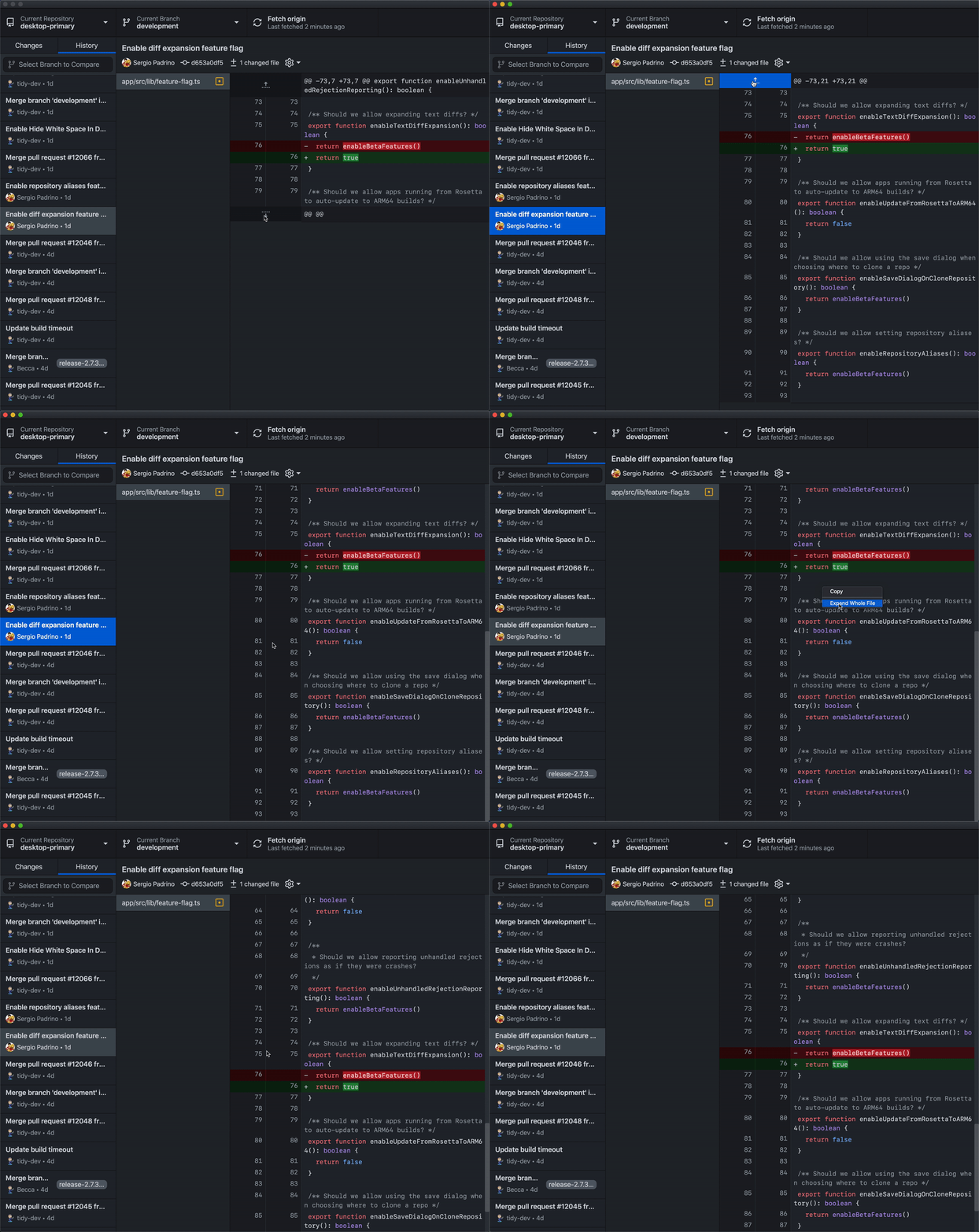
Expand diffs to get more context around changes

We hear a lot about how people love the way GitHub Desktop displays diffs beautifully, but you’re only able to see a few lines around the changes that you or someone else made. Now you can click to expand the diffs above or below your changes to get a more complete picture of the rest of the file around the changes made. You can also use a context menu on the diff to expand the whole file.

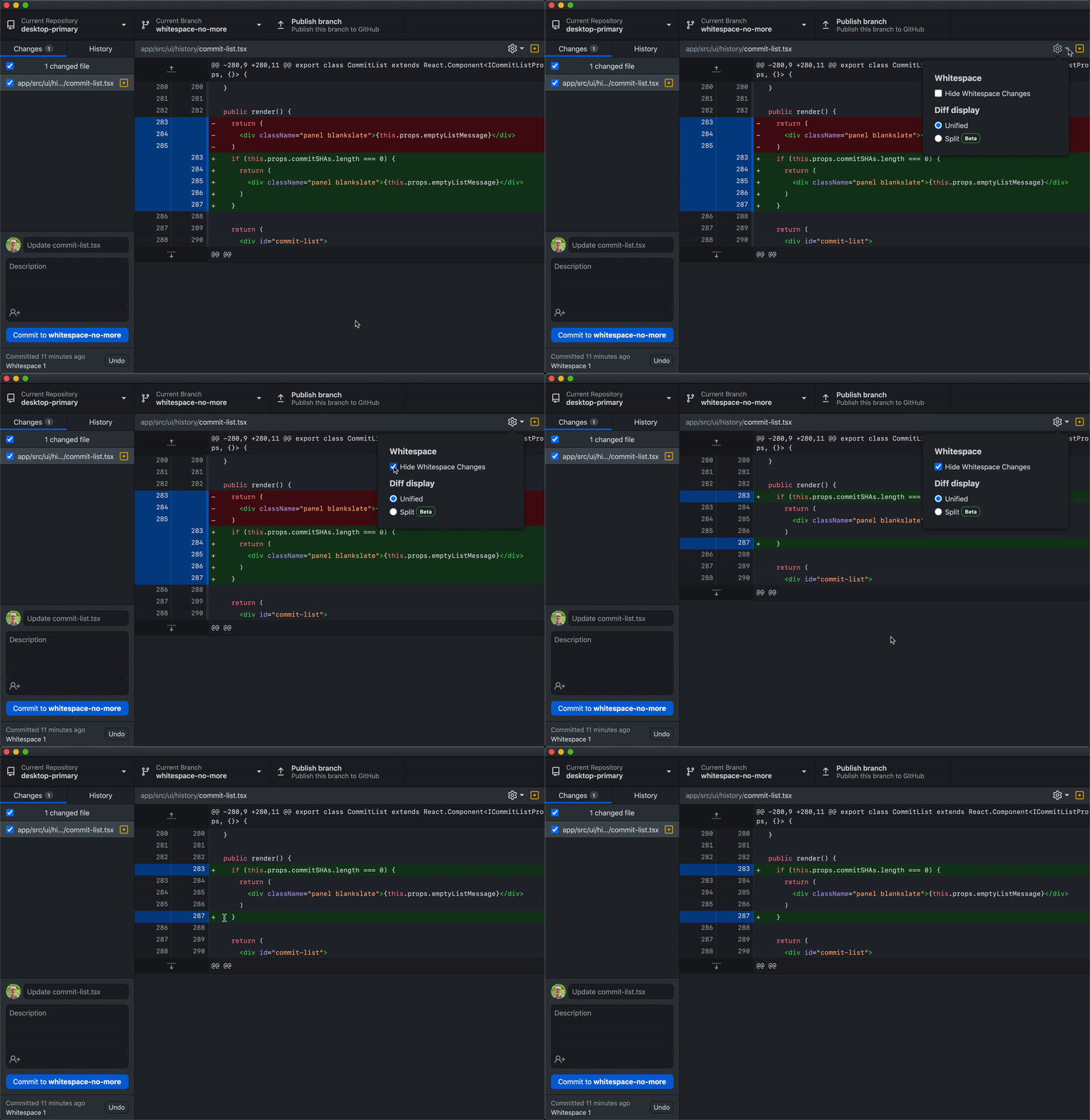
Hide whitespace in diffs

Similar to being able to see more context around your changes, sometimes there are a lot of whitespace changes in a file that don’t allow you to get a clear picture of the substantive changes that happened. Now, in both changes and history, you can optionally hide whitespace changes to allow you to focus just on the more meaningful changes to your code. This feature was built almost entirely by Steven Yeh (@say25), a fantastic and close community contributor to GitHub Desktop. Steven is a long-time open source contributor to GitHub Desktop, and we’re immensely grateful for him continuing to help improve the product.

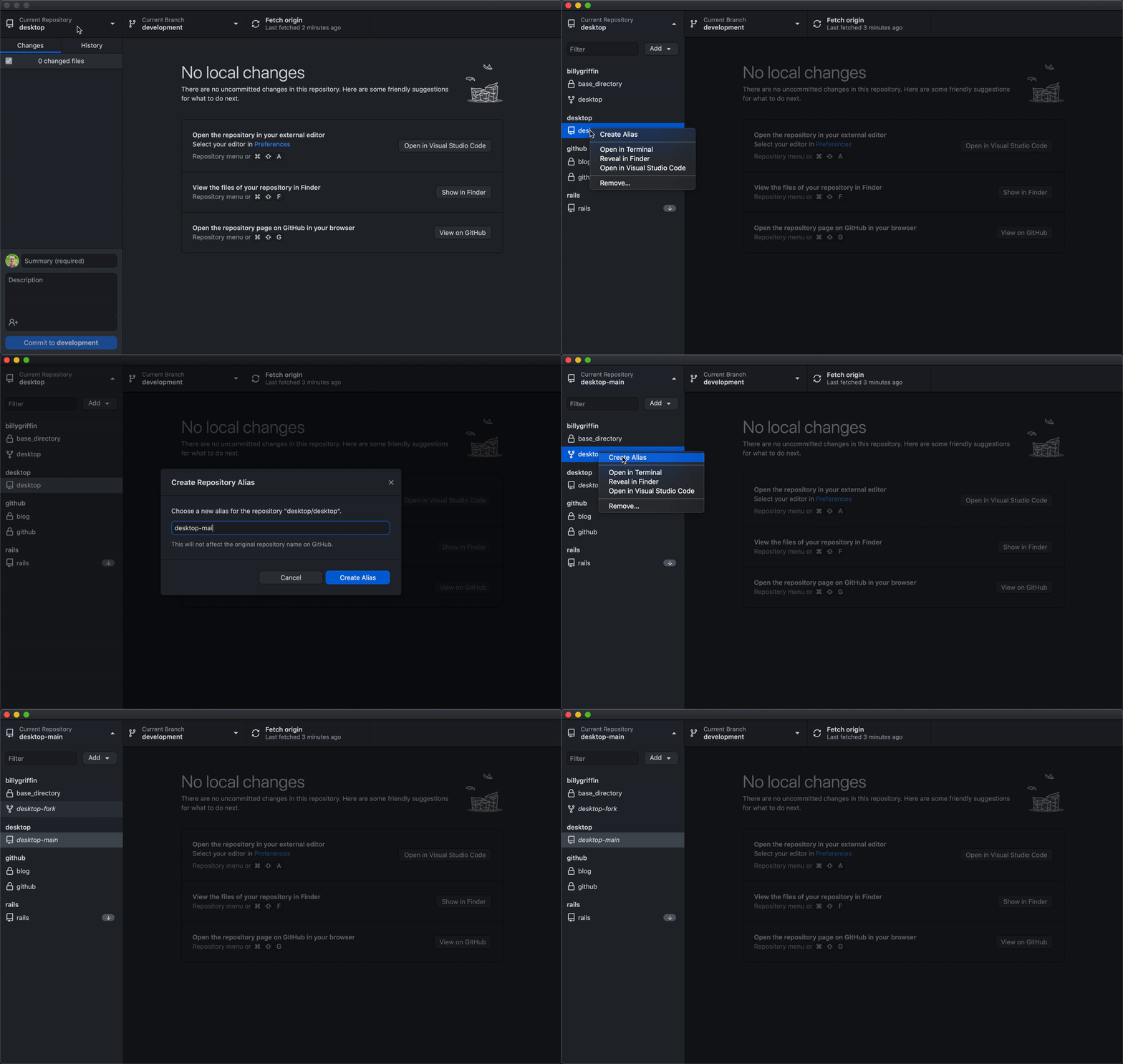
Create aliases for repositories locally

Many developers keep more than one copy of a repository in GitHub Desktop, and the way repositories are displayed makes it tricky to differentiate between them. In GitHub Desktop 2.8, you can create aliases for your local repositories to easily tell them apart in the list.

We appreciate your input

All of the recent features we’ve shipped have come as a direct result of the great feedback we get from talking with users and hearing from you in our open source repository. With more than one million users actively using GitHub Desktop every month and more than 200 community contributors, we so appreciate all the feedback and contributions that help make GitHub Desktop even better every day. Thank you!

And if you’ve never tried it, or have not tried it in awhile, download GitHub Desktop today.

How we ship code faster and safer with feature flags

Post Syndicated from Alberto Gimeno original https://github.blog/2021-04-27-ship-code-faster-safer-feature-flags/

At GitHub, we’re continually working to improve existing features and shipping new ones all the time. From our launch of GitHub Discussions to the release of manual approvals for GitHub Actions—in order to ship new features and improvements faster while lowering the risk in our deployments, we have a simple but powerful tool: feature flags.
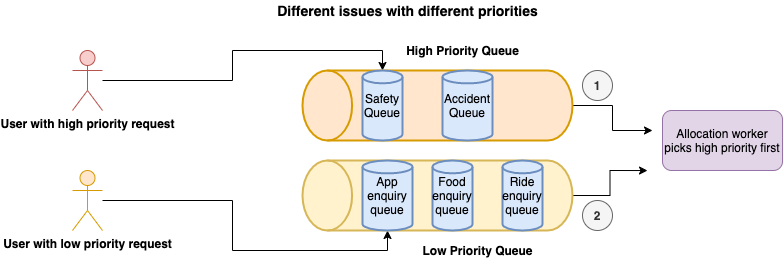
Reducing deployment risk

We deploy changes around the clock, and we need to keep the service running with no disruptions. For these reasons, deploying needs to be an almost risk-free process. Any problem that comes up during a deployment requires a rollback of the code. During this rollback period, users could be impacted and other deployments delayed; the more time that elapses the bigger the impact.

We use feature flags to reduce the risk of deploying to production. Any potentially risky change is put behind a feature flag in the code and then, when the deployment is done, we enable the feature flag to everyone or to a percentage of actors. This way we minimize the impact of the new changes, and if something goes wrong we can disable the feature flag completely in a matter of seconds without interrupting other deployments. This is fundamental to us for the following reasons:

  • It isolates and reduces the deployment risk.
  • We have the ability to disable changes in seconds without rolling back a deployment, which could take minutes.

What kind of things can go wrong during a deployment, where a feature flag can help? These are some examples:

  • Changes in database queries can potentially make existing functionality slower.
  • Changes in the logic on existing features can produce unexpected behavior, edge cases not considered, and more.
  • Changes in how we store or process information, such as saving new columns in the database can accidentally start inserting invalid values or generate too many writes to the database.

Working on new features

Feature flags are not only useful to reduce deployment risk when fixing or improving existing features, we also use them when developing new features!

Using feature flags allows us to work on features incrementally. Only staff members working on the project have the corresponding feature flag enabled, so they can see the new feature that is under development while other users cannot. We don’t use long-lived feature branches. Instead, feature flags allow us to work on small batches, which brings us many benefits:

  • Small batches are easier to review by other engineers in pull requests.
  • The smaller the change, the lesser the chance to get something wrong during the production deployment.
  • Not using long-lived feature branches avoids lots of potential merge conflicts and clashes with other features under development.

In order to adopt this way of building new features, you need to do a little bit of additional planning upfront to divide the work. For example, a new feature typically needs new data models or changes in existing ones. If you create a pull request only for the data model changes, then you may get blocked until those changes are merged. There are a couple of things we usually do to prevent this:

  • Create a main pull request. A spike, where you put the data model changes, and continue working on other areas that require changes: UI, API, background jobs, etc. Then, start extracting those changes to smaller pull requests that your peers can review.
  • Alternatively, you can create an initial pull request, and then create new branches off of that first branch, even if it’s not merged to the main branch yet. If you need to make changes to the first branch, you’ll need to rebase the other branches.

This way of working could introduce some friction due to having to ask for reviews more frequently. Sometimes it can take days until a team reviews your pull request. To prevent this from being a blocker, we follow one or more of these strategies:

Keep working even if the changes are not merged into the main branch. Either on that “spike” pull request or branching off the branch that is waiting for reviews.

Have a first responder person in each team that is focused on reviewing pull requests quickly to unblock the progress of their own team or other teams.
Sometimes if a critical pull request is ready to be deployed sooner rather than later, but has outstanding non-critical feedback waiting to be addressed, we do that in follow up pull requests.

Testing features

We have to make sure that the new functionality works as expected while also maintaining the existing functionality. In order to do that, we have many mechanisms to enable or disable feature flags at all levels as follows:

  • In our development environments, we can toggle feature flags from the command line.
  • In automated tests, we can enable or disable feature flags in the code.
  • In our CI, we have two different builds: one that runs with all feature flags disabled by default, and another one that runs with all feature flags enabled by default. This drastically reduces the chances of not covering most code paths in automated tests properly.
  • In production, we can enable or disable feature flags in the query string of a request.

Different shipping strategies

We already mentioned that we can flag particular actors, or we can enable a feature flag for a percentage of actors. Those are the most common options, but others include:

  • Individual actors: We use this mechanism to flag employees working on a feature or to enable the flag to customers that are experimenting with a feature, or if they have a problem we are trying to fix.
  • Staff shipping: When a feature is almost ready to be released, we first enable it for all GitHub staff, publish an internal post for awareness, and create an internal issue for gathering feedback or possible bugs.
  • Early access maintainers or other beta groups: When we are about to release an important feature that will impact the workflows of open source software (OSS) maintainers or other types of users, we test the feature with a small group first. After some time, we may interview them and gather their feedback to confirm our hypothesis, and validate the implementation.
  • Percentage of actors: As mentioned earlier, we can specify a percentage of actors for which to enable the feature flag. In this case when an actor is flagged, it remains flagged, unless the feature flag is rolled back. When the percentage of actors is changed, a message is sent to our deployments channel on Slack so other engineers are aware of the change.
  • Dark shipping: This allows us to enable the feature flag for a percentage of calls. This is different from the previous mechanism because an actor can get the feature enabled in one call (one request, for example) but not in the next one. This mechanism is not meant for features that are visible to the users, but for internal changes, such as a performance improvement in a query.

All these strategies and the full administration of feature flags is done through a web UI. Not all staff members have access to this UI, but most engineers do. The interface allows us to manage the shipping status of a feature flag, creation of new ones, and deletion. Additionally, we can see a history of changes made to the feature flag: who made the change, when and what changes were made, and other metadata, such as which team owns it.

What to flag

When we say that we can flag an actor, we mean that we can flag not only users, but other entities. In particular, we can flag users, organizations, teams, enterprises, repositories, or GitHub Apps. When writing the code that checks if the flag is enabled or not, we need to specify which actor has the flag enabled or not. These are some examples:

  • If the flag is purely visual, we flag the user, and we check the current logged user. Examples of this could be: dark mode, layout or navigation changes, and new components in the UI that don’t depend on data changes.
  • If the flag changes the way we store data, it is usually better to flag the repository for consistency for all users using the repository. For example, if we start storing timestamps for specific actions, we don’t want some users to produce the new timestamp while others do not.
  • For API changes, we also flag GitHub Apps.
  • Sometimes, especially for some risky changes, we create custom, context-specific actor types, where the existing actor types just wouldn’t have worked.

Sometimes we do more sophisticated checks, such as checking multiple actors or checking if a repository is public or not. For example, when we staff ship a feature it may make a new feature available for all repositories of an employee. If the feature must not be visible to other users, we want to enable the feature only for private repositories to prevent public repositories of an employee leaking the new feature.

The cost of a feature flag

As we have seen, using feature flags extensively changes the way we work, and requires a bit of additional planning and coordination. But there’s also additional costs associated with feature flags that we need to keep in mind. First, we have a runtime cost. When we check if a feature flag is enabled to an actor, we need to first load the metadata information of the flag, which is stored in MySQL but cached in memcached. We are now considering having the feature metadata and the list of actors always in memory to reduce this overhead. There’s an exception for this: we consider some feature flags “large.” An example of this was GitHub Actions, a feature that we rolled out to tens of thousands of users every week. For these large feature flags, when they are still not fully enabled, we need to do a per-actor query to MySQL to check if the actor is in the list of enabled actors.

For runtime, there’s also a cost in the form of technical debt. Once a feature flag is fully enabled, it leaves a lot of dead code and old tests in the repository that need to be deleted. Usually we do this manually after a feature has been rolled out for a few days or weeks depending on the case. But we are now automating the process: we have created a script that can be either invoked locally or by triggering a workflow manually.

The script uses regular expressions to find usages of the feature flag using git grep. Then for the matched Ruby files, it modifies the code using rubocop-ast. It is capable of deleting code blocks, such as if/else statements, and modifying boolean expressions, in addition to reindenting the code afterwards. When the file is a test, it deletes the code that enables the feature flag. For tests that check the behavior of the application when the feature flag is disabled, it just leaves a comment and makes the test fail, since in many cases we don’t want to just delete the test, but simply update it. As a result, even when the script requires some intervention from an engineer, it drastically reduces the manual work required in the process.

When the script is run using a workflow dispatch, it also creates a new branch and a pull request. Since we do extensive use of CODEOWNERS, the pull request will have the proper teams and people as reviewers. In the near future, we want to automate this process even more by running the script automatically when we can consider a feature flag stale.

Conclusion

Feature flags allow us to ship code faster with higher confidence. Using them we reduce deployment risk and make code reviews and development on new features easier, because we can work on small batches. There are also associated costs, but the benefits highly exceed them.

How We Improved Agent Chat Efficiency with Machine Learning

Post Syndicated from Grab Tech original https://engineering.grab.com/how-we-improved-agent-chat-efficiency-with-ml

In previous articles (see Grab’s in-house chat platform, workforce routing), we shared how chat has grown to become one of the primary channels for support in the last few years.

With continuous chat growth and a new in-house tool, helping our agents be more efficient and productive was key to ensure a faster support time for our users and scale chat even further.

Starting from the analysis on the usage of another third-party tool as well as some shadowing sessions, we realised that building a templated-based feature wouldn’t help. We needed to offer personalisation capabilities, as our consumer support specialists care about their writing style and tone, and using templates often feels robotic.

We decided to build a machine learning model, called SmartChat, which offers contextual suggestions by leveraging several sources of internal data, helping our chat specialists type much faster, and hence serving more consumers.

In this article, we are going to explain the process from problem discovery to design iterations, and share how the model was implemented from both a data science and software engineering perspective.

How SmartChat Works

Diving Deeper into the Problem

Agent productivity became a key part in the process of scaling chat as a channel for support.

After splitting chat time into all its components, we noted that agent typing time represented a big portion of the chat support journey, making it the perfect problem to tackle next.

After some analysis on the usage of the third-party chat tool, we found out that even with functionalities such as canned messages, 85% of the messages were still free typed.

Hours of shadowing sessions also confirmed that the consumer support specialists liked to add their own flair. They would often use the template and adjust it to their style, which took more time than just writing it on the spot. With this in mind, it was obvious that templates wouldn’t be too helpful, unless they provided some degree of personalisation.

We needed something that reduces typing time and also:

  • Allows some degree of personalisation, so that answers don’t seem robotic and repeated.
  • Works with multiple languages and nuances, considering Grab operates in 8 markets, even some of the English markets have some slight differences in commonly used words.
  • It’s contextual to the problem and takes into account the user type, issue reported, and even the time of the day.
  • Ideally doesn’t require any maintenance effort, such as having to keep templates updated whenever there’s a change in policies.

Considering the constraints, this seemed to be the perfect candidate for a machine learning-based functionality, which predicts sentence completion by considering all the context about the user, issue and even the latest messages exchanged.

Usability is Key

To fulfil the hypothesis, there are a few design considerations:

  1. Minimising the learning curve for agents.
  2. Avoiding visual clutter if recommendations are not relevant.

To increase the probability of predicting an agent’s message, one of the design explorations is to allow agents to select the top 3 predictions (Design 1). To onboard agents, we designed a quick tip to activate SmartChat using keyboard shortcuts.

By displaying the top 3 recommendations, we learnt that it slowed agents down as they started to read all options even if the recommendations were not helpful. Besides, by triggering this component upon every recommendable text, it became a distraction as they were forced to pause.

In our next design iteration, we decided to leverage and reuse the interaction of SmartChat from a familiar platform that agents are using – Gmail’s Smart Compose. As agents are familiar with Gmail, the learning curve for this feature would be less steep. For first time users, agents will see a “Press tab” tooltip, which will activate the text recommendation. The tooltip will disappear after 5 times of use.

To relearn the shortcut, agents can hover over the recommended text.

How We Track Progress

Knowing that this feature would come in multiple iterations, we had to find ways to track how well we were doing progressively, so we decided to measure the different components of chat time.

We realised that the agent typing time is affected by:

  • Percentage of characters saved. This tells us that the model predicted correctly, and also saved time. This metric should increase as the model improves.
  • Model’s effectiveness. The agent writes the least number of characters possible before getting the right suggestion, which should decrease as the model learns.
  • Acceptance rate. This tells us how many messages were written with the help of the model. It is a good proxy for feature usage and model capabilities.
  • Latency. If the suggestion is not shown in about 100-200ms, the agent would not notice the text and keep typing.

Architecture

The architecture involves support specialists initiating the fetch suggestion request, which is sent for evaluation to the machine learning model through API gateway. This ensures that only authenticated requests are allowed to go through and also ensures that we have proper rate limiting applied.

We have an internal platform called Catwalk, which is a microservice that offers the capability to execute machine learning models as a HTTP service. We used the Presto query engine to calculate and analyse the results from the experiment.

Designing the Machine Learning Model

I am sure all of us can remember an experiment we did in school when we had to catch a falling ruler. For those who have not done this experiment, feel free to try it at home! The purpose of this experiment is to define a ballpark number for typical human reaction time (equations also included in the video link).

Typically, the human reaction time ranges from 100ms to 300ms, with a median of about 250ms (read more here). Hence, we decided to set the upper bound for SmartChat response time to be 200ms while deciding the approach. Otherwise, the experience would be affected as the agents would notice a delay in the suggestions. To achieve this, we had to manage the model’s complexity and ensure that it achieves the optimal time performance.

Taking into consideration network latencies, the machine learning model would need to churn out predictions in less than 100ms, in order for the entire product to achieve a maximum 200ms refresh rate.

As such, a few key components were considered:

  • Model Tokenisation
    • Model input/output tokenisation needs to be implemented along with the model’s core logic so that it is done in one network request.
    • Model tokenisation needs to be lightweight and cheap to compute.
  • Model Architecture
    • This is a typical sequence-to-sequence (seq2seq) task so the model needs to be complex enough to account for the auto-regressive nature of seq2seq tasks.
    • We could not use pure attention-based models, which are usually state of the art for seq2seq tasks, as they are bulky and computationally expensive.
  • Model Service
    • The model serving platform should be executed on a low-level, highly performant framework.

Our proposed solution considers the points listed above. We have chosen to develop in Tensorflow (TF), which is a well-supported framework for machine learning models and application building.

For Latin-based languages, we used a simple whitespace tokenizer, which is serialisable in the TF graph using the tensorflow-text package.

import tensorflow_text as text

tokenizer = text.WhitespaceTokenizer()

For the model architecture, we considered a few options but eventually settled for a simple recurrent neural network architecture (RNN), in an Encoder-Decoder structure:

  • Encoder
    • Whitespace tokenisation
    • Single layered Bi-Directional RNN
    • Gated-Recurrent Unit (GRU) Cell
  • Decoder

    • Single layered Uni-Directional RNN
    • Gated-Recurrent Unit (GRU) Cell
  • Optimisation
    • Teacher-forcing in training, Greedy decoding in production
    • Trained with a cross-entropy loss function
    • Using ADAM (Kingma and Ba) optimiser

Features

To provide context for the sentence completion tasks, we provided the following features as model inputs:

  • Past conversations between the chat agent and the user
  • Time of the day
  • User type (Driver-partners, Consumers, etc.)
  • Entrypoint into the chat (e.g. an article on cancelling a food order)

These features give the model the ability to generalise beyond a simple language model, with additional context on the nature of contact for support. Such experiences also provide a better user experience and a more customised user experience.

For example, the model is better aware of the nature of time in addressing “Good {Morning/Afternoon/Evening}” given the time of the day input, as well as being able to interpret meal times in the case of food orders. E.g. “We have contacted the driver, your {breakfast/lunch/dinner} will be arriving shortly”.

Typeahead Solution for the User Interface

With our goal to provide a seamless experience in showing suggestions to accepting them, we decided to implement a typeahead solution in the chat input area. This solution had to be implemented with the ReactJS library, as the internal web-app used by our support specialist for handling chats is built in React.

There were a few ways to achieve this:

  1. Modify the Document Object Model (DOM) using Javascript to show suggestions by positioning them over the input HTML tag based on the cursor position.
  2. Use a content editable div and have the suggestion span render conditionally.

After evaluating the complexity in both approaches, the second solution seemed to be the better choice, as it is more aligned with the React way of doing things: avoid DOM manipulations as much as possible.

However, when a suggestion is accepted we would still need to update the content editable div through DOM manipulation. It cannot be added to React’s state as it creates a laggy experience for the user to visualise what they type.

Here is a code snippet for the implementation:

import React, { Component } from 'react';
import liveChatInstance from './live-chat';

export class ChatInput extends Component {
 constructor(props) {
   super(props);
   this.state = {
     suggestion: '',
   };
 }

 getCurrentInput = () => {
   const { roomID } = this.props;
   const inputDiv = document.getElementById(`input_content_${roomID}`);
   const suggestionSpan = document.getElementById(
     `suggestion_content_${roomID}`,
   );

   // put the check for extra safety in case suggestion span is accidentally cleared
   if (suggestionSpan) {
     const range = document.createRange();
     range.setStart(inputDiv, 0);
     range.setEndBefore(suggestionSpan);
     return range.toString(); // content before suggestion span in input div
   }
   return inputDiv.textContent;
 };

 handleKeyDown = async e => {
   const { roomID } = this.props;
   // tab or right arrow for accepting suggestion
   if (this.state.suggestion && (e.keyCode === 9 || e.keyCode === 39)) {
     e.preventDefault();
     e.stopPropagation();
     this.insertContent(this.state.suggestion);
     this.setState({ suggestion: '' });
   }
   const parsedValue = this.getCurrentInput();
   // space
   if (e.keyCode === 32 && !this.state.suggestion && parsedValue) {
     // fetch suggestion
     const prediction = await liveChatInstance.getSmartComposePrediction(
       parsedValue.trim(), roomID);
     this.setState({ suggestion: prediction })
   }
 };

 insertContent = content => {
   // insert content behind cursor
   const { roomID } = this.props;
   const inputDiv = document.getElementById(`input_content_${roomID}`);
   if (inputDiv) {
     inputDiv.focus();
     const sel = window.getSelection();
     const range = sel.getRangeAt(0);
     if (sel.getRangeAt && sel.rangeCount) {
       range.insertNode(document.createTextNode(content));
       range.collapse();
     }
   }
 };

 render() {
   const { roomID } = this.props;
   return (
     <div className="message_wrapper">
       <div
         id={`input_content_${roomID}`}
         role={'textbox'}
         contentEditable
         spellCheck
         onKeyDown={this.handleKeyDown}
       >
         {!!this.state.suggestion.length && (
           <span
             contentEditable={false}
             id={`suggestion_content_${roomID}`}
           >
             {this.state.suggestion}
           </span>
         )}
       </div>
     </div>
   );
 }
}

The solution uses the spacebar as the trigger for fetching the suggestion from the ML model and stores them in a React state. The ML model prediction is then rendered in a dynamically rendered span.

We used the window.getSelection() and range APIs to:

  • Find the current input value
  • Insert the suggestion
  • Clear the input to type a new message

The implementation has also considered the following:

  • Caching. API calls are made on every space character to fetch the prediction. To reduce the number of API calls, we also cached the prediction until it differs from the user input.
  • Recover placeholder. There are data fields that are specific to the agent and consumer, such as agent name and user phone number, and these data fields are replaced by placeholders for model training. The implementation recovers the placeholders in the prediction before showing it on the UI.
  • Control rollout. Since rollout is by percentage per country, the implementation has to ensure that only certain users can access predictions from their country chat model.
  • Aggregate and send metrics. Metrics are gathered and sent for each chat message.

Results

The initial experiment results suggested that we managed to save 20% of characters, which improved the efficiency of our agents by 12% as they were able to resolve the queries faster. These numbers exceeded our expectations and as a result, we decided to move forward by rolling SmartChat out regionally.

What’s Next?

In the upcoming iteration, we are going to focus on non-Latin language support, caching, and continuous training.

Non-Latin Language Support and Caching

The current model only works with Latin languages, where sentences consist of space-separated words. We are looking to provide support for non-Latin languages such as Thai and Vietnamese. The result would also be cached in the frontend to reduce the number of API calls, providing the prediction faster for the agents.

Continuous Training

The current machine learning model is built with training data derived from historical chat data. In order to teach the model and improve the metrics mentioned in our goals, we will enhance the model by letting it learn from data gathered in day-to-day chat conversations. Along with this, we are going to train the model to give better responses by providing more context about the conversations.

Seeing how effective this solution has been for our chat agents, we would also like to expose this to the end consumers to help them express their concerns faster and improve their overall chat experience.


Special thanks to Kok Keong Matthew Yeow, who helped to build the architecture and implementation in a scalable way.
—-

Join Us

Grab is the leading superapp platform in Southeast Asia, providing everyday services that matter to consumers. More than just a ride-hailing and food delivery app, Grab offers a wide range of on-demand services in the region, including mobility, food, package and grocery delivery services, mobile payments, and financial services across 428 cities in eight countries.

Powered by technology and driven by heart, our mission is to drive Southeast Asia forward by creating economic empowerment for everyone. If this mission speaks to you, join our team today!

How Grab Leveraged Performance Marketing Automation to Improve Conversion Rates by 30%

Post Syndicated from Grab Tech original https://engineering.grab.com/learn-how-grab-leveraged-performance-marketing-automation

Grab, Southeast Asia’s leading superapp, is a hyperlocal three-sided marketplace that operates across hundreds of cities in Southeast Asia. Grab started out as a taxi hailing company back in 2012 and in less than a decade, the business has evolved tremendously and now offers a diverse range of services for consumers’ everyday needs.

To fuel our business growth in newer service offerings such as GrabFood, GrabMart and GrabExpress, user acquisition efforts play a pivotal role in ensuring we create a sustainable Grab ecosystem that balances the marketplace dynamics between our consumers, driver-partners and merchant-partners.

Part of our user growth strategy is centred around our efforts in running direct-response app campaigns to increase trials on our superapp offerings. Executing these campaigns brings about a set of unique challenges against the diverse cultural backdrop present in Southeast Asia, challenging the team to stay hyperlocal in our strategies while driving user volumes at scale. To address these unique challenges, Grab’s performance marketing team is constantly seeking ways to leverage automation and innovate on our operations, improving our marketing efficiency and effectiveness.

Managing Grab’s Ever-expanding Business, Geographical Coverage and New User Acquisition

Grab’s ever-expanding services, extensive geographical coverage and hyperlocal strategies result in an extremely dynamic, yet complex ad account structure. This also means that whenever there is a new business vertical launch or hyperlocal campaign, the team would spend valuable hours rolling out a large volume of new ads across our accounts in the region.

Sample Google Ads account structure
A sample of our Google Ads account structure.

The granular structure of our Google Ads account provided us with flexibility to execute hyperlocal strategies, but this also resulted in thousands of ad groups that had to be individually maintained.

In 2019, Grab’s growth was simply outpacing our team’s resources and we finally hit a bottleneck. This challenged the team to take a step back and make the decision to pursue a fully automated solution built on the following principles for long term sustainability:

  • Building ad-tech solutions in-house instead of acquiring off-the-shelf solutions

    Grab’s unique business model calls for several tailor-made features, none of which the existing ad tech solutions were able to provide.

  • Shifting our mindset to focus on the infinite game

    In order to sustain the exponential volume in the ads we run, we had to seek the path of automation.

For our very first automation project, we decided to look into automating creative refresh and upload for our Google Ads account. With thousands of ad groups running multiple creatives each, this had become a growing problem for the team. Overtime, manually monitoring these creatives and refreshing them on a regular basis had become impossible.

The Automation Fundamentals

Grab’s superapp nature means that any automation solution fundamentally needs to be robust:

  • Performance-driven – to maintain and improve conversion efficiency over time
  • Flexibility –  to fit needs across business verticals and hyperlocal execution
  • Inclusivity – to account for future service launches and marketing tech (e.g. product feeds and more)
  • Scalability – to account for future geography/campaign coverage

With these in mind, we incorporated them in our requirements for the custom creative automation tool we planned to build.

  • Performance-driven – while many advertising platforms, such as Google’s App Campaigns, have built-in algorithms to prevent low-performing creatives from being served, the fundamental bottleneck lies in the speed in which these low-performing creatives can be replaced with new assets to improve performance. Thus, solving this bottleneck would become the primary goal of our tool.

  • Flexibility – to accommodate our broad range of services, geographies and marketing objectives, a mapping logic would be required to make sure the right creatives are added into the right campaigns.

    To solve this, we relied on a standardised creative naming convention, using key attributes in the file name to map an asset to a specific campaign and ad group based on:

    • Market
    • City
    • Service type
    • Language
    • Creative theme
    • Asset type
    • Campaign optimisation goal
  • Inclusivity – to address coverage of future service offerings and interoperability with existing ad-tech vendors, we designed and built our tool conforming to many industry API and platform standards.

  • Scalability – to ensure full coverage of future geographies/campaigns, the in-house solution’s frontend and backend had to be robust enough to handle volume. Working hand in glove with Google, the solution was built by leveraging multiple APIs including Google Ads and Youtube to host and replace low-performing assets across our ad groups. The solution was then deployed on AWS’ serverless compute engine.

Enter CARA

CARA is an automation tool that scans for any low-performing creatives and replaces them with new assets from our creative library:

CARA Workflow
A sneak peek of how CARA works

In a controlled experimental launch, we saw nearly 2,000 underperforming assets automatically replaced across more than 8,000 active ad groups, translating to an 18-30% increase in clickthrough and conversion rates.

Subset of results from CARA experimental launch
A subset of results from CARA’s experimental launch

Through automation, Grab’s performance marketing team has been able to significantly improve clickthrough and conversion rates while saving valuable man-hours. We have also established a scalable foundation for future growth. The best part? We are just getting started.


Authored on behalf of the performance marketing team @ Grab. Special thanks to the CRM data analytics team, particularly Milhad Miah and Vaibhav Vij for making this a reality.


Join Us

Grab is the leading superapp platform in Southeast Asia, providing everyday services that matter to consumers. More than just a ride-hailing and food delivery app, Grab offers a wide range of on-demand services in the region, including mobility, food, package and grocery delivery services, mobile payments, and financial services across 428 cities in eight countries.

Powered by technology and driven by heart, our mission is to drive Southeast Asia forward by creating economic empowerment for everyone. If this mission speaks to you, join our team today!

GitHub Availability Report: February 2021

Post Syndicated from Keith Ballinger original https://github.blog/2021-03-03-github-availability-report-february-2021/

Introduction

In February, we experienced no incidents resulting in service downtime to our core services.

This month’s GitHub Availability Report will provide initial details around an incident from March 1 that caused significant impact and a degraded state of availability for the GitHub Actions service.

March 1 09:59 UTC (lasting one hour and 42 minutes)

Our service monitors detected a high error rate on creating check suites for workflow runs. This incident resulted in the failure or delay of some queued jobs for a period of time. Additionally, some customers using the search/filter functionality to find workflows may have experienced incomplete search results.

In February, we experienced a few smaller and unrelated incidents affecting different parts of the GitHub Actions service. While these were localized to a subset of our customers and did not have broad impact, we take reliability very seriously and are conducting a thorough investigation into the contributing factors.

Due to the recency of the March 1 incident, we are still investigating the contributing factors and will provide a more detailed update in the March Availability Report, which will be published the first Wednesday of April. We will also share more about our efforts to minimize the impact of future incidents and increase the performance of the Actions service.

In summary

GitHub Actions has grown tremendously, and we know that the availability and performance of the service is critical to its continued success. We are committed to providing excellent service, reliability, and transparency to our users, and will continue to keep you updated on the progress we’re making to ensure this.

For more information, you can check out our status page for real-time updates on the availability of our systems and the GitHub Engineering blog for deep-dives around how we’re improving our engineering systems and infrastructure.

One small step closer to containerising service binaries

Post Syndicated from Grab Tech original https://engineering.grab.com/reducing-your-go-binary-size

Grab’s engineering teams currently own and manage more than 250+ microservices. Depending on the business problems that each team tackles, our development ecosystem ranges from Golang, Java, and everything in between.

Although there are centralised systems that help automate most of the build and deployment tasks, there are still some teams working on different technologies that manage their own build, test and deployment systems at different maturity levels. Managing a varied build and deploy ecosystems brings their own challenges.

Build challenges

  • Broken external dependencies.
  • Non-reproducible builds due to changes in AMI, configuration keys and other build parameters.
  • Missing security permissions between different repositories.

Deployment challenges

  • Varied deployment environments necessitating a bigger learning curve.
  • Managing the underlying infrastructure as code.
  • Higher downtime when bringing the systems up after a scale down event.

Grab’s appetite for customer obsession and quality drives the engineering teams to innovate and deliver value rapidly. The time that the team spends in fixing build issues or deployment-related tasks has a direct impact on the time they spend on delivering business value.

Introduction to containerisation

Using the Container architecture helps the team deploy and run multiple applications, isolated from each other, on the same virtual machine or server and with much less overhead.

At Grab, both the platform and the core engineering teams wanted to move to the containerisation architecture to achieve the following goals:

  • Support to build and push container images during the CI process.
  • Create a standard virtual machine image capable of running container workloads. The AMI is maintained by a central team and comes with Grab infrastructure components such as (DataDog, Filebeat, Vault, etc.).
  • A deployment experience which allows existing services to migrate to container workload safely by initially running both types of workloads concurrently.

The core engineering teams wanted to adopt container workloads to achieve the following benefits:

  • Provide a containerised version of the service that can be run locally and on different cloud providers without any dependency on Grab’s internal (runtime) tooling.
  • Allow reuse of common Grab tools in different projects by running the zero dependency version of the tools on demand whenever needed.
  • Allow a more flexible staging/dev/shadow deployment of new features.

Adoption of containerisation

Engineering teams at Grab use the containerisation model to build and deploy services at scale. Our containerisation effort helps the development teams move faster by:

  • Providing a consistent environment across development, testing and production
  • Deploying software efficiently
  • Reducing infrastructure cost
  • Abstracting OS dependency
  • Increasing scalability between cloud vendors

When we started using containers we realised that building smaller containers had some benefits over bigger containers. For example, smaller containers:

  • Include only the needed libraries and therefore are more secure.
  • Build and deploy faster as they can be pulled to the running container cluster quickly.
  • Utilise disk space and memory efficiently.

During the course of containerising our applications, we noted that some service binaries appeared to be bigger (~110 MB) than they should be. For a statically-linked Golang binary, that’s pretty big! So how do we figure out what’s bloating the size of our binary?

Go binary size visualisation tool

In the course of poking around for tools that would help us analyse the symbols in a Golang binary, we found go-binsize-viz based on this article. We particularly liked this tool, because it utilises the existing Golang toolchain (specifically, Go tool nm) to analyse imports, and provides a straightforward mechanism for traversing through the symbols present via treemap. We will briefly outline the steps that we did to analyse a Golang binary here.

  1. First, build your service using the following command (important for consistency between builds):

    $ go build -a -o service_name ./path/to/main.go
    
  2. Next, copy the binary over to the cloned directory of go-binsize-viz repository.
  3. Run the following script that covers the steps in the go-binsize-viz README.

    #!/usr/bin/env bash
    #
    # This script needs more input parsing, but it serves the needs for now.
    #
    mkdir dist
    # step 1
    go tool nm -size $1 | c++filt > dist/$1.symtab
    # step 2
    python3 tab2pydic.py dist/$1.symtab > dist/$1-map.py
    # step 3
    # must be data.js
    python3 simplify.py dist/$1-map.py > dist/$1-data.js
    rm data.js
    ln -s dist/$1-data.js data.js
    

    Running this script creates a dist folder where each intermediate step is deposited, and a data.js symlink in the top-level directory which points to the consumable .js file by treemap.html.

    # top-level directory
    $ ll
    -rw-r--r--   1 stan.halka  staff   1.1K Aug 20 09:57 README.md
    -rw-r--r--   1 stan.halka  staff   6.7K Aug 20 09:57 app3.js
    -rw-r--r--   1 stan.halka  staff   1.6K Aug 20 09:57 cockroach_sizes.html
    lrwxr-xr-x   1 stan.halka  staff        65B Aug 25 16:49 data.js -> dist/v2.0.709356.segments-paxgroups-macos-master-go1.13-data.js
    drwxr-xr-x   8 stan.halka  staff   256B Aug 25 16:49 dist
    ...
    # dist folder
    $ ll dist
    total 71728
    drwxr-xr-x   8 stan.halka  staff   256B Aug 25 16:49 .
    drwxr-xr-x  21 stan.halka  staff   672B Aug 25 16:49 ..
    -rw-r--r--   1 stan.halka  staff   4.2M Aug 25 16:37 v2.0.709356.segments-paxgroups-macos-master-go1.13-data.js
    -rw-r--r--   1 stan.halka  staff   3.4M Aug 25 16:37 v2.0.709356.segments-paxgroups-macos-master-go1.13-map.py
    -rw-r--r--   1 stan.halka  staff    11M Aug 25 16:37 v2.0.709356.segments-paxgroups-macos-master-go1.13.symtab
    

    As you can probably tell from the file names, these steps were explored on the segments-paxgroups service, which is a microservice used for segment information at Grab. You can ignore the versioning metadata, branch name, and Golang information embedded in the name.

  4. Finally, run a local python3 server to visualise the binary components.

    $ python3 -m http.server
    Serving HTTP on 0.0.0.0 port 8000 (http://0.0.0.0:8000/) ...
    

    So now that we have a methodology to consistently generate a service binary, and a way to explore the symbols present, let’s dive in!

  5. Open your browser and visit http://localhost:8000/treemap_v3.html:

    Of the 103MB binary produced, 81MB are recognisable, with 66MB recognised as Golang (UNKNOWN is present, and also during parsing there were a fair number of warnings. Note that we haven’t spent enough time with the tool to understand why we aren’t able to recognise and index all the symbols present).

    Treemap

    The next step is to figure out where the symbols are coming from. There’s a bunch of Grab-internal stuff that for the sake of this blog isn’t necessary to go into, and it was reasonably easy to come to the right answer based on the intuitiveness of the go-binsize-viz tool.

    This visualisation shows us the source of how 11 MB of symbols are sneaking into the segments-paxgroups binary.

    Visualisation

    Every message format for any service that reads from, or writes to, streams at Grab is included in every service binary! Not cloud native!

How did this happen?

The short answer is that Golang doesn’t import only the symbols that it requires, but rather all the symbols defined within an imported directory and transitive symbols as well. So, when we think we’re importing just one directory, if our code structure doesn’t follow principles of encapsulation or isolation, we end up importing 11 MB of symbols that we don’t need! In our case, this occurred because a generic Message interface was included in the same directory with all the auto-generated code you see in the pretty picture above.

The Streams team did an awesome job of restructuring the code, which when built again, led to this outcome:

$$ ll | grep paxgroups
-rwxr-xr-x   1 stan.halka  staff   110M Aug 21 14:53 v2.0.709356.segments-paxgroups-macos-master-go1.12
-rwxr-xr-x   1 stan.halka  staff   103M Aug 25 16:34 v2.0.709356.segments-paxgroups-macos-master-go1.13
-rwxr-xr-x   1 stan.halka  staff        80M Aug 21 14:53 v2.0.709356.segments-paxgroups-macos-tinkered-go1.12
-rwxr-xr-x   1 stan.halka  staff        78M Aug 25 16:34 v2.0.709356.segments-paxgroups-macos-tinkered-go1.13

Not a bad reduction in service binary size!

Lessons learnt

The go-binsize-viz utility offers a treemap representation for imported symbols, and is very useful in determining what symbols are contributing to the overall size.

Code architecture matters: Keep binaries as small as possible!

To reduce your binary size, follow these best practices:

  • Structure your code so that the interfaces and common classes/utilities are imported from different locations than auto-generated classes.
  • Avoid huge, flat directory structures.
  • If it’s a platform offering and has too many interwoven dependencies, try to decouple the actual platform offering from the company specific instantiations. This fosters creating isolated, minimalistic code.

Join us

Grab is more than just the leading ride-hailing and mobile payments platform in Southeast Asia. We use data and technology to improve everything from transportation to payments and financial services across a region of more than 620 million people. We aspire to unlock the true potential of Southeast Asia and look for like-minded individuals to join us on this ride.

If you share our vision of driving South East Asia forward, apply to join our team today.

New global ID format coming to GraphQL

Post Syndicated from Wissam Abirached original https://github.blog/2021-02-10-new-global-id-format-coming-to-graphql/

The GitHub GraphQL API has been publicly available for over 4 years now. Its usage has grown immensely over time, and we’ve learned a lot from running one of the largest public GraphQL APIs in the world. Today, we are introducing a new format for object identifiers and a roll out plan that brings it to our GraphQL API this year.

What is driving the change?

As GitHub grows and reaches new scale milestones, we came to the realization that the current format of Global IDs in our GraphQL API will not support our projected growth over the coming years. The new format gives us more flexibility and scalability in handling your requests even faster.

What exactly is changing?

We are changing the Global ID format in our GraphQL API. As a result, all object identifiers in GraphQL will change and some identifiers will become longer than they are now. Since you can get an object’s Global ID via the REST API, these changes will also affect an object’s node_id returned via the REST API. Object identifiers will continue to be opaque strings and should not be decoded.

How will this be rolled out?

We understand that our APIs are a critical part of your engineering workflows, and our goal is to minimize the impact as much as possible. In order to give you time to migrate your implementations, caches, and data records to the new Global IDs, we will go through a gradual rollout and thorough deprecation process that includes three phases.

  1. Introduce new format: This phase will introduce the new Global IDs into the wild on a type by type basis, for newly created objects only. Existing objects will continue to have the same ID. We will start by migrating the least requested object types, working our way towards the most popular types. Note that the new Global IDs may be longer and, in case you were storing the ID, you should ensure you can store the longer IDs. During this phase, as long as you can handle the potentially longer IDs, no action is required by you. The expected duration of this phase is 3 months.
  2. Migrate: In this phase you should look to update your caches and data records. We will introduce migration tools allowing you to toggle between the two formats making it easy for you to update your caches to the new IDs. The migration tools will be detailed in a separate blog post, closer to launch date. You will be able to use the old or new IDs to refer to an object throughout this phase. The expected duration of this phase is 3 months.
  3. Deprecate: In this phase, all REST API requests and GraphQL queries will return the new IDs. Requests made with the old IDs will continue to work, but the response will only include the new ID as well as a deprecation warning. The expected duration of this phase is 3 months.

Once the three migration phases are complete, we will sunset the old IDs. All requests made using the old IDs will result in an error. Overall, the whole process should take 9 months, with the goal of giving you plenty of time to adjust and migrate to the new format.

Tell us what you think

If you have any concerns about the rollout of this change impacting your app, please contact us and include information such as your app name so that we can better assist you.

Customer Support workforce routing

Post Syndicated from Grab Tech original https://engineering.grab.com/customer-support-workforce-routing

Introduction

With Grab’s wide range of services, we get large volumes of queries a day. Our Customer Support teams address concerns and issues from safety issues to general FAQs. The teams delight our customers through quick resolutions, resulting from world-class support framework and an efficient workforce routing system.

Our routing workforce system ensures that available resources are efficiently assigned to a request based on the right skillset and deciding factors such as department, country, request priority. Scalability to work across support channels (e.g. voice, chat, or digital) is also another factor considered for routing a request to a particular support specialist.

Sample flow of how it works today

Having an efficient workforce routing system ensures that requests are directed to relevant support specialists who are most suited to handle a certain type of issue, resulting in quicker resolution, happier and satisfied customers, and reduced cost spent on support.

We initially implemented a third-party solution, however there were a few limitations, such prioritisation, that motivated us to build our very own routing solution that provides better routing configuration controls and cost reduction from licensing costs.

This article describes how we built our in-house workforce routing system at Grab and focuses on Livechat, one of the domains of customer support.

Problem

Let’s run through the issues with our previous routing solution in the next sections.

Priority management

The third-party solution didn’t allow us to prioritise a group of requests over others. This was particularly important for handling safety issues that were not impacted due to other low-priority requests like enquiries. So our goal for the in-house solution was to ensure that we were able to configure the priority of the request queues.

Bespoke product customisation

With the third-party solution being a generic service provider, customisations often required long lead times as not all product requests from Grab were well received by the mass market. Building this in-house meant Grab had full controls over the design and configuration over routing. Here are a few sample use cases that were addressed by customisation:

  • Bulk configuration changes – Previously, it was challenging to assign the same configuration to multiple agents. So, we introduced another layer of grouping for agents that share the same configuration. For example, which queues the agents receive chats from and what the proficiency and max concurrency should be.
  • Resource Constraints – To avoid overwhelming resources with unlimited chats and maintaining reasonable wait times for our customers, we introduced a dynamic queue limit on the number of chat requests enqueued. This limit was based on factors like the number of incoming chats and the agent performance over the last hour.
  • Remote Work Challenges – With the pandemic situation and more of our agents working remotely, network issues were common. So we released an enhancement on the routing system to reroute chats handled by unavailable agents (due to disconnection for an extended period) to another available agent.The seamless experience helped increase customer satisfaction.

Reporting and analytics

Similar to previous point, having a solution addressing generic use cases doesn’t allow you to add customisations at will over monitoring. With the custom implementation, we were able to add more granular metrics which are very useful to assess the agent productivity and performance and helps in planning the resources ahead of time, and this is why reporting and analytics were so valuable for workforce planning. Few of the customisations added additionally were

  • Agent Time Utilisation – While basic agent tracking was available in the out-of-the-box solution, it limited users to three states (online, away, and invisible). With the custom routing solution, we were able to create customised statuses to reflect the time the agent spent in a particular status due to  chat connection issues and failures and reflect this on dashboards for immediate attention.
  • Chat Transfers – The number of chat transfers could only be tabulated manually. We then automated this process with a custom implementation.

Solution

Now that we’ve covered the issues we’re solving, let’s cover the solutions.

Prioritising high-priority requests

During routing, the constraint is on the number of resources available. The incoming requests cannot simply be assigned to the first available agent. The issue with this approach is that we would eventually run out of agents to serve the high-priority requests.

One of the ways to prevent this is to have a separate group of agents to solely handle high-priority requests. This does not solve issues as the high-priority requests and low-priority requests share the same queue and are de-queued in a First-In, First-out (FIFO) order. As a result, the low-priority requests are directly processed instead of waiting for the queue to fill up before processing high-priority requests. Because of this queuing issue, prioritisation of requests is critical.

The need to prioritise

High-priority requests, such as safety issues, must not be in the queue for a long duration and should be handled as fast as possible even when the system is filled with low-priority requests.

There are two different kinds of queues, one to handle requests at priority level and other to handle individual issues, which are the business queues on which the queue limit constraints apply.

To illustrate further, here are two different scenarios of enqueuing/de-queuing:

Different issues with different priorities

In this scenario, the priority is set to dequeue safety issues, which are in the high-priority queue, before picking up the enquiry issues from the low-priority queue.

Different issues with different priorities

Identical issues with different priorities

In this scenario where identical issues have different priorities, the reallocated enquiry issue in the high-priority queue is dequeued first before picking up a low-priority enquiry issue.  Reallocations happen when a chat is transferred to another agent or when it was not accepted by the allocated agent. When reallocated, it goes back to the queue with a higher priority.

Identical issues with different priorities

Approach

To implement different levels of priorities, we decided to use separate queues for each of the priorities and denoted the request queues by groups, which could logically exist in any of the priority queues.

For de-queueing, time slices of varied lengths were assigned to each of the queues to make sure the de-queueing worker spends more time on a higher priority queue.

The architecture uses multiple de-queueing workers running in parallel, with each worker looping over the queues and waiting for a message in a queue for a certain amount of time, and then allocating it to an agent.

for i := startIndex; i < len(consumer.priorityQueue); i++ {
 queue := consumer.priorityQueue\[i\]
 duration := queue.config.ProcessingDurationInMilliseconds
 for now := time.Now(); time.Since(now) < time.Duration(duration)\*time.Millisecond; {
   consumer.processMessage(queue.client, queue.config)
   // cool down
   time.Sleep(time.Millisecond \* 100)
 }
}

The above code snippet iterates over individual priority queues and waits for a message for a certain duration, it then processes the message upon receipt. There is also a cooldown period of 100ms before it moves on to receive a message from a different priority queue.

The caveat with the above approach is that the worker may end up spending more time than expected when it receives a message at the end of the waiting duration. We addressed this by having multiple workers running concurrently.

Request starvation

Now when priority queues are used, there is a possibility that some of the low-priority requests remain unprocessed for long periods of time. To ensure that this doesn’t happen, the workers are forced to run out of sync by tweaking the order in which priority queues are processed, such that when worker1 is processing a high-priority queue request, worker2 is waiting for a request in the medium-priority queue instead of the high-priority queue.

Customising to our needs

We wanted to make sure that agents with the adequate skills are assigned to the right queues to handle the requests. On top of that, we wanted to ensure that there is a limit on the number of requests that a queue can accept at a time, guaranteeing that the system isn’t flushed with too many requests, which can lead to longer waiting times for request allocation.

Approach

The queues are configured with a dynamic queue limit, which is the upper limit on the number of requests that a queue can accept. Additionally attributes such as country, department, and skills are defined on the queue.

The dynamic queue limit takes account of the utilisation factor of the queue and the available agents at the given time, which ensures an appropriate waiting time at the queue level.

A simple approach to assign which queues the agents can receive the requests from is to directly assign the queues to the agents. But this leads to another problem to solve, which is to control the number of concurrent chats an agent can handle and define how proficient an agent is at solving a request. Keeping this in mind, it made sense to have another grouping layer between the queue and agent assignment and to define attributes, such as concurrency, to make sure these groups can be reused.

There are three entities in agent assignment:

  • Queue
  • Agent Group
  • Agent

When the request is de-queued, the agent list mapped to the queue is found and then some additional business rules (e.g. checking for proficiency) are applied to calculate the eligibility score of each mapped agent to decide which agent is the best suited to cater to the request.

The factors impacting the eligibility score are proficiency, whether the agent is online/offline, the current concurrency, max concurrency and the last allocation time.

Ensuring the concurrency is not breached

To make sure that the agent doesn’t receive more chats than their defined concurrency, a locking mechanism is used at per agent level. During agent allocation, the worker acquires a lock on the agent record with an expiry, preventing other workers from allocating a chat to this agent. Only once the allocation process is complete (either failed or successful), the concurrency is updated and the lock is released, allowing other workers to assign more chats to the agent depending on the bandwidth.

A similar approach was used to ensure that the queue limit doesn’t exceed the desired limit.

Reallocation and transfers

Having the routing configuration set up, the reallocation of agents is done using the same steps for agent allocation.

To transfer a  chat to another queue, the request goes back to the queue with a higher priority so that the request is assigned faster.

Unaccepted chats

If the agent fails to accept the request in a given period of time, then the request is put back into the queue, but this time with a higher priority. This is the reason why there’s a corresponding re-allocation queue with a higher priority than the normal queue to make sure that those unaccepted requests don’t have to wait in the queue again.

Informing the frontend about allocation

When an allocation of an agent happens, the routing system needs to inform the frontend by sending messages over websocket to the frontend. This is done with our super reliable messaging system called Hermes, which operates at scale in supporting 12k concurrent connections and establishes real time communication between agents and customers.

Finding the online agents

The routing system should only send the allocation message to the frontend when the agent is online and accepting requests. Frontend uses the same websocket connection used to receive the allocation message to inform the routing system about the availability of agents. This means that if for some reason, the websocket connection is broken due to internet connection issues, the agent would stop receiving any new chat requests.

Enriched reporting and analytics

The routing system is able to push monitoring metrics, such as number of online agents, number of chat requests assigned to the agent, and so on. Because of fine grained control that comes with building this system in-house, it gives us the ability to push more custom metrics.

There are two levels of monitoring offered by this system, real time monitoring and non-real time monitoring, which could be used for analytics for calculating things like the productivity of the agent and the time they spent on each chat.

We achieved the discussed solutions with the help of StatsD for real time monitoring and for analytical purposes, we sent the data used for Tableau visualisations and reporting to Presto tables.

Given that the bottleneck for this system is the number of resources (i.e. number of agents), the real time monitoring helps identify which configuration needs to be adjusted when there is a spike in the number of requests. Moreover, the analytical persistent data allows us the ability to predict the traffic and plan the workforce management such that they are efficiently handling the requests.

Scalability

Letting the system behave appropriately when rolled out to multiple regions is a very critical piece that needed to be taken into account. To ensure that there were enough workers to handle the requests, horizontal scaling of instances can be done if the CPU utilisation increases.

Now to understand the system limitations and behaviour before releasing to multiple regions, we ran load tests with 10x more traffic than expected. This gave us the understanding on what monitors and alerts we should add to make sure the system is able to function efficiently and reduce our recovery time if something goes wrong.

Next steps

The few enhancements lined up after building this routing solution are to focus on reducing customer’s waiting time and to reduce the time spent by the agents on unresponsive customers, who have waited too long in the queue. Aside from chats, we would like to employ this solution into handling digital issues (social media and emails) and voice requests (call).


Special thanks to Andrea Carlevato and Karen Kue for making sure that the blogpost is interesting and represents the problem we solved accurately.


Join us

Grab is more than just the leading ride-hailing and mobile payments platform in Southeast Asia. We use data and technology to improve everything from transportation to payments and financial services across a region of more than 620 million people. We aspire to unlock the true potential of Southeast Asia and look for like-minded individuals to join us on this ride.

If you share our vision of driving South East Asia forward, apply to join our team today.

GitHub reduces Marketplace transaction fees, revamps Technology Partner Program

Post Syndicated from Ryan J. Salva original https://github.blog/2021-02-04-github-reduces-marketplace-transaction-fees-revamps-technology-partner-program/

At GitHub, our community is at the heart of everything we do. We want to make it easier to build the things you love, with the tools you prefer to use—which is why we’re committed to maintaining an open platform for developers. Launched in 2017 and now home to the world’s largest DevOps ecosystem, GitHub Marketplace is the single destination for developers to find, sell, and share tools and solutions that help simplify and improve the process of building software.

Whether buying or selling, our goal is to provide the best Marketplace experience for developers as possible. Today, we’re announcing some changes worth celebrating 🎉; changes to increase your revenue, simplify the application verification process, and make it easier for everyone to build with GitHub.
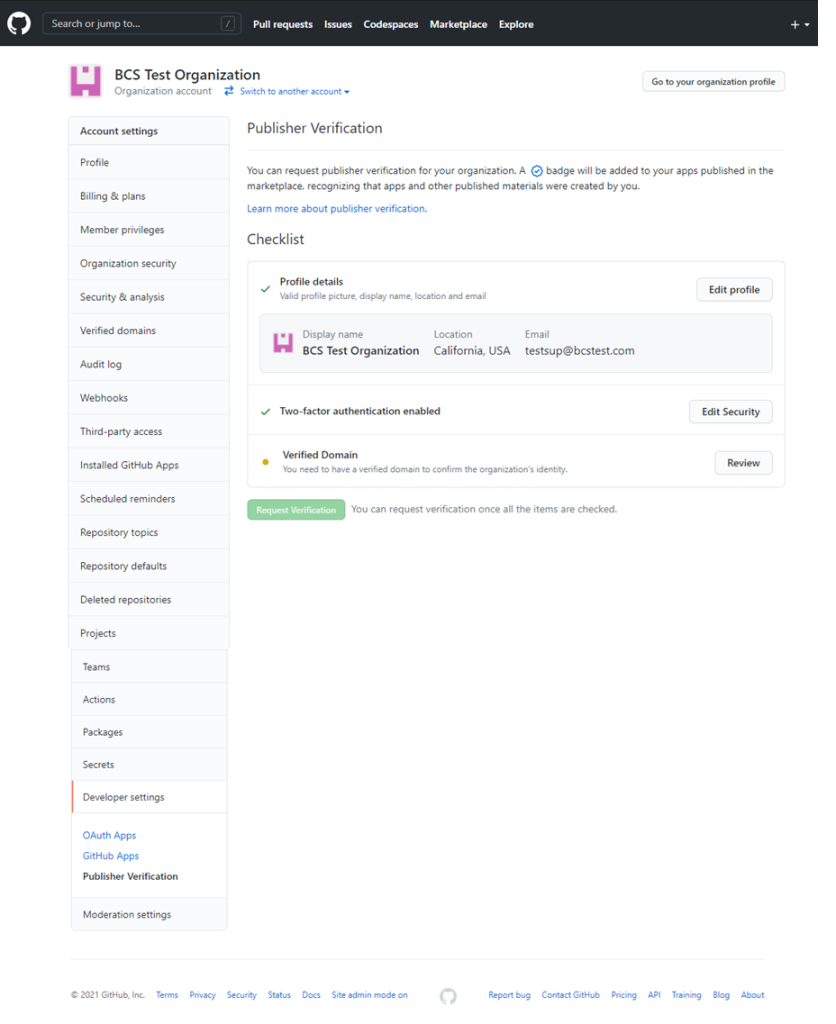
Supporting our Marketplace partners

In the spirit of helping developers both thrive and profit, we’re increasing developer’s take-home pay for apps sold in the marketplace from 75 to 95%. GitHub will only keep a 5% transaction fee. This change puts more revenue in the pockets of the developers, who are doing the work building tools that support the GitHub community.

Learn more

Simplifying app verification process on the Marketplace

We know our partners are excited to get on Marketplace, and we’ve made changes to make this as easy as possible. Previously, a deep review of app security and functionality was required before an app could be added to Marketplace. Moving forward, we’ll verify your organization’s identity and common-sense security precautions by:

  1. Validating your domain with a simple DNS TXT record
  2. Validating the email address on record
  3. Requiring two-factor authentication for your GitHub organization

You can track your app submission’s progress from your organization’s profile settings to fix issues faster. Now developers can get their solutions added to the Marketplace faster and the community can moderate app quality.

Screenshot of app publisher verification process in Marketplace

Soon, we’ll move all “verified apps” to the validated publisher model, updating the “green verified checkmarkverified” badge to indicate publishers, and not apps are scrutinized. Learn more

GitHub Technology Partner Program updates

We’ve also made some updates to our Technology Partner Program. If you’re interested in the GitHub Marketplace but unsure how to build integrations to the GitHub platform, co-market with us, or learn about partner events and opportunities, you can get started with our technology partner program for help. You can also check out the partner-centric resources section or reach out to us at [email protected].

Screenshot of Technology Partner Program Resource page

You’re now one step away from the technical and go-to-market resources you need to integrate with GitHub and help improve the lives of all software developers. Looking forward to seeing you on the Marketplace.

Happy coding. 👾

Deployment reliability at GitHub

Post Syndicated from Raffaele Di Fazio original https://github.blog/2021-02-03-deployment-reliability-at-github/

Welcome to another deep dive of the Building GitHub blog series, providing a look at how teams across the GitHub engineering organization identify and address opportunities to improve our internal development tooling and infrastructure.

In a previous post of this series, we described how we improved the deployment experience for github.com. When we describe deployments at GitHub, the deployment experience is an important part of what it takes to ship applications to production, especially at GitHub’s scale, but there is more to it: the actual deployment mechanics need to be fast and reliable.

Deploying GitHub

GitHub is deployed to two types of “targets”: multiple Kubernetes clusters and directly to bare metal hosts. Those two targets have different needs and characteristics, such as different number of replicas, different runtimes, etc.

The deployment process of GitHub is designed to be an invisible event for users—we deploy GitHub tens of times a day (yes, even on a Friday) without impact on our users.

When implementing deployments for a monolithic application, we must keep into account the impact that the deployment process has on the internal users of the tool as well. Hundreds of GitHub engineers work at the same time on new features and bug fixes on the same codebase and it’s critical that they can reliably deploy to production. If deployments take too long or if they are prone to fail (even if there is no impact on users), it will mean that developers at GitHub will spend more time getting those features out to users.

For these reasons, we asked ourselves the following questions:

  • How long does it take to get code successfully running in production?
  • How often do we roll back changes?
  • How often do deployments require any kind of manual intervention?

One thing was sure from the beginning, we needed data to answer those questions.

Measure all the things

We instrumented our tooling to send metrics on several important key aspects, including, but not limited to:

  • Duration of CI builds.
  • Duration of individual steps of the deployment pipeline.
  • Total duration of a deployment pipeline.
  • Final state of a deployment pipeline.
  • Number of deployments that are rolled back.
  • Occurrences of deployment retries in one of the steps of the pipeline.

As well as more general metrics related to the overall delivery:

  • How many pull requests we deploy/merge every week.
  • How long it takes to get a pull request from “ready to be deployed” to “merged”.

We used these metrics to implement several improvements to our deployment tooling: we generally made our deployments more reliable by analyzing those metrics, but we also introduced changes that allow us to tolerate some classes of intermittent deployment failures, introducing automatic retries in case of problems.

Additionally, instrumenting our deployment tooling allowed us to identify problems sooner when they happen so that we can react in a timely fashion.

Better visibility in the deployment process 

As we mentioned, GitHub is a monolithic rails app that is deployed to Kubernetes and bare metal servers, with the customer facing part of GitHub being 100% deployed to Kubernetes. When we deploy a new version of GitHub we need to start hundreds of pods in multiple Kubernetes clusters. 

A few months ago, our deploy tooling did not print much information on what was going on behind the scenes with our Kubernetes deployments. This meant that whenever a deployment failed, for example due to an issue that we didn’t previously detect in stages before canary, we would have to dig into what happened by directly asking Kubernetes.

At GitHub, we don’t require engineers deploying to understand the internals of Kubernetes. We abstract Kubernetes in a way that is easier to deal with and we have tooling in place to debug GitHub without directly accessing specific Kubernetes clusters.

We analyzed internal support requests to our infrastructure teams and found the possibility to reduce toil by making it easier to figure out what went wrong when deploying to Kubernetes.

For those reasons, we introduced changes to our tooling to provide better information on a deployment while it is being rolled out and proactively providing specific lower level information in case of failures, which includes a view of the Kubernetes events without the need to directly access Kubernetes itself.

This change allowed us to have better detailed information on the progress of a deployment and to increase the visibility on errors in case of failures, which reduces the time to detect a problem and ultimately reduces the overall time needed to deploy to production.

An SLO based approach to deployment reliability

When deployments fail, there is no impact for GitHub customers: deploys are automatically halted before there can be customer-facing issues and to do so we heavily rely on Kubernetes, for example by using readiness probes.

However, deploying GitHub tens of times a day means that the longer a deployment takes, the less things we can ship!

To make sure that we can successfully keep shipping new features to our customers, we defined a few service level objectives (SLOs) to keep track of how fast and reliable deploying GitHub is.

SLOs are usually defined for things like the success rate or latency of a web application, but they can be used for pretty much anything else. In our case, we started using SLOs to set reliability objectives and keep track of how much time it takes to deploy PRs to production which allows us to understand when we need to shift our focus from new features to improvements to the overall shipping flow of GitHub.

At GitHub we have a dedicated team that is responsible for the continuous deployment of applications, which means that we develop tools and best practices but ultimately also help Hubbers ship their applications. These SLOs are now an integral part of the team dynamics and influence the priorities of the team, to ensure that we can keep shipping hundreds of pull requests every week.

Conclusion

In this post we discussed how we make sure that we keep Hubbers shipping new features and improvements over time. Since we started taking a look at the problem, we significantly improved our deployment process, but more importantly we introduced SLOs that can guide investments to further improve our tools and processes so that GitHub users can keep getting fresh new features all year round.

GitHub Availability Report: January 2021

Post Syndicated from Keith Ballinger original https://github.blog/2021-02-02-github-availability-report-january-2021/

Introduction

In January, we experienced one incident resulting in significant impact and degraded state of availability for the GitHub Actions service.

January 28 04:21 UTC (lasting 3 hours 53 minutes)

Our service monitors detected abnormal levels of errors affecting the Actions service. This incident resulted in the failure or delay of some queued jobs for a period of time. Jobs that were queued during the incident were run successfully after the issue was resolved.

We identified the issue as caused by an infrastructure error in our SQL database layer. The database failure impacted one of the core microservices that facilitates authentication and communication between the Actions microservices, which affected queued jobs across the service. In normal circumstances, automated processes would detect that the database was unhealthy and failover with minimal or no customer impact. In this case, the failure pattern was not recognized by the automated processes, and telemetry did not show issues with the database, resulting in a longer time to determine the root cause and complete mitigation efforts.

To help avoid this class of failure in the future, we are updating the automation processes in our SQL database layer to improve error detection and failovers. Furthermore, we are continuing to invest in localizing failures to minimize the scope of impact resulting from infrastructure errors.

In summary

We’ll continue to keep you updated on the progress we’re making on ensuring reliability of our services. To learn more about how teams across GitHub identify and address opportunities to improve our engineering systems, check out the GitHub Engineering blog.

Making GitHub’s new homepage fast and performant

Post Syndicated from Tobias Ahlin original https://github.blog/2021-01-29-making-githubs-new-homepage-fast-and-performant/

This post is the third installment of our five-part series on building GitHub’s new homepage:

  1. How our globe is built
  2. How we collect and use the data behind the globe
  3. How we made the page fast and performant
  4. How we illustrate at GitHub
  5. How we designed the homepage and wrote the narrative

Creating a page full of product shots, animations, and videos that still loads fast and performs well can be tricky. Throughout the process of building GitHub’s new homepage, we’ve used the Core Web Vitals as one of our North Stars and measuring sticks. There are many different ways of optimizing for these metrics, and we’ve already written about how we optimized our WebGL globe. We’re going to take a deep-dive here into two of the strategies that produced the overall biggest performance impact for us: crafting high performance animations and serving the perfect image.

High performance animation and interactivity

As you scroll down the GitHub homepage, we animate in certain elements to bring your attention to them:

Traditionally, a typical way of building this relied on listening to the scroll event, calculating the visibility of all elements that you’re tracking, and triggering animations depending on the elements’ position in the viewport:

// Old-school scroll event listening (avoid)
window.addEventListener('scroll', () => checkForVisibility)
window.addEventListener('resize', () => checkForVisibility)

function checkForVisibility() {
  animatedElements.map(element => {
    const distTop = element.getBoundingClientRect().top
    const distBottom = element.getBoundingClientRect().bottom
    const distPercentTop = Math.round((distTop / window.innerHeight) * 100)
    const distPercentBottom = Math.round((distBottom / window.innerHeight) * 100)
    // Based on this position, animate element accordingly
  }
}

There’s at least one big problem with an approach like this: calls to getBoundingClientRect() will trigger reflows, and utilizing this technique might quickly create a performance bottleneck.

Luckily, IntersectionObservers are supported in all modern browsers, and they can be set up to notify you of an element’s position in the viewport, without ever listening to scroll events, or without calling getBoundingClientRect.  An IntersectionObserver can be set up in just a few lines of code to track if an element is shown in the viewport, and trigger animations depending on its state, using each entry’s isIntersecting method:

// Create an intersection observer with default options, that 
// triggers a class on/off depending on an element’s visibility 
// in the viewport
const animationObserver = new IntersectionObserver((entries, observer) => {
  for (const entry of entries) {
    entry.target.classList.toggle('build-in-animate', entry.isIntersecting)
  }
});

// Use that IntersectionObserver to observe the visibility
// of some elements
for (const element of querySelectorAll('.js-build-in')) {
  animationObserver.observe(element);
}

Avoiding animation pollution

As we moved over to IntersectionObservers for our animations, we also went through all of our animations and doubled down on one of the core tenets of optimizing animations: only animate the transform and opacity properties, since these properties are easier for browsers to animate (generally computationally less expensive). We thought we did a fairly good job of following this principle already, but we discovered that in some circumstances we did not, because unexpected properties were bleeding into our transitions and polluting them as elements changed state.

One might think a reasonable implementation of the “only animate transform and opacity” principle might be to define a transition in CSS like so:

// Don’t do this
.animated {
  opacity: 0;
  transform: translateY(10px);
  transition: * 0.6s ease;
}

.animated:hover {
  opacity: 1;
  transform: translateY(0);
}

In other words, we’re only explicitly changing opacity and transform, but we’re defining the transition to animate all changed properties. These transitions can lead to poor performance since other property changes can pollute the transition (you may have a global style that changes the text color on hover, for example), which can cause unnecessary style and layout calculations. To avoid this kind of animation pollution, we moved to always explicitly defining only opacity and transform as animatable:

// Be explicit about what can animate (and not)
.animated {
  opacity: 0;
  transform: translateY(10px);
  transition: opacity 0.6s ease, transform 0.6s ease;
}

.animated:hover {
  opacity: 0;
  transform: translateY(0);
}

As we rebuilt all of our animations to be triggered through IntersectionObservers and to explicitly specify only opacity and transform as animatable, we saw a drastic decrease in CPU usage and style recalculations, helping to improve our Cumulative Layout Shift score:

Lazy-loading videos with IntersectionObservers

If you’re powering any animations through video elements, you likely want to do two things: only play the video while it’s visible in the viewport, and lazy-load the video when it’s needed. Sadly, the lazy load attribute doesn’t work on videos, but if we use IntersectionObservers to play videos as they appear in the viewport, we can get both of these features in one go:

<!-- HTML: A video that plays inline, muted, w/o autoplay & preload -->
<video loop muted playsinline preload="none" class="js-viewport-aware-video" poster="video-first-frame.jpg">
  <source type="video/mp4" src="video.h264.mp4">
</video>

// JS: Play videos while they are visible in the viewport
const videoObserver = new IntersectionObserver((entries, observer) => {
  for (const entry of entries) entry.isIntersecting ? video.play() : video.pause();
});

for (const element of querySelectorAll('.js-viewport-aware-video')) {
  videoObserver.observe(element);
}

Together with setting preload to none, this simple observer setup saves us several megabytes on each page load.

Serving the perfect image

We visit web pages with a myriad of different devices, screens and browsers, and something simple as displaying an image is becoming increasingly complex if you want to cover all bases. Our particular illustration style also happens to fall between all of the classic JPG, PNG or SVG formats. Take this illustration, for example, that we use to transition from the main narrative to the footer:

To render this illustration, we would ideally need the transparency from PNGs but combine it with the compression from JPGs, as saving an illustration like this as a PNG would weigh in at several megabytes. Luckily, WebP is, as of iOS 14 and macOS Big Sur, supported in Safari on both desktops and phones, which brings browser support up to a solid +90%. WebP does in fact give us the best of both worlds: we can create compressed, lossy images with transparency. What about support for older browsers? Even a new Mac running the latest version of Safari on macOS Catalina can’t render WebP images, so we have to do something.

This challenge eventually led us to develop a somewhat obscure solution: two JPGs embedded in an SVG (one for the image data and one for the mask), embedded as base64 data—essentially creating a transparent JPG with one single HTTP request. Take a look at this image. Download it, open it up, and inspect it. Yes, it’s a JPG with transparency, encoded in base64, wrapped in an SVG.

Part of the SVG specification is the mask element. With it, you can mask out parts of an SVG. If we embed an SVG in a document, we can use the mask element in tandem with the image element to render an image with transparency:

<svg viewBox="0 0 300 300">
  <defs>
    <mask id="mask">
      <image width="300" height="300" href="mask.jpg"></image>
    </mask>
  </defs>
  <image mask="url(#mask)" width="300" height="300" href="image.jpg"></image>
</svg>

This is great, but it won’t work as a fallback for WebP. Since the paths for these images are dynamic (see href in the example above), the SVG needs to be embedded inside the document. If we instead save this SVG in a file and set it as the src of a regular img, the images won’t be loaded, and we’ll see nothing.

We can work around this limitation by embedding the image data inside the SVG as base64. There are services online where you can convert an image to base64, but if you’re on a Mac, base64 is available by default in your Terminal, and you can use it like so:

base64 -i <in-file> -o <outfile>

Where the in-file is your image of choice, the outfile is a text file where you’ll save the base64 data. With this technique, we can embed the images inside of the SVG and use the SVG as a src on a regular image.

These are the two images that we’re using to construct the footer illustration—one for the image data and one for the mask (black is completely transparent and white is fully opaque):

We convert the mask and the image to base64 using the Terminal command and then paste the data into the SVG:

<svg xmlns="http://www.w3.org/2000/svg" viewBox="0 0 2900 1494">
  <defs>
    <mask id="mask">
      <image width="300" height="300" href="data:image/png;base64,/* your image in base64 */”></image>
    </mask>
  </defs>
  <image mask="url(#mask)" width="300" height="300" href="data:image/jpeg;base64,/* your image in base64 */”></image>
</svg>

You can save that SVG and use it like any regular image. We can then safely use WebP with lazy loading and a solid fallback that works in all browsers:

<picture>
  <source srcset="compressed-transparent-image.webp" type="image/webp">
  <img src="compressed-transparent-image.svg" loading="lazy">
</picture>

This somewhat obscure SVG hack saves us hundreds of kilobytes on each page load, and it enables us to utilize the latest technologies for the browsers and operating systems that support them.

Towards a faster web

We’re working throughout the company to create a faster and more reliable GitHub, and these are some of the techniques that we’re utilizing. We still have a long way to go, and if you’d like to be part of that journey, check out our careers page.


Serving driver-partners data at scale using mirror cache

Post Syndicated from Grab Tech original https://engineering.grab.com/mirror-cache-blog

Since the early beginnings, driver-partners have been the centerpiece of the wide-range of services or features provided by the Grab platform. Over time, many backend microservices were developed to support our driver-partners such as earnings, ratings, insurance, etc. All of these different microservices require certain information, such as name, phone number, email, active car types, and so on, to curate the services provided to the driver-partners.

We built the Drivers Data service to provide drivers-partners data to other microservices. The service attracts a high QPS and handles 10K requests during peak hours. Over the years, we have tried different strategies to serve driver-partners data in a resilient and cost-effective manner, while accounting for low response time. In this blog post, we talk about mirror cache, an in-memory local caching solution built to serve driver-partners data efficiently.

What we started with

Figure 1. Drivers Data service architecture

Our Drivers Data service previously used MySQL DB as persistent storage and two caching layers – standalone local cache (RAM of the EC2 instances) as primary cache and Redis as secondary for eventually consistent reads. With this setup, the cache hit ratio was very low.

Figure 2. Request flow chart

We opted for a cache aside strategy. So when a client request comes, the Drivers Data service responds in the following manner:

  • If data is present in the in-memory cache (local cache), then the service directly sends back the response.
  • If data is not present in the in-memory cache and found in Redis, then the service sends back the response and updates the local cache asynchronously with data from Redis.
  • If data is not present either in the in-memory cache or Redis, then the service responds back with the data fetched from the MySQL DB and updates both Redis and local cache asynchronously.
Figure 3. Percentage of response from different sources

The measurement of the response source revealed that during peak hours ~25% of the requests were being served via standalone local cache, ~20% by MySQL DB, and ~55% via Redis.

The low cache hit rate is caused by the driver-partners data loading patterns: low frequency per driver over time but the high frequency in a short amount of time. When a driver-partner is a candidate for a job or is involved in an ongoing job, different services make multiple requests to the Drivers Data service to fetch that specific driver-partner information. The frequency of calls for a specific driver-partner reduces if he/she is not involved in the job allocation process or is not doing any job at the moment.

While low frequency per driver over time impacts the Redis cache hit rate, high frequency in short amounts of time mostly contributes to in-memory cache hit rate. In our investigations, we found that local caches of different nodes in the Drivers Data service cluster were making redundant calls to Redis and DB for fetching the same data that are already present in a node local cache.

Making in-memory cache available on every instance while the data is in active use, we could greatly increase the in-memory cache hit rate, and that’s what we did.

Mirror cache design goals

We set the following design goals:

  • Support a local least recently used (LRU) cache use-case.
  • Support active cache invalidation.
  • Support best effort replication between local cache instances (EC2 instances). If any instance successfully fetches the latest data from the database, then it should try to replicate or mirror this latest data across all the other nodes in the cluster. If replication fails and the item is expired or not found, then the nodes should fetch it from the database.
  • Support async data replication across nodes to ensure updates for the same key happens only with more recent data. For any older updates, the current data in the cache is ignored. The ordering of cache updates is not guaranteed due to the async replication.
  • Ability to handle auto-scaling.

The building blocks

Figure 4. Mirror cache

The mirror cache library runs alongside the Drivers Data service inside each of the EC2 instances of the cluster. The two main components are in-memory cache and replicator.

In-memory cache

The in-memory cache is used to store multiple key/value pairs in RAM. There is a TTL associated with each key/value pair. We wanted to use a cache that can provide high hit ratio, memory bound, high throughput, and concurrency. After evaluating several options, we went with dgraph’s open-source concurrent caching library Ristretto as our in-memory local cache. We were particularly impressed by its use of the TinyLFU admission policy to ensure a high hit ratio.

Replicator

The replicator is responsible for mirroring/replicating each key/value entry among all the live instances of the Drivers Data service. The replicator has three main components: Membership Store, Notifier, and gRPC Server.

Membership Store

The Membership Store registers callbacks with our service discovery service to notify mirror cache in case any nodes are added or removed from the Drivers Data service cluster.

It maintains two maps – nodes in the same AZ (AWS availability zone) as itself (the current node of the Drivers Data service in which mirror cache is running) and the nodes in the other AZs.

Notifier

Each service (Drivers Data) node runs a single instance of mirror cache. So effectively, each node has one notifier.

  • Combine several (key/value) pairs updates to form a batch.
  • Propagate the batch updates among all the nodes in the same AZ as itself.
  • Send the batch updates to exactly one notifier (node) in different AZs who, in turn, are responsible for updating all the nodes in their own AZs with the latest batch of data. This communication technique helps to reduce cross AZ data transfer overheads.

In the case of auto-scaling, there is a warm-up period during which the notifier doesn’t notify the other nodes in the cluster. This is done to minimize duplicate data propagation. The warm-up period is configurable.

gRPC Server

An exclusive gRPC server runs for mirror cache. The different nodes of the Drivers Data service use this server to receive new cache updates from the other nodes in the cluster.

Here’s the structure of each cache update entity:

message Entity {
    string key = 1; // Key for cache entry.
    bytes value = 2; // Value associated with the key.
    Metadata metadata = 3; // Metadata related to the entity.
    replicationType replicate = 4; // Further actions to be undertaken by the mirror cache after updating its own in-memory cache.
    int64 TTL = 5; // TTL associated with the data.
    bool  delete = 6; // If delete is set as true, then mirror cache needs to delete the key from it's local cache.
}

enum replicationType {
    Nothing = 0; // Stop propagation of the request.
    SameRZ = 1; // Notify the nodes in the same Region and AZ.
}

message Metadata {
    int64 updatedAt = 1; // Same as updatedAt time of DB.
}

The server first checks if the local cache should update this new value or not. It tries to fetch the existing value for the key. If the value is not found, then the new key/value pair is added. If there is an existing value, then it compares the updatedAt time to ensure that stale data is not updated in the cache.

If the replicationType is Nothing, then the mirror cache stops further replication. In case the replicationType is SameRZ then the mirror cache tries to propagate this cache update among all the nodes in the same AZ as itself.

Run at scale

Figure 5. Drivers Data Service new architecture

The behavior of the service hasn’t changed and the requests are being served in the same manner as before. The only difference here is the replacement of the standalone local cache in each of the nodes with mirror cache. It is the responsibility of mirror cache to replicate any cache updates to the other nodes in the cluster.

After mirror cache was fully rolled out to production, we rechecked our metrics related to the response source and saw a huge improvement. The graph showed that during peak hours ~75% of the response was from in-memory local cache. About 15% of the response was served by MySQL DB and a further 10% via Redis.

The local cache hit ratio was at 0.75, a jump of 0.5 from before and there was a 5% drop in the number of DB calls too.

Figure 6. New percentage of response from different sources

Limitations and future improvements

Mirror cache is eventually consistent, so it is not a good choice for systems that need strong consistency.

Mirror cache stores all the data in volatile memory (RAM) and they are wiped out during deployments, resulting in a temporary load increase to Redis and DB.

Also, many new driver-partners are added everyday to the Grab system, and we might need to increase the cache size to maintain a high hit ratio. To address these issues we plan to use SSD in the future to store a part of the data and use RAM only to store hot data.

Conclusion

Mirror cache really helped us scale the Drivers Data service better and serve driver-partners data to the different microservices at low latencies. It also helped us achieve our original goal of an increase in the local cache hit ratio.

We also extended mirror cache in some other services and found similar promising results.


A huge shout out to Haoqiang Zhang and Roman Atachiants for their inputs into the final design. Special thanks to the Driver Backend team at Grab for their contribution.


Join us

Grab is more than just the leading ride-hailing and mobile payments platform in Southeast Asia. We use data and technology to improve everything from transportation to payments and financial services across a region of more than 620 million people. We aspire to unlock the true potential of Southeast Asia and look for like-minded individuals to join us on this ride.

If you share our vision of driving South East Asia forward, apply to join our team today.