Integrate Tableau and Microsoft Entra ID with Amazon Redshift using AWS IAM Identity Center

Post Syndicated from Debu Panda original https://aws.amazon.com/blogs/big-data/integrate-tableau-and-microsoft-entra-id-with-amazon-redshift-using-aws-iam-identity-center/

This post is co-written with Sid Wray, Jade Koskela, and Ravi Bhattiprolu from SalesForce.

Amazon Redshift and Tableau empower data analysis. Amazon Redshift is a cloud data warehouse that processes complex queries at scale and with speed. Its advanced query optimization serves results to Tableau. Tableau’s extensive capabilities and enterprise connectivity help analysts efficiently prepare, explore, and share data insights company-wide.

Customers can integrate Amazon Redshift with Tableau using single sign-on (SSO) capabilities enabled by AWS IAM Identity Center integration with trusted identity propagation. You can use this to seamlessly implement authentication with third-party identity providers (IdP) and authorization with Redshift. It positions Amazon Redshift as an AWS managed application, allowing you to take full advantage of the trusted identity propagation feature.

Amazon Web Services (AWS) collaborated with Tableau to enable SSO support for accessing Amazon Redshift from Tableau. Both Tableau Desktop 2023.3.9 and Tableau Server 2023.3.9 releases support trusted identity propagation with IAM Identity Center. This SSO integration is available for Tableau Desktop, Tableau Server, and Tableau Prep.

This blog post provides a step-by-step guide to integrating IAM Identity Center with Microsoft Entra ID as the IdP and configuring Amazon Redshift as an AWS managed application. Additionally, you’ll learn how to set up the Amazon Redshift driver in Tableau, enabling SSO directly within Tableau Desktop.

Solution overview

The following diagram illustrates the architecture of the Tableau SSO integration with Amazon Redshift, IAM Identity Center, and Microsoft Entra ID.
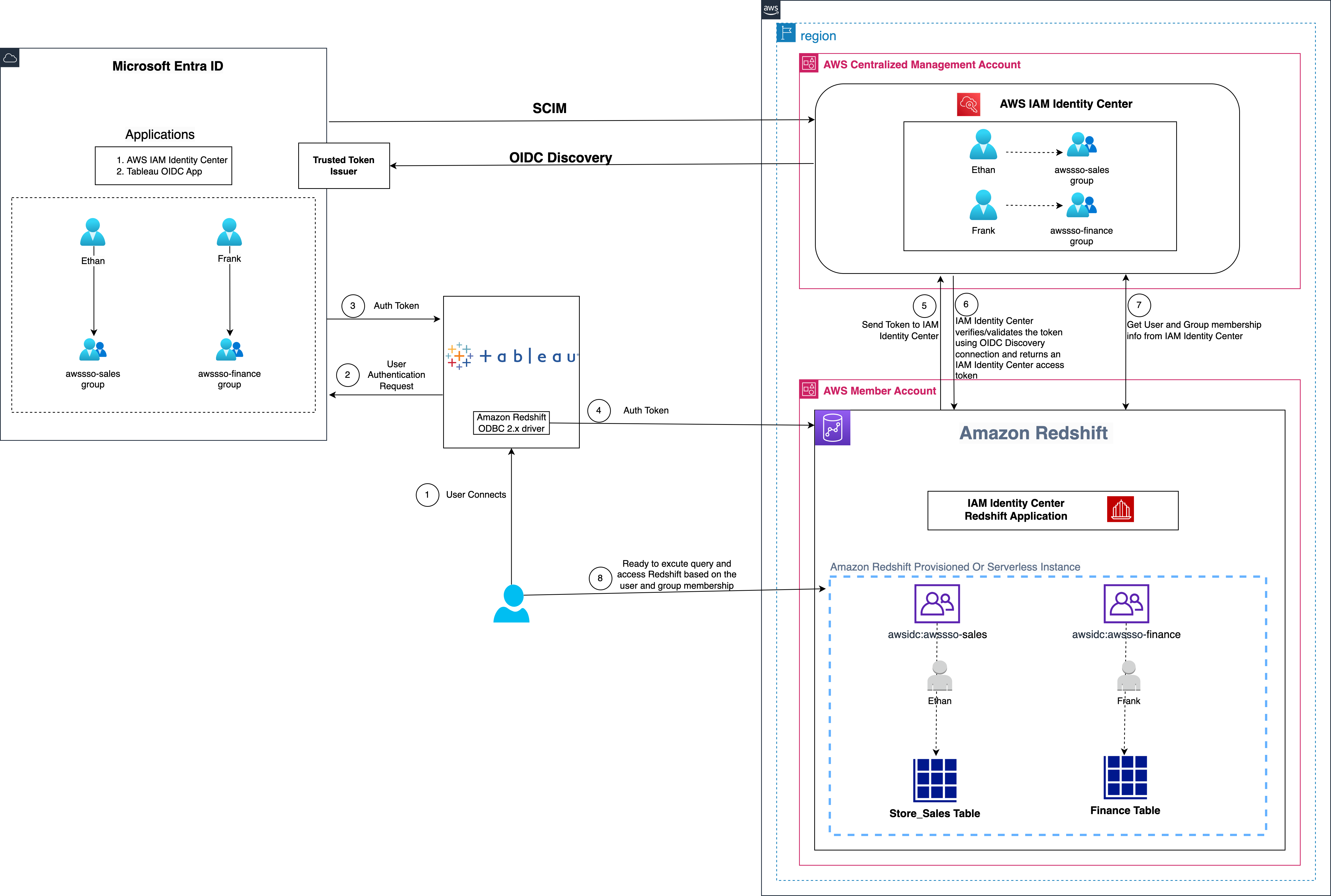
Figure 1: Solution overview for Tableau integration with Amazon Redshift using IAM Identity Center and Microsoft Entra ID

The solution depicted in Figure 1 includes the following steps:

  1. The user configures Tableau to access Amazon Redshift using IAM Identity Center.
  2. On a user sign-in attempt, Tableau initiates a browser-based OAuth flow and redirects the user to the Microsoft Entra ID sign-in page to enter the sign-in credentials.
  3. After successful authentication, Microsoft Entra ID issues authentication tokens (ID and access token) to Tableau.
  4. The Amazon Redshift driver then makes a call to the Amazon Redshift-enabled Identity Center application and forwards the access token.
  5. Amazon Redshift passes the token to IAM Identity Center for validation.
  6. IAM Identity Center first validates the token using the OpenID Connect (OIDC) discovery connection to the trusted token issuer (TTI) and returns an IAM Identity Center generated access token for the same user. In Figure 1, the TTI is the Microsoft Entra ID server.
  7. Amazon Redshift then uses the access token to obtain the user and group membership information from Identity Center.
  8. The Tableau user will be able to connect with Amazon Redshift and access data based on the user and group membership returned from IAM Identity Center.

Prerequisites

Before you begin implementing the solution, you must have the following in place:

Walkthrough

In this walkthrough, you will use the following steps to build the solution:

  1. Set up the Microsoft Entra ID OIDC application
  2. Collect Microsoft Entra ID information
  3. Set up a trusted token issuer in IAM Identity Center
  4. Set up client connections and trusted token issuers
  5. Set up the Tableau OAuth config files for Microsoft Entra ID
  6. Install the Tableau OAuth config file for Tableau Desktop
  7. Set up the Tableau OAuth config file for Tableau Server or Tableau Cloud
  8. Federate to Amazon Redshift from Tableau Desktop
  9. Federate to Amazon Redshift from Tableau Server

Set up the Microsoft Entra ID OIDC application

To create your Microsoft Entra application and service principal, follow these steps:

  1. Sign in to the Microsoft Entra admin center as Cloud Application Administrator (at the least).
  2. Browse to App registrations under Manage, and choose New registration.
  3. Enter a name for the application. For example, Tableau-OIDC-App.
  4. Select a supported account type, which determines who can use the application. For this example, select the first option in the list.
  5. Under Redirect URI, select Web for the type of application you want to create. Enter the URI where the access token is sent to. In this example, you’re using localhost, so enter http://localhost:55556/Callback and http://localhost/auth/add_oauth_token.
  6. Choose Register.
  7. In the navigation pane, choose Certificates & secrets.
  8. Choose New client secret.
  9. Enter a Description and select an expiration for the secret or specify a custom lifetime. For this example, keep the Microsoft recommended default expiration value of 6 months. Choose Add.
  10. Copy the secret value.
    Note: It will only be presented one time; after that you cannot read it.
  11. In the navigation pane, under Manage, choose Expose an API.
  12. If you’re setting up for the first time, you can see Set to the right of Application ID URI.
  13. Choose Set, and then choose Save.
  14. After the application ID URI is set up, choose Add a scope.
  15. For Scope name, enter a name. For example, redshift_login.
  16. For Admin consent display name, enter a display name. For example, redshift_login.
  17. For Admin consent description, enter a description of the scope.
  18. Choose Add scope.

For more information about setting up the Microsoft Entra app, see Register a Microsoft Entra app and create a service principal.

Collect Microsoft Entra ID information

To configure your IdP with IAM Identity Center and Amazon Redshift, collect the following parameters from Microsoft Entra ID. If you don’t have these parameters, contact your Microsoft Entra ID admin.

  1. Tenant ID,Client ID and Audience value: To get these values:
    1. Sign in to the Azure portal with your Microsoft account.
    2. Under Manage, choose App registrations.
    3. Choose the application that you created in previous sections.
    4. On the left panel, choose Overview, a new page will appear containing the Essentials section. You can find the Tenant ID,Client ID and Audience value (Application ID URI) as shown in the following figure:

      Figure 2: Overview section of OIDC application

  1. Scope: To find your scope value:
    1. In the navigation pane of the OIDC application, under Manage, choose Expose an API.
    2. You will find the value under Scopes as shown in the following figure:

      Figure 3: Application scope

Set up a trusted token issuer in IAM Identity Center

At this point, you have finished configurations in the Entra ID console; now you’re ready to add Entra ID as a TTI. You will start by adding a TTI so you can exchange tokens. In this step, you will create a TTI in the centralized management account. To create a TTI, follow these steps:

  1. Open the AWS Management Console and navigate to IAM Identity Center, and then to the Settings
  2. Select the Authentication tab and under Trusted token issuers, choose Create trusted token issuer.
  3. On the Set up an external IdP to issue trusted tokens page, under Trusted token issuer details, do the following:
    1. For Issuer URL, enter the OIDC discovery URL of the external IdP that will issue tokens for trusted identity propagation. The URL would be: https://sts.windows.net/<tenantid>/. To find your Microsoft Entra tenant ID, see Collect Microsoft Entra ID information.
    2. For Trusted token issuer name, enter a name to identify this TTI in IAM Identity Center and in the application console.
    3. Under Map attributes, do the following:
      1. For Identity provider attribute, select an attribute from the list to map to an attribute in the Identity Center identity store. You can choose Email, Object Identifier, Subject, and Other. This example uses Other where we’re specifying the upn (user principal name) as the Identity provider attribute to map with Email from the IAM identity Center attribute.
      2. For IAM Identity Center attribute, select the corresponding attribute for the attribute mapping.
    4. Under Tags (optional), choose Add new tag, specify a value for Key, and optionally for Value. For information about tags, see Tagging AWS IAM Identity Center resources.

Figure 4 that follows shows the set up for TTI.

Figure 4: Create a trusted token issuer

  1. Choose Create trusted token issuer.

Set up client connections and trusted token issuers

A third-party application (such as Tableau) that isn’t managed by AWS exchanges the external token (JSON Web Token (JWT) for an IAM Identity Center token before calling AWS services.

The JWT must contain a subject (sub) claim, an audience (aud) claim, an issuer (iss), a user attribute claim, and a JWT ID (JTI) claim. The audience is a value that represents the AWS service that the application will use, and the audience claim value must match the value that’s configured in the Redshift application that exchanges the token.

In this section, you will specify the audience claim in the Redshift application, which you will get from Microsoft Entra ID. You will configure the Redshift application in the member account where the Redshift cluster or serverless instance is.

  1. Select IAM Identity Center connection from Amazon Redshift console menu.

Figure 5: Redshift IAM Identity Center connection

  1. Select the Amazon Redshift application that you created as part of the prerequisites.
  2. Select the Client connections tab and choose Edit.
  3. Choose Yes under Configure client connections that use third-party IdPs.
  4. Select the checkbox for Trusted token issuer that you created in the previous section.
  5. Enter the aud claim value under Configure selected trusted token issuers. For example, api://1230a234-b456-7890-99c9-a12345bcc123. To get the audience value, see Collect Microsoft Entra ID information.
  6. Choose Save.

Figure 6: Adding an audience claim for the TTI

Your IAM Identity Center, Amazon Redshift, and Microsoft Entra ID configuration is complete. Next, you need to configure Tableau.

Set up the Tableau OAuth config files for Microsoft Entra ID

To integrate Tableau with Amazon Redshift using IAM Identity Center, you need to use a custom XML. In this step, you use the following XML and replace the values starting with the $ sign and highlighted in bold. The rest of the values can be kept as they are, or you can modify them based on your use case. For detailed information on each of the elements in the XML file, see the Tableau documentation on GitHub.

Note: The XML file will be used for all the Tableau products including Tableau Desktop, Server, and Cloud. You can use the following XML or you can refer to Tableau’s github.

<?xml version="1.0" encoding="utf-8"?>
<pluginOAuthConfig>
<dbclass>redshift</dbclass>
<!-- For configs embedded in the connector package, don't prefix with "custom_". For external configs, always prefix with "custom_". -->
<oauthConfigId>custom_redshift_azure</oauthConfigId>
<clientIdDesktop>$copy_client_id_from_azure_oidc_app</clientIdDesktop>
<clientSecretDesktop>$copy_client_secret_from_azure_oidc_app</clientSecretDesktop>
<redirectUrisDesktop>http://localhost:55556/Callback</redirectUrisDesktop>
<redirectUrisDesktop>http://localhost:55557/Callback</redirectUrisDesktop>
<redirectUrisDesktop>http://localhost:55558/Callback</redirectUrisDesktop>
<redirectUrisDesktop>http://localhost:55559/Callback</redirectUrisDesktop>
<!-- For multitenant apps use the common endpoint, for single tenant apps use the directory specific endpoint. -->
<authUri>https://login.microsoftonline.com/$azure_tenant_id/oauth2/v2.0/authorize</authUri>
<tokenUri>https://login.microsoftonline.com/$azure_tenant_id/oauth2/v2.0/token</tokenUri>
<scopes>openid</scopes>
<scopes>offline_access</scopes>
<scopes>email</scopes>
<!-- An example with a custom API, which was required at the time of writing for integration with AWS IAM IDC. -->
<scopes>$scope_from_azure_oidc_app</scopes>
<capabilities>
<entry>
<key>OAUTH_CAP_REQUIRES_PROMPT_SELECT_ACCOUNT</key>
<value>true</value>
</entry>
<entry>
<key>OAUTH_CAP_REQUIRE_PKCE</key>
<value>true</value>
</entry>
<entry>
<key>OAUTH_CAP_PKCE_REQUIRES_CODE_CHALLENGE_METHOD</key>
<value>true</value>
</entry>
<entry>
<key>OAUTH_CAP_SUPPORTS_STATE</key>
<value>true</value>
</entry>
<entry>
<key>OAUTH_CAP_CLIENT_SECRET_IN_URL_QUERY_PARAM</key>
<value>false</value>
</entry>
<entry>
<key>OAUTH_CAP_SUPPORTS_GET_USERINFO_FROM_ID_TOKEN</key>
<value>true</value>
</entry>
<!-- Depending on the Azure application, dynamic ports may not be allowed. Enable this if not allowed. -->
<entry>
<key>OAUTH_CAP_FIXED_PORT_IN_CALLBACK_URL</key>
<value>true</value>
</entry>
</capabilities>
<accessTokenResponseMaps>
<entry>
<key>ACCESSTOKEN</key>
<value>access_token</value>
</entry>
<entry>
<key>REFRESHTOKEN</key>
<value>refresh_token</value>
</entry>
<entry>
<key>access-token-issue-time</key>
<value>issued_at</value>
</entry>
<entry>
<key>id-token</key>
<value>id_token</value>
</entry>
<entry>
<key>username</key>
<value>email</value>
</entry>
<entry>
<key>access-token-expires-in</key>
<value>expires_in</value>
</entry>
</accessTokenResponseMaps>
</pluginOAuthConfig>

The following is an example XML file:

<?xml version="1.0" encoding="utf-8"?>
<pluginOAuthConfig>
<dbclass>redshift</dbclass>
<!-- For configs embedded in the connector package, don't prefix with "custom_". For external configs, always prefix with "custom_". -->
<oauthConfigId>custom_redshift_azure</oauthConfigId>
<clientIdDesktop>1230a234-b456-7890-99c9-a12345bcc123</clientIdDesktop>
<clientSecretDesktop>RdQbc~1234559xFX~c65737wOwjsdfdsg123bg2</clientSecretDesktop>
<redirectUrisDesktop>http://localhost:55556/Callback</redirectUrisDesktop>
<redirectUrisDesktop>http://localhost:55557/Callback</redirectUrisDesktop>
<redirectUrisDesktop>http://localhost:55558/Callback</redirectUrisDesktop>
<redirectUrisDesktop>http://localhost:55559/Callback</redirectUrisDesktop>
<!-- For multitenant apps use the common endpoint, for single tenant apps use the directory specific endpoint. -->
<authUri>https://login.microsoftonline.com/e12a1ab3-1234-12ab-12b3-1a5012221d12/oauth2/v2.0/authorize</authUri>
<tokenUri>https://login.microsoftonline.com/e12a1ab3-1234-12ab-12b3-1a5012221d12/oauth2/v2.0/token</tokenUri>
<scopes>openid</scopes>
<scopes>offline_access</scopes>
<scopes>email</scopes>
<!-- An example with a custom API, which was required at the time of writing for integration with AWS IAM IDC. -->
<scopes>api://1230a234-b456-7890-99c9-a12345bcc123/redshift_login</scopes>
<capabilities>
<entry>
<key>OAUTH_CAP_REQUIRES_PROMPT_SELECT_ACCOUNT</key>
<value>true</value>
</entry>
<entry>
<key>OAUTH_CAP_REQUIRE_PKCE</key>
<value>true</value>
</entry>
<entry>
<key>OAUTH_CAP_PKCE_REQUIRES_CODE_CHALLENGE_METHOD</key>
<value>true</value>
</entry>
<entry>
<key>OAUTH_CAP_SUPPORTS_STATE</key>
<value>true</value>
</entry>
<entry>
<key>OAUTH_CAP_CLIENT_SECRET_IN_URL_QUERY_PARAM</key>
<value>false</value>
</entry>
<entry>
<key>OAUTH_CAP_SUPPORTS_GET_USERINFO_FROM_ID_TOKEN</key>
<value>true</value>
</entry>
<!-- Depending on the Azure application, dynamic ports may not be allowed. Enable this if not allowed. -->
<entry>
<key>OAUTH_CAP_FIXED_PORT_IN_CALLBACK_URL</key>
<value>true</value>
</entry>
</capabilities>
<accessTokenResponseMaps>
<entry>
<key>ACCESSTOKEN</key>
<value>access_token</value>
</entry>
<entry>
<key>REFRESHTOKEN</key>
<value>refresh_token</value>
</entry>
<entry>
<key>access-token-issue-time</key>
<value>issued_at</value>
</entry>
<entry>
<key>id-token</key>
<value>id_token</value>
</entry>
<entry>
<key>username</key>
<value>email</value>
</entry>
<entry>
<key>access-token-expires-in</key>
<value>expires_in</value>
</entry>
</accessTokenResponseMaps>
</pluginOAuthConfig>

Install the Tableau OAuth config file for Tableau Desktop

After the configuration XML file is created, it must be copied to a location to be used by Amazon Redshift Connector from Tableau Desktop. Save the file from the previous step as .xml and save it under Documents\My Tableau Repository\OAuthConfigs.

Note: Currently, this integration isn’t supported in macOS because the Redshift ODBC 2.X driver isn’t supported yet for MAC. It will be supported soon.

Set up the Tableau OAuth config file for Tableau Server or Tableau Cloud

To integrate with Amazon Redshift using IAM Identity Center authentication, you must install the Tableau OAuth config file in Tableau Server or Tableau Cloud.

  1. Sign in to the Tableau Server or Tableau Cloud using admin credentials.
  2. Navigate to Settings.
  3. Go to OAuth Clients Registry and select Add OAuth Client
  4. Choose following settings:
    1. Connection Type: Amazon Redshift
    2. OAuth Provider: Custom_IdP
    3. Client Id: Enter your IdP client ID value
    4. Client Secret: Enter your client secret value
    5. Redirect URL: Enter http://localhost/auth/add_oauth_token. This example uses localhost for testing in a local environment. You should use the full hostname with https.
    6. Choose OAuth Config File. Select the XML file that you configured in the previous section.
    7. Select Add OAuth Client and choose Save.

Figure 7: Create an OAuth connection in Tableau Server or Cloud

Federate to Amazon Redshift from Tableau Desktop

Now you’re ready to connect to Amazon Redshift from Tableau as an Entra ID federated user. In this step, you create a Tableau Desktop report and publish it to Tableau Server.

  1. Open Tableau Desktop.
  2. Select Amazon Redshift Connector and enter the following values:
    1. Server: Enter the name of the server that hosts the database and the name of the database you want to connect to.
    2. Port: Enter 5439.
    3. Database: Enter your database name. This example uses dev.
    4. Authentication: Select OAuth.
    5. Federation Type: Select Identity Center.
    6. Identity Center Namespace: You can leave this value blank.
    7. OAuth Provider: This value should automatically be pulled from your configured XML. It will be the value from the element oauthConfigId.
    8. Select Require SSL.
    9. Choose Sign in.

      Figure 8: Tableau Desktop OAuth connection

  1. Enter your IdP credentials in the browser pop-up window.

    Figure 9: Microsoft Entra sign in page

  2. When authentication is successful, you will see the message shown in Figure 10 that follows.

    Figure 10: Successful authentication using Tableau

Congratulations! You’re signed in using the IAM Identity Center integration with Amazon Redshift. Now you’re ready to explore and analyze your data using Tableau Desktop.

Figure 11: Successful connection using Tableau Desktop

After signing in, you can create your own Tableau Report on the desktop version and publish it to your Tableau Server. For this example, we created and published a report named SalesReport.

Federate to Amazon Redshift from Tableau Server

After you have published the report from Tableau Desktop to Tableau Server, sign in as a non-admin user and view the published report (SalesReport in this example) using IAM Identity Center authentication.

  1. Sign in to the Tableau Server site as a non-admin user.
  2. Navigate to Explore and go to the folder where your published report is stored.
  3. Select the report and choose Sign In.

    Figure 12: User audit in sys_query_history

  4. To authenticate, enter your non-admin Microsoft Entra ID (Azure) credentials in the browser pop-up.

    Figure 13: Tableau Server sign In

  5. After your authentication is successful, you can access the report.

    Figure 14: Tableau report

Verify user identity from Amazon Redshift

As an optional step, you can audit the federated IAM Identity Center user from Amazon Redshift.

Figure 15 is a screenshot from the Amazon Redshift system table (sys_query_history) showing that user Ethan from Microsoft Entra ID is accessing the sales report.

select distinct user_id, pg.usename as username, trim(query_text) as query_text
from sys_query_history sys
join pg_user_info pg
on sys.user_id=pg.usesysid
where query_id=<query_id> and usesysid=<federateduser_id> and query_type='SELECT'
order by start_time desc
;

Figure 15: User audit in sys_query_history

Clean up

Complete the following steps to clean up your resources:

  1. Delete the IdP applications that you created to integrate with IAM Identity Center.
  2. Delete the IAM Identity Center configuration.
  3. Delete the Amazon Redshift application and the Amazon Redshift provisioned cluster or serverless instance that you created for testing.
  4. Delete the AWS Identity and Access Management (IAM) role and IAM policy that you created as part of the prerequisites for IAM Identity Center and Amazon Redshift integration.
  5. Delete the permission set from IAM Identity Center that you created for Amazon Redshift Query Editor V2 in the management account.

Conclusion

This post explored a streamlined approach to access management for data analytics by using Tableau’s support for OIDC for SSO. The solution facilitates federated user authentication, where user identities from an external IdP are trusted and propagated to Amazon Redshift. You learned how to configure Tableau Desktop and Tableau Server to seamlessly integrate with Amazon Redshift using IAM Identity Center for SSO. By harnessing this integration between a third-party IdP and IAM Identity Center, users can securely access Amazon Redshift data sources within Tableau without managing separate database credentials.

The following are key resources to learn more about Amazon Redshift integration with IAM Identity Center:


About the Authors

Debu-PandaDebu Panda is a Senior Manager, Product Management at AWS. He is an industry leader in analytics, application platform, and database technologies, and has more than 25 years of experience in the IT world.

Sid Wray is a Senior Product Manager at Salesforce based in the Pacific Northwest with nearly 20 years of experience in Digital Advertising, Data Analytics, Connectivity Integration and Identity and Access Management. He currently focuses on supporting ISV partners for Salesforce Data Cloud.

Adiascar Cisneros is a Tableau Senior Product Manager based in Atlanta, GA. He focuses on the integration of the Tableau Platform with AWS services to amplify the value users get from our products and accelerate their journey to valuable, actionable insights. His background includes analytics, infrastructure, network security, and migrations.

Jade Koskela is a Principal Software Engineer at Salesforce. He has over a decade of experience building Tableau with a focus on areas including data connectivity, authentication, and identity federation.

Harshida Patel is a Principal Solutions Architect, Analytics with AWS.

Maneesh Sharma is a Senior Database Engineer at AWS with more than a decade of experience designing and implementing large-scale data warehouse and analytics solutions. He collaborates with various Amazon Redshift Partners and customers to drive better integration.

Ravi Bhattiprolu is a Senior Partner Solutions Architect at AWS. He collaborates with strategic independent software vendor (ISV) partners like Salesforce and Tableau to design and deliver innovative, well-architected cloud products, integrations, and solutions to help joint AWS customers achieve their business goals.

Introducing job queuing to scale your AWS Glue workloads

Post Syndicated from Noritaka Sekiyama original https://aws.amazon.com/blogs/big-data/introducing-job-queuing-to-scale-your-aws-glue-workloads/

Data is a key driver for your business. Data volume can increase significantly over time, and it often requires concurrent consumption of large compute resources. Data integration workloads can become increasingly concurrent as more and more applications demand access to data at the same time. In AWS, hundreds of thousands of customers use AWS Glue, a serverless data integration service, for integrating data across multiple data sources at scale. AWS Glue jobs can be triggered asynchronously via a schedule or event, or started synchronously, on-demand.

Your AWS account has quotas, also referred to as limits, which are the maximum number of service resources for your AWS account. AWS Glue quotas helps guarantee the availability of AWS Glue resources and prevents accidental over provisioning of resources. However, with large or spiky workloads, it can be challenging to manage job run concurrency or Data Processing Units (DPU) to stay under the service quotas.
Traditionally, when you hit the quota of concurrent Glue job runs, your jobs fail immediately.

Today, we are pleased to announce the general availability of AWS Glue job queuing. Job queuing increases scalability and improves the customer experience of managing AWS Glue jobs. With this new capability, you no longer need to manage concurrency of your AWS Glue job runs and attempt retries just to avoid job failures due to high concurrency. You can simply start your jobs, and when the job runs are in Waiting state, the AWS Glue job queuing feature staggers jobs automatically whenever possible. This increases your job success rates and the experience for large concurrency workloads.

This post demonstrates how job queuing helps you scale your Glue workloads and how job queuing works.

Use cases and benefits for job queuing

The following are common data integration use cases where many concurrent job runs are needed:

  • Many different data sources need to be read in parallel
  • Multiple large datasets need to be processed concurrently
  • Data is processed in an event-driven fashion, and many events occur at the same time

AWS Glue has the following service quotas per Region and account related to concurrent usage:

  • Max concurrent job runs per account
  • Max concurrent job runs per job
  • Max task DPUs per account

You can also configure maximum concurrency for individual jobs.

In the aforementioned typical use cases, when you run a job through the StartJobRun API or AWS Glue console, you may hit the upper limit defined at any of the discussed places. If this happens, your job fails immediately due to errors like ConcurrentRunsExceededException returned by the AWS Glue API endpoint.

Job queuing helps those typical use cases without forcing you to manage concurrency between all your job runs. You no longer need to make manual retries when you get ConcurrentRunsExceededException. Job queuing enqueues job runs when you hit the limit and automatically reattempts job runs when resources free up. It simplifies your daily operation and reduces latency for the retries. It also allows you to scale more with AWS Glue jobs.

In the next section, we describe how job queuing is configured.

Configure job queuing for Glue jobs

To enable job queuing on the AWS Glue Studio console, complete the following steps:

  1. Open AWS Glue console.
  2. Choose Jobs.
  3. Choose your job.
  4. Choose the Job details tab.
  5. For Job Run Queuing, select Enable job runs to be queued to run later when they cannot run immediately due to service quotas
  6. Choose Save.

In the next section, we describe how job queuing works.

How AWS Glue jobs work with job queuing

In the current job run lifecycle, the job-level and account-level limits are checked when a job starts, and the job moves to a Failed state when these limits are reached. With job queuing, your job run state goes into a Waiting state to be reattempted instead of Failed. The Waiting state means that job run is queued for retry after the limits have been exceeded or resources were not unavailable. Job queueing is another retry mechanism in addition to the customer-specified max retry.

AWS Glue job queuing will improve the success rates of job runs and reduce failures due to limits, but it doesn’t guarantee job run success. Limits and resources could still be unavailable by the time the reattempt run starts.

The following screenshot shows that two job runs are in the Waiting state:

The following limits are covered by job queuing:

  • Max concurrent job runs per account exceeded
  • Max concurrent job runs per job exceeded (which includes the account-level service quota as well as the configured parameter on the job)
  • Max concurrent DPUs exceeded
  • Resource unavailable due to IP address exhaustion in VPCs

The retry mechanism is configured to retry for a maximum of 15 minutes or 10 attempts, whichever comes first.

Here’s the state transition diagram for job runs when job queuing is enabled.

Considerations

Keep in mind the following considerations:

  • AWS Glue Flex jobs are not supported
  • With job queuing enabled, the parameter MaxRetries is not configurable for the same job

Conclusion

In this post, we described how the new job queuing capability helps you scale your AWS Glue job workload. You can start leveraging job queuing for your new jobs or existing jobs today. We are looking forward to hearing your feedback.


About the authors

Noritaka Sekiyama is a Principal Big Data Architect on the AWS Glue team. He works based in Tokyo, Japan. He is responsible for building software artifacts to help customers. In his spare time, he enjoys cycling with his road bike.

 Gyan Radhakrishnan is a Software Development Engineer on the AWS Glue team. He is working on designing and building end-to-end solutions for data intensive applications.

Simon Kern is a Software Development Engineer on the AWS Glue team. He is enthusiastic about serverless technologies, data engineering and building great services.

Dana Adylova is a Software Development Engineer on the AWS Glue team. She is working on building software for supporting data intensive applications. In her spare time, she enjoys knitting and reading sci-fi.

Matt Su is a Senior Product Manager on the AWS Glue team. He enjoys helping customers uncover insights and make better decisions using their data with AWS Analytic services. In his spare time, he enjoys skiing and gardening.



Firefox 130.0 released

Post Syndicated from jzb original https://lwn.net/Articles/988607/

Version
130.0
of the Firefox browser has been released. Notable in this
release is the addition of a Firefox Labs tab in Firefox
Settings. This allows users to easily enable experimental features,
such as the ability to translate selected text portions to different
languages after a full-page translation, and add
an AI chatbot to the sidebar
. Firefox 130 also addresses several
security issues
, adds 11 new languages to its translation support,
and more.

Three Surprising Factors that Affect Cloud Performance

Post Syndicated from Kari Rivas original https://www.backblaze.com/blog/three-surprising-factors-that-affect-cloud-performance/

A decorative image showing a cloud and data graphs.

When you think about cloud performance, metrics like latency and throughput are probably the first things that come to mind. We covered those metrics pretty extensively here and here. So, today, I’m walking through some factors that affect cloud performance that may not get talked about as often, including:

  • The size of your files.
  • The number of parts you upload or download.
  • Block (part) size.

These factors may not be “surprising” per se especially if you remember the pain of trying to download The Matrix over dial up. But they are all things that you should consider (and that you have more control over) when thinking about cloud performance overall. 

Let’s dig in.

1. The size of your files

This one is pretty obvious. Larger files take longer because they require more data to be transferred. If you have a 10Mbps upload connection, a 1GB file will take approximately 800 seconds (13 minutes and 20 seconds) to upload, whereas a 100MB file will take about 80 seconds (a minute and 20 seconds). Most enterprise-grade internet connections offer higher upload speeds, but 10Mbps makes the math approachable for the sake of argument.  

Small files—that is, those less than 5GB—can be uploaded in a single API call. (Note: this can vary based on cloud storage provider and configuration.) Larger files up to 10TB can be uploaded as “parts” in multiple API calls. Each part has to be a minimum of 5MB and a maximum of 5GB. 

You’ll notice that there is quite an overlap here! For uploading files between 5MB and 5GB, is it better to upload them in a single API call, or split them into parts? What is the optimum part size? For backup applications, which typically split all data into equally sized blocks, storing each block as a file, what is the optimum block size? As with many questions, the answer is: it depends.

2. The number of parts you upload or download

Each API call incurs a more-or-less fixed overhead due to latency. For a 1GB file, assuming a single thread of execution, uploading all 1GB in a single API call will be faster than 10 API calls each uploading a 100MB part, since those additional nine API calls each incur some latency overhead. So, bigger is better, right?

3. Block (part) size

Not necessarily, and that brings us to part size. Multi-threading, as mentioned above, affords us the opportunity to upload multiple parts simultaneously, which improves performance—but there are trade-offs. Typically, each part must be stored in memory as it is uploaded, so more threads means more memory consumption. If the number of threads multiplied by the part size exceeds available memory, then either the application will fail with an out of memory error, or data will be swapped to disk, reducing performance.

Downloading data offers even more flexibility, since applications can specify any portion of the file to download in each API call. Whether uploading or downloading, there is a maximum number of threads that will drive throughput to consume all of the available bandwidth. Exceeding this maximum will consume more memory, but provide no performance benefit. 

So, what to do to get the best performance possible for your use case? 

Simple: Customize your settings

Most backup and file transfer tools allow you to configure the number of threads and the amount of data to be transferred per API call, whether that’s block size or part size. If you are writing your own application, you should allow for these parameters to be configured. When it comes to deployment, some experimentation may be required to achieve maximum throughput given available memory.

The big takeaway: When it comes to cloud performance, the metrics you need to care about and the performance you actually need are highly dependent on your use case, your own infrastructure, your workload, and all the network connections between your infrastructure and the cloud provider as well. So, when you’re deciding how to store and use your data, it’s worth taking some extra time to consider the above factors for optimum performance. 

The post Three Surprising Factors that Affect Cloud Performance appeared first on Backblaze Blog | Cloud Storage & Cloud Backup

List of Old NSA Training Videos

Post Syndicated from Bruce Schneier original https://www.schneier.com/blog/archives/2024/09/list-of-old-nsa-training-videos.html

The NSA’s “National Cryptographic School Television Catalogue” from 1991 lists about 600 COMSEC and SIGINT training videos.

There are a bunch explaining the operations of various cryptographic equipment, and a few code words I have never heard of before.

[$] Transcribing audio with AI using Speech Note

Post Syndicated from jzb original https://lwn.net/Articles/987315/

One of the joys of writing about technology is the opportunity to
cover interesting talks on open‑source and free‑software topics. One
of the pains is creating transcriptions of said talks, or continually
referring back to a recording, to be able to write about
them. Speech Note is an
open-source application that uses machine-learning models, running locally, to
translate speech to text and take the pain out of transcription. It
also handles text to speech, and language translations. While not
perfect, its transcriptions are better than one might expect, even when
handling jargon, accents, and less-than-perfect audio.

Security updates for Tuesday

Post Syndicated from corbet original https://lwn.net/Articles/988570/

Security updates have been issued by AlmaLinux (python3.12), Debian (calibre, exfatprogs, frr, git, libtommath, nbconvert, ruby-nokogiri, ruby-tzinfo, and webkit2gtk), Fedora (flatpak, lua-mpack, and python3.12), Red Hat (389-ds-base, 389-ds:1.4, buildah, fence-agents, gvisor-tap-vsock, httpd:2.4, kernel, kernel-rt, nodejs:18, orc, postgresql, postgresql:12, postgresql:13, postgresql:15, python-urllib3, python3.12, and skopeo), SUSE (389-ds, bubblewrap and flatpak, cacti, cacti-spine, curl, glib2, kernel-firmware, libqt5-qt3d, libqt5-qtquick3d, opera, python39, qemu, unbound, xen, and zziplib), and Ubuntu (ffmpeg, linux-raspi-5.4, and python-webob).

Join the UK Bebras Challenge 2024

Post Syndicated from Andrew Csizmadia original https://www.raspberrypi.org/blog/uk-bebras-challenge-2024/

The UK Bebras Challenge, the nation’s largest computing competition, is back and open for entries from schools. This year’s challenge will be open for entries from 4–15 November. Last year, over 400,000 students from across the UK took part. Read on to learn how your school can get involved.

What is UK Bebras?

UK Bebras is a free-to-enter annual competition that is designed to spark interest in computational thinking among students aged 6 to 19 by providing engaging and thought-provoking activities. The 45-minute challenge is accessible to everyone, offering age-appropriate interactive questions for students at different levels, including a tailored version for students with severe sight impairments. 

The questions are designed to give every student the opportunity to showcase their potential, whether they excel in maths or computing, or not. With self-marking questions and no programming required, it’s easy for schools to participate.

“Thank you for another fantastic Bebras event! My students have really enjoyed it. This is the first year that one of my leadership team actually did the Bebras to understand what we are preparing the children for — she was very impressed!” Reference 5487

A class of primary school students do coding at laptops.

“I really enjoyed doing the Bebras challenge yesterday. It was the most accessible it’s ever been for me as a braillist/screen reader user.” Reference 5372

What does a UK Bebras question look like?

The questions are inspired by classic computing problems but are presented in a fun, age-appropriate way. For instance, a puzzle for 6- to 8-year-olds might involve guiding a hungry tortoise along the most efficient path across a lawn, while 16- to 19-year-olds could be asked to sort members for quiz teams based on who knows who — a challenging problem relating to graph theory.

Here’s a question we ran in 2023 for the Castors group (ages 8 to 10). Can you solve it? 

Planting carrots

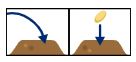
A robotic rabbit is planting carrot seeds in these four earth mounds.

It can respond to these commands:

jump left to the next mound
jump right to the next mound
plant a carrot seed in the mound you are on

Here is a sequence of commands for the rabbit:


We don’t know which mound the rabbit started on, but we do know that, when it followed this sequence, it placed each of three carrot seeds on different mounds.

Question: 

Which picture shows how the carrot seeds could have been planted by the robot following the sequence of commands?

Example puzzle answer

The correct answer is:

The image below shows the route the robot takes by following the instructions:

After executing the first two commands

the rabbit places the seed on the mound to the far right:

It then executes the commands

and lays the next seed:

Then it jumps to the left twice and lays the last seed

So the carrot seeds will be on the hills in the order:

Did you get it right?

How do I get my school involved?

Visit the UK Bebras website for more information and to register your school. Once you’ve registered, you’ll get access to the entire UK Bebras back catalogue of questions, allowing you to create custom quizzes for your students to tackle at any time throughout the year. These quizzes are self-marking, and you can download your students’ results to keep track of their progress. Schools have found these questions perfect for enrichment activities, end-of-term quizzes, lesson starters, and even full lessons to develop computational thinking skills.

Join for free at bebras.uk/admin.

The post Join the UK Bebras Challenge 2024 appeared first on Raspberry Pi Foundation.

Providing Best-in-Class Security with Heather Diaz of fTLD Registry

Post Syndicated from Michael Kammer original https://blog.zabbix.com/providing-best-in-class-security-with-heather-diaz-of-ftld-registry/28585/

As the Vice President of Compliance and Policy at fTLD Registry Services, Heather Diaz is a security expert with over a decade of experience in ensuring the legal, compliance, and strategic alignment of the top-level domains .Bank and .Insurance. She is a compliance and ethics professional and leads the policy and security compliance functions at fTLD.

We sat down with her to learn more about how Zabbix makes her job easier, why she appreciates the inherent flexibility of our solutions, and how she works with our team to help make sure fTLD’s domains are as secure as they can possibly be.

Can you give us a bit of background on fTLD and what it does? What makes your business proposition stand out?

fTLD Registry is the domain authority for .Bank and .Insurance – the most trusted and exclusive domain extensions for banks, insurers, and producers. Our mission is to offer these industry-created and governed domains a shield against cyberattacks and fraud, delivering peace of mind with website and email security.

Since 2011, fTLD Registry has collaborated with experts in cybersecurity, domain security, and the banking and insurance sectors to develop Security Requirements that mitigate cyber threats such as phishing, spoofing, cybersquatting, and man-in-the-middle attacks.

Why is monitoring especially important for fTLD?

Security monitoring is a key value for .Bankers (banks who have switched to .Bank) and our .Insurance customers as well. They receive reporting from our customized Zabbix monitoring system whenever security vulnerabilities are detected. This ensures we provide proactive compliance security monitoring, which allows them to address any findings and keep their .Bank and .Insurance websites and email channels secure.

Are there any specific points you were looking to address with a new monitoring approach?

fTLD has continued to enhance our security requirements for .Bank and .Insurance to address new and evolving cybersecurity threats and provide more secure and trusted online interactions for the financial services sector and their customers. We do this by partnering with Zabbix’s security experts and engineers to make sure our security requirements and monitoring continue to provide best-in-class domain security for .Bank and .Insurance.

Can you please share any business or operational areas that have seen improvements since implementing Zabbix?

Our compliance area has enjoyed having time to engage with .Bank and .Insurance customers to educate them about how to address any security vulnerabilities, as the Zabbix system takes care of sending notifications and warnings to our customers. Not only that, the Zabbix system gives us a dashboard with easy-to-interpret metrics, the ability to generate ad-hoc reporting, and with a number of important data elements integrated, such as customer contact information and their domain status (e.g., live), so our team can always have secure employee access to security monitoring data no matter where in the world we are working. Here are just some of the external interfaces, Agent2 plugins, and custom notifications we developed together with the Zabbix team.

External interfaces:

  • ICANN CZDS (to get a list of zones)
  • Whois (to get zone and registrar details)
  • CRM (to get a list of verification contacts)
  • Marketing system (to get a list of additional zone details)
  • Subdomain discoverer (to discover zone records)

Agent2 plugins

  • DNSSEC plugin (for DNSSEC-related checks)
  • Nameservers plugin (to perform nameserver-related checks)
  • Certificate plugin (to validate TLS ciphers and certificates)
  • Port check plugin (to check what ports are open and verify the security of opened ports)
  • DMARC/SPF plugin (to check presence and validity of DMARC and SPF records)
  • Web redirect plugin (to check validity of HTTP headers and redirects)

Notifications

  • Media types to send compliance reports

Is there anything else you’d like to share about Zabbix and our capabilities?

Zabbix is a great partner for security monitoring, as they’re willing to develop new features to provide a service that meets our exacting business requirements and their support is highly responsive. Most solutions come as they are. With Zabbix, we were able to customize and adapt their solution when new needs came up. My favorite feature is how we provide automated reporting to our customers and key stakeholders – it’s all automated and handled by the Zabbix platform.

The post Providing Best-in-Class Security with Heather Diaz of fTLD Registry appeared first on Zabbix Blog.

Making progress on routing security: the new White House roadmap

Post Syndicated from Mike Conlow original https://blog.cloudflare.com/white-house-routing-security

The Internet can feel like magic. When you load a webpage in your browser, many simultaneous requests for data fly back and forth to remote servers. Then, often in less than one second, a website appears. Many people know that DNS is used to look up a hostname, and resolve it to an IP address, but fewer understand how data flows from your home network to the network that controls the IP address of the web server.

The Internet is an interconnected network of networks, operated by thousands of independent entities. To allow these networks to communicate with each other, in 1989, on the back of two napkins, three network engineers devised the Border Gateway Protocol (BGP). It allows these independent networks to signal directions for IP prefixes they own, or that are reachable through their network. At that time, Internet security wasn’t a big deal — SSL, initially developed to secure websites, wasn’t developed until 1995, six years later. So BGP wasn’t originally built with security in mind, but over time, security and availability concerns have emerged.

Today, the White House Office of the National Cyber Director issued the Roadmap to Enhancing Internet Routing Security, and we’re excited to highlight their recommendations. But before we get into that, let’s provide a quick refresher on what BGP is and why routing security is so important.

BGP: pathways through the Internet

BGP is the core signaling protocol used on the Internet. It’s fully distributed, and managed independently by all the individual operators of the Internet. With BGP, operators will send messages to their neighbors (other networks they are directly connected with, either physically or through an Internet Exchange) that indicate their network can be used to reach a specific IP prefix. These IP prefixes can be resources the network owns themselves, such as 104.16.128.0/20 for Cloudflare, or resources that are reachable through their network, by transiting the network.

By exchanging all of this information between peers, each individual network on the Internet can form a full map of what the Internet looks like, and ideally, how to reach each IP address on the Internet. This map is in an almost constant state of flux: networks disappear from the Internet for a wide variety of reasons, ranging from scheduled maintenance to catastrophic failures, like the Facebook incident in 2021. On top of this, the ideal path to take from point A (your home ISP) to point B (Cloudflare) can change drastically, depending on routing decisions made by your home ISP, and any or all intermediate networks between your home ISP and Cloudflare (here’s an example from 2019). These routing decisions are entirely arbitrary, and left to the owners of the networks. Performance and security can be considered, but neither of these have been historically made visible through BGP itself.

As all the networks can independently make their own routing decisions, there are a lot of individual points where things can go wrong. Going wrong can have multiple meanings here: this can range from routing loops, causing Internet traffic to go back and forth repeatedly between two networks, never reaching its destination, to more malicious problems, such as traffic interception or traffic manipulation.

As routing security wasn’t accounted for in that initial two-napkin draft, it is easy for a malicious actor on the Internet to pretend to either be an originating network (where they claim to own the IP prefix, positioning themselves as the destination network), or they can pretend to be a viable middle network, getting traffic to transit through their network.

In either of these examples, the actor can manipulate the Internet traffic of unsuspecting end users and potentially steal passwords, cryptocurrency, or any other data that can be of value. While transport security (TLS for HTTP/1.x and HTTP/2, QUIC for HTTP/3) has reduced this risk significantly, there’s still ways this can be bypassed. Over time, the Internet community has acknowledged the security concerns with BGP, and has built infrastructure to mitigate some of these problems.

BGP security: The RPKI is born

This journey is now coming to a final destination with the development and adoption of the Resource Public Key Infrastructure (RPKI). The RPKI is a PKI, just like the Web PKI which provides security certificates for the websites we browse (the “s” in https). The RPKI is a PKI specifically with the Internet in mind: it provides core constructs for IP addresses and Autonomous System Numbers (ASNs), the numbers used to identify these individual operating networks mentioned earlier.

Through the RPKI, it’s possible for an operator to establish a cryptographically secure relationship between the IP prefixes they originate, and their ASN, through the issuance of Route Origin Authorization records (ROAs). These ROAs can be used by all other networks on the Internet to validate that the IP prefix update they just received for a given origin network actually belongs to that origin network, a process called Route Origin Validation (ROV). If a malicious party tries to hijack an IP prefix that has a ROA to their (different) origin network, validating networks would know this update is invalid and reject it, maintaining the origin security and ensuring reachability.

Why does BGP security matter? Examples of route hijacks and leaks

But why should you care about BGP? And more importantly, why does the White House care about BGP? Put simply: BGP (in)security can cost people and companies millions of dollars and cause widespread disruptions for critical services.

In February 2022, Korean crypto platform KLAYswap was the target of a malicious BGP hijack, which was used to steal $1.9 million of cryptocurrency from their customers. The attackers were able to serve malicious code that mimicked the service KLAYswap was using for technical support. They were able to do this by announcing the IP prefix used to serve the JavaScript SDK KLAYswap was using. When other networks accepted this announcement, end user traffic loading the technical support page instead received malicious JavaScript, which was used to drain customer wallets. As the attackers hijacked the IP address, they were also able to register a TLS certificate for the domain name used to serve the SDK. As a result, nothing looked out of the ordinary for Klayswap’s customers until they noticed their wallets had been drained.

However, not all BGP problems are intentional hijacks. In March 2022, RTComm (AS8342), a Russian ISP, announced itself as the origin of 104.244.42.0/24, which is an IP prefix actually owned by Twitter (now X) (AS13414). In this case, all researchers have drawn a similar conclusion: RTComm wanted to block its users from accessing Twitter, but inadvertently advertised the route to its peers and upstream providers. Thankfully, the impact was limited, in large part due to Twitter issuing ROA records for their IP prefixes, which meant the hijack was blocked at all networks that had implemented ROV and were validating announcements.

Inadvertent incorrect advertisements passing from one network to another, or route leaks, can happen to anyone, even Cloudflare. Our 1.1.1.1 public DNS service — used by millions of consumers and businesses — is often the unintended victim. Consider this situation (versions of which have happened numerous times): a network engineer running a local ISP is testing a configuration on their router and announces to the Internet that you can reach the IP address 1.1.1.1 through their network. They will often pick this address because it’s easy to input on the router and observe in network analytics. They accidentally push that change out to all their peer networks — the networks they’re connected to — and now, if proper routing security isn’t in place, users on multiple networks around the Internet trying to reach 1.1.1.1 might be directed to this local ISP where there is no DNS service to be found. This can lead to widespread outages.

The types of routing security measures in the White House roadmap can prevent these issues. In the case of 1.1.1.1, Cloudflare has ROAs in place that tell the Internet that we originate the IP prefix that contains 1.1.1.1. If someone else on the Internet is advertising 1.1.1.1, that’s an invalid route, and other networks should stop accepting it. In the case of KLAYswap, had there been ROAs in place, other networks could have used common filtering techniques to filter out the routes pointing to the attackers malicious JavaScript. So now let’s talk more about the plan the White House has to improve routing security on the Internet, and how the US government developed its recommendations.

Work leading to the roadmap

The new routing security roadmap from the Office of the National Cyber Director (ONCD) is the product of years of work, throughout both government and industry. The National Institute of Standards and Technology (NIST) has been a longstanding proponent of improving routing security, developing test and measurement tools and publishing special publication 1800-14 on Protecting the Integrity of Internet Routing, among many other initiatives. They are active participants in the Internet community, and an important voice for routing security.

Cloudflare first started publicly advocating for adoption of security measures like RPKI after a massive BGP route leak took down a portion of the Internet, including websites using Cloudflare’s services, in 2019. 

Since that time, the federal government has increasingly recognized the need to elevate efforts to secure Internet routing, a process that Cloudflare has helped support along the way. The Cyberspace Solarium Commission report, published in 2020, encouraged the government to develop a strategy and recommendations to define “common, implementable guidance for securing the DNS and BGP.”    

In February 2022, the Federal Communication Commission launched a notice of inquiry to better understand Internet routing. Cloudflare responded with a detailed explanation of our history with RPKI and routing security. In July 2023, the FCC, jointly with the Director of the Cybersecurity and Infrastructure Security Agency, held a workshop for stakeholders, with Cloudflare as one of the presenters. In June 2024, the FCC issued a Notice of Proposed Rulemaking that would require large service providers to develop security risk management plans and report on routing security efforts, including RPKI adoption. 

The White House has been involved as well. In March 2023, they cited the need to secure the technical foundation of the Internet, from issued such as BGP vulnerabilities, as one of the strategic objectives of the National Cybersecurity Strategy. Citing those efforts, in May 2024, the Department of Commerce issued ROAs signing some of its IP space, and this roadmap strongly encourages other departments and agencies to do the same. All of those efforts and the focus on routing security have resulted in increased adoption of routing security measures. 

Report observations and recommendations

The report released by the White House Office of the National Cyber Director details the current state of BGP security, and the challenges associated with Resource Public Key Infrastructure (RPKI) Route Origin Authorization (ROA) issuance and RPKI Route Origin Validation (ROV) adoption. It also provides network operators and government agencies with next steps and recommendations for BGP security initiatives. 

One of the first recommendations is for all networks to create and publish ROAs. It’s important that every network issues ROAs for their IP prefixes, as it’s the only way for other networks to validate they are the authorized originator of those prefixes. If one network is advertising an IP address as their own, but a different network issued the ROA, that’s an important sign that something might be wrong!

As shown in the chart below from NIST’s RPKI Monitor, as of September 2024, at least 53% of all the IPv4 prefixes on the Internet have a valid ROA record available (IPv6 reached this milestone in late 2023), up from only 6% in 2017. (The metric is even better when measured as a percent of Internet traffic: data from Kentik, a network observability company, shows that 70.3% of Internet traffic is exchanged with IP prefixes that have a valid ROA.) This increase in the number of signed IP prefixes (ROAs) is foundational to secure Internet routing.

Unfortunately, the US is lagging behind: Only 39% of IP prefixes originated by US networks have a valid ROA. This is not surprising, considering the US has significantly more Internet address resources than other parts of the world. However, the report highlights the need for the US to overcome the common barriers network operators face when implementing BGP security measures. Administrative challenges, the perception of risk, and prioritization and resourcing constraints are often cited as the problems networks face when attempting to move forward with ROV and RPKI.

A related area of the roadmap highlights the need for networks that allow their customers to control IP address space to still create ROAs for those addresses. The reality of how every ISP, government, and large business allocates its IP address space is undoubtedly messy, but that doesn’t reduce the importance of making sure that the correct entity is identified in the official records with a ROA. 

A network signing routes for its IP addresses is an important step, but it isn’t enough. To prevent incorrect routes — malicious or not — from spreading around the Internet, networks need to implement Route Origin Validation (ROV) and implement other BGP best practices, outlined by MANRS in their Zen Guide to Routing Security Policy. If one network incorrectly announces itself as the origin for 1.1.1.1, that won’t have any effect beyond its own borders if no other networks pick up that invalid route. The Roadmap calls out filtering invalid routes as another action for network service providers. 

As of 2022, our data showed that around 15 percent of networks were validating routes. Ongoing measurements from APNIC show progress: this year about 20 percent of APNIC probes globally correctly filter invalid routes with ROV. In the US, it’s 70 percent. Continued growth of ROV is a critical step towards achieving better BGP security.

Filtering out invalid routes is prominently highlighted in the report’s recommendations. While recognizing that there’s been dramatic improvement in filtering by the large transit networks, the first report recommendation is for network service providers — large and small —  to fully deploy ROV. 

In addition, the Roadmap proposes using the federal government’s considerable weight as a purchaser, writing, “[Office of Management and Budget] should require the Federal Government’s contracted service providers to adopt and deploy current commercially-viable Internet routing security technologies.” It goes on to say that grant programs, particularly broadband grants, “should require grant recipients to incorporate routing security measures into their projects.

The roadmap doesn’t only cover well-established best practices, but also highlights emerging security technologies, such as Autonomous System Provider Authorization (ASPA) and BGPsec. ROAs only cover part of the BGP routing ecosystem, so additional work is needed to ensure we secure everything. It’s encouraging to see the work being done by the wider community to address these concerns is acknowledged, and more importantly, actively followed.

What’s next for the Internet community

The new roadmap is an important step in outlining actions that can be taken today to improve routing security. But as the roadmap itself recognizes, there’s more work to be done both in making sure that the steps are implemented, and that we continue to push routing security forward.

From an implementation standpoint, our hope is that the government’s focus on routing security through all the levers outlined in the roadmap will speed up ROA adoption, and encourage wider implementation of ROV and other best practices. At Cloudflare, we’ll continue to report on routing practices on Cloudflare Radar to help assess progress against the goals in the roadmap.

At a technical level, the wider Internet community has made massive strides in adopting RPKI ROV, and have set their sights on the next problem: we are securing the IP-to-originating network relationship, but what about the relationships between the individual networks?

Through the adoption of BGPsec and ASPA, network operators are able to not only validate the destination of a prefix, but also validate the path to get there. These two new technical additions within the RPKI will combine with ROV to ultimately provide a fully secure signaling protocol for the modern Internet. The community has actively undertaken this work, and we’re excited to see it progress!

Outside the RPKI, the community has also ratified the formalization of customer roles through RFC9234: Route Leak Prevention and Detection Using Roles in UPDATE and OPEN Messages. As this new BGP feature gains support, we’re hopeful that this will be another helpful tool in the operator toolbox in preventing route leaks of any kind.

How you can help keep the Internet secure

If you’re a network operator, you’ll need to sign your routes, and validate incoming prefixes. This consists of signing Route Origin Authorization (ROA) records, and performing Route Origin Validation (ROV). Route signing involves creating records with your local Regional Internet Registry (RIR) and signing to their PKI. Route validation involves only accepting routes that are signed with a ROA. This will help ensure that only secure routes get through. You can learn more about that here.

If you’re not a network operator, head to isbgpsafeyet.com, and test your ISP. If your ISP is not keeping BGP safe, be sure to let them know how important it is. If the government has pointed out prioritization is a consistent problem, let’s help increase the priority of routing security.

A secure Internet is an open Internet

As the report points out, one of the keys to keeping the Internet open is ensuring that users can feel safe accessing any site they need to without worrying about attacks that they can’t control. Cloudflare wholeheartedly supports the US government’s efforts to bolster routing security around the world and is eager to work to ensure that we can help create a safe, open Internet for every user.

AWS Weekly Roundup: AWS Parallel Computing Service, Amazon EC2 status checks, and more (September 2, 2024)

Post Syndicated from Esra Kayabali original https://aws.amazon.com/blogs/aws/aws-weekly-roundup-aws-parallel-computing-service-amazon-ec2-status-checks-and-more-september-2-2024/

With the arrival of September, AWS re:Invent 2024 is now 3 months away and I am very excited for the new upcoming services and announcements at the conference. I remember attending re:Invent 2019, just before the COVID-19 pandemic. It was the biggest in-person re:Invent with 60,000+ attendees and it was my second one. It was amazing to be in that atmosphere! Registration is now open for AWS re:Invent 2024. Come join us in Las Vegas for five exciting days of keynotes, breakout sessions, chalk talks, interactive learning opportunities, and career-changing connections!

Now let’s look at the last week’s new announcements.

Last week’s launches
Here are the launches that got my attention.

Announcing AWS Parallel Computing Service – AWS Parallel Computing Service (AWS PCS) is a new managed service that lets you run and scale high performance computing (HPC) workloads on AWS. You can build scientific and engineering models and run simulations using a fully managed Slurm scheduler with built-in technical support and a rich set of customization options. Tailor your HPC environment to your specific needs and integrate it with your preferred software stack. Build complete HPC clusters that integrates compute, storage, networking, and visualization resources, and seamlessly scale from zero to thousands of instances. To learn more, visit AWS Parallel Computing Service and read Channy’s blog post.

Amazon EC2 status checks now support reachability health of attached EBS volumes – You can now use Amazon EC2 status checks to directly monitor if the Amazon EBS volumes attached to your instances are reachable and able to complete I/O operations. With this new status check, you can quickly detect attachment issues or volume impairments that may impact the performance of your applications running on Amazon EC2 instances. You can further integrate these status checks within Auto Scaling groups to monitor the health of EC2 instances and replace impacted instances to ensure high availability and reliability of your applications. Attached EBS status checks can be used along with the instance status and system status checks to monitor the health of your instances. To learn more, refer to the Status checks for Amazon EC2 instances documentation.

Amazon QuickSight now supports sharing views of embedded dashboards – You can now share views of embedded dashboards in Amazon QuickSight. This feature allows you to enable more collaborative capabilities in your application with embedded QuickSight dashboards. Additionally, you can enable personalization capabilities such as bookmarks for anonymous users. You can share a unique link that displays only your changes while staying within the application, and use dashboard or console embedding to generate a shareable link to your application page with QuickSight’s reference encapsulated using the QuickSight Embedding SDK. QuickSight Readers can then send this shareable link to their peers. When their peer accesses the shared link, they are taken to the page on the application that contains the embedded QuickSight dashboard. For more information, refer to Embedded view documentation.

Amazon Q Business launches IAM federation for user identity authenticationAmazon Q Business is a fully managed service that deploys a generative AI business expert for your enterprise data. You can use the Amazon Q Business IAM federation feature to connect your applications directly to your identity provider to source user identity and user attributes for these applications. Previously, you had to sync your user identity information from your identity provider into AWS IAM Identity Center, and then connect your Amazon Q Business applications to IAM Identity Center for user authentication. At launch, Amazon Q Business IAM federation will support the OpenID Connect (OIDC) and SAML2.0 protocols for identity provider connectivity. To learn more, visit Amazon Q Business documentation.

Amazon Bedrock now supports cross-Region inferenceAmazon Bedrock announces support for cross-Region inference, an optional feature that enables you to seamlessly manage traffic bursts by utilizing compute across different AWS Regions. If you are using on-demand mode, you’ll be able to get higher throughput limits (up to 2x your allocated in-Region quotas) and enhanced resilience during periods of peak demand by using cross-Region inference. By opting in, you no longer have to spend time and effort predicting demand fluctuations. Instead, cross-Region inference dynamically routes traffic across multiple Regions, ensuring optimal availability for each request and smoother performance during high-usage periods. You can control where your inference data flows by selecting from a pre-defined set of Regions, helping you comply with applicable data residency requirements and sovereignty laws. Find the list at Supported Regions and models for cross-Region inference. To get started, refer to the Amazon Bedrock documentation or this Machine Learning blog.

For a full list of AWS announcements, be sure to keep an eye on the What’s New at AWS page.

We launched existing services and instance types in additional Regions:

Other AWS events
AWS GenAI Lofts are collaborative spaces and immersive experiences that showcase AWS’s cloud and AI expertise, while providing startups and developers with hands-on access to AI products and services, exclusive sessions with industry leaders, and valuable networking opportunities with investors and peers. Find a GenAI Loft location near you and don’t forget to register.

Gen AI loft workshop

credit: Antje Barth

Upcoming AWS events
Check your calendar and sign up for upcoming AWS events:

AWS Summits are free online and in-person events that bring the cloud computing community together to connect, collaborate, and learn about AWS. AWS Summits for this year are coming to an end. There are 3 more left that you can still register: Jakarta (September 5), Toronto (September 11), and Ottawa (October 9).

AWS Community Days feature technical discussions, workshops, and hands-on labs led by expert AWS users and industry leaders from around the world. While AWS Summits 2024 are almost over, AWS Community Days are in full swing. Upcoming AWS Community Days are in Belfast (September 6), SF Bay Area (September 13), where our own Antje Barth is a keynote speaker, Argentina (September 14), and Armenia (September 14).

Browse all upcoming AWS led in-person and virtual events here.

That’s all for this week. Check back next Monday for another Weekly Roundup!

— Esra

This post is part of our Weekly Roundup series. Check back each week for a quick roundup of interesting news and announcements from AWS!

[$] Advances in font technology and GTK text rendering

Post Syndicated from jzb original https://lwn.net/Articles/987176/

At this year’s GUADEC in Denver, Colorado, Behdad Esfahbod and Matthias Clasen
presented a two-part talk on a topic that’s deeply important to desktop
environments: fonts. Esfahbod covered advances in font
technology that are making their way to becoming standards, and Clasen briefly
discussed improvements in GTK text rendering. The talk presented some
fascinating insights into the problems around accurately rendering
writing systems on the desktop, and where font technologies may be
going in the near future.

Security updates for Monday

Post Syndicated from jake original https://lwn.net/Articles/988364/

Security updates have been issued by AlmaLinux (postgresql:16), Debian (dovecot, pymatgen, ruby2.7, systemd, and webkit2gtk), Fedora (microcode_ctl, python3.11, vim, and xen), Oracle (kernel, postgresql:12, postgresql:13, postgresql:15, and python39:3.9 and python39-devel:3.9), Slackware (libpcap), SUSE (cacti, cacti-spine, python-Django, and trivy), and Ubuntu (dovecot).