AWS WAF adds AI traffic monetization capability to help content owners charge AI bots for content access

Post Syndicated from Esra Kayabali original https://aws.amazon.com/blogs/aws/aws-waf-adds-ai-traffic-monetization-capability-to-help-content-owners-charge-ai-bots-for-content-access/

AWS WAF now includes AI traffic monetization capability that gives digital content owners and publishers a way to charge AI bots and agents for access to protected web content directly at the network edge. The capability helps content owners and publishers set per-request pricing by content path, bot category, or verification tier without modifying their origin infrastructure or writing application code. Content owners can define granular access policies per agent type, collect payments in stablecoins to their preferred wallet, and monitor revenue and bot activity from a single dashboard.

AI bot traffic now accounts for more than 50% of web traffic for many content providers, with AI-specific crawlers growing more than 300% year-over-year. Unlike traditional search engine crawlers, which index content and return measurable referral traffic back to publisher websites, AI bots consume the same content to generate summaries and responses in AI interfaces, with little to no traffic sent back to the original source. Publishers bear the infrastructure costs of serving that traffic without the page views, ad impressions, or subscription conversions that typically offset those costs. AWS WAF Bot Control already gives customers visibility into bot activity and the ability to block or rate-limit traffic, but setting pricing and collecting payment from AI agents has not been possible until now. AI traffic monetization is a new Bot Control capability that closes that gap, giving content owners and publishers a way to configure pricing rules directly through the AWS WAF console and collect payments from AI agents through third-party payment integrations, without building custom payment infrastructure or negotiating individual licensing agreements. Payment settlement and verification flows are provided by Coinbase’s x402 Facilitator. Integration with Stripe for direct account payments and Machine Payments Protocol (MPP) support is coming soon.

Getting Started with AI Traffic Monetization
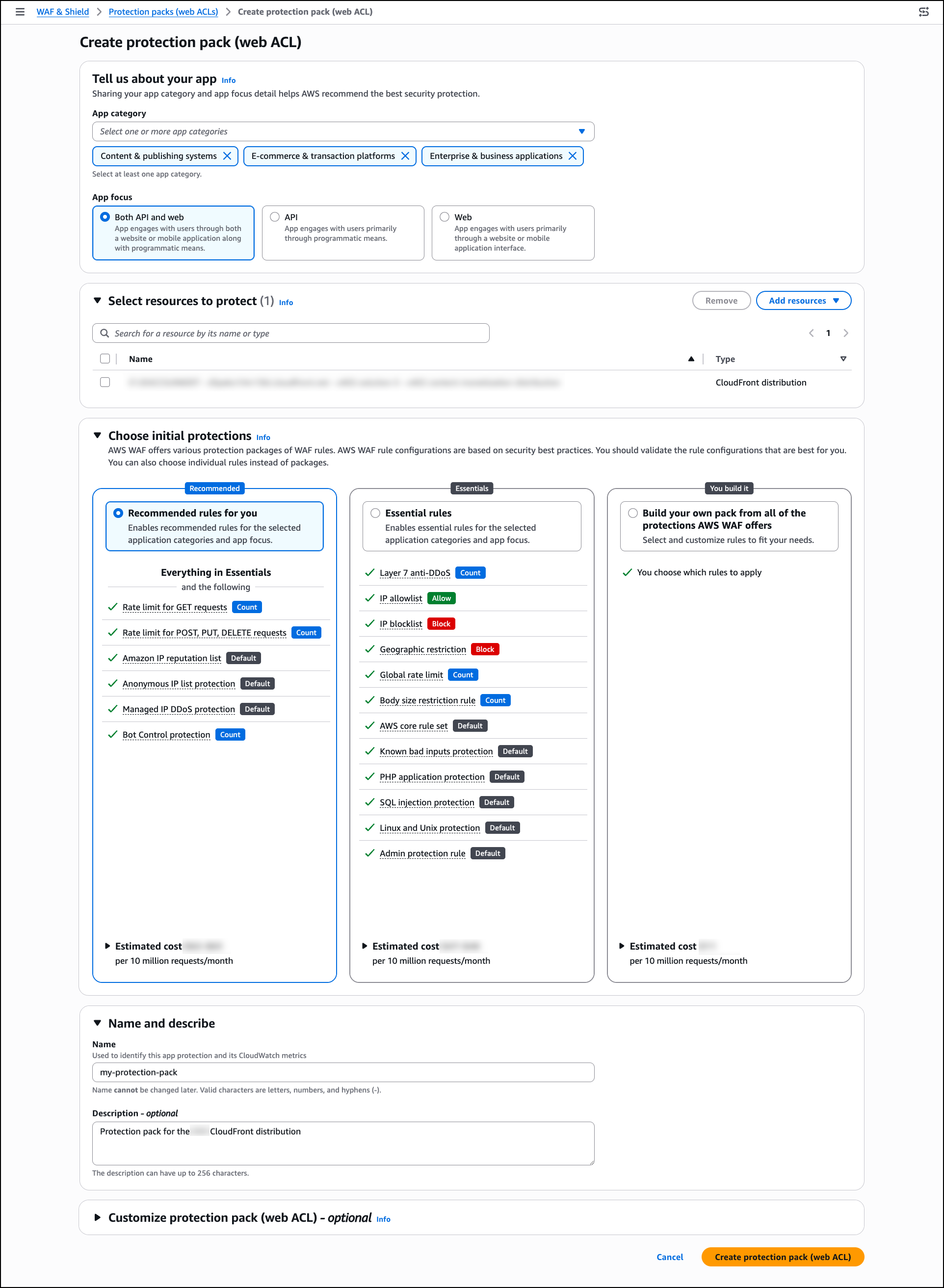
Before configuring monetization, confirm that AWS WAF Bot Control is enabled at Common or Targeted level on the web ACL associated with your CloudFront distribution. Bot Control provides the agent classification that monetization rules depend on. If you have not set this up yet, visit Adding the AWS WAF Bot Control managed rule group to your web ACL documentation. In the AWS Management Console, go to WAF & Shield and choose Protection packs (web ACLs) in the left navigation pane to get started.

A protection pack is the core configuration unit for AI traffic monetization. It defines which content paths are monetized, what each agent verification tier is charged, which payment methods you accept, and what license terms apply. To create one, choose Create protection pack (web ACL).

In Tell us about your app, select one or more app categories that describe your content (for example, Content & publishing systems, E-commerce & transaction platforms, or Enterprise & business applications), and choose an App focus. AWS WAF uses these selections to recommend suitable security protections for your configuration.

In Select resources to protect, choose Add resources to associate regional or global resources such as CloudFront distributions with this protection pack. You can skip this step and add resources later.

In Choose initial protections, select from AWS WAF managed rule packages based on your app category and resource selections. You can also choose individual rules instead of packages.

In Name and describe, provide a name and optional description for the protection pack.

Optionally, expand Customize protection pack (web ACL) to configure additional settings including pricing tiers, payment methods, content scope, and license terms.

When finished, choose Create protection pack (web ACL).

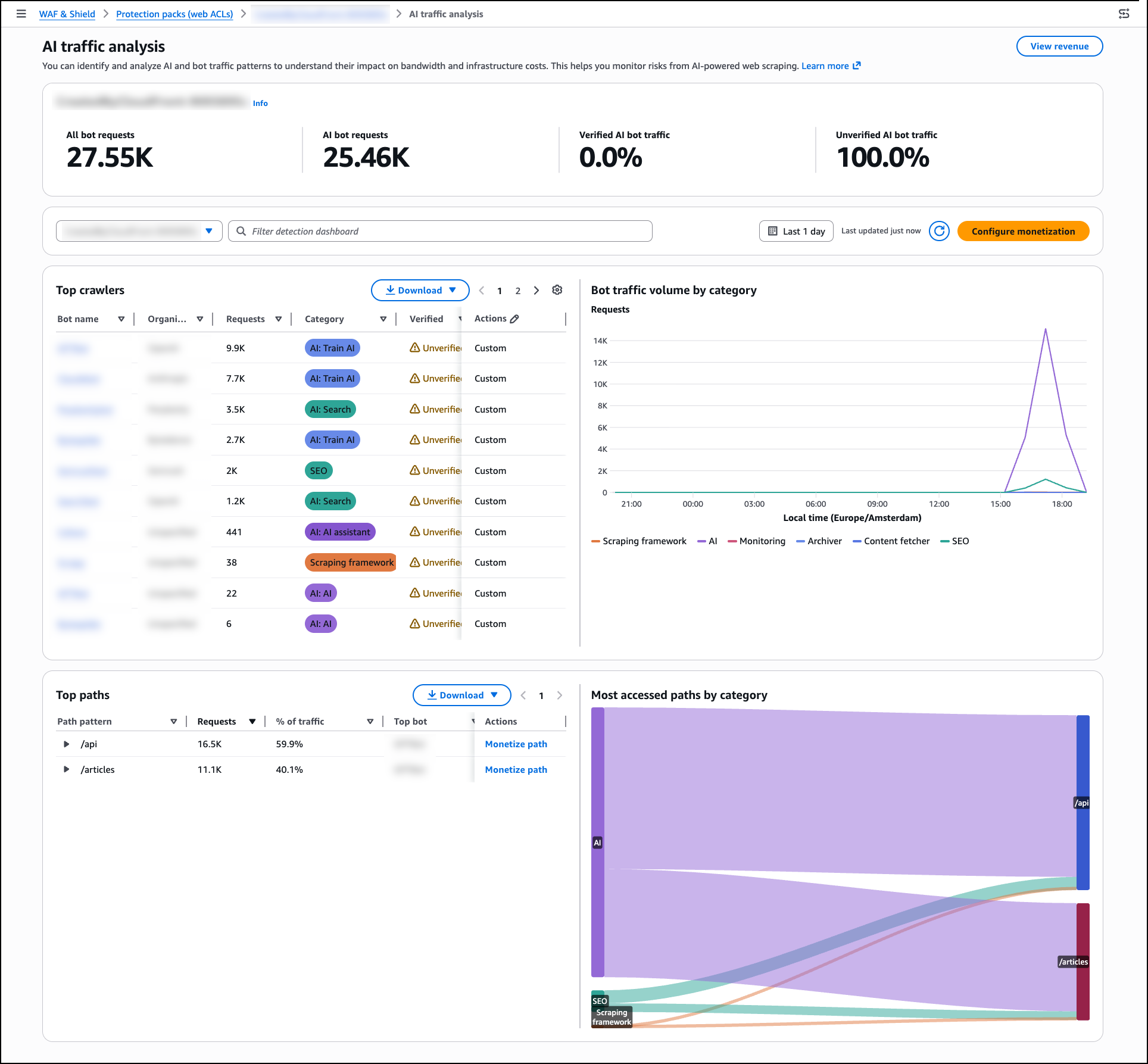
Once your protection pack is in place, review the AI traffic analysis dashboard to understand the impact of AI bot traffic on your content before setting your pricing strategy. In the WAF & Shield console, go to AI traffic analysis in the left navigation pane. Select your protection pack (web ACL) from the dropdown to populate the dashboard.

The AI traffic analysis dashboard breaks down traffic into four categories visible in the bot traffic overview panel: All bot requests, AI bot requests, Verified AI bot traffic, and Unverified AI bot traffic. The dashboard surfaces infrastructure impact metrics including bandwidth consumed, estimated monthly cost, and peak request rates. A per-path heatmap shows which content paths receive the most AI bot activity by hour, giving you the data you need to make informed pricing decisions.

AWS WAF Bot Control classifies over 650 distinct AI bot and agent types including GPTBot, Claude-Web, and Perplexity-Bot, and assigns each a verification tier:

  • Verified — Agent identity confirmed through Web Bot Auth (WBA) Ed25519 cryptographic signature, or sourced from a documented IP range with a known set of user-agents and domain names.
  • Unverified — Agent recognized through user-agent matching, behavioral fingerprinting, and IP reputation, but identity not cryptographically confirmed.

Once you have reviewed your traffic patterns, return to Protection packs (web ACLs), select your protection pack from the list, and choose Configure AI monetization from the right panel to set pricing and access policies. Each protection pack defines the pricing, agent policies, accepted payment methods, and license terms that apply to a defined set of content paths. You can create multiple protection packs and apply different pricing to different content zones within the same distribution. Once created, associate the protection pack with your web ACL by opening the web ACL and choosing Add protection pack.

For each agent verification tier within the pack, you can assign one of six actions: Monetize (return a 402 with pricing), Allow (grant free access), Block (deny access entirely), Count (log without charging), CAPTCHA (present a puzzle to verify a human sender), or Challenge (run a silent check to verify the client is a browser, not a bot).

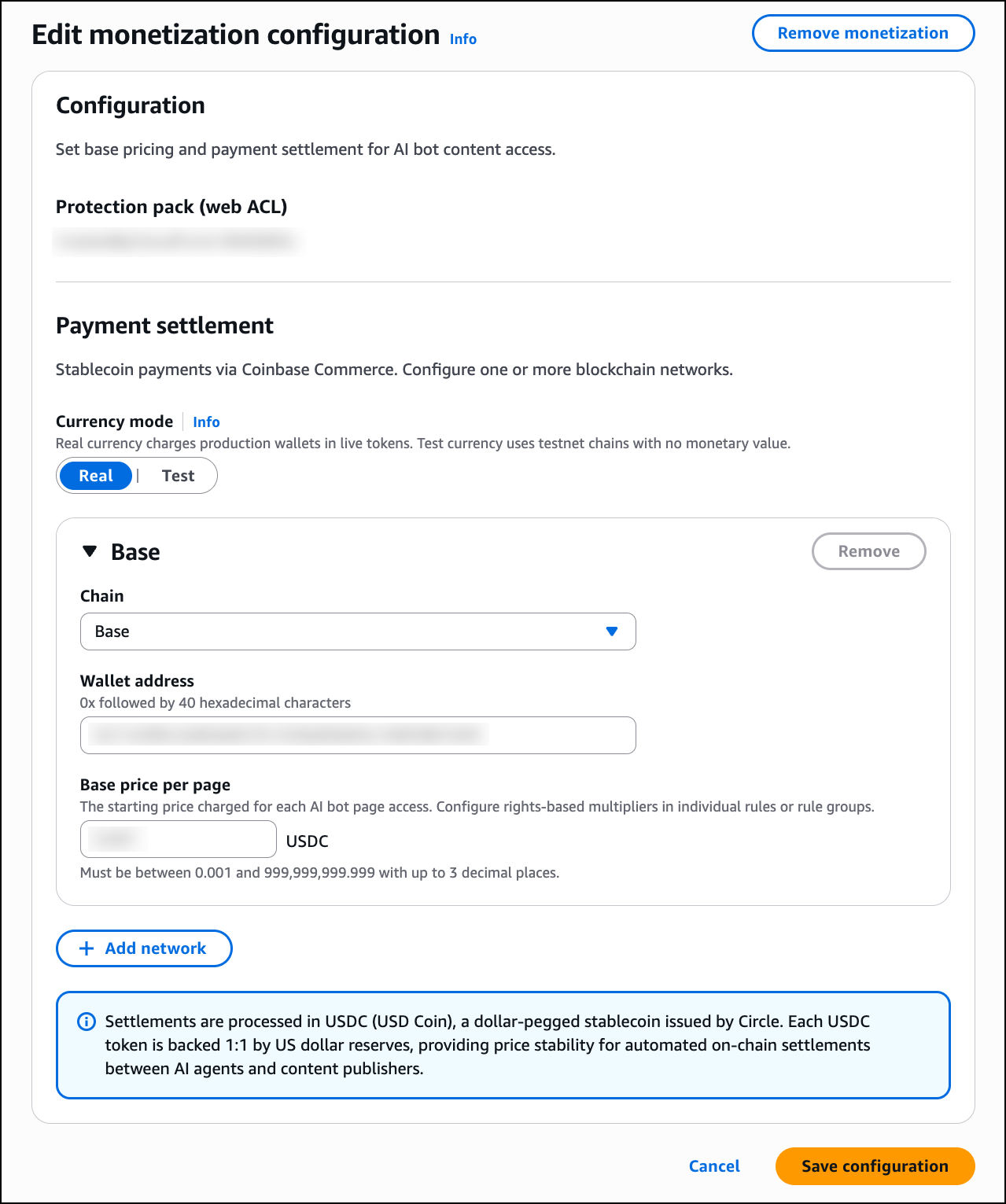
In the Edit monetization configuration page, configure the following:

Under Payment settlement, select one or more blockchain networks for stablecoin payments. Any wallet address on the supported networks is accepted, whether self-managed or hosted by a wallet provider such as Coinbase. For each network, provide your wallet address and set a Base price per page in USDC. You can add multiple networks using Add network. AWS does not process payments or take a fee on content revenue; disbursement is self-managed or managed by your wallet provider.

When a Monetize rule matches an incoming request, AWS WAF returns an HTTP 402 Payment Required response. The response body contains a machine-readable price manifest in JSON format using the x402 open protocol for machine-to-machine payments. The manifest includes the content price in USDC, accepted blockchain networks such as Base and Solana, the destination wallet address, the maximum payment timeout, and the payment scheme.

Any x402-compatible agent runtime can complete this flow autonomously. The client submits a signed payment authorization on their payment network of choice. AWS WAF verifies it, fetches the content, integrates with third-party facilitator services for settling the payment on-chain, and serves the response.

Note that the Monetize action is supported exclusively for web ACLs associated with Amazon CloudFront distributions. Adding a Monetize rule to a regional web ACL is not supported.

Since the Currency mode toggle is available directly in the monetization configuration page, you can switch between Real and Test mode at any time. Before going live, use test mode on non-production traffic to validate pricing, wallet configuration, and x402 payment flows. Note that test mode still enforces x402 payments, but those payments can be made on testnets such as Base Sepolia or Solana Devnet using test funds obtained from faucets such as faucet.circle.com. To activate test mode, toggle Currency mode to Test in your protection pack configuration. AWS WAF returns real price manifests and runs the full payment flow identically to production on the configured test chain. All events are logged with CurrencyMode: TEST. When satisfied with the configuration, toggle Currency mode back to Real to begin processing real payments.

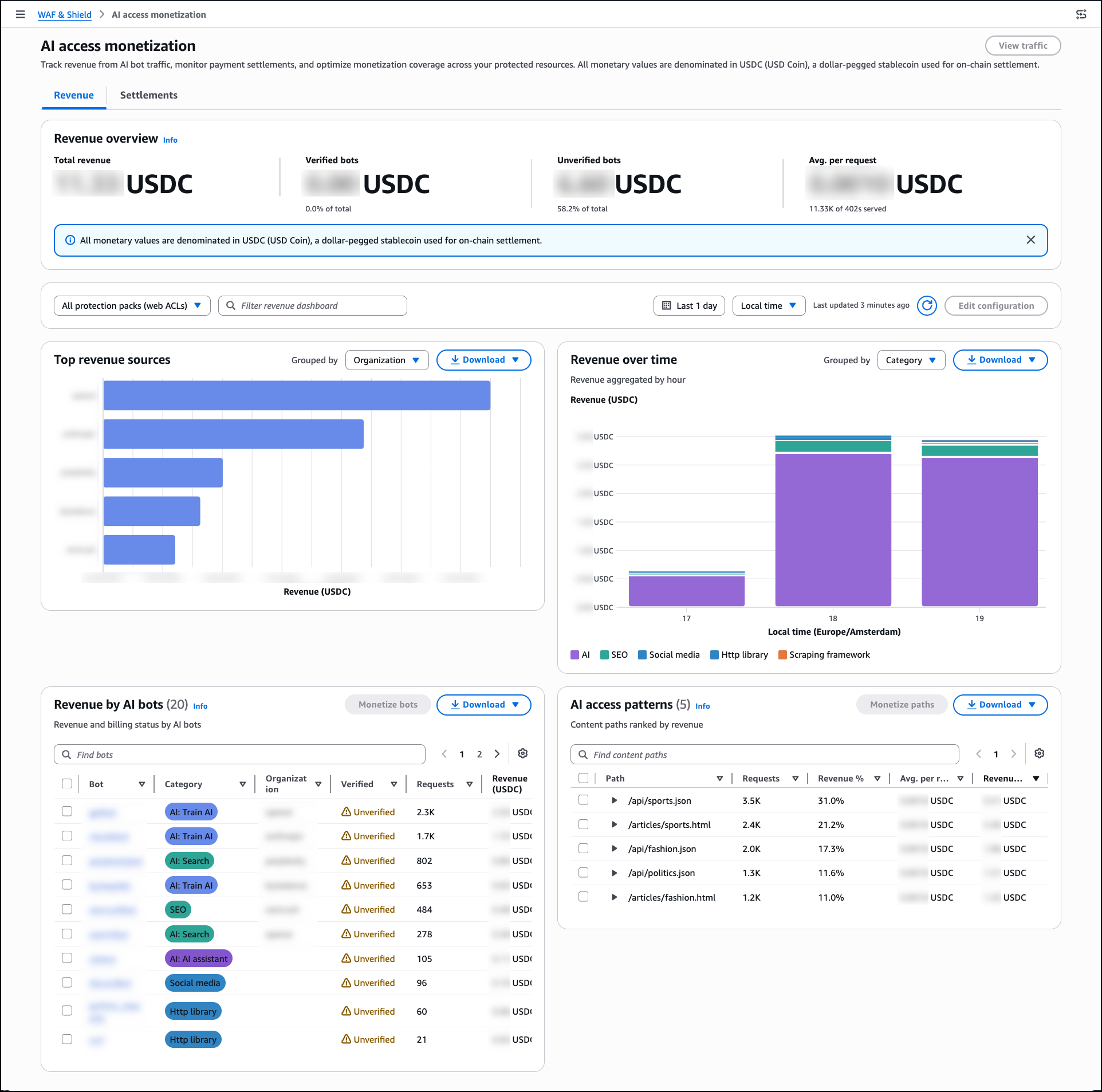
Once you have switched Currency mode to Real, navigate to AI access monetization in the left navigation pane to track monetization outcomes in real time. Note that the AI access monetization dashboard only reflects activity from real currency mode and does not display test transactions.

The Revenue dashboard shows Total revenue, revenue broken down by Verified bots and Unverified bots, and Avg. per request. The Top revenue sources panel groups earnings by bot category, and the AI access patterns panel ranks content paths by revenue generated. Use the Settlements tab to reconcile payments by provider and review payment method distribution and failed payment attempts.

Now Available
AI traffic monetization is available now for Amazon CloudFront customers at no additional charge beyond standard AWS WAF pricing. The capability is available in all edge locations where AWS WAF web ACLs are associated with Amazon CloudFront distributions.

To learn more about AI traffic monetization, see the AWS WAF Developer Guide.

— Esra

NIS2 is raising the bar. Here’s how to turn readiness into resilience.

Post Syndicated from sabeen malik original https://www.rapid7.com/blog/post/so-nis2-compliance-turn-readiness-into-resilience

The NIS2 directive asks covered organizations to take a more structured approach to risk management, governance, supply chain security, and incident reporting. It expands the scope of who may be covered, raises expectations around management body accountability, introduces clearer and more enforceable requirements, and increases pressure on organizations to show that security is being managed in a consistent, defensible way. Reporting timelines are one of the most visible parts of that shift, with early warning required within 24 hours of awareness for significant incidents, incident notification within 72 hours, and a final report within one month. It also arrived in a landscape that is still uneven, with member states continuing to implement the directive in different ways across the EU.

That combination has created a familiar challenge for CISOs and security teams, as the questions coming from boards and leadership are no longer just about whether the organization understands the regulation, but whether it can meet the requirements in practice. NIS2 reaches into risk management, reporting, governance, and supply chain oversight, which means readiness depends on how well security works across the business, not just on how well a policy is written.

That is why the most useful way to think about NIS2 is as an operational resilience exercise. Compliance still matters, of course, and teams need to know what the directive requires. What tends to make the difference over time is whether security leaders can connect those requirements to the real conditions of the environment: what is exposed, where ownership sits, how incident response works in practice, how supply chain risk is monitored, and how quickly the organization can move when something material happens.

Regulations are easier to absorb than operating model changes. A team may understand that NIS2 raises expectations around governance and incident handling, while still finding it difficult to answer basic questions quickly when pressure rises. Which business services are most critical? Which third parties matter most? Who owns the decision when a serious issue lands? How prepared are we to investigate, communicate, and report inside the timelines the directive expects? Those are the questions that separate a compliance project from a resilience program.

That is also why we have been building practical content to help teams move from interpretation to action.

Our ebook is the best place to start if you want the wider context. It is designed to help security leaders understand what NIS2 means in practical terms, how to think about the directive beyond a narrow checklist, and how to connect compliance obligations to a broader resilience strategy. If your team needs a stronger narrative for internal stakeholders, or a clearer way to explain why NIS2 should influence operational priorities, the ebook is the most useful first read.

Next, our NIS2 Readiness Toolkit is built for teams that want to assess where they are and what to do next. iIt is as a way to bridge the gap between NIS2 requirements and operational reality, with a focus on risk, reporting, and governance. It is designed to help teams spot gaps, focus effort, and simplify the path from regulatory complexity to a more defensible security strategy. In other words, it gives you a practical framework for understanding where readiness is strong, where it is uneven, and what deserves attention first.

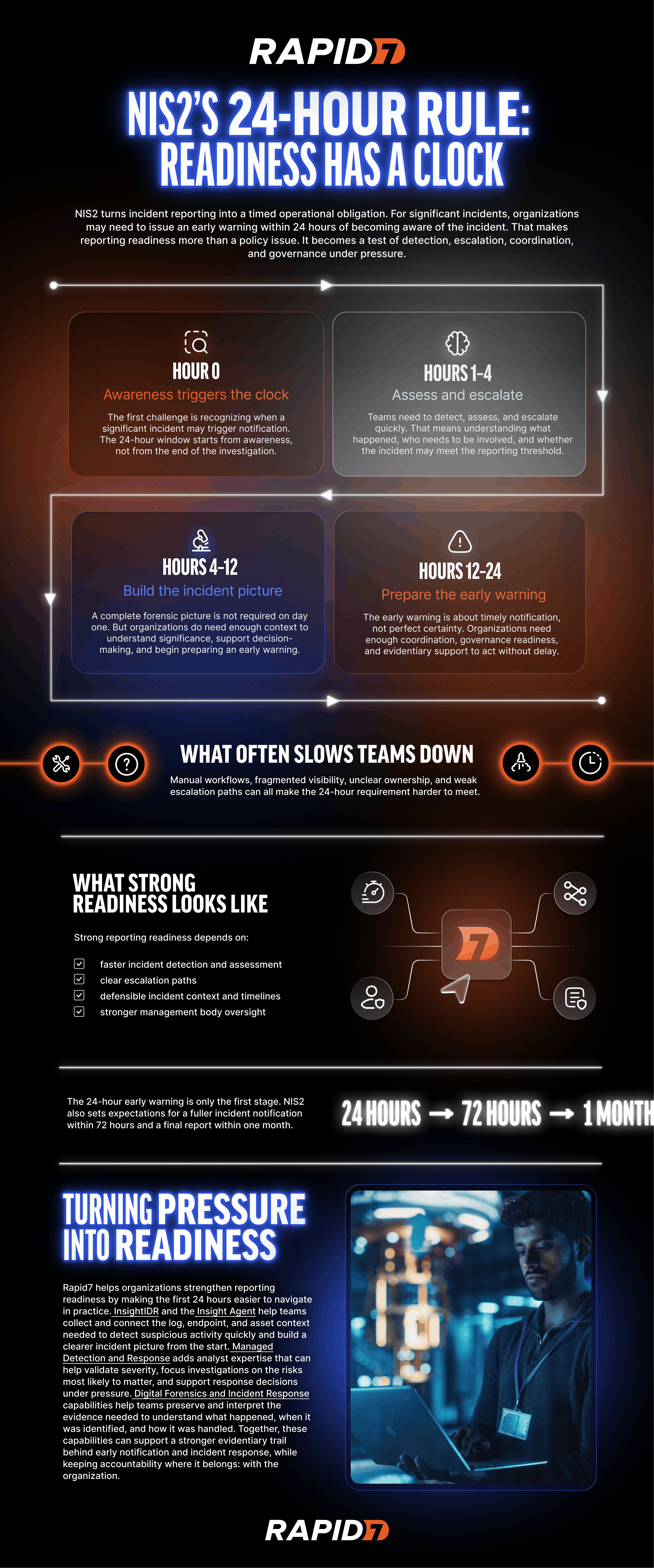
Our infographic, seen below, is the quickest asset to use when you need to communicate one of the most tangible parts of NIS2: the 24-hour reporting requirement. Some stakeholders need the long-form explanation. Others need a practical view of what has to happen between incident awareness and early notification. The infographic helps teams bring that operational pressure into planning conversations, leadership updates, and internal alignment without requiring everyone to start with a longer asset first.

REQ-18355_-_Infographic_The_24-Hour_Rule-1.png

Taken together, these assets are useful because they serve different parts of the same problem. The ebook gives you a strategic view, the toolkit helps you assess readiness and prioritize action, and the infographic helps communicate the big picture quickly and clearly.

Enforcement expectations, reporting maturity, and national interpretation continue to evolve, and security teams are working through those changes at the same time as the wider threat landscape becomes more complex. A stronger response starts with clarity, but it needs to move quickly into coordination, ownership, and repeatable process if it is going to hold up under pressure.

If your organization is still treating NIS2 as a point-in-time compliance exercise, now is a good moment to widen the lens. The directive is pushing security leaders beyond a comply-once approach and toward a model of being continuously secure. Teams that build better visibility, stronger governance, and clearer response processes for NIS2 will be better prepared not only for regulatory scrutiny, but for the wider operational demands that are already shaping the market.

Does Your Security Programme Align With NIS2 Requirements?

Post Syndicated from sabeen malik original https://www.rapid7.com/blog/post/so-aligning-security-programmes-with-nis2-requirements

If your organization operates in the EU, or works with organizations that do, NIS2 is no longer something on the horizon. It is here and it applies to a far wider range of sectors than its predecessor, the original NIS Directive (Directive (EU) 2016/1148), and it comes with real consequences for organizations that cannot demonstrate they are meeting its requirements. The good news? You do not have to figure out how to approach it alone.

Rapid7 has developed a dedicated NIS2 resource page that shows how the Command Platform can support key technical and operational aspects of NIS2 readiness, highlights common security program gaps, and explains where our solutions can help strengthen visibility, prioritization, detection, and reporting readiness. It is not a substitute for the broader organizational, legal, and governance measures the directive also requires, but it can be a useful starting point if you are evaluating your security capabilities and want a clearer picture of where tooling can support your approach. If you are in the early stages of assessing readiness, or further along and looking for a clearer view of the technical side, it is worth 10 minutes of your time.

What are the NIS2 requirements organizations need to meet?

NIS2, formally Directive (EU) 2022/2555, expands the scope of EU cybersecurity regulation significantly. More sectors are covered,the requirements are more demanding, and, crucially, the expectations have shifted from “do you have policies in place?” to “can you demonstrate that your controls actually work, continuously?”.

Article 21 mandates specific risk-management measures, including risk analysis, incident handling, business continuity, supply chain security, vulnerability handling, access control, and policies regarding the use of cryptography and encryption.. Article 23 introduces strict incident reporting timelines: an early warning within 24 hours, a full notification within 72 hours, and a detailed report within one month of a significant incident.

For many security teams, these timelines necessitate a shift in operational readiness. Timely and accurate incident reporting requires pre-established detection workflows, investigation processes, and contemporaneous documentation practices to be in place prior to an incident..

NIS2 also raises the stakes at a leadership level. Executive accountability for cybersecurity is now formalised. This is not just a technical team problem. It is a governance issue that touches CISOs, boards, and senior leadership across every in-scope organization.

Why traditional compliance approaches fall short of NIS2

Many security programs were designed around a different set of expectations. Periodic vulnerability scans.,annual audits, and compliance reports that reflected a moment in time rather than ongoing operational health.

NIS2 necessitates a move toward continuous, defensible risk management. This involves maintaining comprehensive asset visibility, identifying threat-aware exposures with high likelihood of exploitability, and validating the effectiveness of detection capabilities to support regulatory reporting requirements..

It is a meaningful operational shift, and it is exactly the kind of shift where having the right platform and the right partner matters.

How does Rapid7 support NIS2 compliance?

Rapid7 views NIS2 as an operational readiness challenge. The objective is to assist organizations in transitioning from periodic compliance assessments to continuous resilience: a sustained, measurable security posture designed to support regulatory alignment and strengthen defense-in-depth against emerging threats. The platform integrates exposure management, vulnerability management, cloud security, SIEM, and managed detection and response to provide broad support for the core requirements of Article 21 within a unified, connected view of risk..

That means organizations can move from scattered, point-in-time security activity to continuous visibility, threat-informed prioritization, faster incident workflows, and the kind of evidence and reporting that NIS2 and regulators actually demand.

A few areas where this makes a real difference:

Knowing what you are actually exposed to

Rapid7 is positioned as a Leader in the 2025 Gartner® Magic Quadrant™ for Exposure Assessment Platforms, a technology category fundamental to the Continuous Threat Exposure Management (CTEM) framework, which supports the proactive risk-management objectives of NIS2. Surface Command provides centralized visibility across internal and external environments, supporting the identification of unmanaged assets, shadow IT, and security control gaps that may otherwise remain undetected. Exposure Command utilizes active risk scoring and attack path analysis to identify and prioritize exposures based on reachability and threat context, helping teams focus remediation efforts on high-impact risks.

Responding and reporting faster

Rapid7’s SIEM and MDR capabilities are designed to support the detection, investigation, and reporting speed necessitated by NIS2. 24/7 monitoring and managed response facilitate the capture of essential telemetry and investigation trails within the SIEM, streamlining the evidence collection process for regulatory reporting.

Demonstrating that controls work

NIS2 is not satisfied by a list of tools you have purchased. It wants evidence that your controls are effective. Rapid7 provides continuous risk scoring, detection metrics, and audit-ready reporting that translates security activity into governance-ready language for leadership and regulators.

Where to go next for NIS2 readiness

This post covers the highlights, but Rapid7’s NIS2 resource page goes much deeper.

It walks through each of Article 21’s requirements in plain language, maps them to specific Rapid7 capabilities, and shows how the platform supports risk analysis… MFA monitoring, and technical assessment of cryptographic configurations. Whether you are a CISO seeking a strategic overview, a security manager evaluating technical controls, or a compliance lead mapping regulatory requirements to platform capabilities, our guidance is designed to support your objectives. NIS2 is operational; your approach to resilience should be as well. NIS2 is operational and your readiness should be too.

See how Rapid7 supports NIS2 compliance here

Beyond the Score: Using AI to Translate CVEs into Real-World Business Risk

Post Syndicated from Rapid7 original https://www.rapid7.com/blog/post/ai-beyond-the-score-translating-cves-into-real-business-risk

Security leaders rarely struggle to gather data, but they often struggle to turn that data into something clear and meaningful for the business. In a typical week, a CISO might receive a report listing hundreds or even thousands of vulnerabilities, most of them accompanied by CVSS scores that make the entire list look urgent, while also managing the wider set of operational, regulatory, and strategic demands that already come with the role.

That difficulty becomes more obvious when the same information has to be carried into the boardroom, where the questions are rarely about CVE IDs or exploit counts in isolation. What leadership wants to understand is whether the organization’s revenue, uptime, legal exposure, or broader resilience could be affected, and how quickly those risks need to be addressed.

This is where many security programs lose momentum, because the technical view of severity does not always line up neatly with the business view of consequence. Bridging that gap has traditionally been slow, manual work, which is one reason AI is starting to matter more in vulnerability management: it can help translate technical findings into business context that is clearer, faster to act on, and easier for leadership to understand.

Why CVSS alone does not reflect real-world business risk

For years, the industry has relied on CVSS as a quick way to judge urgency, and while the framework does account for factors such as attack vector, attack complexity, and other attack requirements, the score is still calculated in isolation and often misses the conditions that shape real risk inside an organization. A CVSS 9.8 vulnerability affecting a legacy printer in a segmented branch office may look critical on paper, but it is unlikely to carry the same business impact as a 7.5 vulnerability affecting an internet-facing database that holds sensitive customer data.

One of the long-standing weaknesses of static scoring is that it tells you how severe a flaw may be in theory, but not how much disruption it could cause in your own environment, how exposed the affected asset is, or how closely it is tied to a revenue-generating or business-critical process. That is where AI becomes more useful, because it can add the missing context that helps security teams judge not just how serious a vulnerability looks, but how much it matters in practice.

Machine learning models can now process a much broader set of inputs, including attacker activity, exploit availability, internal network topology, and the business value attached to the asset or process involved. Rather than leaving teams with a static queue of scores, that creates a live view of risk shaped by reachability, exposure, and business consequence, making it easier to separate technical severity from actual organizational risk.

How AI helps connect vulnerabilities to business impact

One of the more practical ways AI can improve vulnerability management is by helping security teams connect technical findings to the parts of the business they actually affect. A vulnerability tied to an obscure IP address may not mean much on its own, but the picture changes quickly when that asset is identified as part of a regional payment system, a customer-facing portal, or a supply chain application the business depends on. That kind of asset attribution has traditionally taken time, context, and manual investigation. AI can help shorten that process by linking technical findings to business function much more quickly.

Instead of relying only on severity scores or yesterday’s alerts, AI can weigh a broader set of signals, including exploit activity, attacker behavior, asset exposure, and internal topology, which gives security teams a more grounded way to judge where risk is most likely to become operationally significant. The benefit is not simply speed, but a clearer picture of which vulnerabilities are most likely to affect revenue, uptime, or business continuity if they are left unresolved.

At the leadership level, this same approach can help turn a large volume of technical output into something more usable. Rather than forcing CISOs to manually translate thousands of low-level alerts into board-facing language, AI can support that reporting by summarizing likely business impact, highlighting where exposure is growing, and making it easier to explain how remediation work is reducing financial and operational risk.

Two vulnerabilities, two very different business outcomes

To see how this plays out in practice, it helps to compare two vulnerabilities that might appear similarly urgent in a standard scanner, but look very different once business context is added.

Vulnerability A: The ghost in the machine

A scanner flags a CVSS 9.8 critical remote code execution flaw in an aging media server. On paper, that score suggests immediate attention. Once more context is added, the picture changes. The asset sits on a segmented guest Wi-Fi VLAN, has no path to the corporate core, and has not been linked to in-the-wild exploitation for more than two years. In practical terms, the business impact is low. The issue still needs to be addressed, but it is unlikely to justify urgent remediation ahead of higher-consequence exposures.

Vulnerability B: The quiet threat

  • A second finding carries a lower CVSS 7.2 high severity score, but affects a common web framework running on the organization’s primary customer portal. When AI correlates that vulnerability with asset and business context, the risk profile changes quickly. The portal is identified as a critical business process, estimated to support $250,000 in transactions per hour, while external signals point to growing exploit interest around the same framework. In that case, the business impact is far more serious. What looks like a lower-priority technical issue becomes a potential source of revenue disruption measured in millions per day.

This is where AI-assisted prioritization becomes useful. It helps teams move beyond the assumption that the highest score always deserves the fastest response and instead focus on the vulnerabilities most likely to create operational or financial harm. In practice, that means spending less time working through a queue in score order and more time reducing the exposures that matter most to the business. 

How AI helps CISOs explain vulnerability risk in business terms

When security leaders can move beyond reporting how many patches were deployed and begin showing how exposure is changing in financial or operational terms, the conversation becomes much more useful. A reduction in mean time to remediate may matter to a security team, but it carries more weight at the leadership level when it is tied to a lower likelihood of downtime, reduced regulatory exposure, or less risk to a revenue-generating service.

When vulnerability data is tied to business context, it becomes easier to justify automation, tooling, or headcount based on their contribution to resilience, continuity, and measurable risk reduction, rather than on activity alone. At that level, the conversation is less about severity scores and more about what is exposed, what it could affect, and where action matters most.

One of the more practical benefits of AI is that it can help security teams explain risk in a way leadership can act on. Instead of adding another layer of technical output, it can support clearer reporting on why one issue matters more than another, what is most likely to affect the business, and where action should come first.

As attack surfaces expand and exploit timelines continue to shrink, the gap between technical findings and business understanding will only become harder to manage. Organizations that can connect those two views more effectively will be in a much stronger position to prioritize the right work, explain risk more clearly, and make vulnerability management a more meaningful part of business decision-making.

How Samsung achieved real-time pricing with AWS Lambda Response Streaming

Post Syndicated from Vijay Naik original https://aws.amazon.com/blogs/architecture/how-samsung-achieved-real-time-pricing-with-aws-lambda-response-streaming/

This post is co-authored with Sathish Kumar and Christopher Chan from Samsung ecommerce.

In high-traffic ecommerce, achieving real-time pricing is critical to prevent price inconsistency. Pricing inconsistency creates cart shock and erodes trust. This isn’t broken software, it’s a symptom of architectural latency that you can address using AWS Lambda Response Streaming and Amazon CloudFront for systems aggregating data from multiple backend sources.

In this post, we walk through the legacy architecture challenges, the stateless streaming solution, key implementation patterns, and performance results—a pattern you can apply if you’re building high-traffic APIs that aggregate data from multiple backend sources.

Samsung.com is Samsung’s primary direct-to-consumer channel, selling smartphones, TVs, appliances, and accessories, each with multiple variants, offers, and regional pricing. This complexity makes real-time price accuracy especially important.

Samsung’s All Deals and Product Finder pages showcase these products during high-traffic events like Black Friday. To maintain low latency for these high-density Product Listing Pages (PLPs) and comparison tables, the legacy infrastructure relied on asynchronous caching, which introduced a desynchronization gap where the cached price drifted from the authoritative pricing engine.

Problem: Legacy middleware caching created a 1-hour desynchronization gap between the authoritative pricing engine and customer-facing pages.

Our approach: We dismantled the stateful Data Aggregation (DA) architecture and built a real-time Bulk Arbitration Engine (a stateless orchestration layer that queries the Pricing Engine directly at request time) using AWS Lambda Response Streaming and Amazon CloudFront edge caching.

Challenge: The Data Aggregation trap

When product listing pages need to display pricing for over 30 item combinations simultaneously, the latency of calling the Pricing Engine for each item combination individually becomes untenable. To solve this, we built a backend for frontend (BFF) service to do a “Data Aggregation. This DA service was designed to decouple the frontend from the heavy Pricing Engine.

It relied on a scheduled Cron Worker that ran hourly to fetch the entire product catalog. The worker would then precompute prices for every possible permutation of products and store them in a local cache.

While this improved read speeds, it created two significant failures:

1. The Permutation Explosion – The DA service had to precompute every combination just in case a customer viewed it.

  • The Math: 30 products × (Variants × Offers × Add-ons) = Thousands of records per page
  • Storage Impact: Cache grew exponentially with each new product variant added
  • Waste: Most precomputed combinations were never requested

2. The Synchronization Lag – Because the Cron job ran only once per hour, price changes (for example, flash sales) lagged significantly. Customers continued to see old prices until the next scheduled sync.

  • Business Impact: Flash sales showed incorrect old pricing until the next run time
  • Customer Trust: Cart shock when checkout price differed from product page price
  • Competitive Disadvantage: Competitors with real-time pricing gained market share

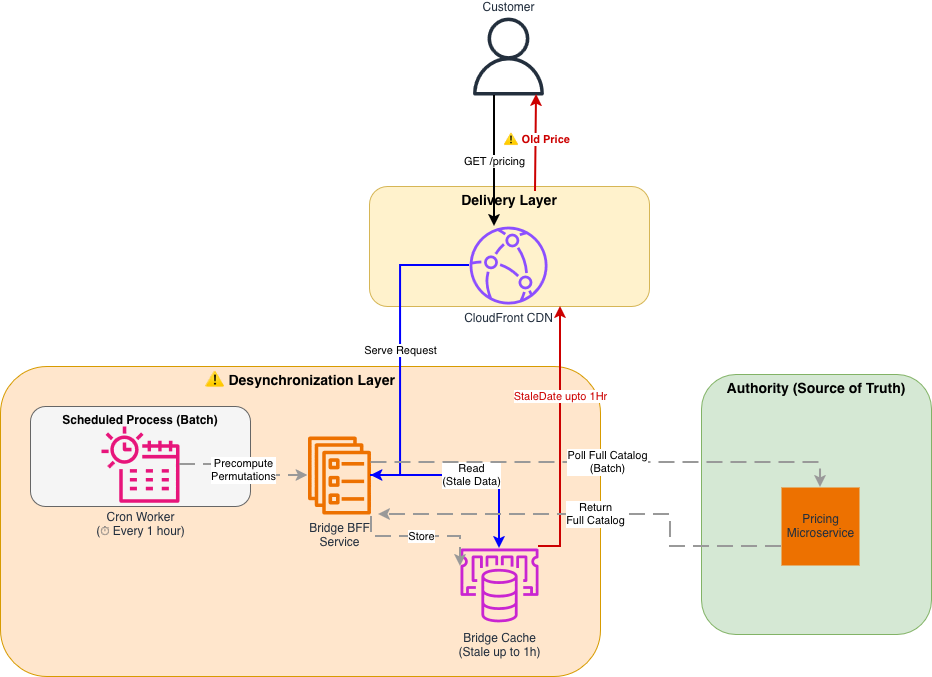
Legacy Data Aggregation architecture

Architecture diagram showing the legacy Data Aggregation layer between the Pricing Engine and CloudFront CDN.

Architecture diagram showing the legacy Data Aggregation layer between the Pricing Engine and CloudFront CDN

Figure 1: Legacy Data Aggregation (DA) Architecture The legacy system relied on a scheduled Cron job, creating a distinct “Desynchronization Layer” between the Authority (Pricing) and the Customer. Precomputation of all product permutations consumed significant storage and compute resources.

The solution: Stateless streaming architecture

Intermediate layers storing data will eventually diverge from the source, so we collaborated with our AWS Technical Account Manager (TAM) and service teams to architect a new solution: the Bulk Arbitration Engine, a stateless orchestration layer that queries the Pricing Engine directly at request time.

The new architecture follows a Pass-Through pattern:

1. Client Request: The browser requests prices for 30 specific SKUs using a single HTTP GET request.

2. Streaming Orchestration: An AWS Lambda function fans out these 30 requests to the Pricing Engine in parallel.

3. Immediate Response: As the Pricing Engine returns data, the Lambda streams it immediately to the client without buffering.

Why Lambda Response Streaming?

We evaluated several alternatives before settling on this approach:

  • Traditional request-response pattern (buffered) – A standard Lambda invocation buffers the full response before returning it to the client, which negates the latency benefit of parallel fan-out. For 30 concurrent SKU lookups, this added seconds of wait time.
  • EC2 with improved caching – This was the legacy approach. Caching layers will eventually drift from the source of truth, which was the core problem we needed to solve.
  • Lambda Response Streaming – This was the only option that let us fan out requests in parallel, stream results as they arrived (reducing time-to-first-byte), and remain fully stateless with no intermediate cache to maintain or invalidate.

New stateless streaming architecture

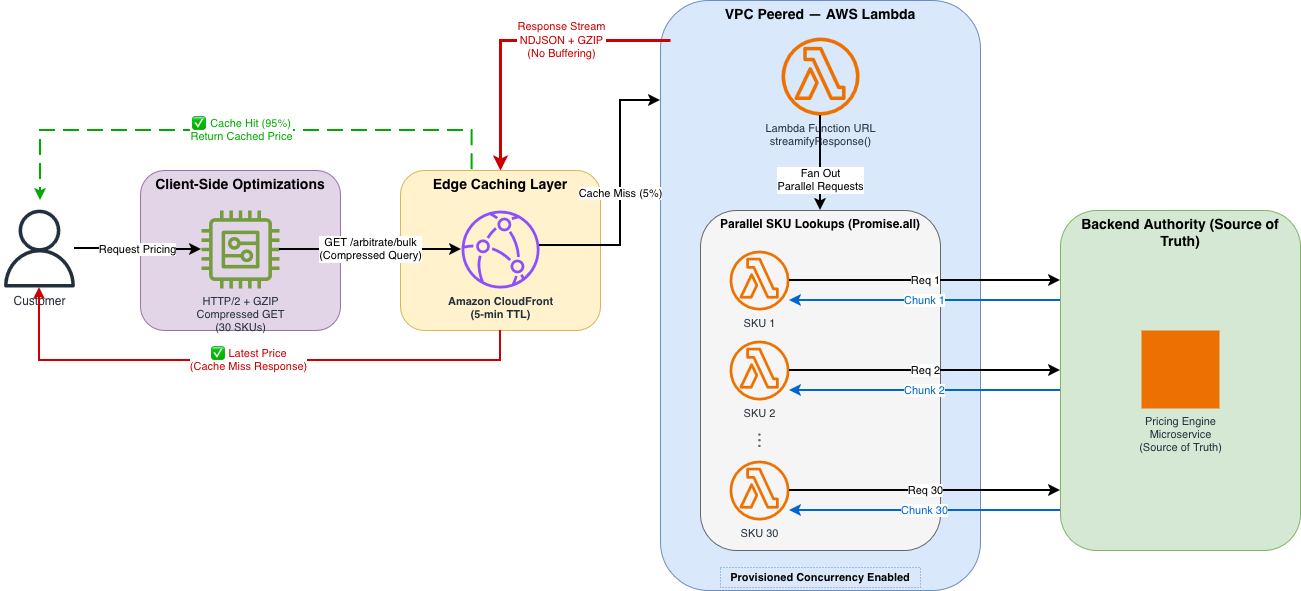
New stateless Lambda Response Streaming architecture with CloudFront caching layer directly connected to Lambda function, which streams real-time responses from Pricing Engine without intermediate buffering. The diagram shows customer GET request to CloudFront, cache hit/miss routing decision, Lambda orchestration of parallel SKU lookups, and streaming response back through CloudFront edge.

Architecture diagram showing the stateless streaming solution with CloudFront connected directly to Lambda.

Architecture diagram showing the stateless streaming solution with CloudFront connected directly to Lambda

Figure 2: Stateless Streaming Architecture The new architecture eliminates the middleware cache. A high-performance stream connects the user directly to the pricing source of truth. CloudFront edge locations cache the response for 95% of traffic, while remaining requests go directly to Lambda for real-time pricing.

Implementation walkthrough

Transitioning to this new architecture required solving two specific technical constraints regarding CDN behavior and cold starts. We implemented the solution in three steps.

Step 1: Implementing the streaming handler

The core of our solution is the Node.js Lambda handler wrapped in awslambda.streamifyResponse(). This allows us to pipe data through a transformation and compression stream directly to the client as it becomes available.

We used a custom NDJSONTransform to convert pricing objects into newline-delimited JSON (NDJSON), allowing the browser to parse and render each price as it arrives rather than waiting for the complete response.

// Lambda Handler with Response Streaming
// File: lambda-handler.js

import * as awslambda from "aws-lambda";
import * as zlib from "zlib";
import { pipeline } from "stream/promises";
import { NDJSONTransform } from "./transforms/ndjson-transform.js";

// Constants
const PROCESSING_MODE = process.env.PROCESSING_MODE || "MODE_QUERYSTRING";
const MODE_QUERYSTRING = "MODE_QUERYSTRING";

// The Handler MUST be wrapped in streamifyResponse() to enable streaming
export const handler = awslambda.streamifyResponse(
  async (event, responseStream, _context) => {
    try {
      if (PROCESSING_MODE === MODE_QUERYSTRING) {
        // Set response metadata with status code and headers
        const httpResponseMetadata = {
          statusCode: 200,
          headers: {
            "Content-Type": "application/x-ndjson",
            "Content-Encoding": "gzip",
            "Cache-Control": "public, max-age=300", // 5 min cache
            "X-Custom-Header": "lambda-streaming",
          },
        };

        responseStream = awslambda.HttpResponseStream.from(
          responseStream,
          httpResponseMetadata
        );

        const ndjsonTransform = new NDJSONTransform();

        // Create gzip stream with fast compression level (Z_BEST_SPEED = Level 1)
        // Level 1 prioritizes speed over compression ratio for real-time responses
        const gzip = zlib.createGzip({
          level: zlib.constants.Z_BEST_SPEED,
        });

        // Process the request, writing to the gzip stream
        await processRequestUsingQueryString(event, ndjsonTransform, _context);

        // Pipeline: Transform → Compress → Send
        await pipeline(ndjsonTransform, gzip, responseStream);
      }

      // ... error handling
    } catch (error) {
      console.error("Lambda streaming error:", error);
      responseStream.destroy();
    } finally {
      await flushMetrics().catch(console.error);
    }
  }
);

Helper function to fan-out the requests in parallel:

// Process request: fan out SKU lookups in parallel
async function processRequestUsingQueryString(event, ndjsonTransform, context) {
  try {
    // Parse query string to extract SKU list
    const queryString = event.rawQueryString || "";
    const skus = parseCompressedQueryString(queryString);

    // Fetch pricing in parallel using Promise.all
    const pricingPromises = skus.map((sku) =>
      fetchPricingForSKU(sku).catch((err) => ({
        sku: sku.id,
        error: err.message,
      }))
    );

    const pricingResults = await Promise.all(pricingPromises);

    // Emit each result as a separate NDJSON line
    for (const result of pricingResults) {
      ndjsonTransform.write(result);
    }

    ndjsonTransform.end();
  } catch (error) {
    ndjsonTransform.destroy(error);
  }
}

The handler also uses helper functions for parsing the compressed query string (parseCompressedQueryString), fetching individual SKU prices with connection pooling (fetchPricingForSKU), and flushing metrics to Amazon CloudWatch (flushMetrics).

Key implementation details:

  • awslambda.streamifyResponse() wraps the handler so it streams data in real time instead of waiting for the full response from the pricing engine.
  • NDJSONTransform converts objects to newline-delimited JSON (one object per line)
  • GZIP (GNU zip) compression with Z_BEST_SPEED (Level 1) prioritizes speed over compression ratio
  • pipeline() handles error propagation and stream cleanup
  • Response headers include Cache-Control for CloudFront caching

Step 2: Compressing the request data into a GET request

We needed to send complex request data (30 SKUs, context metadata) to the API.

Constraint: CloudFront and standard HTTP specs treat POST requests as non-idempotent, meaning they are not cacheable by default.

Our approach: We developed a dense, compressed query string format to fit the complex request data into a standard GET request. Format: g=group1(p=SKU-A:1:p=SKU-B:2)…

This allowed us to strictly use GET requests, keeping the request URI within standard length limits (~800 bytes) while carrying the same data as a 3-4KB JSON body.

Client-Side Code: Building the Compressed Query String

// Client-side: Building the compressed query string format
// File: pricing-client.js

/**
 * Builds a compressed query string for bulk pricing requests
 * Format: g=group1(p=SKU-A:1:p=SKU-B:2:p=SKU-C:3)
 * @param {Array} skus - Array of SKU objects with { id, variant }
 * @param {Object} context - Customer context { customerId, region, sessionId }
 * @returns {string} Compressed query string
 */
function buildPricingQueryString(skus, context = {}) {
  if (!skus || skus.length === 0) {
    throw new Error("SKUs array cannot be empty");
  }

  if (skus.length > 30) {
    throw new Error("Maximum 30 SKUs per request. Split into multiple batches.");
  }

  // Build SKU portion: p=SKU-001:1:p=SKU-002:2
  const skuParts = skus
    .map((sku) => {
      const variant = sku.variant || 1;
      return `p=${sku.id}:${variant}`;
    })
    .join(":");

  // Build context portion (optional)
  let contextPart = "";
  if (context && Object.keys(context).length > 0) {
    const contextStr = Object.entries(context)
      .map(([key, value]) => `${key}=${value}`)
      .join(":");
    contextPart = `:c=${contextStr}`;
  }

  // Final format: g=group1(p=SKU-A:1:p=SKU-B:2:c=customerId=123:region=US-EAST-1)
  return `g=group1(${skuParts}${contextPart})`;
}

/**
 * Fetches pricing data with streaming NDJSON response parsing
 * Core pattern: read chunks, split by newlines, parse each line as JSON
 */
async function fetchPricingStream(skus, options = {}) {
  const queryString = buildPricingQueryString(skus);
  const url = `${options.baseUrl}?${queryString}`;
  const response = await fetch(url, {
    method: "GET",
    headers: { Accept: "application/x-ndjson" },
  });

  // Stream the response using the ReadableStream API
  const reader = response.body.getReader();
  const decoder = new TextDecoder();
  const pricingData = [];
  let buffer = "";

  while (true) {
    const { done, value } = await reader.read();
    if (done) break;

    // Decode chunk and append to buffer
    buffer += decoder.decode(value, { stream: true });

    // Split by newlines (NDJSON format: one JSON object per line)
    const lines = buffer.split("\n");

    // Keep the last incomplete line in buffer
    buffer = lines.pop() || "";

    // Parse each complete line as a JSON object
    for (const line of lines) {
      if (line.trim()) {
        const pricingObject = JSON.parse(line);
        pricingData.push(pricingObject);

        // Optional: update UI immediately as each price arrives
        if (options.onChunk) {
          options.onChunk(pricingObject);
        }
      }
    }
  }

  reader.releaseLock();
  return pricingData;
}

On page load, the client calls fetchPricingStream with up to 30 SKUs and an onChunk callback that updates each product’s DOM (Document Object Model) element as pricing chunks arrive. Helper functions handle updating individual price elements, displaying variant information, and gracefully degrading with a user-friendly message if pricing is temporarily unavailable.

Step 3: Configuring CloudFront for uncacheable requests

To allow CloudFront to cache these complex GET requests effectively, we configured a precise Cache Policy that includes all query strings and specific headers.

# Terraform: CloudFront Cache Policy Configuration
# File: cloudfront-cache-policy.tf

resource "aws_cloudfront_cache_policy" "pricing-cache-policy" {
  name = "${var.lambda_function_name}-cache-policy"

  # TTL Configuration
  default_ttl = 300  # 5 minutes
  max_ttl     = 1800 # 30 minutes
  min_ttl     = 300   # 5 minute

  parameters_in_cache_key_and_forwarded_to_origin {
    # Don't cache based on cookies (we don't use them)
    cookies_config {
      cookie_behavior = "none"
    }

    # Allowlist specific headers for cache key
    headers_config {
      header_behavior = "whitelist"
      headers {
        items = [
          "x-ecom-pricing-1",   # Custom headers (anonymized)
          "x-ecom-pricing-2",  
          "x-ecom-pricing-3"    
        ]
      }
    }

    # Include query strings in cache key
    # This verifies different SKU combinations have separate cache entries
    query_strings_config {
      query_string_behavior = "all"
    }

    # Enable automatic GZIP compression
    enable_accept_encoding_gzip = true
  }
}

# CloudFront Origin Request Policy (forward headers to Lambda)
resource "aws_cloudfront_origin_request_policy" "pricing-origin-policy" {
  name = "${var.lambda_function_name}-origin-policy"

  headers_config {
    header_behavior = "whitelist"
    headers {
      items = [
        "x-ecom-pricing-1",
        "x-ecom-pricing-2",
        "x-ecom-pricing-3"
      ]
    }
  }

  query_strings_config {
    query_string_behavior = "all"
  }

  cookies_config {
    cookie_behavior = "none"
  }
}

The CloudFront distribution itself is configured with HTTPS-only viewer protocol, the cache policy and origin request policy as shown in the preceding section, and points to the Lambda as its origin through HTTPS.

Cache policy highlights:

  • 5-minute default TTL balances freshness and cache efficiency
  • Query strings included in cache key (different SKU combos = separate cache entries)
  • Header allowlisting allows custom pricing variants
  • Automatic GZIP compression reduces bandwidth
  • 5–30 minute TTL range provides flexibility for different content

Performance optimization results

We optimized the system through four distinct phases, testing each configuration with K6 load test scripts (500 concurrent users, 30 items per request) to simulate high-traffic events like Black Friday.

Phase 1: The baseline (Global VPN)

We tested our initial proof-of-concept with the default network configuration, where all outbound traffic (including requests to AWS services like Lambda) was routed through a global VPN, forcing traffic onto the public network and back into the AWS backbone, adding unnecessary network hops and delays. The Lambda used a standard buffered response with no compression. The results were suboptimal (4,500ms P90) because connection overhead dominated the request.

  • DNS resolution: approximately 50 ms
  • TCP handshake: approximately 100 ms
  • TLS negotiation: approximately 150 ms
  • Total connection overhead: approximately 300 ms per call

This overhead created a massive bottleneck for latency before business logic even ran.

Phase 2: Amazon VPC Peering and warm starts

To remove the network penalty, we acted on two fronts:

  • First: Moved the Lambda inside an Amazon Virtual Private Cloud (Amazon VPC) peered directly to the pricing origin, cutting DNS and TLS overhead to near zero for internal calls.
  • Second: Enabled Provisioned Concurrency for Lambda to remove the 500–1000 ms cold start latency.

With these changes, P90 latency dropped to 1,000 ms, a 4.5x improvement, but still not real-time enough.

Phase 3: HTTP/2 and GZIP compression

The remaining bottleneck was the sheer size of the data transfer. We targeted two optimizations:

  • HTTP/2 Multiplexing: Enabled HTTP/2 multiplexing to reuse a single TCP connection for the 30 parallel SKU lookups, saving seconds of cumulative handshake time.
  • GZIP Compression: Applied GZIP compression (Level 1 / Z_BEST_SPEED), which reduced the response size by 76 percent (170KB → 40KB).

These two optimizations brought P90 latency down to 218 ms.

Phase 4: Production (edge caching)

In the final phase, we layered CloudFront edge caching on top of the optimized Lambda. Because we had successfully converted our request data to a GET request (Step 2), we could now cache the computed prices for 95 percent of incoming traffic.The final P90 latency landed at 50 ms.In practice, the 95 percent cache hit ratio means only 1 in 20 requests actually invokes the Lambda function; the rest are served directly from CloudFront edge locations closest to the customer. During peak events like Black Friday, this translates to millions of requests served at edge speed without touching the origin, keeping both latency and compute costs minimal.

Performance metrics table

Metric Phase 1 (Baseline) Phase 2 (VPC) Phase 3 (HTTP/2) Phase 4 (Production)
P50 Latency 1,670 ms 501 ms 176 ms 35 ms
P90 Latency 4,500 ms 1,000 ms 218 ms 50 ms
P99 Latency 5,100 ms 2,400 ms 500 ms 150 ms
Cache Hit Ratio <1% <1% <1% 95%
Response Size 170 KB 170 KB 40 KB 40 KB
Concurrent Users 500 500 500 500
P90 Improvement vs Baseline 1x 4.5x 20x 90x

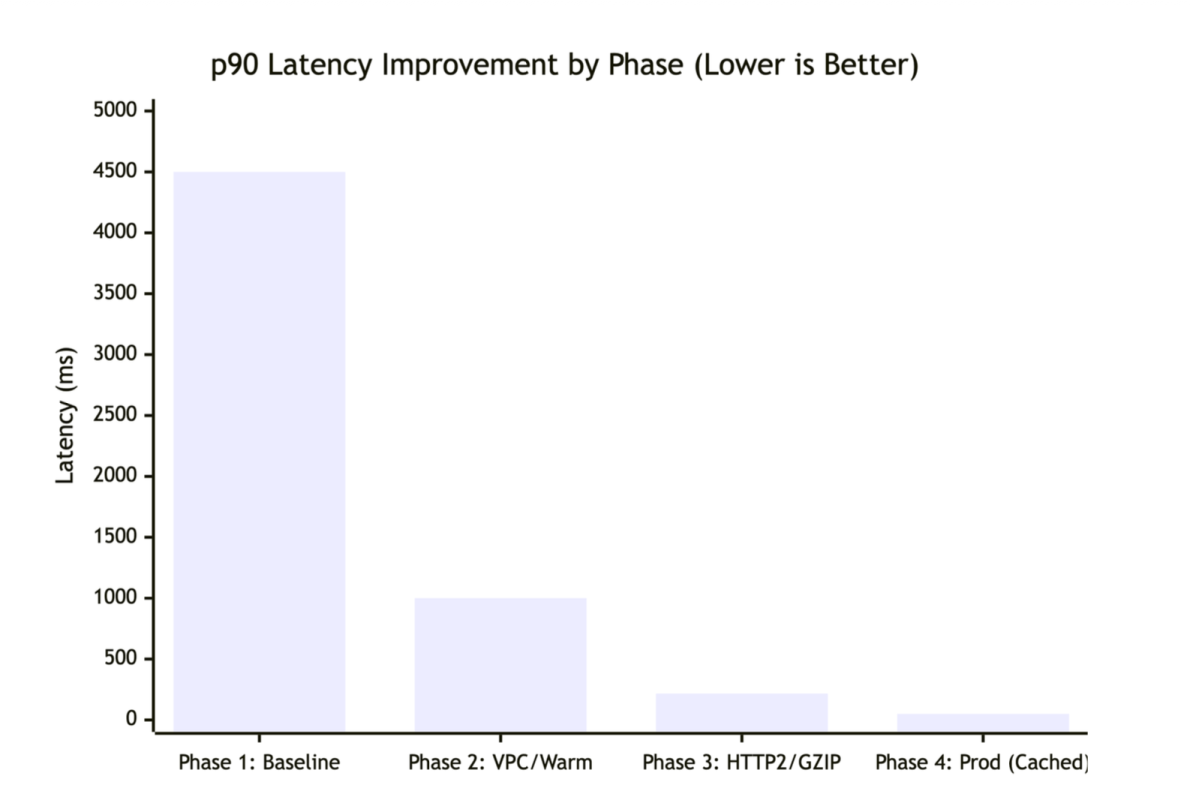
The following chart shows P90 latency improvements across each optimization phase.

Latency improvements across four optimization phases

Latency improvements across four optimization phases.

K6 load test configuration:

// A sample K6 load test script
import http from 'k6/http';
import { check } from 'k6';

export let options = {
  stages: [
    { duration: '2m', target: 100 },  // Ramp up
    { duration: '5m', target: 500 },  // Stay at 500 concurrent users
    { duration: '2m', target: 0 },    // Ramp down
  ],
  thresholds: {
    http_req_duration: ['p(90)<100', 'p(99)<500'], // P90 < 100ms, P99 < 500ms
  },
};

export default function () {
  const url = 'https://api.example.com/pricing?g=group1(p=SKU-001:1:p=SKU-002:2:...)';
  const res = http.get(url);
  
  check(res, {
    'status is 200': (r) => r.status === 200,
    'response has content': (r) => r.body.length > 0,
  });
}

Resilience, scale, and security considerations

Beyond latency, we designed the system to handle failure gracefully, scale under load, and protect data in transit.

Batching limits

The 30-item limit per request is intentional. If a page requires more (for example, 50 items), the client logic splits them into multiple parallel batches.–We chose 30 because of the following:

  • Lambda execution time under 5 seconds
  • Prevents timeout issues during high latency
  • Balances parallel requests vs. Lambda concurrency limits
  • Typical product listing pages show 20–30 items
async function fetchLargePricingBatch(skus) {
  const BATCH_SIZE = 30;
  const batches = [];

  // Split into 30-item chunks
  for (let i = 0; i < skus.length; i += BATCH_SIZE) {
    batches.push(skus.slice(i, i + BATCH_SIZE));
  }

  // Fetch all batches in parallel
  const results = await Promise.all(
    batches.map((batch) =>
      fetchPricingStream(batch, { timeout: 30000 })
    )
  );

  // Flatten results
  return results.flat();
}

Partial failures

The streaming architecture is resilient. If pricing for one item fails, the stream doesn’t crash; it continues processing the remaining items, so the user still sees a mostly complete page.

Partial failure handling:

async function processRequestUsingQueryString(event, ndjsonTransform, context) {
  const skus = parseCompressedQueryString(event.rawQueryString);

  for (const sku of skus) {
    try {
      const pricing = await fetchPricingForSKU(sku);
      ndjsonTransform.write(pricing);
    } catch (error) {
      // Emit error object but continue processing other SKUs
      ndjsonTransform.write({
        sku: sku.id,
        variant: sku.variant,
        error: error.message,
        timestamp: new Date().toISOString(),
      });
    }
  }

  ndjsonTransform.end();
}

Data protection

  • While constructing the query string on the client exposes the request structure, this data (SKUs, variants) is already public. The actual pricing logic and business rules remain securely protected within the Pricing Engine.
  • Data in transit encrypted with TLS 1.3.
  • Amazon VPC endpoint connection to pricing engine (no internet exposure).
  • No sensitive data logged (PII, pricing algorithms excluded).
  • CloudTrail logs API calls for audit trail.

Conclusion

Stale pricing forces engineering teams to choose between freshness and scale. With the Data Aggregation pattern, we attempted to maintain both but compromised on data integrity due to the lag inherent in scheduled synchronization.By using AWS Lambda Response Streaming and Amazon CloudFront, we removed the need for a synchronization layer entirely. The result is a system that delivers the 50 ms latency required for a smooth user experience while supporting price consistency between the product page and checkout.

Beyond performance, this architecture significantly reduced operational footprint: compute fleet shrank from over 100 auto-scaled instances during peak events to only 5–10 Lambda functions, lowering maintenance and operational costs. This outcome was the result of close collaboration between Samsung’s ecommerce engineering team, our AWS Technical Account Manager (TAM), and the Lambda and CloudFront service teams, who helped architect the solution, review design decisions, and guide Samsung through production readiness. This technique applies to similar high-traffic data aggregation scenarios: product catalogs, inventory systems, recommendation engines, or services that combine multiple backend responses in real-time.

To get started, identify your highest-latency aggregation endpoints, evaluate whether your request data can be converted to cacheable GET requests and implement Lambda Response Streaming for a single endpoint before migrating your full API

Resources:AWS Lambda Response Streaming documentationLambda Response Streaming tutorialAmazon CloudFront Developer GuideCloudFront cache policies

Learn more

For more on the concepts and technologies discussed in this post:


About the authors

Stenberg: curl summer of bliss

Post Syndicated from jzb original https://lwn.net/Articles/1077946/

Daniel Stenberg has announced
that curl will not be accepting vulnerability reports from July 1
through August 3, unless the submitter has a paid support
contract. He is calling it the “curl summer of bliss”.

As previously mentioned, we have been under a huge pressure
for the last four months or so. Now we need some rest. We do not
expect this deluge to be over.

[…] If you and your Open Source projects also want to participate
in the summer of bliss 2026: just do it and let us know! I would of
course encourage you to do so. To take care of yourself as a top
priority.

The project’s issue and pull-request trackers on GitHub will remain
open. The planned release date for curl 8.22.0 has been pushed back
two weeks to September 2, 2026.

Security updates for Monday

Post Syndicated from jzb original https://lwn.net/Articles/1077945/

Security updates have been issued by AlmaLinux (.NET 9.0), Debian (apache2, chromium, jpeg-xl, librabbitmq, and openssl), Fedora (apptainer, bind9-next, chezmoi, chromium, collectd, composer, dnsdist, gh, python-django5, python-python-multipart, varnish, varnish-modules, vmod-querystring, vmod-uuid, weasyprint, and xorg-x11-server-Xwayland), Mageia (cups, expat, libpng, libssh, memcached, nghttp2, openimageio, packages, proftpd, and radare2), Oracle (.NET 10.0, .NET 8.0, .NET 9.0, and firefox), Red Hat (postfix and valkey), and SUSE (afl, alloy, ansible-core, apache-pdfbox, chromedriver, chromium, cpp-httplib-devel, dpkg, elemental-operator, elemental-toolkit, enc, erlang, ffmpeg-7, firewalld, git-bug, golang-github-prometheus-prometheus, grafana, GraphicsMagick, graphite2, kernel, kernel-devel, lcms2, ldns, libsoup, libyang, libzypp, logback, mariadb, NetworkManager, openssh, openvswitch, perl-GD, perl-XML-LibXML, polkit, postgresql-jdbc, postgresql18, python, python-django, python-M2Crypto-doc, python-Pygments, python-pygments, python-requests, python313-Django6, qemu, rpcbind, samba, strongswan, tmux, uriparser, and xdg-dbus-proxy).

Growing the Cloudflare AI team with talent from Ensemble AI

Post Syndicated from Alex Reneau original https://blog.cloudflare.com/ensemble-ai-talent-joins-cloudflare/

Today, we’re excited to share that key members of the team at Ensemble AI are joining Cloudflare to help accelerate our work in AI infrastructure and make it easier for developers to run powerful AI models efficiently at scale.

Ensemble AI, founded in 2023 in San Francisco, has spent the last few years focused on one of the most important challenges in AI: making large models faster, smaller, and more cost-effective to serve, without sacrificing quality. The team has developed new approaches to model compression and efficient inference that are designed to reduce the memory, compute, and deployment overhead of large language models and multimodal architectures.

As AI becomes a core part of how developers build applications, the economics of inference matter more than ever. Models are getting larger; workloads are becoming more dynamic. And customers increasingly expect AI to be available everywhere: globally distributed, fast, reliable, and affordable. Bringing the Ensemble AI team into Cloudflare strengthens our ability to make that possible.

Incorporating Ensemble’s expertise 

The team at Ensemble AI has focused on preserving the structure inside modern AI models while reducing the cost of running them. Instead of treating model efficiency as only a quantization or hardware problem, Ensemble has explored new model building blocks that can make neural networks more compact and efficient at the architectural level.

A core part of this work is NdLinear, a drop-in replacement for standard linear layers in transformer models that operates directly on multidimensional activations rather than flattening structure away. This enables models to preserve meaningful axes, such as heads, channels, spatial dimensions, or other structured representations, while reducing parameter count and compute. Ensemble has also developed NdLinear-LoRA, an efficient adaptation method designed to reduce the trainable parameters required for fine-tuning large models.

These approaches complement other efficiency techniques, including quantization and vector quantization. Together, they point toward a future where developers can run capable AI models with substantially lower memory, compute, and cost requirements.

Making AI inference more efficient

Cloudflare Workers AI gives developers access to serverless GPU-powered inference on Cloudflare’s global network. As developers build more AI-native applications, the ability to serve models efficiently becomes a critical part of the platform.

Inference cost is one of the biggest barriers to scaling AI applications. Every improvement in model size, memory footprint, throughput, and GPU utilization can make AI more accessible to developers and more economical for customers. This is especially important as AI workloads expand beyond simple text generation into agents, multimodal models, personalization, fine-tuning, retrieval, and reinforcement learning.

We are deepening our investment in the core machine learning capabilities needed to make Workers AI faster, more flexible, and more cost-efficient. This builds on top of our existing work on improving model efficiency, including our inference engine Infire, tensor compression techniques like Unweight, and our platform for running extra large language models. The team will focus on improving the economics of serving large language models and other advanced AI architectures, with an emphasis on model efficiency, GPU utilization, and scalable deployment.

Building for the next generation of AI workloads

AI infrastructure is entering a new phase. Developers no longer need only access to models; they need infrastructure that can run models reliably, affordably, and close to users. They need the ability to experiment with different model sizes, fine-tuning approaches, and deployment patterns without being blocked by cost or operational complexity.

Cloudflare is uniquely positioned to help solve this. Our global network, developer platform, and serverless architecture give us the foundation to bring AI closer to where applications already run. The Workers AI Machine Learning Engineering team will help us improve the efficiency layer underneath that experience.

By combining Cloudflare’s global infrastructure with Ensemble’s work in model compression and efficient architectures, we can continue building a platform where developers can deploy AI applications with lower cost, better performance, and less operational overhead.

What’s next

Together, we will continue building the infrastructure needed to make AI more efficient, accessible, and useful for developers everywhere. Our goal is simple: help developers run powerful AI workloads at global scale while improving the economics of inference across the Cloudflare platform. If you want to join us in our mission, check out our careers page.


AWS Weekly Roundup: AWS FinOps Agent in preview, Gemma 4 on Bedrock, Kiro Pro Max, and more (June 15, 2026)

Post Syndicated from Esra Kayabali original https://aws.amazon.com/blogs/aws/aws-weekly-roundup-aws-finops-agent-in-preview-gemma-4-on-bedrock-kiro-pro-max-and-more-june-15-2026/

This week, New York City is hosting AWS Summit, bringing together builders, customers, and AWS teams for a full day of announcements, demos, and technical sessions at the Javits Center. I wrote blog posts for some of the Summit launches, so I am excited to see them go live this week. I just won’t be watching from the Javits Center. I’ll be at a four-day music festival, following the launches on my phone while trying to figure out how to put up a tent. If you weren’t able to attend in person like me, the keynote livestream is available on June 17, with Dr. Swami Sivasubramanian, VP of Agentic AI, and Chet Kapoor, VP of Security Services and Observability, covering new capabilities across developer tools, AI infrastructure, and security.

Here’s what happened this week.

Headlines
How frontier teams are reinventing AI-native development — Swami published a detailed post this week drawing on data from experiments across hundreds of Amazon engineering teams. The findings are worth reading carefully if you are thinking about how to structure AI adoption on your own team.

A six-engineer team rebuilt the Amazon Bedrock inference engine in 76 days, a project originally scoped for 30 developers over 12 to 18 months. The median productivity gain across structured pilots with Amazon Stores teams was 4.5x in normalized deployment velocity, with some teams exceeding 10x. Perfect Order Experience went from a two-week feature cycle to shipping in an afternoon. WW Grocery cut design document creation from five days to a few hours.

The post distills these results into five practices for becoming a frontier team. First, invest in agent context: build steering files, coding standards, and structured repositories before writing production code. Second, expect an initial slowdown while workflows are restructured, and push through it. Third, maintain a steady backlog of well-scoped tasks so agents can run in parallel without constant supervision. Fourth, make intent explicit through structured specifications before code generation begins. Fifth, shift testing left so agents can self-correct before code reaches the pipeline.

The post closes with a note that commit velocity is only part of the picture, and that a follow-up will cover release management, operations, security operations, and EOL upgrades.

AWS FinOps Agent is now available in preview — AWS FinOps Agent is a new agent for FinOps practitioners and engineering teams that answers cost questions, surfaces optimization opportunities, investigates cost anomalies, and runs recurring FinOps workflows on a defined schedule. You can use it to query your AWS costs, generate cost reports for finance and engineering teams, and surface rightsizing, idle resource, and Savings Plans recommendations from AWS Cost Optimization Hub and AWS Compute Optimizer. The agent can open Jira tickets on your behalf based on those recommendations. When a cost anomaly is detected, FinOps Agent can automatically investigate the root cause and post findings to a Slack channel.

Last week’s launches
I’ll start with one I wrote this week, then cover the other launches that caught my attention:

  • Amazon EC2 M9g and M9gd instances are now generally available — Powered by AWS Graviton5 processors and built on the sixth-generation AWS Nitro System, M9g instances deliver up to 25% better compute performance compared to Graviton4-based instances, with up to 35% faster performance for web applications, up to 35% for machine learning inference, and up to 30% for databases. Graviton5 is the first processor in the AWS fleet to support PCIe Gen6 and DDR5-8800 memory, and includes a 5x larger L3 cache compared to the previous generation. M9g and M9gd instances offer up to 15% higher network bandwidth and 20% higher Amazon EBS bandwidth on average across sizes compared to M8g. This release also introduces the Nitro Isolation Engine, an enhancement to the Nitro System that uses formal verification to provide mathematically proven isolation between virtual machines — establishing Nitro as the first formally verified cloud hypervisor. M9gd instances add up to 11.4 TB of NVMe SSD local storage with 30% higher IOPS compared to M8gd. Both instance types support Instance Bandwidth Configuration (IBC) for adjusting bandwidth allocation between EBS and VPC networking by up to 25%.
  • Anthropic Claude Fable 5 on Amazon Bedrock — Claude Fable 5 launched on Amazon Bedrock on June 9, bringing extended asynchronous task execution, advanced vision capabilities across diagrams, charts, and PDFs, and proactive self-verification. Access requires opting into data sharing via the Data Retention API before invoking the model; Anthropic requires 30-day retention of inputs and outputs for Mythos-class models. Important note on availability: On June 12, Anthropic asked AWS to revoke access to Claude Fable 5 and Claude Mythos 5 for all users to support compliance with a US Government export control directive. All other models, including Opus 4.8, are unaffected. Read the Anthropic statement for details. AWS will share further updates as they become available.
  • Gemma 4 models are now available on Amazon Bedrock — The Gemma 4 family from Google DeepMind is now available on Amazon Bedrock across three variants: Gemma 4 31B (dense, 256K-token context window, suited for reasoning and coding workloads), Gemma 4 26B-A4B (mixture-of-experts architecture, targeting cost- and latency-sensitive workloads), and Gemma 4 E2B (smallest variant, designed for low-latency interactive use cases). All three support native function calling, structured output, reasoning, response streaming, multimodal input across text, image, video, and audio, and more than 35 languages.
  • Amazon OpenSearch Service launches MCP Apps for agentic observability — Amazon OpenSearch Service now supports MCP Apps, enabling observability workflows inside compatible agentic IDEs including Claude Desktop and VS Code. An AI agent in your local environment can investigate incidents using logs, traces, metrics, and alerts stored in OpenSearch domains, collections, and Amazon Managed Service for Prometheus. Each MCP App tool call returns a dual response: a text summary for the agent to reason over and an interactive visualization rendered in the same conversation thread. Available MCP App tools cover log, metrics, and trace investigation; service performance; topology; dynamic visualizations; agent health; cluster health; and instrumentation scoring.

Other AWS news
Here are some additional posts and updates you may find useful:

  • AWS CLI v1 enters maintenance mode — When CLI v1 enters maintenance mode, the botocore and s3transfer dependencies will be vendored directly into the CLI v1 codebase rather than installed as separate packages. This means upgrading CLI v1 will no longer update the standalone botocore or s3transfer packages, and installing those packages independently will have no effect on the versions used by CLI v1. Environments with both CLI v1 and boto3 installed will contain separate copies of these libraries. New CLI v1 releases will be limited to critical bug fixes and security issues. The recommended path is to migrate to AWS CLI v2.
  • AWS Workload Credentials Provider is now available — AWS has launched a new Workload Credentials Provider that enables workloads to obtain short-term AWS credentials without requiring long-term access keys. This supports credential management for applications running outside of AWS, giving teams a way to follow least-privilege access patterns for workloads in third-party or on-premises environments.
  • Kiro Pro Max is now available — Kiro has introduced a new Pro Max tier, adding higher usage limits, access to the latest frontier models, and additional agentic capabilities for development teams. Kiro Pro Max is designed for professional developers who need sustained, high-volume use across coding, specification generation, and agent-driven tasks.

Upcoming AWS events
Check your calendar and sign up for upcoming AWS events:

Visit the AWS Builder Center to meet other builders, contribute solutions, and find resources that help you keep building. You can also browse upcoming AWS-led in-person and virtual events, plus developer-focused sessions.

— Esra

This post is part of our Weekly Roundup series. Check back each week for a quick roundup of interesting news and announcements from AWS!

Accelerate Incident Resolution with PagerDuty and AWS DevOps Agent

Post Syndicated from Shan Kandaswamy original https://aws.amazon.com/blogs/devops/accelerate-incident-resolution-with-pagerduty-and-aws-devops-agent/

When something breaks in production, you find out fast. Understanding why it broke, before the damage spreads, is the hard part. That is where Site Reliability Engineering (SRE) teams lose the most time.

Think about the last time you got paged at 2 a.m. The alert said something broke, not why. You open four or five dashboards, cross-reference deployment logs with AWS CloudTrail events, and scroll through metrics. Twenty or thirty minutes burn before the picture comes together. That manual correlation is where resolution time balloons.

What if the investigation started before you opened your first dashboard?

That’s the idea behind connecting the new native PagerDuty Capability Provider in AWS DevOps Agent. The two systems now talk directly over a built-in OAuth 2.0 connection. When a PagerDuty incident triggers, the DevOps Agent starts investigating while responders are still getting oriented. Connecting them takes a few fields in a console.

What AWS DevOps Agent does

AWS DevOps Agent is a frontier agent built to help engineering teams investigate and resolve production incidents faster. The DevOps Agent works as a first responder, conducting federated investigations across your observability stack, tracing incidents from code changes all the way through to cloud infrastructure impact, and producing detailed mitigation plans. Beyond reactive investigations, it also proactively recommends improvements to your observability, infrastructure, and deployment pipelines to help prevent recurring issues. Through the AWS DevOps Agent web app, you can observe investigations as they unfold, access findings, and steer the analysis in real time.

The central concept is the Agent Space. Think of it as the boundary that defines what your agent can access. Your AWS account serves as the primary source, and from there you layer on secondary capabilities from telemetry providers like Datadog, Dynatrace, New Relic, or Splunk; pipeline tools like GitHub and GitLab; communications from PagerDuty and Slack; and custom Model Context Protocol (MCP) servers for anything else. Every investigation the agent runs, it learns. It maps relationships between your resources such as load balancers to services, services to databases, and deployments to config changes. One team we’ve worked with had the agent map hundreds of infrastructure relationships, and that number keeps growing with each investigation it completes.

PagerDuty, of course, needs no introduction to anyone who’s been responsible for resolving critical, customer-impacting incidents. Engineering teams rely on it to detect, triage, resolve, and learn from incidents. The native PagerDuty Capability Provider in AWS DevOps Agent connects the two directly. PagerDuty incident events drive AWS DevOps Agent investigations automatically. Findings flow back to the originating PagerDuty incident record, including root cause analysis and recommended mitigation steps. They are also available in the AWS DevOps Agent console and web app, giving your whole team visibility into what the agent discovered.

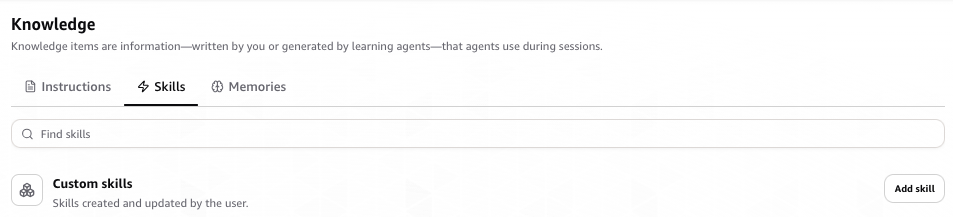
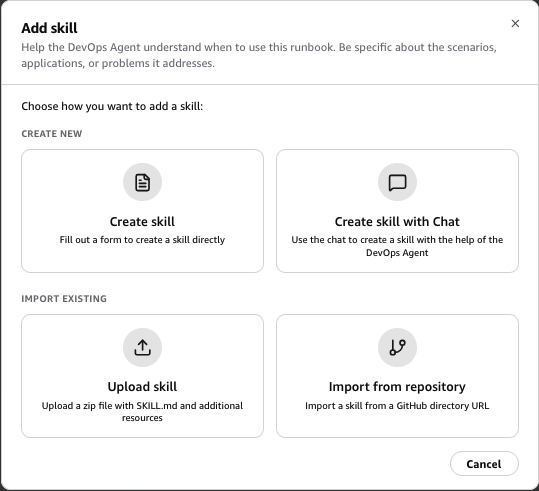
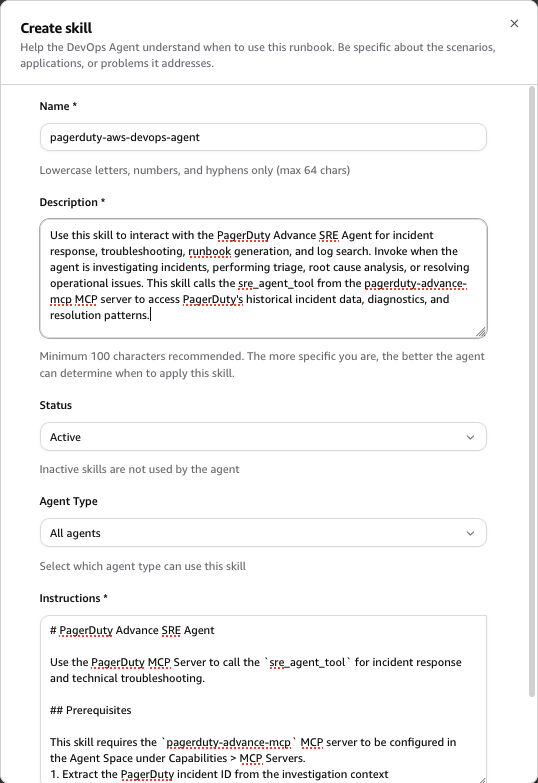
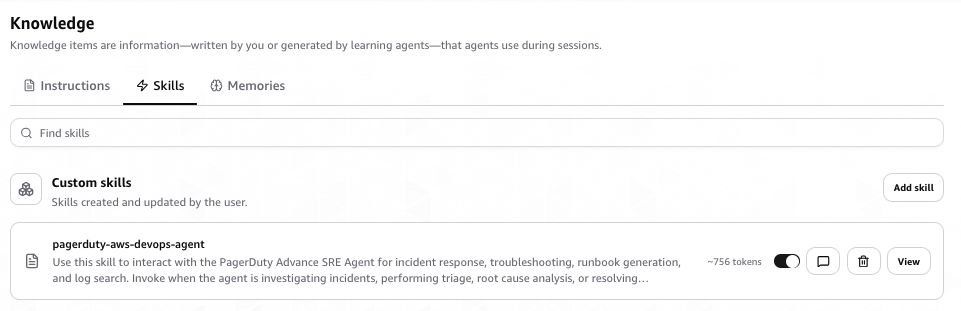
There’s a second piece to this integration worth understanding. By adding the PagerDuty MCP Server as a capability and configuring an AWS DevOps Agent skill for working with PagerDuty, you enable AWS DevOps Agent to query PagerDuty’s institutional memory during investigations. This includes past incidents, diagnostics, resolution patterns, and operational context across both AWS and non-AWS environments. This PagerDuty MCP Server-based connection is separate from the Capability Provider event flow and requires its own setup (covered in Step 6 below). The result is investigations informed by both current signals and prior incident history.

Why this matters

These are practical, tangible changes for your team:

Faster time to root cause. When a PagerDuty incident triggers, AWS DevOps Agent kicks off an investigation automatically. No one has to sign in to another tool, step through a wizard, or remember to initiate anything. The investigation is already running by the time you acknowledge your alert.

Real contextual analysis. The agent correlates PagerDuty incident data with Amazon CloudWatch metrics, AWS CloudTrail logs, application topology, and deployment history, plus telemetry from whichever third-party observability providers you’ve connected, like Datadog, Splunk, New Relic, or Dynatrace. It connects dots that would otherwise take humans significant time to even start connecting.

Investigations start when an incident triggers. AWS DevOps Agent automatically conducts the deep-dive investigation behind the scenes. It reports back its root cause analysis and proposed mitigation steps into the originating PagerDuty incident, with a link to the AWS DevOps Agent web app for more details.

Less time playing detective, more time fixing things. That manual data correlation across four or five tools? The agent handles it. Your people can focus on actually resolving the issue instead of building the investigation timeline by hand.

Nothing extra to host. The native PagerDuty Capability Provider means you’re not standing up additional infrastructure. No servers to manage, no endpoints to maintain on your side.

How the integration works

The architecture is straightforward. Here’s the flow:

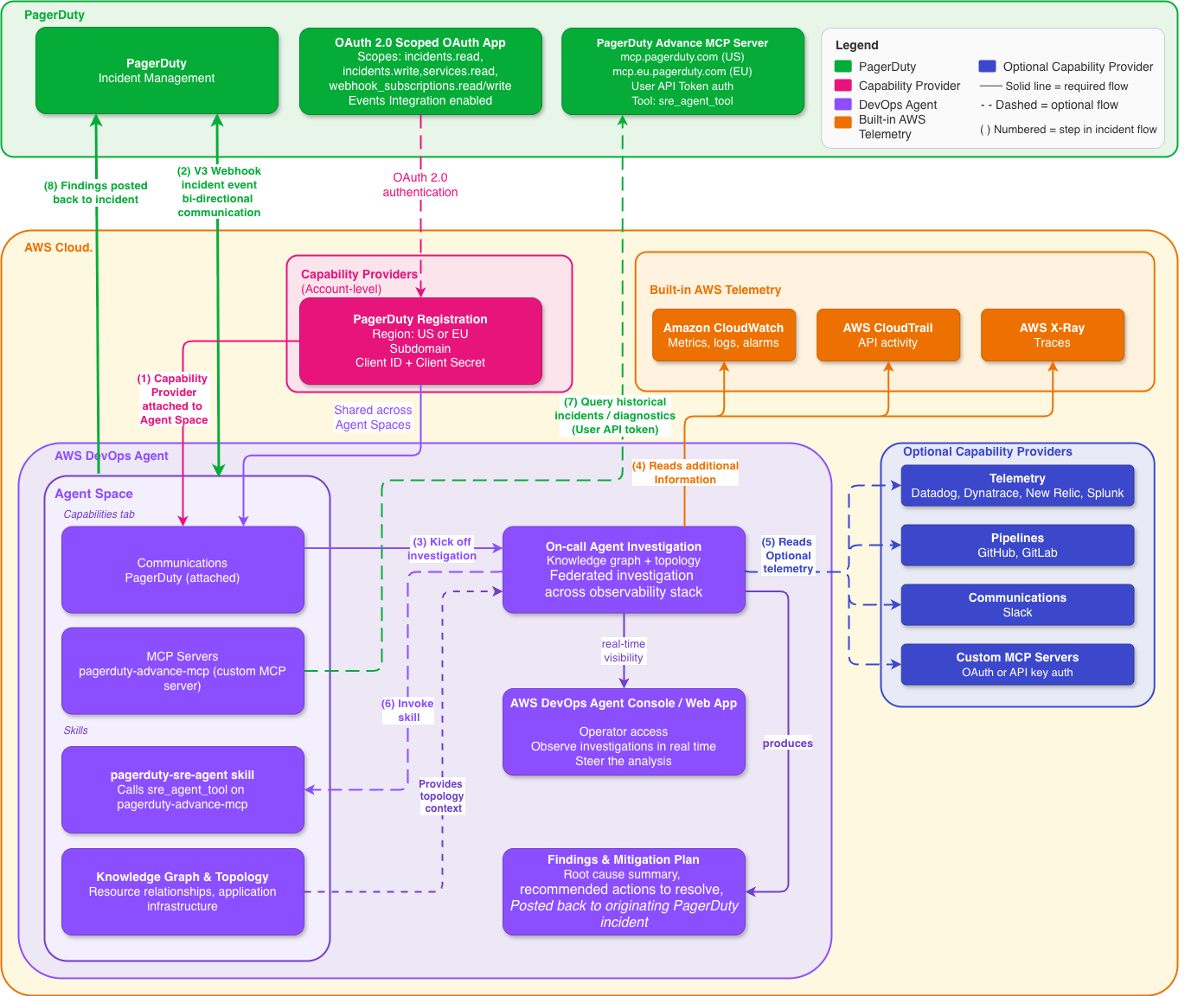
High-level architecture diagram showing PagerDuty connected to AWS DevOps Agent through a native OAuth 2.0 Capability Provider, with the agent investigating across AWS CloudWatch, AWS CloudTrail, and connected telemetry and pipeline tools

Figure 1: High-level architecture, native PagerDuty Capability Provider in AWS DevOps Agent.

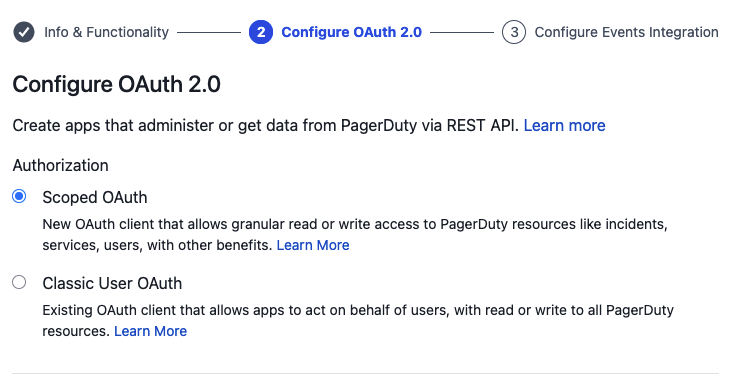
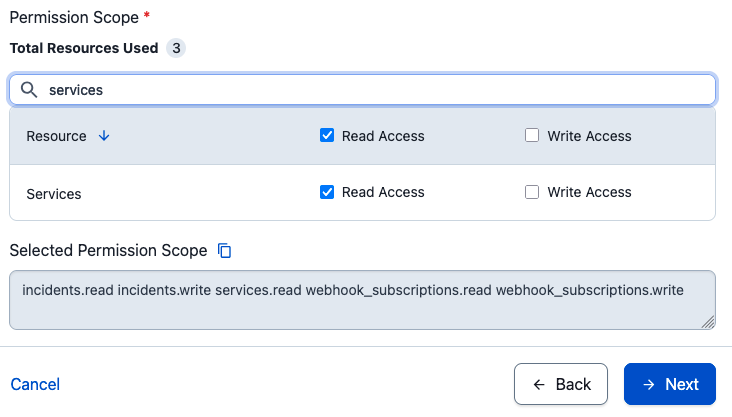
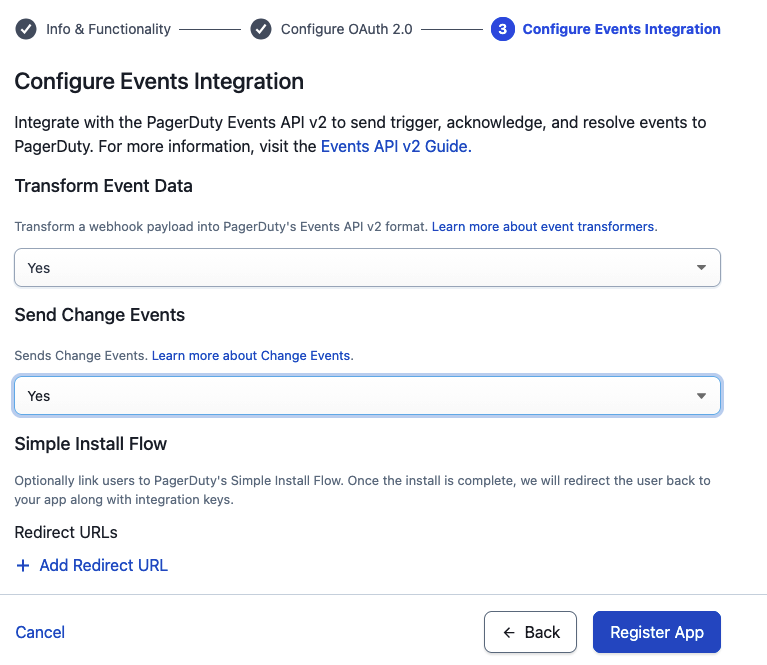
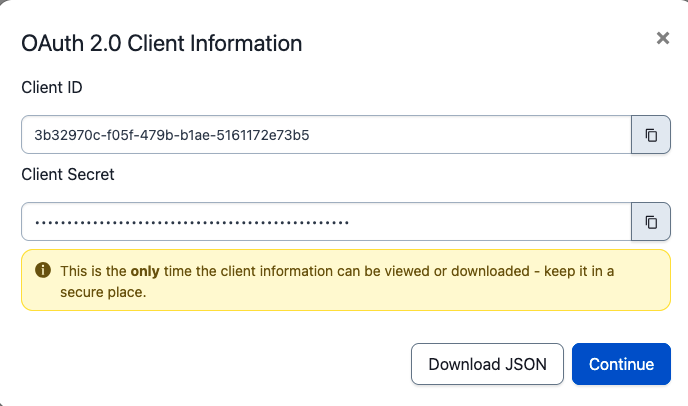
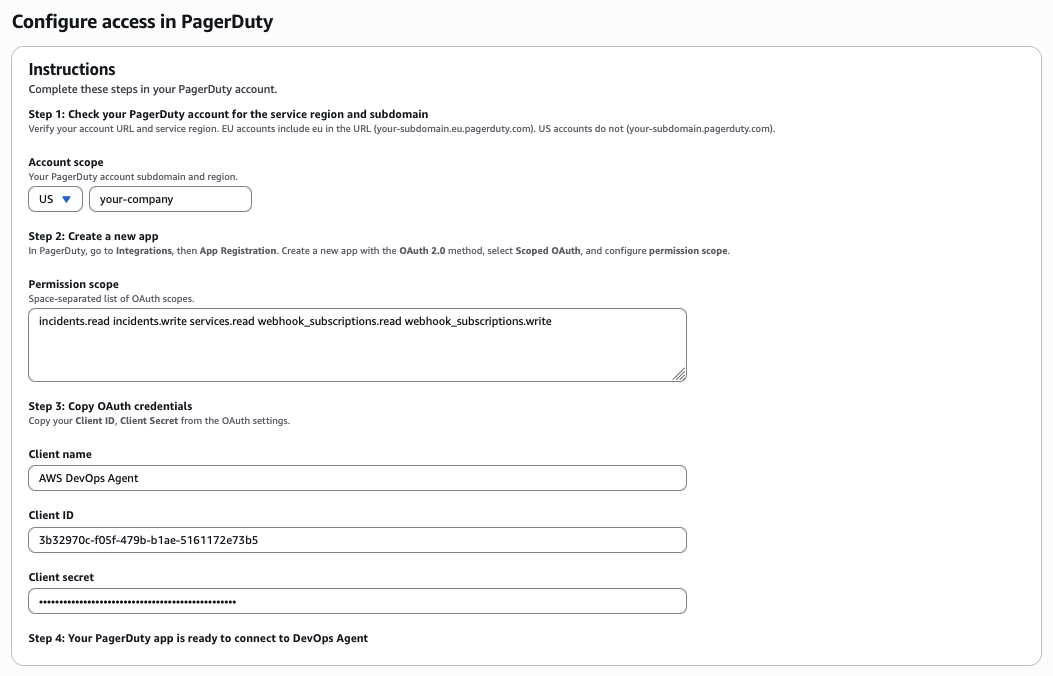
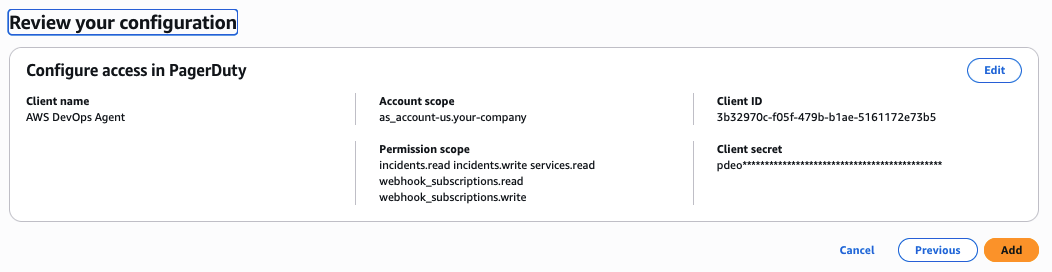
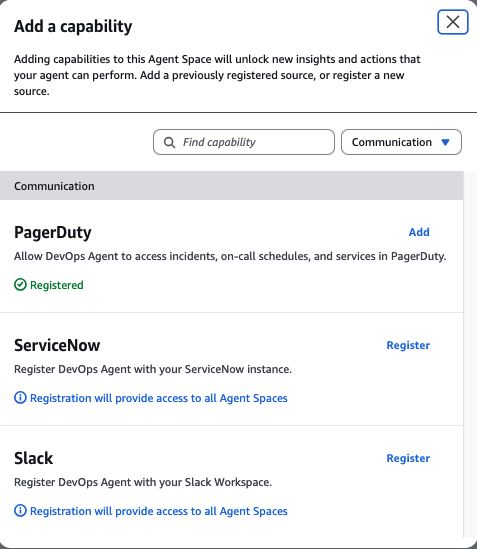
AWS DevOps Agent and PagerDuty authenticate to each other using OAuth 2.0 Scoped OAuth. You register PagerDuty once at the AWS account level as a Capability Provider, and then add it to whichever Agent Spaces need it. Registration is shared across Agent Spaces in the account, so you don’t have to repeat the setup per team.

Once a PagerDuty incident triggers, AWS DevOps Agent picks up the event over the native connection and begins investigating:

  1. Receives the PagerDuty incident event (service, severity, and initial context) via the native Capability Provider connection
  2. If the PagerDuty MCP capability and AWS DevOps Agent skill are configured, queries PagerDuty for related historical incidents, past diagnostics, and resolution patterns to enrich the investigation
  3. Examines AWS resource topology and the relationships between your infrastructure components through its knowledge graph
  4. Reviews AWS CloudTrail logs for recent changes or anything that looks off
  5. Queries Amazon CloudWatch and connected telemetry providers (Datadog, Dynatrace, New Relic, Splunk) for relevant metrics and traces
  6. Cross-references deployment events from configured pipeline tools (GitHub, GitLab) against the incident timeline
  7. Synthesizes potential root causes from all the evidence it’s gathered

The agent builds up a comprehensive picture by introspecting AWS observability data, pulling from connected capability providers, and leveraging the topology mapping that creates a knowledge graph of your application infrastructure. Every investigation it runs expands its understanding of how your resources connect. It discovers relationships you might not have explicitly documented, building a richer map with each incident it works.

Beyond raw data, the agent produces detailed mitigation plans with specific actions to resolve the issue, validate the fix, and revert if needed. The agent posts its findings, root cause summary, and recommended next steps directly to the originating PagerDuty incident record, giving your on-call team actionable information without them having to go digging.

A quick note on security, because it matters. The native connection uses OAuth 2.0 Scoped OAuth with a minimum set of PagerDuty scopes (incidents.read incidents.write services.read webhook_subscriptions.read webhook_subscriptions.write). AWS DevOps Agent only supports the newer scoped OAuth flow; legacy PagerDuty OAuth with a redirect URI is not supported. For inbound events from PagerDuty, only V3 webhooks are supported. Earlier webhook versions won’t work. Traffic flows over HTTPS.

Getting it set up

Setup comes in four phases: register PagerDuty as a Capability Provider at the account level, attach it to your Agent Space, configure the PagerDuty MCP server and AWS DevOps Agent skill for working with PagerDuty to enrich investigations, and verify things work end to end.

What you’ll need

  • An active AWS account with permissions to use AWS DevOps Agent
  • AWS DevOps Agent enabled in a supported AWS Region. You’ll create an Agent Space, which needs two AWS Identity and Access Management (IAM) roles (one for Agent Space operations, one for web app functionality). Both can be auto-created during setup
  • A PagerDuty account with permission to register OAuth apps, plus an Administrator role for Events Integration
  • A PagerDuty Advance license and a PagerDuty User API token (for the MCP integration in Step 6)
  • Your PagerDuty account subdomain (so if your PagerDuty URL is https://your-company.pagerduty.com, the subdomain is your-company)
  • An OAuth client ID and client secret from a PagerDuty app registered with OAuth 2.0 Scoped OAuth

Step 1: Create your Agent Space

Stand up an Agent Space in the AWS DevOps Agent console. This defines the boundary for what the agent can reach into and investigate.

  1. Head to the AWS DevOps Agent console home page.
AWS DevOps Agent console home page with a Begin setup call to action to create your first Agent Space

AWS DevOps Agent console home page.

  1. Create a new Agent Space with a name and a short description, usually scoped to a service or application team’s responsibilities
Create Agent Space form with fields for Agent Space name, optional description, and agent response language

Creating a new Agent Space with a name and description.

  1. Create the Agent Space IAM roles (AWS DevOps Agent requires two IAM roles: one for Agent Space operations and another for its associated web app functionality). You can auto-create them during setup
Agent Space setup screen showing the two IAM roles required, one for Agent Space operations and one for web app functionality

Configuring the two IAM roles required for the Agent Space.

Detailed view of IAM role auto-creation options during Agent Space setup

IAM roles can be auto-created during setup.

  1. Your primary source (the AWS account you’re creating the Agent Space in) is added automatically. If you need the agent to investigate resources in other accounts, add those as secondary sources
Agent Space sources screen showing the AWS account added automatically as the primary source

The AWS account is added automatically as the primary source.

Step 2: Add supporting capabilities

Out of the box, the agent connects to Amazon CloudWatch for metrics, logs, and alarms, and can investigate AWS CloudTrail API activity and AWS X-Ray traces through its read-only permissions. That said, most teams don’t live entirely inside AWS tooling, and that’s where third-party capability providers pull their weight. You can wire in external tools to give the agent a fuller picture of your world:

  • Telemetry: Datadog, Dynatrace, New Relic, or Splunk, so the agent can pull metrics and traces beyond Amazon CloudWatch during investigations
  • Pipelines: GitHub or GitLab, so it can correlate deployments and code changes with incidents
  • Communications: Slack, for team coordination and investigation updates (PagerDuty is configured separately as a Capability Provider in Step 4)
  • MCP Servers: Custom integrations via OAuth or API keys for anything else in your stack

You don’t need everything connected on day one. Start with what makes sense and add more as you go. Each new capability helps the agent discover more infrastructure relationships and investigate more effectively.

Step 3: Set up application topology

Help the agent understand what your application landscape looks like:

  1. Configure IAM roles to define the AWS topology scope for your Agent Space. The agent uses these permissions to determine which resources it can see and investigate
  2. Give the agent time to discover and map the relationships between your resources (it does this automatically as it runs investigations)
  3. Check the interactive topology visualization in the console and make sure your critical components are showing up correctly
  4. If you want the agent to focus on certain tags or resource subsets, add those instructions to your skills

Step 4: Register PagerDuty as a Capability Provider

You register PagerDuty once at the AWS account level. From there, it’s shared across every Agent Space in the account.

First, create the OAuth app in PagerDuty:

  1. In a separate browser tab, sign in to PagerDuty and go to Integrations > App Registration
PagerDuty Integrations menu showing the App Registration option

In PagerDuty, navigate to Integrations then App Registration.

PagerDuty App Registration page for creating a new app

PagerDuty App Registration page.

  1. Create a new app using OAuth 2.0 Scoped OAuth. AWS DevOps Agent does not support legacy PagerDuty OAuth with redirect URI
PagerDuty new app form with OAuth 2.0 Scoped OAuth selected as the authentication type

Create the app using OAuth 2.0 Scoped OAuth.

  1. Under Permissions, grant the minimum scopes: incidents.read incidents.write services.read webhook_subscriptions.read webhook_subscriptions.write
PagerDuty OAuth permissions screen showing the minimum required scopes for incidents, services, and webhook subscriptions

Granting the minimum required OAuth scopes.

  1. Turn on Events Integration so AWS DevOps Agent and PagerDuty can talk in both directions
PagerDuty app configuration with Events Integration enabled

Turn on Events Integration for two-way communication.

  1. Copy your Client ID and Client Secret. You’ll paste them into the AWS console in a minute
PagerDuty app credentials screen displaying the Client ID and Client Secret

Copy the Client ID and Client Secret from PagerDuty.

Then, register PagerDuty in the AWS DevOps Agent console:

  1. In the AWS DevOps Agent console, open the Capability Providers page from the side navigation
  2. In the Available providers section, find PagerDuty under Communication and choose Register
AWS DevOps Agent Capability Providers page with PagerDuty listed under Communication and a Register button

Find PagerDuty under Communication and choose Register.

  1. On the Configure access in PagerDuty page, pick your PagerDuty region (US or EU) and enter your PagerDuty subdomain (if your PagerDuty URL is https://your-company.pagerduty.com, the subdomain is your-company)
  2. Paste in the OAuth Client name, Client ID, and Client secret from PagerDuty. Confirm the minimum scopes (incidents.read incidents.write services.read webhook_subscriptions.read webhook_subscriptions.write)
Configure access in PagerDuty form with fields for region, subdomain, OAuth client name, client ID, and client secret

Enter your PagerDuty region, subdomain, and OAuth credentials.

  1. Review the configuration and choose Add
Review screen for the PagerDuty Capability Provider configuration before adding

Review the configuration and choose Add.

Once registration goes through, PagerDuty shows up under the Currently registered section of the Capability Providers page.

Capability Providers page showing PagerDuty under the Currently registered section

PagerDuty appears under Currently registered after registration.

Step 5: Add PagerDuty to your Agent Space

PagerDuty is registered at the account level. Now connect it to the Agent Space that needs it:

  1. In the AWS DevOps Agent console, pick your Agent Space
  2. Open the Capabilities tab
  3. In the Communications section, choose Add
Agent Space Capabilities tab with the Add button in the Communications section

On the Capabilities tab, choose Add in the Communications section.

  1. Select PagerDuty from the list of available providers
Provider selection list with PagerDuty available to add to the Agent Space

Select PagerDuty from the list of available providers.

  1. Choose Associate service

To update OAuth credentials or remove PagerDuty from an Agent Space, see the AWS DevOps Agent documentation.

Step 6: Add PagerDuty MCP Server and configure the agent skill

The Capability Provider from the previous steps handles the event flow. When a PagerDuty incident triggers, AWS DevOps Agent investigates and posts findings back to the originating PagerDuty incident. To let the agent also pull context from PagerDuty during those investigations, you add two things: the PagerDuty MCP server as a custom MCP capability, and an AWS DevOps Agent skill for working with PagerDuty that tells the agent when and how to use it.

Prerequisites:

  • PagerDuty Advance license
  • A PagerDuty User API token (generate one at User Settings > API Access in PagerDuty)

Add the PagerDuty MCP server:

  1. In your Agent Space, go to Capabilities tab > MCP Servers
Agent Space Capabilities tab showing the MCP Servers section

Open the MCP Servers section on the Capabilities tab.

  1. Add a new custom MCP server with the following configuration:
    • Server URL: https://mcp.pagerduty.com/mcp
    • For EU region PagerDuty accounts, use https://mcp.eu.pagerduty.com/mcp instead
    • Authentication: PagerDuty User API token in the format Token token=<your-pagerduty-api-key>
Add custom MCP server form in the AWS DevOps Agent console

Add a new custom MCP server.

MCP server configuration showing the server URL field and PagerDuty User API token authentication field

Configure the server URL and PagerDuty User API token.

Add the AWS DevOps Agent skill for working with PagerDuty:

The MCP server gives the agent access to PagerDuty tools. The skill tells the agent when and how to use them during investigations.

  1. In your Agent Space, choose Operator access to open the web app in a separate browser window
Agent Space console with the Operator access option to open the web app

Choose Operator access to open the web app.

  1. In the Agent Space Operator web app, navigate to Knowledge and the Skills tab, then choose Add skill
AWS DevOps Agent Operator web app Skills page with the Add skill button

On the Skills page, choose Add skill.

  1. You can select Create skill to create a skill through a wizard, interactively chat with the agent to create a skill, or upload a skill zip file if you already have one
Create skill options showing wizard, interactive chat, and zip upload methods

Choose how to create the skill.

  1. Choose Create skill and fill out the skill instructions from the table below to create a skill
Skill creation form with fields for name, description, status, agent type, and instructions

Fill out the skill instructions.

  1. You should see the pagerduty-aws-devops-agent skill added to the AWS DevOps Agent
Skills page showing the pagerduty-aws-devops-agent skill successfully added and active alongside the core skills

The pagerduty-aws-devops-agent skill added to AWS DevOps Agent.

Skill form instructions:

Field Value
Name pagerduty-aws-devops-agent
Description Use this skill to interact with the PagerDuty Advance SRE Agent for incident response, troubleshooting, runbook generation, and log search. Invoke when the agent is investigating incidents, performing triage, root cause analysis, or resolving operational issues. This skill calls the sre_agent_tool from the pagerduty-advance-mcp MCP server to access PagerDuty’s historical incident data, diagnostics, and resolution patterns.
Status Active
Agent Type Generic
Instructions See the skill instructions code block below.

Skill instructions (paste into the Instructions field):

# PagerDuty Advance SRE Agent

Use the PagerDuty MCP Server to call the `sre_agent_tool` for incident response and technical troubleshooting.

## Prerequisites

This skill requires the `pagerduty-advance-mcp` MCP server to be configured in the Agent Space under Capabilities > MCP Servers.

1. Extract the PagerDuty incident ID from the investigation context
2. Call the `sre_agent_tool` from the `pagerduty-advance-mcp` MCP server with:
   - `message`: a natural language question about the incident
   - `incident_id`: the PagerDuty incident ID
3. If follow-up queries are needed, continue calling `sre_agent_tool` with the same `incident_id` and a new `message`. Pass the `session_id` from the previous response to maintain conversation

## Tool Details

- **Tool name:** `sre_agent_tool`
- **MCP Server:** `pagerduty-advance-mcp`
- **Parameters:**
  - `message` (string, required) — natural language question about the incident
  - `incident_id` (string, required) — the PagerDuty incident ID
  - `session_id` (string, optional) — reuse from previous response for conversation continuity

## What the SRE Agent Can Help With

- Active incident analysis, triage, and resolution
- Root cause analysis and technical explanations
- Incident summaries and catch-ups
- Status updates for stakeholders
- Diagnostic checks and remediation recommendations
- Log interpretation and troubleshooting guidance
- Alert trigger analysis and explanations
- Change event analysis and impact assessment
- Playbook and runbook generation
- Past incident correlation and pattern recognition
- Service dependencies and related system analysis
- Real-time incident monitoring and alerting questions

Step 7: Test and validate

Before you call it finished, confirm things work end to end:

  1. Create a test incident in PagerDuty
  2. Confirm AWS DevOps Agent picks up the event and starts an investigation
  3. Watch the investigation move along in the AWS DevOps Agent console or web app
  4. Review the root cause summary, the mitigation plan, and the investigation findings
  5. Verify that root cause analysis and mitigation steps appear on the originating PagerDuty incident record. If you’ve also connected Slack, check that updates land in your configured channel

Start with a limited scope for your initial Agent Space. Focus on a single application or service first. Get comfortable with the integration, tune your configuration, and then expand from there.

Troubleshooting

A handful of things we’ve seen trip people up:

Registration fails with invalid credentials. Double-check that the Client ID and Client secret were copied from the right PagerDuty OAuth 2.0 Scoped OAuth app. Legacy PagerDuty OAuth apps (the ones configured with a redirect URI) aren’t supported. When credentials do need to change, deregister from the Capability Providers page and re-register with the new values, rather than trying to edit in place.

Webhook events don’t trigger an investigation. AWS DevOps Agent only supports PagerDuty V3 webhooks. If your PagerDuty subscription is still on an older webhook version, upgrade to V3. Full details live in Webhooks Overview in the PagerDuty developer documentation.

PagerDuty shows as registered, but isn’t active in an Agent Space. Registering at the account level and adding the provider to an Agent Space are two separate actions. On the Agent Space’s Capabilities tab, check that PagerDuty appears under Communications. If it doesn’t, add it there.

Region or subdomain mismatch. If your PagerDuty account is on the EU service region, make sure you picked EU during registration. The subdomain has to match the first label of your PagerDuty URL exactly (for example, your-company from https://your-company.pagerduty.com).

Conclusion

Most of what happens in the first several minutes of incident response is undifferentiated heavy lifting like opening dashboards, tailing logs, correlating deployments with AWS CloudTrail events. With the native PagerDuty Capability Provider in AWS DevOps Agent, investigations automatically begin by the time you’ve acknowledged your alert, giving your engineers a head start on root cause analysis before responders have finished triaging.

To get started, check out the AWS DevOps Agent documentation or reach out to your PagerDuty or AWS account team.

Resources

About the authors

Shan Kandaswamy

Shan Kandaswamy

Shan is a Senior Partner Solutions Architect specializing in generative AI at AWS, dedicated to solving complex user challenges. He advocates for innovative AI solutions, distributed architecture, and serverless technologies, helping users harness the power of generative AI in their cloud journey. You can reach him on LinkedIn.

Laith Al-Saadoon

Laith Al-Saadoon

Laith Al-Saadoon is a Principal AI Engineer at AWS. He created and launched AWS MCP Servers (30M+ PyPI downloads) and contributes to Strands Agents SDK — AWS’s open-source framework for building AI agents — along with other agentic AI open-source projects like Mem0 and Agno. He drives AWS’s autonomous software development and agentic AI strategy and builds production agentic systems that make agents work for the world’s largest companies. In his personal time, Laith enjoys the outdoors — fishing, photography, drone flights, and hiking with his wife.

Scott Schreckengaust

Scott Schreckengaust

Scott Schreckengaust brings a biomedical engineering degree and decades of deep domain expertise in healthcare and life sciences to emerging technologies and AI. He’s spent his career building—from automating lab workflows and integrating enterprise systems to architecting full-stack software deployments in regulated environments. Now working as an AI engineer, Scott continues what he’s always done best: partner with customers to uncover their scientific and operational challenges, then engineer solutions that scale. His journey from the bench to the cloud reflects a consistent belief: the best technology is invisible—it just works.


DORA Compliance Success Story: How PayNovus Strengthened Operational Resilience with Nebosystems & SecureVisio | InfoSec SEE 2026

Post Syndicated from Dora original https://nebosystems.eu/dora-compliance-with-securevisio-a-nebosystems-success-story/

The Digital Operational Resilience Act (DORA – Regulation EU 2022/2554) has introduced new requirements for financial entities across the European Union, placing operational resilience at the center of cybersecurity and risk management.

At InfoSec SEE 2026, Nebosystems and PayNovus presented a practical case study demonstrating how a financial institution approached DORA readiness through SecureVisio and Nebosystems’ SOC services.

Presented jointly by Nebosystems and PayNovus at InfoSec SEE 2026.

Watch the full conference presentation now:

The Challenge: Meeting the Requirements of DORA

DORA establishes a comprehensive framework designed to strengthen the resilience of financial institutions against cyber threats, technology disruptions and operational incidents.

Among the key areas addressed by the regulation are:

  • ICT risk management;
  • ICT incident management, classification and reporting;
  • Digital operational resilience testing;
  • Third-party ICT risk management;
  • Continuous monitoring and information sharing.

Meeting these requirements often involves multiple stakeholders, complex processes and numerous security tools. Organizations must maintain visibility across their infrastructure, ensure regulatory alignment and establish efficient mechanisms for managing risks and responding to incidents.

For institutions operating in a highly regulated environment, achieving these objectives requires both technological capabilities and specialized expertise.

Nebosystems’ Approach

As a cybersecurity and compliance partner, Nebosystems supports organizations throughout their digital resilience journey by combining consulting expertise, managed security services, regulatory guidance and advanced cybersecurity technologies.

In the PayNovus project, Nebosystems followed a structured implementation methodology designed to align operational practices and technology capabilities with DORA requirements.

The engagement included three major phases:

1. Assessment and Gap Analysis

The project began with a comprehensive assessment of ICT assets, cybersecurity risks and existing operational processes.

Nebosystems worked closely with stakeholders to:

  • Inventory critical ICT assets;
  • Evaluate cybersecurity risks;
  • Perform a gap analysis against DORA requirements;
  • Map regulatory obligations to operational controls;
  • Establish implementation priorities.

This phase created the foundation for a structured compliance and resilience program.

2. SecureVisio Implementation

To support operational and regulatory requirements, Nebosystems implemented SecureVisio, an integrated cybersecurity orchestration platform designed to unify critical security and compliance functions.

SecureVisio provides a centralized environment that combines:

  • Asset management and CMDB capabilities;
  • IT Governance, Risk, and Compliance (GRC);
  • Threat and Vulnerability Management (TVM);
  • Security Information and Event Management (SIEM);
  • User and Entity Behavior Analytics (UEBA);
  • Extended Detection and Response (XDR);
  • Security Orchestration, Automation and Response (SOAR).

By consolidating these capabilities into a single platform, organizations gain improved visibility across their security ecosystem while reducing operational complexity.

During implementation, Nebosystems supported the deployment of centralized security management processes, automation workflows, risk registers and governance procedures necessary for ongoing compliance activities.

3. Continuous Monitoring and Operational Support

DORA requires continuous visibility and resilience capabilities. Nebosystems complements SecureVisio with managed SOC services, providing continuous monitoring, threat detection, incident response support and expert guidance. This helps organizations maintain an active security posture while supporting ongoing compliance efforts.

Business Outcomes

Organizations implementing SecureVisio together with Nebosystems’ SOC services can benefit from:

  • Improved visibility across ICT assets, risks and compliance activities;
  • Faster detection and response to security incidents;
  • Reduced operational complexity through platform consolidation;
  • Lower total cost of ownership compared to multiple standalone tools;
  • Ongoing access to cybersecurity and compliance expertise;
  • Enhanced readiness for evolving regulatory requirements.

Building Operational Resilience for the Future

The PayNovus case study presented at InfoSec SEE 2026 demonstrates how integrated technology, cybersecurity expertise and continuous monitoring can help financial institutions address DORA requirements while strengthening operational resilience. Through SecureVisio and Nebosystems’ SOC services, organizations gain a practical foundation for ICT risk management, incident response, resilience testing and ongoing compliance activities.

If your organization is preparing for DORA compliance, looking to enhance digital operational resilience, or seeking expert support for cybersecurity governance and security operations, Nebosystems can help.

Contact our team to learn more about:

  • Security Operations Center (SOC) services;
  • SecureVisio implementation and integration;
  • Cybersecurity consulting and managed security services.

Discover how Nebosystems can help your organization navigate DORA requirements, strengthen cyber resilience and build a sustainable framework for digital operational resilience.

The FCC Wants to Eliminate Burner Phones

Post Syndicated from Bruce Schneier original https://www.schneier.com/blog/archives/2026/06/the-fcc-wants-to-eliminate-burner-phones.html

A proposed FCC rule would kill burner phones: phones whose accounts are not attached to a particular person.

The FCC plans to do this by legally forcing the country’s telecoms to store a wealth of personal information about essentially all phone customers, including a government issued identification number and their physical address, alarming privacy advocates and civil rights activists who compare the measures to those from authoritarian countries where it can be difficult to buy a mobile phone plan without giving up your identity.

The proposed change would drastically shake up how people obtain phone plans in the U.S., and have all sorts of privacy and cybersecurity knock-on effects. The FCC is proposing the data collection partly as a way to combat scammers, with telecoms being required to collect other information on business and foreign customers like the intended use case of their bulk phone plan purchase and their IP address. But the changes would mean telecoms collect data on all new and renewing customers, and the FCC provides a long list of other things that the collected data could help authorities with.

Alternate link.

The 7.1 kernel has been released

Post Syndicated from corbet original https://lwn.net/Articles/1077758/

Linus has released the 7.1 kernel.
So it’s only Sunday morning back home, but it’s Sunday afternoon where
I am right now, so I’m doing the 7.1 release at the regular time –
just not in the regular timezone.

Significant changes in 7.1 include
the removal of support for some old 486-based architectures,
some new clone() flags making
process management easier,
BPF support for io_uring,
zero-copy-I/O support for the ublk user-space block
driver,
initial (incomplete) sub-scheduler support
in sched_ext,
more swapping improvements,
a completely rewritten NTFS
implementation
,
and much more. See the LWN merge-window summaries (part 1, part 2) for details.

The collective thoughts of the interwebz