All posts by Veliswa Boya

AWS Weekly Roundup – AWS Storage Day, AWS Israel (Tel Aviv) Region, and More – Aug 8, 2023

Post Syndicated from Veliswa Boya original https://aws.amazon.com/blogs/aws/aws-weekly-roundup-aws-storage-day-aws-israel-tel-aviv-region-and-more-aug-8-2023/

(Editor’s note: Today, we are changing the title of this regular weekly post from AWS Week in Review to AWS Weekly Roundup to better reflect the mix of recent top news and announcements as well as upcoming events you won’t want to miss.)


It’s taken me some time to finally be comfortable with being in front of a camera, a strange thing for a Developer Advocate to say I know! Last week I joined a couple of my team-mates at the AWS London Studios to record a series of videos that will be published in our Build On AWS YouTube Channel. Build On AWS is for the hands-on, technical AWS cloud builder who wants to become more agile and innovate faster. In the channel, you’ll find dynamic, high-quality content that’s designed for developers, by developers!

This video tells you more about what you’ll find in the channel. Check it out and consider subscribing to not miss out when we publish new content.

Now on to the AWS updates. There was a lot of news related to AWS last week, and I’ve compiled a few announcements and upcoming events you need to know about. Let’s get started!

Last Week’s Launches
Here are a few launches from last week that you might have missed:

Microsoft 365 Apps for enterprise now available on Amazon WorkSpaces servicesAmazon WorkSpaces is a fully managed, secure, and reliable virtual desktop in the AWS Cloud. With Amazon WorkSpaces, you improve IT agility and maximize user experience, while only paying for the infrastructure that you use. We announced the availability of Microsoft 365 Apps for enterprise on Amazon WorkSpaces. You can bring your own Microsoft 365 licenses (if they meet Microsoft’s licensing requirements) and activate the applications at no additional cost to run Microsoft 365 Apps for enterprise on Amazon WorkSpaces services.

AWS Israel (Tel Aviv) Region is Now Open – You can now securely store data in Israel while serving users in the vicinity with even lower latency. This is because last week we launched the Tel Aviv Region to give customers an additional option for running applications and serving users from data centers located in Israel.

Amazon Connect Launches – This is one of my favorite AWS services to write about because of how Amazon Connect is changing our customers’ engagement with their own customers. Last week, Amazon Connect announced automatic activity scheduling based on shift duration, custom flow block titles, and archiving and deleting flows from the UI, to name a few.

Other AWS News
A few more news items and blog posts you might have missed:

Customizable thresholds for health events supported on Amazon CloudWatch Internet Monitor – Until this announcement, the default threshold for overall availability and performance scores to invoke a health event was 95 percent. Now, you can customize the thresholds for when to invoke a health event for internet-facing traffic between your end users and your applications hosted on AWS.

Improved AWS Backup performance for Amazon S3 buckets – Now you can speed up your initial Amazon S3 backup workflow and back up buckets with more than 3 billion objects due to improvements to the speed of backups by up to 10x for buckets with more than 300 million objects. This performance improvement is automatically enabled at no additional cost in all Regions where AWS Backup support for Amazon S3 is available.

For AWS open-source news and updates, check out the latest newsletter curated by my colleague Ricardo Sueiras to bring you the most recent updates on open-source projects, posts, events, and more.

For a full list of AWS announcements, be sure to keep an eye on the What’s New at AWS page.

Upcoming AWS Events
We have the following upcoming events:

AWS Storage Day (August 9) – A one-day virtual event where you’ll learn how to prepare for AI/ML with the storage decisions you make now, how to do more with your budget by optimizing storage costs for on-premises and cloud data, and how to deliver holistic data protection for your organization, including recovery planning to help protect against ransomware. Learn more and register here.

AWS Summit Mexico City (August 30)Sign up for the Summit to connect and collaborate with other like-minded folks while learning about AWS.

AWS Community Days (August 12, 19) – Join these community-led conferences where event logistics and content are planned, sourced, and delivered by community leaders: Colombia (August 12), and West Africa (August 19).


P.S. We’re focused on improving our content to provide a better customer experience, and we need your feedback to do so. Take this quick survey to share insights on your experience with the AWS Blog. Note that this survey is hosted by an external company, so the link doesn’t lead to our website. AWS handles your information as described in the AWS Privacy Notice.

– Veliswa

AWS Week in Review – Amazon Security Lake Now GA, New Actions on AWS Fault Injection Simulator, and More – June 5, 2023

Post Syndicated from Veliswa Boya original https://aws.amazon.com/blogs/aws/aws-week-in-review-amazon-security-lake-now-ga-new-actions-on-aws-fault-injection-simulator-and-more-june-5-2023/

Last Wednesday, I traveled to Cape Town to speak at the .Net Developer User Group. My colleague Francois Bouteruche also gave a talk but joined virtually. I enjoyed my time there—what an amazing community! Join the group in order to learn about upcoming events.

Now onto the AWS updates from last week. There was a lot of news related to AWS, and I have compiled a few announcements you need to know. Let’s get started!

Last Week’s Launches
Here are a few launches from last week that you might have missed:

Amazon Security Lake is now Generally Available – This service automatically centralizes security data from AWS environments, SaaS providers, on-premises environments, and cloud sources into a purpose-built data lake stored in your account, making it easier to analyze security data, gain a more comprehensive understanding of security across your entire organization, and improve the protection of your workloads, applications, and data. Read more in Channy’s post announcing the preview of Security Lake.

New AWS Direct Connect Location in Santiago, Chile – The AWS Direct Connect service lets you create a dedicated network connection to AWS. With this service, you can build hybrid networks by linking your AWS and on-premises networks to build applications that span environments without compromising performance. Last week we announced the opening of a new AWS Direct Connect location in Santiago, Chile. This new Santiago location offers dedicated 1 Gbps and 10 Gbps connections, with MACsec encryption available for 10 Gbps. For more information on over 115 Direct Connect locations worldwide, visit the locations section of the Direct Connect product detail pages.

New actions on AWS Fault Injection Simulator for Amazon EKS and Amazon ECS – Had it not been for Adrian Hornsby’s LinkedIn post I would have missed this announcement. We announced the expanded support of AWS Fault Injection Simulator (FIS) for Amazon Elastic Kubernetes Service (EKS) and Amazon Elastic Container Service (ECS). This expanded support adds additional AWS FIS actions for Amazon EKS and Amazon ECS. Learn more about Amazon ECS task actions here, and Amazon EKS pod actions here.

Other AWS News
A few more news items and blog posts you might have missed:

Autodesk Uses Sagemaker to Improve Observability – One of our customers, Autodesk, used AWS services including Amazon Sagemaker, Amazon Kinesis, and Amazon API Gateway to build a platform that enables development and deployment of near-real time personalization experiments by modeling and responding to user behavior data. All this delivered a dynamic, personalized experience for Autodesk’s customers. Read more about the story at AWS Customer Stories.

AWS DMS Serverless – We announced AWS DMS Serverless which lets you automatically provision and scale capacity for migration and data replication. Donnie wrote about this announcement here.

For AWS open-source news and updates, check out the latest newsletter curated by my colleague Ricardo Sueiras to bring you the most recent updates on open-source projects, posts, events, and more.

For a full list of AWS announcements, be sure to keep an eye on the What’s New at AWS page.

Upcoming AWS Events
We have the following upcoming events. These give you the opportunity to meet with other tech enthusiasts and learn:

AWS Silicon Innovation Day (June 21) – A one-day virtual event that will allow you to understand AWS Silicon and how you can use AWS’s unique silicon offerings to innovate. Learn more and register here.

AWS Global Summits – Sign up for the AWS Summit closest to where you live: London (June 7), Washington, DC (June 7–8), Toronto (June 14).

AWS Community Days – Join these community-led conferences where event logistics and content are planned, sourced, and delivered by community leaders: Chicago, Illinois (June 15), and Chile (July 1).

And with that, I end my very first Week in Review post, and this was such fun to write. Come back next Monday for another Week in Review!

Veliswa x

This post is part of our Week in Review series. Check back each week for a quick roundup of interesting news and announcements from AWS!

Announcing General Availability of Step-by-Step Guides for Amazon Connect Agent Workspace

Post Syndicated from Veliswa Boya original https://aws.amazon.com/blogs/aws/announcing-general-availability-of-step-by-step-guides-for-amazon-connect-agent-workspace/

At AWS re:Invent 2022 we announced the availability of step-by-step guides for Amazon Connect agent workspace in preview. My colleagues who collaborated to write the announcement post wrote about some of the challenges that contact centers face with training new agents to get up to speed with their agent desktop. They also mentioned that until agents become proficient, it takes them longer to address customer needs effectively, resulting in customer dissatisfaction.

Amazon Connect agent workspace was announced in 2021 and is a single, intuitive application that provides contact center agents with the tools that are required to onboard an agent quickly, resolve issues efficiently, and improve the customer experience. With Amazon Connect agent workspace, the agent is provided with all the tools on one screen. To think of the agent workspace, imagine the agent accepting a call, a chat, or a task and being given the necessary information about the customer and the case, plus real-time recommendations, all in one place without the need to switch between applications.

Step-by-step guides enable organizations to provide customizable experiences for their agents within the workspace, enabling them to deliver exceptional service from their first day on the job by surfacing relevant information and actions that the agent requires in order to resolve customer issues faster. This is because the step-by-step experience guides agents by identifying customer issues and then recommending subsequent actions, ensuring that the agent never has to guess or rely on past experience to know what comes next. This is helpful for both new and experienced agents. New agents can learn the system and get acquainted with their job and experienced agents can keep to the organization’s standard operating procedures instead of diverging in how they handle the same type of customer request.

Because of this intuitive experience, onboarding time for agents can be reduced by up to 50 percent, time to proficiency for the agent can be reduced by up to 40 percent, and contact handle time is reduced by up to 35 percent ultimately resulting in an improved and consistent customer experience.

A High-Level Overview of Step-by-Step Guides
During the announcement of step-by-step guides in preview, I was fascinated to learn that the experience was researched and developed in the context of Amazon Customer Service. However, step-by-step guides can also be generalized to apply to other types of organizations and use cases including the following:

  • Retail – You can customize guides to suit your retail organization, for example, guides for returning a purchase by a customer.
  • Financial Services – An example would be adding an authorized user to a credit card. Using guides, the agent can help the customer capture new user information and handle approvals through a single workflow that is consolidated within the guides.
  • Hospitality – A great example here would be creating a new reservation at a hotel by consolidating all the processes involved into a single workflow.
  • Embed as a Widget – With this, you can embed guides as a widget in your existing CRM or use APIs to bring guides to a custom workspace that you are already using in your organization.

The preview announcement post provides a deep dive into how to get started with step-by-step guides. It also shows how to deploy a sample guided experience and demonstrates how to customize guides to meet business needs. In this post we look at a high-level overview of what the agent, and the manager, can expect from step-by-step guides.

Agent experience
Step-by-step guides help with onboarding and ramping up of new agents and making them proficient faster by surfacing contextually relevant information and actions needed by agents. The intuitive experience of step-by-step guides provides agents with clear instructions of what they should be doing at any point in time when handling a particular customer case and supports agents in managing complex cases more accurately by automatically identifying issues.

As an example, when a customer calls, the agent workspace automatically presents the agent with the likely issue based on the customer’s history or current context (for instance, making a flight reservation). Then, the step-by-step experience guides the agent through the actions needed to resolve the issue quickly (such as booking a hotel after the flight reservation has been completed).

The following screenshot provides a visual image of how this might look.

Step-by-step Guides

In the UI, the agent is provided with a sequence of simple UI pages to let them focus on one thing at a time, whether that’s an input field or a question to ask the customer. They can go step by step, getting the right information that they need to help the customer’s issue. Along the way, the agent receives scripting that they can read to the customer upon successful completion of the process.

The agent can always escape out of this workflow if it turns out that the workspace surfaced the wrong one, and they can find other workflows by searching for the correct one. This allows them to self-serve and find the right solution in case what was predicted by the step-by-step guides based on the context of the contact wasn’t perfectly aligned to what they needed.

Manager experience
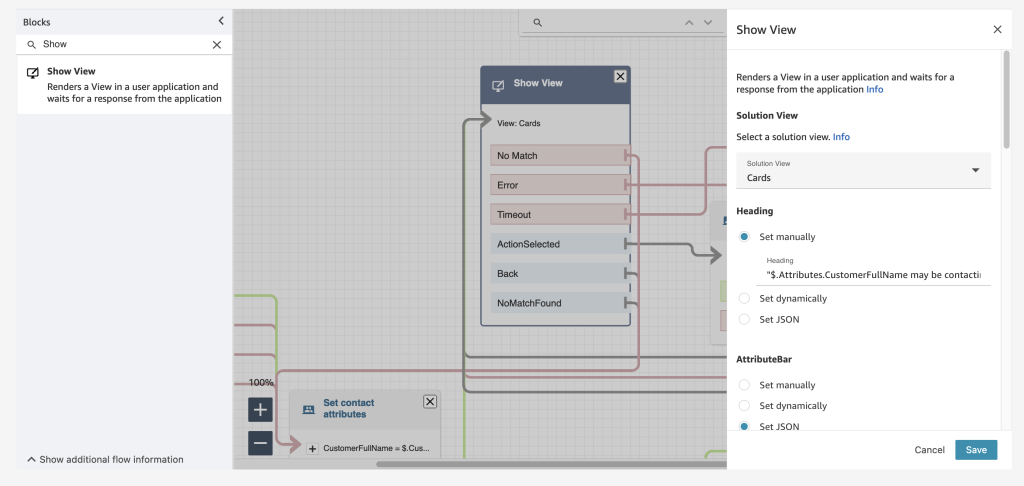
Amazon Connect already has a low-code, no-code builder known as Amazon Connect Flows. Flows provide a drag-and-drop experience for building IVRs, chatbots and routing logic for customers. To enable the same low-code, no-code configuration of step-by-step guides, managers are now provided with a new block within Flows known as the Show View block. The drag-and-drop experience of configuring step-by-step guides ensures that the manager no longer needs to have developers write code to build the custom workflows for the agent. Managers also no longer need to rely on static and difficult-to-follow instructions to use later to train agents.

Example of the Show View block within the Contact Flow editor

Example of the Show View block within the Contact Flow editor

Step-by-step guides are quickly created within the show view block with the help of five pre-configured views. Views are UI templates that can be used to customize the agent’s workspace, and each view is configurable. For example, you can use views to display contact attributes to an agent, provide forms for entering disposition codes, provide call notes, and present UI pages for walking agents through step-by-step guides.

The following example shows a view that we can use to create a guide for an agent that needs to book a round-trip flight for a customer. Booking this trip requires scheduling a flight to and from the destination, collecting traveler information, and asking about additional add-ons. With the form view, agents don’t have to recall all these specific steps; they can follow the wizard in their agent workspace. For each step, the agent is given form fields to fill in or options to choose from in order to quickly book the customer’s flight.

Example UI (View)

Example UI (View)

Step-by-step guides also help business operation teams figure out new ways to ensure that their agents are operating well and adjusting to new use cases. Step-by-step guides provide managers with insights into what agents do during a contact. During a workflow, data about what is shown to an agent, the decisions they made, the amount of time they spent on different steps, and what actions they took is captured and stored as a log record. Managers can use this data to improve their workflows and the agent and customer experiences.

Conclusion
In this post we discussed what step-by-step guides offer the agent and the manager of a contact center. Our customers are excited about how the guided experience consolidates actions into workflows and reduces the number of screens for their agents – at times from five screens down to one. In addition to all the benefits we’ve discussed in this post, guides provide you with opportunities to save between 15 – 20 percent on maintenance cost.

Now Available
Step-by-step guides are now generally available in all Regions where Amazon Connect is available, except AWS GovCloud (US-West) and Africa (Cape Town).

To learn more, refer to the Getting started with step-by-step guides for the Amazon Connect agent workspace post, and please send feedback to AWS re:Post for Amazon Connect or through your usual AWS support contacts.

Veliswa x.

Announcing Amazon DocumentDB Elastic Clusters

Post Syndicated from Veliswa Boya original https://aws.amazon.com/blogs/aws/announcing-amazon-documentdb-elastic-clusters/

Amazon DocumentDB (with MongoDB compatibility) is a scalable, highly durable, and fully managed database service for operating mission-critical JSON workloads. It is one of AWS fast-growing services with customers including BBC, Dow Jones, and Samsung relying on Amazon DocumentDB to run their JSON workloads at scale.

Today I am excited to announce the general availability of Amazon DocumentDB Elastic Clusters. Elastic Clusters enables you to elastically scale your document database to handle virtually any number of writes and reads, with petabytes of storage capacity. Elastic Clusters simplifies how customers interact with Amazon DocumentDB by automatically managing the underlying infrastructure and removing the need to create, remove, upgrade, or scale instances.

A Few Concepts about Elastic Clusters
Sharding – A popular database concept also known as partitioning, sharding splits large data sets into smaller data sets across multiple nodes enabling customers to scale out their database beyond vertical scaling limits. Elastic Clusters uses sharding to partition data across Amazon DocumentDB’s distributed storage system. 

Elastic Clusters – Elastic Clusters is Amazon DocumentDB clusters that allow you to scale your workload’s throughput to millions of writes/reads per second and storage to petabytes. Elastic Clusters comprises one or more shards each of which has its own compute and storage volume. It is highly available across three Availability Zones (AZs) by default, with six copies of your data replicated across these three AZs. You can create Elastic Clusters using the Amazon DocumentDB API, AWS SDK, AWS CLI, AWS CloudFormation, or the AWS console.

Scale Workloads with Little to No Impact – With Elastic Clusters, your database can scale to millions of operations with little to no downtime or performance impact.

Integration with Other AWS Services – Elastic Clusters integrates with other AWS services in the same way Amazon DocumentDB does today. First, you can monitor the health and performance of your Elastic Clusters using Amazon CloudWatch. Second, you can set up authentication and authorization for resources such as clusters through AWS Identity and Access Management (IAM) users and roles and use Amazon Virtual Private Cloud (Amazon VPC) for secure VPC-only connections. Last, you can use AWS Glue to import and export data from and to other AWS services such as Amazon Simple Storage Service (Amazon S3), Amazon Redshift, and Amazon OpenSearch Service.

Getting Started with Elastic Clusters
Previously, I mentioned that you can use either the AWS console, AWS CLI, or AWS SDK to create Elastic Clusters. In the examples below, we will look at how you can create a cluster, scale up or out, and scale in or down using the AWS CLI:

Create a Cluster
When creating a cluster, you will specify the vCPUs that you want for your Elastic Clusters at provisioning. With the size of vCPUs that you provision, you will also get a proportionate amount of memory, expressed in vCPUs. Elastic Clusters automatically provisions the necessary infrastructure (shards and instances) on your behalf.
aws docdb-elastic create-cluster
--cluster-name foo
--shard-capacity 2
--shard-count 4
--auth-type PLAIN_TEXT
--admin-user-name docdbelasticadmin
--admin-user-password password

Scale Up or Out
If you need more compute and storage to handle an increase in traffic, modify the shard-count parameter. Elastic Clusters scales the underlying infrastructure up or out to give you additional compute and storage capacity.
aws docdb-elastic update-cluster
--cluster-arn foo-arn
--shard-count 8

Scale In or Down
If you no longer need the compute and storage that you currently have provisioned, either due to a decline in database traffic or the fact that you originally over-provisioned, modify the shard-count parameter. Elastic Clusters scales the underlying infrastructure in or down.
aws docdb-elastic update-cluster
--cluster-arn foo-arn
--shard-count 4

General Availability of Elastic Clusters for Amazon DocumentDB
Amazon DocumentDB Elastic Clusters is now available in all AWS Regions where Amazon DocumentDB is available, except China and AWS GovCloud. To learn more, visit the Amazon DocumentDB page.

Veliswa x

New – Announcing Automated Data Preparation for Amazon QuickSight Q

Post Syndicated from Veliswa Boya original https://aws.amazon.com/blogs/aws/new-announcing-automated-data-preparation-for-amazon-quicksight-q/

In this post that was published in September 2021, Jeff Barr announced general availability of Amazon QuickSight Q. To recap, Amazon QuickSight Q is a natural language query capability that lets business users ask simple questions of their data.

QuickSight Q is powered by machine learning (ML), providing self-service analytics by allowing you to query your data using plain language and therefore eliminating the need to fiddle with dashboards, controls, and calculations. With last year’s announcement of QuickSight Q, you can ask simple questions like “who had the highest sales in EMEA in 2021” and get your answers (with relevant visualizations like graphs, maps, or tables) in seconds.

Data used for analytics is often stored in a data warehouse like Amazon Redshift, and these unfortunately tend to be optimized for programmatic access via SQL rather than for natural language interaction. Furthermore, BI teams, understandably, tend to optimize data sources for consumption by dashboard authors, BI engineers, and other data teams, therefore using technical naming conventions that are optimized for dashboards (for example, “CUST_ID” instead of “Customer”) and SQL queries. These technical naming conventions are not intuitive to be used by business users.
To solve this, BI teams spend hours manually translating technical names into commonly used business language names to prepare the data for natural language questions.

Today, I’m excited to announce automated data preparation for Amazon QuickSight Q. Automated data preparation utilizes machine learning to infer semantic information about data and adds it to datasets as metadata about the columns (fields), making it faster for you to prepare data in order to support natural language questions.

A Quick Overview of Topics in QuickSight Q
Topics became available with the introduction of QuickSight Q. Topics are a collection of one or more datasets that represent a subject area that your business users can ask questions about. Looking at the example mentioned earlier (“who had the highest sales in EMEA in 2021”), one or more datasets (for example, a Sales/Regional Sales dataset) would be selected during the creation of this Topic.

As the author, once the Topic is created:

  • You would spend time selecting the most relevant columns from the dataset to add to the Topic (for example, excluding time_stamp, date_stamp columns, etc.). This can be challenging because without visibility to usage data of columns in dashboards and reports, you can find it hard to objectively decide which columns are most relevant to your business users to include in a Topic.
  • You would then spend hours reviewing the data and manually curating it to set configurations that are specific to natural language (for example, add “Area” as a synonym for the “Region” column).
  • Lastly, you would spend time formatting the data in order to ensure that it is more useful when presented.
  • QuickSight Q Topic

    QuickSight Q Topic

How Does Automated Data Preparation for Amazon QuickSight Q Work?
Creating from Analysis: The new automated data preparation for Amazon QuickSight Q saves time by enabling the capability to create a Topic from analysis and therefore saving you the hours that you would spend doing all the translation by automatically choosing user-friendly names and synonyms based on ML-trained models that seek to find synonyms and common terms for the data field in question. Moreover, instead of you selecting the most relevant columns, automated data preparation for Amazon QuickSight Q automatically selects high-value columns based on how they are used in the analysis. It then binds the Topic to this existing analysis’ dataset and prepares an index of unique string values within the data to enable natural language search.

Automated Field Selection and Classification: I mentioned earlier that automated data preparation for Amazon QuickSight Q selects high value columns, but how does it know which columns are high-value? Automated data preparation for Amazon QuickSight Q automates column selection based on signals from existing QuickSight assets, such as reports or dashboards, to help you create a Topic that is relevant to your business users. In addition to selecting high-value fields from a dataset, automated data preparation for Amazon QuickSight Q also imports new calculated fields that the author has created in the analysis, thereby not requiring them to recreate these in a Topic.

Automated Language Settings: At the beginning of this article, I talked about technical naming conventions that are not intuitive for business users. Now, instead of you spending time translating these technical names, column names are automatically updated with friendly names and synonyms using common terms. Looking at our Sales dataset example, CUST_ID has been assigned a friendly name, “Customer”, and a number of synonyms. Synonyms will now be added automatically to columns (with the option to customize further) to support a wide vocabulary that may be relevant to your business users.

Friendly names & Synonyms for columns

Friendly Names & Synonyms for Columns

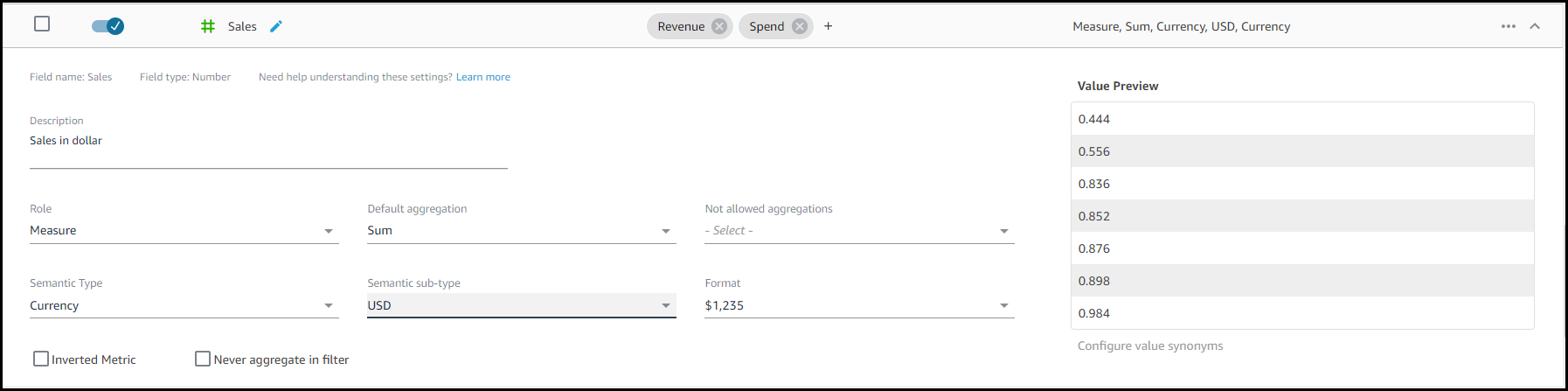
Automated Metadata Settings: Automated data preparation for Amazon QuickSight Q detects Semantic Type of a column based on the column values and updates the corresponding configuration automatically. Formats for values will now be set to be used if a particular column is presented in the answer. These formats are derived from formats that you may have defined in an analysis.

Semantic Type Settings

Semantic Type Settings

Available Today
Automated Data Preparation for Amazon QuickSight Q is available today in all AWS Regions where QuickSight Q is available. To learn more, visit the Amazon QuickSight Q page. Join the QuickSight Community to ask, answer, and learn with others in the QuickSight Community.

Veliswa x

New – Announcing Amazon EFS Elastic Throughput

Post Syndicated from Veliswa Boya original https://aws.amazon.com/blogs/aws/new-announcing-amazon-efs-elastic-throughput/

Today, we are announcing the availability of Amazon EFS Elastic Throughput, a new throughput mode for Amazon EFS that is designed to provide your applications with as much throughput as they need with pay-as-you-use pricing. This new throughput mode enables you to further simplify running workloads and applications on AWS by providing shared file storage that doesn’t need provisioning or capacity management.

Elastic Throughput is ideal for spiky and unpredictable workloads with performance requirements that are difficult to forecast. When you enable Elastic Throughput on an Amazon EFS file system, you no longer need to think about actively managing your file system performance or over-paying for idle resources in order to ensure performance for your applications. When you enable Elastic Throughput, you don’t specify or provision throughput capacity, Amazon EFS automatically delivers the throughput performance your application needs while you the builder pays only for the amount of data read or written.

Amazon EFS is built to provide serverless, fully elastic file storage that lets you share file data for your cloud-based applications without having to think about provisioning or managing storage capacity and performance. With Elastic Throughput, Amazon EFS now extends its simplicity and elasticity to performance, enabling you to run an even broader range of file workloads on Amazon EFS. Amazon EFS is well suited to support a broad spectrum of use cases that include analytics and data science, machine learning, CI/CD tools, content management and web serving, and SaaS applications.

A Quick Review
As you may already know, Amazon EFS already has the Bursting Throughput mode, which is available as a default and supports bursting to higher levels for up to 12 hours a day. If your application is throughput constrained on Bursting mode (for example, utilizes more than 80 percent of permitted throughput or exhausts burst credits), then you should consider using Provisioned (which we announced in 2018), or the new Elastic Throughput modes.

With this announcement of Elastic Throughput mode, and in addition to the already existing Provisioned Throughput mode, Amazon EFS now offers two options for workloads that require higher levels of throughput performance. You should use Provisioned Throughput if you know your workload’s performance requirements and you expect your workload to consume a higher share (more than 5 percent on average) of your application’s peak throughput capacity. You should use Elastic Throughput if you don’t know your application’s throughput or your application is very spiky.

To access Elastic Throughput mode (or any of the Throughput modes), select Customize (selecting Create instead will create your file system with the default Bursting mode).

Create File system

Create File system

New - Elastic Throughput

New – Elastic Throughput

You can also enable Elastic Throughput for new and existing General Purpose file systems using the Amazon EFS console or programmatically using the Amazon EFS CLI, Amazon EFS API, or AWS CloudFormation.

Elastic Throughput in Action
Once you have enabled Elastic Throughput mode, you will be able to monitor your cost and throughput usage using Amazon CloudWatch and set alerts on unplanned throughput charges using AWS Budgets.

I have a test file system elasticblog that I created previously using the Amazon EFS console, and now I cannot wait to see Elastic Throughput in action.

File system (elasticblog)

File system (elasticblog)

I have provisioned an Amazon Elastic Compute Cloud (Amazon C2) instance which I mounted to my file system. This EC2 instance has data that I will add to the file system.

I have also created CloudWatch Alarms, which will monitor throughput usage and set alarm thresholds (ReadIOBytes, WriteIOBytes, TotalIOBytes, and MetadataIOBytes).

CloudWatch for Throughput Usage

CloudWatch for Throughput Usage

The CloudWatch dashboard for my test file system elasticblog looks like this.

CloudWatch Dashboard - TotalIOBytes for File System

CloudWatch Dashboard – TotalIOBytes for File System

Elastic Throughput allows you to drive throughput up to a limit of 3 GiB/s for read operations and 1 GiB/s for write operations per file system in all Regions.

Available Now
Amazon EFS Elastic Throughput is available in all Regions supporting EFS except for the AWS China Regions.

To learn more, see the Amazon EFS User Guide. Please send feedback to AWS re:Post for Amazon Elastic File System or through your usual AWS support contacts.

Veliswa x

Announcing General Availability of Amazon Connect Cases

Post Syndicated from Veliswa Boya original https://aws.amazon.com/blogs/aws/announcing-general-availability-of-amazon-connect-cases/

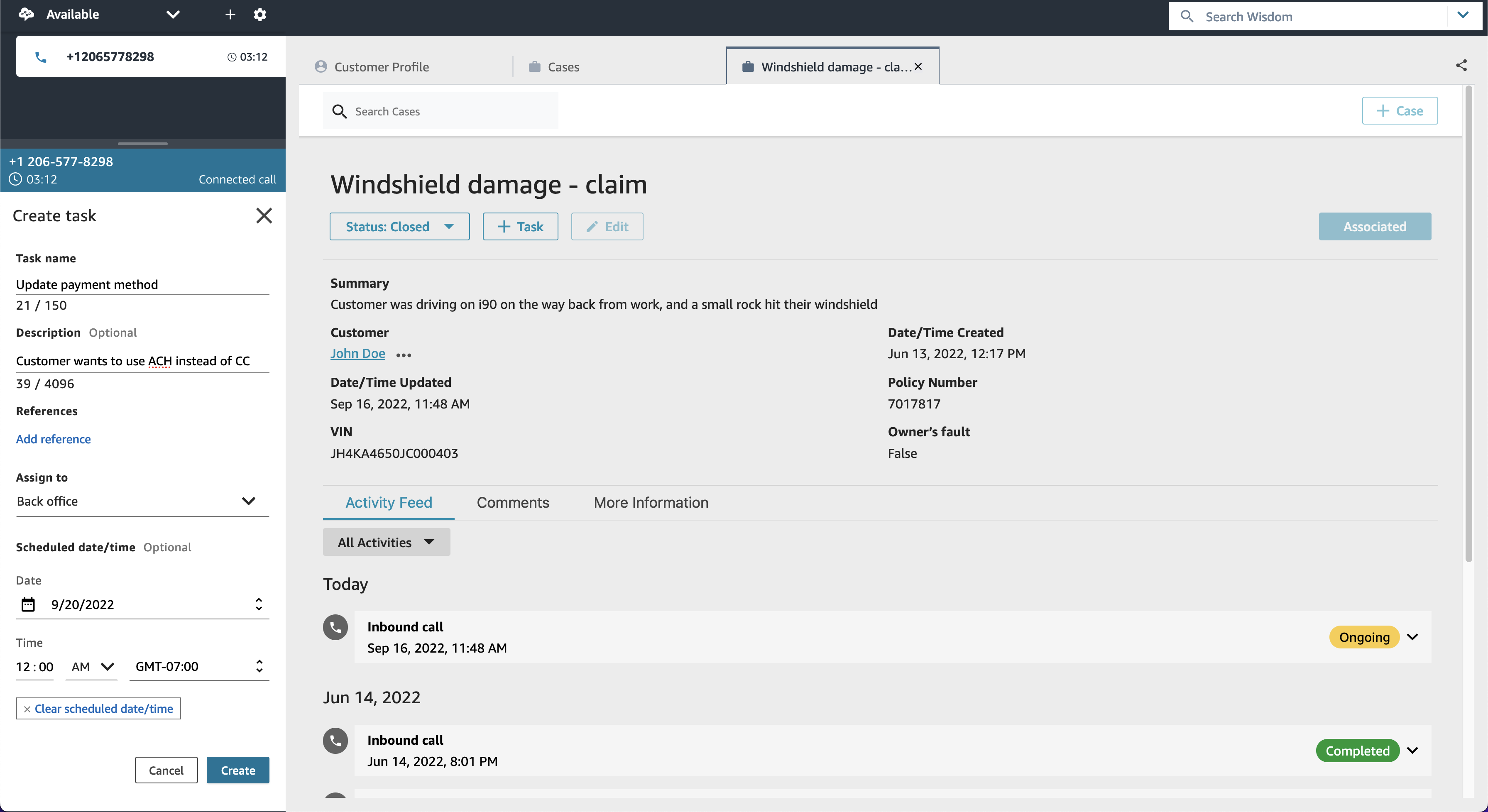
In June 2022 AWS announced a preview of Amazon Connect Cases, a feature of Amazon Connect that simplifies these customer interactions and reduces the average handle times of issues.

Today I am excited to announce the general availability of Amazon Connect Cases. Cases, a feature of Amazon Connect, makes it easy for your contact center agents to create, collaborate on, and quickly resolve customer issues that require several customer conversations and follow-up tasks, and they can focus on solving the customer issue, no matter how simple or how complex. Agents have relevant case details (such as date and time opened, issue summary, or customer information) in a single unified view, and they can focus on solving the customer issue.

Getting started with Cases takes only a few clicks because it is built into Amazon Connect. With Cases, you automatically create cases or find existing cases, saving agents time searching and entering data manually. Cases accelerates resolution times, improves efficiency, and reduces errors to help increase customer satisfaction.

Best of all, Cases is part of the unified agent application that also includes the Amazon Connect Contact Control Panel to handle contacts, Amazon Connect Customer Profiles to identify the customer and personalize the experience, Amazon Connect Wisdom to surface relevant knowledge articles, and Amazon Connect Tasks to automate, track, and monitor follow up items.

An Overview of Amazon Connect Cases

Litigation Practice Group is a provider of legal support for debt relief. Litigation’s Director of Business Intelligence, Alex Miles, spoke about how they have experienced Cases. He said:

“Amazon Connect not only addresses many of the technological limitations we were facing but brings with it a suite of modern solutions for all our business needs. One of those needs is case management to handle operating activities, including payments, document control, and legal cases. Amazon Connect Cases seamlessly integrates with our existing contact center workflows. Our agents and legal teams now have full performance visibility and spend less time on manual tasks, creating more time to find solutions to enhance the customer journey.”

Cases provides built-in case management capabilities, eliminating the need for contact centers to build custom solutions or integrate with third-party products to handle complex customer
issues. For every issue, Cases enables agents to view case history and activity all in one place, automatically capture case data from interactive voice response (IVR) or chats (via Amazon Lex), and track follow-up work with Tasks.

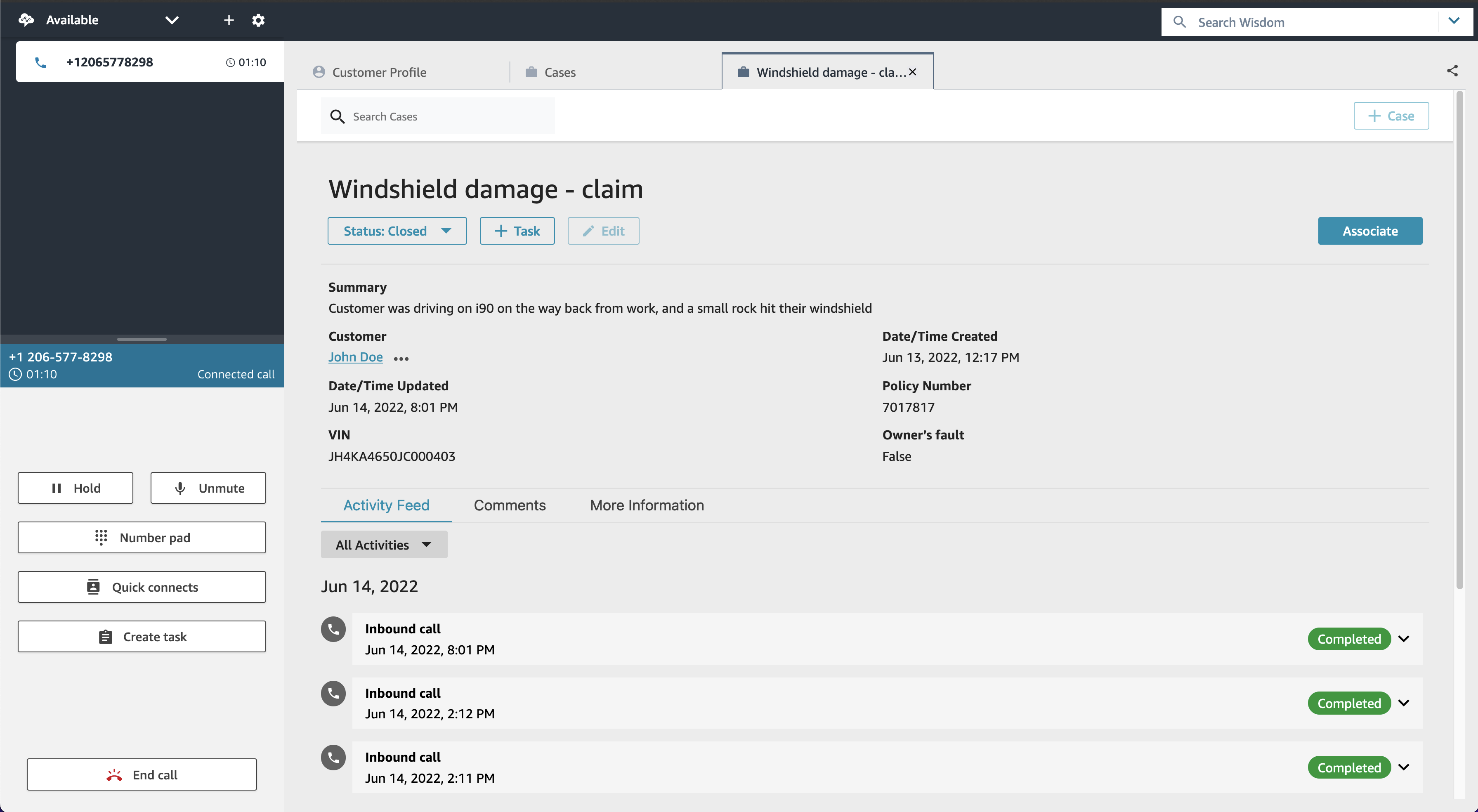
  1. View case history and activity all in one place – Agents view the details of the customer issue (including calls, tasks, and chats associated with the case) all in one place within the unified Amazon Connect agent application. The timeline view shows agents a case at a glance, removing the need for agents to go back and forth between applications.

    View case history and activity in one place

    View case history and activity in one place

  2. Automatically capture case data from interactive voice response (IVR) or chats – With this feature you can automatically create and update cases by using information gathered in a customer’s self-service IVR or chatbot interaction. When agent assistance is required, the contact will then be routed to an available agent with the relevant case attached, resulting in improved average handle time and first-contact resolution.

    Automatically capture case data from your IVR and chatbots

    Automatically capture case data from your IVR and chatbots

  3. Take action with task management – This feature is Cases working together with Amazon Connect Tasks to help you reduce resolution time and improve efficiency. Tasks, which tracks the work that must be done to resolve the customer’s issue, ensures that a case is captured and includes prior and pending actions needed to resolve the issue. This makes it easier for agents to create, prioritize, and monitor work assigned to other agents or teams. Here I’d also like to highlight how all this results in great collaboration between agents and ultimately, teams.

    Take action with task management

    Take action with task management

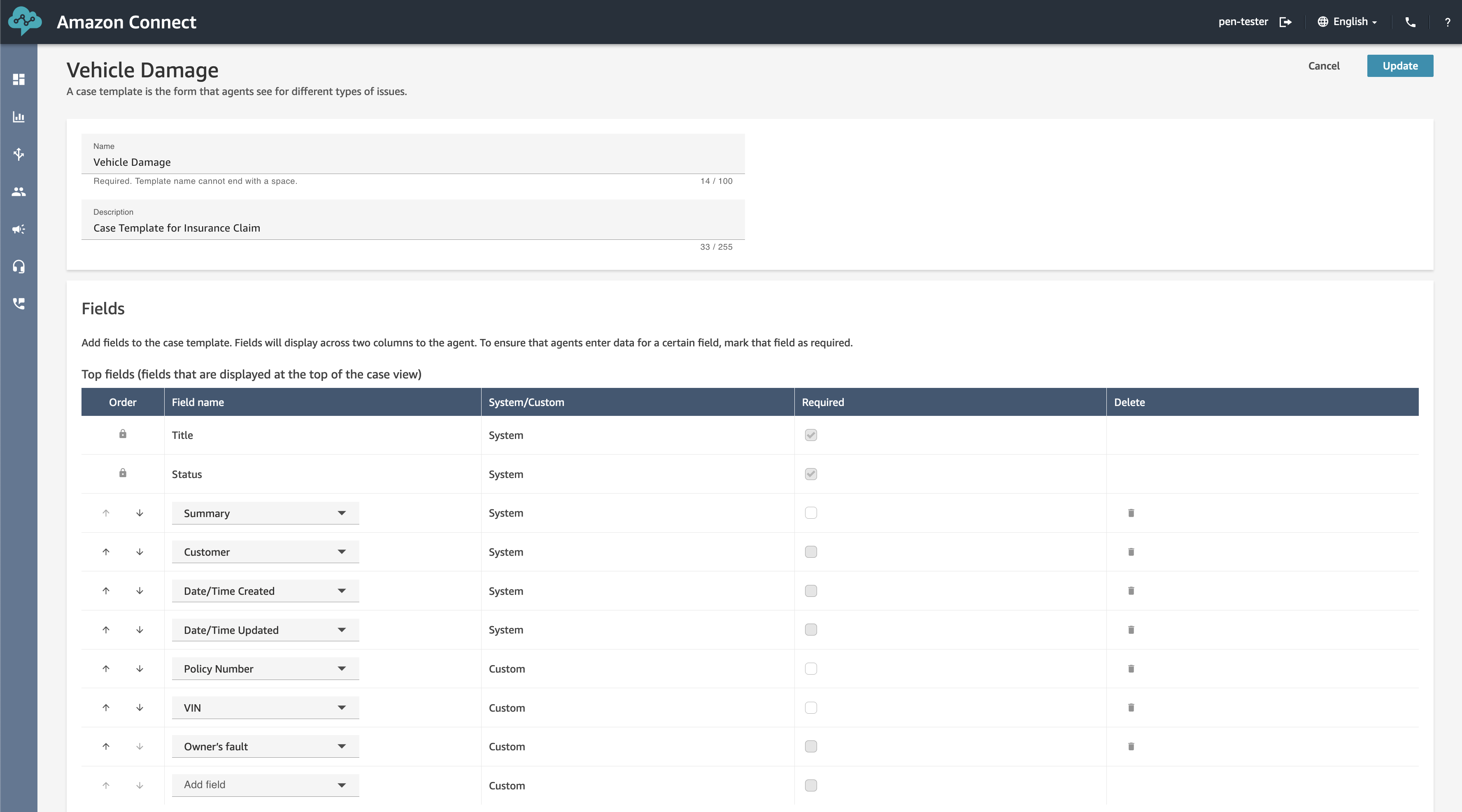
  4. Get started in a few clicks! Turn on Cases and configure permissions, fields, and templates, all within Amazon Connect. No third-party tools or integrations are required.
    Get Started

    Get Started

General Availability
Amazon Connect Cases is generally available in US East (N. Virginia), and US West (Oregon).

Veliswa x

AWS and VMware Announce VMware Cloud on AWS integration with Amazon FSx for NetApp ONTAP

Post Syndicated from Veliswa Boya original https://aws.amazon.com/blogs/aws/aws-and-vmware-announce-vmware-cloud-on-aws-integration-with-amazon-fsx-for-netapp-ontap/

Our customers are looking for cost-effective ways to continue to migrate their applications to the cloud. VMware Cloud on AWS is a fully managed, jointly engineered service that brings VMware’s enterprise-class, software-defined data center architecture to the cloud. VMware Cloud on AWS offers our customers the ability to run applications across operationally consistent VMware vSphere-based public, private, and hybrid cloud environments by bringing VMware’s Software-Defined Data Center (SDDC) to AWS.

In 2021, we announced the fully managed shared storage service Amazon FSx for NetApp ONTAP. This service provides our customers with access to the popular features, performance, and APIs of ONTAP file systems with the agility, scalability, security, and resiliency of AWS, making it easier to migrate on-premises applications that rely on network-attached storage (NAS) appliances to AWS.

Today I’m excited to announce the general availability of VMware Cloud on AWS integration with Amazon FSx for NetApp ONTAP. Prior to this announcement, customers could only use VMware VSAN where they could scale datastore capacity with compute. Now, they can scale storage independently and SDDCs can be scaled with the additional storage capacity that is made possible by FSx for NetApp ONTAP.

Customers can already add storage to their SDDCs by purchasing additional hosts or by adding AWS native storage services such as Amazon S3, Amazon EFS, and Amazon FSx for providing storage to virtual machines (VMs) on existing hosts. You may be thinking that nothing about this announcement is new.

Well, with this amazing integration, our customers now have the flexibility to add an external datastore option to support their growing workload needs. If you are running into storage constraints or are continually met with unplanned storage demands, this integration provides a cost-effective way to incrementally add capacity without the need to purchase more hosts. By taking advantage of external datastores through FSx for NetApp ONTAP, you have the flexibility to add more storage capacity when your workloads require it.

An Overview of VMware Cloud on AWS Integration with Amazon FSx for NetApp ONTAP
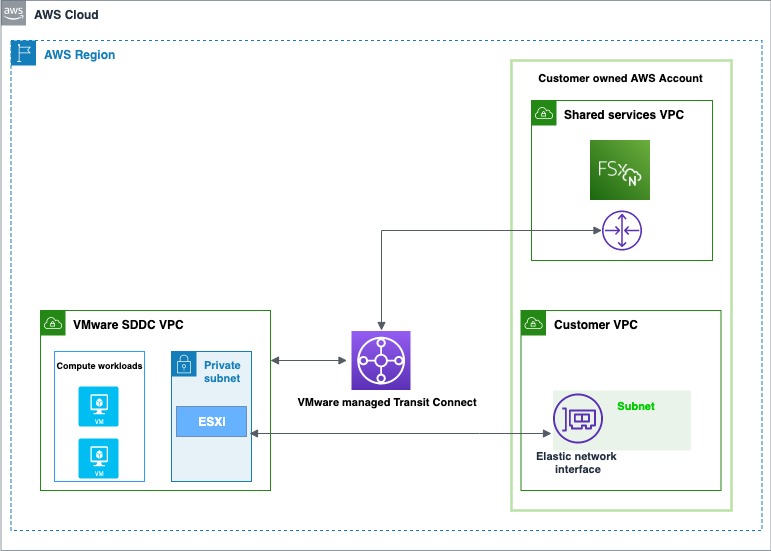
There are two account connectivity options for enabling storage provisioned by FSx for NetApp ONTAP to be made available for mounting as a datastore to a VMware Cloud on AWS SDDC. Both options use a dedicated Amazon Virtual Private Cloud (Amazon VPC) for the FSx file system to prevent routing conflicts.

The first option is to create a new Amazon VPC under the same connected AWS account and have it connected with the VMware-owned Shadow VPC using VMware Transit Connect. The diagram below shows the architecture of this option:

The first option is to enable storage under the same customer-owned account

The first option is to enable storage under the same AWS connected account

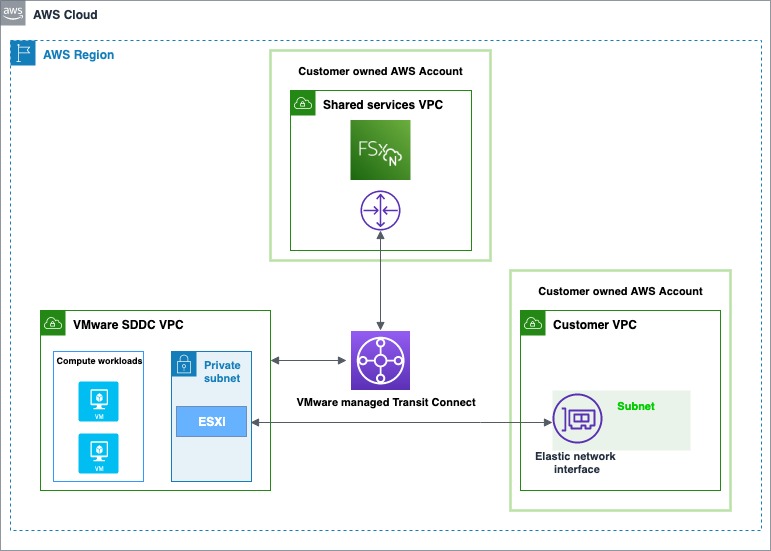
The second option is to create a new AWS account, which by default comes with an Amazon VPC for the Region. Similar to the first option, VMware Transit Connect is used to attach this new VPC with the VMware-owned Shadow VPC. Here is a diagram showing the architecture of this option:

The second option is to enable storage provisioned by FSx for NetApp ONTAP by creating a new AWS account

The second option is to enable storage by creating a new AWS account

Getting Started with VMware Cloud on AWS Integration with Amazon FSx for NetApp ONTAP
The first step is to create an FSx for NetApp ONTAP file system in your AWS account. The steps that you will follow to do this are the same, whether you’re using the first or second path to provision and mount your NFS datastore.

  1. Open the Amazon FSx service page.
  2. On the dashboard, choose Create file system to start the file system creation wizard.
  3. On the Select file system type page, select Amazon FSx for NetApp ONTAP, and then click Next which takes you to the Create ONTAP file system page. Here select the Standard create method.

The following video shows a complete guide on how to create an FSx for NetApp ONTAP:

The same process can be found in this FSx for ONTAP User Guide.

After the file system is created, locate the NFS IP address under the Storage virtual machines tab. The NFS IP address is the floating IP that is used to manage access between file system nodes, and it is required for configuring VMware Transit Connect.

Location of the NFS IP address under the Storage virtual machines tab - AWS console

Location of the NFS IP address under the Storage virtual machines tab – AWS console

Location of the NFS IP address under the Storage virtual machines tab - AWS console

Location of the NFS IP address under the Storage virtual machines tab – AWS console

You are done with creating the FSx for NetApp ONTAP file system, and now you need to create an SDDC group and configure VMware Transit Connect. In order to do this, you need to navigate between the VMware Cloud Console and the AWS console.

Sign in to the VMware Cloud Console, then go to the SDDC page. Here locate the Actions button and select Create SDDC Group. Once you’ve done this, provide the required data for Name (in the following example I used “FSx SDDC Group” for the name) and Description. For Membership, only include the SDDC in question.

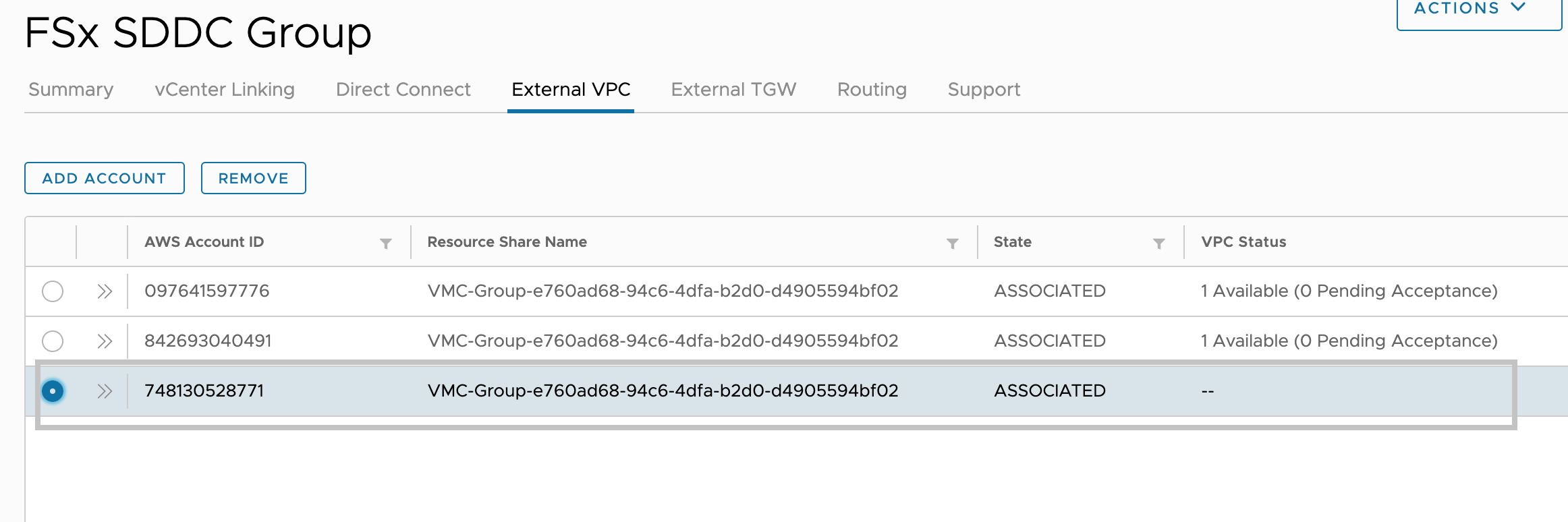
After the SDDC Group is created, it shows up in your list of SDDC Groups. Select the SDDC Group, and then go to the External VPC tab.

External VPC tab Add Account - VMC Console

External VPC tab Add Account – VMC Console

Once you are in the External VPC tab, click the ADD ACCOUNT button, then provide the AWS account that was used to provision the FSx file system, and then click Add.

Now it’s time for you to go back to the AWS console and sign in to the same AWS account where you created your Amazon FSx file system. Here navigate to the Resource Access Manager service page and click the Accept resource share button.

Resource Access Manager service page to access the Accept resource share button - AWS console

Resource Access Manager service page to access the Accept resource share button – AWS console

Return to the VMC Console. By now, the External VPC is in an ASSOCIATED state. This can take several minutes to update.

External VPC tab - VMC Console

External VPC tab – VMC Console

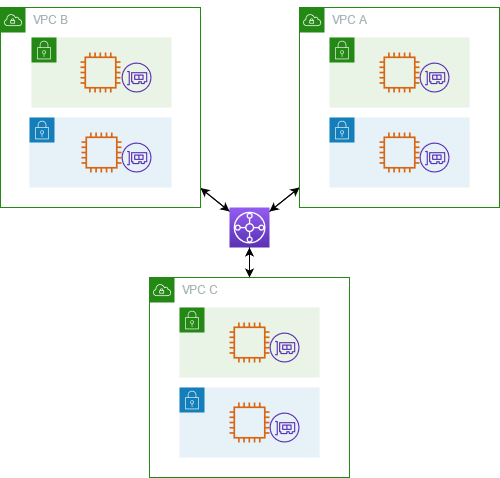
Next, you need to attach a Transit Gateway to the VPC. For this, navigate back to the AWS console. A step-by-step guide can be found in the AWS Transit Gateway documentation.

The following is an example that represents a typical architecture of a VPC attached to a Transit Gateway:

A typical architecture of a VPC attached to a Transit Gateway

A typical architecture of a VPC attached to a Transit Gateway

You are almost at the end of the process. You now need to accept the transit gateway attachment and for this you will navigate back to the VMware Cloud Console.

Accept the Transit Gateway attachment as follows:

  1. Navigating back to the SDDC Group, External VPC tab, select the AWS account ID used for creating your FSx NetApp ONTAP, and click Accept. This process may take a few minutes.
  2. Next, you need to add the routes so that the SDDC can see the FSx file system. This is done on the same External VPC tab, where you will find a table with the VPC. In that table, there is a button called Add Routes. In the Add Route section, add two routes:
    1. The CIDR of the VPC where the FSx file system was deployed.
    2. The floating IP address of the file system.
  3. Click Done to complete the route task.

In the AWS console, create the route back to the SDDC by locating VPC on the VPC service page and navigating to the Route Table as seen below.

VPC service page Route Table navigation - AWS console

VPC service page Route Table navigation – AWS console

Ensure that you have the correct inbound rules for the SDDC Group CIDR by locating Security Groups under VPC and finding the Security Group that is being used (it should be the default one) to allow the inbound rules for SDDC Group CIDR.

Security Groups under VPC that is being used to allow the inbound rules for SDDC Group CIDR

Security Groups under VPC that are being used to allow the inbound rules for SDDC Group CIDR

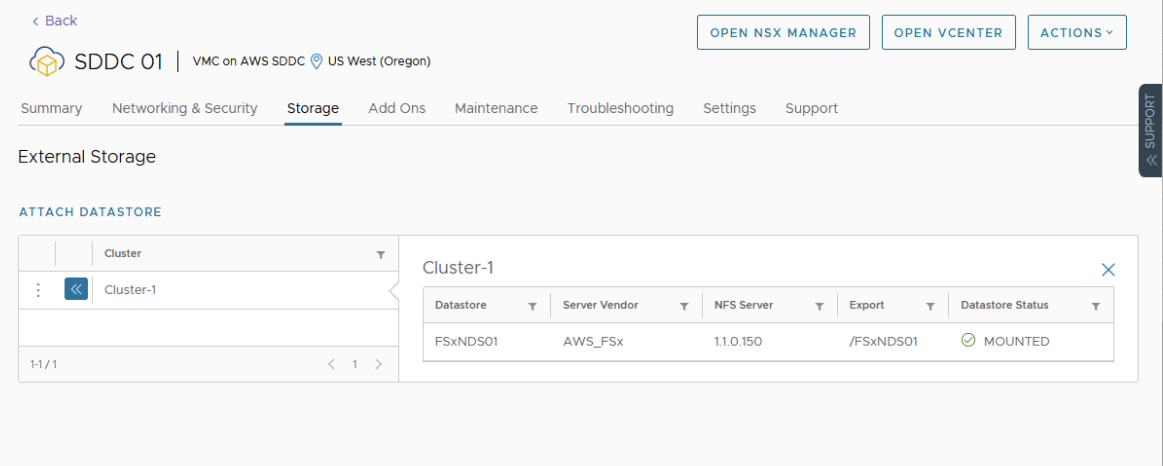
Lastly, mount the NFS Datastore in the VMware Cloud Console as follows:

  1. Locate your SDDC.
  2. After selecting the SDDC, Navigate to the Storage Tab.
  3. Click Attach Datastore to mount the NFS volume(s).
  4. The next step is to select which hosts in the SDDC to mount the datastore to and click Mount to complete the task.
Attach a new datastore

Attach A New Datastore

Available Today
Amazon FSx for NetApp ONTAP is available today for VMware Cloud on AWS customers in US East (Ohio), US East (N. Virginia), US West (Oregon), Asia Pacific (Mumbai), Asia Pacific (Seoul), Asia Pacific (Singapore), Asia Pacific (Sydney), Asia Pacific (Tokyo), Canada (Central), Europe (Frankfurt), Europe (Ireland), Europe (London), Europe (Milan), Europe (Paris), Europe (Stockholm), South America (São Paulo), AWS GovCloud (US-East), and AWS GovCloud (US-West).

Veliswa x

Welcome to AWS Storage Day 2022

Post Syndicated from Veliswa Boya original https://aws.amazon.com/blogs/aws/welcome-to-aws-storage-day-2022/

We are on the fourth year of our annual AWS Storage Day! Do you remember our first Storage Day 2019 and the subsequent Storage Day 2020? I watched Storage Day 2021, which was streamed live from downtown Seattle. We continue to hear from our customers about how powerful the Storage Day announcements and educational sessions were. With this year’s lineup, we aim to share our insights on how to protect your data and put it to work. The free Storage Day 2022 virtual event is happening now on the AWS Twitch channel. Tune in to hear from experts about new announcements, leadership insights, and educational content related to the broad portfolio of AWS Storage services.

Our customers are looking to reduce and optimize storage costs, while building the cloud storage skills they need for themselves and for their organizations. Furthermore, our customers want to protect their data for resiliency and put their data to work. In this blog post, you will find our insights and announcements that address all these needs and more.

Let’s get into it…

Protect Your Data
Data protection has become an operational model to deliver the resiliency of applications and the data they rely on. Organizations use the National Institute of Standards and Technology (NIST) cybersecurity framework and its Identify->Protect->Detect->Respond->Recover process to approach data protection overall. It’s necessary to consider data resiliency and recovery upfront in the Identify and Protect functions, so there is a plan in place for the later Respond and Recover functions.

AWS is making data resiliency, including malware-type recovery, table stakes for our customers. Many of our customers use Amazon Elastic Block Store (Amazon EBS) for mission-critical applications. If you already use Amazon EBS and you regularly back up EBS volumes using EBS multi-volume snapshots, I have an announcement that you will find very exciting.

Amazon EBS
Amazon EBS scales fast for the most demanding, high-performance workloads, and this is why our customers trust Amazon EBS for critical applications such as SAP, Oracle, and Microsoft. Currently, Amazon EBS enables you to back up volumes at any time using EBS Snapshots. Snapshots retain the data from all completed I/O operations, allowing you to restore the volume to its exact state at the moment before backup.

Many of our customers use snapshots in their backup and disaster recovery plans. A common use case for snapshots is to create a backup of a critical workload such as a large database or file system. You can choose to create snapshots of each EBS volume individually or choose to create multi-volume snapshots of the EBS volumes attached to a single Amazon Elastic Compute Cloud (EC2) instance. Our customers love the simplicity and peace of mind that comes with regularly backing up EBS volumes attached to a single EC2 instance using EBS multi-volume snapshots, and today we’re announcing a new feature—crash consistent snapshots for a subset of EBS volumes.

Previously, when you wanted to create multi-volume snapshots of EBS volumes attached to a single Amazon EC2 instance, if you only wanted to include some—but not all—attached EBS volumes, you had to make multiple API calls to keep only the snapshots you wanted. Now, you can choose specific volumes you want to exclude in the create-snapshots process using a single API call or by using the Amazon EC2 console, resulting in significant cost savings. Crash consistent snapshots for a subset of EBS volumes is also supported by Amazon Data Lifecycle Manager policies to automate the lifecycle of your multi-volume snapshots.

This feature is now available to you at no additional cost. To learn more, please visit the EBS Snapshots user guide.

Put Your Data to Work
We give you controls and tools to get the greatest value from your data—at an organizational level down to the individual data worker and scientist. Decisions you make today will have a long-lasting impact on your ability to put your data to work. Consider your own pace of innovation and make sure you have a cloud provider that will be there for you no matter what the future brings. AWS Storage provides the best cloud for your traditional and modern applications. We support data lakes in AWS Storage, analytics, machine learning (ML), and streaming on top of that data, and we also make cloud benefits available at the edge.

Amazon File Cache (Coming Soon)
Today we are also announcing Amazon File Cache, an upcoming new service on AWS that accelerates and simplifies hybrid cloud workloads. Amazon File Cache provides a high-speed cache on AWS that makes it easier for you to process file data, regardless of where the data is stored. Amazon File Cache serves as a temporary, high-performance storage location for your data stored in on-premises file servers or in file systems or object stores in AWS.

This new service enables you to make dispersed data sets available to file-based applications on AWS with a unified view and at high speeds with sub-millisecond latencies and up to hundreds of GB/s of throughput. Amazon File Cache is designed to enable a wide variety of cloud bursting workloads and hybrid workflows, ranging from media rendering and transcoding, to electronic design automation (EDA), to big data analytics.

Amazon File Cache will be generally available later this year. If you are interested in learning more about this service, please sign up for more information.

AWS Transfer Family
During Storage Day 2020, we announced that customers could deploy AWS Transfer Family server endpoints in Amazon Virtual Private Clouds (Amazon VPCs). AWS Transfer Family helps our customers easily manage and share data with simple, secure, and scalable file transfers. With Transfer Family, you can seamlessly migrate, automate, and monitor your file transfer workflows into and out of Amazon S3 and Amazon Elastic File System (Amazon EFS) using the SFTP, FTPS, and FTP protocols. Exchanged data is natively accessible in AWS for processing, analysis, and machine learning, as well as for integrations with business applications running on AWS.

On July 26th of this year, Transfer Family launched support for the Applicability Statement 2 (AS2) protocol. Customers across verticals such as healthcare and life sciences, retail, financial services, and insurance that rely on AS2 for exchanging business-critical data can now use AWS Transfer Family’s highly available, scalable, and globally available AS2 endpoints to more cost-effectively and securely exchange transactional data with their trading partners.

With a focus on helping you work with partners of your choice, we are excited to announce the AWS Transfer Family Delivery Program as part of the AWS Partner Network (APN) Service Delivery Program (SDP). Partners that deliver cloud-native Managed File Transfer (MFT) and business-to-business (B2B) file exchange solutions using AWS Transfer Family are welcome to join the program. Partners in this program meet a high bar, with deep technical knowledge, experience, and proven success in delivering Transfer Family solutions to our customers.

Five New AWS Storage Learning Badges
Earlier I talked about how our customers are looking to add the cloud storage skills they need for themselves and for their organizations. Currently, storage administrators and practitioners don’t have an easy way of externally demonstrating their AWS storage knowledge and skills. Organizations seeking skilled talent also lack an easy way of validating these skills for prospective employees.

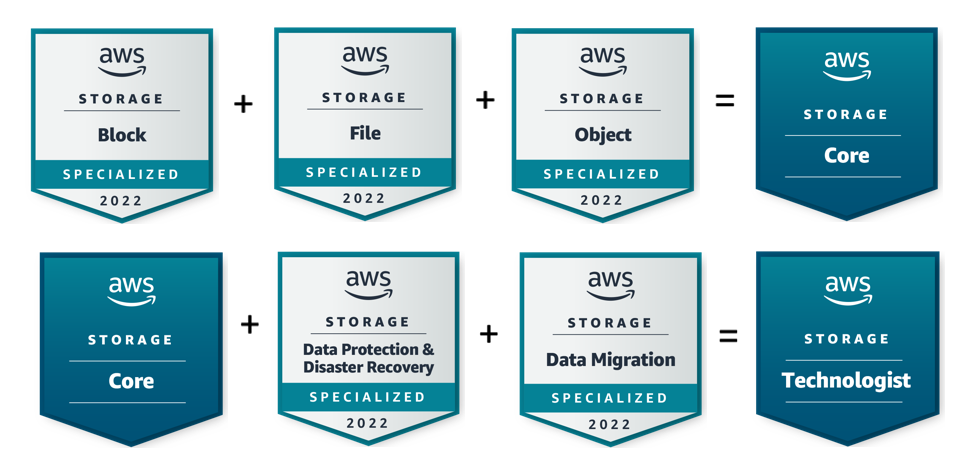
In February 2022, we announced digital badges aligned to Learning Plans for Block Storage and Object Storage on AWS Skill Builder. Today, we’re announcing five additional storage learning badges. Three of these digital badges align to the Skill Builder Learning Plans in English for File, Data Protection & Disaster Recovery (DPDR), and Data Migration. Two of these badges—Core and Technologist—are tiered badges that are awarded to individuals who earn a series of Learning Plan-related badges in the following progression:

Image showing badge progression. To get the Storage Core badge users must first get Block, File, and Object badges. To get the Storage Technologist Badge users must first get the Core, Data Protection & Disaster Recovery, and Data Migration badges.

To learn more, please visit the AWS Learning Badges page.

Well, That’s It!
As I’m sure you’ve picked up on the pattern already, today’s announcements focused on continuous innovation and AWS’s ongoing commitment to providing the cloud storage training that your teams are looking for. Best of all, this AWS training is free. These announcements also focused on simplifying your data migration to the cloud, protecting your data, putting your data to work, and cost-optimization.

Now Join Us Online
Register for free and join us for the AWS Storage Day 2022 virtual event on the AWS channel on Twitch. The event will be live from 9:00 AM Pacific Time (12:00 PM Eastern Time) on August 10. All sessions will be available on demand approximately 2 days after Storage Day.

We look forward to seeing you on Twitch!

– Veliswa x

New – Amazon EC2 R6id Instances with NVMe Local Instance Storage of up to 7.6 TB

Post Syndicated from Veliswa Boya original https://aws.amazon.com/blogs/aws/new-amazon-ec2-r6id-instances/

In November 2021, we launched the memory-optimized Amazon EC2 R6i instances, our sixth-generation x86-based offering powered by 3rd Generation Intel Xeon Scalable processors (code named Ice Lake).

Today I am excited to announce a disk variant of the R6i instance: the Amazon EC2 R6id instances with non-volatile memory express (NVMe) SSD local instance storage. The R6id instances are designed to power applications that require low storage latency or require temporary swap space.

Customers with workloads that require access to high-speed, low-latency storage, including those that need temporary storage for scratch space, temporary files, and caches, have the option to choose the R6id instances with NVMe local instance storage of up to 7.6 TB. The new instances are also available as bare-metal instances to support workloads that benefit from direct access to physical resources.

Here’s some background on what led to the development of the sixth-generation instances. Our customers who are currently using fifth-generation instances are looking for the following:

  • Higher Compute Performance – Higher CPU performance to improve latency and processing time for their workloads
  • Improved Price Performance – Customers are very sensitive to price performance to optimize costs
  • Larger Sizes – Customers require larger sizes to scale their enterprise databases
  • Higher Amazon EBS Performance – Customers have requested higher Amazon EBS throughput (“at least double”) to improve response times for their analytics applications
  • Local Storage – Large customers have expressed a need for more local storage per vCPU

Sixth-generation instances address these requirements by offering generational improvement across the board, including 15 percent increase in price performance, 33 percent more vCPUs, up to 1 TB memory, 2x networking performance, 2x EBS performance, and global availability.

Compared to R5d instances, the R6id instances offer:

  • Larger instance size (.32xlarge) with 128 vCPUs and 1024 GiB of memory, enabling customers to consolidate their workloads and scale up applications.
  • Up to 15 percent improvement in compute price performance and 20 percent higher memory bandwidth.
  • Up to 58 percent higher storage per vCPU and 34 percent lower cost per TB.
  • Up to 50 Gbps network bandwidth and up to 40 Gbps EBS bandwidth; EBS burst bandwidth support for sizes up to .4xlarge.
  • Always-on memory encryption.
  • Support for new Intel Advanced Vector Extensions (AVX 512) instructions such as VAES, VCLMUL, VPCLMULQDQ, and GFNI for faster execution of cryptographic algorithms such as those used in IPSec and TLS implementations.

The detailed specifications of the R6id instances are as follows:

Instance Name

vCPUs RAM (GiB)

Local NVMe SSD Storage (GB)

EBS Throughput (Gbps)

Network Bandwidth (Gbps)

r6id.large 2 16 1 x 118 Up to 10 Up to 12.5
r6id.xlarge 4 32 1 x 237 Up to 10 Up to 12.5
r6id.2xlarge 8 64 1 x 474 Up to 10 Up to 12.5
r6id.4xlarge 16 128 1 x 950 Up to 10 Up to 12.5
r6id.8xlarge 32 256 1 x 1900 10 12.5
r6id.12xlarge 48 384 2 x 1425 15 18.75
r6id.16xlarge 64 512 2 x 1900 20 25
r6id.24xlarge 96 768 4 x 1425 30 37.5
r6id.32xlarge 128 1024 4 x 1900 40 50
r6id.metal 128 1024 4 x 1900 40 50

Now available

The R6id instances are available today in the AWS US East (Ohio), US East (N.Virginia), US West (Oregon), and Europe (Ireland) Regions as On-Demand, Spot, and Reserved Instances or as part of a Savings Plan. As usual, with EC2, you pay for what you use. For more information, see the Amazon EC2 pricing page.

To learn more, visit our Amazon EC2 R6i instances page, and please send feedback to AWS re:Post for EC2 or through your usual AWS Support contacts.

Veliswa x