Best practices to optimize your Amazon EC2 Spot Instances usage

Post Syndicated from Sheila Busser original https://aws.amazon.com/blogs/compute/best-practices-to-optimize-your-amazon-ec2-spot-instances-usage/

This blog post is written by Pranaya Anshu, EC2 PMM, and Sid Ambatipudi, EC2 Compute GTM Specialist.

Amazon EC2 Spot Instances are a powerful tool that thousands of customers use to optimize their compute costs. The National Football League (NFL) is an example of customer using Spot Instances, leveraging 4000 EC2 Spot Instances across more than 20 instance types to build its season schedule. By using Spot Instances, it saves 2 million dollars every season! Virtually any organization – small or big – can benefit from using Spot Instances by following best practices.

Overview of Spot Instances

Spot Instances let you take advantage of unused EC2 capacity in the AWS cloud and are available at up to a 90% discount compared to On-Demand prices. Through Spot Instances, you can take advantage of the massive operating scale of AWS and run hyperscale workloads at a significant cost saving. In exchange for these discounts, AWS has the option to reclaim Spot Instances when EC2 requires the capacity. AWS provides a two-minute notification before reclaiming Spot Instances, allowing workloads running on those instances to be gracefully shut down.

In this blog post, we explore four best practices that can help you optimize your Spot Instances usage and minimize the impact of Spot Instances interruptions: diversifying your instances, considering attribute-based instance type selection, leveraging Spot placement scores, and using the price-capacity-optimized allocation strategy. By applying these best practices, you’ll be able to leverage Spot Instances for appropriate workloads and ultimately reduce your compute costs. Note for the purposes of this blog, we will focus on the integration of Spot Instances with Amazon EC2 Auto Scaling groups.

Pre-requisites

Spot Instances can be used for various stateless, fault-tolerant, or flexible applications such as big data, containerized workloads, CI/CD, web servers, high-performance computing (HPC), and AI/ML workloads. However, as previously mentioned, AWS can interrupt Spot Instances with a two-minute notification, so it is best not to use Spot Instances for workloads that cannot handle individual instance interruption — that is, workloads that are inflexible, stateful, fault-intolerant, or tightly coupled.

Best practices

  1. Diversify your instances

The fundamental best practice when using Spot Instances is to be flexible. A Spot capacity pool is a set of unused EC2 instances of the same instance type (for example, m6i.large) within the same AWS Region and Availability Zone (for example, us-east-1a). When you request Spot Instances, you are requesting instances from a specific Spot capacity pool. Since Spot Instances are spare EC2 capacity, you want to base your selection (request) on as many spare pools of capacity as possible in order to increase your likelihood of getting Spot Instances. You should diversify across instance sizes, generations, instance types, and Availability Zones to maximize your savings with Spot Instances. For example, if you are currently using c5a.large in us-east-1a, consider including c6a instances (newer generation of instances), c5a.xl (larger size), or us-east-1b (different Availability Zone) to increase your overall flexibility. Instance diversification is beneficial not only for selecting Spot Instances, but also for scaling, resilience, and cost optimization.

To get hands-on experience with Spot Instances and to practice instance diversification, check out Amazon EC2 Spot Instances workshops. And once you’ve diversified your instances, you can leverage AWS Fault Injection Simulator (AWS FIS) to test your applications’ resilience to Spot Instance interruptions to ensure that they can maintain target capacity while still benefiting from the cost savings offered by Spot Instances. To learn more about stress testing your applications, check out the Back to Basics: Chaos Engineering with AWS Fault Injection Simulator video and AWS FIS documentation.

  1. Consider attribute-based instance type selection

We have established that flexibility is key when it comes to getting the most out of Spot Instances. Similarly, we have said that in order to access your desired Spot Instances capacity, you should select multiple instance types. While building and maintaining instance type configurations in a flexible way may seem daunting or time-consuming, it doesn’t have to be if you use attribute-based instance type selection. With attribute-based instance type selection, you can specify instance attributes — for example, CPU, memory, and storage — and EC2 Auto Scaling will automatically identify and launch instances that meet your defined attributes. This removes the manual-lift of configuring and updating instance types. Moreover, this selection method enables you to automatically use newly released instance types as they become available so that you can continuously have access to an increasingly broad range of Spot Instance capacity. Attribute-based instance type selection is ideal for workloads and frameworks that are instance agnostic, such as HPC and big data workloads, and can help to reduce the work involved with selecting specific instance types to meet specific requirements.

For more information on how to configure attribute-based instance selection for your EC2 Auto Scaling group, refer to Create an Auto Scaling Group Using Attribute-Based Instance Type Selection documentation. To learn more about attribute-based instance type selection, read the Attribute-Based Instance Type Selection for EC2 Auto Scaling and EC2 Fleet news blog or check out the Using Attribute-Based Instance Type Selection and Mixed Instance Groups section of the Launching Spot Instances workshop.

  1. Leverage Spot placement scores

Now that we’ve stressed the importance of flexibility when it comes to Spot Instances and covered the best way to select instances, let’s dive into how to find preferred times and locations to launch Spot Instances. Because Spot Instances are unused EC2 capacity, Spot Instances capacity fluctuates. Correspondingly, it is possible that you won’t always get the exact capacity at a specific time that you need through Spot Instances. Spot placement scores are a feature of Spot Instances that indicates how likely it is that you will be able to get the Spot capacity that you require in a specific Region or Availability Zone. Your Spot placement score can help you reduce Spot Instance interruptions, acquire greater capacity, and identify optimal configurations to run workloads on Spot Instances. However, it is important to note that Spot placement scores serve only as point-in-time recommendations (scores can vary depending on current capacity) and do not provide any guarantees in terms of available capacity or risk of interruption.  To learn more about how Spot placement scores work and to get started with them, see the Identifying Optimal Locations for Flexible Workloads With Spot Placement Score blog and Spot placement scores documentation.

As a near real-time tool, Spot placement scores are often integrated into deployment automation. However, because of its logging and graphic capabilities, you may find it to be a valuable resource even before you launch a workload in the cloud. If you are looking to understand historical Spot placement scores for your workload, you should check out the Spot placement score tracker, a tool that automates the capture of Spot placement scores and stores Spot placement score metrics in Amazon CloudWatch. The tracker is available through AWS Labs, a GitHub repository hosting tools. Learn more about the tracker through the Optimizing Amazon EC2 Spot Instances with Spot Placement Scores blog.

When considering ideal times to launch Spot Instances and exploring different options via Spot placement scores, be sure to consider running Spot Instances at off-peak hours – or hours when there is less demand for EC2 Instances. As you may assume, there is less unused capacity – Spot Instances – available during typical business hours than after business hours. So, in order to leverage as much Spot capacity as you can, explore the possibility of running your workload at hours when there is reduced demand for EC2 instances and thus greater availability of Spot Instances. Similarly, consider running your Spot Instances in “off-peak Regions” – or Regions that are not experiencing business hours at that certain time.

On a related note, to maximize your usage of Spot Instances, you should consider using previous generation of instances if they meet your workload needs. This is because, as with off-peak vs peak hours, there is typically greater capacity available for previous generation instances than current generation instances, as most people tend to use current generation instances for their compute needs.

  1. Use the price-capacity-optimized allocation strategy

Once you’ve selected a diversified and flexible set of instances, you should select your allocation strategy. When launching instances, your Auto Scaling group uses the allocation strategy that you specify to pick the specific Spot pools from all your possible pools. Spot offers four allocation strategies: price-capacity-optimized, capacity-optimized, capacity-optimized-prioritized, and lowest-price. Each of these allocation strategies select Spot Instances in pools based on price, capacity, a prioritized list of instances, or a combination of these factors.

The price-capacity-optimized strategy launched in November 2022. This strategy makes Spot Instance allocation decisions based on the most capacity at the lowest price. It essentially enables Auto Scaling groups to identify the Spot pools with the highest capacity availability for the number of instances that are launching. In other words, if you select this allocation strategy, we will find the Spot capacity pools that we believe have the lowest chance of interruption in the near term. Your Auto Scaling groups then request Spot Instances from the lowest priced of these pools.

We recommend you leverage the price-capacity-optimized allocation strategy for the majority of your workloads that run on Spot Instances. To see how the price-capacity-optimized allocation strategy selects Spot Instances in comparison with lowest-price and capacity-optimized allocation strategies, read the Introducing the Price-Capacity-Optimized Allocation Strategy for EC2 Spot Instances blog post.

Clean-up

If you’ve explored the different Spot Instances workshops we recommended throughout this blog post and spun up resources, please remember to delete resources that you are no longer using to avoid incurring future costs.

Conclusion

Spot Instances can be leveraged to reduce costs across a wide-variety of use cases, including containers, big data, machine learning, HPC, and CI/CD workloads. In this blog, we discussed four Spot Instances best practices that can help you optimize your Spot Instance usage to maximize savings: diversifying your instances, considering attribute-based instance type selection, leveraging Spot placement scores, and using the price-capacity-optimized allocation strategy.

To learn more about Spot Instances, check out Spot Instances getting started resources. Or to learn of other ways of reducing costs and improving performance, including leveraging other flexible purchase models such as AWS Savings Plans, read the Increase Your Application Performance at Lower Costs eBook or watch the Seven Steps to Lower Costs While Improving Application Performance webinar.
Security updates for Monday

Post Syndicated from original https://lwn.net/Articles/931892/

Security updates have been issued by Debian (golang-websocket, kernel, postgresql-11, and thunderbird), Fedora (firefox, kernel, libreswan, libssh, tcpreplay, and thunderbird), SUSE (dcmtk, gradle, libraw, postgresql12, postgresql13, postgresql14, and postgresql15), and Ubuntu (firefox, nova, and thunderbird).

A complete suite of Zero Trust security tools to get the most from AI

Post Syndicated from Sam Rhea original http://blog.cloudflare.com/zero-trust-ai-security/

A complete suite of Zero Trust security tools to get the most from AI

This post is also available in French, Spanish, German.

A collection of tools from Cloudflare One to help your teams use AI services safely

A complete suite of Zero Trust security tools to get the most from AI

Cloudflare One gives teams of any size the ability to safely use the best tools on the Internet without management headaches or performance challenges. We’re excited to announce Cloudflare One for AI, a new collection of features that help your team build with the latest AI services while still maintaining a Zero Trust security posture.

Large Language Models, Larger Security Challenges

A Large Language Model (LLM), like OpenAI’s GPT or Google’s Bard, consists of a neural network trained against a set of data to predict and generate text based on a prompt. Users can ask questions, solicit feedback, and lean on the service to create output from poetry to Cloudflare Workers applications.

The tools also bear an uncanny resemblance to a real human. As in some real-life personal conversations, oversharing can become a serious problem with these AI services. This risk multiplies due to the types of use cases where LLM models thrive. These tools can help developers solve difficult coding challenges or information workers create succinct reports from a mess of notes. While helpful, every input fed into a prompt becomes a piece of data leaving your organization’s control.

Some responses to tools like ChatGPT have been to try and ban the service outright; either at a corporate level or across an entire nation. We don’t think you should have to do that. Cloudflare One’s goal is to allow you to safely use the tools you need, wherever they live, without compromising performance. These features will feel familiar to any existing use of the Zero Trust products in Cloudflare One, but we’re excited to walk through cases where you can use the tools available right now to allow your team to take advantage of the latest LLM features.

Measure usage

SaaS applications make it easy for any user to sign up and start testing. That convenience also makes these tools a liability for IT budgets and security policies. Teams refer to this problem as “Shadow IT” – the adoption of applications and services outside the approved channels in an organization.

In terms of budget, we have heard from early adopter customers who know that their team members are beginning to experiment with LLMs, but they are not sure how to approach making a commercial licensing decision. What services and features do their users need and how many seats should they purchase?

On the security side, the AIs can be revolutionary for getting work done but terrifying for data control policies. Team members treat these AIs like sounding boards for painful problems. The services invite users to come with their questions or challenges. Sometimes the context inside those prompts can contain sensitive information that should never leave an organization. Even if teams select and approve a single vendor, members of your organization might prefer another AI and continue to use it in their workflow.

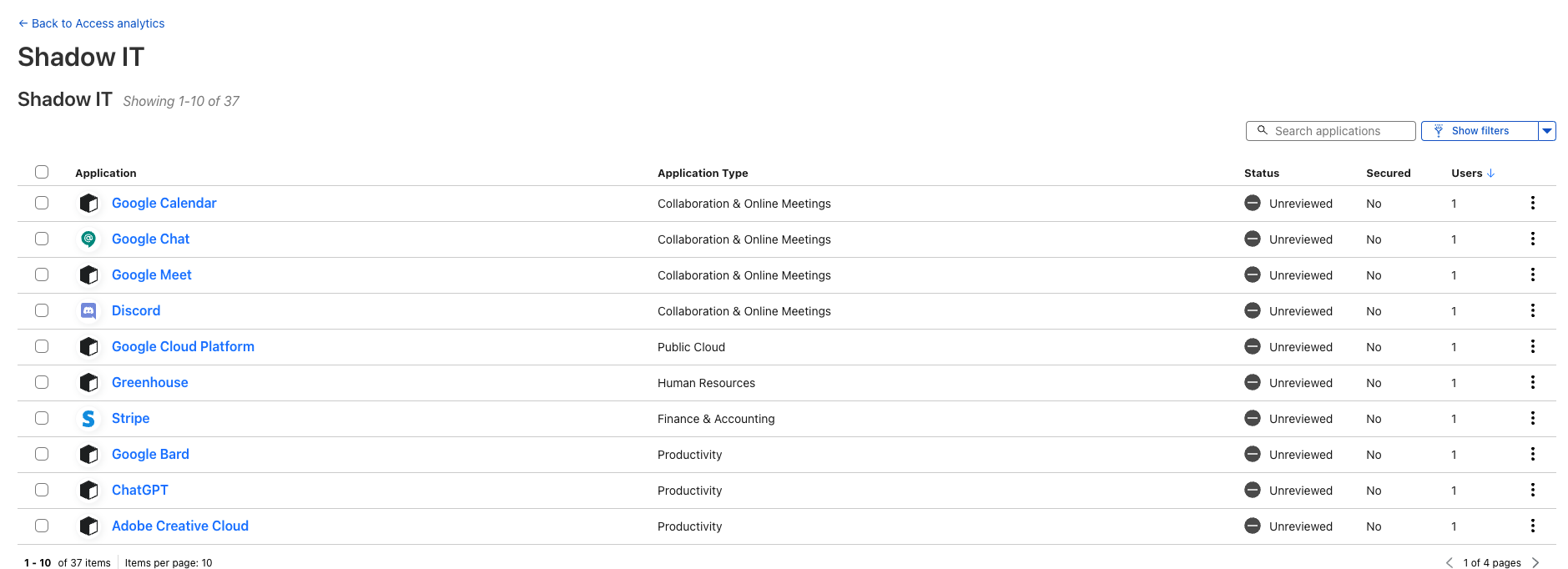
Cloudflare One customers on any plan can now review the usage of AIs. Your IT department can deploy Cloudflare Gateway and passively observe how many users are selecting which services as a way to start scoping out enterprise licensing plans.

A complete suite of Zero Trust security tools to get the most from AI

Administrators can also block the use of these services with a single click, but that is not our goal today. You might want to use this feature if you select ChatGPT as your approved model, and you want to make sure team members don’t continue to use alternatives, but we hope you don’t block all of these services outright. Cloudflare’s priority is to give you the ability to use these tools safely.

Control API access

When our teams began experimenting with OpenAI’s ChatGPT service, we were astonished by what it already knew about Cloudflare. We asked ChatGPT to create applications with Cloudflare Workers or guide us through how to configure a Cloudflare Access policy and, in most cases, the results were accurate and helpful.

In some cases the results missed the mark. The AIs were using outdated information, or we were asking questions about features that had only launched recently. Thankfully, these AIs can learn and we can help. We can train these models with scoped inputs and connect plug-ins to provide our customers with better AI-guided experiences when using Cloudflare services.

We heard from customers who want to do the same thing and, like us, they need to securely share training data and grant plug-in access for an AI service. Cloudflare One’s security suite extends beyond human users and can give teams the ability to securely share Zero Trust access to sensitive data over APIs.

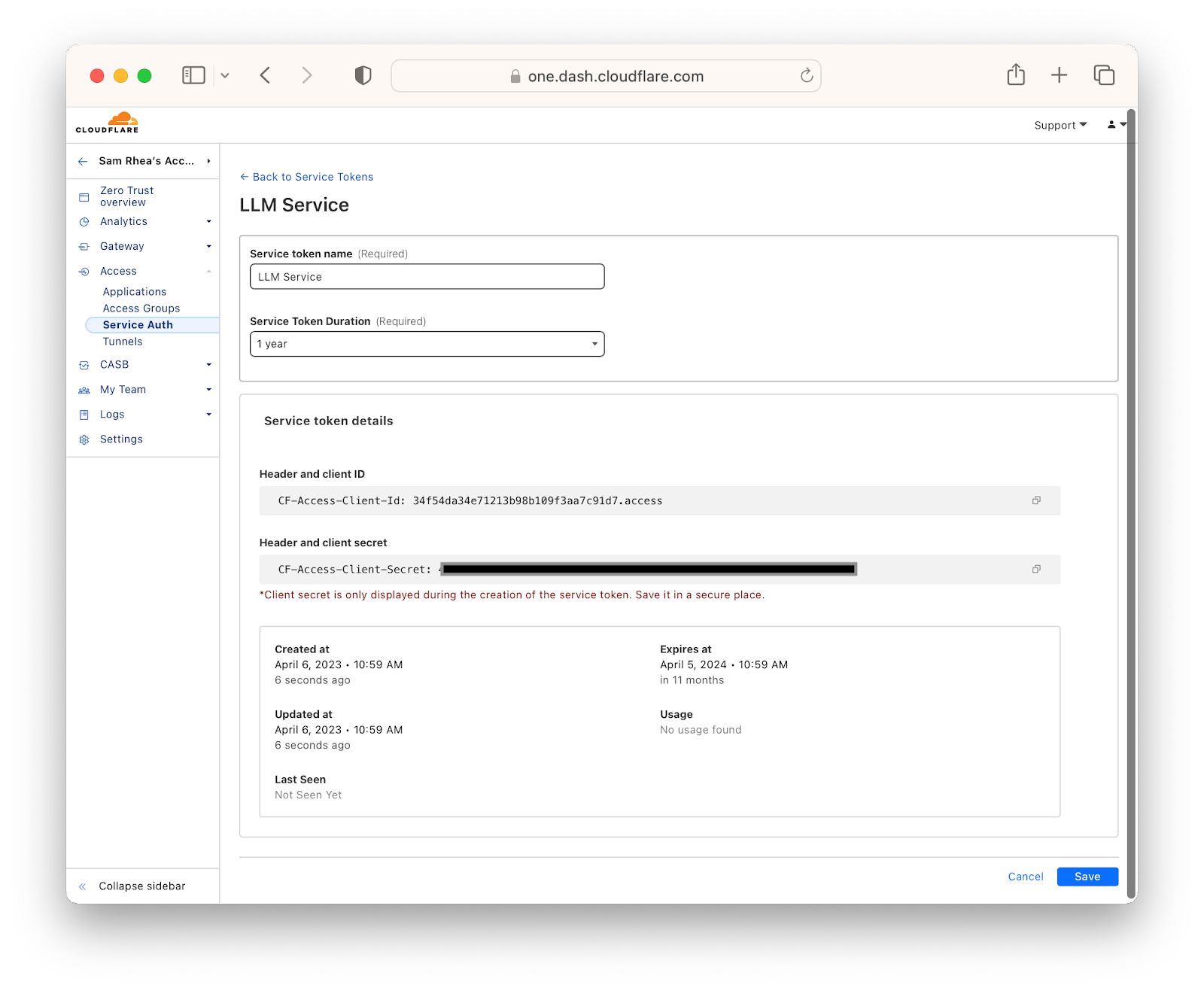
First, teams can create service tokens that external services must present to reach data made available through Cloudflare One. Administrators can provide these tokens to systems making API requests and log every single request. As needed, teams can revoke these tokens with a single click.

A complete suite of Zero Trust security tools to get the most from AI

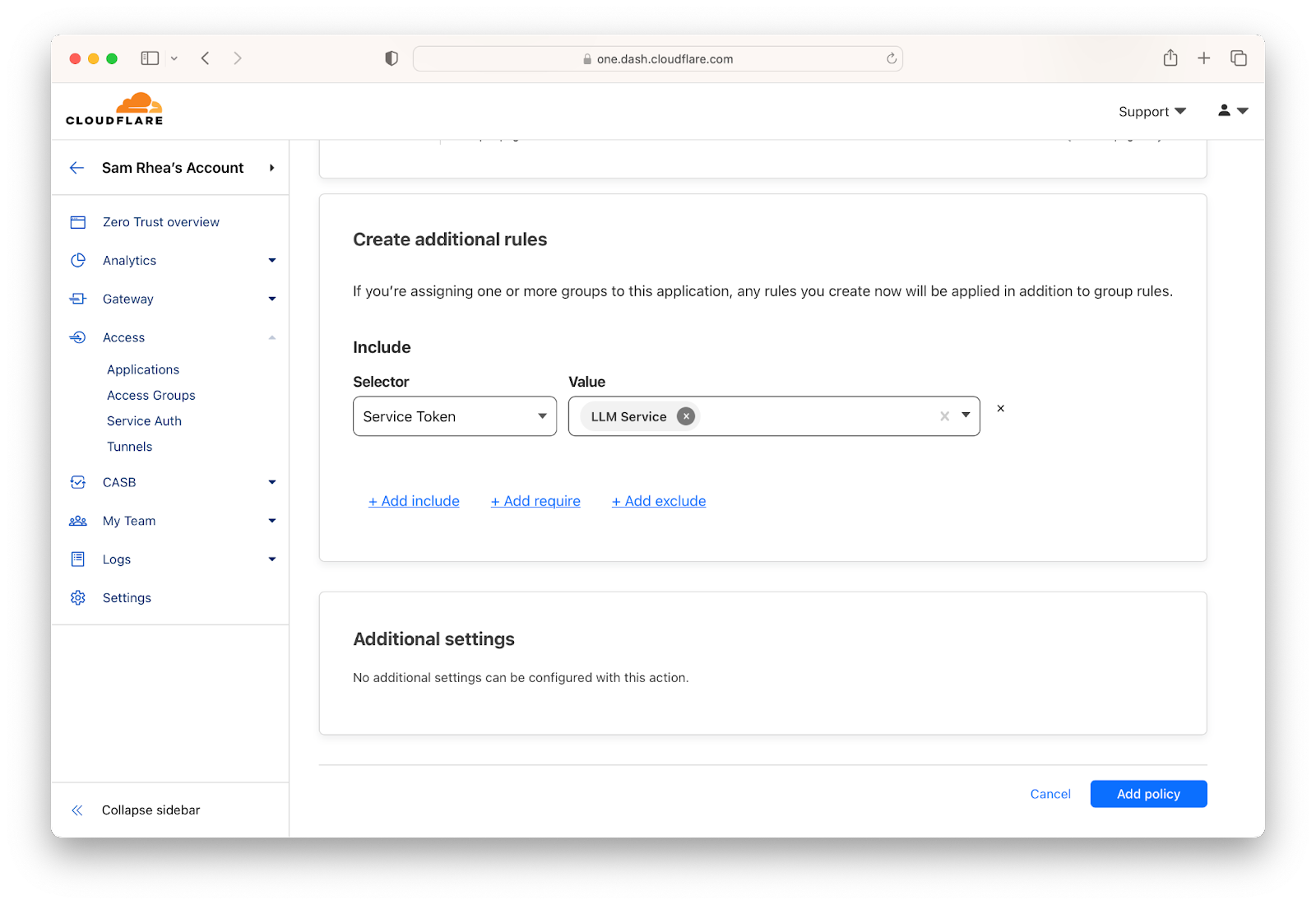
After creating and issuing service tokens, administrators can create policies to allow specific services access to their training data. These policies will verify the service token and can be extended to verify country, IP address or an mTLS certificate. Policies can also be created to require human users to authenticate with an identity provider and complete an MFA prompt before accessing sensitive training data or services.

A complete suite of Zero Trust security tools to get the most from AI

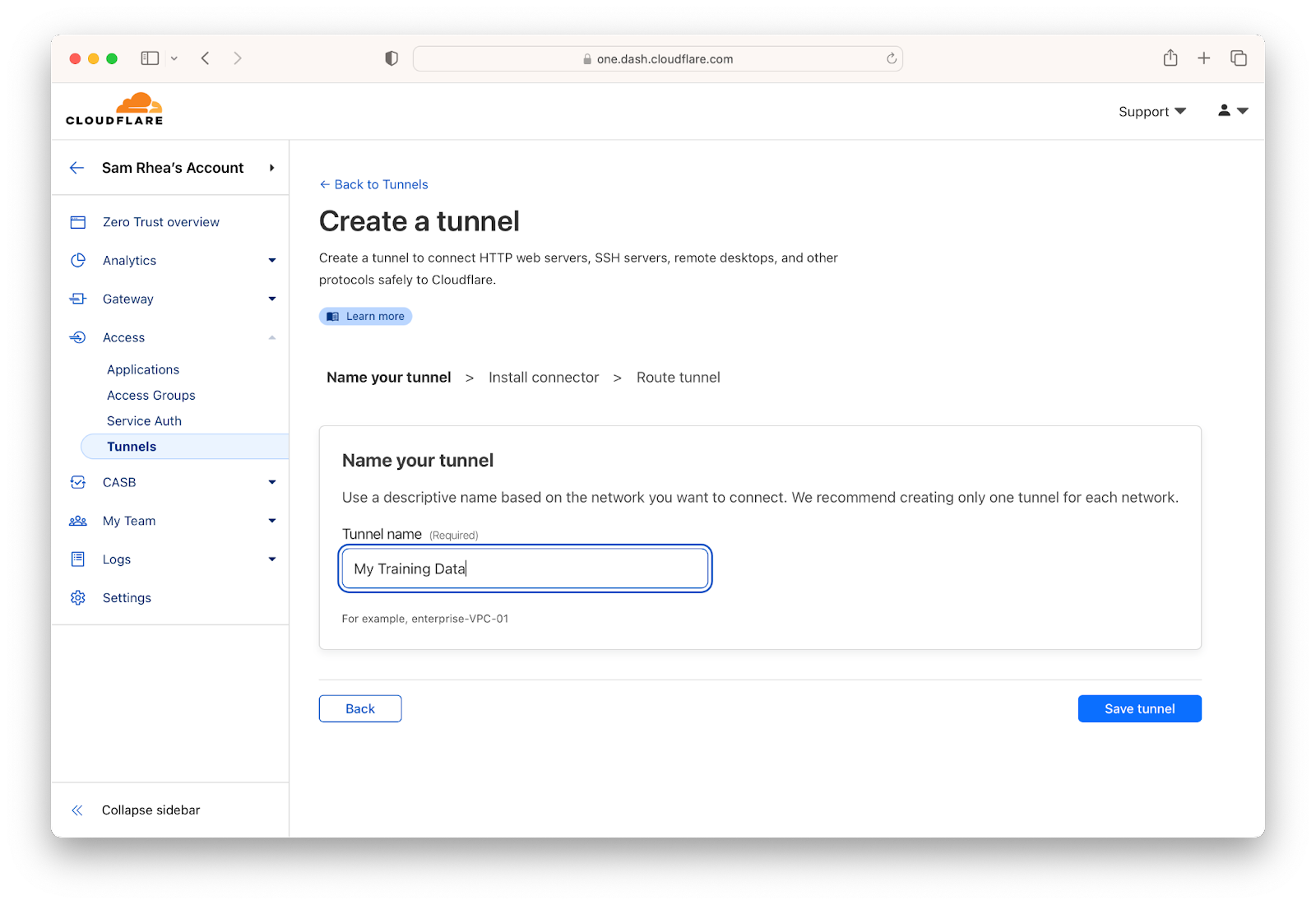
When teams are ready to allow an AI service to connect to their infrastructure, they can do so without poking holes in their firewalls by using Cloudflare Tunnel. Cloudflare Tunnel will create an encrypted, outbound-only connection to Cloudflare’s network where every request will be checked against the access rules configured for one or more services protected by Cloudflare One.

A complete suite of Zero Trust security tools to get the most from AI

Cloudflare’s Zero Trust access control gives you the ability to enforce authentication on each and every request made to the data your organization decides to provide to these tools. That still leaves a gap in the data your team members might overshare on their own.

Restrict data uploads

Administrators can select an AI service, block Shadow IT alternatives, and carefully gate access to their training material, but humans are still involved in these AI experiments. Any one of us can accidentally cause a security incident by oversharing information in the process of using an AI service – even an approved service.

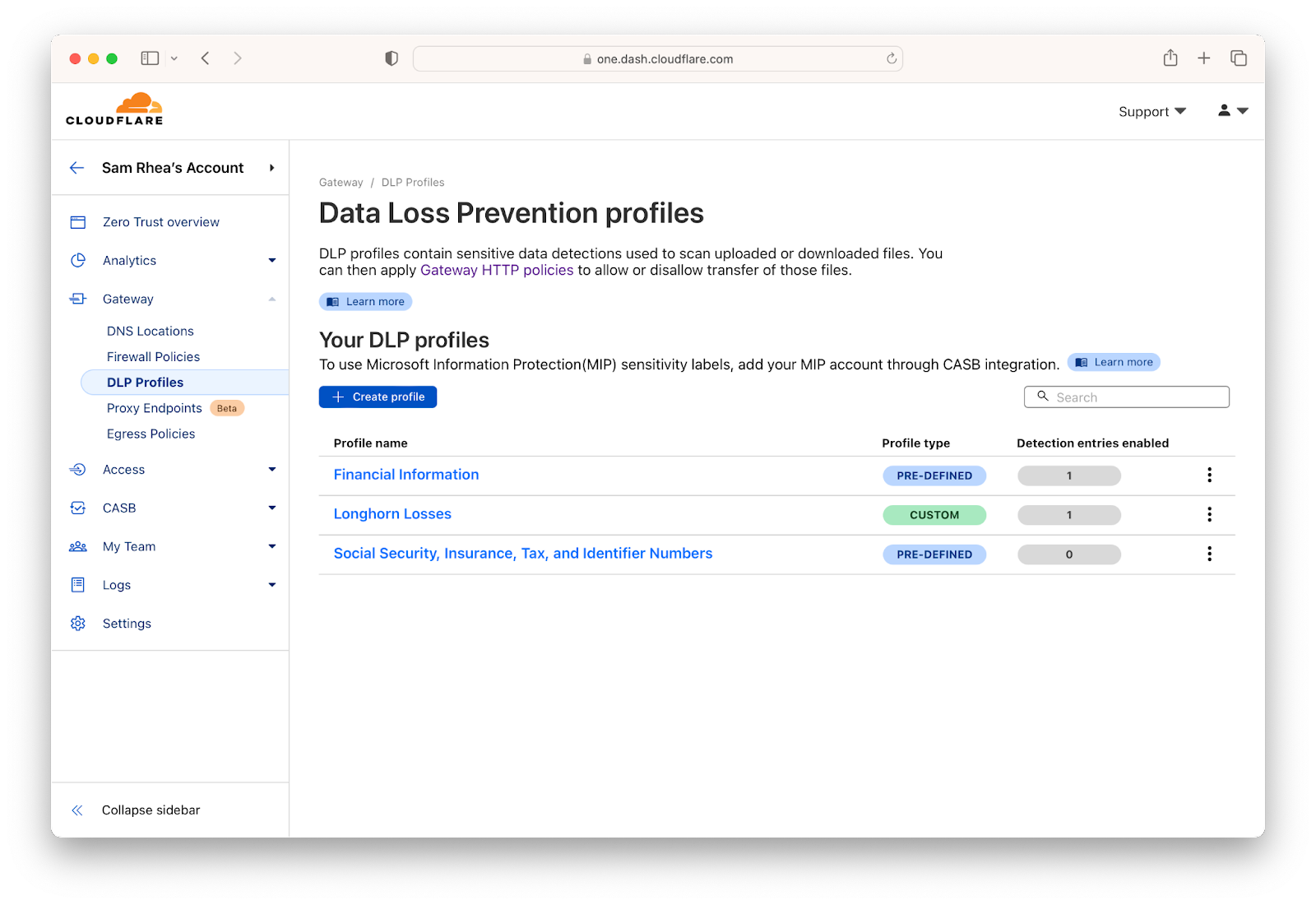
We expect AI playgrounds to continue to evolve to feature more data management capabilities, but we don’t think you should have to wait for that to begin adopting these services as part of your workflow. Cloudflare’s Data Loss Prevention (DLP) service can provide a safeguard to stop oversharing before it becomes an incident for your security team.

First, tell us what data you care about. We provide simple, preconfigured options that give you the ability to check for things that look like social security numbers or credit card numbers. Cloudflare DLP can also scan for patterns based on regular expressions configured by your team.

A complete suite of Zero Trust security tools to get the most from AI

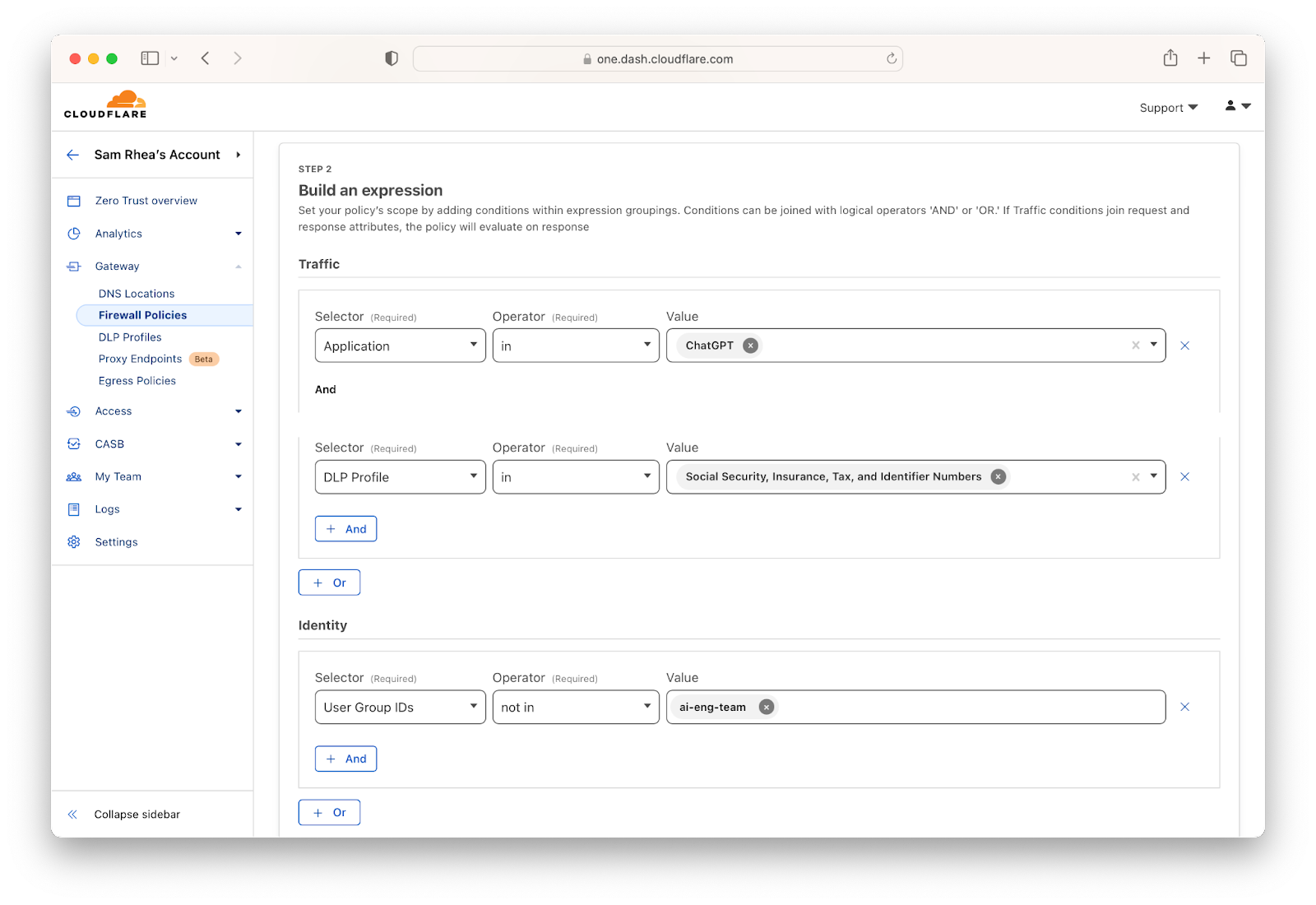
Once you have defined the data that should never leave your organization, you can build granular rules about how it can and cannot be shared with AI services. Maybe some users are approved to experiment with projects that contain sensitive data, in which case you can build a rule that only allows an Active Directory or Okta group to upload that kind of information while everyone else is blocked.

A complete suite of Zero Trust security tools to get the most from AI

Control use without a proxy

The tools in today’s blog post focus on features that apply to data-in-motion. We also want to make sure that misconfigurations in the applications don’t lead to security violations. For example, the new plug-in feature in ChatGPT brings the knowledge and workflows of external services into the AI interaction flow. However, that can also lead to the services behind plug-ins having more access than you want to.

Cloudflare’s Cloud Access Security Broker (CASB) scans your SaaS applications for potential issues that can occur when users make changes. Whether alerting you to files that someone accidentally just made public on the Internet to checking that your GitHub repositories have the right membership controls, Cloudflare’s CASB removes the manual effort required to check each and every setting for potential issues in your SaaS applications.

Available soon, we are working on new integrations with popular AI services to check for misconfigurations. Like most users of these services, we’re still learning more about where potential accidents can occur, and we are excited to provide administrators who use our CASB with our first wave of controls for AI services.

What’s next?

The usefulness of these tools will only accelerate. The ability of AI services to coach and generate output will continue to make it easier for builders from any background to create the next big thing.

We share a similar goal. The Cloudflare products focused on helping users build applications and services, our Workers platform, remove hassles like worrying about where to deploy your application or how to scale your services. Cloudflare solves those headaches so that users can focus on creating. Combined with the AI services, we expect to see thousands of new builders launch the next wave of products built on Cloudflare and inspired by AI coaching and generation.

We have already seen dozens of projects flourish that were built on Cloudflare Workers using guidance from tools like ChatGPT. We plan to launch new integrations with these models to make this even more seamless, bringing better Cloudflare-specific guidance to the chat experience.

We also know that the security risk of these tools will grow. We will continue to bring functionality into Cloudflare One that aims to stay one step ahead of the risks as they evolve with these services. Ready to get started? Sign up here to begin using Cloudflare One at no cost for teams of up to 50 users.

A raft of free Cloudflare services for AI startups

Post Syndicated from Jade Q. Wang original http://blog.cloudflare.com/ai-startups-eligible/

A raft of free Cloudflare services for AI startups

A raft of free Cloudflare services for AI startups

Over the past couple of years, we have piloted a program for early stage startups with free access to a selection of developer products that are high leverage for them. Last year, we launched version 2 of the startup program, which dramatically expanded the basket of products included.

While upgrading startups to the startup plan, I often get inquiries from startups that are fully bootstrapped and not affiliated with any accelerator program. Many of them, especially AI startups, are very promising and would benefit highly from the startup plan.

Typically, they also apply for the Workers Launchpad program, for whom semi-finalists can get upgraded to the startup plan as a benefit. But many of those startups would benefit from getting upgraded right away rather than wait for the review process for each cohort.

Starting today, AI startups no longer need an accelerator affiliation or an employee referral in order to qualify for the Startup Program.

How to get on the startup plan as an AI startup

Here’s what I need you to do if you are a founder of a bootstrapped AI startup. Create a Cloudflare account if you don’t have one, add a domain, and update the name servers.

Fill out this form with the email address associated with your Cloudflare account: form here. For accelerator, select “AI” from the dropdown menu. In the Comments section, include the following information:

  • Indication that the startup has raised less than $3M USD (e.g., link to Crunchbase).
  • Link to a landing page, pitch deck, or article that describes what the startup does. It should be apparent from these materials that the startup is an AI startup (e.g. mention LLMs if that’s what you’re using).
  • Which Cloudflare developer products are you using.

We can’t wait to see what you’re all building!

Introducing Cursor: the Cloudflare AI Assistant

Post Syndicated from Ricky Robinett original http://blog.cloudflare.com/introducing-cursor-the-ai-assistant-for-docs/

Introducing Cursor: the Cloudflare AI Assistant

Introducing Cursor: the Cloudflare AI Assistant

Today we’re excited to be launching Cursor – our experimental AI assistant, trained to answer questions about Cloudflare’s Developer Platform. This is just the first step in our journey to help developers build in the fastest way possible using AI, so we wanted to take the opportunity to share our vision for a generative developer experience.

Whenever a new, disruptive technology comes along, it’s not instantly clear what the native way to interact with that technology will be.

However, if you’ve played around with Large Language Models (LLMs) such as ChatGPT, it’s easy to get the feeling that this is something that’s going to change the way we work. The question is: how? While this technology already feels super powerful, today, we’re still in the relatively early days of it.

While Developer Week is all about meeting developers where they are, this is one of the things that’s going to change just that — where developers are, and how they build code. We’re already seeing the beginnings of how the way developers write code is changing, and adapting to them. We wanted to share with you how we’re thinking about it, what’s on the horizon, and some of the large bets to come.

How is AI changing developer experience?

If there’s one big thing we can learn from the exploding success of ChatGPT, it’s the importance of pairing technology with the right interface. GPT-3 — the technology powering ChatGPT has been around for some years now, but the masses didn’t come until ChatGPT made it accessible to the masses.

Since the primary customers of our platform are developers, it’s on us to find the right interfaces to help developers move fast on our platform, and we believe AI can unlock unprecedented developer productivity. And we’re still in the beginning of that journey.

Wave 1: AI generated content

One of the things ChatGPT is exceptionally good at is generating new content and articles. If you’re a bootstrapped developer relations team, the first day playing around with ChatGPT may have felt like you struck the jackpot of productivity. With a simple inquiry, ChatGPT can generate in a few seconds a tutorial that would have otherwise taken hours if not days to write out.

This content still needs to be tested — do the code examples work? Does the order make sense? While it might not get everything right, it’s a massive productivity boost, allowing a small team to multiply their content output.

In terms of developer experience, examples and tutorials are crucial for developers, especially as they start out with a new technology, or seek validation on a path they’re exploring.

However, with AI generated content, it’s always going to be limited to well, how much of it you generated. To compare it to the newspaper, this content is still one size fits all. If as a developer you stray ever so slightly off the beaten path (choose a different framework than the one tutorial suggests, or a different database), you’re still left to put the pieces together, navigating tens of open tabs in order to stitch together your application.

If this content is already being generated by AI, however, why not just go straight to the source, and allow developers to generate their own, personal guides?

Wave 2: Q&A assistants

Since developers love to try out new technologies, it’s no surprise that developers are going to be some of the early adopters for technology such as ChatGPT. Many developers are already starting to build applications alongside their trusted bard, ChatGPT.

Rather than using generated content, why not just go straight to the source, and ask ChatGPT to generate something that’s tailored specifically for you?

There’s one tiny problem: the information is not always up to date. Which is why plugins are going to become a super important way to interact.

But what about someone who’s already on Cloudflare’s docs? Here, you want a native experience where someone can ask questions and receive answers. Similarly, if you have a question, why spend time searching the docs, if you can just ask and receive an answer?

Wave 3: generative experiences

In the examples above, you were still relying on switching back and forth between a dedicated AI interface and the problem at hand. In one tab you’re asking questions, while in another, you’re implementing the answers.

But taking things another step further, what if AI just met you where you were? In terms of developer experience, we’re already starting to see this in the authoring phase. Tools like GitHub Copilot help developers generate boilerplate code and tests, allowing developers to focus on more complex tasks like designing architecture and algorithms.

Sometimes, however, the first iteration AI comes up with might not match what you, the developer had in mind, which is why we’re starting to experiment with a flow-based generative approach, where you can ask AI to generate several versions, and build out your design with the one that matches your expectations the most.

The possibilities are endless, enabling developers to start applications from prompts rather than pre-generated templates.

We’re excited for all the possibilities AI will unlock to make developers more productive than ever, and we’d love to hear from you how AI is changing the way you change applications.

We’re also excited to share our first steps into the realm of AI driven developer experience with the release of our first two ChatGPT plugins, and by welcoming a new member of our team —Cursor, our docs AI assistant.

Our first milestone to AI driven UX: AI Assisted Docs

As the first step towards using AI to streamline our developer experience, we’re excited to introduce a new addition to our documentation to help you get answers as quickly as possible.

How to use Cursor

Here’s a sample exchange with Cursor:

Introducing Cursor: the Cloudflare AI Assistant

You’ll notice that when you ask a question, it will respond with two pieces of information: a text based response answering your questions, and links to relevant pages in our documentation that can help you go further.

Here’s what happens when we ask “What video formats does Stream support?”.

If you were looking through our examples you may not immediately realize that this specific example uses both Workers and R2.

In its current state, you can think of it as your assistant to help you learn about our products and navigate our documentation in a conversational way. We’re labeling Cursor as experimental because this is the very beginning stages of what we feel like a Cloudflare AI assistant could do to help developers. It is helpful, but not perfect. To deal with its lack of perfection, we took an approach of having it do fewer things better. You’ll find there are many things it isn’t good at today.

How we built Cursor

Under the hood, Cursor is powered by Workers, Durable Objects, OpenAI, and the Cloudflare developer docs. It uses the same backend that we’re using to power our ChatGPT Docs plugin, and you can read about that here.

It uses the “Search-Ask” method, stay tuned for more details on how you can build your own.

A sneak peek into the future

We’re already thinking about the future, we wanted to give you a small preview of what we think this might look like here:

With this type of interface, developers could use a UI to have an AI generate code and developers then link that code together visually. Whether that’s with other code generated by the AI or code they’ve written themselves. We’ll be continuing to explore interfaces that we hope to help you all build more efficiently and can’t wait to get these new interfaces in your hands.

We need your help

Our hope is to quickly update and iterate on how Cursor works as developers around the world use it. As you’re using it to explore our documentation, join us on Discord to let us know your experience.

Introducing Constellation, bringing AI to the Cloudflare stack

Post Syndicated from Celso Martinho original http://blog.cloudflare.com/introducing-constellation/

Introducing Constellation, bringing AI to the Cloudflare stack

This post is also available in 简体中文 and Español.

Introducing Constellation, bringing AI to the Cloudflare stack

The Cloudflare Workers' ecosystem now features products and features ranging from compute, hosting, storage, databases, streaming, networking, security, and much more. Over time, we've been trying to inspire others to switch from traditional software architectures, proving and documenting how it's possible to build complex applications that scale globally on top of our stack.

Today, we're excited to welcome Constellation to the Cloudflare stack, enabling developers to run pre-trained machine learning models and inference tasks on Cloudflare's network.

One more building block in our Supercloud

Machine learning and AI have been hot topics lately, but the reality is that we have been using these technologies in our daily lives for years now, even if we do not realize it. Our mobile phones, computers, cars, and home assistants, to name a few examples, all have AI. It's everywhere.

But it isn't a commodity to developers yet, though. They often need to understand the mathematics behind it, the software and tools are dispersed and complex, and the hardware or cloud services to run the frameworks and data are expensive.

Today we're introducing another feature to our stack, allowing everyone to run machine learning models and perform inference on top of Cloudflare Workers.

Introducing Constellation, bringing AI to the Cloudflare stack

Introducing Constellation

Constellation allows you to run fast, low-latency inference tasks using pre-trained machine learning models natively with Cloudflare Workers scripts.

Some examples of applications that you can deploy leveraging Constellation are:

  • Image or audio classification or object detection
  • Anomaly Detection in Data
  • Text translation, summarization, or similarity analysis
  • Natural Language Processing
  • Sentiment analysis
  • Speech recognition or text-to-speech
  • Question answering

Developers can upload any supported model to Constellation. They can train them independently or download pre-trained models from machine learning hubs like HuggingFace or ONNX Zoo.

However, not everyone will want to train models or browse the Internet for models they didn't test yet. For that reason, Cloudflare will also maintain a catalog of verified and ready-to-use models.

We built Constellation with a great developer experience and simple-to-use APIs in mind. Here's an example to get you started.

Image classification application

In this example, we will build an image classification app powered by the Constellation inference API and the SqueezeNet model, a convolutional neural network (CNN) that was pre-trained on more than one million images from the open-source ImageNet database and can classify images into no more than 1,000 categories.

SqueezeNet compares to AlexNet, one of the original CNNs and benchmarks for image classification, by being much faster (~3x) and much smaller (~500x) while still achieving similar levels of accuracy. Its small footprint makes it ideal for running on portable devices with limited resources or custom hardware.

First, let's create a new Constellation project using the ONNX runtime. Wrangler now has functionality for Constellation built-in with the constellation keyword.

$ npx wrangler constellation project create "image-classifier" ONNX

Now let’s create the wrangler.toml configuration file with the project binding:

# Top-level configuration
name = "image-classifier-worker"
main = "src/index.ts"
compatibility_date = "2022-07-12"

constellation = [
    {
      binding = 'CLASSIFIER',
      project_id = '2193053a-af0a-40a6-b757-00fa73908ef6'
    },
]

Installing the Constellation client API library:

$ npm install @cloudflare/constellation --save-dev

Upload the pre-trained SqueezeNet 1.1 ONNX model to the project.

$ wget https://github.com/microsoft/onnxjs-demo/raw/master/docs/squeezenet1_1.onnx
$ npx wrangler constellation model upload "image-classifier" "squeezenet11" squeezenet1_1.onnx

As we said above, SqueezeNet classifies images into no more than 1,000 object classes. These classes are actually in the form of a list of synonym rings or synsets. A synset has an id and a label; it derives from Princeton's WordNet database terminology, the same used to label the ImageNet image database.

To translate SqueezeNet's results into human-readable image classes, we need a file that maps the synset ids (what we get from the model) to their corresponding labels.

$ mkdir src; cd src
$ wget https://raw.githubusercontent.com/microsoft/onnxjs-demo/master/src/data/imagenet.ts

And finally, let’s code and deploy our image classification script:

import { imagenetClasses } from './imagenet';
import { Tensor, run } from '@cloudflare/constellation';

export interface Env {
    CLASSIFIER: any,
}

export default {
    async fetch(request: Request, env: Env, ctx: ExecutionContext) {
        const formData = await request.formData();
        const file = formData.get("file");
        const data = await file.arrayBuffer();
        const result = await processImage(env, data);
        return new Response(JSON.stringify(result));
    },
};

async function processImage(env: Env, data: ArrayBuffer) {
    const input = await decodeImage(data)

    const tensorInput = new Tensor("float32", [1, 3, 224, 224], input)

    const output = await run(env.CLASSIFIER, "MODEL-UUID", tensorInput);

    const probs = output.squeezenet0_flatten0_reshape0.value
    const softmaxResult = softmax(probs)
    const results = imagenetClasses(softmaxResult, 5);
    const topResult = results[0];
    return topResult
}

This script reads an image from the request, decodes it into a multidimensional float32 tensor (right now we only decode PNGs, but we can add other formats), feeds it to the SqueezeNet model running in Constellation, gets the results, matches them with the ImageNet classes list, and returns the human-readable tags for the image.

Pretty simple, no? Let’s test it:

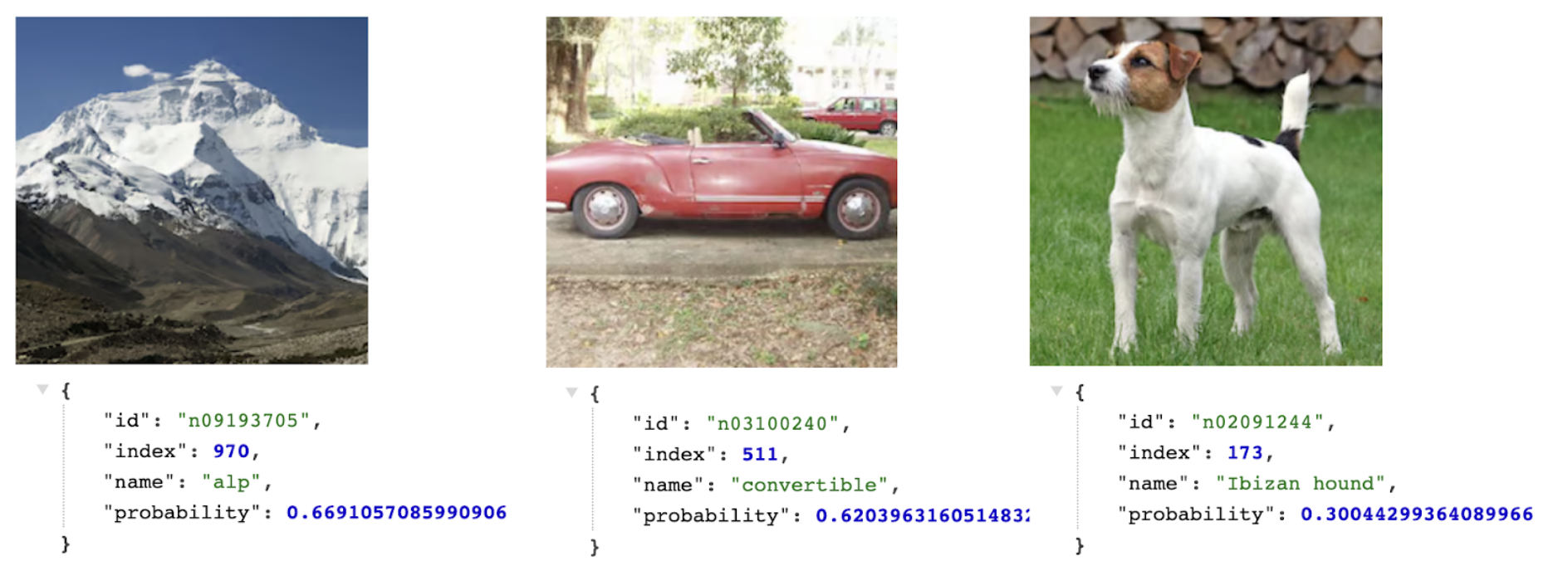
$ curl https://ai.cloudflare.com/demos/image-classifier -F file=@images/mountain.png | jq .name

alp

$ curl https://ai.cloudflare.com/demos/image-classifier -F file=@images/car.png | jq .name

convertible

$ curl https://ai.cloudflare.com/demos/image-classifier -F file=@images/dog.png | jq .name

Ibizan hound

Introducing Constellation, bringing AI to the Cloudflare stack

You can see the probabilities in action here. The model is quite sure about the Alp and the Convertible, but the Ibizan hound has a lower probability. Indeed, the dog in the picture is from another breed.

This small app demonstrates how easy and fast you can start using machine learning models and Constellation when building applications on top of Workers. Check the full source code here and deploy it yourself.

Transformers

Transformers were introduced by Google; they are deep-learning models designed to process sequential input data and are commonly used for natural language processing (NLP), like translations, summarizations, or sentiment analysis, and computer vision (CV) tasks, like image classification.

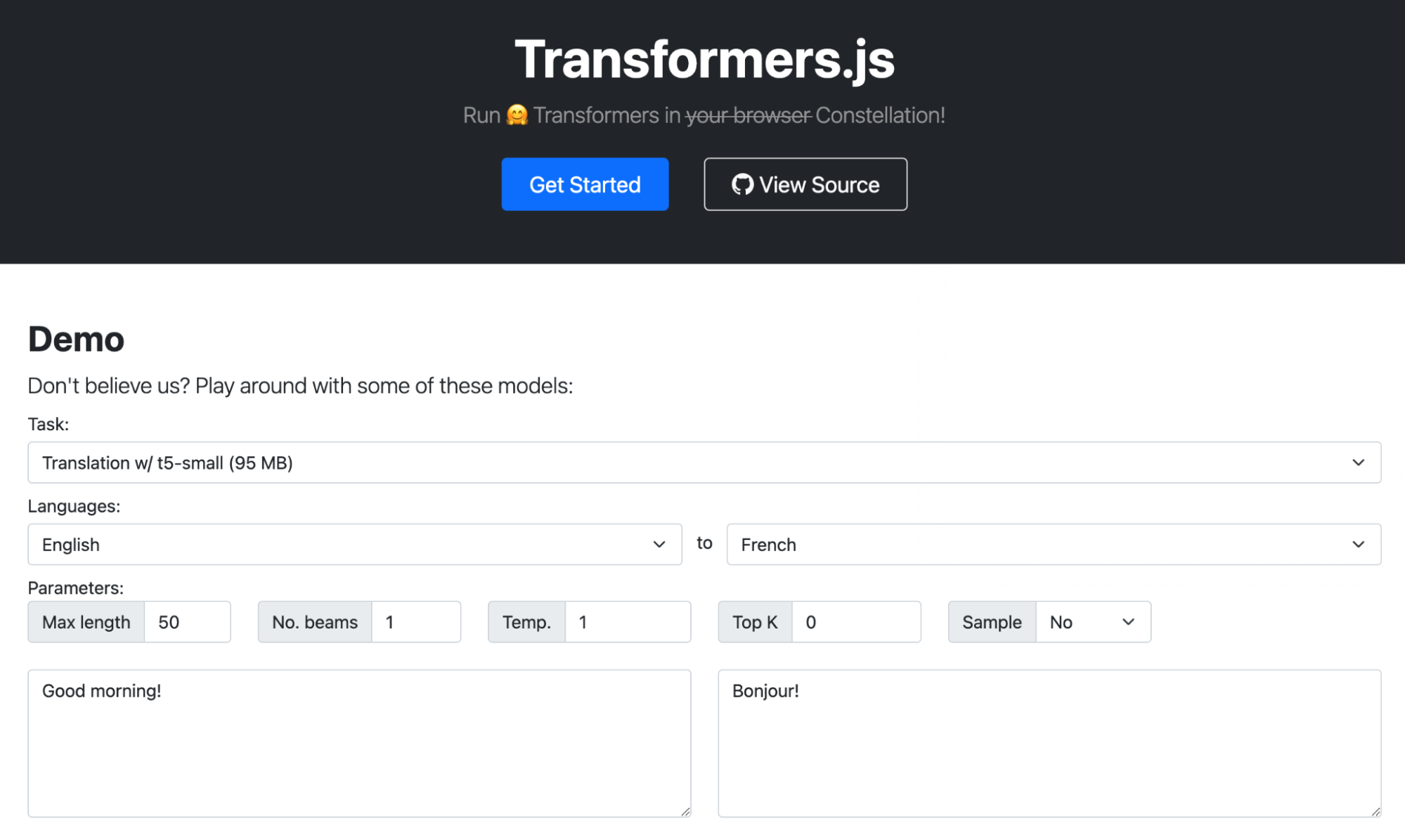
Transformers.js is a popular demo that loads transformer models from HuggingFace and runs them inside your browser using the ONNX Runtime compiled to WebAssembly. We ported this demo to use Constellation APIs instead.

Here's the link to our version: https://transformers-js.pages.dev/

Introducing Constellation, bringing AI to the Cloudflare stack

Interoperability with Workers

The other interesting element of Constellation is that because it runs natively in Workers, you can orchestrate it with other products and APIs in our stack. You can use KV, R2, D1, Queues, anything, even Email.

Here's an example of a Worker that receives Emails for your domain on Cloudflare using Email Routing, runs Constellation using the t5-small sentiment analysis model, adds a header with the resulting score, and forwards it to the destination address.

import { Tensor, run } from '@cloudflare/constellation';
import * as PostalMime from 'postal-mime';

export interface Env {
    SENTIMENT: any,
}

export default {
  async email(message, env, ctx) {
    const rawEmail = await streamToArrayBuffer(event.raw, event.rawSize);
    const parser = new PostalMime.default();
    const parsedEmail = await parser.parse(rawEmail);

    const input = tokenize(parsedEmail.text)
    const output = await run( env.SENTIMENT, "MODEL-UUID", input);


    var headers = new Headers();
    headers.set("X-Sentiment", idToLabel[output.label]);
    await message.forward("[email protected]", headers);
  }
}

Now you can use Gmail or any email client to apply a rule to your messages based on the 'X-Sentiment' header. For example, you might want to move all the angry emails outside your Inbox to a different folder on arrival.

Start using Constellation

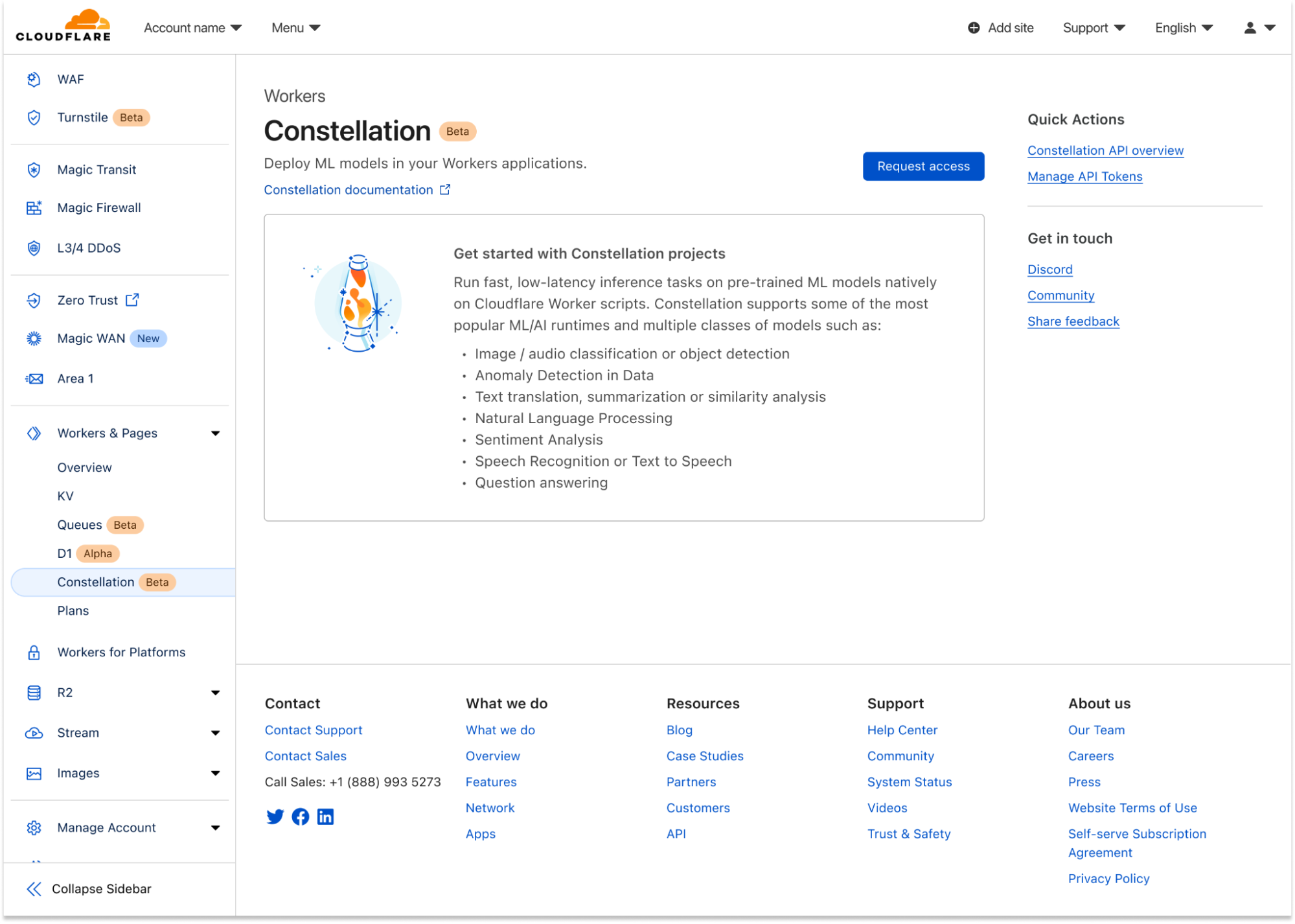
Constellation starts today in private beta. To join the waitlist, please head to the dashboard, click the Workers tab under your account, and click the "Request access" button under the Constellation entry. The team will be onboarding accounts in batches; you'll get an email when your account is enabled.

Introducing Constellation, bringing AI to the Cloudflare stack

In the meantime, you can read our Constellation Developer Documentation and learn more about how it works and the APIs. Constellation can be used from Wrangler, our command-line tool for configuring, building, and deploying applications with Cloudflare developer products, or managed directly in the Dashboard UI.

We are eager to learn how you want to use ML/AI with your applications. Constellation will keep improving with higher limits, more supported runtimes, and larger models, but we want to hear from you. Your feedback will certainly influence our roadmap decisions.

One last thing: today, we've been talking about how you can write Workers that use Constellation, but here's an inception fact: Constellation itself was built using the power of WebAssembly, Workers, R2, and our APIs. We'll make sure to write a follow-up blog soon about how we built it; stay tuned.

As usual, you can talk to us on our Developers Discord (join the #constellation channel) or the Community forum; the team will be listening.

Query Cloudflare Radar and our docs using ChatGPT plugins

Post Syndicated from Ricky Robinett original http://blog.cloudflare.com/cloudflare-chatgpt-plugins/

Query Cloudflare Radar and our docs using ChatGPT plugins

Query Cloudflare Radar and our docs using ChatGPT plugins

When OpenAI launched ChatGPT plugins in alpha we knew that it opened the door for new possibilities for both Cloudflare users and developers building on Cloudflare. After the launch, our team quickly went to work seeing what we could build, and today we’re very excited to share with you two new Cloudflare ChatGPT plugins – the Cloudflare Radar plugin and the Cloudflare Docs plugin.

The Cloudflare Radar plugin allows you to talk to ChatGPT about real-time Internet patterns powered by Cloudflare Radar.

The Cloudflare Docs plugin allows developers to use ChatGPT to help them write and build Cloudflare applications with the most up-to-date information from our documentation. It also serves as an open source example of how to build a ChatGPT plugin with Cloudflare Workers.

Let’s do a deeper dive into how each of these plugins work and how we built them.

Cloudflare Radar ChatGPT plugin

When ChatGPT introduced plugins, one of their use cases was retrieving real-time data from third-party applications and their APIs and letting users ask relevant questions using natural language.

Cloudflare Radar has lots of data about how people use the Internet, a well-documented public API, an OpenAPI specification, and it’s entirely built on top of Workers, which gives us lots of flexibility for improvements and extensibility. We had all the building blocks to create a ChatGPT plugin quickly. So, that's what we did.

We added an OpenAI manifest endpoint which describes what the plugin does, some branding assets, and an enriched OpenAPI schema to tell ChatGPT how to use our data APIs. The longest part of our work was fine-tuning the schema with good descriptions (written in natural language, obviously) and examples of how to query our endpoints.

Amusingly, the descriptions ended up much improved by the need to explain the API endpoints to ChatGPT. An interesting side effect is that this benefits us humans also.

{
    "/api/v1/http/summary/ip_version": {
        "get": {
            "operationId": "get_SummaryIPVersion",
            "parameters": [
                {
                    "description": "Date range from today minus the number of days or weeks specified in this parameter, if not provided always send 14d in this parameter.",
                    "required": true,
                    "schema": {
                        "type": "string",
                        "example": "14d",
                        "enum": ["14d","1d","2d","7d","28d","12w","24w","52w"]
                    },
                    "name": "dateRange",
                    "in": "query"
                }
            ]
        }
    }

Luckily, itty-router-openapi, an easy and compact OpenAPI 3 schema generator and validator for Cloudflare Workers that we built and open-sourced when we launched Radar 2.0, made it really easy for us to add the missing parts.

import { OpenAPIRouter } from '@cloudflare/itty-router-openapi'

const router = OpenAPIRouter({
  aiPlugin: {
    name_for_human: 'Cloudflare Radar API',
    name_for_model: 'cloudflare_radar',
    description_for_human: "Get data insights from Cloudflare's point of view.",
    description_for_model:
      "Plugin for retrieving the data based on Cloudflare Radar's data. Use it whenever a user asks something that might be related to Internet usage, eg. outages, Internet traffic, or Cloudflare Radar's data in particular.",
    contact_email: '[email protected]',
    legal_info_url: 'https://www.cloudflare.com/website-terms/',
    logo_url: 'https://cdn-icons-png.flaticon.com/512/5969/5969044.png',
  },
})

We incorporated our changes into itty-router-openapi, and now it supports the OpenAI manifest and route, and a few other options that make it possible for anyone to build their own ChatGPT plugin on top of Workers too.

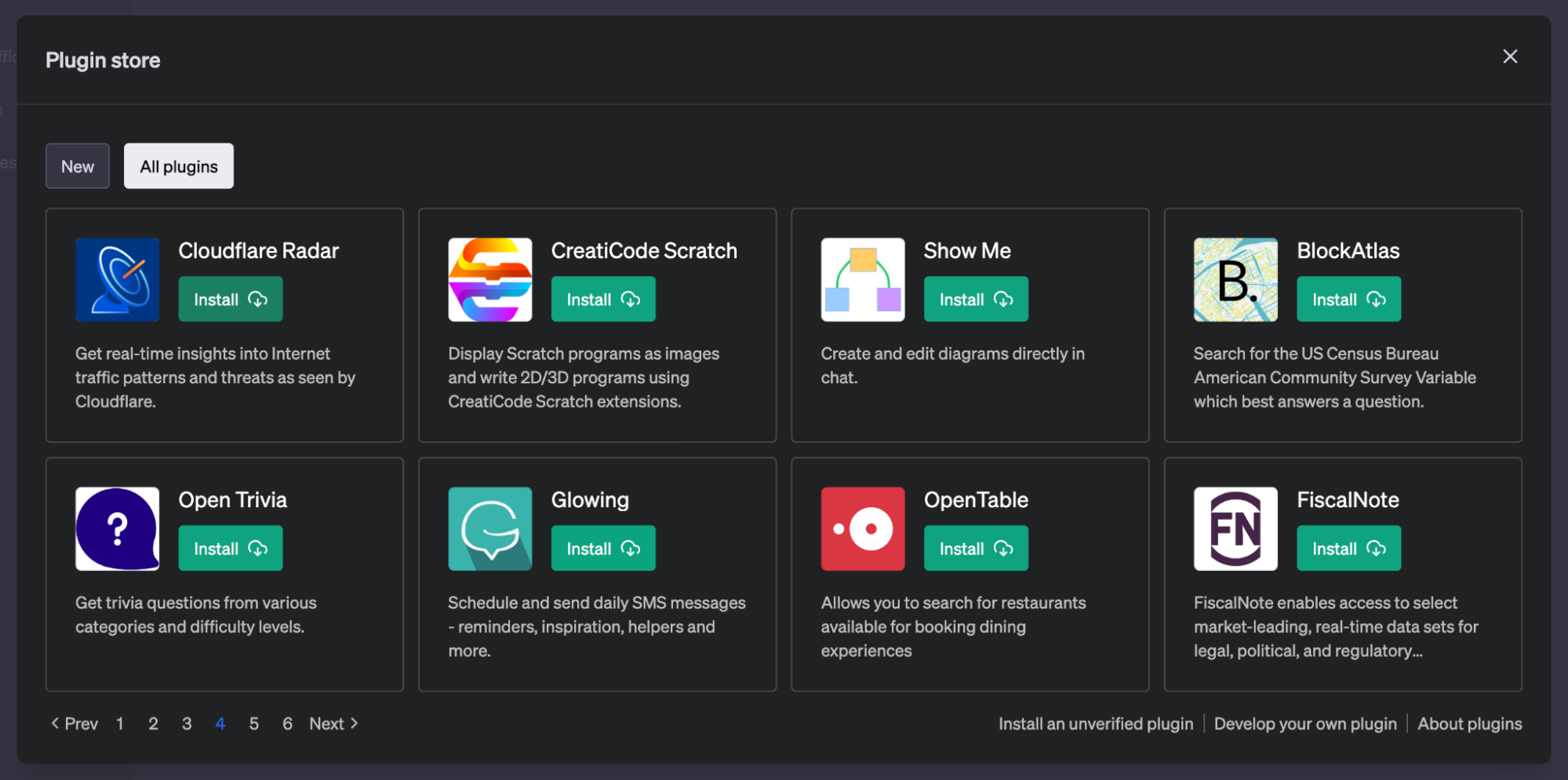
The Cloudflare Radar ChatGPT is available to non-free ChatGPT users or anyone on OpenAI’s plugin's waitlist. To use it, simply open ChatGPT, go to the Plugin store and install Cloudflare Radar.

Query Cloudflare Radar and our docs using ChatGPT plugins

Once installed, you can talk to it and ask questions about our data using natural language.

When you add plugins to your account, ChatGPT will prioritize using their data based on what the language model understands from the human-readable descriptions found in the manifest and Open API schema. If ChatGPT doesn't think your prompt can benefit from what the plugin provides, then it falls back to its standard capabilities.

Another interesting thing about plugins is that they extend ChatGPT's limited knowledge of the world and events after 2021 and can provide fresh insights based on recent data.

Here are a few examples to get you started:

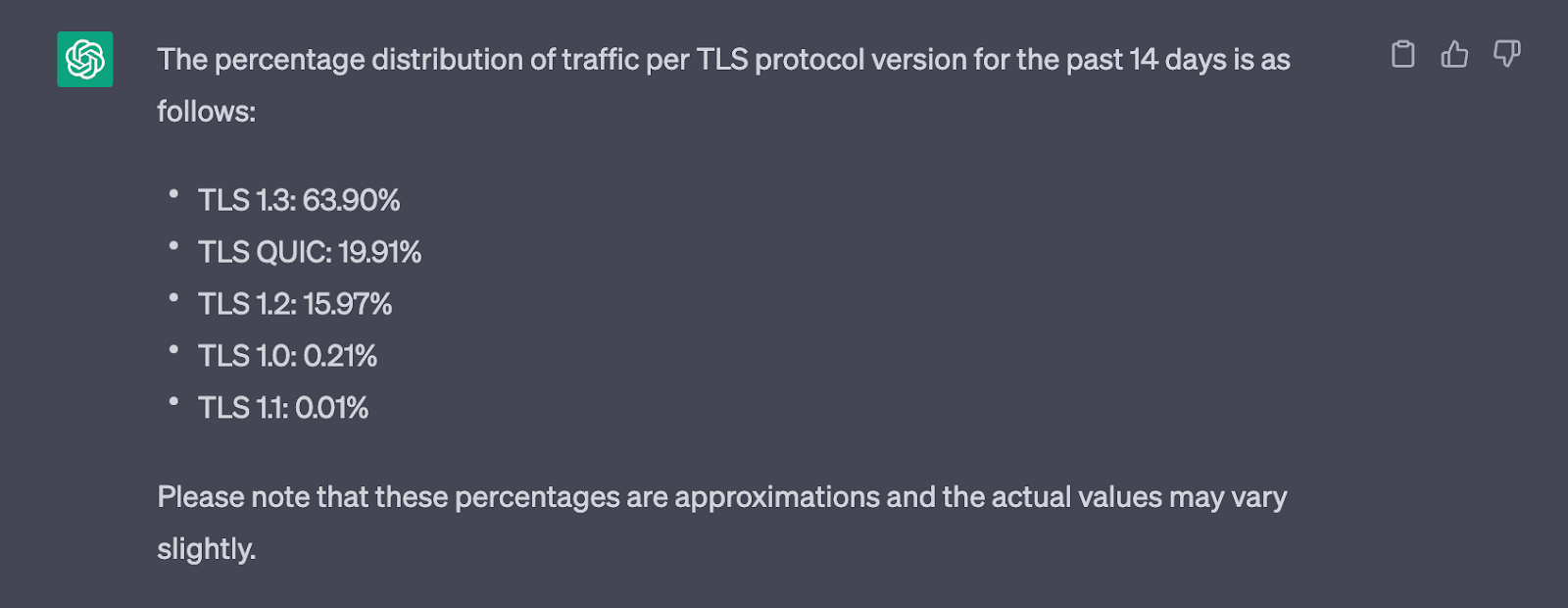
"What is the percentage distribution of traffic per TLS protocol version?"

Query Cloudflare Radar and our docs using ChatGPT plugins

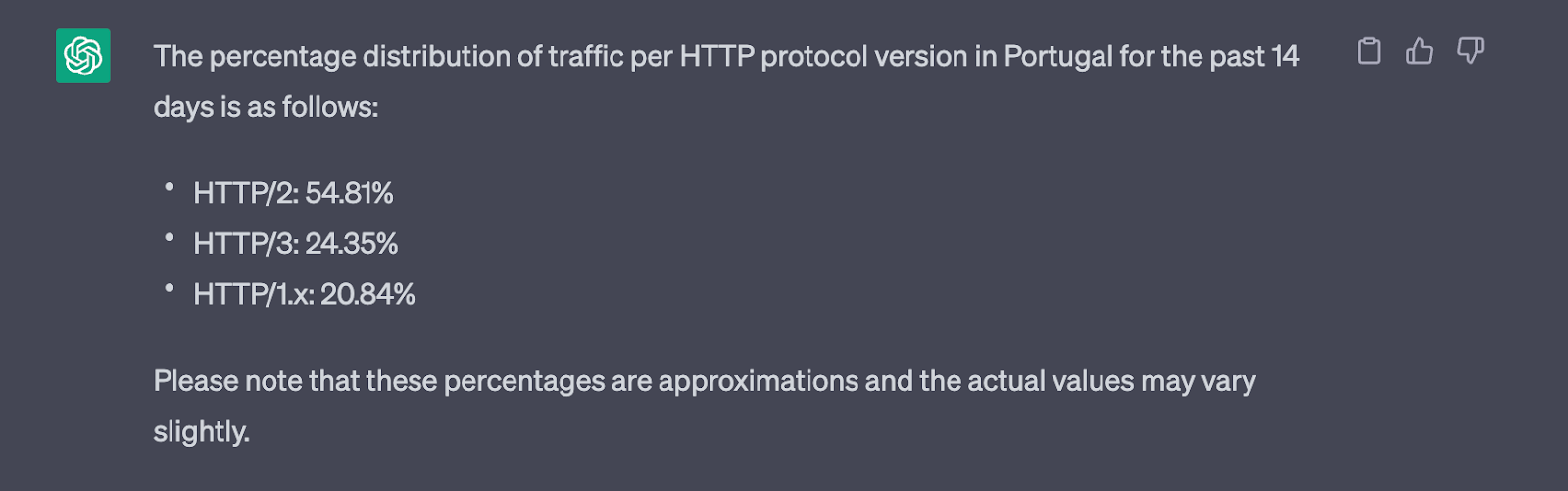
"What's the HTTP protocol version distribution in Portugal?"

Query Cloudflare Radar and our docs using ChatGPT plugins

Now that ChatGPT has context, you can add some variants, like switching the country and the date range.

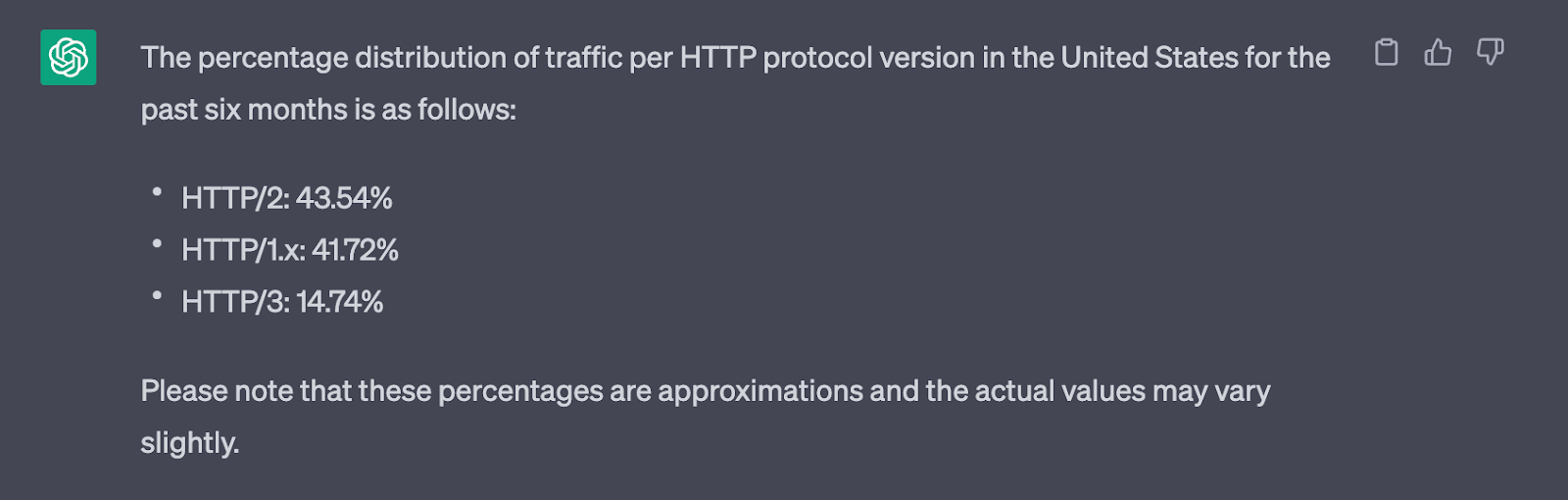
“How about the US in the last six months?”

Query Cloudflare Radar and our docs using ChatGPT plugins

You can also combine multiple topics (ChatGPT will make multiple API calls behind the scenes and combine the results in the best possible way).

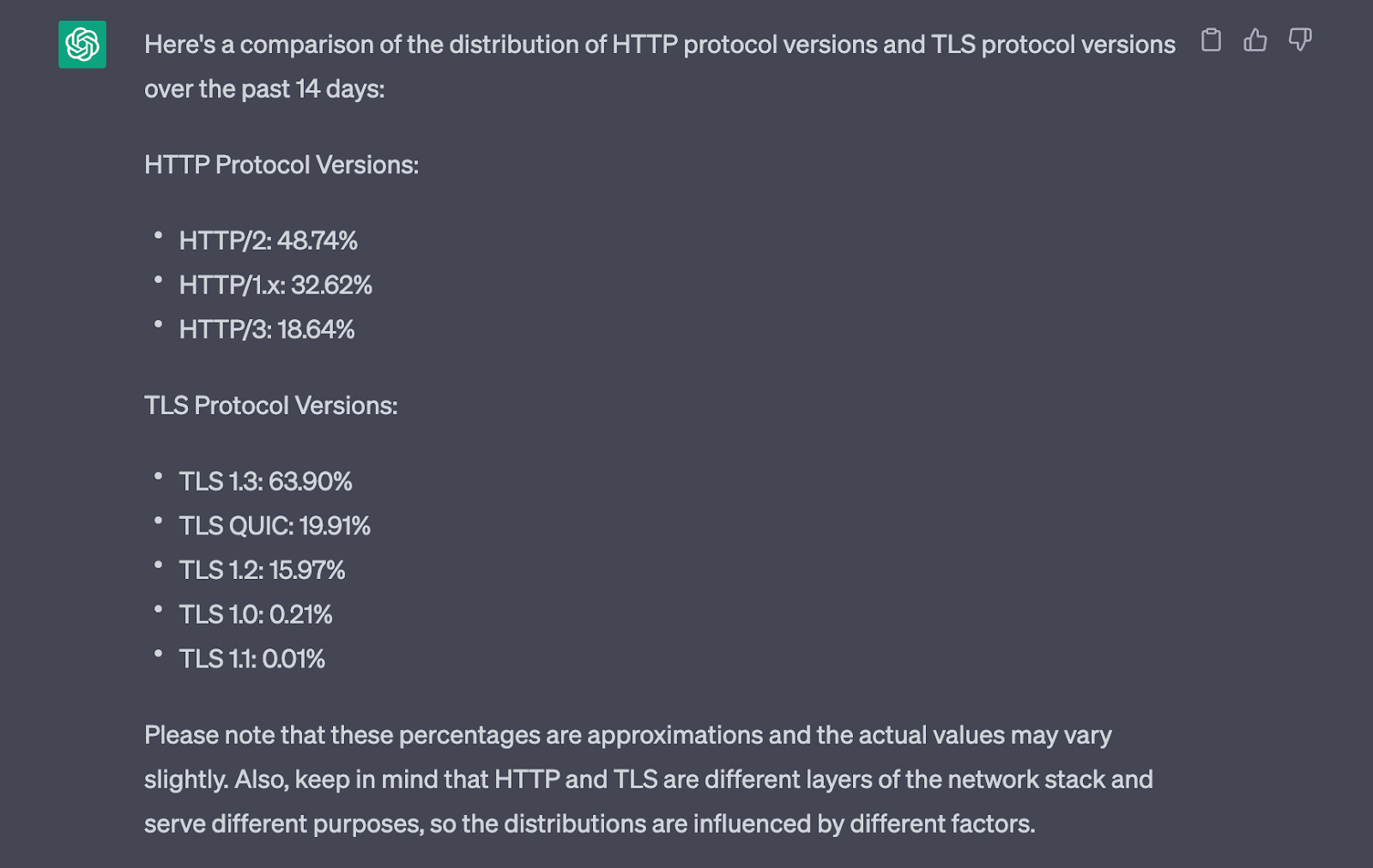
“How do HTTP protocol versions compare with TLS protocol versions?”

Query Cloudflare Radar and our docs using ChatGPT plugins

Out of ideas? Ask it “What can I ask the Radar plugin?”, or “Give me a random insight”.

Be creative, too; it understands a lot about our data, and we keep improving it. You can also add date or country filters using natural language in your prompts.

Cloudflare Docs ChatGPT plugin

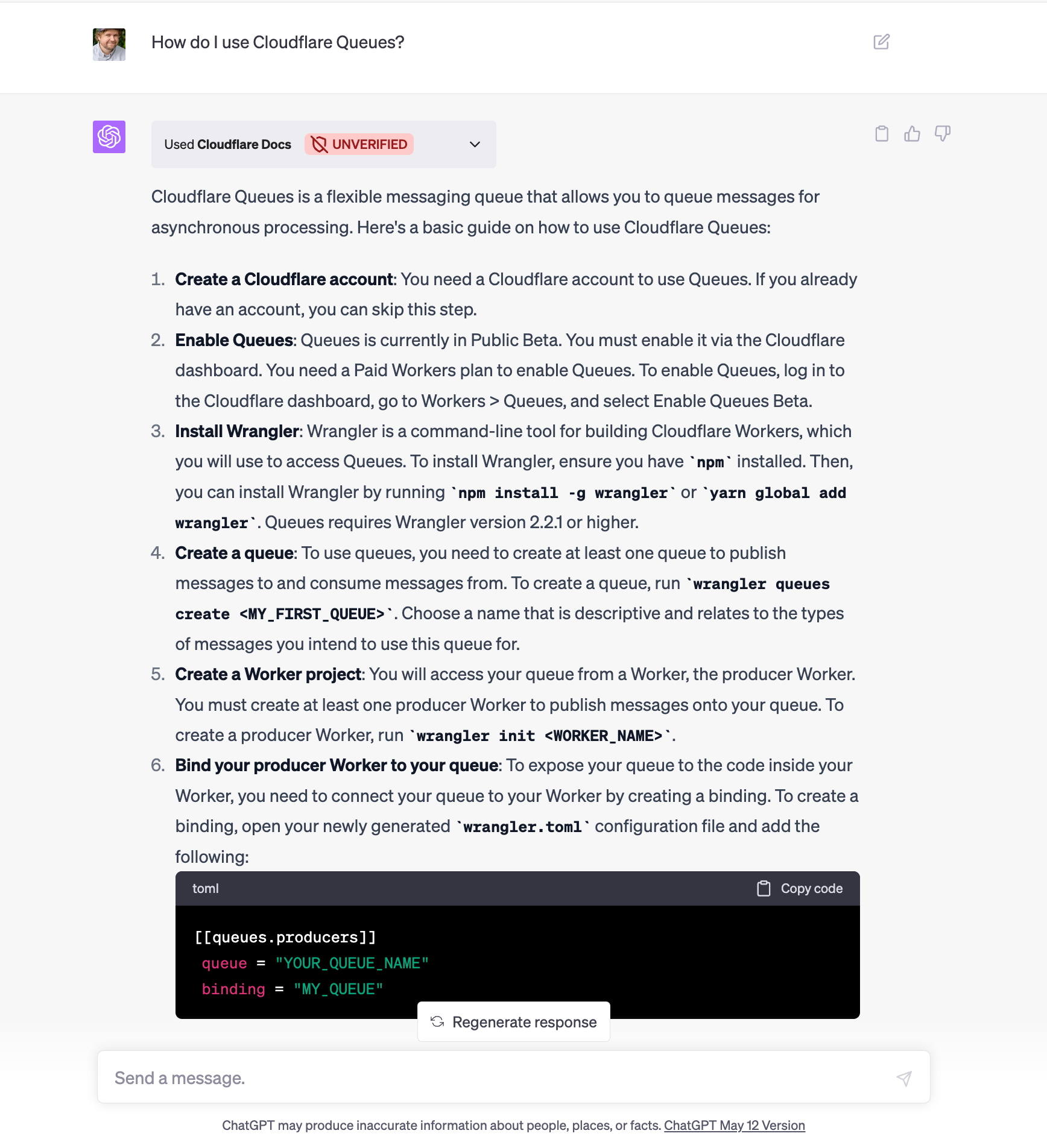
The Cloudflare Docs plugin is a ChatGPT Retrieval Plugin that lets you access the most up-to-date knowledge from our developer documentation using ChatGPT. This means if you’re using ChatGPT to assist you with building on Cloudflare that the answers you’re getting or code that’s being generated will be informed by current best practices and information located within our docs. You can set up and run the Cloudflare Docs ChatGPT Plugin by following the read me in the example repo.

Query Cloudflare Radar and our docs using ChatGPT plugins

The plugin was built entirely on Workers and uses KV as a vector store. It can also keep its index up-to-date using Cron Triggers, Queues and Durable Objects.

The plugin is a Worker that responds to POST requests from ChatGPT to a /query endpoint. When a query comes in, the Worker converts the query text into an embedding vector via the OpenAI embeddings API and uses this to find, and return, the most relevant document snippets from Cloudflare’s developer documentation.

The way this is achieved is by first converting every document in Cloudflare’s developer documentation on GitHub into embedding vectors (again using OpenAI’s API) and storing them in KV. This storage format allows you to find semantically similar content by doing a similarity search (we use cosine similarity), where two pieces of text that are similar in meaning will result in the two embedding vectors having a high similarity score. Cloudflare’s entire developer documentation compresses to under 5MB when converted to embedding vectors, so fetching these from KV is very quick. We’ve also explored building larger vector stores on Workers, as can be seen in this demo of 1 million vectors stored on Durable Object storage. We’ll be releasing more open source libraries to support these vector store use cases in the near future.

So ChatGPT will query the plugin when it believes the user’s question is related to Cloudflare’s developer tools, and the plugin will return a list of up-to-date information snippets directly from our documentation. ChatGPT can then decide how to use these snippets to best answer the user’s question.

The plugin also includes a “Scheduler” Worker that can periodically refresh the documentation embedding vectors, so that the information is always up-to-date. This is advantageous because ChatGPT’s own knowledge has a cutoff of September 2021 – so it’s not aware of changes in documentation, or new Cloudflare products.

The Scheduler Worker is triggered by a Cron Trigger, on a schedule you can set (eg, hourly), where it will check which content has changed since it last ran via GitHub’s API. It then sends these document paths in messages to a Queue to be processed. Workers will batch process these messages – for each message, the content is fetched from GitHub, and then turned into embedding vectors via OpenAI’s API. A Durable Object is used to coordinate all the Queue processing so that when all the batches have finished processing, the resulting embedding vectors can be combined and stored in KV, ready for querying by the plugin.

This is a great example of how Workers can be used not only for front-facing HTTP APIs, but also for scheduled batch-processing use cases.

Let us know what you think

We are in a time when technology is constantly changing and evolving, so as you experiment with these new plugins please let us know what you think. What do you like? What could be better? Since ChatGPT plugins are in alpha, changes to the plugins user interface or performance (i.e. latency) may occur. If you build your own plugin, we’d love to see it and if it’s open source you can submit a pull request on our example repo. You can always find us hanging out in our developer discord.

Micro-Star International Signing Key Stolen

Post Syndicated from Bruce Schneier original https://www.schneier.com/blog/archives/2023/05/micro-star-international-signing-key-stolen.html

Micro-Star International—aka MSI—had its UEFI signing key stolen last month.

This raises the possibility that the leaked key could push out updates that would infect a computer’s most nether regions without triggering a warning. To make matters worse, Matrosov said, MSI doesn’t have an automated patching process the way Dell, HP, and many larger hardware makers do. Consequently, MSI doesn’t provide the same kind of key revocation capabilities.

Delivering a signed payload isn’t as easy as all that. “Gaining the kind of control required to compromise a software build system is generally a non-trivial event that requires a great deal of skill and possibly some luck.” But it just got a whole lot easier.

2.3x faster using the Go plugin to replace Lua virtual machine

Post Syndicated from Grab Tech original https://engineering.grab.com/faster-using-the-go-plugin-to-replace-Lua-VM

Abstract

We’re excited to share with you the latest update on our open-source project Talaria. In our efforts to improve performance and overcome infrastructure limitations, we’ve made significant strides by implementing the Go plugin to replace Lua VM.

Our team has found that the Go plugin is roughly 2.3x faster and uses 2.3x less memory than the Lua VM. This significant performance boost has helped us improve overall functionality, scalability, and speed.

For those who aren’t familiar, Talaria is a distributed, highly available, and low-latency time-series database that’s designed for Big Data systems. Originally developed and implemented at Grab, Talaria is a critical component in processing millions and millions of transactions and connections every day, which demands scalable, data-driven decision-making.

Background

One of the methods we previously used for processing ingested data was Lua script. This method allowed users to customise the ingestion process, providing a high degree of flexibility.

The config below is an example of using Lua script to JSON encode the row as a data column:

computed:
  - name: data
    type: json
    func: |
      local json = require("json")
      function main(row)
        return json.encode(row)
      end     

Problem

We found that loading a Lua script required launching a Lua virtual machine (VM) to execute the script, which had a significant impact on performance, especially when ingesting large amounts of events.

This performance issue led us to reevaluate our approach to processing ingested data and make changes to improve Talaria’s performance.

As a result, this is the code we used on Lua VM to run the trim, remove keys “key1”, “key2”, “key3”, “key4”, “key5”, in the ingested data:

import "github.com/kelindar/lua"

func luaTrim() string {
    s, err := lua.FromString("test.lua", `
    local json = require("json")
    local keys = {
    "key1", "key2", "key3", "key4", "key5",
    }
    function main(input)
        local data = json.decode(input)
        for i, key in ipairs(keys) do
            data[key] = nil
        end
        return json.encode(data)
    end
`)
    if err != nil {
        panic(err)
    }
    result, err := s.Run(context.Background(), jsonstr)
    if err != nil {
        panic(err)
    }
    return result.String()
}

Here is the benchmark, using Lua VM is 1000 times slower and uses 1000 times more memory than Golang’s native function on a Trim function:

BenchmarkTrim-12 543541 2258 ns/op 848 B/op 12 allocs/op
BenchmarkLuaTrim-12 553 2105506 ns/op 5006319 B/op 10335 allocs/op

But, anything can be improved by adding a cache, what if we cache the Lua VM and reuse them? Here is the new improved benchmark:

BenchmarkTrim-8 232105 4995 ns/op 2192 B/op 53 allocs/op
BenchmarkLuaTrim-8 97536 12108 ns/op 4573 B/op 121 allocs/op

So we can conclude that Lua VMs are roughly 2.3x faster and use 2.3x less memory than Golang’s native function.

Use the Go plugin as Lua VM to execute custom code

We came up with the idea of using a Linux shared library to execute the custom function instead of using Lua VM to run the custom script. Maybe you will be more familiar with the files with suffixes .so; they are shared libraries designed to package similar functionality in a single unit and shared with other developers so that they can call the function without writing it again.

In Golang, a similar idea is called Go plugin, which allows you to build Golang code as a shared library (Golang names it a plugin). Open this file and call the Go function inside this plugin.

How to use the Go plugin

Let’s say you have a function F that wants to be called via the plugin.

package main
import "fmt"
func F() { fmt.Printf("Hello, world") }

After writing the function F, you can compile it as a Go plugin file f_plugin.so via Go build -buildmode=plugin -o f_plugin.so. And you can open the file and use the function F like this:

p, err := plugin.Open("f_plugin.so")
if err != nil {
    panic(err)
}
f, err := p.Lookup("F")
if err != nil {
    panic(err)
}
f.(func())() // prints "Hello, world"

Go plugin benchmark

Here is the result that compares Golang native function, Golang plugin call.

Golang native function: 2.3x faster and 2.3x lesser memory than using the Lua VM.
Golang plugin call has almost the same performance as Golang native function.

BenchmarkNativeFunctionCall-12 2917465 401.7 ns/op 200 B/op 6 allocs/op
BenchmarkPluginCall-12 2778988 447.1 ns/op 200 B/op 6 allocs/op

Integrated into Talaria

This is the MR we integrated the Go plugin into Talaria: https://github.com/talariadb/talaria/pull/87, adding it as a loader like LuaLoader.

They both implemented the Handler interfaces.

type Handler interface {
    Load(uriOrCode string) (Handler, error)
    String() string
    Value(map[string]interface{}) (interface{}, error)
}

The implementation of this interface is listed here:

For Lua loader

Load: Load the Lua code or Lua script file path (local file path or s3 path) as the loader.

String: Return “lua” so that we can call it to get what the loader is.

Value: Run the Lua script, and take the arg as input.

For Go plugin loader

Load: Read the plugin file path (local file path or s3 path) as the plugin, lookup the function name defined by the user, save the function for later use.

String: Return “plugin” so that we can call it to get what the loader is.

Value: Run the saved function, take the arg as input.

Things you need to notice

The Go version you used to build the Golang plugin must be the same as the service used in that plugin. We use Docker to build the service, so that we can ensure the Go version is the same.

Reference (Benchmark plugin and LUA)

https://github.com/atlas-comstock/talaria_benchmark/tree/master/benchmark_plugin_and_lua

Join us

Grab is the leading superapp platform in Southeast Asia, providing everyday services that matter to consumers. More than just a ride-hailing and food delivery app, Grab offers a wide range of on-demand services in the region, including mobility, food, package and grocery delivery services, mobile payments, and financial services across 428 cities in eight countries.

Powered by technology and driven by heart, our mission is to drive Southeast Asia forward by creating economic empowerment for everyone. If this mission speaks to you, join our team today!

Batteries included: how AI will transform the who and how of programming

Post Syndicated from John Graham-Cumming original http://blog.cloudflare.com/ai-will-transform-programming/

Batteries included: how AI will transform the who and how of programming

Batteries included: how AI will transform the who and how of programming

The 1947 paper titled “Preparation of Problems for EDVAC-Type Machines” talks about the idea and usefulness of a “subroutine”. At the time there were only a tiny number of computers worldwide and subroutines were a novel idea, and it was clear that these subroutines were going to make programmers more productive: “Many operations which are thus excluded from the built-in set are still of sufficiently frequent occurrence to make undesirable the repetition of their coding in detail.”

Looking back it seems amazing that subroutines had to be invented, but at the time programmers wrote literally everything they needed to complete a task. That made programming slow, error-prone and restricted who could be a programmer to a relatively small group of people.

Luckily, things changed.

You can look at the history of computer programming as improvements in programmer productivity and widening the scope of who is a programmer. Think of syntax highlighting, high-level languages, IDEs, libraries and frameworks, APIs, Visual Basic, code completion, refactoring tools, spreadsheets, and so on.

And here we are with things changing again.

The new programmers

The recent arrival of LLMs capable of assisting programmers in writing, debugging and modifying code is yet another step. It’s a step at both making programmers more productive and helping more people be programmers.

As programmers a lot of what we do is arcane.

Sure, we have helped create the modern world, but we spend a lot of time on things that actually exclude many from being programmers. Think of how many times you’ve messed up syntax, misinterpreted the result of calling a function, or made an off-by-one error in a loop.

And we’re expected to operate at a concrete and abstract level simultaneously. We hold the architecture and state of a system in our heads, imagining the program as data flows through it, and worry about a missing semicolon.

This is, frankly, weird.

That weirdness is partly why the children’s programming language Scratch eliminates much of the arcana. It’s designed to stop the user making small mistakes that add up to not making progress on a program. Its on-screen shapes are designed to show how a program flows and loops. What if AI eliminates much of our odd work and lets people concentrate on the thing they are creating?

I think that would be wonderful and would open the world of programming to many, many more people. But we’re not there yet. We’re at the point where AIs are hugely helpful assistants in the traditional art of programming. And this week Cloudflare will introduce its own AI assistants to make programmers using Cloudflare Workers much more productive. And these assistants are going to help more people use the Cloudflare Developer Platform.

The new platforms

A developer platform without AI isn’t going to be much use. It’ll be a bit like a developer platform that can’t do floating point arithmetic, or handle a list of data. We’re going to see every developer platform have AI capability built in because these capabilities will allow developers to make richer experiences for users.

Batteries included: how AI will transform the who and how of programming

If you’ve used a phone’s picture library recently you’ve probably discovered that you can search by what’s in an image. Type ‘cat’ and you can see all the cat pictures you’ve taken. Image classification like this is an example of the sort of functionality that a developer platform should provide so that a programmer can build a productive and exciting experience for their users.

That’s why this week we’ll be announcing AI features built directly into the Cloudflare Workers platform so that developers have a rich toolset at their disposal. And they’ll be able to train and upload their own models to run on our global network.

AI systems, by their nature, require a lot of data both for training and for executing models. Think giga- to petabytes. And a lot of that data needs to move around. Unlike a database where data might largely be stored and accessed infrequently, AI systems are alive with moving data.

To accommodate that, platforms need to stop treating data as something to lock in developers with. Data needs to be free to move from system to system, from platform to platform, without transfer fees, egress or other nonsense. If we want a world of AI, we need a world of data fluidity. We’ll look this week at how Cloudflare (including our R2) enables that.

Batteries included: how AI will transform the who and how of programming

I like to think (it has to be!)

As I look back at 40 years of my programming life, I haven’t been this excited about a new technology… ever. That’s because AI is going to be a pervasive change to how programs get written, who writes programs and how all of us interact with software.

In a talk, Andrew Ng called AI “The New Electricity”. Does that seem exaggerated? I don’t think so. Electricity utterly altered work and life for everyone and has become so much part of life that when electricity supplies fail it’s a shock.

AI is going to have a similarly profound effect on the way we live and work, and will be equally pervasive. And AI is already here, not just in the form of ChatGPT and Google Bard, but through machine translation, agents like Siri and Alexa, and a myriad of unseen systems that do something humans can’t do: keep up with the speed of the Internet helping to protect it and us.

And, I predict, AI is going to help people be smarter. That effect has already been seen with the ancient game Go. In 2016, one of the world’s strongest Go players, Lee Sedol, was beaten by AlphaGo and later retired. But something interesting has happened: Go players playing against AI are getting stronger. Humans are learning new strategies and improving.

I think AI has the potential to do that for all of us. And for programmers I think it’ll make us more productive and make more people programmers.

Which makes me wonder what a 2047 paper entitled “Preparation of Programs for NEURAL-Type Machines” will introduce. What new exciting way of programming is there for us to discover in the next few years? What cybernetic ecology will be created that makes the flow of ideas from the brain to silicon so much quicker?

Batteries included: how AI will transform the who and how of programming

Welcome to Developer Week 2023

Post Syndicated from Ricky Robinett original http://blog.cloudflare.com/welcome-to-developer-week-2023/

Welcome to Developer Week 2023

This post is also available in French, Spanish, German, Japanese, Chinese.

Welcome to Developer Week 2023

It is an incredibly exciting time to be a developer.

The frameworks, libraries and developer tools we depend on keep leveling up in ways that allow us to build more efficiently. On top of that, we’re using AI-powered tools like ChatGPT and GitHub Copilot to ship code quicker than many of us ever could have imagined. This all means we’re spending less time on boilerplate code and setup, and more time writing the code that makes our applications unique.

It’s not only a time when we’re equipped with the tools to be successful in new ways, but we're also finding inspiration in what’s happening around us. It feels like every day there’s an advancement with AI that changes the boundaries of what we can build. Across meetups, conferences, chat rooms, and every other place we gather as developers, we’re pushing each other to expand our ideas of what is possible.

With so much excitement permeating through the global developer community, we couldn’t imagine a better time to be kicking off Developer Week here at Cloudflare.

A focus on developer experience

A big part of any Innovation Week at Cloudflare is bringing you all new products to play with. And this year will be no different, there will be plenty of new products coming your way over the next seven days, and we can’t wait for you to get your hands on them. But we know that for developers it can sometimes be more exciting to see a tool you already use upgrade its developer experience than to get something new. That’s why as we’ve planned for this Developer Week we have been particularly focused on how we can make our developer experience more seamless by addressing many of your most requested features & fixes.

Part of making our developer experience more seamless is ensuring you all can bring the technologies you already know and love to Cloudflare. We’ve especially heard this from you all when it comes to deploying JAMstack applications on Cloudflare. Without spoiling too much, if you’re using a frontend framework and building JAMstack applications we’re excited about what we’re shipping for you this week.

A platform born in the Age of AI

We want developers to be able to build anything they’re excited about on Cloudflare. And one thing a lot of us are excited about right now are AI applications. AI is something that’s been part of Cloudflare’s foundation since the beginning. We are a company that was born in the age of AI. A core part of how we work towards our mission to help build a better Internet is by using machine learning to help protect your applications.

Through this week, we want to empower you with the tools and wisdom we’ve gathered around AI and machine learning. As well as showing you how to use Cloudflare with some of your new favorite AI developer tools. We’ll be shipping sample code, tutorials, tips and best practices. And that wisdom won’t only be coming from us, we’ll be sharing the stories of customers who have built on us and give you all an opportunity to learn from the companies that inspire us.

Why I joined Cloudflare

This is special Developer Week for me because it’s my first Developer Week at Cloudflare. I joined a little over a month ago to lead our Developer Relations & Community team.

When I found out I was joining Cloudflare I called up one of my closest friends, and mentors, to share the news. He immediately said “What are you going to do? Developers are all already using Cloudflare. No matter how big or small of a project I build, I always use Cloudflare. It’s the last thing I set up before I deploy.” He couldn’t have set the stage better for me to share why I’m excited to join and a theme you’ll see throughout this week.

For many developers, you know us for our CDN, and we are one of the last pieces of infrastructure you set up for your project. Since we launched Cloudflare Workers in 2017, we’ve been shipping tools intended to help empower you not only at the end of your journey, but from the moment you start building a new project. Myself, and my team, are here to help you discover and be successful with all of our developers tools. We’ll be here from the moment you start building, when you go into production and all the way through when you’re scaling your application to millions of users around the world.

Whether you are one of the over one million developers already building on Cloudflare or you’re starting to use us for the first time during this Developer Week, I can’t wait to meet you.

Welcome to Developer Week 2023

We’re excited to kick off another Developer Week. Through this week we’ll tell you about the new tools we’re shipping and share how many of them were built. We’ll show you how you can use them, and share stories from customers who are using our developer platform today. We hope you’ll be part of the conversation, whether that’s on discord, Cloudflare TV, community.cloudflare.com, or social media.

The collective thoughts of the interwebz