Победителят в десетото издание на Международния литературен ученически конкурс „Който спаси един човешки живот, спасява цяла вселена” ще бъде награден с участие в международен младежки форум в Израел. Пребиваването му…
The Fedora community is currently discussing a proposal to start supporting
a unified
kernel image (UKI) for the distribution; these images would combine
several pieces that are generally separate today (e.g. initrd, kernel, and
kernel
command line). There are a number of
advantages to such a kernel image, at least for some kinds of systems, but
there is worry from some about where the endpoint of this work lies. There
is a need
to ensure that Fedora can still boot non-unified, perhaps locally built,
kernels and can support other use cases that unification might preclude.
A group of Chinese researchers have just published a paper claiming that they can—although they have not yet done so—break 2048-bit RSA. This is something to take seriously. It might not be correct, but it’s not obviously wrong.
We have long known from Shor’s algorithm that factoring with a quantum computer is easy. But it takes a big quantum computer, on the orders of millions of qbits, to factor anything resembling the key sizes we use today. What the researchers have done is combine classical lattice reduction factoring techniques with a quantum approximate optimization algorithm. This means that they only need a quantum computer with 372 qbits, which is well within what’s possible today. (The IBM Osprey is a 433-qbit quantum computer, for example. Others are on their way as well.)
The Chinese group didn’t have that large a quantum computer to work with. They were able to factor 48-bit numbers using a 10-qbit quantum computer. And while there are always potential problems when scaling something like this up by a factor of 50, there are no obvious barriers.
Honestly, most of the paper is over my head—both the lattice-reduction math and the quantum physics. And there’s the nagging question of why the Chinese government didn’t classify this research. But…wow…maybe…and yikes! Or not.
Abstract: Shor’s algorithm has seriously challenged information security based on public key cryptosystems. However, to break the widely used RSA-2048 scheme, one needs millions of physical qubits, which is far beyond current technical capabilities. Here, we report a universal quantum algorithm for integer factorization by combining the classical lattice reduction with a quantum approximate optimization algorithm (QAOA). The number of qubits required is O(logN/loglogN ), which is sublinear in the bit length of the integer N , making it the most qubit-saving factorization algorithm to date. We demonstrate the algorithm experimentally by factoring integers up to 48 bits with 10 superconducting qubits, the largest integer factored on a quantum device. We estimate that a quantum circuit with 372 physical qubits and a depth of thousands is necessary to challenge RSA-2048 using our algorithm. Our study shows great promise in expediting the application of current noisy quantum computers, and paves the way to factor large integers of realistic cryptographic significance.
In email, Roger Grimes told me: “Apparently what happened is another guy who had previously announced he was able to break traditional asymmetric encryption using classical computers…but reviewers found a flaw in his algorithm and that guy had to retract his paper. But this Chinese team realized that the step that killed the whole thing could be solved by small quantum computers. So they tested and it worked.”
EDITED TO ADD: One of the issues with the algorithm is that it relies on a recent factoring paper by Claus Schnorr. It’s a controversial paper; and despite the “this destroys the RSA cryptosystem” claim in the abstract, it does nothing of the sort. Schnorr’s algorithm works well with smaller moduli—around the same order as ones the Chinese group has tested—but falls apart at larger sizes. At this point, nobody understands why. The Chinese paper claims that their quantum techniques get around this limitation (I think that’s what’s behind Grimes’s comment) but don’t give any details—and they haven’t tested it with larger moduli. So if it’s true that the Chinese paper depends on this Schnorr technique that doesn’t scale, the techniques in this Chinese paper won’t scale, either. (On the other hand, if it does scale then I think it also breaks a bunch of lattice-based public-key cryptosystems.)
I am much less worried that this technique will work now. But this is something the IBM quantum computing people can test right now.
EDITED TO ADD (1/4): A reporter just asked me my gut feel about this. I replied that I don’t think this will break RSA. Several times a year the cryptography community received “breakthroughs” from people outside the community. That’s why we created the RSA Factoring Challenge: to force people to provide proofs of their claims. In general, the smart bet is on the new techniques not working. But someday, that bet will be wrong. Is it today? Probably not. But it could be. We’re in the worst possible position right now: we don’t have the facts to know. Someone needs to implement the quantum algorithm and see.
EDITED TO ADD (1/5): Scott Aaronson’s take is a “no”:
In the new paper, the authors spend page after page saying-without-saying that it might soon become possible to break RSA-2048, using a NISQ (i.e., non-fault-tolerant) quantum computer. They do so via two time-tested strategems:
the detailed exploration of irrelevancies (mostly, optimization of the number of qubits, while ignoring the number of gates), and
complete silence about the one crucial point.
Then, finally, they come clean about the one crucial point in a single sentence of the Conclusion section:
It should be pointed out that the quantum speedup of the algorithm is unclear due to the ambiguous convergence of QAOA.
“Unclear” is an understatement here. It seems to me that a miracle would be required for the approach here to yield any benefit at all, compared to just running the classical Schnorr’s algorithm on your laptop. And if the latter were able to break RSA, it would’ve already done so.
All told, this is one of the most actively misleading quantum computing papers I’ve seen in 25 years, and I’ve seen … many.
EDITED TO ADD (1/7): More commentary. Again: no need to panic.
While writing code to develop applications, developers must keep up with multiple programming languages, frameworks, software libraries, and popular cloud services from providers such as AWS. Even though developers can find code snippets on developer communities, to either learn from them or repurpose the code, manually searching for the snippets with an exact or even similar use case is a distracting and time-consuming process. They have to do all of this while making sure that they’re following the correct programming syntax and best coding practices.
Amazon CodeWhisperer, a machine learning (ML) powered coding aide for developers, lets you overcome those challenges. Developers can simply write a comment that outlines a specific task in plain English, such as “upload a file to S3.” Based on this, CodeWhisperer automatically determines which cloud services and public libraries are best-suited for the specified task, it creates the specific code on the fly, and then it recommends the generated code snippets directly in the IDE. And this isn’t about copy-pasting code from the web, but generating code based on the context of your file, such as which libraries and versions you have, as well as the existing code. Moreover, CodeWhisperer seamlessly integrates with your Visual Studio Code and JetBrains IDEs so that you can stay focused and never leave the development environment. At the time of this writing, CodeWhisperer supports Java, Python, JavaScript, C#, and TypeScript.
To make our application easier to digest, we’ll split it into three segments:
Image download – The user provides an image URL to the first API. A Lambda function downloads the image from the URL and stores it on an S3 bucket. Amazon S3 automatically sends a notification to an Amazon SNS topic informing that a new image is ready for processing. Amazon SNS then delivers the message to an Amazon SQS queue.
Image recognition – A second Lambda function handles the orchestration and processing of the image. It receives the message from the Amazon SQS queue, sends the image for Amazon Rekognition to process, stores the recognition results on a DynamoDB table, and sends a message with those results as JSON to a second Amazon SNS topic used in section three. A user can list the images and the objects present on each image by calling a second API which queries the DynamoDB table.
3rd-party integration – The last Lambda function reads the message from the second Amazon SQS queue. At this point, the Lambda function must deliver that message to a fictitious external e-mail server HTTP API that supports only XML payloads. Because of that, the Lambda function converts the JSON message to XML. Lastly, the function sends the XML object via HTTP POST to the e-mail server.
The following diagram depicts the architecture of our application:
Figure 1. Architecture diagram depicting the application architecture. It contains the service icons with the component explained on the text above.
Prerequisites
Before getting started, you must have the following prerequisites:
We already created the scaffolding for the application that we’ll build, which you can find on this Git repository. This application is represented by a CDK app that describes the infrastructure according to the architecture diagram above. However, the actual business logic of the application isn’t provided. You’ll implement it using CodeWhisperer. This means that we already declared using AWS CDK components, such as the API Gateway endpoints, DynamoDB table, and topics and queues. If you’re new to AWS CDK, then we encourage you to go through the CDK workshop later on.
Deploying AWS CDK apps into an AWS environment (a combination of an AWS account and region) requires that you provision resources that the AWS CDK needs to perform the deployment. These resources include an Amazon S3 bucket for storing files and IAM roles that grant permissions needed to perform deployments. The process of provisioning these initial resources is called bootstrapping. The required resources are defined in an AWS CloudFormation stack, called the bootstrap stack, which is usually named CDKToolkit. Like any CloudFormation stack, it appears in the CloudFormation console once it has been deployed.
After cloning the repository, let’s deploy the application (still without the business logic, which we’ll implement later on using CodeWhisperer). For this post, we’ll implement the application in Python. Therefore, make sure that you’re under the python directory. Then, use the cdk bootstrap command to bootstrap an AWS environment for AWS CDK. Replace {AWS_ACCOUNT_ID} and {AWS_REGION} with corresponding values first:
cdk bootstrap aws://{AWS_ACCOUNT_ID}/{AWS_REGION}
For more information about bootstrapping, refer to the documentation.
Let’s get started by implementing the first Lambda function, which is responsible for downloading an image from the provided URL and storing that image in an S3 bucket. Open the get_save_image.py file from the python/api/runtime/ directory. This file contains an empty Lambda function handler and the needed inputs parameters to integrate this Lambda function.
url is the URL of the input image provided by the user,
name is the name of the image provided by the user, and
S3_BUCKET is the S3 bucket name defined by our application infrastructure.
Write a comment in natural language that describes the required functionality, for example:
# Function to get a file from url
To trigger CodeWhisperer, hit the Enter key after entering the comment and wait for a code suggestion. If you want to manually trigger CodeWhisperer, then you can hit Option + C on MacOS or Alt + C on Windows. You can browse through multiple suggestions (if available) with the arrow keys. Accept a code suggestion by pressing Tab. Discard a suggestion by pressing Esc or typing a character.
You should get a suggested implementation of a function that downloads a file using a specified URL. The following image shows an example of the code snippet that CodeWhisperer suggests:
Figure 2. Screenshot of the code generated by CodeWhisperer on VS Code. It has a function called get_file_from_url with the implementation suggestion to download a file using the requests lib.
Be aware that CodeWhisperer uses artificial intelligence (AI) to provide code recommendations, and that this is non-deterministic. The result you get in your IDE may be different from the one on the image above. If needed, fine-tune the code, as CodeWhisperer generates the core logic, but you might want to customize the details depending on your requirements.
Let’s try another action, this time to upload the image to an S3 bucket:
# Function to upload image to S3
As a result, CodeWhisperer generates a code snippet similar to the following one:
Figure 3. Screenshot of the code generated by CodeWhisperer on VS Code. It has a function called upload_image with the implementation suggestion to download a file using the requests lib and upload it to S3 using the S3 client.
Now that you have the functions with the functionalities to download an image from the web and upload it to an S3 bucket, you can wire up both functions in the Lambda handler function by calling each function with the correct inputs.
Image recognition
Now let’s implement the Lambda function responsible for sending the image to Amazon Rekognition for processing, storing the results in a DynamoDB table, and sending a message with those results as JSON to a second Amazon SNS topic. Open the image_recognition.py file from the python/recognition/runtime/ directory. This file contains an empty Lambda and the needed inputs parameters to integrate this Lambda function.
queue_url is the URL of the Amazon SQS queue to which this Lambda function is subscribed,
table_name is the name of the DynamoDB table, and
topic_arn is the ARN of the Amazon SNS topic to which this Lambda function is published.
Using CodeWhisperer, implement the business logic of the next Lambda function as you did in the previous section. For example, to detect the labels from an image using Amazon Rekognition, write the following comment:
# Detect labels from image with Rekognition
And as a result, CodeWhisperer should give you a code snippet similar to the one in the following image:
Figure 4. Screenshot of the code generated by CodeWhisperer on VS Code. It has a function called detect_labels with the implementation suggestion to use the Rekognition SDK to detect labels on the given image.
You can continue generating the other functions that you need to fully implement the business logic of your Lambda function. Here are some examples that you can use:
# Save labels to DynamoDB
# Publish item to SNS
# Delete message from SQS
Following the same approach, open the list_images.py file from the python/recognition/runtime/ directory to implement the logic to list all of the labels from the DynamoDB table. As you did previously, type a comment in plain English:
# Function to list all items from a DynamoDB table
Other frequently used code
Interacting with AWS isn’t the only way that you can leverage CodeWhisperer. You can use it to implement repetitive tasks, such as creating unit tests and converting message formats, or to implement algorithms like sorting and string matching and parsing. The last Lambda function that we’ll implement as part of this post is to convert a JSON payload received from Amazon SQS to XML. Then, we’ll POST this XML to an HTTP endpoint.
Open the send_email.py file from the python/integration/runtime/ directory. This file contains an empty Lambda function handler. An event is a JSON-formatted document that contains data for a Lambda function to process. Type a comment with your intent to get the code snippet:
# Transform json to xml
As CodeWhisperer uses the context of your files to generate code, depending on the imports that you have on your file, you’ll get an implementation such as the one in the following image:
Figure 5. Screenshot of the code generated by CodeWhisperer on VS Code. It has a function called json_to_xml with the implementation suggestion to transform JSON payload into XML payload.
Repeat the same process with a comment such as # Send XML string with HTTP POST to get the last function implementation. Note that the email server isn’t part of this implementation. You can mock it, or simply ignore this HTTP POST step. Lastly, wire up both functions in the Lambda handler function by calling each function with the correct inputs.
Deploy and test the application
To deploy the application, run the command cdk deploy --all. You should get a confirmation message, and after a few minutes your application will be up and running on your AWS account. As outputs, the APIStack and RekognitionStack will print the API Gateway endpoint URLs. It will look similar to this example:
The first endpoint expects two string parameters: url (the image file URL to download) and name (the target file name that will be stored on the S3 bucket). Use any image URL you like, but remember that you must encode an image URL before passing it as a query string parameter to escape the special characters. Use an online URL encoder of your choice for that. Then, use the curl command to invoke the API Gateway endpoint:
curl -X GET 'https://examp1eid0.execute-api.eu-east-
2.amazonaws.com/prod?url={encoded-image-URL}&name={file-name}'
Replace {encoded-image-URL} and {file-name} with the corresponding values. Also, make sure that you use the correct API endpoint that you’ve noted from the AWS CDK deploy command output as mentioned above.
It will take a few seconds for the processing to happen in the background. Once it’s ready, see what has been stored in the DynamoDB table by invoking the List Images API (make sure that you use the correct URL from the output of your deployed AWS CDK stack):
curl -X GET 'https://examp1eid7.execute-api.eu-east-2.amazonaws.com/prod'
After you’re done, to avoid unexpected charges to your account, make sure that you clean up your AWS CDK stacks. Use the cdk destroy command to delete the stacks.
Conclusion
In this post, we’ve seen how to get a significant productivity boost with the help of ML. With that, as a developer, you can stay focused on your IDE and reduce the time that you spend searching online for code snippets that are relevant for your use case. Writing comments in natural language, you get context-based snippets to implement full-fledged applications. In addition, CodeWhisperer comes with a mechanism called reference tracker, which detects whether a code recommendation might be similar to particular CodeWhisperer training data. The reference tracker lets you easily find and review that reference code and see how it’s used in the context of another project. Lastly, CodeWhisperer provides the ability to run scans on your code (generated by CodeWhisperer as well as written by you) to detect security vulnerabilities.
During the preview period, CodeWhisperer is available to all developers across the world for free. Get started with the free preview on JetBrains, VS Code or AWS Cloud9.
Amazon Identity Services is responsible for the way Amazon customers—buyers, sellers, developers—identify themselves on Amazon. Our team also manages customers’ core account information, such as names and delivery addresses. Our mission is to deliver the most intuitive, convenient, and secure authentication experience. We’re in charge of account security for Amazon, worldwide, on all device surfaces.
Identity systems make millions of security decisions per second. We ingest datasets at a large scale—processing 9 TB per hour—and produce analytical datasets that grow by billions of rows per hour. Our core business metrics within the Amazon Identity Services team are built on top of these datasets, which we use for leadership meetings, product launch decisions, metric movement investigations, and discovering new innovation opportunities to simplify security experiences for our customers.
In this post, we discuss how we use Amazon QuickSight to empower partners with self-serve data discovery.
Inaccessible insights block data-driven decisions
The sheer volume of our datasets made gathering insights a slow process. Not only that, but datasets weren’t accessible to a wide audience outside our team, such as partners, program managers, product managers, and so on. As a result, Business Intelligence Engineers (BIEs) spent a lot of time writing ad hoc queries, which then took a long time to run. When the insights were ready, BIEs were tasked with answering questions via manual processes that didn’t scale.
We chose QuickSight to not only speed up our processing times, but to create efficiencies with self-serve insight access via analyses (exploration and authoring) and dashboards for consumption. With partners and stakeholders having the ability to access insights without assistance, our BIEs were able to shift focus from ad hoc requests to more impactful projects that were a better use of their skills and expertise.
In the following sections, we discuss what we were looking for in BI capabilities, and how QuickSight satisfied those requirements for our team.
Removing the middle person with QuickSight
Imagine being the pilot of a commercial airline, navigating in cloudy conditions. You know your destination lies ahead, but you can’t see it; you have to rely on your dashboard of instruments to navigate so you’ll arrive safely. It’s similar when working on large-scale consumer products. Although our team gathers anecdotes and reviews feedback to form hypotheses on what our customers need, only by analyzing data at scale can we truly understand customer problems and design appropriate solutions.
The status quo that positioned our BIEs between stakeholders and the insights that were needed required a manual, error-prone process, with a time-to-insight that could take weeks. Even more problematic was that insights were limited to what the requestor envisioned. There was no flexibility to explore and visualize data with a simple drag-and-drop UI. This inability to explore and interact with available data meant stakeholders didn’t know the best questions to ask. Our team needed to make data more accessible to partner teams and non-BIE users, and we needed that access to be fast, intuitive, and to provide a single, indisputable source of truth.
With our research into BI tool options, we were looking for the following:
Accessible insights – We needed to ensure users from all levels of technical experience would be able to access and understand the insights provided to them
Speed – With an ingestion rate of 9 TB of data per hour, we needed our BI tool to be fast and reliable
Security – Built-in row-level and column-level security would give us the ability to provide on-demand access to thousands of users across AWS
The first option we considered had a lot of great features, but it wouldn’t scale without a server. The next option we looked at was very capable in a lot of areas, but it wouldn’t be as accessible for non-BIE users, and it also required a team to manage a server. QuickSight was a great fit because it’s not only serverless, but also has enough visualization capabilities to make it useful for self-service data.
QuickSight also offered seamless integration with Amazon Redshift, and the ability to publish our business metrics to QuickSight SPICE (Super-fast, Parallel, In-memory Calculation Engine), its robust in-memory engine. SPICE performs rapid advanced calculations and serves data. What we love most about SPICE is that it greatly reduces time-to-insight, supports column-level security for staying in compliance, and most importantly it’s super fast for data exploration within analyses.
Self-service data discovery just a few clicks away
Publishing our metrics to QuickSight SPICE enabled us to create pre-authored dashboards, and empowered users to create their own analytical content via analyses. Our technical program managers have all been trained on how to use QuickSight to create visualizations, whereas our BIE team members are dedicating their time to creating better datasets. Our non-tech partners and product managers no longer need to depend on a BIE to get answers to their questions, because they can create analyses and query billions of records with a drag-and-drop interface to instantly visualize data.
The following screen shot shows what our year-to-date visualization looks like, with all sensitive data redacted.
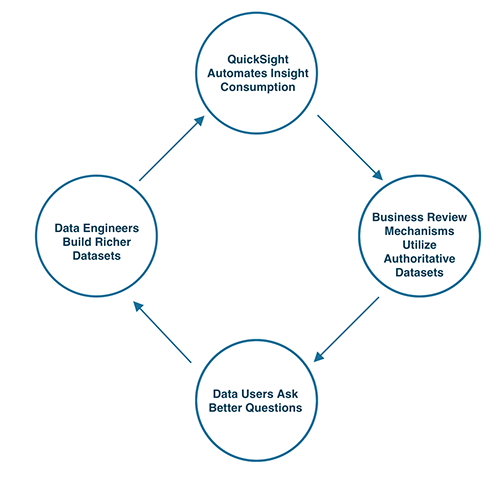
The BIE time saved as a result of stakeholders getting self-service answers can now be invested in building richer and better quality datasets, creating a virtuous cycle to help accelerate our ability to adapt and improve to meet our customers’ needs.
Another important benefit of using QuickSight was that we centralized a semantic layer, unifying the language we speak across departments by publishing authoritative datasets in SPICE with proper access control. Because the data was easy to use and accessible with pre-calculated metrics, our partner teams didn’t have to re-invent the metric definitions. To ensure everyone stays on the same page, we publish all documentation to internal wikis.
More efficient business reviews with paginated reports and Amazon QuickSight Q
Our north star is to completely automate our periodic business review processes, similar to how the AWS Analytics Sales team is currently using QuickSight Q in their monthly business reviews. Because Q enables simple querying of data in real time via natural language, we can reduce the time it takes to author analytical content, eliminate redundant manual work, and simplify interactivity with data.
With QuickSight, we are automating all the dashboard and analyses generation for the business reviews. Doing so enables us to focus more on generating insights and conducting relevant investigations every month, rather than spending time and energy querying for data. Specifically, the new paginated report object type enables us to produce highly formatted content for leadership and formal reviews.
To learn more about how you can embed customized data visuals, interactive dashboards, and natural language querying into any application, visit Amazon QuickSight Embedded.
About the Authors
Siamak Ziraknejad leads the technical product management team for Amazon Identity Services. His team formulates the technical product strategy and plans for account security (authentication and authorization across all surfaces, worldwide) and the consumer identity foundations for all Amazon programs and products (entitlement management, benefit sharing, and personalization).
Abhinav Mehta is a Senior Product Manager (Technical) with the Amazon Identity Services team. He is focused on the product strategy and innovations for fast and secure authentication methods at Amazon.
Security updates have been issued by Oracle (bcel), SUSE (ca-certificates-mozilla, glibc, minetest, multimon-ng, nautilus, ovmf, python-Django, samba, saphanabootstrap-formula, and xrdp), and Ubuntu (usbredir).
Welcome to the 20th edition of the AWS Serverless ICYMI (in case you missed it) quarterly recap. Every quarter, we share all the most recent product launches, feature enhancements, blog posts, webinars, Twitch live streams, and other interesting things that you might have missed!In case you missed our last ICYMI, check out what happened last quarter here.
AWS Lambda
For developers using Java, AWS Lambda has introduced Lambda SnapStart. SnapStart is a new capability that can improve the start-up performance of functions using Corretto (java11) runtime by up to 10 times, at no extra cost.
To use this capability, you must enable it in your function and then publish a new version. This triggers the optimization process. This process initializes the function, takes an immutable, encrypted snapshot of the memory and disk state, and caches it for reuse. When the function is invoked, the state is retrieved from the cache in chunks, on an as-needed basis, and it is used to populate the execution environment.
Also, now Amazon Inspectorsupports Lambda functions. You can enable Amazon Inspector to scan your functions continually for known vulnerabilities. The log4j vulnerability shows how important it is to scan your code for vulnerabilities continuously, not only after deployment. Vulnerabilities can be discovered at any time, and with Amazon Inspector, your functions and layers are rescanned whenever a new vulnerability is published.
During AWS re:Invent this year, we announced Step Functions Distributed Map. If you need to process many files, or items inside CSV or JSON files, this new flow can help you. The new distributed map flow orchestrates large-scale parallel workloads.
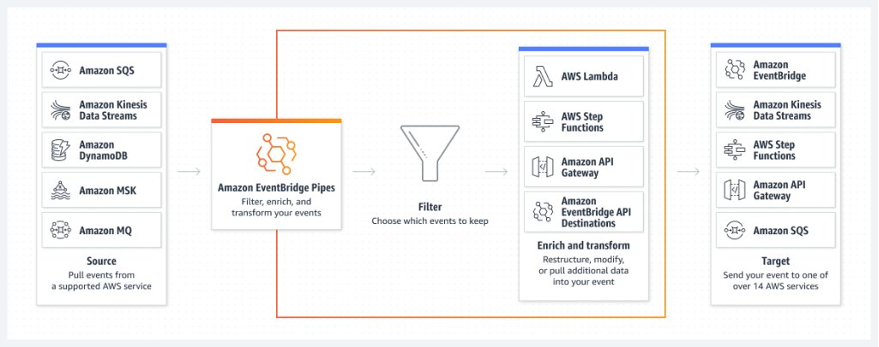
Amazon EventBridge launched two major features: Scheduler and Pipes. Amazon EventBridge Scheduler allows you to create, run, and manage scheduled tasks at scale. You can schedule one-time or recurring tasks across 270 services and over 6.000 APIs.
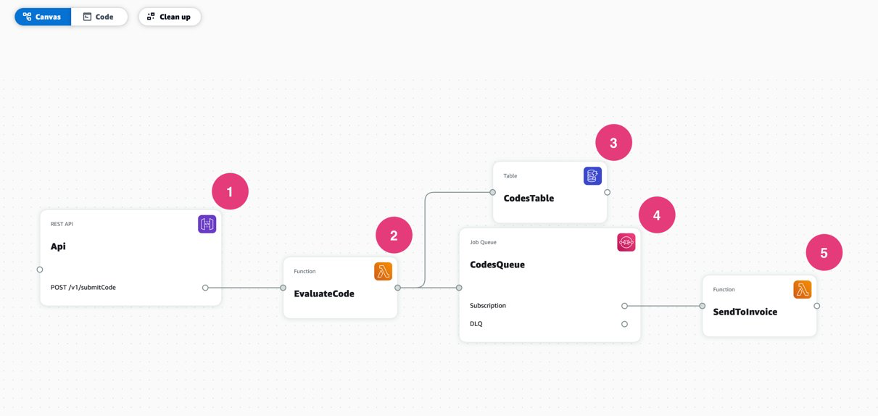
AWS Application Composer is a new visual designer that you can use to build serverless applications using multiple AWS services. This is ideal if you want to build a prototype, review with others architectures, generate diagrams for your projects, or onboard new team members to a project.
Within a simple user interface, you can drag and drop the different AWS resources and configure them visually. You can use AWS Application Composer together with AWS SAM Accelerate to build and test your applications in the AWS Cloud.
AWS Serverless digital learning badges
The new AWS Serverless digital learning badges let you show your AWS Serverless knowledge and skills. This is a verifiable digital badge that is aligned with the AWS Serverless Learning Plan.
This badge proves your knowledge and skills for Lambda, Amazon API Gateway, and designing serverless applications. To earn this badge, you must score at least 80 percent on the assessment associated with the Learning Plan. Visit this link if you are ready to get started learning or just jump directly to the assessment.
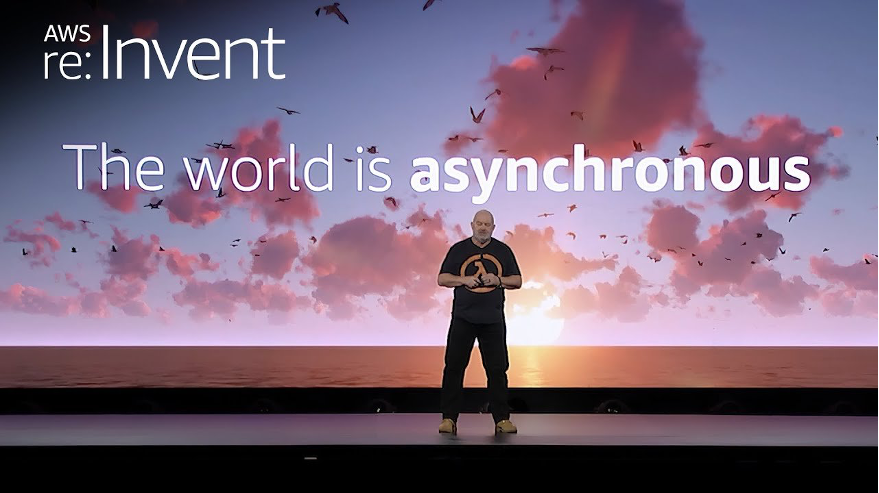
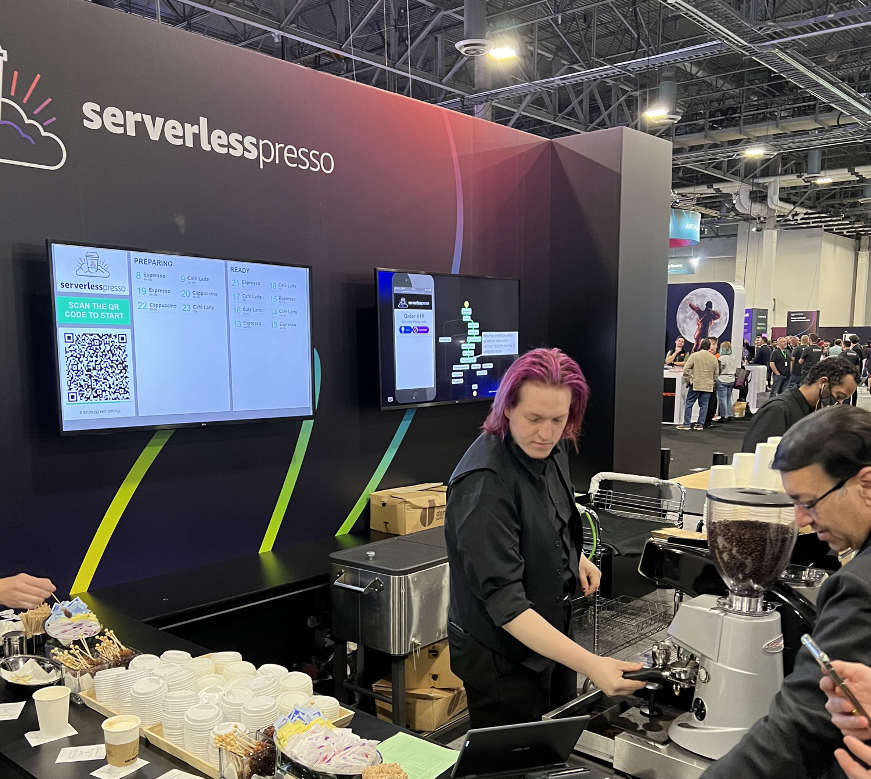
AWS re:Invent was held in Las Vegas from November 28 to December 2, 2022. Werner Vogels, Amazon’s CTO, highlighted event-driven applications during his keynote. He stated that the world is asynchronous and showed how strange a synchronous world would be. During the keynote, he showcased Serverlesspresso as an example of an event-driven application. The Serverless DA team presented many breakouts, workshops, and chalk talks. Rewatch all our breakout content:
In addition, we brought Serverlesspresso back to Vegas. Serverlesspresso is a contactless, serverless order management system for a physical coffee bar. The architecture comprises several serverless apps that support an ordering process from a customer’s smartphone to a real espresso bar. The customer can check the virtual line, place an order, and receive a notification when their drink is ready for pickup.
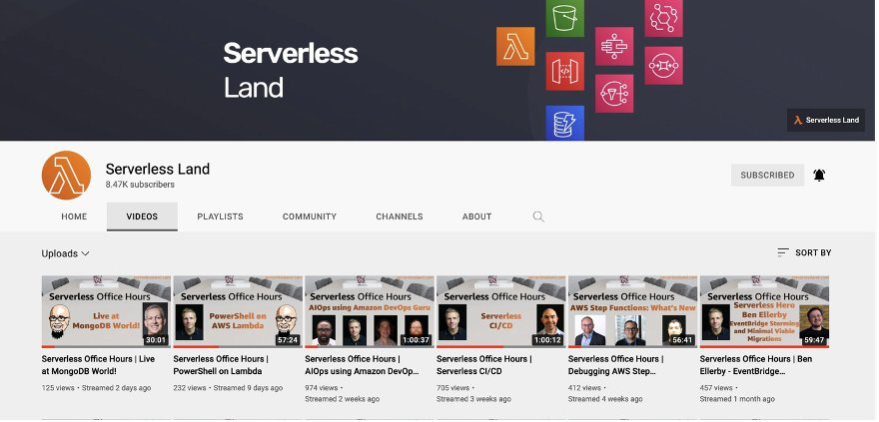
Weekly live virtual office hours: In each session, we talk about a specific topic or technology related to serverless and open it up to helping with your real serverless challenges and issues. Ask us anything about serverless technologies and applications.
The Serverless landing page has more information. The Lambda resources page contains case studies, webinars, whitepapers, customer stories, reference architectures, and even more Getting Started tutorials. If you want to learn more about event-driven architectures, read our new guide that will help you get started.
Having your phone lying around when your kids are playing with everything they find is a great security test. They immediately discover new features and ways to go beyond the usual flow.
This is the way I recently discovered a security issue with Android. Apparently, even if the phone is locked, the pull-down menu with quick settings works. Also, volume control works. Not every functionality inside the quick settings menu works fully while unlocked, but you can disable mobile data and Wi-Fi, you can turn on your hotspot, you can switch to Airplane mode.
While this has been pointed out on Google Pixel forums, on reddit and Stack Exchange, it has not been fixed in stock Android. Different manufacturers seem to have acknowledged the issue in their custom ROMs, but that’s not a reliable long-term solution.
Let me explain why this is an issue. First, it breaks the assumption that when the phone is locked nothing works. Breaking user assumptions is bad by itself.
Second, it allows criminals to steal your phone and put in in Airplane mode, thus disabling any ability to track the phone – either through “find my phone” services, or by the police through mobile carriers. They can silence the phone, so that it’s not found with “ring my phone” functionality. It’s true that an attacker can just take out the SIM card, but having the Wi-Fi on still allows tracking using wifi networks through which the phone passes.
Third, the hotspot (similar issues go with Bluetooth). Allowing a connection can be used to attack the device. It’s not trivial, but it’s not impossible either. It can also be used to do all sorts of network attacks on other devices connected to the hotspot (e.g. you enable the hotspot, a laptop connects automatically, and you execute an APR poisoning attack). The hotspot also allows attackers to use a device to commit online crimes and frame the owner. Especially if they do not steal the phone, but leave it lying where it originally was, just with the hotspot turned on. Of course, they would need to get the password for the hotspot, but this can be obtained through social engineering.
The interesting thing is that when you use Google’s Family Link to lock a device that’s given to a child, the pull-down menu doesn’t work. So the basic idea that “once locked, nothing should be accessible” is there, it’s just not implemented in the default use-case.
While the things described above are indeed edge-cases and may be far fetched, I think they should be fixed. The more functionality is available on a locked phone, the more attack surface it has (including for the exploitation of 0days).
To provide the best experiences, we use technologies like cookies to store and/or access device information. Consenting to these technologies will allow us to process data such as browsing behavior or unique IDs on this site. Not consenting or withdrawing consent, may adversely affect certain features and functions.
Functional
Always active
The technical storage or access is strictly necessary for the legitimate purpose of enabling the use of a specific service explicitly requested by the subscriber or user, or for the sole purpose of carrying out the transmission of a communication over an electronic communications network.
Preferences
The technical storage or access is necessary for the legitimate purpose of storing preferences that are not requested by the subscriber or user.
Statistics
The technical storage or access that is used exclusively for statistical purposes.The technical storage or access that is used exclusively for anonymous statistical purposes. Without a subpoena, voluntary compliance on the part of your Internet Service Provider, or additional records from a third party, information stored or retrieved for this purpose alone cannot usually be used to identify you.
Marketing
The technical storage or access is required to create user profiles to send advertising, or to track the user on a website or across several websites for similar marketing purposes.


 Siamak Ziraknejad leads the technical product management team for Amazon Identity Services. His team formulates the technical product strategy and plans for account security (authentication and authorization across all surfaces, worldwide) and the consumer identity foundations for all Amazon programs and products (entitlement management, benefit sharing, and personalization).
 Abhinav Mehta is a Senior Product Manager (Technical) with the Amazon Identity Services team. He is focused on the product strategy and innovations for fast and secure authentication methods at Amazon.




 Amazon EventBridge Scheduler | Schedule tasks over +200 targets!