2021-10-18 vivacom

Post Syndicated from original https://vasil.ludost.net/blog/?p=3451

Има неща, дето не трябва да ме учудват, но все пак успяват.

Днес по някое време ми спря Internet-а. По принцип ползвам Comnet София, които се отделиха от Comnet, и които в последствие бяха купени от Vivacom. След известно гледане видях, че в лога на pppd-то има съобщение “Neplatena smetka”.

Звъннах по телефона, където бях пренасочен към call центъра на Vivacom. След някакво чакане (над 10 минути, не ми се беше случвало скоро) и ходене по менюта стигнах до някакви хора, които да видят какво става. Оказа се, че последното ми плащане е изтекло на 15.10, и днес, на 18ти, са ми спрели услугата. Не бях получил известие от epay, защото явно тази част вече е спряна. Питайки как мога да го платя online ми казаха – не може, нямате още клиентски номер, трябва в магазин.

Отидох до близкия техен магазин, където ме намериха по ЕГН и ми обясниха, че мога да си платя за 6 месеца или 1 година. Обясних, че този договор винаги е бил месец по месец, и за мен няма особен смисъл да плащам толкова време, при условие, че до месец ще съм се изнесъл. Гледаха, мислиха, обадих се и на техния call center пак, и след половин час изводът си беше все тоя – те такава услуга нямат, няма начин. От друга страна, води се предплатена, няма прекратяване или каквото и да е друго и не им дължа нищо.
(явно и не трябва да връщам ONT-то, дето Comnet ми дадоха).

Та, теглих им една учтива майна, и ще карам седмица-две-три на 3G, докато се пренеса.

Също така, не знам това дали е от некадърност или съвсем нарочно, да се опитат да издоят максимално всичките клиенти, дето са купили, но много се надявам никой да не им се върже.

Passwordless Network Scanning: Same Insights, Less Risk

Post Syndicated from Jimmy Cancilla original https://blog.rapid7.com/2021/10/18/passwordless-network-scanning-same-insights-less-risk/

Passwordless Network Scanning: Same Insights, Less Risk

Password-based credentials are a ubiquitous part of our online lives, but they are prone to vulnerabilities. Combatting those vulnerabilities has been a major hurdle for security professionals, and it’s come at major cost for businesses. We are reinventing the credentialing process for our Network Scan Engine with the release of the Scan Assistant — a safer way to scan assets that limits the inherent drawbacks of credentials.

Passwords as a means of securing computer systems have been around for 60 years. Scholars believe MIT’s Compatible Time-Sharing System was the first to implement a password to allow different users to log in. Since then, passwords have become ubiquitous. Every operating system, website, and WiFi connection utilizes passwords as a means of restricting access.

Unfortunately, this has also proven to be fertile ground for attackers who wish to gain unauthorized access to data and computer systems. Due in part to the popularity — and potential weaknesses — of passwords, businesses have spent enormous amounts of time and money in building robust security programs in order to protect their intellectual property.

As a part of any good security program, companies regularly scan their networks to identify where they are vulnerable. One of the most uncomfortable nuances of network scans is that in order to fully assess a set of targets, the scanner must be able to authenticate to those targets. Providing the necessary credentials to the network scan engine comes with a number of challenges. These include:

  • Increased security risk: Storing credentials within an application immediately makes that application a potential vector for attack. If the application is compromised or misconfigured, an attacker could gain access to a comprehensive list of credentials, giving them the ability to compromise a customer’s network.
  • Credential management: Storing credentials within an application introduces additional operational challenges with managing those credentials. Anytime a credential changes on a target or set of targets, that credential will have to be updated within the application. This results in administrators having to manage the same set of credentials within multiple systems, which can be burdensome and error-prone. Using a centralized credential vault can help mitigate this challenge, but not all organizations are in a position to deploy such a service for every target within their environment.
  • Insufficient permissions: In order for a network scanner to accurately assess and report on the risk for a set of targets, the scanner needs to be capable of collecting sufficient information. Thus, the credentials supplied need to have a broad range of permissions associated with them — ideally, root or administrator-level — so the network scanner can perform a full collection of data. In practice, many organizations are either unaware of this requirement or hesitant to do so. This can result in collecting incomplete information, leading to reports that don’t fully convey the targets’ vulnerabilities.

Introducing the Scan Assistant

The Engineering team here at Rapid7 has spent a significant amount of time discussing, researching, and brainstorms solutions to the challenges with providing credentials for the purpose of performing network scans. The team decided that the ideal solution for our customers was to eliminate the need for credentials altogether. This led to the development of the Scan Assistant.

The Scan Assistant is a lightweight service that can be installed on each target you’re scanning. It’s designed to work specifically with the InsightVM and Nexpose Network Scan Engine so it can scan targets without the need to provide credentials. When the Network Scan Engine scans a target containing the Scan Assistant, it collects all the necessary information required to fully assess that target.

The Scan Assistant supports both vulnerability and policy scans performed by the Network Scan Engine. Providing coverage for both types of scans was a key requirement for the team. As a result, customers can quickly identify vulnerabilities and validate policies within their network without the operational burden of managing credentials or permissions. Customers will continue to get the exact same insights into their network while simultaneously reducing the risk of managing credentials within the product.

How it works

The Network Scan Engine and the Scan Assistant communicate over an encrypted channel by using a TLSv1.2 certificate. When the Scan Engine scans a target, there are specific pieces of information that it needs to collect from that target. The Scan Assistant has been designed to only provide the specific data that the Scan Engine needs in order to fully assess the target.

This implies that the Scan Assistant does not provide a means for arbitrarily accessing the filesystem. Furthermore, all commands sent from the Scan Engine to the Scan Assistant are signed, ensuring that only the Scan Engine with the correct signing key is capable of requesting data from a Scan Assistant.

Why it’s better than a credential

Administrative credentials provide the Scan Engine with more access than it needs and put you at risk if those credentials are compromised. The Scan Assistant provides the Scan Engine with only the access it needs, reducing risk.

Root credentials give the Scan Engine unrestricted access to run commands over OpenSSH, which can also introduce risk. It can be a challenge to restrict commands using sudo or similar tools. To solve this problem, the Scan Assistant requires commands to be signed by Rapid7. This reduces risk and transparently limits what the Scan Assistant is allowed to run.

Why it’s secure (in more technical terms)

The Scan Assistant is built on the transport layer security (TLS) protocol and only enables algorithms specified in the Commercial National Security Algorithm Suite (CNSA) by the National Security Agency (NSA). This includes support for Elliptic Curve Diffie-Hellman (ECDH) and Elliptic Curve Digital Signature Algorithm (ECDSA) with the P-521 curve to establish trust with the Scan Engine, and 256-bit Advanced Encryption Standard (AES) to achieve data secrecy between the Scan Engine and Scan Assistant.

The Network Scan Engine and the Scan Assistant use TLSv1.2 with two-way certificate authentication (client-side authentication). However, the server does not verify the client. Each time the Scan Assistant starts, it generates a new certificate. This makes it impossible to track an asset by tracking the scan assistant certificate used on the HTTPS listener. That means there’s no way for the scan engine to verify the certificate from the scan assistant. So in effect, the mechanism is a reverse one-way authentication.

Insight Agent vs. Scan Assistant

At first glance, it may seem that the Insight Agent and the Scan Assistant serve the same purpose. They are both small, background services that get deployed across a fleet of targets for the purpose of vulnerability and policy assessment. However, this is where their similarity ends. The Insight Agent and the Scan Assistant are fundamentally different in terms of the use cases they satisfy.

The Insight Agent is appropriate for assets that have internet connectivity and are capable of periodically publishing data to the platform. For these types of assets, such as laptops and workstations, the Insight Agent is the preferred technology.

The Scan Assistant is intended for assets and environments for which internet connectivity is either unavailable or heavily restricted. This may include assets such as Domain Controllers or database servers. Any device that is effectively air-gapped from the outside world would not be able to use the Insight Agent. These devices must be scanned using the Network Scan Engine in order to assess them for vulnerabilities. In this scenario, the Scan Assistant can help improve the performance of those scans without having to store credentials within the product.

Ultimately, you can deploy both the Insight Agent and the Scan Assistant to different parts of your network in order to provide a fast, secure, and comprehensive vulnerability assessment.

Feature Insight Agent Scan Assistant
Collection Type Active – collects data periodically and publishes to the platform Passive – only collects data when requested by a scan engine
Data Collected Collects all data necessary in order to perform an assessment Only collects the data requested by the scan engine
Platform connected? Yes No
Idle footprint When not collecting data, periodically beacons health status to the platform Contains an HTTPS listener waiting for incoming connections, otherwise does not perform any activity

Breakdown of the differences between the Insight Agent and the Scan Assistant

Performance improvement analysis

Preliminary performance analysis has shown promising improvements when performing scans with the Scan Assistant installed. Vulnerability scans have completed faster, and the total scan time has been more consistent than scans that rely on retrieving data via SMB or WMI.

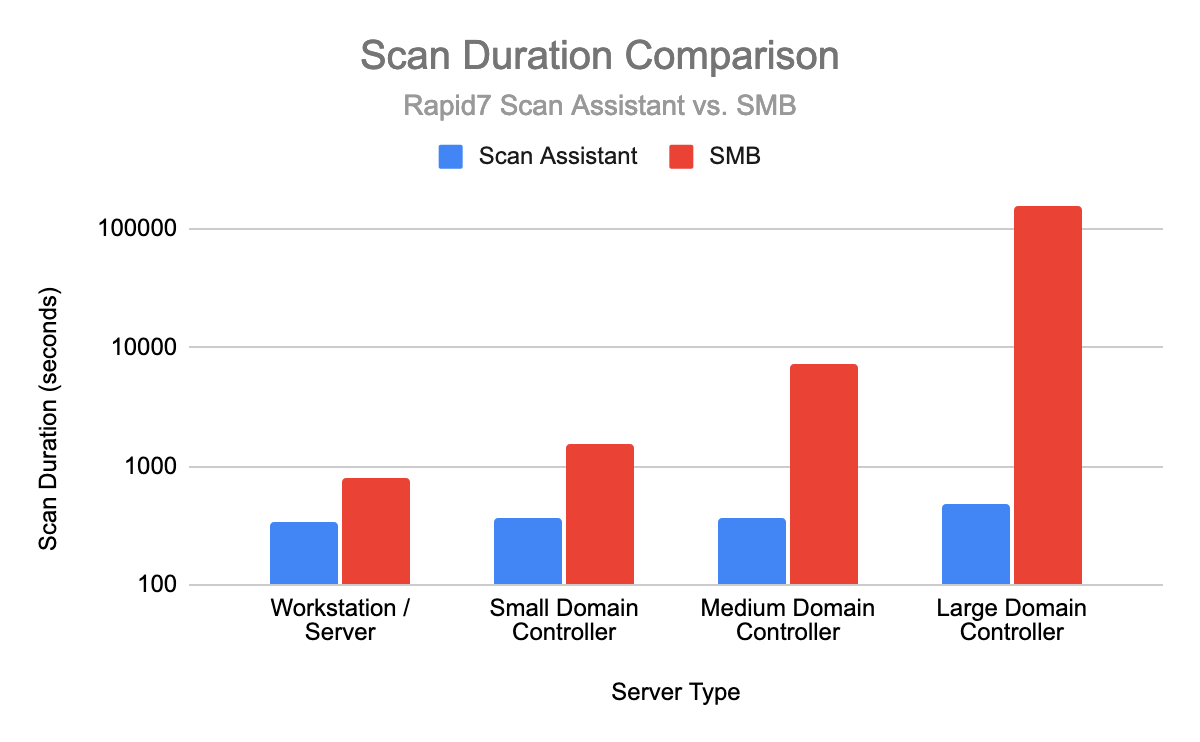
Furthermore, scan times for policy-based scans have shown significant improvement, particularly against servers with a large number of users and groups (such as Domain Controllers). The following chart compares scan times for policy-based scans performed against different types of servers. The team plans to continue to collect and analyze the performance of the Scan Assistant and will share this analysis in a future article.

Passwordless Network Scanning: Same Insights, Less Risk
Scan duration comparison between the Scan Assistant and SMB. It’s important to note that the timescale is logarithmic, so for most cases, the Scan Assistant provides orders of magnitude better performance than the SMB protocol.

What’s next

Here are some of the major items we plan to work on next.

  • Add support for additional operating systems, including Linux, Unix, and macOS
  • Support the ability to perform DISA-based policy scans
  • Update the Security Console to support managing certificates on the scan engines

If you have any suggestions for features you would like to see, please speak with your Customer Success Manager.

Downloading the Scan Assistant

The Scan Assistant is currently in early access and is only available for Windows operating systems. If you are interested in the Scan Assistant and would like to deploy it in your environment, reach out to your Customer Success Manager to request access.

NEVER MISS A BLOG

Get the latest stories, expertise, and news about security today.

[$] A disagreement over get_mm_exe_file()

Post Syndicated from original https://lwn.net/Articles/873066/rss

Differences of opinion over which kernel symbols should be exported to
loadable modules have been anything but uncommon over the years. Often,
these disagreements relate to which kernel capabilities should be available
to proprietary modules. Sometimes, though, it hinges on the disagreements
over the best way to solve a problem. The recent discussion around the
removal of an export for a core kernel function is a case in point.

Building dynamic Amazon SNS subscriptions for auto scaling container workloads 

Post Syndicated from James Beswick original https://aws.amazon.com/blogs/compute/building-dynamic-amazon-sns-subscriptions-for-auto-scaling-container-workloads/

This post is written by Mithun Mallick, Senior Specialist Solutions Architect, App Integration.

Amazon Simple Notification Service (SNS) is a serverless publish subscribe messaging service. It supports a push-based subscriptions model where subscribers must register an endpoint to receive messages. Amazon Simple Queue Service (SQS) is one such endpoint, which is used by applications to receive messages published on an SNS topic.

With containerized applications, the container instances poll the queue and receive the messages. However, containerized applications can scale out for a variety of reasons. The creation of an SQS queue for each new container instance creates maintenance overhead for customers. You must also clean up the SNS-SQS subscription once the instance scales in.

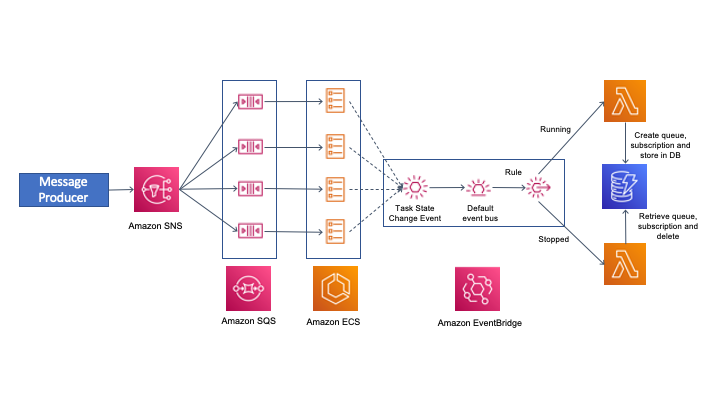
This blog walks through a dynamic subscription solution, which automates the creation, subscription, and deletion of SQS queues for an Auto Scaling group of containers running in Amazon Elastic Container Service (ECS).

Overview

The solution is based on the use of events to achieve the dynamic subscription pattern. ECS uses the concept of tasks to create an instance of a container. You can find more details on ECS tasks in the ECS documentation.

This solution uses the events generated by ECS to manage the complete lifecycle of an SNS-SQS subscription. It uses the task ID as the name of the queue that is used by the ECS instance for pulling messages. More details on the ECS task ID can be found in the task documentation.

This also uses Amazon EventBridge to apply rules on ECS events and trigger an AWS Lambda function. The first rule detects the running state of an ECS task and triggers a Lambda function, which creates the SQS queue with the task ID as queue name. It also grants permission to the queue and creates the SNS subscription on the topic.

As the container instance starts up, it can send a request to its metadata URL and retrieve the task ID. The task ID is used by the container instance to poll for messages. If the container instance terminates, ECS generates a task stopped event. This event matches a rule in Amazon EventBridge and triggers a Lambda function. The Lambda function retrieves the task ID, deletes the queue, and deletes the subscription from the SNS topic. The solution decouples the container instance from any overhead in maintaining queues, applying permissions, or managing subscriptions. The security permissions for all SNS-SQS management are handled by the Lambda functions.

This diagram shows the solution architecture:

Solution architecture

Events from ECS are sent to the default event bus. There are various events that are generated as part of the lifecycle of an ECS task. You can find more on the various ECS task states in ECS task documentation. This solution uses ECS as the container orchestration service but you can also use Amazon Elastic Kubernetes Service.(EKS). For EKS, you must apply the rules for EKS task state events.

Walkthrough of the implementation

The code snippets are shortened for brevity. The full source code of the solution is in the GitHub repository. The solution uses AWS Serverless Application Model (AWS SAM) for deployment.

SNS topic

The SNS topic is used to send notifications to the ECS tasks. The following snippet from the AWS SAM template shows the definition of the SNS topic:

  SNSDynamicSubsTopic:
    Type: AWS::SNS::Topic
    Properties:
      TopicName: !Ref DynamicSubTopicName

Container instance

The container instance subscribes to the SNS topic using an SQS queue. The container image is a Java class that reads messages from an SQS queue and prints them in the logs. The following code shows some of the message processor implementation:

AmazonSQS sqs = AmazonSQSClientBuilder.defaultClient();
AmazonSQSResponder responder = AmazonSQSResponderClientBuilder.standard()
        .withAmazonSQS(sqs)
        .build();

SQSMessageConsumer consumer = SQSMessageConsumerBuilder.standard()
        .withAmazonSQS(responder.getAmazonSQS())
        .withQueueUrl(queue_url)
        .withConsumer(message -> {
            System.out.println("The message is " + message.getBody());
            sqs.deleteMessage(queue_url,message.getReceiptHandle());

        }).build();
consumer.start();

The queue_url highlighted is the task ID of the ECS task. It is retrieved in the constructor of the class:

String metaDataURL = map.get("ECS_CONTAINER_METADATA_URI_V4");

HttpGet request = new HttpGet(metaDataURL);
CloseableHttpResponse response = httpClient.execute(request);

HttpEntity entity = response.getEntity();
if (entity != null) {
    String result = EntityUtils.toString(entity);
    String taskARN = JsonPath.read(result, "$['Labels']['com.amazonaws.ecs.task-arn']").toString();
    String[] arnTokens = taskARN.split("/");
    taskId = arnTokens[arnTokens.length-1];
    System.out.println("The task arn : "+taskId);
}

queue_url = sqs.getQueueUrl(taskId).getQueueUrl();

The queue URL is constructed from the task ID of the container. Each queue is dedicated to each of the tasks or the instances of the container running in ECS.

EventBridge rules

The following event pattern on the default event bus captures events that match the start of the container instance. The rule triggers a Lambda function:

      EventPattern:
        source:
          - aws.ecs
        detail-type:
          - "ECS Task State Change"
        detail:
          desiredStatus:
            - "RUNNING"
          lastStatus:  
            - "RUNNING"

The start rule routes events to a Lambda function that creates a queue with the name as the task ID. It creates the subscription to the SNS topic and grants permission on the queue to receive messages from the topic.

This event pattern matches STOPPED events of the container task. It also triggers a Lambda function to delete the queue and the associated subscription:

      EventPattern:
        source:
          - aws.ecs
        detail-type:
          - "ECS Task State Change"
        detail:
          desiredStatus:
            - "STOPPED"
          lastStatus:  
            - "STOPPED"

Lambda functions

There are two Lambda functions that perform the queue creation, subscription, authorization, and deletion.

The SNS-SQS-Subscription-Service

The following code creates the queue based on the task id, applies policies, and subscribes it to the topic. It also stores the subscription ARN in a Amazon DynamoDB table:

# get the task id from the event
taskArn = event['detail']['taskArn']
taskArnTokens = taskArn.split('/')
taskId = taskArnTokens[len(taskArnTokens)-1]

create_queue_resp = sqs_client.create_queue(QueueName=queue_name)

response = sns.subscribe(TopicArn=topic_arn, Protocol="sqs", Endpoint=queue_arn)

ddbresponse = dynamodb.update_item(
    TableName=SQS_CONTAINER_MAPPING_TABLE,
    Key={
        'id': {
            'S' : taskId.strip()
        }
    },
    AttributeUpdates={
        'SubscriptionArn':{
            'Value': {
                'S': subscription_arn
            }
        }
    },
    ReturnValues="UPDATED_NEW"
)

The cleanup service

The cleanup function is triggered when the container instance is stopped. It fetches the subscription ARN from the DynamoDB table based on the taskId. It deletes the subscription from the topic and deletes the queue. You can modify this code to include any other cleanup actions or trigger a workflow. The main part of the function code is:

taskId = taskArnTokens[len(taskArnTokens)-1]

ddbresponse = dynamodb.get_item(TableName=SQS_CONTAINER_MAPPING_TABLE,Key={'id': { 'S' : taskId}})
snsresp = sns.unsubscribe(SubscriptionArn=subscription_arn)

queuedelresp = sqs_client.delete_queue(QueueUrl=queue_url)

Conclusion

This blog shows an event driven approach to handling dynamic SNS subscription requirements. It relies on the ECS service events to trigger appropriate Lambda functions. These create the subscription queue, subscribe it to a topic, and delete it once the container instance is terminated.

The approach also allows the container application logic to focus only on consuming and processing the messages from the queue. It does not need any additional permissions to subscribe or unsubscribe from the topic or apply any additional permissions on the queue. Although the solution has been presented using ECS as the container orchestration service, it can be applied for EKS by using its service events.

For more serverless learning resources, visit Serverless Land.

Security updates for Monday

Post Syndicated from original https://lwn.net/Articles/873210/rss

Security updates have been issued by Debian (amd64-microcode, libreoffice, linux-4.19, and nghttp2), Fedora (chromium, libopenmpt, vim, and xen), openSUSE (firefox, kernel, krb5, libaom, and opera), Oracle (thunderbird), SUSE (firefox, firefox, rust-cbindgen, iproute2, javapackages-tools, javassist, mysql-connector-java, protobuf, python-python-gflags, and krb5), and Ubuntu (nginx).

Learn the fundamentals of AI and machine learning with our free online course

Post Syndicated from Michael Conterio original https://www.raspberrypi.org/blog/fundamentals-ai-machine-learning-free-online-course/

Join our free online course Introduction to Machine Learning and AI to discover the fundamentals of machine learning and learn to train your own machine learning models using free online tools.

Drawing of a machine learning robot helping a human identify spam at a computer.

Although artificial intelligence (AI) was once the province of science fiction, these days you’re very likely to hear the term in relation to new technologies, whether that’s facial recognition, medical diagnostic tools, or self-driving cars, which use AI systems to make decisions or predictions.

By the end of this free online course, you will have an appreciation for what goes into machine learning and artificial intelligence systems — and why you should think carefully about what comes out.

Machine learning — a brief overview

You’ll also often hear about AI systems that use machine learning (ML). Very simply, we can say that programs created using ML are ‘trained’ on large collections of data to ‘learn’ to produce more accurate outputs over time. One rather funny application you might have heard of is the ‘muffin or chihuahua?’ image recognition task.

Drawing of a machine learning ars rover trying to decide whether it is seeing an alien or a rock.

More precisely, we would say that a ML algorithm builds a model, based on large collections of data (the training data), without being explicitly programmed to do so. The model is ‘finished’ when it makes predictions or decisions with an acceptable level of accuracy. (For example, it rarely mistakes a muffin for a chihuahua in a photo.) It is then considered to be able to make predictions or decisions using new data in the real world.

It’s important to understand AI and ML — especially for educators

But how does all this actually work? If you don’t know, it’s hard to judge what the impacts of these technologies might be, and how we can be sure they benefit everyone — an important discussion that needs to involve people from across all of society. Not knowing can also be a barrier to using AI, whether that’s for a hobby, as part of your job, or to help your community solve a problem.

some things that machine learning and AI systems can be built into: streetlamps, waste collecting vehicles, cars, traffic lights.

For teachers and educators it’s particularly important to have a good foundational knowledge of AI and ML, as they need to teach their learners what the young people need to know about these technologies and how they impact their lives. (We’ve also got a free seminar series about teaching these topics.)

To help you understand the fundamentals of AI and ML, we’ve put together a free online course: Introduction to Machine Learning and AI. Over four weeks in two hours per week, you’ll learn how machine learning can be used to solve problems, without going too deeply into the mathematical details. You’ll also get to grips with the different ways that machines ‘learn’, and you will try out online tools such as Machine Learning for Kids and Teachable Machine to design and train your own machine learning programs.

What types of problems and tasks are AI systems used for?

As well as finding out how these AI systems work, you’ll look at the different types of tasks that they can help us address. One of these is classification — working out which group (or groups) something fits in, such as distinguishing between positive and negative product reviews, identifying an animal (or a muffin) in an image, or spotting potential medical problems in patient data.

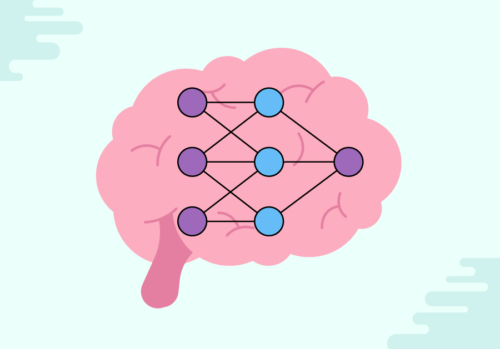
You’ll also learn about other types of tasks ML programs are used for, such as regression (predicting a numerical value from a continuous range) and knowledge organisation (spotting links between different pieces of data or clusters of similar data). Towards the end of the course you’ll dive into one of the hottest topics in AI today: neural networks, which are ML models whose design is inspired by networks of brain cells (neurons).

drawing of a small machine learning neural network.

Before an ML program can be trained, you need to collect data to train it with. During the course you’ll see how tools from statistics and data science are important for ML — but also how ethical issues can arise both when data is collected and when the outputs of an ML program are used.

By the end of the course, you will have an appreciation for what goes into machine learning and artificial intelligence systems — and why you should think carefully about what comes out.

Sign up to the course today, for free

The Introduction to Machine Learning and AI course is open for you to sign up to now. Sign-ups will pause after 12 December. Once you sign up, you’ll have access for six weeks. During this time you’ll be able to interact with your fellow learners, and before 25 October, you’ll also benefit from the support of our expert facilitators. So what are you waiting for?

Share your views as part of our research

As part of our research on computing education, we would like to find out about educators’ views on machine learning. Before you start the course, we will ask you to complete a short survey. As a thank you for helping us with our research, you will be offered the chance to take part in a prize draw for a £50 book token!

Learn more about AI, its impacts, and teaching learners about them

To develop your computing knowledge and skills, you might also want to:

If you are a teacher in England, you can develop your teaching skills through the National Centre for Computing Education, which will give you free upgrades for our courses (including Introduction to Machine Learning and AI) so you’ll receive certificates and unlimited access.

The post Learn the fundamentals of AI and machine learning with our free online course appeared first on Raspberry Pi.

Kernel prepatch 5.15-rc6

Post Syndicated from original https://lwn.net/Articles/873176/rss

The 5.15-rc6 kernel prepatch is out.
I’d love to say that it’s all looking average, but rc6 is actually
bigger than rc5 was, and larger than normal for this time in the
release cycle.

It’s not _enormously_ larger than normal, and it’s not the largest rc6
we’ve had, but it’s still slightly worrisome.”

Tunnel: Cloudflare’s Newest Homeowner

Post Syndicated from Abe Carryl original https://blog.cloudflare.com/observe-and-manage-cloudflare-tunnel/

Tunnel: Cloudflare’s Newest Homeowner

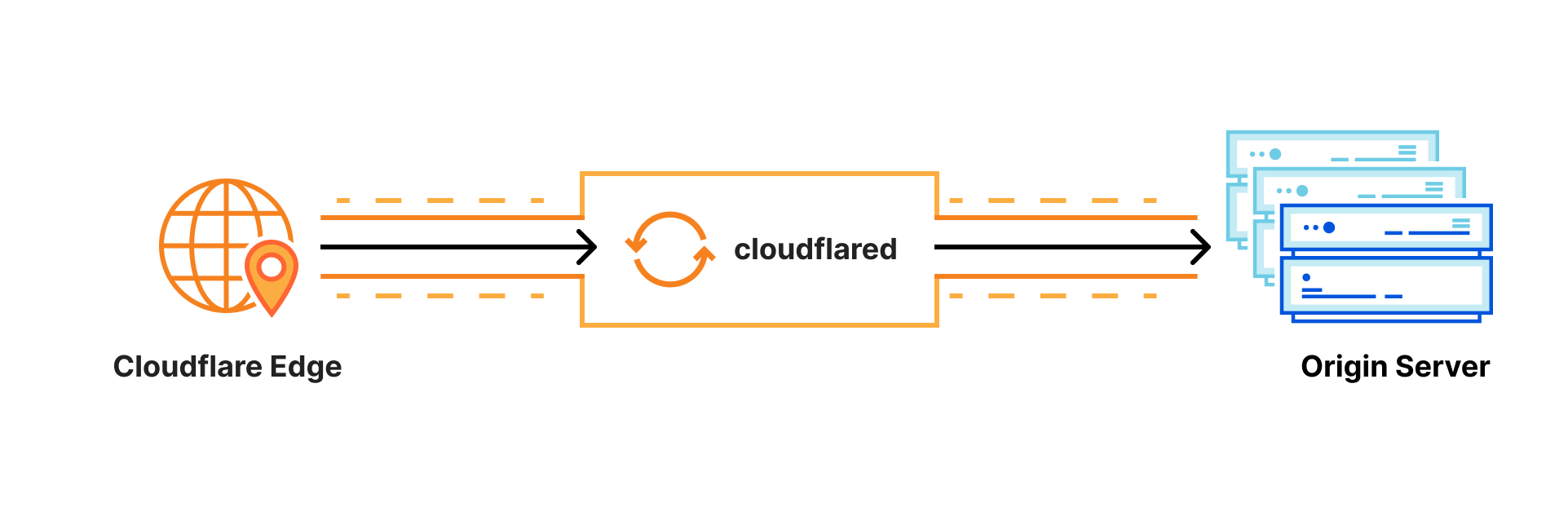
Cloudflare Tunnel connects your infrastructure to Cloudflare. Your team runs a lightweight connector in your environment, cloudflared, and services can reach Cloudflare and your audience through an outbound-only connection without the need for opening up holes in your firewall.

Tunnel: Cloudflare’s Newest Homeowner

Whether the services are internal apps protected with Zero Trust policies, websites running in Kubernetes clusters in a public cloud environment, or a hobbyist project on a Raspberry Pi — Cloudflare Tunnel provides a stable, secure, and highly performant way to serve traffic.

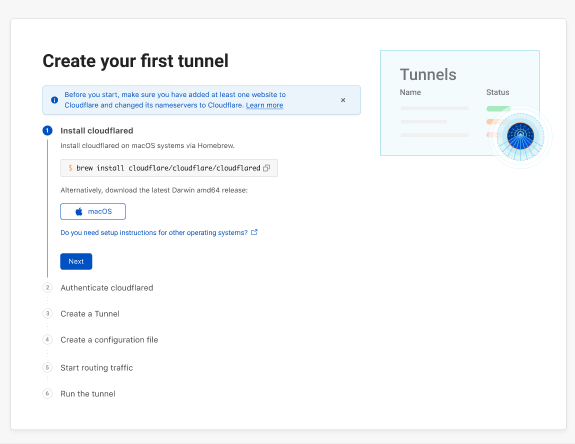
Starting today, with our new UI in the Cloudflare for Teams Dashboard, users who deploy and manage Cloudflare Tunnel at scale now have easier visibility into their tunnels’ status, routes, uptime, connectors, cloudflared version, and much more. On the Teams Dashboard you will also find an interactive guide that walks you through setting up your first tunnel.  

Getting Started with Tunnel

Tunnel: Cloudflare’s Newest Homeowner

We wanted to start by making the tunnel onboarding process more transparent for users. We understand that not all users are intimately familiar with the command line nor are they deploying tunnel in an environment or OS they’re most comfortable with. To alleviate that burden, we designed a comprehensive onboarding guide with pathways for MacOS, Windows, and Linux for our two primary onboarding flows:

  1. Connecting an origin to Cloudflare
  2. Connecting a private network via WARP to Tunnel

Our new onboarding guide walks through each command required to create, route, and run your tunnel successfully while also highlighting relevant validation commands to serve as guardrails along the way. Once completed, you’ll be able to view and manage your newly established tunnels.

Managing your tunnels

Tunnel: Cloudflare’s Newest Homeowner

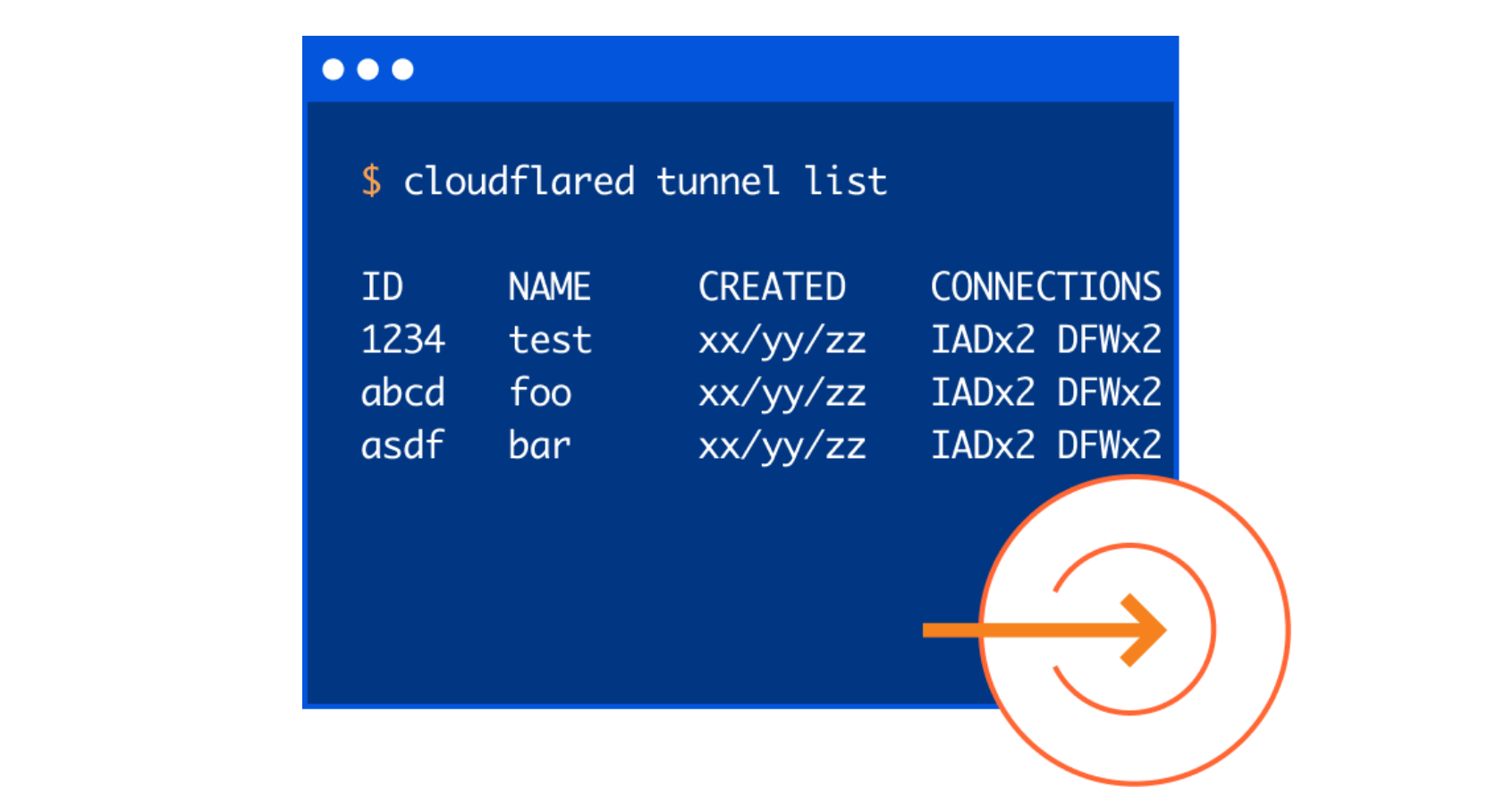
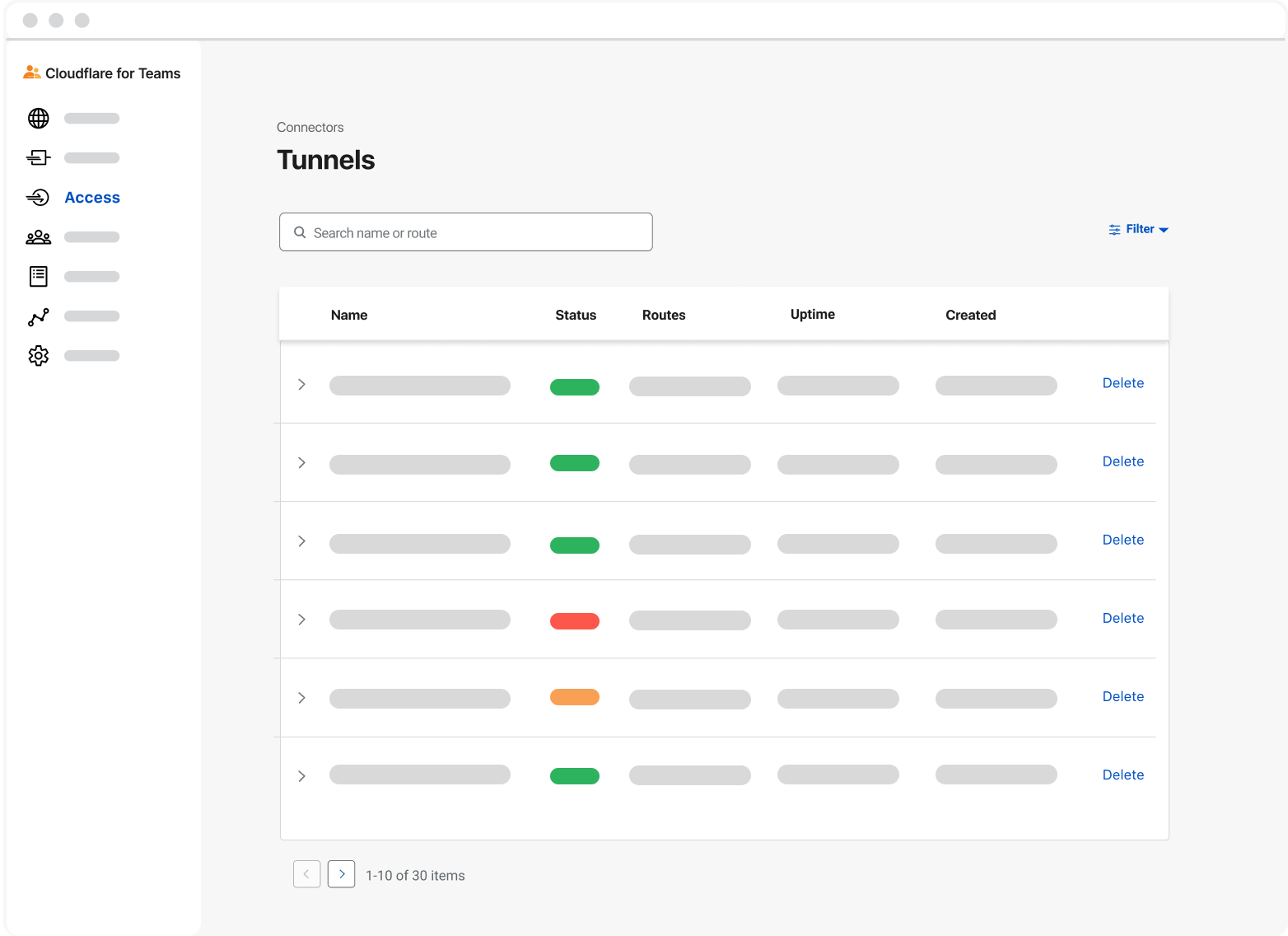
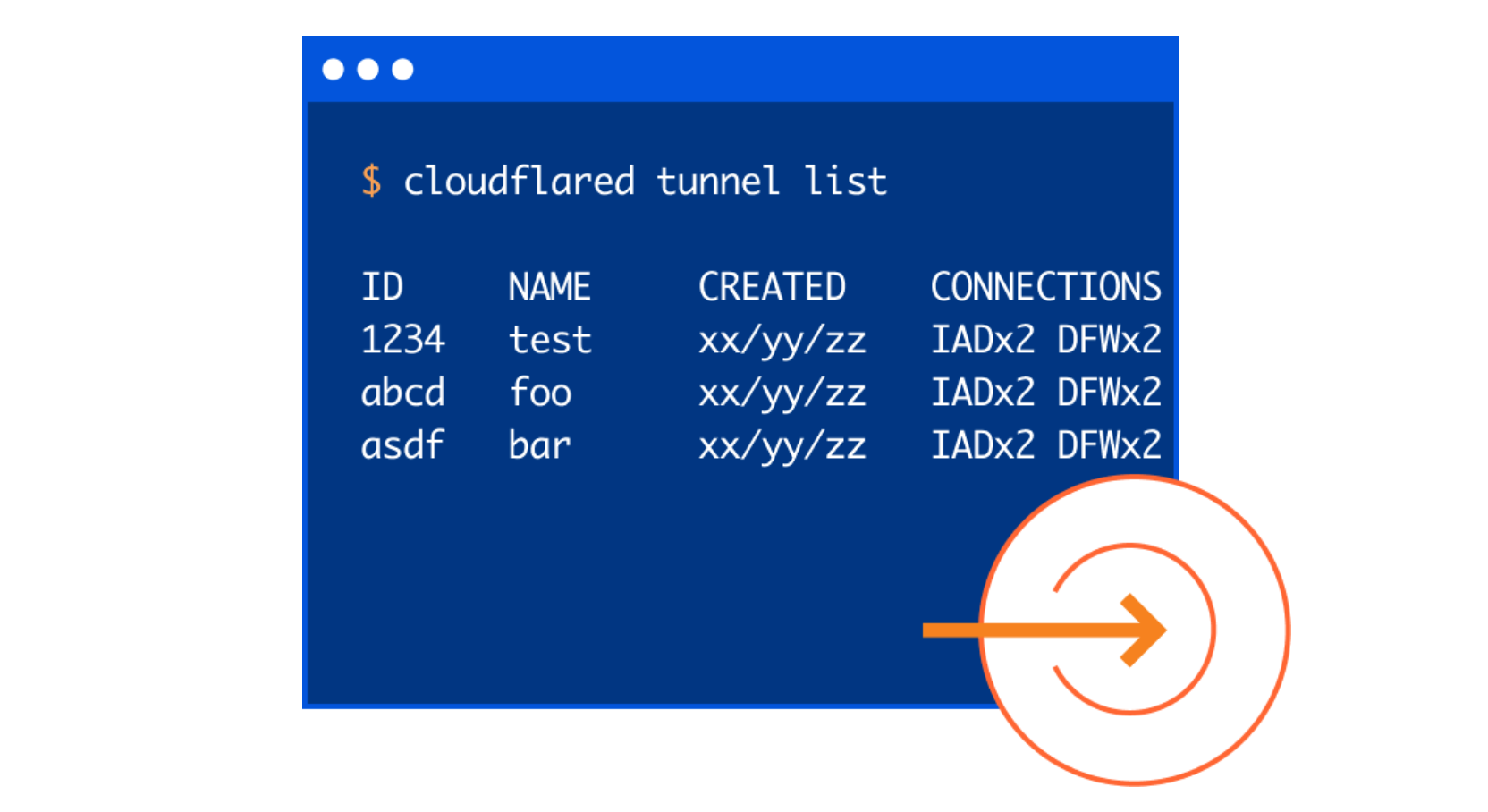
When thinking about the new user interface for tunnel we wanted to concentrate our efforts on how users gain visibility into their tunnels today. It was important that we provide the same level of observability, but through the lens of a visual, interactive dashboard. Specifically, we strove to build a familiar experience like the one a user may see if they were to run cloudflared tunnel list to show all of their tunnels, or cloudflared tunnel info if they wanted to better understand the connection status of a specific tunnel.

Tunnel: Cloudflare’s Newest Homeowner

In the interface, you can quickly search by name or filter by name, status, uptime, or creation date. This allows users to easily identify and manage the tunnels they need, when they need them. We also included other key metrics such as Status and Uptime.

A tunnel’s status depends on the health of its connections:

  • Active: This means your tunnel is running and has a healthy connection to the Cloudflare network.
  • Inactive: This means your tunnel is not running and is not connected to Cloudflare.
  • Degraded: This means one or more of your four long-lived TCP connections to Cloudflare have been disconnected, but traffic is still being served to your origin.

A tunnel’s uptime is also calculated by the health of its connections. We perform this calculation by determining the UTC timestamp of when the first (of four) long-lived TCP connections is established with the Cloudflare Edge. In the event this single connection is terminated, we will continue tracking uptime as long as one of the other three connections continues to serve traffic. If no connections are active, Uptime will reset to zero.

Tunnel Routes and Connectors

Last year, shortly after the announcement of Named Tunnels, we released a new feature that allowed users to utilize the same Named Tunnel to serve traffic to many different services through the use of Ingress Rules. In the new UI, if you’re running your tunnels in this manner, you’ll be able to see these various services reflected by hovering over the route’s value in the dashboard. Today, this includes routes for DNS records, Load Balancers, and Private IP ranges.

Even more recently, we announced highly available and highly scalable instances of cloudflared, known more commonly as “cloudflared replicas.” To view your cloudflared replicas, select and expand a tunnel. Then you will identify how many cloudflared replicas you’re running for a given tunnel, as well as the corresponding connection status, data center, IP address, and version. And ultimately, when you’re ready to delete a tunnel, you can do so directly from the dashboard as well.

What’s next

Moving forward, we’re excited to begin incorporating more Cloudflare Tunnel analytics into our dashboard. We also want to continue making Cloudflare Tunnel the easiest way to connect to Cloudflare. In order to do that, we will focus on improving our onboarding experience for new users and look forward to bringing more of that functionality into the Teams Dashboard. If you have things you’re interested in having more visibility around in the future, let us know below!

Missouri Governor Doesn’t Understand Responsible Disclosure

Post Syndicated from Bruce Schneier original https://www.schneier.com/blog/archives/2021/10/the-missouri-governor-doesnt-understand-responsible-disclosure.html

The Missouri governor wants to prosecute the reporter who discovered a security vulnerability in a state’s website, and then reported it to the state.

The newspaper agreed to hold off publishing any story while the department fixed the problem and protected the private information of teachers around the state.

[…]

According to the Post-Dispatch, one of its reporters discovered the flaw in a web application allowing the public to search teacher certifications and credentials. No private information was publicly visible, but teacher Social Security numbers were contained in HTML source code of the pages.

The state removed the search tool after being notified of the issue by the Post-Dispatch. It was unclear how long the Social Security numbers had been vulnerable.

[…]

Chris Vickery, a California-based data security expert, told The Independent that it appears the department of education was “publishing data that it shouldn’t have been publishing.

“That’s not a crime for the journalists discovering it,” he said. “Putting Social Security numbers within HTML, even if it’s ‘non-display rendering’ HTML, is a stupid thing for the Missouri website to do and is a type of boneheaded mistake that has been around since day one of the Internet. No exploit, hacking or vulnerability is involved here.”

In explaining how he hopes the reporter and news organization will be prosecuted, [Gov.] Parson pointed to a state statute defining the crime of tampering with computer data. Vickery said that statute wouldn’t work in this instance because of a recent decision by the U.S. Supreme Court in the case of Van Buren v. United States.

One hopes that someone will calm the governor down.

Brian Krebs has more.

Разяснения по казуса с прилагането на електронен подпис в изборния процес

Post Syndicated from Bozho original https://blog.bozho.net/blog/3841

Ще вляза в може би малко скучната материя за йерархията и връзката между нормативните актове. За да видим защо решението на ЦИК, че квалифицирания електронен подпис не важи за Изборния кодекс е неадекватно.

Да, не съм юрист, но тази базова правна рамка – кой какво задължение има в електронния свят е основата на електронното управление и като експерт по електронно управление съм длъжен да я знам и разбирам.

Нормативните актове имат йерархия. Конституция, Регламент, Закон, Наредба/Правилник/Инструкция. Ако някой акт от по-ниска степен противоречи на някой акт от по-висока, то се прилага този от по-висока. Освен ако този от по-висока не допуска изключения. Законът за нормативните актове дава общата картина:

Чл. 15. (1) Нормативният акт трябва да съответствува на Конституцията и на другите нормативни актове от по-висока степен.
(2) (Нова – ДВ, бр. 46 от 2007 г.) Ако нормативен акт противоречи на регламент на Европейския съюз, прилага се регламентът.
(3) (Предишна ал. 2 – ДВ, бр. 46 от 2007 г.) Ако постановление, правилник, наредба или инструкция противоречат на нормативен акт от по-висока степен, правораздавателните органи прилагат по-високия по степен акт.

Кодексите са малко по-специфични закони. Тяхната идея е да уредят напълно една материя – Изборният кодекс урежда всичко, свързано с избори (за да няма, както преди, закон за изборите за народно събрание, закон за изборите за президент и вицепрезидент и т.н.). Наказателният кодекс урежда всички престъпления и никой друг закон не може да урежда престъпления. И т.н.

Кодексите (както и законите), обаче, не съществуват в изолация. Макар Изборният кодекс да урежда изцяло изборната материя, към него се прилагат нормите от други закони – напр. когато става въпрос за гражданство, Изборният кодекс не урежда въпроса за гражданството – той е уреден в Закона за българското гражданство. Когато става дума за личните документи, с които гласуваме, те не са уредени в кодекса, а в Закона за българските лични документи. Когато става дума за административно производство, процесът е уреден в Административнопроцесуалния кодекс (различията с него са изрично уредени в изборния, който дори изрично препраща към АПК).

Когато става дума за приемане на електронни изявления, за електронни документи и електронни подписи, тогава се прилагат Регламент (ЕС) 910/2014, Закона за електронния документ и електронните удостоверителни услуги и Закона за електронното управление.
Та, изборният кодекс не урежда нищо специфично свързано с подписи и документи – разчита на общия ред (вкл. чл. 18а от АПК). А общият ред е такъв – административните органи са длъжни да приемат електронни изявления. Чл. 5 от ЗЕДЕУУ, чл. 11 от ЗЕУ (и дори чл. 8, ал. 2) и чл. 18а от АПК.

Ако вече не съм ви загубил дотук, има още един въпрос – РИК и ЦИК административни органи ли са и доставчици ли са на административни услуги? Дефиницията на „административна услуга“ е Закона за администрацията е доста широка и включва „извършване на други административни действия, които представляват законен интерес за физическо или юридическо лице;“ (макар че вписването на листа може да попада и в по-конкретните точки, дори). Всъщност, дори да не бяха, чл. 18а от АПК ги задължава да приемат документи по електронен път.
Това, между другото, е пример, как едно и също задължение се урежда на няколко места „за всеки случай“, защото някой административен орган някъде е казвал „аа, не, тоя закон не важи за мен“.

Та, ЦИК и РИК са задължени да приемат електронни изявления и са задължени от Регламента да ги приравни на саморъчен подпис. Дори Изборният кодекс да не урежда това изрично, и дори това да се счита за противоречие, Регламентът „печели“, защото така пише в Закона за нормативните актове (той пък е следствие от един текст в Конституцията за международните договори).

Остава аргументът на ЦИК – „щом на някои места в Изборния кодекс е посочено изрично, че може да се използва квалифициран електронен подпис, значи никъде другаде не може, защото не е посочено изрично“. Това е доста превратно (и несъстоятелно) тълкуване на правна норма изобщо.
Местата, където се позволява изрично използване на електронен подпис, са подписките. Те не са част от административния процес, и не са заявление до административен орган. Затова въпросът е по-сив. Там имаше нужда и да се коригира допускането, че подписът се полага лично ПРЕД упълномощено лице (електронният няма смисъл да се полага така).

Знам, че е много интересно човек да се упражнява по темата „кой кога занесъл флашка“ и „щом ЦИК казва, че не важи, значи не важи“. Но законът в една държава е съвкупност от правни норми, които за удобство са разделени под различни заглавия, но представляват просто серия от взаимодействащи си норми. А склонността на българските органи да признават само своя закон и никой друг закон е много лоша практика, която води до такива казуси. А съдът е този, който трябва да каже „не, вашият закон не съществува в паралелна правна вселена“

Материалът Разяснения по казуса с прилагането на електронен подпис в изборния процес е публикуван за пръв път на БЛОГодаря.

The collective thoughts of the interwebz