Lukas Fitti writes in detail
on the pganalyze blog about the asynchronous I/O capability coming with the
PostgreSQL 18 release.
Asynchronous I/O delivers the most noticeable gains in cloud
environments where storage is network-attached, such as Amazon EBS
volumes. In these setups, individual disk reads often take multiple
milliseconds, introducing substantial latency compared to local
SSDs.
With traditional synchronous I/O, each of these reads blocks query
execution until the data arrives, leading to idle CPU time and
degraded throughput. By contrast, asynchronous I/O allows Postgres
to issue multiple read requests in parallel and continue processing
while waiting for results. This reduces query latency and enables
much more efficient use of available I/O bandwidth and CPU cycles.
At Netflix, delivering the best possible experience for our members is at the heart of everything we do, and we know we can’t do it alone. That’s why we work closely with a diverse ecosystem of technology partners, combining their deep expertise with our creative and operational insights. Together, we explore new ideas, develop practical tools, and push technical boundaries in service of storytelling. This collaboration not only empowers the talented creatives working on our shows with better tools to bring their vision to life, but also helps us innovate in service of our members. By building these partnerships on trust, transparency, and shared purpose, we’re able to move faster and more meaningfully, always with the goal of making our stories more immersive, accessible, and enjoyable for audiences everywhere. One area where this collaboration is making a meaningful impact is in improving dialogue intelligibility, from set to screen. We call this the Dialogue Integrity Pipeline.
Dialogue Integrity Pipeline
We’ve all been there, settling in for a night of entertainment, only to find ourselves straining to catch what was just said on screen. You’re wrapped up in the story, totally invested, when suddenly a key line of dialogue vanishes into thin air. “Wait, what did they say? I can’t understand the dialogue! What just happened?”
You may pick up the remote and rewind, turn up the volume, or try to stay with it and hope this doesn’t happen again. Creating sophisticated, modern series and films requires an incredible artistic & technical effort. At Netflix, we strive to ensure those great stories are easy for the audience to enjoy. Dialogue intelligibility can break down at multiple points in what we call the Dialogue Integrity Pipeline, the journey from on-set capture to final playback at home. Many facets of the process can contribute to dialogue that’s difficult to understand:
Naturalistic acting styles, diverse speech patterns, and accents
Noisy locations, microphone placement problems on set
Audio compromises through the distribution pipeline
TVs with inadequate speakers, noisy home environments
Addressing these issues is critical to maintaining the standard of excellence our content deserves.
Measurement at Scale
Netflix utilizes industry-standard loudness meters to measure content and its adherence to our core loudness specifications. This tool also provides feedback on audio dynamic range (loud to soft) which impacts dialogue intelligibility. The Audio Algorithms team at Netflix wanted to take these measurements further and develop a holistic understanding of dialogue intelligibility throughout the runtime of a given title.
The team developed a Speech Intelligibility measurement system based on the Short-time Objective Intelligibility (STOI) metric [Taal et al. (IEEE Transactions on Audio, Speech, and Language Processing)]. Firstly, a speech activity detector analyses the dialogue stem to render speech utterances, which are then compared to non-speech sounds in the mix, typically Music and Effects. Then the system calculates the Signal-to-Noise ratio, in each speech frequency band, the results of which are summarized succinctly, per-utterance on the range [0, 1.0], to quantify the degree to which competing Music and Effects can distract the listener.
This chart shows how eSTOI (extended Short-Time Objective Intelligibility) method measures dialogue (fg [foreground] stem in the graphic) against non-speech (bg [background] stem in the graphic) to judge intelligibility based on competing non-speech sound.
Optimizing Dialogue Prior to Delivery
Understanding dialogue intelligibility across Netflix titles is invaluable, but our mission goes beyond analysis — we strive to empower creators with the tools to craft mixes that resonate seamlessly with audiences at home.
Seeing the lack of dedicated Dialogue Intelligibility Meter plugins for Digital Audio Workstations, we teamed up with industry leaders, Fraunhofer Institute for Digital Media Technology IDMT (Fraunhofer IDMT) and Nugen Audio to pioneer a solution that enhances creative control and ensures crystal-clear dialogue from mix to final delivery.
We collaborated with Fraunhofer IDMT to adapt their machine-learning-based speech intelligibility solution for cross-platform plugin standards and brought in Nugen Audio to develop DAW-compatible plugins.
Fraunhofer IDMT
The Fraunhofer Department of Hearing, Speech, and Audio Technology HSA has done significant research and development on media processing tools that measure speech intelligibility. In 2020, the machine learning-based method was integrated into Steinberg’s Nuendo Digital Audio Workstation. We approached the Fraunhofer engineering team with a collaboration proposal to make their technology accessible to other audio workstations through the cross-platform VST (Virtual Studio Technology) and AAX (Avid Audio Extension) plugin standards. The scientists were keen on the project and provided their dialogue intelligibility library.
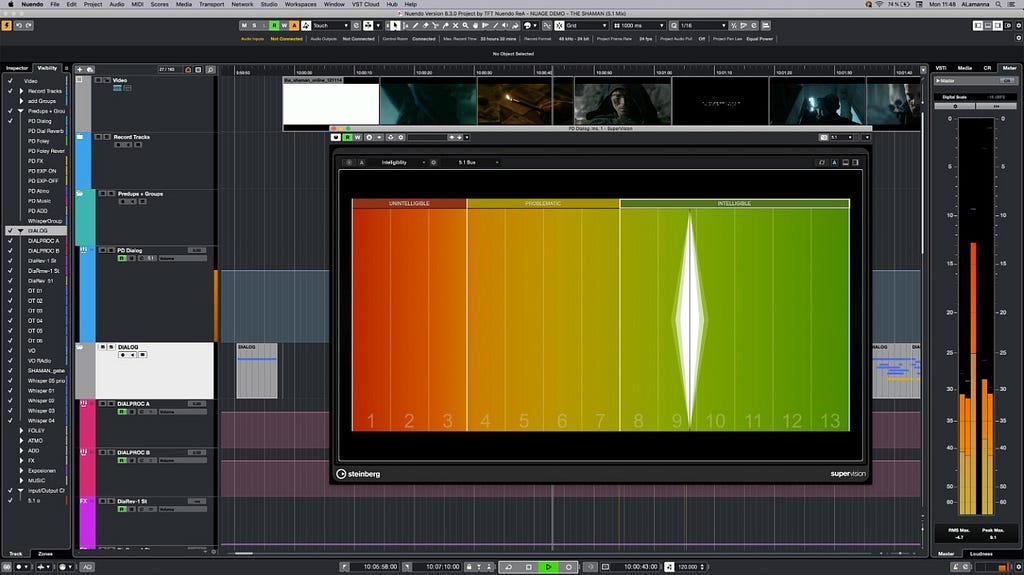
The Fraunhofer IDMT Dialogue Intelligibility Meter integrated into the Steinberg Nuendo Digital Audio Workstation.
Nugen Audio
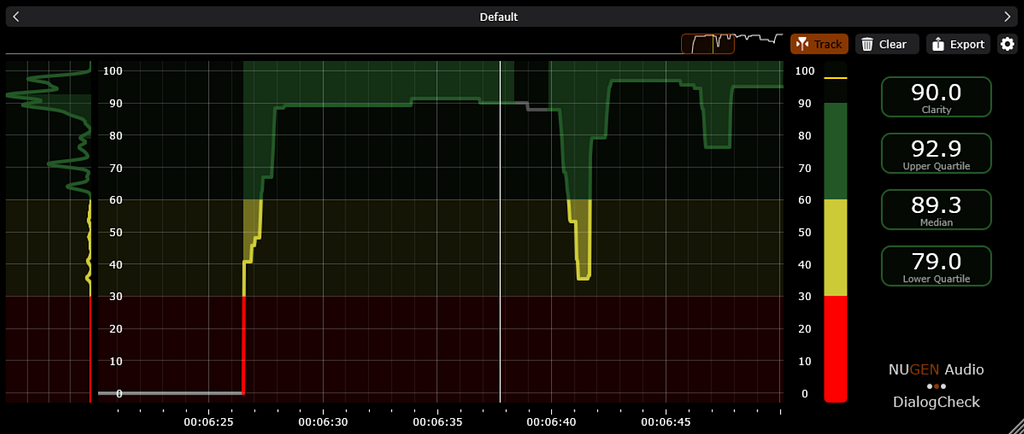
Nugen Audio created the VisLM plugin to provide sound teams with an efficient and accurate way to measure mixes for conformance to traditional broadcast & streaming specifications — Full Mix Loudness, Dialogue Loudness, and True Peak. Since then, VisLM has become a widely used tool throughout the global post-production industry. Nugen Audio partnered with Fraunhofer, integrating the Fraunhofer IDMT Dialogue Intelligibility libraries into a new industry-first tool — Nugen DialogCheck. This tool gives re-recording mixers real-time insights, helping them adjust dialogue clarity at the most crucial points in the mixing process, ensuring every word is clear and understood.
Clearer Dialogue Through Collaboration
Crafting crystal-clear dialogue isn’t just a technical challenge — it’s an art that requires continuous innovation and strong industry collaboration. To empower creators, Netflix and its partners are embedding advanced intelligibility measurement tools directly into DAWs, giving sound teams the ability to:
Detect and resolve dialogue clarity issues early in the mix.
Fine-tune speech intelligibility without compromising artistic intent.
Deliver immersive, accessible storytelling to every viewer, in any listening environment.
At Netflix, we’re committed to pushing the boundaries of audio excellence. From pioneering the eSTOI (extended short-term objective intelligibility) method to collaborating with Fraunhofer and Nugen Audio on cutting-edge tools like the DialogCheck Plugin, we’re setting a new standard for dialogue clarity — ensuring every word is heard exactly as creators intended. But innovation doesn’t happen in isolation. By working together with our partners, we can continue to push the limits of what’s possible, fueling creativity and driving the future of storytelling.
Finally, we’d like to extend a heartfelt thanks to Scott Kramer for his contributions to this initiative.
In the blog our previous introduction to the SOP-driven LLM Agent Framework, we the potential of LLM agent framework to revolutionise business operations was discussed. Now, we’re excited to explore a compelling use case: automating Account Takeover (ATO) investigations in Risk Operations (RiskOps). This framework has significantly reduced manual effort, improved efficiency, and minimised errors in the investigation process, setting a new standard for secure and streamlined operations.
The challenge in RiskOps
Traditionally, ATO investigations have been fraught with challenges due to their complexity and the manual effort required. Analysts must sift through vast amounts of data, cross-referencing multiple systems and executing numerous SQL queries to make informed decisions. This process is not only labor-intensive but also susceptible to human error, which can lead to inconsistencies and potential security breaches.
The manual approach often involves:
Time-consuming data analysis: Analysts spend significant time gathering and interpreting data from disparate sources, leading to delays and inefficiencies.
Decision fatigue: Continuous decision-making in a high-pressure environment can result in oversight or errors, especially when relying on predefined thresholds without adaptive insights.
Resource constraints: The need for specialised skills to handle SQL queries and interpret complex patterns limits the scalability of the process.
These challenges highlight the need for a more efficient, reliable, and scalable solution.
Leveraging the SOP agent framework
Our framework transforms the ATO investigation process by mirroring manual workflows while leveraging advanced automation.
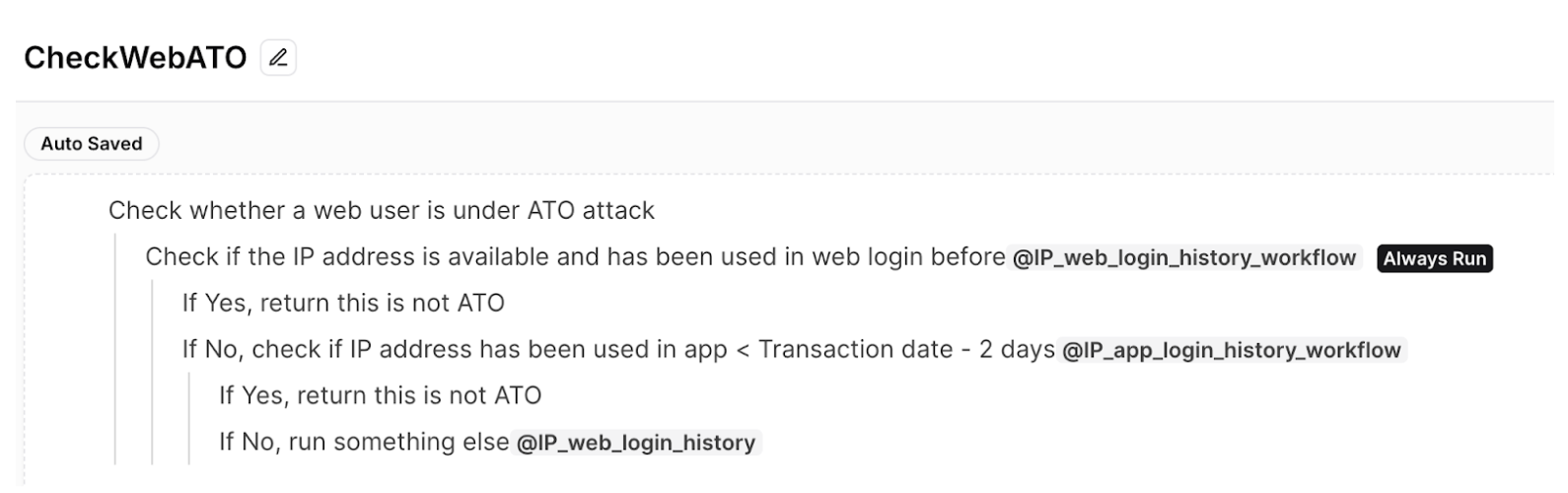
At its core, a Standard Operating Procedure (SOP) guides the investigation process. This comprehensive SOP, is designed with an intuitive tree structure. It outlines the sequence of investigative actions, required data for each step, necessary SQL queries and external function calls, as well as decision criteria guiding the investigation. Figure 1 shows the example of ATO investigation SOP.
Figure 1: Example of fictional ATO investigation SOP
The SOP is written in natural language in an indentation format. Users can easily define SOPs using an intuitive editor. This format also clearly denotes the specific functions or queries associated with each step in the SOP. The @function_name notation (eg. @IP_web_login_history) makes it easy to identify where external calls are made within the process, highlighting the integration points between the SOP-driven LLM agent framework and the existing systems or databases.
Dynamic execution
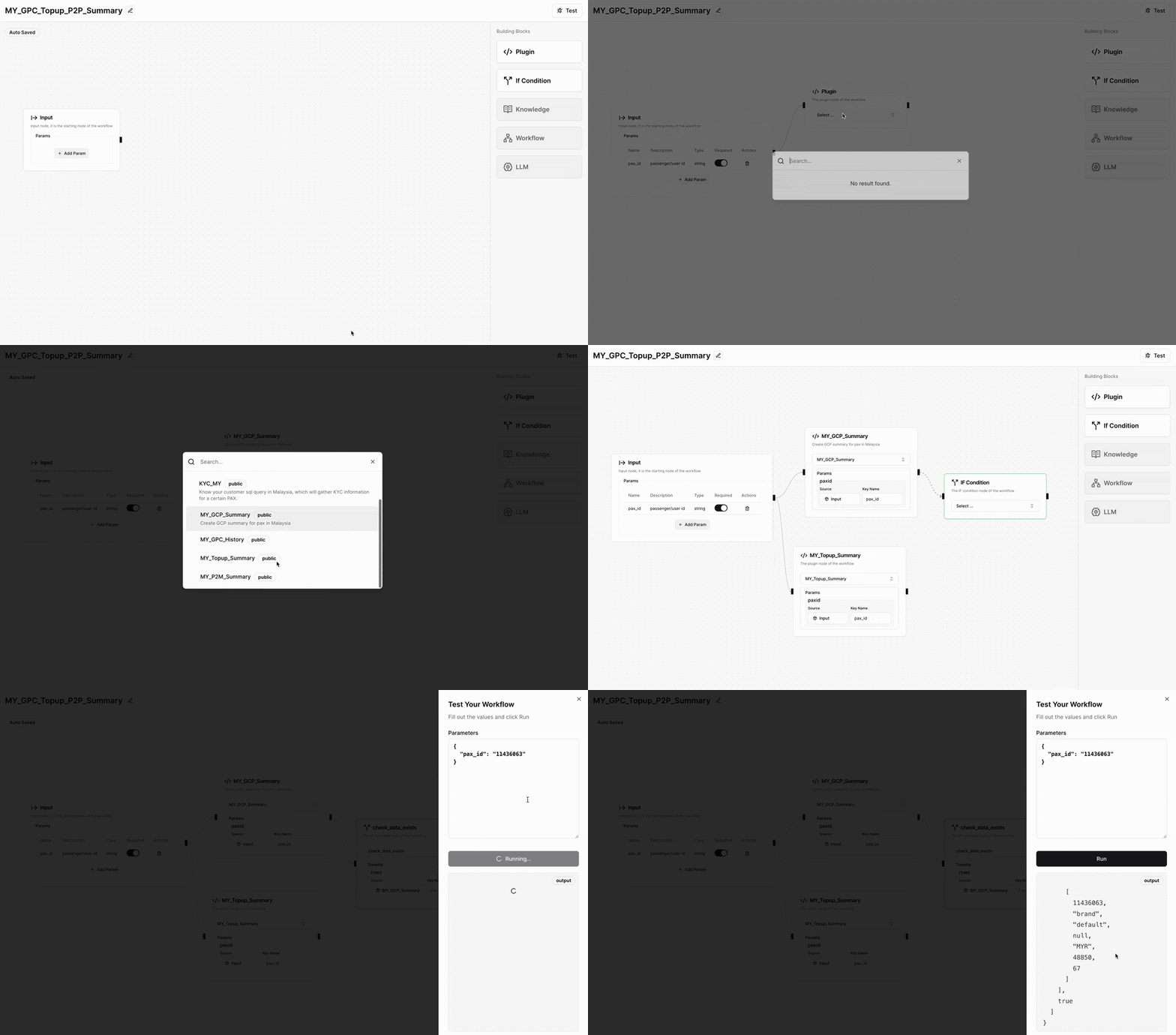
The dynamic execution engine consists of the SOP planner and the Worker Agent, working in tandem to drive efficient operations. The SOP planner serves as the navigator, guiding the investigation’s path by generating the necessary SOP steps and determining the appropriate APIs to call. It uses a structured execution approach inspired by Depth-First Search (DFS) to ensure thorough and systematic processing. Meanwhile, the Worker Agent acts as the executor, interpreting the JSON-formatted SOPs, invoking required APIs or SQL queries, and storing results. This continuous interplay between the SOP planner and the Worker Agent establishes an efficient feedback loop, propelling the investigation forward with precision and reliability.
The automated investigation process begins at the root of the SOP tree and methodically progresses through each defined step. At each juncture, the system executes specified SQL queries as needed, retrieving and analysing relevant data. Based on this analysis, the framework evaluates step specific criteria and makes informed decisions that guide subsequent steps. This iterative process allows the investigation to delve as deeply into the data as the SOP dictates, ensuring both thoroughness and efficiency.
As the investigation concludes, having completed all of the steps, the framework enters its final phase. It compiles a comprehensive summary of the entire process, synthesising all gathered information to generate a final decision. The culmination of this process is a detailed report that encapsulates the investigation’s findings and provides clear, actionable conclusions.
This automated approach combines the best of human expertise with computational efficiency. It maintains the depth and detail of a human-conducted investigation while leveraging the speed and consistency of automation. The result is a powerful tool that can handle complex investigations with precision and reliability, making it an invaluable asset in various fields requiring thorough and systematic analysis.
Figure 2: Example of dynamic execution
Efficiency, impact and future potential
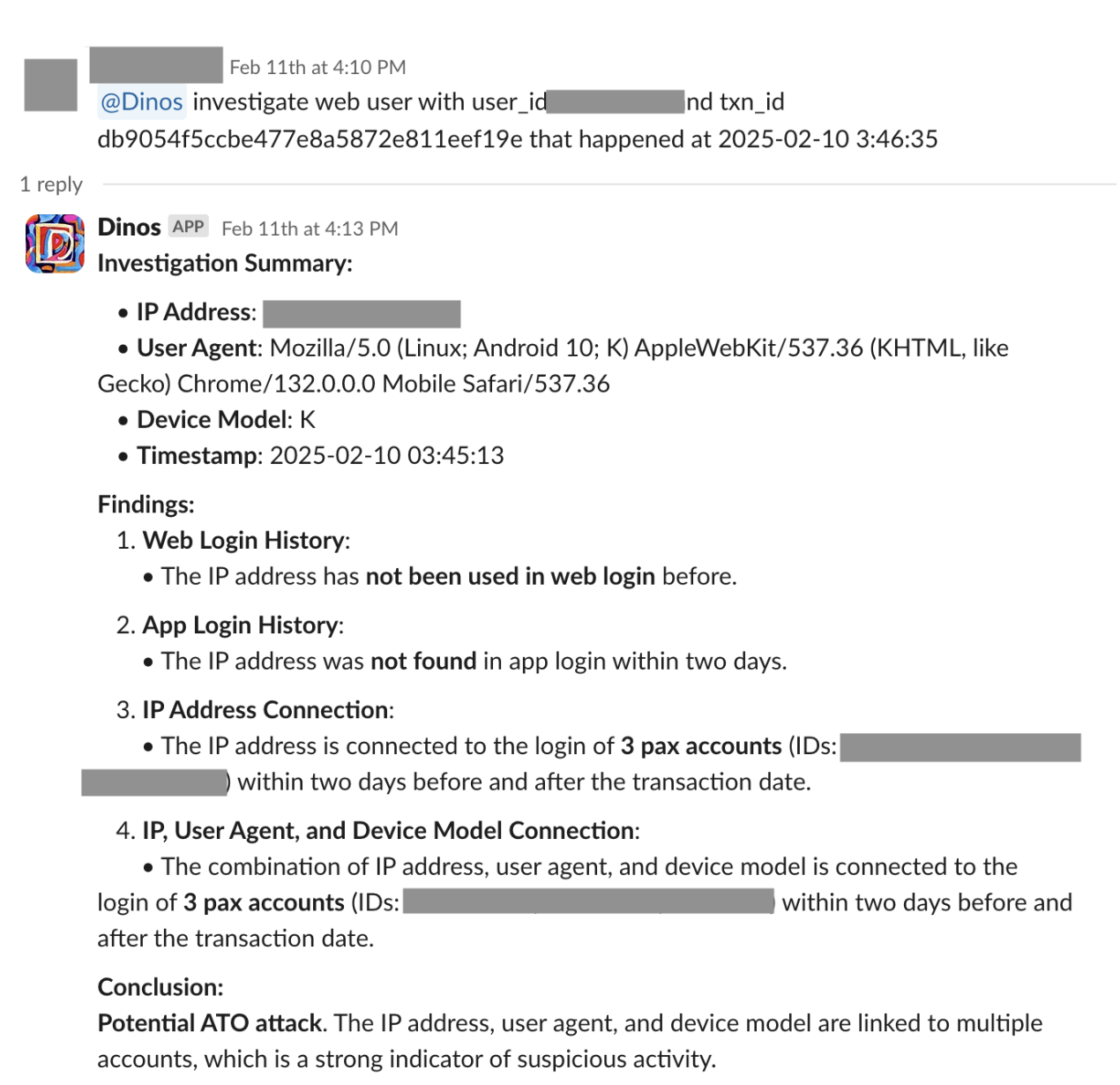
The SOP-driven LLM agent framework has demonstrated remarkable efficiency and impact in automating RiskOps processes. By automating data handling and leveraging AI to adapt to emerging patterns, the framework has significantly reduced manual tasks and streamlined operations. Figure 3 shows an example of an automated RiskOps process integrated with Slack.
Figure 3: Slack integration
Key achievements of automating RiskOps process:
Reduction in handling time from 22 to 3 minutes per ticket.
Automation of 87% of ATO cases since launch.
Achievement of a zero-error rate, enhancing both efficiency and security.
These results not only demonstrate the framework’s effectiveness in streamlining RiskOps but also provide stakeholders with increased confidence in the security and reliability of their operations.
The success of the framework in automating ATO investigations opens the door to a wider range of applications across various sectors. By adapting the framework to different processes, organisations can achieve similar improvements in efficiency and reliability, leading to a more responsive and agile business environment.
Conclusion
The SOP-driven LLM agent framework is more than an automation tool. It’s a catalyst for transforming enterprise operations. By applying it to ATO investigations, we’ve demonstrated its potential to enhance efficiency, reliability, and security. As we continue to explore its capabilities, we anticipate unlocking new levels of productivity and innovation across industries.
We look forward to sharing more as we explore how this groundbreaking framework can be applied to various challenges, helping organisations navigate the complexities of modern operations with confidence and precision.
Join us
Grab is a leading superapp in Southeast Asia, operating across the deliveries, mobility and digital financial services sectors. Serving over 800 cities in eight Southeast Asian countries, Grab enables millions of people everyday to order food or groceries, send packages, hail a ride or taxi, pay for online purchases or access services such as lending and insurance, all through a single app. Grab was founded in 2012 with the mission to drive Southeast Asia forward by creating economic empowerment for everyone. Grab strives to serve a triple bottom line – we aim to simultaneously deliver financial performance for our shareholders and have a positive social impact, which includes economic empowerment for millions of people in the region, while mitigating our environmental footprint.
Powered by technology and driven by heart, our mission is to drive Southeast Asia forward by creating economic empowerment for everyone. If this mission speaks to you, join our team today!
Version
2025.5 of the Home Assistant home automation system has been released.
With this release, the project is celebrating two million active
installations. Changes include improvements to the backup system, Z-Wave
Long Range support, a number of new integrations, and more.
In April of 2025, Rapid7 discovered and disclosed three new vulnerabilities affecting SonicWall Secure Mobile Access (“SMA”) 100 series appliances (SMA 200, 210, 400, 410, 500v). These vulnerabilities are tracked as CVE-2025-32819, CVE-2025-32820, and CVE-2025-32821. An attacker with access to an SMA SSLVPN user account can chain these vulnerabilities to make a sensitive system directory writable, elevate their privileges to SMA administrator, and write an executable file to a system directory. This chain results in root-level remote code execution. These vulnerabilities have been fixed in version 10.2.1.15-81sv.
Rapid7 would like to thank the SonicWall security team for quickly responding to our disclosure and going above and beyond over a holiday weekend to get a patch out.
Vulnerability table
CVE
Description
Affected Service
CVSS
CVE-2025-32819
An authenticated attacker with user privileges can delete any file on the SMA appliance as root to perform privilege escalation to the administrator account. Based on known (private) IOCs and Rapid7 incident response investigations, we believe this vulnerability may have been used in the wild.
An authenticated attacker with user privileges can inject a path traversal sequence to make any directory on the SMA appliance writable by all users, including the nobody user. Any existing file on the system can also be overwritten with junk contents as root.
An authenticated attacker with administrator privileges can inject shell command arguments to upload a fully controlled file anywhere that the nobody user can write to.
These vulnerabilities were discovered by Ryan Emmons, Staff Security Researcher at Rapid7, and are being disclosed in accordance with Rapid7’s coordinated vulnerability disclosure policy.
Remediation
To remediate CVE-2025-32819, CVE-2025-32820, and CVE-2025-32821, SonicWall SMA administrators should update to the latest version, 10.2.1.15-81sv. For additional information, please see SonicWall’s advisory.
Rapid7 customers
InsightVM and Nexpose customers will be able to assess their exposure to CVE-2025-32819, CVE-2025-32820, and CVE-2025-32821 with an unauthenticated vulnerability check expected to be available in today’s (May 7) content release.
Analysis
The appliance tested was ”SMA 500v for ESXi” running version 10.2.1.14-75sv, the latest available at the time of research.
CVE-2025-32819
An attacker with access to a low-privilege SMA user account can delete any file as root. This vulnerability appears to be a patch bypass for a previously reported arbitrary file delete vulnerability. That original vulnerability was disclosed by NCC Group in 2021, and a patch was previously released in the 10.2.0.9-41sv and 10.2.1.3-27sv patch cycle. Rapid7 is not aware of any specific CVE assigned to this original vulnerability; the NCC Group blog post states that a CVE was not shared with them, and we didn’t see a clear 1:1 match on the SonicWall PSIRT page.
Based on our testing, the unauthenticated arbitrary file delete vulnerability disclosed by NCC Group was patched by adding an authentication check. However, that authentication check is satisfied with a valid low-privilege session cookie, so exploitation is still viable. An attacker can exploit this vulnerability with low privileges to elevate to SMA administrator. This can be chained with CVE-2025-32820 and CVE-2025-32821 to establish root-level remote code execution on the SMA research target running 10.2.1.14-75sv. Note: Based on known (private) IOCs and Rapid7 incident response investigations, we believe this vulnerability may have been used in the wild.
In /usr/src/EasyAccess/www/conf/httpd.conf, we observe that the /fileshare/sonicfiles web path is mapped to the sonicfiles.py Flask application.
Within sonicfiles.py, we find the function main_handler, which is a main function that enforces authentication checks and dispatches various “RacNumber” SMB operations. At [A], we see an authorization check being performed before the primary API functionality is reachable.
@application.route('/sonicfiles', methods=['GET', 'POST'])
@application.route('/', methods=['GET', 'POST'])
def main_handler():

    #Get the required config if its not set
    #application.get_config()
    prog = 'fileexplorer'

    '''Alternate method for CSRF

    referrer = request.referrer
    parsed_referrer = urlparse(request.referrer)
    if((referrer is None) or (parsed_referrer.hostname != request.host)):
        print("Referrer something is wrong")
        return HttpErrorCode["NOT_PERMITTED_AUTH"]
    '''

    #set the log level to Debug when don't get the setting from SMA settings.
    application.set_log_level(logging.DEBUG)

    authResult = application.authorizationCheck() # [A]
    if authResult:
        response = make_response(str(HttpErrorCode["NOT_PERMITTED_AUTH"][0]))
        response.headers['content-type'] = 'text/plain'
        response.headers['Cache-Control'] = 'no-cache'
        logger.info("::SONICFILES:: Authorization check failed {}".format(authResult))
        return response, HttpErrorCode["NOT_PERMITTED_AUTH"][1]

    racNum = request.args.get('RacNumber', RacNumber.RAC_INVALID, int)
    if racNum is RacNumber.RAC_INVALID:
        return 'Invalid invocation', 500

    smbshare = FileShare(application)
[..SNIP..]
Let’s investigate what application.authorizationCheck is. It’s defined in pythonApi.py:
The self.get_connection_id function is depicted below. It fetches the swap cookie ([B]), which is the primary session cookie, then decodes it as base64 ([C]) and returns it.
Since the primary authorizationCheck function is a SWIG function implemented in native code, the decompiled cleaned up C for that is depicted below. It calls sessionGetAndRefresh ([D]), which queries the web application’s SQLite primary database on disk, to determine whether the provided session is an authenticated one. If it’s valid (and if the CSRF token matches when the ‘POST’ method is used), it returns a success code ([E]).
That establishes that any low-privileged user can call RacNumber functions via the sonicfiles API. In 2021, NCC Group outlined how the RAC_DOWNLOAD_TAR function (RacNumber=44) could be exploited with a path traversal for privileged arbitrary file deletion. That download_tar code does not appear to have been modified from what the NCC Group blog post shows, since the “/tmp” directory string is still unsafely concatenated with tainted web parameters ([F]); only the authentication check outlined above in main_handler appears to have been implemented as a fix.
We’ll start by creating a user named lowpriv with low user-level SMA privileges. This user account should not have access to any administrative functionality, and it will act as our victim account for exploitation. We’ll login to the SMA web service listening on port 443 and establish that we have access to this standard user account.
We’ll create two attacker-owned files as root to demonstrate the privileged arbitrary file delete.
Next, we’ll grab our lowpriv user’s session cookies and use them to perform the malicious file delete web request. The server will return a generic 500 code error response.
With our console root shell, we can see that the root-owned /tmp/rootfile file has been deleted.
This can be leveraged to delete the /etc/EasyAccess/var/conf/persist.db file, which is the primary web server SQLite database. When that happens, the system will reboot and reset the SMA administrator password to “password”. Based on known (private) IOCs and Rapid7 incident response investigations, we believe that this specific technique may have been used in the wild.
CVE-2025-32820
An authenticated attacker with user-level low privileges can inject a path traversal sequence to an arbitrary directory on the SMA appliance to make it world-writable. This can be chained with CVE-2025-32819 and CVE-2025-32821 to establish root-level remote code execution on the SMA research target running 10.2.1.14-75sv. Additionally, if a file path is provided, any existing file on the system can be overwritten with junk contents as root, creating a persistent denial of service condition.
Let’s investigate this now. In authentication_api/client/__init__.py, we observe authentication checks implemented in before_request ([G]).
This authorization_check function is similar to the one we previously looked at. However, this function is implemented in Python, within smaauthorize.py, instead of in a C shared library. Below, we can see this logic. The third parameter is called requireAdmin, and it defaults to True ([H]). In this case, though, the call within before_request explicitly states that low-privilege users should be allowed via the False parameter input. The authorization code queries the primary web SQLite database to determine whether the user’s swap session cookie exists in the database ([I]). If so, the request will succeed.
The NxPostConnectionScriptFileResource endpoint sounds promising, since it deals with file operations. Within nxpostconnectionscript.py, we find the API endpoint logic for POST requests. A file input parameter called upfile is expected ([J]). A sanitized file name is extracted using secure_filename (to prevent path traversal) and assigned to the tmp_file variable ([K]). Then, the file contents are stored in tmp_file’s location. A file operation command is also executed using os.system, with the tmp_file argument sanitized using shlex.quote to prevent command injection ([L]).
This is all handled well. However, while the tmp_file path was created safely, the application later needs to reference just the file name without the prepended /tmp directory. In order to do so, it defines a new filePath variable by directly concatenating the unsanitized file.filename string with a different directory path ([M]). This is then wrapped in shlex.quote, appended to the string “chmod 777 ”, and executed using os.system ([N]). No command injection is possible, since the command string is appropriately escaped. Despite this, shlex.quote does not remove path traversal sequences, so a relative traversal file name can be supplied by the attacker to execute “chmod 777” as root on any path of the attacker’s choosing.
   @swagger.doc(postDocument)
    def post(self):
        post_reqparser = reqparse.RequestParser()
        post_reqparser.add_argument('upfile', required = True, type = FileStorage, location = 'files') # [J]
        args = post_reqparser.parse_args()

        [..SNIP..]

        # store file in /tmp for examination
        file = request.files['upfile']
        tmp_file = '/tmp/' + secure_filename(file.filename) # [K]
        file.save(tmp_file)

        fileSize = os.stat(tmp_file).st_size
        if (fileSize > smaApi.MAX_SCRIPT_FILE_LEN or fileSize == 0):
            cmd = "rm -rf {}".format(shlex.quote(tmp_file)) # [L]
            os.system(cmd)
            raise BadRequest(getMessage(API_ERR_CODE_CLIENT_FILE_SIZE_INVALID).format(int(smaApi.MAX_SCRIPT_FILE_LEN / 1024)))

        # check dir exists or not and if not create it
        if (not os.path.exists(smaApi.POST_SCRIPTS_DIR)):
            cmd = "mkdir {}; chmod 777 {}".format(shlex.quote(smaApi.POST_SCRIPTS_DIR), shlex.quote(smaApi.POST_SCRIPTS_DIR))
            os.system(cmd)

        if (not os.path.exists(smaApi.POST_SCRIPTS_DESC_DIR)):
            cmd = "mkdir {}; chmod 777 {}".format(shlex.quote(smaApi.POST_SCRIPTS_DESC_DIR), shlex.quote(smaApi.POST_SCRIPTS_DESC_DIR))
            os.system(cmd)

        # move file to its destination
        cmd = "mv {} {}".format(shlex.quote(tmp_file), shlex.quote(smaApi.POST_SCRIPTS_DIR))
        os.system(cmd)
        filePath = smaApi.POST_SCRIPTS_DIR + '/' + file.filename # [M]
        cmd = "chmod 777 {}".format(shlex.quote(filePath)) # [N]
        os.system(cmd)
[..SNIP..]
Exploitation
This is a niche primitive, since we do not control the command being executed. Fortunately, making any directory world-writable is exactly what we need to weaponize CVE-2025-32821, our arbitrary low-privilege file write as nobody. We’ll perform a web request to the vulnerable API endpoint as the lowpriv user. In that request, we’ll set upfile to a relative traversal sequence into /bin, which is on the root user’s PATH.
Our pspy monitor logs two commands being executed as root. The first command’s file path is sanitized using secure_filename, but the second is only sanitized using shlex.quote, resulting in a traversal to /bin.
CMD: UID=0     PID=15082  | sh -c mv /tmp/bin /usr/src/EasyAccess/var/conf/postscripts
CMD: UID=0     PID=15083  | sh -c chmod 777 /usr/src/EasyAccess/var/conf/postscripts/../../../../../../../../../bin/
Exploitation is confirmed with our console root shell, which shows that the /bin directory is now world-writable.
CVE-2025-32821
An authenticated attacker with administrator privileges can inject shell command arguments with an escape sequence to upload a fully controlled file anywhere that the nobody user can write to. This can be chained with CVE-2025-32820 to establish root-level remote code execution on the SMA research target running 10.2.1.14-75sv. It’s also possible to copy existing files that the nobody user can read, such as /etc/passwd or the application’s SQLite database, to the web root directory for data exfiltration.
We’ll start by taking a look at the main function in /cgi-bin/importlogo.
After confirming the user is an authenticated administrator and the HTTP method is “POST”, the application checks for the presence of an integer parameter called updateFavicon ([O]). If this is set to “1”, and if the defaultFavicon parameter is “0”, the application will call FUN_0804a0f0 with the first argument set to a FILE pointer from the multipart form file parameter called favicon1 ([P]). After confirming some basic validation checks, such as file size, the FUN_0804a0f0 function will write the uploaded file to disk at /usr/src/EasyAccess/www/htdocs/themes/favicon1.ico. Next, the portalName POST parameter is fetched and passed through safeSystemCmdArg2 ([Q]). This is a security function that searches for command injection characters, such as $, \n, ;, |, <, >, ^, and `. If any of those characters are detected, the function will return a truncated string of the characters up to that point. Then, a format string is created with the sanitized portalName value to craft the shell command string cp -f /usr/src/EasyAccess/www/htdocs/themes/favicon1.ico /usr/src/EasyAccess/uiaddon/{portalName_VALUE}/favicon.ico ([R]) and the command is executed via system_s_quiet ([S]), which is a wrapper for system that runs in the context of nobody.
Note that the provided portal name is not validated as a legitimate web portal name at any point in the code path thus far–it’s checked against valid portal names if updateFavicon is not set. So, we don’t need to provide a valid portal name. Additionally, although the portal name is sanitized for command injection characters, it is not sanitized for path traversals, it is not URL encoded, and hash symbols are not truncated. As a result, an attacker can provide a portalName value with a traversal sequence to a different file path, followed by a space and a hash symbol to escape “/favicon.ico”.
The result is that the attacker can upload their own fully controlled file and exploit the limited command injection to write it with any file name they’d like to any directory that nobody can write to.
Exploitation
We can perform the web request depicted below to exploit this arbitrary file write.
As expected, the test.txt file has been written to the web root.
We also note that the uploaded file has the executable bit set by default.
# ls -lha /usr/src/EasyAccess/www/htdocs/test.txt
-rwx------ 1 nobody nobody 7 May  1 12:10 /usr/src/EasyAccess/www/htdocs/test.txt
This detail is useful for exploitation, since it will facilitate easily writing an executable file to a directory on the root PATH for arbitrary remote code execution.
Chained Impact
The vulnerabilities disclosed in this document permit an attacker with SMA SSLVPN low-privilege user credentials to perform the following five steps:
Exploit CVE-2025-32819 to delete the primary SQLite database and reset the password of the default SMA admin user.
Login as admin to the SMA web interface.
Exploit CVE-2025-32820 to make the SMA appliance’s /bin directory world-writable.
Exploit CVE-2025-32821 to write the file /bin/lsb_release. This executable is not installed by default, but we observed that an automated job on the appliance routinely attempts to execute it as root every few minutes.
Wait for sh -c lsb_release to be executed automatically. When this happens, the attacker gains root-level remote code execution on the SMA device.
Demonstration
We’ll start by grabbing our low-privilege user’s cookies in our “assumed breach” scenario. This cookie string is swap="ZHNZZThVdlJzWHY1MkpWTDM0akFjbG9XWFgyd29Hdk1yVEtPZWdzSnJlbz0="; swcctn=LEj9kOzEjYibGOSEW9YE8ElgWwiOgigN.
Now, let’s reset the administrator’s password by exploiting CVE-2025-32819 and deleting the primary SQLite database. The SMA returns a 200 status with no body.
Refreshing the web page confirms it worked, though the application is not thrilled with our decision.
After a few seconds, the watchdog has had enough and the device is rebooted. When we refresh the page a couple of minutes later, things are looking as good as new.
After logging in using the credentials admin:password, we’re greeted with an end user product agreement, indicating that the device has been initialized.
We’ll input a free trial license key to get the device back in a functional state, though a real attacker would probably use a stolen one. Next, we’ll use our CVE-2025-32820 PoC to make /bin writable. The server should return a 500 error with the message “Failed to create description file.”
Lastly, we’ll set our sights on remote code execution as root by exploiting CVE-2025-32821. We throw the reverse shell PoC below at our victim and it responds with a 200 code and “success” in the body. Note that a hash symbol is also appended to our executable file contents; this is added because the file write occasionally seems to append a junk character to our command, though it doesn’t happen every time. In order to avoid any unexpected additions, we escape the rest of the line.
One minute later, our reverse shell arrives and root-level remote code execution is confirmed.
Disclosure timeline
May 2, 2025: Rapid7 shares vulnerability details with SonicWall security contacts. The SonicWall team acknowledges the disclosure 30 minutes later and confirms that patch development work will begin.
May 4, 2025: The SonicWall security team states that a fixed build will be shared on May 5 for patch validation.
May 5, 2025: The SonicWall security team shares the 10.2.1.15 build with Rapid7. The Rapid7 team validates that the patch is effective.
May 6, 2025: The SonicWall security team states that the patch will be targeting a May 7 release date.
May 7, 2025: SonicWall releases v10.2.1.15 and publishes a security advisory. After confirming the patch is generally available, Rapid7 publishes this disclosure.
Anton Protopopov led a short discussion at the 2025 Linux Storage, Filesystem,
Memory-Management, and BPF Summit about amount of memory used
by hash tables in BPF programs. He thinks that the current memory layout is
inefficient, and wants to split the structure that holds table entries into two
variants for different kinds of maps. When that proposal proved
uncontroversial, he also took the chance to talk about a bug in BPF’s call
instruction.
Financial services institutions (FSIs) are increasingly adopting AI technologies to drive innovation and improve customer experiences. However, this adoption brings new governance, risk, and compliance (GRC) considerations that organizations need to address. To help FSI customers navigate these challenges, AWS is excited to announce the launch of the AWS User Guide to Governance, Risk and Compliance for Responsible AI Adoption within Financial Services Industries.
This comprehensive guide provides FSI customers practical considerations for responsible AI adoption across key dimensions including governance, risk management, compliance, data management, model management and AI agent management. It includes detailed AWS service capabilities that customers can use to address these considerations, such as Amazon Bedrock Guardrails, Amazon Bedrock Agents, Amazon SageMaker Autopilot, and Amazon SageMaker Model Monitor.
As the regulatory environment and leading practices continue to evolve, we’ll provide further updates on the AWS Security Blog and AWS Compliance Center. You can also reach out to your AWS account team for help finding the resources you need.
If you have feedback about this post, submit comments in the Comments section below. If you have questions about this post, contact AWS Support.
Amazon QuickSight is cloud-powered, serverless, and embeddable business intelligence (BI) service that makes it straightforward to deliver insights to your organization. As a fully managed service, Amazon QuickSight lets you create and publish interactive dashboards that can then be accessed from different devices and embedded into your applications, portals, and websites.
When authors create datasets, build dashboards, and share with end-users, the users will see the same data as the author, unless row-level security (RLS) is enabled in the Amazon QuickSight dataset. Amazon QuickSight also provides options to pass a reader’s identity to a data source using trusted identity propagation and apply RLS at the source. To learn more, see Centrally manage permissions for tables and views accessed from Amazon QuickSight with trusted identity propagation and Simplify access management with Amazon Redshift and AWS Lake Formation for users in an External Identity Provider.
However, there are a few requirements when using trusted identity propagation with Amazon QuickSight:
The authentication method for Amazon QuickSight must be using AWS IAM Identity Center.
The dataset created using trusted identity propagation will be a direct query dataset in Amazon QuickSight. QuickSight SPICE can’t be used with trusted identity propagation. This is because when using SPICE, data is imported (replicated) and therefore the entitlements at the source can’t be used when readers access the dashboard.
This post outlines a solution to automatically replicate the entitlements for readers from the source (AWS Lake Formation) to Amazon QuickSight. This solution can be used even when the authentication method in Amazon QuickSight is not using IAM Identity Center and can work with both direct query and SPICE datasets in Amazon QuickSight. This lets you take advantage of auto scaling that comes with SPICE. Although we focus on using a Lake Formation table that exists in the same account, you can extend the solution for cross-account tables as well. When extracting data filter rules for the table in another account, the execution role must have necessary access to the tables in the other account.
Use case overview
For this post, let’s consider a large financial institution that has implemented Lake Formation as its central data lake and entitlement management system. The institution aims to streamline access control and maintain a single source of truth for data permissions across its entire data ecosystem. By using Lake Formation for entitlement management, the financial institution can maintain a robust, scalable, and compliant data access control system that serves as the foundation for its data-driven operations and analytics initiatives. This approach is particularly crucial for maintaining compliance with financial regulations and maintaining data security. The analytics team wants to build an Amazon QuickSight dashboard for data and business teams.
Solution overview
This solution uses APIs of AWS Lake Formation and Amazon QuickSight to extract, transform, and store AWS Lake Formation data filters in a format that can be used in QuickSight.
The solution has four key steps:
Extract and transform the row-level security (data filters) and permissions to data filters for tables of interest from AWS Lake Formation.
The following diagram illustrates the solution architecture.
Prerequisites
To implement this solution, you should have following services enabled in the same account
AWS Lake Formation and
Amazon QuickSight
AWS Identity and Access Management (IAM) permissions: Make sure you have necessary IAM permissions to perform operation across all the services mentioned in the solution overview above
AWS Lake Formation table with data filters with right permissions
Amazon QuickSight principals (Users or Groups)
The below section shows how you can create Amazon QuickSight groups and AWS Lake formation tables and data filters
Create groups in QuickSight
Create two groups in Amazon QuickSight: QuickSight_Readers and QuickSight_Authors. For instructions, see Create a group with the QuickSight console.
You can then form the Amazon Resource Names (ARNs) of the groups as follows. These will be used when granting permission in AWS Lake Formation for data filters.
You can also get the ARN of the groups by executing the Amazon QuickSight CLI command list-groups. The following screenshot shows the output.
Create a table in AWS Lake Formation
The following section is for example purposes and not necessary for production use of this solution. Complete the following steps to create a table in AWS Lake Formation using sample data. In this post, the table is called saas_sales.
Create row-level security (data filter) in AWS Lake Formation
In AWS Lake Formation, data filters are used to filter the data in a table for an individual or group. Complete the following steps to create a data filter:
Create a data filter called QuickSightReaderFilter in the table saas_sales. For Row-level access, enter the expression segment = 'Enterprise'.
Grant the QuickSight_Authors group full access to the table. Use the reader group ARN from the first step for SAML Users and groups.
(Optional) You can create another table called second_table and create another data filter called SecondFilter and grant permission to the QuickSight_Readers group.
Now that you have set up the table, permissions, and data filters, you can extract the row-level access details for the QuickSight_Readers and QuickSight_Authors groups and the saas_sales table in AWS Lake Formation, and create the rules dataset in Amazon QuickSight for the saas_sales table.
Extract and transform data filters and permissions from AWS Lake Formation using a Lambda function
In AWS Lake Formation, data filters are created for each table. There can be many tables in AWS Lake Formation. However, for a team or a project, there are only a specific set of tables that the BI developer is interested in. Therefore, choose a list of tables to track and update the data filters for. In a batch process, for each table in AWS Lake Formation, extract the data filter definitions and write them into Amazon S3 using AWS Lake Formation and Amazon S3 APIs.
We use the following AWS Lake Formation APIs to extract the data filter details and permissions:
ListDataCellFilters – This API is used to list all the data filters in each table that is required for the project
ListPermissions – This API is used to retrieve the permissions for each of the data filters extracted using the ListDataCellFilters API
The Lambda function covers three parts of the solution:
Extract the data filters and permissions to data filters for tables of interest from AWS Lake Formation
Transform the data filters and permission into a format usable in Amazon QuickSight
Persist the transformed data
Complete the following steps to create an AWS Lambda function:
On the Lambda console, create a function called Lake_Formation_QuickSight_RLS. Use Python 3.12 as the runtime and create a new role for execution.
Set the following environment variables for the Lambda function:
Name
Value
S3Bucket
Value of the S3 bucket where the output files will be stored
tablesToTrack
List of tables to track as JSON converted to string
Tmp
/tmp
The Lambda function gets the list of tables and S3 bucket details from the environment variables. The list of tables is given as a JSON array converted to string. The JSON format is shown in the following code. The values for catalogId, DatabaseName, and Name can be fetched from the AWS Lake Formation console.
Download the zip file Lake_Formation_QuickSight_RLS.zip. Note: This is sample code for non-production usage. You should work with your security and legal teams to meet your organizational security, regulatory, and compliance requirements before deployment.
For the Lambda function code, upload the downloaded .zip file to the Lambda function, on the Code tab.
Provide necessary access to the execution role in AWS Lake Formation. Although the AWS Identity and Access Management (IAM) permissions are given to the Lambda execution role, explicit permission has to be given to the role in AWS Lake Formation for the Lambda function to get the details about the data filters. Therefore, you have to explicitly grant access to the execution role to limit the Lambda role to read-only admin. For more details, see Viewing data filters.
In the following sections, we explain what the Lambda function code does in more detail.
Extract data filters and permissions for data filters and tables in AWS Lake Formation
The main flow of the code takes the list of tables as input and extracts table and data filter permissions and data filter rules. The approach here is to get the permissions for the entire table and also for the data filters applied to the table. This way, both full access (table level) and partial access (data filter) can be extracted.
...
....
tablesToTrack= json.loads(os.environ["tablesToTrack"])
lf_client = boto3.client('lakeformation')
# For each table in the list get the data filter rules attached to the table.
for table in tablesToTrack:
df_response= lf_client.list_data_cells_filter(
Table= table
)
d_filters += df_response["DataCellsFilters"]

# Also, for each table in the list get the list of permissions at table level.
# This determines who has access to all rows in the table.
tresponse=lf_client.list_permissions(
Resource= {
"Table": table
}
)

d_permissions += tresponse["PrincipalResourcePermissions"]
transformDataFilterRules(d_filters)
# For each data filters fetched above, get the permissions.
# This determines the row level security for the tables.
for filter in d_filters:
p_response=lf_client.list_permissions(
Resource= {

"DataCellsFilter": {
"DatabaseName": filter ["DatabaseName"],
"Name": filter["Name"],
"TableCatalogId": filter["TableCatalogId"],
"TableName": filter["TableName"]
}

}
)
d_permissions += p_response["PrincipalResourcePermissions"]

transformFilterandTablePermissions(d_permissions)
Transform data filter definitions in to a format usable in Amazon QuickSight
The extracted permissions and filters are transformed to create a rules dataset in Amazon QuickSight. There are different ways to define data filters. The following figure illustrates some of the example transformations.
The function transformDataFilterRules in the following code can transform some of the OR and AND conditions into Amazon QuickSight acceptable format. The following are the details available in the transformed format:
Lake Formation catalog ID
Lake Formation database name
Lake Formation table name
Lake Formation data filter name
List of columns from all the tables provided in the input for which the data filter rules are defined
See the following code:
def transformDataFilterRules(rules):
global complete_transformed_filter_rules
transformed_filter_rules = []
filter_to_extract=[]
complete_transformed_filter_rules = []
col_headers=[]
col_headers.append("catalog")
col_headers.append("database")
col_headers.append("table")
col_headers.append("filter")

for rule in rules:
print(rule)
catalog=rule["TableCatalogId"]
database = rule["DatabaseName"]
table = rule["TableName"]
filter = rule["Name"]
row=[]
row.append(catalog)
row.append(database)
row.append(table)
row.append(filter)
logger.info(f"row==={row}")

f_conditions = re.split(' OR | or | and | AND ' , rule["RowFilter"]["FilterExpression"])

for f_condition in f_conditions:
logger.info(f"f_condition={f_condition}")
f_condition = f_condition.replace("(","")
f_condition = f_condition.replace(")","")
filter_rule_column= f_condition.split("=")
if len(filter_rule_column)>1:
filter_rule_column[0] = filter_rule_column[0].strip()
if not filter_rule_column[0].strip() in col_headers:
col_headers.append(filter_rule_column[0].strip())
i= col_headers.index(filter_rule_column[0].strip())
j= i- (len(row)-1)
if j>0:
for x in range(1, j):
row.append("")
logger.info(f"i={i} j={j} {filter_rule_column[1]}")
row.insert(i, filter_rule_column[1].replace("'",""))
print(row)
transformed_filter_rules.append(','.join(row))

row=[]
row.append(catalog)
row.append(database)
row.append(table)
row.append(filter)
max_columns = len(col_headers)
complete_transformed_filter_rules=[]
for rule in transformed_filter_rules:
r = rule.split(",")
to_fill = max_columns - len(r)
if to_fill>0:
for x in range(1, to_fill+1):
r.append("")
complete_transformed_filter_rules.append(','.join(r))

complete_transformed_filter_rules.insert(0,','.join(col_headers))
The following figure is an example of the transformed file. The file contains the columns for both tables. When creating a rules dataset for a specific table, the records are filtered for that table pulled into Amazon QuickSight.
The function transformFilterandTablePermissions in the following code snippet combines and transforms the table and data filter permissions into a flat structure that contains the following columns:
Amazon QuickSight group ARN
Lake Formation catalog ID
Lake Formation database name
Lake Formation table name
Lake Formation data filter name
See the following code:
def transformFilterandTablePermissions(permissions):
    global transformed_table_permissions,transformed_filter_permissions
    # Read and set table level access
    transformed_table_permissions = []
    transformed_filter_permissions = []
    transformed_filter_permissions.insert(0,"group,catalog,database,table,filter")
    transformed_table_permissions.insert(0,"group,catalog,database,table")

    for permission in permissions:
    group=""
    database=""
    table =""
    catalog=""

    p= permission["Permissions"]

    if "DESCRIBE" in p or "SELECT" in p:

    group = permission["Principal"]["DataLakePrincipalIdentifier"]
    if "Database" in permission["Resource"]:
    catalog=permission["Resource"]["Database"]["CatalogId"]
    database=permission["Resource"]["Database"]["Name"]
    table = "*"
    transformed_table_permissions.append(group + "," + catalog+ "," + database + "," + table)
    transformed_filter_permissions.append(group+"," +catalog + ","+ database + ","+ table)
    elif "TableWithColumns" in  permission["Resource"]  or "Table" in permission["Resource"]:
    if "TableWithColumns" in  permission["Resource"]:
    catalog=permission["Resource"]["TableWithColumns"]["CatalogId"]
    database = permission["Resource"]["TableWithColumns"]["DatabaseName"]
    table = permission["Resource"]["TableWithColumns"]["Name"]
    elif "Table" in  permission["Resource"]:
    catalog=permission["Resource"]["Table"]["CatalogId"]
    database = permission["Resource"]["Table"]["DatabaseName"]
    table = permission["Resource"]["Table"]["Name"]
    transformed_table_permissions.append( group + "," + catalog + "," + database + "," + table)
    transformed_filter_permissions.append(group+"," +catalog + ","+ database + ","+ table)
    elif "DataCellsFilter" in permission["Resource"]:
    catalog=permission["Resource"]["DataCellsFilter"]["TableCatalogId"]
    database = permission["Resource"]["DataCellsFilter"]["DatabaseName"]
    table = permission["Resource"]["DataCellsFilter"]["TableName"]
    filter = permission["Resource"]["DataCellsFilter"]["Name"]
    transformed_filter_permissions.append(group+"," +catalog + ","+ database + ","+ table+ ","+ filter)
The following figure is an example of the extracted data filter and table permissions. AWS Lake Formation can have data filters applied to any principal. However, we focus on the Amazon QuickSight principals:
The QuickSight_Authors ARN has full access to two tables. This is determined by transforming the table-level permissions in addition to the data filter permissions.
The QuickSight_Readers ARN has limited access based on filter conditions.
Store the transformed rules and permissions in two separate files in Amazon S3
The transformed rules and permissions are then persisted in a data store. In this solution, the transformed rules are written to an Amazon S3 location in CSV format. The name of the files created by the Lambda function are:
transformed_filter_permissions.csv
transformed_filter_rules.csv
See the following code:
with open("/tmp/transformed_table_permissions.csv", "w") as txt_file:
for line in transformed_table_permissions:
txt_file.write(line + "\n") # works with any number of elements in a line
txt_file.close()
s3 = boto3.resource('s3')
s3.meta.client.upload_file(Filename = "/tmp/transformed_table_permissions.csv", Bucket= os.environ['S3Bucket'], Key = "table-permissions/transformed_table_permissions.csv")

with open("/tmp/transformed_filter_permissions.csv", "w") as txt_file:
for line in transformed_filter_permissions:
txt_file.write(line + "\n") # works with any number of elements in a line
txt_file.close()

s3.meta.client.upload_file(Filename = "/tmp/transformed_filter_permissions.csv", Bucket= os.environ['S3Bucket'], Key = "filter-permissions/transformed_filter_permissions.csv")

with open("/tmp/transformed_filter_rules.csv", "w") as txt_file:
for line in complete_transformed_filter_rules:
txt_file.write(line + "\n") # works with any number of elements in a line
txt_file.close()

s3.meta.client.upload_file(Filename = "/tmp/transformed_filter_rules.csv", Bucket= os.environ['S3Bucket'], Key = "filter-rules/transformed_filter_rules.csv")
Create a rules dataset in Amazon QuickSight
In this section, we walk through the steps to create a rules dataset in Amazon QuickSight.
Create a table in Lake formation for the files
The first step is to create a table in AWS Lake Formation for the two files, transformed_filter_permissions.csv and transformed_filter_rules.csv.
Although you can directly use an Amazon S3 connector in Amazon QuickSight, creating a table and making the rules dataset using an Athena connector gives flexibility in writing custom SQL and using direct query. For the steps to bring an Amazon S3 location into AWS Lake Formation, see Creating tables.
For this post, the tables for the files are created in a separate database called quicksight_lf_transformation.
Grant permission for the tables to the QuickSight_Authors group
Grant permission in AWS Lake Formation for the two tables to the QuickSight_Authors group. This is essential for Amazon QuickSight authors to create a rules dataset in Amazon QuickSight. The following screenshot shows the permission details.
Create a rules dataset in Amazon QuickSight
Amazon QuickSight supports both user-level and group-level RLS. In this post, we use groups to enable RLS. To create the rules dataset, you first join the filter permissions table with the filter rules table on the columns catalog, database, table, and filter. Then you can filter the permissions to include the Amazon QuickSight principals, and include only the columns required for the dataset. The objective in this solution is to build a rules dataset for the saas_sales table.
Complete the following steps:
On the Amazon QuickSight console, create a new Athena dataset.
Specify the following:
For Catalog, choose AWSDataCatalog.
For Database, choose quicksight_lf_transformation.
For Table, choose filter_permissions.
Choose Edit/Preview data.
Choose Adddata.
Choose Add source.
Select Athena.
Specify the following:
For Catalog, choose AWSDataCatalog.
For Database, choose quicksight_lf_transformation.
For Table, choose filter_rules.
Join the permissions table with the data filter rules table on the catalog, database, table and filter columns.
Rename the column group as GroupArn. This needs to be done before filter is applied.
Filter the data where column table equals saas_sales.
Filter the data where column group is also filtered for values starting with arn:aws:quicksight (Amazon QuickSight principals).
Exclude fields that are not part of the saas_sales table.
Change Query mode to SPICE.
Publish the dataset.
If your organization has a mapping of other principals to a Amazon QuickSight group or user, you can apply that mapping before joining the tables.
You can also write the following custom SQL to achieve the same result:
SELECT a."group" as GroupArn, segment FROM "QuickSight_lf_transformation"."filter_permissions" as a
left join
"QuickSight_lf_transformation"."filter_rules" as b
on
a.catalog = b.catalog and
a.database = b.database and
a."table" = b."table" and
a.filter = b.filter
where a."table" = 'saas_sales'
and a."group" like 'arn:aws:quicksight%'
Name the dataset LakeFormationRLSDataSet and publish the dataset.
Test the row-level security
Now you’re ready to test the row-level security by publishing a dashboard as a user in the QuickSight_Authors group and then viewing the dashboard as a user in the QuickSight_Readers group.
Publish a dashboard as a QuickSight_Authors group user
As an author who belongs to the QuickSight_Authors group, the user will be able to see the saas_sales table in the Athena connector and all the data in the table. As shown in this section, all three segments are visible for the author when creating an analysis and viewing the published dashboard.
Create a dataset by pulling data from the saas_sales table using the Athena connector.
Attach LakeFormationRLSDataSet as the RLS dataset for the saas_sales dataset. For instructions, see Using row-level security with user-based rules to restrict access to a dataset.
Create an analysis using the saas_sales dataset as an author who belongs to the QuickSight_Authors group.
Publish the dashboard.
Share the dashboard with the group QuickSight_Readers.
View the dashboard as a QuickSight_Readers group user
Complete the following steps to view the dashboard as a QuickSight_Readers group user:
Log into Amazon QuickSight as a reader who belongs to the QuickSight_Readers group.
The user will be able to see only the segment Enterprise.
Now, change the RLS in AWS Lake Formation, and set the segment to be SMB for the QuickSightReaderFilter.
Run the Lambda function to export and transform the new data filter rules.
Refresh the SPICE dataset LakeFormationRLSDataSet in Amazon QuickSight.
When the refresh is complete, refresh the dashboard in the reader login.
Now the reader user will see SMB data.
Cleanup
Amazon QuickSight resources
Delete the Amazon QuickSight dashboard and analysis created
Delete the datasets saas_sales and LakeFormationRulesDataSet
Delete the database quicksight_lf transformation created in AWS Lake Formation
Revoke permission given to the Lambda execution role
Delete the saas_sales table and data filters created
If you have used Glue crawler to create the tables in AWS Lake Formation, remove the Glue crawler as well
Compute resources
Delete the AWS Lambda function created
Delete the AWS Lambda execution role associated with the lambda
Storage resources
Empty the content of the Amazon S3 bucket created for this solution
Delete the Amazon S3 bucket
Conclusion
This post explained how to replicate row-level security in AWS Lake Formation automatically in Amazon QuickSight. This makes sure that the SPICE dataset in QuickSight can use row-level access defined in Lake Formation.
This solution can also be extended for other data sources. The logic to programmatically extract the entitlements from the source and transform them into Amazon QuickSight format will vary by source. After the extract and transform are in place, it can scale to multiple teams in the organization. Although this post laid out a basic approach, the automation has to be either scheduled to run periodically or triggered based on events like data filters change or grant or revoke of AWS Lake Formation permissions to make sure that the entitlements remain in sync between AWS Lake Formation and Amazon QuickSight.
Try out this solution for your own use case, and share your feedback in the comments.
About the Authors
Vetri Natarajan is a Specialist Solutions Architect for Amazon QuickSight. Vetri has 15 years of experience implementing enterprise business intelligence (BI) solutions and greenfield data products. Vetri specializes in integration of BI solutions with business applications and enable data-driven decisions.
Ismael Murillo is a Solutions Architect for Amazon QuickSight. Before joining AWS, Ismael worked in Amazon Logistics (AMZL) with delivery station management, delivery service providers, and our customer actively in the field. Ismael focused on last mile delivery and delivery success. He designed and implemented many innovative solutions to help reduce cost, influence delivery success. He is also a United States Army Veteran, where he served for eleven years.
The Debian project has the concept of essential
packages, which provide the bare minimum functionality considered
absolutely necessary (or “essential”) for a system to
function. Packages tagged as essential, and the packages that are
required by the set of essential packages, are always installed as
part of a Debian system. However, Debian’s packaging rules do not
require developers to explicitly declare dependencies on that set of
packages (the essential set) but they can simply rely on the fact that those
will always be present. That means that changing the essential set, as
the project may wish to do occasionally, is more complicated than it
should be. This came to light recently when a Debian developer asked
what might be required to remove mawk to slim down
the project’s container images.
The SUSE Security Team has announced the removal of the Deepin
Desktop from openSUSE due to violations of the project’s packaging
policy.
The discovery of the bypass of the security whitelistings via the deepin-feature-enable package marks a turning point in our assessment
of Deepin. We don’t believe that the openSUSE Deepin packager acted
with bad intent when he implemented the “license agreement” dialog to
bypass our whitelisting restrictions. The dialog itself makes the
security concerns we have transparent, so this does not happen in a
sneaky way, at least not towards users. It was not discussed with us,
however, and it violates openSUSE packaging policies. Beyond the
security aspect, this also affects general packaging quality
assurance: the D-Bus configuration files and Polkit policies installed
by the deepin-feature-enable package are unknown to the package
manager and won’t be cleaned up upon package removal, for
example. Such bypasses are not deemed acceptable by us.
The combination of these factors led us to the decision to remove
the Deepin desktop completely from openSUSE Tumbleweed and from the
future Leap 16.0 release. In openSUSE Leap 15.6 we will remove the
offending deepin-feature-enable package only. It is a difficult
decision given that the Deepin desktop has a considerable number of
users. We firmly believe the Deepin packaging and security assessment
in openSUSE needs a reboot, however, ideally involving new people that
can help get the Deepin packages into shape, establish a relationship
with Deepin upstream and keep an eye on bugfixes, thus avoiding
fruitless follow-up reviews that just waste our time. In such a new
setup we would be willing to have a look at all the sensitive Deepin
components again one by one.
The announcement goes into detail about the bypass of
openSUSE packaging policy and the history of security reviews of
Deepin components. It also offers guidance on continuing
to use Deepin Desktop on openSUSE.
Today, Amazon Web Services (AWS) announced plans to launch a new AWS Region in Chile by the end of 2026. The AWS South America (Chile) Region will consist of three Availability Zones at launch, bringing AWS infrastructure and services closer to customers in Chile. This new Region joins the AWS South America (São Paulo) and AWS Mexico (Central) Regions as our third AWS Region in Latin America. Each Availability Zone is separated by a meaningful distance to support applications that need low latency while significantly reducing the risk of a single event impacting availability.
Skyline of Santiago de Chile with modern office buildings in the financial district in Las Condes
The new AWS Region will bring advanced cloud technologies, including artificial intelligence (AI) and machine learning (ML), closer to customers in Latin America. Through high-bandwidth, low-latency network connections over dedicated, fully redundant fiber, the Region will support applications requiring synchronous replication while giving you the flexibility to run workloads and store data locally to meet data residency requirements.
AWS in Chile In 2017, AWS established an office in Santiago de Chile to support local customers and partners. Today, there are business development teams, solutions architects, partner managers, professional services consultants, support staff, and personnel in various other roles working in the Santiago office.
As part of our ongoing commitment to Chile, AWS has invested in several infrastructure offerings throughout the country. In 2019, AWS launched an Amazon CloudFront edge location in Chile. This provides a highly secure and programmable content delivery network that accelerates the delivery of data, videos, applications, and APIs to users worldwide with low latency and high transfer speeds.
AWS strengthened its presence in 2021 with two significant additions. First, an AWS Ground Station antenna location in Punta Arenas, offering a fully managed service for satellite communications, data processing, and global satellite operations scaling. Second, AWS Outposts in Chile, bringing fully managed AWS infrastructure and services to virtually any on-premises or edge location for a consistent hybrid experience.
In 2023, AWS further enhanced its infrastructure with two key developments, an AWS Direct Connect location in Chile that lets you create private connectivity between AWS and your data center, office, or colocation environment, and AWS Local Zones in Santiago, placing compute, storage, database, and other select services closer to large population centers and IT hubs. The AWS Local Zone in Santiago helps customers deliver applications requiring single-digit millisecond latency to end users.
The upcoming AWS South America (Chile) Region represents our continued commitment to fueling innovation in Chile. Beyond building infrastructure, AWS plays a crucial role in developing Chile’s digital workforce through comprehensive cloud education initiatives. Through AWS Academy, AWS Educate, and AWS Skill Builder, AWS provides essential cloud computing skills to diverse groups—from students and developers to business professionals and emerging IT leaders. Since 2017, AWS has trained more than two million people across Latin America on cloud skills, including more than 100,000 in Chile.
AWS customers in Chile AWS customers in Chile have been increasingly moving their applications to AWS and running their technology infrastructure in AWS Regions around the world. With the addition of this new AWS Region, customers will be able to provide even lower latency to end users and use advanced technologies such as generative AI, Internet of Things (IoT), mobile services, banking industry, and more, to drive innovation. This Region will give AWS customers the ability to run their workloads and store their content in Chile.
Here are some examples of customers in Chile using AWS to drive innovation:
Transbank, Chile’s largest payment solutions ecosystem managing the largest percentage of national transactions, used AWS to significantly reduce time-to-market for new products. Moreover, Transbank implemented multiple AWS-powered solutions, enhancing team productivity and accelerating innovation. These initiatives showcase how financial technology companies can use AWS to drive innovation and operational efficiency. “The new AWS Region in Chile will be very important for us,” said Jorge Rodríguez M., Chief Architecture and Technology Officer (CA&TO) of Transbank. “It will further reduce latency, improve security and expand the possibilities for innovation, allowing us to serve our customers with new and better services and products.”
AWS sustainability efforts in Chile AWS is committed to water stewardship in Chile through innovative conservation projects. In the Maipo Basin, which provides essential water for the Metropolitan Santiago and Valparaiso regions, AWS has partnered with local farmers and climate-tech company Kilimo to implement water-saving initiatives. The project involves converting 67 hectares of agricultural land from flood to drip irrigation, which will save approximately 200 million liters of water annually.
This water conservation effort supports AWS commitment to be water positive by 2030 and demonstrates our dedication to environmental sustainability in the communities where AWS operate. The project uses efficient drip irrigation systems that deliver water directly to plant root systems through a specialized pipe network, maximizing water efficiency for agricultural use. To learn more about this initiative, read our blog post AWS expands its water replenishment program to China and Chile—and adds projects in the US and Brazil.
Stay tuned We’ll announce the opening of this and the other Regions in future blog posts, so be sure to stay tuned! To learn more, visit the AWS Region in Chile page.
(This survey is hosted by an external company. AWS handles your information as described in the AWS Privacy Notice. AWS will own the data gathered via this survey and will not share the information collected with survey respondents.)
To provide the best experiences, we use technologies like cookies to store and/or access device information. Consenting to these technologies will allow us to process data such as browsing behavior or unique IDs on this site. Not consenting or withdrawing consent, may adversely affect certain features and functions.
Functional
Always active
The technical storage or access is strictly necessary for the legitimate purpose of enabling the use of a specific service explicitly requested by the subscriber or user, or for the sole purpose of carrying out the transmission of a communication over an electronic communications network.
Preferences
The technical storage or access is necessary for the legitimate purpose of storing preferences that are not requested by the subscriber or user.
Statistics
The technical storage or access that is used exclusively for statistical purposes.The technical storage or access that is used exclusively for anonymous statistical purposes. Without a subpoena, voluntary compliance on the part of your Internet Service Provider, or additional records from a third party, information stored or retrieved for this purpose alone cannot usually be used to identify you.
Marketing
The technical storage or access is required to create user profiles to send advertising, or to track the user on a website or across several websites for similar marketing purposes.




 Vetri Natarajan is a Specialist Solutions Architect for Amazon QuickSight. Vetri has 15 years of experience implementing enterprise business intelligence (BI) solutions and greenfield data products. Vetri specializes in integration of BI solutions with business applications and enable data-driven decisions.
 Ismael Murillo is a Solutions Architect for Amazon QuickSight. Before joining AWS, Ismael worked in Amazon Logistics (AMZL) with delivery station management, delivery service providers, and our customer actively in the field. Ismael focused on last mile delivery and delivery success. He designed and implemented many innovative solutions to help reduce cost, influence delivery success. He is also a United States Army Veteran, where he served for eleven years.
