Go cryptography security audit (The Go Blog)

Post Syndicated from jzb original https://lwn.net/Articles/1021745/

Roland Shoemaker has published a blog post about a
recent security audit of the cryptography packages shipped as part of
the Go standard library. The audit, performed by the Trail of Bits security firm,
uncovered one low-severity vulnerability in the legacy Go+BoringCrypto
integration, as well as a handful of informational findings.

During the review, there were a number of questions about our
cgo-based Go+BoringCrypto integration, which provides a FIPS 140-2
compliant cryptography mode for internal usage at Google. The
Go+BoringCrypto code is not supported by the Go team for external use,
but has been critical for Google’s internal usage of Go.

The Trail of Bits team found one vulnerability and one non-security relevant bug,
both of which were results of the manual memory management required to
interact with a C library. Since the Go team does not support usage of
this code outside of Google, we have chosen not to issue a CVE or Go
vulnerability database entry for this issue, but we fixed it in the Go 1.25 development
tree
.

The entire report is available
as a PDF for those who enjoy a little light security reading.

AWS Weekly Roundup: Strands Agents, AWS Transform, Amazon Bedrock Guardrails, AWS CodeBuild, and more (May 19, 2025)

Post Syndicated from Danilo Poccia original https://aws.amazon.com/blogs/aws/aws-weekly-roundup-strands-agents-aws-transform-amazon-bedrock-guardrails-aws-codebuild-and-more-may-19-2025/

Many events are taking place in this period! Last week I was at the AI Week in Italy. This week I’ll be in Zurich for the AWS Community Day – Switzerland. On May 22, you can join us remotely for AWS Cloud Infrastructure Day to learn about cutting-edge advances across compute, AI/ML, storage, networking, serverless technologies, and global infrastructure. Look for events near you for an opportunity to share your knowledge and learn from others.

What got me particularly excited last Friday was the introduction of Strands Agents, an open source SDK that you can use to build and run AI agents in just a few lines of code. It can scale from simple to complex use cases, including local development and production deployment. By default, it uses Amazon Bedrock as model provider, but many others are supported, including Ollama (to run models locally), Anthropic, Llama API, and LiteLLM (to provide a unified interface for other providers such as Mistral). With Strands, you can use any Python function as a tool for your agent with the @tool decorator. Strands provides many example tools for manipulating files, making API requests, and interacting with AWS APIs. You can also choose from thousands of published Model Context Protocol (MCP) servers, including this suite of specialized MCP servers that help you get the most out of AWS. Multiple teams at AWS already use Strands for their AI agents in production, including Amazon Q Developer, AWS Glue, and VPC Reachability Analyzer. Read it all in Clare’s post.

Strands Agents SDK agentic loop

Last week’s launches
Here are the other launches that got my attention:

Additional updates
Here are some additional projects, blog posts, and news items that you might find interesting:

  • Securing Amazon S3 presigned URLs for serverless applications – Focusing on the security ramifications of using Amazon S3 presigned URLs, explaining mitigation steps that developers can take to improve the security of their systems using S3 presigned URLs, and walking through an AWS Lambda function that adheres to the provided recommendations.
    Architectural diagram.
  • Running GenAI Inference with AWS Graviton and Arcee AI Models – While large language models (LLMs) are capable of a wide variety of tasks, they require compute resources to support hundreds of billions and sometimes trillions of parameters. Small language models (SLMs) in contrast typically have a range of 3 to 15 billion parameters and can provide responses more efficiently. In this post, we share how to optimize SLM inference workloads using AWS Graviton based instances.
    AWS Graviton processors.

Upcoming AWS events
Check your calendars and sign up for these upcoming AWS events:

  • AWS Summits – Join free online and in-person events that bring the cloud computing community together to connect, collaborate, and learn about AWS. Register in your nearest city: Dubai (May 21), Tel Aviv (May 28), Singapore (May 29), Stockholm (June 4), Sydney (June 4–5), Washington (June 10-11), and Madrid (June 11)
  • AWS Cloud Infrastructure Day – On May 22, discover the latest innovations in AWS Cloud infrastructure technologies at this exclusive technical event.
  • AWS re:Inforce – Mark your calendars for AWS re:Inforce (June 16–18) in Philadelphia, PA. AWS re:Inforce is a learning conference focused on AWS security solutions, cloud security, compliance, and identity.
  • AWS Partners Events – You’ll find a variety of AWS Partner events that will inspire and educate you, whether you’re just getting started on your cloud journey or you’re looking to solve new business challenges.
  • AWS Community Days – Join community-led conferences that feature technical discussions, workshops, and hands-on labs led by expert AWS users and industry leaders from around the world: Zurich, Switzerland (May 22), Bengaluru, India (May 23), Yerevan, Armenia (May 24), Milwaukee, USA (June 5), and Nairobi, Kenya (June 14)

That’s all for this week. Check back next Monday for another Weekly Roundup!

– Danilo

How Smartsheet boosts developer productivity with Amazon Bedrock and Roo Code

Post Syndicated from Rony Blum original https://aws.amazon.com/blogs/architecture/how-smartsheet-boosts-developer-productivity-with-amazon-bedrock-and-roo-code/

This post was co-written with JB Brown from Smartsheet.

Organizations are often seeking ways to enhance developer productivity while maintaining cost-efficiency. AI-powered coding assistants are effective solutions to accelerate development cycles, but implementing these solutions at scale while managing costs presents unique challenges. Roo Code, an AI-powered autonomous coding agent located directly in developers’ editors, represents the latest evolution in AI-assisted development. It helps developers code faster and smarter by offering capabilities ranging from code generation and refactoring to documentation writing and code base analysis through natural language interaction. This post explores how Smartsheet successfully deployed Roo Code with Amazon Bedrock and Anthropic’s Claude, achieving significant improvements in developer efficiency while optimizing costs through innovative caching strategies.

The Amazon Bedrock prompt caching capability, which became generally available in April 2025, represents a significant advancement in optimizing AI model interactions. With this feature, organizations can cache frequently used prompts across multiple API calls, reducing costs by up to 90% and lowing latency by up to 85%. The technology is particularly valuable for applications that repeatedly use similar context, such as coding assistants that need to maintain context about code files. Prompt caching supports multiple foundation models (FMs), including Anthropic’s Claude 3.5 Haiku and Anthropic’s Claude 3.7 Sonnet, as well as the Amazon Nova family of models. The cached context remains available for up to 5 minutes after each access, with each cache hit resetting this countdown. For organizations implementing AI-assisted development workflows, they can use this capability to balance performance with cost-efficiency.

Benefits of Amazon Bedrock prompt caching

Smartsheet is a leading cloud-based enterprise work management service, enabling millions of users worldwide to plan, manage, track, automate, and report on work at scale. Their engineering team identified an opportunity to enhance developer productivity by implementing AI-assisted coding capabilities across their organization. The solution needed to scale efficiently while maintaining reasonable costs, leading them to choose Roo Code with Amazon Bedrock with Anthropic’s Claude as their FM provider.

“Our engineering team has achieved a 60% reduction in operational costs and 20% improvement in response latency when using Roo Code with Amazon Bedrock prompt caching. These improvements directly translate to enhanced developer productivity across our organization,” says JB Brown, VP of Engineering at Smartsheet.

This fact is underscored by the team’s ability to rapidly generate comprehensive code documentation and architecture diagrams in a mere four hours, a task that previously consumed 2 weeks of manual effort. This newfound efficiency extends to critical areas like AWS cost management, where a vital analysis tool was built in just 30 minutes, and is projected to save Smartsheet $450,000 annually. Furthermore, the speed and accessibility of information have been significantly amplified, as evidenced by the 6–8 hours of senior engineer time saved by quickly explaining complex Terraform/Terragrunt infrastructure. These examples highlight how Amazon Bedrock prompt caching is not just about incremental gains, but about unlocking substantial time and resource savings, empowering our developers to focus on innovation rather than time-consuming manual processes.

Solution overview

When implementing AI-assisted coding at scale, Smartsheet faced several key challenges around managing costs associated with large language model (LLM) API calls, reducing latency for developer interactions and handling repetitive elements in prompts efficiently. The development team recognized that a significant portion of the prompts sent to Amazon Bedrock were repeated elements: the system prompt and the continuously building message history, presenting an opportunity for optimization.

To address these challenges, Smartsheet implemented a comprehensive solution centered around Roo Code integration with Amazon Bedrock and prompt caching. Smartsheet deployed Roo Code, powered by Amazon Bedrock and Anthropic’s Claude 3.7, across the organization and integrated seamlessly into existing development workflows. This provided developers with immediate access to AI assistance for code writing, reviewing, and debugging tasks.

The team then contributed a sophisticated Amazon Bedrock prompt caching system to Roo Code that identifies and stores common prompt elements, significantly reducing redundant data transmission to Bedrock. This caching layer proved crucial in optimizing both cost and performance metrics. The caching decision flow incorporates two key checks: first, it verifies if the selected model supports prompt caching, then it makes sure the system prompt meets a minimum token threshold to make caching worthwhile.

The solution integrates Roo Code directly into developers’ integrated development environments (IDE), using the Amazon Bedrock prompt caching capabilities. The architecture separates content into static elements (like system instructions and code context) and dynamic elements (like user queries). When a developer makes a request, static content is automatically marked with cache checkpoints and stored for 5 minutes, with each access refreshing this window.

For subsequent queries, the system checks for matching cached content before processing. When matches are found, it bypasses recomputation of these sections, significantly reducing both response time and costs.

The following diagram shows the integration points between Roo Code and Amazon Bedrock.

Technical workflow diagram showing data flow between user query, cache decision logic, and Amazon Bedrock with response handling

The following screenshot highlights the model provider settings and connection parameters required for implementation.

Amazon Bedrock configuration interface showing AWS authentication, region settings, and Claude model with caching enabled

Optimizing performance with prompt caching

When analyzing code files, much of the context—such as file contents and environment details—remains consistent across multiple queries. By caching this content, subsequent requests can reuse it from the cache, significantly reducing cost and latency.

In our example, we first asked Roo Code to analyze a Python file. We then sent multiple follow-up queries about different aspects of the code. The first query explained the overall structure, followed by questions about specific classes, unused modules, and potential improvements.

The usage section of the responses showed significant improvements through caching. During the first query, the model processed the input and wrote the cached content. For subsequent queries, 90% of the input was served from the cache. Because cache reads are 90% cheaper than processing new input tokens, this resulted in an 83% cost reduction for follow-up queries.

Here’s how the caching worked across queries:

  • First query – The model processed the entire file content and environment details, writing them to cache
  • Subsequent queries – The model loaded the cached content, only processing the new question text

To illustrate this, let’s look at the usage statistics from a series of queries:

Query 1: "Explain my @/src/models/product.py code"
{
    "inputTokens": 1051,
    "outputTokens": 902,
    "totalTokens": 19374,
    "cacheReadInputTokenCount": 0,
    "cacheWriteInputTokenCount": 12421
}

Query 2: "Describe what is ProductUpdate class used for"
{
    "inputTokens": 1078,
    "outputTokens": 694,
    "totalTokens": 21664,
    "cacheReadInputTokenCount": 19892,
    "cacheWriteInputTokenCount": 0
}

Query 3: "Which module is not in use?"
{
    "inputTokens": 4,
    "outputTokens": 774,
    "totalTokens": 22753,
    "cacheReadInputTokenCount": 19892,
    "cacheWriteInputTokenCount": 2083
}

Query 4: "Any improvement to implement to my code making it more efficient?"
{
    "inputTokens": 1097,
    "outputTokens": 1270,
    "totalTokens": 24342,
    "cacheReadInputTokenCount": 21975,
    "cacheWriteInputTokenCount": 0
} 

We can see from the results that the first query didn’t return cacheReadInputTokenCount but wrote to the cache the whole input. For subsequent queries, most of the input was read from the cache, except for the specific question.

The results clearly demonstrate the benefits of prompt caching:

  • 70% of total input was served from cache across queries
  • 90% of input for follow-up queries came from cache
  • Overall input costs reduced by 60%
  • Follow-up query costs reduced by 83%

This approach is particularly effective for development workflows where developers frequently query the same code base with different questions. The cached content provides necessary context for each query while significantly reducing processing overhead.

The following screenshot displays Roo Code’s interface, showing detailed metrics including token usage, cache hit rates, and associated API costs. The interface presents the cost savings achieved through caching and provides comprehensive usage analytics.

IDE showing Roo Code analysis with metrics, API costs, and detailed Python code explanation

Results and future innovation

The following line graph demonstrates the cost reduction trend over multiple queries runs, having the first query uncached, and the subsequent input using significant query responses from the cache. The y-axis shows costs in dollars, and the x-axis shows the cost per query. The graph shows a clear downward trend, with costs decreasing by 60% from the baseline.

Dual-axis graph displaying per-query and cumulative costs, demonstrating cost savings through caching over 4 queries

The implementation delivered remarkable improvements across key metrics. The prompt caching system achieved a 60% reduction in operational costs while simultaneously improving response latency by 20%.

The choice of Amazon Bedrock prompt caching proved particularly effective for Smartsheet’s coding assistance workflows. The 5-minute cache Time to Live (TTL) aligns perfectly with the natural rhythm of developer interactions with Roo Code, where multiple related queries typically occur within short timeframes. During active coding sessions, developers engage in rapid back-and-forth exchanges with the AI assistant—reviewing code, asking follow-up questions, and requesting modifications—while maintaining context through the cache. This agentic workflow, where each interaction builds upon previous context, takes full advantage of the prompt caching mechanism—each query refreshes the cache timer while preserving valuable context about the code being discussed.

Best practices and lessons learned

Through their implementation journey, Smartsheet developed several key best practices for organizations looking to implement similar solutions. Early implementation of prompt caching proved crucial, allowing the team to analyze prompt patterns and design efficient caching strategies from the start. The team found that focusing on developer experience through response time optimization and seamless tool integration was essential for successful adoption.

Continuous monitoring and analysis of usage patterns became a cornerstone of their optimization strategy. By tracking key metrics like response times and costs, the team could identify opportunities for further optimization and regularly adjust their caching strategies to maintain optimal performance.

Looking ahead

Smartsheet continues to innovate with Amazon Bedrock and Roo Code, exploring new ways to enhance developer productivity. Their engineering team is investigating advanced caching strategies and evaluating new FMs as they become available on Amazon Bedrock. The success of this implementation has established a strong foundation for future AI-assisted development initiatives.

Conclusion

Smartsheet’s implementation of Roo Code with Amazon Bedrock and prompt caching demonstrates how organizations can successfully deploy AI-assisted coding solutions while maintaining cost-efficiency. Their approach provides a blueprint for others looking to enhance developer productivity through AI while optimizing operational costs. The combination of strategic implementation, innovative caching solutions, and continuous optimization has enabled Smartsheet to achieve significant improvements in performance and cost metrics.

To learn more about implementing AI solutions at scale, refer to the Amazon Bedrock documentation and explore the AWS Machine Learning Blog. The frameworks and strategies outlined in this post can help organizations of varying size implement efficient, cost-effective AI-assisted development workflows.


About the Authors

Mastering Amazon Q Developer Part 1: Crafting Effective Prompts

Post Syndicated from Will Matos original https://aws.amazon.com/blogs/devops/mastering-amazon-q-developer-part-1-crafting-effective-prompts/

As organizations increasingly adopt AI-powered tools to enhance developer productivity, your ability to effectively communicate with these assistants becomes a valuable skill. This guide explores how you can craft prompts that deliver accurate, useful results when working with Amazon Q Developer.

Your success with Amazon Q Developer depends directly on how well you communicate with it. Through my work as a Principal Specialist Solutions Architect on the Next Generation Developer Experience team at AWS, I’ve observed that developers experience varying degrees of success based primarily on their approach to prompt construction. The difference between a vague request and a well-structured prompt can be the difference between wasted time and a productivity breakthrough.

Recent McKinsey research reveals that developers can complete tasks up to twice as fast with generative AI when using proper prompting techniques [1]. Even more impressive, developers tackling complex tasks are 25-30% more likely to complete them within given time-frames when using these tools effectively. These productivity gains aren’t automatic—they depend on mastering the art and science of prompt engineering.

Based on patterns observed across numerous customer interactions, this guide provides practical techniques to help you maximize the value of your AI-assisted development experience. You’ll learn how to transform your interactions to consistently produce helpful, relevant assistance that can dramatically improve your development workflow.

Key Takeaways

  • Structure your prompts with clear context, specific requirements, and desired output format
  • Include relevant technical details about your environment and constraints
  • Avoid vague requests and provide specific examples when possible
  • Use the provided prompt template to ensure consistent results

Getting Started with Amazon Q Developer

Already using Amazon Q Developer? Great! This guide will help you get more value from your interactions. If you haven’t set up Amazon Q Developer yet, check out the getting started guide.

Understanding the Impact of Good Prompts

The rapid adoption of AI technologies makes prompt engineering skills essential for today’s developers. McKinsey’s latest global survey reveals that 65% of organizations regularly use generative AI, nearly double from their previous survey. When developers master prompt engineering, they’re 25-30% more likely to complete complex tasks within given timeframes.

What Makes an Effective Prompt?

  • Specific Request: State exactly what you need
  • Clear Background: Describe your project, requirements, and constraints
  • Additional Context: Provide code, configuration, or other additional context
  • Expected Output: Specify how you want the information presented

Here’s how this works in practice:

Poor prompt:

How do I deploy a container on AWS?

Effective prompt:


I need to deploy a containerized Node.js e-commerce application that handles 
50,000 daily users with peak loads during promotional events.
Requirements:
- High availability across multiple regions
- MongoDB for persistence
- Auto-scaling capabilities

Please provide:
1. AWS architecture diagram
2. List of required services with configurations
3. Security best practices
4. Operational monitoring recommendations

Common Patterns to Avoid

Short or Vague Requests:

  • Add Docs
  • Make this better
  • Check this
'Add docs' simple prompt with generic response.

Not much to go on here. Amazon Q Developer will likely provide generic documentation.

'Check this' simple prompt with generic response.

Another vague prompt with a generic response.

Overly Broad Questions:

  • How do I use AWS?
  • What's the best practice?
  • Help with Lambda
Image showing the Amazon Q Developer IDE Chat panel where the user entered the vague prompt: 'Help with Lambda'. Amazon Q Developer responds by asking clarifying questions.

The prompt is so vague that Amazon Q Developer responds by asking clarifying questions.

Image showing the Amazon Q Developer chat pane where the user entered the prompt: "Create a Lambda function that processes S3 events."

The more specific prompt allows Amazon Q Developer to provide a more precise response.

Remember: The quality of information you receive directly correlates with the quality of the information you provide.

Proven Techniques for Better Results

To help you apply these principles consistently, I’ve developed a template structure that incorporates all the key elements of an effective prompt. This framework can be adapted for various scenarios and serves as a starting point for your interactions with Amazon Q Developer. While Amazon Q Developer will fill in some parts of this context (see the next post in this series), you just need to make sure this information is available.

These are the principles demonstrated in the template:

  • Technical Context Requirements
    1. Specify your technology stack and versions
    2. Include environment details
    3. Mention compliance requirements
    4. Define scale expectations
  • Example Specifications
    1. Include relevant code snippets
    2. Paste error messages
    3. Reference configuration files
    4. Show current architecture
  • Output Format Guidelines
    1. Request specific documentation formats
    2. Ask for diagrams when needed
    3. Specify code language preferences
    4. Indicate level of detail needed
Image showing the Amazon Q Developer chat panel with the user submitted prompt: "Document the requirements for an application that will process images. Format as a technical requirements document using markdown markup. Output as a single markdown code-block." The response is much more detailed, and aligns with the user's request.

The specification of the output format ensure the response is what you expect.

Quick Reference Prompt Template

Use this template to structure your prompts:


[Business Context] 
- Project description: 
- Performance requirements: 
- Compliance needs: 
- Scale expectations: 

[Technical Details] 
- Current technology stack: 
- Versions/dependencies: 
- Technical constraints: 
- Environment details: 

[Specific Request] 
- Task description: 
- Expected outcome: 
- Special considerations: 

[Output Format] 
- Desired format: 
- Level of detail: 
-  Examples needed: 
- Additional requirements:

Best Practices for Daily Use

Successfully working with Amazon Q Developer requires consistent application of proven practices. These guidelines, developed through extensive customer interactions, will help you maximize the value of your AI-assisted development experience.

  • Start with clear business objectives
  • Include relevant technical constraints
  • Specify performance requirements
  • Request specific output formats
  • Provide examples when possible

Through extensive customer interactions, we’ve found that following these practices consistently produces better results and reduces the need for follow-up clarification.

Take Action Now

Additional Resources

What’s Next?

In the next part of this series, we’ll explore advanced context management in Amazon Q Developer and dive into the new prompt catalog features. You’ll learn how to:

  • Build and maintain context across multiple interactions
  • Use the prompt catalog effectively
  • Handle complex, multi-step development tasks
  • Optimize responses for your specific use cases

Stay tuned, and start applying these techniques today to transform how you build on AWS!

About the author:

Will Matos

Will Matos is a Principal Specialist Solutions Architect at AWS, revolutionizing developer productivity through Generative AI, AI-powered chat interfaces, and code generation. With 25 years of tech experience, he collaborates with product teams to create intelligent solutions that streamline workflows and accelerate software development cycles. A thought leader engaging early adopters, Will bridges innovation and real-world needs.

[$] Reports from OSPM 2025, day one

Post Syndicated from corbet original https://lwn.net/Articles/1020596/

The seventh edition of the Power Management and Scheduling
in the Linux Kernel
(known as “OSPM”) Summit took place on March 18-20,
2025. It was organized by Juri Lelli, Frauke Jäger, Tommaso Cucinotta, and
Lorenzo Pieralisi, and was hosted by Linutronix at Alte Fabrik,
Uhldingen-Mühlhofen, Germany. The event was sponsored by Linutronix, Arm,
and the Scuola Superiore Sant’Anna in Pisa.

Security updates for Monday

Post Syndicated from corbet original https://lwn.net/Articles/1021740/

Security updates have been issued by Debian (dropbear, firefox-esr, intel-microcode, net-tools, openafs, thunderbird, and xrdp), Fedora (chromium, micropython, syslog-ng, webkitgtk, and xen), Mageia (dropbear and openssh), Oracle (.NET 9.0, kernel, libjpeg-turbo, and yelp and yelp-xsl), Red Hat (compat-openssl11, git-lfs, grafana, kernel, and osbuild and osbuild-composer), Slackware (mozilla), SUSE (cargo-c, gimp, iputils-20240905, kernel, libraw, microcode_ctl, openssh, pnpm, python311-cramjam, python311-httptools, python311-jwcrypto, python311-loguru, python311-mechanize, python311-nltk, python311-oauthlib, python311-py7zr, python311-pycapnp, python311-pyspnego, python311-pywayland, python311-suds, python311-treq, python311-ujson, python311-waitress, ruby3.4-rubygem-actionmailer, ruby3.4-rubygem-actiontext, ruby3.4-rubygem-activerecord, ruby3.4-rubygem-activestorage, ruby3.4-rubygem-fluentd, ruby3.4-rubygem-globalid, ruby3.4-rubygem-jquery-rails, ruby3.4-rubygem-kramdown, ruby3.4-rubygem-loofah, ruby3.4-rubygem-multi_xml, ruby3.4-rubygem-puma, ruby3.4-rubygem-rails, ruby3.4-rubygem-rails-html-sanitizer, ruby3.4-rubygem-sprockets, ruby3.4-rubygem-web-console, ruby3.4-rubygem-websocket-extensions, ucode-intel-20250512, and valkey), and Ubuntu (dotnet8, dotnet9, linux, linux-aws, linux-aws-6.8, linux-ibm, linux-lowlatency,
linux-lowlatency-hwe-6.8, linux-oracle, linux, linux-azure-5.4, linux-gcp, linux-gcp-5.4, linux-oracle, linux, linux-gkeop, linux-ibm, linux-ibm-5.15, linux-intel-iotg,
linux-kvm, linux-lowlatency, linux-lowlatency-hwe-5.15, linux-nvidia,
linux-oracle, linux-oracle-5.15, linux-fips, linux-gcp, linux-gcp-5.15, linux-gcp-fips, linux-gke, linux-nvidia, linux-nvidia-6.8, linux-nvidia-lowlatency, linux-realtime, and linux-xilinx-zynqmp).

Sanmina Buys ZT Systems Manufacturing from AMD

Post Syndicated from Patrick Kennedy original https://www.servethehome.com/sanmina-buys-zt-systems-manufacturing-from-amd/

Last year, AMD Bought ZT Systems in a Surprise Move. The motivation quickly became apparent as AMD needed to move into rack-scale and data center scale infrastructure, not just individual systems and 8 GPU baseboards. ZT Systems both designed and manufactured these systems for hyper-scalers like Microsoft Azure. Along with that $4.9B deal announcement, AMD also […]

The post Sanmina Buys ZT Systems Manufacturing from AMD appeared first on ServeTheHome.

Qualcomm Teases New Data Center CPUs and AI Inference Accelerators in the Works

Post Syndicated from Ryan Smith original https://www.servethehome.com/qualcomm-teases-new-data-center-cpus-and-ai-inference-accelerators-in-the-works/

Closing out their hour-long, AI-focused Computex keynote, Qualcomm CEO Cristiano Amon ended his presentation with a brief teaser of what’s in store for the server side of Qualcomm’s hardware business. The company has repeatedly dabbled in the server market with products such as their Cloud AI 100 inference accelerators. But thus far Qualcomm has not […]

The post Qualcomm Teases New Data Center CPUs and AI Inference Accelerators in the Works appeared first on ServeTheHome.

Your IPs, your rules: enabling more efficient address space usage

Post Syndicated from Mark Rodgers original https://blog.cloudflare.com/your-ips-your-rules-enabling-more-efficient-address-space-usage/

IPv4 addresses have become a costly commodity, driven by their growing scarcity. With the original pool of 4.3 billion addresses long exhausted, organizations must now rely on the secondary market to acquire them. Over the years, prices have surged, often exceeding $30–$50 USD per address, with costs varying based on block size and demand. Given the scarcity, these prices are only going to rise, particularly for businesses that haven’t transitioned to IPv6. This rising cost and limited availability have made efficient IP address management more critical than ever. In response, we’ve evolved how we handle BYOIP (Bring Your Own IP) prefixes to give customers greater flexibility.

Historically, when customers onboarded a BYOIP prefix, they were required to assign it to a single service, binding all IP addresses within that prefix to one service before it was advertised. Once set, the prefix’s destination was fixed — to direct traffic exclusively to that service. If a customer wanted to use a different service, they had to onboard a new prefix or go through the cumbersome process of offboarding and re-onboarding the existing one.

As a step towards addressing this limitation, we’ve introduced a new level of flexibility: customers can now use parts of any prefix — whether it’s bound to Cloudflare CDN, Spectrum, or Magic Transit — for additional use with CDN or Spectrum. This enhancement provides much-needed flexibility, enabling businesses to optimize their IP address usage while keeping costs under control. 

The challenges of moving onboarded BYOIP prefixes between services

Migrating BYOIP prefixes dynamically between Cloudflare services is no trivial task, especially with thousands of servers capable of accepting and processing connections. The problem required overcoming several technical challenges related to IP address management, kernel-level bindings, and orchestration. 

Dynamic reallocation of prefixes across services

When configuring an IP prefix for a service, we need to update IP address lists and firewall rules on each of our servers to allow only the traffic we expect for that service, such as opening ports 80 and 443 to allow HTTP and HTTPS traffic for the Cloudflare CDN. We use Linux iptables and IP sets for this.

Migrating IP prefixes to a different service involves dynamically reassigning them to different IP sets and iptable rules. This requires automated updates across a large-scale distributed environment.

As prefixes shift between services, it is critical that servers update their IP sets and iptable rules dynamically to ensure traffic is correctly routed. Failure to do so could lead to routing loops or dropped connections.  

Updating Tubular – an eBPF-based IP and port binding service

Most web applications bind to a list of IP addresses at startup, and listen on only those IPs until shutdown. To allow customers to change the IPs bound to each service dynamically, we needed a way to add and remove IPs from a running service, without restarting it. Tubular is a BPF program we wrote that runs on Cloudflare servers that allows services to listen on a single socket, dynamically updating the list of addresses that are routed to that socket over the lifetime of the service, without requiring it to restart when those addresses change.

A significant engineering challenge was extending Tubular to support traffic destined for Cloudflare’s CDN.  Without this enhancement, customers would be unable to leverage dynamic reassignment to bind prefixes onboarded through Spectrum to the Cloudflare CDN, limiting flexibility across services.

Cloudflare’s CDN depends on each server running an NGINX ingress proxy to terminate incoming connections. Due to the scale and performance limitations of NGINX, we are actively working to replace it by 2026. In the interim, however, we still depend on the current ingress proxy to reliably handle incoming connections.

One limitation is that this ingress proxy does not support systemd socket activation, a mechanism Tubular relies on to integrate with other Cloudflare services on each server. For services that do support systemd socket activation, systemd independently starts the sockets for the owning service and passes them to Tubular, allowing Tubular to easily detect and route traffic to the correct terminating service.

Since this integration model is not feasible, an alternative solution was required. This was addressed by introducing a shared Unix domain socket between Tubular and the ingress proxy service on each server. Through this channel,  the ingress proxy service explicitly transmits socket information to Tubular, enabling it to correctly register the sockets in its datapath.

The final challenge was deploying the Tubular-ingress proxy integration across the fleet of servers without disrupting active connections. As of April 2025, Cloudflare handles an average of 71 million HTTP requests per second, peaking at 100 million. To safely deploy at this scale, the necessary Tubular and ingress proxy configuration changes were staged across all Cloudflare servers without disrupting existing connections. The final step involved adding bindings — IP addresses and ports corresponding to Cloudflare CDN prefixes — to the Tubular configuration. These bindings direct connections through Tubular via the Unix sockets registered during the previous integration step. To minimize risk, bindings were gradually enabled in a controlled rollout across the global fleet.

Tubular data plane in action

This high-level representation of the Tubular data plane binds together the Layer 4 protocol (TCP), prefix (192.0.2.0/24 – which is 254 usable IP addresses), and port number 0 (any port). When incoming packets match this combination, they are directed to the correct socket of the service — in this case, Spectrum.​


In the following example, TCP 192.0.2.200/32 has been upgraded to the Cloudflare CDN via the edge Service Bindings API. Tubular dynamically consumes this information, adding a new entry to its data plane bindings and socket table. Using Longest Prefix Match, all packets within the 192.0.2.0/24 range port 0 will be routed to Spectrum, except for 192.0.2.200/32 port 443, which will be directed to the Cloudflare CDN.


Coordination and orchestration at scale 

Our goal is to achieve a quick transition of IP address prefixes between services when initiated by customers, which requires a high level of coordination. We need to ensure that changes propagate correctly across all servers to maintain stability. Currently, when a customer migrates a prefix between services, there is a 4-6 hour window of uncertainty where incoming packets may be dropped due to a lack of guaranteed routing. To address this, we are actively implementing systems that will reduce this transition time from hours to just a matter of minutes, significantly improving reliability and minimizing disruptions.

Smarter IP address management

Service Bindings are mappings that control whether traffic destined for a given IP address is routed to Magic Transit, the CDN pipeline, or the Spectrum pipeline.

Consider the example in the diagram below. One of our customers, a global finance infrastructure platform, is using BYOIP and has a /24 range bound to Spectrum for DDoS protection of their TCP and UDP traffic. However, they are only using a few addresses in that range for their Spectrum applications, while the rest go unused. In addition, the customer is using Cloudflare’s CDN for their Layer 7 traffic and wants to set up Static IPs, so that their customers can allowlist a consistent set of IP addresses owned and controlled by their own network infrastructure team. Instead of using up another block of address space, they asked us whether they could carve out those unused sub-ranges of the /24 prefix.

From there, we set out to determine how to selectively map sub-ranges of the onboarded prefix to different services using service bindings:

  • 192.0.2.0/24 is already bound to Spectrum

    • 192.0.2.0/25 is updated and bound to CDN

    • 192.0.2.200/32 is also updated bound to CDN

Both the /25 and /32 are sub-ranges within the /24 prefix and will receive traffic directed to the CDN. All remaining IP addresses within the /24 prefix, unless explicitly bound, will continue to use the default Spectrum service binding.


As you can see in this example, this approach provides customers with greater control and agility over how their IP address space is allocated. Instead of rigidly assigning an entire prefix to a single service, users can now tailor their IP address usage to match specific workloads or deployment needs. Setting this up is straightforward — all it takes is a few HTTP requests to the Cloudflare API. You can define service bindings by specifying which IP addresses or subnets should be routed to CDN, Spectrum, or Magic Transit. This allows you to tailor traffic routing to match your architecture without needing to restructure your entire IP address allocation. The process remains consistent whether you’re configuring a single IP address or splitting up larger subnets, making it easy to apply across different parts of your network. The foundational technical work addressing the underlying architectural challenges outlined above made it possible to streamline what could have been a complex setup into a straightforward series of API interactions.

Conclusion

We envision a future where customers have granular control over how their traffic moves through Cloudflare’s global network, not just by service, but down to the port level. A single prefix could simultaneously power web applications on CDN, protect infrastructure through Magic Transit, and much more. This isn’t just flexible routing, but programmable traffic orchestration across different services. What was once rigid and static becomes dynamic and fully programmable to meet each customer’s unique needs. 

If you are an existing BYOIP customer using Magic Transit, CDN, or Spectrum, check out our configuration guide here. If you are interested in bringing your own IP address space and using multiple Cloudflare services on it, please reach out to your account team to enable setting up this configuration via API or reach out to [email protected] if you’re new to Cloudflare.

NVIDIA Announces NVLink Fusion: Bringing NVLink to Third-Party CPUs and Accelerators

Post Syndicated from Ryan Smith original https://www.servethehome.com/nvidia-announces-nvlink-fusion-bringing-nvlink-to-third-party-cpus-and-accelerators/

As part of today’s headline Computex keynote, NVIDIA announced a new member in their suite of NVLink interconnect technologies: NVLink Fusion. And this latest entry may be the most interesting yet, as NVIDIA is taking a big step towards opening up the NVLink ecosystem to third-party CPUs and accelerators, releasing IP and hardware designed to […]

The post NVIDIA Announces NVLink Fusion: Bringing NVLink to Third-Party CPUs and Accelerators appeared first on ServeTheHome.

The NSA’s “Fifty Years of Mathematical Cryptanalysis (1937–1987)”

Post Syndicated from Bruce Schneier original https://www.schneier.com/blog/archives/2025/05/the-nsas-fifty-years-of-mathematical-cryptanalysis-1937-1987.html

In response to a FOIA request, the NSA released “Fifty Years of Mathematical Cryptanalysis (1937-1987),” by Glenn F. Stahly, with a lot of redactions.

Weirdly, this is the second time the NSA has declassified the document. John Young got a copy in 2019. This one has a few less redactions. And nothing that was provided in 2019 was redacted here.

If you find anything interesting in the document, please tell us about it in the comments.

Interactive Dashboard Creation for Large Organizations and MSPs

Post Syndicated from Arturs Lontons original https://blog.zabbix.com/interactive-dashboard-creation-for-large-organizations-and-msps/30132/

Dashboard widgets have received substantial improvements in the latest Zabbix releases – everything from brand-new widgets to greatly expanding upon existing widget features. The post will cover some of the new improvements as well as lesser-known dashboard and widget features, while discussing multiple dashboard use cases targeted at large organizations and MSPs.

Broadcast and listen capabilities

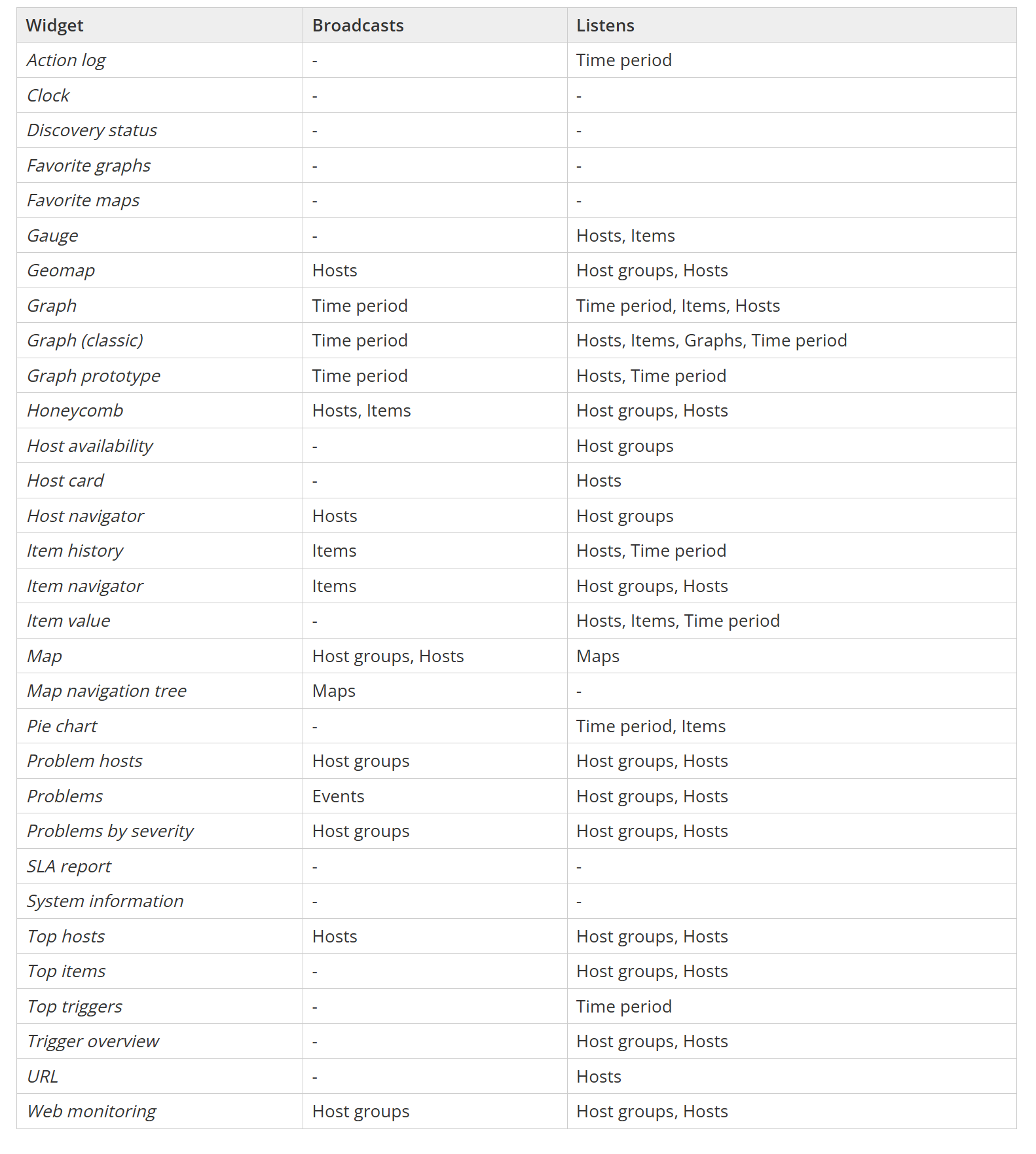
Zabbix widgets can be used to not only display static data, but they can also be linked together by using widget broadcast and listen capabilities. Depending on the built-in capabilities, widgets can either broadcast data (such as the item, host, event, or time interval selected in the widget) or listen and display the selected data points – multiple widgets support both broadcast and listen capabilities.

Widgets can broadcast and listen for the following entities:

  • Hosts
  • Host groups
  • Time periods
  • Items
  • Events
  • Maps

Zabbix documentation contains the full list of widget broadcast and listen capabilities.

Widget broadcast and listen capabilities

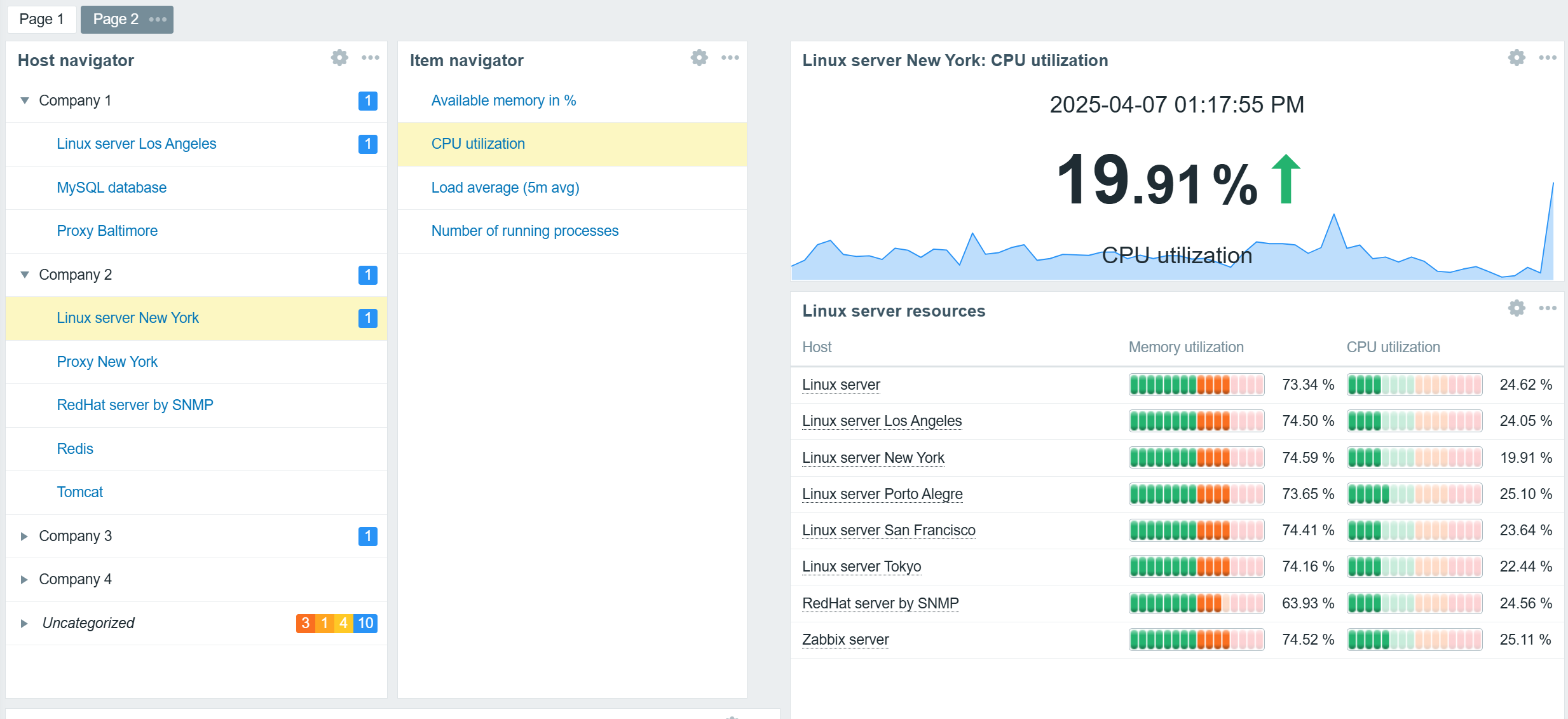
Host and Item navigator widgets serve as simple examples of broadcast widgets. The sole purpose of these widgets is to display an organized, interactive list of hosts or items. The selected hosts and items can be broadcast to other widgets such as graphs, gauges, problem widgets, an item value widget, and many others.

In addition to regular widget filters based on hosts, host groups, and tags, navigator widgets can be configured to group hosts or items based on tags, host groups, and existing problem severities. This can be used to provide an organized overview of hosts or items based on MSP clients, organization departments, and any other grouping.

Hosts grouped by MSP clients based on host group names

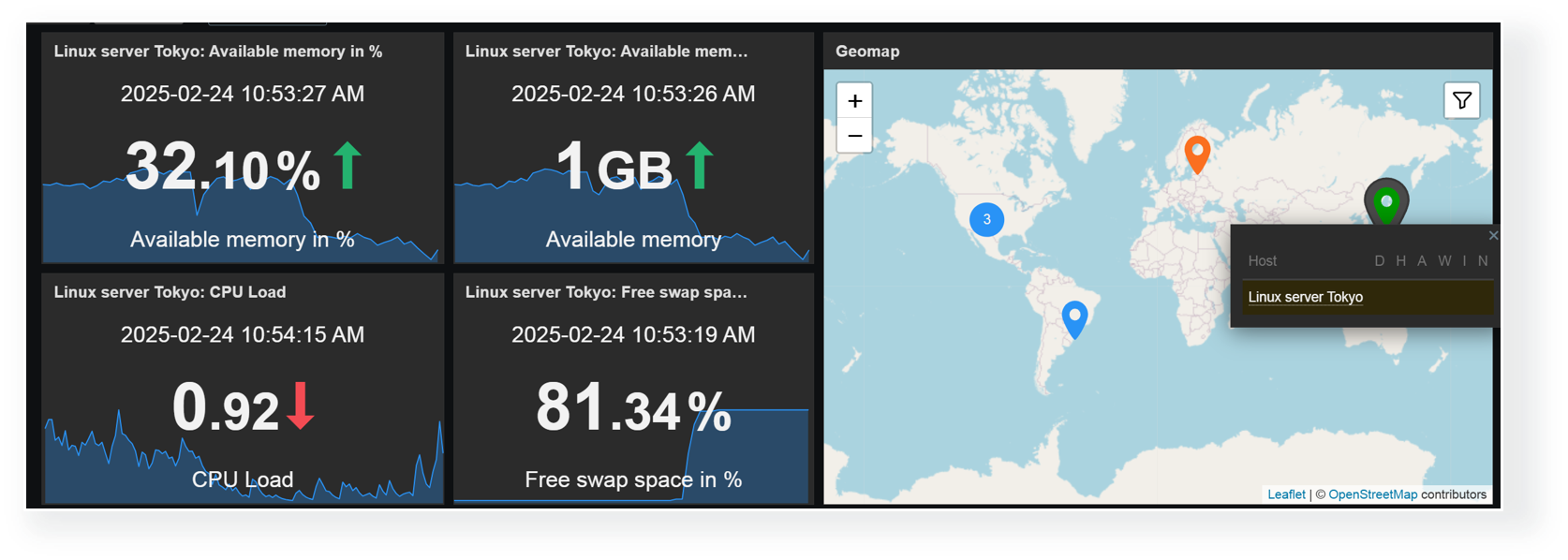
Any combination of widgets from the above table can be used to create interactive dashboards. For example, you could combine the Item value widget listen capabilities with the Geomap widget broadcast capabilities to display item values for hosts selected on the Geomap.

Broadcast hosts from the Geomap widget to Item value widgets

Dashboard-level host broadcast

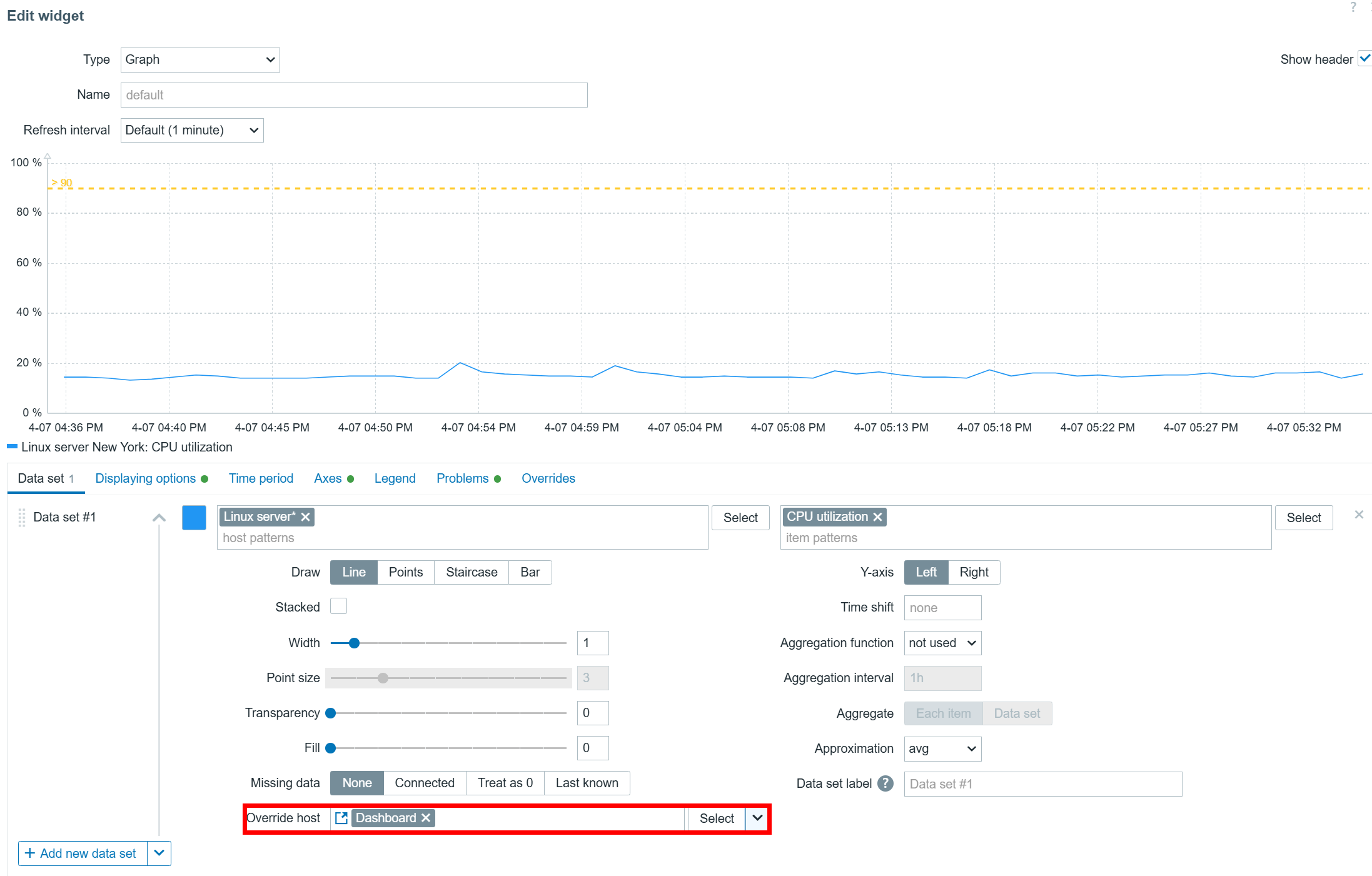
Host overrides can also be performed on a dashboard level. Once you have set the Override host setting in your widgets to Dashboard, you can select the host in the top right corner of the dashboard. After the host is selected, the widgets will start displaying information related to the selected host.

Host information can also be broadcast on Dashboard level

Selecting non-existing items

One final thing you should consider when implementing widgets with host/item sources from broadcast widgets is what happens if the selected item does not exist on the selected host. In that case, your widget will display a message “No permission to referred object or it does not exist!” – the same error message the users will see if they lack the read permissions on an item. Ideally, you’d want to define widget filters and broadcast/listen configuration in a way where such errors can be avoided – especially if Zabbix is used as a central monitoring hub for users from multiple departments or organizations.

The item value widget displays an error message since the selected item does not exist on the selected host


Advanced graph widget use cases

The Zabbix graph widget has a variety of advanced features that can enable many new use cases and provide new insights based on the collected item values.

Data sets

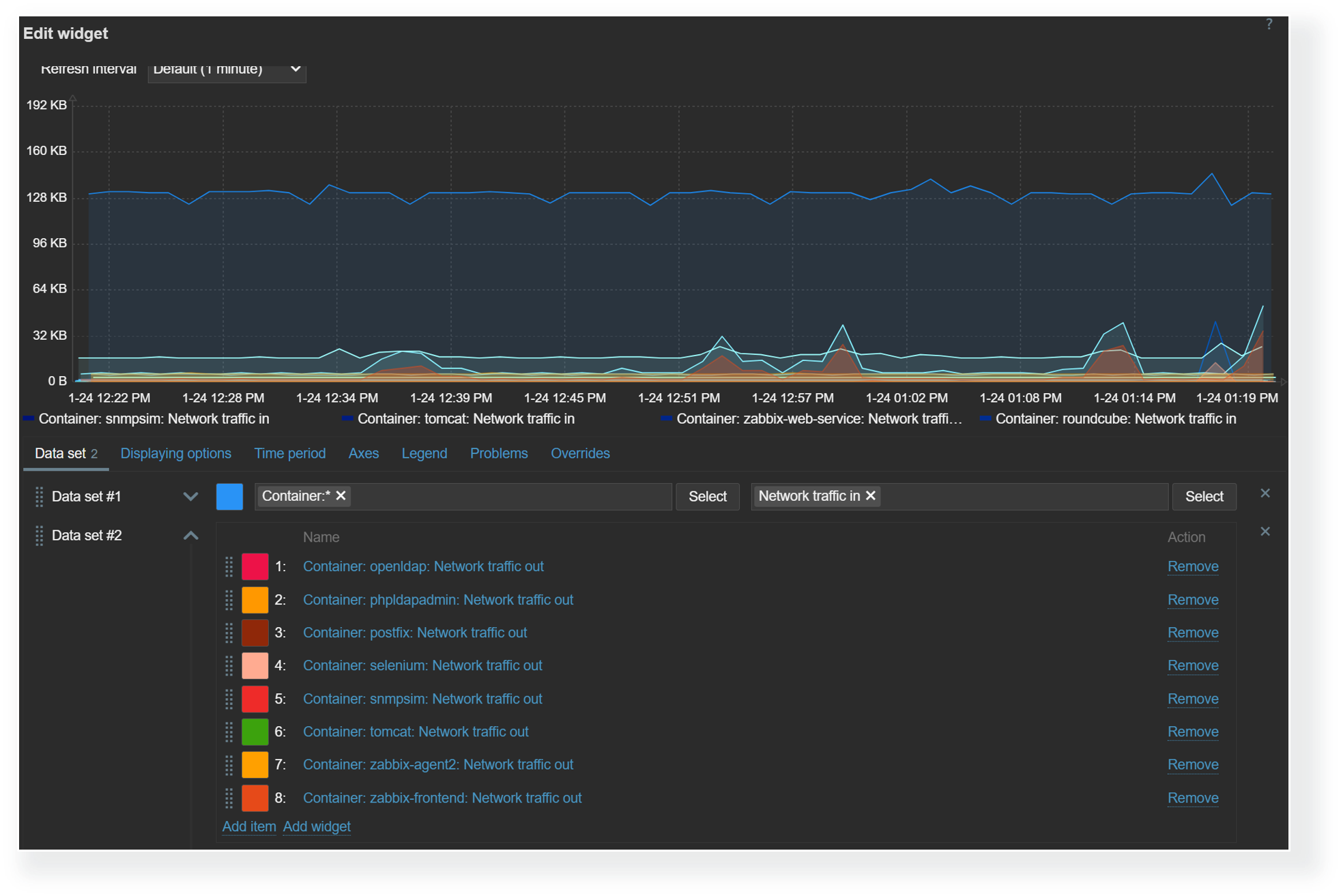
The graph widget utilizes data sets to select, match, and group items that would be displayed in the graph. There are two types of data sets – item pattern and item list. When using item list data sets, you have to individually select each item that you wish to display on the graph. On the other hand,  item pattern data sets provide more flexibility. Here we can utilize wildcards in host and item names to match items and hosts by name. This is especially useful for items discovered by low-level discovery in dynamic environments. With item pattern data sets, the addition or removal of items matching the pattern will be automatically reflected in the graph.

Item list and item pattern data sets in the graph widget

Trigger and problem display

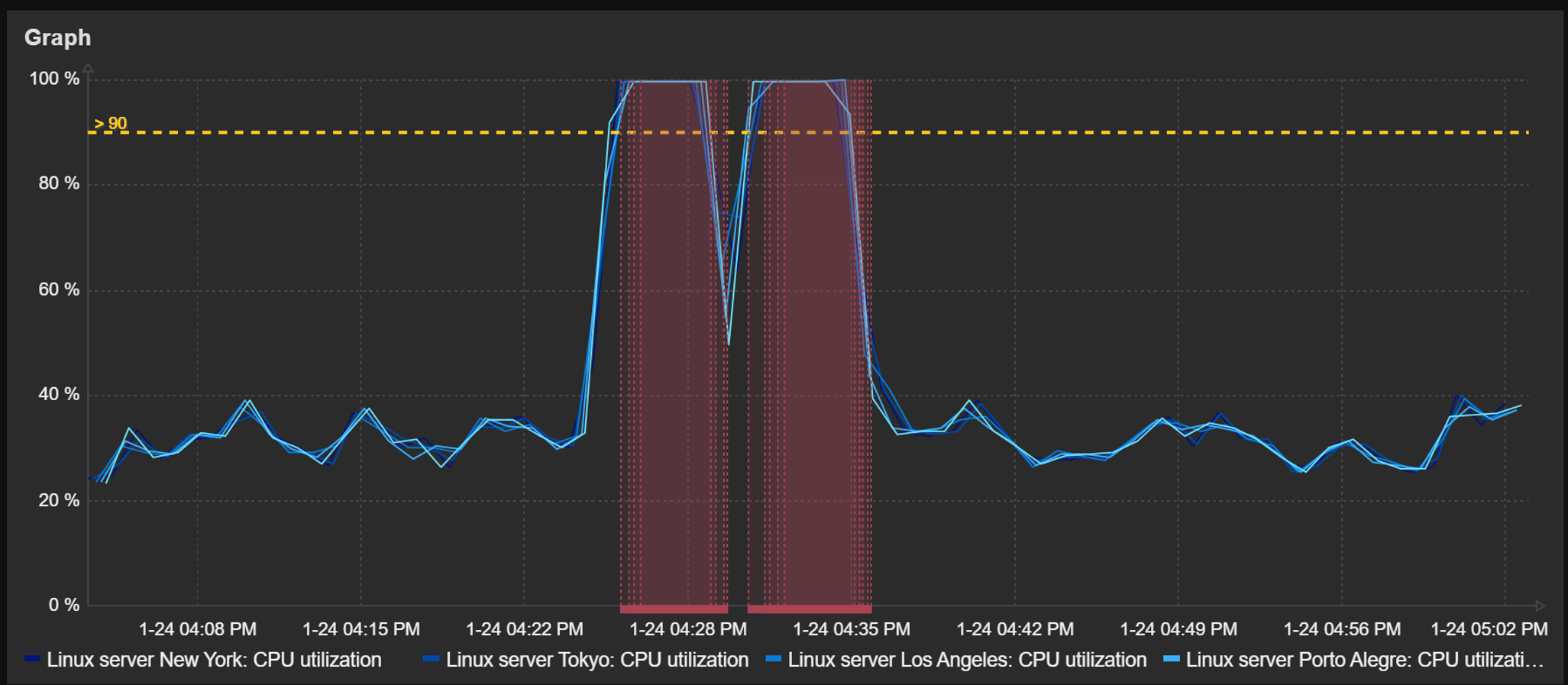
Detected problems and trigger thresholds can also be displayed in dashboard graph widgets. The time periods during which a trigger related to the displayed items has been in a problem state will be highlighted in red. The graphs also provide an option to display a trigger line for triggers utilizing last, min, max, and avg functions.

Graph widget can display a trigger line and highlight periods during which a problem was active

Aggregation

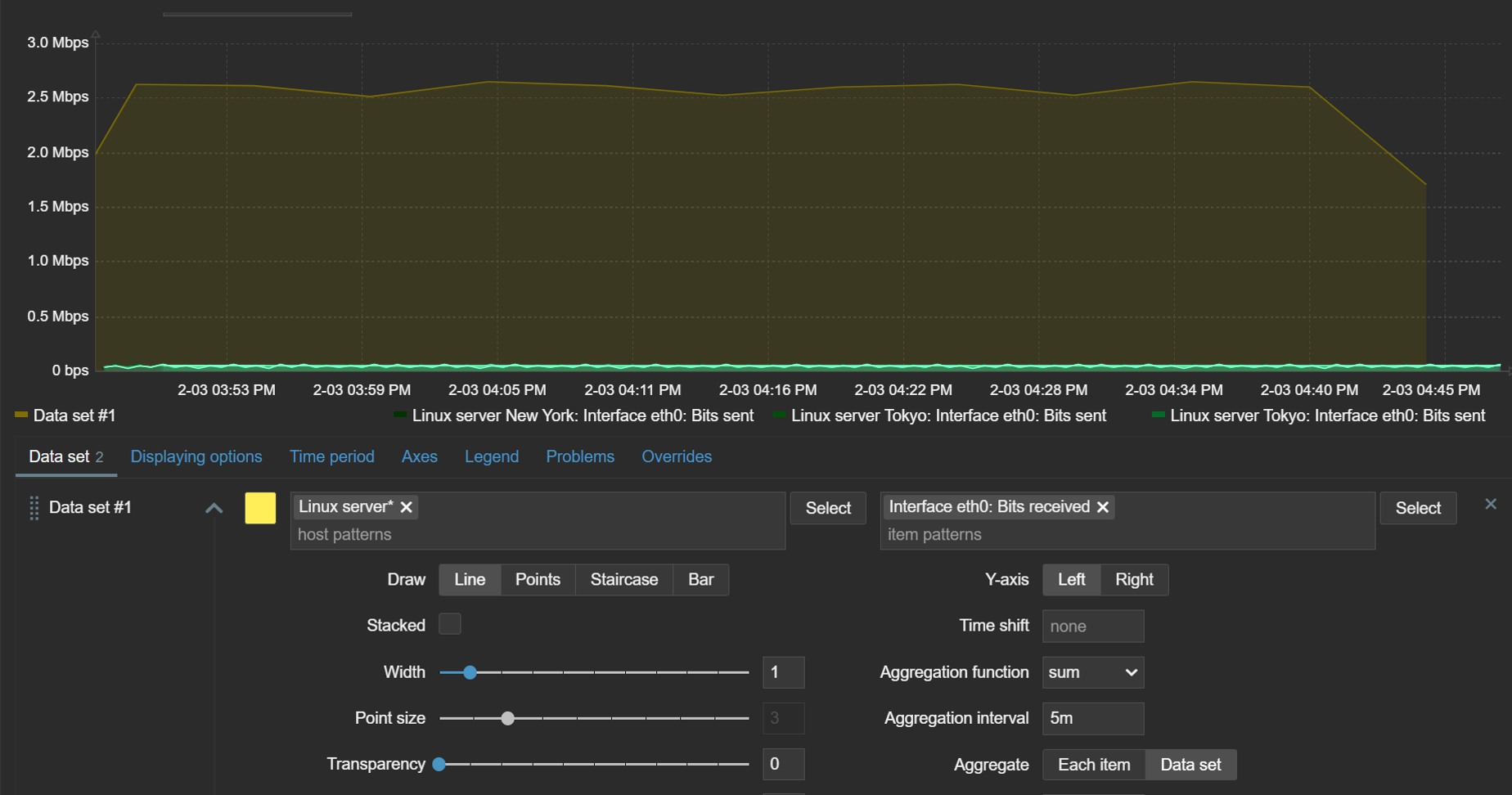
The ability to aggregate data directly within the widget can be an extremely useful tool for gaining new insights from existing data. With graph widget aggregations, it is possible to aggregate each individual item (for example, displaying hourly averages for network traffic on each interface) or the whole data set (total hourly traffic from all interfaces).

Aggregations can be performed on each item or the whole data set

Time shift

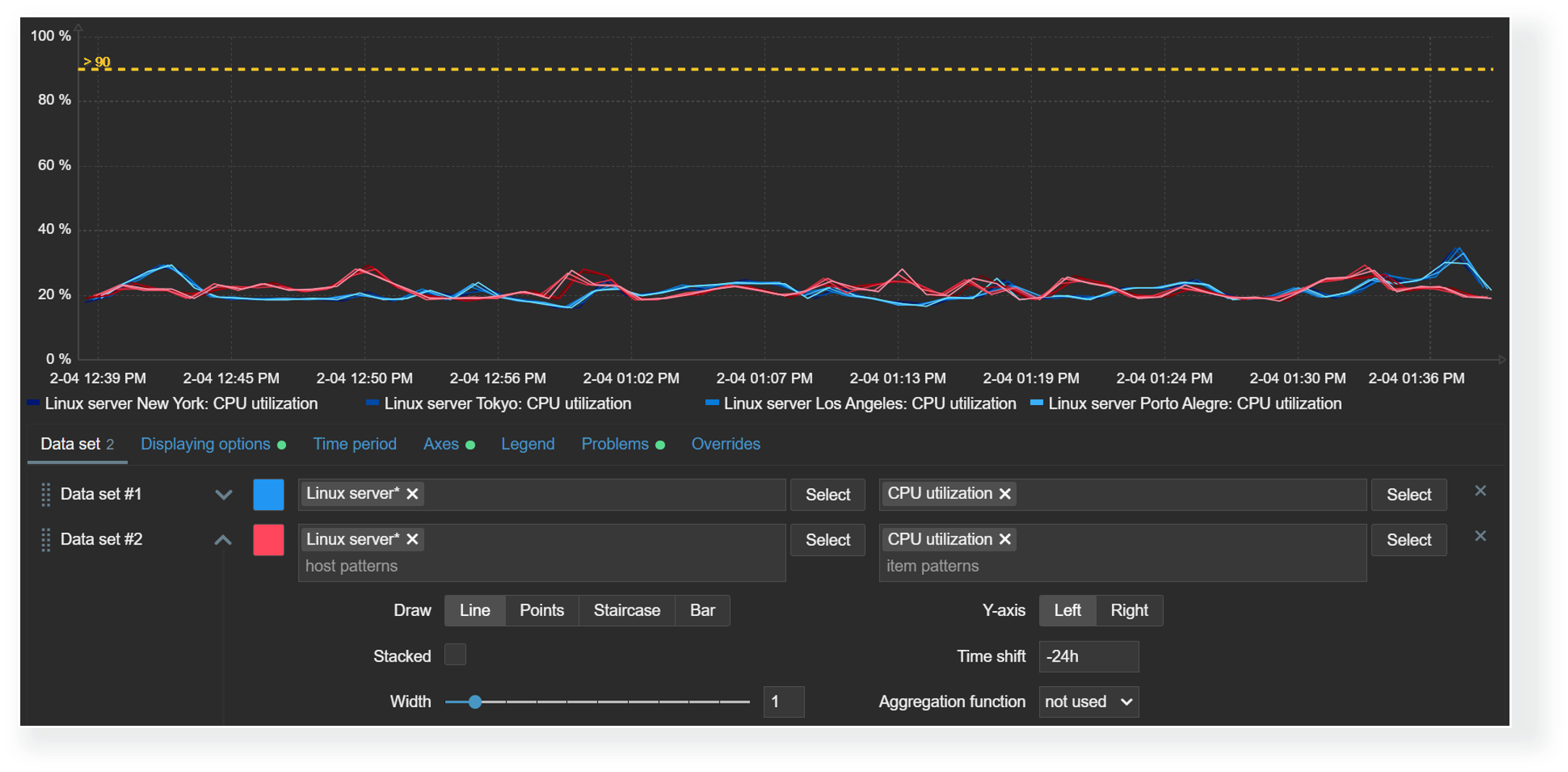
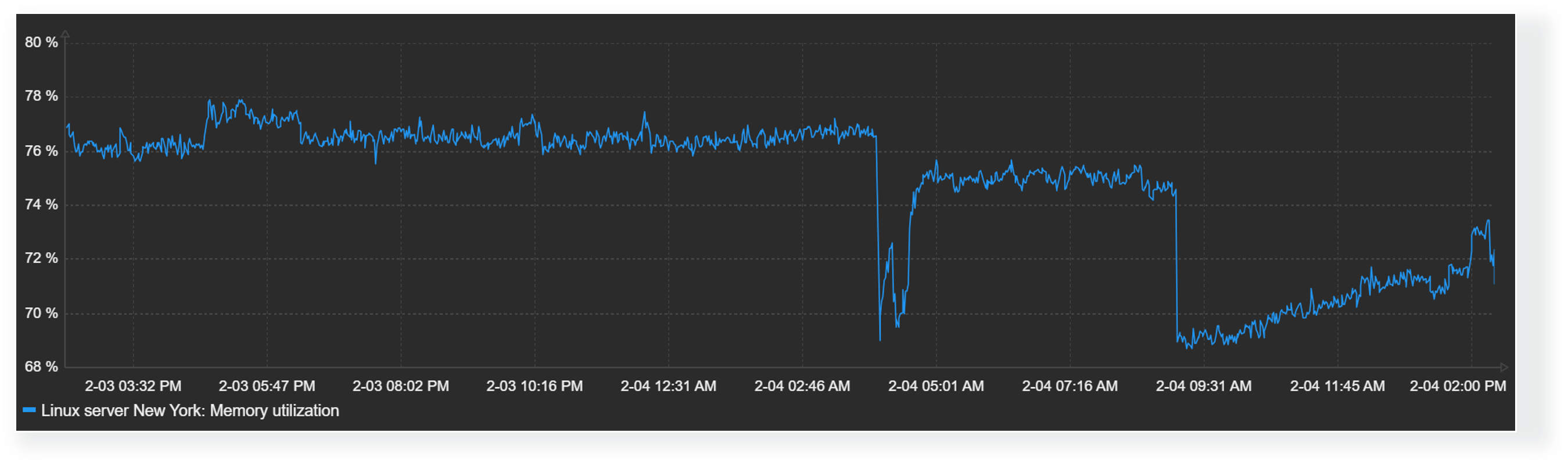
The time shift feature is useful for visually comparing current values with values collected some time in the past. For example, we could compare the current CPU load on our application server with the CPU load for the same time period yesterday. This could allow us  to detect unexpected deviations just by glancing over the graph.

With the graph widget time shift feature, you can compare current values with values collected in the past

Missing data

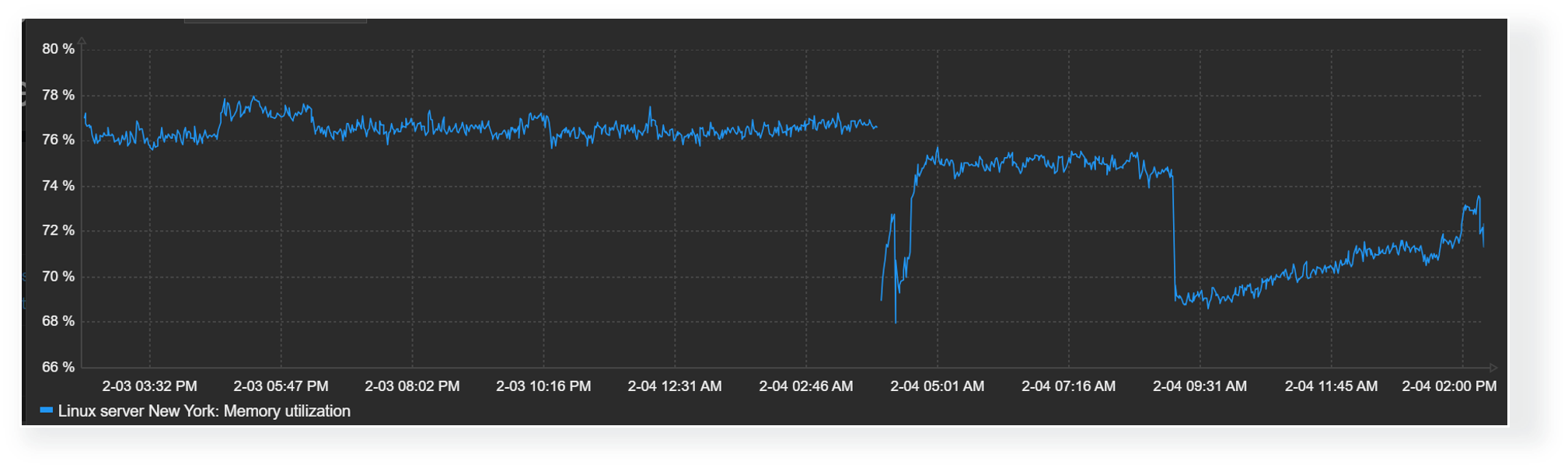
Finally, the graph widget enables Zabbix users to choose how they wish to display missing values. Values for items could be missing for a variety of reasons – anything from data collection errors to various preprocessing workflows that could discard item values by design. Accordingly, it makes sense to design your graphs with the correct representation of missing data in mind.

Missing values in graphs can be displayed in the following formats:

  • Treat missing values as 0
  • Do not display missing values
  • Connect the last known value with the current value
  • Treat missing values as the last known value
Missing values are treated as 0
Missing values are selected to not be displayed

Defining widget value thresholds

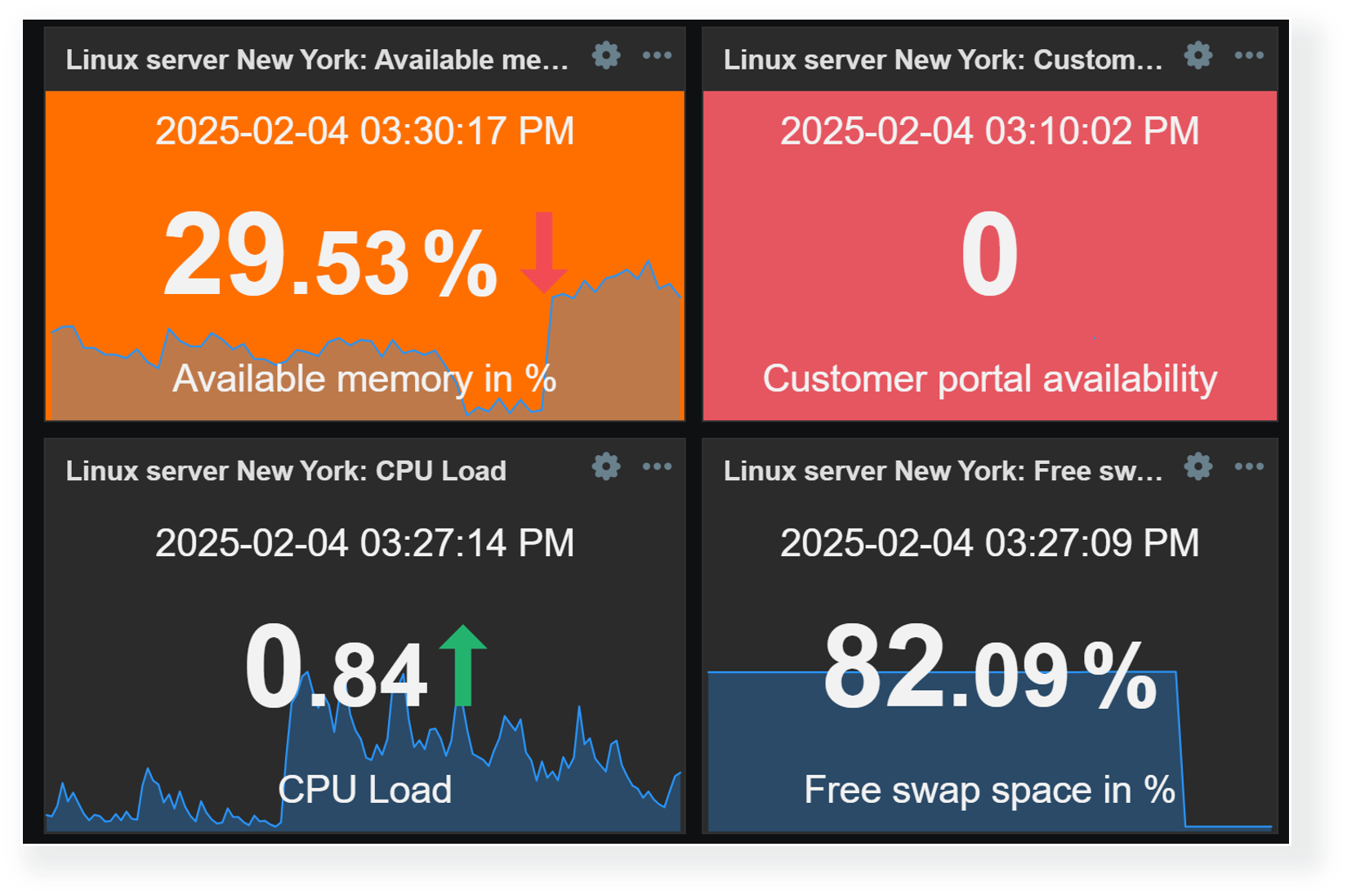
Threshold values can be defined for multiple widgets to make the visualization of data more dynamic. This way, Zabbix dashboards can instantly highlight resources exceeding warning/critical thresholds, services in unexpected states, unreachable endpoints, and a variety of other issues. As of Zabbix 7.2, widget thresholds are available only for numeric item values.

Widgets with threshold support

Multiple widgets provide the ability to define value thresholds:

  • Item value
  • Gauge
  • Top hosts
  • Top items
  • Honeycomb

Thresholds can be defined in widget configuration. By defining one or multiple thresholds, we specify that whenever values for the selected item reach or exceed the threshold, they will be highlighted in the selected color.

Item value widget can be used to highlight problematic resources or services

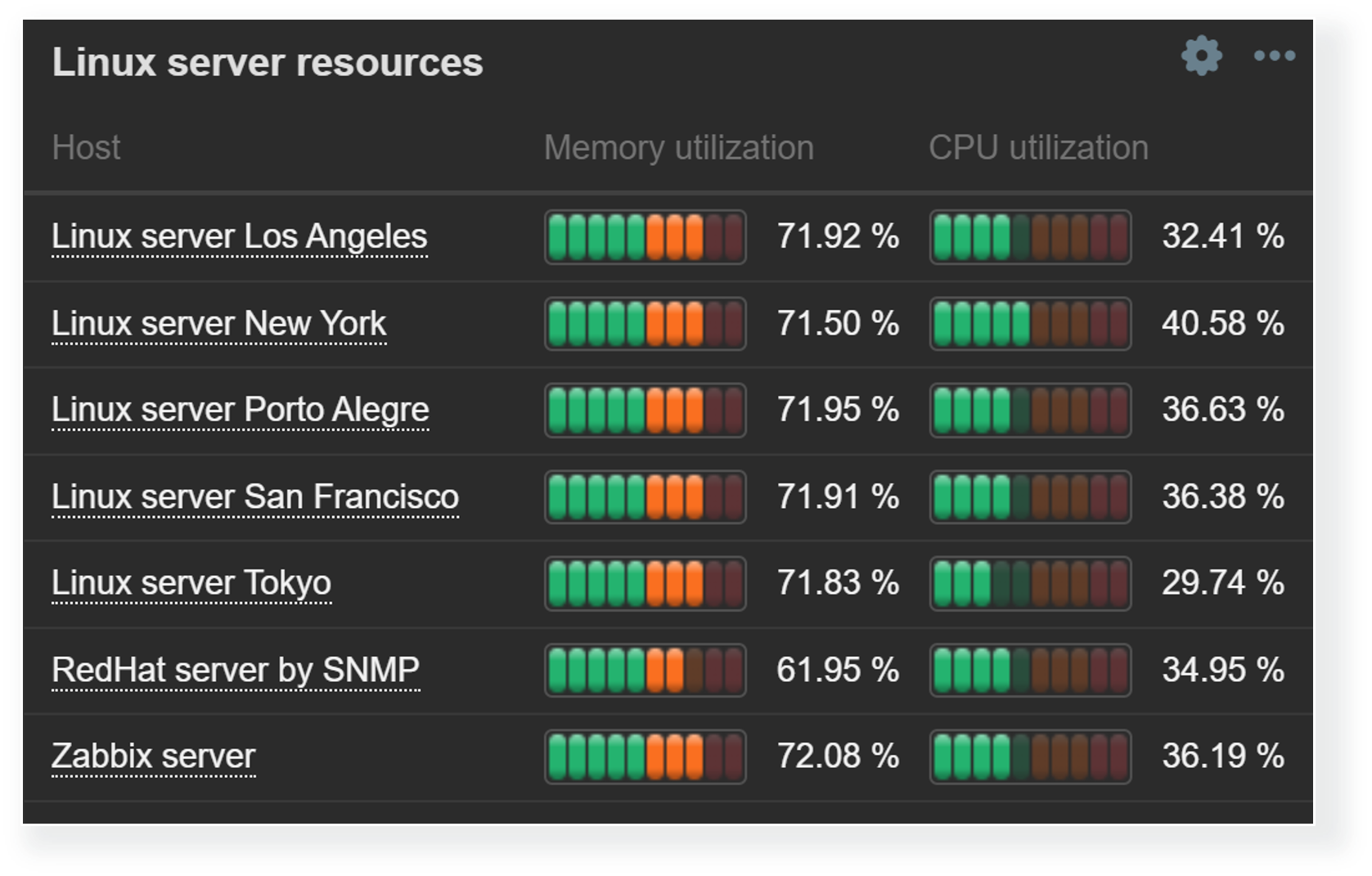
Thresholds are useful for not only highlighting the problematic items in Item value or Gauge widgets, but can also be used to provide a broader view of overall resource utilization with Top hosts and Top items widgets. Since we aren’t limited to a single item, Top hosts and Top items widgets enable us to do a surface-level correlation by looking at the utilization of various resources and highlighting the resources nearing critical utilization thresholds.

Top hosts and Top items widgets can display a comprehensive overview of host resource usage

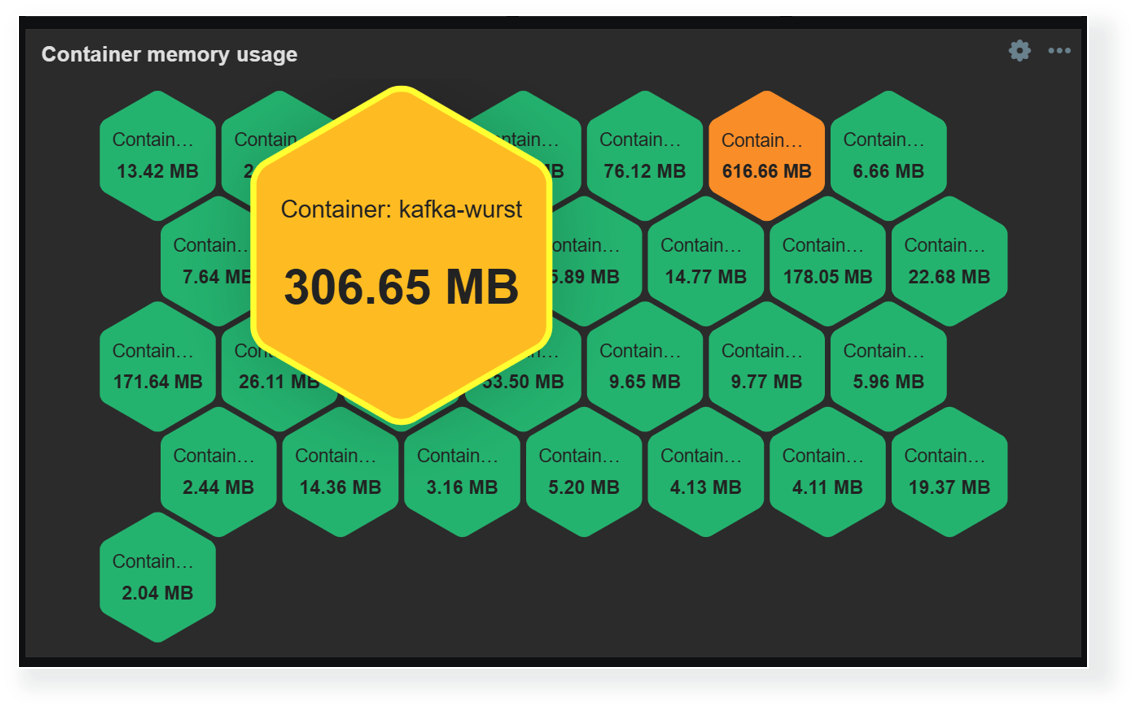
Another way to display and highlight our infrastructure state on a larger scale is by using the Honeycomb widget. The Honeycomb widget utilizes item patterns to display the matching item values. Here, thresholds can be combined with color interpolation to provide a more dynamic view of our environment. The Honeycomb widget is also capable of broadcasting the selected item and host, which enables us to quickly gain more information about the problematic host by clicking the corresponding cell in the widget.

Honeycomb widgets provide a dynamic overview of enterprise resource usage by supporting color interpolation features

Dashboards for MSPs

The previous sections have already highlighted a variety of features, useful widgets, and widget features for large organizations and MSPs. But let’s not forget that MSPs require granular access permission and control features. MSPs must also ensure that each client’s information (Hosts, items, dashboards) is fully isolated and secure from outside access.

Dashboard visibility

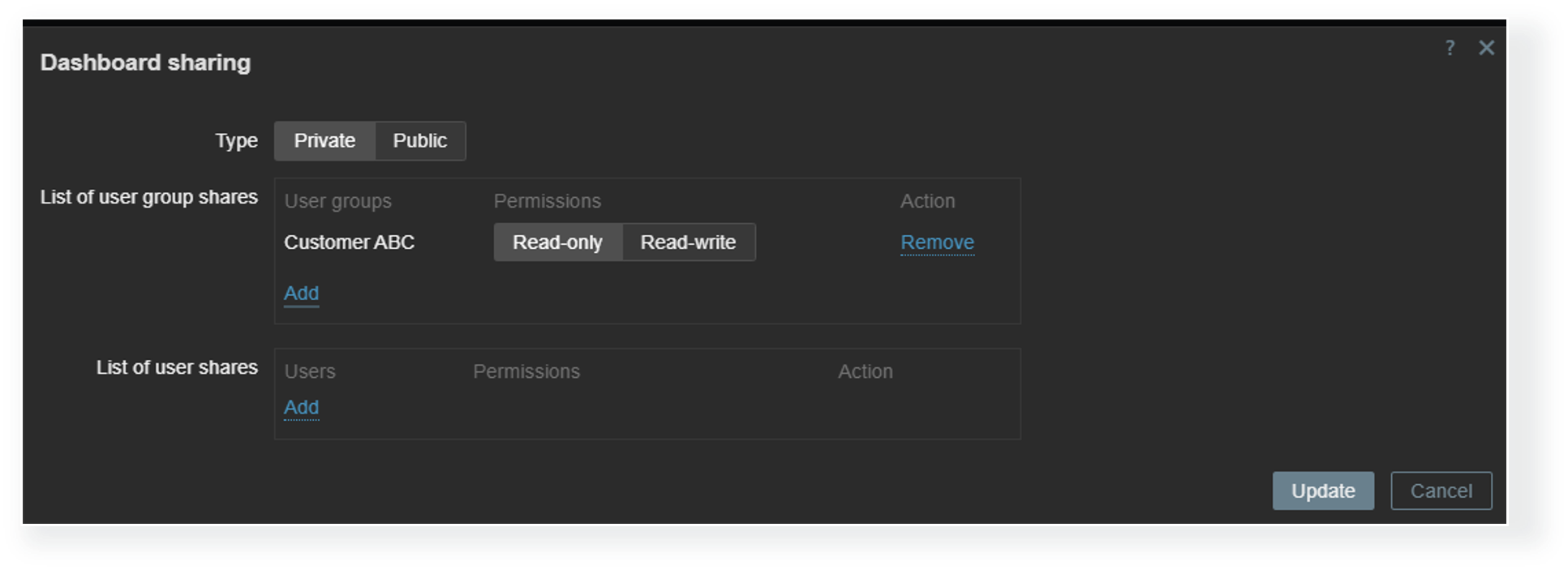
Each dashboard can be deployed either as a public or a private dashboard. Public dashboards are available to every user in read-only mode, while private dashboards require explicit read and write permissions for users who need access to them. MSPs can utilize private client organization dashboards to allow each client to view information about their environment in multiple views while completely hiding the dashboards assigned to other organizations.

Private dashboards require explicit read/write permissions

Host permissions

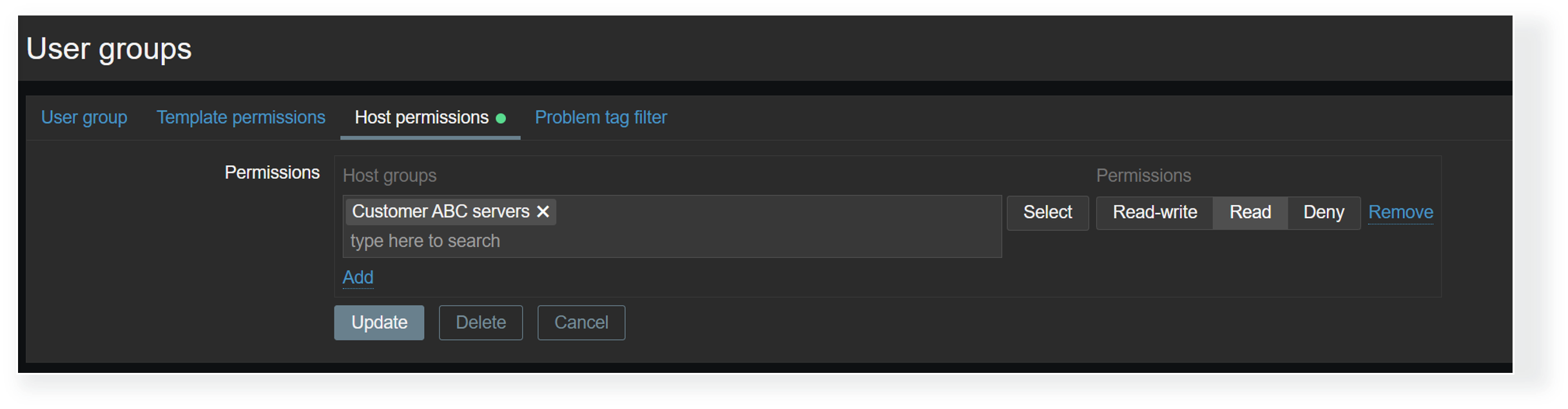
Dashboard visibility is only the first access control layer. Even when a Zabbix user has access to a dashboard, we must ensure that the user also belongs to a user group that has at least read permissions on the hosts displayed on a dashboard. Without at least read permissions, the hosts will not be displayed in dashboard widgets. This way, MSPs can utilize a single dashboard where each organization’s users can only see the information related to their environments, as opposed to having many duplicate dashboards, where each has a custom host filter that matches just the particular organization’s hosts.

User group-to-host group permissions have a direct impact on host visibility in dashboards

Restricting access to widgets

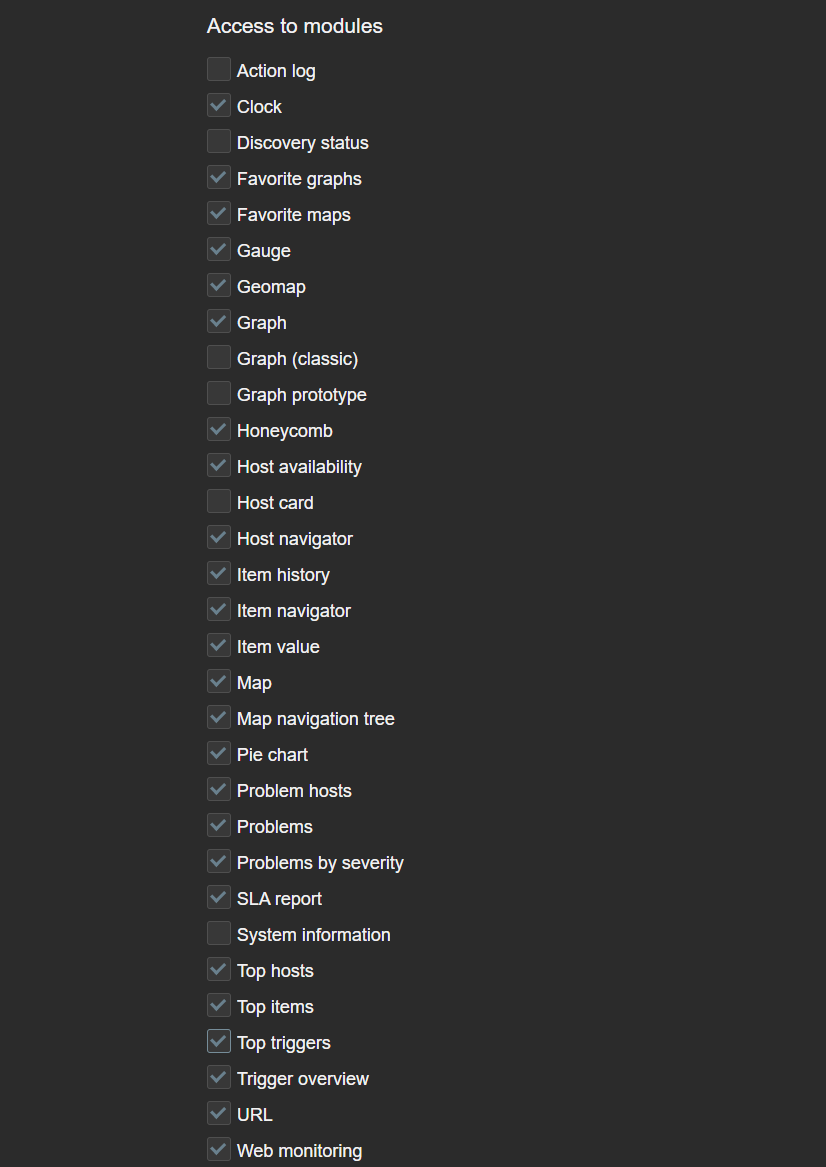
Access to each widget can also be restricted in Zabbix. This can be done globally by disabling widget modules under Administration—General—Modules or by disabling access to modules on an individual user role level. This can come in handy if the Zabbix environment in question enables users from various departments or organizations to create their own dashboards or edit existing ones. In addition, we may also have some custom community or in-house widgets which are utilized only by Zabbix administrators. which we may want to restrict access to.

If a Zabbix user opens a dashboard containing the restricted widget, the widget will be replaced with the message “No permissions to referenced object or it does not exist!” Ideally, it is recommended to avoid situations where users encounter such widgets, since such a message can be confusing to a user not familiar with various Zabbix permission and access error messages.

Access to modules can be restricted per each user role

Dashboard ownership

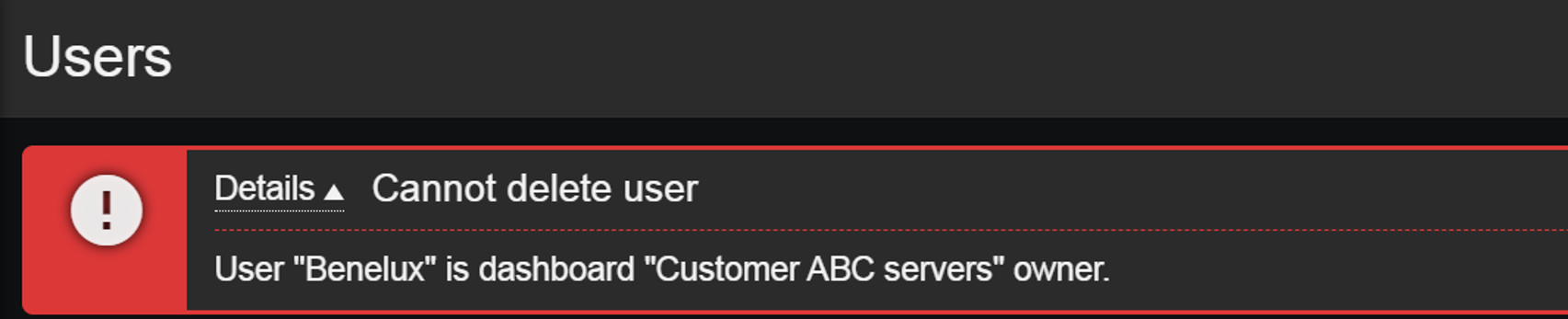
Dashboard ownership can also play a role in our user onboarding and offboarding process. Dashboard owners can edit permissions on the dashboards they own, but this can add an extra step in our user offboarding process since dashboards cannot remain without an owner! Therefore, before deleting a Zabbix user, we need to ensure that either their dashboards have also been removed or have their owners be changed. If we attempt to delete a user who is also a dashboard owner, Zabbix will display an error message.

Users who are owners of an existing dashboard cannot be deleted

This article touches upon only a few of the latest and lesser-known features useful to MSPs and large organizations. There are many more advanced ways of utilizing Zabbix widgets, permissions, tags, low-level discovery rules, and many other features that come in handy to organizations of various sizes, utilizing Zabbix for a variety of use cases. Follow our blog, watch the latest Zabbix videos on our YouTube channel, and check out our on-premise and online events to learn more about the flexibility of Zabbix data collection, alerting, and visualization features.

The post Interactive Dashboard Creation for Large Organizations and MSPs appeared first on Zabbix Blog.

Qualcomm Computex 2025 Live Coverage

Post Syndicated from Ryan Smith original https://www.servethehome.com/qualcomm-computex-2025-live-coverage/

The second major Computex keynote for the day comes from Qualcomm, who is quickly becoming a regular presenter at the show. This year’s keynote is being presented by company CEO Cristiano Amon, and the theme is “The heart of your PC.” Qualcomm is making it clear from the start that this year’s keynote is going […]

The post Qualcomm Computex 2025 Live Coverage appeared first on ServeTheHome.

NVIDIA Computex 2025 Keynote Live Coverage

Post Syndicated from Ryan Smith original https://www.servethehome.com/nvidia-computex-2025-keynote-live-coverage/

Kicking off today is the annual Computex tradeshow in Taiwan. Home to countless system and device manufacturers, Computex is a cornucopia of consumer electronics, and these days is also the biggest PC-centric show of the year. And even though it takes place in May, barely half-way through the year, the show routinely sets the stage […]

The post NVIDIA Computex 2025 Keynote Live Coverage appeared first on ServeTheHome.

The collective thoughts of the interwebz