Generative AI adoption and compliance: Simplifying the path forward with AWS Audit Manager

Post Syndicated from Kurt Kumar original https://aws.amazon.com/blogs/security/generative-ai-adoption-and-compliance-simplifying-the-path-forward-with-aws-audit-manager/

As organizations increasingly use generative AI to streamline processes, enhance efficiency, and gain a competitive edge in today’s fast-paced business environment, they seek mechanisms for measuring and monitoring their use of AI services.

To help you navigate the process of adopting generative AI technologies and proactively measure your generative AI implementation, AWS developed the AWS Audit Manager generative AI best practices framework. This framework provides a structured approach to evaluating and adopting generative AI technologies and addresses important aspects such as strategy alignment, governance, risk assessment, and security and operational best practices. You can use the framework within AWS Audit Manager as you implement generative AI workloads, to measure and monitor existing workloads through Audit Manager capabilities such as automated evidence collection and customized assessment reports.

In this blog post, we’ll cover the AWS Audit Manager generative AI best practices framework and how it can help you during your generative AI journey. We’ll highlight key considerations to prioritize when deploying generative AI workloads, and discuss how the framework can facilitate auditing and compliance with generative AI-specific controls using Audit Manager.

Starting the generative AI Journey

An important consideration in preparing for the introduction of generative AI in your organization is the need to align your risk management strategies with robust mitigation measures. Examples of potential risks include the following:

  • Data quality, reliability, and bias: Poor source-data quality used to train models might lead to inconsistent, inaccurate, or biased outputs, which can have significant financial and regulatory impact for organizations. For example, a language model trained on biased data might generate text that reinforces harmful stereotypes or propagates misinformation. Similarly, training AI on biased product reviews or ratings might lead to product suggestions that don’t accurately reflect product quality or user preferences.
  • Model explainability and transparency: The opaque nature of many generative AI models makes it challenging to understand how they arrive at specific outputs or decisions. For example, if a model is used to generate creative content, such as stories or learning materials, it could be difficult to understand why certain outputs are generated, including potential biases or inappropriate content.
  • Data privacy and security: Generative AI models are trained on vast amounts of data, which might inadvertently include sensitive or personal information. For example, a model trained to generate text could potentially produce sentences that contain personal details from its training data.

AWS empowers organizations to use this technology responsibly while helping them to align with best practices. As part of enabling organizations to create a comprehensive risk management strategy for generative AI systems, AWS has built the AWS Audit Manager generative AI best practices framework which is mapped to Amazon Bedrock and Amazon SageMaker in AWS Audit Manager.

Amazon Bedrock is a managed service that enables you to create, manage, and scale machine learning (ML) and AI services while facilitating adherence to security and defined compliance requirements. Amazon SageMaker is a fully managed ML service that can build, train, and deploy ML models for extended use cases that require deep customization and model fine-tuning.

You can use this framework to facilitate your auditing and compliance requirements by taking advantage of controls for more responsible, ethical, and effective deployment of generative AI models.

The framework is organized into four pillars, as follows:

  • Data Governance: Data is the foundation of generative AI models, and the quality and diversity of the training data can significantly impact the model’s performance and output. The Data Governance pillar focuses on facilitating data management practices such as data sourcing, data quality, data privacy, and data bias.
  • Model Development: This pillar focuses on the responsible development and testing of generative AI models and covers aspects such as model architecture selection, model training, and model evaluation.
  • Model Deployment: This pillar addresses the challenges associated with deploying generative AI models in production environments and covers aspects such as model deployment strategies, infrastructure considerations, and access controls.
  • Monitoring & Oversight: This pillar focuses on the ongoing monitoring and governance of generative AI models in production environments and addresses aspects such as model performance monitoring and incident response planning.

You can also use Amazon Bedrock Guardrails to provide an additional level of control on top of the protections built into foundation models (FMs) to help deliver relevant and safe user experiences that align with your organization’s policies and principles.

Each organization’s generative AI journey is unique, influenced by factors such as industry-specific regulations, risk appetite, and scale of generative AI deployment. By integrating the framework with Amazon Bedrock or Amazon SageMaker, you can customize the controls to your organization’s unique needs, aligning your generative AI deployments with your specific risk management strategies. This customization is especially valuable for highly regulated sectors, such as the financial sector.

For example, you can map the risk of inaccurate outputs to controls related to data quality and model validation. Similarly, you can map data security risks to controls related to access management and encryption.

Let’s consider an example that uses a subset of these risks to understand how you could perform this mapping. A financial services firm decides to use generative AI models to develop a chatbot capable of understanding complex customer inquiries and providing accurate and tailored responses for their customer portal. Although chatbots can greatly enhance customer experiences and operational efficiency, they also introduce risks that you need to understand and measure, so that you can develop a corresponding mitigation strategy.

An auditor within the internal audit function of the financial organization would like to use the AWS Audit Manager generative AI best practices framework to assess compliance with the following sample of risks associated with the application:

  • Responsible: Validating that the chatbot adheres to ethical principles, such as fairness and transparency, and avoids perpetuating biases or discrimination against certain customer segments.
  • Accurate: Verifying the reliability and accuracy of the chatbot’s responses, particularly when handling sensitive financial information or providing advice on complex financial products.
  • Secure: Protecting the integrity and security of the data being used to train the generative AI model from unauthorized access and validating that sensitive customer data is segregated from data used for training.

Example mapping

We’ve provided an example mapping here that illustrates how you can use the framework within Audit Manager to develop a risk management strategy. Based on your individual control objectives and organizational requirements, you can further customize controls, and evidence collection can be automated or manually defined. The example mapping is as follows:

  • Responsible: Implement mechanisms for AI model monitoring and explainability to detect and mitigate potential biases or unfair outcomes.
    • RESPAI3.8: Document Risks and Tolerances: Define, document, and implement specific controls to address identified risks and organizational risk tolerances.
    • RESPAI3.9: Develop AI RACI: Define organizational roles and responsibilities, lines of communication, and ownership of controls to address identified risks. Ensure that this mapping, measuring, and managing of generative AI risks is clear to individuals and teams throughout the organization.
    • RESPAI3.13: Continuous Risk Monitoring: Periodically perform retrospectives and review policies and procedures to determine if new risks should be considered, and if current risks are addressed based on AI performance, incidents, and user feedback.
    • RESPAI3.15: Ethical Guidelines: Develop and adhere to ethical guidelines for the deployment and usage of generative AI models.
  • Accurate: Implement robust data quality checks, model validation processes, and ongoing monitoring to ensure the accuracy and reliability of the generative AI chatbot’s outputs.
    • ACCUAI3.4: Regular Audits: Conduct periodic reviews to assess the model’s accuracy over time, especially after system updates or when integrating new data sources.
    • ACCUAI3.6: Source Verification: Ensure that the data source is reputable, reliable, and the data is of high quality.
    • ACCUAI3.14: Quality Data Sourcing: The accuracy of generative AI largely depends on the quality of its training data. Ensure that the data is representative, comprehensive, and free from biases or errors.
  • Secure: Implement robust access controls, data encryption, and security monitoring measures to protect the generative AI chatbot system and training data.
    • SECAI3.2: Data Encryption In Transit: Implement end-to-end encryption for the input and output data of the AI models to minimum industry standards.
    • SECAI3.3: Data Encryption At Rest: Implement data encryption at rest for data that’s stored to train the AI models, and for the metadata that’s produced by AI models.

      Note: This is an example of a control that can be configured with automated evidence collection using AWS Config as the underlying data source, or further customized with additional data sources according to the scope of the control.

    • SECAI3.7: Least Privilege: Document, implement, and enforce least privileged principles when granting access to generative AI systems.
    • SECAI3.8: Periodic Reviews: Document, implement, and enforce periodic reviews of users’ access to generative AI systems.

      Note: This is an example of a control that can be configured with manual evidence collection based on the specific policies and procedures defined by each organization.

    • SECAI3.15: Access Logging: Require and enable mechanisms that allow users to request access to generative AI models. Ensure that access requests are properly logged, reviewed, and approved.

Conclusion

It’s important for institutions, especially those in highly regulated sectors, to proactively address new developments that relate to generative AI. Using the AWS Audit Manager generative AI best practices framework as part of a comprehensive risk management strategy can help you stay ahead of the curve and embrace an agile and responsible approach to generative AI.

The guidance provided by the framework, together with the capabilities of Audit Manager, Amazon Bedrock and SageMaker can help you establish secure and controlled environments for generative AI implementation, automate evidence collection and risk assessments, and monitor and mitigate potential risks. By embracing the potential of generative AI while adhering to best practices, you can position your organization at the forefront of innovation while maintaining the trust and confidence of stakeholders and customers.

 
If you have feedback about this post, submit comments in the Comments section below. If you have questions about this post, contact AWS Support.

 

Kurt Kumar
Kurt Kumar

Kurt is a Security Consultant at AWS Professional Services and is passionate about helping customers implement secure environments. He has over 14 years of experience in security assurance across audit, risk, and compliance functions and currently holds CISA, CISSP, Associate C|CISO, AWS Security Specialty, AWS Certified AI Practitioner and AWS SysOps Administrator – Associate certifications. Outside of work, he enjoys watching Formula 1 and travelling.

[$] Providing precise time over the network

Post Syndicated from daroc original https://lwn.net/Articles/1000434/

Handling time in a networked environment is never easy. The

Network Time Protocol
(NTP) has been used to synchronize clocks across the
internet for almost 40 years — but, as computers and networks get faster, the
degree of synchronization it offers is not sufficient for some use cases. The

Precision Time Protocol
(PTP) attempts to provide more precise
time synchronization, at the
expense of requiring dedicated kernel and hardware
support. The Linux kernel has

supported PTP
since 2011, but the protocol has recently seen

increasing use in data centers
. As PTP becomes more widespread, it may be
useful to have an idea how it compares to NTP.

Ultralytics Supply-Chain Attack

Post Syndicated from Bruce Schneier original https://www.schneier.com/blog/archives/2024/12/ultralytics-supply-chain-attack.html

Last week, we saw a supply-chain attack against the Ultralytics AI library on GitHub. A quick summary:

On December 4, a malicious version 8.3.41 of the popular AI library ultralytics ­—which has almost 60 million downloads—was published to the Python Package Index (PyPI) package repository. The package contained downloader code that was downloading the XMRig coinminer. The compromise of the project’s build environment was achieved by exploiting a known and previously reported GitHub Actions script injection.

Lots more details at that link. Also here.

Seth Michael Larson—the security developer in residence with the Python Software Foundation, responsible for, among other things, securing PyPi—has a good summary of what should be done next:

From this story, we can see a few places where PyPI can help developers towards a secure configuration without infringing on existing use-cases.

  • API tokens are allowed to go unused alongside Trusted Publishers. It’s valid for a project to use a mix of API tokens and Trusted Publishers because Trusted Publishers aren’t universally supported by all platforms. However, API tokens that are being unused over a period of time despite releases continuing to be published via Trusted Publishing is a strong indicator that the API token is no longer needed and can be revoked.
  • GitHub Environments are optional, but recommended, when using a GitHub Trusted Publisher. However, PyPI doesn’t fail or warn users that are using a GitHub Environment that the corresponding Trusted Publisher isn’t configured to require the GitHub Environment. This fact didn’t end up mattering for this specific attack, but during the investigation it was noticed as something easy for project maintainers to miss.

There’s also a more general “What can you do as a publisher to the Python Package Index” list at the end of the blog post.

CentOS Stream 10 and EPEL 10 released

Post Syndicated from jzb original https://lwn.net/Articles/1002044/

The CentOS Project has announced
the general availability of CentOS Stream 10. See the release notes for information
on new features, changes, and removed software. The Extra Packages for
Enterprise Linux (EPEL) 10 repository is also available,
and will be adding minor version repositories:

For the EPEL 9 release, we started building packages about six months
before the RHEL 9 release by using CentOS Stream 9 as the initial
build environment. For EPEL 10, we’re expanding on that approach and
doing the same thing for each minor version of RHEL 10. We will have
separate DNF repositories for each minor version of RHEL 10, including
CentOS Stream 10 as the leading minor version. Packages built for one
minor version will carry forward to the next minor version. You can
find more details about this structure in our branching documentation.

LWN covered
Stream 10 and EPEL 10 on December 11.

Кой (не) обича президента?

Post Syndicated from Емилия Милчева original https://www.toest.bg/koy-nie-obicha-priezidienta/

Кой (не) обича президента?

Дали Доналд Тръмп е обяснил на Румен Радев тайната на MAGA – как да направи България велика (отново), а българският президент му е казал, че Крим е руски (чий да е!)? 

След церемонията по откриването на възстановената катедрала „Нотр Дам“ в Париж, Радев е написал:

С новоизбрания президент на САЩ Доналд Тръмп обсъдихме войната в Украйна и възможностите за нейното най-бързо прекратяване с дипломатически средства.

Някои политици в България сигурно са погледнали със завист на документирания факт от срещата на експлозивния и непредсказуем мултимилиардер, който ще встъпи в длъжност на 20 януари, и резервирания и леко смутен бивш пилот на изтребител, комуто остават две години до края на втория президентски мандат. Със задоволство са реагирали пò на изток. Бъдещият американски президент казва онова, което Радев говореше през всичките тези години, а неговите служебни правителства реализираха като политики. Например едно от тях отказа България да е част от обществената поръчка на ЕС за 1 милион 155-милиметрови артилерийски снаряда. Какво че в Брюксел се мръщеха на изявленията му за Украйна. Ето че американският президент го насърчава!

Радев се радва на неизменно висок рейтинг в България, а за първи път в най-новата история президентският кръг е фактор, който постепенно се сдоби със собствена политическа тежест далеч извън партията, която го издигна. Назначенията, които прави в един или друг регулатор съобразно своите конституционни правомощия, не са подчинени на партийна селекция. Илия Лингорски, чиято звезда в политиката изгря с НДСВ и т.нар. царски юпита, бе назначен от Радев за член на Управителния съвет на Българската народна банка през 2022 г., а наскоро и Любомир Каримански, допреди време политик от „Има такъв народ“, също бе избран от президента в УС на БНБ. В Съвета за електронни медии назначи Къдринка Къдринова, която смени Соня Момчилова и е известна с прокремълските си позиции. Радев изпрати „свои“ и в Конституционния съд – бившия декан на юридическия факултет и бивш служебен министър на образованието Сашо Пенов и Невин Фети, съветничка по правни въпроси в Президентството. 

Благодарение на правомощието на президента, че без негов указ нови посланици не могат да бъдат назначени, той се сдоби с персонално своя квота – не просто одобрени, а подбрани от него персони. „Негов“ е посланикът в НАТО Николай Милков, изпратен без много шум от служебния кабинет с премиер Гълъб Донев два дни преди вота на 2 април 2023 г. Милков беше външен министър в този кабинет. При служебните управления на Радев са извършени доста посланически назначения в ключови и на пръв поглед недотам държави, като Черна гора, Албания, Азербайджан. 

Кохорта от кадри, подбрани от президент с нескрити проруски симпатии, не просто влияе, а доминира в много сектори предвид отслабеното влияние на партиите и тяхната политическа немощ да обновят парламентарните си квоти. 

Отношенията на системните и антисистемните партии с държавния глава често се менят в зависимост от конюнктурата и ползите, които могат да извлекат в дадена ситуация. От тази циклична конфронтация и подкрепа обаче губещите са те, тъй като действията им не почиват на дългосрочни политики. Резултатът е, че бивши президентски съветници и анализатори създадоха холограма на президентска партия, която ще е като героя от анимета Сайтама, побеждаващ с един удар. 

Променлива лоялност

На фона на партийния опортюнизъм Радев не се отклонява от онова, което вече е публично известно – българският президент споделя една по-скоро орбанистка, отколкото европейска позиция за войната в Украйна, и също като Георги Първанов се намесва в енергийната, освен във външната политика. Щенията му за повече власт нарастваха значително с всеки служебен кабинет, който назначаваше. 

В първия си президентски мандат Радев и ГЕРБ влизаха в сблъсъци, най-яростният от които беше за сделката за изтребителите, а държавният глава критикуваше властта за липса на прозрачност. После Радев започна да пита премиера и лидер на ГЕРБ Бойко Борисов има ли общи бизнес интереси с Делян Пеевски и дали е разпределял обществени поръчки в негова полза. После свали доверието си от третия кабинет на Борисов, а във втория мандат вече беше по-сдържан в русофилските си позиции.

Официално снемам доверие от правителството, което не действа в интерес на българските граждани и носи отговорност за острата криза в нашето общество.

След поредица конфликти, в т.ч. обвинения на Борисов, че Радев вдига дрон и го снима, вдигнатия юмрук на президента, дал сигнал за няколкомесечни протести срещу модела на Борисов/Гешев/Пеевски, има ново двайсет. ГЕРБ–СДС подкрепи близката до президента Наталия Киселова, издигната от БСП, за председател на 51-вия парламент. Ситуативният алианс даде повод на политолога Огнян Минчев да заяви, че този избор е плод на споразумение между Борисов и Радев.

Избирането на Наталия Киселова е резултат от споразумение по оста Борисов–Радев. С неафиширани договорености между центровете на власт може да бъде отпушена работата на парламента.

Към президента се „отпушва“ и „Продължаваме промяната“ – партията, чиито лидери Кирил Петков и Асен Василев получиха летящ старт от „Дондуков“ 2. След тяхното „С Вас сме, г-н президент!“ и призив да се гласува за Радев за втори мандат настъпи ледников период в двустранните отношения, но отново има затопляне. Този период включваше порицания от ПП–ДБ, също и от БСП заради договора, сключен с турската държавна компания „Боташ“ по време на президентски кабинет, заради твърдата неотстъпчивост на президента за промени в службите, както и заради стопирането на военна помощ за Украйна от подчинени на „Дондуков“ 2 правителства. Но през това време беше забележително, че ГЕРБ бяха в лагера на Румен Радев, без да бият тъпана, и за службите, и за договора с „Боташ“.

Последва шестата поправка на Конституцията, една от целите на която беше да отнеме правомощието на президента за избор на служебно правителство с аргумента, че получава безконтролна власт. Тя бе предложена от ПП–ДБ, изработена и подкрепена съвместно с ГЕРБ и ДПС с персоналното участие на Делян Пеевски. От нея в Конституцията остана малка следа – механизмът за разследване на главния прокурор и неговите заместници, и начинът, по който се формира служебно управление. А ПП–ДБ вече дори не се опитват да защитят законодателството си – президентът да избира премиер измежду определен кръг лица. С избора на Киселова първото в този кръг е най-близко до него.

Забележително е как проевропейските партии преглъщат прокремълския уклон на президента, когато им е нужно, за да обединят усилия срещу Пеевски, и как само допреди година президентът беше обект на критика заради властовите амбиции, нараснали покрай служебните правителства. Сега отново са съюзници: президентът демонстративно не покани ДПС – Ново начало на консултации за кабинет с аргумента, че политическата сила „настоява категорично за незабавни нови избори“, и напомни за „компрометираното лице“. 

… лидерът на тази парламентарна група е санкциониран от две партньорски държави – САЩ и Великобритания, за грандкорупция. Това някак си се забравя от редица други институции, но не и от Президентството и няма да се забрави.

Кирил Петков го изтълкува като доказателство, че декларацията за санитарен кордон около Пеевски и партията му действа.

Президентът вчера показа, че е приел санитарния кордон, защото само „Ново начало“ не са поканени на консултации.

Но декларацията за санитарен кордон не е само изолацията на Пеевски, която би могла да се осъществи и при формиране на мнозинство – в нея са заложени и конкретни законодателни промени. Президентът не е показал, че ги подкрепя. Сега той е в ролята на загрижен за нацията политик, който насърчава останалите да успеят да формират редовен кабинет и да проявят отговорност. Точно това следва да говори. Иначе, вървят слухове, че вече се нарежда следващото служебно правителство с вътрешен министър, познат от служебните кабинети на президента.

В тази каца с мед има и лъжица катран. Публикация в британското издание The Times, трибуна на консерваторите, замеси името на президента и на бившата лидерка на БСП Корнелия Нинова в шпионския скандал с шестимата българи, свързани с руските служби. Според нея групата има „силна връзка с г-жа Корнелия Нинова и г-н Румен Радев, както и чадър от бивш-заместник председател на ДАНС“.

Последва парламентарно питане до служебния премиер Димитър Главчев от ген. Атанас Атанасов, лидера на ДСБ, част от ДБ. В отговор президентът поиска службите, които останаха под влиянието на ГЕРБ, Пеевски и самия него, „да разсеят спекулациите за такава връзка“. 

Какво би се случило, ако я потвърдят?

Security updates for Friday

Post Syndicated from daroc original https://lwn.net/Articles/1002036/

Security updates have been issued by Debian (chromium, pgpool2, and smarty4), Fedora (chromium, linux-firmware, matrix-synapse, open62541, and thunderbird), Red Hat (kernel, kernel-rt, python3.11, python3.12, python3.9:3.9.18, python3.9:3.9.21, and ruby:2.5), SUSE (buildah, chromium, govulncheck-vulndb, java-1_8_0-ibm, libsvn_auth_gnome_keyring-1-0, python310-Django, qemu, and radare2), and Ubuntu (linux, linux-aws, linux-aws-6.8, linux-gcp, linux-gcp-6.8, linux-gke,
linux-ibm, linux-lowlatency, linux-lowlatency-hwe-6.8, linux-oem-6.8,
linux-oracle, linux-oracle-6.8, linux-raspi, linux, linux-gcp, linux-gcp-5.4, linux-hwe-5.4, linux-ibm, linux-ibm-5.4,
linux-kvm, linux-raspi, linux-xilinx-zynqmp, linux-gkeop, linux-nvidia, linux-nvidia-6.8, linux-nvidia-lowlatency, php7.0, php7.2, python-asyncssh, and smarty3).

Това (б)е стена

Post Syndicated from Ина Иванова original https://www.toest.bg/tova-be-stena/

Това е стена!

Това (б)е стена

Фразата от стихотворение на Борис Христов беше мотото на заключителния сезон на тазгодишните есенни Литературни срещи. Трийсет и пет години след падането на Берлинската стена, употребата на минало време (бе, беше) би фиксирало само историческия факт.

Дали културните разломи не се разширяват отново? Хибридната война, виртуалните ни стени, акустиката в приятелските кръгове – усещаме ли изобщо кога e преминат собственият ни Checkpoint Charlie?

Символизираното от Стената разделение провокира нови поводи за разговор. Вече не толкова по оста Изток–Запад, все още уместна впрочем. А поради разширяващите се като концентрични кръгове конотации на идеята за сепариране – като опит да се самоопределим.

И докато ограждането със стени е един от древните модели да защитиш и отграничиш своето, полиса, цивилизованото пространство, то днес човек започва да се пита как функционира (споменът за) Берлинската стена, която разполови един град, прерязвайки семейни връзки, улици, дори и няколко къщи.

В официалното ѝ наименование на немски фигурира Schutzwall ‘защитна стена, ров’.

Стената, от двете страни на която се говори един език. Макар през годините той да обраства с различни идеологеми.

Стената като бариера.

Стената като инструмент.

Стената като охранявана граница, която разполовява тялото на Европа на Източна и Западна. И на която се стреля на месо. Като че ли човекът може да бъде само месо.

И от двете страни на Берлинската стена имаше цивилизации. И двете имаха основанията и инструментариума да асоциират света отсреща с другост. Другостта като враг, привкусът на хтонично, заплашително пространство. Институционализирането на страха от нашата, източната страна на Стената – нека признаем – го правеше още по-жив.

Падането на Берлинската стена беше не просто опит за интегриране, а кредо, символ верую. Изповядване на увереността, че можем да живеем в единение. Заедно.

Трийсет и пет години по-късно (което е около поколение и малко) никой вече няма желание за илюзии. Защитните ровове се множат и местят като в игра на тетрис. Стената обаче се превърна в повод за диалогизиране. В метафора, която функционира отвъд полето на идеологемите – като опит да разберем кои сме и защо имаме толкова отчаяна нужда да се самоопределяме чрез разграничаването си от останалите.

По време на Литературните срещи деликатно, но много настойчиво беше поставен въпросът „Колко стени бяха издигнати, докато празнувахме падането на една от тях?“. (Да припомним и участниците в трите вечери: Джаки Томе, Надежда Радулова, Михаил Зигар, Георги Господинов, Катя Петровская, Йоанна Елми, Стефан Иванов, Пламен Дойнов, Оля Стоянова, Илко Димитров, Мирела Иванова, Еми Барух, Петър Чухов, Здравка Евтимова.)

Инсталацията в One Gallery (визуална идентичност – Костадин Кокаланов, студио FRANK) съдържаше текстове на Йоанна Елми и Стефан Иванов, писани по пет основни теми: самота, тъга, емиграция, носталгия, аномия. Да, акроним са на:

с

т

е

н

а

Самота

Мъртвите зони вътре в нас, в които я укриваме, са подобни на граничните територии – ничия земя, практически недостъпна. Поле, което семантично принадлежи на стената. Йоанна Елми неслучайно я свързва със страха:

… страх ме е и мен, ужасно ме е страх, че вече измерихме света, обиколихме го, завладяхме го, изядохме го, изцедихме го, изсушихме го, видяхме го да виси като синя ябълка в безкрайната градина на космоса, вече знаем колко сме малки.

Да, метафората на стената продължава да ражда асоциации с изолация и контролно-пропускателни пунктове. Дори да говорим за „стените“ си във Facebook – там, където почти две десетилетия човечеството обявява споделената си самота.

Синхронично Стефан Иванов също обвързва самотата с криза на идентичността и страх. Но и с дълбоките екзистенциални липси, които не ни позволяват да се чувстваме свързани с другите. А скрито и непреодолимо – и със себе си:

Как съм дълбал с ключ стената на съблекалнята. […] Затова пиша, за да съм чут и видян, за да прескоча и махна стената от тормоз, безразличие и юркане.

И отново сме там – при стената, която охранява собствената ни самота. Малката ни човешка самота („Болко, болкоо, болчице!“, беше възкликнал Ал. Геров) – понеже отвън е другото, неопитоменото, заплашителното.

Тъга

Тя е там, на ръба на безсилието, от другата страна на утехата. Призракът на стената тук е омекотен, одомашнен, понятен.

Не е нужно от тъгата да се прави фетиш, идол или табу,

пише Стефан Иванов. Подобна беше и дискретната нишка, прокарана в разговора между Катя Петровская и Георги Господинов (в книгите и на двамата им невъзможността да достигнеш не е непременно невъзможност да се свържеш емоционално с помощта на спасителната мисия на приемането).

Впрочем именно в Берлин живее Катя Петровская, а Михаил Зигар казва, че е между Берлин и Ню Йорк (обединения Берлин, в който споменът за Стената е белег от рана). Днес имаме възможност да правим подобен избор. Между 13 август 1961-ва и 9 ноември 1989 г. Стената е непроницаема и охранявана граница между двете германски държави.

Дългите стени на тъгата неизбежно ни отвеждат и към онази молитвена варовикова стена, висока двайсет метра – Стената на плача. Защото надеждата е необходимата друга страна, не непременно противоположна на тъгата. Йоанна Елми в скоби си припомня, че е била на различни места, на които

пишеш желание на листче, навиваш го и го пъхаш между камъните.

И че понякога тя чете тези послания, пропъхнати в какви ли не стени, обикновено по свети места. Единени сме в тъгите си. В болката по невъзвратимото и липсващото.

Емиграция

Точно в центъра на стЕна-та. Като разрив, но и (най-сетне) като възможност. Свободен избор. Опит, отказван на няколко поколения от Източния блок. Хора, които са „предпазвани“ от нахлуващия от Запад морален разпад, както твърди пропагандата. За демонизирането на другия винаги се използва етичен наратив (реториката на националистическите партии, „Движение за изправяне на нравите“ – кампанията, започнала през 40-те години в Китай, печалното известните тук репресии, свързани с комунистическия морал). Не, границите не пазят затворените зад тях от прииждащо зло, те ултимативно не позволяват на хората от социалистическите страни да напуснат. И това не бива да бъде забравяно.

Мечтаните модели се оказват отвън, зад охраняваните стени на „полиса“. Варварите, да, също и онези от стихотворението на Кавафис „В очакване на варварите“, няма да нахлуят. Защото няма нищо желано, заради което да си струва.

И ето ни днес:

свършиха религиите, идеологиите, свърши и Запада, свършиха нещата, в които да се вярва. (Йоанна Елми)

Но нали човекът първом и винаги е емигрирал в себе си. Поради по-обхватния ужас, онзи отвъд конкретните исторически обстоятелства. Стефан Иванов го описва така:

Представял съм си, че вече няма заради кого да съм в тази държава […], че няма нищо, което да ме задържа, че мога да започна отначало и не, това не ме окуражаваше, а ме плашеше.

Иначе чисто житейски Йоанна Елми живее в САЩ, Стефан Иванов – в България. Дели ги един океан. Събира ги и литературната инсталация „С.Т.Е.Н.А.“.

Днес идеята за емиграция е примирима в общото виртуално пространство, което обитаваме по своя воля. Струва ми се обаче, че има едно място, от което никога не бихме успели да си тръгнем докрай. Езикът.

Носталгия

… светът, за който сме отгледани, вече не съществува, толкова много настояще, толкова много минало, никакво бъдеще… (Йоанна Елми)

Етимологично думата се свързва с „тъгата, болката по дома“, по загубеното, напоследък – с горчиво-сладкия копнеж по невъзвратимото. Помня, помня, изброява Стефан Иванов в текста си за „Стена“-та: одеяло, бисквити, ръцете на баба и дядо, телата на книгите, звука от часовниците, любима риза, снимка на място, което вече не съществува. И ние откриваме общото, архетипно битие на тези спомени и в нас.

Тъмната страна на носталгирането обаче е свързана с идеализирането на обществен строй, който вече е бил. Онова „у дома“, което житейски е било времето на нечия младост. Кръговото, циклично природно време сякаш задейства у нас механизми, които ни връщат към добре забравеното старо. Чрез припомнянето му в щадяща и подходяща светлина, чрез филтрирането на информация, с помощта на всички онези прийоми, които носим в паметта на смартфоните си – лесни програми за обработка на изображението, които разкрасяват кадъра. Извинете, света.

Обратната страна на носталгията не включва ли преди всичко подбор на информацията? И тук, у нас, както и в добре описаната и изследвана „осталгия“ – носталгията по несъществуващата вече държава ГДР (от Ost ‘изток’). Осколките от тази болка ще предрешат ли бъдещето ни? (Припомням си отново „Времеубежище“, изборите, които правят отделните нации, и избора, който визионерски е предположен за нашето, българско живеене.)

Остава ни милостивото завръщане към носталгията по/на Милан Кундера и Патрик Модиано. Онова предвкусване на тъгата, знаенето тук и сега, че скоро мигът ще е минало и тогава ще можем да го помним по начин, който сме избрали.

Аномия

Означава разпад. Отслабване на правилата и нормите в едно общество. Преминаване към силата и насилието. Изискване на права и облаги без спазване на обществените задължения. Краен индивидуализъм. Социално отчуждение. Загуба на равновесие и нагнетяване на напрежението с все по-висок риск от конфликти и унищожение. Криза на идентичностите на и в обществото – на всички равнища,

както брилянтно транслитерира Йоанна Елми.

Но означава и страх. Ето как отново сме при страха – змията захапва опашката си.

Страх ме е от невъзможността да намериш своето място, от празния поглед в огледалото, от празните обещания на политиците, от дистанцията между хората в автобуса, от усещането за празнота след успех, от липсата на общ език със семейството,

отговаря Стефан Иванов.

Без норми, без правила. В хтоничното пространство на социалната джунгла, в което сме се самолишили от обществен договор. Всички се надяваме да не стигнем дотам, всички се боим, че конвенциите вече не се спазват от никого.

Точно тук е тъмната страна на свободата. Точно тук навярно стената започва да бъде пожелавана като спасителна мярка. Като охранително съоръжение, което ще опази цивилизацията. Тук покълва необходимостта от институции, които да удържат общeствения договор.

Романът на Катя Петровская „Може би Естер“ разказва тази аномия. Изправя срещу ѝ крехкия палимпсест на паметта. Понякога единствено свидетелство за генеалогията на цели квартали и унищожени родове, изчезнали в мрака на историята, е случайно оцеляла снимка. А ако предците ти са украински евреи с полски корени, няма как да не стигнеш до Бабий Яр. Топос метафора за това

как след изтреблението идва мълчанието и то е по-унищожително.

Остава ни да помним, че цивилизацията започва там, където зад статистиката възприемаме не цифри, а факта, че това са отделни животи.

Вместо финал нека се доверим на многозначителната статистика, изведена от Йоанна Елми:

В края на Втората световна война граничните ограждения в целия свят са 7.

През 1989 г., когато пада Берлинската стена, граничните ограждения са 15.

През 2018 г., две години след като американският президент Доналд Тръмп започва строежа на своята стена по границата с Мексико, броят на граничните ограждения в света е 77.

Kubernetes v1.32 released

Post Syndicated from jzb original https://lwn.net/Articles/1001930/

Version
1.32
(dubbed “Penelope”) of Kubernetes has been released with 13
major features graduating to Stable status, 12 entering Beta, and 19
entering Alpha.

If Kubernetes is Ancient Greek for “pilot”, in this release we start
from that origin and reflect on the last 10 years of Kubernetes and
our accomplishments: each release cycle is a journey, and just like
Penelope, in “The Odyssey”, weaved for 10 years — each night removing
parts of what she had done during the day — so does each release add
new features and removes others, albeit here with a much clearer
purpose of constantly improving Kubernetes.

Introducing the AWS Network Firewall CloudWatch Dashboard

Post Syndicated from Ajinkya Patil original https://aws.amazon.com/blogs/security/introducing-the-aws-network-firewall-cloudwatch-dashboard/

Amazon CloudWatch dashboards are customizable pages in the CloudWatch console that you can use to monitor your resources in a single view. This post focuses on deploying a CloudWatch dashboard that you can use to create a customizable monitoring solution for your AWS Network Firewall firewall. It’s designed to provide deeper insights into your firewall’s performance and security events simplifying security monitoring.

Network Firewall is a managed service that you can use to deploy essential network protections to Amazon Virtual Private Clouds (Amazon VPCs). Network Firewall provides comprehensive logs and metrics through CloudWatch, and we’re expanding its capabilities with this CloudWatch dashboard. This enhancement makes it easier to visualize, analyze, and act on the wealth of data generated by your firewall.

This open source solution streamlines network security monitoring with a user-friendly AWS CloudFormation template that quickly deploys a dedicated monitoring dashboard. This solution incorporates a suite of CloudWatch features—basic monitoring metrics, vended logs, Logs Insights queries, Contributor Insights rules, and the dashboard itself—into a centralized view. Preconfigured widgets provide instant insights into critical areas such as top talkers, protocol distributions, and alert log trends, in addition to HTTP and TLS flow analysis. A consolidated view of key metrics and logs enables faster identification of potential security threats or performance issues. With all of this relevant network firewall data in one place, your team can respond more quickly to emerging security events.

In this blog post, we provide an overview of the dashboard and a step-by-step guide to deploy it in your environment.

Solution overview

The CloudWatch dashboard can be deployed in all AWS Regions where Network Firewall is available today, including the AWS GovCloud (US) Regions and China Regions. While the dashboard comes pre-configured, you can quickly adjust queries, time ranges, and refresh intervals to help meet your specific needs. By default, the dashboard queries firewall flow and alert log events over a 3-hour period, impacting the number of log events scanned. Logs Insights and Contributor Insights widgets showcase the top 10 data points by default, but you can enhance results by modifying queries or adjusting the Top Contributors value, though this might lead to increased costs. You can configure the auto-refresh interval of the widgets to get real-time visibility and optimize costs. See the Amazon CloudWatch Pricing guide for up-to-date free and paid tier pricing considerations.

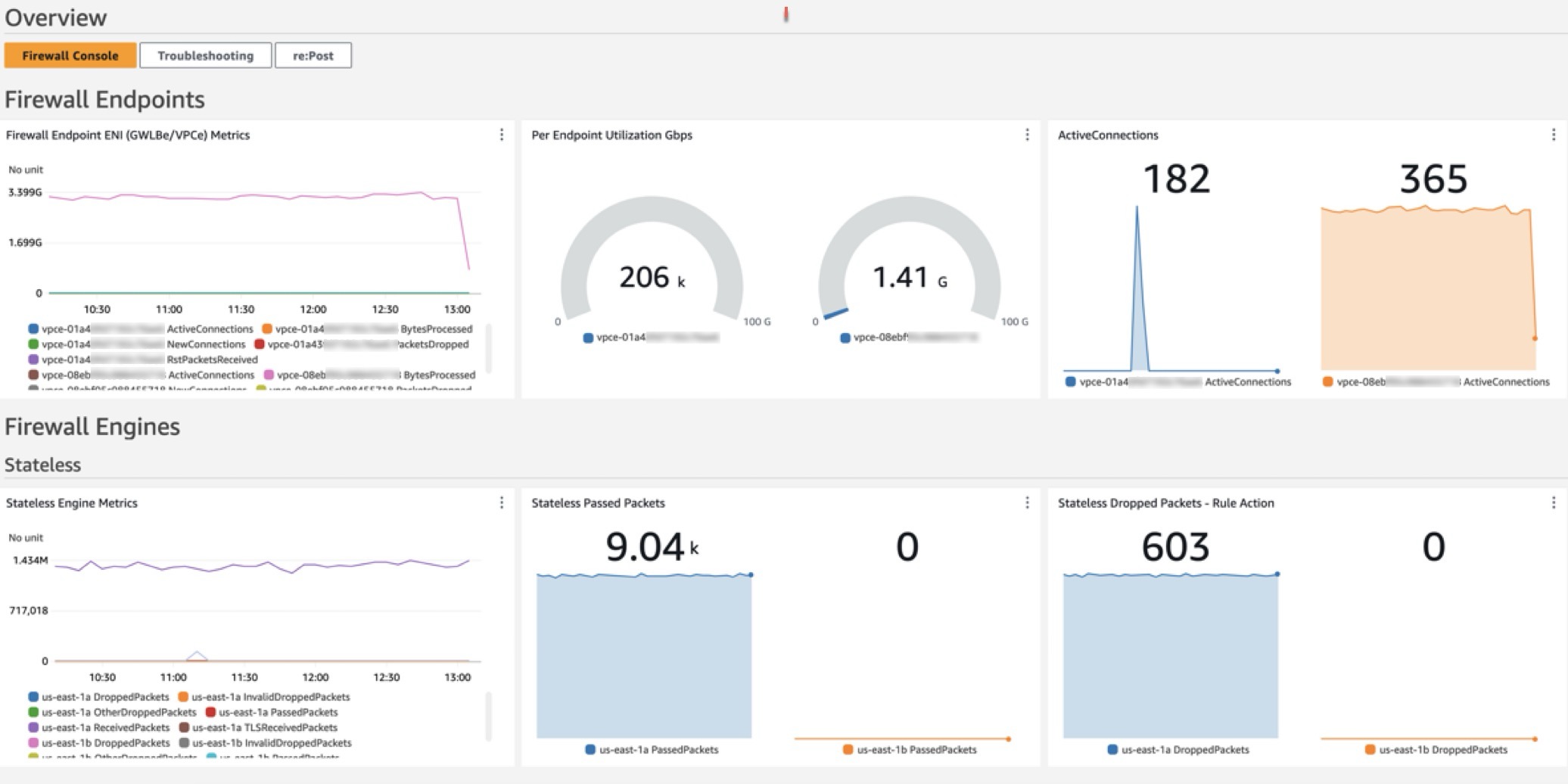
The dashboard, shown in Figure 1, can be deployed using CloudFormation and includes data and analytics from the following sources:

  1. Native CloudWatch metrics from the AWS/NetworkFirewall and AWS/PrivateLinkEndpoints namespaces
  2. CloudWatch Logs Insights queries that analyze Network Firewall flow and alert logs
  3. CloudWatch Contributor Insights rules that aggregate data from Network Firewall flow and alert logs.

Figure 1: CloudWatch dashboard

Figure 1: CloudWatch dashboard

Walkthrough

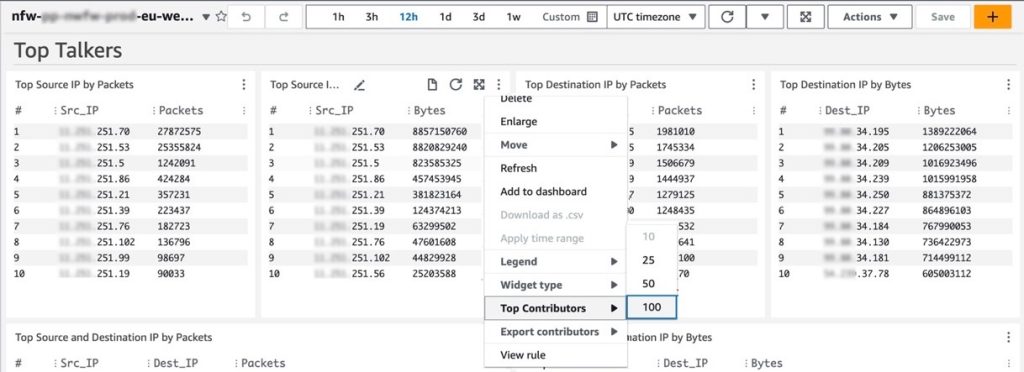
In the dashboard, the Logs Insights and Contributor Insights widgets display the top 10 data points by default. You can edit the Insights queries or change the Top Contributors to a larger value to display more results, as shown in Figure 2.

Figure 2: Top Talkers dashboard showing a change to the Top Contributors value

Figure 2: Top Talkers dashboard showing a change to the Top Contributors value

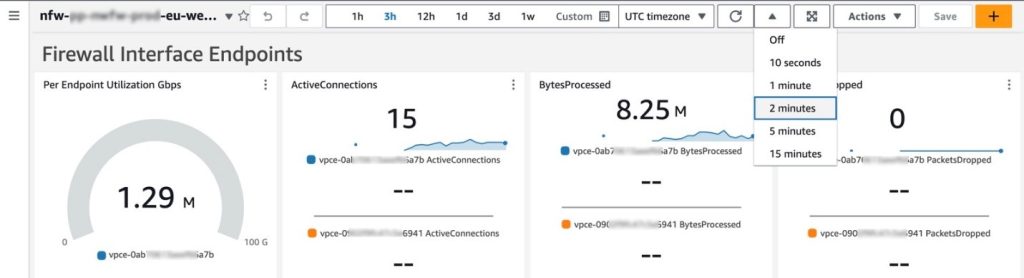
You can also manually refresh the data within a single or multiple widgets, or you can configure the entire dashboard to automatically refresh at a configured time interval as shown in Figure 3. The dashboard won’t automatically refresh the widget data by default.

Figure 3: Configuring the dashboard to automatically refresh

Figure 3: Configuring the dashboard to automatically refresh

Prerequisites

Deploying the Network Firewall CloudWatch Dashboard is straightforward. You will need the following:

  1. A Network Firewall in your VPC.
  2. Your Network Firewall must be configured to publish firewall flow and alert logs to two different CloudWatch log groups. For example, firewall flow logs are published to /my-firewall-flow-logs and alert logs are published to /my-firewall-alert-logs.

If you haven’t deployed Network Firewall in your VPC, you can use one of the available AWS Network Firewall Deployment Architecture templates to create a firewall. After creating a firewall, configure CloudWatch log groups for the firewall flow and alert logs and configure stateful logging as described previously. Fine-tune your firewall policy and rule configuration and make sure that you’re routing traffic symmetrically through the firewall. With the firewall now in the routed path and publishing metrics and log events, you can proceed with this Network Firewall CloudWatch dashboard template.

Deployment

The Network Firewall dashboard CloudFormation template creates a monitoring dashboard for a single Network Firewall firewall. Make sure that you launch this CloudFormation stack in the same AWS Region and account as the firewall, regardless of whether the firewall is set up centrally or in a distributed manner.

To deploy the dashboard:

  1. Choose Launch Stack for the relevant AWS Region. Make sure that you’re signed in to the appropriate AWS account and Region.
    • Region: China

      Launch Stack

    • Region: Gov Cloud

      Launch Stack

    • Region: All other regions supported by AWS Network Firewall

      Launch Stack

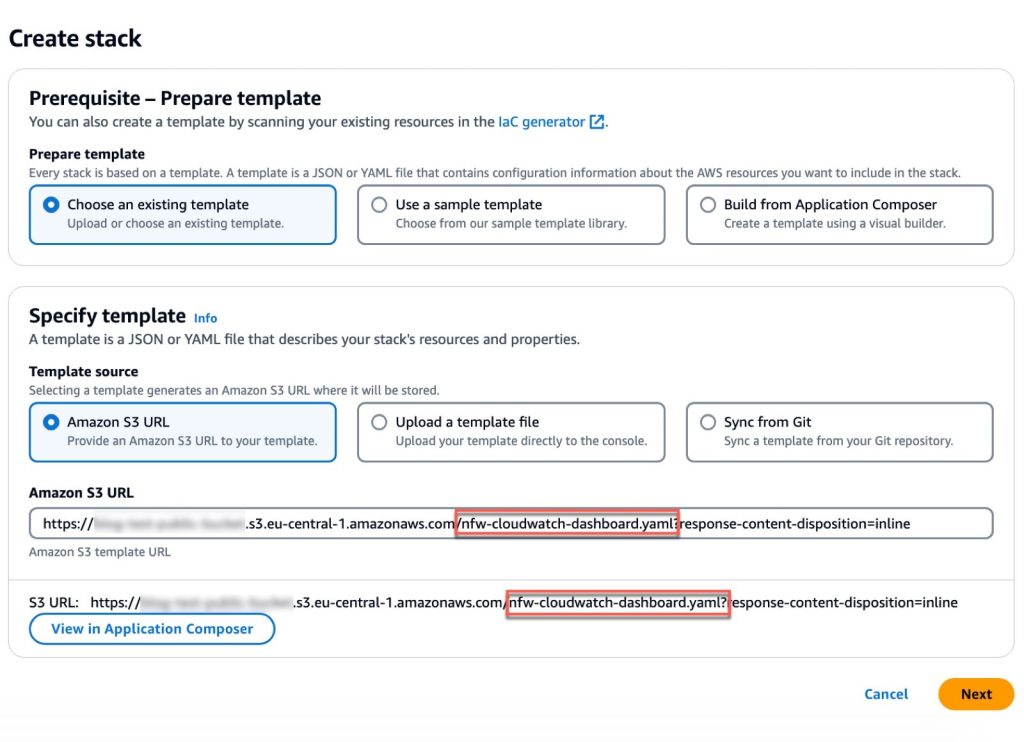
  2. You will be redirected to the Create stack page in the AWS Management Console for CloudFormation. Make sure that you’re in the correct Region and using the correct template. Choose Next. The following are the Regions and their template names:
    1. China Region: nfw-cloudwatch-dashboard-china.yaml
    2. Gov Cloud Region: nfw-cloudwatch-dashboard-govcloud.yaml
    3. All other Regions: nfw-cloudwatch-dashboard.yaml
Figure 4: Make sure that you’re using the correct template

Figure 4: Make sure that you’re using the correct template

When launching the stack, you will need to enter the following parameters:

  1. Stack name: A descriptive name for this CloudFormation stack. For example, my-firewall-dashboard.
  2. Firewall name: The firewall name as seen in the Amazon VPC console. In the Amazon VPC console, choose Network Firewall in the navigation pane, then choose Firewalls.
  3. Firewall subnets: The firewall subnet IDs to which your firewall endpoints are attached. The firewall subnets can be found on the Firewall details tab of your firewall in the Amazon VPC
  4. Flow log group name: The name of the CloudWatch log group where your firewall flow logs are stored.
  5. Alert log group name: The name of the CloudWatch log group where your firewall alert logs are stored.
  6. Contributor Insights rule state: Enable or disable the Contributor Insights rules (the template defaults to enabled). Disabling will stop the rules from scanning log data and displaying results in the Contributor Insights widgets. After the rules are created, you can change the state of one or more Contributor Insights rules from CloudWatch console by choosing Insights from the navigation pane, and then choosing Contributor Insights.

After the stack reaches CREATE_COMPLETE status, go to the Outputs tab and choose the FirewallDashboardURI link to open the new dashboard in the CloudWatch Dashboards console. It might take a few minutes for the Logs Insights and Contributor Insights widgets to start displaying data. For more details about each widget, see the README. If you don’t have log events matching the query parameters in the widgets, some widgets might not show data points.

Troubleshooting

If you encounter issues during or after deployment, review the following:

  • Firewall logging is enabled and configured to use CloudWatch instead of Amazon Simple Storage Service (Amazon S3) or Amazon Kinesis.
  • Both firewall flow and alert logging are enabled, not just one.
  • Log group names are entered correctly; incorrect names will cause widgets to point to invalid data.
  • Correct subnets are selected. Incorrect choices can impact the PrivateLink metrics widgets.
  • Firewall name is entered correctly. An incorrect name can disrupt metrics widgets, dashboard, and Contributor Insights widget names and break the firewall link.

Cleaning up

You can delete the Network Firewall CloudWatch dashboard and all of the associated resources with a few clicks. Deleting the dashboard will not impact the routing and network traffic inspection performed by the firewall.

  1. Sign in to the CloudFormation console in the Region where you launched the stack and choose Stacks from the navigation pane.
  2. Select the Stack name you chose when launching the stack. For example, my-firewall-dashboard.
  3. Choose Delete.

Conclusion

We encourage you to see for yourself how this new dashboard can enhance your network security management. To get started with the AWS Network Firewall CloudWatch Dashboard, visit our GitHub repository for detailed instructions and the CloudFormation template. For a visual overview of the dashboard and its capabilities, check out our YouTube video.

If you have feedback about this post, submit comments in the Comments section below. If you have questions about this post, contact AWS Support.
 

Ajinkya Patil
Ajinkya Patil

Ajinkya is a Security Consultant at Amazon Professional Services, specializing in security consulting for AWS customers within the automotive industry since 2019. He has presented at AWS re:Inforce and contributed articles to the AWS Security blog and AWS Prescriptive Guidance. Beyond his professional commitments, he indulges in travel and photography.
Todd Pula
Todd Pula

Todd is a Sr. Cloud Support Engineer at AWS and a service experience owner for AWS Network Firewall. He is an accomplished problem solver helping customers build and troubleshoot complex cloud networking and security solutions. He has a Master’s degree in Information Technology and is a Cisco Certified Internetwork Expert (CCIE).
Amish Shah
Amish Shah

Amish is a seasoned product leader with over 15 years of experience in developing innovative and scalable solutions for networking, security, and cloud use cases. He currently leads the AWS Network Firewall service, where he helps to develop security solutions that protect AWS workloads. Outside of work, Amish enjoys playing cricket and soccer, loves to travel, and has recently picked up a hobby of collecting niche fragrances.

Effortlessly Managing Unfinished Large File Uploads with B2 Cloud Storage

Post Syndicated from Bala Krishna Gangisetty original https://www.backblaze.com/blog/effortlessly-managing-unfinished-large-file-uploads-with-b2-cloud-storage/

An illustration of a cloud with boxes representing data uploading to the cloud.

Digital clutter isn’t just inefficient, it can be costly. And if cleaning up digital clutter in your business operations is one of your New Year’s resolutions for 2025, this post is for you. We’re talking about managing unfinished large file uploads.

One big culprit of digital clutter when it comes to cloud storage is unfinished large files. Managing unfinished large file uploads can be a complex task. If they are not managed well, they can consume space and incur costs without any benefit. 

To address this, we’ve introduced a feature in Backblaze B2 Cloud Storage that automatically cancels unfinished large file uploads, saving you both time and money. 

The challenge: Unfinished large file uploads

To upload a large file, you break it into smaller parts. You initiate the start notification. Each part is uploaded in parallel, and once all parts are received, a finish notification is sent. Only after the final step does the file become consumable. Sometimes, things don’t go as planned—network hiccups, API timeouts, or user interruptions can leave large file uploads unfinished. The process then likely restarts and completes successfully, but this leaves you with both a complete file and a partially completed file in your cloud storage instance. These unfinished uploads still take up storage space, leading to unnecessary costs.

Previously, users had to manually track down and delete these unfinished uploads. It’s error prone and time-consuming, and not an easy task especially with a large volume of files. 

The solution: Canceling unfinished uploads through lifecycle rules

To streamline the process, we’ve added a feature that allows users to automatically cancel these incomplete uploads after a set number of days. By setting lifecycle rules through the B2 Native API, users can now specify how many days an unfinished large file can remain before it’s automatically deleted. 

For detailed guidance on configuring this rule, check out our Lifecycle Rules Documentation.

Why it matters

This feature is useful in a variety of scenarios:

  1. Network failures: If a network interruption prevents the final completion step, the unfinished upload will no longer remain indefinitely. Instead, it will be automatically cleared after the defined period, ensuring you aren’t paying for useless storage.
  2. User interruptions: If an upload is manually paused or forgotten before completion, lifecycle rules will take care of these fragments, preventing forgotten uploads from lingering in storage.
  3. Script failures: If your script fails or times out during the upload process, any incomplete files won’t go unnoticed. They’ll be cleared as per your rules, ensuring efficient storage management.

Cost-saving benefits

Unfinished uploads can quickly add up, both in storage usage and costs. By automatically canceling incomplete uploads, users can significantly reduce unnecessary expenses, keeping storage budgets under control. This is especially important for businesses with large-scale data transfers, where managing storage efficiency can have a direct impact on the bottom line.

What’s next?

Most users configure lifecycle rules through the console or Backblaze B2 command line tool (CLI), so we introduced this feature for the B2 Native API to address immediate customer needs while also laying the groundwork for integrating it into the B2 Cloud Storage web console. You can now use this feature via the CLI or B2 Native API. We’re working on adding UI support to make configuration even more accessible. Let us know in the comments if you’re looking for access to this feature via a different user interface.

In the meantime, here are a few steps you can take:

  1. Implement lifecycle rules: Set rules that fit your upload behavior. Choose a reasonable timeframe to cancel unfinished large file uploads that balances with your cost-management goals.
  2. Test the feature: Try configuring the lifecycle rule for a few test uploads to make sure it behaves as expected. Monitor how it handles interruptions or failures to ensure it aligns with your needs.
  3. Monitor storage costs: Check your storage usage and billing before and after setting these rules to understand the impact on costs. Use the feedback to fine-tune your settings.
  4. Stay tuned for UI updates: Keep an eye out for announcements regarding UI support for this feature. We’re committed to making it as intuitive and accessible as possible.

By leveraging lifecycle rules for unfinished large file uploads, you can maintain a cleaner, more efficient storage environment while saving money. For more details on configuring lifecycle rules, visit our API documentation.

The post Effortlessly Managing Unfinished Large File Uploads with B2 Cloud Storage appeared first on Backblaze Blog | Cloud Storage & Cloud Backup

Building end-to-end data lineage for one-time and complex queries using Amazon Athena, Amazon Redshift, Amazon Neptune and dbt

Post Syndicated from Nancy Wu original https://aws.amazon.com/blogs/big-data/building-end-to-end-data-lineage-for-one-time-and-complex-queries-using-amazon-athena-amazon-redshift-amazon-neptune-and-dbt/

One-time and complex queries are two common scenarios in enterprise data analytics. One-time queries are flexible and suitable for instant analysis and exploratory research. Complex queries, on the other hand, refer to large-scale data processing and in-depth analysis based on petabyte-level data warehouses in massive data scenarios. These complex queries typically involve data sources from multiple business systems, requiring multilevel nested SQL or associations with numerous tables for highly sophisticated analytical tasks.

However, combining the data lineage of these two query types presents several challenges:

  1. Diversity of data sources
  2. Varying query complexity
  3. Inconsistent granularity in lineage tracking
  4. Different real-time requirements
  5. Difficulties in cross-system integration

Moreover, maintaining the accuracy and completeness of lineage information while providing system performance and scalability are crucial considerations. Addressing these challenges requires a carefully designed architecture and advanced technical solutions.

Amazon Athena offers serverless, flexible SQL analytics for one-time queries, enabling direct querying of Amazon Simple Storage Service (Amazon S3) data for rapid, cost-effective instant analysis. Amazon Redshift, optimized for complex queries, provides high-performance columnar storage and massively parallel processing (MPP) architecture, supporting large-scale data processing and advanced SQL capabilities. Amazon Neptune, as a graph database, is ideal for data lineage analysis, offering efficient relationship traversal and complex graph algorithms to handle large-scale, intricate data lineage relationships. The combination of these three services provides a powerful, comprehensive solution for end-to-end data lineage analysis.

In the context of comprehensive data governance, Amazon DataZone offers organization-wide data lineage visualization using Amazon Web Services (AWS) services, while dbt provides project-level lineage through model analysis and supports cross-project integration between data lakes and warehouses.

In this post, we use dbt for data modeling on both Amazon Athena and Amazon Redshift. dbt on Athena supports real-time queries, while dbt on Amazon Redshift handles complex queries, unifying the development language and significantly reducing the technical learning curve. Using a single dbt modeling language not only simplifies the development process but also automatically generates consistent data lineage information. This approach offers robust adaptability, easily accommodating changes in data structures.

By integrating Amazon Neptune graph database to store and analyze complex lineage relationships, combined with AWS Step Functions and AWS Lambda functions, we achieve a fully automated data lineage generation process. This combination promotes consistency and completeness of lineage data while enhancing the efficiency and scalability of the entire process. The result is a powerful and flexible solution for end-to-end data lineage analysis.

Architecture overview

The experiment’s context involves a customer already using Amazon Athena for one-time queries. To better accommodate massive data processing and complex query scenarios, they aim to adopt a unified data modeling language across different data platforms. This led to the implementation of both Athena on dbt and Amazon Redshift on dbt architectures.

AWS Glue crawler crawls data lake information from Amazon S3, generating a Data Catalog to support dbt on Amazon Athena data modeling. For complex query scenarios, AWS Glue performs extract, transform, and load (ETL) processing, loading data into the petabyte-scale data warehouse, Amazon Redshift. Here, data modeling uses dbt on Amazon Redshift.

Lineage data original files from both parts are loaded into an S3 bucket, providing data support for end-to-end data lineage analysis.

The following image is the architecture diagram for the solution.

Figure 1-Architecture diagram of DBT modeling based on Athena and Redshift

Some important considerations:

This experiment uses the following data dictionary:

Source table Tool Target table
imdb.name_basics DBT/Athena stg_imdb__name_basics
imdb.title_akas DBT/Athena stg_imdb__title_akas
imdb.title_basics DBT/Athena stg_imdb__title_basics
imdb.title_crew DBT/Athena stg_imdb__title_crews
imdb.title_episode DBT/Athena stg_imdb__title_episodes
imdb.title_principals DBT/Athena stg_imdb__title_principals
imdb.title_ratings DBT/Athena stg_imdb__title_ratings
stg_imdb__name_basics DBT/Redshift new_stg_imdb__name_basics
stg_imdb__title_akas DBT/Redshift new_stg_imdb__title_akas
stg_imdb__title_basics DBT/Redshift new_stg_imdb__title_basics
stg_imdb__title_crews DBT/Redshift new_stg_imdb__title_crews
stg_imdb__title_episodes DBT/Redshift new_stg_imdb__title_episodes
stg_imdb__title_principals DBT/Redshift new_stg_imdb__title_principals
stg_imdb__title_ratings DBT/Redshift new_stg_imdb__title_ratings
new_stg_imdb__name_basics DBT/Redshift int_primary_profession_flattened_from_name_basics
new_stg_imdb__name_basics DBT/Redshift int_known_for_titles_flattened_from_name_basics
new_stg_imdb__name_basics DBT/Redshift names
new_stg_imdb__title_akas DBT/Redshift titles
new_stg_imdb__title_basics DBT/Redshift int_genres_flattened_from_title_basics
new_stg_imdb__title_basics DBT/Redshift titles
new_stg_imdb__title_crews DBT/Redshift int_directors_flattened_from_title_crews
new_stg_imdb__title_crews DBT/Redshift int_writers_flattened_from_title_crews
new_stg_imdb__title_episodes DBT/Redshift titles
new_stg_imdb__title_principals DBT/Redshift titles
new_stg_imdb__title_ratings DBT/Redshift titles
int_known_for_titles_flattened_from_name_basics DBT/Redshift titles
int_primary_profession_flattened_from_name_basics DBT/Redshift
int_directors_flattened_from_title_crews DBT/Redshift names
int_genres_flattened_from_title_basics DBT/Redshift genre_titles
int_writers_flattened_from_title_crews DBT/Redshift names
genre_titles DBT/Redshift
names DBT/Redshift
titles DBT/Redshift

The lineage data generated by dbt on Athena includes partial lineage diagrams, as exemplified in the following images. The first image shows the lineage of name_basics in dbt on Athena. The second image shows the lineage of title_crew in dbt on Athena.

Figure 3-Lineage of name_basics in DBT on Athena

Figure 4-Lineage of title_crew in DBT on Athena

The lineage data generated by dbt on Amazon Redshift includes partial lineage diagrams, as illustrated in the following image.

Figure 5-Lineage of name_basics and title_crew in DBT on Redshift

Referring to the data dictionary and screenshots, it’s evident that the complete data lineage information is highly dispersed, spread across 29 lineage diagrams. Understanding the end-to-end comprehensive view requires significant time. In real-world environments, the situation is often more complex, with complete data lineage potentially distributed across hundreds of files. Consequently, integrating a complete end-to-end data lineage diagram becomes crucial and challenging.

This experiment will provide a detailed introduction to processing and merging data lineage files stored in Amazon S3, as illustrated in the following diagram.

Figure 6-Merging data lineage from Athena and Redshift into Neptune

Prerequisites

To perform the solution, you need to have the following prerequisites in place:

  • The Lambda function for preprocessing lineage files must have permissions to access Amazon S3 and Amazon Redshift.
  • The Lambda function for constructing the directed acyclic graph (DAG) must have permissions to access Amazon S3 and Amazon Neptune.

Solution walkthrough

To perform the solution, follow the steps in the next sections.

Preprocess raw lineage data for DAG generation using Lambda functions

Use Lambda to preprocess the raw lineage data generated by dbt, converting it into key-value pair JSON files that are easily understood by Neptune: athena_dbt_lineage_map.json and redshift_dbt_lineage_map.json.

  1. To create a new Lambda function in the Lambda console, enter a Function name, select the Runtime (Python in this example), configure the Architecture and Execution role, then click the “Create function” button.

Figure 7-Basic configuration of athena-data-lineage-process Lambda

  1. Open the created Lambda function and on the Configuration tab, in the navigation pane, select Environment variables and choose your configurations. Using Athena on dbt processing as an example, configure the environment variables as follows (the process for Amazon Redshift on dbt is similar):
    • INPUT_BUCKET: data-lineage-analysis-24-09-22 (replace with the S3 bucket path storing the original Athena on dbt lineage files)
    • INPUT_KEY: athena_manifest.json (the original Athena on dbt lineage file)
    • OUTPUT_BUCKET: data-lineage-analysis-24-09-22 (replace with the S3 bucket path for storing the preprocessed output of Athena on dbt lineage files)
    • OUTPUT_KEY: athena_dbt_lineage_map.json (the output file after preprocessing the original Athena on dbt lineage file)

Figure 8-Environment variable configuration for athena-data-lineage-process-Lambda

  1. On the Code tab, in the lambda_function.py file, enter the preprocessing code for the raw lineage data. Here’s a code reference using Athena on dbt processing as an example (the process for Amazon Redshift on dbt is similar). The preprocessing code for Athena on dbt’s original lineage file is as follows:

The athena_manifest.json, redshift_manifest.json, and other files used in this experiment can be obtained from the Data Lineage Graph Construction GitHub repository.

import json
import boto3
import os

def lambda_handler(event, context):
    # Set up S3 client
    s3 = boto3.client('s3')

    # Get input and output paths from environment variables
    input_bucket = os.environ['INPUT_BUCKET']
    input_key = os.environ['INPUT_KEY']
    output_bucket = os.environ['OUTPUT_BUCKET']
    output_key = os.environ['OUTPUT_KEY']

    # Define helper function
    def dbt_nodename_format(node_name):
        return node_name.split(".")[-1]

    # Read input JSON file from S3
    response = s3.get_object(Bucket=input_bucket, Key=input_key)
    file_content = response['Body'].read().decode('utf-8')
    data = json.loads(file_content)
    lineage_map = data["child_map"]
    node_dict = {}
    dbt_lineage_map = {}

    # Process data
    for item in lineage_map:
        lineage_map[item] = [dbt_nodename_format(child) for child in lineage_map[item]]
        node_dict[item] = dbt_nodename_format(item)

    # Update key names
    lineage_map = {node_dict[old]: value for old, value in lineage_map.items()}
    dbt_lineage_map["lineage_map"] = lineage_map

    # Convert result to JSON string
    result_json = json.dumps(dbt_lineage_map)

    # Write JSON string to S3
    s3.put_object(Body=result_json, Bucket=output_bucket, Key=output_key)
    print(f"Data written to s3://{output_bucket}/{output_key}")

    return {
        'statusCode': 200,
        'body': json.dumps('Athena data lineage processing completed successfully')
    }

Merge preprocessed lineage data and write to Neptune using Lambda functions

  1. Before processing data with the Lambda function, create a Lambda layer by uploading the required Gremlin plugin. For detailed steps on creating and configuring Lambda Layers, see the AWS Lambda Layers documentation.

Because connecting Lambda to Neptune for constructing a DAG requires the Gremlin plugin, it needs to be uploaded before using Lambda. The Gremlin package can be obtained from the Data Lineage Graph Construction GitHub repository.

Figure 9-Lambda layers

  1. Create a new Lambda function. Choose the function to configure. To the recently created layer, at the bottom of the page, choose Add a layer.

Figure 10_Add a layer

Create another Lambda layer for the requests library, similar to how you created the layer for the Gremlin plugin. This library will be used for HTTP client functionality in the Lambda function.

  1. Choose the recently created Lambda function to configure. Connect to Neptune through Lambda to merge the two datasets and construct a DAG. On the Code tab, the reference code to execute is as follows:
import json
import boto3
import os
import requests
from botocore.auth import SigV4Auth
from botocore.awsrequest import AWSRequest
from botocore.credentials import get_credentials
from botocore.session import Session
from concurrent.futures import ThreadPoolExecutor, as_completed

def read_s3_file(s3_client, bucket, key):
    try:
        response = s3_client.get_object(Bucket=bucket, Key=key)
        data = json.loads(response['Body'].read().decode('utf-8'))
        return data.get("lineage_map", {})
    except Exception as e:
        print(f"Error reading S3 file {bucket}/{key}: {str(e)}")
        raise

def merge_data(athena_data, redshift_data):
    return {**athena_data, **redshift_data}

def sign_request(request):
    credentials = get_credentials(Session())
    auth = SigV4Auth(credentials, 'neptune-db', os.environ['AWS_REGION'])
    auth.add_auth(request)
    return dict(request.headers)

def send_request(url, headers, data):
    try:
        response = requests.post(url, headers=headers, data=data, timeout=30)
        response.raise_for_status()
        return response.text
    except requests.exceptions.RequestException as e:
        print(f"Request Error: {str(e)}")
        if hasattr(e.response, 'text'):
            print(f"Response content: {e.response.text}")
        raise

def write_to_neptune(data):
    endpoint = 'https://your neptune endpoint name:8182/gremlin'
    # replace with your neptune endpoint name

    # Clear Neptune database
    clear_query = "g.V().drop()"
    request = AWSRequest(method='POST', url=endpoint, data=json.dumps({'gremlin': clear_query}))
    signed_headers = sign_request(request)
    response = send_request(endpoint, signed_headers, json.dumps({'gremlin': clear_query}))
    print(f"Clear database response: {response}")

    # Verify if the database is empty
    verify_query = "g.V().count()"
    request = AWSRequest(method='POST', url=endpoint, data=json.dumps({'gremlin': verify_query}))
    signed_headers = sign_request(request)
    response = send_request(endpoint, signed_headers, json.dumps({'gremlin': verify_query}))
    print(f"Vertex count after clearing: {response}")
    
    def process_node(node, children):
        # Add node
        query = f"g.V().has('lineage_node', 'node_name', '{node}').fold().coalesce(unfold(), addV('lineage_node').property('node_name', '{node}'))"
        request = AWSRequest(method='POST', url=endpoint, data=json.dumps({'gremlin': query}))
        signed_headers = sign_request(request)
        response = send_request(endpoint, signed_headers, json.dumps({'gremlin': query}))
        print(f"Add node response for {node}: {response}")

        for child_node in children:
            # Add child node
            query = f"g.V().has('lineage_node', 'node_name', '{child_node}').fold().coalesce(unfold(), addV('lineage_node').property('node_name', '{child_node}'))"
            request = AWSRequest(method='POST', url=endpoint, data=json.dumps({'gremlin': query}))
            signed_headers = sign_request(request)
            response = send_request(endpoint, signed_headers, json.dumps({'gremlin': query}))
            print(f"Add child node response for {child_node}: {response}")

            # Add edge
            query = f"g.V().has('lineage_node', 'node_name', '{node}').as('a').V().has('lineage_node', 'node_name', '{child_node}').coalesce(inE('lineage_edge').where(outV().as('a')), addE('lineage_edge').from('a').property('edge_name', ' '))"
            request = AWSRequest(method='POST', url=endpoint, data=json.dumps({'gremlin': query}))
            signed_headers = sign_request(request)
            response = send_request(endpoint, signed_headers, json.dumps({'gremlin': query}))
            print(f"Add edge response for {node} -> {child_node}: {response}")

    with ThreadPoolExecutor(max_workers=10) as executor:
        futures = [executor.submit(process_node, node, children) for node, children in data.items()]
        for future in as_completed(futures):
            try:
                future.result()
            except Exception as e:
                print(f"Error in processing node: {str(e)}")

def lambda_handler(event, context):
    # Initialize S3 client
    s3_client = boto3.client('s3')

    # S3 bucket and file paths
    bucket_name = 'data-lineage-analysis' # Replace with your S3 bucket name
    athena_key = 'athena_dbt_lineage_map.json' # Replace with your athena lineage key value output json name
    redshift_key = 'redshift_dbt_lineage_map.json' # Replace with your redshift lineage key value output json name

    try:
        # Read Athena lineage data
        athena_data = read_s3_file(s3_client, bucket_name, athena_key)
        print(f"Athena data size: {len(athena_data)}")

        # Read Redshift lineage data
        redshift_data = read_s3_file(s3_client, bucket_name, redshift_key)
        print(f"Redshift data size: {len(redshift_data)}")

        # Merge data
        combined_data = merge_data(athena_data, redshift_data)
        print(f"Combined data size: {len(combined_data)}")

        # Write to Neptune (including clearing the database)
        write_to_neptune(combined_data)

        return {
            'statusCode': 200,
            'body': json.dumps('Data successfully written to Neptune')
        }
    except Exception as e:
        print(f"Error in lambda_handler: {str(e)}")
        return {
            'statusCode': 500,
            'body': json.dumps(f'Error: {str(e)}')
        }

Create Step Functions workflow

  1. On the Step Functions console, choose State machines, and then choose Create state machine. On the Choose a template page, select Blank template.

Figure 11-Step Functions blank template

  1. In the Blank template, choose Code to define your state machine. Use the following example code:
{
  "Comment": "Daily Data Lineage Processing Workflow",
  "StartAt": "Parallel Processing",
  "States": {
    "Parallel Processing": {
      "Type": "Parallel",
      "Branches": [
        {
          "StartAt": "Process Athena Data",
          "States": {
            "Process Athena Data": {
              "Type": "Task",
              "Resource": "arn:aws:states:::lambda:invoke",
              "Parameters": {
                "FunctionName": "athena-data-lineange-process-Lambda", ##Replace with your Athena data lineage process Lambda function name
                "Payload": {
                  "input.$": "$"
                }
              },
              "End": true
            }
          }
        },
        {
          "StartAt": "Process Redshift Data",
          "States": {
            "Process Redshift Data": {
              "Type": "Task",
              "Resource": "arn:aws:states:::lambda:invoke",
              "Parameters": {
                "FunctionName": "redshift-data-lineange-process-Lambda", ##Replace with your Redshift data lineage process Lambda function name
                "Payload": {
                  "input.$": "$"
                }
              },
              "End": true
            }
          }
        }
      ],
      "Next": "Load Data to Neptune"
    },
    "Load Data to Neptune": {
      "Type": "Task",
      "Resource": "arn:aws:states:::lambda:invoke",
      "Parameters": {
        "FunctionName": "data-lineage-analysis-lambda" ##Replace with your Lambda function Name
      },
      "End": true
    }
  }
}
  1. After completing the configuration, choose the Design tab to view the workflow shown in the following diagram.

Figure 12-Step Functions design view

Create scheduling rules with Amazon EventBridge

Configure Amazon EventBridge to generate lineage data daily during off-peak business hours. To do this:

  1. Create a new rule in the EventBridge console with a descriptive name.
  2. Set the rule type to “Schedule” and configure it to run once daily (using either a fixed rate or the Cron expression “0 0 * * ? *”).
  3. Select the AWS Step Functions state machine as the target and specify the state machine you created earlier.

Query results in Neptune

  1. On the Neptune console, select Notebooks. Open an existing notebook or create a new one.

Figure 13-Neptune notebook

  1. In the notebook, create a new code cell to perform a query. The following code example shows the query statement and its results:
%%gremlin -d node_name -de edge_name
g.V().hasLabel('lineage_node').outE('lineage_edge').inV().hasLabel('lineage_node').path().by(elementMap())

You can now see the end-to-end data lineage graph information for both dbt on Athena and dbt on Amazon Redshift. The following image shows the merged DAG data lineage graph in Neptune.

Figure 14-Merged DAG data lineage graph in Neptune

You can query the generated data lineage graph for data related to a specific table, such as title_crew.

The sample query statement and its results are shown in the following code example:

%%gremlin -d node_name -de edge_name
g.V().has('lineage_node', 'node_name', 'title_crew')
  .repeat(
    union(
      __.inE('lineage_edge').outV(),
      __.outE('lineage_edge').inV()
    )
  )
  .until(
    __.has('node_name', within('names', 'genre_titles', 'titles'))
    .or()
    .loops().is(gt(10))
  )
  .path()
  .by(elementMap())

The following image shows the filtered results based on title_crew table in Neptune.

Figure 15-Filtered results based on title_crew table in Neptune

Clean up

To clean up your resources, complete the following steps:

  1. Delete EventBridge rules
# Stop new events from triggering while removing dependencies
aws events disable-rule --name <rule-name>
# Break connections between rule and targets (like Lambda functions)
aws events remove-targets --rule <rule-name> --ids <target-id>
# Remove the rule completely from EventBridge
aws events delete-rule --name <rule-name>
  1. Delete Step Functions state machine
# Stop all running executions
aws stepfunctions stop-execution --execution-arn <execution-arn>
# Delete the state machine
aws stepfunctions delete-state-machine --state-machine-arn <state-machine-arn>
  1. Delete Lambda functions
# Delete Lambda function
aws lambda delete-function --function-name <function-name>
# Delete Lambda layers (if used)
aws lambda delete-layer-version --layer-name <layer-name> --version-number <version>
  1. Clean up the Neptune database
# Delete all snapshots
aws neptune delete-db-cluster-snapshot --db-cluster-snapshot-identifier <snapshot-id>
# Delete database instance
aws neptune delete-db-instance --db-instance-identifier <instance-id> --skip-final-snapshot
# Delete database cluster
aws neptune delete-db-cluster --db-cluster-identifier <cluster-id> --skip-final-snapshot
  1. Follow the instructions at Deleting a single object to clean up the S3 buckets

Conclusion

In this post, we demonstrated how dbt enables unified data modeling across Amazon Athena and Amazon Redshift, integrating data lineage from both one-time and complex queries. By using Amazon Neptune, this solution provides comprehensive end-to-end lineage analysis. The architecture uses AWS serverless computing and managed services, including Step Functions, Lambda, and EventBridge, providing a highly flexible and scalable design.

This approach significantly lowers the learning curve through a unified data modeling method while enhancing development efficiency. The end-to-end data lineage graph visualization and analysis not only strengthen data governance capabilities but also offer deep insights for decision-making.

The solution’s flexible and scalable architecture effectively optimizes operational costs and improves business responsiveness. This comprehensive approach balances technical innovation, data governance, operational efficiency, and cost-effectiveness, thus supporting long-term business growth with the adaptability to meet evolving enterprise needs.

With OpenLineage-compatible data lineage now generally available in Amazon DataZone, we plan to explore integration possibilities to further enhance the system’s capability to handle complex data lineage analysis scenarios.

If you have any questions, please feel free to leave a comment in the comments section.


About the authors

nancynwu+photo

Nancy Wu is a Solutions Architect at AWS, responsible for cloud computing architecture consulting and design for multinational enterprise customers. Has many years of experience in big data, enterprise digital transformation research and development, consulting, and project management across telecommunications, entertainment, and financial industries.

Xu+Feng+PhotoXu Feng is a Senior Industry Solution Architect at AWS, responsible for designing, building, and promoting industry solutions for the Media & Entertainment and Advertising sectors, such as intelligent customer service and business intelligence. With 20 years of software industry experience, currently focused on researching and implementing generative AI and AI-powered data solutions.

Xu+Da+PhotoXu Da is a Amazon Web Services (AWS) Partner Solutions Architect based out of Shanghai, China. He has more than 25 years of experience in IT industry, software development and solution architecture. He is passionate about collaborative learning, knowledge sharing, and guiding community in their cloud technologies journey.

The collective thoughts of the interwebz