Let’s Architect! Discovering Generative AI on AWS

Post Syndicated from Luca Mezzalira original https://aws.amazon.com/blogs/architecture/lets-architect-generative-ai/

Generative artificial intelligence (generative AI) is a type of AI used to generate content, including conversations, images, videos, and music. Generative AI can be used directly to build customer-facing features (a chatbot or an image generator), or it can serve as an underlying component in a more complex system. For example, it can generate embeddings (or compressed representations) or any other artifact necessary to improve downstream machine learning (ML) models or back-end services.

With the advent of generative AI, it’s fundamental to understand what it is, how it works under the hood, and which options are available for putting it into production. In some cases, it can also be helpful to move closer to the underlying model in order to fine tune or drive domain-specific improvements. With this edition of Let’s Architect!, we’ll cover these topics and share an initial set of methodologies to put generative AI into production. We’ll start with a broad introduction to the domain and then share a mix of videos, blogs, and hands-on workshops.

Navigating the future of AI 

Many teams are turning to open source tools running on Kubernetes to help accelerate their ML and generative AI journeys. In this video session, experts discuss why Kubernetes is ideal for ML, then tackle challenges like dependency management and security. You will learn how tools like Ray, JupyterHub, Argo Workflows, and Karpenter can accelerate your path to building and deploying generative AI applications on Amazon Elastic Kubernetes Service (Amazon EKS). A real-world example showcases how Adobe leveraged Amazon EKS to achieve faster time-to-market and reduced costs. You will be also introduced to Data on EKS, a new AWS project offering best practices for deploying various data workloads on Amazon EKS.

Take me to this video!

Containers are a powerful tool for creating reproducible research and production environments for ML.

Figure 1. Containers are a powerful tool for creating reproducible research and production environments for ML.

Generative AI: Architectures and applications in depth

This video session aims to provide an in-depth exploration of the emerging concepts in generative AI. By delving into practical applications and detailing best practices for implementation, the session offers a concrete understanding that empowers businesses to harness the full potential of these technologies. You can gain valuable insights into navigating the complexities of generative AI, equipping you with the knowledge and strategies necessary to stay ahead of the curve and capitalize on the transformative power of these new methods. If you want to dive even deeper, check this generative AI best practices post.

Take me to this video!

Models are growing exponentially: improved capabilities come with higher costs for productionizing them.

Figure 2. Models are growing exponentially: improved capabilities come with higher costs for productionizing them.

SaaS meets AI/ML & generative AI: Multi-tenant patterns & strategies

Working with AI/ML workloads and generative AI in a production environment requires appropriate system design and careful considerations for tenant separation in the context of SaaS. You’ll need to think about how the different tenants are mapped to models, how inferencing is scaled, how solutions are integrated with other upstream/downstream services, and how large language models (LLMs) can be fine-tuned to meet tenant-specific needs.

This video drills down into the concept of multi-tenancy for AI/ML workloads, including the common design, performance, isolation, and experience challenges that you can find during your journey. You will also become familiar with concepts like RAG (used to enrich the LLMs with contextual information) and fine tuning through practical examples.

Take me to this video!

Supporting different tenants might need fetching different context information with RAGs or offering different options for fine-tuning.

Figure 3. Supporting different tenants might need fetching different context information with RAGs or offering different options for fine-tuning.

Achieve DevOps maturity with BMC AMI zAdviser Enterprise and Amazon Bedrock

DevOps Research and Assessment (DORA) metrics, which measure critical DevOps performance indicators like lead time, are essential to engineering practices, as shown in the Accelerate book‘s research. By leveraging generative AI technology, the zAdviser Enterprise platform can now offer in-depth insights and actionable recommendations to help organizations optimize their DevOps practices and drive continuous improvement. This blog demonstrates how generative AI can go beyond language or image generation, applying to a wide spectrum of domains.

Take me to this blog post!

Generative AI is used to provide summarization, analysis, and recommendations for improvement based on the DORA metrics.

Figure 4. Generative AI is used to provide summarization, analysis, and recommendations for improvement based on the DORA metrics.

Hands-on Generative AI: AWS workshops

Getting hands on is often the best way to understand how everything works in practice and create the mental model to connect theoretical foundations with some real-world applications.

Generative AI on Amazon SageMaker shows how you can build, train, and deploy generative AI models. You can learn about options to fine-tune, use out-of-the-box existing models, or even customize the existing open source models based on your needs.

Building with Amazon Bedrock and LangChain demonstrates how an existing fully-managed service provided by AWS can be used when you work with foundational models, covering a wide variety of use cases. Also, if you want a quick guide for prompt engineering, you can check out the PartyRock lab in the workshop.

An image replacement example that you can find in the workshop.

Figure 5. An image replacement example that you can find in the workshop.

See you next time!

Thanks for reading! We hope you got some insight into the applications of generative AI and discovered new strategies for using it. In the next blog, we will dive deeper into machine learning.

To revisit any of our previous posts or explore the entire series, visit the Let’s Architect! page.

Authorize API Gateway APIs using Amazon Verified Permissions and Amazon Cognito

Post Syndicated from Kevin Hakanson original https://aws.amazon.com/blogs/security/authorize-api-gateway-apis-using-amazon-verified-permissions-and-amazon-cognito/

Externalizing authorization logic for application APIs can yield multiple benefits for Amazon Web Services (AWS) customers. These benefits can include freeing up development teams to focus on application logic, simplifying application and resource access audits, and improving application security by using continual authorization. Amazon Verified Permissions is a scalable permissions management and fine-grained authorization service that you can use for externalizing application authorization. Along with controlling access to application resources, you can use Verified Permissions to restrict API access to authorized users by using Cedar policies. However, a key challenge in adopting an external authorization system like Verified Permissions is the effort involved in defining the policy logic and integrating with your API. This blog post shows how Verified Permissions accelerates the process of securing REST APIs that are hosted on Amazon API Gateway for Amazon Cognito customers.

Setting up API authorization using Amazon Verified Permissions

As a developer, there are several tasks you need to do in order to use Verified Permissions to store and evaluate policies that define which APIs a user is permitted to access. Although Verified Permissions enables you to decouple authorization logic from your application code, you may need to spend time up front integrating Verified Permissions with your applications. You may also need to spend time learning the Cedar policy language, defining a policy schema, and authoring policies that enforce access control on APIs. Lastly, you may need to spend additional time developing and testing the AWS Lambda authorizer function logic that builds the authorization request for Verified Permissions and enforces the authorization decision.

Getting started with the simplified wizard

Amazon Verified Permissions now includes a console-based wizard that you can use to quickly create building blocks to set up your application’s API Gateway to use Verified Permissions for authorization. Verified Permissions generates an authorization model based on your APIs and policies that allows only authorized Cognito groups access to your APIs. Additionally, it deploys a Lambda authorizer, which you attach to the APIs you want to secure. After the authorizer is attached, API requests are authorized by Verified Permissions. The generated Cedar policies and schema flatten the learning curve, yet allow you full control to modify and help you adhere to your security requirements.

Overview of sample application

In this blog post, we demonstrate how you can simplify the task of securing permissions to a sample application API by using the Verified Permissions console-based wizard. We use a sample pet store application which has two resources:

  1. PetStorePool – An Amazon Cognito user pool with users in one of three groups: customers, employees, and owners.
  2. PetStore – An Amazon API Gateway REST API derived from importing the PetStore example API and extended with a mock integration for administration. This mock integration returns a message with a URI path that uses {“statusCode”: 200} as the integration request and {“Message”: “User authorized for $context.path”} as the integration response.

The PetStore has the following four authorization requirements that allow access to the related resources. All other behaviors should be denied.

  1. Both authenticated and unauthenticated users are allowed to access the root URL.
    • GET /
  2. All authenticated users are allowed to get the list of pets, or get a pet by its identifier.
    • GET /pets
    • GET /pets/{petid}
  3. The employees and owners group are allowed to add new pets.
    • POST /pets
  4. Only the owners group is allowed to perform administration functions. These are defined using an API Gateway proxy resource that enables a single integration to implement a set of API resources.
    • ANY /admin/{proxy+}

Walkthrough

Verified Permissions includes a setup wizard that connects a Cognito user pool to an API Gateway REST API and secures resources based on Cognito group membership. In this section, we provide a walkthrough of the wizard that generates authorization building blocks for our sample application.

To set up API authorization based on Cognito groups

  1. On the Amazon Verified Permissions page in the AWS Management Console, choose Create a new policy store.
  2. On the Specify policy store details page under Starting options, select Set up with Cognito and API Gateway, and then choose Next.

    Figure 1: Starting options

    Figure 1: Starting options

  3. On the Import resources and actions page under API Gateway details, select the API and Deployment stage from the dropdown lists. (A REST API stage is a named reference to a deployment.) For this example, we selected the PetStore API and the demo stage.

    Figure 2: API Gateway and deployment stage

    Figure 2: API Gateway and deployment stage

  4. Choose Import API to generate a Map of imported resources and actions. For our example, this list includes Action::”get /pets” for getting the list of pets, Action::”get /pets/{petId}” for getting a single pet, and Action::”post /pets” for adding a new pet. Choose Next.

    Figure 3: Map of imported resources and actions

    Figure 3: Map of imported resources and actions

  5. On the Choose identity source page, select an Amazon Cognito user pool (PetStorePool in our example). For Token type to pass to API, select a token type. For our example, we chose the default value, Access token, because Cognito recommends using the access token to authorize API operations. The additional claims available in an id token may support more fine-grained access control. For Client application validation, we also specified the default, to not validate that tokens match a configured app client ID. Consider validation when you have multiple user pool app clients configured with different permissions.

    Figure 4: Choose Cognito user pool as identity source

    Figure 4: Choose Cognito user pool as identity source

  6. Choose Next.
  7. On the Assign actions to groups page under Group selection, choose the Cognito user pool groups that can take actions in the application. This solution uses native Cognito group membership to control permissions. In Figure 5, the customers group is not used for access control, we deselected it and it isn’t included in the generated policies. Instead, access to get /pets and get/pets/{petId} is granted to all authenticated users using a different authorizer that we define later in this post.

    Figure 5: Assign actions to groups

    Figure 5: Assign actions to groups

  8. For each of the groups, choose which actions are allowed. In our example, post /pets is the only action selected for the employees group. For the owners group, all of the /admin/{proxy+} actions are additionally selected. Choose Next.

    Figure 6: Groups employees and owners

    Figure 6: Groups employees and owners

  9. On the Deploy app integration page, review the API Gateway Integration details. Choose Create policy store.

    Figure 7: API Gateway integration

    Figure 7: API Gateway integration

  10. On the Create policy store summary page, review the progress of the setup. Choose Check deployment to check the progress of Lambda authorizer.

    Figure 8: Create policy store

    Figure 8: Create policy store

The setup wizard deployed a CloudFormation stack with a Lambda authorizer. This authorizes access to the API Gateway resources for the employees and owners groups. For the resources that should be authorized for all authenticated users, a separate Cognito User Pool authorizer is required. You can use the following AWS CLI apigateway create-authorizer command to create the authorizer.

aws apigateway create-authorizer \
--rest-api-id wrma51eup0 \
--name "Cognito-PetStorePool" \
--type COGNITO_USER_POOLS \
--identity-source "method.request.header.Authorization" \
--provider-arns "arn:aws:cognito-idp:us-west-2:000000000000:userpool/us-west-2_iwWG5nyux"

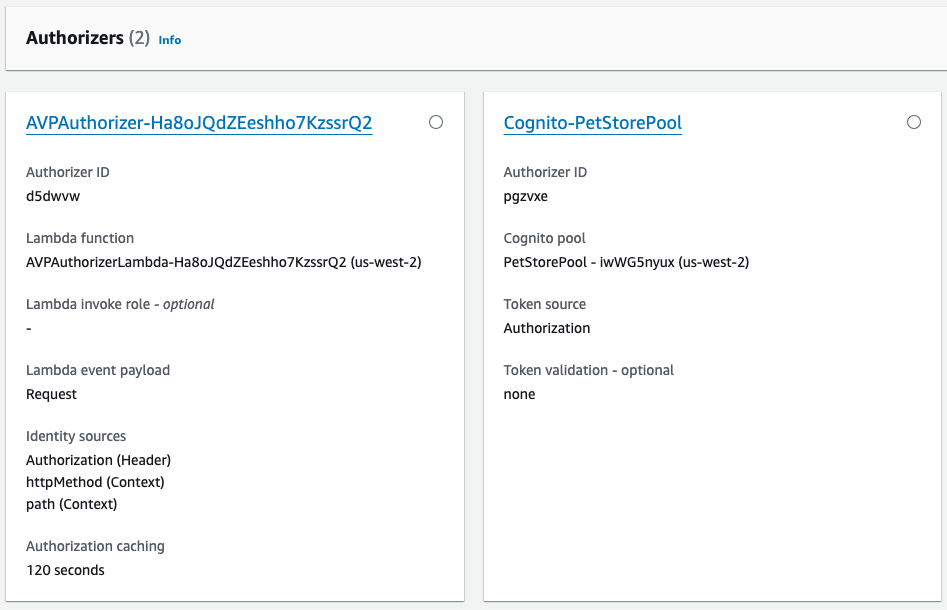
After the CloudFormation stack deployment completes and the second Cognito authorizer is created, there are two authorizers that can be attached to PetStore API resources, as shown in Figure 9.

Figure 9: PetStore API Authorizers

Figure 9: PetStore API Authorizers

In Figure 9, Cognito-PetStorePool is a Cognito user pool authorizer. Because this example uses an access token, an authorization scope (for example, a custom scope like petstore/api) is specified when attached to the GET /pets and GET /pets/{petId} resources.

AVPAuthorizer-XXX is a request parameter-based Lambda authorizer, which determines the caller’s identity from the configured identity sources. In Figure 9, these sources are Authorization (Header), httpMethod (Context), and path (Context). This authorizer is attached to the POST /pets and ANY /admin/{proxy+} resources. Authorization caching is initially set at 120 seconds and can be configured using the API Gateway console.

This combination of multiple authorizers and caching reduces the number of authorization requests to Verified Permissions. For API calls that are available to all authenticated users, using the Cognito-PetStorePool authorizer instead of a policy permitting the customers group helps avoid chargeable authorization requests to Verified Permissions. Applications where the users initiate the same action multiple times or have a predictable sequence of actions will experience high cache hit rates. For repeated API calls that use the same token, AVPAuthorizer-XXX caching results in lower latency, fewer requests per second, and reduced costs from chargeable requests. The use of caching can delay the time between policy updates and policy enforcement, meaning that the policy updates to Verified Permissions are not realized until the timeout or the FlushStageAuthorizersCache API is called.

Deployment architecture

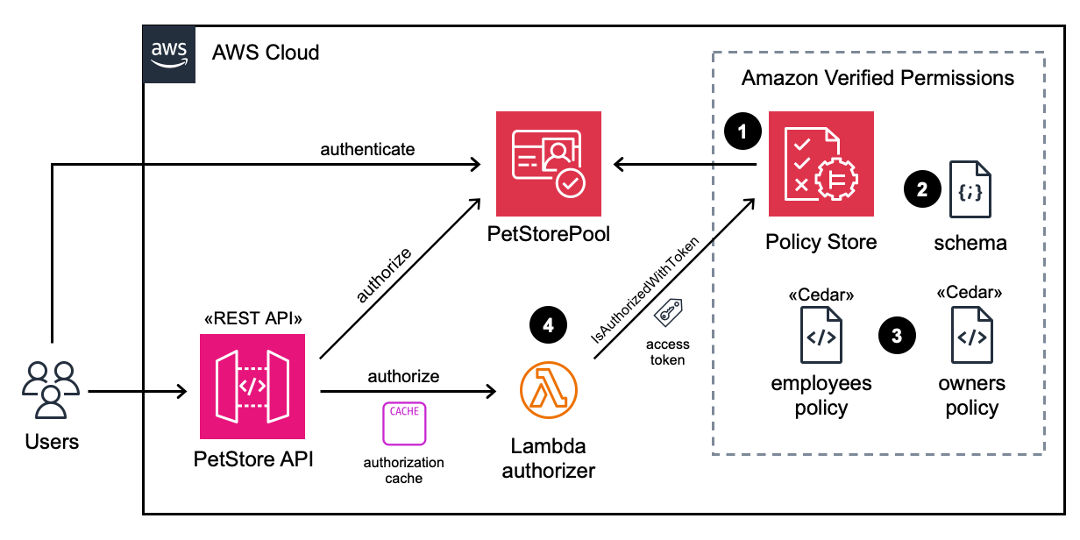
Figure 10 illustrates the runtime architecture after you have used the Verified Permissions setup wizard to perform the deployment and configuration steps. After the users are authenticated with the Cognito PetStorePool, API calls to the PetStore API are authorized with the Cognito access token. Fine-grained authorization is performed by Verified Permissions using a Lambda authorizer. The wizard automatically created the following four items for you, which are labelled in Figure 10:

  1. A Verified Permissions policy store that is connected to a Cognito identity source.
  2. A Cedar schema that defines the User and UserGroup entities, and an action for each API Gateway resource.
  3. Cedar policies that assign permissions for the employees and owners groups to related actions.
  4. A Lambda authorizer that is configured on the API Gateway.

Figure 10: Architecture diagram after deployment

Figure 10: Architecture diagram after deployment

Verified Permissions uses the Cedar policy language to define fine-grained permissions. The default decision for an authorization response is “deny.” The Cedar policies that are generated by the setup wizard can determine an “allow” decision. The principal for each policy is a UserGroup entity with an entity ID format of {user pool id}|{group name}. The action IDs for each policy represent the set of selected API Gateway HTTP methods and resource paths. Note that post /pets is permitted for both employees and owners. The resource in the policy scope is unspecified, because the resource is implicitly the application.

permit (
    principal in PetStore::UserGroup::"us-west-2_iwWG5nyux|employees",
    action in [PetStore::Action::"post /pets"],
    resource
);

permit (
    principal in PetStore::UserGroup::"us-west-2_iwWG5nyux|owners",
    action in
        [PetStore::Action::"delete /admin/{proxy+}",
         PetStore::Action::"post /admin/{proxy+}",
         PetStore::Action::"get /admin/{proxy+}",
         PetStore::Action::"patch /admin/{proxy+}",
         PetStore::Action::"put /admin/{proxy+}",
         PetStore::Action::"post /pets"],
    resource
);

Validating API security

A set of terminal-based curl commands validate API security for both authorized and unauthorized users, by using different access tokens. For readability, a set of environment variables is used to represent the actual values. TOKEN_C, TOKEN_E, and TOKEN_O contain valid access tokens for respective users in the customers, employees, and owners groups. API_STAGE is the base URL for the PetStore API and demo stage that we selected earlier.

To test that an unauthenticated user is allowed for the GET / root path (Requirement 1 as described in the Overview section of this post), but not allowed to call the GET /pets API (Requirement 2), run the following curl commands. The Cognito-PetStorePool authorizer should return {“message”:”Unauthorized”}.

curl -X GET ${API_STAGE}/
<html>
...Welcome to your Pet Store API...
</html>

curl -X GET ${API_STAGE}/pets
{"message":"Unauthorized"}

To test that an authenticated user is allowed to call the GET /pets API (Requirement 2) by using an access token (due to the Cognito-PetStorePool authorizer), run the following curl commands. The user should receive an error message when they try to call the POST /pets API (Requirement 3), because of the AVPAuthorizer. There are no Cedar polices defined for the customers group with the action post /pets.

curl -H "Authorization: Bearer ${TOKEN_C}" -X GET ${API_STAGE}/pets
[
  {
    "id": 1,
    "type": "dog",
    "price": 249.99
  },
  {
    "id": 2,
    "type": "cat",
    "price": 124.99
  },
  {
    "id": 3,
    "type": "fish",
    "price": 0.99
  }
]

curl -H "Authorization: Bearer ${TOKEN_C}" -X POST ${API_STAGE}/pets
{"Message":"User is not authorized to access this resource with an explicit deny"}

The following commands will verify that a user in the employees group is allowed the post /pets action (Requirement 3).

curl -H "Authorization: Bearer ${TOKEN_E}" \
     -H "Content-Type: application/json" \
     -d '{"type": "dog","price": 249.99}' \
     -X POST ${API_STAGE}/pets
{
  "pet": {
    "type": "dog",
    "price": 249.99
  },
  "message": "success"
}

The following commands will verify that a user in the employees group is not authorized for the admin APIs, but a user in the owners group is allowed (Requirement 4).

curl -H "Authorization: Bearer ${TOKEN_E}" -X GET ${API_STAGE}/admin/curltest1
{"Message":"User is not authorized to access this resource with an explicit deny"} 

curl -H "Authorization: Bearer ${TOKEN_O}" -X GET ${API_STAGE}/admin/curltest1
{"Message": "User authorized for /demo/admin/curltest1"}

Try it yourself

How could this work with your user pool and REST API? Before you try out the solution, make sure that you have the following prerequisites in place, which are required by the Verified Permissions setup wizard:

  1. A Cognito user pool, along with Cognito groups that control authorization to the API endpoints.
  2. An API Gateway REST API in the same Region as the Cognito user pool.

As you review the resources generated by the solution, consider these authorization modeling topics:

  • Are access tokens or id tokens preferable for your API? Are there custom claims on your tokens that you would use in future Cedar policies for fine-grained authorization?
  • Do multiple authorizers fit your model, or do you have an “all users” group for use in Cedar policies?
  • How might you extend the Cedar schema, allowing for new Cedar policies that include URL path parameters, such as {petId} from the example?

Conclusion

This post demonstrated how the Amazon Verified Permissions setup wizard provides you with a step-by-step process to build authorization logic for API Gateway REST APIs using Cognito user groups. The wizard generates a policy store, schema, and Cedar policies to manage access to API endpoints based on the specification of the APIs deployed. In addition, the wizard creates a Lambda authorizer that authorizes access to the API Gateway resources based on the configured Cognito groups. This removes the modeling effort required for initial configuration of API authorization logic and setup of Verified Permissions to receive permission requests. You can use the wizard to set up and test access controls to your APIs based on Cognito groups in non-production accounts. You can further extend the policy schema and policies to accommodate fine-grained or attribute-based access controls, based on specific requirements of the application, without making code changes.

If you have feedback about this post, submit comments in the Comments section below. If you have questions about this post, start a new thread on the Amazon Verified Permissions re:Post or contact AWS Support.

Kevin Hakanson

Kevin Hakanson

Kevin is a Senior Solutions Architect for AWS World Wide Public Sector, based in Minnesota. He works with EdTech and GovTech customers to ideate, design, validate, and launch products using cloud-native technologies and modern development practices. When not staring at a computer screen, he is probably staring at another screen, either watching TV or playing video games with his family.

sowjir-1.jpeg

Sowjanya Rajavaram

Sowjanya is a Senior Solutions Architect who specializes in identity and security solutions at AWS. Her career has been focused on helping customers of all sizes solve their identity and access management problems. She enjoys traveling and experiencing new cultures and food.

pfSense Plus 24.03 Released with a Big Default Password Update and More

Post Syndicated from Rohit Kumar original https://www.servethehome.com/pfsense-plus-24-03-released-netgate-silicom-intel-qat-with-a-big-default-password-update/

pfSense Plus 24.03 is out with many changes including a good one we tried out that changes how the default password works on pfSense Plus

The post pfSense Plus 24.03 Released with a Big Default Password Update and More appeared first on ServeTheHome.

Genomics workflows, Part 6: cost prediction

Post Syndicated from Rostislav Markov original https://aws.amazon.com/blogs/architecture/part-6-genomics-workflows-cost-prediction/

Genomics workflows run on large pools of compute resources and take petabyte-scale datasets as inputs. Workflow runs can cost as much as hundreds of thousands of US dollars. Given this large scale, scientists want to estimate the projected cost of their genomics workflow runs before deciding to launch them.

In Part 6 of this series, we build on the benchmarking concepts presented in Part 5. You will learn how to train machine learning (ML) models on historical data to predict the cost of future runs. While we focus on genomics, the design pattern is broadly applicable to any compute-intensive workflow use case.

Use case

In large life-sciences organizations, multiple research teams often use the same genomics applications. The actual cost of consuming shared resources is only periodically shown or charged back to research teams.

In this blog post’s scenario, scientists want to predict the cost of future workflow runs based on the following input parameters:

  • Workflow name
  • Input data set size
  • Expected output dataset size

In our experience, scientists might not know how to reliably estimate compute cost based on the preceding parameters. This is because workflow run cost doesn’t linearly correlate to the input dataset size. For example, some workflow steps might be highly parallelizable while others aren’t. Otherwise, scientists could simply use the AWS Pricing Calculator or interact programmatically with the AWS Price List API. To solve this problem, we use ML to model the pattern of correlation and predict workflow cost.

Business benefits of predicting the cost of genomics workflow runs

Price prediction brings the following benefits:

  • Prioritizing workflow runs based on financial impact
  • Promoting cost awareness and frugality with application users
  • Supporting enterprise resource planning and prevention of budget overruns by integrating estimation data into management reporting and approval workflows

Prerequisites

To build this solution, you must have workflows running on AWS for which you collect actual cost data after each workflow run. This setup is demonstrated in Part 3 and Part 5 of this blog series. This data provides training data for the solution’s cost prediction models.

Solution overview

This solution includes a friendly user interface, ML models that predict usage parameters, and a metadata storage mechanism to estimate the cost of a workflow run. We use the automated workflow manager presented in Part 3 and the benchmarking solution from Part 5. The data on historical workflow launches and their cost serves as training and testing data for our ML models. We store this in Amazon DynamoDB. We use AWS Amplify to host a serverless user interface and a library/framework such as React to build it.

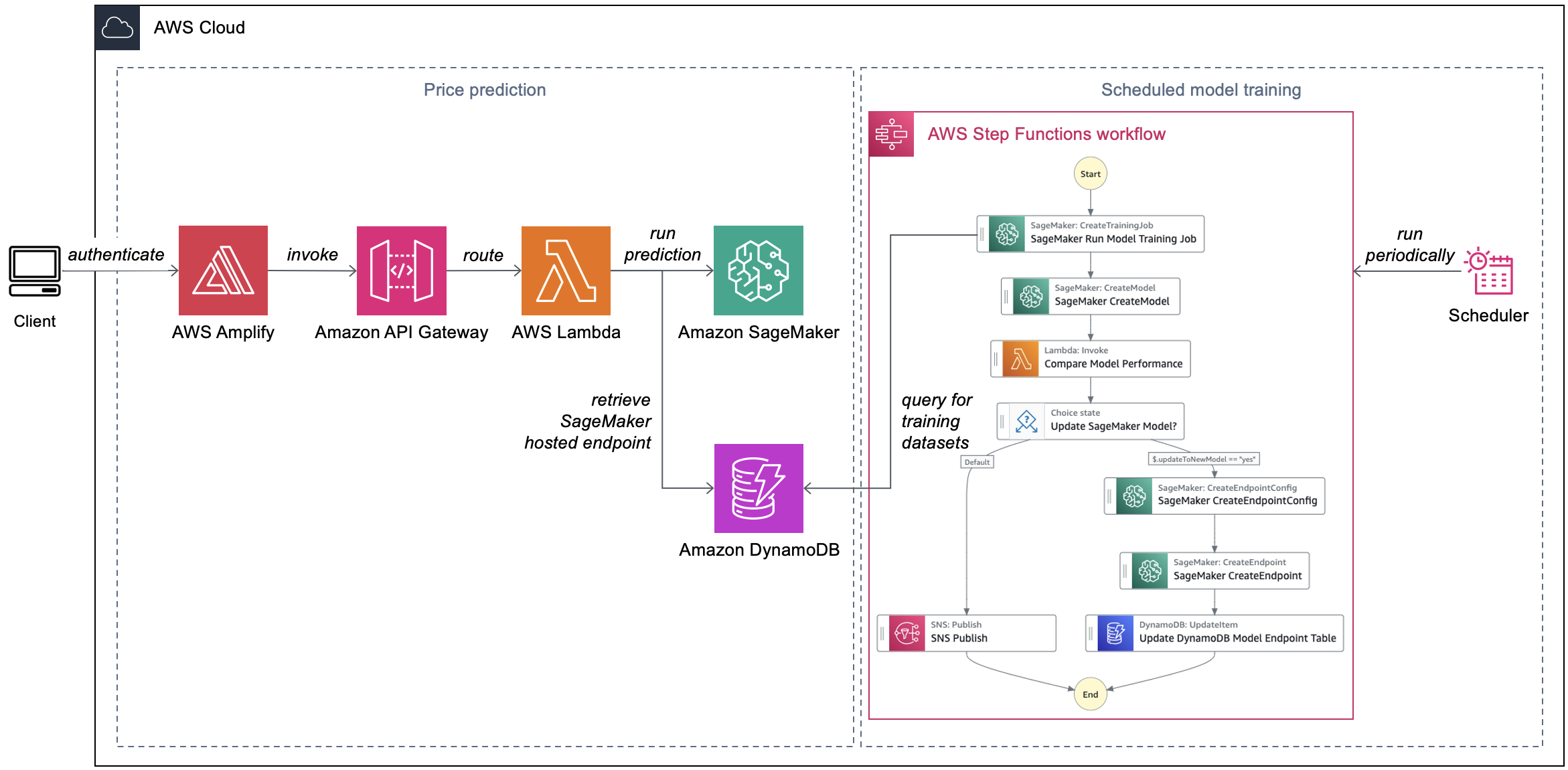
Scientists input the required parameters about their genomics workflow run to the Amplify frontend React application. The latter makes a request to an Amazon API Gateway REST API. This invokes an AWS Lambda function, which calls an Amazon SageMaker hosted endpoint to return predicted costs (Figure 1).

This visual summarizes the cost prediction and model training processes. Users request cost predictions for future workflow runs on a web frontend hosted in AWS Amplify. The frontend passes the requests to an Amazon API Gateway endpoint with Lambda integration. The Lambda function retrieves the suitable model endpoint from the DynamoDB table and invokes the model via the Amazon SageMaker API. Model training runs on a schedule and is orchestrated by an AWS Step Functions state machine. The state machine queries training datasets from the DynamoDB table. If the new model performs better, it is registered in the SageMaker model registry. Otherwise, the state machine sends a notification to an Amazon Simple Notification Service topic stating that there are no updates.

Figure 1. Automated cost prediction of genomics workflow runs

Each workflow captured in the DynamoDB table has a corresponding ML model trained for the specific use case. Separating out models for specific workflows simplifies the model development process. This solution periodically trains ML models to improve their overall accuracy and performance. A rule in Amazon EventBridge Scheduler invokes model training on a regular basis. An AWS Step Functions state machine automates the model training process.

Implementation considerations

When a scientist submits a request (which includes the name of the workflow they’re running), API Gateway uses Lambda integration. The Lambda function retrieves a record from the DynamoDB table that keeps track of the SageMaker hosted endpoints. The partition key of the table is the workflow name (indicated as workflow_name), as shown in the following example:

This visual displays an exemplary DynamoDB record. The record includes the Amazon SageMaker hosted endpoint that AWS Lambda would retrieve for a regenie workflow.

Using the input parameters, the Lambda function invokes the SageMaker hosted endpoint and returns the inference values back to the frontend.

Automating model training

Our Step Functions state machine for model training uses native SageMaker SDK integration. It runs as follows:

  1. The state machine invokes a SageMaker training job to train a new ML model. The training job uses the historical workflow run data sourced from the DynamoDB table. After the training job completes, it outputs the ML model to an Amazon Simple Storage Service (Amazon S3) bucket.
  2. The state machine registers the new model in the SageMaker model registry.
  3. A Lambda function compares the performance of the new model with the prior version on the training dataset.
  4. If the new model performs better than the prior model, the state machine creates a new SageMaker hosted endpoint configuration and puts the endpoint name in the DynamoDB table.
  5. Otherwise, the state machine sends a notification to an Amazon Simple Notification Service (Amazon SNS) topic stating that there are no updates.

Conclusion

In this blog post, we demonstrated how genomics research teams can build a price estimator to predict genomics workflow run cost. This solution trains ML models for each workflow based on data from historical workflow runs. A state machine helps automate the entire model training process. You can use price estimation to promote cost awareness in your organization and reduce the risk of budget overruns.

Our solution is particularly suitable if you want to predict the price of individual workflow runs. If you want forecast overall consumption of your shared application infrastructure, consider deploying a forecasting workflow with Amazon Forecast. The Build workflows for Amazon Forecast with AWS Step Functions blog post provides details on the specific use case for using Amazon Forecast workflows.

Related information

Run interactive workloads on Amazon EMR Serverless from Amazon EMR Studio

Post Syndicated from Sekar Srinivasan original https://aws.amazon.com/blogs/big-data/run-interactive-workloads-on-amazon-emr-serverless-from-amazon-emr-studio/

Starting from release 6.14, Amazon EMR Studio supports interactive analytics on Amazon EMR Serverless. You can now use EMR Serverless applications as the compute, in addition to Amazon EMR on EC2 clusters and Amazon EMR on EKS virtual clusters, to run JupyterLab notebooks from EMR Studio Workspaces.

EMR Studio is an integrated development environment (IDE) that makes it straightforward for data scientists and data engineers to develop, visualize, and debug analytics applications written in PySpark, Python, and Scala. EMR Serverless is a serverless option for Amazon EMR that makes it straightforward to run open source big data analytics frameworks such as Apache Spark without configuring, managing, and scaling clusters or servers.

In the post, we demonstrate how to do the following:

  • Create an EMR Serverless endpoint for interactive applications
  • Attach the endpoint to an existing EMR Studio environment
  • Create a notebook and run an interactive application
  • Seamlessly diagnose interactive applications from within EMR Studio

Prerequisites

In a typical organization, an AWS account administrator will set up AWS resources such as AWS Identity and Access management (IAM) roles, Amazon Simple Storage Service (Amazon S3) buckets, and Amazon Virtual Private Cloud (Amazon VPC) resources for internet access and access to other resources in the VPC. They assign EMR Studio administrators who manage setting up EMR Studios and assigning users to a specific EMR Studio. Once they’re assigned, EMR Studio developers can use EMR Studio to develop and monitor workloads.

Make sure you set up resources like your S3 bucket, VPC subnets, and EMR Studio in the same AWS Region.

Complete the following steps to deploy these prerequisites:

  1. Launch the following AWS CloudFormation stack.
    Launch Cloudformation Stack
  2. Enter values for AdminPassword and DevPassword and make a note of the passwords you create.
  3. Choose Next.
  4. Keep the settings as default and choose Next again.
  5. Select I acknowledge that AWS CloudFormation might create IAM resources with custom names.
  6. Choose Submit.

We have also provided instructions to deploy these resources manually with sample IAM policies in the GitHub repo.

Set up EMR Studio and a serverless interactive application

After the AWS account administrator completes the prerequisites, the EMR Studio administrator can log in to the AWS Management Console to create an EMR Studio, Workspace, and EMR Serverless application.

Create an EMR Studio and Workspace

The EMR Studio administrator should log in to the console using the emrs-interactive-app-admin-user user credentials. If you deployed the prerequisite resources using the provided CloudFormation template, use the password that you provided as an input parameter.

  1. On the Amazon EMR console, choose EMR Serverless in the navigation pane.
  2. Choose Get started.
  3. Select Create and launch EMR Studio.

This creates a Studio with the default name studio_1 and a Workspace with the default name My_First_Workspace. A new browser tab will open for the Studio_1 user interface.

Create and Launch EMR Studio

Create an EMR Serverless application

Complete the following steps to create an EMR Serverless application:

  1. On the EMR Studio console, choose Applications in the navigation pane.
  2. Create a new application.
  3. For Name, enter a name (for example, my-serverless-interactive-application).
  4. For Application setup options, select Use custom settings for interactive workloads.
    Create Serverless Application using custom settings

For interactive applications, as a best practice, we recommend keeping the driver and workers pre-initialized by configuring the pre-initialized capacity at the time of application creation. This effectively creates a warm pool of workers for an application and keeps the resources ready to be consumed, enabling the application to respond in seconds. For further best practices for creating EMR Serverless applications, see Define per-team resource limits for big data workloads using Amazon EMR Serverless.

  1. In the Interactive endpoint section, select Enable Interactive endpoint.
  2. In the Network connections section, choose the VPC, private subnets, and security group you created previously.

If you deployed the CloudFormation stack provided in this post, choose emr-serverless-sg­  as the security group.

A VPC is needed for the workload to be able to access the internet from within the EMR Serverless application in order to download external Python packages. The VPC also allows you to access resources such as Amazon Relational Database Service (Amazon RDS) and Amazon Redshift that are in the VPC from this application. Attaching a serverless application to a VPC can lead to IP exhaustion in the subnet, so make sure there are sufficient IP addresses in your subnet.

  1. Choose Create and start application.

Enable Interactive Endpoints, Choose private subnets and security group

On the applications page, you can verify that the status of your serverless application changes to Started.

  1. Select your application and choose How it works.
  2. Choose View and launch workspaces.
  3. Choose Configure studio.

  1. For Service role¸ provide the EMR Studio service role you created as a prerequisite (emr-studio-service-role).
  2. For Workspace storage, enter the path of the S3 bucket you created as a prerequisite (emrserverless-interactive-blog-<account-id>-<region-name>).
  3. Choose Save changes.

Choose emr-studio-service-role and emrserverless-interactive-blog s3 bucket

14.  Navigate to the Studios console by choosing Studios in the left navigation menu in the EMR Studio section. Note the Studio access URL from the Studios console and provide it to your developers to run their Spark applications.

Run your first Spark application

After the EMR Studio administrator has created the Studio, Workspace, and serverless application, the Studio user can use the Workspace and application to develop and monitor Spark workloads.

Launch the Workspace and attach the serverless application

Complete the following steps:

  1. Using the Studio URL provided by the EMR Studio administrator, log in using the emrs-interactive-app-dev-user user credentials shared by the AWS account admin.

If you deployed the prerequisite resources using the provided CloudFormation template, use the password that you provided as an input parameter.

On the Workspaces page, you can check the status of your Workspace. When the Workspace is launched, you will see the status change to Ready.

  1. Launch the workspace by choosing the workspace name (My_First_Workspace).

This will open a new tab. Make sure your browser allows pop-ups.

  1. In the Workspace, choose Compute (cluster icon) in the navigation pane.
  2. For EMR Serverless application, choose your application (my-serverless-interactive-application).
  3. For Interactive runtime role, choose an interactive runtime role (for this post, we use emr-serverless-runtime-role).
  4. Choose Attach to attach the serverless application as the compute type for all the notebooks in this Workspace.

Choose my-serverless-interactive-application as your app and emr-serverless-runtime-role and attach

Run your Spark application interactively

Complete the following steps:

  1. Choose the Notebook samples (three dots icon) in the navigation pane and open Getting-started-with-emr-serverless notebook.
  2. Choose Save to Workspace.

There are three choices of kernels for our notebook: Python 3, PySpark, and Spark (for Scala).

  1. When prompted, choose PySpark as the kernel.
  2. Choose Select.

Choose PySpark as kernel

Now you can run your Spark application. To do so, use the %%configure Sparkmagic command, which configures the session creation parameters. Interactive applications support Python virtual environments. We use a custom environment in the worker nodes by specifying a path for a different Python runtime for the executor environment using spark.executorEnv.PYSPARK_PYTHON. See the following code:

%%configure -f
{
  "conf": {
    "spark.pyspark.virtualenv.enabled": "true",
    "spark.pyspark.virtualenv.bin.path": "/usr/bin/virtualenv",
    "spark.pyspark.virtualenv.type": "native",
    "spark.pyspark.python": "/usr/bin/python3",
    "spark.executorEnv.PYSPARK_PYTHON": "/usr/bin/python3"
  }
}

Install external packages

Now that you have an independent virtual environment for the workers, EMR Studio notebooks allow you to install external packages from within the serverless application by using the Spark install_pypi_package function through the Spark context. Using this function makes the package available for all the EMR Serverless workers.

First, install matplotlib, a Python package, from PyPi:

sc.install_pypi_package("matplotlib")

If the preceding step doesn’t respond, check your VPC setup and make sure it is configured correctly for internet access.

Now you can use a dataset and visualize your data.

Create visualizations

To create visualizations, we use a public dataset on NYC yellow taxis:

file_name = "s3://athena-examples-us-east-1/notebooks/yellow_tripdata_2016-01.parquet"
taxi_df = (spark.read.format("parquet").option("header", "true") \
.option("inferSchema", "true").load(file_name))

In the preceding code block, you read the Parquet file from a public bucket in Amazon S3. The file has headers, and we want Spark to infer the schema. You then use a Spark dataframe to group and count specific columns from taxi_df:

taxi1_df = taxi_df.groupBy("VendorID", "passenger_count").count()
taxi1_df.show()

Use %%display magic to view the result in table format:

%%display
taxi1_df

Table shows vendor_id, passenger_count and count columns

You can also quickly visualize your data with five types of charts. You can choose the display type and the chart will change accordingly. In the following screenshot, we use a bar chart to visualize our data.

bar chart showing passenger_count against each vendor_id

Interact with EMR Serverless using Spark SQL

You can interact with tables in the AWS Glue Data Catalog using Spark SQL on EMR Serverless. In the sample notebook, we show how you can transform data using a Spark dataframe.

First, create a new temporary view called taxis. This allows you to use Spark SQL to select data from this view. Then create a taxi dataframe for further processing:

taxi_df.createOrReplaceTempView("taxis")
sqlDF = spark.sql(
    "SELECT DOLocationID, sum(total_amount) as sum_total_amount \
     FROM taxis where DOLocationID < 25 Group by DOLocationID ORDER BY DOLocationID"
)
sqlDF.show(5)

Table shows vendor_id, passenger_count and count columns

In each cell in your EMR Studio notebook, you can expand Spark Job Progress to view the various stages of the job submitted to EMR Serverless while running this specific cell. You can see the time taken to complete each stage. In the following example, stage 14 of the job has 12 completed tasks. In addition, if there is any failure, you can see the logs, making troubleshooting a seamless experience. We discuss this more in the next section.

Job[14]: showString at NativeMethodAccessorImpl.java:0 and Job[15]: showString at NativeMethodAccessorImpl.java:0

Use the following code to visualize the processed dataframe using the matplotlib package. You use the maptplotlib library to plot the dropoff location and the total amount as a bar chart.

import matplotlib.pyplot as plt
import numpy as np
import pandas as pd
plt.clf()
df = sqlDF.toPandas()
plt.bar(df.DOLocationID, df.sum_total_amount)
%matplot plt

Diagnose interactive applications

You can get the session information for your Livy endpoint using the %%info Sparkmagic. This gives you links to access the Spark UI as well as the driver log right in your notebook.

The following screenshot is a driver log snippet for our application, which we opened via the link in our notebook.

driver log screenshot

Similarly, you can choose the link below Spark UI to open the UI. The following screenshot shows the Executors tab, which provides access to the driver and executor logs.

The following screenshot shows stage 14, which corresponds to the Spark SQL step we saw earlier in which we calculated the location wise sum of total taxi collections, which had been broken down into 12 tasks. Through the Spark UI, the interactive application provides fine-grained task-level status, I/O, and shuffle details, as well as links to corresponding logs for each task for this stage right from your notebook, enabling a seamless troubleshooting experience.

Clean up

If you no longer want to keep the resources created in this post, complete the following cleanup steps:

  1. Delete the EMR Serverless application.
  2. Delete the EMR Studio and the associated workspaces and notebooks.
  3. To delete rest of the resources, navigate to CloudFormation console, select the stack, and choose Delete.

All of the resources will be deleted except the S3 bucket, which has its deletion policy set to retain.

Conclusion

The post showed how to run interactive PySpark workloads in EMR Studio using EMR Serverless as the compute. You can also build and monitor Spark applications in an interactive JupyterLab Workspace.

In an upcoming post, we’ll discuss additional capabilities of EMR Serverless Interactive applications, such as:

  • Working with resources such as Amazon RDS and Amazon Redshift in your VPC (for example, for JDBC/ODBC connectivity)
  • Running transactional workloads using serverless endpoints

If this is your first time exploring EMR Studio, we recommend checking out the Amazon EMR workshops and referring to Create an EMR Studio.


About the Authors

Sekar Srinivasan is a Principal Specialist Solutions Architect at AWS focused on Data Analytics and AI. Sekar has over 20 years of experience working with data. He is passionate about helping customers build scalable solutions modernizing their architecture and generating insights from their data. In his spare time he likes to work on non-profit projects, focused on underprivileged Children’s education.

Disha Umarwani is a Sr. Data Architect with Amazon Professional Services within Global Health Care and LifeSciences. She has worked with customers to design, architect and implement Data Strategy at scale. She specializes in architecting Data Mesh architectures for Enterprise platforms.

GitHub comments used to distribute malware (BleepingComputer)

Post Syndicated from daroc original https://lwn.net/Articles/971008/

BleepingComputer

reported
on April 20 that some malware was being distributed via GitHub.
Uploading files as part of a comment gives them a URL that appears to be
associated with a repository, even if the comment is never posted.

A GitHub flaw, or possibly a design decision, is being abused by threat actors
to distribute malware using URLs associated with Microsoft repositories, making
the files appear trustworthy.

While most of the malware activity has been based around the Microsoft GitHub
URLs, this “flaw” could be abused with any public repository on GitHub, allowing
threat actors to create very convincing lures.

A new crash reporter for Firefox

Post Syndicated from daroc original https://lwn.net/Articles/971006/

On April 23, Mozilla

announced
that Firefox’s crash reporter has been rewritten in Rust, allowing the
project to address a backlog of issues.

Even though it is important to properly handle main process crashes, the crash
reporter hasn’t received significant development in a while (aside from
development to ensure that crash reports and telemetry continue to reliably be
delivered)! It has long been stuck in a local maximum of “good enough” and
“scary to maintain”: it features 3 individual GUI implementations (for Windows,
GTK+ for Linux, and macOS), glue code abstracting a few things (mostly in C++,
and Objective-C for macOS), a binary blob produced by obsoleted Apple
development tools, and no test suite. Because of this, there is a backlog of
features and improvements which haven’t been acted on.

[$] Existential types in Rust

Post Syndicated from daroc original https://lwn.net/Articles/970186/

For several years, contributors to the Rust project have
been working to improve support for asynchronous
code. The benefits of these efforts are not confined to asynchronous code,
however. Members of the Rust community have been working toward adding explicit

existential types
to Rust since 2017. Existential types are not a common feature
of programming languages (something

the RFC
acknowledges), so the motivation for their inclusion might be somewhat
obscure.

Security updates for Wednesday

Post Syndicated from jzb original https://lwn.net/Articles/971004/

Security updates have been issued by Fedora (abseil-cpp, chromium, filezilla, libfilezilla, and xorg-x11-server-Xwayland), Oracle (firefox, gnutls, golang, java-1.8.0-openjdk, java-11-openjdk, java-17-openjdk, java-21-openjdk, kernel, libreswan, mod_http2, owO: thunderbird, and thunderbird), Red Hat (container-tools:rhel8, gnutls, grub2, kernel, kernel-rt, less, linux-firmware, opencryptoki, pcs, postgresql-jdbc, and thunderbird), Slackware (ruby), SUSE (kubernetes1.23, kubernetes1.24, and opensc), and Ubuntu (firefox, linux-azure, linux-lowlatency, linux-nvidia, and ruby-sanitize).

Dan Solove on Privacy Regulation

Post Syndicated from Bruce Schneier original https://www.schneier.com/blog/archives/2024/04/dan-solove-on-privacy-regulation.html

Law professor Dan Solove has a new article on privacy regulation. In his email to me, he writes: “I’ve been pondering privacy consent for more than a decade, and I think I finally made a breakthrough with this article.” His mini-abstract:

In this Article I argue that most of the time, privacy consent is fictitious. Instead of futile efforts to try to turn privacy consent from fiction to fact, the better approach is to lean into the fictions. The law can’t stop privacy consent from being a fairy tale, but the law can ensure that the story ends well. I argue that privacy consent should confer less legitimacy and power and that it be backstopped by a set of duties on organizations that process personal data based on consent.

Full abstract:

Consent plays a profound role in nearly all privacy laws. As Professor Heidi Hurd aptly said, consent works “moral magic”—it transforms things that would be illegal and immoral into lawful and legitimate activities. As to privacy, consent authorizes and legitimizes a wide range of data collection and processing.

There are generally two approaches to consent in privacy law. In the United States, the notice-and-choice approach predominates; organizations post a notice of their privacy practices and people are deemed to consent if they continue to do business with the organization or fail to opt out. In the European Union, the General Data Protection Regulation (GDPR) uses the express consent approach, where people must voluntarily and affirmatively consent.

Both approaches fail. The evidence of actual consent is non-existent under the notice-and-choice approach. Individuals are often pressured or manipulated, undermining the validity of their consent. The express consent approach also suffers from these problems ­ people are ill-equipped to decide about their privacy, and even experts cannot fully understand what algorithms will do with personal data. Express consent also is highly impractical; it inundates individuals with consent requests from thousands of organizations. Express consent cannot scale.

In this Article, I contend that most of the time, privacy consent is fictitious. Privacy law should take a new approach to consent that I call “murky consent.” Traditionally, consent has been binary—an on/off switch—but murky consent exists in the shadowy middle ground between full consent and no consent. Murky consent embraces the fact that consent in privacy is largely a set of fictions and is at best highly dubious.

Because it conceptualizes consent as mostly fictional, murky consent recognizes its lack of legitimacy. To return to Hurd’s analogy, murky consent is consent without magic. Rather than provide extensive legitimacy and power, murky consent should authorize only a very restricted and weak license to use data. Murky consent should be subject to extensive regulatory oversight with an ever-present risk that it could be deemed invalid. Murky consent should rest on shaky ground. Because the law pretends people are consenting, the law’s goal should be to ensure that what people are consenting to is good. Doing so promotes the integrity of the fictions of consent. I propose four duties to achieve this end: (1) duty to obtain consent appropriately; (2) duty to avoid thwarting reasonable expectations; (3) duty of loyalty; and (4) duty to avoid unreasonable risk. The law can’t make the tale of privacy consent less fictional, but with these duties, the law can ensure the story ends well.

Learning from our hybrid training programme for youth and community organisations

Post Syndicated from Mirnali Koneswaran original https://www.raspberrypi.org/blog/learning-from-our-hybrid-training-programme-for-youth-and-community-organisations/

At the Raspberry Pi Foundation, we aim to democratise access to digital skills and technologies. One of the ways we do this is via partnerships with youth and community organisations that deliver frontline services to young people experiencing educational disadvantage.

Two smiling adults at a computer.

In 2023 we delivered a hybrid training programme to 14 youth organisations in the UK to help youth leaders and educators incorporate coding and digital making activities into their provision to young people. The training programme was supported by Amazon Future Engineer. In this blog, we summarise what we’ve learned from our evaluation of the training and its impact.

Youth workers feel prepared to run digital making activities

In total, 29 youth leaders and educators participated in the training, which consisted of 12 modules delivered across 4 online sessions and one in-person day. We asked participants to complete surveys at several points throughout the programme to enable us to explore their feedback, the training’s impact on their confidence in facilitating computing sessions, and their experiences of running activities with young people.

The educators on this programme were already well motivated to run digital making sessions. But one of the main challenges youth organisations report to us most often is that their staff and volunteers need more confidence in their ability to deliver coding activities on an ongoing basis. It was therefore great to see that, following the training, every participant felt at least moderately prepared to run coding activities, with 2 out of every 5 participants feeling very prepared. Furthermore, we recorded positive impact of the training on participants’ readiness: after the training, 4 out of every 5 participants agreed they had the skills they needed to facilitate activities for young people.

“It was pitched right for the majority of attendees with no knowledge of Scratch[.]” – Karl Nicholson, Manchester Youth Zone

The training was well received

Educators found the training to be high quality and, in almost all cases, beneficial. Participants reported that attending two online sessions in preparation for the in-person training day had improved their experience of the in-person activites.

“It was really great. The online courses are excellent and being in-person to get answers to questions really helped. The tinkering was really useful and having people on hand to answer questions [was] massively helpful.” – Liam Garnett, Leeds Libraries

Some participants told us they struggled with the second online training session. This may be because it contained more challenging content: moving from block-based coding (Scratch) to text-based coding (Python), a transition we know many people new to programming can find difficult.

This feedback has helped inform the next iteration of our training programme for youth and community organisations.

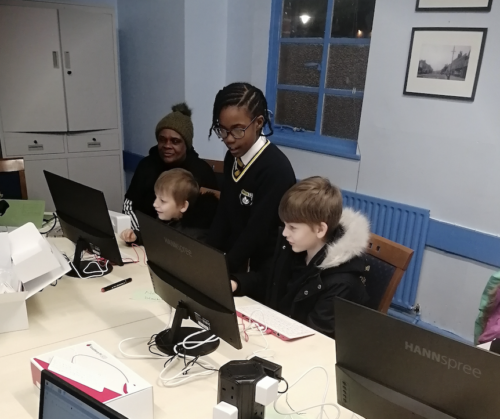
A Learning Manager is supporting two adult educators during a training session.

Youth workers are now running digital making sessions

Since the training, attendees across the 14 organisations have reported that, so far, 39 digital making sessions have taken place, reaching 422 young people. Youth leaders and educators who have already run sessions also told us they intend to continue with coding and digital making activities with their young people in the future.

Young learners in a coding club.

Among these youth leaders was Marie Henry, founder of Breadline London, a grassroots charitable organisation based in Haringey, London, that supports families and young people to break the cycle of poverty through financial education, training, and practical workshops.

Since the training programme, Marie has gone on to start a regular coding club in her local area.

“We are immensely grateful to the Raspberry Pi Foundation team for their encouragement and unwavering support in empowering us to launch our own coding club. Their guidance, expertise, hands-on training workshops, and provision of essential equipment and devices have been instrumental in our journey towards building a positive community for our young coders.

With their help, we’ve gained the confidence, knowledge, and skills needed to inspire the next generation of coders and innovators. We still have a lot to learn, but with them by our side, we are confident that our coding club will be a great success.

Thank you, Raspberry Pi Foundation, for believing in our vision and helping us turn it into reality.” – Marie Henry, Founder of Breadline London

Some of the organisations that participated in the training have not yet run sessions, but plan to start delivery within the next 1 to 3 months. They continue to face some logistical challenges, ranging from staff shortages and volunteer availability, to encouraging local young people with limited prior exposure to computing to join the digital making activities. We are continuing to support these organisations to get up and running as soon as possible.

“Oh my what a great coding after school session I’ve had this afternoon…Scratch not only sets a starting point for children in their ITC learning, but is also a fun way to learn and build on skills they can take with them as they grow.

Planting the seeds of aspirations!” – Heather Coultard, Doncaster Children’s University

Our ongoing support to youth and community organisations

Our previous blog highlighted the importance of increasing young people’s sense of belonging within a coding club environment, to appeal to marginalised youth. Our findings suggest we are on the right track. Overall, participants felt positive about the training and found it to be of high quality, and it has helped them to deliver digital making sessions to young people in their communities. The organisations’ detailed feedback and impact reporting will continue to inform and improve the development of our training programmes going forward.

We thank Amazon Future Engineer for helping us run this rewarding programme. 

For more information about how we can support youth and community organisations in the UK in starting their coding clubs, please send us a message on the subject ‘Partnerships’.

The post Learning from our hybrid training programme for youth and community organisations appeared first on Raspberry Pi Foundation.

Критика към изследване на законодателната дейност на Юридически барометър

Post Syndicated from Bozho original https://blog.bozho.net/blog/4263

Вчера беше представено изследването на Юридически барометър за законодателните практики на този парламент. Заключенията в него и извадените заглавия са силно негативни. С ясното съзнание, че при ниското доверие към парламента всеки опит за влизане в конкретика е обречен, все пак искам да критикувам методиката на изслевдането, ръководено от Даниел Вълчев.

Изследването разглежда законодателната дейност през основната метрика „изменение на закон“. На база на това се градят всички наблюдения и заключения за това колко закони са изменени, колко бързо се изменят, колко често се изменят, колко пъти се изменя един закон и т.н.

Смятам, че тази методика е погрешна и не отразява реалния законодателен процес. В този смисъл, всички закючения на нейна база са подвеждащи.

„Изменение на закон“ може да са 50 параграфа изменителни разпоредби, които променят фундаментално закона, а може да е промяна на една дума. Такъв е примера с цитирания в изследването Закон за акцизите и данъчните складове, в който поне две от измененията са по 1 дума – промяна на термин („ветеринарномедицински продукти“ с „ветеринарни лекарствени продукти“) и промяна на име на министерство.

Далеч по-коректни мерни единици биха били „разпоредба“, „норма“ или „изменителен параграф“. Да, това изисква по-задълбочен, вкл. технически-асистиран анализ на текстовете, но ще даде далеч по-прецизна картина.

Също така, изследването правилно посочва, че големият брой изменения с „преходни и заключителни разпоредби“ се дължи на конкретно два закона, които изменят по 70 други, заради смяна на име на институция, но противно на логиката, тези „гранични случаи“ не са изключени от данните.

Некоректно и твърдението в изследването, че няма обществено обсъждане на внесените законопроекти от народни представители – по правилник такова се провежда на първо гласуване във водещата комисия, като по повечето закони постъпват становища от заинтересованите страни.

Ако някой иска да изследва законодателния процес сериозно, ето няколко идеи, освен основната метрика: изменения, направени устно в пленарна зала или в комисия на второ четене; изменения в други закони, добавени между първо и второ четене, разделяне на националното законодателство от европейското (защото е нормално европейските директиви да минават по-бързо), брой получени становища от заинтересовани страни; наличие на мотиви към предложения между четенията; последователни промени в едни и същи части на законите (глави/раздели/членове). Знам, че не е лесно, но ако някой има претенция да прави заключения за законодателния процес, трябва да го изследва наистина задълбочено. И тогава ще излязат други, правилни и разумни критики.

Материалът Критика към изследване на законодателната дейност на Юридически барометър е публикуван за пръв път на БЛОГодаря.

The collective thoughts of the interwebz