Tag Archives: AWS Config

Find Public IPs of Resources – Use AWS Config for Vulnerability Assessment

Post Syndicated from Gurkamal Deep Singh Rakhra original https://aws.amazon.com/blogs/architecture/find-public-ips-of-resources-use-aws-config-for-vulnerability-assessment/

Systems vulnerability management is a key component of your enterprise security program. Its goal is to remediate OS, software, and applications vulnerabilities. Scanning tools can help identify and classify these vulnerabilities to keep the environment secure and compliant.

Typically, vulnerability scanning tools operate from internal or external networks to discover and report vulnerabilities. For internal scanning, the tools use private IPs of target systems in scope. For external scans, the public target system’s IP addresses are used. It is important that security teams always maintain an accurate inventory of all deployed resource’s IP addresses. This ensures a comprehensive, consistent, and effective vulnerability assessment.

This blog discusses a scalable, serverless, and automated approach to discover public IP addresses assigned to resources in a single or multi-account environment in AWS, using AWS Config.

Single account is when you have all your resources in a single AWS account. A multi-account environment refers to many accounts under the same AWS Organization.

Understanding scope of solution

You may have good visibility into the private IPs assigned to your resources: Amazon Elastic Compute Cloud (Amazon EC2), Amazon Elastic Kubernetes Service (EKS) clusters, Elastic Load Balancing (ELB), and Amazon Elastic Container Service (Amazon ECS). But it may require some effort to establish a complete view of the existing public IPs. And these IPs can change over time, as new systems join and exit the environment.

An elastic network interface is a logical networking component in a Virtual Private Cloud (VPC) that represents a virtual network card. The elastic network interface routes traffic to other destinations/resources. Usually, you have to make Describe* API calls for the specific resource with an elastic network interface to get information about its configuration and IP address. This may throttle the resource-specific API calls, and result in higher costs. Additionally, if there are tens or hundreds of accounts, it becomes exponentially more difficult to get the information into a single inventory.

AWS Config enables you to assess, audit, and evaluate the configurations of your AWS resources. The advanced query feature provides a single query endpoint and language to get current resource state metadata for a single account and Region, or multiple accounts and Regions. You can use configuration aggregators to run the same queries from a central account across multiple accounts and AWS Regions.

AWS Config supports a subset of structured query language (SQL) SELECT syntax, which enables you to perform property-based queries and aggregations on the current configuration item (CI) data. Advanced query is available at no additional cost to AWS Config customers in all AWS Regions (except China Regions) and AWS GovCloud (US).

AWS Organizations helps you centrally govern your environment. Its integration with other AWS services lets you define central configurations, security mechanisms, audit requirements, and resource sharing across accounts in your organization.

Choosing scope of advanced queries in AWS Config

When running advanced queries in AWS Config, you must choose the scope of the query. The scope defines the accounts you want to run the query against and is configured when you create an aggregator.

Following are the three possible scopes when running advanced queries:

  1. Single account and single Region
  2. Multiple accounts and multiple Regions
  3. AWS Organization accounts

Single account and single Region

Figure 1. AWS Config workflow for single account and single Region

Figure 1. AWS Config workflow for single account and single Region

The use case shown in Figure 1 addresses the need of customers operating within a single account and single Region. With AWS Config enabled for the individual account, you will use AWS Config advanced query feature to run SQL queries. These will give you resource metadata about associated public IPs. You do not require an aggregator for single-account and single Region.

In Figure 1.1, the advanced query returned results from a single account and all Availability Zones within the Region in which the query was run.

Figure 1.1 Advanced query returning results for a single account and single Region

Figure 1.1 Advanced query returning results for a single account and single Region

Query for reference

SELECT

  resouceId,

  resourceName,

  resourceType,

  configuration.association.publicIp,

  availabilityZone,

  awsRegion

WHERE

  resourceType='AWS::EC2::NetworkInterface'

  AND configuration.association.publicIp>'0.0.0.0'

This query is fetching the properties of all elastic network interfaces. The WHERE condition is used to list the elastic network interfaces using the resourceType property and find all public IPs greater than 0.0.0.0. This is because elastic network interfaces can exist with a private IP, in which case there will be no public IP assigned to it. For a list of supported resourceType, refer to supported resource types for AWS Config.

Multiple accounts and multiple Regions

Figure 2. AWS Config monitoring workflow for multiple account and multiple Regions. The figure shows EC2, EKS, and Amazon ECS, but it can be any AWS resource having a public elastic network interface.

Figure 2. AWS Config monitoring workflow for multiple account and multiple Regions. The figure shows EC2, EKS, and Amazon ECS, but it can be any AWS resource having a public elastic network interface.

AWS Config enables you to monitor configuration changes against multiple accounts and multiple Regions via an aggregator, see Figure 2. An aggregator is an AWS Config resource type that collects AWS Config data from multiple accounts and Regions. You can choose the aggregator scope when running advanced queries in AWS Config. Remember to authorize the aggregator accounts to collect AWS Config configuration and compliance data.

Figure 2.1 Advanced query returning results from multiple Regions (awsRegion column) as highlighted in the diagram

Figure 2.1 Advanced query returning results from multiple Regions (awsRegion column) as highlighted in the diagram

This use case applies when you have AWS resources in multiple accounts (or span multiple organizations) and multiple Regions. Figure 2.1 shows the query results being returned from multiple AWS Regions.

Accounts in AWS Organization

Figure 3. The workflow of accounts in an AWS Organization being monitored by AWS Config. This figure shows EC2, EKS, and Amazon ECS but it can be any AWS resource having a public elastic network interface.

Figure 3. The workflow of accounts in an AWS Organization being monitored by AWS Config. This figure shows EC2, EKS, and Amazon ECS but it can be any AWS resource having a public elastic network interface.

An aggregator also enables you to monitor all the accounts in your AWS Organization, see Figure 3. When this option is chosen, AWS Config enables you to run advanced queries against the configuration history in all the accounts in your AWS Organization. Remember that an aggregator will only aggregate data from the accounts and Regions that are specified when the aggregator is created.

Figure 3.1 Advanced query returning results from all accounts (accountId column) under an AWS Organization

Figure 3.1 Advanced query returning results from all accounts (accountId column) under an AWS Organization

In Figure 3.1, the query is run against all accounts in an AWS Organization. This scope of AWS Organization is accomplished by the aggregator and it automatically accumulates data from all accounts under a specific AWS Organization.

Common architecture workflow for discovering public IPs

Figure 4. High-level architecture pattern for discovering public IPs

Figure 4. High-level architecture pattern for discovering public IPs

The workflow shown in Figure 4 starts with Amazon EventBridge triggering an AWS Lambda function. You can configure an Amazon EventBridge schedule via rate or cron expressions, which define the frequency. This AWS Lambda function will host the code to make an API call to AWS Config that will run an advanced query. The advanced query will check for all elastic network interfaces in your account(s). This is because any public resource launched in your account will be assigned an elastic network interface.

When the results are returned, they can be stored on Amazon S3. These result files can be timestamped (via naming or S3 versioning) in order to keep a history of public IPs used in your account. The result set can then be fed into or accessed by the vulnerability scanning tool of your choice.

Note: AWS Config advanced queries can also be used to query IPv6 addresses. You can use the “configuration.ipv6Addresses” AWS Config property to get IPv6 addresses. When querying IPv6 addresses, remove “configuration.association.publicIp > ‘0.0.0.0’” condition from the preceding sample queries. For more information on available AWS Config properties and data types, refer to GitHub.

Conclusion

In this blog, we demonstrated how to extract public IP information from resources deployed in your account(s) using AWS Config and AWS Config advanced query. We discussed how you can support your vulnerability scanning process by identifying public IPs in your account(s) that can be fed into your scanning tool. This solution is serverless, automated, and scalable, which removes the undifferentiated heavy lifting required to manage your resources.

Learn more about AWS Config best practices:

Operating serverless at scale: Keeping control of resources – Part 3

Post Syndicated from James Beswick original https://aws.amazon.com/blogs/compute/operating-serverless-at-scale-keeping-control-of-resources-part-3/

This post is written by Jerome Van Der Linden, Solutions Architect.

In the previous part of this series, I provide application archetypes for developers to follow company best practices and include libraries needed for compliance. But using these archetypes is optional and teams can still deploy resources without them. Even if they use them, the templates can be modified. Developers can remove a layer, over-permission functions, or allow access to APIs without appropriate authorization.

To avoid this, you must define guardrails. Templates are good for providing guidance, best practices and to improve productivity. But they do not prevent actions like guardrails do. There are two kinds of guardrails:

  • Proactive: you define rules and permissions that avoid some specific actions.
  • Reactive: you define controls that detect if something happens and trigger notifications to alert someone or remediate actions.

This third part on serverless governance describes different guardrails and ways to implement them.

Implementing proactive guardrails

Proactive guardrails are often the most efficient but also the most restrictive. Be sure to apply them with caution as you could reduce developers’ agility and productivity. For example, test in a sandbox account before applying more broadly.

In this category, you typically find IAM policies and service control policies. This section explores some examples applied to serverless applications.

Controlling access through policies

Part 2 discusses Lambda layers, to include standard components and ensure compliance of Lambda functions. You can enforce the use of a Lambda layer when creating or updating a function, using the following policy. The condition checks if a layer is configured with the appropriate layer ARN:

{
    "Version": "2012-10-17",
    "Statement": [
        {
            "Sid": "ConfigureFunctions",
            "Effect": "Allow",
            "Action": [
                "lambda:CreateFunction",
                "lambda:UpdateFunctionConfiguration"
            ],
            "Resource": "*",
            "Condition": {
                "ForAllValues:StringLike": {
                    "lambda:Layer": [
                        "arn:aws:lambda:*:123456789012:layer:my-company-layer:*"
                    ]
                }
            }
        }
    ]
}

When deploying Lambda functions, some companies also want to control the source code integrity and verify it has not been altered. Using code signing for AWS Lambda, you can sign the package and verify its signature at deployment time. If the signature is not valid, you can be warned or even block the deployment.

An administrator must first create a signing profile (you can see it as a trusted publisher) using AWS Signer. Then, a developer can reference this profile in its AWS SAM template to sign the Lambda function code:

Resources:
  MyFunction:
    Type: AWS::Serverless::Function
    Properties:
      CodeUri: src/
      Handler: app.lambda_handler
      Runtime: python3.9
      CodeSigningConfigArn: !Ref MySignedFunctionCodeSigningConfig

  MySignedFunctionCodeSigningConfig:
    Type: AWS::Lambda::CodeSigningConfig
    Properties:
      AllowedPublishers:
        SigningProfileVersionArns:
          - arn:aws:signer:eu-central-1:123456789012:/signing-profiles/MySigningProfile
      CodeSigningPolicies:
        UntrustedArtifactOnDeployment: "Enforce"

Using the AWS SAM CLI and the --signing-profile option, you can package and deploy the Lambda function using the appropriate configuration. Read the documentation for more details.

You can also enforce the use of code signing by using a policy so that every function must be signed before deployment. Use the following policy and a condition requiring a CodeSigningConfigArn:

{
    "Version": "2012-10-17",
    "Statement": [
        {
            "Sid": "ConfigureFunctions",
            "Effect": "Allow",
            "Action": [
                "lambda:CreateFunction"
            ],
            "Resource": "*",
            "Condition": {
                "StringEquals": {
                    "lambda:CodeSigningConfigArn": "arn:aws:lambda:eu-central-1:123456789012:code-signing-config:csc-0c44689353457652"
                }
            }
        }
    ]
}

When using Amazon API Gateway, you may want to use a standard authorization mechanism. For example, a Lambda authorizer to validate a JSON Web Token (JWT) issued by your company identity provider. You can do that using a policy like this:

{
  "Version": "2012-10-17",
  "Statement": [
    {
      "Sid": "DenyWithoutJWTLambdaAuthorizer",
      "Effect": "Deny",
      "Action": [
        "apigateway:PUT",
        "apigateway:POST",
        "apigateway:PATCH"
      ],
      "Resource": [
        "arn:aws:apigateway:eu-central-1::/apis",
        "arn:aws:apigateway:eu-central-1::/apis/??????????",
        "arn:aws:apigateway:eu-central-1::/apis/*/authorizers",
        "arn:aws:apigateway:eu-central-1::/apis/*/authorizers/*"
      ],
      "Condition": {
        "ForAllValues:StringNotEquals": {
          "apigateway:Request/AuthorizerUri": 
            "arn:aws:apigateway:eu-central-1:lambda:path/2015-03-31/functions/arn:aws:lambda:eu-central-1:123456789012:function:MyCompanyJWTAuthorizer/invocations"
        }
      }
    }
  ]
}

To enforce the use of mutual authentication (mTLS) and TLS version 1.2 for APIs, use the following policy:

{
  "Version": "2012-10-17",
  "Statement": [
    {
      "Sid": "EnforceTLS12",
      "Effect": "Allow",
      "Action": [
        "apigateway:POST"
      ],
      "Resource": [
        "arn:aws:apigateway:eu-central-1::/domainnames",
        "arn:aws:apigateway:eu-central-1::/domainnames/*"
      ],
      "Condition": {
        "ForAllValues:StringEquals": {
            "apigateway:Request/SecurityPolicy": "TLS_1_2"
        }
      }
    }
  ]
}

You can apply other guardrails for Lambda, API Gateway, or another service. Read the available policies and conditions for your service here.

Securing self-service with permissions boundaries

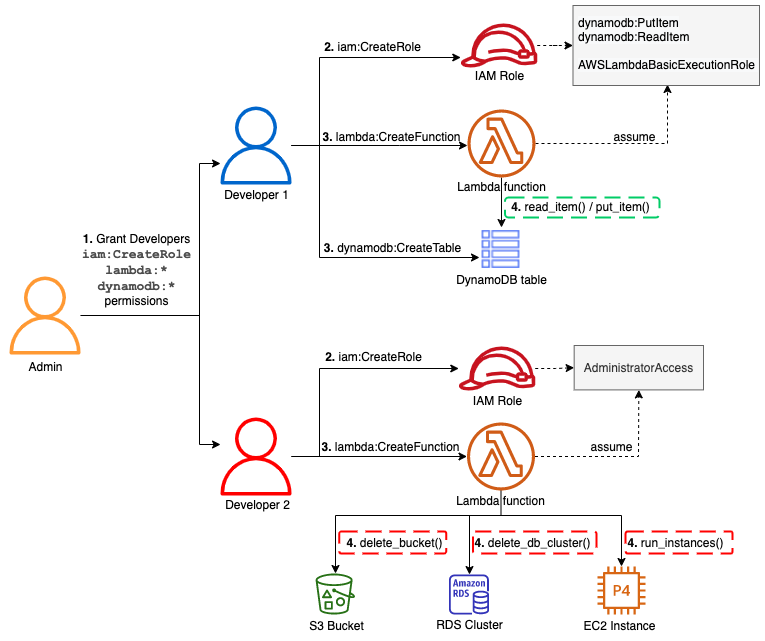
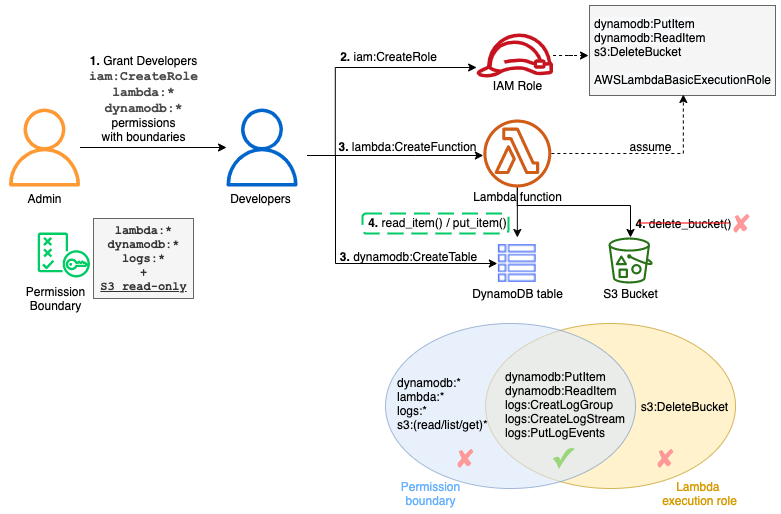
When creating a Lambda function, developers must create a role that the function will assume when running. But by giving the ability to create roles to developers, one could elevate their permission level. In the following diagram, you can see that an admin gives this ability to create roles to developers:

Securing self-service with permissions boundaries

Developer 1 creates a role for a function. This only allows Amazon DynamoDB read/write access and a basic execution role for Lambda (for Amazon CloudWatch Logs). But developer 2 is creating a role with administrator permission. Developer 2 cannot assume this role but can pass it to the Lambda function. This role could be used to create resources on Amazon EC2, delete an Amazon RDS database or an Amazon S3 bucket, for example.

To avoid users elevating their permissions, define permissions boundaries. With these, you can limit the scope of a Lambda function’s permissions. In this example, an admin still gives the same ability to developers to create roles but this time with a permissions boundary attached. Now the function cannot perform actions that exceed this boundary:

Effect of permissions boundaries

The admin must first define the permissions boundaries within an IAM policy:

{
    "Version": "2012-10-17",
    "Statement": [
        {
            "Sid": "LambdaDeveloperBoundary",
            "Effect": "Allow",
            "Action": [
                "s3:List*",
                "s3:Get*",
                "logs:*",
                "dynamodb:*",
                "lambda:*"
            ],
            "Resource": "*"
        }
    ]
}

Note that this boundary is still too permissive and you should reduce and adopt a least privilege approach. For example, you may not want to grant the dynamodb:DeleteTable permission or restrict it to a specific table.

The admin can then provide the CreateRole permission with this boundary using a condition:

{
    "Version": "2012-10-17",
    "Statement": [
        {
            "Sid": "CreateRole",
            "Effect": "Allow",
            "Action": [
                "iam:CreateRole"
            ],
            "Resource": "arn:aws:iam::123456789012:role/lambdaDev*",
            "Condition": {
                "StringEquals": {
                    "iam:PermissionsBoundary": "arn:aws:iam::123456789012:policy/lambda-dev-boundary"
                }
            }
        }
    ]
}

Developers assuming a role lambdaDev* can create a role for their Lambda functions but these functions cannot have more permissions than defined in the boundary.

Deploying reactive guardrails

The principle of least privilege is not always easy to accomplish. To achieve it without this permission management burden, you can use reactive guardrails. Actions are allowed but they are detected and trigger a notification or a remediation action.

To accomplish this on AWS, use AWS Config. It continuously monitors your resources and their configurations. It assesses them against compliance rules that you define and can notify you or automatically remediate to non-compliant resources.

AWS Config has more than 190 built-in rules and some are related to serverless services. For example, you can verify that an API Gateway REST API is configured with SSL or protected by a web application firewall (AWS WAF). You can ensure that a DynamoDB table has back up configured in AWS Backup or that data is encrypted.

Lambda also has a set of rules. For example, you can ensure that functions have a concurrency limit configured, which you should. Most of these rules are part of the “Operational Best Practices for Serverless” conformance pack to ease their deployment as a single entity. Otherwise, setting rules and remediation can be done in the AWS Management Console or AWS CLI.

If you cannot find a rule for your use case in the AWS Managed Rules, you can find additional ones on GitHub or write your own using the Rule Development Kit (RDK). For example, enforcing the use of a Lambda layer for functions. This is possible using a service control policy but it denies the creation or modification of the function if the layer is not provided. You can use this policy in production but you may only want to notify the developers in their sandbox accounts or test environments.

By using the RDK CLI, you can bootstrap a new rule:

rdk create LAMBDA_LAYER_CHECK --runtime python3.9 \
--resource-types AWS::Lambda::Function \
--input-parameters '{"LayerArn":"arn:aws:lambda:region:account:layer:layer_name", "MinLayerVersion":"1"}'

It generates a Lambda function, some tests, and a parameters.json file that contains the configuration for the rule. You can then edit the Lambda function code and the evaluate_compliance method. To check for a layer:

LAYER_REGEXP = 'arn:aws:lambda:[a-z]{2}((-gov)|(-iso(b?)))?-[a-z]+-\d{1}:\d{12}:layer:[a-zA-Z0-9-_]+'

def evaluate_compliance(event, configuration_item, valid_rule_parameters):
    pkg = configuration_item['configuration']['packageType']
    if not pkg or pkg != "Zip":
        return build_evaluation_from_config_item(configuration_item, 'NOT_APPLICABLE',
                                                 annotation='Layers can only be used with functions using Zip package type')

    layers = configuration_item['configuration']['layers']
    if not layers:
        return build_evaluation_from_config_item(configuration_item, 'NON_COMPLIANT',
                                                 annotation='No layer is configured for this Lambda function')

    regex = re.compile(LAYER_REGEXP + ':(.*)')
    annotation = 'Layer ' + valid_rule_parameters['LayerArn'] + ' not used for this Lambda function'
    for layer in layers:
        arn = layer['arn']
        version = regex.search(arn).group(5)
        arn = re.sub('\:' + version + '$', '', arn)
        if arn == valid_rule_parameters['LayerArn']:
            if version >= valid_rule_parameters['MinLayerVersion']:
                return build_evaluation_from_config_item(configuration_item, 'COMPLIANT')
            else:
                annotation = 'Wrong layer version (was ' + version + ', expected ' + valid_rule_parameters['MinLayerVersion'] + '+)'

    return build_evaluation_from_config_item(configuration_item, 'NON_COMPLIANT',
                                             annotation=annotation)

You can find the complete source of this AWS Config rule and its tests on GitHub.

Once the rule is ready, use the command rdk deploy to deploy it on your account. To deploy it across multiple accounts, see the documentation. You can then define remediation actions. For example, automatically add the missing layer to the function or send a notification to the developers using Amazon Simple Notification Service (SNS).

Conclusion

This post describes guardrails that you can set up in your accounts or across the organization to keep control over deployed resources. These guardrails can be more or less restrictive according to your requirements.

Use proactive guardrails with service control policies to define coarse-grained permissions and block everything that must not be used. Define reactive guardrails for everything else to aid agility and productivity but still be informed of the activity and potentially remediate.

This concludes this series on serverless governance:

  • Standardization is an important aspect of the governance to speed up teams and ensure that deployed applications are operable and compliant with your internal rules. Use templates, layers, and other mechanisms to create shareable archetypes to apply these standards and rules at the enterprise level.
  • It’s important to keep visibility and control on your resources, to understand how your environment evolves and to be able to operate and act if needed. Tags and guardrails are helpful to achieve this and they should evolve as your maturity with the cloud evolves.

Find more SCP examples and all the AWS managed AWS Config rules in the documentation.

For more serverless learning resources, visit Serverless Land.

Automated security and compliance remediation at HDI

Post Syndicated from Uladzimir Palkhouski original https://aws.amazon.com/blogs/devops/automated-security-and-compliance-remediation-at-hdi/

with Dr. Malte Polley (HDI Systeme AG – Cloud Solutions Architect)

At HDI, one of the biggest European insurance group companies, we use AWS to build new services and capabilities and delight our customers. Working in the financial services industry, the company has to comply with numerous regulatory requirements in the areas of data protection and FSI regulations such as GDPR, German Supervisory Requirements for IT (VAIT) and Supervision of Insurance Undertakings (VAG). The same security and compliance assessment process in the cloud supports development productivity and organizational agility, and helps our teams innovate at a high pace and meet the growing demands of our internal and external customers.

In this post, we explore how HDI adopted AWS security and compliance best practices. We describe implementation of automated security and compliance monitoring of AWS resources using a combination of AWS and open-source solutions. We also go through the steps to implement automated security findings remediation and address continuous deployment of new security controls.

Background

Data analytics is the key capability for understanding our customers’ needs, driving business operations improvement, and developing new services, products, and capabilities for our customers. We needed a cloud-native data platform of virtually unlimited scale that offers descriptive and prescriptive analytics capabilities to internal teams with a high innovation pace and short experimentation cycles. One of the success metrics in our mission is time to market, therefore it’s important to provide flexibility to internal teams to quickly experiment with new use cases. At the same time, we’re vigilant about data privacy. Having a secure and compliant cloud environment is a prerequisite for every new experiment and use case on our data platform.

Cloud security and compliance implementation in the cloud is a shared effort between the Cloud Center of Competence team (C3), the Network Operation Center (NoC), and the product and platform teams. The C3 team is responsible for new AWS account provisioning, account security, and compliance baseline setup. Cross-account networking configuration is established and managed by the NoC team. Product teams are responsible for AWS services configuration to meet their requirements in the most efficient way. Typically, they deploy and configure infrastructure and application stacks, including the following:

We were looking for security controls model that would allow us to continuously monitor infrastructure and application components set up by all the teams. The model also needed to support guardrails that allowed product teams to focus on new use case implementation, but also inherited the security and compliance best practices promoted and ensured within our company.

Security and compliance baseline definition

We started with the AWS Well-Architected Framework Security Pillar whitepaper, which provides implementation guidance on the essential areas of security and compliance in the cloud, including identity and access management, infrastructure security, data protection, detection, and incident response. Although all five elements are equally important for implementing enterprise-grade security and compliance in the cloud, we saw an opportunity to improve controls of on-premises environments by automating detection and incident response elements. The continuous monitoring of AWS infrastructure and application changes complemented by the automated incident response of the security baseline helps us foster security best practices and allows for a high innovation pace. Manual security reviews are no longer required to asses security posture.

Our security and compliance controls framework is based on GDPR and several standards and programs, including ISO 27001, C5. Translation of the controls framework into the security and compliance baseline definition in the cloud isn’t always straightforward, so we use a number of guidelines. As a starting point, we use CIS Amazon Web Services benchmarks, because it’s a prescriptive recommendation and its controls cover multiple AWS security areas, including identity and access management, logging and monitoring configuration, and network configuration. CIS benchmarks are industry-recognized cyber security best practices and recommendations that cover a wide range of technology families, and are used by enterprise organizations around the world. We also apply GDPR compliance on AWS recommendations and AWS Foundational Security Best Practices, extending controls recommended by CIS AWS Foundations Benchmarks in multiple control areas: inventory, logging, data protection, access management, and more.

Security controls implementation

AWS provides multiple services that help implement security and compliance controls:

  • AWS CloudTrail provides a history of events in an AWS account, including those originating from command line tools, AWS SDKs, AWS APIs, or the AWS Management Console. In addition, it allows exporting event history for further analysis and subscribing to specific events to implement automated remediation.
  • AWS Config allows you to monitor AWS resource configuration, and automatically evaluate and remediate incidents related to unexpected resources configuration. AWS Config comes with pre-built conformance pack sample templates designed to help you meet operational best practices and compliance standards.
  • Amazon GuardDuty provides threat detection capabilities that continuously monitor network activity, data access patterns, and account behavior.

With multiple AWS services to use as building blocks for continuous monitoring and automation, there is a strong need for a consolidated findings overview and unified remediation framework. This is where AWS Security Hub comes into play. Security Hub provides built-in security standards and controls that make it easy to enable foundational security controls. Then, Security Hub integrates with CloudTrail, AWS Config, GuardDuty, and other AWS services out of the box, which eliminates the need to develop and maintain integration code. Security Hub also accepts findings from third-party partner products and provides APIs for custom product integration. Security Hub significantly reduces the effort to consolidate audit information coming from multiple AWS-native and third-party channels. Its API and supported partner products ecosystem gave us confidence that we can adhere to changes in security and compliance standards with low effort.

While AWS provides a rich set of services to manage risk at the Three Lines Model, we were looking for wider community support in maintaining and extending security controls beyond those defined by CIS benchmarks and compliance and best practices recommendations on AWS. We came across Prowler, an open-source tool focusing on AWS security assessment and auditing and infrastructure hardening. Prowler implements CIS AWS benchmark controls and has over 100 additional checks. We appreciated Prowler providing checks that helped us meet GDPR and ISO 27001 requirements, specifically. Prowler delivers assessment reports in multiple formats, which makes it easy to implement reporting archival for future auditing needs. In addition, Prowler integrates well with Security Hub, which allows us to use a single service for consolidating security and compliance incidents across a number of channels.

We came up with the solution architecture depicted in the following diagram.

Automated remediation solution architecture HDI

Automated remediation solution architecture HDI

Let’s look closely into the most critical components of this solution.

Prowler is a command line tool that uses the AWS Command Line Interface (AWS CLI) and a bash script. Individual Prowler checks are bash scripts organized into groups by compliance standard or AWS service. By supplying corresponding command line arguments, we can run Prowler against a specific AWS Region or multiple Regions at the same time. We can run Prowler in multiple ways; we chose to run it as an AWS Fargate task for Amazon Elastic Container Service (Amazon ECS). Fargate is a serverless compute engine that runs Docker-compatible containers. ECS Fargate tasks are scheduled tasks that make it easy to perform periodic assessments of an AWS account and export findings. We configured Prowler to run every 7 days in every account and Region it’s deployed into.

Security Hub acts as a single place for consolidating security findings from multiple sources. When Security Hub is enabled in a given Region, CIS AWS Foundations Benchmark and Foundational Security Best Practices standards are enabled as well. Enabling these standards also configures integration with AWS Config and Guard Duty. Integration with Prowler requires enabling product integration on the Security Hub side by calling the EnableImportFindingsForProduct API action for a given product. Because Prowler supports integration with Security Hub out of the box, posting security findings is a matter of passing the right command line arguments: -M json-asff to format reports as AWS Security Findings Format and -S to ship findings to Security Hub.

Automated security findings remediation is implemented using AWS Lambda functions and the AWS SDK for Python (Boto3). The remediation function can be triggered in two ways: automatically in response to a new security finding, or by a security engineer from the Security Hub findings page. In both cases, the same Lambda function is used. Remediation functions implement security standards in accordance with recommendations, whether they’re CIS AWS Foundations Benchmark and Foundational Security Best Practices standards, or others.

The exact activities performed depend on the security findings type and its severity. Examples of activities performed include deleting non-rotated AWS Identity and Access Management (IAM) access keys, enabling server-side encryption for S3 buckets, and deleting unencrypted Amazon Elastic Block Store (Amazon EBS) volumes.

To trigger the Lambda function, we use Amazon EventBridge, which makes it easy to build an event-driven remediation engine and allows us to define Lambda functions as targets for Security Hub findings and custom actions. EventBridge allows us to define filters for security findings and therefore map finding types to specific remediation functions. Upon successfully performing security remediation, each function updates one or more Security Hub findings by calling the BatchUpdateFindings API and passing the corresponding finding ID.

The following example code shows a function enforcing an IAM password policy:

import boto3
import os
import logging
from botocore.exceptions import ClientError

iam = boto3.client("iam")
securityhub = boto3.client("securityhub")

log_level = os.environ.get("LOG_LEVEL", "INFO")
logging.root.setLevel(logging.getLevelName(log_level))
logger = logging.getLogger(__name__)


def lambda_handler(event, context, iam=iam, securityhub=securityhub):
    """Remediate findings related to cis15 and cis11.

    Params:
        event: Lambda event object
        context: Lambda context object
        iam: iam boto3 client
        securityhub: securityhub boto3 client
    Returns:
        No returns
    """
    finding_id = event["detail"]["findings"][0]["Id"]
    product_arn = event["detail"]["findings"][0]["ProductArn"]
    lambda_name = os.environ["AWS_LAMBDA_FUNCTION_NAME"]
    try:
        iam.update_account_password_policy(
            MinimumPasswordLength=14,
            RequireSymbols=True,
            RequireNumbers=True,
            RequireUppercaseCharacters=True,
            RequireLowercaseCharacters=True,
            AllowUsersToChangePassword=True,
            MaxPasswordAge=90,
            PasswordReusePrevention=24,
            HardExpiry=True,
        )
        logger.info("IAM Password Policy Updated")
    except ClientError as e:
        logger.exception(e)
        raise e
    try:
        securityhub.batch_update_findings(
            FindingIdentifiers=[{"Id": finding_id, "ProductArn": product_arn},],
            Note={
                "Text": "Changed non compliant password policy",
                "UpdatedBy": lambda_name,
            },
            Workflow={"Status": "RESOLVED"},
        )
    except ClientError as e:
        logger.exception(e)
        raise e

A key aspect in developing remediation Lambda functions is testability. To quickly iterate through testing cycles, we cover each remediation function with unit tests, in which necessary dependencies are mocked and replaced with stub objects. Because no Lambda deployment is required to check remediation logic, we can test newly developed functions and ensure reliability of existing ones in seconds.

Each Lambda function developed is accompanied with an event.json document containing an example of an EventBridge event for a given security finding. A security finding event allows us to verify remediation logic precisely, including deletion or suspension of non-compliant resources or a finding status update in Security Hub and the response returned. Unit tests cover both successful and erroneous remediation logic. We use pytest to develop unit tests, and botocore.stub and moto to replace runtime dependencies with mocks and stubs.

Automated security findings remediation

The following diagram illustrates our security assessment and automated remediation process.

Automated remediation flow HDI

The workflow includes the following steps:

  1. An existing Security Hub integration performs periodic resource audits. The integration posts new security findings to Security Hub.
  2. Security Hub reports the security incident to the company’s centralized Service Now instance by using the Service Now ITSM Security Hub integration.
  3. Security Hub triggers automated remediation:
    1. Security Hub triggers the remediation function by sending an event to EventBridge. The event has a source field equal to aws.securityhub, with the filter ID corresponding to the specific finding type and compliance status as FAILED. The combination of these fields allows us to map the event to a particular remediation function.
    2. The remediation function starts processing the security finding event.
    3. The function calls the UpdateFindings Security Hub API to update the security finding status upon completing remediation.
    4. Security Hub updates the corresponding security incident status in Service Now (Step 2)
  4. Alternatively, the security operations engineer resolves the security incident in Service Now:
    1. The engineer reviews the current security incident in Service Now.
    2. The engineer manually resolves the security incident in Service Now.
    3. Service Now updates the finding status by calling the UpdateFindings Security Hub API. Service Now uses the AWS Service Management Connector.
  5. Alternatively, the platform security engineer triggers remediation:
    1. The engineer reviews the currently active security findings on the Security Hub findings page.
    2. The engineer triggers remediation from the security findings page by selecting the appropriate action.
    3. Security Hub triggers the remediation function by sending an event with the source aws.securityhub to EventBridge. The automated remediation flow continues as described in the Step 3.

Deployment automation

Due to legal requirements, HDI uses the infrastructure as code (IaC) principle while defining and deploying AWS infrastructure. We started with AWS CloudFormation templates defined as YAML or JSON format. The templates are static by nature and define resources in a declarative way. We figured out that as our solution complexity grows, the CloudFormation templates also grow in size and complexity, because all the resources deployed have to be explicitly defined. We wanted a solution to increase our development productivity and simplify infrastructure definition.

The AWS Cloud Development Kit (AWS CDK) helped us in two ways:

  • The AWS CDK provides ready-to-use building blocks called constructs. These constructs include pre-configured AWS services following best practices. For example, a Lambda function always gets an IAM role with an IAM policy to be able to write logs to CloudWatch Logs.
  • The AWS CDK allows us to use high-level programming languages to define configuration of all AWS services. Imperative definition allows us to build our own abstractions and reuse them to achieve concise resource definition.

We found that implementing IaC with the AWS CDK is faster and less error-prone. At HDI, we use Python to build application logic and define AWS infrastructure. The imperative nature of the AWS CDK is truly a turning point in fulfilling legal requirements and achieving high developer productivity at the same time.

One of the AWS CDK constructs we use is AWS CDK pipeline. This construct creates a customizable continuous integration and continuous delivery (CI/CD) pipeline implemented with AWS CodePipeline. The source action is based on AWS CodeCommit. The synth action is responsible for creating a CloudFormation template from the AWS CDK project. The synth action also runs unit tests on remediations functions. The pipeline actions are connected via artifacts. Lastly, the AWS CDK pipeline constructs offer a self-mutating feature, which allows us to maintain the AWS CDK project as well as the pipeline in a single code repository. Changes of the pipeline definition as well as automated remediation solutions are deployed seamlessly. The actual solution deployment is also implemented as a CI/CD stage. Stages can be eventually deployed in cross-Region and cross-account patterns. To use cross-account deployments, the AWS CDK provides a bootstrap functionality to create a trust relationship between AWS accounts.

The AWS CDK project is broken down to multiple stacks. To deploy the CI/CD pipeline, we run the cdk deploy cicd-4-securityhub command. To add a new Lambda remediation function, we must add remediation code, optional unit tests, and finally the Lambda remediation configuration object. This configuration object defines the Lambda function’s environment variables, necessary IAM policies, and external dependencies. See the following example code of this configuration:

prowler_729_lambda = {
    "name": "Prowler 7.29",
    "id": "prowler729",
    "description": "Remediates Prowler 7.29 by deleting/terminating unencrypted EC2 instances/EBS volumes",
    "policies": [
        _iam.PolicyStatement(
            effect=_iam.Effect.ALLOW,
            actions=["ec2:TerminateInstances", "ec2:DeleteVolume"],
            resources=["*"])
        ],
    "path": "delete_unencrypted_ebs_volumes",
    "environment_variables": [
        {"key": "ACCOUNT_ID", "value": core.Aws.ACCOUNT_ID}
    ],
    "filter_id": ["prowler-extra729"],
 }

Remediation functions are organized in accordance with the security and compliance frameworks they belong to. The AWS CDK code iterates over remediation definition lists and synthesizes corresponding policies and Lambda functions to be deployed later. Committing Git changes and pushing them triggers the CI/CD pipeline, which deploys the newly defined remediation function and adjusts the configuration of Prowler.

We are working on publishing the source code discussed in this blog post.

Looking forward

As we keep introducing new use cases in the cloud, we plan to improve our solution in the following ways:

  • Continuously add new controls based on our own experience and improving industry standards
  • Introduce cross-account security and compliance assessment by consolidating findings in a central security account
  • Improve automated remediation resiliency by introducing remediation failure notifications and retry queues
  • Run a Well-Architected review to identify and address possible areas of improvement

Conclusion

Working on the solution described in this post helped us improve our security posture and meet compliancy requirements in the cloud. Specifically, we were able to achieve the following:

  • Gain a shared understanding of security and compliance controls implementation as well as shared responsibilities in the cloud between multiple teams
  • Speed up security reviews of cloud environments by implementing continuous assessment and minimizing manual reviews
  • Provide product and platform teams with secure and compliant environments
  • Lay a foundation for future requirements and improvement of security posture in the cloud

The content and opinions in this post are those of the third-party author and AWS is not responsible for the content or accuracy of this post.

About the Authors

Malte Polley - Cloud Solutions Architect

Malte Polley – Cloud Solutions Architect

Dr. Malte Polley

Dr. Malte Polley is a Cloud Solutions Architect of Modern Data Platform (MDP) at HDI Germany. MDP focuses on DevSecOps practices applied to data analytics and provides secure and compliant environment for every data product at HDI Germany. As a cloud enthusiast Malte runs AWS Hannover user group. When not working, Malte enjoys hiking with his family and improving his backyard vegetable garden.

Uladzimir Palkhouski - Sr. Solutions Architect

Uladzimir Palkhouski – Sr. Solutions Architect

Uladzimir Palkhouski

Uladzimir Palkhouski is a Sr. Solutions Architect at Amazon Web Services. Uladzimir supports German financial services industry customers on their cloud journey. He helps finding practical forward looking solutions to complex technical and business challenges.

How to automate incident response to security events with AWS Systems Manager Incident Manager

Post Syndicated from Sumit Patel original https://aws.amazon.com/blogs/security/how-to-automate-incident-response-to-security-events-with-aws-systems-manager-incident-manager/

Incident response is a core security capability for organizations to develop, and a core element in the AWS Cloud Adoption Framework (AWS CAF). Responding to security incidents quickly is important to minimize their impacts. Automating incident response helps you scale your capabilities, rapidly reduce the scope of compromised resources, and reduce repetitive work by your security team.

In this post, I show you how to use Incident Manager, a capability of AWS Systems Manager, to build an effective automated incident management and response solution to security events.

You’ll walk through three common security-related events and how you can use Incident Manager to automate your response.

  • AWS account root user activity: An Amazon Web Services (AWS) account root user has full access to all your resources for all AWS services, including billing information. It’s therefore elemental to adhere to the best practice of using the root user only to create your first IAM user and securely lock away the root user credentials and use them to perform only a few account and service management tasks. And it is critical to be aware when root user activity occurs in your AWS account.
  • Amazon GuardDuty high severity findings: Amazon GuardDuty is a threat detection service that continuously monitors for malicious or unauthorized behavior to help protect your AWS accounts and workloads. In this blog post, you’ll learn how to initiate an incident response plan whenever a high severity finding is discovered.
  • AWS Config rule change and S3 bucket allowing public access: AWS Config enables continuous monitoring of your AWS resources, making it simple to assess, audit, and record resource configurations and changes. You will use AWS Config to monitor your Amazon Simple Storage Service (S3) bucket ACLs and policies for settings that allow public read or public write access.

Prerequisites

If this is your first time using Incident Manager, follow the initial onboarding steps in Getting prepared with Incident Manager.

Incident Manager can start managing incidents automatically using Amazon CloudWatch or Amazon EventBridge. For the solution in this blog post, you will use EventBridge to capture events and start an incident.

To complete the steps in this walkthrough, you need the following:

Create an Incident Manager response plan

A response plan ties together the contacts, escalation plan, and runbook. When an incident occurs, a response plan defines who to engage, how to engage, which runbook to initiate, and which metrics to monitor. By creating a well-defined response plan, you can save your security team time down the road.

Add contacts

Your contacts should include everyone who might be involved in the incident. Follow these steps to add a contact.

To add contacts

  1. Open the AWS Management Console, and then go to Systems Manager within the console, expand Operations Management, and then expand Incident Manager.
  2. Choose Contacts, and then choose Create contact.

    Figure 1: Adding contact details

    Figure 1: Adding contact details

  3. On Contact information, enter names and define contact channels for your contacts.
  4. Under Contact channel, you can select Email, SMS, or Voice. You can also add multiple contact channels.
  5. In Engagement plan, specify how fast to engage your responders. In the example illustrated below, the incident responder will be engaged through email immediately (0 minutes) when an incident is detected and then through SMS 10 minutes into an incident. Complete the fields and then choose Create.

    Figure 2: Engagement plan

    Figure 2: Engagement plan

Create a response plan

Once you’ve created your contacts, you can create a response plan to define how to respond to incidents. Refer to the Best Practices for Response Plans.

Note: (Optional) You can also create an escalation plan that lets you further define the escalation path for your contacts. You can learn more in Create an escalation plan.

To create a response plan

  1. Open the Incident Manager console, and choose Response plans in the left navigation pane.
  2. Choose Create response plan.
  3. Enter a unique and identifiable name for your response plan.
  4. Enter an incident title. The incident title helps to identify an incident on the incidents home page.
  5. Select an appropriate Impact based on the potential scope of the incident.

    Figure 3: Selecting your impact level

    Figure 3: Selecting your impact level

  6. (Optional) Choose a chat channel for the incident responders to interact in during an incident. For more information about chat channels, see Chat channels.
  7. (Optional) For Engagement, you can choose any number of contacts and escalation plans. For this solution, select the security team responder that you created earlier as one of your contacts.

    Figure 4: Adding engagements

    Figure 4: Adding engagements

  8. (Optional) You can also create a runbook that can drive the incident mitigation and response. For further information, refer to Runbooks and automation.
  9. Under Execution permissions, choose Create an IAM role using a template. Under Role name, select the IAM role you created in the prerequisites that allows Incident Manager to run SSM automation documents, and then choose Create response plan.

Monitor AWS account root activity

When you first create an AWS account, you begin with a single sign-in identity that has complete access to all AWS services and resources in the account. This identity is called the root user and is accessed by signing in with the email address and password that you used to create the account.

An AWS account root user has full access to all your resources for all AWS services, including billing information. It is critical to prevent root user access from unauthorized use and to be aware whenever root user activity occurs in your AWS account. For more information about AWS recommendations, see Security best practices in IAM.

To be certain that all root user activity is authorized and expected, it’s important to monitor root API calls to a given AWS account and to be notified when root user activity is detected.

Create an EventBridge rule

Create and validate an EventBridge rule to capture AWS account root activity.

To create an EventBridge rule

  1. Open the EventBridge console.
  2. In the navigation pane, choose Rules, and then choose Create rule.
  3. Enter a name and description for the rule.
  4. For Define pattern, choose Event pattern.
  5. Choose Custom pattern.
  6. Enter the following event pattern:
    {
      "detail-type": [
        "AWS API Call via CloudTrail",
        "AWS Console Sign In via CloudTrail"
      ],
      "detail": {
        "userIdentity": {
          "type": [
            "Root"
          ]
        }
      }
    }
    

  7. For Select targets, choose Incident Manager response plan.
  8. For Response plan, choose SecurityEventResponsePlan, which you created when you set up Incident Manager.
  9. To create an IAM role automatically, choose Create a new role for this specific resource. To use an existing IAM role, choose Use existing role.
  10. (Optional) Enter one or more tags for the rule.
  11. Choose Create.

To validate the rule

  1. Sign in using root credentials.
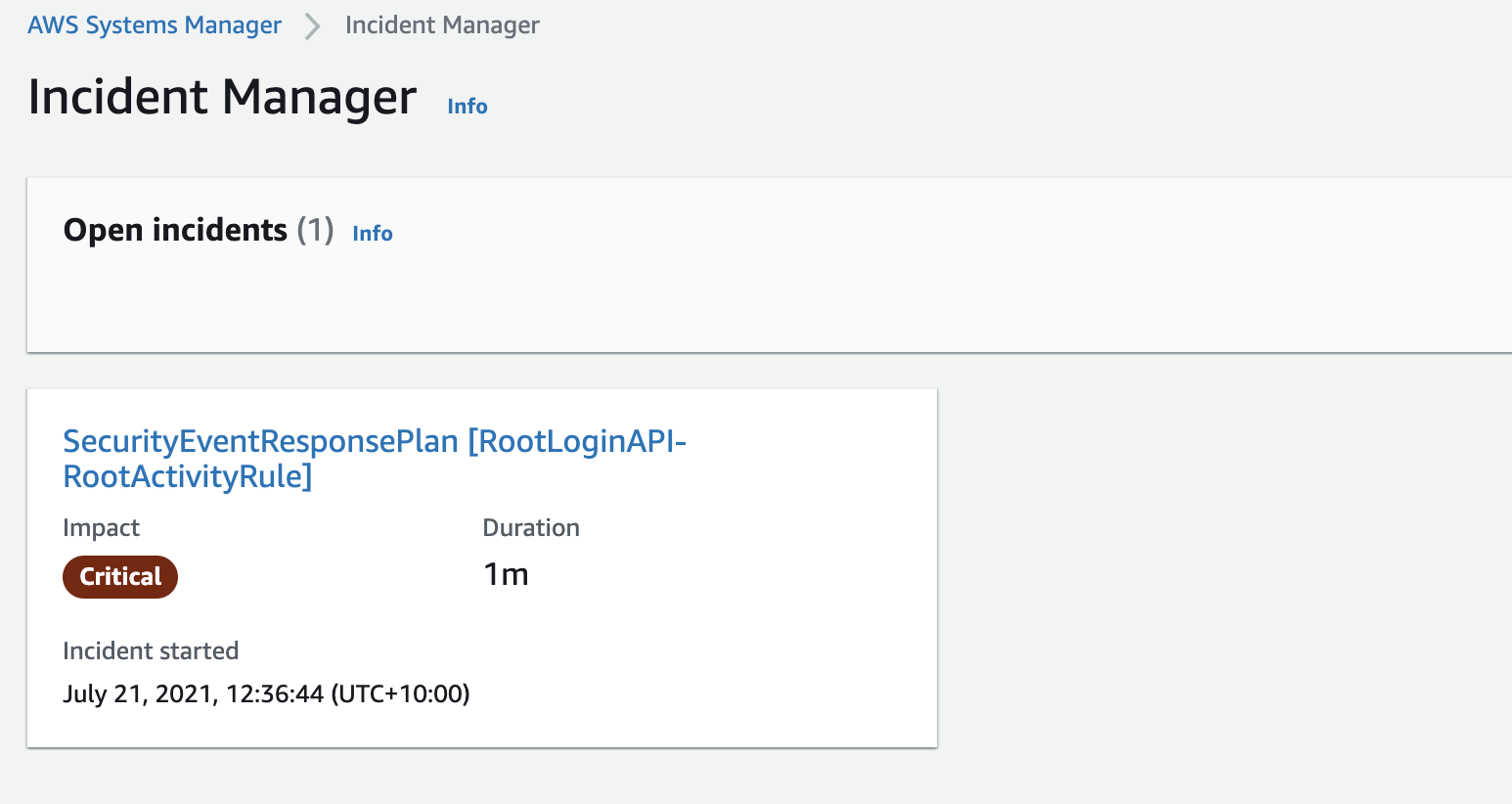
  2. This console login activity by a root user should invoke the Incident Manager response plan and show an open incident as illustrated below. The respective contact channels that you defined earlier in your Engagement Plan, will be engaged.
Figure 5: Incident Manager open incidents

Figure 5: Incident Manager open incidents

Watch for GuardDuty high severity findings

GuardDuty is a monitoring service that analyzes AWS CloudTrail management and Amazon S3 data events, Amazon Virtual Private Cloud (Amazon VPC) flow logs, and Amazon Route 53 DNS logs to generate security findings for your account. Once GuardDuty is enabled, it immediately starts monitoring your environment.

GuardDuty integrates with EventBridge, which can be used to send findings data to other applications and services for processing. With EventBridge, you can use GuardDuty findings to invoke automatic responses to your findings by connecting finding events to targets such as Incident Manager response plan.

Create an EventBridge rule

You’ll use an EventBridge rule to capture GuardDuty high severity findings.

To create an EventBridge rule

  1. Open the EventBridge console.
  2. In the navigation pane, select Rules, and then choose Create rule.
  3. Enter a name and description for the rule.
  4. For Define pattern, choose Event pattern.
  5. Choose Custom pattern
  6. Enter the following event pattern which will filter on GuardDuty high severity findings
    {
      "source": ["aws.guardduty"],
      "detail-type": ["GuardDuty Finding"],
      "detail": {
        "severity": [
          7.0,
          7.1,
          7.2,
          7.3,
          7.4,
          7.5,
          7.6,
          7.7,
          7.8,
          7.9,
          8,
          8.0,
          8.1,
          8.2,
          8.3,
          8.4,
          8.5,
          8.6,
          8.7,
          8.8,
          8.9
        ]
      }
    } 
    

  7. For Select targets, choose Incident Manager response plan.
  8. For Response plan, select SecurityEventResponsePlan, which you created when you set up Incident Manager.
  9. To create an IAM role automatically, choose Create a new role for this specific resource. To use an IAM role that you created before, choose Use existing role.
  10. (Optional) Enter one or more tags for the rule.
  11. Choose Create.

To validate the rule

To test and validate whether the above rule is now functional, you can generate sample findings within the GuardDuty console.

  1. Open the GuardDuty console.
  2. In the navigation pane, choose Settings.
  3. On the Settings page, under Sample findings, choose Generate sample findings.
  4. In the navigation pane, choose Findings. The sample findings are displayed on the Current findings page with the prefix [SAMPLE].

Once you have generated sample findings, your Incident Manager response plan will be invoked almost immediately and the engagement plan with your contacts will begin.

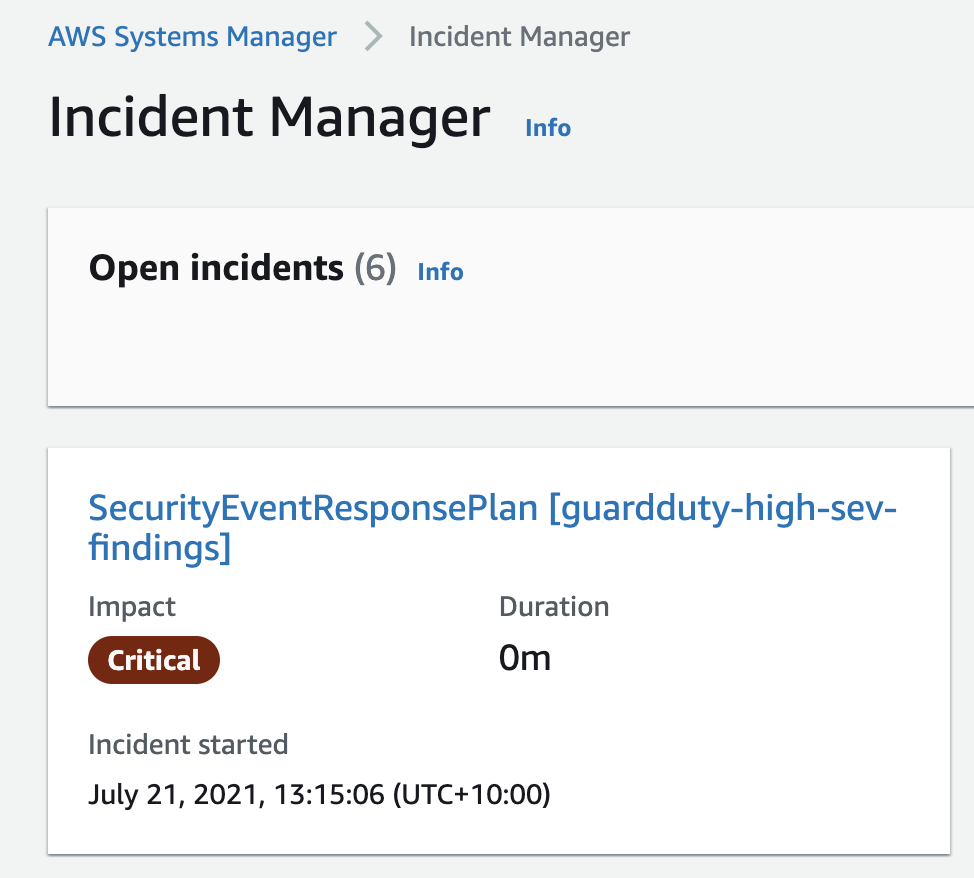
You can select an open incident in the Incident Manager console to see additional details from the GuardDuty finding. Figure 6 shows a high severity finding.

Figure 6: Incident Manager open incident for GuardDuty high severity finding

Figure 6: Incident Manager open incident for GuardDuty high severity finding

Monitor S3 bucket settings for public access

AWS Config enables continuous monitoring of your AWS resources, making it easier to assess, audit, and record resource configurations and changes. AWS Config does this through rules that define the desired configuration state of your AWS resources. AWS Config provides a number of AWS managed rules that address a wide range of security concerns such as checking that your Amazon Elastic Block Store (Amazon EBS) volumes are encrypted, your resources are tagged appropriately, and multi-factor authentication (MFA) is enabled for root accounts.

Set up AWS Config and EventBridge

You will use AWS Config to monitor your S3 bucket ACLs and policies for violations which could allow public read or public write access. If AWS Config finds a policy violation, it will initiate an AWS EventBridge rule to invoke your Incident Manager response plan.

To create the AWS Config rule to capture S3 bucket public access

  1. Sign in to the AWS Config console.
  2. If this is your first time in the AWS Config console, refer to the Getting Started guide for more information.
  3. Select Rules from the menu and choose Add Rule.
  4. On the AWS Config rules page, enter S3 in the search box and select the s3-bucket-public-read-prohibited and s3-bucket-public-write-prohibited rules, and then choose Next.

    Figure 7: AWS Config rules

    Figure 7: AWS Config rules

  5. Leave the Configure rules page as default and select Next.
  6. On the Review page, select Add Rule. AWS Config is now analyzing your S3 buckets, capturing their current configurations, and evaluating the configurations against the rules you selected.

To create the EventBridge rule

  1. Open the Amazon EventBridge console
  2. In the navigation pane, choose Rules, and then choose Create rule.
  3. Enter a name and description for the rule.
  4. For Define pattern, choose Event pattern.
  5. Choose Custom pattern
  6. Enter the following event pattern, which will filter on AWS Config rule s3-bucket-public-write-prohibited being non-compliant.
    {
      "source": ["aws.config"],
      "detail-type": ["Config Rules Compliance Change"],
      "detail": {
        "messageType": ["ComplianceChangeNotification"],
        "configRuleName": ["s3-bucket-public-write-prohibited", ""],
        "newEvaluationResult": {
          "complianceType": [
            "NON_COMPLIANT"
          ]
        }
      }
    }
    

  7. For Select targets, choose Incident Manager response plan.
  8. For Response plan, choose SecurityEventResponsePlan, which you created earlier when setting up Incident Manager.
  9. To create an IAM role automatically, choose Create a new role for this specific resource. To use an existing IAM role, choose Use existing role.
  10. (Optional) Enter one or more tags for the rule.
  11. Choose Create.

To validate the rule

  1. Create a compliant test S3 bucket with no public read or write access through either an ACL or a policy.
  2. Change the ACL of the bucket to allow public listing of objects so that the bucket is non-compliant.

    Figure 8: Amazon S3 console

    Figure 8: Amazon S3 console

  3. After a few minutes, you should see the AWS Config rule initiated which invokes the EventBridge rule and therefore your Incident Manager response plan.

Summary

In this post, I showed you how to use Incident Manager to monitor for security events and invoke a response plan via Amazon CloudWatch or Amazon EventBridge. AWS CloudTrail API activity (for a root account login), Amazon GuardDuty (for high severity findings), and AWS Config (to enforce policies like preventing public write access to an S3 bucket). I demonstrated how you can create an incident management and response plan to ensure you have used the power of cloud to create automations that respond to and mitigate security incidents in a timely manner. To learn more about Incident Manager, see What Is AWS Systems Manager Incident Manager in the AWS documentation.

If you have feedback about this post, submit comments in the comments section below. If you have questions about this post, start a new thread on the Systems Manager forum or contact AWS Support.

Want more AWS Security how-to content, news, and feature announcements? Follow us on Twitter.

Author

Sumit Patel

As a Senior Solutions Architect at AWS, Sumit works with large enterprise customers helping them create innovative solutions to address their cloud challenges. Sumit uses his more than 15 years of enterprise experience to help customers navigate their cloud transformation journey and shape the right dynamics between technology and business.

AWS Config RDK: Deploying the Custom Rules using the Terraform

Post Syndicated from Madhu Sarma original https://aws.amazon.com/blogs/devops/aws-config-rdk-deploying-the-custom-rules-using-the-terraform/

To help customers using the Terraform for multi-cloud infrastructure deployment, we have introduced a new feature in the AWS Config Rule Development Kit (RDK) that allows you to export custom AWS Config rules to Terraform files so that you can deploy the RDK rules with Terraform.

This blog post is a complement to the previous post – How to develop custom AWS Config rules using the Rule Development Kit. Here I will show you how to prototype, develop, and deploy custom AWS Config rules. The steps for prototyping and developing the custom AWS Config rules remain identical, while a variation exists in the deployment step, which I’ll walk you through in detail. I would encourage you to review the previous blog post, so that you can follow along here.

In this post, you will learn how to export the custom AWS Config rule to Terraform files and deploy to AWS using the Terraform.

Background

RDK doesn’t support the Terraform for rules deployment, which is impacting customers using the Terraform (“Infrastructure As Code”) to provision AWS infrastructure. Therefore, we have provided one more option to deploy the rules by using the Terraform.

Getting Started

The first step is making sure that you installed the latest RDK version. After you have defined an AWS Config rule and prototyped using the AWS Config RDK as described in the previous blog post, follow the steps below to deploy the various AWS Config components across the compliance and satellite accounts.

Prerequisites

Validate that you downloaded the RDK that supports “export”, using the command “rdk export -h”, and you should see the below output. If the installed RDK doesn’t support the export feature, then update it by using the command  “pip install rdk”

(venv) 8c85902e4110:7RDK test$ rdk export -h 
 
usage: rdk export [-h] [-s RULESETS] [--all] [--lambda-layers LAMBDA_LAYERS]  
                  [--lambda-subnets LAMBDA_SUBNETS]  
                  [--lambda-security-groups LAMBDA_SECURITY_GROUPS]  
                  [--lambda-role-arn LAMBDA_ROLE_ARN]  
                  [--rdklib-layer-arn RDKLIB_LAYER_ARN] -v {0.11,0.12} -f  
                  {terraform}  
                  [<rulename> [<rulename> ...]]  
  
Used to export the Config Rule to terraform file.  
  
positional arguments:  
  <rulename>            Rule name(s) to export to a file.  
  
optional arguments:  
  -h, --help            show this help message and exit  
  -s RULESETS, --rulesets RULESETS  
                        comma-delimited list of RuleSet names  
  --all, -a             All rules in the working directory will be deployed.  
  --lambda-layers LAMBDA_LAYERS  
                        [optional] Comma-separated list of Lambda Layer ARNs  
                        to deploy with your Lambda function(s).  
  --lambda-subnets LAMBDA_SUBNETS  
                        [optional] Comma-separated list of Subnets to deploy  
                        your Lambda function(s).  
  --lambda-security-groups LAMBDA_SECURITY_GROUPS  
                        [optional] Comma-separated list of Security Groups to  
                        deploy with your Lambda function(s).  
  --lambda-role-arn LAMBDA_ROLE_ARN  
                        [optional] Assign existing iam role to lambda  
                        functions. If omitted, new lambda role will be  
                        created.  
  --rdklib-layer-arn RDKLIB_LAYER_ARN  
                        [optional] Lambda Layer ARN that contains the desired  
                        rdklib. Note that Lambda Layers are region-specific.  
  -v {0.11,0.12}, --version {0.11,0.12}  
                        Terraform version  
  -f {terraform}, --format {terraform}  
                        Export Format  

Create your rule

Create your rule by using the command below which creates the MY_FIRST_RULE rule.

7RDK test$ rdk create MY_FIRST_RULE  --runtime python3.6 --resource-types AWS::EC2::SecurityGroup  
Running create!  
Local Rule files created.  

This creates the three files below. Edit the “MY_FIRST_RULE.py” as per your business requirement, as described in the “Edit” section of this blog.

7RDK test$ cd MY_FIRST_RULE/ 
(venv) 8c85902e4110:MY_FIRST_RULE test$ls 
MY_FIRST_RULE.py        MY_FIRST_RULE_test.py   parameters.json

Export your rule to Terraform

Use the command below to export your rule to the Terraform files, which supports the two versions of Terraform (0.11 and 0.12). Use the “-v” argument to specify the version.

test$ cd ..  
7RDK test$ rdk export MY_FIRST_RULE -f terraform -v 0.12  
Running export  
Found Custom Rule.  
Zipping MY_FIRST_RULE  
Zipping complete.  
terraform version: 0.12  
Export completed.This will generate three .tf files.  
7RDK test$

This creates the four files.

  • << rule-name >>_rule.tf :
    • This script uploads the rule to the Amazon S3 bucket, deploys the lambda, and creates the AWS config rule and the required IAM roles/policies.
  • << rule-name >>_variables.tf:  Terraform variable definitions.
  • << rule-name >>.tfvars.json: Terraform variable values.
  • << rule-name >>.zip: Compiled rule code.
7RDK test$ cd MY_FIRST_RULE/  
(venv) 8c85902e4110:MY_FIRST_RULE test$ ls -1  
MY_FIRST_RULE.py  
MY_FIRST_RULE.zip  
MY_FIRST_RULE_test.py  
my_first_rule.tfvars.json  
my_first_rule_rule.tf  
my_first_rule_variables.tf  
parameters.json  

Deploy your rule using the Terraform

Initialize the Terraform by using “terraform init” to download the AWS provider Plug-In.

MY_FIRST_RULE test$ terraform init  
  
Initializing the backend...  
  
Initializing provider plugins...  
- Checking for available provider plugins...  
- Downloading plugin for provider "aws" (hashicorp/aws) 2.70.0...  
  
The following providers do not have any version constraints in configuration,  
so the latest version was installed.  
  
To prevent automatic upgrades to new major versions that may contain breaking  
changes, it is recommended to add version = "..." constraints to the  
corresponding provider blocks in configuration, with the constraint strings  
suggested below.  
  
* provider.aws: version = "~> 2.70"  
  
Terraform has been successfully initialized!  

To deploy the config rules, your role should have the permissions and should mention the role ARN in my_rule.tfvars.json

To apply the Terraform, it requires two arguments:

  • var-file: Terraform script variable file name, created while exporting the rule using RDK.
  • source_bucket: Your Amazon S3 bucket name, to upload the config rule lambda code.

Make sure that AWS provider is configured for your Terraform environment as mentioned in the docs.

MY_FIRST_RULE test$ terraform apply -var-file=my_first_rule.tfvars.json --var source_bucket=config-bucket-xxxxx  
  
aws_iam_policy.awsconfig_policy[0]: Creating...  
aws_iam_role.awsconfig[0]: Creating...  
aws_s3_bucket_object.rule_code: Creating...  
aws_iam_role.awsconfig[0]: Creation complete after 3s [id=my_first_rule-awsconfig-role]  
aws_iam_role_policy_attachment.readonly-role-policy-attach[0]: Creating...  
aws_iam_policy.awsconfig_policy[0]: Creation complete after 4s [id=arn:aws:iam::xxxxxxxxxxxx:policy/my_first_rule-awsconfig-policy]  
aws_iam_role_policy_attachment.awsconfig_policy_attach[0]: Creating...  
aws_s3_bucket_object.rule_code: Creation complete after 5s [id=MY_FIRST_RULE.zip]  
aws_lambda_function.rdk_rule: Creating...  
aws_iam_role_policy_attachment.readonly-role-policy-attach[0]: Creation complete after 2s [id=my_first_rule-awsconfig-role-20200726023315892200000001]  
aws_iam_role_policy_attachment.awsconfig_policy_attach[0]: Creation complete after 3s [id=my_first_rule-awsconfig-role-20200726023317242000000002]  
aws_lambda_function.rdk_rule: Still creating... [10s elapsed]  
aws_lambda_function.rdk_rule: Creation complete after 18s [id=RDK-Rule-Function-MY_FIRST_RULE]  
aws_lambda_permission.lambda_invoke: Creating...  
aws_config_config_rule.event_triggered[0]: Creating...  
aws_lambda_permission.lambda_invoke: Creation complete after 2s [id=AllowExecutionFromConfig]  
aws_config_config_rule.event_triggered[0]: Creation complete after 4s [id=MY_FIRST_RULE]  
  
Apply complete! Resources: 8 added, 0 changed, 0 destroyed.  

Login to your AWS console to validate the deployed config rule.

Clean up

Enter the following command to remove all the resources.

  1. MY_FIRST_RULE test$ terraform destroy

Conclusion

With this new feature, you can export the AWS config rules developed by RDK to the Terraform,  and integrate these files into your Terraform CI/CD pipeline to provision the config rules in AWS without using the RDK.

Strengthen the security of sensitive data stored in Amazon S3 by using additional AWS services

Post Syndicated from Jerry Mullis original https://aws.amazon.com/blogs/security/strengthen-the-security-of-sensitive-data-stored-in-amazon-s3-by-using-additional-aws-services/

In this post, we describe the AWS services that you can use to both detect and protect your data stored in Amazon Simple Storage Service (Amazon S3). When you analyze security in depth for your Amazon S3 storage, consider doing the following:

Using these additional AWS services along with Amazon S3 can improve your security posture across your accounts.

Audit and restrict Amazon S3 access with IAM Access Analyzer

IAM Access Analyzer allows you to identify unintended access to your resources and data. Users and developers need access to Amazon S3, but it’s important for you to keep users and privileges accurate and up to date.

Amazon S3 can often house sensitive and confidential information. To help secure your data within Amazon S3, you should be using AWS Key Management Service (AWS KMS) with server-side encryption at rest for Amazon S3. It is also important that you secure the S3 buckets so that you only allow access to the developers and users who require that access. Bucket policies and access control lists (ACLs) are the foundation of Amazon S3 security. Your configuration of these policies and lists determines the accessibility of objects within Amazon S3, and it is important to audit them regularly to properly secure and maintain the security of your Amazon S3 bucket.

IAM Access Analyzer can scan all the supported resources within a zone of trust. Access Analyzer then provides you with insight when a bucket policy or ACL allows access to any external entities that are not within your organization or your AWS account’s zone of trust.

To setup and use IAM Access Analyzer, follow the instructions for Enabling Access Analyzer in the AWS IAM User Guide.

The example in Figure 1 shows creating an analyzer with the zone of trust as the current account, but you can also create an analyzer with the organization as the zone of trust.

Figure 1: Creating IAM Access Analyzer and zone of trust

Figure 1: Creating IAM Access Analyzer and zone of trust

After you create your analyzer, IAM Access Analyzer automatically scans the resources in your zone of trust and returns the findings from your Amazon S3 storage environment. The initial scan shown in Figure 2 shows the findings of an unsecured S3 bucket.

Figure 2: Example of unsecured S3 bucket findings

Figure 2: Example of unsecured S3 bucket findings

For each finding, you can decide which action you would like to take. As shown in figure 3, you are given the option to archive (if the finding indicates intended access) or take action to modify bucket permissions (if the finding indicates unintended access).

Figure 3: Displays choice of actions to take

Figure 3: Displays choice of actions to take

After you address the initial findings, Access Analyzer monitors your bucket policies for changes, and notifies you of access issues it finds. Access Analyzer is regional and must be enabled in each AWS Region independently.

Classify and secure sensitive data with Macie

Organizational compliance standards often require the identification and securing of sensitive data. Your organization’s sensitive data might contain personally identifiable information (PII), which includes things such as credit card numbers, birthdates, and addresses.

Macie is a data security and privacy service offered by AWS that uses machine learning and pattern matching to discover the sensitive data stored within Amazon S3. You can define your own custom type of sensitive data category that might be unique to your business or use case. Macie will automatically provide an inventory of S3 buckets and alert you of unprotected sensitive data.

Figure 4 shows a sample result from a Macie scan in which you can see important information regarding Amazon S3 public access, encryption settings, and sharing.

Figure 4: Sample results from a Macie scan

Figure 4: Sample results from a Macie scan

In addition to finding potential sensitive data, Macie also gives you a severity score based on the privacy risk, as shown in the example data in Figure 5.

Figure 5: Example Macie severity scores

Figure 5: Example Macie severity scores

When you use Macie in conjunction with AWS Step Functions, you can also automatically remediate any issues found. You can use this combination to help meet regulations such as General Data Protection Regulation (GDPR) and Health Insurance Portability and Accountability Act (HIPAA). Macie allows you to have constant visibility of sensitive data within your Amazon S3 storage environment.

When you deploy Macie in a multi-account configuration, your usage is rolled up to the master account to provide the total usage for all accounts and a breakdown across the entire organization.

Detect malicious access patterns with GuardDuty

Your customers and users can commit thousands of actions each day on S3 buckets. Discerning access patterns manually can be extremely time consuming as the volume of data increases. GuardDuty uses machine learning, anomaly detection, and integrated threat intelligence to analyze billions of events across multiple accounts and uses data collected in AWS CloudTrail logs for S3 data events as well as S3 access logs, VPC Flow Logs, and DNS logs. GuardDuty can be configured to analyze these logs and notify you of suspicious activity, such as unusual data access patterns, unusual discovery API calls, and more. After you receive a list of findings on these activities, you will be able to make informed decisions to secure your S3 buckets.

Figure 6 shows a sample list of findings returned by GuardDuty which shows the finding type, resource affected, and count of occurrences.

Figure 6: Example GuardDuty list of findings

Figure 6: Example GuardDuty list of findings

You can select one of the results in Figure 6 to see the IP address and details associated from this potential malicious IP caller, as shown in Figure 7.

Figure 7: GuardDuty Malicious IP Caller detailed findings

Figure 7: GuardDuty Malicious IP Caller detailed findings

Monitor and remediate configuration changes with AWS Config

Configuration management is important when securing Amazon S3, to prevent unauthorized users from gaining access. It is important that you monitor the configuration changes of your S3 buckets, whether the changes are intentional or unintentional. AWS Config can track all configuration changes that are made to an S3 bucket. For example, if an S3 bucket had its permissions and configurations unexpectedly changed, using AWS Config allows you to see the changes made, as well as who made them.

With AWS Config, you can set up AWS Config managed rules that serve as a baseline for your S3 bucket. When any bucket has configurations that deviate from this baseline, you can be alerted by Amazon Simple Notification Service (Amazon SNS) of the bucket being noncompliant.

AWS Config can be used in conjunction with a service called AWS Lambda. If an S3 bucket is noncompliant, AWS Config can trigger a preprogrammed Lambda function and then the Lambda function can resolve those issues. This combination can be used to reduce your operational overhead in maintaining compliance within your S3 buckets.

Figure 8 shows a sample of AWS Config managed rules selected for configuration monitoring and gives a brief description of what the rule does.

Figure 8: Sample selections of AWS Managed Rules

Figure 8: Sample selections of AWS Managed Rules

Figure 9 shows a sample result of a non-compliant configuration and resource inventory listing the type of resource affected and the number of occurrences.

Figure 9: Example of AWS Config non-compliant resources

Figure 9: Example of AWS Config non-compliant resources

Conclusion

AWS has many offerings to help you audit and secure your storage environment. In this post, we discussed the particular combination of AWS services that together will help reduce the amount of time and focus your business devotes to security practices. This combination of services will also enable you to automate your responses to any unwanted permission and configuration changes, saving you valuable time and resources to dedicate elsewhere in your organization.

For more information about pricing of the services mentioned in this post, see AWS Free Tier and AWS Pricing. For more information about Amazon S3 security, see Amazon S3 Preventative Security Best Practices in the Amazon S3 User Guide.

If you have feedback about this post, submit comments in the Comments section below.

Want more AWS Security how-to content, news, and feature announcements? Follow us on Twitter.

Author

Jerry Mullis

Jerry is an Associate Solutions Architect at AWS. His interests are in data migration, machine learning, and device automation. Jerry has previous experience in machine learning research and healthcare management. His certifications include AWS Solutions Architect Pro, AWS Developer Associate, AWS Sysops Admin Associate and AWS Certified Cloud Practitioner. In his free time, Jerry enjoys hiking, playing basketball, and spending time with his wife.

Author

Dave Geyer

Dave is an Associate Solutions Architect at AWS. He has a background in data management and organizational design, and is interested in data analytics and infrastructure security. Dave has advised and worked for customers in the commercial and public sectors, providing them with architectural best practices and recommendations. Dave is interested in the aerospace and financial services industries. Outside of work, he is an adrenaline junkie, and is passionate about mountaineering and high altitudes.

Author

Andrew Chen

Andrew is an Associate Solutions Architect with an interest in data analytics, machine learning, and virtualization of infrastructure. Andrew has previous experience in management consulting in which he worked as a technical lead for various cloud migration projects. In his free time, Andrew enjoys fishing, hiking, kayaking, and keeping up with financial markets.

Using Cloud Fitness Functions to Drive Evolutionary Architecture

Post Syndicated from Hauke Juhls original https://aws.amazon.com/blogs/architecture/using-cloud-fitness-functions-to-drive-evolutionary-architecture/

“It is not the strongest of the species that survives, nor the most intelligent. It is the one that is most adaptable to change.” – often attributed to Charles Darwin

One common strategy for businesses that operate in dynamic market conditions (and thus need to continuously correct their course) is to aim for smaller, independent development teams. Microservices and two-pizza teams at Amazon are prominent examples of this strategy. But having smaller units is not the only success factor: to reduce organizational bottlenecks and make high-quality decisions quickly, these two-pizza teams need to be autonomous in most of their decision making.

Architects can no longer rely on static upfront design to meet the change rate required to be successful in such an environment.

This blog shows enterprise architects a mechanism to align decentralized architectural decision making with overall architecture goals.

Gathering data from your fitness functions

“Evolutionary architecture” was coined by Neal Ford and his colleagues from AWS Partner ThoughtWorks in their work on Building Evolutionary Architectures. It is defined as “supporting guided, incremental change as a first principle across multiple dimensions.”

Fitness functions help you obtain the necessary data to allow for the planned evolution of your architecture. They set measurable values to assess how close your solution is to achieving your set goals.

Fitness functions can and should be adapted as the architecture evolves to guide a desired change process. This provides architects with a tool to guide their teams while maintaining team autonomy.

Example of a regression fitness function in action

You’ve identified shorter time-to-market as a key non-functional requirement. You want to lower the risk of regressions and rollbacks after deployments. So, you and your team write automated test cases. To ensure that they have a good set of test cases in place, they measure test coverage. This test coverage measures the percentage of code that is tested automatically. This steers the team toward writing tests to mitigate the risk of regressions so they have fewer rollbacks and shorter time to market.

Fitness functions like this work best when they’re as automated as possible. But how do you acquire the necessary data points to use this mechanism outside of software architecture? We’ll show you how in the following sections.

AWS Cloud services with built-in fitness functions

AWS Cloud services are highly standardized, fully automated via API operations, and are built with observability in mind. This allows you to generate measurements for fitness functions automatically for areas such as availability, responsiveness, and security.

To start building your evolutionary architecture with fitness functions, use something that can be easily measured. AWS has services that can be used as inputs to fitness functions, including:

  • Amazon CloudWatch aggregates logs and metrics to check for availability, responsiveness, and reliability fitness functions.
  • AWS Security Hub provides a comprehensive view of your security alerts and security posture across your AWS accounts. Security Architects could, for example, define the fitness function of critical and high findings to be zero. Teams then would be guided into reducing the number of these findings, resulting in better security.
  • AWS Cost Explorer ensures your costs stay in line with value generated.
  • AWS Well-Architected Tool evaluates teams’ architectures in a consistent and repeatable way. The number of items acts as your fitness function, which can be queried using the API. To improve your architecture based on the results, review the Establishing Feedback Loops Based on the AWS Well-Architected Framework Review blog post.
  • Amazon SageMaker Model Monitor continuously monitors the quality of SageMaker machine learning models in production. Detecting deviations early allows you to take corrective actions like retraining models, auditing upstream systems, or fixing quality issues.

Using the observability that the cloud provides

Fitness functions can be derived by evaluating the AWS account activity such as configuration changes. AWS CloudTrail is useful for this. It records account activity and service events from most AWS services, which can then be analyzed with Amazon Athena.

Fitness functions provide feedback to engineers via metrics

Figure 1. Fitness functions provide feedback to engineers via metrics

Example of a cloud fitness function in action

In this example, we implement a fitness function that monitors the operability of your system.

You have had certain outages due to manual tasks in operations, and you have anecdotal evidence that engineers are spending time on manual work during application rollouts. To improve operations, you want to reduce manual interactions via the shell in favor of automation. First, you prevent direct secure shell (SSH) access by blocking SSH traffic via the managed AWS Config rule restricted-ssh. Second, you make use of AWS Systems Manager Session Manager, which provides a secure and auditable way to access Amazon Elastic Compute Cloud (Amazon EC2) instances.

By counting the logged API events in CloudTrail you can measure the number of shell sessions. This is shown in this sample Athena query to count the number of shell sessions:

SELECT count(*),
       DATE(from_iso8601_timestamp(eventTime)),
       userIdentity.type,
       eventSource,
       eventName
FROM "cloudtrail_logs_partition_projection"
WHERE readonly = 'false'
  AND eventsource = 'ssm.amazonaws.com'
  AND eventname in ('StartSession',
                    'ResumeSession',
                    'TerminateSession')
GROUP BY DATE(from_iso8601_timestamp(eventTime)),
         userIdentity.type,
         eventSource,
         eventName
ORDER BY DATE(from_iso8601_timestamp(eventTime)) DESC

The number of shell sessions now act as fitness function to improve operational excellence through operations as code. Coincidently, the fitness function you defined also rewards teams moving to serverless compute services such as AWS Fargate or AWS Lambda.

Fitness through exercising

Similar to people, your architecture’s fitness can be improved by exercising. It does not take much equipment, but you need to take the first step. To get started, we encourage you to think of the desired outcomes for your architecture that you can measure (and thus guide) through fitness functions. The following lessons learned will help you focus your goals:

  • Requirements and business goals may differ per domain. Thus, your fitness functions might differ. Work closely with your teams when defining fitness functions.
  • Start by taking something that can be easily measured and communicated as a goal.
  • Focus on a positive trendline rather than absolute values.
  • Make sure you and your teams are using the same metrics and the same way to measure them. We have seen examples where central governance departments had access to data the individual teams did not, leading to frustration on all sides.
  • Ensure that your architecture goals fit well into the current context and time horizon.
  • Continuously re-visit the fitness functions to ensure that they evolve with the changing business goals.

Conclusion

Fitness functions help architects focus on building. Once established, teams can use the data points from fitness functions to make decisions and work towards a common and measurable goal. The architects in turn can use the data points they get from fitness functions to confirm their hypothesis of the current state of the architecture. Get started building your fitness functions today by:

  • Gathering the most important system quality attributes.
  • Beginning with approximately three meaningful fitness functions relying on the API operations available.
  • Building a dashboard that shows progress over time, share it with your teams, and rely on this data in your daily work.