Tag Archives: serverless

Announcing wrangler dev — the Edge on localhost

Post Syndicated from Rita Kozlov original https://blog.cloudflare.com/announcing-wrangler-dev-the-edge-on-localhost/

Announcing wrangler dev — the Edge on localhost

Cloudflare Workers — our serverless platform — allows developers around the world to run their applications from our network of 200 datacenters, as close as possible to their users.

A few weeks ago we announced a release candidate for wrangler dev — today, we’re excited to take wrangler dev, the world’s first edge-based development environment, to GA with the release of wrangler 1.11.

Think locally, develop globally

It was once assumed that to successfully run an application on the web, one had to go and acquire a server, set it up (in a data center that hopefully you had access to), and then maintain it on an ongoing basis. Luckily for most of us, that assumption was challenged with the emergence of the cloud. The cloud was always assumed to be centralized — large data centers in a single region (“us-east-1”), reserved for compute. The edge? That was for caching static content.

Again, assumptions are being challenged.

Cloudflare Workers is about moving compute from a centralized location to the edge. And it makes sense: if users are distributed all over the globe, why should all of them be routed to us-east-1, on the opposite side of the world, causing latency and degrading user experience?

But challenging one assumption caused others to come into view. One of the most obvious ones was: would a local development environment actually provide the best experience for someone looking to test their Worker code? Trying to fit the entire Cloudflare edge, with all its dependencies onto a developer’s machine didn’t seem to be the best approach. Especially given that the place the developer was going to run that code in production was mere milliseconds away from the computer they were running on.

When I was in college, getting started with programming, one of the biggest barriers to entry was installing all the dependencies required to run a single library. I would go as far as to say that the third, and often forgotten hardest problem in computer science is dependency management.

We’ve not the first to try and unify development environments across machines — tools such as Docker aim to solve this exact problem by providing a prepackaged development environment.

Yet, packaging up the Workers runtime is not quite so simple.

Beyond the Workers runtime, there are many components that make up Cloudflare’s edge, including DNS resolution, the Cloudflare cache — all of those parts are what makes Cloudflare Workers so powerful. That means that without those components, a standalone runtime is insufficient to represent the behavior of Worker request handling. The reason to develop locally first is to have the opportunity to experiment without affecting production. Thus, having a local development environment that truly reflects production is a requirement.

wrangler dev

wrangler dev provides all the convenience of a local development environment, without the headache of trying to reproduce the reality of production locally — and then having to keep the two environments in sync.

By running at the edge, it provides a high fidelity, consistent experience for all developers, without sacrificing the speedy feedback loop of a local development environment.

Live reloading

Announcing wrangler dev — the Edge on localhost

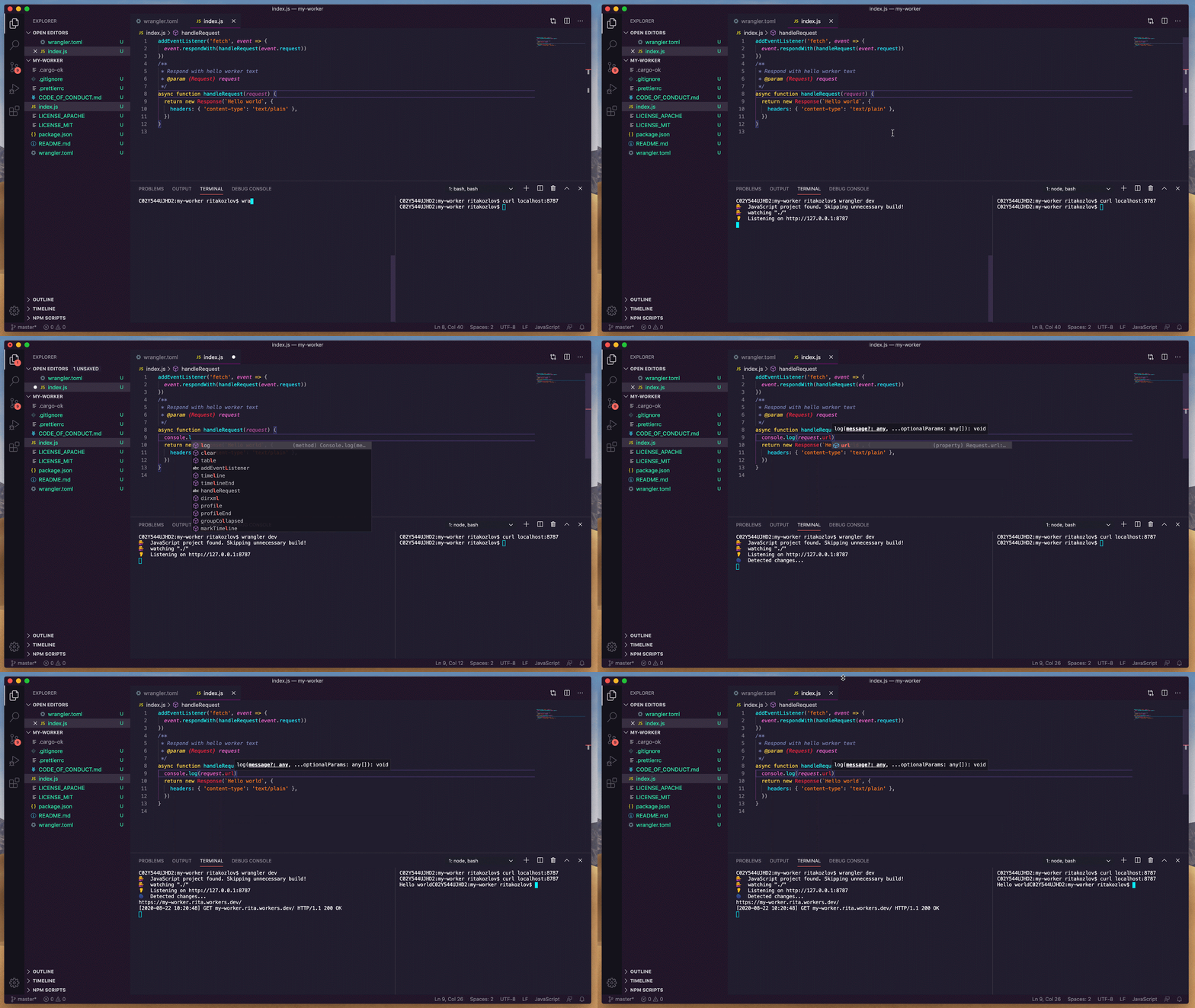
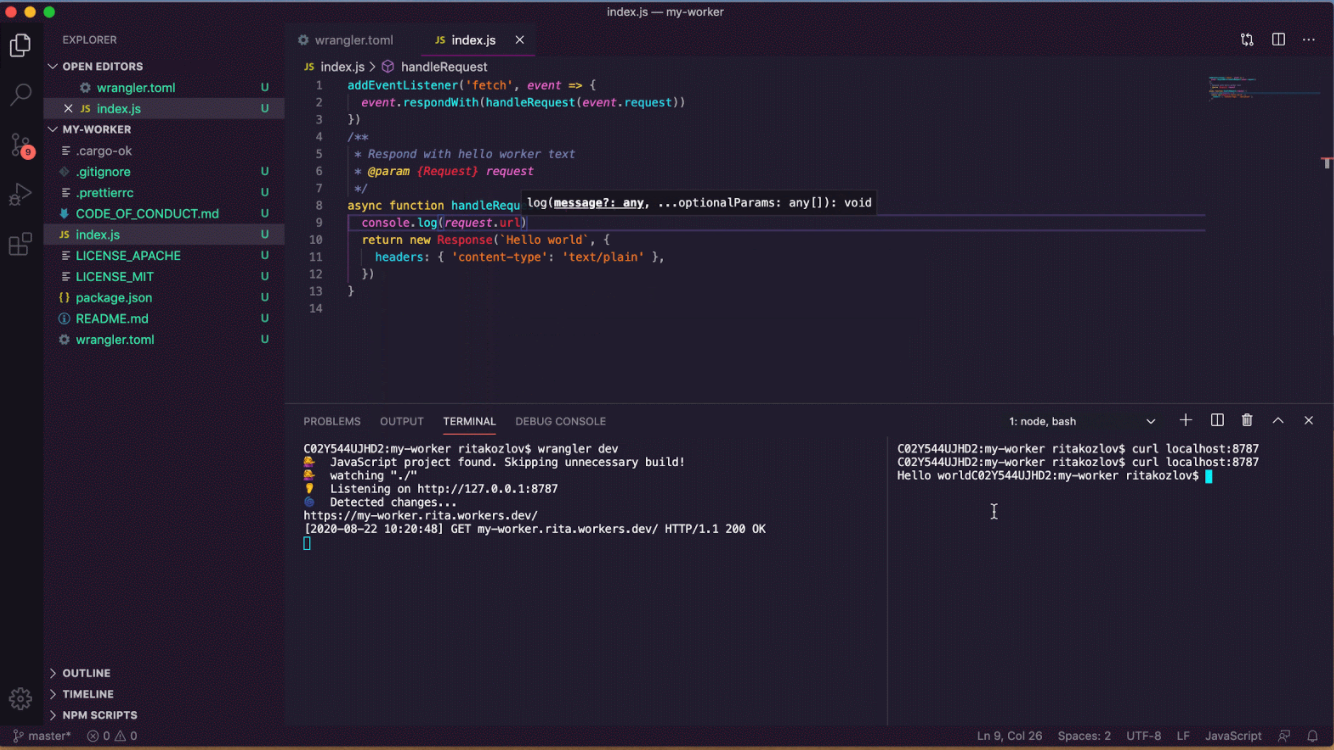
As you update your code, wrangler dev will detect changes, and push the new version of your code to the edge.

console.log() at your fingertips

Announcing wrangler dev — the Edge on localhost

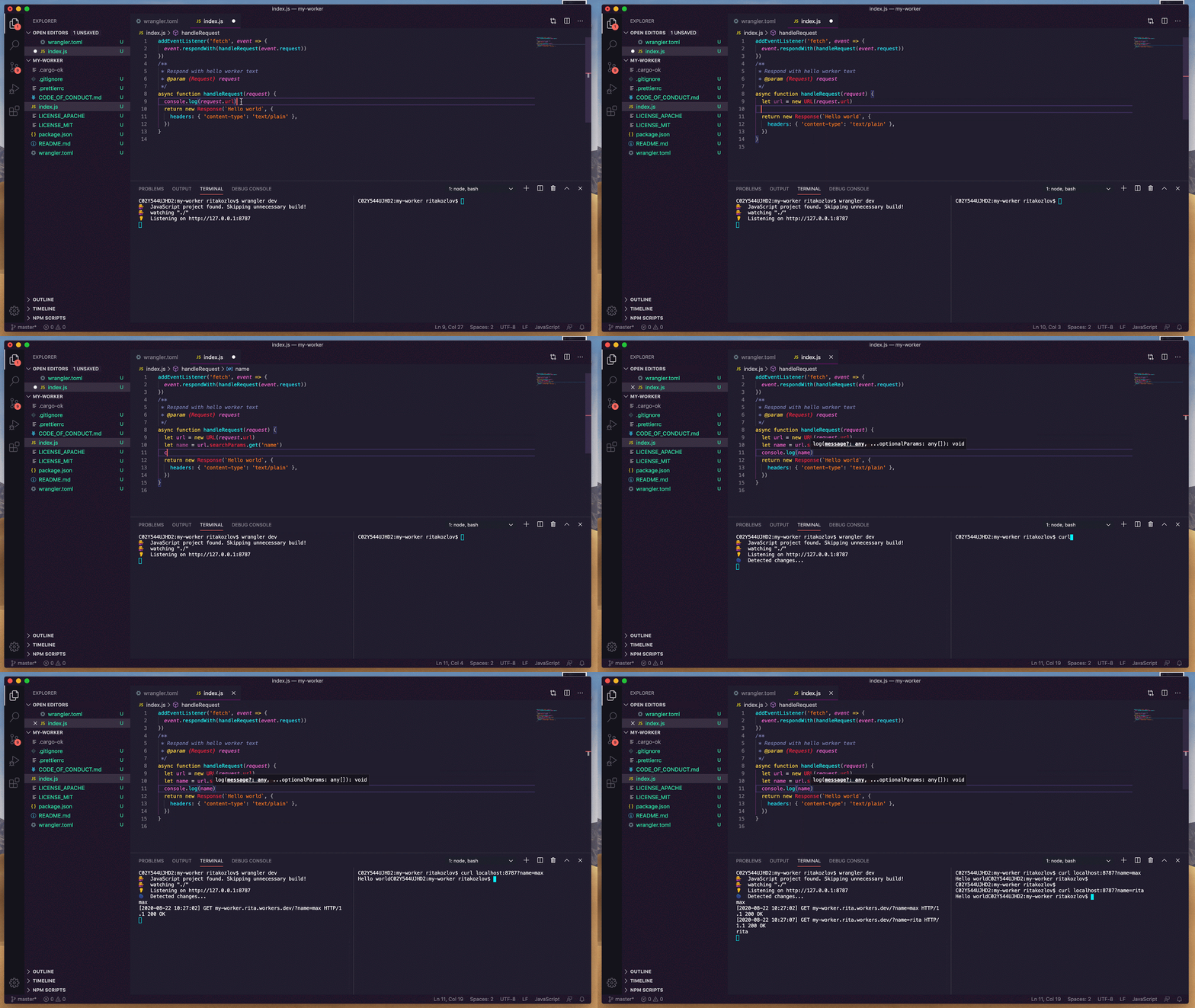
Previously to extract your console logs from the Workers runtime, you had to have the Workers Preview open in a browser window at all times. With wrangler dev, you can receive your own logs, directly to your terminal of choice.

Cache API, KV, and more!

Since wrangler dev runs on the edge, you can now easily test the state of a cache.put(), without having to deploy your Worker to production.

wrangler dev will spin up a new KV namespace for development, so you don’t have to worry about affecting your production data.

And if you’re looking to test out some of the features provided on request.cf that provide rich information about the request such as geo-location — they will all be provided from the Cloudflare data center.

Get started

wrangler dev is now available in the latest version of Wrangler, the official Cloudflare Workers CLI.

To get started, follow our installation instructions here.

What’s next?

wrangler dev is just our first foray into giving our developers more visibility and agility with their development process.

We recognize that we have a lot more work to do to meet our developers needs, including providing an easy testing framework for Workers, and allowing our customers to observe their Workers’ behavior in production.

Just as wrangler dev provides a quick feedback loop between our developers and their code, we love to have a tight feedback loop between our developers and our product. We love to hear what you’re building, how you’re building it, and how we can help you build it better.

Building storage-first serverless applications with HTTP APIs service integrations

Post Syndicated from Eric Johnson original https://aws.amazon.com/blogs/compute/building-storage-first-applications-with-http-apis-service-integrations/

Over the last year, I have been talking about “storage first” serverless patterns. With these patterns, data is stored persistently before any business logic is applied. The advantage of this pattern is increased application resiliency. By persisting the data before processing, the original data is still available, if or when errors occur.

Common pattern for serverless API backend

Common pattern for serverless API backend

Using Amazon API Gateway as a proxy to an AWS Lambda function is a common pattern in serverless applications. The Lambda function handles the business logic and communicates with other AWS or third-party services to route, modify, or store the processed data. One option is to place the data in an Amazon Simple Queue Service (SQS) queue for processing downstream. In this pattern, the developer is responsible for handling errors and retry logic within the Lambda function code.

The storage first pattern flips this around. It uses native error handling with retry logic or dead-letter queues (DLQ) at the SQS layer before any code is run. By directly integrating API Gateway to SQS, developers can increase application reliability while reducing lines of code.

Storage first pattern for serverless API backend

Storage first pattern for serverless API backend

Previously, direct integrations require REST APIs with transformation templates written in Velocity Template Language (VTL). However, developers tell us they would like to integrate directly with services in a simpler way without using VTL. As a result, HTTP APIs now offers the ability to directly integrate with five AWS services without needing a transformation template or code layer.

The first five service integrations

This release of HTTP APIs direct integrations includes Amazon EventBridge, Amazon Kinesis Data Streams, Simple Queue Service (SQS), AWS System Manager’s AppConfig, and AWS Step Functions. With these new integrations, customers can create APIs and webhooks for their business logic hosted in these AWS services. They can also take advantage of HTTP APIs features like authorizers, throttling, and enhanced observability for securing and monitoring these applications.

Amazon EventBridge

HTTP APIs service integration with Amazon EventBridge

HTTP APIs service integration with Amazon EventBridge

The HTTP APIs direct integration for EventBridge uses the PutEvents API to enable client applications to place events on an EventBridge bus. Once the events are on the bus, EventBridge routes the event to specific targets based upon EventBridge filtering rules.

This integration is a storage first pattern because data is written to the bus before any routing or logic is applied. If the downstream target service has issues, then EventBridge implements a retry strategy with incremental back-off for up to 24 hours. Additionally, the integration helps developers reduce code by filtering events at the bus. It routes to downstream targets without the need for a Lambda function as a transport layer.

Use this direct integration when:

  • Different tasks are required based upon incoming event details
  • Only data ingestion is required
  • Payload size is less than 256 kb
  • Expected requests per second are less than the Region quotas.

Amazon Kinesis Data Streams

HTTP APIs service integration with Amazon Kinesis Data Streams

HTTP APIs service integration with Amazon Kinesis Data Streams

The HTTP APIs direct integration for Kinesis Data Streams offers the PutRecord integration action, enabling client applications to place events on a Kinesis data stream. Kinesis Data Streams are designed to handle up to 1,000 writes per second per shard, with payloads up to 1 mb in size. Developers can increase throughput by increasing the number of shards in the data stream. You can route the incoming data to targets like an Amazon S3 bucket as part of a data lake or a Kinesis data analytics application for real-time analytics.

This integration is a storage first option because data is stored on the stream for up to seven days until it is processed and routed elsewhere. When processing stream events with a Lambda function, errors are handled at the Lambda layer through a configurable error handling strategy.

Use this direct integration when:

  • Ingesting large amounts of data
  • Ingesting large payload sizes
  • Order is important
  • Routing the same data to multiple targets

Amazon SQS

HTTP APIs service integration with Amazon SQS

HTTP APIs service integration with Amazon SQS

The HTTP APIs direct integration for Amazon SQS offers the SendMessage, ReceiveMessage, DeleteMessage, and PurgeQueue integration actions. This integration differs from the EventBridge and Kinesis integrations in that data flows both ways. Events can be created, read, and deleted from the SQS queue via REST calls through the HTTP API endpoint. Additionally, a full purge of the queue can be managed using the PurgeQueue action.

This pattern is a storage first pattern because the data remains on the queue for four days by default (configurable to 14 days), unless it is processed and removed. When the Lambda service polls the queue, the messages that are returned are hidden in the queue for a set amount of time. Once the calling service has processed these messages, it uses the DeleteMessage API to remove the messages permanently.

When triggering a Lambda function with an SQS queue, the Lambda service manages this process internally. However, HTTP APIs direct integration with SQS enables developers to move this process to client applications without the need for a Lambda function as a transport layer.

Use this direct integration when:

  • Data must be received as well as sent to the service
  • Downstream services need reduced concurrency
  • The queue requires custom management
  • Order is important (FIFO queues)

AWS AppConfig

HTTP APIs service integration with AWS Systems Manager AppConfig

HTTP APIs service integration with AWS Systems Manager AppConfig

The HTTP APIs direct integration for AWS AppConfig offers the GetConfiguration integration action and allows applications to check for application configuration updates. By exposing the systems parameter API through an HTTP APIs endpoint, developers can automate configuration changes for their applications. While this integration is not considered a storage first integration, it does enable direct communication from external services to AppConfig without the need for a Lambda function as a transport layer.

Use this direct integration when:

  • Access to AWS AppConfig is required.
  • Managing application configurations.

AWS Step Functions

HTTP APIs service integration with AWS Step Functions

HTTP APIs service integration with AWS Step Functions

The HTTP APIs direct integration for Step Functions offers the StartExecution and StopExecution integration actions. These actions allow for programmatic control of a Step Functions state machine via an API. When starting a Step Functions workflow, JSON data is passed in the request and mapped to the state machine. Error messages are also mapped to the state machine when stopping the execution.

This pattern provides a storage first integration because Step Functions maintains a persistent state during the life of the orchestrated workflow. Step Functions also supports service integrations that allow the workflows to send and receive data without needing a Lambda function as a transport layer.

Use this direct integration when:

  • Orchestrating multiple actions.
  • Order of action is required.

Building HTTP APIs direct integrations

HTTP APIs service integrations can be built using the AWS CLI, AWS SAM, or through the API Gateway console. The console walks through contextual choices to help you understand what is required for each integration. Each of the integrations also includes an Advanced section to provide additional information for the integration.

Creating an HTTP APIs service integration

Creating an HTTP APIs service integration

Once you build an integration, you can export it as an OpenAPI template that can be used with infrastructure as code (IaC) tools like AWS SAM. The exported template can also include the API Gateway extensions that define the specific integration information.

Exporting the HTTP APIs configuration to OpenAPI

Exporting the HTTP APIs configuration to OpenAPI

OpenAPI template

An example of a direct integration from HTTP APIs to SQS is located in the Sessions With SAM repository. This example includes the following architecture:

AWS SAM template resource architecture

AWS SAM template resource architecture

The AWS SAM template creates the HTTP APIs, SQS queue, Lambda function, and both Identity and Access Management (IAM) roles required. This is all generated in 58 lines of code and looks like this:

AWSTemplateFormatVersion: '2010-09-09'
Transform: AWS::Serverless-2016-10-31
Description: HTTP API direct integrations

Resources:
  MyQueue:
    Type: AWS::SQS::Queue
    
  MyHttpApi:
    Type: AWS::Serverless::HttpApi
    Properties:
      DefinitionBody:
        'Fn::Transform':
          Name: 'AWS::Include'
          Parameters:
            Location: './api.yaml'
          
  MyHttpApiRole:
    Type: "AWS::IAM::Role"
    Properties:
      AssumeRolePolicyDocument:
        Version: "2012-10-17"
        Statement:
          - Effect: "Allow"
            Principal:
              Service: "apigateway.amazonaws.com"
            Action: 
              - "sts:AssumeRole"
      Policies:
        - PolicyName: ApiDirectWriteToSQS
          PolicyDocument:
            Version: '2012-10-17'
            Statement:
              Action:
              - sqs:SendMessage
              Effect: Allow
              Resource:
                - !GetAtt MyQueue.Arn
                
  MyTriggeredLambda:
    Type: AWS::Serverless::Function
    Properties:
      CodeUri: src/
      Handler: app.lambdaHandler
      Runtime: nodejs12.x
      Policies:
        - SQSPollerPolicy:
            QueueName: !GetAtt MyQueue.QueueName
      Events:
        SQSTrigger:
          Type: SQS
          Properties:
            Queue: !GetAtt MyQueue.Arn

Outputs:
  ApiEndpoint:
    Description: "HTTP API endpoint URL"
    Value: !Sub "https://${MyHttpApi}.execute-api.${AWS::Region}.amazonaws.com"

The OpenAPI template handles the route definitions for the HTTP API configuration and configures the service integration. The template looks like this:

openapi: "3.0.1"
info:
  title: "my-sqs-api"
paths:
  /:
    post:
      responses:
        default:
          description: "Default response for POST /"
      x-amazon-apigateway-integration:
        integrationSubtype: "SQS-SendMessage"
        credentials:
          Fn::GetAtt: [MyHttpApiRole, Arn]
        requestParameters:
          MessageBody: "$request.body.MessageBody"
          QueueUrl:
            Ref: MyQueue
        payloadFormatVersion: "1.0"
        type: "aws_proxy”
        connectionType: "INTERNET"
x-amazon-apigateway-importexport-version: "1.0"

Because the OpenAPI template is included in the AWS SAM template via a transform, the API Gateway integration can reference the roles and services created within the AWS SAM template.

Conclusion

This post covers the concept of storage first integration patterns and how the new HTTP APIs direct integrations can help. I cover the five current integrations and possible use cases for each. Additionally, I demonstrate how to use AWS SAM to build and manage the integrated applications using infrastructure as code.

Using the storage first pattern with direct integrations can help developers build serverless applications that are more durable with fewer lines of code. A Lambda function is no longer required to transport data from the API endpoint to the desired service. Instead, use Lambda function invocations for differentiating business logic.

To learn more join us for the HTTP API service integrations session of Sessions With SAM! 

#ServerlessForEveryone
Fundbox: Simplifying Ways to Query and Analyze Data by Different Personas

Post Syndicated from Annik Stahl original https://aws.amazon.com/blogs/architecture/fundbox-simplifying-ways-to-query-and-analyze-data-by-different-personas/

Fundbox is a leading technology platform focused on disrupting the $21 trillion B2B commerce market by building the world’s first B2B payment and credit network. With Fundbox, sellers of all sizes can quickly increase average order volumes (AOV) and improve close rates by offering more competitive net terms and payment plans to their SMB buyers. With heavy investments in machine learning and the ability to quickly analyze the transactional data of SMB’s, Fundbox is reimagining B2B payments and credit products in new category-defining ways.

Learn how how the company simplified the way different personas in the organization query and analyze data by building a self-service data orchestration platform. The platform architecture is entirely serverless, which simplifies the ability to scale and adopt to unpredictable demand. The platform was built using AWS Step Functions, AWS Lambda, Amazon API Gateway, Amazon DynamoDB, AWS Fargate, and other AWS Serverless managed services.

For more content like this, subscribe to our YouTube channels This is My Architecture, This is My Code, and This is My Model, or visit the This is My Architecture on AWS, which has search functionality and the ability to filter by industry, language, and service.

Improving the Wrangler Startup Experience

Post Syndicated from Joshua Johnson original https://blog.cloudflare.com/improving-the-wrangler-startup-experience/

Improving the Wrangler Startup Experience

Improving the Wrangler Startup Experience

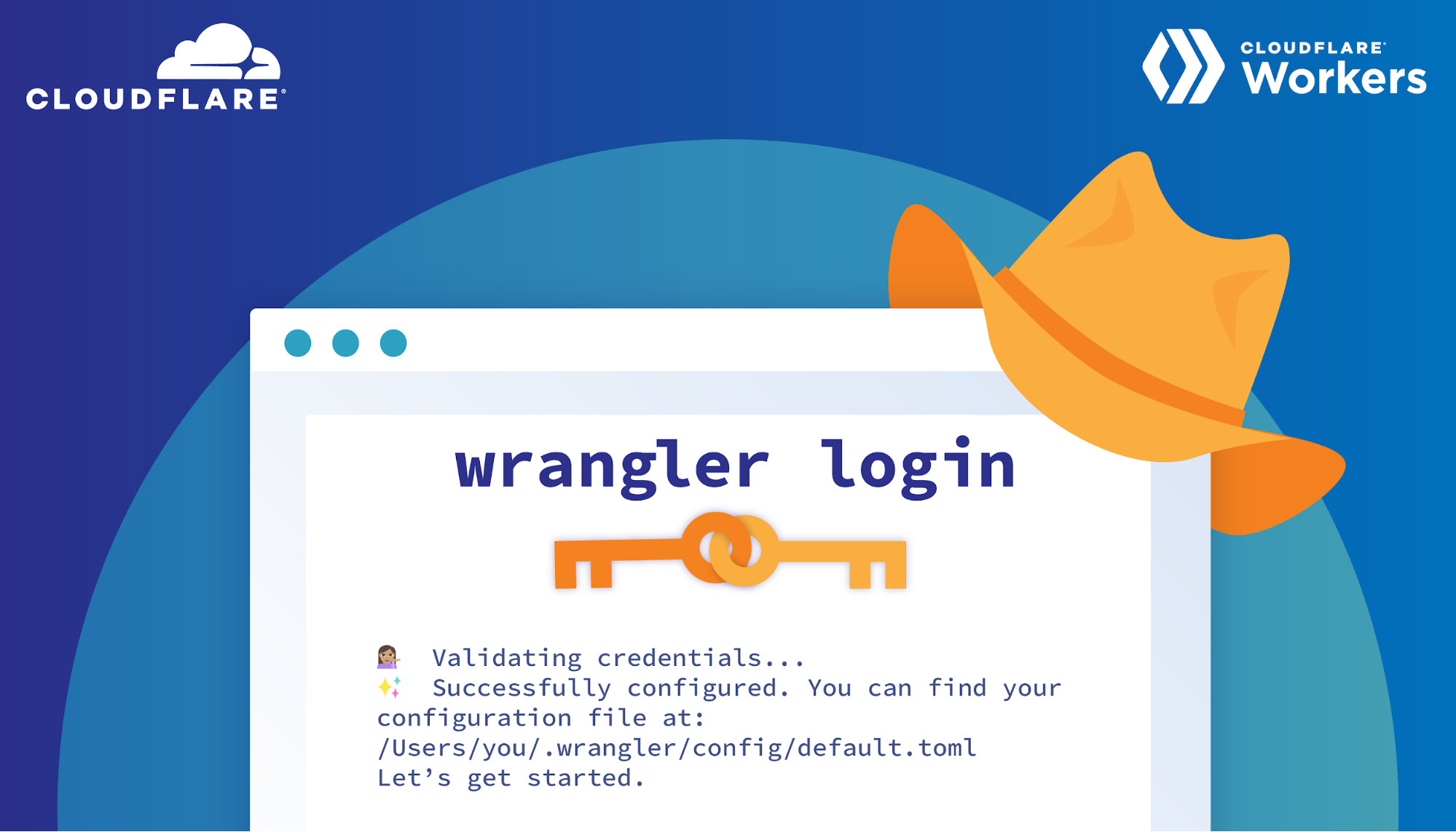
Today I’m excited to announce wrangler login, an easy way to get started with Wrangler! This summer for my internship on the Workers Developer Productivity team I was tasked with helping improve the Wrangler user experience. For those who don’t know, Workers is Cloudflare’s serverless platform which allows users to deploy their software directly to Cloudflare’s edge network.

This means you can write any behaviour on requests heading to your site or even run fully fledged applications directly on the edge. Wrangler is the open-source CLI tool used to manage your Workers and has a big focus on enabling a smooth developer experience.

When I first heard I was working on Wrangler, I was excited that I would be working on such a cool product but also a little nervous. This was the first time I would be writing Rust in a professional environment, the first time making meaningful open-source contributions, and on top of that the first time doing all of this remotely. But thanks to lots of guidance and support from my mentor and team, I was able to help make the Wrangler and Workers developer experience just a little bit better.

The Problem

The main improvement I focused on this summer was the experience when getting started with Wrangler. For many of the commands to publish and develop live Workers, the user first needs to authenticate with Cloudflare. This is mainly done through the wrangler config command which has the user go create an API token and paste it into Wrangler. Creating a token involves going to the Cloudflare dashboard, going to your profile, going to the API tokens page, selecting a token template, adding your zones and accounts, and finally creating the token. While this is a completely valid authentication flow, it’s not as easy as it could be.

It could be frustrating to users who have to leave Wrangler and then possibly get lost in the wrong dashboard page or use the wrong settings for their token. When a group of intern candidates were given the task of using Wrangler, most of them got stuck on this step! Many users might forgo using Workers altogether if this is the first thing they encounter when sitting down to develop. Instead we wanted an experience where users could use their Cloudflare login (ie. their username, password, and possible two-factor authentication) and immediately be ready to go.

No OAuth? No Problem

What we came up with was a way to create and transfer API Tokens for a user, similar to how Argo Tunnel does their login.

Improving the Wrangler Startup Experience

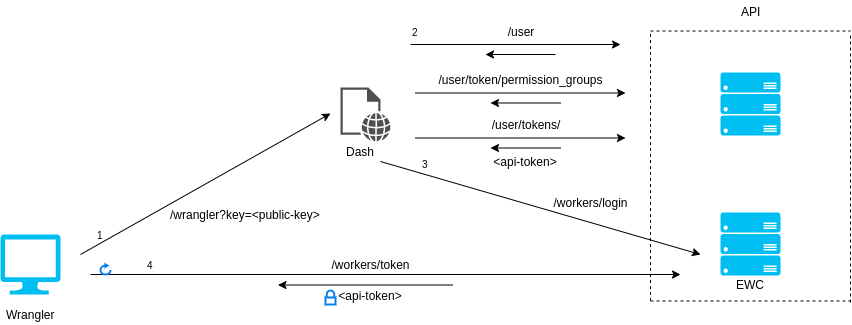
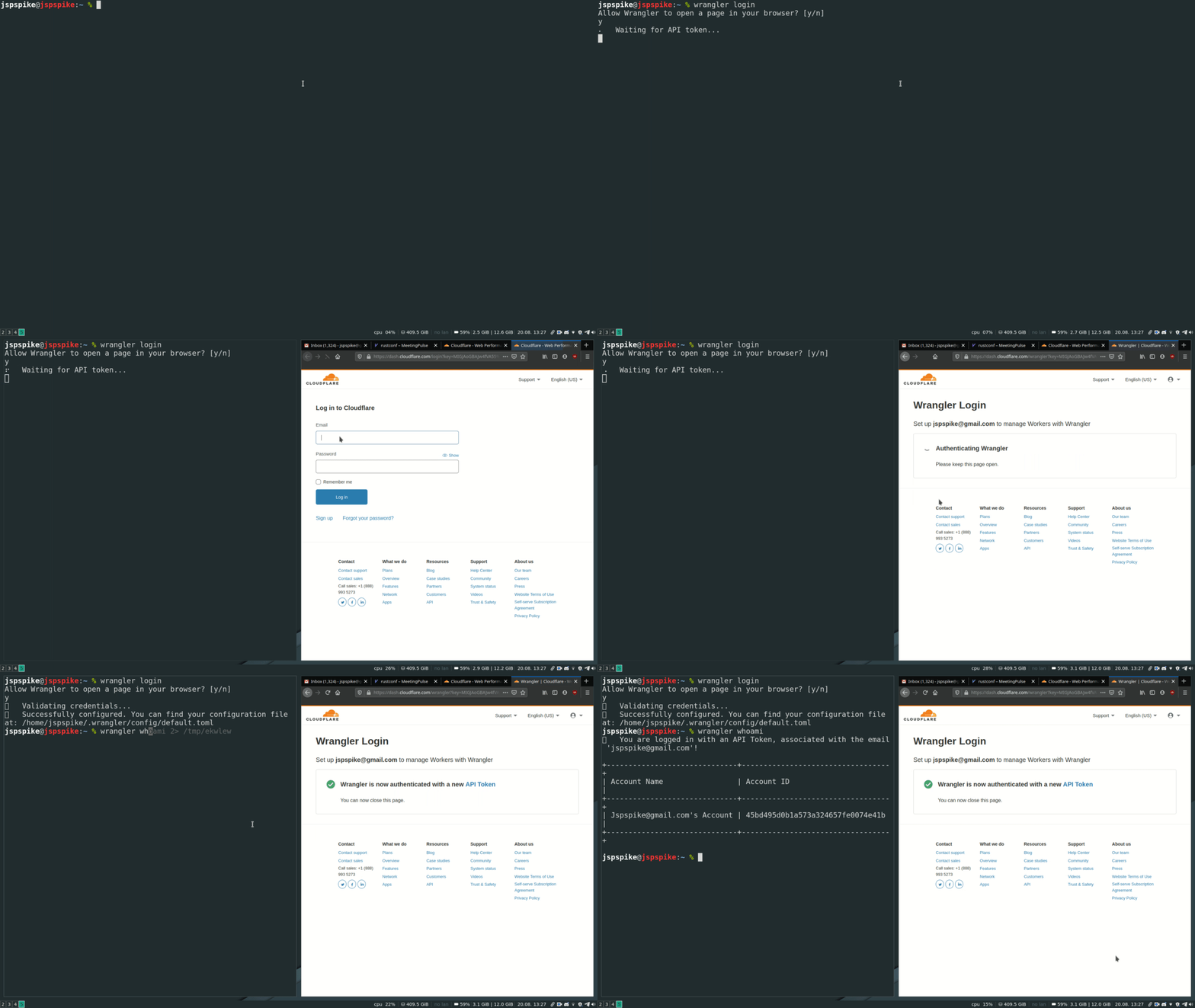
An overview of the process is shown above, which starts with Wrangler. When the user types wrangler login in their terminal, they will be prompted to open the Cloudflare dashboard in their browser. All dashboard pages require the user to sign in before loading and once the user is signed in, all actions taken by the dashboard page will use the authentication of that user.

This means we can make a dashboard page which automatically creates an API token configured to manage Workers. Then when the user loads this page, a properly configured API token will be created for that user. Our dashboard page will then hand off the token to EdgeWorker Config Service (EWC) which will temporarily store it. While this is all going on Wrangler will be polling EWC waiting for the token to appear and once it does, Wrangler will retrieve the token and authenticate the user. With this, we have a seamless way to authenticate a Cloudflare user.

Security

One thing we had to be mindful of was security, these are users’ tokens after all. If someone was listening to network traffic and saw the request to the Cloudflare dashboard page, nothing would be stopping them from polling EWC themselves and stealing the token away from the user to wreak havoc on their Workers and zones. To solve this problem we used asymmetric RSA encryption. Asymmetric encryption lets us create two separate but mathematically connected keys. One is a private key which can encrypt and decrypt information and one is a public key which can only encrypt information.

Wrangler will generate a public-private key pair and pass off the public key to our dashboard page. Once the dashboard page is finished creating our token, EWC will then encrypt the token using the public key before storing. This means in the previous scenario where someone takes the token from our user, all they will have is an encrypted token they can’t use. The only way to decrypt it would be with the private key held by Wrangler.

Improving the Wrangler Startup Experience

In the end, this solution results in a smooth experience for Workers users. Now instead of rummaging through dashboard pages you can get started with Wrangler in only a few seconds, sometimes without having to leave the comfort of your own terminal.

Try out wrangler login in the 1.11.0 release of Wrangler and let us know how you like it. Also I would like to thank the Workers team for helping make this possible and giving me an awesome experience this summer! In order to implement this feature I had to touch different parts of Cloudflare like EWC and Stratus (Cloudflare’s front end monorepo) and work in areas unfamiliar to me such as frontend TypeScript and React. The responsiveness and encouragement I received helped get this feature created and helped make for a great summer!

Using serverless backends to iterate quickly on web apps – part 2

Post Syndicated from James Beswick original https://aws.amazon.com/blogs/compute/using-serverless-backends-to-iterate-quickly-on-web-apps-part-2/

This series is about building flexible solutions that can adapt as user requirements change. One of the challenges of building modern web applications is that requirements can change quickly. This is especially true for new applications that are finding their product-market fit. Many development teams start building a product with one set of requirements, and quickly find they must build a product with different features.

For both start-ups and enterprises, it’s often important to find a development methodology and architecture that allows flexibility. This is the surest way to keep up with feature requests in evolving products and innovate to delight your end-users. In this post, I show how to build sophisticated workflows using minimal custom code.

Part 1 introduces the Happy Path application that allows park visitors to share maps and photos with other users. In that post, I explain the functionality, how to deploy the application, and walk through the backend architecture.

The Happy Path application accepts photo uploads from users’ smartphones. The application architecture must support 100,000 monthly active users. These binary uploads are typically 3–9 MB in size and must be resized and optimized for efficient distribution.

Using a serverless approach, you can develop a robust low-code solution that can scale to handle millions of images. Additionally, the solution shown here is designed to handle complex changes that are introduced in subsequent versions of the software. The code and instructions for this application are available in the GitHub repo.

Architecture overview

After installing the backend in the previous post, the architecture looks like this:

In this design, the API, storage, and notification layers exist as one application, and the business logic layer is a separate application. These two applications are deployed using AWS Serverless Application Model (AWS SAM) templates. This architecture uses Amazon EventBridge to pass events between the two applications.

In the business logic layer:

  1. The workflow starts when events are received from EventBridge. Each time a new object is uploaded by an end-user, the PUT event in the Amazon S3 Upload bucket triggers this process.
  2. After the workflow is completed successfully, processed images are stored in the Distribution bucket. Related metadata for the object is also stored in the application’s Amazon DynamoDB table.

By separating the architecture into two independent applications, you can replace the business logic layer as needed. Providing that the workflow accepts incoming events and then stores processed images in the S3 bucket and DynamoDB table, the workflow logic becomes interchangeable. Using the pattern, this workflow can be upgraded to handle new functionality.

Introducing AWS Step Functions for workflow management

One of the challenges in building distributed applications is coordinating components. These systems are composed of separate services, which makes orchestrating workflows more difficult than working with a single monolithic application. As business logic grows more complex, if you attempt to manage this in custom code, it can become quickly convoluted. This is especially true if it handles retries and error handling logic, and it can be hard to test and maintain.

AWS Step Functions is designed to coordinate and manage these workflows in distributed serverless applications. To do this, you create state machine diagrams using Amazon States Language (ASL). Step Functions renders a visualization of your state machine, which makes it simpler to see the flow of data from one service to another.

Each state machine consists of a series of steps. Each step takes an input and produces an output. Using ASL, you define how this data progresses through the state machine. The flow from step to step is called a transition. All state machines transition from a Start state towards an End state.

The Step Functions service manages the state of individual executions. The service also supports versioning, which makes it easier to modify state machines in production systems. Executions continue to use the version of a state machine when they were started, so it’s possible to have active executions on multiple versions.

For developers using VS Code, the AWS Toolkit extension provides support for writing state machines using ASL. It also renders visualizations of those workflows. Combined with AWS Serverless Application Model (AWS SAM) templates, this provides a powerful way to deploy and maintain applications based on Step Functions. I refer to this IDE and AWS SAM in this walkthrough.

Version 1: Image resizing

The Happy Path application uses Step Functions to manage the image-processing part of the backend. The first version of this workflow resizes the uploaded image.

To see this workflow:

  1. In VS Code, open the workflows/statemachines folder in the Explorer panel.
  2. Choose the v1.asl.sjon file.v1 state machine
  3. Choose the Render graph option in the CodeLens. This opens the workflow visualization.CodeLens - Render graph

In this basic workflow, the state machine starts at the Resizer step, then progresses to the Publish step before ending:

  • In the top-level attributes in the definition, StartsAt sets the Resizer step as the first action.
  • The Resizer step is defined as a task with an ARN of a Lambda function. The Next attribute determines that the Publish step is next.
  • In the Publish step, this task defines a Lambda function using an ARN reference. It sets the input payload as the entire JSON payload. This step is set as the End of the workflow.

Deploying the Step Functions workflow

To deploy the state machine:

  1. In the terminal window, change directory to the workflows/templates/v1 folder in the repo.
  2. Execute these commands to build and deploy the AWS SAM template:
    sam build
    sam deploy –guided
  3. The deploy process prompts you for several parameters. Enter happy-path-workflow-v1 as the Stack Name. The other values are the outputs from the backend deployment process, detailed in the repo’s README. Enter these to complete the deployment.
  4. SAM deployment output

Testing and inspecting the deployed workflow

Now the workflow is deployed, you perform an integration test directly from the frontend application.

To test the deployed v1 workflow:

  1. Open the frontend application at https://localhost:8080 in your browser.
  2. Select a park location, choose Show Details, and then choose Upload images.
  3. Select an image from the sample photo dataset.
  4. After a few seconds, you see a pop-up message confirming that the image has been added:Upload confirmation message
  5. Select the same park location again, and the information window now shows the uploaded image:Happy Path - park with image data

To see how the workflow processed this image:

  1. Navigate to the Steps Functions console.
  2. Here you see the v1StateMachine with one execution in the Succeeded column.Successful execution view
  3. Choose the state machine to display more information about the start and end time.State machine detail
  4. Select the execution ID in the Executions panel to open details of this single instance of the workflow.

This view shows important information that’s useful for understanding and debugging an execution. Under Input, you see the event passed into Step Functions by EventBridge:

Event detail from EventBridge

This contains detail about the S3 object event, such as the bucket name and key, together with the placeId, which identifies the location on the map. Under Output, you see the final result from the state machine, shows a successful StatusCode (200) and other metadata:

Event output from the state machine

Using AWS SAM to define and deploy Step Functions state machines

The AWS SAM template defines both the state machine, the trigger for executions, and the permissions needed for Step Functions to execute. The AWS SAM resource for a Step Functions definition is AWS::Serverless::StateMachine.

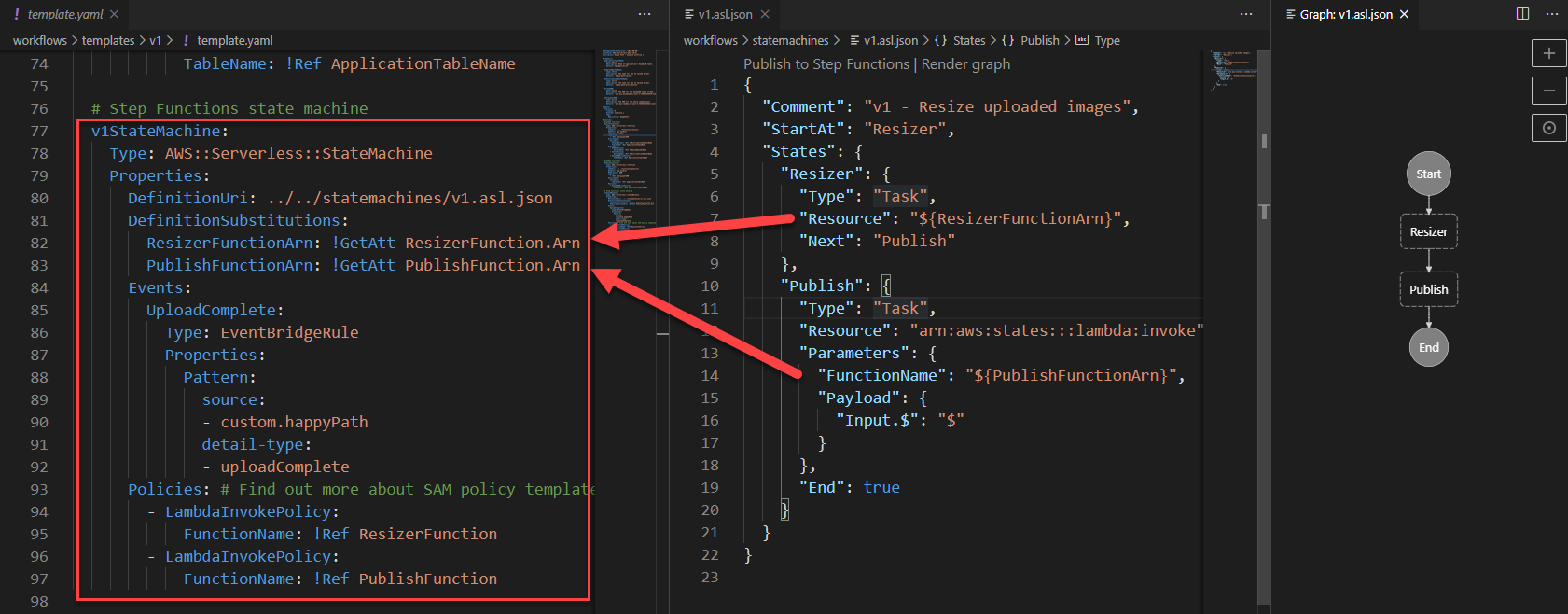
Definition permissions in state machines

In this example:

  • DefinitionUri refers to an external ASL definition, instead of embedding the JSON in the AWS SAM template directly.
  • DefinitionSubstitutions allow you to use tokens in the ASL definition that refer to resources created in the AWS SAM template. For example, the token ${ResizerFunctionArn} refers to the ARN of the resizer Lambda function.
  • Events define how the state machine is invoked. Here it defines an EventBridge rule. If an event matches this source and detail-type, it triggers an execution.
  • Policies: the Step Functions service must have permission to invoke the services that perform tasks in the state machine. AWS SAM policy templates provide a convenient shorthand for common execution policies, such as invoking a Lambda function.

This workflow application is separate from the main backend template. As more functionality is added to the workflow, you deploy the subsequent AWS SAM templates in the same way.

Conclusion

Using AWS SAM, you can specify serverless resources, configure permissions, and define substitutions for the ASL template. You can deploy a standalone Step Functions-based application using the AWS SAM CLI, separately from other parts of your application. This makes it easier to decouple and maintain larger applications. You can visualize these workflows directly in the VS Code IDE in addition to the AWS Management Console.

In part 3, I show how to build progressively more complex workflows and how to deploy these in-place without affecting the other parts of the application.

To learn more about building serverless web applications, see the Ask Around Me series.