PyPI now supports digital attestations

Post Syndicated from jzb original https://lwn.net/Articles/998215/

The Python Package Index (PyPI) has announced
that it has finalized support for PEP 740 (“Index support
for digital attestations”). Trail of Bits, which performed
much of the development work for the implementation, has an in-depth
blog post
about the work and its adoption, as well as what is left
undone:

One thing is notably missing from all of this work:
downstream verification. […]

This isn’t an acceptable end state (cryptographic attestations have
defensive properties only insofar as they’re actually
verified
), so we’re looking into ways to bring
verification to individual installing clients. In particular, we’re
currently working on a plugin architecture
for pip
that will enable users to load
verification logic
directly into their pip install
flows.

Your guide to AWS Analytics at AWS re:Invent 2024

Post Syndicated from Imtiaz Sayed original https://aws.amazon.com/blogs/big-data/your-guide-to-aws-analytics-at-aws-reinvent-2024/

It’s AWS re:Invent time, where you turn your ideas into reality. Get a front row seat to hear real stories from AWS customers, experts and leaders about navigating pressing topics like generative AI and data analytics.

For data enthusiasts and data professionals alike, this blog is a curated and comprehensive guide to all analytics sessions, for you to efficiently plan your itinerary. Secure your spot early for must-attend sessions through the attendee portal. Can’t join in person? No worries – grab a free pass to stream live sessions online.

Join us at the AWS Analytics Kiosk in the AWS Village Expo to get your data questions answered by AWS experts, to dive deeper into re:Invent launches, participate in a data-centric quiz and AWS authored book giveaways.

Keynotes

KEY002 | CEO Keynote with Matt Garman | Tuesday, Dec 3 | 8:00 AM – 10:30 AM PST | Venetian | Level 2 | Venetian Ballroom F

Join AWS CEO Matt Garman to hear how AWS is innovating across every aspect of the world’s leading cloud. He explores how we are reinventing foundational building blocks as well as developing brand new experiences, all to empower customers and partners with what they need to build a better future.

KEY003 | Swami Sivasubramanian, Vice President, Data and AI at AWS | Wednesday, Dec 4 | 8:00 AM – 10:30 AM PST | Venetian | Level 2 | Venetian Ballroom F

Join Dr. Swami Sivasubramanian, VP of AI and Data at AWS, to discover how you can use a strong data foundation to create innovative and differentiated solutions for your customers. Hear from customer speakers with real-world examples of how they’ve used data to support a variety of use cases, including generative AI, to create unique customer experiences.

KEY005 | Dr. Werner Vogels (Vice President and Chief Technology Officer, Amazon.com) | Thursday, Dec 5 | 8:30 AM – 10:30 AM PST | Venetian | Level 2 | Venetian Ballroom F

Join Dr. Werner Vogels, VP and CTO at Amazon.com, as he shares the critical lessons and strategies he’s learned for managing increasingly complex systems. The keynote explores the core principles for embracing complexity, drawing on Amazon experiences building distributed systems at massive scale.

Analytics Innovation Talk

ANT204-INT | Beyond boundaries: Converging analytics and AI to reshape the future | Wednesday, Dec 4 | 2:30 PM – 3:30 PM PST | Venetian | Level 5 | Palazzo Ballroom B

The boundaries between data analytics and AI are blurring as data workers’ behaviors evolve, and previously distinct data roles and use cases converge. Getting to near real-time, trustworthy insights has become paramount, so data workers are seeking seamless collaboration and interoperability across tools and data sources. In this talk, join Sirish Chandrasekaran, Director for Data Warehousing at AWS, and Rick Sears, Director for Data Processing at AWS, to envision a future with AWS where your data workers can effortlessly move between analyzing historical patterns, predicting future scenarios, and automating decision flows at scale, breaking through disparate tools and siloed workflows.

Breakout sessions

Dive into cutting-edge topics with re:Invent breakout sessions. These immersive, hour-long lectures are led by AWS experts, customers, and partners, offering you unparalleled insights and knowledge in a concise format. Whether you’re exploring the latest in cloud technology, AWS Analytics advancements, or industry-specific solutions, these sessions are designed to expand your horizon and inspire your next big idea.

Monday, Dec 2 Tuesday, Dec 3 Wednesday, Dec 4 Thursday, Dec 5

8:30 AM – 9:30 AM PST | MGM Grand

ANT324 | Accelerate value from data: Migrating from batch to stream processing

12:00 PM – 1:00 PM PST | Caesars Forum

ANT341 | Enhance performance with observability, security, and log analytics

8:30 AM – 9:30 AM PST | Mandalay Bay

ANT343 | Monitor and manage data quality

11:00 AM – 12:00 PM PST |Mandalay Bay

ANT325 | Achieve seamless and secure data sharing

10:00 AM – 11:00 AM PST| Mandalay Bay

ANT335 | Build highly performant data solutions with serverless analytics

12:00 PM – 1:00 PM PST | MGM Grand

ANT327 | What’s new: Data streaming on AWS

9:00 AM – 10:00 AM PST | MGM Grand

BSI201|Supercharge your apps with embedded Amazon QuickSight and Amazon Q

11:00 AM – 12:00 PM PST | MGM Grand

ANT340 | Revolutionize your search applications for generative AI

1:00 PM – 2:00 PM PST | Mandalay Bay

ANT342 | Operate and scale managed Apache Kafka and Apache Flink clusters

1:30 PM – 2:30 PM PST | MGM Grand

ANT349| Innovations in AWS analytics: Data warehousing and SQL analytics

10:00 AM – 11:00 AM PST | Mandalay Bay

ANT336 | Build large-scale transactional data lakes with open table formats

11:30 AM – 12:30 PM PST | Caesars Forum

ANT344 | Cost-effective data processing with Amazon EMR

1:00 PM – 2:00 PM PST | Wynn

BSI101 | Reimagine business intelligence with generative AI

1:30 PM – 2:30 PM PST | Wynn

ANT334 | Scale with self-service analytics on AWS

11:30 AM – 12:30 PM PST | Mandalay Bay

ANT329 | What’s new in search, observability & vectors in Amazon OpenSearch Service

.

5:30 PM – 6:30 PM PST | Mandalay Bay

ANT347 | Maximize efficiency and reduce costs with Amazon OpenSearch Service

2:30 PM – 3:30 PM PST | Mandalay Bay

ANT328 | AI-powered analytics with Amazon Redshift Serverless & data sharing

11:30 AM – 12:30 PM PST | Mandalay Bay

BSI102 | What’s new with Amazon QuickSight

.
.

3:00 PM – 4:00 PM PST | Caesars Forum

ANT346 | Innovations in AWS analytics: Data processing

12:00 PM – 1:00 PM PST| Mandalay Bay

ANT339 | Scaling to new heights with Amazon Redshift multi-cluster architecture

.
.

4:00 PM – 5:00 PM PST | Venetian

ANT302 | Data foundation in the age of generative AI

1:00 PM – 2:00 PM PST | Mandalay Bay

ANT303 | Explore what’s new in data governance with AWS analytics

.
.

4:00 PM – 5:00 PM PST | Mandalay Bay

ANT202 | Demystify and democratize access to your data with a business catalog

1:00 PM – 2:00 PM PST | Mandalay Bay

ANT330 | Solving different data ingestion use cases with AWS

.
.

4:00 PM – 5:00 PM PST | Wynn

ANT348 | Innovations in AWS analytics: Zero-ETL and data integrations

. .
.

4:00 PM – 5:00 PM PST | Mandalay Bay

BSI206 | Scale BI to all your users with Amazon Q in QuickSight

. .
.

5:30 PM – 6:30 PM PST | MGM Grand

BSI205 | Migrate to QuickSight: Reduce costs and increase productivity

. .
.

5:30 PM – 6:30 PM PST | MGM Grand

ANT345 | Modernize your data warehouse by moving to Amazon Redshift

. .

Chalk talks

These hour-long, highly engaging sessions offer a unique blend of expert insight and collaborative learning. An AWS specialist kicks off with a concise, informative lecture, setting the stage for an in-depth, interactive Q&A. With a limited audience size, you’ll have the opportunity to dive deep into topics, ask pressing questions, and engage in meaningful discussions with both the presenter and fellow attendees.

Monday, Dec 2 Tuesday, Dec 3 Wednesday, Dec 4 Thursday, Dec 5

10:00 AM – 11:00 AM PST | MGM Grand

ANT316-R | Architectural patterns for near real-time data analytics on AWS

11:30 AM – 12:30 PM PST | Caesars Forum

ANT315 | Amazon OpenSearch Service cost optimizations

10:00 AM – 11:00 AM PST | Mandalay Bay

ANT305 | Strategies for efficient zero-ETL integrations

11:00 AM – 12:00 PM PST | Mandalay Bay

ANT304-R1 | Accelerating the shift from batch to stream processing

11:30 AM – 12:30 PM PST | MGM Grand

ANT337-R | Cost optimization for data analytics on AWS

11:30 AM – 12:30 PM PST | Wynn

ANT410 | Maximize your data performance with Amazon EMR on Amazon EKS

10:30 AM – 11:30 AM PST | MGM Grand

BSI304 | Security and governance: Safeguarding your data with Amazon QuickSight

12:30 PM – 1:30 PM PST | Mandalay Bay

ANT411 | Data integration with AWS Glue and Amazon MWAA

11:30 AM – 12:30 PM PST | MGM Grand

ANT337-R | Cost optimization for data analytics on AWS

12:00 PM – 1:00 PM PST | MGM Grand

ANT332-R | Democratize generative AI data access without compromising on security

11:30 AM – 12:30 PM PST | Mandalay Bay

ANT331-R1 | Build your data strategy for generative AI with Amazon Redshift

12:30 PM – 1:30 PM PST | MGM Grand

ANT409-R1 | Optimize Apache Spark workloads with Amazon EMR Serverless

1:00 PM – 2:00 PM PST | Mandalay Bay

ANT318 | Build serverless streaming data pipelines for real-time analytics

1:00 PM – 2:00 PM PST | MGM Grand

ANT326 | Build multi-tenant data processing architectures

1:00 PM – 2:00 PM PST | Wynn

ANT317-R1 | Best practices for migrating to Amazon OpenSearch Service

2:00 PM – 3:00 PM PST | Mandalay Bay

ANT320 | Data preparation authoring with AWS Glue Studio

2:30 PM – 3:30 PM PST | Mandalay Bay

ANT412 | Ingest streaming data into Apache Iceberg tables with AWS streaming

1:00 PM – 2:00 PM PST | Caesars Forum

ANT413-R | Data governance with AWS analytics

1:00 PM – 2:00 PM PST | Caesars Forum

ANT323-R1 | Catalog and govern your data for generative AI

2:00 PM – 3:00 PM PST | MGM Grand

ANT338 | Using natural language to author data integration applications

4:00 PM – 5:00 PM PST | Caesars Forum

ANT317-R | Best practices for migrating to Amazon OpenSearch Service

1:30 PM – 2:30 PM PST | Wynn

ANT323-R | Catalog and govern your data for generative AI

1:00 PM – 2:00 PM PST | Mandalay Bay

ANT414-R1 | Scalable design patterns for Apache Iceberg–based data lakes

3:30 PM – 4:30 PM PST | MGM Grand

ANT413-R1 | Data governance with AWS analytics

5:30 PM – 6:30 PM PST | Caesars Forum

ANT304-R | Accelerating the shift from batch to stream processing

2:30 PM – 3:30 PM PST | Wynn

ANT314 | Add search to your existing databases with Amazon OpenSearch Ingestion

2:30 PM – 3:30 PM PST | Caesars Forum

ANT333 | Streamline data access management with trusted identity propagation

.
.

2:30 PM – 3:30 PM PST | Caesars Forum

ANT331-R | Build your data strategy for generative AI with Amazon Redshift

4:00 PM – 5:00 PM PST | Caesars Forum

ANT321 | Model your business structure with Amazon DataZone

.
.

3:00 PM – 4:00 PM PST | MGM Grand

ANT319 | Create a data marketplace with Amazon DataZone

4:00 PM – 5:00 PM PST | MGM Grand

ANT322 | Modernize and simplify ETL with AWS Glue

.

4:00 PM – 5:00 PM PST | Caesars Forum

ANT414-R | Scalable design patterns for Apache Iceberg–based data lakes

4:30 PM – 5:30 PM PST | Caesars Forum

ANT337-R1 | Cost optimization for data analytics on AWS

.
.

4:30 PM – 5:30 PM PST | MGM Grand

ANT409-R | Optimize Apache Spark workloads with Amazon EMR Serverless

5:30 PM – 6:30 PM PST | MGM Grand

ANT332-R1 | Democratize generative AI data access without compromising on security

.
.

5:30 PM – 6:30 PM PST | Caesars Forum

ANT316-R1 | Architectural patterns for near real-time data analytics on AWS

. .

Builders’ sessions

Immerse yourself in our builders’ sessions – a hands-on learning experience designed to elevate your AWS skills. These focused, hour-long workshops bring together a small group of up to ten attendees with a dedicated AWS expert at each table.

Monday, Dec 2 Tuesday, Dec 3 Wednesday, Dec 4

8:30 AM – 9:30 AM PST | Caesars Forum

ANT306-R | Orchestrate data and ML workflows with managed Apache Airflow

12:00 PM – 1:00 PM PST | Caesars Forum

ANT307-R | Seamless data sharing with Amazon Redshift

8:30 AM – 9:30 AM PST | Caesars Forum

ANT307-R3 | Seamless data sharing with Amazon Redshift

5:30 PM – 6:30 PM PST | Caesars Forum

ANT306-R1 | Orchestrate data and ML workflows with managed Apache Airflow

12:00 PM – 1:00 PM PST | Wynn

ANT401 | Vector search with Amazon OpenSearch Service

.
.

1:30 PM – 2:30 PM PST | Wynn

ANT306-R2 | Orchestrate data and ML workflows with managed Apache Airflow

.
.

1:30 PM – 2:30 PM PST | Caesars Forum

ANT307-R1 | Seamless data sharing with Amazon Redshift

.
.

3:00 PM – 4:00 PM PST | Caesars Forum

ANT307-R2 | Seamless data sharing with Amazon Redshift

.
.

4:30 PM – 5:30 PM PST | Caesars Forum

ANT306-R3 | Orchestrate data and ML workflows with managed Apache Airflow

.

Workshops

Roll your sleeves in our dynamic 2-hour workshops, where you’ll tackle real-world challenges using AWS services. These interactive sessions kick off with a brief, informative lecture to set the stage, then quickly transition into hands-on problem-solving. Bring your laptop and prepare to build alongside AWS experts, who will guide you through practical applications of cloud computing concepts. Whether you’re new to AWS or looking to sharpen your skills, these workshops offer a unique opportunity to learn by doing, enabling you to leave with confidence and applicable knowledge in AWS technologies.

Mon, Dec 2 Tuesday, Dec 3 Wednesday, Dec 4 Thursday, Dec 5

12:00 PM – 2:00 PM PST | Mandalay Bay

ANT404 | Migrating from self-managed Apache Kafka to Amazon MSK

11:30 AM – 1:30 PM PST | Venetian

ANT309 | Enhance insights for your data warehouse with zero-ETL & generative AI

9:00 AM – 11:00 AM PST | MGM Grand

ANT310 | Low-cost logging and observability with Amazon OpenSearch Service

12:00 PM – 2:00 PM PST | Mandalay Bay

ANT350-R1 | End-to-end data integration and data engineering on AWS

3:00 PM – 5:00 PM PST | Mandalay Bay

ANT312 | Unlock your enterprise data with intelligent document search

11:30 AM – 1:30 PM PST | MGM Grand

BSI204-R | Hands-on with Amazon Q in QuickSight: A step-by-step workshop

1:00 PM – 3:00 PM PST | MGM Grand

ANT350-R | End-to-end data integration and data engineering on AWS

3:00 PM – 5:00 PM PST | Mandalay Bay

ANT402-R1 | Build open table data lakes for real-time insights with Apache Iceberg

.

12:30 PM – 2:30 PM PST | Caesars Forum

ANT402-R | Build open table data lakes for real-time insights with Apache Iceberg

4:00 PM – 6:00 PM PST | MGM Grand

ANT308-R1 | Build and govern your data mesh with Amazon DataZone

3:30 PM – 5:30 PM PST | Venetian

BSI204-R1 | Hands-on with Amazon Q in QuickSight: A step-by-step workshop

.

 3:30 PM – 5:30 PM PST | Wynn

ANT308-R | Build and govern your data mesh with Amazon DataZone

. .
.

4:30 PM – 6:30 PM PST | MGM Grand

ANT311 | Prepare your data for generative AI

. .

Code talks

Dive into the world of practical AWS development with our engaging Code Talks. These sessions elevate the popular chalk talk format by shifting focus from architectural concepts to hands-on coding. Watch as expert speakers guide you through live coding demonstrations, showcasing real-world solutions in action. You’ll gain insights into the reasoning behind each implementation choice and witness the development process unfold in real-time. Whether you’re a seasoned developer or just starting your AWS journey, Code Talks offer a unique opportunity to enhance your skills and deepen your understanding of AWS solutions through practical, code-centric discussions.

Mon, Dec 2 Tuesday, Dec 3 Wednesday, Dec 4 Thursday, Dec 5

1:00 PM – 2:00 PM PST | Wynn

ANT407 | Predictive maintenance with Amazon Managed Service for Apache Flink

3:00 PM – 4:00 PM PST | Wynn

ANT406-R | Generative AI–powered search with Amazon OpenSearch Service

12:00 PM – 1:00 PM PST | Wynn

ANT408 | Working with UDFs in Amazon Redshift and Amazon Athena

2:30 PM – 3:30 PM PST | Wynn

ANT406-R1 | Generative AI–powered search with Amazon OpenSearch Service

Session IDs for chalk talks, builders’ sessions, workshops, and code talks that end with R (for example, ANT406-R), indicate repeat sessions.

Conclusion

We hope this post acts as your go-to resource for navigating the AWS analytics track at re:Invent 2024. For staying in the know about the most recent trends and advancements in AWS Analytics, follow our LinkedIn page.


About the Authors

Imtiaz (Taz) Sayed is the WW Tech Leader for Analytics at AWS. He enjoys engaging with the community on all things data and analytics. He can be reached through LinkedIn.

Navnit Shukla serves as an AWS Specialist Solutions Architect with a focus on Analytics. He possesses a strong enthusiasm for assisting clients in discovering valuable insights from their data. Through his expertise, he constructs innovative solutions that empower businesses to arrive at informed, data-driven choices. Notably, Navnit Shukla is the accomplished author of the book titled Data Wrangling on AWS. He can be reached through LinkedIn.

iKoolCore R2 Max Dual 10Gbase-T and 2.5GbE Fanless Mini PC Hands-on

Post Syndicated from Patrick Kennedy original https://www.servethehome.com/ikoolcore-r2-max-dual-10gbase-t-2-5gbe-mini-pc-intel-marvell-hands-on/

The iKoolCore R2 Max brings dual 10Gbase-T NICs, dual 2.5GbE NICs, and dual M.2 SSDs all into what can be a fanless mini PC package

The post iKoolCore R2 Max Dual 10Gbase-T and 2.5GbE Fanless Mini PC Hands-on appeared first on ServeTheHome.

7 Ways to Use Event Notifications to Streamline Application Workflows

Post Syndicated from Amrit Singh original https://www.backblaze.com/blog/7-ways-to-use-event-notifications-to-streamline-application-workflows/

A decorative image showing a cloud with an alert symbol.

Event-driven infrastructure is at the core of modern application development. It helps businesses streamline processes like transcoding user-uploaded video or processing images for tagging, kicks off downstream workflows immediately, and reduces complexity by automating multi-step processes across distributed services. 

Today, I’m sharing seven ways you can use Backblaze Event Notifications to accelerate application workflows, automate processes, streamline operations, and scale revenue. If you’re interested in Event Notifications, but you’re not using it to run applications, stay tuned for future posts sharing use cases for media management and backup and archive. 

Event Notifications for applications: Simplified automation

Event Notifications delivers near real-time alerts for changes in B2 Cloud Storage, simplifying workflows across the services that interact with your stored data. Teams can use Event Notifications to create end-to-end processes that scale efficiently and integrate directly with any external service that accepts webhooks. This means no more manual monitoring of storage or relying on complex intermediaries.

What are webhooks?

Webhooks, if you’re not familiar, are a way for applications to communicate with each other by sending data automatically based on specific events, e.g., HTTP POST requests with a JSON payload. Notably, our Event Notifications feature isn’t limited to a closed ecosystem or subset of business tools.

Automating common application tasks with Event Notifications allows you to reduce operational overhead by minimizing manual monitoring, accelerate processes across integrations with your preferred services, and reduce manual entry errors that can cost enterprises time and money. 

Top 7 use cases for applications

Let’s explore some practical ways Event Notifications can be leveraged within your tech stack:

1. User-generated content processing

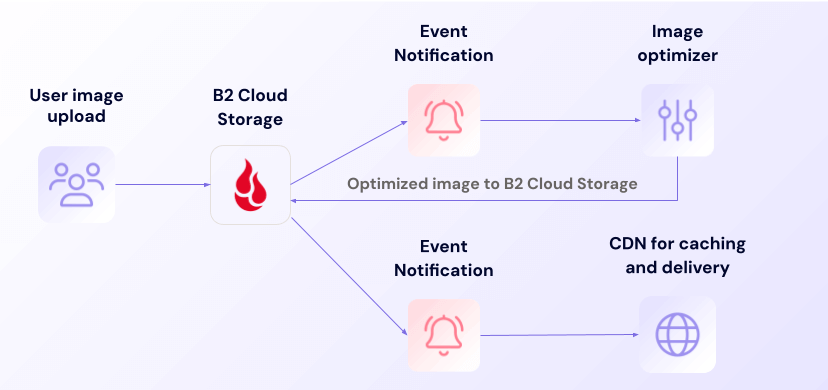
For applications dealing with user-uploaded content, Event Notifications can be used to trigger tasks immediately upon data upload. Imagine a user uploading a video or image: An Event Notification could be sent to a transcoding service to format it, a tagging service to categorize it, or even a moderation tool to ensure it complies with your community standards—all in near real time, without manual intervention.

Social platform workflow

By automating these processes, companies can ensure that user-generated content is formatted correctly, appropriately tagged, and moderated without delay. This not only saves time but guarantees a consistent user experience. 

2. Integrated alerts with automation tools

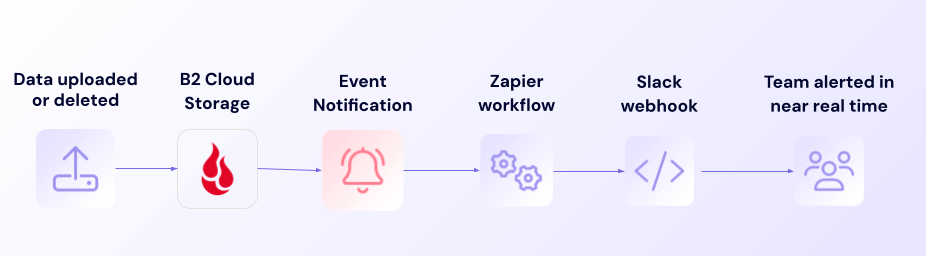
Event Notifications can easily integrate with productivity tools like Slack and Zapier, or any service that accepts a webhook, making it easy to provide team-wide awareness into changes in your storage environment without manual checks. This keeps teams informed and at the ready to be able to respond immediately to critical events.

Asset tracking and monitoring workflow

Additionally, for teams using workflow platforms such as Zapier to connect various services, Event Notifications makes it simple to trigger actions across multiple platforms, enabling powerful, automated workflows with your data in B2 Cloud Storage.

3. Surveillance and streaming automation

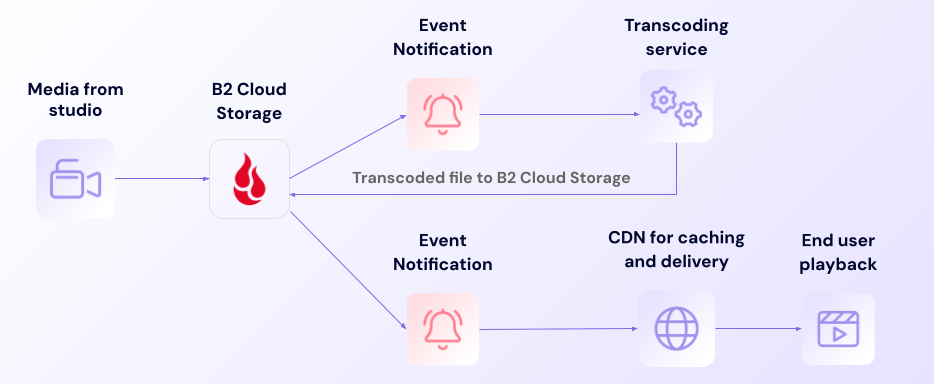
For applications managing large video files, such as surveillance or streaming platforms, Event Notifications can help automate the processing and distribution workflows. Videos can be transcoded, compressed, and prepared for delivery or playback promptly.

Streaming platform workflow

This automation is also useful for time-sensitive content, where quick turnaround is essential. Automating video processing reduces the manual effort involved and ensures content is always ready for viewing in the preferred format as soon as it’s available.

4. AI workload automation

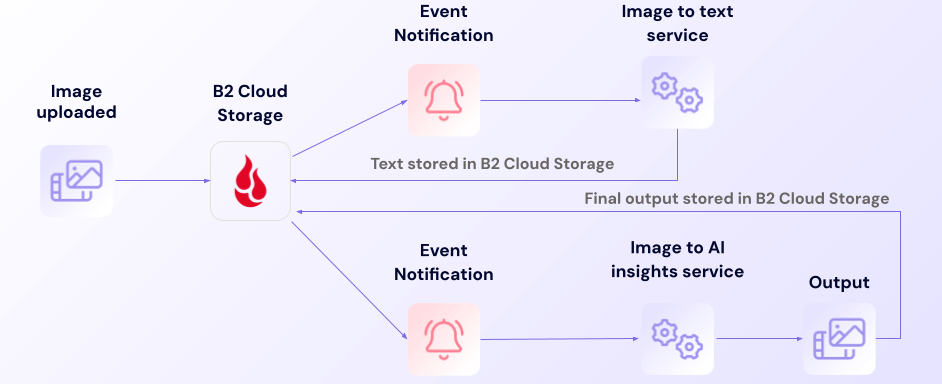
For businesses building AI applications, Event Notifications can be used to trigger AI workloads in real time, enabling faster processing and response. For instance, when new data is uploaded, alerts can trigger downstream services to process that data, such as converting images to text or analyzing content for insights. 

AI image to text workflow

In this case, this AI workflow ensures tasks start the moment data becomes available. Whether you’re running an image recognition service, analyzing datasets, or building AI models, Event Notifications eliminates the delays that come with manual processing. No matter what your downstream service is, Event Notifications provides the flexibility to integrate seamlessly with your AI workflows, improving real-time processing capabilities and enabling teams to focus on delivering better solutions rather than managing manual data flow.

5. Monitor data usage

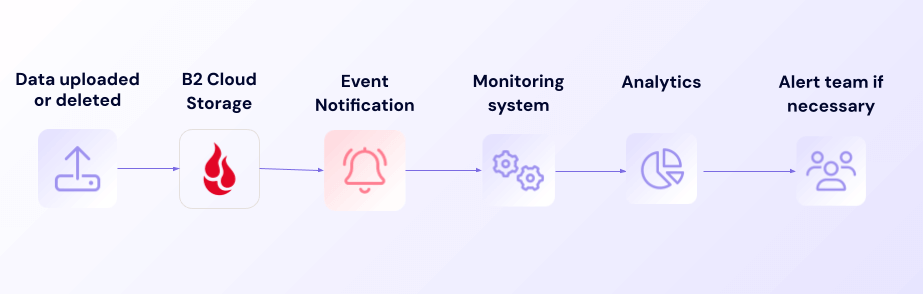
Since Event Notifications messages are sent within seconds of files being uploaded and deleted, and contain the size of the file in question, you can easily and reliably track your data usage in near real time, helping you identify trends and potential issues.

Monitoring workflow

In contrast with periodic usage reports, near real-time monitoring allows you to respond to situations as they are happening, mitigating risks and potentially reducing costs.

6. Respond to security events

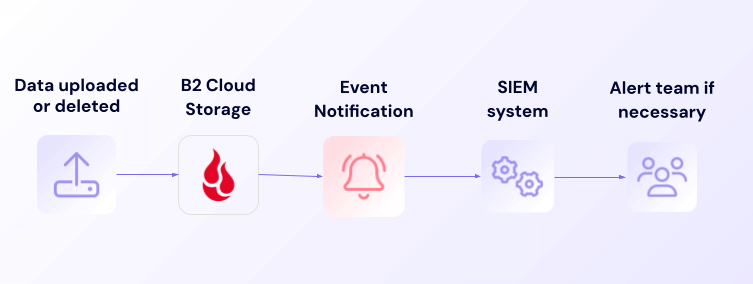
Event Notifications can feed near real-time data to security information and event management (SIEM) systems, allowing you to detect and respond to anomalous access patterns as they are happening.

Security alert workflow

Event Notifications allows you to take a proactive, rather than reactive, security posture, again mitigating risks and reducing costs.

7. Automatically trigger data integration

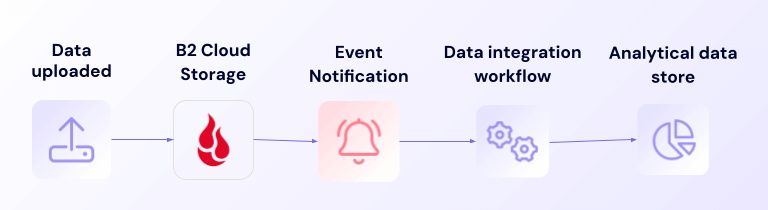
Event Notifications enable your data integration workloads to run within seconds of new data being uploaded to Backblaze B2, continuously delivering data to analytical systems and dashboards, giving you a live view of the state of your business.

Data integration workflow

Delivering data to dashboards within seconds or minutes of its availability enables near real-time insights, faster decision-making, and the ability to react to events as they occur.

Beyond these example use cases, Event Notifications opens up a wide range of possibilities for automating and optimizing workflows. You can use Event Notifications to automate metadata extraction and tagging for better content organization, and handle errors programmatically by triggering reprocessing tasks whenever issues arise. This flexibility makes it easy to automate how your infrastructure interacts with and reacts to data changes in B2 Cloud Storage, simplifying workflows across your distributed services.

Why Event Notifications matter for application workflows

The benefits of real-time notifications extend beyond simply saving time—they transform the way teams work, automate processes, and reduce the margin for error.

  • Awareness: Instant notifications for data changes, uploads, or deletions keep everyone on the same page.
  • Actionable insights: Whether it’s confirming a successful upload or catching an unexpected change, real-time alerts provide critical information that helps make informed decisions quickly.
  • Flexibility: Direct connections to services like transcoding, compute, or serverless applications mean more choice and less lock-in to specific vendors or tools.
  • Improved security: By instantly alerting teams to unauthorized changes or unusual activity, Event Notifications help maintain data integrity and support proactive security measures.
  • Cost efficiency: Automating tasks like media transcoding, data processing, or content delivery reduces the need for manual labor, saving on operational costs and freeing up resources for other strategic initiatives.

How Event Notifications compares

Unlike other offerings like Amazon’s messaging services, which are limited to specific ecosystems, Event Notifications integrates directly with any service that accepts webhooks, offering true flexibility and avoiding vendor lock-in.

Event Notifications is also designed for at-least-once delivery, ensuring critical notifications are not missed. This reliability is important for teams building workflows that require precision and a level of consistency their end users expect. 

The pricing for Event Notifications is simple and transparent, with 2,500 calls per day free, and just $0.004 per 10,000 transactions. This straightforward pricing applies no matter the service receiving the notification. This enables businesses to confidently scale their event-driven workflows, knowing exactly what to expect in terms of costs, regardless of the services they choose to integrate with. 

Ready to add automation to your application?

For existing customers working with a Backblaze account manager, Event Notifications is already enabled for you, and your account manager can assist with any questions. If you’re an existing customer not currently working with an account manager, please contact our Support team to request access to Event Notifications. 

New customers can contact our Sales team to learn more about how Event Notifications can streamline workflows and how to get started.

Once Event Notifications are enabled, log in to your Backblaze B2 account, navigate to the Buckets page, and click on the Event Notifications section. From there, you can set up notification rules for the events you want to track or configure notifications using our API.

For detailed instructions and best practices, visit our Event Notifications documentation.

The post 7 Ways to Use Event Notifications to Streamline Application Workflows appeared first on Backblaze Blog | Cloud Storage & Cloud Backup

Ingest telemetry messages in near real time with Amazon API Gateway, Amazon Data Firehose, and Amazon Location Service

Post Syndicated from Srini Ponnada original https://aws.amazon.com/blogs/big-data/ingest-telemetry-messages-in-near-real-time-with-amazon-api-gateway-amazon-data-firehose-and-amazon-location-service/

Many organizations specializing in communications and navigation surveillance technologies are required to support multi-modal transportation supply chain markets such as road, water, air, space, and rail. One common use case is provisioning of emergency alerts services for multiple government agencies.

These organizations use third-party satellite-powered terminal devices for remote monitoring using telemetry and NMEA-0183 formatted messages generated in near real time. This post demonstrates how to implement a satellite-based remote alerting and response solution on the AWS Cloud to provide time-critical alerts and actionable insights, with a focus on telemetry message ingestion and alerts. Key services in the solution include Amazon API Gateway, Amazon Data Firehose, and Amazon Location Service.

The challenge

In the event of a disaster e.g. water flood, there is usually a lack of terrestrial data connectivity that prevents monitoring stations from taking actionable measures in real time. In the space analytics domain, many organizations deploy satellite-powered terminals on these monitoring stations.

These terminal devices transmit telemetry and NMEA-0183 formatted messages to a satellite network managed by a third-party entity, which is subsequently traversed down to an API endpoint.

Our AWS-powered solution aims to capture, enrich, and ingest satellite-powered telemetry messages as well as deliver alerts in near real time. This solution is based on AWS serverless services such as API Gateway, Data Firehose, and Amazon Simple Storage Service (Amazon S3), and is able to scale to more than a million terminal devices transmitting an hourly state of health telemetry message over the satellite.

Solution overview

This telemetry message processing begins with an API endpoint created using API Gateway, securing HTTPS transmission over a satellite network. This endpoint receives raw JSON messages and responds with an HTTP 200 success code. We take advantage of the direct integration between API Gateway and Data Firehose to ingest these messages into Amazon S3 in near real time. The default message reception limit on an API Gateway endpoint is 10,000 messages per second, which can be increased upon request.

Upon receiving messages through API Gateway, Data Firehose batches them into 60-second intervals or 1 MB size files, whichever comes first, and delivers them to Amazon S3. This configuration enables near real-time processing, which is essential for timely alerts and responses. We use the built-in features of Data Firehose, including AWS Lambda for necessary data transformation and Amazon Simple Notification Service (Amazon SNS) for near real-time alerts. Additionally, Data Firehose converts JSON data to Parquet format before delivering it to Amazon S3, optimizing data consumption by tools like Amazon Athena, which are ideal for partitioned data formats.

To maintain up-to-date data, an AWS Glue crawler reads and updates the AWS Glue Data Catalog from transformed Parquet files. This crawler runs one time a day by default to optimize costs, but you can adjust its schedule to meet varying end-user requirements.

We use an AWS CloudFormation template to implement the solution architecture, as illustrated in the following diagram.

Cloudformation template to implement the solution architecture

Cloudformation template to implement the solution architecture

For this post, we deliver sample JSON formatted telemetry messages to an API Gateway endpoint test interface to simulate the satellite-powered terminal device functionality. API Gateway integrates with Data Firehose, which uses Lambda to perform the following actions in near real time:

  1. Parse the message and decode the data blob from base64 encoding to utf-8. Most third-party satellite-powered terminal devices transmit messages in an encoded format and require decoding to a standard readable format such as utf-8.
  2. Use Amazon Location and append with location specifics (such as street, city, and ZIP) based on the latitude and longitude of the terminal device.
  3. Detect if the solar panel battery of the terminal device is lower than the defined threshold and generate an alert through Amazon SNS to the user-provided email address. For simplicity, the CloudFormation template creates an SNS topic within the same account instead of a cross-account consumer application. You must subscribe to the topic using an email received at the provided email address.
  4. Ingest the messages in an S3 bucket received in 1 minute or aggregate to 1 MB size files.

The solution uses the following key services:

  • Amazon API Gateway – API Gateway is a fully managed service that makes it straightforward developers to create, publish, maintain, monitor, and secure APIs at any scale. APIs act as the entry point for applications to access data, business logic, or functionality from your backend services.
  • Amazon Data Firehose – Data Firehose is an extract, transform, and load (ETL) service that reliably captures, transforms, and delivers streaming data to data lakes, data stores, and analytics services.
  • AWS Glue – The AWS Glue Data Catalog is your persistent technical metadata store in the AWS Cloud. Each AWS account has one Data Catalog per AWS Region. Each Data Catalog is a highly scalable collection of tables organized into databases. A table is metadata representation of a collection of structured or semi-structured data stored in sources such as Amazon Relational Database Service (Amazon RDS), Apache Hadoop Distributed File System (HDFS), Amazon OpenSearch Service, and others.
  • IAM – With AWS Identity and Access Management (IAM), you can specify who or what can access services and resources in AWS, centrally manage fine-grained permissions, and analyze access to refine permissions across AWS.
  • AWS Lambda – Lambda is a serverless, event-driven compute service that lets you run code for virtually any type of application or backend service without provisioning or managing servers. You can invoke Lambda functions from over 200 AWS services and software as a service (SaaS) applications, and only pay for what you use.
  • Amazon Location Service – Location Service makes it straightforward for developers to add location functionality, such as maps, points of interest, geocoding, routing, tracking, and geofencing, to their applications without sacrificing data security and user privacy.
  • Amazon S3 – Amazon S3 is an object storage service offering industry-leading scalability, data availability, security, and performance. Customers of all sizes and industries can store and protect any amount of data for virtually any use case, such as data lakes, cloud-centered applications, and mobile apps.
  • Amazon SNS – Amazon SNS sends notifications two ways: application-to-application (A2A) and application-to-person (A2P). A2A provides high-throughput, push-based, many-to-many messaging between distributed systems, microservices, and event-driven serverless applications. These applications include Amazon Simple Queue Service (SQS), Data Firehose, Lambda, and other HTTPS endpoints. A2P functionality lets you send messages to your customers with SMS texts, push notifications, and email.

Deploy the solution

AWS CloudFormation creates the API Gateway endpoint, Data Firehose delivery stream, Lambda function, Amazon Location index, SNS topic, S3 bucket, and AWS Glue database, table, and crawler. To deploy the solution, launch the CloudFormation stack and provide the following parameters:

  • S3 bucket name – The bucket that stores terminal device messages ingested in near real time by the Data Firehose delivery stream
  • Email address – The email of the user to subscribe for SNS alerts
  • Database name – The name of the AWS Glue database

Test the solution

The following is a sample JSON state of health telemetry message transmitted by a terminal device:

{
  "packetId": 29957891,
  "deviceType": 1,
  "deviceId": 6113,
  "userApplicationId": 65535,
  "organizationId": 65681,
  "data": "eyJsbiI6LTEwNC45NTUsInNpIjowLjAsImJpIjowLjIxMiwic3YiOjAuMDA4LCJsdCI6MzkuNTc1MiwiYnYiOjMuNzI4LCJkIjoxNjU4NzQ1MzM2LCJuIjo2NjksImEiOjE3MzguMCwicyI6NS4wLCJjIjozMjAuMCwiciI6LTEwMSwidGkiOjAuMDM2fQ==",
  "len": 142,
  "status": 0,
  "hiveRxTime": "2022-07-25T13:03:29"
}

The data blob in the preceding sample telemetry message is encoded in base64. The following chart explains the metadata of each key indicating state of health and location of the terminal device.

Parameter Key Sample Value Notes
Longitude ln -104.955 Negative = Westing from PM
Solar Panel Current si 0.176 (Amps)
Battery Current bi 0.228 (Amps)
Solar Panel Voltage sv 19.088 (Volts)
Latitude lt 39.5751 Positive = Northing from Equator
Battery Voltage bv 4.12 (Volts) Full charge ~4.12V Dead ~ 3.3V
Date and Time d 1658248415 Epoch Seconds
Number of Messages Sent Since Last Power Cycle n 531
Altitude a 1721.0 (Meters) GPS value
Speed s 1.0 (km/h) Stationary terminal reports non-zero value
Course: c 139.0 (degrees) Nautical heading convention
Last RSSI Value r -100 (dBm) >-90 = marginal link.
Modem Current ti 0.04 (Amps)

These telemetry messages can vary based on the default configuration of the device terminal manufacturer or user definitions.

To demonstrate the capability of the solution, we send the sample telemetry message to the API Gateway endpoint through its test interface, as shown in the following screenshot.

sample telemetry message

Sending sample telemetry message

After about a minute, you should see the delivered message to Amazon S3 through Data Firehose in the stage folder.

delivered message to Amazon S3

Delivered message to Amazon S3

You should also receive an SNS alert at the provided email address.

SNS alert message

SNS alert message

To see the results in Athena, we crawl this data with the AWS Glue crawler created by the CloudFormation template. By default, the crawler is scheduled daily to reflect newer records for the day in the stage table.

AWS Glue crawler execution

AWS Glue crawler execution

After the data is crawled successfully, you can query the results in Athena.

Query the results in Athena

Query results in Athena

Best practices and considerations

Keep in mind the following best practices when implementing this solution:

  • Make sure API Gateway is protected using an API key or other authorization method
  • Adhere to the least privilege principle for all created users and roles to mitigate potential security breaches
  • Conduct load testing of the solution using an API simulator tailored to your specific use case
  • Automate the solution using the AWS Cloud Development Kit (AWS CDK), AWS CloudFormation, or your preferred infrastructure as code (IaC) tools

Additionally, Data Firehose now supports zero buffering. For more information, refer to Amazon Kinesis Data Firehose now supports zero buffering.

Conclusion

In this post, we provided a proof of concept to implement a satellite-based remote alerting and response solution to provide time-critical alerts and actionable insights, for use cases in the space analytics domain. Make sure to adhere to AWS best practices and your organizational security policies before deploying this solution in a production environment.

Try out the solution for your own use case, and let us know your feedback and questions in the comments section.


About the authors

Srini Ponnada is a Sr. Data Architect at AWS. He has helped customers build scalable data warehousing and big data solutions for over 20 years. He loves to design and build efficient end-to-end solutions on AWS. In his spare time, he loves walking, and playing Tennis.

Munim Abbasi is currently a Sr. Data Architect at AWS with more than ten years of experience in Data & Analytics domain. Leveraging his core competencies in data architecture, design and engineering, he strives to make his customers empowered through their data by helping them deploy scalable cloud solutions adhering to AWS best practices. Outside of work, he holds great love for music, strength training and family.

Vivek Shrivastava is a Principal Data Architect, Data Lake in AWS Professional Services. He is a big data enthusiast and holds 14 AWS Certifications. He is passionate about helping customers build scalable and high-performance data analytics solutions in the cloud. In his spare time, he loves reading and finds areas for home automation.

Expand data access through Apache Iceberg using Delta Lake UniForm on AWS

Post Syndicated from Tomohiro Tanaka original https://aws.amazon.com/blogs/big-data/expand-data-access-through-apache-iceberg-using-delta-lake-uniform-on-aws/

The landscape of big data management has been transformed by the rising popularity of open table formats such as Apache Iceberg, Apache Hudi, and Linux Foundation Delta Lake. These formats, designed to address the limitations of traditional data storage systems, have become essential in modern data architectures. As organizations adopt various open table formats to suit their specific needs, the demand for interoperability between these formats has grown significantly. This interoperability is crucial for enabling seamless data access, reducing data silos, and fostering a more flexible and efficient data ecosystem.

Delta Lake UniForm is an open table format extension designed to provide a universal data representation that can be efficiently read by different processing engines. It aims to bridge the gap between various data formats and processing systems, offering a standardized approach to data storage and retrieval. With UniForm, you can read Delta Lake tables as Apache Iceberg tables. This expands data access to broader options of analytics engines.

This post explores how to start using Delta Lake UniForm on Amazon Web Services (AWS). You can learn how to query Delta Lake native tables through UniForm from different data warehouses or engines such as Amazon Redshift as an example of expanding data access to more engines.

How Delta Lake UniForm works

UniForm allows other table format clients such as Apache Iceberg to access Delta Lake tables. Under the hood, UniForm generates Iceberg metadata files (including metadata and manifest files) that are required for Iceberg clients to access the underlying data files in Delta Lake tables. Both Delta Lake and Iceberg metadata files reference the same data files. UniForm generates multiple table format metadata without duplicating the actual data files. When an Iceberg client reads a UniForm table, it first accesses the Iceberg metadata files for the UniForm table, which then allows the Iceberg client to read the underlying data files.

There are two options to use UniForm:

  • Create a new Delta Lake table with UniForm
  • Enable UniForm on your existing Delta Lake table

First, to create a new Delta Lake table enabling UniForm, you configure table properties for UniForm in a CREATE TABLE DDL query. The table properties are 'delta.universalFormat.enabledFormats'='iceberg' and 'delta.enableIcebergCompatV2'='true'. When these options are set to the CREATE TABLE query, Iceberg metadata files are generated along with Delta Lake metadata files. In addition to these options, Delta Lake table protocol versions that define supported features by the table such as delta.minReaderVersion and delta.minWriterVersion are required to be set to 2 and 7 or more respectively. For more information about the table protocol versions, refer to What is a table protocol specification? in Delta Lake public document. Appendix 1. Create a new Delta Lake table with UniForm shows an example query to create a new Delta Lake UniForm table.

You can also enable UniForm on an existing Delta Lake table. This option is suitable if you have Delta Lake tables in your environment. Enabling UniForm doesn’t affect your current operations on the Delta Lake tables. To enable UniForm on a Delta Lake table, run REORG TABLE db.existing_delta_lake_table APPLY (UPGRADE UNIFORM(ICEBERG_COMPAT_VERSION=2)). After running this query, Delta Lake automatically generates Iceberg metadata files for the Iceberg client. In the example in this post, you run this option and enable UniForm after you create a Delta Lake table.

For the information about enabling UniForm, refer to Enable Delta Lake UniForm in the Delta Lake public document. Note that the extra package (delta-iceberg) is required to create a UniForm table in AWS Glue Data Catalog. The extra package is also required to generate Iceberg metadata along with Delta Lake metadata for the UniForm table.

Example use case

A fictional company built a data lake with Delta Lake on Amazon Simple Storage Service (Amazon S3) that’s mainly used through Amazon Athena. According to its usage expansion, this company wants to expand data access to cloud-based data warehouses such as Amazon Redshift for flexible analytics use cases.

There are a few challenges to achieve this requirement. Delta Lake isn’t natively supported in Amazon Redshift. For those data warehouses, Delta Lake tables need to be converted to manifest tables, which requires additional operational overhead. You need to run the GENERATE command on Spark or use a crawler in AWS Glue to generate manifest tables, and you need to sync those manifest tables every time the Delta tables are updated.

Delta Lake UniForm can be a solution to meet this requirement. With Delta Lake UniForm, you can make the Delta Table compatible with the other open table formats such as Apache Iceberg, which is natively supported in Amazon Redshift. Users can query those Delta Lake tables as Iceberg tables through UniForm.

The following diagram describes the architectural overview to achieve that requirement.

bdb4538_solution-overview

In this tutorial, you create a Delta Lake table with a synthetic review dataset that includes different products and customer reviews and enable UniForm on that Delta Lake table to make it accessible from Amazon Redshift. Each component works as follows in this scenario:

  • Amazon EMR (Amazon EMR on EC2 cluster with Apache Spark): An Apache Spark application on an Amazon EMR cluster creates a Delta Lake table and enables UniForm on it. Only Delta Lake client can write to the Delta Lake UniForm table, making Amazon EMR act as a writer.
  • Amazon Redshift: Amazon Redshift uses Iceberg clients to read records from the Delta Lake UniForm table. It’s limited to reading records from the table and cannot write to it.
  • Amazon S3 and AWS Glue Data Catalog: These are used to manage the underlying files and the catalog of the Delta Lake UniForm table. The data and metadata files for the table are stored in an S3 bucket. The table is registered in AWS Glue Data Catalog.

Set up resources

In this section, you complete the following resource setup:

  1. Launch an AWS CloudFormation template to configure resources such as S3 buckets, an Amazon Virtual Private Cloud (Amazon VPC) and a subnet, a database for Delta Lake in Data Catalog, AWS Identity and Access Management (IAM) policy and role with required permissions for Amazon EMR Studio, and an EC2 instance profile for Amazon EMR on EC2 cluster
  2. Launch an Amazon EMR on EC2 cluster
  3. Create an Amazon EMR Studio Workspace
  4. Upload a Jupyter Notebook on Amazon EMR Studio Workspace
  5. Launch a CloudFormation template to configure Amazon Redshift Serverless and relevant subnets

Launch a CloudFormation template to configure basic resources

You use a provided CloudFormation template to set up resources to build Delta Lake UniForm environments. The template creates the following resources.

  • An S3 bucket to store the Delta Lake table data
  • An S3 bucket to store an Amazon EMR Studio Workspace metadata and configuration files
  • An IAM role for Amazon EMR Studio
  • An EC2 instance profile for Amazon EMR on EC2 cluster
  • VPC and subnet for an Amazon EMR on EC2 cluster
  • A database for a Delta Lake table in Data Catalog

Complete the following steps to deploy the resources.

  1. Choose Launch stack:

  1. For Stack name, enter delta-lake-uniform-on-aws. For the Parameters, DeltaDatabaseName, PublicSubnetForEMRonEC2, and VpcCIDRForEMRonEC2 are set by default. You can also change the default values. Then, choose Next.
  2. Choose Next.
  3. Choose I acknowledge that AWS CloudFormation might create IAM resources with custom names.
  4. Choose Submit.
  5. After the stack creation is complete, check the Outputs. The resource values are used in the following sections and in the Appendices.

Launch an Amazon EMR on EC2 cluster

Complete the following steps to create an Amazon EMR on EC2 cluster.

  1. Open the Amazon EMR on EC2 console.
  2. Choose Create cluster.
  3. Enter delta-lake-uniform-blog-post in Name and confirm choosing emr-7.3.0 as its release label.
  4. For Application bundle, select Spark 3.5.1Hadoop 3.3.6 and JupyterEnterpriseGateway 2.6.0.
  5. For AWS Glue Data Catalog settings, enable Use for Spark table metadata.
  6. For Networking, enter the values from the CloudFormation Outputs tab for VpcForEMR and PublicSubnetForEMR into Virtual private cloud (VPC) andSubnet respectively. For EC2 security groups, keep Create ElasticMapReduce-Primary for Primary node, and Create ElasticMapReduce-Core for Core and task nodes. The security groups for the Amazon EMR primary and core nodes are automatically created.
  7. For Cluster logs, enter s3://<DeltaLakeS3Bucket>/emr-cluster-logs as the Amazon S3 location. Replace <DeltaLakeS3Bucket> with the S3 bucket from the CloudFormation stack Outputs tab.
  8. For Software settings, select Load JSON from Amazon S3 and enter s3://aws-blogs-artifacts-public/artifacts/BDB-4538/config.json as the Amazon S3 location.
  9. For Amazon EMR service role in Identity and Access Management (IAM) roles section, choose Create a service role. Then, set default to Security Group. If there are existing security groups for Amazon EMR Primary and Core or Task nodes, set those security groups to Security Group.
  10. For EC2 instance profile for Amazon EMR, choose Choose an existing instance profile, and set EMRInstanceProfileRole to Instance profile.
  11. After reviewing the configuration, choose Create cluster.
  12. After the cluster status is Waiting on the Amazon EMR console, the cluster setup is complete (it approximately takes 10 minutes).

Create an Amazon EMR Studio Workspace

Complete the following steps to create an Amazon EMR Studio Workspace to use Delta Lake UniForm on Amazon EMR on EC2.

  1. Open Amazon EMR Studio console.
  2. Choose Create Studio.
  3. For Setup options, choose Custom.
  4. For Studio settings, enter delta-lake-uniform-studio as the Studio name.
  5. For S3 location for Workspace storage, choose Select existing location as a Workspace storage. The S3 location (s3://aws-emr-studio-<ACCOUNT_ID>-<REGION>-delta-lake-uniform-on-aws) can be obtained from EMRStudioS3Bucket on the CloudFormation Outputs tab. Then, choose EMRStudioRole as the IAM role (you can find the IAM Role name on the CloudFormation Outputs tab).
  6. For Workspace settings, enter delta-lake-workspace as the Workspace name.
  7. In Networking and security, choose the VPC ID and Subnet ID that you created in Launch an AWS CloudFormation template. You can obtain the VPC ID and Subnet ID from the VpcForEMR and PublicSubnetForEMR keys on the CloudFormation Outputs tab respectively.
  8. After reviewing the settings, choose Create Studio and launch Workspace.
  9. After creating the Studio Workspace is complete, you are redirected to Jupyter Notebook.

Upload Jupyter Notebook

Complete the following steps to configure a Jupyter Notebook to use Delta Lake UniForm with Amazon EMR.

  1. Download delta-lake-uniform-on-aws.ipynb.
  2. Choose the arrow icon at the top of the page and upload the Notebook you just downloaded.

  1. Choose and open the notebook (delta-lake-uniform-on-aws.ipynb) you uploaded in the left pane.
  2. After the notebook is opened, choose EMR Compute in the navigation pane.

  1. Attach the Amazon EMR on EC2 cluster you created in the previous section. Choose EMR on EC2 cluster and set the cluster you created previously to EMR on EC2 cluster, then choose Attach.
  2. After attaching the cluster is successful, Cluster is attached to the Workspace is displayed on the console.

Create a workgroup and a namespace for Amazon Redshift Serverless

For this step, you configure a workgroup and a namespace for Amazon Redshift Serverless to run queries on a Delta Lake UniForm table. You also configure two subnets in the same VPC created by the CloudFormation stack delta-lake-uniform-on-aws. To deploy the resources, complete the following steps:

  1. Choose Launch stack:

  1. For Stack name, enter redshift-serverless-for-delta-lake-uniform.
  2. For Parameters, enter the Availability Zone and an IP range for each subnet. The VPC ID is automatically retrieved from the CloudFormation stack you created in Launch an AWS CloudFormation template to configure basic resources. If you change the default subnet, note that at least one subnet needs to be the same subnet you created for the Amazon EMR on EC2 cluster (by default, the subnet for Amazon EMR on EC2 cluster is automatically retrieved during this CloudFormation stack creation). You can check the subnet for the cluster on the CloudFormation Outputs Then, choose Next.
  3. Choose Next again, and then choose Submit.
  4. After the stack creation is complete, check the CloudFormation Outputs Make a note of the two Subnet IDs on the Outputs tab to use later in Run queries from Amazon Redshift against the UniForm table.

Now you’re ready to use Delta Lake UniForm on Amazon EMR.

Enable Delta Lake UniForm

Start by creating a Delta Lake table that contains the customer review dataset. After creating the table, run REORG query to enable UniForm on the Delta Lake table.

Create a Delta Lake table

Complete the following steps to create a Delta Lake table based on a customer review dataset and review the table metadata.

  1. Return to the Jupyter Notebook connected to the Amazon EMR on EC2 cluster and run the following cell to add delta-iceberg.jar to use UniForm and configure the spark extension.

  1. Initialize the SparkSession. The following configuration is necessary to use Iceberg through UniForm. Before running the code, replace <DeltaLakeS3Bucket> with the name of the S3 bucket for Delta Lake, which you can find on the CloudFormation stack Outputs tab.

bdb4538-2_2-notebook

  1. Create a Spark DataFrame from customer reviews.

bdb4538-2_3-notebook_df

  1. Create a Delta Lake table with the customer reviews dataset. This step takes approximately 5 minutes.

bdb4538-2_4-notebook

  1. Run DESCRIBE EXTENDED {DB_TBL} in the next cell to review the table. The output includes the table schema, location, table properties, and so on.

bdb4538-2_5-notebook

The Delta Lake table creation is complete. Next, enable UniForm on this Delta Lake table.

Run REORG query to enable UniForm

To allow an Iceberg client to access the Delta Lake table you created, enable UniForm on the table. You can also create a new Delta Lake table with UniForm enabled. For more information, see Appendix 1 at the end of this post. To enable UniForm and review the table metadata, complete the following steps.

  1. Run the following query to enable UniForm on the Delta Lake table. To enable UniForm on an existing Delta Lake table, you run REORG query against the table.

bdb4539-3_1-uniform_reorg

  1. Run DESCRIBE EXTENDED {DB_TBL} in the next cell to review the table metadata and compare it from before and after enabling UniForm. The new properties, such as delta.enableIcebergCompatV2=true and delta.universalFormat.enabledFormats=iceberg, are added to the table properties.

bdb4538-3_2-uniform_metadata

  1. Run aws s3 ls s3://<DeltaLakeS3Bucket>/warehouse/ --recursive to confirm if the Iceberg table metadata is created. Replace <DeltaLakeS3Bucket> with the S3 bucket from the CloudFormation Outputs tab. The following screenshot shows the command output of table metadata and data files. You can confirm that Delta Lake UniForm generates both Iceberg metadata and Delta Lake metadata files as indicated by the red rectangles below.

bdb4538-3_3-uniform_metadata

  1. Before querying the Delta Lake UniForm table from an Iceberg client, run the following analytic query for the Delta Lake UniForm table from Amazon EMR on EC2 side, and review the reviews count by each product category.

bdb4538-3_4-uniform_query

  1. The query result shows the output of the reviews count by product_category:

Enabling UniForm on the Delta Lake table is complete, and now you can query the Delta Lake table from an Iceberg client. Next, you query the Delta Lake table as an Iceberg table from Amazon Redshift.

Run queries against the UniForm table from Amazon Redshift

In the previous section, you enabled UniForm on your existing Delta Lake table. This allows you to run queries on a Delta Lake table as if it were an Iceberg table from Amazon Redshift. In this section, you run an analytic query on the UniForm table using Amazon Redshift Serverless and add records with a new product category to the UniForm table through the Jupyter Notebook connected to the Amazon EMR on EC2 cluster. Then, you verify the added records with another analytic query from Amazon Redshift. You can confirm that Delta Lake UniForm enables Amazon Redshift to query the Delta Lake table through this section.

Query the UniForm table from Amazon Redshift Serverless

  1. Open Amazon Redshift Serverless console
  2. In Namespaces/Workgroups, select the delta-lake-uniform-namespace that you created using the CloudFormation stack.
  3. Choose Query data on the right top corner to open the Amazon Redshift query editor.
  4. After opening the editor, select the delta-lake-uniform-workgroup workgroup in the left pane.
  5. Choose Create connection.
  6. After you successfully create a connection, you can see the delta_uniform_db database and customer_review table you created in the left pane of the editor.
  7. Copy and paste the following analytic query to the editor and choose Run.
SELECT product_category, count(*) as count_by_product_category 
FROM "awsdatacatalog"."delta_uniform_db"."customer_reviews"
GROUP BY product_category ORDER BY count_by_product_category DESC
  1. The editor shows the same result of the review count by product_category as you obtained from Jupyter Notebook in Run REORG query to enable UniForm.

bdb4538-4_1-rs_result

Add new product category records into Delta Lake UniForm table from Amazon EMR

Go back to the Jupyter Notebook on Amazon EMR Workspace to add new records with a new product category (Books) into the Delta Lake UniForm table. After adding the records, query the UniForm table again from Amazon Redshift Serverless.

  1. On the Jupyter Notebook, go to Add new product category records into the UniForm table and run the following cell to load new records.

bdb4538-4_2-append_books

  1. Run the following cell and review the five records with Books as the product category. The following screenshot shows the output of this code.

bdb4538-4_3-append_listbooks

  1. Add the new reviews with Books product category. This takes around 2 minutes.

bdb4538-4_4-append_append

In the next section, you run a query on the UniForm table from Amazon Redshift Serverless to check if the new records with the Books product category have been added.

Review the added records in Delta Lake UniForm table from Amazon Redshift Serverless

To check if the result output includes the records of Books product category:

  1. On the query editor of Amazon Redshift, run the following query and check if the result output includes the records of Books product category.
SELECT product_category, count(*) as count_by_product_category 
FROM "awsdatacatalog"."delta_uniform_db"."customer_reviews"
GROUP BY product_category ORDER BY count_by_product_category DESC
  1. The following screenshot shows the output of the query you ran in the previous step. You can confirm the new product category Books has been added to the table from Amazon Redshift side.

bdb4538-4_5-rs-result
Now you can query from Amazon Redshift against the Delta Lake table by enabling Delta Lake UniForm.

Clean up resources

To clean up your resources, complete the following steps:

  1. In the Amazon EMR Workspaces console, choose Actions and then Delete to delete the workspace.
  2. Choose Delete to delete the Studio.
  3. In the Amazon EMR on EC2 console, choose Terminate to delete the Amazon EMR on EC2 cluster.
  4. In the Amazon S3 console, choose Empty to delete all objects in the following S3 buckets.
    1. The S3 bucket for Amazon EMR Studio such as aws-emr-studio-<ACCOUNT_ID>-<REGION>-delta-lake-uniform-on-aws. Replace <ACCOUNT_ID> and <REGION> with your account ID and the bucket’s region.
    2. The S3 bucket for Delta Lake tables such as delta-lake-uniform-on-aws-deltalakes3bucket-abcdefghijk.
  5. After you confirm the two buckets are empty, delete the CloudFormation stack redshift-serverless-for-delta-lake-uniform.
  6. After the first CloudFormation stack has been deleted, delete the CloudFormation stack delta-lake-uniform-on-aws.

Conclusion

Delta Lake UniForm on AWS represents an advancement in addressing the challenges of data interoperability and accessibility in modern big data architectures. By enabling Delta Lake tables to be read as Apache Iceberg tables, UniForm expands data access capabilities, allowing organizations to use a broader range of analytics engines and data warehouses such as Amazon Redshift.

The practical implications of this technology are substantial, offering new possibilities for data analysis and insights across diverse platforms. As organizations continue to navigate the complexities of big data, solutions like Delta Lake UniForm that promote interoperability and reduce data silos will become increasingly valuable.

By adopting these advanced open table formats and using cloud platforms such as AWS, organizations can build more robust and efficient data ecosystems. This approach not only enhances the value of existing data assets but also fosters a more agile and adaptable data strategy, ultimately driving innovation and improving decision-making processes in our data-driven world.

Appendix 1: Create a new Delta Lake table with UniForm

You can create a Delta Lake table with UniForm enabled using the following DDL.

CREATE TABLE IF NOT EXISTS delta_uniform_db.customer_reviews_create (
   marketplace string,
   customer_id string,
   review_id string,
   product_id string,
   product_title string,
   star_rating bigint,
   helpful_votes bigint,
   total_votes bigint,
   insight string,
   review_headline string,
   review_body string,
   review_date timestamp,
   review_year bigint,
   product_category string)
USING delta
TBLPROPERTIES ( 
   'delta.universalFormat.enabledFormats'='iceberg',
   'delta.enableIcebergCompatV2'='true',
   'delta.minReaderVersion'='2',
   'delta.minWriterVersion'='7')

Appendix 2: Run queries from Snowflake against the UniForm table

Delta Lake UniForm also allows you to run queries on a Delta Lake table from Snowflake. In this section, you run the same analytic query on the UniForm table using Snowflake as you previously did using Amazon Redshift Serverless in Run queries from Amazon Redshift against the UniForm table. Then you confirm that the query results from Snowflake match the results obtained from the Amazon Redshift Serverless query.

Configure IAM roles for Snowflake to access AWS Glue Data Catalog and Amazon S3

To query the Delta Lake UniForm table in Data Catalog from Snowflake, the following configurations are required.

  1. IAM roles: Create IAM roles for Snowflake to access Data Catalog and Amazon S3.
  2. Data Catalog integration with Snowflake: Snowflake provides two catalog options for Iceberg tables such as Using Snowflake as the Iceberg catalog and Using an external catalog such as Data Catalog. In this post, you choose AWS Glue Data Catalog as an external catalog. For information about the catalog options, refer to Iceberg catalog options in the Snowflake public documentation.
  3. An external volume creation for Amazon S3: To access the UniForm table from Snowflake, an external volume for Amazon S3 needs to be configured. With this configuration, Snowflake can connect the S3 bucket that you created for Iceberg tables. For information about the external volume, refer to Configure an external volume for Iceberg tables.

Create IAM roles for Snowflake to access AWS Glue Data Catalog and Amazon S3

Create the following two IAM roles for Snowflake to access AWS Glue Data Catalog and Amazon S3.

  • SnowflakeIcebergGlueCatalogRole: This IAM role is used for Snowflake to access the Delta Lake UniForm table in AWS Glue Data Catalog.
  • SnowflakeIcebergS3Role: This IAM role is used for Snowflake to access the table’s underlying data in the S3 bucket.

To configure the IAM roles, complete the following steps:

  1. Choose Launch stack:

  1. Enter snowflake-iceberg as the stack name and choose Next.
  2. Select I acknowledge that AWS CloudFormation might create IAM resources with custom names.
  3. Choose Submit.
  4. After the stack creation is complete, check the CloudFormation Outputs tab. Make a note of the names and ARNs of the two IAM roles, which are used in the following section.

Create an AWS Glue Data Catalog Integration

Create a catalog integration for AWS Glue Data Catalog. For more information about the catalog integration for AWS Glue Data Catalog, refer to Configure a catalog integration for AWS Glue in the Snowflake public documentation. To configure the catalog integration, complete the following steps:

  1. Access your Snowflake account and open an empty worksheet (query editor).
  2. Run the following query and create a catalog integration with AWS Glue Data Catalog. Replace <YOUR_ACCOUNT_ID> with the IAM role ARN from the snowflake-iceberg CloudFormation Ouputs tab, and replace <REGION> with the region of AWS Glue Data Catalog.
CREATE CATALOG INTEGRATION glue_catalog_integration
  CATALOG_SOURCE=GLUE
  CATALOG_NAMESPACE='delta_uniform_db'
  TABLE_FORMAT=ICEBERG
  GLUE_AWS_ROLE_ARN='arn:aws:iam::<YOUR_ACCOUNT_ID>:role/SnowflakeIcebergGlueCatalogRole'
  GLUE_CATALOG_ID='<YOUR_ACCOUNT_ID>'
  GLUE_REGION='<REGION>'
  ENABLED=TRUE;
  1. Retrieve GLUE_AWS_IAM_USER_ARN and GLUE_AWS_EXTERNAL_ID by using DESCRIBE CATALOG INTEGRATION glue_catalog_integration in the editor. The output is similar to the following:
+------------------------------------------------------------------------------------------------------------------------------+
| property                 | property_type | property_value                                                 | property_default |
|--------------------------+---------------+----------------------------------------------------------------+------------------|
| ENABLED                  | Boolean       | true                                                           | false            |
| CATALOG_SOURCE           | String        | GLUE                                                           |                  |
| CATALOG_NAMESPACE        | String        | delta_uniform_db                                               |                  |
| TABLE_FORMAT             | String        | ICEBERG                                                        |                  |
| REFRESH_INTERVAL_SECONDS | Integer       | 30                                                             | 30               |
| GLUE_AWS_ROLE_ARN        | String        | arn:aws:iam::123456789012:role/SnowflakeIcebergGlueCatalogRole |                  |
| GLUE_CATALOG_ID          | String        | 123456789012                                                   |                  |
| GLUE_REGION              | String        | us-east-1                                                      |                  |
| GLUE_AWS_IAM_USER_ARN    | String        | arn:aws:iam::123456789012:user/<ID>                            |                  |
| GLUE_AWS_EXTERNAL_ID     | String        | An external ID specified on the IAM Role trust relationships   |                  |
| COMMENT                  | String        |                                                                |                  |
+------------------------------------------------------------------------------------------------------------------------------+
  1. Update the IAM role you created using the CloudFormation stack to enable Snowflake to access AWS Glue Data Catalog using that IAM role. Open Trust Relationships of SnowflakeIcebergGlueCatalogRole on the IAM console, choose Edit and update the trust relationship using the following policy. Replace <GLUE_AWS_IAM_USER_ARN> and <GLUE_AWS_EXTERNAL_ID> with the names you obtained in the previous step.
{
   "Version": "2012-10-17",
   "Statement": [
	  {
		 "Sid": "",
		 "Effect": "Allow",
		 "Principal": {
			"AWS": "<GLUE_AWS_IAM_USER_ARN>"
		 },
		 "Action": "sts:AssumeRole",
		 "Condition": {
			"StringEquals": {
			   "sts:ExternalId": "<GLUE_AWS_EXTERNAL_ID>"
			}
		 }
	  }
   ]
}

You completed setting up the IAM role for Snowflake to access your Data Catalog resources. Next, configure the IAM role for Amazon S3 access.

Register Amazon S3 as an external volume

In this section, you configure an external volume for Amazon S3. Snowflake accesses the UniForm table data files in S3 through the external volume. For the configuration of an external volume for S3, refer to Configure an external volume for Amazon S3 in Snowflake public documentation. To configure the external volume, complete the following steps:

  1. In the query editor, run the following query to create an external volume for the Delta Lake S3 bucket. Replace <DeltaLakeS3Bucket> with the name of the S3 bucket that you created in Launch a CloudFormation template to configure basic resources from the CloudFormation Outputs tab. Replace <ACCOUNT_ID> with your AWS account ID.
CREATE OR REPLACE EXTERNAL VOLUME delta_lake_uniform_s3
   STORAGE_LOCATIONS =
	  (
		 (
			NAME = 'delta-lake-uniform-on-aws'
			STORAGE_PROVIDER = 'S3'
			STORAGE_BASE_URL = 's3://<DeltaLakeS3Bucket>'
			STORAGE_AWS_ROLE_ARN = 'arn:aws:iam::<ACCOUNT_ID>:role/SnowflakeIcebergS3Role'
		 )
	  );
  1. Retrieve STORAGE_AWS_IAM_USER_ARN and STORAGE_AWS_EXTERNAL_ID by running DESCRIBE EXTERNAL VOLUME delta_lake_uniform_s3 in the editor. The output is similar to the following:
+------------------------------------------------------------------------------------------------------------------------------------------------------------------------------------------------------------------+
| parent_property   | property           | property_type | property_value                                                                                                                       | property_default |
|-------------------+--------------------+---------------+--------------------------------------------------------------------------------------------------------------------------------------+------------------|
|                   | ALLOW_WRITES       | Boolean       | true                                                                                                                                 | true             |
| STORAGE_LOCATIONS | STORAGE_LOCATION_1 | String        | {"NAME":"uniform_s3_location","STORAGE_PROVIDER":"S3","STORAGE_BASE_URL":"s3://<DeltaLakeS3Bucket>","STORAGE_ALLOWED_LOCATIONS":["s3 |                  |
|                   |                    |               | ://<DeltaLakeS3Bucket>/*"],"STORAGE_REGION":"us-east-1","PRIVILEGES_VERIFIED":true,"STORAGE_AWS_ROLE_ARN":"arn:aws:iam::123456789012 |                  |
|                   |                    |               | :role/SnowflakeIcebergS3Role","STORAGE_AWS_IAM_USER_ARN":"arn:aws:iam::123456789012:user/<ID>","STORAGE_AWS_EXTERNAL_ID":"<External  |                  |
|                   |                    |               | ID>",... }                                                                                                                           |                  |
| STORAGE_LOCATIONS | ACTIVE             | String        | uniform_s3_location                                                                                                                  |                  |
+------------------------------------------------------------------------------------------------------------------------------------------------------------------------------------------------------------------+
  1. Update the IAM role you created using the CloudFormation template (in Create IAM roles for Snowflake to access AWS Glue Data Catalog and Amazon S3) to enable Snowflake to use this IAM role. Open Trust Relationships of SnowflakeIcebergS3Role on the IAM console, choose Edit, and update the trust relationship with the following policy. Replace <STORAGE_AWS_IAM_USER_ARN> and <STORAGE_AWS_EXTERNAL_ID> with the values from the previous step.
{
  "Version": "2012-10-17",
  "Statement": [
    {
      "Sid": "",
      "Effect": "Allow",
      "Principal": {
        "AWS": "<STORAGE_AWS_IAM_USER_ARN&>"
      },
      "Action": "sts:AssumeRole",
      "Condition": {
        "StringEquals": {
          "sts:ExternalId": "<STORAGE_AWS_EXTERNAL_ID>"
        }
      }
    }
  ]
}

The next step is to create an Iceberg table to run queries from Snowflake.

Create an Iceberg table in Snowflake

In this section, you create an Iceberg table in Snowflake. The table is an entry point for Snowflake to access the Delta Lake UniForm table in AWS Glue Data Catalog. To create the table, complete the following steps:

  1. (Optional) If you don’t have a database in Snowflake, run CREATE DATABASE <DATABASE_NAME>, replacing <DATABASE_NAME> with a unique database name for the Iceberg table.
  2. Run the following query in the Snowflake query editor. In this case, the database delta_uniform_snow_db is chosen for the table. Configure the following parameters:
    1. EXTERNAL_VOLUME: created by CREATE OR REPLACE EXTERNAL VOLUME query in the previous section, such as delta_lake_uniform_s3.
    2. CATALOG: created by the CREATE CATALOG INTEGRATION query in the previous section, such as glue_catalog_integration.
    3. CATALOG_TABLE_NAME: the name of Delta Lake UniForm table you created in Data Catalog such as customer_reviews.

The complete query is below:

CREATE OR REPLACE ICEBERG TABLE customer_reviews_snow
  EXTERNAL_VOLUME='delta_lake_uniform_s3'
  CATALOG='glue_catalog_integration'
  CATALOG_TABLE_NAME='customer_reviews';

After the table creation is complete, you’re ready to query the UniForm table in AWS Glue Data Catalog from Snowflake.

Query the UniForm table from Snowflake

In this step, you query the UniForm table from Snowflake. Paste and run the following analytic query in the Snowflake query editor.

SELECT product_category, count(*) as count_by_product_category 
FROM customer_reviews_snow 
GROUP BY product_category ORDER BY count_by_product_category DESC

The query result shows the same output as you saw in Review the added records in Delta Lake UniForm table from Amazon Redshift Serverless section.

+--------------------------------------------------+
| PRODUCT_CATEGORY     | COUNT_BY_PRODUCT_CATEGORY |
|----------------------+---------------------------|
| Office_Products      | 9673711                   |
| Books                | 9672664                   |
| Apparel              | 6448747                   |
| Computers            | 3224215                   |
| Beauty_Personal_Care | 3223599                   |
+--------------------------------------------------+

Now you can query from Snowflake against the Delta Lake table by enabling Delta Lake UniForm.


About the Authors

Tomohiro Tanaka is a Senior Cloud Support Engineer at Amazon Web Services. He’s passionate about helping customers use Apache Iceberg for their data lakes on AWS. In his free time, he enjoys a coffee break with his colleagues and making coffee at home.

Noritaka Sekiyama is a Principal Big Data Architect on the AWS Glue team. He works based in Tokyo, Japan. He is responsible for building software artifacts to help customers. In his spare time, he enjoys cycling with his road bike.


[$] Dancing the DMA two-step

Post Syndicated from corbet original https://lwn.net/Articles/997563/

Direct memory access (DMA) I/O is simple in concept: a peripheral device
moves data directly to or from memory while the CPU is busy doing other
things. As is so often the case, DMA is rather more complicated in
practice, and the kernel has developed a complicated internal API to
support it. It turns out that the DMA API, as it exists now, can affect
the performance of some high-bandwidth devices. In an effort to address
that problem, Leon Romanovsky is making the API even more complex with this patch series
adding a new two-step mapping API.

Python 3.13 runtime now available in AWS Lambda

Post Syndicated from Julian Wood original https://aws.amazon.com/blogs/compute/python-3-13-runtime-now-available-in-aws-lambda/

This post is written by Julian Wood, Principal Developer Advocate, and Leandro Cavalcante Damascena, Senior Solutions Architect Engineer.

AWS Lambda now supports Python 3.13 as both a managed runtime and container base image. Python is a popular language for building serverless applications. The Python 3.13 release includes a number of changes to the language, the implementation, and the standard library. With this release, Python developers can now take advantage of these new features and enhancements when creating serverless applications on Lambda. Python 3.13 also includes experimental support for a number of features, which are not available in Lambda.

You can develop Lambda functions in Python 3.13 using the AWS Management ConsoleAWS Command Line Interface (AWS CLI)AWS SDK for Python (Boto3)AWS Serverless Application Model (AWS SAM)AWS Cloud Development Kit (AWS CDK), and other infrastructure as code tools.

The Python 3.13 runtime allows you to implement serverless best practices using Powertools for AWS Lambda (Python). This is a developer toolkit that includes observability, batch processing, AWS Systems Manager Parameter Store integration, idempotency, feature flags, Amazon CloudWatch Metrics, structured logging, and more.

Lambda@Edge allows you to use Python 3.13 to customize low-latency content delivered through Amazon CloudFront.

Lambda runtime changes

Amazon Linux 2023

As with the Python 3.12 runtime, the Python 3.13 runtime is based on the provided.al2023 runtime, which is based on the Amazon Linux 2023 minimal container image. The Amazon Linux 2023 minimal image uses microdnf as a package manager, symlinked as dnf. This replaces the yum package manager used in Python 3.11 and earlier AL2-based images. If you deploy your Lambda functions as container images, you must update your Dockerfiles to use dnf instead of yum when upgrading to the Python 3.13 base image from Python 3.11 or earlier base images.

Learn more about the provided.al2023 runtime in the blog post Introducing the Amazon Linux 2023 runtime for AWS Lambda and the Amazon Linux 2023 launch blog post.

New Python features

Data model improvements

There are improvements to the Python data model. __static_attributes__ stores the names of attributes accessed through self.X in any function in a class body.

Typing changes

With the implementation of PEP 702, you can now use the new warnings.deprecated() decorator to mark deprecations in the type system and at runtime.

Python 3.13 also adds PEP 696, which introduces default values for type parameters. This enhancement allows developers to specify default types for TypeVar, ParamSpec, and TypeVarTuple when omitting type arguments.

Standard library

The standard library includes improvements for a new PythonFinalizationError exception, raised when an operation is blocked during finalization.

The new functions base64.z85encode() and base64.z85decode() support encoding and decoding Z85 data.

The copy module now has a copy.replace() function, with support for many built-in types and any class defining the __replace__() method.

The os module has a suite of new functions for working with Linux’s timer notification file descriptors.

There is a change to the defined mutation semantics for locals().

Experimental features that are unavailable

Python 3.13 includes a number of experimental features which are not enabled for the Lambda managed runtime or base images. These features must be enabled when the Python runtime is compiled. Since the Lambda-provided Python 3.13 runtime is intended for production workloads, these features are not enabled in the Lambda build of Python 3.13 and cannot be enabled via an execution-time flag. To use these features in Lambda, you can deploy your own Python runtime using a custom runtime or container image with these features enabled.

Free-threaded CPython

You can not enable the experimental support for running Python in a free-threaded mode, with the global interpreter lock (GIL) disabled.

Just-in-time (JIT) compiler

You can also not enable the experimental JIT compiler within the Lambda managed runtime or base image.

Performance considerations

At launch, new Lambda runtimes receive less usage than existing established runtimes. This can result in longer cold start times due to reduced cache residency within internal Lambda sub-systems. Cold start times typically improve in the weeks following launch as usage increases. As a result, AWS recommends not drawing conclusions from side-by-side performance comparisons with other Lambda runtimes until the performance has stabilized. Since performance is highly dependent on workload, customers with performance-sensitive workloads should conduct their own testing, instead of relying on generic test benchmarks.

Using Python 3.13 in Lambda

AWS Management Console

To use the Python 3.13 runtime to develop your Lambda functions, specify a runtime parameter value Python 3.13 when creating or updating a function. The Python 3.13 version is available in the Runtime dropdown in the Create Function page:

Creating Python function in AWS Management Console

Creating Python function in AWS Management Console

To update an existing Lambda function to Python 3.13, navigate to the function in the Lambda console and choose Edit in the Runtime settings panel. The new version of Python is available in the Runtime dropdown.

Changing a function to Python 3.13

Changing a function to Python 3.13

You may need to check your code and dependencies for compatibility with Python 3.13, and update as necessary.

AWS Lambda container image

Change the Python base image version by modifying the FROM statement in your Dockerfile

FROM public.ecr.aws/lambda/python:3.13
# Copy function code
COPY lambda_handler.py ${LAMBDA_TASK_ROOT}

AWS Serverless Application Model (AWS SAM)

In AWS SAM set the Runtime attribute to python3.13 to use this version.

AWSTemplateFormatVersion: '2010-09-09'
Transform: AWS::Serverless-2016-10-31
Description: Simple Lambda Function
  MyFunction:
    Type: AWS::Serverless::Function
    Properties:
      Description: My Python Lambda Function
      CodeUri: my_function/
      Handler: lambda_function.lambda_handler
      Runtime: python3.13

AWS SAM supports generating this template with Python 3.13 for new serverless applications using the sam init command. Refer to the AWS SAM documentation.

AWS Cloud Development Kit (AWS CDK)

In AWS CDK, set the runtime attribute to Runtime.PYTHON_3_13 to use this version. In Python CDK:

from constructs import Construct 
from aws_cdk import ( App, Stack, aws_lambda as _lambda )

class SampleLambdaStack(Stack):
    def __init__(self, scope: Construct, id: str, **kwargs) -> None:
        super().__init__(scope, id, **kwargs)
        
        base_lambda = _lambda.Function(self, 'python313LambdaFunction', 
                                       handler='lambda_handler.handler', 
                                    runtime=_lambda.Runtime.PYTHON_3_13, 
                                 code=_lambda.Code.from_asset('lambda'))

In TypeScript CDK:

import * as cdk from 'aws-cdk-lib';
import * as lambda from 'aws-cdk-lib/aws-lambda'
import * as path from 'path';
import { Construct } from 'constructs';

export class SampleLambdaStack extends cdk.Stack {
  constructor(scope: Construct, id: string, props?: cdk.StackProps) {
    super(scope, id, props);

    // The code that defines your stack goes here

    // The python3.13 enabled Lambda Function
    const lambdaFunction = new lambda.Function(this, 'python313LambdaFunction', {
      runtime: lambda.Runtime.PYTHON_3_13,
      memorySize: 512,
      code: lambda.Code.fromAsset(path.join(__dirname, '/../lambda')),
      handler: 'lambda_handler.handler'
    })
  }
}

Conclusion

Lambda now supports Python 3.13 as a managed language runtime. This release uses the Amazon Linux 2023 OS and includes Python 3.13 language additions including data model improvements, typing changes, and updates to the standard library. This release does not support the experimental option to disable the global interpreter lock or the experimental JIT compiler.

You can build and deploy functions using Python 3.13 using the AWS Management Console, AWS CLI, AWS SDK, AWS SAM, AWS CDK, or your choice of infrastructure as code tool. You can also use the Python 3.13 container base image if you prefer to build and deploy your functions using container images.

Python 3.13 runtime support helps developers to build more efficient, powerful, and scalable serverless applications. Try the Python 3.13 runtime in Lambda today and experience the benefits of this updated language version.

For more serverless learning resources, visit Serverless Land.

Security updates for Thursday

Post Syndicated from jake original https://lwn.net/Articles/998143/

Security updates have been issued by Fedora (llama-cpp, mingw-expat, python3.6, webkit2gtk4.0, and xorg-x11-server-Xwayland), Mageia (java-1.8.0-openjdk, java-11-openjdk, java-17-openjdk, java-21-openjdk & java-latest-openjdk and libarchive), Oracle (expat, gstreamer1-plugins-base, kernel, libsoup, podman, and tigervnc), SUSE (buildah, java-1_8_0-openjdk, and switchboard-plug-bluetooth), and Ubuntu (zlib).

What’s new in Cloudflare: Account Owned Tokens and Zaraz Automated Actions

Post Syndicated from Joseph So original https://blog.cloudflare.com/account-owned-tokens-automated-actions-zaraz

In October 2024, we started publishing roundup blog posts to share the latest features and updates from our teams. Today, we are announcing general availability for Account Owned Tokens, which allow organizations to improve access control for their Cloudflare services. Additionally, we are launching Zaraz Automated Actions, which is a new feature designed to streamline event tracking and tool integration when setting up third-party tools. By automating common actions like pageviews, custom events, and e-commerce tracking, it removes the need for manual configurations.

Improving access control for Cloudflare services with Account Owned Tokens

Cloudflare is critical infrastructure for the Internet, and we understand that many of the organizations that build on Cloudflare rely on apps and integrations outside the platform to make their lives easier. In order to allow access to Cloudflare resources, these apps and integrations interact with Cloudflare via our API, enabled by access tokens and API keys. Today, the API Access Tokens and API keys on the Cloudflare platform are owned by individual users, which can lead to some difficulty representing services, and adds an additional dependency on managing users alongside token permissions.

What’s new about Account Owned Tokens

First, a little explanation because the terms can be a little confusing. On Cloudflare, we have both Users and Accounts, and they mean different things, but sometimes look similar. Users are people, and they sign in with an email address. Accounts are not people, they’re the top-level bucket we use to organize all the resources you use on Cloudflare. Accounts can have many users, and that’s how we enable collaboration. If you use Cloudflare for your personal projects, both your User and Account might have your email address as the name, but if you use Cloudflare as a company, the difference is more apparent because your user is “[email protected]” and the account might be “Example Company”. 


Account Owned Tokens are not confined by the permissions of the creating user (e.g. a user can never make a token that can edit a field that they otherwise couldn’t edit themselves) and are scoped to the account they are owned by. This means that instead of creating a token belonging to the user “[email protected]”, you can now create a token belonging to the account “Example Company”.


The ability to make these tokens, owned by the account instead of the user, allows for more flexibility to represent what the access should be used for.

Prior to Account Owned Tokens, customers would have to have a user ([email protected]) create a token to pull a list of Cloudflare zones for their account and ensure their security settings are set correctly as part of a compliance workflow, for example. All of the actions this compliance workflow does are now attributed to joe.smith, and if joe.smith leaves the company and his permissions are revoked, the compliance workflow fails.

With this new release, an Account Owned Token could be created, named “compliance workflow”, with permissions to do this operation independently of [email protected]. All actions this token does are attributable to “compliance workflow”. This token is visible and manageable by all the superadmins on your Cloudflare account. If joe.smith leaves the company, the access remains independent of that user, and all super administrators on the account moving forward can still see, edit, roll, and delete the token as needed.

Any long-running services or programs can be represented by these types of tokens, be made visible (and manageable) by all super administrators in your Cloudflare account, and truly represent the service, instead of the users managing the service. Audit logs moving forward will log that a given token was used, and user access can be kept to a minimum.

Getting started

Account Owned Tokens can be found on the new “API Tokens” tab under the “Manage Account” section of your Cloudflare dashboard, and any Super Administrators on your account have the capability to create, edit, roll, and delete these tokens. The API is the same, but at a new /account/<accountId>/tokens endpoint.


Why/where should I use Account Owned Tokens?

There are a few places we would recommend replacing your User Owned Tokens with Account Owned Tokens:

1. Long-running services that are managed by multiple people: When multiple users all need to manage the same service, Account Owned Tokens can remove the bottleneck of requiring a single person to be responsible for all the edits, rotations, and deletions of the tokens. In addition, this guards against any user lifecycle events affecting the service. If the employee that owns the token for your service leaves the company, the service’s token will no longer be based on their permissions.

2. Cloudflare accounts running any services that need attestable access records beyond user membership: By restricting all of your users from being able to access the API, and consolidating all usable tokens to a single list at the account level, you can ensure that a complete list of all API access can be found in a single place on the dashboard, under “Account API Tokens”.


3. Anywhere you’ve created “Service Users”: “Service Users”, or any identity that is meant to allow multiple people to access Cloudflare, are an active threat surface. They are generally highly privileged, and require additional controls (vaulting, password rotation, monitoring) to ensure non-repudiation and appropriate use. If these operations solely require API access, consolidating that access into an Account Owned Token is safe.

Why/where should I use User Owned Tokens?

There are a few scenarios/situations where you should continue to use User Owned Tokens:

  1. Where programmatic access is done by a single person at an external interface: If a single user has an external interface using their own access privileges at Cloudflare, it still makes sense to use a personal token, so that information access can be traced back to them. (e.g. using a personal token in a data visualization tool that pulls logs from Cloudflare)

  2. User level operations: Any operations that operate on your own user (e.g. email changes, password changes, user preferences) still require a user level token.

  3. Where you want to control resources over multiple accounts with the same credential: As of November 2024, Account Owned Tokens are scoped to a single account. In 2025, we want to ensure that we can create cross-account credentials, anywhere that multiple accounts have to be called in the same set of operations should still rely on API Tokens owned by a user.

  4. Where we currently do not support a given endpoint: We are currently in the process of working through a list of our services to ensure that they all support Account Owned Tokens. When interacting with any of these services that are not supported programmatically, please continue to use User Owned Tokens.

  5. Where you need to do token management programmatically: If you are in an organization that needs to create and delete large numbers of tokens programmatically, please continue to use User Owned Tokens. In late 2024, watch for the “Create Additional Tokens” template on the Account Owned Tokens Page. This template and associated created token will allow for the management of additional tokens.


What does this mean for my existing tokens and programmatic access moving forward?

We do not plan to decommission User Owned Tokens, as they still have a place in our overall access model and are handy for ensuring user-centric workflows can be implemented.

As of November 2024, we’re still working to ensure that ALL of our endpoints work with Account Owned Tokens, and we expect to deliver additional token management improvements continuously, with an expected end date of Q3 2025 to cover all endpoints.

A list of services that support, and do not support, Account Owned Tokens can be found in our documentation.

What’s next?

If Account Owned Tokens could provide value to your or your organization, documentation is available here, and you can give them a try today from the “API Tokens” menu in your dashboard.

Zaraz Automated Actions makes adding tools to your website a breeze


Cloudflare Zaraz is a tool designed to manage and optimize third-party tools like analytics, marketing tags, or social media scripts on websites. By loading these third-party services through Cloudflare’s network, Zaraz improves website performance, security, and privacy. It ensures that these external scripts don’t slow down page loading times or expose sensitive user data, as it handles them efficiently through Cloudflare’s global network, reducing latency and improving the user experience.

Automated Actions are a new product feature that allow users to easily setup page views, custom events, and e-commerce tracking without going through the tedious process of manually setting up triggers and actions.

Why we built Automated Actions

An action in Zaraz is a way to tell a third party tool that a user interaction or event has occurred when certain conditions, defined by triggers, are met. You create actions from within the tools page, associating them with specific tools and triggers.


Setting up a tool in Zaraz has always involved a few steps: configuring a trigger, linking it to a tool action and finally calling zaraz.track(). This process allowed advanced configurations with complex rules, and while it was powerful, it occasionally left users confused — why isn’t calling zaraz.track() enough? We heard your feedback, and we’re excited to introduce Zaraz Automated Actions, a feature designed to make Zaraz easier to use by reducing the amount of work needed to configure a tool.

With Zaraz Automated Actions, you can now automate sending data to your third-party tools without the need to create a manual configuration. Inspired by the simplicity of zaraz.ecommerce(), we’ve extended this ease to all Zaraz events, removing the need for manual trigger and action setup. For example, calling zaraz.track(‘myEvent’) will send your event to the tool without the need to configure any triggers or actions.

Getting started with Automated Actions

When adding a new tool in Zaraz, you’ll now see an additional step where you can choose one of three Automated Actions: pageviews, all other events, or ecommerce. These options allow you to specify what kind of events you want to automate for that tool.


  • Pageviews: Automatically sends data to the tool whenever someone visits a page on your site, without any manual configuration.

  • All other events: Sends all custom events triggered using zaraz.track() to the selected tool, making it easy to automate tracking of user interactions.

  • Ecommerce: Automatically sends all e-commerce events triggered via zaraz.ecommerce() to the tool, streamlining your sales and transaction tracking.

These Automated Actions are also available for all your existing tools, which can be toggled on or off from the tool detail page in your Zaraz dashboard. This flexibility allows you to fine-tune which actions are automated based on your needs.


Custom actions for tools without Automated Action support

Some tools do not support automated actions because the tool itself does not support page view, custom, or e-commerce events. For such tools you can still create your own custom actions, just like before. Custom actions allow you to configure specific events to send data to your tools based on unique triggers. The process remains the same, and you can follow the detailed steps outlined in our Create Actions guide. Remember to set up your trigger first, or choose an existing one, before configuring the action.

Automatically enrich your payload

When creating a custom action, it is now easier to send Event Properties using the Include Event Properties field. When this is toggled on, you can automatically send client-specific data with each action, such as user behavior or interaction details. For example, to send an userID property when sending a click event you can do something like this: zaraz.track(‘click’, { userID: “foo” }).

Additionally, you can enable the Include System Properties option to send system-level information, such as browser, operating system, and more. In your action settings click on “Add Field”, pick the “Include System Properties”, click on confirm and then toggle the field on. 

For a full list of system properties, visit our System Properties reference guide. These options give you greater flexibility and control over the data you send with custom actions.

These two fields replace the now deprecated “Enrich Payload” dropdown field.


Zaraz Automated Actions marks a significant step forward in simplifying how you manage events across your tools. By automating common actions like page views, e-commerce events, and custom tracking, you can save time and reduce the complexity of manual configurations. Whether you’re leveraging Automated Actions for speed or creating custom actions for more tailored use cases, Zaraz offers the flexibility to fit your workflow. 

We’re excited to see how you use this feature. Please don’t hesitate to reach out to us on Cloudflare Zaraz’s Discord Channel — we’re always there fixing issues, listening to feedback, and announcing exciting product updates.

Never miss an update

We’ll continue to share roundup blog posts as we continue to build and innovate. Be sure to follow along on the Cloudflare Blog for the latest news and updates.

Личните данни, получаването на наследство и ЧСИ

Post Syndicated from VassilKendov original https://kendov.com/%D0%BB%D0%B8%D1%87%D0%BD%D0%B8%D1%82%D0%B5-%D0%B4%D0%B0%D0%BD%D0%BD%D0%B8-%D0%BF%D0%BE%D0%BB%D1%83%D1%87%D0%B0%D0%B2%D0%B0%D0%BD%D0%B5%D1%82%D0%BE-%D0%BD%D0%B0-%D0%BD%D0%B0%D1%81%D0%BB%D0%B5%D0%B4/

Личните данни и ЧСИ

Чудих се дали да дам тази информация на широката общественост, тъйкато нищо не зависи от нея и така нареченото общество так аили иначе няма да се събуди. Просто ще цъкне с език и ще си каже “-Дано не се случва на мен”, поне докато не се събуди с нерешим проблем.

СЪВЕТ – Колкото по-рано се свържете с мен, толкова по-малки ще са загубите от сблъсака с ЧСИ

Моля използвайте приложената форма за записване на час за среща
[contact-form-7]

Бях чувал, че ЧСИ може да възбрани наследство преди да си го получил, но не ми се беше случвало в практиката.

Е случи се. Блокираха потенциално наследство на клиентка. Баща и почина и ЧСИ възбани имотите, които тя би следвало да унаследи.

На пръв поглед няма проблем, но дефакто проблемите са съществени и създават предпоставки за сериозно изтичане на лични данни.
Ясно е, че личните данни  въобще не се пазят, но когато изтеглят кредит на Ваше име без да знаете, започвате да се замисляте ЗАЩО и КАК?

В моя случай с възбраненото наследство се очертават 2 много съществени проблема, които могат да създадат ред негативни последици.

ПЪРВО – Даден наследник може да се откаже от наследство и то да премине към следващия по ред наследник. и как ще стане това? Със сигурност ще стане по някакъв начин, но кой ще заплати цялото време и адвокатски хонорари за решаване на бъркотията?
Ще кажете – “Водете дело”. Аз пък ще Ви кажа “-Водете си го Вие, да видим колко време и пари ще отнеме, пък да видим и колко ще Ви присъдят в крайна сметка”. като гледам как се гаврят съдиите с адвокатските хонорари, д ане се окаже, че 2 години се съдите и сте платили 2000 лева хонорар, а съда Ви присъжда само 20 лева адвокатски, защото кака е преценил (случаят е реален и пресен).

ВТОРО – Защо ЧСИ получават ЕГН-та и лични данни на Вашите роднини? Защото спарвките се правят по ЕГН. Някой ще кажат, че това е справка за наследници и там са вписани само роднините по права линия. Със сигурност обаче само ще го кажат без да с аготови да заложат нещо, че утре тази справка няма да се разшири до 5-та линия. А и защо да не се разшири. То това си принципен въпрос. Може пък да получиш наследство от по-далечен роднина.

Та така ЧСИ и колектори се сдобиват с ЕГН-та на починали хора и техните роднини, само защото някой по веригата е имал нередовен кредит, а ЕСГРАОН им е дал данните на роднините.

Пък ние сме тръгнали да се притесняваме за “мъртвите души” в избирателните списъци.

И понеже не съм разписал случая в детайли, защото няма кой да го чете с разбиране в детайли, всеки философ може да започне да гради тези и предположения за детайлите, като съвсем забрави за принципа – Личните данни са неприкосновени и не трябва а се разпиляват без контролно. А контрол явно няма. проблеми с изтекли лични данни обаче има колкото искате.

Васил Кендов – всчко за лошите кредити

The post Личните данни, получаването на наследство и ЧСИ appeared first on Kendov.com.

New iOS Security Feature Makes It Harder for Police to Unlock Seized Phones

Post Syndicated from Bruce Schneier original https://www.schneier.com/blog/archives/2024/11/new-ios-security-feature-makes-it-harder-for-police-to-unlock-seized-phones.html

Everybody is reporting about a new security iPhone security feature with iOS 18: if the phone hasn’t been used for a few days, it automatically goes into its “Before First Unlock” state and has to be rebooted.

This is a really good security feature. But various police departments don’t like it, because it makes it harder for them to unlock suspects’ phones.

Amazon Q Developer plugins now generally available for the AWS Management Console

Post Syndicated from Shardul Vaidya original https://aws.amazon.com/blogs/devops/amazon-q-developer-plugins-now-generally-available/

Today, Amazon Web Services (AWS) announced the launch and general availability of Amazon Q Developer plugins for Datadog and Wiz in the AWS Management Console. When chatting with Amazon Q in the console, customers can access a subset of information from Datadog and Wiz services using natural language. Ask questions like @datadog do I have any active alerts? or @wiz what are my top 3 security issues today? to swiftly identify and fix problems without leaving the console.

Engineers and IT professionals can struggle with tool sprawl throughout an application’s operational lifecycle. Amazon Q Developer’s third-party plugin system works towards creating a single pane of glass for all your SaaS solutions.

In this post, we’ll explore:

  • How Q Developer plugins work
  • How to use these plugins to:
    • Understand the state of your infrastructure
    • Query and brainstorm on present issues
    • Generate code and CLI commands to use third-party systems
  • How to get started

Our goal is for you to gain a comprehensive understanding of how the third-party plugins will improve your operational productivity.

How do Q Developer plugins work

Amazon Q in the console uses the prefix you provide to select which plugin to query. This provides additional context on your request and the state of your infrastructure. Key processes include:

  • Intent recognition: Amazon Q Developer interprets your chat request’s intent. It searches through relevant APIs it can invoke and selects the correct workflow to get more context.
  • API invocation: Amazon Q Developer then calls the appropriate third-party APIs to gather relevant information. Neither the AWS context included in the chat nor any information from your prompt is passed to the third-party.
  • Response Generation: After obtaining the enriched context and original prompt, Amazon Q Developer composes a complete prompt. Amazon Q uses this to generate the best response.
  • Guardrails: The system checks the response against Amazon Q Developer guardrails to ensure it follows best practices.

This system enables Amazon Q Developer to, understand intent, request additional information, and provide rich assistance across your infrastructure and application operations.

Let’s see how each of the third-party plugins can help in a set of real-world use-cases.

Amazon Q Developer plugin for Datadog

Datadog, an AWS Advanced Technology Partner and observability and security platform for cloud applications, provides AWS customers with unified, real-time observability and security across their entire technology stack. Datadog unifies all of your telemetry in one place, so teams can troubleshoot, optimize, and secure resources at scale. If you use Datadog to
monitor your AWS infrastructure and applications, you can query a subset of information from Datadog without leaving the AWS console by prefixing your Amazon Q queries with @datadog.

Learn to use Datadog in your workloads

You can ask about how Datadog features work with certain AWS services, by asking questions like @datadog how do I use APM on my EC2 instance?
Gif of Q Developer plugin for Datadog answering a question about how to use APM on EC2

Retrieve and summarize cases and monitors

You can ask about specific cases, monitors, or specify properties of a case to get more information about it and include it in your conversation by asking questions like @datadog list my cases. With a follow up to quickly get a summary of your top cases, @datadog summarize my top cases

Gif of Q Developer plugin for Datadog answering a question about all the current cases in the connected instance of datadogGif of Q Developer plugin for Datadog answering a question summarizing the top cases in the connected instance of datadog

Check and list monitors in alarm

You can ask about specific application monitors as well, including which monitors are in alarm, Amazon Q Developer also allows follow-up questions about which alarmed monitors. You can start with a question like, @datadog list my current monitors

Gif of Q Developer plugin for Datadog listing out all the monitors in the connected instance of datadogGif of Q Developer plugin for Datadog stating that there are currently no monitors in an alarmed state in the connected instance of Datadog

And then follow it up with a question like, @datadog List some of the resources that are triggering the alarm

Amazon Q Developer plugin for Wiz

With Wiz, organizations can democratize security across the development lifecycle, empowering them to build fast and securely. As an AWS Security Competency Partner, Wiz is committed to effectively reducing risk for AWS customers by seamlessly integrating into AWS services. If you use Wiz to monitor your AWS infrastructure and applications, then you can query Wiz without leaving the console by prefixing your queries with @wiz.

View issues with critical severity

You can ask Q Developer to retrieve the specifics of your issues in Wiz, the plugin can currently return up to 10 issues and you can focus on a specific severity with a question like, @wiz list the issues with critical severity
With that response, we can also ask it to find the top issues, with a follow-up question like, @wiz can you specify the top 5?
Gif of Q Developer plugin for Wiz showing how many critical severity issues detected by the connected instance of Wiz

Find your critical resources

Wiz defines the security posture of your AWS resources based on their configuration and how many critical issues that are associated with them. Amazon Q Developer can ask Wiz which are the least secure resources with a question like, @wiz what are the critical resources in my AWS environment?
Gif of Q Developer plugin for Wiz listing out all the critical resources noted by the connected Wiz instance

List issues based on certain properties

Wiz tracks security issues that exist in your AWS account and you can ask Amazon Q Developer to list issues based on date, status, severity or type, with questions like, @wiz what issues are due next?
Gif of Q Developer plugin for Wiz listing the next few issues listed in the connected Wiz instance

Assess issues with security vulnerabilities

Wiz tracks external vulnerabilities and exposures that can potentially pose a security threat associated with your current resources and issues. Amazon Q Developer can ask Wiz which are the pertinent vulnerabilities with a question like, @wiz what are my issues that have been created in the last 7 days?
Gif of Q Developer plugin for Wiz listing the issues that Wiz lists are newest

Getting Started

To enable third-party Plugin capability in the Amazon Q Developer console:

  1. To use third-party plugins, subscribe to Amazon Q Developer Pro Tier if you don’t already have it. This activates plugins at an organizational level.
  2. If you don’t already have a Amazon Q Administrator Role/User, create one using either the AmazonQFullAccess / AmazonQDeveloperAccess managed policies, or follow the instructions in the Q Developer user guide for security and IAM permissions.
  3. Configure the plugins – To activate the plugins, you must configure their credentials to authenticate into the third-party system. This is possible through a new tab called “Plugins” in the Amazon Q Developer dashboard. The plugins require credentials from the third parties to authenticate and call APIs specific to your accounts. They’re stored in your AWS account in Secrets Manager.
    Image of the Amazon Q Developer dashboard in the AWS Management Console showing the new Plugin sidebar item

    1. Datadog – Follow the instructions in the Datadog API documentation to create a Datadog API key and copy over the Site URL, API Key, and application key to authorize Q Developer with your instance of Datadog.
      Image of the Amazon Q Developer dashboard showing the configuration screen for the Datadog plugin requesting the Site URL, API key, and application key for the instance of Datadog you wish to connect Image of the Datadog settings UI showing where to get the Site URL, API key, and application key
    2. Wiz – Follow the instructions in the Wiz Service account documentation to create a client ID, the client secret generated by wiz, and then retrieve the Wiz API endpoint URL to connect Amazon Q Developer to Wiz.
      Image of the Amazon Q Developer dashboard showing the configuration screen for the Wiz plugin; requesting the client ID, client secret, and the Wiz API endpoint URL for the instance you wish to connectImage of the Wiz UI settings UI showing where to get the client ID, client secret, and the API endpoint URL
  4. Query the new plugins – With the @datadog and @wiz prefixes, you can ask a wide variety of questions and get operational assistance leveraging from third-party SaaS products. This allows you to integrate data from all sources with lower overhead and friction.
  5. Iterate and refine – Try rephrasing or explicitly including more context about the request by mentioning dates or issue severity. Providing more relevant information helps Amazon Q Developer better understand your request.

For best results with third-party plugins, understand what you’re looking for and use terminology specfic to the third-party. Avoid overly broad queries to guide Amazon Q Developer effectively.

Conclusion

In this post, we introduced Amazon Q Developer’s third-party plugins in chat via the @datadog and @wiz prefixes highlighting the benefits of using plugins when trying to leverage generative AI across multiple services. By allowing Q Developer to understand and analyze the state of your infrastructure across services, third-party plugins unlock new boundaries for operational productivity gains.

Shardul Vaidya is a Worldwide Partner Solutions Architect with AWS, focused on helping partners and customers build and effectively use Generative AI powered developer experiences. Shardul joined AWS in 2020 as part of their early career talent Solutions Architect team and worked with over a hundred modernization and DevOps partners across the world. Outside of work, he’s a music lover and collects records.

Introducing resource control policies (RCPs), a new type of authorization policy in AWS Organizations

Post Syndicated from Matheus Guimaraes original https://aws.amazon.com/blogs/aws/introducing-resource-control-policies-rcps-a-new-authorization-policy/

Today, I am happy to introduce resource control policies (RCPs) – a new authorization policy managed in AWS Organizations that can be used to set the maximum available permissions on resources within your entire organization. They are a type of preventative control that help you establish a data perimeter in your AWS environment and restrict external access to resources at scale. Enforced centrally within Organizations, RCPs provide confidence to the central governance and security teams that access to resources within their AWS accounts conforms to their organization’s access control guidelines.

RCPs are available in all commercial AWS Regions and, at launch, the following services are supported: Amazon Simple Storage Service (Amazon S3), AWS Security Token Service (AWS STS), AWS Key Management Service (AWS KMS), Amazon Simple Queue Service (Amazon SQS), and AWS Secrets Manager.

There are no additional charges for enabling and using RCPs.

How are they different from service control policies (SCPs)?
While similar in nature, RCPs complement service control policies (SCPs), but they work independently.

Service control policies (SCPs) allow you to limit the permissions granted to principals within your organization such as AWS Identity and Access Management (IAM) roles. By constraining these permissions centrally within Organizations you can restrict access to AWS services, specific resources and even under what conditions principals can make requests across multiple AWS accounts.

RCPs, on the other hand, allow you to limit the permissions granted to resources in your organization. Because you implement RCPs centrally within Organizations, you can enforce consistent access controls on resources across multiple AWS accounts. For instance, you can restrict access to S3 buckets in your accounts so that they can only be accessed by principals that belong to your organization. RCPs are evaluated when your resources are being accessed irrespective of who is making the API request.

Keep in mind that neither SCPs nor RCPs grant any permissions. They only set the maximum permissions available to principals and resources in your organization. You still need to grant permissions with appropriate IAM policies, such as identity-based or resource-based policies.

Quotas for SCPs and RCPs are completely independent from each other. Each RCP can contain up to 5,120 characters. You can have up to five RCPs attached to the organization root, each OU, and account, and you can create and store up to 1000 RCPs in an organization.

How to get started
To start using RCPs you must first enable them. You can do this using the Organizations console, an AWS SDK, or by using the AWS Command Line Interface (AWS CLI). Make sure you are using the Organizations management account or a delegated administrator because those are the only accounts that can enable or disable policy types.

Make sure that you are using Organizations with the “all features” option. If you are using the “Consolidated billing features” mode, then you need to migrate to using all features before you can enable RCPs.

For console users, first head to the Organizations console. Choose Policies and you should see the option to enable Resource control policies.

enabling RCPs in the AWS Organizations console

After RCPs are enabled, you will notice in the Resource control policies page that a new policy called RCPFullAWSAccess is now available. This is an AWS managed policy that is automatically created and attached to every entity in your organization including the root, each OU, and AWS account.

the RCPFullAWSAccessPolicy can be seen on the console once RCPs are enabled

This policy allows all principals to perform any action against the organization’s resources, which means that until you start creating and attaching your own RCPs, all of your existing IAM permissions continue to operate as they did.

This is how it looks:

{
  "Version": "2012-10-17",
  "Statement": [
    { 
        "Effect": "Allow", 
        "Principal": "*", 
        "Action": "*", 
        "Resource": "*" 
    }
  ]
}

Creating an RCP

Now, we are ready to create our first RCP! Let’s look at an example.

By default, AWS resources do not permit access to external principals; resource owners must explicitly grant such access by configuring their policies. While developers have the flexibility to set resource-based policies according to their application needs, RCPs enable central IT teams to maintain control over the effective permissions across resources in their organization. This ensures that even if developers grant broad access, external identities are still restricted access in accordance with the organization’s security requirements.

Let’s create an RCP to restrict access to our S3 buckets so that only principals within our organization can access them.

On the Resources control policies page, choose Create policy which will take you to the page where you can author a new policy.

create a new resource control policy pageI am going to call this policy EnforceOrgIdentities. I recommend you enter a clear description so it is easy to understand at first glance what this policy does and to tag it appropriately.

The next section is where you can edit your policy statement. I replace the pre-populated policy template with my own:

create policy - policy syntaxHere is the full JSON policy document:

{
    "Version": "2012-10-17",
    "Statement": [
        {
            "Sid": "EnforceOrgIdentities",
            "Effect": "Deny",
            "Principal": "*",
            "Action": "s3:*",
            "Resource": "*",
            "Condition": {
                "StringNotEqualsIfExists": {
                    "aws:PrincipalOrgID": "[MY ORG ID]"
                },
                "BoolIfExists": {
                    "aws:PrincipalIsAWSService": "false"
                }
            }
        }
    ]
}

Let’s break this down:

Version – This is a standard and required element of IAM policies. AWS maintains backwards compatibility, so using the latest version, currently 2012-10-17, doesn’t break existing policies but allows you to use newer features.

Statement – An array that can contain one or more statement objects. Each of these statement objects defines a single permission or set of permissions.

Sid – This is an optional field that can be helpful for policy management and troubleshooting. It needs to be unique within the scope of this JSON policy document.

Effect – As you might remember from earlier, by default we have an RCP that allows access to every AWS principal, action, and resource attached to every entity in our organization. Therefore, you should use Deny to apply restrictions.

Principal – For an RCP, this field must always be set to "*". Use the Condition field if you want this policy to apply only to specific principals.

Action – Specifies the AWS service and the actions that this policy applies to. In this case, we want to deny all interactions with Amazon S3 if they don’t meet our access control guidelines.

Resource – Specifies the resources that the RCP applies to.

Condition – A collection of conditions that will be evaluated to determine whether the policy should be applied or not for each request.

It’s important to remember that all conditions must evaluate to true for the RCP to be applied. In this case, we are applying two conditions:

1. Was the request made by an external principal?

"StringNotEqualsIfExists": 
 { 
   "aws:PrincipalOrgID": "[MY ORG ID]" 
 }

This condition first checks if the key aws:PrincipalOrgID is present in the request. If it’s not, then this condition evaluates to true without further evaluation.

If it does exist, then it compares the value to our organization ID. If the value is the same then it evaluates to false which means that the RCP will not be applied because all conditions must evaluate to true. This is the intended behaviour because we don’t want to deny access to principals within our organization.

However, if the value doesn’t match our organization ID, that means the request was made by a principal who is external to our organization. The condition evaluates to true which means that the RCP can still potentially be applied as long as the second condition also evaluates to true.

2. Is the request coming from an AWS service?

"BoolIfExists": 
   { 
     "aws:PrincipalIsAWSService": "false"
   }

This condition tests if the request contains a special key called aws:PrincipalIsAWSService which is automatically injected into the request context for all signed API requests and is set to true when it originates from an AWS service such as AWS CloudTrail writing events to your S3 bucket. If the key is not present, then this condition evaluates to true.

If it does exist, then it will compare the value to what we declare in our statement. In this case, we are testing if the value is equal to false. If it is, then we return true since that would mean that the request was not made by an AWS service and could potentially still have been made by someone outside of our organization. Otherwise, we return false.

In other words, if the request did not originate from a principal within our organization and it did not originate from an AWS service, then access to the S3 bucket is denied.

This policy is just a sample and you should tailor it to meet your unique business and security objectives. For instance, you might want to customize this policy to allow access by your business partners or to restrict access to AWS services so that they can access your resources only on your behalf. See Establishing a data perimeter on AWS: Allow only trusted identities to access company data for more details.

Attaching an RCP
The process of attaching an RCP is similar to an SCP. As previously mentioned, you can attach it to the root of your organization, to an OU, or to specific AWS accounts within your organization.

attaching a policy

After the RCP is attached, access requests to affected AWS resources must comply with the RCP restrictions. We recommend that you thoroughly test the impact that the RCP has on resources in your accounts before enforcing it at scale. You can begin by attaching RCPs to individual test accounts or test OUs.

Seeing it in action
I have now created and attached my RCP, so I’m ready to see it in practice! Let’s assume that a developer attached a resource-based policy to an S3 bucket in our organization and they explicitly gave access to identities in an external account:

bucket policy with external account id

RCPs do not prevent users from saving resource-based policies that are more permissive than the RCP allows. However, the RCP will be evaluated as part of the authorization process, as we’ve seen previously, so the request by external identities will be denied regardless.

We can prove this by trying to access the bucket with this external account, this time from the AWS CLI:


$ aws s3api get-object —bucket 123124ffeiufskdjfgbwer \
  --key sensitivefile.txt \
  --region us-east-1 local_file

An error occurred (AccessDenied) when calling the GetObject operation: Access Denied

Scaling the deployment of RCPs in your environment
So far, we have seen how we can manage RCPs using the console. However, for large-scale control management you should look into configuring them as infrastructure as code and make sure they are integrated into your existing continuous integration and continuous delivery (CI/CD) pipelines and processes.

If you use AWS Control Tower, you can deploy RCP-based controls in addition to SCP-based controls. For instance, you can use AWS Control Tower to deploy an RCP similar to that we created in the preceding example which prevents external principals from accessing S3 buckets in our organization. This ensures that RCPs are consistently applied to resources in managed accounts, streamlining and centralizing access control governance at scale.

Additionally, similar to SCPs, AWS Control Tower also supports drift detection for RCPs. If an RCP is modified or removed outside of AWS Control Tower, you will be notified of the drift and provided with steps for remediation.

Conclusion
Resource control policies (RCPs) offer centralized management over the maximum permissions available to AWS resources in your organization. Along with SCPs, RCPs help you to centrally establish a data perimeter across your AWS environment and prevent unintended access at scale. SCPs and RCPs are independent controls that allow you to achieve a distinct set of security objectives. You can choose to enable only SCPs or RCPs, or use both policy types together to establish a comprehensive security baseline as part of the defense-in-depth security model.

To learn more, see Resource control policies (RCPs) in the AWS Organizations User Guide.

Matheus Guimaraes | @codingmatheus