Considerations for security operations in the cloud

Post Syndicated from Stuart Gregg original https://aws.amazon.com/blogs/security/considerations-for-security-operations-in-the-cloud/

Cybersecurity teams are often made up of different functions. Typically, these can include Governance, Risk & Compliance (GRC), Security Architecture, Assurance, and Security Operations, to name a few. Each function has its own specific tasks, but works towards a common goal—to partner with the rest of the business and help teams ship and run workloads securely.

In this blog post, I’ll focus on the role of the security operations (SecOps) function, and in particular, the considerations that you should look at when choosing the most suitable operating model for your enterprise and environment. This becomes particularly important when your organization starts to adapt and operate more workloads in the cloud.

Operational teams that manage business processes are the backbone of organizations—they pave the way for efficient running of a business and provide a solid understanding of which day-to-day processes are effective. Typically, these processes are defined within standard operating procedures (SOPs), also known as runbooks or playbooks, and business functions are centralized around them—think Human Resources, Accounting, IT, and so on. This is also true for cybersecurity and SecOps, which typically has operational oversight of security for the entire organization.

Teams adopt an operating model that inherently leans toward a delegated ownership of security when scaling and developing workloads in the cloud. The emergence of this type of delegation might cause you to re-evaluate your currently supported model, and when you do this, it’s important to understand what outcome you are trying to get to. You want to be able to quickly respond to and resolve security issues. You want to help application teams own their own security decisions. You also want to have centralized visibility of the security posture of your organization. This last objective is key to being able to identify where there are opportunities for improvement in tooling or processes that can improve the operation of multiple teams.

Three ways of designing the operating model for SecOps are as follows:

  • Centralized – A more traditional model where SecOps is responsible for identifying and remediating security events across the business. This can also include reviewing general security posture findings for the business, such as patching and security configuration issues.
  • Decentralized – Responsibility for responding to and remediating security events across the business has been delegated to the application owners and individual business units, and there is no central operations function. Typically, there will still be an overarching security governance function that takes more of a policy or principles view.
  • Hybrid – A mix of both approaches, where SecOps still has a level of responsibility and ownership for identifying and orchestrating the response to security events, while the responsibility for remediation is owned by the application owners and individual business units.

As you can see from these descriptions, the main distinction between the different models is in the team that is responsible for remediation and response. I’ll discuss the benefits and considerations of each model throughout this blog post.

The strategies and operating models that I talk about throughout this blog post will focus on the role of SecOps and organizations that operate in the cloud. It’s worth noting that these operating models don’t apply to any particular technology or cloud provider. Each model has its own benefits and challenges to consider; overall, you should aim to adopt an operating model that gets to the best business outcome, while managing risk and providing a path for continuous improvement.

Background: the centralized model

As you might expect, the most familiar and well-understood operating model for SecOps is a centralized one. Traditionally, SecOps has developed gradually from internal security staff who have a very good understanding of the mostly static on-premises infrastructure and corporate assets, such as employee laptops, servers, and databases.

Centralizing in this way provides organizations with a familiar operating model and structure. Over time, operating in this model across an industry has allowed teams to develop reliable SOPs for common security events. Analysts who deal with these incidents have a good understanding of the infrastructure, the environment, and the steps that are needed to resolve incidents. Every incident gives opportunities to update the SOPs and to share this knowledge and the lessons learned with the wider industry. This continuous feedback cycle has provided benefits to SecOps teams for many years.

When security issues occur, understanding the division of responsibility between the various teams in this model is extremely important for quick resolution and remediation. The Responsibility Assignment Matrix, also known as the RACI model, has defined roles—Responsible, Accountable, Consulted, and Informed. Utilizing a model like this will help align each employee, department, and business unit so that they are aware of their role and contact points when incidents do occur, and can use defined playbooks to quickly act upon incidents.

The pressure can be high during a security event, and incidents that involve production systems carry additional weight. Typically, in a centralized model, security events flow into a central queue that a security analyst will monitor. A common approach is the Security Operations Center (SOC), where events from multiple sources are displayed on screens and also trigger activity in the queue. Security incidents are acted upon by an experienced team that is well versed in SOPs and understands the importance of time sensitivity when dealing with such incidents. Additionally, a centralized SecOps team usually operates in a 24/7 model, which might be achieved by having teams in multiple time zones or with help from an MSSP (Managed Security Service Provider). Whichever strategy is followed, having experienced security analysts deal with security incidents is a great benefit, because experience helps to ensure efficient and thorough remediation of issues.

So, with context and background set—how does a centralized SOC look and feel when it operates in the cloud, and what are its challenges?

Centralized SOC in the cloud: the advantages

Cloud providers offer many solutions and capabilities for SOCs that operate in a centralized model. For example, you can monitor your organization’s cloud security posture as a whole, which allows for key performance indicator (KPI) benchmarking, both internally and industry wide. This can then help your organization target security initiatives, training, and awareness on lower-scoring areas.

Security orchestration, automation, and response (SOAR) is a phrase commonly used across the security industry, and the cloud unlocks this capability. Combining both native and third-party security services and solutions with automation facilitates quick resolution of security incidents. The use of SOAR means that only incidents that need human intervention are actually reviewed by the analysts. After investigation, if automation can be introduced on that alert, it’s quickly applied. Having a central place for automating alerts helps the organization to have a consistent and structured approach to the response for security events and gives analysts more time to focus on activities like threat hunting.

Additionally, such threat-hunting operations require a central security data lake or similar technology. As a result, the SecOps team helps to drive the centralization of data across the business, which is a traditional cybersecurity function.

Centralized SOC in the cloud: organizational considerations

Some KPIs that a traditional SOC would typically use are time to detect (TTD), time to acknowledge (TTA), and time to resolve (TTR). These have been good metrics that SecOps managers can use to understand and benchmark how well the SecOps team is performing, both internally and against industry benchmarks. As your organization starts to take advantage of the breadth and depth available within the cloud, how does this change the KPIs that you need to track? As stated earlier, the cloud makes it easier to track KPIs through increased visibility of your cloud footprint—although you should evaluate traditional KPIs to understand whether they still make sense to use. Some additional KPIs that should be considered are metrics that show increasing automation, reduction in human access, and the overall improvement in security posture.

Organizations should consider scaling factors for operational processes and capability in the centralized SOC model. Once benefits from adopting the cloud have been realized, organizations typically expand and scale up their cloud footprint aggressively. For a centralized SecOps team, this could cause a challenging battle between the wider business, which wants to expand, and the SOC, which needs the ability to fully understand and respond to issues in the environment. For example, most organizations will put together small proof of concepts (POCs) to showcase new architectures and their benefits, and these POCs may become available as blueprints for the wider organization to consume. When new blueprints are implemented, the centralized SecOps team should implement and rely on its automation capabilities to verify that the correct alerting, monitoring, and operational processes are in place.

Decentralization: all ownership with the application teams

Moving or designing workloads in the cloud provides organizations with many benefits, such as increased speed and agility, built-in native security, and the ability to launch globally in minutes. When looking at the decentralized model, business units should incorporate practices into their development pipelines to benefit from the security capabilities of the cloud. This is sometimes referred to as a shift left or DevSecOps approach—essentially building security best practices into every part of the development process, and as early as possible.

Placing the ownership of the SecOps function on the business units and application owners can provide some benefits. One immediate benefit is that the teams that create applications and architectures have first-hand knowledge and contextual awareness of their products. This knowledge is critical when security events occur, because understanding the expected behavior and information flows of workloads helps with quick remediation and resolution of issues. Having teams work on security incidents in the ways that best fit their operational processes can also increase speed of remediation.

Decentralization: organizational considerations

When considering the decentralized approach, there are some organizational considerations that you should be aware of:

Dedicated security analysts within a central SecOps function deal with security incidents day in and day out; they study the industry, have a keen eye on upcoming threats, and are also well versed in high-pressure situations. By decentralizing, you might lose the consistent, level-headed experience they offer during a security incident. Embedding security champions who have industry experience into each business unit can help ensure that security is considered throughout the development lifecycle and that incidents are resolved as quickly as possible.

Contextual information and root cause analysis from past incidents are vital data points. Having a centralized SecOps team makes it much simpler to get a broad view of the security issues affecting the whole organization, which improves the ability to take a signal from one business unit and apply that to other parts of the organization to understand if they are also vulnerable, and to help protect the organization in the future.

Decentralizing the SecOps responsibility completely can cause you to lose these benefits. As mentioned earlier, effective communication and an environment to share data is key to verifying that lessons learned are shared across business units—one way of achieving this effective knowledge sharing could be to set up a Cloud Center of Excellence (CCoE). The CCoE helps with broad information sharing, but the minimization of team hand-offs provided by a centralized SecOps function is a strong organizational mechanism to drive consistency.

Traditionally, in the centralized model, the SOC has 24/7 coverage of applications and critical business functions, which can require a large security staff. The need for 24/7 operations still exists in a decentralized model, and having to provide that capability in each application team or business unit can increase costs while making it more difficult to share information. In a decentralized model, having greater levels of automation across organizational processes can help reduce the number of humans needed for 24/7 coverage.

Blending the models: the hybrid approach

Most organizations end up using a hybrid operating model in one way or another. This model combines the benefits of the centralized and decentralized models, with clear responsibility and division of ownership between the business units and the central SecOps function.

This best-of-both-worlds scenario can be summarized by the statement “global monitoring, local response.” This means that the SecOps team and wider cybersecurity function guides the entire organization with security best practices and guardrails while also maintaining visibility for reporting, compliance, and understanding the security posture of the organization as a whole. Meanwhile, local business units have the tools, knowledge, and expertise available to confidently own remediation of security events for their applications.

In this hybrid model, you split delegation of ownership into two parts. First, the operational capability for security is centrally owned. This centrally owned capability builds upon the partnership between the application teams and the security organization, via the CCoE. This gives the benefits of consistency, tooling expertise, and lessons learned from past security incidents. Second, the resolution of day-to-day security events and security posture findings is delegated to the business units. This empowers the people closest to the business problem to own service improvement in ways that best suit that team’s way of working, whether that’s through ChatOps and automation, or through the tools available in the cloud. Examples of the types of events you might want to delegate for resolution are items such as patching, configuration issues, and workload-specific security events. It’s important to provide these teams with a well-defined escalation route to the central security organization for issues that require specialist security knowledge, such as forensics or other investigations.

A RACI is particularly important when you operate in this hybrid model. Making sure that there is a clear set of responsibilities between the business units and the SecOps team is crucial to avoid confusion when security incidents occur.

Conclusion

The cloud has the ability to unlock new capabilities for your organization. Increased security, speed, and agility and are just some of the benefits you can gain when you move workloads to the cloud. The traditional centralized SecOps model offers a consistent approach to security detection and response for your organization. Decentralization of the response provides application teams with direct exposure to the consequences of their design decisions, which can speed up improvement. The hybrid model, where application teams are responsible for the resolution of issues, can improve the time to fix issues while freeing up SecOps to continue their works. The hybrid operating model compliments the capabilities of the cloud, and enables application owners and business units to work in ways that best suit them while maintaining a high bar for security across the organization.

Whichever operating model and strategy you decide to embark on, it’s important to remember the core principles that you should aim for:

  • Enable effective risk management across the business
  • Drive security awareness and embed security champions where possible
  • When you scale, maintain organization-wide visibility of security events
  • Help application owners and business units to work in ways that work best for them
  • Work with application owners and business units to understand the cyber landscape

The cloud offers many benefits for your organization, and your security organization is there to help teams ship and operate securely. This confidence will lead to realized productivity and continued innovation—which is good for both internal teams and your customers.

 
If you have feedback about this post, submit comments in the Comments section below. If you have questions about this post, contact AWS Support.

Want more AWS Security news? Follow us on Twitter.

Stuart Gregg

Stuart Gregg

Stuart enjoys providing thought leadership and being a trusted advisor to customers. In his spare time Stuart can be seen either eating snacks, running marathons or dabbling in the odd Ironman.

Using the AWS Parameter and Secrets Lambda extension to cache parameters and secrets

Post Syndicated from James Beswick original https://aws.amazon.com/blogs/compute/using-the-aws-parameter-and-secrets-lambda-extension-to-cache-parameters-and-secrets/

This post is written by Pal Patel, Solutions Architect, and Saud ul Khalid, Sr. Cloud Support Engineer.

Serverless applications often rely on AWS Systems Manager Parameter Store or AWS Secrets Manager to store configuration data, encrypted passwords, or connection details for a database or API service.

Previously, you had to make runtime API calls to AWS Parameter Store or AWS Secrets Manager every time you wanted to retrieve a parameter or a secret inside the execution environment of an AWS Lambda function. This involved configuring and initializing the AWS SDK client and managing when to store values in memory to optimize the function duration, and avoid unnecessary latency and cost.

The new AWS Parameters and Secrets Lambda extension provides a managed parameters and secrets cache for Lambda functions. The extension is distributed as a Lambda layer that provides an in-memory cache for parameters and secrets. It allows functions to persist values through the Lambda execution lifecycle, and provides a configurable time-to-live (TTL) setting.

When you request a parameter or secret in your Lambda function code, the extension retrieves the data from the local in-memory cache, if it is available. If the data is not in the cache or it is stale, the extension fetches the requested parameter or secret from the respective service. This helps to reduce external API calls, which can improve application performance and reduce cost. This blog post shows how to use the extension.

Overview

The following diagram provides a high-level view of the components involved.

High-level architecture showing how parameters or secrets are retrieved when using the Lambda extension

The extension can be added to new or existing Lambda. It works by exposing a local HTTP endpoint to the Lambda environment, which provides the in-memory cache for parameters and secrets. When retrieving a parameter or secret, the extension first queries the cache for a relevant entry. If an entry exists, the query checks how much time has elapsed since the entry was first put into the cache, and returns the entry if the elapsed time is less than the configured cache TTL. If the entry is stale, it is invalidated, and fresh data is retrieved from either Parameter Store or Secrets Manager.

The extension uses the same Lambda IAM execution role permissions to access Parameter Store and Secrets Manager, so you must ensure that the IAM policy is configured with the appropriate access. Permissions may also be required for AWS Key Management Service (AWS KMS) if you are using this service. You can find an example policy in the example’s AWS SAM template.

Example walkthrough

Consider a basic serverless application with a Lambda function connecting to an Amazon Relational Database Service (Amazon RDS) database. The application loads a configuration stored in Parameter Store and connects to the database. The database connection string (including user name and password) is stored in Secrets Manager.

This example walkthrough is composed of:

  • A Lambda function.
  • An Amazon Virtual Private Cloud (VPC).
  • Multi-AZ Amazon RDS Instance running MySQL.
  • AWS Secrets Manager database secret that holds database connection.
  • AWS Systems Manager Parameter Store parameter that holds the application configuration.
  • An AWS Identity and Access Management (IAM) role that the Lambda function uses.

Lambda function

This Python code shows how to retrieve the secrets and parameters using the extension

import pymysql
import urllib3
import os
import json

### Load in Lambda environment variables
port = os.environ['PARAMETERS_SECRETS_EXTENSION_HTTP_PORT']
aws_session_token = os.environ['AWS_SESSION_TOKEN']
env = os.environ['ENV']
app_config_path = os.environ['APP_CONFIG_PATH']
creds_path = os.environ['CREDS_PATH']
full_config_path = '/' + env + '/' + app_config_path

### Define function to retrieve values from extension local HTTP server cachce
def retrieve_extension_value(url): 
    http = urllib3.PoolManager()
    url = ('http://localhost:' + port + url)
    headers = { "X-Aws-Parameters-Secrets-Token": os.environ.get('AWS_SESSION_TOKEN') }
    response = http.request("GET", url, headers=headers)
    response = json.loads(response.data)   
    return response  

def lambda_handler(event, context):
       
    ### Load Parameter Store values from extension
    print("Loading AWS Systems Manager Parameter Store values from " + full_config_path)
    parameter_url = ('/systemsmanager/parameters/get/?name=' + full_config_path)
    config_values = retrieve_extension_value(parameter_url)['Parameter']['Value']
    print("Found config values: " + json.dumps(config_values))

    ### Load Secrets Manager values from extension
    print("Loading AWS Secrets Manager values from " + creds_path)
    secrets_url = ('/secretsmanager/get?secretId=' + creds_path)
    secret_string = json.loads(retrieve_extension_value(secrets_url)['SecretString'])
    #print("Found secret values: " + json.dumps(secret_string))

    rds_host =  secret_string['host']
    rds_db_name = secret_string['dbname']
    rds_username = secret_string['username']
    rds_password = secret_string['password']
    
    
    ### Connect to RDS MySQL database
    try:
        conn = pymysql.connect(host=rds_host, user=rds_username, passwd=rds_password, db=rds_db_name, connect_timeout=5)
    except:
        raise Exception("An error occurred when connecting to the database!")

    return "DemoApp sucessfully loaded config " + config_values + " and connected to RDS database " + rds_db_name + "!"

In the global scope the environment variable PARAMETERS_SECRETS_EXTENSION_HTTP_PORT is retrieved, which defines the port the extension HTTP server is running on. This defaults to 2773.

The retrieve_extension_value function calls the extension’s local HTTP server, passing in the X-Aws-Parameters-Secrets-Token as a header. This is a required header that uses the AWS_SESSION_TOKEN value, which is present in the Lambda execution environment by default.

The Lambda handler code uses the extension cache on every Lambda invoke to obtain configuration data from Parameter Store and secret data from Secrets Manager. This data is used to make a connection to the RDS MySQL database.

Prerequisites

  1. Git installed
  2. AWS SAM CLI version 1.58.0 or greater.

Deploying the resources

  1. Clone the repository and navigate to the solution directory:
    git clone https://github.com/aws-samples/parameters-secrets-lambda-extension-
    sample.git


  2. Build and deploy the application using following command:
    sam build
    sam deploy --guided

This template takes the following parameters:

  • pVpcCIDR — IP range (CIDR notation) for the VPC. The default is 172.31.0.0/16.
  • pPublicSubnetCIDR — IP range (CIDR notation) for the public subnet. The default is 172.31.3.0/24.
  • pPrivateSubnetACIDR — IP range (CIDR notation) for the private subnet A. The default is 172.31.2.0/24.
  • pPrivateSubnetBCIDR — IP range (CIDR notation) for the private subnet B, which defaults to 172.31.1.0/24
  • pDatabaseName — Database name for DEV environment, defaults to devDB
  • pDatabaseUsername — Database user name for DEV environment, defaults to myadmin
  • pDBEngineVersion — The version number of the SQL database engine to use (the default is 5.7).

Adding the Parameter Store and Secrets Manager Lambda extension

To add the extension:

  1. Navigate to the Lambda console, and open the Lambda function you created.
  2. In the Function Overview pane. select Layers, and then select Add a layer.
  3. In the Choose a layer pane, keep the default selection of AWS layers and in the dropdown choose AWS Parameters and Secrets Lambda Extension
  4. Select the latest version available and choose Add.

The extension supports several configurable options that can be set up as Lambda environment variables.

This example explicitly sets an extension port and TTL value:

Lambda environment variables from the Lambda console

Testing the example application

To test:

  1. Navigate to the function created in the Lambda console and select the Test tab.
  2. Give the test event a name, keep the default values and then choose Create.
  3. Choose Test. The function runs successfully:

Lambda execution results visible from Lambda console after successful invocation.

To evaluate the performance benefits of the Lambda extension cache, three tests were run using the open source tool Artillery to load test the Lambda function. This can use the Lambda URL to invoke the function. The Artillery configuration snippet shows the duration and requests per second for the test:

config:
  target: "https://lambda.us-east-1.amazonaws.com"
  phases:
    -
      duration: 60
      arrivalRate: 10
      rampTo: 40

scenarios:
  -
    flow:
      -
        post:
          url: "https://abcdefghijjklmnopqrst.lambda-url.us-east-1.on.aws/"
  • Test 1: The extension cache is disabled by setting the TTL environment variable to 0. This results in 1650 GetParameter API calls to Parameter Store over 60 seconds.
  • Test 2: The extension cache is enabled with a TTL of 1 second. This results in 106 GetParameter API calls over 60 seconds.
  • Test 3: The extension is enabled with a TTL value of 300 seconds. This results in only 18 GetParameter API calls over 60 seconds.

In test 3, the TTL value is longer than the test duration. The 18 GetParameter calls correspond to the number of Lambda execution environments created by Lambda to run requests in parallel. Each execution environment has its own in-memory cache and so each one needs to make the GetParameter API call.

In this test, using the extension has reduced API calls by ~98%. Reduced API calls results in reduced function execution time, and therefore reduced cost.

Cleanup

After you test this example, delete the resources created by the template, using following commands from the same project directory to avoid continuing charges to your account.

sam delete

Conclusion

Caching data retrieved from external services is an effective way to improve the performance of your Lambda function and reduce costs. Implementing a caching layer has been made simpler with this AWS-managed Lambda extension.

For more information on the Parameter Store, Secrets Manager, and Lambda extensions, refer to:

For more serverless learning resources, visit Serverless Land.

ICYMI: Developer Week 2022 announcements

Post Syndicated from Dawn Parzych original https://blog.cloudflare.com/icymi-developer-week-2022-announcements/

ICYMI: Developer Week 2022 announcements

ICYMI: Developer Week 2022 announcements

Developer Week 2022 has come to a close. Over the last week we’ve shared with you 31 posts on what you can build on Cloudflare and our vision and roadmap on where we’re headed. We shared product announcements, customer and partner stories, and provided technical deep dives. In case you missed any of the posts here’s a handy recap.

Product and feature announcements

Announcement Summary
Welcome to the Supercloud (and Developer Week 2022) Our vision of the cloud — a model of cloud computing that promises to make developers highly productive at scaling from one to Internet-scale in the most flexible, efficient, and economical way.
Build applications of any size on Cloudflare with the Queues open beta Build performant and resilient distributed applications with Queues. Available to all developers with a paid Workers plan.
Migrate from S3 easily with the R2 Super Slurper A tool to easily and efficiently move objects from your existing storage provider to R2.
Get started with Cloudflare Workers with ready-made templates See what’s possible with Workers and get building faster with these starter templates.
Reduce origin load, save on cloud egress fees, and maximize cache hits with Cache Reserve Cache Reserve is graduating to open beta – users can now test and integrate it into their content delivery strategy without any additional waiting.
Store and process your Cloudflare Logs… with Cloudflare Query Cloudflare logs stored on R2.
UPDATE Supercloud SET status = ‘open alpha’ WHERE product = ‘D1’ D1, our first global relational database, is in open alpha. Start building and share your feedback with us.
Automate an isolated browser instance with just a few lines of code The Browser Rendering API is an out of the box solution to run browser automation tasks with Puppeteer in Workers.
Bringing authentication and identification to Workers through Mutual TLS Send outbound requests with Workers through a mutually authenticated channel.
Spice up your sites on Cloudflare Pages with Pages Functions General Availability Easily add dynamic content to your Pages projects with Functions.
Announcing the first Workers Launchpad cohort and growth of the program to $2 billion We were blown away by the interest in the Workers Launchpad Funding Program and are proud to introduce the first cohort.
The most programmable Supercloud with Cloudflare Snippets Modify traffic routed through the Cloudflare CDN without having to write a Worker.
Keep track of Workers’ code and configuration changes with Deployments Track your changes to a Worker configuration, binding, and code.
Send Cloudflare Workers logs to a destination of your choice with Workers Trace Events Logpush Gain visibility into your Workers when logs are sent to your analytics platform or object storage. Available to all users on a Workers paid plan.
Improved Workers TypeScript support Based on feedback from users we’ve improved our types and are open-sourcing the automatic generation scripts.

Technical deep dives

Announcement Summary
The road to a more standards-compliant Workers API An update on the work the WinterCG is doing on the creation of common API standards in JavaScript runtimes and how Workers is implementing them.
Indexing millions of HTTP requests using Durable Objects
Indexing and querying millions of logs stored in R2 using Workers, Durable Objects, and the Streams API.
Iteration isn’t just for code: here are our latest API docs We’ve revamped our API reference documentation to standardize our API content and improve the overall developer experience when using the Cloudflare APIs.
Making static sites dynamic with D1 A template to build a D1-based comments APi.
The Cloudflare API now uses OpenAPI schemas OpenAPI schemas are now available for the Cloudflare API.
Server-side render full stack applications with Pages Functions Run server-side rendering in a Function using a variety of frameworks including Qwik, Astro, and SolidStart.
Incremental adoption of micro-frontends with Cloudflare Workers How to replace selected elements of a legacy client-side rendered application with server-side rendered fragments using Workers.
How we built it: the technology behind Cloudflare Radar 2.0 Details on how we rebuilt Radar using Pages, Remix, Workers, and R2.
How Cloudflare uses Terraform to manage Cloudflare How we made it easier for our developers to make changes with the Cloudflare Terraform provider.
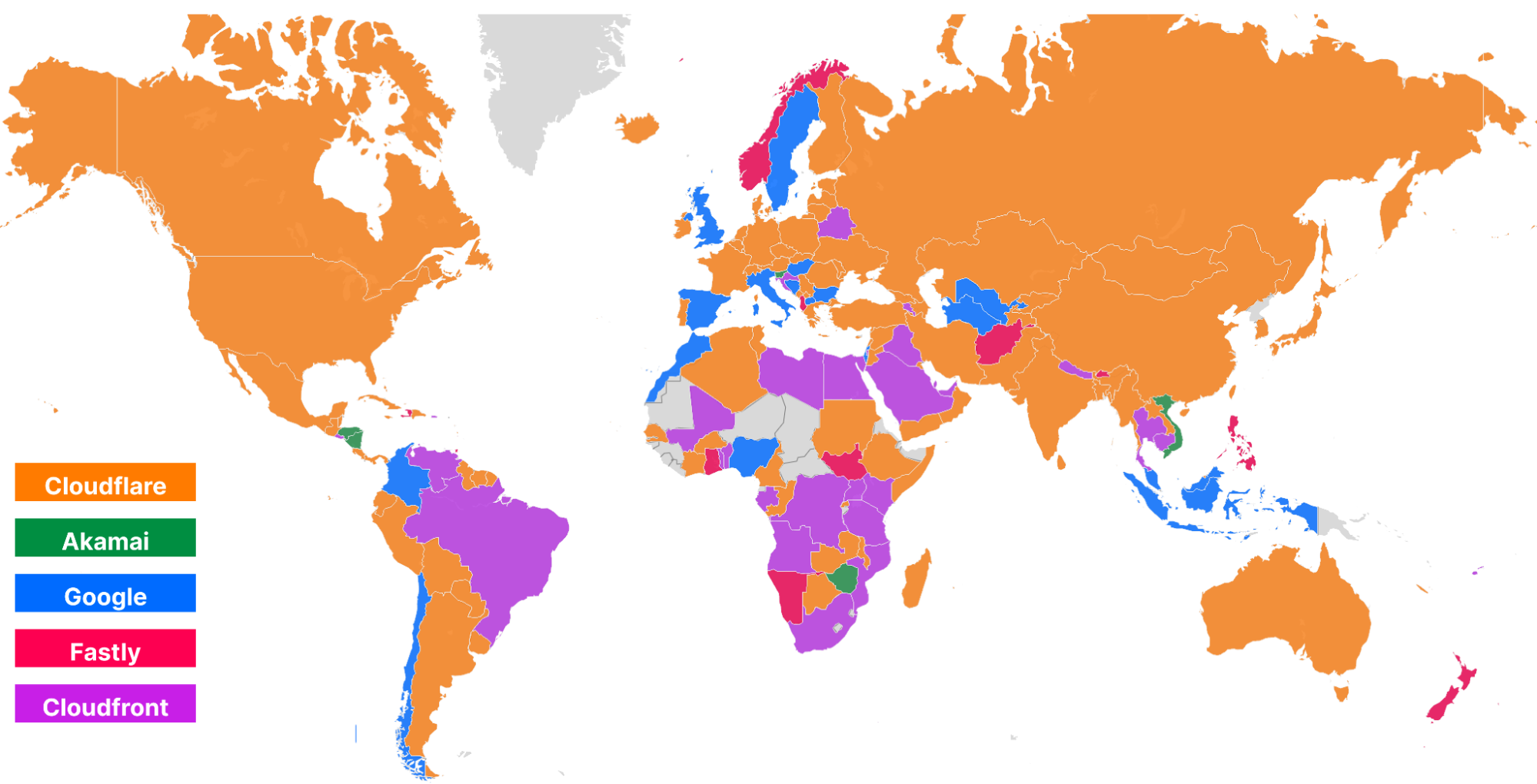
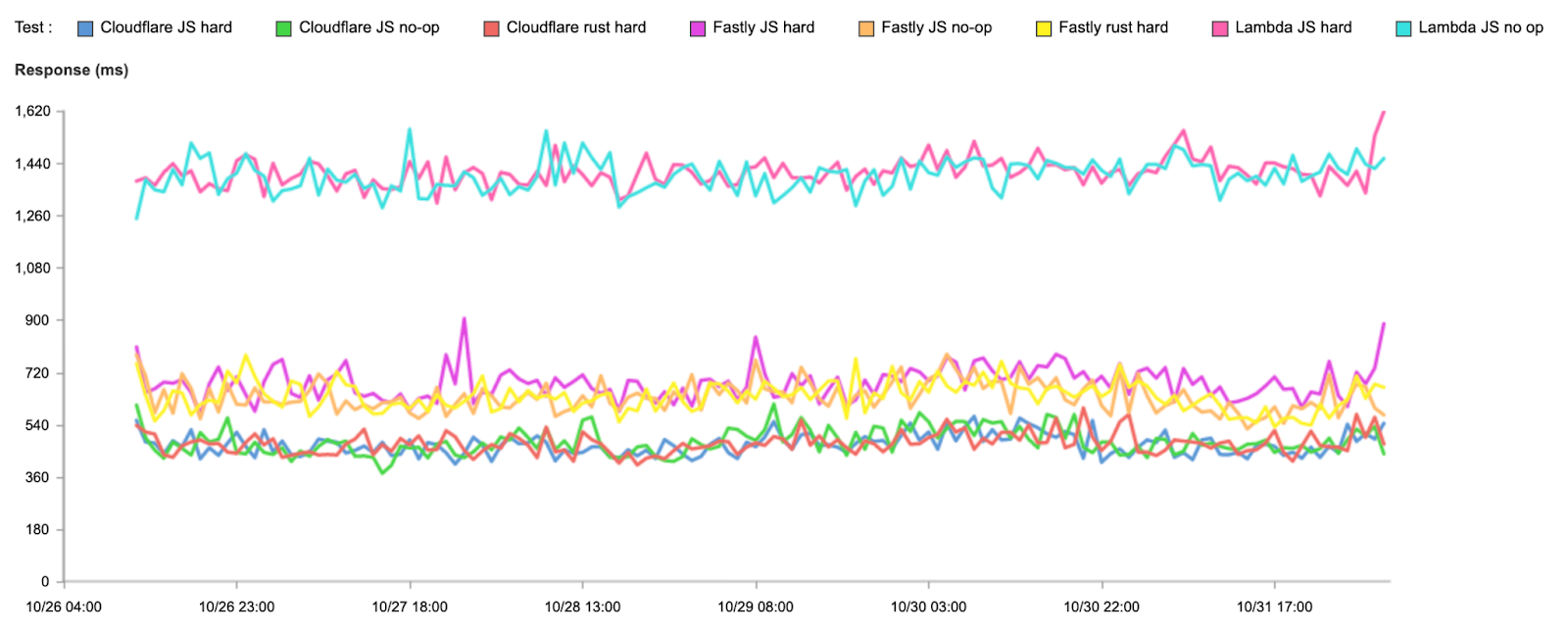
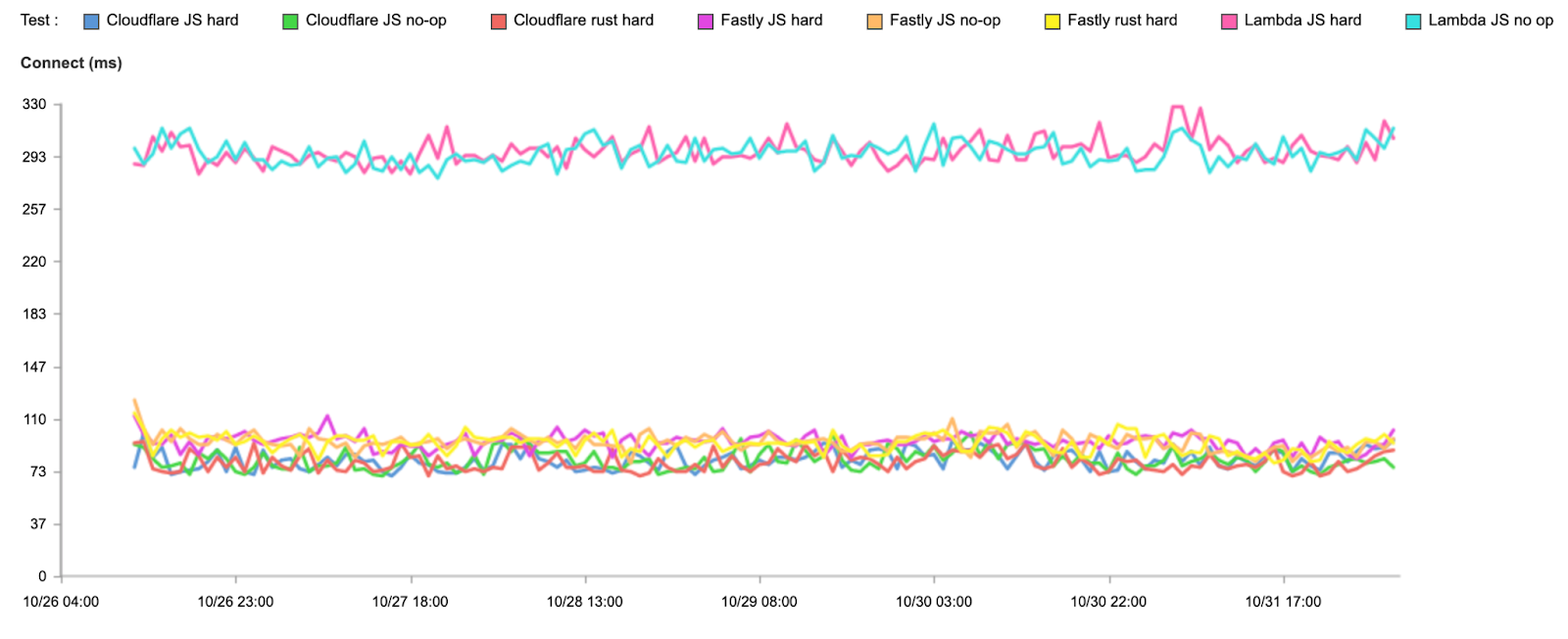
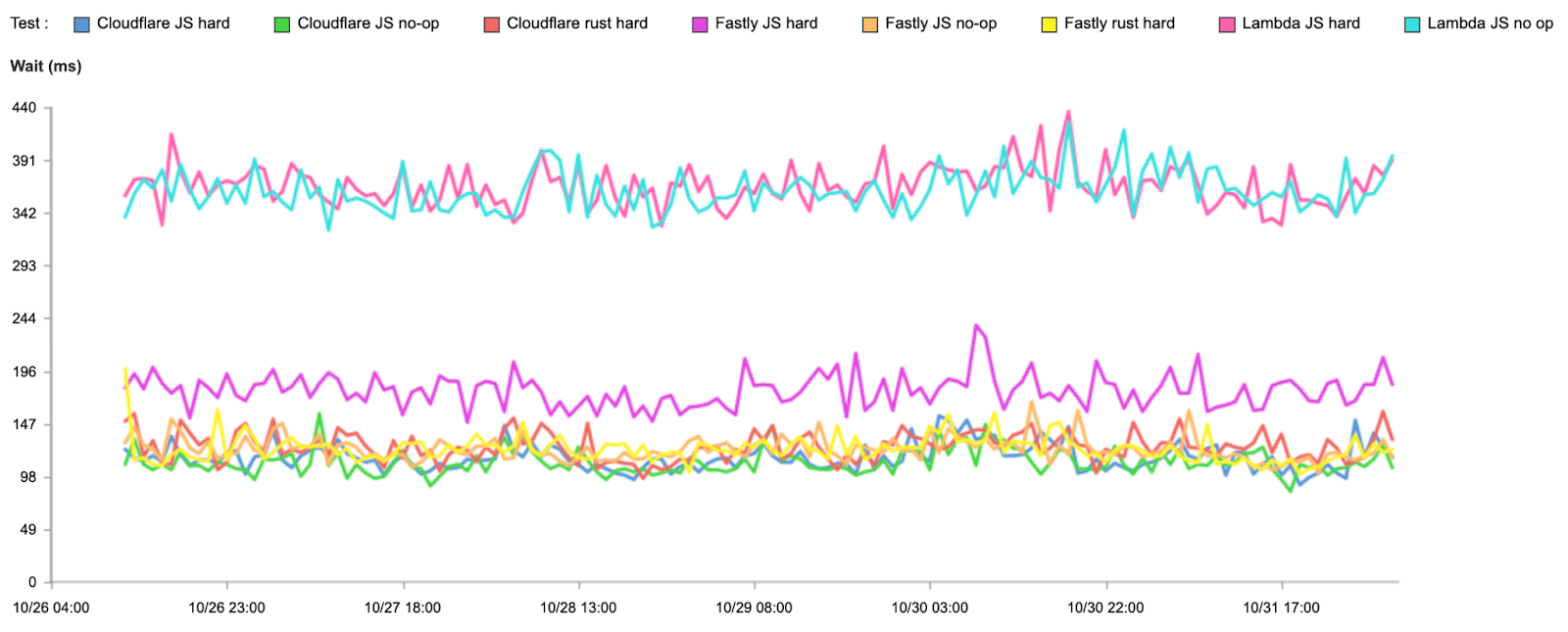
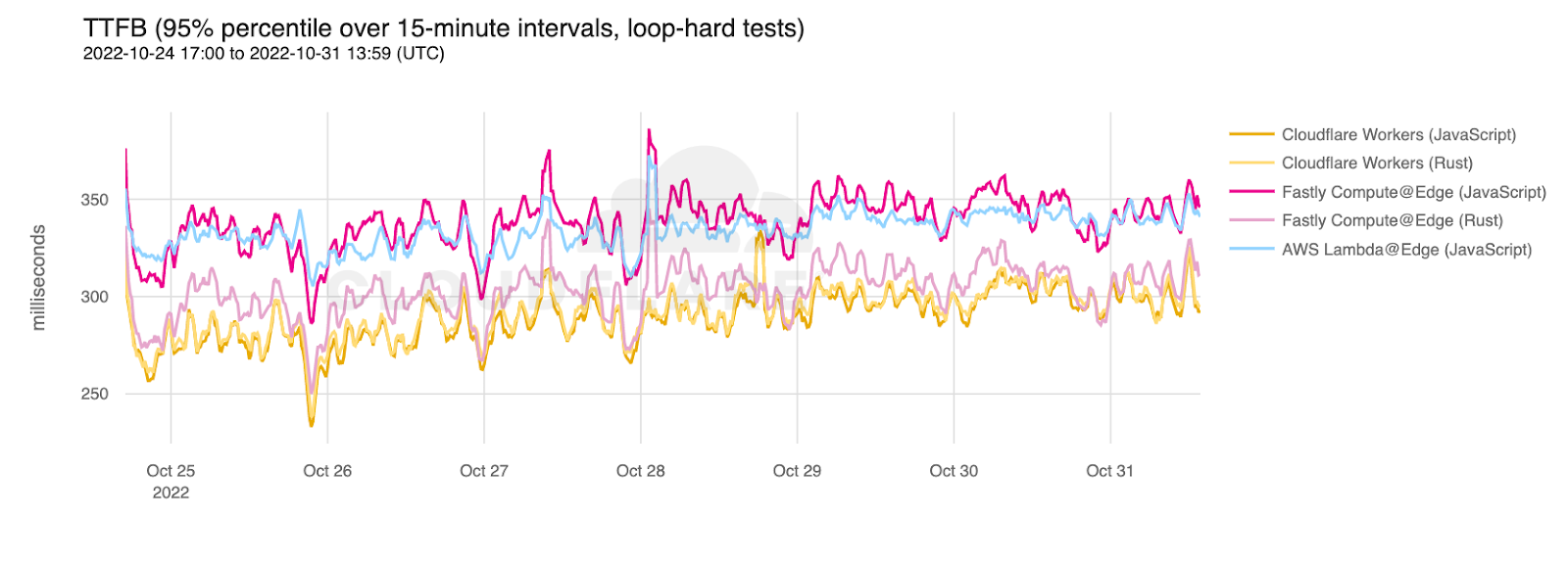
Network performance Update: Developer Week 2022 See how fast Cloudflare Workers are compared to other solutions.
How Cloudflare instruments services using Workers Analytics Engine Instrumentation with Analytics Engine provides data to find bugs and helps us prioritize new features.
Doubling down on local development with Workers:Miniflare meets workerd Improving local development using Miniflare3, now powered by workerd.

Customer and partner stories

Announcement Summary
Cloudflare Workers scale too well and broke our infrastructure, so we are rebuilding it on Workers How DevCycle re-architected their feature management tool using Workers.
Easy Postgres integration with Workers and Neon.tech Neon.tech solves the challenges of connecting to Postgres from Workers
Xata Workers: client-side database access without client-side secrets Xata uses Workers for Platform to reduce security risks of running untrusted code.
Twilio Segment Edge SDK powered by Cloudflare Workers The Segment Edge SDK, built on Workers, helps applications collect and track events from the client, and get access to realtime user state to personalize experiences.

Next

And that’s it for Developer Week 2022. But you can keep the conversation going by joining our Discord Community.

Introducing cross-account access capabilities for AWS Step Functions

Post Syndicated from James Beswick original https://aws.amazon.com/blogs/compute/introducing-cross-account-access-capabilities-for-aws-step-functions/

This post is written by Siarhei Kazhura, Senior Solutions Architect, Serverless.

AWS Step Functions allows you to integrate with more than 220 AWS services by using optimized integrations (for services such as AWS Lambda), and AWS SDK integrations. These capabilities provide the ability to build robust solutions using AWS Step Functions as the engine behind the solution.

Many customers are using multiple AWS accounts for application development. Until today, customers had to rely on resource-based policies to make cross-account access for Step Functions possible. With resource-based policies, you can specify who has access to the resource and what actions they can perform on it.

Not all AWS services support resource-based policies. For example, it is possible to enable cross-account access via resource-based policies with services like AWS Lambda, Amazon SQS, or Amazon SNS. However, services such as Amazon DynamoDB do not support resource-based policies, so your workflows can only use Step Functions’ direct integration if it belongs to the same account.

Now, customers can take advantage of identity-based policies in Step Functions so your workflow can directly invoke resources in other AWS accounts, thus allowing cross-account service API integrations.

Overview

This example demonstrates how to use cross-account capability using two AWS accounts:

  • A trusted AWS account (account ID 111111111111) with a Step Functions workflow named SecretCacheConsumerWfw, and an IAM role named TrustedAccountRl.
  • A trusting AWS account (account ID 222222222222) with a Step Functions workflow named SecretCacheWfw, and two IAM roles named TrustingAccountRl, and SecretCacheWfwRl.

AWS Step Functions cross-account workflow example

At a high level:

  1. The SecretCacheConsumerWfw workflow runs under TrustedAccountRl role in the account 111111111111. The TrustedAccountRl role has permissions to assume the TrustingAccountRl role from the account 222222222222.
  2. The FetchConfiguration Step Functions task fetches the TrustingAccountRl role ARN, the SecretCacheWfw workflow ARN, and the secret ARN (all these resources belong to the Trusting AWS account).
  3. The GetSecretCrossAccount Step Functions task has a Credentials field with the TrustingAccountRl role ARN specified (fetched in the step 2).
  4. The GetSecretCrossAccount task assumes the TrustingAccountRl role during the SecretCacheConsumerWfw workflow execution.
  5. The SecretCacheWfw workflow (that belongs to the account 222222222222) is invoked by the SecretCacheConsumerWfw workflow under the TrustingAccountRl role.
  6. The results are returned to the SecretCacheConsumerWfw workflow that belongs to the account 111111111111.

The SecretCacheConsumerWfw workflow definition specifies the Credentials field and the RoleArn. This allows the GetSecretCrossAccount step to assume an IAM role that belongs to a separate AWS account:

{
  "StartAt": "FetchConfiguration",
  "States": {
    "FetchConfiguration": {
      "Type": "Task",
      "Next": "GetSecretCrossAccount",
      "Parameters": {
        "Name": "<ConfigurationParameterName>"
      },
      "Resource": "arn:aws:states:::aws-sdk:ssm:getParameter",
      "ResultPath": "$.Configuration",
      "ResultSelector": {
        "Params.$": "States.StringToJson($.Parameter.Value)"
      }
    },
    "GetSecretCrossAccount": {
      "End": true,
      "Type": "Task",
      "ResultSelector": {
        "Secret.$": "States.StringToJson($.Output)"
      },
      "Resource": "arn:aws:states:::aws-sdk:sfn:startSyncExecution",
      "Credentials": {
        "RoleArn.$": "$.Configuration.Params.trustingAccountRoleArn"
      },
      "Parameters": {
        "Input.$": "$.Configuration.Params.secret",
        "StateMachineArn.$": "$.Configuration.Params.trustingAccountWorkflowArn"
      }
    }
  }
}

Permissions

AWS Step Functions cross-account permissions setup example

At a high level:

  1. The TrustedAccountRl role belongs to the account 111111111111.
  2. The TrustingAccountRl role belongs to the account 222222222222.
  3. A trust relationship setup between the TrustedAccountRl and the TrustingAccountRl role.
  4. The SecretCacheConsumerWfw workflow is executed under the TrustedAccountRl role in the account 111111111111.
  5. The SecretCacheWfw is executed under the SecretCacheWfwRl role in the account 222222222222.

The TrustedAccountRl role (1) has the following trust policy setup that allows the SecretCacheConsumerWfw workflow to assume (4) the role.

{
  "RoleName": "<TRUSTED_ACCOUNT_ROLE_NAME>",
  "AssumeRolePolicyDocument": {
    "Version": "2012-10-17",
    "Statement": [
      {
        "Effect": "Allow",
        "Principal": {
          "Service": "states.<REGION>.amazonaws.com"
        },
        "Action": "sts:AssumeRole"
      }
    ]
  }
}

The TrustedAccountRl role (1) has the following permissions configured that allow it to assume (3) the TrustingAccountRl role (2).

{
  "RoleName": "<TRUSTED_ACCOUNT_ROLE_NAME>",
  "PolicyDocument": {
    "Version": "2012-10-17",
    "Statement": [
      {
        "Action": "sts:AssumeRole",
        "Resource":  "arn:aws:iam::<TRUSTING_ACCOUNT>:role/<TRUSTING_ACCOUNT_ROLE_NAME>",
        "Effect": "Allow"
      }
    ]
  }
}

The TrustedAccountRl role (1) has the following permissions setup that allow it to access Parameter Store, a capability of AWS Systems Manager, and fetch the required configuration.

{
  "RoleName": "<TRUSTED_ACCOUNT_ROLE_NAME>",
  "PolicyDocument": {
    "Version": "2012-10-17",
    "Statement": [
      {
        "Action": [
          "ssm:DescribeParameters",
          "ssm:GetParameter",
          "ssm:GetParameterHistory",
          "ssm:GetParameters"
        ],
        "Resource": "arn:aws:ssm:<REGION>:<TRUSTED_ACCOUNT>:parameter/<CONFIGURATION_PARAM_NAME>",
        "Effect": "Allow"
      }
    ]
  }
}

The TrustingAccountRl role (2) has the following trust policy that allows it to be assumed (3) by the TrustedAccountRl role (1). Notice the Condition field setup. This field allows us to further control which account and state machine can assume the TrustingAccountRl role, preventing the confused deputy problem.

{
  "RoleName": "<TRUSTING_ACCOUNT_ROLE_NAME>",
  "AssumeRolePolicyDocument": {
    "Version": "2012-10-17",
    "Statement": [
      {
        "Effect": "Allow",
        "Principal": {
          "AWS": "arn:aws:iam::<TRUSTED_ACCOUNT>:role/<TRUSTED_ACCOUNT_ROLE_NAME>"
        },
        "Action": "sts:AssumeRole",
        "Condition": {
          "StringEquals": {
            "sts:ExternalId": "arn:aws:states:<REGION>:<TRUSTED_ACCOUNT>:stateMachine:<CACHE_CONSUMER_WORKFLOW_NAME>"
          }
        }
      }
    ]
  }
}

The TrustingAccountRl role (2) has the following permissions configured that allow it to start Step Functions Express Workflows execution synchronously. This capability is needed because the SecretCacheWfw workflow is invoked by the SecretCacheConsumerWfw workflow under the TrustingAccountRl role via a StartSyncExecution API call.

{
  "RoleName": "<TRUSTING_ACCOUNT_ROLE_NAME>",
  "PolicyDocument": {
    "Version": "2012-10-17",
    "Statement": [
      {
        "Action": "states:StartSyncExecution",
        "Resource": "arn:aws:states:<REGION>:<TRUSTING_ACCOUNT>:stateMachine:<SECRET_CACHE_WORKFLOW_NAME>",
        "Effect": "Allow"
      }
    ]
  }
}

The SecretCacheWfw workflow is running under a separate identity – the SecretCacheWfwRl role. This role has the permissions that allow it to get secrets from AWS Secrets Manager, read/write to DynamoDB table, and invoke Lambda functions.

{
    "Version": "2012-10-17",
    "Statement": [
        {
            "Action": [
                "secretsmanager:getSecretValue",
            ],
            "Resource": "arn:aws:secretsmanager:<REGION>:<TRUSTING_ACCOUNT>:secret:*",
            "Effect": "Allow"
        },
        {
            "Action": "dynamodb:GetItem",
            "Resource": "arn:aws:dynamodb:<REGION>:<TRUSTING_ACCOUNT>:table/<SECRET_CACHE_DDB_TABLE_NAME>",
            "Effect": "Allow"
        },
        {
            "Action": "lambda:InvokeFunction",
            "Resource": [
"arn:aws:lambda:<REGION>:<TRUSTING_ACCOUNT>:function:<CACHE_SECRET_FUNCTION_NAME>",
"arn:aws:lambda:<REGION>:<TRUSTING_ACCOUNT>:function:<CACHE_SECRET_FUNCTION_NAME>:*"
            ],
            "Effect": "Allow"
        }
    ]
}

Comparing with resource-based policies

To implement the solution above using resource-based policies, you must front the SecretCacheWfw with a resource that supports resource base policies. You can use Lambda for this purpose. A Lambda function has a resource permissions policy that allows for the access by SecretCacheConsumerWfw workflow.

The function proxies the call to the SecretCacheWfw, waits for the workflow to finish (synchronous call), and yields the result back to the SecretCacheConsumerWfw. However, this approach has a few disadvantages:

  • Extra cost: With Lambda you are charged based on the number of requests for your function, and the duration it takes for your code to run.
  • Additional code to maintain: The code must take the payload from the SecretCacheConsumerWfw workflow and pass it to the SecretCacheWfw workflow.
  • No out-of-the-box error handling: The code must handle errors correctly, retry the request in case of a transient error, provide the ability to do exponential backoff, and provide a circuit breaker in case of persistent errors. Error handling capabilities are provided natively by Step Functions.

AWS Step Functions cross-account setup using resource-based policies

The identity-based policy permission solution provides multiple advantages over the resource-based policy permission solution in this case.

However, resource-based policy permissions provide some advantages and can be used in conjunction with identity-based policies. Identity-based policies and resource-based policies are both permissions policies and are evaluated together:

  • Single point of entry: Resource-based policies are attached to a resource. With resource-based permissions policies, you control what identities that do not belong to your AWS account have access to the resource at the resource level. This allows for easier reasoning about what identity has access to the resource. AWS Identity and Access Management Access Analyzer can help with the identity-based policies, providing an ability to identify resources that are shared with an external identity.
  • The principal that accesses a resource via a resource-based policy still works in the trusted account and does not have to give its permissions to receive the cross-account role permissions. In this example, SecretCacheConsumerWfw still runs under TrustedAccountRl role, and does not need to assume an IAM role in the Trusting AWS account to access the Lambda function.

Refer to the how IAM roles differ from resource-based policies article for more information.

Solution walkthrough

To follow the solution walkthrough, visit the solution repository. The walkthrough explains:

  1. Prerequisites required.
  2. Detailed solution deployment walkthrough.
  3. Solution testing.
  4. Cleanup process.
  5. Cost considerations.

Conclusion

This post demonstrates how to create a Step Functions Express Workflow in one account and call it from a Step Functions Standard Workflow in another account using a new credentials capability of AWS Step Functions. It provides an example of a cross-account IAM roles setup that allows for the access. It also provides a walk-through on how to use AWS CDK for TypeScript to deploy the example.

For more serverless learning resources, visit Serverless Land.

First Review of A Hacker’s Mind

Post Syndicated from Bruce Schneier original https://www.schneier.com/blog/archives/2022/11/first-review-of-a-hackers-mind.html

Kirkus reviews A Hacker’s Mind:

A cybersecurity expert examines how the powerful game whatever system is put before them, leaving it to others to cover the cost.

Schneier, a professor at Harvard Kennedy School and author of such books as Data and Goliath and Click Here To Kill Everybody, regularly challenges his students to write down the first 100 digits of pi, a nearly impossible task­—but not if they cheat, concerning which he admonishes, “Don’t get caught.” Not getting caught is the aim of the hackers who exploit the vulnerabilities of systems of all kinds. Consider right-wing venture capitalist Peter Thiel, who located a hack in the tax code: “Because he was one of the founders of PayPal, he was able to use a $2,000 investment to buy 1.7 million shares of the company at $0.001 per share, turning it into $5 billion—all forever tax free.” It was perfectly legal—and even if it weren’t, the wealthy usually go unpunished. The author, a fluid writer and tech communicator, reveals how the tax code lends itself to hacking, as when tech companies like Apple and Google avoid paying billions of dollars by transferring profits out of the U.S. to corporate-friendly nations such as Ireland, then offshoring the “disappeared” dollars to Bermuda, the Caymans, and other havens. Every system contains trap doors that can be breached to advantage. For example, Schneier cites “the Pudding Guy,” who hacked an airline miles program by buying low-cost pudding cups in a promotion that, for $3,150, netted him 1.2 million miles and “lifetime Gold frequent flier status.” Since it was all within the letter if not the spirit of the offer, “the company paid up.” The companies often do, because they’re gaming systems themselves. “Any rule can be hacked,” notes the author, be it a religious dietary restriction or a legislative procedure. With technology, “we can hack more, faster, better,” requiring diligent monitoring and a demand that everyone play by rules that have been hardened against tampering.

An eye-opening, maddening book that offers hope for leveling a badly tilted playing field.

I got a starred review. Libraries make decisions on what to buy based on starred reviews. Publications make decisions about what to review based on starred reviews. This is a big deal.

Book’s webpage.

AWS Security Profile: Jonathan “Koz” Kozolchyk, GM of Certificate Services

Post Syndicated from Roger Park original https://aws.amazon.com/blogs/security/aws-security-profile-jonathan-koz-kozolchyk-gm-of-certificate-services/

In the AWS Security Profile series, we interview AWS thought leaders who help keep our customers safe and secure. This interview features Jonathan “Koz” Kozolchyk, GM of Certificate Services, PKI Systems. Koz shares his insights on the current certificate landscape, his career at Amazon and within the security space, what he’s excited about for the upcoming AWS re:Invent 2022, his passion for home roasting coffee, and more.

How long have you been at AWS and what do you do in your current role?
I’ve been with Amazon for 21 years and in AWS for 6. I run our Certificate Services organization. This includes managing services such as AWS Certificate Manager (ACM), AWS Private Certificate Authority (AWS Private CA), AWS Signer, and managing certificates and trust stores at scale for Amazon. I’ve been in charge of the internal PKI (public key infrastructure, our mix of public and private certs) for Amazon for nearly 10 years. This has given me lots of insight into how certificates work at scale, and I’ve enjoyed applying those learnings to our customer offerings.

How did you get started in the certificate space? What about it piqued your interest?
Certificates were designed to solve two key problems: provide a secure identity and enable encryption in transit. These are both critical needs that are foundational to the operation of the internet. They also come with a lot of sharp edges. When a certificate expires, systems tend to fail. This can cause problems for Amazon and our customers. It’s a hard problem when you’re managing over a million certificates, and I enjoy the challenge that comes with that. I like turning hard problems into a delightful experience. I love the feedback we get from customers on how hands-free ACM is and how it just solves their problems.

How do you explain your job to your non-tech friends?
I tell them I do two things. I run the equivalent of a department of motor vehicles for the internet, where I validate the identity of websites and issue secure documentation to prove the websites’ validity to others (the certificate). I’m also a librarian. I keep track of all of the certificates we issue and ensure that they never expire and that the private keys are always safe.

What are you currently working on that you’re excited about?
I’m really excited about our AWS Private CA offering and the places we’re planning to grow the service. Running a certificate authority is hard—it requires careful planning and tight security controls. I love that AWS Private CA has turned this into a simple-to-use and secure system for customers. We’ve seen the number of customers expand over time as we’ve added more versatility for customers to customize certificates to meet a wide range of applications—including Kubernetes, Internet of Things, IAM Roles Anywhere (which provides a secure way for on-premises servers to obtain temporary AWS credentials and removes the need to create and manage long-term AWS credentials), and Matter, a new industry standard for connecting smart home devices. We’re also working on code signing and software supply chain security. Finally, we have some exciting features coming to ACM in the coming year that I think customers will really appreciate.

What’s been the most dramatic change you’ve seen in the industry?
The biggest change has been the way that certificate pricing and infrastructure as code has changed the way we think about certificates. It used to be that a company would have a handful of certificates that they tracked in spreadsheets and calendar invites. Issuance processes could take days and it was okay. Now, every individual host, every run of an integration test may be provisioning a new certificate. Certificate validity used to last three years, and now customers want one-day certificates. This brings a new element of scale to not only our underlying architecture, but also the ways that we have to interact with our customers in terms of management controls and visibility. We’re also at the beginning of a new push for increased PKI agility. In the old days, PKI was brittle and slow to change. We’re seeing the industry move towards the ability to rapidly change roots and intermediates. You can see we’re pushing some of this now with our dynamic intermediate certificate authorities.

What would you say is the coolest AWS service or feature in the PKI space?
Our customers love the way AWS Certificate Manager makes certificate management a hands-off automated affair. If you request a certificate with DNS validation, we’ll renew and deploy that certificate on AWS for as long as you’re using it and you’ll never lose sleep about that certificate.

Is there something you wish customers would ask you about more often?
I’m always happy to talk about PKI design and how to best plan your private CAs and design. We like to say that PKI is the land of one-way doors. It’s easy to make a decision that you can’t reverse, and it could be years before you realize you’ve made a mistake. Helping customers avoid those mistakes is something we like to do.

I understand you’ll be at re:Invent 2022. What are you most looking forward to?
Hands down it’s the customer meetings; we take customer feedback very seriously, and hearing what their needs are helps us define our solutions. We also have several talks in this space, including CON316 – Container Image Signing on AWS, SEC212 – Data Protection Grand Tour: Locks, Keys, Certs, and Sigs, and SEC213 – Understanding the evolution of cloud-based PKI. I encourage folks to check out these sessions as well as the re:Invent 2022 session catalog.

Do you have any tips for first-time re:Invent attendees?
Wear comfortable shoes! It’s amazing how many steps you’ll put in.

How about outside of work, any hobbies? I understand you’re passionate about home coffee roasting. How did you get started?
I do roast my own coffee—it’s a challenging hobby because you always have to be thinking 30 to 60 seconds ahead of what your data is showing you. You’re working off of sight and sound, listening to the beans and checking their color. When you make an adjustment to the roaster, you have to do it thinking where the beans will be in the future and not where they are now. I love the challenge that comes with it, and it gives me access to interesting coffee beans you wouldn’t normally see on store shelves. I got started with a used small home roaster because I thought I would enjoy it. I’ve since upgraded to a commercial “sample” roaster that lets me do larger batches.

 
If you have feedback about this post, submit comments in the Comments section below. If you have questions about this post, contact AWS Support.

Want more AWS Security news? Follow us on Twitter.

Roger Park

Roger Park

Roger is a Senior Security Content Specialist at AWS Security focusing on data protection. He has worked in cybersecurity for almost ten years as a writer and content producer. In his spare time, he enjoys trying new cuisines, gardening, and collecting records.

Jonathan Kozolchyk

Jonathan Kozolchyk

Jonathan is GM, Certificate Services , PKI Systems at AWS.

Node.js 18.x runtime now available in AWS Lambda

Post Syndicated from James Beswick original https://aws.amazon.com/blogs/compute/node-js-18-x-runtime-now-available-in-aws-lambda/

This post is written by Suraj Tripathi, Cloud Consultant, AppDev.

You can now develop AWS Lambda functions using the Node.js 18 runtime. This version is in active LTS status and considered ready for general use. When creating or updating functions, specify a runtime parameter value of nodejs18.x or use the appropriate container base image to use this new runtime.

This runtime version is supported by functions running on either Arm-based AWS Graviton2 processors or x86-based processors. Using the Graviton2 processor architecture option allows you to get up to 34% better price performance.

This blog post explains the major changes available with the Node.js 18 runtime in Lambda.

AWS SDK for JavaScript upgrade to v3

Lambda’s Node.js runtimes include the AWS SDK for JavaScript. This enables customers to use the AWS SDK to connect to other AWS services from their function code, without having to include the AWS SDK in their function deployment. This is especially useful when creating functions in the AWS Management Console. It’s also useful for Lambda functions deployed as inline code in CloudFormation templates.

Up until Node.js 16, Lambda’s Node.js runtimes have included the AWS SDK for JavaScript version 2. This has since been superseded by the AWS SDK for JavaScript version 3, which was released in December 2020. With this release, Lambda has upgraded the version of the AWS SDK for JavaScript included with the runtime from v2 to v3.

If your existing Lambda functions are using the included SDK v2, then you must update your function code to use the SDK v3 when upgrading to the Node.js 18 runtime. This is the recommended approach when upgrading existing functions to Node.js 18. Alternatively, you can use the Node.js 18 runtime without updating your existing code if you deploy the SDK v2 together with your function code.

Version 3 of the SDK for JavaScript offers many benefits over version 2. Most importantly, it is modular, so your code only loads the modules it needs. Modularity also reduces your function size if you choose to deploy the SDK with your function code rather than using the version built into the Lambda runtime. Learn more about optimizing Node.js dependencies in Lambda here.

For example, for a function interacting with Amazon S3 using the v2 SDK, you import the entire SDK, even though you don’t use most of it:

const AWS = require("aws-sdk");

With the v3 SDK, you only import the modules you need, such as ListBucketsCommand, and a service client like S3Client.

import { S3Client, ListBucketsCommand } from "@aws-sdk/client-s3";

Another difference between SDK v2 and SDK v3 is the default settings for TCP connection re-use. In the SDK v2, connection re-use is disabled by default. In SDK v3, it is enabled by default. In most cases, enabling connection re-use improves function performance. To stop TCP connection reuse, set the AWS_NODEJS_CONNECTION_REUSE_ENABLED environment variable to false. You can also stop keeping the connections alive on a per-service client basis.

For more information, see Why and how you should use AWS SDK for JavaScript (v3) on Node.js 18.

Support for ES module resolution using NODE_PATH

Another change in the Node.js 18 runtime is added support for ES module resolution via the NODE_PATH environment variable.

ES modules are supported by Lambda’s Node.js 14 and Node.js 16 runtimes. They enable top-level await, which can lower cold start latency when used with Provisioned Concurrency. However, by default Node.js does not search the folders in the NODE_PATH environment variable when importing ES modules. This makes it difficult to import ES modules from folders outside of the /var/task/ folder in which the function code is deployed. For example, to load the AWS SDK included in the runtime as an ES module, or to load ES modules from Lambda layers.

The Node.js 18.x runtime for Lambda searches the folders listed in NODE_PATH when loading ES modules. This makes it easier to include the AWS SDK as an ES module or load ES modules from Lambda layers.

Node.js 18 language updates

The Lambda Node.js 18 runtime also enables you to take advantage of new Node.js 18 language features. This includes improved performance for class fields and private class methods, JSON import assertions, and experimental features such as the Fetch API, Test Runner module, and Web Streams API.

JSON import assertion

The import assertions feature allows module import statements to include additional information alongside the module specifier. Now the following code is valid:

// index.mjs

// static import
import fooData from './foo.json' assert { type: 'json' };

// dynamic import
const { default: barData } = await import('./bar.json', { assert: { type: 'json' } });

export const handler = async(event) => {

    console.log(fooData)
    // logs data in foo.json file
    console.log(barData)
    // logs data in bar.json file

    const response = {
        statusCode: 200,
        body: JSON.stringify('Hello from Lambda!'),
    };
    return response;
};

foo.json

{
  "foo1" : "1234",
  "foo2" : "4678"
}

bar.json

{
  "bar1" : "0001",
  "bar2" : "0002"
}

Experimental features

While still experimental, the global fetch API is available by default in Node.js 18. The API includes a fetch function, making fetch polyfills and third-party HTTP packages redundant.

// index.mjs 

export const handler = async(event) => {
    
    const res = await fetch('https://nodejs.org/api/documentation.json');
    if (res.ok) {
      const data = await res.json();
      console.log(data);
    }

    const response = {
        statusCode: 200,
        body: JSON.stringify('Hello from Lambda!'),
    };
    return response;
};

Experimental features in Node.js can be enabled/disabled via the NODE_OPTIONS environment variable. For example, to stop the experimental fetch API you can create a Lambda environment variable NODE_OPTIONS and set the value to --no-experimental-fetch.

With this change, if you run the previous code for the fetch API in your Lambda function, it throws a reference error because the experimental fetch API is now disabled.

Conclusion

Node.js 18 is now supported by Lambda. When building your Lambda functions using the zip archive packaging style, use a runtime parameter value of nodejs18.x to get started building with Node.js 18.

You can also build Lambda functions in Node.js 18 by deploying your function code as a container image using the Node.js 18 AWS base image for Lambda. You may learn more about writing functions in Node.js 18 by reading about the Node.js programming model in the Lambda documentation.

For existing Node.js functions, review your code for compatibility with Node.js 18, including deprecations, then migrate to the new runtime by changing the function’s runtime configuration to nodejs18.x.

For more serverless learning resources, visit Serverless Land.

[$] Averting excessive oopses

Post Syndicated from original https://lwn.net/Articles/914878/

Even a single kernel oops is never a good thing; it is an indication that something has
gone badly wrong in the system somewhere and a straightforward
recovery is not possible. But it seems that oopsing a large number
of times has the potential to be even worse. To head off problems that
might result from repeated oopsing, there
is currently work afoot to put an upper limit on the number of times that
the kernel can be allowed to oops before just giving up and rebooting.

How ENGIE automates the deployment of Amazon Athena data sources on Microsoft Power BI

Post Syndicated from Amine Belhabib original https://aws.amazon.com/blogs/big-data/how-engie-automates-the-deployment-of-amazon-athena-data-sources-on-microsoft-power-bi/

ENGIE—one of the largest utility providers in France and a global player in the zero-carbon energy transition—produces, transports, and deals in electricity, gas, and energy services. With 160,000 employees worldwide, ENGIE is a decentralized organization and operates 25 business units with a high level of delegation and empowerment. ENGIE’s decentralized global customer base had accumulated lots of data, and it required a smarter, unique approach and solution to align its initiatives and provide data that is ingestible, organizable, governable, sharable, and actionable across its global business units.

ENGIE built an enterprise data repository named the Common Data Hub to align its customers and business units around the same solution. ENGIE used AWS to create the Common Data Hub, a custom solution built using a globally distributed data lake and analytics solutions on AWS. The Common Data Hub empowers teams to innovate by simplifying data access and delivering a comprehensive set of analytics tools, such as Amazon QuickSight, Microsoft Power BI, Tableau, and more.

In 2018, the company’s business leadership decided to accelerate its digital transformation through data and innovation by becoming a data-driven company.

“Amazon Athena is a key service in the ENGIE data ecosystem. It makes it easy to analyze data in a serverless manner so there is no infrastructure to manage. We used Athena to quickly build operational dashboards and get insight and high business value from the data available in our data lake.”

– Gregory Wolowiec, chief technology officer at ENGIE

ENGIE uses Microsoft Power BI to create dashboards and leverages the power of Amazon Athena through the out-of-the-box connector for Microsoft Power BI in which, complete raw data sets are not downloaded to the user’s workstation. While users create or interact with a visualization, Microsoft Power BI works with Athena to dynamically query the underlying data source so that they are always viewing current data.

In a previous blog post, you learned how to manually configure all the required infrastructure to create Microsoft Power BI dashboards using Athena with Microsoft Power BI DirectQuery enabled. ENGIE automated the creation and configuration of the Athena connections on Microsoft Power BI Gateway and Microsoft Power BI Online to be able to scale and reduce the manual overhead. In this post, you learn how ENGIE is doing it today.

Solution overview

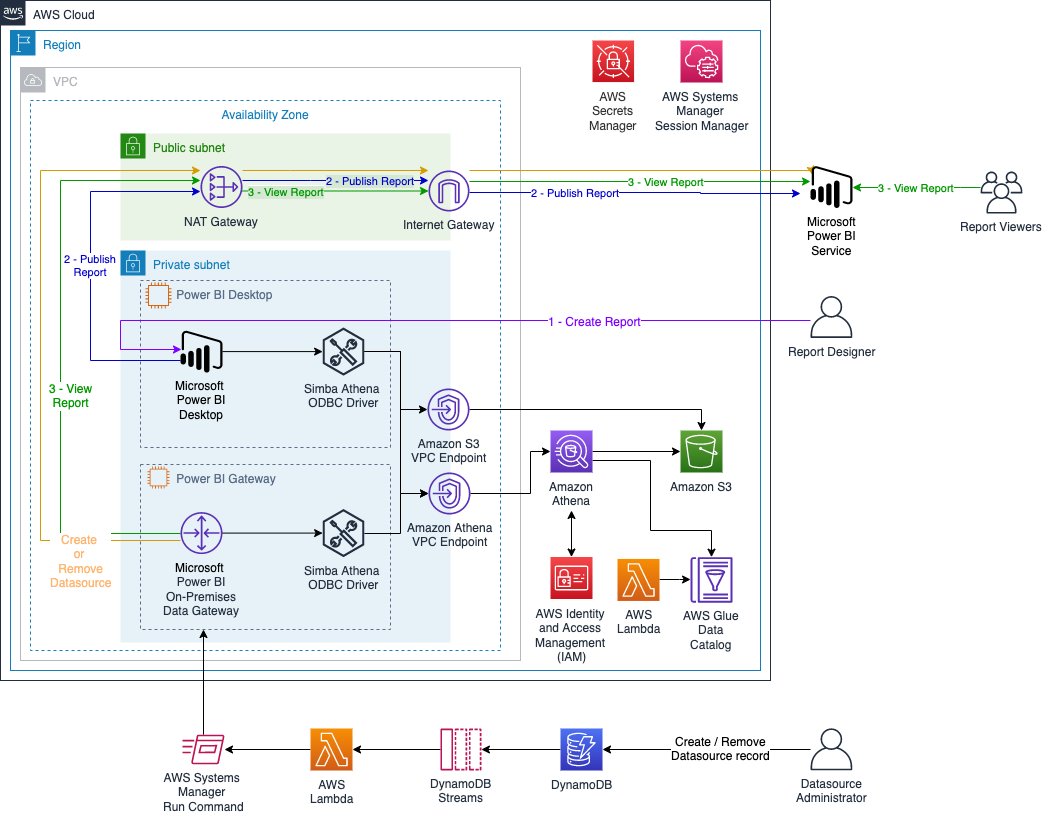
The following diagram illustrates the solution architecture to automate the creation and configuration of the Athena connections on Microsoft Power BI Gateway and Microsoft Power BI Online.

As described in the previous blog post, the AWS CloudFormation stack deploys two Amazon Elastic Compute Cloud (Amazon EC2) instances in a private subnet in an Amazon Virtual Private Cloud (Amazon VPC): one instance is used for Microsoft Power BI Desktop, and the other is used for the Microsoft Power BI on-premises data gateway. This stack uses t3.2xlarge instances because they have the minimal hardware requirements recommended. You can increase or decrease the EC2 instance type depending on the performance of the gateway.

Additionally, the CloudFormation template creates an AWS Glue table that gives you access to the dataset. It creates an AWS Lambda function as an AWS CloudFormation custom resource that updates all the partitions in the AWS Glue table.

In addition to the architecture presented in the previous blog post, this stack creates multiple AWS Systems Manager documents to configure the Athena data sources on Microsoft Power BI Gateway and on Microsoft Power BI Online. The Systems Manager documents are run by another Lambda function that is triggered when we create or delete an entry on Amazon DynamoDB.

From the security standpoint, all resources are deployed within an Amazon VPC (a logically isolated virtual network), and it uses Amazon VPC endpoints to communicate between resources within your Amazon VPC and AWS services without the need of crossing an internet gateway, NAT gateway, VPN connection, or AWS Direct Connect. Additionally, the Microsoft Power BI on-premises data gateway doesn’t require inbound connections. Additionally, authentication with Athena is done on Microsoft Power BI Desktop and on the Microsoft Power BI on-premises data gateway using AWS Identity and Access Management (IAM) profile.

The daily estimated cost of this architecture is $18 USD, mainly driven by the EC2 instances.

Walkthrough overview

For this post, we step through a use case using the data from the 2015 New York City Taxi Records dataset hosted on the Registry of Open Data on AWS. The data is already stored in an Amazon Simple Storage Service (Amazon S3) bucket in Apache Parquet format and is partitioned. For more information about optimizing your Athena queries, see Top 10 Performance Tuning Tips for Amazon Athena.

First, you deploy the CloudFormation stack with all the infrastructure required. Then, you use AWS Systems Manager Session Manager (see Starting a session (Systems Manager console)) and any remote desktop client to configure the Microsoft Power BI instance in order to create and publish your dashboard. Complete the following steps:

  1. Deploy the CloudFormation stack.
  2. On the EC2 instance that has the name tag PowerBiDesktop, install and configure the Simba Athena ODBC driver and Microsoft Power BI Desktop.
  3. Create your dashboard on Microsoft Power BI Desktop and publish it.
  4. On the EC2 instance that has the name tag PowerBiGateway, install the Simba Athena ODBC driver and Microsoft Power BI on-premises data gateway.
  5. Create Athena resources on the Microsoft Power BI Gateway instance and data source on Microsoft Power BI Online.
  6. View your report on Microsoft Power BI Online.
  7. Remove data source on Microsoft Power BI Online and Athena resources on the Microsoft Power BI Gateway instance.

Prerequisites

For this walkthrough, you should have the following prerequisites:

Create resources and prepare your environment

Deploy the CloudFormation stack by choosing Launch stack:

BDB-2063-launch-cloudformation-stack

Keep note of the gateway name, because you use it later when configuring the Microsoft Power BI on-premises data gateway.

After you deploy the CloudFormation stack, you prepare your environment following the steps in the relevant sections from Creating dashboards quickly on Microsoft Power BI using Amazon Athena:

  • Logging in to your Microsoft Power BI Desktop instance – Access to your instance without a bastion
  • Installing and configuring Microsoft Power BI Desktop – Install the required software on the desktop
  • Creating an Athena connection on Microsoft Power BI Desktop – Configure the New York City taxi data source connection
  • Creating your dashboard on Microsoft Power BI Desktop and publishing it – Send the structure of your report to Microsoft Power BI Online
  • Logging in to your Microsoft Power BI on-premises data gateway instance – Install the required software on your gateway

Install and configure the Athena-enabled Microsoft Power BI on-premises data gateway

To set up your on-premises data gateway, complete the following steps:

  1. Download and install the latest Athena ODBC driver for Windows 64-bit.
  2. Download the Microsoft Power BI on-premises data gateway standard mode and launch the installer.
  3. For your gateway, choose On-premises data gateway (recommended).
  4. Accept the default values and choose Install.
  5. When the installer asks you to sign in, enter the email address associated with the Microsoft Power BI Pro tenant that doesn’t require MFA. (This should be the same user name and password that you provided when you launched the CloudFormation stack.)
  6. Choose Sign in.
  7. If asked to register a new gateway or migrate, restore, or take over an existing gateway, choose Register a new gateway.
  8. Give your gateway a name (use the same gateway name passed as a parameter when deploying the CloudFormation stack) and provide a recovery key.
  9. Choose Configure.

You should see a green check mark indicating the gateway is online and ready to be used.

Create Athena resources automatically on the Microsoft Power BI Gateway instance and Microsoft Power BI Online

To automate this process, you insert an entry on DynamoDB. The entry’s attributes have the DSN properties and the users that are allowed to use the data source on Microsoft Power BI Online.

  1. Launch AWS CloudShell from the AWS Management Console using either of the following methods:
    • Choose the CloudShell icon on the console navigation bar.
    • Enter cloudshell in the Find Services box and then choose the CloudShell option.
  2. Enter the following script:
    echo '#!/bin/bash
    
    stack_name=$1
    dsn_name=$2
    users=$3
    
    role_arn=$(aws cloudformation describe-stacks --stack-name $stack_name --query "Stacks[0].Outputs[?OutputKey=='\''DataProjectRoleArn'\''].OutputValue" --output text)
    aws_region=$(aws cloudformation describe-stacks --stack-name $stack_name --query "Stacks[0].Outputs[?OutputKey=='\''AWSRegion'\''].OutputValue" --output text)
    athena_bucket=$(aws cloudformation describe-stacks --stack-name $stack_name --query "Stacks[0].Outputs[?OutputKey=='\''AthenaOutputS3Bucket'\''].OutputValue" --output text)
    
    aws dynamodb put-item --table-name PowerbiBlogTable --item "{\"Name\":{\"S\":\"${dsn_name}\"}, \"AWSProfile\":{\"S\":\"${role_arn}\"}, \"AWSRegion\":{\"S\":\"${aws_region}\"}, \"Workgroup\":{\"S\":\"athena-powerbi-aws-blog\"}, \"S3OutputLocation\":{\"S\":\"${athena_bucket}\"}, \"S3OutputEncOption\":{\"S\":\"SSE_S3\"}, \"AuthenticationType\":{\"S\":\"IAM Profile\"}, \"Users\":{\"S\":\"${users}\"}}"
    ' > create_record.sh

  3. Give run permission on the created script:
    chmod u+x create_record.sh

  4. Run the script, passing as parameters your CloudFormation stack name, the DSN name that you want to create, and the users that you want to attach to the dataset (you can pass multiple users separated by a comma without spaces). For example:
    ./create_record.sh PbiGwStack taxiconnection [email protected]

This script inserts an entry with all the required properties in your DynamoDB table. When a new entry is added to DynamoDB, an event is captured by Amazon DynamoDB Streams and a Lambda function is triggered to run a Systems Manager document. The last document runs two scripts on the instance: the first one creates a new Athena ODBC DSN, and the second script creates a new data source on Microsoft Power BI Online.

View your report on Microsoft Power BI

To view your report, complete the following steps:

  1. Choose the workspace where you saved your report.
  2. On the Datasets + dataflows tab, locate the dataset, which has the same name as your report (for example, taxireport) and choose the options icon (three dots).
  3. Choose Settings.
  4. Choose Discover Data Sources.
  5. Expand Gateway Connection.
  6. Choose your gateway.
  7. For Maps to, choose taxiconnection.
  8. Choose Apply.
  9. Return to the workspace where you saved your report.
  10. On the Content tab, choose your report (taxireport).

You can now see your report online using the most recent data.

Remove Athena resources automatically on Microsoft Power BI Online and on the Microsoft Power BI Gateway instance

To automate this process, you remove an entry from the DynamoDB table. The entry’s attributes have the DSN properties and the users that are allowed to use the data source on Microsoft Power BI Online.

  1. Launch CloudShell.
  2. Enter the following script:
    echo '#!/bin/bash
    
    dsn_name=$1
    
    aws dynamodb delete-item --table-name PowerbiBlogTable --key "{\"Name\":{\"S\":\"${dsn_name}\"}}"' > delete_record.sh

  3. Give run permission on the created script:
    chmod u+x delete_record.sh

  4. Run the script, passing as parameters the DSN name that you want to delete. For example:
    ./delete_record.sh taxiconnection

This command removes an item from your DynamoDB table. When an entry is deleted from DynamoDB, an event is captured by DynamoDB Streams and a Lambda function is triggered to run a Systems Manager document. The last document runs two scripts on the instance: the first one removes the data source on Microsoft Power BI Online, and the second script removes the Athena ODBC DSN.

Clean up

To avoid incurring future charges, delete the CloudFormation stack and the resources that you deployed as part of this post.

Conclusion

ENGIE discovered significant value by using AWS services on top of Microsoft Power BI, enabling its global business units to analyze data in more productive ways. This post presented how ENGIE automated the process of creating reports using Athena with Microsoft Power BI.

The first part of the post described the architecture components and how to successfully create a dashboard using the NYC taxi dataset. The stack deployed uses only one EC2 instance for the Microsoft Power BI on-premises data gateway, but in production, you should consider creating a high-availability cluster of gateway installations, ideally in different Availability Zones.

The second part of this post deployed a demo environment and walked you through the steps to automate Athena data sources to be used on Microsoft Power BI. On the GitHub repository, you can find more scripts to help you to manage the users from your data sources on Microsoft Power BI and more.

For native access to your data in AWS without any downloads or servers, be sure to also check out Amazon QuickSight.


About the authors

Amine Belhabib is Hand-On Cloud Core Service Manager at ENGIE/ ENGIE IT. Innovative Cloud Surfer, helping ENGIE entities to accelerate their digital transformation and cloud first adoption strategy by designing, building, managing group cloud products and patterns in a use cases driven approach.

Armando Segnini is a Senior Data Architect with AWS Professional Services. He spends his time building scalable big data and analytics solutions for AWS Enterprise and Strategic customers. Armando also loves to travel with his family all around the world and take pictures of the places he visits.

Xavier Naunay is a Data Architect with AWS Professional Services. He is part of the AWS ProServe team, helping enterprise customers solve complex problems using AWS services. In his free time, he is either traveling or learning about technology and other cultures.

Amine El Mallem is a Senior Data/ML Ops Engineer in AWS Professional Services. He works with customers to design, automate, and build solutions on AWS for their business needs.

Anouar Zaaber is a Senior Engagement Manager in AWS Professional Services. He leads internal AWS, external partners, and customer teams to deliver AWS Cloud services that enable customers to realize their business outcomes.

Open source community split over offer of ‘corporate’ welfare for critical dev tools (Register)

Post Syndicated from original https://lwn.net/Articles/915385/

The Register looks
at the discussion
around the GNU Tools Infrastructure proposal.

Sourceware, a volunteer group that has been supporting various
critical FOSS developer tools for more than two decades, is being
courted by The Linux Foundation’s Open Source Security Foundation
(OpenSSF). The OpenSSF aims to improve open source software
security by providing Sourceware projects with more modern IT
infrastructure.

But some members of the Sourceware community fear that accepting
the help of the OpenSSF would give the corporate Linux world more
leverage over FOSS developer tools. They would prefer to seek
support from the Software Freedom Conservancy, a charitable
non-profit that they believe is better aligned with software
freedom.

LWN covered this discussion back in
September.

Successful Hack of Time-Triggered Ethernet

Post Syndicated from Bruce Schneier original https://www.schneier.com/blog/archives/2022/11/successful-hack-of-time-triggered-ethernet.html

Time-triggered Ethernet (TTE) is used in spacecraft, basically to use the same hardware to process traffic with different timing and criticality. Researchers have defeated it:

On Tuesday, researchers published findings that, for the first time, break TTE’s isolation guarantees. The result is PCspooF, an attack that allows a single non-critical device connected to a single plane to disrupt synchronization and communication between TTE devices on all planes. The attack works by exploiting a vulnerability in the TTE protocol. The work was completed by researchers at the University of Michigan, the University of Pennsylvania, and NASA’s Johnson Space Center.
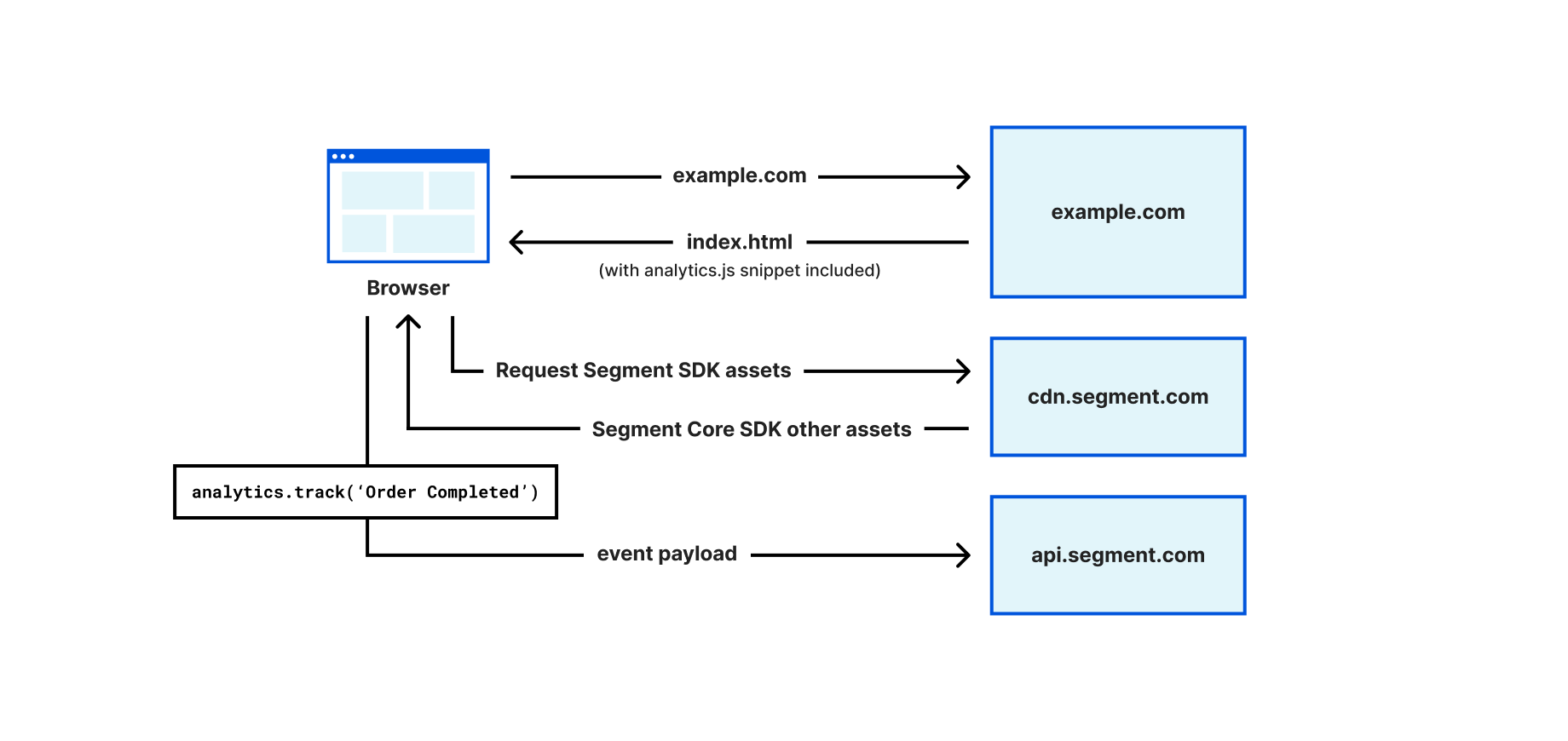
“Our evaluation shows that successful attacks are possible in seconds and that each successful attack can cause TTE devices to lose synchronization for up to a second and drop tens of TT messages—both of which can result in the failure of critical systems like aircraft or automobiles,” the researchers wrote. “We also show that, in a simulated spaceflight mission, PCspooF causes uncontrolled maneuvers that threaten safety and mission success.”

Much more detail in the article—and the research paper.
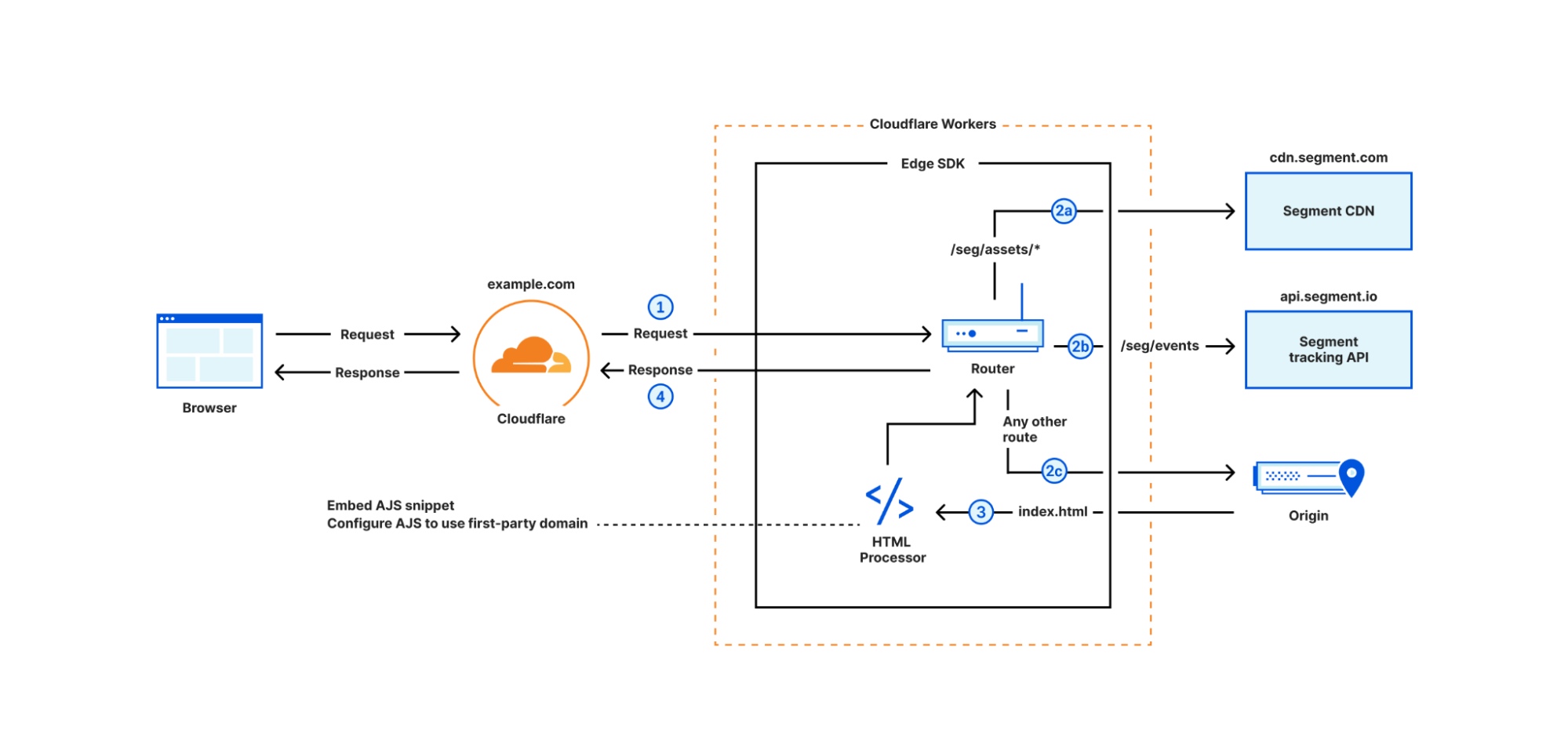
Author Spotlight: Luca Mezzalira, Principal Serverless Specialist Solutions Architect

Post Syndicated from Elise Chahine original https://aws.amazon.com/blogs/architecture/author-spotlight-luca-mezzalira-principal-serverless-specialist-solutions-architect/

The Author Spotlight series pulls back the curtain on some of AWS’s most prolific authors. Read on to find out more about our very own Luca Mezzalira’s journey, in his own words!


My name is Luca, and I’m a Principal Serverless Specialist Solutions Architect—probably the longest job title I’ve ever had in my 20-year career in the tech industry. One thing you have to know about me upfront: I love challenges. I tread an unconventional path, on which I found several hurdles, but, after a few years, I grew to love them.

Since I joined Amazon Web Services (AWS) in January 2021, I discovered (and continue to discover) all the challenges I’ve always dreamed of. I can also find solutions for customers, industries, and communities—what better place is there for a challenge-hunter like me!

I am self-taught. I learned my foundational skills from the developer communities I joined out of a thirst for knowledge. Fast-forward 20 years later, I still try to pay my “debt” to them by sharing what I learn and do on a regular basis.

Luca Mezzalira during the opening talk at JS Poland 2022

Luca Mezzalira during the opening talk at JS Poland 2022

AWS gave me the opportunity to first help our Media & Entertainment industry customers in the UK and Ireland and, now, to follow my passion working as a Serverless Specialist.

“Passionate” is another word that characterizes me, both personally and professionally: I’m Italian and there is a lot of passion under our skin. I don’t consider what I do a job but, rather, something I just love to do.

During these past couple of years with AWS, I have been able to use all 360° of my knowledge. With customers experimenting with new ideas and solutions, with colleagues urging customers outside their comfort zone and onto new horizons or into new adventures with AWS, I am blurring the edges of different worlds. With each passing day, I provide new perspectives for solving existing challenges! With internal and external communities, I support and organize events for spreading our ever-growing knowledge and creating new, meaningful connections.

Another great passion of mine is software architecture. Design patterns, distributed systems, team topology, domain-driven design, and any topic related to software architecture is what I deeply love. Do you know why? Because there isn’t right or wrong in architecture—it’s just trade-offs! The challenge is to find the least-worse decision for making a project successful.

Moreover, architectures are like living organisms. They evolve, requiring care and attention. Many might think that architecting is only a technical concern, but it is deeply connected with the organizational structure, as well the communication and engineering practices. When we acknowledge these aspects and work across these dimensions, the role of an architect is one of the best you can have—or at least it is for me!

What’s on my mind

There are two main topics I am focusing on at the moment: (1) distributed architecture on the frontend (i.e., micro-frontends); and (2) educating our builders on thinking in patterns, choosing the right solution to implement at the right moment.

In both cases, I create a lot of content trying to bridge the gap between the technical implementation and the architecture characteristics a company wants to optimize for.
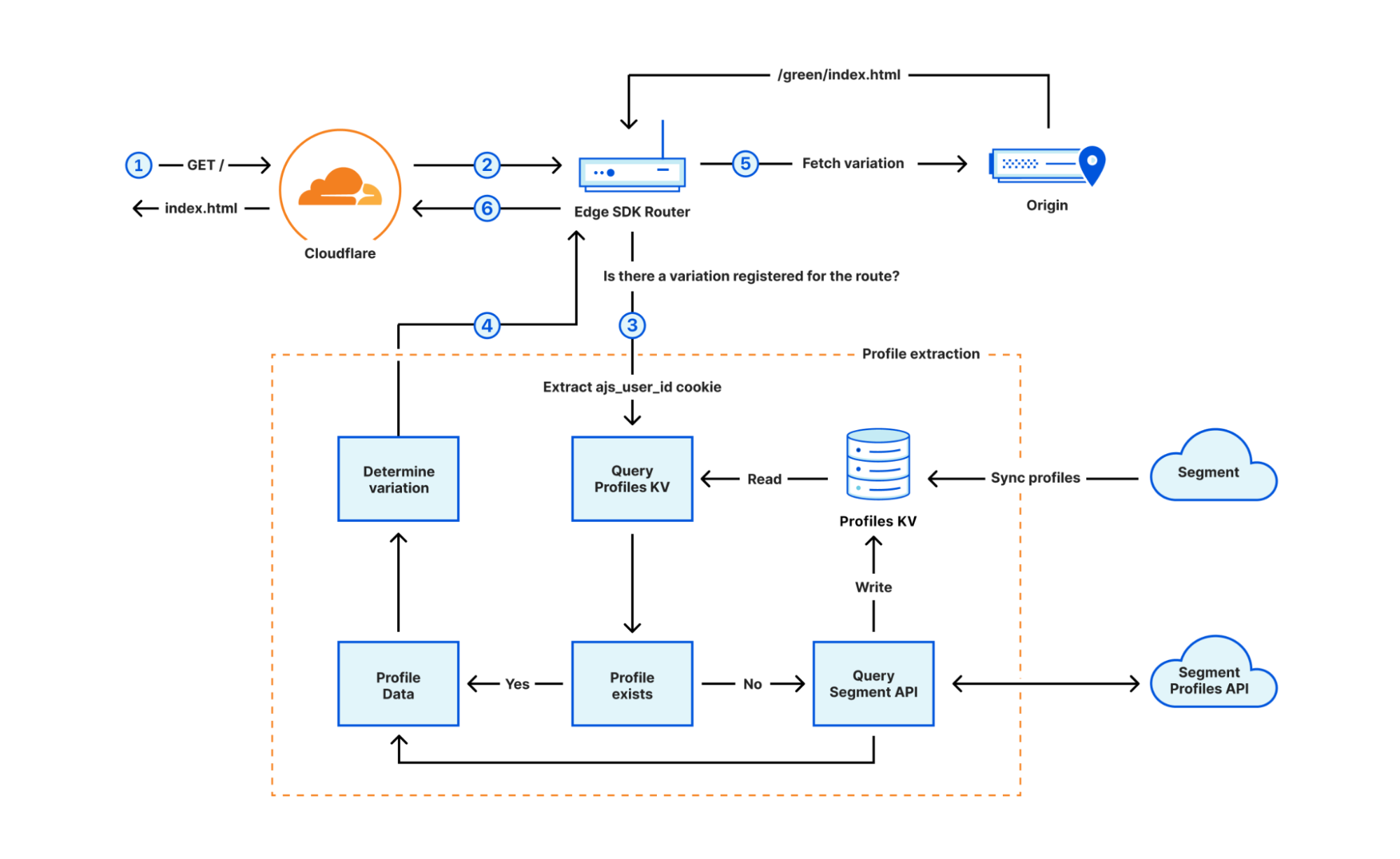
My favorite blog posts

Developing evolutionary architecture with AWS Lambda

The first contribution I wanted to provide in AWS was without any doubt architectural. Hexagonal architecture (or ports and adapters) is not a new topic by any stretch, however, I wasn’t able to find solid resources with a simplified explanation of this approach. Once in place, hexagonal architectures can help the portability of your business logic across different AWS services or even on a hybrid-cloud. Using this architecture on Lambda functions has generated a lot of interest inside the serverless community.

If you want to know more, I leave you to the re:Invent talk I delivered in 2021.

Let’s Architect!

The second resource I am extremely proud of is a collaboration with AWS’s Zamira Jaupaj, Laura Hyatt, and Vittorio Denti… the Let’s Architect! team.

I met them in my first year in AWS, and they share a similar passion for helping people and community engagement. Moreover, we all want to learn something new.
Together, we created Let’s Architect!, a blog series that publishes a fortnightly post on a specific topic since January 2022. For example, serverless, containers, or data architectures are explored, gathering four different AWS content pieces that provide an architect’s perspective on why that content is relevant (or still relevant).

This initiative has had a strong influence, and we now have customers and even many of our colleagues awaiting our upcoming posts. If you want to discover more, check out the AWS Architecture Blog.

Let's Architect

Let’s Architect!

Server-Side Rendering Micro-Frontends in AWS

The last resource is part of my dream to lead the frontend community in their discovery of AWS services.

The frontend community is exposed to a lot of new frameworks and libraries, however, I believe they should look to the cloud as well, as they can unlock a variety of new possibilities.

Considering my expertise on micro-frontends and serverless, I started with a reference architecture to build distributed frontend using serverless. I recently started a new series on the AWS Compute Blog explaining the reasoning behind this reference architecture and how to approach server-side rendering micro-frontends using serverless. Read my first post on server-side rendering micro-frontends.

Security updates for Friday

Post Syndicated from original https://lwn.net/Articles/915378/

Security updates have been issued by Debian (asterisk, firefox-esr, php-phpseclib, phpseclib, python-django, and thunderbird), Fedora (grub2, samba, and thunderbird), Mageia (firefox, sudo, systemd, and thunderbird), Slackware (freerdp), SUSE (firefox, go1.18, go1.19, kernel, openvswitch, python-Twisted, systemd, and xen), and Ubuntu (expat, git, multipath-tools, unbound, and webkit2gtk).

Network Performance Update: Developer Week 2022

Post Syndicated from David Tuber original https://blog.cloudflare.com/network-performance-update-developer-week/

Network Performance Update: Developer Week 2022

Network Performance Update: Developer Week 2022

Cloudflare is building the fastest network in the world. But we don’t want you to just take our word for it. To demonstrate it, we are continuously testing ourselves versus everyone else to make sure we’re the fastest. Since it’s Developer Week, we wanted to provide an update on how our Workers products perform against the competition, as well as our overall network performance.

Earlier this year, we compared ourselves to Fastly’s Compute@Edge and overall we were faster. This time, not only did we repeat the tests, but we also added AWS Lambda@Edge to help show how we stack up against more and more competitors. The summary: we offer the fastest developer platform on the market. Let’s talk about how we build our network to help make you faster, and then we’ll get into how that translates to our developer platform.

Latest update on network performance

We have two updates on data: a general network performance update, and then data on how Workers compares with Compute@Edge and Lambda@Edge.

To quantify global network performance, we have to get enough data from around the world, across all manner of different networks, comparing ourselves with other providers. We used Real User Measurements (RUM) to fetch a 100kB file from different providers. Users around the world report the performance of different providers. The more users who report the data, the higher fidelity the signal is. The goal is to provide an accurate picture of where different providers are faster, and more importantly, where Cloudflare can improve. You can read more about the methodology in the original Speed Week blog post here.

During Cloudflare One Week (June 2022), we shared that we were faster in more of the most reported networks than our competitors. Out of the top 3,000 networks in the world (by number of IPv4 addresses advertised), here’s a breakdown of the number of networks where each provider is number one in p95 TCP Connection Time, which represents the time it takes for a user on a given network to connect to the provider. This data is from Cloudflare One Week (June 2022):

Network Performance Update: Developer Week 2022

Here is what the distribution looks like for the top 3,000 networks for Developer Week (November 2022):

Network Performance Update: Developer Week 2022

In addition to being the fastest across popular networks, Cloudflare is also committed to being the fastest provider in every country.

Using data on the top 3,000 networks from Cloudflare One Week (June 2022), here’s what the world map looks like (Cloudflare is in orange):

Network Performance Update: Developer Week 2022

And here’s what the world looks like while looking at the top 3,000 networks for Developer Week (November 2022):

Network Performance Update: Developer Week 2022

Cloudflare became #1 in more countries in Europe and Asia, specifically Russia, Ukraine, Kazakhstan, India, and China, further delivering on our mission to be the fastest network in the world. So let’s talk about how that network helps power the Supercloud to be the fastest developer platform around.

How we’re comparing developer platforms

It’s been six months since we published our initial tests, but here’s a quick refresher. We make comparisons by measuring time to connect to the network, time spent completing requests, and overall time to respond. We call these numbers connect, wait, and response. We’ve chosen these numbers because they are critical components of a request that need to be as fast as possible in order for users to see a good experience. We can reduce the connect times by peering as close as possible to the users. We can reduce the wait times by optimizing code execution to be as fast as possible. If we optimize those two processes, we’ve optimized the response, which represents the end-to-end latency of a request.

Test methodology

To measure connect, wait, and response, we perform three tests against each provider: a simple no-op JavaScript function, a complex JavaScript function, and a complex Rust function.  We don’t do a simple Rust function because we expect it to take almost no time at all, and we already have a baseline for end-to-end functionality in the no-op JavaScript function since many providers will often compile both down to WebAssembly.

Here are the functions for each of them:

JavaScript no-op:

async function getErrorResponse(event, message, status) {
  return new Response(message, {status: status, headers: {'Content-Type': 'text/plain'}});
}

JavaScript hard function:

function testHardBusyLoop() {
  let value = 0;
  let offset = Date.now();

  for (let n = 0; n < 15000; n++) {
    value += Math.floor(Math.abs(Math.sin(offset + n)) * 10);
  }

  return value;
}

Rust hard function:

fn test_hard_busy_loop() -> i32 {
  let mut value = 0;
  let offset = Date::now().as_millis();

  for n in 0..15000 {
    value += (((offset + n) as f64).sin().abs() * 10.0) as i32;
  }

  value
}

We’re trying to test how good each platform is at optimizing compute in addition to evaluating how close each platform is to end-users. However, for this test, we did not run a Rust test on Lambda@Edge because it did not natively support our Rust function without uploading a WASM binary that you compile yourself. Since Lambda@Edge does not have a true first-class developer platform and tooling to run Rust, we decided to exclude the Rust scenarios for Lambda@Edge. So when we compare numbers for Lambda@Edge, it will only be for the JavaScript simple and JavaScript hard tests.

Measuring Workers performance from real users

To collect data, we use two different methods: one from a third party service called Catchpoint, and a second from our own network performance benchmarking tests. First, we used Catchpoint to gather a set of data from synthetic probes. Catchpoint is an industry standard “synthetic” testing tool, and measurements collected from real users distributed around the world. Catchpoint is a monitoring platform that has around 2,000 total endpoints distributed around the world that can be configured to fetch specific resources and time for each test. Catchpoint is useful for network providers like us as it provides a consistent, repeatable way to measure end-to-end performance of a workload, and delivers a best-effort approximation for what a user sees.

Catchpoint has backbone nodes that are embedded in ISPs around the world. That means that these nodes are plugged into ISP routers just like you are, and the traffic goes through the ISP network to each endpoint they are monitoring. These can approximate a real user, but they will never truly replicate a real user. For example, the bandwidth for these nodes is 100% dedicated for platform monitoring, as opposed to your home Internet connection, where your Internet experience will be a mixed bag of different use cases, some of which won’t talk to Workers applications at all.

For this new test, we chose 300 backbone nodes that are embedded in last mile ISPs around the world. We filtered out nodes in cloud providers, or in metro areas with multiple transit options, trying to remove duplicate paths as much as possible.

We cross-checked these tests with our own data set, which is collected from users connecting to free websites when they are served 1xxx error pages, just like how we collect data for global network performance. When a user sees this error page, that page that will execute these tests as a part of rendering and upload performance metrics on these calls to Cloudflare.

We also changed our test methodology to use paid accounts for Fastly, Cloudflare, and AWS.

Workers vs Compute@Edge vs Lambda@Edge

This time, let’s start off with the response times to show how we’re doing end-to-end:

Network Performance Update: Developer Week 2022

Test 95th percentile response (ms)
Cloudflare JavaScript no-op 479
Fastly JavaScript no-op 634
AWS JavaScript no-op 1,400
Cloudflare JavaScript hard 471
Fastly JavaScript hard 683
AWS JavaScript hard 1,411
Cloudflare Rust hard 472
Fastly Rust hard 638

We’re fastest in all cases. Now let’s look at connect times, which show us how fast users connect to the compute platform before doing any actual compute:

Network Performance Update: Developer Week 2022

Test 95th percentile connect (ms)
Cloudflare JavaScript no-op 82
Fastly JavaScript no-op 94
AWS JavaScript no-op 295
Cloudflare JavaScript hard 82
Fastly JavaScript hard 94
AWS JavaScript hard 297
Cloudflare Rust hard 79
Fastly Rust hard 94

Note that we don’t expect these times to differ based on the code being run, but we extract them from the same set of tests, so we’ve broken them out here.

But what about wait times? Remember, wait times represent time spent computing the request, so who has optimized their platform best? Again, it’s Cloudflare, although Fastly still has a slight edge on the hard Rust test (which we plan to beat by further optimization):

Network Performance Update: Developer Week 2022

Test 95th percentile wait (ms)
Cloudflare JavaScript no-op 110
Fastly JavaScript no-op 122
AWS JavaScript no-op 362
Cloudflare JavaScript hard 115
Fastly JavaScript hard 178
AWS JavaScript hard 367
Cloudflare Rust hard 125
Fastly Rust hard 122

To verify these results, we compared the Catchpoint results to our own data set. Here is the p95 TTFB for the JavaScript and Rust hard loops for Fastly, AWS, and Cloudflare from our data:

Network Performance Update: Developer Week 2022

Cloudflare is faster on JavaScript and Rust calls. These numbers also back up the slight compute advantage for Fastly on Rust calls.

The big takeaway from this is that in addition to Cloudflare being faster for the time spent processing requests in nearly every test, Cloudflare’s network and performance optimizations as a whole set us apart and make our Workers platform even faster for everything. And, of course, we plan to keep it that way.

Your application, but faster

Latency is an important component of the user experience, and for developers, being able to ensure their users can do things as fast as possible is critical for the success of an application. Whether you’re building applications in Workers, D1, and R2, hosting your documentation in Pages, or even leveraging Workers as part of your SaaS platform, having your code run in the SuperCloud that is our global network will ensure that your users see the best experience they possibly can.

Our network is hyper-optimized to make your code as fast as possible. By using Cloudflare’s network to run your applications, you can focus on making the best possible application possible and rest easy knowing that Cloudflare is providing you the best user experience possible. This is because Cloudflare’s developer platform is built on top of the world’s fastest network. So go out and build your dreams, and know that we’ll make your dreams as fast as they can possibly be.

Send Cloudflare Workers logs to a destination of your choice with Workers Trace Events Logpush

Post Syndicated from Tanushree Sharma original https://blog.cloudflare.com/workers-logpush-ga/

Send Cloudflare Workers logs to a destination of your choice with Workers Trace Events Logpush

Send Cloudflare Workers logs to a destination of your choice with Workers Trace Events Logpush

When writing code, you can only move as fast as you can debug.

Our goal at Cloudflare is to give our developers the tools to deploy applications faster than ever before. This means giving you tools to do everything from initializing your Workers project to having visibility into your application successfully serving production traffic.

Last year we introduced wrangler tail, letting you access a live stream of Workers logs to help pinpoint errors to debug your applications. Workers Trace Events Logpush (or just Workers Logpush for short) extends this functionality – you can use it to send Workers logs to an object storage destination or analytics platform of your choice.

Workers Logpush is now available to everyone on the Workers Paid plan! Read on to learn how to get started and about pricing information.

Move fast and don’t break things

With the rise of platforms like Cloudflare Workers over containers and VMs, it now takes just minutes to deploy applications. But, when building an application, any tech stack that you choose comes with its own set of trade-offs.

As a developer, choosing Workers means you don’t need to worry about any of the underlying architecture. You just write code, and it works (hopefully!). A common criticism of this style of platform is that observability becomes more difficult.

We want to change that.

Over the years, we’ve made improvements to the testing and debugging tools that we offer — wrangler dev, Miniflare and most recently our open sourced runtime workerd. These improvements have made debugging locally and running unit tests much easier. However, there will always be edge cases or bugs that are only replicated in production environments.

If something does break…enter Workers Logpush

Wrangler tail lets you view logs in real time, but we’ve heard from developers that you would also like to set up monitoring for your services and have a historical record to look back on. Workers Logpush includes metadata about requests, console.log() messages and any uncaught exceptions. To give you an idea of what it looks like, below is a sample log line:

{
   "AccountID":12345678,
   "Event":{
      "RayID":"7605d2b69f961000",
      "Request":{
         "URL":"https://example.com",
         "Method":"GET"
      },
      "Response":{
         "status":200
      },
      "EventTimestampMs":1666814897697,
      "EventType":"fetch",
      "Exceptions":[
      ],
      "Logs":[
         {
            "Level":"log",
            "Message":[
               "please work!"
            ],
            "TimestampMs":1666814897697
         }
      ],
      "Outcome":"ok",
      "ScriptName":"example-script"
   }

Logpush has support for the most popular observability tools. Send logs to Datadog, New Relic or even R2 for storage and ad hoc querying.

Pricing

Workers Logpush is available to both customers on our Workers Paid and Enterprise plans. We wanted this to be very affordable for our developers. Workers Logpush is priced at $0.05 per million requests, and we only charge you for requests that result in logs delivered to an end destination after any filtering or sampling is applied. It also has an included usage of 10M requests each month.

Configuration

Logpush is incredibly simple to set up.

1. Create a Logpush job. The following example sends Workers logs to R2.

curl -X POST 'https://api.cloudflare.com/client/v4/accounts/<ACCOUNT_ID>/logpush/jobs' \
-H 'X-Auth-Key: <API_KEY>' \
-H 'X-Auth-Email: <EMAIL>' \
-H 'Content-Type: application/json' \
-d '{
"name": "workers-logpush",
"logpull_options": "fields=Event,EventTimestampMs,Outcome,Exceptions,Logs,ScriptName",
"destination_conf": "r2://<BUCKET_PATH>/{DATE}?account-id=<ACCOUNT_ID>&access-key-id=<R2_ACCESS_KEY_ID>&secret-access-key=<R2_SECRET_ACCESS_KEY>",
"dataset": "workers_trace_events",
"enabled": true
}'| jq .

In Logpush, you can also configure filters and a sampling rate to have more control of the volume of data that is sent to your configured destination. For example if you only want to receive logs for resulted in an exception, you could add the following under logpull_options:

"filter":"{\"where\": {\"key\":\"Outcome\",\"operator\":\"eq\",\"value\":\"exception\"}}"

2. Enable logging on your Workers script

You can do this by adding a new property, logpush = true, to your wrangler.toml file. This can be added either in the top level configuration or under an environment. Any new scripts with this property will automatically get picked up by the Logpush job.

Get started today!

Both customers on our Workers Paid Plan and Enterprise plan can get started with Workers Logpush now! The full guide on how to get started is here.

Twilio Segment Edge SDK Powered by Cloudflare Workers

Post Syndicated from Pooya Jaferian (Guest Blogger) original https://blog.cloudflare.com/twilio-segment-sdk-powered-by-cloudflare-workers/

Twilio Segment Edge SDK Powered by Cloudflare Workers

Twilio Segment Edge SDK Powered by Cloudflare Workers

The Cloudflare team was so excited to hear how Twilio Segment solved problems they encountered with tracking first-party data and personalization using Cloudflare Workers. We are happy to have guest bloggers Pooya Jaferian and Tasha Alfano from Twilio Segment to share their story.

Introduction

Twilio Segment is a customer data platform that collects, transforms, and activates first-party customer data. Segment helps developers collect user interactions within an application, form a unified customer record, and sync it to hundreds of different marketing, product, analytics, and data warehouse integrations.

There are two “unsolved” problem with app instrumentation today:

Problem #1: Many important events that you want to track happen on the “wild-west” of the client, but collecting those events via the client can lead to low data quality, as events are dropped due to user configurations, browser limitations, and network connectivity issues.

Problem #2: Applications need access to real-time (<50ms) user state to personalize the application experience based on advanced computations and segmentation logic that must be executed on the cloud.

The Segment Edge SDK – built on Cloudflare Workers – solves for both. With Segment Edge SDK, developers can collect high-quality first-party data. Developers can also use Segment Edge SDK to access real-time user profiles and state, to deliver personalized app experiences without managing a ton of infrastructure.

This post goes deep on how and why we built the Segment Edge SDK. We chose the Cloudflare Workers platform as the runtime for our SDK for a few reasons. First, we needed a scalable platform to collect billions of events per day. Workers running with no cold-start made them the right choice. Second, our SDK needed a fast storage solution, and Workers KV fitted our needs perfectly. Third, we wanted our SDK to be easy to use and deploy, and Workers’ ease and speed of deployment was a great fit.

It is important to note that the Segment Edge SDK is in early development stages, and any features mentioned are subject to change.

Serving a JavaScript library 700M+ times per day

analytics.js is our core JavaScript UI SDK that allows web developers to send data to any tool without having to learn, test, or use a new API every time.

Figure 1 illustrates how Segment can be used to collect data on a web application. Developers add Segment’s web SDK, analytics.js, to their websites by including a JavaScript snippet to the HEAD of their web pages. The snippet can immediately collect and buffer events while it also loads the full library asynchronously from the Segment CDN. Developers can then use analytics.js to identify the visitors, e.g., analytics.identify('john'), and track user behavior, e.g., analytics.track('Order Completed'). Calling the `analytics.js methods such as identify or track will send data to Segment’s API (api.segment.io). Segment’s platform can then deliver the events to different tools, as well as create a profile for the user (e.g., build a profile for user “John”, associate “Order Completed”, as well as add all future activities of john to the profile).

Analytics.js also stores state in the browser as first-party cookies (e.g., storing an ajs_user_id cookie with the value of john, with cookie scoped at the example.com domain) so that when the user visits the website again, the user identifier stored in the cookie can be used to recognize the user.

Twilio Segment Edge SDK Powered by Cloudflare Workers
Figure 1- How analytics.js loads on a website and tracks events

While analytics.js only tracks first-party data (i.e., the data is collected and used by the website that the user is visiting), certain browser controls incorrectly identify analytics.js as a third-party tracker, because the SDK is loaded from a third-party domain (cdn.segment.com) and the data is going to a third-party domain (api.segment.com). Furthermore, despite using first-party cookies to store user identity, some browsers such as Safari have limited the TTL for non-HTTPOnly cookies to 7-days, making it challenging to maintain state for long periods of time.

To overcome these limitations, we have built a Segment Edge SDK (currently in early development) that can automatically add Segment’s library to a web application, eliminate the use of third-party domains, and maintain user identity using HTTPOnly cookies. In the process of solving the first-party data problem, we realized that the Edge SDK is best positioned to act as a personalization library, given it has access to the user identity on every request (in the form of cookies), and it can resolve such identity to a full-user profile stored in Segment. The user profile information can be used to deliver personalized content to users directly from the Cloudflare Workers platform.

The remaining portions of this post will cover how we solved the above problems. We first explain how the Edge SDK helps with first-party collection. Then we cover how the Segment profiles database becomes available on the Cloudflare Workers platform, and how to use such data to drive personalization.

Segment Edge SDK and first-party data collection

Developers can set up the Edge SDK by creating a Cloudflare Worker sitting in front of their web application (via Routes) and importing the Edge SDK via npm. The Edge SDK will handle requests and automatically injects analytics.js snippets into every webpage. It also configures first-party endpoints to download the SDK assets and send tracking data. The Edge SDK also captures user identity by looking at the Segment events and instructs the browser to store such identity as HTTPOnly cookies.

import { Segment } from "@segment/edge-sdk-cloudflare";

export default {
   async fetch(request: Request, env: Env): Promise<Response> {
       const segment = new Segment(env.SEGMENT_WRITE_KEY); 

       const resp = await segment.handleEvent(request, env);

       return resp;
   }
};

How the Edge SDK works under the hood to enable first-party data collection

The Edge SDK’s internal router checks the inbound request URL against predefined patterns. If the URL matches a route, the router runs the route’s chain of handlers to process the request, fetch the origin, or modify the response.

export interface HandlerFunction {
 (
   request: Request,
   response: Response | undefined,
   context: RouterContext
 ): Promise<[Request, Response | undefined, RouterContext]>;
}

Figure 2 demonstrates the routing of incoming requests. The Worker calls  segment.handleEvent method with the request object (step 1), then the router matches the request.url and request.method against a set of predefined routes:

  • GET requests with /seg/assets/* path are proxied to Segment CDN (step 2a)
  • POST requests with /seg/events/* path are proxied to Segment tracking API (step 2b)
  • Other requests are proxied to the origin (step 2c) and the HTML responses are enriched with the analytics.js snippet (step 3)

Regardless of the route, the router eventually returns a response to the browser (step 4) containing data from the origin, the response from Segment tracking API, or analytics.js assets. When Edge SDK detects the user identity in an incoming request (more on that later), it sets an HTTPOnly cookie in the response headers to persist the user identity in the browser.

Twilio Segment Edge SDK Powered by Cloudflare Workers
Figure 2- Edge SDK router flow‌‌

In the subsequent three sections, we explain how we inject analytics.js, proxy Segment endpoints, and set server-side cookies.

Injecting Segment SDK on requests to origin

For all the incoming requests routed to the origin, the Edge SDK fetches the HTML page and then adds the analytics.js snippet to the <HEAD> tag, embeds the write key, and configures the snippet to download the subsequent javascript bundles from the first-party domain ([first-party host]/seg/assets/*) and sends data to the first-party domain as well ([first-party host]/seg/events/*). This is accomplished using the HTMLRewriter API.

import snippet from "@segment/snippet"; // Existing Segment package that generates snippet

class ElementHandler {
   constructor(host: string, writeKey: string)

   element(element: Element) {
     // generate Segment snippet and configure it with first-party host info
     const snip = snippet.min({
         host: `${this.host}/seg`,
         apiKey: this.writeKey,
       })
     element.append(`<script>${snip}</script>`, { html: true });
   }
 }
  
export const enrichWithAJS: HandlerFunction = async (
   request,
   response,
   context
 ) => {
   const {
     settings: { writeKey },
   } = context;
   const host = request.headers.get("host") || "";
    return [
     request,
     new HTMLRewriter().on("head",
         new ElementHandler(host, writeKey))
       .transform(response),
     context,
   ];
 };

Proxy SDK bundles and Segment API

The Edge SDK proxies the Segment CDN and API under the first-party domain. For example, when the browser loads a page with the injected analytics.js snippet, the snippet loads the full analytics.js bundle from https://example.com/seg/assets/sdk.js, and the Edge SDK will proxy that request to the Segment CDN:

https://cdn.segment.com/analytics.js/v1/<WRITEKEY>/analytics.min.js

export const proxyAnalyticsJS: HandlerFunction = async (request, response, ctx) => {
 const url = `https://cdn.segment.com/analytics.js/v1/${ctx.params.writeKey}/analytics.min.js`;
 const resp = await fetch(url);
 return [request, resp, ctx];
};

Similarly, analytics.js collects events and sends them via a POST request to https://example.com/seg/events/[method] and the Edge SDK will proxy such requests to the Segment tracking API:

https://api.segment.io/v1/[method]

export const handleAPI: HandlerFunction = async (request, response, context) => {
 const url = new URL(request.url);
 const parts = url.pathname.split("/");
 const method = parts.pop();
 let body: { [key: string]: any } = await request.json();

 const init = {
   method: "POST",
   headers: request.headers,
   body: JSON.stringify(body),
 };

 const resp = await fetch(`https://api.segment.io/v1/${method}`, init);

 return [request, resp, context];
};

First party server-side cookies

The Edge SDK also re-writes existing client-side analytics.js cookies as HTTPOnly cookies. When Edge SDK intercepts an identify event e.g., analytics.identify('john'), it extracts the user identity (“john”) and then sets a server-side cookie when sending a response back to the user. Therefore, any subsequent request to the Edge SDK can be associated with “john” using request cookies.

export const enrichResponseWithIdCookies: HandlerFunction = async (
 request, response, context) => {


 const host = request.headers.get("host") || "";
 const body = await request.json();
 const userId = body.userId;

 […]

 const headers = new Headers(response.headers);
 const cookie = cookie.stringify("ajs_user_id", userId, {
   httponly: true,
   path: "/",
   maxage: 31536000,
   domain: host,
 });
 headers.append("Set-Cookie", cookie);
 
 const newResponse = new Response(response.body, {
   ...response,
   headers,
 });

 return [request, newResponse, newContext];
};

Intercepting the ajs_user_id on the Workers, and using the cookie identifier to associate each request to a user, is quite powerful, and it opens the door for delivering personalized content to users. The next section covers how Edge SDK can drive personalization.

Personalization on the Supercloud

The Edge SDK offers a registerVariation method that can customize how a request to a given route should be fetched from the origin. For example, let’s assume we have three versions of a landing page in the origin: /red, /green, and  / (default), and we want to deliver one of the three versions based on the visitor traits. We can use Edge SDK as follows:

   const segment = new Segment(env.SEGMENT_WRITE_KEY); 
   segment.registerVariation("/", (profile) => {
     if (profile.red_group) {
       return "/red"
     } else if (profile.green_group) 
       return "/green"
     }
   });

   const resp = await segment.handleEvent(request, env);

   return resp

The registerVariation accepts two inputs: the path that displays the personalized content, and a decision function that should return the origin address for the personalized content. The decision function receives a profile object visitor in Segment. In the example, when users visit example.com/(root path), personalized content is delivered by checking if the visitor has a red_group or green_group trait and subsequently requesting the content from either /red or /green path at the origin.

We already explained that Edge SDK knows the identity of the user via ajs_user_id cookie, but we haven’t covered how the Edge SDK has access to the full profile object. The next section explains how the full profile becomes available on the Cloudflare Workers platform.

How does personalization work under the hood?

The Personalization feature of the Edge SDK requires storage of profiles on the Cloudflare Workers platform. A Cloudflare KV should be created for the Worker running the Edge SDK and passed to the Edge SDK during initialization. Edge SDK will store profiles in KV, where keys are the ajs_user_id, and values are the serialized profile object. To move Profiles data from Segment to the KV, the SDK uses two methods:

  • Profiles data push from Segment to the Cloudflare Workers platform: The Segment product can sync user profiles database with different tools, including pushing the data to a webhook. The Edge SDK automatically exposes a webhook endpoint under the first-party domain (e.g., example.com/seg/profiles-webhook) that Segment can call periodically to sync user profiles. The webhook handler receives incoming sync calls from Segment, and writes profiles to the KV.
  • Pulling data from Segment by the Edge SDK: If the Edge SDK queries the KV for a user id, and doesn’t find the profile (i.e., data hasn’t synced yet), it requests the user profile from the Segment API, and stores it in the KV.

Figure 3 demonstrates how the personalization flow works. In step 1, the user requests content for the root path ( / ), and the Worker sends the request to the Edge SDK (step 2). The Edge SDK router determines that a variation is registered on the route, therefore, extracts the ajs_user_id from the request cookies, and goes through the full profile extraction (step 3). The SDK first checks the KV for a record with the key of ajs_user_id value and if not found, queries Segment API to fetch the profile, and stores the profile in the KV. Eventually, the profile is extracted and passed into the decision function to decide which path should be served to the user (step 4). The router eventually fetches the variation from the origin (step 5) and returns the response under the / path to the browser (step 6).

Twilio Segment Edge SDK Powered by Cloudflare Workers
Figure 3- Personalization flow

Summary

In this post we covered how the Cloudflare Workers platform can help with tracking first-party data and personalization. We also explained how we built a Segment Edge SDK to enable Segment customers to get those benefits out of the box, without having to create their own DIY solution. The Segment Edge SDK is currently in early development, and we are planning to launch a private pilot and open-source it in the near future.

The collective thoughts of the interwebz