Three recurring Security Hub usage patterns and how to deploy them

Post Syndicated from Tim Holm original https://aws.amazon.com/blogs/security/three-recurring-security-hub-usage-patterns-and-how-to-deploy-them/

As Amazon Web Services (AWS) Security Solutions Architects, we get to talk to customers of all sizes and industries about how they want to improve their security posture and get visibility into their AWS resources. This blog post identifies the top three most commonly used Security Hub usage patterns and describes how you can use these to improve your strategy for identifying and managing findings.

Customers have told us they want to provide security and compliance visibility to the application owners in an AWS account or to the teams that use the account; others want a single-pane-of-glass view for their security teams; and other customers want to centralize everything into a security information and event management (SIEM) system, most often due to being in a hybrid scenario.

Security Hub was launched as a posture management service that performs security checks, aggregates alerts, and enables automated remediation. Security Hub ingests findings from multiple AWS services, including Amazon GuardDuty, Amazon Inspector, AWS Firewall Manager, and AWS Health, and also from third-party services. It can be integrated with AWS Organizations to provide a single dashboard where you can view findings across your organization.

Security Hub findings are normalized into the AWS Security Findings Format (ASFF) so that users can review them in a standardized format. This reduces the need for time-consuming data conversion efforts and allows for flexible and consistent filtering of findings based on the attributes provided in the finding, as well as the use of customizable responsive actions. Partners who have integrations with Security Hub also send their findings to AWS using the ASFF to allow for consistent attribute definition and enforced criticality ratings, meaning that findings in Security Hub have a measurable rating. This helps to simplify the complexity of managing multiple findings from different providers.

Overview of the usage patterns

In this section, we outline the objectives for each usage pattern, list the typical stakeholders we have seen these patterns support, and discuss the value of deploying each one.

Usage pattern 1: Dashboard for application owners

Use Security Hub to provide visibility to application workload owners regarding the security and compliance posture of their AWS resources.

The application owner is often responsible for the security and compliance posture of the resources they have deployed in AWS. In our experience however, it is common for large enterprises to have a separate team responsible for defining security-related privileges and to not grant application owners the ability to modify configuration settings on the AWS account that is designated as the centralized Security Hub administration account. We’ll walk through how you can enable read-only access for application owners to use Security Hub to see the overall security posture of their AWS resources.

Stakeholders: Developers and cloud teams that are responsible for the security posture of their AWS resources. These individuals are often required to resolve security events and non-compliance findings that are captured with Security Hub.

Value adds for customers: Some organizations we have worked with put the onus on workload owners to own their security findings, because they have a better understanding of the nuances of the engineering, the business needs, and the overall risk that the security findings represent. This usage pattern gives the applications owners clear visibility into the security and compliance status of their workloads in the AWS accounts so that they can define appropriate mitigation actions with consideration to their business needs and risk.

Usage pattern 2: A single pane of glass for security professionals

Use Security Hub as a single pane of glass to view, triage, and take action on AWS security and compliance findings across accounts and AWS Regions.

Security Hub generates findings by running continuous, automated security checks based on supported industry standards. Additionally, Security Hub integrates with other AWS services to collect and correlate findings and uses over 60 partner integrations to simplify and prioritize findings. With these features, security professionals can use Security Hub to manage findings across their AWS landscape.

Stakeholders: Security operations, incident responders, and threat hunters who are responsible for monitoring compliance, as well as security events.

Value adds for customers: This pattern benefits customers who don’t have a SIEM but who are looking for a centralized model of security operations. By using Security Hub and aggregating findings across Regions into a single Security Hub dashboard, they get oversight of their AWS resources without the cost and complexity of managing a SIEM.

Usage pattern 3: Centralized routing to a SIEM solution

Use AWS Security Hub as a single aggregation point for security and compliance findings across AWS accounts and Regions, and route those findings in a normalized format to a centralized SIEM or log management tool.

Customers who have an existing SIEM capability and complex environments typically deploy this usage pattern. By using Security Hub, these customers gather security and compliance-related findings across the workloads in all their accounts, ingest those into their SIEM, and investigate findings or take response and remediation actions directly within their SIEM console. This mechanism also enables customers to define use cases for threat detection and analysis in a single environment, providing a holistic view of their risk.

Stakeholders: Security operations teams, incident responders, and threat hunters. This pattern supports a centralized model of security operations, where the responsibilities for monitoring and identifying both non-compliance with defined practice, as well as security events, fall within single teams within the organization.

Value adds for customers: When Security Hub aggregates the findings from workloads across accounts and Regions in a single place, those finding are normalized by using the ASFF. This means that findings are already normalized under a single format when they are sent to the SIEM. This enables faster analytics, use case definition, and dashboarding because analysts don’t have to create multi-tiered use cases for different finding structures across vendors and services.

The ASFF also enables streamlined response through security orchestration, automation, response (SOAR) tools or AWS native orchestration tools such as AWS EventBridge. With the ASFF, you can effortlessly parse and filter events based on an attribute and customize automation.

Overall, this usage pattern helps to improve the typical key performance indicators (KPIs) the SecOps function is measured against, such as Mean Time to Detect (MTTD) or Mean Time to Respond (MTTR) in the AWS environment.

Setting up each usage pattern

In this section, we’ll go over the steps for setting up each usage pattern

Usage pattern 1: Dashboard for application owners

Use the following steps to set up a Security Hub dashboard for an account owner, where the owner can view and take action on security findings.

Prerequisites for pattern 1

This solution has the following prerequisites:

  1. Enable AWS Security Hub to check your environment against security industry standards and best practices.
  2. Next, enable the AWS service integrations for all accounts and Regions as desired. For more information, refer to Enabling all features in your organization.

Set up read-only permissions for the AWS application owner

The following steps are commonly performed by the security team or those responsible for creating AWS Identity and Access Management (IAM) policies.

  • Assign the AWS managed permission policy AWSSecurityHubReadOnlyAccess to the principal who will be assuming the role. Figure 1 shows an image of the permission statement.
    Figure 1: Assign permissions

    Figure 1: Assign permissions

  • (Optional) Create custom insights in Security Hub. Using custom insights can provide a view of areas of interest for an application owner; however, creating a new insights view is not allowed unless the following additional set of permissions are granted to the application owner role or user.
    {
    "Effect": "Allow",
    "Action": [
    "securityhub:UpdateInsight",
    "securityhub:DeleteInsight",
    "securityhub:CreateInsight"
    ],
    "Resource": "*"
    }

Pattern 1 walkthrough: View the application owner’s security findings

After the read-only IAM policy has been created and applied, the application owner can access Security Hub to view the dashboard, which provides the application owner with a view of the overall security posture of their AWS resources. In this section, we’ll walk through the steps that the application owner can take to quickly view and assess the compliance and security of their AWS resources.

To view the application owner’s dashboard in Security Hub

  1. Sign into the AWS Management Console and navigate to the AWS Security Hub service page. You will be presented with a summary of the findings. Then, depending on the security standards that are enabled, you will be presented with a view similar to the one shown in Figure 2.
    Figure 2: Summary of aggregated Security Hub standard score

    Figure 2: Summary of aggregated Security Hub standard score

    Security Hub generates its own findings by running automated and continuous checks against the rules in a set of supported security standards. On the Summary page, the Security standards card displays the security scores for each enabled standard. It also displays a consolidated security score that represents the proportion of passed controls to enabled controls across the enabled standards.

  2. Choose the hyperlink of a security standard to get an additional summarized view, as shown in Figure 3.
    Figure 3: Security Hubs standards summarized view

    Figure 3: Security Hubs standards summarized view

  3. As you choose the hyperlinks for the specific findings, you will get additional details, along with recommended remediation instructions to take.
    Figure 4: Example of finding details view

    Figure 4: Example of finding details view

  4. In the left menu of the Security Hub console, choose Findings to see the findings ranked according to severity. Choose the link text of the finding title to drill into the details and view additional information on possible remediation actions.
    Figure 5: Findings example

    Figure 5: Findings example

  5. In the left menu of the Security Hub console, choose Insights. You will be presented with a collection of related findings. Security Hub provides several managed insights to get you started with assessing your security posture. As shown in Figure 6, you can quickly see if your Amazon Simple Storage Service (Amazon S3) buckets have public write or read permissions. This is just one example of managed insights that help you quickly identify risks.
    Figure 6: Insights view

    Figure 6: Insights view

  6. You can create custom insights to track issues and resources that are specific to your environment. Note that creating custom insights requires IAM permissions, as described earlier in the Prerequisites for Pattern 1 section. Use the following steps to create a custom insight for compliance status.

    To create a custom insight, use the Group By filter and select how you want your insights to be grouped together:

    1. In the left menu of the Security Hub console, choose Insights, and then choose Create insight in the upper right corner.
    2. By default, there will be filters included in the filter bar. Put the cursor in the filter bar, choose Group By, choose Compliance Status, and then choose Apply.
      Figure 7: Creating a custom insight

      Figure 7: Creating a custom insight

    3. For Insight name, enter a relevant name for your insight, and then choose Create insight. Your custom insight will be created.

In this scenario, you learned how application owners can quickly assess the resources in an AWS account and get details about security risks and recommended remediation steps. For a more hands-on walkthrough that covers how to use Security Hub, consider spending 2–3 hours going through this AWS Security Hub workshop.

Usage pattern 2: A single pane of glass for security professionals

To use Security Hub as a centralized source of security insight, we recommend that you choose to accept security data from the available integrated AWS services and third-party products that generate findings. Check the lists of available integrations often, because AWS continues to release new services that integrate with Security Hub. Figure 8 shows the Integrations page in Security Hub, where you can find information on how to accept findings from the many integrations that are available.

Figure 8: Security Hub integrations page

Figure 8: Security Hub integrations page

Solution architecture and workflow for pattern 2

As Figure 9 shows, you can visualize Security Hub as the centralized security dashboard. Here, Security Hub can act as both the consumer and issuer of findings. Additionally, if you have security findings you want sent to Security Hub that aren’t provided by a AWS Partner or AWS service, you can create a custom provider to provide the central visibility you need.

Figure 9: Security Hub findings flow

Figure 9: Security Hub findings flow

Because Security Hub is integrated with many AWS services and partner solutions, customers get improved security visibility across their AWS landscape. With the integration of Amazon Detective, it’s convenient for security analysts to use Security Hub as the centralized incident triage starting point. Amazon Detective is a security incident response service that can be used to analyze, investigate, and quickly identify the root cause of potential security issues or suspicious activities by collecting log data from AWS resources. To learn how to get started with Amazon Detective, we recommend watching this video.

Programmatically remediate high-volume workflows

Security teams increasingly rely on monitoring and automation to scale and keep up with the demands of their business. Using Security Hub, customers can configure automatic responses to findings based upon preconfigured rules. Security Hub gives you the option to create your own automated response and remediation solution or use the AWS provided solution, Security Hub Automated Response and Remediation (SHARR). SHARR is an extensible solution that provides predefined response and remediation actions (playbooks) based on industry compliance standards and best practices for security threats. For step-by-step instructions for setting up SHARR, refer to this blog post.

Routing to alerting and ticketing systems

For incidents you cannot or do not want to automatically remediate, either because the incident happened in an account with a production workload or some change control process must be followed, routing to an incident management environment may be necessary. The primary goal of incident response is reducing the time to resolution for critical incidents. Customers who use alerting or incident management systems can integrate Security Hub to streamline the time it takes to resolve incidents. ServiceNow ITSM, Slack and PagerDuty are examples of products that integrate with Security Hub. This allows for workflow processing, escalations, and notifications as required.

Additionally, Incident Manager, a capability of AWS Systems Manager, also provides response plans, an escalation path, runbook automation, and active collaboration to recover from incidents. By using runbooks, customers can set up and run automation to recover from incidents. This blog post walks through setting up runbooks.

Usage pattern 3: Centralized routing to a SIEM solution

Here, we will describe how to use Splunk as an AWS Partner SIEM solution. However, note that there are many other SIEM partners available in the marketplace; the instructions to route findings to those partners’ platforms will be available in their documentation.

Solution architecture and workflow for pattern 3

Figure 10: Security Hub findings ingestion to Splunk

Figure 10: Security Hub findings ingestion to Splunk

Figure 10 shows the use of a Security Hub delegated administrator that aggregates findings across multiple accounts and Regions, as well as other AWS services such as GuardDuty, Amazon Macie, and Inspector. These findings are then sent to Splunk through a combination of Amazon EventBridge, AWS Lambda, and Amazon Kinesis Data Firehose.

Prerequisites for pattern 3

This solution has the following prerequisites:

  • Enable Security Hub in your accounts, with one account defined as the delegated admin for other accounts within AWS Organizations, and enable cross-Region aggregation.
  • Set up third-party SIEM solution; you can visit the AWS marketplace for a list of our SIEM partners. For this walkthrough, we will be using Splunk, with the Security Hub app in Splunk and an HTTP Event Collector (HEC) with indexer acknowledgment configured.
  • Generate and deploy a CloudFormation template from Splunk’s automation, provided by Project Trumpet.
  • Enable cross-Region replication. This action can only be performed from within the delegated administrator account, or from within a standalone account that is not controlled by a delegated administrator. The aggregation Region must be a Region that is enabled by default.

Pattern 3 walkthrough: Set up centralized routing to a SIEM

To get started, first designate a Security Hub delegated administrator and configure cross-Region replication. Then you can configure integration with Splunk.

To designate a delegated administrator and configure cross-Region replication

  1. Follow the steps in Designating a Security Hub administrator account to configure the delegated administrator for Security Hub.
  2. Perform these steps to configure cross-Region replication:
    1. Sign in to the account to which you delegated Security Hub administration, and in the console, navigate to the Security Hub dashboard in your desired aggregation Region. You must have the correct permissions to access Security Hub and make this change.
    2. Choose Settings, choose Regions, and then choose Configure finding aggregation.
    3. Select the radio button that displays the Region you are currently in, and then choose Save.
    4. You will then be presented with all available Regions in which you can aggregate findings. Select the Regions you want to be part of the aggregation. You also have the option to automatically link future Regions that Security Hub becomes enabled in.
    5. Choose Save.

You have now enabled multi-Region aggregation. Navigate back to the dashboard, where findings will start to be replicated into a single view. The time it takes to replicate the findings from the Regions will vary. We recommend waiting 24 hours for the findings to be replicated into your aggregation Region.

To configure integration with Splunk

Note: These actions require that you have appropriate permissions to deploy a CloudFormation template.

  1. Navigate to https://splunktrumpet.github.io/ and enter your HEC details: the endpoint URL and HEC token. Leave Automatically generate the required HTTP Event Collector tokens on your Splunk environment unselected.
  2. Under AWS data source configuration, select only AWS CloudWatch Events, with the Security Hub findings – Imported filter applied.
  3. Download the CloudFormation template to your local machine.
  4. Sign in to the AWS Management Console in the account and Region where your Security Hub delegated administrator and Region aggregation are configured.
  5. Navigate to the CloudFormation console and choose Create stack.
  6. Choose Template is ready, and then choose Upload a template file. Upload the CloudFormation template you previously downloaded from the Splunk Trumpet page.
  7. In the CloudFormation console, on the Specify Details page, enter a name for the stack. Keep all the default settings, and then choose Next.
  8. Keep all the default settings for the stack options, and then choose Next to review.
  9. On the review page, scroll to the bottom of the page. Select the check box under the Capabilities section, next to the acknowledgment that AWS CloudFormation might create IAM resources with custom names.

    The CloudFormation template will take approximately 15–20 minutes to complete.

Test the solution for pattern 3

If you have GuardDuty enabled in your account, you can generate sample findings. Security Hub will ingest these findings and invoke the EventBridge rule to push them into Splunk. Alternatively, you can wait for findings to be generated from the periodic checks that are performed by Security Hub. Figure 11 shows an example of findings displayed in the Security Hub dashboard in Splunk.

Figure 11: Example of the Security Hub dashboard in Splunk

Figure 11: Example of the Security Hub dashboard in Splunk

Conclusion

AWS Security Hub provides multiple ways you can use to quickly assess and prioritize your security alerts and security posture. In this post, you learned about three different usage patterns that we have seen our customers implement to take advantage of the benefits and integrations offered by Security Hub. Note that these usage patterns are not mutually exclusive, but can be used together as needed.

To extend these solutions further, you can enrich Security Hub metadata with additional context by using tags, as described in this post. Configure Security Hub to ingest findings from a variety of AWS Partners to provide additional visibility and context to the overall status of your security posture. To start your 30-day free trial of Security Hub, visit AWS Security Hub.

If you have feedback about this blog post, submit comments in the Comments section below. If you have questions about this blog post, please start a new thread on the Security Hub forum or contact AWS Support.

Want more AWS Security news? Follow us on Twitter.

Tim Holm

Tim Holm

Tim is a Principal Solutions Architect at AWS, he joined AWS in 2018 and is deeply passionate about security, cloud services, and building innovative solutions that solve complex business problems.

Danny Cortegaca

Danny Cortegaca

Danny is a Senior Security Specialist at AWS. He joined AWS in 2021 and specializes in security architecture, threat modelling, and driving risk focused conversations.

Building event-driven architectures with IoT sensor data

Post Syndicated from Raghavarao Sodabathina original https://aws.amazon.com/blogs/architecture/building-event-driven-architectures-with-iot-sensor-data/

The Internet of Things (IoT) brings sensors, cloud computing, analytics, and people together to improve productivity and efficiency. It empowers customers with the intelligence they need to build new services and business models, improve products and services over time, understand their customers’ needs to provide better services, and improve customer experiences. Business operations become more efficient by making intelligent decisions more quickly and over time develop a data-driven discipline leading to revenue growth and greater operational efficiency.

In this post, we showcase how to build an event-driven architecture by using AWS IoT services and AWS purpose-built data services. We also discuss key considerations and best practices while building event-driven application architectures with IoT sensor data.

Deriving insights from IoT sensor data

Organizations create value by making decisions from their IoT sensor data in near real time. Some common use cases and solutions that fit under event-driven architecture using IoT sensor data include:

  • Medical device data collection for personalized patient health monitoring, adverse event prediction, and avoidance.
  • Industrial IoT use cases to monitor equipment quality and determine actions like adjusting machine settings, using different sources of raw materials, or performing additional worker training to improve the quality of the factory output.
  • Connected vehicle use cases, such as voice interaction, navigation, location-based services, remote vehicle diagnostics, predictive maintenance, media streaming, and vehicle safety, that are based on in-vehicle computing and near real-time predictive analytics in the cloud.
  • Sustainability and waste reduction solutions, which provide access to dashboards, monitoring systems, data collection, and summarization tools that use machine learning (ML) algorithms to meet sustainability goals. Meeting sustainability goals is paramount for customers in the travel and hospitality industries.

Event-driven reference architecture with IoT sensor data

Figure 1 illustrates how to architect an event-driven architecture with IoT sensor data for near real-time predictive analytics and recommendations.

Building event-driven architecture with IoT sensor data

Figure 1. Building event-driven architecture with IoT sensor data

Architecture flow:

  1. Data originates in IoT devices such as medical devices, car sensors, industrial IoT sensors.This telemetry data is collected using AWS IoT Greengrass, an open-source IoT edge runtime and cloud service that helps your devices collect and analyze data closer to where the data is generated.When an event arrives, AWS IoT Greengrass reacts autonomously to local events, filters and aggregates device data, then communicates securely with the cloud and other local devices in your network to send the data.
  2. Event data is ingested into the cloud using edge-to-cloud interface services such as AWS IoT Core, a managed cloud platform that connects, manages, and scales devices easily and securely.AWS IoT Core interacts with cloud applications and other devices. You can also use AWS IoT SiteWise, a managed service that helps you collect, model, analyze, and visualize data from industrial equipment at scale.
  3. AWS IoT Core can directly stream ingested data into Amazon Kinesis Data Streams. The ingested data gets transformed and analyzed in near real time using Amazon Kinesis Data Analytics with Apache Flink and Apache Beam frameworks.Stream data can further be enriched using lookup data hosted in a data warehouse such as Amazon Redshift. Amazon Kinesis Data Analytics can persist SQL results to Amazon Redshift after the customer’s integration and stream aggregation (for example, one minute or five minutes).The results in Amazon Redshift can be used for further downstream business intelligence (BI) reporting services, such as Amazon QuickSight.
  4. Amazon Kinesis Data Analytics can also write to an AWS Lambda function, which can invoke Amazon SageMaker models. Amazon SageMaker is a the most complete, end-to-end service for machine learning.
  5. Once the ML model is trained and deployed in SageMaker, inferences are invoked in a micro batch using AWS Lambda. Inferenced data is sent to Amazon OpenSearch Service to create personalized monitoring dashboards using Amazon OpenSearch Service dashboards.The transformed IoT sensor data can be stored in Amazon DynamoDB. Customers can use AWS AppSync to provide near real-time data queries to API services for downstream applications. These enterprise applications can be mobile apps or business applications to track and monitor the IoT sensor data in near real-time.Amazon Kinesis Data Analytics can write to an Amazon Kinesis Data Firehose stream, which is a fully managed service for delivering near real-time streaming data to destinations like Amazon Simple Storage Service (Amazon S3), Amazon Redshift, Amazon OpenSearch Service, Splunk, and any custom HTTP endpoints or endpoints owned by supported third-party service providers, including Datadog, Dynatrace, LogicMonitor, MongoDB, New Relic, and Sumo Logic.

    In this example, data from Amazon Kinesis Data Analytics is written to Amazon Kinesis Data Firehose, which micro-batch streams data into an Amazon S3 data lake. The Amazon S3 data lake stores telemetry data for future batch analytics.

Key considerations and best practices

Keep the following best practices in mind:

  • Define the business value from IoT sensor data through interactive discovery sessions with various stakeholders within your organization.
  • Identify the type of IoT sensor data you want to collect and analyze for predictive analytics.
  • Choose the right tools for the job, depending upon your business use case and your data consumers. Please refer to step 5 earlier in this post, where different purpose-built data services were used based on user personas.
  • Consider the event-driven architecture as three key components: event producers, event routers, and event consumers. A producer publishes an event to the router, which filters and pushes the events to consumers. Producer and consumer services are decoupled, which allows them to be scaled, updated, and deployed independently.
  • In this architecture, IoT sensors are event producers. Amazon IoT Greengrass, Amazon IoT Core, Amazon Kinesis Data Streams, and Amazon Kinesis Data Analytics work together as the router from which multiple consumers can consume IoT sensor-generated data. These consumers include Amazon S3 data lakes for telemetry data analysis, Amazon OpenSearch Service for personalized dashboards, and Amazon DynamoDB or AWS AppSync for the downstream enterprise application’s consumption.

Conclusion

In this post, we demonstrated how to build an event-driven architecture with IoT sensor data using AWS IoT services and AWS purpose-built data services. You can now build your own event-driven applications using this post with your IoT sensor data and integrate with your business applications as needed.

Further reading

Security updates for Monday

Post Syndicated from original https://lwn.net/Articles/915623/

Security updates have been issued by Debian (graphicsmagick and krb5), Fedora (dotnet6.0, js-jquery-ui, kubernetes, and xterm), Gentoo (php and postgresql), Mageia (php-pear-CAS, sysstat, varnish, vim, and x11-server), Red Hat (thunderbird), SUSE (389-ds, binutils, dpkg, firefox, frr, grub2, java-11-openjdk, java-17-openjdk, kernel, kubevirt stack, libpano, nodejs16, openjpeg, php7, php74, pixman, python-Twisted, python39, rubygem-loofah, sccache, sudo, thunderbird, tor, and tumbler), and Ubuntu (flac, git, linux-azure-fde, linux-gke, linux-gkeop, linux-raspi-5.4, linux-gcp, linux-gcp-4.15, and linux-gcp-5.15, linux-gke-5.15, linux-intel-iotg, linux-raspi).

Breaking the Zeppelin Ransomware Encryption Scheme

Post Syndicated from Bruce Schneier original https://www.schneier.com/blog/archives/2022/11/breaking-the-zeppelin-ransomware-encryption-scheme.html

Brian Krebs writes about how the Zeppelin ransomware encryption scheme was broken:

The researchers said their break came when they understood that while Zeppelin used three different types of encryption keys to encrypt files, they could undo the whole scheme by factoring or computing just one of them: An ephemeral RSA-512 public key that is randomly generated on each machine it infects.

“If we can recover the RSA-512 Public Key from the registry, we can crack it and get the 256-bit AES Key that encrypts the files!” they wrote. “The challenge was that they delete the [public key] once the files are fully encrypted. Memory analysis gave us about a 5-minute window after files were encrypted to retrieve this public key.”

Unit 221B ultimately built a “Live CD” version of Linux that victims could run on infected systems to extract that RSA-512 key. From there, they would load the keys into a cluster of 800 CPUs donated by hosting giant Digital Ocean that would then start cracking them. The company also used that same donated infrastructure to help victims decrypt their data using the recovered keys.

A company offered recovery services based on this break, but was reluctant to advertise because it didn’t want Zeppelin’s creators to fix their encryption flaw.

Technical details.

What’s Up, Home? – Backups Matter!

Post Syndicated from Janne Pikkarainen original https://blog.zabbix.com/whats-up-home-backups-matter/24566/

Can you monitor your backups with Zabbix? Of course, you can — and you should! By day, I am a monitoring tech lead in a global cyber security company. By night, I monitor my home with Zabbix & Grafana and do some weird experiments with them. Welcome to my blog about this project.

Some time ago, Zabbix blog had an excellent read about how to back up Zabbix. While I’m next time coming up with something Completely Else in this blog, this week I wanted to remind you about backups.

The topic came into my mind as my old trustworthy Apple Time Capsule from 2013 probably just said “No, I don’t want to do this job anymore”. It’s a good thing that I also regularly back up my Mac to an external USB drive which I only keep connected to the Mac during backups and then put it in a safe place, and that I also do backup to iCloud and one other cloud service. Update one hour after publishing this blog post: Apple Time Capsule came back to life! But, I shall not trust it anymore.

But, for backing up my Raspberry Pi 4 and its Zabbix, I do something different. Let’s move on to that, shall we?

My old and trustworthy friend

A long time ago (20 years ago long time), I used BackupPC at work. Back then I liked it a lot, as it uses proven, field-tested components (Apache, Perl, rsync), it’s fast, light and does its job with no questions asked.

Until lately I took my home Zabbix backups to an external USB drive connected to our home router by letting a cron job to dump the database with mysqldump and copying some custom script directories around. As this What’s up, home? thing is now world-famous and my home Zabbix has turned into an invisible family member, it was time to take backups a bit more seriously — I don’t want to lose my precious home Zabbix configuration.

So, I went to BackupPC’s site and was surprised that it’s still developed! Kind of the latest release is from 2020, and oh boy, it’s much more polished than it was 20 years ago.

Faster than I can say “BA-NA-NA”, I typed sudo apt install backuppc on my spare laptop, which nowadays runs Ubuntu 22.04 LTS.

Meet BackupPC

Here it is! Thanks to rsync and symbolic links, this thing did deduplication long before it became trendy.

And it lets me go back in time via a nice web interface from which I can easily restore individual files, directories or just everything. On October 24th, I did some testing, so don’t scratch your head about that day in the screenshot.

Zabbix, meet BackupPC

At first, I tried to use a Zabbix community template for BackupPC. It worked — for the most part. Unfortunately, at least with a combination of Zabbix 6.2 running on Raspberry Pi 4 and BackupPC 4.4.0 running on Ubuntu 22.04 LTS, the template was unable to fetch metrics, as Zabbix agent’s web.page.get was inserting some garbage between HTTP headers and the expected JSON content — I guess I did hit this issue.

To work around the problem, I just changed the templates master item type to be HTTP Agent instead of Zabbix agent web.page.get. The difference is that with the Zabbix agent-based solution, the agent can fetch the content locally from the BackupPC server so its web interface does not need to listen on anything else than localhost, and now I opened my BackupPC to listen on the network and did let my Zabbix server to fetch the JSON.

If you want to try out my (very) slightly modified template, it’s available on my GitHub.

After the initial hurdles, the rest was a snap. Not every metric is working for me, as I understood that for them to work, I would need to use the bleeding edge version of BackupPC, but for now, this is good enough. I can get all kinds of metrics about BackupPC, below is a custom dashboard I created for it.

… and even if my BackupPC is backing up my Zabbix perfectly now, it is not backing up itself as I did not yet configure it to do so, so here’s how BackupPC would complain about my Zabbix backups too, should they be failing for any reason.

Do not trust your backups

What’s worse than having no backups at all? Doing backups, but ONLY doing backups. Especially if you are just setting up the backup routine for something completely new, it’s very likely that you miss something during the first try.

Backups are not a fire-and-forget thing, you better monitor them and regularly test them, or otherwise, it’s guaranteed that Mr. Murphy will hit you with a clue stick sooner or later.
So, here’s my €0.02:

  • Take regular backups
  • Monitor them
  • Test your backups
  • Make sure you have more than one backup (my MacBook copies the Zabbix backup files from my Ubuntu daily, too, and from there my Zabbix backups are spread to everywhere my Mac backups are)

My future development in this area includes a script that would attempt to automatically restore the database and my scripts to a VM/container, install Zabbix and see if it works. If it would not, then my Zabbix would get alerted.

I have been working at Forcepoint since 2014 and during my long IT career have learned that you always have to have a guaranteed way to restore something. — Janne Pikkarainen

This post was originally published on the author’s LinkedIn account.

The post What’s Up, Home? – Backups Matter! appeared first on Zabbix Blog.

Kernel prepatch 6.1-rc6

Post Syndicated from original https://lwn.net/Articles/915547/

The 6.1-rc6 kernel prepatch is out for
testing.

I’m still waffling about whether there will be an rc8 or not,
leaning a bit towards it happening. We’ll see – it will make the
6.2 merge window leak into the holidays, but maybe that’s fine and
just makes people make sure they have everything lined up and
ready *before* the merge window opens, the way things _should_
work.

Пет подвеждащи твърдения за машинното гласуване

Post Syndicated from Bozho original https://blog.bozho.net/blog/3987

Тези дни се наслушах на неистини и подвеждащи твърдения за машините. Когато мога, ги опровергавам на момента (напр. в комисия или от трибуната). Но ето списък:

  • „никъде в Европа не се гласува с машини“ – невярно, в Белгия се гласува с машини и то със същите
  • „германският конституционен съд ги обяви за ненадеждни“ – първо, българският конституционен съд има значение, не германският, а той е обявил действащия кодекс за отговарящ на Конституцията. А Германският, ако прочетем решението, казва, че по принцип не изключва машинното гласуване, но в конкретния им случай е нямало разписка, с която да се провери как машината отчита подадения глас и това е било проблем.
  • „машините на Мадуро“ – основателите на компанията са венецуелци, а машините са ползвани във Венецуела и секционните комисии са добявяли гласове накрая на изборния ден. Това нарушение е обявено именно от Смартматик, които след това се изтеглят оттам. То не е манипулация на машината. С хартиена бюлетина става същото – пускат се бюлетини от името на негласували избиратели. Машината обаче пази информация за това кога е вкарана картата за гласуване, така че за разлика от на хартия, тук това е откриваемо нарушение. Затова ние предложихме да се публикува журналът на събитията. ГЕРБ, ДПС и БСП не го подкрепиха.
  • „дневникът е подправен показва манипулация“ – точно обратното, това показва, че ако има каквото и да било разминаване във флашките (дали заради дефектирала флашка или заради опит за слагане на манипулирана флашка), машината открива това и спира изборния ден. Това съобщение ни казва, че машината се пази от манипулации.
  • „техните машини“ – това го коментирах вчера. Министерският съвет на ГЕРБ гласува да купи машини. ЦИК в предишен състав, доминиран от ГЕРБ, БСП и ДПС и с председател от квотата на ГЕРБ ги поръча.

Съзнателното създаване на недоверие в машините не е просто дребно политиканстване. То създава недоверие в изборния процес и в резултата, съответно в излъчените управления. И е безотговорно.

Материалът Пет подвеждащи твърдения за машинното гласуване е публикуван за пръв път на БЛОГодаря.

Introducing ACK controller for Amazon EMR on EKS

Post Syndicated from Peter Dalbhanjan original https://aws.amazon.com/blogs/big-data/introducing-ack-controller-for-amazon-emr-on-eks/

AWS Controllers for Kubernetes (ACK) was announced in August, 2020, and now supports 14 AWS service controllers as generally available with an additional 12 in preview. The vision behind this initiative was simple: allow Kubernetes users to use the Kubernetes API to manage the lifecycle of AWS resources such as Amazon Simple Storage Service (Amazon S3) buckets or Amazon Relational Database Service (Amazon RDS) DB instances. For example, you can define an S3 bucket as a custom resource, create this bucket as part of your application deployment, and delete it when your application is retired.

Amazon EMR on EKS is a deployment option for EMR that allows organizations to run Apache Spark on Amazon Elastic Kubernetes Service (Amazon EKS) clusters. With EMR on EKS, the Spark jobs run using the Amazon EMR runtime for Apache Spark. This increases the performance of your Spark jobs so that they run faster and cost less than open source Apache Spark. Also, you can run Amazon EMR-based Apache Spark applications with other types of applications on the same EKS cluster to improve resource utilization and simplify infrastructure management.

Today, we’re excited to announce the ACK controller for Amazon EMR on EKS is generally available. Customers have told us that they like the declarative way of managing Apache Spark applications on EKS clusters. With the ACK controller for EMR on EKS, you can now define and run Amazon EMR jobs directly using the Kubernetes API. This lets you manage EMR on EKS resources directly using Kubernetes-native tools such as kubectl.

The controller pattern has been widely adopted by the Kubernetes community to manage the lifecycle of resources. In fact, Kubernetes has built-in controllers for built-in resources like Jobs or Deployment. These controllers continuously ensure that the observed state of a resource matches the desired state of the resource stored in Kubernetes. For example, if you define a deployment that has NGINX using three replicas, the deployment controller continuously watches and tries to maintain three replicas of NGINX pods. Using the same pattern, the ACK controller for EMR on EKS installs two custom resource definitions (CRDs): VirtualCluster and JobRun. When you create EMR virtual clusters, the controller tracks these as Kubernetes custom resources and calls the EMR on EKS service API (also known as emr-containers) to create and manage these resources. If you want to get a deeper understanding of how ACK works with AWS service APIs, and learn how ACK generates Kubernetes resources like CRDs, see blog post.

If you need a simple getting started tutorial, refer to Run Spark jobs using the ACK EMR on EKS controller. Typically, customers who run Apache Spark jobs on EKS clusters use higher level abstraction such as Argo Workflows, Apache Airflow, or AWS Step Functions, and use workflow-based orchestration in order to run their extract, transform, and load (ETL) jobs. This gives you a consistent experience running jobs while defining job pipelines using Directed Acyclic Graphs (DAGs). DAGs allow you organize your job steps with dependencies and relationships to say how they should run. Argo Workflows is a container-native workflow engine for orchestrating parallel jobs on Kubernetes.

In this post, we show you how to use Argo Workflows with the ACK controller for EMR on EKS to run Apache Spark jobs on EKS clusters.

Solution overview

In the following diagram, we show Argo Workflows submitting a request to the Kubernetes API using its orchestration mechanism.

We’re using Argo to showcase the possibilities with workflow orchestration in this post, but you can also submit jobs directly using kubectl (the Kubernetes command line tool). When Argo Workflows submits these requests to the Kubernetes API, the ACK controller for EMR on EKS reconciles VirtualCluster custom resources by invoking the EMR on EKS APIs.

Let’s go through an exercise of creating custom resources using the ACK controller for EMR on EKS and Argo Workflows.

Prerequisites

Your environment needs the following tools installed:

Install the ACK controller for EMR on EKS

You can either create an EKS cluster or re-use an existing one. We refer to the instructions in Run Spark jobs using the ACK EMR on EKS controller to set up our environment. Complete the following steps:

  1. Install the EKS cluster.

  2. Create IAM Identity mapping.

  3. Install emrcontainers-controller.
  4. Configure IRSA for the EMR on EKS controller.
  5. Create an EMR job execution role and configure IRSA.

At this stage, you should have an EKS cluster with proper role-based access control (RBAC) permissions so that Amazon EMR can run its jobs. You should also have the ACK controller for EMR on EKS installed and the EMR job execution role with IAM Roles for Service Account (IRSA) configurations so that they have the correct permissions to call EMR APIs.

Please note, we’re skipping the step to create an EMR virtual cluster because we want to create a custom resource using Argo Workflows. If you created this resource using the getting started tutorial, you can either delete the virtual cluster or create new IAM identity mapping using a different namespace.

Let’s validate the annotation for the EMR on EKS controller service account before proceeding:

# validate annotation
kubectl get pods -n $ACK_SYSTEM_NAMESPACE
CONTROLLER_POD_NAME=$(kubectl get pods -n $ACK_SYSTEM_NAMESPACE --selector=app.kubernetes.io/name=emrcontainers-chart -o jsonpath='{.items..metadata.name}')
kubectl describe pod -n $ACK_SYSTEM_NAMESPACE $CONTROLLER_POD_NAME | grep "^\s*AWS_"

The following code shows the expected results:

AWS_REGION:                      us-west-2
AWS_ENDPOINT_URL:
AWS_ROLE_ARN:                    arn:aws:iam::012345678910:role/ack-emrcontainers-controller
AWS_WEB_IDENTITY_TOKEN_FILE:     /var/run/secrets/eks.amazonaws.com/serviceaccount/token (http://eks.amazonaws.com/serviceaccount/token)

Check the logs of the controller:

kubectl logs ${CONTROLLER_POD_NAME} -n ${ACK_SYSTEM_NAMESPACE}

The following code is the expected outcome:

2022-11-02T18:52:33.588Z    INFO    controller.virtualcluster    Starting Controller    {"reconciler group": "emrcontainers.services.k8s.aws", "reconciler kind": "VirtualCluster"}
2022-11-02T18:52:33.588Z    INFO    controller.virtualcluster    Starting EventSource    {"reconciler group": "emrcontainers.services.k8s.aws", "reconciler kind": "VirtualCluster", "source": "kind source: *v1alpha1.VirtualCluster"}
2022-11-02T18:52:33.589Z    INFO    controller.virtualcluster    Starting Controller    {"reconciler group": "emrcontainers.services.k8s.aws", "reconciler kind": "VirtualCluster"}
2022-11-02T18:52:33.589Z    INFO    controller.jobrun    Starting EventSource    {"reconciler group": "emrcontainers.services.k8s.aws", "reconciler kind": "JobRun", "source": "kind source: *v1alpha1.JobRun"}
2022-11-02T18:52:33.589Z    INFO    controller.jobrun    Starting Controller    {"reconciler group": "emrcontainers.services.k8s.aws", "reconciler kind": "JobRun"}
...
2022-11-02T18:52:33.689Z    INFO    controller.jobrun    Starting workers    {"reconciler group": "emrcontainers.services.k8s.aws", "reconciler kind": "JobRun", "worker count": 1}
2022-11-02T18:52:33.689Z    INFO    controller.virtualcluster    Starting workers    {"reconciler group": "emrcontainers.services.k8s.aws", "reconciler kind": "VirtualCluster", "worker count": 1}

Now we’re ready to install Argo Workflows and use workflow orchestration to create EMR on EKS virtual clusters and submit jobs.

Install Argo Workflows

The following steps are meant for quick installation with a proof of concept in mind. This is not meant for a production install. We recommend reviewing the Argo documentation, security guidelines, and other considerations for a production install.

We install the argo CLI first. We have provided instructions to install the argo CLI using brew, which is compatible with the Mac operating system. If you use Linux or another OS, refer to Quick Start for installation steps.

brew install argo

Let’s create a namespace and install Argo Workflows on your EMR on EKS cluster:

kubectl create namespace argo
kubectl apply -n argo -f https://github.com/argoproj/argo-workflows/releases/download/v3.4.3/install.yaml

You can access the Argo UI locally by port-forwarding the argo-server deployment:

kubectl -n argo port-forward deploy/argo-server 2746:2746

You can access the web UI at https://localhost:2746. You will get a notice that “Your connection is not private” because Argo is using a self-signed certificate. It’s okay to choose Advanced and then Proceed to localhost.

Please note, you get an Access Denied error because we haven’t configured permissions yet. Let’s set up RBAC so that Argo Workflows has permissions to communicate with the Kubernetes API. We give admin permissions to argo serviceaccount in the argo and emr-ns namespaces.

Open another terminal window and run these commands:

# setup rbac 
kubectl create rolebinding default-admin --clusterrole=admin --serviceaccount=argo:default --namespace=argo
kubectl create rolebinding default-admin --clusterrole=admin --serviceaccount=argo:default --namespace=emr-ns

# extract bearer token to login into UI
SECRET=$(kubectl get sa default -n argo -o=jsonpath='{.secrets[0].name}')
ARGO_TOKEN="Bearer $(kubectl get secret $SECRET -n argo -o=jsonpath='{.data.token}' | base64 --decode)"
echo $ARGO_TOKEN

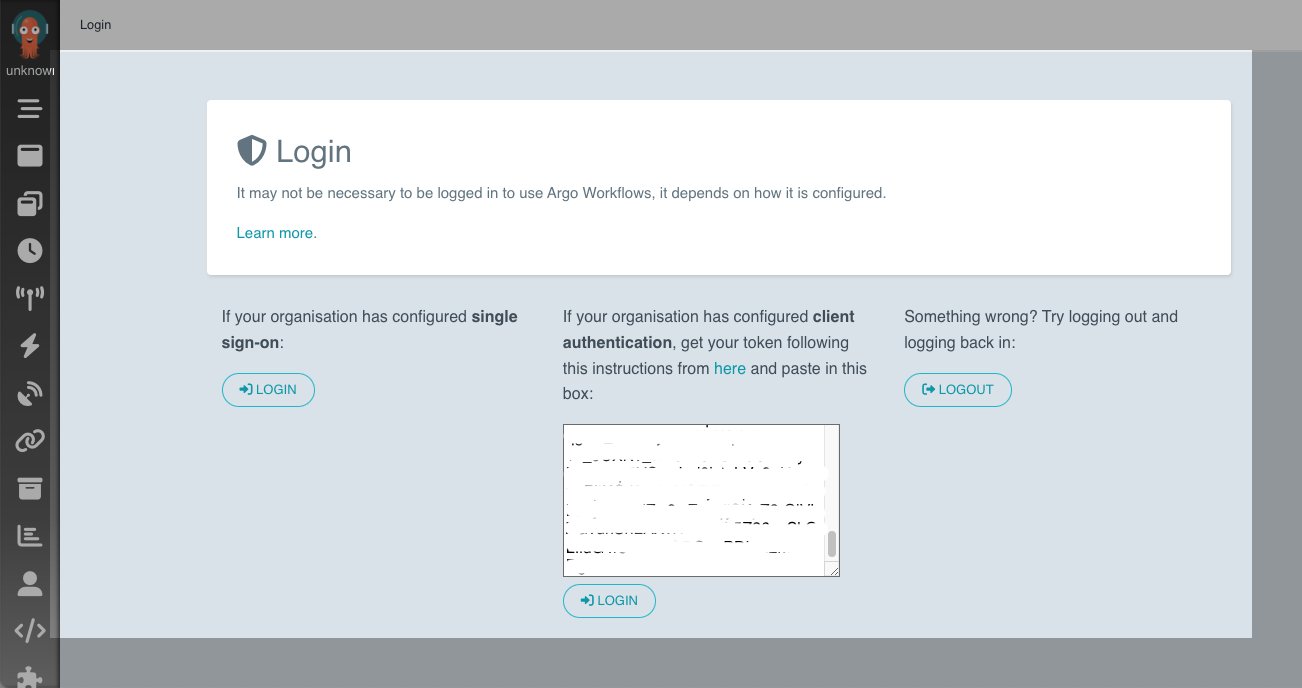
You now have a bearer token that we need to enter for client authentication.

You can now navigate to the Workflows tab and change the namespace to emr-ns to see the workflows under this namespace.

Let’s set up RBAC permissions and create a workflow that creates an EMR on EKS virtual cluster:

cat << EOF > argo-emrcontainers-vc-role.yaml
apiVersion: rbac.authorization.k8s.io/v1
kind: ClusterRole
metadata:
  name: argo-emrcontainers-virtualcluster
rules:
  - apiGroups:
      - emrcontainers.services.k8s.aws
    resources:
      - virtualclusters
    verbs:
      - '*'
EOF

cat << EOF > argo-emrcontainers-jr-role.yaml
apiVersion: rbac.authorization.k8s.io/v1
kind: ClusterRole
metadata:
  name: argo-emrcontainers-jobrun
rules:
  - apiGroups:
      - emrcontainers.services.k8s.aws
    resources:
      - jobruns
    verbs:
      - '*'
EOF

Let’s create these roles and a role binding:

# create argo clusterrole with permissions to emrcontainers.services.k8s.aws
kubectl apply -f argo-emrcontainers-vc-role.yaml
kubectl apply -f argo-emrcontainers-jr-role.yaml

# Give permissions for argo to use emr-containers clusterrole
kubectl create rolebinding argo-emrcontainers-virtualcluster --clusterrole=argo-emrcontainers-virtualcluster --serviceaccount=emr-ns:default -n emr-ns
kubectl create rolebinding argo-emrcontainers-jobrun --clusterrole=argo-emrcontainers-jobrun --serviceaccount=emr-ns:default -n emr-ns

Let’s recap what we have done so far. We created an EMR on EKS cluster, installed the ACK controller for EMR on EKS using Helm, installed the Argo CLI, installed Argo Workflows, gained access to the Argo UI, and set up RBAC permissions for Argo. RBAC permissions are required so that the default service account in the Argo namespace can use VirtualCluster and JobRun custom resources via the emrcontainers.services.k8s.aws API.

It’s time to create the EMR virtual cluster. The environment variables used in the following code are from the getting started guide, but you can change these to meet your environment:

export EKS_CLUSTER_NAME=ack-emr-eks
export EMR_NAMESPACE=emr-ns

cat << EOF > argo-emr-virtualcluster.yaml
apiVersion: argoproj.io/v1alpha1
kind: Workflow
metadata:
  name: emr-virtualcluster
spec:
  arguments: {}
  entrypoint: emr-virtualcluster
  templates:
  - name: emr-virtualcluster
    resource:
      action: create
      manifest: |
        apiVersion: emrcontainers.services.k8s.aws/v1alpha1
        kind: VirtualCluster
        metadata:
          name: my-ack-vc
        spec:
          name: my-ack-vc
          containerProvider:
            id: ${EKS_CLUSTER_NAME}
            type_: EKS
            info:
              eksInfo:
                namespace: ${EMR_NAMESPACE}
EOF

Use the following command to create an Argo Workflow for virtual cluster creation:

kubectl apply -f argo-emr-virtualcluster.yaml -n emr-ns
argo list -n emr-ns

The following code is the expected result from the Argo CLI:

NAME                 STATUS      AGE   DURATION   PRIORITY   MESSAGE
emr-virtualcluster   Succeeded   12m   11s        0 

Check the status of virtualcluster:

kubectl describe virtualcluster/my-ack-vc -n emr-ns

The following code is the expected result from the preceding command:

Name:         my-ack-vc
Namespace:    default
Labels:       <none>
Annotations:  <none>
API Version:  emrcontainers.services.k8s.aws/v1alpha1
Kind:         VirtualCluster
...
Status:
  Ack Resource Metadata:
    Arn:               arn:aws:emr-containers:us-west-2:012345678910:/virtualclusters/dxnqujbxexzri28ph1wspbxo0
    Owner Account ID:  012345678910
    Region:            us-west-2
  Conditions:
    Last Transition Time:  2022-11-03T15:34:10Z
    Message:               Resource synced successfully
    Reason:                
    Status:                True
    Type:                  ACK.ResourceSynced
  Id:                      dxnqujbxexzri28ph1wspbxo0
Events:                    <none>

If you run into issues, you can check Argo logs using the following command or through the console:

argo logs emr-virtualcluster -n emr-ns

You can also check controller logs as mentioned in the troubleshooting guide.

Because we have an EMR virtual cluster ready to accept jobs, we can start working on the prerequisites for job submission.

Create an S3 bucket and Amazon CloudWatch Logs group that are needed for the job (see the following code). If you already created these resources from the getting started tutorial, you can skip this step.

export RANDOM_ID1=$(LC_ALL=C tr -dc a-z0-9 </dev/urandom | head -c 8)

aws logs create-log-group --log-group-name=/emr-on-eks-logs/$EKS_CLUSTER_NAME
aws s3 mb s3://$EKS_CLUSTER_NAME-$RANDOM_ID1

We use the New York Citi Bike dataset, which has rider demographics and trip data information. Run the following command to copy the dataset into your S3 bucket:

export S3BUCKET=$EKS_CLUSTER_NAME-$RANDOM_ID1
aws s3 sync s3://tripdata/ s3://${S3BUCKET}/citibike/csv/

Copy the sample Spark application code to your S3 bucket:

aws s3 cp s3://aws-blogs-artifacts-public/artifacts/BDB-2782/citibike-convert-csv-to-parquet.py s3://${S3BUCKET}/application/
aws s3 cp s3://aws-blogs-artifacts-public/artifacts/BDB-2782/citibike-ridership.py s3://${S3BUCKET}/application/
aws s3 cp s3://aws-blogs-artifacts-public/artifacts/BDB-2782/citibike-popular-stations.py s3://${S3BUCKET}/application/
aws s3 cp s3://aws-blogs-artifacts-public/artifacts/BDB-2782/citibike-trips-by-age.py s3://${S3BUCKET}/application/

Now, it’s time to run sample Spark job. Run the following to generate an Argo workflow submission template:

export RANDOM_ID2=$(LC_ALL=C tr -dc a-z0-9 </dev/urandom | head -c 8)

cat << EOF > argo-citibike-steps-jobrun.yaml
apiVersion: argoproj.io/v1alpha1
kind: Workflow
metadata:
  name: emr-citibike-${RANDOM_ID2}
spec:
  entrypoint: emr-citibike
  templates:
  - name: emr-citibike
    steps:
    - - name: emr-citibike-csv-parquet
        template: emr-citibike-csv-parquet
    - - name: emr-citibike-ridership
        template: emr-citibike-ridership
      - name: emr-citibike-popular-stations
        template: emr-citibike-popular-stations
      - name: emr-citibike-trips-by-age
        template: emr-citibike-trips-by-age

  # This is parent job that converts csv data to parquet
  - name: emr-citibike-csv-parquet
    resource:
      action: create
      successCondition: status.state == COMPLETED
      failureCondition: status.state == FAILED      
      manifest: |
        apiVersion: emrcontainers.services.k8s.aws/v1alpha1
        kind: JobRun
        metadata:
          name: my-ack-jobrun-csv-parquet-${RANDOM_ID2}
        spec:
          name: my-ack-jobrun-csv-parquet-${RANDOM_ID2}
          virtualClusterRef:
            from:
              name: my-ack-vc
          executionRoleARN: "${ACK_JOB_EXECUTION_ROLE_ARN}"
          releaseLabel: "emr-6.7.0-latest"
          jobDriver:
            sparkSubmitJobDriver:
              entryPoint: "s3://${S3BUCKET}/application/citibike-convert-csv-to-parquet.py"
              entryPointArguments: [${S3BUCKET}]
              sparkSubmitParameters: "--conf spark.executor.instances=2 --conf spark.executor.memory=1G --conf spark.executor.cores=1 --conf spark.driver.cores=1 --conf spark.sql.shuffle.partitions=60 --conf spark.dynamicAllocation.enabled=false"
          configurationOverrides: |
            ApplicationConfiguration: null
            MonitoringConfiguration:
              CloudWatchMonitoringConfiguration:
                LogGroupName: /emr-on-eks-logs/${EKS_CLUSTER_NAME}
                LogStreamNamePrefix: citibike
              S3MonitoringConfiguration:
                LogUri: s3://${S3BUCKET}/logs

  # This is a child job which runs after csv-parquet jobs is complete
  - name: emr-citibike-ridership
    resource:
      action: create
      manifest: |
        apiVersion: emrcontainers.services.k8s.aws/v1alpha1
        kind: JobRun
        metadata:
          name: my-ack-jobrun-ridership-${RANDOM_ID2}
        spec:
          name: my-ack-jobrun-ridership-${RANDOM_ID2}
          virtualClusterRef:
            from:
              name: my-ack-vc
          executionRoleARN: "${ACK_JOB_EXECUTION_ROLE_ARN}"
          releaseLabel: "emr-6.7.0-latest"
          jobDriver:
            sparkSubmitJobDriver:
              entryPoint: "s3://${S3BUCKET}/application/citibike-ridership.py"
              entryPointArguments: [${S3BUCKET}]
              sparkSubmitParameters: "--conf spark.executor.instances=2 --conf spark.executor.memory=1G --conf spark.executor.cores=1 --conf spark.driver.cores=1 --conf spark.sql.shuffle.partitions=60 --conf spark.dynamicAllocation.enabled=false"
          configurationOverrides: |
            ApplicationConfiguration: null
            MonitoringConfiguration:
              CloudWatchMonitoringConfiguration:
                LogGroupName: /emr-on-eks-logs/${EKS_CLUSTER_NAME}
                LogStreamNamePrefix: citibike
              S3MonitoringConfiguration:
                LogUri: s3://${S3BUCKET}/logs   

  # This is a child job which runs after csv-parquet jobs is complete
  - name: emr-citibike-popular-stations
    resource:
      action: create
      manifest: |
        apiVersion: emrcontainers.services.k8s.aws/v1alpha1
        kind: JobRun
        metadata:
          name: my-ack-jobrun-popular-stations-${RANDOM_ID2}
        spec:
          name: my-ack-jobrun-popular-stations-${RANDOM_ID2}
          virtualClusterRef:
            from:
              name: my-ack-vc
          executionRoleARN: "${ACK_JOB_EXECUTION_ROLE_ARN}"
          releaseLabel: "emr-6.7.0-latest"
          jobDriver:
            sparkSubmitJobDriver:
              entryPoint: "s3://${S3BUCKET}/application/citibike-popular-stations.py"
              entryPointArguments: [${S3BUCKET}]
              sparkSubmitParameters: "--conf spark.executor.instances=2 --conf spark.executor.memory=1G --conf spark.executor.cores=1 --conf spark.driver.cores=1 --conf spark.sql.shuffle.partitions=60 --conf spark.dynamicAllocation.enabled=false"
          configurationOverrides: |
            ApplicationConfiguration: null
            MonitoringConfiguration:
              CloudWatchMonitoringConfiguration:
                LogGroupName: /emr-on-eks-logs/${EKS_CLUSTER_NAME}
                LogStreamNamePrefix: citibike
              S3MonitoringConfiguration:
                LogUri: s3://${S3BUCKET}/logs             

  # This is a child job which runs after csv-parquet jobs is complete
  - name: emr-citibike-trips-by-age
    resource:
      action: create
      manifest: |
        apiVersion: emrcontainers.services.k8s.aws/v1alpha1
        kind: JobRun
        metadata:
          name: my-ack-jobrun-trips-by-age-${RANDOM_ID2}
        spec:
          name: my-ack-jobrun-trips-by-age-${RANDOM_ID2}
          virtualClusterRef:
            from:
              name: my-ack-vc
          executionRoleARN: "${ACK_JOB_EXECUTION_ROLE_ARN}"
          releaseLabel: "emr-6.7.0-latest"
          jobDriver:
            sparkSubmitJobDriver:
              entryPoint: "s3://${S3BUCKET}/application/citibike-trips-by-age.py"
              entryPointArguments: [${S3BUCKET}]
              sparkSubmitParameters: "--conf spark.executor.instances=2 --conf spark.executor.memory=1G --conf spark.executor.cores=1 --conf spark.driver.cores=1 --conf spark.sql.shuffle.partitions=60 --conf spark.dynamicAllocation.enabled=false"
          configurationOverrides: |
            ApplicationConfiguration: null
            MonitoringConfiguration:
              CloudWatchMonitoringConfiguration:
                LogGroupName: /emr-on-eks-logs/${EKS_CLUSTER_NAME}
                LogStreamNamePrefix: citibike
              S3MonitoringConfiguration:
                LogUri: s3://${S3BUCKET}/logs                        
EOF

Let’s run this job:

argo -n emr-ns submit --watch argo-citibike-steps-jobrun.yaml

The following code is the expected result:

Name:                emr-citibike-tp8dlo6c
Namespace:           emr-ns
ServiceAccount:      unset (will run with the default ServiceAccount)
Status:              Succeeded
Conditions:          
 PodRunning          False
 Completed           True
Created:             Mon Nov 07 15:29:34 -0500 (20 seconds ago)
Started:             Mon Nov 07 15:29:34 -0500 (20 seconds ago)
Finished:            Mon Nov 07 15:29:54 -0500 (now)
Duration:            20 seconds
Progress:            4/4
ResourcesDuration:   4s*(1 cpu),4s*(100Mi memory)
STEP                                  TEMPLATE                       PODNAME                                                         DURATION  MESSAGE
 ✔ emr-citibike-if32fvjd              emr-citibike                                                                                               
 ├───✔ emr-citibike-csv-parquet       emr-citibike-csv-parquet       emr-citibike-if32fvjd-emr-citibike-csv-parquet-140307921        2m          
 └─┬─✔ emr-citibike-popular-stations  emr-citibike-popular-stations  emr-citibike-if32fvjd-emr-citibike-popular-stations-1670101609  4s          
   ├─✔ emr-citibike-ridership         emr-citibike-ridership         emr-citibike-if32fvjd-emr-citibike-ridership-2463339702         4s          
   └─✔ emr-citibike-trips-by-age      emr-citibike-trips-by-age      emr-citibike-if32fvjd-emr-citibike-trips-by-age-3778285872      4s       

You can open another terminal and run the following command to check on the job status as well:

kubectl -n emr-ns get jobruns -w

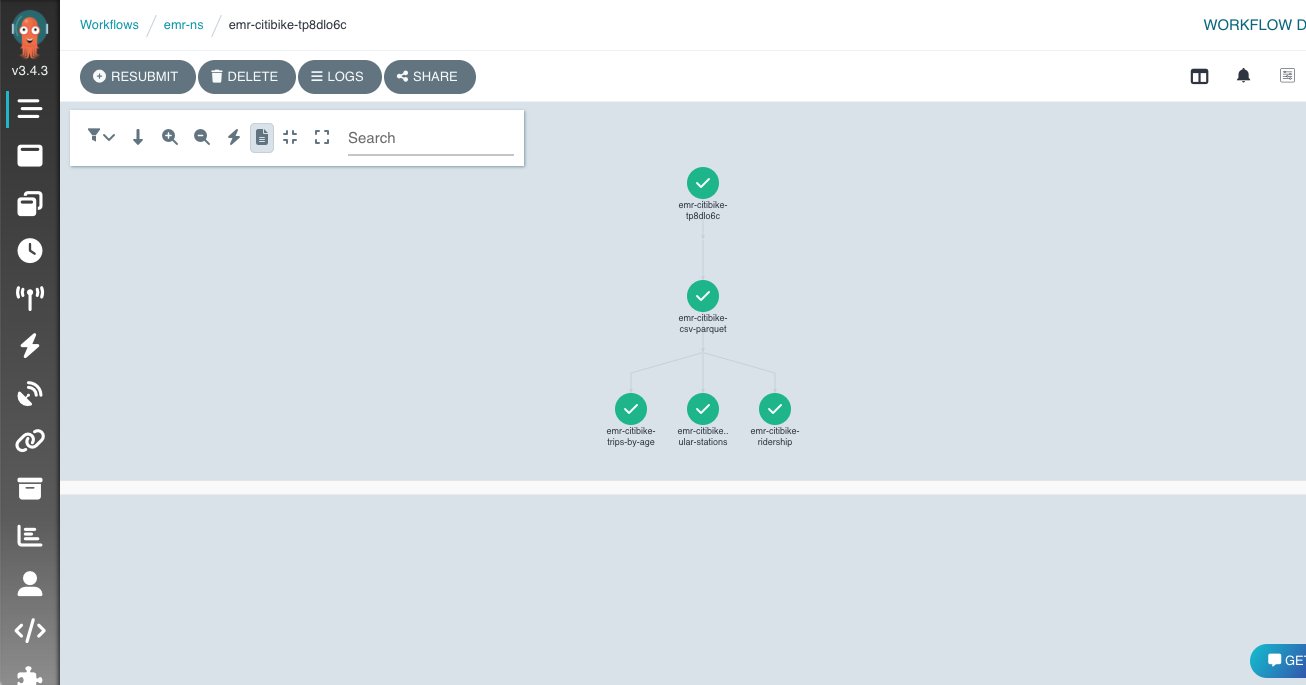
You can also check the UI and look at the Argo logs, as shown in the following screenshot.

Clean up

Follow the instructions from the getting started tutorial to clean up the ACK controller for EMR on EKS and its resources. To delete Argo resources, use the following code:

kubectl delete -n argo -f https://github.com/argoproj/argo-workflows/releases/download/v3.4.3/install.yaml
kubectl delete -f argo-emrcontainers-vc-role.yaml
kubectl delete -f argo-emrcontainers-jr-role.yaml
kubectl delete rolebinding argo-emrcontainers-virtualcluster -n emr-ns
kubectl delete rolebinding argo-emrcontainers-jobrun -n emr-ns
kubectl delete ns argo

Conclusion

In this post, we went through how to manage your Spark jobs on EKS clusters using the ACK controller for EMR on EKS. You can define Spark jobs in a declarative fashion and manage these resources using Kubernetes custom resources. We also reviewed how to use Argo Workflows to orchestrate these jobs to get a consistent job submission experience. You can take advantage of the rich features from Argo Workflows such as using DAGs to define multi-step workflows and specify dependencies within job steps, using the UI to visualize and manage the jobs, and defining retries and timeouts at the workflow or task level.

You can get started today by installing the ACK controller for EMR on EKS and start managing your Amazon EMR resources using Kubernetes-native methods.


About the authors

Peter Dalbhanjan is a Solutions Architect for AWS based in Herndon, VA. Peter is passionate about evangelizing and solving complex business problems using combination of AWS services and open source solutions. At AWS, Peter helps with designing and architecting variety of customer workloads.

Amine Hilaly is a Software Development Engineer at Amazon Web Services working on the Kubernetes and Open source related projects for about two years. Amine is a Go, open-source, and Kubernetes fanatic.

Announcing AWS Glue crawler support for Snowflake

Post Syndicated from Leonardo Gomez original https://aws.amazon.com/blogs/big-data/announcing-aws-glue-crawler-support-for-snowflake/

For data lake customers who need to discover petabytes of data, AWS Glue crawlers are a popular way to scan data in the background, so you can focus on using the data to make better intelligent decisions. You may also have data in data warehouses such as Snowflake and want the ability to discover the data in the warehouse and combine with data from data lakes to derive insights. AWS Glue crawlers now support Snowflake, making it easier for you to understand updates to Snowflake schema and extract meaningful insights.

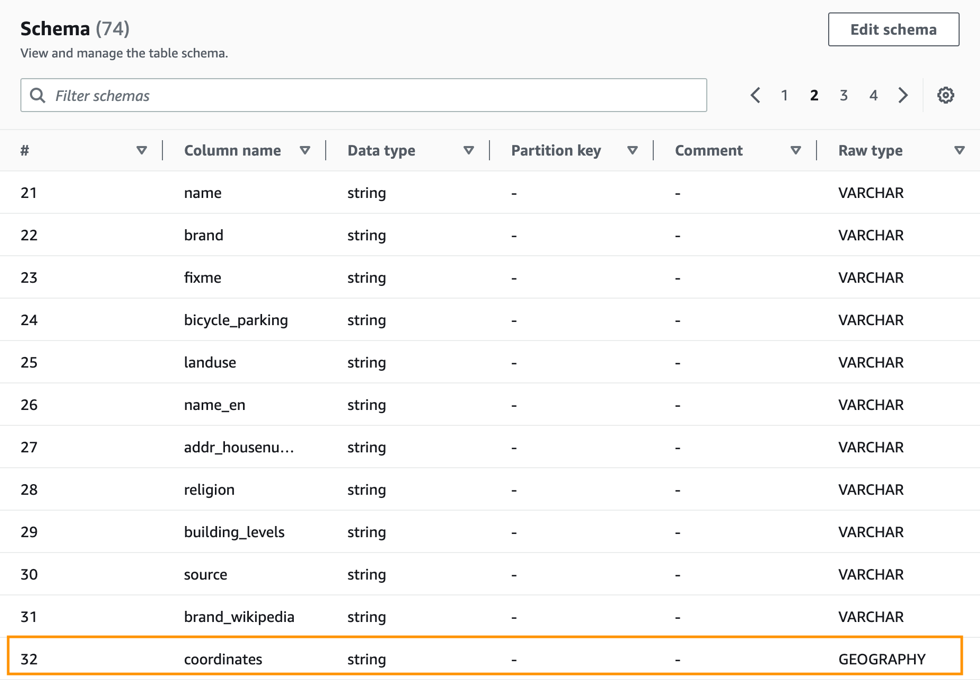
To crawl a Snowflake database, you can create and schedule an AWS Glue crawler with an JDBC URL with credential information from AWS Secrets Manager. A configuration option allows you to specify if you want the crawler to crawl the entire database or limit the tables by including the schema or table path and exclude patterns to reduce crawl time. With each run of the crawler, the crawler inspects and catalogs information, such as updates or deletes to Snowflake tables, external tables, views, and materialized views in the AWS Glue Data Catalog. For Snowflake columns with non-Hive compatible types, such as geography or geometry, the crawler extracts that information as a raw data type and makes it available in the Data Catalog.

In this post, we set up an AWS Glue crawler to crawl the OpenStreetMap geospatial dataset, which is freely available through Snowflake Marketplace. This dataset includes all of the OpenStreetMap location data for New York. OpenStreetMap maintains data about businesses, roads, trails, cafes, railway stations, and much more, from all over the world.

Overview of solution

Snowflake is a cloud data platform that provides data solutions from data warehousing to data science. Snowflake Computing is an AWS Advanced Technology Partner with AWS Competencies in Data & Analytics, Machine Learning, and Retail, as well as an AWS service validation for AWS PrivateLink.

In this solution, we use a sample use case involving points of interest in New York City, based on the following Snowflake quick start. Follow sections 1 and 2 to get access to sample geospatial data from Snowflake Marketplace. We show how to interpret the geography data type and understand the different formats. We use the AWS Glue crawler to crawl this OpenStreetMap geospatial dataset and make it available in the Data Catalog with the geography data type maintained where appropriate.

Prerequisites

To follow along, you need the following:

  • An AWS account.
  • An AWS Identity and Access Management (IAM) user with access to the following services:
  • An IAM role with access to run AWS Glue crawlers.
  • If the AWS account you use to follow this post uses AWS Lake Formation to manage permissions on the AWS Glue Data Catalog, make sure that you log in as a user with access to create databases and tables. For more information, refer to Implicit Lake Formation permissions.
  • A Snowflake Enterprise Edition account with permission to create storage integrations, ideally in the AWS us-east-1 Region or closest available trial Region, like us-east-2. If necessary, you can subscribe to a Snowflake trial account on AWS Marketplace.
    • On the Marketplace listing page, choose Continue to Subscribe, and then choose Accept Terms. You’re redirected to the Snowflake website to begin using the software. To complete your registration, choose Set Up Your Account.
    • If you’re new to Snowflake, consider completing the Snowflake in 20 Minutes tutorial. By the end of the tutorial, you should know how to create required Snowflake objects, including warehouses, databases, and tables for storing and querying data.
  • A Snowflake worksheet (query editor) and associated access to a Snowflake virtual warehouse (compute) and database (storage).
  • Access to an existing Snowflake account with the ACCOUNTADMIN role or the IMPORT SHARE privilege.

Create an AWS Glue connection to Snowflake

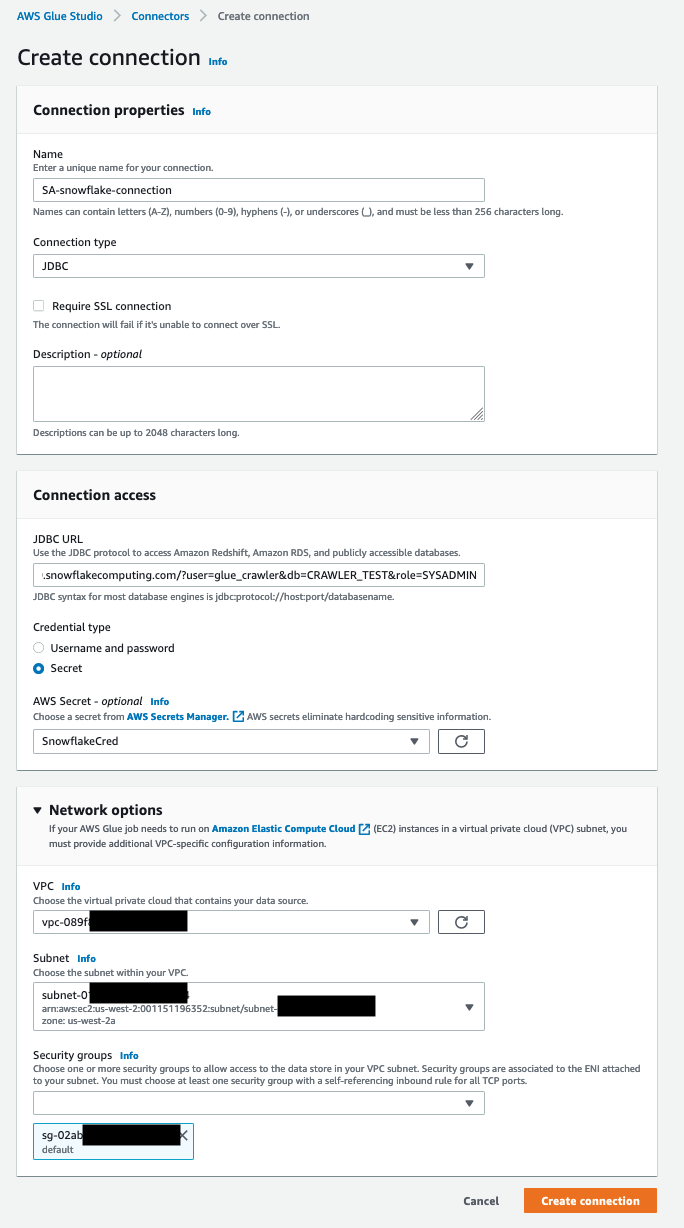
For this post, an AWS Glue connection to your Snowflake cluster is necessary. For more details about how to create it, follow the steps in Performing data transformations using Snowflake and AWS Glue. The following screenshot shows the configuration used to create a connection to the Snowflake cluster for this post.
configuration used to create a connection to the Snowflake cluster for this post.

Create an AWS Glue crawler

To create your crawler, complete the following steps:

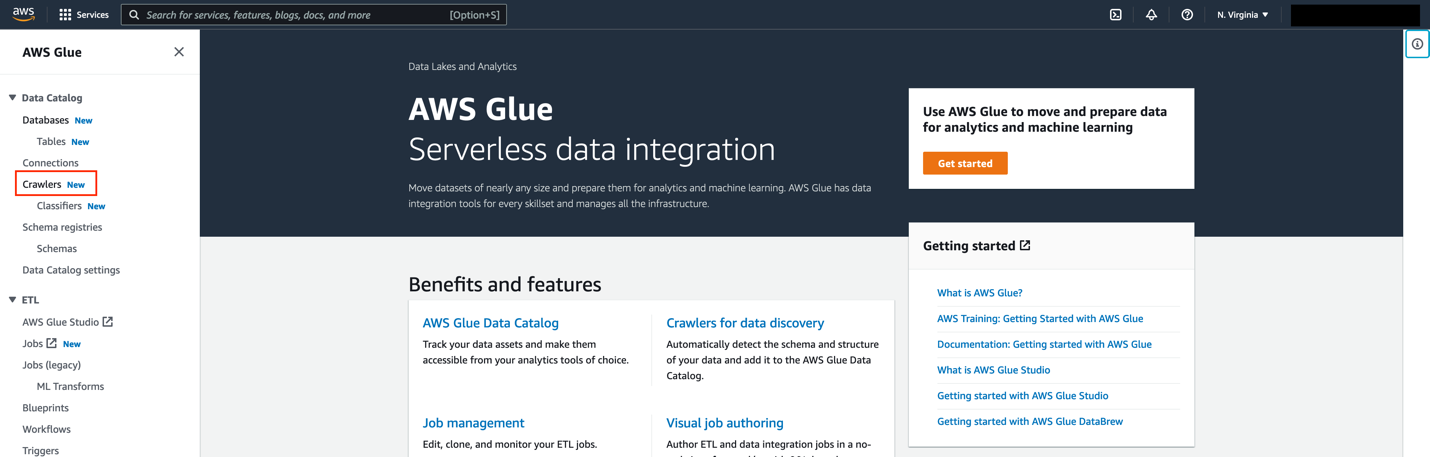
  1. On the AWS Glue console, choose Crawlers in the navigation pane.
    1. On the AWS Glue console, choose Crawlers in the navigation pane.
  2. Choose Create crawler.
    Choose Create crawler.
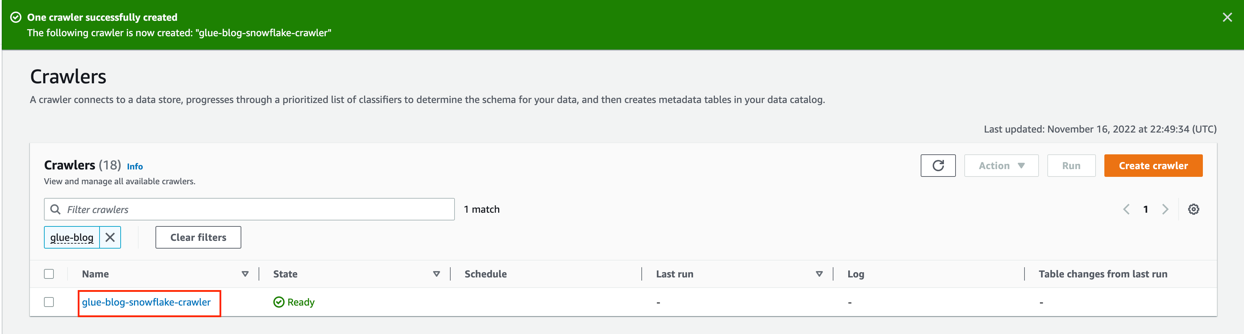
  3. For Name, enter a name (for example, glue-blog-snowflake-crawler).
  4. Choose Next.
    Choose Next
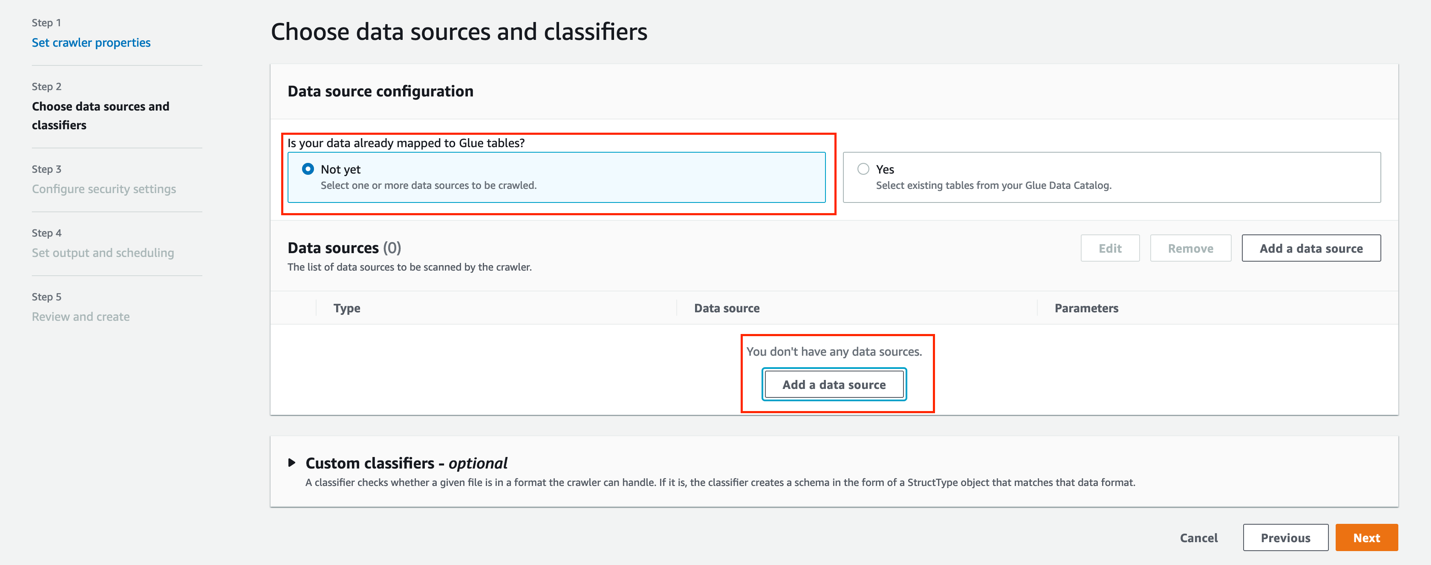
  5. For Is your data already mapped to Glue tables, select Not yet.
  6. In the Data sources section, choose Add a data source.
    6. In the Data sources section, choose Add a data source.

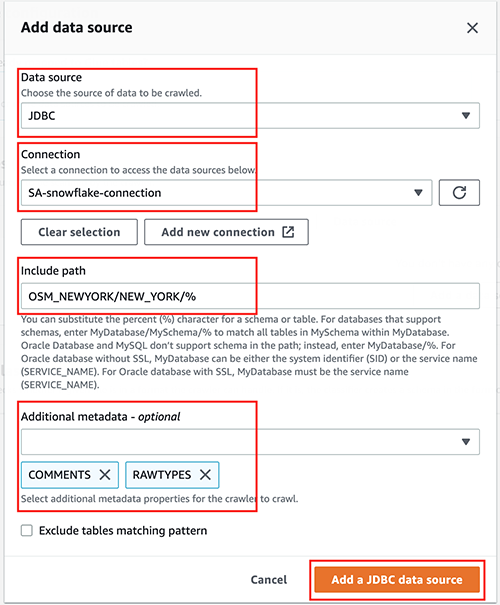
For this post, you use a JDBC dataset as a source.

  1. For Data source, choose JDBC.
  2. For Connection, select the connection that you created earlier (for this post, SA-snowflake-connection).
  3. For Include path, enter the path to the Snowflake database you created as a prerequisite (OSM_NEWYORK/NEW_YORK/%).
  4. For Additional metadata, choose COMMENTS and RAWTYPE.

This allows the crawler to harvest metadata related to comments and raw types like geospatial columns.

  1. Choose Add a JDBC data source.
  1. Choose Next.
    Choose Next
  2. For Existing IAM role¸ choose the role you created as a prerequisite (for this post, we use AWSGlueServiceRole-DefualtRole).
  3. Choose Next.
    Choose Next

Now let’s create an AWS Glue database.

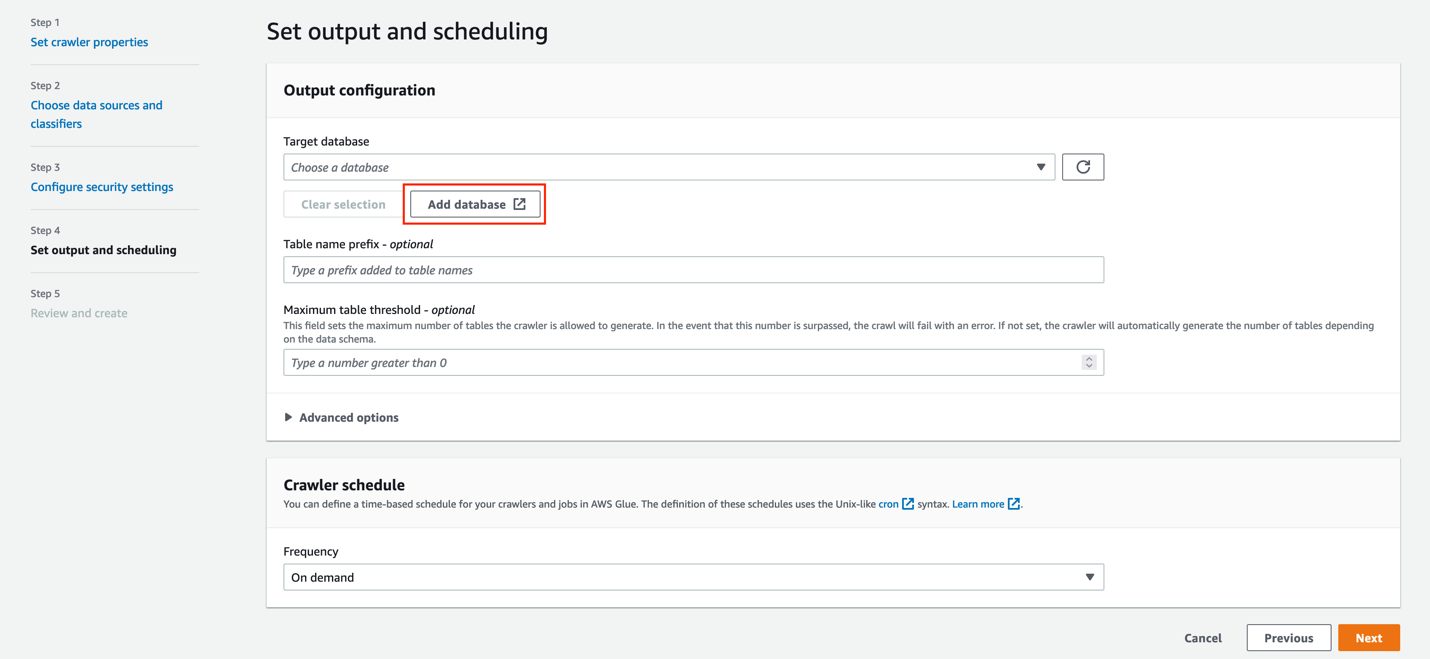
  1. Under Target database, choose Add database.
    Under Target database, choose Add database.
  2. For Name, enter gluesnowdb.
  3. Choose Create database.
    Choose Create database.
  4. On the Set output and scheduling page, for Target database, choose the database you just created (gluesnowdb).
  5. For Table name prefix, enter blog_.
  6. For Frequency, choose On demand.
  7. Choose Next.
    Choose Next.
  8. Review the configuration and choose Create crawler.
    Review the configuration and choose Create crawler.

Run the AWS Glue crawler

To run the crawler, complete the following steps:

  1. On the AWS Glue console, choose Crawlers in the navigation pane.
  2. Choose the crawler you created.
    Choose the crawler you created.
  3. Choose Run crawler.
    Choose Run crawler

On the Crawler runs tab, you can see the current run of the crawler.

  1. Wait until the crawler run is complete.

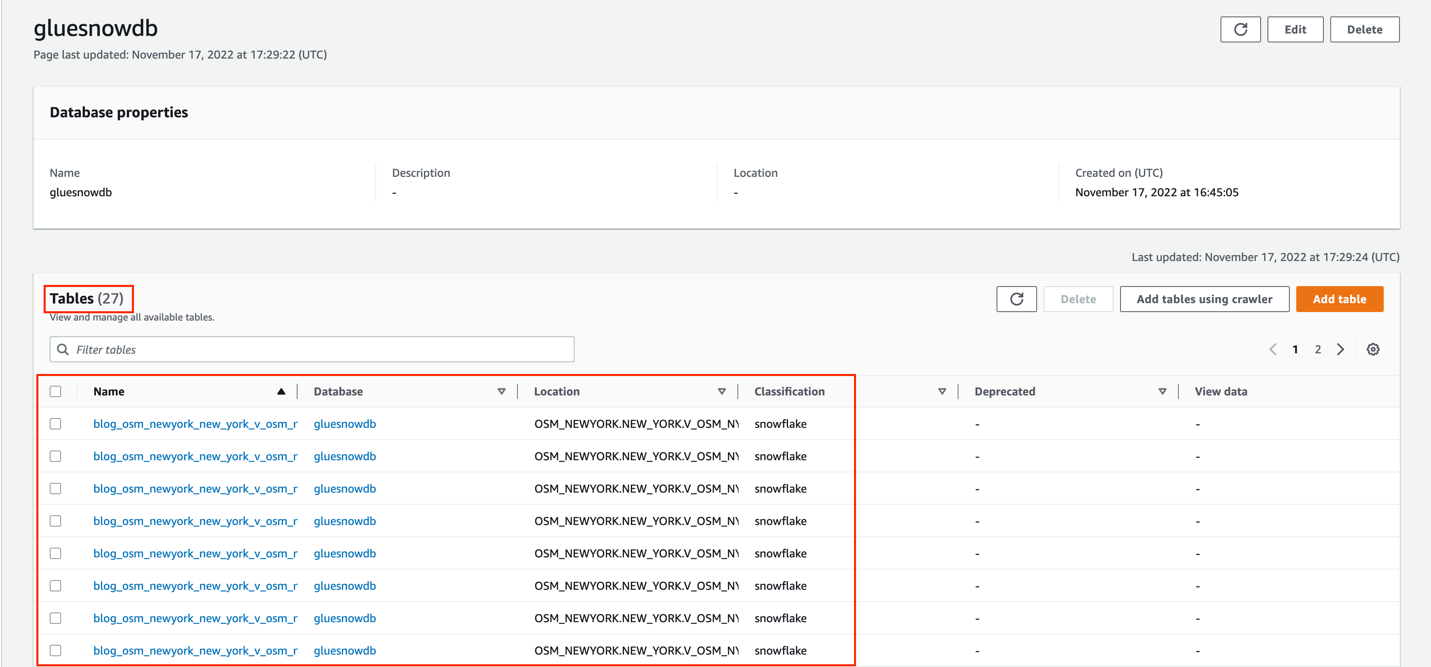
As shown in the following screenshot, 27 tables were added.

Now let’s see how these tables look in the AWS Glue Data Catalog.

Explore the AWS Glue tables

Let’s explore the tables created by the crawler.

  1. On the AWS Glue console, chose Databases in the navigation pane.
    On the AWS Glue console, chose Databases in the navigation pane.
  2. Search for and choose the gluesnowdb database.
    Search for and choose the gluesnowdb database.

Now you can see the list of the tables created by the crawler.

  1. Choose the blog_osm_newyork_new_york_v_osm_ny_amenity table.
    3. Choose the blog_osm_newyork_new_york_v_osm_ny_amenity table.

In the Schema section, you can see that the raw type was also harvested from the source Snowflake database.

  1. Choose the Advanced properties tab.
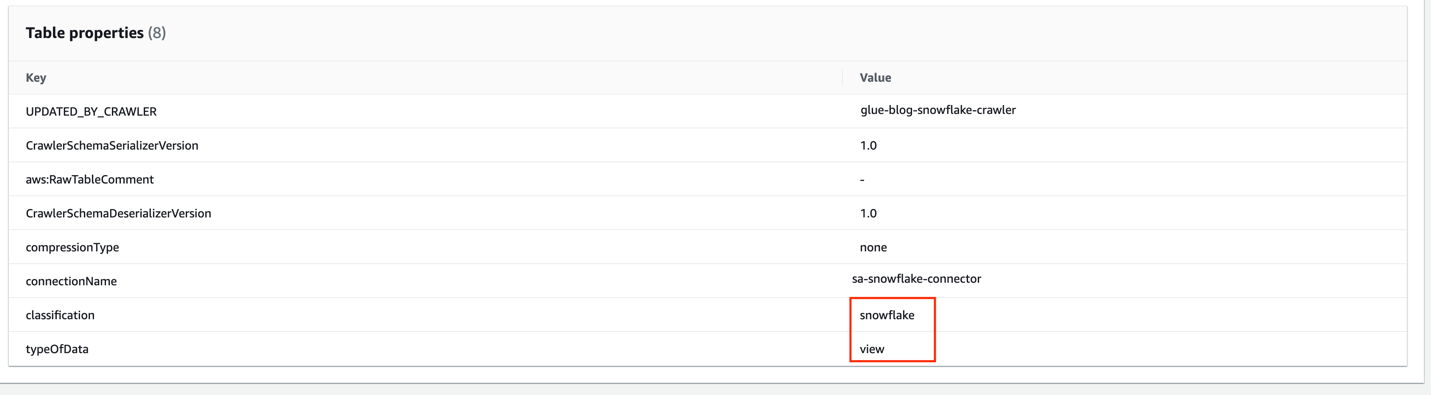
  2. In the Table properties section, you can see that the classification is snowflake and the typeOfData is view.
    5. In the Table properties section, you can see that the classification is snowflake and the typeOfData is view.

Clean up

To avoid incurring future charges, and to clean up unused roles and policies, delete the resources you created: the CloudFormation stack, S3 bucket, AWS Glue crawler, AWS Glue database, and AWS Glue table.

Conclusion

AWS Glue crawlers now support Snowflake tables, views, and materialized views. Offering more options to integrate Snowflake databases to your AWS Glue Data Catalog. You can use AWS Glue crawlers to discover Snowflake datasets, extract schema information, and populate the Data Catalog.

In this post, we provided a procedure to set up AWS Glue crawlers to discover Snowflake tables, which reduces the time and cost needed to incrementally process Snowflake table data updates in the Data Catalog. To learn more about this feature, refer to the docs.

Special thanks to everyone who contributed to this crawler feature launch: Theo Xu, Hunny Vankawala, and Jessica Cheng.

Happy crawling!

Attribution

OpenStreetMap data by OpenStreetMap Foundation is licensed under Open Data Commons Open Database License (ODbL)


About the authors

Leonardo Gómez is a Senior Analytics Specialist Solutions Architect at AWS. Based in Toronto, Canada, he has over a decade of experience in data management, helping customers around the globe address their business and technical needs.

Bosco Albuquerque is a Sr. Partner Solutions Architect at AWS and has over 20 years of experience working with database and analytics products from enterprise database vendors and cloud providers. He has helped technology companies design and implement data analytics solutions and products.

Sandeep Adwankar is a Senior Technical Product Manager at AWS. Based in the California Bay Area, he works with customers around the globe to translate business and technical requirements into products that enable customers to improve how they manage, secure, and access data.

Friday Squid Blogging: Squid Brains

Post Syndicated from Bruce Schneier original https://www.schneier.com/blog/archives/2022/11/friday-squid-blogging-squid-brains.html

Researchers have new evidence of how squid brains develop:

Researchers from the FAS Center for Systems Biology describe how they used a new live-imaging technique to watch neurons being created in the embryo in almost real-time. They were then able to track those cells through the development of the nervous system in the retina. What they saw surprised them.

The neural stem cells they tracked behaved eerily similar to the way these cells behave in vertebrates during the development of their nervous system.

It suggests that vertebrates and cephalopods, despite diverging from each other 500 million years ago, not only are using similar mechanisms to make their big brains but that this process and the way the cells act, divide, and are shaped may essentially layout the blueprint required develop this kind of nervous system.

As usual, you can also use this squid post to talk about the security stories in the news that I haven’t covered.

Read my blog posting guidelines here.

Introducing container, database, and queue utilization metrics for the Amazon MWAA environment

Post Syndicated from David Boyne original https://aws.amazon.com/blogs/compute/introducing-container-database-and-queue-utilization-metrics-for-the-amazon-mwaa-environment/

This post is written by Uma Ramadoss (Senior Specialist Solutions Architect), and Jeetendra Vaidya (Senior Solutions Architect).

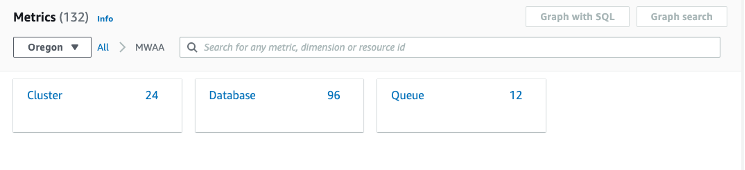
Today, AWS is announcing the availability of container, database, and queue utilization metrics for Amazon Managed Workflows for Apache Airflow (Amazon MWAA). This is a new collection of metrics published by Amazon MWAA in addition to existing Apache Airflow metrics in Amazon CloudWatch. With these new metrics, you can better understand the performance of your Amazon MWAA environment, troubleshoot issues related to capacity, delays, and get insights on right-sizing your Amazon MWAA environment.

Previously, customers were limited to Apache Airflow metrics such as DAG processing parse times, pool running slots, and scheduler heartbeat to measure the performance of the Amazon MWAA environment. While these metrics are often effective in diagnosing Airflow behavior, they lack the ability to provide complete visibility into the utilization of the various Apache Airflow components in the Amazon MWAA environment. This could limit the ability for some customers to monitor the performance and health of the environment effectively.

Overview

Amazon MWAA is a managed service for Apache Airflow. There are a variety of deployment techniques with Apache Airflow. The Amazon MWAA deployment architecture of Apache Airflow is carefully chosen to allow customers to run workflows in production at scale.

Amazon MWAA has distributed architecture with multiple schedulers, auto-scaled workers, and load balanced web server. They are deployed in their own Amazon Elastic Container Service (ECS) cluster using AWS Fargate compute engine. Amazon Simple Queue Service (SQS) queue is used to decouple Airflow workers and schedulers as part of Celery Executor architecture. Amazon Aurora PostgreSQL-Compatible Edition is used as the Apache Airflow metadata database. From today, you can get complete visibility into the scheduler, worker, web server, database, and queue metrics.

In this post, you can learn about the new metrics published for Amazon MWAA environment, build a sample application with a pre-built workflow, and explore the metrics using CloudWatch dashboard.

Container, database, and queue utilization metrics

  1. In the CloudWatch console, in Metrics, select All metrics.
  2. From the metrics console that appears on the right, expand AWS namespaces and select MWAA tile.
  3. MWAA metrics

    MWAA metrics

  4. You can see a tile of dimensions, each corresponding to the container (cluster), database, and queue metrics.
  5. MWAA metrics drilldown

    MWAA metrics drilldown

Cluster metrics

The base MWAA environment comes up with three Amazon ECS clusters – scheduler, one worker (BaseWorker), and a web server. Workers can be configured with minimum and maximum numbers. When you configure more than one minimum worker, Amazon MWAA creates another ECS cluster (AdditionalWorker) to host the workers from 2 up to n where n is the max workers configured in your environment.

When you select Cluster from the console, you can see the list of metrics for all the clusters. To learn more about the metrics, visit the Amazon ECS product documentation.

MWAA metrics list

MWAA metrics list

CPU usage is the most important factor for schedulers due to DAG file processing. When you have many DAGs, CPU usage can be higher. You can improve the performance by setting min_file_process_interval higher. Similarly, you can apply other techniques described in the Apache Airflow Scheduler page to fine tune the performance.

Higher CPU or memory utilization in the worker can be due to moving large files or doing computation on the worker itself. This can be resolved by offloading the compute to purpose-built services such as Amazon ECS, Amazon EMR, and AWS Glue.

Database metrics

Amazon Aurora DB clusters used by Amazon MWAA come up with a primary DB instance and a read replica to support the read operations. Amazon MWAA publishes database metrics for both READER and WRITER instances. When you select Database tile, you can view the list of metrics available for the database cluster.

Database metrics

Database metrics

Amazon MWAA uses connection pooling technique so the database connections from scheduler, workers, and web servers are taken from the connection pool. If you have many DAGs scheduled to start at the same time, it can overload the scheduler and increase the number of database connections at a high frequency. This can be minimized by staggering the DAG schedule.

SQS metrics

An SQS queue helps decouple scheduler and worker so they can independently scale. When workers read the messages, they are considered in-flight and not available for other workers. Messages become available for other workers to read if they are not deleted before the 12 hours visibility timeout. Amazon MWAA publishes in-flight message count (RunningTasks), messages available for reading count (QueuedTasks) and the approximate age of the earliest non-deleted message (ApproximateAgeOfOldestTask).

Database metrics

Database metrics

Getting started with container, database and queue utilization metrics for Amazon MWAA

The following sample project explores some key metrics using an Amazon CloudWatch dashboard to help you find the number of workers running in your environment at any given moment.

The sample project deploys the following resources:

  • Amazon Virtual Private Cloud (Amazon VPC).
  • Amazon MWAA environment of size small with 2 minimum workers and 10 maximum workers.
  • A sample DAG that fetches NOAA Global Historical Climatology Network Daily (GHCN-D) data, uses AWS Glue Crawler to create tables and AWS Glue Job to produce an output dataset in Apache Parquet format that contains the details of precipitation readings for the US between year 2010 and 2022.
  • Amazon MWAA execution role.
  • Two Amazon S3 buckets – one for Amazon MWAA DAGs, one for AWS Glue job scripts and weather data.
  • AWSGlueServiceRole to be used by AWS Glue Crawler and AWS Glue job.

Prerequisites

There are a few tools required to deploy the sample application. Ensure that you have each of the following in your working environment:

Setting up the Amazon MWAA environment and associated resources

  1. From your local machine, clone the project from the GitHub repository.
  2. git clone https://github.com/aws-samples/amazon-mwaa-examples

  3. Navigate to mwaa_utilization_cw_metric directory.
  4. cd usecases/mwaa_utilization_cw_metric

  5. Run the makefile.
  6. make deploy

  7. Makefile runs the terraform template from the infra/terraform directory. While the template is being applied, you are prompted if you want to perform these actions.
  8. MWAA utilization terminal

    MWAA utilization terminal

This provisions the resources and copies the necessary files and variables for the DAG to run. This process can take approximately 30 minutes to complete.

Generating metric data and exploring the metrics

  1. Login into your AWS account through the AWS Management Console.
  2. In the Amazon MWAA environment console, you can see your environment with the Airflow UI link in the right of the console.
  3. MMQA environment console

    MMQA environment console

  4. Select the link Open Airflow UI. This loads the Apache Airflow UI.
  5. Apache Airflow UI

    Apache Airflow UI

  6. From the Apache Airflow UI, enable the DAG using Pause/Unpause DAG toggle button and run the DAG using the Trigger DAG link.
  7. You can see the Treeview of the DAG run with the tasks running.
  8. Navigate to the Amazon CloudWatch dashboard in another browser tab. You can see a dashboard by the name, MWAA_Metric_Environment_env_health_metric_dashboard.
  9. Access the dashboard to view different key metrics across cluster, database, and queue.
  10. MWAA dashboard

    MWAA dashboard

  11. After the DAG run is complete, you can look into the dashboard for worker count metrics. Worker count started with 2 and increased to 4.

When you trigger the DAG, the DAG runs 13 tasks in parallel to fetch weather data from 2010-2022. With two small size workers, the environment can run 10 parallel tasks. The rest of the tasks wait for either the running tasks to complete or automatic scaling to start. As the tasks take more than a few minutes to finish, MWAA automatic scaling adds additional workers to handle the workload. Worker count graph now plots higher with AdditionalWorker count increased to 3 from 1.

Cleanup

To delete the sample application infrastructure, use the following command from the usecases/mwaa_utilization_cw_metric directory.

make undeploy

Conclusion

This post introduces the new Amazon MWAA container, database, and queue utilization metrics. The example shows the key metrics and how you can use the metrics to solve a common question of finding the Amazon MWAA worker counts. These metrics are available to you from today for all versions supported by Amazon MWAA at no additional cost.

Start using this feature in your account to monitor the health and performance of your Amazon MWAA environment, troubleshoot issues related to capacity and delays, and to get insights into right-sizing the environment

Build your own CloudWatch dashboard using the metrics data JSON and Airflow metrics. To deploy more solutions in Amazon MWAA, explore the Amazon MWAA samples GitHub repo.

For more serverless learning resources, visit Serverless Land.

Apache, Apache Airflow, and Airflow are either registered trademarks or trademarks of the Apache Software Foundation in the United States and/or other countries.

Metasploit Weekly Wrap-Up

Post Syndicated from Spencer McIntyre original https://blog.rapid7.com/2022/11/18/metasploit-weekly-wrap-up-184/

Pre-authenticated Remote Code Execution in VMware NSX Manager using XStream (CVE-2021-39144)

Metasploit Weekly Wrap-Up

There’s nothing quite like a pre-authenticated remote code execution vulnerability in a piece of enterprise software. This week, community contributor h00die-gr3y added a module that targets VMware NSX Manager using XStream. Due to an unauthenticated endpoint that leverages XStream for input serialization in VMware Cloud Foundation (NSX-V), a malicious actor can get remote code execution in the context of root on the appliance. VMware saw this vulnerability as such a risk, and they decided to release patches for versions that were no longer supported, which goes to show the value that this module provides.

Gitea Git Fetch Remote Code Execution (CVE-2022-30781)

Using Gitea in your environment? You better git-to-patching. Community contributor krastanoel wrote an awesome module which exploits a remote code execution vulnerability in versions of Gitea before 1.16.7. The vulnerability identified as CVE-2022-30781 is due to the application running a git fetch command in which an attacker can inject arbitrary commands resulting in code execution as the git user.

Metasploit on Twitch

This week Metasploit’s very own Spencer McIntyre went live on Twitch and went over writing Meterpreter features in Metasploit. Be sure to check out the recording and stay tuned for more fun and informative Metasploit streaming sessions.

New module content (2)

  • VMware NSX Manager XStream unauthenticated RCE by Sina Kheirkhah, Steven Seeley, and h00die-gr3y, which exploits CVE-2021-39144 – This adds an exploit module that leverages a Remote Command Injection vulnerability in VMware Cloud Foundation 3.x and NSX Manager Data Center for vSphere up to and including version 6.4.13. This vulnerability is identified as CVE-2021-39144.
  • Gitea Git Fetch Remote Code Execution by krastanoel, li4n0, and wuhan005, which exploits CVE-2022-30781 – This adds an exploit module that leverages a command injection vulnerability in Gitea. Due to an improper escaping of input, it is possible to execute commands on the system abusing the Gitea repository migration process. This vulnerability is identified as CVE-2022-30781 and affects Gitea versions prior to 1.16.7.

Enhancements and features (2)

  • #17243 from adfoster-r7 – Improves the TLV packet logging for Railgun
  • #17253 from h00die – The list of WordPress plugins and themes has been updated to allow Metasploit tools to scan for a wider range of known themes and plugins on WordPress targets.

Bugs fixed (2)

  • #17260 from zeroSteiner – This fixes an issue with the RBCD module due to the access_mask field of the Access Control Entry types being changed from the AccessMask type to an integer.
  • #17263 from zeroSteiner – The Metasploit-payloads gem has been bumped to 2.0.101, which fixes memory and handle leaks when using the incognito plugin’s list_token functionality. It also updates the Mimikatz code in Metasploit to pull in the latest changes.
  • #17261 from zeroSteiner – This fixes support for port forwarding on Ruby 3 with meterpreter payloads.
  • #17264 from gwillcox-r7 – This bumps the Go version from 1.11.2 to 1.19.3 in the metasploit-framework Dockerfile.

Get it

As always, you can update to the latest Metasploit Framework with msfupdate and you can get more details on the changes since the last blog post from GitHub:

If you are a git user, you can clone the Metasploit Framework repo (master branch) for the latest.
To install fresh without using git, you can use the open-source-only Nightly Installers or the
binary installers (which also include the commercial edition).

The collective thoughts of the interwebz