Serverless generative AI architectural patterns – Part 1

Post Syndicated from Michael Hume original https://aws.amazon.com/blogs/compute/serverless-generative-ai-architectural-patterns/

Organizations of all sizes and types are harnessing large language models (LLMs) and foundation models (FMs) to build generative AI applications that deliver new customer and employee experiences. Serverless computing offers the perfect solution, empowering organizations to focus on innovation, flexibility, and cost-efficiency without the complexity of infrastructure management. Organizations transitioning their experimental implementations into production-ready applications can implement proven, scalable, and maintainable software design patterns as the cornerstone of their architecture.

This two-part series explores the different architectural patterns, best practices, code implementations, and design considerations essential for successfully integrating generative AI solutions into both new and existing applications. In this post, we focus on patterns applicable for architecting real-time generative AI applications. Part 2 addresses patterns for building batch-oriented generative AI implementations using serverless services.

Separation of concerns

A fundamental principle in building robust generative AI applications is the separation of concerns, which involves dividing the application stack into three distinct components: frontend, middleware, and backend service layers. This architectural approach (as shown in the following diagram) offers multiple benefits, including reduced complexity, enhanced maintainability, and the ability to scale components independently. By implementing this separation, you can develop cross-platform solutions while maintaining the flexibility to evolve each component according to specific requirements.
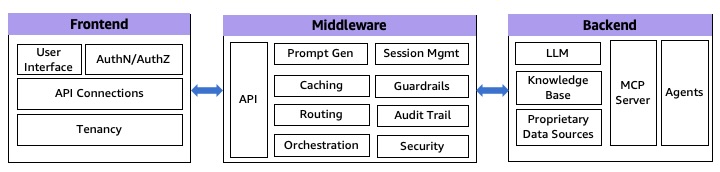
1:3 Tier Generative AI Architecture

Fig 1: 3 Tier generative AI Architecture

Although these layers are merely extensions to the traditional software stack, they do perform some specific tasks in generative AI applications.

Frontend layer

The frontend layer serves as the primary interface between end-users and the generative AI application. For organizations integrating generative AI into existing applications, this layer might already be established. The frontend handles critical responsibilities including user authentication, UI/UX presentation, and API communication. AWS provides a robust suite of serverless services to support frontend implementations, including AWS Amplify for full-stack development, Amazon CloudFront paired with Amazon Simple Storage Service (Amazon S3) for content delivery, and container services like Amazon Elastic Container Service (Amazon ECS) and Amazon Elastic Kubernetes Service (Amazon EKS) for application hosting. Specialized services such as Amazon Lex can enhance the user experience through conversational interfaces and intelligent search capabilities for building interactive chatbots.

Middleware layer

This represents the integration layer, comprising of three essential sub-layers that manage different aspects of the application logic and data flow:

  • API layer – This layer exposes backend services through various protocols, including REST, GraphQL, and WebSockets. It handles essential functions such as input validation, traffic management, and CORS support. The API layer also implements authorization and access control mechanisms, manages API versioning, and provides monitoring capabilities. It provides secure and efficient communication between the frontend and backend components while maintaining scalability and reliability. AWS managed services like Amazon API Gateway and AWS AppSync can help create an AI gateway to simplify access and API management.
  • Prompt engineering layer – This layer encapsulates the business logic necessary for interacting with LLMs. It handles dynamic prompt generation, model selection, prompt caching, model routing, guardrails, and security enforcement. This layer implements token and context window optimization, sensitive information filtering, output content moderation, error handling, retry logic, and audit trails. By centralizing these functions, you can maintain consistent prompt strategies, enforce security, and optimize model interactions across applications. You can use Amazon DynamoDB to store prompt templates and configurations, and use Amazon Bedrock Guardrails, Amazon Bedrock prompt caching, and Amazon Bedrock Intelligent Prompt Routing to implement responsible AI safeguards, reuse of prompt prefixes, and dynamic routing, respectively.
  • Orchestration layer – This layer manages complex interactions between various system components. It coordinates external API calls and agent calls, manages vector database queries, stores user sessions and conversation histories, and maintains conversation context across multiple LLM interactions. Frameworks like LangChain and LlamaIndex are commonly used to simplify these operations and provide standardized approaches to common generative AI tasks. AWS Step Functions has direct integrations with over 220 AWS services, including Amazon Bedrock, enabling you to construct intricate generative AI workflows without incurring additional computational resources. Additionally, with Amazon Bedrock Flows, you can create complex, flexible, multi-prompt workflows to evaluate, compare, and version.

Backend services, agents, and private data sources

The backend layer forms the core of generative AI response generation powered by LLMs. It consists of hosting and invoking the LLM model, agents, knowledge bases, or a Model Context Protocol (MCP) server. Amazon Bedrock, Amazon SageMaker JumpStart, and Amazon SageMaker offer a variety of high-performing FMs from leading AI companies or the option to bring your own. You can securely run an MCP server using a containerized architecture, as described in Guidance for Deploying Model Context Protocol Servers on AWS.

Private data sources complement LLMs by providing authoritative proprietary knowledge outside of its training data. For Retrieval Augmented Generation (RAG) implementations, Amazon Kendra, Amazon OpenSearch Serverless, and Amazon Aurora PostgreSQL-Compatible Edition with the pgVector extension provide robust, scalable vector database options. For a deeper dive, please read The role of vector databases in generative AI applications on available AWS service options to store embeddings in a purpose built vector database.

Real-time applications process and deliver responses with minimal latency, enhancing the user experience and facilitating faster decision-making. In the following sections, we explore some architectural patterns that can be used to implement real-time generative AI applications.

Pattern 1: Synchronous request response

In this pattern, responses are generated and immediately delivered, while the client blocks/waits for response. Although this is simple to implement, has a predictable flow, and offers strong consistency, it suffers from blocking operations, high latency, and potential timeouts. When implemented for generative AI applications, this pattern is particularly suited for certain modalities like video or image generations. For fast LLM interactions, it can handle multiple concurrent requests while maintaining consistent performance under varying loads. This model can be implemented through several architectural approaches.

REST APIs

You can use RESTful APIs to communicate with your backend over HTTP requests. You can use REST or HTTP APIs in API Gateway or an Application Load Balancer for path-based routing to the middleware. API Gateway offers additional features like token-based authentication, custom authorizers, resource-based permissions, request/response mapping and transformation, versioning, and rate-limiting. However, with REST/HTTP APIs in API Gateway, the response must be generated within 29 seconds to meet the default integration timeout. You can extend this default limit to 5 minutes for REST APIs with a possible reduction in your AWS Region-level throttle quota for your account. For an example implementation, refer to Interact with Bedrock models from a Lambda function fronted with an API Gateway. The following diagram illustrates this architecture.
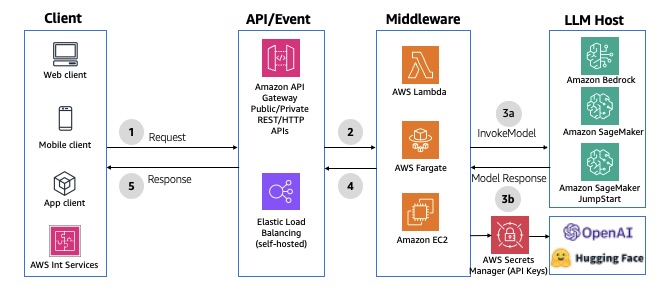
Fig 2: Synchronous REST/HTTP APIs using Amazon API Gateway

Fig 2: Synchronous REST/HTTP APIs using Amazon API Gateway

GraphQL HTTP APIs

You can use AWS AppSync as the API layer to take advantage of the benefits of GraphQL APIs. GraphQL APIs offer declarative and efficient data fetching using a typed schema definition, serverless data caching, offline data synchronization, security, and fine-grained access control. It also provides data sources and resolvers for writing business logic. If you don’t need the mutation layer, AWS AppSync can directly invoke an LLM in Amazon Bedrock. AWS AppSync integration timeout is set to 30 seconds by default and can’t be extended. If you need to perform operations that might take longer, consider implementing asynchronous patterns or breaking down the operation into smaller chunks. For an example integration, see Invoke Amazon Bedrock models from AWS AppSync HTTP resolver. The following diagram illustrates the solution architecture.
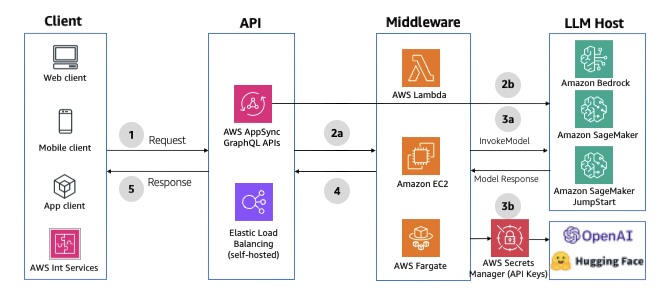
Fig 3: Synchronous GraphQL HTTP APIs using AWS AppSyncFig 3: Synchronous GraphQL HTTP APIs using AWS AppSync

Conversational chatbot interface

Amazon Lex is a service for building conversational interfaces with voice and text, offering speech recognition and language understanding capabilities. It simplifies multimodal development and enables publication of chatbots to various chat services and mobile devices. It offers native integration with Lambda to streamline chatbot development. When a Lambda function is used for fulfilment, the default response timeout is set to 30 seconds. To bypass, you can use fulfilment updates to provide periodic updates to the user, so the user knows that the chatbot is still working on their request. For an example implementation, see Enhance Amazon Connect and Lex with generative AI capabilities. The following diagram illustrates the solution architecture.
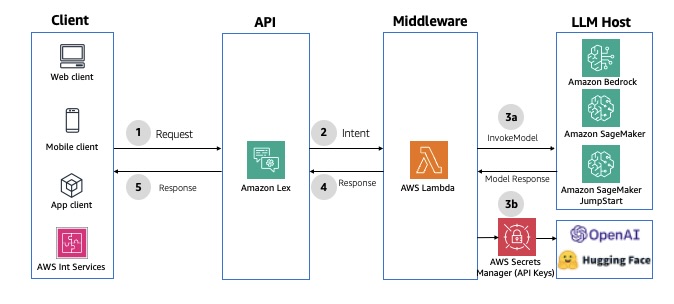
Fig 4: Synchronous conversational APIs using Amazon Lex

Fig 4: Synchronous conversational APIs using Amazon Lex

Model invocation using orchestration

AWS Step Functions enables orchestration and coordination of multiple tasks, with native integrations across AWS services like Amazon API Gateway, AWS Lambda, and Amazon DynamoDB. AWS Step Functions offers built-in features like function orchestration, branching, error handling, parallel processing, and human-in-the-loop capabilities. It also has an optimized integration with Amazon Bedrock, allowing direct invocation of Amazon Bedrock FMs from AWS Step Functions workflows. With this integration, you can accomplish the following:

  • Enrich Step Functions data processing with generative AI capabilities for tasks like text summarization, image generation, or personalization
  • Retrieve and inject up-to-date data (such as product pricing or user profiles) into LLM prompts for improved accuracy
  • Orchestrate LLM and agent calls in a customized processing chain, using the best-suited models at each stage
  • Implement human-in-the-loop interactions to moderate responses and handle hallucinations of the FM

For an example implementation using API Gateway, see Prompt chaining with Amazon API Gateway and AWS Step Functions. For an example implementation using AWS AppSync, see Prompt chaining with AWS AppSync, AWS Step Functions and Amazon Bedrock. The following diagram illustrates an example architecture.
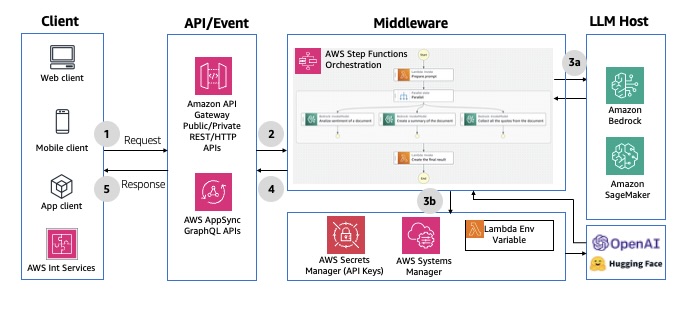
Fig 5: Synchronous model invocations using AWS Step FunctionsFig 5: Synchronous model invocations using AWS Step Functions

Pattern 2: Asynchronous request response

This pattern provides a full-duplex, bidirectional communication channel between the client and server without clients having to wait for updates. The biggest advantages is its non-blocking nature that can handle long-running operations. However, they are more complex to implement because they require channel, message, and state management. This model can be implemented through two architectural approaches.

WebSocket APIs

The WebSocket protocol enables real-time, synchronous communication between the frontend and middleware, allowing for bidirectional, full-duplex messaging over a persistent TCP connection. This bidirectional behavior enhances client/service interactions, enabling services to push data to clients without requiring explicit requests. Using API Gateway, you can create a WebSocket APIs as a stateful frontend for an AWS service (such as Lambda or DynamoDB) or for an HTTP endpoint. The WebSocket API invokes your backend based on the content of the messages it receives from client apps. After the message is generated, the backend can send callback messages to connected clients. Each request-response cycle must complete within 29 seconds, as defined by the API Gateway integration timeout for WebSockets. The connection duration for API Gateway WebSocket APIs can be up to 2 hours with an idle connection timeout of 10 minutes—these can’t be extended. For an example implementation, refer to AI Chat with Amazon API Gateway (WebSockets), AWS Lambda and Amazon Bedrock. The following diagram illustrates an example architecture.
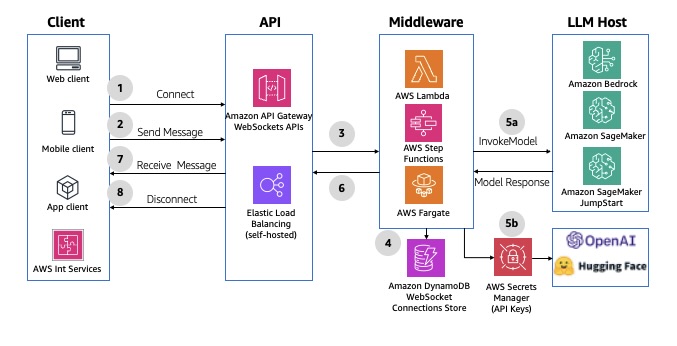
Fig 6: Asynchronous WebSocket APIs using Amazon API GatewayFig 6: Asynchronous WebSocket APIs using Amazon API Gateway

GraphQL WebSocket APIs

AWS AppSync can establish and maintain secure WebSocket connections for GraphQL subscription operations, enabling middleware applications to distribute data in real time from data sources to subscribers. It also supports a simple publish-subscribe model, where client frontends can listen to specific channels or topics, with AWS AppSync managing multiple temporary pub/sub channels and WebSocket connections to deliver and filter data based on the channel name. For an example implementation, refer to AI Chat with AWS AppSync (WebSockets), AWS Lambda, and Amazon Bedrock. The following diagram illustrates an example architecture.Fig 7: Asynchronous GraphQL WebSocket APIs using AWS
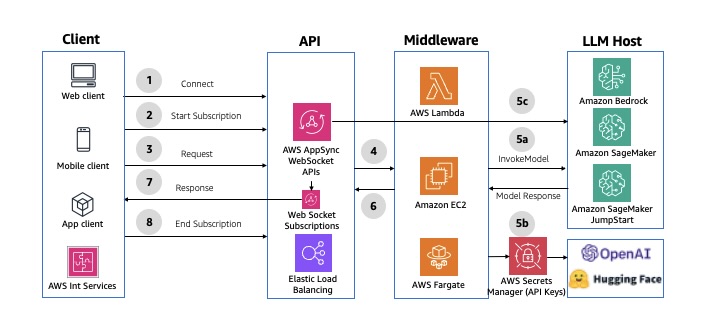
Fig 7: Asynchronous GraphQL WebSocket APIs using AWS

Pattern 3: Asynchronous streaming response

This streaming pattern enables real-time response flow to clients in chunks, enhancing the user experience and minimizing first response latency. This pattern uses built-in streaming capabilities in services like Amazon Bedrock (InvokeModelWithResponseStream or ConverseStream APIs) and SageMaker real-time inference, enabling applications to display results incrementally rather than waiting for complete responses. This pattern is particularly effective for applications implementing text modality such as chat interfaces and word-based content generation tools.

Implementation is achieved through the API Gateway WebSocket API or AWS AppSync WebSocket APIs or GraphQL subscriptions, with careful consideration given to timeout management and connection handling.

The following diagram illustrates the architecture of asynchronous streaming using API Gateway WebSocket APIs.Fig 8: Asynchronous streaming response using Amazon API Gateway WebSockets APIs
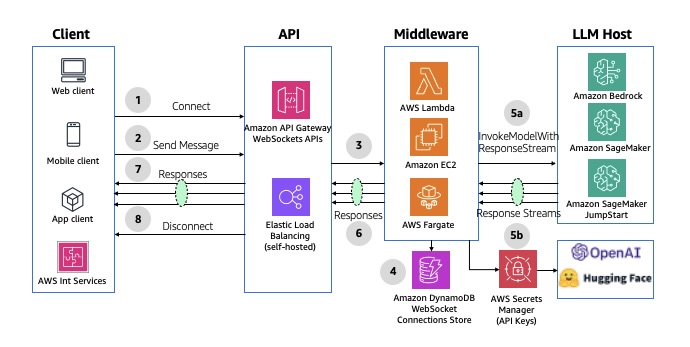
Fig 8: Asynchronous streaming response using Amazon API Gateway WebSockets APIs

The following diagram illustrates the architecture of asynchronous streaming using AWS AppSync WebSocket APIs.Fig 9: Asynchronous streaming response using AWS AppSync WebSocket APIs
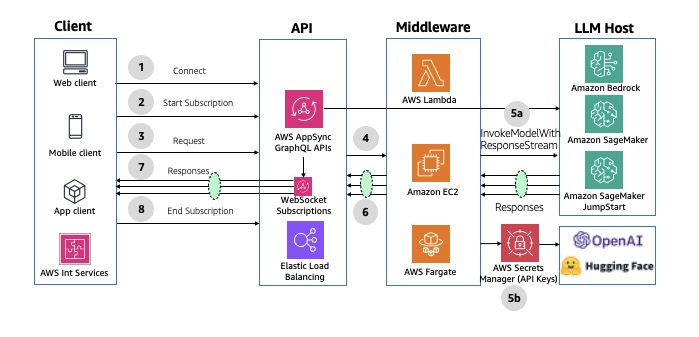
Fig 9: Asynchronous streaming response using AWS AppSync WebSocket APIs

If you don’t need an API layer, Lambda response streaming lets a Lambda function progressively stream response payloads back to clients. For more details, see Using Amazon Bedrock with AWS Lambda. The following diagram illustrates this architecture.Fig 10: Asynchronous response using AWS Lambda response streaming
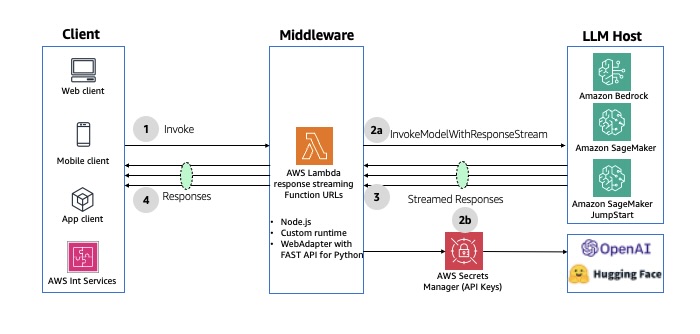
Fig 10: Asynchronous response using AWS Lambda response streaming

Conclusion

This post introduced three design patterns applicable for real-time generative AI applications: synchronous request response, asynchronous request response, and asynchronous streaming response. We also highlighted how to implement these patterns using AWS serverless services. When selecting an appropriate pattern for your implementation, it is crucial to consider the anticipated end-user experience, the existing technical stack, AWS service quotas, and the latency of your LLM responses. In Part 2, we discuss patterns for building batch-oriented generative AI implementations using AWS serverless services.

Addressing the unauthorized issuance of multiple TLS certificates for 1.1.1.1

Post Syndicated from Joe Abley original https://blog.cloudflare.com/unauthorized-issuance-of-certificates-for-1-1-1-1/

Over the past few days Cloudflare has been notified through our vulnerability disclosure program and the certificate transparency mailing list that unauthorized certificates were issued by Fina CA for 1.1.1.1, one of the IP addresses used by our public DNS resolver service. From February 2024 to August 2025, Fina CA issued twelve certificates for 1.1.1.1 without our permission. We did not observe unauthorized issuance for any properties managed by Cloudflare other than 1.1.1.1.

We have no evidence that bad actors took advantage of this error. To impersonate Cloudflare’s public DNS resolver 1.1.1.1, an attacker would not only require an unauthorized certificate and its corresponding private key, but attacked users would also need to trust the Fina CA. Furthermore, traffic between the client and 1.1.1.1 would have to be intercepted.

While this unauthorized issuance is an unacceptable lapse in security by Fina CA, we should have caught and responded to it earlier. After speaking with Fina CA, it appears that they issued these certificates for the purposes of internal testing. However, no CA should be issuing certificates for domains and IP addresses without checking control. At present all certificates have been revoked. We are awaiting a full post-mortem from Fina.

While we regret this situation, we believe it is a useful opportunity to walk through how trust works on the Internet between networks like ourselves, destinations like 1.1.1.1, CAs like Fina, and devices like the one you are using to read this. To learn more about the mechanics, please keep reading.

Background

Cloudflare operates a public DNS resolver 1.1.1.1 service that millions of devices use to resolve domain names from a human-readable format such as example.com to an IP address like 192.0.2.42 or 2001:db8::2a.

The 1.1.1.1 service is accessible using various methods, across multiple domain names, such as cloudflare-dns.com and one.one.one.one, and also using various IP addresses, such as 1.1.1.1, 1.0.0.1, 2606:4700:4700::1111, and 2606:4700:4700::1001. 1.1.1.1 for Families also provides public DNS resolver services and is hosted on different IP addresses — 1.1.1.2, 1.1.1.3, 1.0.0.2, 1.0.0.3, 2606:4700:4700::1112, 2606:4700:4700::1113, 2606:4700:4700::1002, 2606:4700:4700::1003.

As originally specified in RFC 1034 and RFC 1035, the DNS protocol includes no privacy or authenticity protections. DNS queries and responses are exchanged between client and server in plain text over UDP or TCP. These represent around 60% of queries received by the Cloudflare 1.1.1.1 service. The lack of privacy or authenticity protection means that any intermediary can potentially read the DNS query and response and modify them without the client or the server being aware.


To address these shortcomings, we have helped develop and deploy multiple solutions at the IETF. The two of interest to this post are DNS over TLS (DoT, RFC 7878) and DNS over HTTPS (DoH, RFC 8484). In both cases the DNS protocol itself is mainly unchanged, and the desirable security properties are implemented in a lower layer, replacing the simple use of plain-text in UDP and TCP in the original specification. Both DoH and DoT use TLS to establish an authenticated, private, and encrypted channel over which DNS messages can be exchanged. To learn more you can read DNS Encryption Explained.

During the TLS handshake, the server proves its identity to the client by presenting a certificate. The client validates this certificate by verifying that it is signed by a Certification Authority that it already trusts. Only then does it establish a connection with the server. Once connected, TLS provides encryption and integrity for the DNS messages exchanged between client and server. This protects DoH and DoT against eavesdropping and tampering between the client and server.


The TLS certificates used in DoT and DoH are the same kinds of certificates HTTPS websites serve. Most website certificates are issued for domain names like example.com. When a client connects to that website, they resolve the name example.com to an IP like 192.0.2.42, then connect to the domain on that IP address. The server responds with a TLS certificate containing example.com, which the device validates.

However, DNS server certificates tend to be used slightly differently. Certificates used for DoT and DoH have to contain the service IP addresses, not just domain names. This is due to clients being unable to resolve a domain name in order to contact their resolver, like cloudflare-dns.com. Instead, devices are first set up by connecting to their resolver via a known IP address, such as 1.1.1.1 in the case of Cloudflare public DNS resolver. When this connection uses DoT or DoH, the resolver responds with a TLS certificate issued for that IP address, which the client validates. If the certificate is valid, the client believes that it is talking to the owner of 1.1.1.1 and starts sending DNS queries.

You can see that the IP addresses are included in the certificate Cloudflare’s public resolver uses for DoT/DoH:

Certificate:
  Data:
      Version: 3 (0x2)
      Serial Number:
          02:7d:c8:c5:e1:72:94:ae:c9:ed:3f:67:72:8e:8a:08
      Signature Algorithm: sha256WithRSAEncryption
      Issuer: C=US, O=DigiCert Inc, CN=DigiCert Global G2 TLS RSA SHA256 2020 CA1
      Validity
          Not Before: Jan  2 00:00:00 2025 GMT
          Not After : Jan 21 23:59:59 2026 GMT
      Subject: C=US, ST=California, L=San Francisco, O=Cloudflare, Inc., CN=cloudflare-dns.com
      X509v3 extensions:
          X509v3 Subject Alternative Name:
              DNS:cloudflare-dns.com, DNS:*.cloudflare-dns.com, DNS:one.one.one.one, IP Address:1.0.0.1, IP Address:1.1.1.1, IP Address:162.159.36.1, IP Address:162.159.46.1, IP Address:2606:4700:4700:0:0:0:0:1001, IP Address:2606:4700:4700:0:0:0:0:1111, IP Address:2606:4700:4700:0:0:0:0:64, IP Address:2606:4700:4700:0:0:0:0:6400

Rogue certificate issuance

The section above describes normal, expected use of Cloudflare public DNS resolver 1.1.1.1 service, using certificates managed by Cloudflare. However, Cloudflare has been made aware of other, unauthorized certificates being issued for 1.1.1.1. Since certificate validation is the mechanism by which DoH and DoT clients establish the authenticity of a DNS resolver, this is a concern. Let’s now dive a little further in the security model provided by DoH and DoT.

Consider a client that is preconfigured to use the 1.1.1.1 resolver service using DoT. The client must establish a TLS session with the configured server before it can send any DNS queries. To be trusted, the server needs to present a certificate issued by a CA that the client trusts. The collection of certificates trusted by the client is also called the root store.

Certificate:
  Data:
      Version: 3 (0x2)
      Serial Number:
          02:7d:c8:c5:e1:72:94:ae:c9:ed:3f:67:72:8e:8a:08
      Signature Algorithm: sha256WithRSAEncryption
      Issuer: C=US, O=DigiCert Inc, CN=DigiCert Global G2 TLS RSA SHA256 2020 CA1

A Certification Authority (CA) is an organisation, such as DigiCert in the section above, whose role is to receive requests to sign certificates and verify that the requester has control of the domain. In this incident, Fina CA issued certificates for 1.1.1.1 without Cloudflare’s involvement. This means that Fina CA did not properly check whether the requestor had legitimate control over 1.1.1.1. According to Fina CA:

“They were issued for the purpose of internal testing of certificate issuance in the production environment. An error occurred during the issuance of the test certificates when entering the IP addresses and as such they were published on Certificate Transparency log servers.”

Although it’s not clear whether Fina CA sees it as an error, we emphasize that it is not an error to publish test certificates on Certificate Transparency (more about what that is later on). Instead, the error at hand is Fina CA using their production keys to sign a certificate for an IP address without permission of the controller. We have talked about misuse of 1.1.1.1 in documentation, lab, and testing environments at length. Instead of the Cloudflare public DNS resolver 1.1.1.1 IP address, Fina should have used an IP address it controls itself.

Unauthorized certificates are unfortunately not uncommon, whether due to negligence — such as IdenTrust in November 2024 — or compromise. Famously in 2011, the Dutch CA DigiNotar was hacked, and its keys were used to issue hundreds of certificates. This hack was a wake-up call and motivated the introduction of Certificate Transparency (CT), later formalised in RFC 6962. The goal of Certificate Transparency is not to directly prevent misissuance, but to be able to detect any misissuance once it has happened, by making sure every certificate issued by a CA is publicly available for inspection.

In certificate transparency several independent parties, including Cloudflare, operate public logs of issued certificates. Many modern browsers do not accept certificates unless they provide proof in the form of signed certificate timestamps (SCTs) that the certificate has been logged in at least two logs. Domain owners can therefore monitor all public CT logs for any certificate containing domains they care about. If they see a certificate for their domains that they did not authorize, they can raise the alarm. CT is also the data source for public services such as crt.sh and Cloudflare Radar’s certificate transparency page.

Not all clients require proof of inclusion in certificate transparency. Browsers do, but most DNS clients don’t. We were fortunate that Fina CA did submit the unauthorized certificates to the CT logs, which allowed them to be discovered.

Investigation into potential malicious use

Our immediate concern was that someone had maliciously used the certificates to impersonate the 1.1.1.1 service. Such an attack would require all the following:

  1. An attacker would require a rogue certificate and its corresponding private key.

  2. Attacked clients would need to trust the Fina CA.

  3. Traffic between the client and 1.1.1.1 would have to be intercepted.

In light of this incident, we have reviewed these requirements one by one:

1. We know that a certificate was issued without Cloudflare’s involvement. We must assume that a corresponding private key exists, which is not under Cloudflare’s control. This could be used by an attacker. Fina CA wrote to us that the private keys were exclusively in Fina’s controlled environment and were immediately destroyed even before the certificates were revoked. As we have no way to verify this, we have and continue to take steps to detect malicious use as described in point 3.

2. Furthermore, some clients trust Fina CA. It is included by default in Microsoft’s root store and in an EU Trust Service provider. We can exclude some clients, as the CA certificate is not included by default in the root stores of Android, Apple, Mozilla, or Chrome. These users cannot have been affected with these default settings. For these certificates to be used nefariously, the client’s root store must include the Certification Authority (CA) that issued them. Upon discovering the problem, we immediately reached out to Fina CA, Microsoft, and the EU Trust Service provider. Microsoft responded quickly, and started rolling out an update to their disallowed list, which should cause clients that use it to stop trusting the certificate.

3. Finally, we have launched an investigation into possible interception between users and 1.1.1.1. The first way this could happen is when the attacker is on-path of the client request. Such man-in-the-middle attacks are likely to be invisible to us. Clients will get responses from their on-path middlebox and we have no reliable way of telling that is happening. On-path interference has been a persistent problem for 1.1.1.1, which we’ve been working on ever since we announced 1.1.1.1.

A second scenario can occur when a malicious actor is off-path, but is able to hijack 1.1.1.1 routing via BGP. These are scenarios we have discussed in a previous blog post, and increasing adoption of RPKI route origin validation (ROV) makes BGP hijacks with high penetration harder. We looked at the historical BGP announcements involving 1.1.1.1, and have found no evidence that such routing hijacks took place.

Although we cannot be certain, so far we have seen no evidence that these certificates have been used to impersonate Cloudflare public DNS resolver 1.1.1.1 traffic. In later sections we discuss the steps we have taken to prevent such impersonation in the future, as well as concrete actions you can take to protect your own systems and users.

A closer look at the unauthorized certificates attributes

All unauthorized certificates for 1.1.1.1 were valid for exactly one year and included other domain names. Most of these domain names are not registered, which indicates that the certificates were issued without proper domain control validation. This violates sections 3.2.2.4 and 3.2.2.5 of the CA/Browser Forum’s Baseline Requirements, and sections 3.2.2.3 and 3.2.2.4 of the Fina CA Certificate Policy.

The full list of domain names we identified on the unauthorized certificates are as follows:

fina.hr
ssltest5
test.fina.hr
test.hr
test1.hr
test11.hr
test12.hr
test5.hr
test6
test6.hr
testssl.fina.hr
testssl.finatest.hr
testssl.hr
testssl1.finatest.hr
testssl2.finatest.hr

It’s also worth noting that the Subject attribute points to a fictional organisation TEST D.D., as can be seen on this unauthorized certificate:

        Serial Number:
            a5:30:a2:9c:c1:a5:da:40:00:00:00:00:56:71:f2:4c
        Signature Algorithm: sha256WithRSAEncryption
        Issuer: C=HR, O=Financijska agencija, CN=Fina RDC 2015
        Validity
            Not Before: Nov  2 23:45:15 2024 GMT
            Not After : Nov  2 23:45:15 2025 GMT
        Subject: C=HR, O=TEST D.D., L=ZAGREB, CN=testssl.finatest.hr, serialNumber=VATHR-32343828408.306
        X509v3 extensions:
            X509v3 Subject Alternative Name:
                DNS:testssl.finatest.hr, DNS:testssl2.finatest.hr, IP Address:1.1.1.1

Incident timeline and impact

All timestamps are UTC. All certificates are identified by their date of validity.

The first certificate was issued to be valid starting February 2024, and revoked 33 min later. 11 certificate issuances with common name 1.1.1.1 followed from February 2024 to August 2025. Public reports have been made on Hacker News and on the certificate-transparency mailing list early in September 2025, which Cloudflare responded to.

While responding to the incident, we identified the full list of misissued certificates, their revocation status, and which clients trust them.

The full timeline for the incident is as follows.

Date & Time (UTC)

Event Description

2024-02-18 11:07:33

First certificate issuance revoked on 2024-02-18 11:40:00

2024-09-25 08:04:03

Issuance revoked on 2024-11-06 07:36:05

2024-10-04 07:55:38

Issuance revoked on 2024-10-04 07:56:56

2024-10-04 08:05:48

Issuance revoked on 2024-11-06 07:39:55

2024-10-15 06:28:48

Issuance revoked on 2024-11-06 07:35:36

2024-11-02 23:45:15

Issuance revoked on 2024-11-02 23:48:42

2025-03-05 09:12:23

Issuance revoked on 2025-03-05 09:13:22

2025-05-24 22:56:21

Issuance revoked on 2025-09-04 06:13:27

2025-06-28 23:05:32

Issuance revoked on 2025-07-18 07:01:27

2025-07-18 07:05:23

Issuance revoked on 2025-07-18 07:09:45

2025-07-18 07:13:14

Issuance revoked on 2025-09-04 06:30:36

2025-08-26 07:49:00

Last certificate issuance revoked on 2025-09-04 06:33:20

2025-09-01 05:23:00

HackerNews submission about a possible unauthorized issuance

2025-09-02 04:50:00

Report shared with us on HackerOne, but was mistriaged

2025-09-03 02:35:00

Second report shared with us on HackerOne, but also mistriaged.

2025-09-03 10:59:00

Report sent on the public [email protected] mailing picked up by the team.

2025-09-03 11:33:00

First response by Cloudflare on the mailing list about starting the investigation

2025-09-03 12:08:00

Incident declared

2025-09-03 12:16:00

Notification of an unauthorised issuance sent to Fina CA, Microsoft Root Store, and EU Trust service provider

2025-09-03 12:23:00

Cloudflare identifies an initial list of nine rogue certificates

2025-09-03 12:24:00

Outreach to Fina CA to inform them about the unauthorized issuance, requesting revocation

2025-09-03 12:26:00

Identify the number of requests served on 1.1.1.1 IP address, and associated names/services

2025-09-03 12:42:00

As a precautionary measure, began investigation to rule out the possibility of a BGP hijack for 1.1.1.1

2025-09-03 18:48:00

Second notification of the incident to Fina CA

2025-09-03 21:27:00

Microsoft Root Store notifies us that they are preventing further use of the identified unauthorized certificates by using their quick-revocation mechanism.

2025-09-04 06:13:27

Fina revoked all certificates.

2025-09-04 12:44:00

Cloudflare receives a response from Fina indicating “an error occurred during the issuance of the test certificates when entering the IP addresses and as such they were published on Certificate Transparency log servers. […] Fina will eliminate the possibility of such an error recurring.”

Remediation and follow-up steps

Cloudflare has invested from the very start in the Certificate Transparency ecosystem. Not only do we operate CT logs ourselves, we also run a CT monitor that we use to alert customers when certificates are mis-issued for their domains.

It is therefore disappointing that we failed to properly monitor certificates for our own domain. We failed three times. The first time because 1.1.1.1 is an IP certificate and our system failed to alert on these. The second time because even if we were to receive certificate issuance alerts, as any of our customers can, we did not implement sufficient filtering. With the sheer number of names and issuances we manage it has not been possible for us to keep up with manual reviews. Finally, because of this noisy monitoring, we did not enable alerting for all of our domains. We are addressing all three shortcomings.

We double-checked all certificates issued for our names, including but not limited to 1.1.1.1, using certificate transparency, and confirmed that as of 3 September, the Fina CA issued certificates are the only unauthorized issuances. We contacted Fina, and the root programs we know that trust them, to ask for revocation and investigation. The certificates have been revoked.

Despite no indication of usage of these certificates so far, we take this incident extremely seriously. We have identified several steps we can take to address the risk of these sorts of problems occurring in the future, and we plan to start working on them immediately:

Alerting: Cloudflare will improve alerts and escalation for issuance of certificates for missing Cloudflare owned domains including 1.1.1.1 certificates.

Transparency: The issuance of these unauthorised 1.1.1.1 certificates were detected because Fina CA used Certificate Transparency. Transparency inclusion is not enforced by most DNS clients, which implies that this detection was a lucky one. We are working on bringing transparency to non-browser clients, in particular DNS clients that rely on TLS.

Bug Bounty: Our procedure for triaging reports made through our vulnerability disclosure program was the cause for a delayed response. We are working to revise our triaging process to ensure such reports get the right visibility.

Monitoring: During this incident, our team relied on crt.sh to provide us a convenient UI to explore CA issued certificates. We’d like to give a shout to the Sectigo team for maintaining this tool. Given Cloudflare is an active CT Monitor, we have started to build a dedicated UI to explore our data in Radar. We are looking to enable exploration of certs with IP addresses as common names to Radar as well.

What steps should you take?

This incident demonstrates the disproportionate impact that the current root store model can have. It is enough for a single certification authority going rogue for everyone to be at risk.

If you are an IT manager with a fleet of managed devices, you should consider whether you need to take direct action to revoke these unauthorized certificates. We provide the list in the timeline section above. As the certificates have since been revoked, it is possible that no direct intervention should be required; however, system-wide revocation is not instantaneous and automatic and hence we recommend checking.

If you are tasked to review the policy of a root store that includes Fina CA, you should take immediate actions to review their inclusion in your program. The issue that has been identified through the course of this investigation raises concerns, and requires a clear report and follow-up from the CA. In addition, to make it possible to detect future such incidents, you should consider having a requirement for all CAs in your root store to participate in Certificate Transparency. Without CT logs, problems such as the one we describe here are impossible to address before they result in impact to end users.

We are not suggesting that you should stop using DoH or DoT. DNS over UDP and TCP are unencrypted, which puts every single query and response at risk of tampering and unauthorised surveillance. However, we believe that DoH and DoT client security could be improved if clients required that server certificates be included in a certificate transparency log.

Conclusion

This event is the first time we have observed a rogue issuance of a certificate used by our public DNS resolver 1.1.1.1 service. While we have no evidence this was malicious, we know that there might be future attempts that are.

We plan to accelerate how quickly we discover and alert on these types of issues ourselves. We know that we can catch these earlier, and we plan to do so.

The identification of these kinds of issues rely on an ecosystem of partners working together to support Certificate Transparency. We are grateful for the monitors who noticed and reported this issue.

Stack to Win: A Powerful Solution for Sports Media Production

Post Syndicated from Dave Simon original https://www.backblaze.com/blog/stack-to-win-a-powerful-solution-for-sports-media-production/

A decorative image showing the text Stack to Win with Boomer Esiason. In the background, the logos for Backblaze, Suite Studios, and Iconik are displayed on media screens.

I recently joined an incredible group of thought leaders for a panel discussion on the future of sports media. Hosted by sports commentator and former NFL MVP Boomer Esiason, our Stack to Win panel featured Jeremy Strootman from Iconik, Jay Maxwell from Suite Studios, the NFL’s VP of Broadcasting Mike North, and me—Dave Simon from Backblaze. Together, we explored the complexities of modern sports content creation and how our integrated cloud-native solutions from Backblaze B2, Iconik, and Suite offer a powerful blueprint for radically streamlining workflows and unlocking new opportunities for efficiency, speed, and monetization.

The traditional, linear model of sports media production is a thing of the past. It’s been completely changed by new technology and a shift in what fans expect. Today, media teams are in a real-time battle for attention against every other form of entertainment. This new world demands a different kind of setup, one that’s built for the cloud and designed to handle the entire media lifecycle. The solution we’ve built, a powerful combination of Backblaze, Iconik, and Suite Studios, is exactly that. It’s the playbook for staying ahead.

Watch the full interview

There’s so much more that we could summarize in just one blog post. Check out the full video below:

The (data) problem

Game day content is immense—we’re talking 6–7TB of data nightly. In the past, this was a logistical nightmare. As Jeremy Strootman from Iconik pointed out, “It used to be we’d get a hard drive and I’d get a hard drive, and we made sure that we just took different flights on the way home. It was literally that archaic.” When speed is everything, old methods like shipping hard drives are a huge liability.

This pressure comes from fans who have an insatiable appetite for content across every platform imaginable. They expect teams to produce their own content in real-time for streaming and social media. For many, the “second screen” is now the main screen, with 73% of fans using mobile apps for real-time updates during live events. If your workflow is slow, you’ve already lost the competition.

The definition of sports content has also expanded. It’s no longer just about the game itself, but also the stories around it—the players’ lives and the team’s entire ecosystem. Jay Maxwell of Suite Studios captured this perfectly:

The product is not just what’s on the field anymore. It’s also what’s going on in these, you know, athletes lives, what’s going on in the peripheries of the team and the organizations.
—Jay Maxwell, Co-Founder and Chief Product Officer, Suite Studios

This includes pop culture crossovers, fantasy sports, and in-game betting, all of which demand instant video highlights.

A great example of this is when Eagles wide receiver AJ Brown was spotted reading a book called “Inner Excellence” on the sidelines. The moment went viral, and the book, which was previously ranked 585,000 on the bestseller list, vaulted to number one instantly. As the NFL’s Mike North noted, this is how fans can instantly “go deeper” and connect with their favorite players. The ability to capture and distribute these moments instantly is a fundamental requirement for success.

A modern technology stack

An integrated, cloud-native tech stack provides a seamless workflow that removes risk and speeds up the content pipeline. It’s a powerful combination of three key layers:

1. Foundation: The active cloud archive

Modern media workflows are built on a cloud storage foundation that replaces old systems like tape libraries and shelves full of hard drives. The key is an active cloud archive that gives you instant access to your footage. This eliminates the costly delays of older solutions and offers predictable costs, so you never get hit with surprise fees when you need to access your own content.

2. Intelligence: Media Asset Management (MAM)

This is the smart layer that makes your vast archive searchable and valuable. Instead of producers manually sifting through hours of footage, a multimodal AI search engine can find the exact clip they need in seconds. As Dave Simon explained, you can use a natural language search to describe exactly what you’re looking for, such as “Jerry Rice catching a ball over his left shoulder wearing a white jersey”. AI tools in a media stack can automatically transcribe interviews, search for specific quotes, and even identify abstract concepts like emotion or reframe a video for different social media platforms.

3. Accelerator: Real-time cloud editing

This component handles the final stage of production, allowing editors to access high-resolution media without a download delay. This technology streams data directly from the cloud, so editors can start working immediately. This is how a remote team can instantly cut and create content from footage uploaded on the field. 

The real magic is all of these elements combined: A clip is only useful if an editor can work with it right away, and a huge archive is only valuable if you can find what’s in it. This is a single, cohesive system that manages the entire media lifecycle from start to finish.

Reshaping the business of sports

Adopting a modern tech stack empowers rights holders—leagues, teams, and athletes—to manage and distribute content on a massive scale. They can bypass traditional media gatekeepers and build direct relationships with their fans. This opens up several possibilities, such as: 

  • Archive monetization. Vast archives, once a simple cost center, have now become a major source of revenue. With an accessible, intelligent archive, organizations can unlock new revenue streams.
  • Licensing storefronts: You can create B2B portals for broadcasters and filmmakers to license and download footage, which essentially creates a self-service revenue engine.
  • Direct-to-consumer (DTC) fan platforms: Launch your own subscription services with exclusive access to historical games and behind-the-scenes content.
  • Free Ad-supported Streaming TV (FAST) channels: Program and launch FAST channels using repurposed archival content.
  • Creator economy partnerships: License parts of your archive to creators to reach new audiences and share in the revenue.
  • Enable the athlete as a media entity. This same technology is behind the rise of athletes as media producers. Today’s players are actively shaping their own stories and building media businesses. The low barrier to entry for these cloud workflows is the foundation of this movement, giving athletes the same scalable tools once reserved for major networks. A great example of this is Peyton Manning’s Omaha Productions, which started as a player-led media company and became a leader in the space.

The future fan experience

This revolution is transforming the fan experience from a one-way broadcast to something personal, interactive, and instant. The future of sports consumption is personalized feeds tailored to individual interests. As Mike North noted, “You don’t really need to watch the game anymore to still be a fan.” For a fan who wants to know everything about a player, a custom feed can be created. For a fantasy football enthusiast, clips and highlights related to their team can be pushed to them in real time.

The experience will also be interactive. Streaming platforms are already using augmented reality (AR) overlays and multi-angle camera views. The next step, powered by AI and accessible archives, is allowing fans to directly ask for content, like, “‘Show me all the Hail Mary plays from this season?’” and instantly get a custom playlist. This shifts passive viewing into active exploration.

For any sports organization, the biggest risk is standing still and maintaining the status quo. As Jay Maxwell put it, “The barrier to entry to try is, you know, cheap if not free.” An integrated, cloud-native workflow isn’t just a competitive advantage—it’s the fundamental requirement for survival and success.

Check out the full solution below:

The post Stack to Win: A Powerful Solution for Sports Media Production appeared first on Backblaze Blog | Cloud Storage & Cloud Backup

[$] The dependency tracker for complex deadlock detection

Post Syndicated from corbet original https://lwn.net/Articles/1036222/

Deadlocks are a constant threat in concurrent settings with shared
data; it is thus not surprising that the kernel project has long since
developed tools to detect potential deadlocks so they can be fixed before
they affect production users. Byungchul Park thinks that he has developed
a better tool that can detect more deadlock-prone situations. At the 2025 Open
Source Summit Europe
, he presented an introduction to his dependency
tracker (or “DEPT”) tool and the kinds of problems it can detect.

Security updates for Thursday

Post Syndicated from jake original https://lwn.net/Articles/1036733/

Security updates have been issued by AlmaLinux (httpd:2.4, kernel, pam, postgresql:12, and python3.12), Debian (clamav and node-cipher-base), Fedora (exiv2 and libsixel), Oracle (httpd, kernel, pam, postgresql:12, postgresql:13, postgresql:15, and udisks2), SUSE (gimp, libmupen64plus-devel, munge, nvidia-open-driver-G06-signed, ovmf, postgresql15, python-aiohttp, python-Django, rav1e, redis, and ruby2.5), and Ubuntu (ffmpeg, kdepim, kf5-messagelib, kmail, kmail-account-wizard, linux-azure, linux-azure-6.8, linux-azure-nvidia, php7.0, php7.2, php7.4, protobuf, python-django, ruby2.5, ruby2.7, ruby3.0, ruby3.2, ruby3.3, and rubygems).

Generative AI as a Cybercrime Assistant

Post Syndicated from Bruce Schneier original https://www.schneier.com/blog/archives/2025/09/generative-ai-as-a-cybercrime-assistant.html

Anthropic reports on a Claude user:

We recently disrupted a sophisticated cybercriminal that used Claude Code to commit large-scale theft and extortion of personal data. The actor targeted at least 17 distinct organizations, including in healthcare, the emergency services, and government and religious institutions. Rather than encrypt the stolen information with traditional ransomware, the actor threatened to expose the data publicly in order to attempt to extort victims into paying ransoms that sometimes exceeded $500,000.

The actor used AI to what we believe is an unprecedented degree. Claude Code was used to automate reconnaissance, harvesting victims’ credentials, and penetrating networks. Claude was allowed to make both tactical and strategic decisions, such as deciding which data to exfiltrate, and how to craft psychologically targeted extortion demands. Claude analyzed the exfiltrated financial data to determine appropriate ransom amounts, and generated visually alarming ransom notes that were displayed on victim machines.

This is scary. It’s a significant improvement over what was possible even a few years ago.

Read the whole Anthropic essay. They discovered North Koreans using Claude to commit remote-worker fraud, and a cybercriminal using Claude “to develop, market, and distribute several variants of ransomware, each with advanced evasion capabilities, encryption, and anti-recovery mechanisms.”

Adapting our computing curriculum resources for Telangana — the journey so far

Post Syndicated from Jaskaran Singh original https://www.raspberrypi.org/blog/adapting-our-computing-curriculum-resources-for-telangana-the-journey-so-far/

This blog is the third and final in our mini-series about the things we’ve learnt from adapting The Computing Curriculum resources, and from training teachers to use them in schools. In the first two blogs, we wrote about our experiences in Kenya and Odisha, India. Here, we focus on our work in Telangana, India. 

Three female students at the Coding Academy in Telangana.

This blog was written by Jaskaran Singh, Impact Manager, and Mamta Manaktala, Senior Learning Manager.

Adapting for unique needs

Every country and region has unique opportunities, challenges, and needs. In a vast country like India, every state is different — what works in Odisha may not work in other locations. Thus, to meet the needs of students in the state of Telangana, we’ve been working on adapting The Computing Curriculum specifically for them.

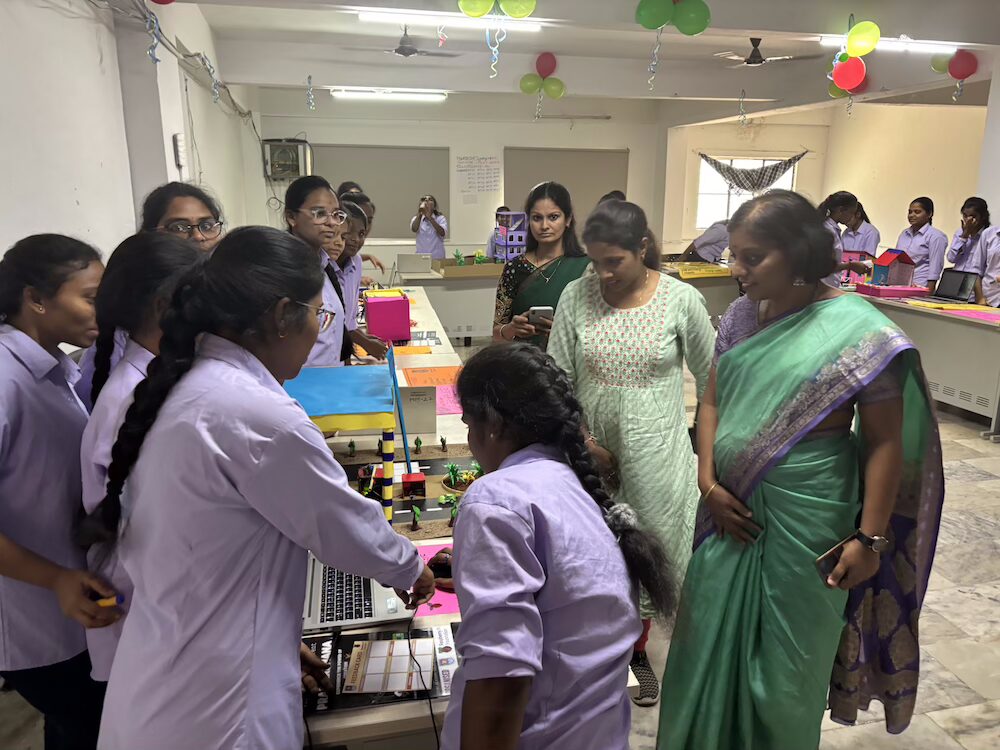
A group of female students at the Coding Academy in Telangana.

Our work in Telangana began in 2023, when we kickstarted a five-year partnership with the Telangana Social Welfare Residential Educational Institutions Society (TGSWREIS), a society under the Government of Telangana. Through the partnership, we’ve developed an adapted curriculum, along with training for educators working in educational institutions with limited resources. The adapted curriculum includes localised examples and activities, and teaching approaches to make the learning experience feel relevant and meaningful for students in Telangana, while keeping the core learning outcomes aligned with global standards. 

Testing and iterating

Since the start of the partnership, we’ve been testing the curriculum at the Coding Academy School, a co-educational school at Moinabad, and the Coding Academy College, a degree college for women in Shamirpet.

Our work delivering the curriculum in Telangana was our first time using a direct-to-learners model. The Coding Academy School and College gave us unique opportunities to work with students directly and observe first-hand the difference the programme made in their learning journeys. 

A group of students and a teacher at the Coding Academy in Telangana.

During the first year of implementation, we gathered useful feedback from students and teachers. Check out one of our earlier blogs where we share some of the findings. We used these inputs to further develop the curriculum.

This updated version of the curriculum was implemented in the 2024/25 academic year. At the school, our educators worked with 210 students in grades 7–9, while at the college, our educators worked with 382 undergraduate students. As in the first year, we used data from assessments, lesson observations, educator interviews, student surveys, and student focus groups to understand what’s working well and what could be improved. So what did we learn?

What we learnt over the past year

Our evaluation findings show that the updated curriculum worked well and positive outcomes are being achieved for most students. Educators felt prepared to teach the curriculum in this second year and found the ongoing support and spaces for discussion really useful. Moreover, we found that there are potential positive ripple effects beyond the school as well. 

Learning outcomes are being achieved to a high degree

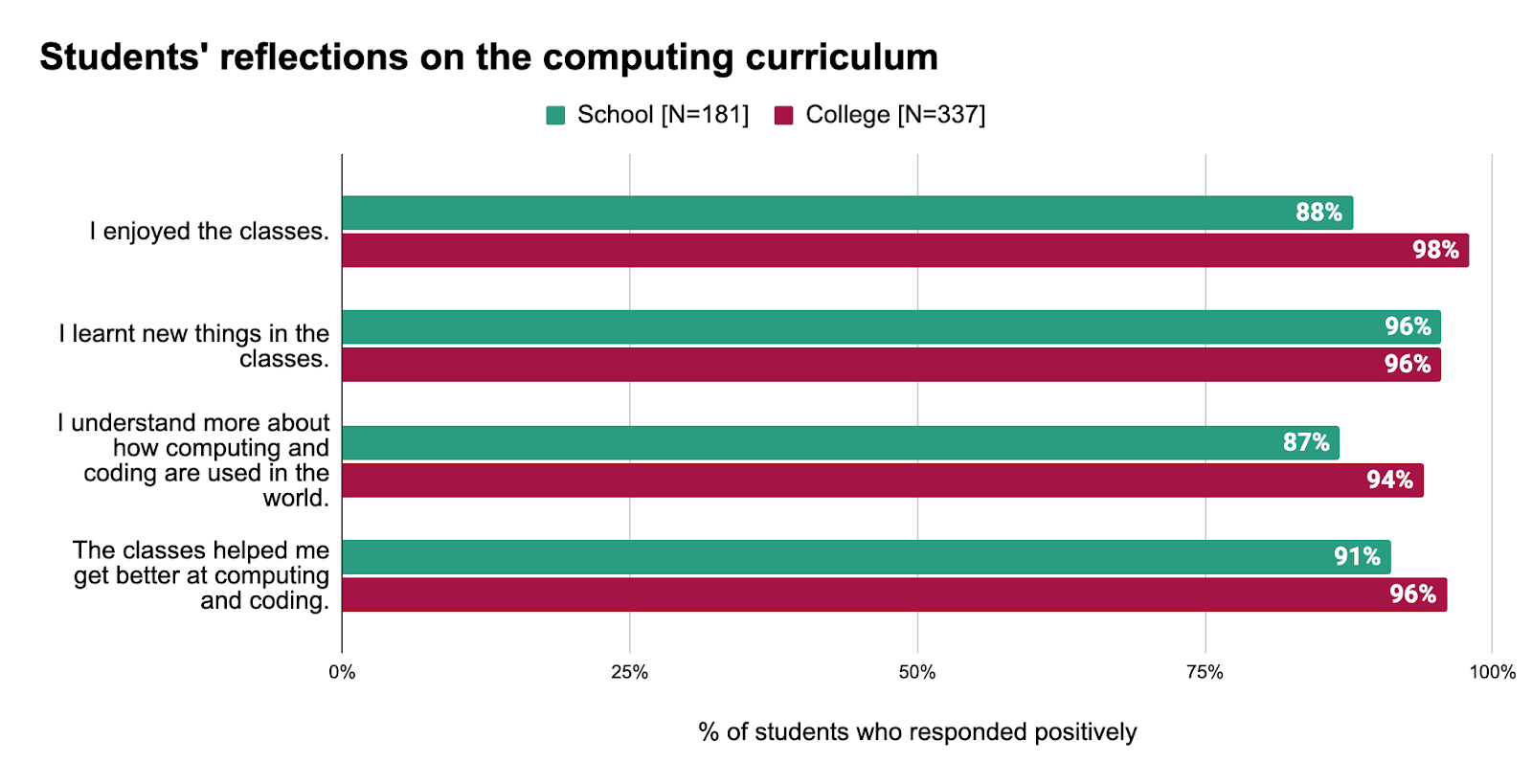
In surveys, 91% of students in the school and 96% of students in the college responded that the lessons helped them get better at computing and coding. Students feel they are not just learning new skills but also finding the content enjoyable: 88% of students in the school and 98% of students in the college responded that they are enjoying their classes. Educators and observers also reported that students were engaged during lessons, and often completed activities without needing any support. 

Students' reflections on the computing curriculum.

Students’ assessment scores further confirmed positive learning outcomes. 4 out of every 5 scores in the school and 9 out of every 10 scores in the college were 60% or above, which was higher than in the first year of the adapted curriculum’s implementation.

The updated curriculum is more aligned to student needs

The changes we made to the curriculum included:

  • Adding more localised examples
  • Simplifying the language 
  • Restructuring the flow of the content

Educators were highly positive about the updates to the curriculum. 

“The students are able to [better] understand the examples because we updated [to] the India context examples.” — Educator, Coding Academy School 

“Students are receiving it very well because we have modified the content this year, and [that includes] the placements of the unit and the connectivity of the lessons and units.” — Educator, Coding Academy School

Additionally, for the college curriculum, we aligned the content more closely with the learning objectives set by Osmania University — with which the college is affiliated. We also included more advanced topics for students specialising in data science. During interviews, educators reported that the content was now much better aligned to student expectations. 

“[The curriculum] we have designed is based as per [the] Osmania University curriculum. [The lessons] are definitely meeting the students’ needs because whatever discussions we are taking in classes, they are [successfully] participating in those discussions and they are doing whatever activities we give them.” — Educator, Coding Academy College

Outside of knowledge and skills in computing, the curriculum is also helping students develop wider life skills. In our survey, college students shared that working on projects gives them a sense of accomplishment and the confidence to solve real-world problems. Many students also reported that through the curriculum they are developing higher-order thinking skills, which will support their future careers. 

“The thrill lies the creativity and problem-solving aspects. I get to turn ideas into reality pieces, and there is something incredible satisfying about debugging code and watching it run flawlessly. It’s like slow, challenging puzzles, frustrating at times but rewarding when everything clicks.” — Student, Coding Academy College

“My favourite thing [about] the computing and coding classes [is the] Scratch programme. I have learnt it [for the] first time. By learning I have enjoyed a lot. During the coding process, it trains our brain to think deeply, identify trouble, and break things up and put pieces together [as] a solution.” — Student, Coding Academy College

Students are inspired to continue engaging 

Students are showing high interest in applying their skills outside of their classes. Almost all students — 100% in the school and 99% in the college — reported that they would like to participate in coding-related competitions. 

A group of female students working on a coding project.

Educators also told us that many students are exploring future job opportunities in the computing and digital technology fields, and are curious about topics outside the curriculum. Interestingly, 93% of the college students who were studying courses not traditionally associated with jobs in computing and digital technology reported that they would like to pursue a job in computing.

The positive benefits go beyond the school

We have also learnt that a high-quality computing education for young people has potentially wider benefits for the community. One educator described how students are helping their families, many of whom have limited experiences, engage more confidently with digital technologies.

“Families don’t know how to use smartphones and laptop computers, but our students know very well so I can say they do teach to their elders how to use these platforms.” — Educator, Coding Academy School

Ongoing support for educators was important

To help educators feel confident and prepared, individualised learning resources were provided throughout the year. These were well received by educators. Educators also found the weekly meetings with our India-based team members useful to discuss ongoing challenges regarding delivery and assessments. 

What could still be improved

There were improvements this year in the availability of equipment, and the use of Wi-Fi dongles addressed internet connectivity issues to some degree. However, educators still faced some challenges. For example, educators in the school faced issues accessing printed worksheets and educators in the college faced issues accessing projectors during their lessons. We are working closely with our delivery partner to address these issues for the new academic year.

A group of male students working on a coding project.

With regard to the content, educators felt the curriculum could benefit from some further amendments. For the school curriculum, these include easing the transition from block-based to text-based coding. For the college curriculum, there were suggestions for more focus on real-world applications of coding and including advanced topics, like machine learning, for undergraduates specialising in computing-related subjects. We have considered all these suggestions and made necessary revisions to the curriculum.

Next steps in Telangana: Scaling up impact

With the success of the pilot, we’re excited to announce that the adapted curriculum will now be implemented at over 350 schools and junior colleges in the state of Telangana. A majority of schools will be with the same partner, TGSWREIS, while some schools and junior colleges will be with other partners. The Coding Academy School will become our hub for trialling new curriculum content and strategies, and conducting research studies and teacher training and support. Additionally, the school will also host inter-school events.

A group of female students working on a coding project.

The progress we’ve seen so far in Telangana is very encouraging. We look forward to continuing these partnerships and helping more young people realise their potential through the power of computing and digital technologies.

What we learnt about adapting curriculum resources for different regions

From our work in Telangana, Odisha, and Kenya, we’ve learnt that a curriculum isn’t a one-size-fits-all product. The local context, culture, and educational provisions are important considerations when adapting learning resources for different regions. We’ve also learnt that building long-term partnerships with organisations who have local expertise is key to understanding these considerations and effectively reaching communities where we can make the biggest difference. Finally, we’ve learnt that adaptation isn’t a one-time activity. It’s a cycle of continuous refinement; listening closely to feedback from the ground is important to ensure that our support for educators and learning experiences for young people have the best possible impact.

Want to learn more about our curriculum resources?

You can access our free Computing Curriculum resources on our website — we are currently working to make the materials for India and Kenya downloadable there.

The post Adapting our computing curriculum resources for Telangana — the journey so far appeared first on Raspberry Pi Foundation.

[$] LWN.net Weekly Edition for September 4, 2025

Post Syndicated from corbet original https://lwn.net/Articles/1035384/

Inside this week’s LWN.net Weekly Edition:

  • Front: Maintaining curl; GNOME governance; Guix in Debian; Tracking untrusted data in the kernel; 32-Bit support; systemd v258.
  • Briefs: bcachefs maintenance; Linux from Scratch 12.4; Elf spec; Niri 25.08; Python documentary; GNOME executive director; Quotes; …
  • Announcements: Newsletters, conferences, security updates, patches, and more.

Deep dive into the Amazon Managed Service for Apache Fink application lifecycle – Part 2

Post Syndicated from Lorenzo Nicora original https://aws.amazon.com/blogs/big-data/part-2-deep-dive-into-the-amazon-managed-service-for-apache-fink-application-lifecycle/

In Part 1 of this series, we discussed fundamental operations to control the lifecycle of your Amazon Managed Service for Apache Flink application. If you are using higher-level tools such as AWS CloudFormation or Terraform, the tool will execute these operations for you. However, understanding the fundamental operations and what the service automatically does can provide some level of Mechanical Sympathy to confidently implement a more robust automation.

In the first part of this series, we focused on the happy paths. In an ideal world, failures don’t happen, and every change you deploy works perfectly. However, the real world is less predictable. Quoting Werner Vogels, Amazon’s CTO, “Everything fails, all the time.”

In this post, we explore failure scenarios that can happen during normal operations or when you deploy a change or scale the application, and how to monitor operations to detect and recover when something goes wrong.

The less happy path

A robust automation must be designed to handle failure scenarios, in particular during operations. To do that, we need to understand how Apache Flink can deviate from the happy path. Due to the nature of Flink as a stateful stream processing engine, detecting and resolving failure scenarios requires different techniques compared to other long-running applications, such as microservices or short-lived serverless functions (such as AWS Lambda).

Flink’s behavior on runtime errors: The fail-and-restart loop

When a Flink job encounters an unexpected error at runtime (an unhandled exception), the normal behavior is to fail, stop the processing, and restart from the latest checkpoint. Checkpoints allow Flink to support data consistency and no data loss in case of failure. Also, because Flink is designed for stream processing applications, which run continuously, if the error happens again, the default behavior is to keep restarting, hoping the problem is transient and the application will eventually recover the normal processing.In some cases, the problem is not transient, however. For example, when you deploy a code change that contains a bug, causing the job to fail as soon as it starts processing data, or if the expected schema doesn’t match the records in the source, causing deserialization or processing errors. The same scenario might also happen if you mistakenly changed a configuration that prevents a connector to reach the external system. In these cases, the job is stuck in a fail-and-restart loop, indefinitely, or until you actively force-stop it.

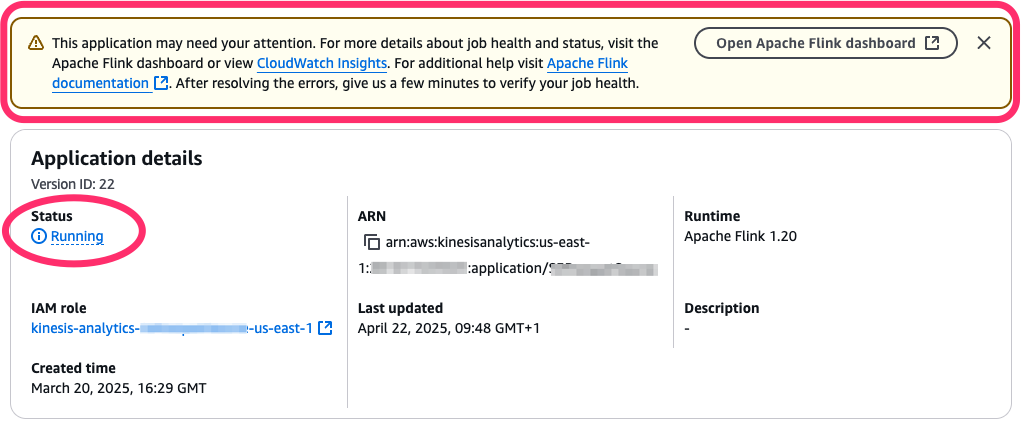
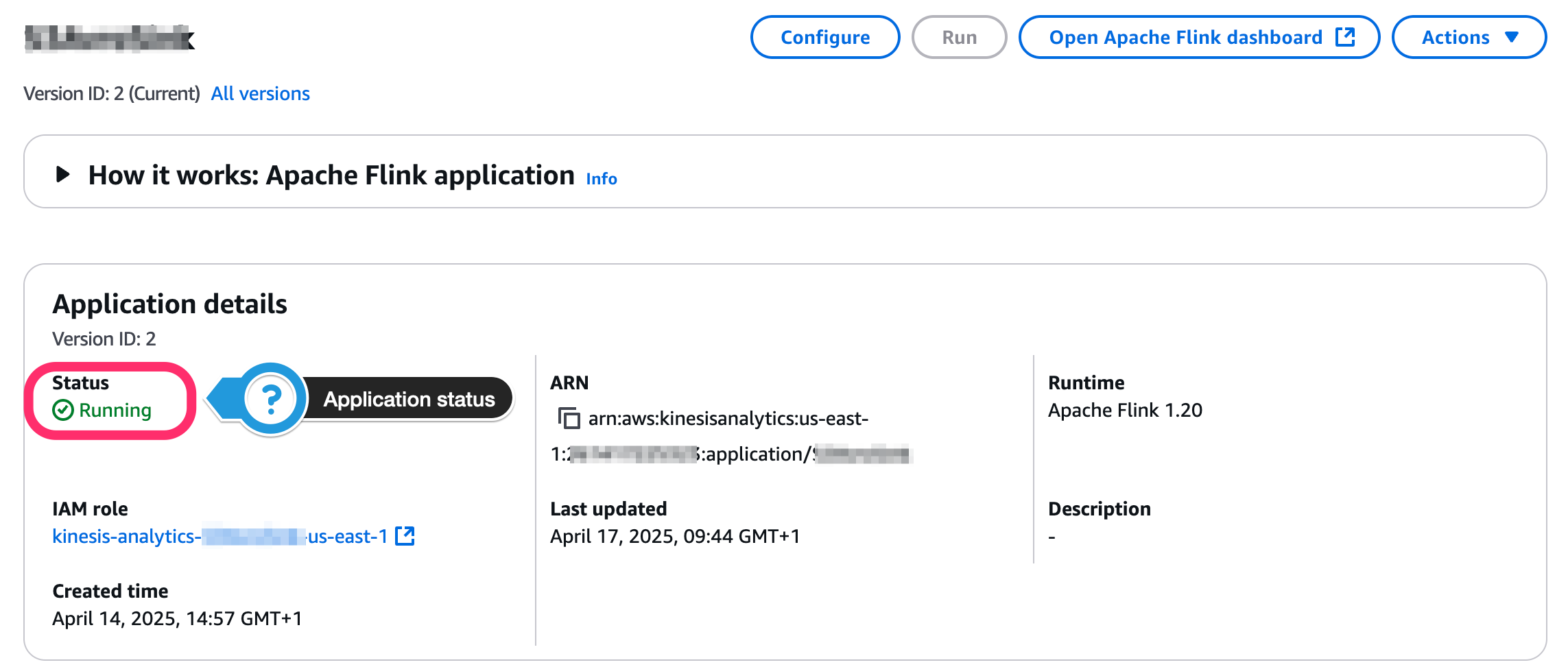
When this happens, the Managed Service for Apache Flink application status might be RUNNING, but the underlying Flink job is actually failing and restarting. The AWS Management Console gives you a hint, pointing that the application might need attention (see the following screenshot).

Application needs attention

In the following sections, we learn how to monitor the application and job status, to automatically react to this situation.

When starting or updating the application goes wrong

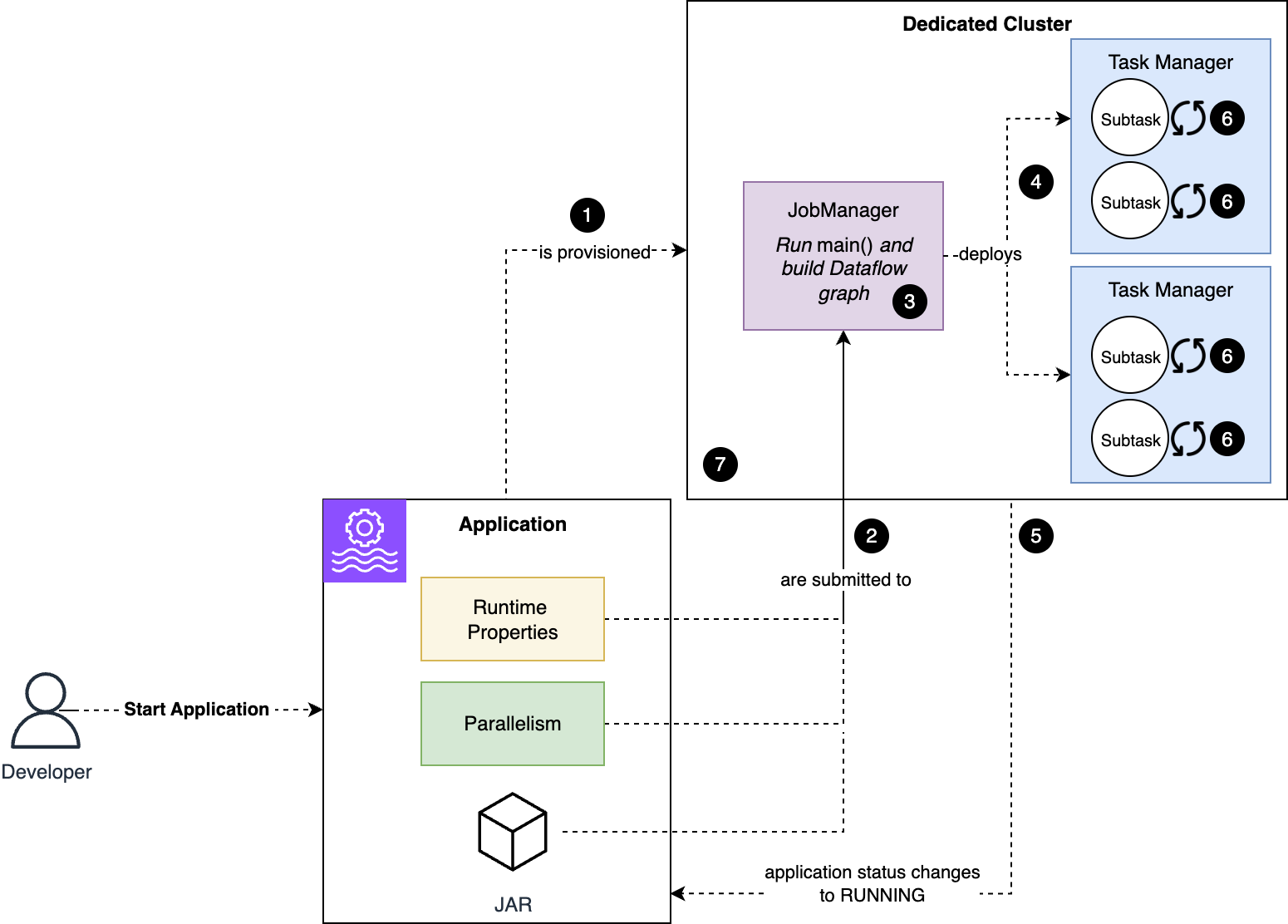
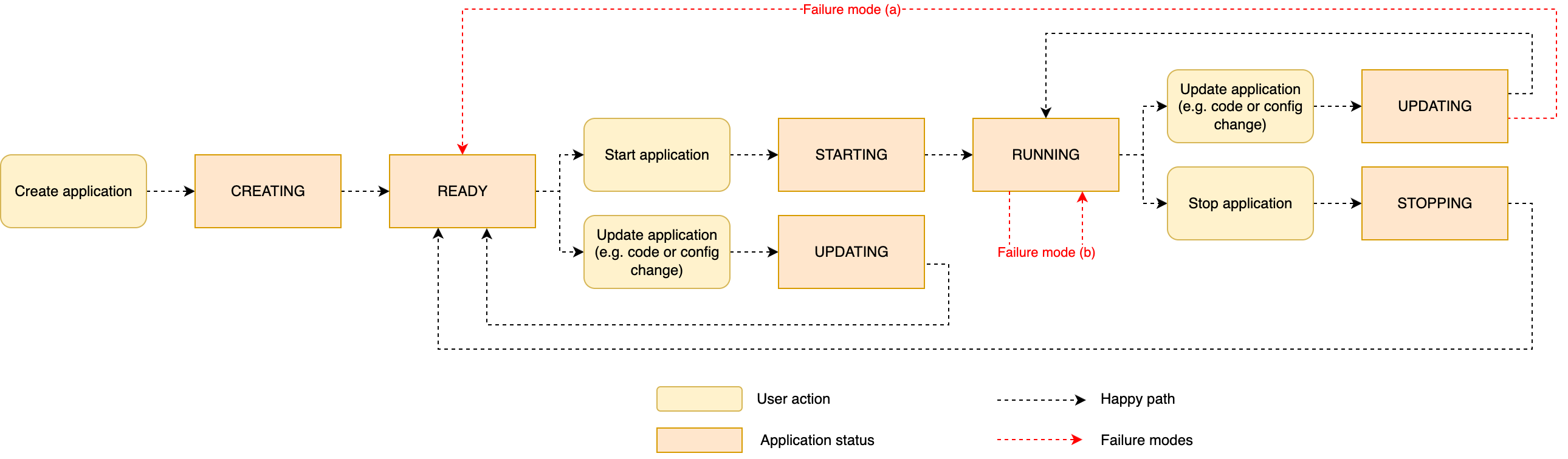
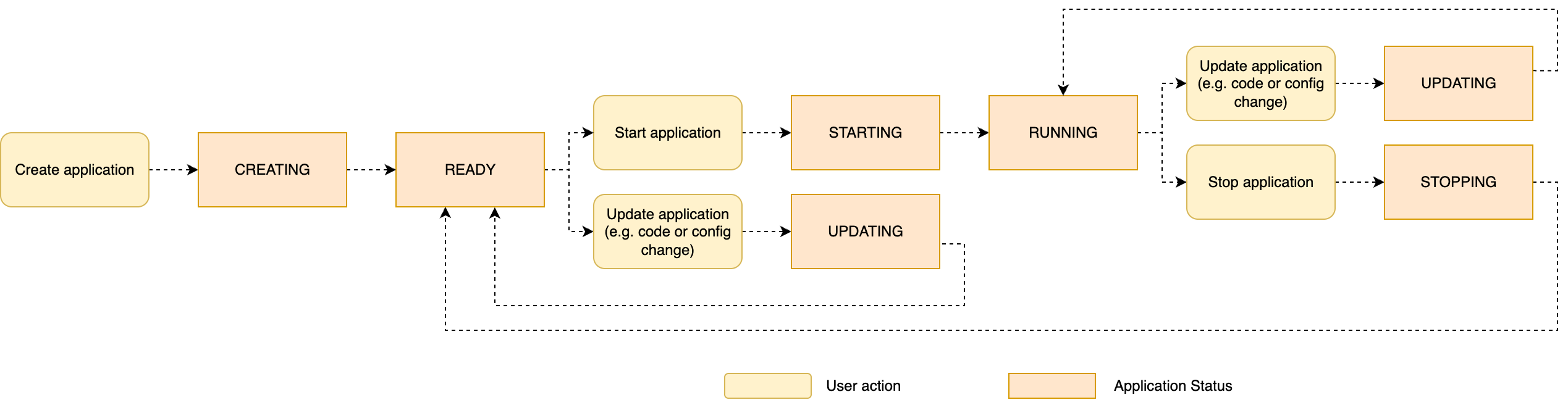
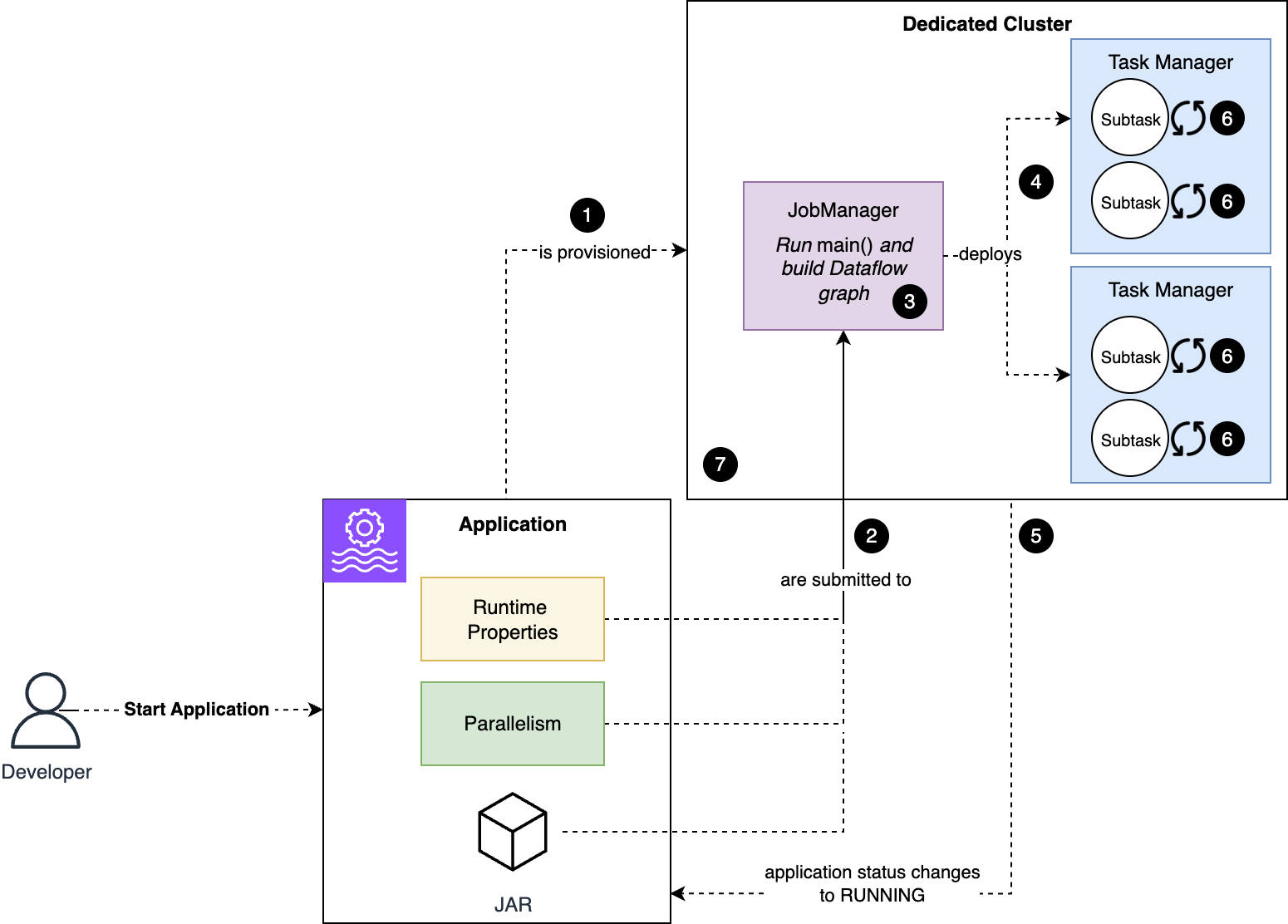
To understand the failure mode, let’s review what happens automatically when you start the application, or when the application restarts after you issued UpdateApplication command, as we explored in Part 1 of this series. The following diagram illustrates what happens when an application starts.

Application start process

The workflow consists of the following steps:

  1. Managed Service for Apache Flink provisions a cluster dedicated to your application.
  2. The code and configuration are submitted to the Job Manager node.
  3. The code in the main() method of your application runs, defining the dataflow of your application.
  4. Flink deploys to the Task Manager nodes the substasks that make up your job.
  5. The job and application status change to RUNNING. However, subtasks start initializing now.
  6. Subtasks restore their state, if applicable, and initialize any resources. For example, a Kafka connector’s subtask initializes the Kafka client and subscribes the topic.
  7. When all subtasks are successfully initialized, they change to RUNNING status and the job starts processing data.

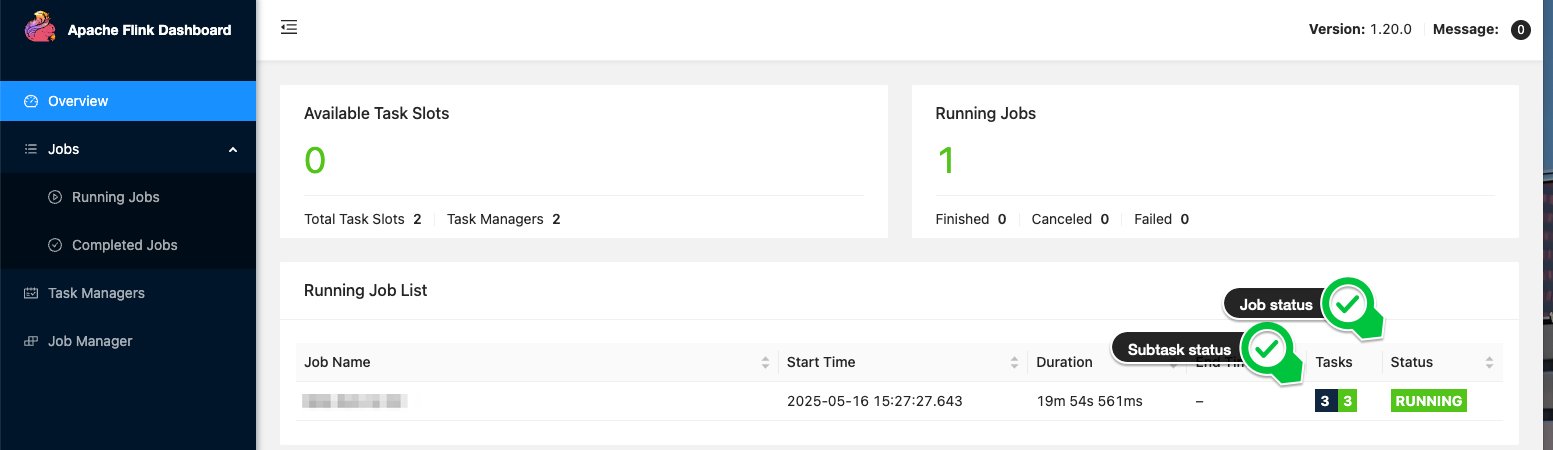
To new Flink users, it can be confusing that a RUNNING status doesn’t necessarily imply the job is healthy and processing data.When something goes wrong during the process of starting (or restarting) the application, depending on the phase when the problem arises, you might observe two different types of failure modes:

  • (a) A problem prevents the application code from being deployed – Your application might encounter this failure scenario if the deployment fails as soon as the code and configuration are passed to the Job Manager (step 2 of the process), for example if the application code package is malformed. A typical error is when the JAR is missing a mainClass or if mainClass points to a class that doesn’t exist. This failure mode might also happen if the code of your main() method throws an unhandled exception (step 3). In these cases, the application fails to change to RUNNING, and reverts to READY after the attempt.
  • (b) The application is started, the job is stuck in a fail-and-restart loop – A problem might occur later in the process, after the application status has changed RUNNING. For example, after the Flink job has been deployed to the cluster (step 4 of the process), a component might fail to initialize (step 6). This might happen when a connector is misconfigured, or a problem prevents it from connecting to the external system. For example, a Kafka connector might fail to connect to the Kafka cluster because of the connector’s misconfiguration or networking issues. Another possible scenario is when the Flink job successfully initializes, but it throws an exception as soon as it starts processing data (step 7). When this happens, Flink reacts to a runtime error and might get stuck in a fail-and-restart loop.

The following diagram illustrates the sequence of application status, including the two failure scenarios just described.

Application statuses, with failure scenarios

Troubleshooting

We have examined what can go wrong during operations, in particular when you update a RUNNING application or restart an application after changing its configuration. In this section, we explore how we can act on these failure scenarios.

Roll back a change

When you deploy a change and realize something is not quite right, you normally want to roll back the change and put the application back in working order, until you investigate and fix the problem. Managed Service for Apache Flink provides a graceful way to revert (roll back) a change, also restarting the processing from the point it was stopped before applying the fault change, providing consistency and no data loss.In Managed Service for Apache Flink, there are two types of rollbacks:

  • Automatic – During an automatic rollback (also called system rollback), if enabled, the service automatically detects when the application fails to restart after a change, or when the job starts but immediately falls into a fail-and-restart loop. In these situations, the rollback process automatically restores the application configuration version before the last change was applied and restarts the application from the snapshot taken when the change was deployed. See Improve the resilience of Amazon Managed Service for Apache Flink application with system-rollback feature for more details. This feature is disabled by default. You can enable it as part of the application configuration.
  • Manual – A manual rollback API operation is like a system rollback, but it’s initiated by the user. If the application is running but you observe something not behaving as expected after applying a change, you can trigger the rollback operation using the RollbackApplication API action or the console. Manual rollback is possible when the application is RUNNING or UPDATING.

Both rollbacks work similarly, restoring the configuration version before the change and restarting with the snapshot taken before the change. This prevents data loss and brings you back to a version of the application that was working. Also, this uses the code package that was saved at the time you created the previous configuration version (the one you are rolling back to), so there is no inconsistency between code, configuration, and snapshot, even if in the meantime you have replaced or deleted the code package from the Amazon Simple Storage Service (Amazon S3) bucket.

Implicit rollback: Update with an older configuration

A third way to roll back a change is to simply update the configuration, bringing it back to what it was before the last change. This creates a new configuration version, and requires the correct version of the code package to be available in the S3 bucket when you issue the UpdateApplication command.

Why is there a third option when the service provides system rollback and the managed RollbackApplication action? Because most high-level infrastructure-as-code (IaC) frameworks such as Terraform use this strategy, explicitly overwriting the configuration. It is important to understand this possibility even though you will probably use the managed rollback if you implement your automation based on the low-level actions.

The following are two important caveats to consider for this implicit rollback:

  • You will normally want to restart the application from the snapshot that was taken before the faulty change was deployed. If the application is currently RUNNING and healthy, this is not the latest snapshot (RESTORE_FROM_LATEST_SNAPSHOT), but rather the previous one. You must set the restart from RESTORE_FROM_CUSTOM_SNAPSHOT and select the correct snapshot.
  • UpdateApplication only works if the application is RUNNING and healthy, and the job can be gracefully stopped with a snapshot. Conversely, if the application is stuck in a fail-and-restart loop, you must force-stop it first, change the configuration while the application is READY, and later start the application from the snapshot that was taken before the faulty change was deployed.

Force-stop the application

In normal scenarios, you stop the application gracefully, with the automatic snapshot creation. However, this might not be possible in some scenarios, such as if the Flink job is stuck in a fail-and-restart loop. This might happen, for example, if an external system the job uses stops working, or because the AWS Identity and Access Management (IAM) configuration was erroneously modified, removing permissions required by the job.

When the Flink job gets stuck in a fail-and-restart loop after a faulty change, your first option should be using RollbackApplication, which automatically restores the previous configuration and starts from the correct snapshot. In the rare cases you can’t stop the application gracefully or use RollbackApplication, the last resort is force-stopping the application. Force-stop uses the StopApplication command with Force=true. You can also force-stop the application from the console.

When you force-stop an application, no snapshot is taken (if that were possible, you would have been able to gracefully stop). When you restart the application, you can either skip restoring from a snapshot (SKIP_RESTORE_FROM_SNAPSHOT) or use a snapshot that was previously taken, scheduled using Snapshot Manager, or manually, using the console or CreateApplicationSnapshot API action.

We strongly recommend setting up scheduled snapshots for all production applications that you can’t afford restarting with no state.

Monitoring Apache Flink application operations

Effective monitoring of your Apache Flink applications during and after operations is crucial to verify the outcome of the operation and allow lifecycle automation to raise alarms or react, in case something goes wrong.

The main indicators you can use during operations include the FullRestarts metric (available in Amazon CloudWatch) and the application, job, and task status.

Monitoring the outcome of an operation

The simplest way to detect the outcome of an operation, such as StartApplication or UpdateApplication, is to use the ListApplicationOperations API command. This command returns a list of the most recent operations of a specific application, including maintenance events that force an application restart.

For example, to retrieve the status of the most recent operation, you can use the following command:

aws kinesisanalyticsv2 list-application-operations \
    --application-name MyApplication \
   | jq '.ApplicationOperationInfoList \
   | sort_by(.StartTime) | last'

The output will be similar to the following code:

{
  "Operation": "UpdateApplication",
  "OperationId": "12abCDeGghIlM",
  "StartTime": "2025-08-06T09:24:22+01:00",
  "EndTime": "2025-08-06T09:26:56+01:00",
  "OperationStatus": "IN_PROGRESS"
}

OperationStatus will follow the same logic as the application status reported by the console and by DescribeApplication. This means it might not detect a failure during the operator initialization or while the job starts processing data. As we have learned, these failures might put the application in a fail-and-restart loop. To detect these scenarios using your automation, you must use other techniques, which we cover in the rest of this section.

Detecting the fail-and-restart loop using the FullRestarts metric

The simplest way to detect whether the application is stuck in a fail-and-restart loop is using the fullRestarts metric, available in CloudWatch Metrics. This metric counts the number of restarts of the Flink job after you started the application with a StartApplication command or restarted with UpdateApplication.

In a healthy application, the number of full restarts should ideally be zero. A single full restart might be acceptable during deployment or planned maintenance; multiple restarts normally indicate some issue. We recommend not to trigger an alarm on a single restart, or even a couple of consecutive restarts.

The alarm should only be triggered when the application is stuck in a fail-and-restart loop. This implies checking whether several restarts have happened over a relatively short period of time. Deciding the period is not trivial, because the time the Flink job takes to restart from a checkpoint depends on the size of the application state. However, if the state of your application is lower than several GB per KPU, you can safely assume the application should start in less than a minute.

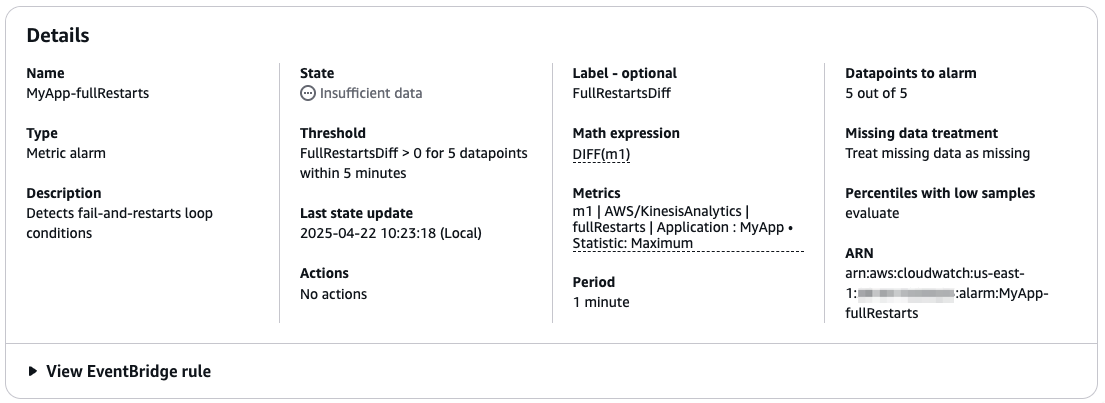
The goal is creating a CloudWatch alarm that triggers when fullRestarts keeps increasing over a time period sufficient for multiple restarts. For example, assuming your application restarts in less than 1 minute, you can create a CloudWatch alarm that relies on the DIFF math expression of the fullRestarts metric. The following screenshot shows an example of the alarm details.

CloudWatch Alarm on fullRestarts

This example is a conservative alarm, only triggering if the application keeps restarting for over 5 minutes. This means you detect the problem after at least 5 minutes. You might consider reducing the time to detect the failure earlier. However, be careful not to trigger an alarm after just one or two restarts. Occasional restarts might happen, for example during normal maintenance (patching) that is managed by the service, or for a transient error of an external system. Flink is designed to recover from these conditions with minimal downtime and no data loss.

Detecting whether the job is up and running: Monitoring application, job, and task status

We have discussed how you have different statuses: the status of the application, job, and subtask. In Managed Service for Apache Flink, the application and job status change to RUNNING when the subtasks are successfully deployed on the cluster. However, the job is not really running and processing data until all the subtasks are RUNNING.

Observing the application status during operations

The application status is visible on the console, as shown in the following screenshot.

Screenshot: Application status

In your automation, you can poll the DescribeApplication API action to observe the application status. The following command shows how to use the AWS Command Line Interface (AWS CLI) and jq command to extract the status string of an application:

aws kinesisanalyticsv2 describe-application \ 
    --application-name <your-application-name> \
    | jq -r '.ApplicationDetail.ApplicationStatus'

Observing job and subtask status

Managed Service for Apache Flink gives you access to the Flink Dashboard, which provides useful information for troubleshooting, including the status of all subtasks. The following screenshot, for example, shows a healthy job where all subtasks are RUNNING.

Job and Task status

In the following screenshot, we can see a job where subtasks are failing and restarting.

Job status: failing

In your automation, when you start the application or deploy a change, you want to be sure the job is eventually up and running and processing data. This happens when all the subtasks are RUNNING. Note that waiting for the job status to become RUNNING after an operation is not completely safe. A subtask might still fail and cause the job to restart after it was reported as RUNNING.

After you execute a lifecycle operation, your automation can poll the substasks status waiting for one of two events:

  • All subtasks report RUNNING – This indicates the operation was successful and your Flink job is up and running.
  • Any subtask reports FAILING or CANCELED – This indicates something went wrong, and the application is likely stuck in a fail-and-restart loop. You need to intervene, for example, force-stopping the application and then rolling back the change.

If you are restarting from a snapshot and the state of your application is quite big, you might observe subtasks will report INITIALIZING status for longer. During the initialization, Flink restores the state of the operator before changing to RUNNING.

The Flink REST API exposes the state of the subtasks, and can be used in your automation. In Managed Service for Apache Flink, this requires three steps:

  1. Generate a pre-signed URL to access the Flink REST API using the CreateApplicationPresignedUrl API action.
  2. Make a GET request to the /jobs endpoint of the Flink REST API to retrieve the job ID.
  3. Make a GET request to the /jobs/<job-id> endpoint to retrieve the status of the subtasks.

The following GitHub repository provides a shell script to retrieve the status of the tasks of a given Managed Service for Apache Flink application.

Monitoring subtasks failure while the job is running

The approach of polling the Flink REST API can be used in your automation, immediately after an operation, to observe whether the operation was eventually successful.

We strongly recommend not to continuously poll the Flink REST API while the job is running to detect failures. This operation is resource consuming, and might degrade performance or cause errors.

To monitor for suspicious subtask status changes during normal operations, we recommend using CloudWatch Logs instead. The following CloudWatch Logs Insights query extracts all subtask state transitions:

fields , message
| parse message /^(?<task>.+) switched from (?<fromStatus>[A-Z]+) to (?<toStatus>[A-Z]+)\./
| filter ispresent(task) and ispresent(fromStatus) and ispresent(toStatus)
| display , task, fromStatus, toStatus
| limit 10000

How Managed Service for Apache Flink minimizes processing downtime

We have seen how Flink is designed for strong consistency. To guarantee exactly-once state consistency, Flink temporarily stops the processing to deploy any changes, including scaling. This downtime is required for Flink to take a consistent copy of the application state and save it in a savepoint. After the change is deployed, the job is restarted from the savepoint, and there is no data loss. In Managed Service for Apache Flink, updates are fully managed. When snapshots are enabled, UpdateApplication automatically stops the job and uses snapshots (based on Flink’s savepoints) to retain the state.

Flink guarantees no data loss. However, your business requirements or Service Level Objectives (SLOs) might also impose a maximum delay for the data received by downstream systems, or end-to-end latency. This delay is affected by the processing downtime, or the time the job doesn’t process data to allow Flink deploying the change.With Flink, some processing downtime is unavoidable. However, Managed Service for Apache Flink is designed to minimize the processing downtime when you deploy a change.

We have seen how the service runs your application in a dedicated cluster, for complete isolation. When you issue UpdateApplication on a RUNNING application, the service prepares a new cluster with the required amount of resources. This operation might take some time. However, this doesn’t affect the processing downtime, because the service keeps the job running and processing data on the original cluster until the last possible moment, when the new cluster is ready. At this point, the service stops your job with a savepoint and restarts it on the new cluster.

During this operation, you are only charged for the number of KPU of a single cluster.

The following diagram illustrates the difference between the duration of the update operation, or the time the application status is UPDATING, and the processing downtime, observable from the job status, visible in the Flink Dashboard.

Downtime

You can observe this process, keeping both the application console and Flink Dashboard open, when you update the configuration of a running application, even with no changes. The Flink Dashboard will become temporarily unavailable when the service switches to the new cluster. Additionally, you can’t use the script we provided to check the job status for this scope. Even though the cluster keeps serving the Flink Dashboard until it’s tore down, the CreateApplicationPresignedUrl action doesn’t work while the application is UPDATING.

The processing time (the time the job is not running on either clusters) depends on the time the job takes to stop with a savepoint (snapshot) and restore the state in the new cluster. This time largely depends on the size of the application state. Data skew might also affect the savepoint time due to the barrier alignment mechanism. For a deep dive into the Flink’s barrier alignment mechanism, refer to Optimize checkpointing in your Amazon Managed Service for Apache Flink applications with buffer debloating and unaligned checkpoints, keeping in mind that savepoints are always aligned.

For the scope of your automation, you normally want to wait until the job is back up and running and processing data. You normally want to set a timeout. If both the application and job don’t return to RUNNING within this timeout, something probably went wrong and you might want to raise an alarm or force a rollback. This timeout should consider the entire update operation duration.

Conclusion

In this post, we discussed possible failure scenarios when you deploy a change or scale your application. We showed how Managed Service for Apache Flink rollback functionalities can seamlessly bring you back to a safe place after a change went wrong. We also explored how you can automate monitoring operations to observe application, job, and subtask status, and how to use the fullRestarts metric to detect when the job is in a fail-and-restart loop.

For more information, see Run a Managed Service for Apache Flink application, Implement fault tolerance in Managed Service for Apache Flink, and Manage application backups using Snapshots.


About the authors

Lorenzo Nicora

Lorenzo Nicora

Lorenzo works as Senior Streaming Solution Architect at AWS, helping customers across EMEA. He has been building cloud-centered, data-intensive systems for over 25 years, working across industries both through consultancies and product companies. He has used open-source technologies extensively and contributed to several projects, including Apache Flink, and is the maintainer of the Flink Prometheus connector.

Felix John

Felix John

Felix is a Global Solutions Architect and data streaming expert at AWS, based in Germany. He focuses on supporting global automotive & manufacturing customers on their cloud journey. Outside of his professional life, Felix enjoys playing Floorball and hiking in the mountains.

Deep dive into the Amazon Managed Service for Apache Fink application lifecycle – Part 1

Post Syndicated from Lorenzo Nicora original https://aws.amazon.com/blogs/big-data/part-1-deep-dive-into-the-amazon-managed-service-for-apache-fink-application-lifecycle/

Apache Flink is an open source framework for stream and batch processing applications. It excels in handling real-time analytics, event-driven applications, and complex data processing with low latency and high throughput. Flink is designed for stateful computation with exactly-once consistency guarantees for the application state.

Amazon Managed Service for Apache Flink is a fully managed stream processing service that you can use to run Apache Flink jobs at scale without worrying about managing clusters and provisioning resources. You can focus on implementing your application using your integrated development environment (IDE) of choice, and build and package the application using standard build and continuous integration and delivery (CI/CD) tools.

With Managed Service for Apache Flink, you can control the application lifecycle through simple AWS API actions. You can use the API to start and stop the application, and to apply any changes to the code, runtime configuration, and scale. The service takes care of managing the underlying Flink cluster, giving you a serverless experience. You can implement automation such as CI/CD pipelines with tools that can interact with the AWS API or AWS Command Line Interface (AWS CLI).

You can control the application using the AWS Management Console, AWS CLI, AWS SDK, and tools using the AWS API, such as AWS CloudFormation or Terraform. The service is not prescriptive on the automation tool you use to deploy and orchestrate the application.

Paraphrasing Jackie Stewart, the famous racing driver, you don’t need to understand how to operate a Flink cluster to use Managed Service for Apache Flink, but some Mechanical Sympathy will help you implement a robust and reliable automation.

In this two-part series, we explore what happens during an application’s lifecycle. This post covers core concepts and the application workflow during normal operations. In Part 2, we look at potential failures, how to detect them through monitoring, and ways to quickly resolve issues when they occur.

Definitions

Before examining the application lifecycle steps, we need to clarify the usage of certain terms in the context of Managed Service for Apache Flink:

  • Application – The main resource you create, control, and run in Managed Service for Apache Flink is an application.
  • Application code package – For each Managed Service for Apache Flink application, you implement the application code package (application artifact) of the Flink application code you want to run. This code is compiled and packaged along with dependencies into a JAR or a ZIP file, that you upload to an Amazon Simple Storage Service (Amazon S3) bucket.
  • Configuration – Each application has a configuration that contains the information to run it. The configuration points to the application code package in the S3 bucket and defines the parallelism, which will also determine the application resources, in terms of KPUs. It also defines security, networking, and runtime properties, which are passed to your application code at runtime.
  • Job – When you start the application, Managed Service for Apache Flink creates a dedicated cluster for you and runs your application code as a Flink job.

The following diagram shows the relationship between these concepts.

Concepts

There are two additional important concepts: checkpoints and savepoints, the mechanisms Flink uses to guarantee state consistency across failures and operations. In Managed Service for Apache Flink, both checkpoints and savepoints are fully managed.

  • Checkpoints – These are controlled by the application configuration and enabled by default with a period of 1 minute. In Managed Service for Apache Flink, checkpoints are used when a job automatically restarts after a runtime failure. They are not durable and are deleted when the application is stopped or updated and when the application automatically scales.
  • Savepoints – These are called snapshots in Managed Service for Apache Flink, and are used to persist the application state when the application is deliberately restarted by the user, due to an update or an automatic scaling event. Snapshots can be triggered by the user. Snapshots (if enabled) are also automatically used to save and restore the application state when the application is stopped and restarted, for example to deploy a change or automatically scale. Automatic use of snapshots is enabled in the application configuration (enabled by default when you create an application using the console).

Lifecycle of an application in Managed Service for Apache Flink

Starting with the happy path, a typical lifecycle of a Managed Service for Apache Flink application comprises the following steps:

  1. Create and configure a new application.
  2. Start the application.
  3. Deploy a change (update the runtime configuration, update the application code, change the parallelism to scale up or down).
  4. Stop the application.

Starting, stopping, and updating the application use snapshots (if enabled) to retain application state consistency during operations. We recommend enabling snapshots on every production and staging application, to support the persistence of the application state across operations.

In Managed Service for Apache Flink, the application lifecycle is controlled through the console, API actions in the kinesisanalyticsv2 API, or equivalent actions in the AWS CLI and SDK. On top of these fundamental operations, you can build your own automation using different tools, directly using low-level actions or using higher level infrastructure-as-code (IaC) tooling such as AWS CloudFormation or Terraform.

In this post, we refer to the low-level API actions used at each step. Any higher-level IaC tooling will use combination of these operations. Understanding these operations is fundamental to designing a robust automation.

The following diagram summarizes the application lifecycle, showing typical operations and application statuses.

Application statuses

The status of your application, READY, STARTING, RUNNING, UPDATING, and so on, can be observed on the console and using the DescribeApplication API action.

In the following sections, we analyze each lifecycle operation in more detail.

Create and configure the application

The first step is creating a new Managed Service for Apache Flink application, including defining the application configuration. You can do this in a single step using the CreateApplication action, or by creating the basic application configuration and then updating the configuration before starting it using UpdateApplication. The latter approach is what you do when you create an application from the console.

In this phase, the developer packages the application they have implemented in a JAR file (for Java) or ZIP file (for Python) and uploads it to an S3 bucket the user has previously created. The bucket name and the path to the application code package are part of the configuration you define.

When UpdateApplication or CreateApplication is invoked, Managed Service for Apache Flink takes a copy of the application code package (JAR or ZIP file) referred by the configuration. The configuration is rejected if the file pointed by the configuration doesn’t exist.

The following diagram illustrates this workflow.

Create application

Simply updating the application code package in the S3 bucket doesn’t trigger an update. You need to run UpdateApplication to make the new file visible to the service and trigger the update, even when you overwrite the code package with the same name.

Start the application

Managed Service for Apache Flink provisions resources when the application is actually running, and you only pay for the resources of running applications. You explicitly control when to start the application by issuing a StartApplication.

Managed Service for Apache Flink indexes on high availability and runs your application in a dedicated Flink cluster. When you start the application, Managed Service for Apache Flink deploys a dedicated cluster and deploys and runs the Flink job based on the configuration you defined.

When you start the application, the status of the application moves from READY, to STARTING, and then RUNNING.

The following diagram illustrates this workflow.

Start application

Managed Service for Apache Flink supports both streaming mode, the default for Apache Flink, and batch mode:

  • Streaming mode – In streaming mode, after an application is successfully started and goes into RUNNING status, it keeps running until you stop it explicitly. From this point on, the behavior on failure is automatically restarting the job from the latest checkpoint, so there is no data loss. We discuss more details about this failure scenario later in this post.
  • Batch mode – A Flink application running in batch mode behaves differently. After you start it, it goes into RUNNING status, and the job continues running until it completes the processing. At that point the job will gracefully stop, and the Managed Service for Apache Flink application goes back to READY status.

This post focuses on streaming applications only.

Update the application

In Managed Service for Apache Flink, you handle the following changes by updating the application configuration, using the console or the UpdateApplication API action:

  • Application code changes, replacing the package (JAR or ZIP file) with one containing a new version
  • Runtime properties changes
  • Scaling, which implies changing parallelism and resources (KPU) changes
  • Operational parameter changes, such as checkpoint, logging level, and monitoring setup
  • Networking configuration changes

When you modify the application configuration, Managed Service for Apache Flink creates a new configuration version, identified by a version ID number, automatically incremented at every change.

Update the code package

We mentioned how the service takes a copy of the code package (JAR or ZIP file) when you update the application configuration. The copy is associated with the new application configuration version that has been created. The service uses its own copy of the code package to start the application. You can safely replace or delete the code package after you have updated the configuration. The new package is not taken into account until you update the application configuration again.

Update a READY (not running) application

If you update an application in READY status, nothing special happens beyond creating the new configuration version that will be used the next time you start the application. However, in production, you will normally update the configuration of an application in RUNNING status to apply a change. Managed Service for Apache Flink automatically handles the operations required to update the application with no data loss.

Update a RUNNING application

To understand what happens when you update a running application, you need to remember that Flink is designed for strong consistency and exactly-once state consistency. To maintain these features when a change is applied, Flink must stop the data processing, take a copy of the application state, restart the job with the changes, and restore the state, before processing can restart.

This is a standard Flink behavior, and applies to any changes, whether it’s code changes, runtime configuration changes, or new parallelism to scale up and down. Managed Service for Apache Flink automatically orchestrates this process for you. If snapshots are enabled, the service will take a snapshot before stopping the processing and restart from the snapshot when the change is deployed. This way, the change can be deployed with zero data loss.

If snapshots are disabled, the service restarts the job with the change, but the state will be empty, like the first time you started the application. This might cause data loss. You normally don’t want this to happen, particularly in production applications.

Let’s explore a practical example, illustrated by the following diagram. For instance, when you want to deploy a code change, the following steps typically happen (in this example, we assume that snapshots are enabled, which they should be in a production application):

  1. Make changes to the application code.
  2. The build process creates the application package (JAR or ZIP file), either manually or using CI/CD automation.
  3. Upload the new application package to an S3 bucket.
  4. Update the application configuration pointing to the new application package.
  5. As soon as you successfully update the configuration, Managed Service for Apache Flink starts the operation for updating the application. The application status changes to UPDATING. The Flink job is stopped, taking a snapshot of the application state.
  6. After the changes have been applied, the application is restarted using the new configuration, which in this case includes the new application code, and the job restores the state from the snapshot. When the process is complete, the application status goes back to RUNNING.

Update application

The process is similar for changes to the application configuration. For example, you can change the parallelism to scale the application updating the application configuration, causing the application to be redeployed with the new parallelism and the amount resources (CPU, memory, local storage) based on the new number of KPU.

Update the application’s IAM role

The application configuration contains a reference to an AWS Identity and Access Management (IAM) role. In the unlikely case you want to use a different role, you can update the application configuration using UpdateApplication. The process will be the same described earlier.

However, you usually want to modify the IAM role, to add or remove permissions. This operation doesn’t use the Managed Service for Apache Flink application lifecycle and can be done at any time. No application stop and restart is required. IAM changes take effect immediately, potentially inducing a failure if, for example, you inadvertently remove a required permission. In this case, the behavior of the Flink job’s response might vary, depending on the affected component.

Stop the application

You can stop a running Managed Service for Apache Flink application using the StopApplication action or the console. The service gracefully stops the application. The state turns from RUNNING, into STOPPING, and finally into READY.

When snapshots are enabled, the service will take a snapshot of the application state when it is stopped, as shown in the following diagram.

Stop application

After you stop the application, any resource previously provisioned to run your application is reclaimed. You incur no cost while the application is not running (READY).

Start the application from a snapshot

Sometimes, you might want to stop a production application and restart it later, restarting the processing from the point it was stopped. Managed Service for Apache Flink supports starting the application from a snapshot. The snapshot saves not only the application state, but also the point in the source—the offsets in a Kafka topic, for example—where the application stopped consuming.

When snapshots are enabled, Managed Service for Apache Flink automatically takes a snapshot when you stop the application. This snapshot can be used when you restart the application.

The StartApplication API command has three restore options:

  • RESTORE_FROM_LATEST_SNAPSHOT: Restore from the latest snapshot.
  • RESTORE_FROM_CUSTOM_SNAPSHOT: Restore from a custom snapshot (you need to specify which one).
  • SKIP_RESTORE_FROM_SNAPSHOT: Skip restoring from the snapshot. The application will start with no state, as the very first time you ran it.

When you start the application for the very first time, no snapshot is available yet. Regardless of the restore option you choose, the application will start with no snapshot.

The process of starting the application from a snapshot is visualized in the following diagram.

Start application with snapshot

In production, you normally want to restore from the latest snapshot (RESTORE_FROM_LATEST_SNAPSHOT). This will automatically use the snapshot the service created when you last stopped the application.

Snapshots are based on Flink’s savepoint mechanism and maintain the exactly-once consistency of the internal state. Also, the risk of reprocessing duplicate records from the source is minimized because the snapshot is taken synchronously while the Flink job is stopped.

Start the application from an older snapshot

In Managed Service for Apache Flink, you can schedule taking periodic snapshots of a running production application, for example using the Snapshot Manager. Taking a snapshot from a running application doesn’t stop the processing and only introduces a minimal overhead (comparable to checkpointing). With the second option, RESTORE_FROM_CUSTOM_SNAPSHOT, you can restart the application back in time, using a snapshot older than the one taken on the last StopApplication.

Because the source positions—for example, the offsets in a Kafka topic—are also restored with the snapshot, the application will revert to the point the application was processing when the snapshot was taken. This will also restore the state at that exact point, providing consistency.

When you start an application from an older snapshot, there are two important considerations:

  • Only restore snapshots taken within the source system retention period – If you restore a snapshot older than the source retention, data loss might occur, and the application behavior is unpredictable.
  • Restarting from an older snapshot will likely generate duplicate output – This is often not a problem when the end-to-end system is designed to be idempotent. However, this might cause problems if you are using a Flink transactional connector, such as File System sink or Kafka sink with exactly-once guarantees enabled. Because these sinks are designed to guarantee no duplicates (preventing them at any cost), they might prevent your application from restarting from an older snapshot. There are workarounds to this operational problem, but they depend on the specific use case and are beyond the scope of this post.

Understanding what happens when you start your application

We have learned the fundamental operations in the lifecycle of an application. In Managed Service for Apache Flink, these operations are controlled by a few API actions, such as StartApplication, UpdateApplication, and StopApplication. The service controls every operation for you. You don’t have to provision or manage Flink clusters. However, a better understanding of what happens during the lifecycle will give you sufficient Mechanical Sympathy to recognize potential failure modes and implement a more robust automation.

Let’s see in detail what happens when you issue a StartApplication command on an application in READY (not running). When you issue an UpdateApplication command on a RUNNING application, the application is first stopped with a snapshot, and then restarted with the new configuration, with a process identical to what we are going to see.

Composition of a Flink cluster

To understand what happens when you start the application, we need to introduce a couple of additional concepts. A Flink cluster is comprised of two types of nodes:

  • A single Job Manager, which acts as a coordinator
  • One or more Task Managers, which do the actual data processing

In Managed Service for Apache Flink, you can see the cluster nodes in the Flink Dashboard, which you can access from the console.

Flink decomposes the data processing defined by your application code into one or more subtasks, which are distributed across the Task Manager nodes, as illustrated in the following diagram.

Component of a Flink cluster

Remember, in Managed Service for Apache Flink, you don’t need to worry about provisioning and configuring the cluster. The service provides a dedicated cluster for your application. The total amount of vCPU, memory, and local storage of Task Managers matches the number of KPU you configured.

Starting your Managed Service for Apache Flink application

Now that we’ve discussed how a Flink cluster is composed, let’s explore what happens when you issue a StartApplication command, or when the application restarts after a change has been deployed with an UpdateApplication command.

The following diagram illustrates the process. Everything is carried out automatically for you.

Start application process

The workflow consists of the following steps:

  1. A dedicated cluster, with the amount of resources you requested, based on the number of KPU, is provisioned for your application.
  2. The application code, runtime properties, and other configurations such as the application parallelism are passed to the Job Manager node, the coordinator of the cluster.
  3. The Java or Python code in the main() method of your application is executed. This generates the logical graph of operators of your application (called dataflow). Based on the dataflow you defined and the application parallelism, Flink generates the subtasks, the actual nodes Flink will execute to process your data.
  4. Flink then distributes the job’s subtasks across Task Managers, the actual worker nodes of the cluster.
  5. When the previous step succeeds, the Flink job status and the Managed Service for Apache Flink application status change to RUNNING. However, the job is still not completely running and processing data. All substasks must be initialized.
  6. Each subtask independently restores its state, if starting from a snapshot, and initializes runtime resources. For example, Flink’s Kafka source connector restores the partition assignments and offsets from the savepoint (snapshot), establishes a connection to the Kafka cluster, and subscribes to the Kafka topic. From this step onward, a Flink job will stop and restart from its last checkpoint when encountering any unhandled error. If the problem causing the error is not transient, the job keeps stopping and restarting from the same checkpoint in a loop.
  7. When all subtasks are successfully initialized and change to RUNNING status, the Flink job starts processing data and is now properly running.

Conclusion

In this post, we discussed how the lifecycle of a Managed Service for Apache Flink application is controlled by simple AWS API commands, or the equivalent using the AWS SDK or AWS CLI. If you are using high-level automation tools such as AWS CloudFormation or Terraform, the low-level actions are also abstracted away for you. The service handles the complexity of operating the Flink cluster and orchestrating the Flink job lifecycle.

However, with a better understanding of how Flink works and what the service does for you, you can implement more robust automation and troubleshoot failures.

In the Part 2, we continue examining failure scenarios that can happen during normal operations or when you deploy a change or scale the application, and how to monitor operations to detect and recover when something goes wrong.


About the authors

Lorenzo Nicora

Lorenzo Nicora

Lorenzo works as Senior Streaming Solution Architect at AWS, helping customers across EMEA. He has been building cloud-centered, data-intensive systems for over 25 years, working across industries both through consultancies and product companies. He has used open-source technologies extensively and contributed to several projects, including Apache Flink, and is the maintainer of the Flink Prometheus connector.

Felix John

Felix John

Felix is a Global Solutions Architect and data streaming expert at AWS, based in Germany. He focuses on supporting global automotive & manufacturing customers on their cloud journey. Outside of his professional life, Felix enjoys playing Floorball and hiking in the mountains.

The collective thoughts of the interwebz