The kernel’s this_cpu
operations are meant to speed access to per-CPU variables. They are
more optimal on some CPUs than others, though. During a
memory-management-track session at the 2026 Linux Storage,
Filesystem, Memory Management, and BPF Summit, Yang Shi proposed a
fundamental, and somewhat controversial, change to how these operations
work in order to provide better performance on a wider range of architectures.
Compute
Express Link (CXL) is a technology intended to enable the provision of
“memory nodes” in data centers that provide (possibly shared) memory to
nearby CPUs. It has, Dan Williams said at the beginning of his
memory-management-track session on the topic at the 2026 Linux Storage,
Filesystem, Memory Management, and BPF Summit, “been making
memory-management problems worse since 2021“. He used the session to
provide an overview of the ways in which CXL can be expected to extend that
record into the future.
There are many places in the kernel where performance can be improved by
using per-CPU data. But, as it turns out, the kernel’s allocator for
per-CPU data has some performance problems of its own. Harry Yoo led a
session in the memory-management track of the 2026 Linux Storage,
Filesystem, Memory Management, and BPF Summit to explore ways to
address those problems and accelerate the allocation and initialization of
per-CPU data.
Cloudflare and Anthropic have collaborated to integrate Claude Managed Agents with Cloudflare Sandboxes. Our new integration gives you more control over your agent sandboxes, secures connections to private services, and improves observability.
In the past year, Cloudflare’s Developer Platform has expanded to give more developers the tools they need to run agents at scale. This includes:
Sandboxes for full stateful Linux microVMs at scale
Agents SDK, providing simple and customizable agent framework
Browser Run, which gives agents fully programmable and observable browsers
Dynamic Workers, allowing for dynamic sandboxed code execution at massive scale
Our goal is to make Cloudflare the simplest, most secure, and most programmable cloud for agents.
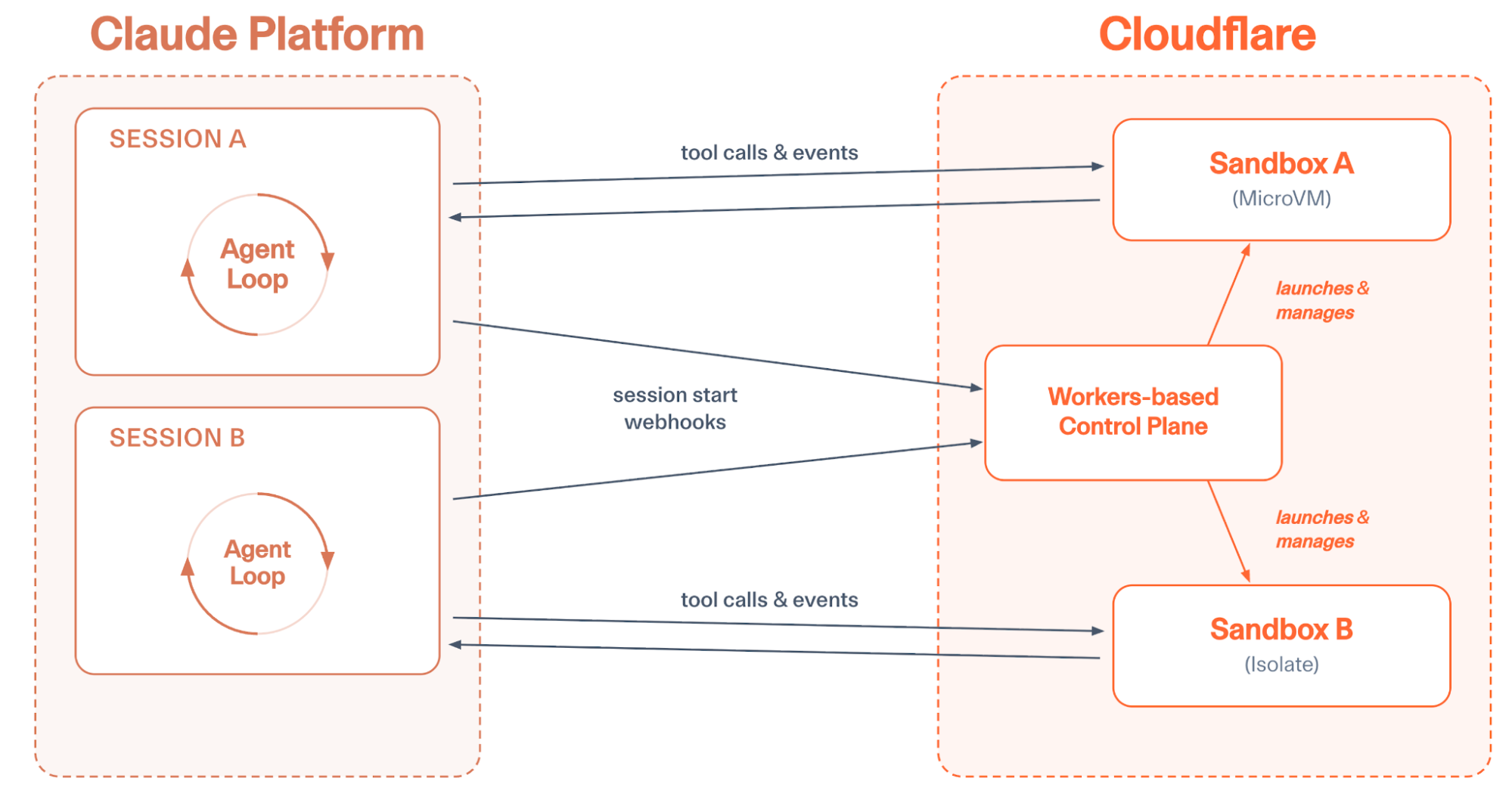
Integrating with Claude Managed Agents is another step in this direction. You can run your agent loop on the Claude Platform, while using Cloudflare to execute code, secure connections, and run custom tool calls.
Enhanced security – Run all agent traffic through customizable proxies. This allows you to securely inject credentials, prevent data exfiltration, and better observe how your agents interact with the outside world.
Sandbox control and observability – Get detailed sandbox metrics and logs. SSH into running machines. Customize sandbox images.
Lightweight sandboxes – Writing and executing untrusted code can be done in a traditional microVM or a lightweight isolate. This lets you hit massive scale, boot sandboxes in milliseconds, and minimize infrastructure spend.
Private service connectivity – Connect agents to private internal services without ever exposing them to the Internet.
Browser Control and Observability – Get an audit trail of every agent’s browser sessions, including session recording and human-in-the-loop flows.
Email – Give each of your agents its own email address and ability to send emails.
Custom tools – Extend your agents with tools without needing additional infrastructure. Just write functions and deploy.
You get all of this out of the box when deploying the integration, and you can easily customize if you need more.
Let’s take a brief look at Claude Managed Agents, see how to integrate a Cloudflare-based environment, then explore how to get the most out of Claude on Cloudflare.
An overview of Claude Managed Agents
Claude Managed Agents allow developers to easily define and run agents on the Anthropic platform. In these managed environments, Claude can read files, run commands, browse the web, and execute code. The harness supports built-in prompt caching, compaction, and various agent-first performance optimizations.
Until now, using Claude Managed Agents has meant running the entire stack on Anthropic-provided infrastructure. While this is great for some developers, others may need more control over their infrastructure choice, whether this is for security, compliance, or performance reasons. Self-managed environments for Claude Agents provide just that.
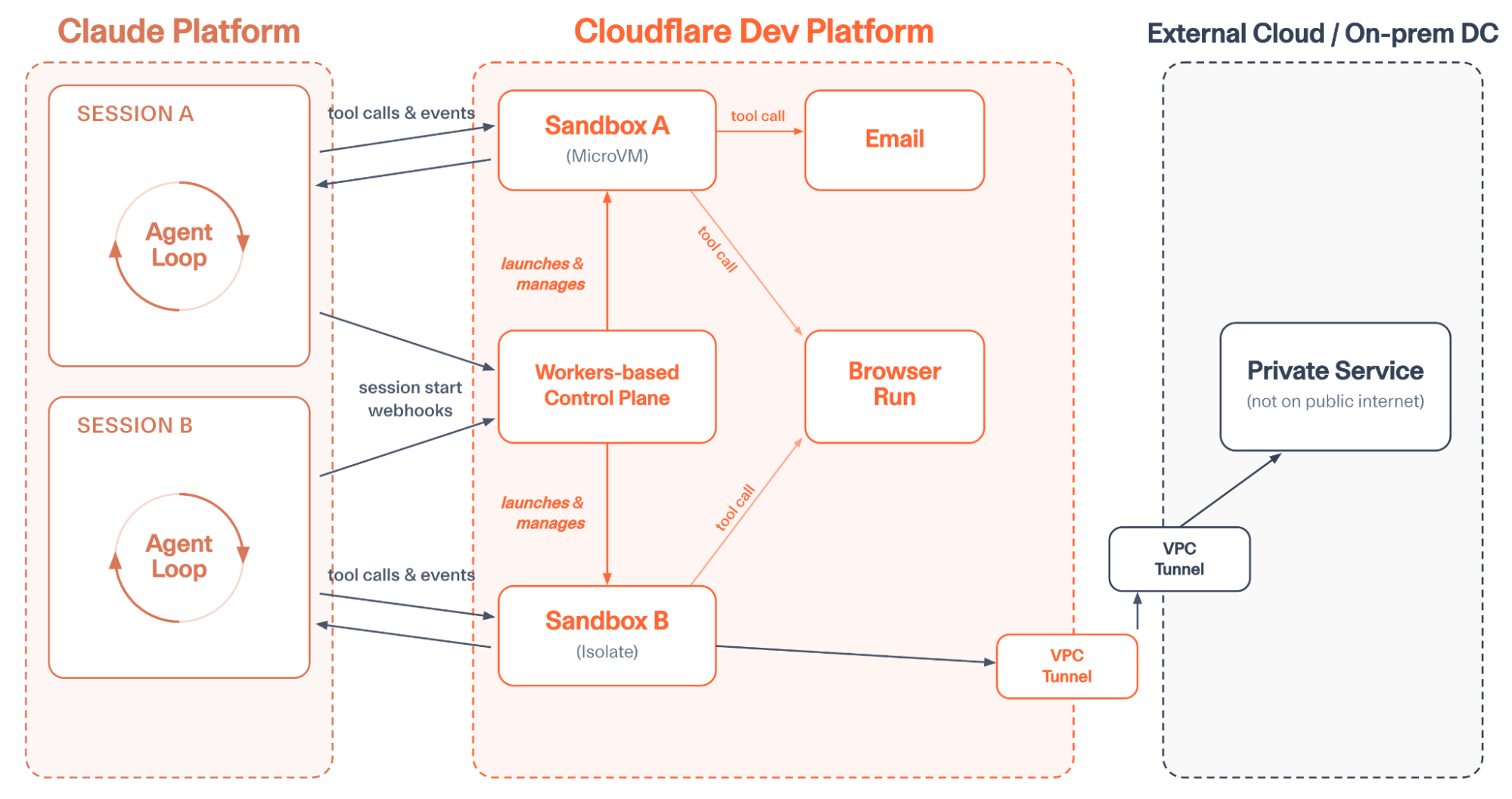
Anthropic describes this as “decoupling the brain from the hands.” The core agent loop runs in Anthropic (the “brain”), but the infrastructure for running and executing code (the “hands”) can be run anywhere, including Cloudflare.
The Cloudflare environment
Our new integration gives your agents a Cloudflare-based environment for running and executing code within minutes.
Follow the onboarding guide to get started. Then fork the repo and customize your integration as you see fit.
After setup, when a Claude Agent starts a session, it sends a message to your new Cloudflare-based control plane. The Workers-based control plane gives each agent session a sandboxed environment for executing code, developing applications, running CLI tools, and more. State is automatically persisted across session sleeps.
Sandboxes write files and execute code in response to the Claude-based Agent loop
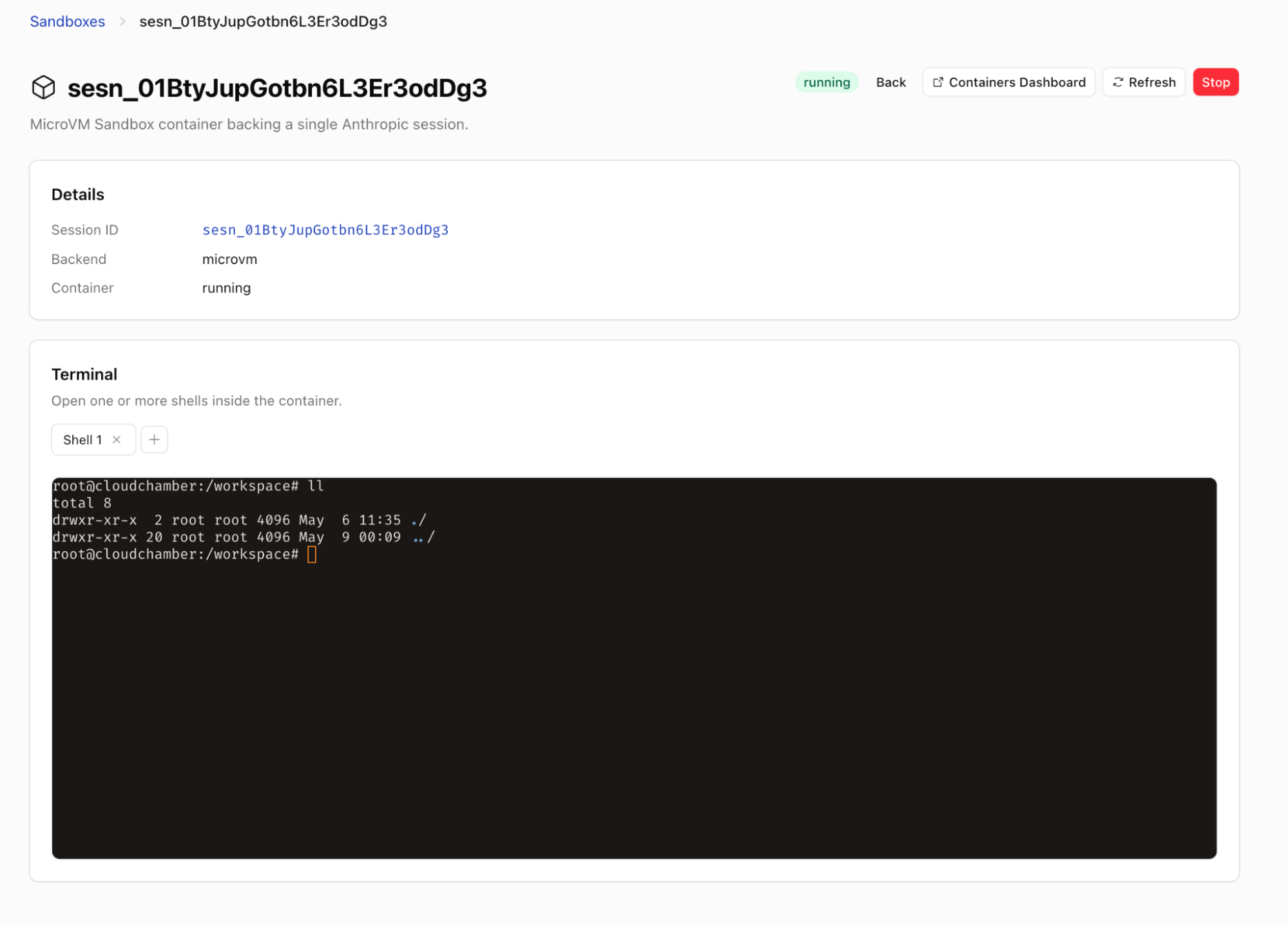
You can optionally configure sandbox instance sizes or customize the container image that runs within VM-based sandboxes. Each sandbox can be observed in the Cloudflare dashboard, sandbox logs can be queried or shipped to external providers like Datadog or Splunk, and the control plane ships with a built-in UI, making it easy to track the state of sandboxes or SSH into specific machines.
Get interactive shell sessions into your agent’s sandbox
Enabling agents at Internet scale
What if your agent backend booted in a few milliseconds, and you didn’t have to pay for the resources of a full VM when running the agent?
But as models get better, we expect more and more workflows to be managed by agents. Each of your customers should be able to run many agents simultaneously; each of your employees should have tens of agents running at once. If we’re constantly running a full microVM per agent, we’ll be unnecessarily burning a ton of resources and money to enable this scale.
That’s why we’re providing a faster and cheaper sandbox for your Claude Agents. This sandbox is based on the AgentsSDK. You can execute arbitrary code in Dynamic Workers using Codemode, and you still get a file system, but your agent is doing all of this within a V8 isolate instead of a microVM.
If you need agents to act as a developer, building full applications and running Linux-based tools, you can still reach for a microVM-based sandbox. For this, we provide Cloudflare Containers, which Claude Managed Agents can also use.
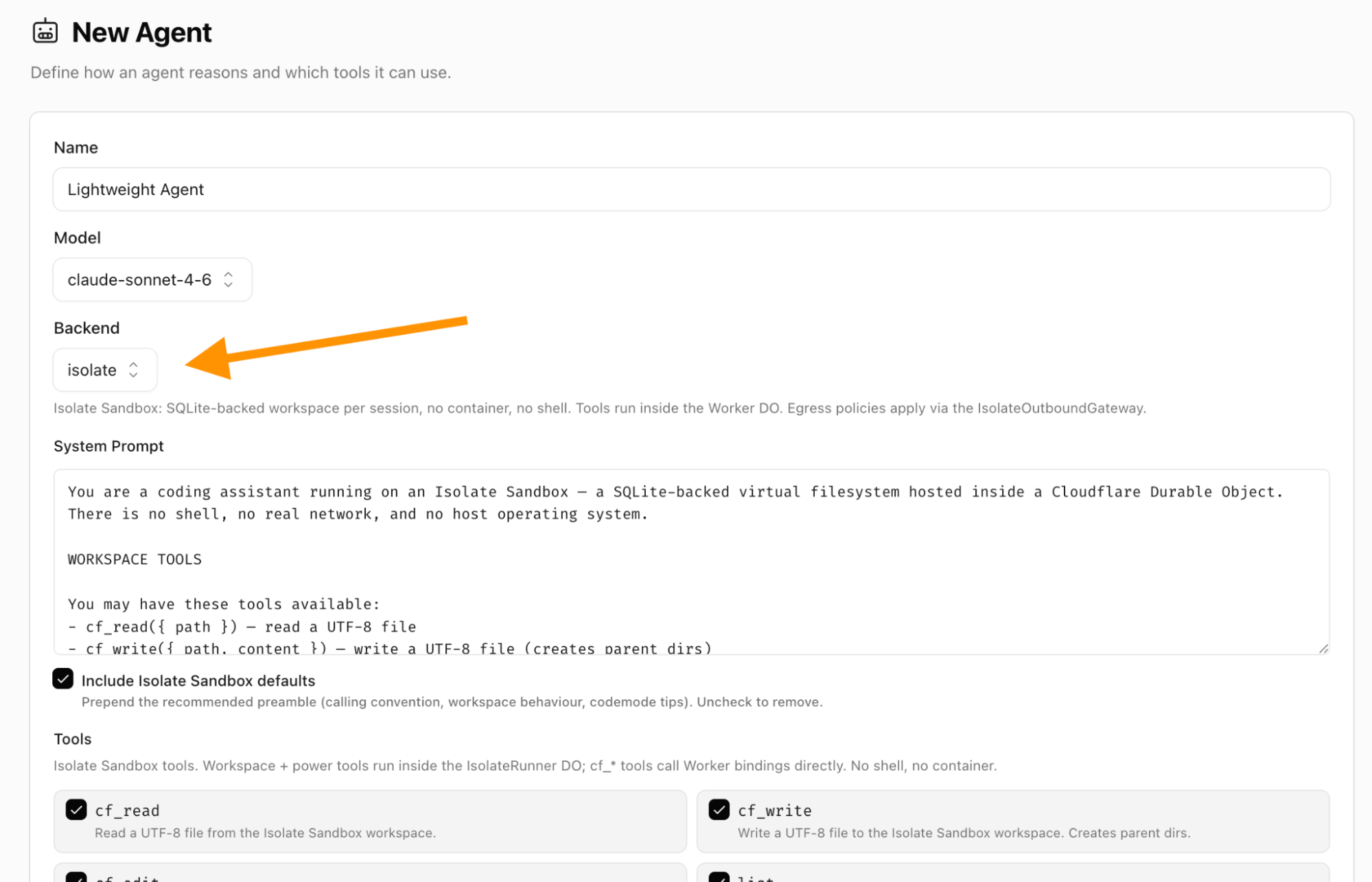
But if you want a faster, cheaper, and more scalable alternative you can use isolates instead of microVMs easily. Just select “isolate” for backend type when setting up an Agent.
Setting up an “isolate” backend gives you a lightweight V8 isolate sandbox instead of a microVM
If you want to handle bursts of tens of thousands of concurrent agents or more, running with isolates will allow you to scale in a way that no VM-based solution allows.
Securing your agentic workloads
Agents are far more powerful when they connect to your organization’s context. This usually means accessing private services and data.
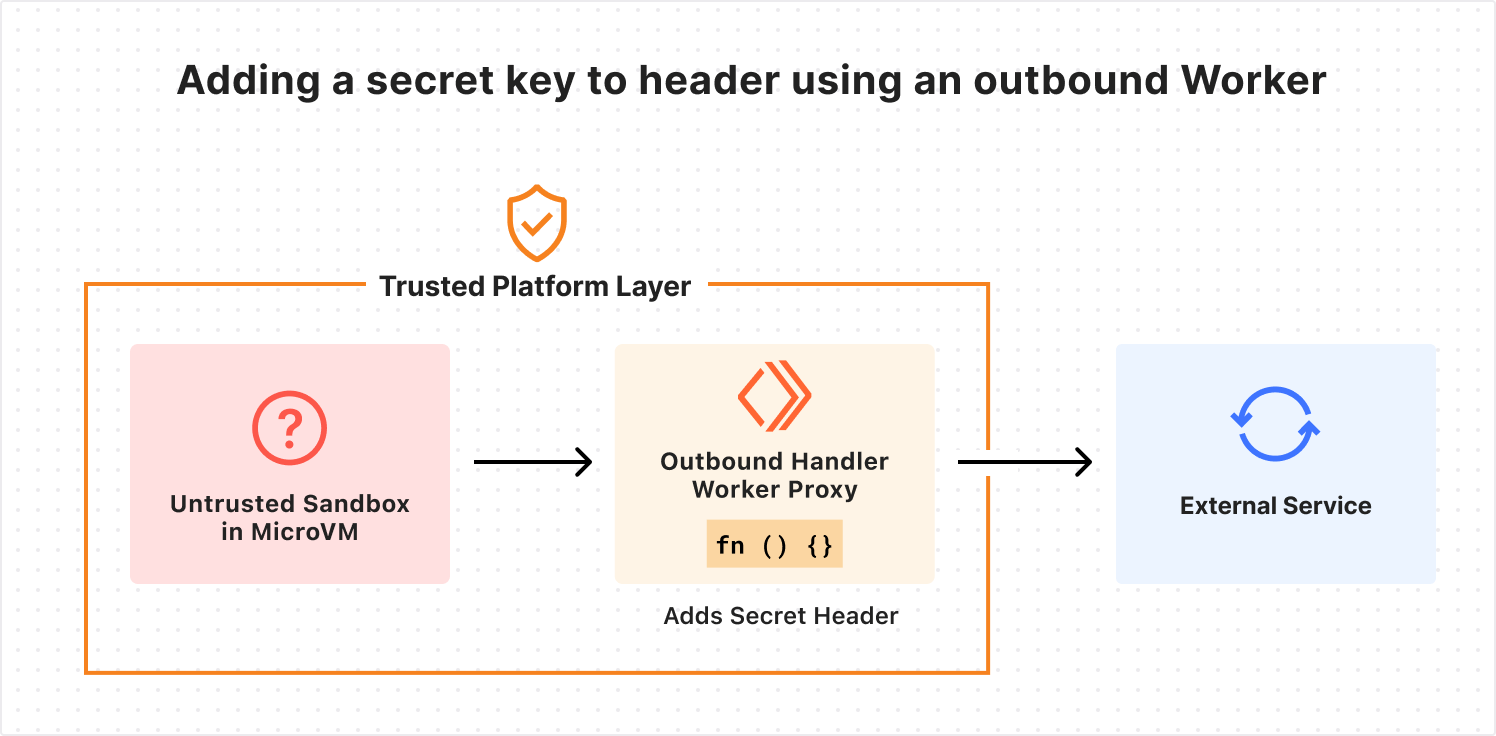
As we’ve written before, sandboxed workloads on Cloudflare can use an outbound proxy for fully dynamic, customizable, and zero-trust authentication between sandboxes and external services. This lets you inject secrets into requests outside the sandbox, so the agent never has access to them. This protects against exfiltration attacks.
And sometimes internal services shouldn’t ever be exposed to the open Internet. We recently launched Cloudflare Mesh and Cloudflare Workers VPC to better connect to these private services, whether they’re running on a cloud provider like AWS or on-premises. This allows you to connect to internal services using post-quantum encrypted networking without a VPN or bastion host.
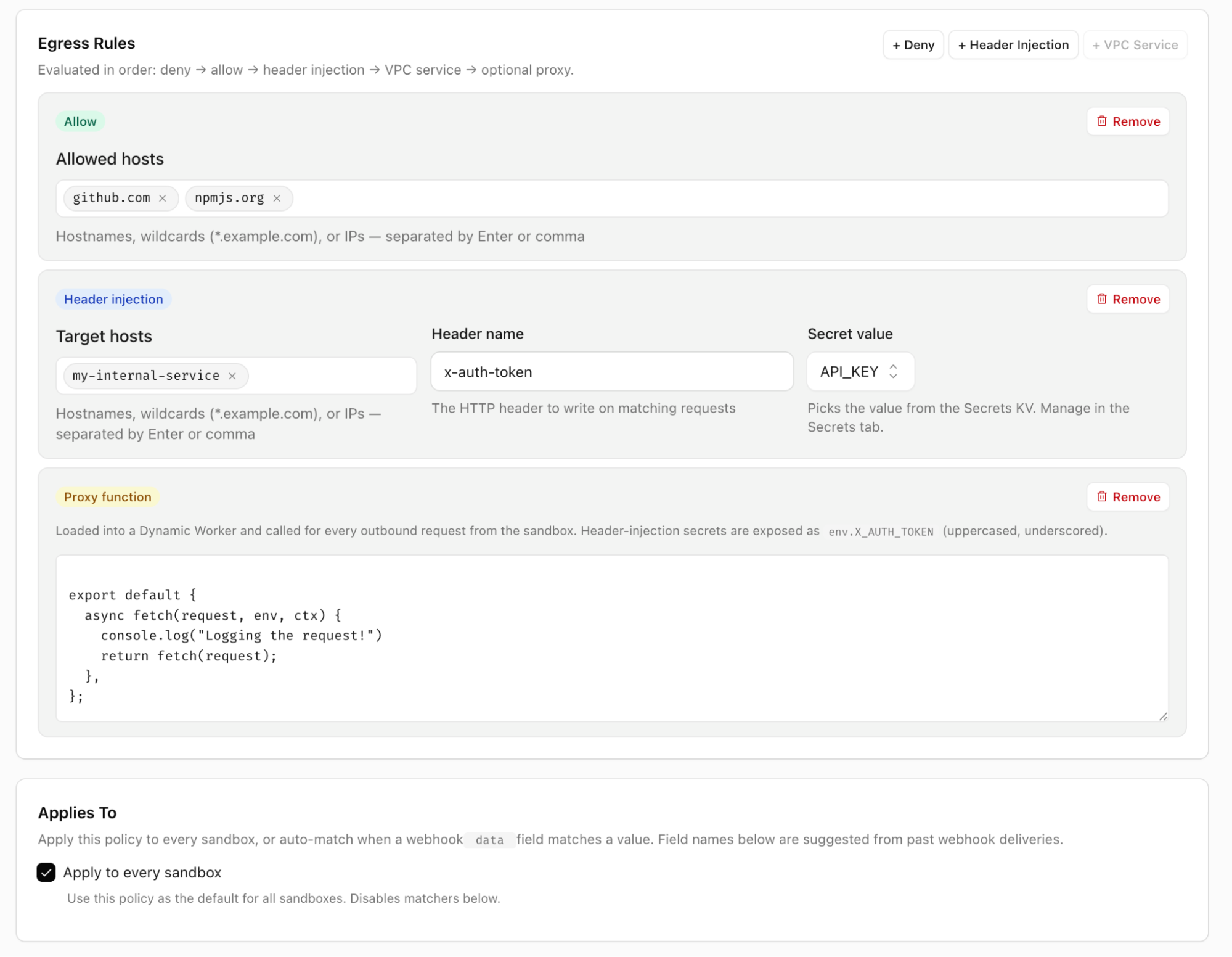
Claude Managed Agents can easily connect to private services with header injection or private VPC/Mesh tunnels. This is done via customizable outbound proxies. You can define egress policies that expose only the services you choose to the agent sandboxes that you choose. You can allowlist specific endpoints, perform zero-trust injection of encrypted credentials, access private services via Cloudflare Mesh, and even write custom proxy middleware.
The integration uses outbound Workers to handle egress however you see fit
You’re able to apply policies per tenant, per agent, or based on whatever metadata is useful. This gives you full control over how your agents connect to external services.
Doing more with the Cloudflare Developer Platform
Agents need more than just a code execution environment. Cloudflare’s Developer Platform provides the tools you need by default to let your agents do more.
Sandboxes can make tool calls on Cloudflare and safely access external services.
Here are a few of the tools you’ll find most useful as you deploy agents on Cloudflare:
Browser Run via Claude
One of the most common tools agents need is a browser. While curl can get you pretty far, when you want an agent to act like a human, this often means interacting with the web like one: rendering JS-heavy applications, taking screenshots for QA validation, filling out forms, etc. Browser Run is Cloudflare’s tool to give agents browsers.
A Browser Run session recording lets you watch how your agents used a browser. One of many built-in tools.
The Claude Managed Agents integration ships with multiple browser-related tools that can be enabled immediately. These include browser_search, browser_execute, screenshot, browse, fetch_to_markdown, and a Cloudflare-specific implementation of web_fetch allows your agent to control a browser that runs on Cloudflare infrastructure. This not only lets your agent do more, but it also makes it easy to audit every action your agent’s browser is taking on the web, apply allowlists and denylist to browser sessions, and save recordings of browser sessions for future debugging.
Agent inboxes
The integration also comes with built-in support for email with the send_email, email_read, and email_list tools.
You can also kick off new sessions via email, or configure the agent to send emails using any domain and address configured with the Cloudflare Email Service. This allows the agent to act on your behalf when it needs to, reply to context in forwarded emails, and autonomously interact with others via email.
Custom tools and more
Other built-in tools include call_service, which uses Cloudflare Mesh or Workers VPC to connect to private services, and image_generate, which uses Workers AI to generate images on Cloudflare. This pairs well with Claude providing text-based inference.
Additionally, we encourage forking the repo to easily add customized tools. For example, you could add a custom tool to host a public file on Cloudflare’s R2 object storage. Just add the relevant binding in wrangler config, write a zod definition, and short function in custom-tools.js:
defineTool({
  name: "r2_host_file",
  description: "Upload from sandbox to R2 and get a public URL.",
  inputSchema: z.object({
    key: z.string().describe("Object key"),
    content: z.string().describe("UTF-8 file body"),
    contentType: z.string().describe("MIME type"),
  }),
  run: async ({ key, content, contentType }, { env }) => {
    await env.PUBLIC_BUCKET.put(
      key, content, { httpMetadata: { contentType }}
    );
    return `${env.PUB_R2_URL.replace(/\/$/, "")}/${encodeURI(key)}`;
  }
}),
The Cloudflare Developer Platform provides all sorts of possibilities for extending your agents: give each agent session a git-backed repo with Artifacts, run edge inference with Workers AI, host applications written on the fly with Dynamic Workers, and more.
You don’t have to worry about infrastructure or scaling – just write a few lines of code and hit deploy.
Claude + Cloudflare
We’re excited to be working together with Anthropic to bring Cloudflare’s flexibility, scale, and security to more users. Whether you want to run tens of millions of agents using isolates, securely connect to private services with Workers VPC, or write custom tools that take advantage of all of Cloudflare, our new integration makes it easy.
In April, David Steele, maintainer of the popular pgBackRest backup and restore project for
PostgreSQL, announced that he had archived
the project and it would no longer be maintained due to lack of
sponsorship. On May 18, he announced
that a number of sponsors have stepped forward to ensure its continued
development:
Over the last few weeks, a coalition of sponsors has come together
to fund ongoing development. Their support means the project is no
longer reliant on a single sponsor, giving pgBackRest the stability it
needs for the long term.
[…] I’m looking forward to getting back to work. There are
features and optimizations in the pipeline that I’m excited to share
in upcoming releases. Thank you to our sponsors for making this
possible, and thank you to the community for your patience and support
during this transition.
Not by name, but Laurie Anderson quotes me in one of the tracks of her new album:
My favorite quote is from a cryptologist who said “If you think technology will solve your problems, you don’t understand technology and you don’t understand your problems.”
“Of course, it’s ridiculous, outrageous, blah, blah, blah,” Anderson says about the ad. ‘But, I mean, my favorite quote on this is from a cryptologist who said, ‘If you think technology will solve your problems, you don’t understand technology  and you don’t understand your problems.’ And I think I’m completely on board with that.”
People are telling me that she has been reciting this quote in performances for years. (I lost track of her since college and her 1981 hit “”https://www.youtube.com/watch?v=Vkfpi2H8tOE”>O Superman.”)
If you think cryptography can solve your problem, you don’t understand your problem and you don’t understand cryptography.
I modified the quote in the preface to my 2000 book Secrets and Lies:
A few years ago I heard a quotation, and I am going to modify it here: If you think technology can solve your security problems, then you don’t understand the problems and you don’t understand the technology.
I can’t tell you why me in 2000 didn’t credit Needham by name. I should have.
I have used the quote pretty consistently since then. Somewhere along the line I dropped “security” from the phrase, and now say it more like Anderson quotes me:
If you think technology will solve your problem, you don’t understand your problem and you don’t understand technology.
I sometimes use singular and sometimes use plural. Sometimes I say “the problem” and “the technology.” But I think the quote flows better ending with just the word “technology.”
Dell devoted its first day of its annual trade show to all things NVIDIA and all things AI. With a focus on sovereign AI and on-prem AI, Dell has assembled new ecosystems for both client and server AI
Today, we’re launching OpenSearch Agent Skills, a repository of open, composable skills that bring built-in intelligence to developer workflows with OpenSearch, directly inside your favorite agentic IDE. By embedding OpenSearch expertise into the developer’s existing workflow, Agent Skills reduce setup time, eliminate unnecessary tool-hopping, and let teams focus on building rather than configuring.
Developers today can go from idea to working prototype in minutes using agentic IDEs like Claude, Cursor, and Kiro. They can spin up applications, generate APIs, and build end-to-end workflows with a prompt. But whether you’re experimenting with a new idea, building a POC, or running production systems, the experience quickly becomes more complex. For example, improving relevance in OpenSearch still requires deep expertise in query Domain-Specific Language (DSL), ranking logic, and hybrid search tuning. Troubleshooting latency or cluster health issues often means manually piecing together signals from logs, traces, shards, and infrastructure metrics. Even migrations from Elasticsearch or Solr can become complex and time-consuming because of schema conversion, compatibility gaps, and performance optimization challenges. As AI agents become a primary interface for building and operating applications on OpenSearch, a deeper gap emerges. Translating high-level intent into query DSLs, index configurations, and multi-step workflows still requires significant expertise. At the same time, workflows remain fragmented across domains like search, logs, and observability, forcing teams into siloed tooling and disconnected reasoning. The result is repeated trial-and-error, lack of standardized approaches, and slower time-to-value, despite the promise of faster development.
What are Agent Skills?
Agent Skills, developed by Anthropic, are a lightweight, open format for extending AI agent capabilities with specialized knowledge and workflows. They’re supported by a growing number of AI tools and agentic clients, including Kiro, Claude Code, Cursor, VS Code, GitHub Copilot, Codex and others.
At their core, Agent Skills are pre-built intelligence you can call, extend, and reuse. Each skill encapsulates domain knowledge, execution logic with multi-step workflows, and guidance with explainability, so you not only get results but understand how they’re achieved. Instead of stitching together tools and writing custom logic, you can invoke a skill to handle an entire task, from analysis to recommendation to execution.
At launch, OpenSearch Agent Skills introduces three foundational skills designed to address some of the most common and complex developer workflows: Search, Logs, and Solr to OpenSearch Migrations.
Search skill
The Search Skill builds on the foundation introduced by OpenSearch Launchpad, and brings an agentic, intent-driven experience to building and optimizing search applications with OpenSearch. Developers can go from a simple requirement or sample document to a fully working search application in minutes, whether lexical, semantic, hybrid, or agentic, with no
deep OpenSearch expertise required.
What it does:
Translates natural language requirements or sample data into search configurations.
Automatically creates index mappings, ingest pipelines, and ML model integrations.
Sets up keyword, semantic, and hybrid search capabilities out of the box.
Example
Build a semantic search application for product documentation
Output:
Fully configured OpenSearch index with optimized mappings.
Integrated embedding models and ingest pipeline.
Working search experience (API + UI) ready to test and iterate.
The Search Skill builds on the foundation introduced by OpenSearch Launchpad, extending the same capabilities into an agent-native workflow. You can move from idea to a production-ready search application in minutes, eliminating manual setup and accelerating both prototyping and deployment in OpenSearch.
Logs skill
The Log Skill analyzes log data and investigates distributed traces directly within OpenSearch, bringing agentic intelligence to observability workflows. Instead of manually crafting PPL queries or piecing together trace data across services, developers can express their intent and let the skill
handle the complexity.
What it does:
Queries and analyzes log data using PPL, including error patterns, log volume trends, and anomaly detection.
Investigates distributed traces, identifying slow spans, error spans, service dependencies, and agent invocations.
Correlates logs and traces using traceId to surface root causes across the full observability stack.
Example:
Investigate why my service is returning 500s and correlate with recent traces
Output:
PPL query results surfacing error patterns and log volume anomalies.
Trace analysis identifying slow or failing spans and service dependencies.
Correlated view linking log errors to specific trace IDs for faster root cause analysis.
With the Logs Skill, you can move from a vague symptom to a pinpointed root cause in minutes without needing to master PPL syntax or manually navigate trace data.
Solr to OpenSearch migration skill
The Migration Skill streamlines the complex process of migrating from Solr to OpenSearch. Migrations typically involve cluster discovery, compatibility checks, schema translation, data movement, and validation. These steps often require deep expertise and manual coordination. The
Migration skill turns all these steps into a guided, automated workflow.
What it does:
Discovers and analyzes source clusters, including indices, mappings, and configurations.
Performs compatibility assessment and highlights breaking changes or required transformations.
Translates schemas, index settings, and queries into OpenSearch-compatible formats.
Example:
How can I migrate from Solr to OpenSearch?
Output:
Detailed migration plan with compatibility report and required changes.
Translated index mappings and configurations ready for OpenSearch.
Executed data migration pipeline with progress tracking.
Validation report confirming data integrity and query parity between source and target.
With the Migration Skill, developers can move from a fragmented, high-risk migration process to a structured, automated workflow. This approach provides faster transitions, reduced downtime, and confidence in production readiness.
How it works
OpenSearch Agent Skills are organized as a tree of SKILL.md files, structured by domain category. Rather than one monolithic skill that loads everything, the repo is broken into focused, independently installable skills. Each skill is small enough to stay within a tight context window, but
complete enough to handle real end-to-end workflows.
The top-level structure currently groups skills into three categories:
Search: opensearch-launchpad for building BM25, semantic, and hybrid search applications from scratch.
Observability: log-analytics for PPL-based log querying and error analysis, and trace-analytics for distributed trace investigation and span analysis.
Cloud: aws-setup for deploying to Amazon OpenSearch Service (managed) or Amazon OpenSearch Serverless, with separate manifests for each.
Each skill bundles everything the agent needs: step-by-step workflows, reference docs (like PPL syntax guides and CLI references), and executable scripts that run directly against your cluster.
When you say “build a hybrid search app” or “why is my service throwing 500 errors?”, the agent activates only the matching skill, follows its instructions, and executes the right OpenSearch APIs. It returns results alongside clear explanations of what was configured and why. Because skills load on demand, you can have the full collection installed without bloating your agent’s context window.
We’re continuously expanding the skill library. Categories like Dashboard and Migration are already on the roadmap, with more to come as the ecosystem grows.
Getting started
Getting started with OpenSearch Agent Skills is straightforward. No MCP server or extras are required. Skills are installed using npx skills and work directly with your existing agentic IDE.
Prerequisites:
Python 3.11+ and uv.
Docker installed and running.
AWS credentials configured (optional, for cloud deployment).
Once installed, simply express your intent to your agent, for example, “I want to build a semantic search app with OpenSearch,” and the agent reads the skill instructions and runs the scripts automatically.
Skills can also be installed to a specific agent (-a claude-code), globally across all projects (-g), or to all detected agents (--all). Explore available skills before installing with --list.
Looking ahead
This is just the beginning. We’re actively expanding the OpenSearch Agent Skills ecosystem with new capabilities across advanced relevance tuning, cost-aware performance optimization, index lifecycle and schema evolution, and cross-domain workflows that unify search, logs, and analytics.
Over time, we see Agent Skills becoming a community-driven knowledge layer across OpenSearch domains where solving a complex problem once means everyone benefits. More importantly, Agent Skills mark a fundamental shift in how developers build and operate with OpenSearch: moving away from manual, fragmented workflows toward intelligent, reusable capabilities that guide, optimize, and accelerate development at every stage.
Get involved
OpenSearch Agent Skills is designed to be an open, evolving ecosystem, and we’re getting started. Here’s how you can participate:
Try it in your workflow. Install the skills in Claude, Cursor, or Kiro and start interacting with OpenSearch using natural language. Build new applications, investigate issues, or run migrations, and see how far intent-driven workflows can go.
Build and extend skills. Agent Skills are intentionally modular and extensible. Create your own skills to encode domain-specific workflows, internal best practices, or repeatable operational playbooks. Whether it’s a custom relevance tuning flow or a specialized observability pipeline, your contributions can become reusable intelligence for others.
Contribute to the ecosystem. We welcome contributions across all levels, from improving documentation and fixing bugs to adding entirely new skills. If you’ve solved a complex problem with OpenSearch, consider turning it into a skill and contribute to the Git repo.
Share feedback and ideas. Let us know what worked, what didn’t, and what capabilities you’d like to see next, whether it’s deeper integrations, new domains, or more advanced automation.
Join the conversation. Engage with the OpenSearch community through GitHub discussions, community forums, and working groups. Collaborate with others building similar workflows and help define the future of agent-driven search and observability.
With OpenSearch Agent Skills, we’re moving toward a world where developers don’t only use tools but use shared intelligence. If that resonates with you, we’d love for you to be part of the journey.
We would like to extend our sincere gratitude to the following contributors for their valuable contributions to this project Arjun kumar Giri, Sarat Vemulapalli, Chenyang Li, Fen Qin, Janelle Arita, Kaituo Li, Krishna Kondaka, Owais Kazi, Peter Zhu and Zhichao Geng. Your dedication, expertise, and collaborative spirit have been instrumental in making this project successful. Thank you for your time and contributions.
In 12 months, thousands of customers migrated hundreds of thousands of servers, saved 1.6+ million hours, and processed 4.5+ billion lines of code with AWS Transform. Celebrating its 1-year anniversary, AWS Transform agents now available in Kiro, Claude, Cursor, and Codex, including the agent builder toolkit Kiro power for building customized transformation agents.
To learn what happened in 12 months, the four things we learned, and how that evolved our roadmap, visit the one-year anniversary blog post.
Last week’s launches Here are last week’s launches that caught my attention:
The general availability of Claude Platform on AWS – You can get direct access to Anthropic’s native Claude Platform experience, including APIs, console, and early-access beta features, directly through your existing AWS account, without managing separate accounts, billing, or tracking. Claude Platform on AWS is operated by Anthropic, and customer data is processed outside the AWS security boundary. To learn more, visit the deep dive blog post.
Amazon EC2 M3 Ultra Mac instances – These instances are built on Apple M3 Ultra Mac Studio computers featuring a 28-core CPU, 60-core GPU, 32-core Neural Engine, and 256GB of unified memory. Compared to EC2 M4 Max Mac instances, M3 Ultra Mac instances provide 2x the unified memory, 1.75x the CPU cores, 1.5x the GPU cores, and 2x the Neural Engine cores, giving Apple developers the headroom to run significantly more Xcode simulators in parallel and accelerate on-device ML workflows to improve product time to market.
Amazon Redshift RG instances powered by AWS Graviton – These instances deliver better performance, running data warehouse and data lake workloads up to 2.4x as fast as previous generation RA3 instances, at 30% lower price per vCPU. RG instances include Redshift’s custom-built vectorized data lake query engine that processes Apache Iceberg and Parquet data on your cluster nodes.
Amazon Bedrock Advanced Prompt Optimization – You can optimize your prompts for any model on Bedrock, while comparing your original prompts to your optimized prompts across up to 5 models simultaneously. You can also use this if you are migrating to a new model or just want to get better performance on your current model.
AWS Security Agent full repository code scanning (preview) – You can use a new capability in AWS Security Agent that performs deep, context-aware security analysis of your entire codebase. When vulnerabilities are found, the scanner generates code remediation—specific fixes tied to the exact file and line—enabling teams to remediate security vulnerabilities faster than ever before. This capability is available at no additional charge for existing AWS Security Agent customers during the preview.
AWS Interconnect – multicloud connectivity with Oracle Cloud Infrastructure (preview) – You can quickly provision resilient, scalable private connections to other cloud providers using AWS Interconnect – multicloud connectivity. OCI is the latest CSP to adopt the open specification that powers AWS Interconnect. This allows AWS to provide a consistent, simple experience to our customers on OCI (preview), Google Cloud (generally available), and Microsoft Azure (coming later in 2026).
Additional updates Here are some additional news items that you might find interesting:
Accelerate AI research and education with Build on Trainium program – Read how the next generation of AI researchers is using Amazon chips to accelerate discovery. AWS invested $110 million to give university researchers access to purpose-built AI chips. AWS Trainium is speeding up AI research at UC Berkeley, MIT, Carnegie Mellon, and more. All research is open source, meaning improvements flow back to the broader developer community.
A full list of AWS Community Days 2026 – There’s something different about an event where the speakers are your peers, the organizers are volunteers who do this out of passion, and the agenda was shaped by the community itself. That’s exactly what AWS Community Days are, and they’re happening in cities across every continent, every year.
The Kiro Startups Credit program is back – Thousands of founders applied in the first round, and now applications are open again. Apply to receive up to one year of Kiro Pro+ credits automatically applied to your organization’s AWS account.
For a full list of AWS blog posts, be sure to keep an eye on the AWS Blogs page.
Processing hundreds of thousands of events per second while maintaining sub-second latency is a challenge many organizations face when building real-time data-driven applications. When filter policy changes propagate in up to 15 minutes, dynamic event routing becomes impractical, forcing teams to over-consume events and discard over 90% after costly per-event lookups. Smartsheet, a work management solution serving millions of users and processing hundreds of thousands of events per second to power features like live collaboration, workflows, and real-time notifications, faced exactly this problem.
In this post, you learn how Smartsheet built a Real-time Dynamic Filtering (RDF) system on Amazon Managed Service for Apache Flink, cutting messaging costs by over $40,000 per month and improving live collaboration latency by 1.8x.
The challenge: Static filter policies in a dynamic world
The Smartsheet event-driven architecture publishes hundreds of thousands of events per second to an Amazon Simple Notification Service (Amazon SNS) topic. Internal teams subscribe to this topic, typically by creating an Amazon Simple Queue Service (Amazon SQS) queue with an associated SNS filter policy defined through infrastructure as code (IaC). These filter policies are typically static and specify the types of events a consumer wants to receive, such as “sheet row created,” “sheet row updated,” or “sheet row deleted.”
Although SNS supports programmatic changes to filter policies, the SNS documentation notes that changes can take up to 15 minutes to take effect. This eventual consistency window created a significant problem for Smartsheet live collaboration feature.
Live collaboration requires knowing, in real time, which sheets have active collaborators. When a user opens a sheet, the system needs to immediately start receiving events for that sheet. When they close it, the system should stop. With a 15-minute propagation delay on filter policy changes, dynamic per-sheet filtering through SNS was impractical.
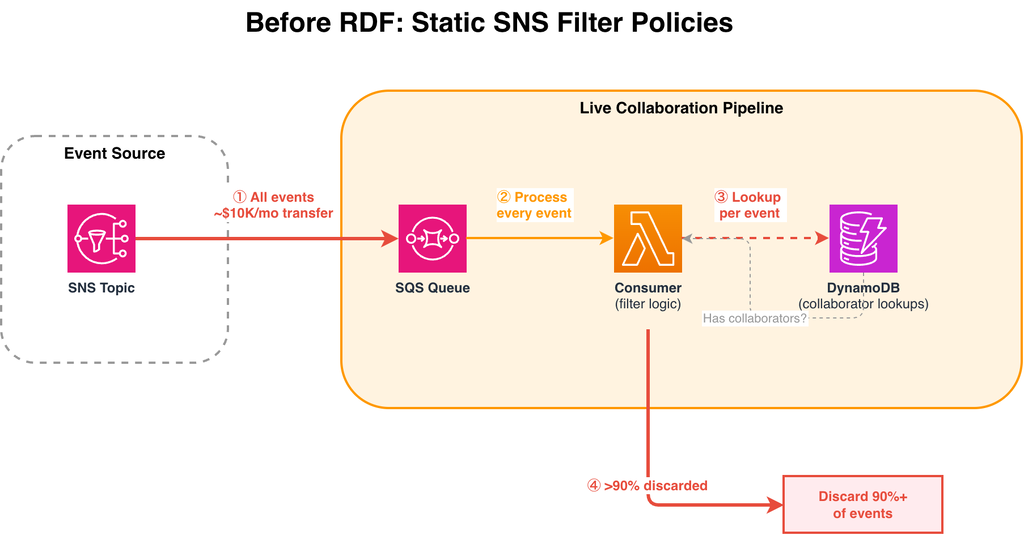
The workaround was brute force: subscribe to all events (hundreds of thousands per second), pull them into an SQS queue, and use compute to check each event against Amazon DynamoDB to determine whether the sheet had active collaborators. Over 90% of events were discarded after this lookup.
Figure 1: Before RDF — all events flow through SNS to SQS, with per-event DynamoDB lookups to filter. Over 90% of events are discarded after processing.
Every event published to the SNS topic is delivered to the SQS queue, regardless of whether any consumer needs it.
The consumer AWS Lambda reads every message from the SQS queue and must evaluate each one individually.
For each event, the consumer queries DynamoDB to check whether the sheet has active collaborators. This per-event lookup adds latency and DynamoDB read costs on the hot path.
After the DynamoDB lookup, over 90% of events are found to have no active collaborators and are discarded.
This approach had three compounding cost and performance problems:
SNS-to-SQS data transfer costs: approximately $10,000 per month to deliver all events to the queue
SQS costs: approximately $30,000 per month to receive, process, and delete the full event volume
DynamoDB costs and latency: per-event lookups to check collaborator status added load to DynamoDB and increased end-to-end data delivery latency
The solution: Real-time Dynamic Filtering with Apache Flink
To solve this, Smartsheet built a system called Real-time Dynamic Filtering (RDF) on Amazon Managed Service for Apache Flink. The core insight was to move the filtering logic into the stream processing layer itself, using Flink’s KeyedCoProcessFunction, a feature that joins and processes multiple streams by a shared key, to maintain dynamic filter policies in Flink state (RocksDB).
How it works
The RDF Flink application reads from two streams:
Filter policy stream, sourced from Amazon DynamoDB Streams. When a team calls the RDF client to change their filter policy (for example, “start receiving events for sheet X”), the change is written to a DynamoDB table and propagated through DynamoDB Streams to the Flink application.
Data stream, the stream of sheet events (creates, updates, deletes) that were previously delivered through SNS.
One challenge remained: some consumers need every event, regardless of sheet. When a consumer subscribes to all events, the system needs every parallel Flink task to know about it. The team solved this using Flink’s broadcast state, which replicates a small set of “subscribe to everything” policies across all tasks. Because only a handful of consumers use this mode, the memory overhead stays negligible.
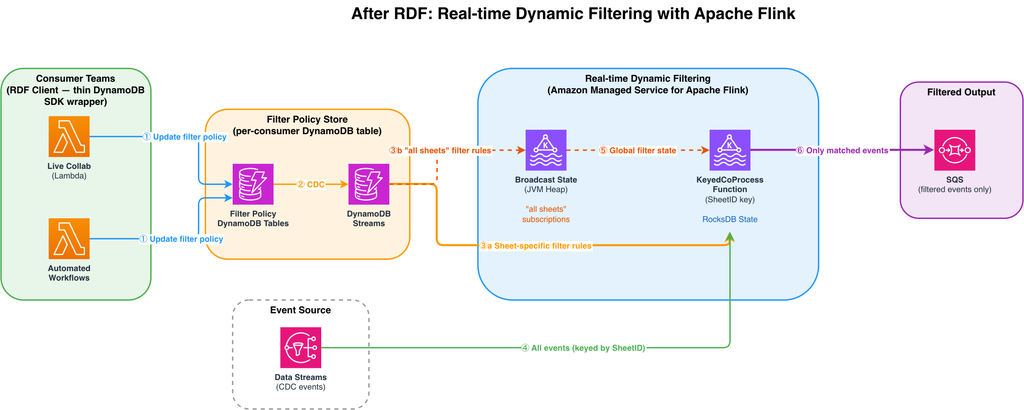
Figure 2: After RDF — consumer teams update filter policies via client libraries. DynamoDB Streams propagates changes to the Flink application, which filters the data stream in real time using keyed state (RocksDB) for specific sheet subscriptions and broadcast state for “all sheets” subscriptions.
When a consumer team wants to start or stop receiving events for a specific sheet, it calls the RDF client, a thin wrapper over the DynamoDB SDK. The filter policy change is written to that consumer’s dedicated DynamoDB table. Each consumer has its own table, providing isolated permissions and preventing noisy neighbor issues.
DynamoDB Streams captures every filter policy change as a change data capture (CDC) record and streams it to the Flink application in real time.
Filter policy records
Filter policy records for specific sheets are routed to the KeyedCoProcessFunction, keyed by SheetID. This makes sure that filter state and event data for the same sheet are co-located in the same Flink parallel task. State is stored in the RocksDB backend, which uses memory when available and spills to disk when necessary, so the system to scale without JVM heap constraints.
Filter policy records where a consumer has called listenToAllEvents() are broadcast to all parallel Flink tasks via Flink’s broadcast state. Because broadcast state lives in JVM heap, it is used exclusively for these “all sheets” records (of which there are very few), keeping the heap footprint small.
The full stream of CDC events flows into the KeyedCoProcessFunction, partitioned by SheetID. Each parallel task receives only the events for the sheets it is responsible for and applies the corresponding filter state to decide whether to forward or drop each event.
The broadcast state (containing “all sheets” subscriptions) is made available to all parallel instances of the KeyedCoProcessFunction, so that consumers subscribed to all events are never filtered out regardless of which task processes their events.
Only events that match an active filter policy are forwarded to the consumer’s SQS queue. The result: sub-second filter policy propagation (p95 ≤1s), elimination of per-event DynamoDB lookups, and over $40,000/month in cost savings.
Critically, because the filter policy state is persisted in Flink’s RocksDB state backend, the application does not need to perform a DynamoDB lookup for every event. Within 1 second of a filter policy change, the Flink application reads the change from the DynamoDB Streams source, updates its internal state, and begins filtering the data stream accordingly.
Results
The impact of RDF was immediate and measurable across multiple dimensions:
Cost reduction
Cost category
Before RDF
After RDF
Monthly savings
SNS → SQS Data Transfer
~$10K/month
Eliminated
~$10K
SQS Event Ingestion
~$30K/month
~$2K
~$28K
DynamoDB Collaborator Lookups
Significant load
Eliminated (state in Flink)
Included in total
AWS Lambda
~$12K/month
~$5K/month
~$7K
Total
~$45K/month
Latency improvement
1.8x improvement in live collaboration data delivery latency. Users see changes from collaborators faster than before.
Filter policy propagation reduced from up to 15 minutes to a p95 of under 1 second
If your architecture follows a similar fan-out pattern where consumers discard a large percentage of events after per-event lookups, you could achieve comparable cost reductions by moving filtering into the stream processing layer. The savings scale with your event volume and the percentage of events currently discarded.
Key design decisions
Several architectural choices were critical to the success of this solution:
Keyed state with selective broadcast: Specific sheet subscriptions are stored in keyed state using the RocksDB state backend. The system scales to a large number of filter policies without JVM heap constraints. Flink’s broadcast state is used only for the small number of “all sheets” subscriptions, where every parallel task needs visibility. Because broadcast state is stored in JVM heap, limiting its use to these few records keeps the heap footprint manageable.
DynamoDB Streams as the filter policy source: Rather than building a custom control plane, the team used DynamoDB Streams to propagate filter policy changes. DynamoDB Streams gave the team durability, ordering guarantees, and a native Flink source connector integration.
RocksDB state backend: Persisting filter state in RocksDB eliminated the need for external lookups on the hot path, keeping per-event processing latency low even as the number of active filter policies grows.
Client library abstraction: Publishing internal Golang and Java clients lowered the adoption barrier. The client is a thin abstraction on top of the DynamoDB SDK. Each consumer has its own dedicated DynamoDB table and corresponding filter stream, which provides two benefits: it allows fine-grained AWS Identity and Access Management (AWS IAM) permissions per client, and it mitigates the noisy neighbor problem by isolating each consumer’s filter policy traffic. Teams don’t need to understand Flink internals. They interact with a simple API to manage their subscriptions.
Next steps
The live collaboration team was the first adopter of RDF, but the architecture was designed as a shared platform. Smartsheet is now expanding RDF to additional internal teams, including workflow automation and notification routing, where similar fan-out patterns exist. The team is also exploring automatic scaling policies to optimize Flink cluster costs during off-peak hours.
Conclusion
Smartsheet Real-time Dynamic Filtering system demonstrates how Amazon Managed Service for Apache Flink can solve problems that go beyond stream processing. By combining Flink’s broadcast state pattern with CoProcessFunction, Smartsheet replaced a costly and latency-bound SNS/SQS fan-out architecture with a sub-second dynamic filtering platform. The result: over $40,000 per month in savings, 1.8x improvement in live collaboration latency, and a reusable platform that multiple teams are now adopting.
If you process high-volume event streams and need to dynamically control which events reach specific consumers, this pattern can help you reduce costs and latency, whether for live collaboration, workflow automation, notification routing, or multi-tenant event delivery.
To learn more about the services used in this post, visit:
When your data science team reserves GPU instances for a two-week training job but completes it in four days, that capacity has the potential to sit unused while your computer vision team waits another week to start their project. Now you can eliminate this GPU waste and scheduling conflict by sharing Capacity Blocks for ML across your AWS Organization. This scheduling mismatch between teams creates bottlenecks that delay product launches, increase infrastructure costs, and slow your ability to deliver machine learning (ML) powered features to customers. With cross-account sharing for Amazon Elastic Compute Cloud (Amazon EC2) Capacity Blocks for ML, you can now distribute reserved graphics processing unit (GPU) capacity across teams based on actual demand rather than rigid scheduling predictions. This means your computer vision team can use the capacity as soon as the data science team is done.
In this post, we’ll show you how to configure cross-account sharing for Capacity Blocks for ML, set up monitoring for your shared resources, and optimize instance utilization through alerting. By increasing the utilization rates and reducing over-provisioning, you improve your resource efficiency and cost optimization for your organization.
You can reduce idle resources in your ML team’s account by sharing capacity with other teams waiting for GPUs. Additionally, you can maintain Capacity Blocks for ML centrally. This lets you control which teams have access to the capacity and helps you reduce waste and bottlenecks in your organization. Before starting into the tutorial, let’s review how Capacity Blocks for ML and AWS RAM work together.
Overview
Capacity Blocks for ML let you reserve GPU-based accelerated compute instances ahead of time for short duration ML workloads. When you launch instances in Capacity Blocks for ML, Amazon EC2 automatically places the instances in Amazon EC2 UltraClusters, giving you low-latency, petabit scale networking. UltraClusters provide the high performance networking your training workloads require.
You see exactly when GPU capacity is available and schedule your Capacity Blocks for ML to start when it makes sense for your project. You pay upfront for the entire reservation period. This makes Capacity Blocks for ML useful when you need GPUs for days to months. It provides predictable capacity without long-term commitments.
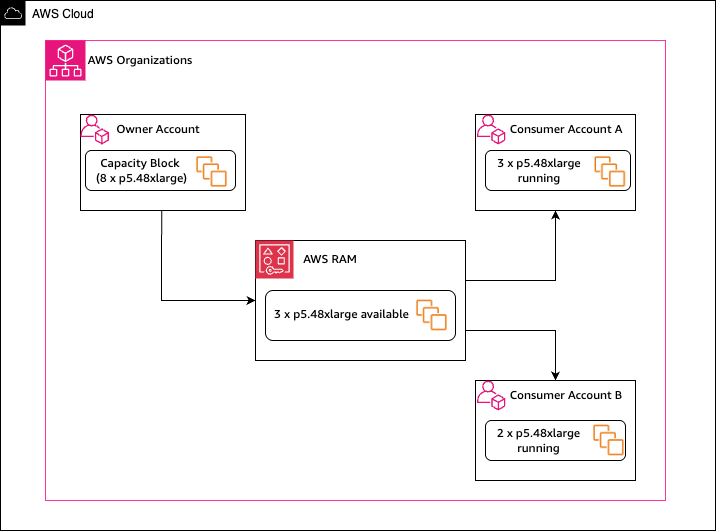
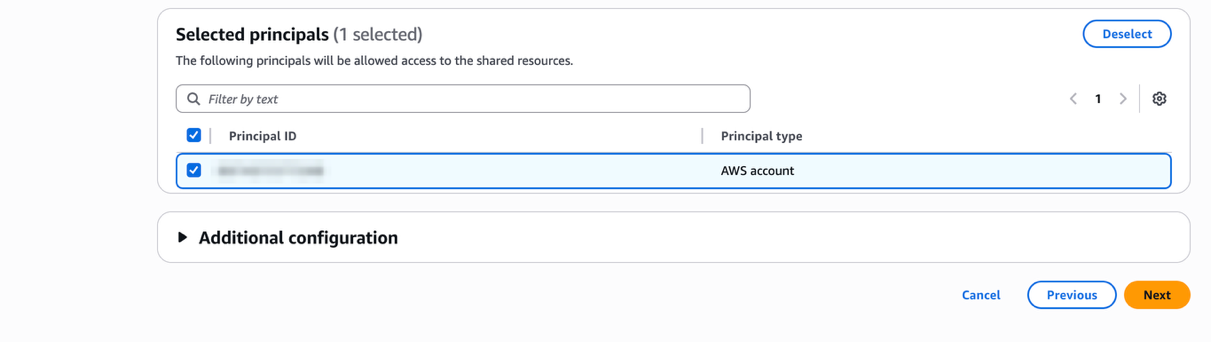
When you purchase Capacity Blocks for ML, you can share it with other accounts in your AWS Organization using AWS Resource Access Manager (AWS RAM). With AWS RAM, you can share AWS resources across accounts within your organization. When you share with other accounts, those accounts become consumer accounts that can launch instances using your capacity. As the owner account, you pay the upfront reservation cost and retain ownership. If you’re launching instances from a consumer account, you are responsible for additional costs such as operating system licensing charges. Capacity Blocks can be shared to multiple accounts simultaneously, with the entire Capacity Block reservation being shared on a first come, first served basis.
Figure 1: Capacity Block sharing using Resource Access Manager.
With the share feature, you benefit from flexible GPU capacity management when your priorities shift, or teams finish work at different times. Now, when your data science team completes experimentation early, your other teams can use that capacity for production training. If priorities shift mid-quarter, you can move capacity where it’s needed most.
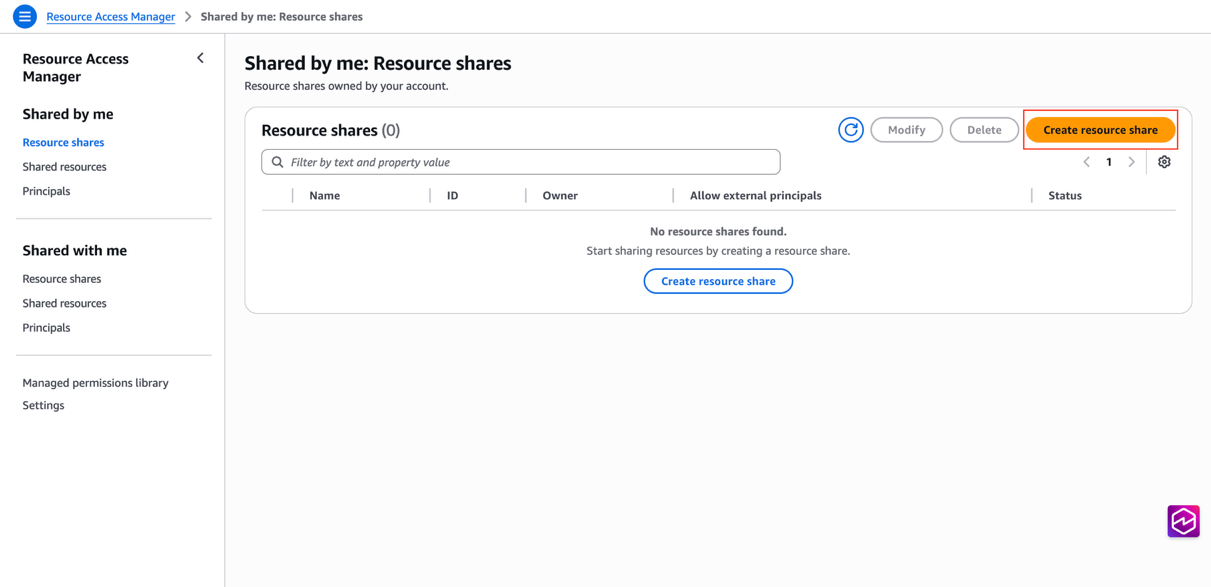
In this tutorial, you’ll share a Capacity Block for ML across accounts and then create an alarm to monitor utilization when it drops below a threshold. Before you start, complete the following prerequisites.
Prerequisites
To share Capacity Blocks for ML, you must first find and purchase a Capacity Block. Only standard Capacity Blocks for ML can be shared using AWS RAM. UltraServer Capacity Blocks are not eligible for sharing.
You can share Capacity Blocks only within your AWS Organization. Verify the owner of the Capacity Blocks as well as the consumer(s) are within the same organization. For guidance, see Creating and configuring an organization.
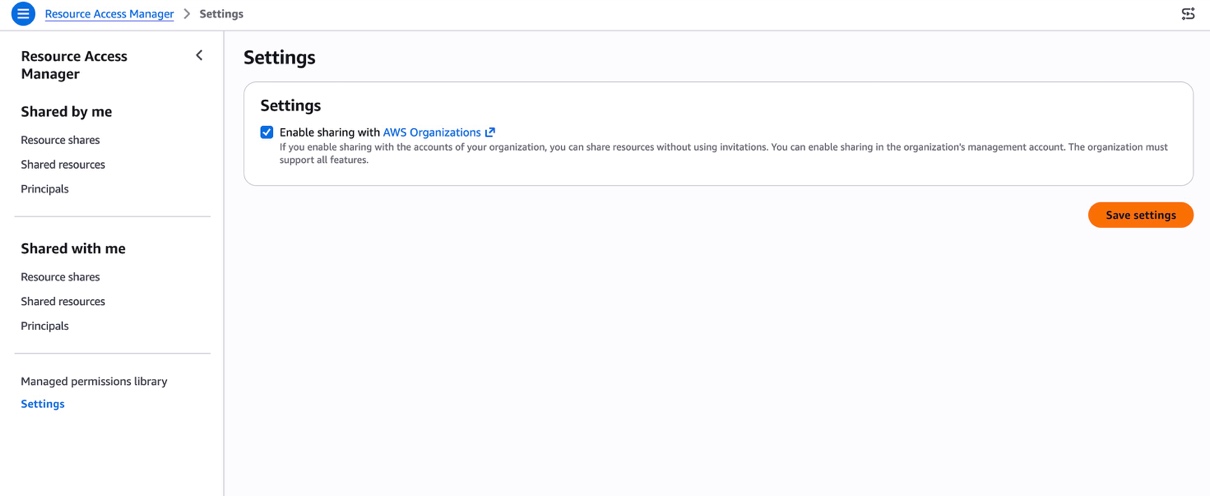
Before sharing Capacity Blocks, you must configure resource sharing with AWS Organizations. Only the management account with the following required AWS Identity and Access Management (IAM) permissions can enable resource sharing within an Organization:
Access and Launch shared Capacity Blocks (console)
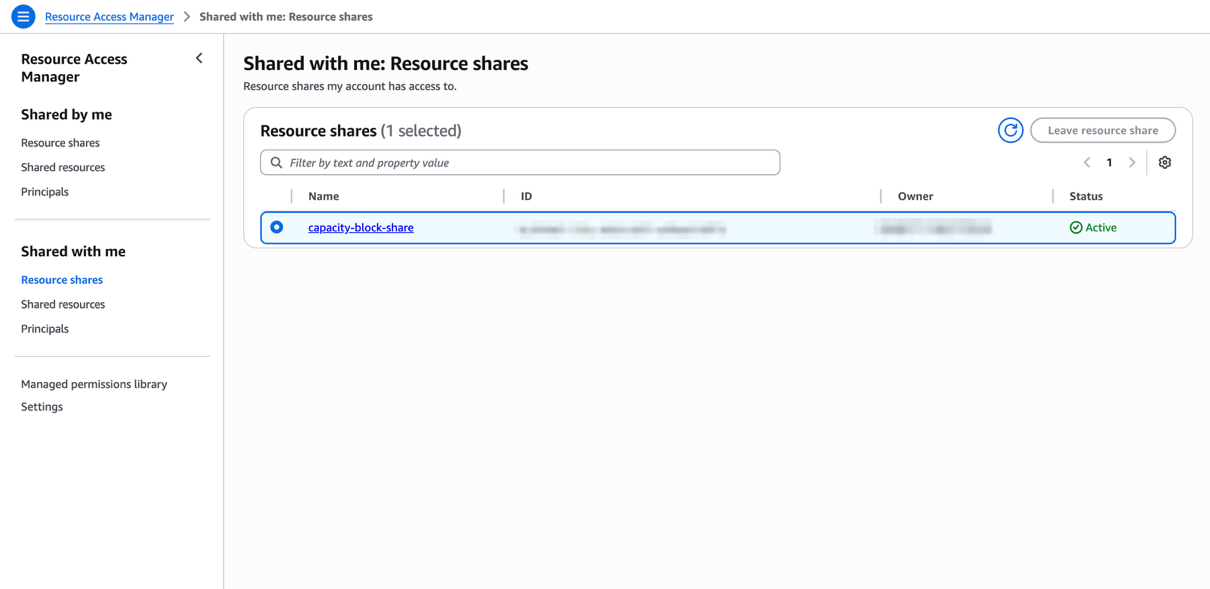
After you add the Capacity Block to a resource share, your consumer accounts automatically gain access when you share the Capacity Block within the same AWS Organization.
In the left navigation pane, choose Shared with me, Resource shares. Verify the Resource share is Active.Figure 6: In your consumer account, verify the resource share
Navigate to the Amazon EC2 console. In the left navigation pane, choose Capacity Reservations.
Confirm the shared Capacity Block appears and is in Active or Scheduled state. Because sharing is asynchronous, the Capacity Block may take a few moments to appear even after the resource share shows Active.
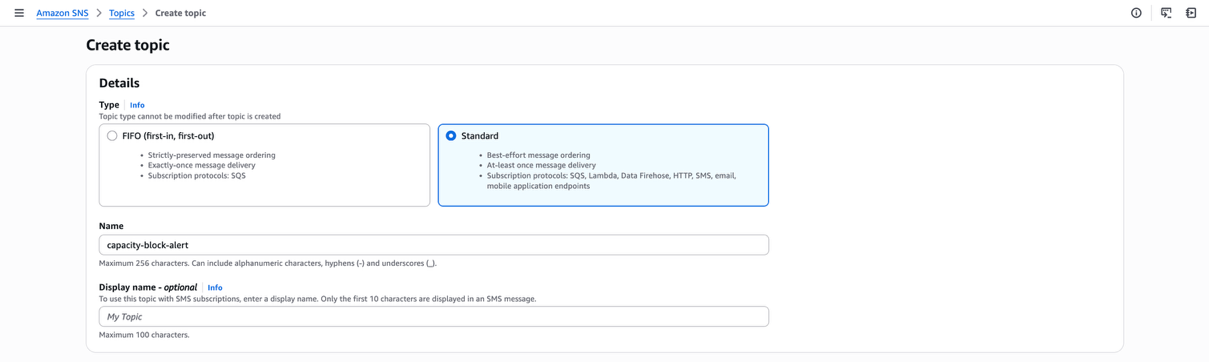
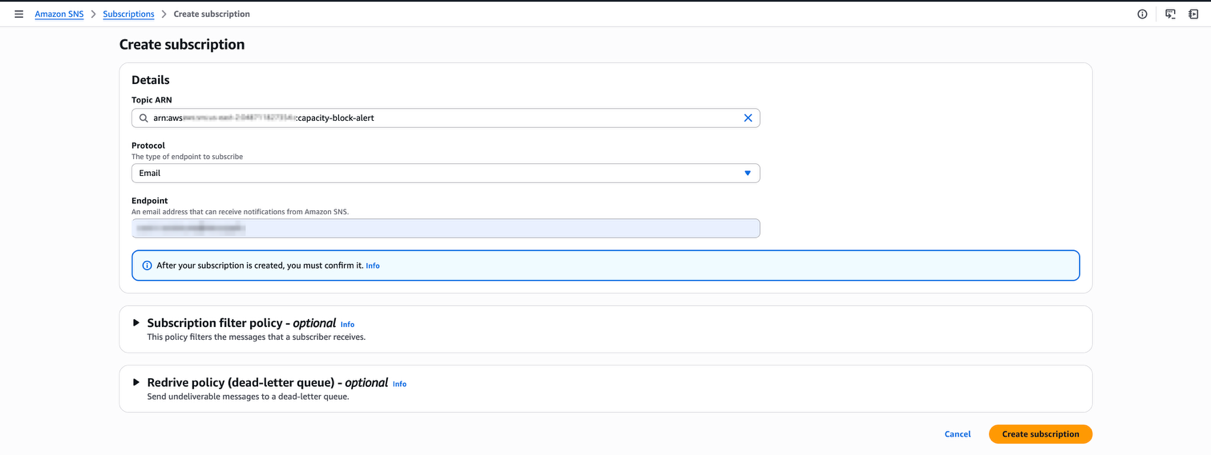
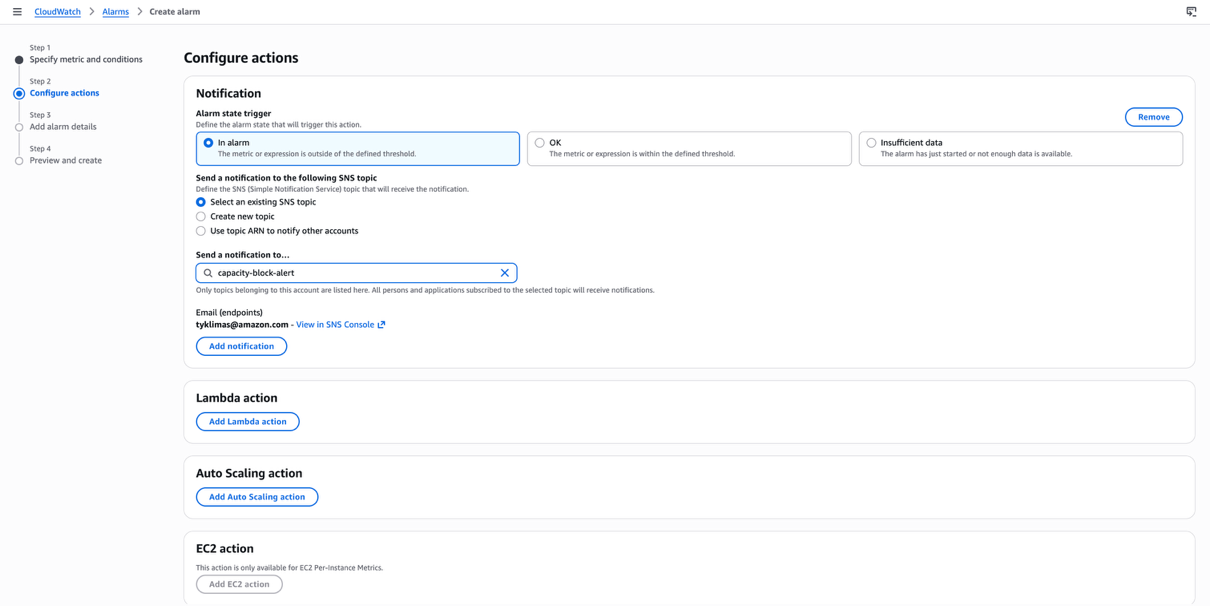
You can create Amazon CloudWatch alarms to proactively identify low utilization of your Capacity Block. This helps you to improve the usage of your capacity reservation. This section shows you how to create an Amazon Simple Notification Service (Amazon SNS) email notification when the number of running instances drops below a certain threshold.
In addition to monitoring usage, AWS CloudTrail logs capture API events related to your Capacity Block, including the CapacityReservationId. As the owner, you can see which accounts are consuming instances and when.
As the owner of the Capacity Block, you retain the ability to modify the resource share. However, owners cannot modify instances that consumers launch into Capacity Blocks they have shared. This section outlines how to clean up your previous work.
In this post, we showed you how to share Capacity Blocks for ML across your AWS Organization using AWS RAM. We covered configuring the AWS RAM integration with Organizations, creating resource shares, and accessing shared Capacity Blocks for ML from consumer accounts. Finally, we showed you how to monitor and alert on low instance utilization.
By sharing Capacity Blocks across your organization, you can reduce idle GPU capacity, eliminate scheduling bottlenecks between teams, and maximize the return on your reserved compute investment. To take this further, consider building dashboards in Amazon CloudWatch to track utilization trends across multiple Capacity Blocks.
Освен като спортен, туристически, културен и обществен феномен, българското домакинство на началото на колоездачното състезание Обиколката на Италия 2026 беше вълнуващо и от етимологична гледна точка. Заедно с големите емоции, които донесе в България, la Grande Partenza, или „Големият старт“, на т.нар. Corsa Rosa, или „Розовото състезание“¹, вкара и цяла шепа италиански думи в обращение както през официалните медийни съобщения, така и в ежедневния език на хората. Безсъмнено най-любопитната сред тях, която през последните седмици беше в устата на стотици хиляди българи, е думата giro. А на мен и вас тя предоставя възможност за един етимологичен тур от изток на запад и обратно, правейки кулинарни, исторически, научни и финансови отбивки.
Необяснимо за самата мен, когато преди няколко седмици за първи път чух словосъчетанието Giro d’Italia, рязко усетих чувство на глад, но не за (колоездачни) зрелища², а за хляб, и то съвсем буквално – за предпочитане под формата на питка, обвита около свинско месо, пържени картофи, домати и дзадзики. Разбира се, веднага побързах да отхвърля асоциацията, която мозъкът ми направи между италианското „джиро“ и гръцкия „гирос“ (въпреки че ми се стори доста забавна) като несъстоятелна и неблагонадеждна.
Оказва се обаче, че макар между италианската колоездачна обиколка и гръцкото ястие да няма концептуална връзка, те са съвсем директно свързани по семантична и етимологична линия. Всъщност, ако трябва да сме точни (и буквални), връзката не е линейна, а по-скоро кръгова. Защото както италианската дума giro (през латинската gȳrus), така и гръцката дума γύρος (където г-то се произнася по-скоро като й) произлизат от старогръцкото понятие γῦρος, тоест „кръг“. Ето как терминът giro се оказва изключително подходящ за обиколка, която се провежда на колела, а и неслучайно гръцкото наименование на велосипедното състезание е Γύρος της Ιταλίας (Gýros tis Italías).
Още по-изненадващ е фактът, че извън конкретния колоездачен и кулинарен контекст, в който двете думи са навлезли в българския, речниковите им дефиниции на практика са идентични: освен „кръг“, както giro, така и γύρος могат да бъдат преведени като ‘обиколка, тур, разходка’ и тем подобни.
Тези значения, разбира се, значително предхождат появата и на велосипедното състезание, и на апетитното ястие, които датират едва от началото на XX век.
Giro d’Italia се провежда за първи път през 1909 г., а гиросът навлиза в Гърция в началото на 20-те години, внесен от гръцките бежанци от Анадола
след Гръцко-турската война и последвалия обмен на население. Първоначално гиросът се нарича ντονέρ (ntonér) – наименование, взето от оригиналното турско название döner kebap, с което дюнерът е известен и в България и което произлиза от dönmek (‘въртя се, завивам, връщам се’) заради начина на печене на месото посредством въртящ се вертикален шиш³.
Впоследствие, в средата на миналия век, поради политическото напрежение между Гърция и Турция и като резултат от инициативата турцизмите да се премахнат от гръцкия език, турската заемка се подменя с гръцка калка, а именно γύρος. Заедно с това рецептата също се „погърчва“ и започва да включва свинско месо и дзадзики, докато ястието от тясно свързано с бежанските общности се превръща в национална кулинарна класика⁴.
През 1952 г., допълвайки концентричните кръгове с думи, произлизащи от най-вътрешния старогръцки – γῦρος (gûros), френският учен Леон Фуко (същият, който изобретява и дава името си на махалото) представя конструиран от него уред за измерване и поддържане на ориентацията. Комбинирайки вече познатия ни „кръг“ със старогръцката дума σκοπός (skopós, ‘наблюдател’), той нарича изобретението си gyroscope⁵.
Впоследствие, както обикновено става с научните термини, наименованието се разпространява на други езици, а произношението на началния му звук претърпява промени, подобно на г-то в името, което отпразнувахме на 6 май, само два дни преди началото на Джирото: Георги, Джорджо, Жорж, Йоргос и т.н. На български наименованието на инструмента запазва френското си произношение – „жироскоп“. На гръцки той се нарича γυροσκόπιο(gyroskópio), а на турски, освен като jiroskop, уредът е известен и като düzdöner (düz означава ‘плосък, равен, прав’, което прави думата донякъде оксиморонна).
Но да направим кръг обратно към италианското giro. Оказва се, че думата е навлязла в българския, движейки се от запад на изток, още в средата на XIX век –
доста преди близо 200-та състезатели в Giro d’Italia да щурмуват с велосипедите си територията на България, движейки се в обратната посока. Според Българския етимологичен речник думата „джиро“, определена като „остаряла“ и дефинирана като ‘паричен оборот; надпис върху полица за прехвърляне на сума’, е заета от италианския исъществува в българския от 1850 г. От нея произлиза и глаголът „джиросвам“, който, освен със значението ‘прехвърлям ценни книжа на друго лице чрез подпис’, според някои речници се използва и преносно – като ‘прехвърлям работа, отговорност и пр. на друго лице’ или ‘отървавам се, отпращам, премятам, препращам’.
А за да бъде кръгът наистина пълен, няма как да не отбележим още нещо. Италианското „джиро“, което наред с общите значения, изброени в началото на този текст, може да се отнася и за „оборот“ на двигател, е навлязло (обратно) – с подобаващи промени в произношението и транскрипцията – и в гръцкия, където думата τζίρος (tzíros) означава „оборот“ във финансовия смисъл на думата.
И понеже кръгът има свойството да е безкраен, ние също бихме могли да продължим (поне още малко): според речника една от турските думи за „оборот“ е dönme, която пък преведена обратно на български означава ‘въртене, конверсия, ротация; отстъпник, ренегат’. Думата е навлязла в българския и директно като „дьонме“, тоест ‘немюсюлманин, приел исляма’. „Дьонме“ се нарича и сектата, която изповядва криптоюдаизъм и е основана през втората половина на XVII век в Солун. Но тази история ще оставим за друг път.
За разлика от кръга, който продължава безкрай, този текст все пак трябва да има финал. Може обаче да намерим някаква утеха в кръговата му композиция. Както и във факта, че купата, която се връчва на победителя на Giro d’Italia, се нарича не как да е, а Trofeo Senza Fine, или „Безкрайният трофей“.
1 Прозвището Corsa Rosa, или „Розовото състезание“, с което е известно Giro d’Italia, произлиза от практиката лидерът в генералното класиране да носи розова фланелка – като препратка към спортния вестник La Gazzetta dello Sport, който организира състезанието и традиционно се печата върху розова хартия. Онлайн изданието на вестника също излиза на розов фон.
2 Фразата „хляб и зрелища“ се заражда в Древен Рим, а латинският ѝ оригинал panem et circenses буквално се превежда като „хляб и циркове“, като cirensis всъщност е прилагателно, описващо това, което се случва на арената, тоест circus, откъдето идва и думата „цирк“. Интересно е, че латинската дума circus, подобно на gȳrus, също произлиза от старогръцка дума за кръг, в случая κίρκος (kírkos). Макар и значенията им отчасти да се припокриват, двете думи не са синоними: докато κίρκος е свързанa с физически обект или място с формата на кръг, γῦρος се използва по-скоро във връзка с кръгообразно движение. Тяхна близка роднина е старогръцката дума κύκλος (kúklos), която също означава „кръг“ и се намира в корена на думата за „велосипед“ на много езици, заели я от френския първоизточник, bicyclette, а в българския присъства посредством „мотоциклет“. (Българската дума всъщност също е заета от френското vélocipède, вече остарял термин, който произлиза от латинските vēlōx (‘бърз’) и pēs (‘крак’).)
3 Смята се, че вертикално печеният döner kebab се ражда през XIX век в град Бурса, в тогавашната Османска империя. Впоследствие освен на северозапад, към Гърция и към Европа (der Döner, внесен от турски емигранти, които добавят пържени картофи, става хит в Германия през 70-те години на миналия век, a във Великобритания е известен като kebab), ястието мигрира и на югоизток, към арабския свят, където е известно като شاورما (shāwarmā). Наименованието е заето от турски – думата çevirme (oт çevir- ‘въртя се’) е навлязла и в българския като „чеверме“. Както знаем, тя има общ корен с турската дума за „превод“ – çeviri.
4 В някои райони на Гърция, например в Солун, наименованието γύρος се отнася само и конкретно за месото, печено на вертикален шиш, докато това, което ние разбираме под „гирос“, се нарича σάντουϊτς (sántouïts), тоест „сандвич“. (Тази дума също заслужава отделен текст.)
5 Жироскопът продължава да се използва изключително активно и до днес както в авиацията и корабоплаването, така и в дронове, роботи, в нашите смартфони и таблети. Имайки предвид темата на този текст обаче, сме длъжни да отбележим, че докато устройството подпомага стабилността на превозни средства като кораби, самолети, а даже и мотоциклети, в научни изследвания се установява, че жироскопичните сили, макар и да участват при карането без ръце, не играят важна роля в стабилността на велосипеда, където най-важният фактор – както видяхме и по време на Джирото – е трасето.
В рубриката „От дума на дума“ Екатерина Петрова търси актуални, интересни или новопоявили се думи от нашето ежедневие и проследява често изненадващия им произход, развитието на значенията им във времето и взаимовръзките им с близки и далечни езици.
The kernel’s swap subsystem is charged with managing anonymous pages in
secondary storage when those pages are (hopefully) not being used and the
memory they occupy is needed elsewhere. This long-unloved subsystem has
seen a resurgence of developer interest in recent times, so it is not
surprising that it was the topic of three separate sessions in the
memory-management track at the
2026 Linux Storage,
Filesystem, Memory Management, and BPF Summit. Two of those sessions
were concerned with improving the performance and maintainability of the
swap code, while one (shared with the storage track) was about how swapping
could be friendlier to solid-state storage devices.
We are excited to announce CDK Mixins, a feature of the AWS Cloud Development Kit (CDK) that fundamentally changes how you compose and reuse infrastructure abstractions. In this post, you will learn how to use CDK Mixins to apply sophisticated features to any construct – whether L1, L2, or custom – without being locked into specific implementations.
Background
The AWS Cloud Development Kit (CDK) is an open-source software development framework for defining cloud infrastructure in code and provisioning it through AWS CloudFormation. It contains pre-written, modular, and reusable cloud components known as constructs. Constructs are the basic building blocks representing one or more AWS CloudFormation resources and their configuration.
Traditionally, we organize CDK constructs into three levels. L1 constructs map directly to CloudFormation resources. L2 constructs offer higher-level abstractions with convenience methods, security defaults, and helper functions. L3 constructs (also known as patterns) combine multiple resources to solve specific use cases. However, this architecture creates a fundamental trade-off: you must choose between immediate access to new AWS features (L1) and sophisticated abstractions (L2/L3). Teams often need to customize L2 constructs, rebuilding entire construct libraries to meet their specific requirements.
CDK Mixins solve this problem by decoupling abstractions from construct implementations. Instead of bundling all features into monolithic L2 constructs, Mixins allow you to compose exactly the capabilities you need, apply them to any construct type, and maintain full access to underlying CloudFormation properties.
What are CDK Mixins?
CDK Mixins let you compose reusable abstractions and apply them to constructs after creation. You mix and match modular capabilities to build exactly the infrastructure you need. Unlike traditional L2 constructs that bundle all features together, Mixins give you fine-grained control over which abstractions apply.
Key benefits include:
Universal Compatibility: Apply the same abstractions to L1 constructs, L2 constructs, or custom constructs
Composable Design: Mix and match features without inheriting unwanted behaviors
Cross-Service Abstractions: Create custom mixins that work across different AWS services
Day-One Coverage: Access new AWS features immediately while keeping existing L2 or L3 constructs
Type Safety: Maintain compile-time guarantees and IDE support
Mixins and Aspects
CDK Aspects are a way to apply an operation to all constructs in a given scope, commonly used for validation, compliance, and tagging. Mixins and Aspects are complementary. Mixins apply features immediately to specific constructs, while Aspects enforce rules broadly across a scope during synthesis. A common pattern is to use Mixins to configure resources and Aspects to validate that the configuration is correct.
Using CDK Mixins
CDK Mixins ship with aws-cdk-lib, and you access service-specific mixins through the same imports you already use. They work across L1, L2, and L3 constructs:
import * as cdk from 'aws-cdk-lib/core';
import * as s3 from 'aws-cdk-lib/aws-s3';
import { CfnBucketPropsMixin } from '@aws-cdk/cfn-property-mixins/aws-s3';

// CDK Mixins can be used with L1s
new s3.CfnBucket(stack, "MixinsL1DemoBucket")
  // Use the fluent .with() syntax (available in JavaScript/TypeScript)
  // .with() silently skips unsupported constructs
  .with(new s3.mixins.BucketVersioning());

// ... or with L2s
new s3.Bucket(stack, "MixinsL2DemoBucket")
  // Cfn Property Mixins provide type-safe fallbacks for L2s
  // and configuration after initial creation
  .with(new CfnBucketPropsMixin({
    objectLockEnabled: true,
    objectLockConfiguration: {
      objectLockEnabled: "Enabled",
      rule: {
        defaultRetention: {
          mode: "COMPLIANCE",
          days: 30,
        },
      },
    },
  }));
You can also use Mixins.of() to apply Mixins in other languages or with more control over which constructs receive the mixin:
// Use Mixins.of() to apply Mixins in other languages
// This also gives you more options to apply only to certain constructs
cdk.Mixins.of(stack, cdk.ConstructSelector.byId('MixinsL1DemoBucket'))
  .apply(new s3.mixins.BucketAutoDeleteObjects());
Apply mixins at scale to entire construct trees or specific resource types:
// Apply your Mixins to the whole app
cdk.Mixins.of(app).apply(new MyDataRecovery());
// ... or only to some constructs
cdk.Mixins.of(app, cdk.ConstructSelector.resourcesOfType(s3.CfnBucket.CFN_RESOURCE_TYPE_NAME)).apply(new MyDataRecovery());
Creating Custom Mixins
Creating your own Mixins is straightforward; they are simple classes extending cdk.Mixin and implementing the IMixin interface. The supports() method determines which constructs the mixin can apply to, and applyTo() modifies the construct in place. Here’s a custom mixin that enables data recovery features across both Amazon Simple Storage Service (Amazon S3) buckets and Amazon DynamoDB tables:
// It's easy to develop your own Mixins
class MyDataRecovery extends cdk.Mixin implements IMixin {
  public supports(construct: any): construct is s3.CfnBucket | dynamodb.CfnTable {
    // Mixins can be cross-service and support different resources at once
    return s3.CfnBucket.isCfnBucket(construct) || dynamodb.CfnTable.isCfnTable(construct);
  }

  // applyTo modifies the construct in place (returns void)
  public applyTo(construct: IConstruct): void {
    if (s3.CfnBucket.isCfnBucket(construct)) {
      construct.versioningConfiguration = {
        status: 'Enabled',
      };
    }

    if (dynamodb.CfnTable.isCfnTable(construct)) {
      construct.pointInTimeRecoverySpecification = {
        pointInTimeRecoveryEnabled: true,
      };
    }
  }
}
Once defined, you can apply your custom mixin to resources:
// ... and to use them:
new s3.Bucket(stack, 'AcmeBucket');
new dynamodb.TableV2(stack, 'AcmeTable', {
  partitionKey: { name: 'id', type: dynamodb.AttributeType.STRING },
});

// Apply your Mixins to the whole app
cdk.Mixins.of(app).apply(new MyDataRecovery());
// ... or only to some constructs
cdk.Mixins.of(app, cdk.ConstructSelector.resourcesOfType(s3.CfnBucket.CFN_RESOURCE_TYPE_NAME)).apply(new MyDataRecovery());
This pattern enables organizations to create reusable abstractions that work across any construct type, ensuring consistent security and compliance policies throughout their infrastructure.
Mixin Behavior Control
Control how to apply Mixins with three distinct modes: graceful application, requireAll, and requireAny. The report getter lets you inspect which constructs were successfully modified and add custom assertions:
// Graceful: apply() silently skips unsupported constructs
const logGroup = new logs.CfnLogGroup(stack, 'LogGroup');
cdk.Mixins.of(logGroup).apply(new s3.mixins.BucketAutoDeleteObjects());

// requireAll: Throws if ANY selected construct is not supported by the mixin
cdk.Mixins.of(logGroup).apply(new s3.mixins.BucketAutoDeleteObjects()).requireAll();

// requireAny: Throws if NO selected construct is supported by the mixin
cdk.Mixins.of(stack).apply(new s3.mixins.BucketVersioning()).requireAny();
Use the report getter to inspect application results and the selectedConstructs getter to see which constructs matched the selector:
const applicator = cdk.Mixins.of(app, cdk.ConstructSelector.resourcesOfType(s3.CfnBucket.CFN_RESOURCE_TYPE_NAME));
const result = applicator.apply(new s3.mixins.BucketVersioning());

// See which constructs were matched by the selector
console.table(applicator.selectedConstructs.map(c => c.node.path));

// Inspect which constructs were successfully modified, grouped by construct
console.table(result.report.map(r => ({ construct: r.construct.node.path, mixin: util.inspect(r.mixin) })));
This flexibility allows you to choose the right behavior for your use case, whether you want to apply Mixins opportunistically, enforce that at least one construct matches, or require that every selected construct is supported.
ECS ClusterSettings mixin
The ClusterSettings mixin enables you to apply Amazon ECS cluster settings like enhanced Container Insights to both L1 and L2 clusters. It handles array merging intelligently, updating existing settings by name or appending new ones:
import * as ecs from 'aws-cdk-lib/aws-ecs';
import * as ec2 from 'aws-cdk-lib/aws-ec2';

// Works with L1 constructs
new ecs.CfnCluster(stack, 'L1Cluster', { clusterName: 'my-cluster' })
  .with(new ecs.mixins.ClusterSettings([
    { name: 'containerInsights', value: 'enhanced' },
  ]));

// Works with L2 constructs too
new ecs.Cluster(stack, 'L2Cluster', { vpc, clusterName: 'my-cluster' })
  .with(new ecs.mixins.ClusterSettings([
    { name: 'containerInsights', value: 'enhanced' },
  ]));
S3 mixins: PublicAccessBlock and BucketPolicyStatements
New S3 mixins provide fine-grained controls. The PublicAccessBlockMixin configures public access settings, and the BucketPolicyStatements lets you add bucket policy statements declaratively:
import * as s3 from 'aws-cdk-lib/aws-s3';

// Block all public access on S3 buckets
new s3.CfnBucket(stack, 'SecureBucket')
  .with(new s3.mixins.BucketBlockPublicAccess());

// Apply public access block across all S3 buckets in the app
cdk.Mixins.of(app, cdk.ConstructSelector.resourcesOfType(s3.CfnBucket.CFN_RESOURCE_TYPE_NAME))
  .apply(new s3.mixins.BucketBlockPublicAccess())
  .requireAll();
Vended logs and log delivery
Setting up vended log delivery in CloudFormation typically requires coordinating multiple resources – AWS::Logs::DeliverySource, AWS::Logs::DeliveryDestination, and AWS::Logs::Delivery to connect them – along with the correct IAM permissions for each destination type. You must repeat this boilerplate for every resource you want to deliver logs from, and it varies by service.
CDK Mixins collapse this complexity into a single .with() call. Because Mixins decouple the log delivery abstraction from any specific construct, the same pattern works across all 47 supported AWS resources – whether you’re using L1 or L2 constructs. While still in preview, this is one of the most compelling examples of why Mixins matter: you get a sophisticated, cross-service abstraction that would traditionally require dedicated L2 construct support for each of those 47 resources.
// NOTE: Vended log delivery mixins are still in @aws-cdk/mixins-preview
import * as wafv2Mixins from '@aws-cdk/mixins-preview/aws-wafv2/mixins';

// Set up vended log delivery to an S3 bucket
const bucket = new s3.Bucket(stack, 'LogBucket');
new wafv2.CfnWebACL(stack, 'WebAcl', { /* ... */ })
  .with(new wafv2Mixins.CfnWebACLAccessLogs().toS3(bucket));

// Same pattern, different destination - works identically
const logGroup = new logs.LogGroup(stack, 'LogGroup');
new wafv2.CfnWebACL(stack, 'WebAcl2', { /* ... */ })
  .with(new wafv2Mixins.CfnWebACLAccessLogs().toLogGroup(logGroup));
Without Mixins, adding vended log delivery to an L1 construct would mean either waiting for L2 support or manually wiring up the three CloudFormation resources and permissions yourself. Mixins let you bring this L2-quality abstraction to any construct immediately.
For cross-account centralized logging, the toDestination() method sends logs to a pre-created delivery destination, so you can aggregate logs in a shared account without granting direct access to the destination resource:
CDK Mixins core functionality – including cdk.Mixins, cdk.ConstructSelector, and the .with() syntax – is included in aws-cdk-lib. You access service mixins through standard service imports (e.g. s3.mixins, ecs.mixins). CloudFormation property mixins for type-safe L1 property overrides come from the separate @aws-cdk/cfn-property-mixins package.
CDK Mixins represent a fundamental shift in how we think about infrastructure abstractions. By decoupling capabilities from construct implementations, Mixins give you the freedom to compose exactly the infrastructure you need whether you are using L1 constructs for access to new CloudFormation resources, L2 constructs for convenience, or custom constructs for enterprise requirements.
Since the initial developer preview, the ecosystem has grown rapidly: log delivery mixins for 47 resources, EventBridge event pattern helpers for 26 services, ECS cluster settings, S3 security mixins, and resource policy traits that bring L2-style permissions to L1 constructs. We refined the API with requireAll/requireAny for precise behavior control and application reporting.
We are excited to see what the community builds with CDK Mixins. Share your feedback, create custom Mixins, and help shape the future of infrastructure as code with AWS CDK.
To provide the best experiences, we use technologies like cookies to store and/or access device information. Consenting to these technologies will allow us to process data such as browsing behavior or unique IDs on this site. Not consenting or withdrawing consent, may adversely affect certain features and functions.
Functional
Always active
The technical storage or access is strictly necessary for the legitimate purpose of enabling the use of a specific service explicitly requested by the subscriber or user, or for the sole purpose of carrying out the transmission of a communication over an electronic communications network.
Preferences
The technical storage or access is necessary for the legitimate purpose of storing preferences that are not requested by the subscriber or user.
Statistics
The technical storage or access that is used exclusively for statistical purposes.The technical storage or access that is used exclusively for anonymous statistical purposes. Without a subpoena, voluntary compliance on the part of your Internet Service Provider, or additional records from a third party, information stored or retrieved for this purpose alone cannot usually be used to identify you.
Marketing
The technical storage or access is required to create user profiles to send advertising, or to track the user on a website or across several websites for similar marketing purposes.
 Just a year ago, we launched