Migrate and secure your Windows PKI to AWS with AWS CloudHSM

Post Syndicated from Govindarajan Varadan original https://aws.amazon.com/blogs/security/migrate-and-secure-your-windows-pki-to-aws-with-aws-cloudhsm/

AWS CloudHSM provides a cloud-based hardware security module (HSM) that enables you to easily generate and use your own encryption keys in AWS. Using CloudHSM as part of a Microsoft Active Directory Certificate Services (AD CS) public key infrastructure (PKI) fortifies the security of your certificate authority (CA) private key and ensures the security of the trust hierarchy. In this blog post, we walk you through how to migrate your existing Microsoft AD CS CA private key to the HSM in a CloudHSM cluster.

The challenge

Organizations implement public key infrastructure (PKI) as an application to provide integrity and confidentiality between internal and customer-facing applications. A PKI provides encryption/decryption, message hashing, digital certificates, and digital signatures to ensure these security objectives are met. Microsoft AD CS is a popular choice for creating and managing a CA for enterprise applications such as Active Directory, Exchange, and Systems Center Configuration Manager. Moving your Microsoft AD CS to AWS as part of your overall migration plan allows you to continue to use your existing investment in Windows certificate auto enrollment for users and devices without disrupting existing workflows or requiring new certificates to be issued. However, when you migrate an on-premises infrastructure to the cloud, your security team may determine that storing private keys on the AD CS server’s disk is insufficient for protecting the private key that signs the certificates issued by the CA. Moving from storing private keys on the AD CS server’s disk to a hardware security module (HSM) can provide the added security required to maintain trust of the private keys.

This walkthrough shows you how to migrate your existing AD CS CA private key to the HSM in your CloudHSM cluster. The resulting configuration avoids the security concerns of using keys stored on your AD CS server, and uses the HSM to perform the cryptographic signing operations.

Prerequisites

For this walkthrough, you should have the following in place:

Migrating a domain

In this section, you will walk through migrating your AD CS environment to AWS by using your existing CA certificate and private key that will be secured in CloudHSM. In order to securely migrate the private key into the HSM, you will install the CloudHSM client and import the keys directly from the existing CA server.

This walkthrough includes the following steps:

  1. Create a crypto user (CU) account
  2. Import the CA private key into CloudHSM
  3. Export the CA certificate and database
  4. Configure and import the certificate into the new Windows CA server
  5. Install AD CS on the new server

The operations you perform on the HSM require the credentials of an HSM user. Each HSM user has a type that determines the operations you can perform when authenticated as that user. Next, you will create a crypto user (CU) account to use with your CA servers, to manage keys and to perform cryptographic operations.

To create the CU account

  1. From the on-premises CA server, use the following command to log in with the crypto officer (CO) account that you created when you activated the cluster. Be sure to replace <co_password> with your CO password.
    loginHSM CO admin <co_password>
    

  2. Use the following command to create the CU account. Replace <cu_user> and <cu_password> with the username and password you want to use for the CU.
    createUser CU <cu_user> <cu_password>
    

  3. Use the following command to set the login credentials for the HSM on your system and enable the AWS CloudHSM client for Windows to use key storage providers (KSPs) and Cryptography API: Next Generation (CNG) providers. Replace <cu_user> and <cu_password> with the username and password of the CU.
    set_cloudhsm_credentials.exe --username <cu_user> password <cu_password>
    

Now that you have the CloudHSM client installed and configured on the on-premises CA server, you can import the CA private key from the local server into your CloudHSM cluster.

To import the CA private key into CloudHSM

  1. Open an administrative command prompt and navigate to C:\Program Files\Amazon\CloudHSM.
  2. To identify the unique container name for your CA’s private key, enter certutil -store my to list all certificates stored in the local machine store. The CA certificate will be shown as follows:
    ================ Certificate 0 ================
    Serial Number: <certificate_serial_number>
    Issuer: CN=example-CA, DC=example, DC=com
     NotBefore: 6/25/2021 5:04 PM
     NotAfter: 6/25/2022 5:14 PM
    Subject: CN=example-CA-test3, DC=example, DC=com
    Certificate Template Name (Certificate Type): CA
    CA Version: V0.0
    Signature matches Public Key
    Root Certificate: Subject matches Issuer
    Template: CA, Root Certification Authority
    Cert Hash(sha1): cb7c09cd6c76d69d9682a31fbdbbe01c29cebd82
      Key Container = example-CA-test3
      Unique container name: <unique_container_name>
      Provider = Microsoft Software Key Storage Provider
    Signature test passed
    

  3. Verify that the key is backed by the Microsoft Software Key Storage Provider and make note of the <unique_container_name> from the output, to use it in the following steps.
  4. Use the following command to set the environment variable n3fips_password. Replace <cu_user> and <cu_password> with the username and password for the CU you created earlier for the CloudHSM cluster. This variable will be used by the import_key command in the next step.
    set n3fips_password=<cu_user>:<cu_password>
    

  5. Use the following import_key command to import the private key into the HSM. Replace <unique_container_name> with the value you noted earlier.
    import_key.exe -RSA "<unique_container_name>

The import_key command will report that the import was successful. At this point, your private key has been imported into the HSM, but the on-premises CA server will continue to run using the key stored locally.

The Active Directory Certificate Services Migration Guide for Windows Server 2012 R2 uses the Certification Authority snap-in to migrate the CA database, as well as the certificate and private key. Because you have already imported your private key into the HSM, next you will need to make a slight modification to this process and export the certificate manually, without its private key.

To export the CA certificate and database

  1. To open the Microsoft Management Console (MMC), open the Start menu and in the search field, enter MMC, and choose Enter.
  2. From the File menu, select Add/Remove Snapin.
  3. Select Certificates and choose Add.
  4. You will be prompted to select which certificate store to manage. Select Computer account and choose Next.
  5. Select Local Computer, choose Finish, then choose OK.
  6. In the left pane, choose Personal, then choose Certificates. In the center pane, locate your CA certificate, as shown in Figure 1.
     
    The MMC Certificates snap-in displays the Certificates directories for the local computer. The Personal Certificates location is open displaying the example-CA-test3 certificate.

    Figure 1: Microsoft Management Console Certificates snap-in

  7. Open the context (right-click) menu for the certificate, choose All Tasks, then choose Export.
  8. In the Certificate Export Wizard, choose Next, then choose No, do not export the private key.
  9. Under Select the format you want to use, select Cryptographic Message Syntax Standard – PKCS #7 format file (.p7b) and select Include all certificates in the certification path if possible, as shown in Figure 2.
     
    The Certificate Export Wizard window is displayed.  This windows is prompting for the selection of an export format.  The toggle is selected for Cryptographic Message Syntax Standard – PKCS #7 Certificates (.P7B) and the check box is marked to Include all certificates in the certification path if possible.

    Figure 2: Certificate Export Wizard

  10. Save the file in a location where you’ll be able to locate it later, so you will be able to copy it to the new CA server.
  11. From the Start menu, browse to Administrative Tools, then choose Certificate Authority.
  12. Open the context (right-click) menu for your CA and choose All Tasks, then choose Back up CA.
  13. In the Certificate Authority Backup Wizard, choose Next. For items to back up, select only Certificate database and certificate database log. Leave all other options unselected.
  14. Under Back up to this location, choose Browse and select a new empty folder to hold the backup files, which you will move to the new CA later.
  15. After the backup is complete, in the MMC, open the context (right-click) menu for your CA, choose All Tasks, then choose Stop service.

At this point, until you complete the migration, your CA will no longer be issuing new certificates.

To configure and import the certificate into the new Windows CA server

  1. Open a Remote Desktop session to the EC2 instance that you created in the prerequisite steps, which will serve as your new AD CS certificate authority.
  2. Copy the certificate (.p7b file) backup from the on-premises CA server to the EC2 instance.
  3. On your EC2 instance, locate the certificate you just copied, as shown in Figure 3. Open the certificate to start the import process.
     
    The Certificate Manager tool window shows the Certificates directory for the p7b file that was opened. The main window for this location is displaying the example-CA-test3 certificate.

    Figure 3: Certificate Manager tool

  4. Select Install Certificate. For Store Location, select Local Machine.
  5. Select Place the Certificates in the following store. Allowing Windows to place the certificate automatically will install it as a trusted root certificate, rather than a server certificate.
  6. Select Browse, select the Personal store, and then choose OK.
  7. Choose Next, then choose Finish to complete the certificate installation.

At this point, you’ve installed the public key and certificate from the on-premises CA server to your EC2-based Windows CA server. Next, you need to link this installed certificate with the private key, which is now stored on the CloudHSM cluster, in order to make it functional for signing issued certificates and CRLs.

To link the certificate with the private key

  1. Open an administrative command prompt and navigate to C:\Program Files\Amazon\CloudHSM.
  2. Use the following command to set the environment variable n3fips_password. Replace <cu_user> and <cu_password> with the username and password for the CU that you created earlier for the CloudHSM cluster. This variable will be used by the import_key command in the next step.
    set n3fips_password=<cu_user>:<cu_password>
    

  3. Use the following import_key command to represent all keys stored on the HSM in a new key container in the key storage provider. This step is necessary to allow the cryptography tools to see the CA private key that is stored on the HSM.
    import_key -from HSM -all
    

  4. Use the following Windows certutil command to find your certificate’s unique serial number.
    certutil -store my
    

    Take note of the CA certificate’s serial number.

  5. Use the following Windows certutil command to link the installed certificate with the private key stored on the HSM. Replace <certificate_serial_number> with the value noted in the previous step.
    certutil -repairstore my <certificate_serial_number>
    

  6. Enter the command certutil -store my. The CA certificate will be shown as follows. Verify that the certificate is now linked with the HSM-backed private key. Note that the private key is using the Cavium Key Store Provider. Also note the message Encryption test passed, which means that the private key is usable for encryption.
    ================ Certificate 0 ================
    Serial Number: <certificate_serial_number>
    Issuer: CN=example-CA, DC=example, DC=com
     NotBefore: 6/25/2021 5:04 PM
     NotAfter: 6/25/2022 5:14 PM
    Subject: CN=example-CA, DC=example, DC=com
    Certificate Template Name (Certificate Type): CA
    CA Version: V0.0
    Signature matches Public Key
    Root Certificate: Subject matches Issuer
    Template: CA, Root Certification Authority
    Cert Hash(sha1): cb7c09cd6c76d69d9682a31fbdbbe01c29cebd82
      Key Container = PRV_KEY_IMPORT-6-9-7e5cde
      Provider = Cavium Key Storage Provider
    Private key is NOT exportable
    Encryption test passed
    

Now that your CA certificate and key materials are in place, you are ready to setup your EC2 instance as a CA server.

To install AD CS on the new server

  1. In Microsoft’s documentation to Install the Certificate Authority role on your new EC2 instance, follow steps 1-8. Do not complete the remaining steps, because you will be configuring the CA to use the existing HSM backed certificate and private-key instead of generating a new key.
  2. In Confirm installation selections, select Install.
  3. After your installation is complete, Server Manager will show a notification banner prompting you to configure AD CS. Select Configure Active Directory Certificate Services from this prompt.
  4. Select either Standalone or Enterprise CA installation, based upon the configuration of your on-premises CA.
  5. Select Use Existing Certificate and Private Key and browse to select the CA certificate imported from your on-premises CA server.
  6. Select Next and verify your location for the certificate database files.
  7. Select Finish to complete the wizard.
  8. To restore the CA database backup, from the Start menu, browse to Administrative Tools, then choose Certificate Authority.
  9. Open the context (right-click) menu for the certificate authority and choose All Tasks, then choose Restore CA. Browse to and select the database backup that you copied from the on-premises CA server.

Review the Active Directory Certificate Services Migration Guide for Windows Server 2012 R2 to complete migration of your remaining Microsoft Public Key Infrastructure (PKI) components. Depending on your existing CA environment, these steps may include establishing new CRL and AIA endpoints, configuring Windows Routing and Remote Access to use the new CA, or configuring certificate auto enrollment for Windows clients.

Conclusion

In this post, we walked you through migrating an on-premises Microsoft AD CS environment to an AWS environment that uses AWS CloudHSM to secure the CA private key. By migrating your existing Windows PKI backed by AWS CloudHSM, you can continue to use your Windows certificate auto enrollment for users and devices with your private key secured in a dedicated HSM.

For more information about setting up and managing CloudHSM, see Getting Started with AWS CloudHSM and the AWS Security Blog post CloudHSM best practices to maximize performance and avoid common configuration pitfalls.

If you have feedback about this blog post, submit comments in the Comments section below. You can also start a new thread on the AWS CloudHSM forum to get answers from the community.

Want more AWS Security how-to content, news, and feature announcements? Follow us on Twitter.

Author

Govindarajan Varadan

Govindarajan is a senior solutions architect at AWS based out of Silicon Valley in California. He works with AWS customers to help them achieve their business objectives by innovating at scale, modernizing their applications, and adopting game-changing technologies like AI/ML.

Author

Brian Benscoter

Brian is a senior solutions architect at AWS with a passion for governance at scale and is based in Charlotte, NC. Brian works with enterprise AWS customers to help them design, deploy, and scale applications to achieve their business goals.

Author

Axel Larsson

Axel is an enterprise solutions architect at AWS. He has helped several companies migrate to AWS and modernize their architecture. Axel is passionate about helping organizations establish a solid foundation in the cloud, enabled by security best practices.

[Security Nation] Jack Cable on Ransomwhere

Post Syndicated from Rapid7 original https://blog.rapid7.com/2021/10/27/security-nation-jack-cable-on-ransomwhere/

[Security Nation] Jack Cable on Ransomwhere

In this episode of Security Nation, Jen and Tod chat with Jack Cable, security architect at the Krebs Stamos Group, about Ransomwhere, a crowdsourced ransomware payment tracker. They chat about how Cable came up with the idea, the role of cryptocurrency in tracking these payments, and how better data sharing can help combat the surge in ransomware attacks.

Stick around for our Rapid Rundown, where Tod and Jen talk about a remote code execution vulnerability that open-source forum provider Discourse experienced recently, which CISA released a notification about over the weekend. Tod highlights some of the many things Discourse is doing right with its security program.

Jack Cable

[Security Nation] Jack Cable on Ransomwhere

Jack Cable is a security researcher and student at Stanford University, currently working as a security architect at Krebs Stamos Group. Jack formerly served as an Election Security Technical Advisor at CISA, where he led the development and deployment of Crossfeed, a pilot to scan election assets nationwide. Jack is a top-ranked bug bounty hacker, having identified over 350 vulnerabilities in companies including Google, Facebook, Uber, Yahoo, and the US Department of Defense. After placing first in the Hack the Air Force challenge, Jack began working at the Pentagon’s Defense Digital Service. Jack was named one of Time Magazine’s 25 most influential teens for 2018. At Stanford, Jack is a research assistant with the Stanford Internet Observatory and Stanford Empirical Security Research Group and launched Stanford’s bug bounty program, one of the first in higher education.

Show notes

Interview Links

Rapid Rundown Links

Like the show? Want to keep Jen and Tod in the podcasting business? Feel free to rate and review with your favorite podcast purveyor, like Apple Podcasts.

Want More Inspiring Stories From the Security Community?

Subscribe to Security Nation Today

What Are Software Containers?

Post Syndicated from Molly Clancy original https://www.backblaze.com/blog/what-are-containers/

A decorative image showing shipping containers in a lightbox.

You’re probably familiar with containers if you’re even remotely involved in software development or systems administration. In their 2023 survey, the Cloud Native Computing Foundation found that over 90% organizations use containers in production. Additionally, more than 90% of organizations that rely on cloud native practices for most or all of their application development and deployment also depend on containers. 

But, whether orchestrating containers is a regular part of your day-to-day life, or you are just trying to understand what an operating system kernel is, it helps to have an understanding of some container basics.

Today, we’re explaining what containers are, how they’re used, and how cloud storage fits into the container picture—all in one neat and tidy containerized blog post package. (And, yes, the kernel is important, so we’ll get to that, too).

What are containers?

Containers are packaged units of software that contain all of the dependencies (e.g. binaries, libraries, programming language versions, etc.) they need to run no matter where they live—on a laptop, in the cloud, or in an on-premises data center. That’s a fairly technical definition, so you might be wondering, “OK, but what are they really?”

The generally accepted definition of the term applies almost exactly to what the technology does.

A container, generally = a receptacle for holding goods; a portable compartment in which freight is placed (as on a train or ship) for convenience of movement.

A container in software development = a figurative “receptacle” for holding software. The second part of the definition applies even better—shipping containers are often used as a metaphor to describe what containers do. In shipping, instead of stacking goods in a jumbled pile, goods are packed into standard-sized containers that fit on whatever is hauling them—a ship, a train, or a trailer.

Likewise, instead of “shipping” an unwieldy mess of code, including the required operating system, containers package software into lightweight units that share the same operating system (OS) kernel and can run anywhere—on a laptop, on a server, in the cloud, etc.

What’s an OS kernel?

As promised, here’s where the OS kernel becomes important. The kernel is the core programming at the center of the OS that controls all other parts of the OS. The term makes sense if you consider the definition of “kernel” as “the central or essential part” as in “a kernel of truth.” (It also begs the question, “Why didn’t they just call it a colonel?” especially because it’s in charge of so many things… But that’s neither here nor there.) And now you know what an OS kernel does.

Compared to older virtualization technology, namely virtual machines which are measured in gigabytes, containers are only megabytes in size. That means you can run quite a few of them on a given computer or server much like you can stack many containers onto a ship.

Indeed, the founders of Docker, the software that sparked widespread container adoption, looked to the port of Oakland, California for inspiration. Former Docker CEO, Ben Golub, explained in an interview with InfoWorld, “We could see all the container ships coming into the port of Oakland, and we were talking about the value of the container in the world of shipping. The fact it was easier to ship a car from one side of the world than to take an app from one server to another, that seemed like a problem ripe for solving.” In fact, it’s right there in their logo.

And that is exactly what containers, mainly via Docker’s popularity, did—they solved the problem of environment inconsistency for developers. Before containers became widely used, moving software between environments meant things broke, a lot. If a developer wrote an app on their laptop, then moved it into a testing environment on a server, for example, everything had to be the same—same versions of the programming language, same permissions, same database access, etc. If not, you had a very sad app.

Virtualization 101

Containers work their magic by way of virtualization. Virtualization is the process of creating a simulated computing environment that’s abstracted from the physical computing hardware—essentially a computer-generated computer, also referred to as a software-defined computer.

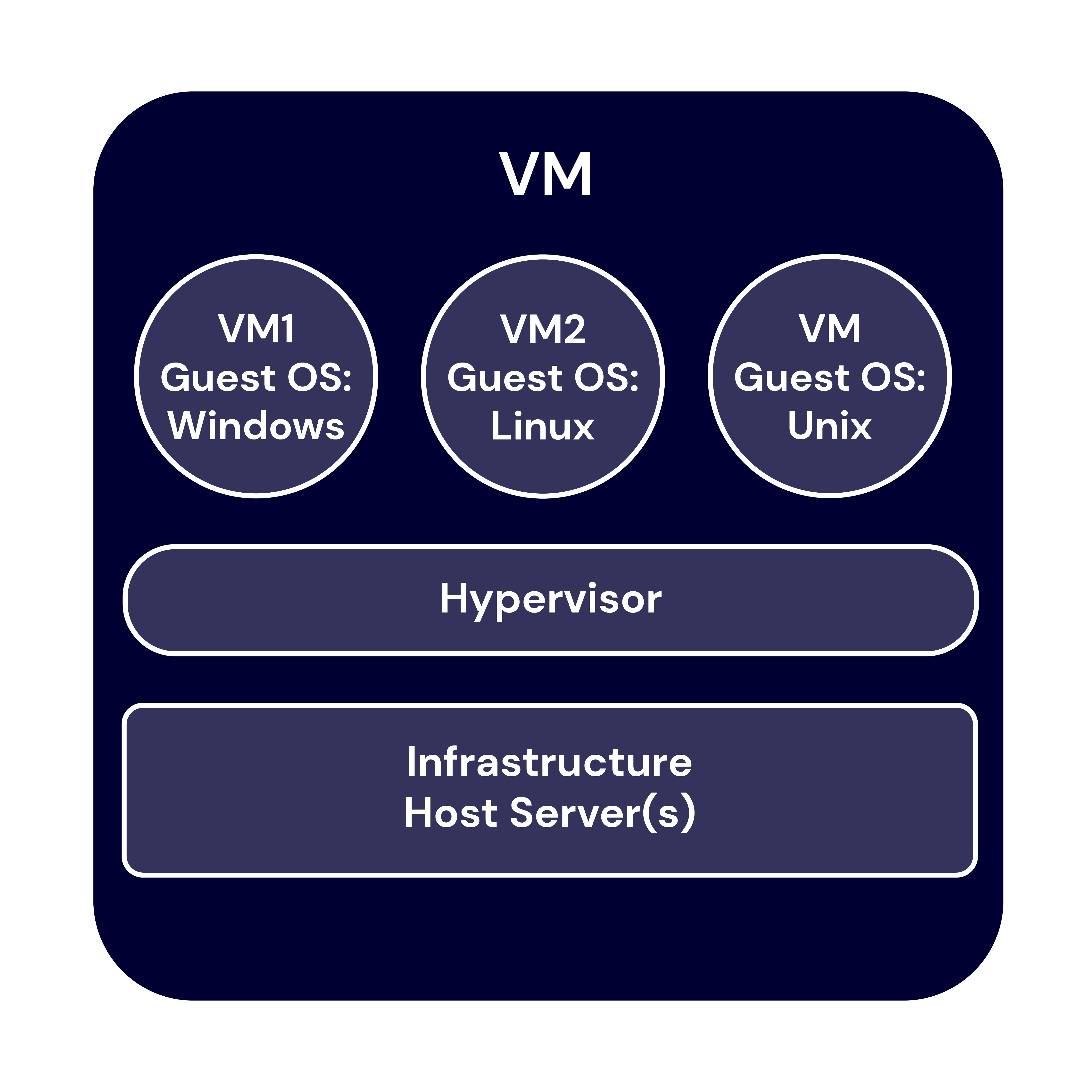
The first virtualization technology to really take off was the virtual machine (VM). A VM sits atop a hypervisor—a lightweight software layer that allows multiple operating systems to run in tandem on the same hardware. VMs allow developers and system administrators to make the most of computing hardware. Before VMs, each application had to run on its own server, and it probably didn’t use the server’s full capacity. After VMs, you could use the same server to run multiple applications, increasing efficiency and lowering costs.

Containers vs. virtual machines

While VMs increase hardware efficiency, each VM requires its own OS and a virtualized copy of the underlying hardware. Because of this, VMs can take up a lot of system resources, and they’re slow to start up.

Containers, on the other hand, do not virtualize the hardware. Instead, they share the host operating system’s kernel, making them much smaller and faster than VMs. Want to know more? Check out our deep dive into the differences between VMs and containers.

chart of how Containers stack on a server

The benefits of containers

Containers allow developers and system administrators to develop, test, and deploy software and applications faster and more efficiently than older virtualization technologies like VMs. The benefits of containers include:

  1. Portability: Containers include all of the dependencies they need to run in any environment, provided that environment includes the appropriate OS. This reduces the errors and bugs that arise when moving applications between different environments, increasing portability.
  2. Size: Containers share OS resources and don’t include their own OS image, making them lightweight—megabytes compared to VMs’ gigabytes. As such, one machine or server can support many containers.
  3. Speed: Again, because they share OS resources and don’t include their own OS image, containers can be spun up in seconds compared to VMs which can take minutes to spin up.
  4. Resource efficiency: Similar to VMs, containers allow developers to make the best use of hardware and software resources.
  5. Isolation: Also similar to VMs, with containers, different applications or even component parts of a singular application can be isolated such that issues like excessive load or bugs on one don’t impact others.

Container use cases

Containers are nothing if not versatile, so they can be used for a wide variety of use cases. However, there are a few instances where containers are especially useful:

  1. Enabling microservices architectures: Before containers, applications were typically built as all-in-one units or “monoliths.” With their portability and small size, containers changed that, ushering in the era of microservices architecture. Applications could be broken down into their component “services,” and each of those services could be built in its own container and run independently of the other parts of the application. For example, the code for your application’s search bar can be built separately from the code for your application’s shopping cart, then loosely coupled to work as one application.
  2. Supporting modern development practices: Containers and the microservices architectures they enable paved the way for modern software development practices. With the ability to split applications into their component parts, each part could be developed, tested, and deployed independently. Thus, developers can build and deploy applications using modern development approaches like DevOps, continuous integration/continuous deployment (CI/CD), and agile development.
  3. Facilitating hybrid cloud and multi-cloud approaches: Because of their portability, containers enable developers to utilize hybrid cloud and/or multi-cloud approaches. Containers allow applications to move easily between environments—from on-premises to the cloud or between different clouds.
  4. Accelerating cloud migration or cloud-native development: Existing applications can be refactored using containers to make them easier to migrate to modern cloud environments. Containers also enable cloud-native development and deployment.

The role of software containers in AI application development

In addition to enabling microservices architectures and supporting modern development practices, containers play a role in AI application development. Their ability to provide consistent, reproducible environments makes them ideal for AI, where managing complex dependencies and ensuring uniform performance across different platforms are essential. 

AI projects often rely on specific versions of libraries, drivers, and runtimes, which can lead to compatibility issues and errors. Containers solve this problem by encapsulating all necessary dependencies, libraries, and runtime environments to provide a consistent and reproducible platform for AI development. This encapsulation ensures that AI models and applications run the same way, regardless of the underlying infrastructure and provides consistency from development through production. 

The portability of containers also offers advantages for deploying AI workloads across diverse environments. They can be easily moved between local development machines, on-premises servers, and cloud platforms without requiring code or configuration changes. This flexibility supports easy scalability of AI applications to meet changing demands—such as increased user loads or the need for more intensive data processing. 

Additionally, containers enable organizations to leverage the most cost effective and powerful computing resources available, whether it’s local hardware for testing and development or cloud-based GPU clusters for training large-scale models. This ability moves workloads efficiently across different environments and also supports hybrid and multi-cloud strategies to provide organizations with greater agility, while reducing costs and avoiding vendor lock-in.

Container tools

The two most widely recognized container tools are Docker and Kubernetes. They’re not the only options out there, but in their 2023 developer survey, Stack Overflow found that nearly 52% out of 90,000+ respondents use Docker and 19% use Kubernetes. But what do they do?

1. What is Docker?

Container technology had been around for a while in the form of Linux containers or LXC, but the widespread adoption of containers happened only in the past decade with the introduction of Docker.

Docker was launched in 2013 as a project to build single-application LXC containers, introducing several changes to LXC that make containers more portable and flexible to use. It later morphed into its own container runtime environment. At a high level, Docker is a Linux utility that can efficiently create, ship, and run containers.

Docker introduced more standardization to containers than previous technologies and focused on developers, specifically, making it the de facto standard in the developer world for application development.

2. What is Kubernetes?

As containerization took off, many early adopters found themselves facing a new problem: how to manage a whole bunch of containers. Enter: Kubernetes. Kubernetes is an open-source container orchestrator. It was developed at Google (deploying billions of containers per week is no small task) as a “minimum viable product” version of their original cluster orchestrator, ominously named Borg. Today, it is managed by the Cloud Native Computing Foundation, and it helps automate management of containers including provisioning, load balancing, basic health checks, and scheduling.

Kubernetes allows developers to describe the desired state of a container deployment using YAML files (YAML stands for Yet Another Markup Language, which is yet another winning tech acronym.). The YAML file uses declarative language to tell Kubernetes “this is what this container deployment should look like” and Kubernetes does all the grunt work of creating and maintaining that state.

Containers + storage: What you need to know

Containers are inherently ephemeral or stateless. They get spun up, and they do their thing. When they get spun down, any data that was created while they were running is destroyed with them. But most applications are stateful, and need data to live on even after a given container goes away.

Object storage is inherently scalable. It enables the storage of massive amounts of unstructured data while still maintaining easy data accessibility. For containerized applications that depend on data scalability and accessibility, it’s an ideal solution for keeping stateful data stateful.

There are three essential use cases where object storage works hand in hand with containerized applications:

  1. Backup and disaster recovery: Tools like Docker and Kubernetes enable easy replication of containers, but replication doesn’t replace traditional backup and disaster recovery just as sync services aren’t a good replacement for backing up the data on your laptop, for example. With object storage, you can replicate your entire environment and back it up to the cloud. There’s just one catch: some object storage providers have retention minimums, sometimes up to 90 days. If you’re experimenting and iterating on your container architecture, or if you use CI/CD methods, your environment is constantly changing. With retention minimums, that means you might be paying for previous iterations much longer than you want to. (Shameless plug: Backblaze B2 Cloud Storage is calculated hourly, with no minimum retention requirement.)
  2. Primary storage: You can use a cloud object storage repository to store your container images, then when you want to deploy them, you can pull them into the compute service of your choice.
  3. Origin storage: If you’re serving out high volumes of media, or even if you’re just hosting a simple website, object storage can serve as your origin store coupled with a CDN for serving out content globally. For example, CloudSpot, a SaaS platform that serves professional photographers, moved to a Kubernetes cluster environment and connected it to their origin store in Backblaze B2, where they now keep 120+ million files readily accessible for their customers.

Need object storage for your containerized application?

Now that you have a handle on what containers are and what they can do, you can make decisions about how to build your applications or structure your internal systems. Whether you’re contemplating moving your application to the cloud, adopting a hybrid or multi-cloud approach, or going completely cloud native, containers can help you get there. And with object storage, you have a data repository that can keep up with your containerized workloads.

Ready to connect your application to scalable, S3-compatible object storage? You can get started today for free.

The post What Are Software Containers? appeared first on Backblaze Blog | Cloud Storage & Cloud Backup

Security updates for Wednesday

Post Syndicated from original https://lwn.net/Articles/874143/rss

Security updates have been issued by Debian (mosquitto and php7.0), Fedora (python-django-filter and qt), Mageia (fossil, opencryptoki, and qtbase5), openSUSE (apache2, busybox, dnsmasq, ffmpeg, pcre, and wireguard-tools), Red Hat (kpatch-patch), SUSE (apache2, busybox, dnsmasq, ffmpeg, java-11-openjdk, libvirt, open-lldp, pcre, python, qemu, util-linux, and wireguard-tools), and Ubuntu (apport and libslirp).

Accelerating serverless development with AWS SAM Accelerate

Post Syndicated from Eric Johnson original https://aws.amazon.com/blogs/compute/accelerating-serverless-development-with-aws-sam-accelerate/

Building a serverless application changes the way developers think about testing their code. Previously, developers would emulate the complete infrastructure locally and only commit code ready for testing. However, with serverless, local emulation can be more complex.

In this post, I show you how to bypass most local emulation by testing serverless applications in the cloud against production services using AWS SAM Accelerate. AWS SAM Accelerate aims to increase infrastructure accuracy for testing with sam sync, incremental builds, and aggregated feedback for developers. AWS SAM Accelerate brings the developer to the cloud and not the cloud to the developer.

AWS SAM Accelerate

The AWS SAM team has listened to developers wanting a better way to emulate the cloud on their local machine and we believe that testing against the cloud is the best path forward. With that in mind, I am happy to announce the beta release of AWS SAM Accelerate!

Previously, the latency of deploying after each change has caused developers to seek other options. AWS SAM Accelerate is a set of features to reduce that latency and enable developers to test their code quickly against production AWS services in the cloud.

To demonstrate the different options, this post uses an example application called “Blog”. To follow along, create your version of the application by downloading the demo project. Note, you need the latest version of AWS SAM and Python 3.9 installed. AWS SAM Accelerate works with other runtimes, but this example uses Python 3.9.

After installing the pre-requisites, set up the demo project with the following commands:

  1. Create a folder for the project called blog
    mkdir blog && cd blog
  2. Initialize a new AWS SAM project:
    sam init
  3. Chose option 2 for Custom Template Location.
  4. Enter https://github.com/aws-samples/aws-sam-accelerate-demo as the location.

AWS SAM downloads the sample project into the current folder. With the blog application in place, you can now try out AWS SAM Accelerate.

AWS SAM sync

The first feature of AWS SAM Accelerate is a new command called sam sync. This command synchronizes your project declared in an AWS SAM template to the AWS Cloud. However, sam sync differentiates between code and configuration.

AWS SAM defines code as the following:

Anything else is considered configuration. The following description of the sam sync options explains how sam sync differentiates between configuration synchronization and code synchronization. The resulting patterns are the fastest way to test code in the cloud with AWS SAM.

Using sam sync (no options)

The sam sync command with no options deploys or updates all infrastructure and code like the sam deploy command. However, unlike sam deploy, sam sync bypasses the AWS CloudFormation changeset process. To see this, run:

sam sync --stack-name blog
AWS SAM sync with no options

AWS SAM sync with no options

First, sam sync builds the code using the sam build command and then the application is synchronized to the cloud.

Successful sync

Successful sync

Using SAM sync code, resource, resource-id flags

The sam sync command can also synchronize code changes to the cloud without updating the infrastructure. This code synchronization uses the service APIs and bypasses CloudFormation, allowing AWS SAM to update the code in seconds instead of minutes.

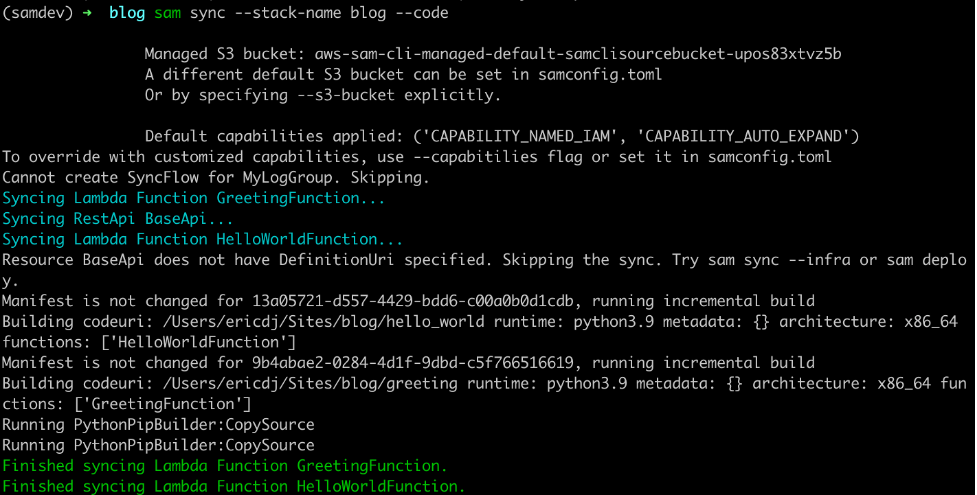
To synchronize code, use the --code flag, which instructs AWS SAM to sync all the code resources in the stack:

sam sync --stack-name blog --code
AWS SAM sync --code

AWS SAM sync with the code flag

The sam sync command verifies each of the code types present and synchronizes the sources to the cloud. This example uses an API Gateway REST API and two Lambda functions. AWS SAM skips the REST API because there is no external OpenAPI file for this project. However, the Lambda functions and their dependencies are synchronized.

You can limit the synchronized resources by using the --resource flag with the --code flag:

sam sync --stack-name blog --code --resource AWS::Serverless::Function
SAM sync specific resource types

SAM sync specific resource types

This command limits the synchronization to Lambda functions. Other available resources are AWS::Serverless::Api, AWS::Serverless::HttpApi, and AWS::Serverless::StateMachine.

You can target one specific resource with the --resource-id flag to get more granular:

sam sync --stack-name blog --code --resource-id HelloWorldFunction
SAM sync specific resource

SAM sync specific resource

This time sam sync ignores the GreetingFunction and only updates the HelloWorldFunction declared with the command’s --resource-id flag.

Using the SAM sync watch flag

The sam sync --watch option tells AWS SAM to monitor for file changes and automatically synchronize when changes are detected. If the changes include configuration changes, AWS SAM performs a standard synchronization equivalent to the sam sync command. If the changes are code only, then AWS SAM synchronizes the code with the equivalent of the sam sync --code command.

The first time you run the sam sync command with the --watch flag, AWS SAM ensures that the latest code and infrastructure are in the cloud. It then monitors for file changes until you quit the command:

sam sync --stack-name blog --watch
Initial sync

Initial sync

To see a change, modify the code in the HelloWorldFunction (hello_world/app.py) by updating the response to the following:

return {
  "statusCode": 200,
  "body": json.dumps({
    "message": "hello world, how are you",
    # "location": ip.text.replace("\n", "")
  }),
}

Once you save the file, sam sync detects the change and syncs the code for the HelloWorldFunction to the cloud.

AWS SAM detects changes

AWS SAM detects changes

Auto dependency layer nested stack

During the initial sync, there is a logical resource name called AwsSamAutoDependencyLayerNestedStack. This feature helps to synchronize code more efficiently.

When working with Lambda functions, developers manage the code for the Lambda function and any dependencies required for the Lambda function. Before AWS SAM Accelerate, if a developer does not create a Lambda layer for dependencies, then the dependencies are re-uploaded with the function code on every update. However, with sam sync, the dependencies are automatically moved to a temporary layer to reduce latency.

Auto dependency layer in change set

Auto dependency layer in change set

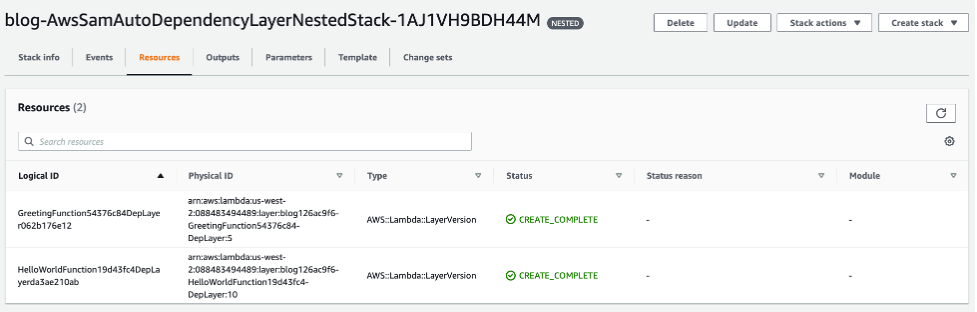
During the first synchronization, sam sync creates a single nested stack that maintains a Lambda layer for each Lambda function in the stack.

Auto dependency layer in console

Auto dependency layer in console

These layers are only updated when the dependencies for one of the Lambda functions are updated. To demonstrate, change the requirements.txt (greeting/requirements.txt) file for the GreetingFunction to the following:

Requests
boto3

AWS SAM detects the change, and the GreetingFunction and its temporary layer are updated:

Auto layer synchronized

Auto dependency layer synchronized

The Lambda function changes because the Lambda layer version must be updated.

Incremental builds with sam build

The second feature of AWS SAM Accelerate is an update to the SAM build command. This change separates the cache for dependencies from the cache for the code. The build command now evaluates these separately and only builds artifacts that have changed.

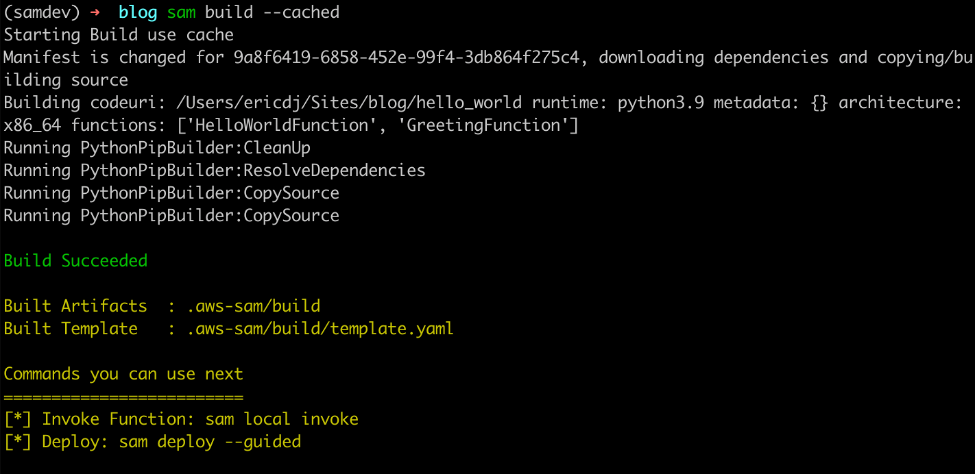
To try this out, build the project with the cached flag:

sam build --cached
The first build establishes cache

The first build establishes cache

The first build recognizes that there is no cache and downloads the dependencies and builds the code. However, when you rerun the command:

The second build uses existing cached artifacts

The second build uses existing cached artifacts

The sam build command verifies that the dependencies have not changed. There is no need to download them again so it builds only the application code.

Finally, update the requirements file for the HelloWorldFunction (hello_w0rld/requirements.txt) to:

Requests
boto3

Now rerun the build command:

AWS SAM build detects dependency changes

AWS SAM build detects dependency changes

The sam build command detects a change in the dependency requirements and rebuilds the dependencies and the code.

Aggregated feedback for developers

The final part of AWS SAM Accelerate’s beta feature set is aggregating logs for developer feedback. This feature is an enhancement to the already existing sam logs command. In addition to pulling Amazon CloudWatch Logs or the Lambda function, it is now possible to retrieve logs for API Gateway and traces from AWS X-Ray.

To test this, start the sam logs:

sam logs --stack-name blog --include-traces --tail

Invoke the HelloWorldApi endpoint returned in the outputs on syncing:

curl https://112233445566.execute-api.us-west-2.amazonaws.com/Prod/hello

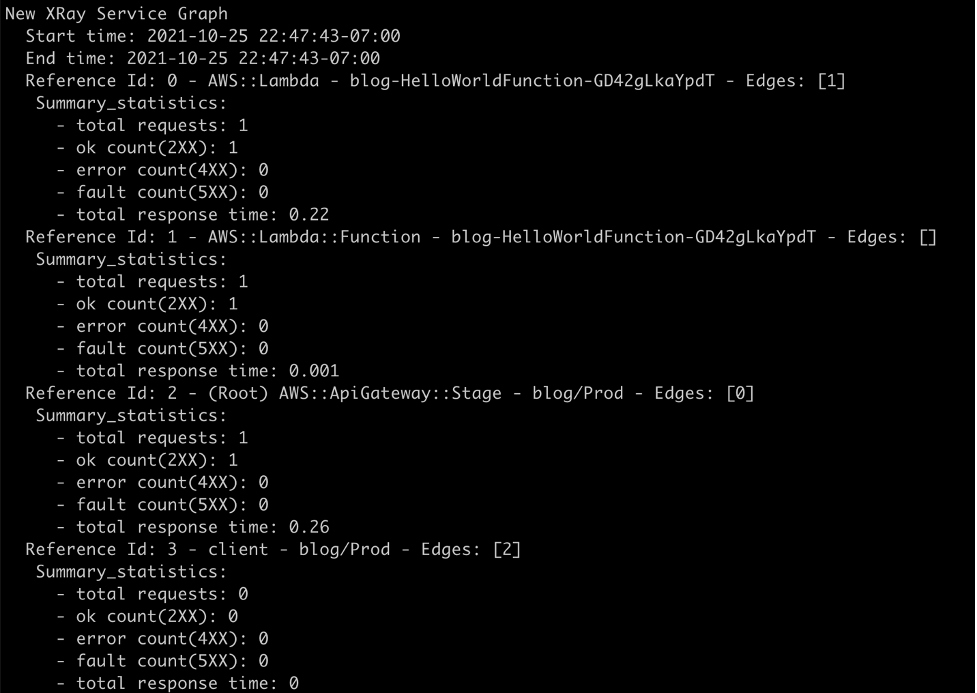
The sam logs command returns logs for the AWS Lambda function, Amazon API Gateway REST execution logs, and AWS X-Ray traces.

AWS Lambda logs from Amazon CloudWatch

AWS Lambda logs from Amazon CloudWatch

Amazon API Gateway execution logs from Amazon CloudWatch

Amazon API Gateway execution logs from Amazon CloudWatch

Traces from AWS X-Ray

Traces from AWS X-Ray

The full picture

Development diagram for AWS SAM Accelerate

Development diagram for AWS SAM Accelerate

With AWS SAM Accelerate, creating and testing an application is easier and faster. To get started:

  1. Start a new project:
    sam init
  2. Synchronize the initial project with a development environment:
    sam sync --stack-name <project name> --watch
  3. Start monitoring for logs:
    sam logs --stack-name <project name> --include-traces --tail
  4. Test using response data or logs.
  5. Iterate.
  6. Rinse and repeat!

Some caveats

AWS SAM Accelerate is in beta as of today. The team has worked hard to implement a solid minimum viable product (MVP) to get feedback from our community. However, there are a few caveats.

  1. Amazon State Language (ASL) code updates for Step Functions does not currently support DefinitionSubstitutions.
  2. API Gateway OpenAPI template must be defined in the DefiitionUri parameter and does not currently support pseudo parameters and intrinsic functions at this time
  3. The sam logs command only supports execution logs on REST APIs and access logs on HTTP APIs.
  4. Function code cannot be inline and must be defined as a separate file in the CodeUri parameter.

Conclusion

When testing serverless applications, developers must get to the cloud as soon as possible. AWS SAM Accelerate helps developers escape from emulating the cloud locally and move to the fidelity of testing in the cloud.

In this post, I walk through the philosophy of why the AWS SAM team built AWS SAM Accelerate. I provide an example application and demonstrate the different features designed to remove barriers from testing in the cloud.

We invite the serverless community to help improve AWS SAM for building serverless applications. As with AWS SAM and the AWS SAM CLI (which includes AWS SAM Accelerate), this project is open source and you can contribute to the repository.

For more serverless content, visit Serverless Land.

Use Amazon EC2 for cost-efficient cloud gaming with pay-as-you-go pricing

Post Syndicated from Emma White original https://aws.amazon.com/blogs/compute/use-amazon-ec2-for-cost-efficient-cloud-gaming-with-pay-as-you-go-pricing/

This post is written by Markus Ziller, Solutions Architect

Since AWS launched in 2006, cloud computing disrupted traditional IT operations by providing a more cost-efficient, scalable, and secure alternative to owning hardware and data centers. Similarly, cloud gaming today enables gamers to play video games with pay-as-you go pricing. This removes the need of high upfront investments in gaming hardware. Cloud gaming platforms like Amazon Luna are an entryway, but customers are limited to the games available on the service. Furthermore, many customers also prefer to own their games, or they already have a sizable collection. For those use cases, vendor-neutral software like NICE DCV or Parsec are powerful solutions for streaming your games from anywhere.

This post shows a way to stream video games from the AWS Cloud to your local machine. I will demonstrate how you can provision a powerful gaming machine with pay-as-you-go pricing that allows you to play even the most demanding video games with zero upfront investment into gaming hardware.

The post comes with code examples on GitHub that let you follow along and replicate this post in your account.

In this example, I use the AWS Cloud Development Kit (AWS CDK), an open source software development framework, to model and provision cloud application resources. Using the CDK can reduce the complexity and amount of code needed to automate resource deployment.

Overview of the solution

The main services in this solution are Amazon Elastic Compute Cloud (Amazon EC2) and Amazon Elastic Block Store (Amazon EBS). The architecture is as follows:

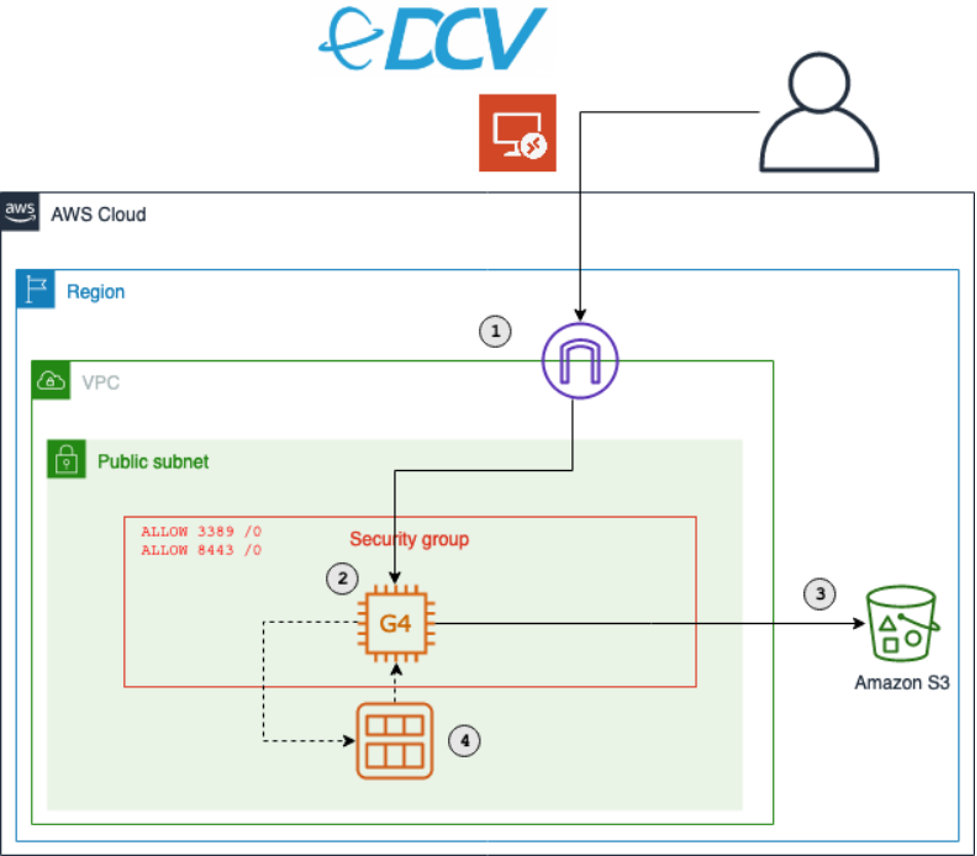
The architecture of the solution. It shows an EC2 instance of the G4 family deployed in a public subnet. The EC2 instances communicates with S3. Also shown is how a security group controls access from users to the EC2 instance

The key components of this solution are described in the following list. During this post, I will explain each component in detail. Deploy this architecture with the sample CDK project that comes with this blog post.

  1. An Amazon Virtual Private Cloud (Amazon VPC) that lets you launch AWS resources in a logically isolated virtual network. This includes a network configuration that lets you connect with instances in your VPC on ports 3389 and 8443.
  2. An Amazon EC2 instance of the G4 instance family. Amazon EC2 G4 instances are the most cost-effective and versatile GPU instances. Utilize G4 instances to run your games.
  3. Access to an Amazon Simple Storage Service (Amazon S3) bucket. S3 is an object storage that contains the graphics drivers required for GPU instances.
  4. A way to create a personal gaming Amazon Machine Images (AMI). AMIs mean that you only need to conduct the initial configuration of your gaming instance once. After that, create new gaming instances on demand from your AMI.

Walkthrough

The following sections walk through the steps required to set up your personal gaming AMI. You will only have to do this once.

For this walkthrough, you need:

  • An AWS account
  • Installed and authenticated AWS CLI
  • Installed Node.js, TypeScript
  • Installed git
  • Installed AWS CDK

You will also need an EC2 key pair for the initial instance setup. List your available key pairs with the following CLI command:

aws ec2 describe-key-pairs --query 'KeyPairs[*].KeyName' --output table

Alternatively, create a new key pair with the CLI. You will need the created .pem file later, so make sure to keep it.

KEY_NAME=Gaming
aws ec2 create-key-pair --key-name $KEY_NAME –query 'KeyMaterial' --output text > $KEY_NAME.pem

Checkout and deploy the sample stack

  1. After completing the prerequisites, clone the associated GitHub repository by running the following command in a local directory:git clone [email protected]:aws-samples/cloud-gaming-on-ec2-instances
  1. Open the repository in your preferred local editor, and then review the contents of the *.ts files in cdk/bin/ and cdk/lib/
  1. In gaming-on-g4-instances.ts you will find two CDK stacks: G4DNStack and G4ADStack. A CDK stack is a unit of deployment. All AWS resources defined within the scope of a stack, either directly or indirectly, are provisioned as a single unit.

The architecture for both stacks is similar, and it only differs in the instance type that will be deployed.

G4DNStack and G4ADStack share parameters that determine the configuration of the EC2 instance, the VPC network and the preinstalled software. The stacks come with defaults for some parameters – I recommend keeping the default values.

EC2

  • instanceSize: Sets the EC2 size. Defaults to g4dn.xlarge and g4ad.4xlarge, respectively. Check the service page for a list of valid configurations.
  • sshKeyName: The name of the EC2 key pair you will use to connect to the instance. Ensure you have access to the respective .pem file.
  • volumeSizeGiB: The root EBS volume size. Around 20 GB will be used for the Windows installation, the rest will be available for your software.

VPC

  • openPorts: Access from these ports will be allowed. Per default, this will allow access for Remote Desktop Protocol (RDP) (3389) and NICE DCV (8443).
  • associateElasticIp: Controls if an Elastic IP address will be created and added to the EC2 instance. An Elastic IP address is a static public IPv4 address. Contrary to dynamic IPv4 addresses managed by AWS, it will not change after an instance restart. This is an optional convenience that comes at a small cost for reserving the IP address for you.
  • allowInboundCidr: Access from this CIDR range will be allowed. This limits the IP space from where your instance is routable. It can be used to add an additional security layer. Per default, traffic from any IP address will be allowed to reach your instance. Notwithstanding allowInboundCidr, an RDP or NICE DCV connection to your instance requires valid credentials and will be rejected otherwise.

Software

For g4dn instances, one more parameter is required (see process of installing NVIDIA drivers):

  • gridSwCertUrl: The NVIDIA driver requires a certificate file, which can be downloaded from Amazon S3.

Choose an instance type based on your performance and cost requirements, and then adapt the config accordingly. I recommend starting with the G4DNStack, as it comes at the lowest hourly instance cost. If you need more graphics performance, then choose the G4ADStack for up to 40% improvement in graphics performance.

After choosing an instance, follow the instructions in the README.md in order to deploy the stack.

The CDK will create a new Amazon VPC with a public subnet. It will also configure security groups to allow inbound traffic from the CIDR range and ports specific in the config. By default, this will allow inbound traffic from any IP address. I recommend restricting access to your current IP address by going to checkip.amazonaws.com and replacing 0.0.0.0/0 with <YOUR_IP>/32 for the allowInboundCidr config parameter.

Besides the security groups, the CDK also manages all required IAM permissions.

It creates the following resources in your VPC:

  • An EC2 GPU instance running Windows Server 2019. Depending on the stack you chose, the default instance type will be g4dn.xlarge or g4ad.4xlarge. You can override this in the template. When the EC2 instance is launched, the CDK runs an instance-specific PowerShell script. This PowerShell script downloads all drivers and NICE DCV. Check the code to see the full script or add your own commands.
  • An EBS gp3 volume with your defined size (default: 150 GB).
  • An EC2 launch template.
  • (Optionally) An Elastic IP address as a static public IP address for your gaming instances.

After the stack has been deployed, you will see the following output:

The output of a CDK deployment of the CloudGamingOnG4DN stack. Shows values for Credentials, InstanceId, KeyName, LaunchTemplateId, PublicIp. Values for Credentials, InstanceId and PublicIp are redacted

Click the first link, and download the remote desktop file in order to connect to your instance. Use the .pem file from the previous step to receive the instance password.

Install drivers on EC2

You will use the RDP to initially connect to your instance. RDP provides a user with a graphical interface to connect to another computer over a network connection. RDP clients are available for a large number of platforms. Use the public IP address provided by the CDK output, the username Administrator, and the password displayed by the EC2 dialogue.

Ensure that you note the password for later steps.

Most configuration process steps are automated by the CDK. However, a few actions (e.g., driver installation) cannot be properly automated. For those, the following manual steps are required once.

Navigate to $home\Desktop\InstallationFiles. If the folder contains an empty file named “OK”, then everything was downloaded correctly and you can proceed with the installation. If you connect while the setup process is still in progress, then wait until the OK file gets created before proceeding. This typically takes 2-3 minutes.

The next step differs slightly for g4ad and g4dn instances.

g4ad instances with AMD Radeon Pro V520

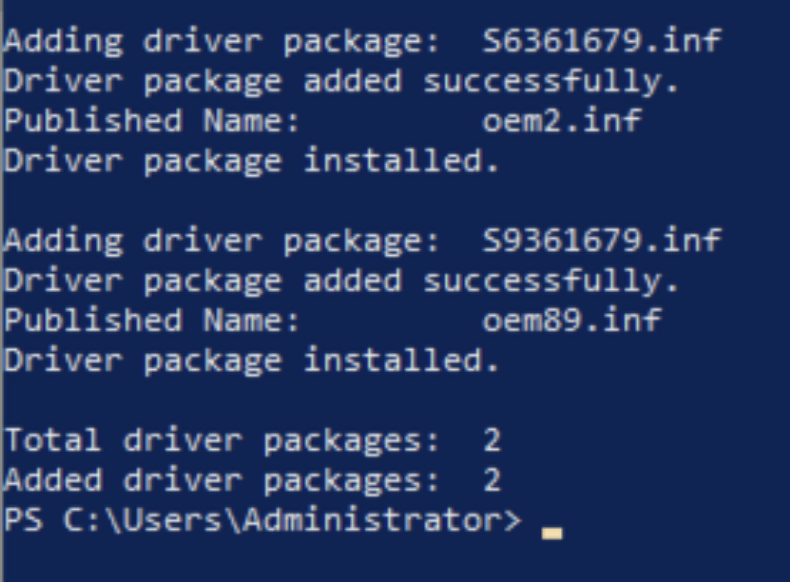
Follow the instructions in the EC2 documentation to install the AMD driver from the InstallationFiles folder. The installation may take a few minutes, and it will display the following output when successfully finished.

The output of the PowerShell command that installs the graphics driver for AMD Radeon Pro V520

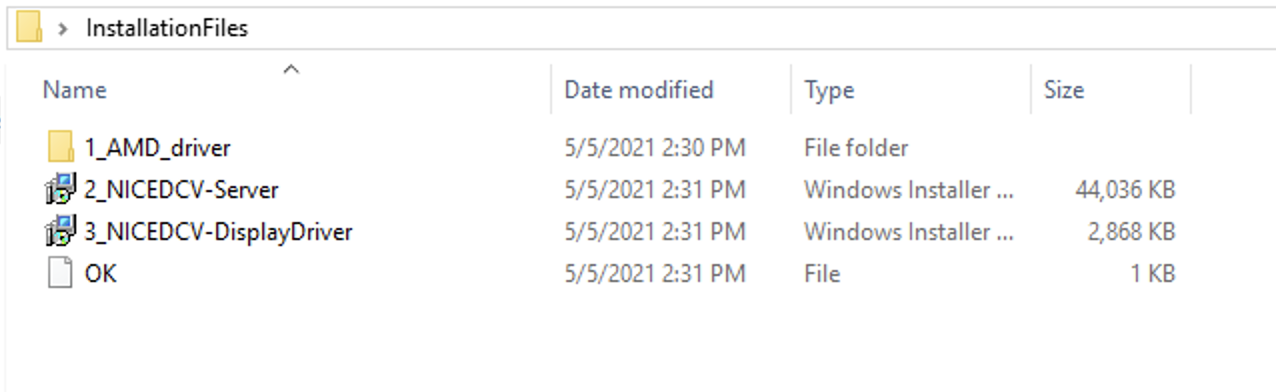
The contents of the InstallationFiles folder. It contains a folder 1_AMD_driver and files 2_NICEDCV-Server, 3_NICEDCV-DisplayDriver, OK

Next, install NICE DCV Server and Display driver by double-clicking the respective files. Finally, restart the instance by running the Restart-Computer PowerShell command.


g4dn instances with NVIDIA T4

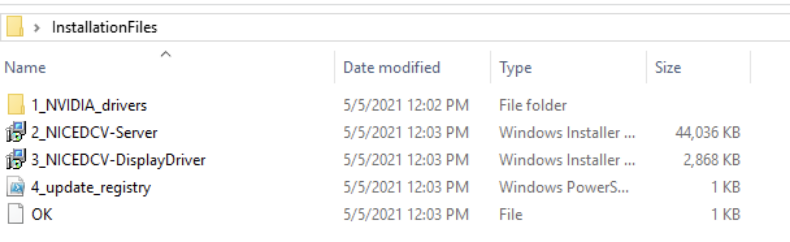
Navigate to 1_NVIDIA_drivers, run the NVIDIA driver installer for Windows Server 2019 and follow the instructions.

The contents of the InstallationFiles folder. It contains a folder 1_NVIDIA_drivers and files 2_NICEDCV-Server, 3_NICEDCV-DisplayDriver, 4_update_registry, OK

Next, double-click the respective files in the InstallationFiles folder in order to install NICE DCV Server and Display driver.

Finally, right-click on 4_update_registry.ps1, and select “Run with PowerShell” to activate the driver. In order to complete the setup, restart the instance.

Install your software

After the instance restart, you can connect from your local machine to your EC2 instance with NICE DCV. The NICE DCV bandwidth-adaptive streaming protocol allows near real-time responsiveness for your applications without compromising the image accuracy. This is the recommended way to stream latency sensitive applications.

Download the NICE DCV viewer client and connect to your EC2 instance with the same credentials that you used for the RDP connection earlier. After testing the NICE DCV connection, I recommend disabling RDP by removing the corresponding rule in your security group.

You are now all set to install your games and tools on the EC2 instance. Make sure to install it on the C: drive, as you will create an AMI with the contents of C: later.

Start and stop your instance on demand

At this point, you have fully set up the EC2 instance for cloud gaming on AWS. You can now start and stop the instance when needed. The following CLI commands are all you need to remember:

aws ec2 start-instances --instance-ids <INSTANCE_ID>

aws ec2 stop-instances --instance-ids <INSTANCE_ID>

This will use the regular On-Demand instance capacity of EC2, and you will be billed hourly charges for the time that your instance is running. If your instance is stopped, you will only be charged for the EBS volume and the Elastic IP address if you chose to use one.

Launch instances from AMI

Make sure you have installed all of the applications you require on your EC2, and then create your personal gaming AMI by running the following AWS CLI command.

aws ec2 create-image --instance-id <YOUR_INSTANCE_ID> --name <THE_NAME_OF_YOUR_AMI>

Use the following command to get details about your AMI creation. When the status changes from pending to available, then your AMI is ready.

aws ec2 describe-images --owners self --query 'Images[*].[Name, ImageId, BlockDeviceMappings[0].Ebs.SnapshotId, State]' --output table

The CDK created an EC2 launch template when it deployed the stack. Run the following CLI command to spin up an EC2 instance from this template.

aws ec2 run-instances --image-id <YOUR_AMI_ID> --launch-template LaunchTemplateName=<LAUNCH_TEMPLATE_NAME> --query "Instances[*].[InstanceId, PublicIpAddress]" --output table

This command will start a new EC2 instance with the exact same configuration as your initial EC2, but with all your software already installed.

Conclusion

This post walked you through creating your personal cloud gaming stack. You are now all set to lean back and enjoy the benefits of per second billing while playing your favorite video games in the AWS cloud.

Visit the Amazon EC2 G4 instances service page to learn more about how AWS continues to push the boundaries of cost-effectiveness for graphic-intensive applications.

Cloudflare recognized as a ‘Leader’ in The Forrester New Wave for Edge Development Platforms

Post Syndicated from Rita Kozlov original https://blog.cloudflare.com/forrester-wave-edge-development-2021/

Cloudflare recognized as a 'Leader' in The Forrester New Wave for Edge Development Platforms

Cloudflare recognized as a 'Leader' in The Forrester New Wave for Edge Development Platforms

Forrester’s New Wave for Edge Development Platforms has just been announced. We’re thrilled that they have named Cloudflare a leader (you can download a complimentary copy of the report here).

Since the very beginning, Cloudflare has sought to help developers building on the web, and since the introduction of Workers in 2017, Cloudflare has enabled developers to deploy their applications to the edge itself.

According to the report by Forrester Vice President, Principal Analyst, Jeffrey Hammond, Cloudflare “offers strong compute, data services and web development capabilities. Alongside Workers, Workers KV adds edge data storage. Pages, Stream and Images provide higher level platform services for modern web workloads. Cloudflare has an intuitive developer experience, fast, global deployment of updated code, and minimal cold start times.”

Cloudflare recognized as a 'Leader' in The Forrester New Wave for Edge Development Platforms

Reimagining development for the modern web

Building on the web has come a long way. The idea that one might have to buy a physical machine in order to build a website seems incomprehensible now. The cloud has played a major role in making it easier for developers to get started. However, since the advent of the cloud, things have stalled — and innovation has become more incremental. That means that while developers don’t have to think about buying a server, they’re still tasked with thinking about where in the world it is, how to add concurrency to handle increasing traffic, and how to make them secure.

We wanted to abstract that all away. Our aim: to reimagine what things might look like if developers could truly just think about the application they wanted to build. Leaving the scaling, speed, and even compliance, to us.

Of course, reimagining things is always scary. There’s no guarantee that taking a new approach is going to work — it usually requires a leap of faith.

It’s been gratifying to see developers flock to our platform — and the applications they’ve been able to build, free of scalability and latency constraints, have been phenomenal.

It’s also gratifying to be named a Leader in Edge Development Platforms by Forrester — one of the preeminent analyst firms in the industry. We feel it really does provide industry recognition to the approach we bet on four years ago.

Cloudflare is the most differentiated among all the vendors evaluated

We received a differentiated rating in the following criteria:

  • Developer experience
  • Programming model
  • Platform execution model
  • “Day 2+” experience
  • Integrations
  • Roadmap
  • Vision
  • Market approach

While being able to build our platform atop Cloudflare’s network gave us an advantage in eliminating latency from the start, we knew that wasn’t enough to compel developers to think in a new way. Since the release of Workers, we have relentlessly focused on making the experience of building a new application as easy as possible at every step of the way: from onboarding, through day 2, and beyond.

This approach extends beyond tooling, and to how we think about additional services developers need in order to complete their applications. For example, in thinking about providing data solutions on the edge, we again wanted to make the distributed nature of the system just work, rather than making developers think about it, which is what led us to develop Durable Objects. With Durable Objects, Cloudflare can make intelligent decisions about where to store the data based on access patterns (or compliance — whichever is most important to the developer), rather than forcing the developer to think about regions.

As we expand our offering, it’s important to us that it continues to be intuitive and easy for developers to solve problems.

We’re just getting started

But, we’re not stopping here. As our cofounder Michelle likes to say, we’re just getting started. We recognize this is just the beginning of the journey to bring the full stack to the edge. We have some exciting announcements coming in the next couple of weeks — stay tuned!

Automation Enables Innovation in the Cloud

Post Syndicated from Shelby Matthews original https://blog.rapid7.com/2021/10/27/automation-enables-innovation-in-the-cloud/

Automation Enables Innovation in the Cloud

As public cloud adoption continues to grow year after year, we see more and more enterprises realizing the strategic advantage the cloud can provide to help deliver new and innovative products quicker, roll out new features with ease, and reach new customers. But along with those advantages comes a new level of complexity and risk that organizations need to account for.

Rapid7’s recently released 2021 Cloud Misconfigurations Report revealed that there were 121 publicly reported data exposure events last year that were the result of cloud misconfigurations.

One critical part of preventing these misconfigurations is the strategic, gradual adoption of automated notification and remediation workflows.

The benefits of automation in cloud security

Automation in the cloud is the implementation of tools that take away the responsibility of security from the user and make it automated. These tools can catch and fix misconfigurations before you even realize they were ever there.

Some of the benefits these tools can bring include:

  • Data breach protection: Despite increased regulations, data breaches continue to grow. Most of these breaches happen when organizations make inadequate or inappropriate investments in cloud security. Now more than ever, companies are under increasing pressure to make appropriate investments to protect customer data as they scale and expand their cloud footprint.
  • Threat protection: When using cloud services, it’s common to be overwhelmed with the large volume of threat signals you receive from a wide variety of sources. Without being able to decipher the signals from noise, it’s difficult to identify true risk and act on it in a timely fashion.

To deliver threat protection, InsightCloudSec integrates with native cloud service providers’ security platforms (e.g., Amazon GuardDuty) and other partners (e.g., Tenable) for best-in-class, intelligent threat detection that continuously monitors for malicious activity and unauthorized behavior. These services use machine learning, anomaly detection, and integrated threat intelligence to identify and prioritize potential threats. You’ll be able to detect cryptocurrency mining, credential compromise behavior, communication with known command-and-control servers, and API calls from known malicious IP addresses.

While automating every workflow possible isn’t the answer, one thing is clear: Enterprise-scale cloud environments have outstripped the human capacity to manage them manually.

Not only is automation essential for bringing security — it’s a way to cut down the time it would take to fix resources, as compared to a manual approach. Automation greatly reduces the risk of human error in the cloud and allows workflows to include automated security across the board.

How InsightCloudSec provides it

InsightCloudSec comes with an automated program that we call our bots, which allow you to execute actions on resources based on your conditions. Your bot consists of three things: scope, filters, and actions. A single bot can be configured to apply a unified approach to remediation across all clouds, creating a consistent, scalable, and sustainable approach to cloud security.

  • Scope: The scope chosen by the user determines which resources and places the bot will evaluate. You choose the bounds that the bot is constricted to. An example of a scope would be all of your AWS, GCP, and Azure accounts, looking for the Storage Container resource (e.g., S3 bucket, Blob storage, and Google Cloud storage).
  • Filters: InsightCloudSec comes with over 800 filters you can choose from. These filters are the condition on which the bot will act. An example of a filter would be Storage Container Public Access, which will evaluate if any of the resources within your scope have public access due to their permission(s) and/or bucket policy.
  • Actions: Finally, this is what the bot actually does. InsightCloudSec ships with over 100 different actions that you can customize. For example, if you set up a bot could to identify storage containers that are public, the action would be the bot notifying the team and cleaning up the exposed permissions.

Bots offer a unified approach to remediation across all your cloud environments. With InsightCloudSec, you can customize them just how you want it based on the full context of a misconfiguration. Automation with InsightCloudSec is the key to achieving security at the speed of scale.

What common cloud security mistakes are organizations making?

Find out in our 2021 Cloud Misconfigurations Report

Custom Headers for Cloudflare Pages

Post Syndicated from Nevi Shah original https://blog.cloudflare.com/custom-headers-for-pages/

Custom Headers for Cloudflare Pages

Custom Headers for Cloudflare Pages

Until today, Cloudflare Workers has been a great solution to setting headers, but we wanted to create an even smoother developer experience. Today, we’re excited to announce that Pages now natively supports custom headers on your projects! Simply create a _headers file in the build directory of your project and within it, define the rules you want to apply.

/developer-docs/*
  X-Hiring: Looking for a job? We're hiring engineers
(https://www.cloudflare.com/careers/jobs)

What can you set with custom headers?

Being able to set custom headers is useful for a variety of reasons — let’s explore some of your most popular use cases.

Search Engine Optimization (SEO)

When you create a Pages project, a pages.dev deployment is created for your project which enables you to get started immediately and easily preview changes as you iterate. However, we realize this poses an issue — publishing multiple copies of your website can harm your rankings in search engine results. One way to solve this is by disabling indexing on all pages.dev subdomains, but we see many using their pages.dev subdomain as their primary domain. With today’s announcement you can attach headers such as X-Robots-Tag to hint to Google and other search engines how you’d like your deployment to be indexed.

For example, to prevent your pages.dev deployment from being indexed, you can add the following to your _headers file:

https://:project.pages.dev/*
  X-Robots-Tag: noindex

Security

Customizing headers doesn’t just help with your site’s search result ranking — a number of browser security features can be configured with headers. A few headers that can enhance your site’s security are:

  • X-Frame-Options: You can prevent click-jacking by informing browsers not to embed your application inside another (e.g. with an <iframe>).
  • X-Content-Type-Option: nosniff: To prevent browsers from interpreting a response as any other content-type than what is defined with the Content-Type header.
  • Referrer-Policy: This allows you to customize how much information visitors give about where they’re coming from when they navigate away from your page.
  • Permissions-Policy: Browser features can be disabled to varying degrees with this header (recently renamed from Feature-Policy).
  • Content-Security-Policy: And if you need fine-grained control over the content in your application, this header allows you to configure a number of security settings, including similar controls to the X-Frame-Options header.

You can configure these headers to protect an /app/* path, with the following in your _headers file:

/app/*
  X-Frame-Options: DENY
  X-Content-Type-Options: nosniff
  Referrer-Policy: no-referrer
  Permissions-Policy: document-domain=()
  Content-Security-Policy: script-src 'self'; frame-ancestors 'none';

CORS

Modern browsers implement a security protection called CORS or Cross-Origin Resource Sharing. This prevents one domain from being able to force a user’s action on another. Without CORS, a malicious site owner might be able to do things like make requests to unsuspecting visitors’ banks and initiate a transfer on their behalf. However, with CORS, requests are prevented from one origin to another to stop the malicious activity.

There are, however, some cases where it is safe to allow these cross-origin requests. So-called, “simple requests” (such as linking to an image hosted on a different domain) are permitted by the browser. Fetching these resources dynamically is often where the difficulty arises, and the browser is sometimes overzealous in its protection. Simple static assets on Pages are safe to serve to any domain, since the request takes no action and there is no visitor session. Because of this, a domain owner can attach CORS headers to specify exactly which requests can be allowed in the _headers file for fine-grained and explicit control.

For example, the use of the asterisk will enable any origin to request any asset from your Pages deployment:

/*
  Access-Control-Allow-Origin: *

To be more restrictive and limit requests to only be allowed from a ‘staging’ subdomain, we can do the following:

https://:project.pages.dev/*
  Access-Control-Allow-Origin: https://staging.:project.pages.dev

How we built support for custom headers

To support all these use cases for custom headers, we had to build a new engine to determine which rules to apply for each incoming request. Backed, of course, by Workers, this engine supports splats and placeholders, and allows you to include those matched values in your headers.

Although we don’t support all of its features, we’ve modeled this matching engine after the URLPattern specification which was recently shipped with Chrome 95. We plan to be able to fully implement this specification for custom headers once URLPattern lands in the Workers runtime, and there should hopefully be no breaking changes to migrate.

Enhanced support for redirects

With this same engine, we’re bringing these features to your _redirects file as well. You can now configure your redirects with splats, placeholders and status codes as shown in the example below:

/blog/* https://blog.example.com/:splat 301
/products/:code/:name /products?name=:name&code=:code
/submit-form https://static-form.example.com/submit 307

Get started

Custom headers and redirects for Cloudflare Pages can be configured today. Check out our documentation to get started, and let us know how you’re using it in our Discord server. We’d love to hear about what this unlocks for your projects!

Coming up…

And finally, if a _headers file and enhanced support for _redirects just isn’t enough for you, we also have something big coming very soon which will give you the power to build even more powerful projects. Stay tuned!

Computer science education is a global challenge

Post Syndicated from Sue Sentance original https://www.raspberrypi.org/blog/brookings-report-global-computer-science-education-policy/

For the last two years, I’ve been one of the advisors to the Center for Universal Education at the Brookings Institution, a US-based think tank, on their project to survey formal computing education systems across the world. The resulting education policy report, Building skills for life: How to expand and improve computer science education around the world, pulls together the findings of their research. I’ll highlight key lessons policymakers and educators can benefit from, and what elements I think have been missed.

Woman teacher and female students at a computer

Why a global challenge?

Work on this new Brookings report was motivated by the belief that if our goal is to create an equitable, global society, then we need computer science (CS) in school to be accessible around the world; countries need to educate their citizens about computer science, both to strengthen their economic situation and to tackle inequality between countries. The report states that “global development gaps will only be expected to widen if low-income countries’ investments in these domains falter while high-income countries continue to move ahead” (p. 12).

Student using a Raspberry Pi computer

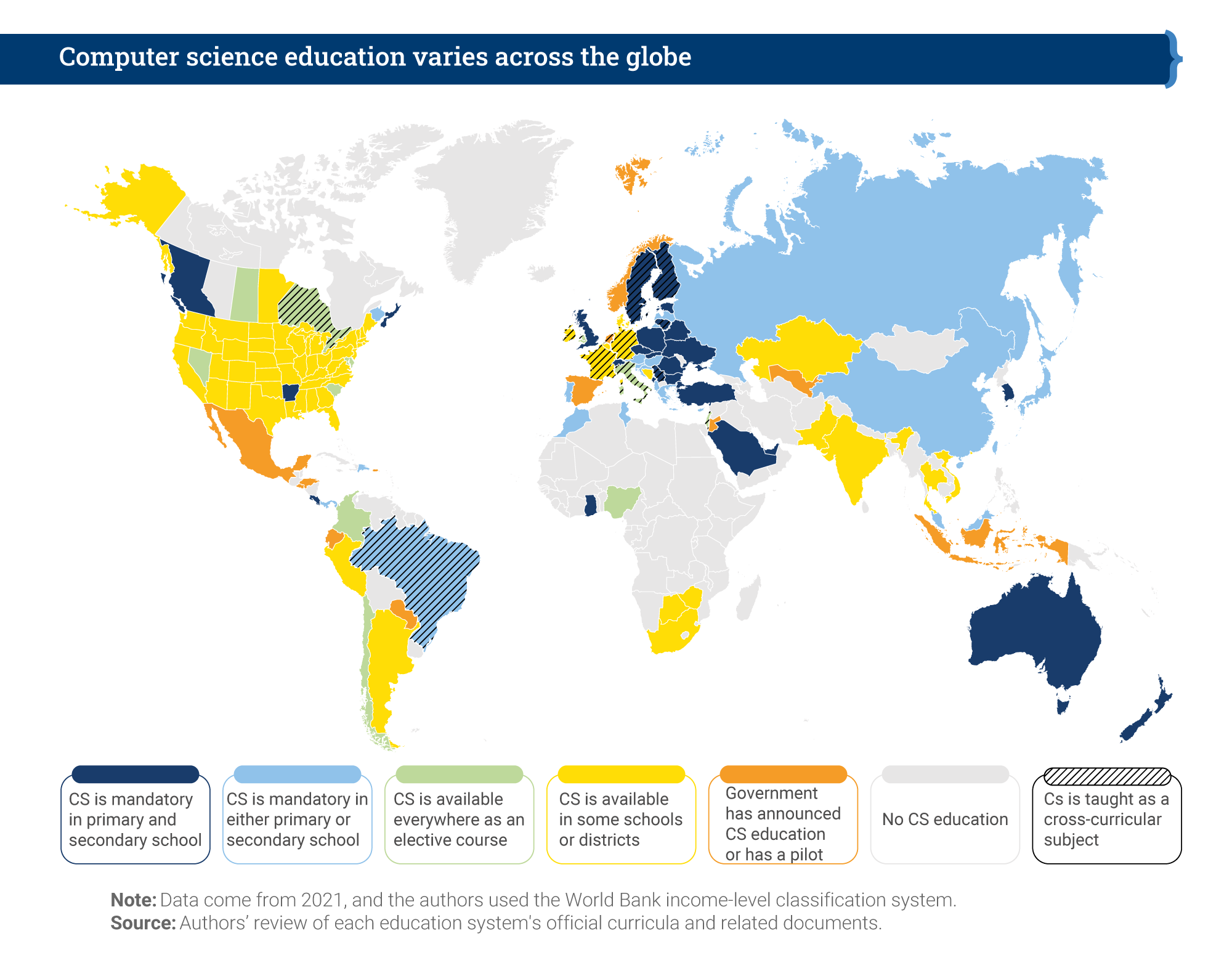
The report makes an important contribution to our understanding of computer science education policy, providing a global overview as well as in-depth case studies of education policies around the world. The case studies look at 11 countries and territories, including England, South Africa, British Columbia, Chile, Uruguay, and Thailand. The map below shows an overview of the Brookings researchers’ findings. It indicates whether computer science is a mandatory or elective subject, whether it is taught in primary or secondary schools, and whether it is taught as a discrete subject or across the curriculum.

A world map showing countries' situation in terms of computing education policy.
Computer science education across the world. Figure courtesy of Brookings Institution (click to enlarge).

It’s a patchy picture, demonstrating both countries’ level of capacity to deliver computer science education and the different approaches countries have taken. Analysis in the Brookings report shows a correlation between a country’s economic position and implementation of computer science in schools: no low-income countries have implemented it at all, while over 20% of high-income countries have mandatory computer science education at both primary and secondary level. 

Capacity building: IT infrastructure and beyond

Given these disparities, there is a significant focus in the report on what IT infrastructure countries need in order to deliver computer science education. This infrastructure needs to be preceded by investment (funds to afford it) and policy (a clear statement of intent and an implementation plan). Many countries that the Brookings report describes as having no computer science education may still be struggling to put these in place.

A young woman codes in a computing classroom.

The recently developed CAPE (capacity, access, participation, experience) framework offers another way of assessing disparities in education. To have capacity to make computer science part of formal education, a country needs to put in place the following elements:

My view is that countries that are at the beginning of this process need to focus on IT infrastructure, but also on the other elements of capacity. The Brookings report touches on these elements of capacity as well. Once these are in place in a country, the focus can shift to the next level: access for learners.

Comparing countries — what policies are in place?

In their report, the Brookings researchers identify seven complementary policy actions that a country can take to facilitate implementation of computer science education:

  1. Introduction of ICT (information and communications technology) education programmes
  2. Requirement for CS in primary education
  3. Requirement for CS in secondary education
  4. Introduction of in-service CS teacher education programmes
  5. Introduction of pre-service teacher CS education programmes
  6. Setup of a specialised centre or institution focused on CS education research and training
  7. Regular funding allocated to CS education by the legislative branch of government

The figure below compares the 11 case-study regions in terms of how many of the seven policy actions have been taken, what IT infrastructure is in place, and when the process of implementing CS education started.

A graph showing the trajectory of 11 regions of the world in terms of computing education policy.
Trajectories of regions in the 11 case studies. Figure courtesy of Brookings Institution (click to enlarge).

England is the only country that has taken all seven of the identified policy actions, having already had nation-wide IT infrastructure and broadband connectivity in place. Chile, Thailand, and Uruguay have made impressive progress, both on infrastructure development and on policy actions. However, it’s clear that making progress takes many years — Chile started in 1992, and Uruguay in 2007 —  and requires a considerable amount of investment and government policy direction.

Computing education policy in England

The first case study that Brookings produced for this report, back in 2019, related to England. Over the last 8 years in England, we have seen the development of computing education in the curriculum as a mandatory subject in primary and secondary schools. Initially, funding for teacher education was limited, but in 2018, the government provided £80 million of funding to us and a consortium of partners to establish the National Centre for Computing Education (NCCE). Thus, in-service teacher education in computing has been given more priority in England than probably anywhere else in the world.

Three young people learn coding at laptops supported by a volunteer at a CoderDojo session.

Alongside teacher education, the funding also covered our development of classroom resources to cover the whole CS curriculum, and of Isaac Computer Science, our online platform for 14- to 18-year-olds learning computer science. We’re also working on a £2m government-funded research project looking at approaches to improving the gender balance in computing in English schools, which is due to report results next year.

The future of education policy in the UK as it relates to AI technologies is the topic of an upcoming panel discussion I’m inviting you to attend.

school-aged girls and a teacher using a computer together.

The Brookings report highlights the way in which the English government worked with non-profit organisations, including us here at the Raspberry Pi Foundation, to deliver on the seven policy actions. Partnerships and engagement with stakeholders appear to be key to effectively implementing computer science education within a country. 

Lessons learned, lessons missed

What can we learn from the Brookings report’s helicopter view of 11 case studies? How can we ensure that computer science education is going to be accessible for all children? The Brookings researchers draw our six lessons learned in their report, which I have taken the liberty of rewording and shortening here:

  1. Create demand
  2. Make it mandatory
  3. Train teachers
  4. Start early
  5. Work in partnership
  6. Make it engaging

In the report, the sixth lesson is phrased as, “When taught in an interactive, hands-on way, CS education builds skills for life.” The Brookings researchers conclude that focusing on project-based learning and maker spaces is the way for schools to achieve this, which I don’t find convincing. The problem with project-based learning in maker spaces is one of scale: in my experience, this approach only works well in a non-formal, small-scale setting. The other reason is that maker spaces, while being very engaging, are also very expensive. Therefore, I don’t see them as a practicable aspect of a nationally rolled-out, mandatory, formal curriculum.

When we teach computer science, it is important that we encourage young people to ask questions about ethics, power, privilege, and social justice.

Sue Sentance

We have other ways to make computer science engaging to all learners, using a breadth of pedagogical approaches. In particular, we should focus on cultural relevance, an aspect of education the Brookings report does not centre. Culturally relevant pedagogy is a framework for teaching that emphasises the importance of incorporating and valuing all learners’ knowledge, heritage, and ways of learning, and promotes the development of learners’ critical consciousness of the world. When we teach computer science, it is important that we encourage young people to ask questions about ethics, power, privilege, and social justice.

Three teenage boys do coding at a shared computer during a computer science lesson.

The Brookings report states that we need to develop and use evidence on how to teach computer science, and I agree with this. But to properly support teachers and learners, we need to offer them a range of approaches to teaching computing, rather than just focusing on one, such as project-based learning, however valuable that approach may be in some settings. Through the NCCE, we have embedded twelve pedagogical principles in the Teach Computing Curriculum, which is being rolled out to six million learners in England’s schools. In time, through this initiative, we will gain firm evidence on what the most effective approaches are for teaching computer science to all students in primary and secondary schools.

Moving forward together

I believe the Brookings Institution’s report has a huge contribution to make as countries around the world seek to introduce computer science in their classrooms. As we can conclude from the patchiness of the CS education world map, there is still much work to be done. I feel fortunate to be living in a country that has been able and motivated to prioritise computer science education, and I think that partnerships and working across stakeholder groups, particularly with schools and teachers, have played a large part in the progress we have made.

To my mind, the challenge now is to find ways in which countries can work together towards more equity in computer science education around the world. The findings in this report will help us make that happen.


PS We invite you to join us on 16 November for our online panel discussion on what the future of the UK’s education policy needs to look like to enable young people to navigate and shape AI technologies. Our speakers include UK Minister Chris Philp, our CEO Philip Colligan, and two young people currently in education. Tabitha Goldstaub, Chair of the UK government’s AI Council, will be chairing the discussion.

Sign up for your free ticket today and submit your questions to our panel!

The post Computer science education is a global challenge appeared first on Raspberry Pi.

[$] Android wallpaper fingerprints

Post Syndicated from original https://lwn.net/Articles/873921/rss

Uniquely identifying users so that they can be tracked as they go about
their business on the internet is, sadly, a major goal for advertisers and
others today. Web browser cookies provide a fairly well-known avenue
for tracking users as they traverse various web sites, but mobile apps are
not browsers, so that mechanism is not available. As it turns out, though,
there are ways
to “fingerprint” Android devices—and likely those of other mobile
platforms—so that the device owners can be tracked as they hop
between their apps.

The collective thoughts of the interwebz