Android phones will soon reboot themselves after sitting idle for three days. iPhones have had this feature for a while; it’s nice to see Google add it to their phones.
Cloudflare’s network spans more than 330 cities in over 125 countries, where we interconnect with over 13,000 network providers in order to provide a broad range of services to millions of customers. The breadth of both our network and our customer base provides us with a unique perspective on Internet resilience, enabling us to observe the impact of Internet disruptions at both a local and national level, as well as at a network level.
As we have noted in the past, this post is intended as a summary overview of observed and confirmed disruptions, and is not an exhaustive or complete list of issues that have occurred during the quarter. A larger list of detected traffic anomalies is available in the Cloudflare Radar Outage Center. Note that both bytes-based and request-based traffic graphs are used within the post to illustrate the impact of the observed disruptions — the choice of metric was generally made based on which better illustrated the impact of the disruption.
In the first quarter of 2025, we observed a significant number of Internet disruptions due to cable damage and power outages. Severe storms caused outages in Ireland and Réunion, and an earthquake caused ongoing connectivity issues in Myanmar. Russian networks were taken offline by a reported cyberattack and purported technical problems, while a fire took a telecom provider in Haiti offline briefly. In Q4 2024, we observed only a single government-directed Internet shutdown, and this quarter, no such shutdowns were observed. Unfortunately, this is an unusual occurrence, and in the three-year history of this blog post series, has only occurred previously in Q4 2023 and Q1 2022.
Submarine and terrestrial cable damage
Pakistan
Just after the new year, Internet connectivity in Pakistan was disrupted by a fault in the AAE-1 submarine cable. According to a January 2 alert published on social media by the Pakistan Telecommunications Authority, the cable fault occurred near Qatar, and would likely impact user experience across the country. Because there are seven submarine cables carrying international Internet traffic to/from Pakistan, the loss of AAE-1 did not cause an observable outage. However, the impact of the disruption was visible in the bandwidth and latency graphs for Pakistan. On January 2 and 3, median latency peaked at around 125 ms, up from a pre-disruption median of approximately 80 ms. Concurrent drops in bandwidth were observed, with media download speeds dropping to around 6 Mbps from a pre-disruption media of around 9 Mbps. In an “Important Update” posted to their Instagram account, Pakistan Telecom (PTCL, AS17557) also highlighted the potential for “slow browsing” — the Internet Quality graphs for that network show similarly-timed shifts in median bandwidth and latency.
Pakistan is currently connected to seven submarine cables, with two additional connections on the way in 2026. This connection diversity means that damage to or an issue with one cable will likely have minimal impact on Internet availability within the country, as traffic can be re-routed across other paths.
Syria
According to an announcement from the Syrian Ministry of Communications, a widespread Internet outage spanning January 23-24 was caused by sabotage that damaged two fiber optic cables that run along the highway between Damascus and Homs. The graphs below show that both HTTP and DNS request traffic from Syria dropped to near zero between 00:30 and 03:30 local time on January 24 (21:30 on January 23 – 00:30 on January 24 UTC). Traffic began recovering shortly thereafter, and returned to expected levels by 09:00 local time (06:00 UTC). Announced IPv4 address space for the country, almost exclusively from Syria Telecom (AS29256), also saw an approximately 90% drop during this period, which suggests that these fiber cuts caused a significant amount of Syria Telecom’s network to become unreachable during the incident.
Echoing the disruption above, Syria experienced another Internet outage on March 25, again caused by sabotage that damaged fiber optic cables. According to an announcement from the Syrian Ministry of Communications, the damage occurred in the Maaloula and Hasiya regions, resulting in a near complete outage between 03:00 – 13:15 local time (00:00 – 10:15 UTC). Similar to the January outage, the graphs below show a near complete loss of HTTP request traffic and a significant loss of announced IPv4 address space.
Somewhat paradoxically, DNS request volume from Syria was elevated during this outage, in contrast to the behavior observed during the January event. It isn’t clear what drove the additional traffic to Cloudflare’s 1.1.1.1 DNS resolver in this case.
Published reports disagree on the underlying cause of the Airtel issue, with one source claiming that it was related to an ongoing payment dispute, while another claims that it was due to reported fiber cuts in Airtel’s network.
Show less
Widespread power outages
Angola
Eleven provinces in Angola lost electrical power on January 6 due to an interruption in the North and Center Interconnected System, according to the National Electricity Transmission Network (RNT). The widespread power outage disrupted Internet connectivity across the country, leading to a drop in traffic between 14:45 – 22:00 local time (13:45 – 21:00 UTC). Published reports said that RNT was investigating the cause of the power outage, but no subsequent information was available confirming a specific cause.
Sri Lanka
Monkey business at the Pandura electrical substation caused an island-wide power outage in Sri Lanka on February 9. More seriously, a monkey coming into contact with a grid transformer caused the power outage, which resulted in a multi-hour disruption to Internet traffic from the country. Traffic initially dropped around 11:30 local time (06:00 UTC), and recovered by around 21:00 local time (15:30 UTC). The graph below for AS18001 (Dialog), a major Sri Lankan network services provider, illustrates the impact on traffic.
Chile
On February 25, a massive power outage in Chilereportedly impacted 98.5% of the country. A published report noted that there was an interruption in the power supply from Arica to the Los Lagos region, caused by a disconnection of the 500 kV transmission system in the Norte Chico. The power outage resulted in an immediate and significant drop in Internet traffic, as seen at a country level, as well at a network level, as shown in the graphs below. Traffic initially fell at around 14:15 local time (18:15 UTC) and recovered to expected levels approximately 12 hours later, around 02:00 local time (06:00 UTC). It was reported that as of an hour after traffic had recovered, approximately 94% of customers had power restored.
Honduras
A ground fault at the 15 de Septiembre electrical substation in El Salvador was reportedly the cause of a power outage that resulted in a multi-hour Internet disruption in Honduras on March 1. The Regional Operator Entity (OER) stated that the failure occurred at 09:22 local time (15:22 UTC), which resulted in traffic from the country dropping by about half. The disruption to Internet connectivity was relatively short-lived, as traffic returned to expected levels approximately two hours later.
Cuba
According to an X post from @EnergiasMinasCub (the Cuban state agency responsible for promoting the sustainable development of the country’s energy, geological, and mining sectors), at around 20:15 local time on March 14 (00:15 UTC on March 15) “a failure at the Diezmero substation caused a significant loss of generation in the west of #Cuba and with it the failure of the National Electric System, SEN”. This widespread power outage resulted in an immediate drop in request traffic from Cuba. Over the following two days, X posts from @EnergiasMinasCub, @OSDE_UNE (the Cuban Electric Union), and @ETECSA_Cuba (the Cuban Telecommunications Company) kept impacted subscribers apprised of the status of ongoing repairs. Traffic levels returned to expected levels around 20:00 local time on March 16 (00:00 on March 17 UTC), two full days after the incident began.
Panama
An explosion and fire at the La Chorrera Thermoelectric Power Plant in Panama caused a massive power outage across the country, starting at 23:40 local time on March 15 (04:40 on March 16 UTC). As expected, traffic dropped immediately, as seen in the HTTP and DNS request graphs below. However, recovery was fairly swift, as the electric system saw 75% recovery by 03:00 local time (08:00 UTC), with full restoration completed at 06:08 local time (11:08 UTC). Traffic volumes began to increase after power was restored.
Severe weather
Ireland
Storm Éowynwreaked havoc on Ireland in late January, knocking out power and water, causing property damage, and limiting air and train travel. The storm’s impacts also disrupted Internet connectivity, as we observed traffic from Connacht and Ulster fall by 75% as compared to the previous week at 06:30 local time (06:30 UTC) on January 24. As recovery from the storm progressed over the next several days, Internet traffic gradually recovered as well, with traffic in the two provinces reaching levels near those seen the prior week by mid-day on January 28.
Réunion
Cyclone Garance made landfall over the French territory of Réunion at ~10:00 local time (06:00 UTC) on February 28. Damage from the storm’s 100+ miles/hour (160+ km/hour) winds caused power outages and infrastructure damage, resulting in disruptions to Internet connectivity. The most significant impacts to traffic were observed in the hours after the storm made landfall, but it took several days before traffic returned to expected levels, reaching that point around 08:00 local time (04:00 UTC) on March 4.
While recovery efforts stretch into April, regular traffic patterns and volumes bounced back within days, as seen in the HTTP and DNS request graphs below.
However, at a network level, recovery has been mixed. Both AS134840 (MCCL) and AS136442 (Oceanwave) saw significant drops in traffic after the earthquake occurred, and traffic remained disrupted on both networks through the end of the first quarter. Peak traffic on MCCL has increased slightly, but nearly two weeks on, remains significantly lower than pre-earthquake levels. Traffic on Oceanwave saw steady growth after the initial disruption, and as of this writing is approaching pre-earthquake peaks. (It is unclear what caused the significant spike in request traffic seen from Oceanwave on April 3-4.) In contrast to these two providers, traffic from AS163255 (Mytel) saw a significantly smaller disruption, and a significantly faster recovery, as did traffic from AS135300 (Myanmar Broadband Telecom).
Cyberattack
Russia
On January 7, Russian Internet provider Nodex (AS29329) said in a post on Russian social media platform VKontakte (translated) “Dear Subscribers, our technical staff is still working on restoring the network. The process is painstaking and long. We express our deep gratitude to those who support us in this difficult moment! This is really important for us. Let me remind you that our network was attacked by Ukrainian hackers, which resulted in its complete failure. At the moment, its functioning is being restored. There will be communication. When, is still unknown.” The Ukrainian Cyber Alliance, a community of pro-Ukraine cyber activists formed in 2016, claimed responsibility for the attack in a Telegram post.
The “complete failure” of the Nodex network is visible in the traffic graph below, where Internet traffic from the network began to drop after 03:00 local time (00:00 UTC) on January 7, reaching zero around 05:30 local time (02:30 UTC). Traffic from the network remained essentially non-existent until around 14:00 local time (11:00 UTC) the next day, recovering fairly quickly after that. Announced IPv4 address space fell by two-thirds at the same time that traffic volume dropped to zero, but recovered at 21:20 local time (18:20 UTC).
Fire damage
Los Angeles, California
Between January 7-9, during the early days of the 2025 Southern California wildfires — which affected the Palisades and Eaton areas in Los Angeles — there were clear Internet disruptions in at least 13 Los Angeles neighborhoods. According to Cloudflare’s data, traffic drops of over 50% compared to the previous week were especially noticeable in cities like Pacific Palisades, Altadena, Malibu, Temple City, and Monrovia, among others. In the weeks that followed, traffic remained significantly lower than before the fires, particularly in Pacific Palisades and Altadena, reflecting the devastation in those areas. However, traffic recovery occurred significantly sooner in Malibu, Temple City, and Monrovia, although peak traffic levels remain somewhat below pre-fire levels.
Haiti
On January 15, an X post from the Director General of Digicel Haiti (AS27653) stated (translated) “Dear customers, last night at 8:30 pm we suffered damage to 2 of our international fiber optic cables caused by a fire in the metropolitan area. At 10:30 am a 3rd outage affected all international services, Internet and Moncash. Our teams are mobilized to resolve the problem as quickly as possible.” These fires ultimately caused two complete Internet outages for Digicel Haiti’s customers, as seen in the graphs below.
Both traffic and announced IP address space (IPv4 & IPv6) dropped to zero between 20:30 – 21:45 local time on January 14 (01:30 – 02:45 on January 15 UTC) and again between 10:15 – 11:00 local time on January 15 (15:15 – 16:00 UTC).
Subscribers to Magticom (AS16010), one of the largest Internet providers in Georgia, experienced a complete outage on January 27. Request traffic and announced IP address space disappeared at 21:25 local time (17:25 UTC), recovering at 01:55 local time on January 28 (21:55 UTC). A (translated) Facebook post from Magticom explained that the company’s Internet connectivity comes through “channels from Europe” and that “damage was reported in Turkey, where heavy snowfall and avalanche risks have prevented the partner company’s technical teams from reaching the affected area”. Further, it noted that on the backup channel, “suspicious damage was reported at three points on the Georgian side, in the territory of Adjara…” Magticom’s published start and end times for the outage align with the loss and recovery of traffic and announced IP address space observed in Cloudflare data.
France
Subscribers of Bouygues Telecom (AS5410) in France experienced a brief disruption to their Internet connectivity on March 11. According to a (translated) X post from the provider, “Following a technical incident between 5 a.m. and 7 a.m. you may have encountered difficulties using your services.” As seen in the request traffic graphs below, a drop in traffic is visible between 05:00 – 06:45 local time (04:00 – 05:45 UTC), aligning with the provider’s stated timeframe. Bouyges Telecom did not provide any subsequent details around the cause of the “technical incident”.
Unknown cause
Syria
Major Internet outages and disruptions in Syria are generally well documented, such as the cable cuts discussed above. However, on February 3, a multi-hour disruption was observed in the country, but no underlying cause was ever publicly disclosed. Starting approximately 14:00 local time (11:00 UTC), traffic from the country dropped by approximately 80%, along with a ~60% drop in announced IPv4 address space. Both traffic and announced IP address space returned to expected levels around 23:00 local time (20:00 UTC). The outage was confirmed in an X post from Syrian Television.
Conclusion
While the single government-directed shutdown last quarter, and the lack of such shutdowns this quarter, is an encouraging trend, we expect that it will be short-lived if countries like Iraq and Syria once again take such measures to prevent cheating on nationwide exams. As always, we encourage governments to recognize the collateral damage of such actions, and suggest that they explore alternative solutions to this problem.
vignettes is the spicy visual novel we’ve been plugging away at for the past year or so. It’s about transformation and sex and conflict and magic tricks. I think it’s pretty good! But I’m biased, so you’ll have to draw your own conclusions. By… playing it…?
It’s currently ten bucks on itch, but: we’ll be adding more stories over time, and slightly bumping the price every time. So this is probably the cheapest it’ll ever be. How compelling!
Some thoughts follow, as per usual.
I’ve been trying to finish another adult VN for a while. We did Cherry Kisses, which even did alright on Steam… but that was 2019.
Before that was Alice’s Day Off, a “demo” which never became a full thing because it relied on a combinatoric explosion and it turns out that might be a bad idea even if you know it’s a bad idea and think you can turn it into a good idea. (I will definitely try to make it work again one day.)
And then I don’t know what happened exactly. A couple years passed as a sort of indistinct haze. I wonder if anything happened in 2020 to cause that.
But by 2022 we got back to it and tried something more story-heavy this time: Clover and Over… “prologue”, which remains only a prologue. There was a branching story planned to go with it but we just… didn’t… do it.
I don’t even know why we didn’t do either of these things. We just ran out of steam, I guess. The thing itself was too big and time-consuming and it was just draining to keep working on something without feeling like we were getting meaningfully closer to an end point.
I’ve been struggling for a few years, really. Even fox flux has been blocked on level design in a way I don’t seem capable of resolving. I don’t know why I’m working on anything or who I’m working on it for. Redoing this website is one of the larger things I’ve done in ages and it still took way longer than it should have. It’s like I have a leak, and something is draining out of me faster than I can refill it, but I don’t know where it is or how to plug it.
well anyway
I did come up with a workaround here, at least — vignettes is really a framing device for multiple stories, meaning we can release something now and also build on it later. We have a loose arc in mind that’ll span half a dozen or so stories, but even if we vanish off the face of the Earth, what’s already there is still a… complete thought.
And that’s nice, I think.
I hope the next few parts don’t take so long to get out. This took us over a year — partly because of other things going on, partly because I feel like an empty husk. But I have a big pile of characters I originally designed for Clover and Over and haven’t really gotten to share with the world yet, so I’d like to do that.
I dunno. Yeah. I wanted to also say stuff about how this format lets me skip doing a bunch of Ren’Py setup work every time and makes it easier to play with the VN format without dedicating a whole entire big thing to it, but then this took a bit of a weird turn, sorry. Hope you enjoy the game.
Since the launch of AWS Graviton processors in 2018, we have continued to innovate and deliver improved performance for our customers’ cloud workloads. Following the success of our Graviton3-based instances, we are excited to announce three new Amazon Elastic Compute Cloud (Amazon EC2) instance families powered by AWS Graviton4 processors with NVMe-based SSD local storage: compute optimized (C8gd), general purpose (M8gd), and memory optimized (R8gd) instances. These instances deliver up to 30% better compute performance, 40% higher performance for I/O intensive database workloads, and up to 20% faster query results for I/O intensive real-time data analytics than comparable AWS Graviton3-based instances.
Let’s look at some of the improvements that are now available in our new instances. These instances offer larger instance sizes with up to 3x more vCPUs (up to 192 vCPUs), 3x the memory (up to 1.5 TiB), 3x the local storage (up to 11.4TB of NVMe SSD storage), 75% higher memory bandwidth, and 2x more L2 cache compared to their Graviton3-based predecessors. These features help you to process larger amounts of data, scale up your workloads, improve time to results, and lower your total cost of ownership (TCO). These instances also offer up to 50 Gbps network bandwidth and up to 40 Gbps Amazon Elastic Block Store (Amazon EBS) bandwidth, a significant improvement over Graviton3-based instances. Additionally, you can now adjust the network and Amazon EBS bandwidth on these instances by up to 25% using EC2 instance bandwidth weighting configuration, providing you greater flexibility with the allocation of your bandwidth resources to better optimize your workloads.
Built on AWS Graviton4, these instances are great for storage intensive Linux-based workloads including containerized and micro-services-based applications built using Amazon Elastic Kubernetes Service (Amazon EKS), Amazon Elastic Container Service (Amazon ECS), Amazon Elastic Container Registry (Amazon ECR), Kubernetes, and Docker, as well as applications written in popular programming languages such as C/C++, Rust, Go, Java, Python, .NET Core, Node.js, Ruby, and PHP. AWS Graviton4 processors are up to 30% faster for web applications, 40% faster for databases, and 45% faster for large Java applications than AWS Graviton3 processors.
Instance specifications
These instances also offer two bare metal sizes (metal-24xl and metal-48xl), allowing you to right size your instances and deploy workloads that benefit from direct access to physical resources. Additionally, these instances are built on the AWS Nitro System, which offloads CPU virtualization, storage, and networking functions to dedicated hardware and software to enhance the performance and security of your workloads. In addition, Graviton4 processors offer you enhanced security by fully encrypting all high-speed physical hardware interfaces.
The instances are available in 10 sizes per family, as well as two bare metal configurations each:
Instance Name
vCPUs
Memory (GiB) (C/M/R)
Storage (GB)
Network Bandwidth (Gbps)
EBS Bandwidth (Gbps)
medium
1
2/4/8*
1 x 59
Up to 12.5
Up to 10
large
2
4/8/16*
1 x 118
Up to 12.5
Up to 10
xlarge
4
8/16/32*
1 x 237
Up to 12.5
Up to 10
2xlarge
8
16/32/64*
1 x 474
Up to 15
Up to 10
4xlarge
16
32/64/128*
1 x 950
Up to 15
Up to 10
8xlarge
32
64/128/256*
1 x 1900
15
10
12xlarge
48
96/192/384*
3 x 950
22.5
15
16xlarge
64
128/256/512*
2 x 1900
30
20
24xlarge
96
192/384/768*
3 x 1900
40
30
48xlarge
192
384/768/1536*
6 x 1900
50
40
metal-24xl
96
192/384/768*
3 x 1900
40
30
metal-48xl
192
384/768/1536*
6 x 1900
50
40
*Memory values are for C8gd/M8gd/R8gd respectively
Availability and pricing
M8gd, C8gd, and R8gd instances are available today in US East (N. Virginia, Ohio) and US West (Oregon) Regions. These instances can be purchased as On-Demand instances, Savings Plans, Spot instances, or as Dedicated instances or Dedicated hosts.
(This survey is hosted by an external company. AWS handles your information as described in the AWS Privacy Notice. AWS will own the data gathered via this survey and will not share the information collected with survey respondents.)
I’m Mark Potter, the Chief Information Security Officer (CISO) at Backblaze. Today, I’m sharing some planned upcoming changes to our password requirements designed to enhance customer account security.
Here’s your TL;DR:
We’re implementing a 15 character minimum requirement for passwords. New accounts, as well as any changed or reset passwords, will need to be a minimum length of 15 characters.
Later this year, we will be requiring multifactor authentication (MFA) for all accounts. We strongly recommend that you enable MFA now.
A little background about cyber attacks, and how they affect public cloud providers
All public cloud providers are subjected to a range of ongoing cyberattacks including attempts by cybercriminals seeking to break into customer accounts. Bad actors use a variety of tactics including credential stuffing, which is where they will use email addresses and passwords found in public breach databases, in telegram combolists, purchased on the dark web, or through other sources.
They will also attempt to use those same email addresses combined with commonly used/weak password lists to try to gain access to accounts. When this approach is used across multiple accounts, it is referred to as a password spray attack.
As an infrastructure provider, we have monitoring controls in place to help augment platform security. For example, we recently observed an increase in rate-limited credential stuffing and password spray attacks targeting email addresses where the majority did not have associated Backblaze accounts, as well as attempts using email addresses associated with Backblaze customer accounts. We also noticed a surge in credential stuffing activity around the time haveibeenpwned posted an article about the ALIEN TXTBASE Stealer Logs in late February.
The recent attacks we observed originated from a broad range of rotating IP addresses associated with networks in the U.S. and around the globe, which is a common tactic. Attackers will also often hide behind a proxy or virtual private network (VPN), and change their IP address frequently in an attempt to bypass rate limiting controls implemented by cloud providers.
In these types of attacks, the focus is on attempting to guess credentials, rather than try to find a vulnerability on the platform itself. It’s the equivalent of an autodialer for the internet. Much like all those spam calls you get, cyber attackers are trying combinations of known emails and passwords (the internet equivalent of your phone number) to see if they can get access to your account (or get you to pick up the phone, metaphorically speaking).
What’s changing?
In line with current best practices, we have recently upgraded our password controls so that passwords for new accounts, as well as any changed or reset passwords, will need to be a minimum length of 15 characters. This is consistent with NIST recommendations.
We encourage customers to change their passwords now if they are shorter than 15 characters. This will not impact customers that have implemented SSO.
We have also added a password strength meter to applicable forms, and implemented checks with an external service to attempt to determine whether the selected password is weak, or is one commonly used by cybercriminals as part of password spray attacks. We also check to see if the email address and password provided have been listed in public breach databases, telegram combolists, or other sources via an external provider to attempt to protect customers from credential stuffing attacks.
Later this year, we will be rolling out a mandatory MFA requirement. This requirement is being enforced by most of the major cloud providers. An email-based MFA will be enforced if customers do not currently have MFA enabled on their account. We encourage customers to select the MFA they would prefer to use ahead of the mandatory MFA date, if they would prefer to use a method other than email.
Please see our Docs article on how to enable MFA, and feel free to reach out in the blog comments below or to our Support team if you have any questions.
Anton Protopopov kicked off the BPF track on
the second day of the 2025 Linux Storage, Filesystem,
Memory-Management, and BPF Summit with a discussion about permitting
indirect calls in BPF. He also spoke about his continuing work on
static keys, a topic which is related because the implementation of indirect
jumps and static keys in the verifier use some of the same mechanisms for
tracking indirect control-flow.
Although some design work remains to be done, it may soon be
possible to make indirect calls in BPF without any extra work compared to normal
C.
Effective tracing enables developers and operators to quickly identify performance bottlenecks, troubleshoot issues across service boundaries, and make sure of optimal end-user experiences. This makes it crucial for maintaining and optimizing distributed serverless applications. This post explores the importance of distributed tracing for operating serverless applications and announces an important update to tracing behavior for AWS Lambda, which streamlines how trace context is handled in PassThrough mode. This blog post will demonstrate how this change gives you better control over how your Lambda functions handle tracing with AWS X-Ray through practical examples. Whether you’re building new applications or operating existing ones, this update helps you achieve more predictable and efficient tracing across your serverless applications built using Lambda.
Overview
Distributed serverless applications spanning numerous AWS services require robust monitoring as they scale. Traditional troubleshooting approaches fall short due to Lambda’s ephemeral nature, making it difficult for development teams to track requests across components, understand performance bottlenecks, and optimize costs by eliminating unnecessary function invocations. Without end-to-end visibility, production issues become increasingly time-consuming to resolve.
X-Ray addresses these observability challenges by providing powerful distributed tracing capabilities that help developers understand how their Lambda functions interact with other AWS services and identify performance issues. As serverless architectures grow in complexity, having fine-grained control over tracing behavior becomes crucial for maintaining efficient and cost-effective observability strategies that enable teams to effectively operate production workloads.
Lambda and X-Ray have steadily enhanced tracing capabilities in recent years to improve observability for serverless applications. In November 2022, X-Ray introduced trace linking between Amazon Simple Queue Service (Amazon SQS) and Lambda, enabling end-to-end tracing for event-driven applications. In February 2023, X-Ray added active tracing support for Amazon Simple Notification Service (Amazon SNS), allowing you to trace messages that flow through SNS topics to Lambda functions. In May 2023, X-Ray added tracing support to SnapStart-enabled Lambda functions, helping you troubleshoot and optimize the performance of latency-sensitive Java applications built using SnapStart-enabled functions. In November 2023, Lambda launched a unified experience in the Lambda console that brings together metrics, logs, and traces in a single view, allowing you to more directly troubleshoot and optimize your functions.
Building upon these enhancements, Lambda has now rolled out streamlined trace sampling behavior, which gives you better control over how your functions handle tracing with X-Ray. This launch makes an important change to tracing behavior in Lambda when the tracing configuration is set to PassThrough mode. With this launch, Lambda propagates the tracing context as is without any modifications in PassThrough mode. This means that Lambda won’t create any trace segments or subsegments for functions set to PassThrough mode, even if the incoming invocation contains a decision to sample the request. However, Lambda service does propagate the tracing context as received by the function.
This change to the X-Ray PassThrough mode for Lambda gives you more control and predictability over your tracing configuration. This enables you to optimize your tracing strategy and better understand the performance and behavior of your serverless applications. This post shows three different scenarios to demonstrate the new tracing behavior.
Understanding the Lambda/X-Ray tracing behavior: before and after
Tracing in Lambda with X-Ray is a powerful tool for gaining insights into the performance and behavior of serverless applications. Enabling tracing allows you to identify bottlenecks, troubleshoot issues, and optimize your Lambda functions. Lambda supports two tracing modes for X-Ray: Active and PassThrough. With Active tracing, Lambda automatically creates trace segments for function invocations and sends them to X-Ray. On the other hand, PassThrough mode propagates the tracing context to downstream services.
Previously, if you enabled tracing in an upstream service that invokes your function, Lambda would follow this sampling decision and send traces to X-Ray automatically, even in the case where the Lambda function was configured to use PassThrough mode. The following figure shows this process. This behavior could result in unexpected trace segments, which could become an overhead, particularly in high throughput scenarios.
Figure 1. Previous behavior: Lambda sends traces to X-Ray even when function tracing configuration is set to PassThrough
The updated X-Ray PassThrough mode for Lambda provides a more intuitive and consistent tracing experience. You can now expect Lambda to respect the incoming tracing context (if it exists) and propagate it without any modifications. In turn, downstream services can make their own tracing decisions based on their configuration. The following figure shows this updated behavior.
Figure 2. New behavior: When function tracing configuration is set to PassThrough, Lambda doesn’t send traces to X-Ray or modify sampling decision
PassThrough tracing configuration with upstream sampling
To configure your Lambda function to use PassThrough tracing mode in the console, complete the following steps:
In the Lambda console, navigate to your function.
On the Configuration tab, choose Monitoring and operations tools in the left pane.
Confirm that X-Ray active tracing shows as Not enabled. If it’s enabled, then choose Edit.
Under X-Ray, turn off Active tracing, then choose Save, as shown in the following figure.
Figure 3. Lambda console showing function with active tracing disabled
You can also make use of the AWS Command Line Interface (AWS CLI) to achieve the aforementioned setting:
This configuration allows your Lambda function to propagate the tracing context received from the upstream service without any changes. If you were previously using this configuration, then you no longer see trace segments created by the Lambda function on the X-Ray console. This configuration is useful when you want to propagate the tracing context without generating trace segments, in scenarios that need optimizing for tracing costs or overhead. The following figure shows the workflow.
Figure 4. A tracing map that shows the UpstreamFunction Lambda function isn’t displayed on the trace map, because it’s configured to use PassThrough tracing mode after this change
If you want to see trace segments for your Lambda function, then you need to set the tracing mode to Active.
Active tracing configuration
When you configure your Lambda function to use active tracing mode, and if there is no sampling decision from the upstream request, Lambda samples requests at the rate of one request per second and 5% of further requests. If there is a decision not to sample, then Lambda respects this sampling decision.
To configure your Lambda function to use active tracing mode, complete the following steps:
On the Lambda console, navigate to the AWS X-Ray section on the Lambda function’s configuration page, as described in the previous section.
Turn on Active tracing, then choose Save, as shown in the following figure.
Figure 5: Lambda console showing active tracing enabled
You can also use the AWS CLI to set this configuration:
With active tracing mode, you can always see traces for sampled requests for your Lambda function on the X-Ray console. This mode is particularly useful when you want to have complete visibility into the performance and behavior of your Lambda function. The following figure shows the workflow for upstream and downstream Lambda functions with active tracing enabled.
Figure 6. A trace map showing both the UpstreamFunction and DownstreamFunction Lambda functions. This is because both functions have active tracing enabled.
The following screenshot shows a full trace corresponding to the preceding trace workflow with both upstream and downstream Lambda functions. Detailed insights gained from comprehensive tracing can be invaluable for troubleshooting, performance optimization, and understanding the end-to-end behavior of your serverless application.
Figure 7. A full trace corresponding to the preceding trace map with both upstream and downstream Lambda functions
PassThrough tracing configuration without upstream sampling
When you configure your Lambda function to use PassThrough tracing mode, and the upstream service has sampling turned off, Lambda continues to propagate the tracing context without any modifications, and without generating traces.
To configure your Lambda function to use PassThrough tracing mode, complete the following steps:
On the Lambda console, navigate to the AWS X-Ray section on the Lambda function’s configuration page.
Under X-Ray, turn off Active tracing, then choose Save, as shown in the following figure.
Figure 8. Lambda console showing active tracing disabled
This configuration remains the same in the updated PassThrough configuration and is particularly useful when you want to allow downstream services to make their own tracing decisions.
Conclusion
The new streamlined trace sampling behavior for AWS Lambda functions provides you with more control and flexibility over insights into your applications. Whether you choose to use PassThrough mode with upstream sampling on or off, or active tracing mode, you can now configure your Lambda functions to handle tracing in a way that best suits your application’s needs.
This update empowers you to optimize your tracing setup, balance tracing costs and benefits, and gain valuable insights into the performance and behavior of your serverless applications.
This change in tracing behavior now applies to all new and existing functions in all AWS Regions where Lambda and AWS X-Ray are available, at no further cost. To learn more about the new tracing sampling behavior for Lambda, see the post Visualize Lambda function invocations using AWS X-Ray.
For more serverless learning resources, visit Serverless Land.
Last week, we had the AWS Summit Amsterdam, one of the global Amazon Web Services (AWS) events that offers you the opportunity to learn from technical and industry leaders, and meet AWS experts and like-minded professionals. In particular, most AWS Summits have Developer and Community Lounges in their exhibition halls.
A photo taken by Thembile Martis in AWS Summit Amsterdam 2025
Here, you can experience generative AI services for developers or participate in developer sessions prepared by the AWS community. You can also take a turn at the prize wheel, where you can receive special gifts after signing up for AWS Builder ID to use Amazon Q Developer, AWS Skill Builder, AWS re:Post, and AWS Community for developers.
Last week’s launches Here are some launches that got my attention:
GitLab Duo with Amazon Q – GitLab Duo with Amazon Q is generally available for Self-Managed Ultimate customers, embedding advanced agent capabilities for software development. It also supports Java modernization, enhanced quality assurance, and code review optimization directly in GitLab’s enterprise DevSecOps platform. To learn more, read the DevOps blog post or visit the Amazon Q Developer integrations page to learn more.
Amazon Q Developer in the Europe (Frankfurt) Region – Amazon Q Developer Pro tier customers can now use and configure Amazon Q Developer in the AWS Management Console and in the integrated development environment (IDE) to store data in the Europe (Frankfurt) Region. It performs inference in European Union (EU) Regions giving them more choice over where their data resides and transits. To learn more, read the blog post.
New 223 AWS Config rules in AWS Control Tower – AWS Control Tower supports an additional 223 managed Config rules in Control Catalog for various use cases such as security, cost, durability, and operations. With this launch, you can now search, discover, enable and manage these additional rules directly from AWS Control Tower and govern more use cases for your multi-account environment. To learn more, visit the AWS Control Tower User Guide.
Amazon CloudFront Anycast Static IPs support for apex domains – You can easily use your root domain (for example, example.com) with CloudFront. This new feature simplifies DNS management by providing only three static IP addresses instead of the previous 21, making it easier to configure and manage apex domains with CloudFront distributions. To learn more, visit the CloudFront Developer Guide for detailed documentation and implementation guidance.
New AWS Wavelength Zone in Dakar, Senegal – With this first Wavelength Zone in sub-Saharan Africa in a partnership with Sonatel, an affiliate of Orange, independent software vendors (ISVs), enterprises, and developers can now use AWS infrastructure and services to support applications with data residency, low latency, and resiliency requirements. AWS Wavelength is available in 31 cities across the globe in a partnership with seven telecommunication companies. To learn more, visit AWS Wavelength and get started today.
For a full list of AWS announcements, be sure to keep an eye on the What’s New with AWS? page.
Other AWS news Here are some additional news items that you might find interesting:
Amazon EKS Auto Mode workshop – The EKS Auto Mode workshop provides you with the necessary knowledge to deploy a workload to Amazon EKS using Auto Mode, and gain an understanding of how it can streamline the operational overheads of running Kubernetes applications.
Upcoming AWS events Check your calendars and sign up for these upcoming AWS events:
AWS re:Inforce – Mark your calendars for AWS re:Inforce (June 16–18) in Philadelphia, PA. AWS re:Inforce is a learning conference focused on AWS security solutions, cloud security, compliance, and identity. You can subscribe for event updates now!
AWS Partners Events – You’ll find a variety of AWS Partner events that will inspire and educate you, whether you are just getting started on your cloud journey or you are looking to solve new business challenges.
(This survey is hosted by an external company. AWS handles your information as described in the AWS Privacy Notice. AWS will own the data gathered via this survey and will not share the information collected with survey respondents.)
Enterprises are adopting Apache Iceberg table format for its multitude of benefits. The change data capture (CDC), ACID compliance, and schema evolution features cater to representing big datasets that receive new records at a fast pace. In an earlier blog post, we discussed how to implement fine-grained access control in Amazon EMR Serverless using AWS Lake Formation for reads. Lake Formation helps you centrally manage and scale fine-grained data access permissions and share data with confidence within and outside your organization.
In this post, we demonstrate how to use Lake Formation for read access while continuing to use AWS Identity and Access Management (IAM) policy-based permissions for write workloads that update the schema and upsert (insert and update combined) data records into the Iceberg tables. The bimodal permissions are needed to support existing data pipelines that use only IAM and Amazon Simple Storage Service (Amazon) S3 bucket policy-based permissions and to support table operations that are not yet available in the analytics engines. The two-way permission is achieved by registering the Amazon S3 data location of the Iceberg table with Lake Formation in hybrid access mode. Lake Formation hybrid access mode allows you to onboard new users with Lake Formation permissions to access AWS GlueData Catalog tables with minimal interruptions to existing IAM policy-based users. With this solution, organizations can use the Lake Formation permissions to scale the access of their existing Iceberg tables in Amazon S3 to new readers. You can extend the methodology to other open table formats, such as Linux Foundation Delta Lake tables and Apache Hudi tables.
Key use cases for Lake Formation hybrid access mode
Lake Formation hybrid access mode is useful in the following use cases:
Avoiding data replication – Hybrid access mode helps onboard new users with Lake Formation permissions on existing Data Catalog tables. For example, you can enable a subset of data access (coarse vs. fine-grained access) for various user personas, such as data scientists and data analysts, without making multiple copies of the data. This also helps maintain a single source of truth for production and business insights.
Minimal interruption to existing IAM policy-based user access – With hybrid access mode, you can add new Lake Formation managed users with minimal disruptions to your existing IAM and Data Catalog policy-based user access. Both access methods can coexist for the same catalog table, but each user can have only one mode of permissions.
Transactional table writes – Certain write operations like insert, update, and delete are not supported by Amazon EMR for Lake Formation managed Iceberg tables. Refer to Considerations and limitations for additional details. Although you could use Lake Formation permissions for Iceberg table read operations, you could manage the write operations as the table owners with IAM policy-based access.
Solution overview
An example Enterprise Corp has a large number of Iceberg tables based on Amazon S3. They are currently managing the Iceberg tables manually with IAM policy, Data Catalog resource policy, and S3 bucket policy-based access in their organization. They want to share their transactional data of Iceberg tables across different teams, such as data analysts and data scientists, asking for read access across a few lines of business. While maintaining the ownership of the table’s updates to their single team, they want to provide restricted read access to certain columns of their tables. This is achieved by using the hybrid access mode feature of Lake Formation.
In this post, we illustrate the scenario with a data engineer team and a new data analyst team. The data engineering team owns the extract, transform, and load (ETL) application that will process the raw data to create and maintain the Iceberg tables. The data analyst team will query the tables to gather business insights from those tables. The ETL application will use IAM role-based access to the Iceberg table, and the data analyst gets Lake Formation permissions to query the same tables.
The solution can be visually represented in the following diagram.
For ease of illustration, we use only one AWS account in this post. Enterprise use cases typically have multiple accounts or cross-account access requirements. The setup of the Iceberg tables, Lake Formation permissions, and IAM based permissions are similar for multiple and cross-account scenarios.
The high-level steps involved in the permissions setup are as follows:
Make sure that IAMAllowedPrincipals has Super access to the database and tables in Lake Formation. IAMAllowedPrincipals is a virtual group that represents any IAM principal permissions. Super access to this virtual group is required to make sure that IAM policy-based permissions to any IAM principal continues to work.
Register the data location with Lake Formation in hybrid access mode.
Grant DATA LOCATION permission to the IAM role that manages the table with IAM policy-based permissions. Without the DATA LOCATION permission, write workloads will fail. Test the access to the table by writing new records to the table as the IAM role.
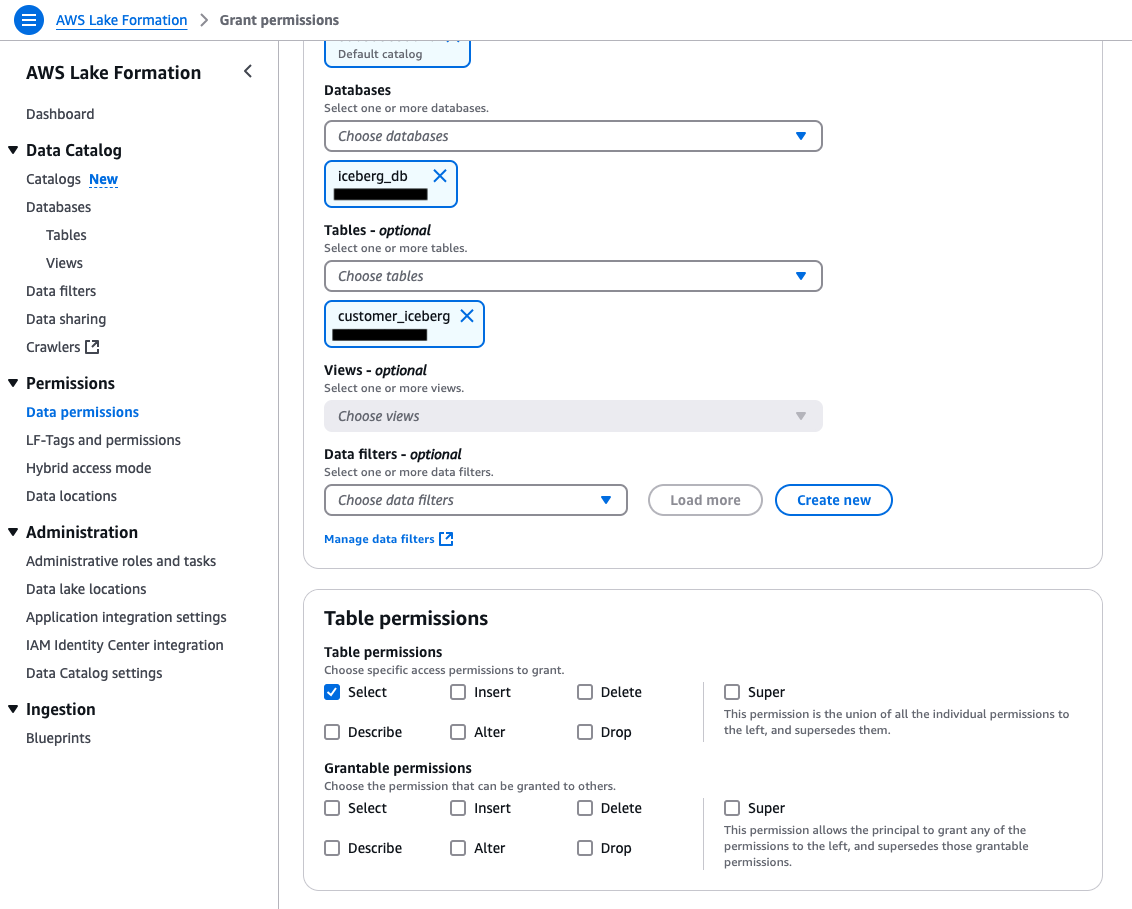
Add SELECT table permissions to the Data-Analyst role in Lake Formation.
Opt-in the Data-Analyst to the Iceberg table, making the Lake Formation permissions effective for the analyst.
Test access to the table as the Data-Analyst by running SELECT queries in Athena.
Test the table write operations by adding new records to the table as ETL-application-role using EMR Serverless.
An S3 bucket to host the sample Iceberg table data and metadata.
An IAM role to register your Iceberg table Amazon S3 location with Lake Formation. Follow the policy and trust policy details for a user-defined role creation from Requirements for roles used to register locations.
An IAM role named ETL-application-role, which will be the runtime role to execute jobs in EMR Serverless. The minimum policy required is shown in the following code snippet. Replace the Amazon S3 data location of the Iceberg table, database name, and AWS Key Management Service (AWS KMS) key ID with your own. For additional details on the role setup, refer to Job runtime roles for Amazon EMR Serverless. This role can insert, update, and delete data in the table.
An IAM role called Data-Analyst, to represent the data analyst access. Use the following policy to create the role. Also attach the AWS managed policy arn:aws:iam::aws:policy/AmazonAthenaFullAccess to the role, to allow querying the Iceberg table using Amazon Athena. Refer to Data engineer permissions for additional details about this role.
Set up the Iceberg table as a hybrid access mode resource
Complete the following steps to set up the Iceberg table’s Amazon S3 data location as hybrid access mode in Lake Formation:
Register your table location with Lake Formation:
Sign in to the Lake Formation console as data lake administrator.
In the navigation pane, choose Data lake Locations.
For Amazon S3 path, provide the S3 prefix of your Iceberg table location that holds both the data and metadata of the table.
For IAM role, provide the user-defined role that has permissions to your Iceberg table’s Amazon S3 location and that you created according to the prerequisites. For more details, refer to Registering an Amazon S3 location.
For Permission mode, select Hybrid access mode.
Choose Register location to register your Iceberg table Amazon S3 location with Lake Formation.
Add data location permission to ETL-application-role:
In the navigation pane, choose Data locations.
For IAM users and roles, choose ETL-application-role.
For Storage location, provide the S3 prefix of your Iceberg table.
Choose Grant.
Data location permission is required for write operations to the Iceberg table location only if the Iceberg table’s S3 prefix is a child location of the database’s Amazon S3 location property.
Grant Super access on the Iceberg database and table to IAMAllowedPrincipals:
In the navigation pane, choose Data permissions.
Choose IAM users and roles and choose IAMAllowedPrincipals.
For LF-Tags or catalog resources, choose Named Data Catalog resources.
Under Databases, select the name of your Iceberg table’s database.
Under Database permissions, select Super.
Choose Grant.
Repeat the preceding steps and for Tables – optional, choose the Iceberg table.
Under Table permissions, select Super.
Choose Grant.
Add database and table permissions to the Data-Analyst role:
Repeat the steps in Step 3 to grant permissions for the Data-Analyst role, once for database-level permission and once for table-level permission.
Select Describe permissions for the Iceberg database.
Select Select permissions for the Iceberg table.
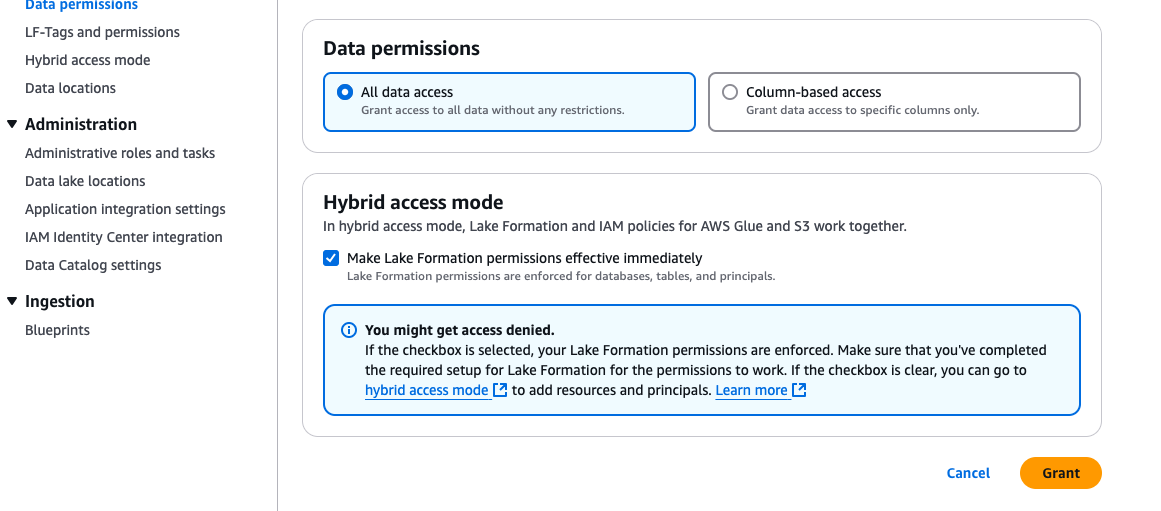
Under Hybrid access mode, select Make Lake Formation permissions effective immediately.
Choose Grant.
The following screenshots show the database permissions for Data-Analyst.
The following screenshots show the table permissions for Data-Analyst.
Verify Lake Formation permissions on the Iceberg table and database to both Data-Analyst and IAMAllowedPrincipals:
In the navigation pane, choose Data permissions.
Filter by Table= customer_iceberg. You should see IAMAllowedPrincipals with All permission and Data-Analyst with Select permission.
Similarly, verify permissions for the database by filtering database=iceberg_db.
You should see IAMAllowedPrincipals with All permission and Data-Analyst with Describe permission.
Verify Lake Formation opt-in for Data-Analyst:
In the navigation pane, choose Hybrid access mode.
You should see Data-Analyst opted-in for both database and table level permissions.
Query the table as the Data-Analyst role in Athena
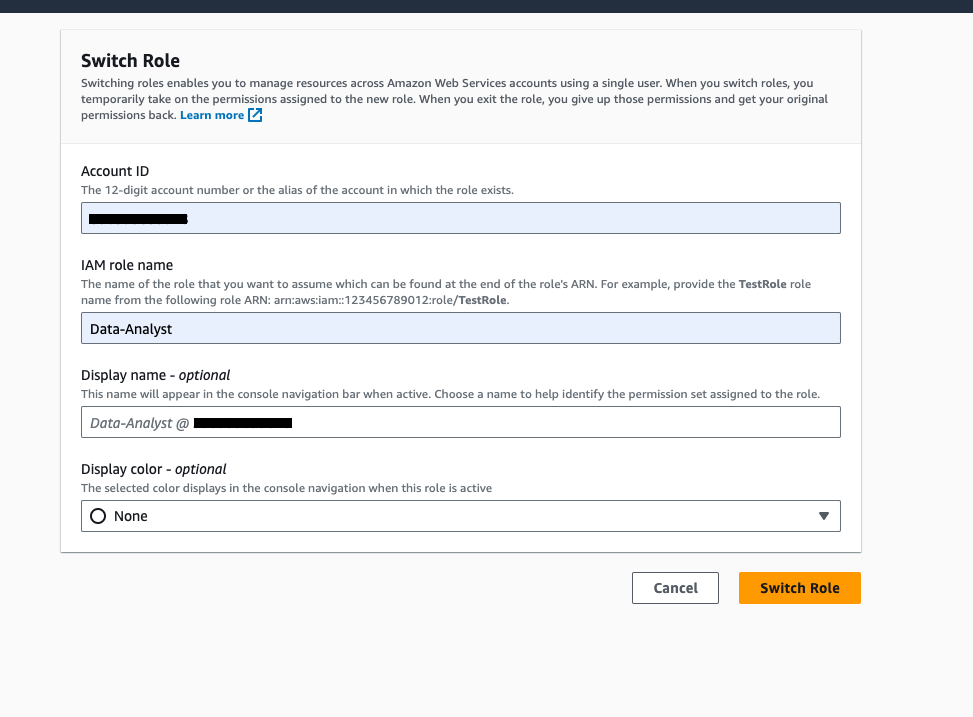
On the console navigation bar, choose your user name.
Choose Switch role to switch to the Data-Analyst role.
Enter your account ID, IAM role name (Data-Analyst), and choose Switch Role.
Now that you’re logged in as the Data-Analyst role, open the Athena console and set up the Athena query results bucket.
Run the following query to read the Iceberg table. This verifies the Select permission granted to the Data-Analyst role in Lake Formation.
SELECT * FROM "iceberg_db"."customer_iceberg"
WHERE c_customer_sk = 247
Upsert data as ETL-application-role using Amazon EMR
To upsert data to Lake Formation enabled Iceberg tables, we will use Amazon EMR Studio, which is an integrated development environment (IDE) that makes it straightforward for data scientists and data engineers to develop, visualize, and debug data engineering and data science applications written in R, Python, Scala, and PySpark. EMR Studio will be our web-based IDE to run our notebooks, and we will use EMR Serverless as the compute engine. EMR Serverless is a deployment option for Amazon EMR that provides a serverless runtime environment. For the steps to run an interactive notebook, see Submit a job run or interactive workload.
Sign out of the AWS console as Data-Analyst and log back or switch the user to admin.
On the Amazon EMR console, choose EMR Serverless in the navigation pane.
Choose Get started.
For first-time users, Amazon EMR allows creation of an EMR Studio without a virtual private cloud (VPC). Create an EMR Serverless application as follows:
Provide a name for the EMR Serverless application, such as DemoHybridAccess.
Under Application setup, choose Use default settings for interactive workloads.
Choose Create and start application.
The next step is to create an EMR Studio.
On the Amazon EMR console, choose Studio under EMR Studio in the navigation pane.
Choose Create Studio.
Select Interactive workloads.
You should see a default pre-populated section. Keep these default settings and choose Create Studio and launch Workspace.
After the workspace is launched, attach the EMR Serverless application created earlier and select ETL-application-role as the runtime role under Compute.
This notebook configures the metastore properties to work with Iceberg tables. (For more details, see Using Apache Iceberg with EMR Serverless.) Then it performs insert, update, and delete operations in the Iceberg table. It also verifies if the operations are successful by reading the newly added data.
Select PySpark as the kernel and execute each cell in the notebook by choosing the run icon.
The following screenshot shows that the Iceberg table insert operation completed successfully.
The following screenshot illustrates running the update statement on the Iceberg table in the notebook.
The following screenshot shows that the Iceberg table delete operation completed successfully.
Query the table again as Data-Analyst using Athena
Complete the following steps:
Switch your role to Data-Analyst on the AWS console.
Run the following query on the Iceberg table and read the row that was updated by the EMR cluster:
SELECT * FROM "iceberg_db"."customer_iceberg"
WHERE c_customer_sk = 247
The following screenshot shows the results. As we can see, ‘c_first_name’ column is updated with new value.
Clean up
To avoid incurring costs, clean up the resources you used for this post:
Revoke the Lake Formation permissions and hybrid access mode opt-in granted to the Data-Analyst role and IAMAllowedPrincipals.
Revoke the registration of the S3 bucket to Lake Formation.
Delete the Athena query results from your S3 bucket.
Delete the EMR Serverless resources.
Delete Data-Analyst role and ETL-application-role from IAM.
Conclusion
In this post, we demonstrated how to scale the adoption and use of Iceberg tables using Lake Formation permissions for read workloads, while maintaining full control over table schema and data updates through IAM policy-based permissions for the table owners. The methodology also applies to other open table formats and standard Data Catalog tables, but the Apache Spark configuration for each open table format will vary.
Hybrid access mode in Lake Formation is an option you could use to adopt Lake Formation permissions gradually and scale those use cases that support Lake Formation permissions while using IAM based permissions for the use cases that don’t. We encourage you to try out this setup in your environment. Please share your feedback and any additional topics you would like to see in the comments section.
About the Authors
Aarthi Srinivasan is a Senior Big Data Architect with AWS Lake Formation. She collaborates with the service team to enhance product features, works with AWS customers and partners to architect lake house solutions, and establishes best practices.
Parul Saxena is a Senior Big Data Specialist Solutions Architect in AWS. She helps customers and partners build highly optimized, scalable, and secure solutions. She specializes in Amazon EMR, Amazon Athena, and AWS Lake Formation, providing architectural guidance for complex big data workloads and assisting organizations in modernizing their architectures and migrating analytics workloads to AWS.
Agile product teams thrive on autonomy and rapid iteration, especially in the cloud where they can quickly deploy and test systems. However, traditional architecture governance often stands in their way, because many enterprises still impose centralized, one-off architecture signoffs early in the process. Historically, these signoffs verified design compliance with corporate standards in a slower, on-premises world. In cloud environments, such signoffs quickly become obsolete—along with their associated architectural documents—and discourage teams from considering new insights.
Modern cloud architectures demand a new governance approach. In this post, we show how collaborative architecture oversight can transform team performance through automation, self-service platforms, and distributed decision-making. We explore how key stakeholders (developers, architects, security specialists, and shared services teams) can participate in architectural decisions through asynchronous approval workflows, while making sure non-negotiable controls such as encryption at rest and in transit are consistently enforced through automation and policy as code. This approach empowers teams to experiment and adapt quickly while maintaining robust enterprise standards.
The promise of traditional architecture signoffs
Traditional architecture governance centers around formal reviews where teams submit detailed design documents to a central architecture board. These artifacts often include comprehensive diagrams, technology selections, security plans, and integration specifications. Architects and a variety of stakeholders such as security specialists, compliance officers, quality assurance, and operations teams review these documents in scheduled meetings before issuing a signoff. These approvals represent point-in-time validations against enterprise standards, assuming minimal deviation during implementation.
Why traditional signoffs fall short
Signoffs can create challenges in modern cloud architectures:
Substituting for continuous compliance when automated verification is missing, creating false assurance through one-off reviews
Creating a restrictive “check-the-box” mentality where meeting minimum documented requirements becomes the goal instead of exploring the best solutions
Removing decision authority from implementation teams who often have the most contextual knowledge
Delaying implementation feedback loops and reducing organizational agility
Consider an agile team responsible for a strategic cloud application that’s moved beyond minimal viable product and is now scaling to support growing business demands. The system architecture must evolve to handle increasing data volumes, performance requirements, and unanticipated integrations. However, corporate stakeholders insist on rigid adherence to the originally approved architecture documents. Although governance is essential for production systems, this inflexible approach with an early architecture signoff prevents the team from implementing architectural improvements as they go. What appears as meaningful control to stakeholders becomes a stifling constraint for builders, ultimately compromising the system stability the governance process aims to protect.
Modern cloud architecture support
A modern architecture function operates around evolving capabilities across three core areas: preapproved blueprints, distributed governance, and automated insights—with traditional signoffs reserved as an exception path for unique use cases.
Preapproved blueprints
Preapproved blueprints like reference architectures and code templates enable your teams to move faster while maintaining corporate standards. This approach supports a use-case-focused assessment model, where architects can concentrate on evaluating specific workflows or threats relevant to a unique use case—rather than having to understand the entire system or threat model from scratch. In this way, the architecture function shifts to managing by exception and refocus reviews on deviations from the standard. Blueprints should have gravity, guiding teams towards standardized patterns while preventing fragmentation through too many tools, databases, middleware options, or SDKs. Consider the following:
Pattern-based reference architectures – These set clear principles for security and resilience without micromanaging. These standards align teams while allowing innovation within a reliable framework. The cloud-driven enterprise transformation at BMW Group exemplifies how moving from signoffs to enablement through pattern-based architectures can be successful.
Self-service platforms – These provide standardized resources that empower teams to build independently. A self-service platform with preapproved templates for deployment toolchains and infrastructure code enables confident and rapid development. Most companies host these on internal developer platforms like Backstage or AWS Service Catalog. This also allows controlled changes to the blueprints and to track their adoption.
Blueprint lifecycle – Blueprints require their own approval process. Although this creates significant efficiency by reducing individual system reviews, it introduces the challenge of managing existing deployments when patterns are updated. Include versioning and migration strategies when introducing new blueprints.
Distributed governance
Distributed governance treats architectural decision-making as a continuous, collaborative process with clear accountability, delegating decision-making and empowering your builders within established blueprints. Consider the following:
Community-driven consultations – Architecture departments can foster self-organization by creating architecture communities of practice for peer knowledge-sharing. These communities enable collaboration on best practices, challenges, and standards, cultivating a culture of distributed decision-making, without eliminating the lines of responsibility and accountability for final decisions. This approach works because deep architectural expertise often resides with builders who have hands-on experience with specific use cases and technologies. The role of the architecture function shifts towards providing the necessary infrastructure and identifying thought leaders in the organization.
Automated insights
Automated insights enable compliance with corporate standards through real-time monitoring and adaptation:
Continuous monitoring – Continuous workload discovery detects architecture based on log data such as AWS Config, AWS CloudTrail, VPC Flow Logs, and Amazon GuardDuty. Gathering insights from application environments allows the architecture function to automatically create architecture diagrams, embed compliance policies as code such as AWS Config rules, and provide real-time security checks like the Workload Discovery on AWS solution, which can automatically generate architecture diagrams and cost reports for AWS accounts. Consult the AWS Partner Solutions Finder to explore partner-provided solutions for application discovery and monitoring.
AI-driven governance – AI tools can analyze decisions, identify architectural and code inefficiencies, detect anomalies, and suggest optimized configurations. This supports informed decision-making, in particular when complimented with thorough human verification and oversight. Amazon Bedrock Agents can find similar existing ADRs, analyze architecture diagrams, and generate infrastructure code. For instance, Japan’s Digital Agency uses an AI assistant to streamline migration reviews for hundreds of systems.
Comparison
The modern view improves the overall value-add and support model of your architecture function. The following table compares the traditional and modern views.
Aspect
Traditional View
Modern View
Purpose
Centralized signoff to enforce control and reduce risk
Empower teams with preapproved standards to prevent sprawl and manage their distribution such as through Backstage
Architecture approach
Fixed, one-time design
Evolving, treated as a parametrized, reusable code product refined through feedback
Team empowerment
Limited, decisions approved by centralized authority
High, teams make decisions within clear standards
Team speed and agility
Slower, due to dependency on signoff
Faster, continuous iteration without waiting for approvals
Risk management
Early signoff to lock in decisions and reduce uncertainty
Risk managed through continuous control validation with automated evidence collection, providing stronger assurance for second and third lines of defense than point-in-time assessments
Compliance
Manual checks by experts
Automated through policy as code and AI tools
Transparency
Limited, focused on approval documentation
High, lightweight decision records for technical stakeholders and visualizations or dashboards for non-technical oversight functions
Encouraged, teams explore within a standards-based framework
Despite the benefits, many organizations struggle to let go of signoffs for a number of reasons, including:
Cultural resistance – In risk-averse cultures where failing fast is not accepted, leaders hesitate to let go of centralized control mechanisms.
Compliance concerns – In regulated industries, centralized approvals serve as control gates. The modern view replaces point-in-time trust with continuous compliance mechanisms—automated guardrails, real-time monitoring, and evidence collection—enabling even highly regulated environments to achieve compliance with small, autonomous teams operating within clear boundaries (“two-pizza team”).
Lack of infrastructure – Some organizations lack self-service platforms, automated compliance, or observability, so they fall back on signoff to manage risk.
Governance concerns – Traditional teams often view distributed decision-making as no governance rather than transformed governance.
The modern view offers significant benefits, though with governance considerations:
Speed and flexibility – Teams move faster without waiting for approvals, deploying AWS resources iteratively.
Empowerment and ownership – Builders using standards and ADRs feel accountable and actively shape architecture.
Innovation and experimentation – Self-service tools and AI guidance foster experimentation without delays.
Conclusion
You can empower your builders by rethinking your architecture signoff. In the modern view discussed in this post, architecture governance aligns with the pace and flexibility of the cloud, allowing teams to innovate within a shared framework. This approach values standards and autonomy over control, and transforms your architecture function into a strategic partner in a fast-evolving landscape.
To learn how to establish and maintain cloud-centered principles and patterns, refer to the platform architecture chapter of the AWS Cloud Adoption Framework and the AWS Culture of Security resources.
The Fedora Project’s RISC-V
special-interest group (SIG) has announced
the availability of Fedora Linux 42 images for supported
RISC-V boards, as well as QEMU
and container images. The SIG is working toward making RISC-V a
primary architecture for Fedora, and has made significant progress in
the past year.
Our upstreaming work continues apace, and we want to acknowledge
that none of this progress would be possible without the incredible
collaboration from maintainers across the Fedora Project and
beyond. Thank you to everyone who reviewed, accepted, merged, and
built our patches. Your support makes this architecture possible.
We’re also excited about just how many packages build cleanly
without special treatment or overlay repositories that need to be
cared for. RISC-V is becoming just another architecture, and that’s
exactly how it should be.
The Python Steering Council
accepted PEP 750
(“Template Strings“) on April 10. LWN covered the discussion around the proposal, including the substantial revisions to the idea that were needed for it
to be accepted. Template strings (t-strings) are a new kind of string that produces
structured data instead of a raw string, allowing library authors to build their own custom
template-handling logic.
Since the approval happened before the cutoff for new features (May 6),
support for template strings will be included in Python 3.14, scheduled for October 2025.
Ask a Linux enthusiast who created the Linux kernel, and odds are they will have
no trouble naming Linus Torvalds—but many would be stumped if asked what the
first Linux distribution was, and who created it. Some might guess Slackware, or its predecessor, Softlanding Linux
System (SLS); both were arguably more influential but arrived just a bit
later. The first honest-to-goodness distribution with a proper installer was MCC Interim Linux,
created by Owen Le Blanc, released publicly in early 1992. I recently
reached out to Le Blanc to learn more about his work on the distribution, what
he has been doing since, and his thoughts on Linux in 2025.
The collective thoughts of the interwebz
Manage Consent
To provide the best experiences, we use technologies like cookies to store and/or access device information. Consenting to these technologies will allow us to process data such as browsing behavior or unique IDs on this site. Not consenting or withdrawing consent, may adversely affect certain features and functions.
Functional
Always active
The technical storage or access is strictly necessary for the legitimate purpose of enabling the use of a specific service explicitly requested by the subscriber or user, or for the sole purpose of carrying out the transmission of a communication over an electronic communications network.
Preferences
The technical storage or access is necessary for the legitimate purpose of storing preferences that are not requested by the subscriber or user.
Statistics
The technical storage or access that is used exclusively for statistical purposes.The technical storage or access that is used exclusively for anonymous statistical purposes. Without a subpoena, voluntary compliance on the part of your Internet Service Provider, or additional records from a third party, information stored or retrieved for this purpose alone cannot usually be used to identify you.
Marketing
The technical storage or access is required to create user profiles to send advertising, or to track the user on a website or across several websites for similar marketing purposes.


 A photo taken by Thembile Martis in AWS Summit Amsterdam 2025






 Aarthi Srinivasan is a Senior Big Data Architect with AWS Lake Formation. She collaborates with the service team to enhance product features, works with AWS customers and partners to architect lake house solutions, and establishes best practices.
 Parul Saxena is a Senior Big Data Specialist Solutions Architect in AWS. She helps customers and partners build highly optimized, scalable, and secure solutions. She specializes in Amazon EMR, Amazon Athena, and AWS Lake Formation, providing architectural guidance for complex big data workloads and assisting organizations in modernizing their architectures and migrating analytics workloads to AWS.