Името на една хижа и един проход се тиражират в новини, статии, напористи постове и крайни коментари, откакто бе извършено тежко престъпление. Това беше първото изречение в статията, когато започнах да я пиша. Два дни по-късно, когато почти я приключвах, броят на жертвите се удвои. Дано не сметнете за проява на лош вкус или още по-зле – за светотатство, това, че си позволих да взема повод от трагедията, за да осветля трудностите при употребата на един пунктуационен знак – кавичките.
Хижа „Петрохан“ и проходът Петрохан
Да, пишат се по различен начин, или поне би трябвало да е така. Собствените имена на сгради поначало не създават двоумения – те се пишат с кавички:
хижа „Скакавица“, хотел „Рига“, църква „Св. Пантелеймон“
Разбира се, надали някъде ще срещнете такова правило за сградите. Според официалната формулировка с кавички се пишат „собствени имена, които са приложения в рамките на словосъчетания“ и представляват доста разнородна група. Тук са имената на улиците и булевардите („6 септември“, „Цар Борис III“), язовирите („Копринка“), търговските марки (бира „Загорка“), заглавията на книги и постановки („На изток от рая“, „Когато гръм удари“) и какво ли още не. Както виждате, те се пишат с кавички и когато родовото понятие пред тях липсва.
Няма да подмина формулировката „приложения в рамките на словосъчетания“. Докато за словосъчетание всеки що-годе образован човек е чувал и знае какво е, за приложение не е. Тази второстепенна част на изречението не е заложена в учебните програми по български език и не се изучава в училище¹. Добре би било да се помисли за по-човеколюбива формулировка на това правило, а и на други правила.
В словосъчетанието проходът Петрохан имаме също родово понятие и собствено име, както е при хижа „Петрохан“. Защо тогава е без кавички?
Не е ли Петрохан приложение? Оказва се, че не е. В този случай Петрохан е опорната дума, определяемото, а проходът е приложението². Според мен би било по-разбираемо, ако при употребата на кавички в подобни примери вървим по линията на първични и вторични названия. Имена като (проход/връх) Петрохан, (град) Враца, (село) Айдемир, (река) Амазонка означават географски обекти и тук номинацията е първична³, това са собствени имена, възникнали най-често отдавна.
Хижа „Петрохан“ е построена преди петдесетина години и е наречена на прохода или пък на върха, тоест нейното собствено име е резултат от вторична номинация. Освен хижа имаме и колбас „Петрохан“ (също вторично название), а вече и случаят „Петрохан“, аферата „Петрохан“, мистерията „Петрохан“, трагедията „Петрохан“, които може да се разглеждат като резултат от третична номинация, така да се каже – по името на хижата.
Впрочем конкретно за собствените имена на географски обекти има изрично правило, че се пишат без кавички. Освен споменатите върхове, реки, градове и села, в тази графа са названията на планини, местности, езера и прочее, които надали създават затруднения. Близки до географските обекти са природни образувания от типа на водопади (Райското пръскало), пещери (Магурата), скални формации (Побитите камъни) и макар че за тях няма специална директива, моят съвет е да ги пишете без кавички.
Гара Подуяне, автогара „Подуяне“ и курортен комплекс Албена
Сега навлизаме в сивата зона, в която контурите са малко или много размити, но колкото и да кършим пръсти, употребата на дадено име обикновено е неизбежна и трябва да вземем решение: с кавички или без?
Какво да правим с гарите и курортните комплекси например? Те географски обекти ли са? От една страна, курортните комплекси са населени места, подобно на градовете и селата, следователно имаме основание да ги пишем без кавички. Това обаче не е единственото съображение, което следва да вземем предвид. Според езиковедите фактори като време на възникване и именуване на обектите, популярност и честота на употреба влияят съществено при употребата на кавички.
Наблюденията ни показват, че гара Подуяне много по-често се пише без кавички, докато автогара „Подуяне“ по-често е с кавички: по-късните по време на възникване обекти по-често се пишат в кавички, защото актът на тяхното именуване се помни, а трайността им във времето не е доказана.
Споделям това наблюдение и пояснявам, че и в двата случая имаме вторична номинация – гарата и автогарата са наречени на село/район Подуяне, но гарата е с няколко десетилетия по-стара⁴ и това явно е достатъчно за езиковото съзнание да отхвърли кавичките в първия случай и да ги сметне за нужни във втория.
Курортните комплекси и ваканционните селища също са от по-ново време, вторичната номинация при тях изпъква – Слънчев бряг, Златни пясъци, Камчия, Албена, Дюни⁵, и това са доводи за употребата на кавички. Много важен обаче е и другият фактор, който споменахме – курортите са по същество населени места, затова и толкова силно се колебаем дали да оградим имената им с кавички.
Кавички и курсив
Интересна е „синонимията“ между нашия препинателен знак и курсива. Правилата позволяват, вместо да ограждаме дадено име с кавички, да го напишем в курсив, с получерен шрифт, да го подчертаем, а защо не и да използваме друг цвят, например в слайд на презентация. Важното е името да се открои, да се отдели от останалите думи в изречението, както това се постига чрез кавичките:
Сред любимите ми пиеси е Сън в лятна нощ от Шекспир. Сред любимите ми пиеси е Сън в лятна нощ от Шекспир.
Като стана дума за пиеси, надали някога ще видите заглавие в кавички на театрален афиш. Обяснението е, че то обикновено е с най-едър шрифт, отделено е от останалата текстова информация и кавичките просто се оказват ненужни – няма какво да открояват.
Много често в български текстове, особено в последните десетилетия, се срещат собствени имена, които поначало изискват кавички, но са написани с латиница. В „Тоест“ сме приели да ги поставяме в курсив. Наясно сме, че това е в разрез с официалните правила, и сме го заявили изрично. Решението на кодификатора да не се употребяват кавички, съответно курсив, е в унисон с езиковата практика:
Това, което можем да твърдим със сигурност, е, че когато собственото име приложение е на латиница, независимо от това към какъв клас обекти принадлежи съответният денотат, то почти никога не се огражда в кавички.
Ето и един пример, съобразен с официалните правила:
Netflix е изправена пред антитръстова проверка заради планирана сделка на стойност близо 83 млрд. долара за придобиване на Warner Bros Discovery, пише Financial Times.
Няма как да се отрече, че чуждата азбука откроява в някаква степен собствените имена от другите думи в текста, които са написани с кирилица. Ние в „Тоест“ обаче искаме да подчертаем това различие чрез курсива.
Колкото повече разнищваме кавичките и употребата им, толкова повече въпроси възникват за тяхната уместност и дори за необходимостта им изобщо, особено при собствените имена. Те поначало се пишат с главна буква, която отличава названието и която е съвсем достатъчна например на четящите текстове на английски. Да, но ако собственото име се състои от две или повече думи, ситуацията става по-различна, защото в английския знаем къде свършва това име – всяка пълнозначна дума в него започва с главна буква (Warner Bros Discovery), докато в българския език правилото е друго и ето какво би се получило например, ако пропуснем кавичките:
Фондация Добро за всеки провежда поредната кампания за подпомагане на нуждаещи се семейства.
Много „тесни места“ има при употребата на този препинателен знак и нормирането ѝ е сложна работа, за което трябва да си даваме сметка. Ясно е, че влиянието на чуждоезикови модели (разбирайте английския) води до честото пренебрегване на кавичките, но пък малко по-горе илюстрирахме, че правилата в даден език представляват цялостна система и се крепят и осмислят едно друго. Затова през прохода на кавичките трябва да се преминава с повишено внимание, като при зимни условия. Go ahead!
1 Авторите на някои учебници включват обяснения за тази част на изречението като допълнителна информация. Приложението се разглежда и като вид определение, но обикновено е съществително, а не прилагателно име и има доста особености.
2 Филологическата логика е малко сложна и тук просто представям линията на разсъждения, без да я коментирам. Нека добавим съгласувано определение към словосъчетанията дядо Петър и читалище „Нов живот“. В първия случай – другият дядо Петър – определението се отнася и към дядо, и към Петър; бихме могли да кажем и другият дядо, и другият Петър. В старото читалище „Нов живот“ обаче старото се отнася само към читалище. Старото „Нов живот“ е безсмислица и това показва, че читалище е опорната дума, без която не може, следователно „Нов живот“ е приложение. Бояджиев, Т., И. Куцаров, Й. Пенчев. Съвременен български език. София: Изток-Запад, 1999, с. 522–523.
3 Вторична номинация при географски обекти се среща сравнително рядко, например връх Ботев, град Гоце Делчев, остров Света Анастасия.
4 Гара Подуяне е открита официално на 1 ноември 1918 г., а за автогара „Подуяне“ не успях да намеря данни. Като имаме предвид, че публични автобусни услуги в София се предлагат от 1935 г., а скоро след това започва Втората световна война, може да се предположи, че автогарата започва да функционира по времето на социализма.
5 Вторична номинация има не само когато едно собствено име се използва за назоваване на нов обект, но и когато първичното име е нарицателно: (някакъв) слънчев бряг – Слънчев бряг.
Езикът може да е вкусен и извън блюдото – онзи, българският език, на който говорим от малки и на който около 24 май се кълнем в обич. А той в същността си е средство за общуване и за да ни служи добре, непрекъснато се променя. Да го погледнем в неговата динамика и да се опитаме да разберем какво става и защо, кои са движещите механизми и как те са свързани с обществените процеси. И тъй като задачата не е лека, ще го правим постепенно – на порции.
The conversation around AI security is full of anxiety. Every week, new headlines warn of jailbreaks, prompt injection, agents gone rogue, and the rise of LLM-enabled cybercrime. It’s easy to come away with the impression that AI is fundamentally uncontrollable and dangerous, and therefore something we need to lock down before it gets out of hand.
But as a security practitioner, I wasn’t convinced. Most of these warnings are based on hypothetical examples or carefully engineered demos. They raise important questions, but rarely answer the most basic one: What does the real attack surface of today’s AI systems actually look like?
So instead of offering another opinion, I ran the numbers.
The method: Focused, real-world measurement
To ground the conversation in reality, I focused on MCP, the Model Context Protocol. This framework is widely used to help language models interact with tools, APIs, and external systems. It’s open source, replicated across many environments, and built for practical integration. That makes it an ideal test case for understanding actual exposure.
No adversarial prompting. No artificial exploits. Just a measurement of what real MCP servers expose. We used SDK import analysis to locate active repositories, filtered out those that wouldn’t run, and examined the tool schemas to understand what each was capable of.
What the data tells us
The MCP servers that met our criteria showed a familiar pattern. They exposed well-understood primitives used throughout modern software systems.
Observed capability classes:
Filesystem access
HTTP requests
Database queries
Local script or process execution
Orchestration and tool chaining
Read-only API search
These are not exotic capabilities unique to AI. They’re already embedded in cloud automation, infrastructure-as-code, and modern DevOps stacks. MCP simply gives them structure.
The frequency of high-severity risk is low
One of the most unexpected findings was the rarity of arbitrary code execution. Despite warnings in the media, this turned out to be the least common capability among all operational MCP servers analyzed.
This matters. It suggests that real-world deployments of AI tooling are not as reckless as some narratives claim. The most common issues are the ones we’ve known for years: weak defaults, excessive permissions, and poor input handling. There’s no mystery there (and that’s encouraging).
Where the real risk builds: Composition
The problem arises when those primitives are combined. Individually, most of the MCP servers we studied were low risk. But when orchestration enters the picture, the attack surface expands.
Some real-world examples we observed:
HTTP fetch + filesystem write = persistence or content injection
These combinations reflect what adversaries already do in non-AI environments. MCP just reduces friction in putting the pieces together.
A critical counterpoint: The ‘best effort’ reality
The focus on constraining the model via schema and architecture is essential for ‘secure by design,’ yet a critical counterpoint must be considered as the industry evolves: We may not be able to stop many insecure AI applications (e.g., those built on architectures like OpenClaw or Claude Code) from shipping with insecure design choices. Similarly, the insecure design path for AI could force security teams to rely on non-deterministic, ‘best effort’ prompt injection defenses to prevent data exfiltration and remote code execution, rather than influencing developers toward inherently secure application design.
While the secure boundary is the schema, and we must influence application developers to adopt secure-by-design principles, the future suggests there will be many cases where this influence fails. This means security leaders must also prepare for a hybrid reality of championing architectural security while also building and operating robust, best effort runtime defenses to manage the fallout from the inevitable wave of insecure AI applications.
A shift in where security happens
As we embed AI deeper into operational systems, the control points change. Historically, we validated inputs at the UI layer, enforced roles through IAM, and wrapped logic in application code.
With AI agents, those controls now live in:
The orchestration layer
Tool composition workflows
Schema contracts
Execution sandboxes
Security needs to follow the shift. That means auditing tool chains, setting strict schema policies, isolating execution contexts, and applying existing practices like least privilege and defense in depth to this new architecture.
What security teams should do now
Security and architecture leaders can start applying pressure in the right places today:
Map AI tooling to known primitives Don’t treat these systems as unknowns. Most expose capabilities like file handling, HTTP fetches, or basic shell commands – all of which are familiar territory for teams leveraging threat intelligence effectively.
Assess schema design before worrying about prompts The schema defines what tools the AI can call and how. Poorly scoped parameters, such as unbounded URLs or file paths, are far more dangerous than clever prompts.
Limit orchestration where possible Composability increases risk. If orchestration is required, monitor it like critical automation infrastructure.
Audit your environment for capability sprawl Look for AI-connected services that may expose multiple sensitive capabilities together. Risk scales when these tools are combined.
Apply existing enterprise controls Network segmentation, credential scoping, logging, and behavioral detections still work. Least privilege access is especially relevant in AI-integrated environments where tool chaining can escalate access unintentionally. AI requires adaptation, not reinvention.
Understanding the risk of AI without the hype
This blog condenses findings from my recent research, where I set out to answer a straightforward question: what are AI systems actually exposing in the real world today? Instead of relying on hypotheticals or fear-driven narratives, I looked at real, runnable Model Context Protocol (MCP) servers and measured their exposed capabilities and architectural design.
If you’re looking for the technical deep dive, including methodology, data sets, and schema-level breakdowns, you can read the original research published on HackerNoon. You can also explore more of our ongoing threat analysis and security research on the Rapid7 Research Hub.
The bottom line: AI introduces complexity and scale, but the fundamental security principles remain the same. The real challenge is whether security teams can adapt traditional controls to new environments and influence developers toward inherently secure application design, rather than being forced to rely on non-deterministic, ‘best effort’ defenses like prompt injection mitigation.
From the NANOG list comes the sad news of the
passing of Dave Farber.
His professional accomplishments and impact are almost endless, but
often captured by one moniker: “grandfather of the Internet,”
acknowledging the foundational contributions made by his many
students at the University of California, Irvine; the University of
Delaware; the University of Pennsylvania; and Carnegie Mellon
University.
Matthias Clasen has published a short summary of the GTK hackfest held prior to FOSDEM 2026. Topics include
discussions on unstable APIs, a decision to bump the C runtime
requirement to C11 in the next development cycle, limiting changes in
GTK3 to crash and build fixes, as well as the state of
accessibility:
On the accessibility side, we are somewhat worried about the state
of AccessKit. The
code upstream is maintained, but we haven’t seen movement in the GTK
implementation. We still default to the AT-SPI backend on Linux, but
AccessKit is used on Windows and macOS (and possibly Android in the
future); it would be nice to have consumers of the accessibility stack
looking at the code and issues.
On the AT-SPI side we are still missing proper feature negotiation
in the protocol; interfaces are now versioned on D-Bus, but there’s no
mechanism to negotiate the supported set of roles or events between
toolkits, compositors, and assistive technologies, which makes running
newer applications on older OS versions harder.
Michiel Leenaars, director of strategy at the NLnet Foundation, used his keynote
at FOSDEM to sound warnings for
the community for free and open-source (FOSS) software; in particular, he
talked about the threats posed by geopolitical politics, dangerous
allies, and large language models (LLMs). His talk was a mix of
observations and suggestions that pertain to FOSS in general and to
Europe in particular as geopolitical tensions have mounted in recent
months.
In 2023, the science fiction literary magazine Clarkesworld stopped accepting new submissions because so many were generated by artificial intelligence. Near as the editors could tell, many submitters pasted the magazine’s detailed story guidelines into an AI and sent in the results. And they weren’t alone. Other fiction magazines have also reported a high number of AI-generated submissions.
This is only one example of a ubiquitous trend. A legacy system relied on the difficulty of writing and cognition to limit volume. Generative AI overwhelms the system because the humans on the receiving end can’t keep up.
Like Clarkesworld’s initial response, some of these institutions shut down their submissions processes. Others have met the offensive of AI inputs with some defensive response, often involving a counteracting use of AI. Academic peer reviewers increasingly use AI to evaluate papers that may have been generated by AI. Social media platforms turn to AI moderators. Court systems use AI to triage and process litigation volumes supercharged by AI. Employers turn to AI tools to review candidate applications. Educators use AI not just to grade papers and administer exams, but as a feedback tool for students.
These are all arms races: rapid, adversarial iteration to apply a common technology to opposing purposes. Many of these arms races have clearly deleterious effects. Society suffers if the courts are clogged with frivolous, AI-manufactured cases. There is also harm if the established measures of academic performance – publications and citations – accrue to those researchers most willing to fraudulently submit AI-written letters and papers rather than to those whose ideas have the most impact. The fear is that, in the end, fraudulent behavior enabled by AI will undermine systems and institutions that society relies on.
Upsides of AI
Yet some of these AI arms races have surprising hidden upsides, and the hope is that at least some institutions will be able to change in ways that make them stronger.
Science seems likely to become stronger thanks to AI, yet it faces a problem when the AI makes mistakes. Consider the example of nonsensical, AI-generated phrasing filtering into scientific papers.
A scientist using an AI to assist in writing an academic paper can be a good thing, if used carefully and with disclosure. AI is increasingly a primary tool in scientific research: for reviewing literature, programming and for coding and analyzing data. And for many, it has become a crucial support for expression and scientific communication. Pre-AI, better-funded researchers could hire humans to help them write their academic papers. For many authors whose primary language is not English, hiring this kind of assistance has been an expensive necessity. AI provides it to everyone.
In fiction, fraudulently submitted AI-generated works cause harm, both to the human authors now subject to increased competition and to those readers who may feel defrauded after unknowingly reading the work of a machine. But some outlets may welcome AI-assisted submissions with appropriate disclosure and under particular guidelines, and leverage AI to evaluate them against criteria like originality, fit and quality.
Others may refuse AI-generated work, but this will come at a cost. It’s unlikely that any human editor or technology can sustain an ability to differentiate human from machine writing. Instead, outlets that wish to exclusively publish humans will need to limit submissions to a set of authors they trust to not use AI. If these policies are transparent, readers can pick the format they prefer and read happily from either or both types of outlets.
We also don’t see any problem if a job seeker uses AI to polish their resumes or write better cover letters: The wealthy and privileged have long had access to human assistance for those things. But it crosses the line when AIs are used to lie about identity and experience, or to cheat on job interviews.
Similarly, a democracy requires that its citizens be able to express their opinions to their representatives, or to each other through a medium like the newspaper. The rich and powerful have long been able to hire writers to turn their ideas into persuasive prose, and AIs providing that assistance to more people is a good thing, in our view. Here, AI mistakes and bias can be harmful. Citizens may be using AI for more than just a time-saving shortcut; it may be augmenting their knowledge and capabilities, generating statements about historical, legal or policy factors they can’t reasonably be expected to independently check.
Fraud booster
What we don’t want is for lobbyists to use AIs in astroturf campaigns, writing multiple letters and passing them off as individual opinions. This, too, is an older problem that AIs are making worse.
What differentiates the positive from the negative here is not any inherent aspect of the technology, it’s the power dynamic. The same technology that reduces the effort required for a citizen to share their lived experience with their legislator also enables corporate interests to misrepresent the public at scale. The former is a power-equalizing application of AI that enhances participatory democracy; the latter is a power-concentrating application that threatens it.
In general, we believe writing and cognitive assistance, long available to the rich and powerful, should be available to everyone. The problem comes when AIs make fraud easier. Any response needs to balance embracing that newfound democratization of access with preventing fraud.
There’s no way to turn this technology off. Highly capable AIs are widely available and can run on a laptop. Ethical guidelines and clear professional boundaries can help – for those acting in good faith. But there won’t ever be a way to totally stop academic writers, job seekers or citizens from using these tools, either as legitimate assistance or to commit fraud. This means more comments, more letters, more applications, more submissions.
The problem is that whoever is on the receiving end of this AI-fueled deluge can’t deal with the increased volume. What can help is developing assistive AI tools that benefit institutions and society, while also limiting fraud. And that may mean embracing the use of AI assistance in these adversarial systems, even though the defensive AI will never achieve supremacy.
Balancing harms with benefits
The science fiction community has been wrestling with AI since 2023. Clarkesworld eventually reopened submissions, claiming that it has an adequate way of separating human- and AI-written stories. No one knows how long, or how well, that will continue to work.
The arms race continues. There is no simple way to tell whether the potential benefits of AI will outweigh the harms, now or in the future. But as a society, we can influence the balance of harms it wreaks and opportunities it presents as we muddle our way through the changing technological landscape.
The online world that young people navigate today is different from the one we encountered just a few years ago: the search engines, social media platforms and digital tools they use to find information, interact with friends and complete schoolwork are now deeply embedded with AI technologies.
While the core aims of online safety education remain the same, the scope must now expand to include AI literacy: the ability to use, question and navigate AI tools so young people can make responsible choices online.
This is a shared challenge for anyone who supports young people as they navigate the online world: parents and carers, youth leaders and volunteers, and educators across all subjects. Many young people use these AI tools independently, often without guidance, so having open and useful conversations about trust, risk and responsibility matter just as much in the classroom as they do at dinner tables and Code Clubs.
Why AI literacy is essential for staying safe online
At the Raspberry Pi Foundation, we have developed various AI literacy resources for educators, club leaders and parents to address this challenge in age-appropriate and practical ways. Our ‘AI safety’ resources, part of our Experience AI programme, are a set of free comprehensive teaching activities to support you in educating young people aged 11–14 in navigating key safety issues linked to AI, including privacy, misinformation, trust and responsibility. Delivered through videos, unplugged activities and discussions, the activities are adaptable to a range of learning settings, and reflect the real decisions young people are already making online.
For example, in the ‘Trusted Sources’ activity from the ‘Media literacy in the age of AI’ lesson, young people reflect on the ways they look for information related to schoolwork, news and in their free time. They consider which sources are likely to allow the use of generative AI and how that affects their trustworthiness. Rather than labelling sources as ‘good’ or ‘bad’, learners explore questions around responsibility, credibility and oversight, and build practical skills for fact-checking and staying safe online.
Supporting responsible use of generative AI through Experience AI
Alongside the ‘AI safety’ resources, we have also developed a new ‘Large Language Models (LLMs)’ unit for learners aged 11–13 and 14–17, currently being tested in classrooms. The unit focuses on another important aspect of online safety: how young people interact responsibly with AI tools that generate content. While helpful, learners’ uncritical use of these tools could lead to cognitive offloading and limit the development of their higher-order thinking skills. The confident, persuasive tone of LLMs can also make it harder for young people to judge accuracy, recognise bias or notice missing information in outputs.
To support the critical thinking skills that are essential for staying safe online, the new LLM unit includes research-informed lessons that explore how LLMs are created, why their outputs are not always accurate and how to evaluate AI-generated responses. The unit also encourages learners to reflect on when using an LLM is helpful to their learning, when it is not, and how they can remain in control of their own thinking, learning and skills development.
Starting the conversation this Safer Internet Day
Helping young people stay safe online in the age of AI doesn’t require having all the answers. Instead, it’s about creating the space to pause, question, and think critically about what they are encountering online. Through carefully designed, research-informed and pedagogically aligned AI literacy resources, we aim to help you start the conversations that empower young people to think critically, stay curious and remain in control of their learning and online lives.
This Safer Internet Day, we invite educators, parents and anyone who supports young people to explore our AI literacy resources and start the conversation. Visit the Experience AI website for more information.
It observes a wide variety of near-Earth and deep-space objects in the radio-wave spectrum, using RT-32 and RT-16 telescopes, which are parabolic antennas with diameters of 32m and 16m as well as a LOFAR phased antenna array.
Among its most notable ongoing projects is the establishment of cooperation with the Swedish Space Corporation (SSC) and participation in the European VLBI Network (EVN), where VIRAC performs joint simultaneous observations with similar stations worldwide.
We spoke with Arturs Orbidans, Head of the Engineering and Technical Operation Group at VIRAC, and Software Engineer Kristaps Blumbergs to find out how Zabbix keeps millions of Euros worth of high-tech equipment up and running.
What are the main tasks, objectives, and problems addressed by monitoring tools at VIRAC?
The main objective of our monitoring is to obtain values from the equipment used in radio-astronomical observations, such as the antenna control system, receivers (including cryogenic ones), a stable frequency source (active hydrogen maser), digitizers, and data recorders.
If any of these values deviate from the defined norm, or if a device reports an error state, engineers are notified via email so the issue can be resolved. In addition, the availability of all servers and computers located in Irbene is monitored and their parameters are tracked.
Why Zabbix? Was there a migration from another tool?
Previously, there was no single monitoring tool that did everything in one place – there were only methods for retrieving the required values or tools intended to monitor a specific server. This meant that extending or expanding the tooling was too complex, if not impossible.
We needed a solution that could monitor values from the required equipment in one place and notify engineers about errors. We chose Zabbix because it was already used in the VSRC High-Performance Computing (HPC) department, and Zabbix itself had been recommended to that department by the ITML department of the Ventspils University of Applied Sciences.
We’d like to ask about some Zabbix infrastructure specifics at VIRAC. How are the following used?
Zabbix proxy. There are plans to introduce a Zabbix proxy to reduce the load on the Zabbix server, as it is currently the only system collecting all data.
High availability. Not implemented at the moment, but we definitely have services where it would be necessary, for example the maser–GPS PPS signal delay reader, which determines the delay between the two signals with microsecond precision. This is important for defining an accurate time reference for observations.
Reports (Scheduled reports). One weekly scheduled report is used, which graphically shows changes over time in important parameters of the active hydrogen maser.
Scripts. None have been created yet, because for now the provided templates and the use of system.run() for obtaining other values are sufficient.
Overview of items (what is collected and how). Most items come from standard Linux/Windows server templates. Custom items very often use system.run(), which executes custom scripts for data collection. In addition, .json files are read and then split into multiple items.
Problem detection (what type of triggers are used and how complex they are). The created triggers are quite basic, since the obtained data is already closely tied to the actual equipment. Therefore, for most triggers associated with the created items, we check to see whether the value is equal to a specific value or whether a numeric value falls within a defined range.
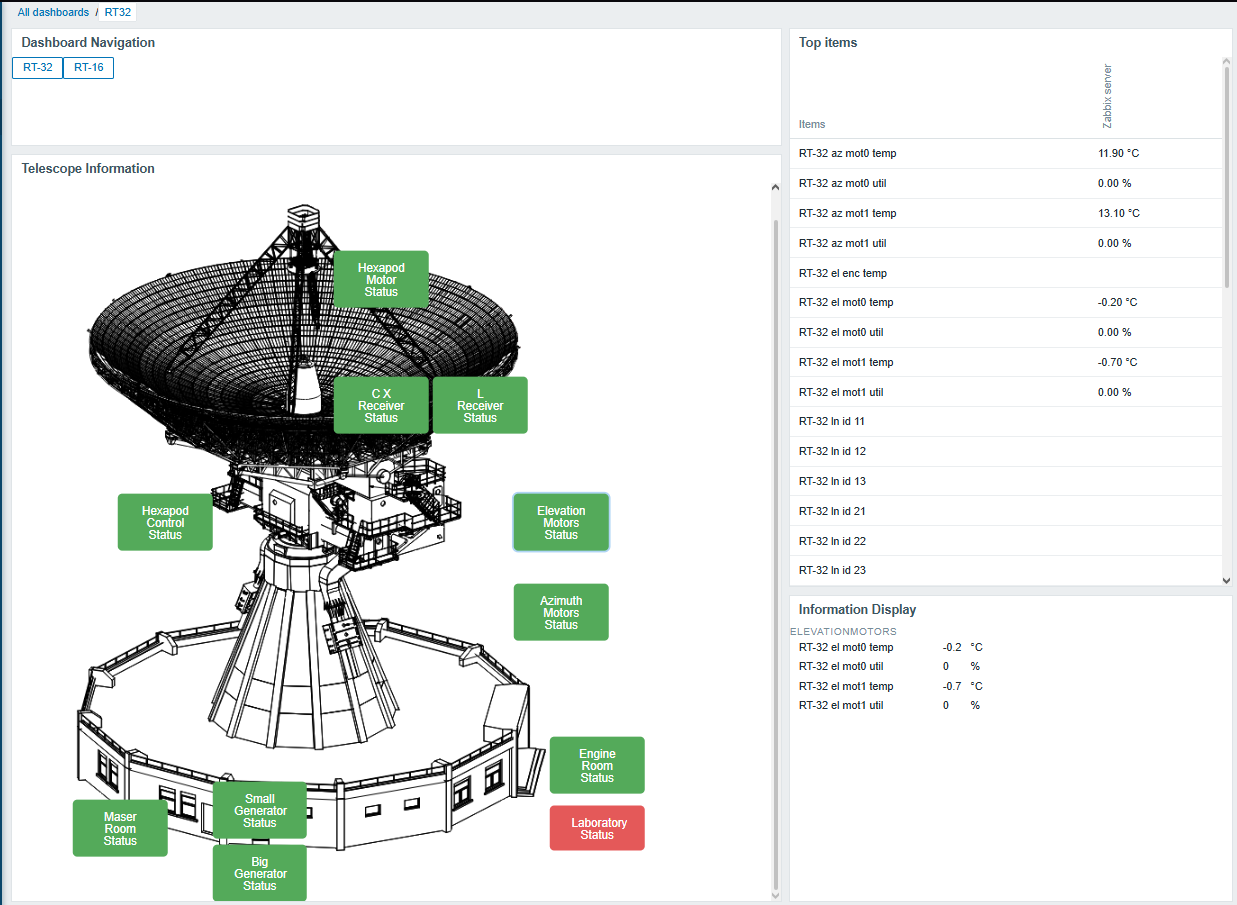
Visualization (widgets and maps). From the built-in widgets, the graph and problems widgets are used. Shortly before the release of Zabbix 7.0, custom Zabbix widgets were developed, one of which is used to navigate Zabbix dashboards. This widget consists of two buttons with links to other dashboards.
The main widget displays the radio telescopes, with additional buttons placed at specific locations that indicate whether there are any problems with equipment in that particular area. For example, the laboratory button is placed on the radio telescope schematic at the location where the laboratory is located. It is shown in green when everything is fine and in red when a problem has occurred with one of the servers in that room.
This widget functions as a custom map, and when one of the buttons is clicked, another widget displays the values associated with the selected location. At the moment, all settings for the created widgets use constant values, so they cannot yet be dynamically applied to other use cases.
The described widgets can be seen in the image shown below, where Telescope Information is the above-mentioned “map,” and the Information Display widget shows the related items/values when one of the available buttons is pressed. Meanwhile, in the top-right corner, all key values are displayed for cases where there is no desire to click on specific buttons.
Is there a specific scheme for user roles or permissions?
There is no special user scheme, because our team is very small. It consists only of an admin user and guest users, who can view the custom widgets and see whether there are any problems.
What are your impressions after working with Zabbix?
So far, we have not encountered any problems and are very satisfied with Zabbix. In fact, Zabbix has saved several important scientific observations!
Ако си представим системата за международна сигурност като архитектурна постройка, то поне една носеща стена се срути през изминалите седмици от европейска гледна точка. Апетитите на Тръмп към Гренландия разклатиха правителствата на държавите членки и институциите на ЕС, поставяйки ги пред немислима досега заплаха. Не само бъдещи военни действия в Стария континент започнаха да изглеждат потенциално възможни (този риск вече беше станал очевиден, след като Русия нападна Украйна), но сега европейците се оказаха директно заплашени от традиционния си партньор, съюзник и закрилник – САЩ. Как се отразява това на европейските политики в областта на сигурността и отбраната и къде е мястото на България в новия световен ред?
Рамо до рамо срещу бедствието Тръмп
Международният икономически форум в Давос още не беше приключил, когато на 22 януари лидерите на страните от ЕС се събраха на неформална вечеря в Брюксел да обсъдят актуалните развития в трансатлантическите отношения и последиците от тях за Съюза. Погледната отстрани, срещата изглеждаше като терапевтична сбирка на общност, която е покосена от природно бедствие, а членовете ѝ изпитват необходимост да бъдат заедно в тежък момент, за да споделят страховете си и да потърсят взаимна утеха.
В заключителните си думи председателят на Европейския съвет Антонио Коща подчерта, че в отношенията между партньори и съюзници следва да се действа внимателно и с уважение, както и че Европа е твърдо решена да постигне по-голяма стратегическа автономност. Той също каза, че търговските отношения между ЕС и САЩ трябва да бъдат стабилизирани, но Европа има силата и инструментите да се защитава срещу всяка форма на принуда. На заплашителния тон на Тръмп за налагане на мита и военни действия в Гренландия Европа отговори дипломатично, но твърдо. Позицията, като всяко друго становище на ЕС, отразяващо 27 различни национални политики, приведе под най-малък общ знаменател гнева на Франция, Испания и скандинавските държави към Тръмп, по-нюансираните позиции на Полша и балтийските държави и откровената подкрепа на Унгария, Словакия и Чехия за американския президент.
Осъзнаването, че Европа трябва да поеме отговорност за собствената си сигурност, не идва от кризата с Гренландия. Още в началото на миналата година председателката на Европейската комисия Урсула фон дер Лайен представи новата европейска стратегия за сигурност като един от приоритетите си, за да се постигне радикално превъоръжаване на Европа в отговор на новата геополитическа ситуация. Според стратегическия документ от държавите членки се очаква да осигурят 800 мрлд. евро, за да гарантират пълна отбранителна готовност до 2030 г.
Мечтаят ли европейците, когато говорят за стратегическа автономност?
Евроатлантическата схватка стана още по-интересна, когато броени дни след Давос дуелът ЕС–САЩ се пренесе в Европейския парламент (ЕП). На съвместно заседание на Комисията по външни отношения (AFET) и на Делегацията за отношения с Парламентарната асамблея на НАТО генералният секретар Марк Рюте неколкократно подчерта, че вижда европейската отбрана като допълваща Северноатлантическия алианс, но в никакъв случай не и като автономна и военна сила.
И ако някой си мисли, че ЕС или Европа като цяло може да се защити без САЩ, нека продължава да мечтае. Вие не можете. Ние не можем. Нуждаем се един от друг,
каза той, с което предизвика възмущението на евродепутатите.
Идеята, че Рюте, най-дълго управлявалият министър-председател на Нидерландия и убеден проевропейски политик, когото европейците припознават като „един от нас“, сега защитава политиките на Тръмп и разубеждава Европа от намеренията ѝ да изгради собствен отбранителен капацитет, не се понрави на мнозинството членове на ЕП.
Генерален секретар на НАТО ли сте, или негов посланик в ЕС?,
попита испанският евродепутат Начо Санчес Амор. Евродепутатите бяха разочаровани от липсата на неутрална позиция, каквато подобава на един генерален секретар. Дори фактът, че в Давос Рюте спаси положението, като успя да постигне съгласие с Тръмп по въпроса с Гренландия и да предотврати (засега) военни действия и високи мита за европейците, не беше достатъчно утешителен. Защото на този етап условията на сделката и евентуалните загуби, които ще понесат Гренландия, Дания и Европа, остават неясни.
„Вашият напредък зависи от нашия успех“
Друго проблемно и изключително важно за евроатлантическите отношения споразумение – търговската сделка между САЩ и ЕС – беше обсъдено два дни по-късно в същата комисия AFET, този път в присъствието на Андрю Пъздър, новия посланик на САЩ в ЕС. Той e адвокат и собственик на верига ресторанти за бързо хранене, върл противник на абортите и на синдикатите, защитник на роботизацията. Беше номиниран за министър на труда по време на първия мандат за Тръмп, но принуден да се оттегли заради множество скандали, свързани с личността му. От есента на 2025 г., след подписването на първото търговско споразумение между Урсула Фон дер Лайен и Доналд Тръмп, Пъздър пое щафетата да представлява американските интереси в Брюксел, докато договореното между председателката на Европейската комисия и американския президент мине през одобрението на ЕП и Съвета на ЕС.
На последната среща в Европарламента Пъздър много ясно заяви американската позиция за търговските отношения между Новия и Стария континент. Според него надпреварата в областта на изкуствения интелект ще реши икономическата съдба на Запада и за да устоим на съревнованието, се нуждаем от пет неща: енергия, изкопаеми суровини, данни, центрове за данни и развит софтуер. Европа трябва да се индустриализира и да следва САЩ по отношение на търговията, енергетиката, данните и инфраструктурата за изкуствен интелект, както и да намали регулациите, за да облекчи американските компании, каза още той.
Във въпросите си към новия посланик на САЩ мнозинството евродепутати защитиха правото на Европа да развива икономически политики, съобразени с нейните закони и ценности.
Законодателството ще го поправим ние, ако сметнем за необходимо, не вие. Нашата цел е да помогнем на САЩ да промени настоящата си авторитарна траектория,
заяви евродепутатът от левицата Санчес Амор. Други представители на ЕП задаваха и актуални въпроси, свързани с Гренландия, Украйна и новия Съвет за мир на Тръмп, които Пъздър заобиколи. Само германският евродепутат Александър Сел от крайнодясната „Европа на суверенните нации“ се съгласи с възгледите на американския посланик и със Стратегията на САЩ за национална сигурност, затвърждавайки за пореден път пълната взаимна подкрепа между европейската крайна десница и Тръмп.
Ние нашите ангажименти сме ги изпълнили, сега е ваш ред да напреднете по сделката,
каза още Пъздър, намеквайки за скорошното временно замразяване на работата по търговската сделка от Комисията по международна търговия на ЕП заради заплахите на Тръмп и проблемите с Гренландия.
Така в рамките на три дни американските хегемонистични позиции – както в областта на отбраната и сигурността, така и в сферата на търговията и икономиката – отекнаха еднакво силно в ЕП и притиснаха Европа от двете страни, като в макдоналдски чийзбургер, в стремежа си да я подчинят на американската визия за бъдещето. И то не коя да е визия, а на Америка като частна еднолична корпорация, предвождана от Тръмп.
Къде сме ние?
Български евродепутати не бяха чути да задават въпроси на двете важни изслушвания в AFET и в Делегацията за отношения с НАТО, въпреки че имаме двама постоянни членове в тази комисия (Андрей Ковачев от ГЕРБ и Станислав Стоянов от „Възраждане“) и трима заместник-членове (Илхан Кючук от ДПС, Ивайло Вълчев от ИТН и Петър Волгин от „Възраждане“).
За сметка на това името на страната се открои редом с това на Унгария във връзка с подписания от премиера в оставка Росен Желязков документ за присъединяване на страната ни към Съвета за мир, създаден от Тръмп. Ето как коментира Financial Times компанията, в която изневиделица (за българското общество и за европейските ни партньори) се намери и България:
Шестима монарси, трима бивши съветски апаратчици, два режима, опиращи се на военна подкрепа и лидер, издирван от Международния наказателен съд за предполагаеми военни престъпления…
Останалите европейски държави отказаха участие в едноличната инициатива на Тръмп, а Антонио Коща подчерта, че ЕС ще се придържа към мирен план за Газа в съответствие с приетата през ноември 2025 г. Резолюция 2803 на Съвета за сигурност на ООН. В България присъединяването към обявения от американския президент Съвет предизвика остри критики – както от анализатори и експерти по международно право, така и от юристи и специалисти по конституционните въпроси. Международни анализатори също смятат, че и от юридическа, и от външнополитическа гледна точка това е организация с неизяснен статут и централизирана власт, в която решенията се вземат еднолично от Тръмп. А останалите държави членки служат или за донори (стига да платят членската такса от 1 млрд. долара за пожизнено присъединяване), или за декор за снимките, както изглеждаше на срещата в Давос.
В тази сложна геополитическа ситуация на изострени отношения между ЕС и САЩ, когато европейските държави застават рамо до рамо, за да консолидират позициите си и да устоят на американския натиск, България изпраща двусмислени сигнали, като за пореден път застава срещу Европа и редом до Унгария – черната овца на ЕС в момента. Такова поведение се наблюдава понякога и от страна на Словакия и Чехия и дава все повече основания на редица западни държави начело с Германия да поддържат идеята за Европа на две скорости като единствена възможна алтернатива на разнопосочните влияния, господстващи в ЕС. Франция, Полша, Испания, Италия и Нидерландия вече са поканени от германския финансов министър и вицеканцлер Ларс Клингбайл да обсъдят конкретен план за действие в тази насока.
При такъв сценарий България едва ли може дори да се надява да е в групата на втората скорост, където ще се озоват страни като Белгия, Малта, Португалия, Кипър, Гърция, Люксембург, балтийските и скандинавските държави – по-малки по територия, население и възможности, но с ясни проевропейски позиции и с безспорна ценностна принадлежност към ЕС. За лошите ученици от Източна Европа, които претендират да са по-находчиви, като поддържат т.нар. външнополитически баланс едновременно с ЕС, САЩ и Русия, остава рискът да се озоват в задния двор на европейската система на сигурност, която, макар и разклатена в момента, остава единствената демократична алтернатива в един нестабилен свят на видими и невидими заплахи и безпринципни съюзи.
Изразеното мнение е лично и не представлява позицията на Европейския парламент.
Amazon SageMaker Unified Studio now offers two domain configurations: Amazon SageMaker Unified Studio Identity Center(IDC)-based domains with comprehensive governance features, and Amazon SageMaker Unified Studio IAM-based domains with enhanced developer productivity tools.
In this post, we demonstrate how you can use both of these domain configurations of Amazon SageMaker Unified Studio using AWS Identity and Access Management (IAM) role reuse and attribute-based access control.
How authentication works in each configuration
Amazon SageMaker Unified Studio IDC-based domains authenticate users through AWS Identity and Access Management (IAM) Identity Center with Single Sign-On, preserving individual user identities throughout their sessions. These domains excel in governance with identity-based authorization, fine-grained access controls between users, and comprehensive catalog management featuring formal Publisher/Subscriber (Pub/Sub) data sharing workflows with approval processes—ideal for enterprise environments requiring strong identity management, compliance tracking, and identity-based audit trails.
Amazon SageMaker Unified Studio IAM-based domains authenticate through federated AWS Identity and Access Management (IAM) roles where all users accessing a project share the same role permissions. These domains prioritize developer productivity with modern tools including new serverless Notebooks, Athena Spark integration, the improved interface with vertical navigation, and built-in AI assistance, designed for development teams that need streamlined access and advanced analytics capabilities.
This solution facilitates organizations that are already using IDC-based domains to preserve their existing governance frameworks established in IDC-based domains while unlocking modern development capabilities for their teams through IAM-based domains. If you prefer to use the newly launched IAM-based domains, you can continue to do as well. The choice depends on your company’s needs.
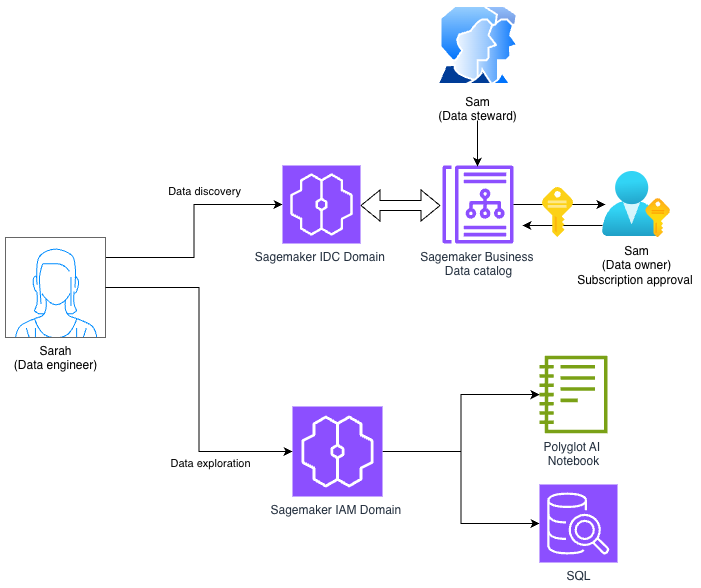
Imagine a data steward (Sam) uses the IDC-based domain to define data access policies, manage the data catalog, and approve subscription requests to verify compliance and proper data governance.
On the other hand, a data engineer (Sarah), wants to use IDC-based domain for governance features such as SageMaker catalog and IAM-based domain for the new serverless Notebook to build data pipelines, perform advanced analytics, and accelerate development cycles. Sarah will request access to the data through IDC-based domain, and once access is approved by Sam, Sarah can access this data in serverless notebook available in IAM-based domain.
Solution overview
The integration leverages IAM role reuse, AWS Lake Formation Attribute-Based Access Control (ABAC) and Amazon SageMaker Catalog pub-sub model to automatically carry permissions from the IDC-based domain to the new IAM-based domain. When properly configured, data subscriptions managed through the IDC-based domain’s Pub/Sub model become immediately accessible in IAM-based domain projects, providing a unified data access experience.
The solution we will implement in the post involves creating an IAM-based domain project that is similar to your IDC consumer project (eg same team members, use case) , configuring execution roles, and enabling role reuse. This approach maintains the familiar subscription workflow while extending benefits to the IAM-based domain.The following diagram shows the high-level architecture of how this approach works.
The solution architecture consists of:
Existing IDC-based domain: Contains producer and consumer projects with established data sharing via Pub/Sub model
IAM-based domain: New projects with federated and execution roles configured for modern development tools
IAM Identity Center: Manages federated access and permission sets
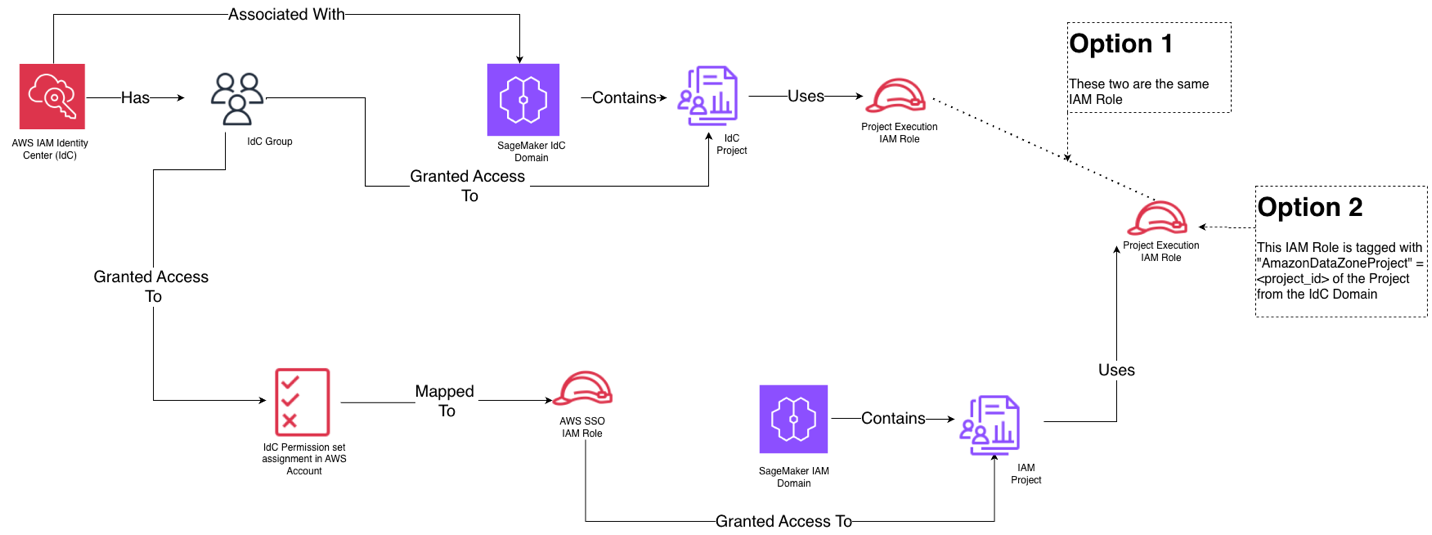
The solution provides 2 options: Option 1: IDC-Based Domain project role reuse provides the simplest integration path by directly reusing the existing consumer project IAM role from your IDC-based domain as the execution role in the IAM-based domain. The primary benefits include simplified setup requiring only policy changes (covered later in the blog), reduced administrative overhead with one less role to manage and lower risk of misconfiguration since you’re leveraging proven, existing roles. Choose Option 1 when you want the fastest implementation path, your organization prefers minimal role proliferation, you have well-established IDC-based domain roles that already have data access permissions, or your team has limited IAM expertise and wants to avoid complex tagging configurations.
Option 2: Creating a new execution role for the IAM-based domain project and use attribute-based access control (ABAC) through tagging with the IDC-based domain project ID. The key benefits include enhanced auditability with two distinct roles (one for IDC-based domain, one for IAM-based domain), clear separation showing which domain generated each request in CloudTrail logs, greater flexibility to customize permissions specific to IAM-based domain needs without affecting IDC-based domain operations, and better security isolation between the two domain types. The `AmazonDatazoneProject` tag enables attribute based access control, while maintaining distinct role identities. Choose Option 2 when: your organization requires detailed audit trails distinguishing between domain types, compliance policies mandate separation of concerns between governance and development environments, you want to track and attribute costs separately for each domain, or you need to provide evidence showing which domain (governance vs. development) accessed specific data resources for compliance reporting.
Here is the high-level view of how the identity and domain entities map to each other for both options:
For this demonstration, we use a simplified setup with a sales producer project and a marketing consumer project that subscribes to these tables.
Understanding the current IDC-based domain setup
Our starting point includes a well-established Amazon SageMaker Unified Studio IDC-based domain structure:
Sales Producer Project
Contains a database with pipeline and sales tables
Managed by Sam, the data steward who creates and publishes data assets
Has its own project IAM role
Marketing Consumer Project
Managed by Sarah, the data engineer who subscribes to published data via IDC domain project
Has its own project IAM role
Successfully queries subscribed data through the IDC-based domain interface
Each project has an associated IAM role that governs access to data assets, and the Pub/Sub model manages subscription workflows and permissions.
Setting up federated role through permission sets
Federated roles through permission sets are used to authenticate and provide users with console access to IAM-based domains through AWS IAM Identity Center, where all users within a project share the same role permissions. When you assign a permission set, IAM Identity Center creates corresponding IAM Identity Center-controlled IAM role in AWS account, and attaches the policies specified in the permission set to that role.
IAM-based SMUS domains enable streamlined access to modern development tools (serverless Notebooks, Athena Spark, AI assistance) while maintaining governance, automatically propagating permissions across domains without requiring duplicate access approvals, and simplifying team member onboarding.You can use any IAM role to access IAM-based domain. For this post, we will use federated role option using AWS IAM Identity Center (IDC).
Grant access to Data engineer group for IAM-based domains in Identity Center
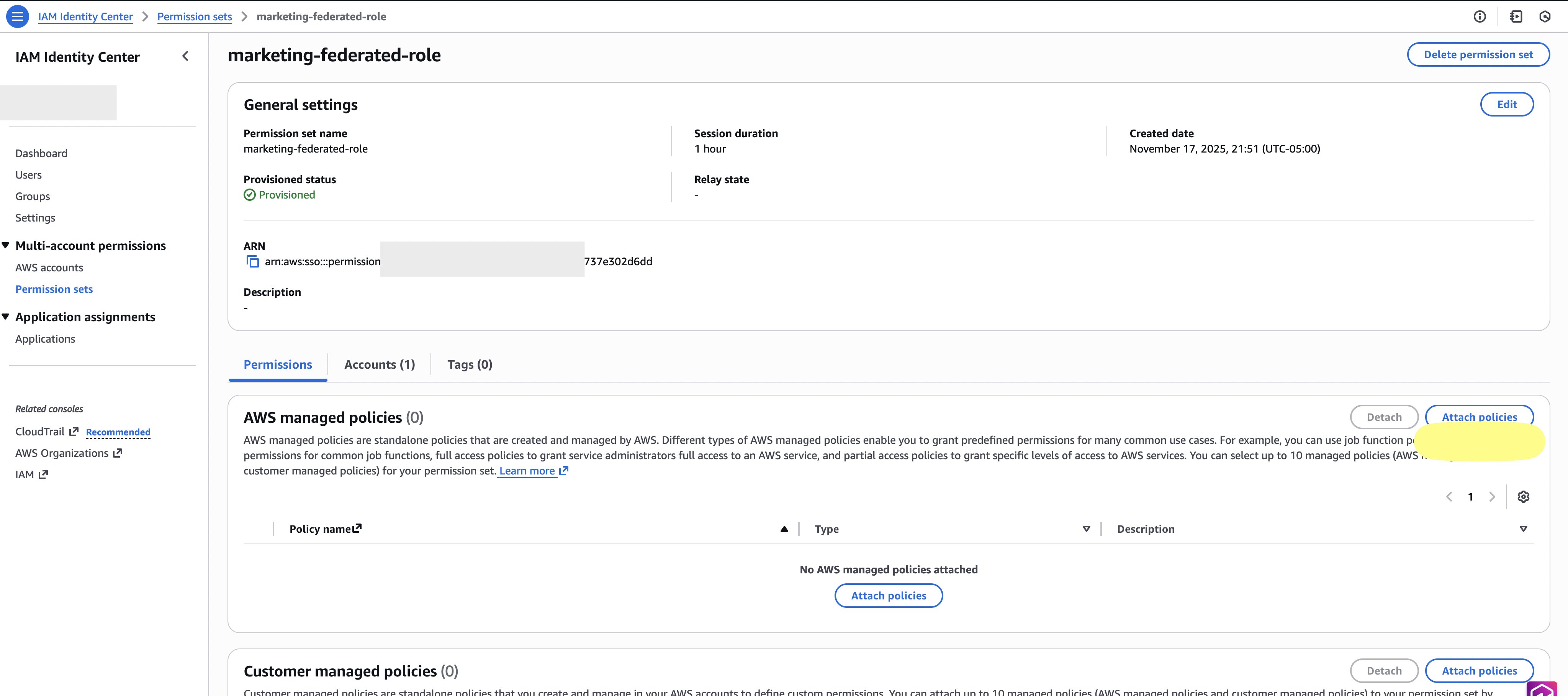
1) Set up federated role in AWS IAM Identity Center
Navigate to IAM Identity Center (IDC) in the AWS Management Console, then complete the following steps:
Go to permission set section in IDC. Create a new permission set called Marketing-federated-role and select Attach Policy.
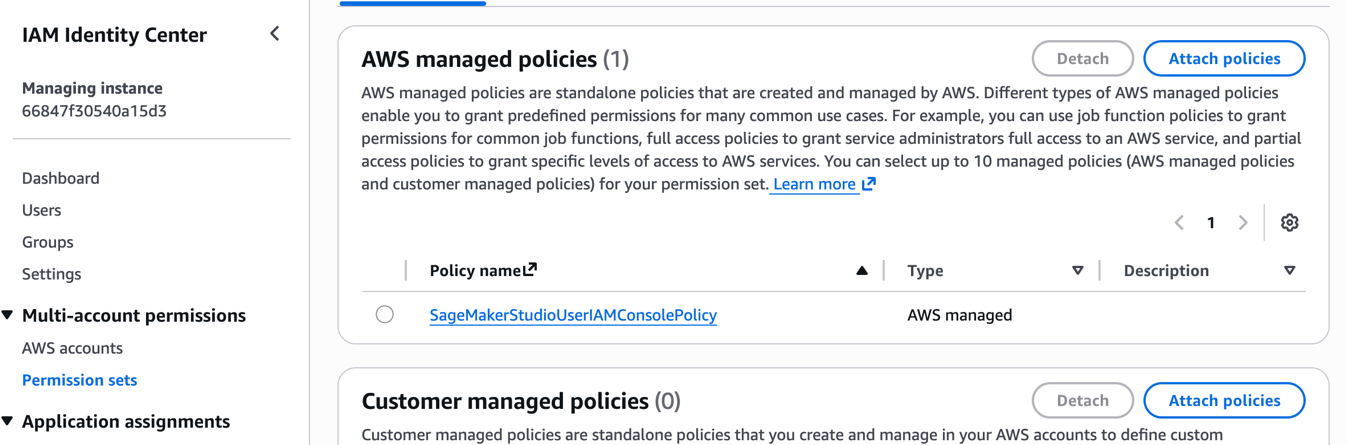
Search for SageMakerStudioUserIAMConsolePolicy in the existing policy name from list and select SageMakerStudioUserIAMConsolePolicy from the list. Note that the managed policy SageMakerStudioUserIAMConsolePolicy must be attached or have the same permissions added via another policy to be able to access projects in a SageMaker IAM domain.
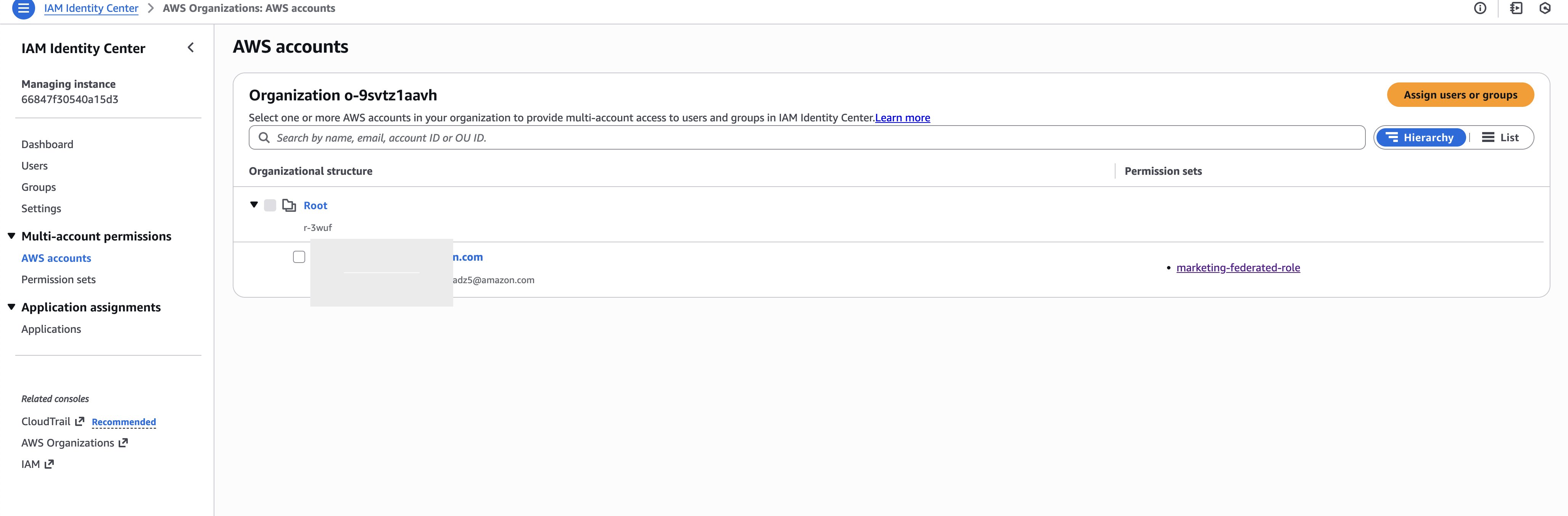
Go to the AWS account section of IDC.
Assign the created permission set to your AWS account.
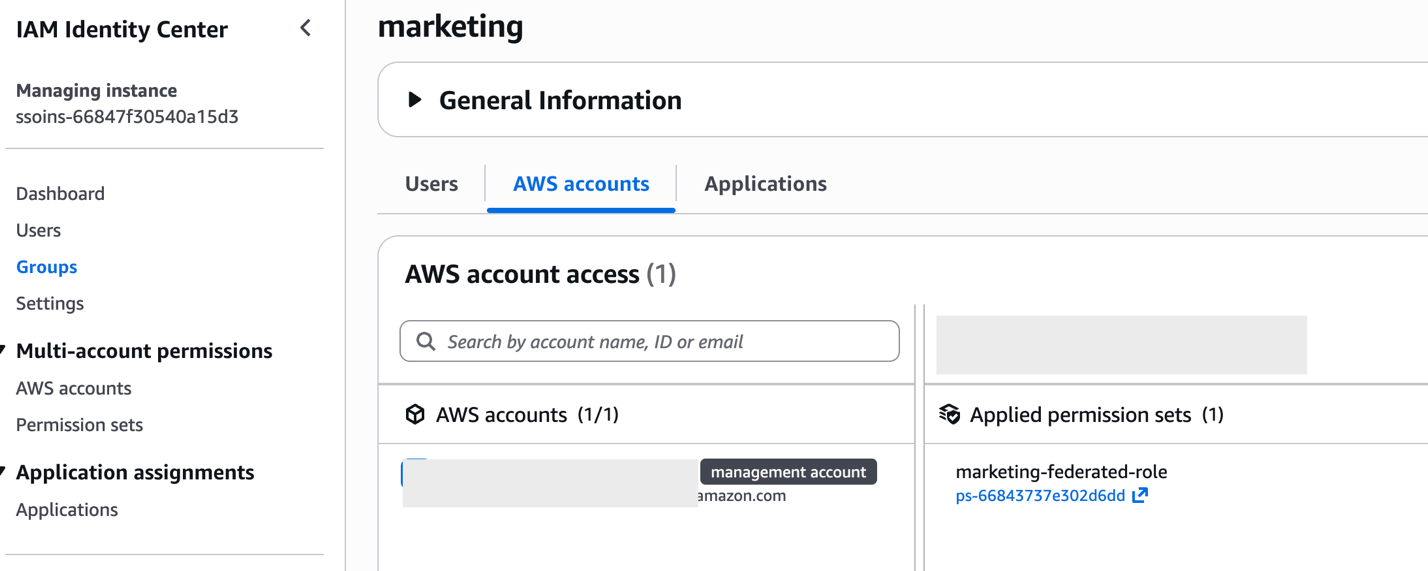
For this post we assigned the permission set to marketing group, As a best practice, you should setup and grant access to groups rather than individual users.
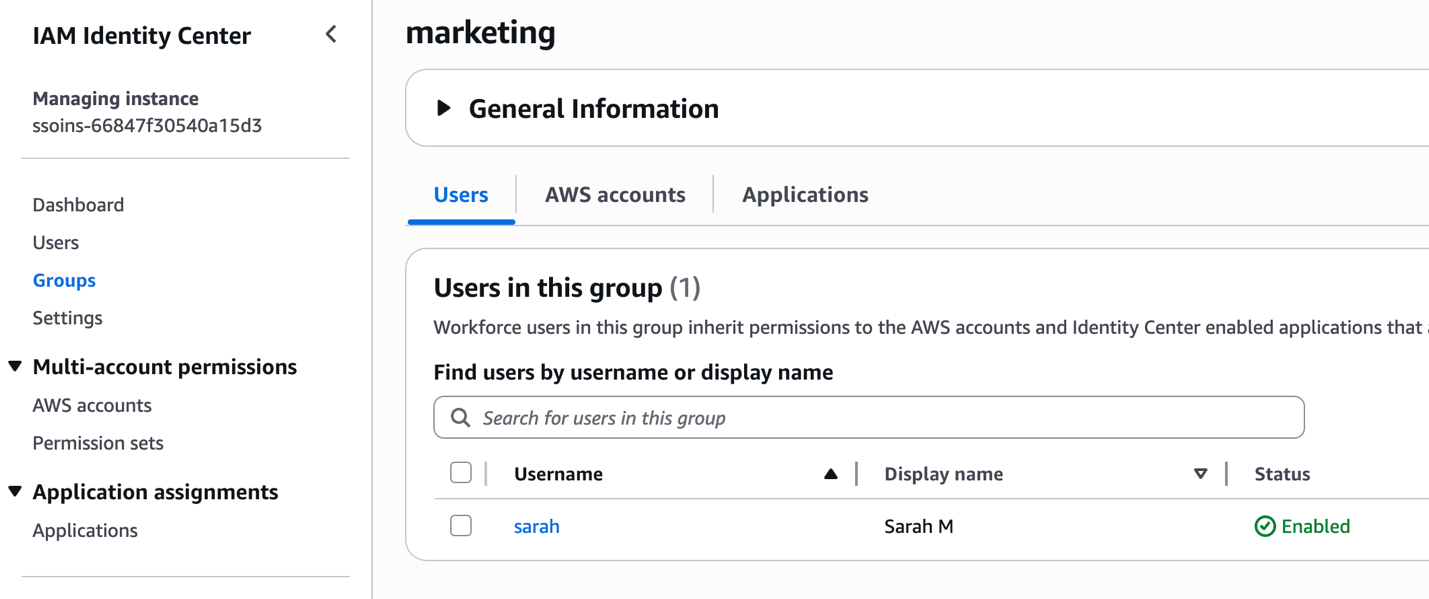
Add Sarah to marketing group.
This creates a federated role that Sarah can use to access the IAM-based domain. The federated role appears as an IAM role within your account and serves as the entry point for console access.
Setting up IAM-based domain execution role
There are 2 options to setup execution role for IAM-based domain project. The execution role has a one-to-one mapping with the federated role.
Option 1 – IDC-based domain Project Role reuse
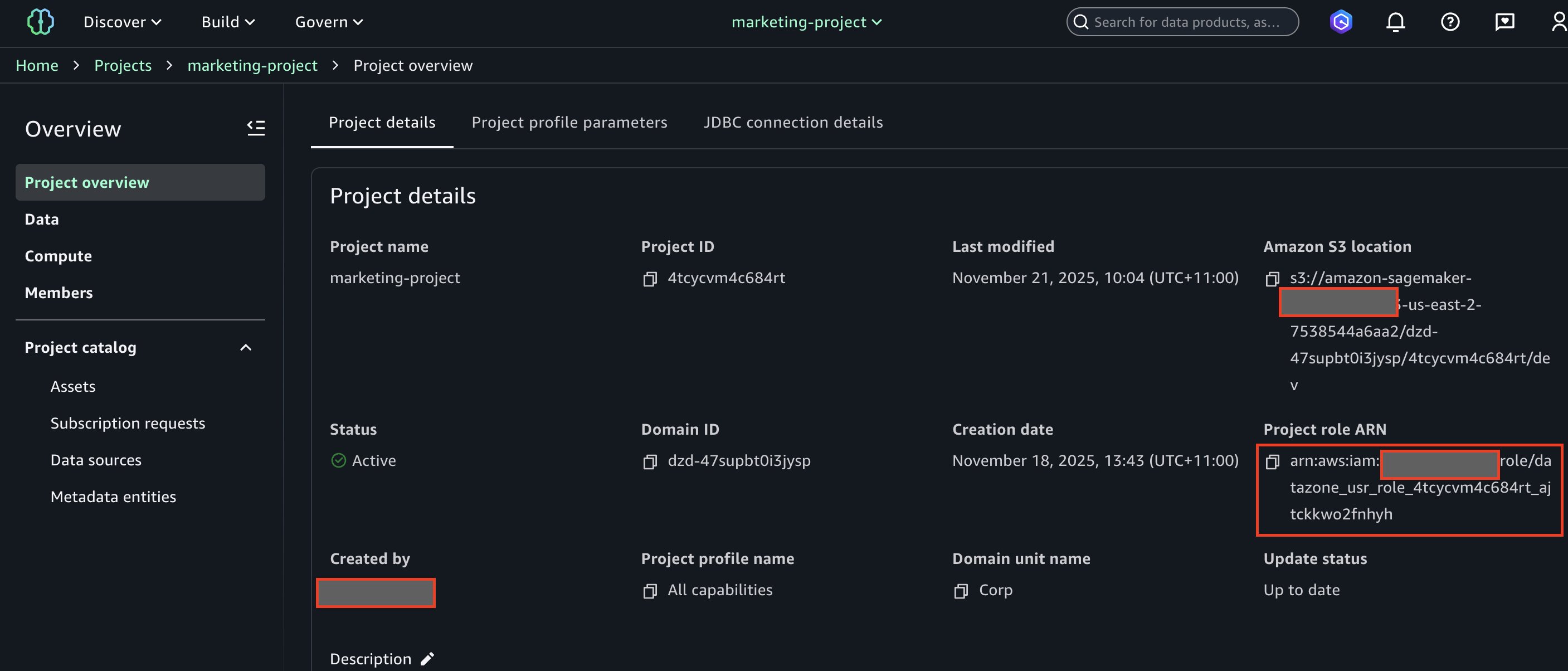
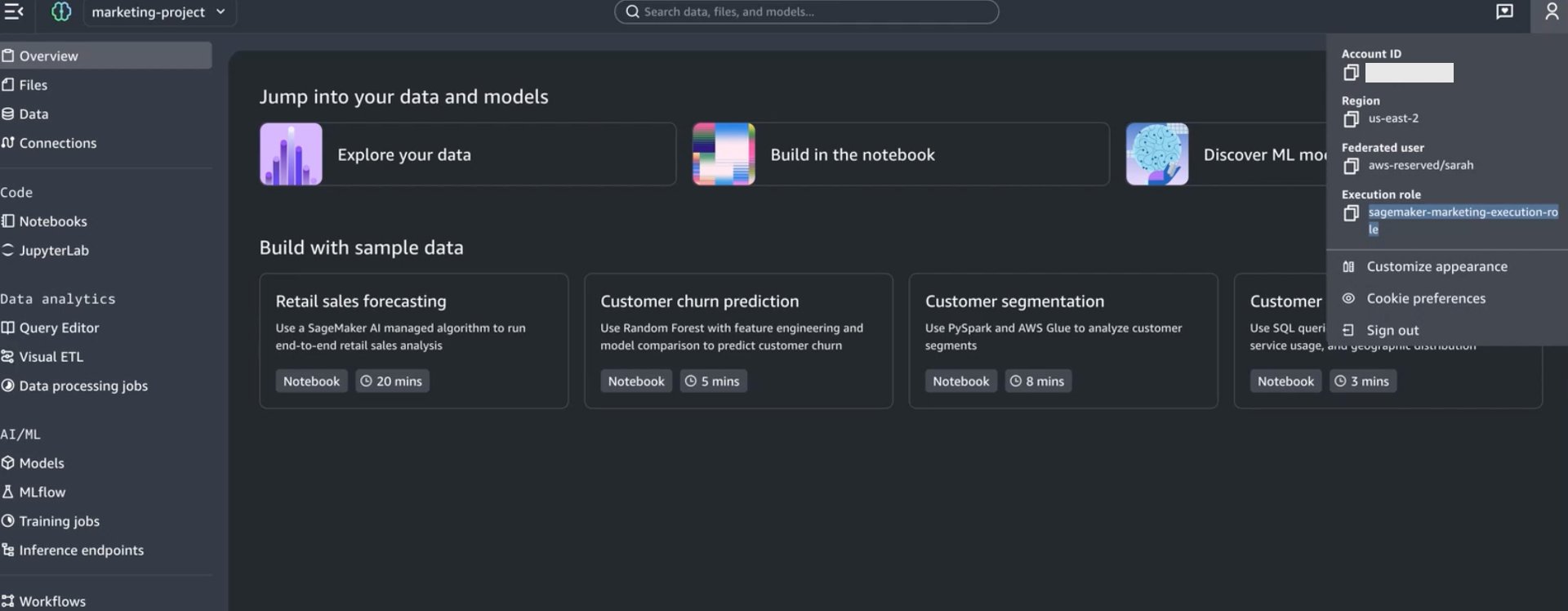
Instead of creating a new execution role and tagging it, you can configure the IAM-based domain project to directly reuse the consumer project IAM role from the IDC-based domain as the execution role. This option only needs policy changes to the consumer project IAM role. To find the IDC-based domain consumer project IAM role:
Navigate to the Amazon SageMaker Unified Studio IDC-based domain portal.
Open the Marketing Consumer Project.
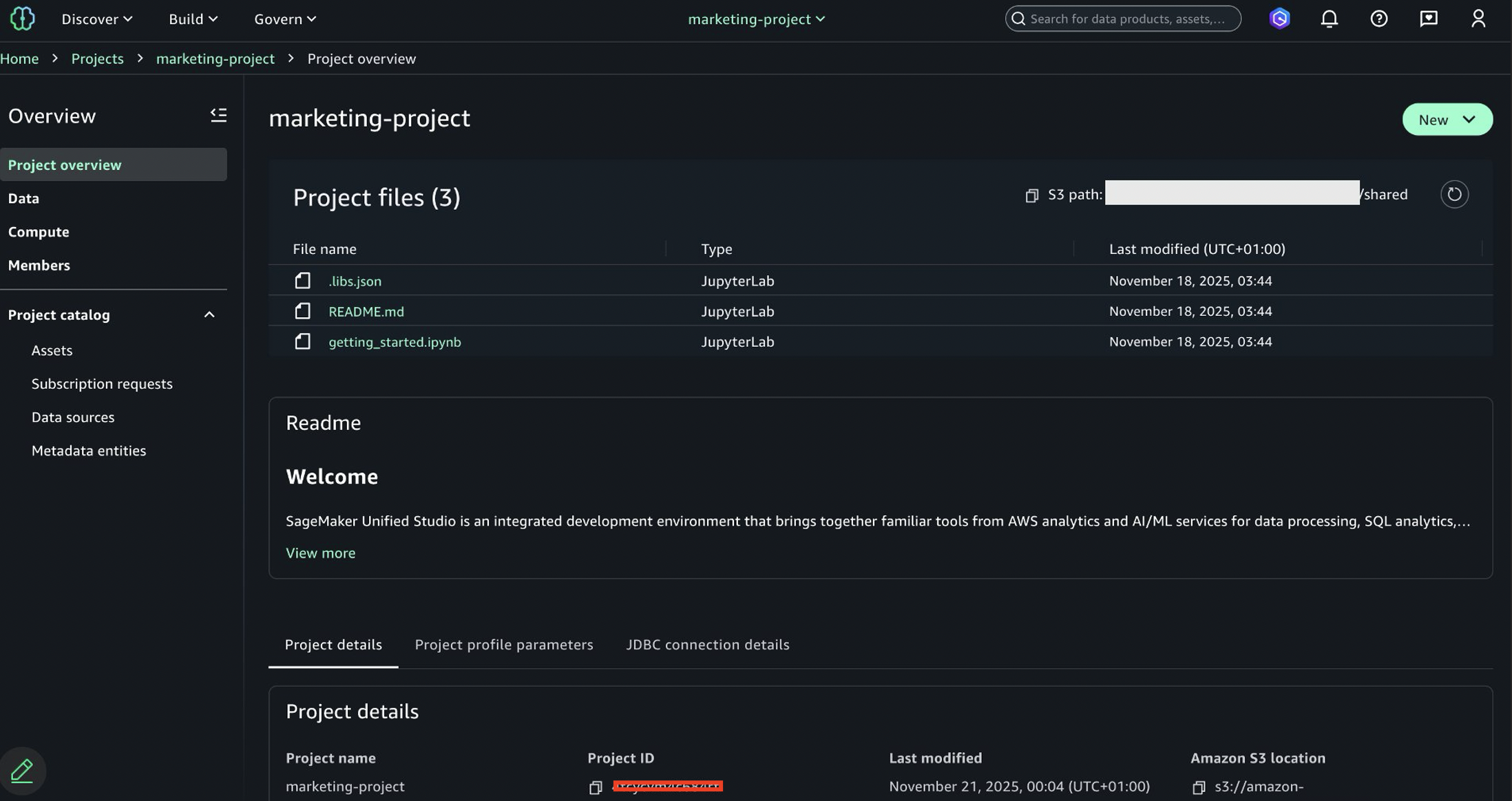
Copy the project role ARN from the project overview page.
You will need to modify this execution role’s policy with detailed instructions provided later in the blog.
Setting up IAM-based domain project for option 1
To create an IAM-based domain project that will integrate with your existing IDC-based domain permissions, complete the following steps:
Log in to the AWS Console using IAM-based domain administrator.
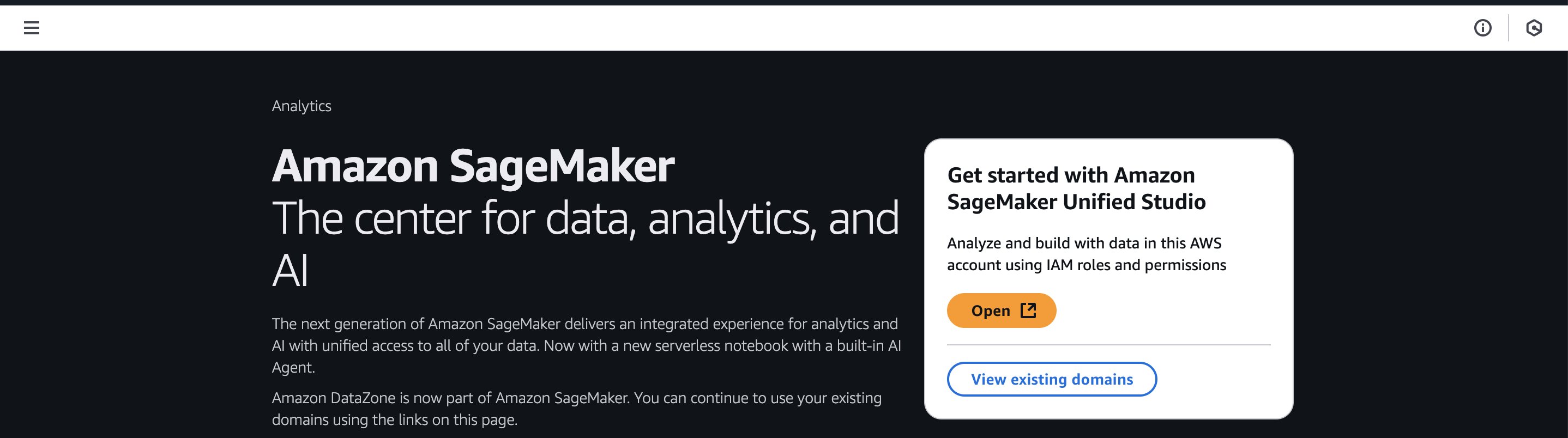
Navigate to Amazon SageMaker page within console.
Choose Open.
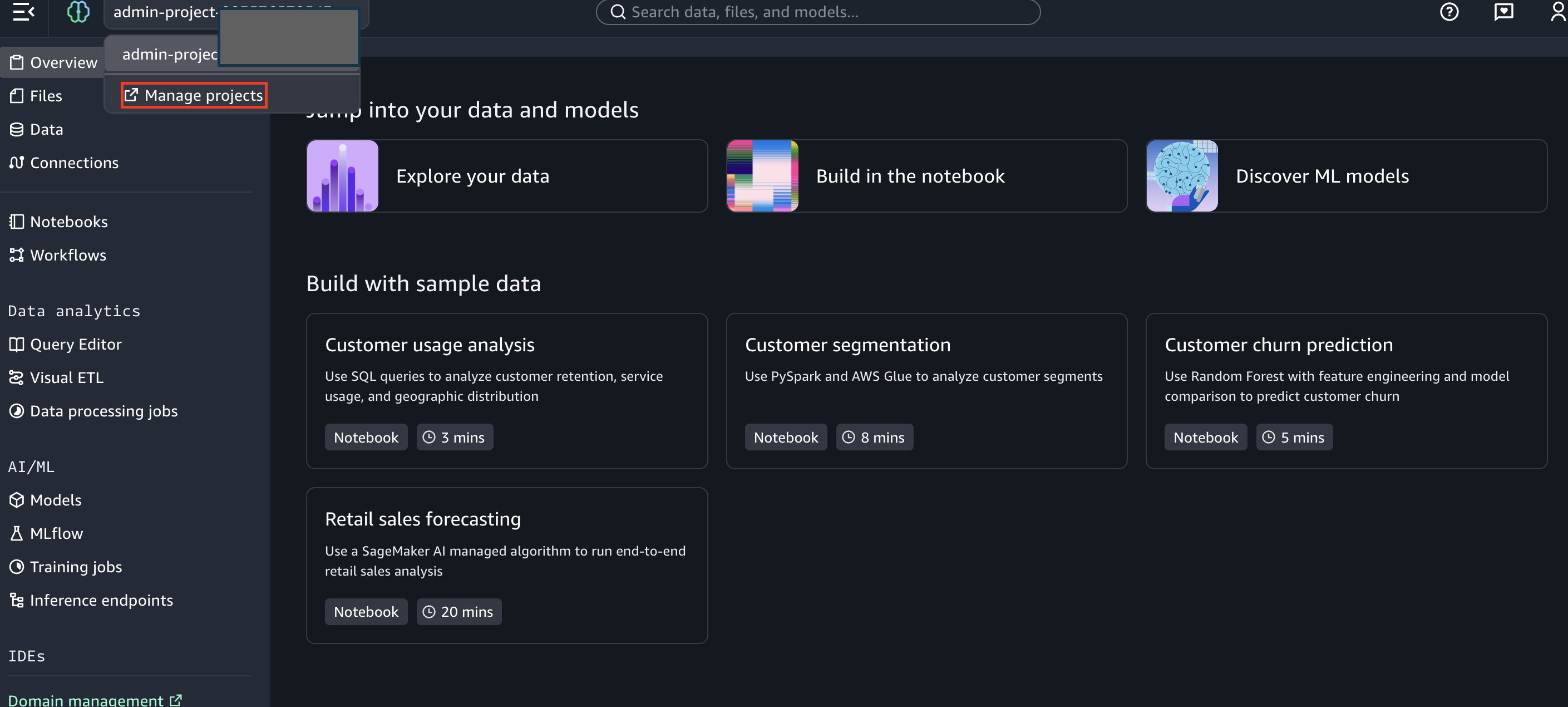
Once logged in to IAM-based domain as admin, choose Manage projects.
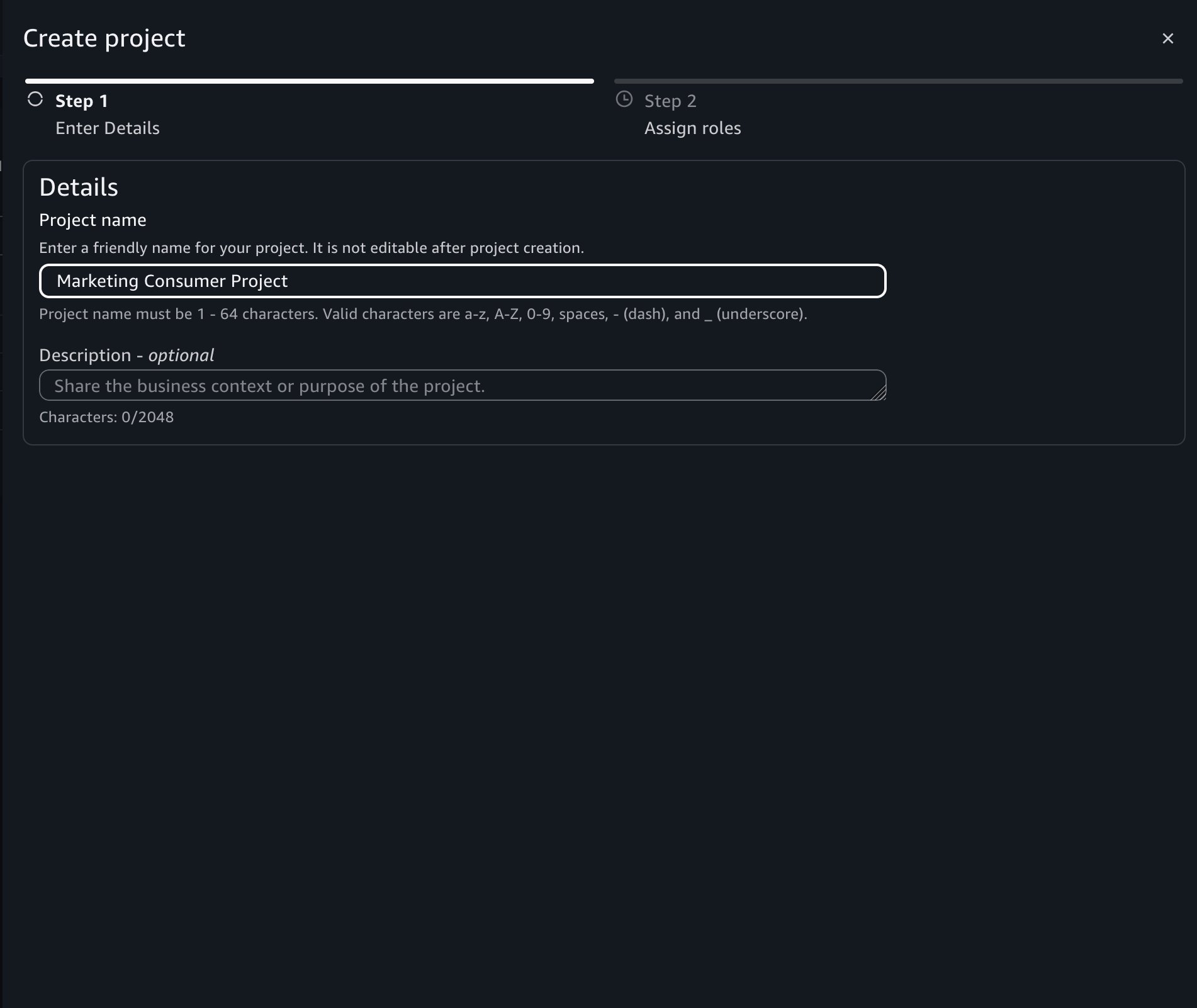
Next, click on Create Project.
Enter project name as “Marketing Consumer Project”.
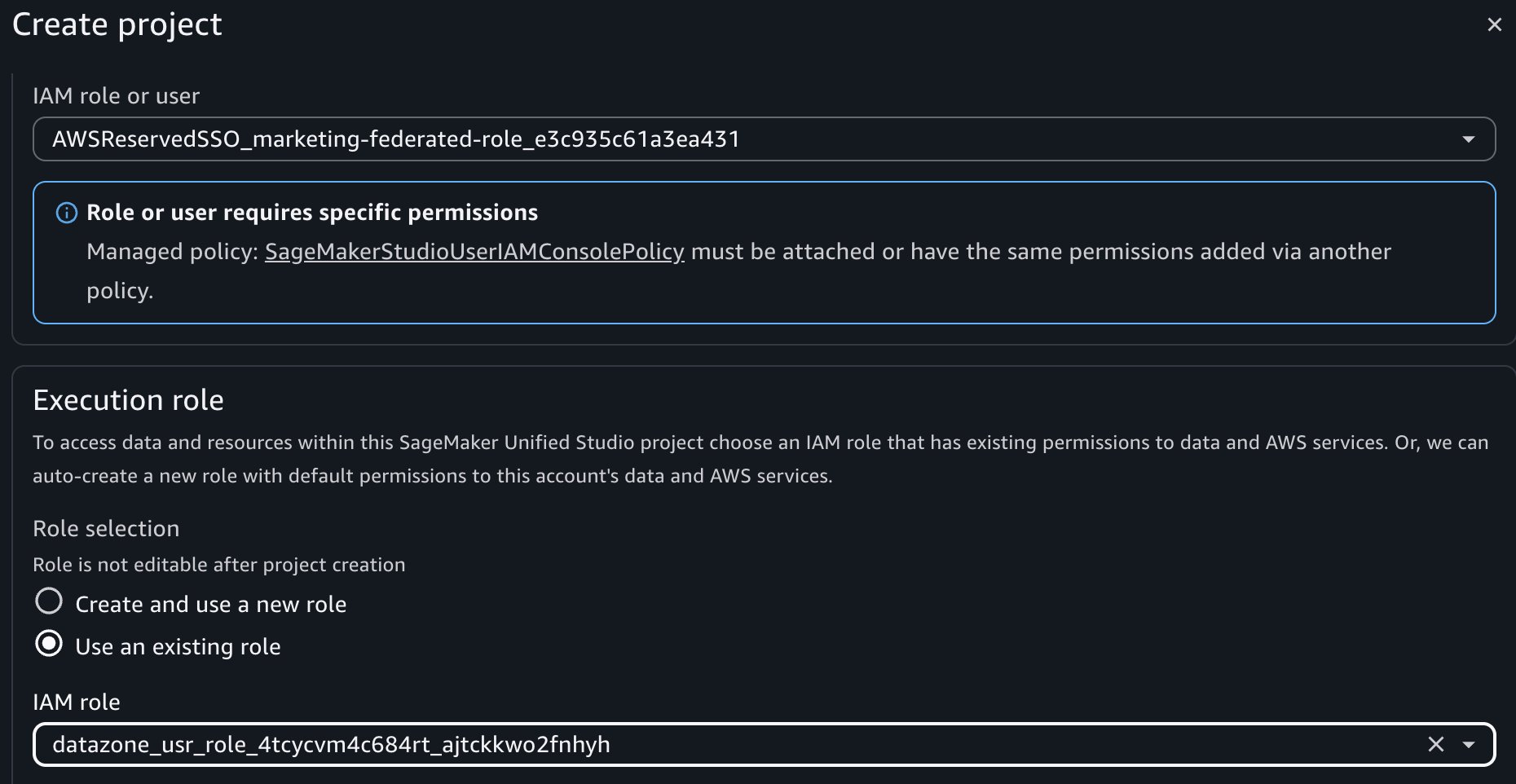
During project creation, select the following crucial roles and then choose Create Project:
Project IAM Role: The marketing federated role created in IAM Identity Center above. This is the role in the member account that has a role name with suffix AWSReservedSSO.
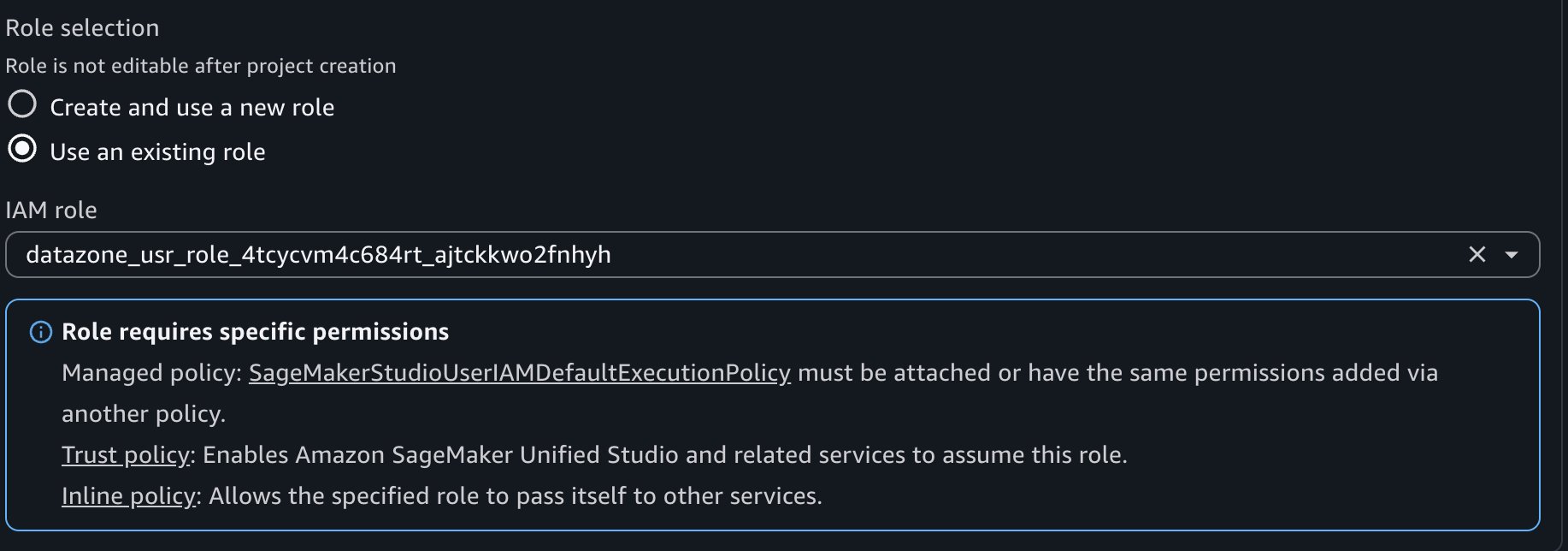
Project Role: – Choose project role for data engineer, copied from option 1.
Make policy changes to this project role as per the instruction on the SMUS UI page.
Option 2 – Bring your own execution role.
To create an IAM-based domain project that will integrate with your existing IDC-based domain permissions., you must tag the execution role for permission propagation. Amazon SageMaker Catalog and AWS Lake Formation use attribute-based access control, which means permissions can be inherited based on resource tags. For this option, you will need consumer project ID.To find the IDC-based domain consumer project ID:
Navigate to the Amazon SageMaker Unified Studio IDC-based domain portal.
Open the Marketing Consumer Project.
Copy the project ID from the project details.
Federated Role: The marketing federated role created in IAM Identity Center above.
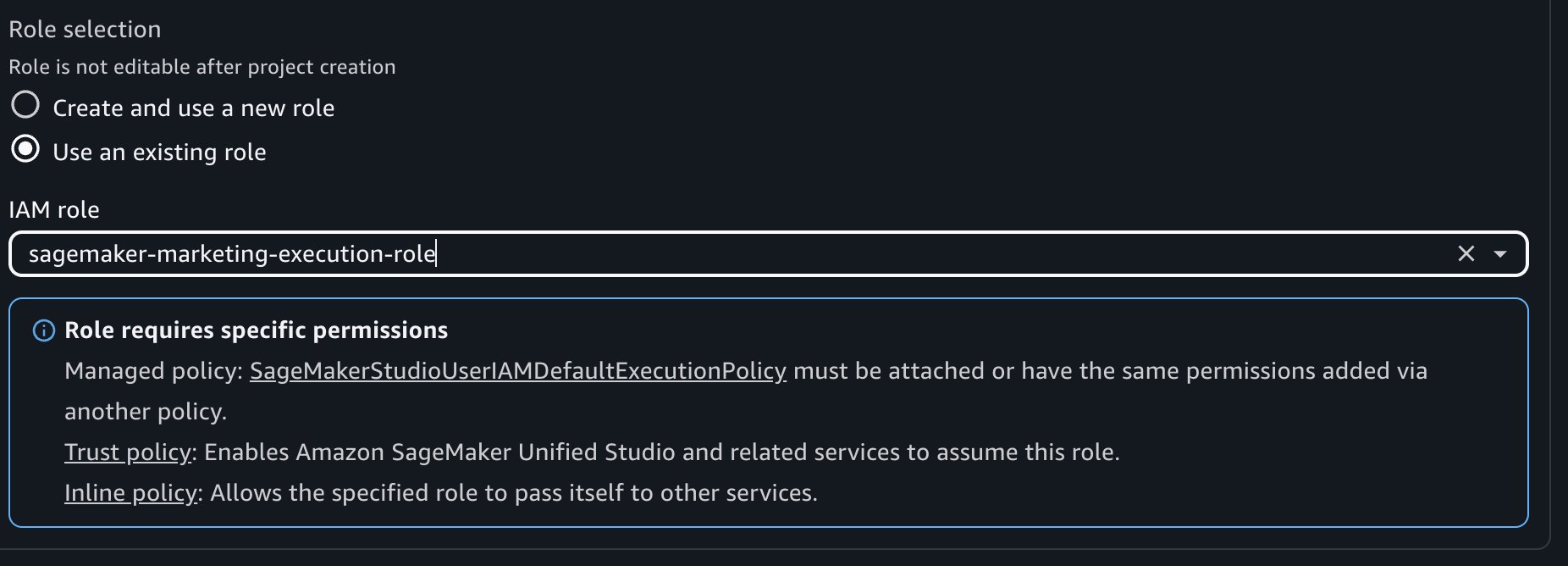
Execution Role: – Choose execution role from option 2.
Make policy changes to this execution role as per the instruction.
Next, navigate to the IAM console and locate the execution role created for your IAM-based domain consumer project.
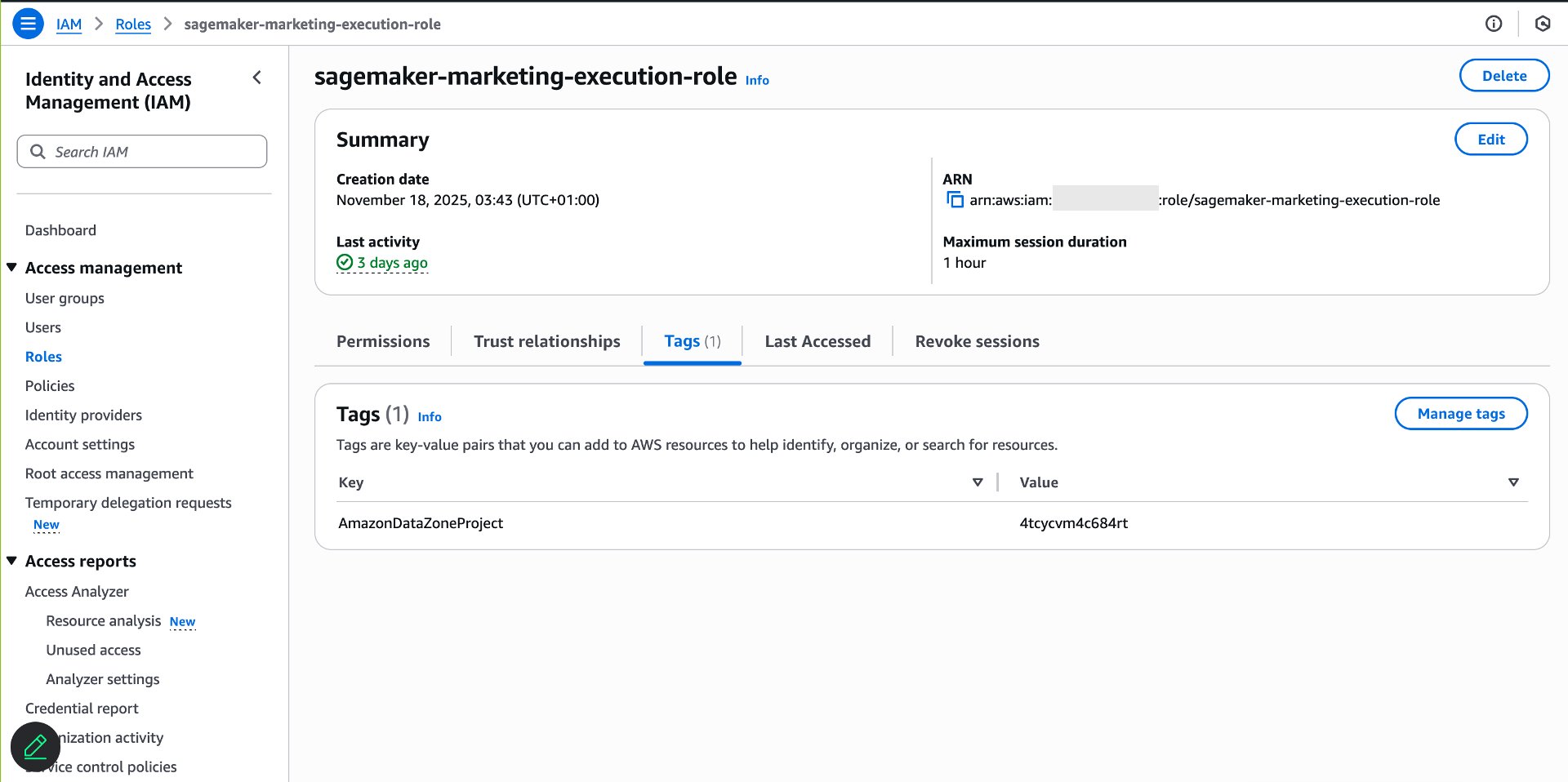
Add the following tag, this step relies on ABAC policies with projectId for subscriptions.
Key: AmazonDatazoneProject
Value: The project ID from your Amazon SageMaker Unified Studio IDC-based domain consumer project
This tag configuration results in data access grant from IDC-based domain consumer project to the IAM-based domain project execution role.
Verify data access in the IAM-based domain
After tagging the execution role, verify that permissions are set up correctly.Complete the following steps:
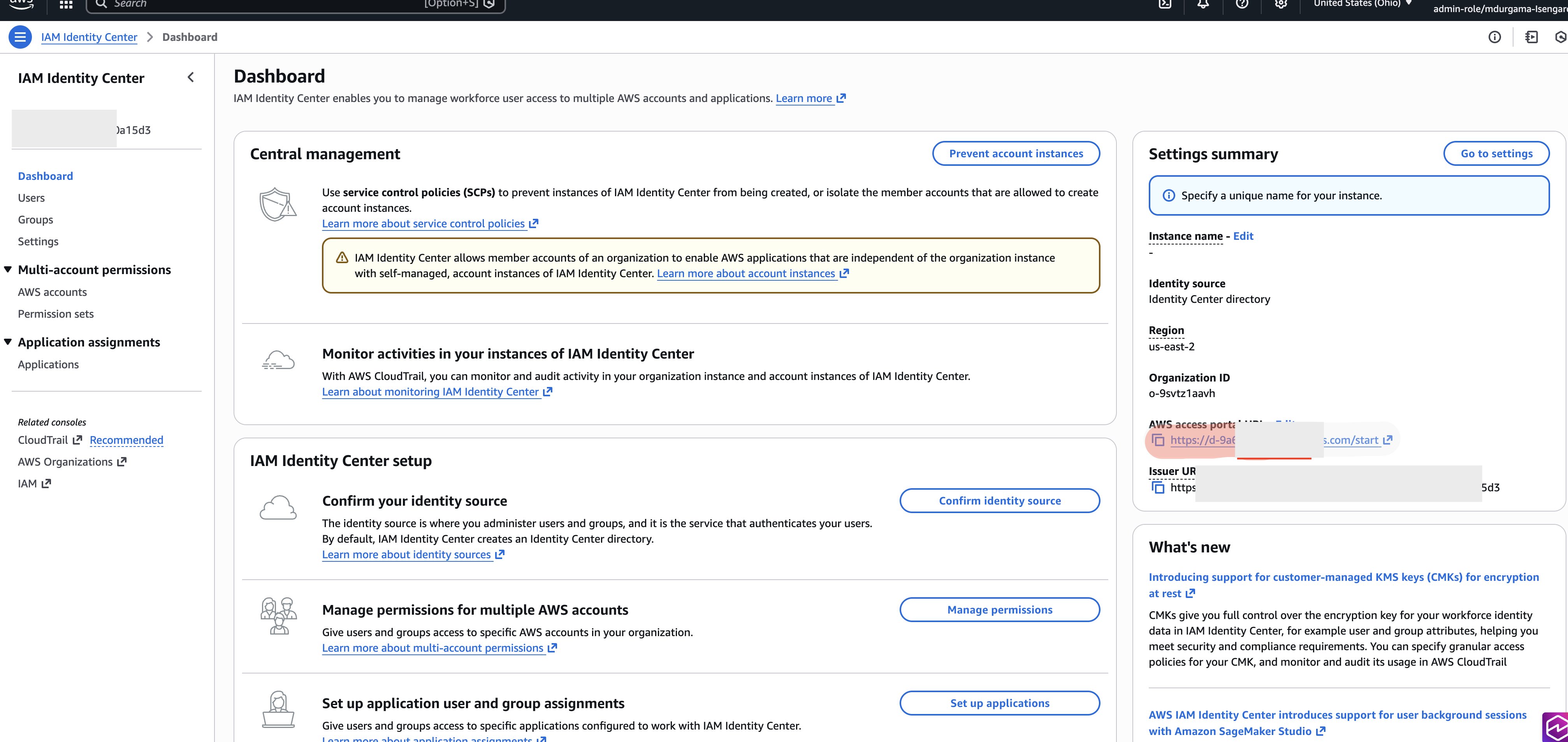
Use the SSO URL to log into the SSO Identity Center as Sarah.
Open the AWS console using federated role created earlier in setting federated role section.
Navigate to Amazon SageMaker.
Choose Amazon SageMaker Unified Studio IAM-based domain option (this will show up if project is already created with federated role).
In the Amazon SageMaker Unified Studio IAM-based domain project, navigate to the Data tab. If you created 2 projects with both option 1 and option 2 execution role, then 2 projects will show up and you can login to either to validate data access.
Verify that the consumer database and subscribed tables appear.
Create and use the new serverless notebooks
With permissions properly configured, you can now use IAM-based domain capabilities like serverless Notebooks. Complete the following steps:
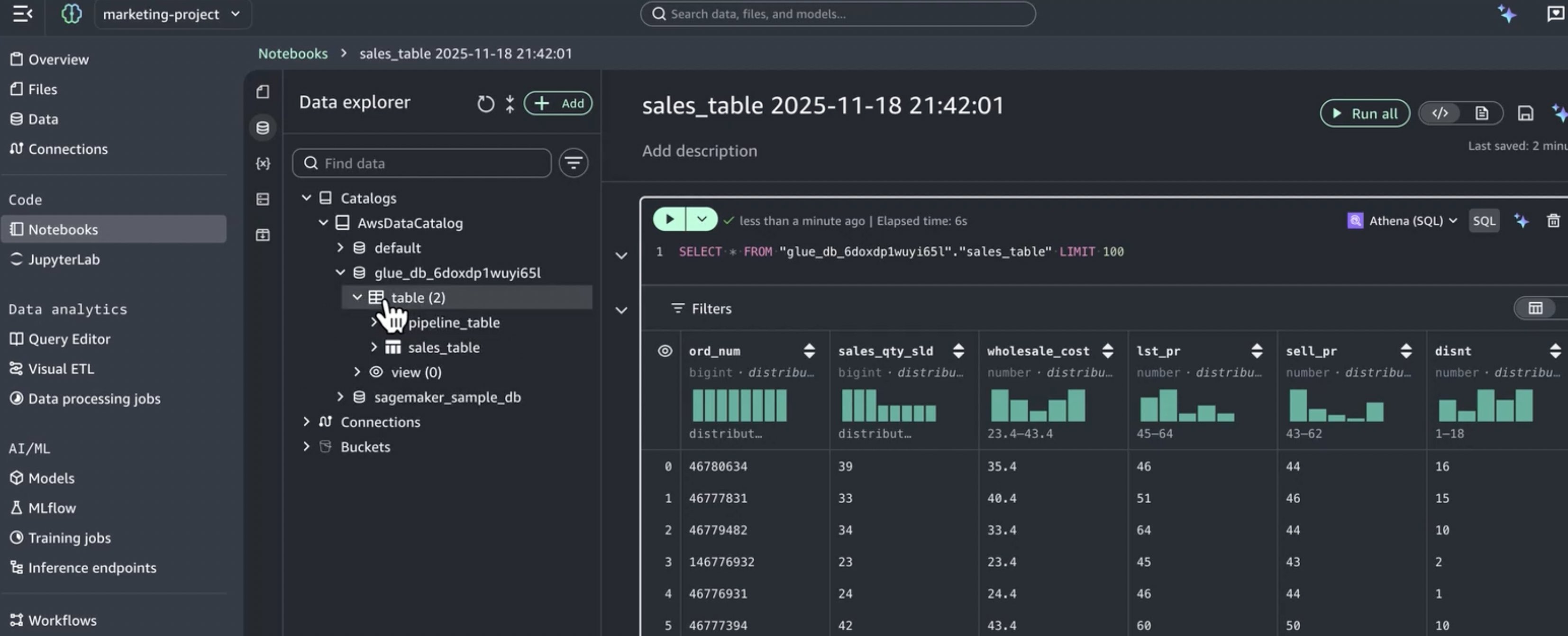
In the Amazon SageMaker Unified Studio IAM-based domain project, select a table from the Data tab.
Choose Create notebook.
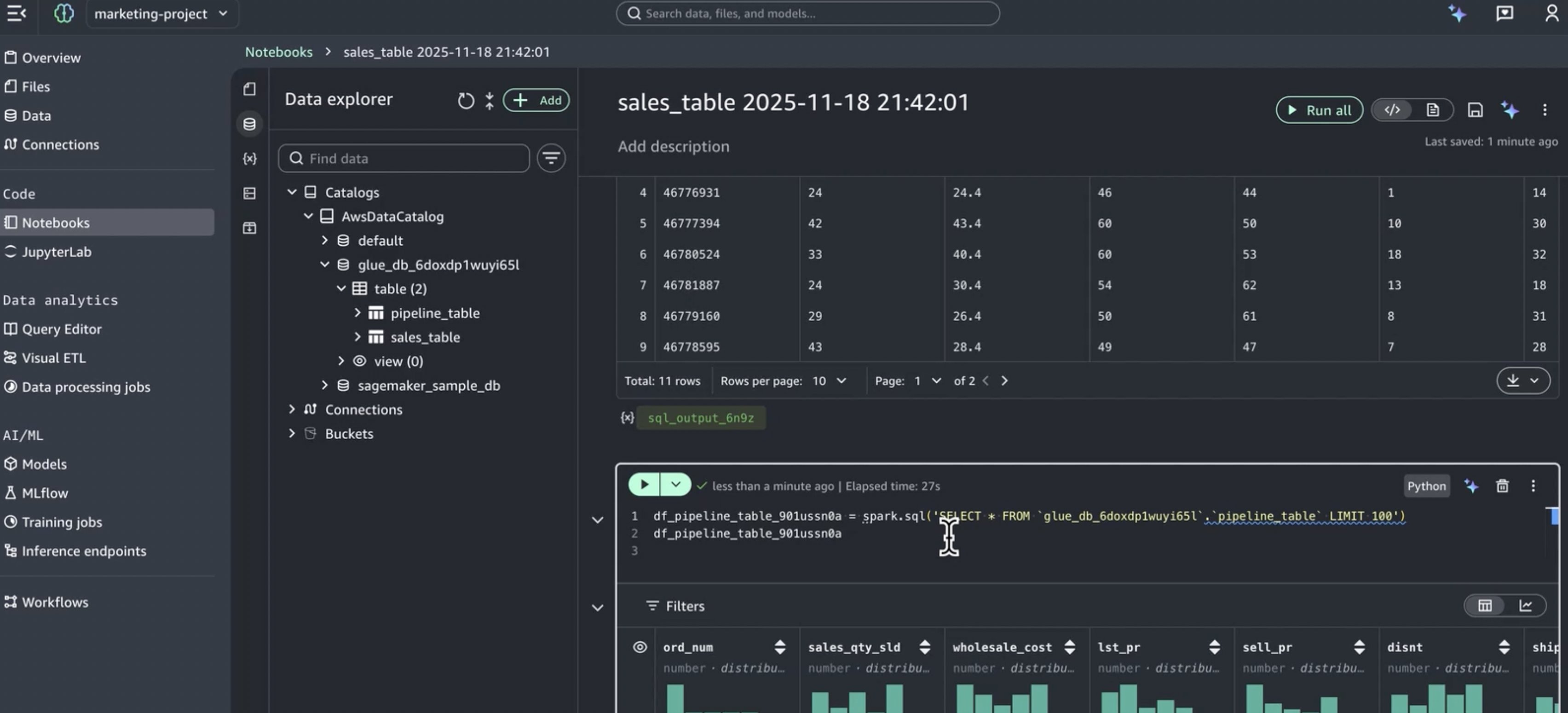
The Notebook opens with Athena SQL as the default cell type.
Write and run queries against your subscribed data.
The notebook runs with the execution role’s permissions, which now include access to all data subscribed through the IDC-based domain.
Key benefits of this integration
This integration approach delivers several important advantages:
Preserve existing investments
Continue using IDC-based domain governance and catalogs.
Maintain established Pub/Sub workflows.
No migration required for existing data assets.
Get modern capabilities
Provide developers with the new serverless Notebooks.
Single subscription workflow manages access across both domains.
Consistent data access via role reuse and attribute-based access control.
No duplicate access requests or approvals needed.
Unified data experience
Developers access all subscribed data from one interface.
Consistent data catalog across domains.
Simplified onboarding for new team members.
Cleanup
Complete the following steps to delete the resources you created:
Delete the serverless Notebooks created in the IAM-based domain projects.
Delete the IAM-based domain projects (Marketing Consumer Project and Marketing Consumer Project 2).
Remove the permission set assignment from marketing group in IAM Identity Center.
Delete the Marketing-federated-role permission set in IAM Identity Center.
Remove the tags (AmazonDatazoneProject) from the execution role (if using Option 2).
Delete the execution role created for the IAM-based domain (if using Option 2 and not reusing the IDC-based domain project role).
Revert any policy changes made to the IDC-based domain consumer project IAM role (if using Option 1).
If you do not need the IAM-based domain anymore, delete it.
If you created any test data subscriptions in the IDC-based domain, remove them.
Conclusion
In this post, we demonstrated how to access Amazon SageMaker Unified Studio IDC-based domain with the new IAM-based domain using role reuse and attribute-based access control. This setup offers data engineers the best of both worlds: access to specialized modern development tools—including the new serverless Notebooks, Athena Spark integration, and built-in AI assistance , while maintaining proper governance that includes comprehensive catalog management and robust security controls established in the IDC-based domain.You can now confidently adopt Amazon SageMaker Unified Studio IAM-based domain capabilities knowing their established data governance, subscription workflows, and access controls remain intact and continue to function as expected.
Ready to get started with Amazon SageMaker Unified Studio and unlock the power of integrated governance and modern development tools for your organization? Visit the Amazon SageMaker Unified Studio documentation to learn more and begin your implementation today.
Amazon SageMaker Unified Studio serves as a collaborative workspace where data engineers and scientists can work together on end-to-end data and machine learning (ML) workflows. SageMaker Unified Studio specializes in orchestrating complex data workflows across multiple AWS services through its integration with Amazon Managed Workflows for Apache Airflow (Amazon MWAA). Project owners can create shared environments where team members jointly develop and deploy workflows, while maintaining oversight of pipeline execution. This unified approach makes sure data pipelines run consistently and efficiently, with clear visibility into the entire process, making it seamless for teams to collaborate on sophisticated data and ML projects.
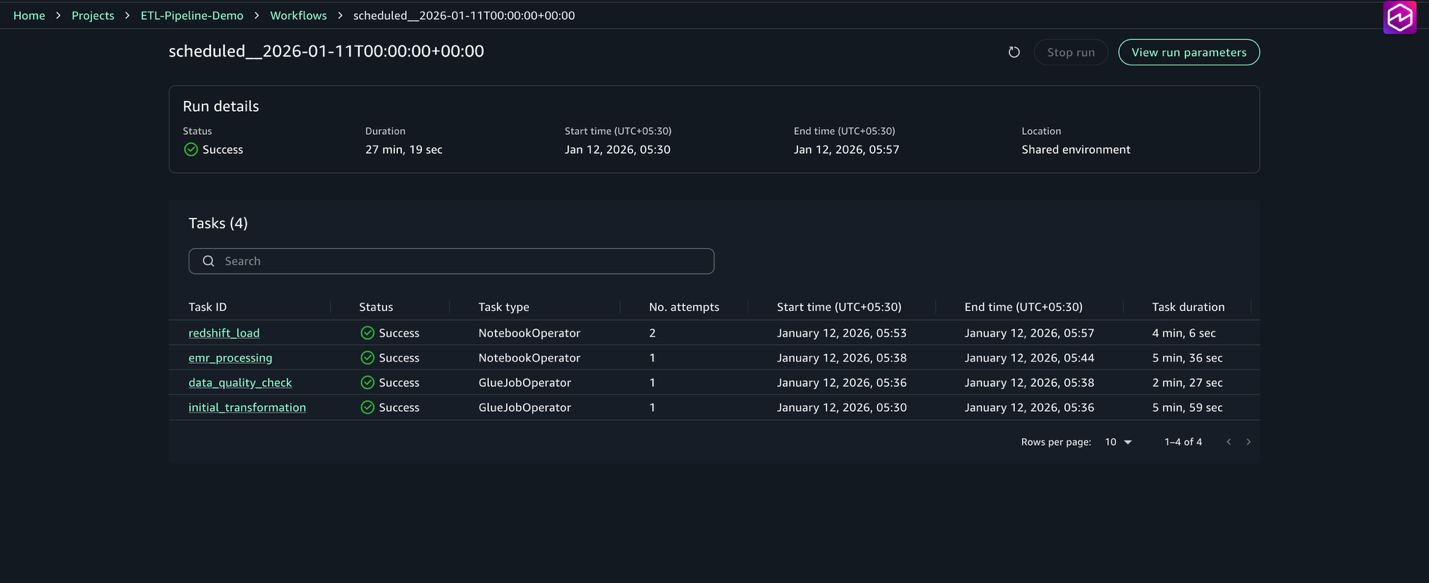
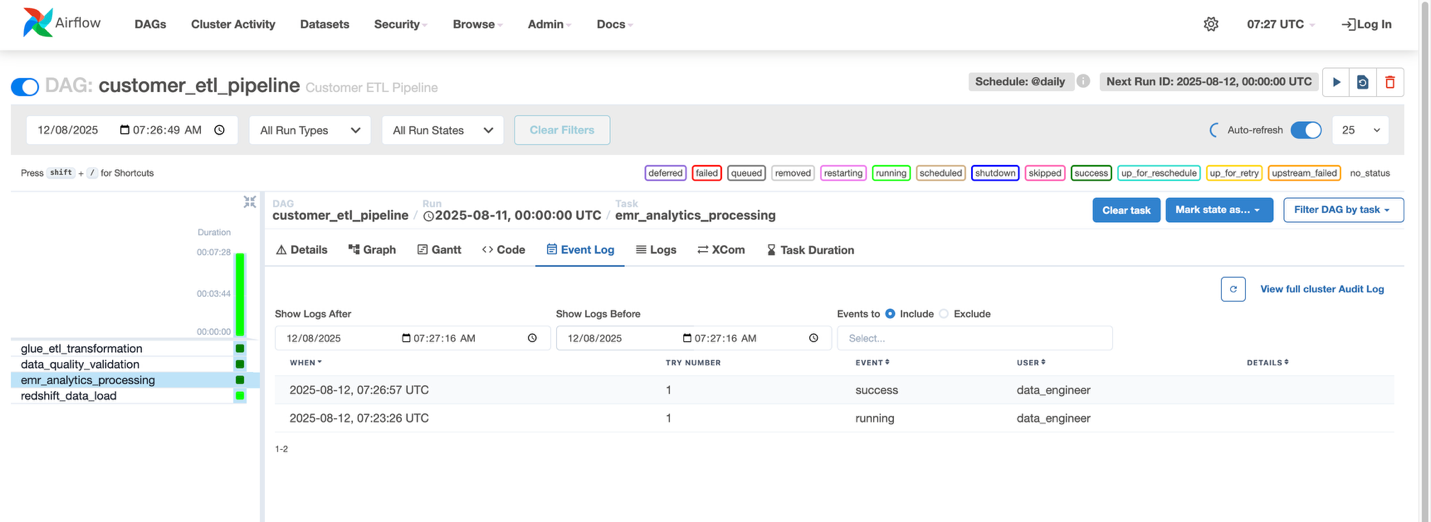
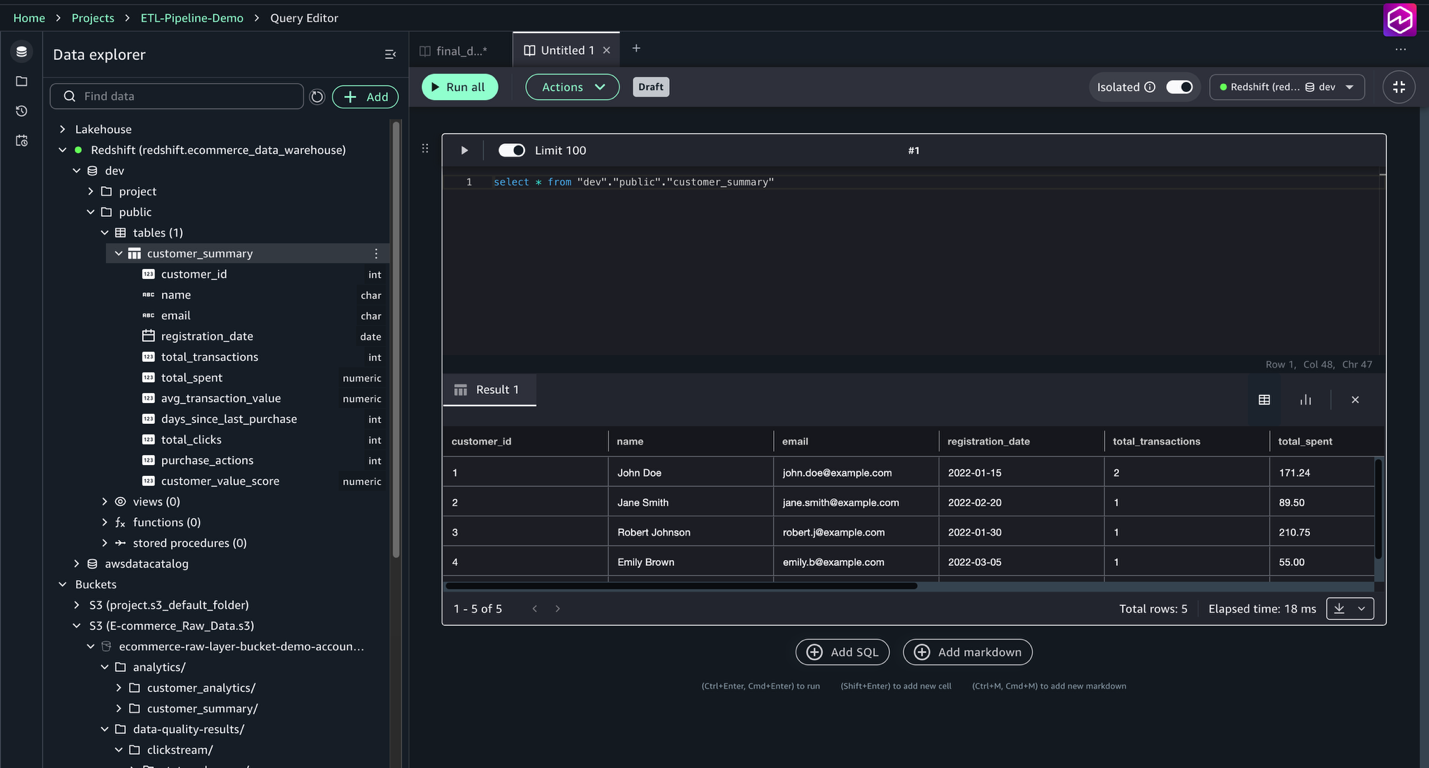
This post explores how to build and manage a comprehensive extract, transform, and load (ETL) pipeline using SageMaker Unified Studio workflows through a code-based approach. We demonstrate how to use a single, integrated interface to handle all aspects of data processing, from preparation to orchestration, by using AWS services including Amazon EMR, AWS Glue, Amazon Redshift, and Amazon MWAA. This solution streamlines the data pipeline through a single UI.
Example use case: Customer behavior analysis for an ecommerce platform
Let’s consider a real-world scenario: An e-commerce company wants to analyze customer transactions data to create a customer summary report. They have data coming from multiple sources:
Customer profile data stored in CSV files
Transaction history in JSON format
Website clickstream data in semi-structured log files
The company wants to do the following:
Extract data from these sources
Clean and transform the data
Perform quality checks
Load the processed data into a data warehouse
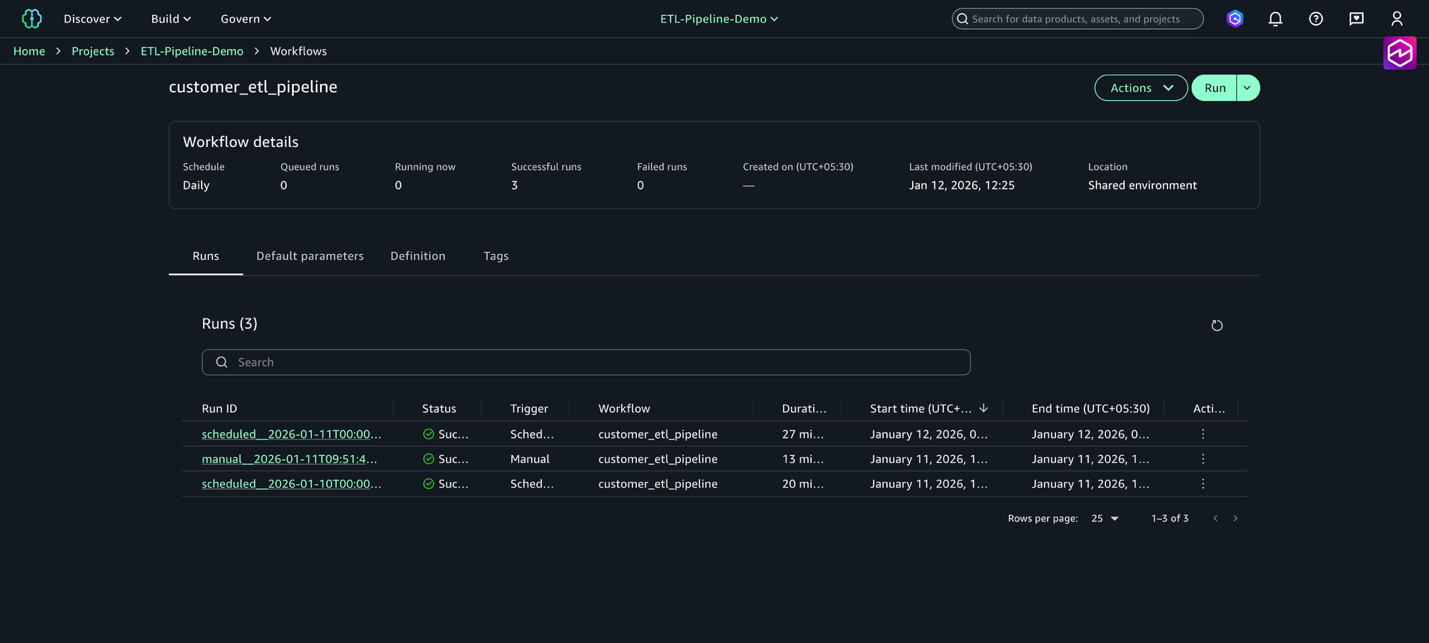
Schedule this pipeline to run daily
Solution overview
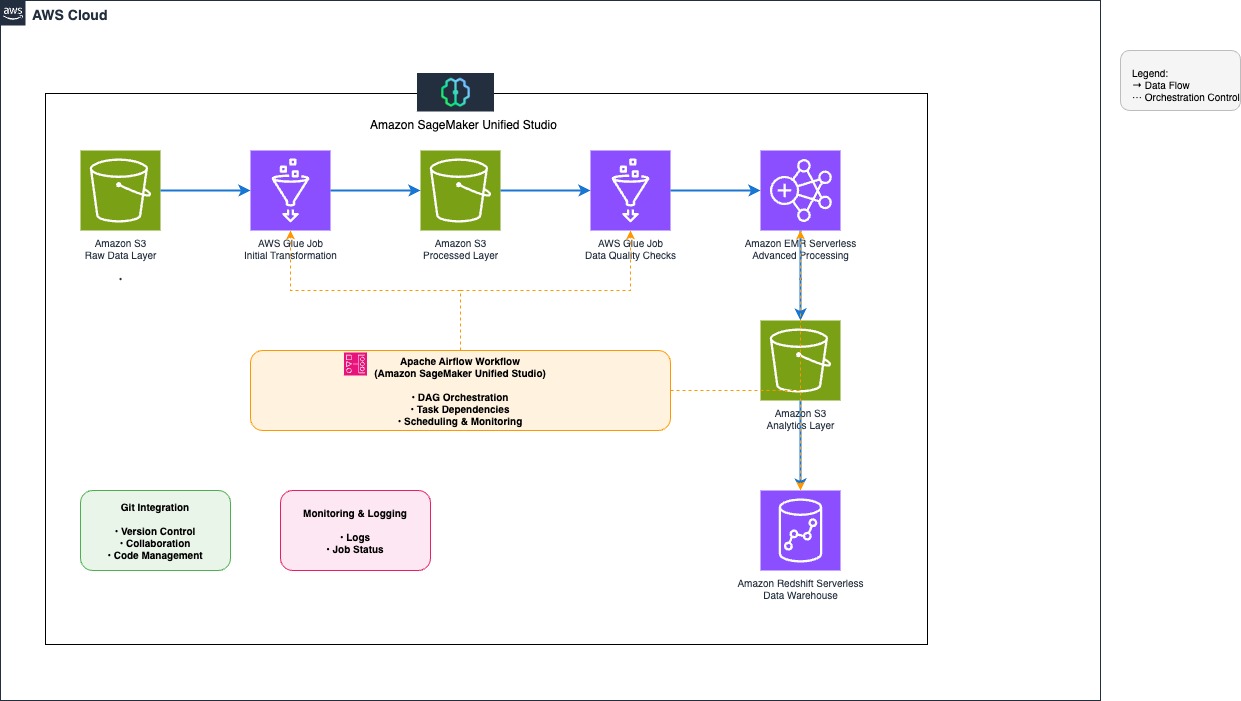
The following diagram illustrates the architecture that you implement in this post.
The workflow consists of the following steps:
Establish a data repository by creating an Amazon Simple Storage Service (Amazon S3) bucket with an organized folder structure for customer data, transaction history, and clickstream logs, and configure access policies for seamless integration with SageMaker Unified Studio.
Extract data from the S3 bucket using AWS Glue jobs.
Use AWS Glue and Amazon EMR Serverless to clean and transform the data.
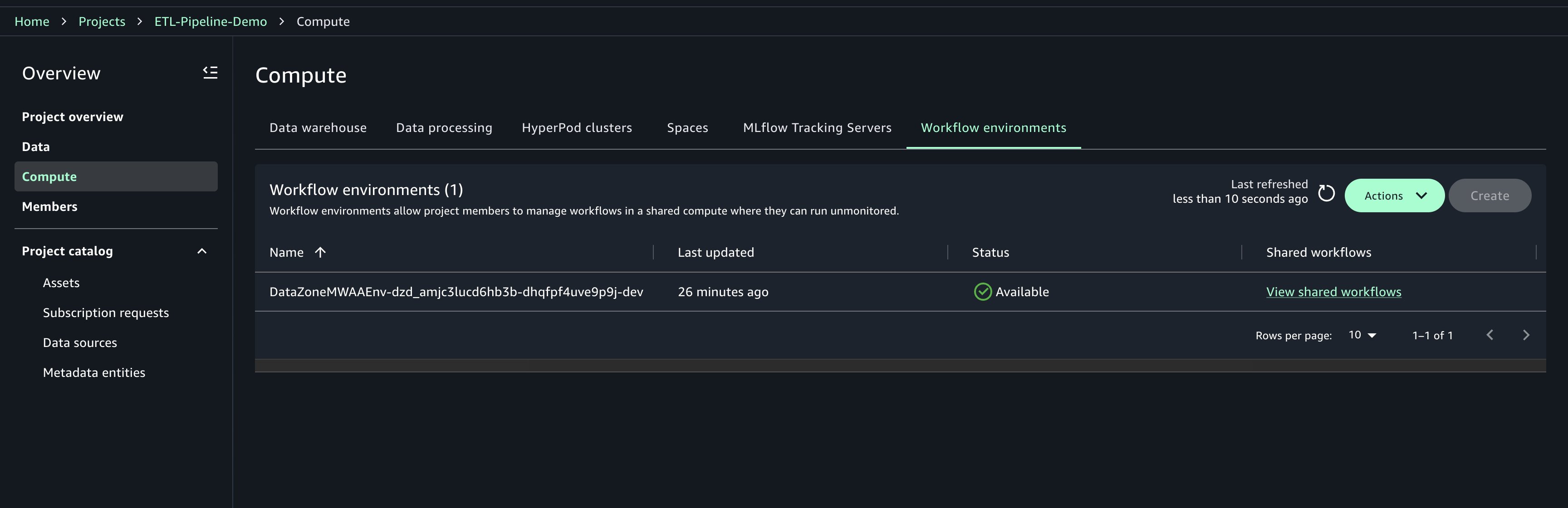
Create and manage the workflow environment using SageMaker Unified Studio with Identity Center–based domains.
Note: Amazon SageMaker Unified Studio supports two domain configuration models: IAM Identity Center (IdC)–based domains and IAM role–based domains. While IAM-based domains enable role-driven access management and visual workflows, this post specifically focuses on Identity Center–based domains, where users authenticate via IdC and projects access data and resources using project roles and identity-based authorization.
Prerequisites
Before beginning, ensure you have the following resources:
This solution requires SageMaker Unified Studio domain in the us-east-1 AWS Region. Although SageMaker Unified Studio is available in multiple Regions, this post uses us-east-1 for consistency. For a complete list of supported Regions, refer to Regions where Amazon SageMaker Unified Studio is supported.
Complete the following steps to configure your domain:
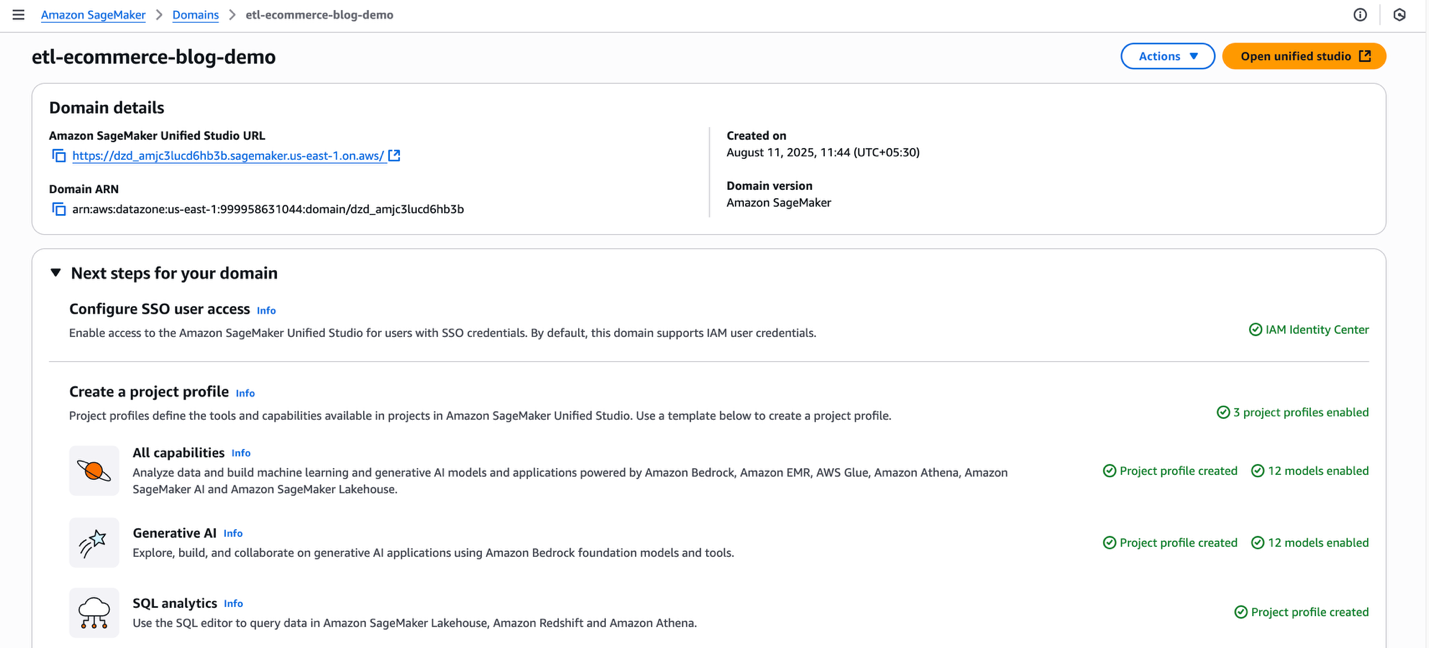
Sign in to the AWS Management Console, navigate to Amazon SageMaker, and open the Domains section from the left navigation pane.
On the SageMaker console, choose Create domain, then choose Quick setup.
If the message “No VPC has been specifically set up for use with Amazon SageMaker Unified Studio” appears, select Create VPC. The process redirects to an AWS CloudFormation stack. Leave all settings at their default values and select Create stack.
Under Quick setup settings, for Name, enter a domain name (for example, etl-ecommerce-blog-demo). Review the selected configurations.
Choose Continue to proceed.
On the Create IAM Identity Center user page, create an SSO user (account with IAM Identity Center) or select an existing SSO user to log in to the Amazon SageMaker Unified Studio. The SSO selected here is used as the administrator in the Amazon SageMaker Unified Studio.
After you have created a domain, popup will appear with the message: “Your domain has been created! You can now log in to Amazon SageMaker Unified Studio”. You can close the popup for now.
Create a project
In this section, we create a project to serve as a collaborative workspace for teams to work on business use cases. Complete the following steps:
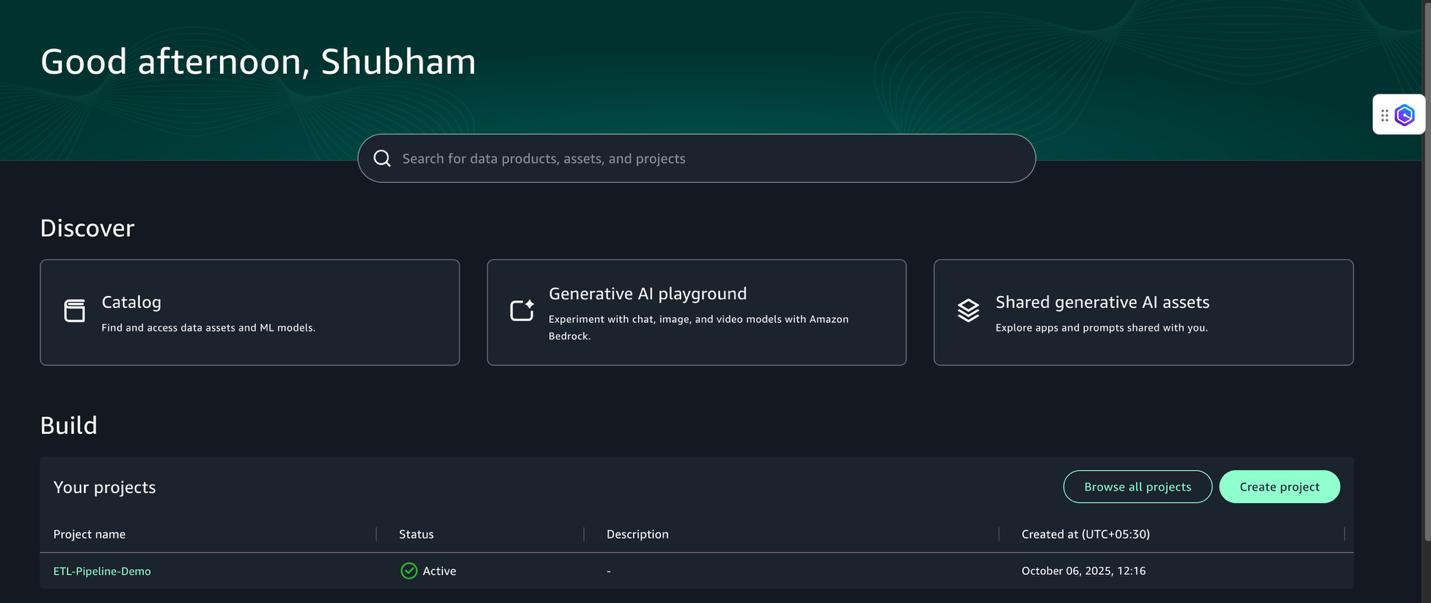
Choose Open Unified Studio and sign in with your SSO credentials using the Sign in with SSO option.
Choose Create project.
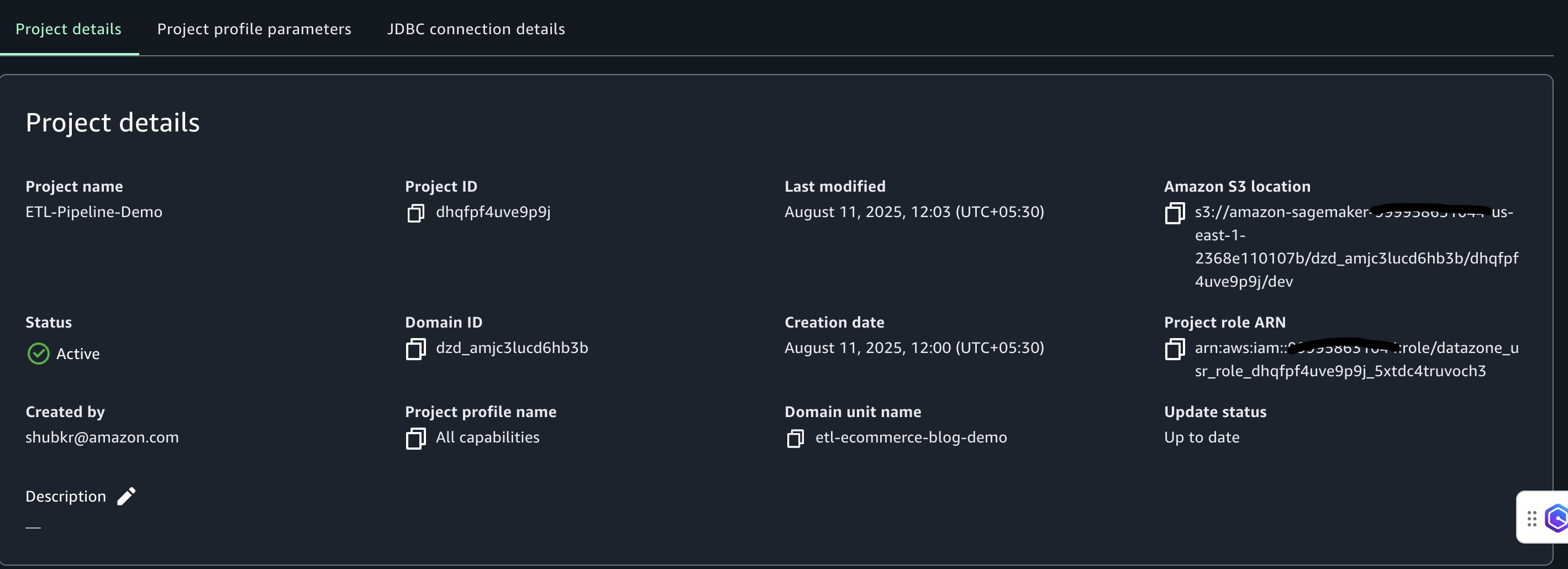
Name the project (for example, ETL-Pipeline-Demo) and create it using the All capabilities project profile.
Choose Continue.
Keep the default values for the configuration parameters and choose Continue.
Choose Create project.
Project creation might take a few minutes. After the project is created, the environment will be configured for data access and processing.
Integrate S3 bucket with SageMaker Unified Studio
To enable external data processing within SageMaker Unified Studio, configure integration with an S3 bucket. This section walks through the steps to set up the S3 bucket, configure permissions, and integrate it with the project.
Create and configure S3 bucket
Complete the following steps to create your bucket:
In a new browser tab, open the AWS Management Console and search for S3.
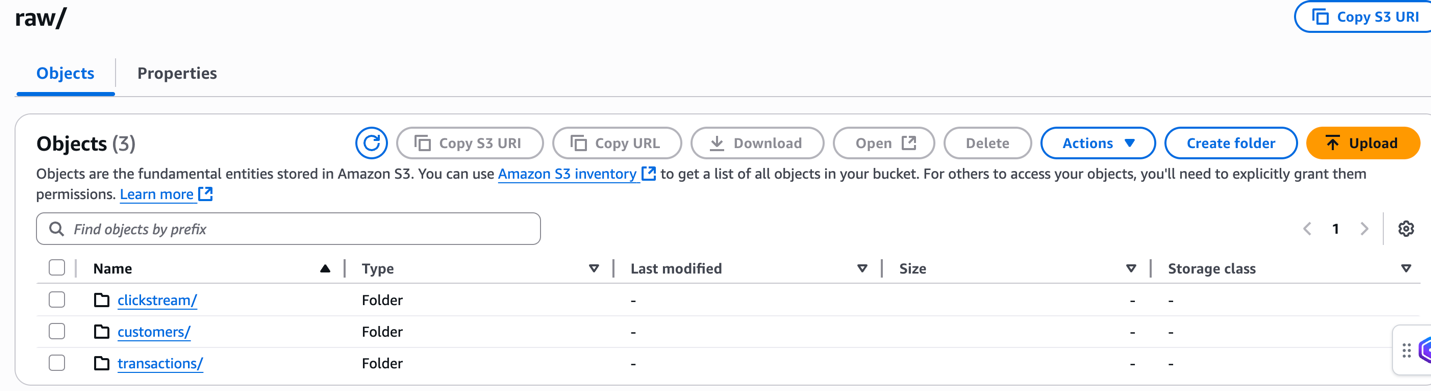
Create the following folder structure in the bucket. For detailed instructions, see Creating a folder:
raw/customers/
raw/transactions/
raw/clickstream/
processed/
analytics/
Upload sample data
In this section, we upload sample ecommerce data that represents a typical business scenario where customer behavior, transaction history, and website interactions need to be analyzed together.
The raw/customers/customers.csv file contains customer profile information, including registration details. This structured data will be processed first to establish the customer dimension for our analytics.
The raw/transactions/transactions.json file contains purchase transactions with nested product arrays. This semi-structured data will be flattened and joined with customer data to analyze purchasing patterns and customer lifetime value.
The raw/clickstream/clickstream.csv file captures user website interactions and behavior patterns. This time-series data will be processed to understand customer journey and conversion funnel analytics.
For detailed instructions on uploading files to Amazon S3, refer to the Uploading objects.
Configure CORS policy
To allow access from the SageMaker Unified Studio domain portal, update the Cross-Origin Resource Sharing (CORS) configuration of the bucket:
On the bucket’s Permissions tab, choose Edit under Cross-origin resource sharing (CORS).
Enter the following CORS policy and replace domainUrl with the SageMaker Unified Studio domain URL (for example, https://<domain-id>.sagemaker.us-east-1.on.aws ). The URL can be found at the top of the domain details page on the SageMaker Unified Studio console.
To enable SageMaker Unified Studio to access the external Amazon S3 location, the corresponding AWS Identity and Access Management (IAM) project role must be updated with the required permissions. Complete the following steps:
On the IAM console, choose Roles in the navigation pane.
Search for the project role using the last segment of the project role Amazon Resource Name (ARN). This information is located on the Project overview page in SageMaker Unified Studio (for example, datazone_usr_role_1a2b3c45de6789_abcd1efghij2kl).
Choose the project role to open the role details page.
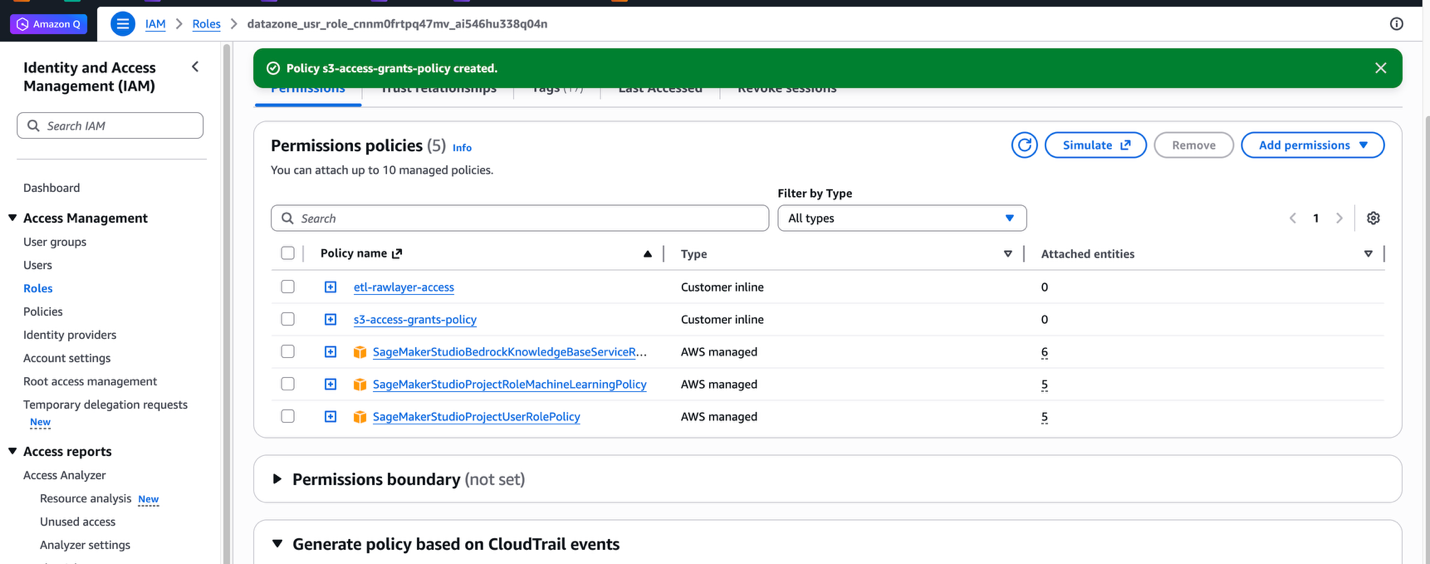
On the Permissions tab, choose Add permissions, then choose Create inline policy.
Use the JSON editor to create a policy that grants the project role access to the Amazon S3 location
In the JSON policy below, replace the placeholder values with your actual environment details:
Replace <BUCKET_PREFIX> with the prefix of S3 bucket name (for example, ecommerce-raw-layer)
Replace <AWS_REGION> with the AWS Region where your AWS Glue Data Quality rulesets are created (for example, us-east-1)
Replace <AWS_ACCOUNT_ID> with your AWS account ID
Paste the updated JSON policy into the JSON editor.
Enter a name for the policy (for example, etl-rawlayer-access), then choose Create policy.
Choose Add permissions again, then choose Create inline policy.
In the JSON editor, create a second policy to manage S3 Access Grants:Replace <BUCKET_PREFIX> with the prefix of S3 bucket name (for example, ecommerce-raw-layer) and paste this JSON policy.
After you add policies to the project role for access to the Amazon S3 resources, complete the following steps to integrate the S3 bucket with the SageMaker Unified Studio project:
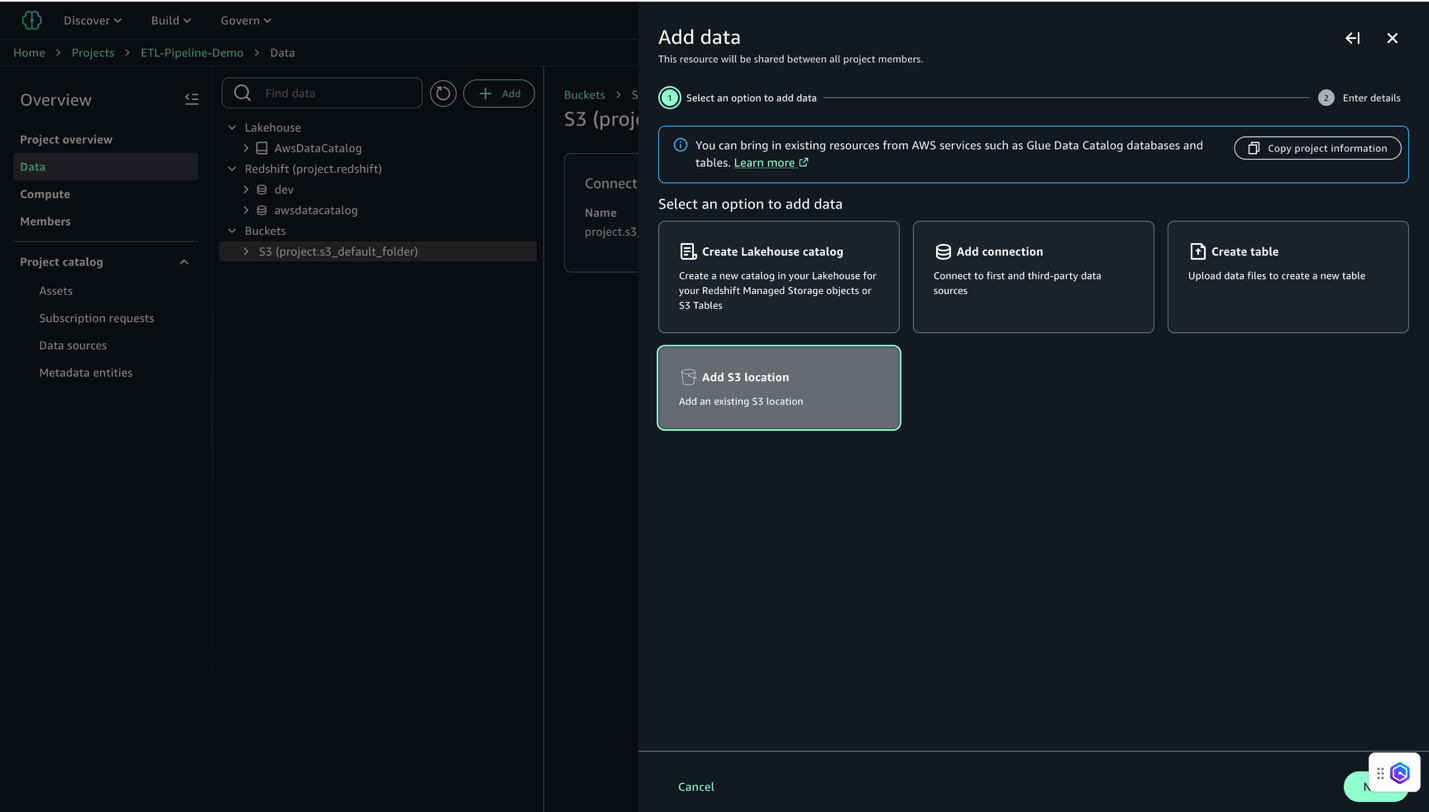
In SageMaker Unified Studio, open the project you created under Your projects.
Choose Data in the navigation pane.
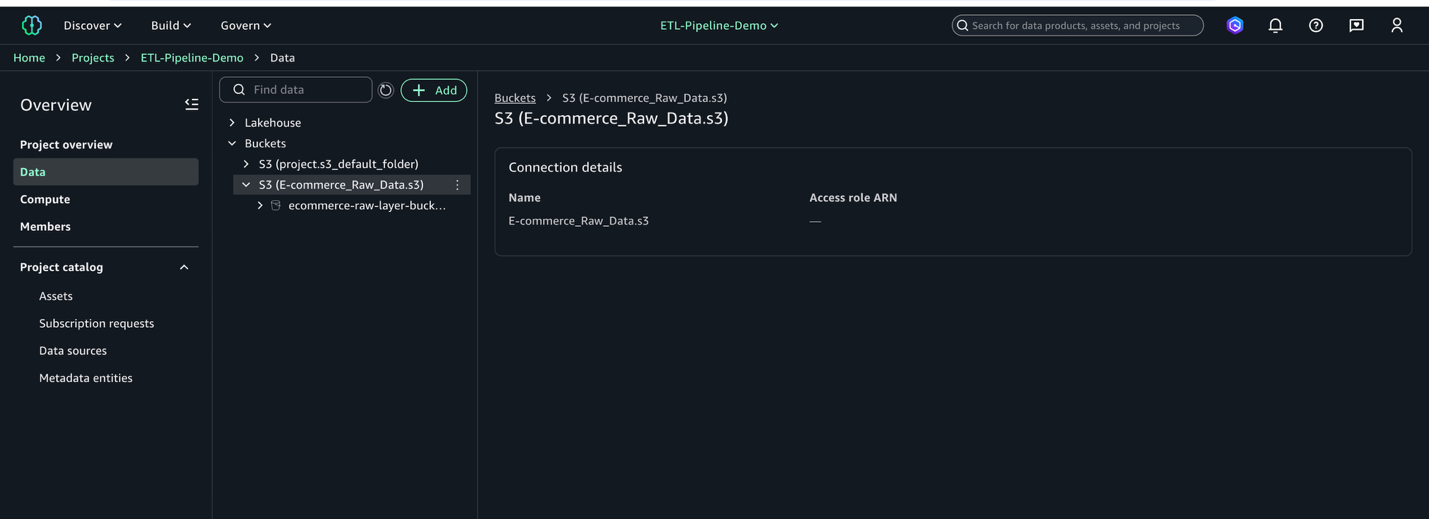
Select Add and then Add S3 location.
Configure the S3 location:
For Name, enter a descriptive name (for example, E-commerce_Raw_Data).
For S3 URI, enter your bucket URI (for example, s3://ecommerce-raw-layer-bucket-demo-<Account-ID>-us-east-1/).
For AWS Region, enter your Region (for this example, us-east-1).
Leave Access role ARN blank.
Click Add S3 Location
Wait for the integration to complete.
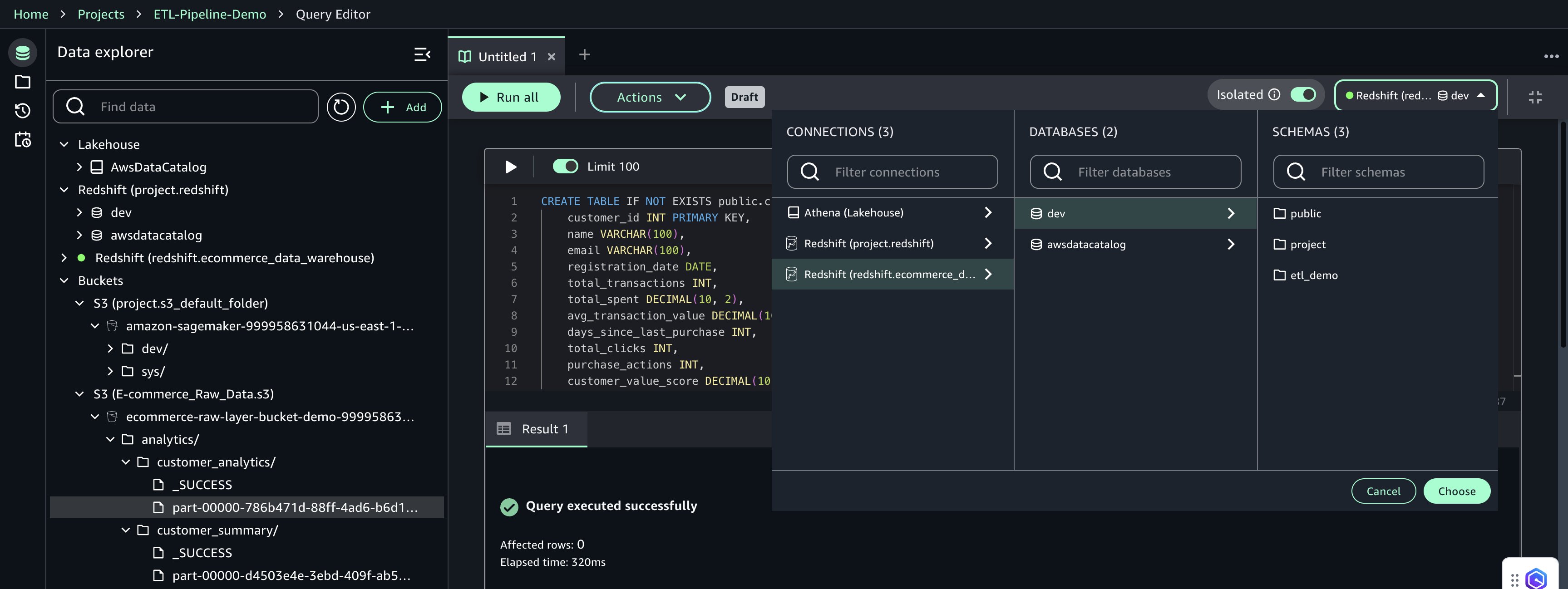
Verify the S3 location appears in your project’s data catalog (on the Project overview page, on the Data tab, locate the Buckets pane to view the buckets and folders).
This process connects your S3 bucket to SageMaker Unified Studio, making your data ready for analysis.
Create notebook for job scripts
Before you can create the data processing jobs, you must set up a notebook to develop the scripts that will generate and process your data. Complete the following steps:
In SageMaker Unified Studio, on the top menu, under Build, choose JupyterLab.
Choose Configure Space and choose the instance type ml.t3.xlarge. This makes sure your JupyterLab instance has at least 4 vCPUs and 4 GiB of memory.
Choose Configureand Start Space or Save and Restart to launch your environment.
Wait a few moments for the instance to be ready.
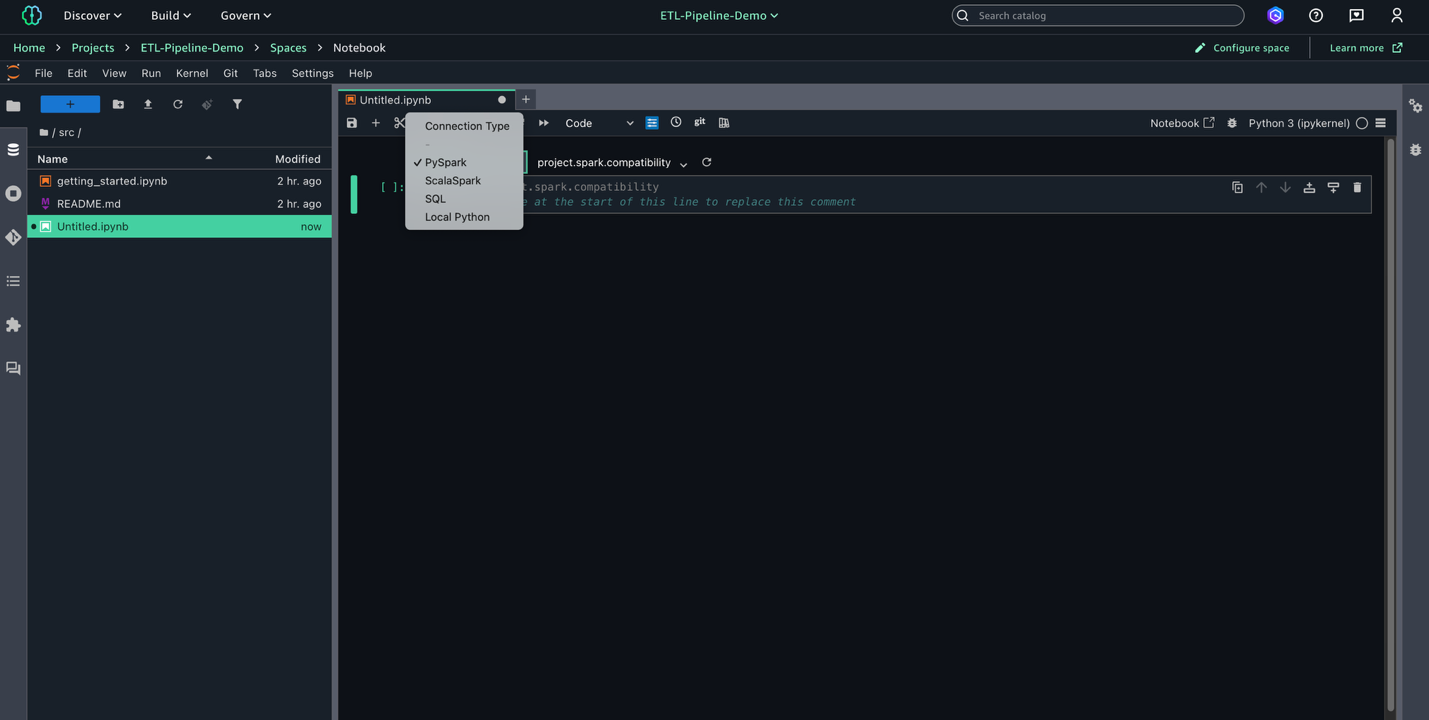
Choose File, New, and Notebook to create a new notebook.
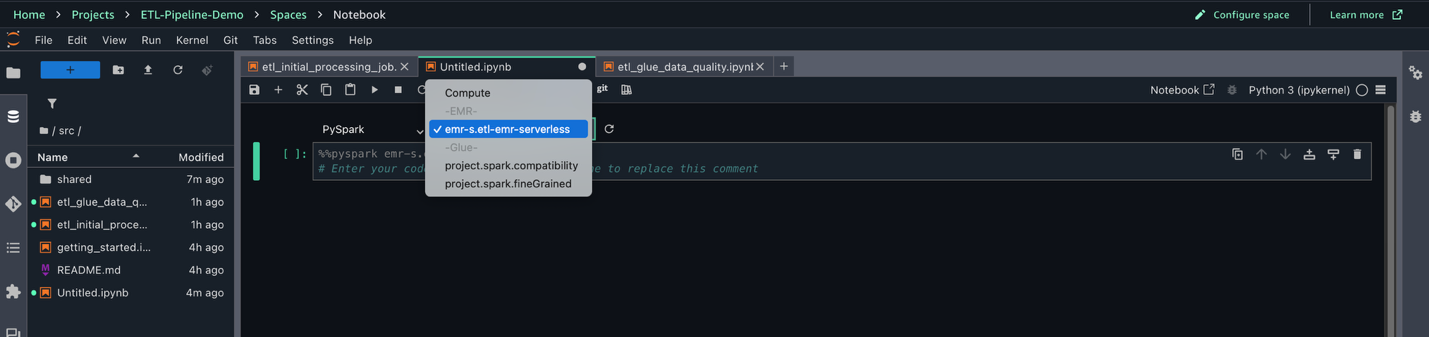
Set Kernel as Python 3, Connection type as PySpark, and Compute as Project.spark.compatibility.
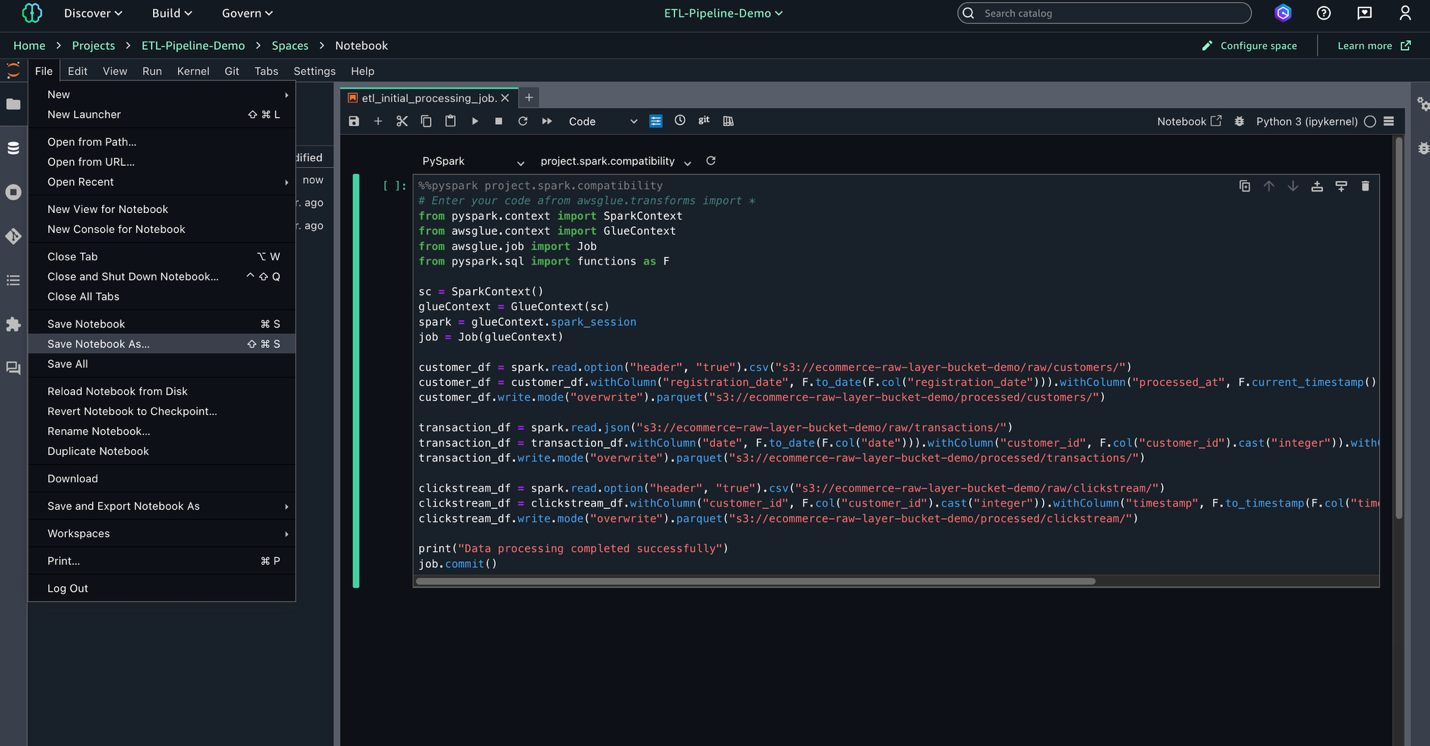
In the notebook, enter the following script to use later for your AWS Glue job. This script processes raw data from three sources in the S3 data lake, standardizes dates, and converts data types before saving the cleaned data in Parquet format for optimal storage and querying.
Replace <Bucket-Name> with the name of actual S3 bucket in script:
This script processes customer, transaction, and clickstream data from the raw layer in Amazon S3 and saves it as Parquet files in the processed layer.
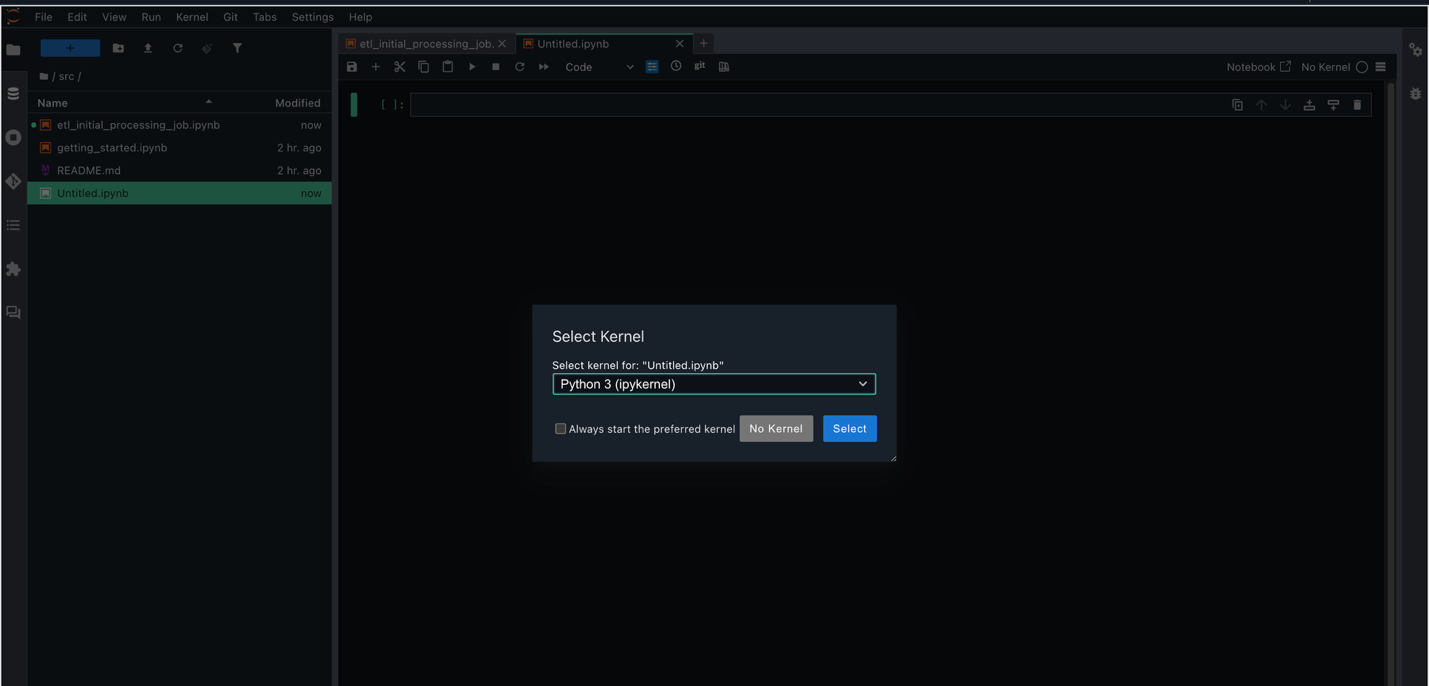
Choose File, Save Notebook As, and save the file as shared/etl_initial_processing_job.ipynb.
Create notebook for AWS Glue Data Quality
After you create the initial data processing script, the next step is to set up a notebook to perform data quality checks using AWS Glue. These checks help validate the integrity and completeness of your data before further processing. Complete the following steps:
Choose File, New, and Notebook to create a new notebook.
Set Kernel as Python 3, Connection type as PySpark, and Compute as Project.spark.compatibility.
In this new notebook, add the data quality check script using the AWS Glue EvaluateDataQuality method. Replace <Bucket-Name> with the name of actual S3 bucket in script:
from datetime import datetime
from pyspark.context import SparkContext
from awsglue.context import GlueContext
from awsglue.job import Job
from awsgluedq.transforms import EvaluateDataQuality
from awsglue.transforms import SelectFromCollection

# ---------------- Glue setup ----------------
sc = SparkContext.getOrCreate()
glueContext = GlueContext(sc)
job = Job(glueContext)
job.init("GlueDQJob", {})

# ---------------- Constants ----------------
RUN_DATE = datetime.utcnow().strftime("%Y-%m-%d")
year, month, day = RUN_DATE.split("-")
OUTPUT_PATH = "s3://<Bucket-Name>/data-quality-results"

# ---------------- Tables and Rules ----------------
tables = {
    "customers": ["s3://<Bucket-Name>/processed/customers/",
                  ["IsComplete \"customer_id\"", "IsUnique \"customer_id\"", "IsComplete \"email\""]],
    "transactions": ["s3://<Bucket-Name>/processed/transactions/",
                     ["IsComplete \"transaction_id\"", "IsUnique \"transaction_id\""]],
    "clickstream": ["s3://<Bucket-Name>/processed/clickstream/",
                    ["IsComplete \"customer_id\"", "IsComplete \"action\""]]
}

# ---------------- Process Each Table ----------------
for table, (path, rules) in tables.items():
    df = glueContext.create_dynamic_frame.from_options("s3", {"paths":[path]}, "parquet")
    results = EvaluateDataQuality().process_rows(
        frame=df,
        ruleset=f"Rules = [{', '.join(rules)}]",
        publishing_options={"dataQualityEvaluationContext": table}
    )
    rows = SelectFromCollection.apply(results, key="rowLevelOutcomes", transformation_ctx="rows").toDF()
    rows = rows.drop("DataQualityRulesPass", "DataQualityRulesFail", "DataQualityRulesSkip")

    # Write passed/failed rows
    for status, colval in [("pass","Passed"), ("fail","Failed")]:
        tmp = rows.filter(rows.DataQualityEvaluationResult.contains(colval))
        if tmp.count() > 0:
            tmp.write.mode("append").parquet(
        f"{OUTPUT_PATH}/{table}/status=dq_{status}/Year={year}/Month={month}/Date={day}"
            )
print("Data Quality checks completed and written to S3")
job.commit()
Choose File, Save Notebook As, and save the file as shared/etl_data_quality_job.ipynb.
Create and test AWS Glue jobs
Jobs in SageMaker Unified Studio enable scalable, flexible ETL pipelines using AWS Glue. This section walks through creating and testing data processing jobs for efficient and governed data transformation.
Create initial data processing job
This job performs the first processing job in the ETL pipeline, transforming raw customer, transaction, and clickstream data and writing the cleaned output to Amazon S3 in Parquet format. Complete the following steps to create the job:
In SageMaker Unified Studio, go to your project.
On the top menu, choose Build, and under Data Analysis & Integration, choose Data processing jobs.
Choose Create job from notebooks.
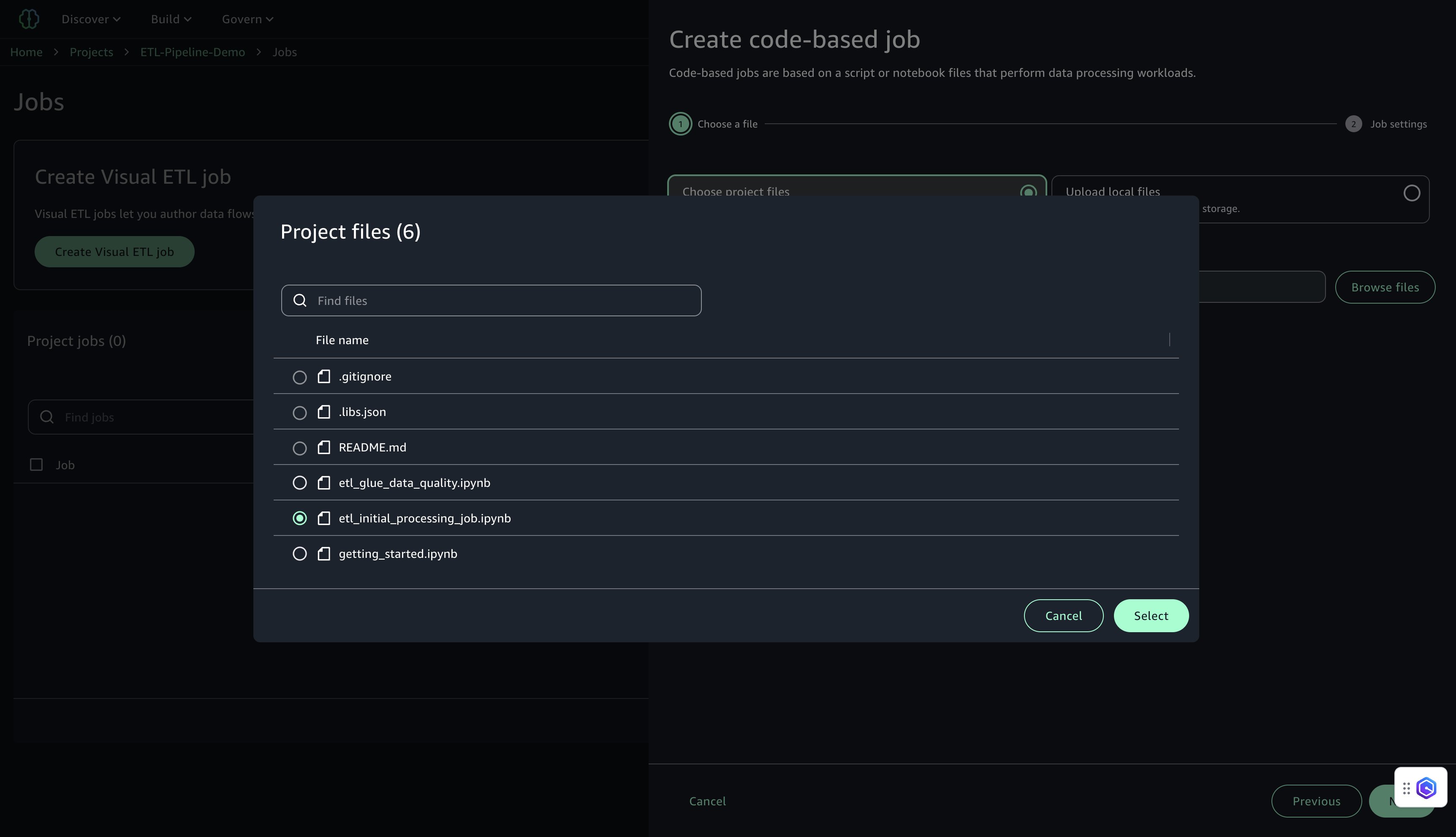
Under Choose project files, choose Browse files.
Locate and select etl_initial_processing_job.ipynb (the notebook saved earlier in JupyterLab), then choose Select and Next.
Configure the job settings:
For Name, enter a name (for example, job-1).
For Description, enter a description (for example, Initial ETL job for customer data processing).
For IAM Role, choose the project role (default).
For Type, choose Spark.
For AWS Glue version, use version 5.0.
For Language, choose Python.
For Worker type, use G.1X.
For Number of Instances, set to 10.
For Number of retries, set to 0.
For Job timeout, set to 480.
For Compute connection, choose project.spark.compatibility.
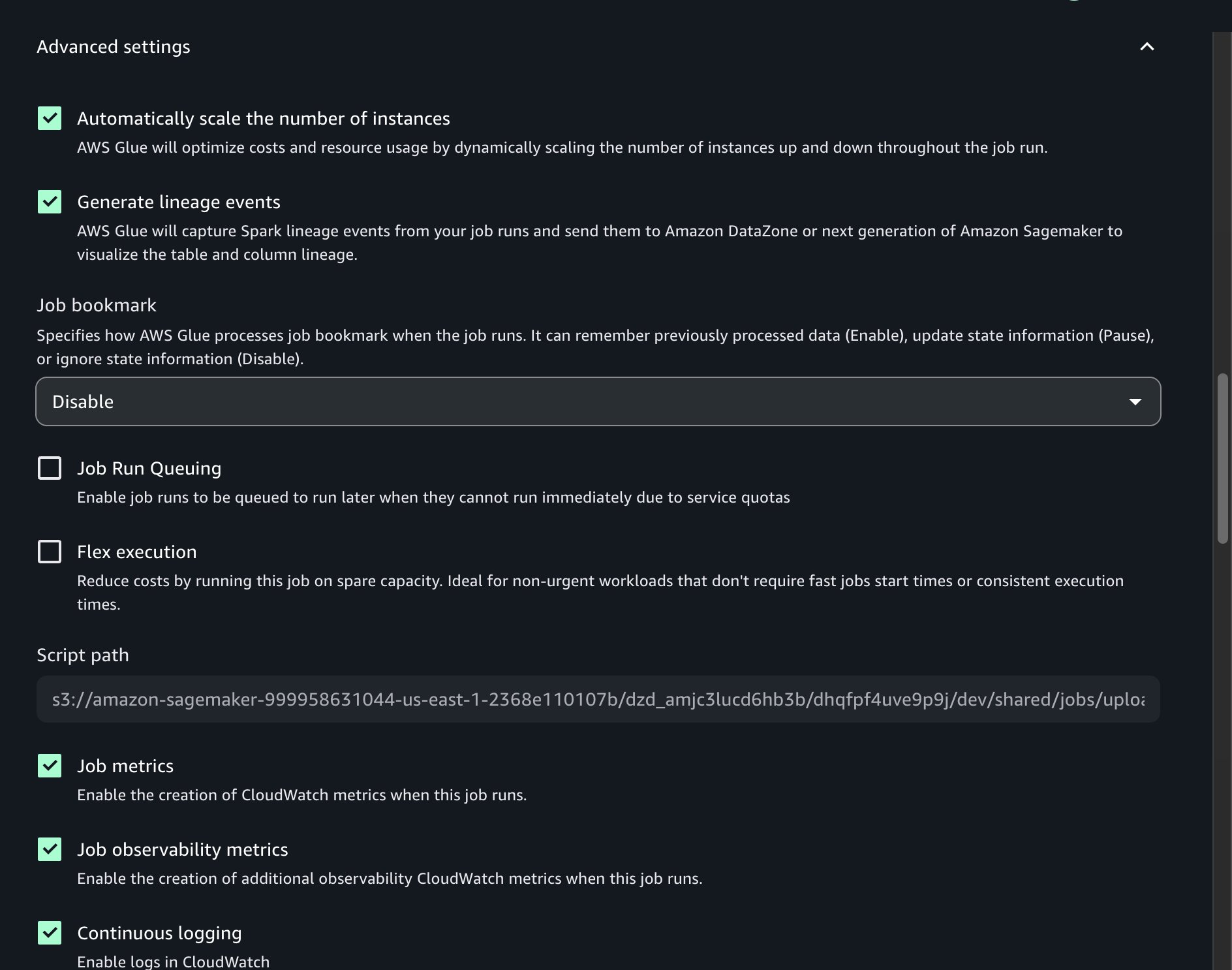
Under Advanced settings, turn on Continuous logging.
Leave the remaining settings as default, then choose Submit.
After the job is created, a confirmation message will appear indicating that job-1 was created successfully.
Create AWS Glue Data Quality job
This job runs data quality checks on the transformed datasets using AWS Glue Data Quality. Rulesets validate completeness and uniqueness for key fields. Complete the following steps to create the job:
In SageMaker Unified Studio, go to your project.
On the top menu, choose Build, and under Data Analysis & Integration, choose Data processing jobs.
Choose Create job, Code-based job, and Create job from files.
Under Choose project files, choose Browse files.
Locate and select etl_glue_data_quality.ipynb, then choose Select and Next.
Configure the job settings:
For Name, enter a name (for example, job-2).
For Description, enter a description (for example, Data quality checks using AWS Glue Data Quality).
For IAM Role, choose the project role.
For Type, choose Spark.
For AWS Glue version, use version 5.0.
For Language, choose Python.
For Worker type, use G.1X.
For Number of Instances, set to 10.
For Number of retries, set to 0.
For Job timeout, set to 480.
For Compute connection, choose project.spark.compatibility.
Under Advanced settings, turn on Continuous logging.
Leave the remaining settings as default, then choose Submit.
After the job is created, a confirmation message will appear indicating that job-2 was created successfully.
Test AWS Glue jobs
Test both jobs to make sure they execute successfully:
In SageMaker Unified Studio, go to your project.
On the top menu, choose Build, and under Data Analysis & Integration, choose Data processing jobs.
Select job-1 and choose Run job.
Monitor the job execution and verify it completes successfully.
Similarly, select job-2 and choose Run job.
Monitor the job execution and verify it completes successfully.
Add EMR Serverless compute
In the ETL pipeline, we use EMR Serverless to perform compute-intensive transformations and aggregations on large datasets. It automatically scales resources based on workload, offering high performance with simplified operations. By integrating EMR Serverless with SageMaker Unified Studio, you can simplify the process of running Spark jobs interactively using Jupyter notebooks in a serverless environment.
This section walks through the steps to configure EMR Serverless compute within SageMaker Studio and use it for executing distributed data processing jobs.
Configure EMR Serverless in SageMaker Unified Studio
To use EMR Serverless for processing in the project, follow these steps:
In the navigation pane on Project Overview, choose Compute.
On the Data processing tab, choose Add compute and Create new compute resources.
Select EMR Serverless and choose Next.
Configure EMR Serverless settings:
For Compute name, enter a name (for example, etl-emr-serverless).
For Description, enter a description (for example, EMR Serverless for advanced data processing).
For Release label, choose emr-7.8.0.
For Permission mode, choose Compatibility.
Choose Add Compute to complete the setup.
After it’s configured, the EMR Serverless compute will be listed with the deployment status Active.
Create and run notebook with EMR Serverless
After you create the EMR Serverless compute, you can run PySpark-based data transformation jobs using a Jupyter notebook to perform large-scale data transformations. This job reads cleaned customer, transaction, and clickstream datasets from Amazon S3, performs aggregations and scoring, and writes the final analytics outputs back to Amazon S3 in both Parquet and CSV formats.Complete the following steps to create a notebook for EMR Serverless processing:
On the top menu, under Build, choose JupyterLab.
Choose File, New, and Notebook.
Set Kernel as Python 3, Connection type as PySpark, and Compute as emr-s.etl-emr-serverless.
Enter the following PySpark script to run your data transformation job on EMR Serverless. Provide the name of your S3 bucket:
Choose File, Save Notebook As, and save the file as shared/emr_data_transformation_job.ipynb.
Choose Run Cell to run the script.
Monitor the Script execution and verify it completes successfully.
Monitor the Spark job execution and ensure it completes without errors.
Add Redshift Serverless compute
With Redshift Serverless, users can run and scale data warehouse workloads without managing infrastructure. It is ideal for analytics use cases where data needs to be queried from Amazon S3 or integrated into a centralized warehouse. In this step, you add Redshift Serverless to the project for loading and querying processed customer analytics data generated in earlier stages of the pipeline. For more information about Redshift Serverless, see Amazon Redshift Serverless.
Set up Redshift Serverless compute in SageMaker Unified Studio
Complete the following steps to set up Redshift Serverless compute:
In SageMaker Unified Studio, choose the Compute tab within your project workspace (ETL-Pipeline-Demo).
On the SQL analytics tab, choose Add compute, then choose Create new compute resources to begin configuring your compute environment.
Select Amazon Redshift Serverless.
Configure the following:
For Compute name, enter a name (for example, ecommerce_data_warehouse).
For Description, enter a description (for example, Redshift Serverless for data warehouse).
For Workgroup name, enter a name (for example, redshift-serverless-workgroup).
For Maximum capacity, set to 512 RPUs.
For Database name, enter dev.
Choose Add Compute to create the Redshift Serverless resource.
After the compute is created, you can test the Amazon Redshift connection.
On the Data warehouse tab, confirm that redshift.ecommerce_data_warehouse is listed.
Choose the compute: redshift.ecommerce_data_warehouse.
On the Permissions tab, copy the IAM role ARN. You use this for the Redshift COPY command in the next step.
Create and execute querybook to load data into Amazon Redshift
In this step, you create a SQL script to load the processed customer summary data from Amazon S3 into a Redshift table. This enables centralized analytics for customer segmentation, lifetime value calculations, and marketing campaigns. Complete the following steps:
On the Build menu, under Data Analysis & Integration, choose Query editor.
Enter the following SQL into the querybook to create the customer_summary table in the public schema:
-- Create customer_summary table in public schema
CREATE TABLE IF NOT EXISTS public.customer_summary (
    customer_id INT PRIMARY KEY,
    name VARCHAR(100),
    email VARCHAR(100),
    registration_date DATE,
    total_transactions INT,
    total_spent DECIMAL(10, 2),
    avg_transaction_value DECIMAL(10, 2),
    days_since_last_purchase INT,
    total_clicks INT,
    purchase_actions INT,
    customer_value_score DECIMAL(10, 2)
);
Choose Add SQL to add a new SQL script.
Enter the following SQL into the querybook
TRUNCATE TABLE customer_summary;
Note: We truncate the customer_summary table to remove existing records and ensure a clean, duplicate-free reload of the latest aggregated data from S3 before running the COPY command.
Choose Add SQL to add a new SQL script.
Enter the following SQL to load the data into Redshift Serverless from your S3 bucket. Provide the name of your S3 bucket and IAM role ARN for Amazon Redshift:
-- Load data from S3 (replace with your bucket name and IAM role)
COPY public.customer_summary FROM 's3://<bucket-name>/analytics/customer_summary/'
IAM_ROLE 'arn:aws:iam::<Account-ID>:role/<your-redshift-role>'
FORMAT AS CSV
IGNOREHEADER 1
REGION 'us-east-1';
In the Query Editor, configure the following:
Connection: redshift.ecommerce_data_warehouse
Database: dev
Schema: public
Choose Choose to apply the connection settings.
Choose Run Cell for each cell to create the customer_summary table in the public schema and then load data from Amazon S3.
Choose Actions, Save, name the querybook final_data_product, and choose Save changes.
This completes the creation and execution of the Redshift data product using the querybook.
Create and manage the workflow environment
This section describes how to create a shared workflow environment and define a code-based workflow that automates a customer data pipeline using Apache Airflow within SageMaker Unified Studio. Shared environments facilitate collaboration among project members and centralized workflow management.
Create the workflow environment
Workflow environments must be created by project owners. After they’re created, members of the project can sync and use the workflows. Only project owners can update or delete workflow environments. Complete the following steps to create the workflow environment:
Choose Compute for your project.
On the Workflow environments tab, choose Create.
Review the configuration parameters and choose Create workflow environment.
Wait for the environment to be fully provisioned before proceeding It will take around 20 minutes to provision.
Create the code-based workflow
When the workflow environment is ready, define a code-based ETL pipeline using Airflow. This pipeline automates daily processing tasks across services like AWS Glue, EMR Serverless, and Redshift Serverless.
On the Build menu, under Orchestration, choose Workflows.
Choose Create new workflow, then choose Create workflow in code editor.
Configure Space and choose the instance type ml.t3.xlarge. This ensures your JupyterLab instance has at least 4 vCPUs and 4 GiB of memory.
Choose Configureand Restart Space to launch your environment.
The following script defines a daily scheduled ETL workflow that automates several actions:
Initial data transformation using AWS Glue
Data quality validation using AWS Glue (EvaluateDataQuality)
Advanced data processing with EMR Serverless using a Jupyter notebook
Loading transformed results into Redshift Serverless from a querybook
Replace the default DAG template with the following definition, ensuring that job names and input paths match the actual names used in your project:
from datetime import datetime
from airflow import DAG
from airflow.decorators import dag
from airflow.utils.dates import days_ago
from airflow.providers.amazon.aws.operators.glue import GlueJobOperator
from workflows.airflow.providers.amazon.aws.operators.sagemaker_workflows import NotebookOperator
from sagemaker_studio import Project
# Get SageMaker Studio project IAM role
project = Project()
default_args = {
    'owner': 'data_engineer',
    'depends_on_past': False,
    'email_on_failure': True,
    'email_on_retry': False,
    'retries': 1
}
@dag(
    dag_id='customer_etl_pipeline',
    default_args=default_args,
    schedule_interval='@daily',
    start_date=days_ago(1),
    is_paused_upon_creation=False,
    tags=['etl', 'customer-analytics'],
    catchup=False
)
def customer_etl_pipeline():
    # Step 1: Initial data transformation using Glue
    initial_transformation = GlueJobOperator(
        task_id='initial_transformation',
        job_name='job-1',
        iam_role_arn=project.iam_role,
    )
    # Step 2: Data quality checks using Glue DQ
    data_quality_check = GlueJobOperator(
        task_id='data_quality_check',
        job_name='job-6',
        iam_role_arn=project.iam_role,
    )
    # Step 3: EMR Serverless notebook processing
    emr_processing = NotebookOperator(
        task_id='emr_processing',
        input_config={
            "input_path": "emr_data_transformation_job.ipynb",
            "input_params": {}
        },
        output_config={"output_formats": ['NOTEBOOK']},
        poll_interval=10,
    )
    # Step 4: Load to Redshift notebook
    redshift_load = NotebookOperator(
        task_id='redshift_load',
        input_config={
            "input_path": "final_data_product.sqlnb",
            "input_params": {}
        },
        output_config={"output_formats": ['NOTEBOOK']},
        poll_interval=10,
    )
    # Task dependencies
    initial_transformation >> data_quality_check >> emr_processing >> redshift_load
# Instantiate DAG
customer_etl_dag = customer_etl_pipeline()
Choose File, Save python file, name the file shared/workflows/dags/customer_etl_pipeline.py, and choose Save.
Deploy and run the workflow
Complete the following steps to run the workflow:
On the Build menu, choose Workflows.
Choose the workflow customer_etl_pipeline and choose Run.
Running a workflow puts tasks together to orchestrate Amazon SageMaker Unified Studio artifacts. You can view multiple runs for a workflow by navigating to the Workflows page and choosing the name of a workflow from the workflows list table.
After your Airflow workflows are deployed in SageMaker Unified Studio, monitoring becomes essential for maintaining reliable ETL operations. The integrated Amazon MWAA environment provides comprehensive observability into your data pipelines through the familiar Airflow web interface, enhanced with AWS monitoring capabilities. The Amazon MWAA integration with SageMaker Unified Studio offers real-time DAG execution tracking, detailed task logs, and performance metrics to help you quickly identify and resolve pipeline issues. Complete the following steps to monitor the workflow:
On the Build menu, choose Workflows.
Choose the workflow customer_etl_pipeline.
Choose View runs to see all executions.
Choose a specific run to view detailed task status.
For each task, you can view the status (Succeeded, Failed, Running), start and end times, duration, and logs and outputs. The workflow is also visible in the Airflow UI, accessible through the workflow environment, where you can view the DAG graph, monitor task execution in real time, access detailed logs, and view the status.
Go to Workflows and select the workflow named customer_etl_pipeline.
From the Actions menu, choose Open in Airflow UI.
After the workflow completes successfully, you can query the data product in the query editor.
On the Build menu, under Data Analysis & Integration, choose Query editor.
Run select * from "dev"."public"."customer_summary"
Observe the contents of the customer_summary table, including aggregated customer metrics such as total transactions, total spent, average transaction value, clicks, and customer value scores. This allows verification that the ETL and data quality pipelines loaded and transformed the data correctly.
Clean up
To avoid unnecessary charges, complete the following steps:
This post demonstrated how to build an end-to-end ETL pipeline using SageMaker Unified Studio workflows. We explored the complete development lifecycle, from setting up fundamental AWS infrastructure—including Amazon S3 CORS configuration and IAM permissions—to implementing sophisticated data processing workflows. The solution incorporates AWS Glue for initial data transformation and quality checks, EMR Serverless for advanced processing, and Redshift Serverless for data warehousing, all orchestrated through Airflow DAGs. This approach offers several key benefits: a unified interface that consolidates necessary tools, Python-based workflow flexibility, seamless AWS service integration, collaborative development through Git version control, cost-effective scaling through serverless computing, and comprehensive monitoring tools—all working together to create an efficient and maintainable data pipeline solution.
By using SageMaker Unified Studio workflows, you can accelerate your data pipeline development while maintaining enterprise-grade reliability and scalability. For more information about SageMaker Unified Studio and its capabilities, refer to the Amazon SageMaker Unified Studio documentation.
Here are the notable launches and updates from last week that can help you build, scale, and innovate on AWS.
Last week’s launches Here are the launches that got my attention this week.
Let’s start with news related to compute and networking infrastructure:
Introducing Amazon EC2 C8id, M8id, and R8id instances: These new Amazon EC2 C8id, M8id, and R8id instances are powered by custom Intel Xeon 6 processors. These instances offer up to 43% higher performance and 3.3x more memory bandwidth compared to previous generation instances.
AWS Network Firewall announces new price reductions: The service has added the hourly and data processing discounts on NAT Gateways that are service-chained with Network Firewall secondary endpoints. Additionally, AWS Network Firewall has removed additional data processing charges for Advanced Inspection, which enables Transport Layer Security (TLS) inspection of encrypted network traffic.
Amazon ECS adds Network Load Balancer support for Linear and Canary deployments: Applications that commonly use NLB, such as those requiring TCP/UDP-based connections, low latency, long-lived connections, or static IP addresses, can take advantage of managed, incremental traffic shifting natively from ECS when rolling out updates.
AWS Config now supports 30 new resource types: These range across key services including Amazon EKS, Amazon Q, and AWS IoT. This expansion provides greater coverage over your AWS environment, enabling you to more effectively discover, assess, audit, and remediate an even broader range of resources.
Amazon DynamoDB global tables now support replication across multiple AWS accounts: DynamoDB global tables are a fully managed, serverless, multi-Region, and multi-active database. With this new capability, you can replicate tables across AWS accounts and Regions to improve resiliency, isolate workloads at the account level, and apply distinct security and governance controls.
Amazon RDS now provides an enhanced console experience to connect to a database: The new console experience provides ready-made code snippets for Java, Python, Node.js, and other programming languages as well as tools like the psql command line utility. These code snippets are automatically adjusted based on your database’s authentication settings. For example, if your cluster uses IAM authentication, the generated code snippets will use token-based authentication to connect to the database. The console experience also includes integrated CloudShell access, offering the ability to connect to your databases directly from within the RDS console.
Then, I noticed three news items related to security and how you authenticate on AWS:
AWS Builder ID now supports Sign in with Apple: AWS Builder ID, your profile for accessing AWS applications including AWS Builder Center, AWS Training and Certification, AWS re:Post, AWS Startups, and Kiro, now supports sign-in with Apple as a social login provider. This expansion of sign-in options builds on the existing sign-in with Google capability, providing Apple users with a streamlined way to access AWS resources without managing separate credentials on AWS.
AWS STS now supports validation of select identity provider specific claims from Google, GitHub, CircleCI and OCI: You can reference these custom claims as condition keys in IAM role trust policies and resource control policies, expanding your ability to implement fine-grained access control for federated identities and help you establish your data perimeters. This enhancement builds upon IAM’s existing OIDC federation capabilities, which allow you to grant temporary AWS credentials to users authenticated through external OIDC-compatible identity providers.
Amazon CloudFront announces mutual TLS support for origins: Now with origin mTLS support, you can implement a standardized, certificate-based authentication approach that eliminates operational burden. This enables organizations to enforce strict authentication for their proprietary content, ensuring that only verified CloudFront distributions can establish connections to backend infrastructure ranging from AWS origins and on-premises servers to third-party cloud providers and external CDNs.
Finally, there is not a single week without news around AI :
Claude Opus 4.6 now available in Amazon Bedrock: Opus 4.6 is Anthropic’s most intelligent model to date and a premier model for coding, enterprise agents, and professional work. Claude Opus 4.6 brings advanced capabilities to Amazon Bedrock customers, including industry-leading performance for agentic tasks, complex coding projects, and enterprise-grade workflows that require deep reasoning and reliability.
Structured outputs now available in Amazon Bedrock: Amazon Bedrock now supports structured outputs, a capability that provides consistent, machine-readable responses from foundation models that adhere to your defined JSON schemas. Instead of prompting for valid JSON and adding extra checks in your application, you can specify the format you want and receive responses that match it—making production workflows more predictable and resilient.
Upcoming AWS events Check your calendars so that you can sign up for this upcoming event:
AWS Community Day Romania (April 23–24, 2026): This community-led AWS event brings together developers, architects, entrepreneurs, and students for more than 10 professional sessions delivered by AWS Heroes, Solutions Architects, and industry experts. Attendees can expect expert-led technical talks, insights from speakers with global conference experience, and opportunities to connect during dedicated networking breaks, all hosted at a premium venue designed to support collaboration and community engagement.
If you’re looking for more ways to stay connected beyond this event, join the AWS Builder Center to learn, build, and connect with builders in the AWS community.
On February 6, 2026, BeyondTrust released security advisory BT26-02, disclosing a critical pre-authentication Remote Code Execution (RCE) vulnerability affecting its Remote Support (RS) and Privileged Remote Access (PRA) products. Assigned CVE-2026-1731 and a near-maximum CVSSv4 score of 9.9, the flaw allows unauthenticated, remote attackers to execute arbitrary operating system commands in the context of the site user by sending specially crafted requests. The vulnerability affects Remote Support (RS) versions 25.3.1 and prior, as well as Privileged Remote Access (PRA) versions 24.3.4 and prior.
While BeyondTrust automatically patched SaaS instances on February 2, 2026, self-hosted customers remain at risk until manual updates are applied. The issue was discovered by researchers at Hacktron AI using AI-enabled variant analysis; they identified approximately 8,500 on-premises instances exposed to the internet that could be susceptible to this straightforward exploitation vector.
While BeyondTrust has not reported active exploitation of CVE-2026-1731 in the wild, the platform’s immense footprint makes it a high-priority target for sophisticated adversaries. BeyondTrust provides identity security services to more than 20,000 customers across over 100 countries, including 75% of the Fortune 100. This ubiquity has attracted state-sponsored actors in the past; notably, the Chinese hacking group “Silk Typhoon” weaponized previous zero-day flaws (CVE-2024-12356 and CVE-2024-12686) to breach the U.S. Treasury Department and access sensitive data related to sanctions, triggering emergency directives from CISA. Rapid7 research later revealed that the exploitation of CVE-2024-12356 actually required chaining it with a critical, then-unknown SQL injection vulnerability in an underlying PostgreSQL tool (CVE-2025-1094). Given this history of targeted attacks against such a widely used platform, these tools remain a critical attack vector that demands immediate defensive action.
Mitigation guidance
A vendor-provided patch is available to remediate CVE-2026-1731 in on-premise deployments.
BeyondTrust Remote Support (RS):
Versions 25.3.1 and prior are affected by CVE-2026-1731.
CVE-2026-1731 is fixed in 25.3.2 and later.
BeyondTrust Privileged Remote Access (PRA):
Versions 24.3.4 and prior are affected by CVE-2026-1731.
CVE-2026-1731 is fixed in 25.1.1 and later.
Please read the vendor advisory for the latest guidance.
Rapid7 customers
Exposure Command, InsightVM, and Nexpose
Exposure Command, InsightVM, and Nexpose customers can assess exposure to CVE-2026-1731 on Remote Support and Privileged Remote Access using authenticated checks expected to be available in today’s (Feb 9) content release.
To provide the best experiences, we use technologies like cookies to store and/or access device information. Consenting to these technologies will allow us to process data such as browsing behavior or unique IDs on this site. Not consenting or withdrawing consent, may adversely affect certain features and functions.
Functional
Always active
The technical storage or access is strictly necessary for the legitimate purpose of enabling the use of a specific service explicitly requested by the subscriber or user, or for the sole purpose of carrying out the transmission of a communication over an electronic communications network.
Preferences
The technical storage or access is necessary for the legitimate purpose of storing preferences that are not requested by the subscriber or user.
Statistics
The technical storage or access that is used exclusively for statistical purposes.The technical storage or access that is used exclusively for anonymous statistical purposes. Without a subpoena, voluntary compliance on the part of your Internet Service Provider, or additional records from a third party, information stored or retrieved for this purpose alone cannot usually be used to identify you.
Marketing
The technical storage or access is required to create user profiles to send advertising, or to track the user on a website or across several websites for similar marketing purposes.