Post Syndicated from Explosm.net original https://explosm.net/comics/kermit-the-frog
New Cyanide and Happiness Comic
Post Syndicated from Explosm.net original https://explosm.net/comics/kermit-the-frog
New Cyanide and Happiness Comic
Post Syndicated from Ryan Smith original https://www.servethehome.com/lenovo-thinkstation-p3-tiny-gen2-review-nvidia-gpu-intel/
With a 24-core CPU, up to three NVMe SSDs, and an NVIDIA GPU, the Lenovo ThinkStation P3 Tiny Gen2 packs a lot into a 1L form factor
The post Lenovo ThinkStation P3 Tiny Gen2 Review NVIDIA Powered Workstation appeared first on ServeTheHome.
Post Syndicated from Crosstalk Solutions original https://www.youtube.com/shorts/4FmMsaeuymA
Post Syndicated from BeardedTinker original https://www.youtube.com/watch?v=5NSTEpEOS90
Post Syndicated from The Atlantic original https://www.youtube.com/watch?v=0XnFmHkvUHY
Post Syndicated from jzb original https://lwn.net/Articles/1057561/
Git is ubiquitous; in the last two decades, the version-control
system has truly achieved world domination. Almost every developer
uses it and the vast majority of open-source projects are hosted in
Git repositories. That does not mean, however, that it is
perfect. Patrick Steinhardt used his main-track session at FOSDEM 2026
to discuss some of its shortcomings and how they are being
addressed to prepare Git for the next decade.
Post Syndicated from jzb original https://lwn.net/Articles/1058285/
The postmarketOS project
has published
a recap from FOSDEM 2026, including the FOSS on
Mobile devroom, and a summary of its post-FOSDEM
hackathon. This includes decisions on governance and the project’s
AI policy:
AI policy: our current AI
policy does not state that we forbid the use of generative AI in
postmarketOS, so far this document just lists why we think it is a bad
idea and misaligned with the project values. We discussed this and
will soon change it (via merge request) to clearly state that we don’t
want generative AI to be used in the project. It was also noted that
currently the policy is too long, it would make sense to split it into
the actual policy and still keep, but separate the reasoning from
it.[…] Power delegation and teams: in over two
hours we discussed how to move forward with [postmarketOS change
request] PMCR 0008 to organize
ourselves better, and how it fits with soon having a legal entity. We
figured that we need to rename “The Board” (which is currently for
financial oversight) to “Financial Team”, as we will soon have a new
board for the legal entity. In the end our idea was to have the new
board refer to an “assembly” for all important decisions, and this
“assembly” would just be all Trusted Contributors in postmarketOS. The
Core Contributors team would be dissolved in favor of having several
topic-specific teams (a lot of which we already have, such as the
infra team). This way we would have a very flat decision
structure. The PMCR will be updated soon and discussed further
there. Casey
also asked on fedi for further feedback and got a lot of input.
Other topics include reaching out to resellers to sell phones with
postmarketOS preinstalled, security, and more.
Post Syndicated from Bruce Schneier original https://www.schneier.com/blog/archives/2026/02/rewiring-democracy-ebook-is-on-sale.html
I just noticed that the ebook version of Rewriring Democracy is on sale for $5 on Amazon, Apple Books, Barnes & Noble, Books A Million, Google Play, Kobo, and presumably everywhere else in the US. I have no idea how long this will last.
Post Syndicated from jzb original https://lwn.net/Articles/1058265/
Security updates have been issued by Debian (kernel, linux-6.1, munge, and tcpflow), Fedora (accel-ppp, atuin, babl, bustle, endless-sky, envision, ettercap, fapolicy-analyzer, firefox, glycin, gnome-settings-daemon, go-fdo-client, greenboot-rs, greetd, helix, hwdata, keylime-agent-rust, kiwi, libdrm, maturin, mirrorlist-server, ntpd-rs, ogr2osm, open-vm-tools, perl-App-Cme, perl-Net-RDAP, perl-rdapper, polymake, python-requests-ratelimiter, python-tqdm, rust-add-determinism, rust-afterburn, rust-ambient-id, rust-app-store-connect, rust-bat, rust-below, rust-btrd, rust-busd, rust-bytes, rust-cargo-c, rust-cargo-deny, rust-coreos-installer, rust-crypto-auditing-agent, rust-crypto-auditing-client, rust-crypto-auditing-event-broker, rust-crypto-auditing-log-parser, rust-dua-cli, rust-eif_build, rust-git-delta, rust-git-interactive-rebase-tool, rust-git2, rust-gst-plugin-dav1d, rust-gst-plugin-reqwest, rust-heatseeker, rust-ingredients, rust-jsonwebtoken, rust-lsd, rust-monitord, rust-monitord-exporter, rust-muvm, rust-nu, rust-num-conv, rust-onefetch, rust-oo7-cli, rust-pleaser, rust-pore, rust-pretty-git-prompt, rust-procs, rust-rbspy, rust-rbw, rust-rd-agent, rust-rd-hashd, rust-redlib, rust-resctl-bench, rust-resctl-demo, rust-routinator, rust-sccache, rust-scx_layered, rust-scx_rustland, rust-scx_rusty, rust-sequoia-chameleon-gnupg, rust-sequoia-keystore-server, rust-sequoia-octopus-librnp, rust-sequoia-sq, rust-sevctl, rust-shadow-rs, rust-sigul-pesign-bridge, rust-speakersafetyd, rust-tealdeer, rust-time, rust-time-core, rust-time-macros, rust-tokei, rust-weezl, rust-wiremix, rust-ybaas, rustup, sad, strawberry, systemd, tbtools, transmission, trustedqsl, tuigreet, uv, and vdr-extrecmenung), Oracle (brotli, git-lfs, java-1.8.0-openjdk, kernel, libsoup, libsoup3, nodejs:24, python3.12, and thunderbird), Red Hat (fence-agents, python-urllib3, python3.11-urllib3, python3.12-urllib3, and resource-agents), SUSE (avahi, cups, freerdp, golang-github-prometheus-prometheus, java-11-openjdk, java-17-openjdk, libsoup2, libxml2, and python-pip), and Ubuntu (expat, glib2.0, and imagemagick).
Post Syndicated from The Atlantic original https://www.youtube.com/shorts/Cf2nK7ciJAc
Post Syndicated from Дарина Сарелска original https://www.toest.bg/nyama-mesta-zhurnalistikata-sled-zhurnalistite/

Мария Цънцарова я няма в ефир вече месец. За това време:
Ще кажете, защо ви занимавам с тези вехти медийни наброски от изминалия месец, като днес всички искат да знаят само за Туин Пийкса в Петрохан. Има връзка, обещавам.
Аз се сещам за нея често. Не ми е близка приятелка. Не съм ѝ била и редовен зрител, ако трябва да съм съвсем честна. И все пак липсата ѝ смятам за проблем. Не неин – наш. На всички тези, които отдавна не включваме телевизора сутрин, и на тези, които по навик включваме да видим „заместниците“ и пак така по навик може би оставаме.
Рейтингът на „Тази сутрин“ след Цънцарова показва, че журналистите се уволняват, предаването си върви. А като добавиш и пропуснатите ползи, които тия, питащите журналисти, очевидно носят на корпорациите майки, и тя, сметката, съвсем излиза. Ето минус една Мария Цънцарова например, освен че е плюс една вероятно не особено висока заплата за bTV, за компанията собственик – PPF, може да донесе милиарди от държавата под формата на мотриси за БДЖ (PPF Group е мажоритарен акционер в Skoda Group – б.р.).
Договорът за половин милиард евро с българското правителство беше подписан още преди на Мария да ѝ предложат подкаст и докато официозите на Пеевски вече ѝ чертаеха пътната карта – че била уморена и имала нужда от ново амплоа. Даде ѝ се в края на 2025-та. А всеки момент чакаме и първия влак по сделката, може да е брандиран в цветовете на „Тази сутрин“. За благодарност! Но разбира се, уволнението на Цънцарова няма нищо общо с това. То, както всички разбрахме, е заради употребата на неподходяща чаша.
Не герой, не безгрешен, не идеален, със сигурност не симпатичен на всички. Но журналист. Обикновен журналист. Който работи да задава въпроси и да говори истината в лицето на властимащите (speak truth to power). To comfort the afflicted, and afflict the comfortable, както се казва в онзи американски идеал.
Фразата е сполучлива игра на думи на английски. Но може да я напънем и на български:
Това разбиране за журналистиката идва от Америка в началото на XX век. И понеже вече е дефицит и там, а тук ние не помним нищо преди Петрохан, камо ли събития от миналия век, затова да припомним:
През ХХ век в Америка журналистическата професия преживява важен завой. Надживява първородния си грях – партийна преса, създадена, за да пропагандира политически идеологии. Минава и през бурен пубертет – модела на т.нар. penny press – евтината, масова, сензационно-таблоидна медия на XIX век, ориентирана към жълти заглавия и бързи продажби.
С индустриализацията и първите големи корпорации, но и със задълбочаващите се социални неравенства, в Америка идва нов прогресивен модел: викат му muckraking – буквално журналистика на ровенето в калта. Журналистика, която ясно осъзнава ролята си да показва неща, които властта иска да скрие. Защото за всичко друго вече си има пиар (по Оруел).

Това е фундаментът на зрялата медийна индустрия и на разбирането за журналистика, превърнало се в един от темелите на западните демокрации на XX век. Идеята за куче пазач. Четвърта власт и всички онези красиви клишета, които, макар и може би твърде хубави, за да са истина, са причината много от нас – деветдесетарските деца на промяната, да изберем тази професия.
Тези с парите ще плащат, за да стигат до публиката ни, мислят си в елитния клуб на вестникарските редактори от онова време. Те пък (вестниците) ще гледат да доставят качествена публика на тези с парите, а на публиката – качествено съдържание, което да я прави информирана и самоуправляваща се. Като внимават тези с парите по възможност да не пипат в съдържанието, нали…
Започват я стари вестникари, за които медиите са идентичност, семеен бизнес, занаят и призвание. И в онези му ранни години търговският модел на медиите изглежда да работи. Това са романтичните времена, в които журналистиката ясно казва: „Да, ние ще трябва да сме част от пазара, но за да има място за нас на този пазар, ние не можем да сме негови слуги. Ще трябва да служим преди всичко на обществото, на публиката.“ А тогавашната публика, освен всичко друго, си и плаща (купува си вестника).
Останалото е история – от разследвания срещу расовото насилие, индустриалната експлоатация, корпоративните монополи до маккартизма, „Уотъргейт“ и „Досиетата Пентагона“.
Но днес сме в края на историята. Че и отвъд. Благодарение на телевизията журналистиката стана и по-масова стока, и по-кратка, и по-бърза, и по-интересна, и по-влиятелна.
Но и безплатна.
С навлизането на интернет, социалните мрежи и смартфоните вече всички са журналисти, но в медиите вече нищо не е вярно, но пък всичко е възможно. Обърна се и потокът на парите. Огромната част от рекламите вече не финансират създаващите съдържание, а изтичат в биткойн портфейлите на шепа технологични батки. И така и на Запад, и на Изток бизнес моделът, създаден през XX век, се чупи и поставя големия въпрос:
Информация? Tрудно. Тя отдавна е безплатна и в такова изобилие, че вече предизвиква обратна реакция – информационно претоварване и умора от новините.
Доверие? Сигурно. Но и това беше до време. Алгоритмите така ни опаковаха на принципа „свой–чужд“, че вече всеки има своя персонална истина и се доверява само на нейните високоговорители.
 Александър Драганов
Накрая остана само търговията с влияние. Зад тезгяха на медиен бизнес да се търкат билетчета за други, далеч по-доходоносни предприятия.
И ако моделът на обществено отговорната, макар и комерсиална журналистика беше внесен у нас от Запад в началото на този век, то за завръщането ѝ към ролята ѝ на обслужващ персонал – политически и/или корпоративен, ние, нелегалните деца на комунизма, имаме още какво да дадем. И даваме!
Тук вече превъртяхме клишето „как ще ги стигнем американците“. Докато гледаме как либералната демокрация се разпада пред очите ни, Доналд Тръмп (безспорен талант в събарянето сам по себе си) има какво да научи от ходещия да се снима с него Бойко Борисов. Ако въобще първият се сеща кой е вторият, дето ни проглуши ушите, че му бил седял пред камината и отнесъл три тупаника по врата (Булгар, булгар!).
 Емилия Милчева
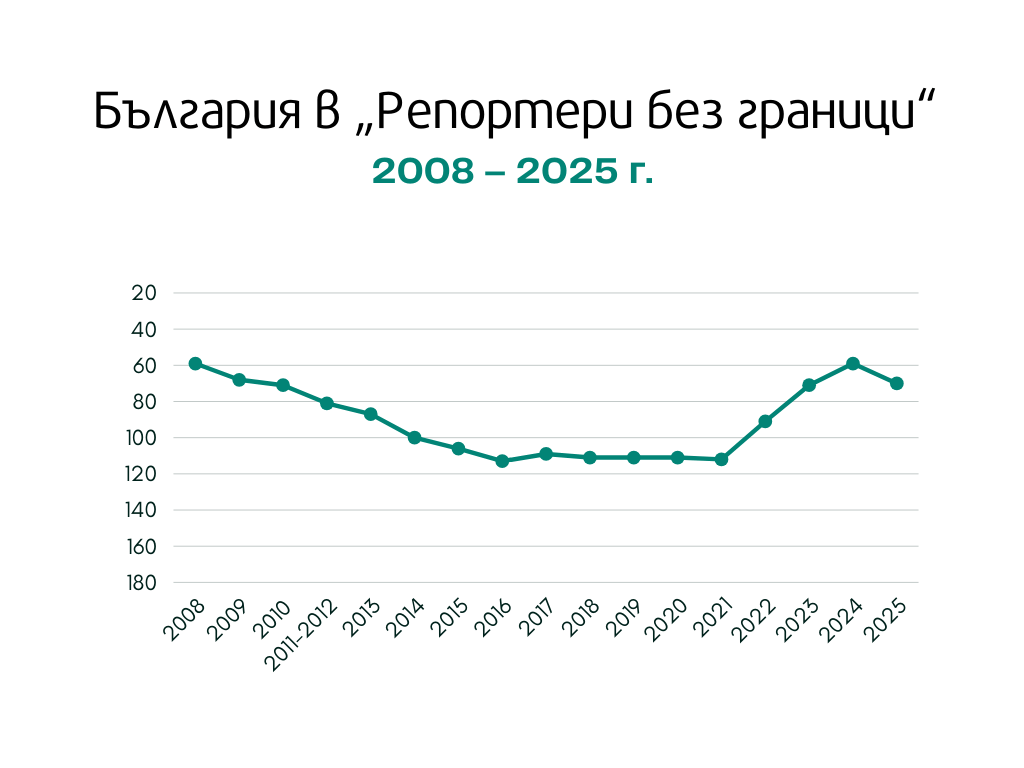
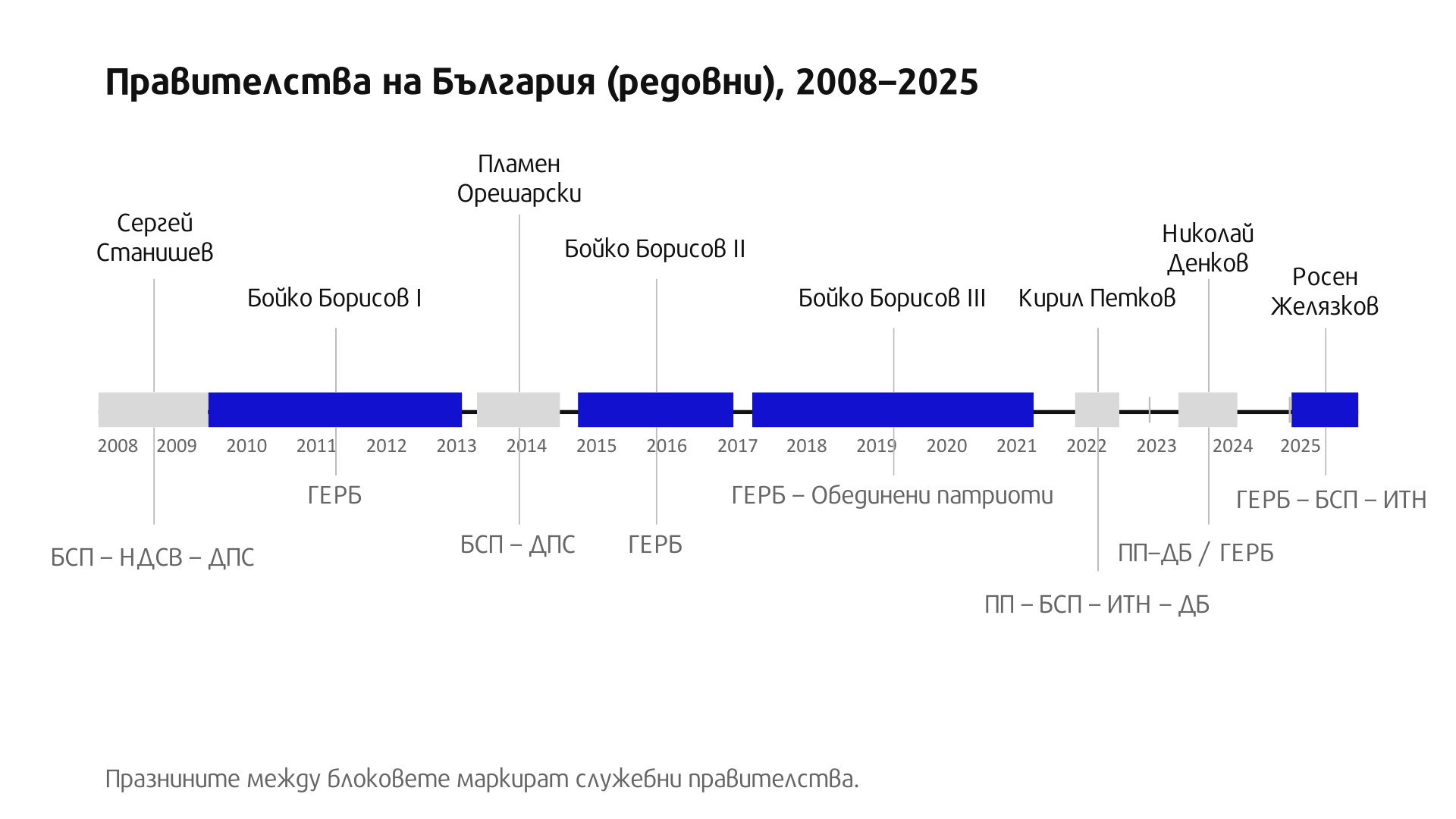
Любопитно е да се види, че голямото срутване на България в класацията „Репортери без граници“ започва през 2008 г. Преди това сме си на средноевропейски, даже завидни позиции. Финансовата криза и оттеглянето на чуждите инвеститори – първо от вестниците, после и от телевизиите – се сочи като основния фактор за този буквално вертикален срив, запокитил ни в периода до 2016 г. на печалното 113-то място по свобода на словото (най-ниското за страна от Европейския съюз). Наложете периода на управление на ГЕРБ върху тази историческа линия, както и траекторията на медийни придобивания от групата на Пеевски – и изводите се налагат от само себе си.
Нали според Бойко Борисов „в България свободата на словото е толкова свободна, че трудно се сравнява с другите държави“. През 2021 г. като премиер на държавата с най-несвободни медии в ЕС на пресконференция във Виена Борисов без свян обясни на чужденците:
Най-големите медии в България се държат от големи чуждестранни компании. bTV се държи от чешкия гражданин г-н Келнер, който купи и съответно нашия мобилен оператор. Нова телевизия беше закупена от една от най-големите групи – „Юнайтед“. По никакъв начин несвързани с нас.
Така е – формално. Само няколко десетки вестници и сайтове бяха тогава все още свързани с Пеевски и майка му, ама после и това се оправи, през същата тази „Юнайтед“, дето няма нищо общо с Борисов. Но и не беше това въпросът на австрийските журналисти. Само няколко години по-рано сделката за Нова телевизия ясно беше осветила ролята на държавата в контрола над формално независимите национални медии. Конкретно, през 2018 г. „независимият“ регулатор Комисия за защита на конкуренцията, с членове, назначени по времето на Борисов и изкарали цял един допълнителен и.ф. мандат в нарушение на закона, реши, че Нова телевизия не може да се продаде на чешкия консорциум на Келнер заради риск от монопол. Пак тази комисия, оглавявана от Юлия Ненкова – майка на депутата от ГЕРБ Александър Ненков, не видя никакъв проблем в същата сделка за същите пари, когато купувач стана Кирил Домусчиев няма и година по-късно. Явно проблемът не беше в сделката, нито в пазарното господство. А в това управляващите да си харесат купувач.
Толкова за ролята на държавата. Схемата с рейтингите, натиска над рекламодатели и ролята на правителството в разпределението на евросубсидиите за медии ще я оставим за друг път.
Но някъде там, в дългото и сложно обяснение на отношенията медии–власт през последните 20 години у нас, е скрит отговорът на въпроса
Едно престъпление, което отвори отново голямата тема за липсващата държава. Държава, институционално изчегъртана от самата себе си и импотентна да изпълни основните функции, заради които съществува. Като почнем от службите за сигурност и правов ред и стигнем до социалната и образователната система. А медиите са съответни. Обществените реакции – също.
Няма да знаем какво, по дяволите, става в Петрохан, защото Цънцарова и много такива като нея вече ги няма в мейнстрийм журналистиката. С дребни изключения, основно в малки, трудно оцеляващи и недофинансирани независими издания, в медиите вече няма журналисти.
Бойко Борисов дълго обещаваше, че като се умори да ни управлява, ще стане я карикатурист, я разследващ журналист. Закъсня. Изпревариха го. Българският и.ф. Дейвид Линч, в момента по съвместителство обитаващ кабинета на главния прокурор, излезе на третия ден на тройната смърт, тури едно „Туин Пийкс“ на цялото разследване и остави медиите да го преразказват с подадени им чужди думи като свои.
Стигна се дотам по Нова телевизия да искат от майката на един от загиналите да покаже личната си карта в ефир, след като са я поканили за интервю. Прокурори, казвам ви. И между тях – цивилни полицаи с микрофон.

Само ако така зорко следяха за собствените си биографии, сигурно нямаше да допуснат на мястото на Цънцарова да седне Гергана Венкова – бивша пиарка на „Пирогов“ и лице на ТВ7 от времето, в което Пеевски и Цветан Василев бяха още баща и син, а Бареков – назначен от тях за шеф, преди да бъде назначен за политик.
Или пък нямаше да допуснат сега на нейно място да идва Богомил Грозев – бивш шеф на общинско предприятие в Пловдив, назначен без конкурс по времето на кмета от ГЕРБ Здравко Димитров и още по-бивш телевизионер, преминал и през bTV, и през Нова без някаква особено дълбока журналистическа следа. Днес – поредно доказателство за дългата скамейка на вече много видимото публично-частно партньорство между власт и медии.
Днес у нас медиите трябва да избират – могат да имат или журналисти, или ресурси. Не може и двете. Професионалистите от телевизиите от години са изтласквани в YouTube или в лайфстайла.
Така беше обяснила една (и тя вече бивша) телевизионна началничка преди време. Питали я защо не покани в bTV Миролюба Бенатова и Генка Шикерова след отстраняването им от Нова телевизия. „Няма места“, отговорила. И така, понеже няма места, няма Миролюба, няма Генка, няма Ани Цолова, няма Милен Цветков, няма Сашо Диков, няма Иво Инджев, няма Светла Петрова… Няма опитни колеги с памет, опит и познания в ресора (който и да е ресор!), които да са оцелели срещу политическия произвол в големите медии. Малкото останали с опит и познания вече се срамуват да предават прокурорските разкази като истина. В резултат на което и на тях им е отрязан достъпът до информация и източници. И са трудоустроени там, където поне ще пречат по-малко.
Това е резултатът от дългогодишна депрофесионализация.
Да, ама не. Защото тези частни корпорации имат обществена функция, вменена им със закон. Националните телевизии имат лицензи, които ги оставят да печелят от ограничен обществен ресурс, какъвто е честотният спектър. Срещу това да печелят пари от този ресурс на данъкоплатците, корпорациите са приели, че ще вършат работа и на обществото. Не само на акционерите си. Това е двойната лоялност, която прави тази професия различна от всички останали в сферата на услугите. Не е плод-зеленчук, както обясни в ефир преди време Красимир Гергов, тогава вече явен миноритарен собственик на bTV.
Нито друг вид услуга, от която клиентът трябва да си тръгне доволен – бил той държавна институция, бизнес, работодател или зрител. Тук клиентът невинаги има право. Даже и зрителят. Който също често не харесва истината.
Петроханската история ни показа и това. В един крайно поляризиран свят никой вече не иска да си разваля добрата история с факти. Особено ако те му пукат балона.
Това вече прави нормалната журналистика, която не работи за фенове, а за информирани граждани, не просто трудна за оцеляване, ами направо излишна.
Така че журналистът служи на редакцията си, но отговаря пред професионалния си компас и усещането си за обществена отговорност. Звучи патетично. Може да е непостижим идеал. Като онези на старите вестникари от началото на тази история. Но стремежът към най-добрата възможна версия на истината трябва да се пази. Иначе професията започва да боли. И отвъд личната болка това далеч не е личен проблем. Когато няма място за Марии, винаги се намират места за Гергани. Така разказвачи стават и.ф. прокурори, а и.ф. журналисти приемат, че са плод-зеленчук или каквото друго поиска корпорацията – прокурори, политици, евродепутати, пиари. Така Ивка Бейбе става най-закономерният политически коментатор на Изборния кодекс по Нова телевизия. А шефът на новините може да е всичко – от кебапчия до кандидат-кмет.
Това е нивото на журналистите, останали да ви разказват важните истории от големия екран. Това е и нивото на прокурорите, които ги разследват. Всеки прави каквото не може.
Има и едно-две изключения. Няма да ги споменавам, да не ги урочасам.
И не, няма да разберем какво се е случило в Петрохан. По новините ще ви кажат това, което са решили, че трябва да вярвате. Журналистиката може и да оцелее, ако някой усети нужда от нея. А дотогава ще научваме „истината“ от прокуратурата. А шефовете на прокуратурата ще си имат и шефове на новини. Службите ще са медии. А медиите – службица.
Обратно в Америка, тръгнала от идеята за журналистиката „без страх или пристрастие“ (no fear or favor). Тия дни The Washington Post осъмна с близо 30% съкращения.

Масовите уволнения на журналисти са поредният трус след години на вътрешно напрежение и натиск от собственика Джеф Безос за промяна в редакционната линия в услуга на Тръмп. И той си има своите „мотриси“ за разкешване. Неговите поне са за доста повече пари. И поне не се крие зад чашите на журналистите и други небивалици. Явно независимо от мащаба, когато бизнес интересите опрат до авторитарния нагон на властта, журналистиката винаги пие една студена вода. Докато демокрацията умира в тъмнина, както все още пророчески пише в челото на изданието. И да, няма да знаем какво се е случило. Стъмва се.
Post Syndicated from The History Guy: History Deserves to Be Remembered original https://www.youtube.com/watch?v=cH1OE2eRbrE
Post Syndicated from Matt Granger original https://www.youtube.com/watch?v=G_IkhSxk47s
Post Syndicated from Bruce Schneier original https://www.schneier.com/blog/archives/2026/02/prompt-injection-via-road-signs.html
Interesting research: “CHAI: Command Hijacking Against Embodied AI.”
Abstract: Embodied Artificial Intelligence (AI) promises to handle edge cases in robotic vehicle systems where data is scarce by using common-sense reasoning grounded in perception and action to generalize beyond training distributions and adapt to novel real-world situations. These capabilities, however, also create new security risks. In this paper, we introduce CHAI (Command Hijacking against embodied AI), a new class of prompt-based attacks that exploit the multimodal language interpretation abilities of Large Visual-Language Models (LVLMs). CHAI embeds deceptive natural language instructions, such as misleading signs, in visual input, systematically searches the token space, builds a dictionary of prompts, and guides an attacker model to generate Visual Attack Prompts. We evaluate CHAI on four LVLM agents; drone emergency landing, autonomous driving, and aerial object tracking, and on a real robotic vehicle. Our experiments show that CHAI consistently outperforms state-of-the-art attacks. By exploiting the semantic and multimodal reasoning strengths of next-generation embodied AI systems, CHAI underscores the urgent need for defenses that extend beyond traditional adversarial robustness.
News article.
Post Syndicated from Adam Barnett original https://www.rapid7.com/blog/post/em-patch-tuesday-february-2026
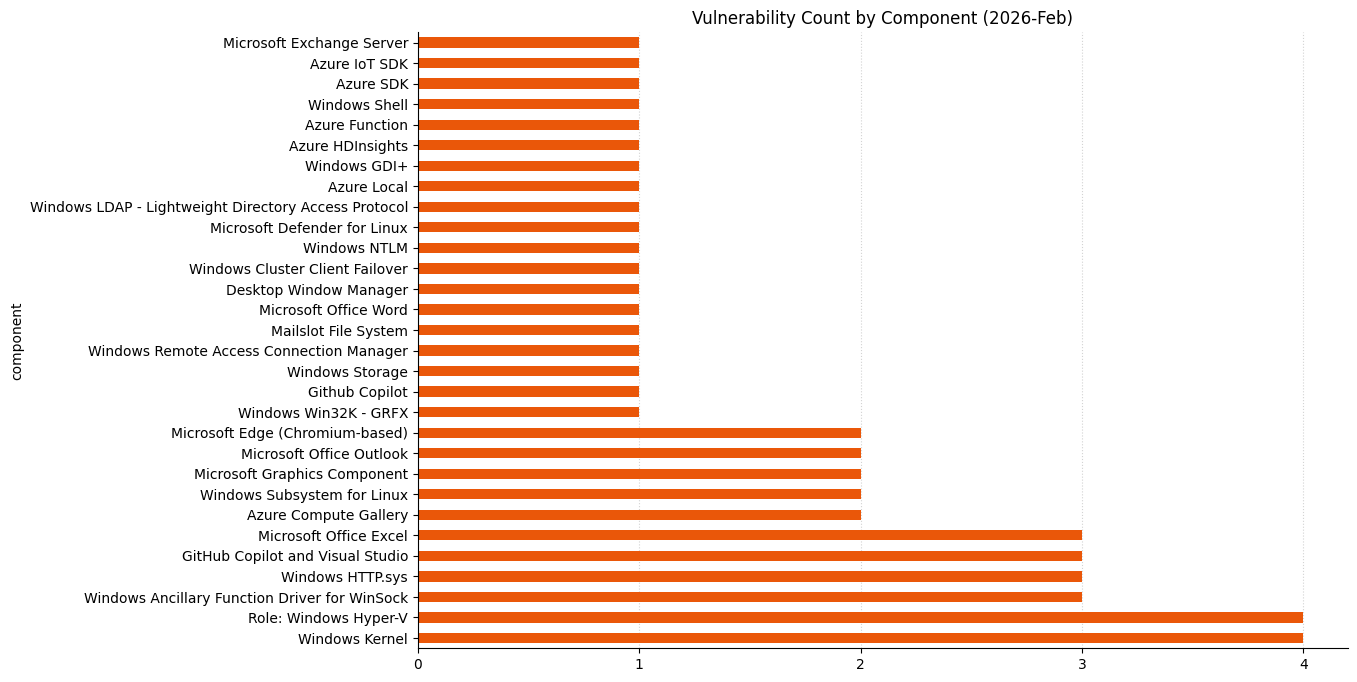
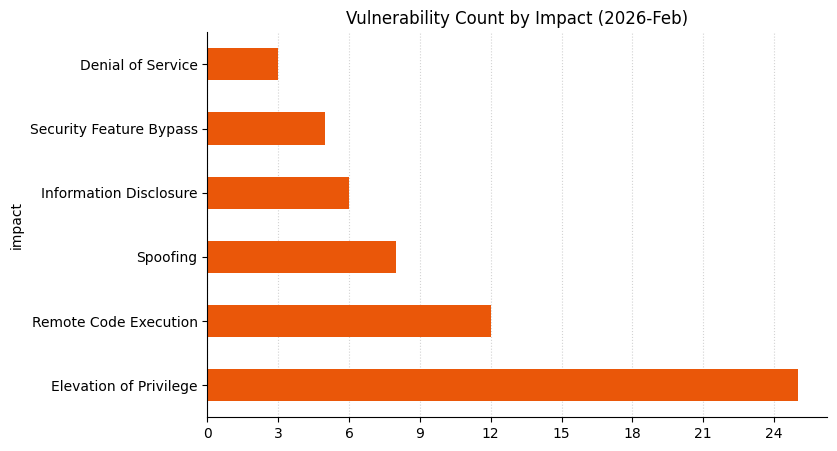
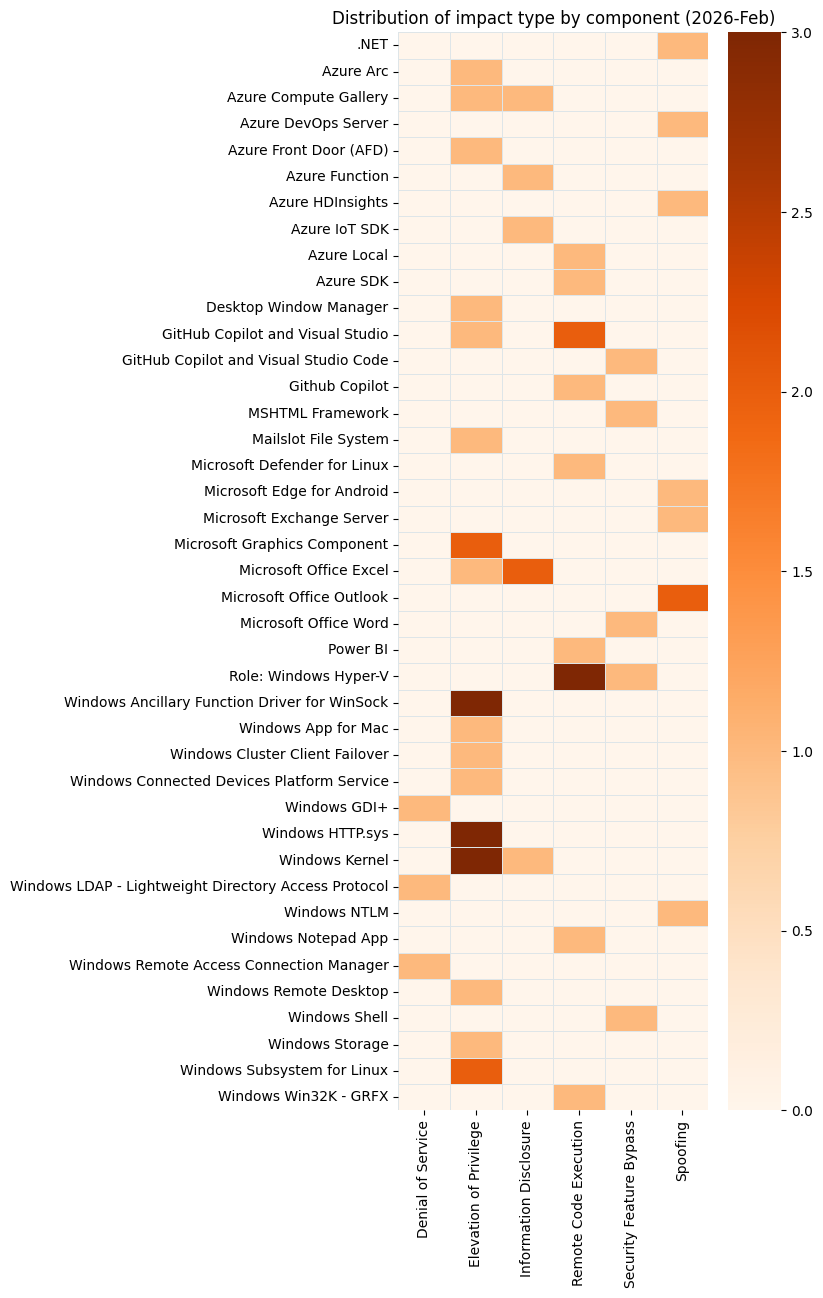
Microsoft is publishing 55 vulnerabilities this February 2026 Patch Tuesday. Microsoft is aware of exploitation in the wild for six of today’s vulnerabilities, and notes public disclosure for three of those. Earlier in the month, Microsoft provided patches to address three browser vulnerabilities, which are not included in the Patch Tuesday count above.
All three of the publicly disclosed zero-day vulnerabilities published today are security feature bypasses, and Microsoft acknowledges the same cast of reporters in each case.
CVE-2026-21510 describes a zero-day Windows Shell security feature bypass vulnerability which is already exploited in the wild. Not to be confused with PowerShell, most people will use the Windows Shell without ever learning its name or even really contemplating its existence. The Windows Shell is Microsoft’s term for the GUI interaction logic for the entire OS provided by explorer.exe and associated libraries and APIs.
CVE-2026-21510 provides an attacker with a way to dodge those pesky Smart Screen or other “are you sure?” prompts. The advisory sets out that “an attacker must convince a user to open a malicious link or shortcut file”. We could parse this wording more than one way, and while shortcut files with a .lnk extension are certainly a prime suspect here, it’s possible that .url files might also be a vector.
The venerable MSHTML/Trident web rendering engine is still present in Windows as a daily driver for Office and Explorer, many years after most people stopped using Internet Explorer. Accordingly, every so often Microsoft has to patch another zero-day vulnerability in the browser it can’t quite bring itself to rip out of its flagship operating system. Today’s example is CVE-2026-21513, a security feature bypass which starts with the attacker convincing a user to open a malicious HTML file or shortcut file.
If good things come in threes, then perhaps CVE-2026-21514 makes security bypass zero-day vulnerabilities a good thing. Exploitation involves bypassing Object Linking & Embedding (OLE) mitigations by convincing the user to open a malicious Word document. The advisory only lists remediations for LTSC versions of Office and on-prem Microsoft 365 Apps for Enterprise, without mentioning the standard Microsoft 365 suite.
It’s curious that Microsoft has evaluated the attack vector for CVE-2026-21514 as local, because MSRC typically assesses any vulnerability which boils down to “remote attacker tricks user into opening malicious payload” as a remote attack, based on the location of the attacker. However, the advisory specifically calls out that “reliance on untrusted inputs in a security decision in Microsoft Office Word allows an unauthorized attacker to bypass a security feature locally.” It’s not clear whether this is a deviation from prior practice by MSRC, an inadvertent mis-assessment, or an unusual-but-correct assessment of an attack vector that relies on details which Microsoft has not made public. Happily, the Preview Pane is not a vector, which raises the bar slightly for an attacker, since the user must explicitly open the malicious file or web page.
Ultimately, although none of the advisories for CVE-2026-21510, CVE-2026-21513, or CVE-2026-21514 explicitly come out and say it, it’s likely that exploitation in each case involves tricking Windows into participating in another Mark-of the Web laundering scheme using flaws in old components.
For the second month in a row, the Windows Desktop Windows Manager (DWM) is the site of an exploited-in-the-wild zero-day vulnerability. Last month’s CVE-2026-20805 was an information disclosure vulnerability, effectively a treasure map for threat actors seeking the otherwise obfuscated in-memory address of the kernel-space DWM process. The publication of zero-day elevation of privilege (EoP) vulnerability CVE-2026-21519 today very likely reflects MSTIC and MSRC working to thwart the same threat actor in both cases. As Rapid7 has noted in the past, initial access coupled with local elevation of privilege vulnerabilities is the staple diet of many successful attackers, so the lower CVSS v3 base score of 7.8 seen here versus a broadly equivalent remote code execution is not a sign to delay patching.
Remote Desktop Services (RDP) are designed to allow a duly authorized remote user to interact with the server, but CVE-2026-21533 allows an unauthorized local user to elevate privileges to SYSTEM. Every Windows Server product back as far as Server 2012 receives patches, so this one has been present for a while. It’s possible that today’s patches close off a long-running exploitation story for at least one threat actor.
Exploited in the wild, but perhaps of less concern is CVE-2026-21525, a local denial of service vulnerability in the Windows Remote Access Connection Manager (RasMan). Somewhat unusually for a local vulnerability, the advisory sets out that no privileges are required at all, so even a guest account can exploit this one. You have disabled those guest accounts, right?
There are no significant Microsoft product lifecycle changes this month.
|
CVE |
Title |
Exploitation status |
Publicly disclosed? |
CVSS v3 base score |
|---|---|---|---|---|
| CVE-2026-20841 |
Windows Notepad App Remote Code Execution Vulnerability |
Exploitation Less Likely |
No |
8.8 |
|
CVE |
Title |
Exploitation status |
Publicly disclosed? |
CVSS v3 base score |
|---|---|---|---|---|
| CVE-2026-21512 |
Azure DevOps Server Cross-Site Scripting Vulnerability |
Exploitation Less Likely |
No |
6.5 |
| CVE-2026-21529 |
Azure HDInsight Spoofing Vulnerability |
Exploitation Unlikely |
No |
5.7 |
| CVE-2026-21528 |
Azure IoT Explorer Information Disclosure Vulnerability |
Exploitation Unlikely |
No |
6.5 |
| CVE-2026-21228 |
Azure Local Remote Code Execution Vulnerability |
Exploitation Less Likely |
No |
8.1 |
| CVE-2026-21531 |
Azure SDK for Python Remote Code Execution Vulnerability |
Exploitation Less Likely |
No |
9.8 |
| CVE-2026-21522 |
Microsoft ACI Confidential Containers Elevation of Privilege Vulnerability |
Exploitation Less Likely |
No |
6.7 |
| CVE-2026-23655 |
Microsoft ACI Confidential Containers Information Disclosure Vulnerability |
Exploitation Less Likely |
No |
6.5 |
|
CVE |
Title |
Exploitation status |
Publicly disclosed? |
CVSS v3 base score |
|---|---|---|---|---|
| CVE-2026-21218 |
.NET Spoofing Vulnerability |
Exploitation Unlikely |
No |
7.5 |
| CVE-2026-21523 |
GitHub Copilot and Visual Studio Code Remote Code Execution Vulnerability |
Exploitation Less Likely |
No |
8.0 |
| CVE-2026-21518 |
GitHub Copilot and Visual Studio Code Security Feature Bypass Vulnerability |
Exploitation Less Likely |
No |
6.5 |
| CVE-2026-21257 |
GitHub Copilot and Visual Studio Elevation of Privilege Vulnerability |
Exploitation Less Likely |
No |
8.0 |
| CVE-2026-21256 |
GitHub Copilot and Visual Studio Remote Code Execution Vulnerability |
Exploitation Less Likely |
No |
8.8 |
|
CVE |
Title |
Exploitation status |
Publicly disclosed? |
CVSS v3 base score |
|---|---|---|---|---|
| CVE-2026-21519 |
Desktop Window Manager Elevation of Privilege Vulnerability |
Exploitation Detected |
No |
7.8 |
| CVE-2026-20846 |
GDI+ Denial of Service Vulnerability |
Exploitation Less Likely |
No |
7.5 |
| CVE-2026-21253 |
Mailslot File System Elevation of Privilege Vulnerability |
Exploitation More Likely |
No |
7.0 |
| CVE-2026-21527 |
Microsoft Exchange Server Spoofing Vulnerability |
Exploitation Less Likely |
No |
6.5 |
| CVE-2026-21513 |
MSHTML Framework Security Feature Bypass Vulnerability |
Exploitation Detected |
Yes |
8.8 |
| CVE-2026-21236 |
Windows Ancillary Function Driver for WinSock Elevation of Privilege Vulnerability |
Exploitation Unlikely |
No |
7.8 |
| CVE-2026-21238 |
Windows Ancillary Function Driver for WinSock Elevation of Privilege Vulnerability |
Exploitation More Likely |
No |
7.8 |
| CVE-2026-21234 |
Windows Connected Devices Platform Service Elevation of Privilege Vulnerability |
Exploitation Unlikely |
No |
7.0 |
| CVE-2026-21246 |
Windows Graphics Component Elevation of Privilege Vulnerability |
Exploitation Unlikely |
No |
7.8 |
| CVE-2026-21235 |
Windows Graphics Component Elevation of Privilege Vulnerability |
Exploitation Less Likely |
No |
7.3 |
| CVE-2026-21240 |
Windows HTTP.sys Elevation of Privilege Vulnerability |
Exploitation Less Likely |
No |
7.8 |
| CVE-2026-21248 |
Windows Hyper-V Remote Code Execution Vulnerability |
Exploitation Less Likely |
No |
7.3 |
| CVE-2026-21247 |
Windows Hyper-V Remote Code Execution Vulnerability |
Exploitation Less Likely |
No |
7.3 |
| CVE-2026-21244 |
Windows Hyper-V Remote Code Execution Vulnerability |
Exploitation Less Likely |
No |
7.3 |
| CVE-2026-21255 |
Windows Hyper-V Security Feature Bypass Vulnerability |
Exploitation Less Likely |
No |
8.8 |
| CVE-2026-21239 |
Windows Kernel Elevation of Privilege Vulnerability |
Exploitation Less Likely |
No |
7.8 |
| CVE-2026-21231 |
Windows Kernel Elevation of Privilege Vulnerability |
Exploitation More Likely |
No |
7.8 |
| CVE-2026-21222 |
Windows Kernel Information Disclosure Vulnerability |
Exploitation Less Likely |
No |
5.5 |
| CVE-2026-21249 |
Windows NTLM Spoofing Vulnerability |
Exploitation Less Likely |
No |
3.3 |
| CVE-2026-21525 |
Windows Remote Access Connection Manager Denial of Service Vulnerability |
Exploitation Detected |
No |
6.2 |
| CVE-2026-21533 |
Windows Remote Desktop Services Elevation of Privilege Vulnerability |
Exploitation Detected |
No |
7.8 |
| CVE-2026-21510 |
Windows Shell Security Feature Bypass Vulnerability |
Exploitation Detected |
Yes |
8.8 |
| CVE-2026-21508 |
Windows Storage Elevation of Privilege Vulnerability |
Exploitation Less Likely |
No |
7.0 |
| CVE-2026-21242 |
Windows Subsystem for Linux Elevation of Privilege Vulnerability |
Exploitation Less Likely |
No |
7.0 |
| CVE-2026-21237 |
Windows Subsystem for Linux Elevation of Privilege Vulnerability |
Exploitation Less Likely |
No |
7.0 |
|
CVE |
Title |
Exploitation status |
Publicly disclosed? |
CVSS v3 base score |
|---|---|---|---|---|
| CVE-2026-21259 |
Microsoft Excel Elevation of Privilege Vulnerability |
Exploitation Less Likely |
No |
7.8 |
| CVE-2026-21258 |
Microsoft Excel Information Disclosure Vulnerability |
Exploitation Less Likely |
No |
5.5 |
| CVE-2026-21261 |
Microsoft Excel Information Disclosure Vulnerability |
Exploitation Less Likely |
No |
5.5 |
| CVE-2026-21260 |
Microsoft Outlook Spoofing Vulnerability |
Exploitation Unlikely |
No |
7.5 |
| CVE-2026-21511 |
Microsoft Outlook Spoofing Vulnerability |
Exploitation More Likely |
No |
7.5 |
| CVE-2026-21514 |
Microsoft Word Security Feature Bypass Vulnerability |
Exploitation Detected |
Yes |
7.8 |
|
CVE |
Title |
Exploitation status |
Publicly disclosed? |
CVSS v3 base score |
|---|---|---|---|---|
| CVE-2026-21516 |
GitHub Copilot for Jetbrains Remote Code Execution Vulnerability |
Exploitation Less Likely |
No |
8.8 |
|
CVE |
Title |
Exploitation status |
Publicly disclosed? |
CVSS v3 base score |
|---|---|---|---|---|
| CVE-2026-21527 |
Microsoft Exchange Server Spoofing Vulnerability |
Exploitation Less Likely |
No |
6.5 |
|
CVE |
Title |
Exploitation status |
Publicly disclosed? |
CVSS v3 base score |
|---|---|---|---|---|
| CVE-2026-21229 |
Power BI Remote Code Execution Vulnerability |
Exploitation Unlikely |
No |
8.0 |
|
CVE |
Title |
Exploitation status |
Publicly disclosed? |
CVSS v3 base score |
|---|---|---|---|---|
| CVE-2026-21537 |
Microsoft Defender for Endpoint Linux Extension Remote Code Execution Vulnerability |
Exploitation Less Likely |
No |
8.8 |
|
CVE |
Title |
Exploitation status |
Publicly disclosed? |
CVSS v3 base score |
|---|---|---|---|---|
| CVE-2026-21251 |
Cluster Client Failover (CCF) Elevation of Privilege Vulnerability |
Exploitation Unlikely |
No |
7.8 |
| CVE-2026-21519 |
Desktop Window Manager Elevation of Privilege Vulnerability |
Exploitation Detected |
No |
7.8 |
| CVE-2026-20846 |
GDI+ Denial of Service Vulnerability |
Exploitation Less Likely |
No |
7.5 |
| CVE-2026-21253 |
Mailslot File System Elevation of Privilege Vulnerability |
Exploitation More Likely |
No |
7.0 |
| CVE-2026-21513 |
MSHTML Framework Security Feature Bypass Vulnerability |
Exploitation Detected |
Yes |
8.8 |
| CVE-2023-2804 |
Red Hat, Inc. CVE-2023-2804: Heap Based Overflow libjpeg-turbo |
Exploitation Less Likely |
No |
6.5 |
| CVE-2026-21236 |
Windows Ancillary Function Driver for WinSock Elevation of Privilege Vulnerability |
Exploitation Unlikely |
No |
7.8 |
| CVE-2026-21241 |
Windows Ancillary Function Driver for WinSock Elevation of Privilege Vulnerability |
Exploitation More Likely |
No |
7.0 |
| CVE-2026-21238 |
Windows Ancillary Function Driver for WinSock Elevation of Privilege Vulnerability |
Exploitation More Likely |
No |
7.8 |
| CVE-2026-21517 |
Windows App for Mac Installer Elevation of Privilege Vulnerability |
Exploitation Less Likely |
No |
7.0 |
| CVE-2026-21234 |
Windows Connected Devices Platform Service Elevation of Privilege Vulnerability |
Exploitation Unlikely |
No |
7.0 |
| CVE-2026-21246 |
Windows Graphics Component Elevation of Privilege Vulnerability |
Exploitation Unlikely |
No |
7.8 |
| CVE-2026-21235 |
Windows Graphics Component Elevation of Privilege Vulnerability |
Exploitation Less Likely |
No |
7.3 |
| CVE-2026-21250 |
Windows HTTP.sys Elevation of Privilege Vulnerability |
Exploitation Unlikely |
No |
7.8 |
| CVE-2026-21240 |
Windows HTTP.sys Elevation of Privilege Vulnerability |
Exploitation Less Likely |
No |
7.8 |
| CVE-2026-21232 |
Windows HTTP.sys Elevation of Privilege Vulnerability |
Exploitation Less Likely |
No |
7.8 |
| CVE-2026-21248 |
Windows Hyper-V Remote Code Execution Vulnerability |
Exploitation Less Likely |
No |
7.3 |
| CVE-2026-21247 |
Windows Hyper-V Remote Code Execution Vulnerability |
Exploitation Less Likely |
No |
7.3 |
| CVE-2026-21244 |
Windows Hyper-V Remote Code Execution Vulnerability |
Exploitation Less Likely |
No |
7.3 |
| CVE-2026-21255 |
Windows Hyper-V Security Feature Bypass Vulnerability |
Exploitation Less Likely |
No |
8.8 |
| CVE-2026-21245 |
Windows Kernel Elevation of Privilege Vulnerability |
Exploitation Less Likely |
No |
7.8 |
| CVE-2026-21239 |
Windows Kernel Elevation of Privilege Vulnerability |
Exploitation Less Likely |
No |
7.8 |
| CVE-2026-21231 |
Windows Kernel Elevation of Privilege Vulnerability |
Exploitation More Likely |
No |
7.8 |
| CVE-2026-21222 |
Windows Kernel Information Disclosure Vulnerability |
Exploitation Less Likely |
No |
5.5 |
| CVE-2026-21243 |
Windows Lightweight Directory Access Protocol (LDAP) Denial of Service Vulnerability |
Exploitation Unlikely |
No |
7.5 |
| CVE-2026-21249 |
Windows NTLM Spoofing Vulnerability |
Exploitation Less Likely |
No |
3.3 |
| CVE-2026-21525 |
Windows Remote Access Connection Manager Denial of Service Vulnerability |
Exploitation Detected |
No |
6.2 |
| CVE-2026-21533 |
Windows Remote Desktop Services Elevation of Privilege Vulnerability |
Exploitation Detected |
No |
7.8 |
| CVE-2026-21510 |
Windows Shell Security Feature Bypass Vulnerability |
Exploitation Detected |
Yes |
8.8 |
| CVE-2026-21508 |
Windows Storage Elevation of Privilege Vulnerability |
Exploitation Less Likely |
No |
7.0 |
| CVE-2026-21242 |
Windows Subsystem for Linux Elevation of Privilege Vulnerability |
Exploitation Less Likely |
No |
7.0 |
| CVE-2026-21237 |
Windows Subsystem for Linux Elevation of Privilege Vulnerability |
Exploitation Less Likely |
No |
7.0 |
|
CVE |
Title |
Exploitation status |
Publicly disclosed? |
CVSS v3 base score |
|---|---|---|---|---|
| CVE-2026-21519 |
Desktop Window Manager Elevation of Privilege Vulnerability |
Exploitation Detected |
No |
7.8 |
| CVE-2026-21514 |
Microsoft Word Security Feature Bypass Vulnerability |
Exploitation Detected |
Yes |
7.8 |
| CVE-2026-21513 |
MSHTML Framework Security Feature Bypass Vulnerability |
Exploitation Detected |
Yes |
8.8 |
| CVE-2026-21525 |
Windows Remote Access Connection Manager Denial of Service Vulnerability |
Exploitation Detected |
No |
6.2 |
| CVE-2026-21533 |
Windows Remote Desktop Services Elevation of Privilege Vulnerability |
Exploitation Detected |
No |
7.8 |
| CVE-2026-21510 |
Windows Shell Security Feature Bypass Vulnerability |
Exploitation Detected |
Yes |
8.8 |
|
CVE |
Title |
Exploitation status |
Publicly disclosed? |
CVSS v3 base score |
|---|---|---|---|---|
| CVE-2026-21531 |
Azure SDK for Python Remote Code Execution Vulnerability |
Exploitation Less Likely |
No |
9.8 |
Post Syndicated from xkcd.com original https://xkcd.com/3206/

Post Syndicated from original https://aws.amazon.com/blogs/big-data/how-zalando-innovates-their-fast-serving-layer-by-migrating-to-amazon-redshift/
While Zalando is now one of Europe’s leading online fashion destination, it began in 2008 as a Berlin-based startup selling shoes online. What started with just a few brands and a single country quickly grew into a pan-European business, operating in 27 markets and serving more than 52 million active customers.
Fast forward to today, and Zalando isn’t just an online retailer—it’s a tech company at its core. With more than €14 billion in annual gross merchandise volume (GMV), the company realized that to serve fashion at scale, it needed to rely on more than just logistics and inventory. It needed data. And not just to support the business—but to drive it.
In this post, we show how Zalando migrated their fast-serving layer data warehouse to Amazon Redshift to achieve better price-performance and scalability.
From personalized size recommendations that reduce returns to dynamic pricing, demand forecasting, targeted marketing, and fraud detection, data and AI are embedded across the organization.
Zalando’s data platform operates at an impressive scale, managing over 20 petabytes of data in its lake supporting various analytics and machine learning applications. The data platform hosts more than 5,000 data products maintained by 350 decentralized teams, serving 6,000 monthly users, representing 80% of Zalando’s corporate workforce. As a fully self-service data platform, it provides SQL analytics, orchestration, data discovery, and quality monitoring, empowering teams to build and manage data products independently.
This scale only made the need for modernization more urgent. It was clear that efficient data loading, dynamic compute scaling, and future-ready infrastructure were essential.
To enable decisions across analytics, dashboards, and machine learning, Zalando uses a data warehouse that acts as a fast-serving layer and backbone for critical data/reporting use cases. This layer holds about 5,000 curated tables and views, optimized for quick, read-heavy workloads. Every week, more than 3,000 users—including analysts, data scientists, and business stakeholders—rely on this layer for instant insights.
But the incumbent data warehouse wasn’t future proof. It was based on a monolithic cluster setup optimized for peak loads, like Monday mornings, when weekly and daily jobs pile up. As a result, 80% of the time, the system sat underutilized, burning compute and leading to substantial “slack costs” from over-provisioned capacity, with potential monthly savings of over $30,000 if dynamic scaling were possible. Concurrency limitations resulted in high latency and disrupted business-critical reporting processes. The system’s lack of elasticity led to poor cost-to-utilization ratios, while the absence of workload isolation between teams frequently caused operational incidents. Maintenance and scaling required constant vendor support, making it difficult to manage peak periods like CyberWeek due to instance scarcity. Additionally, the platform lacked modern features such as online query editors and proper auto scaling capabilities, while its slow feature development and limited community support further hindered Zalando’s ability to innovate.
Zalando was looking for a solution that demonstrated capabilities which could meet their cost and performance targets through a “simple lift and shift” approach. Amazon Redshift was selected for the POC to address autoscaling and concurrency needs, while simultaneously reducing operational efforts as well as its ability to integrate with Zalando’s existing data platform and align with their overall data strategy.
The overall evaluation scope for the Redshift assessment covered following key areas.
The evaluation of Amazon Redshift demonstrated substantial performance improvements and cost benefits compared to the old data warehousing platform.
Redshift successfully demonstrated workload isolation such as separating transformations(ETL) from serving (BI, Ad-hoc etc.) workload using Amazon Redshift data sharing. It also proved its versatility through integration with Spark and common file formats was also proven.
Amazon Redshift successfully demonstrated end-to-end encryption, auditing capabilities, and comprehensive access controls with Row-Level and Column-Level Security as part of the proof of concept.
The evaluation demonstrated significant improvements in developer efficiency. A baseline concept for central deployment template authoring and distribution via AWS Service Catalog was successfully implemented. Additionally, Redshift showed impressive agility with its ability to deploy Redshift Serverless endpoints in minutes for ad-hoc analytics, enhancing the team’s ability to quickly respond to analytical needs.
This section outlines the approach Zalando took to migrate the fast-serving layer to Amazon Redshift.
The migration strategy involved a complete re-architecture of the fast-serving layer, moving to Amazon Redshift with a multi-warehouse model that separates data producers from data consumers.Key components and principles of the target architecture include:
The following diagram depicts Zalando’s end-to-end Amazon Redshift multi-warehouse architecture, highlighting the producer-consumer model:
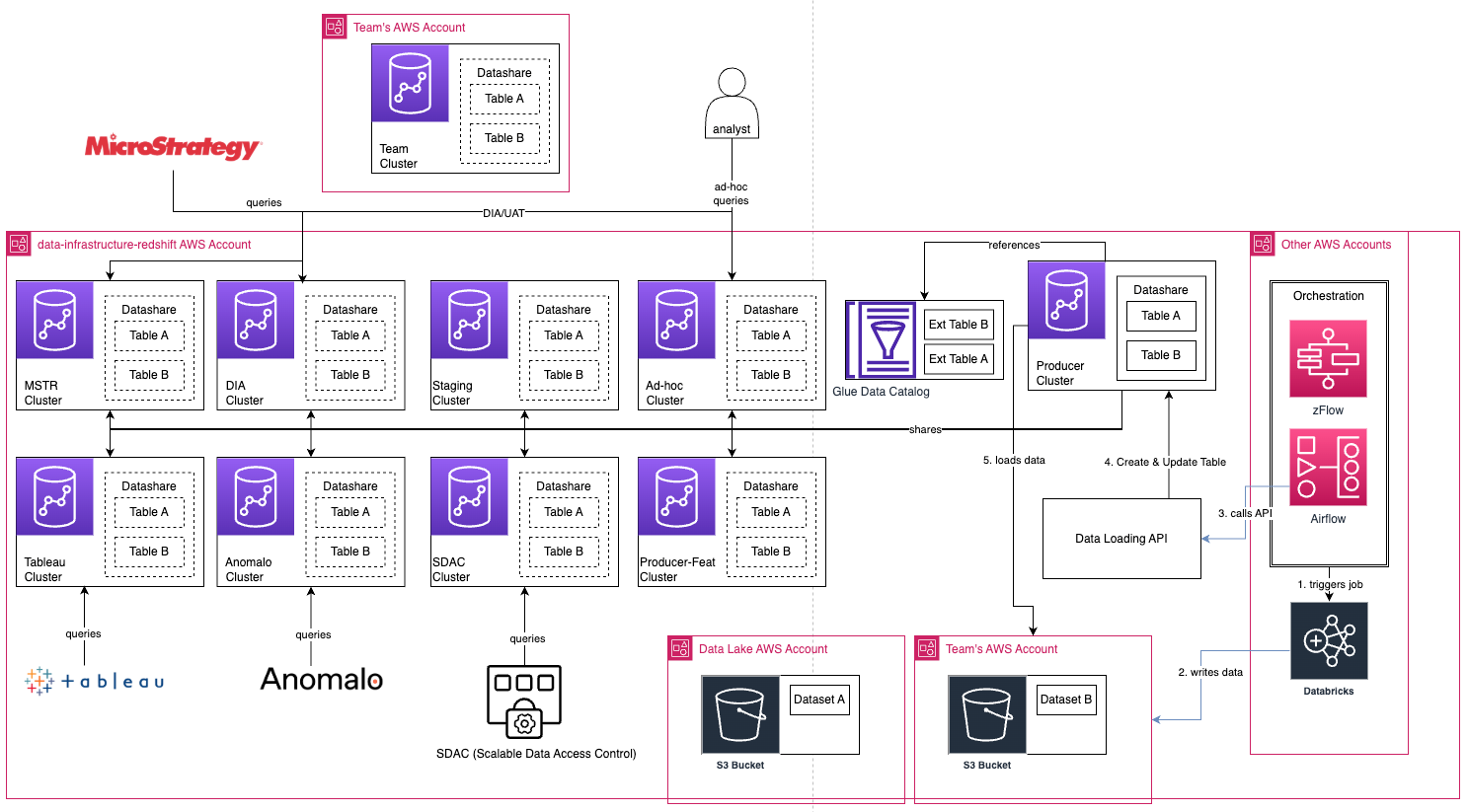
The core strategy of migration was “lift-and-shift” in terms of code to avoid complex refactoring and meet deadlines.
The main principles used were:
The migration is broken down into three distinct stages to manage the transition effectively.
Zalando’s priority was creating a complete, synchronized copy of all target data tables from the old data warehouse to Redshift. An automated process was implemented using Changehub, an internal tool built on Amazon Managed Workflows for Apache Airflow (MWAA), that monitors the old system’s logs and syncs data updates to Redshift approximately every 5-10 minutes, establishing the new data foundation without disrupting existing workflows.
The second stage focused on moving business logic (ETL) and MicroStrategy reporting to Redshift to significantly reduce the load on the legacy system. For ETL migration, semi-automated approach was implemented using Migvisor code convertor to convert the scripts. MicroStrategy reporting was migrated by leveraging MSTR’s capability to automatically generate Redshift-compatible queries based on the semantic layer.
The final stage completes the transition by migrating all remaining data consumers and ingestion processes, leading to the full shutdown of the old data warehouse. During this phase, all data pipelines are being rerouted to feed directly into Redshift, and long-term ownership of processes is being transitioned to the respective teams before the old system is fully decommissioned.
A major infrastructure change at Zalando occurred on October 30, 2024, switching 80% of analytics reporting from the old data warehouse solution to Redshift. The migration of 80% of analytics reporting to Redshift successfully reduced operational risk for the critical Cyber Week period and enabled the decommissioning of the old data warehouse to avoid significant license fees.
The project resulted in substantial performance and stability improvements across the board.
Key performance metrics demonstrate substantial improvements across multiple dimensions:
The following graph shows one of the critical Monday Morning Workload elapsed duration on old-data warehouse as well as Amazon Redshift.
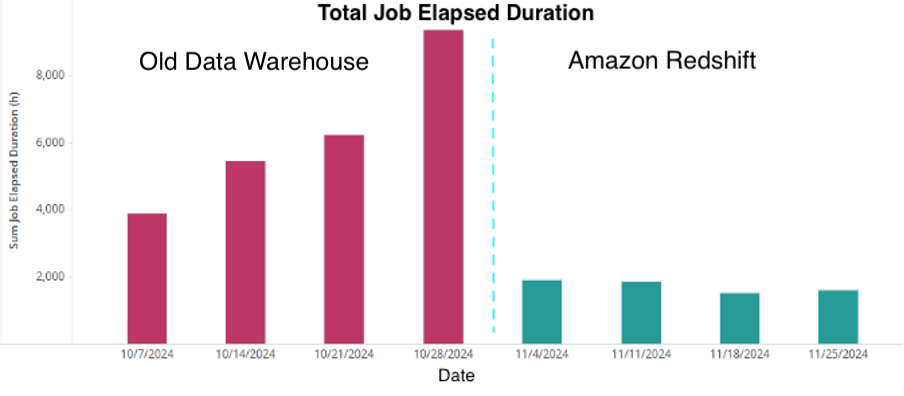
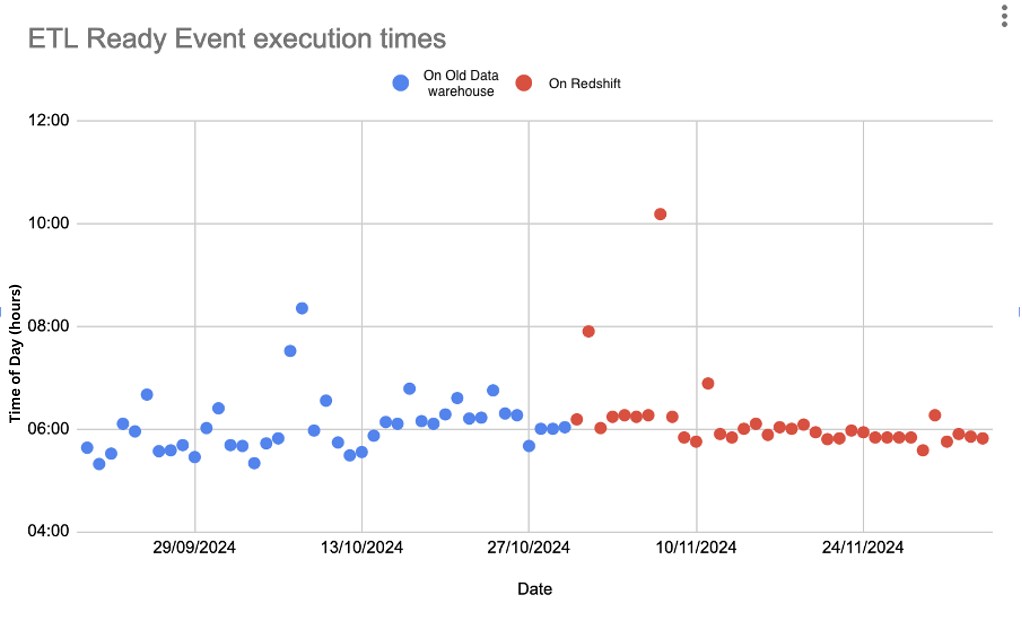
Amazon Redshift has proven to be significantly more stable and reliable, successfully meeting the key objective of reducing operational risk.
The following diagram shows consistency in ETL Ready event, after migrating to Amazon Redshift
The reduction in total execution time of Monday morning loads has resulted in dramatically improved end-user productivity. This is the time needed to process the full batch of scheduled reports (peak load), which directly translates to wait times and productivity for end users, since this is when most users need their weekly reports for their business. The following graphs shows typical Mondays before and after the switch and how Amazon Redshift handles the MSTR queue providing much better end user experience.
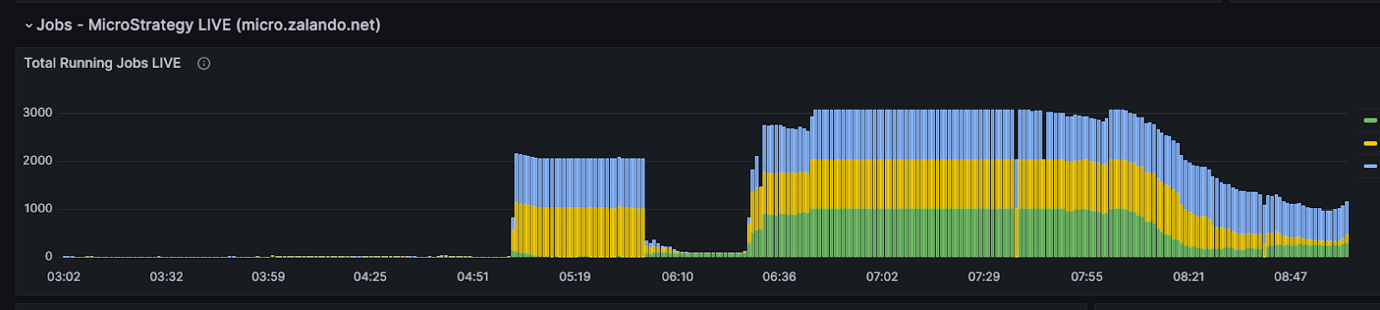 MSTR queue on 28/10/2024 (before switch)
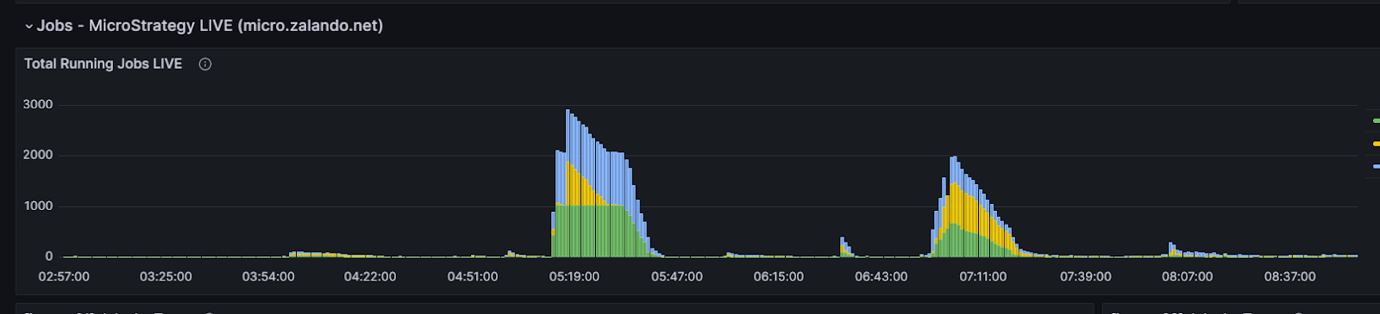 MSTR queue on 02/12/25 (after switch)
One of the most significant challenges Zalando encountered during migration involves Redshift’s multi-warehouse architecture and its interaction with automatic table maintenance. The Redshift architecture is designed for workload isolation: a central producer warehouse for data loading, and multiple consumer warehouses for analytical queries. Data and associated objects reside only on the producer and are shared via Redshift Datashare.
The core issue: Redshift’s Automatic Table Optimization (ATO) operates exclusively on the producer warehouse. This extends to other performance features like Automatic Materialized Views and automatic query rewriting. Consequently, these optimization processes were unaware of query patterns and workloads on consumer warehouses. For instance, MicroStrategy reports running heavy analytical queries on the consumer side were outside the scope of these automated features. This led to suboptimal data models and significant performance impacts, particularly for tables with AUTO-set distribution and sort keys.
To address this, two-pronged approach was implemented:
1. Collaborative manual tuning: Zalando worked closely with the AWS Database Engineering team, who provide holistic performance checks and tailored recommendations for distribution and sort keys across all warehouses.
2. Scheduled table maintenance: Zalando implemented a daily VACUUM process for tables with over 5% unsorted data, ensuring data organization and query performance.
Additionally, following data distribution strategy was implemented:
This proactive approach has given better control over cluster performance and mitigated data skew issues. Zalando is encouraged that AWS is working to include cross-cluster workload awareness in a future Redshift release, which should further optimize multi-warehouse setup.
Common Table Expressions (CTEs) are a powerful tool for structuring complex queries by breaking them down into logical, readable steps. Analysis of query performance identified optimization opportunities in CTE usage patterns.
Performance monitoring revealed that Redshift’s query engine would sometimes recompute the logic for a nested or repeatedly referenced CTE from scratch every time it was called within the same SQL statement instead of writing the CTE’s result to an in-memory temporary table for reuse.
Two strategies proved effective in addressing this challenge:
Implementation of either materialized views or temporary tables ensures the complex logic is computed only once. This approach eliminated the recomputation issue and significantly improved the performance of multi-layered SQL queries.
It may seem like a minor detail, but defining the appropriate length for VARCHAR columns can have a surprising and significant impact on query performance. This was discovered firsthand while investigating the root cause of slow queries that were showing high amounts of disk spill.
The issue stemmed from data loading API tool, which is responsible for syncing data from Delta Lake tables into Redshift. Because Delta Lake’s StringType datatype does not have a defined length, the tool defaulted to creating Redshift columns with a very high VARCHAR length (such as VARCHAR(16384)).
When a query is executed, the Redshift query engine allocates memory for in-transit data based on the column’s defined size, not the actual size of the data it contains. This meant that for a column containing strings of only 50 characters but defined as VARCHAR(16384), the engine would reserve a vastly oversized block of memory. This excessive memory allocation led directly to high disk spill, where intermediate query results overflowed from memory to disk, drastically slowing down execution.
To resolve this, a new process was implemented requiring data teams to explicitly define appropriate column lengths during object deployment. nalyzing the actual data and setting realistic VARCHAR sizes (such as VARCHAR(100) instead of VARCHAR(16384)), significantly improved memory usage, reduced disk spill, and boosted overall query speed. This change underscores the importance of precision in data definition for an optimized Redshift environment.
Central to Zalando strategy is the shift to a serverless-based warehouse topology. This move enables automatic scaling to meet fluctuating analytical demands, from seasonal sales peaks to new team projects, all without manual intervention. The approach allows data teams to focus entirely on generating insights that drive innovation, ensuring platform performance aligns with business growth.
As the platform scales, responsible management is paramount. The integration of AWS Lake Formation create a centralized governance model for secure, fine-grained data access, enabling safe data democratization across the organization. Simultaneously, Zalando is embedding a strong FinOps culture by establishing unified cost management processes. This provides data owners with a comprehensive, 360-degree view of their costs across Redshift’s services, empowering them with actionable insights to optimize spending and align it with business value. Ultimately, the goal is to ensure every investment in Zalando’s data platform is maximized for business impact.
In this post, we showed how Zalando’s migration to Amazon Redshift has successfully transformed its data platform, making it a more data-driven fashion tech leader. This move has delivered significant improvements across key areas including enhanced performance, increased stability, reduced operational costs, and improved data consistency. Moving forward, a serverless-based architecture, centralized governance with AWS Lake Formation, and a strong FinOps culture will continue to drive innovation and maximize business impact.
If you’re interested in learning more about Amazon Redshift capabilities, we recommend watching the most recent What’s new with Amazon Redshift session in the AWS Events channel to get an overview of the features recently added to the service. You can also explore the self-service, hands-on Amazon Redshift labs to experiment with key Amazon Redshift functionalities in a guided manner.
Contact your AWS account team to learn how we can help you modernize your data warehouse infrastructure.
Post Syndicated from original https://www.toest.bg/v-tesniya-prohod-na-kavichkite/

Името на една хижа и един проход се тиражират в новини, статии, напористи постове и крайни коментари, откакто бе извършено тежко престъпление. Това беше първото изречение в статията, когато започнах да я пиша. Два дни по-късно, когато почти я приключвах, броят на жертвите се удвои. Дано не сметнете за проява на лош вкус или още по-зле – за светотатство, това, че си позволих да взема повод от трагедията, за да осветля трудностите при употребата на един пунктуационен знак – кавичките.
Да, пишат се по различен начин, или поне би трябвало да е така. Собствените имена на сгради поначало не създават двоумения – те се пишат с кавички:
хижа „Скакавица“, хотел „Рига“, църква „Св. Пантелеймон“
Разбира се, надали някъде ще срещнете такова правило за сградите. Според официалната формулировка с кавички се пишат „собствени имена, които са приложения в рамките на словосъчетания“ и представляват доста разнородна група. Тук са имената на улиците и булевардите („6 септември“, „Цар Борис III“), язовирите („Копринка“), търговските марки (бира „Загорка“), заглавията на книги и постановки („На изток от рая“, „Когато гръм удари“) и какво ли още не. Както виждате, те се пишат с кавички и когато родовото понятие пред тях липсва.
Няма да подмина формулировката „приложения в рамките на словосъчетания“. Докато за словосъчетание всеки що-годе образован човек е чувал и знае какво е, за приложение не е. Тази второстепенна част на изречението не е заложена в учебните програми по български език и не се изучава в училище¹. Добре би било да се помисли за по-човеколюбива формулировка на това правило, а и на други правила.
Не е ли Петрохан приложение? Оказва се, че не е. В този случай Петрохан е опорната дума, определяемото, а проходът е приложението². Според мен би било по-разбираемо, ако при употребата на кавички в подобни примери вървим по линията на първични и вторични названия. Имена като (проход/връх) Петрохан, (град) Враца, (село) Айдемир, (река) Амазонка означават географски обекти и тук номинацията е първична³, това са собствени имена, възникнали най-често отдавна.
Хижа „Петрохан“ е построена преди петдесетина години и е наречена на прохода или пък на върха, тоест нейното собствено име е резултат от вторична номинация. Освен хижа имаме и колбас „Петрохан“ (също вторично название), а вече и случаят „Петрохан“, аферата „Петрохан“, мистерията „Петрохан“, трагедията „Петрохан“, които може да се разглеждат като резултат от третична номинация, така да се каже – по името на хижата.
Впрочем конкретно за собствените имена на географски обекти има изрично правило, че се пишат без кавички. Освен споменатите върхове, реки, градове и села, в тази графа са названията на планини, местности, езера и прочее, които надали създават затруднения. Близки до географските обекти са природни образувания от типа на водопади (Райското пръскало), пещери (Магурата), скални формации (Побитите камъни) и макар че за тях няма специална директива, моят съвет е да ги пишете без кавички.
Сега навлизаме в сивата зона, в която контурите са малко или много размити, но колкото и да кършим пръсти, употребата на дадено име обикновено е неизбежна и трябва да вземем решение: с кавички или без?
Какво да правим с гарите и курортните комплекси например? Те географски обекти ли са? От една страна, курортните комплекси са населени места, подобно на градовете и селата, следователно имаме основание да ги пишем без кавички. Това обаче не е единственото съображение, което следва да вземем предвид. Според езиковедите фактори като време на възникване и именуване на обектите, популярност и честота на употреба влияят съществено при употребата на кавички.
Наблюденията ни показват, че гара Подуяне много по-често се пише без кавички, докато автогара „Подуяне“ по-често е с кавички: по-късните по време на възникване обекти по-често се пишат в кавички, защото актът на тяхното именуване се помни, а трайността им във времето не е доказана.
Споделям това наблюдение и пояснявам, че и в двата случая имаме вторична номинация – гарата и автогарата са наречени на село/район Подуяне, но гарата е с няколко десетилетия по-стара⁴ и това явно е достатъчно за езиковото съзнание да отхвърли кавичките в първия случай и да ги сметне за нужни във втория.
Курортните комплекси и ваканционните селища също са от по-ново време, вторичната номинация при тях изпъква – Слънчев бряг, Златни пясъци, Камчия, Албена, Дюни⁵, и това са доводи за употребата на кавички. Много важен обаче е и другият фактор, който споменахме – курортите са по същество населени места, затова и толкова силно се колебаем дали да оградим имената им с кавички.
Интересна е „синонимията“ между нашия препинателен знак и курсива. Правилата позволяват, вместо да ограждаме дадено име с кавички, да го напишем в курсив, с получерен шрифт, да го подчертаем, а защо не и да използваме друг цвят, например в слайд на презентация. Важното е името да се открои, да се отдели от останалите думи в изречението, както това се постига чрез кавичките:
Сред любимите ми пиеси е Сън в лятна нощ от Шекспир.
Сред любимите ми пиеси е Сън в лятна нощ от Шекспир.
Като стана дума за пиеси, надали някога ще видите заглавие в кавички на театрален афиш. Обяснението е, че то обикновено е с най-едър шрифт, отделено е от останалата текстова информация и кавичките просто се оказват ненужни – няма какво да открояват.
Много често в български текстове, особено в последните десетилетия, се срещат собствени имена, които поначало изискват кавички, но са написани с латиница. В „Тоест“ сме приели да ги поставяме в курсив. Наясно сме, че това е в разрез с официалните правила, и сме го заявили изрично. Решението на кодификатора да не се употребяват кавички, съответно курсив, е в унисон с езиковата практика:
Това, което можем да твърдим със сигурност, е, че когато собственото име приложение е на латиница, независимо от това към какъв клас обекти принадлежи съответният денотат, то почти никога не се огражда в кавички.
Ето и един пример, съобразен с официалните правила:
Netflix е изправена пред антитръстова проверка заради планирана сделка на стойност близо 83 млрд. долара за придобиване на Warner Bros Discovery, пише Financial Times.
Няма как да се отрече, че чуждата азбука откроява в някаква степен собствените имена от другите думи в текста, които са написани с кирилица. Ние в „Тоест“ обаче искаме да подчертаем това различие чрез курсива.
Колкото повече разнищваме кавичките и употребата им, толкова повече въпроси възникват за тяхната уместност и дори за необходимостта им изобщо, особено при собствените имена. Те поначало се пишат с главна буква, която отличава названието и която е съвсем достатъчна например на четящите текстове на английски. Да, но ако собственото име се състои от две или повече думи, ситуацията става по-различна, защото в английския знаем къде свършва това име – всяка пълнозначна дума в него започва с главна буква (Warner Bros Discovery), докато в българския език правилото е друго и ето какво би се получило например, ако пропуснем кавичките:
Фондация Добро за всеки провежда поредната кампания за подпомагане на нуждаещи се семейства.
Много „тесни места“ има при употребата на този препинателен знак и нормирането ѝ е сложна работа, за което трябва да си даваме сметка. Ясно е, че влиянието на чуждоезикови модели (разбирайте английския) води до честото пренебрегване на кавичките, но пък малко по-горе илюстрирахме, че правилата в даден език представляват цялостна система и се крепят и осмислят едно друго. Затова през прохода на кавичките трябва да се преминава с повишено внимание, като при зимни условия. Go ahead!
2 Филологическата логика е малко сложна и тук просто представям линията на разсъждения, без да я коментирам. Нека добавим съгласувано определение към словосъчетанията дядо Петър и читалище „Нов живот“. В първия случай – другият дядо Петър – определението се отнася и към дядо, и към Петър; бихме могли да кажем и другият дядо, и другият Петър. В старото читалище „Нов живот“ обаче старото се отнася само към читалище. Старото „Нов живот“ е безсмислица и това показва, че читалище е опорната дума, без която не може, следователно „Нов живот“ е приложение. Бояджиев, Т., И. Куцаров, Й. Пенчев. Съвременен български език. София: Изток-Запад, 1999, с. 522–523.
3 Вторична номинация при географски обекти се среща сравнително рядко, например връх Ботев, град Гоце Делчев, остров Света Анастасия.
4 Гара Подуяне е открита официално на 1 ноември 1918 г., а за автогара „Подуяне“ не успях да намеря данни. Като имаме предвид, че публични автобусни услуги в София се предлагат от 1935 г., а скоро след това започва Втората световна война, може да се предположи, че автогарата започва да функционира по времето на социализма.
5 Вторична номинация има не само когато едно собствено име се използва за назоваване на нов обект, но и когато първичното име е нарицателно: (някакъв) слънчев бряг – Слънчев бряг.
Езикът може да е вкусен и извън блюдото – онзи, българският език, на който говорим от малки и на който около 24 май се кълнем в обич. А той в същността си е средство за общуване и за да ни служи добре, непрекъснато се променя. Да го погледнем в неговата динамика и да се опитаме да разберем какво става и защо, кои са движещите механизми и как те са свързани с обществените процеси. И тъй като задачата не е лека, ще го правим постепенно – на порции.
Post Syndicated from Patrick Kennedy original https://www.servethehome.com/why-server-motherboards-ditched-atx-form-factors-with-the-supermicro-x14dbm-ap-intel-xeon-example/
Server motherboards have largely abandoned standard ATX motherboard shapes and sizes. We show you a modern Supermicro X14DBM-AP server board
The post Why Server Motherboards Ditched ATX Form Factors with the Supermicro X14DBM-AP Example appeared first on ServeTheHome.
