Post Syndicated from Oglaf! -- Comics. Often dirty. original https://www.oglaf.com/flittermouse/


Post Syndicated from Oglaf! -- Comics. Often dirty. original https://www.oglaf.com/flittermouse/
Post Syndicated from Rohit Kumar original https://www.servethehome.com/25g-sfp28-lr-versus-sr-optics-why-it-matters/
We take a look at 25G SFP28 optics and discuss LR versus SR optics and why that distinction matters if you want to connect devices
The post 25G SFP28 LR versus SR Optics Why it Matters appeared first on ServeTheHome.
Post Syndicated from corbet original https://lwn.net/Articles/1044496/
Julian Andres Klode has announced that the
Debian APT package-management tool will acquire “hard Rust
sometime after May 2026. “
dependenciesIf you maintain a port
“
without a working Rust toolchain, please ensure it has one within the next
6 months, or sunset the port.
Post Syndicated from The Atlantic original https://www.youtube.com/shorts/GeKdG4yNXVg
Post Syndicated from LastWeekTonight original https://www.youtube.com/shorts/KcYKVB-0Vqw
Post Syndicated from Светла Енчева original https://www.toest.bg/siedmitsata-27-oktomvri-1-noiemvri/

И тази седмица извънземната ни Е.Т. снизходи към незначителната ни планета и още по-незначителната ни страна, за да представи най-важните новини. Или поне тези, които смятах да засегна и аз. Вместо да ѝ се сърдя, че ме е изпреварила обаче, съм благодарна, защото хем ми спестява напъна да напиша някой и друг абзац, хем освобождава вас от досадата да четете тези абзаци. На вашето внимание – Елена:
Комай единствената тема, която исках да засегна, а Е.Т. не спомена, беше за санкциите на САЩ срещу „Лукойл“. Мислех да ви препоръчам разговор между Иван Бедров, Татяна Ваксберг и Елица Симеонова в „Свободна Европа“, в който става дума как България най-сетне има план… да изготви план за справяне с проблема, чукащ на вратата от няколко години. Правя това обаче съвсем накратко, защото тазседмичната статия на Емилия Милчева е тъкмо за – хей, „Лукойл“, ти роден наш, колко мъки знаеш, колко тайни криеш. Емилия се фокусира върху тъмните петна на Gunvor – компанията, пожелала да купи „Лукойл Интернешънъл“, и върху брауновите движения, които извършва българската държава, надявайки се и този път някак да ѝ се размине.
Останалите публикации в „Тоест“ тази седмица са само култура и финес (като изключим недотам финия бюлетин, който четете в момента).
Тонът беше зададен още в понеделник с рубриката „Игромислие“. Миглена Николчина, Николай Генов, Чавдар Парушев и Еньо Стоянов обсъждат кои са качествата, които правят една електронна игра елегантна. Макар елегантността да не е първото нещо, за което се сеща човек, когато стане дума за геймърство. Но явно има много какво да се каже по въпроса, защото това е само първата част от разговора на „игромислещите“ по темата – значи ще има и още.
С присъщия си финес пък Стефан Иванов разговаря с режисьора Светослав Драганов за документалния му филм „Снежа и Франц“, проследяващ историята на връзката между българка и австриец през социализма. Главните герои са леля и чичо на режисьора, а филмът е не само за една любов, но и за трудното време, в което тя се разгръща.
Финес блика и от новото стихотворение на месеца. То е на Людмила Миндова и се казва „Що е човек, та го помниш…“ Няма да ви кажа нищо повече за него, защото според мен е за предпочитане поезията да се преживява, а не да се обяснява. Освен ако не се учи за изпит, разбира се. Но ми е тъжно за стиховете, чиято „правилна“ интерпретация трябва да се назубри в името на високата оценка. Мъчно ми е и за образованието, което изисква „правилни“ интерпретации. И най-вече за питомците му.
Като стигнахме до образованието – днес, 1 ноември, е Денят на народните будители. Каква по-подходяща дата Владислав Севов да си поговори с безценната будителка и ограмотителка на ползващата интернет част от нацията Павлина Върбанова? Ще можете да проследите диалога им в реално време от 16 часа.
Замислих се защо сайтът „Как се пише?“ и създателката му са толкова популярни. И стигнах до извода, че това е не само защото Павлина ограмотява, а защото го прави благо и деликатно, без да раздава присъди и без да морализаторства. Ала в същото време – коректно и прецизно. И безкомпромисно, когато е убедена в правотата си.
Дойде време и за препоръката ми. Замислих се дали не е със задна дата, защото, когато четете това, вече ще е събота. Но стигнах до извода, че предложението е принципно и в този смисъл не е след дъжд – качулка. Та препоръката ми е да празнувате всичко, което ви се празнува. Стига да не е свързано с възхваляване на идеология, според която едни хора заслужават да живеят, а други – да умрат или най-малкото да бъдат набутани някъде, където никой не ги вижда.
Денят на народните будители е чудесен празник, Хелоуин е източник на радост и тържество на въображението. Защо да ги противопоставяме? А кмета на Елин Пелин, според когото „Пакост или лакомство?“ е равносилно на „Диабет или затвор?“, бих попитала дали сурвакарството е форма на домашно насилие.
И разбира се, винаги препоръчвам да ни подкрепите, ако ви харесва да ни четете. С вашите дарения не само трудът на авторите на „Тоест“ получава достойно възнаграждение, а и редакторският, и коректорският. Коректорката на всеки ред, публикуван на сайта, е самата Павлина Върбанова. Замислете се за колко други български медии се сещате, всички материали на които минават през редактор и коректор. И ако прецените, ударете ни едно рамо. Много ще сме благодарни.
Post Syndicated from Eric Smith original https://www.servethehome.com/gigabyte-b343-c40-aaj1-review-10-node-amd-epyc-4005-goes-high-density/
We review the Gigabyte B343-C40-AAJ1, a 3U 10-node AMD EPYC 4005 and Ryzen 9000 server that seeks to drive up density and drive out costs
The post Gigabyte B343-C40-AAJ1 Review 10-Node AMD EPYC 4005 Goes High-Density appeared first on ServeTheHome.
Post Syndicated from Bruce Schneier original https://www.schneier.com/blog/archives/2025/10/friday-squid-blogging-giant-squid-at-the-smithsonian.html
I can’t believe that I haven’t yet posted this picture of a giant squid at the Smithsonian.
As usual, you can also use this squid post to talk about the security stories in the news that I haven’t covered.
Post Syndicated from Aarthi Srinivasan original https://aws.amazon.com/blogs/big-data/use-trusted-identity-propagation-for-apache-spark-interactive-sessions-in-amazon-sagemaker-unified-studio/
Amazon SageMaker Unified Studio introduces support for running interactive Apache Spark sessions with your corporate identities through trusted identity propagation. These Spark interactive sessions are available using Amazon EMR, Amazon EMR Serverless, and AWS Glue. Enterprises with their workforce corporate identity provider (IdP) integrated with AWS IAM Identity Center can now use their IAM Identity Center user and group identity seamlessly with SageMaker Unified Studio to access AWS Glue Data Catalog databases and tables.
Administrators of AWS services can use trusted identity propagation in IAM Identity Center to grant permissions based on user attributes, such as user ID or group associations. With trusted identity propagation, identity context is added to an IAM role to identify the user requesting access to AWS resources and is further propagated to other AWS services when requests are made. Until now, Spark sessions in SageMaker Unified Studio used the project IAM role for managing data access permissions for all members of the project. This provided fine-grained access control at the project IAM role level and not at the user level. Now, with the trusted identity propagation enabled in the SageMaker Unified Studio domain, the data access can be fine-grained at the user or group level.
The trusted identity propagation support for Spark interactive sessions makes the SageMaker Unified Studio a holistic offering for enterprise data users. Enabling trusted identity propagation in SageMaker Unified Studio saves time by avoiding the repeated permission grants to new project IAM roles and enhances security auditing with the IAM Identity Center user or group ID in the AWS CloudTrail logs.
The following are some of the use cases for trusted identity propagation in Spark sessions for SageMaker Unified Studio:
additionalContext field with the details of IAM Identity Center user ID or group ID and the analytics engine that accessed the Data Catalog tables from SageMaker Unified Studio.In this post, we provide step-by-step instructions to set up Amazon EMR on EC2, EMR Serverless, and AWS Glue within SageMaker Unified Studio, enabled with trusted identity propagation. We use the setup to illustrate how different IAM Identity Center users can run their Spark sessions, using each compute setup, within the same project in SageMaker Unified Studio. We show how each user will see only tables or part of tables that they’re granted access to in Lake Formation.
A financial services company processes data from millions of retail banking transactions per day, pooled into their centralized data lake and accessed by traditional corporate identities. Their machine learning (ML) platform team would like to enable thousands of their data scientists, working across different teams, with the right dataset and tools in a secure, scalable and auditable fashion. The platform team chooses to use SageMaker Unified Studio, integrate their IdP with IAM Identity Center, and manage access for their data scientists on the data lake tables using fine-grained Lake Formation permissions.
In our sample implementation, we show how to enable three different data scientists—Arnav, Maria, and Wei—belonging to two different teams, to access the same datasets, but with different levels of access. We use Lake Formation tags to grant column restricted access and have the three data scientists run their Spark sessions within the same SageMaker Unified Studio project. When the individual users sign in to the SageMaker Unified Studio project, their IDC user or group identity context is added to the SageMaker Unified Studio project execution role, and their fine-grained permissions from Lake Formation on the catalog tables are effective. We show how their data exploration is isolated and unique.
The following diagram shows an instance of how an enterprise workforce IdP, integrated with IAM Identity Center, would make the users and groups available for use by AWS services. Here, Lake Formation and SageMaker Unified Studio domain are integrated with IAM Identity Center and trusted identity propagation is enabled. In this setup, (a) data permissions are granted to the IDC user or group identities directly instead of IAM roles (b) the user identity context is available end-to-end (c) data access control is centralized in Lake Formation no matter which analytics service the user uses.
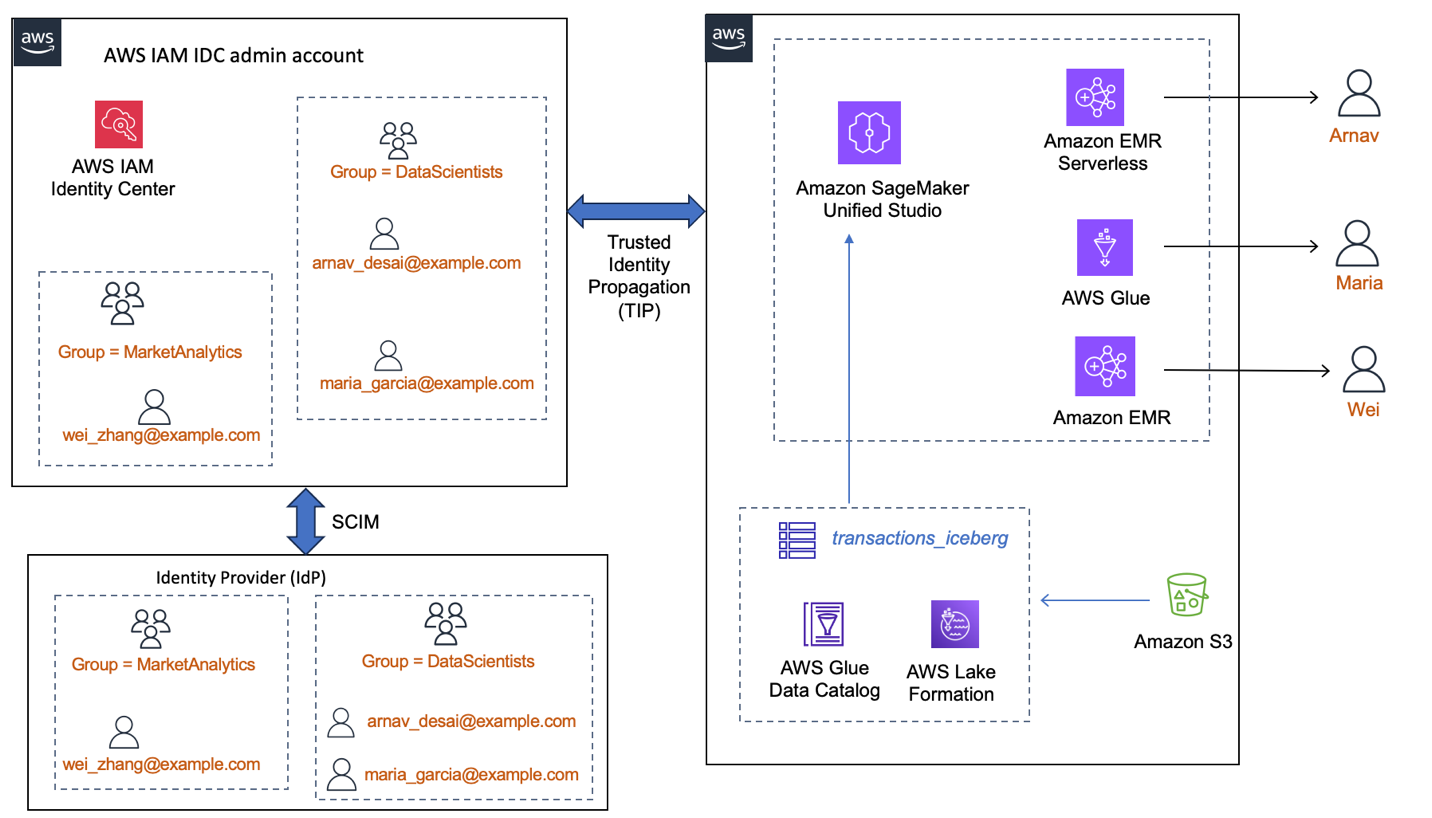
Working with IAM Identity Center and the AWS services that integrate with IAM Identity Center requires several steps. In this post we use one AWS account with IAM Identity Center enabled and a SageMaker Unified Studio domain created. We recommend that you use a test account to follow along the blog.
You need the following prerequisites:
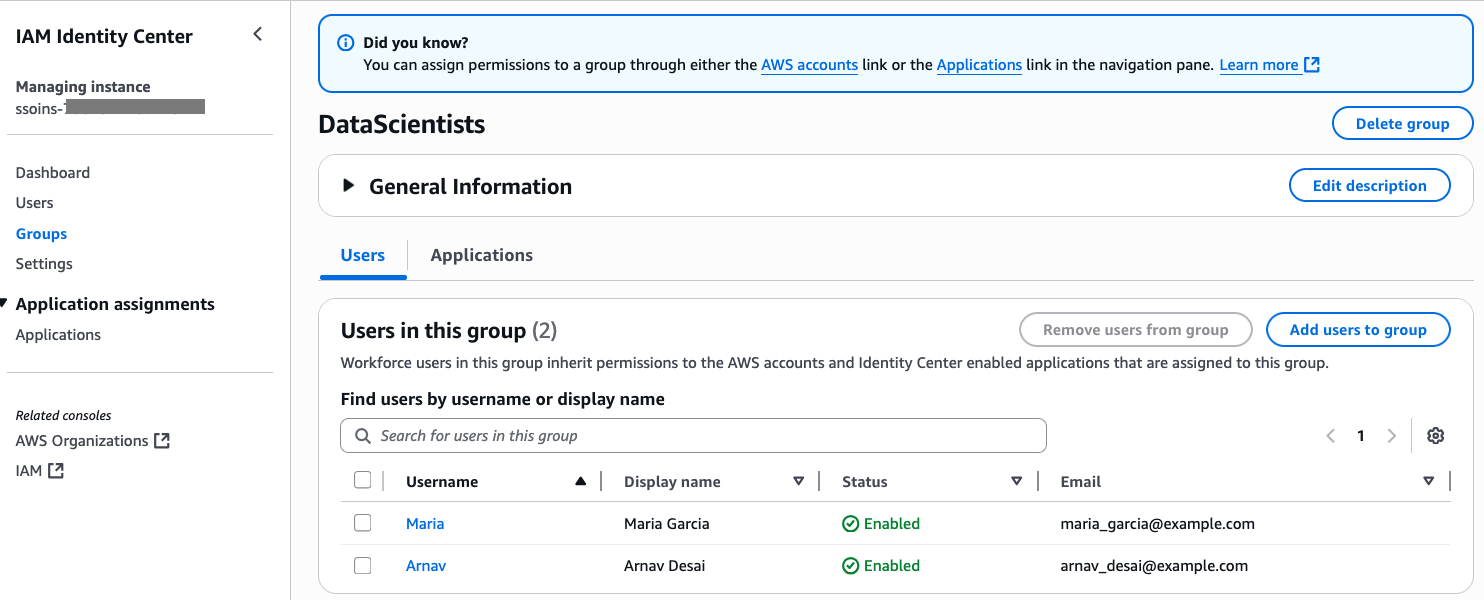
The following screenshot shows users Maria and Arnav in the DataScientists group.
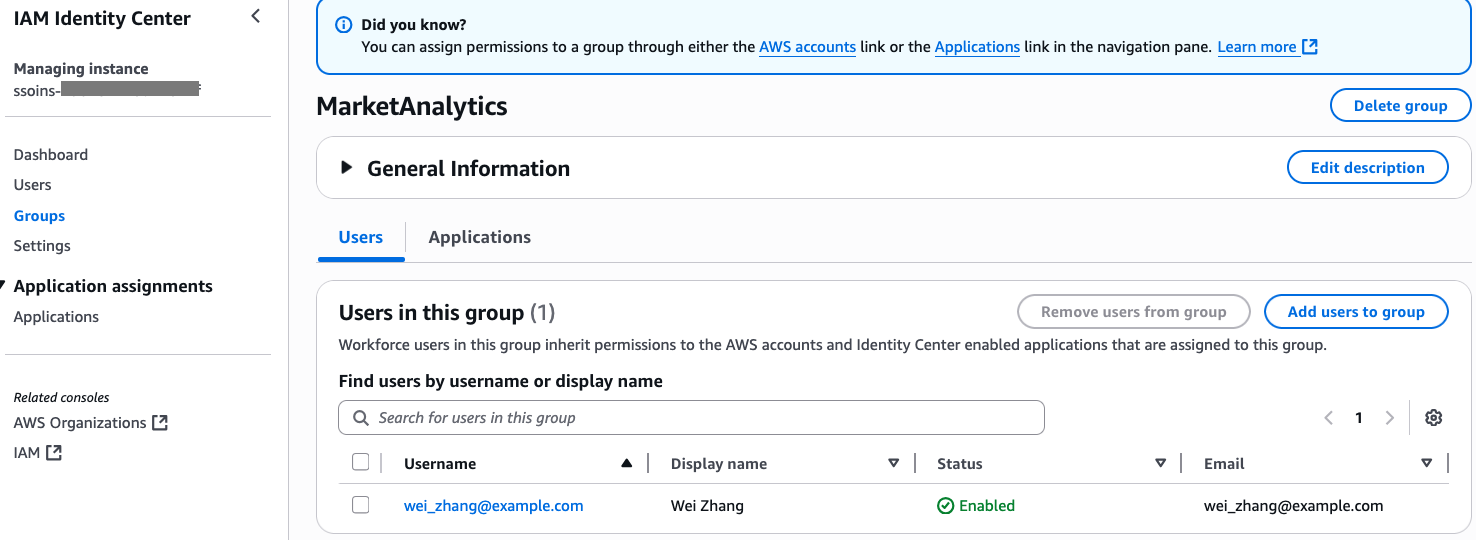
following screenshot shows user Wei in the MarketAnalytics group.
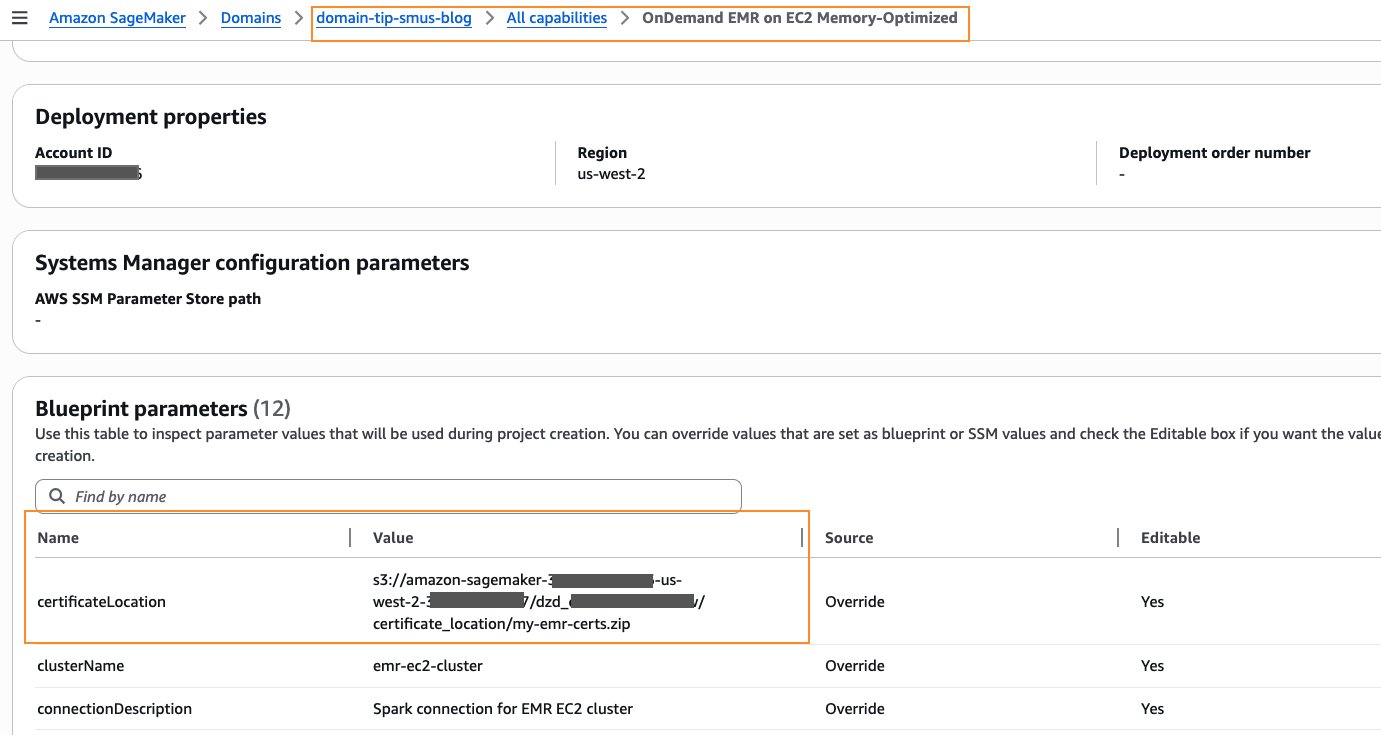
domain-tip-smus-blog. For instructions to create a SageMaker Unified Studio domain, refer to the quick setup guide in the SageMaker Unified Studio documentation.
DataScientists and MarketAnalytics) should be added to the domain as users. For instructions, refer to Managing users in Amazon SageMaker Unified Studio.Now that DataScientists and MarketAnalytics groups are granted access to the domain, IAM Identity Center users belonging to those two groups can sign in to the SageMaker Unified Studio portal for the next steps. Follow these steps:
blogproject_tip_enabled under the domain, as shown in the following screenshot. For details, follow the instructions in Create a project.Arnav would like to collaborate with other team members. After creating the project, he grants access on the project to additional IAM Identity Center groups. He adds the two IAM Identity Center groups, DataScientists and MarketAnalytics, as Members of type Contributor to the project, as shown in the following screenshot.
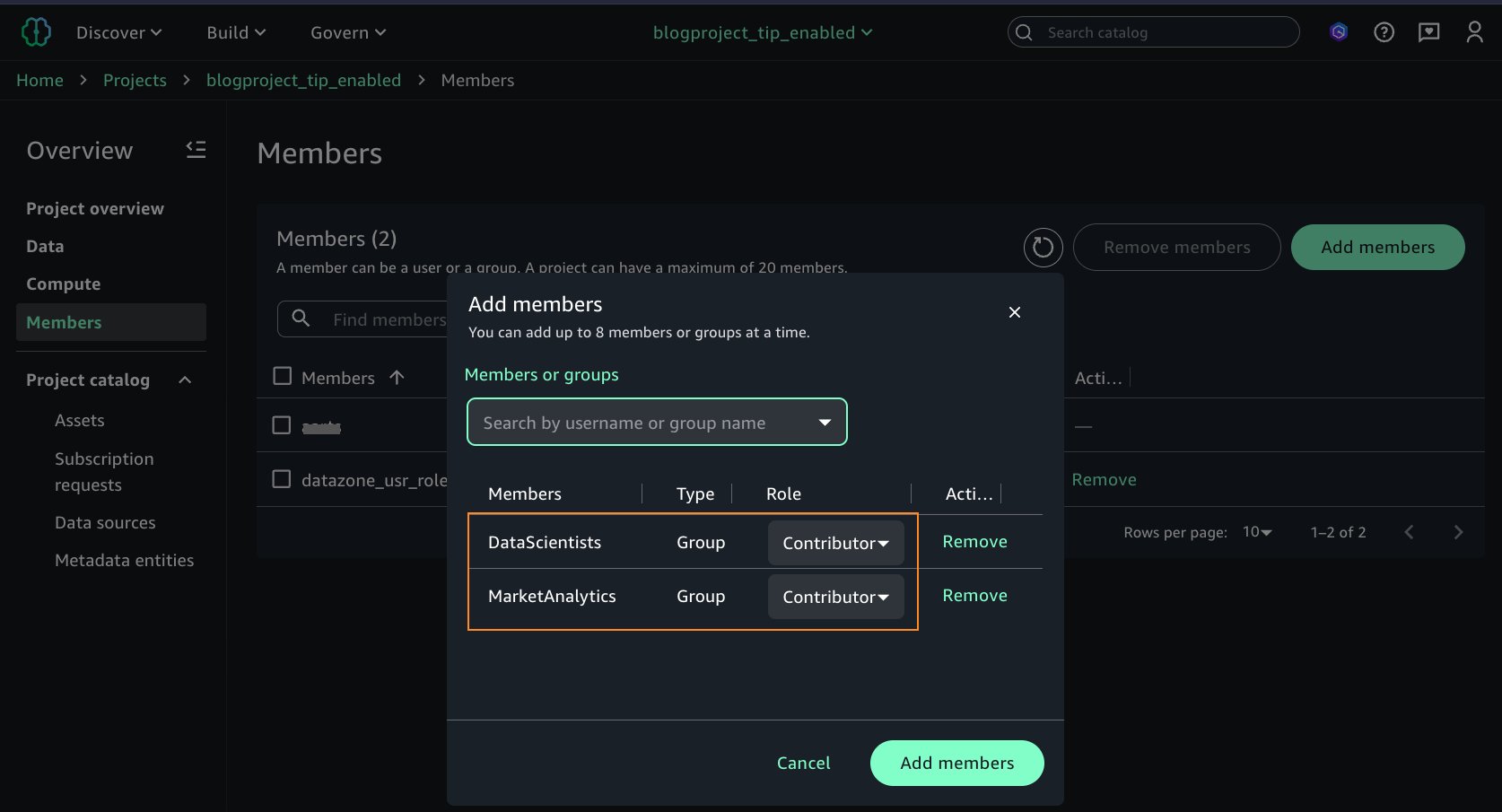
So far, you’ve set up IAM Identity Center, created users and groups, created a SageMaker Unified Studio domain and project, and added the IAM Identity Center groups as users to the domain and the project. In the rest of the sections, we set up the three types of computes for Spark interactive session and enter a query on the Lake Formation managed tables as individual IAM Identity Center users Arnav, Maria, and Wei.
In this section, we set up an EMR Serverless compute and run a Spark interactive session as Arnav.
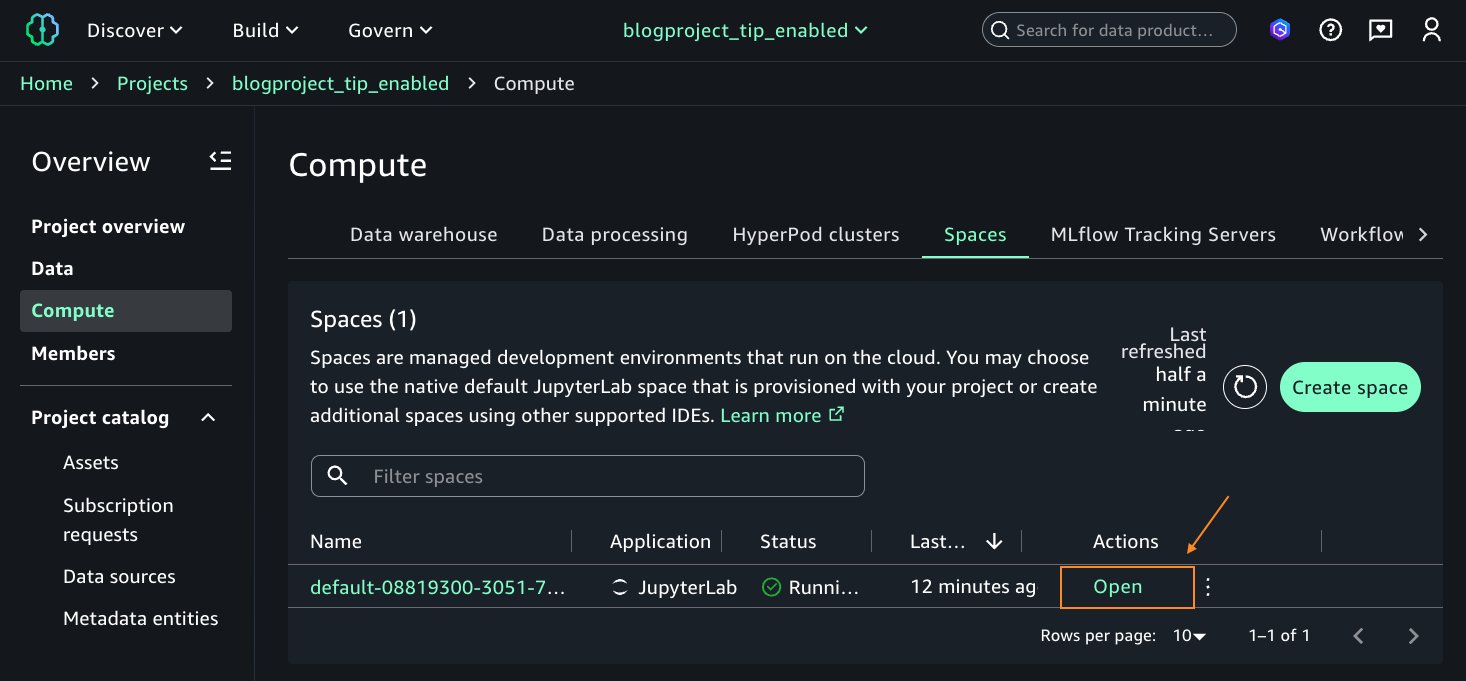
blogproject_tip_enabled. From the left navigation pane, choose Compute. On the Data processing tab, choose Add compute.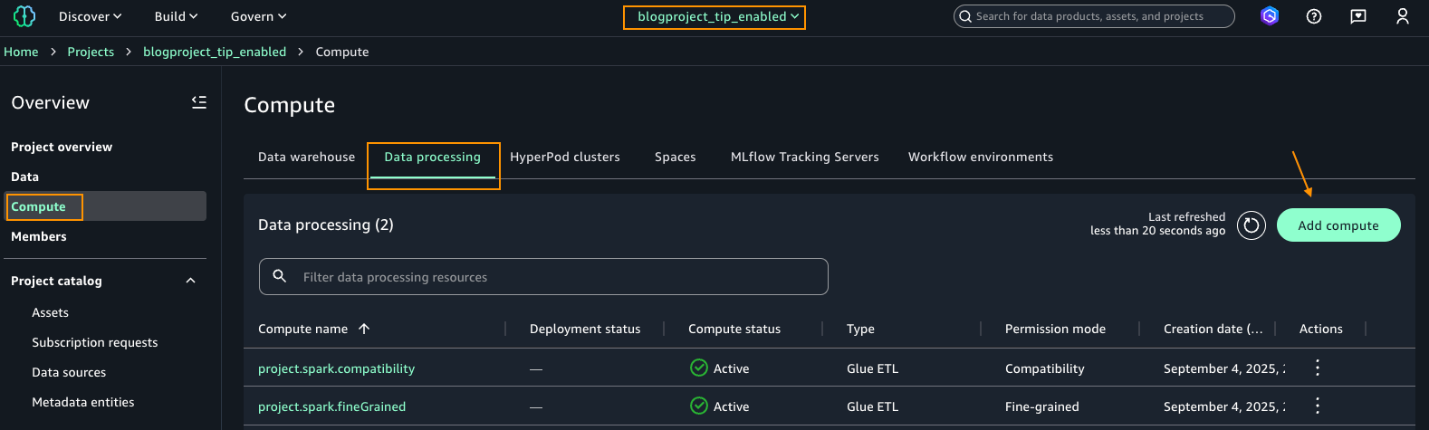
bankdata_icebergtbl.Because Arnav is part of the DataScientists group, he should see all columns of the table, as shown in the following screenshot.
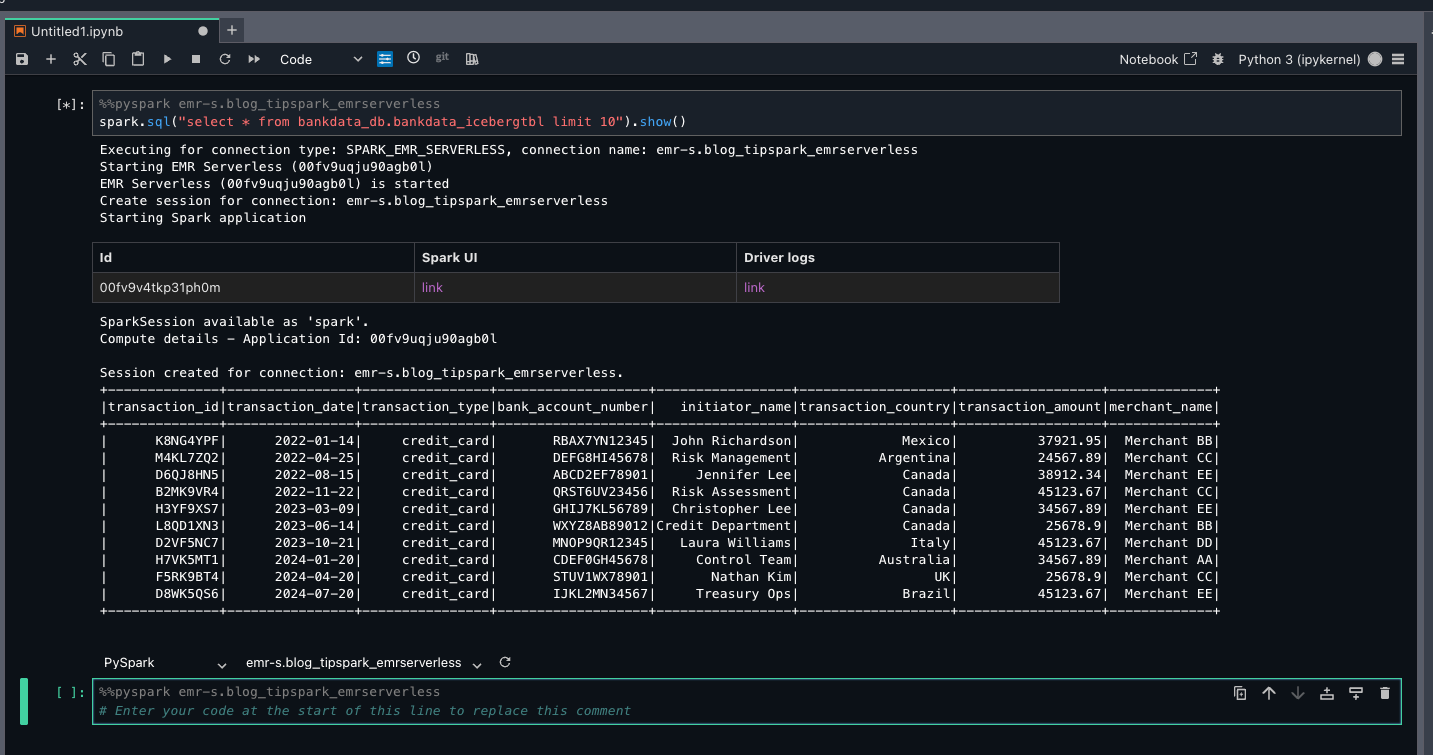
This verifies LF-Tags based access for Arnav on the bankdata_db.bankdata_icebergtbl using a Spark session in EMR Serverless compute.
In this section, we set up AWS Glue compute and run a Spark interactive session as Maria.
blogproject_tip_enabled. From the left navigation pane, choose Compute. On Data processing tab, you should see two computes created by default in Active status (project.spark.compatibility and project.spark.fineGrained) with Type Glue ETL. For additional details on these compute types, refer to AWS Glue ETL in Amazon SageMaker Unified Studio.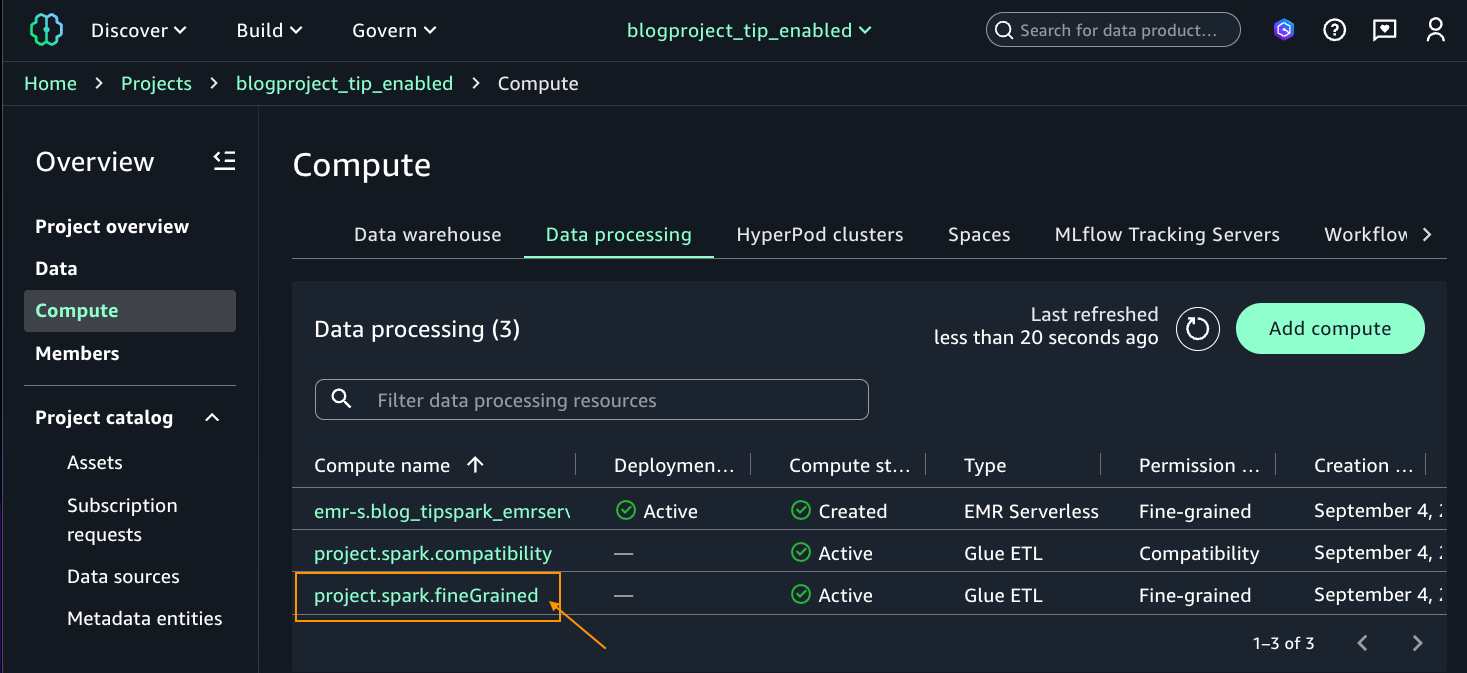
Because Maria is part of the DataScientists group, she should see all columns of the table, as shown in the following screenshot.
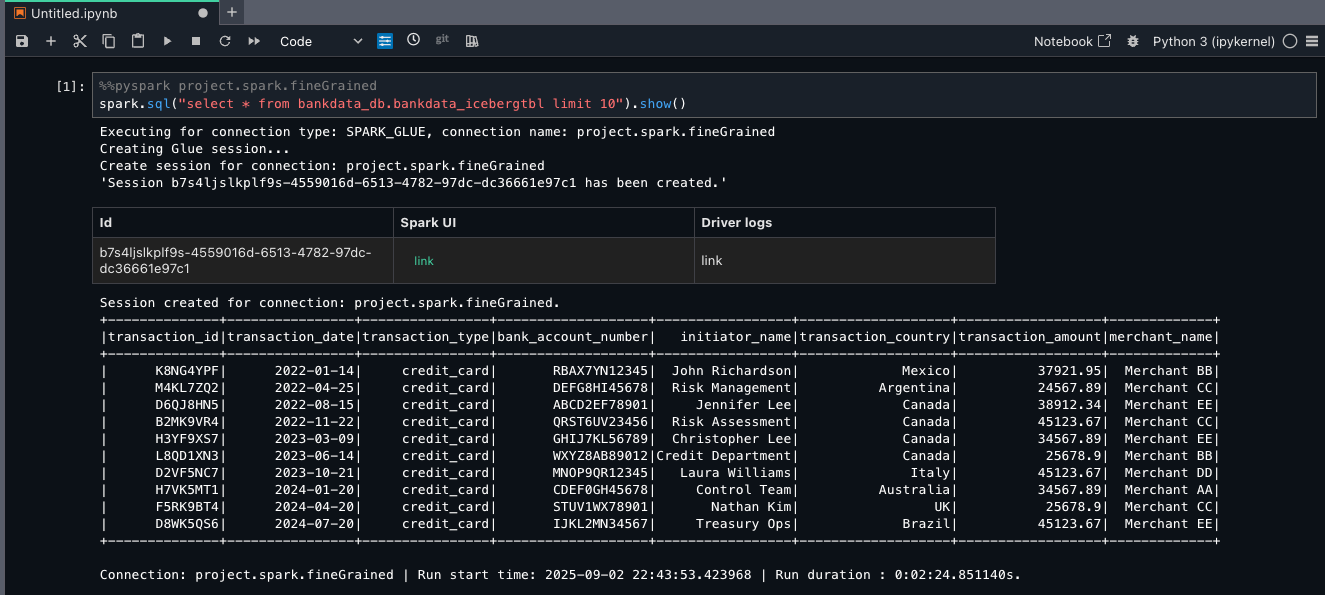
This verifies LF-Tags based access to Maria on the bankdata_db.bankdata_icebergtbl using Spark session in AWS Glue fine-grained access control (FGAC) compute.
To verify what access Wei has using EMR Serverless and AWS Glue, you can sign out and sign in as user Wei. Enter the Spark SELECT queries on the same table. Wei shouldn’t see the three personally identifiable information (PII) columns transaction_id, bank_account_number, and initiator_name, which were tagged as transactions=secured.
The following screenshot shows the same table for Wei using EMR Serverless.
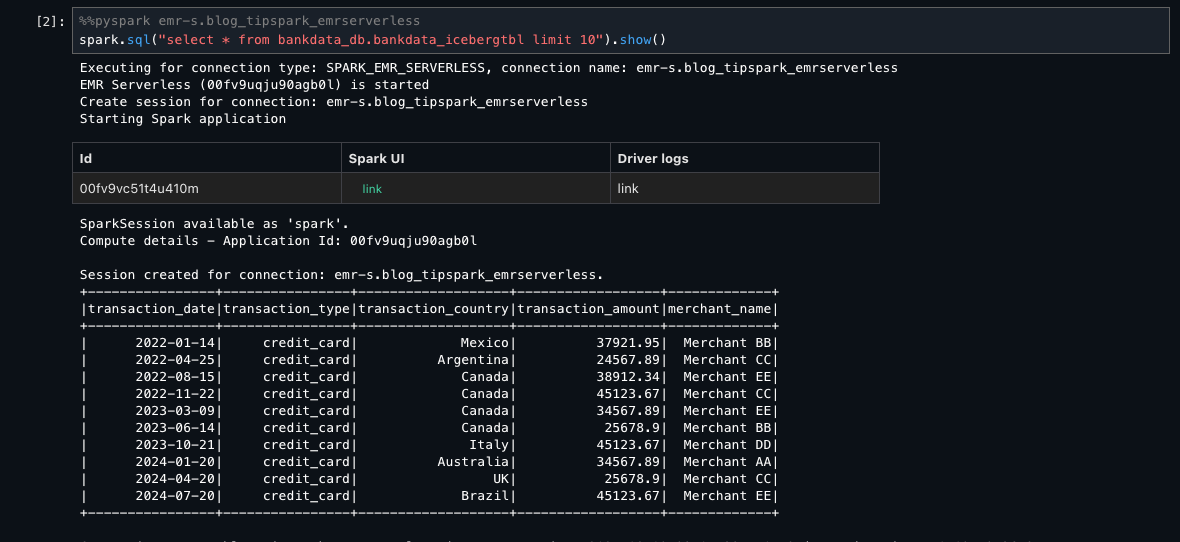
The following screenshot shows the same table for Wei using AWS Glue FGAC mode.
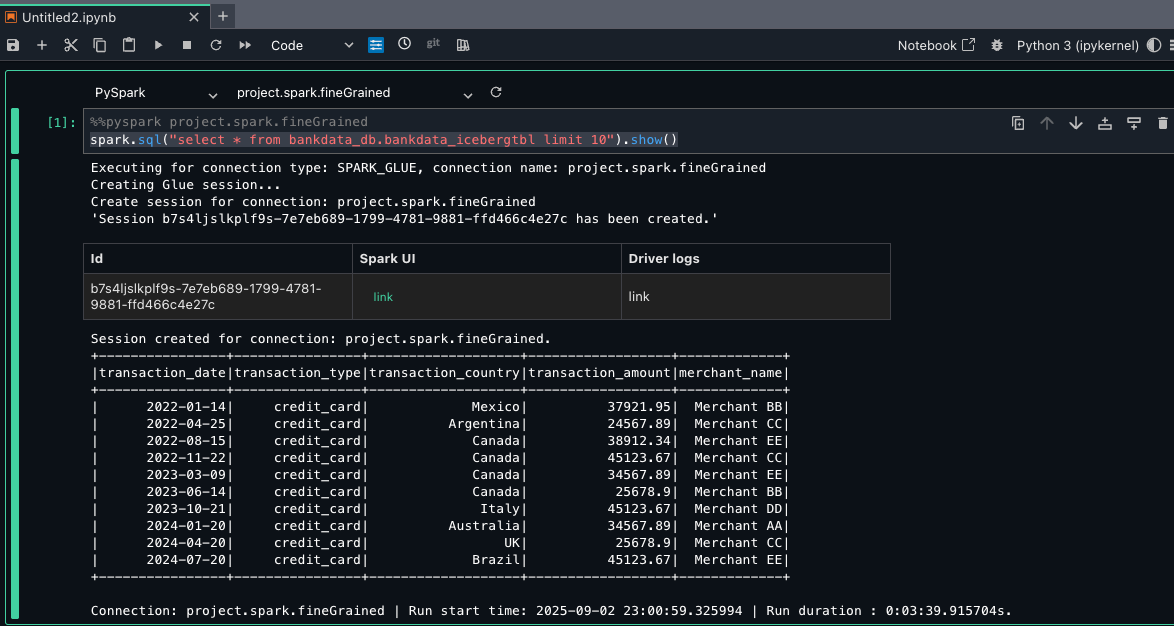
In this section, we set up an Amazon EMR on EC2 compute and run a Spark interactive session as Wei.
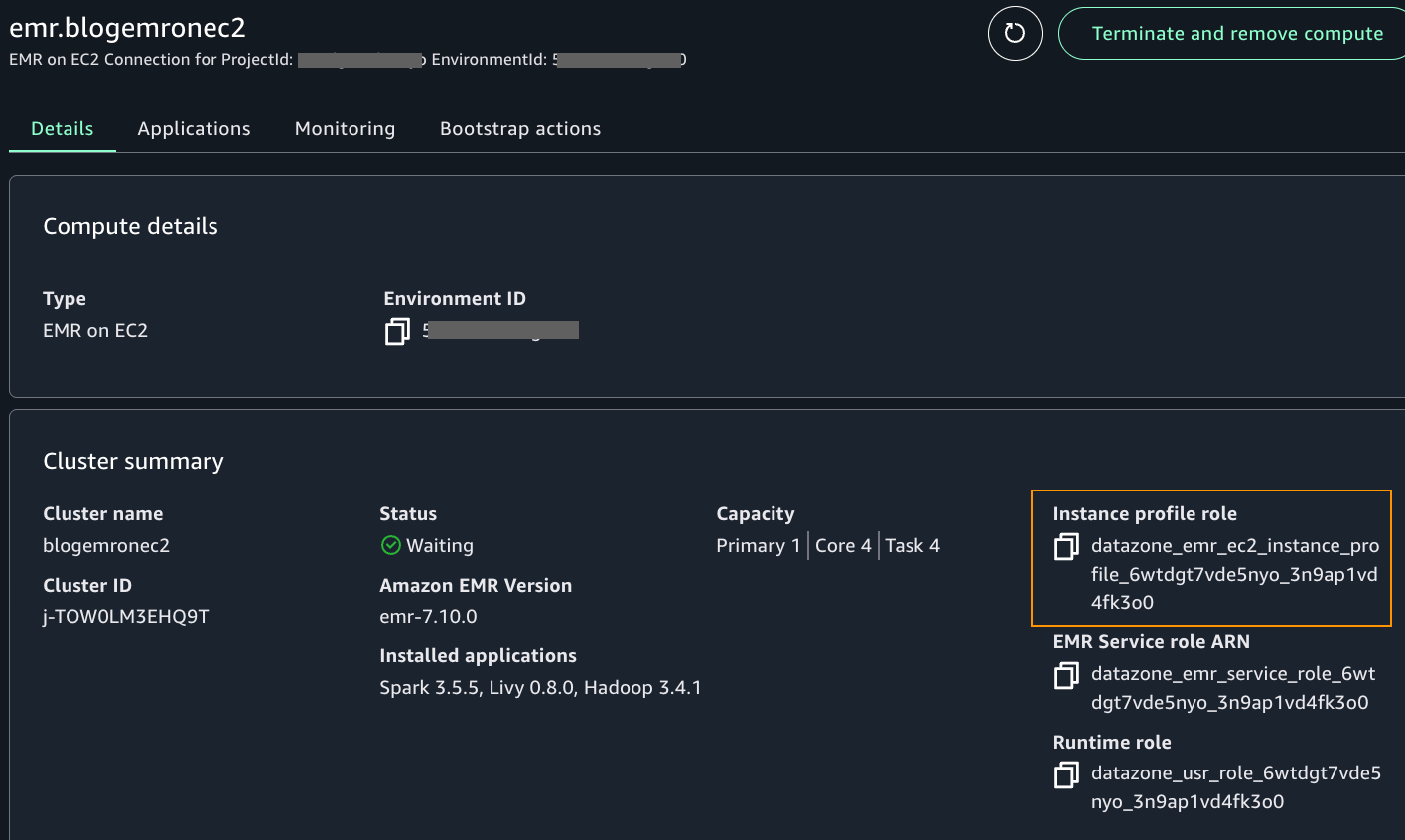
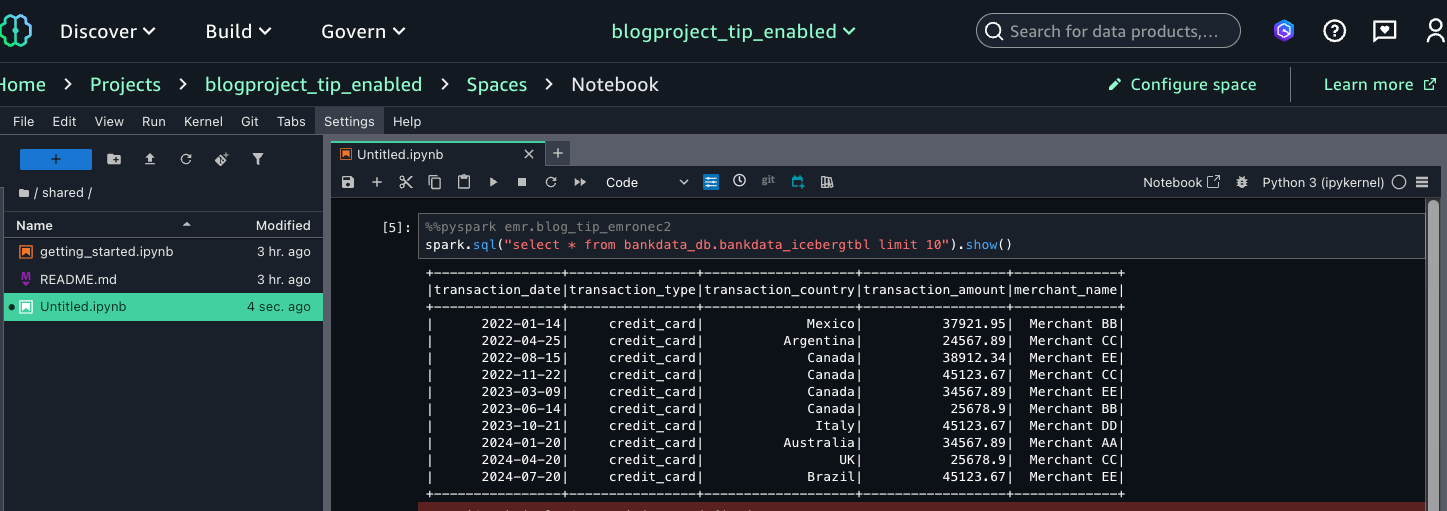
This verifies that Wei, as part of the MarketAnalytics group, sees all columns of the table with LF-Tags transactions=accessible but doesn’t have access to the three columns that were overwritten with LF-Tags transactions=secured (transaction_id, bank_account_number, and initiator_name).
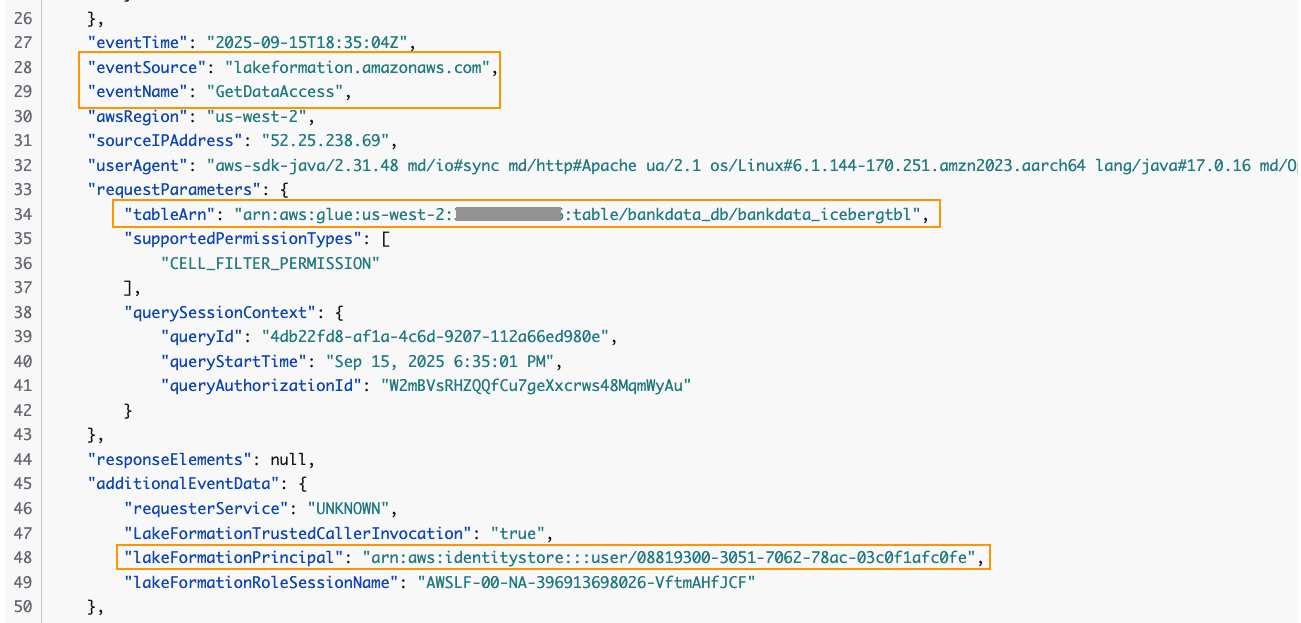
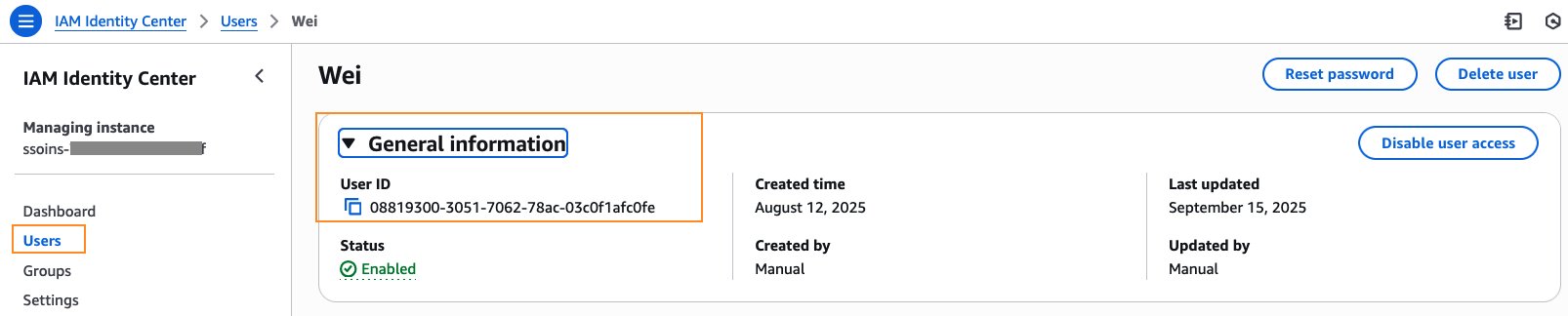
You can trace the user access of the table in the CloudTrail logs for EventName=GetDataAccess. In the relevant CloudTrail log shown below, we notice that the UserID for Wei is provided under additionalEventData field, whereas requestParameters has the tableARN.
The user ID for Wei is available in the IAM Identity Center console under General information.
Thus, we were able to sign in as an individual IAM Identity Center user to the SageMaker Unified Studio domain and query the Data Catalog tables using Amazon EMR and AWS Glue compute. These IAM Identity Center users were able to query the tables that they were granted access to, instead of the SageMaker Unified Studio project’s IAM role.
To avoid incurring costs, it’s important to delete the resources launched for this walkthrough. Clean up the resources as follows:
bankdata_db from Lake Formation. This will also delete the tables and all associated permissions. Delete the LF-Tag transactions and its values. bankdata-csv and bankdata-iceberg.In this post, we walked through how to enable a SageMaker Unified Studio domain with IAM Identity Center trusted identity propagation and query Lake Formation managed tables in Data Catalog using Apache Spark interactive sessions with EMR Serverless, AWS Glue, and Amazon EMR on EC2. We also verified in CloudTrail logs the IAM Identity Center user ID accessing the table.
Amazon SageMaker Unified Studio with trusted identity propagation provides the following benefits.
To learn more, refer to the following resources:
We encourage you to check out the new trusted identity propagation enabled SageMaker Unified Studio for Spark sessions. Reach out to us through your AWS account teams or using the comments section.
Acknowledgment: A special thanks to everyone who contributed to the development and launch of this feature: Palani Nagarajan, Karthik Seshadri, Vikrant Kumar, Yijie Yan, Radhika Ravirala and Jerica Nicholls.
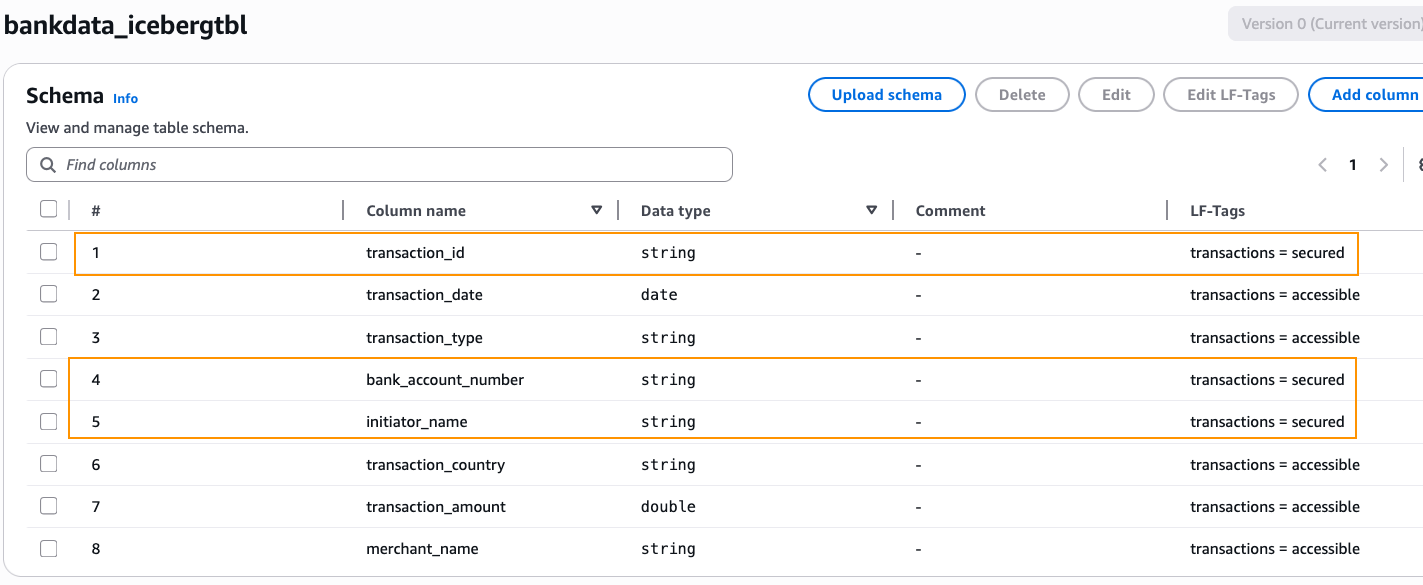
bankdata-csv and bankdata-iceberg and upload the dataset to bankdata-csv.We create a Lake Formation tag with Keyname = transactions and Values = secured, accessible. We associate the tag to the table and overwrite a few columns as summarized in the table.
|
Resource |
LF-Tag association |
|
|
Database |
bankdata_db |
transactions = accessible |
|
Table |
bankdata_icebergtbl |
transactions = accessible |
| Columns | transaction_id | transactions = secured |
| bank_account_number | transactions = secured | |
| initiator_name | transactions = secured |
We then grant Lake Formation permissions to the two IAM Identity Center groups using these LF-Tags as follows:
|
IAM Identity Center group |
LF-Tags |
Permission |
|
DataScientists |
transactions = accessible AND transactions = secured |
Database DESCRIBE, Table SELECT |
|
MarketAnalytics |
transactions = accessible |
Database DESCRIBE, Table SELECT |
transactions and Values = secured, accessible.bankdata_db and associate the LF-Tag transactions=accessible.bankdata_icebergtbl and verify that the LF-Tag transactions=accessible is inherited by the table.transaction_id, bank_account_number, and initiator_name to transactions=secured. After changing, choose Save as new version.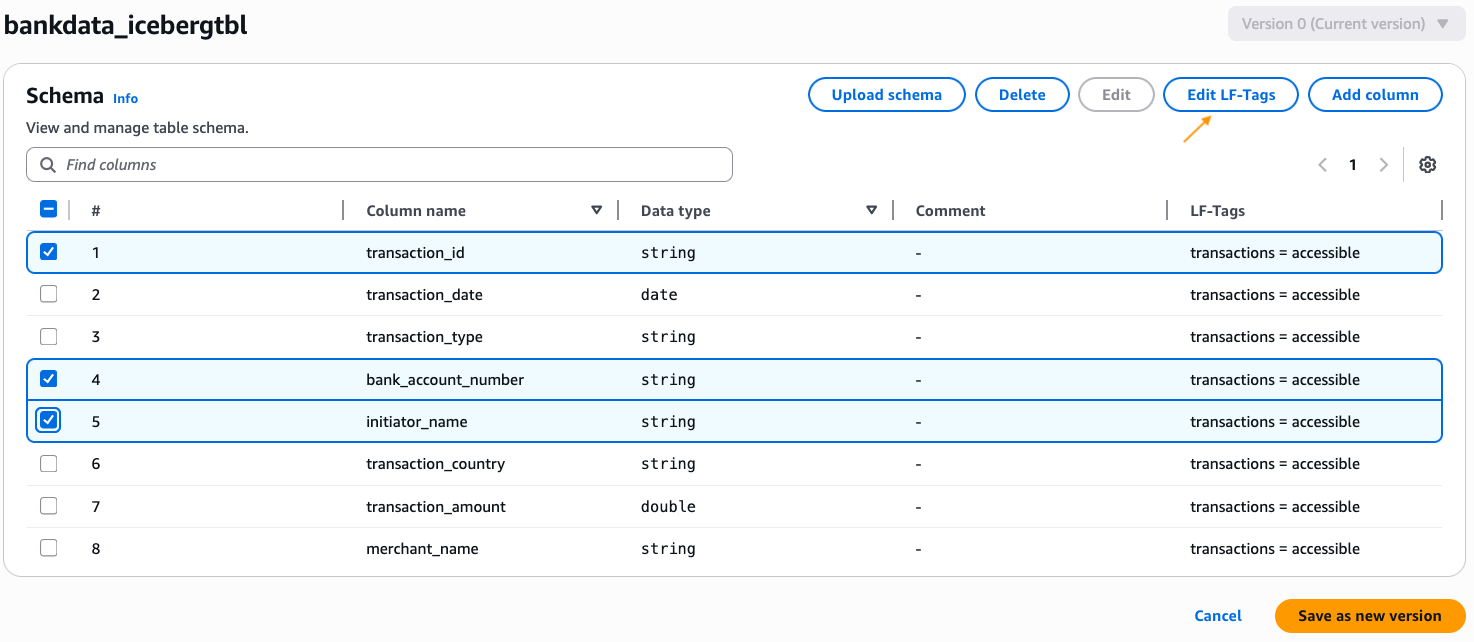
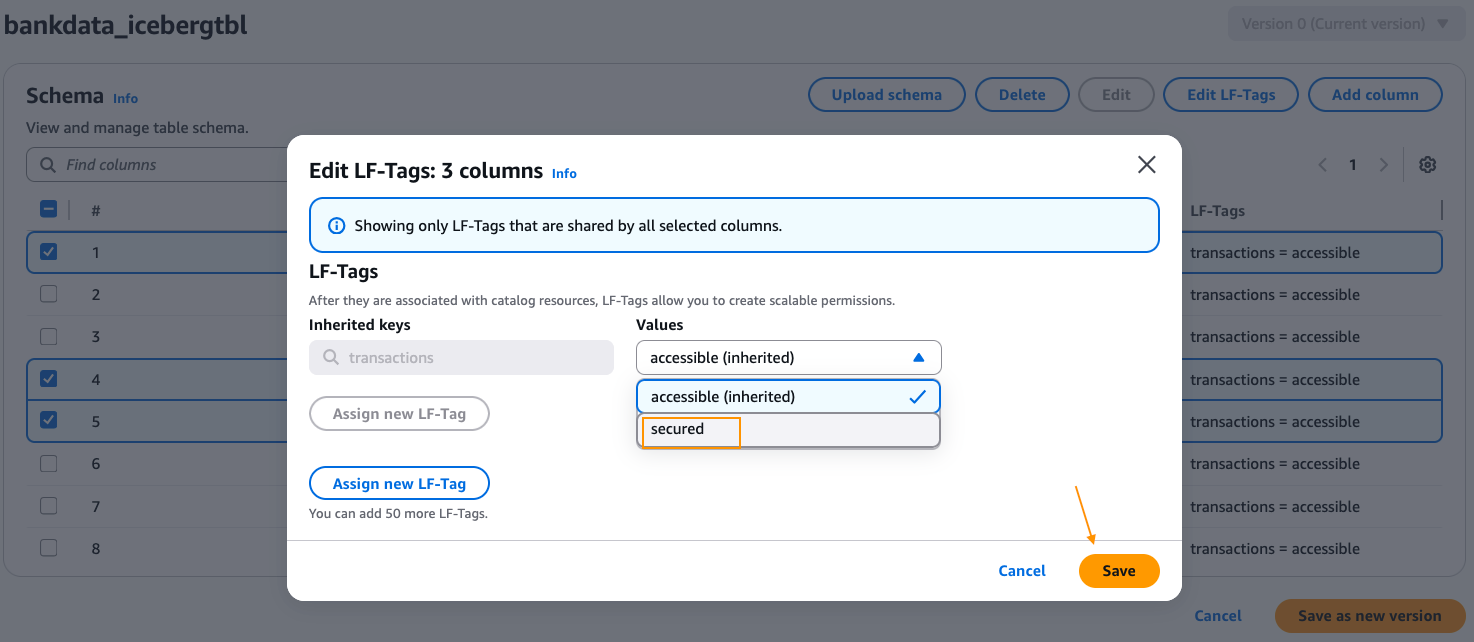
DataScientists for Principals. Select LF-Tags transactions and both the values accessible, secured. Choose Database DESCRIBE and Tables SELECT permissions. Choose Grant.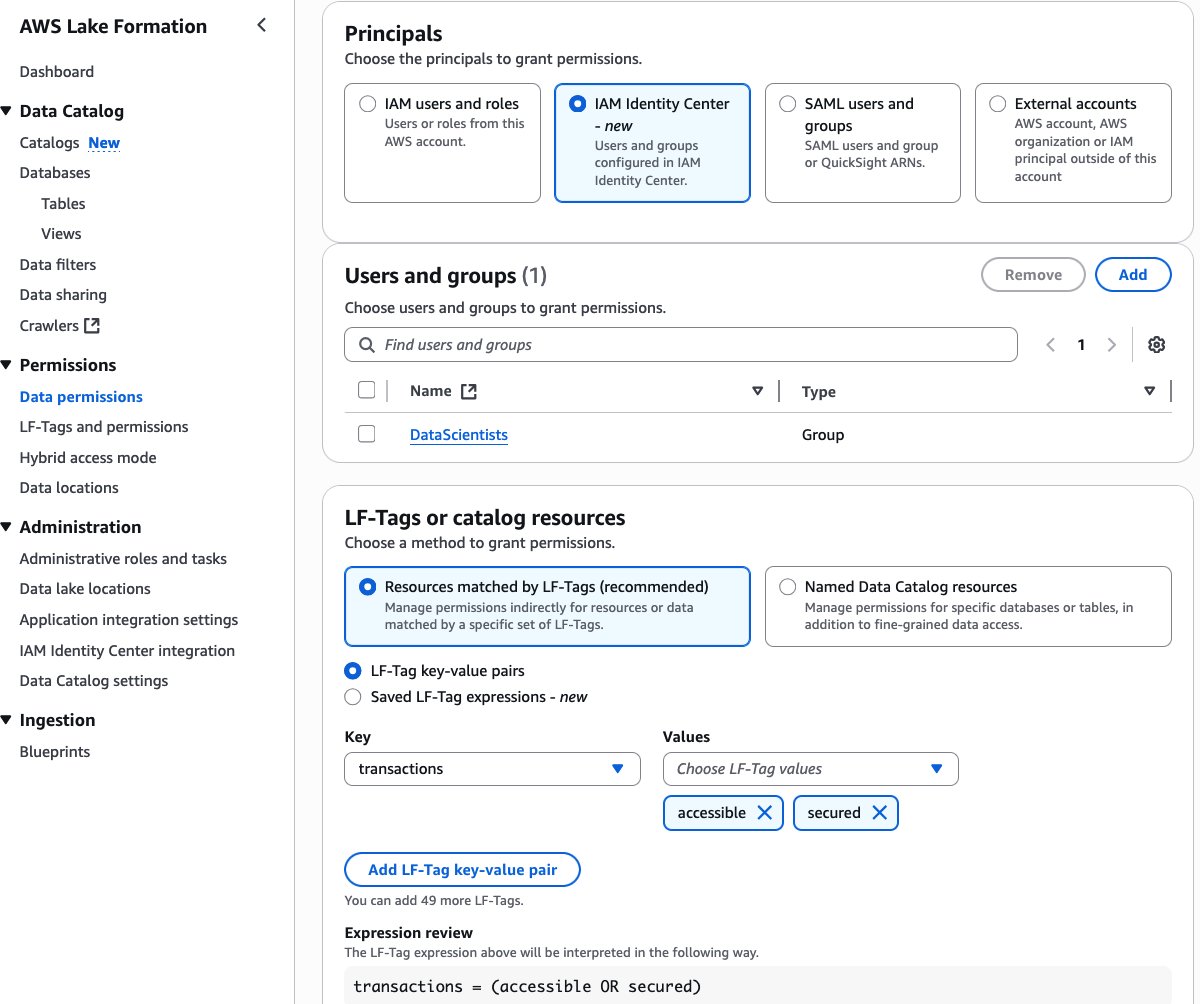
MarketAnalytics for Principals. Select LF-Tags transactions and only one of the values, accessible. Select Database DESCRIBE and Tables SELECT permissions. Choose Grant.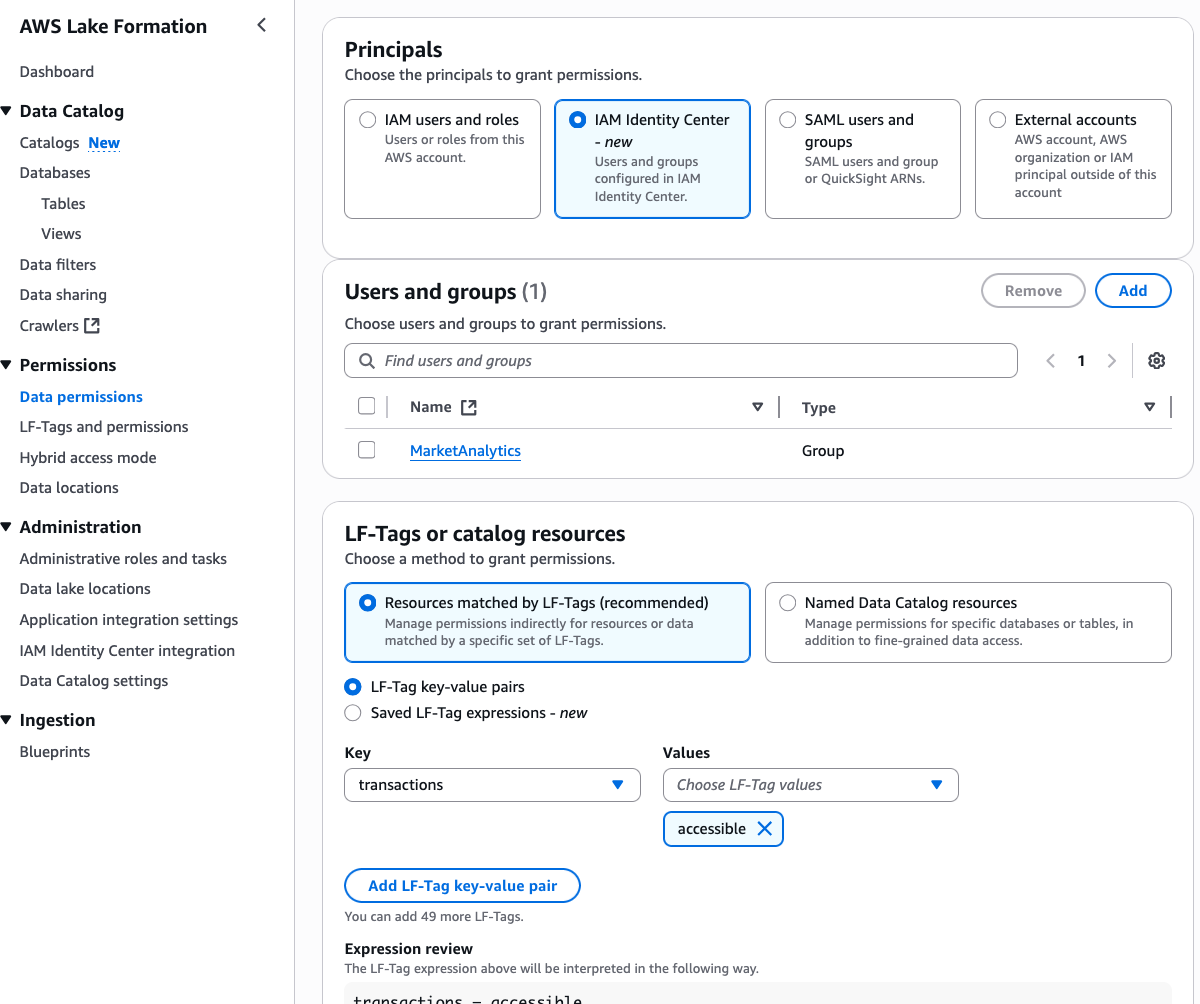
default database to both the IDC groups.Thus, we’ve granted all column access on the table bankdata_icebergtbl to the DataScientists group while securing three PII columns from the MarketAnalytics group.
Post Syndicated from daroc original https://lwn.net/Articles/1042355/
The idea of automatic syntax-aware merging in version-control systems goes back to
2005 or earlier, but initial implementations were
often language-specific and slow.
Mergiraf is a merge-conflict resolver that uses a generic algorithm plus a
small amount of language-specific knowledge
to solve conflicts that Git’s default strategy cannot.
The project’s contributors have been working on the
tool for just under a year, but it already
supports 33 languages, including C,
Python, Rust, and even
SystemVerilog.
Post Syndicated from LastWeekTonight original https://www.youtube.com/shorts/hNlJdQwvr3o
Post Syndicated from Maddie Presland original https://www.backblaze.com/blog/why-coreweaves-object-storage-launch-is-good-for-ai-and-everyone-building-it/

CoreWeave just launched their own AI Object Storage. Our take? We love to see it.
At first glance, it might look like a competitive offering, but as far as we’re concerned, the more storage options out there, the better for builders. It’s another sign that object storage has officially arrived as a key ingredient in the AI stack.
Now, your AI stack can look like this: Fast, flexible storage close to your GPUs from CoreWeave (essential for training and inference). And when the run’s over? Move it to Backblaze B2 Overdrive to keep it ready for your next run at the right temperature and price-to-performance ratio.
More options mean more ways to build smart, cost-efficient pipelines that let teams train faster and iterate more without getting locked in. We’ll always cheer for that.
How do you balance scalability with performance while staying on budget? This ebook explores how object storage enhances every stage of the pipeline from collection to training to deployment, and provides real-world use cases.

Every AI model depends on moving massive datasets through training, inference, and retraining cycles. Each stage requires fast, reliable access to data. That’s where object storage comes in.
Object storage enables this by offering:
As AI projects scale, smart data management becomes just as important as GPU performance. High-end GPUs can only deliver full value when they’re continuously fed the right data at the right time. When data sits in the wrong tier or takes too long to retrieve, compute resources go underused. And that means wasted time and money.
CoreWeave’s Local Object Transport Accelerator (LOTA) delivers up to 7GB/s throughput per GPU, helping data move quickly between storage and compute. With pricing around $110 per terabyte (about $60 with discounts) and regional capacity up to 10TiB, it’s built for performance-critical workloads where proximity to GPUs makes a measurable difference.
Its launch adds more choice to the ecosystem and highlights the growing demand for storage built specifically for AI. As more specialized options emerge, organizations are thinking carefully about how to right-size their infrastructure for each stage of the AI lifecycle.
When maximum performance is the goal, GPU-adjacent storage like CoreWeave’s can help teams squeeze out every last bit of speed during intensive training cycles. But for most AI workloads, B2 Overdrive provides the right balance of cost and performance. It offers the throughput and durability needed to support active training while keeping pricing predictable and scalable.
Many AI builders combine these strengths through a multi-cloud setup. Teams might use CoreWeave Object Storage when latency and proximity to GPUs deliver measurable gains, and then keep the rest of their AI pipeline on B2 Overdrive so datasets remain readily available for retraining, testing, or deployment.
Example configuration:
B2 Overdrive offers:
This kind of architecture gives teams the freedom to use each platform where it shines. Backblaze handles the heavy lifting for most workloads, while CoreWeave adds targeted acceleration when raw GPU performance is the top priority. The result is a flexible, cost-aware workflow that supports both innovation and scale.
The most effective AI setups use the right cloud for the right job. They run training where GPUs can perform at their peak, and store data where it stays organized and ready to move when needed.
B2 Overdrive provides a foundation for this strategy, offering a layer of object storage that keeps data secure, accessible, and easy to integrate across environments. Teams can combine each platform’s strengths to achieve speed when it’s needed, scalability that endures, and freedom from lock-in and runaway costs.
The AI ecosystem is expanding, and with the right partners, so are the possibilities.
See how Backblaze B2 Overdrive keeps AI data fast, flexible, and affordable.
The post Why CoreWeave’s Object Storage Launch is Good for AI—and Everyone Building It appeared first on Backblaze Blog | Cloud Storage & Cloud Backup
Post Syndicated from Bryton Herdes original https://blog.cloudflare.com/going-bgp-zombie-hunting/
Here at Cloudflare, we’ve been celebrating Halloween with some zombie hunting of our own. The zombies we’d like to remove are those that disrupt the core framework responsible for how the Internet routes traffic: BGP (Border Gateway Protocol).
A BGP zombie is a silly name for a route that has become stuck in the Internet’s Default-Free Zone (aka the DFZ: the collection of all internet routers that do not require a default route, potentially due to a missed or lost prefix withdrawal).
The underlying root cause of a zombie could be multiple things, spanning from buggy software in routers or just general route processing slowness. It’s when a BGP prefix is meant to be gone from the Internet, but for one reason or another it becomes a member of the undead and hangs around for some period of time.
The longer these zombies linger, the more they create operational impact and become a real headache for network operators. Zombies can lead packets astray, either by trapping them inside of route loops or by causing them to take an excessively scenic route. Today, we’d like to celebrate Halloween by covering how BGP zombies form and how we can lessen the likelihood that they wreak havoc on Internet traffic.
To understand the slowness that can often lead to BGP zombies, we need to talk about path hunting. Path hunting occurs when routers running BGP exhaustively search for the best path to a prefix as determined by Longest Prefix Matching (LPM) and BGP routing attributes like path length and local preference. This becomes relevant in our observations of exactly how routes become stuck, for how long they become stuck, and how visible they are on the Internet.
For example, path hunting happens when a more-specific BGP prefix is withdrawn from the global routing table, and networks need to fallback to a less-specific BGP advertisement. In this example, we use 2001:db8::/48 for the more-specific BGP announcement and 2001:db8::/32 for the less-specific prefix. When the /48 is withdrawn by the originating Autonomous System (AS), BGP routers have to recognize that route as missing and begin routing traffic to IPs such as 2001:db8::1 via the 2001:db8::/32 route, which still remains while the prefix 2001:db8::/48 is gone.
Let’s see what this could look like in action with a few diagrams.

Diagram 1: Active 2001:db8::/48 route
In this initial state, 2001:db8::/48 is used actively for traffic forwarding, which all flows through AS13335 on the way to AS64511. In this case, AS64511 would be a BYOIP customer of Cloudflare. AS64511 also announces a backup route to another Internet Service Provider (ISP), AS64510, but this route is not active even in AS64510’s routing table for forwarding to 2001:db8::1 because 2001:db8::/48 is a longer prefix match when compared to 2001:db8::/32.
Things get more interesting when AS64510 signals for 2001:db8::/48 to be withdrawn by Cloudflare (AS13335), perhaps because a DDoS attack is over and the customer opts to use Cloudflare only when they are actively under attack.
When the customer signals to Cloudflare (via BGP Control or API call) to withdraw the 2001:db8::/48 announcement, all BGP routers have to converge upon this update, which involves path hunting. AS13335 sends a BGP withdrawal message for 2001:db8::/48 to its directly-connected BGP neighbors. While the news of withdrawal may travel quickly from AS13335 to the other networks, news may travel more quickly to some of the neighbors than others. This means that until everyone has received and processed the withdrawal, networks may try routing through one another to reach the 2001:db8::/48 prefix – even after AS13335 has withdrawn it.

Diagram 2: 2001:db8::/48 route withdrawn via AS13335
Imagine AS64501 is a little slower than the rest – perhaps due to using older hardware, hardware being overloaded, a software bug, specific configuration settings, poor luck, or some other factor – and still has not processed the withdrawal of the /48. This in itself could be a BGP zombie, since the route is stuck for a small period. Our pings toward 2001:db8::1 are never able to actually reach AS64511, because AS13335 knows the /48 is meant to be withdrawn, but some routers carrying a full table have not yet converged upon that result.
The length of time spent path hunting is amplified by something called the Minimum Route Advertisement Interval (MRAI). The MRAI specifies the minimum amount of time between BGP advertisement messages from a BGP router, meaning it introduces a purposeful number of seconds of delay between each BGP advertisement update. RFC4271 recommends an MRAI value of 30-seconds for eBGP updates, and while this can cut down on the chattiness of BGP, or even potential oscillation of updates, it also makes path hunting take longer.
At the next cycle of path hunting, even AS64501, which was previously still pointing toward a nonexistent /48 route from AS13335, should find the /32 advertisement is all that is left toward 2001:db8::1. Once it has done so, the traffic flow will become the following:

Diagram 3: Routing fallback to 2001:db8::/32 and 2001:db8::/48 is gone from DFZ
This would mean BGP path hunting is over, and the Internet has realized that the 2001:db8::/32 is the best route available toward 2001:db8::1, and that 2001:db8::/48 is really gone. While in this example we’ve purposely made path hunting only last two cycles, in reality it can be far more, especially with how highly connected AS13335 is to thousands of peer networks and Tier-1’s globally.
Now that we’ve discussed BGP path hunting and how it works, you can probably already see how a BGP zombie outbreak can begin and how routing tables can become stuck for a lengthy period of time. Excessive BGP path hunting for a previously-known more-specific prefix can be an early indicator that a zombie could follow.
Zombies have captured our attention more recently as they were noticed by some of our customers leveraging Bring-Your-Own-IP (BYOIP) on-demand advertisement for Magic Transit. BYOIP may be configured in two modes: “always-on”, in which a prefix is continuously announced, or “on-demand”, where a prefix is announced only when a customer chooses to. For some on-demand customers, announcement and withdrawal cycles may be a more frequent occurrence, which can lead to an increase in BGP zombies.
With that in mind and also knowing how path hunting works, let’s spawn our own zombie onto the Internet. To do so, we’ll take a spare block of IPv4 and IPv6 and announce them like so:

Once the routes are announced and stable, we’ll then proceed to withdraw the more specific routes advertised via Cloudflare globally. With a few quick clicks, we’ve successfully re-animated the dead.
Variant A: Ghoulish Gateways
One place zombies commonly occur is between upstream ISPs. When one router in a given ISP’s network is a little slower to update, routes can become stuck.
Take, for example, the following loop we observed between two of our upstream partners:
7. be2431.ccr31.sjc04.atlas.cogentco.com
8. tisparkle.sjc04.atlas.cogentco.com
9. 213.144.177.184
10. 213.144.177.184
11. 89.221.32.227
12. (waiting for reply)
13. be2749.rcr71.goa01.atlas.cogentco.com
14. be3219.ccr31.mrs02.atlas.cogentco.com
15. be2066.agr21.mrs02.atlas.cogentco.com
16. telecomitalia.mrs02.atlas.cogentco.com
17. 213.144.177.186
18. 89.221.32.227
Or this loop – observed on the same withdrawal test – between two different providers:
15. if-bundle-12-2.qcore2.pvu-paris.as6453.net
16. if-bundle-56-2.qcore1.fr0-frankfurt.as6453.net
17. if-bundle-15-2.qhar1.fr0-frankfurt.as6453.net
18. 195.219.223.11
19. 213.144.177.186
20. 195.22.196.137
21. 213.144.177.186
22. 195.22.196.137
Variant B: Undead LAN (Local Area Network)
Simultaneously, zombies can occur entirely within a given network. When a route is withdrawn from Cloudflare’s network, each device in our network must individually begin the process of withdrawing the route. While this is generally a smooth process, things can still become stuck.
Take, for instance, a situation where one router inside of our network has not yet fully processed the withdrawal. Connectivity partners will continue routing traffic towards that router (as they have not yet received the withdrawal) while no host remains behind the router which is capable of actually processing the traffic. The result is an internal-only looping path:
10. 192.0.2.112
11. 192.0.2.113
12. 192.0.2.112
13. 192.0.2.113
14. 192.0.2.112
15. 192.0.2.113
16. 192.0.2.112
17. 192.0.2.113
18. 192.0.2.112
19. 192.0.2.113
Unlike most fictionally-depicted hoards of the walking dead, our highly-visible zombie has a limited lifetime in most major networks – in this instance, only around around 6 minutes, after which most had re-converged around the less-specific as the best path. Sadly, this is on the shorter side – in some cases, we have seen long-lived zombies cause reachability issues for more than 10 minutes. It’s safe to say this is longer than most network operators would expect BGP convergence to take in a normal situation.
But, you may ask – is this the excessive path hunting we talked about earlier, or a BGP zombie? Really, it depends on the expectation and tolerance around how long BGP convergence should take to process the prefix withdrawal. In any case, even over 30 minutes after our withdrawal of our more-specific prefix, we are able to see zombie routes in the route-views public collectors easily:
~ % monocle search --start-ts 2025-10-28T12:40:13Z --end-ts 2025-10-28T13:00:13Z --prefix 198.18.0.0/24
A|1761656125.550447|206.82.105.116|54309|198.18.0.0/24|54309 13335 395747|IGP|206.82.104.31|0|0|54309:111|false|||route-views.ny
You might argue that six to eleven minutes (or more) is a reasonable time for worst-case BGP convergence in the Tier-1 network layer, though that itself seems like a stretch. Even setting that aside, our data shows that very real BGP zombies exist in the global routing table, and they will negatively impact traffic. Curiously, we observed the path hunting delay is worse on IPv4, with the longest observed IPv6 impact in major (Tier-1) networks being just over 4 minutes. One could speculate this is in part due to the much higher number of IPv4 prefixes in the Internet global routing table than the IPv6 global table, and how BGP speakers handle them separately.

Source: RIPEstat’s BGPlay
Part of the delay appears to originate from how interconnected AS13335 is; being heavily peered with a large portion of the Internet increases the likelihood of a route becoming stuck in a given location. Given that, perhaps a zombie would be shorter-lived if we operated in the opposite direction: announcing a less-specific persistently to 13335 and announcing more specifics via our local ISP during normal operation. Since the withdrawal will come from what is likely a less well-peered network, the time-to-convergence may be shorter:

Indeed, as predicted, we still get a stuck route, and it only lives for around 20 seconds in the Tier-1 network layer:
19. be12488.ccr42.ams03.atlas.cogentco.com
20. 38.88.214.142
21. be2020.ccr41.ams03.atlas.cogentco.com
22. 38.88.214.142
23. (waiting for reply)
24. 38.88.214.142
25. (waiting for reply)
26. 38.88.214.142
Unfortunately, that 20 seconds is still an impactful 20 seconds – while better, it’s not where we want to be. The exact length of time will depend on the native ISP networks one is connected with, and it could certainly ease into the minutes worth of stuck routing.
In both cases, the initial time-to-announce yielded no loss, nor was a zombie created, as both paths remained valid for the entirety of their initial lifetime. Zombies were only created when a more specific prefix was fully withdrawn. A newly-announced route is not subject to path hunting in the same way a withdrawn more-specific route is. As they say, good (new) news travels fast.
Our findings lead us to believe that the withdrawal of a more-specific prefix may lead to zombies running rampant for longer periods of time. Because of this, we are exploring some improvements that make the consequences of BGP zombie routing less impactful for our customers relying on our on-demand BGP functionality.
For the traffic that does reach Cloudflare with stuck routes, we will introduce some BGP traffic forwarding improvements internally that allow for a more graceful withdrawal of traffic, even if routes are erroneously pointing toward us. In many ways, this will closely resemble the BGP well-known no-export community’s functionality from our servers running BGP. This means even if we receive traffic from external parties due to stuck routing, we will still have the opportunity to deliver traffic to our far-end customers over a tunneled connection or via a Cloudflare Network Interconnect (CNI). We look forward to reporting back the positive impact after making this improvement for a more graceful draining of traffic by default.
For the traffic that does not reach Cloudflare’s edge, and instead loops between network providers, we need to use a different approach. Since we know more-specific to less-specific prefix routing fallback is more prone to BGP zombie outbreak, we are encouraging customers to instead use a multi-step draining process when they want traffic drained from the Cloudflare edge for an on-demand prefix without introducing route loops or blackhole events. The draining process when removing traffic for a BYOIP prefix from Cloudflare should look like this:
The customer is already announcing an example prefix from Cloudflare, ex. 198.18.0.0/24
The customer begins natively announcing the prefix 198.18.0.0/24 (i.e. the same-length as the prefix they are advertising via Cloudflare) from their network to the Internet Service Providers that they wish to fail over traffic to.
After a few minutes, the customer signals BGP withdrawal from Cloudflare for the 198.18.0.0/24 prefix.
The result is a clean cut over: impactful zombies are avoided because the same-length prefix (198.18.0.0/24) remains in the global routing table. Excessive path hunting is avoided because instead of routers needing to aggressively seek out a missing more-specific prefix match, they can fallback to the same-length announcement that persists in the routing table from the natively-originated path to the customer’s network.

Source: RIPEstat’s BGPlay
We are going to continue to refine our methods of measuring BGP zombies, so you can look forward to more insights in the future. There is also work from others in the community around zombie measurement that is interesting and producing useful data. In terms of combatting the software bugs around BGP zombie creation, routing vendors should implement RFC9687, the BGP SendHoldTimer. The general idea is that a local router can detect via the SendHoldTimer if the far-end router stops processing BGP messages unexpectedly, which lowers the possibility of zombies becoming stuck for long periods of time.
In addition, it’s worth keeping in mind our observations made in this post about more-specific prefix announcements and excessive path hunting. If as a network operator you rely on more-specific BGP prefix announcements for failover, or for traffic engineering, you need to be aware that routes could become stuck for a longer period of time before full BGP convergence occurs.
If you’re interested in problems like BGP zombies, consider coming to work at Cloudflare or applying for an internship. Together we can help build a better Internet!
Post Syndicated from Pavlos Ioannou Katidis original https://aws.amazon.com/blogs/messaging-and-targeting/best-practices-for-building-high-performance-whatsapp-ai-assistant-using-aws/
WhatsApp is one of the most widely used messaging platforms globally, making it an ideal
channel for customer engagement. Whether you’re building a virtual assistant, a customer AI assistant, or an internal communication tool, developing a WhatsApp AI assistant presents unique design and operational challenges.
In this post, we explore best practices for building a WhatsApp AI assistant using AWS services—with a focus on how the AWS Summit Assistant used AWS End User Messaging and Amazon Bedrock to power a responsive, secure, and scalable generative AI assistant.
AWS offers a comprehensive set of services that can seamlessly handle the full lifecycle of a WhatsApp interaction—from ingesting and validating inbound messages, storing session context, generating AI responses, to monitoring key performance indicators in real time.
AWS End User Messaging provides native integration with WhatsApp, so you can send and receive messages directly using a REST API or SDK. It also supports AWS Identity and Access Management (IAM), enabling fine-grained control over access, authentication, and user roles.
The following sections outline best practices for designing, building, and operating WhatsApp AI assistants on AWS. Although not every recommendation will apply to every use case, they are based on real-world lessons learned from production deployments like the AWS Summit Assistant.
Rather than relying on tightly coupled services or monolithic workflows, design your WhatsApp AI assistant as a set of loosely coupled, modular components. AWS services such as Amazon Simple Notification Service (Amazon SNS), Amazon Simple Queue Service (Amazon SQS), and AWS Lambda are ideal for building scalable, event-driven systems.
By default, AWS End User Messaging publishes inbound WhatsApp messages and engagement events to an SNS topic. To manage throughput and avoid overwhelming downstream components, subscribe an SQS queue to this topic. With this setup, you can process messages at a controlled pace and buffer traffic during bursts.
Depending on your use case, you might choose to skip dead-letter queues (DLQs) in favor of logging failures to Amazon CloudWatch Logs, especially given the real-time nature of chatbots where retrying a failed message hours later might no longer be relevant. Instead, the AI assistant should respond to the user immediately, explaining the issue and suggesting corrective actions such as rephrasing their question or trying again later.
A typical modular structure might have the following components:
The following diagram illustrates the solution architecture.
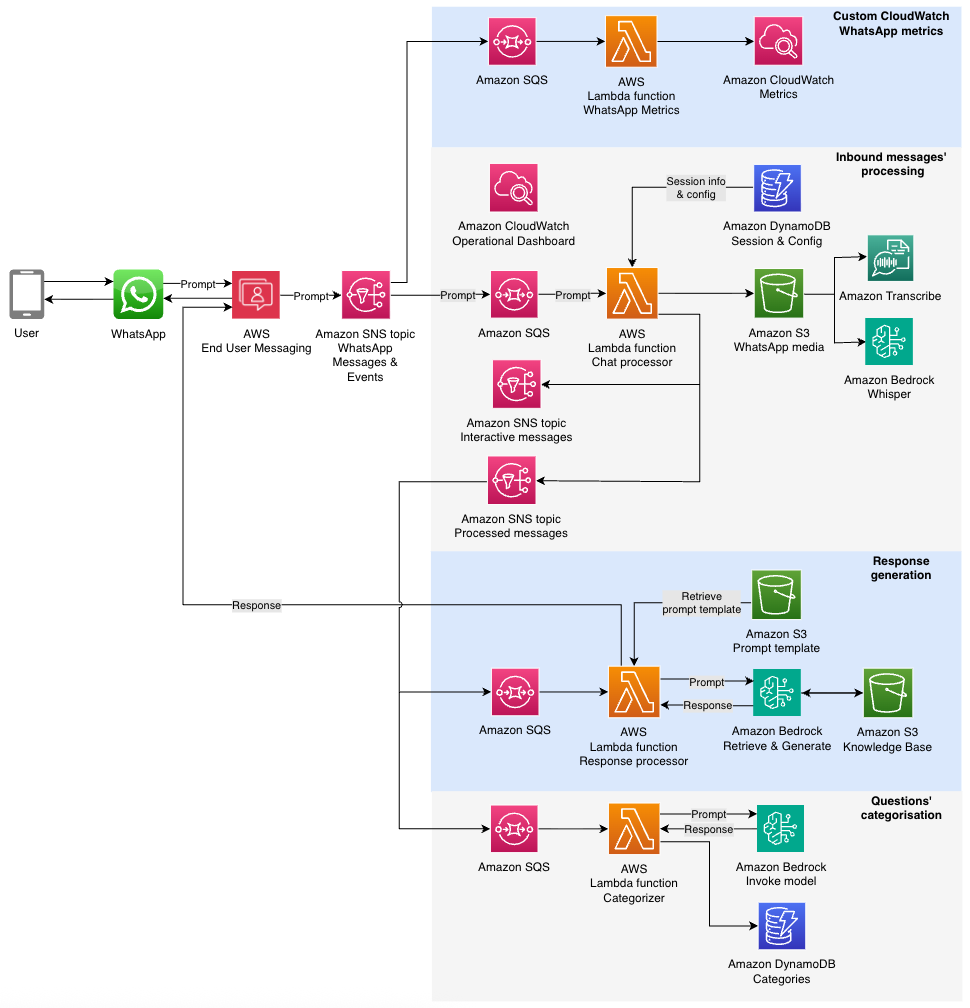
This fan-out architecture promotes clean separation of concerns, avoids redundant processing, and makes it straightforward to introduce new capabilities such as sentiment analysis or content moderation by simply adding new subscribers. By decoupling components and using Amazon SNS and Amazon SQS patterns, each part of the system can scale independently and recover gracefully from localized failures.
When integrating with other AWS services such as Amazon Bedrock, with soft service quotas, it’s critical to manage throughput carefully. Use Amazon SQS to decouple the SNS topic from Lambda invocations. This makes sure spikes in message volume don’t result in throttling or failed invocations. It also lets you scale consumer Lambda functions based on queue depth, allowing for burst handling without dropping messages. In cases where message failure is unrecoverable (such as invalid content or unsupported message types), log the error and notify the user with a helpful message rather than retrying. This keeps the user informed and prevents queues from growing unnecessarily due to retry cycles. This design pattern of Amazon SNS to Amazon SQS to Lambda is foundational for building resilient, scalable AI assistants that meet user expectations for speed and reliability.
WhatsApp voice messages are received in OGG format. To process these messages, you can use the AWS End User Messaging GetWhatsAppMessageMedia API to retrieve media files, including audio, images, and video. The audio needs to be converted to a compatible format for transcription: PCM for Amazon Transcribe or WAV for Hugging Face Whisper (available through Amazon Bedrock Marketplace). This conversion can be achieved using a library like FFmpeg, implemented as a Lambda layer.
The processing flow involves fetching audio from WhatsApp, which is then automatically stored in Amazon Simple Storage Service (Amazon S3) in a bucket you create and own (this is the default behavior of the GetWhatsAppMessageMedia API). Next, the audio is converted to the required format and stored locally in Lambda for faster processing before being transcribed.
As a best practice, consider deleting audio files after processing to simplify data management and reduce storage requirements for personally identifiable information (PII). This approach facilitates efficient handling and transcription of WhatsApp voice messages while maintaining data privacy standards.
To promote quality and security, implement layered validation within your message processing Lambda function. This might differ depending your use case and requirements:
true. The typing indicator automatically dismisses after 25 seconds without a reply.type field. Implement checks based on your AI assistant’s supported message types and provide static responses for unsupported formats. For example, a text only AI assistant shouldn’t process message types such as Media, Reaction, Template, Location, Contacts or Interactive.true. While active, new messages receive a static response indicating that a previous message is being processed, avoiding out-of-sync responses and resource waste.Consider the following security best practices for message processing systems:
The AWS Summit Assistant used two key Amazon Bedrock capabilities:
InvokeModel API, inbound messages were tagged with categories for analytics. A DynamoDB table stored category counts, enabling trend detection across users.Sessions persisted using the Amazon Bedrock native session ID feature for consistent conversation flow.
Consider the following monitoring and data analysis options:
Deployed at AWS Summit Dubai 2025, AWS Summit Johannesburg 2025, AWS Cloud Day Türkiye, AWS Cloud Day Riyadh and re:Inforce re:Cap London 2025, this WhatsApp AI assistant performed the following functions:
The AI assistant processed over 2,000 questions with no service interruptions, showing the viability of serverless architecture for WhatsApp-based assistants.
Building a scalable and secure WhatsApp AI assistant with AWS offers numerous advantages for businesses looking to enhance customer engagement. By using AWS services like AWS End User Messaging, Amazon Bedrock, Lambda, and DynamoDB, builders can create robust, AI-powered assistants that handle high message volumes while maintaining security and performance. Key takeaways include:
Although these practices provide a strong foundation, they represent just a subset of possible best practices. As WhatsApp and AWS services grow and industry standards change, best practices continue to evolve. Stay current by regularly reviewing AWS documentation and keeping up with new feature releases.
To get started with your WhatsApp AI assistant implementation, refer to the Github repository Chat Orchestrator for Generative AI Conversations.
Post Syndicated from The Atlantic original https://www.youtube.com/shorts/UKM3nUZo1H0
Post Syndicated from Емилия Милчева original https://www.toest.bg/lukoyl-ti-roden-nash/

Въздишките на облекчение, които се чуват, идват откъм Министерския съвет. Вече не е необходимо правителството да прави постановки, че има план за действие, за да предотврати дефицит и спекула с горива в България заради санкциите върху „Лукойл“. Те бяха наложени от американската Служба за контрол на чуждестранните активи (OFAC) на две от най-големите руски компании – държавната „Роснефт“ и частната „Лукойл“, и влизат в сила на 21 ноември. Причината е, че руските енергийни компании са основен източник за финансиране на войната, която Русия започна в Украйна през 2022 г. и не желае да спре.
Сега на българското и на други европейски правителства, като тези на Нидерландия и Румъния, където „Лукойл“ има собственост, им остава само да чакат дали ΟFAC ще издаде разрешение за сделка, или по-скоро за обвързващото споразумение, между кипърската Gunvor Group Ltd. и дъщерната компания на „Лукойл“ – LUKOIL International GmbH, регистрирана във Виена, която притежава задграничните ѝ активи. Защото кипърското дружество със седалище в Женева подаде оферта да ги купи и руската компания веднага я прие и няма да преговаря с други потенциални кандидати.
„Лукойл“ най-напред съобщи, че продава задграничните си активи. Три дни по-късно дойде и новината за купувача с изявление от руската компания, че „ключово важните условия на сделката са били предварително договорени от страните“.
Не става ясна цената – прогнозите се движат от над 9 до 12–15 млрд. долара, което надхвърля повече от два пъти собствения капитал на Gunvor. Но колкото и да получи „Лукойл“, те ще останат блокирани в специална ескроу сметка, докато не бъдат вдигнати санкциите. Може да се наложи купувачът и продавачът да поискат от ΟFAC да удължи срока за влизане на санкциите в сила, за да осигурят непрекъсната дейност и банкови услуги по време на процеса по приключване на сделката.
В обхвата на чуждестранните активи на „Лукойл“ попада и рафинерията в България – най-голямата на Балканите, чийто капацитет е за преработка на над 196 000 тона барела на ден, – също и над 220 бензиностанции, складове за горива, тръбопроводи, терминали в София, Варна, Пловдив, Стара Загора, Враца и още логистична инфраструктура. Друго дружество на „Лукойл“ в България отговаря за т.нар. бункеровка – доставки и зареждане на горива за кораби в черноморските пристанища, а още едно – за авиационно гориво, обслужвайки летищата в София, Варна и Бургас.
„Лукойл“ има господстващо положение на пазара на горива на едро в България и този дял не може да бъде компенсиран с внос, ако рафинерията спре работа. А причината е, че съседни държави също ще се нуждаят от внос на горива, тъй като и румънската рафинерия на „Лукойл“ ще спре. Предприятието в Плоещ (Petrotel Lukoil) e с четирикратно по-малък капацитет от българското.
Надеждите да не бъде разтърсен пазарът на горива, а с това да се повиши инфлацията, са в законовото задължение за 90-дневен запас от горива за всички страни в ЕС. Остава и да са налични. Управляващите през ден уверяват, че горива ще има до Нова година, а и след това.
Но и сръбският президент Александър Вучич преди седмици уверяваше в същото гражданите на Сърбия, обезпокоени заради санкциите, наложени на Naftna Industrija Srbije (NIS), в която мажоритарен акционер е руската „Газпром“ (NIS е и операторът на рафинерията в Панчево):
До Нова година няма да има проблеми с доставките на горива. Имаме достатъчно количества – бензин, дизел, мазут – резервите ни са пълни, няма къде да съхраняваме повече.
Реалността се оказа по-различна. По бензиностанциите от веригата ΝΙS се стигна до хаос заради невъзможността да се плати с карта, а ритмичното снабдяване с горива изглежда застрашено. „Единствената петролна рафинерия в Сърбия ще продължи да работи само до 25 ноември, ако не бъдат осигурени нови доставки на суров петрол, преустановени заради американските санкции“, съобщи агенция „Танюг“, цитирайки енергийната министърка на Сърбия.
Никой обаче не се наема да коментира какво ще се случи, ако дотогава ΟFAC не разреши сделката. Или пък ако не я разреши изобщо заедно с други приложими лицензи и разрешения в съответните юрисдикции.
Министерството на финансите на САЩ вече издаде временен лиценз, който освобождава германския бизнес на „Роснефт“ от санкции до април 2026 г. Берлин разглежда вариантите за изземване на активите на санкционираната компания и продажбата им на чуждестранен инвеститор. „Роснефт“ притежава контролен дял в ключовата рафинерия „Швет“, която осигурява по-голямата част от горивото за Берлин и Източна Германия, включително за летището и химическата индустрия. Компанията е акционер и в рафинериите MiRo и Bayernoil, но не държи контролен пакет, затова те не попадат под санкции.
Вървят и предположения, че продажбата може да е била договорена на най-високо ниво между президентите на САЩ и Русия. Официално потвърждение за тези хипотези няма. Но това е мащабна сделка, а петролът винаги е бил геополитика.
Има ли договорка, ще проличи по действията на ΟFAC, която ще трябва да одобри или да отхвърли кандидат-купувача. А макар компанията Gunvor Group Ltd. да е един от най-големите търговци на суров петрол в света и да работи в повече от 100 държави, славата ѝ има дълбоки руски корени.
Gunvor e регистрирана в Кипър през 2000 г., а само няколко месеца по-рано международната одиторска компания Arthur Andersen, наета като консултант от Агенцията за приватизация избира „Лукойл“ за купувач на „Нефтохим – Бургас“. Gunvor е създадена от шведа Торбьорн Торнквист и руснака Генадий Тимченко, който е от приближените на президента Путин.
Наскоро той купи дела от 50% на британската Shell в находище за петрол в западната част на Сибир. Forbes го определя като шестия най-богат човек в Русия, с нетно богатство от 23,3 млрд. долара. През 2014 г., буквално часове преди да попадне в списъка на санкционирани руснаци заради руската анексия на Крим, Тимченко продава дела си от 43,5% на своя съдружник Торнквист, който уверява, че компанията не работи с руски петрол, а доставя по-голямата част от нефта си от Северна и Южна Америка.
Според украинското издание Kyiv Independent „Gunvor e най-големият търговец на руски петрол преди пълномащабната военна инвазия в Украйна“. В свое изявление компанията осъди войната.
За 2024 г. отчетените от Gunvor приходи са за 136 млрд. долара, нетната печалба – 729 млн. долара от търговия с 232 млн. тона петрол.
Онова, което липсва в официалния уебсайт на компанията, са разследванията за сделките ѝ в Африка и Латинска Америка. Gunvor e била обект на серия разследвания за подкупи, пране на пари и липса на адекватни мерки за предотвратяване на корупция в няколко държави (Конго, Кот д’Ивоар, Еквадор и др.). През октомври 2019 г. търговецът на петрол е осъден да плати почти 94 млн. швейцарски франка (94,8 млн. долара) заради корупция в Конго и Кот д’Ивоар. Споразумението включва глоба от 4 млн. швейцарски франка (при максимална 5 млн.), както и брутна печалба плюс лихва, реализирана от петролни сделки в двете западноафрикански страни през 2009–2011 г. за стотици милиони долари. През 2023–2024 г. в Швейцария бе повдигнато обвинение срещу бивш финансов мениджър на Gunvor, отговарял за операциите в Конго.
В Еквадор компанията е обвинена в корупционни схеми, при които е плащано, за да бъдат печелени договори и придобивана вътрешна информация от държавната Petroecuador. Част от разследванията са засегнали и други търговци (Vitol, Glencore и др.), твърди Public Eye.
На 1 март Gunvor беше призната за виновна от съдилища в Швейцария и Съединените щати за подкупване на еквадорски длъжностни лица с цел получаване на барели петрол на цени под пазарните между 2013 и 2020 г. Доколкото ни е известно, никой от висшето ръководство на Gunvor досега не е бил разследван. Непубликуван документ, с който разполага Public Eye, показва, че много високопоставен ръководител е осъществявал контакти с Petroecuador, за да улесни сключването на договори за петрол.
На сайта на американското Министерство на правосъдието може да се прочете, че на 1 март 2024 г. (във втория мандат на президента Джо Байдън – б.а.) Gunvor се признава за виновна пред федералния съд в Бруклин и сключва споразумение да заплати над 661 млн. долара (в това число около 375 млн. долара наказателна глоба и над 287 млн. долара конфискация на „недобросъвестни печалби“). Компанията е поела отговорност за действията на някои от бившите си служители.
Подкупването на чуждестранни длъжностни лица окуражава корумпираните служители и подкопава върховенството на закона. Признанието за вина на Gunvor показва, че Наказателният отдел остава решителен в усилията си да изкорени подкупите и корупцията сред длъжностните лица. В координация с нашите международни партньори ще продължим да държим отговорни както корпорациите, така и лицата, които подкупват чуждестранни длъжностни лица.
Брент Уибъл, Министерство на правосъдието на САЩ
Ето тази компания, която анализаторите продължават да смятат за руски аватар, ще придобие активите на „Лукойл“. А те са значими: дял в едни от най-големите петролни находища в света – иракските „Ериду“ и West Qurna-2, от което се добиват над 480 000 барела на ден; дял в находищата „Шах Дениз“ в Азербайджан (19,99%), в „Карачаганак“ и „Тенгиз“ в Казахстан (13,5% и 5%), в „Кандъм-Каузак-Шади“ и „Гисар“ в Узбекистан. „Лукойл“ притежава 10% от нефтения и газов проект „Гаша“ в Абу Даби, а в Мексико съвместно с италианската Eni и мексиканската PetroBal разработва четири блока. В Африка участва в проекти в Гана (Deepwater Tano/Cape Three Points), Египет (West Esh El-Mallaha – WEEM, Meleiha и продължение на WEEM), Камерун (Etinde), Република Конго (Marine XII) и Нигерия (блок OML-140).
Освен рафинериите в България и Румъния руската компания притежава 45% от рафинерията Zeeland в Нидерландия чрез съвместно дружество с френската Total Energies. Компанията управлява мрежа от над 2456 бензиностанции в чужбина.
Заради санкциите на САЩ и Обединеното кралство обаче чуждестранните партньори на „Лукойл“ в тези проекти ще „преоценят“ своето участие. Ако сделката с Gunvor бъде одобрена, Shell, японската Ιnpex и Total Energies може да продължат бизнеса си.
Държавите, в които „Лукойл“ и „Роснефт“ имат активи, предприемат различни стъпки. Румъния ще анализира обявената потенциална сделка за активите на „Лукойл“ чрез комисията си, отговорна за чуждестранните инвестиции, стана ясно от изявление на румънското Министерство на енергетиката.
Преди да се вземе каквото и да е решение, е необходимо да се анализира позицията, която ще заеме Европейският съюз, като се има предвид, че Румъния вече прилага режима на санкции на ЕС и ще действа стриктно в тази рамка.
Германия върви към национализация на активите на „Роснефт“. Белград се надява крайният срок да се удължи поне до декември, докато Вашингтон очаква „Газпром“ да продаде дела си в NIS. За дерогация за руския петрол ще моли Тръмп и унгарският президент Виктор Орбан на среща на 7 ноември. Орбан изтъква, че без руски доставки „цените ще скочат“ и икономиката ще се срине, а аргументът му е, че Унгария получава главно руски петрол през тръбопровода „Дружба“. Орбан е под натиск заради предстоящите догодина избори, които предварителните сондажи показват, че ще изгуби.
На този фон българските власти не смеят да гъкнат. Упоритите слухове, че „Лукойл“ продава активите си в България, вървят от две години и за кандидати бяха спрягани държавни компании от Азербайджан, Киргизстан и Унгария. Наскоро управляващото мнозинство начело с Борисов/Пеевски прокара скандалната поправка ДАНС да одобрява или отхвърля кандидата за бургаската рафинерия – въпреки че има 17-членен Съвет за скрининг на чуждестранните инвестиции, в който са представени и службите. Тази възможност съществува от 2024 г., когато законът влезе в сила, но прилагането на скрининга се отложи до 22 юли 2025 г., след като бяха приети и публикувани правилниците за прилагане и за дейността на Междуведомствения съвет за скрининг. С ДАНС поправката се прокламира, че ако такива разпоредителни сделки бъдат извършени без подобно одобрение, ще се смятат за нищожни.
Новината за Gunvor свари управляващите неподготвени, а вкарването на особен управител в рафинерията – представител на държавата, който да поеме оперативното ръководство, ги плаши. Тази фигура беше уредена законодателно през 2022 г., когато Русия нападна Украйна. Целта е да действа от името на правителството и да защитава националния интерес.
Засега не е ясно дали българското контраразузнаване може да отхвърли Gunvor като купувач на четирите дружества на „Лукойл“ в България. Ако България може да направи това, значи и останалите европейски държави, където руската компания има активи, трябва да се произнесат. В българския закон за скрининг на чуждестранните инвестиции, който действа и в над 20 държави от ЕС, се изисква съгласуване с Европейската комисия при продажба на стратегически активи. Така че най-напред ще се чака произнасяне на OFAC и ЕК.
Този процес ще отнеме време, а правителството „успокоява“, че горива има до Нова година, тоест за два месеца. Междувременно управляващата коалиция поиска парламентът да забрани износа на дизел и на авиационно гориво.
ГЕРБ предлага да се ограничи износът на дизел и авиационно гориво. Това се прави с цел да се предотврати спекула с цените на горивата и злоупотреба с количествата, които България съхранява.
Делян Добрев
В последната седмица има рязък износ на горива в посока Сърбия, заяви депутатът Ивайло Мирчев (ПП–ДБ), който критикува управляващите, че нямат ясен план и предприемат „пожарни действия“.
Преди близо 10 дни поискахме изслушване в НС на министрите за ситуацията с горивата. Беше ни отказано, а управляващите уверяваха, че всичко е наред и има запаси за 90 дни. Всички знаем, че това са глупости, защото част от търговците на горива не участват в попълването на запаси.
Засега властта е заела любимата поза на българските управници пред (геополитическите) бури – снишаване. Ако обаче не гарантират ритмичния поток на снабдяване с горива, докато чакат решението на Вашингтон, ветровете може и да ги съборят.
Post Syndicated from jzb original https://lwn.net/Articles/1044383/
Michael Hudson-Doyle, a member of Ubuntu’s Foundations team, has announced
the introduction of an “architecture variant” for Ubuntu 25.10:
By making changes to dpkg, apt and Launchpad, we are able to build
multiple versions of a package, each for a different level of the
x86-64 architecture, meaning we can have packages that specifically
target x86-64-v3, for example.As a result, we’re very excited to share that in Ubuntu 25.10, some
packages are available, on an opt-in basis, in their optimized form
for the more modern x86-64-v3 architecture level.
See the announcement for details on opting in to x86-64-v3
packages.
Post Syndicated from Vasil Kolev original https://vasil.ludost.net/blog/?p=3518
Случи се OpenFest 2025.
(аз в момента режа видеата и трябва тия дни да почнем да ги качваме)
По всякакви свидетелски показания, това е най-спокойно протеклия OpenFest до тук, дори от организационна гледна точка 🙂 И въпреки, че организирането никак не беше лесно, определено някакви неща ми бяха липсвали в последните две години.
А не беше лесно. По ред причини трябваше да събирам екип почти наново, да местим инфраструктура, да направим феста две седмици по-рано (не трябваше да се съгласявам, правили сме го и пак беше супер тежко), нова система за подаване на лекции (pretalx), online магазин за запазването на тениски и какво ли не още.
Програмата например се случи много в последния момент – отворихме CFP-то в края на май (от тогава е и първата подадена лекция), но в обявения срок (1 септември) имаше нещо като 34 подадени лекции, workshop-и и щандове, от които повечето в последните три дни. В крайна сметка имахме 74 с две удължавания на срока и ръчкане, но по принцип срок до 1 септември в държава, в която никой не работи през август не беше смислена идея. Та имахме програма по-малко от месец преди събитието, което ми се искаше да не се случва 🙂
(и има още доста неща, от които мога да се оплача, ама те са за postmortem-а)
Но, усещането да идеш в 8 сутринта в събота и да видиш как се върти видеото на телевизорите пред залата, да знаеш, че ей-сега започва и това е резултатът от всичкото това занимаване, или след цялата лудница да влезеш на афтърпартито и да видиш екипът колко се радва на свършената работа (е, и някои от тях да се опитат да те убият с пиене на шотове, вие се знаете кои сте)… Усещах как се ухилвам без да се усетя даже 🙂
(всичко това прави много по-лесно да ходя при доброволците и да питам “Догодина пак?” 🙂 )
От нещата, които много ме зарадваха, че сработиха е новия ни video setup, който ползвахме в голямата зала – изцяло open-source video mixer (има си repo), който успяхме да подкараме в сравнително кратки срокове, с усилията на няколко човека. Имаше малко додебъгване на неща в петък вечер, но двата дни работеше перфектно. Догодина ще гледам всичките ни setup-и да са без proprietary неща.
(бях поканил Марк от FOSDEM да удари едно рамо за видеото, и имаше толкова малко проблеми с цялото нещо, че в крайна сметка той успя да посвири прилично количество време на контрабаса, който бяхме замъкнали в залата)
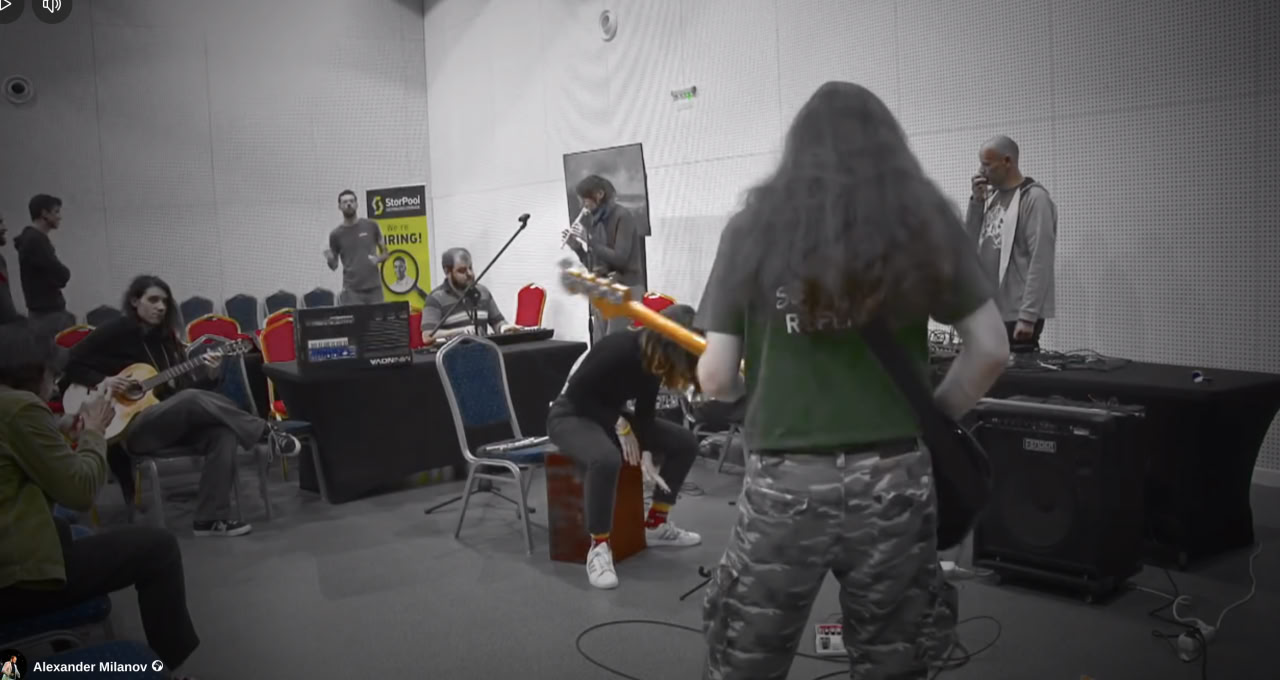
Организирахме и един music tech jam – Алекс Миланов се сети в последния момент, че можем да направим нещо такова, и събота вечер разни хора се насъбрахме и пробвахме да свирим заедно и да си разменяме инструментите. От там ми е и любимата ми моя снимка от тоя фест.
Също така, имахме нов вариант за запазване/купуване на тениски, през online магазин, който сглобихме заедно с init Lab – избегнахме древните google форми, имахме доста по-добър поглед върху всичко, и успяхме да го навържем с POS терминал и дори да приемаме карти. Имаше някакви количество проблеми, но много по-малко, отколкото очакваме, което се дължи на всички, които участваха в това (и някои даже не спаха една нощ).
(и много много много други неща, дето дори ми е трудно да изброя, все подробности и все важни,
И разбира се, имаше оплаквания, мисля да адресирам няколко от тях:
Едното беше, че сме дали сцена на политическа фигура. Мога много лесно да се оправдая с програмният комитет (в който нямах никакво участие), но това да не се съгласим Божидар Божанов да говори, само заради това е просто тъпо – той е бил лектор по събития и на OpenFest отпреди да я има партията, на която в момента е лидер, свършил е много и полезни неща в и извън политиката, и беше подал лекция, която е важна за OpenFest публиката. Което си личи и от това, че беше много посещавана, мисля и най-гледана на stream-а, и една от най-гласуваните в системата. Та, това е бил съвсем правилен избор.
(по същата тема, хората казват “ама не се политизирайте”. Не съм сигурен как да кажа най-добре “what a load of crap” на български, защото това, че държим на отворени технологии, това, че сме отворени за всякакви хора без значение пол, раса и квото-е-там са си политически позиции, които всъщност защитаваме. Няма да приемем лекция на някой, който иска да забрани open source или да избеси всички бежанци или там каквито е модерно да не се харесват, например.)
Другото беше какви спонсори сме допуснали тази година, т.е. такива, които разработват софтуер за хазарт. Имам съвсем прост отговор на това, който е, че имаше избор между това да се случи и да не се случи OpenFest, мисля, че е очевидно какво избрахме. Ще се радвам много ако не трябва да правя такива избори, но по ред причини се налагаше.
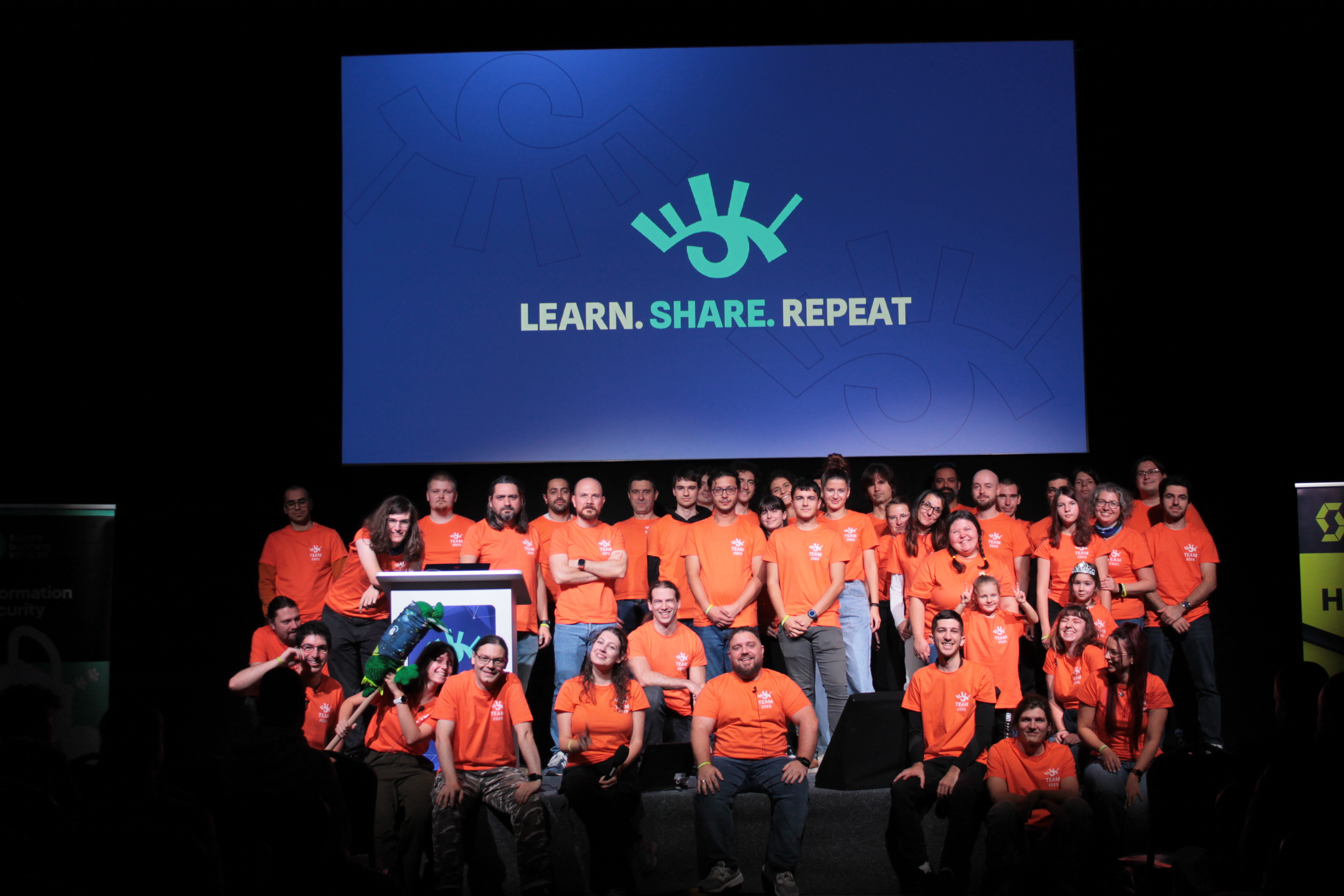
И да приключа с любимата ми снимка от събитието. Двамата Ивановци и някакви хора липсват, че имаше малко объркване с програмата, та чакаме някой да ги photoshop-не в снимката…
Post Syndicated from jzb original https://lwn.net/Articles/1044380/
Security updates have been issued by AlmaLinux (java-1.8.0-openjdk, java-17-openjdk, libtiff, redis, and redis:6), Debian (chromium, mediawiki, pypy3, and squid), Fedora (openbao), SUSE (cdi-apiserver-container, cdi-cloner-container, cdi- controller-container, cdi-importer-container, cdi-operator-container, cdi- uploadproxy-container, cdi-uploadserver-container, cont, chromium, chrony, expat, haproxy, himmelblau, ImageMagick, iputils, kernel, libssh, libxslt, openssl-3, podman, strongswan, xorg-x11-server, and xwayland), and Ubuntu (kernel, libxml2, libyaml-syck-perl, linux, linux-aws, linux-aws-hwe, linux-gcp, linux-gcp-4.15, linux-hwe,
linux-oracle, linux-fips, linux-aws-fips, linux-gcp-fips, linux-kvm, and netty).
Post Syndicated from Lucas Pardue original https://blog.cloudflare.com/go-and-enhance-your-calm/
In September 2025, a thread popped up in our internal engineering chat room asking, “Which part of our stack would be responsible for sending ErrCode=ENHANCE_YOUR_CALM to an HTTP/2 client?” Two internal microservices were experiencing a critical error preventing their communication and the team needed a timely answer.
In this blog post, we describe the background to well-known HTTP/2 attacks that trigger Cloudflare defences, which close connections. We then document an easy-to-make mistake using Go’s standard library that can cause clients to send PING flood attacks and how you can avoid it.

HTTP/2 defines a binary wire format for encoding HTTP semantics. Request and response messages are encoded as a series of HEADERS and DATA frames, each associated with a logical stream, sent over a TCP connection using TLS. There are also control frames that relate to the management of streams or the connection as a whole. For example, SETTINGS frames advertise properties of an endpoint, WINDOW_UPDATE frames provide flow control credit to a peer so that it can send data, RST_STREAM can be used to cancel or reject a request or response, while GOAWAY can be used to signal graceful or immediate connection closure.
HTTP/2 provides many powerful features that have legitimate uses. However, with great power comes responsibility and opportunity for accidental or intentional misuse. The specification details a number of denial-of-service considerations. Implementations are advised to harden themselves: “An endpoint that doesn’t monitor use of these features exposes itself to a risk of denial of service. Implementations SHOULD track the use of these features and set limits on their use.”

Cloudflare implements many different HTTP/2 defenses, developed over years in order to protect our systems and our customers. Some notable examples include mitigations added in 2019 to address “Netflix vulnerabilities” and in 2023 to mitigate Rapid Reset and similar style attacks.
When Cloudflare detects that HTTP/2 client behaviour is likely malicious, we close the connection using the GOAWAY frame and include the error code ENHANCE_YOUR_CALM.
One of the well-known and common attacks is CVE-2019-9512, aka PING flood: “The attacker sends continual pings to an HTTP/2 peer, causing the peer to build an internal queue of responses. Depending on how efficiently this data is queued, this can consume excess CPU, memory, or both.” Sending a PING frame causes the peer to respond with a PING acknowledgement (indicated by an ACK flag). This allows for checking the liveness of the HTTP connection, along with measuring the layer 7 round-trip time – both useful things. The requirement to acknowledge a PING, however, provides the potential attack vector since it generates work for the peer.
A client that PINGs the Cloudflare edge too frequently will trigger our CVE-2019-9512 mitigations, causing us to close the connection. Shortly after we launched support for gRPC in 2020, we encountered interoperability issues with some gRPC clients that sent many PINGs as part of a performance optimization for window tuning. We also discovered that the Rust Hyper crate had a feature called Adaptive Window that emulated the design and triggered a similar problem until Hyper made a fix.
When that thread popped up asking which part of our stack was responsible for sending the ENHANCE_YOUR_CALM error code, it was regarding a client communicating over HTTP/2 between two internal microservices.
We suspected that this was an HTTP/2 mitigation issue and confirmed it was a PING flood mitigation in our logs. But taking a step back, you may wonder why two internal microservices are communicating over the Cloudflare edge at all, and therefore hitting our mitigations. In this case, communicating over the edge provides us with several advantages:
We get to dogfood our edge infrastructure and discover issues like this!
We can use Cloudflare Access for authentication. This allows our microservices to be accessed securely by both other services (using service tokens) and engineers (which is invaluable for debugging).
Internal services that are written with Cloudflare Workers can easily communicate with services that are accessible at the edge.

The question remained: Why was this client behaving this way? We traded some ideas as we attempted to get to the bottom of the issue.
The client had a configuration that would indicate that it didn’t need to PING very frequently:
t2.PingTimeout = 2 * time.Second
t2.ReadIdleTimeout = 5 * time.Second
However, in situations like this it is generally a good idea to establish ground truth about what is really happening “on the wire.” For instance, grabbing a packet capture that can be dissected and explored in Wireshark can provide unequivocal evidence of precisely what was sent over the network. The next best option is detailed/trace logging at the sender or receiver, although sometimes logging can be misleading, so caveat emptor.
In our particular case, it was simpler to use logging with GODEBUG=http2debug=2. We built a simplified minimal reproduction of the client that triggered the error, helping to eliminate other potential variables. We did some group log analysis, combined with diving into some of the Go standard library code to understand what it was really doing. Issac Asimov is commonly credited with the quote “The most exciting phrase to hear in science, the one that heralds new discoveries, is not ‘Eureka!’ but ‘That’s funny…'” and sure enough, within the hour someone declared–
the funny part I see is this:
2025/09/02 17:33:18 http2: Framer 0x14000624540: wrote RST_STREAM stream=9 len=4 ErrCode=CANCEL
2025/09/02 17:33:18 http2: Framer 0x14000624540: wrote PING len=8 ping="j\xe7\xd6R\xdaw\xf8+"
every ping seems to be preceded by a RST_STREAM
Observant readers will recall the earlier mention of Rapid Reset. However, our logs clearly indicated ENHANCE_YOUR_CALM being triggered due to the PING flood. A bit of searching landed us on this mailing list thread and the comment “Sending a PING frame along with an RST_STREAM allows a client to distinguish between an unresponsive server and a slow response.” That seemed quite relevant. We also found a change that was committed related to this topic. This partly answered why there were so many PINGs, but it also raised a new question: Why so many stream resets?
So we went back to the logs and built up a little more context about the interaction:
2025/09/02 17:33:18 http2: Transport received DATA flags=END_STREAM stream=47 len=0 data=""
2025/09/02 17:33:18 http2: Framer 0x14000624540: wrote RST_STREAM stream=47 len=4 ErrCode=CANCEL
2025/09/02 17:33:18 http2: Framer 0x14000624540: wrote PING len=8 ping="\x97W\x02\xfa>\xa8\xabi"
The interesting thing here is that the server had sent a DATA frame with the END_STREAM flag set. Per the HTTP/2 stream state machine, the stream should have transitioned to closed when a frame with END_STREAM was processed. The client doesn’t need to do anything in this state – sending a RST_STREAM is entirely unnecessary.

A little more digging and noodling and an engineer proclaimed:
I noticed that the reset+ping only happens when you call resp.Body.Close()
I believe Go’s HTTP library doesn’t actually read the response body automatically, but keeps the stream open for you to use until you call resp.Body.Close(), which you can do at any point you like.
The hilarious thing in our example was that there wasn’t actually any HTTP body to read. From the earlier example: received DATA flags=END_STREAM stream=47 len=0 data="".
Science and engineering are at times weird and counterintuitive. We decided to tweak our client to read the (absent) body via io.Copy(io.Discard, resp.Body) before closing it.
Sure enough, this immediately stopped the client sending both a useless RST_STREAM and, by association, a PING frame.
Mystery solved?
To prove we had fixed the root cause, the production client was updated with a similar fix. A few hours later, all the ENHANCE_YOUR_CALM closures were eliminated.
It’s worth noting that in some situations, ensuring the response body is always read can sometimes be unintuitive in Go. For example, at first glance it appears that the response body will always be read in the following example:
resp, err := http.DefaultClient.Do(req)
if err != nil {
	return err
}
defer resp.Body.Close()

if err := json.NewDecoder(resp.Body).Decode(&respBody); err != nil {
	return err
}
However, json.Decoder stops reading as soon as it finds a complete JSON document or errors. If the response body contains multiple JSON documents or invalid JSON, then the entire response body may still not be read.
Therefore, in our clients, we’ve started replacing defer response.Body.Close() with the following pattern to ensure that response bodies are always fully read:
resp, err := http.DefaultClient.Do(req)
if err != nil {
	return err
}
defer func() {
	io.Copy(io.Discard, resp.Body)
	resp.Body.Close()
}()

if err := json.NewDecoder(resp.Body).Decode(&respBody); err != nil {
	return err
}HTTP/2 is a protocol with several features. Many implementations have implemented hardening to protect themselves from misuse of features, which can trigger a connection to be closed. The recommended error code for closing connections in such conditions is ENHANCE_YOUR_CALM. There are numerous HTTP/2 implementations and APIs, which may drive the use of HTTP/2 features in unexpected ways that could appear like attacks.
If you have an HTTP/2 client that encounters closures with ENHANCE_YOUR_CALM, we recommend that you try to establish ground truth with packet captures (including TLS decryption keys via mechanisms like SSLKEYLOGFILE) and/or detailed trace logging. Look for patterns of frequent or repeated frames that might be similar to malicious traffic. Adjusting your client may help avoid it getting misclassified as an attacker.
If you use Go, we recommend always reading HTTP/2 response bodies (even if empty) in order to avoid sending unnecessary RST_STREAM and PING frames. This is especially important if you use a single connection for multiple requests, which can cause a high frequency of these frames.
This was also a great reminder of the advantages of dogfooding our own products within our internal services. When we run into issues like this one, our learnings can benefit our customers with similar setups.