Post Syndicated from xkcd.com original https://xkcd.com/3081/

Post Syndicated from xkcd.com original https://xkcd.com/3081/
Post Syndicated from jzb original https://lwn.net/Articles/1018826/
The Debian Project Leader election results
have been announced. Andreas
Tille has been re-elected and will serve another term through
April 2026. LWN looked at the election and
candidates in early April.
Post Syndicated from Channy Yun (윤석찬) original https://aws.amazon.com/blogs/aws/in-the-works-new-availability-zone-in-maryland-for-us-east-n-virginia-region/
The US East (Northern Virginia) Region was the first Region launched by Amazon Web Services (AWS), and it has seen tremendous growth and customer adoption over the past several years. Now hosting active customers ranging from startups to large enterprises, AWS has steadily expanded the US East (Northern Virginia) Region infrastructure and capacity. The US East (Northern Virginia) Region consists of six Availability Zones, providing customers with enhanced redundancy and the ability to architect highly available applications.
Today, we’re announcing that a new Availability Zone located in Maryland will be added to the US East (Northern Virginia) Region, which is expected to open in 2026. This new Availability Zone will be connected to other Availability Zones by high-bandwidth, low-latency network connections over dedicated, fully redundant fiber. The upcoming Availability Zone in Maryland will also be instrumental in supporting the rapid growth of generative AI and advanced computing workloads in the US East (Northern Virginia) Region.
All Availability Zones are physically separated in a Region by a meaningful distance, many kilometers (km) from any other Availability Zone, although all are within 100 km (60 miles) of each other. The network performance is sufficient to accomplish synchronous replication between Availability Zones in Maryland and Virginia within the US East (Northern Virginia) Region. If your application is partitioned across multiple Availability Zones, your workloads are better isolated and protected from issues such as power outages, lightning strikes, tornadoes, earthquakes, and more.
With this announcement, AWS now has four new Regions in the works—New Zealand, Kingdom of Saudi Arabia, Taiwan, and the AWS European Sovereign Cloud—and 13 upcoming new Availability Zones.
Geographic information for the new Availability Zone
In March, we provided more granular visibility into the geographic location information of all AWS Regions and Availability Zones. We have updated the AWS Regions and Availability Zones page to reflect the new geographic information for this upcoming Availability Zone in Maryland. As shown in the following screenshot, the infrastructure for the upcoming Availability Zone will be located in Maryland, United States of America, for the US East (Northern Virginia) us-east-1 Region.

You can continue to use this geographic information to choose Availability Zones that align with your regulatory, compliance, and operational requirements.
After the new Availability Zone is launched, it will be available along with other Availability Zones in the US East (Northern Virginia) Region through the AWS Management Console, AWS Command Line Interface (AWS CLI), and AWS SDKs.
Stay tuned
We plan to make this new Availability Zone in the US East (Northern Virginia) Region generally available in 2026. As usual, check out the Regional news of the AWS News Blog so that you’ll be among the first to know when the new Availability Zone is open!
To learn more, visit the AWS Global Infrastructure Regions and Availability Zones page or AWS Regions and Availability Zones in the AWS documentation and send feedback to AWS re:Post or through your usual AWS Support contacts.
— Channy
How is the News Blog doing? Take this 1 minute survey!
(This survey is hosted by an external company. AWS handles your information as described in the AWS Privacy Notice. AWS will own the data gathered via this survey and will not share the information collected with survey respondents.)
Post Syndicated from Micah Walter original https://aws.amazon.com/blogs/aws/enhance-real-time-applications-with-aws-appsync-events-data-source-integrations/
Today, we are announcing that AWS AppSync Events now supports data source integrations for channel namespaces, enabling developers to create more sophisticated real-time applications. With this new capability you can associate AWS Lambda functions, Amazon DynamoDB tables, Amazon Aurora databases, and other data sources with channel namespace handlers. With AWS AppSync Events, you can build rich, real-time applications with features like data validation, event transformation, and persistent storage of events.
With these new capabilities, developers can create sophisticated event processing workflows by transforming and filtering events using Lambda functions or save batches of events to DynamoDB using the new AppSync_JS batch utilities. The integration enables complex interactive flows while reducing development time and operational overhead. For example, you can now automatically persist events to a database without writing complex integration code.
First look at data source integrations
Let’s walk through how to set up data source integrations using the AWS Management Console. First, I’ll navigate to AWS AppSync in the console and select my Event API (or create a new one).

Persisting event data directly to DynamoDB
There are multiple kinds of data source integrations to choose from. For this first example, I’ll create a DynamoDB table as a data source. I’m going to need a DynamoDB table first, so I head over to DynamoDB in the console and create a new table called event-messages. For this example, all I need to do is create the table with a Partition Key called id. From here, I can click Create table and accept the default table configuration before I head back to AppSync in the console.

Back in the AppSync console, I return to the Event API I set up previously, select Data Sources from the tabbed navigation panel and click the Create data source button.

After giving my Data Source a name, I select Amazon DynamoDB from the Data source drop down menu. This will reveal configuration options for DynamoDB.

Once my data source is configured, I can implement the handler logic. Here’s an example of a Publish handler that persists events to DynamoDB:
import * as ddb from '@aws-appsync/utils/dynamodb'
import { util } from '@aws-appsync/utils'

const TABLE = 'events-messages'

export const onPublish = {
  request(ctx) {
    const channel = ctx.info.channel.path
    const timestamp = util.time.nowISO8601()
    return ddb.batchPut({
      tables: {
        [TABLE]: ctx.events.map(({id, payload}) => ({
          channel, id, timestamp, ...payload,
        })),
      },
    })
  },
  response(ctx) {
    return ctx.result.data[TABLE].map(({ id, ...payload }) => ({ id, payload }))
  },
}
To add the handler code, I go the tabbed navigation for Namespaces where I find a new default namespace already created for me. If I click to open the default namespace, I find the button that allows me to add an Event handler just below the configuration details.
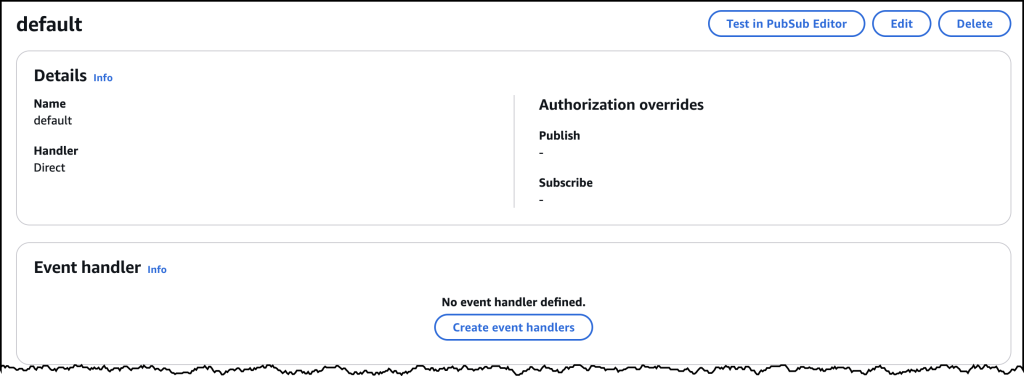
Clicking on Create event handlers brings me to a new dialog where I choose Code with data source as my configuration, and then select the DynamoDB data source as my publish configuration.

After saving the handler, I can test the integration using the built-in testing tools in the console. The default values here should work, and as you can see below, I’ve successfully written two events to my DynamoDB table.

Here’s all my messages captured in DynamoDB!

Error handling and security
The new data source integrations include comprehensive error handling capabilities. For synchronous operations, you can return specific error messages that will be logged to Amazon CloudWatch, while maintaining security by not exposing sensitive backend information to clients. For authorization scenarios, you can implement custom validation logic using Lambda functions to control access to specific channels or message types.
Available now
AWS AppSync Events data source integrations are available today in all AWS Regions where AWS AppSync is available. You can start using these new features through the AWS AppSync console, AWS command line interface (CLI), or AWS SDKs. There is no additional cost for using data source integrations – you pay only for the underlying resources you use (such as Lambda invocations or DynamoDB operations) and your existing AppSync Events usage.
To learn more about AWS AppSync Events and data source integrations, visit the AWS AppSync Events documentation and get started building more powerful real-time applications today.
How is the News Blog doing? Take this 1 minute survey!
(This survey is hosted by an external company. AWS handles your information as described in the AWS Privacy Notice. AWS will own the data gathered via this survey and will not share the information collected with survey respondents.)
Post Syndicated from LGR original https://www.youtube.com/watch?v=vXezgCFvuwI
Post Syndicated from Sandeep Adwankar original https://aws.amazon.com/blogs/big-data/amazon-sagemaker-lakehouse-now-supports-attribute-based-access-control/
Amazon SageMaker Lakehouse now supports attribute-based access control (ABAC) with AWS Lake Formation, using AWS Identity and Access Management (IAM) principals and session tags to simplify data access, grant creation, and maintenance. With ABAC, you can manage business attributes associated with user identities and enable organizations to create dynamic access control policies that adapt to the specific context.
SageMaker Lakehouse is a unified, open, and secure data lakehouse that now supports ABAC to provide unified access to general purpose Amazon S3 buckets, Amazon S3 Tables, Amazon Redshift data warehouses, and data sources such as Amazon DynamoDB or PostgreSQL. You can then query, analyze, and join the data using Redshift, Amazon Athena, Amazon EMR, and AWS Glue. You can secure and centrally manage your data in the lakehouse by defining fine-grained permissions with Lake Formation that are consistently applied across all analytics and machine learning(ML) tools and engines. In addition to its support for role-based and tag-based access control, Lake Formation extends support to attribute-based access to simplify data access management for SageMaker Lakehouse, with the following benefits:
Previously, within SageMaker Lakehouse, Lake Formation granted access to resources based on the identity of a requesting user. Our customers were requesting the capability to express the full complexity required for access control rules in organizations. ABAC allows for more flexible and nuanced access policies that can better reflect real-world needs. Organizations can now grant permissions on a resource based on user attribute and is context-driven. This allows administrators to grant permissions on a resource with conditions that specify user attribute keys and values. IAM principals with matching IAM or session tag key-value pairs will gain access to the resource.
Instead of creating a separate role for each team member’s access to a specific project, you can set up ABAC policies to grant access based on attributes like membership and user role, reducing the number of roles required. For instance, without ABAC, a company with an account manager role that covers five different geographical territories needs to create five different IAM roles and grant data access for only the specific territory for which the IAM role is meant. With ABAC, they can simply add those territory attributes as keys/values to the principal tag and provide data access grants based on those attributes. If the value of the attribute for a user changes, access to the dataset will automatically be invalidated.
With ABAC, you can use attributes such as department or country and use IAM or sessions tags to determine access to data, making it more straightforward to create and maintain data access grants. Administrators can define fine-grained access permissions with ABAC to limit access to databases, tables, rows, columns, or table cells.
In this post, we demonstrate how to get started with ABAC in SageMaker Lakehouse and use with various analytics services.
To illustrate the solution, we are going to consider a fictional company called Example Retail Corp. Example Retail’s leadership is interested in analyzing sales data in Amazon S3 to determine in-demand products, understand customer behavior, and identify trends, for better decision-making and increased profitability. The sales department sets up a team for sales analysis with the following data access requirements:
For this post, we consider the database salesdb, which contains the store_sales table that has store sales details. The table store_sales has the following schema.

To demonstrate the product sales analysis use case, we will consider the following personas from the Example Retail Corp:
Ava decides to use SageMaker Lakehouse to unify data across various data sources while setting up fine-grained access control using ABAC. Alice is excited about this decision as she can now build daily reports using her expertise with Athena. Bob now knows that he can quickly build Amazon QuickSight dashboards with queries that are optimized using Redshift’s cost-based optimizer. Charlie, being an open source Apache Spark contributor, is excited that he can build Spark based processing with Amazon EMR to build ML forecasting models.
Ava defines the user attributes as static IAM tags that could also include attributes stored in the identity provider (IdP) or as session tags dynamically to represent the user metadata. These tags are assigned to IAM users or roles and can be used to define or restrict access to specific resources or data. For more details, refer to Tags for AWS Identity and Access Management resources and Pass session tags in AWS STS.
For this post, Ava assigns users with static IAM tags to represent the user attributes, including their department membership, Region assignment, and current role relationship. The following table summarizes the tags that represent user attributes and user assignment.
| User | Persona | Attributes | Access |
| Alice | Data Analyst | Department=salesRegion= USRole= Analyst |
Sales specific data in US and no access to customer data |
| Bob | BI Analyst | Department=salesRegion= USRole= BIAnalyst |
All data in US |
| Charlie | Data Scientist | Department=salesRegion= ALLRole= Scientist |
Sales specific data in All regions and no access to customer data |
Ava then defines access control policies in Lake Formation that grant or restrict access to certain resources based on predefined criteria (user attributes defined using IAM tags) being satisfied. This allows for flexible and context-aware security policies where access privileges can be adjusted dynamically by modifying the user attribute assignment without changing the policy rules. The following table summarizes the policies in the Sales department.
| Access | User Attributes | Policy |
| All analysts (including Alice) in US get access to sales specific data in US regions | Department=salesRegion= USRole= Analyst |
Table: store_sales (store_id, transaction_date, product_name, country, sales_price, quantity columns)Row filter: country='US' |
| All BI analysts (including Bob) in US get access to all data in US regions | Department=salesRegion= USRole= BIAnalyst |
Table: store_sales (all columns)Row filter: country='US' |
| All scientists (including Charlie) get access to sales-specific data from all regions | Department=salesRegion= ALLRole= Scientist |
Table: store_sales (all rows)Column filter: store_id, transaction_date, product_name, country, sales_price,quantity |
The following diagram illustrates the solution architecture.

Implementing this solution consists of the following high-level steps. For Example Retail, Ava as a data Administrator performs these steps:
To follow the steps in this post, you must complete the following prerequisites:
scientist_role and that will be used by Charlie. For instruction refer to: Job runtime roles for Amazon EMR Serverlesssalesdb as our database, store_sales as our table, and data is stored in an S3 bucket.
IAMAllowedPrincipals group permission on both the database and table to enforce Lake Formation permission for access. For instructions, refer to Revoking permission using the Lake Formation console.Ava completes the following steps to define the attributes for the IAM principal:
Alice.Department and value: salesRegion and value: USRole and value: Analyst
Bob and provide the following key pairs:
Department and value: salesRegion and value: USRole and value: BIAnalystCharlie and IAM role scientist_role and provide the following key pairs:
Department and value: salesRegion and value: ALLRole and value: ScientistAva now grants database and table permissions to users with ABAC.
Complete the following steps:
Department and value: salesRole and value: Analyst,Scientist
salesdb.Ava now verifies the database permission by navigating to the Databases tab under the Data Catalog and searching for salesdb. Select salesdb and choose View under Actions.

Complete the following steps to create a data filter to view sales specific columns in store_sales records whose country=US:
us_sales_salesonlydata.salesdb.store_sales.store_id, item_code, transaction_date, product_name, country, sales_price, and quantity.country='US'.
Department and value: salesRole as value: AnalystRegion and value: US
salesdbstore_salesus_salesComplete the following steps to create a data filter to view only store_sales records whose country=US:
us_sales.salesdb.store_sales.country='US'.
Complete the following steps to grant table permissions to Bob:
Department and value: salesRole as value: BIAnalystRegion and value: USsalesdbstore_salesComplete the following steps to grant table permissions to Charlie:
Department and value: salesRole as value: ScientistRegion and value: ALLsalesdbstore_salesstore_id, transaction_date, product_name, country, sales_price, and quantity.
Alice now verifies the table permission by navigating to the Tables tab under the Data Catalog and searching for store_sales. Select store_sales and choose View under Actions. The following screenshots show the details for both sets of permissions.


Alice, the data analyst logs in to the Athena console and run the following query:
Alice has the user attributes as Department=sales, Role=Analyst, Region=US, and this attribute combination allows her access to US sales data to specific sales only column, without access to customer data as shown in the following screenshot.

Bob, the BI Analyst, logs in to the Redshift console and run the following query:
Bob has the user attributes Department=sales, Role=BIAnalyst, Region=US, and this attribute combination allows him access to all columns including customer data for US sales data.

Finally, Charlie logs in to the EMR console and submit the EMR job with runtime role as scientist_role. Charlie uses the script sales_analysis.py that is uploaded to s3 bucket created for the script. He chooses the EMR Serverless application created with Lake Formation enabled.
Charlie submits batch job runs by choosing the following values:
sales_analysis_Charliescientist_role<s3_script_path>/sales_analysis.pyspark.emr-serverless.lakeformation.enabled and value as true.Once the job run is completed, Charlie can view the output by selecting stdout under Driver log files.

Charlie uses scientist_role as job runtime role with the attributes Department=sales, Role=Scientist, Region=ALL, and this attribute combination allows him access to select columns of all sales data.

Complete the following steps to delete the resources you created to avoid unexpected costs:
In this post, we showcased how you can use SageMaker Lakehouse attribute-based access control, using IAM principals and session tags to simplify data access, grant creation, and maintenance. With attribute-based access control, you can manage permissions using dynamic business attributes associated with user identities and secure your data in the lakehouse by defining fine-grained permissions in the Lake Formation that are enforced across analytics and ML tools and engines.
For more information, refer to documentation. We encourage you to try out the SageMaker Lakehouse with ABAC and share your feedback with us.
 Sandeep Adwankar is a Senior Product Manager at AWS. Based in the California Bay Area, he works with customers around the globe to translate business and technical requirements into products that enable customers to improve how they manage, secure, and access data.
 Srividya Parthasarathy is a Senior Big Data Architect on the AWS Lake Formation team. She enjoys building data mesh solutions and sharing them with the community.
Post Syndicated from Bruce Schneier original https://www.schneier.com/blog/archives/2025/04/new-linux-rootkit.html
The company has released a working rootkit called “Curing” that uses io_uring, a feature built into the Linux kernel, to stealthily perform malicious activities without being caught by many of the detection solutions currently on the market.
At the heart of the issue is the heavy reliance on monitoring system calls, which has become the go-to method for many cybersecurity vendors. The problem? Attackers can completely sidestep these monitored calls by leaning on io_uring instead. This clever method could let bad actors quietly make network connections or tamper with files without triggering the usual alarms.
Here’s the code.
Note the self-serving nature of this announcement: ARMO, the company that released the research and code, has a product that it claims blocks this kind of attack.
Post Syndicated from Тоест original https://www.toest.bg/portret-2024-25/

Бързат влаковете на вечността, пак ще се напълнят,
на миналото кръвоизливът започва да струи през
шевовете на пролетните дрехи, излъчва се от саковете,
този седефен блясък, начало на прибирането, тръгнали
се запознахме, пренасяхме книги, книгите ставаха на прах,
който дишахме, искаш ли да бъдеш моята утрешна жена,
ми каза ти, но сега почакай, сега е път, бързоструен път назад,
а аз исках поне да се страхуваш, да сядаш на липсващ стол,
розовата ти плът гротескно и странно да се изкачва
по двата ската на сгънат покрив, разкъсан от настояще,
да си най-уплашеният човек, изведнъж се чуха гласове,
лъжем ли, подхванаха едни, о, как лъжем, отвърнаха други,
над вечерта надвисна мръсен въздух, насред океана
продължаваха да се строят острови, неофашистите биеха
самотно животно, футболистите пиеха мате, такава е
вечността, всички бързахме, насядали в гръбнака ѝ –
безсмъртен и скован, а после вкупом се закашляхме,
виждахме приглушеното си отражение, както и четката
на непознат художник как се опитва да рисува
върху нашите портрети, да наслагва маслени бои,
но ние много мърдахме, местехме се все повече.
Мария Калинова
Мария Калинова е авторка на книгите с поезия „Окото“ (2004), „Подножието на вечерята“ (2008), „Слънце-техника“ (2024), както и на изследванията „Детство и интелектуална история у възрожденските автори“ (2012), „Хаос и безредие. Случайното на езика, литературата, философията“ (2018, написана в съавторство с Васил Видински и Камелия Спасова), „Екзотопия: за външния контекст на дискурса“ (2020). Преподавател по теория на литературата в Софийския университет и член на редколегията на „Литературен вестник“. За поезията си е носителка на наградите „Веселин Ханчев“ (2003), „Годишната награда на Академия Liber“ (2009), „Иван Николов“ (2009, награда за млад автор), „Владимир Башев“ (2010), „Перото“ (2024). Нейни текстове са превеждани на английски, немски, испански, гръцки и хърватски език.
Според Екатерина Йосифова „четящият стихотворение сутрин… добре понася другите часове“ от деня. Убедени, че поезията държи умовете ни будни, а сърцата – отворени, в края на всеки месец ви предлагаме по едно стихотворение. Защото и в най-смутни времена доброто стихотворение е добра новина.
Post Syndicated from Patrick Kennedy original https://www.servethehome.com/the-new-ibm-z17-telum-ii-processor-module-cut-open-down-to-silicon/
We get inside the new IBM z17 Telum II AI mainframe processor all the way into a cross-sectioned cutaway then down to the silicon atoms
The post The New IBM z17 Telum II Processor Module Cut Open Down to Silicon appeared first on ServeTheHome.
Post Syndicated from The History Guy: History Deserves to Be Remembered original https://www.youtube.com/watch?v=NUlGGEz4U3o
Post Syndicated from Bala Krishna Gangisetty original https://www.backblaze.com/blog/preview-bucket-access-logs-for-greater-visibility-and-control/
You’ve always had insight into the buckets in your B2 Cloud Storage account, and now you can go deeper. With Bucket Access Logs, it’s possible to see a detailed record of operations performed against objects inside of a bucket. Whether you’re managing a growing archive, running audits, or troubleshooting automated workflows, these logs can provide the transparency needed to stay in control.
Starting today, Bucket Access Logs are available in limited preview. If you are interested, reach out to Support for more information.
Once enabled, Bucket Access Logs record a range of operations performed on the objects in a bucket. That includes:
Every log entry includes details like the timestamp, operation type, and the object involved. If you’ve ever wished you had a record of what happened—and when—it’s now within reach.
Bucket Access Logs are fully S3 compatible. You can configure logging through the Backblaze B2 web UI or programmatically via the S3 API using standard tools or SDKs. This makes it easy to integrate logging into your existing workflows and infrastructure without needing to learn anything new.
Because B2’s Bucket Access Logs are S3 compatible, your existing S3 log management tools will work seamlessly with B2 Logs. This allows you to use the same tools and processes you already have in place for monitoring, analyzing, and storing logs.
Important: Don’t enable access logging on the same bucket that you use as the log destination. This can result in an endless loop of logs generating more logs.
Once configured, you’ll begin to see new log objects arrive in the destination bucket as activity occurs in the source bucket. From there, you can analyze, archive, or pipe the data into other systems for further processing.
Here’s a preview of how you will be able to configure Bucket Access Logs via the user interface:

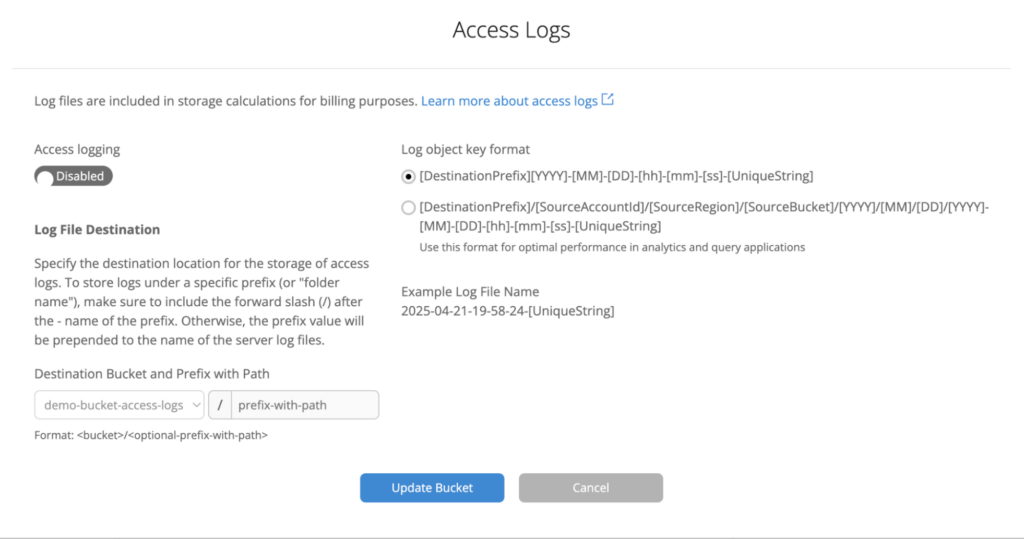
This simple, intuitive interface lets you easily configure your logging settings, choose a destination bucket, and start tracking operations on your objects. Once enabled, you’ll have access to the logs directly in the destination bucket, with the details you need to monitor and analyze your data access patterns.
Bucket Access Logs unlock a broad set of security, privacy, and operational workflows. Here are just a few examples of how you can use them:
Organizations storing sensitive data—like security footage, personal files, or customer assets—often need detailed audit trails for compliance and accountability.
When storage access is tightly integrated with content delivery networks (CDNs) or other network layers, it’s important to confirm that traffic flows through the correct paths.
Understanding how data moves through your system can help with cost management, client reporting, and internal transparency.
Across these use cases, a common thread emerges: the need to know when, what, and where for activity happening inside your buckets.
Bucket Access Logs are available today in preview. To try it out, contact Support for more information.
For more detailed instructions and guidance on configuring and using Bucket Access Logs, check out the official Bucket Access Logs documentation.
Whether you’re building for compliance, monitoring security, or just want better observability into your workflows, Bucket Access Logs give you the visibility you need—right where your data lives.
The post Preview Bucket Access Logs for Greater Visibility and Control appeared first on Backblaze Blog | Cloud Storage & Cloud Backup
Post Syndicated from Crosstalk Solutions original https://www.youtube.com/watch?v=bTvZymicyoE
Post Syndicated from Matt Granger original https://www.youtube.com/watch?v=IVuTEZUwYAQ
Post Syndicated from corbet original https://lwn.net/Articles/1018486/
New compiler releases often bring with them new warnings; those warnings
are usually welcome, since they help developers find problems before they
turn into nasty bugs. Adapting to new warnings can also create disruption
in the development process, though, especially when an important developer
upgrades to a new compiler at an unfortunate time. This is just the
scenario that played out with the 6.15-rc3
kernel release and the implementation of
-Wunterminated-string-initialization in GCC 15.
Post Syndicated from jake original https://lwn.net/Articles/1018341/
Sometimes worms have a tendency to multiply once their can is opened.
James Bottomley recently encountered that situation; he led a session in
the filesystem track at the 2025 Linux Storage, Filesystem, Memory
Management, and BPF Summit (LSFMM+BPF) to discuss filesystem behavior with
respect to suspending and resuming the system. As he noted in his topic
proposal, he came at the problem because he needed a way to
resynchronize the contents of efivarfs
after a system resume and thought there should be an API available to use.
But, as the resulting thread shows, the filesystem freeze and thaw code had
never been used by the system-wide suspend and resume code. Due to a
scheduling mixup, though, several of us missed Bottomley’s session,
including Luis Chamberlain who has been working on hooking those two pieces
up; what follows is largely from a second session that Chamberlain led,
with some background information from the topic-proposal discussion and an
email exchange with Bottomley.
Post Syndicated from jake original https://lwn.net/Articles/1018717/
Security updates have been issued by Debian (haproxy and openrazer), Fedora (c-ares and mingw-poppler), Red Hat (thunderbird), SUSE (epiphany, ffmpeg-6, gopass, and libsoup-3_0-0), and Ubuntu (erlang, haproxy, libapache2-mod-auth-openidc, libarchive, linux, linux-aws, linux-azure, linux-azure-5.15, linux-azure-fde, linux-azure-fde-5.15, linux-gcp, linux-gke, linux-gkeop, linux-hwe-5.15, linux-ibm, linux-intel-iotg, linux-kvm, linux-lowlatency, linux-lowlatency-hwe-5.15, linux-nvidia, linux-nvidia-tegra, linux-nvidia-tegra-igx, linux-oracle, linux-raspi, linux, linux-aws, linux-azure, linux-azure-6.8, linux-ibm, linux-lowlatency, linux-lowlatency-hwe-6.8, linux-nvidia, linux-nvidia-6.8, linux-nvidia-lowlatency, linux-oem-6.8, linux-oracle, linux-oracle-6.8, linux-aws-6.8, linux-aws-fips, linux-fips, linux-gcp-fips, linux-azure-fips, linux-gcp, linux-gke, linux-gkeop, linux-gcp-6.8, linux-ibm-5.15, linux-intel-iot-realtime, linux-realtime, linux-intel-iotg-5.15, linux-realtime, perl, and yelp, yelp-xsl).
Post Syndicated from C.J. Spallitta original https://blog.rapid7.com/2025/04/24/the-new-rapid7-mdr-for-enterprise-tailored-detection-and-response-for-complex-environments/

Complex ecosystems. Custom applications. Specialized log sources. Distributed operations. Enterprise security leaders aren’t just defending against threats—they’re navigating a fragmented environment where visibility, coverage, and coordination are constant challenges.
Our MDR service provides powerful protection for thousands of organizations worldwide today. But as enterprise environments grow more distributed and unique, many security teams find themselves needing something more flexible—something that can be tightly aligned to their internal workflows, toolsets, and detection strategies.
That’s why we’re excited to introduce Rapid7 MDR for Enterprise—a fully managed, customized detection and response service designed to meet the complexity of the modern enterprise head-on.
MDR for Enterprise builds on the proven foundation of Rapid7’s MDR, layering on advanced customization and collaboration to meet highly specific enterprise needs:
Enterprise environments rarely look the same. Some rely on legacy infrastructure alongside modern cloud stacks. Others have industry-specific applications or internally developed tools that aren’t covered by typical MDR integrations. And many are already investing in their own detections or bringing in telemetry from a wide range of tools.
MDR for Enterprise is built to adapt to this complexity. It allows customers to bring their own log sources and extend monitoring into non-standard systems. Whether it’s a homegrown application or a niche vertical-specific tool, we’ll build the integration and align detection logic to your context—not the other way around.
One of the biggest differences with MDR for Enterprise is how we collaborate. This isn’t a black-box service or a reactive alert-forwarding engine. We work alongside your internal team to co-develop incident response protocols and continuous tuning cycles.
We’re not just another SOC you plug into—we’re a strategic extension of your security program. Through tightly integrated processes and regular reviews, your team and ours operate as one. That operational interlock ensures context is never lost, alerts are always actionable, and response is always aligned to your priorities.
Enterprise security teams have made serious investments—in technology, in detection engineering, in internal processes. We’re not here to disrupt that. MDR for Enterprise is designed to enhance your existing ecosystem, not replace it.
We will partner with you to develop a custom monitoring solution for your business critical applications to meet your specific security uses cases —from triage, to investigation, and response through our global SOC. This approach improves your ROI and creates a seamless bridge between your team’s internal expertise and our operational scale.
With MDR for Enterprise, you don’t have to choose between visibility and control, speed and customization, or scale and support. You get a partner that understands enterprise complexity—and builds a service around it.
Ready to explore what tailored MDR could look like for your team? Reach out to the team to learn more.
Post Syndicated from Михаил Ангелов original https://www.toest.bg/nauchni-novini-vulnesti-mishki-svirepi-vultsi-i-novi-tsvetove/

Вълнестият мамут е един от най-добре проучените изчезнали видове поради множеството открити негови останки. Популациите на впечатляващото животно започват да намаляват преди около 10 000 години с масовото измиране на мегафауната в края на плеистоцена. Смята се, че последната малка популация е живяла на полярния остров Врангел преди около 4000 години – тогава пирамидите в Гиза вече са били построени. Според някои хипотези за изчезването му принос има и засиленият лов от човека.
За разлика от по-древните животни, които познаваме само от фосилизираните им останки, за анатомията на вълнестия мамут се знае много – някои образци са толкова добре запазени в пермафроста, че дори в един от тях е открита течна кръв. Наличието на дълбоко замразени тъкани не само улеснява сглобяването на генома им, но дори дава възможност за разглеждане на триизмерната му структура.
Още първите разработки, свързани с генома на мамута, пораждат интерес у генетика Джордж Чърч и той започва да работи върху възстановяването на вида. Така през 2015 г. екипът му успява да направи промени в 15 гена на най-близкия жив родственик на изчезналия вид – азиатския слон. В следващите няколко години броят им се увеличава и според новини от 2017 г. в редактираните клетки има 45 гена, които са със секвенцията на вълнестия мамут. За съжаление, тези експерименти не са публикувани в научен журнал и точната методология и получените резултати не са достъпни.
Стъпвайки на тези разработки, през 2021 г. Чърч основа компанията Colossal Biosciences с основен фокус завръщането на изчезнали видове. Един от тях е тасманийският вълк, който е унищожен от хората, а последният екземпляр загива в зоологическа градина през 1936 г. Миналата година от Colossal съобщиха, че геномът му вече е секвениран почти напълно и започва активна работа по възстановяването на животното.
Но тази година в рамките на два месеца компанията попадна два пъти в новинарските емисии, предизвиквайки доста вълнение с живи образци на редактирани животни.
Миналия месец бяха публикувани снимки на вълнеста мишка (наречена така от компанията), обявена като първа стъпка към връщането на вълнестия мамут. Малките гризачи имат впечатляващ външен вид със своята дълга златиста козина. Уви, под нея се крият генетични редакции, които само са вдъхновени от изчезналия гигант.
За да променят козината на мишките, учените използват дълбоките познания за генома им и правят редакции в гени, които са отговорни за белези, свързани с окосмяването. Например Fgf5 контролира дължината на космите, Fam83g и Tgfa отговарят за къдравия им вид, а Mc1r регулира синтеза на пигменти. Постижението определено заслужава внимание от технологична гледна точка, защото показва силата на CRISPR за извършване на няколко редакции едновременно – в симпатичните мишки са манипулирани седем гена. Но редакциите са от „по-лесните“ – т.нар. knock-out, които причиняват мутации, нарушаващи функцията на даден ген. Така ефективно мишките са променени, за да изглеждат като вълнестия мамут, но в тях няма ДНК от него.
За създаване на хибрида между мамут и слон пред учените стои много по-трудна задача. Те трябва да променят множество гени, като редакциите няма да са свързани с изключването им, а с промени на техните секвенции, които в някои случаи може да са осезаеми и екстензивни. Част от тази работа вече е свършена, но не е ясно колко допълнителни намеси в генома ще са нужни. Въпреки че наличните инструменти за модификация на генома се развиват бързо, възможността за извършване на няколко намеси наведнъж все още е ограничена. Освен това тяхната ефективност не е толкова висока – налага се времеемко преглеждане на редактираните клетки, за да се установи кои носят желаните редакции.
Към момента плановете са първите мамутчета да бъдат родени през 2028 г., което е доста амбициозна цел – само износването им от майките ще отнеме 22 месеца, което означава, че учените разполагат с около една година да направят нужните редакции и да подготвят ембриони за имплантиране.
Докато вълненията около мишките все още не бяха утихнали, в мащабна пиар кампания фирмата съобщи за „завръщането на свирепия вълк“ – вид, също изчезнал в края на плеистоцена. Най-близкият му родственик е сивият вълк, но от скелетите им става ясно, че той е бил по-голям и е имал значително по-силна захапка – очаквано за хищник, ловуващ по-дребни представители на мегафауната.
Достъпната информация за генома им е оскъдна – през 2021 г. международен екип публикува статия за секвенирането на пет проби, но за съжаление, с много ниско покритие. Colossal изтъкват това в специална секция на сайта си, където сравняват тези резултати със своите – шестима учени успяват да секвенират почти пълен геном от две проби. Според компанията, базирайки се на тези два генома, за „превръщане“ на сивия вълк в свиреп са нужни редакции само на 20 локуса (участъка) в 14 гена. Това повдига известни съмнения, понеже според публикуваното на сайта им отделянето на двата вида е настъпило преди около 3 млн. години – време, за което в геномите се натрупват много разлики. Уви, анализът на компанията не е публичен и затова към момента твърдението не може да се провери.
Но голямата гордост на Colossal не са тези анализи, а три вълчета – мъжките Ромул и Рем и женската Калиси, която е с три месеца по-малка от тях. Компанията не споделя какви редакции са направени в тях, и дава оскъдна информация на сайта си, както и на журналисти, но видимите разлики с обикновените вълци са основно по-големият им размер и бялата козина.
Подобно на мишките, тези два белега са намеси в генома на сивия вълк, а не привнесени от ДНК на изчезналия вид. Генът за размер, който са манипулирали учените, се нарича LCORL. Интересното е, че неговата активност намалява размера и при други видове (хора, прасета, кучета и др.). Намаляването на действието му чрез нарушаване на един от функционалните участъци на протеина води до по-голям размер на редактираните вълци. Много е вероятно промяната в цвета на козината също да се дължи на нарушаване на синтеза на меланини. Както и при вълнестите мишки, в генома на трите животни няма древна ДНК – намесите са направени по начин, който ги доближава до нея.
Всичко това не значи, че редактираните животни не са впечатляващо постижение. Учените от компанията имат много добри резултати в редица проекти и в разнообразни процедури. Дори само секвенирането на генома на свирепия вълк може да бъде ценен принос за науката, ако бъде споделен. Разработените протоколи за множествени редакции също изглеждат изключително оптимизирани.
Но от наличната информация скептицизмът към работата на компанията донякъде е оправдан – немалка част от разработките им не се публикуват и не са достъпни за рецензия. Наред с това използваният от тях език е прекалено оптимистичен и звучи по-скоро като продукт на маркетинг – получените животни няма как да се определят като „истински“ вълнести мамути или свирепи вълци. В най-добрия случай те ще могат да бъдат разглеждани като хибриди, а за по-критичния научен поглед ще са по-скоро слонове или вълци, в които са направени генетични редакции или са вмъкнати участъци от ДНК на друг вид – трансгенни животни. Нещо, което се прави и в момента за фундаментални изследвания.
Освен това се създава и погрешното впечатление, че тези изчезнали видове могат да бъдат възстановени напълно, което е опасно от консервационна гледна точка. Не на последно място, има и етични съображения. Слоновете са изключително интелигентни животни с много силна стадна динамика, поради което най-вероятно единични екземпляри няма да се чувстват добре сами. Като се вземат предвид дългата бременност при слоновете и неясната успеваемост на процедурата, създаването на достатъчно големи стада ще отнеме значително време и ресурси.
От друга страна, компанията очевидно грабва въображението на хората с новините за рунтави гризачи и свирепи вълци, помагайки за приемането на генните манипулации като нещо, което не е страшно и може да бъде полезно дори и от екологична гледна точка. Също така част от разработките все пак се публикуват, което може да донесе ползи в областта на генетичните редакции. Някои от техниките имат потенциал за приложение в медицината за генни терапии или за по-сложни редакции с цел фундаментални изследвания.
Времето ще покаже дали Colossal ще успеят да постигнат целта си и как точно ще бъдат приети новите животни от научните среди, които засега са по-скоро скептични, и на фона на вълнението на широката публика.
Възприемането на различни цветове е донякъде субективно. Но в основата си то се базира на система, която е добре проучена на физиологично ниво. В очите ни има два вида клетки, отговарящи за създаване на картината, която виждаме – пръчици, които не различават цвета, а само силата на светлината, и конуси, които правят разлика между отделните цветове.
Пръчиците са много по-чувствителни и многобройни (около десет пъти повече) и отговарят за зрението ни при оскъдна светлина. Конусите се делят на три разновидности, в зависимост от дължината на вълната, която улавят най-добре – S, M, L (short, medium, long), съответно за синя, зелена и червена светлина (трицветно зрение). Всеки от пигментите в тях има определен пик, при който се активират най-интензивно, но те могат да улавят с по-нисък интензитет и светлина с близка дължина на вълната. Сигналите от активацията на тези клетки се предават към мозъка, той ги интерпретира и създава картината, която виждаме. Това ни позволява да различаваме около милион нюанса на цветовете.
Но поради това припокриване между сигналите, особено на клетките за зелено и червено (M и L), на практика е невъзможно да видим зелено, без към него мозъкът ни да „добави“ и известно количество жълто. Поради това на практика е невъзможно да видим „истинско зелено“, тъй като няма естествен начин да се стимулират само един тип клетки. Това се променя с нова методология, наречена от изобретателите си Oz, с помощта на която петима доброволци са видели невиждан до момента нюанс на зеленото.
Процедурата е изключително сложна и високотехнологична. Първата стъпка е пълно картиране на ретиновата мозайка на доброволците. По този начин изследователите получават информация за разположението на различните клетки в ретините им. След това участниците поставят главите си в специална установка, където има място, което захапват – така могат да държат главата и съответно очите си почти неподвижни в пространството. И тук става магията – софтуер, наречен Wizard, следи микроскопичните и неволни движения на очите, като същевременно насочва прецизно специален лазер, така че светлината му да попада само в предварително избрани клетки, в случая M конуси.
Новият цвят, наречен от учените olo (от компютърното представяне на активация само на M конусите – 0, 1, 0), е описан от участниците в изследването като синьо-зелено, морскосиньо, зелено, но с много по-силен интензитет от обичайните им нюанси.
Като всяка изключително сложна система и Oz, въпреки своя магьосник, има своите недостатъци. Тъй като броят на M конусите е изключително голям, е много трудно лазерът да се насочи към всеки от тях. Поради това размерът на цветното петно, което виждат доброволците, е сравнително малко – колкото монета от 1 лев, гледана от една ръка разстояние, около два пъти по-голямо от Луната в нощното небе. По-сериозният проблем е, че въпреки следенето на движението на очите и прецизното насочване на лазера, около 60% от излъчената светлина попада в други клетки. Все пак според изчисленията на учените, потвърдени емпирично от наблюденията на участниците в изследването, цветът е извън границите на обичайното ни възприятие. Това прави бъдещото подобрение на технологията още по-интригуващо, защото, ако разсейването на светлината се намали и наистина се активират само един тип клетки, то цветът ще е още по-наситен.
Макар и на пръв поглед да изглежда така, разработената система не е просто високотехнологична играчка. Екипът, създал Oz и Wizard, смята, че интересното тепърва предстои. Системата може да се използва за различни експерименти, свързани с работата на зрението ни и с възприятието на цветовете. По-амбициозната цел е с помощта на подобрена установка, която може да покрие цялото зрително поле, да се помогне на хора с цветна слепота. Това е стъпка към трайно възстановяване на коректното трицветно виждане при тях.
Вече има експерименти с примати, при които във възрастни екземпляри с червено-зелена слепота с помощта на генна терапия е добавен трети пигмент. От проведените тестове процедурата изглежда успешна – маймуните успешно различават предмети, които преди това са приемали за еднакви. Този експеримент показва, че подобна терапия може да се приложи и при хора. Но все още има много неясноти – маймуните все пак не могат да споделят възприятията си с учените, поради което не се знае как точно се справя мозъкът при внезапната поява на нов сигнал в зрителната система.
Именно тук от полза би била подобрена версия на Oz – конусите могат да бъдат разделени, така че да получават различна цветова информация, давайки възможност да се изследва пластичността на мозъка без драстични намеси. Ако се окаже, че той се адаптира лесно към подобна промяна, на практика ще е възможно разделянето на конусите ни на допълнителни подвидове, което да позволи тетра- или повече цветно зрение. Това би отворило вратите към напълно нов свят на цветно възприятие.
Post Syndicated from The Atlantic original https://www.youtube.com/watch?v=TkBZvWjuPT0
Post Syndicated from Fergus Kirkpatrick original https://www.raspberrypi.org/blog/the-countdown-begins-astro-pi-participants-to-have-their-programs-run-in-space/
This week, young people participating in the European Astro Pi Challenge 2024/25 will have their programs run in space! Astronauts from the European Space Agency (ESA) have been setting up the Astro Pi computers on board the International Space Station (ISS) ready to receive the programs.
The European Astro Pi Challenge is an ESA Education project run in collaboration with the Raspberry Pi Foundation. It has two strands: Mission Zero, where young people write programs that display pixel art on LED screens on board the ISS, and Mission Space Lab, where more advanced learners attempt to calculate the speed of the ISS by writing programs that gather data from onboard equipment.
This year has already been a great year for the challenge!

Mission Zero received 17,285 team submissions this year, representing 25,405 young people from ESA member and associate member states. This marks the highest-ever level of participation in Mission Zero since its inception back in 2017. Here at Mission Control, we’re delighted to announce that nearly all the participating teams (17,109 out of 17,285) have achieved ‘flight status’ — meaning that their programs will run in space.
It’s been great to see so many young people taking part from areas of educational disadvantage too. Through partnerships with youth organisations and community events such as Beyond the Bias and Norwich Science Festival, we’ve seen Mission Zero reach even more young creators from traditionally underrepresented groups.
The 2024/25 Mission Zero project guide featured new coded pixel art examples for teams to remix and reinterpret. Many teams also created their own artworks and animations, with amazing creativity and coding skills on display. We’ll be selecting six submissions from this year to feature as the new code examples in the 2025/26 Mission Zero project guide. Look out for more news on this in the summer.

Mission Space Lab teams were tasked again this year with writing programs to collect data from cameras and sensors on board the ISS to calculate its speed. We’ve been really pleased to see 562 teams register and 325 submit their programs. This has resulted in an amazing 309 teams being awarded flight status — their programs will each run on the ISS for ten minutes, giving participants the unparalleled opportunity to record sensor data in space and take photos many miles above the Earth.
More teams have submitted programs and achieved flight status this year than in 2023/24. We believe this uptick is due, in part, to a couple of new additions that have made submissions easier:
Secondly, teams have been able to use the Picamzero Python library, which makes it easier to use PiCamera2 functionality.

Today’s the day when Mission Zero and Mission Space Lab teams with flight status will have their programs sent up to the ISS. Astronauts have been busy setting up the Astro Pi computers ready to receive the programs and putting them into position. Over the next two weeks, the programs will run and the collected data will be sent down from the ISS to Earth.

In June, Mission Zero and Mission Space Lab teams will receive certificates of participation with the exact times their programs ran on the ISS, along with the coordinates of where the ISS was above the Earth. Mission Space Lab teams will also receive a zip file with the data their programs collected.
None of this would have been possible without the hard work of all the mentors, teachers, and Code Club leaders that organise the teams of young people doing the Astro Pi missions.
Let’s stay curious, with our eyes upwards on that final frontier!
While you wait for the next cycle of the European Astro Pi Challenge, there are many other exciting coding opportunities for you and your teams to explore, including:
The post The countdown begins! Astro Pi participants to have their programs run in space appeared first on Raspberry Pi Foundation.