Announcing SageMaker Unified Studio Workshops for Financial Services

Post Syndicated from Sanjay Ohri original https://aws.amazon.com/blogs/big-data/announcing-sagemaker-unified-studio-workshops-for-financial-services/

In March 2025, AWS announced the general availability of the next generation of Amazon SageMaker, including Amazon SageMaker Unified Studio, a single data and AI development environment that brings together the functionality and tools from existing AWS Analytics and AI/ML services, including Amazon EMR, AWS Glue, Amazon Athena, Amazon Redshift, Amazon Bedrock, and Amazon SageMaker AI. You can discover data and AI assets from across your organization, then work together in projects to securely build and share analytics and AI artifacts, including data, models, and generative AI applications in a trusted and secure environment. Governance features including fine-grained access control are built into Amazon SageMaker Unified Studio using Amazon SageMaker Catalog to help you meet enterprise security requirements across your entire data estate. Unified access to your data is provided by a unified, open, and secure data lakehouse architecture built on Apache Iceberg open standards. Whether your data is stored in Amazon Simple Storage Service (Amazon S3) data lakes, Amazon Redshift data warehouses, or third-party and federated data sources, you can access it from one place and use it with Iceberg-compatible engines and tools.

AWS for Financial Services is a pioneer at the intersection of financial services and technology, enabling our customers to optimize operations and push the boundaries of innovation with the broadest set of services and partner solutions—all while maintaining security, compliance, and resilience at scale. Financial institutions are using AI and machine learning (ML), and generative AI services on AWS to transform their organizations faster and in ways never before possible. With Amazon SageMaker Unified Studio, financial services industry (FSI) customers can seamlessly work across different compute resources and clusters using unified notebooks, including generative AI–powered troubleshooting capabilities, and use the built-in SQL editor to query data stored in data lakes, data warehouses, databases, and applications.

Workshops

In this post, we’re excited to announce the release of four Amazon SageMaker Unified Studio publicly available workshops that are specific to each FSI segment: insurance, banking, capital markets, and payments. These workshops can help you learn how to deploy Amazon SageMaker Unified Studio effectively for business use cases. Follow the links for each FSI use case listed in the following table to get started for these self-paced workshops.

FSI use case Description
Insurance In this workshop, you’ll use Amazon SageMaker Unified Studio and analytics services to transform your insurance business challenges into opportunities. It provides hands-on experience in developing data-driven, generative AI–powered solutions for insurance that deliver measurable business value.
Banking In this workshop, you’ll explore how leading retail banks can unlock business value by using Amazon SageMaker Unified Studio to build, scale, and govern end-to-end data analytics and ML workflows. The workshop walks you through a reference architecture and curated banking-specific datasets covering common retail banking use cases, such as customer segmentation, fraud detection, churn prediction, and generative AI applications like personalized communication.
Capital Markets In this workshop, you’ll use Amazon SageMaker Unified Studio to analyze trade and quote data for the S&P 500 stocks to generate insights. The data is stored in various formats across different sources. This solution will unify the data from disparate sources using a lakehouse architecture and offer team members flexibility to access the data using familiar SQL constructs.
Payments In this workshop, you’ll use Amazon SageMaker Unified Studio and analytics services to enable organizations to ingest, store, process, and analyze payment data, supporting needs from data ingestion and storage to big data analytics, streaming analytics, business intelligence, and machine learning.

Conclusion

We appreciate your comments and feedback to help us accelerate adoption of Amazon SageMaker Unified Studio for financial services workloads. Contact your AWS account team to engage a FSI specialist solutions architect if you require additional expert guidance.

Learn more about AWS for financial services, customer case studies, and additional resources on our Financial Services website.


About the authors

Sanjay Ohri

Sanjay Ohri

Sanjay is an award-winning professional with over 15 years of successful global delivery and program management of cost-efficient cloud and on-premise services to companies like JPMorganChase and Bank of America. He works at AWS as a Principal Manager within Worldwide Financial Services working closely with customers and product teams helping to accelerate adoption of AWS services.

Raghu Prabhu

Raghu Prabhu

Raghu is an experienced information technology executive with a successful track record of implementing large technology initiatives. He has designed and managed execution of corporate IT strategies, product development, large mergers and acquisitions, data center consolidations, cloud system implementations, legacy system conversions and business process. He works at AWS as a Go-To-Market Specialist for SageMaker Unified Studio.

Accelerate AWS Glue Zero-ETL data ingestion using Salesforce Bulk API

Post Syndicated from Shashank Sharma original https://aws.amazon.com/blogs/big-data/accelerate-aws-glue-zero-etl-data-ingestion-using-salesforce-bulk-api/

Efficiently integrating and analyzing Salesforce data is essential in today’s business environment. AWS Glue Zero ETL (extract, transform, and load) now supports Salesforce Bulk API, delivering substantial performance gains compared to Salesforce REST API for large-scale data integration for targets such as Amazon SageMaker lakehouse and Amazon Redshift. You can use this enhancement to process millions of Salesforce records in minutes while efficiently handling wide-column entities with hundreds of fields. In this blog post, we show you how to use Zero-ETL powered by AWS Glue with Salesforce Bulk API to accelerate your data integration processes.

Zero-ETL represents a modern approach to data integration that eliminates the need for traditional ETL processes by establishing direct connections between data sources and destinations. Rather than explicitly extracting data, transforming it, and loading it in separate steps, Zero-ETL handles these operations in the background. Zero-ETL enables direct integration with software as a service (SaaS) applications like Salesforce, automatically synchronizing data while maintaining consistency and eliminating the complexity of manual ETL pipeline development. This approach reduces development time, maintenance overhead, and the potential for errors in data movement processes.

Solution overview

Traditionally, Zero-ETL used Salesforce REST API for data ingestion. While the REST API provides a straightforward way to interact with Salesforce data, it comes with certain limitations, especially when dealing with large datasets. These include request limits, data volume constraints, performance overhead, and concurrency limitations. As of August 2025, depending on the Salesforce edition and license type, you might be limited to between 15,000 and 100,000 API calls per 24-hour period. When retrieving large volumes of data, multiple API calls are required, leading to inefficiency and extended processing times.

To address these limitations and enhance performance, AWS Glue Zero-ETL now supports Salesforce Bulk API. The Bulk API is designed for processing large datasets, offering several advantages over the REST API. It uses asynchronous processing, so you can process much larger data volumes without timing out. Data is processed in batches, which can be parallelized for faster processing. As of August 2025, the Bulk API also has more generous limits; up to 150,000,000 API calls, which is 15,000 batches, per 24-hour period, with each batch containing up to 10,000 records. The following diagram shows a Salesforce Zero-ETL architecture ingesting data through Salesforce Bulk and REST APIs and writing to Amazon SageMaker Lakehouse (in Amazon Simple Storage Service (Amazon S3) or Apache Iceberg) or Amazon Redshift.

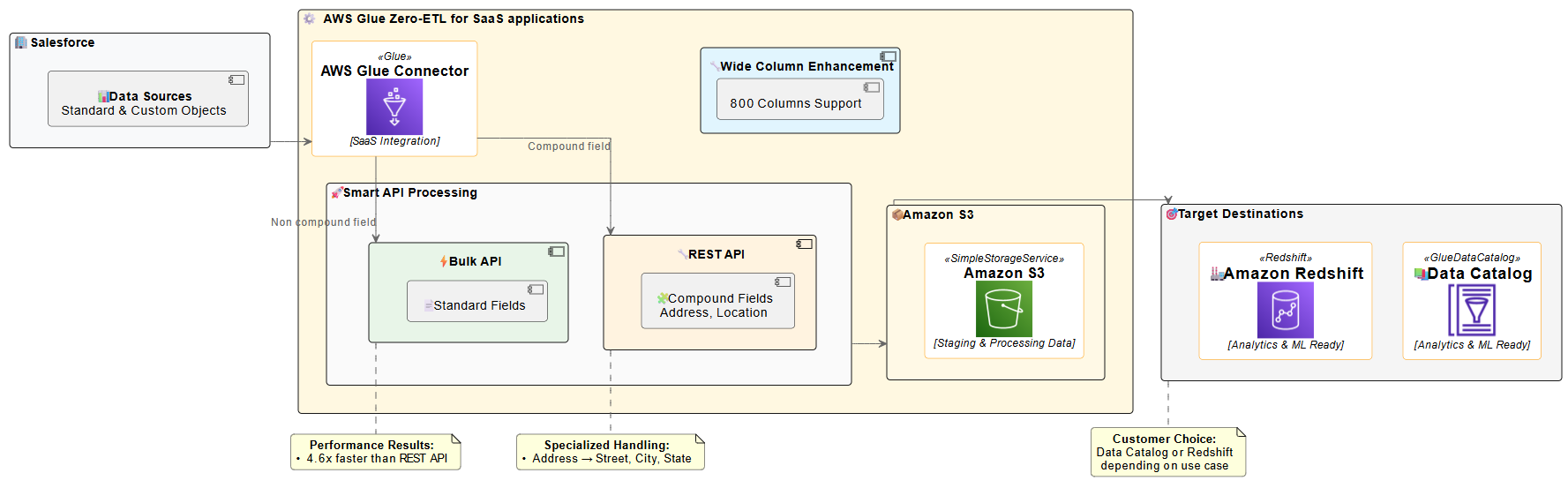
AWS Glue Zero-ETL architecture highlighting data flow, API processing, and analytics capabilities with performance metrics

The diagram illustrates the Zero-ETL data flow from Salesforce to AWS analytics services. Salesforce data is ingested using smart API processing, which intelligently selects between Bulk API for standard fields and REST API for compound fields. This approach is necessary because, as of now, the Salesforce Bulk API does not support compound fields (such as Address). Therefore, you must use the REST API in such cases for comprehensive data extraction. The solution supports Salesforce wide-column entities containing up to 800 fields, enabling comprehensive data integration. The processed data is then staged in an S3 bucket owned by the service team before being made available in the AWS Glue Data Catalog or Amazon Redshift, ready for analytics and machine learning applications.

AWS Glue Zero-ETL now uses the Salesforce Bulk API by default for most data integration scenarios, delivering superior performance and scalability. This approach optimizes data extraction for most use cases, particularly when dealing with large datasets. However, the solution automatically switches to the REST API when handling compound fields. Compound fields, such as addresses (which include street, city, state, postal code, and country), are automatically processed using the REST API.This intelligent API selection provides efficient processing while maintaining the performance benefits of the Bulk API for standard data extraction. This hybrid approach provides the best of both worlds: the scalability and throughput of the Bulk API for most operations, with the specialized handling capabilities of the REST API where it makes the most sense. The system handles this switch automatically, so you don’t need to worry about which API to use for different scenarios.

Performance details

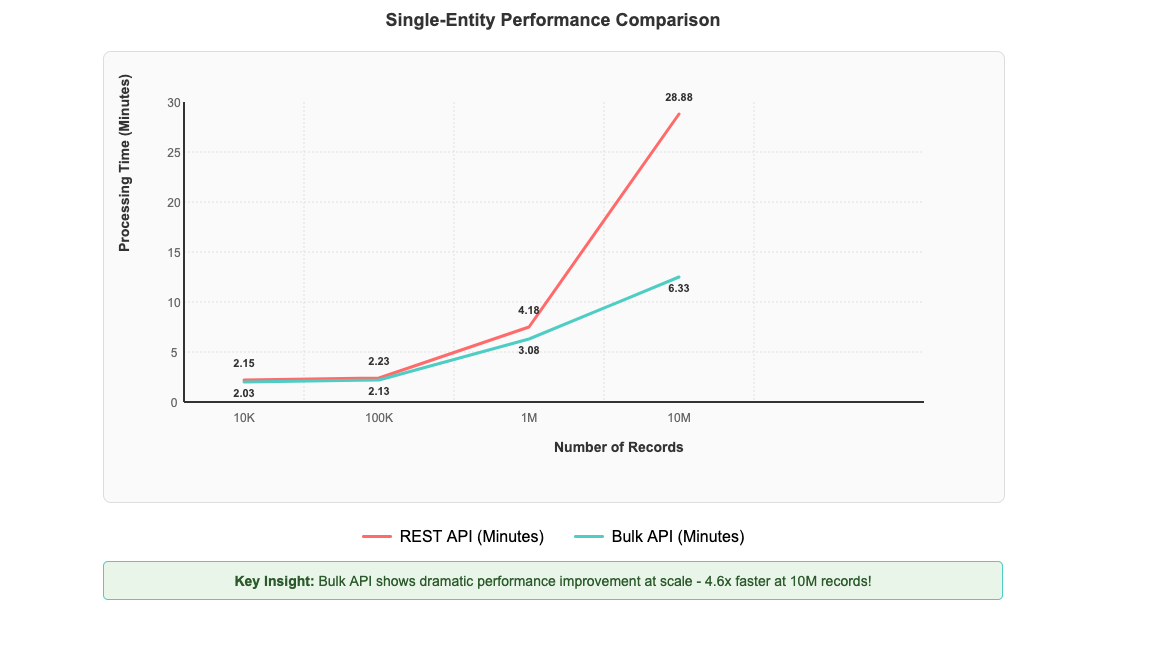
After implementing Salesforce Bulk API support in AWS Glue Zero-ETL, you can see significant performance improvements that scale dramatically with data volume. To test performance benefits, we created a custom object in our Salesforce account and populated it with 10 million records. We then established a Zero-ETL integration between Salesforce and AWS Glue databases to measure data transfer performance. The most impressive gains are evident with large-scale operations: processing 10 million records now completes in 6 minutes and 20 seconds compared to 28 minutes and 53 seconds with the REST API—representing a 4.6-fold improvement in processing time in our controlled testing environment, as shown in the following figure. Performance improvements can vary depending on factors such as data volume, field complexity, network conditions, and computational resources.

Graph demonstrating Bulk API's 4.6x performance advantage over REST API when processing 10M records

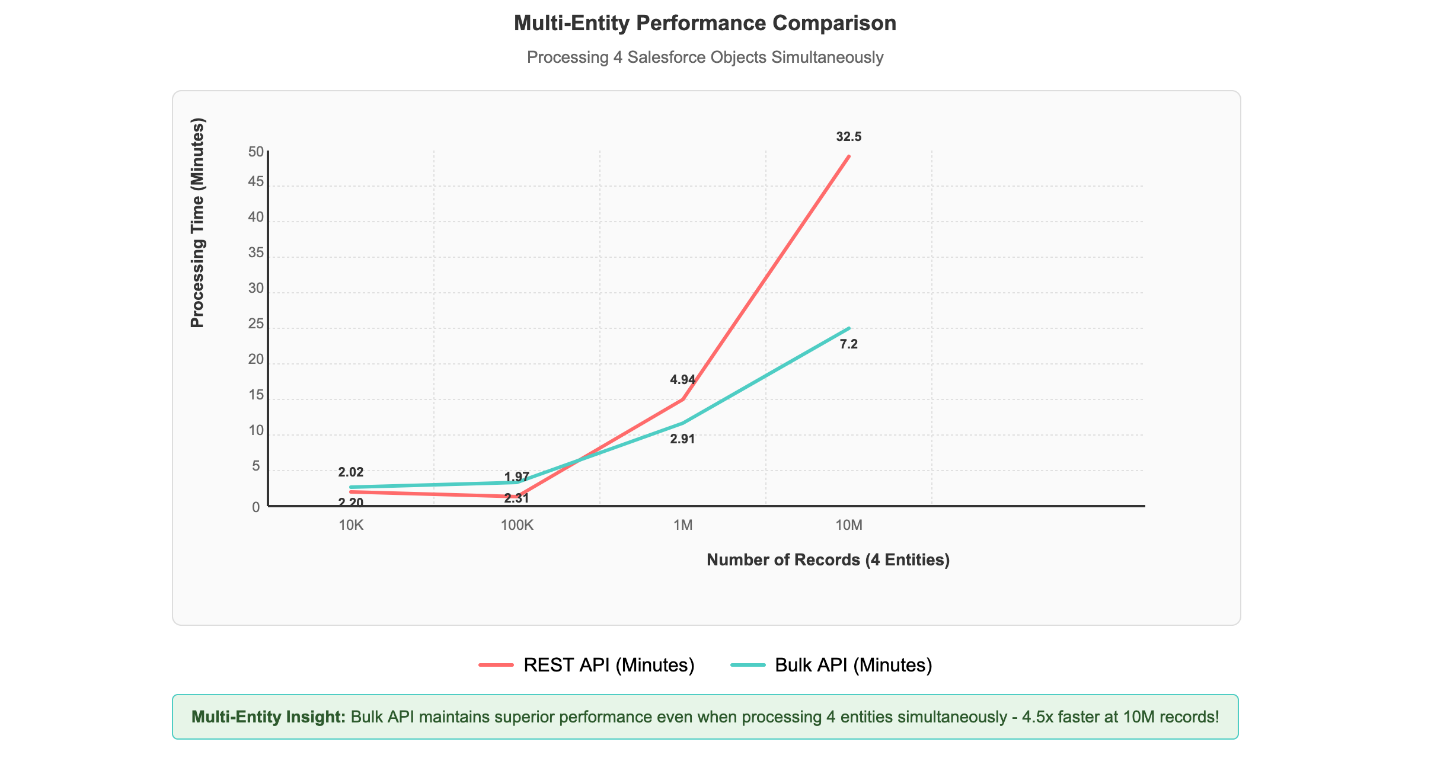
Multi-entity processing scenarios, where four different Salesforce objects are processed simultaneously, demonstrate the solution’s scalability. Even with this concurrent load, 1 million records across multiple entities complete processing in under 3 minutes, showcasing the Bulk API’s superior handling of real-world data integration scenarios, as shown in the following figure.

Multi-entity comparison graph demonstrating Bulk API's 4.6x performance advantage over REST when processing 4 objects at 10M scale

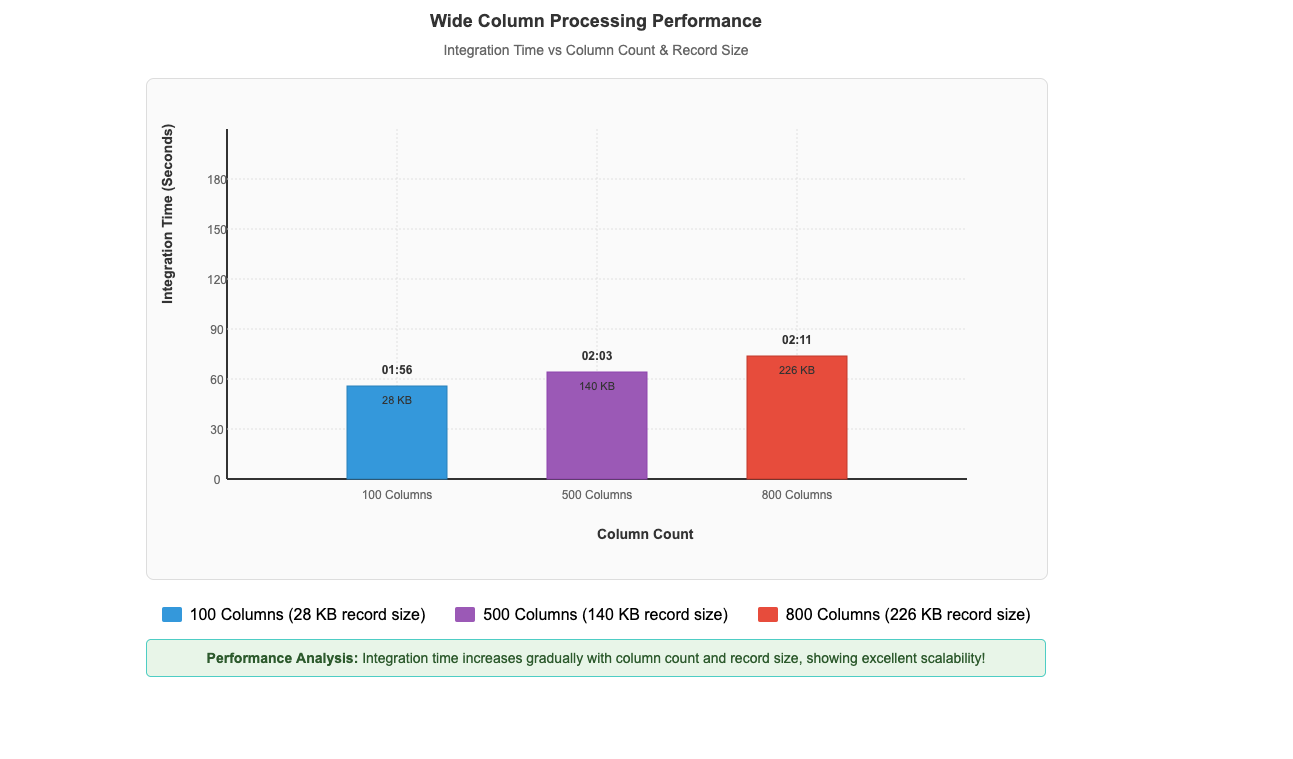
This performance pattern demonstrates that the Bulk API’s asynchronous, batch-oriented architecture delivers exceptional results when handling the large-scale data volumes that enterprises typically encounter in production Salesforce integrations. The performance advantage scales directly with data volume, making it particularly valuable for organizations processing millions of records in their daily operations. As dataset size increases, the efficiency gains become increasingly pronounced, establishing the Bulk API as the optimal choice for enterprise-scale data processing requirements.Beyond the impressive performance gains with large datasets, our recent enhancements have also unlocked another critical capability: efficient processing of wide-column entities. Our performance benchmarks demonstrate this capability in action, with custom objects containing up to 800 columns and 226 KB record sizes processing in just 2 minutes and 11 seconds, while entities with 500 columns and 140 KB records complete in 2 minutes and 3 seconds, and 100-column entities with 28 KB records process in 1 minute and 56 seconds (shown in the following figure). This remarkable consistency across varying column counts and record sizes demonstrates that Zero-ETL from SaaS applications maintains excellent performance while efficiently ingesting and processing these wide-column entities, which means that you can use your complete Salesforce datasets for analytics and machine learning initiatives.

Wide column processing graph demonstrating scalable integration times from 01:56 to 02:11 minutes across increasing data volumes

Impact

The performance improvements, demonstrated by AWS Glue Zero-ETL with Salesforce Bulk API support, offer tangible benefits for businesses managing large volumes of Salesforce data. As mentioned earlier, our controlled testing, demonstrated a 4.6-fold improvement over the REST API when processing 10 million records. With these results, you can significantly reduce your data integration time windows. This faster processing allows for more frequent data updates, potentially enabling you to work with fresher data for your analytics and reporting needs. Additionally, the efficient handling of wide-column entities, such as processing custom objects with up to 800 columns in just over 2 minutes, means that you can more readily use your complete Salesforce datasets without sacrificing performance.

Prerequisites

Before implementing this solution, you need to have the following in place:

  1. A Salesforce Enterprise, Unlimited, or Performance Edition account
  2. An AWS account with administrator access
  3. Create an AWS Glue database with a name such as zero_etl_bulk_demo_db and associate the S3 bucket zeroetl-etl-bulk-demo-bucket as a location of the database.
  4. Update AWS Glue Data Catalog settings using the following IAM policy for fine-grained access control of the data catalog for zero-ETL.
  5. Create an AWS Identity and Access Management (IAM) role named zero_etl_bulk_role. The IAM role will be used by Zero-ETL to access data from your Saleforce account
  6. Create the secret zero_etl_bulk_demo_secret in AWS Secrets Manager to store Salesforce credentials.

Build and verify the zero-ETL integration

This section covers the steps required to set up a Salesforce connection and using that connection to create a Zero-ETL integration.

Step 1: Set up a connector to your Salesforce instance to enable data access

  1. Open the AWS Management Console for AWS Glue.
  2. In the navigation pane, under Data catalog, choose Connections.
  3. Choose Create Connection.
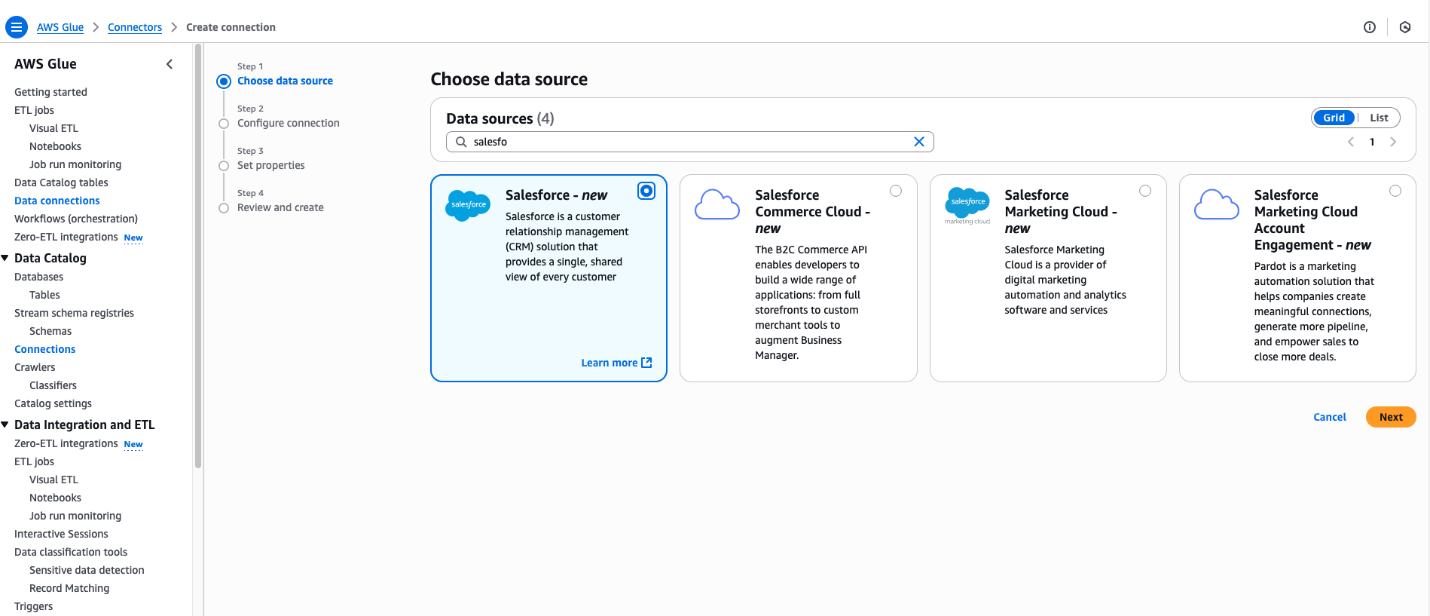
  4. In the Create Connection pane, enter Salesforce in Data Sources.
  5. Choose Salesforce.
  6. Choose Next.

AWS Glue connection creation interface highlighting Salesforce data source options

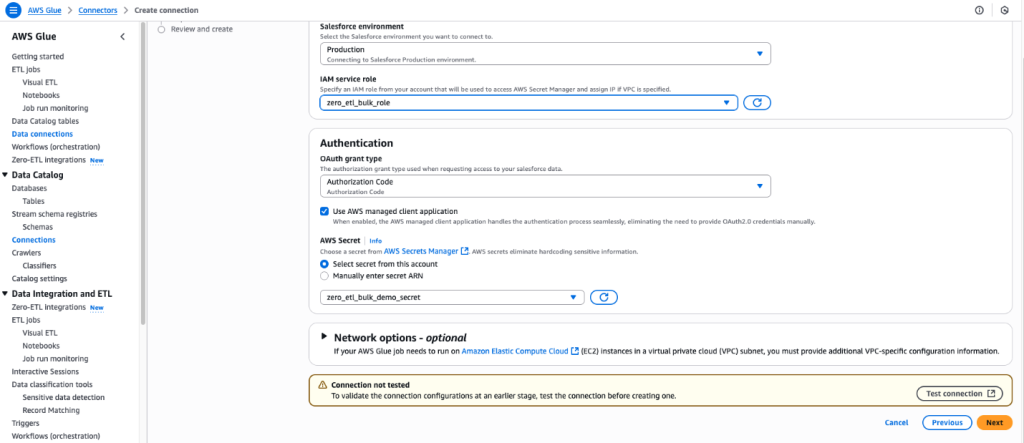
  1. Enter the Salesforce URL Instance URL
  2. For IAM service role, select the zero_etl_bulk_demo_role (created as part of the prerequisites).
  3. For Authentication Type, select the authentication type that you’re using for Salesforce. In this example, we selected Authorization Code.
  4. For AWS Secret, select the secret zero_etl_bulk_demo_secret (created as part of the prerequisites).
  5. Choose Next.

AWS Glue data connection interface for configuring Salesforce integration with security credentials

  1. In the Connection Properties section, for Name, enter zero_etl_bulk_demo_conn.
  2. Choose Next.

Successfully configured AWS Glue Salesforce connector interface with connection details

Step 2: Set up Zero-ETL integration

  1. Open the AWS Glue console.
  2. In the navigation pane, under Data catalog, choose Zero-ETL integrations.
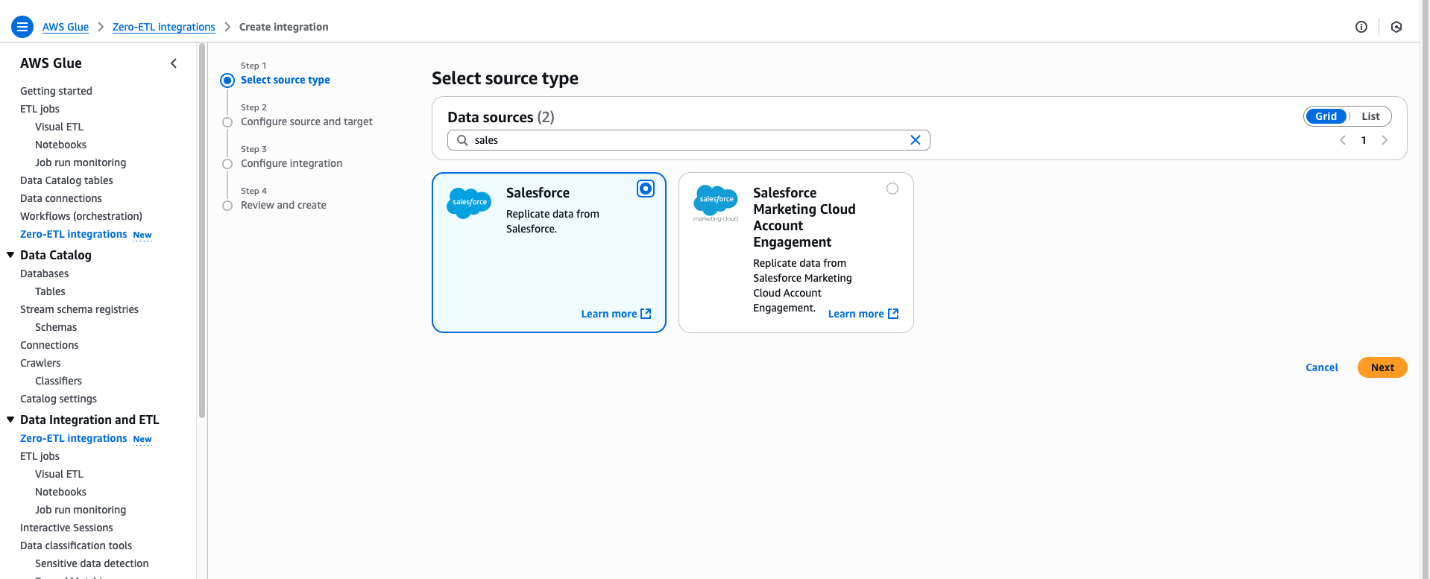
  3. Choose Create zero-ETL integration.
  4. In the Create integration pane, enter Salesforce in Data Sources.
  5. Choose Salesforce.
  6. Choose Next.

AWS Glue integration wizard displaying Salesforce data source options with four-step configuration process


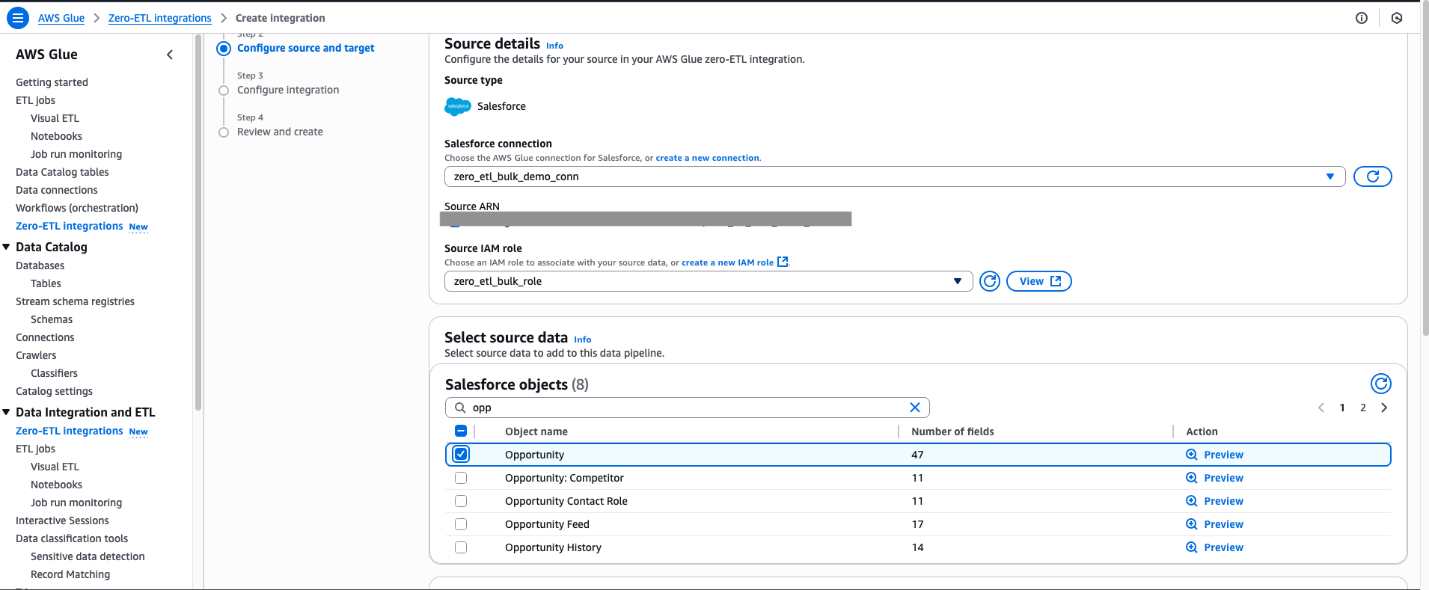
  1. Select the connection name that you created in the previous step.
  2. Select the IAM role which you created in the previous step.
  3. For Salesforce object, select the objects you want to perform the ingestion managed by Zero-ETL integration. For this post, select Opportunity.

AWS Glue Zero-ETL configuration interface displaying Salesforce connection settings and opportunity objects selection

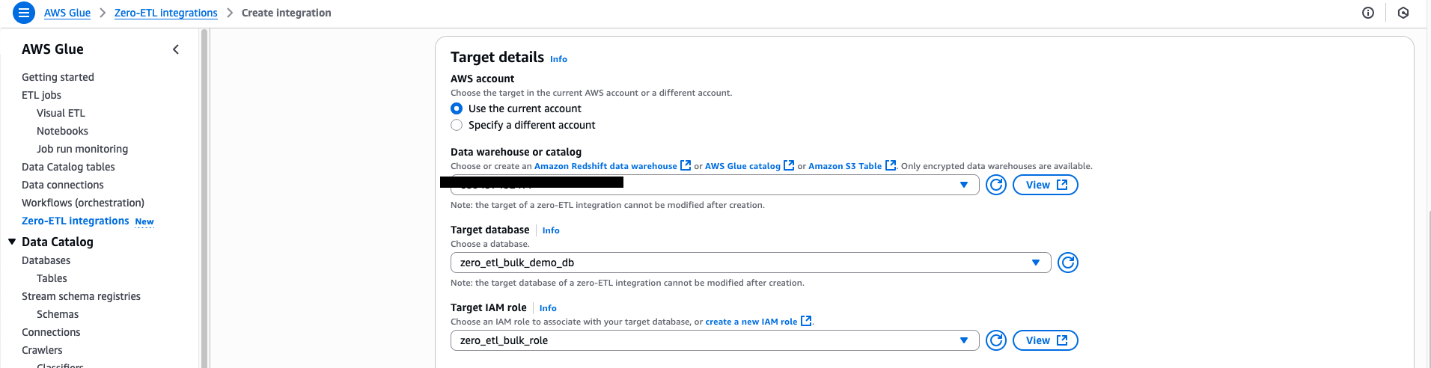
For Namespace or Database In this example, we use the zero_etl_bulk_demo_db (from the prerequisites).

  1. For Target IAM role, select the zero_etl_demo_role (from the prerequisites).
  2. Choose Next.

AWS Glue Zero-ETL target configuration interface with data warehouse selection

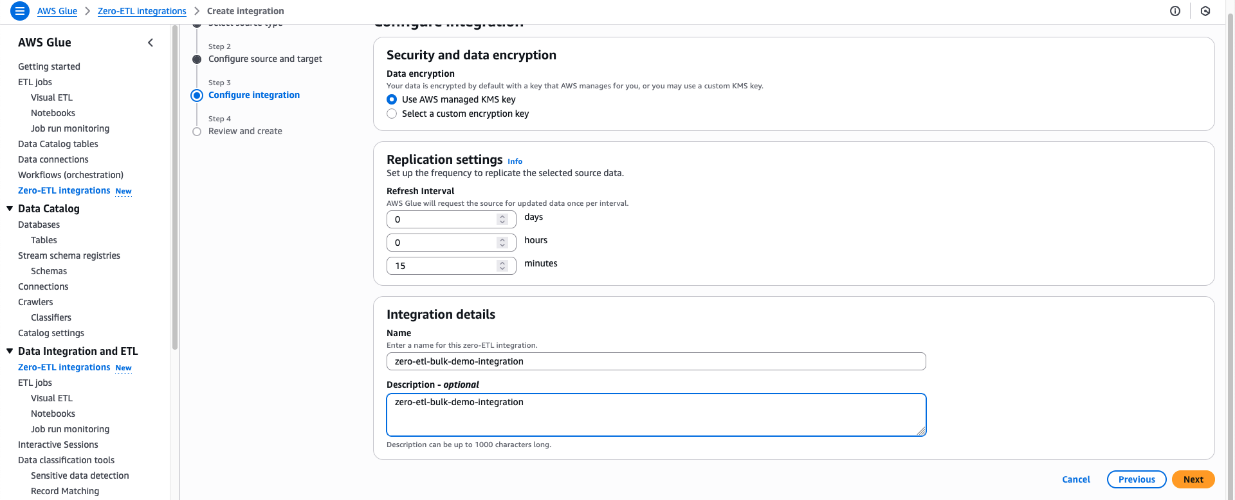
  1. In the Integration details section, for Name, enter zero-etl-bulk-demo-integration.
  2. Choose Next.

AWS Glue Zero-ETL configuration interface displaying AWS-managed KMS encryption, customizable replication timing, and integration naming

  1. Review the details and choose Create and launch integration.
  2. The newly created integration will show as Active in about a minute.

AWS Glue Zero-ETL integration dashboard displaying successful creation confirmation and monitoring status

Clean up

Note that following these steps will permanently delete the resources created in this post; back up any important data before proceeding.

  1. Delete the Zero-ETL integration zero-etl-bulk-demo-integration.
  2. Delete content from the S3 bucket zeroetl-etl-bulk-demo-bucket.
  3. Delete the Data Catalog database zero_etl_bulk_demo_db.
  4. Delete the Data Catalog connection zero_etl_bulk_demo_conn.
  5. Delete the Secrets Manager secret zero_etl_bulk_demo_secret.

Conclusion

The integration of Salesforce Bulk API support in AWS Glue Zero-ETL marks a significant advancement in our data integration capabilities. By addressing the limitations of the REST API, efficiently handling wide-column entities and compound fields, and implementing robust error handling, you can now use AWS Glue Zero-ETL to ingest larger volumes of Salesforce data more efficiently.This enhancement improves performance and opens up new possibilities for your organization to use their Salesforce data for analytics, machine learning, and other data-driven initiatives. As we continue to evolve AWS Glue Zero-ETL, we remain committed to providing cutting-edge solutions that empower our customers to make the most of their data integration processes.

Learn more


About the authors

Shashank Sharma

Shashank Sharma

Shashank is an Engineering Leader within AWS Glue delivering data integration and replication solutions for enterprise customers. He leads engineering for AWS Glue Zero-ETL and Amazon AppFlow.


Shashi Shekhar

Shashi Shekhar

Shashi is a Software Engineer within AWS Glue Zero-ETL, building scalable data pipeline solutions for enterprise workloads. He is passionate about distributed systems, performance engineering, and simplifying complex data integration processes.

Building resilient multi-Region Serverless applications on AWS

Post Syndicated from Vamsi Vikash Ankam original https://aws.amazon.com/blogs/compute/building-resilient-multi-region-serverless-applications-on-aws/

Mission-critical applications demand high availability and resilience against potential disruptions. In online gaming, millions of players connect simultaneously, making availability challenges evident. When gaming platforms experience outages, players lose progress, tournaments get disrupted, and brand reputation suffers. Traditional environments often overprovision compute to address these challenges, resulting in complex setups and high infrastructure and operation costs. Modern Amazon Web Services (AWS) serverless infrastructure offers a more efficient approach. This post presents architectural best practices for building resilient serverless applications, demonstrated through a multi-Region serverless authorizer implementation.

Overview

It’s too late if you are recognizing the importance of availability only after experiencing a disaster event. Applications fail for a variety of reasons, such as infrastructure issues, code defects, configuration errors, unexpected traffic spikes, or service disruptions at a regional level. Critical business services such as authentication systems, payment processors, and real-time gaming features necessitate high availability. To minimize impact on user experience and business revenue, establish bounded recovery times for critical services during outages.

AWS serverless architectures inherently provide high availability through multi-Availability Zone (AZ) deployments and built-in scalability. These services minimize infrastructure management while operating on a pay-for-value pricing model at a Regional level. The AWS serverless pay-for-value model enables cost-effective multi-Region deployments, making it ideal for building resilient architectures.

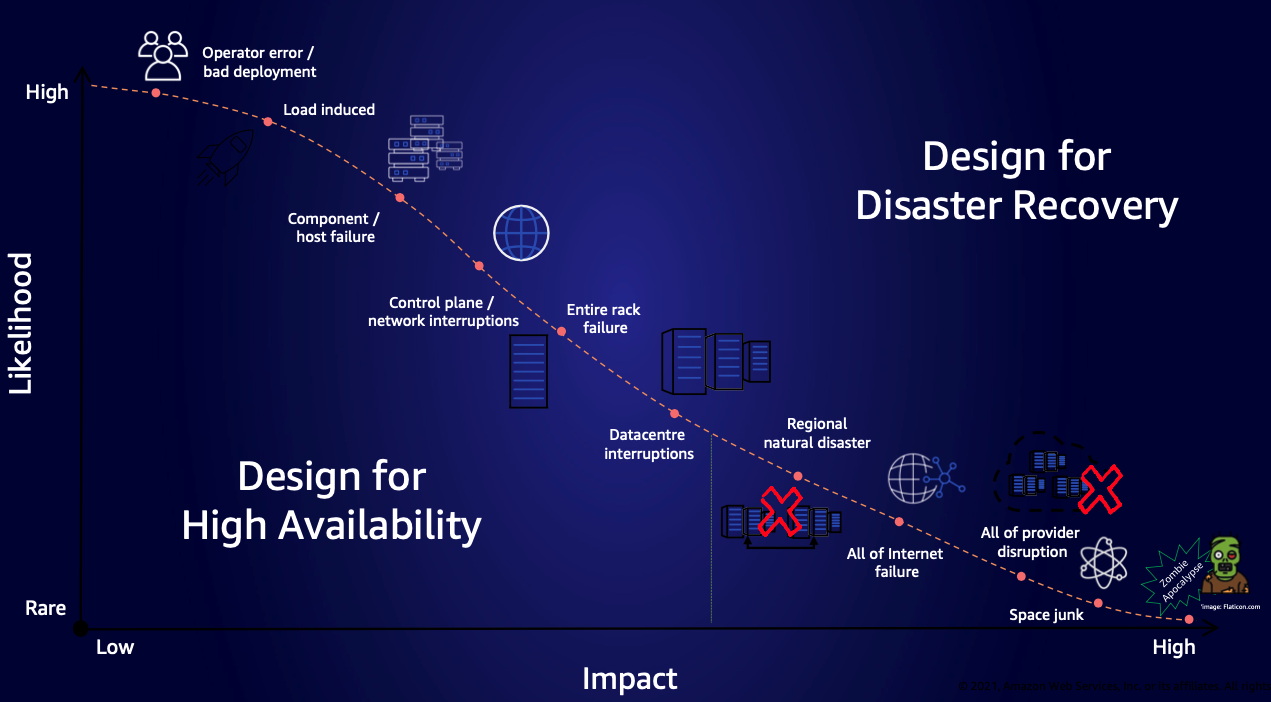
Figure 1. Chart showing various causes of failure, their impact, and how often they happen

Figure 1. Chart showing various causes of failure, their impact, and how often they happen

The preceding chart maps failures—from common operational errors to rare catastrophic events. It guides organizations in prioritizing multi-Region recovery strategies based on the likelihood and the potential impact to the business.

Regional decisions

To determine the appropriate multi-Region approach, carefully evaluate the following factors:

  1. Evaluate if your Recovery Time Objective (RTO) and Recovery Point Objective (RPO) requirements can be met within a single Region, or if a multi-Region architecture is necessary to achieve your recovery objectives.
  2. Do the business benefits of multi-Region redundancy outweigh the operational costs of data replication, synchronization, and increased implementation cost and complexity?
  3. Evaluate if data sovereignty laws, compliance requirements, or geographic restrictions prevent data replication across specific AWS Regions.
  4. Make sure that the chosen Regions in a multi-Region solution have service compatibility, quota limits, and pricing to match your needs.

After evaluating these requirements, if organizations determine the need for multi-Region workloads, then they must choose between two architectural patterns: Active-Passive or Active-Active deployments. Each pattern offers distinct advantages and trade-offs for resilience, costs, and operational complexity.

Multi-Region deployment patterns

The following sections outline the different multi-Region deployment patterns: Active-Passive, and Active-Active.

Active-Passive

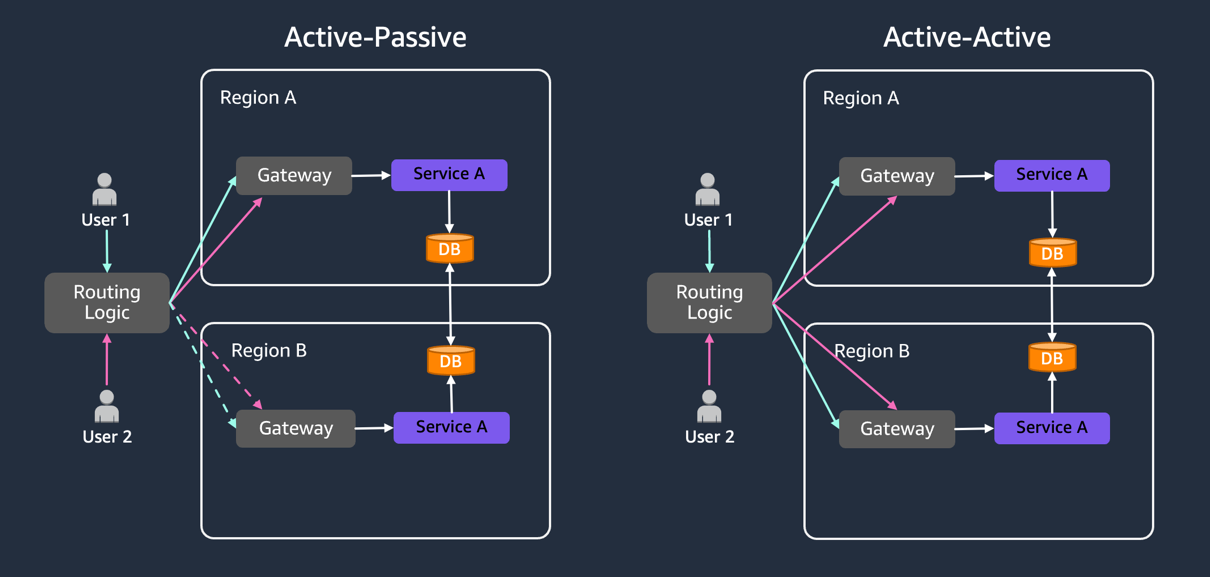
In this pattern, one AWS Region serves as the “Active” Region, handling all production traffic, while other Region(s) remain “Passive”, as shown in the following figure. Passive Region(s) replicate data and configurations from the Active Region without serving requests and are prepared to handle requests during service disruptions in the “Active” Region. Depending on application criticality, passive Regions implement varying levels of infrastructure readiness: fully deployed infrastructure (Hot Standby), partially deployed infrastructure (Warm Standby), or minimal core infrastructure (Pilot Light).

Traditional Active-Passive architectures need significant investment in idle infrastructure: load balancers, auto-scaling groups, running compute resources, and monitoring systems. Organizations can use AWS serverless applications, with their pay-for-value pricing, to pay primarily for data replication, not idle compute resources. AWS manages the underlying infrastructure, eliminating most operational overhead.

Service quotas, API limits, and concurrency settings must match between AWS Regions to provide seamless failover. AWS Lambda offers provisioned concurrency to keep functions warm and responsive, which is particularly useful for secondary Regions during failover. It helps reduce cold starts by maintaining warm execution environments, thus the system can handle sudden traffic spikes with fewer cold starts. Note that provisioned concurrency incurs compute costs regardless of usage. Consider implementing auto-scaling for provisioned concurrency based on traffic patterns to optimize costs during idle periods.

This pattern suits organizations seeking a cost-effective disaster recovery (DR) solution, because AWS serverless charges apply only when resources are actively used in the secondary Region. Managed services such as Amazon DynamoDB Global Tables and Amazon Aurora Global Database handle data replication, further streamlining the implementation. The serverless authorizer discussed later in this article demonstrates this pattern in practice.

Figure 2: Active-Passive pattern with dotted lines shows standby Regions, while Active-Active patterns serve concurrent traffic

Figure 2: Active-Passive pattern with dotted lines shows standby Regions, while Active-Active patterns serve concurrent traffic

Active-Active

In this pattern, multiple Regions actively serve traffic concurrently, distributing the load and providing rapid failover capabilities. Active-Active architectures are expensive and designed for highest availability. However, they do not inherently provide DR for all potential failure modes. This approach suits applications needing geolocation-based routing, or highest availability requirements.

Active-Active deployments need rigorous engineering to handle data synchronization and conflict resolution. Each Region must be sized to handle full application load if another Region experiences service impairments. Active users are distributed across AWS Regions, thus a disruption in the service in one Region redirects all of the traffic to the remaining Regions, which necessitates them handling the combined load. To improve application resiliency, implement retry mechanisms, circuit breakers, and fallback strategies. Plan for static stability by pre-provisioning capacity and implementing client-side caching. Services such as Amazon Route 53 with latency-based routing and Amazon DynamoDB Global Tables with strong consistency provide the foundation but need thorough testing under various failure scenarios. This blog will not cover Active-Active deployments.

Multi-Region serverless authorizer

To demonstrate the Active-Passive scenario, we build a sample application that demonstrates how to build a multi-Region serverless authorizer using Amazon API Gateway, Lambda functions, and Amazon Route53. Modern gaming and entertainment platforms host critical services such as player matchmaking, live streaming, and real-time sports analytics. These services depend on robust authorization systems—when authorization fails, players cannot join matches, viewers lose access to streams, and live events becomes inaccessible. This post demonstrates how to build a fault-tolerant, multi-Region serverless authorizer while maintaining lower costs as compared to traditional environments.

Serverless multi-Region architectures typically comprise Routing, Compute, and Data layers. When implementing multi-Region deployments, data replication across AWS Regions is essential, regardless of the compute services used. The compute layer should prioritize idempotency to make sure of safe event processing across AWS Regions. Use Powertools for Lambda for efficient idempotency handling, or implement custom solutions using unique event IDs with DynamoDB as an idempotency store. Although this post focuses on the authorizer service implementation, this pattern can be applied to build multi-Region microservices handling various critical functions, such as game session management, content delivery orchestration, user preference management, and profile services.

Demo overview

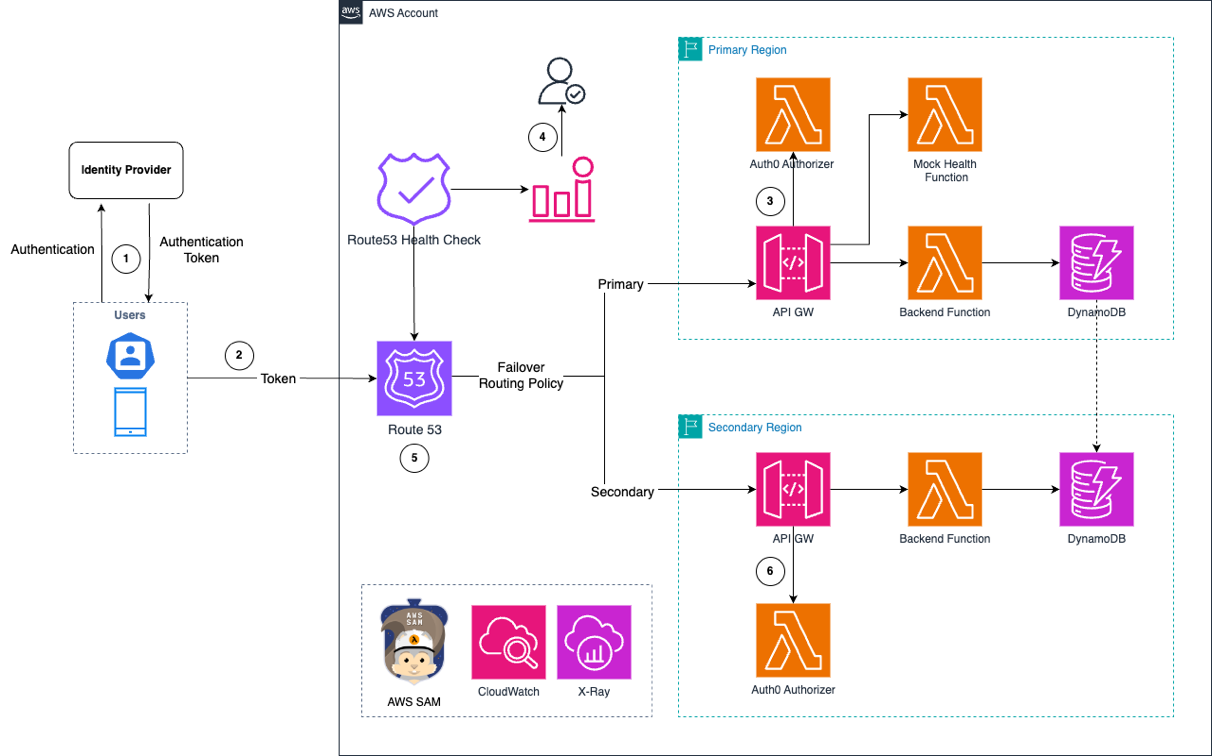
To demonstrate the multi-Region serverless authorizer operation, we can examine the workflow:

  1. The frontend application authenticates with the Identity Provider to obtain an authentication token.
  2. The authentication token is sent to a resilient multi-Region DNS endpoint, which is hosted on Route 53 in this demo.
  3. Route 53 routes the request with the token to API Gateway in the primary Region.
  4. Route 53 monitors application health using a mock Lambda function in this demo. In production environments, implement deep health checks to monitor the complete service stack.
  5. Upon successful authorization, the application receives a response. If Route 53 detects primary Region impairment, then it triggers Amazon CloudWatch alarms, which application owners can use to evaluate and approve traffic redirection to the secondary Region.
  6. New traffic routes to the API Gateway in the secondary Region after manual failover approval.
  7. Route 53 health checks continue monitoring the primary Region’s health and restores request traffic when the Region recovers.
Figure 3: Multi-Region serverless authorizer workflow with Route 53 failover between primary and secondary Regions

Figure 3: Multi-Region serverless authorizer workflow with Route 53 failover between primary and secondary Regions

The preceding figure shows the architecture, which demonstrates both failover and fallback capabilities through CloudWatch alarms and a manual approval process. This approach aligns with best practices for critical applications, where automated failover is not recommended despite being technically possible. Teams can use this approach to assess technical readiness, evaluate business impact, and make informed business decisions about timing and potential revenue implications. The demo implements a multi-Region serverless authorizer that serves as a reference architecture. Real-world implementations should carefully evaluate the failover strategies based on business criticality and operational requirements.

Testing multi-Region scenarios

The demo application hosts its frontend on Amazon Elastic Container Service (Amazon ECS). The Route 53 health check configuration in this GitHub defines key failover parameters:

  1. FailureThreshold: Specifies the number of consecutive health check failures before Route 53 marks an endpoint as unhealthy
  2. RequestInterval:
    1. Standard: 30-second interval ($0.50 per health check/month)
    2. Fast: 10-second intervals ($1.00 per health check/month)
```
Route53HealthCheck:
    Type: AWS::Route53::HealthCheck
    Properties:
      HealthCheckConfig:
        FailureThreshold: 2
        FullyQualifiedDomainName: !Ref DomainName
        Port: 443
        RequestInterval: 10
        ResourcePath: /failure
        Type: HTTPS
      HealthCheckTags:
        - Key: Environment
          Value: Production
        - Key: Name
          Value: multi-authorizer-health-check
```

The faster interval enables quicker failure detection. However, it increases health check costs through more logging, request handling, and backend compute resources. Temporary issues such as network glitches, transient errors, or third-party dependency delays may resolve within minutes. Implementing effective retry handling introduces unnecessary complexities and potential data inconsistencies. Choose the appropriate interval based on your business SLAs and cost considerations.

For testing failover scenarios, the architecture uses a mock Lambda function as the health check endpoint. We trigger CloudWatch alarms by simulating a response status code of 500 from this function, which prompts the manual failover decision process, as shown in the following figure.

Figure 4. Console screenshot showing multi-authorizer-health-check with status "Unhealthy"

Figure 4. Console screenshot showing multi-authorizer-health-check with status “Unhealthy”

DNS caching occurs at multiple levels (browser, operating system, ISP, and VPN). To observe failover behavior immediately, clear DNS resolver caches at each level

For more comprehensive resilience testing, consider implementing chaos engineering practices. You can use the chaos-lambda-extension to introduce latency or modify the function responses in a controlled manner. AWS Fault Injection Service (AWS FIS), a fully managed service, enables fault inject experiments to improve application resilience, performance, and observability. Combining these tools helps validate your multi-Region architectures under various controlled failure conditions.

Observability in multi-Region deployments

Implementing a multi-Region architecture is only the first step. Cross-Region observability necessitates monitoring Region A’s resource from Region B and the other way around. CloudWatch enables this through cross-account and cross-Region monitoring, providing consolidated logs and metrics in a single dashboard. Implement deep health checks to verify critical application functionality across AWS Regions.

Although AWS serverless services are distributed, identifying exact failures necessitates combining multiple data points. CloudWatch composite alarms help aggregate these insights, thus facilitating informed decisions. Consider implementing custom monitoring solutions for end-to-end request tracing across AWS Regions. This comprehensive view helps manage the complexity of multi-Region complexity and provides rapid responses to potential issues.

Conclusion

Building resilient multi-Region applications necessitate careful considerations of architecture patterns, costs, and operational complexities. AWS Serverless services, with their pay-for-value model, significantly reduce the challenges to implementing multi-Region architectures. The authorizer pattern demonstrated in this post shows how organizations can achieve high availability without the traditional overhead of idle infrastructure. Teams can follow these architectural patterns and best practices to build robust, cost-effective solutions that maintain service availability during service disruptions.

To learn the concepts of resilience, visit the AWS Developer Center. The complete source code for the demo used in this post is available in our GitHub repository. To expand your serverless knowledge, visit Serverless Land.
npm debug and chalk packages compromised (Aikido)

Post Syndicated from corbet original https://lwn.net/Articles/1037167/

The Aikido blog describes
an apparently ongoing series of phishing attacks against npm package
maintainers, resulting in the uploading of compromised versions of heavily
used packages:

All together, these packages have more than 2 billion downloads per
week.

The packages were updated to contain a piece of code that would be
executed on the client of a website, which silently intercepts
crypto and web3 activity in the browser, manipulates wallet
interactions, and rewrites payment destinations so that funds and
approvals are redirected to attacker-controlled accounts without
any obvious signs to the user.

AWS Weekly Roundup: AWS Transform, Amazon Neptune, and more (September 8, 2025)

Post Syndicated from Esra Kayabali original https://aws.amazon.com/blogs/aws/aws-weekly-roundup-aws-transform-amazon-neptune-and-more-september-8-2025/

Summer has drawn to a close here in Utrecht, where I live in the Netherlands. In two weeks, I’ll be attending AWS Community Day 2025, hosted at the Kinepolis Jaarbeurs Utrecht on September 24. The single-day event will bring together over 500 cloud practitioners from across the Netherlands, featuring 25 breakout sessions across five technical tracks. The day will begin with virtual keynotes at 9:00 AM, followed by parallel breakout sessions focused on practical implementations of serverless architectures and container optimization strategies, providing valuable insights regardless of experience level.

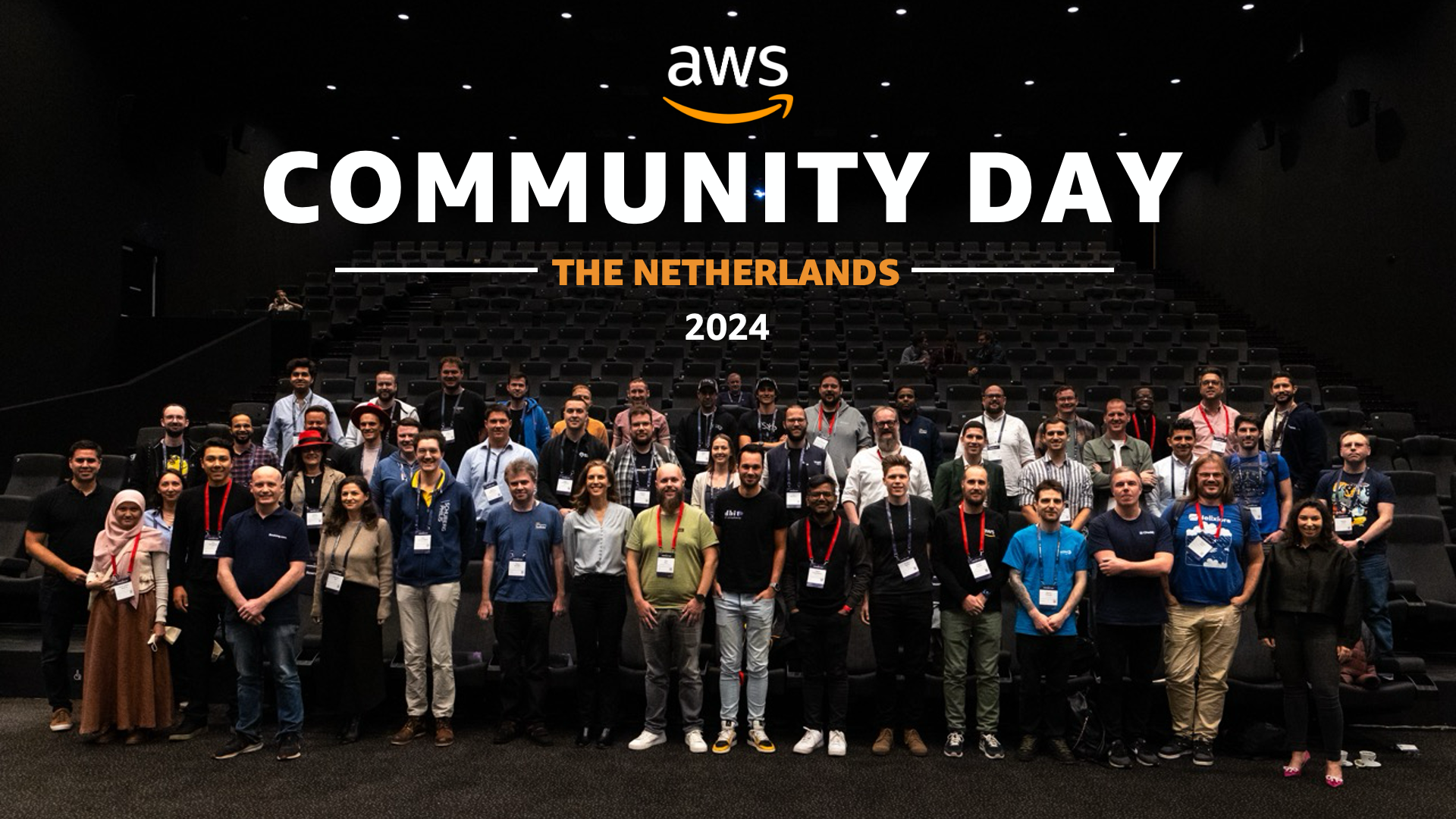
Last year’s AWS Community Day Netherlands 2024 brought together a diverse group of cloud practitioners, speakers, and AWS enthusiasts who contributed to making the community-led conference a valuable knowledge-sharing platform. If you’re planning to attend, feel free to find me there to discuss AWS services or share your cloud implementation experiences!

Let’s look at last week’s new announcements.

Last week’s launches

AWS Transform assessments now includes detached storage analysis – AWS Transform has expanded its assessment capabilities to analyze on-premises detached storage infrastructure, helping customers determine migration total cost of ownership (TCO). The assessment now evaluates Storage Area Network (SAN), Network Attached Storage (NAS), file servers, object storage, and virtual environments, providing migration recommendations to appropriate AWS services including Amazon S3, Amazon EBS, and Amazon FSx. The tool delivers a comprehensive TCO comparison between current and AWS environments, along with performance and cost optimization recommendations. With storage accounting for up to 45% of total migration opportunities, this enhancement helps customers visualize various AWS migration options. AWS Transform assessment is available in US East (N. Virginia) and Europe (Frankfurt) Regions.

Amazon Bedrock introduces Global Cross-Region inference for Anthropic Claude Sonnet 4 – Anthropic’s Claude Sonnet 4 model in Amazon Bedrock now supports Global cross-Region inference, allowing inference requests to route to any supported commercial AWS Region for processing. This enhancement optimizes available resources and enables higher model throughput by distributing traffic across multiple Regions. Previously, you could select cross-Region inference profiles tied to specific geographies (US, EU, or APAC). The new Global cross-Region inference profile provides additional flexibility for generative AI use cases that don’t require geography-specific processing, helping manage unplanned traffic bursts and increase model throughput. For detailed implementation guidance, visit the Amazon Bedrock documentation.

Amazon Neptune Database adds Public Endpoints support – Amazon Neptune now supports Public Endpoints, enabling direct connections to Neptune databases from outside the VPC without complex networking configurations. This feature helps developers securely access their graph databases from development desktops without requiring VPN connections or bastion hosts, while maintaining security through IAM authentication, VPC security groups, and encryption in transit. Public Endpoints can be enabled for Neptune clusters running engine version 1.4.6 or above through the AWS Management Console, AWS CLI, or AWS SDK. The feature is available at no additional cost beyond standard Neptune pricing in all AWS Regions where Neptune Database is offered. Implementation details are available in the Amazon Neptune documentation.

ECS Exec now available in AWS Management Console – Amazon ECS now supports ECS Exec directly in the AWS Management Console, enabling secure, interactive shell access to running containers without requiring inbound ports or SSH key management. Previously available only through API, CLI, or SDKs, this feature streamlines troubleshooting by allowing container access directly from the console interface. You can enable ECS Exec when creating or updating services and standalone tasks, then connect to containers by selecting “Connect” on the task details page, which opens an interactive session through CloudShell. The console also displays the underlying AWS CLI command for use in local terminals. This feature is available in all AWS commercial Regions and documented in the ECS developer guide.

Organizational Notification Configurations for AWS User Notifications now generally available – AWS User Notifications now supports Organizational Notification Configurations, helping AWS Organizations users centrally configure and view notifications across their organization. Management accounts or delegated administrators can configure notifications for specific organizational units or all accounts in an organization. The service supports configuring notifications for any supported Amazon EventBridge event, such as console sign-ins without MFA, with notifications appearing in the admin’s Console Notifications Center and AWS Console Mobile Application. User Notifications supports up to five delegated administrators and is available in all AWS Regions where AWS User Notifications is offered. For implementation details, visit the AWS User Notifications user guide.

For a full list of AWS announcements, be sure to keep an eye on the What’s New at AWS page.

Upcoming AWS events
Check your calendar and sign up for upcoming AWS events.

AWS Summits – Join free online and in-person events that bring the cloud computing community together to connect, collaborate, and learn about AWS. Register in your nearest city: Zurich (September 11), Los Angeles (September 17), and Bogotá (October 9).

AWS re:Invent 2025 – Join us in Las Vegas between December 1–5 as cloud pioneers gather from across the globe for the latest AWS innovations, peer-to-peer learning, expert-led discussions, and invaluable networking opportunities. Don’t forget to explore the event catalog.

AWS Community Days – Join community-led conferences that feature technical discussions, workshops, and hands-on labs led by expert AWS users and industry leaders from around the world: Baltic (September 10), Aotearoa (September 18), South Africa (September 20), Bolivia (September 20), Portugal (September 27).

Browse all upcoming AWS led in-person and virtual events here.

That’s all for this week. Check back next Monday for another Weekly Roundup!

— Esra

This post is part of our Weekly Roundup series. Check back each week for a quick roundup of interesting news and announcements from AWS!

The New d-Matrix JetStream 400G Ethernet Card for Data Center Scale AI Inference

Post Syndicated from Patrick Kennedy original https://www.servethehome.com/the-new-d-matrix-jetstream-400g-ethernet-card-for-data-center-scale-ai-inference/

The new d-Matrix Jetstream 400G card is designed to help the company scale out its Corsair AI inference platfrom using lower-cost switching

The post The New d-Matrix JetStream 400G Ethernet Card for Data Center Scale AI Inference appeared first on ServeTheHome.

[$] Testing the 2-in-1 Framework 12 Laptop

Post Syndicated from jzb original https://lwn.net/Articles/1035758/

Framework Computer is a US-based
computer manufacturer with a line of Linux-supported, modular, easily
repairable and upgradeable laptops. In February, the company announced
a new model, the Framework Laptop 12,
an “entry-level” 12.2-inch convertible notebook that can be
used as a laptop or tablet. The systems were made available for pre-order
in April, I received mine in mid-August. Since then, I have been
putting it through its paces with Debian 13 (“trixie”) and
Fedora Linux 42. It’s a good choice for users who want a
Linux-friendly, lightweight, 2-in-1
device—if they are willing to make a few concessions on storage
capacity, RAM, and CPU/GPU choices.

Security updates for Monday

Post Syndicated from jake original https://lwn.net/Articles/1037157/

Security updates have been issued by Debian (chromium, libhtp, modsecurity-apache, shibboleth-sp, and wireless-regdb), Fedora (chromium, kea, tcpreplay, and yq), Mageia (rootcerts, nspr, nss & firefox and thunderbird), Red Hat (python3), and SUSE (7zip, chromedriver, go1.25, libQt5Pdf5, libsixel-bash-completion, libsoup2, libwireshark18, netty, rav1e, and trivy).

Bringing Node.js HTTP servers to Cloudflare Workers

Post Syndicated from Yagiz Nizipli original https://blog.cloudflare.com/bringing-node-js-http-servers-to-cloudflare-workers/

We’re making it easier to run your Node.js applications on Cloudflare Workers by adding support for the node:http client and server APIs. This significant addition brings familiar Node.js HTTP interfaces to the edge, enabling you to deploy existing Express.js, Koa, and other Node.js applications globally with zero cold starts, automatic scaling, and significantly lower latency for your users — all without rewriting your codebase. Whether you’re looking to migrate legacy applications to a modern serverless platform or build new ones using the APIs you already know, you can now leverage Workers’ global network while maintaining your existing development patterns and frameworks.

The Challenge: Node.js-style HTTP in a Serverless Environment

Cloudflare Workers operate in a unique serverless environment where direct tcp connection isn’t available. Instead, all networking operations are fully managed by specialized services outside the Workers runtime itself — systems like our Open Egress Router (OER) and Pingora that handle connection pooling, keeping connections warm, managing egress IPs, and all the complex networking details. This means as a developer, you don’t need to worry about TLS negotiation, connection management, or network optimization — it’s all handled for you automatically.

This fully-managed approach is actually why we can’t support certain Node.js APIs — these networking decisions are handled at the system level for performance and security. While this makes Workers different from traditional Node.js environments, it also makes them better for serverless computing — you get enterprise-grade networking without the complexity.

This fundamental difference required us to rethink how HTTP APIs work at the edge while maintaining compatibility with existing Node.js code patterns.

Our Solution: we’ve implemented the core `node:http` APIs by building on top of the web-standard technologies that Workers already excel at. Here’s how it works:

HTTP Client APIs

The node:http client implementation includes the essential APIs you’re familiar with:

  • http.get() – For simple GET requests

  • http.request() – For full control over HTTP requests

Our implementations of these APIs are built on top of the standard fetch() API that Workers use natively, providing excellent performance while maintaining Node.js compatibility.

import http from 'node:http';

export default {
  async fetch(request) {
    // Use familiar Node.js HTTP client APIs
    const { promise, resolve, reject } = Promise.withResolvers();

    const req = http.get('https://api.example.com/data', (res) => {
      let data = '';
      res.on('data', chunk => data += chunk);
      res.on('end', () => {
        resolve(new Response(data, {
          headers: { 'Content-Type': 'application/json' }
        }));
      });
    });

    req.on('error', reject);

    return promise;
  }
};

What’s Supported

  • Standard HTTP methods (GET, POST, PUT, DELETE, etc.)

  • Request and response headers

  • Request and response bodies

  • Streaming responses

  • Basic authentication

Current Limitations

  • The Agent API is provided but operates as a no-op.

  • Trailers, early hints, and 1xx responses are not supported.

  • TLS-specific options are not supported (Workers handle TLS automatically).

HTTP Server APIs

The server-side implementation is where things get particularly interesting. Since Workers can’t create traditional TCP servers listening on specific ports, we’ve created a bridge system that connects Node.js-style servers to the Workers request handling model.

When you create an HTTP server and call listen(port), instead of opening a TCP socket, the server is registered in an internal table within your Worker. This internal table acts as a bridge between http.createServer executions and the incoming fetch requests using the port number as the identifier.

You then use one of two methods to bridge incoming Worker requests to your Node.js-style server.

Manual Integration with handleAsNodeRequest

This approach gives you the flexibility to integrate Node.js HTTP servers with other Worker features, and allows you to have multiple handlers in your default entrypoint such as fetch, scheduled, queue, etc.

import { handleAsNodeRequest } from 'cloudflare:node';
import { createServer } from 'node:http';

// Create a traditional Node.js HTTP server
const server = createServer((req, res) => {
  res.writeHead(200, { 'Content-Type': 'text/plain' });
  res.end('Hello from Node.js HTTP server!');
});

// Register the server (doesn't actually bind to port 8080)
server.listen(8080);

// Bridge from Workers fetch handler to Node.js server
export default {
  async fetch(request) {
    // You can add custom logic here before forwarding
    if (request.url.includes('/admin')) {
      return new Response('Admin access', { status: 403 });
    }

    // Forward to the Node.js server
    return handleAsNodeRequest(8080, request);
  },
  async queue(batch, env, ctx) {
    for (const msg of batch.messages) {
      msg.retry();
    }
  },
  async scheduled(controller, env, ctx) {
    ctx.waitUntil(doSomeTaskOnSchedule(controller));
  },
};

This approach is perfect when you need to:

  • Integrate with other Workers features like KV, Durable Objects, or R2

  • Handle some routes differently while delegating others to the Node.js server

  • Apply custom middleware or request processing

Automatic Integration with httpServerHandler

For use cases where you want to integrate a Node.js HTTP server without any additional features or complexity, you can use the `httpServerHandler` function. This function automatically handles the integration for you. This solution is ideal for applications that don’t need Workers-specific features.

import { httpServerHandler } from 'cloudflare:node';
import { createServer } from 'node:http';

// Create your Node.js HTTP server
const server = createServer((req, res) => {
  if (req.url === '/') {
    res.writeHead(200, { 'Content-Type': 'text/html' });
    res.end('<h1>Welcome to my Node.js app on Workers!</h1>');
  } else if (req.url === '/api/status') {
    res.writeHead(200, { 'Content-Type': 'application/json' });
    res.end(JSON.stringify({ status: 'ok', timestamp: Date.now() }));
  } else {
    res.writeHead(404, { 'Content-Type': 'text/plain' });
    res.end('Not Found');
  }
});

server.listen(8080);

// Export the server as a Workers handler
export default httpServerHandler({ port: 8080 });
// Or you can simply pass the http.Server instance directly:
// export default httpServerHandler(server);

Express.js, Koa.js and Framework Compatibility

These HTTP APIs open the door to running popular Node.js frameworks like Express.js on Workers. If any of the middlewares for these frameworks don’t work as expected, please open an issue to Cloudflare Workers repository.

import { httpServerHandler } from 'cloudflare:node';
import express from 'express';

const app = express();

app.get('/', (req, res) => {
  res.json({ message: 'Express.js running on Cloudflare Workers!' });
});

app.get('/api/users/:id', (req, res) => {
  res.json({
    id: req.params.id,
    name: 'User ' + req.params.id
  });
});

app.listen(3000);
export default httpServerHandler({ port: 3000 });
// Or you can simply pass the http.Server instance directly:
// export default httpServerHandler(app.listen(3000));

In addition to Express.js, Koa.js is also supported:

import Koa from 'koa';
import { httpServerHandler } from 'cloudflare:node';

const app = new Koa()

app.use(async ctx => {
  ctx.body = 'Hello World';
});

app.listen(8080);

export default httpServerHandler({ port: 8080 });

Getting started with serverless Node.js applications

The node:http and node:https APIs are available in Workers with Node.js compatibility enabled using the nodejs_compat compatibility flag with a compatibility date later than 08-15-2025.

The addition of node:http support brings us closer to our goal of making Cloudflare Workers the best platform for running JavaScript at the edge, whether you’re building new applications or migrating existing ones.

Ready to try it out? Enable Node.js compatibility in your Worker and start exploring the possibilities of familiar HTTP APIs at the edge.

Celebrate 10 years of the European Astro Pi Challenge — registration for 2025–26 is now open

Post Syndicated from Fergus Kirkpatrick original https://www.raspberrypi.org/blog/celebrate-10-years-of-the-european-astro-pi-challenge-registration-for-2025-26-is-now-open/

The European Astro Pi Challenge, an ESA Education project run in collaboration with the Raspberry Pi Foundation, is back for its tenth year! This special anniversary year marks a decade of inspiring young people to code and have their programs run aboard the International Space Station (ISS). We are delighted to announce that registration for both Astro Pi missions is now officially open for the 2025–26 challenge. 

An illustration of saying 10 years of your code in space
Figure 1: Astro Pi is 10 illustration

Meet the new Astro Pi Ambassador

We are thrilled to introduce you to the Astro Pi ambassador for 2025–26, ESA Astronaut Sophie Adenot. Sophie is from France and has had an incredible journey to becoming an astronaut. She holds a Masters in Engineering, has been a helicopter test pilot, and was awarded the French National Order of Merit (Chevalier) for her public services in gender equality in the sciences. Sophie is one of the new “Hoppers” cohort of ESA astronauts who graduated in 2023. She will be going on her first mission to the ISS in Spring 2026. 

A picture of Sophie Adenot in an ESA Flight suit
Figure 2: Sophie Adenot

Choose your space mission

Not sure where to start? The European Astro Pi challenge, or Astro Pi for short, has two missions that young people can participate in depending on their coding abilities. Both Missions use Python programming to create short computer programs that will be run on the ISS. Which one will you choose? 

Mission Zero: Your pixel art in space

Mission Zero offers a chance for young people to create a nature-inspired piece of pixel art using Python and have it displayed for astronauts to see on special Raspberry Pi computers, called Astro Pis, aboard the ISS. We wanted to share some of our favourite pixel art creations from last year’s mission — you can find them as new examples in our project guide. If your team needs some inspiration to get started, they can choose to recreate or remix one of these examples, or create their own.

The deadline for Mission Zero submissions is 23 March 2026.

A selection of code examples available for Mission Zero 2025–26
Figure 3: New code examples

Mission Space Lab: Become a space scientist

For our more experienced coders, Mission Space Lab returns with a real-world scientific task: calculate the speed of the International Space Station as accurately as possible. Teams of between two and six  young people will write a Python program that collects data from the Astro Pi computers on the ISS to perform this calculation. 

This year, we’ve made some user improvements to the Astro Pi Replay tool, which allows teams to test their programs with a real-time simulation using historical ISS data and images. This updated online tool makes it even easier to see how your program would perform in orbit and troubleshoot any errors. 

The submission deadline for Mission Space Lab is 16 February 2026.

A selection of Earth Observation images captured by Mission Space Lab teams in 2024–25
Figure 4: EO images from Mission Space Lab teams

Celebrating a decade of your programs in space

For ten years, the European Astro Pi Challenge has given young people the unique opportunity to explore computer science and space. Ever since the first Astro Pis arrived on the ISS with ESA astronaut Tim Peake on his Principia Mission, young people have been writing programs to run in space. This year, we’re excited to see what new ideas you have for your pixel arts creations, and how you approach the speed challenge. 

Ready to send your programs to space? Visit astro-pi.org to learn more and register for the challenge today. 

Don’t forget to sign up for our newsletter to stay up to date on all the latest Astro Pi news,resources and events. We can’t wait to see your programs! 

P.S. We’d love to hear from some previous participants about how Astro Pi has impacted them. If you or someone you know would like to share a story, please email us at [email protected].

The post Celebrate 10 years of the European Astro Pi Challenge — registration for 2025–26 is now open appeared first on Raspberry Pi Foundation.

AI in Government

Post Syndicated from Bruce Schneier original https://www.schneier.com/blog/archives/2025/09/ai-in-government.html

Just a few months after Elon Musk’s retreat from his unofficial role leading the Department of Government Efficiency (DOGE), we have a clearer picture of his vision of government powered by artificial intelligence, and it has a lot more to do with consolidating power than benefitting the public. Even so, we must not lose sight of the fact that a different administration could wield the same technology to advance a more positive future for AI in government.

To most on the American left, the DOGE end game is a dystopic vision of a government run by machines that benefits an elite few at the expense of the people. It includes AI rewriting government rules on a massive scale, salary-free bots replacing human functions and nonpartisan civil service forced to adopt an alarmingly racist and antisemitic Grok AI chatbot built by Musk in his own image. And yet despite Musk’s proclamations about driving efficiency, little cost savings have materialized and few successful examples of automation have been realized.

From the beginning of the second Trump administration, DOGE was a replacement of the US Digital Service. That organization, founded during the Obama administration to empower agencies across the executive government with technical support, was substituted for one reportedly charged with traumatizing their staff and slashing their resources. The problem in this particular dystopia is not the machines and their superhuman capabilities (or lack thereof) but rather the aims of the people behind them.

One of the biggest impacts of the Trump administration and DOGE’s efforts has been to politically polarize the discourse around AI. Despite the administration railing against “woke AI”‘ and the supposed liberal bias of Big Tech, some surveys suggest the American left is now measurably more resistant to developing the technology and pessimistic about its likely impacts on their future than their right-leaning counterparts. This follows a familiar pattern of US politics, of course, and yet it points to a potential political realignment with massive consequences.

People are morally and strategically justified in pushing the Democratic Party to reduce its dependency on funding from billionaires and corporations, particularly in the tech sector. But this movement should decouple the technologies championed by Big Tech from those corporate interests. Optimism about the potential beneficial uses of AI need not imply support for the Big Tech companies that currently dominate AI development. To view the technology as inseparable from the corporations is to risk unilateral disarmament as AI shifts power balances throughout democracy. AI can be a legitimate tool for building the power of workers, operating government and advancing the public interest, and it can be that even while it is exploited as a mechanism for oligarchs to enrich themselves and advance their interests.

A constructive version of DOGE could have redirected the Digital Service to coordinate and advance the thousands of AI use cases already being explored across the US government. Following the example of countries like Canada, each instance could have been required to make a detailed public disclosure as to how they would follow a unified set of principles for responsible use that preserves civil rights while advancing government efficiency.

Applied to different ends, AI could have produced celebrated success stories rather than national embarrassments.

A different administration might have made AI translation services widely available in government services to eliminate language barriers to US citizens, residents and visitors, instead of revoking some of the modest translation requirements previously in place. AI could have been used to accelerate eligibility decisions for Social Security disability benefits by performing preliminary document reviews, significantly reducing the infamous backlog of 30,000 Americans who die annually awaiting review. Instead, the deaths of people awaiting benefits may now double due to cuts by DOGE. The technology could have helped speed up the ministerial work of federal immigration judges, helping them whittle down a backlog of millions of waiting cases. Rather, the judicial systems must face this backlog amid firings of immigration judges, despite the backlog.

To reach these constructive outcomes, much needs to change. Electing leaders committed to leveraging AI more responsibly in government would help, but the solution has much more to do with principles and values than it does technology. As historian Melvin Kranzberg said, technology is never neutral: its effects depend on the contexts it is used in and the aims it is applied towards. In other words, the positive or negative valence of technology depends on the choices of the people who wield it.

The Trump administration’s plan to use AI to advance their regulatory rollback is a case in point. DOGE has introduced an “AI Deregulation Decision Tool” that it intends to use through automated decision-making to eliminate about half of a catalog of nearly 200,000 federal rules . This follows similar proposals to use AI for large-scale revisions of the administrative code in Ohio, Virginia and the US Congress.

This kind of legal revision could be pursued in a nonpartisan and nonideological way, at least in theory. It could be tasked with removing outdated rules from centuries past, streamlining redundant provisions and modernizing and aligning legal language. Such a nonpartisan, nonideological statutory revision has been performed in Ireland—by people, not AI—and other jurisdictions. AI is well suited to that kind of linguistic analysis at a massive scale and at a furious pace.

But we should never rest on assurances that AI will be deployed in this kind of objective fashion. The proponents of the Ohio, Virginia, congressional and DOGE efforts are explicitly ideological in their aims. They see “AI as a force for deregulation,” as one US senator who is a proponent put it, unleashing corporations from rules that they say constrain economic growth. In this setting, AI has no hope to be an objective analyst independently performing a functional role; it is an agent of human proponents with a partisan agenda.

The moral of this story is that we can achieve positive outcomes for workers and the public interest as AI transforms governance, but it requires two things: electing leaders who legitimately represent and act on behalf of the public interest and increasing transparency in how the government deploys technology.

Agencies need to implement technologies under ethical frameworks, enforced by independent inspectors and backed by law. Public scrutiny helps bind present and future governments to their application in the public interest and to ward against corruption.

These are not new ideas and are the very guardrails that Trump, Musk and DOGE have steamrolled over the past six months. Transparency and privacy requirements were avoided or ignored, independent agency inspectors general were fired and the budget dictates of Congress were disrupted. For months, it has not even been clear who is in charge of and accountable for DOGE’s actions. Under these conditions, the public should be similarly distrustful of any executive’s use of AI.

We think everyone should be skeptical of today’s AI ecosystem and the influential elites that are steering it towards their own interests. But we should also recognize that technology is separable from the humans who develop it, wield it and profit from it, and that positive uses of AI are both possible and achievable.

This essay was written with Nathan E. Sanders, and originally appeared in Tech Policy Press.

Thank You For the Supercomputers Google Predictions for the Next Phase of AI at Hot Chips 2025

Post Syndicated from Patrick Kennedy original https://www.servethehome.com/thank-you-for-the-supercomputers-google-predictions-for-the-next-phase-of-ai-at-hot-chips-2025/

At the first Hot Chips 2025 Keynote, Noam Shazeer co-lead of Google Gemini AI, gave his thoughts on what LLMs need to improve in the future

The post Thank You For the Supercomputers Google Predictions for the Next Phase of AI at Hot Chips 2025 appeared first on ServeTheHome.

The collective thoughts of the interwebz