Rethinking Stream Processing: Data Exploration

Post Syndicated from Grab Tech original https://engineering.grab.com/rethinking-streaming-processing-data-exploration

Introduction

In this digital age, companies collect multitudes of data that enable the tracking of business metrics and performance. Over the years, data analytics tools for data storage and processing have evolved from the days of Excel sheets and macros to more advanced Map Reduce model tools like Spark, Hadoop, and Hive. This evolution has allowed companies, including Grab, to perform modern analytics on the data ingested into the Data Lake, empowering them to make better data-driven business decisions. This form of data will be referenced within this document as “Offline Data”.

With innovations in stream processing technology like Spark and Flink, there is now more interest in unlocking value from streaming data. This form of continuously-generated data in high volume will be referenced within this document as “Online Data”. In the context of Grab, the streaming data is usually materialised as Kafka topics (“Kafka Stream”) as the result of stream processing in its framework. This data is largely unexplored until they are eventually sunk into the Data Lake as Offline Data, part of the data journey (see Figure 1 below). This induces some data latency before the data can be used by data analysts to inform decisions.
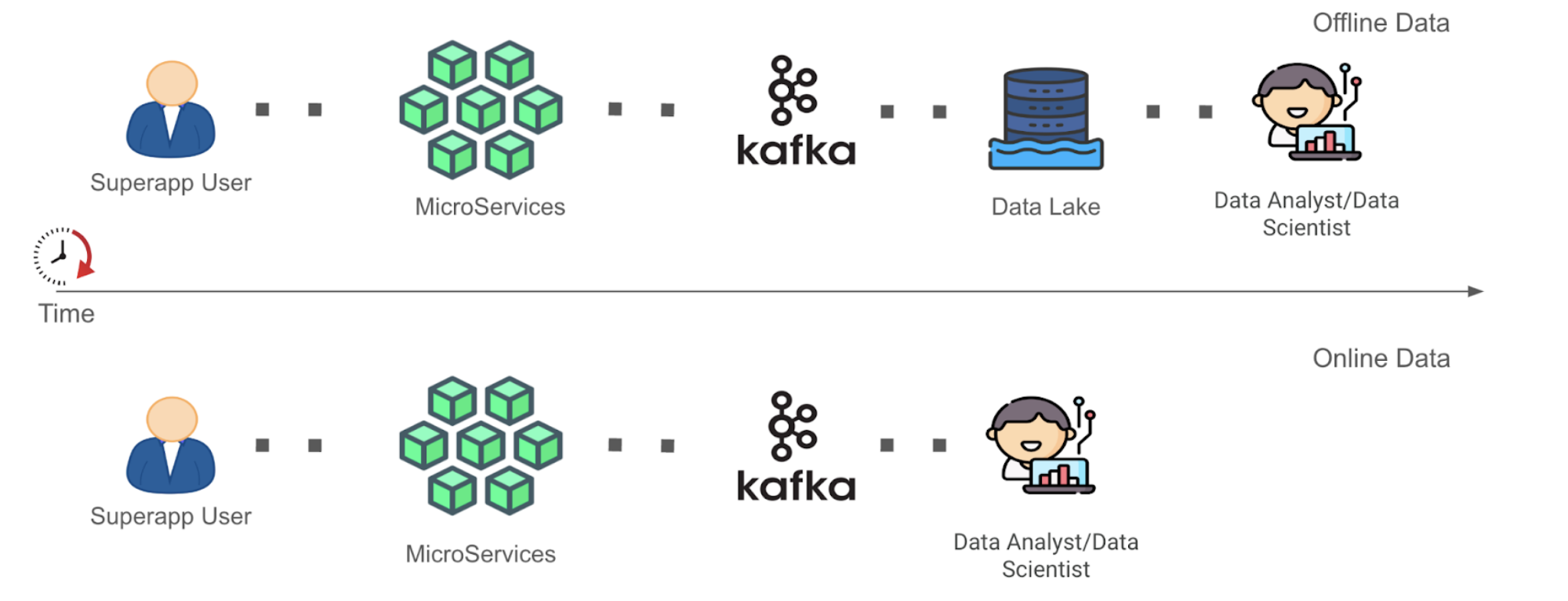
Figure 1. Simplified data journey for Offline Data vs. Online Data, from data generation to data analysis.

As seen in Figure 1 above, the Time to Value (“TTV”) of Online Data is shorter as compared to that of Offline Data in a simplified data journey from data generation to data analysis where complexities of data cleaning and transformation have been removed. This is because the role of the data analyst or data scientist (“Data End User”) has been enabled forward to the Kafka stage for Online Data instead of the Data Lake stage for Offline Data. We recognise that allowing earlier data exploration on Online Data allows Data End Users to build context around the data inputs they are using in an earlier stage. This can help them process Offline Data more meaningfully in subsequent stages. We are interested in opening up the possibility for Data End Users to at least explore the Online Data before they architect a full solution to clean and/or process the data directly or more efficiently post-ingestion into the Data Lake. After their data exploration, the users would have more information to decide whether to spin up a stream processing pipeline for Online Data, or to continue processing Offline Data with their current solution, but with a more refined understanding and logic strategy against their source data inputs. However, of course, in this blog, we acknowledge that not all analysis on Online Data could be done in this manner.

Problem statement

Online Data is underutilised within Grab mainly because of, among other reasons, difficulty in performing data exploration on data that is not yet properly stored in the Data Lake.

For the purpose of this blog post, we will focus only on the problem of exploration of Online Data because this problem is the precursor to allowing us to fully democratise such data.

The problem of data exploration manifests itself when Data End Users need to find the proper data inputs to base and develop their data models. These users would then often need to parse through a multitude of documentation and connect with multiple upstream data producers, to know the range of data signals that are currently available and understand what each data signal is trying to measure.

Given the ephemeral nature of Online Data, this implies that the lack of correct tool adoption to seamlessly perform quick tests with application logic on Online Data disincentivises the Data End Users to work on these Online Data. Testing such logic on Offline Data is generally much easier since iteration testing on the exact same dataset is possible.

This difficulty in performing data exploration including ad hoc queries on Online Data has therefore made development of stream processing applications hard for Data End Users, creating headwinds in Grab’s aim to evolve from making data-driven business decisions to also making data-driven operation decisions. Doing both would allow Grab to react much quicker to abrupt changes in its business landscape.

Adoption of Zeppelin notebook environment

To address the difficulty in performing data exploration on Online Data, we have adopted Apache Zeppelin, a web-based notebook that enables data-drive, interactive data analytics with the support of multiple interpreters to work with various data processing backends e.g. Spark, Flink. The full solution of the adopted Zeppelin notebook environment is enabled seamlessly within our internal data-streaming platform, through its control plane. If you are interested, you may check out our previous blog post titled An elegant platform for more details on the abovementioned streaming platform and its control plane.
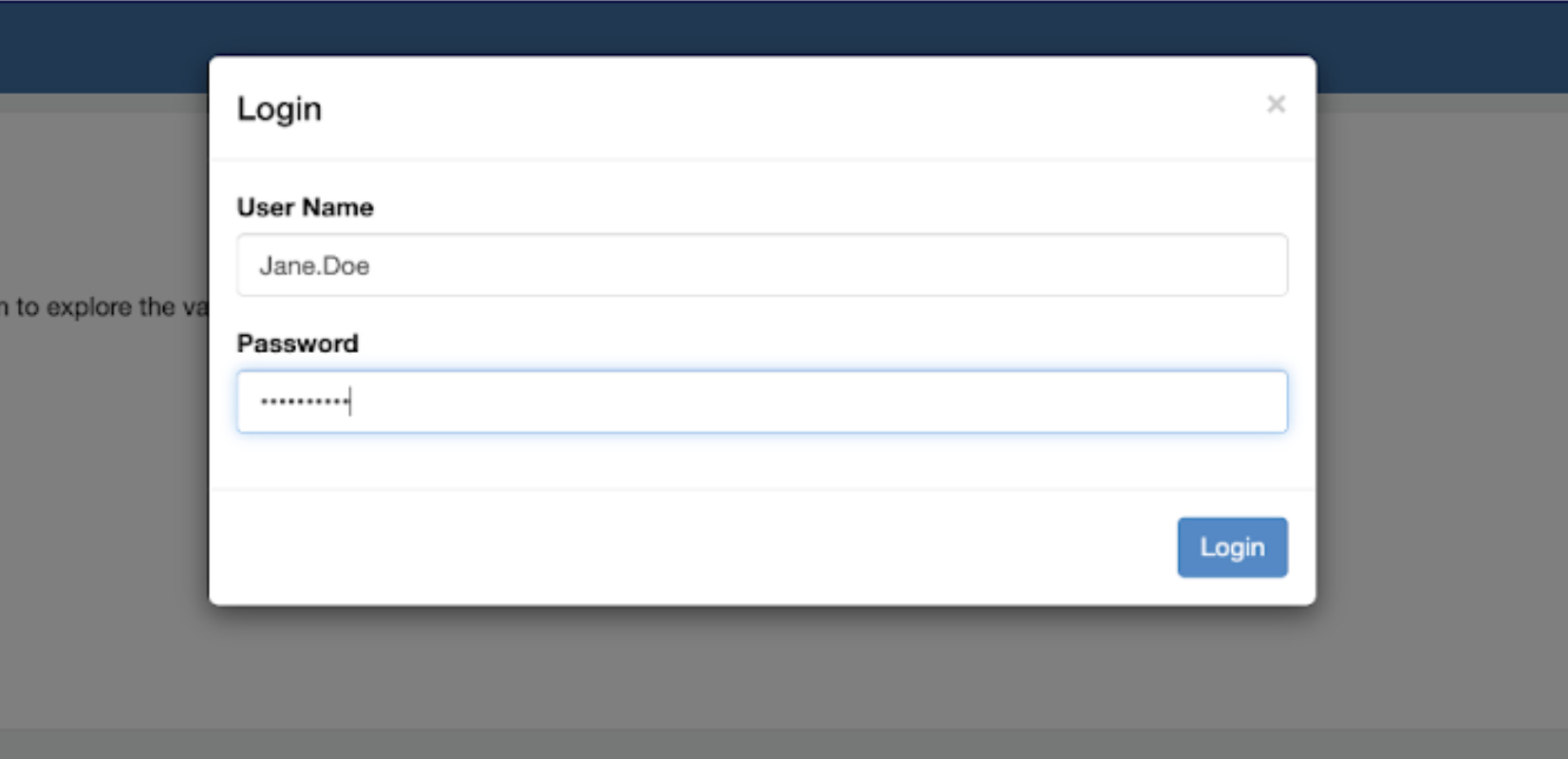
Figure 2. Zeppelin login page via web-based notebook environment.

As seen from Figure 2 above, after successful creation of the Zeppelin cluster, users can log in with their generated credentials delivered to them via the integrated instant messenger, and start using the notebook environment.
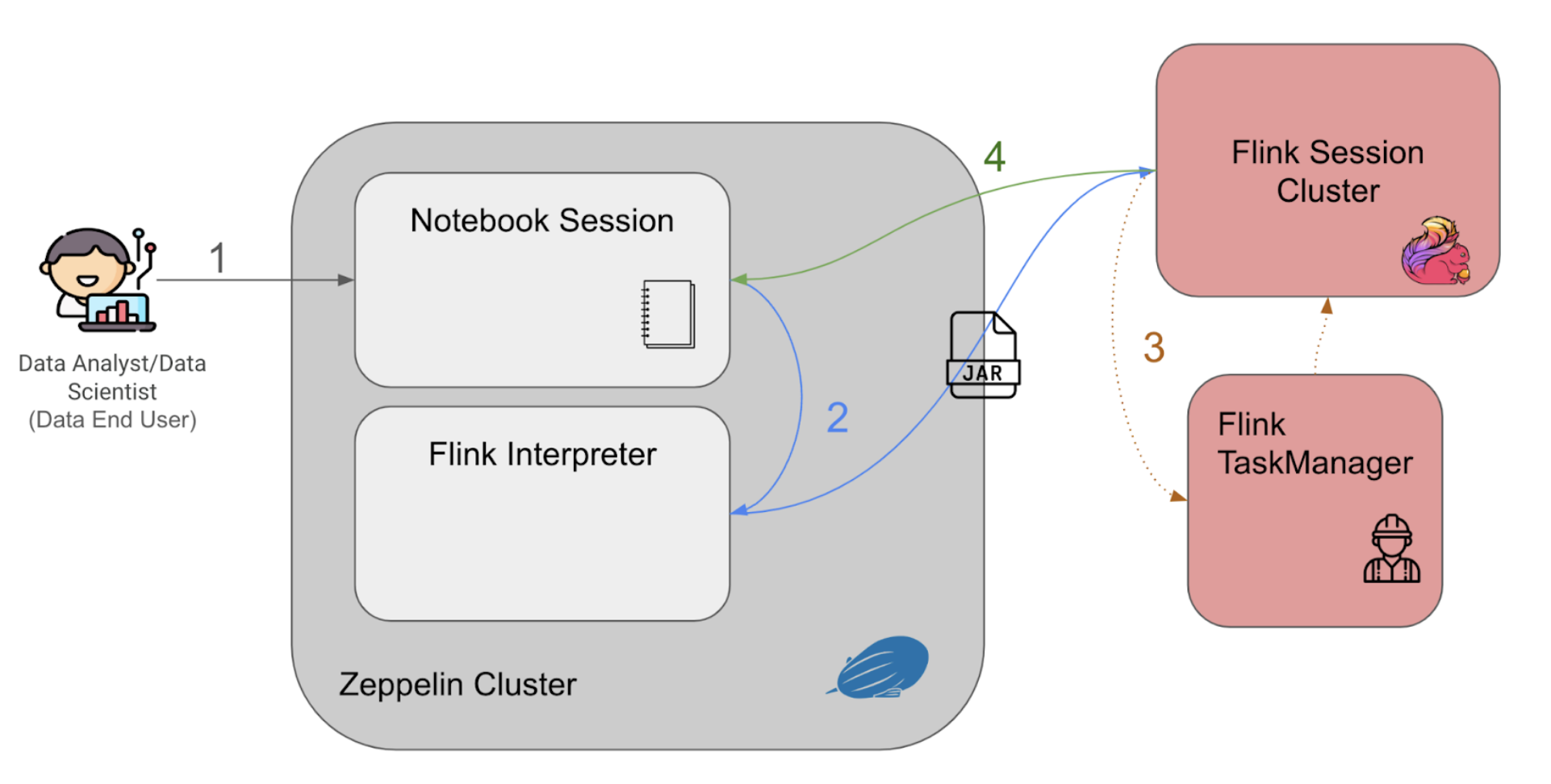
Figure 3. Zeppelin programme flow in the notebook environment.

Figure 3 above explains the Zeppelin notebook programme flow as follows:

  • The users enter their queries into the notebook session and run querying statements interactively with the established web-based notebook session.
  • The queries are passed to the Flink interpreter within the cluster to generate the Flink job as a Jar file, to be then submitted to a Flink session cluster.
  • When the Flink session cluster job manager receives the job, it would spin up the corresponding Flink task managers (workers) to run the application and retrieve the results.
  • The query results would then be piped back to the notebook session, to be displayed back to the user on the notebook session.

Data query and visualisation
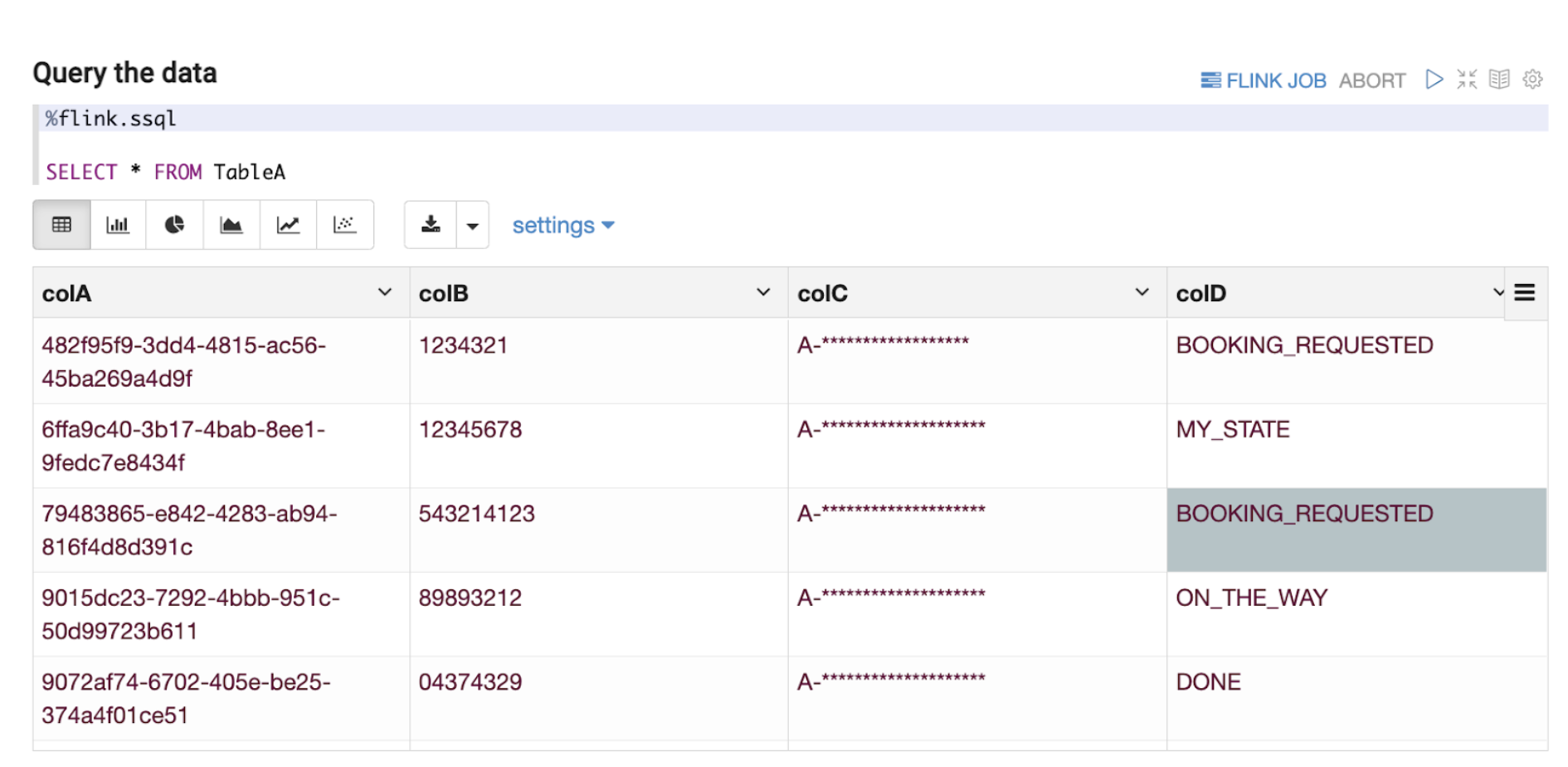
Figure 4. Example of simple select query of data on Kafka.
Note: All variable names, schema, values, and other details used in this article are only created for use as examples.

Flink has a planned roadmap to create a unified streaming language for both stream processing and data analytics. In line with the roadmap, we have based our Zeppelin solution on supporting Structured Query Language (“SQL”) as the query language of choice as seen in Figure 4 above. Data End Users can now write queries in SQL, which is a language that they are comfortable with, and perform adequate data exploration.

As discussed in this section, data exploration on streaming data at the Kafka stage by adopting the right tool enables Data End Users to seamlessly have visibility to quickly understand the current schema of a Kafka topic (explained more in the next section. This kind of data exploration also enables Data End Users to understand the type of data the Kafka topic represents, such as the ability to determine if a country code data field is in alpha-2 or alpha-3 format while the data is still part of streaming data. This might seem inconsequential and immediately identifiable even in Offline Data, but by enabling data exploration at an earlier stage in the data journey for Online Data, Data End Users have the opportunity to react much more quickly. For example, a change of expected country code format from the data producer would usually lead to errors in the downstream joins or other stream processing pipelines due to incompatible parsing or filtering of the modified country codes. Instead of waiting for the data to be ingested to Offline Data, users can investigate the issue with Online Data retrieved from Kafka.
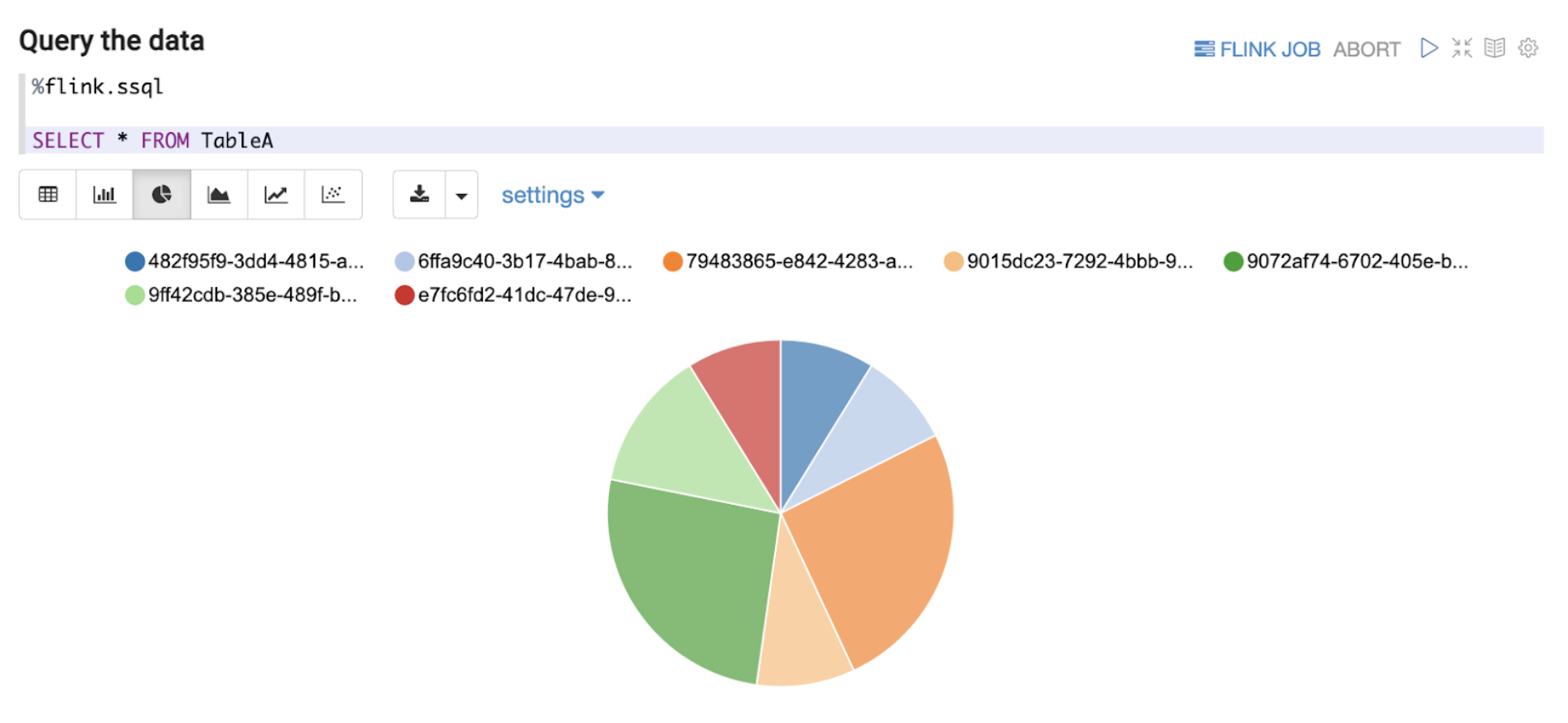
Figure 5. Simple visualisation of queried data on Zeppelin’s notebook environment.
Note: All variable names, schema, values, and other details used in this article are only created for use as examples.

Besides query features, Zeppelin notebook provides simple visualisation and analytics of the off-the-shelf data as presented above in Figure 5. Furthermore, users are now able to perform interactive ad hoc queries on Online Data. These queries will eventually become much more advanced and/or effective SQL queries to be deployed as a streaming pipeline later on in the data journey. This reduces the inertia in setting up a separate development environment or learning other programming languages like Java or Scala during the development of streaming pipelines. With Zeppelin’s notebook environment, our Data End Users are more empowered to quickly derive value from Online Data.

Need for a more dynamic table schema derivation process

For the Data End Users performing data exploration on Online Data, we see a need for these users to derive the Data Definition Language (“DDL”) associated with a Kafka stream at an earlier stage of the data journey. Within Grab, even though Kafka streams are transmitted in Protobuf format and are thus structured, both the schema and the corresponding DDL changes are added over time as new fields. Typically, the data producer (service owners) and the data engineers responsible for the data ingestion pipeline coordinate to perform such updates. Since the Data End Users are not involved in such schema update processes nor do they directly interact with the data producers, many of them find the discovery of changes in the current Kafka stream schema an issue. Granted that this is an issue our metadata platform is actively solving using Datahub, we hope to also solve the challenge by being able to derive the DDL more dynamically within the tooling, for data exploration on Online Data to reduce friction.
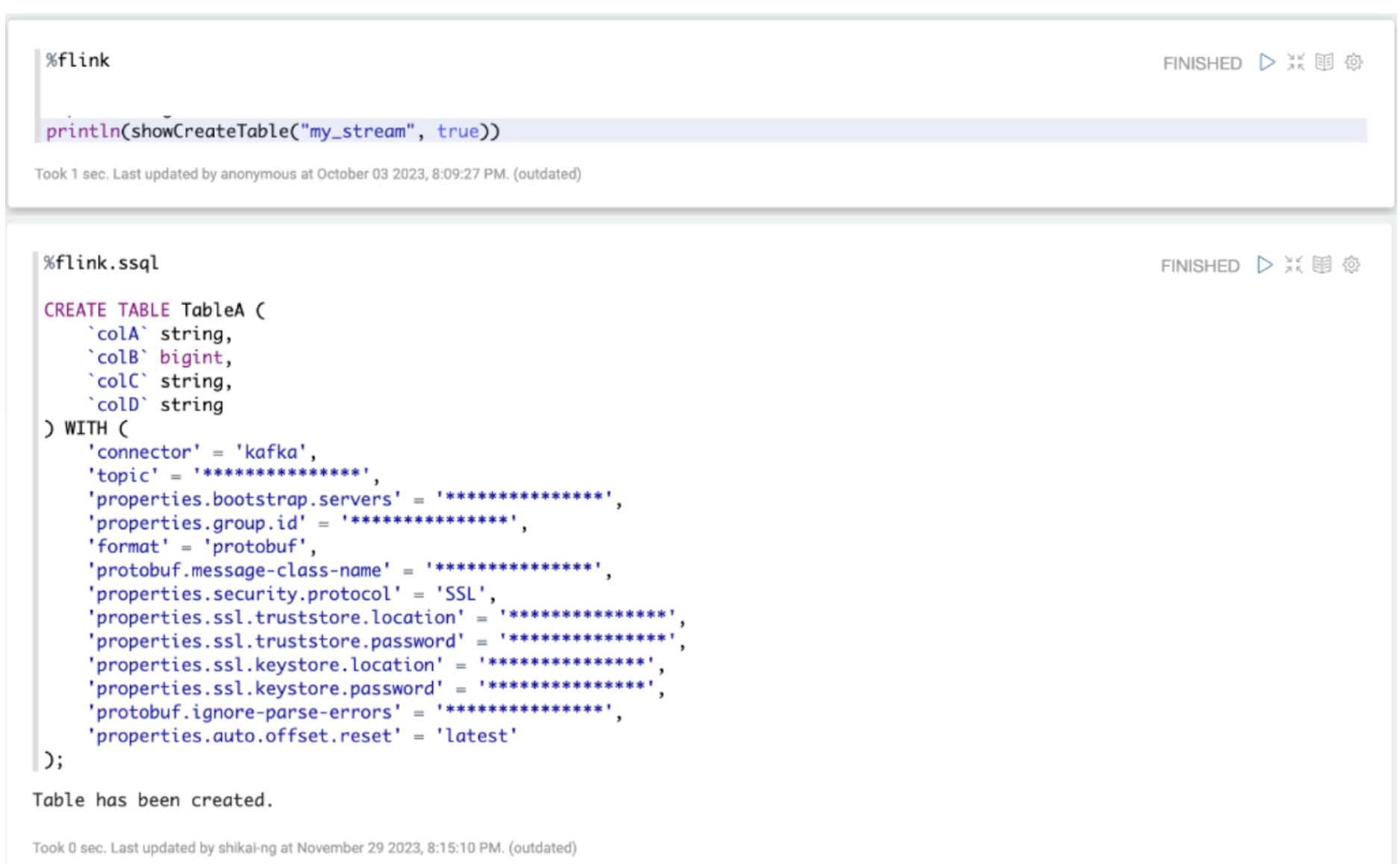
Figure 6. Common functions to derive DDL of a Kafka Stream in SQL.
Note: All variable names, schema, values, and other details used in this article are only created for use as examples.

As seen from Figure 6 above, we have an integrated tooling for Data End Users to derive the DDL associated with a Kafka stream using SQL language. A Kafka stream in Grab’s context is a logical concept describing a Kafka topic, associating it with its metadata like Kafka bootstrap servers and associated Java class created by Protoc. This tool maps the Protobuf schema definition of a Kafka stream to a DDL, allowing it to be expressed and used in SQL language. This reduces the manual effort involved in creating these table definitions from scratch based on the associated Protobuf schema. Users can now derive the DDL associated with a Kafka stream more easily.

Mitigating risks arising from data exploration on Online Data – data access authorisation/audit

While we rethink stream processing and are open to options that enable data exploration on Online Data as mentioned above, we realised that new security requirements related to data access authorisation and maintaining proper audit trail have emerged. Even with Personally Identifiable Information (PII) obfuscation enforcement by our streaming pipeline, it means we need to implement stricter guardrails in place along with audit trails to ensure users only have access to what they are allowed to, and this access can be removed in a break-glass scenario. If you are interested, you may check out our previous blog post titled PII masking for privacy-grade machine learning for more details about how we enforce PII masking on machine learning data streaming pipelines.

To enable data access authorisation, we utilised Strimzi, the operator of running Kafka on Kubernetes. We integrated Strimzi’s Open Policy Agent (OPA) with Kafka to define policies that authorise specific read-only user access to specific Kafka Topics. The identification of users is done via mutualTLS (mTLS) connection with our Kafka clusters, where their user details are part of the SSL certificate details used for authentication.

With these tools in place, each user’s request to explore Online Data would be properly logged, and each data access can be controlled by an OPA policy managed by a central team.

If you are interested, you may check out our previous post Zero trust with Kafka where we discussed our efforts to continue strengthening the security of our data-streaming platform.

Impact

With the proliferation of our data-streaming platform, we expect to see improvements in the way our data becomes gradually democratised. We have already been receiving use cases from the Data End Users who are interested in validating a chain of events on Online Data, i.e. retrieving information of all events associated with a particular booking, which is not currently something that can be done easily.

More importantly, the tools in place for data exploration on Online Data form the foundation required for us to embark on our next step of the stream processing journey. This foundation makes the development and validation of the stream processing logic much quicker. This occurs when ad hoc queries in a notebook environment are possible, removing the need for local developer environment setups and the need to go through the whole pipeline deployment process for eventual validation of the developed logic. We believe that this would prove to reduce our lead time in creating stream processing pipelines significantly.

What’s next?

Our next step is to rethink further how our stream processing pipelines are defined and start to provision SQL as the unified streaming language of our pipelines. This helps facilitate better discussion between upstream data producers, data engineers, and Data End Users, since SQL is the common language among these stakeholders.

We will also explore handling schema discovery in a more controlled manner by utilising a Hive catalogue to store our Kafka table definitions. This removes the need for users to retrieve and run the table DDL statement for every session, making the data exploration experience even more seamless.

References

[1] Apache Zeppelin | Web-based notebook that enables data-driven, interactive data analytics and collaborative documents with SQL, Scala, Python, R and more.

[2] An elegant platform | Grab engineering blog.

[3] Apache Flink | Roadmap on Unified SQL Platform.

[4] ISO | ISO 3166 Country Codes.

[5] Protobuf (Protocol Buffers)| Language-neutral, platform-neutral extensible mechanisms for serializing structured data.

[6] Datahub | Extensible metadata platform that enables data discovery, data observability and federated governance to help tame the complexity of your data ecosystem.

[7] Protoc | Protocol buffer compiler installation.

[8] PII masking for privacy-grade machine learning | Grab engineering blog.

[9] Zero trust with Kafka | Grab engineering blog.

[10] Open Policy Agent (OPA) | Policy-based control for cloud native environments.

[11] Strimzi | Using Open Policy Agent with Strimzi and Apache Kafka.

[12] Confluent Documentation | Configure mTLS authentication and RBAC for kafka brokers.

Join us

Grab is the leading superapp platform in Southeast Asia, providing everyday services that matter to consumers. More than just a ride-hailing and food delivery app, Grab offers a wide range of on-demand services in the region, including mobility, food, package and grocery delivery services, mobile payments, and financial services across 428 cities in eight countries.

Powered by technology and driven by heart, our mission is to drive Southeast Asia forward by creating economic empowerment for everyone. If this mission speaks to you, join our team today!

[$] Looking ahead to Emacs 30

Post Syndicated from jake original https://lwn.net/Articles/959931/

EmacsConf 2023 was, like its
recent predecessors, an online conference with lots of talks about various
aspects of the Emacs
editor
—though, of course, it is way more than just an editor. Last year’s
edition was held in early December. One of the
talks that looked interesting was on Emacs
development
, which was given live by John Wiegley. In it, he briefly
described some
of the biggest features coming in Emacs 30, which is the next major version
coming for the tool.

New chat experience for AWS Glue using natural language – Amazon Q data integration in AWS Glue (Preview)

Post Syndicated from Irshad Buchh original https://aws.amazon.com/blogs/aws/new-chat-experience-for-aws-glue-using-natural-language-amazon-q-data-integration-in-aws-glue-preview/

Today we’re previewing a new chat experience for AWS Glue that will let you use natural language to author and troubleshoot data integration jobs.

Amazon Q data integration in AWS Glue will reduce the time and effort you need to learn, build, and run data integration jobs using AWS Glue data integration engines. You can author jobs, troubleshoot issues, and get instant answers to questions about AWS Glue and anything related to data integration. The chat experience is powered by Amazon Bedrock.

You can describe your data integration workload and Amazon Q will generate a complete ETL script. You can troubleshoot your jobs by asking Amazon Q to explain errors and propose solutions. Amazon Q provides detailed guidance throughout the entire data integration workflow. Amazon Q helps you learn and build data integration jobs using AWS Glue. Amazon Q can help you connect to common AWS sources such as Amazon Simple Storage Service (Amazon S3), Amazon Redshift, and Amazon DynamoDB.

Let me show you some capabilities of Amazon Q data integration in AWS Glue.

1. Conversational Q&A capability

To start using this feature, I can select the Amazon Q icon on the right-hand side of the AWS Management Console.

AmazonQ-1

For example, I can ask, “What is AWS Glue,” and Amazon Q provides concise explanations along with references I can use to follow up on my questions and validate the guidance.

AmazonQ-2

With Amazon Q, I can elaborate on my use cases in more detail to provide context. For example, I can ask Amazon Q, “How do I create an AWS Glue job?”

AmazonQ-2

Next let me ask Amazon Q, “How do I optimize memory management in my AWS Glue job?”

AmazonQ-41

2. AWS Glue job creation

To use this feature, I can tell Amazon Q, “Write a Glue ETL job that reads from Redshift, drops null fields, and writes to S3 as parquet files.”

AmazonQ-Parq

I can copy code into the script editor or notebook with a simple click on the Copy button. I can also tell Amazon Q, “Help me with a Glue job that reads my DynamoDB table, maps the fields, and writes the results to Amazon S3 in Parquet format”.

AmazonQ-DynamoDB

Get started with Amazon Q today
With Amazon Q, you have an artificial intelligence (AI) expert by your side to answer questions, write code faster, troubleshoot issues, optimize workloads, and even help you code new features. These capabilities simplify every phase of building applications on AWS. Amazon Q data integration in AWS Glue is available in every region where Amazon Q is supported. To learn more, see the Amazon Q pricing page.

Learn more

— Irshad

Build real-time applications with Amazon EventBridge and AWS AppSync

Post Syndicated from James Beswick original https://aws.amazon.com/blogs/compute/build-real-time-applications-with-amazon-eventbridge-and-aws-appsync/

This post is written by Josh Kahn, Tech Leader, Serverless.

Amazon EventBridge now supports publishing events to AWS AppSync GraphQL APIs as native targets. The new integration enables builders to publish events easily to a wider variety of consumers and simplifies updating clients with near real-time data. You can use EventBridge and AWS AppSync to build resilient, subscription-based event-driven architectures across consumers.

To illustrate using EventBridge with AWS AppSync, consider a simplified airport operations scenario. In this example, airlines publish flight events (for example, boarding, push back, gate changes, and delays) to a service that maintains flight status on in-airport displays. Airlines also publish events that are useful for other entities at the airport, such as baggage handlers and maintenance, but not to passengers. This depicts a conceptual view of the system:

Conceptual view of the system

Passengers want the in-airport displays to be up-to-date and accurate. There are a number of ways to design the display application so that data remains up-to-date. Broadly, these include the application polling some API or the application subscribing to data changes.

Subscriptions for this scenario are better as the data changes are small and incremental relative to the large amount of information displayed. In a delay, for example, the display updates the status and departure time but no other details of a single flight among a larger list of flight information.

Flight board

AWS AppSync can enable clients to listen for real-time data changes through the use of GraphQL subscriptions. These are implemented using a WebSocket connection between the client and the AWS AppSync service. The display application client invokes the GraphQL subscription operation to establish a secure connection. AWS AppSync will automatically push data changes (or mutations) via the GraphQL API to subscribers using that connection.

Previously, builders could use EventBridge API Destinations to wire events published and routed through EventBridge to AWS AppSync, as described in an earlier blog post, and available in Serverless Land patterns (API Key, OAuth). The approach is useful for dealing with “out-of-band” updates in which data changes outside of an AWS AppSync mutation. Out-of-band updates generally require a NONE data source in AWS AppSync to notify subscribers of changes, as described in the AWS re:Post Knowledge Center. The addition of AWS AppSync as a target for EventBridge simplifies these use cases as you can now trigger a mutation in response to an event without additional code.

Airport Operations Events

Expanding the scenario, airport operations events look like this:

{
  "flightNum": 123,
  "carrierCode": "JK",
  "date": "2024-01-25",
  "event": "FlightDelayed",
  "message": "Delayed 15 minutes, late aircraft",
  "info": "{ \"newDepTime\": \"2024-01-25T13:15:00Z\", \"delayMinutes\": 15 }"
}

The event field identifies the type of event and if it is relevant to passengers. The event details provide further information about the event, which varies based on the type of event. The airport publishes a variety of events but the airport displays only need a subset of those changes.

AWS AppSync GraphQL APIs start with a GraphQL schema that defines the types, fields, and operations available in that API. AWS AppSync documentation provides an overview of schema and other GraphQL essentials. The partial GraphQL schema for the airport scenario is as follows:


type DelayEventInfo implements EventInfo {
	message: String
	delayMinutes: Int
	newDepTime: AWSDateTime
}

interface EventInfo {
	message: String
}

enum StatusEvent {
	FlightArrived
	FlightBoarding
	FlightCancelled
	FlightDelayed
	FlightGateChanged
	FlightLanded
	FlightPushBack
	FlightTookOff
}

type StatusUpdate {
	num: Int!
	carrier: String!
	date: AWSDate!
	event: StatusEvent!
	info: EventInfo
}

input StatusUpdateInput {
	num: Int!
	carrier: String!
	date: AWSDate!
	event: StatusEvent!
	message: String
	extra: AWSJSON
}

type Mutation {
	updateFlightStatus(input: StatusUpdateInput!): StatusUpdate!
}

type Query {
	listStatusUpdates(by: String): [StatusUpdate]
}

type Subscription {
	onFlightStatusUpdate(date: AWSDate, carrier: String): StatusUpdate
		@aws_subscribe(mutations: ["updateFlightStatus"])
}

schema {
	query: Query
	mutation: Mutation
	subscription: Subscription
}

Connect EventBridge to AWS AppSync

EventBridge allows you to filter, transform, and route events to a number of targets. The airport display service only needs events that directly impact passengers. You can define a rule in EventBridge that routes only those events (included in the preceding GraphQL schema) to the AWS AppSync target. Other events are routed elsewhere, as defined by other rules, or dropped. Details on creating EventBridge rules and the event matching pattern format can be found in EventBridge documentation.

The previous flight delayed event would be delivered using EventBridge as follows:

{
  "id": "b051312994104931b0980d1ad1c5340f",
  "detail-type": "Operations: Flight delayed",
  "source": "airport-operations",
  "time": "2024-01-25T16:58:37Z",
  "detail": {
    "flightNum": 123,
    "carrierCode": "JK",
    "date": "2024-01-25",
    "event": "FlightDelayed",
    "message": "Delayed 15 minutes, late aircraft",
    "info": "{ \"newDepTime\": \"2024-01-25T13:15:00Z\", \"delayMinutes\": 15 }"
  }
}

In this scenario, there is a specific list of events of interest, but EventBridge provides a flexible set of operations to match patterns, inspect arrays, and filter by content using prefix, numerical, or other matching. Some organizations will also allow subscribers to define their own rules on an EventBridge event bus, allowing targets to subscribe to events via self-service.

The following event pattern matches on the events needed for the airport display service:

{
  "source": [ "airport-operations" ],
  "detail": {
    "event": [ "FlightArrived", "FlightBoarding", "FlightCancelled", ... ]
  }
}

To create a new EventBridge rule, you can use the AWS Management Console or infrastructure as code. You can find the CloudFormation definition for the completed rule, with the AWS AppSync target, later in this post.

Console view

Create the AWS AppSync target

Now that EventBridge is configured to route selected events, define AWS AppSync as the target for the rule. The AWS AppSync API must support IAM authorization to be used as an EventBridge target. AWS AppSync supports multiple authorization types on a single GraphQL type, so you can also use OpenID Connect, Amazon Cognito User Pools, or other authorization methods as needed.

To configure AWS AppSync as an EventBridge target, define the target using the AWS Management Console or infrastructure as code. In the console, select the Target Type as “AWS Service” and Target as “AppSync.” Select your API. EventBridge parses the GraphQL schema and allows you to select the mutation to invoke when the rule is triggered.

When using the AWS Management Console, EventBridge will also configure the necessary AWS IAM role to invoke the selected mutation. Remember to create and associate a role with an appropriate trust policy when configuring with IaC.

EventBridge target types

EventBridge supports input transformation to customize the contents of an event before passing the information as input to the target. Configure the input transformer to extract needed values from the event using JSON path and a template in the input format expected by the AWS AppSync API. EventBridge provides a handy utility in the Console to pass and test the output of a sample event.

Target input transformer

Finally, configure the selection set to include the response from the AWS AppSync API. These are the fields that will be returned to EventBridge when the mutation is invoked. While the result returned to EventBridge is not overly useful (aside from troubleshooting), the mutation selection set will also determine the fields available to subscribers to the onFlightStatusUpdate subscription.

Configuring the selection set

Define the EventBridge to AWS AppSync rule in CloudFormation

Infrastructure as code templates, including AWS CloudFormation and AWS CDK, are useful for codifying infrastructure definitions to deploy across Regions and accounts. While you can write CloudFormation by hand, EventBridge provides a useful CloudFormation export in the AWS Management Console. You can use this feature to export the definition for a defined rule.

Export definition

This is the CloudFormation for the previous configured rule and AWS AppSync target. This snippet includes both the rule definition and the target configuration.

PassengerEventsToDisplayServiceRule:
    Type: AWS::Events::Rule
    Properties:
      Description: Route passenger related events to the display service endpoint
      EventBusName: eb-to-appsync
      EventPattern:
        source:
          - airport-operations
        detail:
          event:
            - FlightArrived
            - FlightBoarding
            - FlightCancelled
            - FlightDelayed
            - FlightGateChanged
            - FlightLanded
            - FlightPushBack
            - FlightTookOff
      Name: passenger-events-to-display-service
      State: ENABLED
      Targets:
        - Id: 12344535353263463
          Arn: <AppSync API GraphQL API ARN>
          RoleArn: <EventBridge Role ARN (defined elsewhere)>
          InputTransformer:
            InputPathsMap:
              carrier: $.detail.carrierCode
              date: $.detail.date
              event: $.detail.event
              extra: $.detail.info
              message: $.detail.message
              num: $.detail.flightNum
            InputTemplate: |-
              {
                "input": {
                  "num": <num>,
                  "carrier": <carrier>,
                  "date": <date>,
                  "event": <event>,
                  "message": "<message>",
                  "extra": <extra>
                }
              }
          AppSyncParameters:
            GraphQLOperation: >-
              mutation
              UpdateFlightStatus($input:StatusUpdateInput!){updateFlightStatus(input:$input){
                event
                date
                carrier
                num
                info {
                  __typename
                  ... on DelayEventInfo {
                    message
                    delayMinutes
                    newDepTime
                  }
                }
              }}

The ARN of the AWS AppSync API follows the form arn:aws:appsync:<AWS_REGION>:<ACCOUNT_ID>:endpoints/graphql-api/<GRAPHQL_ENDPOINT_ID>. The ARN is available in CloudFormation (see GraphQLEndpointArn return value) or can be created using the identifier found in the AWS AppSync GraphQL endpoint. The ARN included in the EventBridge execution role policy is the AWS AppSync API ARN (a different ARN).

The AppSyncParameters field includes the GraphQL operation for EventBridge to invoke on the AWS AppSync API. This must be well formatted and match the GraphQL schema. Include any fields that must be available to subscribers in the selection set.

Testing subscriptions

AWS AppSync is now configured as a target for the EventBridge rule. The real-life display application would use a GraphQL library, such as AWS Amplify, to subscribe to real-time data changes. The AWS Management Console provides a useful utility to test. Navigate to the AWS AppSync console and select Queries in the menu for your API. Enter the following query and choose Run to subscribe for data changes:

subscription MySubscription {
  onFlightStatusUpdate {
    carrier
    date
    event
    num
    info {
      __typename
      … on DelayEventInfo {
        message
        delayMinutes
        newDepTime
      }
    }
  }
}

In a separate browser tab, navigate to the EventBridge console, and choose Send events. On the Send events page, select the required event bus and set the Event source to “airport-operations.” Then enter a detail type of your choice. Finally, paste the following as the Event detail, then choose Send.

{
  "id": "b051312994104931b0980d1ad1c5340f",
  "detail-type": "Operations: Flight delayed",
  "source": "airport-operations",
  "time": "2024-01-25T16:58:37Z",
  "detail": {
    "flightNum": 123,
    "carrierCode": "JK",
    "date": "2024-01-25",
    "event": "FlightDelayed",
    "message": "Delayed 15 minutes, late aircraft",
    "info": "{ \"newDepTime\": \"2024-01-25T13:15:00Z\", \"delayMinutes\": 15 }"
  }
}

Return to the AWS AppSync tab in your browser to see the changed data in the result pane:

Result pane

Conclusion

Directly invoking AWS AppSync GraphQL API targets from EventBridge simplifies and streamlines integration between these two services, ideal for notifying a variety of subscribers of data changes in event-driven workloads. You can also take advantage of other features available from the two services. For example, use AWS AppSync enhanced subscription filtering to update only airport displays in the terminal in which they are located.

To learn more about serverless, visit Serverless Land for a wide array of reusable patterns, tutorials, and learning materials. Newly added to the pattern library is an EventBridge to AWS AppSync pattern similar to the one described in this post. Visit EventBridge documentation for more details.

For more serverless learning resources, visit Serverless Land.

The state of eBPF

Post Syndicated from corbet original https://lwn.net/Articles/960036/

The eBPF Foundation has published a glossy document called The
State of eBPF
; it seems mostly concerned with how a small number of
large companies are using and developing this technology.

No doubt, eBPF will become the new layer in the new cloud native
infrastructure stack, impacting the observability, performance,
reliability, networking, and security of all applications,
supporters say. Platform engineers will cobble together
eBPF-powered infrastructure building blocks to create platforms
that developers then deploy software on, adding business logic to
the mix, and replacing aging Linux kernel internals that cannot
keep up with today’s digital and, increasingly, cloud native world.

Astera Labs Aries Active Electrical Cable Module for CXL and PCIe Runs

Post Syndicated from Cliff Robinson original https://www.servethehome.com/astera-labs-aries-active-electrical-cable-module-for-cxl-and-pcie-runs/

The new Astera Labs Aries PCIe/ CXL Smart Cable Module puts an Aries retimer into an Active Electrical Cable for cable runs up to 7m

The post Astera Labs Aries Active Electrical Cable Module for CXL and PCIe Runs appeared first on ServeTheHome.

Invoking on-premises resources interactively using AWS Step Functions and MQTT

Post Syndicated from James Beswick original https://aws.amazon.com/blogs/compute/invoking-on-premises-resources-interactively-using-aws-step-functions-and-mqtt/

This post is written by Alex Paramonov, Sr. Solutions Architect, ISV, and Pieter Prinsloo, Customer Solutions Manager.

Workloads in AWS sometimes require access to data stored in on-premises databases and storage locations. Traditional solutions to establish connectivity to the on-premises resources require inbound rules to firewalls, a VPN tunnel, or public endpoints.

This blog post demonstrates how to use the MQTT protocol (AWS IoT Core) with AWS Step Functions to dispatch jobs to on-premises workers to access or retrieve data stored on-premises. The state machine can communicate with the on-premises workers without opening inbound ports or the need for public endpoints on on-premises resources. Workers can run behind Network Access Translation (NAT) routers while keeping bidirectional connectivity with the AWS Cloud. This provides a more secure and cost-effective way to access data stored on-premises.

Overview

By using Step Functions with AWS Lambda and AWS IoT Core, you can access data stored on-premises securely without altering the existing network configuration.

AWS IoT Core lets you connect IoT devices and route messages to AWS services without managing infrastructure. By using a Docker container image running on-premises as a proxy IoT Thing, you can take advantage of AWS IoT Core’s fully managed MQTT message broker for non-IoT use cases.

MQTT subscribers receive information via MQTT topics. An MQTT topic acts as a matching mechanism between publishers and subscribers. Conceptually, an MQTT topic behaves like an ephemeral notification channel. You can create topics at scale with virtually no limit to the number of topics. In SaaS applications, for example, you can create topics per tenant. Learn more about MQTT topic design here.

The following reference architecture shown uses the AWS Serverless Application Model (AWS SAM) for deployment, Step Functions to orchestrate the workflow, AWS Lambda to send and receive on-premises messages, and AWS IoT Core to provide the MQTT message broker, certificate and policy management, and publish/subscribe topics.

Reference architecture

  1. Start the state machine, either “on demand” or on a schedule.
  2. The state: “Lambda: Invoke Dispatch Job to On-Premises” publishes a message to an MQTT message broker in AWS IoT Core.
  3. The message broker sends the message to the topic corresponding to the worker (tenant) in the on-premises container that runs the job.
  4. The on-premises container receives the message and starts work execution. Authentication is done using client certificates and the attached policy limits the worker access to only the tenant’s topic.
  5. The worker in the on-premises container can access local resources like DBs or storage locations.
  6. The on-premises container sends the results and job status back to another MQTT topic.
  7. The AWS IoT Core rule invokes the “TaskToken Done” Lambda function.
  8. The Lambda function submits the results to Step Functions via SendTaskSuccess or SendTaskFailure API.

Deploying and testing the sample

Ensure you can manage AWS resources from your terminal and that:

  • Latest versions of AWS CLI and AWS SAM CLI are installed.
  • You have an AWS account. If not, visit this page.
  • Your user has sufficient permissions to manage AWS resources.
  • Git is installed.
  • Python version 3.11 or greater is installed.
  • Docker is installed.

You can access the GitHub repository here and follow these steps to deploy the sample.

The aws-resources directory contains the required AWS resources including the state machine, Lambda functions, topics, and policies. The directory on-prem-worker contains the Docker container image artifacts. Use it to run the on-premises worker locally.

In this example, the worker container adds two numbers, provided as an input in the following format:

{
  "a": 15,
  "b": 42
}

In a real-world scenario, you can substitute this operation with business logic. For example, retrieving data from on-premises databases, generating aggregates, and then submitting the results back to your state machine.

Follow these steps to test the sample end-to-end.

Using AWS IoT Core without IoT devices

There are no IoT devices in the example use case. However, the fully managed MQTT message broker in AWS IoT Core lets you route messages to AWS services without managing infrastructure.

AWS IoT Core authenticates clients using X.509 client certificates. You can attach a policy to a client certificate allowing the client to publish and subscribe only to certain topics. This approach does not require IAM credentials inside the worker container on-premises.

AWS IoT Core’s security, cost efficiency, managed infrastructure, and scalability make it a good fit for many hybrid applications beyond typical IoT use cases.

Dispatching jobs from Step Functions and waiting for a response

When a state machine reaches the state to dispatch the job to an on-premises worker, the execution pauses and waits until the job finishes. Step Functions support three integration patterns: Request-Response, Sync Run a Job, and Wait for a Callback with Task Token. The sample uses the “Wait for a Callback with Task Token“ integration. It allows the state machine to pause and wait for a callback for up to 1 year.

When the on-premises worker completes the job, it publishes a message to the topic in AWS IoT Core. A rule in AWS IoT Core then invokes a Lambda function, which sends the result back to the state machine by calling either SendTaskSuccess or SendTaskFailure API in Step Functions.

You can prevent the state machine from timing out by adding HeartbeatSeconds to the task in the Amazon States Language (ASL). Timeouts happen if the job freezes and the SendTaskFailure API is not called. HeartbeatSeconds send heartbeats from the worker via the SendTaskHeartbeat API call and should be less than the specified TimeoutSeconds.

To create a task in ASL for your state machine, which waits for a callback token, use the following code:

{
      "Type": "Task",
      "Resource": "arn:aws:states:::lambda:invoke.waitForTaskToken",
      "Parameters": {
        "FunctionName": "${LambdaNotifierToWorkerArn}",
        "Payload": {
          "Input.$": "$",
          "TaskToken.$": "$$.Task.Token"
        }
}

The .waitForTaskToken suffix indicates that the task must wait for the callback. The state machine generates a unique callback token, accessible via the $$.Task.Token built-in variable, and passes it as an input to the Lambda function defined in FunctionName.

The Lambda function then sends the token to the on-premises worker via an AWS IoT Core topic.

Lambda is not the only service that supports Wait for Callback integration – see the full list of supported services here.

In addition to dispatching tasks and getting the result back, you can implement progress tracking and shut down mechanisms. To track progress, the worker sends metrics via a separate topic.

Depending on your current implementation, you have several options:

  1. Storing progress data from the worker in Amazon DynamoDB and visualizing it via REST API calls to a Lambda function, which reads from the DynamoDB table. Refer to this tutorial on how to store data in DynamoDB directly from the topic.
  2. For a reactive user experience, create a rule to invoke a Lambda function when new progress data arrives. Open a WebSocket connection to your backend. The Lambda function sends progress data via WebSocket directly to the frontend.

To implement a shutdown mechanism, you can run jobs in separate threads on your worker and subscribe to the topic, to which your state machine publishes the shutdown messages. If a shutdown message arrives, end the job thread on the worker and send back the status including the callback token of the task.

Using AWS IoT Core Rules and Lambda Functions

A message with job results from the worker does not arrive to the Step Functions API directly. Instead, an AWS IoT Core Rule and a dedicated Lambda function forward the status message to Step Functions. This allows for more granular permissions in AWS IoT Core policies, which result in improved security because the worker container can only publish and subscribe to specific topics. No IAM credentials exist on-premises.

The Lambda function’s execution role contains the permissions for SendTaskSuccess, SendTaskHeartbeat, and SendTaskFailure API calls only.

Alternatively, a worker can run API calls in Step Functions workflows directly, which replaces the need for a topic in AWS IoT Core, a rule, and a Lambda function to invoke the Step Functions API. This approach requires IAM credentials inside the worker’s container. You can use AWS Identity and Access Management Roles Anywhere to obtain temporary security credentials. As your worker’s functionality evolves over time, you can add further AWS API calls while adding permissions to the IAM execution role.

Cleaning up

The services used in this solution are eligible for AWS Free Tier. To clean up the resources in the aws-resources/ directory of the repository run:

sam delete

This removes all resources provisioned by the template.yml file.

To remove the client certificate from AWS, navigate to AWS IoT Core Certificates and delete the certificate, which you added during the manual deployment steps.

Lastly, stop the Docker container on-premises and remove it:

docker rm --force mqtt-local-client

Finally, remove the container image:

docker rmi mqtt-client-waitfortoken

Conclusion

Accessing on-premises resources with workers controlled via Step Functions using MQTT and AWS IoT Core is a secure, reactive, and cost effective way to run on-premises jobs. Consider updating your hybrid workloads from using inefficient polling or schedulers to the reactive approach described in this post. This offers an improved user experience with fast dispatching and tracking of jobs outside of cloud.

For more serverless learning resources, visit Serverless Land.

Celebrating the community: Sahibjot

Post Syndicated from Sophie Ashford original https://www.raspberrypi.org/blog/celebrating-the-community-sahibjot/

In our series of community stories, we celebrate some of the wonderful things young people and educators around the world are achieving through the power of technology. 

A young person sits in a classroom.

In our latest story, we’re heading to Vivek High School in Mohali, India, to meet Sahibjot, a 14-year-old coding enthusiast who has taken his hobby to the next level thanks to mentorship, Code Club, and the exciting opportunity to take part in the Coolest Projects 2023 global online showcase.

Introducing Sahibjot

When he was younger, Sahibjot loved playing video games. His interest in gaming led him to discover the world of game development, and he was inspired to find out more and try it out himself. He began to learn to code in his spare time, using tutorials to help him develop his skills.

A young person sits at a table outside and uses a laptop.

Keen to share the joy he had experienced from gaming, Sahibjot set himself the challenge of creating a game for his cousin. This project cemented his enthusiasm for coding and developing games of his own.

“I always felt that I have played so many games in my life, why not make one and others will enjoy the same experience that I had as a child.

For my cousin, I made a personal game for him, and he played it and he liked it very much, so once he played it, I felt that, yes, this is what I want to do with my life.” – Sahibjot

Mentorship and collaboration

While continuing to hone his computing skills at home, Sahibjot heard that his school had started a Code Club. After initially feeling nervous about joining, his enthusiasm was bolstered by the club mentor, Rajan, talking about artificial intelligence and other interesting topics during the session, and he soon settled in. 

A group of students and a teacher at computers in a classroom.

At Code Club, with support and encouragement from Rajan, Sahibjot continued to develop and grow his coding skills. Alongside his technical skills, he also learned about teamwork and working collaboratively. He embraced the opportunity to help his peers, sharing his knowledge with others and becoming a mentor for younger club members. 

Three students chat outside a school building.

“Last year, we joined this coding club together and we became friends. He’s a very friendly person. Whenever we need him, he just quickly helps us. He helps us to troubleshoot, find any bugs, or even fix our codes.” – Akshat, fellow Code Club member

A global opportunity

The next step for Sahibjot came when Rajan introduced him and his fellow Code Club members to Coolest Projects. Coolest Projects is a celebration of young digital creators and the amazing things they make with technology. It offers participants the opportunity to share their tech creations in a global, online showcase, and local in-person events celebrating young creators are also held in several countries.

A group of students in a classroom being guided through their computing projects by a teacher.

Sahibjot was eager to take part and showcase what he had made. He submitted a Python project, a ping-pong game, to the online showcase, and was very excited to then see his creation receive a special shout-out during the Coolest Projects global livestream event. He was delighted to share this achievement with his friends and family, and he felt proud to be representing his school and his country on a global stage.

“I told everyone around me that there was going to be a livestream and I possibly might be featured in that, so that was really exciting. I learned a lot about just not representing my school and myself as an individual, I learned about representing my whole nation.” — Sahibjot

Sahibjot’s passion for computing has helped shape his aspirations and ambitions. Looking to the future, he hopes to use his technology skills to benefit others and make an impact.

“Using code and technology and all of the things like that, I aspire to make effort to do something with the world, like help out people with technology.” — Sahibjot

Inspire young creators like Sahibjot

To find out how you and young creators you know can get involved in Coolest Projects, visit coolestprojects.org. If the young people in your community are just starting out on their computing journey, visit our projects site for free, fun beginner coding projects.

For more information to help you set up a Code Club in your school, visit codeclub.org.

Join us in celebrating Sahibjot’s inspiring journey by sharing his story on X (formerly Twitter), LinkedIn, and Facebook.

The post Celebrating the community: Sahibjot appeared first on Raspberry Pi Foundation.

The collective thoughts of the interwebz