Cloudflare’s visibility across a large portion of the Internet gives us an unparalleled view of malicious campaigns. We process billions of email threat signals every day, feeding them into multiple AI and machine learning models. This lets our detection team create and deploy new rules at high speed, blocking malicious and unwanted emails before they reach the inbox.
But rapid protection introduces a new challenge: making sure security teams understand exactly what we blocked — and why.
The Challenge
Cloudflare’s fast-moving detection pipeline is one of our greatest strengths — but it also creates a communication gap for customers. Every day, our detection analysts publish new rules to block phishing, BEC, and other unwanted messages. These rules often blend signals from multiple AI and machine learning models, each looking at different aspects of a message like its content, headers, links, attachments, and sender reputation.
While this layered approach catches threats early, SOC teams don’t always have insight into the specific combination of factors that triggered a detection. Instead, they see a rule name in the investigation tab with little explanation of what it means.
Take the rule BEC.SentimentCM_BEC.SpoofedSender as an example. Internally, we know this indicates:
The email contained no unique links or attachments a common BEC pattern
It was flagged as highly likely to be BEC by our Churchmouse sentiment analysis models
Spoofing indicators were found, such as anomalies in the envelope_from header
Those details are second nature to our detection team, but without that context, SOC analysts are left to reverse-engineer the logic from opaque labels. They don’t see the nuanced ML outputs (like Churchmouse’s sentiment scoring) or the subtle header anomalies, or the sender IP/domain reputation data that factored into the decision.
The result is time lost to unclear investigations or the risk of mistakenly releasing malicious emails. For teams operating under pressure, that’s more than just an inconvenience, it’s a security liability.
That’s why we extended Cloudy (our AI-powered agent) to translate complex detection logic into clear explanations, giving SOC teams the context they need without slowing them down.
Enter Cloudy Summaries
Several weeks ago, we launched Cloudy within our Cloudflare One product suite to help customers understand gateway policies and their impacts (you can read more about the launch here: https://blog.cloudflare.com/introducing-ai-agent/).
We began testing Cloudy’s ability to explain the detections and updates we continuously deploy. Our first attempt revealed significant challenges.
The Hallucination Problem
We observed frequent LLM hallucinations, the model generating inaccurate information about messages. While this might be acceptable when analyzing logs, it’s dangerous for email security detections. A hallucination claiming a malicious message is clean could lead SOC analysts to release it from quarantine, potentially causing a security breach.
These hallucinations occurred because email detections involve numerous and complex inputs. Our scanning process runs messages through multiple ML algorithms examining different components: body content, attachments, links, IP reputation, and more. The same complexity that makes manual detection explanation difficult also caused our initial LLM implementation to produce inconsistent and sometimes inaccurate outputs.
Building Guardrails
To minimize hallucination risk while maintaining inbox security, we implemented several manual safeguards:
Step 1: RAG Implementation
We ensured Cloudy only accessed information from our detection dataset corpus, creating a Retrieval-Augmented Generation (RAG) system. This significantly reduced hallucinations by grounding the LLM’s assessments in actual detection data.
Step 2: Model Context Enhancement
We added crucial context about our internal models. For example, the “Churchmouse” designation refers to a group of sentiment detection models, not a single algorithm. Without this context, Cloudy attempted to define “churchmouse” using the common idiom “poor as a church mouse” referencing starving church mice because holy bread never falls to the floor. While historically interesting, this was completely irrelevant to our security context.
Current Results
Our testing shows Cloudy now produces more stable explanations with minimal hallucinations. For example, the detection SPAM.ASNReputation.IPReputation_Scuttle.Anomalous_HC now generates this summary:
“This rule flags email messages as spam if they come from a sender with poor Internet reputation, have been identified as suspicious by a blocklist, and have unusual email server setup, indicating potential malicious activity.”
This strikes the right balance. Customers can quickly understand what the detection found and why we classified the message accordingly.
Beta Program
We’re opening Cloudy email detection summaries to a select group of beta users. Our primary goal is ensuring our guardrails prevent hallucinations that could lead to security compromises. During this beta phase, we’ll rigorously test outputs and verify their quality before expanding access to all customers.
Ready to enhance your email security?
We provide all organizations (whether a Cloudflare customer or not) with free access to our Retro Scan tool, allowing them to use our predictive AI models to scan existing inbox messages. Retro Scan will detect and highlight any threats found, enabling organizations to remediate them directly in their email accounts. With these insights, organizations can implement further controls, either using Cloudflare Email Security or their preferred solution, to prevent similar threats from reaching their inboxes in the future.
If you are interested in how Cloudflare can help secure your inboxes, sign up for a phishing risk assessment here.
The way we interact with AI is fundamentally changing. While text-based interfaces like ChatGPT have shown us what’s possible, in terms of interaction, it’s only the beginning. Humans communicate not only by texting, but also talking — we show things, we interrupt and clarify in real-time. Voice AI brings these natural interaction patterns to our applications.
Today, we’re excited to announce new capabilities that make it easier than ever to build real-time, voice-enabled AI applications on Cloudflare’s global network. These new features create a complete platform for developers building the next generation of conversational AI experiences or can function as building blocks for more advanced AI agents running across platforms.
We’re launching:
Cloudflare Realtime Agents – A runtime for orchestrating voice AI pipelines at the edge
Pipe raw WebRTC audio as PCM in Workers – You can now connect WebRTC audio directly to your AI models or existing complex media pipelines already built on
Workers AI WebSocket support – Realtime AI inference with models like PipeCat’s smart-turn-v2
Deepgram on Workers AI – Speech-to-text and text-to-speech running in over 330 cities worldwide
Why realtime AI matters now
Today, building voice AI applications is hard. You need to coordinate multiple services such as speech-to-text, language models, text-to-speech while managing complex audio pipelines, handling interruptions, and keeping latency low enough for natural conversation.
Building production voice AI requires orchestrating a complex symphony of technologies. You need low latency speech recognition, intelligent language models that understand context and can handle interruptions, natural-sounding voice synthesis, and all of this needs to happen in under 800 milliseconds — the threshold where conversation feels natural rather than stilted. This latency budget is unforgiving. Every millisecond counts: 40ms for microphone input, 300ms for transcription, 400ms for LLM inference, 150ms for text-to-speech. Any additional latency from poor infrastructure choices or distant servers transforms a delightful experience into a frustrating one.
That’s why we’re building real-time AI tools: we want to make real-time voice AI as easy to deploy as a static website. We’re also witnessing a critical inflection point where conversational AI moves from experimental demos to production-ready systems that can scale globally. If you’re already a developer in the real-time AI ecosystem, we want to build the best building blocks for you to get the lowest latency by leveraging the 330+ datacenters Cloudflare has built.
Introducing Cloudflare Realtime Agents
Cloudflare Realtime Agents is a simple runtime for orchestrating voice AI pipelines that run on our global network, as close to your users as possible. Instead of managing complex infrastructure yourself, you can focus on building great conversational experiences.
How it works
When a user connects to your voice AI application, here’s what happens:
WebRTC connection – Audio streams from the user’s device is sent to the nearest Cloudflare location via WebRTC, using Cloudflare RealtimeKit mobile or web SDKs
AI pipeline orchestration – Your pre-configured pipeline runs: speech-to-text → LLM → text-to-speech, with support for interruption detection and turn-taking
Your configured runtime options/callbacks/tools run
Response delivery – Generated audio streams back to the user with minimal latency
The magic is in how we’ve designed this as composable building blocks. You’re not locked into a rigid pipeline — you can configure data flows, add tee and join operations, and control exactly how your AI agent behaves.
Take a look at the MyTextHandler function from the above diagram, for example. It’s just a function that takes in text and returns text back, inserted after speech-to-text and before text-to-speech:
class MyTextHandler extends TextComponent {
	env: Env;

	constructor(env: Env) {
		super();
		this.env = env;
	}

	async onTranscript(text: string) {
		const { response } = await this.env.AI.run('@cf/meta/llama-3.1-8b-instruct', {
			prompt: "You are a wikipedia bot, answer the user query:" + text,
		});
		this.speak(response!);
	}
}
Your agent is a JavaScript class that extends RealtimeAgent, where you initialize a pipeline consisting of the various text-to-speech, speech-to-text, text-to-text and even speech-to-speech transformations.
export class MyAgent extends RealtimeAgent<Env> {
	constructor(ctx: DurableObjectState, env: Env) {
		super(ctx, env);
	}

	async init(agentId: string ,meetingId: string, authToken: string, workerUrl: string, accountId: string, apiToken: string) {
		// Construct your text processor for generating responses to text
		const textHandler = new MyTextHandler(this.env);
		// Construct a Meeting object to join the RTK meeting
		const transport = new RealtimeKitTransport(meetingId, authToken, [
			{
				media_kind: 'audio',
				stream_kind: 'microphone',
			},
		]);
		const { meeting } = transport;

		// Construct a pipeline to take in meeting audio, transcribe it using
		// Deepgram, and pass our generated responses through ElevenLabs to
		// be spoken in the meeting
		await this.initPipeline(
			[transport, new DeepgramSTT(this.env.DEEPGRAM_API_KEY), textHandler, new ElevenLabsTTS(this.env.ELEVENLABS_API_KEY), transport],
			agentId,
			workerUrl,
			accountId,
			apiToken,
		);

		// The RTK meeting object is accessible to us, so we can register handlers
		// on various events like participant joins/leaves, chat, etc.
		// This is optional
		meeting.participants.joined.on('participantJoined', (participant) => {
			textHandler.speak(`Participant Joined ${participant.name}`);
		});
		meeting.participants.joined.on('participantLeft', (participant) => {
			textHandler.speak(`Participant Left ${participant.name}`);
		});

		// Make sure to actually join the meeting after registering all handlers
		await meeting.rtkMeeting.join();
	}

	async deinit() {
		// Add any other cleanup logic required
		await this.deinitPipeline();
	}
}
View a full example in the developer docs and get your own Realtime Agent running. View Realtime Agents on your dashboard.
Built for flexibility
What makes Realtime Agents powerful is its flexibility:
Many AI provider options – Use the models on Workers AI, OpenAI, Anthropic, or any provider through AI Gateway
Multiple input/output modes – Accept audio and/or text and respond with audio and/or text
Stateful coordination – Maintain context across the conversation without managing complex state yourself
Speed and flexibility – use RealtimeKit to manage WebRTC sessions and UI for faster development, or for full control over your stack, you can also connect directly using any standard WebRTC client or raw WebSockets
During the open beta starting today, Cloudflare Realtime Agents runtime is free to use and works with various AI models:
Speech and Audio: Integration with platforms like ElevenLabs and Deepgram.
LLM Inference: Flexible options to use large language models through Cloudflare Workers AI and AI Gateway, connect to third-party models like OpenAi, Gemini, Grok, Claude, or bring your own custom models.
Pipe raw WebRTC audio as PCM in Workers
For developers who need the most flexibility with their applications beyond Realtime Agents, we’re exposing the raw WebRTC audio pipeline directly to Workers.
WebRTC audio in Workers works by leveraging Cloudflare’s Realtime SFU, which converts WebRTC audio in Opus codec to PCM and streams it to any WebSocket endpoint you specify. This means you can use Workers to implement:
Live transcription – Stream audio from a video call directly to a transcription service
Custom AI pipelines – Send audio to AI models without setting up complex infrastructure
Recording and processing – Save, audit, or analyze audio streams in real-time
WebSockets vs WebRTC for voice AI
WebSockets and WebRTC can handle audio for AI services, but they work best in different situations. WebSockets are perfect for server-to-server communication and work fine when you don’t need super-fast responses, making them great for testing and experimenting. However, if you’re building an app where users need real-time conversations with low delay, WebRTC is the better choice.
WebRTC has several advantages that make it superior for live audio streaming. It uses UDP instead of TCP, which prevents audio delays caused by lost packets holding up the entire stream (head of line blocking is a common topic discussed on this blog). The Opus audio codec in WebRTC automatically adjusts to network conditions and can handle packet loss gracefully. WebRTC also includes built-in features like echo cancellation and noise reduction that WebSockets would require you to build separately.
With this feature, you can use WebRTC for client to server communication and leveraging Cloudflare to convert to familiar WebSockets for server-to-server communication and backend processing.
The power of Workers + WebRTC
When WebRTC audio gets converted to WebSockets, you get PCM audio at the original sample rate, and from there, you can run any task in and out of the Cloudflare developer platform:
Resample audio and send to different AI providers
Run WebAssembly-based audio processing
Build complex applications with Durable Objects, Alarms and other Workers primitives
The WebSocket works bidirectionally, so data sent back on the WebSocket becomes available as a WebRTC track on the Realtime SFU, ready to be consumed within WebRTC.
To illustrate this setup, we’ve made a simple WebRTC application demo that uses the ElevenLabs API for text-to-speech.
WebSockets provide the backbone of real-time AI pipelines because it is a low-latency, bidirectional primitive with ubiquitous support in developer tooling, especially for server to server communication. Although HTTP works great for many use cases like chat or batch inference, real-time voice AI needs persistent, low-latency connections when talking to AI inference servers. To support your real-time AI workloads, Workers AI now supports WebSocket connections in select models.
Launching with PipeCat SmartTurn V2
The first model with WebSocket support is PipeCat’s smart-turn-v2 turn detection model — a critical component for natural conversation. Turn detection models determine when a speaker has finished talking and it’s appropriate for the AI to respond. Getting this right is the difference between an AI that constantly interrupts and one that feels natural to talk to.
Below is an example on how to call smart-turn-v2 running on Workers AI.
On Wednesday, we announced that Deepgram’s speech-to-text and text-to-speech models are available on Workers AI, running in Cloudflare locations worldwide. This means:
Lower latency – Speech recognition happens at the edge, close to users running in the same network as Workers
WebRTC audio processing without leaving the Cloudflare network
State-of-the-art audio ML models powerful, capable, and fast audio models, available directly through Workers AI
Global scale – leverages Cloudflare’s global network in 330+ cities automatically
Deepgram is a popular choice for voice AI applications. By building your voice AI systems on the Cloudflare platform, you get access to powerful models and the lowest latency infrastructure to give your application a natural, responsive experience.
Interested in other realtime AI models running on Cloudflare?
If you’re developing AI models for real-time applications, we want to run them on Cloudflare’s network. Whether you have proprietary models or need ultra-low latency inference at scale with open source models reach out to us.
Want to pick the brains of the engineers who built this? Join them for technical deep dives, live demos Q&A at Cloudflare Connect in Las Vegas. Explore the full schedule and register.
Monitoring a corporate network and troubleshooting any performance issues across that network is a hard problem, and it has become increasingly complex over time. Imagine that you’re maintaining a corporate network, and you get the dreaded IT ticket. An executive is having a performance issue with an application, and they want you to look into it. The ticket doesn’t have a lot of details. It simply says: “Our internal documentation is taking forever to load. PLS FIX NOW”.
In the early days of IT, a corporate network was built on-premises. It provided network connectivity between employees that worked in person and a variety of corporate applications that were hosted locally.
The shift to cloud environments, the rise of SaaS applications, and a “work from anywhere” model has made IT environments significantly more complex in the past few years. Today, it’s hard to know if a performance issue is the result of:
An employee’s device
Their home or corporate wifi
The corporate network
A cloud network hosting a SaaS app
An intermediary ISP
A performance ticket submitted by an employee might even be a combination of multiple performance issues all wrapped together into one nasty problem.
Cloudflare built Cloudflare One, our Secure Access Service Edge (SASE) platform, to protect enterprise applications, users, devices, and networks. In particular, this platform relies on two capabilities to simplify troubleshooting performance issues:
Cloudflare’s Zero Trust client, also known as WARP, forwards and encrypts traffic from devices to Cloudflare edge.
Digital Experience Monitoring (DEX) works alongside WARP to monitor device, network, and application performance.
We’re excited to announce two new AI-powered tools that will make it easier to troubleshoot WARP client connectivity and performance issues. We’re releasing a new WARP diagnostic analyzer in the Zero Trust dashboard and a MCP (Model Context Protocol) server for DEX. Today, every Cloudflare One customer has free access to both of these new features by default.
WARP diagnostic analyzer
The WARP client provides diagnostic logs that can be used to troubleshoot connectivity issues on a device. For desktop clients, the most common issues can be investigated with the information captured in logs called WARP diagnostic. Each WARP diagnostic log contains an extensive amount of information spanning days of captured events occurring on the client. It takes expertise to manually go through all of this information and understand the full picture of what is occurring on a client that is having issues. In the past, we’ve advised customers having issues to send their WARP diagnostic log straight to us so that our trained support experts can do a root cause analysis for them. While this is effective, we want to give our customers the tools to take control of deciphering common troubleshooting issues for even quicker resolution.
Enter the WARP diagnostic analyzer, a new AI available for free in the Cloudflare One dashboard as of today! This AI demystifies information in the WARP diagnostic log so you can better understand events impacting the performance of your clients and network connectivity. Now, when you run a remote capture for WARP diagnostics in the Cloudflare One dashboard, you can generate an AI analysis of the WARP diagnostic file. Simply go to your organization’s Zero Trust dashboard and select DEX > Remote Captures from the side navigation bar. After you successfully run diagnostics and produce a WARP diagnostic file, you can open the status details and select View WARP Diag to generate your AI analysis.
In the WARP Diag analysis, you will find a Cloudy summary of events that we recommend a deeper dive into.
Below this summary is an events section, where the analyzer highlights occurrences of events commonly occurring when there are client and connectivity issues.
Expanding on any of the events detected will reveal a detailed page explaining the event, recommended resources to help troubleshoot, and a list of time stamped recent occurrences of the event on the device.
To further help with trouble shooting we’ve added a Device and WARP details section at the bottom of this page with a quick view of the device specifications and WARP configurations such as Operating system, WARP version, and the device profile ID.
Finally, we’ve made it easy to take all the information created in your AI summary with you by navigating to the JSON file tab and copying the contents. Your WARP Diag file is also available to download from this screen for any further analysis.
MCP server for DEX
Alongside the new WARP Diagnostic Analyzer, we’re excited to announce that all Cloudflare One customers have access to a MCP (Model Context Protocol) server for our Digital Experience Monitoring (DEX) product. Let’s dive into how this will save our customers time and money.
Cloudflare One customers use Digital Experience Monitoring (DEX) to monitor devices across their employee network and troubleshoot any connectivity or performance issues. Like many products at Cloudflare, every data point generated by DEX is available to customers via Cloudflare’s API or log ingestion. DEX API and log data is valuable because it enables Enterprises to create custom analytics for their devices’ connectivity and performance in a SIEM (Security Information and Event Management). Building new data pipelines and various dashboards can take a lot of time and can be expensive. Some of Cloudflare One customers aren’t able to dedicate the engineering time to build custom analytics: whether it’s due to budget, resource constraints, time constraints, or other factors.
Model Context Protocol (MCP) is an AI standardization that allows AI to connect to other applications. In this instance, using MCP together with DEX gives users a custom analytics experience — without all the work of integrating log data into a SIEM. Network security practitioners can type out a question (like “Show me the performance data for [email protected]’s device in a few graphs”), and an MCP server will answer that question with a customized graph on Alice’s device data from the DEX API.
Troubleshooting DNS query performance with the DEX MCP server
Any IT admin, security engineer, or network engineer can ask the MCP server a question like: “I received an IT ticket from [email protected] who is an enterprise employee. He is complaining about the performance of his device. Can you investigate this for me?”.
After you submit this question, the DEX MCP server will start by reviewing the device’s overall health.
Overall Device Health:
✅ Connection Status: Consistently connected for the past 24 hours with 100% availability
✅ WARP Mode: Running in optimal "warp+doh" (WARP + DNS over HTTPS) mode
✅ Client Version: Up-to-date with version 2025.1.7.2
So far, the device’s health looks great. Next, the DEX MCP server will begin analyzing the results of the performance tests that are configured on Bob’s device.
📊 Performance Metrics Analysis

HTTP Response Times:
Google.com test: Average 247ms (Range: 81-649ms)
  • Shows significant improvement throughout the day: Started at ~317ms, dropped to ~211ms by evening
Wiki.internal.acme.com: Average 1,374ms (Range: 877-2,431ms)
  • This is notably high and could be the source of performance complaints
  • DNS resolution particularly slow: Average 616ms with spikes up to 1,600ms
Now we’re making progress in our troubleshooting effort. The DEX MCP server identified that the HTTP GET test for wiki.internal.acme.com has a high average resource fetch time when compared to other websites (like google.com). In particular, high resource fetch time is the result of slow DNS resolution. Now, the DEX MCP server will summarize its findings.
🚨 Performance Issues Identified
Extremely Slow DNS Resolution:
  • Average DNS response time of 616ms is significantly high
  • Normal DNS should be <50ms for good performance
High Resource Fetch Times on wiki.internal.acme.com:
   • 1.3+ second response times indicate potential application-level issues
   • Could be related to DNS performance or server-side delays
HTTP Status Code Issues:
        • wiki.internal.acme.com is showing consistent HTTP 400 errors
        • This suggests potential configuration or routing issues
Now, we’ve successfully identified that Bob’s slow wiki performance is the result of a high average DNS response time. Slow DNS resolution increases the average resource fetch time, and also generates HTTP 400 errors for Enterprise employees that are attempting to access wiki.internal.acme.com. Notably, it’s likely that if the wiki is seeing slow DNS response times, other internal applications are experiencing performance issues as well.
We can ask the DEX MCP server to suggest potential solutions that would fix this wider DNS performance issue.
🔧 DNS Optimization Strategies

Check WARP DNS configuration and settings
  • Since the device is using WARP+DoH mode, you can optimize the DNS settings
Implement or improve local DNS caching
  • Implement or improve local DNS caching to reduce repeated lookups
Network stack tuning
  • Optimize TCP / UDP settings for DNS
Try out the DEX MCP server today
Fast and easy option for testing an MCP server
Any Cloudflare One customer with a Free, PayGo, or ENT plan can start using the DEX MCP server in less than one minute. The fastest and easiest way to try out the DEX MCP server is to visit playground.ai.cloudflare.com. There are five steps to get started:
Copy the URL for the DEX MCP server: https://dex.mcp.cloudflare.com/sse
Find the section in the left side bar titled MCP Servers
Paste the URL for the DEX MCP server into the URL input box and click Connect
Authenticate your Cloudflare account, and then start asking questions to the DEX MCP server
It’s worth noting that end users will need to ask specific and explicit questions to the DEX MCP server to get a response. For example, you may need to say, “Set my production account as the active account”, and then give the separate command, “Fetch the DEX test results for the user [email protected] over the past 24 hours”.
Better experience for MCP servers that requires additional steps
Customers will get a more flexible prompt experience by configuring the DEX MCP server with their preferred AI assistant (Claude, Gemini, ChatGPT, etc.) that has MCP server support. MCP server support may require a subscription for some AI assistants. You can read the Digital Experience Monitoring – MCP server documentation for step by step instructions on how to get set up with each of the major AI assistants that are available today.
As an example, you can configure the DEX MCP server in Claude by downloading the Claude Desktop client, then selecting Claude Code > Developer > Edit Config. You will be prompted to open “claude_desktop_config.json” in a code editor of your choice. Simply add the following JSON configuration, and you’re ready to use Claude to call the DEX MCP server.
Are you ready to secure your Internet traffic, employee devices, and private resources without compromising speed? You can get started with our new Cloudflare One AI powered tools today.
The WARP diagnostic analyzer and the DEX MCP server are generally available to all customers. Head to the Zero Trust dashboard to run a WARP diagnostic and learn more about your client’s connectivity with the WARP diagnostic analyzer. You can test out the new DEX MCP server (https://dex.mcp.cloudflare.com/sse) in less than one minute at playground.ai.cloudflare.com, and you can also configure an AI assistant like Claude to use the new DEX MCP server.
If you don’t have a Cloudflare account, and you want to try these new features, you can create a free account for up to 50 users. If you’re an Enterprise customer, and you’d like a demo of these new Cloudflare One AI features, you can reach out to your account team to set up a demo anytime.
In 2025, Generative AI is reshaping how people and companies use the Internet. Search engines once drove traffic to content creators through links. Now, AI training crawlers — the engines behind commonly-used LLMs — are consuming vast amounts of web data, while sending far fewer users back. We covered this shift, along with related trends and Cloudflare features (like pay per crawl) in early July. Studies from Pew Research Center (1, 2) and Authoritas already point to AI overviews — Google’s new AI-generated summaries shown at the top of search results — contributing to sharp declines in news website traffic. For a news site, this means lots of bot hits, but far fewer real readers clicking through — which in turn means fewer people clicking on ads or chances to convert to subscriptions.
Cloudflare’s data shows the same pattern. Crawling by search engines and AI services surged in the first half of 2025 — up 24% year-over-year in June — before slowing to just 4% year-over-year growth in July. How is the space evolving? Which crawling purposes are most common, and how is that changing? Spoiler: training-related crawling is leading the way. In this post, we track AI and search bot crawl activity, what purposes dominate, and which platforms contribute the least referral traffic back to creators.
Key takeaways
Training crawling grows: Training now drives nearly 80% of AI bot activity, up from 72% a year ago.
Publisher referrals drop: Google referrals to news sites fell, with March 2025 down ~9% compared to January.
AI & search crawling increase: Crawling rose 32% year-over-year in April 2025, before slowing to 4% year-over-year growth in July.
AI-only crawler shifts: OpenAI’s GPTBot more than doubled in share of AI crawling traffic (4.7% to 11.7%), Anthropic’s ClaudeBot rose (6% to ~10%), while ByteDance’s Bytespider fell from 14.1% to 2.4%.
Crawl-to-refer imbalance (how many pages a bot crawls per page that a user clicks back to): Anthropic increased referrals but still leads with 38,000 crawls per visitor in July (down from 286,000:1 in January). Perplexity decreased referrals in 2025 — with more crawling but fewer referrals at 194 crawls per visitor in July.
Referral traffic from search is already shifting, as we noted above and as studies have shown. In our dataset of news-related customers (spanning the Americas, Europe, and Asia), Google’s referrals have been clearly declining since February 2025. This drop is unusual, since overall Internet traffic (and referrals as well) historically has only dipped during July and August — the summer months when the Northern Hemisphere is largely on break from school or work. The sharpest and least seasonal decline came in March. Despite being a 31-day month, March had almost the same referral volume as the shorter, 28-day February.
Looking at longer comparisons: March 2025 referral traffic from Google was 9% lower than January, the same drop seen in June. April was worse, down 15% compared with January.
This drop seems to coincide with some of Google’s changes. AI Overviews launched in the U.S. in May 2024, but in March 2025, Google upgraded AI Overviews with Gemini 2.0, introduced AI Mode in Labs, and expanded Overviews to more European countries. By May 2025, AI Mode rolled out broadly in the U.S. with Gemini 2.5, adding conversational search, Deep Search, and personalized recommendations.
The search-to-news site pipeline seems to be weakening, replaced in part by AI-driven results.
Looking at a daily perspective, we can also spot a clear U.S.-election-related peak in referrals from Google to the cohort of known news sites on November 5–6, 2024.
AI and search crawling: spring surge (+24%), summer slowdown
In June, we talked about search and AI crawler growth, and our picture of the trend is now more complete with more data. To focus only on AI and search crawlers, and to remove the bias of customer growth, we analyzed a fixed set of customers from specific weeks, a method we’ve also used in the Cloudflare Radar Year in Review.
What the data shows: crawling spiked twice: first in November 2024, then again between March and April 2025. April 2025 alone was up 32% compared with May 2024, the first full month where we have comparable data. After that surge, growth stabilized. In June 2025, crawling traffic was still 24% higher year-over-year, but by July the increase was down to just 4%. That shift highlights how quickly crawler activity can accelerate and then cool down.
As the chart below shows, crawling traffic rose sharply in March and April. It remained high but slightly lower in May, before starting to drop in June. The seasonal dip is similar to what we see in overall Internet traffic during the Northern Hemisphere’s summer months (August and September are often the quietest), though in the case of crawlers, this is likely due to reduced overall web activity rather than bots themselves taking a “break.” Historically, activity tends to rise again in November — as it did in 2024 for AI and search bot traffic — when people spend more time online for shopping and seasonal habits (a pattern we’ve seen in past years).
Googlebot is still the anchor, accounting for 39% of all AI and search crawler traffic, but the fastest growth now comes from AI-specific crawlers, though bots related to Amazon and ByteDance (Bytespider) have lost significant ground. GPTBot’s share grew from 4.7% in July 2024 to 11.7% in July 2025. ClaudeBot also increased, from 6% to nearly 10%, while Meta’s crawler jumped from 0.9% to 7.5%. By contrast, Amazonbot dropped from 10.2% to 5.9%, and ByteDance’s Bytespider dropped from 14.1% to just 2.4%.
The table below shows how market shares have shifted between July 2024 and July 2025:
Bot name
% share July 2024
% share July 2025
Δ percentage-point change
1
Googlebot
37.5
39
1.5
2
GPTBot
4.7
11.7
7
3
ClaudeBot
6
9.9
3.9
4
Bingbot
8.7
9.3
0.6
5
Meta-ExternalAgent
0.9
7.5
6.5
6
Amazonbot
10.2
5.9
-4.3
7
Googlebot-Image
4.1
3.3
-0.8
8
Yandex
5
2.9
-2.1
9
GoogleOther
4.6
2.7
-1.8
10
Bytespider
14.1
2.4
-11.6
11
Applebot
1.8
1.5
-0.3
12
ChatGPT-User
0.1
0.9
0.9
13
OAI-SearchBot
0
0.9
0.9
14
Baiduspider
0.5
0.5
0
15
Googlebot-Mobile
0.2
0.4
0.2
AI-only crawlers: OpenAI rises, ByteDance falls
Looking only at AI bot traffic (as tracked on our Radar AI page), the trend is clear. Since January 2025, GPTBot has steadily increased its crawling volume, driven mainly by training-related activity. ClaudeBot crawling accelerated in June, while Amazonbot and Bytespider activity slowed.
The chart below shows how GPTBot surged over the past 12 months, overtaking Amazonbot and Bytespider, which both fell sharply:
A comparison between July 2024 and July 2025 makes the shift even more obvious. GPTBot gained 16 percentage points, Meta’s crawler rose by more than 15, and ClaudeBot grew by 8. On the shrinking side, Amazonbot dropped 12 percentage points and Bytespider dropped over 31 percentage points.
AI-only bots
July 2024 %
July 2025 %
Δ percentage-point change
1
GPTBot
11.9
28.1
16.1
2
ClaudeBot
15
23.3
8.3
3
Meta-ExternalAgent
2.4
17.7
15.3
4
Amazonbot
26.4
14.1
-12.3
5
Bytespider
37.3
5.8
-31.5
6
Applebot
4.9
3.7
-1.2
7
ChatGPT-User
0.2
2.4
2.2
8
OAI-SearchBot
0
2.2
2.2
9
TikTokSpider
0
0.7
0.7
10
imgproxy
0
0.7
0.7
11
PerplexityBot
0
0.4
0.4
12
Google-CloudVertexBot
0
0.3
0.3
13
AI2Bot
0
0.2
0.2
14
Timpibot
0.6
0.1
-0.5
15
CCBot
0.1
0.1
0
We covered the functionality of these bots in our June blog post.
Crawling by purpose: training dominates
Training is the clear leader. (We classify purpose based on operator disclosures and industry sources, a method we explained in this AI Week blog.) Over the past 12 months, 80% of AI crawling was for training, compared with 18% for search and just 2% for user actions. In the last six months, the share for training rose further to 82%, while search dropped to 15% and user actions increased slightly to 3%.
The chart below shows how training-related crawling steadily grew over the past year, far outpacing other purposes:
The year-over-year comparison reinforces this trend. In July 2024, training accounted for 72% of AI crawling. By July 2025, it had risen to 79%. Over the same period, search fell from 26% to 17%, while user actions grew modestly from 2% to 3.2%.
Crawl-to-refer ratios shifts: tens of thousands of bot crawls per human click
The crawl-to-refer ratio measures how many pages a platform crawls compared with how often it drives users to a website. In practice, a high ratio means heavy crawling but little referral traffic. For example, for every visitor Anthropic refers back to a website, its crawlers have already visited tens of thousands of pages.
Why does this metric matter? It highlights the imbalance between how much content AI systems consume and how little traffic they return. For publishers, it can feel like giving away the raw material for free. With that in mind, here’s how different platforms compare from January to July 2025.
Anthropic remains the most crawl-heavy platform. Even after an 87% decline this year, it still crawled 38,000 pages for every referred page visit in July 2025 — the highest imbalance among major AI players. Referrals may be improving, though, after Anthropic added web search to Claude in March 2025 (initially for U.S. paid users) and expanded it globally by May to all users, including the free tier. The feature introduced direct citations with clickable URLs, creating new referral pathways.
The full dataset is below, showing January–July 2025 ratios by platform ordered by the highest ratio average:
(Note: a rising ratio means more bot crawling per human click sent back, while a falling ratio means less bot crawling per human click sent back)
Anthropic recorded the steepest decrease in bot to human traffic, down 86.7%. From 286,930 bots per human in January, to 38,065 bots per human in July, the change shows a dramatic increase in referrals. Despite the change, it remains by far the most crawl-heavy platform, with tens of thousands of pages still crawled for every referral.
Perplexity moved in the opposite direction, with bot crawling increasing +256.7% relative to human visitors; climbing from 54 bots per human in January to 195 bots per human in July. While the ratio is still far below Anthropic, the increase shows it is crawling more heavily, relative to the traffic it refers, than it did earlier.
OpenAI ratio dropped slightly, from 1,217 bots per human in January to 1,091 in July (-10%). The shift is smaller than Anthropic’s but suggests OpenAI is sending a bit more referral traffic relative to its crawling.
Microsoft stayed steady, with its ratio moving only slightly, from 38.5 bots per human in January to 40.7 in July (+6%). This consistency suggests stable behavior from Bing-linked services.
Yandex increased from 15.5 bots per human in January to 21.4 in July (+38%). The overall ratio is far smaller than Anthropic’s or Perplexity’s, but it shows Yandex is crawling more heavily relative to the traffic it sends back.
Alongside measuring crawling volumes and referral traffic (now also visible on the AI Insights page of Cloudflare Radar), it’s worth looking at whether AI operators follow good practices when deploying their bots. Cloudflare data shows that most leading AI crawlers are on our verified bots list, meaning their IP addresses match published ranges and they respect robots.txt. But adoption of newer standards like WebBotAuth — which uses cryptographic signatures in HTTP messages to confirm a request comes from a specific bot, and is especially relevant today — is still missing.
Google, Meta, and OpenAI run distinct bots for different purposes, while Anthropic lags in verification. That makes it easier for bad actors to spoof its crawler and ignore robots.txt, since without verification, it’s hard to distinguish real from fake traffic — leaving its compliance effectively unclear. (A longer list of AI bots is available here).
Conclusion and what’s next
If training-related crawling continues to dominate while referrals stay flat, creators face a paradox: feeding AI systems without gaining traffic in return. Many want their content to appear in chatbot answers, but without monetization or cooperation, the incentive to produce quality work declines.
The Web now stands at a fork in the road. Either a new balance emerges — one where the new AI era helps sustain publishers and creators — or AI turns the open web into a one-way training set, extracting value with little flowing back.
You can learn more about some of these data trends on Cloudflare Radar’s updated AI Insights page.
Amazon’s threat intelligence team has identified and disrupted a watering hole campaign conducted by APT29 (also known as Midnight Blizzard), a threat actor associated with Russia’s Foreign Intelligence Service (SVR). Our investigation uncovered an opportunistic watering hole campaign using compromised websites to redirect visitors to malicious infrastructure designed to trick users into authorizing attacker-controlled devices through Microsoft’s device code authentication flow. This opportunistic approach illustrates APT29’s continued evolution in scaling their operations to cast a wider net in their intelligence collection efforts.
The evolving tactics of APT29
This campaign follows a pattern of activity we’ve previously observed from APT29. In October 2024, Amazon disrupted APT29’s attempt to use domains impersonating AWS to phish users with Remote Desktop Protocol files pointed to actor-controlled resources. Also, in June 2025, Google’s Threat Intelligence Group reported on APT29’s phishing campaigns targeting academics and critics of Russia using application-specific passwords (ASPs). The current campaign shows their continued focus on credential harvesting and intelligence collection, with refinements to their technical approach, and demonstrates an evolution in APT29’s tradecraft through their ability to:
Compromise legitimate websites and initially inject obfuscated JavaScript
Rapidly adapt infrastructure when faced with disruption
On new infrastructure, adjust from use of JavaScript redirects to server-side redirects
Technical details
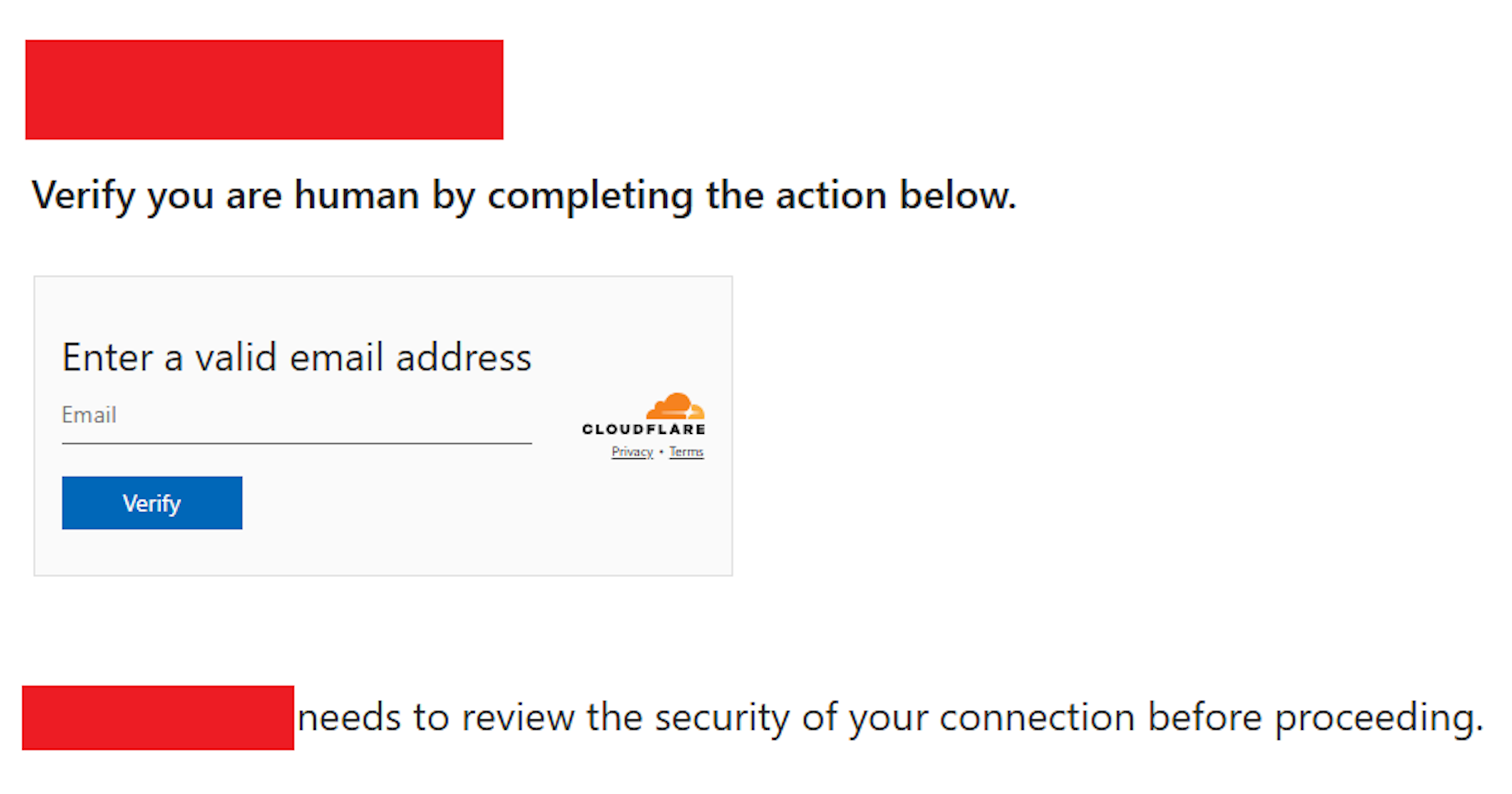
Amazon identified the activity through an analytic it created for APT29 infrastructure, which led to the discovery of the actor-controlled domain names. Through further investigation, Amazon identified the actor compromised various legitimate websites and injected JavaScript that redirected approximately 10% of visitors to these actor-controlled domains. These domains, including findcloudflare[.]com, mimicked Cloudflare verification pages to appear legitimate. The campaign’s ultimate target was Microsoft’s device code authentication flow. There was no compromise of AWS systems, nor was there a direct impact observed on AWS services or infrastructure.
Analysis of the code revealed evasion techniques, including:
Using randomization to only redirect a small percentage of visitors
Employing base64 encoding to hide malicious code
Setting cookies to prevent repeated redirects of the same visitor
Pivoting to new infrastructure when blocked
Image of compromised page, with domain name removed.
Amazon’s disruption efforts
Amazon remains committed to protecting the security of the internet by actively hunting for and disrupting sophisticated threat actors. We will continue working with industry partners and the security community to share intelligence and mitigate threats. Upon discovering this campaign, Amazon worked quickly to isolate affected EC2 instances, partner with Cloudflare and other providers to disrupt the actor’s domains, and share relevant information with Microsoft.
Despite the actor’s attempts to migrate to new infrastructure, including a move off AWS to another cloud provider, our team continued tracking and disrupting their operations. After our intervention, we observed the actor register additional domains such as cloudflare[.]redirectpartners[.]com, which again attempted to lure victims into Microsoft device code authentication workflows.
Protecting users and organizations
We recommend organizations implement the following protective measures:
For end users:
Be vigilant for suspicious redirect chains, particularly those masquerading as security verification pages.
Always verify the authenticity of device authorization requests before approving them.
Enable multi-factor authentication (MFA) on all accounts, similar to how AWS now requires MFA for root accounts.
Be wary of web pages asking you to copy and paste commands or perform actions in Windows Run dialog (Win+R).
This matches the recently documented “ClickFix” technique where attackers trick users into running malicious commands.
For IT administrators:
Follow Microsoft’s security guidance on device authentication flows and consider disabling this feature if not required.
Enforce conditional access policies that restrict authentication based on device compliance, location, and risk factors.
Implement robust logging and monitoring for authentication events, particularly those involving new device authorizations.
Indicators of compromise (IOCs)
findcloudflare[.]com
cloudflare[.]redirectpartners[.]com
Sample JavaScript code
Decoded JavaScript code, with compromised site removed: “[removed_domain]”
If you have feedback about this post, submit comments in the Comments section below. If you have questions about this post, contact AWS Support.
There’s a travel scam warning going around the internet right now: You should keep your baggage tags on your bags until you get home, then shred them, because scammers are using luggage tags to file fraudulent claims for missing baggage with the airline.
First, the scam is possible. I had a bag destroyed by baggage handlers on a recent flight, and all the information I needed to file a claim was on my luggage tag. I have no idea if I will successfully get any money from the airline, or what form it will be in, or how it will be tied to my name, but at least the first step is possible.
But…is it actually happening? No one knows. It feels like a kind of dumb way to make not a lot of money. The origin of this rumor seems to be single Reddit post.
And why should I care about this scam? No one is scamming me; it’s the airline being scammed. I suppose the airline might ding me for reporting a damage bag, but it seems like a very minor risk.
As your organization grows, the amount of data you own and the number of data sources to store and process your data across multiple Amazon Web Services (AWS) accounts increases. Enforcing consistent access controls that restrict access to known networks might become a key part in protecting your organization’s sensitive data.
Previously, AWS customers could rely on AWS Identity and Access Management (IAM) global condition keys such as aws:SourceVpc and aws:SourceVpce to restrict access to specific virtual private clouds (VPCs) or VPC endpoints. These condition keys work well for organizations with few accounts and for use cases limited to specific workloads. However, as the number of your VPCs grow, using these keys could introduce challenges in scaling the control across a large set of resources.
To address this challenge, AWS has introduced three new global condition keys for scalable access controls based on request origin: aws:VpceAccount, aws:VpceOrgPaths, and aws:VpceOrgID.
In this blog post, we demonstrate how these keys can help make sure that your AWS resources are accessible only from expected VPCs, so that you can scale your data perimeter implementation across your organization within AWS Organizations.
Background
Organizations often store data in AWS resources such as Amazon Simple Storage Service (Amazon S3) buckets. For example, you might use Amazon S3 as your data lake foundation with data scientists and analysts running their data processing and analytics workflows against data stored in a centralized S3 bucket.
To limit access to data stored in your S3 buckets to expected networks, you can use IAM policies associated with your identities and resources. You can define expected networks in a policy using specific IAM global condition keys based on your organization’s intended data access patterns and unique requirements. For example, use aws:SourceIp to specify your corporate IP CIDR ranges, and aws:SourceVpc or aws:SourceVpce to list VPC and VPC endpoint IDs you expect requests to come from. These condition keys help make sure that only workloads operating within your expected network boundaries can access sensitive data.
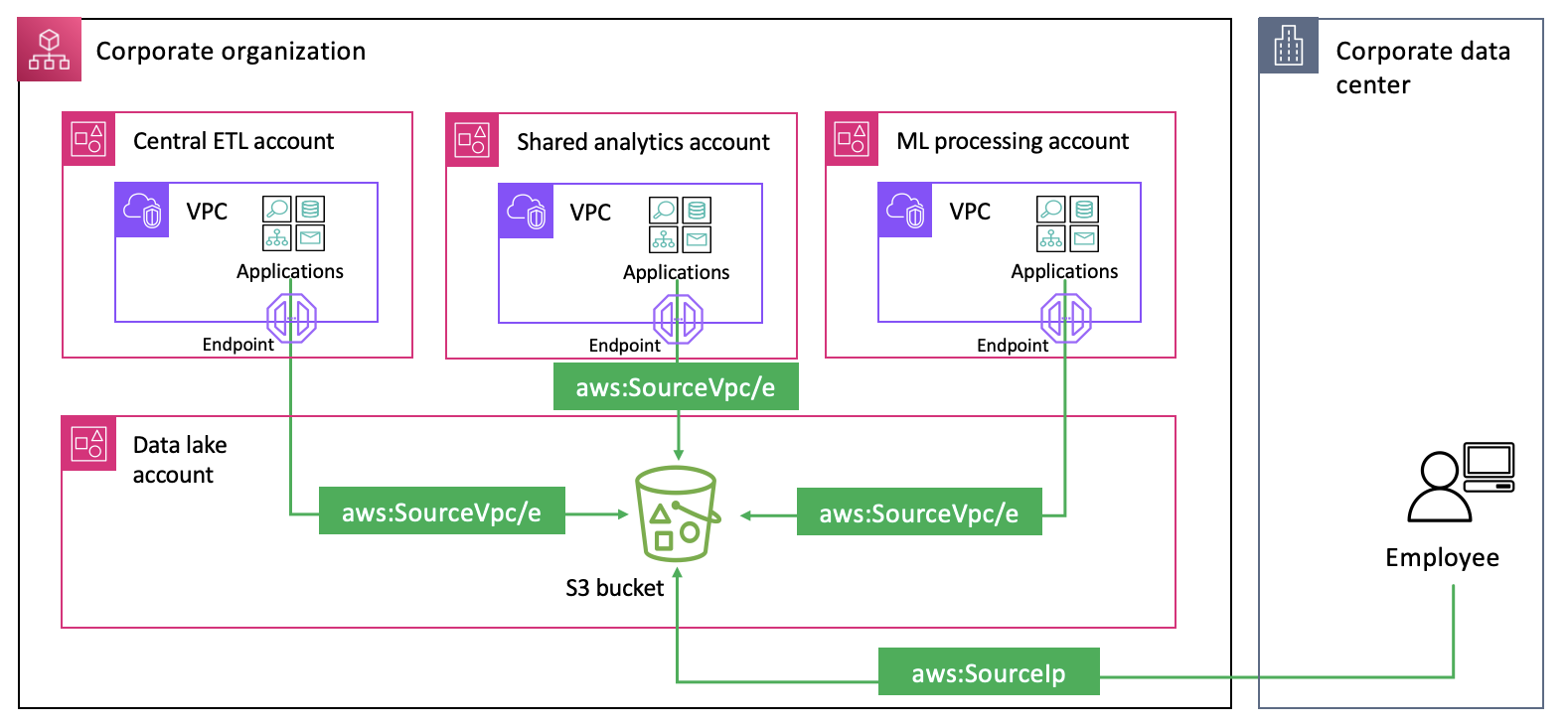
However, there are scenarios where you might want to allow access from multiple networks within your organization, as illustrated in Figure 1.
Figure 1: Applications and users accessing an S3 bucket from VPCs and public networks
In such cases, using the aws:SourceVpc and aws:SourceVpce condition keys requires enumerating all expected VPC and VPC endpoint IDs and updating policies whenever new VPCs or VPC endpoints are added or deleted. This approach creates operational overhead and increases the risk of misconfigurations. The operational complexity grows as organizations scale their data processing capacity across multiple AWS Regions and accounts. While many organizations have developed automated mechanisms to detect changes in VPC configurations and update policies accordingly, auditing lengthy policies that enumerate VPCs within their organization remains challenging.
The new global condition keys provide a more scalable way to restrict access to expected networks:
aws:VpceAccount – Restricts the use of your identities and resources to networks that belong to a specific AWS account.
aws:VpceOrgID – Restricts the use of your identities and resources to networks that belong to your organization.
The value of these keys in the request context is the ID of the account (for example, 111122223333), organization unit (OU) (for example, o-abcdef0123/r-acroot/ou-development/*), or organization (for example, o-abcdef0123) that owns the VPC endpoint the request is made through.
Note that at the time of writing, not all services support these keys. See AWS global condition context keys for a list of supported services.
Implementation examples
Let’s look at how to restrict access to expected networks using the three new condition keys for common use cases. Each of the use cases demonstrates how the new condition keys help simplify controlling access to your resources in the sample scenario from Figure 1.
Use case 1: Allow access to your S3 buckets only from networks of data processing accounts
Data owners might want to strictly manage what data workflows can access their data sources and restrict cross-account access to specific data processing accounts and networks. They can use the aws:VpceAccount condition key to allow access based on the account that owns the VPC endpoint the request is made through. The following is an example S3 bucket policy.
This policy allows specific principals listed in the Principal element to list and download objects from the data lake bucket but only if they make requests from networks in one of the specified AWS accounts (StringEquals and aws:VpceAccount). Using the aws:VpceAccount condition key in this policy alleviates the need to maintain a list of VPC IDs or VPC endpoint IDs for the data processing accounts, reduces the size of the policy document, and simplifies auditing.
Use case 2: Restricting access to company networks for resources across multiple accounts
Central security teams often look for ways to enforce a set of standard access controls on resources across their entire organization. This is to meet compliance and security requirements, fulfill legal and contractual obligations, and to protect corporate data from unintended access. One such control could be used to limit access to only expected networks within the organization. In our sample scenario, this control helps prevent your data analysts and scientists from using their credentials to access data outside of your corporate environment. The following RCP demonstrates how to enforce the network perimeter controls on S3 buckets:
This policy denies access to S3 buckets and objects unless it is from expected networks defined as: your corporate IP CIDR range (NotIpAddressIfExists and aws:SourceIp), VPC endpoints in your organization (StringNotEqualsIfExists and aws:VpceOrgID), networks of AWS services that use their service principals or forward access sessions (FAS) to act on your behalf (BoolIfExists with aws:PrincipalIsAWSService and aws:ViaAWSService). It also allows access to networks of AWS services using specific service roles to access your resources (StringNotEqualsIfExists and aws:PrincipalTag/network-perimeter-exception set to true). Some organizations might need to edit this policy to allow third-party partner access. See Establishing a data perimeter on AWS: Allow access to company data only from expected networks for additional information on access patterns that need to be accounted for to meet the needs of your organization.
We used an RCP because it can be used to apply access controls centrally on resources across multiple accounts. Central security teams use RCPs to enforce security invariants on resources across their entire organization. For best practices in designing and deploying RCPs, see Effectively implementing resource control policies in a multi-account environment.
Remember to reference the list of services that support aws:VpceOrgID before using it in a policy such as an RCP. Enforcing it on an unsupported service might prevent your developers from using the service. If you need to restrict access to expected networks on a wider range of services, consider using the aws:SourceVpc and aws:SourceVpce condition keys. See the data perimeter policy examples repository that illustrate how to implement network perimeter controls for a wider range of services.
Use case 3: Restricting access based on intra-organization boundaries
Organizations often need to segment environments within their organization with varying data access requirements. For example, they might need to separate production from non-production environments or create boundaries between different business units, such as Finance, Marketing, and Sales; each operating in separate accounts. This might include making sure that resources within a specific OU can only be accessed from networks in the same OU. Central security teams can use aws:VpceOrgPaths to achieve this objective at scale.
The following is an example RCP that restricts access to your Amazon S3 and AWS Key Management Service (AWS KMS) resources so that they can only be accessed through VPC endpoints in a specific OU.
This policy is similar to the one we built for the previous use case but uses aws:VpceOrgPaths instead of aws:VpceOrgID to enforce a more granular boundary based on the requests’ network origin.
Best practices and considerations
When implementing the new condition keys, consider the following best practices.
Identify opportunities to adopt the new global condition keys by reviewing your security objectives and controls
If you currently restrict access to a wide range of resources using the aws:SourceVpc and aws:SourceVpce condition keys and want to avoid the need to enumerate VPC or VPC endpoint IDs in your policies, evaluate if you can migrate to aws:VpceAccount, aws:VpceOrgPaths, or aws:VpceOrgID. This migration decision depends on whether services you restrict access to are supported by the new condition keys. Similarly, if you plan to add network perimeter restrictions to your security baseline, first evaluate whether the new condition keys offer a more scalable solution for your target services. Only enforce the new keys on services that are currently supported. If you need to enforce the restriction on a service not yet supported, you should use aws:SourceVpc and aws:SourceVpce. Also, continue using aws:SourceVpc and aws:SourceVpce to achieve your least privilege objectives, for example if the network boundary you need to maintain for a subset of resources is scoped to specific VPCs or VPC endpoints.
Plan the implementation of the new condition keys
We recommend that you test access controls updates in a non-production environment and only promote them to production after validating their expected behavior. If you currently maintain an automation to enumerate VPC or VPC endpoint IDs in your policies and plan to migrate to the new keys, deactivate your automation only after you have completed policy updates across all environments. This approach helps make sure that your existing security posture remains intact while you progressively deploy the changes.
Monitor and validate the implementation
Use AWS CloudTrail to audit access patterns and regularly review and update your access controls as your organization structure evolves and security objectives change. For example, you might need to adjust access controls when accounts requiring access to your data lakes change, or when organizational boundaries need modification to accommodate new integrations between business units. You must establish processes to continuously evaluate the effectiveness of your controls in meeting both security and business objectives.
Conclusion
In this post, you learned how to use the new global condition keys—aws:VpceAccount, aws:VpceOrgPaths, and aws:VpceOrgID—to restrict access to expected networks at scale. By using these keys, you can:
Implement network perimeter controls that scale with your AWS organization.
Reduce the operational overhead of managing access to your data.
Simplify your IAM policies and reduce the risk of misconfigurations.
Scale your data lake implementation while maintaining security.
If you have feedback about this post, submit comments in the Comments section below. If you have questions about this post, start a new thread on AWS IAM re:Post or contact AWS Support.
Attendees at EuroPython had the chance to preview part of Python: The Documentary during a
keynote panel. The full film, created by CultRepo, is now available on YouTube:
This is the story of the world’s most beloved programming language:
Python. What began as a side project in Amsterdam during the 1990s
became the software powering artificial intelligence, data science and
some of the world’s biggest companies. But Python’s future wasn’t
certain; at one point it almost disappeared.
This 90-minute documentary features Guido van Rossum, Travis
Oliphant, Barry Warsaw, and many more, and they tell the story of
Python’s rise, its community-driven evolution, the conflicts that
almost tore it apart, and the language’s impact on… well…
everything.
Today, we’re announcing the general availability of Amazon Elastic Compute Cloud (Amazon EC2) general-purpose M8i and M8i-Flex instances powered by custom Intel Xeon 6 processors available only on AWS with sustained all-core 3.9 GHz turbo frequency. These instances deliver the highest performance and fastest memory bandwidth among comparable Intel processors in the cloud. They also deliver up to 15 percent better price performance, up to 20 percent higher performance, and 2.5 times more memory bandwidth compared to previous generation M7i and M7i-Flex instances.
M8i and M8i-flex instances are ideal for running general purpose workloads such as general web application servers, virtual desktops, batch processing, microservices, databases, and enterprise applications. In terms of performance, these instances are specifically up to 60 percent faster for NGINX web applications, up to 30 percent faster for PostgreSQL database workloads, and up to 40 percent faster for AI deep learning recommendation models compared to M7i and M7i-Flex instances.
As like R8i and R8i-Flex instances, these instances use the new sixth generation AWS Nitro Cards, delivering up to two times more network and Amazon Elastic Block Storage (Amazon EBS) bandwidth compared to the previous generation instances. It greatly improves network throughput for workloads handling small packets such as web, application, and gaming servers. They also support bandwidth configuration with 25 percent allocation adjustments between network and Amazon EBS bandwidth, enabling better database performance, query processing, and logging speeds.
M8i instances M8i instances provide up to 384 vCPUs and 1.5 TB memory including bare metal instances that provide dedicated access to the underlying physical hardware. These SAP-certified instances help you to run large application servers and databases, gaming servers, CPU-based inference, and video streaming that need the largest instance sizes or high CPU continuously.
Here are the specs for M8i instances:
Instance size
vCPUs
Memory (GiB)
Network bandwidth (Gbps)
EBS bandwidth (Gbps)
m8i.large
2
8
Up to 12.5
Up to 10
m8i.xlarge
4
16
Up to 12.5
Up to 10
m8i.2xlarge
8
32
Up to 15
Up to 10
m8i.4xlarge
16
64
Up to 15
Up to 10
m8i.8xlarge
32
128
15
10
m8i.12xlarge
48
192
22.5
15
m8i.16xlarge
64
256
30
20
m8i.24xlarge
96
384
40
30
m8i.32xlarge
128
512
50
40
m8i.48xlarge
192
768
75
60
m8i.96xlarge
384
1536
100
80
m8i.metal-48xl
192
768
75
60
m8i.metal-96xl
384
1536
100
80
M8i-Flex instances M8i-Flex instances are a lower-cost variant of the M8i instances, with 5 percent better price performance at 5 percent lower prices. They’re designed for workloads that benefit from the latest generation performance but don’t fully utilize all compute resources. These instances can reach up to the full CPU performance 95 percent of the time.
Here are the specs for the M8i-Flex instances:
Instance size
vCPUs
Memory (GiB)
Network bandwidth (Gbps)
EBS bandwidth (Gbps)
m8i-flex.large
2
8
Up to 12.5
Up to 10
m8i-flex.xlarge
4
16
Up to 12.5
Up to 10
m8i-flex.2xlarge
8
32
Up to 15
Up to 10
m8i-flex.4xlarge
16
64
Up to 15
Up to 10
m8i-flex.8xlarge
32
128
Up to 15
Up to 10
m8i-flex.12xlarge
48
192
Up to 22.5
Up to 15
m8i-flex.16xlarge
64
256
Up to 30
Up to 20
If you’re currently using earlier generations of general-purpose instances, you can adopt M8i-Flex instances without having to make changes to your application or your workload.
Getting creative with technology is now easier than ever on the Code Club Projects website. If you’ve visited Code Club Projects recently, you may have noticed that the site has changed over the last few months. In the spring, we launched an initiative to make it easier to find a project. I’m excited to share some of the changes we’ve made based on feedback from young people and mentors.
Finding projects based on difficulty
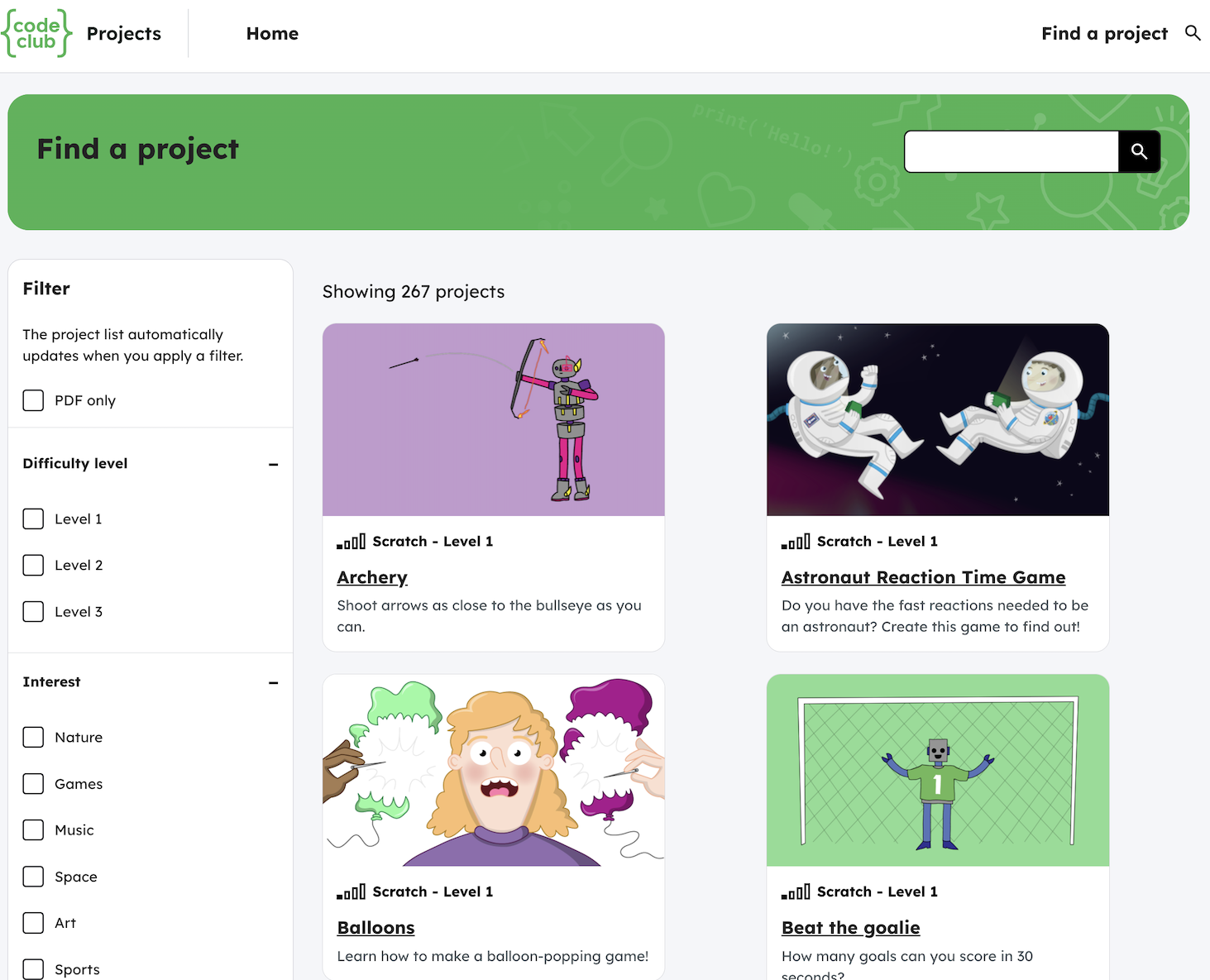
Being able to filter projects by skill level (beginner, intermediate, advanced) has been the feature most requested by mentors. A survey we ran in the spring confirmed that young people find levels helpful when trying to find a project on their own. While our project paths have always had levels, our expert educators have now reviewed every single project on the site and categorised them as a Level 1, Level 2, or Level 3 project. These difficulty levels are easily available as filters on the side of the search page.
“[The Code Club] resources are extremely helpful, particularly for mentors with limited experience; step-by-step guidance is very useful and effective.” – Code Club mentor, Tunisia
Finding projects based on interest
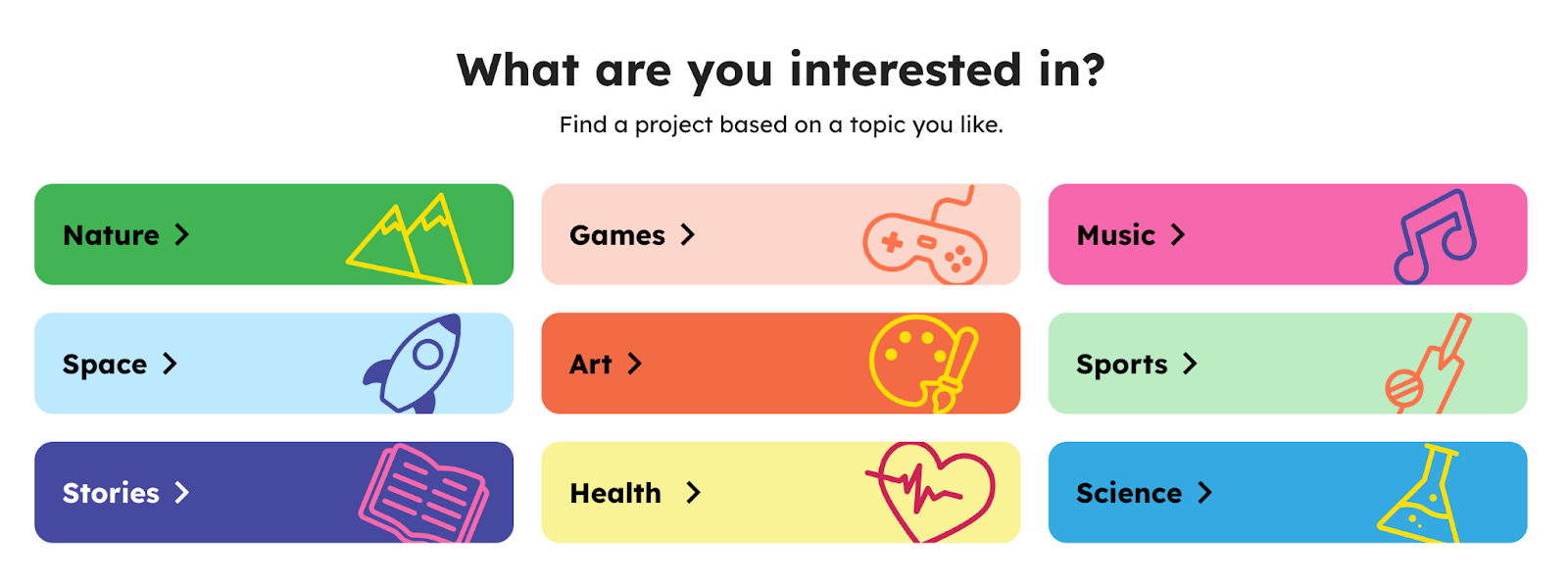
For young people and mentors who aren’t sure where to get started with coding, an easy question to ask is “What do you like to do”? With over 200+ projects on the site, there is a wide variety of projects that span a number of young people’s passions, such as games, art, or nature. In fact, in the same spring survey, young people largely preferred finding projects by interest over technology (e.g., Scratch, Python).
That’s why we’ve created a brand-new set of pages dedicated to helping young people find projects by interest. We believe making it easy to find a project by an existing interest will help young people get excited about coding.
“[Attending Code Club] … combined with watching peers make cool things seems to be a great encouragement to go build rather than just consume.” – Code club mentor, Japan
Code Clubs projects are designed to appeal to creators’ interests, including creating their own games.
Finding projects based on technology
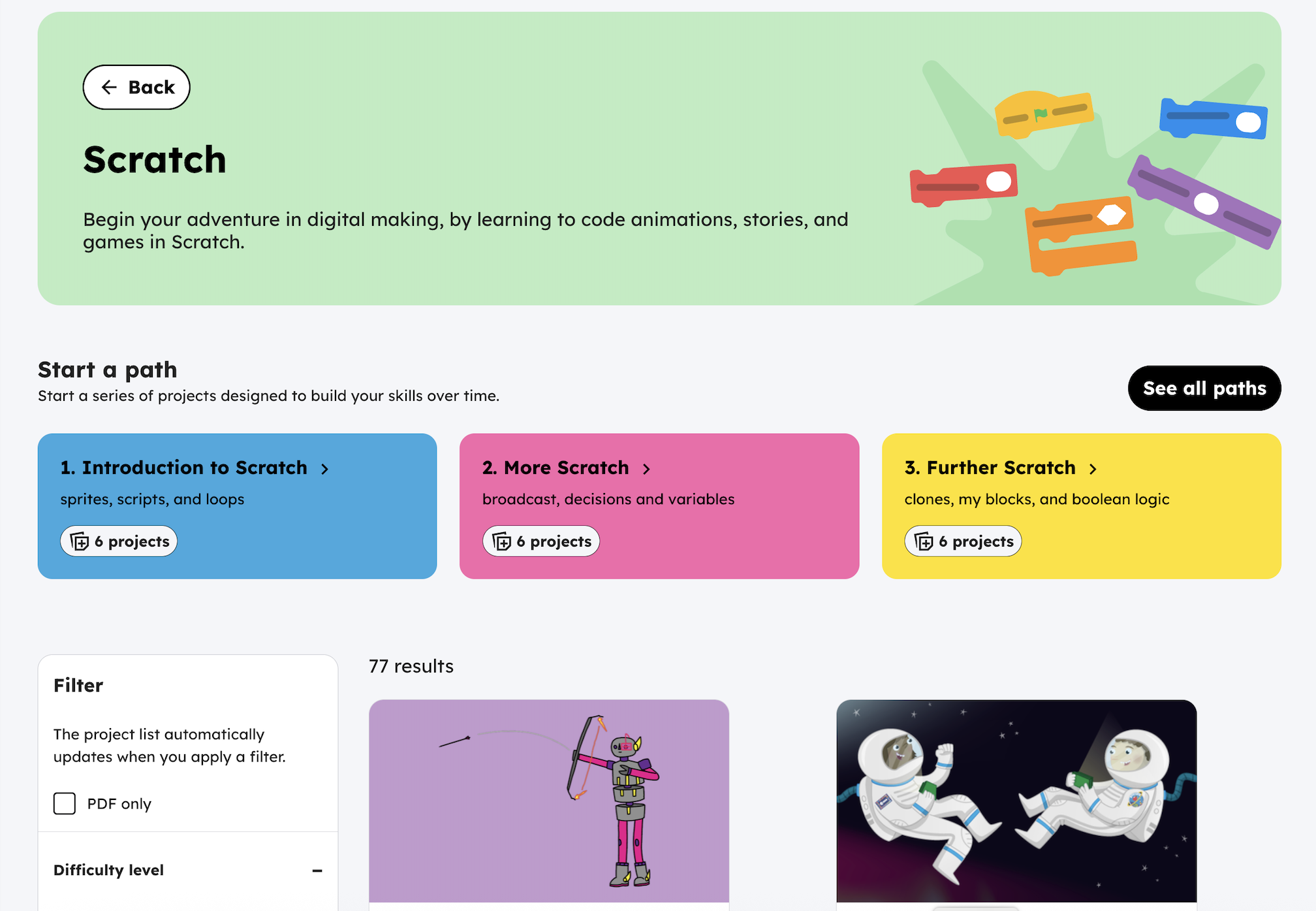
Through the Clubs annual survey, we know that some young people enjoy following our project pathways and others enjoy finding an individual project to work on during club time. We also know that some of our top search terms are “Scratch” and “Python”, which allow users to see all Scratch projects that are available on the site. We’ve redesigned our technology pages so it’s easy to see paths and projects per technology in the same place.
“I think [Raspberry Pi Foundation projects are] really easy to understand and encourage young people to learn more and more.” – Code Club leader, Brazil
We’ve heard from mentors that our projects are too long to print out. We’re working to improve that, starting with brand-new short PDFs for the Intro to Scratch path projects. Each PDF is no more than six pages, double-sided.
Are there other projects you’d like to see PDF versions of? Let us know.
We’re currently working on an idea tentatively titled “project challenges”. If you’re interested in helping us develop the idea, please get in touch.
If you have not started a club yet but are interested in supporting the young people in your community to explore coding, you can find out more on the Code Club website. The team will support you every step of the way with resources, training, and a collaborative community.
The US Director of National Intelligence is reporting that the UK government is dropping its backdoor mandate against the Apple iPhone. For now, at least, assuming that Tulsi Gabbard is reporting this accurately.
The collective thoughts of the interwebz
Manage Consent
To provide the best experiences, we use technologies like cookies to store and/or access device information. Consenting to these technologies will allow us to process data such as browsing behavior or unique IDs on this site. Not consenting or withdrawing consent, may adversely affect certain features and functions.
Functional
Always active
The technical storage or access is strictly necessary for the legitimate purpose of enabling the use of a specific service explicitly requested by the subscriber or user, or for the sole purpose of carrying out the transmission of a communication over an electronic communications network.
Preferences
The technical storage or access is necessary for the legitimate purpose of storing preferences that are not requested by the subscriber or user.
Statistics
The technical storage or access that is used exclusively for statistical purposes.The technical storage or access that is used exclusively for anonymous statistical purposes. Without a subpoena, voluntary compliance on the part of your Internet Service Provider, or additional records from a third party, information stored or retrieved for this purpose alone cannot usually be used to identify you.
Marketing
The technical storage or access is required to create user profiles to send advertising, or to track the user on a website or across several websites for similar marketing purposes.


![Decoded JavaScript code, with compromised site removed: "[removed_domain]"](https://d2908q01vomqb2.cloudfront.net/22d200f8670dbdb3e253a90eee5098477c95c23d/2025/08/29/img2-1.png)