Cloudflare’s visibility across a large portion of the Internet gives us an unparalleled view of malicious campaigns. We process billions of email threat signals every day, feeding them into multiple AI and machine learning models. This lets our detection team create and deploy new rules at high speed, blocking malicious and unwanted emails before they reach the inbox.
But rapid protection introduces a new challenge: making sure security teams understand exactly what we blocked — and why.
The Challenge
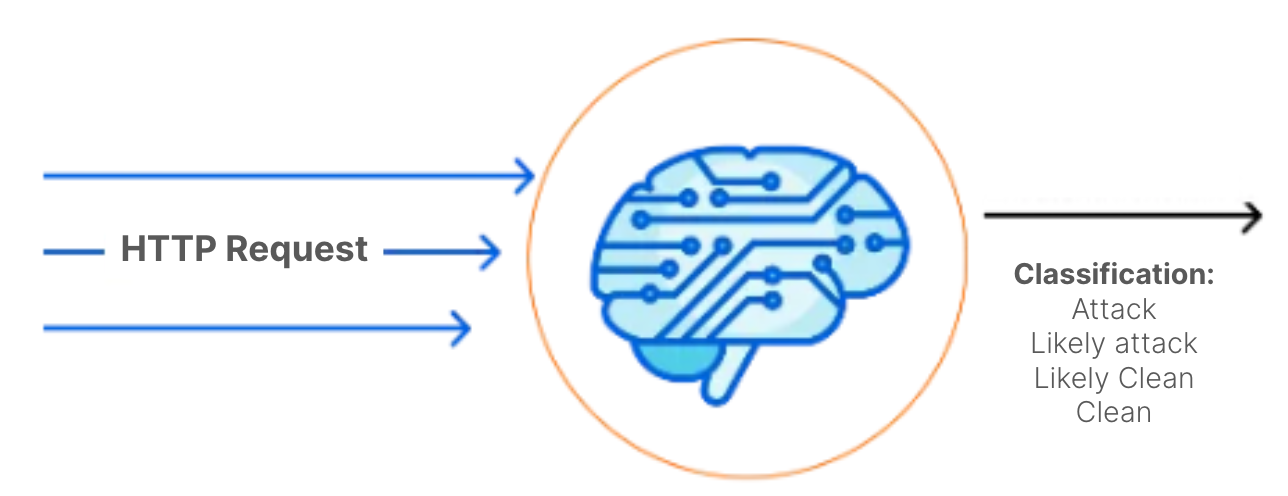
Cloudflare’s fast-moving detection pipeline is one of our greatest strengths — but it also creates a communication gap for customers. Every day, our detection analysts publish new rules to block phishing, BEC, and other unwanted messages. These rules often blend signals from multiple AI and machine learning models, each looking at different aspects of a message like its content, headers, links, attachments, and sender reputation.
While this layered approach catches threats early, SOC teams don’t always have insight into the specific combination of factors that triggered a detection. Instead, they see a rule name in the investigation tab with little explanation of what it means.
Take the rule BEC.SentimentCM_BEC.SpoofedSender as an example. Internally, we know this indicates:
The email contained no unique links or attachments a common BEC pattern
It was flagged as highly likely to be BEC by our Churchmouse sentiment analysis models
Spoofing indicators were found, such as anomalies in the envelope_from header
Those details are second nature to our detection team, but without that context, SOC analysts are left to reverse-engineer the logic from opaque labels. They don’t see the nuanced ML outputs (like Churchmouse’s sentiment scoring) or the subtle header anomalies, or the sender IP/domain reputation data that factored into the decision.
The result is time lost to unclear investigations or the risk of mistakenly releasing malicious emails. For teams operating under pressure, that’s more than just an inconvenience, it’s a security liability.
That’s why we extended Cloudy (our AI-powered agent) to translate complex detection logic into clear explanations, giving SOC teams the context they need without slowing them down.
Enter Cloudy Summaries
Several weeks ago, we launched Cloudy within our Cloudflare One product suite to help customers understand gateway policies and their impacts (you can read more about the launch here: https://blog.cloudflare.com/introducing-ai-agent/).
We began testing Cloudy’s ability to explain the detections and updates we continuously deploy. Our first attempt revealed significant challenges.
The Hallucination Problem
We observed frequent LLM hallucinations, the model generating inaccurate information about messages. While this might be acceptable when analyzing logs, it’s dangerous for email security detections. A hallucination claiming a malicious message is clean could lead SOC analysts to release it from quarantine, potentially causing a security breach.
These hallucinations occurred because email detections involve numerous and complex inputs. Our scanning process runs messages through multiple ML algorithms examining different components: body content, attachments, links, IP reputation, and more. The same complexity that makes manual detection explanation difficult also caused our initial LLM implementation to produce inconsistent and sometimes inaccurate outputs.
Building Guardrails
To minimize hallucination risk while maintaining inbox security, we implemented several manual safeguards:
Step 1: RAG Implementation
We ensured Cloudy only accessed information from our detection dataset corpus, creating a Retrieval-Augmented Generation (RAG) system. This significantly reduced hallucinations by grounding the LLM’s assessments in actual detection data.
Step 2: Model Context Enhancement
We added crucial context about our internal models. For example, the “Churchmouse” designation refers to a group of sentiment detection models, not a single algorithm. Without this context, Cloudy attempted to define “churchmouse” using the common idiom “poor as a church mouse” referencing starving church mice because holy bread never falls to the floor. While historically interesting, this was completely irrelevant to our security context.
Current Results
Our testing shows Cloudy now produces more stable explanations with minimal hallucinations. For example, the detection SPAM.ASNReputation.IPReputation_Scuttle.Anomalous_HC now generates this summary:
“This rule flags email messages as spam if they come from a sender with poor Internet reputation, have been identified as suspicious by a blocklist, and have unusual email server setup, indicating potential malicious activity.”
This strikes the right balance. Customers can quickly understand what the detection found and why we classified the message accordingly.
Beta Program
We’re opening Cloudy email detection summaries to a select group of beta users. Our primary goal is ensuring our guardrails prevent hallucinations that could lead to security compromises. During this beta phase, we’ll rigorously test outputs and verify their quality before expanding access to all customers.
Ready to enhance your email security?
We provide all organizations (whether a Cloudflare customer or not) with free access to our Retro Scan tool, allowing them to use our predictive AI models to scan existing inbox messages. Retro Scan will detect and highlight any threats found, enabling organizations to remediate them directly in their email accounts. With these insights, organizations can implement further controls, either using Cloudflare Email Security or their preferred solution, to prevent similar threats from reaching their inboxes in the future.
If you are interested in how Cloudflare can help secure your inboxes, sign up for a phishing risk assessment here.
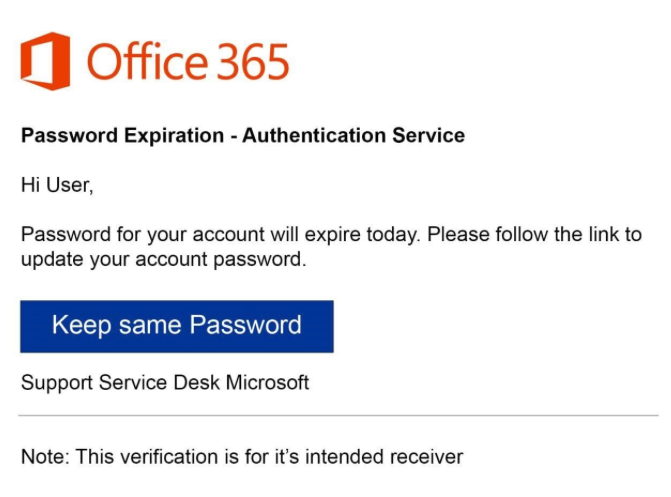
Phishing remains one of the most dangerous and persistent cyber threats for individuals and organizations. Modern attacks use a growing arsenal of deceptive techniques that bypass traditional secure email gateways (SEGs) and email authentication measures, targeting organizations, employees, and vendors. From business email compromise (BEC) to QR phishing and account takeovers, these threats are designed to exploit weaknesses across multiple communication channels, including email, Slack, Teams, SMS, and cloud drives.
Phishing remains the most popular attack vector for bad actors looking to gain unauthorized access or extract fraudulent payment, and it is estimated that 90% of all attacks start with a phishing email. However, as companies have shifted to using a multitude of apps to support communication and collaboration, attackers too have evolved their approach. Attackers now engage employees across a combination of channels in an attempt to build trust and pivot targeted users to less-secure apps and devices. Cloudflare is uniquely positioned to address this trend thanks to our integrated Zero Trust services, extensive visibility from protecting approximately 20% of all websites, and signals derived from processing billions of email messages a year.
Cloudflare recognizes that combating phishing requires an integrated approach and a more complete view of user-based risk. That’s why we’ve designed our email security solution to protect organizations before, during, and after message delivery, while also extending protection beyond email into the broader security ecosystem. Phishing is no longer just an email problem — it’s a multi-channel, cross-application threat.
Assessing holistic user risk
When it comes to protecting against user-based threats, Cloudflare employs a platform approach to security. Instead of forcing customers to rely on an array of fragmented tools that create unnecessary complexity and blind spots, we treat email security as part of an overall strategy for assessing and responding to user-related risk. Our email security solution works in tandem with our network solutions so that SOC teams can quickly assert what actions their users are performing outside of email. Given our extensive network visibility, our platform is not limited by API integrations, and can provide SOC teams with the best visibility and protection. This helps SOC teams not only combat phishing, but begin to identify and take action against a wider range of insider threats.
Within a single, unified dashboard, SOC teams can quickly review detailed information regarding the following questions, which we discuss in more detail below:
Who in the organization is being targeted?
Who are the attackers impersonating?
What risky behaviors are my users performing?
Who in the organization is being targeted?
Within the Cloudflare dashboard, SOC teams can view which users are the most targeted. This can help them determine which accounts should be hardened (e.g. MFA enforced), and identify risky users that should be monitored more closely for significant deviations in behavior. One way organizations can use this information is to require high-risk users to connect from a managed device. For instance, if they use Crowdstrike, we can require that these users be on a managed device and force a posture check before letting them access sensitive applications.
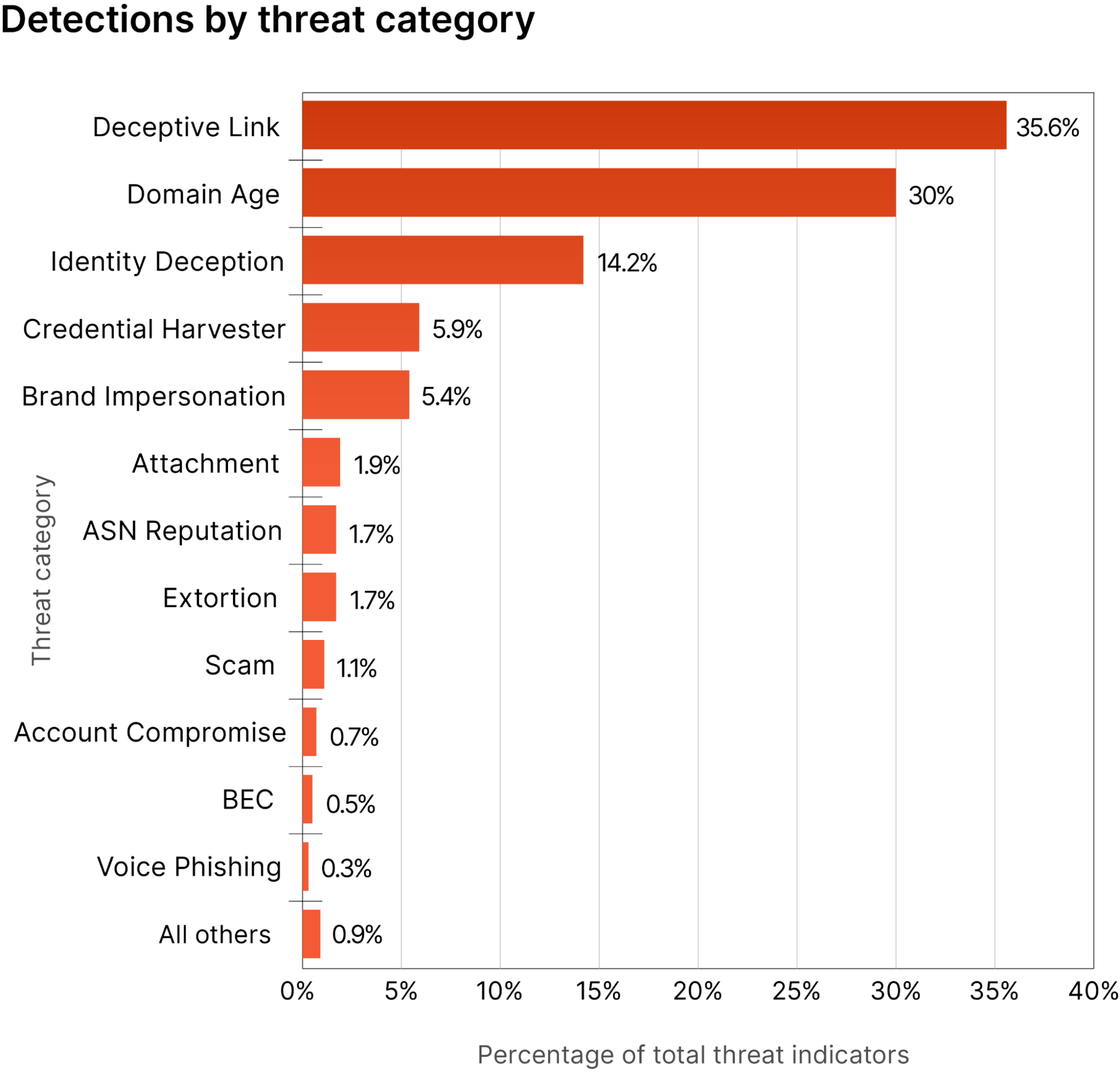
SOC teams can also dive into what types of attacks are hitting their users and at what frequency.
Customers can use these insights to adjust various platform policies, effectively blocking malicious content and securing sensitive resources. Above, we can see that attackers are frequently leveraging links to try to compromise users. Based on the link analysis we are seeing in email, SOC teams can use our gateway to block similar attacks, so that when attackers try to use other communication methods (LinkedIn, Teams, Slack, etc.) users will not be able to interact with those links.
SOC teams can also get visibility into impersonation attempts within their email environment. Customers can see which users are being impersonated the most, and can use this information to build policies within our email security solution and broader set of Zero Trust services.
A list of frequently impersonated users can be added to the impersonation registry, which changes the sensitivity of our models to apply more scrutiny on messages coming from those users.
Given our unique position as a domain name registrar, customers can also report lookalike domains to Cloudflare for action to be taken against them. This helps prevent attackers from being able to impersonate our customers and negatively impact their reputation.
Finally, customers can also use our free DMARC management to track who is sending emails on their behalf. This information can be used to update SPF records and get customers to p=quarantine or p=reject so that their brand is more resistant to being spoofed.
What risky behaviors are my users performing?
Cloudflare provides visibility into user actions in several ways.
Within the email security solution, we can track internal messages and alert if we see any malicious or suspicious behaviors. This can be enhanced with our managed service offering, Phishguard, which can alert admins when they see any type of behavior that indicates fraud (like Business Email Compromise), account takeover, or insider threats.
SOC teams can also take advantage of our CASB solution to view the different actions that users have performed. Actions are labeled with different risk levels to let teams know which findings are critical and require remediation.
Customers are also able to view data loss prevention (DLP) violations that users have incurred to see if there is any unauthorized egress of data. We provide the ability to automatically block this egress based on different policies within our platform, making sure there is no exfiltration of sensitive data.
We also enable organizations to put internal applications behind our Access solution. This prevents any users with improper permissions or a high risk level from accessing critical applications. Our dashboard then provides metrics on these logins to see how many failures we observed, so that SOC teams can investigate the user further.
These signals feed into our Unified Risk Score, which can be exported if needed to take automated actions within other platforms.
Increasing SOC productivity
With all of our functionality unified within a single interface and fed by one data lake, we see an increase in SOC productivity because teams no longer have to spend time building rules or flipping between disparate interfaces and workflows.
AI-driven email security
Unlike legacy secure email gateways, our email security solution is driven by predictive AI models which eliminate the need for creating and updating rules. These models are also more effective than reactive measures because they are fed by a massive volume of diverse data from across Cloudflare’s network. This means models are trained on emerging threats earlier and can identify new tactics with a higher accuracy than legacy systems.
Automated isolation
To further reduce the risk posed by users visiting potentially malicious websites, customers can isolate browser sessions using our natively integrated, clientless remote browser that runs on our global network. Within an isolated browsing session, SOC teams can prohibit various behaviors such as copy/paste, upload/download, keyboard inputs, and more. This decreases the risk of users accessing a website and performing an action which could compromise the organization.
Our browser isolation solution also decreases the time SOC teams need to maintain policies. Rather than adding domains and applications one by one, teams can choose to isolate based on content categories. These categories are based on our threat intelligence, and are constantly updated. This means that as new websites emerge, SOC teams do not have to spend the time to chase down and update the proper policy — rather, it is done automatically.
Automated blocking
While some websites might require running in an isolated browser to mitigate the risk of users encountering malicious content, others may need to be fully blocked altogether. Customers can use the same process listed above to block any website that could be risky for users based on tags. However, we allow admins to also provide feedback to users to increase awareness. This can be done via a custom block page that allows SOC teams to communicate with users about their risky behaviors, so that they take actions to curb this behavior in the future and alert their SOC teams to attacks that might be occurring.
What’s on the horizon for 2025
In 2024, our email security team focused on refining the user interface and improving the incident investigation experience. Looking ahead to 2025, we plan to introduce additional capabilities that deepen the integration of our email security solution with our SASE platform, delivering enhanced insight and protection against user-based threats.
Configurable browser isolation for email
Our Email Link Isolation feature currently applies to links we consider suspicious. However, we intend to allow customers to add customized configurations to meet their internal policies. This enhancement will provide more granular control over which websites users can access from an email message without using an isolated browser.
Outbound DLP for email
We will be releasing an add-in for Microsoft Outlook that will allow customers to use our DLP engine for inspecting outbound email messages. This client-side application enables customers to configure downstream policies that trigger action when a DLP policy is violated, all while minimizing disruption to existing email infrastructure.
Expanded user risk scoring
Cloudflare will be increasing the signals that feed into our user risk scores. This will enable SOC teams to create more policies within Cloudflare or to take automated actions externally based on the level of risk observed.
These are just a few examples of significant releases that will be coming in 2025. Please stay tuned to the Cloudflare blog where we will be announcing these releases as they happen.
Try Cloudflare Email Security today
We provide all organizations (whether a Cloudflare customer or not) with free access to our Retro Scan tool, allowing them to use our predictive AI models to scan existing inbox messages. Retro Scan will detect and highlight any threats found, enabling organizations to remediate them directly in their email accounts. With these insights, organizations can implement further controls, either using Cloudflare Email Security or their preferred solution, to prevent similar threats from reaching their inboxes in the future.
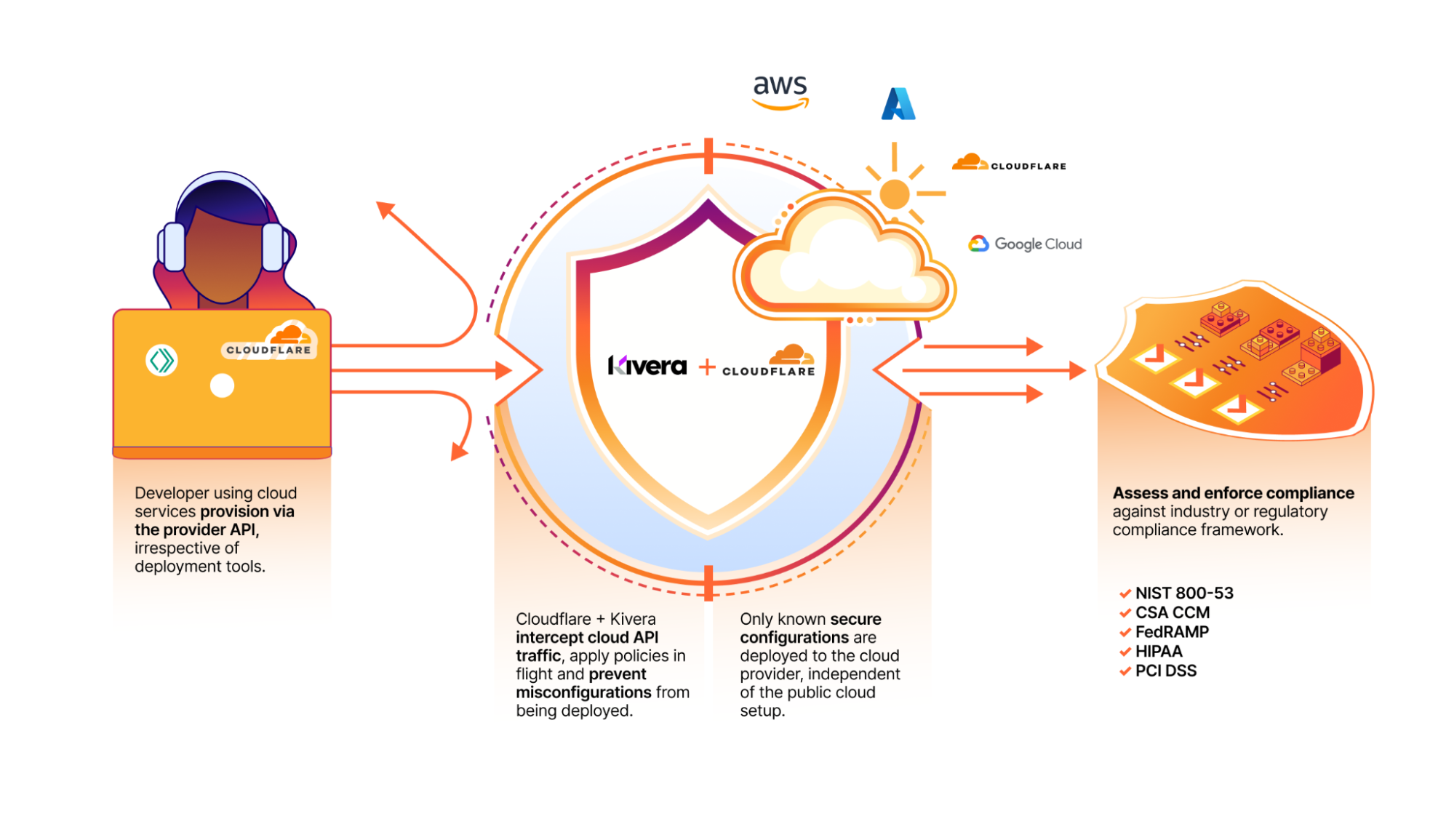
We’re excited to announce that Kivera, a cloud security, data protection, and compliance company, has joined Cloudflare. This acquisition extends our SASE portfolio to incorporate inline cloud app controls, empowering Cloudflare One customers with preventative security controls for all their cloud services.
In today’s digital landscape, cloud services and SaaS (software as a service) apps have become indispensable for the daily operation of organizations. At the same time, the amount of data flowing between organizations and their cloud providers has ballooned, increasing the chances of data leakage, compliance issues, and worse, opportunities for attackers. Additionally, many companies — especially at enterprise scale — are working directly with multiple cloud providers for flexibility based on the strengths, resiliency against outages or errors, and cost efficiencies of different clouds.
Security teams that rely on Cloud Security Posture Management (CSPM) or similar tools for monitoring cloud configurations and permissions and Infrastructure as code (IaC) scanning are falling short due to detecting issues only after misconfigurations occur with an overwhelming volume of alerts. The combination of Kivera and Cloudflare One puts preventive controls directly into the deployment process, or ‘inline’, blocking errors before they happen. This offers a proactive approach essential to protecting cloud infrastructure from evolving cyber threats, maintaining data security, and accelerating compliance.
An early warning system for cloud security risks
In a significant leap forward in cloud security, the combination of Kivera’s technology and Cloudflare One adds preventive, inline controls to enforce secure configurations for cloud resources. By inspecting cloud API traffic, these new capabilities equip organizations with enhanced visibility and granular controls, allowing for a proactive approach in mitigating risks, managing cloud security posture, and embracing a streamlined DevOps process when deploying cloud infrastructure.
Kivera will add the following capabilities to Cloudflare’s SASE platform:
One-click security: Customers benefit from immediate prevention of the most common cloud breaches caused by misconfigurations, such as accidentally allowing public access or policy inconsistencies.
Enforced cloud tenant control: Companies can easily draw boundaries around their cloud resources and tenants to ensure that sensitive data stays within their organization.
Prevent data exfiltration: Easily set rules to prevent data being sent to unauthorized locations.
Reduce ‘shadow’ cloud infrastructure: Ensure that every interaction between a customer and their cloud provider is in line with preset standards.
Streamline cloud security compliance: Customers can automatically assess and enforce compliance against the most common regulatory frameworks.
Flexible DevOps model: Enforce bespoke controls independent of public cloud setup and deployment tools, minimizing the layers of lock-in between an organization and a cloud provider.
Complementing other cloud security tools: Create a first line of defense for cloud deployment errors, reducing the volume of alerts for customers also using CSPM tools or Cloud Native Application Protection Platforms (CNAPPs).
An intelligent proxy that uses a policy-based approach to
enforce secure configuration of cloud resources.
Better together with Cloudflare One
As a SASE platform, Cloudflare One ensures safe access and provides data controls for cloud and SaaS apps. This integration broadens the scope of Cloudflare’s SASE platform beyond user-facing applications to incorporate increased cloud security through proactive configuration management of infrastructure services, beyond what CSPM and CASB solutions provide. With the addition of Kivera to Cloudflare One, customers now have a unified platform for all their inline protections, including cloud control, access management, and threat and data protection. All of these features are available with single-pass inspection, which is 50% faster than Secure Web Gateway (SWG) alternatives.
With the earlier acquisition of BastionZero, a Zero Trust infrastructure access company, Cloudflare One expanded the scope of its VPN replacement solution to cover infrastructure resources as easily as it does apps and networks. Together Kivera and BastionZero enable centralized security management across hybrid IT environments, and provide a modern DevOps-friendly way to help enterprises connect and protect their hybrid infrastructure with Zero Trust best practices.
Beyond its SASE capabilities, Cloudflare One is integral to Cloudflare’s connectivity cloud, enabling organizations to consolidate IT security tools on a single platform. This simplifies secure access to resources, from developer privileged access to technical infrastructure and expanding cloud services. As Forrester echoes, “Cloudflare is a good choice for enterprise prospects seeking a high-performance, low-maintenance, DevOps-oriented solution.”
The growing threat of cloud misconfigurations
The cloud has become a prime target for cyberattacks. According to the 2023 Cloud Risk Report, CrowdStrike observed a 95% increase in cloud exploitation from 2021 to 2022, with a staggering 288% jump in cases involving threat actors directly targeting the cloud.
Misconfigurations in cloud infrastructure settings, such as improperly set security parameters and default access controls, provide adversaries with an easy path to infiltrate the cloud. According to the 2023 Thales Global Cloud Security Study, which surveyed nearly 3,000 IT and security professionals from 18 countries, 44% of respondents reported experiencing a data breach, with misconfigurations and human error identified as the leading cause, accounting for 31% of the incidents.
Further, according to GartnerⓇ, “Through 2027, 99% of records compromised in cloud environments will be the result of user misconfigurations and account compromise, not the result of an issue with the cloud provider.”1
Several factors contribute to the rise of cloud misconfigurations:
Rapid adoption of cloud services: Leaders are often driven by the scalability, cost-efficiency, and ability to support remote work and real-time collaboration that cloud services offer. These factors enable rapid adoption of cloud services which can lead to unintentional misconfigurations as IT teams struggle to keep up with the pace and complexity of these services.
Complexity of cloud environments: Cloud infrastructure can be highly complex with multiple services and configurations to manage. For example, AWS alone offers 373 services with 15,617 actions and 140,000+ parameters, making it challenging for IT teams to manage settings accurately.
Decentralized management: In large organizations, cloud infrastructure resources are often managed by multiple teams or departments. Without centralized oversight, inconsistent security policies and configurations can arise, increasing the risk of misconfigurations.
Continuous Integration and Continuous Deployment (CI/CD): CI/CD pipelines promote the ability to rapidly deploy, change and frequently update infrastructure. With this velocity comes the increased risk of misconfigurations when changes are not properly managed and reviewed.
Insufficient training and awareness: Employees may lack the cross-functional skills needed for cloud security, such as understanding networks, identity, and service configurations. This knowledge gap can lead to mistakes and increases the risk of misconfigurations that compromise security.
Common exploitation methods
Threat actors exploit cloud services through various means, including targeting misconfigurations, abusing privileges, and bypassing encryption. Misconfigurations such as exposed storage buckets or improperly secured APIs offer attackers easy access to sensitive data and resources. Privilege abuse occurs when attackers gain unauthorized access through compromised credentials or poorly managed identity and access management (IAM) policies, allowing them to escalate their access and move laterally within the cloud environment. Additionally, unencrypted data enables attackers to intercept and decrypt data in transit or at rest, further compromising the integrity and confidentiality of sensitive information.
Here are some other vulnerabilities that organizations should address:
Unrestricted access to cloud tenants: Allowing unrestricted access exposes cloud platforms to data exfiltration by malicious actors. Limiting access to approved tenants with specific IP addresses and service destinations helps prevent unauthorized access.
Exposed access keys: Exposed access keys can be exploited by unauthorized parties to steal or delete data. Requiring encryption for the access keys and restricting their usage can mitigate this risk.
Excessive account permissions: Granting excessive privileges to cloud accounts increases the potential impact of security breaches. Limiting permissions to necessary operations helps prevent lateral movement and privilege escalation by threat actors.
Inadequate network segmentation: Poorly managed network security groups and insufficient segmentation practices can allow attackers to move freely within cloud environments. Drawing boundaries around your cloud resources and tenants ensures that data stays within your organization.
Improper public access configuration: Incorrectly exposing critical services or storage resources to the internet increases the likelihood of unauthorized access and data compromise. Preventing public access drastically reduces risk.
Shadow cloud infrastructure: Abandoned or neglected cloud instances are often left vulnerable to exploitation, providing attackers with opportunities to access sensitive data left behind. Preventing untagged or unapproved cloud resources to be created can reduce the risk of exposure.
Limitations of existing tools
Many organizations turn to CSPM tools to give them more visibility into cloud misconfigurations. These tools often alert teams after an issue occurs, putting security teams in a reactive mode. Remediation efforts require collaboration between security teams and developers to implement changes, which can be time-consuming and resource-intensive. This approach not only delays issue resolution but also exposes companies to compliance and legal risks, while failing to train employees on secure cloud practices. On average, it takes 207 days to identify these breaches and an additional 70 days to contain them.
Addressing the growing threat of cloud misconfigurations requires proactive security measures and continuous monitoring. Organizations must adopt proactive security solutions that not only detect and alert but also prevent misconfigurations from occuring in the first place and enforce best practices. Creating a first line of defense for cloud deployment errors reduces the volume of alerts for customers, especially those also using CSPM tools or CNAPPs.
By implementing these proactive strategies, organizations can safeguard their cloud environments against the evolving landscape of cyber threats, ensuring robust security and compliance while minimizing risks and operational disruptions.
What’s next for Kivera
The Kivera product will not be a point solution add-on. We’re making it a core part of our Cloudflare One offering because integrating features from products like our Secure Web Gateway give customers a comprehensive solution that works better together.
We’re excited to welcome Kivera to the Cloudflare team. Through the end of 2024 and into early 2025, Kivera’s team will focus on integrating their preventive inline cloud app controls directly into Cloudflare One. We are looking for early access testers and teams to provide feedback about what they would like to see. If you’d like early access, please join the waitlist.
[1] Source: Outcome-Driven Metrics You Can Use to Evaluate Cloud Security Controls, Gartner, Charlie Winckless, Paul Proctor, Manuel Acosta, 09/28/2023
GARTNER is a registered trademark and service mark of Gartner, Inc. and/or its affiliates in the U.S. and internationally and is used herein with permission. All rights reserved.
Cloudforce One is publishing the results of our investigation and real-time effort to detect, deny, degrade, disrupt, and delay threat activity by the Russia-aligned threat actor FlyingYeti during their latest phishing campaign targeting Ukraine. At the onset of Russia’s invasion of Ukraine on February 24, 2022, Ukraine introduced a moratorium on evictions and termination of utility services for unpaid debt. The moratorium ended in January 2024, resulting in significant debt liability and increased financial stress for Ukrainian citizens. The FlyingYeti campaign capitalized on anxiety over the potential loss of access to housing and utilities by enticing targets to open malicious files via debt-themed lures. If opened, the files would result in infection with the PowerShell malware known as COOKBOX, allowing FlyingYeti to support follow-on objectives, such as installation of additional payloads and control over the victim’s system.
Since April 26, 2024, Cloudforce One has taken measures to prevent FlyingYeti from launching their phishing campaign – a campaign involving the use of Cloudflare Workers and GitHub, as well as exploitation of the WinRAR vulnerability CVE-2023-38831. Our countermeasures included internal actions, such as detections and code takedowns, as well as external collaboration with third parties to remove the actor’s cloud-hosted malware. Our effectiveness against this actor prolonged their operational timeline from days to weeks. For example, in a single instance, FlyingYeti spent almost eight hours debugging their code as a result of our mitigations. By employing proactive defense measures, we successfully stopped this determined threat actor from achieving their objectives.
Executive Summary
On April 18, 2024, Cloudforce One detected the Russia-aligned threat actor FlyingYeti preparing to launch a phishing espionage campaign targeting individuals in Ukraine.
From mid-April to mid-May, we observed FlyingYeti conduct reconnaissance activity, create lure content for use in their phishing campaign, and develop various iterations of their malware. We assessed that the threat actor intended to launch their campaign in early May, likely following Orthodox Easter.
After several weeks of monitoring actor reconnaissance and weaponization activity (Cyber Kill Chain Stages 1 and 2), we successfully disrupted FlyingYeti’s operation moments after the final COOKBOX payload was built.
The payload included an exploit for the WinRAR vulnerability CVE-2023-38831, which FlyingYeti will likely continue to use in their phishing campaigns to infect targets with malware.
We offer steps users can take to defend themselves against FlyingYeti phishing operations, and also provide recommendations, detections, and indicators of compromise.
Who is FlyingYeti?
FlyingYeti is the cryptonym given by Cloudforce One to the threat group behind this phishing campaign, which overlaps with UAC-0149 activity tracked by CERT-UA in February and April 2024. The threat actor uses dynamic DNS (DDNS) for their infrastructure and leverages cloud-based platforms for hosting malicious content and for malware command and control (C2). Our investigation of FlyingYeti TTPs suggests this is likely a Russia-aligned threat group. The actor appears to primarily focus on targeting Ukrainian military entities. Additionally, we observed Russian-language comments in FlyingYeti’s code, and the actor’s operational hours falling within the UTC+3 time zone.
Campaign background
In the days leading up to the start of the campaign, Cloudforce One observed FlyingYeti conducting reconnaissance on payment processes for Ukrainian communal housing and utility services:
April 22, 2024 – research into changes made in 2016 that introduced the use of QR codes in payment notices
April 22, 2024 – research on current developments concerning housing and utility debt in Ukraine
April 25, 2024 – research on the legal basis for restructuring housing debt in Ukraine as well as debt involving utilities, such as gas and electricity
Cloudforce One judges that the observed reconnaissance is likely due to the Ukrainian government’s payment moratorium introduced at the start of the full-fledged invasion in February 2022. Under this moratorium, outstanding debt would not lead to evictions or termination of provision of utility services. However, on January 9, 2024, the government lifted this ban, resulting in increased pressure on Ukrainian citizens with outstanding debt. FlyingYeti sought to capitalize on that pressure, leveraging debt restructuring and payment-related lures in an attempt to increase their chances of successfully targeting Ukrainian individuals.
Analysis of the Komunalka-themed phishing site
The disrupted phishing campaign would have directed FlyingYeti targets to an actor-controlled GitHub page at hxxps[:]//komunalka[.]github[.]io, which is a spoofed version of the Kyiv Komunalka communal housing site https://www.komunalka.ua. Komunalka functions as a payment processor for residents in the Kyiv region and allows for payment of utilities, such as gas, electricity, telephone, and Internet. Additionally, users can pay other fees and fines, and even donate to Ukraine’s defense forces.
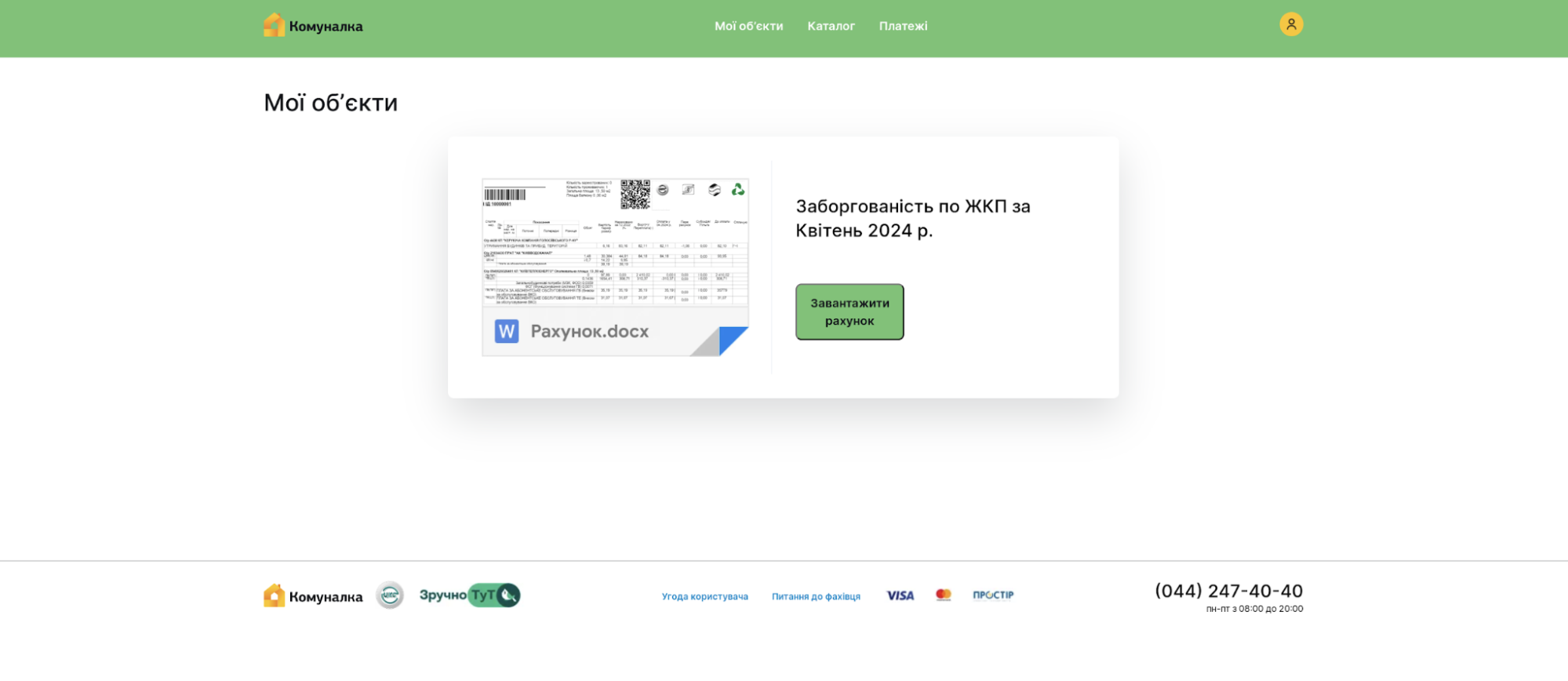
Based on past FlyingYeti operations, targets may be directed to the actor’s Github page via a link in a phishing email or an encrypted Signal message. If a target accesses the spoofed Komunalka platform at hxxps[:]//komunalka[.]github[.]io, the page displays a large green button with a prompt to download the document “Рахунок.docx” (“Invoice.docx”), as shown in Figure 1. This button masquerades as a link to an overdue payment invoice but actually results in the download of the malicious archive “Заборгованість по ЖКП.rar” (“Debt for housing and utility services.rar”).
Figure 1: Prompt to download malicious archive “Заборгованість по ЖКП.rar”
A series of steps must take place for the download to successfully occur:
The target clicks the green button on the actor’s GitHub page hxxps[:]//komunalka.github[.]io
The target’s device sends an HTTP POST request to the Cloudflare Worker worker-polished-union-f396[.]vqu89698[.]workers[.]dev with the HTTP request body set to “user=Iahhdr”
The Cloudflare Worker processes the request and evaluates the HTTP request body
If the request conditions are met, the Worker fetches the RAR file from hxxps[:]//raw[.]githubusercontent[.]com/kudoc8989/project/main/Заборгованість по ЖКП.rar, which is then downloaded on the target’s device
Cloudforce One identified the infrastructure responsible for facilitating the download of the malicious RAR file and remediated the actor-associated Worker, preventing FlyingYeti from delivering its malicious tooling. In an effort to circumvent Cloudforce One’s mitigation measures, FlyingYeti later changed their malware delivery method. Instead of the Workers domain fetching the malicious RAR file, it was loaded directly from GitHub.
Analysis of the malicious RAR file
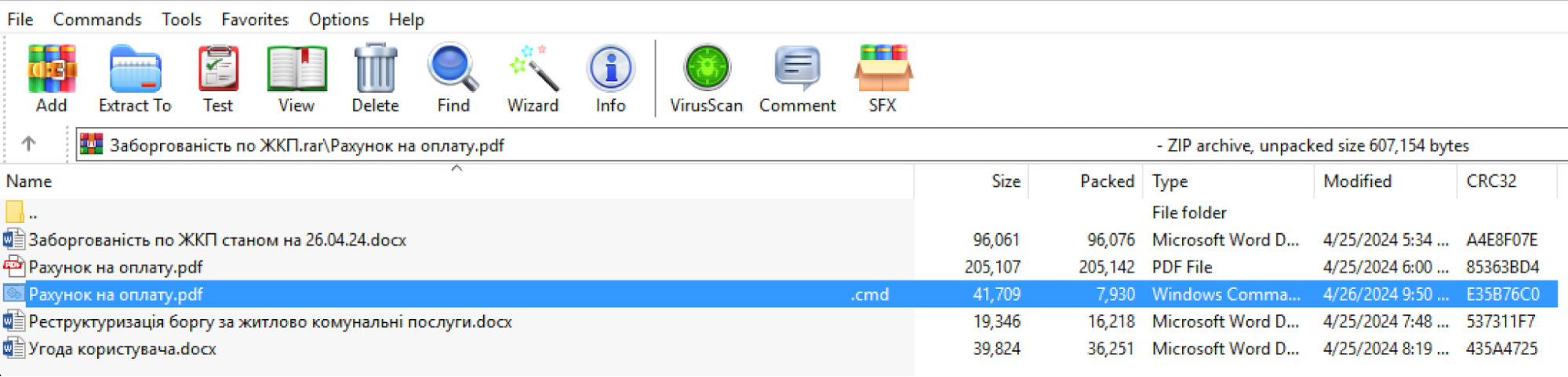
During remediation, Cloudforce One recovered the RAR file “Заборгованість по ЖКП.rar” and performed analysis of the malicious payload. The downloaded RAR archive contains multiple files, including a file with a name that contains the unicode character “U+201F”. This character appears as whitespace on Windows devices and can be used to “hide” file extensions by adding excessive whitespace between the filename and the file extension. As highlighted in blue in Figure 2, this cleverly named file within the RAR archive appears to be a PDF document but is actually a malicious CMD file (“Рахунок на оплату.pdf[unicode character U+201F].cmd”).
Figure 2: Files contained in the malicious RAR archive “Заборгованість по ЖКП.rar” (“Housing Debt.rar”)
FlyingYeti included a benign PDF in the archive with the same name as the CMD file but without the unicode character, “Рахунок на оплату.pdf” (“Invoice for payment.pdf”). Additionally, the directory name for the archive once decompressed also contained the name “Рахунок на оплату.pdf”. This overlap in names of the benign PDF and the directory allows the actor to exploit the WinRAR vulnerability CVE-2023-38831. More specifically, when an archive includes a benign file with the same name as the directory, the entire contents of the directory are opened by the WinRAR application, resulting in the execution of the malicious CMD. In other words, when the target believes they are opening the benign PDF “Рахунок на оплату.pdf”, the malicious CMD file is executed.
The CMD file contains the FlyingYeti PowerShell malware known as COOKBOX. The malware is designed to persist on a host, serving as a foothold in the infected device. Once installed, this variant of COOKBOX will make requests to the DDNS domain postdock[.]serveftp[.]com for C2, awaiting PowerShell cmdlets that the malware will subsequently run.
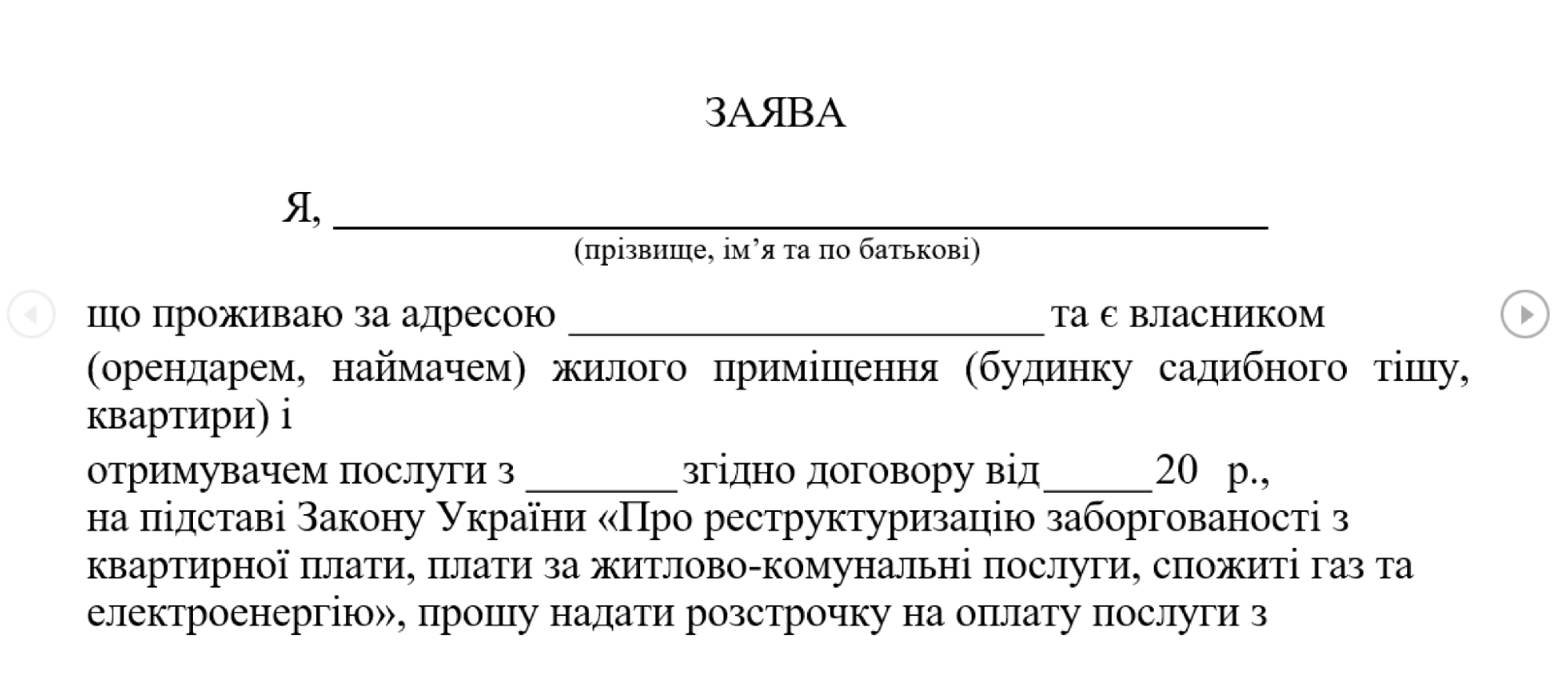
Alongside COOKBOX, several decoy documents are opened, which contain hidden tracking links using the Canary Tokens service. The first document, shown in Figure 3 below, poses as an agreement under which debt for housing and utility services will be restructured.
Figure 3: Decoy document Реструктуризація боргу за житлово комунальні послуги.docx
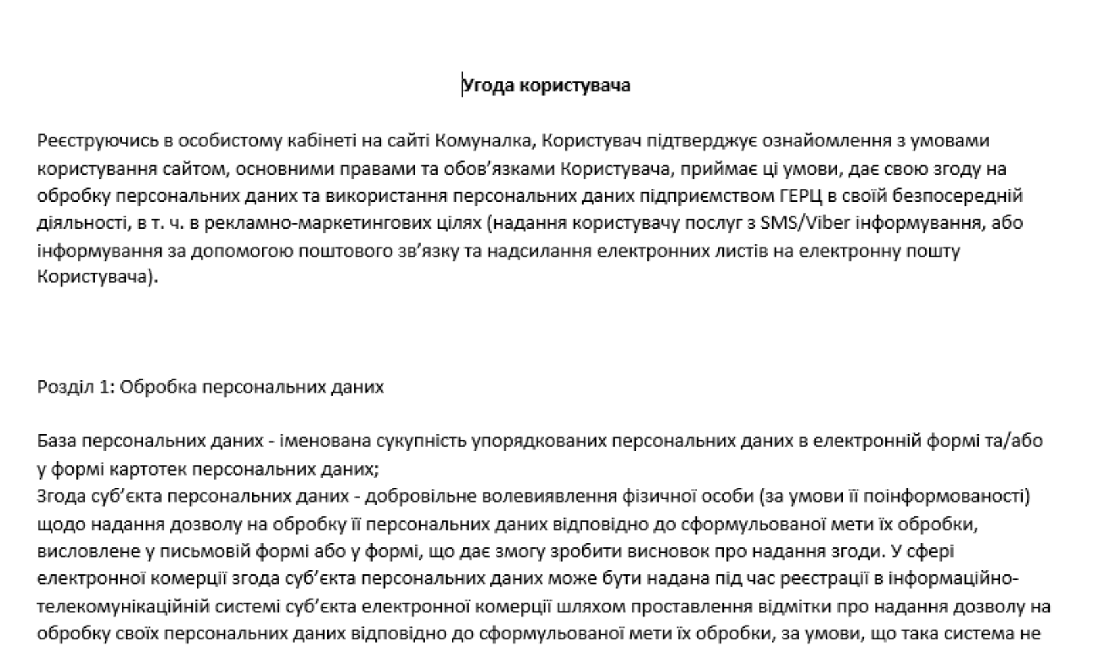
The second document (Figure 4) is a user agreement outlining the terms and conditions for the usage of the payment platform komunalka[.]ua.
The use of relevant decoy documents as part of the phishing and delivery activity are likely an effort by FlyingYeti operators to increase the appearance of legitimacy of their activities.
The phishing theme we identified in this campaign is likely one of many themes leveraged by this actor in a larger operation to target Ukrainian entities, in particular their defense forces. In fact, the threat activity we detailed in this blog uses many of the same techniques outlined in a recent FlyingYeti campaign disclosed by CERT-UA in mid-April 2024, where the actor leveraged United Nations-themed lures involving Peace Support Operations to target Ukraine’s military. Due to Cloudforce One’s defensive actions covered in the next section, this latest FlyingYeti campaign was prevented as of the time of publication.
Mitigating FlyingYeti activity
Cloudforce One mitigated FlyingYeti’s campaign through a series of actions. Each action was taken to increase the actor’s cost of continuing their operations. When assessing which action to take and why, we carefully weighed the pros and cons in order to provide an effective active defense strategy against this actor. Our general goal was to increase the amount of time the threat actor spent trying to develop and weaponize their campaign.
We were able to successfully extend the timeline of the threat actor’s operations from hours to weeks. At each interdiction point, we assessed the impact of our mitigation to ensure the actor would spend more time attempting to launch their campaign. Our mitigation measures disrupted the actor’s activity, in one instance resulting in eight additional hours spent on debugging code.
Due to our proactive defense efforts, FlyingYeti operators adapted their tactics multiple times in their attempts to launch the campaign. The actor originally intended to have the Cloudflare Worker fetch the malicious RAR file from GitHub. After Cloudforce One interdiction of the Worker, the actor attempted to create additional Workers via a new account. In response, we disabled all Workers, leading the actor to load the RAR file directly from GitHub. Cloudforce One notified GitHub, resulting in the takedown of the RAR file, the GitHub project, and suspension of the account used to host the RAR file. In return, FlyingYeti began testing the option to host the RAR file on the file sharing sites pixeldrain and Filemail, where we observed the actor alternating the link on the Komunalka phishing site between the following:
We notified GitHub of the actor’s evolving tactics, and in response GitHub removed the Komunalka phishing site. After analyzing the files hosted on pixeldrain and Filemail, we determined the actor uploaded dummy payloads, likely to monitor access to their phishing infrastructure (FileMail logs IP addresses, and both file hosting sites provide view and download counts). At the time of publication, we did not observe FlyingYeti upload the malicious RAR file to either file hosting site, nor did we identify the use of alternative phishing or malware delivery methods.
A timeline of FlyingYeti’s activity and our corresponding mitigations can be found below.
Event timeline
Date
Event Description
2024-04-18 12:18
Threat Actor (TA) creates a Worker to handle requests from a phishing site
2024-04-18 14:16
TA creates phishing site komunalka[.]github[.]io on GitHub
2024-04-25 12:25
TA creates a GitHub repo to host a RAR file
2024-04-26 07:46
TA updates the first Worker to handle requests from users visiting komunalka[.]github[.]io
2024-04-26 08:24
TA uploads a benign test RAR to the GitHub repo
2024-04-26 13:38
Cloudforce One identifies a Worker receiving requests from users visiting komunalka[.]github[.]io, observes its use as a phishing page
2024-04-26 13:46
Cloudforce One identifies that the Worker fetches a RAR file from GitHub (the malicious RAR payload is not yet hosted on the site)
2024-04-26 19:22
Cloudforce One creates a detection to identify the Worker that fetches the RAR
2024-04-26 21:13
Cloudforce One deploys real-time monitoring of the RAR file on GitHub
2024-05-02 06:35
TA deploys a weaponized RAR (CVE-2023-38831) to GitHub with their COOKBOX malware packaged in the archive
2024-05-06 10:03
TA attempts to update the Worker with link to weaponized RAR, the Worker is immediately blocked
2024-05-06 10:38
TA creates a new Worker, the Worker is immediately blocked
2024-05-06 11:04
TA creates a new account (#2) on Cloudflare
2024-05-06 11:06
TA creates a new Worker on account #2 (blocked)
2024-05-06 11:50
TA creates a new Worker on account #2 (blocked)
2024-05-06 12:22
TA creates a new modified Worker on account #2
2024-05-06 16:05
Cloudforce One disables the running Worker on account #2
2024-05-07 22:16
TA notices the Worker is blocked, ceases all operations
2024-05-07 22:18
TA deletes original Worker first created to fetch the RAR file from the GitHub phishing page
2024-05-09 19:28
Cloudforce One adds phishing page komunalka[.]github[.]io to real-time monitoring
2024-05-13 07:36
TA updates the github.io phishing site to point directly to the GitHub RAR link
2024-05-13 17:47
Cloudforce One adds COOKBOX C2 postdock[.]serveftp[.]com to real-time monitoring for DNS resolution
2024-05-14 00:04
Cloudforce One notifies GitHub to take down the RAR file
2024-05-15 09:00
GitHub user, project, and link for RAR are no longer accessible
2024-05-21 08:23
TA updates Komunalka phishing site on github.io to link to pixeldrain URL for dummy payload (pixeldrain only tracks view and download counts)
2024-05-21 08:25
TA updates Komunalka phishing site to link to FileMail URL for dummy payload (FileMail tracks not only view and download counts, but also IP addresses)
2024-05-21 12:21
Cloudforce One downloads PixelDrain document to evaluate payload
2024-05-21 12:47
Cloudforce One downloads FileMail document to evaluate payload
2024-05-29 23:59
GitHub takes down Komunalka phishing site
2024-05-30 13:00
Cloudforce One publishes the results of this investigation
Coordinating our FlyingYeti response
Cloudforce One leveraged industry relationships to provide advanced warning and to mitigate the actor’s activity. To further protect the intended targets from this phishing threat, Cloudforce One notified and collaborated closely with GitHub’s Threat Intelligence and Trust and Safety Teams. We also notified CERT-UA and Cloudflare industry partners such as CrowdStrike, Mandiant/Google Threat Intelligence, and Microsoft Threat Intelligence.
Hunting FlyingYeti operations
There are several ways to hunt FlyingYeti in your environment. These include using PowerShell to hunt for WinRAR files, deploying Microsoft Sentinel analytics rules, and running Splunk scripts as detailed below. Note that these detections may identify activity related to this threat, but may also trigger unrelated threat activity.
PowerShell hunting
Consider running a PowerShell script such as this one in your environment to identify exploitation of CVE-2023-38831. This script will interrogate WinRAR files for evidence of the exploit.
CVE-2023-38831
Description:winrar exploit detection
open suspios (.tar / .zip / .rar) and run this script to check it

function winrar-exploit-detect(){
$targetExtensions = @(".cmd" , ".ps1" , ".bat")
$tempDir = [System.Environment]::GetEnvironmentVariable("TEMP")
$dirsToCheck = Get-ChildItem -Path $tempDir -Directory -Filter "Rar*"
foreach ($dir in $dirsToCheck) {
    $files = Get-ChildItem -Path $dir.FullName -File
    foreach ($file in $files) {
        $fileName = $file.Name
        $fileExtension = [System.IO.Path]::GetExtension($fileName)
        if ($targetExtensions -contains $fileExtension) {
            $fileWithoutExtension = [System.IO.Path]::GetFileNameWithoutExtension($fileName); $filename.TrimEnd() -replace '\.$'
            $cmdFileName = "$fileWithoutExtension"
            $secondFile = Join-Path -Path $dir.FullName -ChildPath $cmdFileName

            if (Test-Path $secondFile -PathType Leaf) {
                Write-Host "[!] Suspicious pair detected "
                Write-Host "[*]  Original File:$($secondFile)" -ForegroundColor Green
                Write-Host "[*] Suspicious File:$($file.FullName)" -ForegroundColor Red

                # Read and display the content of the command file
                $cmdFileContent = Get-Content -Path $($file.FullName)
                Write-Host "[+] Command File Content:$cmdFileContent"
            }
        }
    }
}
}
winrar-exploit-detect
Microsoft Sentinel
In Microsoft Sentinel, consider deploying the rule provided below, which identifies WinRAR execution via cmd.exe. Results generated by this rule may be indicative of attack activity on the endpoint and should be analyzed.
DeviceProcessEvents
| where InitiatingProcessParentFileName has @"winrar.exe"
| where InitiatingProcessFileName has @"cmd.exe"
| project Timestamp, DeviceName, FileName, FolderPath, ProcessCommandLine, AccountName
| sort by Timestamp desc
Splunk
Consider using this script in your Splunk environment to look for WinRAR CVE-2023-38831 execution on your Microsoft endpoints. Results generated by this script may be indicative of attack activity on the endpoint and should be analyzed.
| tstats `security_content_summariesonly` count min(_time) as firstTime max(_time) as lastTime from datamodel=Endpoint.Processes where Processes.parent_process_name=winrar.exe `windows_shells` OR Processes.process_name IN ("certutil.exe","mshta.exe","bitsadmin.exe") by Processes.dest Processes.user Processes.parent_process_name Processes.parent_process Processes.process_name Processes.process Processes.process_id Processes.parent_process_id
| `drop_dm_object_name(Processes)`
| `security_content_ctime(firstTime)`
| `security_content_ctime(lastTime)`
| `winrar_spawning_shell_application_filter`
Cloudflare product detections
Cloudflare Email Security
Cloudflare Email Security (CES) customers can identify FlyingYeti threat activity with the following detections.
CVE-2023-38831
FLYINGYETI.COOKBOX
FLYINGYETI.COOKBOX.Launcher
FLYINGYETI.Rar
Recommendations
Cloudflare recommends taking the following steps to mitigate this type of activity:
Implement Zero Trust architecture foundations:
Deploy Cloud Email Security to ensure that email services are protected against phishing, BEC and other threats
Leverage browser isolation to separate messaging applications like LinkedIn, email, and Signal from your main network
Scan, monitor and/or enforce controls on specific or sensitive data moving through your network environment with data loss prevention policies
Ensure your systems have the latest WinRAR and Microsoft security updates installed
Consider preventing WinRAR files from entering your environment, both at your Cloud Email Security solution and your Internet Traffic Gateway
Run an Endpoint Detection and Response (EDR) tool such as CrowdStrike or Microsoft Defender for Endpoint to get visibility into binary execution on hosts
Search your environment for the FlyingYeti indicators of compromise (IOCs) shown below to identify potential actor activity within your network.
If you’re looking to uncover additional Threat Intelligence insights for your organization or need bespoke Threat Intelligence information for an incident, consider engaging with Cloudforce One by contacting your Customer Success manager or filling out this form.
In the ever-evolving landscape of cyber threats, a subtle yet potent form of phishing has emerged — quishing, short for QR phishing. It has been 30 years since the invention of QR codes, yet quishing still poses a significant risk, especially after the era of COVID, when QR codes became the norm to check statuses, register for events, and even order food.
Since 2020, Cloudflare’s cloud email security solution (previously known as Area 1) has been at the forefront of fighting against quishing attacks, taking a proactive stance in dissecting them to better protect our customers. Let’s delve into the mechanisms behind QR phishing, explore why QR codes are a preferred tool for attackers, and review how Cloudflare contributes to the fight against this evolving threat.
How quishing works
The impact of phishing and quishing are quite similar, as both can result in users having their credentials compromised, devices compromised, or even financial loss. They also leverage malicious attachments or websites to provide bad actors the ability to access something they normally wouldn’t be able to. Where they differ is that quishing is typically highly targeted and uses a QR code to further obfuscate itself from detection.
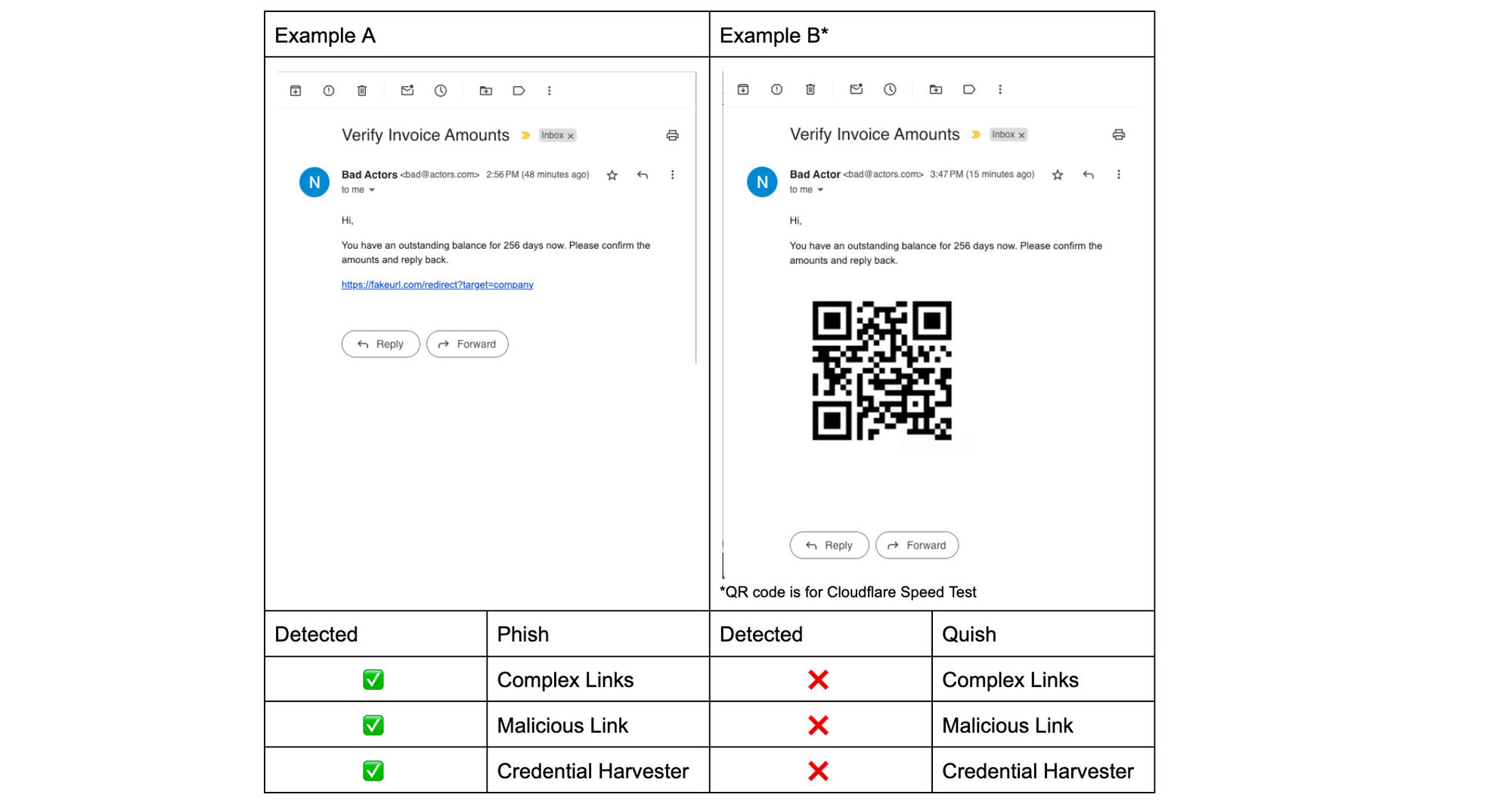
Since phish detection engines require inputs like URLs or attachments inside an email in order to detect, quish succeeds by hampering the detection of these inputs. In Example A below, the phish’s URL was crawled and after two redirects landed on a malicious website that automatically tries to run key logging malware that copies login names and passwords. For Example A, this clearly sets off the detectors, but Example B has no link to crawl and therefore the same detections that worked on Example A are rendered inert.
Strange you say, if my phone can scan that QR code then can’t a detection engine recognize the QR code as well? Simply put, no, because phish detection engines are optimized for catching phish, but to identify and scan QR codes requires a completely different engine – a computer vision engine. This brings us to why QR codes are a preferred tool for attackers.
Why QR codes for phishing?
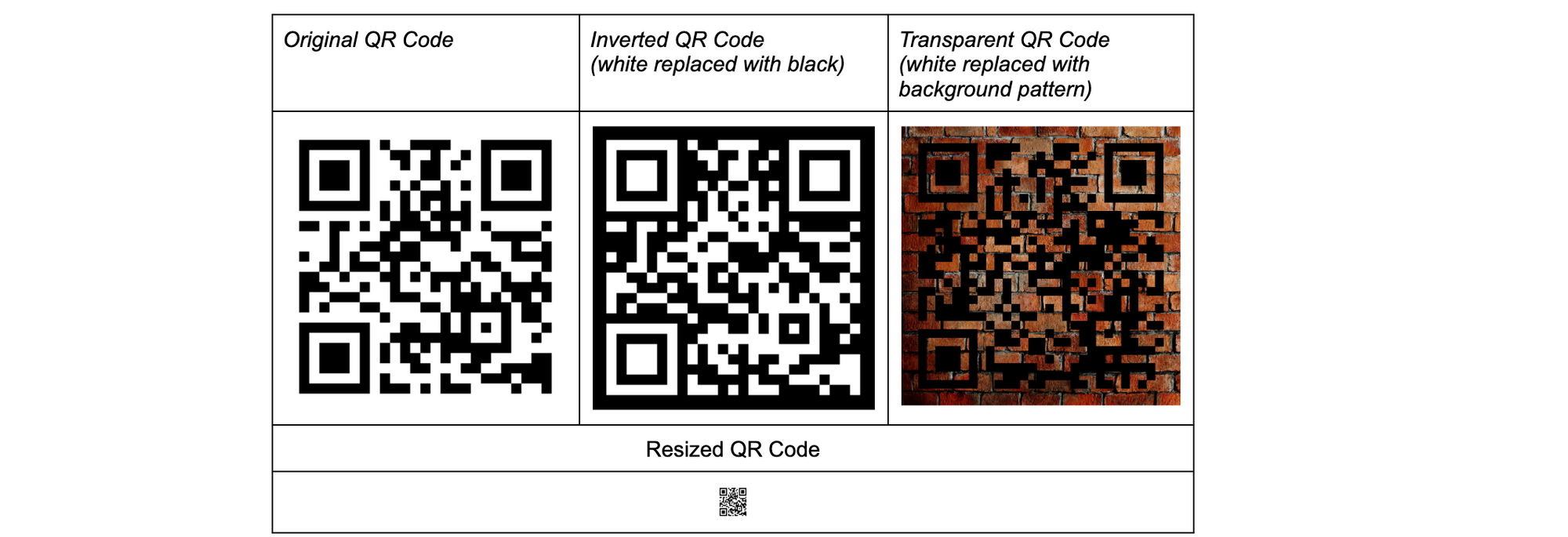
There are three main reasons QR codes are popular in phishing attacks. First, QR codes boast strong error correction capabilities, allowing them to withstand resizing, pixel shifting, variations in lighting, partial cropping, and other distortions. Indeed, computer vision models can scan QR codes, but identifying which section of an email, image, or webpage linked in an email has a QR code is quite difficult for a machine, and even more so if the QR codes have been obfuscated to hide themselves from some computer vision models. For example, by inverting them, blending them with other colors or images, or making them extremely small, computer vision models will have trouble even identifying the presence of QR codes, much less even being able to scan them. Though filters and additional processing can be applied to any image, not knowing what or where to apply makes the deobfuscation of a QR code an extremely expensive computational problem. This not only makes catching all quish hard, but is likely to cause frustration for an end user who won’t get their emails quickly because an image or blob of text looks similar to a QR code, resulting in delivery delays.
Even though computer vision models may have difficulty deobfuscating QR codes, we have discovered from experience that when a human encounters these obfuscated QR codes, with enough time and effort, they are usually able to scan the QR code. By doing everything from increasing the brightness of their screen, to printing out the email, to resizing the codes themselves, they can make a QR code that has been hidden from machines scan successfully.
Don’t believe us? Try it for yourself with the QR codes that have been obfuscated for machines. They all link to https://blog.cloudflare.com/
If you scanned any of the example QR codes above, you have just proven the next reason bad actors favor quish. The devices used for accessing QR codes are typically personal devices with a limited security posture, making them susceptible to exploitation. While secured corporate devices typically have measures to warn, stop, or sandbox users when they access malicious links, these protections are not available natively on personal devices. This can be especially worrisome, as we have seen a trend towards custom QR codes targeting executives in organizations.
QR codes can also be seamlessly layered in with other obfuscation techniques, such as encrypted attachments, mirrors that mimic well-known websites, validations to prove you are human before malicious content is revealed, and more. This versatility makes them an attractive choice for cybercriminals seeking innovative ways to deceive unsuspecting users by adding QR codes to previously successful phishing vectors that have now been blocked by security products.
Cloudflare’s protection strategy
Cloudflare has been at the forefront of defending against quishing attacks. We employ a multi-faceted approach, and instead of focusing on archaic, layered email configuration rules, we have trained our machine learning (ML) detection models on almost a decade’s worth of detection data and have a swath of proactive computer vision models to ensure all of our customers start with a turnkey solution.
For quish detections, we break it into two parts: 1) identification and scanning of QR codes 2) analysis of decoded QR codes.
The first part is solved by our own QR code detection heuristics that inform how, when, and where for our computer vision models to execute. We then leverage the newest libraries and tools to help identify, process, and most importantly decode QR codes. While it is relatively easy for a human to identify a QR code, there is almost no limit to how many ways they can be obfuscated to machines. The examples we provided above are just a small sample of what we’ve seen in the wild, and bad actors are constantly discovering new methods to make QR codes hard to quickly find and identify, making it a constant cat and mouse game that requires us to regularly update our tools for the trending obfuscation technique.
The second part, analysis of decoded QR codes, goes through all the same treatment we apply to phish and then some. We have engines that deconstruct complex URLs and drill down to the final URL, from redirect to redirect, whether they are automatic or not. Along the way, we scan for malicious attachments and malicious websites and log findings for future detections to cross-reference. If we encounter any files or content that are encrypted or password protected, we leverage another group of engines that attempt to decrypt and unprotect them, so we can identify if there was any obfuscated malicious content. Most importantly, with all of this information, we continuously update our databases with this new data, including the obfuscation of the QR code, to make better assessments of similar attacks that leverage the methods we have documented.
However, even with a well-trained suite of phish detection tools, quite often the malicious content is at the end of a long chain of redirects that prevent automated web crawlers from identifying anything at all, much less malicious content. In between redirects, there might be a hard block that requires human validation, such as a CAPTCHA, which makes it virtually impossible for an automated process to crawl past, and therefore unable to classify any content at all. Or there might be a conditional block with campaign identification requirements, so if anyone is outside the original target’s region or has a web browser and operating system version that doesn’t meet the campaign requirements, they would simply view a benign website, while the target would be exposed to the malicious content. Over the years, we have built tools to identify and pass these validations, so we can determine malicious content that may be there.
However, even with all the technologies we’ve built over the years, there are cases where we aren’t able to easily get to the final content. In those cases, our link reputation machine learning models, which have been trained on multiple years of scanned links and their metadata, have proven to be quite valuable and are easily applied after QR codes are decoded as well. By correlating things like domain metadata, URL structure, URL query strings, and our own historical data sets, we are able to make inferences to protect our customers. We also take a proactive approach and leverage our ML models to tell us where to hunt for QR codes, even if they aren’t immediately obvious, and by scrutinizing domains, sentiment, context, IP addresses, historical use, and social patterns between senders and recipients, Cloudflare identifies and neutralizes potential threats before they can inflict harm.
Creative examples and real world instances
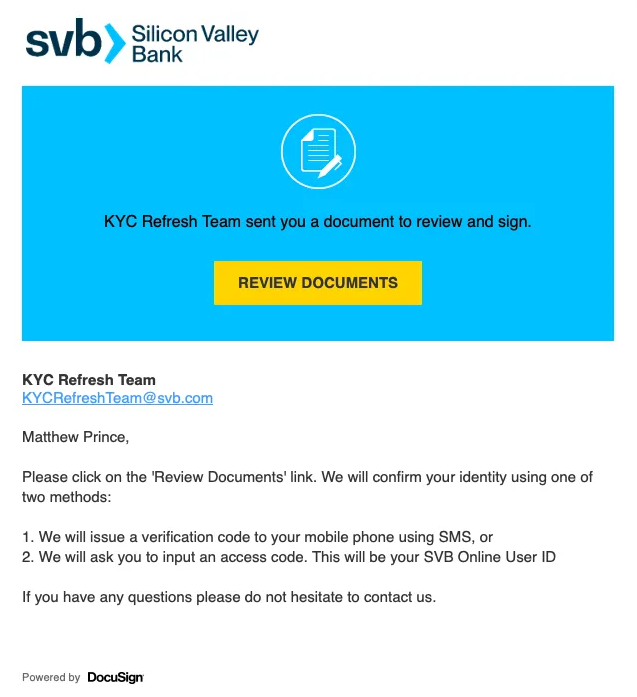
With the thousands of QR codes we process daily, we see some interesting trends. Notable companies, including Microsoft and DocuSign, have frequently been the subjects of impersonation for quishing attacks. What makes this more confusing for users, and even more likely to scan them, is that these companies actually use QR codes in their legitimate workflows. This further underscores the urgency for organizations to fortify their defenses against this evolving threat.
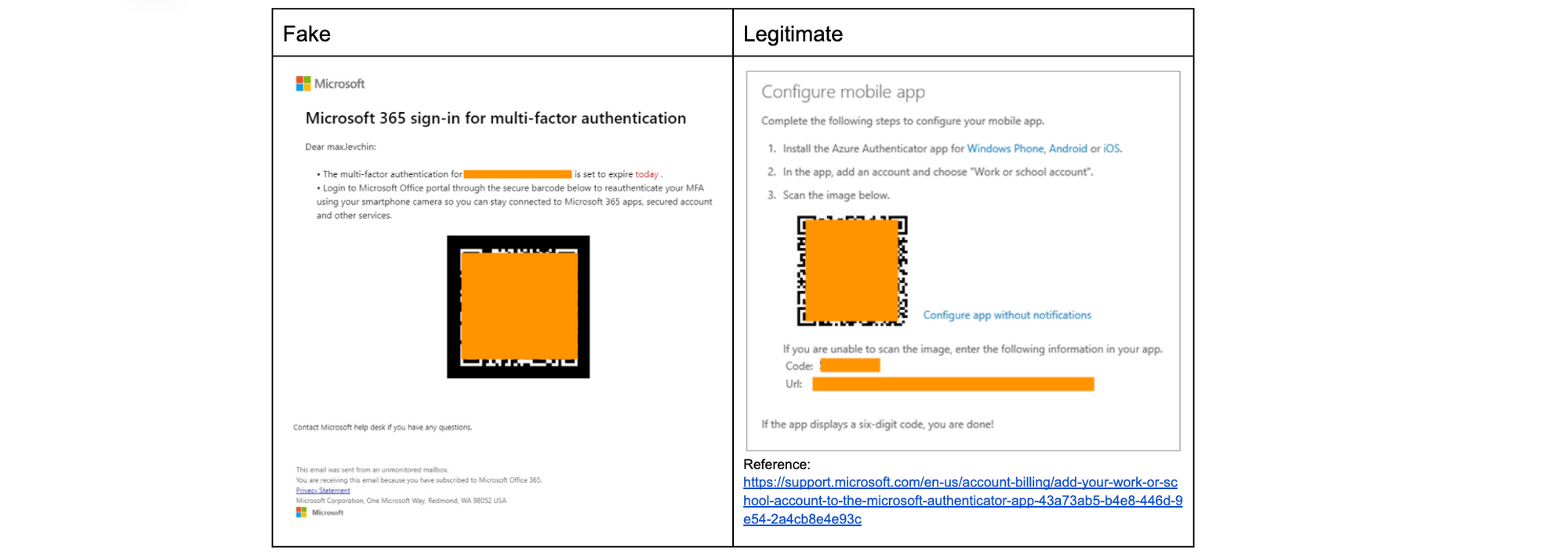
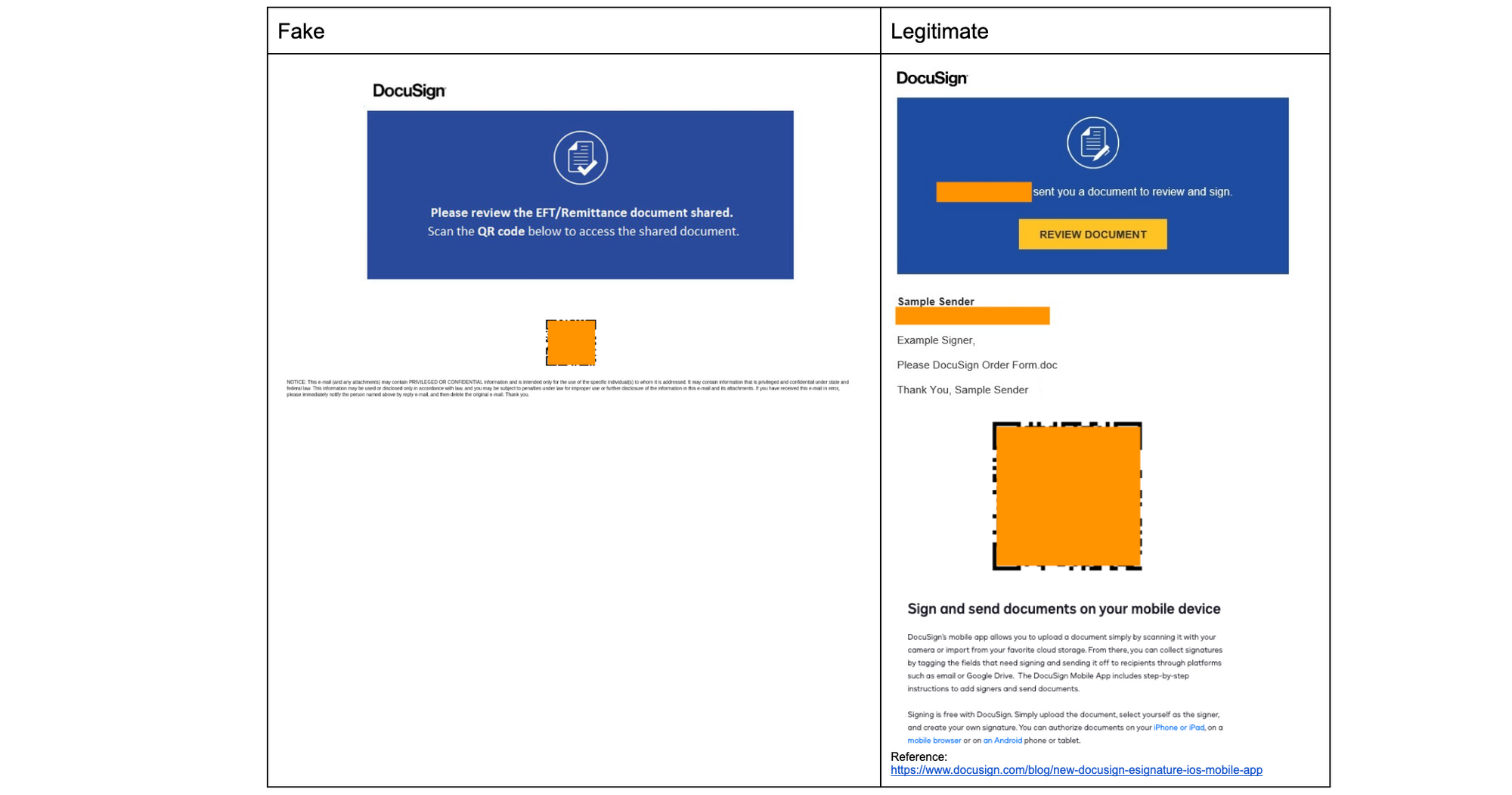
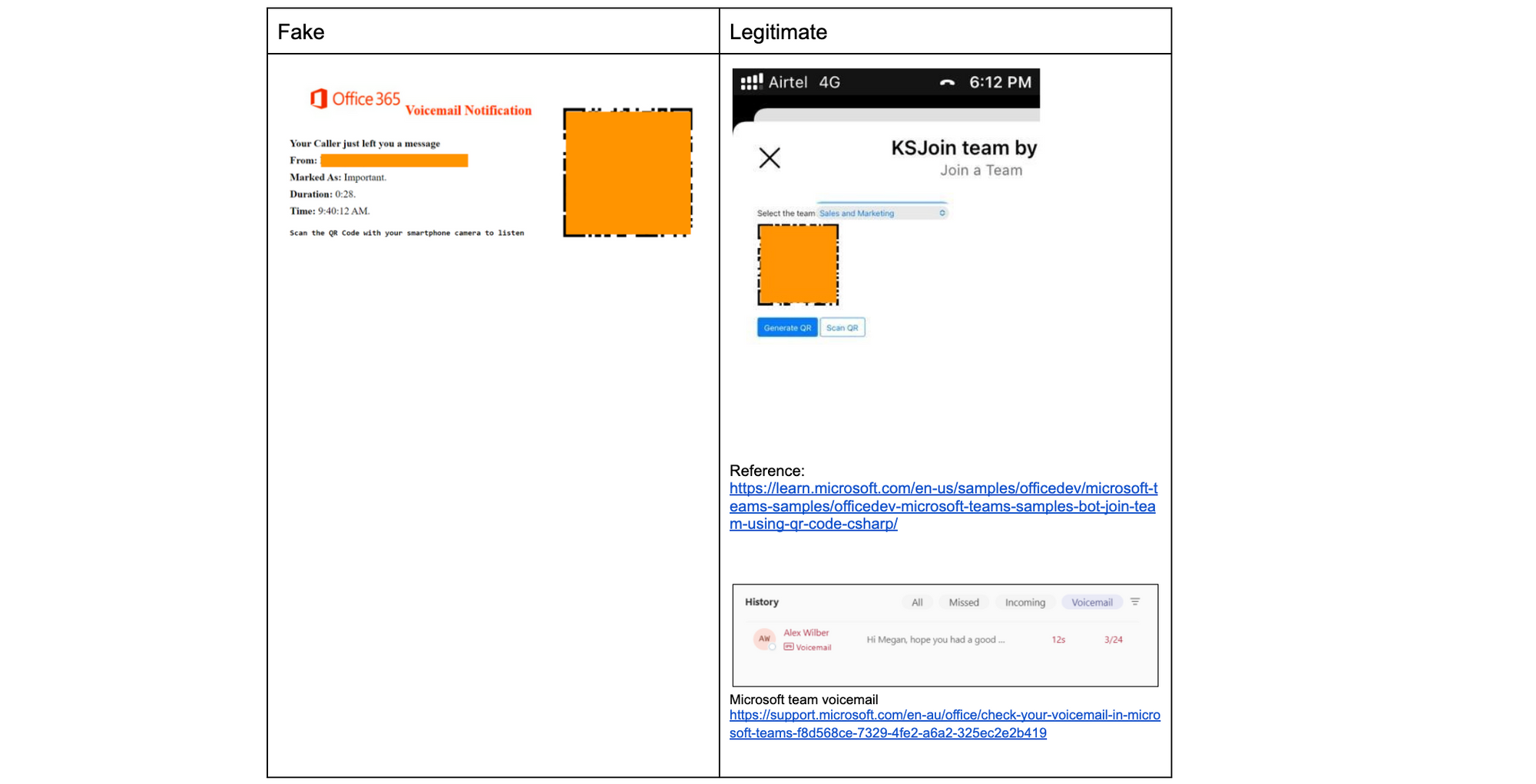
Below are three examples of the most interesting quish we have found and compared against the real use cases by the respective companies. The QR codes used in these emails have been masked.
Microsoft Authenticator
Microsoft uses QR codes as a faster way to complete MFA instead of sending six digit SMS codes to users’ phones that can be delayed and are also considered safer, as SMS MFA can be intercepted through SIM swap attacks. Users would have independently registered their devices and would have previously seen the registration screen on the right, so receiving an email that says they need to re-authenticate doesn’t seem especially odd.
DocuSign
DocuSign uses QR codes to make it easier for users to download their mobile app tosign documents, identity verification via a mobile device to take photos, and supports embedding DocuSign features in third party apps which have their own QR code scanning functionality. The use of QR codes in native DocuSign apps and non-native apps makes it confusing for frequent DocuSign users and not at all peculiar for users that rarely use DocuSign. While the QR code for downloading the DocuSign app is not used in signature requests, to a frequent user, it might just seem like a fast method to open the request in the app they already have downloaded on their mobile device.
Microsoft Teams
Microsoft uses QR codes for Teams to allow users to quickly join a team via a mobile device, and while Teams doesn’t use QR codes for voicemails, it does have a voicemail feature. The email on the left seems like a reminder to check voicemail in Teams and combines the two real use cases on the right.
How you can help prevent quishing
As we confront the persistent threat of quishing, it’s crucial for individuals and organizations to be vigilant. While no solution can guarantee 100% protection, collective diligence can significantly reduce the risk, and we encourage collaboration in the fight against quishing.
If you are already a Cloud Email Security customer, we remind you to submit instances of quish from within our portal to help stop current threats and enhance the capabilities of future machine learning models, leading to more proactive defense strategies. If you aren’t a customer, you can still submit original quish samples as an attachment in EML format to [email protected], and remember to leverage your email security provider’s submission process to inform them of these quishing vectors as well.
The battle against quishing is ongoing, requiring continuous innovation and collaboration. To support submissions of quish, we are developing new methods for customers to provide targeted feedback to our models and also adding additional transparency to our metrics to facilitate tracking a variety of vectors, including quish.
You’re browsing your inbox and spot an email that looks like it’s from a brand you trust. Yet, something feels off. This might be a phishing attempt, a common tactic where cybercriminals impersonate reputable entities — we’ve written about the top 50 most impersonated brands used in phishing attacks. One factor that can be used to help evaluate the email’s legitimacy is its Top-Level Domain (TLD) — the part of the email address that comes after the dot.
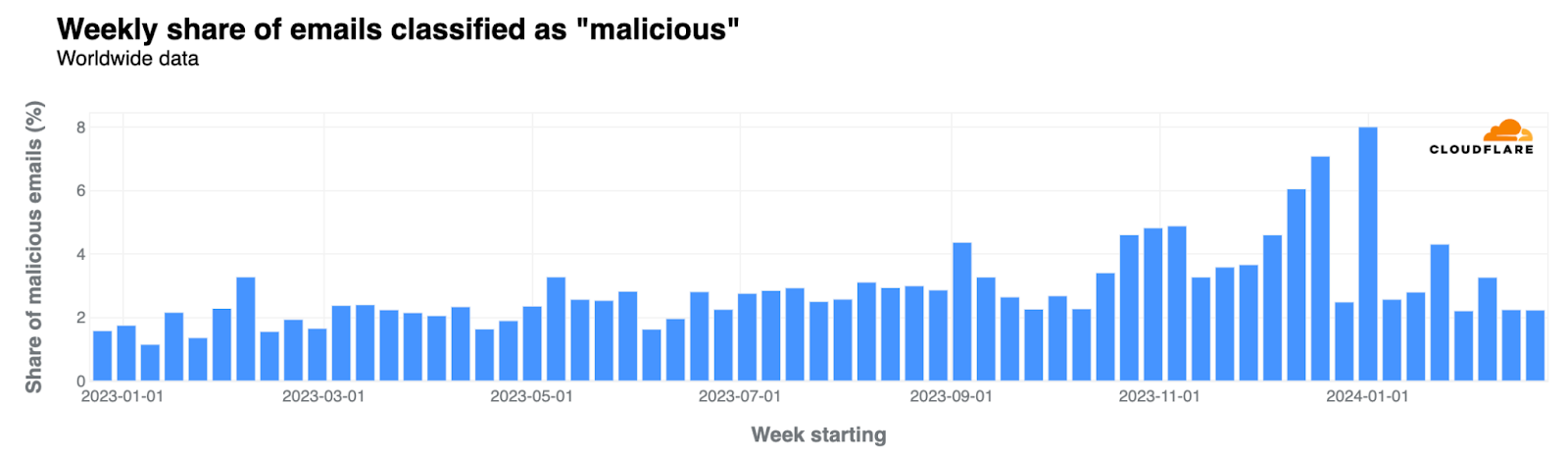
In this analysis, we focus on the TLDs responsible for a significant share of malicious or spam emails since January 2023. For the purposes of this blog post, we are considering malicious email messages to be equivalent to phishing attempts. With an average of 9% of 2023’s emails processed by Cloudflare’s Cloud Email Security service marked as spam and 3% as malicious, rising to 4% by year-end, we aim to identify trends and signal which TLDs have become more dubious over time. Keep in mind that our measurements represent where we observe data across the email delivery flow. In some cases, we may be observing after initial filtering has taken place, at a point where missed classifications are likely to cause more damage. This information derived from this analysis could serve as a guide for Internet users, corporations, and geeks like us, searching for clues, as Internet detectives, in identifying potential threats. To make this data readily accessible, Cloudflare Radar, our tool for Internet insights, now includes a new section dedicated to email security trends.
Cyber attacks often leverage the guise of authenticity, a tactic Cloudflare thwarted following a phishing scheme similar to the one that compromised Twilio in 2022. The US Cybersecurity and Infrastructure Security Agency (CISA) notes that 90% of cyber attacks start with phishing, and fabricating trust is a key component of successful malicious attacks. We see there are two forms of authenticity that attackers can choose to leverage when crafting phishing messages, visual and organizational. Attacks that leverage visual authenticity rely on attackers using branding elements, like logos or images, to build credibility. Organizationally authentic campaigns rely on attackers using previously established relationships and business dynamics to establish trust and be successful.
Our findings from 2023 reveal that recently introduced generic TLDs (gTLDs), including several linked to the beauty industry, are predominantly used both for spam and malicious attacks. These TLDs, such as .uno, .sbs, and .beauty, all introduced since 2014, have seen over 95% of their emails flagged as spam or malicious. Also, it’s important to note that in terms of volume, “.com” accounts for 67% of all spam and malicious emails (more on that below).
TLDs
2023 Spam %
2023 Malicious %
2023 Spam + malicious %
TLD creation
.uno
62%
37%
99%
2014
.sbs
64%
35%
98%
2021
.best
68%
29%
97%
2014
.beauty
77%
20%
97%
2021
.top
74%
23%
97%
2014
.hair
78%
18%
97%
2021
.monster
80%
17%
96%
2019
.cyou
34%
62%
96%
2020
.wiki
69%
26%
95%
2014
.makeup
32%
63%
95%
2021
Email and Top-Level Domains history
In 1971, Ray Tomlinson sent the first networked email over ARPANET, using the @ character in the address. Five decades later, email remains relevant but also a key entry point for attackers.
Before the advent of the World Wide Web, email standardization and growth in the 1980s, especially within academia and military communities, led to interoperability. Fast forward 40 years, and this interoperability is once again a hot topic, with platforms like Threads, Mastodon, and other social media services aiming for the open communication that Jack Dorsey envisioned for Twitter. So, in 2024, it’s clear that social media, messaging apps like Slack, Teams, Google Chat, and others haven’t killed email, just as “video didn’t kill the radio star.”
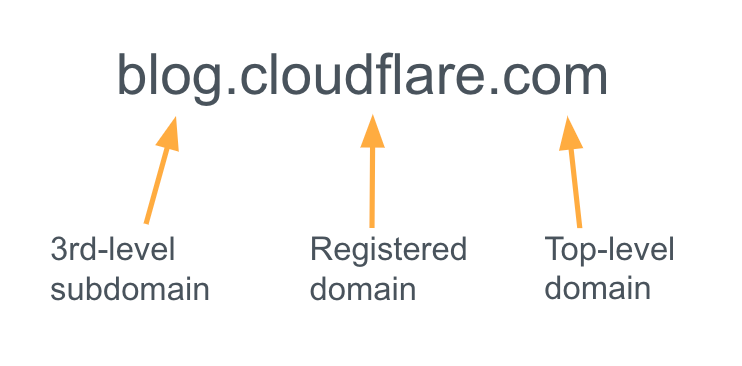
The structure of a domain name.
The domain name system, managed by ICANN, encompasses a variety of TLDs, from the classic “.com” (1985) to the newer generic options. There are also the country-specific (ccTLDs), where the Internet Assigned Numbers Authority (IANA) is responsible for determining an appropriate trustee for each ccTLD. An extensive 2014 expansion by ICANN was designed to “increase competition and choice in the domain name space,” introducing numerous new options for specific professional, business, and informational purposes, which in turn, also opened up new possibilities for phishing attempts.
3.4 billion unwanted emails
Cloudflare’s Cloud Email Security service is helping protect our customers, and that also comes with insights. In 2022, Cloudflare blocked 2.4 billion unwanted emails, and in 2023 that number rose to over 3.4 billion unwanted emails, 26% of all messages processed. This total includes spam, malicious, and “bulk” (practice of sending a single email message, unsolicited or solicited, to a large number of recipients simultaneously) emails. That means an average of 9.3 million per day, 6500 per minute, 108 per second.
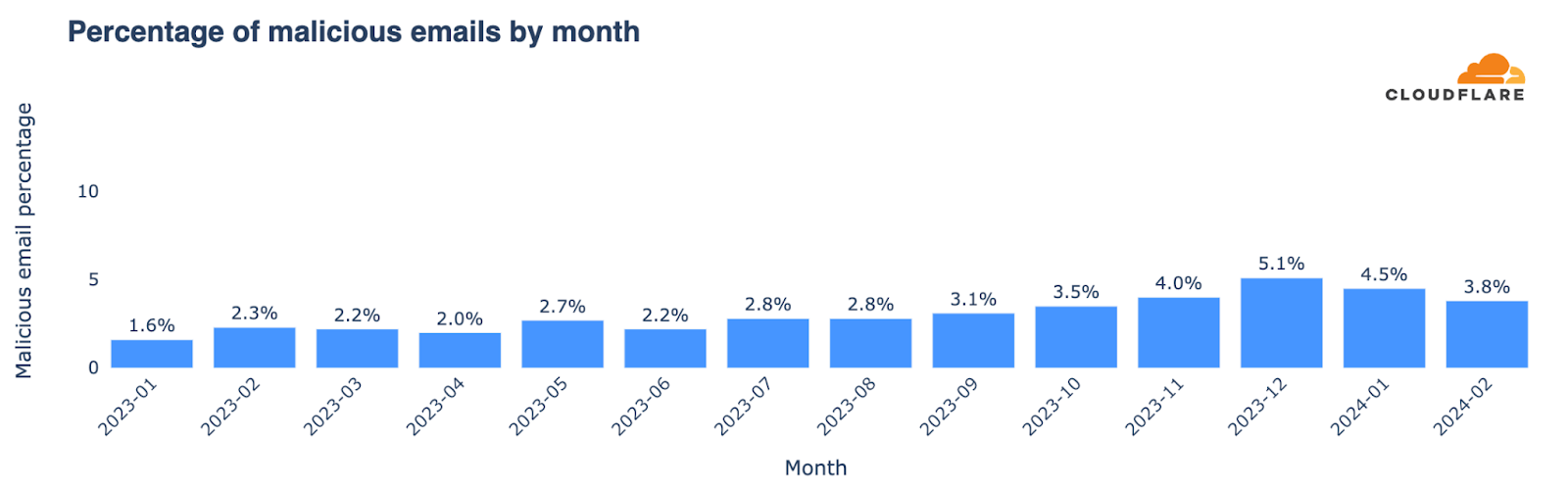
Bear in mind that new customers also make the numbers grow — in this case, driving a 42% increase in unwanted emails from 2022 to 2023. But this gives a sense of scale in this email area. Those unwanted emails can include malicious attacks that are difficult to detect, becoming more frequent, and can have devastating consequences for individuals and businesses that fall victim to them. Below, we’ll give more details on email threats, where malicious messages account for almost 3% of emails averaged across all of 2023 and it shows a growth tendency during the year, with higher percentages in the last months of the year. Let’s take a closer look.
Top phishing TLDs (and types of TLDs)
First, let’s start with an 2023 overview of top level domains with a high percentage of spam and malicious messages. Despite excluding TLDs with fewer than 20,000 emails, our analysis covers unwanted emails considered to be spam and malicious from more than 350 different TLDs (and yes, there are many more).
A quick overview highlights the TLDs with the highest rates of spam and malicious attacks as a proportion of their outbound email, those with the largest volume share of spam or malicious emails, and those with the highest rates of just-malicious and just-spam TLD senders. It reveals that newer TLDs, especially those associated with the beauty industry (generally available since 2021 and serving a booming industry), have the highest rates as a proportion of their emails. However, it’s relevant to recognize that “.com” accounts for 67% of all spam and malicious emails. Malicious emails often originate from recently created generic TLDs like “.bar”, “.makeup”, or “.cyou”, as well as certain country-code TLDs (ccTLDs) employed beyond their geographical implications.
Highest % of spam and malicious emails
Volume share of spam + malicious
Highest % of malicious
Highest % of spam
TLD
Spam + mal %
TLD
Spam + mal %
TLD
Malicious %
TLD
Spam %
.uno
99%
.com
67%
.bar
70%
.autos
93%
.sbs
98%
.shop
5%
.makeup
63%
.today
92%
.best
97%
.net
4%
.cyou
62%
.directory
91%
.beauty
97%
.no
3%
.ml
56%
.boats
87%
.top
97%
.org
2%
.tattoo
54%
.center
85%
.hair
97%
.ru
1%
.om
47%
.monster
80%
.monster
96%
.jp
1%
.cfd
46%
.lol
79%
.cyou
96%
.click
1%
.skin
39%
.hair
78%
.wiki
95%
.beauty
1%
.uno
37%
.shop
78%
.makeup
95%
.cn
1%
.pw
37%
.beauty
77%
Focusing on volume share, “.com” dominates the spam + malicious list at 67%, and is joined in the top 3 by another “classic” gTLD, “.net”, at 4%. They also lead by volume when we look separately at the malicious (68% of all malicious emails are “.com” and “.net”) and spam (71%) categories, as shown below. All of the generic TLDs introduced since 2014 represent 13.4% of spam and malicious and over 14% of only malicious emails. These new TLDs (most of them are only available since 2016) are notable sources of both spam and malicious messages. Meanwhile, country-code TLDs contribute to more than 12% of both categories of unwanted emails.
This breakdown highlights the critical role of both established and new generic TLDs, which surpass older ccTLDs in terms of malicious emails, pointing to the changing dynamics of email-based threats.
Type of TLDs
Spam
Malicious
Spam + malicious
ccTLDs
13%
12%
12%
.com and .net only
71%
68%
71%
new gTLDs
13%
14%
13.4%
That said, “.shop” deserves a highlight of its own. The TLD, which has been available since 2016, is #2 by volume of spam and malicious emails, accounting for 5% of all of those emails. It also represents, when we separate those two categories, 5% of all malicious emails, and 5% of all spam emails. As we’re going to see below, its influence is growing.
Full 2023 top 50 spam & malicious TLDs list
For a more detailed perspective, below we present the top 50 TLDs with the highest percentages of spam and malicious emails during 2023. We also include a breakdown of those two categories.
It’s noticeable that even outside the top 10, other recent generic TLDs are also higher in the ranking, such as “.autos” (the #1 in the spam list), “.today”, “.bid” or “.cam”. TLDs that seem to promise entertainment or fun or are just leisure or recreational related (including “.fun” itself), occupy a position in our top 50 ranking.
2023 Top 50 spam & malicious TLDs (by highest %)
Rank
TLD
Spam %
Malicious %
Spam + malicious %
1
.uno
62%
37%
99%
2
.sbs
64%
35%
98%
3
.best
68%
29%
97%
4
.beauty
77%
20%
97%
5
.top
74%
23%
97%
6
.hair
78%
18%
97%
7
.monster
80%
17%
96%
8
.cyou
34%
62%
96%
9
.wiki
69%
26%
95%
10
.makeup
32%
63%
95%
11
.autos
93%
2%
95%
12
.today
92%
3%
94%
13
.shop
78%
16%
94%
14
.bid
74%
18%
92%
15
.cam
67%
25%
92%
16
.directory
91%
0%
91%
17
.icu
75%
15%
91%
18
.ml
33%
56%
89%
19
.lol
79%
10%
89%
20
.skin
49%
39%
88%
21
.boats
87%
1%
88%
22
.tattoo
34%
54%
87%
23
.click
61%
27%
87%
24
.ltd
70%
17%
86%
25
.rest
74%
11%
86%
26
.center
85%
0%
85%
27
.fun
64%
21%
85%
28
.cfd
39%
46%
84%
29
.bar
14%
70%
84%
30
.bio
72%
11%
84%
31
.tk
66%
17%
83%
32
.yachts
58%
23%
81%
33
.one
63%
17%
80%
34
.ink
68%
10%
78%
35
.wf
76%
1%
77%
36
.no
76%
0%
76%
37
.pw
39%
37%
75%
38
.site
42%
31%
73%
39
.life
56%
16%
72%
40
.homes
62%
10%
72%
41
.services
67%
2%
69%
42
.mom
63%
5%
68%
43
.ir
37%
29%
65%
44
.world
43%
21%
65%
45
.lat
40%
24%
64%
46
.xyz
46%
18%
63%
47
.ee
62%
1%
62%
48
.live
36%
26%
62%
49
.pics
44%
16%
60%
50
.mobi
41%
19%
60%
Change in spam & malicious TLD patterns
Let’s look at TLDs where spam + malicious emails comprised the largest share of total messages from that TLD, and how that list of TLDs changed from the first half of 2023 to the second half. This shows which TLDs were most problematic at different times during the year.
Highlighted in bold in the following table are those TLDs that climbed in the rankings for the percentage of spam and malicious emails from July to December 2023, compared with January to June. Generic TLDs “.uno”, “.makeup” and “.directory” appeared in the top list and in higher positions for the first time in the last six months of the year.
January – June 2023
July – Dec 2023
tld
Spam + malicious %
tld
Spam + malicious %
.click
99%
.uno
99%
.best
99%
.sbs
98%
.yachts
99%
.beauty
97%
.hair
99%
.best
97%
.autos
99%
.makeup
95%
.wiki
98%
.monster
95%
.today
98%
.directory
95%
.mom
98%
.bid
95%
.sbs
97%
.top
93%
.top
97%
.shop
92%
.monster
97%
.today
92%
.beauty
97%
.cam
92%
.bar
96%
.cyou
92%
.rest
95%
.icu
91%
.cam
95%
.boats
88%
.homes
94%
.wiki
88%
.pics
94%
.rest
88%
.lol
94%
.hair
87%
.quest
93%
.fun
87%
.cyou
93%
.cfd
86%
.ink
92%
.skin
85%
.shop
92%
.ltd
84%
.skin
91%
.one
83%
.ltd
91%
.center
83%
.tattoo
91%
.services
81%
.no
90%
.lol
78%
.ml
90%
.wf
78%
.center
90%
.pw
76%
.store
90%
.life
76%
.icu
89%
.click
75%
From the rankings, it’s clear that the recent generic TLDs have the highest spam and malicious percentage of all emails. The top 10 TLDs in both halves of 2023 are all recent and generic, with several introduced since 2021.
Reasons for the prominence of these gTLDs include the availability of domain names that can seem legitimate or mimic well-known brands, as we explain in this blog post. Cybercriminals often use popular or catchy words. Some gTLDs allow anonymous registration. Their low cost and the delay in updated security systems to recognize new gTLDs as spam and malicious sources also play a role — note that, as we’ve seen, cyber criminals also like to change TLDs and methods.
The impact of a lawsuit?
There’s also been a change in the types of domains with the highest malicious percentage in 2023, possibly due to Meta’s lawsuit against Freenom, filed in December 2022 and refiled in March 2023. Freenom provided domain name registry services for free in five ccTLDs, which wound up being used for purposes beyond local businesses or content: “.cf” (Central African Republic), “.ga” (Gabon), “.gq” (Equatorial Guinea), “.ml” (Mali), and “.tk” (Tokelau). However, Freenom stopped new registrations during 2023 following the lawsuit, and in February 2024, announced its decision to exit the domain name business.
Focusing on Freenom TLDs, which appeared in our top 50 ranking only in the first half of 2023, we see a clear shift. Since October, these TLDs have become less relevant in terms of all emails, including malicious and spam percentages. In February 2023, they accounted for 0.17% of all malicious emails we tracked, and 0.04% of all spam and malicious. Their presence has decreased since then, becoming almost non-existent in email volume in September and October, similar to other analyses.
TLDs ordered by volume of spam + malicious
In addition to looking at their share, another way to examine the data is to identify the TLDs that have a higher volume of spam and malicious emails — the next table is ordered that way. This means that we are able to show more familiar (and much older) TLDs, such as “.com”. We’ve included here the percentage of all emails in any given TLD that are classified as spam or malicious, and also spam + malicious to spotlight those that may require more caution. For instance, with high volume “.shop”, “.no”, “.click”, “.beauty”, “.top”, “.monster”, “.autos”, and “.today” stand out with a higher spam and malicious percentage (and also only malicious email percentage).
In the realm of country-code TLDs, Norway’s “.no” leads in spam, followed by China’s “.cn”, Russia’s “.ru”, Ukraine’s “.ua”, and Anguilla’s “.ai”, which recently has been used more for artificial intelligence-related domains than for the country itself.
In bold and red, we’ve highlighted the TLDs where spam + malicious represents more than 20% of all emails in that TLD — already what we consider a high number for domains with a lot of emails.
TLDs with more spam + malicious emails (in volume) in 2023
Rank
TLD
Spam %
Malicious %
Spam + mal %
1
.com
3.6%
0.8%
4.4%
2
.shop
77.8%
16.4%
94.2%
3
.net
2.8%
1.0%
3.9%
4
.no
76.0%
0.3%
76.3%
5
.org
3.3%
1.8%
5.2%
6
.ru
15.2%
7.7%
22.9%
7
.jp
3.4%
2.5%
5.9%
8
.click
60.6%
26.6%
87.2%
9
.beauty
77.0%
19.9%
96.9%
10
.cn
25.9%
3.3%
29.2%
11
.top
73.9%
22.8%
96.6%
12
.monster
79.7%
16.8%
96.5%
13
.de
13.0%
2.1%
15.2%
14
.best
68.1%
29.4%
97.4%
15
.gov
0.6%
2.0%
2.6%
16
.autos
92.6%
2.0%
94.6%
17
.ca
5.2%
0.5%
5.7%
18
.uk
3.2%
0.8%
3.9%
19
.today
91.7%
2.6%
94.3%
20
.io
3.6%
0.5%
4.0%
21
.us
5.7%
1.9%
7.6%
22
.co
6.3%
0.8%
7.1%
23
.biz
27.2%
14.0%
41.2%
24
.edu
0.9%
0.2%
1.1%
25
.info
20.4%
5.4%
25.8%
26
.ai
28.3%
0.1%
28.4%
27
.sbs
63.8%
34.5%
98.3%
28
.it
2.5%
0.3%
2.8%
29
.ua
37.4%
0.6%
38.0%
30
.fr
8.5%
1.0%
9.5%
The curious case of “.gov” email spoofing
When we concentrate our research on message volume to identify TLDs with more malicious emails blocked by our Cloud Email Security service, we discover a trend related to “.gov”.
TLDs ordered by malicious email volume
% of all malicious emails
.com
63%
.net
5%
.shop
5%
.org
3%
.gov
2%
.ru
2%
.jp
2%
.click
1%
.best
0.9%
.beauty
0.8%
The first three domains, “.com” (63%), “.net” (5%), and “.shop” (5%), were previously seen in our rankings and are not surprising. However, in fourth place is “.org”, known for being used by non-profit and other similar organizations, but it has an open registration policy. In fifth place is “.gov”, used only by the US government and administered by CISA. Our investigation suggests that it appears in the ranking because of typical attacks where cybercriminals pretend to be a legitimate address (email spoofing, creation of email messages with a forged sender address). In this case, they use “.gov” when launching attacks.
The spoofing behavior linked to “.gov” is similar to that of other TLDs. It includes fake senders failing SPF validation and other DNS-based authentication methods, along with various other types of attacks. An email failing SPF, DKIM, and DMARC checks typically indicates that a malicious sender is using an unauthorized IP, domain, or both. So, there are more straightforward ways to block spoofed emails without examining their content for malicious elements.
Ranking TLDs by proportions of malicious and spam email in 2023
In this section, we have included two lists: one ranks TLDs by the highest percentage of malicious emails — those you should exercise greater caution with; the second ranks TLDs by just their spam percentage. These contrast with the previous top 50 list ordered by combined spam and malicious percentages. In the case of malicious emails, the top 3 with the highest percentage are all generic TLDs. The #1 was “.bar”, with 70% of all emails being categorized as malicious, followed by “.makeup”, and “.cyou” — marketed as the phrase “see you”.
The malicious list also includes some country-code TLDs (ccTLDs) not primarily used for country-related topics, like .ml (Mali), .om (Oman), and .pw (Palau). The list also includes other ccTLDs such as .ir (Iran) and .kg (Kyrgyzstan), .lk (Sri Lanka).
In the spam realm, it’s “autos”, with 93%, and other generic TLDs such as “.today”, and “.directory” that take the first three spots, also seeing shares over 90%.
2023 ordered by malicious email %
2023 ordered by spam email %
tld
Malicious %
tld
Spam %
.bar
70%
.autos
93%
.makeup
63%
.today
92%
.cyou
62%
.directory
91%
.ml
56%
.boats
87%
.tattoo
54%
.center
85%
.om
47%
.monster
80%
.cfd
46%
.lol
79%
.skin
39%
.hair
78%
.uno
37%
.shop
78%
.pw
37%
.beauty
77%
.sbs
35%
.no
76%
.site
31%
.wf
76%
.store
31%
.icu
75%
.best
29%
.bid
74%
.ir
29%
.rest
74%
.lk
27%
.top
74%
.work
27%
.bio
72%
.click
27%
.ltd
70%
.wiki
26%
.wiki
69%
.live
26%
.best
68%
.cam
25%
.ink
68%
.lat
24%
.cam
67%
.yachts
23%
.services
67%
.top
23%
.tk
66%
.world
21%
.sbs
64%
.fun
21%
.fun
64%
.beauty
20%
.one
63%
.mobi
19%
.mom
63%
.kg
19%
.uno
62%
.hair
18%
.homes
62%
How it stands in 2024: new higher-risk TLDs
2024 has seen new players enter the high-risk zone for unwanted emails. In this list we have only included the new TLDs that weren’t in the top 50 during 2023, and joined the list in January. New entrants include Samoa’s “.ws”, Indonesia’s “.id” (also used because of its “identification” meaning), and the Cocos Islands’ “.cc”. These ccTLDs, often used for more than just country-related purposes, have shown high percentages of malicious emails, ranging from 20% (.cc) to 95% (.ws) of all emails.
January 2024: Newer TLDs in the top 50 list
TLD
Spam %
Malicious %
Spam + mal %
.ws
3%
95%
98%
.company
96%
0%
96%
.digital
72%
2%
74%
.pro
66%
6%
73%
.tz
62%
4%
65%
.id
13%
39%
51%
.cc
25%
21%
46%
.space
32%
8%
40%
.enterprises
2%
37%
40%
.lv
30%
1%
30%
.cn
26%
3%
29%
.jo
27%
1%
28%
.info
21%
5%
26%
.su
20%
5%
25%
.ua
23%
1%
24%
.museum
0%
24%
24%
.biz
16%
7%
24%
.se
23%
0%
23%
.ai
21%
0%
21%
Overview of email threat trends since 2023
With Cloudflare’s Cloud Email Security, we gain insight into the broader email landscape over the past months. The spam percentage of all emails stood at 8.58% in 2023. As mentioned before, keep in mind with these percentages that our protection typically kicks in after other email providers’ filters have already removed some spam and malicious emails.
How about malicious emails? Almost 3% of all emails were flagged as malicious during 2023, with the highest percentages occurring in Q4. Here’s the “malicious” evolution, where we’re also including the January and February 2024 perspective:
The week before Christmas and the first week of 2024 experienced a significant spike in malicious emails, reaching an average of 7% and 8% across the weeks, respectively. Not surprisingly, there was a noticeable decrease during Christmas week, when it dropped to 3%. Other significant increases in the percentage of malicious emails were observed the week before Valentine’s Day, the first week of September (coinciding with returns to work and school in the Northern Hemisphere), and late October.
Threat categories in 2023
We can also look to different types of threats in 2023. Links were present in 49% of all threats. Other categories included extortion (36%), identity deception (27%), credential harvesting (23%), and brand impersonation (18%). These categories are defined and explored in detail in Cloudflare’s 2023 phishing threats report. Extortion saw the most growth in Q4, especially in November and December reaching 38% from 7% of all threats in Q1 2023.
Other trends: Attachments are still popular
Other less “threatening” trends show that 20% of all emails included attachments (as the next chart shows), while 82% contained links in the body. Additionally, 31% were composed in plain text, and 18% featured HTML, which allows for enhanced formatting and visuals. 39% of all emails used remote content.
Conclusion: Be cautious, prepared, safe
The landscape of spam and malicious (or phishing) emails constantly evolves alongside technology, the Internet, user behaviors, use cases, and cybercriminals. As we’ve seen through Cloudflare’s Cloud Email Security insights, new generic TLDs have emerged as preferred channels for these malicious activities, highlighting the need for vigilance when dealing with emails from unfamiliar domains.
There’s no shortage of advice on staying safe from phishing. Email remains a ubiquitous yet highly exploited tool in daily business operations. Cybercriminals often bait users into clicking malicious links within emails, a tactic used by both sophisticated criminal organizations and novice attackers. So, always exercise caution online.
Cloudflare’s Cloud Email Security provides insights that underscore the importance of robust cybersecurity infrastructure in fighting the dynamic tactics of phishing attacks.
Generative AI has captured the imagination of the world by being able to produce poetry, screenplays, or imagery. These tools can be used to improve human productivity for good causes, but they can also be employed by malicious actors to carry out sophisticated attacks.
We are witnessing phishing attacks and social engineering becoming more sophisticated as attackers tap into powerful new tools to generate credible content or interact with humans as if it was a real person. Attackers can use AI to build boutique tooling made for attacking specific sites with the intent of harvesting proprietary data and taking over user accounts.
To protect against these new challenges, we need new and more sophisticated security tools: this is how Defensive AI was born. Defensive AI is the framework Cloudflare uses when thinking about how intelligent systems can improve the effectiveness of our security solutions. The key to Defensive AI is data generated by Cloudflare’s vast network, whether generally across our entire network or specific to individual customer traffic.
At Cloudflare, we use AI to increase the level of protection across all security areas, ranging from application security to email security and our Zero Trust platform. This includes creating customized protection for every customer for API or email security, or using our huge amount of attack data to train models to detect application attacks that haven’t been discovered yet.
In the following sections, we will provide examples of how we designed the latest generation of security products that leverage AI to secure against AI-powered attacks.
Protecting APIs with anomaly detection
APIs power the modern Web, comprising 57% of dynamic traffic across the Cloudflare network, up from 52% in 2021. While APIs aren’t a new technology, securing them differs from securing a traditional web application. Because APIs offer easy programmatic access by design and are growing in popularity, fraudsters and threat actors have pivoted to targeting APIs. Security teams must now counter this rising threat. Importantly, each API is usually unique in its purpose and usage, and therefore securing APIs can take an inordinate amount of time.
Cloudflare is announcing the development of API Anomaly Detection for API Gateway to protect APIs from attacks designed to damage applications, take over accounts, or exfiltrate data. API Gateway provides a layer of protection between your hosted APIs and every device that interfaces with them, giving you the visibility, control, and security tools you need to manage your APIs.
API Anomaly Detection is an upcoming, ML-powered feature in our API Gateway product suite and a natural successor to Sequence Analytics. In order to protect APIs at scale, API Anomaly Detection learns an application’s business logic by analyzing client API request sequences. It then builds a model of what a sequence of expected requests looks like for that application. The resulting traffic model is used to identify attacks that deviate from the expected client behavior. As a result, API Gateway can use its Sequence Mitigation functionality to enforce the learned model of the application’s intended business logic, stopping attacks.
While we’re still developing API Anomaly Detection, API Gateway customers can sign up here to be included in the beta for API Anomaly Detection. Today, customers can get started with Sequence Analytics and Sequence Mitigation by reviewing the docs. Enterprise customers that haven’t purchased API Gateway can self-start a trial in the Cloudflare Dashboard, or contact their account manager for more information.
Identifying unknown application vulnerabilities
Another area where AI improves security is in our Web Application Firewall (WAF). Cloudflare processes 55 million HTTP requests per second on average and has an unparalleled visibility into attacks and exploits across the world targeting a wide range of applications.
One of the big challenges with the WAF is adding protections for new vulnerabilities and false positives. A WAF is a collection of rules designed to identify attacks directed at web applications. New vulnerabilities are discovered daily and at Cloudflare we have a team of security analysts that create new rules when vulnerabilities are discovered. However, manually creating rules takes time — usually hours — leaving applications potentially vulnerable until a protection is in place. The other problem is that attackers continuously evolve and mutate existing attack payloads that can potentially bypass existing rules.
This is why Cloudflare has, for years, leveraged machine learning models that constantly learn from the latest attacks, deploying mitigations without the need for manual rule creation. This can be seen, for example, in our WAF Attack Score solution. WAF Attack Score is based on an ML model trained on attack traffic identified on the Cloudflare network. The resulting classifier allows us to identify variations and bypasses of existing attacks as well as extending the protection to new and undiscovered attacks. Recently, we have made Attack Score available to all Enterprise and Business plans.
Attack Score uses AI to classify each HTTP request based on the likelihood that it’s malicious
While the contribution of security analysts is indispensable, in the era of AI and rapidly evolving attack payloads, a robust security posture demands solutions that do not rely on human operators to write rules for each novel threat. Combining Attack Score with traditional signature-based rules is an example of how intelligent systems can support tasks carried out by humans. Attack Score identifies new malicious payloads which can be used by analysts to optimize rules that, in turn, provide better training data for our AI models. This creates a reinforcing positive feedback loop improving the overall protection and response time of our WAF.
Long term, we will adapt the AI model to account for customer-specific traffic characteristics to better identify deviations from normal and benign traffic.
Using AI to fight phishing
Email is one of the most effective vectors leveraged by bad actors with the US Cybersecurity and Infrastructure Security Agency (CISA) reporting that 90% of cyber attacks start with phishing and Cloudflare Email Security marking 2.6% of 2023’s emails as malicious. The rise of AI-enhanced attacks are making traditional email security providers obsolete, as threat actors can now craft phishing emails that are more credible than ever with little to no language errors.
Cloudflare Email Security is a cloud-native service that stops phishing attacks across all threat vectors. Cloudflare’s email security product continues to protect customers with its AI models, even as trends like Generative AI continue to evolve. Cloudflare’s models analyze all parts of a phishing attack to determine the risk posed to the end user. Some of our AI models are personalized for each customer while others are trained holistically. Privacy is paramount at Cloudflare, so only non-personally identifiable information is used by our tools for training. In 2023, Cloudflare processed approximately 13 billion, and blocked 3.4 billion, emails, providing the email security product a rich dataset that can be used to train AI models.
Two detections that are part of our portfolio are Honeycomb and Labyrinth.
Honeycomb is a patented email sender domain reputation model. This service builds a graph of who is sending messages and builds a model to determine risk. Models are trained on specific customer traffic patterns, so every customer has AI models trained on what their good traffic looks like.
Labyrinth uses ML to protect on a per-customer basis. Actors attempt to spoof emails from our clients’ valid partner companies. We can gather a list with statistics of known & good email senders for each of our clients. We can then detect the spoof attempts when the email is sent by someone from an unverified domain, but the domain mentioned in the email itself is a reference/verified domain.
AI remains at the core of our email security product, and we are constantly improving the ways we leverage it within our product. If you want to get more information about how we are using our AI models to stop AI enhanced phishing attacks check out our blog post here.
Zero-Trust security protected and powered by AI
Cloudflare Zero Trust provides administrators the tools to protect access to their IT infrastructure by enforcing strict identity verification for every person and device regardless of whether they are sitting within or outside the network perimeter.
One of the big challenges is to enforce strict access control while reducing the friction introduced by frequent verifications. Existing solutions also put pressure on IT teams that need to analyze log data to track how risk is evolving within their infrastructure. Sifting through a huge amount of data to find rare attacks requires large teams and substantial budgets.
Cloudflare simplifies this process by introducing behavior-based user risk scoring. Leveraging AI, we analyze real-time data to identify anomalies in the users’ behavior and signals that could lead to harms to the organization. This provides administrators with recommendations on how to tailor the security posture based on user behavior.
Zero Trust user risk scoring detects user activity and behaviors that could introduce risk to your organizations, systems, and data and assigns a score of Low, Medium, or High to the user involved. This approach is sometimes referred to as user and entity behavior analytics (UEBA) and enables teams to detect and remediate possible account compromise, company policy violations, and other risky activity.
The first contextual behavior we are launching is “impossible travel”, which helps identify if a user’s credentials are being used in two locations that the user could not have traveled to in that period of time. These risk scores can be further extended in the future to highlight personalized behavior risks based on contextual information such as time of day usage patterns and access patterns to flag any anomalous behavior. Since all traffic would be proxying through your SWG, this can also be extended to resources which are being accessed, like an internal company repo.
From application and email security to network security and Zero Trust, we are witnessing attackers leveraging new technologies to be more effective in achieving their goals. In the last few years, multiple Cloudflare product and engineering teams have adopted intelligent systems to better identify abuses and increase protection.
Besides the generative AI craze, AI is already a crucial part of how we defend digital assets against attacks and how we discourage bad actors.
After shutting down a ‘phishing-as-a-service’ operation that impacted thousands of victims in 43 countries, INTERPOL recently noted, “Cyberattacks such as phishing may be borderless and virtual in nature, but their impact on victims is real and devastating.” Business email compromise (BEC), a type of malware-less attack that tricks recipients into transferring funds — for example — has cost victims worldwide more than $50 billion, according to the FBI.
It is estimated that 90% of successful cyber attacks start with email phishing, which continues to be very lucrative for attackers. There is not much today that can be done to stop phishing attempts. However, to prevent successful attacks, it is important to understand (and proactively address) evolving phishing trends — including the ways attackers cleverly exploit intended victims’ trust in “known” email senders. To that end, this week Cloudflare published its first Phishing Threats Report.
This report explores key phishing trends and related recommendations, based on email security data from May 2022 to May 2023. During that time, Cloudflare processed approximately 13 billion emails, which included blocking approximately 250 million malicious messages from reaching customers’ inboxes. The report is also informed by a Cloudflare-commissioned survey of 316 security decision-makers across North America, EMEA, and APAC (you can download that separate study here).
Check out the full report to understand our three key takeaways:
Attackers using deceptive links as the #1 phishing tactic — and how they are evolving how they get you to click and when they weaponize the link;
Identity deception takes multiple forms (including business email compromise (BEC) and brand impersonation), and can easily bypass email authentication standards;
Attackers pretend to be hundreds of different organizations, but they primarily impersonate the entities we trust and need to get work done.
Here are a few other things to keep in mind as you read the 2023 Phishing Threats report.
Email threat categorization
Attackers typically use a combination of social engineering and technical obfuscation techniques to make their messages seem legitimate. Therefore, Cloudflare uses a number of advanced detection techniques to analyze “fuzzy” signals (not just content that’s visible to the naked eye) to identify unwanted emails. Those signals include:
Structural analysis of headers, body copy, images, links, attachments, payloads, and more, using heuristics and machine learning models specifically designed for phishing signals;
Sentiment analysis to detect changes in patterns and behaviors (e.g., writing patterns and expressions);
Trust graphs that evaluate partner social graphs, email sending history, and potential partner impersonations
Our email security service also incorporates threat intelligence from Cloudflare’s global network, which blocks an average of 140 billion cyber threats each day.
Those and many other signals lead to email dispositions of malicious, BEC, spoof, or spam; our dashboard tells customers the specific reasons (i.e., the threat indicator ‘categories’) for a particular email disposition.
Below is a snapshot of the top email threat indicators we observed between May 2, 2022, to May 2, 2023. We categorize threat indicators into more than 30 different categories; over that period, the top threat indicators included deceptive links, domain age (newly registered domains), identity deception, credential harvesting, and brand impersonation.
Below are brief descriptions of each of the top categories (detailed in more depth in the report’s appendix).
If clicked, a deceptive link will open the user’s default web browser and render the data referenced in the link, or open an application directly (e.g. a PDF). Since the display text for a link (i.e., hypertext) in HTML can be arbitrarily set, attackers can make a URL appear as if it links to a benign site when, in fact, it is actually malicious.
Domain age is related to domain reputation, which is the overall score assigned to a domain. For example, domains that send out numerous new emails immediately after domain registration will tend to have a poorer reputation, and thus a lower score.
Identity deception occurs when an attacker or someone with malicious intent sends an email claiming to be someone else. The mechanisms and tactics of this vary widely. Some tactics include registering domains that look similar (aka domain impersonation), are spoofed, or use display name tricks to appear to be sourced from a trusted domain. Other variations include sending email using domain fronting and high-reputation web services platforms.
Credential harvesters are set up by an attacker to deceive users into providing their login credentials. Unwitting users may enter their credentials, ultimately providing attackers with access to their accounts.
Brand impersonation is a form of identity deception where an attacker sends a phishing message that impersonates a recognizable company or brand. Brand impersonation is conducted using a wide range of techniques.
An attachment to an email that, when opened or executed in the context of an attack, includes a call-to-action (e.g. lures target to click a link) or performs a series of actions set by an attacker.
Cloudflare regularly observes multiple threat indicators in one phishing email. For example, one Silicon Valley Bank-themed phishing campaign (detailed in this March 2023 blog) combined brand impersonation with a deceptive link and malicious attachment.
The attackers leveraged the SVB brand in a DocuSign-themed template. The email included HTML code that contains an initial link and a complex redirect chain that is four deep. The included HTML file in the attack would have sent the recipient to a WordPress instance that has recursive redirection capability.
(Speaking of links, deceptive links were the #1 threat category, appearing in 35.6% of our detections. And attackers aren’t just using links in email channels; the rise of multi-channel phishing threats — which exploit other applications such as SMS/text, chat, and social media — are also covered in the report).
Trusted (and most impersonated) brands
Silicon Valley Bank was just one of approximately 1,000 different brands we observed being impersonated in emails targeting Cloudflare customers between May 2022 and May 2023. (Cloudflare employees were directly targeted via brand impersonation in the “Oktapus” phishing attack that the Cloudflare One suite of products thwarted in July 2022).
However, as detailed in the Phishing Threats Report, we observed that email attackers most often (51.7% of the time) impersonated one of 20 well-known global brands, with Microsoft being #1 on their list.
Rank
Impersonated brand
1
Microsoft
2
World Health Organization
3
Google
4
SpaceX
5
Salesforce
6
Apple
7
Amazon
8
T-Mobile
9
YouTube
10
MasterCard
11
Notion.so
12
Comcast
13
Line Pay
14
MasterClass
15
Box
16
Truist Financial Corp
17
Facebook
18
Instagram
19
AT&T
20
Louis Vuitton
Example of a Microsoft credential harvesting attempt
Earlier this year, Cloudflare detected and blocked a phishing campaign leveraging the Microsoft brand in an attempt to harvest credentials through a legitimate — but compromised — site.
In the email example below, there is no text in the body of the email despite its appearance. The entire body is a hyperlinked JPEG image. Thus, if the recipient clicks anywhere in the body (even if they don’t intend to click the link), they are effectively clicking the link.
Initially, the hyperlink for this image appears to be a benign Baidu URL – hxxp://www.baidu[.]com/link?url=-yee3T9X9U41UHUa3VV6lx1j5eX2EoI6XpZqfDgDcf-2NYQ8RVpOn5OYkDTuk8Wg#<recipient’s email address base64 encoded>. However, if this link is clicked, the target’s browser would be redirected to a site that had been compromised and used to host a credential harvester.
The attacker used Microsoft Office 365 branding, but attempted to circumvent any brand detection techniques by including the brand information within the image (i.e., there was no plaintext or HTML text that could be inspected to identify the brand).
However, using optical character recognition (OCR), Cloudflare successfully identified “Office 365” and “Microsoft” in the image. Using OCR, we also identified the use of suspicious account lures related to passwords.
In this example, attackers’ techniques included:
Inclusion of only a JPEG image (impossible to detect words without OCR)
Embedding a hyperlink in that image (clicking anywhere in the body would result in clicking the link)
Hyperlinking to a Baidu URL (used to bypass reputation-based URL detection techniques)
The Baidu URL redirecting the recipient’s browser to a credential harvesting site (i.e., would circumvent other email security defenses that are not capable of deep link inspection)
Hosting the credential harvester on a legitimate site that had been compromised by the attacker (even with deep link inspection, will again attempt to bypass URL detection techniques based on reputation)
This attack vector leverages the high reputation and authenticity of Baidu to bypass the reputation of the true host/IP where the credential harvester is hosted.
While this specific campaign focused on harvesting Microsoft credentials, we often see attackers using similar methods to bypass brand detection techniques and trick victims into downloading malware and other malicious payloads.
URL redirection techniques are often seen in phishing campaigns, but threat actors are continuing to refine their approach by abusing more and more legitimate domains like baidu.com, bing.com, goo.gl, etc. Our numerous detection capabilities allow us to conduct deep link inspection of URLs using redirection techniques of all kinds, including those that abuse legitimate domains.
What about SPF, DKIM, and DMARC?
Email authentication (specifically the SPF, DKIM, and DMARC standards) are often mentioned as useful against brand impersonation: these standards help validate server and tenant origins, protect message integrity, provide policy enforcement, and more.
However, attackers can still find ways to bypass authentication to trick email suites; and we actually observed that 89% of unwanted messages “passed” SPF, DKIM, and/or DMARC checks.
Some limitations of email authentication include:
SPF (Sender Policy Framework)
Key benefits: Validating server origin (i.e., validates where a message originates from) Defining which email servers and services are allowed to send messages on a domain owner’s behalf
Limitations: Does not prevent lookalike email, domain, or display name spoofing Does not validate the “From” header; uses envelope “From” to determine sending domain Validation ineffective when emails are forwarded or when messages sent to a mailing list are sent to each subscriber SPF evaluation process can be limited to a certain number of DNS lookups Does not protect against attacks using “validated” emails with embedded URLs, malicious payloads, or attachments
DKIM (Domain Keys Identified Mail)
Key benefits: Providing tenant origin validation (i.e., checks that an email was sent/authorized by the owner of the domain via a digital signature) Ensuring email is not altered while transferred from server to server; protecting message integrity
Limitations: Does not prevent lookalike email, domain, or display name spoofing Does not protect against replay attacks (DKIM only signs specific parts of a message. Attackers can add other header fields to emails passing DKIM then forward them.) Does not protect against attacks using “validated” emails with embedded URLs, malicious payloads or attachments
DMARC (Domain-based Message Authentication, Reporting and Conformance)
Key benefits: Providing policy enforcement and reporting for SPF and DKIM Stipulating what policy to follow if an email doesn’t pass SPF or DKIM authentication (e.g. reject/delete, quarantine, no policy/send) Reporting function allows domain owners to see who is sending email on their behalf (i.e., protecting against spoofing of your own domain and brand abuse)
Limitations: Does not prevent spoofing of another brand’s domain Does not prevent lookalike email, domain, or display name spoofing Domain owners specify what percentage of mail DMARC policies it applies to; application percentages of less than 100% are less effective Does not protect against attacks using “validated” emails with embedded URLs, malicious payloads or attachments
Conclusions
Attackers are constantly evolving their tactics. Multiple protection layers must be enacted before, during, and after messages reach the inbox. Cloudflare never inherently “trusts” any type of email communication (whether it appears to be internal, external, or from a ‘known’ business partner).
Likewise, we recommend that — first and foremost — all organizations extend the Zero Trust security model of “never trust, always verify” not just to the network and applications, but also to the email inbox.
In addition to securing email with a Zero Trust approach, we also recommend:
Augmenting cloud email with multiple anti-phishing controls. As noted in this Forrester blog from June, “The use of messaging, collaboration, file sharing, and enterprise software-as-a-service applications across multiple devices all contribute to employee productivity and experience. Many of these environments are considered ‘closed,’ but one successful phish of a supply chain partner’s credentials opens your organization up to data loss, credential theft, fraud, and ransomware attacks. Protections developed for the email inbox must extend to these environments and throughout the day-to-day workflows of your employees.”
Adopting phishing-resistant multifactor authentication (MFA). While not all MFA provides the same layer of security, hardware security keys are among the most secure authentication methods for preventing successful phishing attacks. They can protect networks even if attackers gain access to usernames and passwords.
Make it harder for humans to make mistakes. Meet employees and teams where they are by making the tools they already use more secure, and preventing them from making mistakes. For example, remote browser isolation (RBI) technology, when integrated with cloud email security, can automatically isolate suspicious email links to prevent users from being exposed to potentially malicious web content. Keyboard inputs can also be disabled on untrusted websites, protecting users from accidentally entering sensitive information within a form fill or credential harvesting. This provides a layer of defense against multi-channel phishing attacks by effectively allowing users to safely open links without disrupting their workflow.
If you’re interested in the full findings, you can download the 2023 Phishing Threats Report here, as well as our recommendations for preventing successful phishing attacks. And if you’d like to see Cloudflare’s email security in action, you can request a free phishing risk assessment here.
Cloudflare Area 1 is a cloud-native email security service that identifies and blocks attacks before they hit user inboxes, enabling more effective protection against spear phishing, Business Email Compromise (BEC), and other advanced threats. Cloudflare Area 1 is part of the Cloudflare Zero Trust platform and an essential component of a modern security and compliance strategy, helping organizations to reduce their attackers surface, detect and respond to threats faster, and improve compliance with industry regulations and security standards.
This announcement is another step in our commitment to remaining strong in our security posture.
Our SOC 2 Journey
Many customers want assurance that the sensitive information they send to us can be kept safe. One of the best ways to provide this assurance is a SOC 2 Type II report. We decided to obtain the report as it is the best way for us to demonstrate the controls we have in place to keep Cloudflare Area 1 and its infrastructure secure and available.
Cloudflare Area 1’s SOC 2 Type II report covers a 3 month period from 1 January 2023 to 31 March 2023. Our auditors assessed the operating effectiveness of the 70 controls we’ve implemented to meet the Trust Services Criteria for Security, Confidentiality, and Availability.
We anticipate that the next ask from our customers will be for a SOC 2 Type II report that covers a longer reporting period, so we’ve decided to expand our scope for the Cloudflare Global Cloud Platform SOC 2 Type II report to be inclusive of Cloudflare Area 1 later on this year.
We are thrilled to reach this milestone and will continue to stay committed to be one of the most trusted platforms.
For a copy of Cloudflare Area 1’s SOC 2 Type II report, existing customers can obtain one through the Cloudflare Dashboard; new customers may also request a copy from your sales representative. For the latest information about our certifications and reports, please visit our Trust Hub.
By now, the news about what happened at Silicon Valley Bank (SVB) leading up to its collapse and takeover by the US Federal Government is well known. The rapid speed with which the collapse took place was surprising to many and the impact on organizations, both large and small, is expected to last a while.
Unfortunately, where everyone sees a tragic situation, threat actors see opportunity. We have seen this time and again – in order to breach trust and trick unsuspecting victims, threat actors overwhelmingly use topical events as lures. These follow the news cycle or known high profile events (The Super Bowl, March Madness, Tax Day, Black Friday sales, COVID-19, and on and on), since there is a greater likelihood of users falling for messages referencing what’s top of mind at any given moment.
The SVB news cycle makes for a similarly compelling topical event that threat actors can take advantage of; and it’s crucial that organizations bolster their awareness campaigns and technical controls to help counter the eventual use of these tactics in upcoming attacks. It’s tragic that even as the FDIC is guaranteeing that SVB customers’ money is safe, bad actors are attempting to steal that very money!
Preemptive action
In anticipation of future phishing attacks taking advantage of the SVB brand, Cloudforce One (Cloudflare’s threat operations and research team) significantly increased our brand monitoring focused on SVB’s digital presence starting March 10, 2023 and launched several additional detection modules to spot SVB-themed phishing campaigns. All of our customers taking advantage of our various phishing protection services automatically get the benefit of these new models.
Here’s an actual example of a real campaign involving SVB that’s happening since the bank was taken over by the FDIC.
KYC phish – DocuSign-themed SVB campaign
A frequent tactic used by threat actors is to mimic ongoing KYC (Know Your Customer) efforts that banks routinely perform to validate details about their clients. This is intended to protect financial institutions against fraud, money laundering and financial crime, amongst other things.
On March 14, 2023, Cloudflare detected a large KYC phishing campaign leveraging the SVB brand in a DocuSign themed template. This campaign targeted Cloudflare and almost all industry verticals. Within the first few hours of the campaign, we detected 79 examples targeting different individuals in multiple organizations. Cloudflare is publishing one specific example of this campaign along with the tactics and observables seen to help customers be aware and vigilant of this activity.
Campaign Details
The phishing attack shown below targeted Matthew Prince, Founder & CEO of Cloudflare on March 14, 2023. It included HTML code that contains an initial link and a complex redirect chain that is four-deep. The chain begins when the user clicks the ‘Review Documents’ link. It takes the user to a trackable analytic link run by Sizmek by Amazon Advertising Server bs[.]serving-sys[.]com. The link then further redirects the user to a Google Firebase Application hosted on the domain na2signing[.]web[.]app. The na2signing[.]web[.]app HTML subsequently redirects the user to a WordPress site which is running yet another redirector at eaglelodgealaska[.]com. After this final redirect, the user is sent to an attacker-controlled docusigning[.]kirklandellis[.]net website.
Campaign Timeline
2023-03-14T12:05:28Z		First Observed SVB DoucSign Campaign Launched
2023-03-14T15:25:26Z		Last Observed SVB DoucSign Campaign Launched
A look at the HTML file Google Firebase application (na2signing[.]web[.]app)
The included HTML file in the attack sends the user to a WordPress instance that has recursive redirection capability. As of this writing, we are not sure if this specific WordPress installation has been compromised or a plugin was installed to open this redirect location.
<html dir="ltr" class="" lang="en"><head>
    <title>Sign in to your account</title>

    <script type="text/javascript">
    window.onload = function() {
        function Redirect (url){
            window.location.href = url;
        }
        var urlParams = new URLSearchParams(window.location.href);
        var e = window.location.href;


        Redirect("https://eaglelodgealaska[.]com/wp-header.php?url="+e);
    }
</script>
Indicators of Compromise
na2signing[.]web[.]app	Malicious Google Cloudbase Application.
eaglelodgealaska[.]com	Possibly compromised WordPress website or an open redirect.

*[.]kirklandellis[.]net		Attacker Controlled Application running on at least docusigning[.]kirklandellis[.]net.
Recommendations
Cloudflare Email Security customers can determine if they have received this campaign in their dashboard with the following search terms:
Customers can also track IOCs related to this campaign through our Threat Indicators API. Any updated IOCs will be continually pushed to the relevant API endpoints.
Ensure that you have appropriate DMARC policy enforcement for inbound messages. Cloudflare recommends [p = quarantine] for any DMARC failures on incoming messages at a minimum. SVB’s DMARC records [v=DMARC1; p=reject; pct=100] explicitly state rejecting any messages that impersonate their brand and are not being sent from SVB’s list of designated and verified senders. Cloudflare Email Security customers will automatically get this enforcement based on SVB’s published DMARC records. For other domains, or to apply broader DMARC based policies on all inbound messages, Cloudflare recommends adhering to ‘Enhanced Sender Verification’ policies across all inbound emails within their Cloudflare Area 1 dashboard.
Cloudflare Gateway customers are automatically protected against these malicious URLs and domains. Customers can check their logs for these specific IOCs to determine if their organization had any traffic to these sites.
Work with your phishing awareness and training providers to deploy SVB-themed phishing simulations for your end users, if they haven’t done so already.
Encourage your end users to be vigilant about any ACH (Automated Clearing House) or SWIFT (Society for Worldwide Interbank Financial Telecommunication) related messages. ACH & SWIFT are systems which financial institutions use for electronic funds transfers between entities. Given its large scale prevalence, ACH & SWIFT phish are frequent tactics leveraged by threat actors to redirect payments to themselves. While we haven’t seen any large scale ACH campaigns utilizing the SVB brand over the past few days, it doesn’t mean they are not being planned or are imminent. Here are a few example subject lines to be aware of, that we have seen in similar payment fraud campaigns:
“We’ve changed our bank details”
“Updated Bank Account Information”
“YOUR URGENT ACTION IS NEEDED –
Important – Bank account details change”
“Important – Bank account details change”
“Financial Institution Change Notice”
Stay vigilant against look-alike or cousin domains that could pop up in your email and web traffic associated with SVB. Cloudflare customers have in-built new domain controls within their email & web traffic which would prevent anomalous activity coming from these new domains from getting through.
Ensure any public facing web applications are always patched to the latest versions and run a modern Web Application Firewall service in front of your applications. The campaign mentioned above took advantage of WordPress, which is frequently used by threat actors for their phishing sites. If you’re using the Cloudflare WAF, you can be automatically protected from third party CVEs before you even know about them. Having an effective WAF is critical to preventing threat actors from taking over your public Web presence and using it as part of a phishing campaign, SVB-themed or otherwise.
Staying ahead
Cloudforce One (Cloudflare’s threat operations team) proactively monitors emerging campaigns in their formative stages and publishes advisories and detection model updates to ensure our customers are protected. While this specific campaign is focused on SVB, the tactics seen are no different to other similar campaigns that our global network sees every day and automatically stops them before it impacts our customers.
Having a blend of strong technical controls across multiple communication channels along with a trained and vigilant workforce that is aware of the dangers posed by digital communications is crucial to stopping these attacks from going through.
Leaders and practitioners responsible for email security are faced with a few truths every day. It’s likely true that their email is cloud-delivered and comes with some built-in protection that does an OK job of stopping spam and commodity malware. It’s likely true that they have spent considerable time, money, and staffing on their Secure Email Gateway (SEG) to stop phishing, malware, and other email-borne threats. Despite this, it’s also true that email continues to be the most frequent source of Internet threats, with Deloitte research finding that 91% of all cyber attacks begin with phishing.
If anti-phishing and SEG services have both been around for so long, why do so many phish still get through? If you’re sympathetic to Occam’s razor, it’s because the SEG was not designed to protect the email environments of today, nor is it effective at reliably stopping today’s phishing attacks.
But if you need a stronger case than Occam delivers — then keep on reading.
Why the world has moved past the SEG
The most prominent change within the email market is also what makes a traditional SEG redundant – the move to cloud-native email services. More than 85% of organizations are expected to embrace a “cloud-first” strategy by 2025, according to Gartner®. Organizations that expect cloud-native scale, resiliency, and flexibility from their security controls are not going to get it from legacy devices such as SEGs.
When it comes to email specifically, Gartner® notes that, “Advanced email security capabilities are increasingly being deployed as integrated cloud email security solutions rather than as a gateway” – with at least 40% of organizations using built-in protection capabilities from cloud email providers instead of a SEG, by 2023. Today, email comes from everywhere and goes everywhere – putting a SEG in front of your Exchange server is anachronistic; and putting a SEG in front of cloud inboxes in a mobile and remote-first world is intractable. Email security today should follow your user, should be close to your inbox, and should “be everywhere”.
Apart from being architecturally out of time, a SEG also falls short at detecting advanced phishing and socially engineered attacks. This is because a SEG was originally designed to stop spam – a high-volume problem that needs large attack samples to detect and nullify. But today’s phishing attacks are more sniper than scattergun. They are low volume, highly targeted, and exploit our implicit trust in email communications to steal money and data. Detecting modern phishing attacks requires compute-intensive advanced email analysis and threat detection algorithms that a SEG cannot perform at scale.
Nowhere is a SEG’s outdated detection philosophy more laid bare than when admins are confronted with a mountain of email threat policies to create and tune. Unlike most other cyber attacks, email phishing and Business Email Compromise (BEC) have too many “fuzzy” signals and cannot solely be detected by deterministic if-then statements. Moreover, attackers don’t stand still while you create email threat policies – they adapt fast and modify techniques to bypass the rules you just created. Relying on SEG tuning to stop phishing is like playing a game of Whack-A-Mole rigged in the attacker’s favor.
To stop phishing, look ahead
Traditional email security defenses rely on knowledge of yesterday’s active attack characteristics, such as reputation data and threat signatures, to detect the next attack, and therefore can’t reliably defend against modern phishing attacks that continually evolve.
What’s needed is forward-looking security technology that is aware not only of yesterday’s active phishing payloads, websites, and techniques — but also has insight into the threat actors’ next moves. Which sites and accounts are they compromising or establishing for use in tomorrow’s attacks? What payloads and techniques are they preparing to use in those attacks? Where are they prodding and probing before an attack?
Cloudflare Area 1 proactively scans the Internet for attacker infrastructure and phishing campaigns that are under construction. Area 1’s threat-focused web crawlers dynamically analyze suspicious web pages and payloads, and continuously update detection models as attacker tactics evolve – all to stop phishing attacks days before they reach the inbox.
When combined with the 1T+ daily DNS requests observed by Cloudflare Gateway, this corpus of threat intelligence enables customers to stop phishing threats at the earliest stage of the attack cycle. In addition, the use of deep contextual analytics to understand message sentiment, tone, tenor and thread variations allows Area 1 to understand and distinguish between valid business process messages and sophisticated impersonation campaigns.
While we are big believers in layering security, the layers should not be redundant. A SEG duplicates a lot of capabilities that customers now get bundled in with their cloud email offering. Area 1 is built to enhance – not duplicate – native email security and stop phishing attacks that get past initial layers of defense.
Planning for your SEG replacement project
The best way to get started with your SEG replacement project is deciding whether it’s a straight replacement or an eventual replacement that starts with augmentation. While Cloudflare Area 1 has plenty of customers that have replaced their SEG (more on that later), we have also seen scenarios where customers prefer to run Cloudflare Area 1 downstream of their SEG initially, assess the efficacy of both services, and then make a more final determination. We make the process straightforward either way!
As you start the project, it’s important to involve the right stakeholders. At a minimum, you should involve an IT admin to ensure email delivery and productivity isn’t impacted and a security admin to monitor detection efficacy. Other stakeholders might include your channel partner if that’s your preferred procurement process and someone from the privacy and compliance team to verify proper handling of data.
Next, you should decide your preferred Cloudflare Area 1 deployment architecture. Cloudflare Area 1 can be deployed as the MX record, over APIs, and can even run in multi-mode deployment. We recommend deploying Cloudflare Area 1 as the MX record for the most effective protection against external threats, but the service fits into your world based on your business logic and specific needs.
The final piece of preparation involves mapping out your email flow. If you have multiple domains, identify where emails from each of your domains route to. Check your different routing layers (e.g. are there MTAs that relay inbound messages?). Having a good understanding of the logical and physical SMTP layers within the organization will ensure proper routing of messages. Discuss what email traffic Cloudflare Area 1 should scan (north/south, east/west, both) and where it fits with your existing email policies.
Executing the transition plan
Step 1: Implement email protection Here are the broad steps you should follow if Cloudflare Area 1 is configured as the MX record (time estimate: ~30 minutes):
Configure the downstream service to accept mail from Cloudflare Area 1.
Ensure that Cloudflare Area 1’s egress IPs are not rate limited or blocked as this would affect delivery of messages.
If the email server is on-premises, update firewall rules to allow Cloudflare Area 1 to deliver to these systems.
Configure remediation rules (e.g. quarantine, add subject or message body prefix, etc.).
Test the message flow by injecting messages into Cloudflare Area 1 to confirm proper delivery. (our team can assist with this step.)
Update MX records to point to Cloudflare Area 1.
Here are the steps if Cloudflare Area 1 is deployed downstream from an existing email security solution (time estimate: ~30 minutes):
Configure the proper look back hops on Cloudflare Area 1, so that Cloudflare Area 1 can detect the original sender IP address.
If your email server is on-premises, update firewall rules to allow Cloudflare Area 1 to deliver to the email server.
Configure remediation rules (e.g. quarantine, add subject or message body prefix, etc.).
Test the message flow by injecting messages into Cloudflare Area 1 to confirm proper delivery. (our team can assist with this step.)
Update the delivery routes on your SEG to deliver all mail to Cloudflare Area 1, instead of the email servers.
Step 2: Integrate DNS One of the most common post-email steps customers follow is to integrate Cloudflare Area 1 with their DNS service. If you’re a Cloudflare Gateway customer, good news – Cloudflare Area 1 now uses Cloudflare Gateway as its recursive DNS to protect end users from accessing phishing and malicious sites through email links or web browsing.
Step 3: Integrate with downstream security monitoring and remediation services Cloudflare Area 1’s detailed and customizable reporting allows for at-a-glance visibility into threats. By integrating with SIEMs through our robust APIs, you can easily correlate Cloudflare Area 1 detections with events from network, endpoint and other security tools for simplified incident management.
While Cloudflare Area 1 provides built-in remediation and message retraction to allow customers to respond to threats directly within the Cloudflare Area 1 dashboard, many organizations also choose to integrate with orchestration tools for custom response playbooks. Many customers leverage our API hooks to integrate with SOAR services to manage response processes across their organization.
Metrics to measure success
How will you know your SEG replacement project has been successful and had the desired impact? We recommend measuring metrics relevant to both detection efficacy and operational simplicity.
On the detection front, the obvious metric to measure is the number and nature of phishing attacks blocked before and after the project. Are you seeing new types of phishing attacks being blocked that you weren’t seeing before? Are you getting visibility into campaigns that hit multiple mailboxes? The other detection-based metric to keep in mind is the number of false positives.
On the operational front, it’s critical that email productivity isn’t impacted. A good proxy for this is measuring the number of IT tickets related to email delivery. The availability and uptime of the email security service is another key lever to keep an eye on.
Finally, and perhaps most importantly, measure how much time your security team is spending on email security. Hopefully it’s much less than before! A SEG is known to be a heavy-lift service deployment to ongoing maintenance. If Cloudflare Area 1 can free up your team’s time to work on other pressing security concerns, that’s as meaningful as stopping the phish themselves.
You have lots of company
The reason we are articulating a SEG replacement plan here is because many of our customers have done it already and are happy with the outcomes.
For example, a Fortune 50 global insurance provider that serves 90 million customers in over 60 countries found their SEG to be insufficient in stopping phishing attacks. Specifically, it was an onerous process to search for “missed phish” once they got past the SEG and reached the inbox. They needed an email security service that could catch these phishing attacks and support a hybrid architecture with both cloud and on-premises mailboxes.
After deploying Cloudflare Area 1 downstream of their Microsoft 365 and SEG layers, our customer was protected against more than 14,000 phishing threats within the first month; none of those phishing messages reached a user’s inbox. A one-step integration with existing email infrastructure meant that maintenance and operational issues were next to none. Cloudflare Area 1’s automated message retraction and post-delivery protection also enabled the insurance provider to easily search and remediate any missed phish as well.
If you are interested in speaking with any of our customers that have augmented or replaced their SEG with Cloudflare Area 1, please reach out to your account team to learn more! If you’d like to see Cloudflare Area 1 in action, sign up for a Phishing Risk Assessment here.
Replacing a SEG is a great project to fit into your overall Zero Trust roadmap. For a full summary of Cloudflare One Week and what’s new, tune in to our recap webinar.
–
1Gartner Press Release, “Gartner Says Cloud Will Be the Centerpiece of New Digital Experiences”, 11 November 2021 2Gartner, “Market Guide for Email Security,” 7 October 2021, Mark Harris, Peter Firstbrook, Ravisha Chugh, Mario de Boer
GARTNER is a registered trademark and service mark of Gartner, Inc. and/or its affiliates in the U.S. and internationally and is used herein with permission. All rights reserved.
There is an implicit and unearned trust we place in our email communications. This realization — that an organization can’t truly have a Zero Trust security posture without including email — was the driving force behind Cloudflare’s acquisition of Area 1 Security earlier this year. Today, we have taken our first step in this exciting journey of integrating Cloudflare Area 1 email security into our broader Cloudflare One platform. Cloudflare Secure Web Gateway customers can soon enable Remote Browser Isolation (RBI) for email links, giving them an unmatched level of protection from modern multi-channel email-based attacks.
Research from Cloudflare Area 1 found that nearly 10% of all observed malicious attacks involved credential harvesters, highlighting that victim identity is what threat actors usually seek. While commodity phishing attacks are blocked by existing security controls, modern attacks and payloads don’t have a set pattern that can reliably be matched with a block or quarantine rule. Additionally, with the growth of multi-channel phishing attacks, an effective email security solution needs the ability to detect blended campaigns spanning email and Web delivery, as well as deferred campaigns that are benign at delivery time, but weaponized at click time.
When enough “fuzzy” signals exist, isolating the destination to ensure end users are secure is the most effective solution. Now, with the integration of Cloudflare Browser Isolation into Cloudflare Area 1 email security, these attacks can now be easily detected and neutralized.
Human error is human
Why do humans still click on malicious links? It’s not because they haven’t attended enough training sessions or are not conscious about security. It’s because they have 50 unread emails in their inbox, have another Zoom meeting to get to, or are balancing a four-year old on their shoulders. They are trying their best. Anyone, including security researchers, can fall for socially engineered attacks if the adversary is well-prepared.
If we accept that human error is here to stay, developing security workflows introduces new questions and goals:
How can we reduce, rather than eliminate, the likelihood of human error?
How can we reduce the impact of human error when, not if, it happens?
How can security be embedded into an employee’s existing daily workflows?
It’s these questions that we had in mind when we reached the conclusion that email needs to be a fundamental part of any Zero Trust platform. Humans make mistakes in email just as regularly — in fact, sometimes more so — as they make mistakes surfing the Web.
To block, or not to block?
For IT teams, that is the question they wrestle with daily to balance risk mitigation with user productivity. The SOC team wants IT to block everything risky or unknown, whereas the business unit wants IT to allow everything not explicitly bad. If IT decides to block risky or unknown links, and it results in a false positive, they waste time manually adding URLs to allow lists — and perhaps the attacker later pivots those URLs to malicious content anyway. If IT decides to allow risky or unknown sites, best case they waste time reimaging infected devices and resetting login credentials — but all too common, they triage the damage from a data breach or ransomware lockdown. The operational simplicity of enabling RBI with email — also known as email link isolation — saves the IT, SOC, and business unit teams significant time.
How it works
For a Cloudflare Area 1 customer, the initial steps involve enabling RBI within your portal:
With email link isolation in place, here’s the short-lived life of an email with suspicious links:
Step 1: Cloudflare Area 1 inspects the email and determines that certain links in the messages are suspicious or on the margin
Step 2: Suspicious URLs and hyperlinks in the email get rewritten to a custom Cloudflare Area 1 prefix URL.
Step 3: The email is delivered to the intended inboxes.
Step 4: If a user clicks the link in the email, Cloudflare redirects to a remote browser via <authdomain>.cloudflareaccess.com/browser/{{url}}.
Step 5: Remote browser loads a website on a server on the Cloudflare Global Network and serves draw commands to the user’s clientless browser endpoint.
By executing the browser code and controlling user interactions on a remote server rather than a user device, any and all malware and phishing attempts are isolated, and won’t infect devices and compromise user identities. This improves both user and endpoint security when there are unknown risks and unmanaged devices, and allows users to access websites without having to connect to a VPN or having strict firewall policies.
Cloudflare’s RBI technology uses a unique patented technology called Network Vector Rendering (NVR) that utilizes headless Chromium-based browsers in the cloud, transparently intercepts draw layer output, transmits the draw commands efficiency and securely over the web, and redraws them in the windows of local HTML5 browsers. Unlike legacy Browser Isolation technologies that relied on pixel pushing or DOM reconstruction, NVR is optimized for scalability, security and end user transparency, while ensuring the broadest compatibility with websites.
A phishing attack before email link isolation
Let’s look at a specific example of a deferred phishing attack, how it slips past traditional defenses, and how email link isolation addresses the threat.
As organizations look to adopt new security principles and network architectures like Zero Trust, adversaries continually come up with techniques to bypass these controls by exploiting the most used and most vulnerable application – email. Email is a good candidate for compromise because of its ubiquity and ability to be bypassed pretty easily by a motivated attacker.
Let’s take an example of a “deferred phishing attack”, without email link isolation.
Attacker preparation: weeks before launch The attacker sets up infrastructure for the phishing attempt to come. This may include:
Registering a domain
Encrypting it with SSL
Setting up proper email authentication (SPF, DKIM, DMARC)
Creating a benign web page
At this point, there is no evidence of an attack that can be picked up by secure email gateways, authentication-based solutions, or threat intelligence that relies solely on reputation-based signals and other deterministic detection techniques.
Attack “launch”: Sunday afternoon The attacker sends an authentic-looking email from the newly-created domain. This email includes a link to the (still benign) webpage. There’s nothing in the email to block or flag it as suspicious. The email gets delivered to intended inboxes.
Attack launch: Sunday evening Once the attacker is sure that all emails have reached their destination, they pivot the link to a malicious destination by changing the attacker-controlled webpage, perhaps by creating a fake login page to harvest credentials.
Attack landing: Monday morning As employees scan their inboxes to begin their week, they see the email. Maybe not all of them click the link, but some of them do. Maybe not all of those that clicked enter their credentials, but a handful do. Without email link isolation, the attack is successful.
The consequences of the attack have also just begun – once user login credentials are obtained, attackers can compromise legitimate accounts, distribute malware to your organization’s network, steal confidential information, and cause much more downstream damage.
A phishing attack after email link isolation
The integration between Cloudflare Area 1 and Cloudflare Browser Isolation provides a critical layer of post-delivery protection that can foil attacks like the deferred phishing example described above.
If the attacker prepares for and executes the attack as stated in the previous section, our email link isolation would analyze the email link at the time of click and perform a high-level assessment on whether the user should be able to navigate to it.
Safe link – Users will be redirected to this site transparently
Malicious link –Users are blocked from navigating
Suspicious link –Users are heavily discouraged to navigating and are presented with a splash warning page encouraging them to view in the link in an isolated browser
While a splash warning page was the mitigation employed in the above example, email link isolation will also offer security administrators other customizable mitigation options as well, including putting the webpage in read-only mode, restricting the download and upload of files, and disabling keyboard input altogether within their Cloudflare Gateway consoles.
Email link isolation also fits into users’ existing workflows without impacting productivity or sapping their time with IT tickets. Because Cloudflare Browser Isolation is built and deployed on the Cloudflare network, with global locations in 270 cities, web browsing sessions are served as close to users as possible, minimizing latency. Additionally, Cloudflare Browser Isolation sends the final output of each webpage to a user instead of page scrubbing or sending a pixel stream, further reducing latency and not breaking browser-based applications such as SaaS.
How do I get started?
Existing Cloudflare Area 1 and Cloudflare Gateway customers are eligible for the beta release of email link isolation. To learn more and to express interest, sign up for our upcoming beta.
If you’d like to see what threats Cloudflare Area 1 detects on your live email traffic, request a free phishing risk assessment here. It takes five minutes to get started and does not impact mail flow.
The collective thoughts of the interwebz
Manage Consent
To provide the best experiences, we use technologies like cookies to store and/or access device information. Consenting to these technologies will allow us to process data such as browsing behavior or unique IDs on this site. Not consenting or withdrawing consent, may adversely affect certain features and functions.
Functional
Always active
The technical storage or access is strictly necessary for the legitimate purpose of enabling the use of a specific service explicitly requested by the subscriber or user, or for the sole purpose of carrying out the transmission of a communication over an electronic communications network.
Preferences
The technical storage or access is necessary for the legitimate purpose of storing preferences that are not requested by the subscriber or user.
Statistics
The technical storage or access that is used exclusively for statistical purposes.The technical storage or access that is used exclusively for anonymous statistical purposes. Without a subpoena, voluntary compliance on the part of your Internet Service Provider, or additional records from a third party, information stored or retrieved for this purpose alone cannot usually be used to identify you.
Marketing
The technical storage or access is required to create user profiles to send advertising, or to track the user on a website or across several websites for similar marketing purposes.