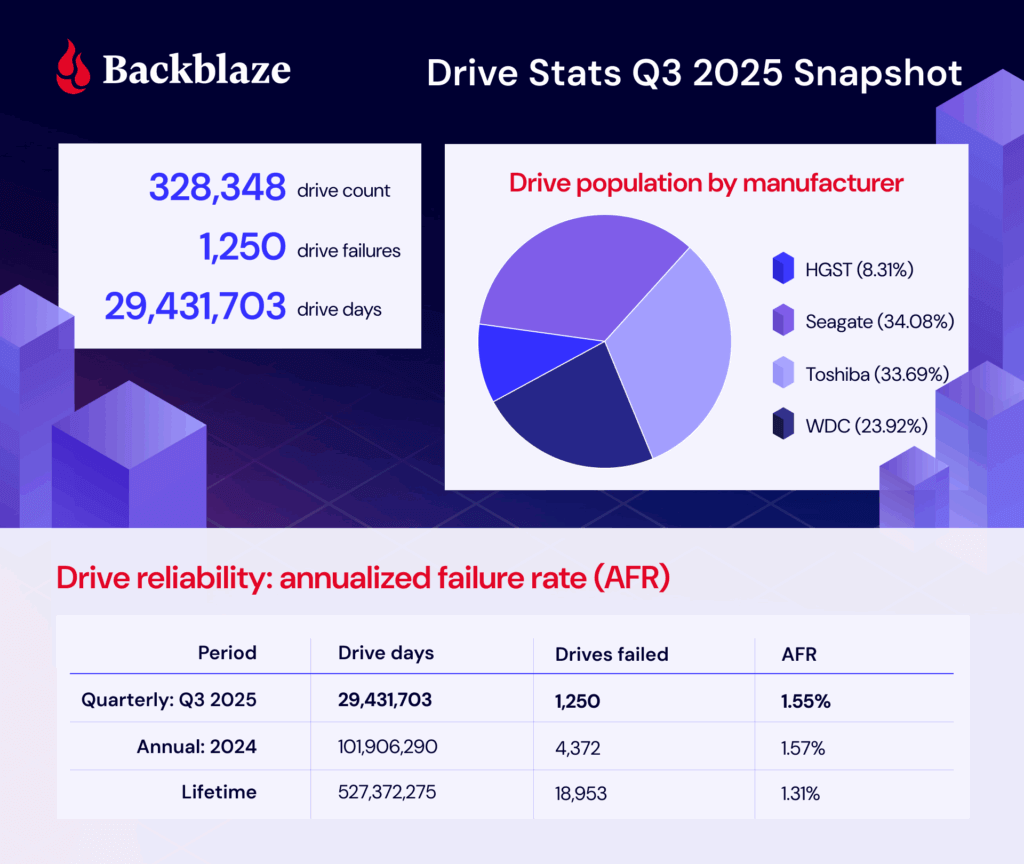
This year marks 13 years of collecting Drive Stats data. Thirteen is an unlucky number (to some), but we count our lucky stars (or perhaps our lucky stats?) that we’ve had 13 years of this experiment.
The traditional 13-year anniversary gift is lace—intricate, impressive, and vulnerable to a snag if you don’t plan ahead to protect the pattern. Systems, like lace, don’t survive by pretending there are no points of vulnerability. When it comes to our infrastructure, we want to build with the snags in mind to create something durable, and the Drive Stats series is always seeking to publish and provide data so that you, too, can go the distance with your drives.
This year-end Drive Stats report looks at Q4 2025, the full year, and the lifetime view with that in mind. I think you’ll find the same things we do: over time, the patterns matter more than any single strand (or drive, to run this lace metaphor into the ground once and for all). Let’s look at the stats.
Drive Stats is here for you
Drive Stats is not a situationship. We’re a conversation and a relationship—to the data. Join the Drive Stats team for our regularly scheduled webinar to walk through the 2025 annualized failure rates, break down the data for interesting trends, and get the latest from the Backblaze drive fleet happenings.
Drive Stats: The digest version
Q4 2025 hard drive failure rates
As of the end of 2025, Backblaze was monitoring 341,664 drives used to store data. For our evaluation, we removed from consideration 4,013 boot drives and 459 hard drives, as they did not meet the criteria to be included. We’ll discuss the criteria we used in the next section of this report. Removing these drives leaves us with 337,192 hard drives to analyze. The table below shows the annualized failure rates for Q4 2025 for this collection of drives.
Backblaze Hard Drive Failure Rates for Q4 2025
Reporting period October 1, 2025–December 31, 2025 inclusive Drive models with drive count > 100 as of December 31, 2025 and drive days > 10,000 in Q4 2025.
Note and observations
New drives!
Seagate ST16000NM000J 16TB, with 112 drives
WDC WUH722626ALE6L4 26TB with 1,201 drives. Our first 26TB drive!
The honor roll:
HGST HMS5C4040BLE640 4TB: 1 failure
Seagate ST8000NM000A 8TB: 0 failure
Seagate ST12000NM000J 12TB: 1 failure
Seagate ST16000NM000J 16TB: 1 failure
Seagate ST16000NM002J 16TB: 0 failure
WDC WUH722626ALE6L4 26TB: 1 failure. Shoutout to the new kid—starting off strong!
Red flags:
HGST HUH728080ALE600 8TB: 10.29%
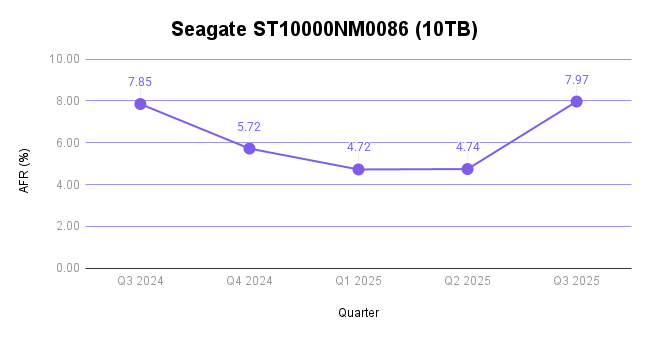
Seagate ST10000NM0086 10TB: 5.23%
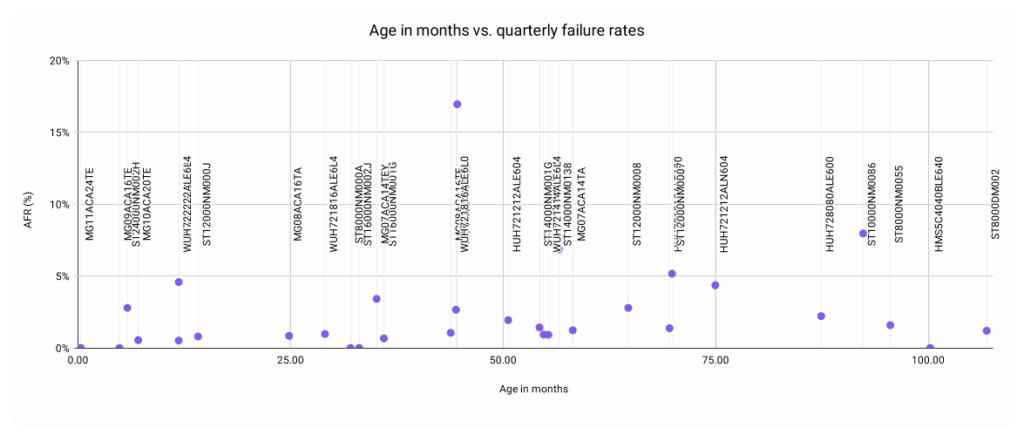
Toshiba MG08ACA16TEY 16TB: 4.14%
We talked about two of these drives last quarter, and what we said about the Seagate still holds true—we’re seeing end of life activity with this drive. But, let’s dig in on the 8TB HGST and 16TB Toshiba and see what’s going on.
HGST HUH728080ALE600 8TB
There’s always some digging to be done when we see a double digit failure rate, especially on a drive that, in the past year, hasn’t had terrible failure rates (despite the fact that it’s about 7.5 years old).
It’s worth contextualizing, first, that the total drive count of this model is 1,073, which equates to less than one Vault. (A standard Vault has 1,200 drives.) While Vaults aren’t always the same drive model, especially with older drives, in an ideal world, those Vaults would be uniform. So, in this case, we’re dealing with drives that are all hanging out in the same location in a data center, which means we could be working with environmental factors like a change in temperature or airflow.
By the time Drive Stats data gets to me, of course, lots of smart people have already seen the disturbances in the force, so to speak. When I dug into the data center work tickets, it turned turned out that folks had already ruled out temperature as a factor—the working theory at the moment is that the drive could be sensitive to vibration, but given the age of these drives, we decided to just flag them for our normal CVT migration process.
Toshiba MG08ACA16TEY 16TB
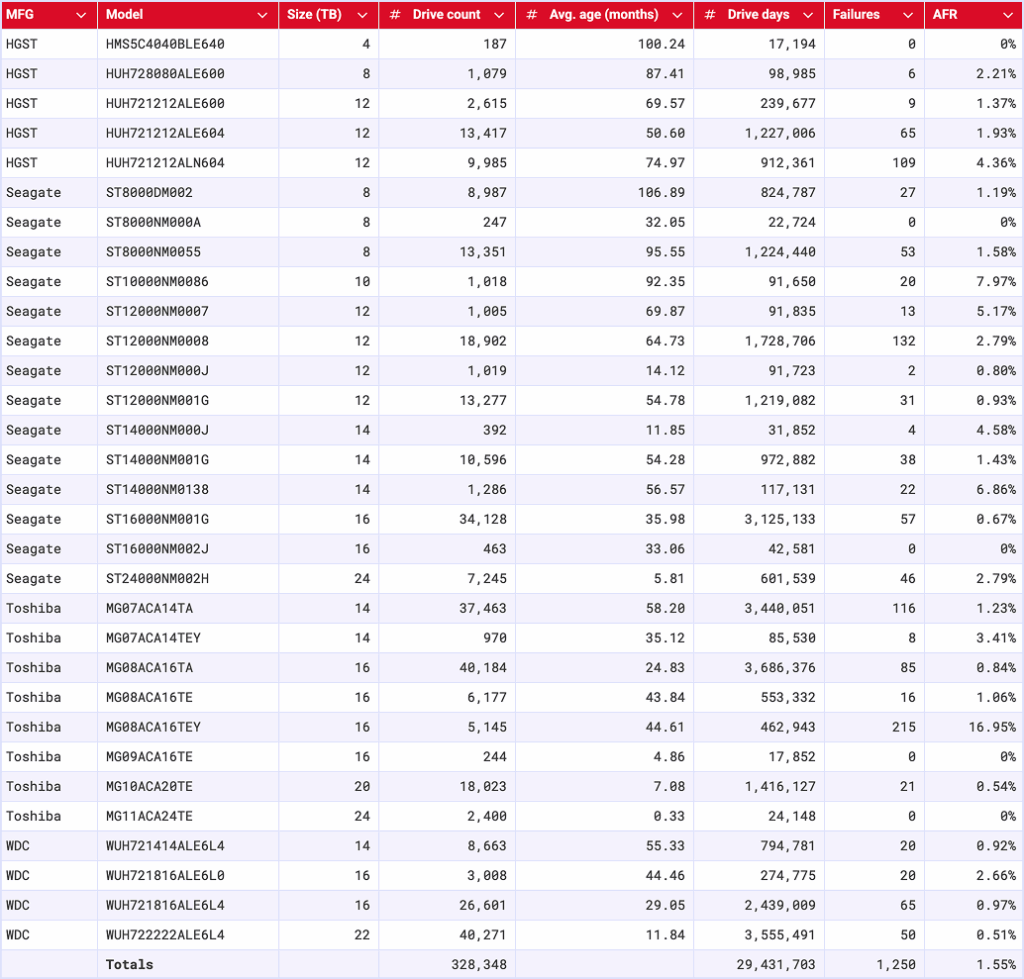
We talked about this model last quarter because it clocked in at a 16.95% AFR (!!). Our investigation turned up some collaborative (and routine) firmware work with Toshiba, and at that time, we predicted that these failure rates would normalize once again. We’re still a little high, but that’s likely a function of rolling out the work. As predicted, this is a healthy normalization.
Defining the relationship, aka setting some boundaries
We’ve covered the reasons that we’ve designed these exclusions in past reports, but here’s the quick and dirty:
Period
Drive Count
Drive Days
Quarterly
> 100
> 10,000
Annual
> 250
> 50,000
Lifetime
> 500
>100,000
Regardless of whether or not a given drive model is included in this article’s charts and tables, all of the line item data is included in our Drive Stats dataset which you can download by visiting our Drive Stats page.
2025 Annual hard drive failure rates
As of the end of 2025, Backblaze was monitoring 349,462 hard drives used to store data. We removed 4,176 boot drives and 1,090 hard drives from consideration as they did not meet the annual criteria we have defined. This leaves us with 344,196 drives divided across 30 different drive models. The table below shows the AFRs for 2025 for this collection of drives.
Backblaze Hard Drive Failure Rates for 2025
Reporting period January 1, 2025–December 31, 2025 inclusive Drive models with drive count > 250 and drive days > 50,000 in 2025
Notes and observations
The annual AFR is down: This year finishes strong at 1.36%, down from 1.55% in 2024. Still those paying attention to the quarterly AFR have seen some volatility in that number.
Nobody made it out unscathed: There are zero 0 failures.
But, let’s talk about it: These are the drives that averaged less than two failures per quarter (though, not necessarily evenly distributed when you look at the data).
HGST HMS5C4040BLE640 4TB: 5 failures
Seagate ST12000NM000J 12TB: 4 failures
Seagate ST14000NM000J 14TB: 7 failures
Seagate ST16000NM002J 16TB: 1 failure
Toshiba MG09ACA16TE 16TB: 3 failures
WDC WUH722626ALE6L4 26TB: 1 failures.
Note that this drive is in its first quarter of life, so it’s hard to call this significant yet.
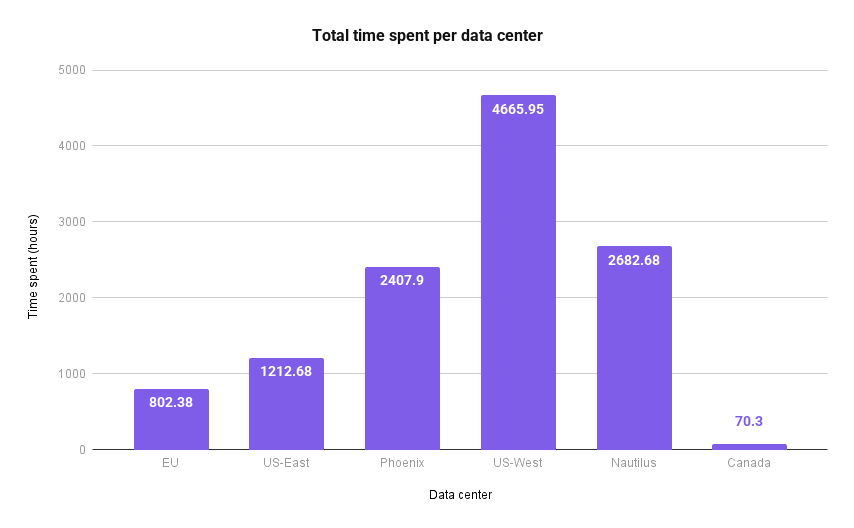
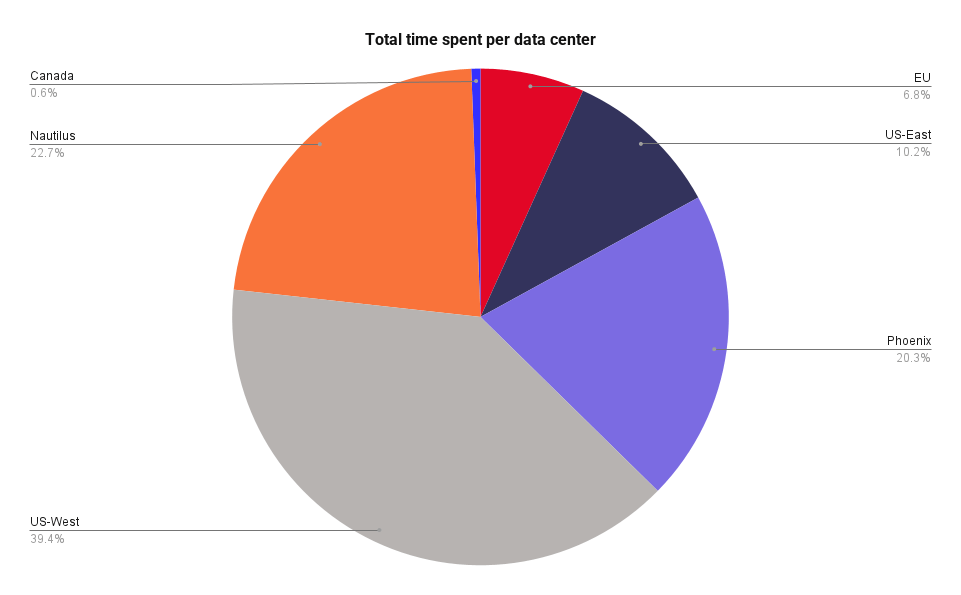
And, all those drive tickets and models mean lots and lots of work—we wrote a whole article on that front, but here’s a breakdown of hours spent in each data center.
And here’s an even more interesting slice, from a drive perspective:
Yes, you’ll see some funky drive sizes on that list; it’s inclusive of all of our drives, not just the hard drives we include in this report.
Comparing Drive Stats for 2023, 2024, and 2025
Let’s take a look back at the previous years’ annual AFRs to get a sense of how 2025 compares:
Three Year Comparison of Annual Backblaze Hard Drive Failure Rates
For drive models with > 250 drives as of 12/31/25 and drive models with > 50,000 drive days in 2025 Data for each year is inclusive of that year.
Notes and observations
The annual AFR is down to 1.36%. We haven’t seen those numbers since 2022 (1.37%). Cool!
Slicing our data by drive size shows how impactful the shift to high capacity drives really is: based on the current quarterly data, our drive size breakdown looks like this:
0–12TB: 25.13%
14–16TB: 52.06%
20TB+: 22.81%
This is an already long report, so in the interest of time, we’ll just say this: There are multiple factors that go into how and why things are changing, including the average age of drives within our cohort, how much drive technology has improved over the years, how drives on the market have gotten bigger over time while the cost per GB has also dropped, and how the current demand for drives has been changing some of those things.
If that sentence sounds confusing, welcome to the world of enterprise drive buying. But, as always, we have to contextualize the real data we see with the way we source and use drives.
Lifetime hard drive failure rates
Backblaze Lifetime Hard Drive Failure Rates
Reporting period ending December 31, 2025 inclusive Drive models with > 500 drives and > 100,000 lifetime drive days
Notes and observations
Ol’ faithful: Lifetime AFR is 1.30% this quarter, and there’s been no significant change in that number for quite some time.
Say hi to the new guy: The Toshiba MG11ACA24TE 24TB made the cut for the lifetime table. Last quarter, we deployed another 2,400 of these, bringing us to 4,806 drives total.
The Hard Drive dataset (and beyond)
Thank you, as always, for making it through ~2,500 or so words to examine the fun side of data. Here’s our standard fine print:
The complete dataset used to create the tables and charts in this report is available on our Hard Drive Test Data page. You can download and use this data for free for your own purpose. All we ask are three things:
You cite Backblaze as the source if you use the data;
You accept that you are solely responsible for how you use the data, and;
You do not sell this data itself to anyone; it is free.
If you’re a new Drive Stats fan, consider signing up for the newsletter. If you’re not ready for that kind of commitment, sound off in the comments section below or reach out directly to us to let us know what you’re working on. Happy investigating!
As data footprints swell and multi-cloud strategies become the norm, the complexity of managing object lifecycles—from initial creation to eventual archival or deletion—can introduce significant risk and operational overhead. To help our customers solve for this, we recently announced support for lifecycle rules through S3-compatible APIs.
While the previous post focused on what the feature enables and why it matters, this follow-up will look at how lifecycle rules work at a deeper level and what to keep in mind when using them in production.
Why S3 compatible lifecycle rules matter
Let’s quickly refresh your memory about why this feature matters. Many customers already rely on lifecycle rules in Backblaze B2 to manage storage costs and data retention. These rules automate actions like deleting old objects, hiding previous versions, or cleaning up incomplete multipart uploads.
By adding S3 compatible support for lifecycle rules in Backblaze B2, it allows you:
Lift and shift migrations from AWS S3 to Backblaze B2
Reuse of existing tools, xml configurations, scripts, applications & infrastructure as code
Predictable behavior across environments as part of multi-cloud strategy
API surface area and XML structure
Lifecycle rules are managed using three APIs:
PutBucketLifecycleConfiguration
GetBucketLifecycleConfiguration
DeleteBucketLifecycleConfiguration
These APIs accept and return XML documents that follow the AWS S3 lifecycle configuration format. From a client perspective, this behaves the same way it does on S3, including rule IDs, status flags, filters, and actions.
Example put lifecycle request
Below is a simple example that hides objects under the logs/ prefix after 30 days.
PUT /?lifecycle HTTP/1.1
Host: my-bucket.s3.us-west-004.backblazeb2.com
Content-Type: application/xml
At evaluation time, B2 walks object versions in order and applies rules like this:
Pseudo code:
for each object in bucket:
  for each version of object with data prefix:
    if version is non current:
      if age_in_days >= NoncurrentDays:
        delete version
For current versions, expiration works differently.
Expiring the current version
When a lifecycle rule expires the current version, B2 creates a hide marker instead of deleting data immediately.
This matches S3 semantics and preserves version history.
current version expired
        |
        v
hide marker created
        |
        v
current version becomes non current
Overlapping and nested prefix rules
Backblaze B2 supports multiple lifecycle rules on the same bucket, including overlapping and nested prefixes.
For example, you might configure:
A general rule for logs/ that deletes objects after 365 days
A more specific rule for logs/audit/ that deletes objects after 90 days
When rules overlap, the configuration with lowest value is applied to save cost to you. This mirrors S3 behavior and allows fine grained control without duplicating buckets.
Matching logic:
object path: logs/audit/2024/01/file.json

matching rules:
- logs/
- logs/audit/

selected rule:
- logs/audit/ because it has lowest value, 90 days
Multipart upload cleanup
Lifecycle rules can also be used to abort incomplete multipart uploads if not completed in a certain number of days. This is implemented by tracking the initiation time of multipart uploads and periodically removing uploads that exceed the configured threshold. This helps prevent abandoned uploads from consuming storage indefinitely.
Below is an example rule to delete multipart uploads that are not completed after seven days after starting the upload process.
Multipart uploads are tracked with their initiation timestamp.
Pseudo code:
for each multipart_upload:
  if now - initiation_time >= DaysAfterInitiation:
    abort upload
    delete uploaded parts
Lifecycle execution model
Lifecycle rules are not executed in real time. Instead, they are evaluated by background processes that scan eligible objects and apply actions asynchronously.
Important characteristics:
Rules are not evaluated in real time
Execution is eventually consistent
Large buckets may take multiple passes to fully apply changes
This design allows lifecycle processing to scale across billions of objects efficiently without impacting foreground operations.
High level execution flow:
scan bucket periodically
   |
   v
identify eligible objects
   |
   v
apply lifecycle actions (hide and/or delete)
   |
   v
record progress and continue
Error handling and validation
Lifecycle XML is validated using S3 compatible rules:
Invalid combinations of actions are rejected
Missing required fields return errors
Unsupported actions return descriptive failures
While error messages may differ slightly from AWS, the validation logic follows the same constraints.
Compatibility considerations
While the goal is strong S3 compatibility, there are still some things to keep in mind:
Not all S3 lifecycle actions are supported yet
XML validation follows S3 rules, but error messages may differ slightly
The underlying storage model of B2 can affect timing and visibility
We recommend testing lifecycle rules in a non production bucket before rolling them out broadly.
Final thoughts
Adding S3 compatible support for lifecycle rules on Backblaze B2 was all about making migrations simpler and letting customers reuse existing automation with confidence. It behaves the way you expect while benefiting from B2’s internal scalability.
If you already manage lifecycle rules using S3 APIs, those same configurations can now run on Backblaze B2 with minimal or no changes.
Welcome to our second quarterly Network Stats report covering Q4 of 2025. Along with Drive Stats and Performance Stats, Network Stats pulls back the curtain on real-world infrastructure data, particularly how network-level analytics reflect emerging AI industry trends and usage patterns.
Get more Network Stats (and the details of the dataset)
If you are curious about what metrics we’re recording and how we classify data in this series, check out the details outlined in our Q3 2025 Network Stats report.
One of the roles of the Network Engineering (NetEng) team at Backblaze is to monitor how traffic moves into, out of, and across our platform—not just day-to-day, but over time as customer behavior and industry dynamics evolve. Right now, few forces are reshaping networks faster than AI.
With the launch of B2 Overdrive in April 2025, we built a direct, high-performance path between our storage layers and neoclouds where processing, inference, and modeling take place. It has given us a front-row seat to the impact of AI and how network behavior is changing with it. This quarter, in addition to our regular data analysis, I’ll walk through where AI-driven traffic is concentrated, how ingress and egress patterns showed up, and what the findings say about where AI infrastructure might be headed next.
Continue the conversation
Join us live for the Q4 2025 Network Stats webinar Wednesday, February 4, 2025 at 10:00 a.m. PT / 1:00 p.m. ET. We’ll explore where AI traffic concentrates, how high-magnitude data flows behave, and what early indicators suggest about the future of AI-native infrastructure design.
Can’t make it live, or reading this article after-the-fact? Sign up anyway and catch the recording on demand.
Brave new market
AI workflows don’t just need a place to store data, they need to be able to move it quickly, easily, and nearly constantly for short bursts. Large, multi-petabyte datasets are ingested, transformed, exported for training, pulled back for evaluation, and periodically refreshed as models evolve.
Backblaze plays a key role at both ends of that lifecycle. We serve as a durable storage layer for the initial data ingestion, and as the high-throughput source feeding model training, evaluation, and validation to whatever best neocloud is suitable at the moment. Once that model has been trained, it needs to be stored, served, and periodically retrained, where we serve as the storage medium.
This quarter, we saw a large amount of traffic between Backblaze, neoclouds, and traditional hyperscalers for processing concentrated across the months of June to November. This reflects large-scale ingestion events followed by intensive data manipulation and model-related egress.
From a network perspective, this represents a meaningful shift from diffuse, internet-style traffic patterns to large, high-bandwidth flows between a smaller set of endpoints typical of AI-centric infrastructure.
The neocloud slice
The defining theme of the quarter is “new:” new AI-oriented workflows, new traffic patterns, and leading indicators of new infrastructure trends.
The stacked area graph below shows total traffic by network type over time. While content delivery network (CDN), hosting, and internet service provider (ISP) traffic stayed largely within historical norms reflecting steady-state usage patterns like content delivery, web hosting, and traditional backup workflows, two slices stand out:
Migration traffic: We saw a notable increase in migration traffic from August through October. This classification reflects an influx of data into our network over fiber connections we have in the data centers to cost effectively migrate large amounts of data over private links, not using the public Internet.
Neocloud traffic: We saw a sharp increase in July through November, peaking in October.
Monthly view of all bits transferred to each network type
What do we think is happening? Taken together, these patterns suggest a familiar AI lifecycle: large datasets consisting of assets like images, videos, and metadata are ingested and consolidated then exported for training and experimentation. Now, those assets can be periodically updated as new assets are added and generated models and stored. We see that heading into the new year, the overall baseline has increased indicating a new normal.
Quick terminology refresher
Regions
US-West: Our largest and longest-running region
US-East: Region with the most observed proximity to neocloud infrastructure
CA-East: Our newest region in Canada.
Network Types
CDN: Networks that use Backblaze as an origin store for content delivery
Hosting: Traditional hosting providers that runs workloads like physical or virtual servers for web, database, or application tasks
Hyperscaler: Large, traditional cloud providers
ISP Regional: Local or regional ISPs, think of these as the “last mile” paths as these networks are very close to customer equipment and efficient
ISP Tier1: National or international ISPs that carry our traffic long distances
Neocloud: AI -focused compute networks
Migration: Network links that we use for large-scale data onboarding
Heatmaps: Where AI traffic concentrates
To better understand where AI activity is happening, we thought it would be interesting to isolate the different Backblaze regions and to view concentrations of metrics visualized through heatmaps. We’re going to look at the following three dimensions:
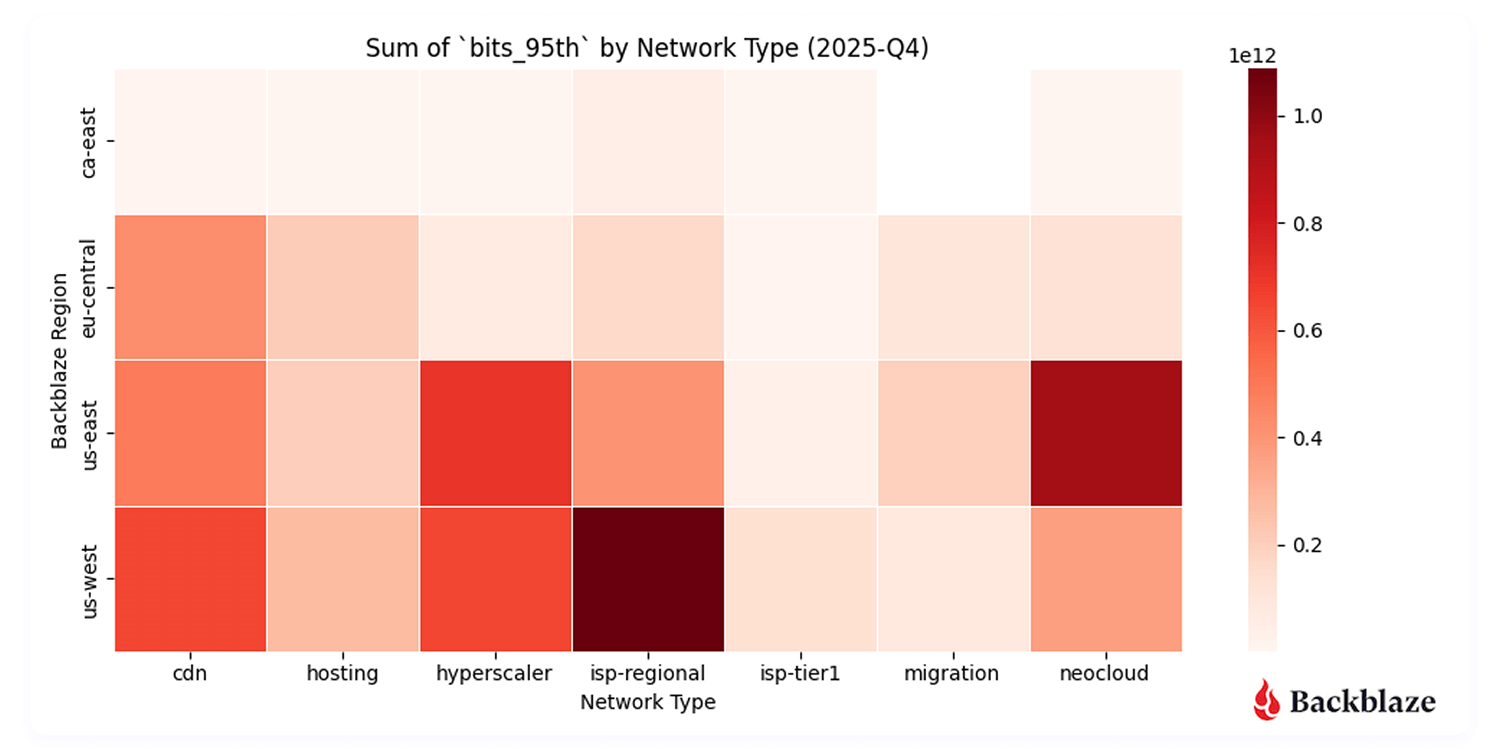
Total traffic volume: Where did we send and receive the most traffic?
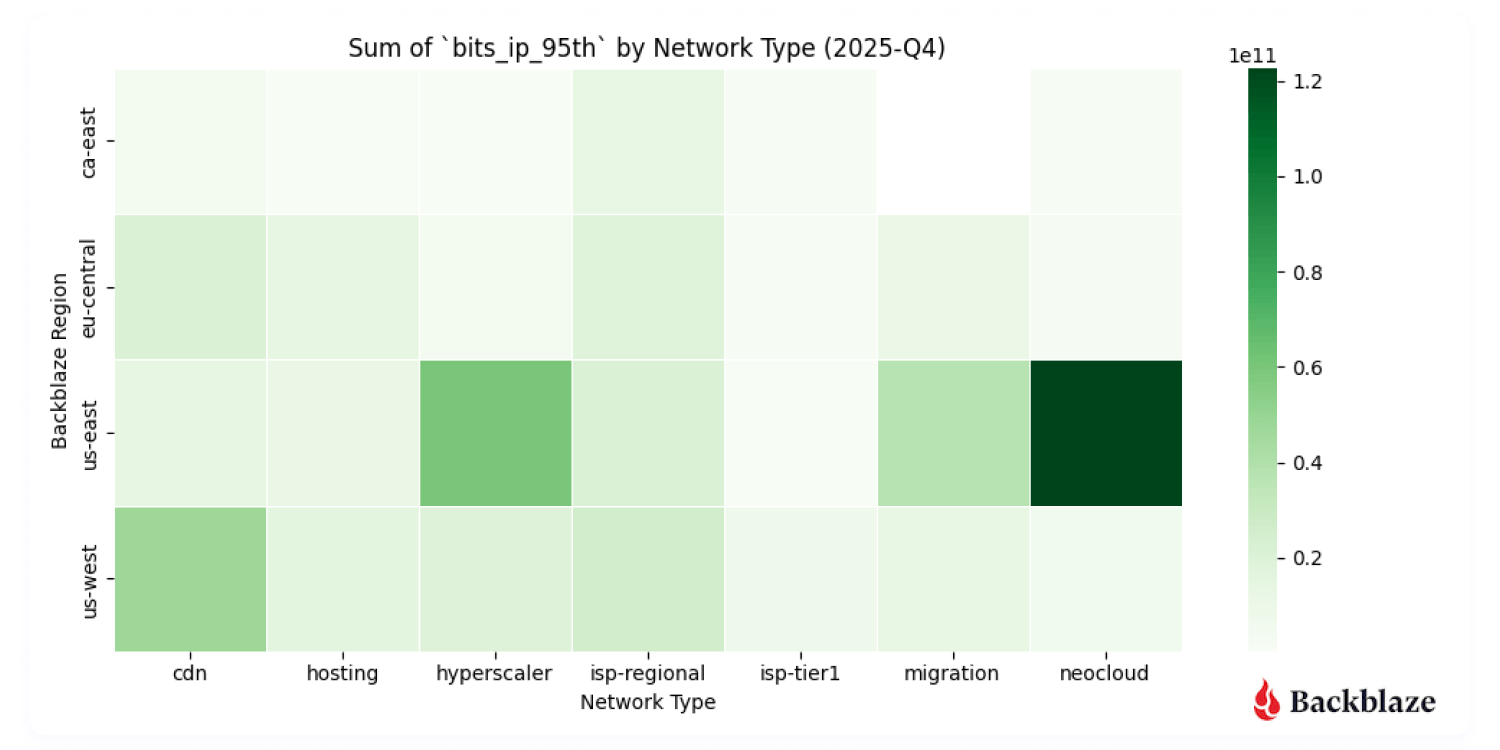
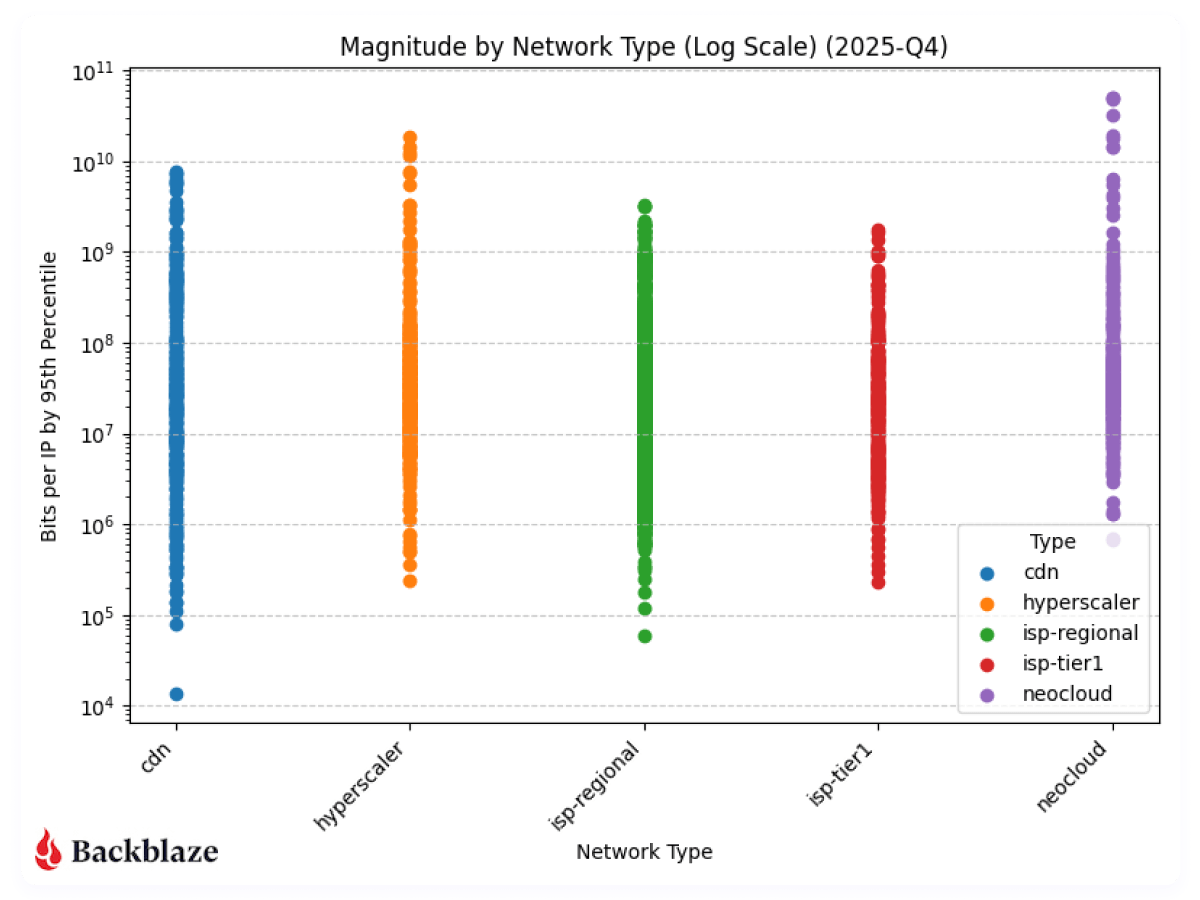
Magnitude: Where were the data transfers with the most bits per unique IP address?
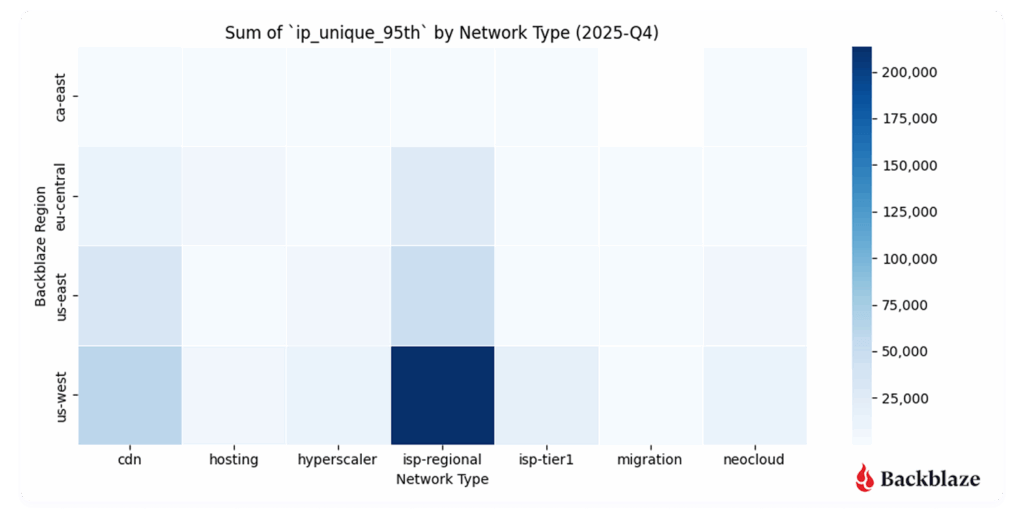
Uniqueness: What does the number of distinct IP addresses look like?
Heatmap #1: Where did we send and receive the most traffic?
Unsurprisingly, US-West ISP-Regional traffic dominates in total traffic volume. This region has the largest data center footprint behind it, with connectivity to internet exchanges (IX) such as Equinix-IX that were brought online in 2023. Internet exchanges bring us closer to consumer networks, where we can deliver traffic with lower latency.
More interesting, however, is the US-East neocloud concentration. Our flow data shows neocloud activity clustering in regions including Chicago, Dallas-Houston, Denver, New York, Northern Virginia (Reston/Ashburn corridor), and Atlanta—skewed more towards the East Coast where there’s dense AI compute availability.
From a performance standpoint, this makes sense. It’s important to keep latency (the time between the source and destination) lower to achieve consistent high bandwidth rates for AI data transfers. For now, that gravity is pulling activity towards the East coast.
Total number of bits transferred across our regions to each network type
Will neocloud traffic concentrations shift over time? Since this is our first quarter with a full dataset, it’s a bit early to draw long-term conclusions. But this is exactly the kind of trend we’ll be tracking. Stay tuned for future Network Stats reports.
Heatmap #2: Where were the data transfers with the most magnitude (bits per IP address)?
Another metric we record is bits per IP or what we termed in our last report “magnitude.” This combination of the amount of traffic transferred with how many actors are involved per network is a good proxy to measure how heavy or impactful individual data flows are. In short:
High volume, many IPs: Easier to distribute and load-balance across infrastructure. And many source and destination pairs means that we can traffic engineer at the WAN layer, sending some traffic over one provider and some over another.
High volume, few IPs: More difficult, but more interesting, from a NetEng perspective.
Magnitude transferred across our regions to each network type
With B2 Overdrive, we routinely support client transfers starting at 100Gbps up to 1Tbps of throughput.These high-magnitude flows show up clearly in the data, especially in regions serving AI-heavy neocloud endpoints. Seeing these patterns emerge in the data validates that customers are actively using the platform the way it was designed.
Heatmap #3: How many unique addresses do we interact with?
Uniqueness—measured by the number of distinct IP addresses per network type—adds another dimension to the story.
US-West shows the highest overall uniqueness, driven by its larger number of data centers and mix of workloads.
Neocloud traffic, by contrast, tends to involve fewer, more persistent endpoints, consistent with AI pipelines that rely on stable, long-standing connections between storage and compute.
This contrast reveals a broader trend: AI networking is less about many-to-many communication and more about sustained high-throughput relationships between specialized systems.
Communication uniqueness across our regions to each network type
Summary: Early indicators of an AI-native network era
This quarter represents an early but important snapshot of how AI is reshaping network behavior:
AI-driven traffic is concentrated and heavy (not groundbreaking news by any means, but interesting to see it played out on a network).
Neocloud connectivity is a defining feature of data movement today.
Data gravity is pulling storage, compute, and network design into tighter alignment.
This is our first look at these patterns specifically. As we gather more quarters of data, we’ll be watching closely to see how cyclical neocloud activity becomes, how regional concentrations shift, and how the growing ecosystem of AI-focused ISVs continues to change the shape of the network.
Quarter over quarter data
Last quarter we started capturing data and metrics that we were interested in tracking over time. This represents our first full quarter of data as we only started tracking in August of 2025, so it’s still early to start to see trends, but we’re including the visualizations for fidelity.
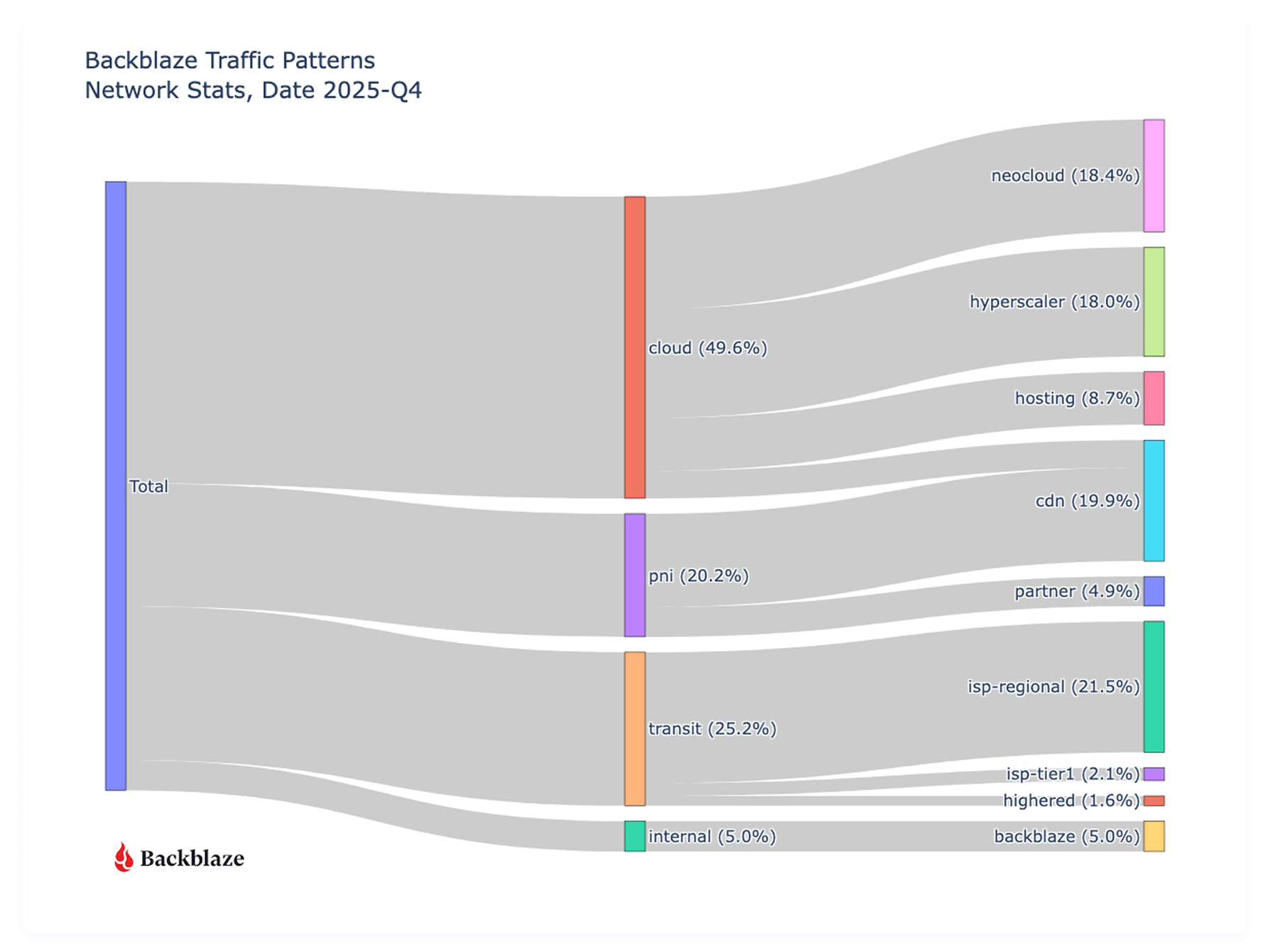
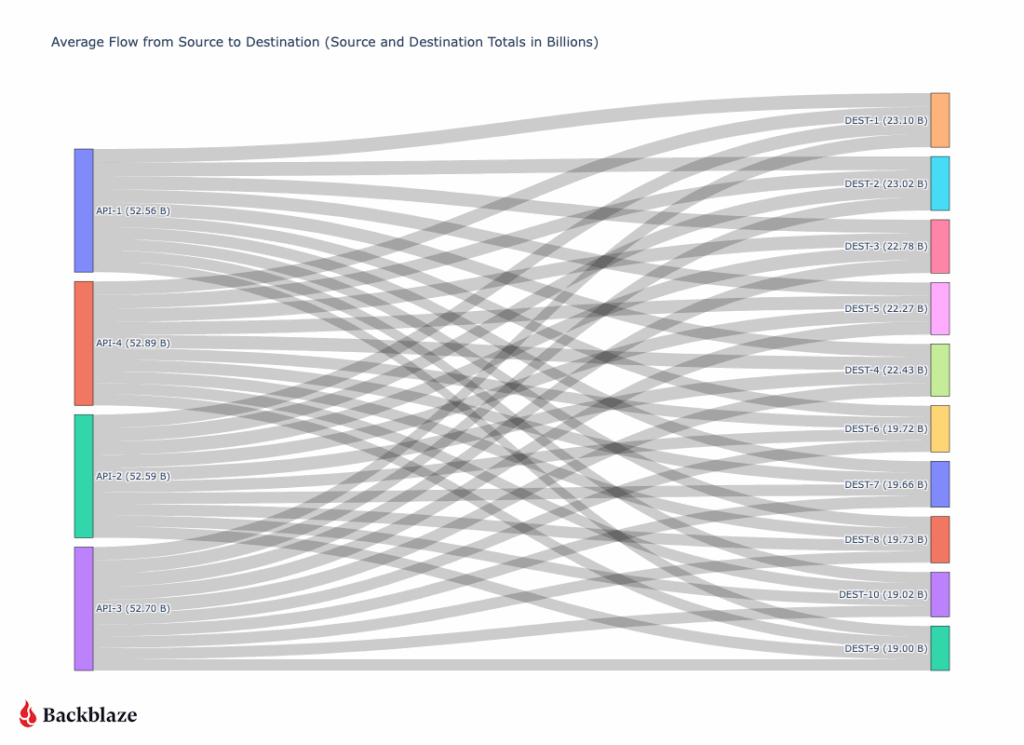
First let’s take a look at where all our traffic goes from a global perspective with an updated view of last quarter.
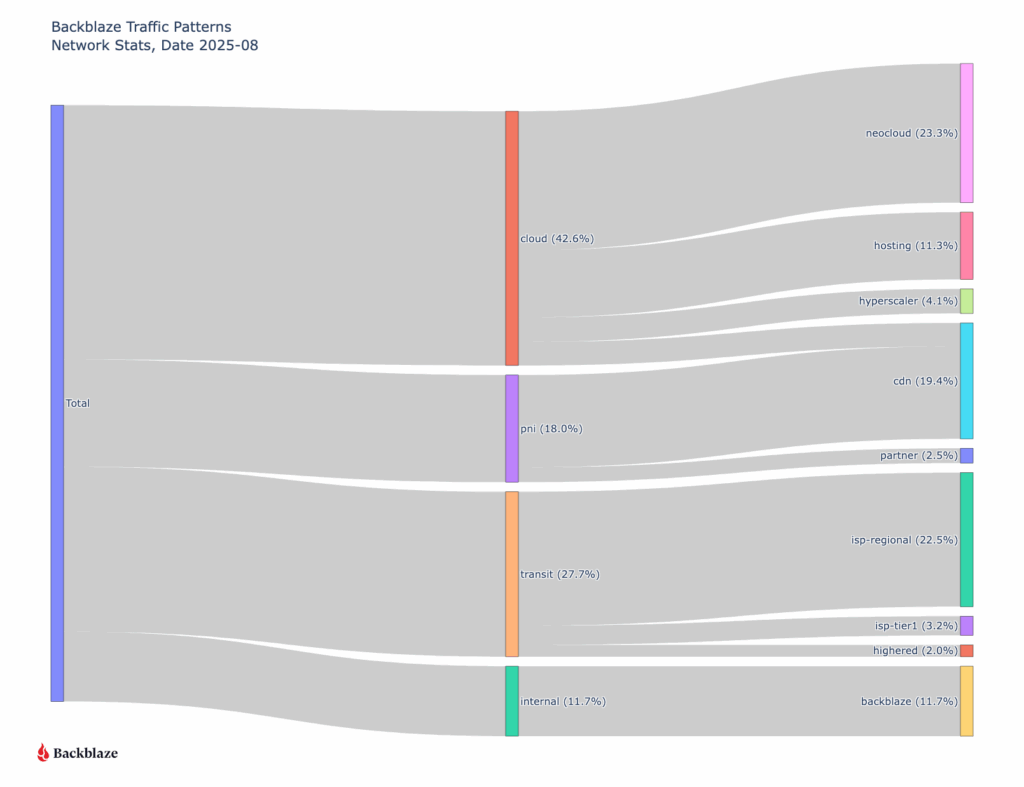
Sankey diagram of all August ingress and egress traffic grouped by type of network
Traffic to other clouds has increased (36.2% to 49.6%) since we last reported in August of 2025, with a slight decrease (19.8% to 18.4%) in Neocloud destinations, but a large increase (3.5% to 18%) to hyperscalers. It’s too early to call these things statistically significant trends or patterns that impact the cloud storage industry broadly, because they’re reflective of what types of customers Backblaze specifically has and our sampling range is only a quarter. That said, we do see an overall increase in cloud to cloud traffic, but the higher percentage to the type of clouds rotated from last quarter.
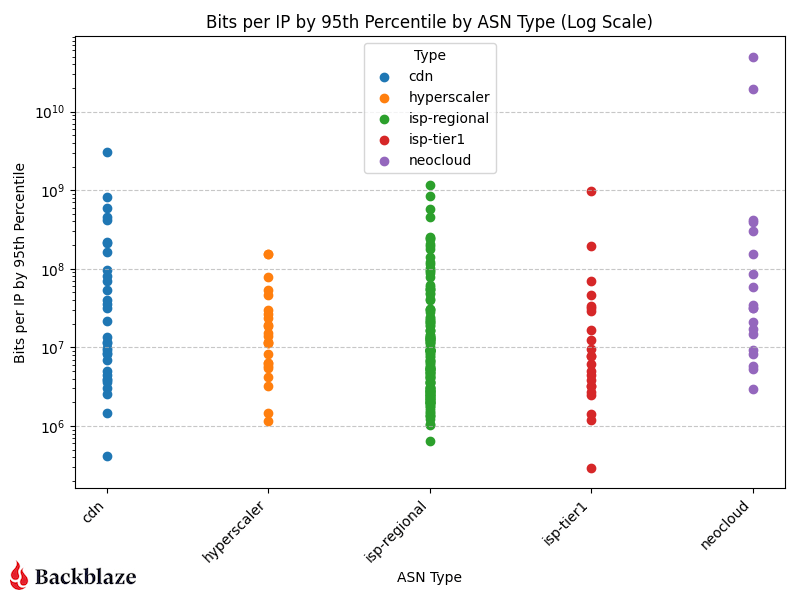
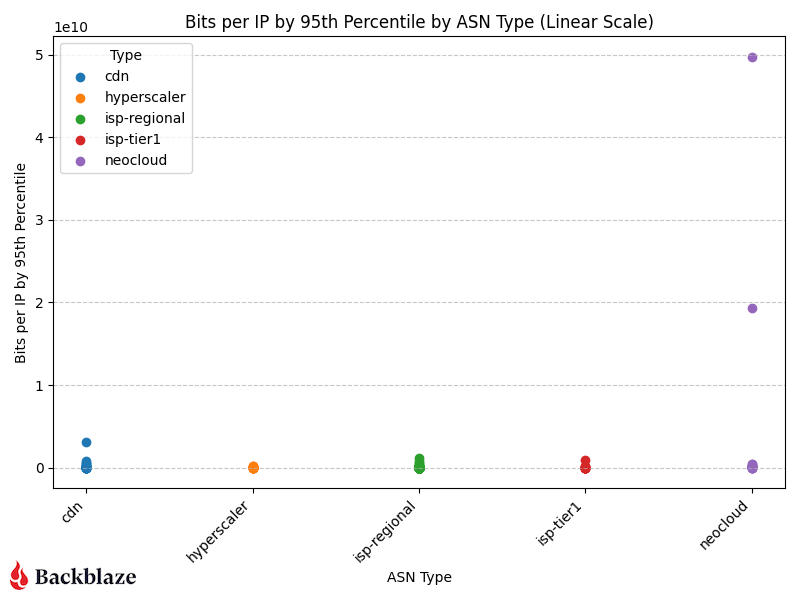
Next, let’s look at the magnitude of our network traffic based on the category of the traffic destination. As a reminder, magnitude represents the amount of traffic transferred with how many actors are involved per network.
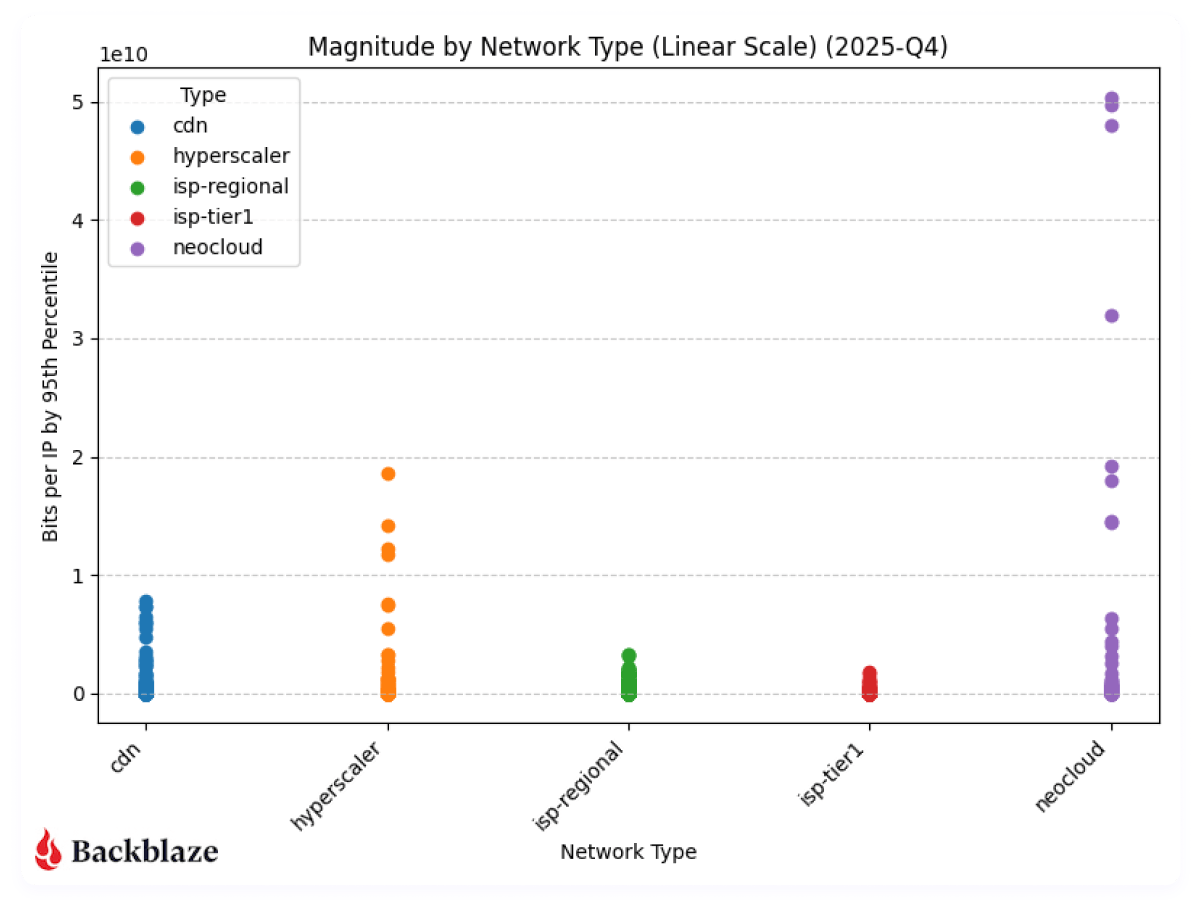
Next, to be consistent with our previous report, we’ll look at magnitude on a linear scale.
With more datapoints, we can clearly see the magnitude of the neocloud and hyperscaler transfers when compared to other network types. As above, it’s a bit early to claim concrete quarter over quarter patterns, but we’ll keep monitoring and updating the dataset.
What’s next?
Next quarter will be the first where we have true quarter over quarter data to analyze, and we’ll be back with more on how AI-driven flows change quarter over quarter. And as we get more data, we’re interested in looking at other trends like IPv4 vs. IPv6 traffic, cross-cloud connectivity trends, and revisiting the concentration analysis we did this quarter.
Anything specific you want to see? Let us know in the comments or reach out to our Evangelism team. Or, keep up-to-date with the latest technical content with our Developer Newsletter.
As generative AI has shifted from selective experimentation to broad operational use, large language models (LLMs) now sit inside developer environments, support workflows, internal knowledge systems, and security tooling itself. Adoption has widened for both enterprises and consumers alike, and, unsurprisingly, have a whole new set of security patterns.
Though oftentimes single catastrophic failures are the types of stories that make the news (like an AI agent pushing code to production against its explicit instructions), the truth is that there’s a bigger narrative here. Generative AI has introduced a whole new way to work, and we’re seeing a set of recurring behaviors—ways that AI systems interact with data, instructions, and people—that either introduce new risks or enhance some tried-and-true bad actor tactics (like more convincing phishing attacks, for example).
This article focuses on seven patterns that have emerged in real deployments and documented incidents. Let’s get into it.
1. Prompt injection and instruction hijacking
Prompt injection has matured from a research concept into a practical exploit vector. The issue is structural: LLMs interpret text holistically using tokenization, which makes it difficult to maintain a strict separation between instructions and data. When untrusted content is introduced into an AI system with elevated permissions, that ambiguity becomes exploitable.
Recent incidents show how this plays out in production tools. Researchers analyzing Microsoft Copilot demonstrated that carefully crafted inputs could override intended behavior, expose system prompts, or trigger unintended actions within the model’s sandbox.
The common thread is authority. When models are allowed to act on retrieved content or invoke downstream tools, text becomes a control surface.
2. Prompt poaching and peripheral exfiltration
Not all AI-related data loss requires access to the model itself. A recent malware campaign demonstrated how attackers can siphon AI conversations by compromising the surrounding ecosystem.
These attacks target trust boundaries adjacent to AI systems rather than the models directly. Browser extensions, plugins, and integrations become collection points for high-value contextual data that did not previously exist in a single place. And, they’re often less controlled by enterprise IT teams compared with other types of software.
3. AI-powered malware and ransomware
AI-assisted malware is no longer hypothetical. Security researchers have now documented ransomware that uses generative models as part of its operational logic.
One example: PromptLock, a ransomware strain that leverages LLMs to dynamically generate portions of its code and behavior during execution.
At the ecosystem level, threat intelligence reports show ransomware groups using AI to accelerate development, customize payloads, and craft tailored extortion communications. Akamai’s 2025 ransomware trends report documents LLM usage by active groups for both technical and social components of attacks.
It’s less about how it’s done and more about how fast it’s done: Iteration cycles are shorter, and adaptation happens more quickly.
4. Acceleration and competitive pressure in the ransomware economy
Even when AI is not embedded directly into malware, it influences the broader threat environment. Ransomware activity increased throughout 2025 despite arrests and takedowns; new groups emerged quickly to replace disrupted ones.
As we said above, speed matters here. Defensive models that assume time for analysis, tuning, and response are increasingly stressed by attackers who can prototype and redeploy faster than those cycles allow.
And it’s not just speed—the volume of (credible, real) attacks matters too. The truth of the game has always been that bad actors only have to succeed once whereas defenders have to succeed every time. If better ransomware is being produced more quickly, defenders are having to adapt just as (or more) quickly to a higher volume of attacks (which makes the demand for employees in the security industry that much more understandable).
5. Semantic noise and operational fatigue
Generative AI produces a large volume of plausible output: summaries, recommendations, alerts, explanations. In isolation, that capability is helpful; in aggregate, it introduces a new operational burden.
Security teams report growing difficulty distinguishing signal from well-formed noise. In reality, this means that over-taxed employees are getting pinged while on-call far more.
AI-generated conclusions often require human validation, but their tone and confidence can reduce scrutiny over time. That creates opportunities for malicious activity to hide inside outputs that appear reasonable and routine; or, on the flip side, for things like process and architecture misconfigurations to masquerade as security events by creating too many requests.
This pattern does not map cleanly to a single exploit; it shows up as delayed detection, slower response, and missed anomalies.
6. Code supply chain risk from generated code
AI-generated code compounds familiar supply-chain issues. Generated snippets often compile cleanly, pass tests, and follow common patterns; they also tend to replicate insecure defaults or omit contextual safeguards.
As these patterns are reused across services, small mistakes scale quickly. Not only that, but basic parameters like privileging recency (e.g., new security patches) vs. commonality (e.g., the most often used code) can have major implications and be weighted differently in different tools. While there is demonstrated risk of malicious insertion, it’s also the normalization of fragile or incomplete logic through automation.
7. Potential human skill erosion as a force multiplier
One of the quietest risks is also the hardest to measure. As AI tools handle more analysis, summarization, and decision support, human operators spend less time interrogating raw data. That’s both a good and a bad thing—really, it begs the question of how we go about creating and applying expertise in a new and developing epistemological framework. (Wait, you thought engineering wasn’t philosophical?)
Over time, that shifts how teams validate outcomes and how comfortable they are challenging AI-generated conclusions. This erosion does not cause incidents by itself, but it can amplify the impact of every other failure mode.
Where this leaves us
Across these examples, a consistent theme emerges. Generative AI changes how authority, context, and action flow through systems. Many of the resulting failures are subtle and blend into normal usage patterns.
The next phase of response is already taking shape. Government agencies and standards bodies are beginning to formalize guidance on securing AI systems, managing AI-related risk, and adapting existing security practices to these new patterns.
That guidance belongs in its own discussion. For now, the takeaway is simpler: AI adoption has altered the shape of risk.
Today’s AI models consume much more than text—everything from product images to video from surveillance feeds to audio from customer calls to metadata spread across an ever-expanding set of systems. These multimodal datasets drive everything from computer vision pipelines to customer service automation. But as they scale, the underlying infrastructure starts to creak.
Costs can become unpredictable. Data fragments across S3 buckets, HDFS clusters, and local drives. Maintaining cross-modal alignment, i.e. ensuring that media files stay linked to their labels, embeddings, and annotations, becomes a bottleneck that slows development to a crawl.This article outlines a practical path forward: how to migrate multimodal training data using proven open-source tools, and how Pixeltable helps unify and index that data for training once it lands in Backblaze B2.
Moving multimodal training data: Practical open source software (OSS) tools that do the heavy lifting
Before you can train on consolidated data, you need to get it all into one place. These three open-source tools handle the migration work, each addressing a different piece of the puzzle.
Apache NiFi for moving large media reliably
When your dataset includes terabytes of video files, thousands of high-resolution images, or large binary assets like LIDAR scans, you need something more robust than a shell script. Apache NiFi is purpose-built for moving large media files at scale.
NiFi provides:
Flow control and retry logic that handle network interruptions gracefully, which is essential when transferring terabytes of data over hours or days.
Data provenance tracking that records exactly which files moved where and when, making it possible to debug issues without guessing.
A visual workflow designer that lets you build and monitor data flows without writing custom code.
For multimodal datasets where media volume dominates, NiFi ensures files arrive intact and trackable. Check the Apache NiFi User Guide to get started with building your first data flow.
Airbyte for syncing structured and semi-structured metadata
Media files are only half the story. Annotations, labels, captions, transcripts, and database records provide the context that makes raw media useful for training. Airbyte excels at moving this structured and semi-structured metadata.
Airbyte handles:
Schema consistency when pulling metadata from multiple sources, ensuring annotation formats don’t drift between your labeling platform, your CRM, and your feature store.
Incremental syncs that only transfer changed records, avoiding unnecessary data movement as your datasets grow.
Multiple data systems via a broad catalog of connectors for databases, SaaS platforms, file formats, and cloud storage services.
Unlike NiFi, which focuses on raw file movement, Airbyte understands data schemas and transformations. Use it to keep your metadata in sync across systems. The Airbyte documentation provides setup guides for most common data sources.
lakeFS for versioning for reproducible training
After moving media via NiFi and metadata via Airbyte, you need a way to snapshot the entire dataset so you can reproduce training runs six months later. lakeFS brings Git-like version control to object storage.
lakeFS enables:
Branching and snapshots of entire datasets without copying data. You can create a branch, run an experiment, and merge or discard the results.
Atomic commits that ensure media, metadata, and derived features stay aligned as your corpus evolves.
Zero-copy clones that let multiple teams work on isolated versions of production data without storage overhead.
lakeFS acts as a version control layer on top of storage like Backblaze B2, tracking changes without duplicating objects. When a training run produces a new model, you can tag the exact dataset version that went into it. The lakeFS quickstart guide walks through creating your first repository and branch.
After migration, the hard part begins: Making the dataset usable
Moving data into object storage solves logistics, not usability. Even in B2, your media files, labels, and derived features remain scattered—images in one prefix, annotations in another, embeddings in a third. Training code becomes a tangle of custom loaders that stitch everything together, break when datasets change, and consume more engineering time than model tuning.
Where Pixeltable fits
Pixeltable provides the missing layer between migrated storage and training-ready data. It’s a declarative data infrastructure specifically designed for multimodal AI applications.
Here’s what Pixeltable does:
Unifies media and metadata into a single table interface: images, video frames, audio clips, and their associated labels, embeddings, and annotations live in one queryable structure.
Stores computed results automatically. Run OCR on documents, generate CLIP embeddings for images, or extract audio transcripts once, and Pixeltable caches the results for reuse.
References Backblaze B2 objects directly without copying data. Files stay in Backblaze B2, and Pixeltable maintains pointers and metadata in a local Postgres instance. Pixeltable automatically caches the files locally on access, and can write media files back to B2 (see our project for examples: https://github.com/backblaze-b2-samples/b2-pixeltable-multimodal-data).
Supports built-in transforms like embedding generation, image captioning, and OCR with lazy evaluation. Define transformations once, and they run incrementally as new data arrives.
Instead of maintaining custom loaders and indexing scripts, you define a schema once. Pixeltable handles orchestration, caching, and queries. The result is a training dataset you can slice, filter, and feed directly into PyTorch DataLoaders or Hugging Face Datasets.
Check the Pixeltable documentation to see how tables, computed columns, and queries work in practice.
A practical end-to-end workflow
Here’s how these tools fit together in a real-world pipeline:
1. Move media via NiFi → Backblaze B2
Set up an Apache NiFi flow to transfer images, video files, or other large binaries from your current storage (on-premise NAS, another cloud provider, or local drives) to a Backblaze B2 bucket. Configure retry logic and provenance tracking so you can verify every file arrived.
Use NiFi processors like GetFile, PutS3Object, and RouteOnAttribute to handle file movement and error routing. The Backblaze B2 Cloud Storage S3-compatible API works seamlessly with NiFi’s S3 processors.
2. Sync metadata via Airbyte
Configure Airbyte to pull annotations, labels, captions, and database records from your labeling tool, feature store, or other sources. Set up connections to sync metadata incrementally as it changes. If annotations live in Postgres and captions come from a cloud-based labeling platform, Airbyte normalizes both into a consistent schema in Backblaze B2 or a dedicated metadata store.
3. Create a lakeFS branch to snapshot the dataset
Initialize a lakeFS repository pointing to your Backblaze B2 bucket. Create a branch to isolate this version of the dataset. If something goes wrong during training, you can roll back or compare versions. Use the lakeFS CLI or Python client to create branches and commits programmatically.
In Pixeltable, create a table with columns for image paths (pointing to Backblaze B2), labels, captions, and any other metadata fields. Import your data so each row represents one training example: one image, its label, its caption, and any associated metadata.Pixeltable doesn’t copy image files—it stores references and metadata, automatically caching the files locally on access. The images stay in Backblaze. The Pixeltable Tables guide explains how to create tables with multimodal column types and import data from external sources.
5. Run transforms (embeddings, captions, OCR) inside Pixeltable
Define computed columns for embeddings, captions, or OCR results. Pixeltable’s computed columns run transformations lazily as data is queried or when you explicitly trigger computation.
For example, you can add CLIP embeddings using Pixeltable’s built-in Hugging Face integration, or generate AI captions using OpenAI’s vision API. Once defined, these columns compute incrementally—new images trigger automatic processing without reprocessing the entire dataset.
The Pixeltable API reference documents all available functions for common operations like embedding generation, image processing, and text analysis.
6. Query or filter the unified dataset
Use Pixeltable’s query interface to filter, sort, and slice your data. For example, find all images labeled “cat” with embeddings similar to a reference image. Or extract rows where captions mention “outdoor” and timestamps fall within a specific range.
7. Feed batches directly into PyTorch/Hugging Face
Export data from Pixeltable into PyTorch DataLoaders or Hugging Face Datasets format for training. Pixeltable handles batching, shuffling, and data access so your training loop stays clean.
The Pixeltable documentation covers various export formats and integrations with popular ML frameworks, allowing you to avoid intermediate export steps and maintain a streamlined workflow from data preparation to model training.
From fragmented storage to production-ready training data
Multimodal AI datasets don’t have to be a maintenance nightmare. By chaining together proven open-source tools—NiFi and Airbyte for migration, lakeFS for versioning, and Pixeltable for unified access—you can turn scattered files and metadata into queryable training assets.
Once data lands in Backblaze B2, this stack eliminates the custom glue code, brittle loaders, and alignment issues that typically slow down training workflows. Your team gets reproducible datasets, clean interfaces, and more time for model development instead of infrastructure firefighting.
The rise of the neocloud and open cloud ecosystem are dethroning the major cloud providers. Companies like Vultr, Akamai, and CoreWeave are proving that developers don’t need a walled garden to build world-class applications. Instead, teams can build their own best-of-breed stacks and choose specialized providers that do just one thing exceptionally well, such as high-performance compute, AI inference, or databases.
But this new stack creates a critical decision point: What about storage?
For the neocloud model to work, data needs to be open and flexible. Consider the economics of the split-stack. If a neocloud lacks a robust storage layer, the customer often defaults to keeping their data with a major cloud company like AWS. This creates a financial trap where every time the neocloud application needs to process that data, it must retrieve it from the big three cloud providers’ walled gardens. The resulting egress fees can negate the cost savings of moving to a neocloud provider in the first place.
For a technical-first neocloud CTO, the default answer is almost reflexive. “We’ll build it. It’s just storage. How hard can it be?”
It’s a fair question, and it usually kicks off an internal engineering debate that sounds something like this:
Should we use Ceph on commodity hardware, or design our own purpose-built architecture?
Do we currently have the data center capacity to stand up multi-petabyte-scale storage clusters?
Can we repurpose our existing older generation hardware, or do we need to order all-new equipment?
Is commodity object storage really the best use of our precious rack space, or would offering this service require an expensive data center expansion?
These are the right questions. But the answers often lead to a trap.
The build trap: When storage becomes the wrong problem
Whether you choose the software route (Ceph) or the hardware route (purpose-built), you aren’t just adding a new service feature. Both paths risk distracting your best engineers from your core business by forcing them to master a new (and expensive) specialty: storage infrastructure.
This guide reveals the true costs of both “build” paths, and why the smartest move for a neocloud might be to not build at all.
Path 1: The Ceph approach
On paper, Ceph is the obvious choice. It’s open-source and scalable. It unifies object, block, and file storage. And it runs on commodity hardware.
But people and complexity make Ceph more expensive than you’d think.
First of all, Ceph is not “set it and forget it.” It is notoriously complex to deploy, manage, and tune at petabyte scale. That means you can’t just assign Ceph to a junior sysadmin. You’ll have to hire and retain a dedicated team of expensive, hard-to-find Ceph specialists.
This creates a massive resource drain. Instead of allocating your engineering headcount to build your next great compute plan or AI feature, you’re burning the budget on operational overhead. And that overhead is significant because getting real-world performance out of Ceph depends on a deep, constant tuning of CRUSH maps, OSDs, and the perfect (and constantly evolving) co-design of the underlying hardware.
Ultimately, Ceph isn’t just a software choice; it’s a strategic commitment to building a storage operations division that works in tandem with all your other ops and engineering teams.
Path 2: The “purpose-built” approach
This approach gives you a lot of control. You can design hardware specifically for your cost model, data center layout, and performance needs.
But it comes with a catch: it means becoming a hardware R&D company.
Trust us, we know. It’s the path we took over 15 years ago. It worked for us, but looking back, it only made sense for two reasons:
The era. The operational realities of cloud storage were different back in 2007 when we launched the company. We simply didn’t have the options—and therefore, the competition around pricing and features—that we have now.
The pivot. We very quickly shifted our focus from being a single-product, consumer-focused company to a cloud storage provider whose first customer was Backblaze Computer Backup. We chose to double down on the infrastructure investment we’d made to support that scale.
The reality of the R&D treadmill
Our original Storage Pod, which we open sourced in the Petabytes on a Budget blog, required deep R&D to design a custom chassis, source specific components, and solve physics problems such as mass drive vibration and power draw.
However, solving those physics problems once was just the beginning. To stay competitive, we had to keep innovating. In fact, we’ve gone through seven major versions of our Storage Pods (1.0, 2.0, 3.0, 4.0, 4.5, 5.0, 6.0). After all that R&D, we eventually found that the build/buy incentives had flipped and commodification had finally caught up.
But to even make the decision to stop building custom chassis, we had to perform the same kind of testing we did for every previous version. Each iteration required new engineering to solve for higher drive densities, extended chassis lengths, changing cooling needs, and updated networking.
The operational reality
You’re not just “one and done” on drives or servers. Data centers are in constant flux. You are continually replacing old drives with new ones in existing chassis. Each time a new drive model enters the fleet, it must go through extensive testing to ensure it improves (or at least maintains) operations within the data center environment.
And drives are just one part of the equation. You also have to get files into and out of the data center efficiently. This requires constant, forward-thinking improvements in areas such as:
In other words, choosing the purpose-built path is a strategic commitment to becoming a full-time hardware and software engineering, supply chain, cybersecurity, and logistics company. If that sounds exhausting, that’s because it is.
Choose your distraction
The ultimate choice you need to make isn’t Ceph vs. purpose-built. The choice is, which resource-draining specialty do you want your product, engineering, and ops teams to be distracted by?
Do you want your best (and most expensive) engineers spending their days troubleshooting esoteric Ceph tuning parameters? Or would you rather have them re-designing a server chassis to introduce new CPU and GPU hardware and figuring out how to add essential security features with minimal overhead?
The answer is neither.
You want them focused on your specialty—building a better compute service, a faster AI model, or a more resilient database. Every hour they spend fighting with storage infrastructure is an hour they aren’t spending on the product your customers actually pay for.
The ideal solution: Storage as a specialty partner
This is why we exist.
Backblaze was built on the fundamental belief that storage is a specialty. We’ve spent 15+ years solving these hardware and operational problems so that you don’t have to.
A symbiotic relationship
The neocloud ecosystem thrives on interoperability. It functions best not when every provider tries to build the full stack, but when they connect with independent, open, and easy-to-use layers.
When neoclouds partner with Backblaze, the dynamic shifts from building to enabling. You gain a petabyte-scale storage layer that is:
Instantly available. No lead times, no hardware sourcing, no build-out.
S3 compatible. It fits seamlessly into your existing tools and your customers’ workflows.
Zero overhead. None of the R&D distraction and operational weight we outlined above.
We provide the foundational storage that enables the entire open cloud ecosystem to compete on equal footing against the “Big Three” cloud providers.
Focus on what makes your neocloud great. Let Backblaze handle the storage. Learn more about Powered by Backblaze, or reach out to our storage experts to start a conversation.
When most people think about year-end work, they think in terms of deadlines, retrospectives, and a well-earned break. Data centers have other ideas because, well, the internet still needs to work on holidays in order to power those digital fireplaces and Spotify playlists.
Backblaze runs year-round, around the clock, which means that even the holidays are business as usual in a data center. And many customers who use Backblaze to store their AI models, applications, media, and critical business data need that data storage to be more reliable than ever, especially around the holidays. Every drive swap, rack adjustment, alert investigation, and routine fix leaves a trace in our work tickets, and we’ve discussed in our Drive Stats reports how we use those work tickets to do things like define a failure. They’re also evidence of what it takes to keep an always-on service humming, even when the rest of the company is offline.
So, as the year comes to a close, we wanted to shout out to our awesome data center, cloud ops, and on-call team members—we couldn’t do it without you. And here’s a little retrospective on what this past year looked like.
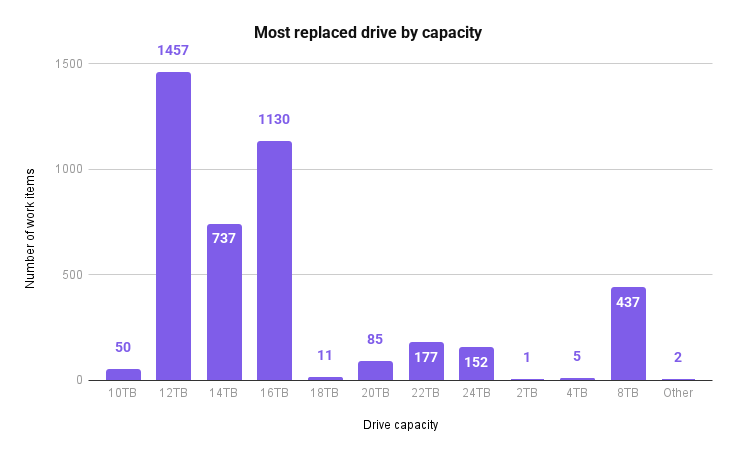
In total across data centers, we spent 3,112.43 hours replacing hard drives. (If those hours don’t square up with the charts above, it’s because the total view includes other types of work, like upgrading our systems.) On average, it took about 0.74 hours per hard drive.
Here’s a breakdown of the drives replaced by capacity:
If you’re a Drive Stats fan, you may notice there are some funky drive sizes on there based on our other reporting data. (A 2TB drive? Where does that one even come from?) The drives above are inclusive of our whole fleet, including boot drives and non-production drives, and some of those are sized differently than based for whatever reason—history, job in the data center, etc.
Vault deployments
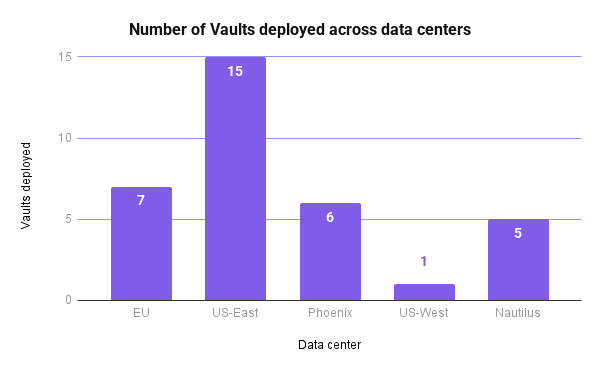
We also deploy new Vaults fairly regularly. This year, we added the following Vaults (per data center):
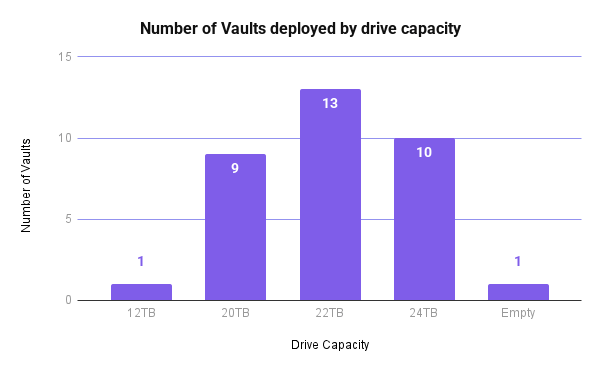
And, here’s a breakdown of the number of Vaults broken down by drive size:
In total, we spent 1043.23 hours on Vault deployment which is about 31.61 hours on average per Vault.
Numbers, as always, tell the story
Taken together, the data shows every hour logged, every drive replaced, every Vault added, and every ticket closed. It adds up to a year’s worth of hands-on infrastructure care; in short, it’s the steady investment required to operate storage at scale.
Whether you’re on call monitoring your own systems, planning for growth in the year ahead, or fully offline over the holidays, your data is here for you. Cheers to another great year!
Behind the Streams: Building a Reliable Cloud Live Streaming Pipeline for Netflix introduced the architecture of the streaming pipeline. This blog post looks at the custom Origin Server we built for Live — the Netflix Live Origin. It sits at the demarcation point between the cloud live streaming pipelines on its upstream side and the distribution system, Open Connect, Netflix’s in-house Content Delivery Network (CDN), on its downstream side, and acts as a broker managing what content makes it out to Open Connect and ultimately to the client devices.
Live Streaming Distribution and Origin Architecture
Netflix Live Origin is a multi-tenant microservice operating on EC2 instances within the AWS cloud. We lean on standard HTTP protocol features to communicate with the Live Origin. The Packager pushes segments to it using PUT requests, which place a file into storage at the particular location named in the URL. The storage location corresponds to the URL that is used when the Open Connect side issues the corresponding GET request.
Live Origin architecture is influenced by key technical decisions of the live streaming architecture. First, resilience is achieved through redundant regional live streaming pipelines, with failover orchestrated at the server-side to reduce client complexity. The implementation of epoch locking at the cloud encoder enables the origin to select a segment from either encoding pipeline. Second, Netflix adopted a manifest design with segment templates and constant segment duration to avoid frequent manifest refresh. The constant duration templates enable Origin to predict the segment publishing schedule.
Multi-pipeline and multi-region aware origin
Live streams inevitably contain defects due to the non-deterministic nature of live contribution feeds and strict real-time segment publishing timelines. Common defects include:
Short segments: Missing video frames and audio samples.
Missing segments: Entire segments are absent.
Segment timing discontinuity: Issues with the Track Fragment Decode Time.
Communicating segment discontinuity from the server to the client via a segment template-based manifest is impractical, and these defective segments can disrupt client streaming.
The redundant cloud streaming pipelines operate independently, encompassing distinct cloud regions, contribution feeds, encoder, and packager deployments. This independence substantially mitigates the probability of simultaneous defective segments across the dual pipelines. Owing to its strategic placement within the distribution path, the live origin naturally emerges as a component capable of intelligent candidate selection.
The Netflix Live Origin features multi-pipeline and multi-region awareness. When a segment is requested, the live origin checks candidates from each pipeline in a deterministic order, selecting the first valid one. Segment defects are detected via lightweight media inspection at the packager. This defect information is provided as metadata when the segment is published to the live origin. In the rare case of concurrent defects at the dual pipeline, the segment defects can be communicated downstream for intelligent client-side error concealment.
Open Connect streaming optimization
When the Live project started, Open Connect had become highly optimised for VOD content delivery — nginx had been chosen many years ago as the Web Server since it is highly capable in this role, and a number of enhancements had been added to it and to the underlying operating system (BSD). Unlike traditional CDNs, Open Connect is more of a distributed origin server — VOD assets are pre-positioned onto carefully selected server machines (OCAs, or Open Connect Appliances) rather than being filled on demand.
Alongside the VOD delivery, an on-demand fill system has been used for non-VOD assets — this includes artwork and the downloadable portions of the clients, etc. These are also served out of the same nginx workers, albeit under a distinct server block, using a distinct set of hostnames.
Live didn’t fit neatly into this ‘small object delivery’ model, so we extended the proxy-caching functionality of nginx to address Live-specific needs. We will touch on some of these here related to optimized interactions with the Origin Server. Look for a future blog post that will go into more details on the Open Connect side.
The segment templates provided to clients are also provided to the OCAs as part of the Live Event Configuration data. Using the Availability Start Time and Initial Segment number, the OCA is able to determine the legitimate range of segments for each event at any point in time — requests for objects outside this range can be rejected, preventing unnecessary requests going up through the fill hierarchy to the origin. If a request makes it through to the origin, and the segment isn’t available yet, the origin server will return a 404 Status Code (indicating File Not Found) with the expiration policy of that error so that it can be cached within Open Connect until just before that segment is expected to be published.
If the Live Origin knows when segments are being pushed to it, and knows what the live edge is — when a request is received for the immediately next object, rather than handing back another 404 error (which would go all the way back through Open Connect to the client), the Live Origin can ‘hold open’ the request, and service it once the segment has been published to it. By doing this, the degree of chatter within the network handling requests that arrive early has been significantly reduced. As part of this, millisecond grain caching was added to nginx to enhance the standard HTTP Cache Control, which only works at second granularity, a long time when segments are generated every 2 seconds.
Streaming metadata enhancement
The HTTP standard allows for the addition of request and response headers that can be used to provide additional information as files move between clients and servers. The HTTP headers provide notifications of events within the stream in a highly scalable way that is independently conveyed to client devices, regardless of their playback position within the stream.
These notifications are provided to the origin by the live streaming pipeline and are inserted by the origin in the form of headers, appearing on the segments generated at that point in time (and persist to future segments — they are cumulative). Whenever a segment is received at an OCA, this notification information is extracted from the response headers and used to update an in-memory data structure, keyed by event ID; and whenever a segment is served from the OCA, the latest such notification data is attached to the response. This means that, given any flow of segments into an OCA, it will always have the most recent notification data, even if all clients requesting it are behind the live edge. In fact, the notification information can be conveyed on any response, not just those supplying new segments.
Cache invalidation and origin mask
An invalidation system has been available since the early days of the project. It can be used to “flush” all content associated with an event by altering the key used when looking up objects in cache — this is done by incorporating a version number into the cache key that can then be bumped on demand. This is used during pre-event testing so that the network can be returned to a pristine state for the test with minimal fuss.
Each segment published by the Live Origin conveys the encoding pipeline it was generated by, as well as the region it was requested from. Any issues that are found after segments make their way into the network can be remedied by an enhanced invalidation system that takes such variants into account. It is possible to invalidate (that is, cause to be considered expired) segments in a range of segment numbers, but only if they were sourced from encoder A, or from Encoder A, but only if retrieved from region X.
In combination with Open Connect’s enhanced cache invalidation, the Netflix Live Origin allows selective encoding pipeline masking to exclude a range of segments from a particular pipeline when serving segments to Open Connect. The enhanced cache invalidation and origin masking enable live streaming operations to hide known problematic segments (e.g., segments causing client playback errors) from streaming clients once the bad segments are detected, protecting millions of streaming clients during the DVR playback window.
Origin storage architecture
Our original storage architecture for the Live Origin was simple: just use AWS S3 like we do for SVOD. This served us well initially for our low-traffic events, but as we scaled up we discovered that Live streaming has unique latency and workload requirements that differ significantly from on-demand where we have significant time ahead-of-time to pre-position content. While S3 met its stated uptime guarantees, our strict 2-second retry budget inherent to Live events (where every write is critical) led us to explore optimizations specifically tailored for real-time delivery at scale. AWS S3 is an amazing object store, but our Live streaming requirements were closer to those of a global low-latency highly-available database. So, we went back to the drawing board and started from the requirements. The Origin required:
[HA Writes] Extremely high write availability, ideally as close to full write availability within a single AWS region, with low second replication delay to other regions. Any failed write operation within 500ms is considered a bug that must be triaged and prevented from re-occurring.
[Throughput] High write throughput, with hundreds of MiB replicating across regions
[Large Partitions] Efficiently support O(MiB) writes that accumulate to O(10k) keys per partition with O(GiB) total size per event.
[Strong Consistency] Within the same region, we needed read-your-write semantics to hit our <1s read delay requirements (must be able to read published segments)
[Origin Storm] During worst-case load involving Open Connect edge cases, we may need to handle O(GiB) of read throughput without affecting writes.
Fortunately, Netflix had previously invested in building a KeyValue Storage Abstraction that cleverly leveraged Apache Cassandra to provide chunked storage of MiB or even GiB values. This abstraction was initially built to support cloud saves of Game state. The Live use case would push the boundaries of this solution, however, in terms of availability for writes (#1), cumulative partition size (#3), and read throughput during Origin Storm (#5).
High Availability for Writes of Large Payloads
The KeyValue Payload Chunking and Compression Algorithm breaks O(MiB) work down so each part can be idempotently retried and hedged to maintain strict latency service level objectives, as well as spreading the data across the full cluster. When we combine this algorithm with Apache Cassandra’s local-quorum consistency model, which allows write availability even with an entire Availability Zone outage, plus a write-optimized Log-Structured Merge Tree (LSM) storage engine, we could meet the first four requirements. After iterating on the performance and availability of this solution, we were not only able to achieve the write availability required, but did so with a P99 tail latency that was similar to the status quo’s P50 average latency while also handling cross-region replication behind the scenes for the Origin. This new solution was significantly more expensive (as expected, databases backed by SSD cost more), but minimizing cost was not a key objective and low latency with high availability was:
Storage System Write Performance
High Availability Reads at Gbps Throughputs
Now that we solved the write reliability problem, we had to handle the Origin Storm failure case, where potentially dozens of Open Connect top-tier caches could be requesting multiple O(MiB) video segments at once. Our back-of-the-envelope calculations showed worst-case read throughput in the O(100Gbps) range, which would normally be extremely expensive for a strongly-consistent storage engine like Apache Cassandra. With careful tuning of chunk access, we were able to respond to reads at network line rate (100Gbps) from Apache Cassandra, but we observed unacceptable performance and availability degradation on concurrent writes. To resolve this issue, we introduced write-through caching of chunks using our distributed caching system EVCache, which is based on Memcached. This allows almost all reads to be served from a highly scalable cache, allowing us to easily hit 200Gbps and beyond without affecting the write path, achieving read-write separation.
Final Storage Architecture
In the final storage architecture, the Live Origin writes and reads to KeyValue, which manages a write-through cache to EVCache (memcached) and implements a safe chunking protocol that spreads large values and partitions them out across the storage cluster (Apache Cassandra). This allows almost all read load to be handled from cache, with only misses hitting the storage. This combination of cache and highly available storage has met the demanding needs of our Live Origin for over a year now.
Storage System High Level Architecture
Delivering this consistent low latency for large writes with cross-region replication and consistent write-through caching to a distributed cache required solving numerous hard problems with novel techniques, which we plan to share in detail during a future post.
Scalability and scalable architecture
Netflix’s live streaming platform must handle a high volume of diverse stream renditions for each live event. This complexity stems from supporting various video encoding formats (each with multiple encoder ladders), numerous audio options (across languages, formats, and bitrates), and different content versions (e.g., with or without advertisements). The combination of these elements, alongside concurrent event support, leads to a significant number of unique stream renditions per live event. This, in turn, necessitates a high Requests Per Second (RPS) capacity from the multi-tenant live origin service to ensure publishing-side scalability.
In addition, Netflix’s global reach presents distinct challenges to the live origin on the retrieval side. During the Tyson vs. Paul fight event in 2024, a historic peak of 65 million concurrent streams was observed. Consequently, a scalable architecture for live origin is essential for the success of large-scale live streaming.
Scaling architecture
We chose to build a highly scalable origin instead of relying on the traditional origin shields approach for better end-to-end cache consistency control and simpler system architecture. The live origin in this architecture directly connects with top-tier Open Connect nodes, which are geographically distributed across several sites. To minimize the load on the origin, only designated nodes per stream rendition at each site are permitted to directly fill from the origin.
Netflix Live Origin Scalability Architecture
While the origin service can autoscale horizontally using EC2 instances, there are other system resources that are not autoscalable, such as storage platform capacity and AWS to Open Connect backbone bandwidth capacity. Since in live streaming, not all requests to the live origin are of the same importance, the origin is designed to prioritize more critical requests over less critical requests when system resources are limited. The table below outlines the request categories, their identification, and protection methods.
Publishing isolation
Publishing traffic, unlike potentially surging CDN retrieval traffic, is predictable, making path isolation a highly effective solution. As shown in the scalability architecture diagram, the origin utilizes separate EC2 publishing and CDN stacks to protect the latency and failure-sensitive origin writes. In addition, the storage abstraction layer features distinct clusters for key-value (KV) read and KV write operations. Finally, the storage layer itself separates read (EVCache) and write (Cassandra) paths. This comprehensive path isolation facilitates independent cloud scaling of publishing and retrieval, and also prevents CDN-facing traffic surges from impacting the performance and reliability of origin publishing.
Priority rate limiting
Given Netflix’s scale, managing incoming requests during a traffic storm is challenging, especially considering non-autoscalable system resources. The Netflix Live Origin implemented priority-based rate limiting when the underlying system is under stress. This approach ensures that requests with greater user impact are prioritized to succeed, while requests with lower user impact are allowed to fail during times of stress in order to protect the streaming infrastructure and are permitted to retry later to succeed.
Leveraging Netflix’s microservice platform priority rate limiting feature, the origin prioritizes live edge traffic over DVR traffic during periods of high load on the storage platform. The live edge vs. DVR traffic detection is based on the predictable segment template. The template is further cached in memory on the origin node to enable priority rate limiting without access to the datastore, which is valuable especially during periods of high datastore stress.
To mitigate traffic surges, TTL cache control is used alongside priority rate limiting. When the low-priority traffic is impacted, the origin instructs Open Connect to slow down and cache identical requests for 5 seconds by setting a max-age = 5s and returns an HTTP 503 error code. This strategy effectively dampens traffic surges by preventing repeated requests to the origin within that 5-second window.
The following diagrams illustrate origin priority rate limiting with simulated traffic. The nliveorigin_mp41 traffic is the low-priority traffic and is mixed with other high-priority traffic. In the first row: the 1st diagram shows the request RPS, the 2nd diagram shows the percentage of request failure. In the second row, the 1st diagram shows datastore resource utilization, and the 2nd diagram shows the origin retrieval P99 latency. The results clearly show that only the low-priority traffic (nliveorigin_mp41) is impacted at datastore high utilization, and the origin request latency is under control.
Origin Priority Rate Limiting
404 storm and cache optimization
Publishing isolation and priority rate limiting successfully protect the live origin from DVR traffic storms. However, the traffic storm generated by requests for non-existent segments presents further challenges and opportunities for optimization.
The live origin structures metadata hierarchically as event > stream rendition > segment, and the segment publishing template is maintained at the stream rendition level. This hierarchical organization allows the origin to preemptively reject requests with an HTTP 404(not found)/410(Gone) error, leveraging highly cacheable event and stream rendition level metadata, avoiding unnecessary queries to the segment level metadata:
If the event is unknown, reject the request with 404
If the event is known, but the segment request timing does not match the expected publishing timing, reject the request with 404 and cache control TTL matching the expected publishing time
If the event is known, the requested segment is never generated or misses the retry deadline, reject the request with a 410 error, preventing the client from repeatedly requesting
At the storage layer, metadata is stored separately from media data in the control plane datastore. Unlike the media datastore, the control plane datastore does not use a distributed cache to avoid cache inconsistency. Event and rendition level metadata benefits from a high cache hit ratio when in-memory caching is utilized at the live origin instance. During traffic storms involving non-existent segments, the cache hit ratio for control plane access easily exceeds 90%.
The use of in-memory caching for metadata effectively handles 404 storms at the live origin without causing datastore stress. This metadata caching complements the storage system’s distributed media cache, providing a complete solution for traffic surge protection.
Summary
The Netflix Live Origin, built upon an optimized storage platform, is specifically designed for live streaming. It incorporates advanced media and segment publishing scheduling awareness and leverages enhanced intelligence to improve streaming quality, optimize scalability, and improve Open Connect live streaming operations.
Netflix Live Origin was originally published in Netflix TechBlog on Medium, where people are continuing the conversation by highlighting and responding to this story.
Managing object lifecycles is one of the simplest ways to control storage costs, keep buckets organized, and automate data hygiene. Backblaze B2 has supported lifecycle rules for years through our B2 Native APIs and the web application. Today, we’re expanding that support by adding S3 compatible lifecycle rule APIs, making it easier for you to use S3 tools and workflows to manage your data on Backblaze B2 (check out the docs: S3 Put Lifecycle Configuration, S3 Get Lifecycle Configuration, S3 Delete Lifecycle Configuration). This provides you with more flexibility and control over object management—all with Backblaze’s signature simplicity and affordability.
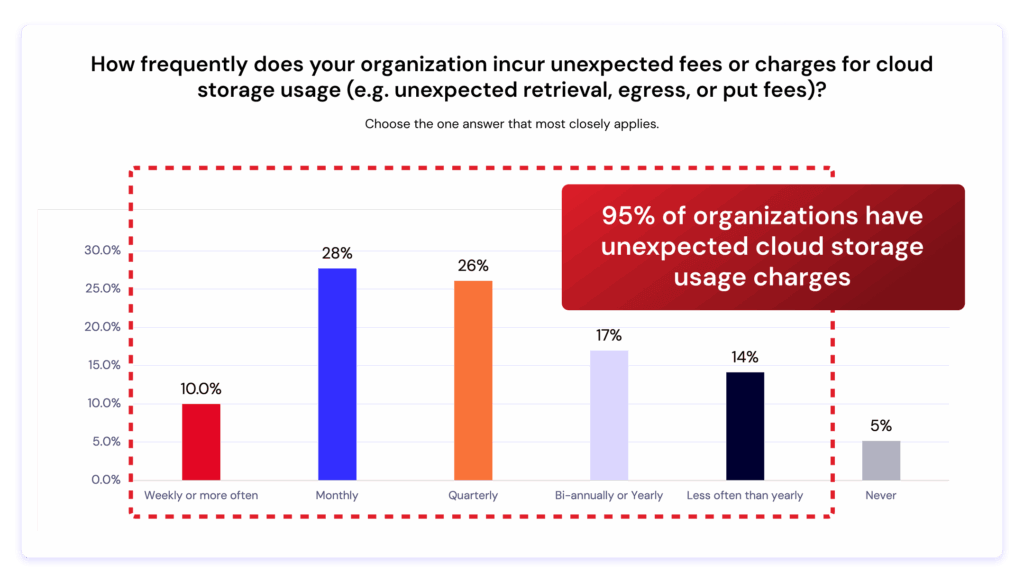
New survey: The Hidden Cost of Cloud Storage
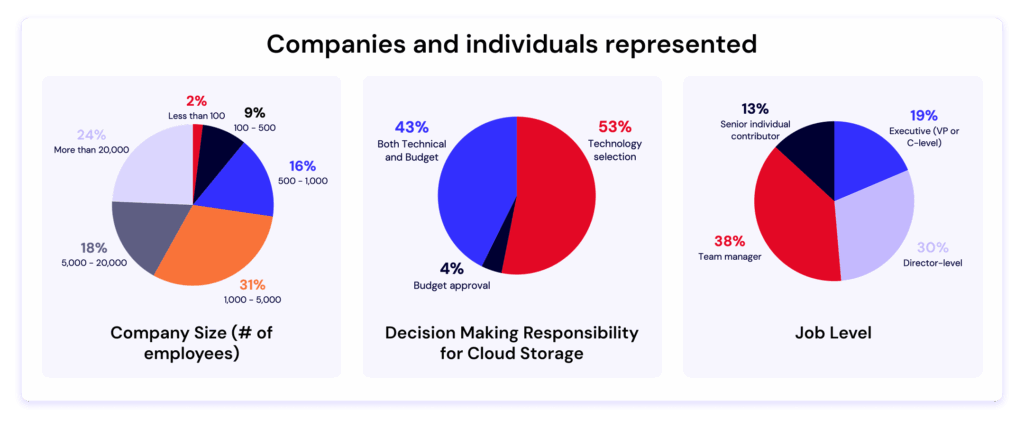
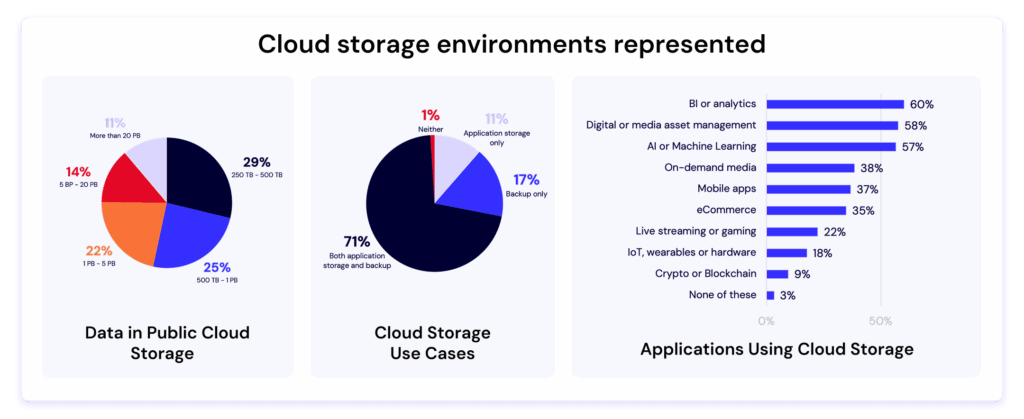
We surveyed over 400 IT decision makers and one thing stood out. Surprise charges affect almost everyone. Learn what’s driving them—and how to avoid them.
What’s new
You can now create, edit, and manage lifecycle rules on B2 Cloud Storage using standard S3 compatible APIs, including:
Nested folders with overlapping logic (e.g., animals/ and animals/cows/)
Why this matters
1. Seamless migrations from AWS
If you’re moving workloads from AWS S3, you can bring your existing lifecycle configurations with minimal changes. This reduces work while migrating your workloads to Backblaze B2.
2. More flexibility for complex data structures
With support for nested and overlapping prefixes, you can apply precise expiration rules to different datasets with overlapping prefixes in the same bucket. Whether you’re managing rapidly changing logs or long-term archives, lifecycle rules allow more controlled, automated retention.
3. Increased functionality for multi-cloud architectures
This configuration automatically hides objects under temp/ after 30 days.
Example use cases
Automated cleanup for short-lived objects: Temporary files, build artifacts, or test data can expire automatically after a given retention period.
Compliance-driven policies: Organizations with strict retention and deletion requirements can enforce rules consistently across buckets.
Automated cleanup of incomplete multipart uploads: Save money by removing partial upload fragments that were never completed due to network interruptions, client failures, or abandoned sessions automatically.
Tiered retention for nested prefixes: Allow broad retention for the general dataset while enforcing a faster cleanup cycle for a particular subset that changes more frequently or has lower long-term value. For example, you can apply a 30-day expiration rule to all objects under the prefix temp/, while assigning a shorter 7-day expiration rule to the more specific prefix temp/webserver/.
How it complements existing B2 Lifecycle Rules
Backblaze continues to support lifecycle rules through the B2 Native API, which many customers use today. The new S3 compatible support offers an additional path for lifecycle automation, especially for customers with S3 style infrastructure or tooling.
Although both S3 compatible and B2 Native lifecycle rules can coexist, we strongly recommend using a single method depending on your workflow preferences to manage lifecycle rules.
Getting started
You can begin using lifecycle rules today through:
S3 compatible SDKs
S3 CLI tools
Direct API calls
Refer to Backblaze S3 Compatible API documentation for more details, specifically:
Most customers can apply their existing AWS lifecycle rules directly, without modification.
Availability
S3 compatible lifecycle rules are now available.
Wrapping up
Lifecycle rules help automate routine object cleanup and give teams predictable control over object retention. With the addition of S3 compatible lifecycle APIs, Backblaze B2 makes it even easier for customers to bring their existing S3 workflows to our platform while continuing to use the lifecycle management strategies they already trust.
Get started with Backblaze today by signing up for an account or contacting Sales.
AI training data is now a company’s most valuable intellectual property—often worth more than the models themselves. Models can be replicated and architectures become public knowledge, but the datasets that capture your domain expertise and years of careful curation are irreplaceable.
Yet as AI workflows become increasingly distributed, that data moves constantly between environments, increasing exposure while reducing visibility. According to IBM, “Forty percent of breaches involved data stored across multiple environments… highlighting the challenge of tracking and safeguarding data, including shadow data, and data in AI workloads.” Meanwhile MIT Sloan researchers have documented that AI training datasets are often inconsistently documented and poorly understood, creating exposure that extends beyond technical vulnerabilities into operational and compliance failures.
Yet many organizations still treat training datasets as just another storage bucket. But protecting data at rest is both a compliance requirement and a competitive necessity. The integrity of your datasets now determines the integrity of your models.
Free resource: Understand why object storage is a strategic driver
Download our free ebook to learn how object storage supports every stage of the AI pipeline—from data collection to model deployment.
Why training data is the new target
The attack surface for AI systems has fundamentally shifted. Rather than targeting models in production, sophisticated adversaries now focus on the training pipeline itself.
Data poisoning has emerged as an insidious threat
Attackers inject subtle changes like biased samples, mislabeled data, or adversarial examples that skew model outcomes or introduce hidden backdoors. Recent research reveals that 26% of organizations surveyed in the US and UK have been victims of AI data poisoning in the last year. These poisoned models can quietly undermine fraud detection, weaken cyber defenses, and corrupt business-critical decisions.
Intellectual property theft takes on new dimensions
When adversaries steal training datasets, they’re stealing the accumulated expertise that gives your models their edge. Your training data represents thousands of hours of curation and annotation that encodes institutional knowledge about your customers and market. A competitor with your datasets can replicate your capabilities in weeks rather than years.
Silent corruption poses an equally serious but less visible threat
Infrastructure failures, human errors, or gradual drift in data pipelines can corrupt training datasets without triggering alerts. For organizations in regulated industries such as healthcare, financial services, or autonomous systems, this creates a reproducibility crisis. How do you prove your model was trained on authentic, unaltered data when you can’t verify the data’s provenance?
The NIST AI Risk Management Framework emphasizes that maintaining the provenance of training data and supporting attribution of AI system decisions to subsets of training data can assist with both transparency and accountability. Regulators and customers increasingly expect verifiable proof of data integrity throughout the training lifecycle.
The takeaway? The trustworthiness of every model begins with the trustworthiness of its data.
The principles of a secure AI data foundation
A strong protection model rests on three pillars—immutability, encryption, and regional control—each reinforcing long-term integrity.
1. Immutability: Protect against tampering or deletion
Immutability means write-once, read-many (WORM) protection that prevents modification or removal. Once data is written, it becomes locked—no one can modify, overwrite, or delete it for a defined retention period, but it remains fully accessible for reading. This technical guarantee prevents data poisoning attacks, stops accidental deletion, and enables verifiable reproducibility.
CISA advisories recommend immutable backups to guard against ransomware, but the benefits extend much further for AI systems. When you lock a dataset snapshot before training begins, you guarantee the ability to reproduce that exact model state, which is critical for debugging, regulatory audits, and forensic investigations when models fail.
Object Lock capabilities enforce immutability at the storage layer for set retention periods. Each dataset version becomes permanently immutable, creating an unalterable record of your training history that no administrator or attacker can modify.
Implementation tip: Enable Object Lock at the bucket level and integrate it with your data-ingestion scripts to automatically lock datasets as they’re created.
2. Encryption: Safeguard confidential data
Training datasets contain extraordinary value—customer information, proprietary annotations, competitive intelligence embedded in data selection. Server-side encryption protects this data both in transit and at rest, defending against unauthorized access even if other security layers fail. The EU’s recent NIS2 technical guidance explicitly prescribes cryptography as a required control measure for compliance.
The key to practical encryption is simplicity. Solutions should integrate seamlessly into existing workflows without requiring separate key-management infrastructure or introducing performance overhead that disrupts training pipelines.
Implementation tip: Look for server-side encryption options (like SSE-B2 or SSE-C) that remain transparent to your applications while providing the protection regulators require.
3. Regional control: Ensure data sovereignty and availability
Where your data physically resides matters for compliance, latency, and operational resilience. GDPR and similar regulations often require that sensitive data remain within specific jurisdictions. Beyond compliance, regional placement affects training performance—positioning data near compute resources or using high-performance delivery mechanisms can reduce transfer delays when moving large datasets.
The critical factor is transparency. You need explicit control over region selection and assurance that data won’t be replicated to secondary regions without your knowledge. Ambiguous “regional” configurations that might span continents create compliance risk.
Consider a U.S. biomedical AI startup working with patient-derived data. They need datasets stored exclusively in U.S. regions to satisfy HIPAA requirements, Object Lock enabled to prove data integrity for regulatory submissions, and encryption applied to protect sensitive patient information—all while maintaining the competitive advantage their proprietary data provides. Regional control with clear guarantees makes this achievable.
Implementation tip: Choose storage providers that let you explicitly select regions during bucket creation with clear guarantees about where data resides, including replication destinations.
Beyond security: Enabling trust and traceability
Immutable, encrypted, regionally contained object storage enables AI governance at a level traditional storage infrastructure cannot.
Each dataset snapshot becomes a verifiable record of model history. When a model behaves unexpectedly in production, you can trace back to the exact training data used to create it. This capability accelerates debugging and provides the evidence needed to explain model decisions to regulators, customers, or internal stakeholders.
Storage infrastructure with built-in immutability and access logging provides the verifiable evidence that auditors require. Instead of reconstructing data lineage from logs and documentation, you can demonstrate exactly what happened with cryptographic proof.
These capabilities transform storage from a passive repository into an active component of your AI governance framework.
Implementation snapshot: Putting it all together
Establishing these protections with Backblaze B2 follows a straightforward path:
Create buckets in regions that match your compliance and latency requirements.
Enable Object Lock and configure retention policies aligned with your model development lifecycle.
Apply server-side encryption (SSE-B2 or SSE-C) to all training data buckets.
Activate versioning to maintain a complete history of dataset evolution.
Configure logging to track access patterns and enable lineage verification.
Integrate with compute using standard S3 compatible tools.
For organizations running intensive training workloads, Backblaze B2 Overdrive provides high-throughput object storage with up to 1Tbps throughput speeds and unlimited free egress. This allows enterprises to perform large quantities of concurrent data operations without performance degradation, keeping compute resources—including expensive GPUs—from sitting idle while waiting for data transfers. B2 Overdrive maintains the same security and compliance capabilities as standard Backblaze B2 while enabling faster iteration on model development.
The bottom line: Trust begins with proven data
The datasets you’ve built represent years of institutional knowledge—far more difficult to replace than the models trained on them. Protecting that intellectual property requires more than access controls and perimeter security. You need to prove the integrity of your data to regulators who demand accountability, to customers who expect trustworthy AI, and to your own teams who need confidence in model reproducibility.
The AI and cloud infrastructure industry talks endlessly about GPUs, model size, and compute capacity, but there’s an invisible Achilles heel that can quietly undermine even the most promising AI projects: data egress.
According to a new Dimensional Research survey, 95% of organizations experience unexpected cloud storage fees, often from retrieval, egress, or API transactions. These hidden costs are rarely visible in early budgets, but they can torpedo innovation as workloads scale, especially when video enters the mix. Raw footage, frame-level training data, model checkpoints, and final renders can add up to hundreds of terabytes every week, straining both budgets and infrastructure.
Read the full report
We surveyed over 400 IT decision makers and one thing stood out. Surprise charges affect almost everyone. Learn what’s driving them—and how to avoid them.
Most generative AI video outputs today max out at 480p or 720p resolution. As demand grows for 1080p and 4K, storage and bandwidth requirements will multiply. Without a deliberate egress strategy, that growth becomes a silent tax on innovation. Over time, it restricts experimentation, reduces iteration speed, and undermines cost predictability.
The future of AI video belongs to teams that treat egress strategy as part of their innovation architecture and choose partners that let them move data freely between storage and compute, without penalty.
Inside the generative AI data pipeline
Modern AI systems no longer operate inside a single environment. Data is stored in one place, trained in another, and increasingly delivered at the edge. As workloads scale, the ability to move data efficiently becomes as important as compute capacity.
According to IDC, 88% of cloud buyers now deploy hybrid cloud environments, and 79% already use multiple providers. The Dimensional Research survey found that 99% of organizations struggle with limited flexibility and interoperability, highlighting how closed ecosystems are slowing progress just as multimodal AI demands more open, composable infrastructure.
To understand why egress matters so much for generative AI video, it helps to look at the AI data pipeline, which follows five continuous stages:
Data ingest and active archive: Collect and store raw images, video, audio, and metadata for future processing.
Data processing: Clean, label, and transform data into usable training sets.
Model experimentation and training: Run GPU-intensive model development and fine-tuning, save checkpoints and weights.
Model deployment and inference: Apply trained models to new video, user queries, or edge devices to generate results.
Monitoring: Track accuracy, latency, and system health to retrain and optimize continuously.
Each stage has distinct storage and compute requirements, but data moves between them constantly. For AI video, those transfers can span regions and providers. When egress is slow or expensive, the entire pipeline backs up, delaying iteration and driving up cost.
When data can’t move, innovation can’t either
Keeping everything under one cloud provider once simplified management. At first glance, it still seems convenient to keep storage, compute, and archive all in one place. Within a single AWS region, egress is free. But as soon as data crosses regions or providers, the model breaks down.
Tiered pricing makes costs hard to forecast. Egress fees penalize movement. Resource contention slows performance, and interoperability gaps lock teams into static configurations. AI video workloads amplify the problem: training, inference, and storage often require different environments optimized for each stage.
Dimensional Research’s data shows that 55% of organizations note egress costs as the single biggest barrier to switching cloud providers. Many stay with less efficient or more expensive infrastructure simply because the economics of mobility make innovation too costly. Moving just 1 PB of data out of AWS storage in the US East region costs about $53,800 per month—often enough to halt multi-cloud testing entirely.
The true cost, however, is in the experiments that are never run and the innovations that don’t get discovered because of a pricing structure that discourages exploration.
Freedom of data movement is the new competitive edge
In generative AI, the pace of progress is set by how quickly teams can test, retrain, and redeploy new models. That agility requires data mobility.
As organizations adopt composable AI stacks that mix specialized compute, regional storage, and orchestration tools, success depends on how openly data flows between them. Teams that design for movement can scale faster, adapt to new technologies, and stay resilient as infrastructure changes.
For teams building generative AI video applications, the impact is especially pronounced. A studio fine-tuning a diffusion model might burst to GPU providers with available capacity, render high-resolution outputs, and archive them for reuse, all without rewriting code or paying to move the data each time.
Data mobility has become a measure of competitiveness. The faster teams can move information across environments, the faster they can innovate.
How to build an egress strategy that fuels innovation
A good egress strategy ensures that storage and compute stay aligned as workloads scale. It helps teams anticipate cost, performance, and interoperability issues before they turn into blockers.
Here are a few practical steps to get there:
Map your data flows. Identify where data originates, how it moves between services, and which transfers happen most frequently.
Quantify transfer and API transaction costs. Include both in your total cost of ownership models. Even small fees add up quickly at petabyte scale.
Test portability. Run controlled migrations or bursts to secondary compute providers to expose hidden bottlenecks.
Select for openness. Favor vendors with flat, transparent pricing, free or low-cost egress, and broad S3 compatibility.
Plan for growth. Multimodal models and higher-resolution video outputs will multiply data transfer volumes. Design bandwidth and budget models accordingly.
Beyond controlling costs, the goal is to keep flexibility built into your architecture so your team can use the best tools for each stage of the AI pipeline, without being trapped by pricing friction or closed ecosystems.
The Backblaze difference: Open by design
Storage that supports innovation shouldn’t penalize movement. That’s why we created Backblaze B2 Overdrive to give teams with high-throughput, data-intensive workloads the flexibility they need to innovate.
Overdrive is the right fit for AI video because of its:
Predictable economics: $15/TB/month with unlimited free egress (no penalties for moving data to the compute you need).
Zero transaction fees: API calls don’t become a hidden tax as pipelines scale.
S3 compatibility and high throughput: Drop into existing pipelines without rewrites and keep large media workflows moving quickly across training, rendering, inference, and archive.
AI startup Decart put Backblaze B2 through its paces as it developed a real-time generative AI open world model, with millions of hours of training video data and multi-petabyte workloads daily.
What we really needed was a place where we could store an insane amount of data and, at the same time, download it to a few different GPU clusters around the world, and for all that to not cost an insane amount of money. That’s why we chose Backblaze.
—Dean Leitersdorf, Co-Founder and CEO, Decart
With Backblaze’s free egress model, they reduced AI operation costs by 75% while maintaining flexibility across compute environments.
If you’re scaling generative AI video, Backblaze B2 Overdrive gives you the freedom to put data where it performs best, without egress penalties, transaction surprises, or architectural do-overs.
We’re approaching a fascinating inflection point in AI development. Research from Epoch AI indicates that high-quality text data will be fully exhausted by 2026 to 2028. As recently as January, OpenAI co-founder Ilya Sutskever said at a conference that all the useful data online had already been used to train models. Over 35% of top websites now block AI scrapers. OpenAI is cutting deals with publishers like The Financial Times because freely available training data is running out.
So what comes next? Multimodal data: video, images, audio, sensor readings. Data that captures how the physical world actually operates, not just how we describe it in text.
Nvidia CEO Jensen Huang highlighted this shift when discussing Tesla’s AI advantage. He noted that the company has a “phenomenal position” because Tesla is collecting massive amounts of real-world data through its AI-enabled factories and autonomous vehicles.”
This real-world data, what some call “world data,” is multimodal at its core. It includes video from cameras capturing spatial relationships and motion, sensor telemetry recording physical interactions, images showing object states, and audio capturing environmental context. Video is particularly valuable because it captures temporal dynamics, depth perception, and how objects interact over time, insights that static text or images alone cannot provide.
Here’s the insight most organizations miss: you’re already generating this data.
Your organization is already producing multimodal data
Every single day, your organization produces massive amounts of multimodal data, including:
Zoom calls with video, audio, and screen shares
Security camera footage
Customer service interactions combining chat logs, voice recordings, website screen recordings and product images
Marketing teams creating videos, graphics, and campaign documents
Sales demos mixing presentations, product screenshots, and recorded conversations
And that’s just the short list.
The problem isn’t scarcity. It’s how multimodal data gets siloed, deleted, or stored in ways that make it unusable for AI applications. Video sits in one system and transcripts in another, with metadata scattered across databases. Most organizations treat this as operational exhaust rather than the strategic asset it represents.
Organizations that start systematically leveraging their multimodal data today will have capabilities tomorrow that generic models can never match.
The challenge: Multimodal infrastructure complexity
Building AI systems that work across images, video, audio, and text traditionally requires stitching together a fragmented technology stack. Videos live in object storage. Structured data sits in relational databases. Vector embeddings need specialized vector databases. Custom ETL pipelines handle transformations. Orchestration code coordinates everything. You need separate systems for caching, versioning, and lineage tracking.
This “data plumbing” consumes more engineering time than actual AI development. A straightforward workflow like building a searchable video archive with object detection and similarity search requires coordinating five or more systems and writing hundreds of lines of orchestration code.
The complexity creates a barrier that prevents most organizations from leveraging their multimodal data effectively, even when the underlying AI models are accessible through APIs. That’s the gap that Pixeltable solves.
How Pixeltable simplifies multimodal data workloads
Pixeltable replaces the fragmented multi-system architecture typically required for AI applications with a single declarative table interface. Instead of coordinating databases, file storage, vector databases, APIs, and orchestration tools separately, you work with tables where multimodal data lives alongside your transformations and AI operations.
The approach is straightforward. Store multimodal data in tables, define transformations as computed columns, and query everything together. Pixeltable handles the orchestration, caching, and model execution automatically.
Connect to data in-place
Point Pixeltable at your existing object stores like AWS S3 or Backblaze B2 Cloud Storage without moving or duplicating data. Your files stay where they are, organized into queryable, versioned tables. No separate databases or vector stores needed.
Define workflows declaratively
Transformations, model inference, and custom logic become Python computed columns. Extract frames from video, run object detection, generate embeddings, define it once and Pixeltable auto-orchestrates execution, manages dependencies, and handles incremental updates when new data arrives.
Query across everything
Leverage semantic search co-located with metadata. Raw data and AI-generated results in one interface. Build RAG systems with auto-synced embedding indexes that eliminate separate vector database management.
Focus on logic, not infrastructure
Full versioning for reproducibility. Automatic incremental processing means only necessary computations run when data changes. The same code works in development and production without rewrites.
For a practical example, explore our companion Github notebook Multimodal Data Processing with Pixeltable and Backblaze B2. It demonstrates how to extract and transform video frames using Pixeltable, then store the processed results in Backblaze B2 Cloud Storage with automatic URL generation.
Powering multimodal AI with Pixeltable and Backblaze B2
At Backblaze, we understand how essential multimodal data has become for AI development. Our collaboration with Pixeltable integrates B2 Cloud Storage directly into their open-source framework, giving organizations a simple and scalable foundation for managing complex AI workloads.
Pixeltable’s declarative design works seamlessly with Backblaze B2 across the entire AI data lifecycle. Whether you are processing video for model training, running inference on image streams, or building retrieval-augmented generation systems with multimodal embeddings, Backblaze B2 provides reliable S3 compatible storage that Pixeltable can reference directly without data duplication.
We are working closely with the Pixeltable team on a handful of initiatives to make multimodal workflows easier to deploy and scale. For those exploring this integration, we provide an example that demonstrates how Pixeltable and Backblaze B2 work together across the multimodal AI pipeline.
The data that fuels multimodal AI already exists across most organizations, from meeting recordings to customer interactions, video archives, and sensor logs. With Pixeltable and Backblaze B2, the infrastructure to harness that data effectively is now within reach.
In cloud storage and compute, “less is more” no longer applies. As data grows and expectations rise, businesses need performance, reliability, and real value—not just lower costs. It can be tempting to rely solely on hyperscalers like AWS, but the challenge is understanding where cloud performance truly meets value.
That’s why Backblaze is launching Performance Stats, our newest stats content built on the transparency of Drive Stats and Network Stats. This ongoing, quarterly report will share performance testing results—for both Backblaze and competitors—as well as the testing methodology so that anyone can recreate, compare results, and contribute to building better tests if necessary. (So, feel free to argue with us in the comments.)
By publishing everything—strengths, weaknesses, and all—we’re hoping to give AI leaders, app developers, and decision-makers a clear, honest view of how Backblaze and other cloud storage providers perform in the wild.
Get the full Stats picture live
Drive Stats was the beginning. Want to see the evolution? Check out the Backblaze Stats webinar, bringing together content from all of our Stats series. We’re going to chat about all things Backblaze and beyond—by the numbers.
Cutting through the noise on cloud performance
Frankly, it’s super frustrating how opaque performance metrics can be, and how many misleading storage reports are out there. Building accurate tests is complicated for a lot of reasons—so many factors are contingent on things that product builders and even end users control, like where and how data is stored, where it’s being served to end users, and so on. And, most published content on this topic has been tested from inside the cloud storage company’s architecture, which means that they’d give themselves preferential results.
While our report may not be perfect, our transparent approach—particularly publishing the testing methodology—will allow us to mitigate some of those concerns.
We want to take a hard look at performance on a level playing field for two reasons:
Buyers should know what they’re getting and have the tools to sniff out the hype and misleading messaging many providers peddle about their performance.
If we don’t measure ourselves, we won’t get better. We want you to understand where we’re doing well today, and we want to take you along for the ride as we work to improve where we’re not.
Without further ado, here are the results
We ran performance testing for Backblaze B2, AWS S3, Cloudflare R2, and Wasabi Object Storage. These tests were conducted using Warp, an open-source S3 benchmarking tool for cloud object storage performance. We’ll expand on the methodology after we get into the numbers.
Key findings:
While AWS S3 demonstrates the lowest average download speeds across the board, the hyperscaler didn’t win on sustained download throughput measurements. Five minute single- and multi-threaded benchmarking tests showed AWS winning on only one out of eight sustained throughput tests, indicating that there’s much more to the story than average download speeds. Meanwhile, Backblaze won in six out of eight categories, with Wasabi coming in first on the remaining test. (That being said, it’s wise to take this with a grain of salt given the small cohort in this initial dataset—more robust testing may show different results.)
Sustained throughput testing shows the most differentiation at small file sizes for both single and multi-threaded testing. For example, in multi-threaded upload benchmarking for the 256KiB file size, our highest value was 580% higher than the lowest. In single threaded upload benchmarking for the same file size, the highest value is 700% higher. Download throughput showed 247% and 304% in multi- and single-threaded tests, respectively. Small file size testing can have interesting impacts on overall performance—these files have the most overhead, and are typically more likely to show latency.
Backblaze B2 demonstrates the fastest average upload speeds for small file sizes, with AWS S3 leading for larger file sizes. And, similar to downloads, the story becomes more nuanced when we look at sustained upload throughput, where Backblaze leads for both the smallest (256KiB) and largest (100MiB) file sizes on multi-threaded tests with Wasabi taking the lead in the mid-range.
And, here’s a jump-to if you want to quickly reach each test:
This test shows the average time in milliseconds it takes to upload a file. Averages were taken across a month of data and for three different file sizes.
In these tests, a lower result is better (i.e., it represents a faster result). Note that we do not have data for Wasabi: Wasabi does not allow users to run HTTP requests for the first 30 days of a new account period, and when we ran this report, our testing account was still within that time period.
In each of the charts, we’ve outlined the “winner” in green for each category for easy readability.
Backblaze B2 wins for small files, coming in at 12.11ms, and AWS S3 leads for 2MiB and 5MiB files, coming in at 76.79ms and 201.40ms, respectively. Whether or not these numbers are inherently “good” or tolerable depends on quite a few factors—we’ll run through some examples comparing use cases to where we see Backblaze succeeding later in the report.
Five minute multi-threaded upload benchmark
In these tests, a higher result is better, as the result represents more average data being pushed in the five minute time period. This gives us quite a bit more information than just average upload time for a single file—rather, it tells us the sustained amount of data you can push to a cloud storage provider in five minutes.
Interestingly, we have a pretty large spread between our highest and lowest values, most stark amongst the smallest files where Backblaze B2 demonstrates the highest sustained throughput at 163.80MiB/s and Cloudflare R2 demonstrates the lowest at 24.10MiB/s.
This is important because the strength of object storage is that it lets you run concurrent operations to read many ranges of bytes in the same file. Moreover, thread operations are a configurable element of most cloud storage accounts (though too many concurrent operations can trip rate limits that are dependent on the provider).
So, when we think about contextualizing with the average time to a file upload completion, the task includes making the request, the handshake between requester and server, routing the request through the cloud storage provider, then time it takes to read all data, and then notification that your upload is complete.
Threading lets you run the actual process of the return of information concurrently—so while file overhead (handshake) should be relatively consistent, you can get quite a bit faster on large file uploads. And, even when you have consistent results on file overhead, networking paths can make a difference on delivery times. While we can consider networking routes mostly stable (especially for synthetic performance testing), it’s certainly not a guarantee. Peering policy changes, network maintenance and/or outages, and CDN usage can all affect your routing day to day or month to month.
Changing the view a bit, we see some interesting shapes when we plot each providers’ improvement as file sizes get larger:
It’s intuitive that you’d automatically push more data as file sizes get larger, but the shape of each’s improvement is a stark contrast. The rate of increase (which you can see in our trendlines as the slope) isn’t constant, and we see Backblaze and AWS showing consistently better performance at the higher file sizes. Wasabi tracks with that growth in the smaller file sizes, but falls off at the 50MiB and 100MiB. Meanwhile, we see Cloudflare returning the lowest net values, while flattening out at smaller file sizes as well.
In most performance data, you expect a logarithmic relationship between data points—and so comparing their different shapes—when the trendline flattens out and/or when it deviates from an ideal logarithmic scale—can be telling. You can define an expected logarithmic curve using an average of all providers, then compare each provider’s residuals (how far above or below that curve it sits). We’ll save that analysis for another day, and a more mature dataset.
It’s also interesting to look at data point clustering by file size. As our dataset matures over time and as we add providers, clustering in these charts start to tell a story. If you want a quick idea of good, better, best and you don’t have a large enough cohort for a true tiered definitional schema, it’s a good visual shortcut—you can easily see if different providers’ results are spread out or if they cluster together at a specific level of performance. The winners for each test are labeled in green.
And, as we said above, in all cases (and one of the most frustrating parts about collecting performance stats) is that your mileage may vary—you always want to compare the needs of your customers and product to the performance you need and how much it costs you.
Five minute single threaded upload
Once again, higher is better in this result, and it measures the sustained amount of data you can push to a server based on file size. As a reminder, multi-threading allows you to concurrently read a single file; while single threading is one, sustained process from start to finish.
Backblaze B2 again leads in small file sizes, with AWS S3 leading for 5MiB files and Wasabi for 50MiB and 100MiB files.
As above, here’s the trendline:
And, like in the multi-threading results, we can look at the clustering in each file type size:
Download comparisons
This test shows the average time in milliseconds it takes to download a file. Averages were taken across a month of data and for three different file sizes.
A reminder that lower is better in this test as it represents a faster result, and there’s no data for Wasabi in this series due to limitations on HTTP requests within the first 30 days of opening a new account.
AWS S3 leads across the board on this test, with Backblaze B2 taking second and Cloudflare R2 taking third consistently.
And, it’s worth separately tracking TTFB because TTFB is a good, but not sufficient statistic when we’re interpreting results.
Why isn’t this datapoint sufficient to fastest speeds? Not only does TTFB conflate many parts of your networking layer (so it can be affected by things like connection reuse policies), but it’s also such a small part of the overall transfer time and highly variable based on environment. So, its use is really in conversation with the sustained throughput numbers.
Cached vs. uncached downloads (Backblaze only)
We were also curious to see if caching within our own network would show up, and, if so, we’d want to make sure we weren’t unintentionally giving ourselves a favorable stance. So, we ran a series of tests for cached and uncached downloads by including the header X-Bz-Flush-Cache-First=true.
We do see slightly slower speeds in uncached downloads, but they’re likely a result of the same factors anyone externally hitting our system would see. Additionally, during the course of our testing, Backblaze made cacheless downloads the default behavior for our architecture—so, it will be interesting to monitor this statistic going forward.
Five minute multi-threaded download benchmark
In these tests, a higher result is better, as the result represents more average data being downloaded in the five minute time period.
Backblaze B2 leads for 256KiB, 50MiB, and 100MiB file sizes. AWS S3 has a slight advantage for 5MiB files.
And, let’s give ourselves the same charts as our above upload tests for consistency’s sake. Here’s the trendline:
While AWS and Backblaze track closely for the 256KiB and 5MiB file sizes, Backblaze wins out at 50MiB and 100MiB. Meanwhile, Cloudflare lags at the smallest file sizes, but shows rapid improvement, peaking at the 50MiB file sizes. Interestingly, this is arguably Wasabi’s weakest showing compared to all other sustained throughput testing, though they have strong results at the 256KiB file size and a respectable showing at the 5MiB file size.
And here’s the per-file size clustering:
Five minute single-threaded download throughput
Again, in these tests, a higher result is better, as the result represents more average data being downloaded in the five minute time period.
Here, Wasabi wins for 256KiB files, and Backblaze wins for 5MiB, 50MiB and 100MiB files. Note that this is a solid trend for Wasabi in the 256KiB file sizes—they came in second in the multi-threading download testing, as well as both single and multi-threaded upload testing.
And here’s our clustering:
Test methodology
Our goal with these benchmarks is simple: to understand how our cloud performs under real-world conditions and to share that information as clearly as possible. To do that, our Cloud Operations team runs repeatable, synthetic tests that measure upload (PUT) and download (GET) performance.
We ran both upload and download tests across all four vendors. Upload tests measured the following file sizes:
256KiB
5MiB
50MiB
100MiB
Download tests measured:
Time-to-first-byte (TTFB)
Total time to download the following file sizes:
256KiB
5MiB
50MiB
100MiB
Why do performance tests use mebibytes (MiB) instead of megabytes (MB)?
We’ve written articles in the past about how all computers are fundamentally a collection of logic circuits (transistors) in either an on or an off state, which means that they communicate in binary, or a base two language. Humans, however, tend to prefer base 10 languages. There are lots of reasons for this, but that’s a story for another time.
MiB is a base two unit of measurement, whereas MB is a base 10. Here’s a comparison:
Unit
Definition
Bytes
1MB (megabyte)
Base-10 (decimal)
1,000,000 bytes
1MiB (mebibyte)
Base-2
1,048,576 bytes (1024×1024)
The difference between those two measurements may seem small, but it has a significant impact when you’re talking about performance sensitive systems. Oftentimes you’ll see marketing language shift to talking about MB because it’s more understandable to a wider audience, but to get accurate results, MiB is what you need.
Tests run in five-minute profiles to observe consistency over time, and we ran both single and multi-threaded download and upload tests. From a practical perspective, what’s happening is that we’re pushing repeated requests to a cloud storage provider as many times as we can for five minutes.
All tests originate from a Vultr-hosted Ubuntu virtual machine (VM) located in the New York/New Jersey area, routing through Catchpoint’s network into object storage regions located generally in US-East. By keeping the source environment stable and the test target consistent, we isolate performance variables within each provider’s infrastructure rather than the test environment itself.
Consistency measures
To ensure each test result represents genuine performance rather than environmental noise, we built repeatability into the process:
Identical test instances: All runs used the same VM type, operating system (OS) image, and configuration.
Fixed regions: Tests originated from the same location (NY/NJ) targeting the same US-East region across providers.
Controlled routing: Network paths were held constant through Catchpoint’s monitoring network to minimize geographic or peering variation.
Repeated runs: Each test profile (5 min) was executed multiple times, and averages were used to reduce the impact of transient spikes.
Standardized payloads: All uploads and downloads used identical objects to ensure a consistent file-size baseline.
Unchanged test intervals: Tests were scheduled at regular intervals over multiple days to capture both typical and outlier performance.
About synthetic testing
Synthetic monitoring provides a controlled, apples-to-apples comparison, but it doesn’t replicate every production workload. These tests are run outside our own infrastructure—from neutral vantage points—to simulate a customer’s experience at the “last mile.” This distinguishes our approach from competitors who benchmark internally under optimized conditions.
It’s important to note that synthetic results won’t mirror every customer’s experience. Different architectures, connection paths, and file patterns will produce different performance profiles. Our intent is to offer transparency into the methodology and relative behaviors, not to suggest that all workloads will perform identically.
Limitations and future work
Every benchmark is an approximation. These results provide a controlled look at how cloud storage performs under repeatable conditions, but they don’t capture every variable in production environments. Below, we outline what our current tests don’t measure and where we’re headed next to deepen the picture.
Synthetic, not real-world workloads: These benchmarks simulate real activity but don’t reproduce the full variability of customer workloads, concurrency levels, or data locality patterns. They are best understood as directional insights rather than absolute truths.
The internet is the internet: Once traffic leaves the test node, we can’t control the routing, peering, or transient network conditions between endpoints. Each provider’s own network policies and routing optimizations—for example, Wasabi’s inbound connection rules—can influence the results.
Static test conditions: All tests were conducted from a single region (NY/NJ to US-East cloud providers). Real-world customers operate globally, where peering arrangements, congestion, and latency differ widely.
Potential caching effects: Although we designed the tests to avoid cached reads, Catchpoint does not allow full data randomization. It’s possible some repeated reads benefited from intermediate caching at any network layer.
Traffic shaping and rate limiting: Providers may apply rate limits or throttling when detecting high-frequency test traffic. For example, Wasabi temporarily blacklisted our IPs due to testing volume—a reminder that these results represent observed behavior, not formal service guarantees.
Each of these limitations points toward future testing opportunities. Here’s what’s next on our testing roadmap:
Regional expansion: Extend current US-East tests to US-West and EU regions using equivalent test setups.
Vendor expansion: Extend testing to more vendors, including Google Cloud Platform and Azure.
File size sensitivity testing: Investigate performance across a wider range of file sizes, including 100MiB+ objects. This will help clarify where different architectures favor small-object throughput versus sustained large transfers.
Traffic rate & throttling analysis: Incorporate monitoring for request-per-minute and total-bytes-transferred metrics to detect possible provider-level rate limiting. We’d love to invite vendors to validate thresholds and eliminate false negatives.
Concurrency patterns: Test multiple thread and connection strategies to model real-world transfer concurrency, especially for use cases involving parallel uploads or downloads.
Benchmark visualization: Transition from CSV data collection to Grafana dashboards, enabling continuous visualization of test results and performance drift over time.
Performance is an evolving target, and so is our testing methodology. Each round of analysis helps us not only understand how Backblaze performs in context, but also refine how we measure, compare, and communicate that performance. Our goal remains the same: make the data real, repeatable, and useful.
What this means for real-world use cases
Based on the results we’ve shared here, there’s plenty of room for argument around the value of different performance profiles. But, continuing our theme of transparency: Since we’re transparent about our performance, warts and all, we’re going to be transparently candid in the areas where think the Backblaze platform is showing some nice results:
AI/ML inference: Our strong read latency and throughput make Backblaze ideal for inference workloads that need to pull model artifacts, inputs, and outputs quickly. For example, when a service like Hugging Face or Runway ML feeds an image into a convolutional neural network, lower read latency directly translates to faster inference delivery.
Feature stores & embedding lookups (AI/ML): Optimized small-object reads and efficient small writes support rapid lookups and occasional updates common in vector databases and feature stores like Feast, Qdrant, Pinecone, or Weaviate.
LLM-based retrieval-augmented generation (RAG) systems: RAG systems store many small document chunks that are written once and read repeatedly, so our read-optimized performance accelerates retrieval of document chunks or embeddings, improving response times for large language model applications. Vectorized databases are also a hot topic right now for good reason—they’re changing patterns around file sizes and retrieval patterns in RAG applications and LLM training.
Log & event analytics (SIEM, IoT, etc.): Competitive small-write performance and fast reads make Backblaze well suited for log aggregation and analytical querying with tools like Loki, Fluentd, Vector.dev, and OpenObserve once data is ingested.
Interactive data lake querying: Consistent throughput and fast download speeds deliver responsive querying and exploration for business intelligence (BI) and ad hoc analytics workloads.
CDN origin: Excellent read throughput, stable performance, and free egress make Backblaze a high-value choice for powering content delivery at scale.
As discussed, one of the reasons it’s so hard to get directly comparable performance benchmarks is because there are so many configurable elements on the user’s side that can affect the results. For example, if you know that your provider is faster on smaller files, you might choose to store your unstructured data in smaller parts so that you achieve faster performance.
That means that when we share results like this, it enables you to interpret which provider is a better fit for your different types of workflows.
For a cloud storage provider, tracking these metrics over time and comparing to other aspects of our internal architecture enables us to support ongoing and continual performance improvement, and to understand how much of an impact single changes might make. This means that what seems like a simple project to change the way we read header requests can produce asymmetrically favorable results.
And, there’s a layer of this that’s always going to come down to design decisions. For example, we’ve talked about some of the logic behind where our architecture knows which server to store data on. Basically, our system chooses to store a new file based on the available space of each server. So, if we have a server that has 40% space available, it would receive 40% of the incoming storage writes. (That’s a bit of an oversimplification, but you get the idea.)
Other cloud storage providers might prioritize, say, randomness in their write architecture. When a request would enter their system, the routing protocol would say, “Hey, we haven’t written to this server over here in a while,” and write it in that sector. It’s a different choice that can have a subtle ripple effect across different aspects of storage architecture.
What’s next?
Our performance story is one of steady, measurable progress. We’re not optimizing for a single headline number; we’re building toward consistent reliability across diverse workloads. That’s why we test openly, publish what we find, and continuously refine how we measure.
Looking ahead, our next Performance Stats report will continue to share these findings quarterly, which will give us all a more mature dataset to work with, and will expand testing. This isn’t just a transparency exercise for us, it’s a commitment to the developers and teams building on Backblaze: you deserve data you can trust—and we intend to keep earning it.
We’d love it if others—third parties and our competitors—also got involved, but we’ll see how things evolve. For now, feel free to let us know if these tests work for you.
Disclaimer: The performance data and comparisons presented here are based on tests conducted by Backblaze under the specific environments, configurations, and conditions described in this post. Actual results may vary depending on network conditions, workloads, geographic location, and other factors.
Backblaze has published its testing methodology so others can replicate or challenge the results; however, Backblaze makes no representation or warranty that its tests capture all possible variables or configurations. The information is provided for general informational purposes only and does not constitute a guarantee of future performance. In addition, the information in this post is based on data available at the time of publication, and Backblaze reserves the right to update or revise this information as new data, testing methodologies, or performance results become available.
All product names, trademarks, and registered trademarks are property of their respective owners. References to third-party products or services are for identification purposes only and do not imply endorsement or affiliation.
Every quarter, Drive Stats gives us the numbers. This quarter, it gave us a crisis of meaning. What does it really mean for a hard drive to fail? Is it the moment the lights go out, or the moment we decide they have? Philosophers might call that an ontological gray area. We just call it Q3.
As of June 30, 2025, we had 332,915 drives under management. Of that total, there were 3,970 boot drives and 328,348 data drives. Let’s dig into our stats, then talk about the meaning of failure.
This quarter, we have more to talk about (Stats-wise)
Drive Stats was the beginning. Want to see more of the full picture? Check out the Stats Lab webinar, bringing together content from all of our Stats articles. We’re going to chat about all things Backblaze (and beyond)—by the numbers.
Drive Stats: The digest version
Q3 2025 hard drive failure rates
During Q3 2025, we were tracking 328,348 storage drives. Here are the numbers:
Backblaze Hard Drive Failure Rates for Q3 2025
Reporting period July 1, 2025–September 30, 2025 inclusive Drive models with drive count > 100 as of July 1, 2025 and drive days > 10,000 in Q3 2025
Notes and observations
The failure rate has increased: The failure rate has changed, and by quite a bit. As a reminder, last quarter’s AFR was 1.36% compared with this quarter’s 1.55%. (Interestingly, the 2024 yearly AFR was 1.57%.)
That new drive energy: Say hello to the 24TB Toshiba MG11ACA24TE, joining the drive pool with 2,400 drives and 24,148 drive days. That means that we’ve hit the thresholds for the quarterly stats, but not the lifetime.
The zero failure club: It was a big month for the zero failure club, with four drives making the cut:
Seagate HMS5C4040BLE640 (4TB)
Seagate ST8000NM000A (8TB)
Toshiba MG09ACA16TE (16TB)
Toshiba MG11ACA24TE (24TB)—and yes, that’s the new drive.
For those of you tracking the stats closely, you’ll notice that the Seagate ST8000NM000A (8TB) is a frequent flier on this list. The last time it had a failure was in Q3 2024—and it was just a single failure for the whole quarter!
The highest AFRs were really high: The high end was so high that this month, it inspired us to run an outlier analysis using the standard quartile analysis (Tukey method). Based on that information, any drive with a quarterly AFR higher than 5.88% is an outlier, and there are three:
Seagate ST10000NM0086 (10TB): 7.97%
Seagate ST14000NM0138 (14TB): 6.86%
Toshiba MG08ACA16TEY (16TB): 16.95%
What’s going on there? Great question, and we’ll get into that after the lifetime failure rates.
Lifetime hard drive failure rates
To be considered for the lifetime review, a drive model was required to have 500 or more drives as of the end of Q2 2025 and have over 100,000 accumulated drive days during their lifetime. When we removed those drive models which did not meet the lifetime criteria, we had drives grouped into 27 models remaining for analysis as shown in the table below.
Backblaze Hard Drive Failure Rates for Q2 2025
Reporting period ending September 30, 2025 Drive models > 500 drives and > 100,000 lifetime drive days
Notes and observations
That lifetime AFR is pretty consistent, isn’t it? The lifetime AFR is 1.31%. Last quarter we reported that it was 1.30%, and the quarter before that, it was 1.31%.
The 4TB average age hasn’t shifted: As we’ve reported on previously, the 4TB drives are being decommissioned over time. Now, we’re down to just a handful left—just 11 of the ALE models and 187 of the BLE models. But, because their lifetime populations are so comparatively large, the additional drive days aren’t enough to move the needle on the average age in months. So, no ghosts in the machine here, and decommissioning is proceeding as planned.
Steady uptick in higher capacity drives: Of the 20TB+ drives that meet our lifetime data parameters, we’ve added 7,936 since last quarter. And, don’t forget that our newest entrée to the cohort, the Toshiba MG11ACA24TE (24TB), hasn’t made its way to this table yet—that adds an additional 2,400 drive models. All together, the 20TB+ club represents 67,939 drives, or about 21% of the drive pool.
Defining a failure—from a technical perspective
A question that’s come up a few times when we’re hosting a webinar or chatting in the comments section is how we define a failure. While it may seem intuitive, it’s actually something of a meaty conundrum, and something we haven’t addressed since the early days of this series. Tracking down the answer to this question touches internal drive fleet monitoring tools (via SMART stats), the actual Drive Stats collection program, and our data engineering layer. I’ll dig into each of these in detail, then we’ll take a look at the outliers for this quarter.
SMART stats reporting
We use Smartmontools to collect the SMART attributes of drives, and another monitoring tool called drive sentinel to flag read/write errors that exceed a certain threshold as well as some other anomalies.
The main indicator we use for determining if a drive should be replaced is when it responds to reads with uncorrectable medium errors. When a drive reads the data from the disk, but the data fails its integrity check, the drive will try to reconstruct the data using internal error correction codes. If it is unable to reconstruct the data, it notifies the host by reporting it as an uncorrectable error and marks that part of the disk as pending reallocation, which shows up in SMART under an attribute like Current_Pending_Sector.
On Storage Pods that control drives through SATA links, the drive sentinel will count the number of these uncorrectable errors a drive reports and if it exceeds a threshold, access to the drive will be removed. This is important in the classic Backblaze Storage Pods where five drives share a single SATA link and errors by one drive will affect all drives on the link.
On Dell and SMCI pods that use a SAS topology to connect drives, drive sentinel doesn’t remove access to drives because the errors are reported differently; but, that’s also not as critical since SAS minimizes the impact that a problem disk can have on others.
The Drive Stats program
We’ve talked about the custom program we use to collect Drive Stats in the past, and here’s a quick recap:
The podstats generator runs on every Storage Pod, what we call any host that holds customer data, every few minutes. It’s a C++ program that collects SMART stats and a few other attributes, then converts them into an .xml file (“podstats”). Those are then pushed to a central host in each datacenter and bundled. Once the data leaves these central hosts, it has entered the domain of what we will call Drive Stats.
For this program, the logic is relatively simple: A failure in Drive Stats occurs when a drive vanishes out of the reporting population. It is considered “failed” until it shows up again. Drives are tracked by serial number and we report daily logs on a per-drive basis, so truly, we can get pretty granular here.
The data engineering layer
To recap, we’ve collected our SMART stats and compiled them with the podstats program. Now we’ve got all the information, and data intelligence needs to add the context. A drive may go offline for a day or so (not return a response to those tools that collect daily logs of SMART stats), but it could be something as simple as a loose cable. So, time-wise, if a drive reappears after one day or 30, at what point in that period of time do we classify it as an official failure?
Previously, we manually cross-referenced data center work tickets, but these days, we’ve automated that process. On the backend, it’s a SQL query, but in human speak, this is what it comes down to:
If a drive logs data on the last day of the selection period (which in this case is a quarter) then it has not failed.
There are three human-curated tables that the query cross references. If a drive serial number appears on one of them, it tells us whether there’s a failure or not (depending on the table’s function).
If the drive serial number is the primary serial number in a drive replacement Jira ticket then it has failed. (Jira is where we track our data center work tickets.)
If the drive serial number is the target serial number in a clone Jira ticket or a (temp) replacement ticket, then it has not failed.
Basically, when we go to write the Drive Stats reports at the end of the quarter, if a drive has either appeared in one of our various work trackers or hasn’t re-entered the population, then it’s considered failed.
In rare instances, that can mean that we have so-called “cosmetic” failures when we have some work we’re doing on a drive model that lasts more than that quarterly collection period. And, spoiler, we have one of those instances that showed up in the data this month—our outlier Toshiba drive with the 16.9% failure rate. We’ll dig in in just a minute; but first, some context.
Connecting drive failure to overall picture of the drive pool
As we mentioned above, certain drives in the pool had such high swings in AFR that we ended up running an outlier analysis using the quartile method. (It’s also worth mentioning that a cluster analysis could potentially be a better fit, but we can save that for another day.) Based on that analysis, anything that has above a 5.88% failure rate is an outlier.
The primary motivation was inspired by an attempt to visualize the relationship between the age in months of a drive versus this quarter’s AFRs.
And yes, we’re fully aware that that’s a… super unreadable scatter plot. Removing the labels, this is a bit better:
We’re interested, really, in the shape of the relationship. If we posit that the older drives get, the higher their failure rates, you’d expect a larger concentration in the top right quadrant. But, our data follows a much more interesting pattern than that, with most of our data points concentrated in the lowest regions of the graph regardless of age—something you’d expect from a set of data that reflects a bunch of smart folks actively working towards the goal of a healthy drive population. And yet, we have some data points that break the mold.
As is pretty intuitive to my business intelligence folks in the audience, the process of identifying outliers is actionable data as well. Just like all press is good press; in our world, more data is more better. So, let’s take a closer look at those outliers. As a reminder, that’s these three drive models:
Seagate ST10000NM0086 (10TB): 7.97%
Seagate ST14000NM0138 (14TB): 6.86%
Toshiba MG08ACA16TEY (16TB): 16.95%
Seagate ST10000NM0086 (10TB)
This drive has some pretty explainable factors for the high failure rate. It’s well over seven years old (92.35 months). And, since it only has 1,018 drive models in operation, single failures hold a lot of weight compared with the average drive count per model—which comes in at 10,952 if you use the mean of this quarterly data and 6,177 if you use the median.
And, you can see that borne out in the trend in the last year of data:
Seagate ST14000NM0138 (14TB)
This drive is nearing five years in age (56.57 months) and, again, has a lower drive count at 1,286. More importantly, this particular drive model has had historically high failure rates. In parallel with above, here’s the last year of quarterly failure rates:
Toshiba MG08ACA16TEY (16TB)
Finally, our Toshiba model is the most interesting of all. It’s less than four years old (44.61 months), and has 5,145 drives in the pool. And, this quarter is clearly a change from its normal, decent, AFRs.
When we see deviations like this one, it’s usually an indication that there’s something afoot.
Never fear, Drive Stats fans; this was a known quantity before we went on this journey. This past quarter, working with Toshiba, we deployed some firmware updates they provided to optimize performance on these drives. Because we needed to pull drives to achieve this in some cases, we had an abnormal number of “failed” drives in this population.
What that means for this drive is that it’s actually not a bad drive model; and, given the ways we and Toshiba have worked together on a fix, we should see failure rates normalizing in the near future. And, this also goes back to our conversation of defining a failure—in this case, while the drives “failed,” the failure wasn’t mechanical and was based on something that we’ll be able to fix without replacing the drives. In short, don’t sweat the spike and pay attention to the long arc of performance on this population. We expect to see those drives happy and spinning for years to come (and with better performance, too).
The Hard Drive dataset (and beyond)
Thank you, as always, for making it through ~2,500 or so words to examine the fun side of data. Here’s our standard fine print:
The complete dataset used to create the tables and charts in this report is available on our Hard Drive Test Data page. You can download and use this data for free for your own purpose. All we ask are three things:
You cite Backblaze as the source if you use the data;
You accept that you are solely responsible for how you use the data, and;
You do not sell this data itself to anyone; it is free.
If you’re a new Drive Stats fan, consider signing up for the newsletter. If you’re not ready for that kind of commitment, sound off in the comments section below or reach out directly to us to let us know what you’re working on. Happy investigating!
The way data moves is changing in the age of AI. As AI training, model tuning, and inferencing accelerate massive, unpredictable flows of data across clouds, our network telemetry here at Backblaze offers a real-world view into the AI data gravity shift: where data lives, how it moves, and what it takes to keep it accessible and affordable.
Over the past couple of years, we’ve shared Network Stats snapshots that shed light on how data moves across Backblaze’s storage cloud. This quarter, we’re taking that foundation further, and evolving this series into a full-fledged transparency report that stands alongside Drive Stats with regular quarterly reporting and stats you can analyze for yourself.
This report isn’t just about traffic patterns. It’s a look at how data movement is changing in the age of AI and what those shifts reveal about performance, cost, and resilience at scale.
Tune in live for The Stats Lab webinar
Drive Stats was the beginning. Want to see the evolution? Check out the Backblaze Stats Lab webinar, bringing together content from all of our Stats articles. We’re going to chat about all things Backblaze and beyond—by the numbers.
In this first report, we’re going to outline the fundamentals of our dataset, highlight standout examples for AI related traffic, and lay the foundation to start sharing our quarter-over-quarter metrics.
Dataset details
Our internal tools allow us to capture network flow data, meaning transmission control protocol (TCP) conversations between parties on our network. Along with basic information such as who is talking and how many bits are being exchanged, we have the ability to record additional pieces of anonymized information like what country, what ISP, or if we’ve seen a particular IP address before. And for each of these metrics, we have numbers for the average, 95th percentile, and maximum values.
Let’s talk about the three elements that make up our dataset: time, values, and metadata.
1. Monthly time slices
For every month, for every region, and for each direction (egress and ingress), we are data warehousing the following metrics. We plan on either using month-by-month numbers, or rolling up into a quarterly value for Network Stats reports going forward.
Item
Detail
Date range
Every month
Location scope
Every region (eg US-West, EU-Central)
Network traffic direction
Ingress, egress
2. Metric values
For each monthly snapshot, we’re recording the following details in our data warehouse. Capturing the average, 95th weighted value, and the maximum allows us enough information to profile our traffic.
The 95th value (discarding the highest 5% bursts) gives us a good profile for daily operations and the maximum helps profile bust traffic.
The most interesting metrics that I’m excited to explore are the “bits per IP” values. This combination of “amount of traffic” transferred with “how many actors are involved” per network is a good proxy for what I’m calling the “magnitude” of the network flow. We’re exploring the first insight into this metric below in our chart section.
Defining the Network Stats Quarterly Data
Item
Field(s)
Detail
Name
name
asn
Common name and BGP ASN of the network
Bits
bits_avg
bits_95th
bits_max
Number of bits/second
Packets
packets_avg
packets_95th
packets_max
Number of packets/second
Flows
flow_avg
flow_95th
flow_max
Number of TCP flows
IPs
ip_unique_avg
ip_unique_95th
ip_unique_max
Number of unique IP addresses
Bits per IP
bits_ip_avg
bits_ip_95th
bits_ip_max
Number of bits per IP address
Protocol
v4
v6
Amount of traffic using IPv4 vs IPv6
3. Additional metadata
One of the first custom additions to our dataset is a category field. This helps us define the BGP ASNs (Autonomous System Number), basically the organizations common name associated with a range of IP addresses, that we talk to and group them into categories such as neocloud, hyperscaler, CDN, or general ISP.
Additional Network Stats Metadata
Item
Field
Detail
category
group
The class of network carrying the traffic (Cloud, PNI, traditional Internet Transit, or Internal Backblaze-Backblaze)
category
type
The type of network receiving the traffic (Neocloud, Hosting/Compute provider, Hyperscaler, CDN, Regional ISP, more localised ISP, etc)
The global picture
We started capturing this dataset in August of 2025, so we don’t yet have a good amount of data to pull out quarter over quarter trends. But what we can do for now is take a look into some standout metrics for the month of August that we’re interested in tracking over time.
First let’s take a look at where all our traffic goes from a global perspective.
Sankey diagram of all August ingress and egress traffic grouped by type of network
When we look at the data, one pattern stands out immediately: traffic associated with neocloud networks—cloud providers offering compute, GPU, or other AI-related services—already represents nearly a quarter of total ingress and egress across Backblaze’s network. That’s a meaningful signal. Historically CDN traffic has been the majority of our traffic as our B2 Object Storage has been growing. Now, we’re seeing clear evidence of a new class of workload emerging, and it’s AI-shaped.
Neocloud network behavior
Let’s look at the magnitude of our network traffic based on the category of the traffic destination. To help quantify our data set, we interact with around 123,000 unique IP addresses every month.
“Magnitude” bits per IP address on a log scale
CDN, hyperscaler, isp-regional, and isp-tier one traffic cluster in the same general range of bits per IP, but neoclouds have a couple outliers—the two purple data points in the upper right corner of the log scale graph.
If we change the scale to linear (chart below), now we can see how much of an outlier the AI related traffic is in our sample range.
“Magnitude” bits per IP address on a linear scale
The “magnitude” (as we’re calling it) of the transfers we’re servicing for AI related flows to neoclouds is an order of magnitude greater than all our traffic patterns. This means that there are only a few unique IP addresses that we’re interacting with transferring large amounts of data in their flows.
The rise of AI-driven data movement
Over the past year, AI training and inference have transformed global data flows. Where traditional workloads move steadily, AI workloads move in bursts—rapid retrievals of massive datasets, short high-volume transfers for model training or tuning, and sustained outbound throughput for inferencing pipelines. The magnitude metric we’re introducing (bits per IP address) captures this shift.
As shown in the charts above, AI-related traffic to neoclouds isn’t just heavier, it’s denser. Those purple data points represent a small number of IPs exchanging a disproportionate amount of data. That concentration of flow is a hallmark of AI compute pipelines, where a few high-bandwidth endpoints (often GPU clusters) interact with object storage to repeatedly feed and retrieve training data.
In other words:
Fewer talkers, bigger flows. AI systems operate in fewer, more intense network sessions than traditional applications.
Shorter duration, higher peaks. Transfer patterns spike sharply, often corresponding to dataset replication or model checkpointing cycles.
Cross-cloud mobility. Much of this traffic routes between Backblaze and external compute platforms (classified as neoclouds) showing the rise of multi-cloud AI architectures.
The macro trend: The AI data gravity shift
This pattern reflects a broader macro trend in the cloud ecosystem: AI data gravity is pulling more storage and compute closer together. As AI models grow larger and datasets become more complex, organizations are rethinking where data “lives.” Instead of centralizing everything in one hyperscaler like AWS or Google Cloud Platform, they’re increasingly using cost-efficient, high-throughput storage clouds like Backblaze connected to specialized GPU clouds for compute (case in point: Why CoreWeave’s Object Storage Launch is Good for AI—and Everyone Building It).
This architectural shift explains the outlier traffic patterns we’re seeing on our network. Data isn’t just moving more—it’s moving smarter, following cost, performance, and regional availability cues.
Why it matters
Tracking this kind of data movement and magnitude helps us, and more importantly our customers, understand a few key things:
Operational readiness for AI workloads: How our network scales under bursty, compute-linked demands. (For more on this check out Making the Backblaze Network AI Ready)
Cost predictability: Where and when ingress or egress volume spikes may occur.
Industry evolution: How AI is reshaping the underlying patterns of internet traffic.
What’s next?
This is just the first glimpse of that industry evolution. As our dataset matures, we’ll be able to watch these AI-linked flows change quarter over quarter, offering not just transparency, but a longitudinal view of how the data backbone of the AI economy takes shape.
We’re planning to look at quarter over quarter number tracking for network types, IPv4 traffic vs IPv6 traffic, AI related workflows, cross-cloud connectivity trends, and more. We’re also planning to release the raw data quarterly going forward.
Anything specific you want to see? Let us know in the comments or reach out to our Evangelism team.
We’re excited to share these insights from our network telemetry, the patterns we’re seeing, and what they mean for the broader data economy. This is the stuff we stay up at night studying, and sharing it publicly means we can all better understand the forces shaping digital infrastructure and build with greater confidence and foresight.
It’s no secret that Kubernetes is the de facto container orchestrator for scaling containerized applications. As the Backblaze team gets ready to head to KubeCon North America, we’ve been exploring the ecosystem of tools and integrations that make it easier to store application data in S3 compatible object storage.
From workarounds that make an object storage bucket behave like a persistent volume to cluster backups and early Cloud Native Computing Foundation (CNCF) storage projects we’re excited to watch, here’s a quick guide to making object storage services like Backblaze B2 Cloud Storage work (as close to) seamlessly with your Kubernetes clusters.
Mountpoint for Amazon S3 CSI Driver
AWS Labs released the mountpoint for Amazon S3 container storage interface (CSI) driver to allow Kubernetes clusters to access files in object storage through a file system interface. Essentially, this mountpoint disguises S3 compatible object storage as a persistent storage volume so the Kubernetes cluster can access your object storage without the need for another tool or integration. This also works with other S3 compatible storage services, including Backblaze B2. Check out our GitHub repo for step by step instructions on how to deploy a sample application to test with B2, or see this in action during our upcoming webinar, The State of K8s + S3 Compatible Storage.
MinIO
MinIO is a popular tool for running object storage natively inside Kubernetes clusters, by exposing data through standard APIs to enable containerized application to store, retrieve, and manage unstructured data. MinIO designed to run natively in Kubernetes, and allows you to bring-your-own S3 compatible storage or use your device’s local storage for a self-hosted solution. MinIO is flexible enough for individual developers to experiment with, but its power comes from its scalability, with 77% of Fortune 500 companies using MinIO in their cloud native workloads.
Velero
Rapidly creating and deleting infrastructure, and being able to quickly rebuild and recover are core tenets of Kubernetes. Velero makes it incredibly easy to back up Kubernetes clusters to your preferred object storage service. Run one-off backups as needed with one simple command, or set up a schedule to make sure your clusters are backed up consistently.
Read more about Kubernetes cluster security and backup strategy.
Rook
Rook is a storage orchestrator for Kubernetes that manages distributed storage systems (including Ceph and Cassandra) as native Kubernetes resources. Though Rook’s functionality doesn’t directly extend to S3 compatible object storage like Backblaze B2, you can mirror the data to B2 or set up your preferred object storage service as a backup destination.
Container Object Storage Interface (COSI) (Currently available in Alpha)
The COSI project is a set of abstractions currently available in Alpha that aims to provide Kubernetes with the ability to request and provision object storage buckets from multiple cloud vendors, similar to how file/block storage is abstracted with the CSI driver. Since each cloud provider builds out object storage differently, COSI intends to provide a unified set of protocols so Kubernetes can be inclusive to all object storage vendors, and adhere to the Kubernetes portability tenet.
Learn more about these tools, see a demo of how to attach a Backblaze B2 bucket via the mountpoint for Amazon S3 CSI driver, and get some initial key takeaways from KubeCon North America during our upcoming webinar, The State of K8s + S3 Compatible Storage. Register to watch live on November 20, 2025 and get access to an on-demand recording.
AI isn’t just reshaping how data is processed—it’s rewriting how data moves. Behind every training run or inference pipeline is a torrent of data, and how efficiently (or not) that data travels through networks (and whether it’s an AI-ready network) can make or break performance.
Data workloads have massively evolved over the 18 years we’ve been in business from computer backups to exabyte-scale storage to AI data pipelines. And that has implications for not just our storage hardware, but our network.
What started as a single ISP serving a few racks in the early days has grown into a global, multi-terabit backbone connecting customers, compute, and storage in real time via multiple Tier 1 carriers, Internet Exchanges, and PNI links.
So why talk about it now? Because AI is testing the limits of every part of the infrastructure stack—and the network is where those limits are most visible. Running an AI-ready network means rethinking how you design, route, and scale traffic to handle not just more data, but faster, more synchronized, and more resilient data movement than ever before.
In this post, I’m talking about how our network has evolved to support AI workflows, including what’s changed under the hood, how we’re adapting our hardware and architecture, and what that means for the way data moves through Backblaze today.
Go with the flow
The Network Engineering (NetEng) group at Backblaze is responsible for the design, implementation, and support of our physical network—everything from the physical copper and fiber cables inside our datacenters to the routers and switches that connect our storage to the world.
When we talk about network traffic, we often refer to a “flow”—a stream of information sent between two or more parties. Downloading a file? That’s a flow between your computer and the server offering the file. Multiple small requests loading a website (text, formatting code, animation code, etc.)? Those are known as “mouse” flows. Massive dataset transfers that sustain hundreds of gigabits per second? Those are “elephant” flows.
The elephant in the room
AI workloads are the largest “elephant” flows our network has ever sustained. These aren’t just big files, they’re ecosystems of data: multi-petabyte datasets, hundreds of thousands of objects ranging from a single megabyte to hundreds of megabytes per object, and thousands of simultaneous connections working in parallel.
Moving these data sets around is no small task. It means engineering for sustained, lossless throughput. It’s cutting edge, using many machines to perform parallel operations, all at large transfer rates. Let’s say we’re the source of a dataset that is being transferred to a neocloud for processing, the processing layers (often GPUs) want a continuous stream of high bandwidth with no loss. And a single dropped packet in a training pipeline can trigger expensive re-requests, idle GPUs, and cascading slowdowns.
With that in mind, we’ve evolved our infrastructure from traditional cloud networking—designed for smaller flows—to handle the relentless firehose of AI data.
Traditional cloud vs AI cloud
AI changes everything about traffic behavior. It doesn’t just mean that our total capacity is bigger, but also that our considerations for how we design, support, and scale our infrastructure morphed along with our capacity upgrades.
Here’s a quick overview of the former challenges and the new ones we’re engineering to serve our AI workflows.
Traditional Cloud Network
AI Cloud Network
Small to large flow sizes (megabits to, gigabits)
Very large flows (multi-gigabit to terabit)
High entropy flows (many sources and destinations)
In short: AI traffic is heavier, stickier, and far less forgiving. So the goal is to design networks that can transfer 100Gbps, 200Gbps, and up to 1,000 Gbps (1 Terabit) a second with a low latency, low jitter, and a zero loss profile. Simple right?
Hardware network upgrades
To meet these new demands of AI workflows, we’ve upgraded nearly every layer of our physical infrastructure. We needed to increase the density of our networking hardware, deploy denser fiber optic solutions, and upgrade the capacity of our edge network.
What technologies are we deploying?
1. Transitioning from NRZ to PAM4 Optics
The fiber optic modules that are used to connect all our infrastructure hardware (servers, switches, routers) have been transitioned to modules that support a denser encoding method. Both NRZ and PAM4 are technologies used to modulate signals. Think of NRZ as a one-lane highway with one passenger per car. PAM4 adds three more passengers per car, doubling the rate without doubling lanes and with controllable cons such as increased noise sensitivity. By using four voltage levels instead of two, PAM4 transmits twice the information per signal change, effectively doubling bandwidth per fiber strand.
Comparison of (NRZ) and (PAM4) signals
2. MTP-8 and MTP-16 Fiber
MTP is a fiber connector type and the number after denotes the number of fiber optic strands contained within the cable. The higher the number, the more fiber pairs in the cable. We’ve used MTP-8 for years (four pairs of fiber), but to handle AI-scale traffic, we’re now deploying MTP-16 for higher-density connections. That means where we once ran 100G links, we now run 400G—and can scale up to multiple 100G paths as workloads grow (4x100G, 8x100G, etc).
3. Expanding edge and core capacity
We’ve refreshed routers and switches to handle higher port speeds and density—moving from 100G to 400G interfaces across our interconnects. The result: higher aggregate throughput and better fault isolation for massive parallel transfers.
Visualizing an AI workflow
Our monitoring tools track network flows (TCP conversations) in real time, giving us visibility into how large AI workflows move across the infrastructure. We use this type of information to monitor and make sure that large workflows are distributed across our physical infrastructure to allow for traffic balancing.
So, what does a large “AI workflow” look like? It’s not one device talking to one device at a high rate, but rather a collection of actors all working together.
On our side, our API layer speaks to our storage layer, requesting the files. Once the files are retrieved from our storage layer, they flow through our API servers and are then sent to a destination. In order to achieve a high throughput, many API servers talk to many destination servers.
A typical 200+ Gbps transfer (diagrammed below) might involve four API virtual IPs (VIPs), each hosted on multiple backend servers sending 5–7 Gbps to ten destination nodes for a total output of 52Gbps from each API server. On the receiving side, each destination server might be ingesting 20Gbps across multiple streams.
AI data transfer from Backblaze (left) and client servers (right)
The key insight: AI data transfer isn’t one big pipe—it’s a distributed mesh of many coordinated streams. Our design scales linearly—add more API servers, add more destination nodes, and the flow grows predictably without congestion or packet loss.
Conclusion
AI workflows have redefined what “fast” means on the network. At Backblaze, we’ve evolved from a single-ISP startup to an AI-scale infrastructure provider by continuously pushing the boundaries of connectivity, throughput, and reliability.
As our customers push the frontiers of AI, we’ll keep tuning the invisible layer that makes it possible: the AI-ready network.
CoreWeave just launched their own AI Object Storage. Our take? We love to see it.
At first glance, it might look like a competitive offering, but as far as we’re concerned, the more storage options out there, the better for builders. It’s another sign that object storage has officially arrived as a key ingredient in the AI stack.
Now, your AI stack can look like this: Fast, flexible storage close to your GPUs from CoreWeave (essential for training and inference). And when the run’s over? Move it to Backblaze B2 Overdrive to keep it ready for your next run at the right temperature and price-to-performance ratio.
More options mean more ways to build smart, cost-efficient pipelines that let teams train faster and iterate more without getting locked in. We’ll always cheer for that.
Why object storage is essential for AI workloads
How do you balance scalability with performance while staying on budget? This ebook explores how object storage enhances every stage of the pipeline from collection to training to deployment, and provides real-world use cases.
Why object storage matters in the AI stack
Every AI model depends on moving massive datasets through training, inference, and retraining cycles. Each stage requires fast, reliable access to data. That’s where object storage comes in.
Object storage enables this by offering:
Elastic scalability for petabyte-scale data.
Reliability and durability across long model lifecycles.
Lifecycle management features to balance cost, performance, and accessibility.
As AI projects scale, smart data management becomes just as important as GPU performance. High-end GPUs can only deliver full value when they’re continuously fed the right data at the right time. When data sits in the wrong tier or takes too long to retrieve, compute resources go underused. And that means wasted time and money.
Balancing performance and cost in AI workloads
CoreWeave’s Local Object Transport Accelerator (LOTA) delivers up to 7GB/s throughput per GPU, helping data move quickly between storage and compute. With pricing around $110 per terabyte (about $60 with discounts) and regional capacity up to 10TiB, it’s built for performance-critical workloads where proximity to GPUs makes a measurable difference.
Its launch adds more choice to the ecosystem and highlights the growing demand for storage built specifically for AI. As more specialized options emerge, organizations are thinking carefully about how to right-size their infrastructure for each stage of the AI lifecycle.
When maximum performance is the goal, GPU-adjacent storage like CoreWeave’s can help teams squeeze out every last bit of speed during intensive training cycles. But for most AI workloads, B2 Overdrive provides the right balance of cost and performance. It offers the throughput and durability needed to support active training while keeping pricing predictable and scalable.
Many AI builders combine these strengths through a multi-cloud setup. Teams might use CoreWeave Object Storage when latency and proximity to GPUs deliver measurable gains, and then keep the rest of their AI pipeline on B2 Overdrive so datasets remain readily available for retraining, testing, or deployment.
Example configuration:
CoreWeave Object Storage for specialized, compute-intensive training where every millisecond counts. It’s ideal for short bursts of high-throughput processing, such as large-scale model fine-tuning or time-sensitive inferencing.
B2 Overdrive for the broader AI workflow, including day-to-day training, staging, versioning, and long-term dataset management. It provides the performance needed for ongoing model development while keeping data costs predictable and accessible across teams and environments.
B2 Overdrive offers:
Storage at roughly $15 per terabyte
High throughput and rapid access for post-training workflows
Simple APIs and event notifications to automate data movement across environments
This kind of architecture gives teams the freedom to use each platform where it shines. Backblaze handles the heavy lifting for most workloads, while CoreWeave adds targeted acceleration when raw GPU performance is the top priority. The result is a flexible, cost-aware workflow that supports both innovation and scale.
AI infrastructure that plays to every strength
The most effective AI setups use the right cloud for the right job. They run training where GPUs can perform at their peak, and store data where it stays organized and ready to move when needed.
B2 Overdrive provides a foundation for this strategy, offering a layer of object storage that keeps data secure, accessible, and easy to integrate across environments. Teams can combine each platform’s strengths to achieve speed when it’s needed, scalability that endures, and freedom from lock-in and runaway costs.
The AI ecosystem is expanding, and with the right partners, so are the possibilities.
Cloud storage was supposed to simplify infrastructure. Instead, it’s become one of the most unpredictable—and expensive—line items in IT budgets.
A new Dimensional Research report, commissioned by Backblaze, reveals that 95% of organizations experience unexpected cloud storage charges—costs that disrupt budgets, slow innovation, and limit flexibility.
The 2025 study surveyed more than 400 IT decision makers responsible for managing at least 250TB of data in the public cloud. The findings make one thing clear: as AI, analytics, and data-intensive workloads expand, hidden costs and limited interoperability are forcing companies to rethink their cloud strategies.
The problem: Hidden fees are everywhere
According to the research, nearly every organization surveyed has been hit by surprise charges like retrieval, egress, or PUT fees.
95% of respondents reported unexpected costs for cloud storage usage.
Larger organizations—those with more than 5PB of data—were even more likely to experience frequent charges.
These hidden costs have become such a burden that 85% of companies are taking steps to manage them. The top tactics include:
Reducing the size of datasets stored in the cloud (56%)
Shortening storage duration policies (45%)
Cutting spending elsewhere in the tech stack (40%)
In short: IT teams are making trade-offs to avoid surprise costs—trade-offs that can limit innovation and reduce the value of their data
Egress costs are locking companies in
One of the most striking findings:
55% of respondents said that the cost of egressing and moving data is the biggest barrier to switching cloud storage providers.
That means many organizations feel trapped in their current solutions—not because the technology is best-in-class, but because moving their data would be too expensive.
This dynamic creates what’s often called a “walled garden” effect—where providers profit from data lock-in rather than delivering value through performance or innovation.
The result? Slower cloud adoption, limited agility, and higher total cost of ownership for IT teams trying to scale modern workloads.
Flexibility and interoperability are the new imperatives
If cost surprises weren’t enough, nearly all respondents (99%) said that limited flexibility and lack of interoperability are impacting their ability to deliver and scale.
In other words: even when data is stored safely, it’s often stuck—difficult to move, integrate, or use across tools and platforms.
This friction hits hardest at large enterprises and data-heavy organizations that depend on cross-cloud workflows, hybrid architectures, or AI pipelines that require moving large volumes of data frequently.
A turning point for cloud storage strategy
With 62% of respondents preferring to select best of breed providers vs. one-stop-shops, these findings highlight a growing shift:
IT teams are no longer choosing cloud providers solely based on performance or ecosystem.
They’re prioritizing predictability, transparency, and interoperability—the ability to move and use data freely, without hidden penalties.
Backblaze has long championed this model with open cloud storage that puts customers—not pricing structures—in control. Our egress fee transparency, S3 compatible APIs, and simple pricing are designed to eliminate the pain points identified in this report.As one respondent put it: “We need a cloud partner that helps us use our data, not pay to move it.”
What’s next: Join the conversation
The full report—The Hidden Cost of Cloud Object Storage—is now available for download. Inside, you’ll find all the data, charts, and insights from 400+ IT leaders across industries and company sizes.
And, to dive deeper into the findings, join us for an upcoming live webinar with experts from Dimensional Research and Backblaze. We’ll unpack the key trends, share real-world stories from IT leaders, and discuss how to build a more transparent, flexible cloud strategy.
About the research
The survey, conducted by Dimensional Research in May–June 2025, included responses from 403 qualified technology stakeholders responsible for cloud storage strategy and budgets. All participants represented companies with over 250TB of data stored in the public cloud.
Site reliability engineers (SREs) are measured by one thing above all: keeping systems available when it matters most. They’re the ones getting calls at midnight, managing the war room during outages, and preventing small hiccups from snowballing into customer-facing failures.
But storage from major cloud providers often makes their job harder. Tiering delays stretch out recovery times. Replication gaps create blind spots across regions. Complex policy chains flood monitoring systems with noise. Instead of protecting reliability, general-purpose storage often undermines it.
What SREs need is a storage layer that works with them, not against them—one that delivers durability without complexity, speed without cold-tier delays, and clarity without policy sprawl.
A specialized, always-hot storage foundation provides exactly that.
This is the final post in our three-part series on how specialized storage helps every member of a cloud-native team. (See articles one and two to get the full story.) This time, we’re zeroing in on the reliability engineers who keep customer-facing systems humming behind the scenes.
Build a disaster recovery plan that’s ready for anything
For SREs, storage is the backbone of availability and recovery. When it falters, the blast radius spreads fast. Even a minor failure can ripple outward and amplify the impact of every incident.
In the sections below, we’ll look at how those ripple effects play out in real-world scenarios, and how specialized, always-hot storage helps SREs contain failures, recover faster, and quiet the noise that makes reliability so hard to sustain.
Contain the blast radius
SREs spend much of their time running “what-if” drills. What if a drive fails? What if a region goes down? What if replication lags behind?
With general-purpose cloud storage, those “what-ifs” become real risks:
Tiering delays: Infrequently accessed data is automatically pushed into colder, slower tiers. During an incident, archived data such as logs or snapshots must be restored before it’s usable. This slows recovery when seconds count.
Replication gaps: Replication isn’t always immediate or consistent across regions. When writes lag or copies fall out of sync, recovery data can be stale or incomplete, leaving teams guessing at the true state of their systems.
Policy complexity: Layers of identity and access management (IAM), lifecycle, and routing policies often overlap in unpredictable ways. A single misconfiguration—like archiving active data or blocking a needed API—can cascade through dependent services, turning a minor error into a wider outage.
Each layer meant to increase flexibility instead adds fragility.
Specialized storage changes that dynamic. Designed for worry-free durability and built to eliminate single points of failure, it distributes data across independent systems so localized issues don’t cascade. Even if hardware fails or a region experiences disruption, data remains accessible and recovery stays predictable. For SREs, that means fewer nightmare scenarios to model, fewer “what-ifs” in runbooks, and faster, more confident recovery.
Cut mean time to recovery (MTTR), protect SLAs
When an incident hits, the SLA clock starts ticking. Every minute spent waiting on logs, snapshots, or configs adds pressure from customers and leadership alike.
But in tiered storage systems, those critical assets are often parked in colder, low-cost tiers meant for archival access rather than fast recovery. Pulling them back can take hours or even days before triage can begin. That latency bloats MTTR and turns manageable events into prolonged outages with real customer impact.
Specialized storage eliminates these bottlenecks. Always-hot data and millisecond reads give SREs immediate visibility into logs, snapshots, and configs, so evidence is available the moment an incident begins. Instead of stalling while waiting on a restore job, teams can dive directly into diagnosis and resolution. The results are faster MTTR, steadier SLA performance, and fewer fire drills turning into headline outages.
Reduce alert fatigue
Ask any SRE what wears them down and the answer comes quickly: false alarms and 3 a.m. wake-ups. The incident itself may be rare, but the noise leading up to it is relentless.
In big-cloud environments, complexity breeds that noise:
Lifecycle policies silently archive data until a request fails
IAM rules misalign with pipeline needs
Tier transitions or throttling events masquerade as outages in monitoring dashboards.
Each quirk becomes another alert, another call, another night interrupted. Over time, the noise blends with the signal, and teams start second-guessing what’s real. Alert fatigue sets in. Engineers tune out notifications or delay responses, not from neglect but from exhaustion. The result is a slower reaction when a real outage hits, which is exactly the scenario the alerts were meant to prevent.
Specialized storage dials down the chaos. A single-tier design with clear access controls strips away layers of risk, keeping alerts meaningful and edge cases rare. Instead of burning cycles firefighting brittle rules, SREs can focus on resilience engineering and prevent outages in the first place.
Rethink storage, strengthen reliability
The SRE role is already demanding. Storage shouldn’t add to the burden. An always-hot storage layer gives teams the durability, speed, and simplicity they need to keep systems reliable without extra toil.
Backblaze B2 was built with SREs in mind:
Architected for 11 nine’s of durability
Millisecond reads that slash MTTR and protect SLAs.
Simplified architecture that cuts noise and pager fatigue.
You don’t need to rebuild your stack to get these benefits. Just swap the endpoint and redeploy. With Backblaze B2, storage stops undermining reliability and starts strengthening it.
Tired of midnight pages for preventable storage issues? There’s a better way. Explore how Backblaze B2 fits into your reliability workflows, and how much calmer on-call life feels when storage simply works.
To provide the best experiences, we use technologies like cookies to store and/or access device information. Consenting to these technologies will allow us to process data such as browsing behavior or unique IDs on this site. Not consenting or withdrawing consent, may adversely affect certain features and functions.
Functional
Always active
The technical storage or access is strictly necessary for the legitimate purpose of enabling the use of a specific service explicitly requested by the subscriber or user, or for the sole purpose of carrying out the transmission of a communication over an electronic communications network.
Preferences
The technical storage or access is necessary for the legitimate purpose of storing preferences that are not requested by the subscriber or user.
Statistics
The technical storage or access that is used exclusively for statistical purposes.The technical storage or access that is used exclusively for anonymous statistical purposes. Without a subpoena, voluntary compliance on the part of your Internet Service Provider, or additional records from a third party, information stored or retrieved for this purpose alone cannot usually be used to identify you.
Marketing
The technical storage or access is required to create user profiles to send advertising, or to track the user on a website or across several websites for similar marketing purposes.

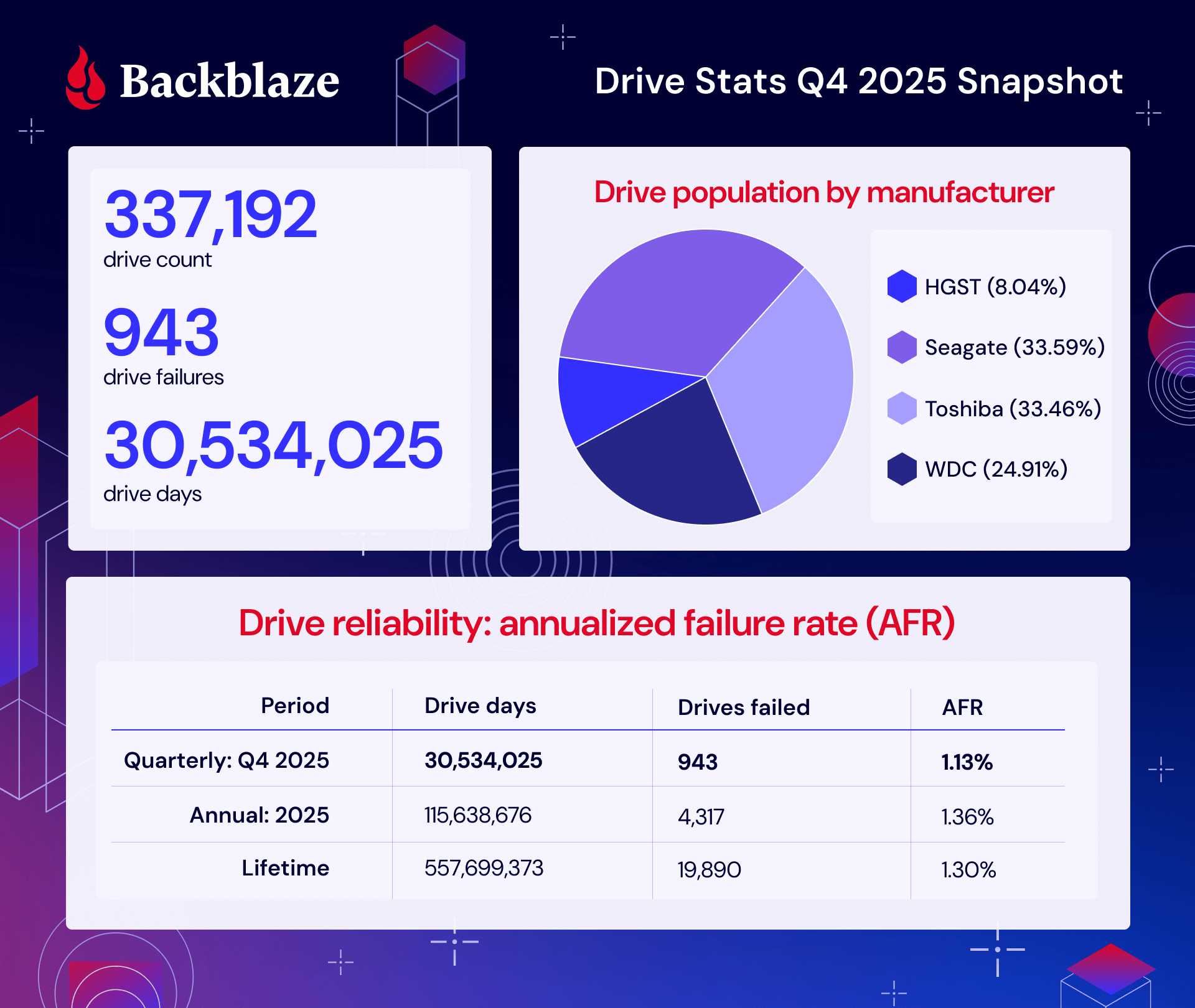

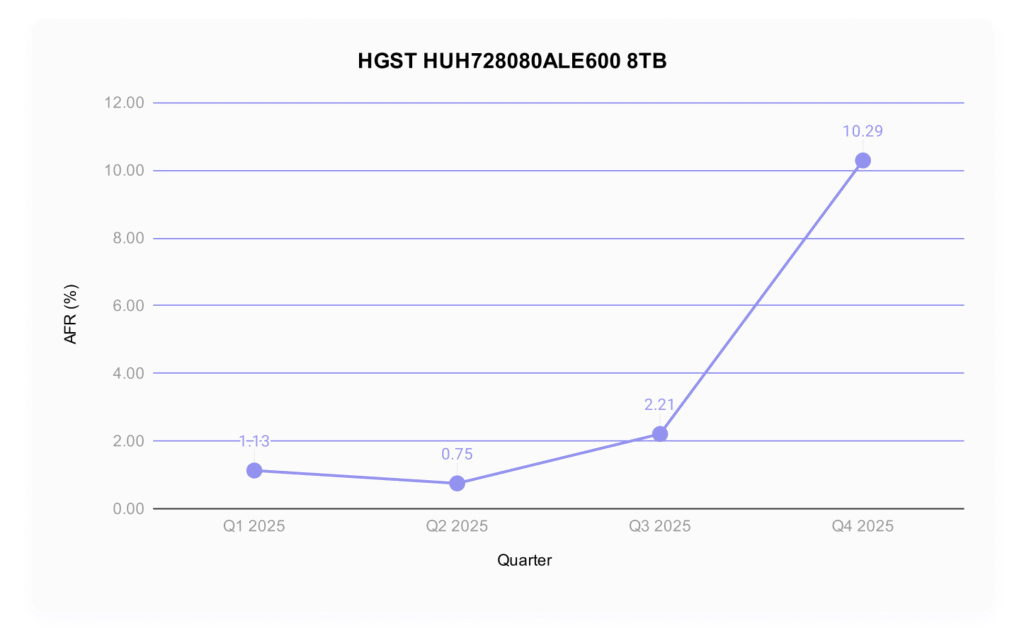
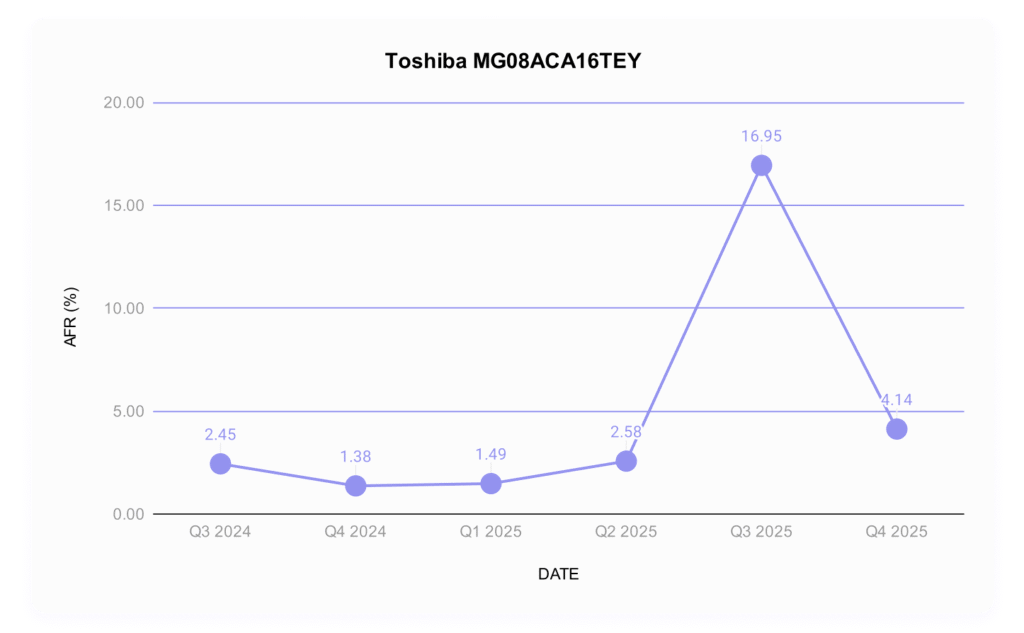


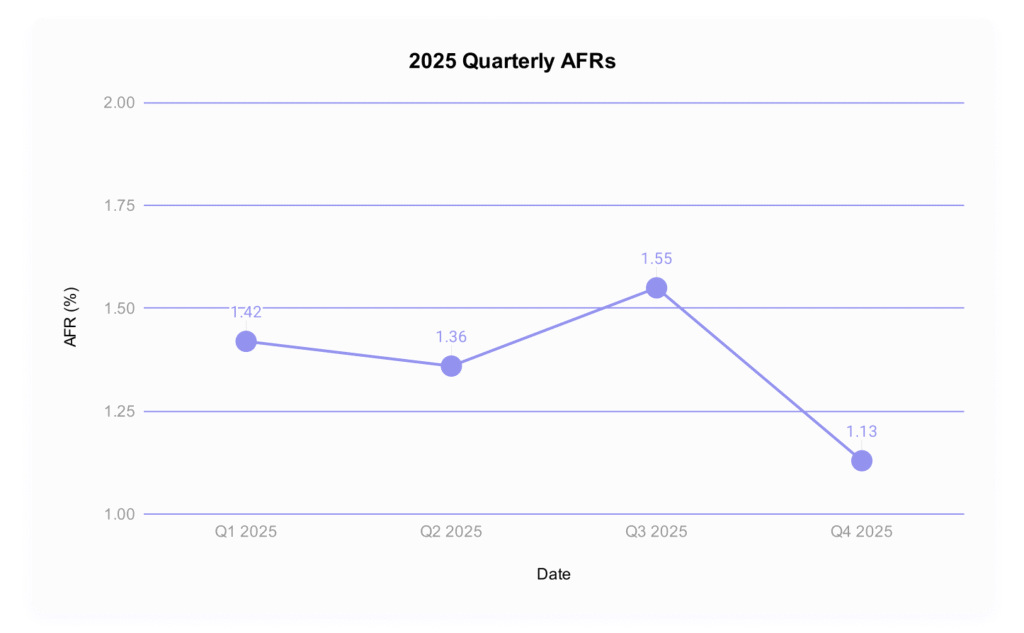

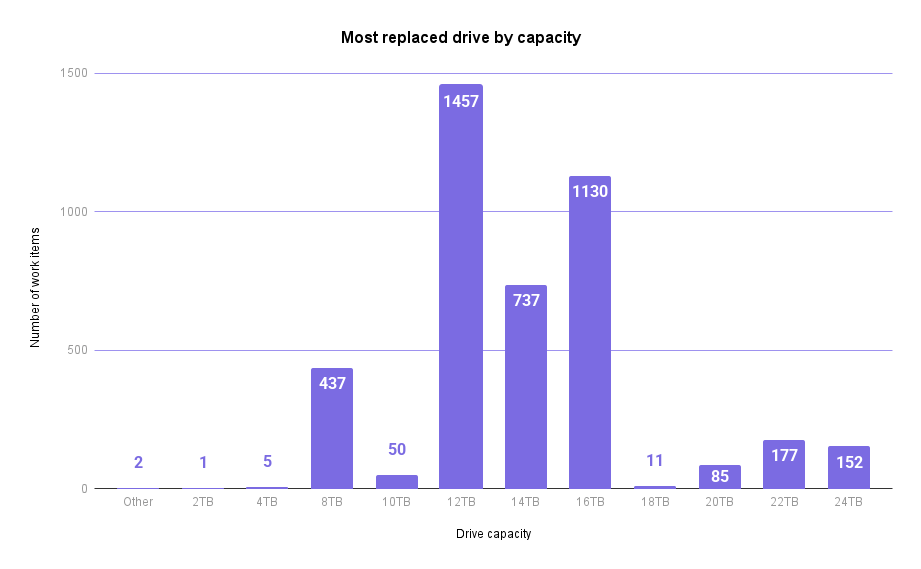
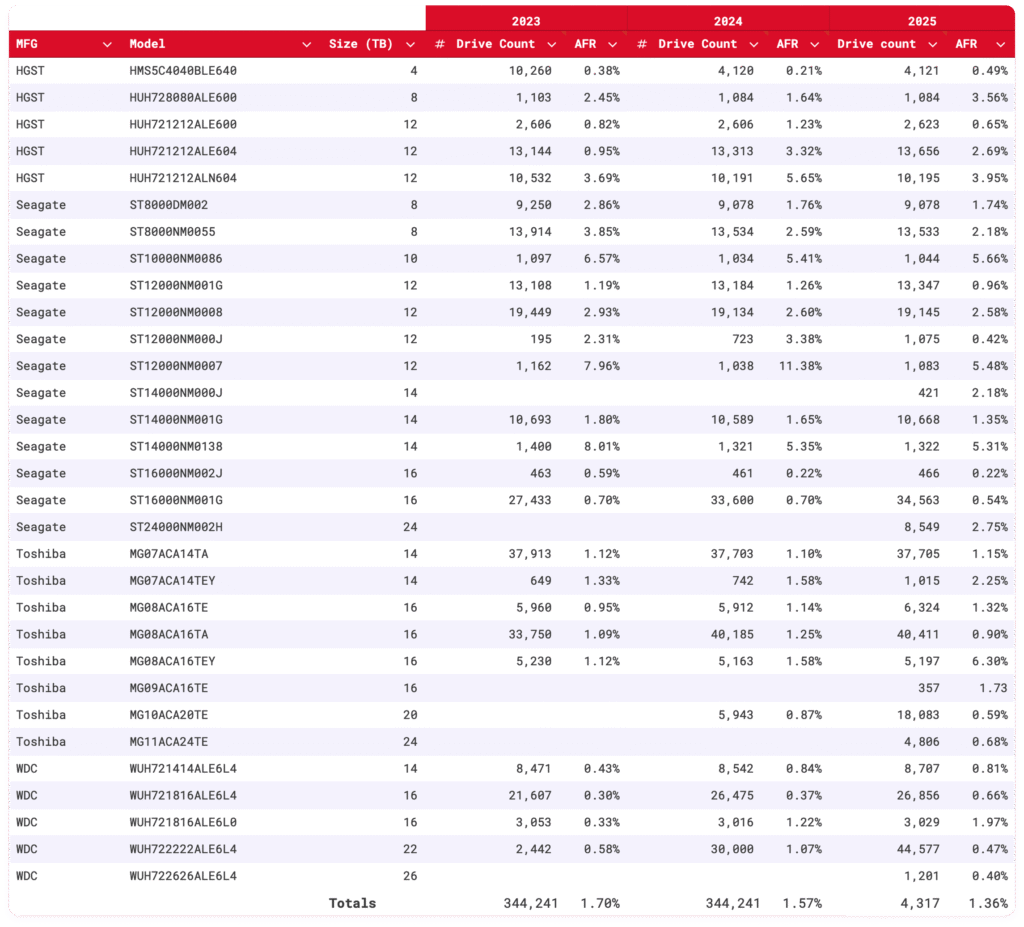

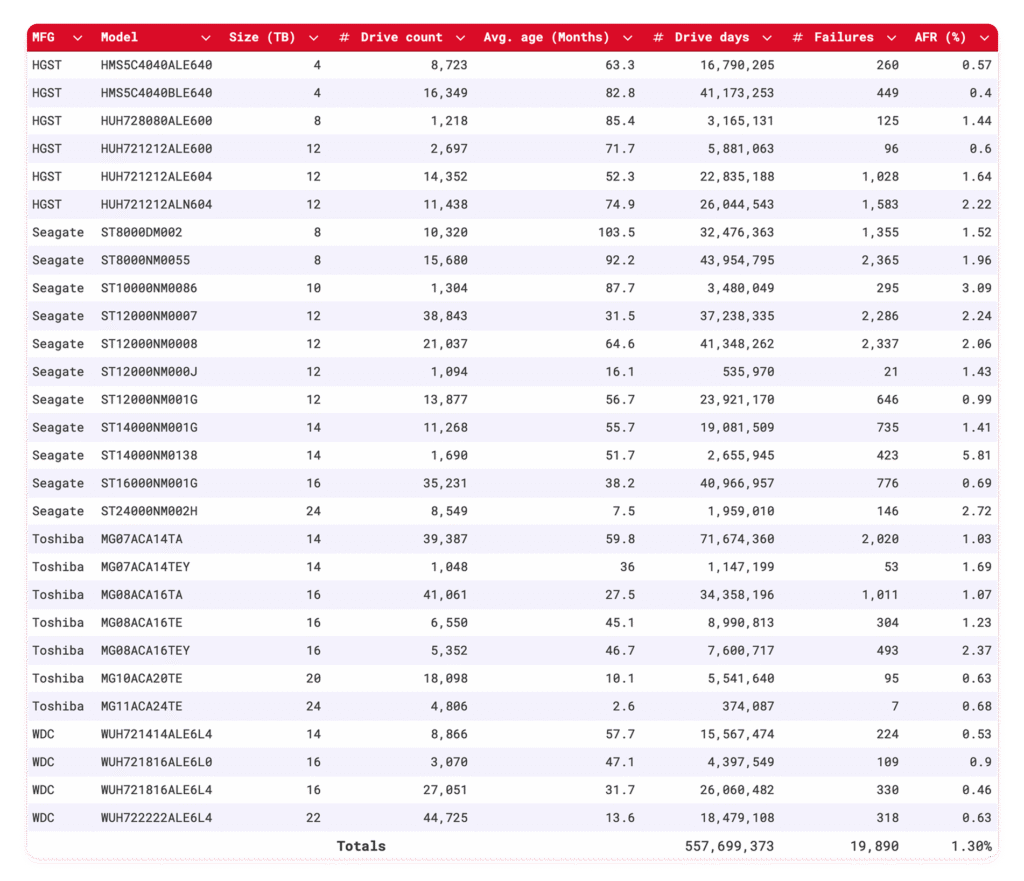


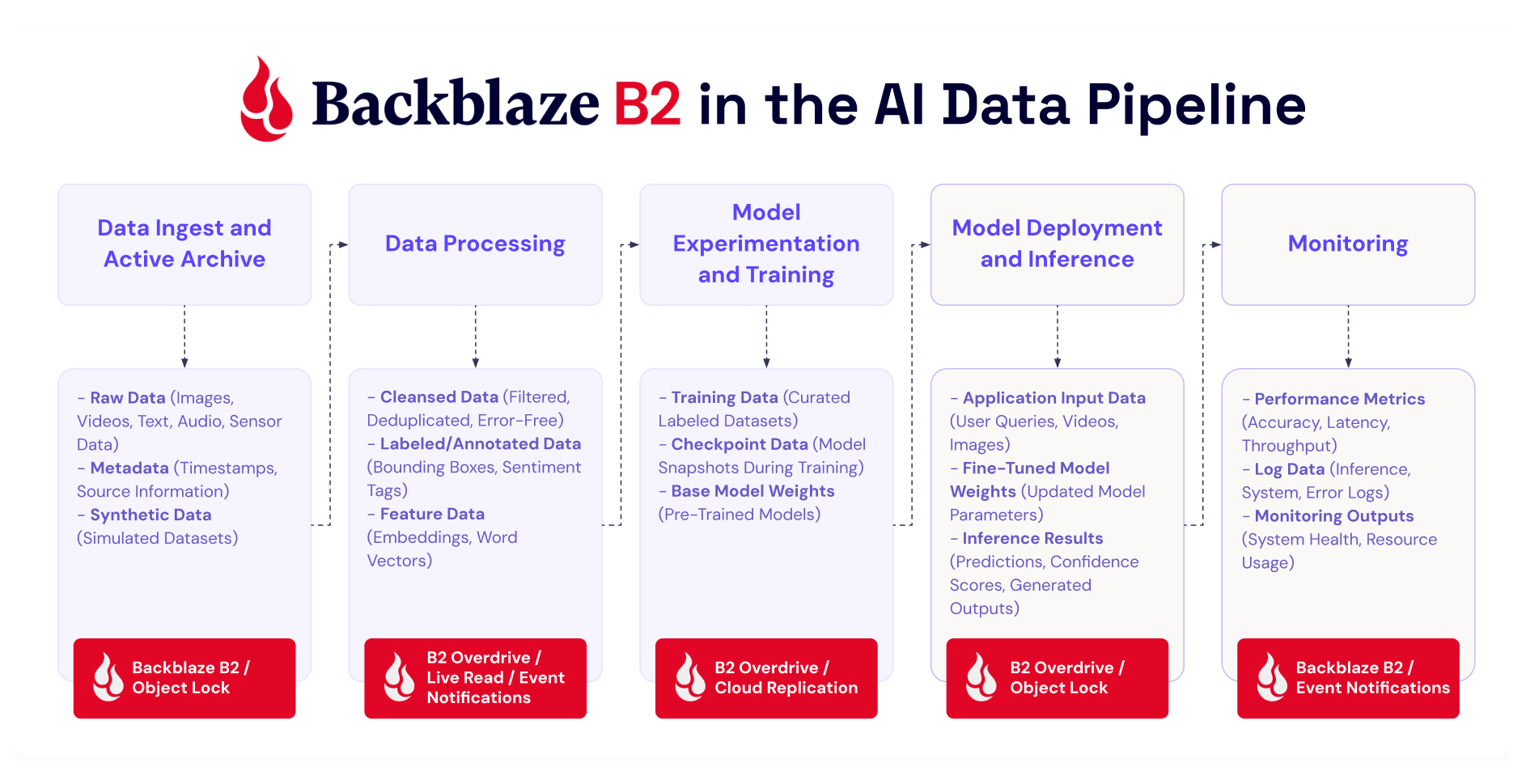

 ISP-Regional traffic dominates in total traffic volume. This region has the largest data center footprint behind it, with connectivity to internet exchanges (IX) such as