Tag Archives: Foundational (100)

How The Mill Adventure enabled data-driven decision-making in iGaming using Amazon QuickSight

Post Syndicated from Deepak Singh original https://aws.amazon.com/blogs/big-data/how-the-mill-adventure-enabled-data-driven-decision-making-in-igaming-using-amazon-quicksight/

This post is co-written with Darren Demicoli from The Mill Adventure.

The Mill Adventure is an iGaming industry enabler offering customizable turnkey solutions to B2B partners and custom branding enablement for its B2C partners. They provide a complete gaming platform, including licenses and operations, for rapid deployment and success in iGaming, and are committed to improving the iGaming experience by being a differentiator through innovation. The Mill Adventure already provides its services to a number of iGaming brands and seeks to continuously grow through the ranks of the industry.

In this post, we show how The Mill Adventure is helping its partners answer business-critical iGaming questions by building a data analytics application using modern data strategy using AWS. This modern data strategy approach has led to high velocity innovation while lowering the total operating cost.

With a gross market revenue exceeding $70 billion and a global player base of around 3 billion players (per a recent imarc Market Overview 2022-2027), the iGaming industry has, without a doubt, been booming over the past few years. This presents a lucrative opportunity to an ever-growing list of businesses seeking to tap into the market and attract a bigger share as their audience. Needless to say, staying competitive in this somewhat saturated market is extremely challenging. Making data-driven decisions is critical to the growth and success of iGaming businesses.

Business challenges

Gaming companies typically generate a massive amount of data, which could potentially enable meaningful insights and answer business-critical questions. Some of the critical and common business challenges in iGaming industry are:

  • What impacts the brand’s turnover—its new players, retained players, or a mix of both?
  • How to assess the effectiveness of a marketing campaign? Should a campaign be reinstated? Which games to promote via campaigns?
  • Which affiliates drive quality players that have better conversion rates? Which paid traffic channels should be discontinued?
  • For how long does the typical player stay active within a brand? What is the lifetime deposit from a player?
  • How to improve the registration to first deposit processes? What are the most pressing issues impacting player conversion?

Though sufficient data was captured, The Mill Adventure found two key challenges in their ability to generate actionable insights:

  • Lack of analysis-ready datasets (not raw and unusable data formats)
  • Lack of timely access to business-critical data

For example, The Mill Adventure generates over 50 GB of data daily. Its partners have access to this data. However, due to the data being in a raw form, they find it of little value in answering their business-critical questions. This affects their decision-making processes.

To address these challenges, The Mill Adventure chose to build a modern data platform on AWS that was not only capable of providing timely and meaningful business insights for the iGaming industry, but also efficiently manageable, low-cost, scalable, and secure.

Modern data architecture

The Mill Adventure wanted to build a data analytics platform using a modern data strategy that would grow as the company grows. Key tenets of this modern data strategy are:

  • Build a modern business application and store data in the cloud
  • Unify data from different application sources into a common data lake, preferably in its native format or in an open file format
  • Innovate using analytics and machine learning, with an overarching need to meet security and governance compliance requirements

A modern data architecture on AWS applies these tenets. Two key features that form the basic foundation of a modern data architecture on AWS are serverless and microservices.

The Mill Adventure solution

The Mill Adventure built a serverless iGaming data analytics platform that allows its partners to have quick and easy access to a dashboard with data visualizations driven by the varied sources of gaming data, including real-time streaming data. With this platform, stakeholders can use data to devise strategies and plan for future growth based on past performance, evaluate outcomes, and respond to market events with more agility. Having the capability to access insightful information in a timely manner and respond promptly has substantial impact on the turnover and revenue of the business.

A serverless iGaming platform on AWS

In building the iGaming platform, The Mill Adventure was quick to recognize the benefits of having a serverless microservice infrastructure. We wanted to spend time on innovating and building new applications, not managing infrastructure. AWS services such as Amazon API Gateway, AWS Lambda, Amazon DynamoDB, Amazon Kinesis Data Streams, Amazon Simple Storage Service (Amazon S3), Amazon Athena, and Amazon QuickSight are at the core of this data platform solution. Moving to AWS serverless services has saved time, reduced cost, and improved productivity. A microservice architecture has enabled us to accelerate time to value, increase innovation speed, and reduce the need to re-platform, refactor, and rearchitect in the future.

The following diagram illustrates the data flow from the gaming platform to QuickSight.

The data flow includes the following steps:

  1. As players access the gaming portal, associated business functions such as gaming activity, payment, bonus, accounts management, and session management capture the relevant player actions.
  2. Each business function has a corresponding Lambda-based microservice that handles the ingestion of the data from that business function. For example, the Session service handles player session management. The Payment service handles player funds, including deposits and withdrawals from player wallets. Each microservice stores data locally in DynamoDB and manages the create, read, update, and delete (CRUD) tasks for the data. For event sourcing implementation details, see How The Mill Adventure Implemented Event Sourcing at Scale Using DynamoDB.
  3. Data records resulting from the CRUD outputs are written in real time to Kinesis Data Streams, which forms the primary data source for the analytics dashboards of the platform.
  4. Amazon S3 forms the underlying storage for data in Kinesis Data Streams and forms the internal real-time data lake containing raw data.
  5. The raw data is transformed and optimized through custom-built extract, transform, and load (ETL) pipelines and stored in a different S3 bucket in the data lake.
  6. Both raw and processed data are immediately available for querying via Athena and QuickSight.

Raw data is transformed, optimized, and stored as processed data using an hourly data pipeline to meet analytics and business intelligence needs. The following figure shows an example of record counts and the size of the data being written into Kinesis Data Streams, which eventually needs to be processed from the data lake.

These data pipeline jobs can be broadly classified into six main stages:

  • Cleanup – Filtering out invalid records
  • Deduplicate – Removing duplicate data records
  • Aggregate at various levels – Grouping data at various aggregation levels of interest (such as per player, per session, or per hour or day)
  • Optimize – Writing files to Amazon S3 in optimized Parquet format
  • Report – Triggering connectors with updated data (such as updates to affiliate providers and compliance)
  • Ingest – Triggering an event to ingest data in QuickSight for analytics and visualizations

The output of this data pipeline is two-fold:

  • A transformed data lake that is designed and optimized for fast query performance
  • A refreshed view of data for all QuickSight dashboards and analyses

Cultivating a data-driven mindset with QuickSight

The Mill Adventure’s partners access their data securely via QuickSight datasets. These datasets are purposefully curated views on top of the transformed data lake. Each partner can access and visualize their data immediately. With QuickSight, partners can build useful dashboards without having deep technical knowledge or familiarity with the internal structure of the data. This approach significantly reduces the time and effort required and speeds up access to valuable gaming insights for business decision-making.

The Mill Adventure also provides each partner with a set of readily available dashboards. These dashboards are built on the years of experience that The Mill Adventure has in the iGaming industry, cover the most common business intelligence requirements, and jumpstart a data-driven mindset.

In the following sections, we provide a high-level overview of some of The Mill Adventure iGaming dashboard features and how these are used to meet the iGaming business analytics needs.

Key performance indicators

This analysis provides a comprehensive set of iGaming key performance indicators (KPIs) across different functional areas, including but not limited to payment activity (deposits and withdrawals), game activity (bets, gross game wins, return to player) and conversion metrics (active customers, active players, unique depositing customers, newly registered customers, new depositing customers, first-time depositors). These are presented concisely in both a quantitative view and in more visual forms.

In the following example KPI report, we can see how by presenting different iGaming metrics for key periods and lifetime, we can identify the overall performance of the brand.

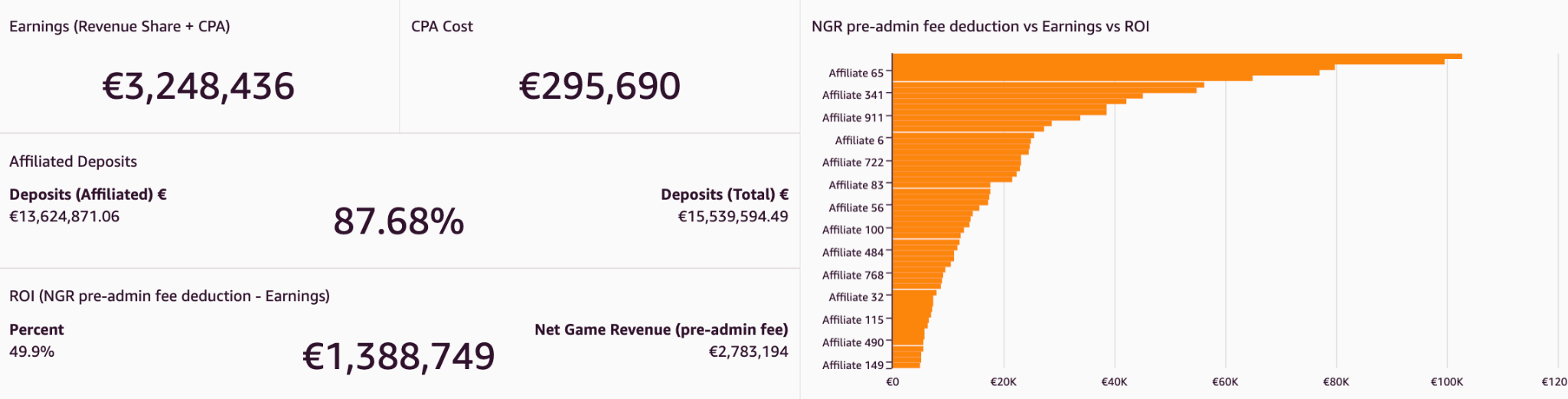
Affiliates analysis

This analysis presents metrics related to the activity generated by players acquired through affiliates. Affiliates usually account for a large share of the traffic driven to gaming sites, and such a report helps identify the most effective affiliates. It informs performance trends per affiliate and compares across different affiliates. By combining data from multiple sources via QuickSight cross-data source joins, affiliate provider-related data such as earnings and clicks can be presented together with other key gaming platform metrics. By having these metrics broken down by affiliate, we can determine which affiliates contribute the most to the brand, as shown in the following example figure.
Cohort analysis

Cohort analyses track the progression of KPIs (such as average deposits) over a period of time for groups of players after their first deposit day. In the following figure, the average deposits per user (ADPU) is presented for players registering in different quarters within the last 2 years. By moving horizontally along each row on the graph, we can see how the ADPU changes for successive quarters for the same group of players. In the following example, the ADPU decreases substantially, indicating higher player churn.
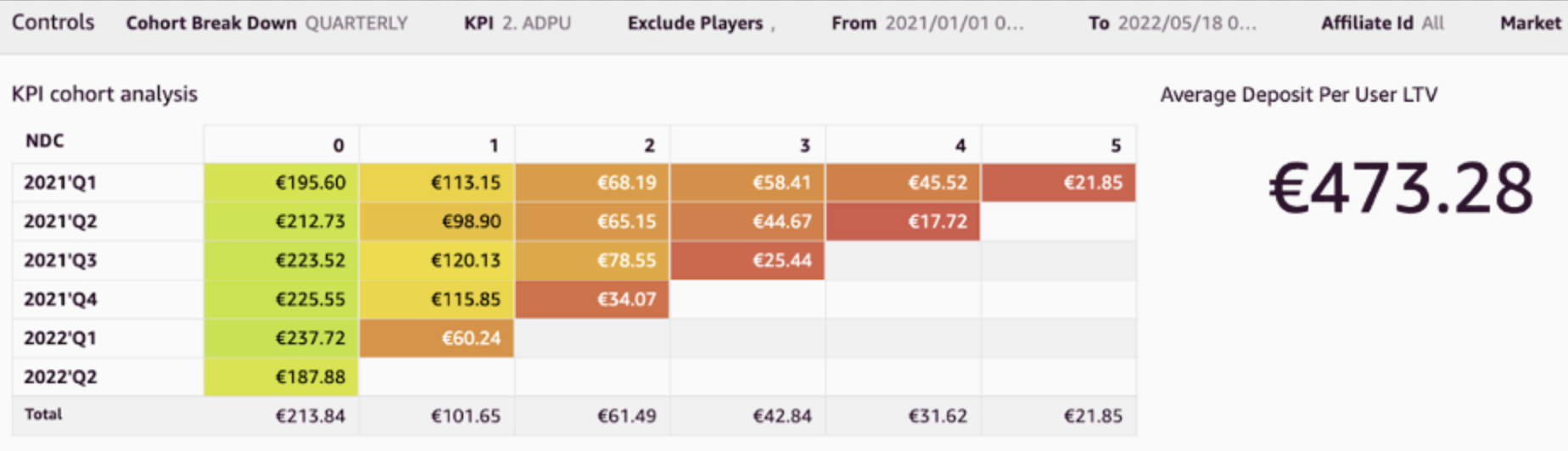
We can use cohort analyses to calculate the churn rate (rate of players who become inactive). Additionally, by averaging the ADPU figures from this analysis, you can extract the lifetime value (LTV) of the ADPU. This shows the average deposit that can be expected to be deposited by players over their lifetime with the brand.

Player onboarding journey

Player onboarding is not a single-step process. In particular, jurisdictional requirements impose a number of compliance checks that need to be fulfilled along various stages during registration flow. All these, plus other steps along the registration (such as email verification), could pose potential pitfalls for players, leading them to fail to complete registration. Showing these steps in QuickSight funnel visuals helps identify such issues and pinpoint any bottlenecks in such flows, as shown in the following example. Additionally, Sankey visuals are used to monitor player movement across registration steps, identifying steps that need to be optimized.

Campaign outcome analysis

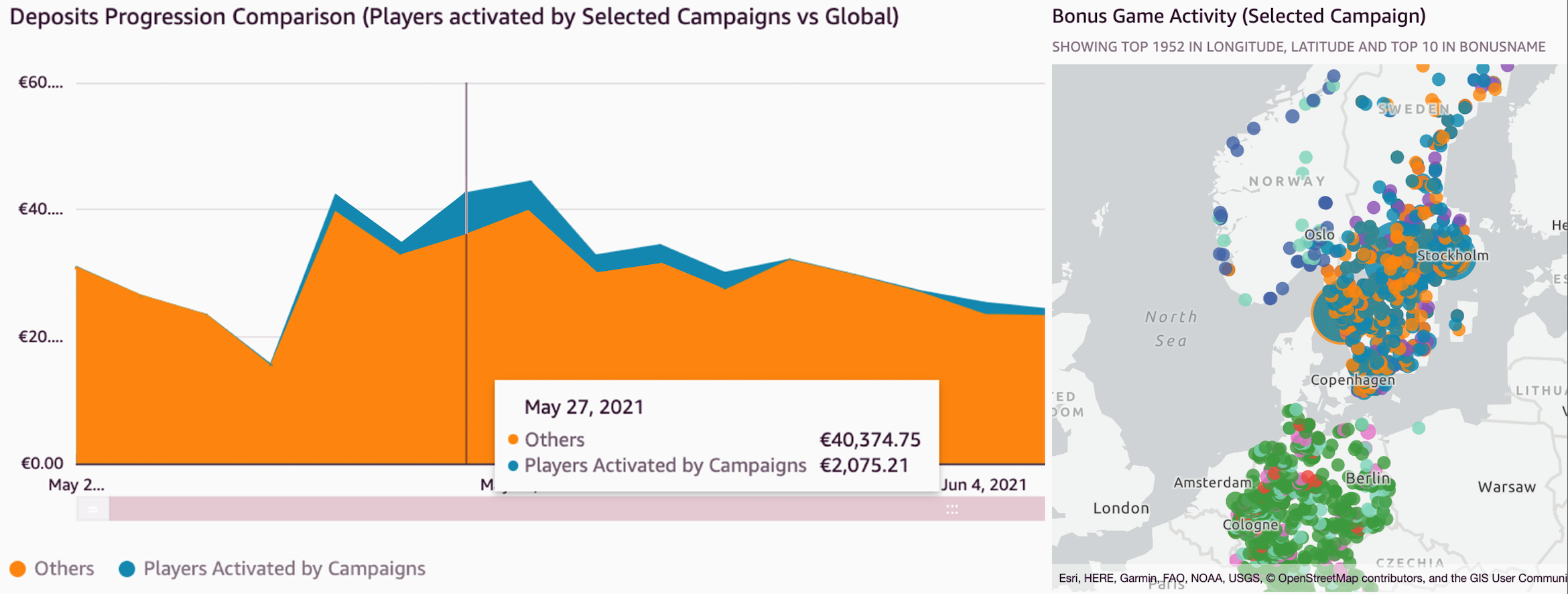
Bonus campaigns are a valuable promotional technique used to reward players and boost engagement. Campaigns can drive turnover and revenue, but there is always an inherent cost associated. It’s critical to assess the performance of campaigns and determine the net outcome. We have built a specific analysis to simplify the task of evaluating these promotions. A number of key metrics related to players activated by campaigns are available. These include both monetary incentives for game activity and deposits and other details related to player demographics (such as country, age group, gender, and channel). Individual campaign performance is analyzed and high-performance ones are identified.

In the following example, the figure on the left shows a time series distribution of deposits coming from campaigns in comparison to the global ones. The figure on the right shows a geographic plot of players activated from selected campaigns.
Demographics distribution analysis

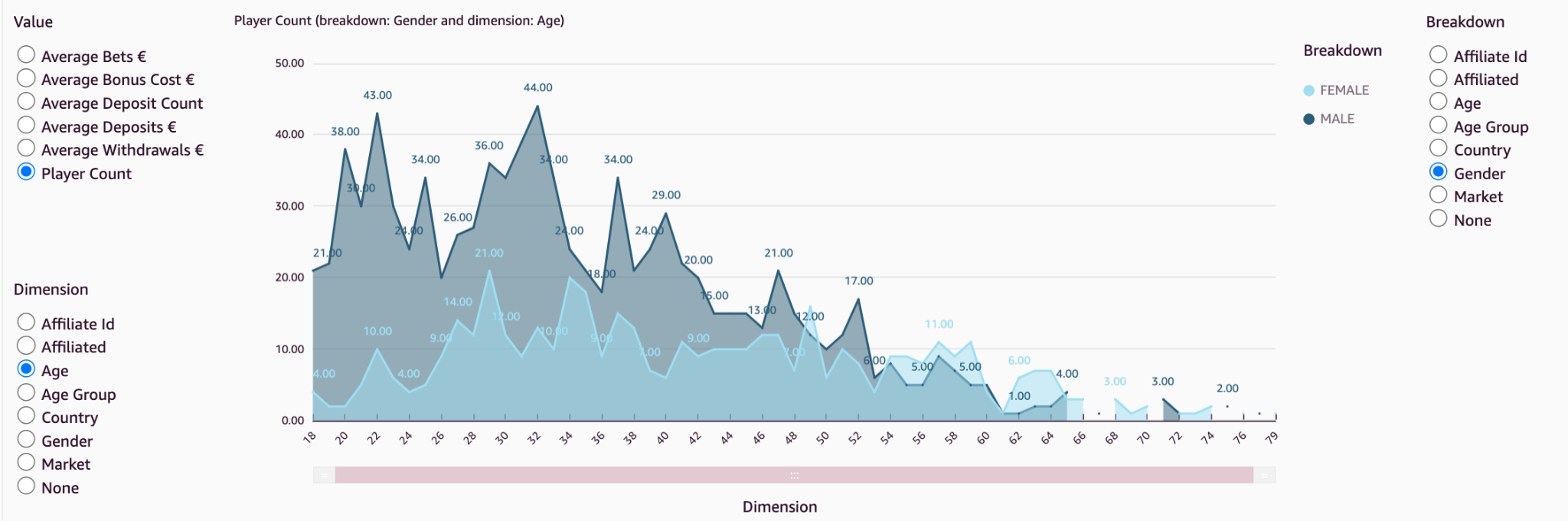
Brands may seek to improve player engagement and retention by tailoring their content for their player base. They need to collect and understand information about their players’ demographics. Players’ demographic distribution varies from brand to brand, and the outcome of actions taken on different brands will vary due to this distribution. Keeping an eye on this demographic (age, country, gender) distribution helps shape a brand strategy in the best way that suits the player base and helps choose the right promotions that appeal most to its audience.

Through visuals such as the following example, it’s possible to quickly analyze the distribution of the selected metric along different demographic categories.
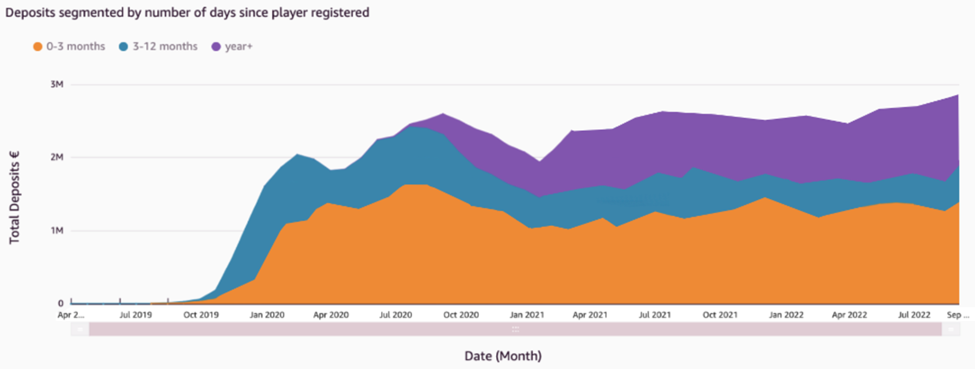
In addition, grouping players by the number of days since registration indicates which players are making a higher contribution to revenue, whether it is existing players or newly registered players. In the following figure, we can see that players who registered in the last 3 months continually account for the highest contribution to deposits. In addition, the proportion of deposits coming from the other two bands of players isn’t increasing, indicating an issue with player retention.
Compliance and responsible gaming

The Mill Adventure treats player protection with the utmost priority. Each iGaming regulated market has its own rules that need to be followed by the gaming operators. These include a number of compliance reports that need to be regularly sent to authorities in the respective jurisdictions. This process was simplified for new brands by creating a common reports template and automating the report creation in QuickSight. This helps new B2B brands meet these reporting requirements quickly and with minimal effort.

In addition, a number of control reports highlighting different areas of player protection are in place. As shown in the following example, responsible gaming reports such as those outlining player behavior deviations help identify accounts with problematic gambling patterns.

Players whose gaming pattern varies from the identified norm are flagged for inspection. This is useful to identify players who may need intervention.

Assessing game play and releases

It’s important to measure the performance and popularity of new games post release. Metrics such as unique player participation and player stakes are monitored during the initial days after the release, as shown in the following figures.
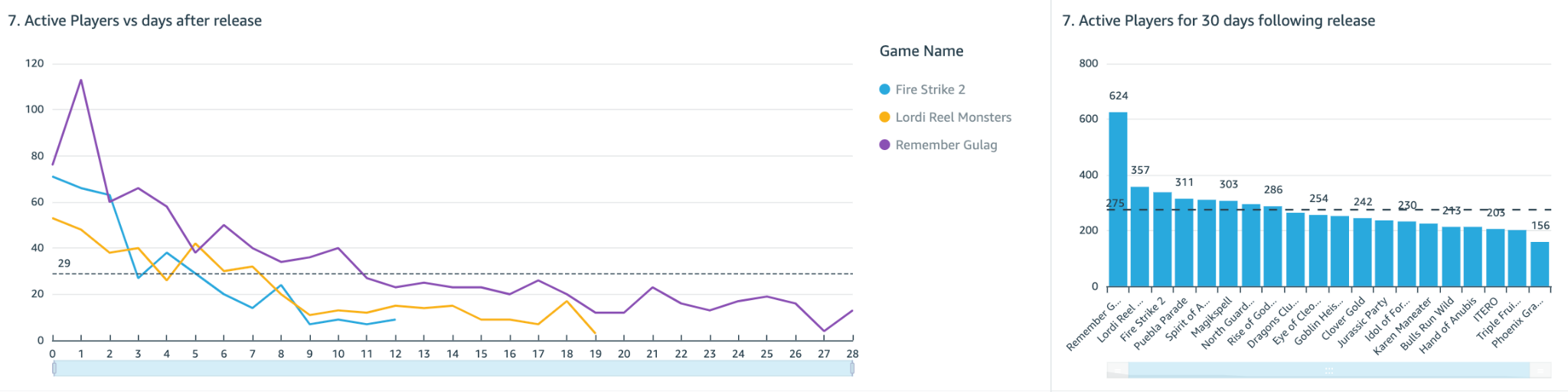
Not only does this help evaluate the overall player engagement, but it can also give a clear indication of how these games will perform in the future. By identifying popular games, a brand may choose to focus marketing campaigns on those games, and therefore ensure that it’s promoting games that appeal to its player base.

As shown in these example dashboards, we can use QuickSight to design and create business analytics insights of the iGaming data. This helps us answer real-life business-critical questions and take measurable actions using these insights.

Conclusion

In the iGaming industry, decisions not backed up by data are like an attempt to hit the bullseye blindfolded. With QuickSight, The Mill Adventure empowers its B2B partners and customers to harness data in a timely and convenient manner and support decision-making with winning strategies. Ultimately, in addition to gaining a competitive edge in maximizing revenue opportunities, improved decision-making will also lead to enhanced player experiences.

Reach out to The Mill Adventure and kick-start your iGaming journey today.

Explore rich set of out-of-the-box Amazon QuickSight ML Insights. Amazon QuickSight Q enables dashboards with natural language querying capabilities. For more information and resources on how to get started with free trial, visit Amazon QuickSight.


About the authors

Darren Demicoli is a Senior Devops and Business Intelligence Engineer at The Mill Adventure. He has worked in different roles in technical infrastructure, software development and database administration and has been building solutions for the iGaming sector for the past few years. Outside work, he enjoys travelling, exploring good food and spending time with his family.

Padmaja Suren is a Technical Business Development Manager serving the Public Sector Field Community in Market Intelligence on Analytics. She has 20+ years of experience in building scalable data platforms using a variety of technologies. At AWS she has served as Specialist Solution Architect on services such as Database, Analytics and QuickSight. Prior to AWS, she has implemented successful data and BI initiatives for diverse industry sectors in her capacity as Datawarehouse and BI Architect. She dedicates her free time on her passion project SanghWE which delivers psychosocial education for sexual trauma survivors to heal and recover.

Deepak Singh is a Solution Architect at AWS with specialization in business intelligence and analytics. Deepak has worked across a number of industry verticals such as Finance, Healthcare, Utilities, Retail, and High Tech. Throughout his career, he has focused on solving complex business problems to help customers achieve impactful business outcomes using applied intelligence solutions and services.

AWS successfully renews GSMA security certification for US East (Ohio) and Europe (Paris) Regions

Post Syndicated from Janice Leung original https://aws.amazon.com/blogs/security/aws-successfully-renews-gsma-security-certification-for-us-east-ohio-and-europe-paris-regions/

Amazon Web Services is pleased to announce that our US East (Ohio) and Europe (Paris) Regions have been re-certified through October 2023 by the GSM Association (GSMA) under its Security Accreditation Scheme Subscription Management (SAS-SM) with scope Data Centre Operations and Management (DCOM).

The US East (Ohio) and Europe (Paris) Regions first obtained GSMA certification in September and October 2021, respectively. This renewal demonstrates our continuous commitment to adhere to the heightened expectations for cloud service providers. AWS customers who provide an embedded Universal Integrated Circuit Card (eUICC) for mobile devices can run their remote provisioning applications with confidence in the AWS Cloud in the GSMA-certified Regions.

For up-to-date information related to the certification, visit the AWS Compliance Program page and choose GSMA under Europe, Middle East & Africa.

AWS was evaluated by independent third-party auditors selected by GSMA. The Certificate of Compliance that shows that AWS achieved GSMA compliance status is available on the GSMA website and through AWS Artifact. AWS Artifact is a self-service portal for on-demand access to AWS compliance reports. Sign in to AWS Artifact in the AWS Management Console, or learn more at Getting Started with AWS Artifact.

To learn more about our compliance and security programs, see AWS Compliance Programs. As always, we value your feedback and questions; reach out to the AWS Compliance team through the Contact Us page. If you have feedback about this post, you can submit comments in the Comments section below.

Want more AWS Security news? Follow us on Twitter.

Author

Janice Leung

Janice is a security audit program manager at AWS, based in New York. She leads security audits across Europe and has previously worked in security assurance and technology risk management in the financial industry for 10 years.

Upgrade to Athena engine version 3 to increase query performance and access more analytics features

Post Syndicated from Blayze Stefaniak original https://aws.amazon.com/blogs/big-data/upgrade-to-athena-engine-version-3-to-increase-query-performance-and-access-more-analytics-features/

Customers tell us they want to have stronger performance and lower costs for their data analytics applications and workloads. Customers also want to use AWS as a platform that hosts managed versions of their favorite open-source projects, which will frequently adopt the latest features from the open-source communities. With Amazon Athena engine version 3, we continue to increase performance, provide new features and now deliver better currency with the Trino and Presto projects.

Athena is an interactive query service that makes it easy to analyze data in Amazon Simple Storage Service (Amazon S3) using standard SQL. Athena is serverless, so there is no infrastructure to manage, and you pay only for the queries that you run. Customers such as Orca Security, the Agentless Cloud Security Platform, are already realizing the benefits of using Athena engine version 3 with the Apache Iceberg.

“At Orca Security, we are excited about the launch of Athena engine version 3,” says Arie Teter, VP R&D at Orca Security. “With Athena engine version 3, we will be able to query our massive petabyte-scale data lake more efficiently and at a lower cost. We are especially excited about being able to leverage all the latest Trino features with Athena’s new engine in order to deliver our customers the best-of-breed, ML-driven anomaly detection solution.”

In this post, we discuss benefits of Athena engine version 3, performance benchmark results for different table formats and information about upgrading to engine version 3.

New features, more often

One of the most exciting aspects of engine version 3 is its new continuous integration approach to open source software management that will improve currency with the Trino and PrestoDB projects. This approach enables Athena to deliver increased performance and new features at an even faster pace.

At AWS, we are committed to bringing the value of open source to our customers and providing contributions to open source communities. The Athena development team is actively contributing bug fixes and security, scalability, performance, and feature enhancements back to these open-source code bases, so anyone using Trino, PrestoDB and Apache Iceberg can benefit from the team’s contributions. For more information on AWS’s commitment to the open-source community, refer to Open source at AWS.

Athena engine version 3 incorporates over 50 new SQL functions, and 30 new features from the open-source Trino project. For example, Athena engine version 3 supports T-Digest functions that can be used to approximate rank-based statistics with high accuracy, new Geospatial functions to run optimized Geospatial queries, and new query syntaxes such as MATCH_RECOGNIZE for identifying data patterns in applications such as fraud detection and sensor data analysis.

Athena engine version 3 also gives you more AWS-specific features. For example, we have worked closely with the AWS Glue data catalog team to improve Athena’s metadata retrieval time, which we explain in the section “Faster query planning with AWS Glue Data Catalog” below.

For more information about what’s new in Athena engine version 3, refer to the Athena engine version 3 Improvements and new features.

Faster runtime, lower cost

Last year, we shared benchmark testing on Athena engine version 2 using TPC-DS benchmark queries at 3 TB scale and observed that query performance improved by three times and cost decreased by 70% as a result of reduced scanned data. These improvements have been a combination of enhancements developed by Athena and AWS engineering teams as well as contributions from the PrestoDB and Trino open-source communities.

The new engine version 3 will allow Athena to continue delivering performance improvements at a rapid pace. We performed benchmark testing on engine version 3 using TPC-DS benchmark queries at 3 TB scale, and observed 20% query performance improvement when compared to the latest release of engine version 2. Athena engine version 3 includes performance improvement across operators, clauses, and decoders: such as performance improvement of joins involving comparisons with the <,<=, >,>= operators, queries that contains JOIN, UNION, UNNEST, GROUP BY clauses, queries using IN predicate with a short list of constant.  Athena engine version 3 also provides query execution improvements that reduce the amount of data scanned which gives you additional performance gains. With Athena, you are charged based on the amount of data scanned by each query, so this also translates to lower costs. For more information, refer to Amazon Athena pricing.

Faster query planning with AWS Glue Data Catalog

Athena engine version 3 provides better integration with AWS Glue Data Catalog to improve query planning performance by up to ten times. Query planning is the process of listing instructions the query engine will follow in order to run a query. During query planning, Athena uses AWS Glue API to retrieve various information such as table and partition metadata, and column statistics. As the number of tables increases, the number of calls to the Glue API for metadata also increase which results in additional query latency. In engine version 3, we reduced this Glue API overhead thus brought down the overall query planning time. For smaller datasets and datasets with large number of tables, you can see the total runtime has been reduced significantly because the query planning time is a higher percentage of the total run time.

Figure 1 below charts the top 10 queries from the TPC-DS benchmark with the most performance improvement from engine version 2 to engine version 3 based on the Amazon CloudWatch metric for total runtime. Each query involves joining multiple tables with complex predicates.

Faster query runtime with Apache Iceberg integration

Athena engine version 3 provides better integration with the Apache Iceberg table format. Features such as Iceberg’s hidden partitioning now augment Athena optimizations such as partition pruning and dynamic filtering to reduce data scanned and improve query performance in Athena engine v3. You do not need to maintain partition columns or even understand the physical table layout to load data to table and achieve good query performance.

We performed TPC-DS benchmark testing by loading data into the Apache Iceberg table format, with hidden partitions configured, and compared the performance between Athena engine version 2 and 3. Figure 2 below is a chart of the top 10 query improvements, which all include complex predicates. The top query, query 52, has five WHERE predicates and two GROUP BY operations. Compared to engine version 2, the query runs thirteen times faster with sixteen times less data scanned on engine version 3.

Upgrading to Athena engine version 3

To use Athena engine version 3, you can create a new workgroup, or configure an existing workgroup, and select the recommended Athena engine version 3. Any Athena workgroup can upgrade from engine version 2 to engine version 3 without interruption in your ability to submit queries. For more information and instructions for changing your Athena engine version, refer to Changing Athena engine versions.

Athena engine version 3 has feature parity with all major features from Athena engine version 2. There are no changes required by you to use features like dynamic partition pruning, Apache Iceberg and Apache Hudi table formats, AWS Lake Formation governed tables integration, and Athena Federated Query in engine version 3.For more information on Athena features, refer to Amazon Athena features, and the Amazon Athena User Guide.

Athena engine version 3 includes additional improvements to support ANSI SQL compliance. This results in some changes to syntax, data processing, and timestamps that may cause errors when running the same queries in the new engine version. For information about error messages, causes, and suggested solutions, refer to Athena engine version 3 Limitations, Breaking changes, Data processing changes, and Timestamp changes.

To make sure that your Athena engine version upgrade goes smoothly, we recommend the following practices to facilitate your upgrade process. After you have confirmed your query behavior works as you expect, you can safely upgrade your existing Athena workgroups.

  • Review the Athena engine version 3 Limitations and Breaking changes and update any affected queries.
  • Test in pre-production to validate and qualify your queries against Athena engine version 3 by creating a test workgroup or upgrading an existing pre-production environment. For example, you can create a new test workgroup running engine version 3 to run integration tests from your pre-production or staging environment, and monitor for failures or performance regressions. For information about CloudWatch metrics and dimensions published by Athena, refer to Monitoring Athena queries with CloudWatch metrics.
  • Upgrade each query based on metrics to test your queries against an Athena engine version 3 workgroup. For example, you can create a new workgroup with engine version 3 alongside your existing engine version 2 workgroup. You can send a small percentage of queries to the engine version 3 workgroup, monitor for failures or performance regressions, then increase the number of queries if they’re successful and performant. Repeat until all your queries have been migrated to Athena engine version 3.

With our simplified automatic engine upgrade process, you can configure existing workgroups to be automatically upgraded to engine version 3 without requiring manual review or intervention. The upgrade behavior is as follows:

  • If Query engine version is set to Automatic, your workgroup will remain on engine version 2 pending the automatic upgrade, and Athena will choose when to upgrade the workgroup to engine version 3. Before upgrading a workgroup, we perform a set of validation tests to confirm that its queries perform correctly and efficiently on engine version 3. Because our validation is performed on a best effort basis, we recommend you perform your own validation testing to ensure all queries run as expected.
  • If Query engine version is set to Manual, you will have the ability to select your version. The default choice is set to engine version 3, with the ability to toggle to engine version 2.

Conclusion

This post discussed Athena engine version 3 benefits, performance benchmark results, and how you can start using engine version 3 today with minimal work required. You can get started with Athena engine version 3 by using the Athena Console, the AWS CLI, or the AWS SDK. To learn more about Athena, refer to the Amazon Athena User Guide.

Thanks for reading this post! If you have questions on Athena engine version 3, don’t hesitate to leave a comment in the comments section.


About the authors

Blayze Stefaniak is a Senior Solutions Architect for the Technical Strategist Program supporting Executive Customer Programs in AWS Marketing. He has experience working across industries including healthcare, automotive, and public sector. He is passionate about breaking down complex situations into something practical and actionable. In his spare time, you can find Blayze listening to Star Wars audiobooks, trying to make his dogs laugh, and probably talking on mute.

Daniel Chen is a Senior Product Manager at Amazon Web Services (AWS) Athena. He has experience in Banking and Capital Market of financial service industry and works closely with enterprise customers building data lakes and analytical applications on the AWS platform. In his spare time, he loves playing tennis and ping pong.

Theo Tolv is a Senior Big Data Architect in the Athena team. He’s worked with small and big data for most of his career and often hangs out on Stack Overflow answering questions about Athena.

Jack Ye is a software engineer of the Athena Data Lake and Storage team. He is an Apache Iceberg Committer and PMC member.

Best practices for setting up Amazon Macie with AWS Organizations

Post Syndicated from Jonathan Nguyen original https://aws.amazon.com/blogs/security/best-practices-for-setting-up-amazon-macie-with-aws-organizations/

In this post, we’ll walk through the best practices to implement before you enable Amazon Macie across all of your AWS accounts within AWS Organizations.

Amazon Macie is a data classification and data protection service that uses machine learning and pattern matching to help secure your critical data in AWS. To do this, Macie first automatically provides an inventory of Amazon Simple Storage Service (Amazon S3) buckets in AWS accounts managed by Macie and identifies S3 buckets with security risks, including unencrypted buckets, publicly accessible buckets, and buckets shared with AWS accounts external to AWS Organizations. Second, Macie applies machine learning and pattern matching techniques to the buckets you select to discover, identify, and create alerts for sensitive data, such as personally identifiable information (PII). With the visibility provided by Macie, you can centrally manage your sensitive data findings across your data estate and automate and take actions on Macie findings.

By enabling Amazon Macie within AWS Organizations, you immediately start receiving the benefits of viewing your Macie policy findings and sensitive data findings from jobs that ran for member AWS accounts. When you enable Macie for member accounts, a service-linked role is created within each member AWS account. Macie uses a service-linked role (AWSServiceRoleForAmazonMacie) to monitor resources on your behalf. The service-linked role has a trust relationship with the Macie service (macie.amazonaws.com). For more information about using Macie in your AWS Organizations architecture, see the AWS Security Reference Architecture (AWS SRA).

The best practices we’ll walk through include how to create least-privilege AWS Identity and Access Management (IAM) policies for Macie-delegated administrators and for security engineers who will use Macie on a day-to-day basis. We’ll also show you how to create classification buckets, provide you with the correct resource permissions to allow the Macie service-linked role in each AWS account, and cover how to troubleshoot common issues.

IAM roles to provision for Amazon Macie

The least-privilege principle is important when managing access to sensitive data within your AWS accounts. In this section, we’ll show you how to create least-privilege IAM roles for the following personas for Macie:

  1. Data administrator
  2. Data security engineers
  3. DevOps/DevSecOps engineer
  4. Macie sensitive data findings reviewer

The personas can vary based on your organization, and this list is primarily meant to serve as an example. You will need to align the appropriate permissions to each role in order to enable Macie with the principle of least privilege. You can create your own customer managed policies after you know the specific permissions required for each persona.

Important: In general, AWS strongly recommends you limit the use of wildcards where possible. However, in some of the persona policies that follow, wildcards are necessary to accomplish the task. To implement the principle of least privilege where wildcards must be used, you should put limits on the resources that the persona can access. You can do this by adding condition keys for Macie; or if you deployed Macie by using AWS Organizations, you can add a condition for aws:ResourceOrgId.

Persona 1: Data administrator

This persona is a data administrator who is responsible for setting up and configuring Macie within AWS Organizations. To enforce separation of duties, this persona is not able to view or access Macie findings. You can perform the following steps to verify that the entity has the required permissions to enable the Macie-delegated administrator, and onboard the member AWS accounts within AWS Organizations. You can find the full procedure for each step by following the links to the Macie User Guide.

  1. Verify your permissions
  2. Designate the delegated Macie administrator account
  3. Automatically enable and add new organization accounts
  4. Enable and add existing organization accounts

It’s important to note that Macie is a Regional service. This means that the designation of a Macie administrator account is a Regional designation. A Macie administrator account in a specific AWS Region can manage Macie for member accounts only in that Region. To centrally manage Macie accounts in multiple Regions, the management account must log in to each Region where the organization uses Macie, and then designate the Macie administrator account in each of those Regions. You can use a single Macie administrator account to centrally manage up to 5,000 AWS accounts.

In the following policy, replace <account-id> with the Macie-delegated administrator account ID.

{
    "Version": "2012-10-17",
    "Statement": [
        {
            "Sid": "OrganizationsReadAccess",
            "Effect": "Allow",
            "Action": [
                "organizations:ListDelegatedAdministrators",
                "organizations:ListAccounts",
                "organizations:DescribeOrganization",
                "organizations:ListAWSServiceAccessForOrganization"
            ],
            "Resource": "*"
        },
        {
            "Sid": "AWSServiceAccess",
            "Effect": "Allow",
            "Action": "organizations:EnableAWSServiceAccess",
            "Resource": "*",
            "Condition": {
                "StringLikeIfExists": {
                    "organizations:ServicePrincipal": "macie.amazonaws.com"
                }
            }
        },
        {
            "Sid": "RegisterDelegatedAdministrator",
            "Effect": "Allow",
            "Action": "organizations:RegisterDelegatedAdministrator",
            "Resource": "arn:*:organizations::*:<account-id>",
            "Condition": {
                "StringLikeIfExists": {
                    "organizations:ServicePrincipal": "macie.amazonaws.com"
                }
            }
        }
    ]
}

Persona 2: Data security engineer

This persona is a data security engineer who has day-to-day responsibility for reviewing Macie findings or Macie sensitive data discovery job configurations. Depending on your use case, you may need to separate this persona into two distinct personas where one is responsible to view Macie findings and the other to set Macie job configurations. To allow an IAM principal read-only permissions to view the Macie dashboard, configurations, and features, you can use the following policy. To enforce least privilege and restrict the resources to the Macie-delegated administrator, replace <region> with the AWS Region in which the delegated administrator is designated, and replace <account-id> with the Macie delegated administrator account ID.

{
    "Version": "2012-10-17",
    "Statement": [
        {
            "Sid": "MacieJobConfiguration",
            "Effect": "Allow",
            "Action": [
                "macie2:GetFindingsFilter",
                "macie2:DescribeClassificationJob",
                "macie2:GetCustomDataIdentifier",
                "macie2:BatchGetCustomDataIdentifiers",
                "macie2:ListTagsForResource",
                "macie2:GetMember",
                "macie2:GetAllowList"
            ],
            "Resource": [
                "arn:aws:macie2:<region>:<account-id>:custom-data-identifier/*",
                "arn:aws:macie2:<region>:<account-id>:findings-filter/*",
                "arn:aws:macie2:<region>:<account-id>:member/*",
                "arn:aws:macie2:<region>:<account-id>:classification-job/*",
                "arn:aws:macie2:<region>:<account-id>:allow-list/*"
            ]
        },
        {
            "Sid": "MacieFindings",
            "Effect": "Allow",
            "Action": [
                "macie2:ListFindings",
                "macie2:ListClassificationJobs",
                "macie2:ListFindingsFilters",
                "macie2:GetFindings",
                "macie2:GetUsageTotals",
                "macie2:GetSensitiveDataOccurrencesAvailability",
                "macie2:GetFindingsPublicationConfiguration",
                "macie2:GetSensitiveDataOccurrences",
                "macie2:GetClassificationExportConfiguration",
                "macie2:GetUsageStatistics",
                "macie2:GetRevealConfiguration",
                "macie2:GetFindingStatistics",
                "macie2:GetBucketStatistics",
                "macie2:GetMacieSession",
                "macie2:ListMembers",
                "macie2:ListAllowLists",
                "macie2:DescribeBuckets",
                "macie2:ListCustomDataIdentifiers",
                "macie2:ListManagedDataIdentifiers",
                "macie2:SearchResources",
                "macie2:ListInvitations"
            ],
            "Resource": "*"
        }
    ]
}

Persona 3: DevOps/DevSecOps engineer

This persona is a DevOps or DevSecOps engineer who is responsible for building and maintaining applications that run on AWS resources. These application builders typically receive top-level security guidance from central security, and they are directly responsible for the security of the applications that they design, build, and operate in AWS. DevSecOps engineers might need limited additional IAM permissions to configure Macie discovery jobs, depending on how Macie will be used within AWS Organizations. To allow an IAM principal the ability to pause or stop Macie jobs, you can add the following policy. Be sure to replace <region> with the AWS Region in which the delegated administrator is designated, and replace <account-id> with the Macie delegated administrator AWS account number.

{
    "Version": "2012-10-17",
    "Statement": [
        {
            "Sid": "MacieUpdateJobs",
            "Effect": "Allow",
            "Action": [
                "macie2:UpdateClassificationJob",
                "macie2:DescribeClassificationJob"
            ],
            "Resource": "arn:aws:macie2:<region>:<account-id>:classification-job/*"
        },
        {
            "Sid": "MacieListJobs",
            "Effect": "Allow",
            "Action": [
                "macie2:GetClassificationExportConfiguration",
                "macie2:GetMacieSession",
                "macie2:ListClassificationJobs"
            ],
            "Resource": "*"
        }
    ]
}

Persona 4: Macie sensitive data findings reviewer

This persona is a reviewer (usually a security engineer) who is responsible for investigating the sensitive data associated with Macie findings. There are a number of ways this persona can be set up, based on your specific use case and the needs of your organization. In this section, we will describe two of the options for setting up this persona.

Option 1: Enable and use Macie to retrieve and reveal sensitive data samples from the delegated Macie account where findings are consolidated

In this option, Macie doesn’t use the Macie service-linked role for your account to perform these tasks. Instead, you use your IAM identity to locate, retrieve, encrypt, and reveal the samples for sensitive findings. You can retrieve and reveal sensitive data samples for a finding if you’re allowed to access the requisite resources and data, and you’re allowed to perform the requisite actions. All the requisite actions are logged in AWS CloudTrail. In the following policy, be sure to replace <account-id>, <region>, and <key-id> with your own values.

{
    "Version": "2012-10-17",
    "Statement": [
        {
            "Sid": "MacieReveal",
            "Effect": "Allow",
"Action": [
"macie2: UpdateRevealConfiguration",
"macie2:GetRevealConfiguration
],
            "Resource": " arn:aws:macie2:*:<account-id>:*"
        },
        {
            "Sid": "KMSPermissions",
            "Effect": "Allow",
            "Action": [
                "kms:Decrypt",
                "kms:DescribeKey",
                "kms:GenerateDataKey"
],
"Resource": "arn:aws:kms:<region>:<account-id>:key/<key-id>"
        }

    ]
}

Option 2: Create IAM roles to review findings and objects in the same AWS account where objects are located

For a command line utility to help you investigate the sensitive data, you can use the Macie Finding Data Reveal project. The Macie Finding Data Reveal project needs permissions to invoke macie:GetFindings on the account and s3:GetObject on the specific object reported in the finding.

In the following policy, be sure to replace <DOC-EXAMPLE-BUCKET> with the values for the S3 bucket where the finding is reported; and replace <account-id>, <region>, and <key-id> with your own values. You will also need to configure the KMS key and S3 bucket resource policies to allow permissions to your IAM role.

{
    "Version": "2012-10-17",
    "Statement": [
        {
            "Sid": "InvokeMacieFindings",
            "Effect": "Allow",
            "Action": "macie2:GetFindings",
            "Resource": "*"
        },
        {
            "Sid": "ReportedS3Object",
            "Effect": "Allow",
            "Action": "s3:GetObject",
            "Resource": " arn:aws:s3:::<DOC-EXAMPLE-BUCKET>/*"
        },
     {
               "Sid": "KMSPermissions",
               "Effect": "Allow",
               "Action": [
                   "kms:Decrypt",
                   "kms:DescribeKey",
                   "kms:GenerateDataKey"
   ],
   "Resource": "arn:aws:kms:<region>:<account-id>:key/<key-id>"
        }
    ]
}

If you use an IAM role in the same AWS account, you can specify permissions to access the object and encryption key by using resource policies, and you can leave off the ReportedS3Object and KMSPermissions statement ID (Sid).

Apply SCPs to restrict unauthorized changes to Macie

After you create the personas, you need to verify that the Macie configurations to manage Macie members within AWS Organizations are only updated by authorized IAM principals. The following is an example service control policy (SCP) that you can use to prevent users from disabling Macie, or from modifying Macie configurations within the organization. Make sure to replace <account-id> and <data-admin-role-name> with your own values for the authorized IAM principal.

Note: When you use SCPs within a multi-account structure, it is important to keep in mind quotas that affect AWS Organizations.

{
    "Version": "2012-10-17",
    "Statement": [
        {
            "Sid": "RestrictAmazonMacie",
            "Effect": "Deny",
            "Action": [
                "macie2:DeleteMember",
                "macie2:DisableMacie",
                "macie2:DisableOrganizationAdminAccount",
                "macie2:DisassociateFromAdministratorAccount",
                "macie2:DisassociateMember",
                "macie2:UpdateMacieSession",
                "macie2:UpdateMemberSession"
            ],
            "Resource": [
                "*"
            ],
            "Condition": {
                "StringNotLike": {
                    "aws:PrincipalArn": [
                        "arn:aws:iam::<account-id>:role/<data-admin-role-name>"
                    ]
                }
            }
        }
    ]
}

Allow the Macie service-linked IAM role to scan S3 objects

When Macie analyzes files, it needs permissions to analyze encrypted files. This is important so that you don’t have blind spots in your data protection initiatives.

Before you run a Macie job against S3 objects, make sure that existing KMS keys that are used to encrypt the S3 buckets also grant the Macie service-linked IAM role in the AWS account the necessary permissions to decrypt the S3 objects. For more information, see Service-linked roles for Amazon Macie. To confirm that Macie can scan encrypted objects, the associated KMS key resource policies must allow the Macie service-linked role to use the KMS key to decrypt objects.

Furthermore, depending on the object’s type of encryption, Macie might not be able to fully scan the object. The following table summarizes types of object encryption and the ability Macie has to scan the object. For more information, see Macie supported encryption types.

S3 object encryption type Macie scan ability
Client-side encryption Macie cannot decrypt and analyze the object. Macie can only store and report metadata for the object.
Server-side encryption with Amazon S3 managed keys (SSE-S3) Macie can decrypt and analyze the object.
Server-side encryption with AWS managed AWS KMS encryption (AWS-KMS) Macie can decrypt and analyze the object.
Server-side encryption with customer managed AWS KMS encryption (SSE-KMS) Macie can decrypt and analyze the object if Macie is authorized to use the KMS key. Otherwise, Macie can only store and report metadata for the object.
Server-side encryption with customer provided key (SSE-C) Macie cannot decrypt and analyze the object. Macie can only store and report metadata for the object.

Investigating failed Macie scans of S3 objects

In the event Macie is unable to scan an S3 object, you can view the logs in an S3 bucket configured in the Macie delegated administrator account for sensitive data discovery results, or in centralized AWS CloudTrail logs. The following are common reasons why Macie might not be able to scan S3 objects, and the associated steps for remediating each issue.

KMS implicit deny

The Macie service-linked role (AWSServiceRoleForAmazonMacie) is not authorized to decrypt S3 objects in Macie member accounts, because no resource-based policy allows the kms:Decrypt action. Check for the following error message in AWS CloudTrail if the AWS KMS resource-based policy implicitly denies the Macie service-linked role. Your error message will show <account-id> and <region> as your own values.

sourceIPAddress: "macie.amazonaws.com" and eventSource : "kms.amazonaws.com" and eventName : "Decrypt" and errorCode : "AccessDenied" Filter the results by error message: “User: arn:aws:sts::<account-id>:assumed-role/AWSServiceRoleForAmazonMacie/classifier-content-fetcher is not authorized to perform: kms:Decrypt on resource: arn:aws:kms:<region>:key/key-id because no resource-based policy allows the kms:Decrypt action…”

In order to remediate a KMS implicit deny error for a customer-managed key, add the following to the customer managed key policy. Be sure to replace <account_name> with your own value.

{
            "Sid": "Allow Macie Decrypt S3",
            "Effect": "Allow",
            "Principal": {
                "AWS": "*"
            },
            "Action": [
                "kms:Decrypt",
                "kms:DescribeKey"
            ],
            "Resource": "*",
            "Condition": {
                "StringEquals": {
                    "aws:PrincipalArn": "arn:aws:iam::<account_name>:role/aws-service-role/macie.amazonaws.com/AWSServiceRoleForAmazonMacie"              
            }
          }
  }

KMS explicit deny

The Macie service-linked role (AWSServiceRoleForAmazonMacie) is not authorized to decrypt S3 objects in Macie member accounts, because resource-based policies explicitly deny the kms:Decrypt action for the Macie service-linked role. Check for the following error message in AWS CloudTrail if the AWS KMS resource-based policy explicitly denies the Macie service-linked role. Your error message will show <account_name> and <region> as your own values.

sourceIPAddress : "macie.amazonaws.com" and eventSource : "kms.amazonaws.com" and eventName : "Decrypt" and errorCode : "AccessDenied" Filter the results by error message:
“User:arn:aws:sts::<account_name>:assumed-role/AWSServiceRoleForAmazonMacie/classifier-content-fetcher is not authorized to perform: kms:Decrypt on resource: arn:aws:kms:<region>:key/key-id with an explicit deny in resource-based policy…”

In order to remediate a KMS explicit deny error, update the policy statement to allow the Macie service-linked role access to decrypt and describe key actions. Be sure to replace <account_name> with your own value.

{
            "Sid": "Deny Macie Decrypt S3",
            "Effect": "Deny",
            "Principal": {
                "AWS": "*"
            },
            "Action": [
                "kms:Decrypt",
                "kms:DescribeKey"
            ],
            "Resource": "*",
            "Condition": {
                "StringEquals": {
                    "aws:PrincipalArn": "arn:aws:iam::<account_name>:role/aws-service-role/macie.amazonaws.com/AWSServiceRoleForAmazonMacie"              
              }
            }
 }

S3 explicit deny

The Macie service-linked role (AWSServiceRoleForAmazonMacie) is explicitly denied in the S3 bucket policy. Check for the following error messages in AWS CloudTrail for S3 explicit deny.

userIdentity.sessionContext.sessionIssuer.userName: "AWSServiceRoleForAmazonMacie" and eventSource: "s3.amazonaws.com" and eventName: " GetBucketEncryption" and errorcode: “ServerSideEncryptionConfigurationNotFoundError” and errormessage: “The server side encryption configuration was not found” OR userIdentity.sessionContext.sessionIssuer.userName: "AWSServiceRoleForAmazonMacie" and eventSource: "s3.amazonaws.com" and eventName: "GetBucketReplication" and errorcode: " ReplicationConfigurationNotFoundError" and errormessage: “The replication configuration was not found” OR userIdentity.sessionContext.sessionIssuer.userName: "AWSServiceRoleForAmazonMacie" and eventSource: "s3.amazonaws.com" and eventName: " GetBucketTagging" and errorcode: " NoSuchTagSet" and errormessage: “The TagSet does not exist” OR userIdentity.sessionContext.sessionIssuer.userName: "AWSServiceRoleForAmazonMacie" and eventSource: "s3.amazonaws.com" and eventName: "GetBucketAcl" and responseElements: "null" OR userIdentity.sessionContext.sessionIssuer.userName: "AWSServiceRoleForAmazonMacie" and eventSource: "s3.amazonaws.com" and eventName: " GetBucketPublicAccessBlock" and responseElements: "null" OR userIdentity.sessionContext.sessionIssuer.userName: "AWSServiceRoleForAmazonMacie" and eventSource: "s3.amazonaws.com" and eventName: "GetBucketLocation" and responseElements: "null" OR userIdentity.sessionContext.sessionIssuer.userName: "AWSServiceRoleForAmazonMacie" and eventSource: "s3.amazonaws.com" and eventName: "GetBucketVersioning" and responseElements: "null" OR userIdentity.sessionContext.sessionIssuer.userName: "AWSServiceRoleForAmazonMacie" and eventSource: "s3.amazonaws.com" and eventName: " GetBucketPolicy" and errorcode: "NoSuchBucketPolicy" and errormessage: “The bucket policy does not exist” OR userIdentity.sessionContext.sessionIssuer.userName: "AWSServiceRoleForAmazonMacie" and eventSource: "s3.amazonaws.com" and eventName: " GetBucketEncryption" and responseElements: "null" OR userIdentity.sessionContext.sessionIssuer.userName: "AWSServiceRoleForAmazonMacie" and eventSource: "s3.amazonaws.com" and eventName: " GetBucketPolicy" and responseElements: "null"

Note: Nearly all S3 explicit deny and S3 object ownership error messages have the same event names. See the Ensure S3 and KMS resource policy compliance section in this post to view the S3 object ownership setting.

Macie cannot decrypt and analyze S3 objects if there is an explicit deny in the S3 bucket policy. The following is an example of an S3 bucket policy that explicitly denies the Macie service-linked role. Be sure to replace <DOC-EXAMPLE-BUCKET> and <account_id> with your own values.

{
    "Version": "2012-10-17",
    "Statement": [
        {
            "Sid": "S3ExplicitDeny",
            "Effect": "Deny",
            "Principal": {
                "AWS": "*"
            },
            "Action": [
                "s3:GetObject",
                "s3:GetObjectTagging"
            ],
            "Resource": [
                "arn:aws:s3:::<DOC-EXAMPLE-BUCKET>/*",
                "arn:aws:s3:::<DOC-EXAMPLE-BUCKET>"
            ],
            "Condition": {
                "StringEquals": {
                    "aws:PrincipalArn": "arn:aws:iam::<account_id>:role/aws-service-role/macie.amazonaws.com/AWSServiceRoleForAmazonMacie"
                }
            }
        }
    ]
}

Macie can decrypt and analyze S3 objects if there is no explicit deny in the S3 bucket. The following is an example of the permission for the S3 bucket policy to explicitly allow the Macie service-linked role to have access to your S3 bucket. Be sure to replace <DOC-EXAMPLE-BUCKET> and <account-id> with your own values.

{
    "Version": "2012-10-17",
    "Statement": [
        {
            "Sid": "Allow Macie S3 Read",
            "Effect": "Allow",
            "Principal": {
                "AWS": "*"
            },
            "Action": [
                "s3:ListBucket",
                "s3:GetReplicationConfiguration",
                "s3:GetObject*",
                "s3:GetLifecycleConfiguration",
                "s3:GetEncryptionConfiguration",
                "s3:GetBucket*"
            ],
            "Resource": [
                "arn:aws:s3:::<DOC-EXAMPLE-BUCKET>/*",
                "arn:aws:s3:::<DOC-EXAMPLE-BUCKET>"
            ],
            "Condition": {
                "StringEquals": {
                    "aws:PrincipalArn": "arn:aws:iam::<account-id>:role/aws-service-role/macie.amazonaws.com/AWSServiceRoleForAmazonMacie“
                }
            }
        }
    ]
  }

S3 Object Ownership

Macie is unable to scan S3 objects that are owned by another AWS account, due to access control list (ACL) settings and permissions. Event names are identical for both S3 explicit deny errors and S3 Object Ownership errors. S3 explicit deny has the following additional two event names.

userIdentity.sessionContext.sessionIssuer.userName: "AWSServiceRoleForAmazonMacie" and eventSource: "s3.amazonaws.com" and eventName: " GetBucketEncryption" and errorcode: “ServerSideEncryptionConfigurationNotFoundError” and errormessage: “The server side encryption configuration was not found” OR userIdentity.sessionContext.sessionIssuer.userName: "AWSServiceRoleForAmazonMacie" and eventSource: "s3.amazonaws.com" and eventName: " GetBucketPolicy" and errorcode: "NoSuchBucketPolicy" and errormessage: “The bucket policy does not exist”

The S3 Object Ownership feature has the following three settings that you can use to control ownership of objects that are uploaded to your bucket, and to disable or enable ACLs. We recommend that you disable ACLs on your S3 buckets.

  • Bucket owner enforced (recommended) – ACLs are disabled, and the bucket owner automatically owns and has full control over every object in the bucket. ACLs no longer affect permissions to data in the S3 bucket. The bucket uses policies to define access control.
  • Bucket owner preferred – The bucket owner owns and has full control over new objects that other accounts write to the bucket with the bucket-owner-full-control canned ACL.
  • Object writer (default) – The AWS account that uploads an object owns the object, has full control over it, and can grant other users access to it through ACLs.

In order to remediate an S3 object ownership issue, there are two options available:

Option 1: Change object ownership settings to bucket owner enforced (recommended). When you disable ACLs, it changes the ownership of existing objects to the bucket owner account. You should consider the following scenarios prior to changing the S3 Object Ownership setting.

S3 objects in the source bucket (account A) are encrypted with a customer-managed key, and you copy the object in the destination bucket (account B) that has the object writer object ownership setting and its own customer managed key. If you copy S3 objects from the source bucket (account A) to the destination bucket (account B), and you do not specify a customer-managed key to use during the copy command, and the object ownership setting in the destination bucket (account B) is bucket owner enforced (ACLs disabled), then this will result in an object ownership change to bucket owner. These actions will also set the object’s server-side encryption to use the encryption settings in the destination bucket (account B).

However, if you specify a customer-managed key during the S3 copy command, then the object’s server-side encryption remains with the source bucket account (account A) customer managed key.

Option 2: Use S3 batch operations to copy objects and set ACLs. Changing the object ownership

setting to bucket owner preferred only applies to new objects and not the existing objects. You can use one one-time batch operation to set ACLs on existing objects.

Ensure S3 and KMS resource policy compliance

Another best practice to follow when you enable Macie with AWS Organizations is to use Macie to verify your organization’s policy compliance for S3 objects and KMS resources. In the Macie-delegated admin account, the summary page provides an overview of S3 data and security and access control in your organization in AWS Organizations. Users can view information about S3 security posture, such as whether S3 buckets are public or not, server-side encryption of S3 buckets, and whether S3 buckets are shared inside or outside of your organization. Data privacy and compliance groups can get organization-wide visibility across their accounts and buckets.

Your organization is responsible for introducing guardrails based on your organization’s security policies. To automate compliance checks for S3 objects and KMS resources, make sure to update your continuous integration and continuous deployment (CI/CD) pipeline. This will allow you to set up continuous compliance checks for the Macie service-linked role by using tools like CloudFormation Guard or Open Policy Agent.

In order to check S3 object ownership settings, you can use AWS Command Line Interface (AWS CLI) commands to view bucket ownership settings. Currently, Macie and AWS Config do not report on S3 object ownership as part of the resource configuration. You can run the following AWS CLI command in AWS accounts within AWS Organizations, making sure to replace <DOC-EXAMPLE-BUCKET> with your own value, to view bucket ownership settings. This can be scripted to list all AWS accounts within AWS Organizations, list all S3 buckets within the AWS account, then get the bucket ownership configuration.

aws s3api get-bucket-ownership-controls --bucket <DOC-EXAMPLE-BUCKET>

After checking these ownership settings, you can run the following AWS CLI commands to view the S3 objects ownership settings, making sure to replace <DOC-EXAMPLE-BUCKET> with your own value.

aws s3api list-objects-v2 —bucket <DOC-EXAMPLE-BUCKET> —fetch-owner—query ”Contents[?Owner.ID!='CURRENT-ID'].{Key:Key,Owner:Owner.DisplayName}" —output

Additional Macie best practices

You should also consider the following recommendations before you enable Macie, so that you can manage Macie findings and member accounts efficiently at scale:

  • Enable Macie using AWS Organizations to manage multiple accounts and to govern your environment as you grow and scale your AWS resources.
  • Enable Macie in all Regions where you have workloads with S3 buckets.
  • Enable Security Hub and Amazon Macie integration to send Macie findings to Security Hub (enabled by default).
  • Enable Security Hub Region aggregation to consolidate Macie findings in a single Region.
  • Ingest logs from AWS CloudWatch Logs to enable custom alerting for Macie sensitive data discovery job results.
  • In Macie settings, turn on the Auto-enable setting. That way, Macie will automatically be enabled for new accounts when the accounts are added to your organization in AWS Organizations.
  • Store sensitive data discovery results in an S3 bucket, with default encryption enabled, after you have configured your Macie delegated administrator account.

Conclusion

In this blog post, we walked you through the best practices to implement before you enable Amazon Macie across your AWS accounts within AWS Organizations. In order to efficiently use Macie within AWS Organizations, it is important to understand why failures can occur, how to investigate the logs, and how to remediate the issues for both existing and future resources.

Now that you have a better understanding of how to prepare for using Macie, try running a Macie sensitive data discovery job. The next aspect to start thinking about is how to review and respond to Macie findings. You can deploy another solution to automatically send notifications with Slack when Macie findings are generated.

If you have feedback about this post, submit comments in the Comments section below. If you have any questions about this post, start a thread on the Amazon Macie forum.

Want more AWS Security news? Follow us on Twitter.

Jonathan Nguyen

Jonathan Nguyen

Jonathan is a Shared Delivery Team Senior Security Consultant at AWS. His background is in AWS Security with a focus on threat detection and incident response. Today, he helps enterprise customers develop a comprehensive security strategy and deploy security solutions at scale, and he trains customers on AWS Security best practices.

Ajay Rawat

Ajay Rawat

Ajay is a Security Consultant in a shared delivery team at AWS. He is a technology enthusiast who enjoys working with customers to solve their technical challenges and to improve their security posture in the cloud.

Customize Amazon QuickSight dashboards with the new bookmarks functionality

Post Syndicated from Mei Qu original https://aws.amazon.com/blogs/big-data/customize-amazon-quicksight-dashboards-with-the-new-bookmarks-functionality/

Amazon QuickSight users now can add bookmarks in dashboards to save customized dashboard preferences into a list of bookmarks for easy one-click access to specific views of the dashboard without having to manually make multiple filter and parameter changes every time. Combined with the “Share this view” functionality, you can also now share your bookmark views with other readers for easy collaboration and discussion.

In this post, we introduce the bookmark functionality and its capabilities, and demonstrate typical use cases. We also discuss several scenarios extending the usage of bookmarks for sharing and presentation.

Create a bookmark

Open the published dashboard that you want to view and make changes to the filters, controls, or select the sheet that you want. For example, you can filter to the Region that interests you, or you can select a specific date range using a sheet control on the dashboard.

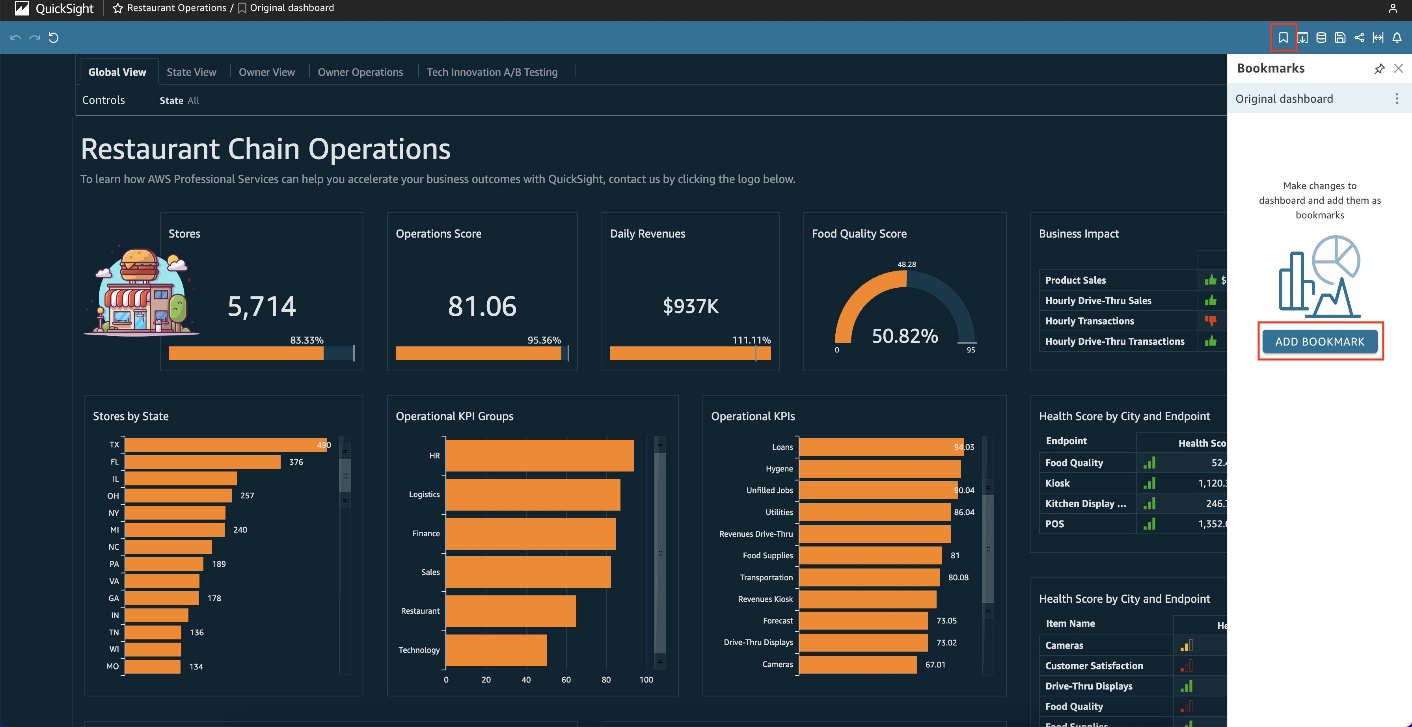
To create a bookmark of this view, choose the bookmark icon, then choose Add bookmark.

Enter a name, then choose Save.

The bookmark is saved, and the dashboard name on the banner updates with the bookmark name.

You can return to the original dashboard view that the author published at any time by going back to the bookmark icon and choosing Original dashboard.

Rename or delete a bookmark

To rename or delete a bookmark, on the bookmark pane, choose the context menu (three vertical dots) and choose Rename or Delete.

Although you can make any of these edits to bookmarks you have created, the Original dashboard view can’t be renamed, deleted, or updated, because it’s what the author has published.

Update a bookmark

At any time, you can change a bookmark dashboard view and update the bookmark to always reflect those changes.

After you make your edits, on the banner, you can see Modified next to the bookmark you’re currently editing.

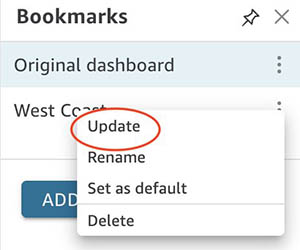
To save your updates, on the bookmarks pane, choose the context menu and choose Update.

Make a bookmark the default view

After you create a bookmark, you can set it as the default view of the dashboard that you see when you open the dashboard in a new session. This doesn’t affect anyone else’s view of the dashboard. You can also set the Original dashboard that the author published as the default view. When a default view is set, any time that you open the dashboard, the bookmark view is presented to you, regardless of the changes you made during your last session. However, if no default bookmark has been set, QuickSight will persist your current filter selections when you leave the dashboard. This way, readers can still pick up where they left off and don’t have to re-select filters.

To do this, in the Bookmarks pane, choose the context menu (the three dots) for the bookmark that you want to set as your default view, then choose Set as default.

Share a bookmark

After you create a bookmark, you can share a URL link for the view with others who have permission to view the dashboard. They can then save that view as their own bookmark. The shared view is a snapshot of your bookmark, meaning that if you make any updates to your bookmark after generating the URL link, the shared view doesn’t change.

To do this, choose the bookmark that you want to share so that the dashboard updates to that view. Choose the share icon, then choose Share this view. You can then copy the generated URL to share it with others.

Presentation with bookmarks

One extended use case of the new bookmarks feature is the ability to create a presentation through visuals in a much more elegant fashion. Previously, you may have had to change multiple filters and controls before arriving at your next presentation. Now you can save each presentation as a bookmark beforehand and just go through each bookmark like a slideshow. By creating a snapshot for each of the configurations you want to show, you create a smoother and cleaner experience for your audience.

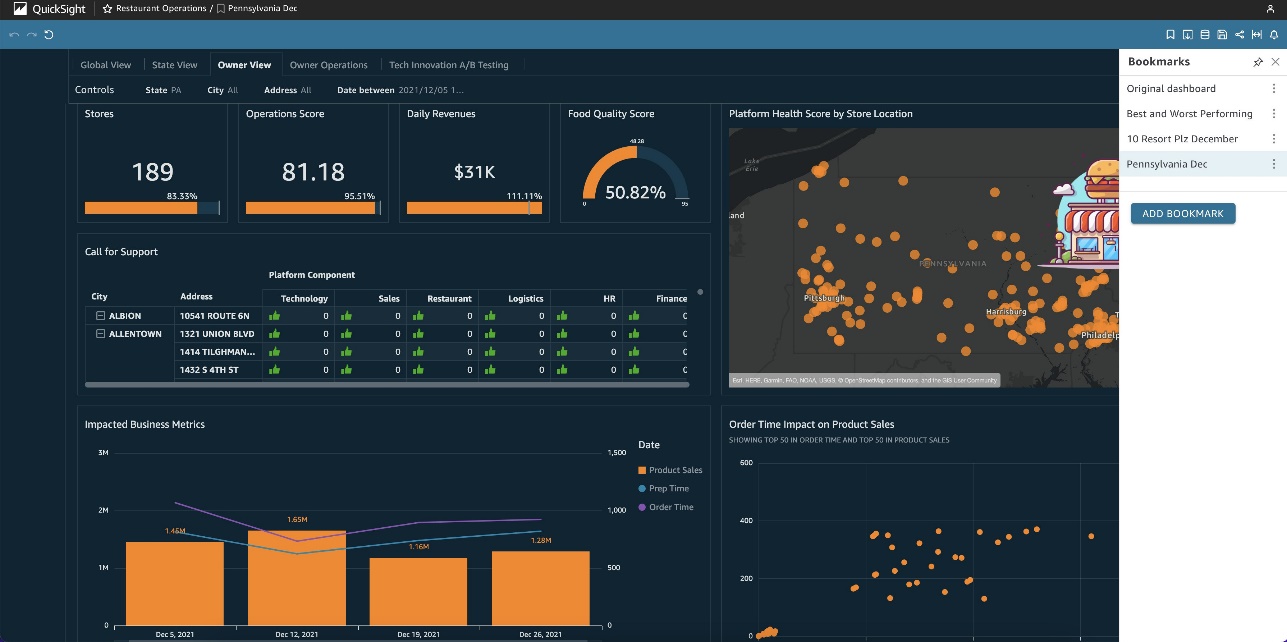
For example, let’s prepare a presentation through bookmarks using a Restaurant Operations dashboard. We can start with the global view of all the states and their related KPIs.

Best vs. worst performing restaurant

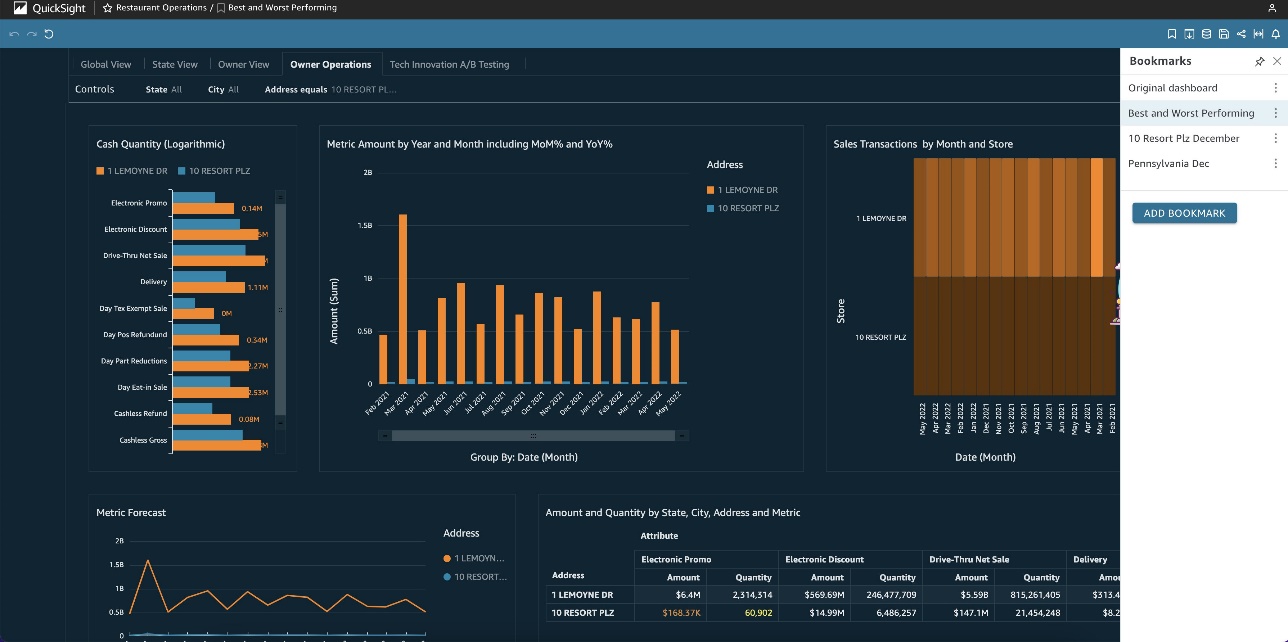
We’re interested in analyzing the difference between the best performing and worst performing store based on revenue. If we had to filter this dashboard on the fly, it would be much more time-consuming because we would have to manually enter both store names into the filter. However, with bookmarks, we can pre-filter to the two addresses, save the bookmark, and be automatically directed to the desired stores when we select it.

Worst performing restaurant analysis

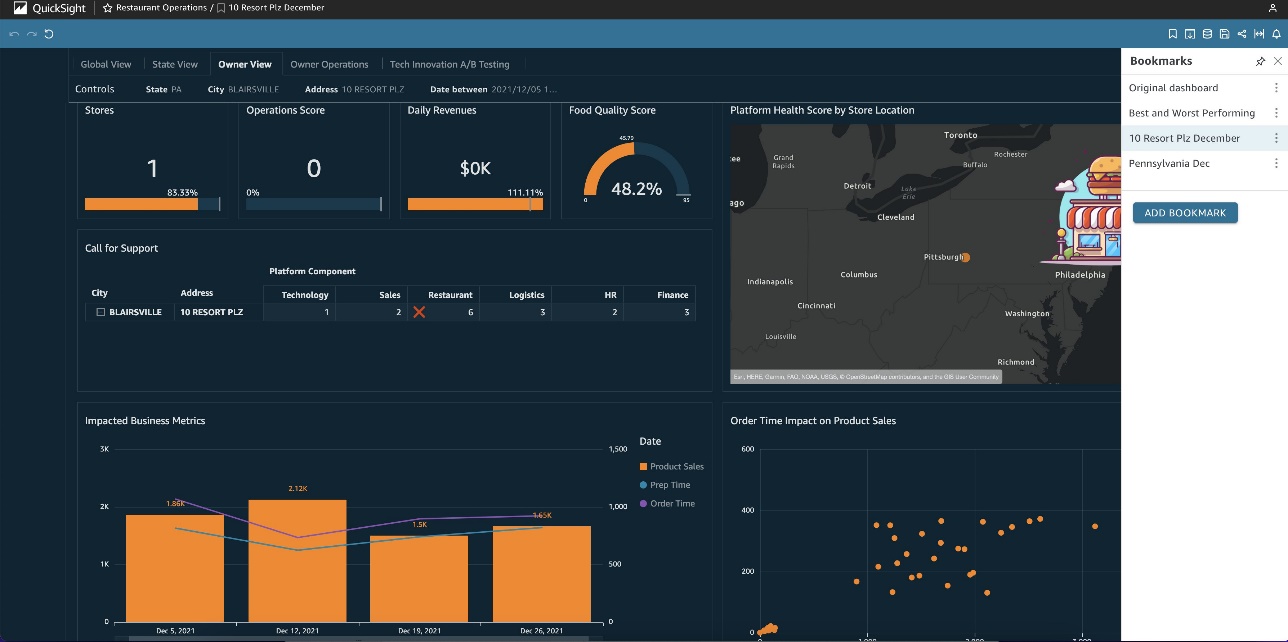
When comparing the best and worst performing stores, we see that the worst performing store (10 Resort Plz) had a below average revenue amount in December 2021. We’re interested in seeing how we can better boost sales around the holiday season and if there is something the owner lacked in that month. We can create a bookmark that directs us to the Owner View with the filters selected to December 2021 and the address and city pre-filtered.

Pennsylvania December 2021 analysis

After looking at this bookmark, we found that in the month of December, the call for support score in the restaurant category was high. Additionally, in the week of December 19, 2021 product sales were at the monthly low. We want to see how these KPIs compare to other stores in the same state for that week. Is it just a seasonal trend, or do we need to look even deeper and take action? Again, we can create a bookmark that gives us this comparison on a state level.

From the last bookmark, we can see that the other store in the same state (Pennsylvania) also had lower than average product sales in the week of December 19, 2021. For the purpose of this demo, we can go ahead and stop here, but we could create even more bookmarks to help answer additional questions, such as if we see this trend across other cities and states.

With these three bookmarks, we have created a top-down presentation looking at the worst performing store and its relevant metrics and comparisons. If we wanted to present this, it would be as simple as cycling through the bookmarks we’ve created to put together a cohesive presentation instead of having distracting onscreen filtering.

Conclusion

In this post, we discussed how we can create, modify, and delete bookmarks, along with setting it as a default view and sharing bookmarks. We also demonstrated an extended use case of presentation with bookmarks. The new bookmarks functionality is now generally available in all supported QuickSight Regions.

We’re looking forward to your feedback and stories on how you apply these calculations for your business needs.

Did you know that you can also ask questions of you data in natural language with QuickSight Q? Watch this video to learn more.


About the Authors

Mei Qu is a Business Intelligence Engineer on the AWS QuickSight ProServe Team. She helps customers and partners leverage their data to develop key business insights and monitor ongoing initiatives. She also develops QuickSight proof of concept projects, delivers technical workshops, and supports implementation projects.

Emily Zhu is a Senior Product Manager at Amazon QuickSight, AWS’s cloud-native, fully managed SaaS BI service. She leads the development of QuickSight analytics and query capabilities. Before joining AWS, she was working in the Amazon Prime Air drone delivery program and the Boeing company as senior strategist for several years. Emily is passionate about potentials of cloud-based BI solutions and looks forward to helping customers advance in their data-driven strategy-making.

AWS achieves its second ISMAP authorization in Japan

Post Syndicated from Hidetoshi Takeuchi original https://aws.amazon.com/blogs/security/aws-achieves-its-second-ismap-authorization-in-japan/

Earning and maintaining customer trust is an ongoing commitment at Amazon Web Services (AWS). Our customers’ security requirements drive the scope and portfolio of the compliance reports, attestations, and certifications we pursue. We’re excited to announce that AWS has achieved authorization under the Information System Security Management and Assessment Program (ISMAP) program, effective from April 1, 2022 to March 31, 2023. The authorization scope covers a total of 145 AWS services (an increase of 22 services over the previous authorization) across 22 AWS Regions, including the Asia Pacific (Tokyo) Region and the Asia Pacific (Osaka) Region. This is the second time AWS has undergone an assessment since ISMAP was first published by the ISMAP steering committee in March 2020.

ISMAP is a Japanese government program for assessing the security of public cloud services. The purpose of ISMAP is to provide a common set of security standards for cloud service providers (CSPs) to comply with as a baseline requirement for government procurement. ISMAP introduces security requirements for cloud domains, practices, and procedures that CSPs must implement. CSPs must engage with an ISMAP-approved third-party assessor to assess compliance with the ISMAP security requirements in order to apply as an ISMAP-registered CSP. The ISMAP program will evaluate the security of each CSP and register those that satisfy the Japanese government’s security requirements. Upon successful ISMAP registration of CSPs, government procurement departments and agencies can accelerate their engagement with the registered CSPs and contribute to the smooth introduction of cloud services in government information systems.

The achievement of this authorization demonstrates the proactive approach AWS has taken to help customers meet compliance requirements set by the Japanese government and to deliver secure AWS services to our customers. Service providers and customers of AWS can use the ISMAP authorization of AWS services to support their own ISMAP authorization programs. The full list of 145 ISMAP-authorized AWS services is available on the AWS Services in Scope by Compliance Program webpage, and you can also use the ISMAP Customer Package on AWS Artifact. You can confirm the AWS ISMAP authorization status and find detailed scope information on the ISMAP Portal.

As always, we are committed to bringing new services and Regions into the scope of our ISMAP program, based on your business needs. If you have any questions, don’t hesitate to contact your AWS Account Manager.

If you have feedback about this post, submit comments in the Comments section below.
Want more AWS Security how-to content, news, and feature announcements? Follow us on Twitter.

Hidetoshi Takeuchi

Hidetoshi Takeuchi

Hidetoshi is the Audit Program Manager for the Asia Pacific Region, leading Japan security certification and authorization programs. Hidetoshi has worked in information technology security, risk management, security assurance, and technology audits for the past 25 years. He is passionate about delivering programs that build customers’ trust and provide them with assurance on cloud security.

154 AWS services achieve HITRUST certification

Post Syndicated from Sonali Vaidya original https://aws.amazon.com/blogs/security/154-aws-services-achieve-hitrust-certification/

The AWS HITRUST Compliance Team is excited to announce that 154 Amazon Web Services (AWS) services are certified for the Health Information Trust Alliance (HITRUST) Common Security Framework (CSF) v9.6 for the 2022 cycle.

These 154 AWS services were audited by a third-party assessor and certified under the HITRUST CSF. The full list is now available on the AWS Services in Scope by Compliance Program page. As an AWS customer, you can view and download our HITRUST CSF certification at any time through AWS Artifact.

AWS HITRUST CSF certification is available for customer inheritance

As an AWS customer, you can deploy business solutions into the AWS Cloud environment and inherit the AWS HITRUST CSF certification, provided that your organization uses only in-scope services, and you properly apply the controls that your organization is responsible for as detailed in the HITRUST Shared Responsibility and Inheritance Program.

With 154 AWS services receiving HITRUST certification, as an AWS customer you can tailor your security control baselines to a variety of factors—including, but not limited to, your regulatory requirements and your organization type. The HITRUST CSF is widely adopted by leading organizations in a variety of industries as part of their approach to security and privacy. For more information, see the HITRUST website.

As always, we value your feedback and questions and are committed to helping you achieve and maintain the highest standard of security and compliance. Feel free to contact the team through AWS Compliance Contact Us. If you have feedback about this post, please submit comments in the Comments section below.

Want more AWS Security how-to content, news, and feature announcements? Follow us on Twitter.

Author

Sonali Vaidya

Sonali leads multiple AWS global compliance programs including HITRUST, ISO 27001, ISO 27017, ISO 27018, ISO 27701, ISO 9001, and CSA STAR. Sonali has over 21 years of experience in information security and privacy management and holds multiple certifications such as CISSP, C-GDPR|P, CCSK, CEH, CISA, PCIP, ISO 27001 & ISO 22301 Lead Auditor.

How Fresenius Medical Care aims to save dialysis patient lives using real-time predictive analytics on AWS

Post Syndicated from Kanti Singh original https://aws.amazon.com/blogs/big-data/how-fresenius-medical-care-aims-to-save-dialysis-patient-lives-using-real-time-predictive-analytics-on-aws/

This post is co-written by Kanti Singh, Director of Data & Analytics at Fresenius Medical Care.

Fresenius Medical Care is the world’s leading provider of kidney care products and services, and operates more than 2,600 dialysis centers in the US alone. The company provides comprehensive solutions for people living with chronic kidney disease and related conditions, with a mission to improve the quality of life of every patient, every day, by transforming healthcare through research, innovation, and compassion. Data analysis that leads to timely interventions is critical to this mission, and essential to reduce hospitalizations and prevent adverse events.

In this post, we walk you through the solution architecture, performance considerations, and how a research partnership with AWS around medical complexity led to an automated solution that helped deliver alerts for potential adverse events.

Why Fresenius Medical Care chose AWS

The Fresenius Medical Care technical team chose AWS as their preferred cloud platform for two key reasons.

First, we determined that AWS IoT Core was more mature than other solutions and would likely face fewer issues with deployment and certificates. As an organization, we wanted to go with a cloud platform that had a proven track record and established technical solutions and services in the IoT and data analytics space. This included Amazon Athena, which is an easy-to-use serverless service that you can use to run queries on data stored in Amazon Simple Storage Service (Amazon S3) for analysis.

Another factor that played a major role in our decision was the fact that AWS offered the largest set of serverless services for analytics than any other cloud provider. We ultimately determined that AWS innovations met the company’s current needs as well as positioned the company for the future as we worked to expand our predictive capabilities.

Solution overview

We needed to develop a near-real-time analytics solution that would collect dynamic dialysis machine data every 10 seconds during hemodialysis treatment in near-real time and personalize it to predict every 30 minutes if a patient is at a health risk for intradialytic hypotension (IDH) within the next 15–75 minutes. This solution needed to scale to all our dialysis centers nationwide, with each location sending 10 MBps of treatment data at peak times.

The complexities that needed to be managed in the solution included handling high throughput data, a low-latency time-sensitive solution of 10 seconds from data origination to reporting and notification, a highly available solution, and a cost-effective solution with on-demand scaling up or down based on data volume.

Fresenius Medical Care partnered with AWS on this mission and developed an architecture that met our technical and business requirements. Core components in the architecture included Amazon Kinesis Data Streams, Amazon Kinesis Data Analytics, and Amazon SageMaker. We chose Kinesis Data Streams and Kinesis Data Analytics primarily because they’re serverless and highly available (99.9%), offer very high throughput, and are easy to scale. We chose SageMaker due to its unique capability that allows ease of building, training, and running machine learning (ML) models at scale.

The following diagram illustrates the architecture.

The solution consists of the following key components:

  1. Data collection
  2. Data ingestion and aggregation
  3. Data lake storage
  4. ML Inference and operational analytics

Let’s discuss each stage in the workflow in more detail.

Data collection

Dialysis machines located in Fresenius Medical Care centers help patients in the treatment of end-stage renal disease by performing hemodialysis. The dialysis machines provide immediate access to all treatment and clinical trending data across the fleet of hemodialysis machines in all centers in the US.

These machines transmit a data payload every 10 seconds to Kafka brokers located in Fresenius Medical Care’s on-premises data center for use by several applications.

Data ingestion and aggregation

We use a Kinesis-Kafka connector hosted on self-managed Amazon Elastic Compute Cloud (Amazon EC2) instances to ingest data from a Kafka topic in near-real time into Kinesis Data Streams.

We use AWS Lambda to read the data points and filter the datasets accordingly to Kinesis Data Analytics. Upon reaching the batch size threshold, Lambda sends the data to Kinesis Data Analytics for instream analytics.

We chose Kinesis Data Analytics due to the ease-of-use it provides for SQL-based stream analytics. By using SQL with KDA (KDA Studio/Flink SQL), we can create dynamic features based on machine interval data arriving in real time. This data is joined with the patient demographic, historical clinical, treatment, and laboratory data (enriched with Amazon S3 data) to create the complete set of features required for a downstream ML model.

Data lake storage

Amazon Kinesis Data Firehose was the simplest way to consistently load streaming data to build a raw data lake in Amazon S3. Kinesis Data Firehose micro-batches data into 128 MB file sizes and delivers streaming data to Amazon S3.

Clinical datasets are required to enrich stream data sourced from on-premises data warehouses via AWS Glue Spark jobs on a nightly basis. The AWS Glue jobs extract patient demographic, historical clinical, treatment, and laboratory data from the data warehouse to Amazon S3 and transform machine data from JSON to Parquet format for better storage and retrieval costs in Amazon S3. AWS Glue also helps build the static features for the intradialytic hypotension (IDH) ML model, which are required for downstream ML inference.

ML Inference and Operational analytics

Lambda batches the stream data from Kinesis Data Analytics that has all the features required for IDH ML model inference.

SageMaker, a fully managed service, trains and deploys the IDH predictive model. The deployed ML model provides a SageMaker endpoint that is used by Lambda for ML inference.

Amazon OpenSearch Service helps store the IDH inference results it received from Lambda. The results are then used for visualization through Kibana, which displays a personalized health prediction dashboard visual for each patient undergoing treatment and is available in near-real time for the care team to provide intervention proactively.

Observability and traceability for failures

Because this solution offers the potential for life-saving interventions, it’s considered business critical. The following key measures are taken to proactively monitor the AWS jobs in Fresenius Medical Care’s VPC account:

  • For AWS Glue jobs that have failures and errors in Lambda functions, an immediate email and Amazon CloudWatch alert is sent to the Data Ops team for resolution.
  • CloudWatch alarms are also generated for Amazon OpenSearch Service whenever there are blocks on writes or the cluster is overloaded with shard capacity, CPU utilization, or other issues, as recommended by AWS.
  • Kinesis Data Analytics and Kinesis Data Streams generate data quality alerts on data rejections or empty results.
  • Data quality alerts are also generated whenever data quality rules on data points are mismatched. To check mismatched data, we use quality rule comparison and sanity checks between message payloads in the stream with data loaded in the data lake.

These systematic and automated monitoring and alerting mechanisms help our team stay one step ahead to ensure that systems are running smoothly and successfully, and any unforeseen problems can be resolved as quickly as possible before it causes any adverse impact on users of the system.

AWS partnership

After Fresenius Medical Care took advantage of the AWS Data Lab to create a working prototype within one week, expert Solutions Architects from AWS became trusted advisors, helping our team with prescriptive guidance from ideation to production. The AWS team helped with both solution-based and service-specific best practices, helped resolve key blockers in every phase from development through production, and performed architecture reviews to ensure the solution was robust and resilient to business needs.

Solution results

This solution allows Fresenius Medical Care to better personalize care to patients undergoing dialysis treatment with a proactive intervention by clinicians at the point of care that has the potential to save patient lives. The following are some of the key benefits due to this solution:

  • Cloud computing resources enable the development, analysis, and integration of real-time predictive IDH that can be easily and seamlessly scaled as needed to reach additional clinics.
  • The use of our tool may be particularly useful in institutions facing staff shortages and, possibly, during home dialysis. Additionally, it may provide insights on strategies to prevent and manage IDH.
  • The solution enables modern and innovative solutions that improve patient care by providing world-class research and data-driven insights.

This solution has been proven to scale to an acceptable performance level of 6,000 messages per second, translating to 19 MB/sec with 60,000/sec concurrent Lambda invocations. The ability to adapt by scaling up and down every component in the architecture with ease kept costs very low, which wouldn’t have been possible elsewhere.

Conclusion

Successful implementation of this solution led to a think big approach in modernizing several legacy data assets and has set Fresenius Medical Care on the path of building an enterprise unified data analytics platform on AWS using Amazon S3, AWS Glue, Amazon EMR, and AWS Lake Formation. The unified data analytics platform offers robust data security and data sharing for multi-tenants in various geographies across the US. Similar to Fresenius, you can accelerate time to market by using the right tool for the job, using the broad and deep variety of AWS analytic native services.


About the authors

Kanti Singh is a Director of Data & Analytics at Fresenius Medical Care, leading the big data platform, architecture, and the engineering team. She loves to explore new technologies and how to leverage them to solve complex business problems. In her free time, she loves traveling, dancing, and spending time with family.

Harsha Tadiparthi is a Specialist Principal Solutions Architect specialized in analytics at Amazon Web Services. He enjoys solving complex customer problems in databases and analytics, and delivering successful outcomes. Outside of work, he loves to spend time with his family, watch movies, and travel whenever possible.

AWS re:Inforce 2022: Key announcements and session highlights

Post Syndicated from Marta Taggart original https://aws.amazon.com/blogs/security/aws-reinforce-2022-key-announcements-and-session-highlights/

AWS re:Inforce returned to Boston, MA, in July after 2 years, and we were so glad to be back in person with customers. The conference featured over 250 sessions and hands-on labs, 100 AWS partner sponsors, and over 6,000 attendees over 2 days. If you weren’t able to join us in person, or just want to revisit some of the themes, this blog post is for you. It summarizes all the key announcements and points to where you can watch the event keynote, sessions, and partner lightning talks on demand.

Key announcements

Here are some of the announcements that we made at AWS re:Inforce 2022.

Watch on demand

You can also watch these talks and learning sessions on demand.

Keynotes and leadership sessions

Watch the AWS re:Inforce 2022 keynote where Amazon Chief Security Officer Stephen Schmidt, AWS Chief Information Security Officer CJ Moses, Vice President of AWS Platform Kurt Kufeld, and MongoDB Chief Information Security Officer Lena Smart share the latest innovations in cloud security from AWS and what you can do to foster a culture of security in your business. Additionally, you can review all the leadership sessions to learn best practices for managing security, compliance, identity, and privacy in the cloud.

Breakout sessions and partner lightning talks

  • Data Protection and Privacy track – See how AWS, customers, and partners work together to protect data. Learn about trends in data management, cryptography, data security, data privacy, encryption, and key rotation and storage.
  • Governance, Risk, and Compliance track – Dive into the latest hot topics in governance and compliance for security practitioners, and discover how to automate compliance tools and services for operational use.
  • Identity and Access Management track – Hear from AWS, customers, and partners on how to use AWS Identity Services to manage identities, resources, and permissions securely and at scale. Learn how to configure fine-grained access controls for your employees, applications, and devices and deploy permission guardrails across your organization.
  • Network and Infrastructure Security track – Gain practical expertise on the services, tools, and products that AWS, customers, and partners use to protect the usability and integrity of their networks and data.
  • Threat Detection and Incident Response track – Learn how AWS, customers, and partners get the visibility they need to improve their security posture, reduce the risk profile of their environments, identify issues before they impact business, and implement incident response best practices.
  • You can also catch our Partner Lightning Talks on demand.

Session presentation downloads are also available on our AWS Event Contents page. Consider joining us for more in-person security learning opportunities by registering for AWS re:Invent 2022, which will be held November 28 through December 2 in Las Vegas. We look forward to seeing you there!

If you’d like to discuss how these new announcements can help your organization improve its security posture, AWS is here to help. Contact your AWS account team today.

 
If you have feedback about this post, submit comments in the Comments section below. If you have questions about this post, contact AWS Support.

Want more AWS Security news? Follow us on Twitter.

Author

Marta Taggart

Marta is a Seattle-native and Senior Product Marketing Manager in AWS Security Product Marketing, where she focuses on data protection services. Outside of work you’ll find her trying to convince Jack, her rescue dog, not to chase squirrels and crows (with limited success).

Author

Maddie Bacon

Maddie (she/her) is a technical writer for AWS Security with a passion for creating meaningful content. She previously worked as a security reporter and editor at TechTarget and has a BA in Mathematics. In her spare time, she enjoys reading, traveling, and all things Harry Potter.

AWS CyberVadis report now available for due diligence on third-party suppliers

Post Syndicated from Andreas Terwellen original https://aws.amazon.com/blogs/security/aws-cybervadis-report-now-available-for-due-diligence-on-third-party-suppliers/

At Amazon Web Services (AWS), we’re continuously expanding our compliance programs to provide you with more tools and resources to perform effective due diligence on AWS. We’re excited to announce the availability of the AWS CyberVadis report to help you reduce the burden of performing due diligence on your third-party suppliers.

With the increase in adoption of cloud products and services across multiple sectors and industries, AWS is a critical component of customers’ third-party environments. Regulated customers, such as those in the financial services sector, are held to high standards by regulators and auditors when it comes to exercising effective due diligence on third parties.

Many customers use third-party cyber risk management (TPCRM) services such as CyberVadis to better manage risks from their evolving third-party environments and to drive operational efficiencies. To help with such efforts, AWS has completed the CyberVadis assessment of its security posture. CyberVadis security analysts perform the assessment and validate the results annually.

CyberVadis is a comprehensive third-party risk assessment process that combines the speed and scalability of automation with the certainty of analyst validation. The CyberVadis cybersecurity rating methodology assesses the maturity of a company’s information security management system (ISMS) through its policies, implementation measures, and results.

CyberVadis integrates responses from AWS with analytics and risk models to provide an in-depth view of the AWS security posture. The CyberVadis methodology maps to major international compliance standards, including the following:

Customers can download the AWS CyberVadis report at no additional cost. For details on how to access the report, see our AWS CyberVadis report page.

As always, we value your feedback and questions. Reach out to the AWS Compliance team through the Contact Us page. If you have feedback about this post, submit comments in the Comments section below. To learn more about our other compliance and security programs, see AWS Compliance Programs.

Want more AWS Security news? Follow us on Twitter.

Andreas Terwellen

Andreas Terwellen

Andreas is a senior manager in security audit assurance at AWS, based in Frankfurt, Germany. His team is responsible for third-party and customer audits, attestations, certifications, and assessments across Europe. Previously, he was a CISO in a DAX-listed telecommunications company in Germany. He also worked for different consulting companies managing large teams and programs across multiple industries and sectors.

Manuel Mazarredo

Manuel Mazarredo

Manuel is a security audit program manager at AWS based in Amsterdam, the Netherlands. Manuel leads security audits, attestations, and certification programs across Europe, and is responsible for the BeNeLux area. For the past 18 years, he has worked in information systems audits, ethical hacking, project management, quality assurance, and vendor management across a variety of industries.

Introducing AWS Glue interactive sessions for Jupyter

Post Syndicated from Zach Mitchell original https://aws.amazon.com/blogs/big-data/introducing-aws-glue-interactive-sessions-for-jupyter/

Interactive Sessions for Jupyter is a new notebook interface in the AWS Glue serverless Spark environment. Starting in seconds and automatically stopping compute when idle, interactive sessions provide an on-demand, highly-scalable, serverless Spark backend to Jupyter notebooks and Jupyter-based IDEs such as Jupyter Lab, Microsoft Visual Studio Code, JetBrains PyCharm, and more. Interactive sessions replace AWS Glue development endpoints for interactive job development with AWS Glue and offers the following benefits:

  • No clusters to provision or manage
  • No idle clusters to pay for
  • No up-front configuration required
  • No resource contention for the same development environment
  • Easy installation and usage
  • The exact same serverless Spark runtime and platform as AWS Glue extract, transform, and load (ETL) jobs

Getting started with interactive sessions for Jupyter

Installing interactive sessions is simple and only takes a few terminal commands. After you install it, you can run interactive sessions anytime within seconds of deciding to run. In the following sections, we walk you through installation on macOS and getting started in Jupyter.

To get started with interactive sessions for Jupyter on Windows, follow the instructions in Getting started with AWS Glue interactive sessions.

Prerequisites

These instructions assume you’re running Python 3.6 or later and have the AWS Command Line Interface (AWS CLI) properly running and configured. You use the AWS CLI to make API calls to AWS Glue. For more information on installing the AWS CLI, refer to Installing or updating the latest version of the AWS CLI.

Install AWS Glue interactive sessions on macOS and Linux

To install AWS Glue interactive sessions, complete the following steps:

  1. Open a terminal and run the following to install and upgrade Jupyter, Boto3, and AWS Glue interactive sessions from PyPi. If desired, you can install Jupyter Lab instead of Jupyter.
    pip3 install --user --upgrade jupyter boto3 aws-glue-sessions

  2. Run the following commands to identify the package install location and install the AWS Glue PySpark and AWS Glue Spark Jupyter kernels with Jupyter:
    SITE_PACKAGES=$(pip3 show aws-glue-sessions | grep Location | awk '{print $2}')
    jupyter kernelspec install $SITE_PACKAGES/aws_glue_interactive_sessions_kernel/glue_pyspark
    jupyter kernelspec install $SITE_PACKAGES/aws_glue_interactive_sessions_kernel/glue_spark

  3. To validate your install, run the following command:
    jupyter kernelspec list

In the output, you should see both the AWS Glue PySpark and the AWS Glue Spark kernels listed alongside the default Python3 kernel. It should look something like the following:

Available kernels:
  Python3		~/.venv/share/jupyter/kernels/python3
  glue_pyspark    /usr/local/share/jupyter/kernels/glue_pyspark
  glue_spark      /usr/local/share/jupyter/kernels/glue_spark

Choose and prepare IAM principals

Interactive sessions use two AWS Identity and Access Management (IAM) principals (user or role) to function. The first is used to call the interactive sessions APIs and is likely the same user or role that you use with the AWS CLI. The second is GlueServiceRole, the role that AWS Glue assumes to run your session. This is the same role as AWS Glue jobs; if you’re developing a job with your notebook, you should use the same role for both interactive sessions and the job you create.

Prepare the client user or role

In the case of local development, the first role is already configured if you can run the AWS CLI. If you can’t run the AWS CLI, follow these steps for setting up. If you often use the AWS CLI or Boto3 to interact with AWS Glue and have full AWS Glue permissions, you can likely skip this step.

  1. To validate this first user or role is set up, open a new terminal window and run the following code:
    aws sts get-caller-identity

    You should see a response like the following. If not, you may not have permissions to call AWS Security Token Service (AWS STS), or you don’t have the AWS CLI set up properly. If you simply get access denied calling AWS STS, you may continue if you know your user or role and its needed permissions.

    {
        "UserId": "ABCDEFGHIJKLMNOPQR",
        "Account": "123456789123",
        "Arn": "arn:aws:iam::123456789123:user/MyIAMUser"
    }
    
    {
        "UserId": "ABCDEFGHIJKLMNOPQR",
        "Account": "123456789123",
        "Arn": "arn:aws:iam::123456789123:role/myIAMRole"
    }

  2. Ensure your IAM user or role can call the AWS Glue interactive sessions APIs by attaching the AWSGlueConsoleFullAccess managed IAM policy to your role.

If your caller identity returned a user, run the following:

aws iam attach-user-policy --role-name <myIAMUser> --policy-arn arn:aws:iam::aws:policy/AWSGlueConsoleFullAccess

If your caller identity returned a role, run the following:

aws iam attach-role-policy --role-name, --policy-arn arn:aws:iam::aws:policy/AWSGlueConsoleFullAccess

Prepare the AWS Glue service role for interactive sessions

You can specify the second principal, GlueServiceRole, either in the notebook itself by using the %iam_role magic or stored alongside the AWS CLI config. If you have a role that you typically use with AWS Glue jobs, this will be that role. If you don’t have a role you use for AWS Glue jobs, refer to Setting up IAM permissions for AWS Glue to set one up.

To set this role as the default role for interactive sessions, edit the AWS CLI credentials file and add glue_role_arn to the profile you intend to use.

  1. With a text editor, open ~/.aws/credentials.
    On Windows, use C:\Users\username\.aws\credentials.
  2. Look for the profile you use for AWS Glue; if you don’t use a profile, you’re looking for [Default].
  3. Add a line in the profile for the role you intend to use like, glue_role_arn=<AWSGlueServiceRole>.
  4. I recommend adding a default Region to your profile if one is not specified already. You can do so by adding the line region=us-east-1, replacing us-east-1 with your desired Region.
    If you don’t add a Region to your profile, you’re required to specify the Region at the top of each notebook with the %region magic.When finished, your config should look something like the following:

    [Defaut]
    aws_access_key_id=ABCDEFGHIJKLMNOPQRST
    aws_secret_access_key=1234567890ABCDEFGHIJKLMNOPQRSTUVWZYX1234
    glue_role_arn=arn:aws:iam::123456789123:role/AWSGlueServiceRoleForSessions
    region=us-west-2

  5. Save the config.

Start Jupyter and an AWS Glue PySpark notebook

To start Jupyter and your notebook, complete the following steps:

  1. Run the following command in your terminal to open the Jupyter notebook in your browser:
    jupyter notebook

    Your browser should open and you’re presented with a page that looks like the following screenshot.

  2. On the New menu, choose Glue PySpark.

A new tab opens with a blank Jupyter notebook using the AWS Glue PySpark kernel.

Configure your notebook with magics

AWS Glue interactive sessions are configured with Jupyter magics. Magics are small commands prefixed with % at the start of Jupyter cells that provide shortcuts to control the environment. In AWS Glue interactive sessions, magics are used for all configuration needs, including:

  • %region – Region
  • %profile – AWS CLI profile
  • %iam_role – IAM role for the AWS Glue service role
  • %worker_type – Worker type
  • %number_of_workers – Number of workers
  • %idle_timeout – How long to allow a session to idle before stopping it
  • %additional_python_modules – Python libraries to install from pip

Magics are placed at the beginning of your first cell, before your code, to configure AWS Glue. To discover all the magics of interactive sessions, run %help in a cell and a full list is printed. With the exception of %%sql, running a cell of only magics doesn’t start a session, but sets the configuration for the session that starts next when you run your first cell of code. For this post, we use three magics to configure AWS Glue with version 2.0 and two G.2X workers. Let’s enter the following magics into our first cell and run it:

%glue_version 2.0
%number_of_workers 2
%worker_type G.2X
%idle_tiemout 60


Welcome to the Glue Interactive Sessions Kernel
For more information on available magic commands, please type %help in any new cell.

Please view our Getting Started page to access the most up-to-date information on the Interactive Sessions kernel: https://docs.aws.amazon.com/glue/latest/dg/interactive-sessions.html
Setting Glue version to: 2.0
Previous number of workers: 5
Setting new number of workers to: 2
Previous worker type: G.1X
Setting new worker type to: G.2X

When you run magics, the output lets us know the values we’re changing along with their previous settings. Explicitly setting all your configuration in magics helps ensure consistent runs of your notebook every time and is recommended for production workloads.

Run your first code cell and author your AWS Glue notebook

Next, we run our first code cell. This is when a session is provisioned for use with this notebook. When interactive sessions are properly configured within an account, the session is completely isolated to this notebook. If you open another notebook in a new tab, it gets its own session on its own isolated compute. Run your code cell as follows:

from awsglue.context import GlueContext
from awsglue.job import Job
from awsglue.transforms import *
from awsglue.utils import getResolvedOptions
from pyspark.context import SparkContext

sc = SparkContext.getOrCreate()
glueContext = GlueContext(sc)
spark = glueContext.spark_session
job = Job(glueContext)

Authenticating with profile=default
glue_role_arn defined by user: arn:aws:iam::123456789123:role/AWSGlueServiceRoleForSessions
Attempting to use existing AssumeRole session credentials.
Trying to create a Glue session for the kernel.
Worker Type: G.2X
Number of Workers: 2
Session ID: 12345678-12fa-5315-a234-567890abcdef
Applying the following default arguments:
--glue_kernel_version 0.31
--enable-glue-datacatalog true
Waiting for session 12345678-12fa-5315-a234-567890abcdef to get into ready status...
Session 12345678-12fa-5315-a234-567890abcdef has been created

When you ran the first cell containing code, Jupyter invoked interactive sessions, provisioned an AWS Glue cluster, and sent the code to AWS Glue Spark. The notebook was given a session ID, as shown in the preceding code. We can also see the properties used to provision AWS Glue, including the IAM role that AWS Glue used to create the session, the number of workers and their type, and any other options that were passed as part of the creation.

Interactive sessions automatically initialize a Spark session as spark and SparkContext as sc; having Spark ready to go saves a lot of boilerplate code. However, if you want to convert your notebook to a job, spark and sc must be initialized and declared explicitly.

Work in the notebook

Now that we have a session up, let’s do some work. In this exercise, we look at population estimates from the AWS COVID-19 dataset, clean them up, and write the results a table.

This walkthrough uses data from the COVID-19 data lake.

To make the data from the AWS COVID-19 data lake available in the Data Catalog in your AWS account, create an AWS CloudFormation stack using the following template.

If you’re signed in to your AWS account, deploy the CloudFormation stack by clicking the following Launch stack button:

BDB-2063-launch-cloudformation-stack

It fills out most of the stack creation form for you. All you need to do is choose Create stack. For instructions on creating a CloudFormation stack, see Get started.

When I’m working on a new data integration process, the first thing I often do is identify and preview the datasets I’m going to work on. If I don’t recall the exact location or table name, I typically open the AWS Glue console and search or browse for the table then return to my notebook to preview it. With interactive sessions, there is a quicker way to browse the Data Catalog. We can use the %%sql magic to show databases and tables without leaving the notebook. For this example, the population table I want in is the COVID-19 dataset but I don’t recall its exact name, so I use the %%sql magic to look it up:

%%sql
show tables in `covid-19`  # Remember, dashes in names must be escaped with backticks.

+--------+--------------------+-----------+
|database|           tableName|isTemporary|
+--------+--------------------+-----------+
|covid-19|alleninstitute_co...|      false|
|covid-19|alleninstitute_me...|      false|
|covid-19|aspirevc_crowd_tr...|      false|
|covid-19|aspirevc_crowd_tr...|      false|
|covid-19|cdc_moderna_vacci...|      false|
|covid-19|cdc_pfizer_vaccin...|      false|
|covid-19|       country_codes|      false|
|covid-19|  county_populations|      false|
|covid-19|covid_knowledge_g...|      false|
|covid-19|covid_knowledge_g...|      false|
|covid-19|covid_knowledge_g...|      false|
|covid-19|covid_knowledge_g...|      false|
|covid-19|covid_knowledge_g...|      false|
|covid-19|covid_knowledge_g...|      false|
|covid-19|covid_testing_sta...|      false|
|covid-19|covid_testing_us_...|      false|
|covid-19|covid_testing_us_...|      false|
|covid-19|      covidcast_data|      false|
|covid-19|  covidcast_metadata|      false|
|covid-19|enigma_aggregatio...|      false|
+--------+--------------------+-----------+
only showing top 20 rows

Looking through the returned list, we see a table named county_populations. Let’s select from this table, sorting for the largest counties by population:

%%sql
select * from `covid-19`.county_populations sort by `population estimate 2018` desc limit 10

+--------------+-----+---------------+-----------+------------------------+
|            id|  id2|         county|      state|population estimate 2018|
+--------------+-----+---------------+-----------+------------------------+
|            Id|  Id2|         County|      State|    Population Estima...|
|0500000US01085| 1085|        Lowndes|    Alabama|                    9974|
|0500000US06057| 6057|         Nevada| California|                   99696|
|0500000US29189|29189|      St. Louis|   Missouri|                  996945|
|0500000US22021|22021|Caldwell Parish|  Louisiana|                    9960|
|0500000US06019| 6019|         Fresno| California|                  994400|
|0500000US28143|28143|         Tunica|Mississippi|                    9944|
|0500000US05051| 5051|        Garland|   Arkansas|                   99154|
|0500000US29079|29079|         Grundy|   Missouri|                    9914|
|0500000US27063|27063|        Jackson|  Minnesota|                    9911|
+--------------+-----+---------------+-----------+------------------------+

Our query returned data but in an unexpected order. It looks like population estimate 2018 sorted lexicographically if the values were strings. Let’s use an AWS Glue DynamicFrame to get the schema of the table and verify the issue:

# Create a DynamicFrame of county_populations and print it's schema
dyf = glueContext.create_dynamic_frame.from_catalog(
    database="covid-19", table_name="county_populations"
)
dyf.printSchema()

root
|-- id: string
|-- id2: string
|-- county: string
|-- state: string
|-- population estimate 2018: string

The schema shows population estimate 2018 to be a string, which is why our column isn’t sorting properly. We can use the apply_mapping transform in our next cell to correct the column type. In the same transform, we also clean up the column names and other column types: clarifying the distinction between id and id2, removing spaces from population estimate 2018 (conforming to Hive’s standards), and casting id2 as an integer for proper sorting. After validating the schema, we show the data with the new schema:

# Rename id2 to simple_id and convert to Int
# Remove spaces and rename population est. and convert to Long
mapped = dyf.apply_mapping(
    mappings=[
        ("id", "string", "id", "string"),
        ("id2", "string", "simple_id", "int"),
        ("county", "string", "county", "string"),
        ("state", "string", "state", "string"),
        ("population estimate 2018", "string", "population_est_2018", "long"),
    ]
)
mapped.printSchema()
 
root
|-- id: string
|-- simple_id: int
|-- county: string
|-- state: string
|-- population_est_2018: long


mapped_df = mapped.toDF()
mapped_df.show()

+--------------+---------+---------+-------+-------------------+
|            id|simple_id|   county|  state|population_est_2018|
+--------------+---------+---------+-------+-------------------+
|0500000US01001|     1001|  Autauga|Alabama|              55601|
|0500000US01003|     1003|  Baldwin|Alabama|             218022|
|0500000US01005|     1005|  Barbour|Alabama|              24881|
|0500000US01007|     1007|     Bibb|Alabama|              22400|
|0500000US01009|     1009|   Blount|Alabama|              57840|
|0500000US01011|     1011|  Bullock|Alabama|              10138|
|0500000US01013|     1013|   Butler|Alabama|              19680|
|0500000US01015|     1015|  Calhoun|Alabama|             114277|
|0500000US01017|     1017| Chambers|Alabama|              33615|
|0500000US01019|     1019| Cherokee|Alabama|              26032|
|0500000US01021|     1021|  Chilton|Alabama|              44153|
|0500000US01023|     1023|  Choctaw|Alabama|              12841|
|0500000US01025|     1025|   Clarke|Alabama|              23920|
|0500000US01027|     1027|     Clay|Alabama|              13275|
|0500000US01029|     1029| Cleburne|Alabama|              14987|
|0500000US01031|     1031|   Coffee|Alabama|              51909|
|0500000US01033|     1033|  Colbert|Alabama|              54762|
|0500000US01035|     1035|  Conecuh|Alabama|              12277|
|0500000US01037|     1037|    Coosa|Alabama|              10715|
|0500000US01039|     1039|Covington|Alabama|              36986|
+--------------+---------+---------+-------+-------------------+
only showing top 20 rows

With the data sorting correctly, we can write it to Amazon Simple Storage Service (Amazon S3) as a new table in the AWS Glue Data Catalog. We use the mapped DynamicFrame for this write because we didn’t modify any data past that transform:

# Create "demo" Database if none exists
spark.sql("create database if not exists demo")


# Set glueContext sink for writing new table
S3_BUCKET = "<S3_BUCKET>"
s3output = glueContext.getSink(
    path=f"s3://{S3_BUCKET}/interactive-sessions-blog/populations/",
    connection_type="s3",
    updateBehavior="UPDATE_IN_DATABASE",
    partitionKeys=[],
    compression="snappy",
    enableUpdateCatalog=True,
    transformation_ctx="s3output",
)
s3output.setCatalogInfo(catalogDatabase="demo", catalogTableName="populations")
s3output.setFormat("glueparquet")
s3output.writeFrame(mapped)


# Write out ‘mapped’ to a table in Glue Catalog
s3output = glueContext.getSink(
    path=f"s3://{S3_BUCKET}/interactive-sessions-blog/populations/",
    connection_type="s3",
    updateBehavior="UPDATE_IN_DATABASE",
    partitionKeys=[],
    compression="snappy",
    enableUpdateCatalog=True,
    transformation_ctx="s3output",
)
s3output.setCatalogInfo(catalogDatabase="demo", catalogTableName="populations")
s3output.setFormat("glueparquet")
s3output.writeFrame(mapped)

Finally, we run a query against our new table to show our table created successfully and validate our work:

%%sql
select * from demo.populations

Convert notebooks to AWS Glue jobs with nbconvert

Jupyter notebooks are saved as .ipynb files. AWS Glue doesn’t currently run .ipynb files directly, so they need to be converted to Python scripts before they can be uploaded to Amazon S3 as jobs. Use the jupyter nbconvert command from a terminal to convert the script.

  1. Open a new terminal or PowerShell tab or window.
  2. cd to the working directory where your notebook is.
    This is likely the same directory where you ran jupyter notebook at the beginning of this post.
  3. Run the following bash command to convert the notebook, providing the correct file name for your notebook:
    jupyter nbconvert --to script <Untitled-1>.ipynb

  4. Run cat <Untitled-1>.ipynb to view your new file.
  5. Upload the .py file to Amazon S3 using the following command, replacing the bucket, path, and file name as needed:
    aws s3 cp <Untitled-1>.py s3://<bucket>/<path>/<Untitled-1.py>

  6. Create your AWS Glue job with the following command.

Note that the magics aren’t automatically converted to job parameters when converting notebooks locally. You need to put in your job arguments correctly, or import your notebook to AWS Glue Studio and complete the following steps to keep your magic settings.

aws glue create-job \
    --name is_blog_demo
    --role "<GlueServiceRole>" \
    --command {"Name": "glueetl", "PythonVersion": "3", "ScriptLocation": "s3://<bucket>/<path>/<Untitled-1.py"} \
    --default-arguments {"--enable-glue-datacatalog": "true"} \
    --number-of-workers 2 \
    --worker-type G.2X

Run the job

After you have authored the notebook, converted it to a Python file, uploaded it to Amazon S3, and finally made it into an AWS Glue job, the only thing left to do is run it. Do so with the following terminal command:

aws glue start-job-run --job-name is_blog --region us-east-1

Conclusion

AWS Glue interactive sessions offer a new way to interact with the AWS Glue serverless Spark environment. Set it up in minutes, start sessions in seconds, and only pay for what you use. You can use interactive sessions for AWS Glue job development, ad hoc data integration and exploration, or for large queries and audits. AWS Glue interactive sessions are generally available in all Regions that support AWS Glue.

To learn more and get started using AWS Glue Interactive Sessions visit our developer guide and begin coding in seconds.


About the author

Zach Mitchell is a Sr. Big Data Architect. He works within the product team to enhance understanding between product engineers and their customers while guiding customers through their journey to develop data lakes and other data solutions on AWS analytics services.

Forwood Safety uses Amazon QuickSight Q to extend life-saving safety analytics to larger audiences

Post Syndicated from Faye Crompton original https://aws.amazon.com/blogs/big-data/forwood-safety-uses-amazon-quicksight-q-to-extend-life-saving-safety-analytics-to-larger-audiences/

This is a guest post by Faye Crompton from Forwood Safety. Forwood provides fatality prevention solutions to organizations across the globe.

At Forwood Safety, we have a laser focus on saving lives. Our solutions, which provide full content and proven methodology via verification tools and analytical capabilities, have one purpose: eliminating fatalities in the workplace. We recently realized an ambition to provide interactive, dynamic data visualization tools that enable our end users to access safety data in the field, regardless of their experience with analytics and data reporting.

In this post, I’ll talk about how Amazon QuickSight Q solved these challenges by giving users fast data insights through natural language querying capabilities.

Driving data insights with QuickSight

Forwood’s Critical Risk Management (CRM) solution provides organizations with globally benchmarked and comprehensive critical control checklists and verification controls that are proven to prevent fatalities in the workplace. CRM protects frontline workers from serious harm by helping change the culture of risk management for companies. In addition, our Forwood Analytical Self-Service Tool (FAST) enables our customers to use self-service reporting to get updated dashboards that display key safety and fatality prevention metrics.

For several years, we used AWS QuickSight to provide data visualization for our CRM and FAST reporting products, with great success. Most of our technology stack was already based on AWS, so we knew QuickSight would be easy to integrate. QuickSight is agnostic in terms of data sources and types, and it’s a very flexible tool. It’s also an open data technology, so it can accept most of the data sources that we throw at it. Most importantly, it ties in seamlessly with our own architecture and data pipelines in a way that our previous BI tools couldn’t. After we implemented QuickSight, we started using it to power both CRM and FAST, visualizing risk data and serving it back to our customers.

Using QuickSight Q to help site supervisors get answers quickly

Furthering our focus on innovation and usability; we identified a common challenge that we believed QuickSight could solve through our FAST application on behalf of our clients — we needed to make risk data more accessible for those of our clients who aren’t data analysts. We recognize that not everyone is an analyst. We also have mining industry customers who are not frequently accessing our applications via desktop. For example, mining site Supervisors and Operators working deep underground typically have access only via their mobile devices. For these users, it’s easier for them to ask the questions relevant to their specific use cases as needed at point of use, rather than filter and search through a dashboard to find the answers ahead of time.

QuickSight Q was the perfect solution to this challenge. QuickSight Q is a feature within QuickSight that uses machine learning to understand questions and how they relate to business data. The feature provides data insights and visualizations within seconds. With this capability, users can simply type in questions in natural language to access data insights about risk and compliance. Mining site workers, for example, can ask if the site is safe or if the right verification processes are in place. Health and safety teams and mining site supervisors can ask questions such as “Which sites should I verify today?” or “Which risk will be highest next week?” and receive a chart with the relevant data.

Making data more accessible to everyone

QuickSight Q gives our on-site customers near-real-time risk and compliance data from their mobile devices in a way they couldn’t before. With QuickSight Q, we can give our FAST users the opportunity to quickly visualize any fatality risks at their sites based on updated fatality prevention data. All users, not just analysts, can identify worksites that have a higher fatality risk because the data can show trends in non-compliance with safety standards. Our clients no longer have to look in a dashboard for the answers to their questions; those looking at a dashboard can go beyond the dashboard and ask deeper questions.

QuickSight Q solved one of our main BI challenges: how to make risk data more accessible to more people without extensive user training and technical understanding. Soon, we hope to use QuickSight Q as part of a multidimensional predictive dataset using deep learning models to deliver even more insights to our customers.

We look forward to extending our use of QuickSight. When we first started using it, it was strictly for analytics on our existing data. More recently, we started using API deployments for QuickSight. We have many different clients, and we use the API feature to maintain master versions of all 30+ standard reports, and then deploy those dashboards to as many clients as we need to via code. Previously, we saw QuickSight as a function of our analytics products; now we see it as a powerful and flexible toolkit of analytics features that our developers can build with.

Additionally, we look forward to relying on QuickSight Q to bring life-saving safety analytics to more people. QuickSight Q bridges the gap between the data a company has and the decisions that company needs to make, and that’s very powerful for our clients. Forwood Safety is driven to eradicate workplace fatalities, and by getting data to more people and making it easy to access, we can make our solutions more effective, saving more lives.


About the author

Faye Crompton is Head of Analytics, Safety Applications and Computer Vision at Forwood Safety. She leads work on analytics and safety products that reduce fatality risk in mining and other high-risk industries.

Scale your workforce access management with AWS IAM Identity Center (previously known as AWS SSO)

Post Syndicated from Ron Cully original https://aws.amazon.com/blogs/security/scale-your-workforce-access-management-with-aws-iam-identity-center-previously-known-as-aws-sso/

AWS Single Sign-On (AWS SSO) is now AWS IAM Identity Center. Amazon Web Services (AWS) is changing the name to highlight the service’s foundation in AWS Identity and Access Management (IAM), to better reflect its full set of capabilities, and to reinforce its recommended role as the central place to manage access across AWS accounts and applications. Although the technical capabilities of the service haven’t changed with this announcement, we want to take the opportunity to walk through some of the important features that drive our recommendation to consider IAM Identity Center your front door into AWS.

If you’ve worked with AWS accounts, chances are that you’ve worked with IAM. This is the service that handles authentication and authorization requests for anyone who wants to do anything in AWS. It’s a powerful engine, processing half a billion API calls per second globally, and it has underpinned and secured the growth of AWS customers since 2011. IAM provides authentication on a granular basis—by resource, within each AWS account. Although this gives you unsurpassed ability to tailor permissions, it also requires that you establish permissions on an account-by-account basis for credentials (IAM users) that are also defined on an account-by-account basis.

As AWS customers increasingly adopted a multi-account strategy for their environments, in December 2017 we launched AWS Single Sign-On (AWS SSO)—a service built on top of IAM to simplify access management across AWS accounts. In the years since, customer adoption of multi-account AWS environments continued to increase the need for centralized access control and distributed access management. AWS SSO evolved accordingly, adding integrations with new identity providers, AWS services, and applications; features for the consistent management of permissions at scale; multiple compliance certifications; and availability in most AWS Regions. The variety of use cases supported by AWS SSO, now known as AWS IAM Identity Center, makes it our recommended way to manage AWS access for workforce users.

IAM Identity Center, just like AWS SSO before it, is offered at no extra charge. You can follow along with our walkthrough in your own console by choosing Getting started on the console main page. If you don’t have the service enabled, you will be prompted to choose Enable IAM Identity Center, as shown in Figure 1.

Figure 1: IAM Identity Center Getting Started page

Figure 1: IAM Identity Center Getting Started page

Freedom to choose your identity source

Once you’re in the IAM Identity Center console, you can choose your preferred identity source for use across AWS, as shown in Figure 2. If you already have a workforce directory, you can continue to use it by connecting, or federating, it. You can connect to the major cloud identity providers, including Okta, Ping Identity, Azure AD, JumpCloud, CyberArk, and OneLogin, as well as Microsoft Active Directory Domain Services. If you don’t have or don’t want to use a workforce directory, you have the option to create users in Identity Center. Whichever source you decide to use, you connect or create it in one place for use in multiple accounts and AWS or SAML 2.0 applications.

Figure 2 Choosing and connecting your identity source

Figure 2 Choosing and connecting your identity source

Management of fine-grained permissions at scale

As noted before, IAM Identity Center builds on the per-account capabilities of IAM. The difference is that in IAM Identity Center, you can define and assign access across multiple AWS accounts. For example, permission sets create IAM roles and apply IAM policies in multiple AWS accounts, helping to scale the access of your users securely and consistently.

You can use predefined permission sets based on AWS managed policies, or custom permission sets, where you can still start with AWS managed policies but then tailor them to your needs.

Recently, we added the ability to use IAM customer managed policies (CMPs) and permissions boundary policies as part of Identity Center permission sets, as shown in Figure 3. This helps you improve your security posture by creating larger and finer-grained policies for least privilege access and by tailoring them to reference the resources of the account to which they are applied. By using CMPs, you can maintain the consistency of your policies, because CMP changes apply automatically to the permission sets and roles that use the CMP. You can govern your CMPs and permissions boundaries centrally, and auditors can find, monitor, and review them in one place. If you already have existing CMPs for roles you manage in IAM, you can reuse them without the need to create, review, and approve new inline policies.

Figure 3: Specify permission sets in IAM Identity Center

Figure 3: Specify permission sets in IAM Identity Center

By default, users and permission sets in IAM Identity Center are administered by the management account in an organization in AWS Organizations. This management account has the power and authority to manage member accounts in the organization as well. Because of the power of this account, it is important to exercise least privilege and tightly control access to it. If you are managing a complex organization supporting multiple operations or business units, IAM Identity Center allows you to delegate a member account that can administer user permissions, reducing the need to access the AWS Organizations management account for daily administrative work.

One place for application assignments

If your workforce uses Identity Center enabled applications, such as Amazon Managed Grafana, Amazon SageMaker Studio, or AWS Systems Manager Change Manager, you can assign access to them centrally, through IAM Identity Center, and your users can have a single sign-on experience.

If you do not have a separate cloud identity provider, you have the option to use IAM Identity Center as a single place to manage user assignments to SAML 2.0-based cloud applications, such as top-tier customer relationship management (CRM) applications, document collaboration tools, and productivity suites. Figure 4 shows this option.

Figure 4: Assign users to applications in IAM Identity Center

Figure 4: Assign users to applications in IAM Identity Center

Conclusion

IAM Identity Center (the successor to AWS Single Sign-On) is where you centrally create or connect your workforce users once, and manage their access to multiple AWS accounts and applications. It’s our recommended front door into AWS, because it gives you the freedom to choose your preferred identity source for use across AWS, helps you strengthen your security posture with consistent permissions across AWS accounts and applications, and provides a convenient experience for your users. Its new name highlights the service’s foundation in IAM, while also reflecting its expanded capabilities and recommended role.

Learn more about IAM Identity Center. If you have questions about this post, start a new thread on the IAM Identity Center forum page.

Want more AWS Security news? Follow us on Twitter.

Ron Cully

Ron is a Principal Product Manager at AWS where he leads feature and roadmap planning for workforce identity products at AWS. Ron has over 20 years of industry experience in product and program management of networking and directory related products. He is passionate about delivering secure, reliable solutions that help make it easier for customers to migrate directory aware applications and workloads to the cloud.

AWS re:Inforce 2022: Network & Infrastructure Security track preview

Post Syndicated from Satinder Khasriya original https://aws.amazon.com/blogs/security/aws-reinforce-2022-network-infrastructure-security-track-preview/

Register now with discount code SALvWQHU2Km to get $150 off your full conference pass to AWS re:Inforce. For a limited time only and while supplies last.

Today we’re going to highlight just some of the network and infrastructure security focused sessions planned for AWS re:Inforce. AWS re:Inforce 2022 will take place in-person in Boston, MA July 26-27. AWS re:Inforce is a learning conference focused on security, compliance, identity, and privacy. When you attend the event, you have access to hundreds of technical and business sessions, demos of the latest technology, an AWS Partner expo hall, a keynote speech from AWS Security leaders, and more. re:Inforce 2022 organizes content across multiple themed tracks: identity and access management; threat detection and incident response; governance, risk, and compliance; networking and infrastructure security; and data protection and privacy. This post describes some of the Breakout sessions, Chalk Talk sessions, Builders’ sessions, and Workshops that are planned for the Network & Infrastructure Security track. For information on the other re:Inforce tracks, see our previous re:Inforce blog posts.

Breakout sessions

These are lecture-style presentations that cover topics at all levels and delivered by AWS experts, builders, customers, and partners. Breakout sessions typically include 10–15 minutes of Q&A at the end.

NIS201: An overview of AWS firewall services and where to use them

In this session, review the firewall services that can be used on AWS, including OS firewalls (Windows and Linux), security group, NACLs, AWS Network Firewall and AWS WAF. This session covers a quick description of each service and where to use it and then offer strategies to help you get the most out of these services.

NIS306: Automating patch management and compliance using AWS

In this session, learn how you can use AWS to automate one of the most common operational challenges that often emerge on the journey to the cloud: patch management and compliance. AWS gives you visibility and control of your infrastructure using AWS Systems Manager. See firsthand how-to setup and configure an automated, multi-account and multi-region patching operation using Amazon CloudWatch Events, AWS Lambda, and AWS Systems Manager.

NIS307: AWS Internet access at scale: Designing a cloud-native internet edge

Today’s on-premises infrastructure typically has a single internet gateway that is sized to handle all corporate traffic. With AWS, infrastructure as code allows you to deploy in different internet access patterns, including distributed DMZs. Automated queries mean you can identify your infrastructure with an API query and ubiquitous instrumentation, allowing precise anomaly detection. In this session, learn about AWS native security tools like Amazon API Gateway, AWS WAF, ELB, Application Load Balancer, and AWS Network Firewall. These options can help you simplify internet service delivery and improve your agility.

NIS308: Deploying AWS Network Firewall at scale: athenahealth’s journey

When the Log4j vulnerability became known in December 2021, athenahealth made the decision to increase their cloud security posture by adding AWS Network Firewall to over 100 accounts and 230 VPCs. Join this session to learn about their initial deployment of a distributed architecture and how they were able to reduce their costs by approximately two-thirds by moving to a centralized model. The session also covers firewall policy creation, optimization, and management at scale. The session is aimed at architects and leaders focused on network and perimeter security that are interested in deploying AWS Network Firewall.

Builders’ sessions

These are small-group sessions led by an AWS expert who guides you as you build the service or product on your own laptop. Use your laptop to experiment and build along with the AWS expert.

NIS251: Building security defenses for edge computing devices

Once devices run applications at the edge and are interacting with various AWS services, establishing a compliant and secure computing environment is necessary. It’s also necessary to monitor for unexpected behaviors, such as a device running malicious code or mining cryptocurrency. This builders’ session walks you through how to build security mechanisms to detect unexpected behaviors and take automated corrective actions for edge devices at scale using AWS IoT Device Defender and AWS IoT Greengrass.

NIS252: Analyze your network using Amazon VPC Network Access Analyzer

In this builders’ session, review how the new Amazon VPC Network Access Analyzer helps you identify network configurations that can lead to unintended network access. Learn ways that you can improve your security posture while still allowing you and your organization to be agile and flexible.

Chalk Talk sessions

These are highly interactive sessions with a small audience. Experts lead you through problems and solutions on a digital whiteboard as the discussion unfolds.

NIS332: Implementing traffic inspection capabilities at scale on AWS

Join this chalk talk to learn about a broad range of security offerings to integrate firewall services into your network, including AWS WAF, AWS Network Firewall, and third-party security products. Learn how to choose network architectures for these firewalling options to help protect inbound traffic to your internet-facing applications. Also learn best practices for applying security controls to various traffic flows, such as internet egress, east-west, and internet ingress.

NIS334: Building Zero Trust from the inside out

What is a protect surface and how can it simplify achieving Zero Trust outcomes on AWS? In this chalk talk, discover how to layer security controls on foundational services, such as Amazon EC2, Amazon EKS, and Amazon S3, to achieve Zero Trust. Starting with these foundational services, learn about AWS services and partner offerings to add security layer by layer. Learn how you can satisfy common Zero Trust use cases on AWS, including user, device, and system authentication and authorization.

Workshops

These are interactive learning sessions where you work in small teams to solve problems using AWS Cloud security services. Come prepared with your laptop and a willingness to learn!

NIS372: Build a DDoS-resilient perimeter and enable automatic protection at scale

In this workshop, learn how to build a DDoS-resilient perimeter and how to use services like AWS Shield, AWS WAF, AWS Firewall Manager, and Amazon CloudFront to architect for DDoS resiliency and maintain robust operational capabilities that allow rapid detection and engagement during high-severity events. Learn how to detect and filter out malicious web requests, reduce attack surface, and protect web-facing workloads at scale with maximum automation and visibility.

NIS373: Open-source security appliances with ELB Gateway Load Balancer

ELB Gateway Load Balancer (GWLB) can help you deploy and scale security appliances on AWS. This workshop focuses on integrating GWLB with an open-source thread detection engine from Suricata. Learn about the mechanics of GWLB, build rules for GeoIP blocking, and write scripts for enhanced malware detection. The architecture relies on AWS Transit Gateway for centralized inspection; automate it using a GitOps CI/CD approach.

NIS375: Segmentation and security inspection for global networks with AWS Cloud WAN

In this workshop, learn how to build and design connectivity for global networks using native AWS services. The workshop includes a discussion of security concepts such as segmentation, centralized network security controls, and creating a balance between self-service and governance at scale. Understand new services like AWS Cloud WAN and AWS Direct Connect SiteLink, as well as how they interact with existing services like AWS Transit Gateway, AWS Network Firewall, and SD-WAN. Use cases covered include federated networking models for large enterprises, using AWS as a WAN, SD-WAN at scale, and building extranets for partner connectivity.

NIS374: Strengthen your web application defenses with AWS WAF

In this workshop, use AWS WAF to build an effective set of controls around your web application and perform monitoring and analysis of traffic that is analyzed by your web ACL. Learn to use AWS WAF to mitigate common attack vectors against web applications such as SQL injection and cross-site scripting. Additionally, learn how to use AWS WAF for advanced protections such as bot mitigation and JSON inspection. Also find out how to use AWS WAF logging, query logs with Amazon Athena, and near-real-time dashboards to analyze requests inspected by AWS WAF.

If any of the above sessions look interesting, consider joining us by registering for AWS re:Inforce 2022. We look forward to seeing you in Boston!

If you have feedback about this post, submit comments in the Comments section below.

Want more AWS Security how-to content, news, and feature announcements? Follow us on Twitter.

Author

Satinder Khasriya

Satinder leads the product marketing strategy and implementation for AWS Network and Application protection services. Prior to AWS, Satinder spent the last decade leading product marketing for various network security solutions across across several technologies, including network firewall, intrusion prevention, and threat intelligence. Satinder lives in Austin, Texas and enjoys spending time with his family and traveling.

Eligible customers can now order a free MFA security key

Post Syndicated from CJ Moses original https://aws.amazon.com/blogs/security/eligible-customers-can-now-order-a-free-mfa-security-key/

One of the best ways for individuals and businesses to protect themselves online is through multi-factor authentication (MFA). MFA offers an additional layer of protection to help prevent unauthorized individuals from gaining access to systems or data.

In fall 2021, Amazon Web Services (AWS) Security began offering a free MFA security key to AWS account owners in the United States. I’m happy to announce that eligible customers can now order the free security key through the ordering portal in the AWS Management Console. In response to customer demand, we’ve streamlined the ordering process, especially for linked accounts. At this time, only U.S.-based AWS account root users who have spent more than $100 each month over the past 3 months are eligible to place an order.

To order your free security key

  1. Confirm your eligibility at the ordering portal. You will be prompted to sign in if you haven’t already.
  2. Choose your free security key from the available options.
  3. Provide your email address for order confirmation and your shipping address.
  4. Place your order.

You can connect the security key to AWS, as well as other security key–enabled applications, such as Dropbox, GitHub, and Gmail. If your organization is still early in adopting MFA, the free security key is another way to help protect your AWS account credentials, as well as to jump start your MFA journey by showing how convenient modern security keys are to use. As you expand your AWS usage, all your users should obtain and enable MFA. This can be done at the AWS Identity and Access Management (IAM) user level in the AWS identity system or upstream in your federated identity provider, since using federated identities is a best practice.

We encourage everyone to use MFA to help protect themselves online. Although some applications do not yet support security keys, nearly all provide an MFA option, such as time-based password codes or mobile push notifications. So, whether you’re signing in to your AWS account, your favorite social networks, or your bank account, MFA can help level-up your security posture.

If you’re not eligible for a free security key but would still like a security key, check out our MFA recommendations, which are available for purchase from many sellers, including Amazon. For more information about the MFA program, see our Free MFA Security Key page.

If you have feedback about this post, submit comments in the Comments section below.

Want more AWS Security how-to content, news, and feature announcements? Follow us on Twitter.

CJ Moses

CJ Moses

CJ is the Chief Information Security Officer (CISO) at AWS, where he leads product design and security engineering. His mission is to deliver the economic and security benefits of cloud computing to business and government customers. Previously, CJ led the technical analysis of computer and network intrusion efforts at the U.S. Federal Bureau of Investigation Cyber Division. He also served as a Special Agent with the U.S. Air Force Office of Special Investigations (AFOSI). CJ led several computer intrusion investigations seen as foundational to the information security industry today.

2022 H1 IRAP report is now available on AWS Artifact

Post Syndicated from Matt Brunker original https://aws.amazon.com/blogs/security/2022-h1-irap-report-is-now-available-on-aws-artifact/

We’re excited to announce that a new Information Security Registered Assessors Program (IRAP) report is now available on AWS Artifact. Amazon Web Services (AWS) successfully completed an IRAP assessment in May 2022 by an independent ASD (Australian Signals Directorate) certified IRAP assessor. The new IRAP report includes an additional nine AWS services that are now assessed at the PROTECTED classification under IRAP. This brings the total number of services assessed at PROTECTED to 132.

For a full list of these services, see the IRAP tab on the AWS Services in Scope page. The following services are the nine newly assessed services:

The IRAP documentation pack is developed in accordance with the Australian Cyber Security Centre (ACSC) Cloud Security Guidance and their Anatomy of a Cloud Assessment and Authorisation framework, which addresses guidance within the Australian Government Information Security Manual (ISM), the Attorney-General’s Protective Security Policy Framework (PSPF), and the Digital Transformation Agency (DTA) Secure Cloud Strategy.

The IRAP package on AWS Artifact also includes the AWS Consumer Guide and the whitepaper Reference Architectures for ISM PROTECTED Workloads in the AWS Cloud.

The IRAP documentation pack is developed to assist Australian government agencies and their partners to plan, architect, and assess risk for their workloads when they use AWS Cloud services. Reach out to your AWS representatives to let us know which additional services you would like to see in scope for upcoming IRAP assessments. We strive to bring more services into scope at the PROTECTED level to support your requirements.

If you have feedback about this post, submit comments in the Comments section below.

Want more AWS Security how-to content, news, and feature announcements? Follow us on Twitter.

Author

Matt Brunker

Matt is the security program manager for the Australia and New Zealand region, leading multiple security certification programs. Matt is a passionate cybersecurity professional with a strong background in assisting organisations in the design, implementation, and monitoring of security controls.

AWS achieves the first OSCAL format system security plan submission to FedRAMP

Post Syndicated from Matthew Donkin original https://aws.amazon.com/blogs/security/aws-achieves-the-first-oscal-format-system-security-plan-submission-to-fedramp/

Amazon Web Services (AWS) is the first cloud service provider to produce an Open Security Control Assessment Language (OSCAL)–formatted system security plan (SSP) for the FedRAMP Project Management Office (PMO). OSCAL is the first step in the AWS effort to automate security documentation to simplify our customers’ journey through cloud adoption and accelerate the authorization to operate (ATO) process.

AWS continues its commitment to innovation and customer obsession. Our incorporation of the OSCAL format will improve the customer experience of reviewing and assessing security documentation. It can take an estimated 4,200 workforce hours for companies to receive an ATO, with much of the effort due to manual review and transcription of documentation. Automating this process through a machine-translatable language gives our customers the ability to ingest security documentation into a governance, risk management, and compliance (GRC) tool to automate much of this time-consuming task. AWS worked with an AWS Partner, to ingest the AWS SSP through their tool, Xacta.

This is a first step in several initiatives AWS has planned to automate the security assurance process across multiple compliance frameworks. We continue to look for ways to earn trust with our customers, and over the next year we will continue to release new solutions that customers can use to rapidly deploy secure and innovative services.

“Providing the SSP packages in OSCAL is a great milestone in security automation marking the beginning of a new era in cybersecurity. We appreciate the leadership in this area and look forward to working with all cyber professionals, in particular with the visionary cloud service providers, to help deliver secure innovation faster to the people they serve.”

– Dr. Michaela Iorga, OSCAL Strategic Outreach Director, NIST

To learn more about OSCAL, visit the NIST OSCAL website. To learn more about FedRAMP’s plans for OSCAL, visit the FedRAMP Blog.

To learn what other public sector customers are doing on AWS, see our Government, Education, and Nonprofits case studies and customer success stories. Stay tuned for future updates on our Services in Scope by Compliance Program page. Let us know how this post will help your mission by reaching out to your AWS account team. Lastly, if you have feedback about this blog post, let us know in the Comments section.

Want more AWS Security news? Follow us on Twitter.

Matthew Donkin

Matthew Donkin

Matthew Donkin, AWS Security Compliance Lead, provides direction and guidance for security documentation automation, physical security compliance, and assists customers in navigating compliance in the cloud. He is leading the development of the industries’ first open security controls assessment language (OSCAL) artifacts for adoption of a faster and more reliable way to process resource intensive documentation within the authorization process.

TLS 1.2 to become the minimum TLS protocol level for all AWS API endpoints

Post Syndicated from Janelle Hopper original https://aws.amazon.com/blogs/security/tls-1-2-required-for-aws-endpoints/

At Amazon Web Services (AWS), we continuously innovate to deliver you a cloud computing environment that works to help meet the requirements of the most security-sensitive organizations. To respond to evolving technology and regulatory standards for Transport Layer Security (TLS), we will be updating the TLS configuration for all AWS service API endpoints to a minimum of version TLS 1.2. This update means you will no longer be able to use TLS versions 1.0 and 1.1 with all AWS APIs in all AWS Regions by June 28, 2023. In this post, we will tell you how to check your TLS version, and what to do to prepare.

We have continued AWS support for TLS versions 1.0 and 1.1 to maintain backward compatibility for customers that have older or difficult to update clients, such as embedded devices. Furthermore, we have active mitigations in place that help protect your data for the issues identified in these older versions. Now is the right time to retire TLS 1.0 and 1.1, because increasing numbers of customers have requested this change to help simplify part of their regulatory compliance, and there are fewer and fewer customers using these older versions.

If you are one of the more than 95% of AWS customers who are already using TLS 1.2 or later, you will not be impacted by this change. You are almost certainly already using TLS 1.2 or later if your client software application was built after 2014 using an AWS Software Development Kit (AWS SDK), AWS Command Line Interface (AWS CLI), Java Development Kit (JDK) 8 or later, or another modern development environment. If you are using earlier application versions, or have not updated your development environment since before 2014, you will likely need to update.

If you are one of the customers still using TLS 1.0 or 1.1, then you must update your client software to use TLS 1.2 or later to maintain your ability to connect. It is important to understand that you already have control over the TLS version used when connecting. When connecting to AWS API endpoints, your client software negotiates its preferred TLS version, and AWS uses the highest mutually agreed upon version.

To minimize the availability impact of requiring TLS 1.2, AWS is rolling out the changes on an endpoint-by-endpoint basis over the next year, starting now and ending in June 2023. Before making these potentially breaking changes, we monitor for connections that are still using TLS 1.0 or TLS 1.1. If you are one of the AWS customers who may be impacted, we will notify you on your AWS Health Dashboard, and by email. After June 28, 2023, AWS will update our API endpoint configuration to remove TLS 1.0 and TLS 1.1, even if you still have connections using these versions.

What should you do to prepare for this update?

To minimize your risk, you can self-identify if you have any connections using TLS 1.0 or 1.1. If you find any connections using TLS 1.0 or 1.1, you should update your client software to use TLS 1.2 or later.

AWS CloudTrail records are especially useful to identify if you are using the outdated TLS versions. You can now search for the TLS version used for your connections by using the recently added tlsDetails field. The tlsDetails structure in each CloudTrail record contains the TLS version, cipher suite, and the fully qualified domain name (FQDN, also known as the URL) field used for the API call. You can then use the data in the records to help you pinpoint your client software that is responsible for the TLS 1.0 or 1.1 call, and update it accordingly. Nearly half of AWS services currently provide the TLS information in the CloudTrail tlsDetails field, and we are continuing to roll this out for the remaining services in the coming months.

We recommend you use one of the following options for running your CloudTrail TLS queries:

  1. AWS CloudTrail Lake: You can follow the steps, and use the sample TLS query, in the blog post Using AWS CloudTrail Lake to identify older TLS connections. There is also a built-in sample CloudTrail TLS query available in the AWS CloudTrail Lake console.
  2. Amazon CloudWatch Log Insights: There are two built-in CloudWatch Log Insights sample CloudTrail TLS queries that you can use, as shown in Figure 1.
     
    Figure 1: Available sample TLS queries for CloudWatch Log Insights

    Figure 1: Available sample TLS queries for CloudWatch Log Insights

  3. Amazon Athena: You can query AWS CloudTrail logs in Amazon Athena, and we will be adding support for querying the TLS values in your CloudTrail logs in the coming months. Look for updates and announcements about this in future AWS Security Blog posts.

In addition to using CloudTrail data, you can also identify the TLS version used by your connections by performing code, network, or log analysis as described in the blog post TLS 1.2 will be required for all AWS FIPS endpoints. Note that while this post refers to the FIPS API endpoints, the information about querying for TLS versions is applicable to all API endpoints.

Will I be notified if I am using TLS 1.0 or TLS 1.1?

If we detect that you are using TLS 1.0 or 1.1, you will be notified on your AWS Health Dashboard, and you will receive email notifications. However, you will not receive a notification for connections you make anonymously to AWS shared resources, such as a public Amazon Simple Storage Service (Amazon S3) bucket, because we cannot identify anonymous connections. Furthermore, while we will make every effort to identify and notify every customer, there is a possibility that we may not detect infrequent connections, such as those that occur less than monthly.

How do I update my client to use TLS 1.2 or TLS 1.3?

If you are using an AWS Software Developer Kit (AWS SDK) or the AWS Command Line Interface (AWS CLI), follow the detailed guidance about how to examine your client software code and properly configure the TLS version used in the blog post TLS 1.2 to become the minimum for FIPS endpoints.

We encourage you to be proactive in order to avoid an impact to availability. Also, we recommend that you test configuration changes in a staging environment before you introduce them into production workloads.

What is the most common use of TLS 1.0 or TLS 1.1?

The most common use of TLS 1.0 or 1.1 are .NET Framework versions earlier than 4.6.2. If you use the .NET Framework, please confirm you are using version 4.6.2 or later. For information about how to update and configure the .NET Framework to support TLS 1.2, see How to enable TLS 1.2 on clients in the .NET Configuration Manager documentation.

What is Transport Layer Security (TLS)?

Transport Layer Security (TLS) is a cryptographic protocol that secures internet communications. Your client software can be set to use TLS version 1.0, 1.1, 1.2, or 1.3, or a subset of these, when connecting to service endpoints. You should ensure that your client software supports TLS 1.2 or later.

Is there more assistance available to help verify or update my client software?

If you have any questions or issues, you can start a new thread on the AWS re:Post community, or you can contact AWS Support or your Technical Account Manager (TAM).

Additionally, you can use AWS IQ to find, securely collaborate with, and pay AWS certified third-party experts for on-demand assistance to update your TLS client components. To find out how to submit a request, get responses from experts, and choose the expert with the right skills and experience, see the AWS IQ page. Sign in to the AWS Management Console and select Get Started with AWS IQ to start a request.

What if I can’t update my client software?

If you are unable to update to use TLS 1.2 or TLS 1.3, contact AWS Support or your Technical Account Manager (TAM) so that we can work with you to identify the best solution.

If you have feedback about this post, submit comments in the Comments section below.

Want more AWS Security how-to content, news, and feature announcements? Follow us on Twitter.

Author

Janelle Hopper

Janelle is a Senior Technical Program Manager in AWS Security with over 25 years of experience in the IT security field. She works with AWS services, infrastructure, and administrative teams to identify and drive innovative solutions that improve the AWS security posture.

Author

Daniel Salzedo

Daniel is a Senior Specialist Technical Account Manager – Security. He has over 25 years of professional experience in IT in industries as diverse as video game development, manufacturing, banking, and used car sales. He loves working with our wonderful AWS customers to help them solve their complex security challenges at scale.

Author

Ben Sherman

Ben is a Software Development Engineer in AWS Security, where he focuses on automation to support AWS compliance obligations. He enjoys experimenting with computing and web services both at work and in his free time.

AWS Wickr achieves FedRAMP Moderate authorization

Post Syndicated from Anne Grahn original https://aws.amazon.com/blogs/security/aws-wickr-achieves-fedramp-moderate-authorization/

Amazon Web Services (AWS) is excited to announce that AWS Wickr has achieved Federal Risk and Authorization Management Program (FedRAMP) authorization at the Moderate impact level from the FedRAMP Joint Authorization Board (JAB).

FedRAMP is a U.S. government–wide program that promotes the adoption of secure cloud services by providing a standardized approach to security and risk assessment for cloud technologies and federal agencies.

Customers find security and control in Wickr

AWS Wickr is an end-to-end encrypted messaging and collaboration service with features designed to help keep your communications secure, private, and compliant. Wickr protects one-to-one and group messaging, voice and video calling, file sharing, screen sharing, and location sharing with 256-bit encryption, and provides data retention capabilities.

Administrative controls allow your AWS Wickr administrators to add, remove, and invite users, and organize them into security groups to manage messaging, calling, security, and federation settings. You can reset passwords and delete profiles remotely, helping you reduce the risk of data exposure stemming from a lost or stolen device.

You can log internal and external communications—including conversations with guest users, contractors, and other partner networks—in a private data store that you manage. This allows you to retain messages and files that are sent to and from your organization, to help meet requirements such as those that fall under the Federal Records Act (FRA) and the National Archives and Records Administration (NARA).

The FedRAMP milestone

In obtaining a FedRAMP Moderate authorization, AWS Wickr has been measured against a set of security controls, procedures, and policies established by the U.S. Federal Government, based on National Institute of Standards and Technology (NIST) standards.

“For many federal agencies and organizations, having the ability to securely communicate and share information—whether in an office or out in the field—is key to helping achieve their critical missions. AWS Wickr helps our government customers collaborate securely through messaging, calling, file and screen sharing with end-to-end encryption. The FedRAMP Moderate authorization for Wickr demonstrates our commitment to delivering solutions that give government customers the control and confidence they need to support their sensitive and regulated workloads.” – Christian Hoff, Director, US Federal Civilian & Health at AWS

FedRAMP on AWS

AWS is continually expanding the scope of our compliance programs to help you use authorized services for sensitive and regulated workloads. We now offer148 services authorized in the AWS US East/West Regions under FedRAMP Moderate authorization, and 128 services authorized in the AWS GovCloud (US) Regions under FedRAMP High authorization.

The FedRAMP Moderate authorization of AWS Wickr further validates our commitment at AWS to public-sector customers. With AWS Wickr, you can combine the security of end-to-end encryption with the administrative flexibility you need to secure mission-critical communications, and keep up with recordkeeping requirements. AWS Wickr is available under FedRAMP Moderate in the AWS US East (N. Virginia) Region.

For up-to-date information, see our AWS Services in Scope by Compliance Program page. To learn more about AWS Wickr, visit the AWS Wickr product page, or email [email protected].

If you have feedback about this blog post, let us know in the Comments section below.

Anne Grahn

Anne Grahn

Anne is a Senior Worldwide Security GTM Specialist at AWS, based in Chicago. She has more than a decade of experience in the security industry, and focuses on effectively communicating cybersecurity risk. She maintains a Certified Information Systems Security Professional (CISSP) certification.

Randy Brumfield

Randy Brumfield

Randy leads technology business for new initiatives and the Cloud Support Engineering team for AWS Wickr. Prior to joining AWS, Randy spent close to two and a half decades in Silicon Valley across several start-ups, networking companies, and system integrators in various corporate development, product management, and operations roles. Randy currently resides in San Jose, California.

AWS HITRUST CSF certification is available for customer inheritance

Post Syndicated from Sonali Vaidya original https://aws.amazon.com/blogs/security/aws-hitrust-csf-certification-is-available-for-customer-inheritance/

As an Amazon Web Services (AWS) customer, you don’t have to assess the controls that you inherit from the AWS HITRUST Validated Assessment Questionnaire, because AWS already has completed HITRUST assessment using version 9.4 in 2021. You can deploy your environments onto AWS and inherit our HITRUST CSF certification, provided that you use only in-scope services and apply the controls detailed on the HITRUST website.

HITRUST certification allows you to tailor your security control baselines to a variety of factors—including, but not limited to, regulatory requirements and organization type. HITRUST CSF has been widely adopted by leading organizations in a variety of industries as part of their approach to security and privacy. Visit the HITRUST website for more information.

Have you submitted HITRUST Inheritance Program requests to AWS, but haven’t received a response yet? Understand why …

The HITRUST MyCSF manual provides step-by-step instructions for completing the HITRUST Inheritance process. It’s a simple four-step process, as follows:

  1. You create the Inheritance request in the HITRUST MyCSF tool.
  2. You submit the request to AWS.
  3. AWS will either approve or reject the Inheritance request based on the AWS HITRUST Shared Responsibility Matrix.
  4. Finally, you can apply all approved Inheritance requests to your HITRUST Compliance Assessment.

Unless a request is submitted to AWS, we will not be able to approve it. If a prolonged period of time has gone by and you haven’t received a response from AWS, most likely you created the request but didn’t submit it to AWS.

We are committed to helping you achieve and maintain the highest standard of security and compliance. As always, we value your feedback and questions. Feel free to contact the team through AWS Compliance Contact Us. If you have feedback about this post, submit comments in the Comments section below.

Want more AWS Security how-to content, news, and feature announcements? Follow us on Twitter.

Author

Sonali Vaidya

Sonali leads multiple AWS global compliance programs, including HITRUST, ISO 27001, ISO 27017, ISO 27018, ISO 27701, ISO 9001, and CSA STAR. Sonali has over 20 years of experience in information security and privacy management and holds multiple certifications, such as CISSP, C-GDPR|P, CCSK, CEH, CISA, PCIP, and Lead Auditor for ISO 27001 and ISO 22301.