Tag Archives: news

Top Announcements of AWS re:Invent 2022

Post Syndicated from AWS News Blog Team original https://aws.amazon.com/blogs/aws/top-announcements-of-aws-reinvent-2022/

AWS VP and Chief Evangelist Jeff Barr, plus a select group of AWS Developer Advocate colleagues, have personally chosen their picks for some of the most impactful and exciting product and service launches to debut at AWS re:Invent 2022. From now through Dec. 1, we’ll update this page daily with links to their AWS News Blog posts (plus a few noteworthy preview posts) so you can dive deeper once the launches have been announced.

As always, there’s simply too much for the team to cover and even if a launch doesn’t make this list, that doesn’t mean it’s not noteworthy. Make sure to check out What’s New for a complete rundown of all the AWS re:Invent 2022 announcements.

Here are a few more resources to help you keep up with all the re:Invent news:

(This post was updated: 10:23 p.m. PST, Nov. 27, 2022.)


Quick category links:

Analytics | Artificial Intelligence / Machine Learning | Compute | Database | Management Tools | Migration & Transfer Services |

Analytics

New for Amazon Transcribe – Real-Time Analytics During Live Calls
Real-time call analytics provides APIs for developers to accurately transcribe live calls and at the same time identify customer experience issues and sentiment in real time.

Artificial Intelligence / Machine Learning

Classifying and Extracting Mortgage Loan Data with Amazon Textract
The new API was created in response to requests from major lenders in the industry to help them process applications faster and reduce errors, which improves the end-customer experience and lowers operating costs.

Preview: Amazon CodeWhisperer Adds Enterprise Administrative Controls, Simple Sign-up, and Support for New Languages
Administrators can now easily integrate CodeWhisperer with their existing workforce identity solutions, provide access to users and groups, and configure organization-wide settings.

Compute

New – Amazon ECS Service Connect Enables Easy Communication Between Microservices
This new capability simplifies building and operating resilient distributed applications. You can add a layer of resilience to your ECS service communication and get traffic insights with no changes to your application code.

Database

New – Amazon RDS Optimized Reads and Optimized Writes
These two new features will accelerate your Amazon RDS for MySQL workloads.

New – Fully Managed Blue/Green Deployments in Amazon Aurora and Amazon RDS
This new feature for Amazon Aurora with MySQL compatibility, Amazon RDS for MySQL, and Amazon RDS for MariaDB, enables you to make database updates safer, simpler, and faster.

Management Tools

Protect Sensitive Data with Amazon CloudWatch Logs
This new set of capabilities for Amazon CloudWatch Logs leverages pattern matching and machine learning (ML) to detect and protect sensitive log data in transit.

New – Amazon CloudWatch Cross-Account Observability
This new capability lets you search, analyze, and correlate cross-account telemetry data stored in CloudWatch such as metrics, logs, and traces.

Preview: Amazon CloudWatch Internet Monitor Provides End-to-End Visibility into Internet Performance for your Applications
This new capability gives visibility into how an internet issue might impact the performance and availability of your applications. It allows you to reduce the time it takes to diagnose internet issues from days to minutes.

Storage

New – Announcing Amazon EFS Elastic Throughput
This new throughput mode is designed to provide your applications with as much throughput as they need with pay-as-you-use pricing.

New for AWS Backup – Protect and Restore Your CloudFormation Stacks
You now have an automated solution to create and restore your applications with a simplified experience, eliminating the need to manage custom scripts.

New – Amazon Redshift Support in AWS Backup

AWS Backup allows you to define a central backup policy to manage data protection of your applications and can now also protect your Amazon Redshift clusters.

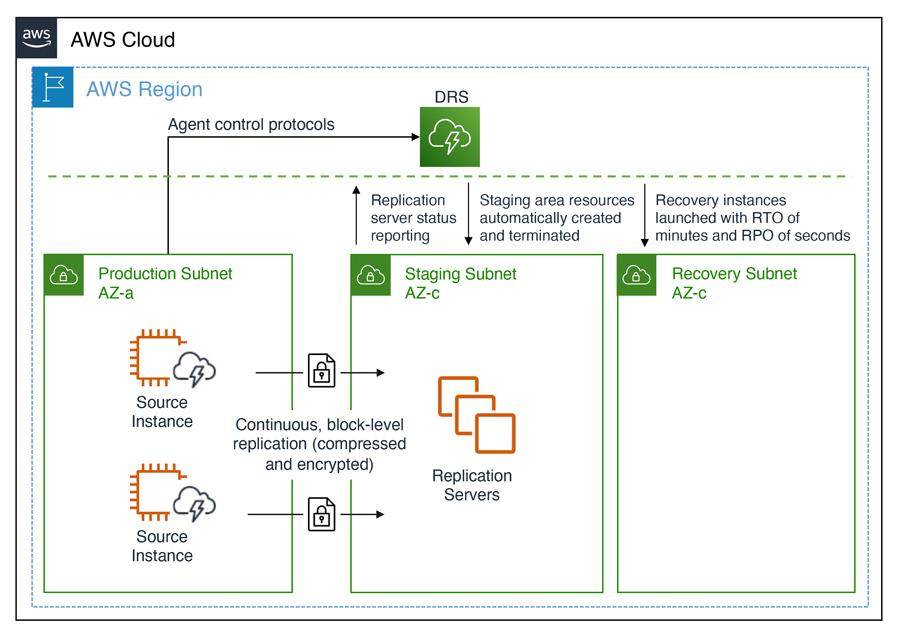
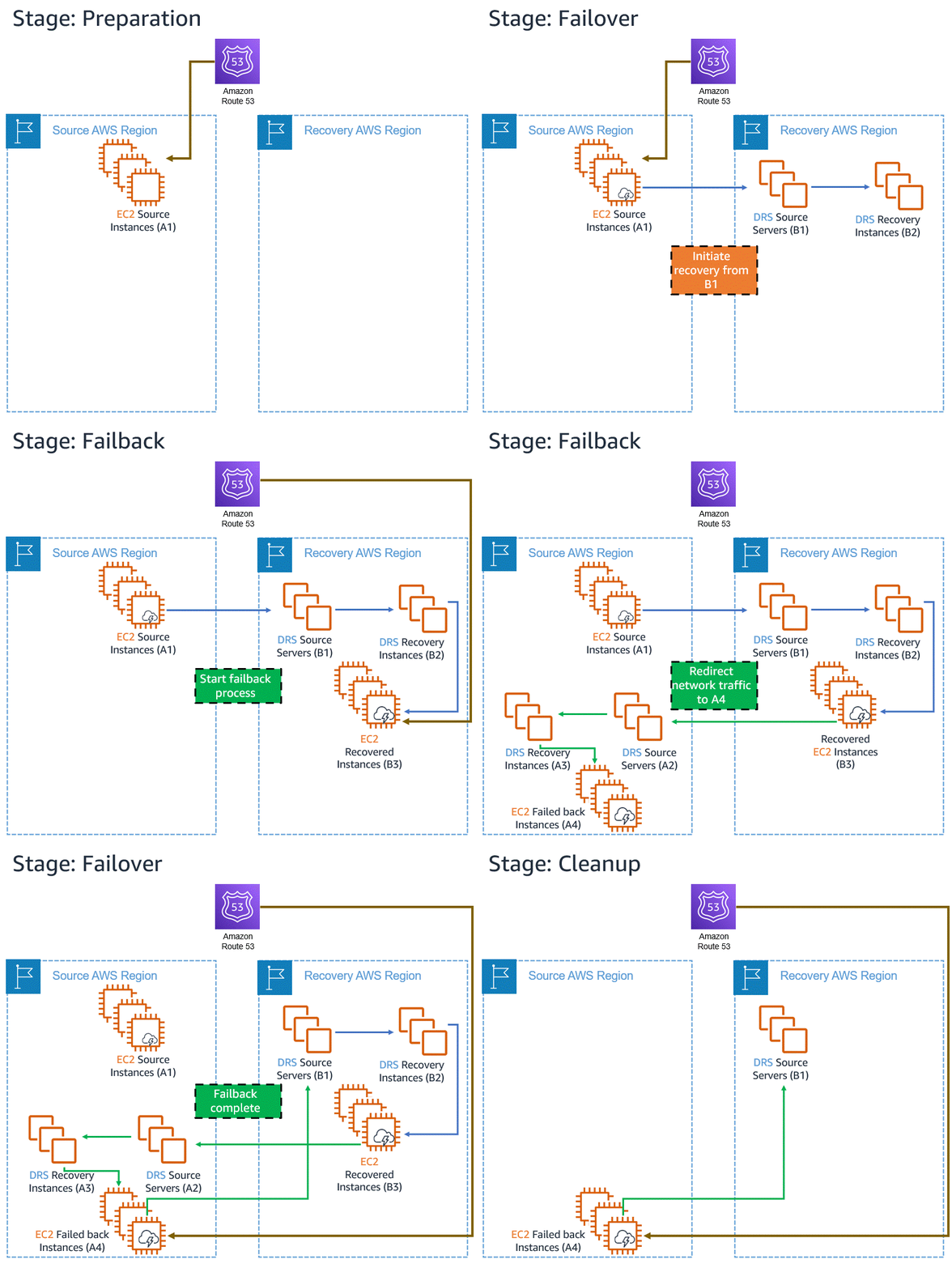
Announcing Automated in-AWS Failback for AWS Elastic Disaster Recovery
The new automated support provides a simplified and expedited experience to fail back Amazon Elastic Compute Cloud (Amazon EC2) instances to the original Region, and both failover and failback processes (for on-premises or in-AWS recovery) can be conveniently started from the AWS Management Console.

Migration & Transfer Services

New – A Fully Managed Schema Conversion in AWS Database Migration Service
AWS DMS Schema Conversion streamlines database migrations by making schema assessment and conversion available inside AWS DMS. You can now plan, assess, convert and migrate under one central DMS service.

AWS Application Migration Service Major Updates – New Migration Servers Grouping, Updated Launch, and Post-Launch Template
These three major updates will support your migration projects of any size.
New – Amazon RDS Optimized Reads and Optimized Writes

Post Syndicated from Jeff Barr original https://aws.amazon.com/blogs/aws/new-amazon-rds-optimized-reads-and-optimized-writes/

Way back in 2009 I wrote Introducing Amazon RDS – The Amazon Relational Database Service and told you that:

RDS makes it easier for you to set up, operate, and scale a relational database in the cloud. You get direct database access without worrying about infrastructure provisioning, software maintenance, or common database management tasks.

Since that launch we have continued to do our best to help you to avoid all of those items, while also working to make RDS ever-more cost effective. For example, we recently launched Graviton2 DB Instances that deliver up to 52% better price/performance and a new Multi-AZ Deployment Option that delivers up to 33% better price/performance along with 2x faster transaction commit latency.

Today I would like to tell you about two new features that will accelerate your Amazon RDS for MySQL workloads:

Amazon RDS Optimized Reads achieve faster query processing by placing temporary tables generated by MySQL on NVMe-based SSD block storage that is physically connected to the host server. Queries that use temporary tables, such as those involving sorts, hash aggregations, high-load joins, and Common Table Expressions (CTEs) can execute up to 50% faster with Optimized Reads.

Amazon RDS Optimized Writes deliver an improvement of up to 2x in write transaction throughput at no extra charge, and with the same level of provisioned IOPS. Optimized Writes are a great fit for write-heavy workloads that generate lots of concurrent transactions. This includes digital payments, financial trading platforms, and online games.

Amazon RDS Optimized Reads
Amazon RDS for MySQL without Optimized Reads places temporary tables on Amazon Elastic Block Store (Amazon EBS) volumes. Optimized Reads offload the operations on temporary objects from EBS to the instance store attached to r5d, m5d, r6gd and m6gd instances. As a result EBS volumes can be more efficiently utilized for reads and writes on persistent data, as well as background operations such as flushes, insert buffer merges, and so forth. This increased efficiency is (of course) always nice to have, but it is particularly beneficial for certain use cases:

  • Analytical Queries that include Complex Table Expressions, derived tables, and grouping operations.
  • Read Replicas that handle the unoptimized queries for an application.
  • On-Demand or Dynamic Reporting Queries with complex operations such as GROUP BY and ORDER BY that can’t always use appropriate indexes.
  • Other Workloads that use internal temporary tables.

You can monitor the MySQL status variable created_tmp_files to observe the rate of creation for temporary tables.

The amount of instance storage available on the instance varies by instance family and size. Here’s a guide:

Instance Family Minimum Storage
Maximum Storage
m5d 75 GB 3.6 TB
m6gd 237 GB 3.8 TB
r5d 75 GB 3.6 TB
r6gd 59 GB 3.8 TB

Using Optimized Reads
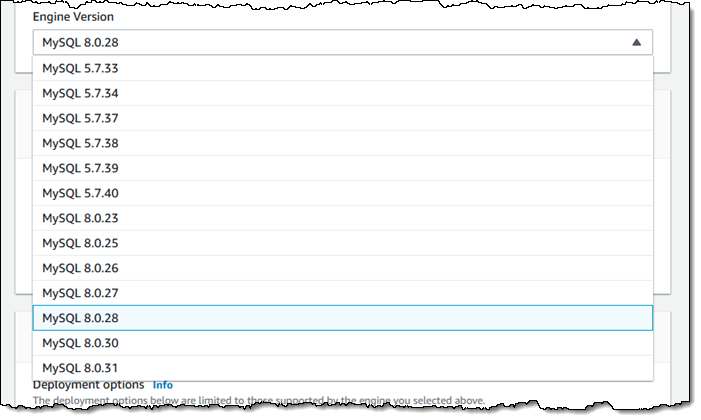
To take advantage of this new feature, choose MySQL engine version 8.0.28 or newer and launch Amazon RDS for MySQL on one of the instance types listed above:

You can monitor the use of instance storage by watching new CloudWatch metrics including FreeLocalStorage, ReadIOPSLocalStorage, WriteIOPSLocalStorage, and so forth (see the User Guide for a complete list of new and existing metrics).

Optimized Reads are available in all AWS Regions where the eligible database instance types are available.

Amazon RDS Optimized Writes
By default, MySQL uses an on-disk doublewrite buffer that serves as an intermediate stop between memory and the final on-disk storage. Each page of the buffer is 16 KiB but is written to the final on-disk storage in 4 KiB chunks. This extra step maintains data integrity, but also consumes additional I/O bandwidth. When running those write-heavy workloads that I described earlier, this might require provisioning of additional IOPS to meet your performance and throughput requirements.

Optimized Writes uses uniform 16 KiB database pages, file system blocks, and operating system pages, and writes them to storage atomically (all or nothing), resulting in the performance improvement of up to 2x that I mentioned earlier.

Using Optimized Writes
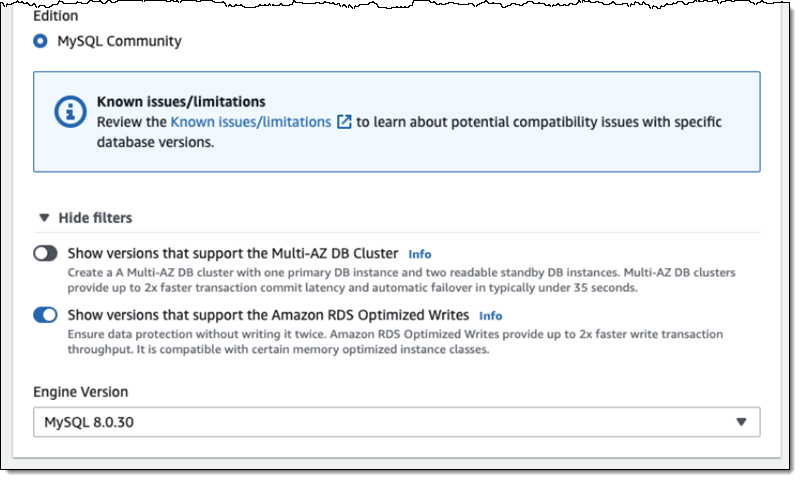
You must create a new DB Instance from scratch on a db.r5b or db.r6i instance with the latest version of MySQL 8.0 in order to make use of Optimized Writes:

This setting affects the format of DB snapshots, with two important consequences:

  1. You cannot restore an existing non-optimized snapshot to a new, optimized one in order to enable Optimized Writes.
  2. Restoring a snapshot that was made with optimization enabled will enable Optimized Writes in the new instance.

If you scale to an instance type that does not support Optimized Writes, Amazon RDS will enable MySQL’s doublewrite mode on the instance as a fallback. If you scale into an instance that supports Optimized Writes from one that does not, Amazon RDS will launch MySQL in doublewrite mode, wait for the recovery and log replay to complete, and then relaunch MySQL with doublewrite disabled.

Optimized Writes are now available in the US East (Ohio, N. Virginia), US West (Oregon), Asia Pacific (Singapore, Tokyo), and Europe (Frankfurt, Ireland, Paris) Regions and you can start to benefit from them today!

— Jeff;

Classifying and Extracting Mortgage Loan Data with Amazon Textract

Post Syndicated from Steve Roberts original https://aws.amazon.com/blogs/aws/classifying-and-extracting-mortgage-loan-data-with-amazon-textract/

Mortgage loan applications, at least in the United States, comprise around 500 or more pages of diverse documents. In order for applications to be reviewed, all these documents need to be classified, and the data on each form extracted. This isn’t as easy as it might sound! Besides different data structures in each document, the same data element may have different names on different documents—for example, SSN, or Social Security Number, or Tax ID. These three all refer to the same data.

Today, a new Analyze Lending API, for analyzing and classifying the documents contained in mortgage loan application packages, and extracting the data they contain, is available for Amazon Textract. The new API was created in response to requests from major lenders in the industry to help them process applications faster and reduce errors, which improves the end-customer experience and lower operating costs.

Until now, classification and extraction of data from mortgage loan application packages have been human-intensive tasks, although some lenders have used a hybrid approach, using technology such as Amazon Textract. However, customers told us that they needed even greater workflow automation to speed up automation efforts and reduce human error so that their staff could focus on higher-value tasks.

The new API also provides additional value-add services. It’s able to perform signature detection in terms of which documents have signatures and which don’t. It also provides a summary output of the documents in a mortgage application package and identifies select important documents such as bank statements and 1003 forms that would normally be present. The new workflow is powered by a collection of machine learning (ML) models. When a mortgage application package is uploaded, the workflow classifies the documents in the package before routing them to the right ML model, based on their classification, for data extraction.

Test-Driving the New Analyze Lending API
Although the new API is intended for lenders to incorporate into their business process workflows and applications, anyone can actually try it using the Amazon Textract console. This enables you to see how the API classifies documents and extracts the data elements they contain. If you’re interested in the application of machine learning and artificial intelligence, this may be of interest to you even if you’re not processing a mortgage application package.

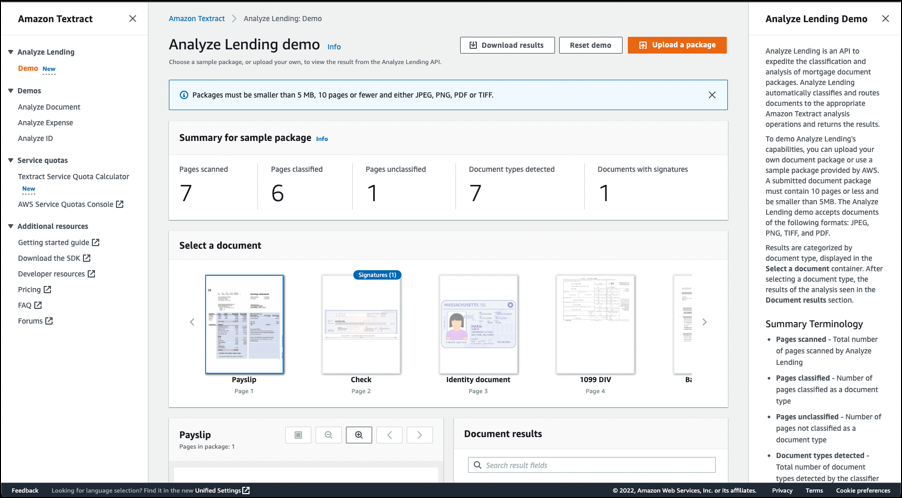
I start by opening the Amazon Textract console, expanding Analyze Lending in the navigation panel, and then selecting Demo. The demo console immediately analyzes a set of synthetic test files, and outputs the results shown below (you can always restart the demo by clicking the Reset demo button). I get a summary of the analysis results and a document carousel for each of the documents in the package. The demo console also has a handy help panel containing (among other things) a summary of terminology related to the documents.

Mortgage document analysis summary, carousel, and terminology help text

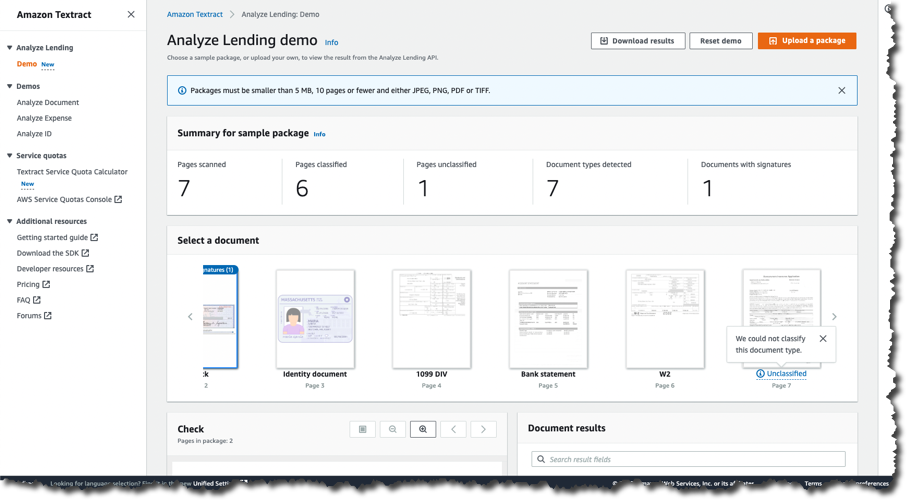
In the carousel I can see that one document has a signature badge, indicating a signature was detected, but, before taking a look, if I scroll the carousel, I can see that one document was labeled Unclassified:

Unclassified document notification

Returning in the carousel to the document marked with a signature badge, I can see that it’s a check. Signature detection is usually a highly manual process so having the document analysis automatically mark when one is detected is a significant time saver.

Signature detection

Payslips are another document type that customers have told us can be difficult and time-consuming to handle. Selecting the detected payslip in the carousel shows the data extracted from it.

Payslip detection and data extraction

The synthetic data in the demo console provides an overview of how the API is able to analyze, classify, and extract data from the documents in a mortgage application package. However, I can also use my own documents. To do this in the demo console, I click the Upload package button and provide a single file, up to 5 MB, and 10 pages maximum for testing in the demo console, containing documents to analyze. Outside use in the demo console, the API supports documents with up to 3000 pages.

The results, for both the synthetic and your own data, can be downloaded by clicking the Download results button. This provides a .zip file containing four files—two are the raw JSON responses from the API. The other two are CSV-format files containing the summary (summary.csv) and the extracted data (extractions.csv). Both files are in key-value format.

The contents of the summary data file, for the synthetic test data, are below.

'DocumentName,'FirstPage,'LastPage
"'Payslips","'1","'1"
"'Checks","'2","'2"
"'Identity document","'3","'3"
"'1099 DIV","'4","'4"
"'Bank statement","'5","'5"
"'W2","'6","'6"
"'Unclassified","'7","'7"

Below is an example of the data contained in the extractions file.

'key,'value
"'PAY PERIOD END DATE","'7/18/2008"
"'PAY DATE","'7/25/2008"
"'BORROWER NAME","'JOHN STILES"
"'BORROWER ADDRESS","'101 MAIN STREET ANYTOWN, USA 12345"
"'COMPANY NAME","'ANY COMPANY CORP."
"'COMPANY ADDRESS","'475 ANY AVENUE ANYTOWN, USA 10101"
"'FEDERAL FILING STATUS","'Married"
"'STATE FILING STATUS","'2"
"'CURRENT GROSS PAY","'$ 452.43"
"'YTD GROSS PAY","'23,526.80"
"'CURRENT NET PAY","'$ 291.90"
"'REGULAR HOURLY RATE","'10.00"
"'HOLIDAY HOURLY RATE","'10.00"
"'WARNINGS MESSAGES NOTES","'EFFECTIVE THIS PAY PERIOD YOUR REGULAR HOURLY RATE HAS BEEN CHANGED FROM $8.00 TO $10.00 PER HOUR."
"'CURRENT REGULAR PAY","'320"
...

Try the Analyze Lending API Yourself
The new API is available in all Regions where Amazon Textract is offered but do be aware that the workflow and processing are focused on US-centric documents. Pricing for the new API is the same as for the existing table, form, and queries. You can find more details on the service pricing page. Finally, you can read more on the API in the Developer Guide.

Explore the new Analyze Lending API for yourself today in the Amazon Textract console!

— Steve

Protect Sensitive Data with Amazon CloudWatch Logs

Post Syndicated from Marcia Villalba original https://aws.amazon.com/blogs/aws/protect-sensitive-data-with-amazon-cloudwatch-logs/

Today we are announcing Amazon CloudWatch Logs data protection, a new set of capabilities for Amazon CloudWatch Logs that leverage pattern matching and machine learning (ML) to detect and protect sensitive log data in transit.

While developers try to prevent logging sensitive information such as Social Security numbers, credit card details, email addresses, and passwords, sometimes it gets logged. Until today, customers relied on manual investigation or third-party solutions to detect and mitigate sensitive information from being logged. If sensitive data is not redacted during ingestion, it will be visible in plain text in the logs and in any downstream system that consumed those logs.

Enforcing prevention across the organization is challenging, which is why quick detection and prevention of access to sensitive data in the logs is important from a security and compliance perspective. Starting today, you can enable Amazon CloudWatch Logs data protection to detect and mask sensitive log data as it is ingested into CloudWatch Logs or as it is in transit.

Customers from all industries that want to take advantage of native data protection capabilities can benefit from this feature. But in particular, it is useful for industries under strict regulations that need to make sure that no personal information gets exposed. Also, customers building payment or authentication services where personal and sensitive information may be captured can use this new feature to detect and mask sensitive information as it’s logged.

Getting Started
You can enable a data protection policy for new or existing log groups from the AWS Management Console, AWS Command Line Interface (CLI), or AWS CloudFormation. From the console, select any log group and create a data protection policy in the Data protection tab.

Enable data protection policy

When you create the policy, you can specify the data you want to protect. Choose from over 100 managed data identifiers, which are a repository of common sensitive data patterns spanning financial, health, and personal information. This feature provides you with complete flexibility in choosing from a wide variety of data identifiers that are specific to your use cases or geographical region.

Configure data protection policy

You can also enable audit reports and send them to another log group, an Amazon Simple Storage Service (Amazon S3) bucket, or Amazon Kinesis Firehose. These reports contain a detailed log of data protection findings.

If you want to monitor and get notified when sensitive data is detected, you can create an alarm around the metric LogEventsWithFindings. This metric shows how many findings there are in a particular log group. This allows you to quickly understand which application is logging sensitive data.

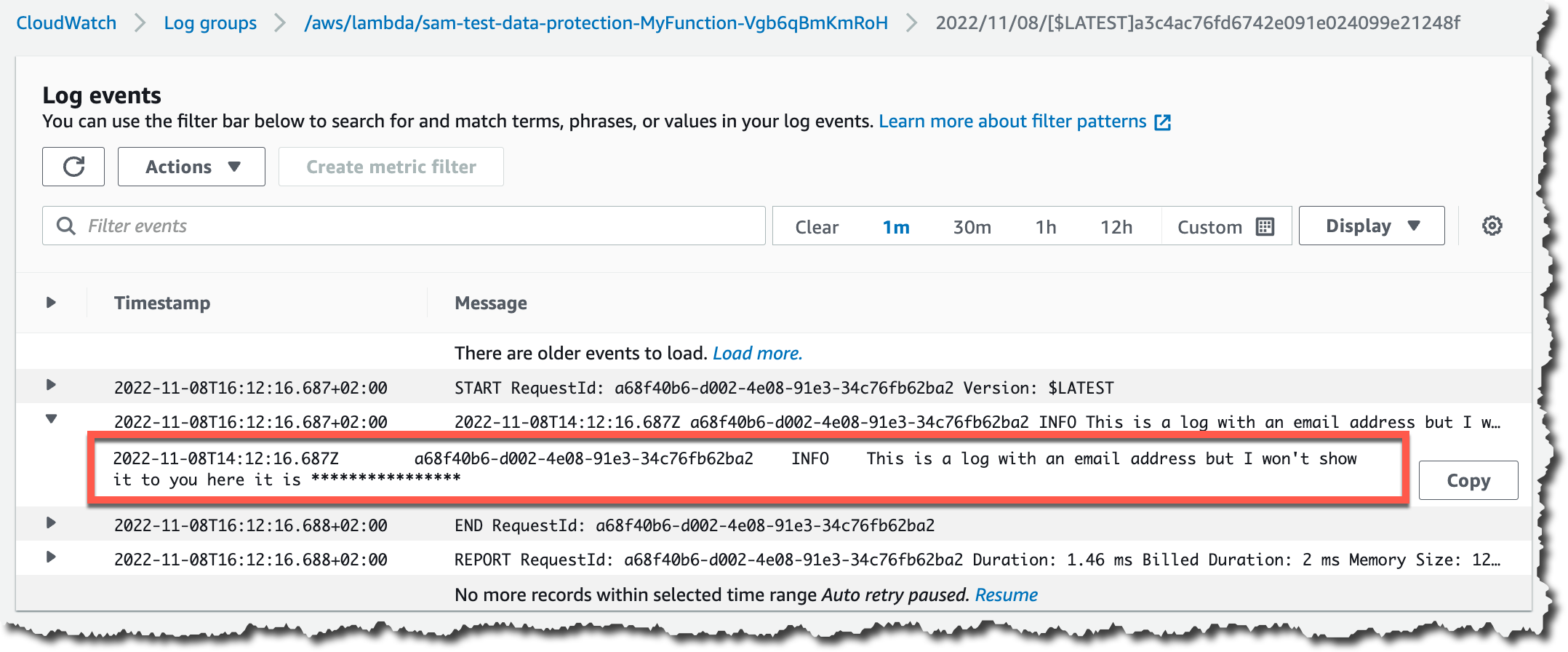
When sensitive information is logged, CloudWatch Logs data protection will automatically mask it per your configured policy. This is designed so that none of the downstream services that consume these logs can see the unmasked data. From the AWS Management Console, AWS CLI, or any third party, the sensitive information in the logs will appear masked.

Example of log file with masked data

Only users with elevated privileges in their IAM policy (add logs:Unmask action in the user policy) can view unmasked data in CloudWatch Logs Insights, logs stream search, or via FilterLogEvents and GetLogEvents APIs.

You can use the following query in CloudWatch Logs Insights to unmask data for a particular log group:

fields @timestamp, @message, unmask(@message)
| sort @timestamp desc
| limit 20

Available Now
Data protection is available in US East (Ohio), US East (N. Virginia), US West (N. California), US West (Oregon), Africa (Cape Town), Asia Pacific (Hong Kong), Asia Pacific (Jakarta), Asia Pacific (Mumbai), Asia Pacific (Osaka), Asia Pacific (Seoul), Asia Pacific (Singapore), Asia Pacific (Sydney), Asia Pacific (Tokyo), Canada (Central), Europe (Frankfurt), Europe (Ireland), Europe (London), Europe (Milan), Europe (Paris), Europe (Stockholm), Middle East (Bahrain), and South America (São Paulo) AWS Regions.

Amazon CloudWatch Logs data protection pricing is based on the amount of data that is scanned for masking. You can check the CloudWatch Logs pricing page to learn more about the pricing of this feature in your Region.

Learn more about data protection on the CloudWatch Logs User Guide.

— Marcia

New – Amazon CloudWatch Cross-Account Observability

Post Syndicated from Danilo Poccia original https://aws.amazon.com/blogs/aws/new-amazon-cloudwatch-cross-account-observability/

Deploying applications using multiple AWS accounts is a good practice to establish security and billing boundaries between teams and reduce the impact of operational events. When you adopt a multi-account strategy, you have to analyze telemetry data that is scattered across several accounts. To give you the flexibility to monitor all the components of your applications from a centralized view, we are introducing today Amazon CloudWatch cross-account observability, a new capability to search, analyze, and correlate cross-account telemetry data stored in CloudWatch such as metrics, logs, and traces.

You can now set up a central monitoring AWS account and connect your other accounts as sources. Then, you can search, audit, and analyze logs across your applications to drill down into operational issues in a matter of seconds. You can discover and visualize metrics from many accounts in a single place and create alarms that evaluate metrics belonging to other accounts. You can start with an aggregated cross-account view of your application to visually identify the resources exhibiting errors and dive deep into correlated traces, metrics, and logs to find the root cause. This seamless cross-account data access and navigation helps reduce the time and effort required to troubleshoot issues.

Let’s see how this works in practice.

Configuring CloudWatch Cross-Account Observability
To enable cross-account observability, CloudWatch has introduced the concept of monitoring and source accounts:

  • A monitoring account is a central AWS account that can view and interact with observability data shared by other accounts.
  • A source account is an individual AWS account that shares observability data and resources with one or more monitoring accounts.

You can configure multiple monitoring accounts with the level of visibility you need. CloudWatch cross-account observability is also integrated with AWS Organizations. For example, I can have a monitoring account with wide access to all accounts in my organization for central security and operational teams and then configure other monitoring accounts with more restricted visibility across a business unit for individual service owners.

First, I configure the monitoring account. In the CloudWatch console, I choose Settings in the navigation pane. In the Monitoring account configuration section, I choose Configure.

Console screenshot.

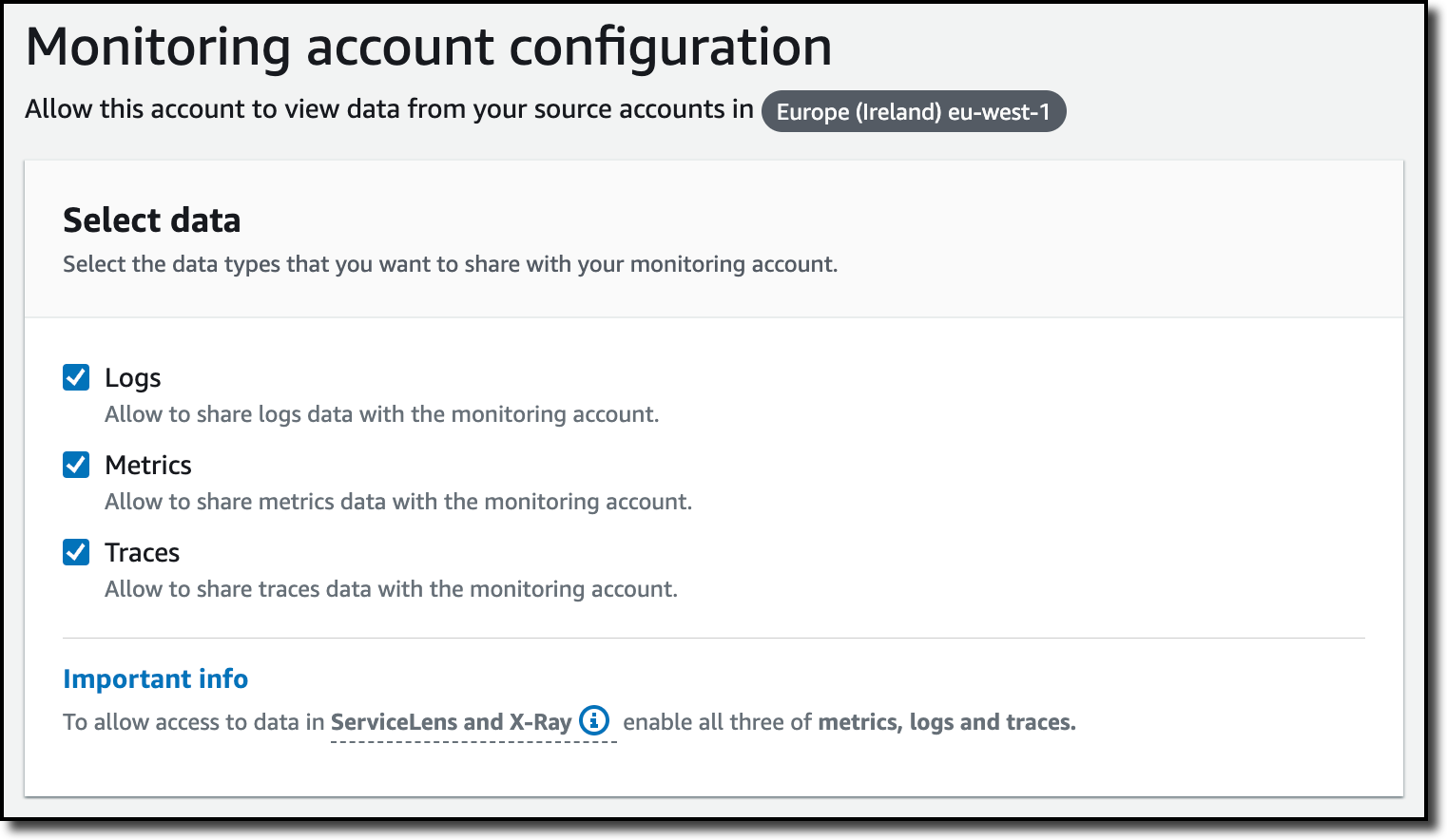
Now I can choose which telemetry data can be shared with the monitoring account: Logs, Metrics, and Traces. I leave all three enabled.

Console screenshot.

To list the source accounts that will share data with this monitoring account, I can use account IDs, organization IDs, or organization paths. I can use an organization ID to include all the accounts in the organization or an organization path to include all the accounts in a department or business unit. In my case, I have only one source account to link, so I enter the account ID.

Console screenshot.

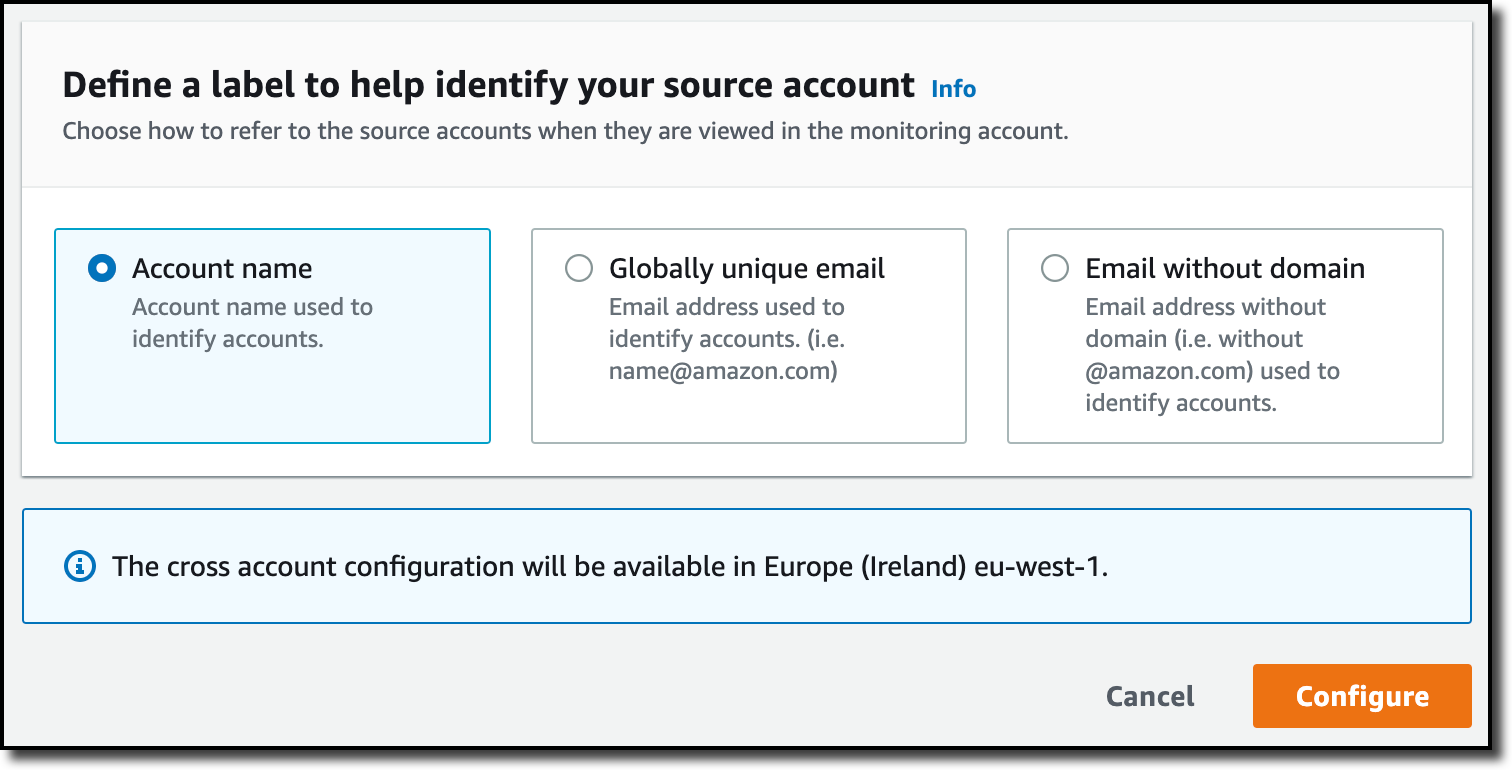
When using the CloudWatch console in the monitoring account to search and display telemetry data, I see the account ID that shared that data. Because account IDs are not easy to remember, I can display a more descriptive “account label.” When configuring the label via the console, I can choose between the account name or the email address used to identify the account. When using an email address, I can also choose whether to include the domain. For example, if all the emails used to identify my accounts are using the same domain, I can use as labels the email addresses without that domain.

There is a quick reminder that cross-account observability only works in the selected Region. If I have resources in multiple Regions, I can configure cross-account observability in each Region. To complete the configuration of the monitoring account, I choose Configure.

Console screenshot.

The monitoring account is now enabled, and I choose Resources to link accounts to determine how to link my source accounts.

Console screenshot.

To link source accounts in an AWS organization, I can download an AWS CloudFormation template to be deployed in a CloudFormation delegated administration account.

To link individual accounts, I can either download a CloudFormation template to be deployed in each account or copy a URL that helps me use the console to set up the accounts. I copy the URL and paste it into another browser where I am signed in as the source account. Then, I can configure which telemetry data to share (logs, metrics, or traces). The Amazon Resource Name (ARN) of the monitoring account configuration is pre-filled because I copy-pasted the URL in the previous step. If I don’t use the URL, I can copy the ARN from the monitoring account and paste it here. I confirm the label used to identify my source account and choose Link.

In the Confirm monitoring account permission dialog, I type Confirm to complete the configuration of the source account.

Using CloudWatch Cross-Account Observability
To see how things work with cross-account observability, I deploy a simple cross-account application using two AWS Lambda functions, one in the source account (multi-account-function-a) and one in the monitoring account (multi-account-function-b). When triggered, the function in the source account publishes an event to an Amazon EventBridge event bus in the monitoring account. There, an EventBridge rule triggers the execution of the function in the monitoring account. This is a simplified setup using only two accounts. You’d probably have your workloads running in multiple source accounts.Architectural diagram.

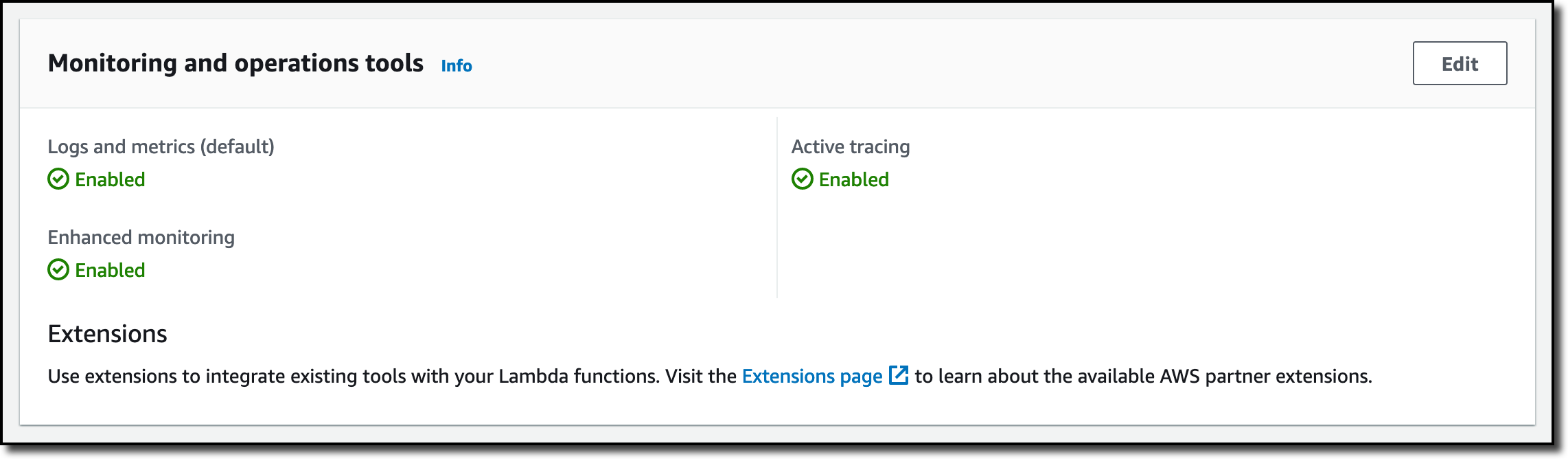
In the Lambda console, the two Lambda functions have Active tracing and Enhanced monitoring enabled. To collect telemetry data, I use the AWS Distro for OpenTelemetry (ADOT) Lambda layer. The Enhanced monitoring option turns on Amazon CloudWatch Lambda Insights to collect and aggregate Lambda function runtime performance metrics.

Console screenshot.

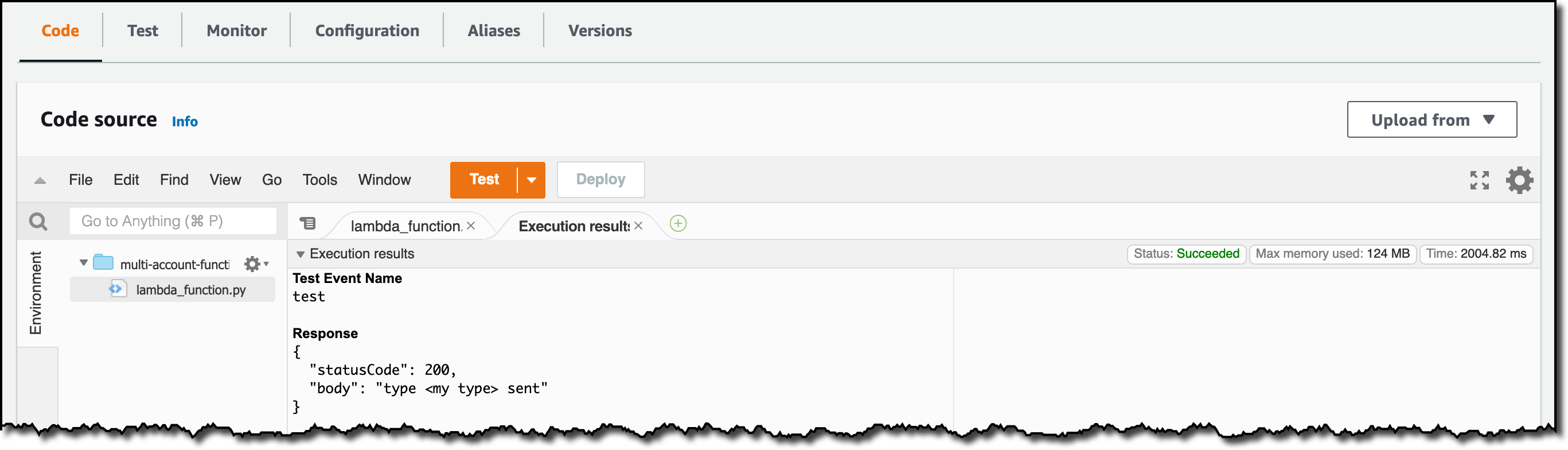
I prepare a test event in the Lambda console of the source account. Then, I choose Test and run the function a few times.

Console screenshot.

Now, I want to understand what the components of my application, running in different accounts, are doing. I start with logs and then move to metrics and traces.

In the CloudWatch console of the monitoring account, I choose Log groups in the Logs section of the navigation pane. There, I search for and find the log groups created by the two Lambda functions running in different AWS accounts. As expected, each log group shows the account ID and label originating the data. I select both log groups and choose View in Logs Insights.

Console screenshot.

I can now search and analyze logs from different AWS accounts using the CloudWatch Logs Insights query syntax. For example, I run a simple query to see the last twenty messages in the two log groups. I include the @log field to see the account ID that the log belongs to.

Console screenshot.

I can now also create Contributor Insights rules on cross-account log groups. This enables me, for example, to have a holistic view of what security events are happening across accounts or identify the most expensive Lambda requests in a serverless application running in multiple accounts.

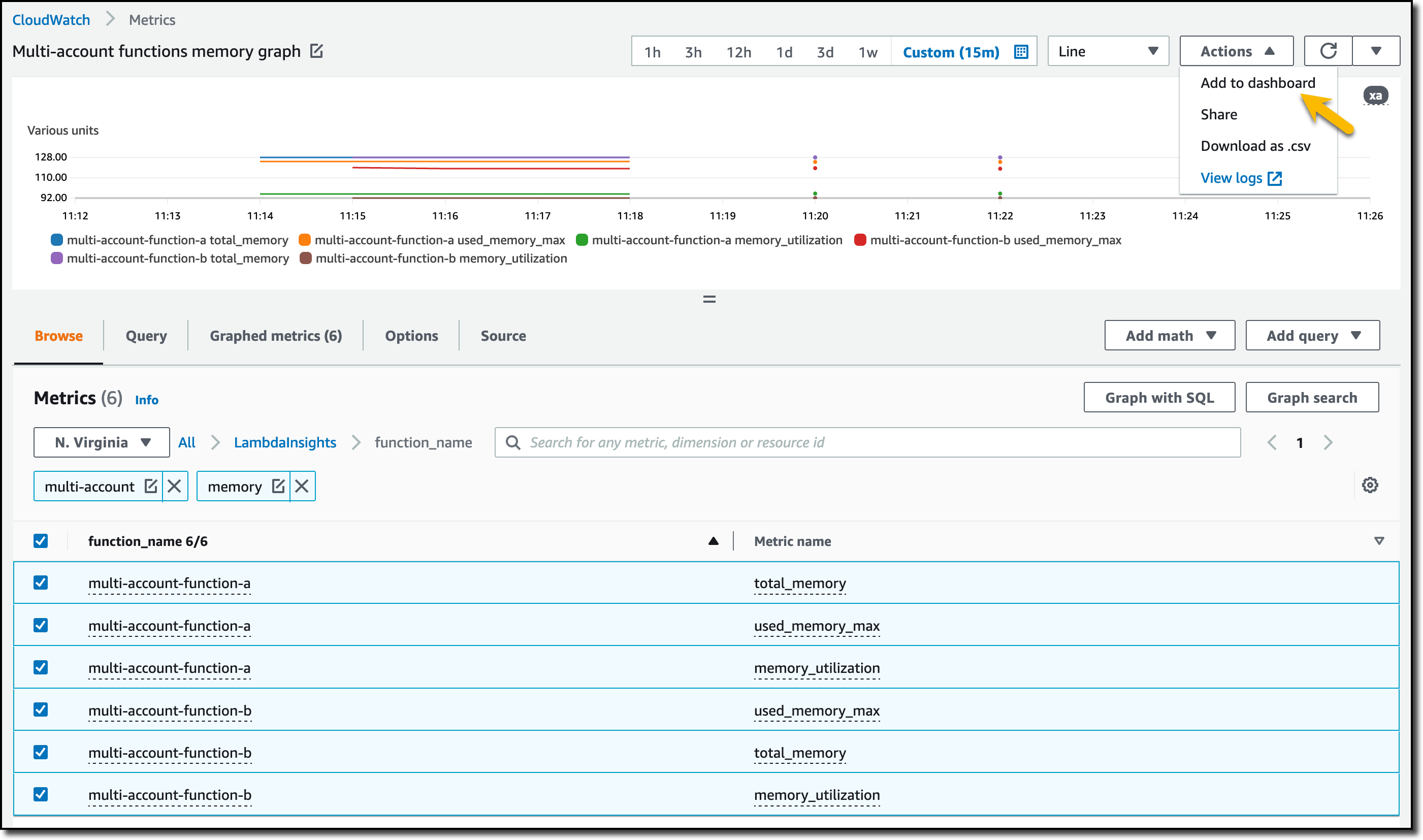
Then, I choose All metrics in the Metrics section of the navigation pane. To see the Lambda function runtime performance metrics collected by CloudWatch Lambda Insights, I choose LambdaInsights and then function_name. There, I search for multi-account and memory to see the memory metrics. Again, I see the account IDs and labels that tell me that these metrics are coming from two different accounts. From here, I can just select the metrics I am interested in and create cross-account dashboards and alarms. With the metrics selected, I choose Add to dashboard in the Actions dropdown.

Console screenshot.

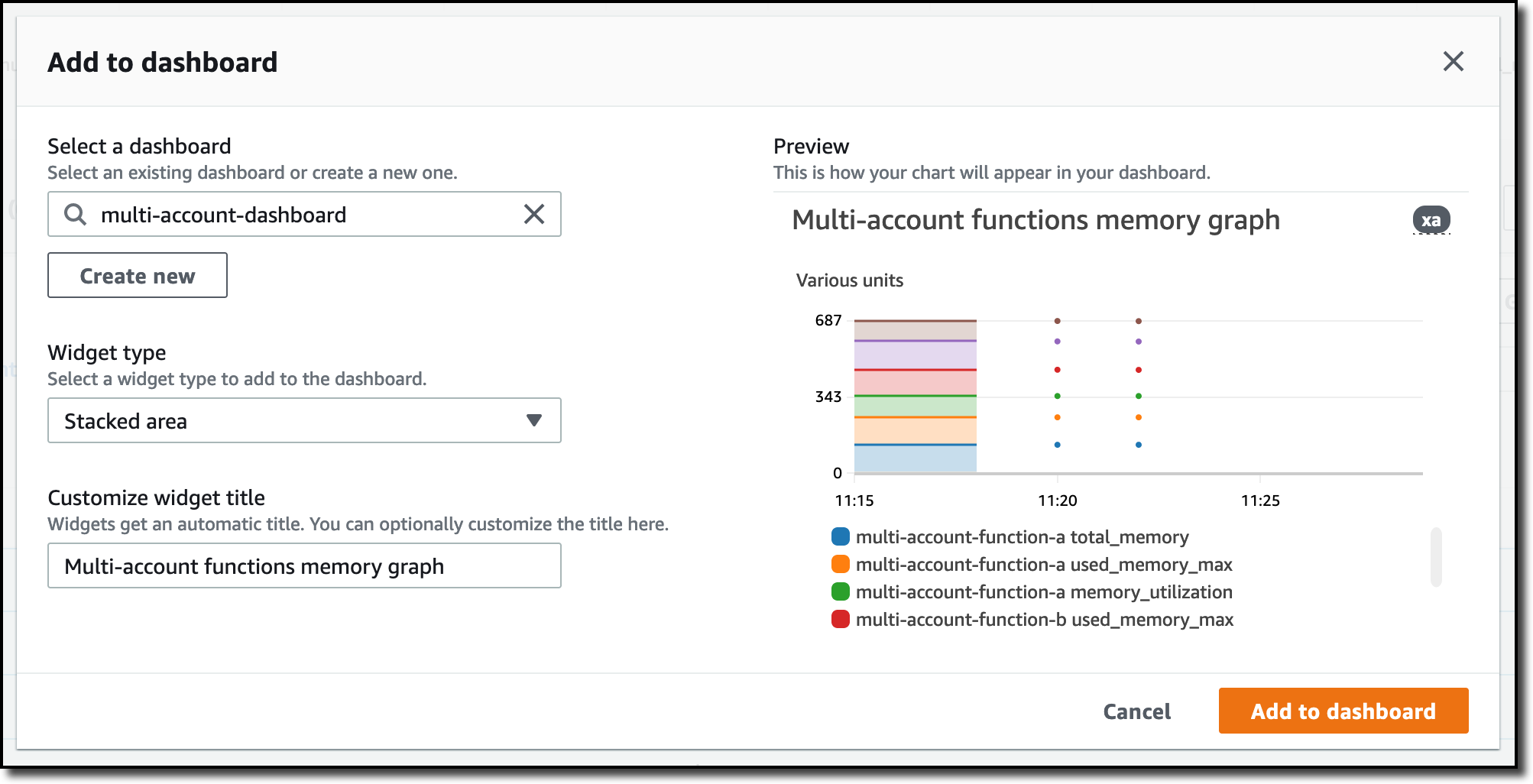
I create a new dashboard and choose the Stacked area widget type. Then, I choose Add to dashboard.

Console screenshot.

I do the same for the CPU and memory metrics (but using different widget types) to quickly create a cross-account dashboard where I can keep under control my multi-account setup. Well, there isn’t a lot of traffic yet but I am hopeful.

Console screenshot.

Finally, I choose Service map from the X-Ray traces section of the navigation pane to see the flow of my multi-account application. In the service map, the client triggers the Lambda function in the source account. Then, an event is sent to the other account to run the other Lambda function.

Console screenshot.

In the service map, I select the gear icon for the function running in the source account (multi-account-function-a) and then View traces to look at the individual traces. The traces contain data from multiple AWS accounts. I can search for traces coming from a specific account using a syntax such as:

service(id(account.id: "123412341234"))

Console screenshot.

The service map now stitches together telemetry from multiple accounts in a single place, delivering a consolidated view to monitor their cross-account applications. This helps me to pinpoint issues quickly and reduces resolution time.

Availability and Pricing
Amazon CloudWatch cross-account observability is available today in all commercial AWS Regions using the AWS Management Console, AWS Command Line Interface (CLI), and AWS SDKs. AWS CloudFormation support is coming in the next few days. Cross-account observability in CloudWatch comes with no extra cost for logs and metrics, and the first trace copy is free. See the Amazon CloudWatch pricing page for details.

Having a central point of view to monitor all the AWS accounts that you use gives you a better understanding of your overall activities and helps solve issues for applications that span multiple accounts.

Start using CloudWatch cross-account observability to monitor all your resources.

— Danilo

New – A Fully Managed Schema Conversion in AWS Database Migration Service

Post Syndicated from Channy Yun original https://aws.amazon.com/blogs/aws/new-a-fully-managed-schema-conversion-in-aws-database-migration-service/

Since we launched AWS Database Migration Service (AWS DMS) in 2016, customers have securely migrated more than 800,000 databases to AWS with minimal downtime. AWS DMS supports migration between 20+ database and analytics engines, such as Oracle to Amazon Aurora MySQL, MySQL to Amazon Relational Database (Amazon RDS) MySQL, Microsoft SQL Server to Amazon Aurora PostgreSQL, MongoDB to Amazon DocumentDB, Oracle to Amazon Redshift, and to and from Amazon Simple Storage Service (Amazon S3).

Specifically, the AWS Schema Conversion Tool (AWS SCT) makes heterogeneous database and data warehouse migrations predictable and can automatically convert the source schema and a majority of the database code objects, including views, stored procedures, and functions, to a format compatible with the target engine. For example, it supports the conversion of Oracle PL/SQL and SQL Server T-SQL code to equivalent code in the Amazon Aurora MySQL dialect of SQL or the equivalent PL/pgSQL code in PostgreSQL. You can download the AWS SCT for your platform, including Windows or Linux (Fedora and Ubuntu).

Today we announce fully managed AWS DMS Schema Conversion, which streamlines database migrations by making schema assessment and conversion available inside AWS DMS. With DMS Schema Conversion, you can now plan, assess, convert and migrate under one central DMS service. You can access features of DMS Schema Conversion in the AWS Management Console without downloading and executing AWS SCT.

AWS DMS Schema Conversion automatically converts your source database schemas, and a majority of the database code objects to a format compatible with the target database. This includes tables, views, stored procedures, functions, data types, synonyms, and so on, similar to AWS SCT. Any objects that cannot be automatically converted are clearly marked as action items with prescriptive instructions on how to migrate to AWS manually.

In this launch, DMS Schema Conversion supports the following databases as sources for migration projects:

  • Microsoft SQL Server version 2008 R2 and higher
  • Oracle version 10.2 and later, 11g and up to 12.2, 18c, and 19c

DMS Schema Conversion supports the following databases as targets for migration projects:

  • Amazon RDS for MySQL version 8.x
  • Amazon RDS for PostgreSQL version 14.x

Setting Up AWS DMS Schema Conversion
To get started with DMS Schema Conversion, and if it is your first time using AWS DMS, complete the setup tasks to create a virtual private cloud (VPC) using the Amazon VPC service, source, and target database. To learn more, see Prerequisites for AWS Database Migration Service in the AWS documentation.

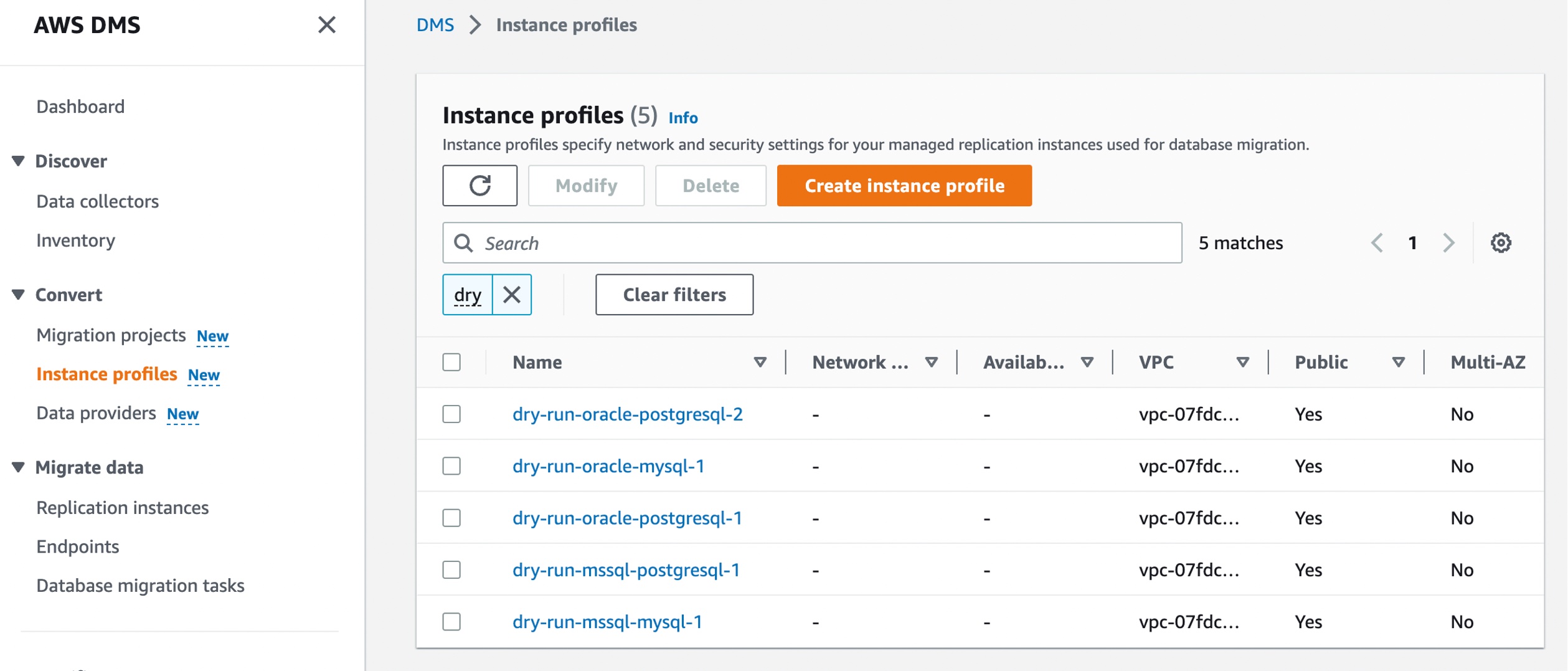
In the AWS DMS console, you can see new menus to set up Instance profiles, add Data providers, and create Migration projects.

Before you create your migration project, set up an instance profile by choosing Instance profiles in the left pane. An instance profile specifies network and security settings for your DMS Schema Conversion instances. You can create multiple instance profiles and select an instance profile to use for each migration project.

Choose Create instance profile and specify your default VPC or a new VPC, Amazon Simple Storage Service (Amazon S3) bucket to store your schema conversion metadata, and additional settings such as AWS Key Management Service (AWS KMS) keys.
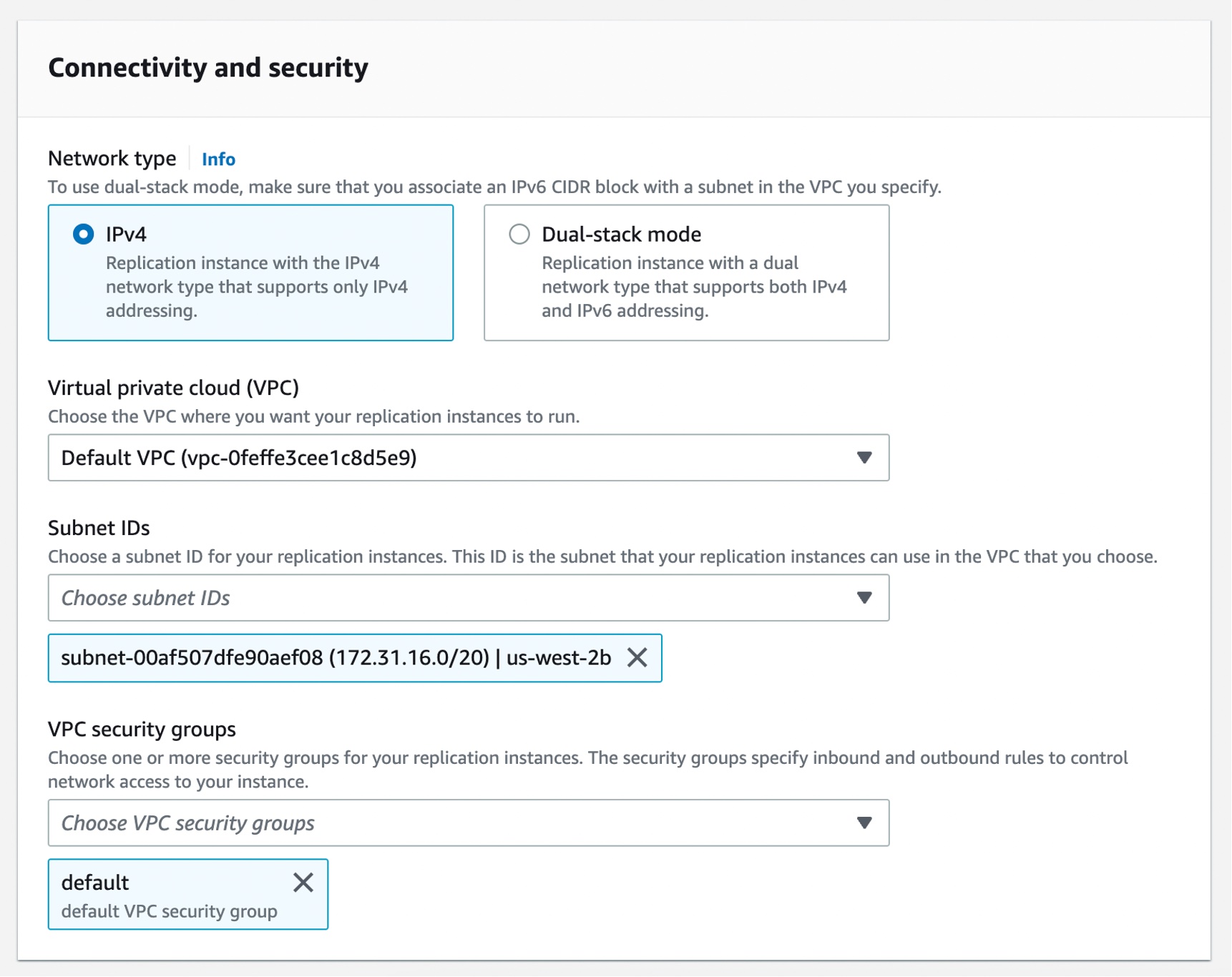
You can create the simplest network configuration with a single VPC configuration. If your source or target data providers are in different VPCs, you can create your instance profile in one of the VPCs, and then link these two VPCs by using VPC peering.

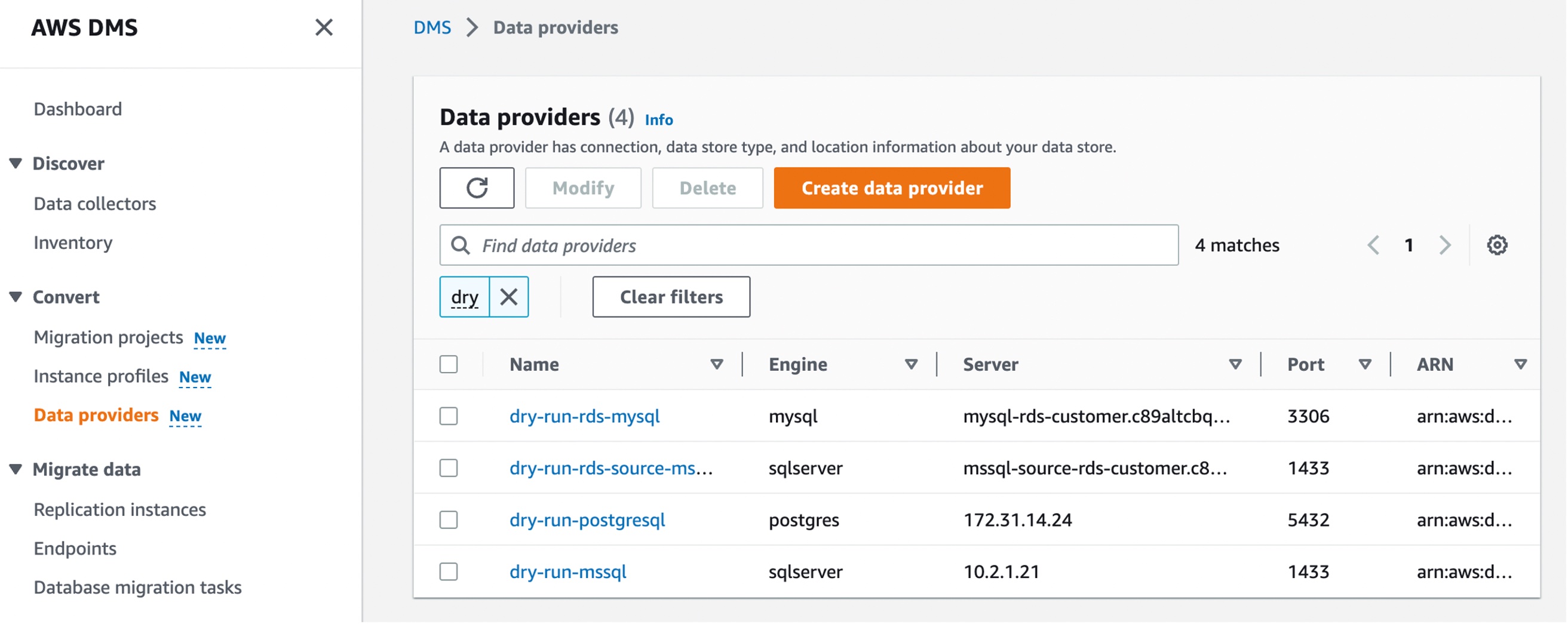
Next, you can add data providers that store the data store type and location information about your source and target databases by choosing Data providers in the left pane. For each database, you can create a single data provider and use it in multiple migration projects.

Your data provider can be a fully managed Amazon RDS instance or a self-managed engine running either on-premises or on an Amazon Elastic Compute Cloud (Amazon EC2) instance.

Choose Create data provider to create a new data provider. You can set the type of the database location manually, such as database engine, domain name or IP address, port number, database name, and so on, for your data provider. Here, I have selected an RDS database instance.

After you create a data provider, make sure that you add database connection credentials in AWS Secrets Manager. DMS Schema Conversion uses this information to connect to a database.

Converting your database schema with AWS DMS Schema Conversion
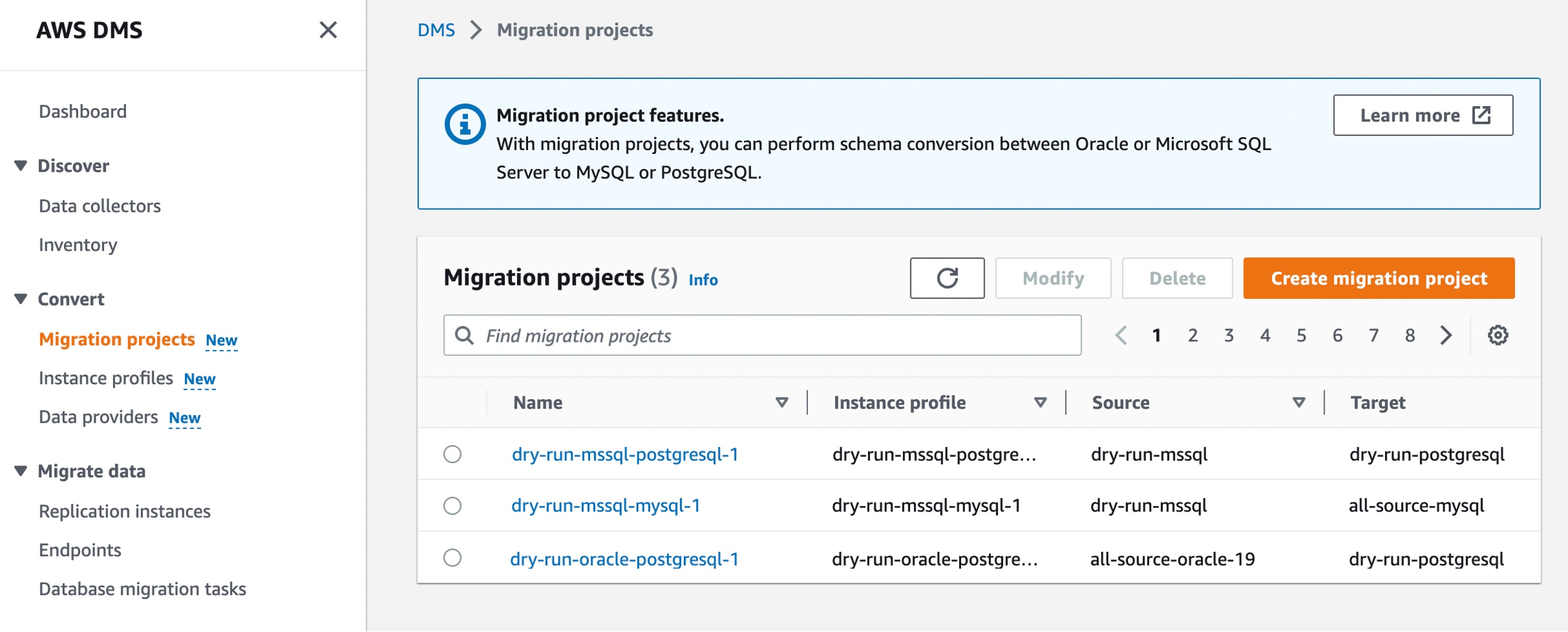
Now, you can create a migration project for DMS Schema Conversion by choosing Migration projects in the left pane. A migration project describes your source and target data providers, your instance profile, and migration rules. You can also create multiple migration projects for different source and target data providers.

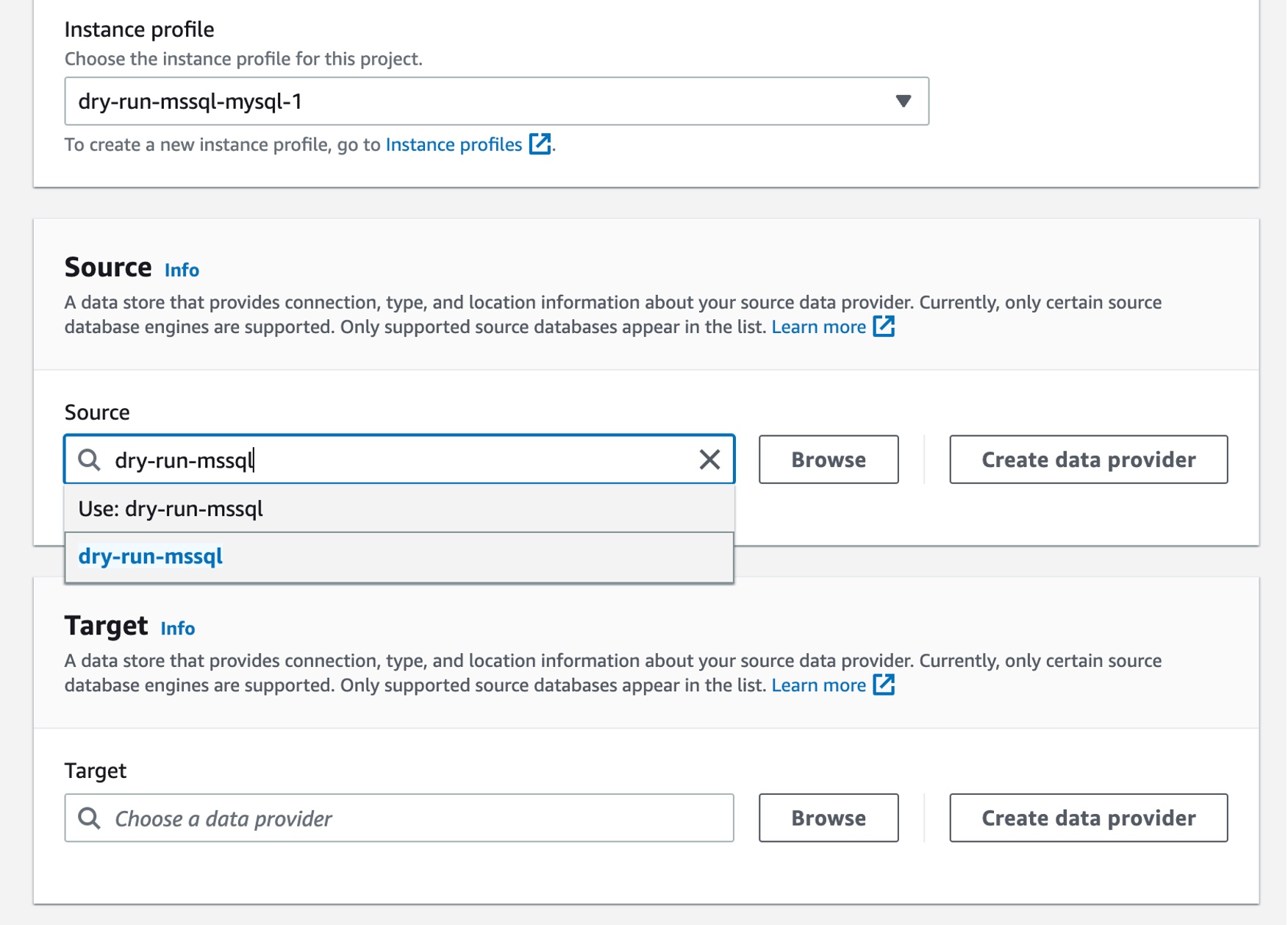
Choose Create migration project and select your instance profile and source and target data providers for DMS Schema Conversion.

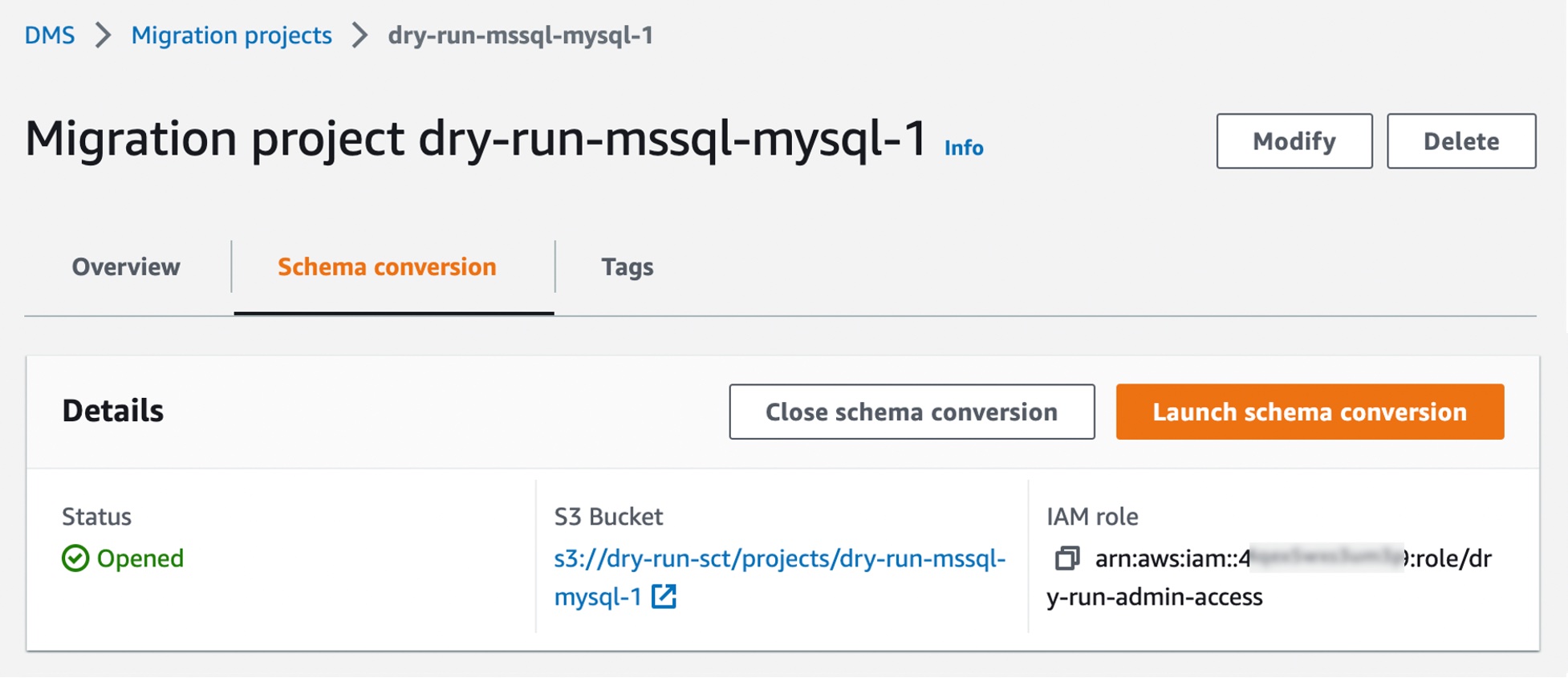
After creating your migration project, you can use the project to create assessment reports and convert your database schema. Choose your migration project from the list, then choose the Schema conversion tab and click Launch schema conversion.

Migration projects in DMS Schema Conversion are always serverless. This means that AWS DMS automatically provisions the cloud resources for your migration projects, so you don’t need to manage schema conversion instances.

Of course, the first launch of DMS Schema Conversion requires starting a schema conversion instance, which can take up to 10–15 minutes. This process also reads the metadata from the source and target databases. After a successful first launch, you can access DMS Schema Conversion faster.

An important part of DMS Schema Conversion is that it generates a database migration assessment report that summarizes all of the schema conversion tasks. It also details the action items for schema that cannot be converted to the DB engine of your target database instance. You can view the report in the AWS DMS console or export it as a comma-separated value (.csv) file.

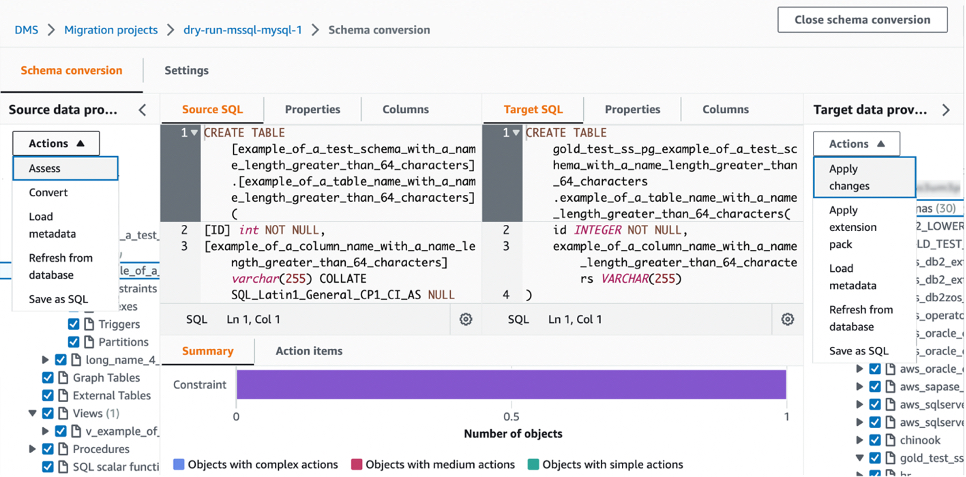
To create your assessment report, choose the source database schema or schema items that you want to assess. After you select the checkboxes, choose Assess in the Actions menu in the source database pane. This report will be archived with .csv files in your S3 bucket. To change the S3 bucket, edit the schema conversion settings in your instance profile.

Then, you can apply the converted code to your target database or save it as a SQL script. To apply converted code, choose Convert in the pane of Source data provider and then Apply changes in the pane of Target data provider.

Once the schema has been converted successfully, you can move on to the database migration phase using AWS DMS. To learn more, see Getting started with AWS Database Migration Service in the AWS documentation.

Now Available
AWS DMS Schema Conversion is now available in the US East (Ohio), US East (N. Virginia), US West (Oregon), Asia Pacific (Singapore), Asia Pacific (Sydney), Asia Pacific (Tokyo), Europe (Frankfurt), Europe (Ireland), and Europe (Stockholm) Regions, and you can start using it today.

To learn more, see the AWS DMS Schema Conversion User Guide, give it a try, and please send feedback to AWS re:Post for AWS DMS or through your usual AWS support contacts.

– Channy

AWS Application Migration Service Major Updates – New Migration Servers Grouping, Updated Launch, and Post-Launch Template

Post Syndicated from Channy Yun original https://aws.amazon.com/blogs/aws/aws-application-migration-service-major-updates-new-migration-servers-grouping-updated-launch-and-post-launch-template/

Last year, we introduced the general availability of AWS Application Migration Service that simplifies and expedites your migration to AWS by automatically converting your source servers from physical, virtual, or cloud infrastructure to run natively on AWS. Since the GA launch, we have made improvements, adding features such as agentless replication, MAP 2.0 auto-tagging and support for optional post-launch modernization actions.

Today we announce three major updates of Application Migration Service to support your migration projects of any size:

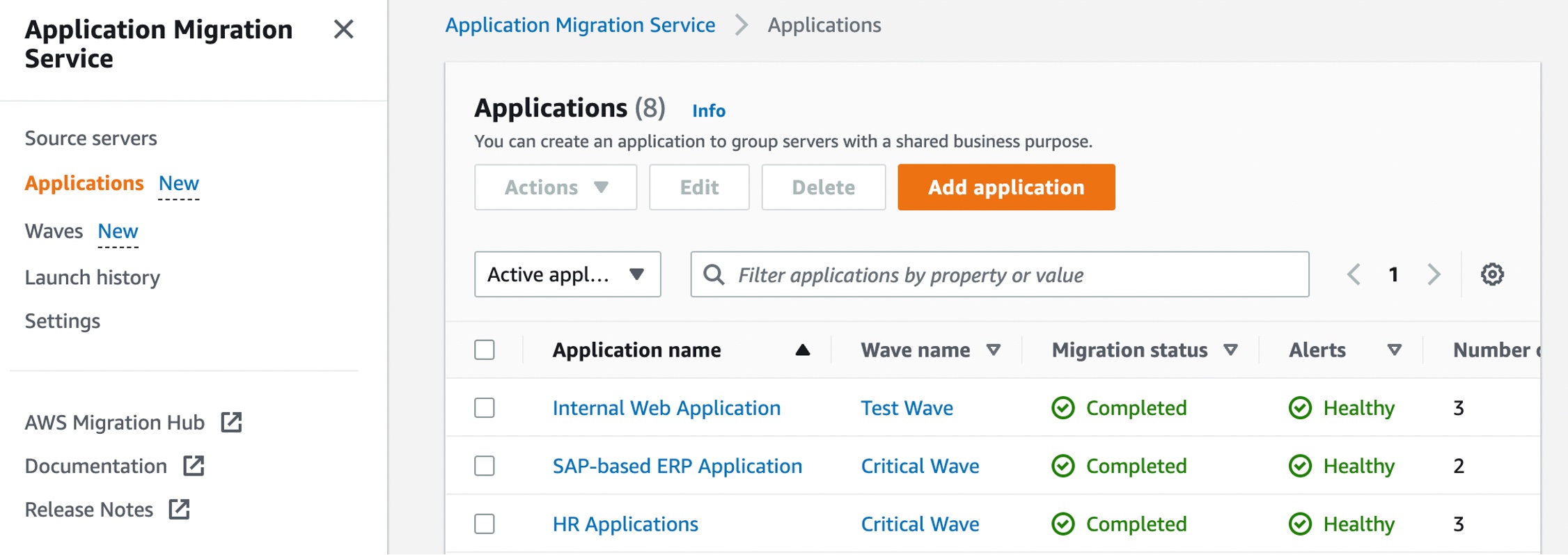
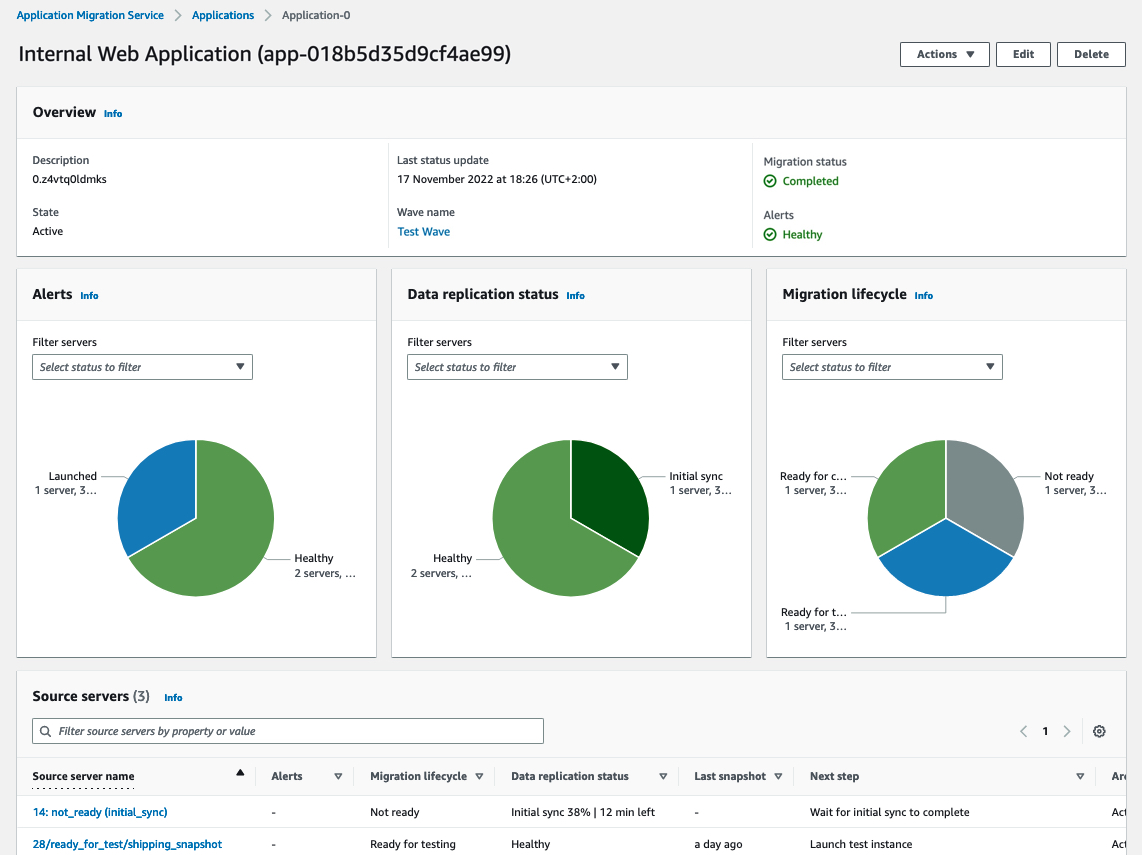
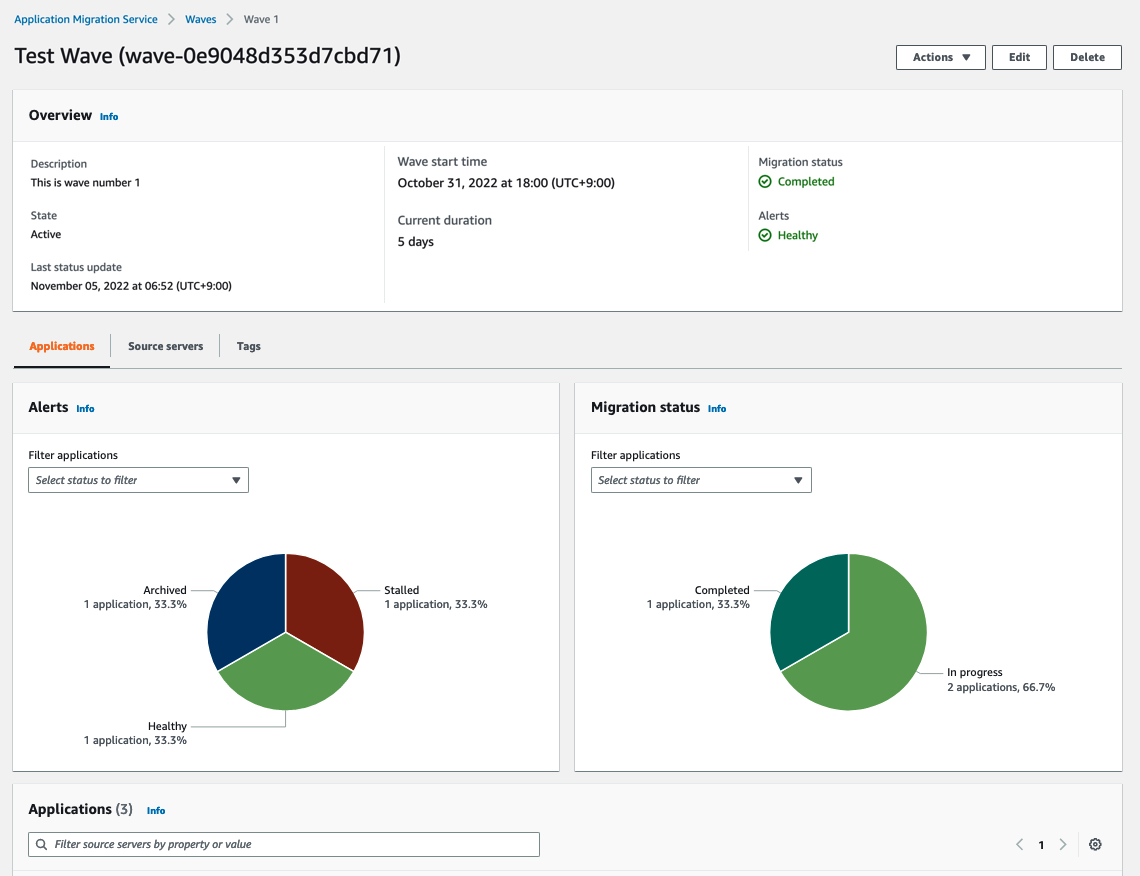
  • New Migration Servers Grouping – You can group migration servers into “applications,” a group of servers that function together as a single application, and manage the migration stage in “waves,” a plan of migrations including grouping servers and applications.
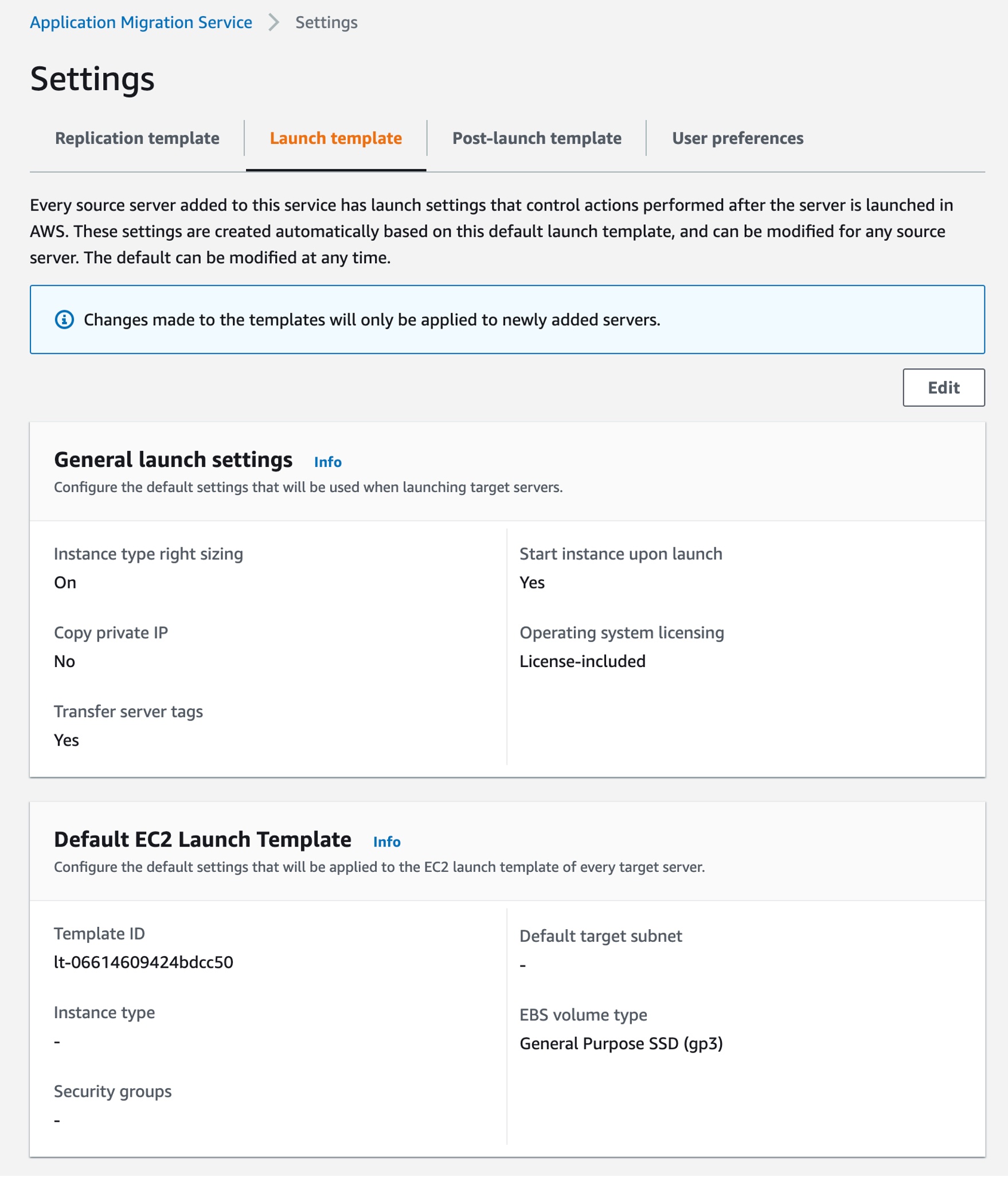
  • Updated Launch Template – You can modify the general settings and default launch template, and this template is then used to generate the Amazon Elastic Compute Cloud (Amazon EC2) instance launch template of subsequently installed source servers.
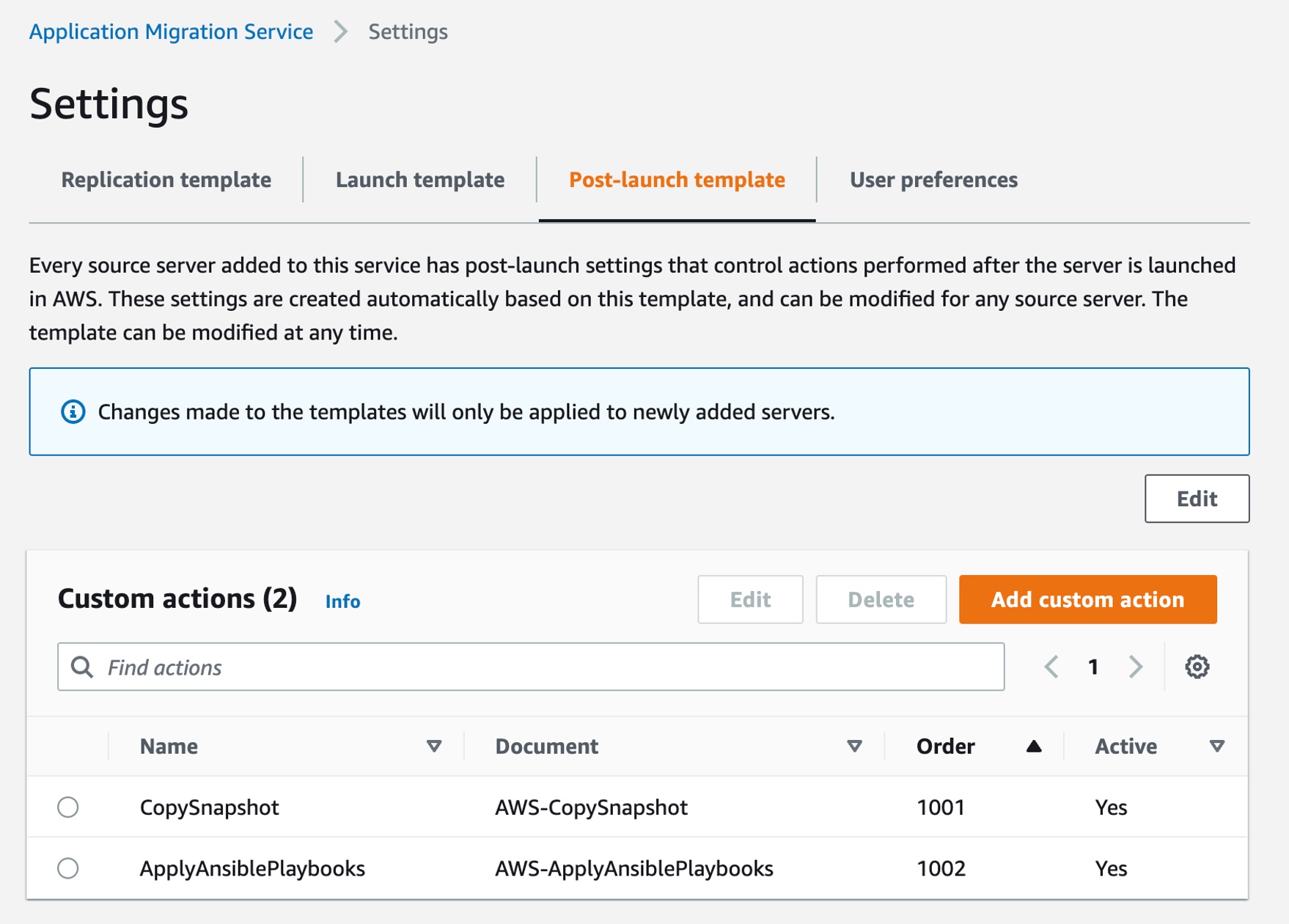
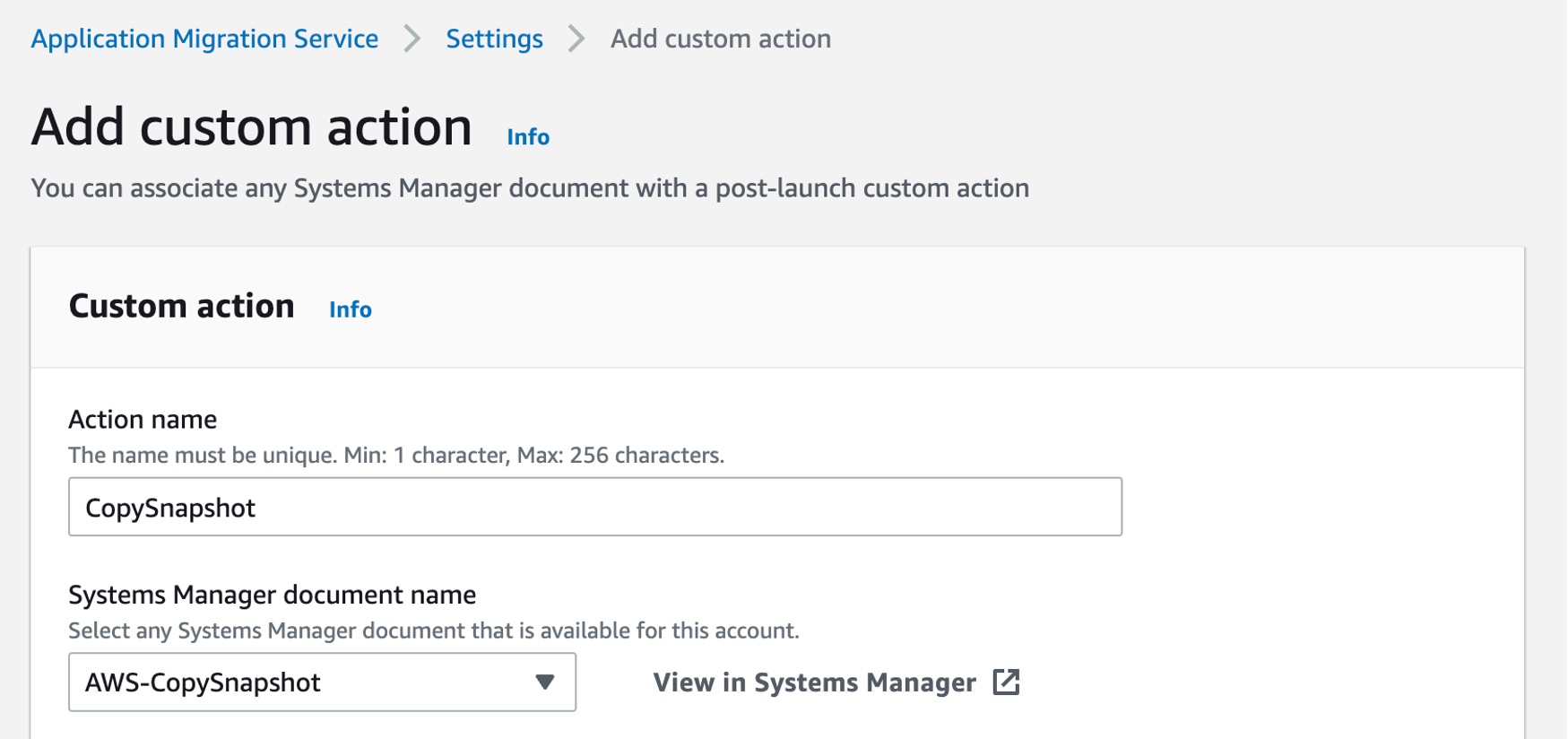
  • Updated Post-Launch Template – You can configure custom modernization actions for the post-launch template. You can associate any AWS Systems Manager documents and their parameters with a post-launch custom action.

Let’s dive deep into each launch!

New Migration Servers Grouping – Applications and Waves
Customers have clusters of servers that comprise an application, with dependencies between them. The servers within an application share the same configurations, such as network, security policies, etc. Customers want to migrate complete applications and services, as well as set up and configure the application environment.

We introduce the new concept of “application,” representing a group of servers, and you can manage the migration of an application.

The new application feature groups source servers together with the same application for integrated migration jobs. It includes configuring the environment before migrating the application’s servers, creating the appropriate security groups, and performing bulk actions on all of the applications servers.

You can track and monitor the status of application migration and data replication within the migration lifecycle from source servers.

Also, customers with large migrations plan their migration, grouping servers and applications in waves. These are logical groups that describe the migration plan over time. Waves may include multiple servers and applications that do not necessarily have dependencies between them.

We introduce the new concept of “wave,” assisting customers in building their migration plan, as well as executing and monitoring it.

Application Migration Service supports actions on waves, such as launching all servers in a testing environment or performing cutover of a wave. Application Migration Service also provides reporting and monitoring information at the wave level so that customers will be able to manage their migration projects.

Updated Launch Template – Launch Settings and Default EC2 Launch Template
The launch template allows you to control the way Application Migration Service launches instances in the AWS Cloud. You can change the settings for existing and newly added servers individually. Previously, we only supported the AWS Migration Acceleration Program (MAP) option to add tags to launched migration instances.

We added two new options to modify the global launch template, and this template is then used to generate the EC2 launch templates of subsequently installed source servers. Customers start with a global Application Migration Service launch template, which can be used for predefined launch templates. They would then potentially only have to perform modifications to a smaller subset of source servers, as opposed to all of them.

Here are default settings that will be used when launching target servers:

  • Activate instance type right-sizing – The service will determine the best match instance type. The default instance type defined in the EC2 template will be ignored.
  • Start instance upon launch – The service will launch instances automatically. If this option is not selected, the launched instance will need to be manually started after launch.
  • Copy private IP – This enables you to copy the private IP of your source server to the target.
  • Transfer server tags – Transfer the tags from the source server to the launched instances.
  • Operating system licensing – Specify whether to continue to use the Bring Your Own License model (BYOL) of the source server or use an AWS provided license.

Also, you can configure the default settings that will be applied to the EC2 launch template of every target server, such as default target subnet, additional security groups, default instance type, Amazon Elastic Block Store (Amazon EBS) volume type, IOPS, and throughput to associate with all instances launched by this service.

Updated Post-Launch Template – Custom Actions
Post-launch settings allow you to control and automate actions performed after the server has been launched in AWS. It includes four built-in actions: installing the AWS Systems Manager agent, installing the AWS Elastic Disaster Recover agent and configuring replication, CentOS conversion, and SUSE subscription conversion.

We added a new option to configure custom actions in the post-launch template. You can associate any AWS Systems Manager and its action parameters. It also includes the order in which the actions will be executed and the source server’s operating systems for which the custom action can be configured.

Choose Add custom action to make a new post-launch custom action. For example, the AWS-CopySnapshot, one of Systems Manager Automation’s runbooks, copies a point-in-time snapshot of an EBS volume. You can copy the snapshot within the same AWS Region or from one Region to another.

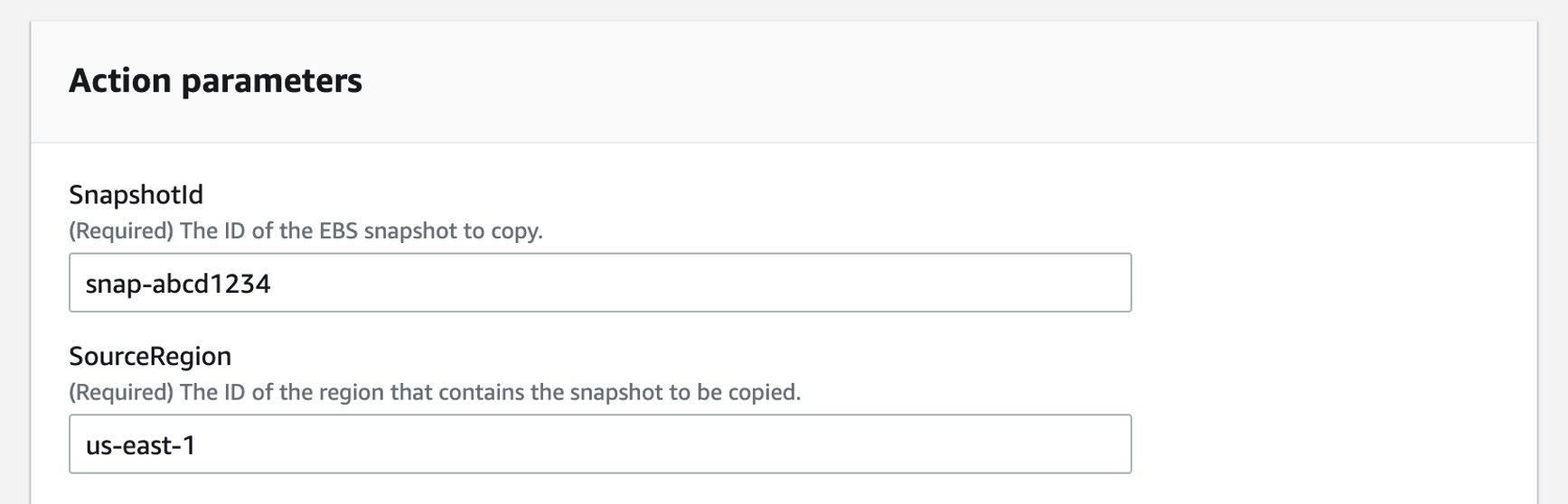
In the Action parameters, you can assign SnapshotId and SourceRegion to run the AWS Systems Manager CopySnapshot runbook.

You can create your own Systems Manager document to define the actions that Systems Manager performs on your managed instances. Systems Manager offers more than 100 preconfigured documents that you can use by specifying parameters as the post-launch actions. To learn more, see AWS Systems Manager Automation runbook reference in the AWS documentation.

Now Available
The new migration servers grouping, updates on the launch, and post-launch template are available now, and you can start using them today in all Regions where AWS Application Migration Service is supported.

To learn more, see the Application Migration Service User Guide, give it a try, and please send feedback to AWS re:Post for Application Migration Service or through your usual AWS support contacts.

– Channy

New – Announcing Amazon EFS Elastic Throughput

Post Syndicated from Veliswa Boya original https://aws.amazon.com/blogs/aws/new-announcing-amazon-efs-elastic-throughput/

Today, we are announcing the availability of Amazon EFS Elastic Throughput, a new throughput mode for Amazon EFS that is designed to provide your applications with as much throughput as they need with pay-as-you-use pricing. This new throughput mode enables you to further simplify running workloads and applications on AWS by providing shared file storage that doesn’t need provisioning or capacity management.

Elastic Throughput is ideal for spiky and unpredictable workloads with performance requirements that are difficult to forecast. When you enable Elastic Throughput on an Amazon EFS file system, you no longer need to think about actively managing your file system performance or over-paying for idle resources in order to ensure performance for your applications. When you enable Elastic Throughput, you don’t specify or provision throughput capacity, Amazon EFS automatically delivers the throughput performance your application needs while you the builder pays only for the amount of data read or written.

Amazon EFS is built to provide serverless, fully elastic file storage that lets you share file data for your cloud-based applications without having to think about provisioning or managing storage capacity and performance. With Elastic Throughput, Amazon EFS now extends its simplicity and elasticity to performance, enabling you to run an even broader range of file workloads on Amazon EFS. Amazon EFS is well suited to support a broad spectrum of use cases that include analytics and data science, machine learning, CI/CD tools, content management and web serving, and SaaS applications.

A Quick Review
As you may already know, Amazon EFS already has the Bursting Throughput mode, which is available as a default and supports bursting to higher levels for up to 12 hours a day. If your application is throughput constrained on Bursting mode (for example, utilizes more than 80 percent of permitted throughput or exhausts burst credits), then you should consider using Provisioned (which we announced in 2018), or the new Elastic Throughput modes.

With this announcement of Elastic Throughput mode, and in addition to the already existing Provisioned Throughput mode, Amazon EFS now offers two options for workloads that require higher levels of throughput performance. You should use Provisioned Throughput if you know your workload’s performance requirements and you expect your workload to consume a higher share (more than 5 percent on average) of your application’s peak throughput capacity. You should use Elastic Throughput if you don’t know your application’s throughput or your application is very spiky.

To access Elastic Throughput mode (or any of the Throughput modes), select Customize (selecting Create instead will create your file system with the default Bursting mode).

Create File system

Create File system

New - Elastic Throughput

New – Elastic Throughput

You can also enable Elastic Throughput for new and existing General Purpose file systems using the Amazon EFS console or programmatically using the Amazon EFS CLI, Amazon EFS API, or AWS CloudFormation.

Elastic Throughput in Action
Once you have enabled Elastic Throughput mode, you will be able to monitor your cost and throughput usage using Amazon CloudWatch and set alerts on unplanned throughput charges using AWS Budgets.

I have a test file system elasticblog that I created previously using the Amazon EFS console, and now I cannot wait to see Elastic Throughput in action.

File system (elasticblog)

File system (elasticblog)

I have provisioned an Amazon Elastic Compute Cloud (Amazon C2) instance which I mounted to my file system. This EC2 instance has data that I will add to the file system.

I have also created CloudWatch Alarms, which will monitor throughput usage and set alarm thresholds (ReadIOBytes, WriteIOBytes, TotalIOBytes, and MetadataIOBytes).

CloudWatch for Throughput Usage

CloudWatch for Throughput Usage

The CloudWatch dashboard for my test file system elasticblog looks like this.

CloudWatch Dashboard - TotalIOBytes for File System

CloudWatch Dashboard – TotalIOBytes for File System

Elastic Throughput allows you to drive throughput up to a limit of 3 GiB/s for read operations and 1 GiB/s for write operations per file system in all Regions.

Available Now
Amazon EFS Elastic Throughput is available in all Regions supporting EFS except for the AWS China Regions.

To learn more, see the Amazon EFS User Guide. Please send feedback to AWS re:Post for Amazon Elastic File System or through your usual AWS support contacts.

– Veliswa x

New – Amazon Redshift Support in AWS Backup

Post Syndicated from Danilo Poccia original https://aws.amazon.com/blogs/aws/new-amazon-redshift-support-in-aws-backup/

With Amazon Redshift, you can analyze data in the cloud at any scale. Amazon Redshift offers native data protection capabilities to protect your data using automatic and manual snapshots. This works great by itself, but when you’re using other AWS services, you have to configure more than one tool to manage your data protection policies.

To make this easier, I am happy to share that we added support for Amazon Redshift in AWS Backup. AWS Backup allows you to define a central backup policy to manage data protection of your applications and can now also protect your Amazon Redshift clusters. In this way, you have a consistent experience when managing data protection across all supported services. If you have a multi-account setup, the centralized policies in AWS Backup let you define your data protection policies across all your accounts within your AWS Organizations. To help you meet your regulatory compliance needs, AWS Backup now includes Amazon Redshift in its auditor-ready reports. You also have the option to use AWS Backup Vault Lock to have immutable backups and prevent malicious or inadvertent changes.

Let’s see how this works in practice.

Using AWS Backup with Amazon Redshift
The first step is to turn on the Redshift resource type for AWS Backup. In the AWS Backup console, I choose Settings in the navigation pane and then, in the Service opt-in section, Configure resources. There, I toggle the Redshift resource type on and choose Confirm.

Console screenshot.

Now, I can create or update a backup plan to include the backup of all, or some, of my Redshift clusters. In the backup plan, I can define how often these backups should be taken and for how long they should be kept. For example, I can have daily backups with one week of retention, weekly backups with one month of retention, and monthly backups with one year of retention.

I can also create on-demand backups. Let’s see this with more details. I choose Protected resources in the navigation pane and then Create on-demand backup.

I select Redshift in the Resource type dropdown. In the Cluster identifier, I select one of my clusters. For this workload, I need two weeks of retention. Then, I choose Create on-demand backup.

Console screenshot.

My data warehouse is not huge, so after a few minutes, the backup job has completed.

Console screenshot.

I now see my Redshift cluster in the list of the resources protected by AWS Backup.

Console screenshot.

In the Protected resources list, I choose the Redshift cluster to see the list of the available recovery points.

Console screenshot.

When I choose one of the recovery points, I have the option to restore the full data warehouse or just a table into a new Redshift cluster.

Console screenshot.

I now have the possibility to edit the cluster and database configuration, including security and networking settings. I just update the cluster identifier, otherwise the restore would fail because it must be unique. Then, I choose Restore backup to start the restore job.

After some time, the restore job has completed, and I see the old and the new clusters in the Amazon Redshift console. Using AWS Backup gives me a simple centralized way to manage data protection for Redshift clusters as well as many other resources in my AWS accounts.

Console screenshot.

Availability and Pricing
Amazon Redshift support in AWS Backup is available today in the AWS Regions where both AWS Backup and Amazon Redshift are offered, with the exception of the Regions based in China. You can use this capability via the AWS Management Console, AWS Command Line Interface (CLI), and AWS SDKs.

There is no additional cost for using AWS Backup compared to the native snapshot capability of Amazon Redshift. Your overall costs depend on the amount of storage and retention you need. For more information, see AWS Backup pricing.

— Danilo

New – Fully Managed Blue/Green Deployments in Amazon Aurora and Amazon RDS

Post Syndicated from Channy Yun original https://aws.amazon.com/blogs/aws/new-fully-managed-blue-green-deployments-in-amazon-aurora-and-amazon-rds/

When updating databases, using a blue/green deployment technique is an appealing option for users to minimize risk and downtime. This method of making database updates requires two database environments—your current production environment, or blue environment, and a staging environment, or green environment. You must then keep these two environments in sync with each other so you may safely test and upgrade your changes to production.

Amazon Aurora and Amazon Relational Database Service (Amazon RDS) customers can use database cloning and promotable read replicas to help self-manage a blue/green deployment. However, self-managing a blue/green deployment can be costly and complex to build and manage. As a result, customers sometimes delay implementing database updates, choosing availability over the benefits that they would gain from updating their databases.

Today, we are announcing the general availability of Amazon RDS Blue/Green Deployments, a new feature for Amazon Aurora with MySQL compatibility, Amazon RDS for MySQL, and Amazon RDS for MariaDB that enables you to make database updates safer, simpler, and faster.

With just a few steps, you can use Blue/Green Deployments to create a separate, synchronized, fully managed staging environment that mirrors the production environment. The staging environment clones your production environment’s primary database and in-Region read replicas. Blue/Green Deployments keep these two environments in sync using logical replication.

In as fast as a minute, you can promote the staging environment to be the new production environment with no data loss. During switchover, Blue/Green Deployments blocks writes on blue and green environments so that the green catches up with the blue, ensuring no data loss. Then, Blue/Green Deployments redirects production traffic to the newly promoted staging environment, all without any code changes to your application.

With Blue/Green Deployments, you can make changes, such as major and minor version upgrades, schema modifications, and operating system or maintenance updates, to the staging environment without impacting the production workload.

Getting Started with Blue/Green Deployments for MySQL Clusters
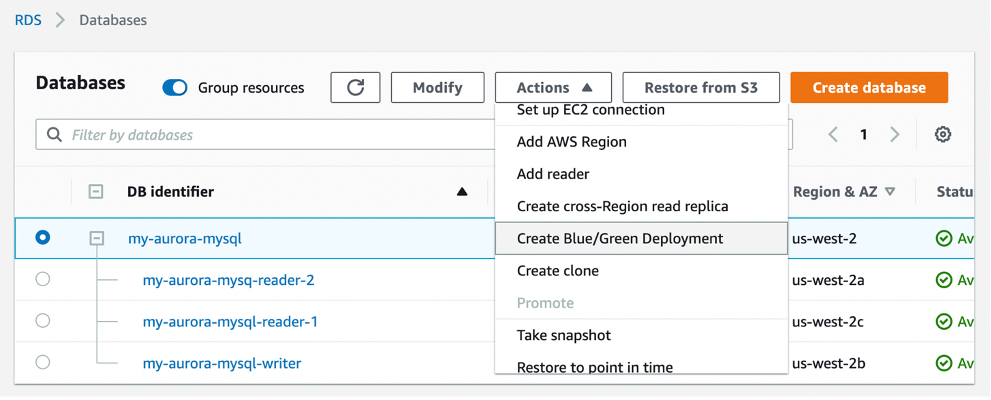
You can start updating your databases with just a few clicks in the AWS Management Console. To get started, simply select the database that needs to be updated in the console and click Create Blue/Green Deployment under the Actions dropdown menu.

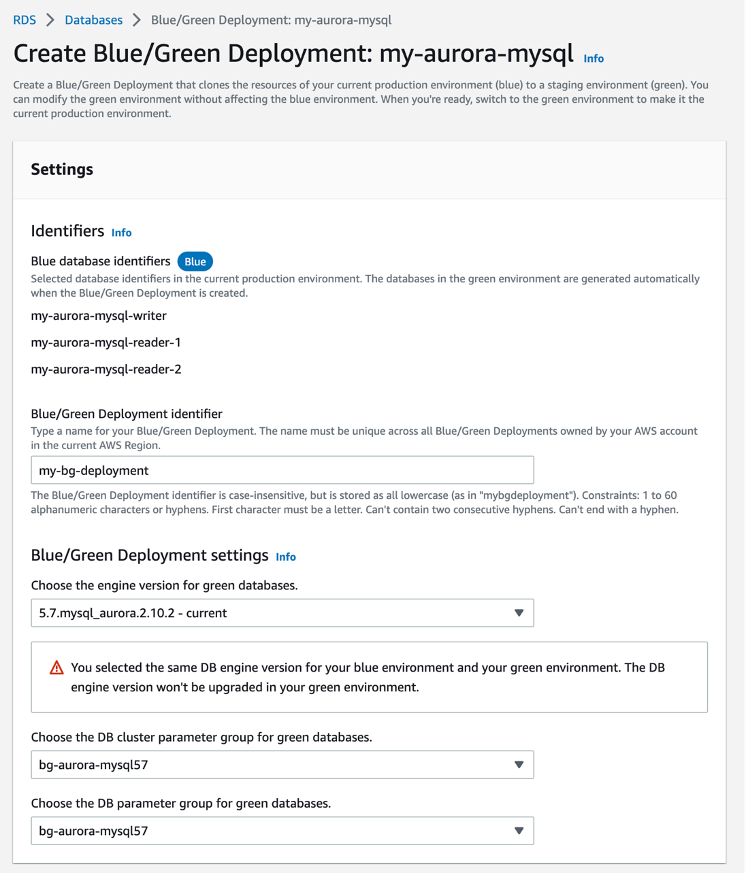
You can set a Blue/Green Deployment identifier and the attributes of your database to be modified, such as the engine version, DB cluster parameter group, and DB parameter group for green databases. To use a Blue/Green Deployment in your Aurora MySQL DB cluster, you should turn on binary logging, changing the value for the binlog_format parameter from OFF to MIXED in the DB cluster parameter group.

When you choose Create Blue/Green Deployment, it creates a new staging environment and runs automated tasks to prepare the database for production. Note, you will be charged the cost of the green database, including read replicas and DB instances in Multi-AZ deployments, and any other features such as Amazon RDS Performance Insights that you may have enabled on green.

You can also do the same job in the AWS Command Line Interface (AWS CLI). To perform an engine version upgrade, simply add a targetEngineVersion parameter and specify the engine version you’d like to upgrade to. This parameter works with both minor and major version upgrades, and it accepts short versions like 5.7 for Amazon Aurora MySQL-Compatible.

$ aws rds create-blue-green-deployment \
--blue-green-deployment-name my-bg-deployment \
--source arn:aws:rds:us-west-2:1234567890:db:my-aurora-mysql \
--target-engine-version 5.7 \
--region us-west-2 \

After creation is complete, you now have a staging environment that is ready for test and validation before promoting it to be the new production environment.

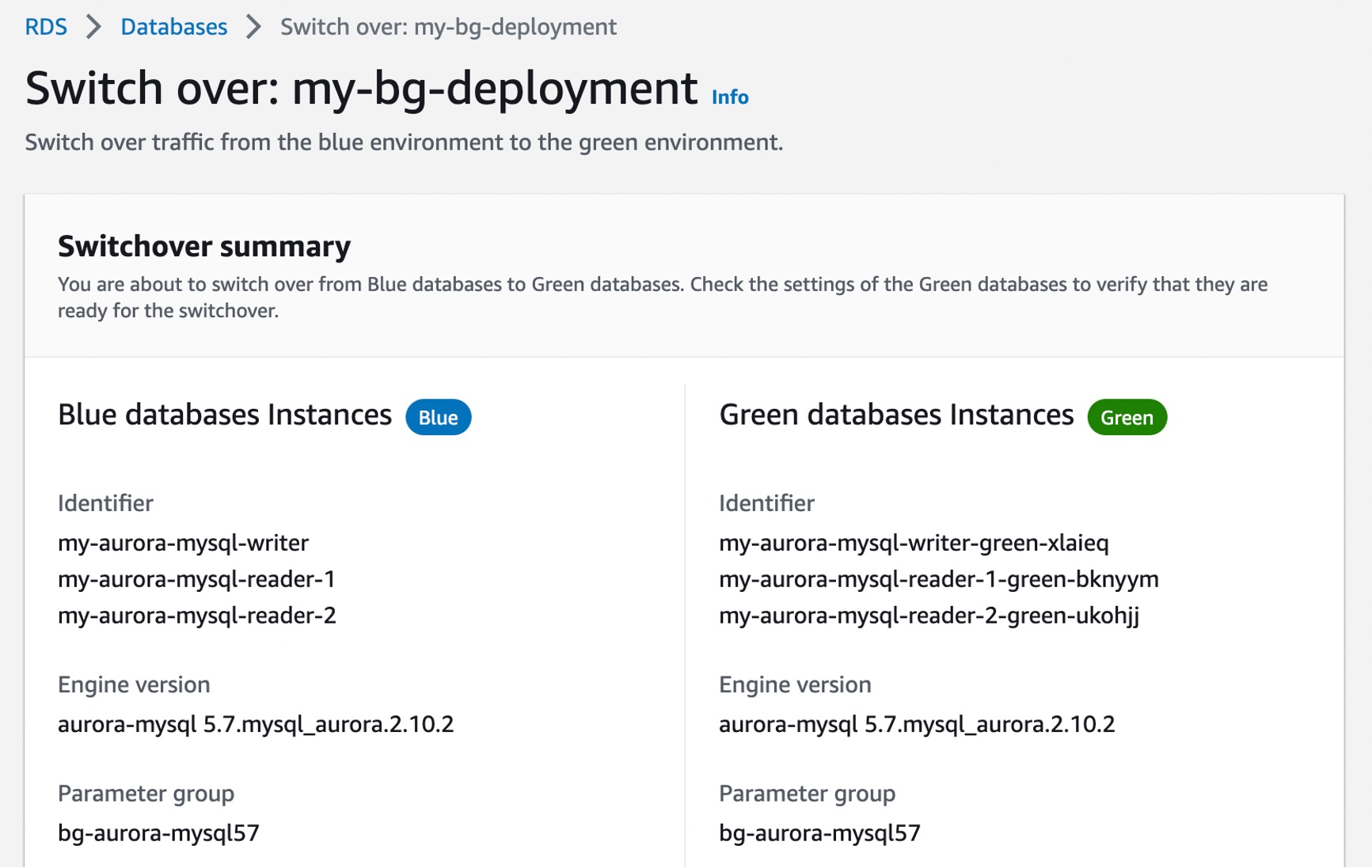
When testing and qualification of changes are complete, you can choose Switch over in the Actions dropdown menu to promote the staging environment marked as Green to be the new production system.

Now you are nearly ready to switch over your green databases to production. Check the settings of your green databases to verify that they are ready for the switchover. You may also set a timeout setting to determine the maximum time limit for your switchover. If Blue/Green Deployments’ switchover guardrails detect that it would take longer than the specified duration, then the switchover is canceled, and no changes are made to the environments. We recommend that you identify times of low or moderate production traffic to initiate a switchover.

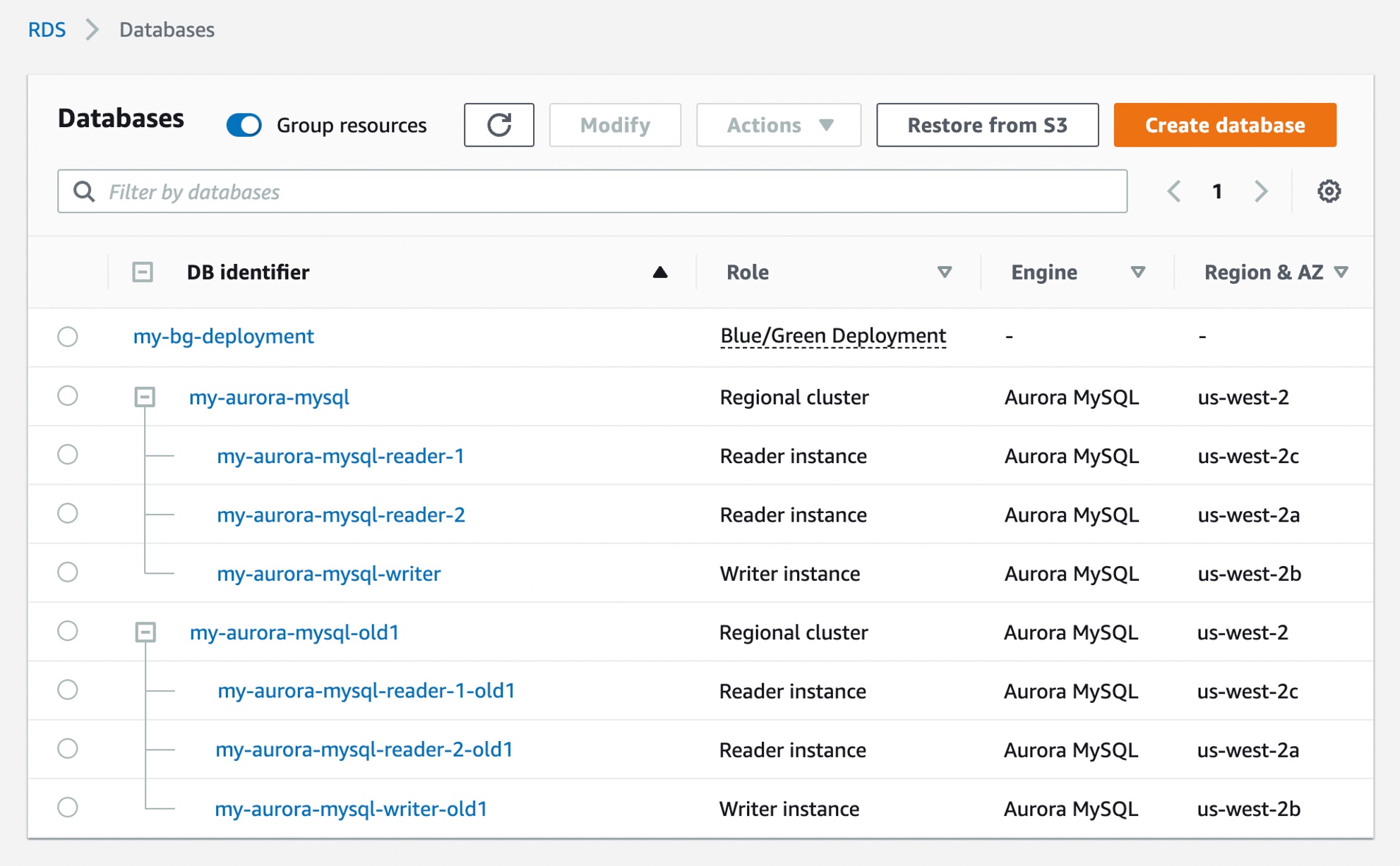
After switchover, Blue/Green Deployments does not delete your old production environment. You may access it for additional validations and performance/regression testing, if needed. Please note that it is your responsibility to delete the old production environment when you no longer need it. Standard billing charges apply on old production instances until you delete them.

Now Available
Amazon RDS Blue/Green Deployments is available today on Amazon Aurora with MySQL Compatibility 5.6 or higher, Amazon RDS for MySQL major version 5.6 or higher, and Amazon RDS for MariaDB 10.2 and higher in all AWS commercial Regions, excluding China, and AWS GovCloud Regions.

To learn more, read the Amazon Aurora MySQL Developer Guide or the Amazon RDS for MySQL User Guide. Give it a try, and please send feedback to AWS re:Post for Amazon RDS or through your usual AWS support contacts.

– Channy

New for AWS Backup – Protect and Restore Your CloudFormation Stacks

Post Syndicated from Danilo Poccia original https://aws.amazon.com/blogs/aws/new-for-aws-backup-protect-and-restore-your-cloudformation-stacks/

To define the data protection policy of an application, you have to look at its components and find which ones store data that needs to be protected. Those are the stateful components of your application, such as databases and file systems. Other components don’t store data but need to be restored as well in case of issues. These are stateless components, such as containers and their network configurations.

When you manage your application using infrastructure as code (IaC), you have a single repository where all these components are described. Can we use this information to help protect your applications? Yes! AWS Backup now supports attaching an AWS CloudFormation stack to your data protection policies.

When you use CloudFormation as a resource, all stateful components supported by AWS Backup are backed up around the same time. The backup also includes the stateless resources in the stack, such as AWS Identity and Access Management (IAM) roles and Amazon Virtual Private Cloud (Amazon VPC) security groups. This gives you a single recovery point that you can use to recover the application stack or the individual resources you need. In case of recovery, you don’t need to mix automated tools with custom scripts and manual activities to recover and put the whole application stack back together. As you modernize and update an application managed with CloudFormation, AWS Backup automatically keeps track of changes and updates the data protection policies for you.

CloudFormation support for AWS Backup also helps you prove compliance of your data protection policies. You can monitor your application resources in AWS Backup Audit Manager, a feature of AWS Backup that enables you to audit and report on the compliance of data protection policies. You can also use AWS Backup Vault Lock to manage the immutability of your backups as required by your compliance obligations.

Let’s see how this works in practice.

Using AWS Backup Support for CloudFormation Stacks
First, I need to turn on the CloudFormation resource type for AWS Backup. In the AWS Backup console, I choose Settings in the navigation pane and then, in the Service opt-in section, Configure resources. There, I toggle the CloudFormation resource type on and choose Confirm.

Console screenshot.

Now that CloudFormation support is enabled, I choose Dashboard in the navigation pane and then Create backup plan. I select the Start with a template option and then the Daily-35day-Retention template. As the name suggests, this template creates daily backups that are kept for 35 days before being automatically deleted. I enter a name for the backup plan and choose Create plan.

Console screenshot.

Now I can assign resources to my backup plan. I enter a resource assignment name and use the default IAM role that is automatically created with the correct permissions.

Console screenshot.

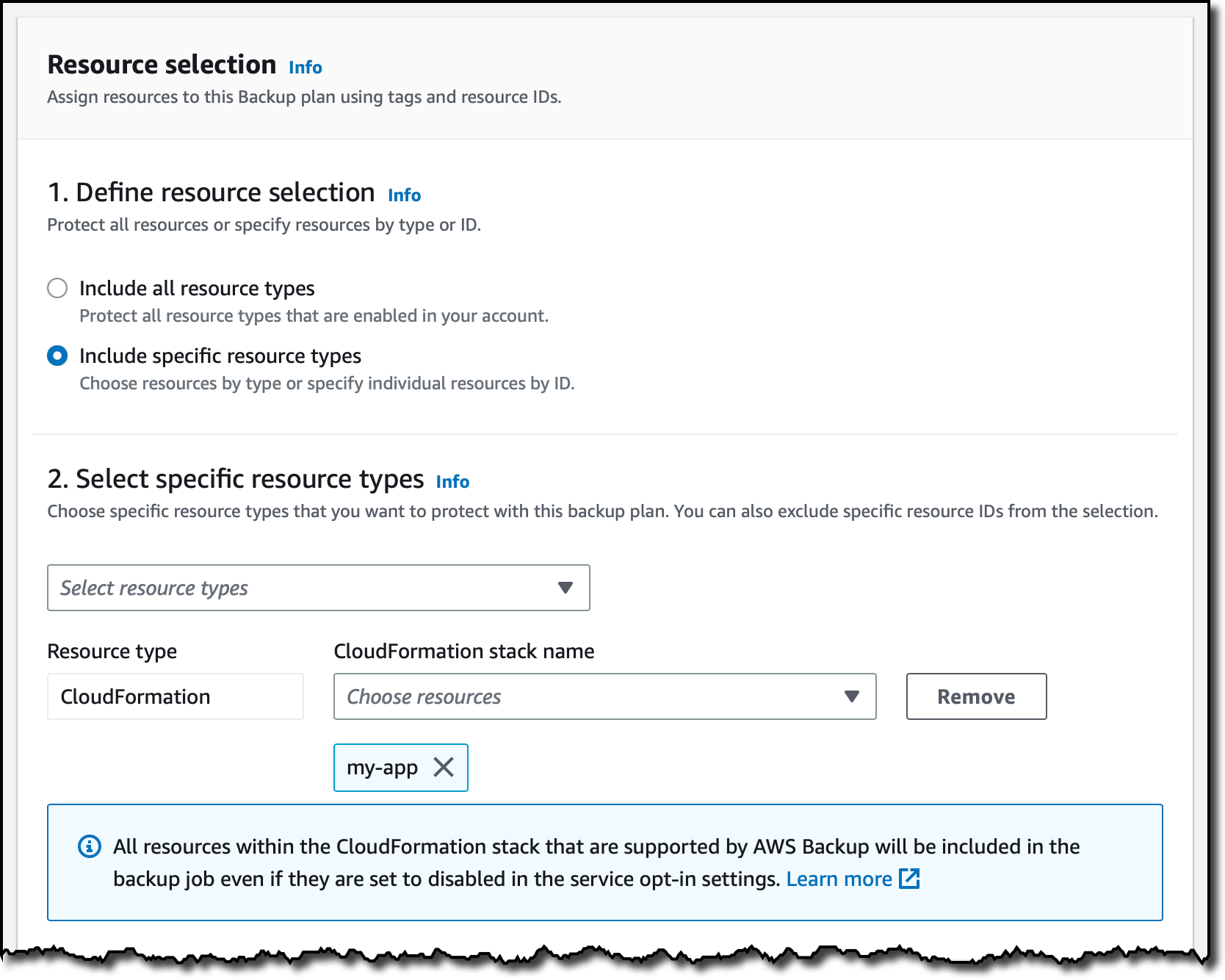
In the Resource selection, I can select Include all resource types to automatically protect all resource types that are enabled in my account. Because I’d like to show how CloudFormation support works, I select Include specific resource types and then CloudFormation in the Select resource types dropdown menu. In the Choose resources menu, I can use the All supported CloudFormation stacks option to have all my stacks protected. For simplicity, I choose to protect only one stack, the my-app stack.

Console screenshot.

I leave the other options at their default values and choose Assign resources. That’s all! Now the CloudFormation stack that I selected will be backed up daily with 35 days of retention. What does that mean? Let’s have a look at what happens when I create an on-demand backup of a CloudFormation stack.

Creating On-Demand Backups for CloudFormation Stacks
I choose Protected resources in the navigation pane and then Create on-demand backup. The next steps are similar to what I did before when assigning resources to a backup plan. I select the CloudFormation resource type and the my-app stack. I use the Create backup now option to start the backup within one hour. I choose 7 days of retention and the Default backup vault. Backup vaults are logical containers that store and organize your backups. I select the default IAM role and choose Create on-demand backup.

Console screenshot.

Within a few minutes, the backup job is running. I expand the Backup job ID in the Backup jobs list to see the resources being backed up. The stateful resources (such as Amazon DynamoDB tables and Amazon Relational Database Service (RDS) databases) are listed with the current state of the backup job. The stateless resources in my stack (such as IAM roles, AWS Lambda functions, and VPC configurations) are backed up by the job with the CloudFormation resource type.

Console screenshot.

When the backup job has completed, I go back to the Protected resources page to see the list of resources that I can now restore. In the list, I see the IDs of the stateful resources (in this case, two DynamoDB tables and an Aurora database) and of the CloudFormation stack. If I choose each of the stateful resources, I see the available recovery points corresponding to the different points in time when that resource has been backed up.

Console screenshot.

If I choose the CloudFormation stack, I get a list of composite recovery points. Each composite recovery point includes all stateless and stateful resources in the stack. More specifically, the stateless resources are included in the CloudFormation template recovery point (the last one in the following screenshot).

Console screenshot.

Restoring a CloudFormation Backup
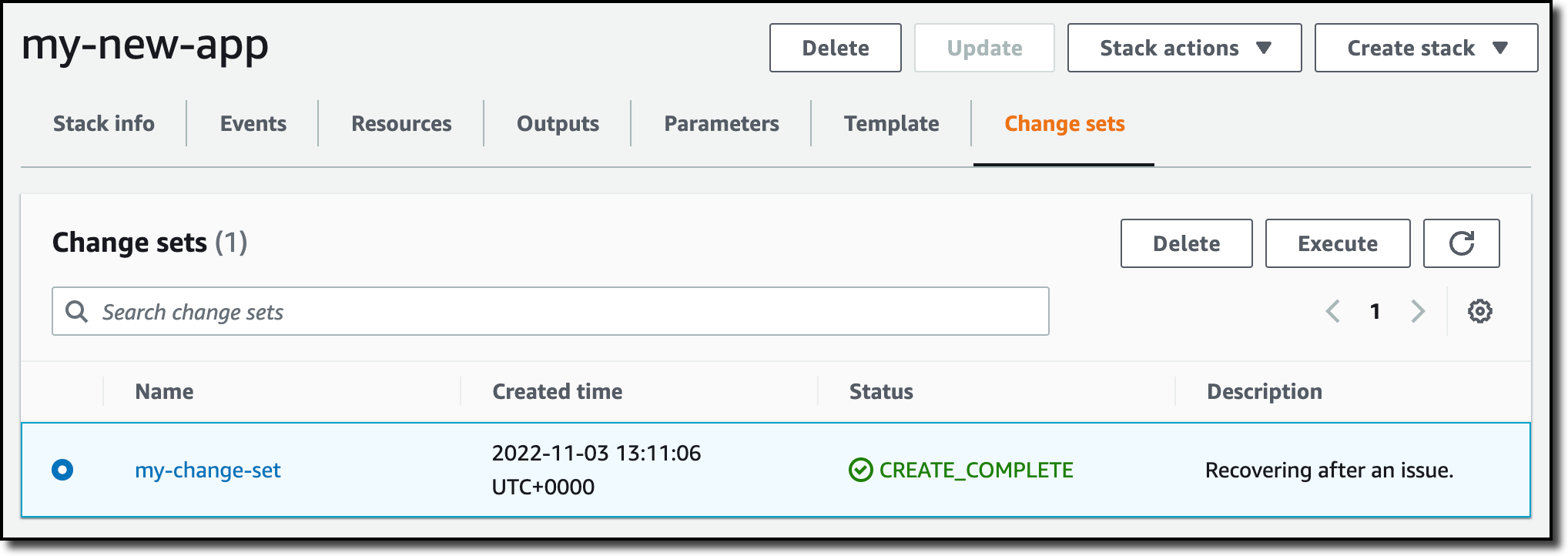
Inside the composite recovery point, I select the recovery point of the CloudFormation stack and choose Restore. Restoring a CloudFormation stack backup creates a new stack with a change set that represents the backup. I enter the new stack and change set names and choose Restore backup. After a few minutes, the restore job is completed.

In the CloudFormation console, the new stack is under review. I need to apply the change set.

Console screenshot.

I choose the new stack and select the change set created by the restore job to apply the change set.

Console screenshot.

After some time, the resources in my original stack have been recreated in the new stack. The stateful resources have been recreated empty. To recover the stateful resources, I can go back to the list of recovery points, select the recovery point I need, and initiate a restore.

Availability and Pricing
AWS Backup support for CloudFormation stacks is available today using the console, AWS Command Line Interface (CLI), and AWS SDKs in all AWS Regions where AWS Backup is offered. There is no additional cost for the stateless resources backed up and restored by AWS Backup. You only pay for the stateful resources such as databases, storage volumes, or file systems. For more information, see AWS Backup pricing.

You now have an automated solution to create and restore your applications with a simplified experience, eliminating the need to manage custom scripts.

— Danilo

Amazon CloudWatch Internet Monitor Preview – End-to-End Visibility into Internet Performance for your Applications

Post Syndicated from Sébastien Stormacq original https://aws.amazon.com/blogs/aws/cloudwatch-internet-monitor-end-to-end-visibility-into-internet-performance-for-your-applications/

How many times have you had monitoring dashboards show you a normal situation, and at the same time, you have received customer tickets reporting your app is “slow” or unavailable to them? How much time did it take to diagnose these customer reports?

You told us one of your challenges when monitoring internet-facing applications is to gather data outside of AWS to build a realistic picture of how your application behaves for your customers connected to multiple and geographically distant internet providers. Capturing and monitoring data about internet traffic before it reaches your infrastructure is either difficult or very expensive.

I am happy to announce the public preview of Amazon CloudWatch Internet Monitor, a new capability of CloudWatch that gives visibility into how an internet issue might impact the performance and availability of your applications. It allows you to reduce the time it takes to diagnose internet issues from days to minutes.

Internet Monitor uses the connectivity data that we capture from our global networking footprint to calculate a baseline of performance and availability for internet traffic. This is the same data that we use at AWS to monitor our own internet uptime and availability. With Internet Monitor, you can gain awareness of problems that arise on the internet experienced by your end users in different geographic locations and networks.

There is no need to instrument your application code. You can enable the service in the CloudWatch section of the AWS Management Console and start to use it immediately.

Let’s See It in Action
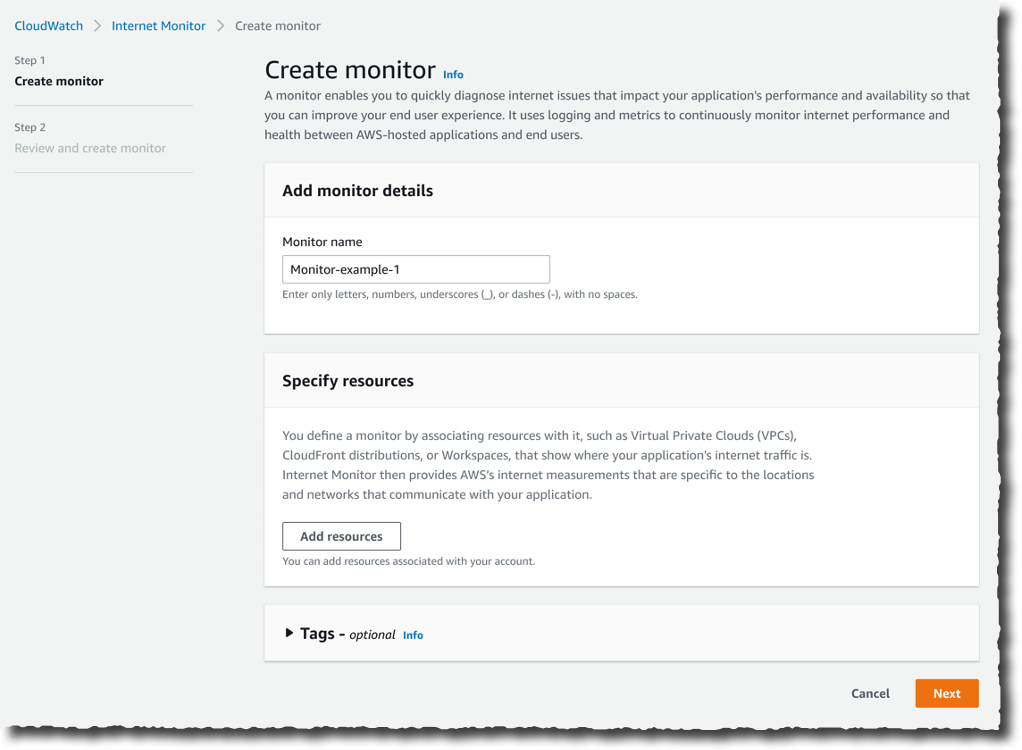
Getting started with Internet Monitor is easy. Let’s imagine I want to monitor the network paths between my customers and my AWS resources. I open the AWS Management Console and navigate to CloudWatch. I select Internet Monitor on the left-side navigation menu. Then, I select Create monitor.

Internet Monitor - Create

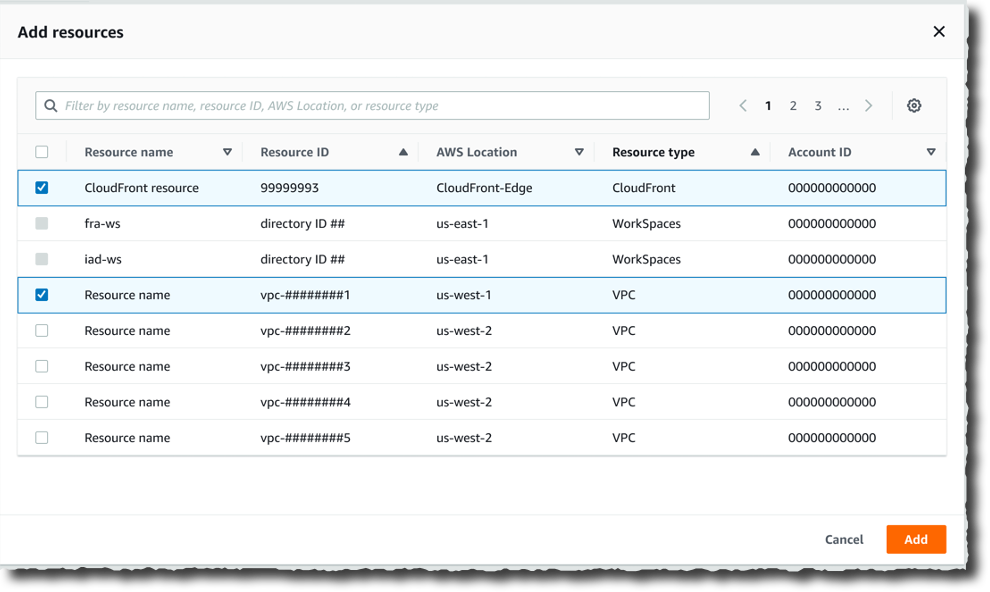
On the Create monitor page, I enter a Monitor name, and I select Add resources to choose the resources to monitor. For this demo, I select the VPC and the CloudFront distribution hosting my customer-facing application.

Internet Monitor - Select resources

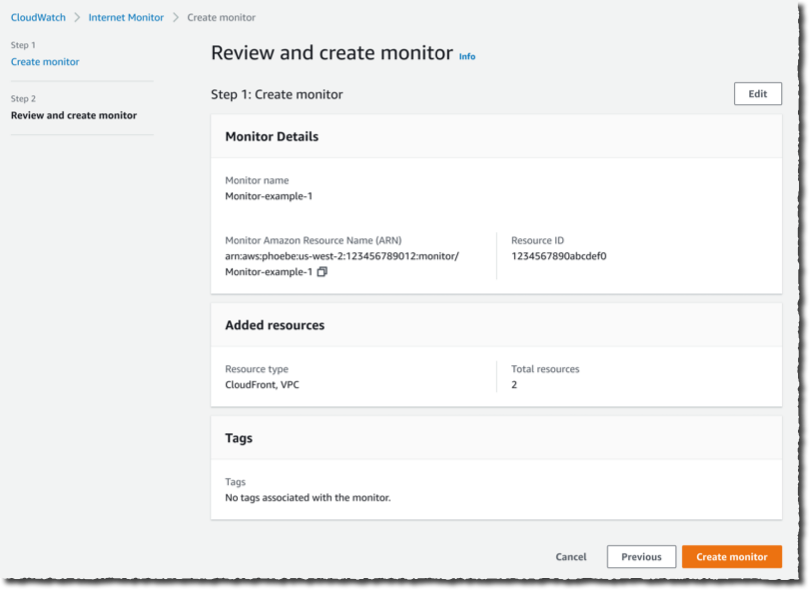
I have the opportunity to review my choices. Then, I select Create monitor.

Internet Monitor - Final screen

From that moment on, Internet Monitor starts to collect data based on my application’s resource logs behind the scene. There is no need for you to activate (or pay for) VPC Flow Logs, CloudFront logs, or other log types.

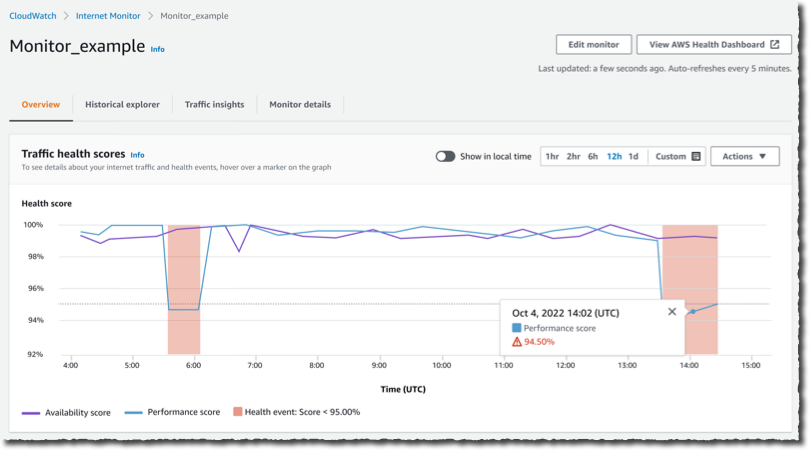
After a while, I receive customer complaints about our application being slow. I open Internet Monitor again, I select the monitor I created earlier (Monitor_example), and I immediately see that the application suffers from internet performance issues.

The Health scores graph shows you performance and availability information for your global traffic. AWS has substantial historical data about internet performance and availability for network traffic between geographic locations for different network providers and services. By applying statistical analysis to the data, we can detect when the performance and availability towards your application have dropped, compared to an estimated baseline that we’ve calculated. To make it easier to see those drops, we report that information to you in the form of an estimated performance score and an availability score.

Internet Monitor - Health scoree

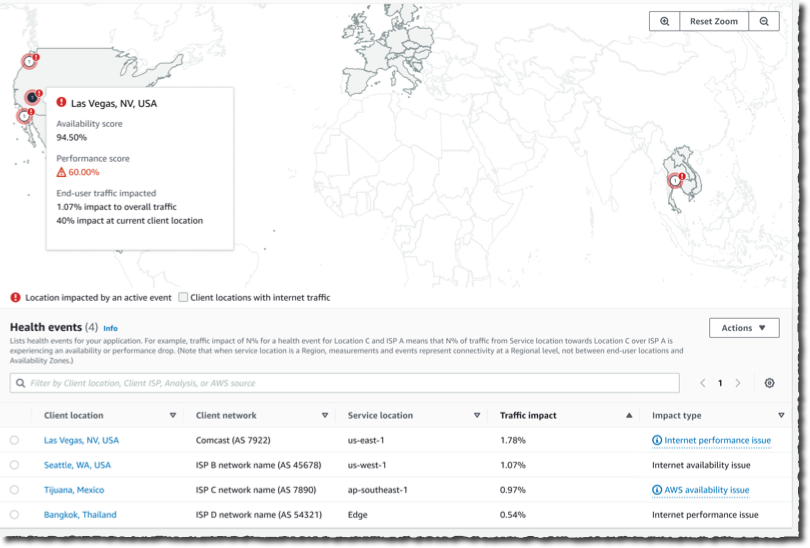
I scroll a bit down the page. The Internet traffic overview map shows the overall event status across all monitored locations. I look at the details in the Health events table. It also highlights other events that are happening globally, sorted by total traffic impact. I notice that a performance issue in Las Vegas, Nevada, US, is affecting my application traffic the most.

Internet Monitor - Internet Traffic OverviewNow that I have identified the issue, I am curious about the historical data. Has it happened before?

I select the Historical Explorer tab to understand trends and see earlier data related to this location and network provider. I can view aggregated metrics such as performance score, availability score, bytes transferred, and round-trip time at p50, p90, and p95 percentiles, for a customized timeframe, up to 18 months in the past.

Internet Monitor - Historical dataI can see today’s incident is not the first one. This specific client location and network provider has had multiple issues in the past few months.

Internet Monitor - Historical data detailsNow that I understand the context, I wonder what action I can take to mitigate the issue.

I switch to the Traffic insights tab. I see overall traffic data and top client locations that are being monitored based on total traffic (bytes). Apparently, Las Vegas, Nevada, US, is one of the top client locations.

Internet Monitor - Traffic insights 1

I select the graph to see traffic details for Las Vegas, Nevada, US. In the Lowest Time To First Byte (TTFB) column, I see AWS service and AWS Region setup recommendations for all of the top client location and network combinations. The Predicted Time To First Byte in the table shows the potential impact if I make the suggested architectural change.

In this example, Internet Monitor suggests having CloudFront distribute the traffic currently distributed by EC2 and to allow for some additional traffic to be served by EC2 instances in us-east-1 in addition to us-east-2.

Internet Monitor - Traffic insights 2

Available Today
Internet Monitor is available in public preview today in 20 AWS Regions:

  • In the Americas: US East (Ohio), US East (N. Virginia), US West (N. California), US West (Oregon), Canada (Central), South America (São Paulo).
  • In Asia and Pacific: Asia Pacific (Hong Kong), Asia Pacific (Mumbai), Asia Pacific (Seoul), Asia Pacific (Singapore), Asia Pacific (Sydney), Asia Pacific (Tokyo).
  • In Europe, Middle East, and Africa: Africa (Cape Town), Europe (Frankfurt), Europe (Ireland), Europe (London), Europe (Milan), Europe (Paris), Europe (Stockholm), Middle East (Bahrain)

Note that AWS CloudFormation support is missing at the moment; it will be added soon.

There is no costs associated with the service during the preview period. Just keep in mind that Internet Monitor vends metrics and logs to CloudWatch; you will be charged for these additional CloudWatch logs and CloudWatch metrics.

Whether you work for a startup or a large enterprise, CloudWatch Internet Monitor helps you be proactive about your application performance and availability. Give it a try today!

— seb

New for Amazon Transcribe – Real-Time Analytics During Live Calls

Post Syndicated from Danilo Poccia original https://aws.amazon.com/blogs/aws/new-for-amazon-transcribe-real-time-analytics-during-live-calls/

The experience customers have when interacting with a contact center can have a profound impact on them. For this reason, we launched Amazon Transcribe Call Analytics last year to help you analyze customer call recordings and get insights into issues and trends related to customer satisfaction and agent performance.

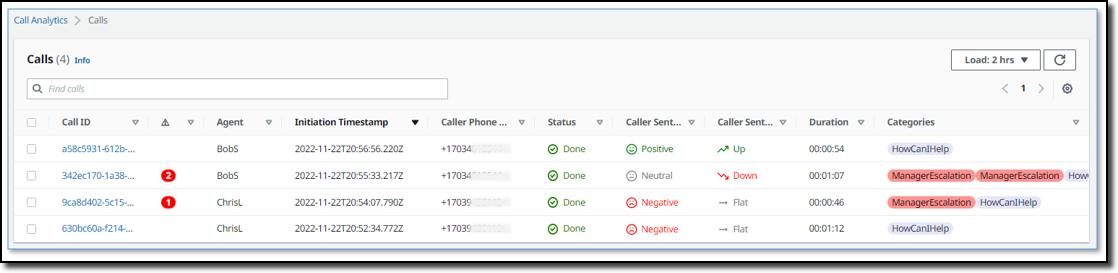
To assist agents in resolving live calls faster, we are introducing today real-time call analytics in Amazon Transcribe Call Analytics. Real-time call analytics provides APIs for developers to accurately transcribe live calls and at the same time identify customer experience issues and sentiment in real time. Transcribe Call Analytics uses state-of-the-art machine learning capabilities to automatically assess thousands of in-progress calls and detect customer experience issues, such as repeated requests to speak to a manager or cancel a subscription.

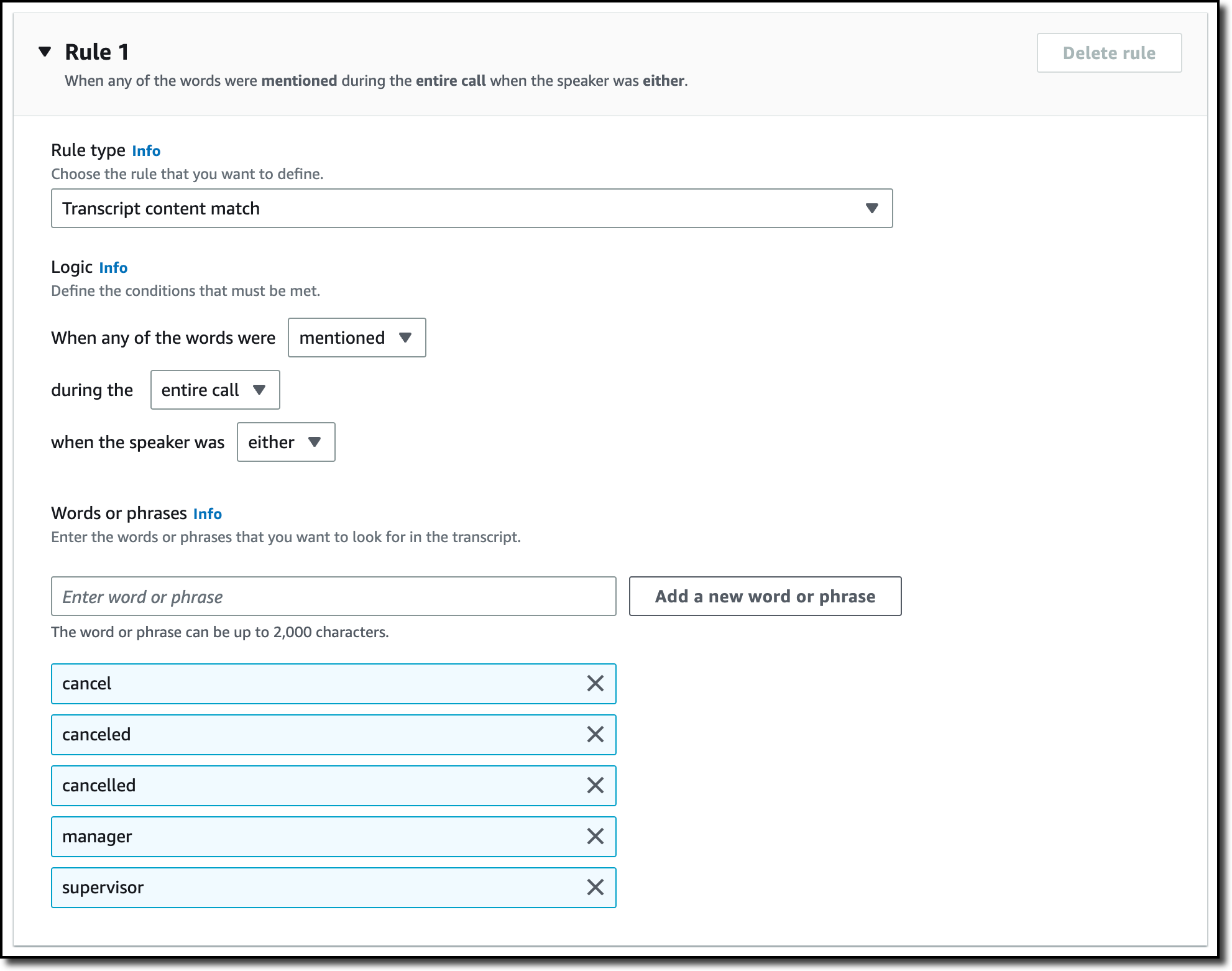
With a few clicks, supervisors and analysts can create categories in the AWS console to identify customer experience issues using criteria such as specific terms such as “not happy,” “poor quality,” and “cancel my subscription.” Transcribe Call Analytics analyzes in-progress calls in real time to detect when a category is met. Developers can use those signals, along with sentiment trends from the API, to build a proactive system that alerts supervisors about emerging issues or assists agents with relevant information to solve customer issues.

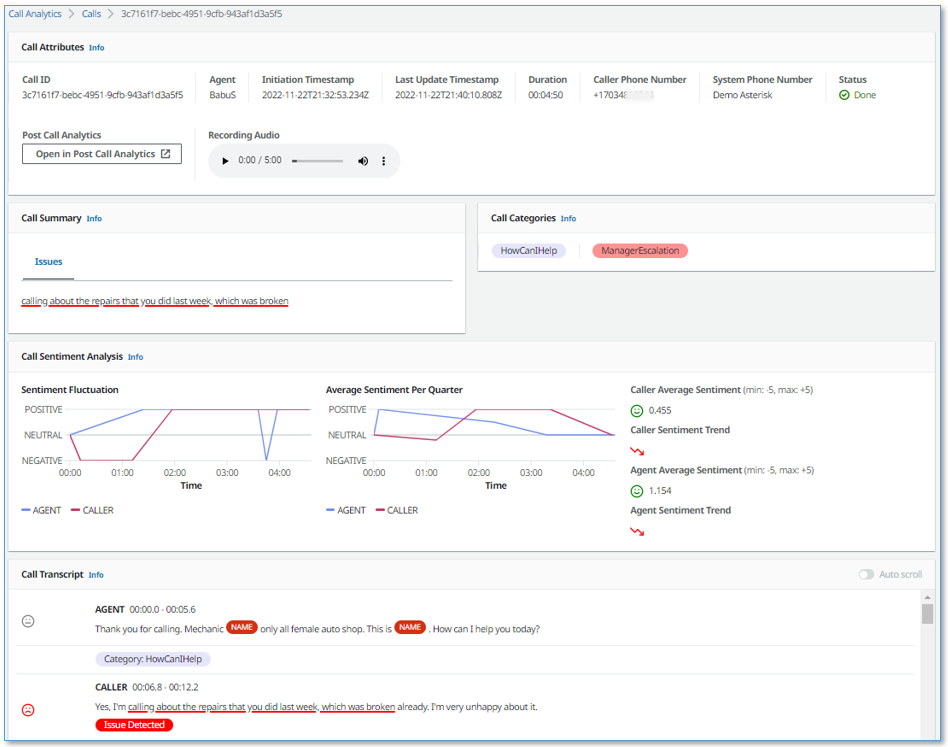
Transcribe Call Analytics also provides a real-time transcript of the live conversation that supervisors can use to quickly get up to speed on the customer interaction and assess the appropriate action. The in-call transcript also eliminates the need for customers to repeat themselves if the call is transferred to another agent. Agents can focus all their attention on the customer during the call instead of taking notes for entry in a CRM system because Transcribe Call Analytics includes an automated call summarization capability, which identifies the issue, outcome, and action item associated with a call.

Transcribe Call Analytics is a foundational API for AWS Contact Center Intelligence solutions such as post-call analytics and the updated real-time call analytics with agent assist solution using the new real-time capabilities.

Let’s see how this works in practice.

Exploring Real-Time Call Analytics in the Console
To see how this works visually, I use the Amazon Transcribe console. First, I create a category to be notified if some terms are used in the call that would require an escalation. I choose Category Management from the navigation pane and then Create category.

I enter Escalation as the name for the category. I select REAL_TIME in the Category type dropdown. Then, I choose Create from scratch.

Console screenshot.

I only need one rule for this category. In the Rule type dropdown, I select Transcript content match. In the next three options, I choose to trigger the rule when any of the words are mentioned during the entire call, and the speaker is either the customer or the agent. Now, I can enter the words or phrases to look for in the transcript. In this case, I enter cancel, canceled, cancelled, manager, and supervisor. In your case, you might be more specific depending on your business. For example, if subscriptions are your business, you can look for the phrase cancel my subscription.

Console screenshot.

Now that the category has been created, I use one of the sample calls in the console to test it. I choose Real-Time Analytics in the navigation pane. By choosing Configure advanced settings, I can configure the personally identifiable information (PII) identification and redaction settings. For example, I can choose to identify personal data such as email addresses or redact financial data like bank account numbers.

With no additional charge, I can enable Post-call Analytics so that, at the end of the call, I receive the output of the transcription job in an Amazon Simple Storage Service (Amazon S3) bucket. This output is in a similar format to what I’d receive if I were analyzing a call recording with Transcribe Call Analytics. In this way, I can use the post-call analytics output derived from the audio stream in any process I already have in place for output of analytics generated from call recordings, for example, to update dashboards or generate periodic reports.

With Insurance complaints in Step 1: Specify input audio selected, I choose Start streaming. In the Transcription output section of the console, I receive in real-time the transcription of the call. The words of the customer and agent appear as they are pronounced. Each sentence is flagged with its recognized sentiment (positive, neutral, or negative). The Escalation category that I just configured is found in two sentences, first, when the customer mentions that their insurance has been canceled, and then when the agent mentions their manager. Also, part of a sentence is underlined because an issue has been detected.

Console screenshot.

Using the Download dropdown, I download the full JSON transcript. If I am only interested in the transcription, I can download the text transcript. The JSON transcript contains an array where each item is similar to what I’d get in real time when using the real-time call analytics API.

Using the Live Call Analytics With Agent Assist (LCA) Solution
You can use the open-source real-time call analytics with agent assist solution for your contact center or as an inspiration of what Amazon Transcribe enables for developers. Let’s look at a couple of screenshots to understand how it works.

Here there is a list of on-going calls with the overall sentiment, the sentiment trend (is it improving or not?), and the categories found in real-time during the call that can be used for specific activities.

Screenshot from the real-time call analytics with agent assist solution.

When selecting a call from the list, you have access to more in-depth information, including the call transcript and the issues found during the on-going call. This allows to take action quickly to help resolve the call.

Screenshot from the real-time call analytics with agent assist solution.

Availability and Pricing
Amazon Transcribe Call Analytics with real-time capabilities is available today in US (N. Virginia, Oregon), Canada (Central), Europe (Frankfurt, London), and Asia Pacific (Seoul, Sydney, Tokyo) and supports US English, British English, Australian English, US Spanish, Canadian French, French, German, Italian, and Brazilian Portuguese.

With Amazon Transcribe Call Analytics, you pay as you go and are billed monthly based on tiered pricing. For more information, see Amazon Transcribe pricing.

As part of the AWS Free Tier, you can get started with Amazon Transcribe Call Analytics for free, including the new real-time call analytics API. You can analyze up to 60 minutes of call audio monthly for free for the first 12 months. For more information, see the AWS Free Tier page.

If you’re at re:Invent, you can learn more about this new capability in session AIM307 – JPMorganChase real-time agent assist for contact center productivity. I will update this post when the recording of the session is publicly available.

Start analyzing contact center conversations in real-time to improve your customers’ experience.

— Danilo

Automated in-AWS Failback for AWS Elastic Disaster Recovery

Post Syndicated from Steve Roberts original https://aws.amazon.com/blogs/aws/automated-in-aws-failback-for-aws-elastic-disaster-recovery/

I first covered AWS Elastic Disaster Recovery (DRS) in a 2021 blog post. In that post, I described how DRS “enables customers to use AWS as an elastic recovery site for their on-premises applications without needing to invest in on-premises DR infrastructure that lies idle until needed. Once enabled, DRS maintains a constant replication posture for your operating systems, applications, and databases.” I’m happy to announce that, today, DRS now also supports in-AWS failback, adding to the existing support for non-disruptive recovery drills and on-premises failback included in the original release.

I also wrote in my earlier post that drills are an important part of disaster recovery since, if you don’t test, you simply won’t know for sure that your disaster recovery solution will work properly when you need it to. However, customers rarely like to test because it’s a time-consuming activity and also disruptive. Automation and simplification encourage frequent drills, even at scale, enabling you to be better prepared for disaster, and now you can use them irrespective of whether your applications are on-premises or in AWS. Non-disruptive recovery drills provide confidence that you will meet your recovery time objectives (RTOs) and recovery point objectives (RPOs) should you ever need to initiate a recovery or failback. More information on RTOs and RPOs, and why they’re important to define, can be found in the recovery objectives documentation.

The new automated support provides a simplified and expedited experience to fail back Amazon Elastic Compute Cloud (Amazon EC2) instances to the original Region, and both failover and failback processes (for on-premises or in-AWS recovery) can be conveniently started from the AWS Management Console. Also, for customers that want to customize the granular steps that make up a recovery workflow, DRS provides three new APIs, linked at the bottom of this post.

Failover vs. Failback
Failover is switching the running application to another Availability Zone, or even a different Region, should outages or issues occur that threaten the availability of the application. Failback is the process of returning the application to the original on-premises location or Region. For failovers to another Availability Zone, customers who are agnostic to the zone may continue running the application in its new zone indefinitely if so required. In this case, they will reverse the recovery replication, so the recovered instance is protected for future recovery. However, if the failover was to a different Region, its likely customers will want to eventually fail back and return to the original Region when the issues that caused failover have been resolved.

The below images illustrate architectures for in-AWS applications protected by DRS. The architecture in the image below is for cross-Availability Zone scenarios.

Cross-Availability Zone architecture for DRS

The architecture diagram below is for cross-Region scenarios.

Cross-Region architecture for DRS

Let’s assume an incident occurs with an in-AWS application, so we initiate a failover to another AWS Region. When the issue has been resolved, we want to fail back to the original Region. The following animation illustrates the failover and failback processes.

Illustration of the failover and failback processes

Learn more about in-AWS failback with Elastic Disaster Recovery
As I mentioned earlier, three new APIs are also available for customers who want to customize the granular steps involved. The documentation for these can be found using the links below.

The new in-AWS failback support is available in all Regions where AWS Elastic Disaster Recovery is available. Learn more about AWS Elastic Disaster Recovery in the User Guide. For specific information on the new failback support I recommend consulting this topic in the service User Guide. 

— Steve

New – Amazon ECS Service Connect Enabling Easy Communication Between Microservices

Post Syndicated from Channy Yun original https://aws.amazon.com/blogs/aws/new-amazon-ecs-service-connect-enabling-easy-communication-between-microservices/

Microservices architectures are a well-known software development approach to make applications composed of small independent services that communicate over well-defined application programming interfaces (APIs). Customers faced challenges when they started breaking down their monolith applications into microservices, as it required specialized networking knowledge to communicate internally with other microservices.

Amazon Elastic Container Services (Amazon ECS) customers have several solutions for service-to-service, but each one comes with some challenges and complications: 1) Elastic Load Balancing (ELB) needs to carefully plan for configuring infrastructure for high availability and incur additional infrastructure cost. 2) Using Amazon ECS Service Discovery often requires developers to write custom application code for collecting traffic metrics and for making network calls resilient. 3) Service mesh solutions such as AWS App Mesh run outside of Amazon ECS despite having advanced traffic monitoring and routing features between services.

Today, we are announcing the general availability of Amazon ECS Service Connect, a new capability that simplifies building and operating resilient distributed applications. ECS Service Connect provides an easy network setup and seamless service communication deployed across multiple ECS clusters and virtual private clouds (VPCs). You can add a layer of resilience to your ECS service communication and get traffic insights with no changes to your application code.

With ECS Service Connect, you can refer and connect to your services by logical names using a namespace provided by AWS Cloud Map and automatically distribute traffic between ECS tasks without deploying and configuring load balancers. You can set some safe defaults for traffic resilience, such as health checking, automatic retries for 503 errors, and connection draining, for each of your ECS services. Additionally, the Amazon ECS console provides easy-to-use dashboards with real-time network traffic metrics for operational convenience and simplified debugging.

Getting Started with Amazon ECS Service Connect
To get started with the ECS Service Connect, you can specify a namespace as part of creating an ECS cluster or create one in the Cloud Map. A namespace represents a way to structure your services and can span across multiple ECS clusters residing in different VPCs. All ECS services that belong to a specific namespace can communicate with existing services in the namespaces, provided existing network-level connectivity.

You can also see a list of Cloud Map namespaces in Namespaces in the left navigation pane of the Amazon ECS console. When you select a namespace, it shows a list of services with the same namespace from two different ECS clusters with database services (db-mysql, db-redis) and backend services (webui, appserver).

When you create an ECS cluster, you can select one of the namespaces in the Default namespaces of the Networking setting. ECS Service Connect is enabled for all new ECS services running in both AWS Fargate and Amazon EC2 instances. To enable all existing services, you would need to redeploy with either a new version of ECS-optimized Amazon Machine Image (AMI), or with a new Fargate Agent that supports ECS Service Connect.

Or, you can simply create a cluster via AWS Command Line Interface (AWS CLI) with serviceConnect parameter and a default Cloud Map namespace name for service discovery purposes.

$ aws ecs create-cluster
     --cluster "svc-cluster-2"
     --serviceConnect {
       "defaultNamespace": "svc-namespace"
}

This command will create an ECS cluster with the namespace on AWS’s behalf. If you would like to use an already existing Cloud Map namespace, you can simply pass the name of the existing namespace here.

Next, let’s create a service with a task definition and expose your web user-interface server using ECS Service Connect.

$ aws ecs create-service
--cluster "svc-cluster-2"
--service-name "webui"
--task-definition "webui-svc-cluster"
--serviceConnect {
  "enabled": true,
  "namespace": "svc-namespace",
  "services":
   [
      {
         "portName": "webui-port",
         "discoveryName": "webui-svc",
         "clientAliases": [
           {
              "port": 80, // *Required *//
              "dnsName": "webui-svc-domain" // * Optional *//
            }
        }
     ]
   ]
}

In this command, portName represents a reference to the container port, and clientAliases assigns the port number and DNS name, overriding the discovery name that is used in the endpoint. Each service has an endpoint URL that contains the protocol, a DNS name, and the port. You can select the protocol and port name in the task definition or the ECS service configuration. For example, an endpoint could be http://webui:80, grpc://appserver:8080, or http://db-redis:8888.

In the ECS console, you can see this configuration of ECS Service Connect for the webui service in the svc-cluster-2 cluster.

As you can see, you can run the same workloads across different clusters with the same clientAlias and namespace name for high availability. ECS Service Connect will intelligently load balance the traffic to the ECS tasks. To connect to services running in different ECS clusters, you need to specify the same namespace name for all your ECS services that need to talk to each other. ECS Service Connect will make your services discoverable to all other services in the same namespace.

Improving Service Resilience with Observability Data
You can collect traffic metrics with ECS Service Connect observability capabilities. By default, for each ECS service, you can see the number of healthy and unhealthy endpoints, along with inbound and outbound traffic volume.

ECS Service Connect supports HTTP/1, HTTP/2, gRPC, and TCP protocols. So, you can collect the number of requests, number of HTTP errors, and average call latency. For gRPC and TCP, you can see the total number of active connections. All of these metrics are pushed to Amazon CloudWatch or other AWS analytics services via custom log routing
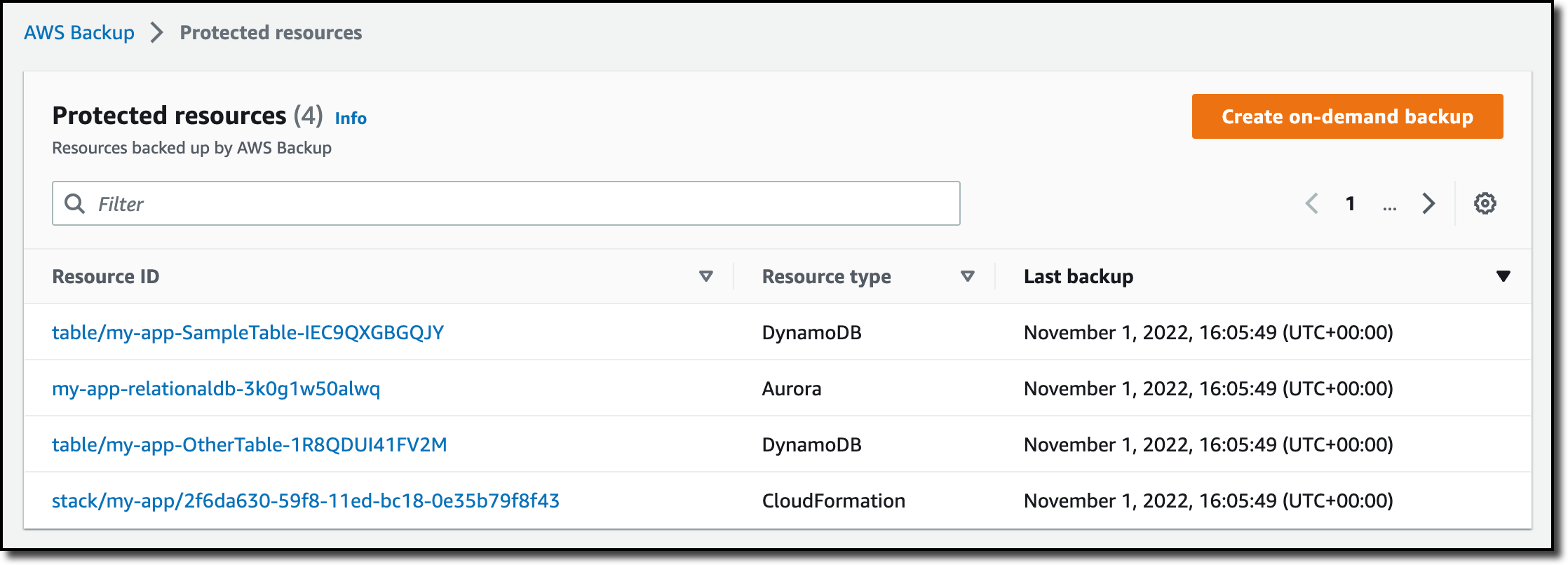
In the Advanced menu, you can publish ECS Service Connect Agent logs for help in debugging in case of issues.

These metrics are only visible in the original interface of the CloudWatch console. When you use the CloudWatch console, switch to the original interface to see the additional metric dimensions of “discovery name” and “target discovery name” under the ECS grouping.

The default settings provide you with a starting point for building resilient applications, and you can fine-tune parameters to limit the impact of failures, latency spikes, and network fluctuations on your application behavior using AWS Management Console or dedicated ECS APIs.

Now Available
Amazon ECS Service Connect is available in all commercial Regions, except China, where Amazon ECS is available. ECS Service Connect is fully supported in AWS CloudFormation, AWS CDK, AWS Copilot, and AWS Proton for infrastructure provisioning, code deployments, and monitoring of your services. To learn more, see the Amazon ECS Service Connect Developer Guide.

My colleagues, Hemanth AVS, Senior Container Specialist SA, and Satya Vajrapu, Senior DevOps Consultant, prepared a hands-on workshop to demonstrate an example of the ECS Service Connect. Join CON303 Networking, service mesh, and service discovery with Amazon ECS when you attend AWS re:Invent 2022.

Give it a try, and please send feedback to AWS re:Post for Amazon ECS or through your usual AWS support contacts.

– Channy

Now Open the 30th AWS Region – Asia Pacific (Hyderabad) Region in India

Post Syndicated from Channy Yun original https://aws.amazon.com/blogs/aws/now-open-the-30th-aws-region-asia-pacific-hyderabad-region-in-india/

In November 2020, Jeff announced the upcoming AWS Asia Pacific (Hyderabad) as the second Region in India. Yes! Today we are announcing the general availability of the 30th AWS Region, Asia Pacific (Hyderabad) Region, with three Availability Zones and the ap-south-2 API name.

The Asia Pacific (Hyderabad) Region is located in the state of Telangana. As the capital and the largest city in Telangana, Hyderabad is already an important talent hub for IT professionals and entrepreneurs. For example, AWS Hyderabad User Groups has more than 4,000 community members and holds active meetups, including an upcoming Community Day in December 2022.

The new Hyderabad Region gives customers an additional option for running their applications and serving end users from data centers located in India. Customers with data-residency requirements arising from statutes, regulations, and corporate policy can run workloads and securely store data in India while serving end users with even lower latency.

Here are the latest numbers of latency:

AWS Services in the Asia Pacific (Hyderabad) Region
In the new Hyderabad Region, you can use C5, C5d, C6g, M5, M5d, M6gd, R5, R5d, R6g, I3, I3en, T3, and T4g instances, and use a long list of AWS services including: Amazon API Gateway, AWS AppConfig, AWS Application Auto Scaling, Amazon Aurora, Amazon EC2 Auto Scaling, AWS Config, AWS Certificate Manager, AWS Cloud Control API, AWS CloudFormation, AWS CloudTrail, Amazon CloudWatch, Amazon CloudWatch Events, Amazon CloudWatch Logs, AWS CodeDeploy, AWS Database Migration Service, AWS Direct Connect, Amazon DynamoDB, Amazon Elastic Block Store (Amazon EBS), Amazon Elastic Compute Cloud (Amazon EC2), Amazon Elastic Container Registry (Amazon ECR), Amazon Elastic Container Service (Amazon ECS), Amazon ElastiCache, Amazon EMR, Elastic Load Balancing, Elastic Load Balancing – Network (NLB), Amazon EventBridge, AWS Fargate, AWS Health Dashboard, AWS Identity and Access Management (IAM), Amazon Kinesis Data Streams, AWS Key Management Service (AWS KMS), AWS Lambda, AWS Marketplace, Amazon OpenSearch Service, Amazon Relational Database Service (Amazon RDS), Amazon Redshift, Amazon Route 53, AWS Secrets Manager, Amazon Simple Storage Service (Amazon S3), Amazon S3 Glacier, Amazon Simple Notification Service (Amazon SNS), Amazon Simple Queue Service (Amazon SQS), AWS Step Functions, AWS Support API, Amazon Simple Workflow Service (Amazon SWF), AWS Systems Manager, AWS Trusted Advisor, VM Import/Export, Amazon Virtual Private Cloud (Amazon VPC), AWS VPN, and AWS X-Ray.

AWS in India
AWS has a long-standing history of helping drive digital transformation in India. AWS first established a presence in the country in 2011, with the opening of an office in Delhi. In 2016, AWS launched the Asia Pacific (Mumbai) Region giving enterprises, public sector organizations, startups, and SMBs access to state-of-the-art public cloud infrastructure. In May 2019, AWS expanded the Region to include a third Availability Zone to support rapid customer growth and provide more choice, flexibility, the ability to replicate workloads across more Availability Zones, and even higher availability.

There are currently 33 Amazon CloudFront edge locations: Mumbai, India (10), New Delhi (7), Chennai (7), Bangalore (4), Hyderabad (3), and Kolkata (2) in India. The edge locations work in concert with a CloudFront Regional edge cache in Mumbai to speed delivery of content. There are six AWS Direct Connect locations, all of which connect to the Asia Pacific (Mumbai) Region: two in Mumbai, one in Chennai, one in Hyderabad, one in Delhi, and one in Bangalore. Finally, the first AWS Local Zones launched in Delhi, India for bringing selected AWS services very close to a particular geographic area. We announced plans to launch three more AWS Local Zones in India, in the cities of Chennai, Bengaluru, and Kolkata.

AWS is also investing in the future of the Indian technology community and workforce, training tech professionals to expand their skillset and cloud knowledge. In fact, since 2017, AWS has trained over three million individuals in India on cloud skills. AWS has worked with government officials, educational institutes, and corporate organizations to achieve this milestone, which has included first-time learners and mid-career professionals alike.

AWS continues to invest in upskilling local developers, students, and the next generation of IT leaders in India through programs such as AWS Academy, AWS Educate, AWS re/Start, and other Training and Certification programs.

AWS Customers in India
We have many amazing customers in India that are doing incredible things with AWS, for example:

  • SonyLIV is the first Over the top (OTT) service in India born on the AWS Cloud. SonyLIV launched Kaun Banega Crorepati (KBC) interactive game show to allow viewers to submit answers to questions on the show in real time via their mobile devices. SonyLIV uses Amazon ElastiCache to support real-time, in-memory caching at scale, Amazon CloudFront as a low-latency content delivery network, and Amazon SQS as a highly available message queuing service.
  • DocOnline is a digital healthcare platform that provides video or phone doctor consultations to over 3.5 million families in 10 specialties and 14 Indian languages. DocOnline delivers over 100,000 consultations, diagnostic tests, and medicines every year. DocOnline has built its entire business on AWS to power its online consultation services 24-7 and to continuously measure and improve health outcomes. Being in the Healthcare domain, DocOnline needs to comply with regulatory guidelines, including Data Residency, PII security, and Disaster Recovery in seismic zones. With the AWS Asia Pacific (Hyderabad) Region, DocOnline can ensure critical patient data is hosted in India on the most secure, extensive, and reliable cloud platform while serving customers with even faster response times.
  • ICICI Lombard General Insurance is one of the first among the large insurance companies in India to move over 140+ applications, including its core application, to AWS. The rapid advances in technology and computing power delivered by cloud computing are poised to radically change the way insurance is delivered as well as consumed. ICICI Lombard has launched new generation products like cyber insurance, telehealth, cashless homecare, and IoT-based risk management solutions for marine transit insurance, providing seamless integration with various digital partners for digital distribution of insurance products and virtual motor claims inspection solutions, which have seen adoption increase from 61 percent last year to 80 percent this year. ICICI Lombard was able to process group health endorsements for their corporate customers in less than a day as compared to 10–12 days earlier. ICICI Lombard is looking at the cloud for further transformative possibilities in real-time inspection of risk and personalized underwriting.
  • Ministry of Health and Family Welfare (MoHFW), Government of India, needed a highly reliable, scalable, and resilient technical infrastructure to power a large-scale COVID-19 vaccination drive for India’s more than 1.3 billion citizens in 2021. To facilitate the required performance and speed, the MoHFW engaged India’s Ministry of Electronics and Information Technology to build and launch the Co-WIN application powered by AWS, which scales in seconds to handle user registrations and consistently supports 10 million vaccinations daily.

You can find more customer stories in India.

Available Now
The new Hyderabad Region is ready to support your business. You can find a detailed list of the services available in this Region on the AWS Regional Services List.

With this launch, AWS now spans 96 Availability Zones within 30 geographic Regions around the world, with three new Regions launched in 2022, including the AWS Middle East (UAE) Region, the AWS Europe (Zurich) Region, and the AWS Europe (Spain) Region. We have also announced plans for 15 more Availability Zones and five more AWS Regions in Australia, Canada, Israel, New Zealand, and Thailand.

To learn more, see the Global Infrastructure page, and please send feedback through your usual AWS support contacts in India.

— Channy

AWS Week in Review – November 21, 2022

Post Syndicated from Danilo Poccia original https://aws.amazon.com/blogs/aws/aws-week-in-review-november-21-2022/

This post is part of our Week in Review series. Check back each week for a quick roundup of interesting news and announcements from AWS!

A new week starts, and the News Blog team is getting ready for AWS re:Invent! Many of us will be there next week and it would be great to meet in person. If you’re coming, do you know about PeerTalk? It’s an onsite networking program for re:Invent attendees available through the AWS Events mobile app (which you can get on Google Play or Apple App Store) to help facilitate connections among the re:Invent community.

If you’re not coming to re:Invent, no worries, you can get a free online pass to watch keynotes and leadership sessions.

Last Week’s Launches
It was a busy week for our service teams! Here are the launches that got my attention:

AWS Region in Spain – The AWS Region in Aragón, Spain, is now open. The official name is Europe (Spain), and the API name is eu-south-2.

Amazon Athena – You can now apply AWS Lake Formation fine-grained access control policies with all table and file format supported by Amazon Athena to centrally manage permissions and access data catalog resources in your Amazon Simple Storage Service (Amazon S3) data lake. With fine-grained access control, you can restrict access to data in query results using data filters to achieve column-level, row-level, and cell-level security.

Amazon EventBridge – With these additional filtering capabilities, you can now filter events by suffix, ignore case, and match if at least one condition is true. This makes it easier to write complex rules when building event-driven applications.

AWS Controllers for Kubernetes (ACK) – The ACK for Amazon Elastic Compute Cloud (Amazon EC2) is now generally available and lets you provision and manage EC2 networking resources, such as VPCs, security groups and internet gateways using the Kubernetes API. Also, the ACK for Amazon EMR on EKS is now generally available to allow you to declaratively define and manage EMR on EKS resources such as virtual clusters and job runs as Kubernetes custom resources. Learn more about ACK for Amazon EMR on EKS in this blog post.

Amazon HealthLake – New analytics capabilities make it easier to query, visualize, and build machine learning (ML) models. Now HealthLake transforms customer data into an analytics-ready format in near real-time so that you can query, and use the resulting data to build visualizations or ML models. Also new is Amazon HealthLake Imaging (preview), a new HIPAA-eligible capability that enables you to easily store, access, and analyze medical images at any scale. More on HealthLake Imaging can be found in this blog post.

Amazon RDS – You can now transfer files between Amazon Relational Database Service (RDS) for Oracle and an Amazon Elastic File System (Amazon EFS) file system. You can use this integration to stage files like Oracle Data Pump export files when you import them. You can also use EFS to share a file system between an application and one or more RDS Oracle DB instances to address specific application needs.

Amazon ECS and Amazon EKS – We added centralized logging support for Windows containers to help you easily process and forward container logs to various AWS and third-party destinations such as Amazon CloudWatch, S3, Amazon Kinesis Data Firehose, Datadog, and Splunk. See these blog posts for how to use this new capability with ECS and with EKS.

AWS SAM CLI – You can now use the Serverless Application Model CLI to locally test and debug an AWS Lambda function defined in a Terraform application. You can see a walkthrough in this blog post.

AWS Lambda – Now supports Node.js 18 as both a managed runtime and a container base image, which you can learn more about in this blog post. Also check out this interesting article on why and how you should use AWS SDK for JavaScript V3 with Node.js 18. And last but not least, there is new tooling support to build and deploy native AOT compiled .NET 7 applications to AWS Lambda. With this tooling, you can enable faster application starts and benefit from reduced costs through the faster initialization times and lower memory consumption of native AOT applications. Learn more in this blog post.

AWS Step Functions – Now supports cross-account access for more than 220 AWS services to process data, automate IT and business processes, and build applications across multiple accounts. Learn more in this blog post.

AWS Fargate – Adds the ability to monitor the utilization of the ephemeral storage attached to an Amazon ECS task. You can track the storage utilization with Amazon CloudWatch Container Insights and ECS Task Metadata endpoint.

AWS Proton – Now has a centralized dashboard for all resources deployed and managed by AWS Proton, which you can learn more about in this blog post. You can now also specify custom commands to provision infrastructure from templates. In this way, you can manage templates defined using the AWS Cloud Development Kit (AWS CDK) and other templating and provisioning tools. More on CDK support and AWS CodeBuild provisioning can be found in this blog post.

AWS IAM – You can now use more than one multi-factor authentication (MFA) device for root account users and IAM users in your AWS accounts. More information is available in this post.

Amazon ElastiCache – You can now use IAM authentication to access Redis clusters. With this new capability, IAM users and roles can be associated with ElastiCache for Redis users to manage their cluster access.

Amazon WorkSpaces – You can now use version 2.0 of the WorkSpaces Streaming Protocol (WSP) host agent that offers significant streaming quality and performance improvements, and you can learn more in this blog post. Also, with Amazon WorkSpaces Multi-Region Resilience, you can implement business continuity solutions that keep users online and productive with less than 30-minute recovery time objective (RTO) in another AWS Region during disruptive events. More on multi-region resilience is available in this post.

Amazon CloudWatch RUM – You can now send custom events (in addition to predefined events) for better troubleshooting and application specific monitoring. In this way, you can monitor specific functions of your application and troubleshoot end user impacting issues unique to the application components.

AWS AppSync – You can now define GraphQL API resolvers using JavaScript. You can also mix functions written in JavaScript and Velocity Template Language (VTL) inside a single pipeline resolver. To simplify local development of resolvers, AppSync released two new NPM libraries and a new API command. More info can be found in this blog post.

AWS SDK for SAP ABAP – This new SDK makes it easier for ABAP developers to modernize and transform SAP-based business processes and connect to AWS services natively using the SAP ABAP language. Learn more in this blog post.

AWS CloudFormation – CloudFormation can now send event notifications via Amazon EventBridge when you create, update, or delete a stack set.

AWS Console – With the new Applications widget on the Console home, you have one-click access to applications in AWS Systems Manager Application Manager and their resources, code, and related data. From Application Manager, you can view the resources that power your application and your costs using AWS Cost Explorer.

AWS Amplify – Expands Flutter support (developer preview) to Web and Desktop for the API, Analytics, and Storage use cases. You can now build cross-platform Flutter apps with Amplify that target iOS, Android, Web, and Desktop (macOS, Windows, Linux) using a single codebase. Learn more on Flutter Web and Desktop support for AWS Amplify in this post. Amplify Hosting now supports fully managed CI/CD deployments and hosting for server-side rendered (SSR) apps built using Next.js 12 and 13. Learn more in this blog post and see how to deploy a NextJS 13 app with the AWS CDK here.

Amazon SQS – With attribute-based access control (ABAC), you can define permissions based on tags attached to users and AWS resources. With this release, you can now use tags to configure access permissions and policies for SQS queues. More details can be found in this blog.

AWS Well-Architected Framework – The latest version of the Data Analytics Lens is now available. The Data Analytics Lens is a collection of design principles, best practices, and prescriptive guidance to help you running analytics on AWS.

AWS Organizations – You can now manage accounts, organizational units (OUs), and policies within your organization using CloudFormation templates.

For a full list of AWS announcements, be sure to keep an eye on the What’s New at AWS page.

Other AWS News
A few more stuff you might have missed:

Introducing our final AWS Heroes of the year – As the end of 2022 approaches, we are recognizing individuals whose enthusiasm for knowledge-sharing has a real impact with the AWS community. Please meet them here!

The Distributed Computing Manifesto – Werner Vogles, VP & CTO at Amazon.com, shared the Distributed Computing Manifesto, a canonical document from the early days of Amazon that transformed the way we built architectures and highlights the challenges faced at the end of the 20th century.

AWS re:Post – To make this community more accessible globally, we expanded the user experience to support five additional languages. You can now interact with AWS re:Post also using Traditional Chinese, Simplified Chinese, French, Japanese, and Korean.

For AWS open-source news and updates, here’s the latest newsletter curated by Ricardo to bring you the most recent updates on open-source projects, posts, events, and more.

Upcoming AWS Events
As usual, there are many opportunities to meet:

AWS re:Invent – Our yearly event is next week from November 28 to December 2. If you can’t be there in person, get your free online pass to watch live the keynotes and the leadership sessions.

AWS Community Days – AWS Community Day events are community-led conferences to share and learn together. Join us in Sri Lanka (on December 6-7), Dubai, UAE (December 10), Pune, India (December 10), and Ahmedabad, India (December 17).

That’s all from me for this week. Next week we’ll focus on re:Invent, and then we’ll take a short break. We’ll be back with the next Week in Review on December 12!

— Danilo

AWS AppSync GraphQL APIs Supports JavaScript Resolvers

Post Syndicated from Marcia Villalba original https://aws.amazon.com/blogs/aws/aws-appsync-graphql-apis-supports-javascript-resolvers/

Starting today, AWS AppSync supports JavaScript resolvers and provides a resolver evaluation engine to test them before publishing them to the cloud.

AWS AppSync, launched in 2017, is a service that allows you to build, manage, and host GraphQL APIs in the cloud. AWS AppSync connects your GraphQL schema to different data sources using resolvers. Resolvers are how AWS AppSync translates GraphQL requests and fetches information from the different data sources.

Until today, many customers had to write their resolvers using Apache Velocity Template Language (VTL). To write VTL resolvers, many developers needed to learn a new language, and that discouraged them from taking advantage of the capabilities that resolvers offer. And when they did write them, developers faced the challenge of how to test the VTL resolvers. That is why many customers resorted to writing their complex resolvers as AWS Lambda functions and then creating a simple VTL resolver that invoked that function. This adds more complexity to their applications, as now they have to maintain and operate this new Lambda function.

AWS AppSync executes resolvers on a GraphQL field. Sometimes, applications require executing multiple operations to resolve a single GraphQL field. When using AWS AppSync, developers can create pipeline resolvers to compose operations (called functions) and execute them in sequence. Each function performs an operation over a data source, for example, fetching an item from an Amazon DynamoDB table.

How a function works

Introducing AWS AppSync JavaScript pipeline resolvers
Now, in addition to VTL, developers can use JavaScript to write their functions. You can mix functions written in JavaScript and VTL inside a pipeline resolver.

This new launch comes with two new NPM libraries to simplify development: @aws-appsync/eslint-plugin to catch and fix problems quickly during development and @aws-appsync/utils to provide type validation and autocompletion in code editors.

Developers can test their JavaScript code using AWS AppSync’s new API command, evaluate-code. During a test, the code is validated for correctness and evaluated with mock data. This helps developers validate their code before pushing their changes to the cloud.

With this launch, AWS AppSync becomes one of the easiest ways for your applications to talk to almost any AWS service. You can write an HTTP function that calls any AWS service with an API endpoint using JavaScript and use that function as part of your pipeline. For example, you can create a pipeline resolver that is invoked when a query on a GraphQL field occurs. This field returns the translated text in Spanish of an item stored in a table. This pipeline resolver is composed of two functions, one that fetches data from a DynamoDB table and one that uses Amazon Translate API to translate the item text into Spanish.

function awsTranslateRequest(Text, SourceLanguageCode, SourceLanguageCode) {
  return {
    method: 'POST',
    resourcePath: '/',
    params: {
      headers: {
        'content-type': 'application/x-amz-json-1.1',
        'x-amz-target': 'AWSShineFrontendService_20170701.TranslateText',
      },
      body: JSON.stringify({ Text, SourceLanguageCode, SourceLanguageCode }),
    },
  };
}

Getting started
You can create JavaScript functions from the AWS AppSync console or using the AWS Command Line Interface (CLI). Let’s create a pipeline resolver that gets an item from an existing DynamoDB table using the AWS CLI. This resolver only has one function.

When creating a new AWS AppSync function, you need to provide the code for that function. Create a new JavaScript file and copy the following code snippet.

import { util } from '@aws-appsync/utils';

/**
 * Request a single item from the attached DynamoDB table
 * @param ctx the request context
 */
export function request(ctx) {
  return {
    operation: 'GetItem',
    key: util.dynamodb.toMapValues({ id: ctx.args.id }),
  };
}

/**
 * Returns the DynamoDB result directly
 * @param ctx the request context
 */
export function response(ctx) {
  return ctx.result;
}

All functions need to have a request and response method, and in each of these methods, you can perform the operations for fulfilling the business need.

To get started, first make sure that you have the latest version of the AWS CLI, that you have a DynamoDB table created, and that you have an AWS AppSync API. Then you can create the function in AWS AppSync using the AWS CLI create-function command and the file you just created. This command returns the function ID. To create the resolver, pass the function ID, the GraphQL operation, and the field where you want to apply the resolver. In the documentation, you can find a detailed tutorial on how to create pipeline resolvers.

Testing a resolver
To test a function, use the evaluate-code command from AWS CLI or AWS SDK. This command calls the AWS AppSync service and evaluates the code with the provided context. To automate the test, you can use any JavaScript testing and assertion library. For example, the following code snippet uses Jest to validate the returned results programmatically.

import * as AWS from 'aws-sdk'
import { readFile } from 'fs/promises'
const appsync = new AWS.AppSync({ region: 'us-east-2' })
const file = './functions/updateItem.js'

test('validate an update request', async () => {
  const context = JSON.stringify({
    arguments: {
      input: { id: '<my-id>', title: 'change!', description: null },
    },
  })
  const code = await readFile(file, { encoding: 'utf8' })
  const runtime = { name: 'APPSYNC_JS', runtimeVersion: '1.0.0' }
  const params = { context, code, runtime, function: 'request' }

  const response = await appsync.evaluateCode(params).promise()
  expect(response.error).toBeUndefined()
  expect(response.evaluationResult).toBeDefined()
  const result = JSON.parse(response.evaluationResult)
  expect(result.key.id.S).toEqual(context.arguments.input.id)
  expect(result.update.expressionNames).not.toHaveProperty('#id')
  expect(result.update.expressionNames).toHaveProperty('#title')
  expect(result.update.expressionNames).toHaveProperty('#description')
  expect(result.update.expressionValues).not.toHaveProperty(':description')
})

In this way, you can add your API tests to your build process and validate that you coded the resolvers correctly before you push the changes to the cloud.

Get started today
The support for JavaScript AWS AppSync resolvers in AWS AppSync is available for all Regions that currently support AWS AppSync. You can start using this feature today from the AWS Management Console, AWS CLI, or Amazon CloudFormation.

Learn more about this launch by visiting the AWS AppSync service page.

— Marcia

Now Open–AWS Region in Spain

Post Syndicated from Marcia Villalba original https://aws.amazon.com/blogs/aws/now-open-aws-region-in-spain/

The AWS Region in Aragón, Spain, is now open. The official name is Europe (Spain), and the API name is eu-south-2. You can start using it today to deploy workloads and store your data in Spain.

The AWS Europe (Spain) Region has three Availability Zones (AZ) that you can use to reliably spread your applications across multiple data centers. Each Availability Zone is a fully isolated partition of AWS infrastructure that contains one or more data centers.

Availability Zones are separate and distinct geographic locations with enough distance to reduce the risk of a single event affecting the availability of the Region but near enough for business continuity for applications that require rapid failover and synchronous replication. This gives you the ability to operate production applications that are more highly available, fault-tolerant, and scalable than would be possible from a single data center.

Instances and Services
Applications running in this three-AZ Region can use C5, C5d, C6g, M5, M5d, M6g, R5, R5d, R6g, I3, I3en, T3, and T4g instances, and can use a long list of AWS services including: Amazon API Gateway, Amazon Aurora, AWS AppConfig, Amazon CloudWatch, Amazon DynamoDB, Amazon EC2 Auto Scaling, Amazon ElastiCache, Amazon Elastic Block Store (Amazon EBS), Elastic Load Balancing, Amazon Elastic Compute Cloud (Amazon EC2), Amazon Elastic Container Registry (Amazon ECR), Amazon Elastic Container Service (Amazon ECS), Elastic Load Balancing–Network (NLB), Amazon EMR, Amazon OpenSearch Service, Amazon EventBridge, AWS Fargate, Amazon Kinesis Data Streams, Amazon Redshift, Amazon Relational Database Service (Amazon RDS), Amazon Route 53, Amazon Simple Notification Service (Amazon SNS), Amazon Simple Queue Service (Amazon SQS), Amazon Simple Storage Service (Amazon S3), Amazon S3 Glacier, Amazon Simple Workflow Service (Amazon SWF), Amazon Virtual Private Cloud (Amazon VPC), AWS Auto Scaling, AWS Certificate Manager, AWS CloudFormation, AWS CloudTrail, AWS CodeDeploy, AWS Config, AWS Database Migration Service (AWS DMS), AWS Direct Connect, AWS Identity and Access Management (IAM), AWS Key Management Service (AWS KMS), AWS Lambda, AWS Marketplace, AWS Health Dashboard, AWS Secrets Manager, AWS Step Functions, AWS Support API, AWS Systems Manager, AWS Trusted Advisor, AWS VPN, VM Import/Export, and AWS X-Ray.

AWS in Spain
The new AWS Europe (Spain) Region is a natural progression for AWS to support the tens of thousands of customers on the Iberian Peninsula. The Region will support our customers’ most mission-critical workloads by providing lower latency to end users across Iberia and meeting data residency needs (now customers can store their data in Spain).

In addition to the new Region in Spain, AWS currently has four Amazon CloudFront edge locations available in Madrid, Spain. And since 2016, customers can benefit from AWS Direct Connect locations to establish private connectivity between AWS and their data centers and offices. The Region in Spain also offers low-latency connections to other AWS Regions in the area, as shown in the following chart:

Latency from the Spain Region

AWS also has had offices in Madrid since 2014 and in Barcelona since 2018 and has a broad network of local partners. In addition to expanding infrastructure, AWS continues to make investments in education initiatives, training, and start-up enablement to support Spain’s digital transformation and economic development plans.

  • AWS Activate – Since 2013, this program has given Spanish start-ups access to guidance and one-on-one time with AWS experts, along with web-based training, self-paced labs, customer support, offers from third parties, and up to $100,000 in credits to use AWS services.
  • AWS Educate and AWS Academy – AWS has trained over one hundred thousand individuals in Spain in cloud skills since 2017. These programs provide higher-education institutions, educators, and students with cloud computing courses and certifications. AWS Academy has delivered courses for institutions such as ESADE, IE, UNIR, and others.
  • AWS re/Start – AWS re/Start is a skills development and job training program that aims to build local talent by providing AWS Cloud skills development and job opportunities at no cost to learners who are unemployed or are members of under-represented communities in Spain. In November 2020, AWS launched this program in Spain in collaboration with Cámara de Comercio de Madrid and in 2021 in collaboration with Universidad of Granada.
  • AWS GetIT – AWS knows that having a diverse workforce gives organizations a better understanding of customers’ needs and is key to unlocking ideas and speeding up innovation. AWS supports many programs focused on diversity and launched AWS GetIT in Spain across 11 schools to introduce young students (ESO—Educación Secundaria Obligatoria—students) to cloud computing and inspire them to consider a career in technology.

Sustainability is also very important for AWS. In 2019, Amazon and Global Optimism co-founded The Climate Pledge, a commitment to reach net-zero carbon emissions by 2040—10 years ahead of the Paris Agreement. That is why in Spain, Amazon and AWS currently have two operational renewable energy projects delivering clean energy into the Spanish grid to support the AWS Europe (Spain) Region and Amazon’s logistics network in the country.

Amazon and AWS have announced 14 more projects, currently in development, that will come online from 2022 to 2024. The 16 projects in Spain will add 1.5 gigawatts of renewable energy to the Spanish grid. This is enough to power over 850,000 average Spanish homes. Learn more about AWS sustainability in Spain.

AWS Customers in Spain
We have many amazing customers in Spain that are doing incredible things with AWS, for example:

LactApp is a Spanish start-up that was created out of the vision that every mother should have a breastfeeding and motherhood expert in their pocket. LactApp uses AWS services to build their video-on-demand capability that allows experts to upload their content and process the videos, and they make it available for their over 4,000 end users automatically.

Glovo is one of the biggest companies in the food delivery industry, born in Barcelona, Spain. The Glovo app is available in 25 countries with over 150,000 restaurants. Glovo receives over 2 TB of data daily from all the usage of their customers. Using AWS, Glovo built a data lake that allows them to store data securely and access it when they need it.

Madrid-based Savana helps healthcare providers unlock the value of their electronic medical records (EMRs) for research. They operate one of the largest artificial intelligence–enabled, multicentric research networks in the world, with over 180 hospitals across 15 countries. They use AWS to process billions of EMRs and data points to run machine learning algorithms to investigate disease prediction and treatment.

Available Now
The new Region in Spain is ready to support your business. You can find a detailed list of the services available in this Region on the AWS Regional Service List.

With this launch, AWS now spans 93 Availability Zones within 29 geographic Regions around the world. We have also announced plans for 18 more Availability Zones and six more AWS Regions in Australia, Canada, India, Israel, New Zealand, and Thailand.

For more information on our global infrastructure, upcoming Regions, and the custom hardware we use, visit the Global Infrastructure page.

— Marcia

Introducing our final AWS Heroes of the year – November 2022

Post Syndicated from Taylor Lacy original https://aws.amazon.com/blogs/aws/introducing-our-final-aws-heroes-of-the-year-november-2022/

The AWS Heroes program celebrates and recognizes builders who are making an impact within the global AWS community. As we come to the end of 2022, the program is recognizing seven individuals who are passionate about AWS, and focused on organizing and speaking at community events, mentoring, authoring content, and even preserving wildlife. Please meet the newest AWS Heroes!

Ed Miller – San Jose, USA

Machine Learning Hero Ed Miller is a Senior Principal Engineer at Arm where he leads technical engagements with strategic partners around machine learning and IoT. He also volunteers with the BearID Project, developing open source, machine learning solutions for non-invasive wildlife monitoring. Ed is working on a human-in-the-loop machine learning application for identifying the famous fat bears on Explore.org’s Brooks Falls Brown Bears webcam. The serverless application, Bearcam Companion, is built using AWS Amplify and various AWS AI services. You can read about it and other projects on Ed’s blogs at dev.to, Hashnode, and the BearID Project.

Jones Zachariah Noel N – Karnataka, India

Serverless Hero Jones Zachariah Noel N is a Senior Developer Advocate in the Developer Relations ecospace at Freshworks, and has previously worked as a Cloud Architect – Serverless where he was focused on designing and architecting solutions built with the AWS Serverless tech stack. Jones is a tech enthusiast who loves to interact with the community, which has helped him learn and share his knowledge, as he also co-organizes AWS User Group Bengaluru. He writes regularly about AWS Serverless and talks about new features and different Serverless services, which can help you level up your Serverless applications’ architecture on dev.to. Additionally, Jones co-runs a YouTube podcast called The Zacs’ Show Talking AWS about DevOps and Serverless practices along with another Zack whom he met through the AWS Community Builder program.

Luciano Mammino – Dublin, Ireland

Serverless Hero Luciano Mammino is a full-stack web developer and a senior cloud architect at fourTheorem. He is a co-author of the book Node.js Design Patterns and co-host of the podcast AWS Bites. Luciano is one of the creators of Middy, one of the most adopted middleware-based Node.js frameworks for AWS Lambda. Through fourTheorem, he also contributes to several other open-source projects in the serverless space, such as SLIC Watch for automated observability. Finally, he is also an eager tech speaker who has evangelized the adoption of serverless from the very early days.

Madhu Kumar – Budapest, Hungary

Container Hero Madhu Kumar is a Principal Cloud Architect and Product Owner (Container Services) working for T-Systems International with over 22 years of IT experience working across multiple regions, including Asia, the Middle East, the US, Europe, and the UK. He is an AWS User Group Leader, DevSecCon Chapter Leader for Hungary, DevOps Institute Brand Ambassador and Chapter Leader, HashiCorp User Group Leader for Hungary, and formally an AWS Community Builder. Madhu is passionate about organizing meetups, driving and assisting global and local communities to come together, and sharing knowledge. He is also a regular speaker at container conferences and AWS events.

Paweł Zubkiewicz – Wroclaw, Poland

Serverless Hero Paweł Zubkiewicz works as a Cloud Architect and Consultant who helps companies build products on AWS. In 2018, Paweł started Serverless Polska, an online community for serverless enthusiasts where he shares his technical knowledge and introduces serverless to a broader audience. Shortly after, he began publishing a newsletter about serverless and AWS cloud. He continuously shares his expertise and insights with the Polish-speaking community to this day, both online and as a conference speaker. Before becoming an AWS Hero, he was an AWS Community Builder since 2020, and shares serverless tutorials on dev.to. He lives in Wroclaw, Poland with his wife and his dog named Pixel. He’s an avid mountain biker and a traveler.

Rossana Suarez – Resistencia, Argentina

Container Hero Rossana Suarez is a DevOps consultant and trainer. She started the ‘295devops’ channel to share her expertise about various DevOps topics, and to help enthusiasts get into the field more easily and with more motivation. She consults with teams of developers and DevOps engineers to help them improve their existing processes for automations, CI/CD, containerization, and orchestration. Rossana presents at Women in Technology’s local meetups to encourage more women to pursue careers in DevOps, is a volunteer with AWS Girls Argentina, and is a frequent speaker about container technologies at AWS Community Days, ContainersDays, and more.

TaeSeong Park – Seoul, Korea

Community Hero TaeSeong Park is a front-end engineer and Unity mobile developer working at IDEASAM. He’s spoken at major AWSKRUG community events, and has led hands-on labs specific to a front-end and mobile app on AWS Amplify. For the past 5 years, TaeSeong has been an organizer of the AWSKRUG Group and was an AWS Community Builder for 2-years. Not only he did he organize the AWSKRUG Gudi meetup, but he’s been a speaker and supporter of other AWSKRUG meetups.

Learn More

If you’d like to learn more about the new Heroes or connect with a Hero near you, please visit the AWS Heroes website or browse the AWS Heroes Content Library.

— Taylor