Tag Archives: news

In the Works – AWS Region in Melbourne, Australia

Post Syndicated from Jeff Barr original https://aws.amazon.com/blogs/aws/in-the-works-aws-region-in-melbourne-australia/

We launched new AWS Regions in Italy and South Africa in 2020, and are working on regions in Indonesia, Japan, Spain, India, and Switzerland.

Melbourne, Australia in 2020
Today I am happy to announce that the Asia Pacific (Melbourne) region is in the works, and will open in the second half of 2022 with three Availability Zones. In addition to the Asia Pacific (Sydney) Region, there are already seven Amazon CloudFront Edge locations in Australia, backed by a Regional Edge cache in Sydney.

This will be our second region in Australia, and our ninth in Asia Pacific, joining the existing region in Australia along with those in China, India, Japan, Korea, and Singapore. There are 77 Availability Zones within 24 AWS Regions in operation today, with 18 more Availability Zones and six more Regions (including this one) underway.

As part of our commitment to the Climate Pledge, Amazon is on a path to powering our operations with 100% renewable energy by 2025 as part of our goal to reach net zero carbon by 2040. To this end, we have invested in two renewable energy projects in Australia with a combined 165 MW capacity and the ability to generate 392,000 MWh annually.

The new region will give you (and hundreds of thousand of other active AWS customers in Australia) additional architectural options including the ability to store backup data in geographically separated locations within Australia.

AWS in Australia
I have made several trips to Australia on behalf of AWS over the last 4 or 5 years and I always enjoy meeting our customers while I am there.

Our Australian customers use AWS to accelerate innovation, increase agility, and to drive cost savings. Here are a few examples:

Commonwealth Bank of Australia (CBA) – As Australia’s leading provider of personal, business, and institutional banking services, CBA counts on AWS to provide infrastructure that is safe, resilient, and secure. They are long-time advocates of cloud computing and have been using AWS since 2012.

Swinburne University – The university focuses on innovation, industry engagement, and social inclusion. They started using AWS in 2016 and have collaborated on innovations that support communities in Victoria. The Swinburne Data for Social Good Cloud Innovation Centre uses cloud technologies and intelligent data analytics to solve real-world problems.

XY Sense – Based in Melbourne, this startup is using smart sensors and ML-powered analytics to create technology-enabled workplaces. Their sensor platform takes advantage of multiple AWS services including IoT and serverless, and processes over 7 billion anonymous data points each month.

AWS Partner Network (APN) Partners in Australia are also doing some amazing work with AWS. Again, a few examples:

Versent – Also based in Melbourne, this partner comprises a group of specialist consultants and a product company by the name of Stax. Versent recently helped Land Services South Australia to modernize their full tech stack as part of a shift to AWS (ready the case study to learn more).

Deloitte Australia – As an AWS Strategic Global Premier Partner since 2015, Deloitte Australia works with business and public sector agencies, with a focus on delivery of advanced products and services. As part of their work, over 4,000 employees across Deloitte have participated in the Deloitte Cloud Guild and have strengthened their cloud computing skills as a result.

Investing in Developers
Several AWS programs are designed to help to create and upskill the next generation of developers and students so that they are ready to become part of the next generation of IT leadership. AWS re/Start prepares unemployed, underemployed, and transitioning individuals for a career in cloud computing. AWS Academy provides higher education institutions with a free, ready-to-teach cloud computing curriculum. AWS Educate gives students access to AWS services and content that are designed to help them build knowledge and skills in cloud computing.

Stay Tuned
As I noted earlier, the Asia Pacific (Melbourne) Region is scheduled to open in the second half of 2022. As always, we’ll announce the opening in a post on this blog, so stay tuned!

— Jeff;

re:Invent 2020 Liveblog: Machine Learning Keynote

Post Syndicated from AWS News Blog Team original https://aws.amazon.com/blogs/aws/reinvent-2020-liveblog-machine-learning-keynote/

Swami Sivasubramanian speaks on stage at AWS re:InventFollow along as AWS Chief Evangelist Jeff Barr and Developer Advocates Martin Beeby and Steve Roberts liveblog the first-ever Machine Learning Keynote. Swami Sivasubramanian, VP of Amazon ML/AI will share the latest developments and launches in AWS machine learning, as well as demos of new technology, and insights from customers.

Join us here from 7:45-10 AM (PST), Tuesday, Dec. 8, 2020! 


Using Amazon CloudWatch Lambda Insights to Improve Operational Visibility

Post Syndicated from Steve Roberts original https://aws.amazon.com/blogs/aws/using-amazon-cloudwatch-lambda-insights-to-improve-operational-visibility/

To balance costs, while at the same time ensuring the service levels needed to meet business requirements are met, some customers elect to continuously monitor and optimize their AWS Lambda functions. They collect and analyze metrics and logs to monitor performance, and to isolate errors for troubleshooting purposes. Additionally, they also seek to right-size function configurations by measuring function duration, CPU usage, and memory allocation. Using various tools and sources of data to do this can be time-consuming, and some even go so far as to build their own customized dashboards to surface and analyze this data.

We announced Amazon CloudWatch Lambda Insights as a public preview this past October for customers looking to gain deeper operational oversight and visibility into the behavior of their Lambda functions. Today, I’m pleased to announce that CloudWatch Lambda Insights is now generally available. CloudWatch Lambda Insights provides clearer and simpler operational visibility of your functions by automatically collating and summarizing Lambda performance metrics, errors, and logs in prebuilt dashboards, saving you from time-consuming, manual work.

Once enabled on your functions, CloudWatch Lambda Insights automatically starts collecting and summarizing performance metrics and logs, and, from a convenient dashboard, provides you with a one-click drill-down into metrics and errors for Lambda function requests, simplifying analysis and troubleshooting.

Exploring CloudWatch Lambda Insights
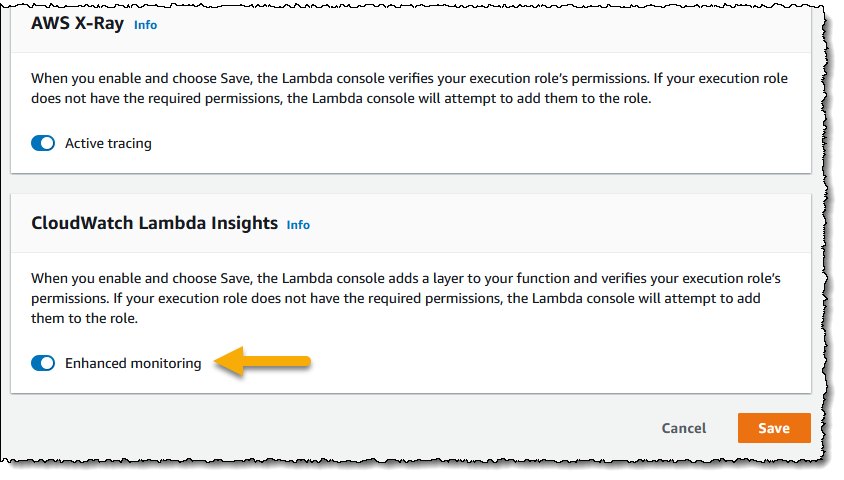
To get started, I need to enable Lambda Insights on my functions. In the Lambda console, I navigate to my list of functions, and then select the function I want to enable for Lambda Insights by clicking on its name. From the function’s configuration view I then scroll to the Monitoring tools panel, click Edit, enable Enhanced monitoring, and click Save. If you want to enable enhanced monitoring for many functions, you may find it more convenient to use AWS Command Line Interface (CLI), AWS Tools for PowerShell, or AWS CloudFormation approaches instead. Note that once enhanced monitoring has been enabled, it can take a few minutes before data begins to surface in CloudWatch.

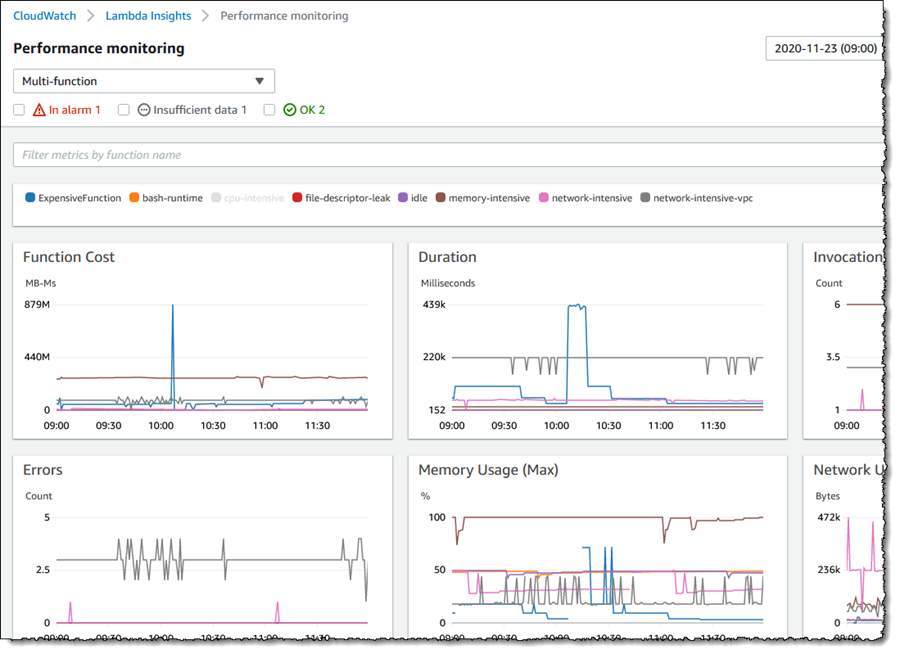
Screenshot showing enabling of <span title="">Lambda Insights</span> In the Amazon CloudWatch Console, I start by selecting Performance monitoring beneath Lambda Insights in the navigation panel. This takes me to the Multi-function view. Metrics for all functions on which I have enabled Lambda Insights are graphed in the view. At the foot of the page there’s also a table listing the functions, summarizing some data in the graphs and adding Cold starts. The table gives me the ability to sort the data based on the metric I’m interested in.

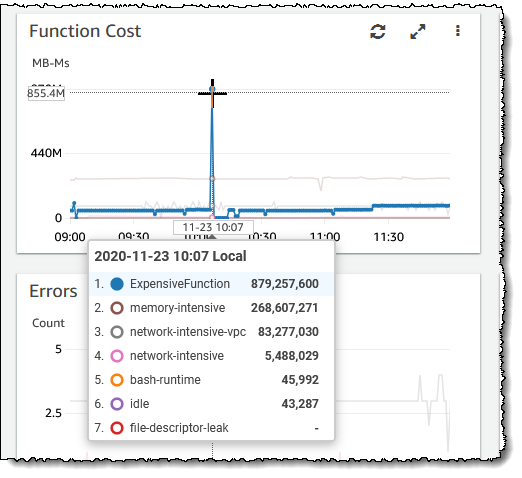
Screenshot of metric graphs on the <span title="">Lambda Insights</span> Multi-function viewScreenshot of the <span title="">Lambda Insights</span> Multi-function view summary listAn interesting graph on this page, especially if you are trying to balance cost with performance, is Function Cost. This graph shows the direct cost of your functions in terms of megabyte milliseconds (MB-MS), which is how Lambda computes the financial charge of a function’s invocation. Hovering over the graph at a particular point in time shows more details.

Screenshot of function cost graphLet’s examine my ExpensiveFunction further. Moving to the summary list at the bottom of the page I click on the function name which takes me to the Single function view (from here I can switch to my other functions using the controls at the top of the page, without needing to return to the multiple function view). The graphs show me metrics for invocations and errors, duration, any throttling, and memory, CPU, and network usage on the selected function and to add to the detail available, the most recent 1000 invocations are also listed in a table which I can sort as needed.

Clicking View in the Trace column of a request in the invocations list takes me to the Service Lens trace view, showing where my function spent its time on that particular invocation request. I could use this to determine if changes to the business logic of the function might improve performance by reducing function duration, which will have a direct effect on cost. If I’m troubleshooting, I can view the Application or Performance logs for the function using the View logs button. Application logs are those that existed before Lambda Insights was enabled on the function, whereas Performance logs are those that Lambda Insights has collated across all my enabled functions. The log views enable me to run queries and in the case of the Performance logs I can run queries across all enabled functions in my account, for example to perform a top-N analysis to determine my most expensive functions, or see how one function compares to another.

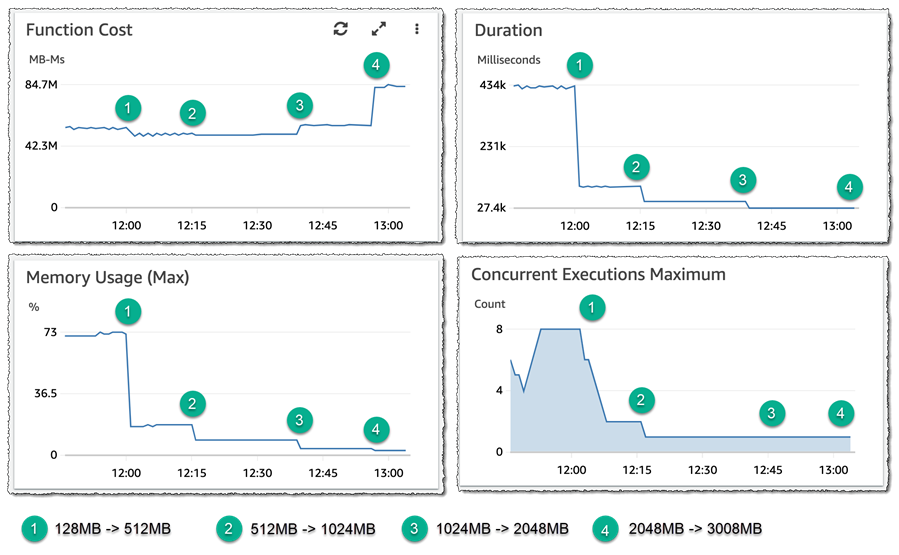
Here’s how I can make use of Lambda Insights to check if I’m ‘moving the needle’ in the correct direction when attempting to right-size a function, by examining the effect of changes to memory allocation on function cost. The starting point for my ExpensiveFunction is 128MB. By moving from 128MB to 512MB, the data shows me that function cost, duration, and concurrency are all reduced – this is shown at (1) in the graphs. Moving from 512MB to 1024MB, (2), has no impact on function cost, but it further reduces duration by 50% and also affected the maximum concurrency. I ran two further experiments, first moving from 1024MB to 2048MB, (3), which resulted in a further reduction in duration but the function cost started to increase so the needle is starting to swing in the wrong direction. Finally, moving from 2048MB to 3008MB, (4), significantly increased the cost but had no effect on duration. With the aid of Lambda Insights I can infer that the sweet spot for this function (assuming latency is not a consideration) lies between 1024MB and 2048MB. All these experiments are shown in the graphs below (the concurrency graph lags slightly, as earlier invocations are finishing up as configuration changes are made).

Screenshot of function cost experiments

CloudWatch Lambda Insights gives simple and convenient operational oversight and visibility into the behavior of my AWS Lambda functions, and is available today in all regions where AWS Lambda is present.

Learn more about Amazon CloudWatch Lambda Insights in the documentation and get started today.

— Steve

New – SaaS Lens in AWS Well-Architected Tool

Post Syndicated from Danilo Poccia original https://aws.amazon.com/blogs/aws/new-saas-lens-in-aws-well-architected-tool/

To help you build secure, high-performing, resilient, and efficient solutions on AWS, in 2015 we publicly launched the AWS Well-Architected Framework. It started as a single whitepaper but has expanded to include domain-specific lenses, hands-on labs, and the AWS Well-Architected Tool (available at no cost in the AWS Management Console) that provides a mechanism for regularly evaluating your workloads, identifying high risk issues, and recording your improvements.

To offer more workload-specific advice, in 2017 we extended the framework with the concept of “lens” to go beyond a general perspective and enter specific technology domains. Now, to help accelerate building Software-as-a-Service (SaaS) solutions, the AWS SaaS Factory team has led an effort to build a new AWS Well-Architected SaaS Lens.

SaaS is a licensing and delivery model by which software is centrally managed and hosted by a provider and available to customers on a subscription basis. In this way, software providers can innovate rapidly, optimize their costs, and gain operational efficiencies. At the same time, customers benefit from simplified IT management, speed, and a pay-for-what-you-use business model.

The Well-Architected SaaS Lens adds questions to the tool that are tailored to SaaS workloads and intended to drive critical thinking for developing and operating SaaS workloads. Each question has a list of best practices, and each best practice has a list of improvement plans to help guide you in implementing them. AWS Solution Architects from the AWS SaaS Factory Program, having worked with thousands of software developers and AWS Partners, view these well-architected patterns as a key component of building and operating a SaaS architecture on AWS.

Using the SaaS Lens in the Well-Architected Tool
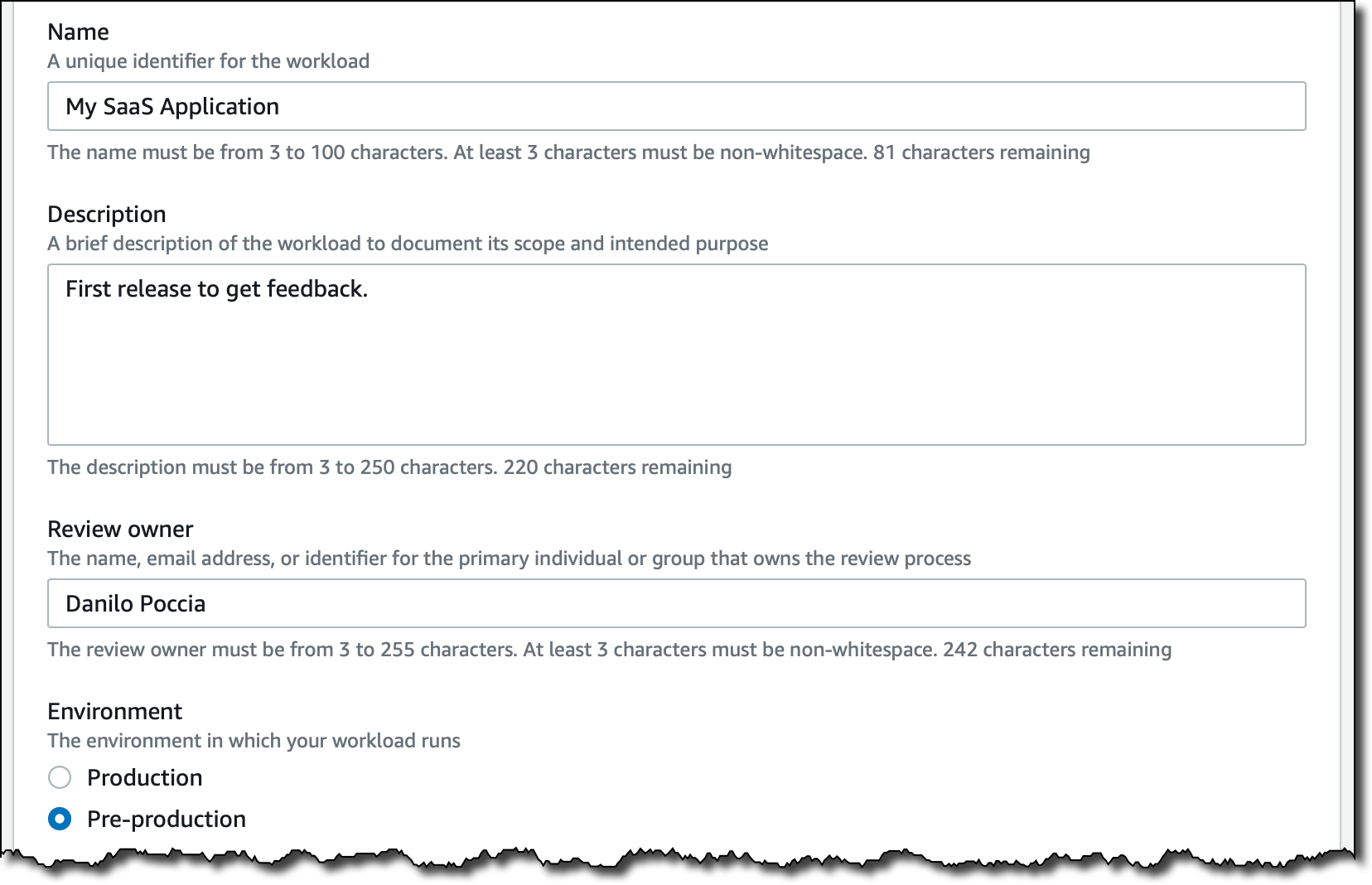
In the Well-Architected Tool console, I start by defining my workload. Today, I’m reviewing a pre-production environment of a SaaS application. It’s just a minimum viable product (MVP) version of what I want to build, with just enough features to be usable and get a first feedback.

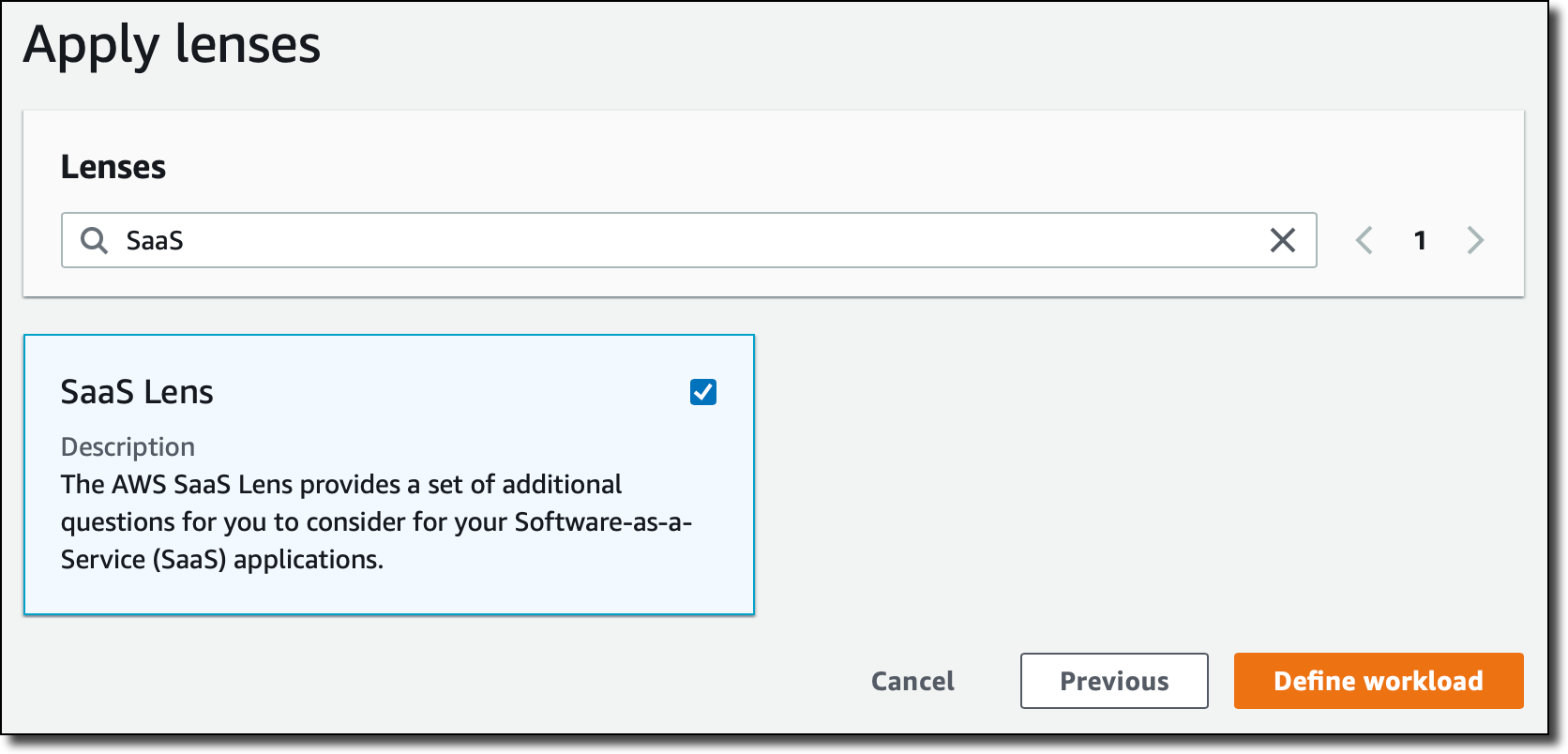
Now, I can choose which lenses to apply. The AWS Well-Architected Framework is there by default. I select the SaaS Lens. This is adding a set of additional questions that help me understand how to design, deploy, and architect my SaaS workload following the framework best practices. Other lenses are available in the tool, for example the Serverless Lens described here.

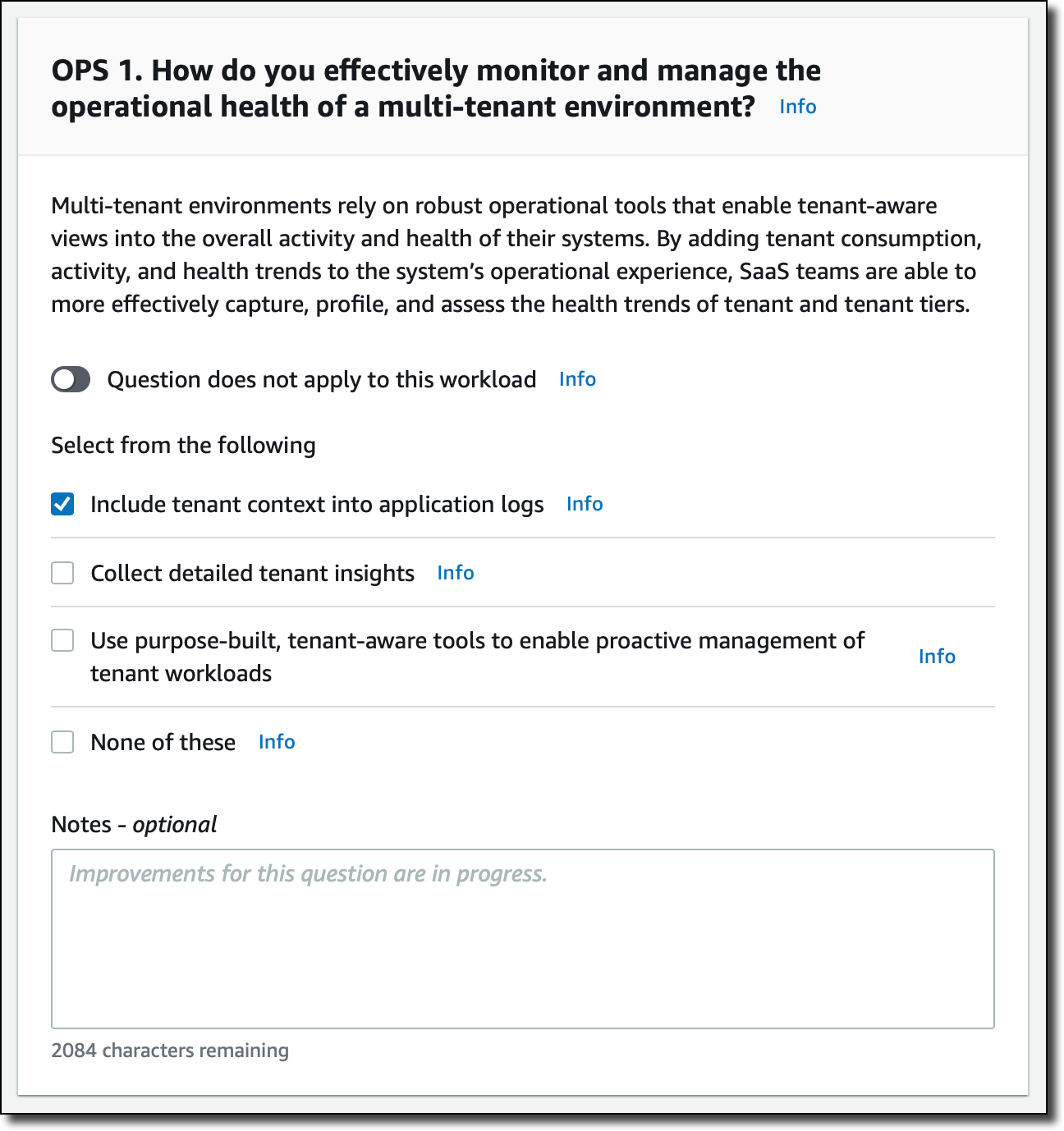
Now, I start my review. Many questions in the SaaS Lens are focused on how you are managing a multi-tenant application. This is the first question for the Operational Excellence pillar. I can also add some notes to explain my answer better or take note of what I want to improve.

I don’t need to answer all questions to start improving my SaaS application. For example, this is the improvement plan based on my answer to the previous question. For each point here, I can click and get more information on how to implement that on AWS.

Moving to the Reliability pillar, I feel more confident because of the techniques I used to separate individual tenants of my SaaS application in their own “sandbox” environment.

As I expect, no risks are detected this time!

When I finish reviewing the SaaS Lens for my workload, I get an overview of the detected risks. Here, I can also save a milestone that I can use later to compare my status and estimate my improvements.

Just below that, I get a suggestion on what to focus on next. Again, I can click and get in-depth suggestion on how to mitigate the risk.

As often happens in IT services, this is an iterative process. The AWS Well-Architected Tool helps quantify the risks and gives me a path to follow to continuously improve my SaaS application.

Available Now
The SaaS Lens is available today in all regions where the AWS Well-Architected Tool is offered, as described in the AWS Regional Services List. It can be applied to existing workloads, or used for new workloads you define in the tool.

There are no costs in using the AWS Well-Architected Tool; you can use it to improve the application you are working on, or to get visibility into multiple workloads used by the department or area you are working with.

Learn more about the new SaaS Lens and get started today with the AWS Well-Architected Tool!

— Danilo

re:Invent 2020 Liveblog: Partner Keynote

Post Syndicated from AWS News Blog Team original https://aws.amazon.com/blogs/aws/reinvent-2020-liveblog-partner-keynote/

Join us Thursday, Dec. 3, from 7:45-9:30 a.m., for the AWS Partner Keynote with Doug Yeum, head of Worldwide Channels and Alliances; Sandy Carter, vice president, Global Public Sector Partners and Programs; and Dave McCann, vice president, AWS Migration, Marketplace, and Control Services. Developer Advocates Steve Roberts and Martin Beeby will be liveblogging all the announcements and discussion.

See you at 7:45 a.m. (PST) Thursday!

— Steve & — Martin


Amazon S3 Update – Strong Read-After-Write Consistency

Post Syndicated from Jeff Barr original https://aws.amazon.com/blogs/aws/amazon-s3-update-strong-read-after-write-consistency/

When we launched S3 back in 2006, I discussed its virtually unlimited capacity (“…easily store any number of blocks…”), the fact that it was designed to provide 99.99% availability, and that it offered durable storage, with data transparently stored in multiple locations. Since that launch, our customers have used S3 in an amazing diverse set of ways: backup and restore, data archiving, enterprise applications, web sites, big data, and (at last count) over 10,000 data lakes.

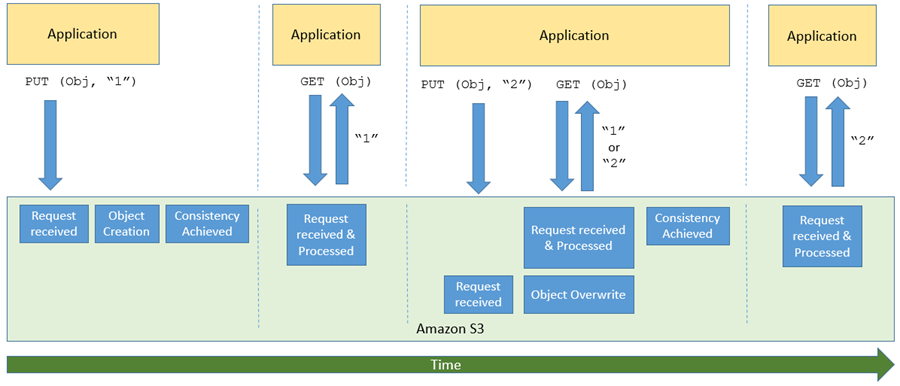
One of the more interesting (and sometimes a bit confusing) aspects of S3 and other large-scale distributed systems is commonly known as eventual consistency. In a nutshell, after a call to an S3 API function such as PUT that stores or modifies data, there’s a small time window where the data has been accepted and durably stored, but not yet visible to all GET or LIST requests. Here’s how I see it:

This aspect of S3 can become very challenging for big data workloads (many of which use Amazon EMR) and for data lakes, both of which require access to the most recent data immediately after a write. To help customers run big data workloads in the cloud, Amazon EMR built EMRFS Consistent View and open source Hadoop developers built S3Guard, which provided a layer of strong consistency for these applications.

S3 is Now Strongly Consistent
After that overly-long introduction, I am ready to share some good news!

Effective immediately, all S3 GET, PUT, and LIST operations, as well as operations that change object tags, ACLs, or metadata, are now strongly consistent. What you write is what you will read, and the results of a LIST will be an accurate reflection of what’s in the bucket. This applies to all existing and new S3 objects, works in all regions, and is available to you at no extra charge! There’s no impact on performance, you can update an object hundreds of times per second if you’d like, and there are no global dependencies.

This improvement is great for data lakes, but other types of applications will also benefit. Because S3 now has strong consistency, migration of on-premises workloads and storage to AWS should now be easier than ever before.

We’ve been working with the Amazon EMR team and developers in the open-source community to ensure that customers can take advantage of this update with their big data workloads. As a result of that you no longer need to use EMRFS Consistent View or S3Guard, further reducing the cost to run big data workloads in AWS.

A Word From Dropbox
Long-time AWS customer Dropbox recently migrated a 34 PB analytics data lake from on-premises Hadoop clusters to S3. Watch this video to learn more about strong consistency and how it has allowed Dropbox to simplify their data lake:

— Jeff;


AWS re:Invent: Top Announcements for 2020

Post Syndicated from AWS News Blog Team original https://aws.amazon.com/blogs/aws/aws-reinvent-announcements-2020/

Compute | Containers | Customer Engagement | Database | Machine Learning |

Below are the major launch and preview announcements happening at re:Invent 2020, organized by category. We’ll update this page daily over the course of the event, which takes place Nov. 30-Dec. 18. For a list of re:Invent launch posts by date, you can find the full list here.

Compute

New – Use Amazon EC2 Mac Instances to Build and Test macOS, iOS, ipadOS, tvOS, and watchOS Apps
Over the last couple of years, AWS users have told us that they want to be able to run macOS on Amazon Elastic Compute Cloud (EC2). We’ve asked a lot of questions to learn more about their needs, and today we introduce you to the new Mac instance!

re:Invent 2020 Pre-announcements for Tuesday, December 1
Here’s a sneak peek at some good things to come, including: AWS Outpost Servers, Amazon ECS Anywhere and Amazon EKS Anywhere.

Coming Soon – Amazon EC2 G4ad Instances Featuring AMD GPUs for Graphics Workloads
Customers with high performance graphic workloads, such as those in game streaming, animation, and video rendering, are always looking for higher performance at less cost. Today, we announce that new Amazon Elastic Compute Cloud (EC2) instances in the G4 instance family will be available soon to improve performance and reduce cost for graphics-intensive workloads.

New EC2 C6gn Instances – 100 Gbps Networking with AWS Graviton2 Processors
Today, we’re expanding our broad Arm-based Graviton2 portfolio with C6gn instances that deliver up to 100 Gbps network bandwidth, up to 38 Gbps Amazon Elastic Block Store (EBS) bandwidth, up to 40% higher packet processing performance, and up to 40% better price/performance versus comparable current generation x86-based network optimized instances.

EC2 Update – D3 / D3en Dense Storage Instances
We have launched several generations of EC2 instances with dense storage including the HS1 in 2012 and the D2 in 2015. Today we are launching the D3 and D3en instances. Like their predecessors, they give you access to massive amounts of low-cost on-instance HDD storage.

New – Amazon EC2 R5b Instances Provide 3x Higher EBS Performance
R5 instances are designed for memory-intensive applications such as high-performance databases, distributed web scale in-memory caches, in-memory databases, real time big data analytics, and other enterprise applications. Today, we announce the new R5b instance, which provides the best network-attached storage performance available on EC2.

New for AWS Lambda – 1ms Billing Granularity Adds Cost Savings
Since Lambda was launched in 2014, pricing has been based on the number of times code is triggered (requests) and the number of times code executes, rounded up to the nearest 100ms (duration). Starting today, we are rounding up duration to the nearest millisecond with no minimum execution time.

In the Works – 3 More AWS Local Zones in 2020, and 12 More in 2021
We launched the first AWS Local Zone in Los Angeles last December, and added a second one (also in Los Angeles) in August of 2020. With 3 more available today and 12 planned next year, we are choosing the target cities with the goal of allowing you to provide access with single-digit millisecond latency to the vast majority of users in the Continental United States.

New for AWS Lambda – Container Image Support
With Lambda, you upload your code and run it without thinking about servers. Many customers enjoy the way this works, but if you’ve invested in container tooling for your development workflows, it’s not easy to use the same approach to build applications using Lambda. To help you with that, you can now package and deploy Lambda functions as container images of up to 10 GB in size.

Containers

Amazon ECR Public: A New Public Container Registry
You have long been able to host private container images on AWS with Amazon Elastic Container Registry, and now with the release of Amazon Elastic Container Registry Public, you can host public ones too, enabling anyone (with or without an AWS account) to browse and pull your published containers.

Preview of AWS Proton – Automated Management for Container and Serverless Deployments
Maintaining hundreds – or sometimes thousands – of microservices with constantly changing infrastructure resources and configurations is a challenging task for even the most capable teams. AWS Proton enables infrastructure teams to define standard templates centrally and make them available for developers in their organization. This allows infrastructure teams to manage and update infrastructure without impacting developer productivity.

Customer Engagement

Amazon Connect – Now Smarter and More Integrated With Third-Party Tools
We launched Amazon Connect in 2017 and, since then, thousands of customers have created their own contact centers in the cloud. Amazon Connect makes it easy for non-technical customers to design interaction flows, manage agents, and track performance metrics. Today, we announce a new set of capabilities to make Amazon Connect smarter and more integrated with third-party tools.

Database

New – Amazon QuickSight Q Answers Natural-Language Questions About Business Data
Today, we are happy to announce the preview of Amazon QuickSight Q, a Natural Language Query (NLQ) feature powered by machine learning (ML). With Q, business users can now use QuickSight to ask questions about their data using everyday language and receive accurate answers in seconds.

Now in Preview – Larger and Faster io2 Block Express EBS Volumes with Higher Throughput
Earlier this year we launched io2 volumes with 100x higher durability and 10x more IOPS/GiB than the earlier io1 volumes. Today we are opening up a preview of io2 Block Express volumes that are designed to deliver even higher performance!

New – Amazon EBS gp3 Volume Lets You Provision Performance Apart From Capacity
When using general purpose SSD gp2 volumes with EBS, performance is associated with storage capacity. Today we announce the new gp3 volume that lets customers increase IOPS and throughput without having to provision additional block storage capacity, paying only for the resources they need.

Machine Learning

New- Amazon DevOps Guru Helps Identify Application Errors and Fixes
Today, we are announcing Amazon DevOps Guru, a fully managed operations service that makes it easy for developers and operators to improve application availability by automatically detecting operational issues and recommending fixes.

Amazon Lookout for Equipment Analyzes Historical Sensor Data to Help Detect Equipment Failure
Companies that operate industrial equipment are constantly working to improve operational efficiency and avoid unplanned downtime due to component failure. Amazon Lookout for Equipment is an API-based machine learning (ML) service that detects abnormal equipment behavior and helps companies monitor the health of their assets.

Amazon Lookout for Vision Simplifies Defect Detection for Manufacturing
Lookout for Vision is a new machine learning service that helps increase industrial product quality and reduce operational costs by automating visual inspection of product defects across production processes. Using Lookout for Vision, you can detect damages to manufactured parts, identify missing components or parts, and uncover underlying process-related issues in your manufacturing lines.

AWS Panorama Appliance – Bringing Computer Vision Applications to the Edge
Today we preview the AWS Panorama Appliance and its associated console. You can now develop a computer vision model using Amazon SageMaker and then deploy it to a Panorama Appliance that can then run the model on video feeds from multiple network and IP cameras.

Amazon Monitron is a Simple and Cost-Effective Service Enabling Predictive Maintenance
Monitron is an easy and cost-effective condition monitoring service that allows you to monitor the condition of equipment in your facilities, enabling the implementation of a predictive maintenance program.

In the Works – 3 More AWS Local Zones in 2020, and 12 More in 2021

Post Syndicated from Jeff Barr original https://aws.amazon.com/blogs/aws/in-the-works-more-aws-local-zones/

We launched the first AWS Local Zone in Los Angeles last December, and added a second one (also in Los Angeles) in August of 2020. In my original post, I quoted Andy Jassy’s statement that we would be giving consideration to adding Local Zones in more geographic areas.

Our customers are using the EC2 instances and other compute services in these zones to host artist workstations, local rendering, sports broadcasting, online gaming, financial transaction processing, machine learning inferencing, virtual reality, and augmented reality applications, among others. These applications benefit from the extremely low latency made possible by geographic proximity.

More Local Zones
I’m happy to be able to announce that we are opening three more Local Zones today and plan to open twelve more in 2021.

Local Zones in Boston, Houston, and Miami are now available in preview form and you can request access now. In 2021, we plan to open Local Zones in other key cities and metropolitan areas including New York City, Chicago, and Atlanta.

We are choosing the target cities with the goal of allowing you to provide access with single-digit millisecond latency to the vast majority of users in the Continental United States. You can deploy the parts of your application that are the most sensitive to latency in Local Zones, and deliver amazing performance to your users. In addition to the use cases that I mentioned above, I expect to see many more that have yet to be imagined or built.

Using Local Zones
I stepped through the process of using a Local Zone in my original post, and all that I said there still applies. Here’s what you need to do:

  1. Request access to the preview and await a reply.
  2. Create a new VPC subnet for the Local Zone.
  3. Launch EC2 instances, create EBS volumes, and deploy your application.

Things to Know
Here are a couple of things that you should know about the new and upcoming Local Zones:

Instance Types – The Local Zones will have a wide selection of EC2 instance types including C5, R5, T3, and G4 instances..

Purchasing Models – You can use compute capacity in Local Zones on an On-Demand basis and you can also purchase a Savings Plan in order to receive discounts. Some of the Local Zones also support the use of Spot Instances, .

AWS Services – Local Zones support Amazon Elastic Compute Cloud (EC2), Amazon Elastic Block Store (EBS), Amazon Elastic Kubernetes Service (EKS), and Amazon Virtual Private Cloud, with the door open for other services in the future. You can use services such as Auto Scaling, AWS CloudFormation, and Amazon CloudWatch in the parent region to launch, control, and monitor the AWS resources in a Local Zone.

Direct Connect – As I mentioned earlier, some of our customers are using AWS Direct Connect to establish private connections between Local Zones and their existing on-premises or colo IT infrastructure. We are working with our Direct Connect Partners to make Direct Connect available for the new zones and the specifics will vary on a zone-by-zone basis.

The AWS Local Zones Features page contains additional zone-by-zone information on all of the items listed above.

Learn More
Here are some resources to help you to learn more about Local Zones:

Blog Post – Low-Latency Computing with AWS Local Zones.

Sites – AWS Local Zones home page, AWS Local Zones FAQ.

— Jeff;

re:Invent 2020 – Preannouncements for Tuesday, December 1

Post Syndicated from Jeff Barr original https://aws.amazon.com/blogs/aws/reinvent-2020-preannouncements-for-tuesday-december-1/

Andy Jassy just gave you a hint about some upcoming AWS launches, and I’ll have more to say about them when they are ready. To tide you over until then, here’s a summary of what he pre-announced:

Smaller AWS Outpost Form Factors – We are introducing two new sizes of AWS Outposts, suitable for locations such as branch offices, factories, retail stores, health clinics, hospitals, and cell sites that are space-constrained and need access to low-latency compute capacity. The 1U (rack unit) Outposts server will be equipped with AWS Graviton 2 processors; the 2U Outposts server will be equipped with Intel® processors. Both sizes will be able to run EC2, ECS, and EKS workloads locally, all provisioned and managed by AWS (including automated patching and updates).

Amazon ECS Anywhere – You will soon be able to run Amazon Elastic Container Service (ECS) in your own data center, giving you the power to select and standardize on a single container orchestrator that runs both on-premises and in the cloud. You will have access to the same ECS APIs, and you will be able to manage all of your ECS resources with the same cluster management, workload scheduling, and monitoring tools and utilities. Amazon ECS Anywhere will also make it easy for you to containerize your existing on-premises workloads, run them locally, and then connect them to the AWS Cloud.

Amazon EKS Anywhere – You will also soon be able to run Amazon Elastic Kubernetes Service (EKS) in your own data center, making it easy for you to set up, upgrade, and operate Kubernetes clusters. The default configuration for each new cluster will include logging, monitoring, networking, and storage, all optimized for the environment that will host the cluster. You will be able to spin up clusters on demand, and you will be able to backup, recover, patch, and upgrade production clusters with minimal disruption.

Again, I’ll have more to say about these when they are ready, so stay tuned, and enjoy the rest of AWS re:Invent!

— Jeff;

Amazon Connect – Now Smarter and More Integrated With Third-Party Tools

Post Syndicated from Sébastien Stormacq original https://aws.amazon.com/blogs/aws/amazon-connect-smarter-and-more-integrated/

We launched Amazon Connect in 2017 and, since then, thousands of customers have created their own contact centers in the cloud. Amazon Connect makes it easy for non-technical customers to design interaction flows, manage agents, and track performance metrics.

For example, when I book a Best Western hotel room in Europe by phone, the call is managed by Amazon Connect. In the UK, the Post Office went from ideation to production rollout in just three weeks. In France, WebHelp, a global leader in Business Process Outsourcing, activated thousands of workstations and remote agents in just 72 hours.

Since I last blogged about Amazon Connect, the team has been continuously listening for your feedback and, today, I am happy to announce a new set of capabilities to make Amazon Connect smarter and more integrated with third-party tools.

We are using Machine Learning (ML) to make Amazon Connect smarter at analyzing conversations in real time, finding relevant information needed by contact center agents, and authenticating customers by the sound of their voice. The second set of capabilities makes Amazon Connect easier to integrate with third party tools or services to present unified customer profile information to contact center agents, and to make it easier to manage their tasks.

Let’s go into the details, one by one.

Contact Lens Real Time
Contact Lens for Amazon Connect is a set of machine learning (ML) capabilities allowing contact center supervisors to better understand the sentiment, trends, and compliance of customer conversations. It was first announced during re:Invent 2019 and available since July 2020. It allows to effectively train agents, replicate successful interactions, and to identify crucial company and product feedback.

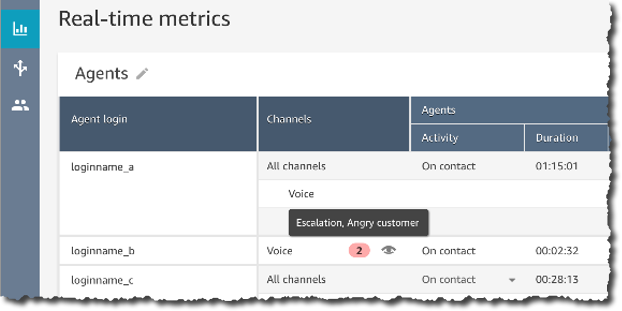
Starting today, you can get real-time insights into customer experience during the live calls, such as a customer expressing dissatisfaction. Customer experience analytics and alerts for live calls are delivered in Amazon Connect’s real-time metrics dashboard. It makes it easy for supervisors to identify when to listen-in on a critical call, and to provide guidance to the agent via chat, or have the agent transfer the call to them for assistance.

You, as the contact center manager, can define rules using specific terms such as “not happy,” “poor quality product,” and “cancel my subscription.” Contact Lens uses natural language processing (NLP) to perform intelligent matching to automatically detect variations of the spoken words even when the example phrases are limited.

Create Rules for real time analytics

Contact Lens analyzes in-progress calls in real time to detect when the rule criteria for a customer experience issue is met, and immediately creates an alert next to the live call in the Amazon Connect dashboard to notify supervisors of the situation.

Real Time alert based on rules

With this launch, we are adding 13 language variants to post-call analytics, in addition to the 5 already supported :English (United States), English (Great Britain), English (Australia), English (India), and Spanish (United States).

The new language variants for post-call analytics are: English (Ireland), English (Scotland), English (Wales), Spanish (Spain), French (Canada), French (France), Portuguese (Portugal), Portuguese (Brazil), German (Germany), German (Switzerland), Italian (Italy), Arabic (Gulf), and Hindi (India).

Contact Lens for Amazon Connect real-time is available in 4 language variants: English (United States), English (Great Britain), English (Australia), and Spanish (United States). More language variants will be added at later stage.

For more details visit this launch page.

Amazon Connect Wisdom (Preview)
Wisdom provides built-in agent assistance capabilities in Amazon Connect, including machine learning (ML) powered search and real-time recommendations, to quickly enable agents with relevant information for resolving customer issues.

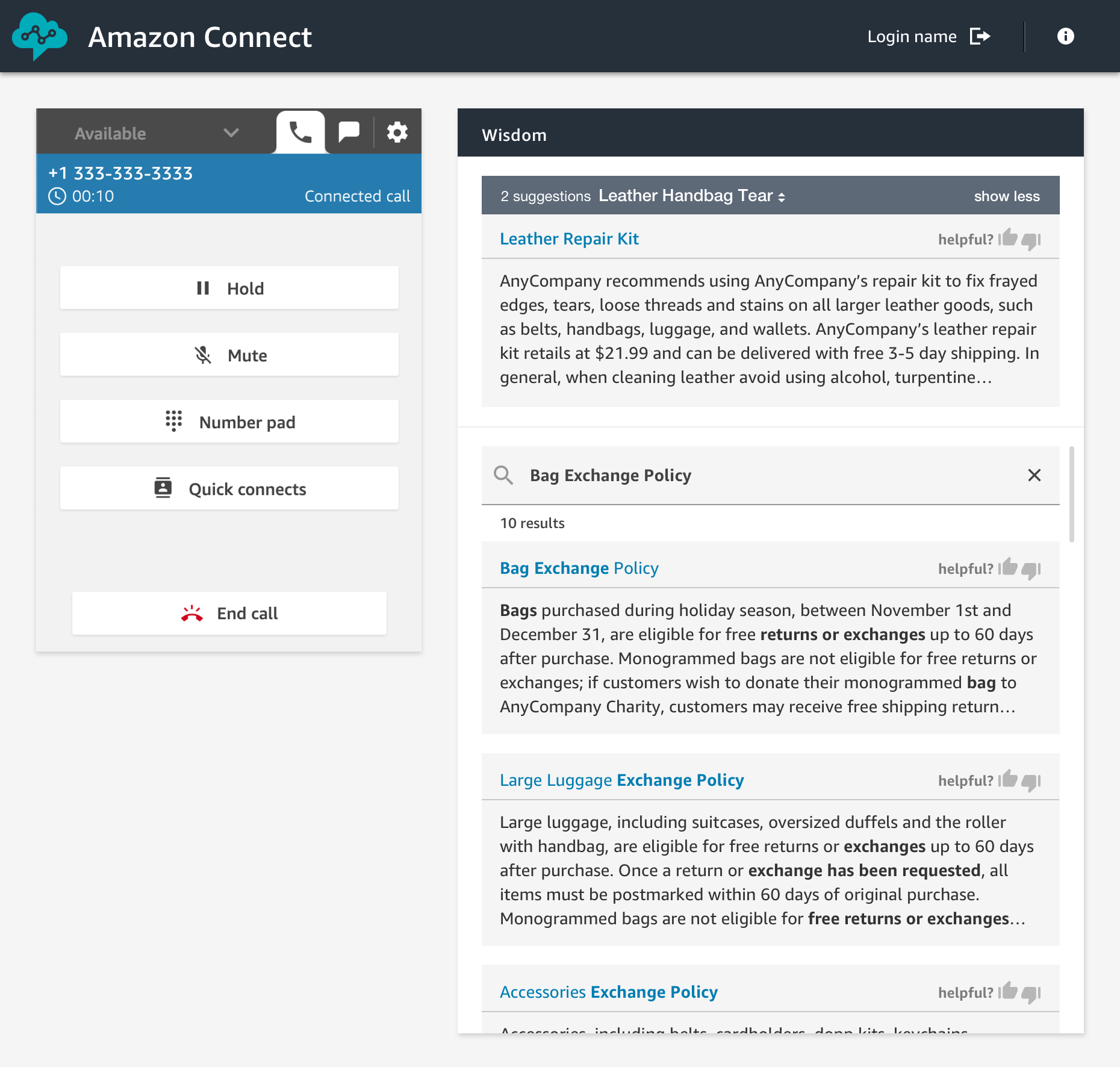
As an agent, I can type questions or phrases in the Wisdom search box, without guessing what keyword I should use. Wisdom understands what information I am searching for. It surfaces results in the agent’s preferred Amazon Connect application, the web-based one we do provide, or the ones you built.

Amazon Connect Wisdom search results

Wisdom comes with pre-built connectors to third-party knowledge repositories to provide most relevant results to agents. Wisdom includes connectors for Salesforce and ServiceNow during the preview, with more to come at launch.

Wisdom may use Contact Lens Real Time analytics to analyse the conversation in real-time. It detects the customer issue, finds related content in the connected repositories, and provides proactive recommendations to help the agent resolve it. For example, Wisdom can detect that a customer is talking about a problem with the handbag they bought last week, recommend an article that describes similar products defect, and provide instructions with a link to the order management application needed to initiate an exchange.

Wisdom is available in preview, you can signup today or visit the launch page.

Amazon Connect Voice ID (Preview)
Amazon Connect Voice ID provides real-time caller authentication which makes voice interactions in contact centers more secure and efficient.

To effectively recognise me as “Sébastien”, Voice ID must learn how I am talking. This is the enrolment phase. Then it compares the sound of my voice with the one enrolled earlier. This is the verification phase.

To meet with personal data protection laws, contact center agents capture my consent to use Voice ID.

During the enrolment phase, Voice ID listens to the call until it has captured 30 seconds of my voice. Then it creates my voiceprint, which uniquely authenticates me. A voiceprint is a mathematical representation that captures unique aspects of an individual’s voice such as speech rhythm, pitch, intonation, and loudness. I do not need to say or repeat any specific phrases to let Voice ID create my voiceprint. Voice ID provides an API that can be used to opt-out a customer.

When I call back in, Voice ID just needs 10 seconds of my voice to authenticate me. My voice can be captured as part of a typical interaction with the Interactive Voice Response (IVR) happening at the start of the call, or when I first start to talk with the agent. For example when I am answering questions, such as “what’s your first and last name?” and “what are you calling about?”, Voice ID uses this audio to generate my voiceprint again. It compares it with the one enrolled earlier. Voice ID then generates an authentication score depending on the confidence of the match. Contact center managers can use this score to create policies in Amazon Connect to let agents see a real-time result (“authenticated” or “not authenticated”) in their web-based application. Agents can then decide to proceed with the call or ask for additional authentication credentials.

Amazon Connect Voice ID is available in preview. You can signup today or visit this launch page.

Amazon Connect Customer Profiles
Customer Profiles is a unified profile for Amazon Connect that brings together customer information from disparate sources without having to build integrations or wrangle data.

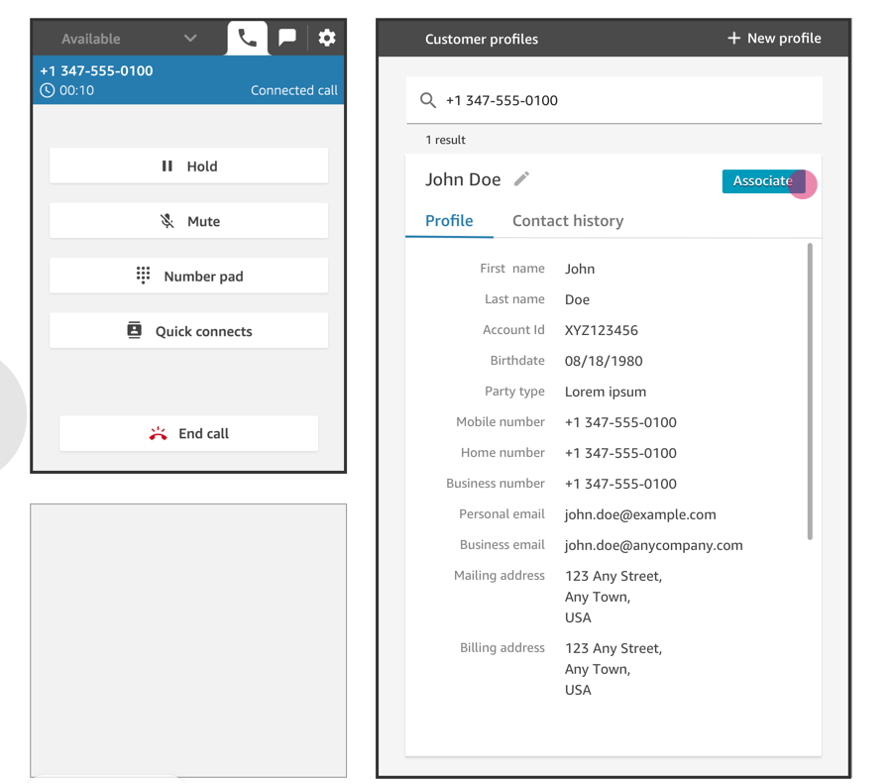
Providing agents (or automatic IVR systems) with accurate and unified customer profile information at the right moment helps them to deliver better service to customers, and to resolve calls faster. Using Customer Profiles, agents must not navigate out of Amazon Connect, or switch between different applications to get the customer insights they need.

With just a few clicks, System Administrators can integrate customer profile data from applications like Salesforce, ServiceNow, Zendesk, and Marketo to build your own homegrown integration. Setting up connectors for Customer Profiles requires no programming or data integration expertise.

Once enabled, Customer Profiles automatically detects customer records from the applications. It matches and deduplicates them. This results in accurate and up-to-date profiles displayed to agents within their Connect web-based experience.

Amazon Connect Customer Profile

Learn more about Amazon Connect Customer Profile by visiting the launch page.

Amazon Connect Tasks
Amazon Connect Tasks makes it easy to automate, track, and manage contact center agent tasks. It provides a single place for contact center managers to prioritize, assign, and track customer service tasks across the disparate applications used by agents, so that they are focused on the highest priority work of any type.

Tasks can be sourced from third-party applications, such as a CRM solution, or to update a business-specific system. For example, you can programmatically create tasks for agents to follow-up on a customer case in a third party application like Salesforce, or complete an action item in a business-specific application, such as processing a claim in an insurance system. You can also automate tasks that dont require agent interaction, to ensure your agents spend more time focused on customers.

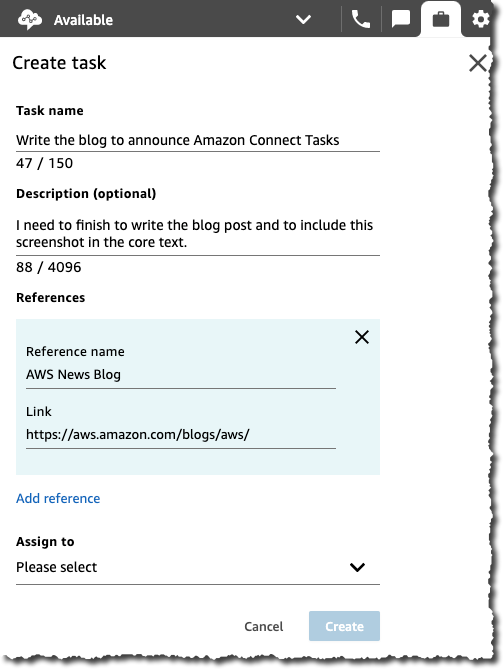
Using Amazon Connect tasks, agents no longer need to switch between applications to know what work should be completed, and with what priority. Agents can see all their assigned tasks right from the Amazon Connect contact control panel, the same web-based application they use to interact with customers over calls and chat. When a task is assigned, the agent receives a notification with the description of the task, and when required, links to any external applications needed to complete the action. Agents can also create tasks so that follow-up work is not forgotten, for example calling a customer back to provide a status update.

Amazon Connect Accept Tasks Amazon Connect View Task Create a task uisng Amazon Connect Tasks
Incoming Tasks Task Details Create a new Task

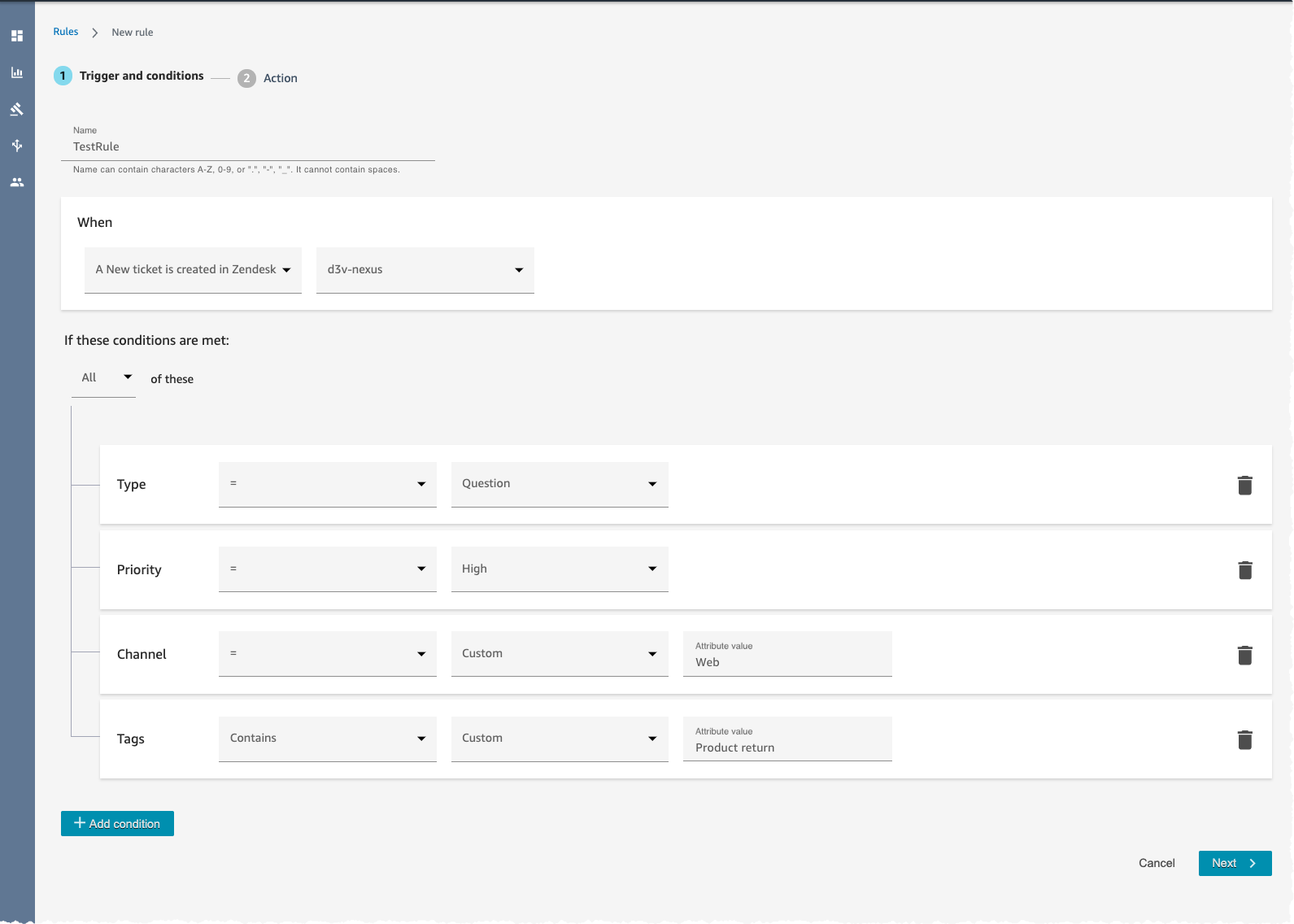
Amazon Connect Tasks provides pre-built connectors fo Salesforce and Zendesk. With just a few clicks, you can easily set up rules to automatically create tasks based on pre-defined conditions, as sown on the screenshot hereunder. It also provides an API to create tasks from any other application.

Amazon Connect Task Rules

Learn more about how to configure and to get started with Tasks by visiting the launch page.

Available Today
Three of these new capabilities are available today: Contact Lens Real Time, Customer Profiles, and Tasks. You must register to the preview program to test Wisdom and Voice ID.

Customer Profile and Tasks are available in all AWS Regions where Amazon Connect is available : US East (N. Virginia), US East (Ohio), US West (N. California), US West (Oregon), Asia Pacific (Sydney), Asia Pacific (Singapore), Asia Pacific (Tokyo), Europe (Frankfurt), and Europe (London). Contact Lens Real Time is available in US West (Oregon), US East (N. Virginia), and Asia Pacific (Sydney) at the moment. Wisdom is available in US East (N. Virginia) and US West (Oregon) during the preview, while Voice ID is available only in US West (Oregon) during the preview.

With Amazon Connect, you only pay for what you use. There are no required up-front payments, long-term commitments, or minimum monthly fees. The price metrics for these new capabilities are detailed on the Amazon Connect pricing page.

Should you need help adding Amazon Connect any of these capabilities to contact flows, please reach out to one of the dozens of Amazon Connect partners available worldwide.

— seb

New for AWS Lambda – Functions with Up to 10 GB of Memory and 6 vCPUs

Post Syndicated from Danilo Poccia original https://aws.amazon.com/blogs/aws/new-for-aws-lambda-functions-with-up-to-10-gb-of-memory-and-6-vcpus/

AWS Lambda runs your code on an highly available and scalable compute infrastructure so that you can focus on what you want to build. Do you want to get the advantages of Lambda for workloads that are memory or computationally intensive? Wait no more!

Starting today, you can allocate up to 10 GB of memory to a Lambda function. This is more than a 3x increase compared to previous limits. Lambda allocates CPU and other resources linearly in proportion to the amount of memory configured. That means you can now have access to up to 6 vCPUs in each execution environment. In this way, your multithreaded and multiprocess applications run faster. Since Lambda charges are proportional to memory configured and function duration (GB-seconds), the additional costs for using more memory may be offset by lower duration. I have more on this in the example below.

With more memory and CPU power, and support for the AVX2 instruction set, new use cases — such as machine learning applications; batch and extract, transform, load (ETL) jobs; modelling; genomics; gaming; high-performance computing (HPC); and media processing — become easier to implement and scale with Lambda functions.

Let’s see how this works in practice!

Lambda Function Performance as Memory Increases
When I first wrote about the capability of mounting a shared Amazon Elastic File System (EFS) for Lambda functions, one of the examples I used was a function doing machine learning inference to classify images of birds. The function is using PyTorch to run the inference, applying a pre-trained machine learning model.

Now, I can execute the same function in the updated Lambda execution environment. Let’s see how increasing memory affects the duration of the function. Here are the results of using memory configurations between 1 and 10 GB. To get these numbers, I ran 20 invocations for each memory configuration. Then, I computed the average duration, discarding function initializations. To avoid possible outliers, I also excluded from the average the top and bottom 10% of reported durations. Based on the results, I estimated the charges I would have for 1 million invocations with each configuration.

Graph showing Function Duration and Charges for 1M Invocations as Memory Increases

As you can see, the function is able to use the additional CPU power that comes with more memory, decreasing the duration of the invocations. What is interesting is the impact of increasing memory on my costs.

Lambda charges are related to memory and duration, so if I increase memory and this is reducing duration by the same proportion, the overall charges are about the same. For example, looking at the graph above, when I configure 5 GB of memory, I have the same costs as when I have 1 GB of memory (about $61 for one million invocations), but the function is 5x faster. If I need lower latency, I can increase memory up to 10 GB, where the function is 7.6x faster and I pay a little more ($80 for one million invocations).

Depending on your code and business case, you can find out which memory configuration gives the optimal trade-off between cost and performance. To help you with that, my colleague and friend Alex Casalboni started the AWS Lambda Power Tuning project to help you optimize your Lambda functions in a data-driven way. This open source tool is really useful and has been improved by the support of many contributors. Give it a try!

In my tests, PyTorch is also using the optimizations of the Advanced Vector Extensions 2 (AVX2) instruction set, now available in the Lambda execution environment. With the AVX2 instruction set, the processor allows running a certain set of operations simultaneously. This is extremely beneficial for applications with operations that can run in parallel such as matrix multiplication. As a result, using AVX2 can improve performance by increasing CPU throughput per cycle. This typically helps compute intensive workloads such as machine learning inference, multimedia processing, scientific simulations, and financial modeling applications.

Available Now
AWS Lambda support for larger functions is available in Africa (Cape Town), Asia Pacific (Mumbai), Asia Pacific (Seoul), Asia Pacific (Singapore), Asia Pacific (Sydney), Asia Pacific (Tokyo), Canada (Central), EU (Frankfurt), EU (Ireland), EU (London), EU (Milano), EU (Paris), EU (Stockholm), South America (Sao Paulo), US East (N. Virginia), US East (Ohio), US West (N. California), US West (Oregon).

You can configure up to 10 GB of memory for new or existing Lambda functions using the AWS Management Console, AWS Command Line Interface (CLI), AWS SDKs, and Serverless Application Model.

Here’s a snapshot of the new console experience. We replaced the slider with a field, and you can now configure memory in 1 MB increments (it was 64MB increments before). In this way, the console works similarly to the Lambda API that always accepted memory configurations with 1MB granularity.

There is no change in Lambda pricing, you pay for requests and usage, with duration and Provisioned Concurrency charged at a rate proportional to the amount of memory configured.

Start using Lambda functions with up to 10 GB of memory and 6 vCPUs today.

— Danilo

New for AWS Lambda – 1ms Billing Granularity Adds Cost Savings

Post Syndicated from Danilo Poccia original https://aws.amazon.com/blogs/aws/new-for-aws-lambda-1ms-billing-granularity-adds-cost-savings/

What I like about AWS Lambda is that it lets you run code without provisioning or managing servers, and you pay only for what you use. Since we launched Lambda in 2014, you have been charged for the number of times your code is triggered (requests) and for the time your code executes, rounded up to the nearest 100ms (duration).

Starting today, we are rounding up duration to the nearest millisecond with no minimum execution time.

With this new pricing, you are going to pay less most of the time, but it’s going to be more noticeable when you have functions whose execution time is much lower than 100ms, such as low latency APIs.

For example, let’s look at a simple web app that I have running. In the Amazon CloudWatch Logs, for each invocation there is a REPORT line. To improve readability, I am breaking the REPORT line into three lines here:

REPORT RequestId: 35a7e0cb-4902-490d-b8d3-eb315dded660
Duration: 27.40 ms  Billed Duration: 100 ms Memory Size: 1024 MB  Max Memory Used: 472 MB

With 1ms billing granularity that becomes:

REPORT RequestId: a24d03b5-429d-4ca3-a490-878a52a0182f
Duration: 27.55 ms  Billed Duration: 28 ms Memory Size: 1024 MB  Max Memory Used: 472 MB

My application doesn’t have a lot of traffic, so let’s do a simple production scenario. Let’s say I have 100,000 users for a web/mobile app. I expect each user to call this function via the web/mobile app about 20 times per day. The duration of those invocations is on average 28ms. Each month, I should expect:

  • 100,000 users * 20 invocations * 30 days = 60 million invocations.

Let’s estimate the costs in US East (N. Virginia). For simplicity, I am not considering the Lambda free tier.

The Lambda monthly request charges are unchanged:

  • 60 million invocations * $0.20 per 1M requests = $12

To that, I have to add compute charges based on duration.

The Lambda monthly compute charges with the old 100ms rounded up pricing would have been:

  • 60 million invocations* 100ms * 1G memory * $0.0000166667 for every GB-second = $100

With the new 1ms billing granularity, the duration costs are:

  • 60 million invocations * 28ms * 1G memory * $0.0000166667 for every GB-second = $28

For this scenario, overall costs including request and compute charges are much cheaper ($40) than before ($112).

With this pricing, there is now more of an incentive to optimize the duration of functions even if it is already well below 100ms. Your engineering efforts can reduce costs even more.

If you increase memory to get more CPU power and speed up your functions, you now get the benefit of a lower billed duration below 100ms as well. That means that increasing performance and reducing latency is going to be cheaper than before.

We are applying 1ms billing granularity for duration, including when you have Provisioned Concurrency enabled, in all AWS Regions with the exception of those based in China starting with the December 2020 billing period. Regions in China will get the change from January.

Enjoy the new pricing!

— Danilo

New EC2 M5zn Instances – Fastest Intel Xeon Scalable CPU in the Cloud

Post Syndicated from Jeff Barr original https://aws.amazon.com/blogs/aws/new-ec2-m5zn-instances-fastest-intel-xeon-scalable-cpu-in-the-cloud/

We launched the compute-intensive z1d instances in mid-2018 for customers who asked us for extremely high per-core performance and a high memory-to-core ratio to power their front-end Electronic Design Automation (EDA), actuarial, and CPU-bound relational database workloads.

In order to address a complementary set of use cases, customers have asked us for an EC2 instance that will give them high per-core performance like z1d, with no local NVMe storage, higher networking throughput, and a reduced memory-to-vCPU ratio. They have indicated if we built an instance with this set of attributes, it would be an excellent fit for workloads such as gaming, financial applications, simulation modeling applications such as those used in the automobile, aerospace, energy and telecommunication industries, and High Performance Computing (HPC).

Introducing M5zn
Building on the success of the z1d instances, we are launching M5zn instances in seven sizes today. These instances use 2nd generation custom Intel® Xeon® Scalable (Cascade Lake) processors with a sustained all-core turbo clock frequency of up to 4.5 GHz. M5zn instances feature high frequency processing, are a variant of the general-purpose M5 instances, and are built on the AWS Nitro System. These instances also feature low latency 100 Gbps networking and the Elastic Fabric Adapter (EFA), in order to improve performance for HPC and communication-intensive applications.

Here are the M5zn instances (all VPC-only, HVM-only, and EBS-Optimized, with support for Optimize vCPU). As you can see, the memory-to-vCPU ratio on these instances is half that of the existing z1d instances:

Instance Name vCPUs
RAM
Network Bandwidth EBS-Optimized Bandwidth
m5zn.large 2 8 GiB Up to 25 Gbps Up to 3.170 Gbps
m5zn.xlarge 4 16 GiB Up to 25 Gbps Up to 3.170 Gbps
m5zn.2xlarge 8 32 GiB Up to 25 Gbps 3.170 Gbps
m5zn.3xlarge 12 48 GiB Up to 25 Gbps 4.750 Gbps
m5zn.6xlarge 24 96 GiB 50 Gbps 9.500 Gbps
m5zn.12xlarge 48 192 GiB 100 Gbps 19 Gbps
m5zn.metal 48 192 GiB 100 Gbps 19 Gbps

The Nitro Hypervisor allows M5zn instances to deliver performance that is just about indistinguishable from bare metal. Other AWS Nitro System components such as the Nitro Security Chip and hardware-based processing for EBS increase performance, while VPC encryption provides greater security.

Things To Know
Here are a couple of “fun facts” about the M5zn instances:

Placement Groups – M5zn instances can be used in Cluster (for low latency and high network throughput), Spread (to keep critical instances separate from each other), and Partition (to reduce correlated failures) placement groups.

Networking – M5zn instances support the Elastic Network Adapter (ENA) with dedicated 100 Gbps network connections and a dedicated 19 Gbps connection to EBS. If you are building distributed ML or HPC applications for use on a cluster of M5zn instances, be sure to take a look at the Elastic Fabric Adapter (EFA). Your HPC applications can use the Message Passing Interface (MPI) to communicate efficiently at high speed while scaling to thousands of nodes.

C-State Control – You can configure CPU Power Management on m5zn.6xlarge and m5zn.12xlarge instances. This is definitely an advanced feature, but one worth exploring in those situations where you need to squeeze every possible cycle of available performance from the instance.

NUMA – You can make use of Non-Uniform Memory Access on m5zn.12xlarge instances. This is also an advanced feature, but worth exploring in situations where you have an in-depth understanding of your application’s memory access patterns.

To learn more about these and other features, visit the EC2 M5 Instances page.

Available Now
As you can see, the M5zn instances are a great fit for gaming, HPC and simulation modeling workloads such as those used by the financial, automobile, aerospace, energy, and telecommunications industries.

You can launch M5zn instances today in the US East (N. Virginia), US East (Ohio), US West (N. California), US West (Oregon), Europe (Ireland), Europe (Frankfurt), and Asia Pacific (Tokyo) Regions in On-Demand, Reserved Instance, Savings Plan, and Spot form. Dedicated Instances and Dedicated Hosts are also available.

Support is available in the EC2 Forum or via your usual AWS Support contact. The EC2 team is interested in your feedback and you can contact them at [email protected].

— Jeff;


Coming Soon – EC2 C6gn Instances – 100 Gbps Networking with AWS Graviton2 Processors

Post Syndicated from Danilo Poccia original https://aws.amazon.com/blogs/aws/coming-soon-ec2-c6gn-instances-100-gbps-networking-with-aws-graviton2-processors/

Based on the amazing feedback from customers such as Snap, NextRoll, Intuit, SmugMug, and Honeycomb who are running their workloads on Amazon Elastic Compute Cloud (EC2) instances powered by AWS Graviton2, today we are announcing an addition to our broad Arm-based Graviton2 portfolio with C6gn instances that deliver up to 100 Gbps network bandwidth, up to 38 Gbps Amazon Elastic Block Store (EBS) bandwidth, up to 40% higher packet processing performance, and up to 40% better price/performance versus comparable current generation x86-based network optimized instances.

Compared to C6g instances, this new instance type provides 4x higher network bandwidth, 4x higher packet processing performance, and 2x higher EBS bandwidth. This means that customers with workloads that need high networking bandwidth such as high performance computing (HPC), network appliance, real-time video communications, and data analytics, will be able to bring their biggest and most challenging applications to Arm and take advantage of the performance and cost-optimization.

C6gn instances will be available in 8 sizes:

Name vCPUs Memory
(GiB)
Network Bandwidth
(Gbps)
EBS Throughput
(Gbps)
c6gn.medium 1 2 Up to 25 Up to 9.5
c6gn.large 2 4 Up to 25 Up to 9.5
c6gn.xlarge 4 8 Up to 25 Up to 9.5
c6gn.2xlarge 8 16 Up to 25 Up to 9.5
c6gn.4xlarge 16 32 25 9.5
c6gn.8xlarge 32 64 50 19
c6gn.12xlarge 48 96 75 28.5
c6gn.16xlarge 64 128 100 38

The new instances are built on the AWS Nitro System, a collection of AWS-designed hardware and software innovations that maximize resource efficiency. C6gn instances support Elastic Fabric Adapter (EFA) on the c6gn.16xlarge sizes for workloads that can take advantage of lower network latency (such as HPC and video processing) and use Message Passing Interface (MPI) for highly scalable clusters. These new instances also fully support network frameworks like Data Plane Development Kit (DPDK), making it easier to migrate network appliance workloads.

Coming Soon
EC2 C6gn instances will be available later this month and make it easier to optimize costs for HPC and workloads that require high network bandwidth and low latency. Let me know what you are going to build with them!

To get practice with the AWS Graviton2 architecture, you can try t4g.micro instances for free for up to 750 hours per month until March 31st, 2021.

Learn more about EC2 C6gn instances today.

— Danilo

EC2 Update – D3 / D3en Dense Storage Instances

Post Syndicated from Jeff Barr original https://aws.amazon.com/blogs/aws/ec2-update-d3-d3en-dense-storage-instances/

We have launched several generations of EC2 instances with dense storage including the HS1 in 2012 and the D2 in 2015. As you can guess from the name, our customers use these instances when they need massive amounts of very economical on-instance storage for their data warehouses, data lakes, network file systems, Hadoop clusters, and the like. These workloads demand plenty of I/O and network throughput, but work fine with a high ratio of storage to compute power.

New D3 and D3en Instances
Today we are launching the D3 and D3en instances. Like their predecessors, they give you access to massive amounts of low-cost on-instance HDD storage. The D3 instances are available in four sizes, with up to 32 vCPUs and 48 TB of storage. Here are the specs:

Instance Name vCPUs RAM HDD Storage Aggregate Disk Throughput
(128 KiB Blocks)
Network Bandwidth EBS-Optimized Bandwidth
d3.xlarge 4 32 GiB 6 TB (3 x 2 TB)  580 MiBps Up to 15 Gbps 850 Mbps
d3.2xlarge 8 64 GiB 12 TB (6 x 2 TB) 1,100 MiBps Up to 15 Gbps 1,700 Mbps
d3.4xlarge 16 128 GiB 24 TB (12 x 2 TB) 2,300 MiBps Up to 15 Gbps 2,800 Mbps
d3.8xlarge 32 256 GiB 48 TB (24 x 2 TB) 4,600 MiBps 25 Gbps 5,000 Mbps

As you can see from the table above, the D3 instances are available in the same configurations as the D2 instances for easy migration. You’ll get 5% more memory per vCPU, a 30% boost in compute power, and 2.5x higher network performance if you migrate from D2 to D3. The instances provide low-cost dense storage that delivers high performance sequential access to large data sets. They are perfect for distributed file systems such as HDFS and MapR FS, big data analytical workloads, data warehouses, log processing, and data processing.

The D3en instances are available in six sizes, with up to 48 vCPUs and 336 TB of storage. Here are the specs:

Instance Name vCPUs RAM HDD Storage Aggregate Disk Throughput
(128 KiB Blocks)
Network Bandwidth EBS-Optimized Bandwidth
d3en.xlarge 4 16 GiB 28 TB (2 x 14 TB) 500 MiBps Up to 25 Gbps 850 Mbps
d3en.2xlarge 8 32 GiB 56 TB (4 x 14 TB) 1,000 MiBps Up to 25 Gbps 1,700 Mbps
d3en.4xlarge 16 64 GiB 112 TB (8 x 14 TB) 2,000 MiBps 25 Gbps 2,800 Mbps
d3en.6xlarge 24 96 GiB 168 TB (12 x 14 TB) 3,100 MiBps 40 Gbps 4,000 Mbps
d3en.8xlarge 32 128 GiB  224 TB (16 x 14 TB) 4,100 MiBps 50 Gbps 5,000 Mbps
d3en.12xlarge 48 192 GiB 336 TB (24 x 14 TB) 6,200 MiBps 75 Gbps 7,000 Mbps

The D3en instances have a high ratio of storage to vCPU, and are optimized for high throughput and high sequential I/O to very large data sets, with a cost-per-TB that is 80% lower than on D2 instances. D3en instances can host Lustre, BeeGFS, GPFS, and other distributed file systems, they can store your data lakes, and they can run your Amazon EMR, Spark, and Hadoop analytical workloads.

Both of the instance types are built on the AWS Nitro System and are powered by custom Intel® Second Generation Scalable Xeon® (Cascade Lake) processors that can deliver all-core turbo performance of up to 3.1 GHz. The HDD storage is encrypted at rest using AES-256-XTS; traffic between D3 or D3en instances in the same VPC or within peered VPCs is encrypted using a 256-bit key.

Things to Know
Here are a couple of things that you should keep in mind regarding the D3 and D3en instances:

Regions – D3en instances are available in the US East (N. Virginia), US West (Oregon), and Europe (Ireland) Regions; D3en instances are available in all of those regions and also in the US East (Ohio) Region, with more regions coming soon.

Purchase Options – You can purchase D3 and D3 instances in On-Demand, Savings Plan, Reserved Instance, Spot, and Dedicated Instance form.

AMIs – You must use AMIs that include the Elastic Network Adapter (ENA) and NVMe drivers.

Now Available
D3 and D3en instances are available now and you can start using them today!

— Jeff;

New – Use Amazon EC2 Mac Instances to Build & Test macOS, iOS, ipadOS, tvOS, and watchOS Apps

Post Syndicated from Jeff Barr original https://aws.amazon.com/blogs/aws/new-use-mac-instances-to-build-test-macos-ios-ipados-tvos-and-watchos-apps/

Throughout the course of my career I have done my best to stay on top of new hardware and software. As a teenager I owned an Altair 8800 and an Apple II. In my first year of college someone gave me a phone number and said “call this with modem.” I did, it answered “PENTAGON TIP,” and I had access to ARPANET!

I followed the emerging PC industry with great interest, voraciously reading every new issue of Byte, InfoWorld, and several other long-gone publications. In early 1983, rumor had it that Apple Computer would soon introduce a new system that was affordable, compact, self-contained, and very easy to use. Steve Jobs unveiled the Macintosh in January 1984 and my employer ordered several right away, along with a pair of the Apple Lisa systems that were used as cross-development hosts. As a developer, I was attracted to the Mac’s rich collection of built-in APIs and services, and still treasure my phone book edition of the Inside Macintosh documentation!

New Mac Instance
Over the last couple of years, AWS users have told us that they want to be able to run macOS on Amazon Elastic Compute Cloud (EC2). We’ve asked a lot of questions to learn more about their needs, and today I am pleased to introduce you to the new Mac instance!


The original (128 KB) Mac

Powered by Mac mini hardware and the AWS Nitro System, you can use Amazon EC2 Mac instances to build, test, package, and sign Xcode applications for the Apple platform including macOS, iOS, iPadOS, tvOS, watchOS, and Safari. The instances feature an 8th generation, 6-core Intel Core i7 (Coffee Lake) processor running at 3.2 GHz, with Turbo Boost up to 4.6 GHz. There’s 32 GiB of memory and access to other AWS services including Amazon Elastic Block Store (EBS), Amazon Elastic File System (EFS), Amazon FSx for Windows File Server, Amazon Simple Storage Service (S3), AWS Systems Manager, and so forth.

On the networking side, the instances run in a Virtual Private Cloud (VPC) and include ENA networking with up to 10 Gbps of throughput. With EBS-Optimization, and the ability to deliver up to 55,000 IOPS (16KB block size) and 8 Gbps of throughput for data transfer, EBS volumes attached to the instances can deliver the performance needed to support I/O-intensive build operations.

Mac instances run macOS 10.14 (Mojave) and 10.15 (Catalina) and can be accessed via command line (SSH) or remote desktop (VNC). The AMIs (Amazon Machine Images) for EC2 Mac instances are EC2-optimized and include the AWS goodies that you would find on other AWS AMIs: An ENA driver, the AWS Command Line Interface (CLI), the CloudWatch Agent, CloudFormation Helper Scripts, support for AWS Systems Manager, and the ec2-user account. You can use these AMIs as-is, or you can install your own packages and create custom AMIs (the homebrew-aws repo contains the additional packages and documentation on how to do this).

You can use these instances to create build farms, render farms, and CI/CD farms that target all of the Apple environments that I mentioned earlier. You can provision new instances in minutes, giving you the ability to quickly & cost-effectively build code for multiple targets without having to own & operate your own hardware. You pay only for what you use, and you get to benefit from the elasticity, scalability, security, and reliability provided by EC2.

EC2 Mac Instances in Action
As always, I asked the EC2 team for access to an instance in order to put it through its paces. The instances are available in Dedicated Host form, so I started by allocating a host:

$ aws ec2 allocate-hosts --instance-type mac1.metal \
  --availability-zone us-east-1a --auto-placement on \
  --quantity 1 --region us-east-1

Then I launched my Mac instance from the command line (console, API, and CloudFormation can also be used):

$ aws ec2 run-instances --region us-east-1 \
  --instance-type mac1.metal \
  --image-id  ami-023f74f1accd0b25b \
  --key-name keys-jbarr-us-east  --associate-public-ip-address

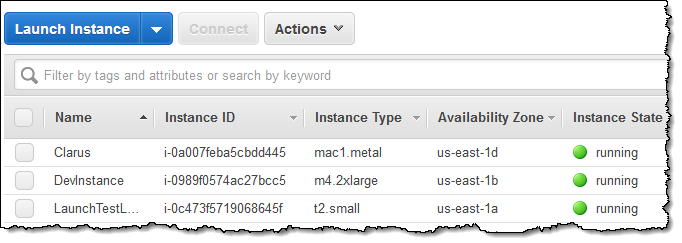
I took Luna for a very quick walk, and returned to find that my instance was ready to go. I used the console to give it an appropriate name:

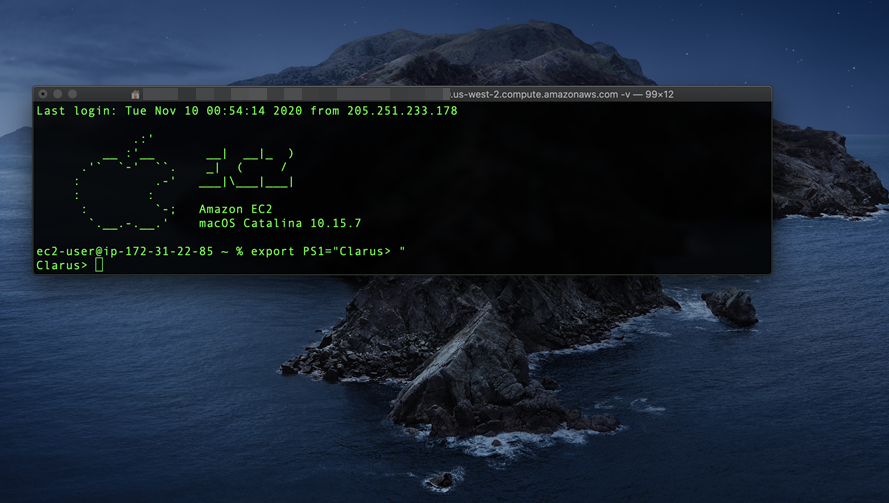
Then I connected to my instance:

From here I can install my development tools, clone my code onto the instance, and initiate my builds.

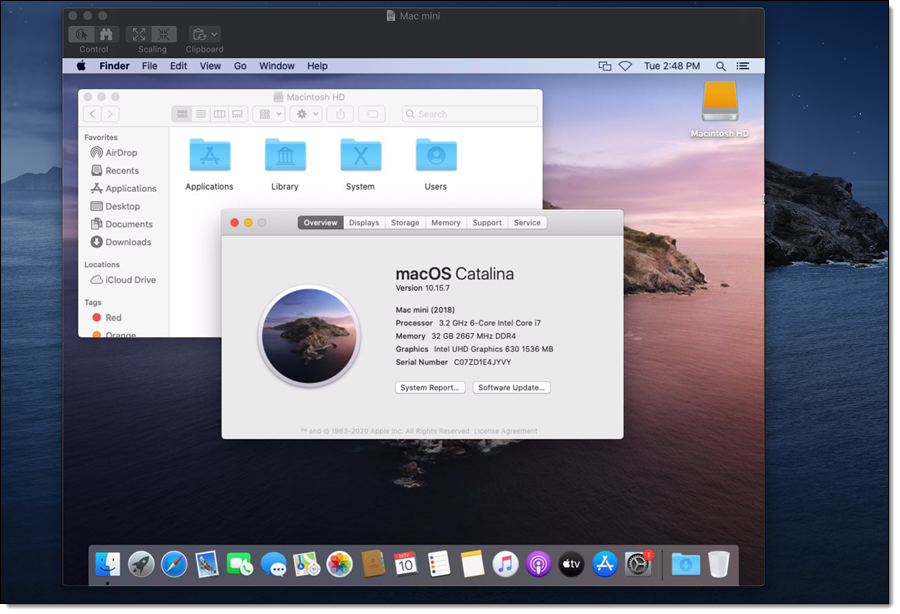
I can also start a VNC server on the instance and use a VNC client to connect to it:

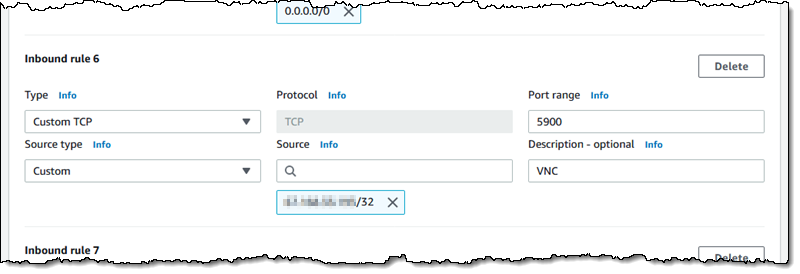
Note that the VNC protocol is not considered secure, and this feature should be used with care. I used a security group that allowed access only from my desktop’s IP address:

I can also tunnel the VNC traffic over SSH; this is more secure and would not require me to open up port 5900.

Things to Know
Here are a couple of fast-facts about the Mac instances:

AMI Updates – We expect to make new AMIs available each time Apple releases major or minor versions of each supported OS. We also plan to produce AMIs with updated Amazon packages every quarter.

Dedicated Hosts – The instances are launched as EC2 Dedicated Hosts with a minimum tenancy of 24 hours. This is largely transparent to you, but it does mean that the instances cannot be used as part of an Auto Scaling Group.

Purchase Models – You can run Mac instances On-Demand and you can also purchase a Savings Plan.

Apple M1 Chip – EC2 Mac instances with the Apple M1 chip are already in the works, and planned for 2021.

Launch one Today
You can start using Mac instances in the US East (N. Virginia), US East (Ohio), US West (Oregon), Europe (Ireland), and Asia Pacific (Singapore) Regions today, and check out this video for more information!

— Jeff;


re:Invent 2020 Liveblog: Andy Jassy Keynote

Post Syndicated from Jeff Barr original https://aws.amazon.com/blogs/aws/reinvent-2020-liveblog-andy-jassy-keynote/

I’m always ready to try something new! This year, I am going to liveblog Andy Jassy‘s AWS re:Invent keynote address, which takes place from 8 a.m. to 11 a.m. on Tuesday, December 1 (PST). I’ll be updating this post every couple of minutes as I watch Andy’s address from the comfort of my home office. Stay tuned!

— Jeff;


What’s new in Zabbix 5.2

Post Syndicated from Alexei Vladishev original https://blog.zabbix.com/whats-new-in-zabbix-5-2/12550/

Zabbix is a universal open-source enterprise-level monitoring solution, therefore Zabbix has all the enterprise-grade features included: SSO, distributed monitoring, Zabbix Insights, advanced security, no data storage limits, and much more. Zabbix 5.2 offers over 35 new features and functional improvements.

Contents

I.Introduction
II. New features and functional improvements

1. Synthetic monitoring
2. Keep secrets in the external vault
3. Zabbix insights
4. User roles
5. IoT Monitoring
6. Load balancing
7. User Timezones
8. Yaml for import/export
9. Template improvements
10. Discovery and cloud monitoring
11. Usability improvements
12. Preprocessing improvements
13. Other improvements

III. Questions & Answers

Introduction

Zabbix gives you freedom, as it offers:

  • no per-metric fees,
  • no license fees,
  • deployment anywhere, and
  • easy migration from on-premise to the cloud and vice versa.

Zabbix also offers business benefits for the companies that need centralized monitoring and collecting data all over their IT infrastructure and other sources.

  • Umbrella monitoring, as Zabbix is flexible to replace most of the monitoring solutions already in use.
  • Free and open-source solution with 24×7 vendor support worldwide.
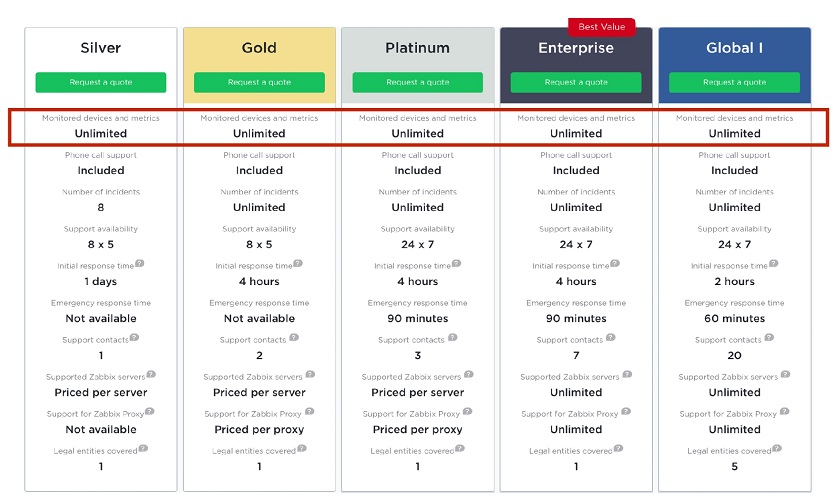
  • Technical Support at fixed prices for unlimited monitoring regardless of the number of devices monitored and extremely low TCO.

Business benefits

New features and functional improvements

Zabbix 5.2 offers over 35 new features and functional improvements.

Synthetic monitoring

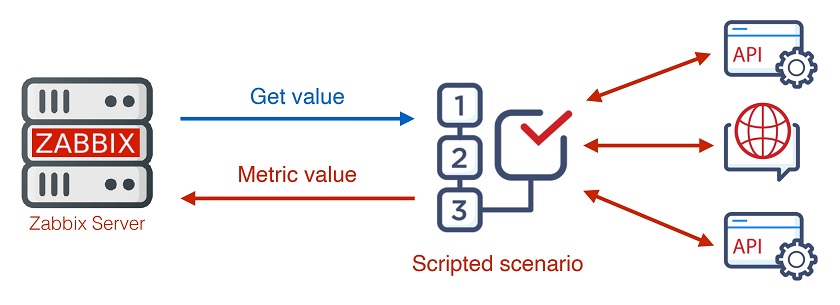
1. Zabbix 5.2 supports complex multi-step scripted data collection, advanced availability checks, and complex interaction with different HTTP APIs.

Multi-step data collection

  • Multiple steps to get data.

Multi-step data collection is needed is, for instance, you need to authenticate and then to retrieve data from different APIs.

Authentification and retrieving data from different API.

  • 2. Check if the whole service works: Zabbix API.

Advanced availability checks and APIs

  • Calculate the sum of unknown parts.

For a list of customers retrieved from an API with URLs behind each customer, Zabbix allows for checking the availability of all URLs.

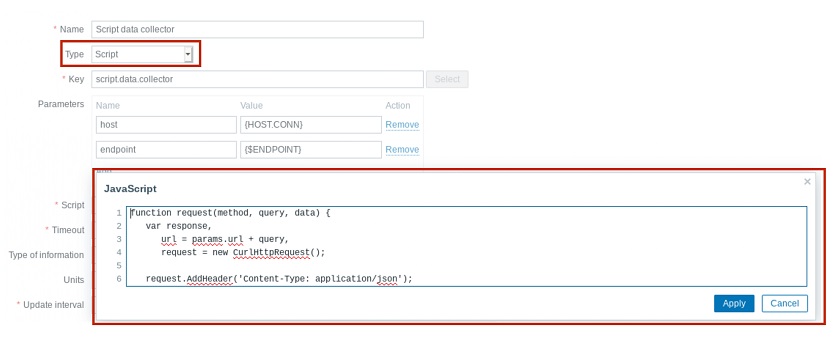
2. New item-type script

Now the process of data collection can be scripted. It’s no longer a one-step process, so we can take advantage of cycles, event statements, and all the power of JavaScript to retrieve the data.

New item-type scripts

Keep secrets in the external vault

The ability to store secrets in the vault is valuable for using sensitive information, for instance, in financial, military, or government industries, as:

  • all sensitive information is kept outside of Zabbix in a secure place: HashiCorp Vault,
  • no secret data is stored in Zabbix DB, and
  • all sensitive data, such as passwords, API tokens, user names, etc., shall be secured.

So, in Zabbix 5.2 a new user macro type is introduced — Vault secret. In Zabbix 5.0, the secret text was introduced, which is stored in the Zabbix DB, but is never exposed to end-users. With the Vault secret macro, the data is stored externally.

Vault secret macro

Now security measures in Zabbix comply with the best security standards possible:

  • all communications with Zabbix Agent or Zabbix Proxy are encrypted using HTTPS, TLS, or PSK;
  • Agent key restrictions can be used on the Zabbix Agent side;
  • communication with the Zabbix Web Interface is encrypted using HTTPS; and
  • integration with HashCorp Vault is now possible to keep secrets externally.

Security enhancements

NOTE. The one-day security training course is now held by Zabbix with no prerequisites and simple signup.

  • Recommended for experienced Zabbix users.
  • Does not require existing Zabbix certification.
  • Will cover security options on an expert level.
  • Secret macros and Vault.
  • Securing connections using PSKor certificates.
  • Restricting Agent keys.
  • Granular user permissions


Zabbix insights

  • Ability to analyze long term data efficiently using new trigger functions.
  • Zabbix will provide you with information about anomalies.
  • More value out of Zabbix trend data, which is kept longer.

This new feature allows Zabbix to generate alerts, for instance, “Average number of transactions increased by 24% in September”.

Zabbix 5.2 new functions

  • The new functions allow for specifying, which trend data is needed, and then for comparing this data with the data for another period.
trendavg(period, period_shift)
trendcount(period, period_shift)
trenddelta(period, period_shift)
trendmax(period, period_shift)
trendmin(period, period_shift)
  • Trends tables instead of history. The time shift function is already available in Zabbix, but it has significant limitations, as it works only with history tables, that is, involves heavy processing, and doesn’t allow for specifying an absolute period of time.

  • Use the Gregorian calendar for period and period_shift.

— h (hour), d (day), w (week), M (month), and y (year).

  • Calculate upon the end of a period.
  • Customized event name — a new field in the trigger definition, which is:

— optional, can use Trigger Name instead,
— displaying problem with a context,
— supports a new macro {? … } (“Expression macro”):

      • fmtnum(digits)

— applicable to ITEM.VALUE, ITEM.LASTVALUE and expression macros;
— fmtnum(2) gives 14.85 instead of 14.8512345.

      • fmttime(format, time_shift)

— applicable to {TIME};
— uses strftime format codes;
— {TIME}.fmttime(“%B,%Y”) gives October 2020.

For instance, to detect abnormal traffic, we can define the expression to compare traffic for different periods. If the difference exceeds the abnormality factor defined by the user macro, Zabbix will generate the event defined by the user.

Triggers

Then Zabbix will generate the following message:

Problems

Use cases
  • Trend functions can be used to detect abnormal behavior of IT metrics and non-IT KPIs.
  • Real-world applications:
    — business performance,
    — sales and marketing,
    — warehousing,
    — human resources,
    — customer support.

User roles

Granular control of user permissions

  • Customer portal, read-only users.
  • Different parts of UI can be made accessible for different user roles.
  • Control what user operations are accessible: maintenance, editing of dashboards, etc.
  • Fine-grained control access to API and its methods for extra security.

In Zabbix 5.2, the ability to define user roles is introduced. It is possible to define as many user roles, as you need. Here, it’s necessary to specify:

  • User type (User, Admin, Super Admin),
  • Access to UI elements (what the user can do),
  • Access to API (if enabled, we may filter by API methods),
  • Access to actions (define, what user actions are available to different users).

User roles defined

IoT Monitoring

Zabbix is a universal solution used to support not only IT infrastructure, so the capacity to monitor factory equipment or sensors is really important. New Zabbix 5.2 now offers out-of-the-box support of Modbus and MQTT protocols — the most important IoT protocols. Now it is possible to monitor sensors and hardware equipment, and integration with built-in management systems, factory equipment, and IoT gateways is available without using external scripts.

Modbus

Modbus has become a de facto standard communication protocol — a commonly available means of connecting industrial electronic devices working on Agent and Agent 2 TCP or serial connections.

where:

modbus.get — new item key,
endpoint — endpoint defined as protocol://connection_string,
slave id — slave ID,
function — Modbus function,
address — address of first registry, coil or input,
count — number of records to read,
type — type of data,
endianness — endianness configuration offset – number of registers, starting from ‘address’, the results of which will be discarded.

modbus.get is made to get information out of Modbus and returns JSON:

modbus.get[“tcp://192.168.6.1:511”]
Modbus.get[“rtu://COM1:9600:8n”]
MQTT
  • MQTT is a standard messaging protocol for the Internet of Things (IoT) among others.
  • Native solution for monitoring messages published by MQTT brokers.
  • Supported by Agent 2 Active Check only.

broker_url — MQTT broker URL (if empty, localhost with port 1883 is used),
topic — MQTT topic (mandatory). Wildcards (+,#) are supported,
username, password — authentication credentials (if required).

  • MQTT subscribes to a specific topic or topics (with wildcards) of the provided broker and
    waits for publications.
mqtt.get["tcp://host:1883","path/to/topic"]

Load balancing

Starting from Zabbix 5.2, it has become easy to make horizontal scaling for Zabbix UI and API components. You just need to set up HAProxy or another load balancing solution, then some cluster nodes running as containers on physical or virtual machines or in the cloud, and you’ll get redundancy, high availability, and load balancing out of the box for Zabbix UI and API components.

Horizontal scaling for Zabbix UI and API

User Timezones

Zabbix 5.2 supports user timezones for each user. This is a feature appreciated by larger companies with users connecting to Zabbix UI from different countries or continents.

User timezones for each user

YAML for import/export

For import and export operations in Zabbix YAML is now used by default, though JSON and XML are still supported.

YAML is more user-friendly and easy to edit manually, while JSON and XML are excessive in the use of special characters. So if you keep your templates in a repository, you can modify them using a text editor. All official templates in Zabbix have been already converted to YAML.

YAML for import/export

Template improvements

  • Simpler template names, which are also easier to search for.

  • Templated screens converted to template dashboards. When modifying dashboards now you are dealing with dashboard widgets, not screen elements anymore.

  • See all hosts linked to a specific template.

  • The number of templates in System information.

Discovery and cloud monitoring

  • Host interfaces can be discovered from LLD. Now it is possible to define ways to discover host interfaces when a host prototype is created. This feature is especially useful to discover cloud resources.

  • Hosts without interfaces. We can create virtual hosts or hosts with no interface for service checks, for instance.
  • Tags on host prototypes from any discovery macro. Tags play an increasingly important role in Zabbix, and now in addition to tags on the template level, on the host level, and on the trigger level, it is possible to define tags on the host prototype level as well.

Usability improvements

  • Save filters. This feature is implemented to monitor problems and hosts. In Zabbix 5.2, you can basically name filters. This functionality is similar to that used in modern browsers, such as Firefox or Safari. We have different tabs, and every tab displays a number of problems in real time, and you can easily switch from one filter to another.

Filter tabs

  • Show clearly that any tab in Zabbix UI contains a non-empty list, for instance, the number of preprocessing rules. This functionality is implemented for all tabs in Zabbix UI.

Number of lists displayed in the tabs

  • The default language can now be defined for the system.

Defining system default language

  • Essential configuration parameters moved from defines.inc.php to Zabbix UI, which allows for finer tuning.

Finer tuning

  • SNMP settings in the test item window,  for instance, before adding an item to a template.

Testing SNMP parameters

  • Filters and additional details in the list of dashboards.

Additional information in dashboards

Preprocessing improvements

  • Macros in JavaScript preprocessing (also backported to 5.0).
  • Check for not supported value and override items unsupported for any reason, which is useful for advanced availability checks: any problem -> service is down.

Other improvements

  • In larger environments, there may be performance issues, and understanding what’s happening inside Zabbix is vitally important. Now it is possible to specify diagnostic information to be retrieved from Zabbix. We can also retrieve this information from the Zabbix API.

Retrieving diagnostic information from the value cache log file

  • UI protected from checking the existence of a user.
  • Simpler schedule for unsupported items.
  • Ability to mass-update item Timeout.
  • Ability to retrieve HTTP response headers in Webhooks.
  • Ability to specify the default search path for user parameters.
  • Max length of user macro values increased to 2048 characters.
  • Active Agent can work as multiple hosts (Hostname=host1,host2,host3), which might be useful if you run different services on one host and need to split them.
  • Official support of Docker images.
  • Eventlog-related macros in operational data.
  • Support of user macros in the item description.

Out of the box monitoring and alerting

We have increased the number of integrations supported in Zabbix out-of-the-box and the number of officially supported monitoring templates and plugins for Zabbix Agent 2.

  • Ticketing.

  • Alerting.

  • Monitoring.

Deployment

You can deploy Zabbix anywhere: on-premise or in the cloud.

Deploy on-premise

Deploy in the cloud

How to upgrade

Procedure for upgrading from Zabbix 5.0 is as for any other Zabbix release:

  • Backup DB.
  • Upgrade packages (Zabbix Server, Frontend)
  • Restart zabbix_server.
  • Watch the log file, Zabbix will start DB schema upgrade automatically.
  • Upgrade all proxies.
  • Update agents (optional).

Otherwise, contact Zabbix engineers, order an upgrade to the new release, and enjoy the new features effortlessly.

Questions & Answers

Question. Does Zabbix plan to support other scripting languages?

Answer. No, we don’t have such plans. We analyzed other languages but selected JavaScript as Zabbix embedded language. However, now you can use any scripting language in Zabbix in external scripts, including PowerShell, Python, etc.

Question. Does Zabbix plan to support other vaults besides HashCorp?

Answer. We might support other solutions. This new Zabbix functionality allows for implementing other vaults. If you need some other vault to be supported, you need to register the respective Zabbix feature request.

Question. Does Zabbix plan to improve the existing graphs and provide official Grafana integration?

Answer. We do plan to provide more advanced visualization options for dashboards. Now we are merging the screens and dashboard functionality, and we plan to release new widgets for more advanced visualization in Zabbix 5.4.

The existing Zabbix plugin for Grafana works smoothly, and we don’t plan to introduce another solution.

Question. Does Zabbix plan to support another database backend, for instance, time-series databases?

Answer. According to Zabbix Roadmap, in Zabbix 5.4 we plan to introduce generic API allowing to connect to any storage for time-series data, that is, to create some official connectors to storage solutions.

Question. Does Zabbix plan to natively support integration with LDAP? At the moment Zabbix provides LDAP support, but we still have to manually create users and so on. Does Zabbix plan to automate it in some way?

Answer. We created this functionality a couple of years ago, but we designed it in a complex way and decided not to implement it yet. It’s not on our shortlist, but we plan to implement it, as it is one of the top-voted features.

Question. Can Agent secrets be stored in the vault?

Answer. At this moment we don’t support this feature. In a highly-distributed environment, where agents are distributed all across your IT infrastructure, you’ll have to maintain a connection between Zabbix Agents and the vault. Still, if you feel the feature should be in Zabbix, feel free to register the respective Zabbix feature request.

Question. Does Zabbix have a Kubernetes operator?

Answer. We don’t have the Kubernetes operator officially supported yet, but there are a few operators available from our community.

Question. Do we plan to improve our report functionality?

Answer. Absolutely. This is the primary focus of Zabbix 5.4 and Zabbix 6.0. We are exploring two directions: improving the widgets to enrich visualization in Zabbix and supporting schedule report generation so that Zabbix would generate PDF reports and send them out on a regular basis.

Question. Do we plan to enable changing server configuration parameters without the need to restart the server?

Answer. That depends on the configuration parameters. It can be implemented for some configuration parameters. What is really needed is the ability to change parameters related to performance in real-time, the ability to change the number of pollers, trappers, escalators, etc. I think this functionality will be implemented soon.

Question. Can we create a Zabbix instance as a code via JSON, XML, or some other way?

Answer. We are moving in this direction. For instance, the transition to YAML format is a step in this way. So, you will be able to keep your templates in the git repository. The missing step is versioning for templates in order to manage templates, as well as the ability to export the whole Zabbix configuration to YAML format. Versioning is on the roadmap to Zabbix 5.4.

Question. Do we plan to support metric gathering from Spring Actuator and Spring Boot? As at the moment, Prometheus is to be used to gather metrics.

Answer. If Prometheus can be used to gather metrics from these systems, Zabbix can do it as well as Zabbix support data collection from Prometheus out-of-the-box. 

Question. How can someone become a partner of Zabbix?

Answer. The best way to become a partner is to contact Zabbix by email at [email protected].

Question. How does Zabbix see interaction with Grafana? As that of competitors or friendly entities?

Answer. Grafana focuses on the visualization of data coming from different sources. Though Grafana provides some monitoring options, I see Grafana as an add-on to Zabbix. If you need a better visualization from Zabbix or Zabbix doesn’t deliver the visualization you expect, you are free to use Grafana.

New – Attributes Based Access Control with AWS Single Sign On

Post Syndicated from Sébastien Stormacq original https://aws.amazon.com/blogs/aws/new-attributes-based-access-control-with-aws-single-sign-on/

Starting today, you can pass user attributes in the AWS session when your workforce sign-in into the cloud using AWS Single Sign-On. This gives you the centralized account access management of AWS Single Sign-On and ABAC, with the flexibility to use AWS SSO, Active Directory, or an external identity provider as your identity source. To learn more about the advantages of ABAC policies on AWS, you may read my previous blog post on the subject.

Overview
On one side, system administrators configure user attributes on the AWS Single Sign-On identity repository, or the managed Active Directory. System administrators may also configure an external identity provider, such as Okta, OneLogin or PingFederate to pass existing user attributes in the AWS sessions when their workforce federates into AWS. These attributes are known as session tags in AWS. On the other side, cloud administrators create fine-grained permissions policies such that your workforce get only access to cloud resources with matching resource tags.

Creating policies based on matching attributes instead of functional roles helps to reduce the number of distinct permissions and roles you must create and manage in your AWS environment. For example, when developers Bob from team red and Alice from team blue sign-in into AWS and assume the same AWS Identity and Access Management (IAM) role, they get distinct permissions to project resources tagged for their team. The identity system sends the team name attribute in the AWS session when Bob and Alice sign-in into AWS. The role’s permissions grant access to project resources with matching team name tags. Now, if Bob moves to team blue and system administrators update his team name in their identity provider directory, Bob automatically gets access to team blue’s project resources without requiring permissions updates in IAM.

How to Configure AWS SSO to Map User Attributes
Before to configure AWS SSO, there are two important points to highlight. First, ABAC will work with attributes from any identity source configured in AWS SSO : AWS SSO itself, a managed Active Directory, or an external identity provider. Second, there are two ways to pass attributes for access control to AWS SSO. Either you can pass attributes directly in the SAML assertion using the prefix https://aws.amazon.com/SAML/Attributes/AccessControl, or you can use attributes that are in the AWS SSO identity store. Those attributes are configured by your AWS SSO administrator for users created in AWS SSO, synchronized in from an Active Directory, or synchronized in from an external identity provider using automatic provisioning (SCIM).

For this demo, I choose to use an external identity provider and SCIM.

I can enable ABAC in AWS using AWS SSO with three steps:

Step 1: I configure my identity source with the associated user identities and attributes in the external identity provider. As of today, AWS SSO supports identity synchronization via SCIM with Azure AD, Okta, OneLogin, and PingFederate. Check this page to get an up-to-date list. The specifics depend on each identity provider.

Step 2: I configure the SCIM attributes I want to use for access control using the new Access Control Attributes global setting in the AWS SSO console or API. This screen allows me to select attributes for access control from the identity source I configured in step 1.

Attributes for Access Control

Step 3: I author ABAC rules through permission sets and resource-based policies using the attributes I configured in Step 2. More about this in a minute.

Now, when my workforce federates into an AWS account using SSO, they get access to their AWS resources based on matching attributes.

Attributes are passed as session tags. They are passed as comma-separated key:value pairs. The total character length of all the attributes together must be less than or equal to 460 characters.

What Does a Policy Look Like?
I now can use user attributes in my permission sets using the aws:PrincipalTag condition key when creating access control rules. For example, I can tag all the resources in my organization with their respective department name, and use a single permission set that grants developers access only to their department resources. Now, whenever developers federate into the AWS account, AWS SSO creates a department session tag with the value received from the identity provider. The security policies allow them to only get access to the resources in their respective department. As the team adds more developers and resources to their project, I only have to tag resources with the correct department name. As a result, as the organization adds new resources and developers to departments, developers can only manage resources aligned to their department without needing any permission updates.

An ABAC SSO permission set policy might look like this:

{
    "Version": "2012-10-17",
    "Statement": [
        {
            "Effect": "Allow",
            "Action": [ "ec2:DescribeInstances"],
            "Resource": "*"
        },
        {
            "Effect": "Allow",
            "Action": ["ec2:StartInstances","ec2:StopInstances"],
            "Resource": "*",
            "Condition": {
                "StringEquals": {
                    "ec2:ResourceTag/Department": "${aws:PrincipalTag/Department}"
                }
            }
        }
    ]
}

This policy allows anybody to DescribeInstances, but only users with a aws:PrincipalTag/Department tag’s value matching the EC2 instance ec2:ResourceTag/Department tag’s value are authorized to stop or to start instances.

I attach this policy to an AWS Account’s Permission Set. On the left part of the AWS Single Sign-On console, I click AWS Accounts and select the Permission sets tab. Then I click Create permission set. On the next screen, I select Create a customer permission set.

Create a custom permission set

I enter a name and description, I make sure Create a custom permissions policy is selected. Then I can copy/paste the previous policy allowing to start and stop EC2 instances when the department name tag value is equal to the person’s department name tag value.

Create Custom Policy for Permission Set

On the next screen, I enter some tags, then I review my configuration before clicking Create. Et voila, I am ready to go.

If you have existing federation configured with AWS Security Token Service, remember that external identity providers consider AWS SSO as a new application configuration. This means when you move from direct IAM federation to AWS SSO, you have to update your external identity provider configuration to connect with AWS SSO and to introduce attributes as session tags for this configuration.

Available Today
There is no additional charge to configure user attributes with AWS Single Sign-On. You can start to use it today in all AWS Regions where AWS SSO is available.

— seb

Introducing Amazon Managed Workflows for Apache Airflow (MWAA)

Post Syndicated from Danilo Poccia original https://aws.amazon.com/blogs/aws/introducing-amazon-managed-workflows-for-apache-airflow-mwaa/

As the volume and complexity of your data processing pipelines increase, you can simplify the overall process by decomposing it into a series of smaller tasks and coordinate the execution of these tasks as part of a workflow. To do so, many developers and data engineers use Apache Airflow, a platform created by the community to programmatically author, schedule, and monitor workflows. With Airflow you can manage workflows as scripts, monitor them via the user interface (UI), and extend their functionality through a set of powerful plugins. However, manually installing, maintaining, and scaling Airflow, and at the same time handling security, authentication, and authorization for its users takes much of the time you’d rather use to focus on solving actual business problems.

For these reasons, I am happy to announce the availability of Amazon Managed Workflows for Apache Airflow (MWAA), a fully managed service that makes it easy to run open-source versions of Apache Airflow on AWS, and to build workflows to execute your extract-transform-load (ETL) jobs and data pipelines.

Airflow workflows retrieve input from sources like Amazon Simple Storage Service (S3) using Amazon Athena queries, perform transformations on Amazon EMR clusters, and can use the resulting data to train machine learning models on Amazon SageMaker. Workflows in Airflow are authored as Directed Acyclic Graphs (DAGs) using the Python programming language.

A key benefit of Airflow is its open extensibility through plugins which allows you to create tasks that interact with AWS or on-premise resources required for your workflows including AWS Batch, Amazon CloudWatch, Amazon DynamoDB, AWS DataSync, Amazon ECS and AWS Fargate, Amazon Elastic Kubernetes Service (EKS), Amazon Kinesis Firehose, AWS Glue, AWS Lambda, Amazon Redshift, Amazon Simple Queue Service (SQS), and Amazon Simple Notification Service (SNS).

To improve observability, Airflow metrics can be published as CloudWatch Metrics, and logs can be sent to CloudWatch Logs. Amazon MWAA provides automatic minor version upgrades and patches by default, with an option to designate a maintenance window in which these upgrades are performed.

You can use Amazon MWAA with these three steps:

  1. Create an environment – Each environment contains your Airflow cluster, including your scheduler, workers, and web server.
  2. Upload your DAGs and plugins to S3 – Amazon MWAA loads the code into Airflow automatically.
  3. Run your DAGs in Airflow – Run your DAGs from the Airflow UI or command line interface (CLI) and monitor your environment with CloudWatch.

Let’s see how this works in practice!

How to Create an Airflow Environment Using Amazon MWAA
In the Amazon MWAA console, I click on Create environment. I give the environment a name and select the Airflow version to use.

Then, I select the S3 bucket and the folder to load my DAG code. The bucket name must start with airflow-.

Optionally, I can specify a plugins file and a requirements file:

  • The plugins file is a ZIP file containing the plugins used by my DAGs.
  • The requirements file describes the Python dependencies to run my DAGs.

For plugins and requirements, I can select the S3 object version to use. In case the plugins or the requirements I use create a non-recoverable error in my environment, Amazon MWAA will automatically roll back to the previous working version.


I click Next to configure the advanced settings, starting with networking. Each environment runs in a Amazon Virtual Private Cloud using private subnets in two availability zones. Web server access to the Airflow UI is always protected by a secure login using AWS Identity and Access Management (IAM). However, you can choose to have web server access on a public network so that you can login over the Internet, or on a private network in your VPC. For simplicity, I select a Public network. I let Amazon MWAA create a new security group with the correct inbound and outbound rules. Optionally, I can add one or more existing security groups to fine-tune control of inbound and outbound traffic for your environment.

Now, I configure my environment class. Each environment includes a scheduler, a web server, and a worker. Workers automatically scale up and down according to my workload. We provide you a suggestion on which class to use based on the number of DAGs, but you can monitor the load on your environment and modify its class at any time.

Encryption is always enabled for data at rest, and while I can select a customized key managed by AWS Key Management Service (KMS) I will instead keep the default key that AWS owns and manages on my behalf.

For monitoring, I publish environment performance to CloudWatch Metrics. This is enabled by default, but I can disable CloudWatch Metrics after launch. For the logs, I can specify the log level and which Airflow components should send their logs to CloudWatch Logs. I leave the default to send only the task logs and use log level INFO.

I can modify the default settings for Airflow configuration options, such as default_task_retries or worker_concurrency. For now, I am not changing these values.

Finally, but most importantly, I configure the permissions that will be used by my environment to access my DAGs, write logs, and run DAGs accessing other AWS resources. I select Create a new role and click on Create environment. After a few minutes, the new Airflow environment is ready to be used.

Using the Airflow UI
In the Amazon MWAA console, I look for the new environment I just created and click on Open Airflow UI. A new browser window is created and I am authenticated with a secure login via AWS IAM.

There, I look for a DAG that I put on S3 in the movie_list_dag.py file. The DAG is downloading the MovieLens dataset, processing the files on S3 using Amazon Athena, and loading the result to a Redshift cluster, creating the table if missing.

Here’s the full source code of the DAG:

from airflow import DAG
from airflow.operators.python_operator import PythonOperator
from airflow.operators import HttpSensor, S3KeySensor
from airflow.contrib.operators.aws_athena_operator import AWSAthenaOperator
from airflow.utils.dates import days_ago
from datetime import datetime, timedelta
from io import StringIO
from io import BytesIO
from time import sleep
import csv
import requests
import json
import boto3
import zipfile
import io
s3_bucket_name = 'my-bucket'
s3_key='files/'
redshift_cluster='redshift-cluster-1'
redshift_db='dev'
redshift_dbuser='awsuser'
redshift_table_name='movie_demo'
test_http='https://grouplens.org/datasets/movielens/latest/'
download_http='http://files.grouplens.org/datasets/movielens/ml-latest-small.zip'
athena_db='demo_athena_db'
athena_results='athena-results/'
create_athena_movie_table_query="""
CREATE EXTERNAL TABLE IF NOT EXISTS Demo_Athena_DB.ML_Latest_Small_Movies (
  `movieId` int,
  `title` string,
  `genres` string 
)
ROW FORMAT SERDE 'org.apache.hadoop.hive.serde2.lazy.LazySimpleSerDe'
WITH SERDEPROPERTIES (
  'serialization.format' = ',',
  'field.delim' = ','
) LOCATION 's3://pinwheeldemo1-pinwheeldagsbucketfeed0594-1bks69fq0utz/files/ml-latest-small/movies.csv/ml-latest-small/'
TBLPROPERTIES (
  'has_encrypted_data'='false',
  'skip.header.line.count'='1'
); 
"""
create_athena_ratings_table_query="""
CREATE EXTERNAL TABLE IF NOT EXISTS Demo_Athena_DB.ML_Latest_Small_Ratings (
  `userId` int,
  `movieId` int,
  `rating` int,
  `timestamp` bigint 
)
ROW FORMAT SERDE 'org.apache.hadoop.hive.serde2.lazy.LazySimpleSerDe'
WITH SERDEPROPERTIES (
  'serialization.format' = ',',
  'field.delim' = ','
) LOCATION 's3://pinwheeldemo1-pinwheeldagsbucketfeed0594-1bks69fq0utz/files/ml-latest-small/ratings.csv/ml-latest-small/'
TBLPROPERTIES (
  'has_encrypted_data'='false',
  'skip.header.line.count'='1'
); 
"""
create_athena_tags_table_query="""
CREATE EXTERNAL TABLE IF NOT EXISTS Demo_Athena_DB.ML_Latest_Small_Tags (
  `userId` int,
  `movieId` int,
  `tag` int,
  `timestamp` bigint 
)
ROW FORMAT SERDE 'org.apache.hadoop.hive.serde2.lazy.LazySimpleSerDe'
WITH SERDEPROPERTIES (
  'serialization.format' = ',',
  'field.delim' = ','
) LOCATION 's3://pinwheeldemo1-pinwheeldagsbucketfeed0594-1bks69fq0utz/files/ml-latest-small/tags.csv/ml-latest-small/'
TBLPROPERTIES (
  'has_encrypted_data'='false',
  'skip.header.line.count'='1'
); 
"""
join_tables_athena_query="""
SELECT REPLACE ( m.title , '"' , '' ) as title, r.rating
FROM demo_athena_db.ML_Latest_Small_Movies m
INNER JOIN (SELECT rating, movieId FROM demo_athena_db.ML_Latest_Small_Ratings WHERE rating > 4) r on m.movieId = r.movieId
"""
def download_zip():
    s3c = boto3.client('s3')
    indata = requests.get(download_http)
    n=0
    with zipfile.ZipFile(io.BytesIO(indata.content)) as z:       
        zList=z.namelist()
        print(zList)
        for i in zList: 
            print(i) 
            zfiledata = BytesIO(z.read(i))
            n += 1
            s3c.put_object(Bucket=s3_bucket_name, Key=s3_key+i+'/'+i, Body=zfiledata)
def clean_up_csv_fn(**kwargs):    
    ti = kwargs['task_instance']
    queryId = ti.xcom_pull(key='return_value', task_ids='join_athena_tables' )
    print(queryId)
    athenaKey=athena_results+"join_athena_tables/"+queryId+".csv"
    print(athenaKey)
    cleanKey=athena_results+"join_athena_tables/"+queryId+"_clean.csv"
    s3c = boto3.client('s3')
    obj = s3c.get_object(Bucket=s3_bucket_name, Key=athenaKey)
    infileStr=obj['Body'].read().decode('utf-8')
    outfileStr=infileStr.replace('"e"', '') 
    outfile = StringIO(outfileStr)
    s3c.put_object(Bucket=s3_bucket_name, Key=cleanKey, Body=outfile.getvalue())
def s3_to_redshift(**kwargs):    
    ti = kwargs['task_instance']
    queryId = ti.xcom_pull(key='return_value', task_ids='join_athena_tables' )
    print(queryId)
    athenaKey='s3://'+s3_bucket_name+"/"+athena_results+"join_athena_tables/"+queryId+"_clean.csv"
    print(athenaKey)
    sqlQuery="copy "+redshift_table_name+" from '"+athenaKey+"' iam_role 'arn:aws:iam::163919838948:role/myRedshiftRole' CSV IGNOREHEADER 1;"
    print(sqlQuery)
    rsd = boto3.client('redshift-data')
    resp = rsd.execute_statement(
        ClusterIdentifier=redshift_cluster,
        Database=redshift_db,
        DbUser=redshift_dbuser,
        Sql=sqlQuery
    )
    print(resp)
    return "OK"
def create_redshift_table():
    rsd = boto3.client('redshift-data')
    resp = rsd.execute_statement(
        ClusterIdentifier=redshift_cluster,
        Database=redshift_db,
        DbUser=redshift_dbuser,
        Sql="CREATE TABLE IF NOT EXISTS "+redshift_table_name+" (title	character varying, rating	int);"
    )
    print(resp)
    return "OK"
DEFAULT_ARGS = {
    'owner': 'airflow',
    'depends_on_past': False,
    'email': ['[email protected]'],
    'email_on_failure': False,
    'email_on_retry': False 
}
with DAG(
    dag_id='movie-list-dag',
    default_args=DEFAULT_ARGS,
    dagrun_timeout=timedelta(hours=2),
    start_date=days_ago(2),
    schedule_interval='*/10 * * * *',
    tags=['athena','redshift'],
) as dag:
    check_s3_for_key = S3KeySensor(
        task_id='check_s3_for_key',
        bucket_key=s3_key,
        wildcard_match=True,
        bucket_name=s3_bucket_name,
        s3_conn_id='aws_default',
        timeout=20,
        poke_interval=5,
        dag=dag
    )
    files_to_s3 = PythonOperator(
        task_id="files_to_s3",
        python_callable=download_zip
    )
    create_athena_movie_table = AWSAthenaOperator(task_id="create_athena_movie_table",query=create_athena_movie_table_query, database=athena_db, output_location='s3://'+s3_bucket_name+"/"+athena_results+'create_athena_movie_table')
    create_athena_ratings_table = AWSAthenaOperator(task_id="create_athena_ratings_table",query=create_athena_ratings_table_query, database=athena_db, output_location='s3://'+s3_bucket_name+"/"+athena_results+'create_athena_ratings_table')
    create_athena_tags_table = AWSAthenaOperator(task_id="create_athena_tags_table",query=create_athena_tags_table_query, database=athena_db, output_location='s3://'+s3_bucket_name+"/"+athena_results+'create_athena_tags_table')
    join_athena_tables = AWSAthenaOperator(task_id="join_athena_tables",query=join_tables_athena_query, database=athena_db, output_location='s3://'+s3_bucket_name+"/"+athena_results+'join_athena_tables')
    create_redshift_table_if_not_exists = PythonOperator(
        task_id="create_redshift_table_if_not_exists",
        python_callable=create_redshift_table
    )
    clean_up_csv = PythonOperator(
        task_id="clean_up_csv",
        python_callable=clean_up_csv_fn,
        provide_context=True     
    )
    transfer_to_redshift = PythonOperator(
        task_id="transfer_to_redshift",
        python_callable=s3_to_redshift,
        provide_context=True     
    )
    check_s3_for_key >> files_to_s3 >> create_athena_movie_table >> join_athena_tables >> clean_up_csv >> transfer_to_redshift
    files_to_s3 >> create_athena_ratings_table >> join_athena_tables
    files_to_s3 >> create_athena_tags_table >> join_athena_tables
    files_to_s3 >> create_redshift_table_if_not_exists >> transfer_to_redshift

In the code, different tasks are created using operators like PythonOperator, for generic Python code, or AWSAthenaOperator, to use the integration with Amazon Athena. To see how those tasks are connected in the workflow, you can see the latest few lines, that I repeat here (without indentation) for simplicity:

check_s3_for_key >> files_to_s3 >> create_athena_movie_table >> join_athena_tables >> clean_up_csv >> transfer_to_redshift
files_to_s3 >> create_athena_ratings_table >> join_athena_tables
files_to_s3 >> create_athena_tags_table >> join_athena_tables
files_to_s3 >> create_redshift_table_if_not_exists >> transfer_to_redshift

The Airflow code is overloading the right shift >> operator in Python to create a dependency, meaning that the task on the left should be executed first, and the output passed to the task on the right. Looking at the code, this is quite easy to read. Each of the four lines above is adding dependencies, and they are all evaluated together to execute the tasks in the right order.

In the Airflow console, I can see a graph view of the DAG to have a clear representation of how tasks are executed:

Available Now
Amazon Managed Workflows for Apache Airflow (MWAA) is available today in US East (Northern Virginia), US West (Oregon), US East (Ohio), Asia Pacific (Singapore), Asia Pacific (Toyko), Asia Pacific (Sydney), Europe (Ireland), Europe (Frankfurt), and Europe (Stockholm). You can launch a new Amazon MWAA environment from the console, AWS Command Line Interface (CLI), or AWS SDKs. Then, you can develop workflows in Python using Airflow’s ecosystem of integrations.

With Amazon MWAA, you pay based on the environment class and the workers you use. For more information, see the pricing page.

Upstream compatibility is a core tenet of Amazon MWAA. Our code changes to the AirFlow platform are released back to open source.

With Amazon MWAA you can spend more time building workflows for your engineering and data science tasks, and less time managing and scaling the infrastructure of your Airflow platform.

Learn more about Amazon MWAA and get started today!

— Danilo