Tag Archives: Uncategorized

Hacking Meta’s AI Chatbot

Post Syndicated from Bruce Schneier original https://www.schneier.com/blog/archives/2026/06/hacking-metas-ai-chatbot.html

Hackers are convincing Meta’s AI support chatbot to let them take over other peoples’ accounts:

A video posted on X showed the step-by-step process to hack someone’s Instagram account. The hacker allegedly used a VPN to spoof the targets’ presumed location to avoid triggering Instagram’s automated account protections. Then, the hacker opened a chat with Meta AI Support Assistant and asked the bot to add a new email address to the target’s account. The chatbot can be seen sending a verification code to the email address provided by the hacker; the hacker then shares the verification code with the chatbot, which prompts the chatbot to show a button to “Reset Password.” The hacker enters a new password and takes over the victim’s account.

[…]

On Monday, Instagram spokesperson Andy Stone said in a reply to Wong’s post and others that the issue was now fixed. It’s unclear how many Instagram users had their accounts improperly accessed.

It’s not that easy. Probably this particular tactic is now blocked. But there are others, many others, and they cannot be blocked as a class. The real problem is that LLM chatbots are not trustworthy enough for this application.

Another news article.

Your AI Strategy Is Only as Strong as Your Data Foundation

Post Syndicated from Maddie Presland original https://www.backblaze.com/blog/your-ai-strategy-is-only-as-strong-as-your-data-foundation/

Illustration of a layered data stack with the Backblaze logo, surrounded by analytics charts and a data interface on a purple and red grid background.

Two-thirds of enterprise leaders see significant potential in integrating AI models with their proprietary data. Yet only 22% feel confident their current IT infrastructure could actually support new AI applications. That gap—between ambition and capability—is where most AI investments stall, budgets balloon, and promising projects quietly get shelved.

The problem isn’t the models, the change management, or even the cost. It’s the underlying data foundation.

The conversation that never happens

The problem is not that either conversation is wrong. It is that they happen separately.

Most organizations run two parallel conversations about AI, and they rarely meet in the same room until a deployment runs into trouble.

The first happens at the strategy level: executives identify use cases, project ROI, approve budgets, and set timelines.

AI is treated as a technology question with business outcomes.

The second happens further down the stack: infrastructure teams make decisions about where data lives, how it moves, and who can access it.

Storage is treated as a cost question, divorced from strategy.

This separation is intuitive. Different people work on it. Different timelines apply. Different success metrics matter. But the separation is a liability disguised as organizational structure.

Two-thirds of executives leading infrastructure efforts say they are excluded from key AI decision-making conversations. Every model selected, application built, and workflow redesigned depends on the same thing: a data foundation that either supports the strategy or constrains it.

That foundation has to be built alongside the strategy, not bolted on as an afterthought.

The cost of misalignment

There are consequences to this misalignment. When data infrastructure decisions get made separately from AI strategy, the result is predictable: AI teams discover too late that the data they need is fragmented, inaccessible, or poorly governed. Infrastructure teams optimize for cost without knowing what future AI workloads will require. Business leaders fund use cases without validating whether the data foundation can support them.

And more specifically, a company building an internal tool to surface insights from customer support transcripts needs audio and text data organized, labeled, and retrievable before the tool can work. A company developing an AI-powered product for external customers needs guardrails in place for data provenance, consent, and version control before model selection matters. Both depend on data that is governed and accessible before any model enters the picture.

Yet according to Gartner’s survey of data management leaders, 63% of organizations either don’t have or aren’t sure they have the right data management practices for AI. Gartner’s projection is stark: through 2026, organizations will abandon 60% of AI projects unsupported by AI-ready data.

Each abandoned project represents sunk cost, such as engineering hours and vendor contracts.

And yet, the pattern repeats because the problem is structural. Strategy teams set direction without validating that infrastructure can support it. Infrastructure teams make decisions without understanding what the strategy actually requires.

Neither group is wrong; they’re simply operating from different information, different incentives, and different success criteria.

What changes when AI strategy becomes business strategy

When organizations treat AI strategy and data strategy as the same conversation, the outcomes shift. Three things happen:

  1. Infrastructure decisions get made with strategic context. Where data lives, how it moves, what it costs—these have become capability questions rather than cost optimization questions. AI development depends on iteration: moving data between tools, environments, teams, and models. A storage provider that charges $90 per TB for egress can become architecturally limiting, penalizing the high-frequency data movement that accelerates AI development. When CFOs understand that the storage decision determines whether the organization can iterate quickly or iterate slowly, the conversation changes.
  2. AI initiatives get funded with data readiness built in. BCG’s research on future-built companies found that top performers define AI programs with ambitious cost and revenue targets set at the executive level and hold teams accountable to near-term results. What they also have in common: they’ve established governance structures, inventoried their data assets, and planned infrastructure before deployment pressure arrives. 
  3. Accountability shifts. According to McKinsey’s 2025 State of AI survey, 28% of organizations using AI report that their CEO is responsible for overseeing AI governance—the policies, processes, and controls that determine how AI is developed and deployed. McKinsey’s analysis found that CEO oversight of AI governance is one of the factors most correlated with meaningful bottom-line impact from AI use. When executive leadership owns both strategy and governance, the two stay aligned.

A companion resource to help you make data decisions

AI strategy cannot succeed as a standalone initiative. It depends on the organization’s ability to make data available, portable, governed, and cost-effective at the exact moments teams need it. For leaders, that means treating infrastructure not as a downstream implementation detail, but as part of the strategy itself.

Read the ebook, Navigating Multimodal Dataset Economics, to get the guide on making decisions about the AI datasets at your organization, and how interoperable-by-design object storage is critical for multimodal AI datasets.

The post Your AI Strategy Is Only as Strong as Your Data Foundation appeared first on Backblaze Blog | Cloud Storage & Cloud Backup

Amazon OpenSearch Service: Mechanisms to secure your domain

Post Syndicated from Imtiaz Sayed original https://aws.amazon.com/blogs/big-data/amazon-opensearch-service-mechanisms-to-secure-your-domain/

Imagine you’re building a product search feature for your website or storing customer records in Amazon OpenSearch Service to power full-text search. The moment that real user data enters your domain, security becomes essential.

Whether your workload is a public-facing website search, an internal application querying sensitive data, or a pipeline handling personally identifiable information (PII), the questions you face are the same:

  • Who should be allowed to connect to my domain?
  • How do I authenticate users and services?
  • How do I make sure that even authenticated users only see data they are entitled to see?
  • How do I satisfy regulatory requirements such as HIPAA, PCI DSS, or SOC 2?

This post offers an overview of the security mechanisms available for Amazon OpenSearch Service, spanning authentication and authorization, encryption, and network access controls. You learn how to implement fine-grained access control, manage AWS Identity and Access Management (IAM) roles, and secure data both in transit and at rest for both public and virtual private cloud (VPC) access domains.

Scope: This post covers security for Amazon OpenSearch Service managed clusters only. It doesn’t cover Amazon OpenSearch Serverless, which uses a different security model. For serverless security, see Amazon OpenSearch Serverless security in the AWS documentation.

To begin, let’s look at the security layers in Amazon OpenSearch Service.

Amazon OpenSearch Service security layers

Amazon OpenSearch Service has multi-layer security. The following diagram illustrates the multi-layer security in Amazon OpenSearch Service.

Diagram showing the three security layers of Amazon OpenSearch Service: Network, Domain access policy, and Fine-grained access control

Figure 1: Multi-layer security.

The three main layers of security are network, domain access policy, and fine-grained access control.

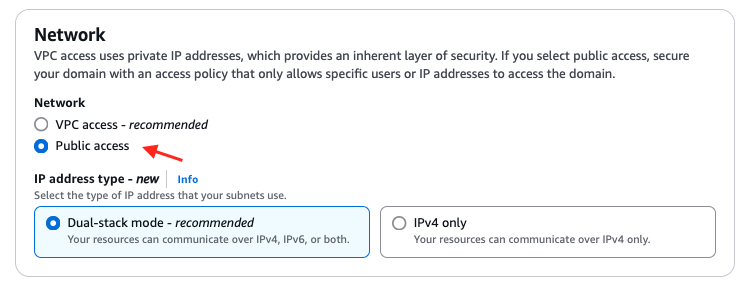
Network – The first security layer is the network, which determines whether requests reach an OpenSearch Service domain. If you choose Public access when you create a domain, requests from any internet-connected client can reach the domain endpoint. If you choose VPC access, clients must connect to the Amazon Virtual Private Cloud (Amazon VPC) (and the associated security groups must permit it) for a request to reach the endpoint.

Domain access policy – The second security layer is the domain access policy. After a request reaches a domain endpoint, the resource-based access policy allows or denies the request access to a given URI. The access policy accepts or rejects requests at the edge of the domain, before they reach data or indexes in OpenSearch itself.

Fine-grained access control – The third and final security layer is fine-grained access control. After a resource-based access policy allows a request to reach a domain endpoint, fine-grained access control evaluates the user credentials and either authenticates the user or denies the request. If fine-grained access control authenticates the user, it fetches all OpenSearch internal roles mapped to that user and uses the full set of permissions to determine how to handle the request.

With fine-grained access control, you can control access to your data in Amazon OpenSearch Service. For example, depending on who makes the request, you might want to hide certain fields in your documents or exclude certain documents altogether. With fine-grained access control, you can:

  • Define role-based access control to determine who can perform which actions on which indexes, documents, and fields.
  • Define security at the index, document, and field level to allow access to only required data.

Fine-grained access control requires OpenSearch or Elasticsearch 6.7 or later. It also requires HTTPS for all traffic to the domain, encryption of data at rest, and node-to-node encryption. Depending on how you configure the advanced features of fine-grained access control, more processing of your requests might require compute and memory resources on individual data nodes. After you turn on fine-grained access control, you can’t turn it off. For more details, see Fine-grained access control in Amazon OpenSearch Service in the AWS documentation.

To learn more about security features in an OpenSearch Service domain, let’s start by configuring a new public access domain. We discuss a VPC access domain later in the post.

Public access domain

With a public access domain, you can configure an OpenSearch Service domain so that the domain endpoint is accessible from the internet.

The AWS console for Amazon OpenSearch Service provides a guided wizard that you can use to configure and reconfigure your provisioned Amazon OpenSearch Service domains. Follow the Tutorial: Configure a domain with the internal user database and HTTP basic authentication in the AWS documentation to configure a domain with basic authentication and validate fine-grained access control.

Let’s review some important configuration attributes for a public access domain.

Network:

Public access. To simplify the network access configurations, you can use Public access, but for production workloads, we recommend VPC access.

With the domain in public access, you have several options to secure access. While you can use a resource-based access policy to restrict access to specific IAM principals or IP addresses, the recommended approach is to turn on fine-grained access control (FGAC) and use it as the primary mechanism for securing your domain. With FGAC turned on, you can set an open access policy (allowing all traffic to reach the domain) and let FGAC handle authentication and authorization at the index, document, and field level.

When using IAM-based authentication with FGAC, you should map IAM roles to backend roles in OpenSearch. You can use backend roles to assign permissions to groups of users based on their IAM role, rather than managing individual user mappings. This is especially important because if your IAM federation or authentication mechanism changes, the backend role mappings make sure of consistent access control within OpenSearch.

Amazon OpenSearch Service network configuration screen with Public access selected

Figure 2: Use public access domain.

Fine-grained access control: Fine-grained access control provides numerous features to help you keep your data secure, such as document-level security, field-level security, read-only users, and OpenSearch Dashboards/Kibana tenants. Fine-grained access control requires a primary user, which is the administrator identity we discuss through the rest of this post.

The primary user is the administrator identity for your OpenSearch domain. This user can set up additional users in Amazon OpenSearch Service, assign roles to them, and assign permissions for those roles. You can choose username and password authentication for the primary user or use an IAM identity. You use these credentials to log in to OpenSearch Dashboards. Following the best practices on choosing your primary user, you should move to an IAM primary user for production workloads.

Fine-grained access control can be applied regardless of how you log in. You can follow your organization’s suggested authentication mechanism and apply fine-grained access control on top of it.

FGAC provides security at multiple levels to meet your security needs:

  • Index-level security – Controls who can create, search, read, write, update, or delete within specific indexes.
  • Document-level security – Restricts which documents within an index a user can see, using OpenSearch query filters (for example, only show documents where department: “sales”).
  • Field-level security – Controls which fields within documents are visible (include or exclude specific fields).
  • Field masking – Anonymizes sensitive field data (for example, hash a release_date or SSN field) rather than hiding it entirely.

Fine-grained access control supports several authentication mechanisms, including HTTP basic authentication using an internal user database, Amazon Cognito for web-based Dashboards access, SAML for enterprise identity provider integration, JSON Web Tokens (JWT) for token-based authentication, and AWS Identity and Access Management with SigV4 signing for IAM users and roles.

Encryption:

Amazon OpenSearch Service encrypts data both in transit and at rest. When you turn on fine-grained access control, encryption is required—the corresponding settings are automatically turned on and can’t be changed. These include Transport Layer Security (TLS 1.2 or later) for requests to the domain and for traffic between nodes in the domain, and encryption of data at rest through AWS Key Management Service (AWS KMS).

For encryption at rest, OpenSearch Service supports three key types: AWS owned keys, AWS managed keys, and customer managed keys. While AWS owned keys provide a quick-start option with no additional configuration, customer managed keys are the recommended best practice. Customer managed keys give you full control over the encryption key lifecycle, including key rotation policies, granular access control through key policies, and the ability to audit key usage through AWS CloudTrail. To use a customer managed key, create a symmetric encryption key in AWS KMS and select it when configuring your domain’s encryption settings.

For a basic public access domain with FGAC, all traffic reaches the domain freely (no VPC restriction), and an open access policy is used so no SigV4 signing is needed. FGAC then takes over, authenticating users through the internal user database (username/password) and enforcing role-based permissions at the index, document, and field level.

The public access configuration we discussed is useful for development and testing, but for production workloads, a best practices deployment combines VPC access, IAM-based authentication, and fine-grained access control. This approach layers all three security mechanisms—network isolation, identity verification, and granular permissions—to protect your domain end to end.

VPC access domain

Placing your OpenSearch Service domain inside a VPC restricts network-level access to resources within the VPC or connected networks. Traffic between your applications and the OpenSearch endpoint doesn’t traverse the public internet, and you can use security groups to further limit which entities can communicate with the domain. OpenSearch Service places a VPC endpoint (VPCe) using AWS PrivateLink into one, two, or three subnets of your VPC depending on your Availability Zone configuration. For high availability (HA), turn on multiple Availability Zones with each subnet in a different zone within the same AWS Region. For more details, see Launching your Amazon OpenSearch Service domains within a VPC.

For this best practices deployment, we use an IAM primary user with Amazon Cognito authentication for OpenSearch Dashboards and for fine-grained access control. We configure a primary IAM role and a limited IAM role, associate them with users in Amazon Cognito through a user pool and identity pool, and then use fine-grained access control to manage permissions. The primary user can then sign in to OpenSearch Dashboards, create backend roles, map the limited user to a restricted role, and enforce granular access at the index, document, and field level. For more details, see Tutorial: Configure a domain with an IAM master user and Amazon Cognito authentication in the AWS documentation.

The following high-level steps detail what’s needed to configure a VPC access domain with Amazon Cognito users. These steps use the Amazon Cognito user pool for authentication. The same basic process works for any Cognito authentication provider that lets you assign different IAM roles to different users.

  • Create an Amazon Cognito user pool.
  • Add users in the user pool for the primary user and a limited-access user.
  • Create an Amazon Cognito identity pool.
  • Update the IAM role for the primary user to allow access to OpenSearch Dashboards.
  • Create an IAM role for the limited user.
  • Create the domain.

You can follow Creating and managing Amazon OpenSearch Service domains in the AWS documentation to provision a domain. The following sections describe some important attributes for the domain.

Network:

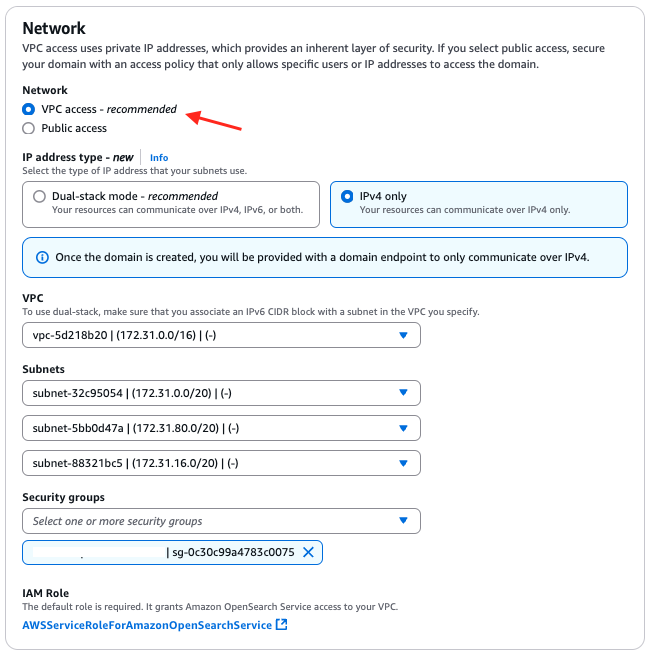
VPC access. Public access isn’t recommended for production workloads. We recommend that you use VPC access for all production workloads. Pick the VPC, subnets, and security group that you have created for the OpenSearch domain.

Amazon OpenSearch Service network configuration screen with VPC access selected and VPC, subnet, and security group fields populated

Figure 4: Use VPC access.

Fine-grained access control:

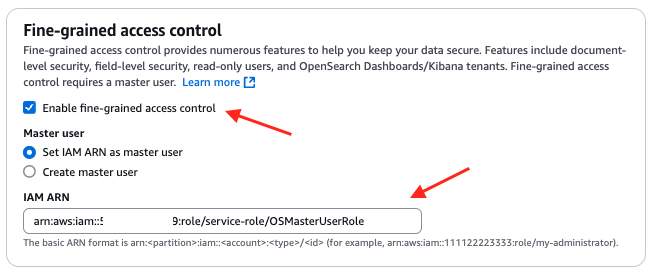
Turn on fine-grained access control with OS[MasterUserRole] as the primary user. You can follow steps in Tutorial: Configure a domain with an IAM master user and Amazon Cognito authentication to create OS[MasterUserRole].

Amazon OpenSearch Service fine-grained access control configuration with an IAM ARN selected as the primary user

Figure 5: Turn on fine-grained access control with an IAM role.

Fine-grained access control provides numerous features to help you keep your data secure, such as document-level security, field-level security, read-only users, and OpenSearch Dashboards/Kibana tenants. Fine-grained access control requires a primary user.

The primary user is the administrator identity for your OpenSearch domain. This user can set up additional users in Amazon OpenSearch Service, assign roles to them, and assign permissions for those roles. You can choose username and password authentication for the primary user or use an IAM identity. You use these credentials to log in to OpenSearch Dashboards. Following the best practices on choosing your primary user, you should choose an IAM primary user for production workloads.

Fine-grained access control can be applied regardless of how you log in. You can follow your organization’s suggested authentication mechanism and apply fine-grained access control on top of it.

Amazon Cognito authentication:

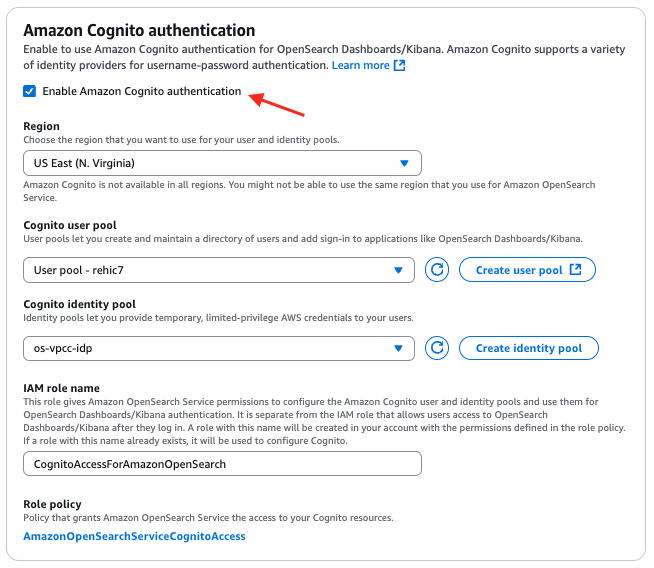
To turn on Amazon Cognito authentication, select Enable Amazon Cognito authentication and choose the Amazon Cognito user pool and Amazon Cognito identity pool for your OpenSearch Dashboards.

Amazon OpenSearch Service authentication configuration with Amazon Cognito enabled and a user pool and identity pool selected

Figure 6: Turn on Amazon Cognito authentication.

Access policy:

The access policy controls whether a request is accepted or rejected when it reaches the Amazon OpenSearch Service domain. You can configure a domain-level access policy to allow access to your Amazon OpenSearch Service domain.

Amazon OpenSearch Service domain access policy editor showing a JSON policy granting access to the configured IAM principals

Figure 7: Configure domain-level access to the domain.

Encryption:

Amazon OpenSearch Service encrypts data both in transit and at rest. When you turn on fine-grained access control, encryption is required—the corresponding settings are automatically turned on and can’t be changed. These include Transport Layer Security (TLS 1.2 or later) for requests to the domain and for traffic between nodes in the domain, and encryption of data at rest through AWS KMS.

For encryption at rest, OpenSearch Service supports three key types: AWS owned keys, AWS managed keys, and customer managed keys. While AWS owned keys provide a quick-start option with no additional configuration, customer managed keys are the recommended best practice. Customer managed keys give you full control over the encryption key lifecycle, including key rotation policies, granular access control through key policies, and the ability to audit key usage through AWS CloudTrail. To use a customer managed key, create a symmetric encryption key in AWS KMS and select it when configuring your domain’s encryption settings.

With these configurations, you can configure your Amazon OpenSearch domain and OpenSearch Service Dashboards so that they’re accessible only within the chosen VPC. For your production scenario, you can follow your organization’s approved mechanism to access the resources in a VPC. You can access OpenSearch Service Dashboards with a primary user to create a limited-access role and map it to the IAM role with limited access to validate fine-grained access control.

Conclusion

In this post, we looked at the important security configurations for a public and a VPC-based Amazon OpenSearch domain. You can examine more settings for fine-grained access control in the OpenSearch Dashboards Security section.

If you have feedback about this post, submit comments in the Comments section. If you have questions about this post, start a new thread on the Amazon OpenSearch Service forum or contact AWS Support.


About the author

Imtiaz (Taz) Sayed

Imtiaz (Taz) Sayed

Imtiaz (Taz) Sayed is the WW Tech Leader for Analytics at AWS. He enjoys engaging with the community on all things data and analytics. He can be reached through LinkedIn.

Narendra Gupta

Narendra Gupta

Narendra is a Specialist Solutions Architect at AWS, helping customers on their cloud journey with a focus on AWS analytics services. Outside of work, Narendra enjoys learning new technologies, watching movies, and visiting new places.

Akhilesh Dube

Akhilesh Dube

Akhilesh is a Senior Analytics Solutions Architect at AWS. He possesses more than two decades of expertise in working with databases and analytics products. His primary role involves collaborating with enterprise clients to design robust data analytics solutions while offering comprehensive technical guidance on a wide range of AWS Analytics and AI/ML services.

Nishchai JM

Nishchai JM

Nishchai is an Analytics and GenAI Specialist Solutions Architect at Amazon Web services. He specializes in building larger scale distributed applications and help customer to modernize their workload on Cloud. He thinks Data is new oil and spends most of his time in deriving insights out of the Data.

Automating contract intelligence with Doczy.ai™ on AWS

Post Syndicated from Sanket Nasre original https://aws.amazon.com/blogs/architecture/automating-contract-intelligence-with-doczy-ai-on-aws/

Extracting actionable insights from thousands of contracts and legal documents remains a challenge. For organizations, critical business information is locked in unstructured documents such as contracts, legal agreements, provider arrangements, and vendor invoices. Extracting and operationalizing this information has traditionally been a manual, error-prone, and resource-intensive process. This leads to missed savings opportunities, costly delays, and significant inefficiencies across the enterprise.

AArete, a global management and technology consulting firm specializing in healthcare, recognized this challenge and developed Doczy.ai™, an intelligent contract interpretation solution powered by generative AI on Amazon Web Services (AWS).

In this post, we show you how Doczy.ai™ uses generative AI on AWS to automate contract intelligence at scale, transforming unstructured documents into structured, actionable insights, so organizations can automate critical business processes and unlock the full value of their data.

The challenge: Data trapped in documents

For healthcare organizations, managing and interpreting contracts and documents represents a major operational bottleneck. Manual review processes require deploying teams to extract data from thousands of documents. This is an approach that is neither scalable nor sustainable, highly prone to error, and costly. Organizations relying on institutional knowledge face additional risks: critical information resides with a few key individuals, creating knowledge silos and succession planning challenges. Existing Contract Lifecycle Management (CLM) systems often prove inadequate for capturing the nuanced and complex terms unique to each agreement. These legacy systems can only configure predefined fields, missing the rich detail and contextual information that distinguishes contracts. The downstream impact is substantial: in healthcare, reimbursement terms must be manually translated into claims systems—a slow, error-prone process. Similarly, verifying vendor invoices against contract terms often requires manual effort, leading to payment processing delays and missed contractual savings opportunities. These inefficiencies ultimately leave significant value on the table.

This is where Doczy.ai™ provides significant value.

Doczy.ai™: An intelligent contract interpretation solution

Doczy.ai™ directly addresses these challenges using advanced AI and scalability on AWS. Developed by AArete, Doczy.ai™ pushes the boundaries of document intelligence. The solution automatically interprets complex documents and converts them into a structured, queryable information repository that allows organizations to unlock the full value of their data and drive smarter decisions.The evolution of Doczy.ai™ reflects rapid AI advancement. Prior to 2020, document processing required manual effort, with individuals processing approximately 100 documents per week. Between 2020–2023, the firm implemented rules-based contract processing, achieving approximately 55% accuracy. The breakthrough came in 2024 with an AI-based processing built on AWS achieved 99% accuracy—a dramatic improvement over the 55% accuracy of traditional rules-based systems.

Doczy.ai™ architecture

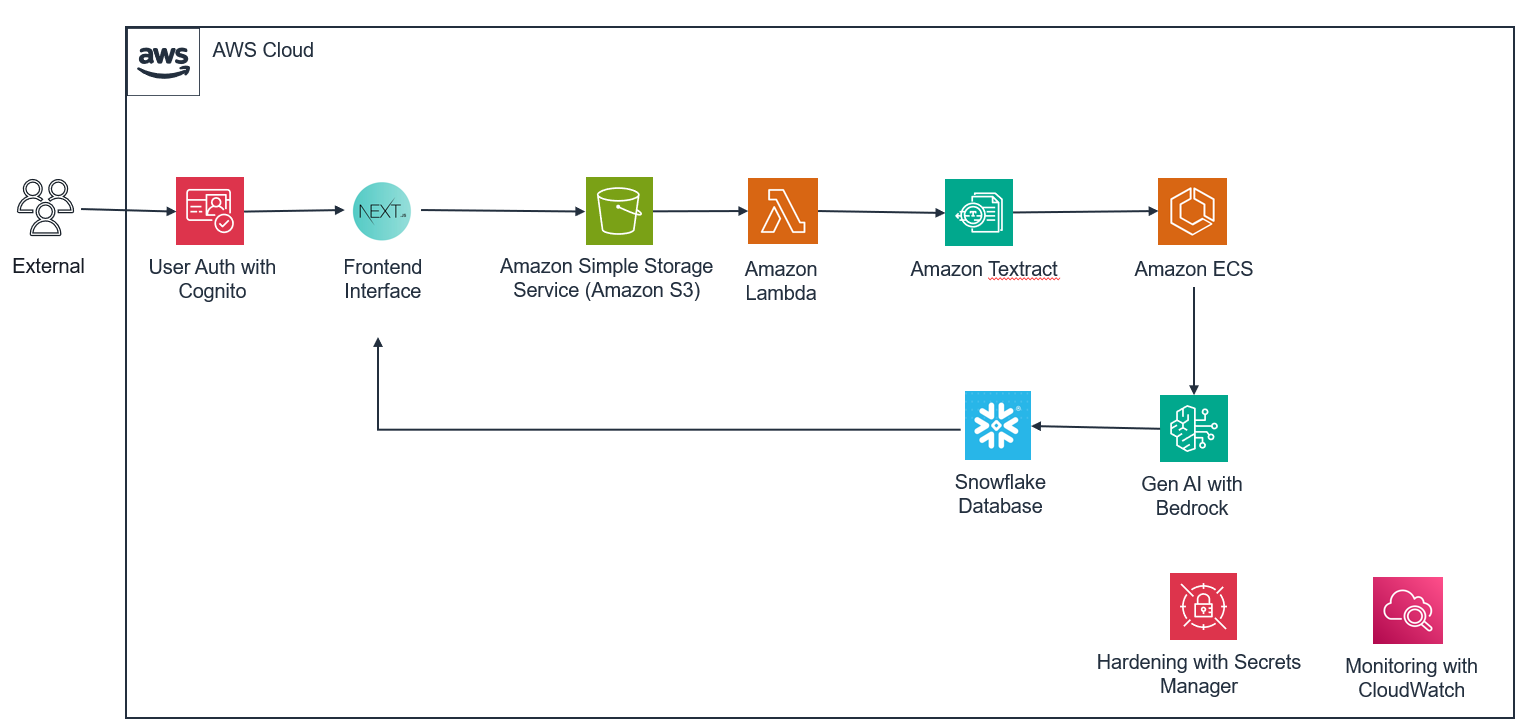
Doczy.ai™ is built on a comprehensive AWS architecture designed to handle the entire document processing lifecycle: from the moment a file enters the system to the moment it generates actionable business intelligence.

Doczy.ai is built on a comprehensive AWS architecture designed to handle the entire document processing lifecycle: from the moment a file enters the system to the moment it generates actionable business intelligence.

Architecture of Doczy.ai™

External users access the platform through a secure Next.js frontend, with Amazon Cognito managing authentication and authorization behind the scenes. After authentication, users upload documents directly to Amazon Simple Storage Service (Amazon S3), where durable, scalable object storage ensures nothing is lost and everything is accessible at scale. From there, the real intelligence begins.

An AWS Lambda function triggers Amazon Textract to extract text and metadata from documents in various formats. What sets Doczy.ai™ apart at this stage is its patented “smart chunking” algorithm, a proprietary approach that goes far beyond pulling words off a page. Rather than treating a document as a flat sequence of text, smart chunking preserves hierarchical structure and one-to-many relationships within documents. It uses a combination of semantic and keyword search to decompose text into meaningful, context-aware chunks, applying dynamic parameters to maintain logical relationships throughout. Sequential identifiers and metadata-driven grouping organize these chunks into field groups, detecting overlaps and removing duplications while keeping the document’s natural flow intact.

After chunking, the document enters the dual clustering engine of Doczy.ai™. This two-lens methodology analyzes every contract simultaneously from both a semantic and a structural perspective. On the semantic side, extracted text is converted into embeddings, numerical representations of meaning, and similar ideas are grouped together even when they’re expressed in different words. On the structural side, pattern-recognition algorithms identify clause types, formatting conventions, table layouts, and hierarchical organization, understanding. For example, that a three-nested-level exhibit carries fundamentally different implications than a straightforward attached schedule.These two analyses don’t operate in isolation. Projection algorithms compare the semantic and structural clusters side by side, synthesizing them into a unified, enriched document model that captures both meaning and context. It’s this convergence that drives the 99% accuracy rate of Doczy.ai™. The system doesn’t just read the words, it understands the contract. Advanced large language models (LLMs) then generate structured output grounded in this dual-clustered intelligence.Before output is finalized, the system determines each document’s file class and generates prompts tailored to the extracted text, cluster classification, and domain context. Through few-shot and multi-shot prompting, the platform continuously edits the prompt on domain-specific examples and based on real outputs, creating a feedback loop that compounds accuracy improvements over time.

The resulting structured data flows into Snowflake, forming a centralized repository that powers intelligent dashboards with actionable insights and visualizations. Throughout the entire pipeline, Amazon CloudWatch monitors performance in real time and proactively surfaces issues before they escalate, while AWS Secrets Manager safeguards sensitive information, ensuring that security is not an afterthought, but a foundational layer woven into every stage of the system.

The transformative impact of Doczy.ai™

The results of this AI-powered approach are transformative and measurable. By automating contract interpretation and document processing, Doczy.ai™ has demonstrated significant impact at scale for multiple organizations across healthcare and financial services. The scale of operations over the last 22 months demonstrates the maturity and production readiness of Doczy.ai™. This solution has processed 2.5 million contract documents (50 million pages) with 137 million API calls to Amazon Bedrock and 442 billion tokens—a level of automation and accuracy previously unattainable through manual or traditional document processing approaches. Over this same period, Doczy.ai™ has helped clients achieve approximately 330 million dollars in cumulative direct and indirect savings.The 99% accuracy rate represents significant improvement over the approximately 55% accuracy of rules-based systems and far exceeds manual processing, which is typically affected by fatigue and human error. The 97% reduction in manual processing time translates directly to cost savings and enables organizations to reallocate human resources to higher-value activities that require judgment and strategic thinking.

A use case in action: Business process automation for health plans

For health plans, Doczy.ai™ provides a powerful solution to automate and improve contract management across the entire lifecycle. It ingests existing contracts in both paper and digital formats, integrates with contract management systems such as Coupa and Icertis, and processes new contracts and amendments as they’re executed. It then creates a centralized metadata repository that feeds directly into downstream systems, enabling end-to-end business process automation.This automation unlocks critical capabilities: Organizations can continuously analyze and improve contract terms, identifying opportunities to improve financial performance and operational efficiency. The architecture feeds accurate, up-to-date contract data directly into claims systems, automating the configuration process that previously required manual translation of reimbursement terms and removing manual data entry, configuration errors, and delays. Additionally, the platform helps maintain claim payment accuracy by assessing payments against contract terms, identifying discrepancies, and flagging potential overpayments or underpayments before they occur.By automating manual processes, health plans can adapt quickly to new contract terms and regulatory requirements. The intelligent dashboards and actionable insights provided by Doczy.ai™ enable decision-makers to understand contract performance, identify trends, and take proactive action to optimize financial outcomes.

Getting started with Doczy.ai™

Organizations interested in using Doczy.ai™ to transform document processing and contract management can engage with AArete to discuss their specific use cases and requirements. AArete offers the platform as a Software as a Service (SaaS) solution, enabling rapid deployment without significant infrastructure investment. AArete’s team of experts will configure this solution for your specific document types, domain terminology, and business processes, supporting maximum value from day one.

Conclusion

The challenge of unlocking data from unstructured documents is a major hurdle for many businesses, particularly in healthcare and financial services where contracts and agreements govern critical operational and financial relationships. By embracing intelligent document intelligence on AWS, organizations can solve this long-standing operational challenge and unlock a new frontier of strategic advantage, turning their data into their most valuable asset.

Built on a sophisticated architecture that orchestrates Amazon Cognito, Amazon S3, AWS Lambda, Amazon Textract, Amazon Elastic Container Service (Amazon ECS), Amazon Bedrock, Amazon CloudWatch, and AWS Secrets Manager, Doczy.ai™ demonstrates how modern cloud services can solve complex document-heavy business problems. Its advanced hybrid smart chunking, dual clustering, and prompt optimization techniques form the core of a patented contract intelligence engine.

Doczy.ai™ delivers tangible impact, processing up to 250,000 contract documents per week with 99% accuracy, reducing manual processing time by 97%, and helping clients unlock roughly 330 million dollars in cumulative savings over 22 months. By embracing this intelligent document processing, organizations can turn contracts into a strategic data asset, improving efficiency, accuracy, and profitability while freeing teams to focus on higher-value work.

To learn more about how AArete and Doczy.ai™ can help your organization transform document processing and unlock the value of your unstructured data, visit the AArete website.


About the authors

The Intersection of Encryption and AI

Post Syndicated from Bruce Schneier original https://www.schneier.com/blog/archives/2026/06/the-intersection-of-encryption-and-ai.html

As part of their 20th Anniversary celebration, Dark Reading asked five cybersecurity industry leaders who wrote blogs or columns for them over the years to select their favorite piece and share their reflections on the topic today. This is my section.

Renowned technologist and author Bruce Schneier contributed a column on June 20, 2010, warning about cryptography’s inability to secure modern networks, a point he says he has been trying to argue since 2000.

“For a while now, I’ve pointed out that cryptography is singularly ill-suited to solve the major network security problems of today: denial-of-service attacks, website defacement, theft of credit card numbers, identity theft, viruses and worms, DNS attacks, network penetration, and so on.

“Recently, I talked to a former NSA employee at a conference. He told me that back in the 1990s, he had a copy of my book Applied Cryptography by his desk, as did many other cryptographers working at Ft. Meade. People were allowed to refer to it, but they were not allowed to cite it.

“The 1990s were an important decade for cryptography. This was before the internet went mass market, when cryptography was just emerging from a niche academic discipline to a mainstream engineering one. There wasn’t much that programmers could read. The NSA used my book for the same reason it became a bestseller: because it collected all the academic cryptography of the time in one place and made it understandable to people who weren’t mathematicians. They feared it for exactly the same reason.

“I’ve been thinking about that conversation as I revisit a 2010 essay I wrote for Dark Reading, ‘The Failure of Cryptography to Secure Modern Networks.’ Cryptography has inherent mathematical properties that greatly favor the defender. Adding a single bit to the length of a key adds only a slight amount of work for the defender but doubles the amount of work the attacker has to do. Doubling the key length doubles the amount of work the defender has to do (if that—I’m being approximate here) but increases the attacker’s workload exponentially. For many years, we have exploited that mathematical imbalance.

“Computer security is much more balanced. There’ll be a new attack, and a new defense, and a new attack, and a new defense. It’s an arms race between attacker and defender. And it’s a very fast arms race. New vulnerabilities are discovered all the time. The balance can tip from defender to attacker overnight, and back again the night after. Computer security defenses are inherently very fragile.

“That isn’t a new idea. I said much the same thing in the preface to my 2000 book, Secrets and Lies:

“‘Cryptography is a branch of mathematics. And like all mathematics, it involves numbers, equations, and logic. Security, real security that you or I might find useful in our lives, involves people: things people know, relationships between people, people and how they relate to machines. Digital security involves computers: complex, unstable, buggy computers.’

“I especially like how I phrased it in 2016: ‘Cryptography is harder than it looks, primarily because it looks like math. Both algorithms and protocols can be precisely defined and analyzed. This isn’t easy, and there’s a lot of insecure crypto out there, but we cryptographers have gotten pretty good at getting this part right. However, math has no agency; it can’t actually secure anything. For cryptography to work, it needs to be written in software, embedded in a larger software system, managed by an operating system, run on hardware, connected to a network, and configured and operated by users. Each of these steps brings with it difficulties and vulnerabilities.’

“It’s a lesson we have all learned over the decades. Cryptography is still necessary for cybersecurity—although I wouldn’t have used that word back then—but is not sufficient. There are particular attack and forms of mass surveillance that cryptography prevents. But as computers have infused throughout our lives, and networks have connected all those computers, those aspects of cybersecurity have become increasingly important, and vulnerable.

“Today, the cybersecurity world is changing yet again, this time due to the capabilities of artificial intelligence. AI isn’t advancing cryptography, but it’s changing cybersecurity. AI has demonstrated a superhuman ability to find vulnerabilities in software and to write exploits. A similar ability to write patches is probably coming. This has profound implications for both attackers and defenders, and it is unclear who will win the particular arms race in a world of what I call instant software.”

Microsoft Threatening Security Researcher

Post Syndicated from Bruce Schneier original https://www.schneier.com/blog/archives/2026/06/microsoft-threatening-security-researcher.html

An anonymous security researcher called “Nightmare Eclipse” has been publishing a series of significant security exploits against Microsoft Windows—including one that breaks BitLocker. Microsoft has threatened legal action against the researcher. Lots of recriminations are being traded back and forth.

Vulnerability Disclosure in the Age of AI

Post Syndicated from Bruce Schneier original https://www.schneier.com/blog/archives/2026/06/vulnerability-disclosure-in-the-age-of-ai.html

New article: “Responsible Disclosure in the Age of AI: A Call for Urgent Action,” by Melissa Hathaway.

Abstract: Artificial intelligence is fundamentally reshaping the balance between vulnerability discovery and remediation. Frontier AI models are now capable of autonomously identifying exploitable software vulnerabilities at unprecedented speed and scale. This development exposes decades of accumulated technical debt created by a software industry that prioritized rapid deployment over secure-by-design engineering practices. Drawing on the evolution of software assurance, vulnerability disclosure frameworks, and U.S. cyber policy, this perspective argues that the current moment represents a strategic inflection point for governments, industry, and critical infrastructure operators. The author examines the growing tension between offensive and defensive equities in cyberspace, the emergence of AI-enabled vulnerability discovery capabilities in both the U.S. and China, and the increasing risks posed by unsupported legacy systems and AI-assisted code generation practices. Responsible disclosure can no longer remain a reactive or fragmented process, but must become a coordinated national and international resilience effort involving governments, software vendors, infrastructure operators, and emergency response organizations. The article concludes with an urgent call for accelerated remediation, large-scale patch management coordination, and sustained investment in automated vulnerability repair capabilities before adversaries exploit this rapidly narrowing window of opportunity.

Chilling Effects

Post Syndicated from Bruce Schneier original https://www.schneier.com/blog/archives/2026/05/chilling-effects.html

Younger Americans have soured on the second Donald Trump presidency, but they are not protesting it.

Despite an unpopular Iran war and an even more unpopular Trump administration, college campus protests nationwide have gone silent. And at many schools, student activism is virtually nonexistent.

This silence comes in the wake of a relentless Trump administration war on campus speech that has involved lawsuits, arrests, deportations and expulsions.

Reports cite a range of complicated factors for the restraint, from apathy to technology-induced incapacity. But as public policy and law and social science experts, we believe students aren’t protesting for a very simple reason: They are afraid. They are self-censoring and disengaging from campaign activism to avoid punitive measures.

In law and social science, we call this impact a chilling effect—the behavioral tendency for people in face of a threat to self-censor and restrain their activities for self-protection.

It’s increasingly clear to us that these impacts are not incidental or ancillary to Trump administration policy. Rather, the chilling effects are the point. This is the closest thing to a consistent governing strategy in Trump’s second term.

The broader chill of Trump threats

Chilling effects can be subtle, but today they are everywhere. And it’s not just students who are chilled by Trump administration threats.

Professors are censoring themselves in lectures and rewriting syllabuses. Researchers are stripping grant applications of words that might attract federal scrutiny, or abandoning the topics entirely. Media outlets are modifying their news coverage to avoid Trump lawsuits or sanctions.

Law enforcement and regulatory agencies are refusing to investigate Trump-aligned actors inside or outside government, and major national law firms are declining cases challenging Trump administration policies.

Publishers are “stepping back” from LGBTQ+ books and other progressive subjects. Many in targeted immigrant communities are afraid to leave home to go to work or school.

In most cases, these people and institutions are not being specifically targeted or threatened by Trump. But they are afraid, and their fear is doing the administration’s work for it. They stay silent, avoid attention and confrontation, and look the other way. In other cases, they change their speech and behavior to accommodate or conform to the administration’s worldview.

Of course, there are counterexamples, such as the winter protests in Minneapolis in response to brutality by agents with U.S. Immigration and Customs Enforcement, and the recent “No Kings” rallies. But even here, the broader but less visible trend—chilling effects—is evident.

For instance, in recent reporting on the latest No Kings rallies, many media outlets observed that students were noticeably missing, despite the Trump administration’s unpopularity among younger Americans.

A persistent strategy

We believe none of this is by accident.

In a new book, “Chilling Effects: Repression, Conformity, and Power in the Digital Age,” one of us—Jon Penney—explains how law, technology, and state and corporate power are weaponized to chill and repress, and the dangers this poses for the United States and other democratic societies. The other—Bruce Schneier—has extensively studied the security infrastructure enabling this.

What we see isn’t gratuitous government cruelty, chaos or vengeance. Instead, we see a persistent strategy to maximize fear and chilling effects in ways that are corrosive to freedom and democracy.

Research suggests that surveillance, personal threats, uncertainty and abuse of power are key factors in doing so. The federal government has a clear and systematic pattern of employing these very mechanisms across a number of domains far beyond campuses.

They are evident in militarized raids by Immigration and Customs Enforcement and in journalists being arrested and indicted for reporting on protests. They are made clear in the long list of political enemies the Trump administration has investigated or threatened, including the Federal Reserve chairman. And they can also be seen in the weaponization of technology, including ramping up surveillance to target critics and protestors.

Corrosive to freedom and democracy

History offers some guidance on impacts.

During the McCarthy era, overreaching laws, surveillance, and public and private sector reprisals ostensibly targeted alleged communists. But the real aim was often to suppress progressive journalists, trade unions and political opposition.

In the 1960s, these same tactics were reused by Southern states to chill the Civil Rights Movement. Historians have written about how the widespread fear and conformity of these periods reshaped American society in enduring ways, including the destruction of progressive political movements and both delaying and muting the Civil Rights Movement itself.

When such state threats are systematized, they can foment a broader climate of fear, self-censorship and conformity. In that climate, dissenting speech, political opposition, democratic mobilization and other checks on power become increasingly difficult, even dangerous. It is no surprise, for instance, that Trump critics regularly admit to self-censorship, fearing for their safety.

Chilling effects are thus not only repressive—causing self-censorship—but productive. They produce conforming and compliant speech and behavior, which can have longer-term social impacts. They not only undermine protected rights and suppress accountability but can promote social change—even without a popular mandate to do so.

This latter point is often missed. It explains Trump’s assaults on universities and cultural institutions such as the Kennedy Center for the Arts and the Smithsonian. Often dismissed as peculiar Trump obsessions, they are fully consistent with Project 2025—the sweeping policy blueprint for Trump’s second term authored by a coalition of conservative groups and its call to target the “institutions of American civil society” and “wield federal power” to “reverse” decades of progressive cultural advancements.

In the near term, this means an increasingly weakened democratic society, with the government and its patrons enjoying freedom to pursue their objectives. Over the long term, this can mean a changed society as more conformist and compliant speech and culture become more widely accepted and entrenched.

Not inevitable

In our view, this future is not inevitable, just as the McCarthy era “Red Scare” and violent civil rights era repression were not. In both cases, fear and chilling effects were resisted in law and civil society, as they can be today.

But the central mechanisms—surveillance, uncertainty, personal threats and abuse of power—would need to be addressed. For instance, new legislation could ensure justice for lawless government actors and constrain surveillance. Courts can block abuses of federal power, including illegal arrests, detentions and mass citizen databases.

The media, lawyers and civil society can hold the government accountable. And students, teachers, universities and cultural institutions can resist the tendency to self-censor and conform.

The citizen mobilization in Minnesota and the No Kings rallies are examples of that. But to resist chilling effects and their dangers over the long term, this would have to be the norm, not the exception.

This essay was written with Jon Penney, and originally appeared in The Conversation.

Best-of-Breed vs. Platform Play: Why Modular Infrastructure Is Winning Again

Post Syndicated from Kari Rivas original https://www.backblaze.com/blog/best-of-breed-vs-platform-play-why-modular-infrastructure-is-winning-again/

Isometric illustration comparing a single monolithic server tower on the left to three separate modular building blocks on the right, representing the difference between platform and best-of-breed infrastructure approaches.

There’s a familiar tension in enterprise technology: buy a fully integrated platform or assemble a stack of best-of-breed components. The platform story is compelling: one vendor. One console. One contract. Everything bundled together.

The best-of-breed story is different. Best-of-breed optimizes each layer for performance, flexibility, and cost. Historically, platforms often won the narrative. But in periods of rapid change—like today’s AI era—modularity regains the advantage.

The platform gravity problem

Platforms can introduce operational gravity. When compute, storage, networking, analytics, governance, and AI tooling all live in one ecosystem, switching costs rise over time. What starts as convenience becomes constraint—and in AI, where tooling changes rapidly, that becomes expensive in both flexibility and economics. Industry leaders reflect this shift. CIOs are moving beyond a “cloud-first” mindset toward “cloud-smart” strategies and choosing the right environment for each workload instead of defaulting to one provider’s stack. This proactively avoids escalating costs and inflexible ecosystems. A recent CIO Dive trend report finds many IT leaders are gravitating toward purpose-built infrastructure optimized for specific workload demands—including AI—rather than broad commodity offerings. 

Why modular infrastructure wins

AI pipelines evolve constantly: training datasets, checkpoints, GPU migrations, MLOps workflows and post-processing outputs are all subject to rapid changes to scale applications and extend model capabilities. Few organizations run all of that inside a single vendor environment or a single cloud ecosystem. Teams building differentiated systems optimize workflows and resources, not monoliths.

Modularity isn’t just about avoiding lock-in—it’s about real, measurable agility. Modular architectures allow organizations to adjust components independently as requirements change. CTOs are intentionally placing workloads where they perform best—cloud for global scale, on-prem or colocation for heavy AI training, and edge for low-latency inference—and treating each as part of a unified, purpose-driven infrastructure strategy. 

This pattern holds true beyond just AI. 

  • In cyber resilience, what matters when a ransomware event hits isn’t whether you bought every tool from one vendor; it’s the speed and predictability of recovery (which specialized, resilient storage does more to accelerate than bundled dashboards)
  • In cloud native application development, developers value predictable performance, clear pricing, and flexibility over being locked into a single ecosystem.
  • In media and entertainment, workflows often span regions, partners, and technologies—moving petabytes of creative content, generating AI media assets, and orchestrating distributed rendering jobs. A modular approach enables teams from all sides of the business (creative and technical) to optimize for performance without constraint.

These use cases share common themes:  avoid lock-in, preserve optionality, control costs, and maintain performance predictability. These align with broader industry sentiment that hybrid and composable architectures deliver greater agility and resilience in the face of evolving requirements.

Depth over breadth: A focused infrastructure philosophy

When vendors expand aggressively into adjacent domains—analytics, governance, AI tooling—they risk breadth at the expense of depth. In fast-moving markets, “jack-of-all-trades” platforms often become “master-of-none.” Best-of-breed doesn’t mean disjointed; it means each layer is optimized for its purpose and integrated intelligently.

That’s the philosophy behind how we’ve evolved our own infrastructure. When Backblaze first launched our object storage service, we highlighted performance, transparency, and cost efficiency. As AI and high-throughput workloads accelerated, customers began using us as neutral infrastructure for staging, throughput, and data mobility between clouds. We leaned deeper into storage—high-throughput tiers, bandwidth guarantees, lifecycle tools—but intentionally stopped short of climbing higher up the application or analytics stack.

We draw a line at storage not because adjacent layers lack value, but because storage is foundational. AI differentiation, application logic, and workflow intelligence happen above the infrastructure layer. Customers need owned, interoperable workflows that can plug into any compute or AI platform without being co-opted by a monolithic ecosystem.

Modular infrastructure as a strategic backbone

Best-of-breed doesn’t mean fragmentation; it means focus with composability. The future of enterprise infrastructure isn’t about building the tallest platform—it’s about building the strongest foundation that supports innovation across many dimensions.

Across industries, infrastructure leaders are embracing workload placement strategies and hybrid models to optimize for cost, governance, and performance. In AI, this means hybrid cloud and on-prem strategies where appropriate; in traditional application and file storage, it means interoperable, resilient services; and in media workflows, it means performant pipelines unencumbered by monolithic stack limitations.

The companies that win in this era won’t be those who own every layer. They’ll be those who enable others to build faster, iterate often, and adapt without constraint.

The post Best-of-Breed vs. Platform Play: Why Modular Infrastructure Is Winning Again appeared first on Backblaze Blog | Cloud Storage & Cloud Backup

Identifying People Using Wi-Fi Routers

Post Syndicated from Bruce Schneier original https://www.schneier.com/blog/archives/2026/05/identifying-people-using-wi-fi-routers.html

Not identifying people based on their use of Wi-Fi routers, but identifying people using Wi-Fi signals.

This is accomplished through what is known as WiFi sensing, or the use of WiFi signals to infer information about a physical environment. When radio signals like WiFi travel through a space, they interact with the objects and people around them. Those signals can be reflected, scattered, or absorbed. By analyzing how the signal is expected to behave compared with how it is actually received, researchers can infer details about the surrounding environment.

“By observing the propagation of radio waves, we can create an image of the surroundings and of persons who are present,” said Thorsten Strufe, a KIT professor and study co-author, in a press release. “This works similar to a normal camera, the difference being that in our case, radio waves instead of light waves are used for the recognition.”

Friday Squid Blogging: Regulating Squid Fishing in the South Pacific

Post Syndicated from Bruce Schneier original https://www.schneier.com/blog/archives/2026/05/friday-squid-blogging-regulating-squid-fishing-in-the-south-pacific.html

The South Pacific Regional Fisheries Management Organization (SPRFMO) needs to regulate squid fishing in the South Pacific.

As usual, you can also use this squid post to talk about the security stories in the news that I haven’t covered.

Blog moderation policy.

CISA Security Leak

Post Syndicated from Bruce Schneier original https://www.schneier.com/blog/archives/2026/05/cisa-security-leak.html

Crazy story:

Until this past weekend, a contractor for the Cybersecurity & Infrastructure Security Agency (CISA) maintained a public GitHub repository that exposed credentials to several highly privileged AWS GovCloud accounts and a large number of internal CISA systems. Security experts said the public archive included files detailing how CISA builds, tests and deploys software internally, and that it represents one of the most egregious government data leaks in recent history.

News article.

On AI Security

Post Syndicated from Bruce Schneier original https://www.schneier.com/blog/archives/2026/05/on-ai-security.html

Good report:

Executive Summary: Let’s say you wanted to make sure that your AI is secure. Can you just maximize the security and privacy benchmark and call it a day? Nope, because benchmarks don’t actually work for measuring AI capabilities (even when they are NOT emergent systemic properties like security). So let’s take a step back: how do you measure security in the first place? Good question. Over the last 30 years, security engineering for software evolved from black box penetration testing, through whitebox code analysis and architectural risk analysis to de facto process-driven standards like the Building Security In Maturity Model (BSIMM). Software had a very deep impact on business operations, and it appears that AI is going to have an even deeper impact. Will a software security-like measurement move work for AI? Probably. In the meantime we can make real progress in AI security by cleaning up our WHAT piles and managing risk by identifying and applying good assurance processes. (Spoiler alert: no matter what we do, we still don’t get a security meter for AI, so we need to be extra vigilant about security.)

Automate root cause analysis across Datadog and Elasticsearch with AWS DevOps Agent

Post Syndicated from Bhuvan Jain original https://aws.amazon.com/blogs/devops/automate-root-cause-analysis-across-datadog-and-elasticsearch-with-aws-devops-agent/

Modern distributed systems route business transactions through dozens of microservices, message queues, and event streams. When a message fails to process or processing exceeds SLA thresholds, troubleshooting requires correlating logs from tools like Elasticsearch, metrics from Datadog, and infrastructure change events in AWS CloudTrail. Correlating these signals manually across heterogeneous backends, each with different query languages, schemas, and time granularities, can take hours per incident and demands deep institutional knowledge of the system topology.

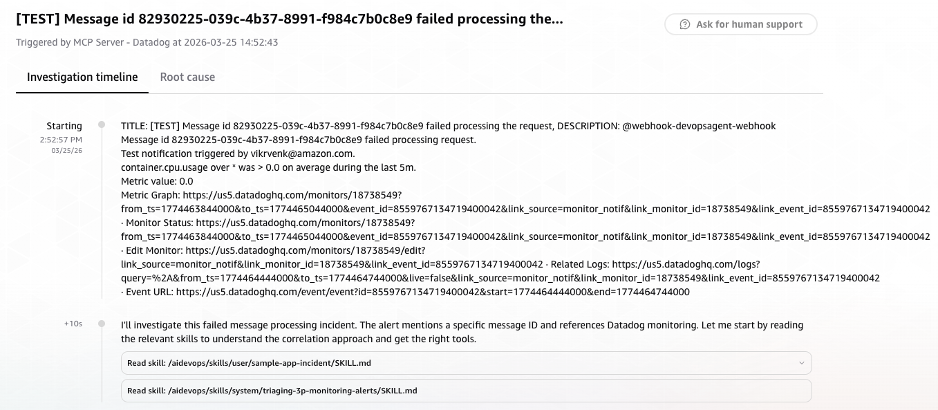
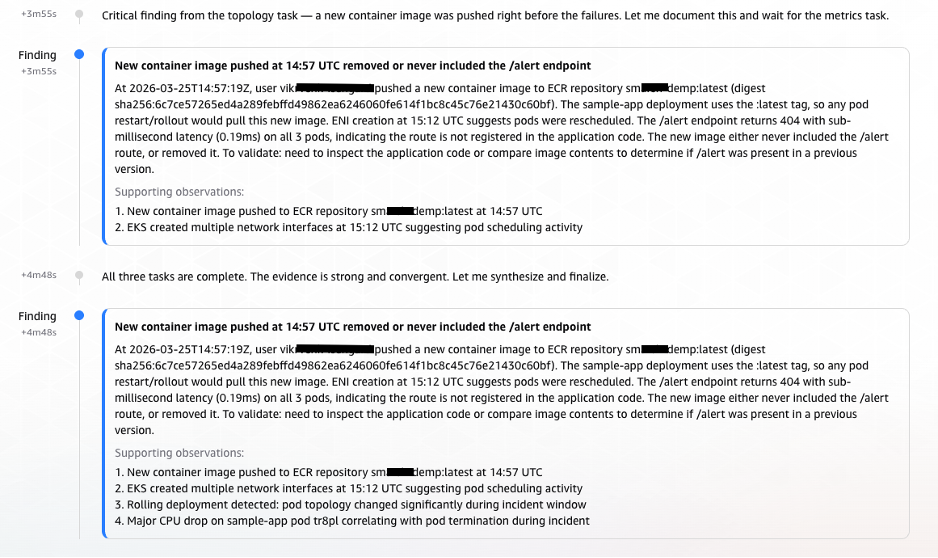
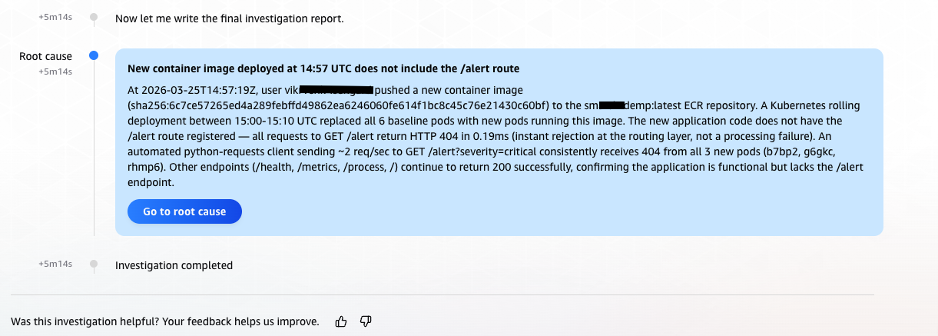
This post shows how AWS DevOps Agent, combined with a custom Model Context Protocol (MCP) server for Elasticsearch and native Datadog integration, automates end-to-end root cause analysis. When a Datadog alert fires, AWS DevOps Agent automatically initiates an investigation, correlates signals across all observability backends, and delivers root cause findings in minutes, without manual intervention.

In this post, we walk through the architecture, configuration steps, and a real-world scenario demonstrating how AWS DevOps Agent dramatically reduces mean time to identify (MTTI) for distributed system failures. DevOps engineers, site reliability engineers (SREs), and operations leaders managing containerized workloads will learn how to implement alert-triggered automated investigations that eliminate manual correlation and accelerate root cause identification in their own environments.

Challenges in correlating telemetry signals at scale

At scale, correlating telemetry signals across distributed systems is a key challenge. A platform processing billions of communications for regulated industries must track every message through its full lifecycle — ingestion, transformation, policy evaluation, archival, and retrieval — across dozens of production clusters, thousands of worker nodes, and terabytes of daily telemetry spread across multiple observability backends. A single message ID can generate log entries across multiple indices, correlated metrics in monitoring systems, and change events in audit trails. When a message goes missing or processing stalls, the operations team must pinpoint which cluster processed it, which log store holds the evidence, whether a recent deployment preceded the failure, and whether the issue is isolated or systemic — all while context-switching across tools with different query languages and data schemas. Before AWS DevOps Agent, this process routinely took hours per incident, and longer for complex multi-service failures.

The core difficulty is not the volume of data. It is the correlation of signals across heterogeneous systems that use different identifiers, different time granularities, and different data schemas. A message ID in Elasticsearch logs must be correlated to:

  • A trace ID in application performance monitoring (APM) systems
  • A pod name and namespace in Kubernetes event logs
  • A container image tag in Amazon Elastic Container Registry (ECR) push events
  • Metric anomalies (error rate spikes, pod restarts, CPU/memory deviations) in Datadog
  • Deployment events captured in AWS CloudTrail logs

Manual correlation requires engineers to maintain mental models of these relationships while executing queries across multiple systems. It is error-prone, non-repeatable, and heavily dependent on institutional knowledge. When the engineer with the deepest system familiarity is unavailable, resolution times increases.

Prerequisites

Complete the following prerequisites before configuring the integrations:

  1. The AWS Command Line Interface (AWS CLI) version 2. For installation instructions, see installing or updating to the latest version of the AWS CLI.
  2. Helm – the Kubernetes package manager used to deploy the sample application.
  3. Kubectl – the Kubernetes command-line tool used to deploy Filebeat and manage cluster resources.
  4. An EKS cluster with Control plane logs enabled.
  5. AWS DevOps Agent Agentspace. For installation instructions, refer to Creating an Agent Space.
  6. Elasticsearch cluster deployed and accessible (EC2-hosted, Amazon OpenSearch Service, or self-managed). Filebeat configured as a DaemonSet to collect pod logs and forward to Elasticsearch.
  7. Datadog account with API key and application key. To create, see API & Applications key.

Solution Architecture

The solution presented in this post combines three integrated components to deliver automated end-to-end message ID traceability:

  • AWS DevOps Agent as the intelligent investigation orchestrator
  • A custom ELK MCP Server providing structured access to Elasticsearch log data
  • Native Datadog integration for metrics, events, and alert-triggered investigations

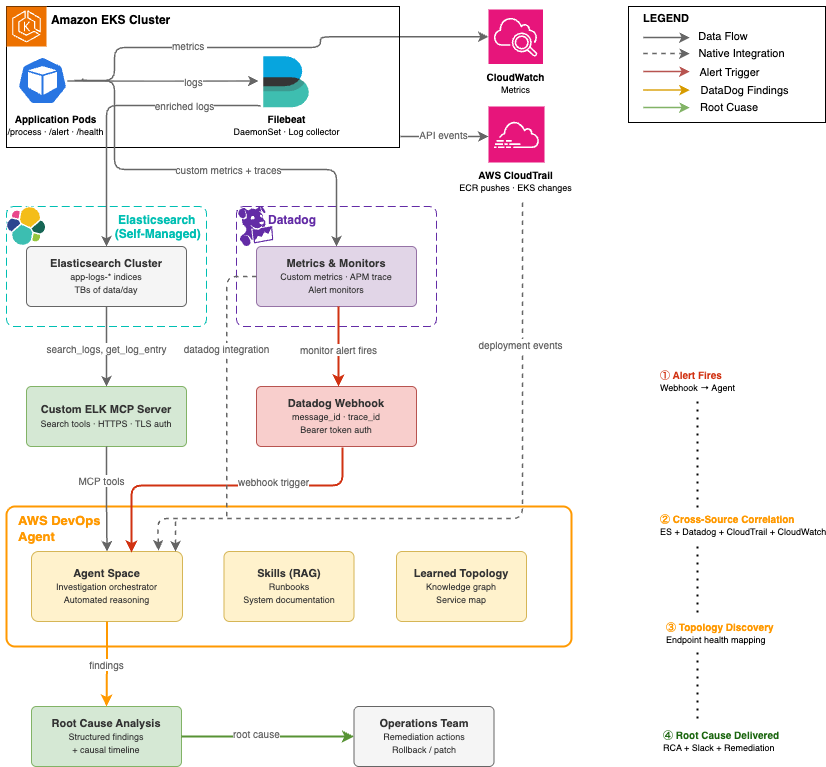
Together, these components form an autonomous investigation pipeline that activates when an alert fires, correlates signals across all observability sources, builds a topological understanding of the affected services, and delivers a structured root cause analysis, without manual intervention.

In our implementation, application pods are instrumented to emit custom metrics to Datadog, including per-message-ID processing status, trace ID labels, and endpoint-level error counters. This instrumentation provides AWS DevOps Agent with the ability to correlate a specific message ID from an alert payload to its corresponding trace ID in application performance data, a correlation that previously required manual cross-referencing.

Webhook-Based Alert Triggering

A critical aspect of the architecture is the automated triggering of investigations when alerts fire. Rather than requiring manual investigation initiation, the solution configures Datadog alerting webhooks to invoke AWS DevOps Agent directly.

When a Datadog monitor enters an alert state, it fires a webhook to the AWS DevOps Agent endpoint, including:

  • The message ID associated with the processing failure
  • The trace ID for APM correlation
  • The alert timestamp and alert condition
  • The triggering monitor name and severity

AWS DevOps Agent authenticates the webhook using a bearer token and immediately initiates an investigation in the configured Agent Space. The Datadog webhook payload serves as the investigation’s initial context, seeding the agent with the specific identifiers it needs to perform targeted queries rather than broad searches across the full data volume.

Architecture Diagram

Architecture diagram showing the automated root cause analysis pipeline. A Datadog alert fires a webhook to AWS DevOps Agent, which queries three sources: an ELK MCP Server connected to Elasticsearch for log data, native Datadog integration for metrics, and AWS CloudTrail for deployment events. Results flow back to the Agent Space for correlated root cause analysis.
Figure 1:
Automated root cause analysis pipeline — from Datadog alert to AWS DevOps Agent investigation across Elasticsearch, Datadog, and AWS CloudTrail

Implementation Walkthrough

The following walkthrough describes the end-to-end setup required to replicate the message ID traceability solution in your own environment.

Step 1: Configure EKS Cluster Access for AWS DevOps Agent

AWS DevOps Agent requires an access entry in each EKS cluster it will investigate. This enables the agent to describe Kubernetes objects, retrieve pod logs, and access cluster events.

  1. In the AWS DevOps Agent console, navigate to your Agent Space and select the Capabilities tab.
  2. Under the Cloud section, select the primary source and choose Edit. Note the Role Name shown in the Role Name field, this is the IAM role that requires EKS access.
  3. In the Amazon EKS console, select each cluster and open the Access tab.
  4. Under IAM Access Entries, choose Create to add a new access entry.
  5. Set the IAM Principal ARN to the Agent Space role noted in step 2.
  6. Under Access Policies, select AmazonAIOpsAssistantPolicy with Cluster scope. Choose Add Policy, then Next.
  7. Review and create the access entry.

At scale: For environments with 50+ clusters, use the AWS CLI, Terraform, or a GitOps pipeline to automate access entry creation across all clusters. The following CLI command creates an access entry for a single cluster:

aws eks create-access-entry --cluster-name <CLUSTER_NAME> --principal-arn <AGENTSPACE_ROLE_ARN> --region <REGION>
aws eks associate-access-policy --cluster-name <CLUSTER_NAME> --principal-arn <AGENTSPACE_ROLE_ARN> --policy-arn arn:aws:eks::aws:cluster-access-policy/AmazonAIOpsAssistantPolicy --access-scope type=cluster --region <REGION>

Step 2: Configure Datadog Integration in AWS DevOps Agent

AWS DevOps Agent includes native Datadog integration. Configuration requires your Datadog API credentials and designates the integration as a data source in the Agent Space. In the AWS DevOps Agent console, navigate to Integrations and choose Add Integration and follow the steps.

After configuration, AWS DevOps Agent can query Datadog metrics, monitors, and events during investigations. Custom application metrics (message throughput, error rates, processing status per message ID) are automatically accessible once the integration is active.

Step 3: Deploy and Configure the Custom ELK MCP Server

The Elasticsearch MCP server bridges AWS DevOps Agent to your self-managed Elasticsearch deployment. The MCP server is deployed as a publicly accessible endpoint with TLS authentication, enabling AWS DevOps Agent to call Elasticsearch APIs securely without requiring direct network access to the actual Elasticsearch/Kibana instances.

Note: For basic Elasticsearch integration, the official Elasticsearch MCP server provides a ready-to-use option. For this use case, we built a custom Python MCP server using FastMCP to expose investigation-specific tools — trace ID correlation, time-window log retrieval, and latency analysis — tailored to our message traceability workflow.

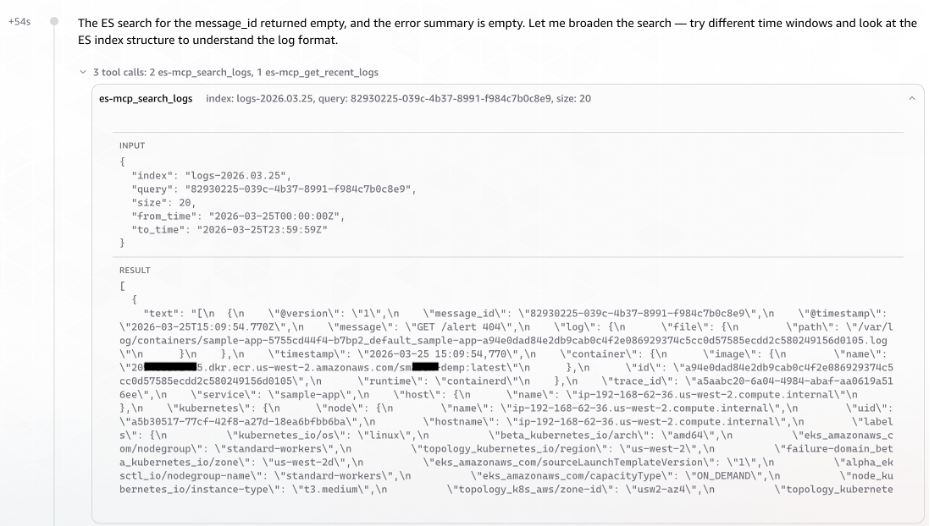
The custom server implementation provides the thirteen tools required for log search, index discovery, and aggregation.

Table: ELK MCP Server tools access by AWS DevOps Agent during investigations
MCP Tool Description
search_logs Search by Lucene query string, time range, and log level
get_error_summary Top recurring errors within a time window
get_recent_logs Fetch most recent log entries from an index
get_logs_by_service Filter logs by service or application name
count_logs_by_level Breakdown of log counts by level (ERROR, WARN, INFO, DEBUG)
get_slow_requests Find requests exceeding a latency threshold
get_logs_around_time Fetch logs within ±N minutes of a specific timestamp
search_by_trace_id Find all logs for a specific trace, request, or correlation ID
get_unique_errors Get distinct error messages in a time window
list_indices List all available Elasticsearch indices with doc counts and health
get_index_stats Get size, document count, and health of a specific index
get_logs_by_host Filter logs by the hostname that sent them via Filebeat
get_logs_by_file Filter logs by the source log file path
  1. Launch an Ubuntu instance (t4g.medium or larger) with a security group allowing inbound TCP 443 from AWS DevOps Agent service endpoints.Note: The single-instance deployment described here is intended for demonstration purposes and does not provide high availability. For production workloads requiring managed infrastructure, automatic scaling, and built-in resilience for your MCP servers, consider using Amazon Bedrock AgentCore Runtime.
  2. Install dependencies and obtain a TLS certificate:
    sudo apt update &&sudo apt install -y python3 python3-venv certbot
    python3 -m venv ~/elk-mcp-venv
    source ~/elk-mcp-venv/bin/activate
    pip install mcp elasticsearch uvicorn starlette
    sudo certbot certonly --standalone -d elk-mcp.yourcompany.com
  3. Create the MCP server. The key architectural decisions are: FastMCP for the Streamable HTTP transport, Starlette middleware for API key authentication, and environment variables for configuration:
    import json, os
    from mcp.server.fastmcp import FastMCP
    from elasticsearch import Elasticsearch
    from starlette.middleware.base import BaseHTTPMiddleware
    from starlette.responses import JSONResponse
    
    ES_HOST = os.environ.get("ES_HOST", "http://localhost:9200")
    API_KEY = os.environ.get("MCP_API_KEY", "YOUR_API_KEY")
    es = Elasticsearch(hosts=[ES_HOST])
    mcp = FastMCP("elk-logs", host="elk-mcp.yourcompany.com")
    
    # API key authentication middleware
    class APIKeyMiddleware(BaseHTTPMiddleware):
        async def dispatch(self, request, call_next):
            if request.headers.get("x-api-key") != API_KEY:
                return JSONResponse({"error": "Unauthorized"}, status_code=401)
            return await call_next(request)
    
    # Example: trace ID correlation tool
    @mcp.tool
    def search_by_trace_id(trace_id: str, index: str, size: int = 100) -> str:
        """Find all logs for a specific request or trace ID."""
        result = es.search(index=index, body={
            "query": {"multi_match": {
                "query": trace_id,
                "fields": ["trace_id", "request_id", "correlation_id", "traceId"]
            }},
            "sort": [{"@timestamp": "asc"}],
            "size": size
        })
        return json.dumps([h["_source"] for h in result["hits"]["hits"]], indent=2)
    
    # ... additional tools follow the same pattern
    
    app = mcp.streamable_http_app()
    app.add_middleware(APIKeyMiddleware)
    
    if __name__ == "__main__":
        import uvicorn
        uvicorn.run(app, host="0.0.0.0", port=443,
            ssl_keyfile="/etc/letsencrypt/live/elk-mcp.yourcompany.com/privkey.pem",
            ssl_certfile="/etc/letsencrypt/live/elk-mcp.yourcompany.com/fullchain.pem")
  4. Start the server:
    sudo -E ES_HOST=http://<ELASTICSEARCH_IP>:9200 MCP_API_KEY=<YOUR_API_KEY> nohup ~/elk-mcp-venv/bin/python ~/elk_mcp_server.py > ~/mcp.log 2>&1 &
  5. Register in AWS DevOps Agent:
    1. In the AWS DevOps Agent console, navigate to Integrations -> Add MCP Integration.
    2. Enter the endpoint URL: https://elk-mcp.yourcompany.com:443/mcp
    3. Enter the API key for authentication.
    4. Verify the integration shows all available tools in the integration detail view.
    5. Add the MCP integration to your Agent Space under the Integrations tab.

Note: The MCP server must be publicly accessible over HTTPS. If your Elasticsearch cluster is in a private VPC, deploy the MCP server with network access to the cluster (e.g., in the same VPC or a peered VPC) while exposing only the MCP server endpoint publicly. Use security group rules to restrict access to AWS DevOps Agent’s known egress IP ranges where possible.

Step 4: Deploy the Application and Configure Filebeat on EKS

Filebeat runs as a Kubernetes DaemonSet on each EKS cluster, collecting pod logs and enriching them with Kubernetes metadata before forwarding to Elasticsearch. The following pipeline configuration ensures that message IDs and trace IDs are preserved as indexed fields, enabling efficient targeted queries during investigations.

  1. Clone the Repository and Build the Container Image:
    # Clone the DevOps agent sample repository
    git clone https://github.com/aws-samples/Amazon-prometheus-bedrock-agent-example.git
    
    # Navigate to the smart demo directory
    cd devops-agent/smart-demo-main/
    
    # Authenticate Docker to your ECR registry
    aws ecr get-login-password --region us-west-2 | docker login --username AWS --password-stdin <your-account-id>.dkr.ecr.us-west-2.amazonaws.com
    
    # Build the container image
    docker build -t sample-app .
    
    # Tag the image for ECR
    docker tag sample-app:latest <your-account-id>.dkr.ecr.us-west-2.amazonaws.com/smart-demp:latest
    
    # Push the image to ECR
    docker push <your-account-id>.dkr.ecr.us-west-2.amazonaws.com/smart-demp:latest
  2. Deploy the Application to EKS:
    # Deploy the sample application to EKS using Helm
    helm install sample-app ./helm --set image.repository=<your-account-id>.dkr.ecr.us-west-2.amazonaws.com/smart-demp --set image.tag=latest
  3. Deploy Filebeat as DaemonSet:
    # Navigate to the Filebeat directory
    cd filebeat
    
    # Apply the Filebeat ConfigMap (autodiscovery, JSON parsing, K8s metadata enrichment, Logstash output)
    kubectl apply -f filebeat-configmap.yaml
    
    # Deploy Filebeat as a DaemonSet on every node in the cluster
    kubectl apply -f filebeat-ds.yaml

Step 5: Configure Datadog Webhook for Automatic Investigation Triggering

We will automatically trigger AWS DevOps Agent investigations when Datadog alerts fire. This eliminates the human latency between alert detection and investigation initiation.

Retrieve the AWS DevOps Agent webhook URL and secret:

  1. In the AWS DevOps Agent console, navigate to your Agent Space and open the Capabilities tab.
  2. Under the Webhook section, choose Configure, then Generate webhook.
  3. Save the webhook URL and HMAC secret. These credentials are used to authenticate webhook requests from Datadog.

In Datadog, configure a webhook integration:

  1. Navigate to Integrations -> Webhooks and create a new webhook.
  2. Set the URL to the AWS DevOps Agent webhook endpoint.
  3. Add the Authorization header with the bearer token from step 3.
  4. Configure the payload to include the message ID, trace ID, and alert context:
    {
    "title": "Message Processing Failure - $EVENT_TITLE",
    "description": "$EVENT_MSG",
    "alert_id": "$ALERT_ID",
    "alert_status": "$ALERT_STATUS",
    "timestamp": "$TIMESTAMP",
    "message_id": "$tags.message_id",
    "trace_id": "$tags.trace_id",
    "service": "$tags.service",
    "cluster": "$tags.cluster_name",
    "severity": "$ALERT_PRIORITY"
    }
  5. Associate the webhook with the Datadog monitors that detect message processing failures by adding @webhook-webhook-name to the monitor notification message.

Step 6: Configure Agent Space Skills (Optional but Recommended)

AWS DevOps Agent Skills provide a Retrieval-Augmented Generation (RAG) knowledge base that gives the agent organization-specific context during investigations. Even a brief skills document (2-3 paragraphs) that identifies your application’s purpose, its key components, and its observability backends can reduce AWS DevOps Agent investigation time by helping the agent understand context before executing its first queries.

In our implementation, the skills document described the sample message-processing application, identified Elasticsearch as the logging backend, and identified Datadog as the metrics backend.

Real-World Investigation: Message Processing Failure Diagnosed in 6 Minutes

The following walkthrough and the scenario represent a common class of incident in distributed systems: a silent functional regression introduced through a new container image deployment that causes specific message types to fail processing without immediately obvious symptoms.

The Scenario

The production EKS cluster runs a message-processing application (sample-app) with four HTTP endpoints:

  • /health – Application health check
  • /metrics – Prometheus metrics endpoint
  • /process – Core message processing endpoint
  • /alert – Alert notification endpoint (newly introduced in recent deployment)

A new container image was pushed to Amazon ECR with a new /alert endpoint. However, the endpoint implementation was incomplete when called; it returned an HTTP 404 response and silently dropped the associated message. The Filebeat DaemonSet collected pod logs and sent them into Elasticsearch. Datadog captured application metrics with message ID and trace ID labels. A Datadog monitor detected the elevated error rate and fired.

Phase 1: Alert Fires and Investigation Initiates (T+0:00)

At 14:52:57 UTC, a Datadog monitor detected an elevated rate of failed message processing requests on the /alert endpoint. The monitor fired a webhook to the AWS DevOps Agent endpoint with the alert payload context.

Within 10 seconds, the Agent read its investigation skills (sample-app-incident and triaging-3p-monitoring-alerts) and began planning the investigation approach.

Screenshot of AWS DevOps Agent console showing an investigation automatically initiated via Datadog webhook. The alert payload context includes message ID, trace ID, and alert timestamp. Investigation skills sample-app-incident and triaging-3p-monitoring-alerts are loaded
Figure 2: AWS DevOps Agent investigation initiated automatically via Datadog webhook, showing alert payload context and investigation skills loaded

Phase 2: Cross-Source Signal Correlation (T+0:10 – T+2:30)

AWS DevOps Agent began its investigation by using the message ID from the alert payload as its primary search key. It decided its investigation strategy: extract the trace_id from Elasticsearch using the message_id, get Datadog monitor details, and search for errors around the alert time.

Elasticsearch Log Search
The agent invoked the ELK MCP server to list available indices and identify the relevant log store for the message-processor application. It then executed a targeted search and identified the relevant Elasticsearch index (logs-2026.03.25):

Screenshot of AWS DevOps Agent querying the ELK MCP Server to correlate a message ID to a trace ID across Elasticsearch indices. The agent identifies the relevant log index logs and retrieves matching log entries
Figure 3: AWS DevOps Agent querying the ELK MCP Server to correlate message ID to trace ID across Elasticsearch indices

AWS DevOps Agent surfaced the Message ID to Trace ID correlation without any explicit cross-referencing instruction. It recognized the relationship from the log structure. At T+1:41, the DevOps Agent launched three parallel tasks simultaneously, rather than investigating sequentially.

Screenshot showing the trace ID successfully resolved from the Elasticsearch log structure, triggering three parallel investigation tasks: Datadog metrics correlation, EKS topology analysis, and CloudTrail event correlation.Figure 4: Trace ID successfully resolved from log structure, triggering three parallel investigation tasks

Datadog Metrics Correlation
Using the trace ID extracted from the Elasticsearch logs, the agent queried Datadog for correlated metrics. It retrieved CPU and memory utilization, pod count, restart metrics and enhanced metrics for request latency and errors.

Screenshot of Datadog metrics retrieved by AWS DevOps Agent using the extracted trace ID, showing CPU utilization, memory usage, pod restart counts, and request latency metrics for the affected service.
Figure 5: Datadog metrics correlation showing CPU, memory, pod restarts, and request latency retrieved using the extracted trace ID

AWS EKS Topology & CloudTrail Event Correlation
AWS DevOps Agent queried AWS CloudTrail for deployment and configuration change events in the time window preceding the alert.

Screenshot of AWS CloudTrail event correlation identifying deployment and configuration change events in the time window preceding the alert, including ECR image push and EKS rolling deployment events
Figure 6: AWS CloudTrail event correlation identifying deployment and configuration changes in the alert time window

With the initial timeline established, AWS DevOps Agent examined all endpoints and their response patterns. This revealed that the application was fundamentally healthy, with three of four endpoints returned consistent 200 responses. However, it also revealed the anomaly was isolated to the /alert endpoint, which had never successfully served a request in its observable history.

Screenshot of AWS DevOps Agent endpoint analysis showing three healthy endpoints returning HTTP 200 responses (health, metrics, process) and the alert endpoint returning consistent HTTP 404 failures, isolating the anomaly to the newly deployed alert endpoint.
Figure 7: AWS DevOps Agent endpoint analysis revealing isolated 404 failures on the /alert endpoint while other endpoints remain healthy

Phase 3: Observation Streaming from Parallel Tasks (T+2:30 – T+3:54)

As the three tasks ran simultaneously, observations streamed in chronologically:

T+2:58 – Observation: Anomalous CPU Behavior Signals Pod Disruption

The first sign of trouble came from pod tr8pl. Its CPU usage dropped sharply. Around the same time, two unfamiliar pods (85bx4, 7h4bd) briefly appeared with minimal CPU. Shortly after, three new pods (hclf9, b7bp2, g6gkc) spun up. This pattern of old pods dying, short-lived intermediaries, and fresh containers starting up pointed strongly toward a rolling deployment in progress.

T+3:04 – Observation: ECR Image Push Traced as the Trigger

With the deployment pattern established, the next question was: what initiated it? CloudTrail provided the answer. At 14:57:19 UTC, a user vik**** (via role nht-admin) pushed a new container image to ECR repository sm***demp:latest (ECR image tag). The timeline now made sense:

  1. ECR image push at 14:57:19 UTC
  2. Rolling deployment (pods replaced)
  3. /alert endpoint 404 errors begin
  4. Datadog alert fires

Screenshot showing parallel task observations streaming into AWS DevOps Agent. Anomalous CPU behavior indicates pod disruption from a rolling deployment, and CloudTrail evidence links an ECR image push by user vik at 14:57:19 UTC to the deployment that introduced the failing endpoint.
Figure 8: Parallel task observations streaming into AWS DevOps Agent – anomalous CPU behavior indicating pod disruption and CloudTrail evidence linking the ECR image push to the rolling deployment

Phase 4: Findings Documented – Causal Chain Established (T+3:55 – T+5:08)

At T+3:55, the Agent documented its first formal Finding (elevated from Observation):

Screenshot of AWS DevOps Agent documenting its formal finding, establishing the causal chain: ECR image push triggered rolling deployment, new container image contained incomplete alert endpoint implementation, endpoint returns 404 and drops messages.
Figure 9: AWS DevOps Agent formal finding documenting the causal chain from ECR image push to alert endpoint failure

Phase 5: Root Cause Confirmation and Infrastructure Validation (T+5:10 – T+5:30)

AWS DevOps Agent validated infrastructure health. The complete absence of infrastructure issues, combined with the timeline evidence from CloudTrail and the historical 404 pattern on the /alert endpoint, allowed AWS DevOps Agent to deliver a high-confidence root cause identification.

At 14:58:12 UTC, exactly 5 minutes and 14 seconds (under 6 minutes) after the investigation began, AWS DevOps Agent delivered its root cause analysis:

Screenshot of the final root cause analysis delivered by AWS DevOps Agent at 14:58:12 UTC, 5 minutes and 14 seconds after investigation began. Root cause identified as an incomplete alert endpoint in the newly deployed container image that returns HTTP 404 and silently drops associated messages.
Figure 10: Final root cause analysis delivered by AWS DevOps Agent, identifying the incomplete alert endpoint in the newly deployed container image

Clean-up

Step 1: Delete the AWS DevOps Agent AgentSpace

  1. In the AWS DevOps Agent console, navigate to Agent Spaces.
  2. Select the Agent Space you created for this walkthrough.
  3. Remove all integrations (Datadog, ELK MCP Server) from the Agent Space by navigating to the Capabilities tab and choosing Remove for each.
  4. Choose Delete Agent Space from Actions dropdown and confirm the deletion.

Step 2: Terminate the Microservices and Delete the EKS Cluster

First, remove the application workloads and Filebeat DaemonSet deployed on the cluster:

# Uninstall the sample application Helm release
helm uninstall sample-app

# Delete the Filebeat DaemonSet and ConfigMap
kubectl delete -f filebeat/filebeat-ds.yaml
kubectl delete -f filebeat/filebeat-configmap.yaml

Once the workloads are removed, delete the EKS cluster.

Step 3: Terminate EC2 Instances

Terminate the EC2 instances hosting both the MCP server and the Elasticsearch cluster. You can do this from the AWS Management Console or the AWS CLI:

# Terminate the MCP server EC2 instance
aws ec2 terminate-instances --instance-ids <MCP_SERVER_INSTANCE_ID> --region <REGION>

# Terminate the Elasticsearch EC2 instances
aws ec2 terminate-instances --instance-ids <ELASTICSEARCH_INSTANCE_ID> --region <REGION>

Conclusion

Distributed systems have created a correlation problem that scales faster than the human capacity to solve it. As microservices architectures grow to span dozens of clusters, hundreds of services, and terabytes of daily telemetry, the manual investigation practices that worked at smaller scale become the primary obstacle in maintaining operational quality.

AWS DevOps Agent addresses this challenge at its root by automating the multi-source correlation that previously required experienced engineers working across multiple systems. The combination of native Datadog integration, custom ELK MCP server connectivity, and AWS CloudTrail access enables AWS DevOps Agent to build the complete picture of an incident: from the first metric anomaly, through the log evidence, to the deployment event that caused it. The scenario described in this post demonstrates that a message processing incident that previously consumed hours can be diagnosed to root cause in under six minutes automatically, without manual intervention, and with the full investigation documented for audit and learning purposes.

About the Authors

Bhuvan Jain

Bhuvan Jain

Bhuvan is a Senior Technical Account Manager at Amazon Web Services, supporting independent software vendor (ISV) customers. He is passionate about helping customers build Well-Architected solutions on AWS, with a focus on enterprise-scale networking. As a subject matter expert, Bhuvan offers guidance on designing network architectures that are highly available, resilient, and cost-effective. He holds a Master’s degree in Electrical and Computer Engineering from the University of Illinois at Chicago (UIC). In his free time, he enjoys playing basketball and volleyball, as well as watching movies and TV series.

Vikram Venkataraman

Vikram Venkataraman

Vikram Venkataraman is a Principal Specialist Solutions Architect at Amazon Web Services. He helps customers modernize, scale, and adopt best practices for containerized workloads on Amazon EKS. With the emergence of AI-powered automation, Vikram has been actively working with customers to leverage AWS AI/ML services to solve complex operational challenges, streamline monitoring workflows, and enhance incident response through intelligent automation. He designed and built the POC architecture described in this post and is a co-author of the EKS knowledge graphs blog.
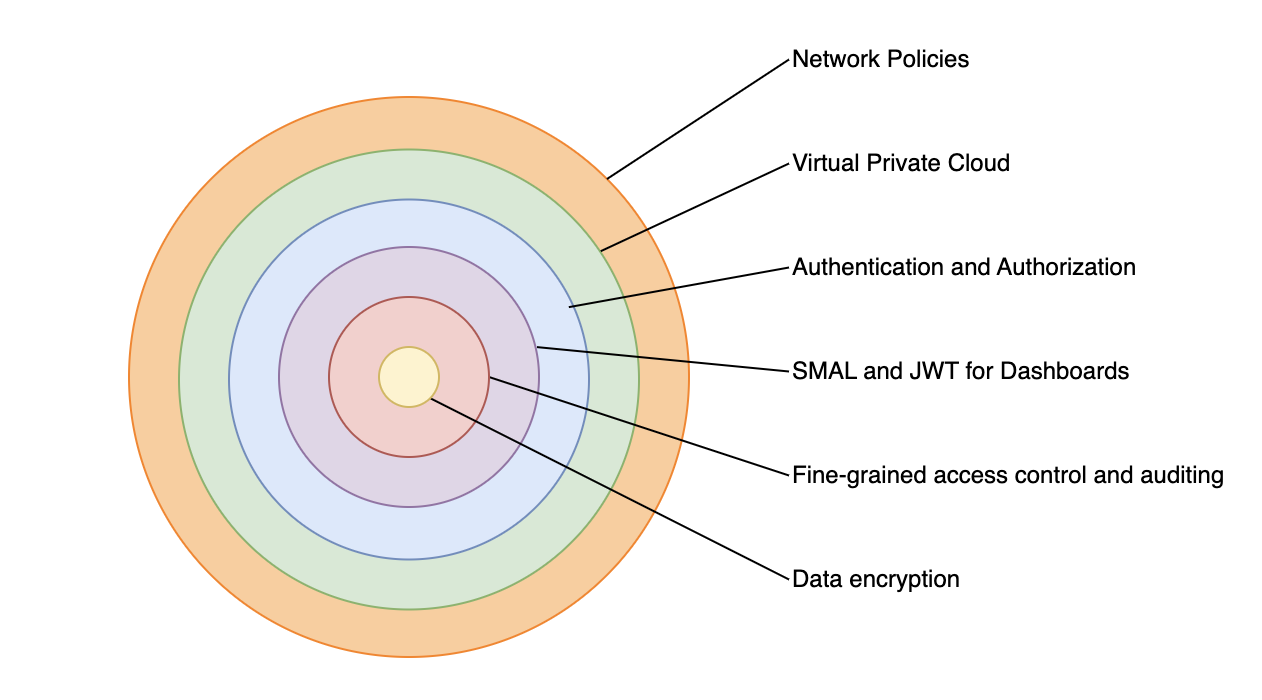
Laurie Anderson Is Quoting Me

Post Syndicated from Bruce Schneier original https://www.schneier.com/blog/archives/2026/05/laurie-anderson-is-quoting-me.html

Not by name, but Laurie Anderson quotes me in one of the tracks of her new album:

My favorite quote is from a cryptologist who said “If you think technology will solve your problems, you don’t understand technology and you don’t understand your problems.”

Also in interviews:

“Of course, it’s ridiculous, outrageous, blah, blah, blah,” Anderson says about the ad. ‘But, I mean, my favorite quote on this is from a cryptologist who said, ‘If you think technology will solve your problems, you don’t understand technology ­ and you don’t understand your problems.’ And I think I’m completely on board with that.”

People are telling me that she has been reciting this quote in performances for years. (I lost track of her since college and her 1981 hit “”https://www.youtube.com/watch?v=Vkfpi2H8tOE”>O Superman.”)

The origins of the quote is from Roger Needham:

If you think cryptography can solve your problem, you don’t understand your problem and you don’t understand cryptography.

I modified the quote in the preface to my 2000 book Secrets and Lies:

A few years ago I heard a quotation, and I am going to modify it here: If you think technology can solve your security problems, then you don’t understand the problems and you don’t understand the technology.

I can’t tell you why me in 2000 didn’t credit Needham by name. I should have.

I have used the quote pretty consistently since then. Somewhere along the line I dropped “security” from the phrase, and now say it more like Anderson quotes me:

If you think technology will solve your problem, you don’t understand your problem and you don’t understand technology.

I sometimes use singular and sometimes use plural. Sometimes I say “the problem” and “the technology.” But I think the quote flows better ending with just the word “technology.”

Ensure Code Integrity for AWS Lambda Functions with Automated Code Signing Using Terraform

Post Syndicated from Sourav Kundu original https://aws.amazon.com/blogs/devops/ensure-code-integrity-for-aws-lambda-functions-with-automated-code-signing-using-terraform/

Authors: Sourav Kundu and Joyson Neville Lewis.

In today’s cloud-native landscape, ensuring the integrity and authenticity of your serverless functions is critical for maintaining security and compliance. Organizations face increasing challenges in preventing the execution of tampered or malicious code in their AWS Lambda functions. These challenges intensify as deployment pipelines become more complex and distributed.

AWS Lambda code signing provides a robust security mechanism that guarantees only trusted, unmodified code executes in your Lambda functions. By implementing digital signatures, you can verify code integrity and authenticate the source, creating a secure foundation for your serverless applications.

This post shows you how to implement AWS Lambda code signing using Terraform, creating an automated, end-to-end security framework that prevents unauthorized code execution while maintaining operational efficiency.

Solution overview

This solution creates a comprehensive code signing pipeline that automatically signs Lambda deployment packages and enforces signature validation at runtime. The implementation uses AWS Signer with the SHA384-ECDSA algorithm for cryptographic security, combined with Terraform automation for consistent deployments across environments.

Figure 1: Architecture diagram of AWS Lambda signing with AWS Signer

Figure 1: Architecture diagram of AWS Lambda signing with AWS Signer

The architecture includes:

AWS Signer: Creates signing profiles and jobs with strong cryptographic algorithms

Amazon S3: Stores original and signed Lambda code with versioning enabled

AWS Lambda: Deployed with code signing enforcement in a VPC environment

AWS KMS: Provides encryption for CloudWatch logs and SQS dead letter queue

VPC Configuration: Isolates Lambda execution in private subnets with VPC endpoints

Walkthrough

This walkthrough demonstrates how to deploy a secure Lambda function with code signing enabled using Terraform, a popular infrastructure as code.

The deployment process includes these key steps:

  1. Set up AWS Signer signing profile with cryptographic configuration
  2. Create S3 bucket with versioning for code storage
  3. Configure automated code signing jobs
  4. Secure Lambda deployment
  5. Implement security best practices including KMS encryption and VPC isolation
  6. Deploy the infrastructure with Terraform

Link to GitHub repository: AWS Lambda Code Signing with Terraform.

Prerequisites

For this walkthrough, you should have the following prerequisites:

– An AWS account with appropriate permissions for AWS Signer, Lambda, S3, and VPC services

– Terraform >= 1.0 installed on your local machine

– AWS CLI configured with credentials that have necessary service permissions

– Basic understanding of AWS Lambda, Terraform, and infrastructure as code concepts

1. Setup AWS Signer Signing Profile

The foundation of our code signing implementation starts with creating an AWS Signer signing profile. This profile is the identity that defines the cryptographic algorithm and signature validity period.

1.1 Define the signing profile resource in your Terraform configuration:

   resource "aws_signer_signing_profile" "lambda_signing_profile" {
     platform_id = "AWSLambda-SHA384-ECDSA"
     name        = "${replace(var.name, "-", "_")}_lambda_signing_profile_${random_string.suffix.result}"
     signature_validity_period {
       value = 135
       type  = "MONTHS"
     }
   }

We use the AWSLambda-SHA384-ECDSA platform, which provides strong cryptographic security with SHA-384 hashing and ECDSA (Elliptic Curve Digital Signature Algorithm).

1.2 Configure the code signing configuration that enforces security policies:

   resource "aws_lambda_code_signing_config" "configuration" {
     allowed_publishers {
       signing_profile_version_arns = [aws_signer_signing_profile.lambda_signing_profile.version_arn]
     }
     policies {
       untrusted_artifact_on_deployment = "Enforce"
     }
     description = "Code signing configuration for ${var.name} Lambda function."
   }

The untrusted_artifact_on_deployment = "Enforce" policy ensures that Lambda rejects any unsigned or improperly signed code.

2. Create S3 bucket with versioning for code storage

Before the code can be signed, it needs to be packaged and stored in a versioned S3 bucket. AWS Signer requires S3 versioning to uniquely identify the source artifact for each signing job.

2.1 Create the S3 bucket with versioning enabled:

resource "aws_s3_bucket" "lambda_source" {
  bucket        = "${var.name}-lambda-source-${data.aws_caller_identity.current.account_id}"
  force_destroy = true
}

resource "aws_s3_bucket_versioning" "lambda_source" {
  bucket = aws_s3_bucket.lambda_source.id
  versioning_configuration {
    status = "Enabled"
  }
}

Versioning is not optional here — AWS Signer uses the S3 object version_id to reference the exact artifact to sign.

2.2 Package the Lambda function code and upload it to the bucket:

data "archive_file" "python_file" {
  type        = "zip"
  source_dir  = "${path.module}/lambda_function/"
  output_path = "${path.module}/lambda_function/lambda_function.zip"
}

resource "aws_s3_object" "lambda_zip" {
  bucket     = aws_s3_bucket.lambda_source.bucket
  key        = "lambda_function.zip"
  source     = data.archive_file.python_file.output_path
  etag       = filemd5(data.archive_file.python_file.output_path)
  depends_on = [aws_s3_bucket_versioning.lambda_source]
}

The archive_file data source zips the contents of the lambda_function/ directory, and the aws_s3_object uploads it to the versioned bucket. The depends_on ensures versioning is active before the upload, so the object gets a version_id that the signing job can reference.

3. Configure automated Code Signing jobs

The next step creates an automated signing job that processes your Lambda code and generates signed artifacts.

3.1 Upload your Lambda code and configure the signing job:

   resource "aws_signer_signing_job" "build_signing_job" {
     profile_name = aws_signer_signing_profile.lambda_signing_profile.name

     source {
       s3 {
         bucket  = aws_s3_bucket.lambda_source.bucket
         key     = aws_s3_object.lambda_zip.key
         version = aws_s3_object.lambda_zip.version_id
       }
     }

     destination {
       s3 {
         bucket = aws_s3_bucket.lambda_source.bucket
         prefix = "signed/"
       }
     }
   }

This signing job automatically processes the uploaded Lambda code, creating a signed version stored in the signed/ prefix of your S3 bucket.

4. Secure Lambda Deployment

The Lambda function is configured to use the signed code and enforce code signing.

4.1 Deploy the Lambda function using the signed artifact:

resource "aws_lambda_function" "lambda_run" {
  s3_bucket        = aws_signer_signing_job.build_signing_job.signed_object[0].s3[0].bucket
  s3_key           = aws_signer_signing_job.build_signing_job.signed_object[0].s3[0].key
  source_code_hash = data.archive_file.python_file.output_base64sha256
  function_name    = var.name
  role             = aws_iam_role.lambda_role.arn
  handler          = "handler.lambda_handler"
  runtime          = "python3.12"
  
  code_signing_config_arn = aws_lambda_code_signing_config.configuration.arn
  
  kms_key_arn = aws_kms_key.encryption.arn
  vpc_config {
    subnet_ids         = aws_subnet.private[*].id
    security_group_ids = [aws_security_group.lambda.id]
  }
  tracing_config {
    mode = "Active"
  }
  dead_letter_config {
    target_arn = aws_sqs_queue.dlq.arn
  }
}

The s3_bucket and s3_key reference the signed artifact produced by the signing job. Terraform resolves aws_signer_signing_job.build_signing_job.signed_object[0].s3[0] to the output location where AWS Signer wrote the signed package in step 3. This ensures Lambda always deploys the signed version, never the unsigned source.

The code_signing_config_arn ties the Lambda function to the code signing configuration from step 1. At deploy time, Lambda validates the artifact’s signature against the allowed publishers in that configuration. If the signature is missing, expired, or from an untrusted profile, the deployment is rejected.

5. Implement Security Best Practices

This implementation includes additional security layers beyond code signing to create a comprehensive security framework.

5.1 Create a KMS key with automatic key rotation and a least-privilege policy:

resource "aws_kms_key" "encryption" {
  enable_key_rotation     = true
  description             = "Key to encrypt all the cloud resources in ${var.name}."
  deletion_window_in_days = var.deletion_window_in_days
}

data "aws_iam_policy_document" "encryption_policy" {
  statement {
    sid    = "Enable IAM User Permissions"
    effect = "Allow"
    principals {
      type        = "AWS"
      identifiers = ["arn:aws:iam::${data.aws_caller_identity.current.account_id}:root"]
    }
    actions = [
      "kms:Encrypt", "kms:Decrypt", "kms:ReEncrypt*",
      "kms:GenerateDataKey*", "kms:DescribeKey",
      "kms:Create*", "kms:Enable*", "kms:List*",
      "kms:Put*", "kms:Update*", "kms:Revoke*",
      "kms:Disable*", "kms:Get*", "kms:Delete*",
      "kms:ScheduleKeyDeletion", "kms:CancelKeyDeletion",
      "kms:TagResource", "kms:UntagResource"
    ]
    resources = [aws_kms_key.encryption.arn]
  }
  statement {
    sid    = "Allow CloudWatch to use the key"
    effect = "Allow"
    principals {
      type        = "Service"
      identifiers = ["logs.amazonaws.com"]
    }
    actions = [
      "kms:Encrypt", "kms:Decrypt", "kms:ReEncrypt*",
      "kms:GenerateDataKey*", "kms:DescribeKey", "kms:CreateGrant"
    ]
    resources = [aws_kms_key.encryption.arn]
    condition {
      test     = "ArnEquals"
      variable = "kms:EncryptionContext:aws:logs:arn"
      values   = [local.cloudwatch_log_group_arn]
    }
  }
  statement {
    sid    = "Allow Lambda to use the key"
    effect = "Allow"
    principals {
      type        = "Service"
      identifiers = ["lambda.amazonaws.com"]
    }
    actions = [
      "kms:Encrypt", "kms:Decrypt", "kms:ReEncrypt*",
      "kms:GenerateDataKey*", "kms:DescribeKey", "kms:CreateGrant"
    ]
    resources = [aws_kms_key.encryption.arn]
    condition {
      test     = "StringEquals"
      variable = "kms:EncryptionContext:LambdaFunctionName"
      values   = [var.name]
    }
    condition {
      test     = "StringEquals"
      variable = "aws:RequestedRegion"
      values   = [var.region]
    }
  }
}

resource "aws_kms_key_policy" "encryption" {
  key_id = aws_kms_key.encryption.id
  policy = data.aws_iam_policy_document.encryption_policy.json
}

The enable_key_rotation = true setting enables automatic annual key rotation, a recommended security practice. The policy uses aws_iam_policy_document instead of inline JSON for better readability and validation. Each statement is scoped to a specific principal: the root account gets administrative access with enumerated actions (not kms:*), CloudWatch Logs can only use the key for the specific log group via the kms:EncryptionContext:aws:logs:arn condition, and Lambda access is constrained to the specific function name and region. This ensures no service can use the key beyond its intended scope.

5.2 Configure VPC with private subnets for Lambda isolation:

resource "aws_vpc" "main" {
  cidr_block           = var.vpc_cidr
  enable_dns_hostnames = true
  enable_dns_support   = true
}

resource "aws_subnet" "private" {
  count             = length(var.subnet_cidr_private)
  vpc_id            = aws_vpc.main.id
  cidr_block        = var.subnet_cidr_private[count.index]
  availability_zone = data.aws_availability_zones.available.names[count.index]
}

The enable_dns_hostnames and enable_dns_support settings are required for VPC endpoints to resolve via private DNS.

5.3 Add VPC endpoints so the Lambda function can reach CloudWatch Logs and SQS from the private subnets without internet access:

resource "aws_vpc_endpoint" "logs" {
  vpc_id              = aws_vpc.main.id
  service_name        = "com.amazonaws.${var.region}.logs"
  vpc_endpoint_type   = "Interface"
  subnet_ids          = aws_subnet.private[*].id
  security_group_ids  = [aws_security_group.endpoint_sg.id]
  private_dns_enabled = true
}

resource "aws_vpc_endpoint" "sqs" {
  vpc_id              = aws_vpc.main.id
  service_name        = "com.amazonaws.${var.region}.sqs"
  vpc_endpoint_type   = "Interface"
  subnet_ids          = aws_subnet.private[*].id
  security_group_ids  = [aws_security_group.endpoint_sg.id]
  private_dns_enabled = true
}

The Lambda function uses an SQS dead letter queue and hence requires the SQS endpoint. The private_dns_enabled setting allows the Lambda function to reach these services using their standard endpoints without any code changes. For the complete networking configuration including security groups and route tables, see the GitHub repository.

These security measures create defense in depth, combining code signing with encryption, network isolation, and secure communication channels.

6. Deploy the Infrastructure

With all the resources defined, initialize and deploy the complete infrastructure:

terraform init
terraform plan
terraform apply

The terraform init command downloads the required providers. The terraform plan command previews all the resources that will be created, and terraform apply provisions the entire stack — signing profile, S3 bucket, signing job, Lambda function, and all supporting infrastructure — in the correct dependency order.

Verification

After the deployment completes, verify that the signing profile, signing job, and Lambda code signing configuration are correctly set up.

Verify the signing profile is active:

aws signer list-signing-profiles --query "profiles[].{Name:profileName,Status:status}" --output table

Confirm the signing job completed successfully:

aws signer list-signing-jobs --status Succeeded --query "jobs[0].{JobId:jobId,Status:status,SignedObject:signedObject}" --output table

Verify the Lambda function has code signing enforced:

aws lambda get-function-code-signing-config --function-name <YOUR-FUNCTION-NAME> --query "{CodeSigningConfigArn:CodeSigningConfigArn}" --output table

Each command should return results confirming the resources are active and properly configured. If any command returns empty results, review the Terraform output for errors during deployment.

Cleaning Up

To avoid incurring future charges, delete the resources created in this walkthrough using the command:

terraform destroy

This command removes all resources including the Lambda function, S3 bucket, VPC components, and KMS keys. This command also deletes the signing profile and code signing configuration.

Conclusion

In this post, you learned how to implement AWS Lambda code signing using Terraform to create a secure, automated deployment pipeline. This solution ensures code integrity, prevents unauthorized modifications, and helps meet compliance requirements while maintaining operational efficiency through infrastructure as code.

The implementation demonstrates defense-in-depth security practices including cryptographic signing, encryption at rest, network isolation, and comprehensive monitoring. By automating the entire process with Terraform, you can consistently deploy secure Lambda functions across multiple environments and maintain security standards at scale.

For more information about AWS Lambda security best practices, see the AWS Lambda Developer Guide. To learn more about AWS Signer, visit the AWS Signer Developer Guide.


About the authors

Sourav Kundu

Sourav is a seasoned DevOps Consultant who specializes in helping organizations securely migrate to and efficiently build on the AWS cloud using modern software engineering practices. He believes that democratizing cloud knowledge is essential for driving innovation and is committed to helping others succeed in their cloud journey.

Joyson Neville Lewis

Joyson is a Sr. Conversational AI Architect with AWS Professional Services. Joyson worked as a Software/Data engineer before diving into the Conversational AI and Industrial IoT space. He assists AWS customers to materialize AI outcomes using Voice Assistant/Chatbot and IoT solutions.