We’re pleased to announce that Amazon Web Services (AWS) demonstrated continuous compliance with the Baseline Informatiebeveiliging Overheid (BIO) Thema-uitwerking Clouddiensten while increasing the AWS services and AWS Regions in scope. This alignment with the BIO Thema-uitwerking Clouddiensten requirements demonstrates our commitment to adhere to the heightened expectations for cloud service providers.
AWS customers across the Dutch public sector can use AWS certified services with confidence, knowing that the AWS services listed in the certificate adhere to the strict requirements imposed on the consumption of cloud-based services.
Baseline Informatiebeveiliging Overheid (BIO)
The BIO framework is an information security framework that the four layers of the Dutch public sector are required to adhere to. This means that it’s mandatory for the Dutch central government, all provinces, municipalities, and regional water authorities to be compliant with the BIO framework.
To support AWS customers in demonstrating their compliance with the BIO framework, AWS developed a Landing Zone for the BIO framework. This Landing Zone for the BIO framework is a pre-configured AWS environment that includes a subset of the technical requirements of the BIO framework. It’s a helpful tool that provides a starting point from which customers can further build their own AWS environment.
In addition to the BIO framework, there’s another information security framework designed specifically for the use of cloud services, called BIO Thema-uitwerking Clouddiensten. The BIO Thema-uitwerking Clouddiensten is a guidance document for Dutch cloud service consumers to help them formulate controls and objectives when using cloud services. Consumers can consider it to be an additional control framework on top of the BIO framework.
AWS strives to continuously bring services into scope of its compliance programs to help you meet your architectural and regulatory needs.
To learn more about our compliance and security programs, see AWS Compliance Programs. As always, we value your feedback and questions; reach out to the AWS Compliance team through the Contact Us page.
If you have feedback about this post, submit comments in the Comments section below.
It is time, once again, to celebrate the things that bring us together as tech and sci-fi lovers of the world. Today, to mark the upcoming high holiday, May the Fourth, we’re bridging our current reality to that time long ago in a galaxy far, far away by discussing the important issues: How in the world are we expected to survive in space without good internet?
Maybe it’s just me, but it seems absurd that the Death Star blueprints had to be literally carried off a spaceship on what’s essentially an external hard drive when the Jedi Council (RIP) could make perfect holographic representations of themselves from across the galaxy. Sure, you can argue that making an off-site copy and sneaking it out was the most covert way to go about it, but didn’t some of those characters in Rogue One die next to a giant antenna? One powerful enough that it controlled traffic into and out of the planet? Why did they have to transmit the plans to the closest battleship when, in theory, they could have sent them anywhere?
Never fear folks, we are here with what we think, based on a fair amount of research and our own humble opinions, are the answers. The truth is that current and future space internet still requires a good bit of hardware and networking. Let’s talk about where we’re at today, where we could be in the near future, and why the Rebel Scum may have, in fact, needed to run faster than Darth Vader, sacrificing all those lives, to get the Death Star schematics out of the sector.
How Do We Currently Move Data Through Space?
The internet, as we know and love it, is largely a function of hardware. To simplify things to their most base definition, the internet is a network of all the networks on the planet. Key word there, folks: planet. We use fiber optic cables to connect things on our terrestrial plane. What happens when we want to take things to space?
We have a variety of telecommunications operations that allow us to move data through space, but they’re nowhere near as fast as our fiber-optic cables, especially with recent advancements in fiber transmission. To make our space communications that fast, we’d need analogous hardware and/or scientific advancements in some very cool research areas.
For today’s conversation, here are the basics: when you transmit data (via any medium, not just through space), you convert it to a format computers can read, namely 0s and 1s. Typically we represent those values by moderating or fluctuating different types of electromagnetic waves. Currently the most prevalent form of data transmission in space is radio, and lasers are a developing, but usable technology.
Our Earth-based organizations move data through space both near and far using different networks of satellites and listening technology. Both use a satellite system called the Tracking and Data Relay Satellite (TRDS), which orbits Earth at a far enough range that relay points are nearly always visible to spacecraft like the International Space Station (ISS).
As you get further out into deep space, you can beam your signal directly to Earth—you just have a smaller window of time where orbits are aligned to make that possible. In that case, rovers stationed on other planets might co-opt other orbiters to relay signals back to Earth. The only problem there is that those orbiters typically have a scientific mission of their own, which means that the relay orbiter has to make a choice about what traffic is prioritized. These things also signal what space internet could be in the future: a network of relay satellites that transfer data planet to planet.
And, while networking on Earth is designed for and assumes real-time responses, scientists are working on Delay-Tolerant Networking (DTN) which is designed to handle significant delays and optimize routing based on that information. It’s not yet mainstream, but DTN has been successfully demonstrated on several missions, including on NASA’s Curiosity mission and the European Space Agency (ESA) Rosetta comet mission.
We see a couple of types of communications networks in the Star Wars films, and more in the non-canonical expanded universe:
Holonet: This is a galaxy-wide communication network mentioned in the films. It’s likely a complex system of satellites, relays, and subspace transceivers that facilitate rapid data transfer. This is similar to what we’re using and building today.
Subspace: While primarily used for faster-than-light travel, subspace might also be used for transmitting information. Subspace is a fictional realm that allows hyperspace travel, and it’s possible that communication signals could piggyback on this network for faster travel times.
Hyperspace Communication Droids: Legends lore (non-canon Star Wars material) mentions these specialized droids that could transmit messages via hyperspace, achieving near-instantaneous communication.
Since the last two depend on the fictional subspace zone, we’re really just considering the Holonet today. And, that works largely like our current technology, though they obviously have more satellites and relays to work with. That’s good news for our little thought experiment—we can look at file transmission times on our current Mars missions to get some analogous numbers.
Mars Transmission Times & File Sizes
Okay folks, now that the science is out of the way, let’s get down to brass tacks. Why was it possibly faster to move the Death Star plans via external storage than just transmitting them out once the planetary shields had been lifted? That answer depends on transmission times and file size. I’ll talk about transmission times first.
The current technology we use to communicate with Mars has a few different transmission times we can work with:
Radio, low-gain antenna: Up to a few kilobits per second (kbps)
Radio, high-gain antenna: Up to several megabits per second (Mpbs)
Laser, standard communications systems: Up to 10 gigabits per second (Gbps)
Laser, advanced systems under development: In development, but 10s of Gbps
For our purposes, let’s go ahead and choose two and use a 10GB file as an example. The basic transmission time formula is:
Transmission time = file size / data rate
Assuming radio waves and a high-gain antenna:
Transmission time = (10GB * 8 bits) / (1Mbps) = 80,000 seconds, or about 22 hours
Assuming laser communications with a standard system:
We have two main canonical sources of truth we can use to infer the file size of the Death Star schematics: A New Hope and Rogue One: A Star Wars Story. (The plans were discussed in the Clone Wars, but not in detail.) Full disclosure: I used AI tools to assist with our file size estimations.
A New Hope
In the OG, we get a glimpse of the plans the rebels have smuggled out as they plan to attack the Death Star, and we can use these to make some assumptions about file size. Interestingly, these plans were actually created for the movie by a few scientists at NASA’s Jet Propulsion Labs (JPL), and they were originally credited in the film.
As easy as shooting womp rats.
Factors to consider about file size:
Visual Complexity: The schematics we see on the holographic projectors show detailed technical diagrams with various sections, labels, and annotations.
Color Depth: While the movie doesn’t definitively show color, for the sake of estimation, let’s assume the plans are grayscale (requiring 1 byte per pixel).
Resolution: Estimating the exact resolution from the movie is difficult. However, considering the detail visible on screen and the technology of the time (1977), a conservative guess might be a resolution similar to standard definition video (around 480p).
Calculating File Size—A Conservative Estimate
The formula for calculating file size per image is:
File size per image = Width x Height x Color Depth
Let’s assume the Death Star plans are displayed on a holographic projector with a resolution of 640 x 480 pixels (a common standard definition resolution). If they are grayscale images, they would require 1 byte per pixel for color depth, so:
However, the plans likely consist of multiple schematics and blueprints. In the movie, we see various sections and scrolling text, suggesting a considerable amount of information.
The formula for calculating total file size is:
Total file size = File size per image * Number of images
Let’s assume the Death Star plans consist of a total of 100 grayscale images (a very rough estimate), so:
Total file size = 307,200 bytes/image * 100 images Total file size = 30,720,000 bytes
1MB is equal to 1,048,576 bytes, so that’s 29.3MB (30,720,000 bytes / 1,048,576 bytes/MB).
Remember, this is a very rough estimate.
The actual file size could be much larger or smaller depending on factors like:
Compression: The Death Star technology might utilize advanced data compression techniques, significantly reducing the file size.
Vector Graphics: If the plans are stored as vector graphics (scalable images), the file size would be smaller compared to bitmaps (storing pixel information).
Additional Data: The data card might contain additional information beyond visual schematics, like text descriptions, material specifications, etc., which could increase the file size.
Taking everything into account, a reasonable guess for the Death Star plans file size in Star Wars: A New Hope could be in the ballpark of 20 to 50 megabytes. This is enough to hold a significant amount of technical data but still fit on a reasonably sized data card for the time period the movie depicts (1977).
Rogue One
In Rogue One, we don’t actually see the plans in detail like we do in A New Hope, but we do have a short clip showing digital blueprints. Based on what we can glean from that and other newer, canonical sources, which employ 3D holograms, here’s a revised estimate for the Death Star schematics file size:
Factors to consider about file size:
Data Complexity: Rogue One reveals plans that include detailed schematics, technical readouts, and potentially 3D models. These elements significantly increase the file size compared to our previous estimate based on static images.
3D Model Complexity: The size of 3D models depends on the level of detail. High-resolution models with intricate textures would require more data than simpler ones.
Data Hierarchy: The plans likely involve a layered structure, with overviews and deep dives into specific sections. This adds to the overall file size.
Compression: The presence of data compression is unknown. Compression algorithms can significantly reduce file size, but the effectiveness depends on the data type.
Gotta love a data center.
Estimated Range:
Given these factors, here’s a possible range for the Death Star schematics:
Low-End Estimate (100s of GB):
Moderately complex 3D models.
Some level of data compression.
Focus on essential schematics and technical data.
High-End Estimate (Low Single-Digit TB):
Highly detailed 3D models encompassing the entire Death Star.
Limited or no data compression.
Extensive data beyond core schematics, including maintenance procedures, weapon system details, etc.
Final Call?
Sure, we don’t know if data storage techniques are different in the Star Wars universe, and sure, the difference between technology in 1977 vs. 2016 gives sci-fi writers are a lot more to work with, but considering the complexity of the Death Star and the variety of data hinted at in Rogue One, the schematics file size likely falls somewhere between hundreds of gigabytes to a low single-digit terabyte. Frankly, despite the New Hope plans being our original introduction to the universe, this range is more realistic for a project of such immense scale.
Of course, with a file size in the 100s of GBs or low TBs, it makes a lot more sense why the Rebels didn’t attempt to transmit the files much, much further away. We know from the movie that the Death Star plans were on a relatively isolated planet in an Imperial-controlled quadrant, and who knows how large quadrants are.
For the sake of argument, let’s say the Death Star schematics were 1TB and there’s a safe planet at the equivalent distance of Mars. Transmitting the files via radio with a high-gain antenna would take about 2330 hours, and transmitting via laser would take 217 hours.
With that in mind, even though it’s pretty old school, it was probably faster to put the files on a drive on a spaceship, and then have that spaceship get those files where they needed to go (you know, not accounting for misadventures).
Always Have a Backup: Is a Droid the Safest Way to Transmit Files?
The most confusing part of this whole discussion is why, once they were past the “Darth Vader is attempting to murder us” part, they didn’t make several copies of the data and distribute it to various, separate entities. The urgency of the mad rush of Luke trying to reach the Rebels is compelling and all, but also an excellent reason you should always have a geographically separated backup. R2-D2’s badassery notwithstanding, the fate of the universe should have some redundancy.
If It Works, It Works
Hey, in the end, we really can’t complain. Luke got the files to Leia; Leia goes on to be instrumental in the Rebel victories against not one, but two Death Stars, and we all just had to endure the dark times of the prequels before we got the compelling story of Rogue One. Cheers, Star Wars fans, and May the Fourth be with you.
Kernel developers are encouraged to send their changes in small batches as
a way of making life easier for reviewers. So when a longtime developer
and maintainer hits the list with a 437-patch series touching 859 files,
eyebrows are certain to head skyward. Specifically, this series
from Jens Axboe is cleaning up one of the core abstractions that has
been part of the Linux kernel almost since the beginning; authors of device
drivers (among others) will have to take note.
Security updates have been issued by Fedora (chromium, grub2, httpd, kernel, libcoap, matrix-synapse, python-pip, and rust-pythonize), Red Hat (kernel and libxml2), SUSE (kernel), and Ubuntu (eglibc, glibc and php7.4, php8.1, php8.2).
In a tech-driven field, staying updated isn’t an option—it’s essential. At Grab, we’re committed to providing top-notch technology services. However, keeping pace can be demanding. At one point in time, our GitLab instance was trailing by roughly 14 months of releases. This blog post recounts our experience updating and formulating a consistent upgrade routine.
Recognising the need to upgrade
Our team, while skilled, was still learning GitLab’s complexities. Regular stability issues left us little time for necessary upgrades. Understanding the importance of upgrades for our operations to get latest patches for important security fixes and vulnerabilities, we started preparing for GitLab updates while managing system stability. This meant a quick learning and careful approach to updates.
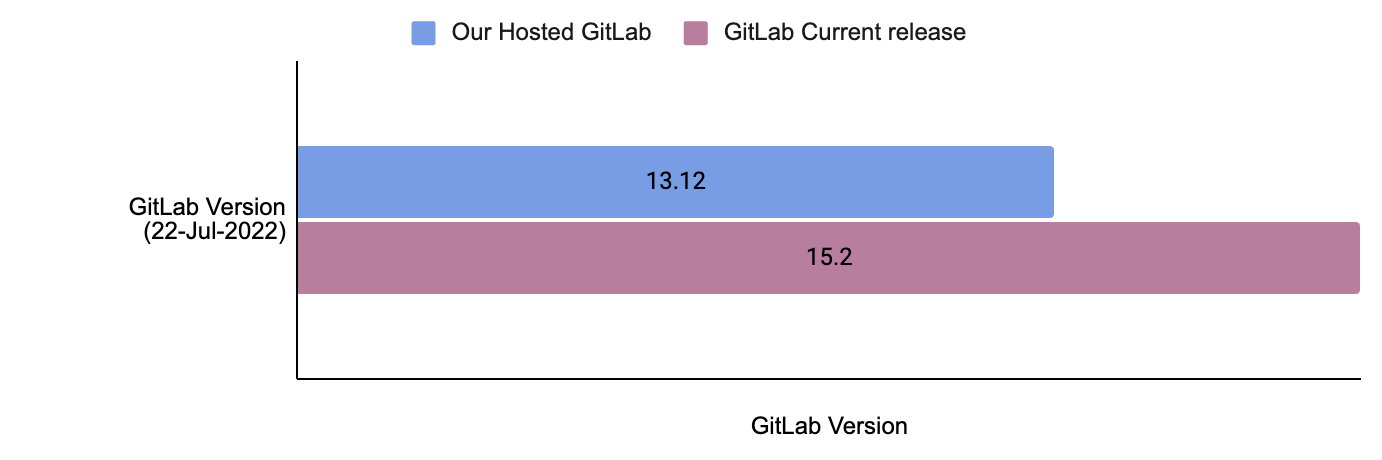
The following image illustrates the version discrepancy between our self-hosted GitLab instance and the official most recent release of GitLab as of July 2022. GitLab follows a set release schedule, issuing one minor update monthly and rolling out a major upgrade annually.
Fig 1. The difference between our hosted version and the latest available GitLab version by 22 July 2022
Addressing fears and concerns
We were concerned about potential downtime, data integrity, and the threat of encountering unforeseen issues. GitLab is critical for the daily activities of Grab engineers. It serves a critical user base of thousands of engineers actively using it, hosting multiple mono repositories with code bases ranging in size from 1GB to a sizable 15GB. When taking into account all its artefacts, the overall imprint of a monorepo can extend to an impressive 39TB.
Our self-hosted GitLab firmly intertwines with multiple critical components. We’ve aligned our systems with GitLab’s official reference architecture for 5,000 users. We use Terraform to configure complete infrastructure with immutable Amazon Machine Images (AMIs) built using Packer and Ansible. Our efficient GitLab setup is designed for reliable performance to serve our wide user base. However, any fault leading to outages can disrupt our engineers, resulting in a loss of productivity for hundreds of teams.
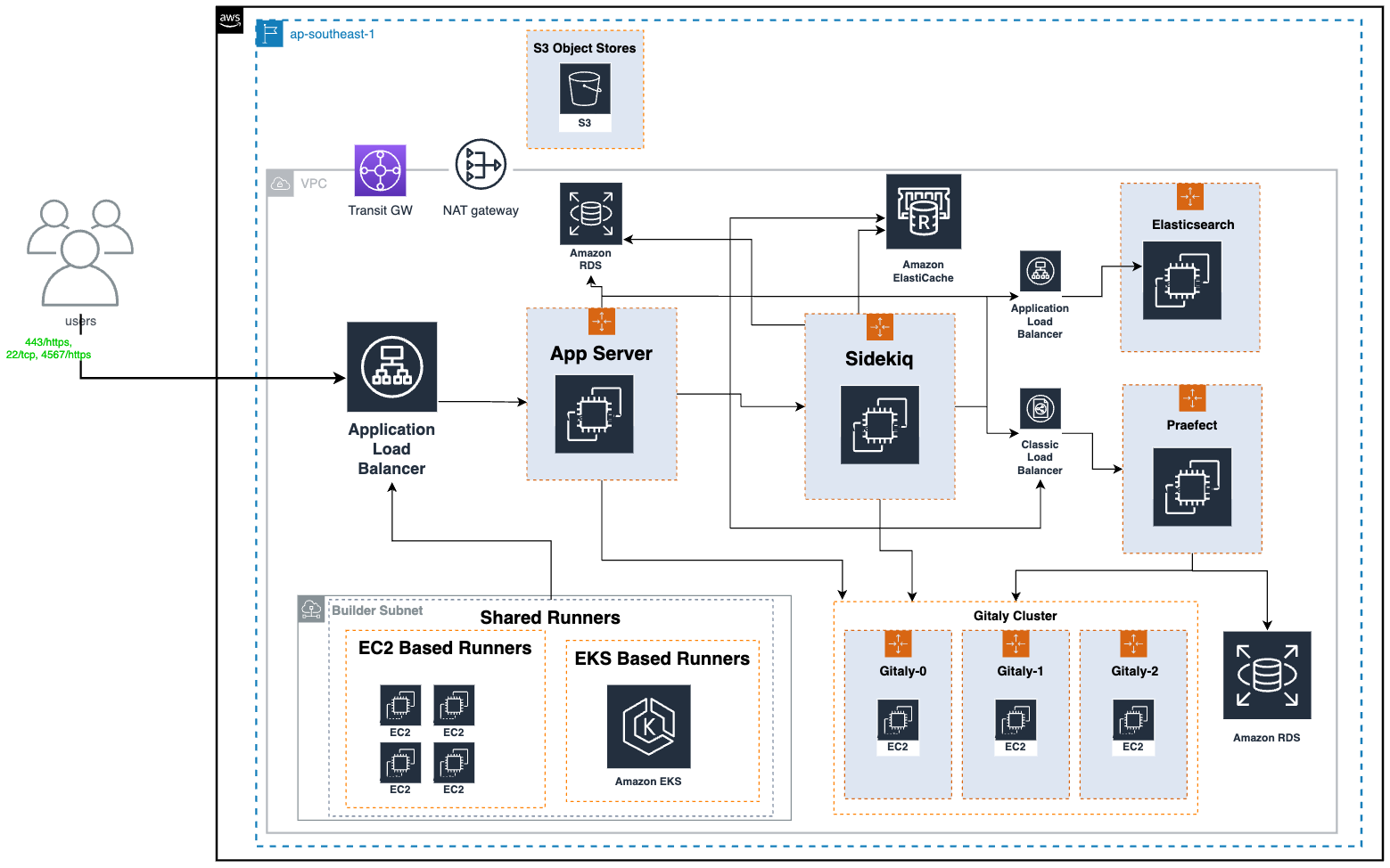
High-level GitLab Architecture Diagram
The above is the top level architecture diagram of our GitLab infrastructure. Here are the major components of the GitLab architecture and their functions:
Gitaly: Handles low-level Git operations for GitLab, such as interacting directly with the code repository present on disk. It’s important to mention that these code repositories are also stored on the same Gitaly nodes, using the attached Amazon Elastic Block Store (Amazon EBS) disks.
Praefect: Praefect in GitLab acts as a manager, coordinating Gitaly nodes to maintain data consistency and high availability.
Sidekiq: The background processing framework for GitLab written in Ruby. It handles asynchronous tasks in GitLab, ensuring smooth operation without blocking the main application.
App Server: The core web application server that serves the GitLab user interface and interacts with other components.
The importance of preparation
Recognising the complexity of our task, we prioritised careful planning for a successful upgrade. We studied GitLab’s documentation, shared insights within the team, and planned to prevent data losses.
To minimise disruptions from major upgrades or database migrations, we scheduled these during weekends. We also developed a checklist and a systematic approach for each upgrade, which include the following:
Diligently go through the release notes for each version of GitLab that falls within the scope of our upgrade.
Read through all dependencies like RDS, Redis, and Elasticsearch to ensure version compatibility.
Create documentation outlining new features, any deprecated elements, and changes that could potentially impact our operations.
Generate immutable AMIs for various components reflecting the new version of GitLab.
Revisit and validate all the backup plans.
Refresh staging environment with production data for accurate, realistic testing and performance checks, and validation of migration scripts under conditions similar to the actual setup.
Upgrade the staging environment.
Conduct extensive testing, incorporating both automated and manual functional testing, as well as load testing.
Conduct rollback tests on the staging environment to the previous version to confirm the rollback procedure’s reliability.
Inform all impacted stakeholders, and provide a defined timeline for upcoming upgrades.
We systematically follow GitLab’s official documentation for each upgrade, ensuring compatibility across software versions and reviewing specific instructions and changes, including any deprecations or removals.
The first upgrade
Equipped with knowledge, backup plans, and a robust support system, we embarked on our first GitLab upgrade two years ago. We carefully followed our checklist, handling each important part systematically. GitLab comprises both stateful (Gitaly) and stateless (Praefect, Sidekiq, and App Server) components, all managed through auto-scaling groups. We use a ‘create before destroy’ strategy for deploying stateless components and an ‘in-place node rotation’ method via Terraform for stateful ones.
We deployed key parts like Gitaly, Praefect, Sidekiq, App Servers, Network File System (NFS) server, and Elasticsearch in a specific sequence. Starting with Gitaly, followed by Praefect, then Sidekiq and App Servers, and finally NFS and Elasticsearch. Our thorough testing showed this order to be the most dependable and safe.
However, the journey was full of challenges. For instance, we encountered issues such as the Gitaly cluster falling out of sync for monorepo and the Praefect server failing to distribute the load effectively. Praefect assigns a primary Gitaly node for each repository to host it. All write operations are sent to the repository’s primary node, while read requests are spread across all synced nodes in the Gitaly cluster. If the Gitaly nodes aren’t synced, Praefect will redirect all write and read operations to the repository’s primary node.
Gitaly is a stateful application, we upgraded each Gitaly node with the latest AMI using an in-place node rotation strategy. In older versions of GitLab (up to v14.0), if a Gitaly node is unhealthy, Praefect would immediately update the primary node for the repository to any healthy Gitaly node. After the rolling upgrade for a 3-node Gitaly cluster, repositories were mainly concentrated on only one Gitaly node.
In our situation, a very busy monorepo was assigned to a Gitaly node that was also the main node for many other repositories. When real traffic began after deployment, the Gitaly node had trouble syncing the monorepo with the other nodes in the cluster.
Because the Gitaly node was out of sync, Praefect started sending all changes and access requests for monorepo to this struggling Gitaly node. This increased the load on the Gitaly server, causing it to fail. We found this to be the main issue and decided to manually move our monorepo to a Gitaly node that was less crowded. We also added a step to validate primary node distribution to our deployment checklist.
This immediate failover behaviour changed in GitLab version 14.1. Now, a primary is only elected lazily when a write request arrives for any repository. However, since we enabled maintenance mode before the Gitaly deployment, we didn’t receive any write requests. As a result, we did not see a shift in the primary node of the monorepo with new GitLab versions.
Regular upgrades: Our new normal
Embracing the practice of consistent upgrades dramatically transformed the way we operate. We initiated frequent upgrades and implemented measures to reduce the actual deployment time.
Perform all major testing in one day before deployment.
Prepare a detailed checklist to follow during the deployment activity.
Reduce the minimum number of App Server and Sidekiq Servers required just after we start the deployment.
Upgrade components like App Server and Sidekiq in parallel.
Automate smoke testing to examine all major workflows after deployment.
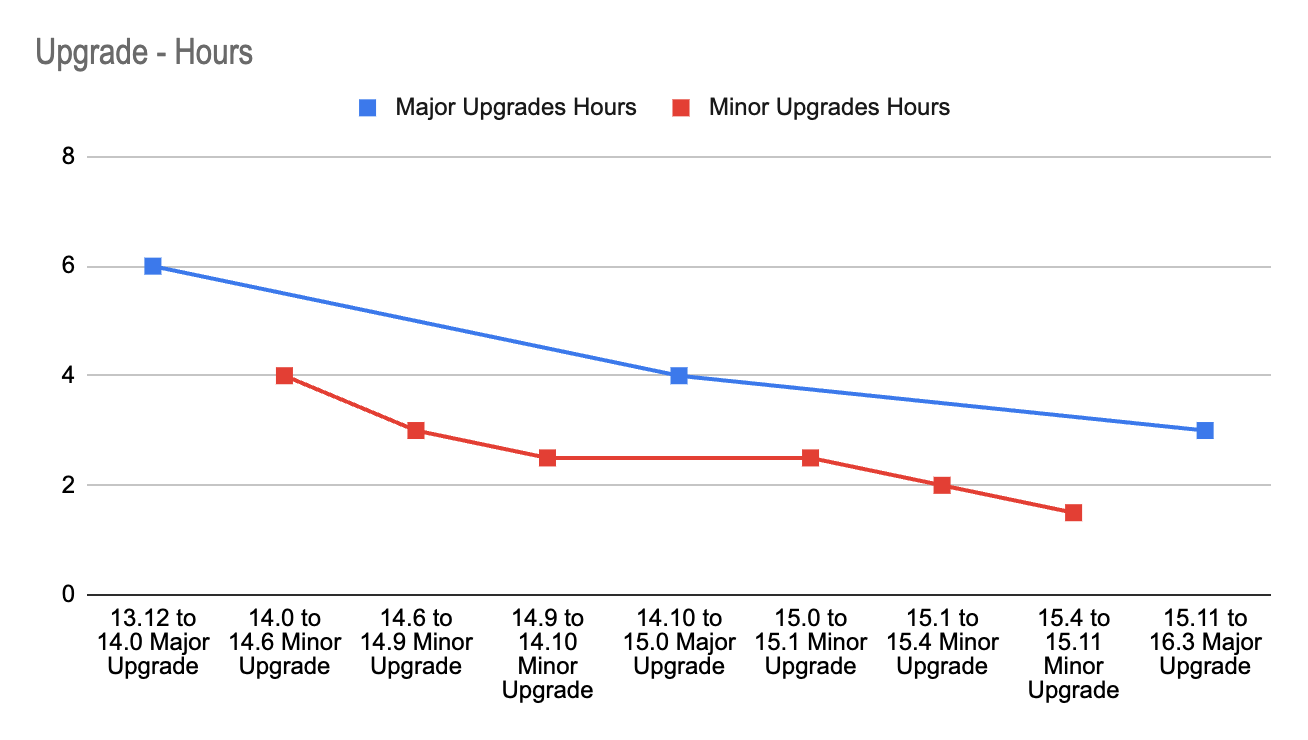
Leveraging the lessons learned and the experience gained with each upgrade, we successfully cut the time spent on the entire operation by 50%. The image-3 shows how we reduced our deployment time for major upgrades from 6 hours to 3 hours and our deployment time for minor upgrades from 4 to 1.5 hours.
Each upgrade enriched our comprehensive knowledge base, equipping us with insights into the possible behaviours of each component under varying circumstances. Our growing experience and enhanced knowledge helped us achieve successful upgrades with less downtime with each deployment.
Rather than moving up one minor version at a time, we learned about the feasibility of skipping versions. We began using the GitLab Upgrade Path. This method allowed us to skip several versions, closing the distance to the latest version with fewer deployments. This approach enabled us to catch up on 24 months’ worth of upgrades in just 11 months, even though we started 14 months behind.
Time taken in hrs for each upgrade. The blue line depicts major and the red line is for minor upgrades
Overcoming challenges
Our journey was not without hurdles. We faced challenges in maintaining system stability during upgrades, navigating unexpected changes in functionality post upgrades, and ensuring data integrity.
However, these challenges served as an opportunity for our team to innovate and create robust workarounds. Here are a few highlights:
Unexpected project distribution: During upgrades and Gitaly server restarts, we observed unexpected migration of the monorepo to a crowded Gitaly server, resulting in higher rate limiting. We manually updated primary nodes for the monorepo and made this validation as a part of our deployment checklist.
NFS deprecation: We migrated all required data to S3 buckets and deprecated NFS to become more resilient and independent of Availability Zone (AZ).
Handling unexpected Continuous Integration (CI) operations: A sudden surge in CI operations sometimes resulted in rate limiting and interrupted more essential Git operations for developers. This is because GitLab uses different RPC calls and their concurrency for SSH and HTTP operations. We encouraged using HTTPS links for GitLab CI and automation script and SSH links for regular Git operations.
Right-sizing resources: We countered resource limitations by right-sizing our infrastructure, ensuring each component had optimal resources to function efficiently.
Performance testing: We conducted performance testing of our GitLab using the GitLab Performance Tool (GPT). In addition, we used our custom scripts to load test Grab specific use cases and mono repositories.
Limiting maintenance windows: Each deployment required a maintenance window or downtime. To minimise this, we structured our deployment processes more efficiently, reducing potential downtime and ensuring uninterrupted service for users.
Dependency on GitLab.com image registry: We introduced measures to host necessary images internally, which increased our resilience and allowed us to cut ties with external dependencies.
The results
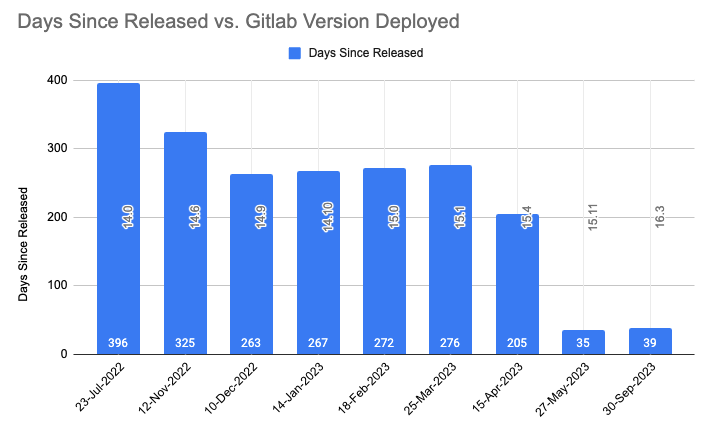
Through careful planning, we’ve improved our upgrade process, ensuring system stability and timely updates. We’ve also reduced the delay in aligning with official GitLab releases. The image below displays how the time delay between release date and deployment has been reduced with each upgrade. It sharply brought down from 396 days (around 14 months) to 35 days.
At the time of this article, we’re just two minor versions behind the latest GitLab release, with a strong focus on security and resilience. We are also seeing a reduced number of reported issues after each upgrade.
Our refined process has allowed us to perform regular updates without any service disruptions. We aim to leverage these learnings to automate our upgrade deployments, painting a positive picture for our future updates, marked by efficiency and stability.
Time delay between official release date and date of deployment
Looking ahead
Our dedication extends beyond staying current with the most recent GitLab versions. With stabilised deployment, we are now focusing on:
Automated upgrades: Our efforts extend towards bringing in more automation to enhance efficiency. We’re already employing zero-downtime automated upgrades for patch versions involving no database migrations, utilising GitLab pipelines. Looking forward, we plan to automate minor version deployments as well, ensuring minimal human intervention during the upgrade process.
Automated runner onboarding for service teams: We’ve developed a ‘Runner as a Service’ solution for our service teams. Service teams can create their dedicated runners by providing minimal details, while we manage these runners centrally. This setup allows the service team to stay focused on development, ensuring smooth operations.
Improved communication and data safety: We’re regularly communicating new features and potential issues to our service teams. We also ensure targeted solutions for any disruptions. Additionally, we’re focusing on developing automated data validation via our data restoration process.
Focus on development: With stabilised updates, we’ve created an environment where our development teams can focus more on crafting new features and supporting ongoing work, rather than handling upgrade issues.
Key takeaways
The upgrade process taught us the importance of adaptability, thorough preparation, effective communication, and continuous learning. Our ‘No Version Left Behind’ motto underscores the critical role of regular tech updates in boosting productivity, refining processes, and strengthening security. These insights will guide us as we navigate ongoing technological advancements.
Below are the key areas in which we improved:
Enhanced testing procedures: We’ve fine-tuned our testing strategies, using both automated and manual testing for GitLab, and regularly conducting performance tests before upgrades.
Approvals: We’ve designed approval workflows that allow us to obtain necessary clearances or approvals before each upgrade efficiently, further ensuring the smooth execution of our processes.
Improved communication: We’ve improved stakeholder communication, regularly sharing updates and detailed documents about new features, deprecated items, and significant changes with each upgrade.
Streamlined planning: We’ve improved our upgrade planning, strictly following our checklist and rotating the role of Upgrade Ownership among team members.
Optimised activity time: We’ve significantly reduced the time for production upgrade activity through advanced planning, automation, and eliminating unnecessary steps.
Efficient issue management: We’ve improved our ability to handle potential GitLab upgrade issues, with minimal to no issues occurring. We’re prepared to handle any incidents that could cause an outage.
Knowledge base creation and automation: We’ve created a GitLab knowledge base and continuously enhanced it with rich content, making it even more invaluable for training new team members and for reference during unexpected situations. We’ve also automated routine tasks to improve efficiency and reduce manual errors.
Join us
Grab is the leading superapp platform in Southeast Asia, providing everyday services that matter to consumers. More than just a ride-hailing and food delivery app, Grab offers a wide range of on-demand services in the region, including mobility, food, package and grocery delivery services, mobile payments, and financial services across 428 cities in eight countries.
Powered by technology and driven by heart, our mission is to drive Southeast Asia forward by creating economic empowerment for everyone. If this mission speaks to you, join our team today!
This post is written by Ben Freiberg, Senior Solutions Architect.
Developers often choose AWS Step Functions to orchestrate the services that comprise their applications. Step Functions is a visual workflow service that makes it easier for developers to build distributed applications, automate processes, orchestrate microservices, and create data and machine learning (ML) pipelines. Step Functions integrates with over 220 AWS services and any publicly accessible HTTP endpoint. Step Functions provides many features that help developers build, such as built-in error handling, real-time and auditable workflow execution history, and large-scale parallel processing.
Several areas can be time consuming for developers when testing Step Functions workflows. For example, authentication with external services, input/output processing, AWS IAM permission, or intrinsic functions. To simplify and speed up resolving these issues, Step Functions released a new capability last year to test individual states: the TestState API. This feature allows you to test states independently from the execution of your workflow. You can change the input and test different scenarios without the need to deploy your workflow or execute the whole state machine. This feature is available for all task, choice, and pass states.
Since developers spend significant time in IDEs and terminals, TestState is also available via an API. This allows you to iterate over changes for an individual state and lets you refine the input/output processing or conditional logic in a choice state without leaving your IDE. In this post, you’ll learn how the TestState API can speed up your testing and development.
Getting started with TestState
Suppose that you are developing a payment processing workflow that consists of three states. First, a Choice state that checks the type of payment based on the input data. Depending on the type, it calls either an AWS Lambda function or an external endpoint. The task state that invokes the Lambda function includes some input/output processing.
To get started with the TestState API, you must create an IAM role that the service can assume. The role must contain the required IAM permissions for the resources your state is accessing. For information about the permissions a state might need, see IAM permissions to test a state. The following snippet shows the minimal necessary permissions:
Next, you must provide the definition of the state being tested. The choice state is configured to check the type of payment and if the voucherId is present, in case of a voucher. The following snippet shows the state definition:
The response shows that the test did not encounter any errors and that the next state would be invoking the Lambda function to process the voucher as expected.
Because the TestState API takes the state definition as an argument, you do not have to redeploy the state machine when changing the state definition. Instead, you can iterate and test your settings by passing the modified state definition to the TestState API.
Using inspection levels
For each state, you can specify the amount of detail you want to view in the test results. These details provide additional information about the state that you are testing. For example, if you’ve used any input and output data processing filters, such as InputPath or ResultPath in a state, you can view the intermediate and final data processing results. Step Functions provides the following levels to specify the details you want to view, INFO, DEBUG, and TRACE. All these levels return the status and nextState fields.
Next, the Lambda Invoke state is tested. In this scenario, the state includes input/output processing. The output from the function is transformed by renaming and restructuring the field and then merged with the original input. This is the relevant part of the task definition:
This time test using the Step Functions console, which can make it easier to understand the input/output processing steps. To get started, open the state machine in Workflow Studio and select the state, and then choose Test State. Make sure to select DEBUG as the inspection level. After testing the state, switch to the Input/output processing tab to check the intermediate steps.
When you call the TestState API and set the inspectionLevel parameter to DEBUG, the API response includes an object called inspectionData. This object contains fields to help you inspect how data was filtered or manipulated within the state when it was executed. This data is shown in the Input/output processing tab in the console.
Being able to see all the processing steps easily in one place allows developers to spot issues and iterate more quickly, saving time.
Testing third-party endpoint integrations
Applications might call third-party endpoints that require authentication. Step Functions offers the HTTPS endpoint resource to connect to third-party HTTP targets outside of the AWS Cloud.
HTTPS endpoints use Amazon EventBridge connections to manage the authentication credentials for the target. This defines the authorization type used, which can be a basic authentication with a username and password, an API key, or OAuth. EventBridge connections use AWS Secrets Manager to store the secret. This keeps the secrets out of the state machine, reducing the risks of accidentally exposing your secrets in logs or in the state machine definition.
Getting the authentication configuration right might involve several time-consuming iterations. With the TRACE inspection level, developers can see the raw HTTP request and response, which is useful for verifying headers, query parameters, and other API-specific details. This option is only available for the HTTP Task. You can also view the secrets included in the EventBridge connection. To do this, you must set the revealSecrets parameter to true in the TestState API. This can help verifying that the correct authentication parameters are used.
To get started, ensure that the execution role used for testing has the necessary permissions, as shown here:
When you test the HTTP task, make sure to set the inspection level to TRACE. Then use the HTTP request and response tab to check the details. This capability saves you time when debugging complex authentication issues.
Automating testing
Testing is not only a manual activity to get the configuration right. Most often, tests are run as part of a suite of tests, which are automatically performed to validate the correct behavior. It also prevents regressions when making changes. The TestState API can easily be integrated in such tests as well.
The following snippet shows a test using the Jest framework in JavaScript. The test checks if the correct next state is produced given a definition and input. The definition resides in a different file, which can also be used for infrastructure as code (IaC) to create the state machine.
const { SFNClient, TestStateCommand } = require("@aws-sdk/client-sfn");
// Import the state definition
const definition = require("./definition.json");

const client = new SFNClient({});

describe("Step Functions", () => {
  test("that next state is correct", async () => {
    const command = new TestStateCommand({
      definition: JSON.stringify(definition),
      roleArn: "arn:aws:iam::<account-id>:role/<role-with-sufficient-permissions>",
      input: "{}" # Adjust as necessary
    });
    const data = await client.send(command);

    expect(data.status).toBe("SUCCEEDED");
    expect(data.nextState).toBe("Success"); # Adjust as necessary
  });
});
With automated tests, you can safely change your workflow definitions without the need for manual efforts. That way, you are immediately alerted if a change would result in an incompatibility.
With TestState you can increase your test coverage with less effort because you can test states directly. This is especially helpful for complex workflows and states that require a specific set of circumstances to reach them. It makes it easier to validate the correctness of your error-handling as well. You can now test the potentially many combinations of your configured Retriers and Catchers much easier.
Conclusion
The TestState API helps developers to iterate faster, resolve issues efficiently, and deliver high-quality applications with greater confidence. By enabling developers to test individual states independently and integrating testing into their preferred development workflows, it simplifies the debugging process and reduces context switches. Whether testing input/output processing, authentication with external services, or third-party endpoint integrations, the TestState API can be a useful tool for testing.
In today’s data-driven landscape, the efficiency and accessibility of querying tools play a crucial role in driving businesses forward. Amazon Redshift recently announced integration with Visual Studio Code (), an action that transforms the way data practitioners engage with Amazon Redshift and reshapes your interactions and practices in data management. This innovation not only unlocks new possibilities, but also tackles long-standing challenges in data analytics and query handling.
While the Amazon Redshift query editor v2 (QE v2) offers a smooth experience for data analysts and business users, many organizations have data engineers and developers who rely on VS Code as their primary development tool. Traditionally, they had to use QE v2 for their development tasks, which wasn’t the most optimal solution. However, this new feature resolves that issue by enabling data engineers and developers to seamlessly integrate their development work within VS Code, enhancing their workflow efficiency.
Visual Studio Code’s integration simplifies access to database objects within Redshift data warehouses, offering an interface you’re already familiar with to run and troubleshoot your code.
By integrating Amazon Redshift Provisioned cluster, and Amazon Redshift Serverless with the popular and free VS Code, you can alleviate concerns about costs associated with third-party tools. This integration allows you to reduce or eliminate licensing expenses for query authoring and data visualization, because these functionalities are now available within the free VSCode editor.
The support for Amazon Redshift within VS Code marks a significant leap towards a more streamlined, cost-effective, and user-friendly data querying experience.
In this post, we explore how to kickstart your journey with Amazon Redshift using the AWS Toolkit for VS Code.
Solution overview
This post outlines the procedure for creating a secure and direct connection between your local VS Code environment and the Redshift cluster. Emphasizing both security and accessibility, this solution allows you to operate within the familiar VS Code interface while seamlessly engaging with your Redshift database.
The following diagram illustrates the VS Code connection to Amazon Redshift deployed in a private VPC.
To connect to a data warehouse using VS Code from the Toolkit, you can choose from the following methods:
Use temporary credentials (this option is only available with Amazon Redshift Provisioned cluster)
In the following sections, we show how to establish a connection with a database situated on an established provisioned cluster or a serverless data warehouse from the Toolkit.
Prerequisites
Before you begin using Amazon Redshift Provisioned Cluster and Amazon Redshift Serverless with the AWS Toolkit for Visual Studio Code, make sure you’ve completed the following requirements:
Set up a Amazon Redshift or Amazon Redshift serverless data warehouse.
Establish a connection to your data warehouse using user credentials
To connect using the database user name and password, complete the following steps:
Navigate through the Toolkit explorer, expanding the AWS Region housing your data warehouse (for example, US East (N. Virginia)).
In the Toolkit, expand the Redshift section and choose your specific data warehouse.
In the Select a Connection Type dialog, choose Database user name and password and provide the necessary information requested by the prompts.
After the Toolkit establishes the connection to your data warehouse, you will be able to view your available databases, tables, and schemas directly in the Toolkit explorer.
Establish a connection to your data warehouse using Secrets Manager
To connect using Secrets Manager, complete the following steps:
Navigate through the Toolkit explorer, expanding the AWS Region housing your data warehouse.
In the Toolkit, expand the Redshift section and choose your specific data warehouse.
In the Select a Connection Type dialog, choose Secrets Manager and fill in the information requested at each prompt.
After the Toolkit establishes a successful connection to your data warehouse, you’ll gain visibility into your databases, tables, and schemas directly in the Toolkit explorer.
Establish a connection to your Amazon Redshift Provisioned cluster using Temporary credentials:
To connect using Temporary credentials complete the following steps:
Navigate through the Toolkit explorer, expanding the AWS Region housing your data warehouse.
In the Toolkit, expand the Redshift section and choose your specific data warehouse.
In the Select a Connection Type dialog, choose Temporary Credentials and fill in the information requested at each prompt.
Run SQL statements
We have successfully established the connection. The next step involves running some SQL. The steps outlined in this section detail the process of generating and running SQL statements within your database using the Toolkit for Visual Studio Code.
Navigate to the Toolkit explorer and expand Redshift, then choose the data warehouse that stores the desired database for querying.
Choose Create Notebook and specify a file name and location for saving your notebook locally.
Choose OK to open the notebook in your VS Code editor.
Enter the following SQL statements into the VS Code editor, which will be stored in this notebook:
The output corresponding to your SQL statements will be visible below the entered statements within the editor.
Include markdown in a notebook
To include markdown in your notebook, complete the following steps:
Access your notebook within the VS Code editor and choose Markdown to create a markdown cell.
Enter your markdown content within the designated cell.
Use the editing tools in the upper-right corner of the markdown cell to modify the markdown content as needed.
Congratulations, you have learned the art of using the VS Code editor to effectively interface with your Redshift environment.
Clean up
To remove the connection, complete the following steps:
In the Toolkit explorer, expand Redshift, and choose the data warehouse containing your database.
Choose the database (right-click) and choose Delete Connection.
Conclusion
In this post, we explored the process of using VS Code to establish a connection with Amazon Redshift, streamlining access to database objects within Redshift data warehouses.
Navnit Shukla, an AWS Specialist Solution Architect specializing in Analytics, is passionate about helping clients uncover valuable insights from their data. Leveraging his expertise, he develops inventive solutions that empower businesses to make informed, data-driven decisions. Notably, Navnit Shukla is the accomplished author of the book “Data Wrangling on AWS,” showcasing his expertise in the field.
Greg Kroah-Hartman has announced the release of the 6.8.9, 6.6.30, 6.1.90, 5.15.158, 5.10.216, 5.4.275, and 4.19.313 stable kernels. As is the norm, they
contain lots of important fixes throughout the kernel tree.
The collective thoughts of the interwebz
Manage Consent
To provide the best experiences, we use technologies like cookies to store and/or access device information. Consenting to these technologies will allow us to process data such as browsing behavior or unique IDs on this site. Not consenting or withdrawing consent, may adversely affect certain features and functions.
Functional
Always active
The technical storage or access is strictly necessary for the legitimate purpose of enabling the use of a specific service explicitly requested by the subscriber or user, or for the sole purpose of carrying out the transmission of a communication over an electronic communications network.
Preferences
The technical storage or access is necessary for the legitimate purpose of storing preferences that are not requested by the subscriber or user.
Statistics
The technical storage or access that is used exclusively for statistical purposes.The technical storage or access that is used exclusively for anonymous statistical purposes. Without a subpoena, voluntary compliance on the part of your Internet Service Provider, or additional records from a third party, information stored or retrieved for this purpose alone cannot usually be used to identify you.
Marketing
The technical storage or access is required to create user profiles to send advertising, or to track the user on a website or across several websites for similar marketing purposes.









 Navnit Shukla, an AWS Specialist Solution Architect specializing in Analytics, is passionate about helping clients uncover valuable insights from their data. Leveraging his expertise, he develops inventive solutions that empower businesses to make informed, data-driven decisions. Notably, Navnit Shukla is the accomplished author of the book “Data Wrangling on AWS,” showcasing his expertise in the field.
.jpg)