Capturing client events using Amazon API Gateway and Amazon EventBridge

Post Syndicated from James Beswick original https://aws.amazon.com/blogs/compute/capturing-client-events-using-amazon-api-gateway-and-amazon-eventbridge/

This post is written by Tim Bruce, Senior Solutions Architect, DevAx.

Event producers are one of the three main components in an event-driven architecture. Event producers create and publish events to event routers, which send them to event consumers. Any portion of a system, including a mobile or web client, can be an event producer.

To extend the event model to your mobile and web clients, you must implement standards for security, messaging formats, and event storage.

This post shows how to build a client-enabled event-handling solution. It uses Amazon EventBridge, Amazon API Gateway, AWS Lambda, and Amazon Cognito. This architecture supports routing client events to internal and external destinations. It provides a blueprint that you can use to simplify the integration.

Overview

This example creates a RESTful API using API Gateway. It sends events directly to EventBridge without the need for compute services. In production, you have more requirements than only receiving and forwarding events. Additional requirements include security, user identification, validation, enrichment, transformation, event forwarding, and storing.

In this example, API Gateway provides security and user identification by invoking a Lambda authorizer. The authorizer generates a policy and returns client identification to API Gateway. API Gateway then performs request validation and message enrichment before forwarding the events to EventBridge.

EventBridge evaluates the events against rules and forwards the events to targets. The rules apply transformation to the events and forward an event to up to five targets. Targets include AWS services, such as Amazon Kinesis Data Firehose, and many third-party solutions, such as Zendesk, with HTTPS endpoints.

Lastly, Kinesis Data Firehose provides a cost-effective solution to store events into an Amazon S3 bucket. Before storing the events, Kinesis Data Firehose transforms records via Lambda transformers. It also partitions records using data in the record or calculated data via a Lambda function. Kinesis Data Firehose uses this partitioning data to create keys in the bucket and store matching records within the keys.

Example architecture

Example architecture

The example consists of the following resources defined in the AWS SAM template:

Data flow

Data flow

  1. Application clients collect or generate the events.
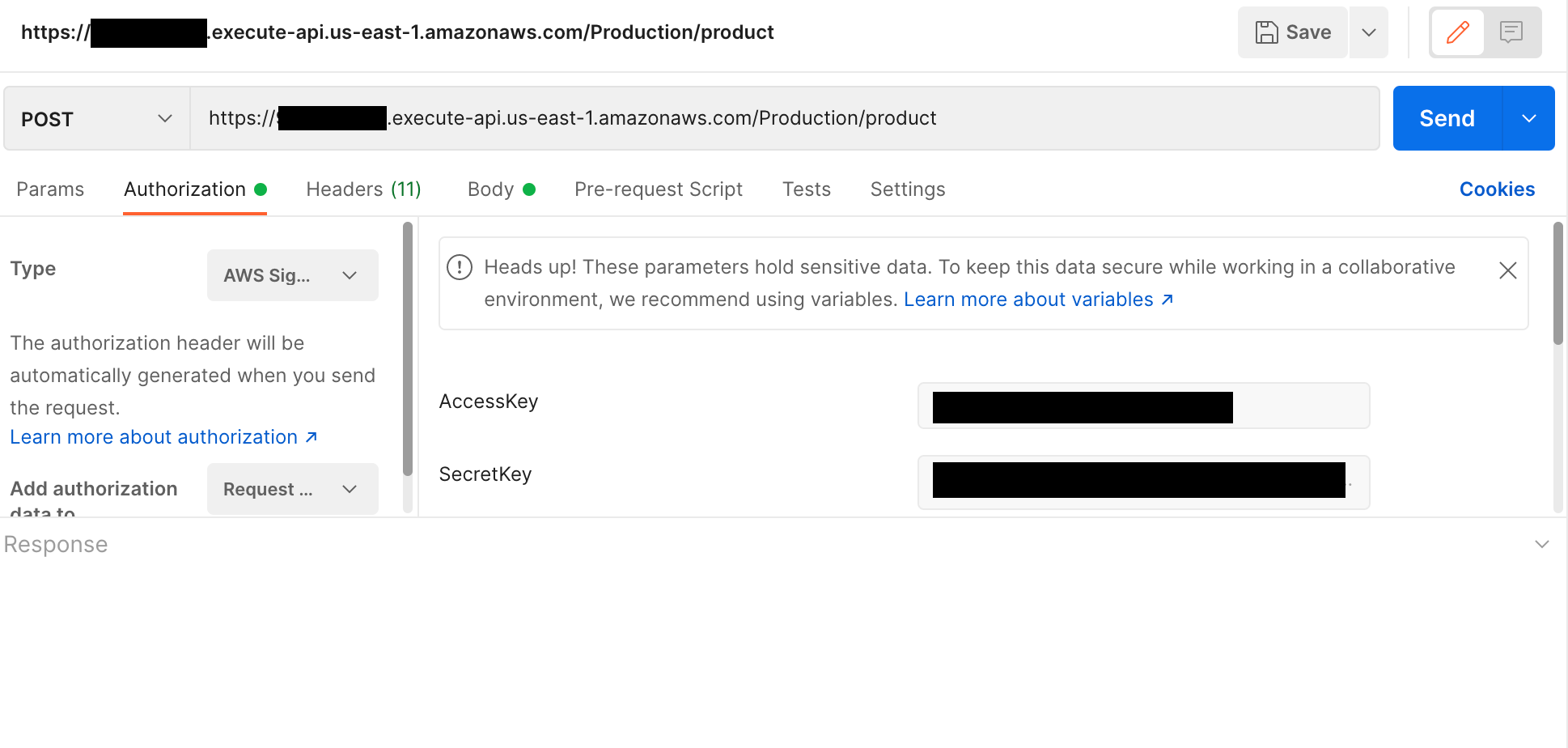
  2. The client sends the events to API Gateway as URL-encoded JSON. The client includes the user’s JWT in an authorization header with the request for validation.
  3. The Lambda authorizer validates the JWT with Amazon Cognito and returns the user’s unique clientID value to API Gateway.
  4. API Gateway transforms the request into events, appending clientId, the bus name, and environment.
  5. API Gateway sends the events to EventBridge.
  6. EventBridge rules match the events and:
    1. Forwards all client events to Kinesis Data Firehose.
    2. Forwards client events with detail.eventType of “loyaltypurchase” to Zendesk.
  7. Kinesis Data Firehose receives the records.
  8. The Kinesis Data Firehose data transformation processes each record, moving the client ID to the detail object.
  9. Kinesis Data Firehose partitions the records and stores them in an S3 bucket.

Overall design

The following sections discuss details of the solution, starting from the event in a web or mobile client. This solution requires the client to create an HTTPS request, including the user’s JWT as an authorization header.

{"entries": [{"entry": "{\"eventType\": \"searching\", \"schemaVersion\":1, \"data\": {\"searchTerm\":\"games\"}}"}]}

The preceding JSON shows a sample request body for this solution. The top-level item “entries” is an array of “entry” items. API Gateway will translate each “entry” to the event-detail field in EventBridge events. The client must escape the data for “entry” to prevent translation errors.

API Gateway and Lambda authorizer

API Gateway receives the request and validates the JWT by invoking the Lambda authorizer. The authorizer generates a policy allowing the request for valid tokens. It adds the Amazon Cognito “custom:clientId” custom attribute to the response context before returning the response to API Gateway. The “custom:clientId” attribute is a unique client identifier in the form of a UUID that downstream systems can use to retrieve data about the customer.

API Gateway validates the request by matching the request body against a model. Models represent what a request should look like. A mapping template then transforms valid requests to the format required by EventBridge. Mapping templates use velocity templating language (VTL) to do this.

VTL template
This mapping template uses a #foreach loop to process the array “entries” from the request body. The process enriches each event with the user’s “custom:clientId” and stage variables for bus name and environment from API Gateway.

Integration request

The preceding API Gateway AWS integration enables API Gateway to send the events to EventBridge without using compute services, such as Lambda or Amazon EC2. The integration and IAM execution role enable API Gateway to call the EventBridge PutEvents API to do this.

EventBridge rules and transformations

EventBridge rules match events against criteria, transform the events, and forward the events to targets. There are two rules in this example. One processes events for Zendesk tickets and the other forwards data to Kinesis Data Firehose to store events for triage and analytics.

This example creates service tickets in the Zendesk ticketing system. The tickets trigger agents to contact customers who are expecting a call to complete their purchases. The software client, by sending the event directly, reducing time-to-action for back-office processes and helping improve customer satisfaction.

Matching EventBridge rule

This rule matches client event messages for loyalty purchases and forwards details to the Zendesk API. The rule includes a transformation, which selects a portion of the event before sending the information to the target.

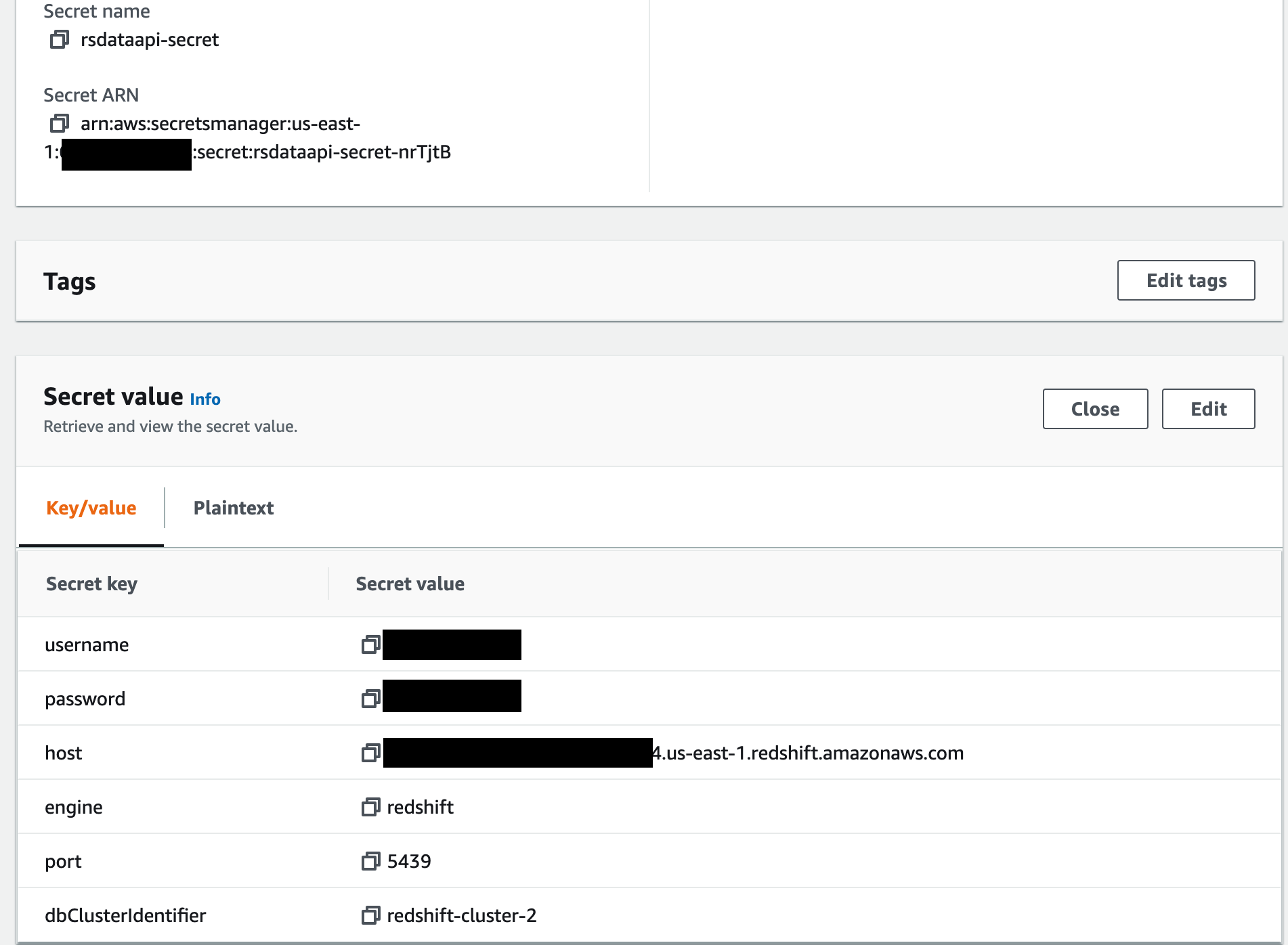
EventBridge uses an API destination to store details about the HTTP endpoint and usage policies. Additionally, an EventBridge connection and an AWS Secrets Manager secret store details. These include the authentication policy and authentication credentials to connect to the API destination.

Zendesk dashboard

Successfully processed events open tickets in Zendesk using the API destination. Agents now have a list of customers to contact.

Enterprises often require storing the events for troubleshooting or analytics. EventBridge does not include a newline between records when forwarding events to Kinesis Data Firehose. Because of this, it may be more challenging to discern each record when analyzing the data.
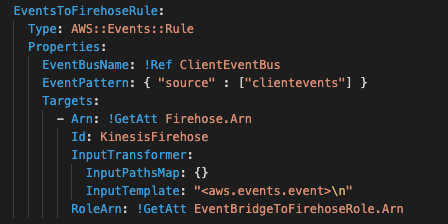
Rule to transform events
A rule for all client events changes this behavior. This AWS CloudFormation snippet defines the rule that will transform each event, adding a new line after each. The “\n” character in the InputTemplate field adds the separator between records before forwarding the data to Kinesis Data Firehose.

After, Kinesis Data Firehose receives each record separated by a new line, enabling both triage and analytics without extra overhead.

Kinesis Data Firehose to S3

Kinesis Data Firehose is a cost-effective way to batch and write records to S3. It offers optional transformation capabilities by invoking a Lambda function. This example uses a Lambda function that moves the “clientID” field to the detail section of the event record.
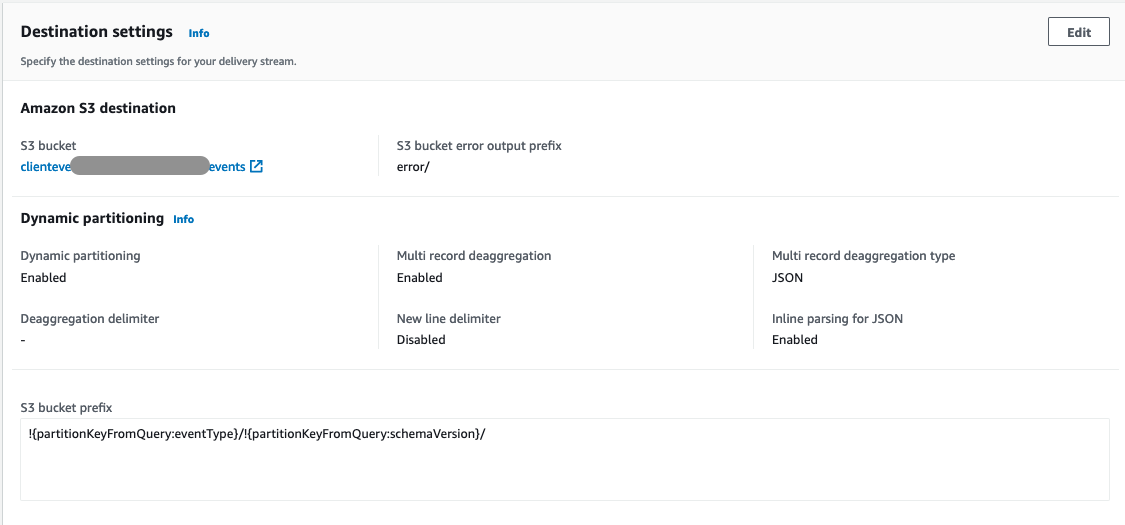
Kinesis Data Firehose to S3

Kinesis Data Firehose also supports dynamic partitioning of records when writing to S3. It selects data from the records or data calculated by a Lambda function. In this example, it selects data from the records to store data in separate folders in S3.

Event durability considerations

You can extend this example using an EventBridge archive and Amazon Kinesis Data Streams. Archiving allows you to create an encrypted archive of matching events. You can define the data retention in days, from one through indefinite. You can replay events from your archive when you must re-process data.

Kinesis Data Streams is a serverless data streaming solution. The EventBridge rule for all records can forward data to Kinesis Data Streams instead of Kinesis Data Firehose. Multiple applications can consume the Kinesis Data Streams. Kinesis Data Firehose would consume this stream of data and store it in S3.

Prerequisites

You need the following prerequisites to deploy the example solution:

Implementation

The full source of the solution is in the GitHub repository and is deployed with AWS SAM.

  1. Create a Secrets Manager secret using the command the AWS CLI:
    aws secretsmanager create-secret --name proto/Zendesk --secret-string '{"username":"<YOUR EMAIL>","apiKey":"<YOUR APIKEY>"}
  2. Clone the solution repository using git:
    git clone https://github.com/aws-samples/client-event-sample
  3. Build the AWS SAM project:
    sam build --use-container
  4. Deploy the project using AWS SAM:
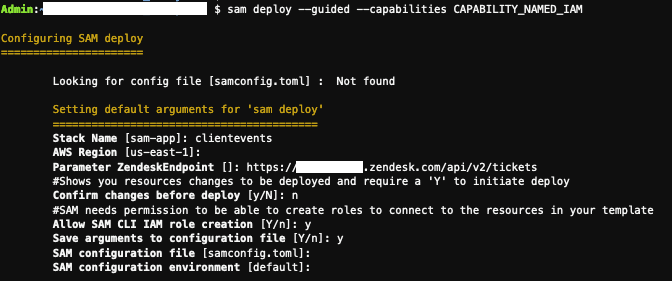
    sam deploy --guided --capabilities CAPABILITY_NAMED_IAMAWS SAM deployment output
  5. From the outputs from the deployment, set the following shell variables:
    APPCLIENTID=<output APPCLIENTID>
    APIID=<output APIID>
    REGION=<region you deployed to>
  6. Create a user in Amazon Cognito using the AWS CLI:
    aws cognito-idp sign-up --client-id $APPCLIENTID --username <YOUR USER ID> --password <YOUR PASSWORD> --user-attributes Name=email,Value=<YOUR EMAIL>
  7. After you receive the confirmation code, confirm the user using the AWS CLI:
    aws cognito-idp confirm-sign-up --client-id $APPCLIENTID --username <userid> --confirmation-code <confirmation code>
  8. Test the user login with the AWS CLI:
    aws cognito-idp initiate-auth --auth-flow USER_PASSWORD_AUTH --client-id $APPCLIENTID --auth-parameters USERNAME=<YOUR USER ID>,PASSWORD=<YOUR PASSWORD>
If successful, this returns a JSON web token (JWT).

Testing the client event solution

  1. The sample repository includes an event generator in the util directory. The generator uses your credentials and simulates events from a user’s software client. From the utils directory, run the generator:
    python3 generator.py
    --minutes <minutes to run generator> --batch <batch size from 1-10>
    --errors <True|False> --userid <YOUR USER ID> --password <YOUR
    PASSWORD> --region $REGION --appclientid $APPCLIENTID --apiid $APIID
  2. Log in to your Zendesk console and view the created tickets.
  3. After five minutes, review the “clientevents” bucket to view the event records.

Cleaning up

To remove the example:

  1. Delete the data stored in the clientevents buckets created from the template.
  2. Delete the stack using the command:
    sam delete --stack-name clientevents
  3. Delete the secret using the command:
    aws secretsmanager delete-secret --secret-id <arn of secret>

Conclusion

This post shows how to send client events to an API and EventBridge to enable new customer experiences. The example covers enabling new experiences by creating a way for software clients to send events with minimal custom code. This blueprint shows how you can include client events in your solution, featuring validation, enrichment, transformation, and storage.

You can modify the example code provided here for your use in your organization. This enables your client software to register events without modifying backend code.

For more serverless learning resources, visit Serverless Land.
Use AnalyticsIQ with Amazon QuickSight to gain insights for your business

Post Syndicated from Sumitha AP original https://aws.amazon.com/blogs/big-data/use-analyticsiq-with-amazon-quicksight-to-gain-insights-for-your-business/

Decisions are made every day in your organization that impact your business. Making the right decision at the right moment can deeply impact your organization’s growth and your customers. Likewise, having the right data and tools that generate insights into the data can empower your organization’s leaders to make the right decisions.

In the healthcare industry where decisions directly impact an individual’s wellness, having the right data to generate the right insight into the individual experience through the lens of social determinants of health can greatly improve health outcomes and save lives. Understanding the unique social situations of the individuals they serve, from access to transportation, technology to economic, food security and more, allows healthcare providers to address disparities and give all their patients an equal opportunity to achieve their desired level of health.

For example, let’s say a healthcare organization or government agency wants to better understand the factors that affect public health in order to improve the quality of life for various ethnic groups, based on data.

In this post, we show you how to use AnalyticsIQ datasets and Amazon QuickSight to generate valuable insights that could improve your organization’s decision-making. we use the AnalyticsIQ Social Determinants of Health Sample Data dataset to gain insights into the relationship between ethnicity and health, as well as how the social determinants impact the health and wellness of individuals.

Solution overview

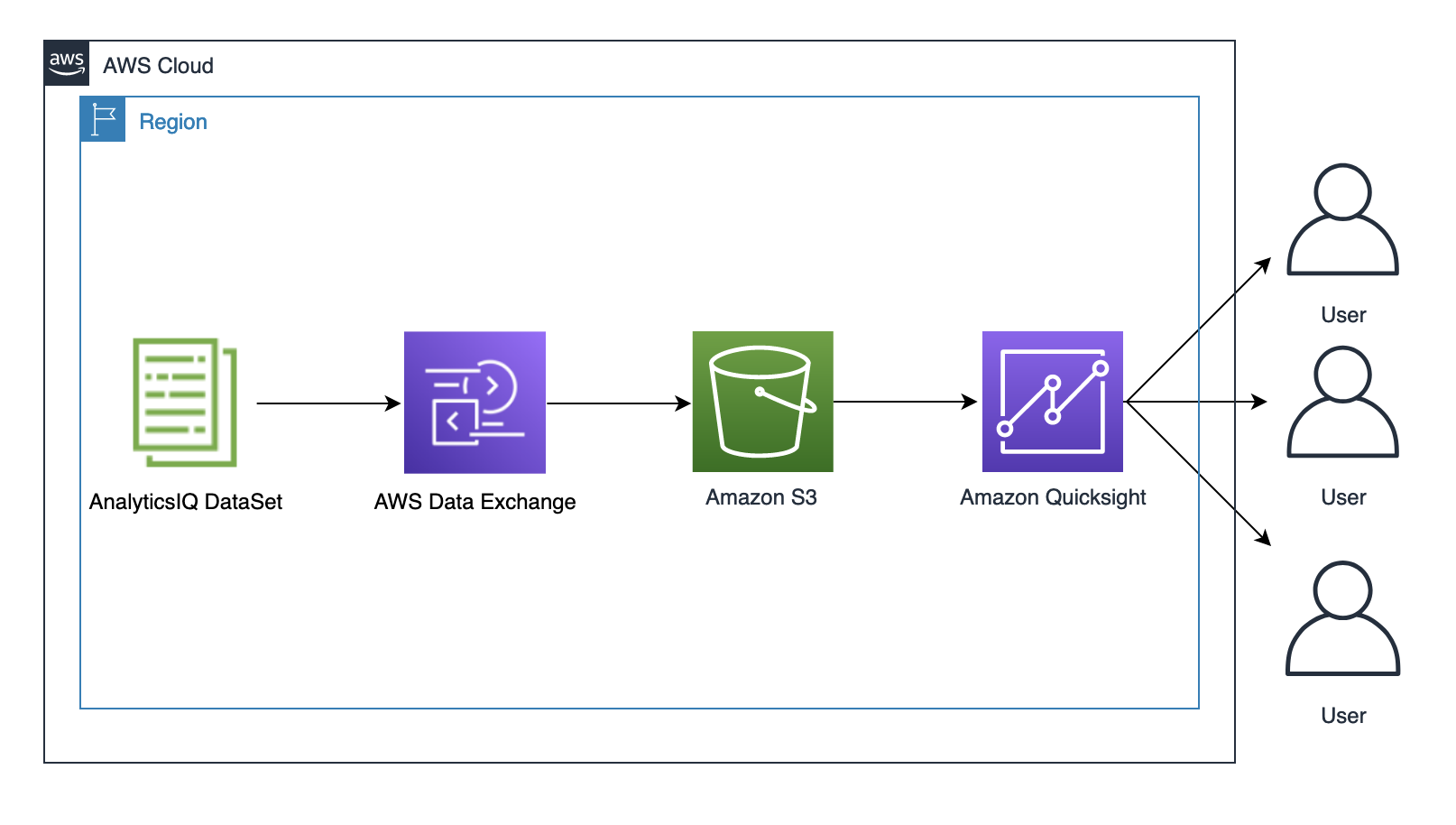
The following architecture diagram outlines the components of this solution:

The solution consists of the following components:

To implement the solution, you complete the following high-level steps:

  1. Export the dataset to an S3 bucket.
  2. Sign up for a QuickSight subscription.
  3. Create a QuickSight dataset.
  4. Create visualizations in QuickSight.

Prerequisites

To run this solution, you must have an AWS account. If you don’t already have one, you can create one.

Export the dataset to an S3 bucket

To start working with your dataset, you must subscribe to the dataset and then export the data to an S3 bucket. Complete the following steps:

  1. If you don’t already have a bucket, navigate to the Amazon S3 console, and choose Create bucket.
  2. Give a unique name for your bucket.

Make sure that you create the bucket in the us-east-1 Region.

  1. To subscribe to the sample dataset, follow this link. On the AWS Data Exchange console, choose Continue to subscribe.
  2. On the Complete subscription page, choose Subscribe.
  3. For Select Amazon S3 bucket folder destination, choose your S3 bucket.

The subscription process can take up to 2 minutes to complete.

  1. On the AWS Data Exchange Console, under My subscriptions in the navigation pane, choose Entitled Data.
  2. Under Products, expand Social Determinants of Health Sample Data – Offline, and choose the AnalyticsIQ sample dataset.
  3. On the Revisions tab, select the revision and choose Export to Amazon S3.
  4. Enter the name of the S3 bucket you created for this dataset.
  5. Leave the other options as default.
  6. Choose Export.

You can view the dataset in your S3 bucket under the prefix Sample-Data.

Sign up for a QuickSight subscription

To sign up for a QuickSight subscription, complete the following steps:

  1. On the AWS Management Console, open QuickSight.
  2. Choose Sign up for QuickSight and choose Enterprise.
  3. For QuickSight account name, enter a unique name.
  4. Enter a valid email.
  5. Under Allow access and autodiscovery for these resources, select Amazon S3 and choose Select S3 buckets.
  6. Choose the S3 bucket that you created earlier, and choose Finish.
  7. After your QuickSight account is created, choose Go to QuickSight account.

Create a QuickSight dataset

To create your dataset, complete the following steps:

  1. Using a local text editor, create a JSON file. Copy the following content and replace the placeholder with the name of the bucket that you created earlier:
    {
          "fileLocations": [
              {
                  "URIPrefixes": [
                           "https://<Your BucketName>.s3.amazonaws.com/Sample-Data/"
                  ]
              }
           ],
         "globalUploadSettings": {
                  "format": "TSV"
            }
    }

  2. On the QuickSight console, choose New data set on the Datasets page.
  3. Choose S3.
  4. For DataSource, enter a name.
  5. Choose Upload and upload the JSON file.
  6. Choose Connect.
  7. Choose Visualize.

The following screenshot shows your imported sample data:

Create visualizations in QuickSight

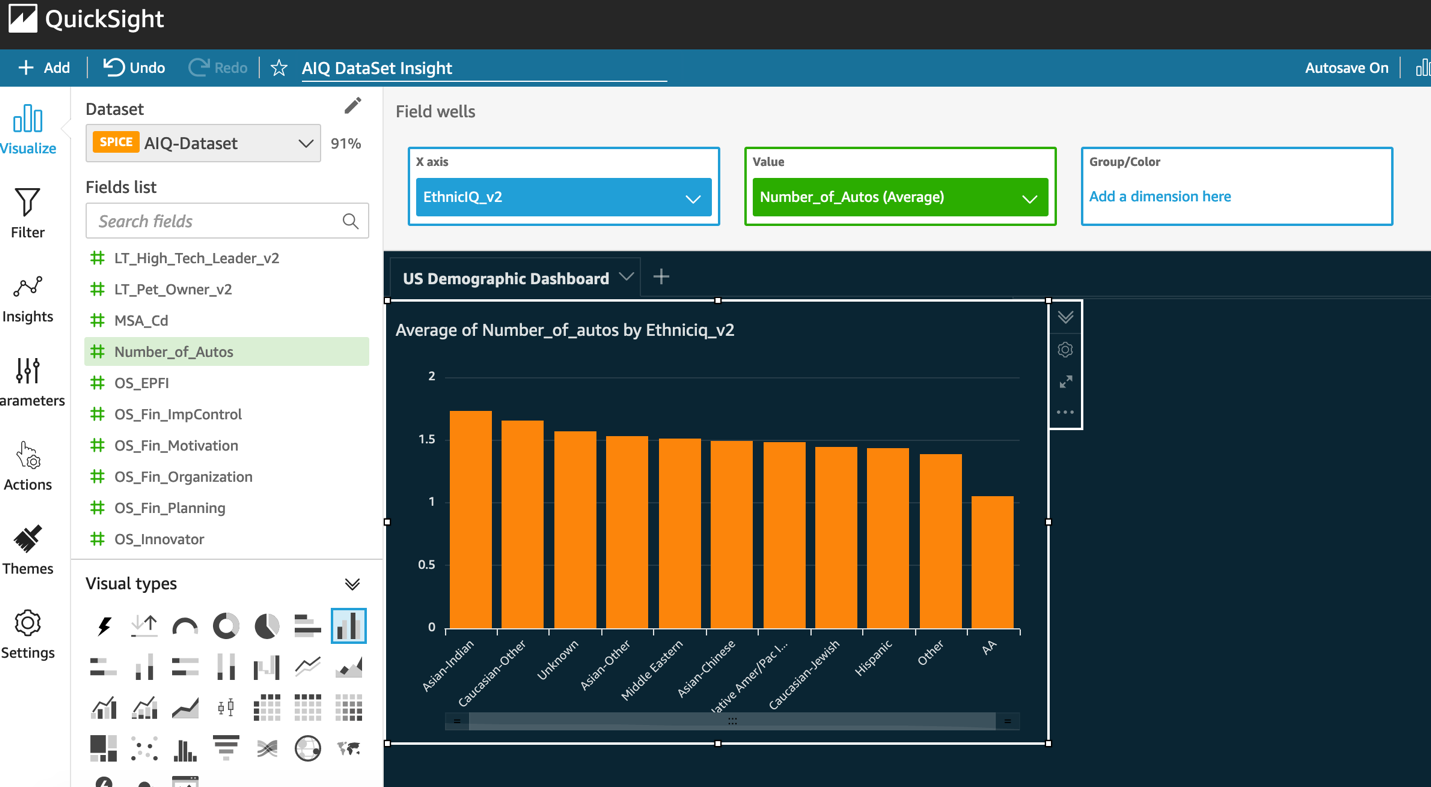
Let’s visualize the average number of cars by various ethnic groups. For more information about the fields, refer to the Key Data Points section on the AWS Marketplace listing.

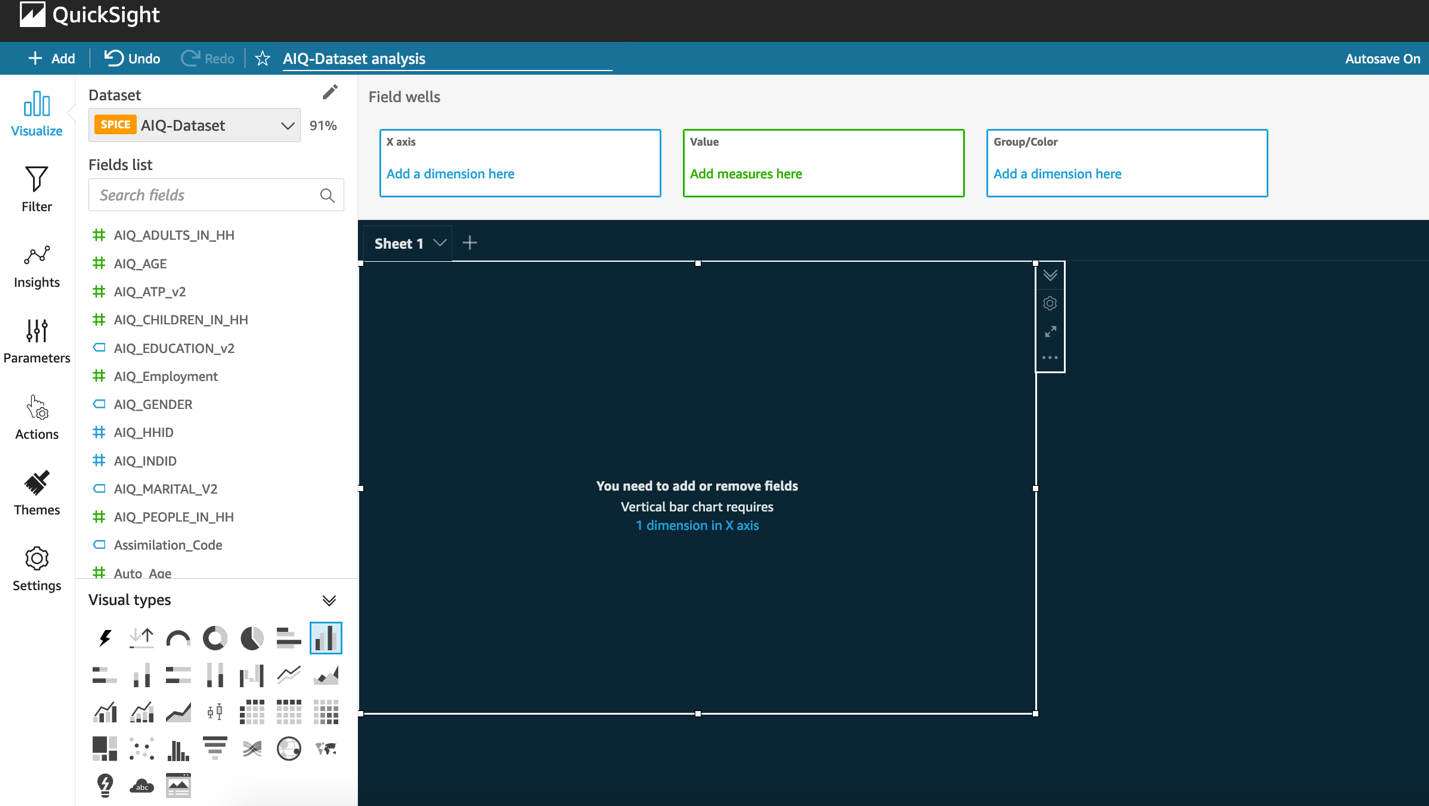
  1. Choose the sheet and choose the vertical bar chart under Visual types.
  2. From the Fields list, drag EthnicIQ_v2 to X axis and Number_of_Autos to Value.
  3. Choose Aggregate as Average.

Now you can create a visualization for urgent care visits by ethnic groups.

  1. Choose +Add, and choose Add Visual.
  2. Choose a pivot table under Visual types.
  3. From the Fields list, drag EthinicIQ_v2 to Rows and HW_Urgent_Care_Visits_SC to Values.
  4. Choose Aggregate as Average.
  5. Choose the HW_Urgent_Care_Visits_SC field in the pivot table, and choose Sort descending.

Similarly, you can add more visualizations as shown in the following images.

From these visualizations created from sample data, you can see that a person’s use of healthcare services reduces when they have less access to transportation. The AA ethnic group has fewer cars compared to the other groups. The wellness score for the AA group is low when compared to the others. Transportation barriers could be a major factor here. Job satisfaction also contributes to wellness levels. Furthermore, the sample data indicates that the Hispanic community has the highest likelihood of recent urgent care visits. Does this mean these groups aren’t getting enough preventative care, leading to more urgent care visits?

Sleep and job satisfaction play a critical role in affecting stress levels, as well as overall health. This would be a critical factor for people who work shifts. What measures can be taken to increase the sleep quality for that set of people?

These are just few of the innumerable valuable analyses that you can create from the AnalyticsIQ Social Determinants of Health Sample Data dataset. These insights are valuable for various groups of people, such as health professionals, preventative care, employee care, scientists, and governments, to empower communities and help build better public health and social determinant solutions.

Clean up

To avoid incurring ongoing charges, complete the following steps to clean up your resources:

  1. On the QuickSight console, on the Analyses page, choose the details icon on the analysis you created, and choose Delete.
  2. On the QuickSight start page, on the Datasets page, choose the dataset that you created earlier, then choose Delete Data Set.
  3. On the Amazon S3 console, on the Buckets page, select the option next to the name of your bucket, and then choose Delete at the top of the page.
  4. Confirm that you want to delete the bucket by entering the bucket name into the text field, then choose Delete bucket.

Conclusion

In this post, we showed you how you can use the AnalyticsIQ Social Determinants of Health Sample Data dataset to gain insights into society’s health and wellness. We also showed you how you can generate easy-to-understand visualizations using QuickSight. Amazon QuickSight allows dashboards to be shared with 1000s of users without any servers, and with pay-per-session pricing. QuickSight dashboards can also be easily embedded in SaaS applications or corporate portals for sharing insights with all users. You can explore the AnalyticsIQ dataset more on the AWS Data Exchange console. For queries related to the AnalyticsIQ dataset, you can reach out directly to the support team at [email protected].To learn more about the features of QuickSight, refer to Amazon QuickSight Features.


About the Author

Sumitha AP is an AWS Solutions Architect based in Washington DC. She works with SMB customers to help them design secure, scalable, reliable and cost effective solutions in the AWS cloud.

Free Image Hosting With Cloudflare Transform Rules and Backblaze B2

Post Syndicated from Pat Patterson original https://www.backblaze.com/blog/free-image-hosting-with-cloudflare-transform-rules-and-backblaze-b2/

Before I dive into using Cloudflare Transform Rules to implement image hosting on Backblaze B2 Cloud Storage, I’d like to take a moment to introduce myself. I’m Pat Patterson, recently hired by Backblaze as chief developer evangelist. I’ve been working with technology and technical communities for close to two decades, at companies such as Sun Microsystems and Salesforce. I’ll be creating and delivering technical content for you, our Backblaze B2 community, and advocating on your behalf within Backblaze. Feel free to follow my journey and reach out to me via Twitter or LinkedIn.

Cloudflare Transform Rules

Now, on with the show! Cloudflare Transform Rules give you access to HTTP traffic at the CDN edge server, allowing you to manipulate the URI path, query string, and HTTP headers of incoming requests and outgoing responses. Where Cloudflare Workers allows you to write JavaScript code that executes in the same environment, Transform Rules give you much of the same power without the semi-colons and curly braces.

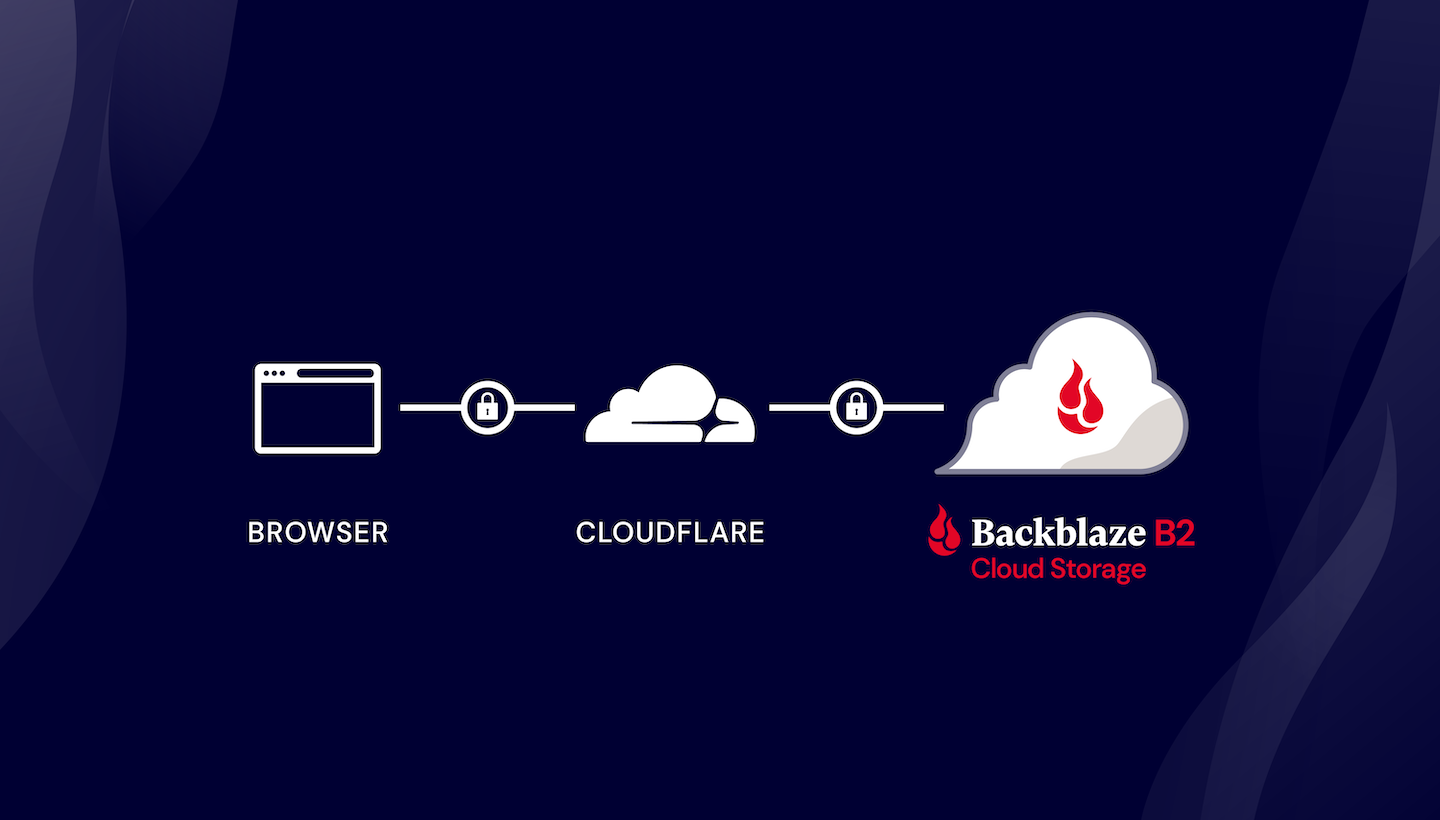
Let’s look at a specific use case: implementing image hosting on top of a cloud object store. Backblaze power user James Ross wrote an excellent blog post back in August 2019, long before the introduction of Transform Rules, explaining how to do this with Cloudflare Workers and Backblaze B2. We’ll see how much of James’ solution we can recreate with Transform Rules, without writing any code. We’ll also discover how the combination of Cloudflare and Backblaze allows you to create your own, personal 10GB image hosting site for free.

Implementing Image Hosting on a Cloud Object Store

James’ requirements were simple:

  • Serve image files from a custom domain, such as files.example.com, rather than the cloud storage provider’s domain.
  • Remove the bucket name, and any other extraneous information, from the URL.
  • Remove extraneous headers, such as the object ID, from the HTTP response.
  • Improve caching (both browser and edge cache) for images.
  • Add basic CORS headers to allow embedding of images on external sites.

I’ll work through each of these requirements in this blog post, and wrap up by explaining why Backblaze B2 might be a better long term provider for this and many other cloud object storage use cases than other cloud object stores.

It’s worth noting that nothing here is Backblaze B2-specific—the user’s browser is requesting objects from a B2 Cloud Storage public bucket via their URLs, just as it would with any other cloud object store. The techniques are exactly the same on Amazon S3, for example.

Prerequisites

You’ll need accounts with both Cloudflare and Backblaze. You can get started for free with both:

You’ll also need your own DNS domain, which I’ll call example.com in this article, on which you can create subdomains such as files.example.com. If you’ve read this far, you likely already have at least one. Otherwise, you can register a new domain at Cloudflare for a few dollars a year, or your local equivalent.

Create a Bucket for Your Images

If you already have a B2 Cloud Storage bucket you want to use for your image store, you can skip this section. Note: It doesn’t matter whether you created the bucket and its objects via the B2 Native API, the Backblaze S3 Compatible API, or any other mechanism—your objects are accessible to Cloudflare via their friendly URLs.

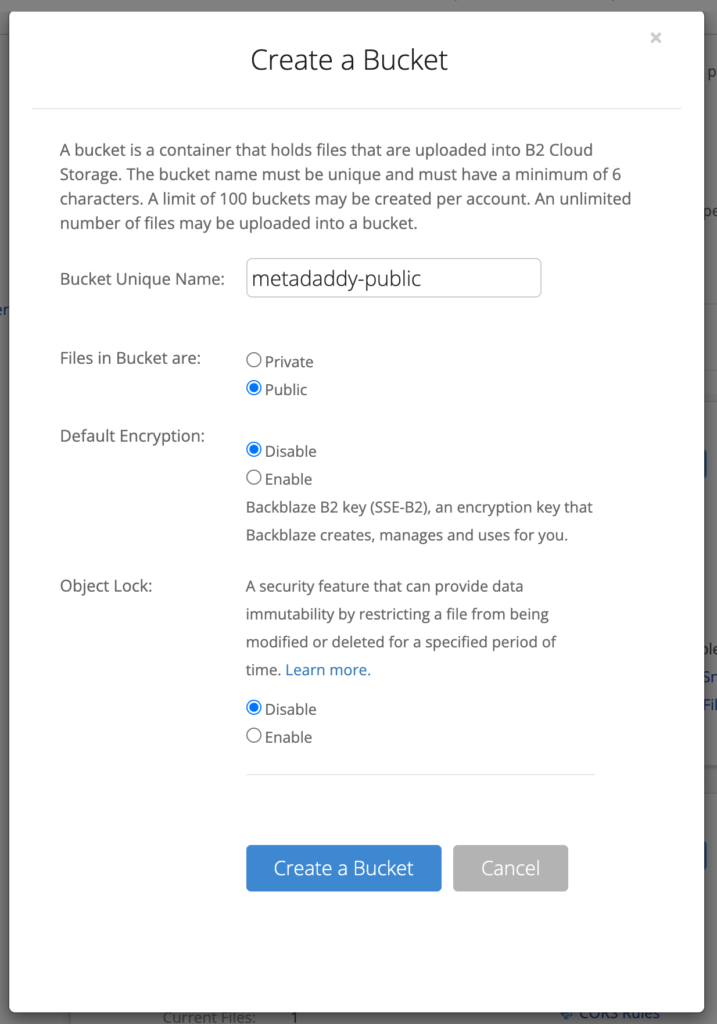
Log in to Backblaze, and click Buckets on the left under B2 Cloud Storage, then Create a Bucket. You will need to give your bucket a unique name, and make it public. Leave the other settings with their default values.

Note that the bucket name must be globally unique within Backblaze B2, so you can’t just call it something like “myfiles.” You’ll hide the bucket name from public view, so you can call it literally anything, as long as there isn’t already a Backblaze B2 bucket with that name.

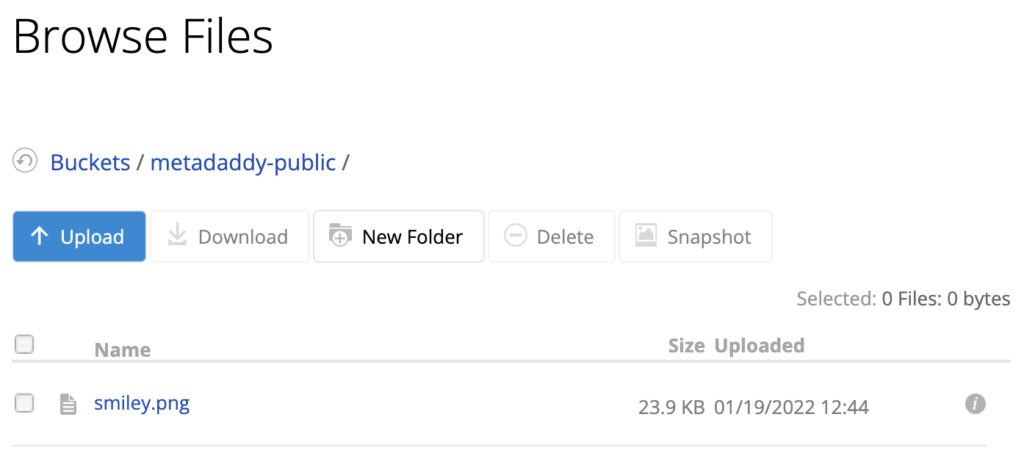
Finally, click Upload/Download and upload a test file to your new bucket.

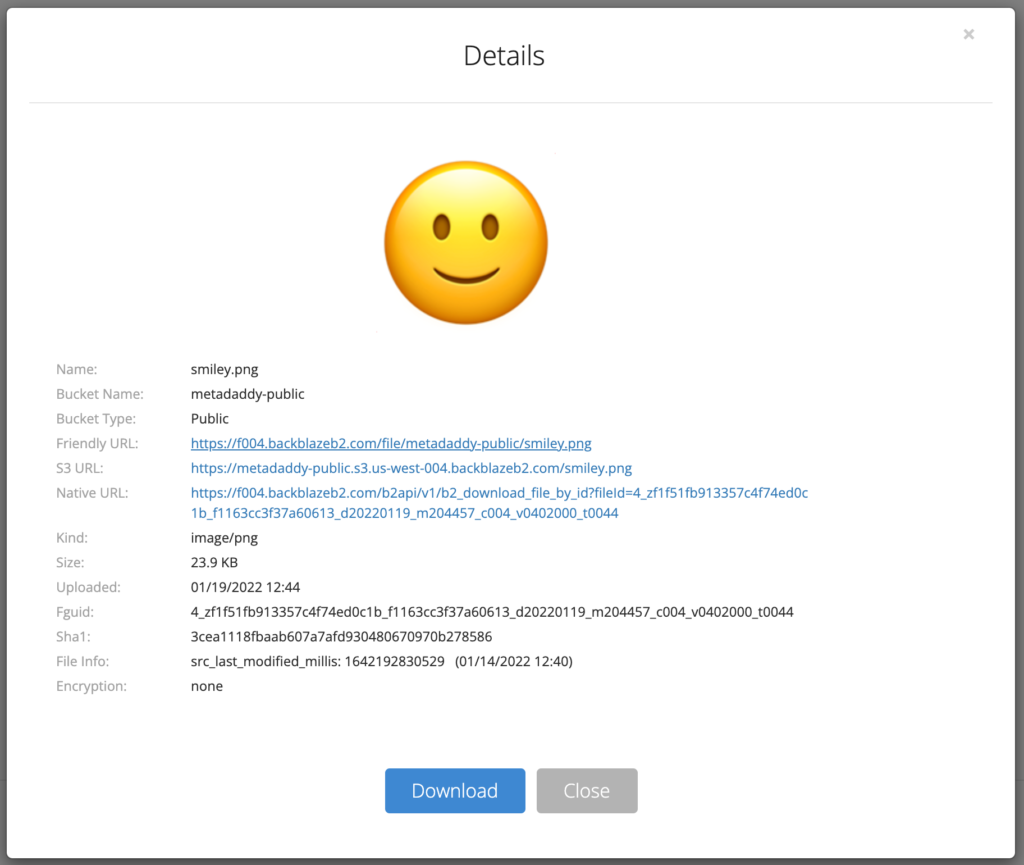
Click the file to see its details, including its various URLs.

In the next step, you’ll rewrite requests that use your custom subdomain, for example, https://files.example.com/smiley.png, to the friendly URL of the form, https://f004.backblazeb2.com/file/metadaddy-public/smiley.png.

Make a note of the hostname in the friendly URL. As you can see in the previous paragraph, mine is f004.backblazeb2.com.

Create a DNS Subdomain for Your Image Host

You will need to activate your domain (example.com, rather than files.example.com) in your Cloudflare account, if you have not already done so.

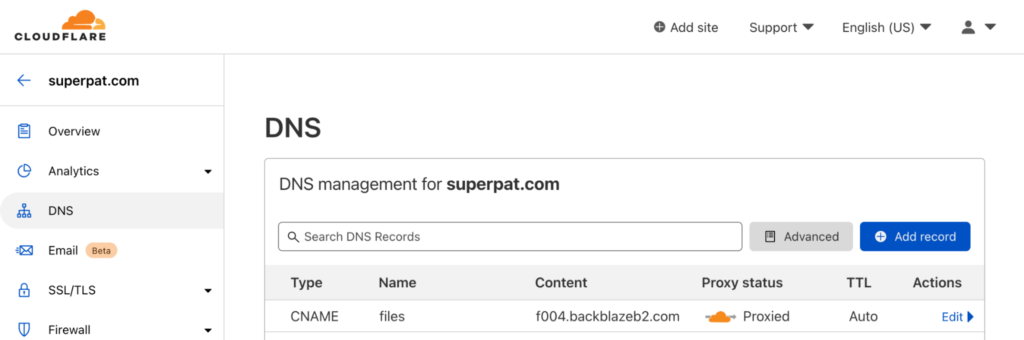
Now, in the Cloudflare dashboard, create your subdomain by adding a DNS CNAME record pointing to the bucket hostname you made a note of earlier.

I created files.superpat.com, which points to my bucket’s hostname, f004.backblazeb2.com.

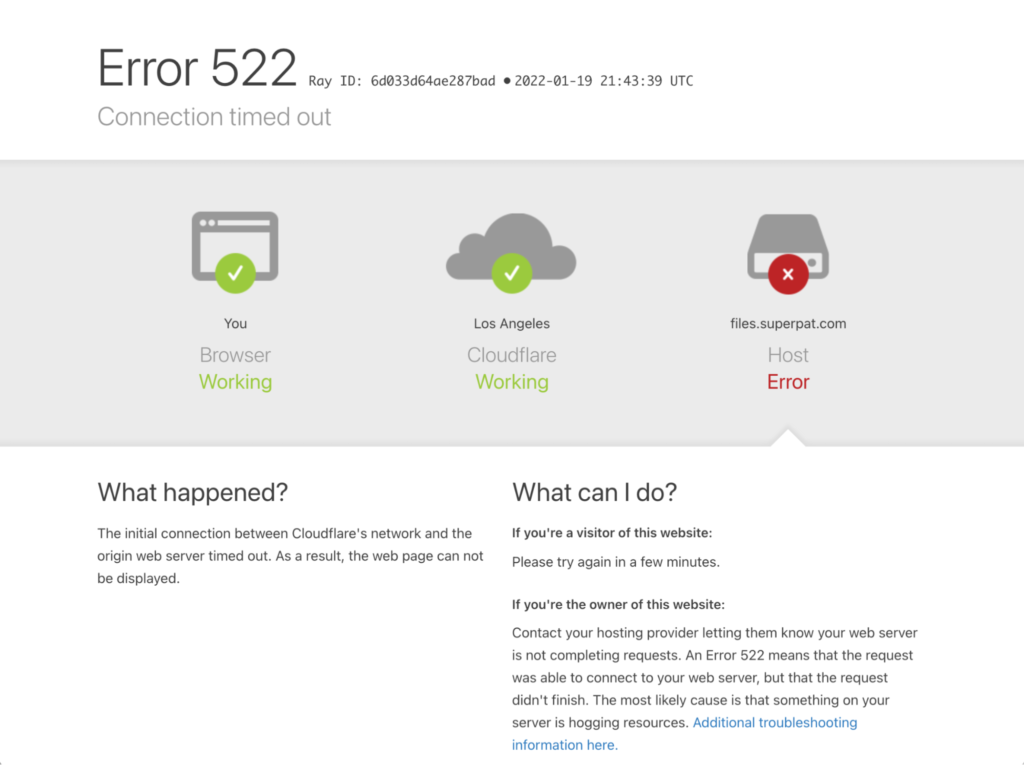
If you test this right now by going to your test file’s URL in your custom subdomain, for example, https://files.example.com/file/my-unique-bucket-name/smiley.png, after a few seconds you will see a 522 “connection timed out” error from Cloudflare:

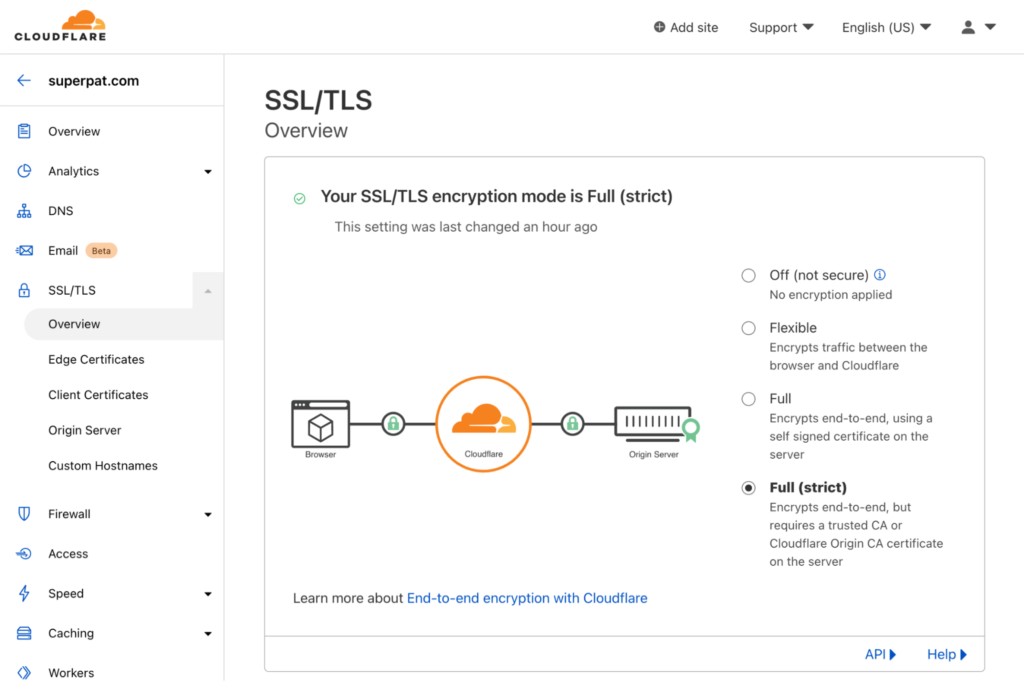
This is because, by default, Cloudflare accesses the upstream server via plain HTTP, rather than HTTPS. Backblaze only supports secure HTTPS connections, so the HTTP request fails. To remedy this, in the SSL/TLS section of the Cloudflare dashboard, change the encryption mode from “Flexible” to “Full (strict),” so that Cloudflare connects to Backblaze via HTTPS, and requires a CA-issued certificate.

Now you should be able to access your test file in your custom subdomain via a URL of the form https://files.example.com/file/my-unique-bucket-name/smiley.png. The next task is to create the first Transform Rule to remove /file/my-unique-bucket-name from the URL.

Rewrite the URL Path on Incoming Requests

There are three varieties of Cloudflare Transform Rules:

  • URL Rewrite Rules: Rewrite the URL path and query string of an HTTP request.
  • HTTP Request Header Modification Rules: Set the value of an HTTP request header or remove a request header.
  • HTTP Response Header Modification Rules: Set the value of an HTTP response header or remove a response header.

Click Rules on the left of the Cloudflare dashboard, then Transform Rules. You’ll see that the Cloudflare free plan includes 10 Transform Rules—plenty for our purposes. Click Create Transform Rule, then Rewrite URL.

It’s useful to pause for a moment and think about what we need to ask Cloudflare to do. Users will be requesting URLs of the form https://files.example.com/smiley.png, and we want the request to Backblaze B2 to be like https://f004.backblazeb2.com/file/metadaddy-public/smiley.png. We’ve already taken care of the domain part of the URL, so it becomes clear that all we need to do is prefix the outgoing URL with /file/<bucket name>.

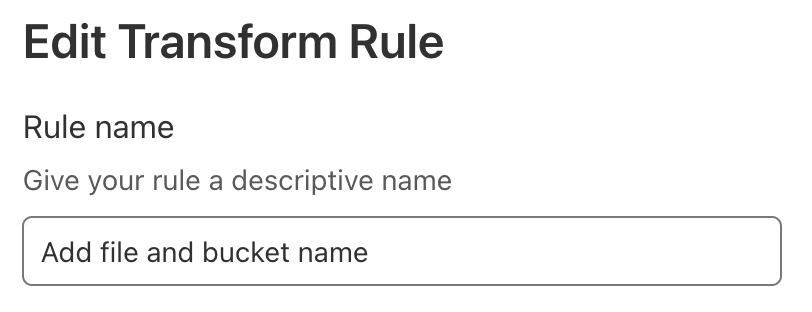
Give your rule a descriptive name such as “Add file and bucket name.”

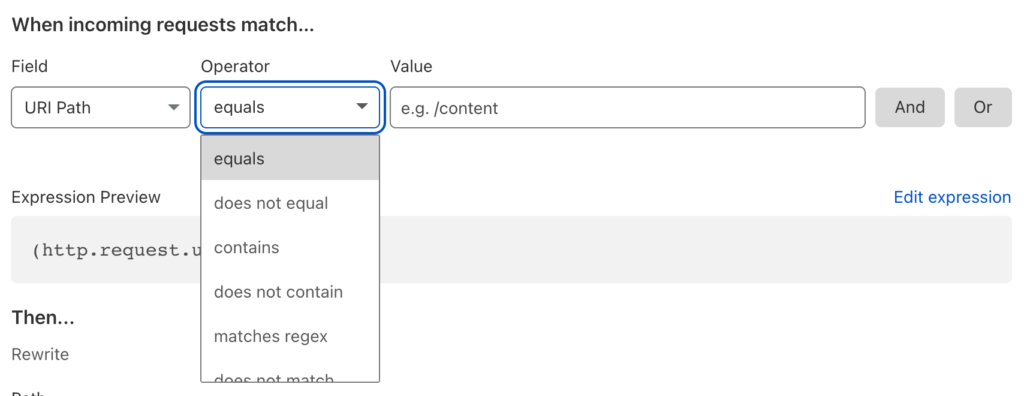
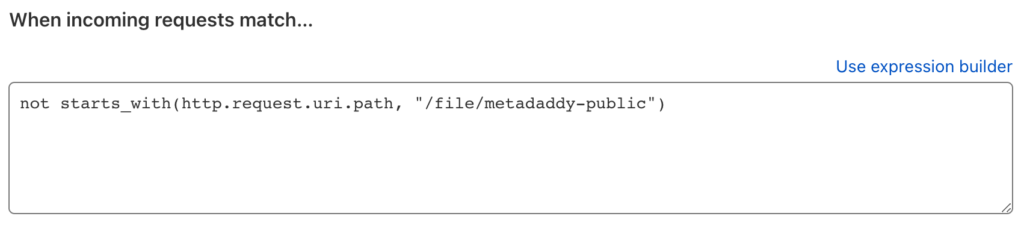
There is an opportunity to set a condition that incoming requests must match to fire the trigger. In James’ article, he tested that the path did not already begin with the /file/<bucket name> prefix, so that you can refer to a file with either the short or long URL.

At first glance, the Cloudflare dashboard doesn’t offer “does not start with” as an operator.

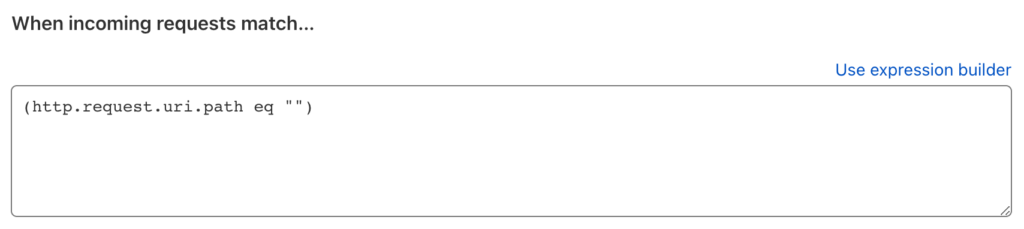
However, clicking Edit expression reveals a more powerful way of specifying the condition:

The Cloudflare Rules language allows us to express our condition precisely:

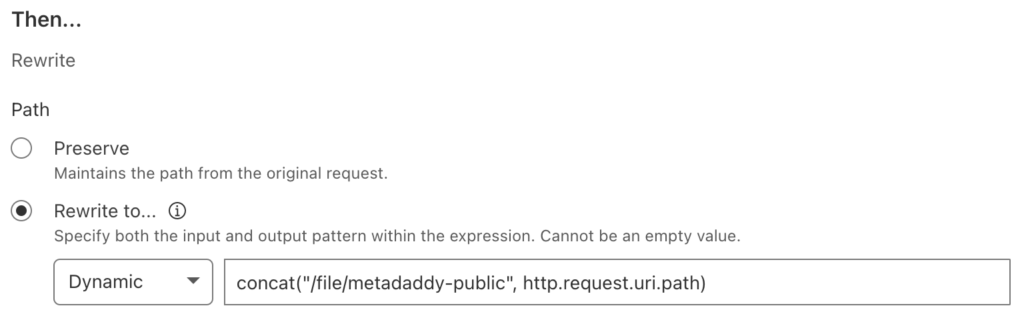
Moving on, Cloudflare offers static and dynamic options for rewriting the path. A static rewrite would apply the same value to the URL path of every request. This use case requires a dynamic rewrite, where, for each request, Cloudflare evaluates the value as an expression which yields the path.

Your expression would prepend the existing path with /file/<bucket name>, like this:

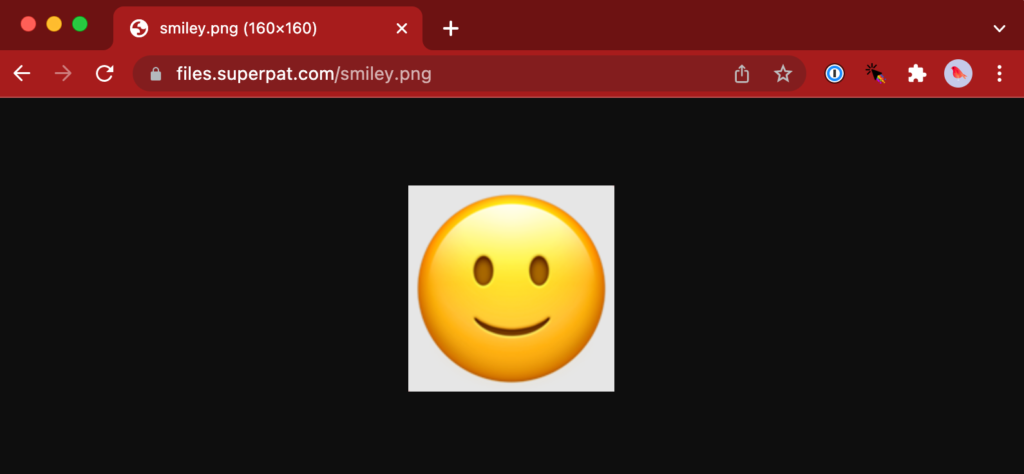
Save the Transform Rule, and try to access your test file again, this time without the /file/<bucket name> prefix in the URL path, for example: https://files.example.com/smiley.png.

You should see your test file, as expected:

Great! Now, let’s take a look at those HTTP headers in the response.

Remove HTTP Headers From the Response

You could use Chrome Developer Tools to view the response headers, but I prefer the curl command line tool. I used the --head argument to show the HTTP headers without the response body, since my terminal would not be happy with binary image data!

Note: I’ve removed some extraneous headers from this and subsequent HTTP responses for clarity and length.

% curl --head https://files.superpat.com/smiley.png
HTTP/2 200
date: Thu, 20 Jan 2022 01:26:10 GMT
content-type: image/png
content-length: 23889
x-bz-file-name: smiley.png
x-bz-file-id: 4_zf1f51fb913357c4f74ed0c1b_f1163cc3f37a60613_d20220119_m204457_c004_v0402000_t0044
x-bz-content-sha1: 3cea1118fbaab607a7afd930480670970b278586
x-bz-upload-timestamp: 1642625097000
x-bz-info-src_last_modified_millis: 1642192830529
cache-control: max-age=14400
cf-cache-status: MISS
last-modified: Thu, 20 Jan 2022 01:26:10 GMT

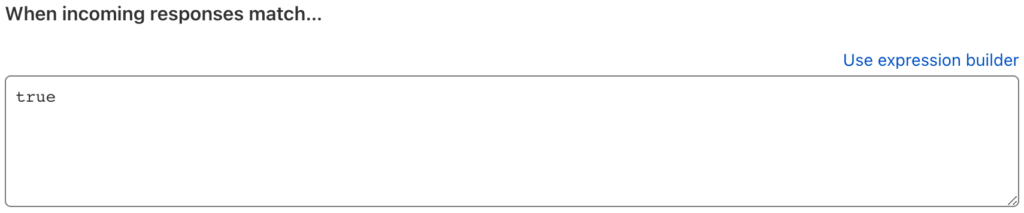
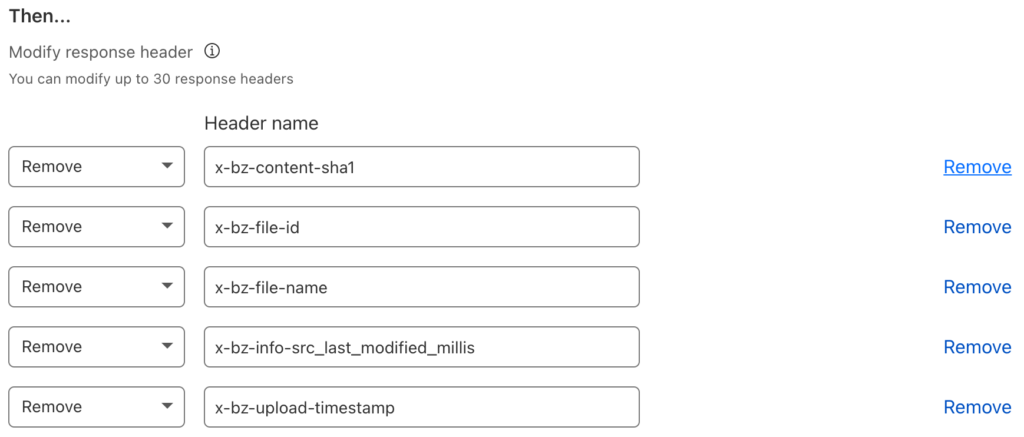
Our goal is to remove all the x-bz headers. Create a Modify Response Header rule and set its name to something like “Remove Backbaze B2 Headers.” We want this rule to apply to all traffic, so the match expression is simple:

Unfortunately there isn’t a way to tell Cloudflare to remove all the headers that are prefixed x-bz, so we just have to list them all:

Save the rule, and request your test file again. You should see fewer headers:

% curl --head https://files.superpat.com/smiley.png
HTTP/2 200
date: Thu, 20 Jan 2022 01:57:01 GMT
content-type: image/png
content-length: 23889
x-bz-info-src_last_modified_millis: 1642192830529
cache-control: max-age=14400
cf-cache-status: HIT
age: 1851
last-modified: Thu, 20 Jan 2022 01:26:10 GMT

Note: As you can see, for some reason Cloudflare does not remove the x-bz-info-src_last_modified_millis header. I’ve reported this to Cloudflare as a bug.

Optimize Cache Efficiency via the ETag and Cache-Control HTTP Headers

We can follow James’ lead in making caching more efficient by leveraging the ETag header. As explained in the MDN Web Docs for ETag:

The ETag (or entity tag) HTTP response header is an identifier for a specific version of a resource. It lets caches be more efficient and save bandwidth, as a web server does not need to resend a full response if the content was not changed.

Essentially, a cache can just request the HTTP headers for a resource and only proceed to fetch the resource body if the ETag has changed.

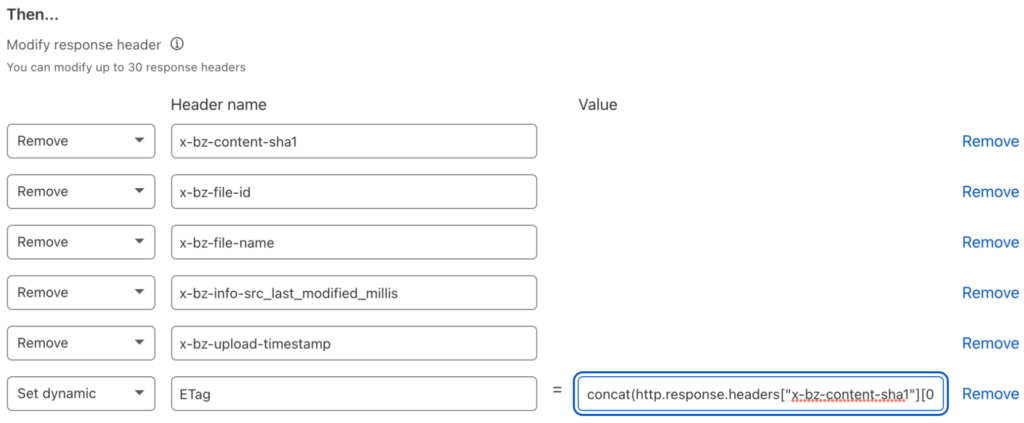
James constructed the ETag by using one of x-bz-content-sha1, x-bz-info-src_last_modified_millis, or x-bz-file-id, in that order. If none of those headers are set, then neither is ETag. It’s not possible to express this level of complexity in a Transform Rule, but we can apply a little lateral thinking to the problem. We can easily concatenate the three headers to create a result that will change when any one or more of them changes:

concat(http.response.headers["x-bz-content-sha1"][0],
http.response.headers["x-bz-info-src_last_modified_millis"][0],
http.response.headers["x-bz-file-id"][0])

Note that it’s possible for there to be multiple values of a given HTTP header, so http.response.headers["<header-name>"] is an array. http.response.headers["<header-name>"][0] yields the first, and in most cases only, element of the array.

Edit the Transform Rule you just created, update its name to something like “Remove Backblaze B2 Headers, set ETag,” and add a header with a dynamic value:

Don’t worry about the ordering; Cloudflare will reorder the operations so that “set” occurs before “remove.” Also, if none of those headers are present in the response, resulting in an empty value for the ETag header, Cloudflare will not set that header at all. Exactly the behavior we need!

Another test shows the result. Note that HTTP headers are not case-sensitive, so etag has just the same meaning as ETag:

% curl --head https://files.superpat.com/smiley.png
HTTP/2 200
date: Thu, 20 Jan 2022 02:01:19 GMT
content-type: image/png
content-length: 23889
x-bz-info-src_last_modified_millis: 1642192830529
cache-control: max-age=14400
cf-cache-status: HIT
age: 2198
last-modified: Thu, 20 Jan 2022 01:24:41 GMT
etag: 3cea1118fbaab607a7afd930480670970b27858616421928305294_zf1f51fb913357c4f74ed0c1b_f1163cc3f37a60613_d20220119_m204457_c004_v0402000_t0044

The other cache-related header is Cache-Control, which tells the browser how to cache the resource. As you can see in the above responses, Cloudflare sets Cache-Control to a max-age of 14400 seconds, or four hours.

James’ code, on the other hand, sets Cache-Control according to whether or not the request to B2 Cloud Storage is successful. For an HTTP status code of 200, Cache-Control is set to public, max-age=31536000, instructing the browser to cache the response for 31,536,000 seconds; in other words, a year. For any other HTTP status, Cache-Control is set to public, max-age=300, so the browser only caches the response for five minutes. In both cases, the public directive indicates that the response can be cached in a shared cache, even if the request contained an Authorization header field.

Note: We’re effectively assuming that once created, files on the image host are immutable. This is often true for this use case, but you should think carefully about cache policy when you build your own solutions.

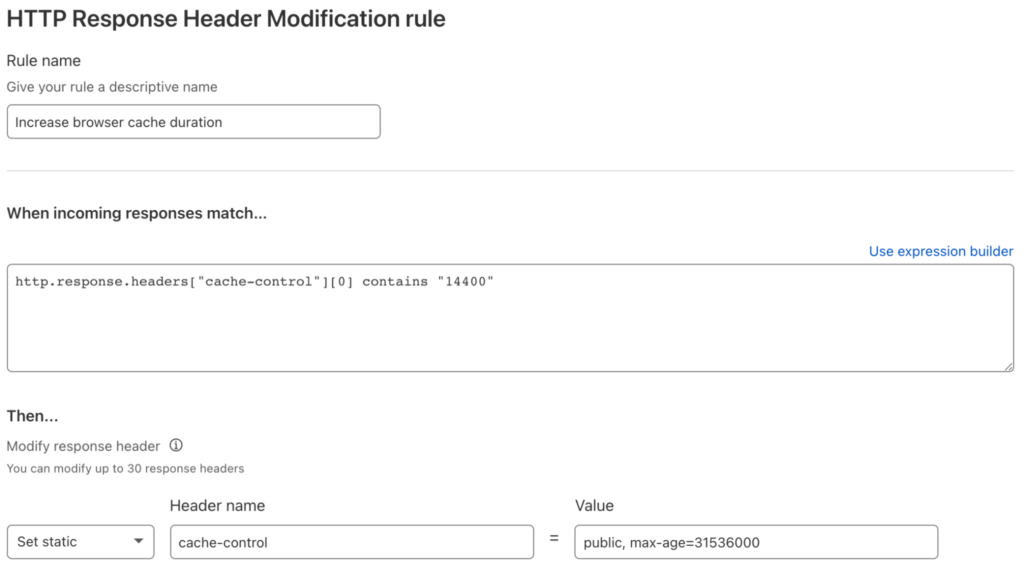
At present, Cloudflare Transform Rules do not give access to the HTTP status code, but, again, we can satisfy the requirement with a little thought and investigation. As mentioned above, for successful operations, Cloudflare sets Cache-Control to max-age=14400, or four hours. For failed operations, for example, requesting a non-existent object, Cloudflare passes back the Cache-Control header from Backblaze B2 of max-age=0, no-cache, no-store. With this information, it’s straightforward to construct a Transform Rule to increase max-age from 14400 to 31536000 for the successful case:

Again, we need to use [0] to select the first matching HTTP header. Notice that this rule uses a static value for the header—it’s the same for every matching response.

We’ll leave the header as it’s set by B2 Cloud Storage for failure cases, though it would be just as easy to override it.

Another test shows the results of our efforts:

% curl --head https://files.superpat.com/smiley.png
HTTP/2 200
date: Thu, 20 Jan 2022 02:31:38 GMT
content-type: image/png
content-length: 23889
x-bz-info-src_last_modified_millis: 1642192830529
cache-control: public, max-age=31536000
cf-cache-status: HIT
age: 4017
last-modified: Thu, 20 Jan 2022 01:24:41 GMT
etag: 3cea1118fbaab607a7afd930480670970b27858616421928305294_zf1f51fb913357c4f74ed0c1b_f1163cc3f37a60613_d20220119_m204457_c004_v0402000_t0044

Checking the failure case—notice that there is no ETag header, since B2 Cloud Storage did not return any x-bz headers:

% curl --head https://files.superpat.com/badname.png
HTTP/2 404
date: Thu, 20 Jan 2022 02:32:35 GMT
content-type: application/json;charset=utf-8
content-length: 94
cache-control: max-age=0, no-cache, no-store
cf-cache-status: BYPASS

Success! Browsers and caches will aggressively cache responses, reducing the burden on Cloudflare and Backblaze B2.

Set a CORS Header for Image Files

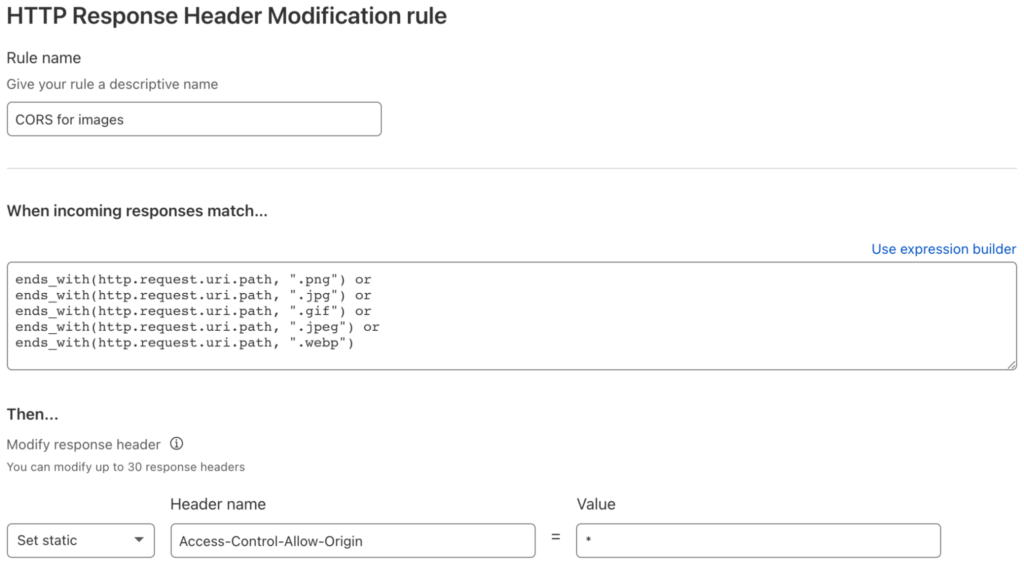
We’re almost done! Our final requirement is to set a cross-origin resource sharing (CORS) header for images so that they can be manipulated in web pages from any domain on the web.

The Transform Rule must match a range of file extensions, and set the Access-Control-Allow-Origin HTTP response header to allow any webpage to access resources:

Upload a text file and run a final couple of tests to see the results. First, the image:

% curl --head https://files.superpat.com/smiley.png
HTTP/2 200
date: Thu, 20 Jan 2022 02:50:52 GMT
content-type: image/png
content-length: 23889
x-bz-info-src_last_modified_millis: 1642192830529
cache-control: public, max-age=31536000
cf-cache-status: HIT
age: 4459
last-modified: Thu, 20 Jan 2022 01:36:33 GMT
etag: 3cea1118fbaab607a7afd930480670970b27858616421928305294_zf1f51fb913357c4f74ed0c1b_f1163cc3f37a60613_d20220119_m204457_c004_v0402000_t0044
access-control-allow-origin: *

The Access-Control-Allow-Origin header is present, as expected.

Finally, the text file, without an Access-Control-Allow-Origin header. You can use the --include argument rather than --head to see the file content as well as the headers:

% curl --include https://files.superpat.com/hello.txt
HTTP/2 200
date: Thu, 20 Jan 2022 02:48:51 GMT
content-type: text/plain
content-length: 14
accept-ranges: bytes
x-bz-info-src_last_modified_millis: 1642646740075
cf-cache-status: DYNAMIC
etag: 60fde9c2310b0d4cad4dab8d126b04387efba28916426467400754_zf1f51fb913357c4f74ed0c1b_f1092902424a40504_d20220120_m024635_c004_v0402003_t0000

Hello, World!

Troubleshooting

The most frequent issue I encountered while getting all this working was mixing up request and response when referencing HTTP headers. If things are not working as expected, double check that you don’t have http.response.headers["<header-name>"] where you need http.request.headers["<header-name>"] or vice versa.

Can I Really Do This Free of Charge?

Backblaze B2 pricing is very simple:

Storage
  • The first 10GB of storage is free of charge.
  • Above 10GB, we charge $0.005/GB/month, around a quarter of the cost of other leading cloud object stores (cough, S3, cough).
  • Storage cost is calculated hourly, with no minimum retention requirement, and billed monthly.
Downloaded Data
  • The first 1GB of data downloaded each day is free.
  • Above 1GB, we charge $0.01/GB, but…
  • Downloads through our CDN and compute partners, of which Cloudflare is one, are free.
Transactions
  • Each download operation counts as one class B transaction.
  • The first 2,500 class B transactions each day are free.
  • Beyond 2,500 class B transactions, they are charged at a rate of $0.004 per 10,000.
No Surprise Bills
  • If you already signed up for Backblaze B2, you might have noticed that you didn’t have to provide a credit card number. Your 10GB of free storage never expires, and there is no chance of you unexpectedly incurring any charges.

By serving your images via Cloudflare’s global CDN and optimizing your cache configuration as described above, you will incur no download costs from B2 Cloud Storage, and likely stay well within the 2,500 free download operations per day. Similarly, Cloudflare’s free plan does not require a credit card for activation, and there are no data or transaction limits.

Sign up for Backblaze B2 today, deploy your own personal image host, explore our off-the-shelf integrations, and consider what you can create with an affordable, S3-compatible cloud object storage platform.

The post Free Image Hosting With Cloudflare Transform Rules and Backblaze B2 appeared first on Backblaze Blog | Cloud Storage & Cloud Backup.

Amy Zegart on Spycraft in the Internet Age

Post Syndicated from Bruce Schneier original https://www.schneier.com/blog/archives/2022/02/amy-zegart-on-spycraft-in-the-internet-age.html

Amy Zegart has a new book: Spies, Lies, and Algorithms: The History and Future of American Intelligence. Wired has an excerpt:

In short, data volume and accessibility are revolutionizing sensemaking. The intelligence playing field is leveling­ — and not in a good way. Intelligence collectors are everywhere, and government spy agencies are drowning in data. This is a radical new world and intelligence agencies are struggling to adapt to it. While secrets once conferred a huge advantage, today open source information increasingly does. Intelligence used to be a race for insight where great powers were the only ones with the capabilities to access secrets. Now everyone is racing for insight and the internet gives them tools to do it. Secrets still matter, but whoever can harness all this data better and faster will win.

The third challenge posed by emerging technologies strikes at the heart of espionage: secrecy. Until now, American spy agencies didn’t have to interact much with outsiders, and they didn’t want to. The intelligence mission meant gathering secrets so we knew more about adversaries than they knew about us, and keeping how we gathered secrets a secret too.

[…]

In the digital age, however, secrecy is bringing greater risk because emerging technologies are blurring nearly all the old boundaries of geopolitics. Increasingly, national security requires intelligence agencies to engage the outside world, not stand apart from it.

I have not yet read the book.

Automate building data lakes using AWS Service Catalog

Post Syndicated from Mamata Vaidya original https://aws.amazon.com/blogs/big-data/automate-building-data-lakes-using-aws-service-catalog/

Today, organizations spend a considerable amount of time understanding business processes, profiling data, and analyzing data from a variety of sources. The result is highly structured and organized data used primarily for reporting purposes. These traditional systems extract data from transactional systems that consist of metrics and attributes that describe different aspects of the business. Non-traditional data sources such as web server logs, sensor data, clickstream data, social network activity, text, and images drive new and interesting use cases like intrusion detection, predictive maintenance, ad placement, and numerous optimizations across a wide range of industries. However, storing the varied datasets can become expensive and difficult as the volume of data increases.

The data lake approach embraces these non-traditional data types, wherein all the data is kept in its raw form and only transformed when needed. A data lake is a centralized repository that allows you to store all your structured and unstructured data at any scale. Data lakes can collect streaming audio, video, call logs, and sentiment and social media data to provide more complete, robust insights. This has a considerable impact on the ability to perform AI, machine learning (ML), and data science.

Before building a data lake, organizations need to complete the following prerequisites:

  • Understand the foundational building blocks of data lake
  • Understand the services involved in building a data lake
  • Define the personas needed to manage the data lake
  • Create the security policies required for the different services to work in harmony when moving the data to create the data lake

To make building a data lake easier, this post presents a solution to manage and deploy your data lake as an AWS Service Catalog product. This enables you to create a data lake for your entire organization or individual lines of business, or simply to get started with analytics and ML use cases.

Solution overview

This post provides a simple way to deploy a data lake as an AWS Service Catalog product. AWS Service Catalog allows you to centrally manage and deploy IT services and applications in a self-service manner through a common, customizable product catalog. We create automated pipelines to move data from an operational database into an Amazon Simple Storage Service (Amazon S3) based data lake as well as define ways to move unstructured data from disparate data sources into the data lake. We also define fine-grained permissions in the data lake to enable query engines like Amazon Athena to securely analyze data.

The following are some advantages of having your data lake as an AWS Service Catalog product:

  • Enforce compliance with corporate standards so you can control which IT services and versions are available and who gets permission access by individual, group, department, or cost center.
  • Enforce governance by helping employees quickly find and deploy only approved IT services without giving direct access to the underlying services.
  • End-users, like developers, data scientists, or business users, have quick and easy access to a custom, curated list of products that can be deployed consistently, is always in compliance, and is always secure through self-service, which accelerates business growth.
  • Enforce constraints such as limiting the AWS Region in which the data lake can be launched.
  • Enforce tagging based on department or cost center to keep track of the data lake built for different departments.
  • Centrally manage the IT service lifecycle by centrally adding new versions to the data lake product.
  • Improve operational efficiency by integrating with third-party products and ITSM tools such as ServiceNow and Jira.
  • Build a data lake based on a reusable foundation provided by a central IT organization.

The following diagram illustrates how data lake can be bundled as a product inside a Service Catalog Portfolio along with other products:

Solution architecture

The following diagram illustrates the architecture for this solution:

We use the following services in this solution:

  • Amazon S3 – Amazon S3 is an object storage service that offers industry-leading scalability, data availability, security, and performance. For this use case, you use Amazon S3 as storage for the data lake.
  • AWS Lake Formation – Lake Formation makes it simple to set up a secure data lake—a centralized, curated, and secured repository that stores all your data—both in its original form and prepared for analysis. The data lake admin can easily label the data and give users granular permissions to access authorized datasets.
  • AWS Glue – AWS Glue is a serverless data integration service that makes it easy to discover, prepare, and combine data for analytics, ML, and application development.
  • Amazon Athena – Athena is an interactive query service that makes it simple to analyze data in Amazon S3 using standard SQL. Athena is serverless, so there is no infrastructure to manage, and you pay only for the queries you run and the amount of data being scanned.

Datasets

To illustrate how data is managed in the data lake, we use sample datasets that are publicly available. The first dataset is United States manufacturers census data that we download in a structured format into a relational database. In addition, we can load United States school census data in its raw format into the data lake.

Walkthrough overview

AWS Service Catalog allows organizations to create and manage catalogs of IT services that are approved for use on AWS. It allows you to centrally manage deployed IT services and your applications, resources, and metadata. Following the same concept, we deploy a data lake as a collection of AWS services and resources as an AWS Service Catalog product. This helps you achieve consistent governance and meet your compliance requirements, while enabling users to quickly deploy only the approved services.

Follow the steps in the next sections to deploy a data lake as an AWS Service Catalog product. For this post, we load United States public census data into an Amazon Relational Database Service (Amazon RDS) for MySQL instance to demonstrate ingestion of data into the data lake from a relational database. We use an AWS CloudFormation template to create S3 buckets to load the script for creating the data lake as an AWS Service Catalog product as well as scripts for data transformation.

Deploy the CloudFormation template

Be sure to deploy your resources in the US East (N. Virginia) Region (us-east-1). We use the provided CloudFormation template to create all the necessary resources. This step removes any manual errors by increasing efficiency, and provides consistent configurations over time.

  1. Choose Launch Stack:
  2. On the Create stack page, Amazon S3 URL should show as https://aws-bigdata-blog.s3.amazonaws.com/artifacts/datalake-service-catalog/datalake_portfolio.yaml.
  3. Choose Next.
  4. Enter datalake-portfolio for the stack name.
  5. For Portfolio name, enter a name for the AWS Service Catalog portfolio that holds the data lake product.
  6. Choose Next.
  7. Choose Create stack and wait for the stack to create the resources in your AWS account.

On the stack’s Resources tab, you can find the following:

  • DataLakePortfolio – The AWS Service Catalog portfolio
  • ProdAsDataLake – The data lake as a product
  • ProductCFTDataLake – The CloudFormation template as a product

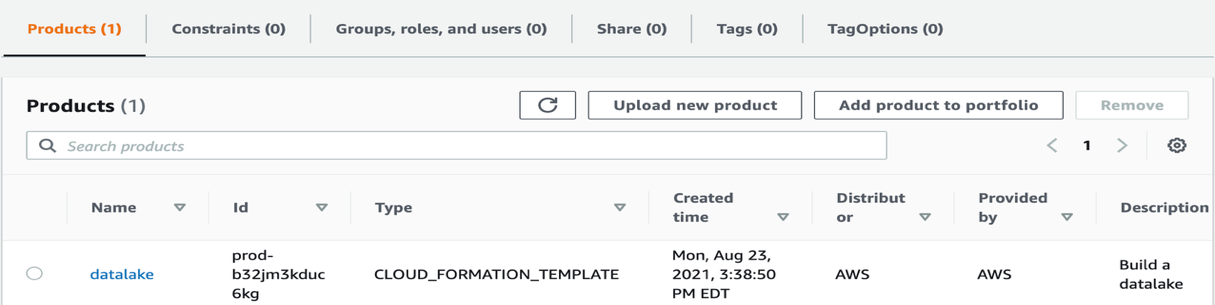
If you choose the arrow next to the DataLakePortfolio resource, you’re redirected to the AWS Service Catalog portfolio, with datalake listed as a product.

Grant permissions to launch the AWS Service Catalog product

We need to provide appropriate permissions for the current user to launch the datalake product we just created.

  1. On the portfolio page on the AWS Service Catalog console, choose the Groups, roles, and users tab.
  2. Choose Add groups, roles, users.
  3. Select the group, role, or user you want to grant permissions to launch the product.

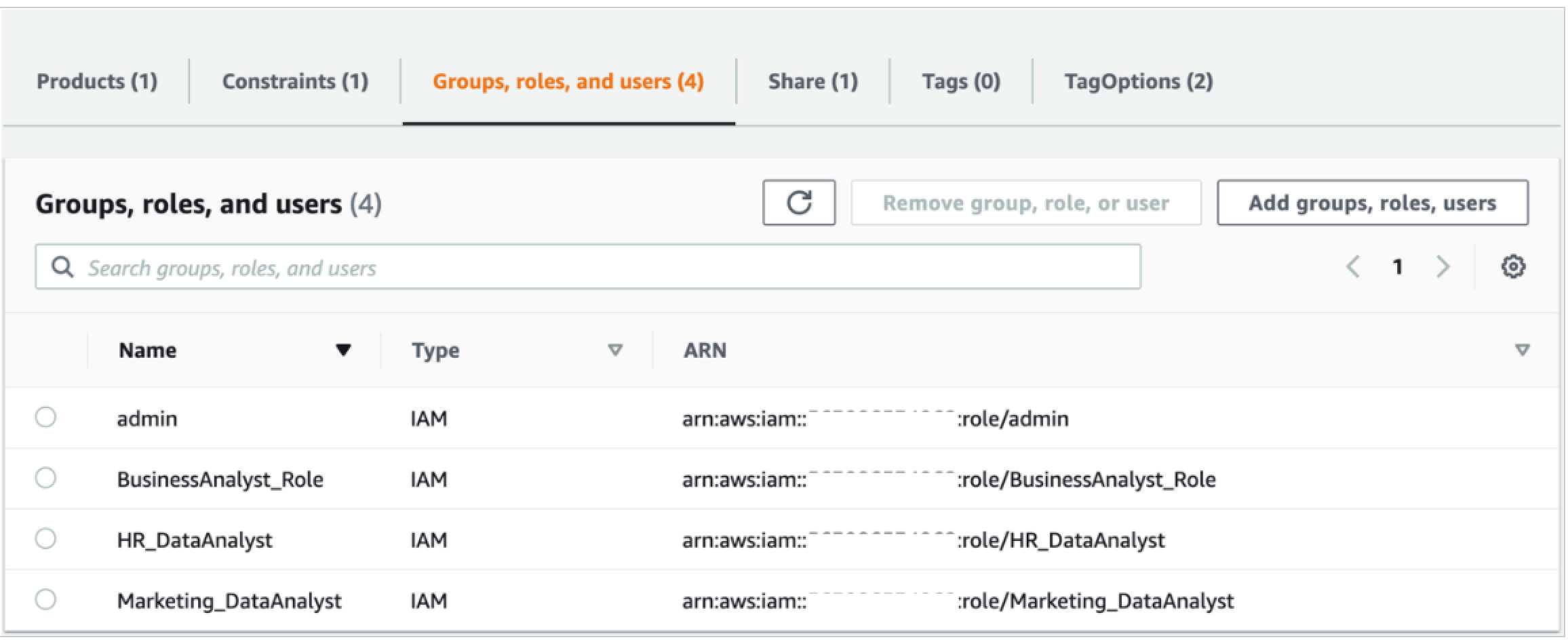
Another approach is to enhance the capability of the data lake by building a multi-tenant data lake. A multi-tenant data lake enables hosting data from multiple business units in the same data lake and maintaining data isolation through roles with different permission sets. To build a multi-tenant data lake, you can add a wide range of stakeholders (developers, analysts, data scientists) from different organizational units. By defining appropriate roles, multi-tenancy helps achieve data sharing and collaboration between different teams and integrate multiple data silos to get a unified view of the data. You can add these appropriate roles on the portfolio page.

In the following example screenshot, data analysts from HR and Marketing have access to their own datasets, the business analyst has access to both datasets to get a unified view of the data to derive meaningful insights, and the admin user manages the operations of the central data lake.

In addition, you can enforce constraints on the data lake from the AWS Service Catalog console as opposed to the data lake product launched independently as a CloudFormation script. This allows the central IT team to enable governance control when a department chooses to build a data lake for their business users.

  1. To enable constraints, choose the Constraints tab on the portfolio page.

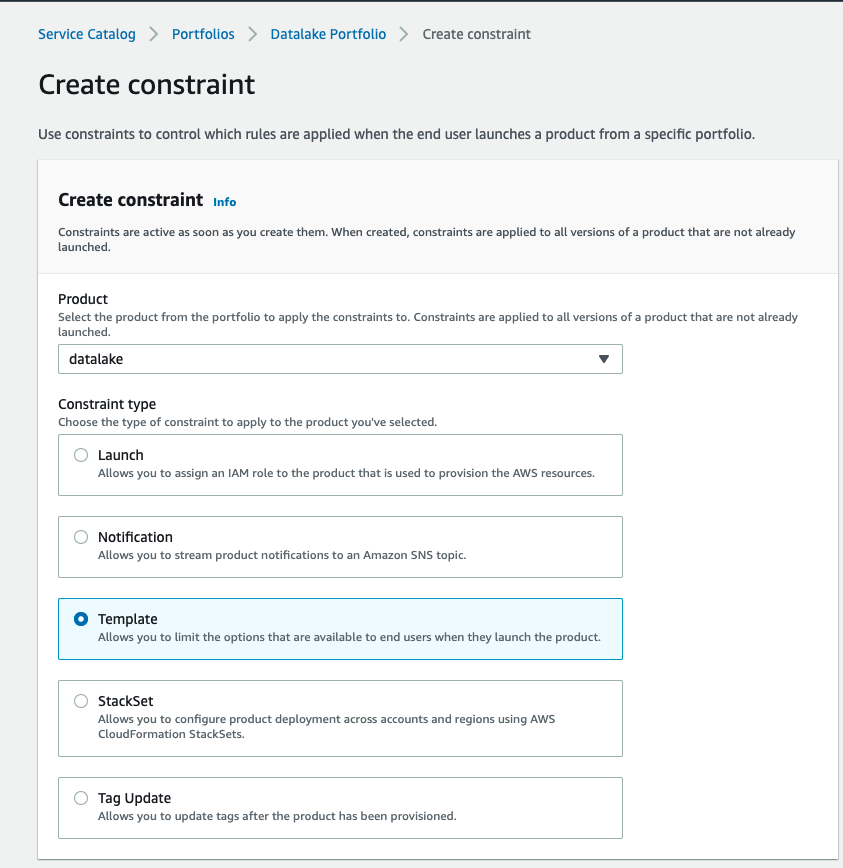
For example, a template constraint allows you to limit the options that are available to end-users when they launch the product. The following screenshot shows an example of configuring a template constraint.

The VPC CIDR range is restricted to a certain range when launching the data lake.

We can now see the template constraint listed on the Constraints tab.

If the constraint is violated and a different CIDR range is entered while launching the product, the template throws an error, as shown in the following screenshot.

In addition, while launching the product to track costs per department or team, the central IT team can define tags in the TagOptions library and force the operations team to select tags from a list of values to distinctly select the business unit for which the data lake is being created and eventually track costs per department or business unit.

  1. Choose the Tags tab to manage tags.
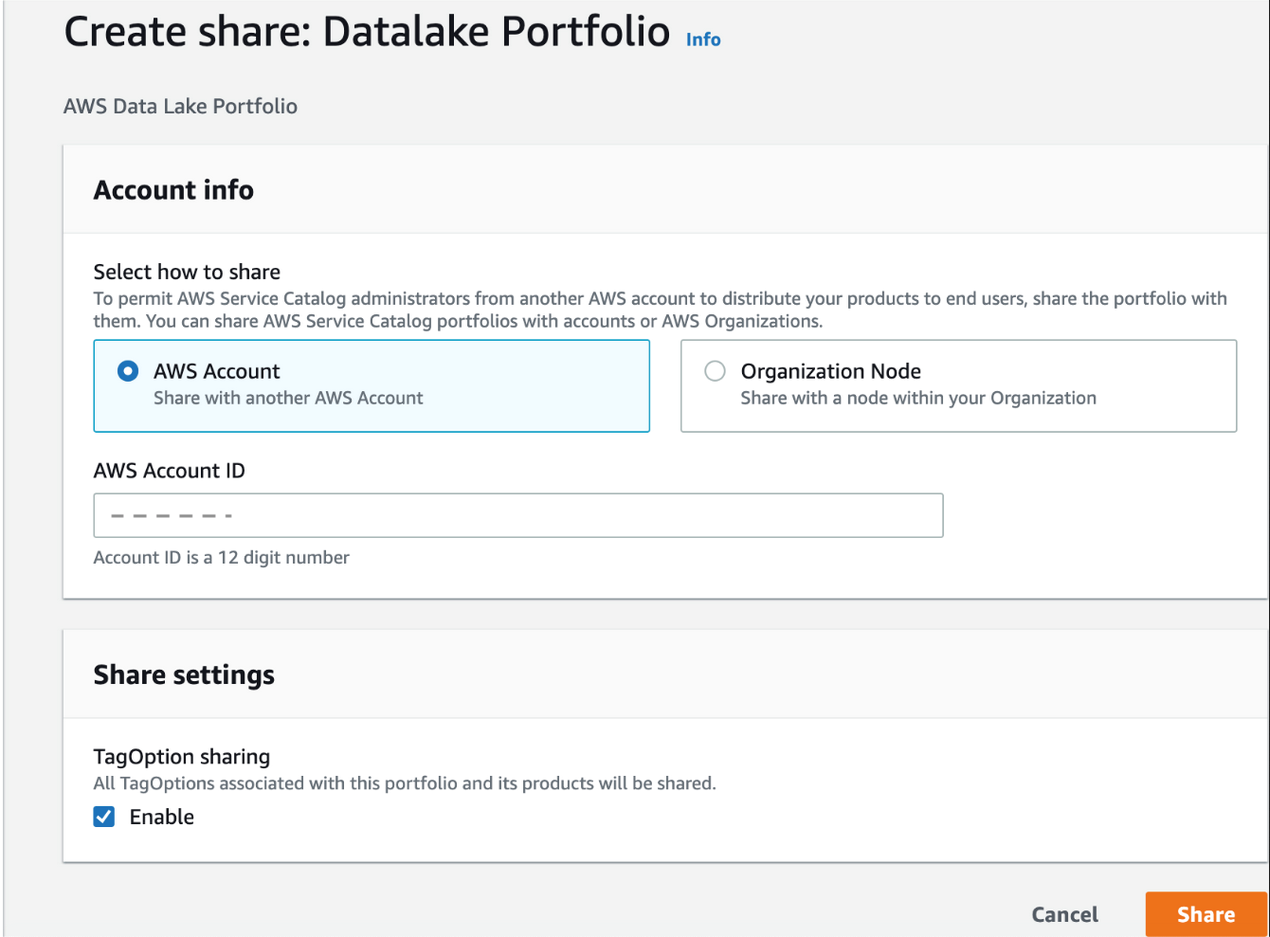
  2. After setting your organization’s standards for roles, constraints, and tags, the central IT team can share the AWS Service Catalog datalake portfolio with accounts or organizations via AWS Organizations.

AWS Service Catalog administrators from another AWS account can then distribute the data lake product to their end-users.

You can view the accounts with access to the portfolio on the Share tab.

Launch the data lake

To launch the data lake, complete the following steps:

  1. Sign in as the user or role that you granted permissions to launch the data lake. If you have never launched AWS Lake Formation service and not defined an initial administrator, please go to the service and add an administrator.
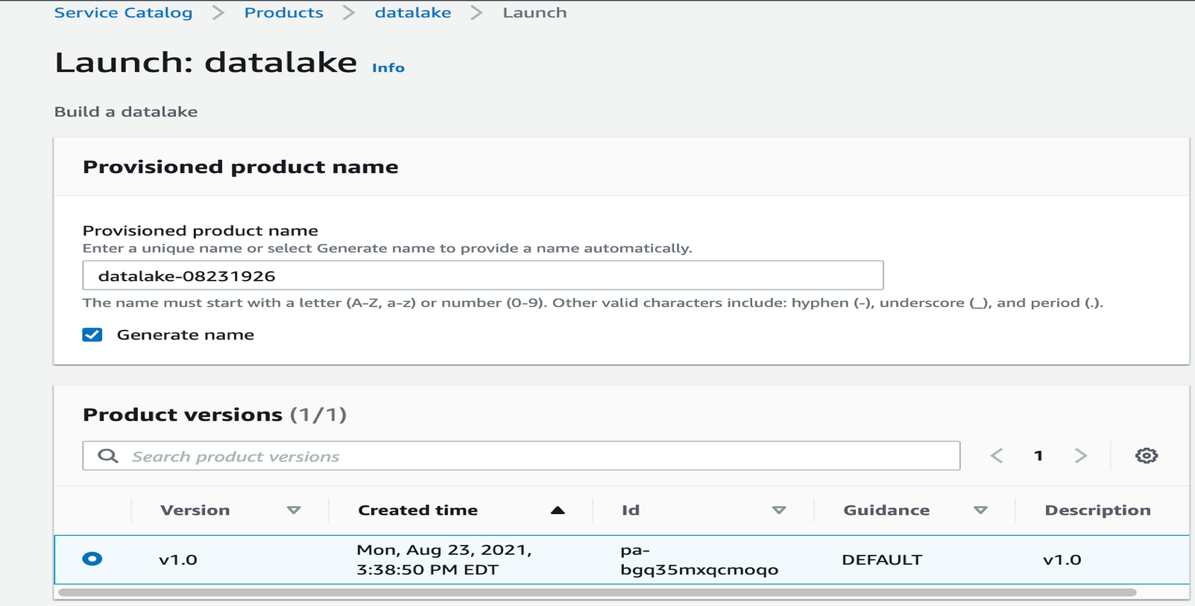
  2. On the AWS Service Catalog console, select the datalake product and choose Launch product.
  3. Select Generate name to automatically enter a name for the provisioned product.
  4. Select your product version (for this post, v1.0 is selected by default).
  5. Enter DB username and password.
  6. Verify the stack name of the previously launched CloudFormation template, datalake-portfolio.
  7. Choose Launch product.

The datalake product triggers the CloudFormation template in the background, creates all the resources, and launches the data lake in your account.

  1. On the AWS Service Catalog console, choose Provisioned products in the navigation pane.
  2. Choose the output value with the link to the CloudFormation stack that created the data lake for your account.
  3. On the Resources tab, review the details of the resources created.

The following resources are created in this step as part of the launching the AWS Service Catalog product:

  • Data ingestion:
    • A VPC with subnets and security groups for hosting the RDS for MySQL database with sample data.
    • An RDS for MySQL database as a sample source to load data into the data lake. Verify the VPC CIDR range to host the data lake as well as database subnet CIDR ranges for the database.
    • The default RDS for MySQL database. You can change the password as needed on the Amazon RDS console.
    • An AWS Glue JDBC connection to connect to the RDS for MySQL database with the sample data loaded.
    • An AWS Glue crawler for data ingestion into the data lake.
  • Data transformation:
    • AWS Glue jobs for data transformation.
    • An AWS Glue Data Catalog database to hold the metadata information.
    • AWS Identity and Access Management (IAM) AWS Glue and AWS Lambda workflow roles to read data from the RDS for MySQL database and load data into the data lake.
  • Data visualization:
    • IAM data lake administrator and data lake analyst roles for managing and accessing data in the data lake through Lake Formation.
    • Two Athena named queries.
    • Two users:
      • datalake_admin – Responsible for day-to-day operations, management, and governance of the data lake.
      • datalake_analyst – Has permissions to only view and analyze the data using different visualization tools.

Data ingestion, transformation, and visualization

After the CloudFormation stack is ready, we complete the following steps to ingest, transform, and visualize the data.

Ingest the data

We run an AWS Glue crawler to load data into the data lake. Optionally, you can verify that the data is available in the data source by following the steps in the appendix of this post. To run the crawler, complete the following steps:

  1. On the AWS Glue console, choose Crawlers in the navigation pane.

The Crawlers page shows four crawlers created as part of the data lake product deployment.

  1. Select the crawler GlueRDSCrawler-xxxx.
  2. Choose Run crawler.

A table is added to the AWS Glue database gluedatabasemysql-blogdb.

The raw data is now ready to run any kind of transformations that are needed. In this example, we transform the raw data into Parquet format.

Transform the data

AWS Glue provides a console and API operations to set up and manage your extract, transform, and load (ETL) workload. A job is the business logic that performs the ETL work in AWS Glue. When you start a job, AWS Glue runs a script that extracts data from sources, transforms the data, and loads it into targets. In this case, our source is the raw S3 bucket and the target is the curated S3 bucket to store the transformed data in Parquet format after the AWS Glue job runs.

To transform the data, complete the following steps:

  1. On the AWS Glue console, choose Jobs in the navigation pane.

The Jobs page lists the AWS Glue job created as part of the data lake product deployment.

  1. Select the job that starts with GlueRDSJob.
  2. On the Action menu, choose Edit script.
  3. Update the name of the S3 bucket on line 33 to the ProcessedBucketS3 value on the Outputs tab of the second CloudFormation stack.
  4. Select the job again and on the Action menu, choose Run job.

You can see the status of the job as it runs.

The ETL job uses the AWS Glue IAM role created as part of the CloudFormation script. To write data into the curated bucket of the data lake, appropriate permissions need to be granted to this role. These permissions have already been granted as part of the data lake deployment. When the job is complete, its status shows as Succeeded.

The transformed data is stored in the curated bucket on the data lake.

The sample data is now transformed and is ready for data visualization.

Visualize the data

In this final step, we use Lake Formation to manage and govern the data that determines who has access to the data and what level of access they have. We do this by assigning granular permissions for the users and personas created by the data lake product. We can then query the data using Athena.

The users datalake-admin and datalake-analyst have already been created. datalake_admin is responsible for day-to-day operations, management, and governance of the data lake. datalake_analyst has permissions to view and analyze the data using different visualization tools.

As part of the data lake deployment, we defined the curated S3 bucket as the data lake location in Lake Formation. To read from and write to the data lake location, we have to make sure all the permissions are properly assigned. In the previous section, we embedded the permission for the AWS Glue ETL job to read from and write to the data lake location in the CloudFormation template. Therefore, the role SC-xxxxGlueWorkFlowRole-xxxxx has appropriate permissions to assume by the crawlers and create the required database and table schema for querying the data. Note that the first crawler analyzes data in the RDS for MySQL database and doesn’t access the data lake, so we didn’t need to give it permissions for the data lake.

To run the crawler, complete the following steps:

  1. On the AWS Glue console, choose Crawlers in the navigation pane.
  2. Select the crawler LakeCuratedZoneCrawler-xxxxx and choose Run crawler.

The crawler reads the data from the data lake and populates the table in the AWS Glue database created in the data ingestion stage and makes it available to query using Athena.

To query the populated data in the AWS Glue Data Catalog using Athena, we need to provide granular permissions to the role using Lake Formation governance and management.

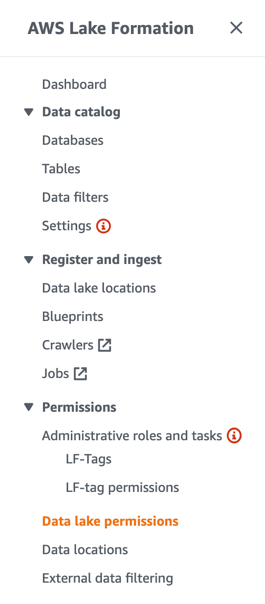
  1. On the Lake Formation console, choose Data lake permissions in the navigation pane.
  2. Choose Grant.
  3. For IAM users and roles, choose the role you want to assign the permissions to.
  4. Select Named data catalog resources.
  5. Choose the database and table.
  6. For Table permissions, select Select.
  7. For Data permissions, select All data access.

This allows the user to see all the data in the table but not modify it.

  1. Choose Grant.

Now you can query the data with Athena. If you haven’t already set up the Athena query results path, see Specifying a Query Result Location for instructions.

  1. On the Athena console, open the query editor.
  2. Choose the Saved queries tab.

You should see the two queries created as part of the data lake product deployment.

  1. Choose the query CensusManufacturersQuery.

The database, table, and query are pre-populated in the query editor.

  1. Choose Run query to access the data in the data lake.

We have completed the process to load, transform, and visualize the data in the data lake by rapid deployment of a data lake as an AWS Service Catalog product. We used sample data ingested in an RDS for MySQL database as an example. You can repeat this process and implement similar steps using Amazon S3 as a data source. To do so, the sample data file schools-census-data.csv is loaded and the corresponding AWS Glue crawler and job to ingest, transform, and visualize the data has been created for you as part of this AWS Service Catalog data lake product deployment.

Conclusion

In this post, we saw how you can minimize the time and effort required to build a data lake. Setting up a data lake helps organizations to be data-driven, identifying patterns in data and acting quickly to accelerate business growth. Additionally, to take full advantage of your data lake, you can build and offer data-driven products and applications with ease through a highly customizable product catalog. With AWS Service Catalog, you can easily and quickly deploy a data lake following common best practices. AWS Service Catalog also enforces constraints for network and account baselines to securely build a data lake in an end-user environment.

Appendix

To verify the sample data is loaded into Amazon RDS, complete the following steps:

  1. On the Amazon Elastic Compute Cloud (Amazon EC2) console, select the EC2SampleRDSdata instance.
  2. On the Actions menu, choose Monitor and troubleshoot.
  3. Choose Get system log.

The system log shows the count of records loaded into the RDS for MySQL database:

count(*)

1296

Next, we can test the connection to the database.

  1. On the AWS Glue console, choose Connections in the navigation pane.

You should see RDSConnectionMySQL-xxxx created for you.

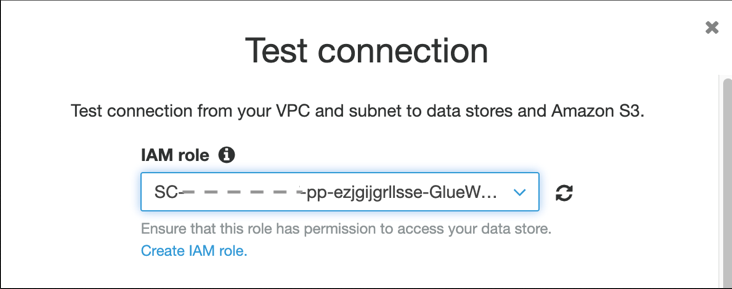
  1. Select the connection and choose Test connection.
  2. For IAM role¸ choose the role SC-xxxxGlueWorkFlowRole-xxxxx.

RDSConnectionMySQL-xxxx should successfully connect to your RDS for MySQL DB instance.


About the Authors

Mamata Vaidya is a Senior Solutions Architect at Amazon Web Services(AWS) accelerating customers in their adoption to the cloud in the area of bigdata analytics and foundational architecture. She has over 20 years of experience in building and architecting enterprise systems in healthcare, finance and cybersecurity with strong management skills. Prior to AWS, Mamata worked for Bristol-Myers Squibb and Citigroup in senior technical management positions. Outside of work, Mamata enjoys hiking with family and friends and mentoring high school students.

Shan Kandaswamy is a Solutions Architect at Amazon Web Services (AWS) who is passionate about helping customers solve complex problems. He is a technical evangelist who advocates for distributed architecture, bigdata analytics and serverless technologies to help customers navigate the cloud landscape as they move to cloud computing. He’s a big fan of travel, watching movies and learning something new every day.

[$] What’s coming in Go 1.18

Post Syndicated from original https://lwn.net/Articles/883602/

Go 1.18, the biggest release of the Go language since Go 1.0 in March 2012, is expected
to be released in February.
The first beta was released in December with two features which, each on their own, would have
made the release a big one. It adds support for generic types and native
support for fuzz testing.
In the blog post announcing the
beta
, core developer Russ Cox emphasized that the release “represents
an enormous amount of work
“.

[$] What’s coming in Go 1.18

Post Syndicated from original https://lwn.net/Articles/883602/rss

Go 1.18, the biggest release of the Go language since Go 1.0 in March 2012, is expected
to be released in February.
The first beta was released in December with two features which, each on their own, would have
made the release a big one. It adds support for generic types and native
support for fuzz testing.
In the blog post announcing the
beta
, core developer Russ Cox emphasized that the release “represents
an enormous amount of work
“.

Huang: The Plausibly Deniable DataBase

Post Syndicated from original https://lwn.net/Articles/884085/

Andrew ‘bunnie’ Huang introduces PDDB, a
database meant to allow users to (plausibly) deny the existence of specific
data within it.

Precursor
is a device we designed to keep secrets, such as passwords,
wallets, authentication tokens, contacts and text messages. We also
want it to offer plausible deniability in the face of an attacker
that has unlimited access to a physical device, including its root
keys, and a set of “broadly known to exist” passwords, such as the
screen unlock password and the update signing password. We further
assume that an attacker can take a full, low-level snapshot of the
entire contents of the FLASH memory, including memory marked as
reserved or erased. Finally, we assume that a device, in the worst
case, may be subject to repeated, intrusive inspections of this
nature.

We created the PDDB (Plausibly Deniable DataBase) to address this
threat scenario.

Huang: The Plausibly Deniable DataBase

Post Syndicated from original https://lwn.net/Articles/884085/rss

Andrew ‘bunnie’ Huang introduces PDDB, a
database meant to allow users to (plausibly) deny the existence of specific
data within it.

Precursor
is a device we designed to keep secrets, such as passwords,
wallets, authentication tokens, contacts and text messages. We also
want it to offer plausible deniability in the face of an attacker
that has unlimited access to a physical device, including its root
keys, and a set of “broadly known to exist” passwords, such as the
screen unlock password and the update signing password. We further
assume that an attacker can take a full, low-level snapshot of the
entire contents of the FLASH memory, including memory marked as
reserved or erased. Finally, we assume that a device, in the worst
case, may be subject to repeated, intrusive inspections of this
nature.

We created the PDDB (Plausibly Deniable DataBase) to address this
threat scenario.

The Big Target on Cyber Insurers’ Backs

Post Syndicated from Paul Prudhomme original https://blog.rapid7.com/2022/02/08/the-big-target-on-cyber-insurers-backs/

The Big Target on Cyber Insurers' Backs

Here at IntSights, a Rapid7 company, our goal is to equip organizations around the world with an understanding of the threats facing them in today’s cyber threat landscape. Most recently, we took a focused look at the insurance industry — a highly targeted vertical due to the amount of personally identifiable information (PII) these organizations hold. We’ve collected our findings in the “2022 Insurance Industry Cyber Threat Landscape Report,” which you can read in full right now.

While conducting this research, one key takeaway caught my eye: the big target on cyber insurers’ backs. Some of these organizations provide cyber insurance coverage for businesses, so in the event of a breach that imposes significant costs on a targeted business, that business is not 100% financially liable.

According to our cyber threat intelligence research, cyber insurance providers are even more appealing targets for bad actors in an industry already full of appealing targets. That begged the question: Why are cyber insurers so highly targeted? And what can they do to protect themselves in the face of these threats?

Cyber insurance providers are data goldmines

Typically, bad actors are angling to breach insurance companies to access PII or to collect policyholder details that they can use for insurance fraud. However, when hackers target cyber insurers, they’re seeking even more specific types of data, such as cyber insurance policy details and information outlining the security standards cyber insurance clients follow.

Why is this the case? A ransomware operation could, for example, leverage this information to build a list of potential targets covered under a cyber insurance policy. Some cyber insurance providers will pay an insured victim’s ransom, and if this is stated in the policy, these clients will bump up on the list of high-value targets, because the bad actors may assume they’re more likely to pay a ransom.

Knowledge of the security standards cyber insurers require their customers to fulfill is also dangerous in the wrong hands. It can help attackers craft their techniques to evade victims’ security measures. For example, they may completely avoid strongly defended points of entry and instead target areas of the perimeter with weaker protections. While not a guaranteed path to success, it gives bad actors more information to work with, and that’s never a good thing.

These are very real — and unique — threats facing the cyber insurance segment, and we’ve seen a few breaches like this play out already. In 2021, CNA Financial, a leading US insurance company that provides cyber insurance policies, suffered a cyberattack and reportedly paid a ransom of $40 million USD to ransomware operators.

Other cyber insurance companies that experienced breaches include Tokio Marine Insurance Singapore in August 2021 and global cyber insurer AXA in May 2021. The AXA breach happened shortly after it announced it would stop reimbursing new French customers for ransom payments after ransomware attacks. This was in response to claims by French officials that cyber insurance coverage of ransom payments encouraged more ransomware attacks and higher ransom demands. The attackers may have aimed to punish AXA for this decision, just going to show that the French officials may have been correct in their claim.

How cyber insurers can better protect their data

To defend themselves and their clients against ransomware attacks and data breaches, cyber insurers can follow a few simple steps:

  • Avoid publicly identifying specific customers by name for any reason. For example, it’s common practice to list the names of your biggest brands or enterprise clients on your website. However, this may make your business more appealing to hackers. They may view your organization as a gateway to gain access to your clients — if they can break through your security perimeter, they may get an even larger payload of data from the clients that can foot more expensive ransoms.
  • Refrain from listing any details about the cyber insurance policies you provide. If you publish information about how much your policy compensates the insured in the event of a ransomware attack or security breach, bad actors can use this data to calculate an optimal ransom amount that’s high enough to maximize profit but low enough for victims to accept. As such, your policy details will need extra protection, including encryption and network segmentation.
  • Scrutinize public-facing web applications and other infrastructure, like automated quote tools. Misconfiguration of these applications and bugs can inadvertently expose customer data. Hackers will often target these types of online portals and tools to learn more about a cyber insurer’s policies, and in some cases, they can even gain access to the information they store, which can then be exploited.
  • Finally, employ rigorous cyber threat intelligence. A key component of any risk management and cybersecurity strategy, threat intelligence can help cyber insurance providers understand the types of data that bad actors hope to steal from them, the methods they may use to obtain it, and even the ransomware operators targeting them. These insights can help your team shore up security against impending threats and remediate malicious actions faster in the event of a breach.

By following these recommendations, cyber insurance providers around the world can better protect their data as well as the sensitive information of their partners, clients, and customers. Because of all the valuable data these organizations house, the target on their backs won’t go away, so the best defensive strategy is a proactive one. Comprehensive cyber threat intelligence can play a critical role there.

Take a deep dive into the threats facing the insurance industry today by reading the full research report here: “2022 Insurance Industry Cyber Threat Landscape Report.”

Additional reading:

How UnitedHealth Group Improved Disaster Recovery for Machine-to-Machine Authentication

Post Syndicated from Vinodh Kumar Rathnasabapathy original https://aws.amazon.com/blogs/architecture/how-unitedhealth-group-improved-disaster-recovery-for-machine-to-machine-authentication/

This blog post was co-authored by Vinodh Kumar Rathnasabapathy, Senior Manager of Software Engineering, UnitedHealth Group. 

Engineers who use Amazon Cognito for machine-to-machine authentication select a primary Region where they deploy their application infrastructure and the Amazon Cognito authorization endpoint. Amazon Cognito is a highly available service in single Region deployments with a published service-level agreement (SLA) target of 99.9%. The UnitedHealth Group (UHG) team needed a solution that would enable them to build and deploy their applications in multiple Regions to achieve higher availability targets. A multi-Region application architecture would also allow UHG engineers to failover to a secondary Region in the event that their application experienced issues in the primary Region.

At UHG, Federated Data Services (FDS) is a business-critical customer-facing application, which requires 99.95% availability and disaster recovery features. The FDS engineering team needed their Amazon Cognito infrastructure to be highly available in case of any service events in AWS Regions, along with having greater flexibility of switching between Regions.

The FDS engineering team worked on a custom solution using existing AWS services to fulfill their availability and recovery requirements. This solution not only serves the purpose of their current business needs but also provides recovery in case of any future disaster.

Overview of the solution

In this solution, we select two AWS Regions which will include the primary Region and the failover Region. Amazon Cognito app clients (including client ID and client secret pair) are created in both Regions and stored in an Amazon DynamoDB table. Client applications are given the client ID and client secret of the primary Region. Optionally, an application-generated ID and secret can be provided to the client to conceal the actual Amazon Cognito client ID and client secret. The process is as follows:

  • The client application (machine) initiates an authentication request by sending the Amazon Cognito app client ID and client secret to an Amazon Route 53 domain record.
  • Route 53 routes authentication requests to the in-Region Amazon API Gateway utilizing a Simple routing policy. From there, API Gateway shuts down the TLS connection using AWS Certificate Manager (ACM), and serves as a proxy for the authentication request to AWS Lambda.
  • AWS Lambda verifies the client ID and client secret, and uses them to look up the in-Region client ID and client secret.
  • Lambda uses preconfigured environment variables to request the appropriate Region from DynamoDB.
  • AWS Lambda then passes the returned app client credentials to the in-Region Amazon Cognito deployment. Amazon Cognito verifies the client ID and client secret, and returns an access token to the Lambda function.
  • The client application (machine) can now use this token to access downstream applications.
  • The client authentication process in the secondary (failover) Region is the same, with one exception. In the secondary Region, the Lambda environment variables retrieve app client credentials from the DynamoDB database for the secondary Region Amazon Cognito instance.

To initiate a failover between Regions, the Route 53 domain record needs to be pointed to the secondary Region API Gateway Regional endpoint. The downstream application’s Amazon Cognito configuration files must also be updated to point to the secondary Region Amazon Cognito instance. Alerts can be enabled using Amazon CloudWatch alarms to notify system operators of issues that may warrant a failover (a manual process to help system operators decide when to failover). The entire failover process takes just a couple of seconds for DNS to switch over and for the application to start accepting tokens from the secondary Region. This failover process could be automated based on generated alerts.

This architecture is suitable for a hot standby, active-passive type of application deployment. It is important to note that independent Amazon Cognito environments are being used in each Region, so you will need to set up your application to failover to the secondary Region for authentication. For example, your backend should be able to accept and validate access tokens from both primary and secondary Amazon Cognito user pools. To learn more about disaster recovery options in AWS, visit Disaster recovery options in the cloud.

Architecture overview

Figure 1 shows you how to build a multi-Region machine-to-machine architecture using Amazon Cognito, which uses DynamoDB global tables to perform the data replication. A Lambda function is utilized to retrieve the credentials for the active Region that the application is operating in, and a Regional Amazon Cognito endpoint returns the required token.

Figure 1. Multi-Region Amazon Cognito machine-to-machine architecture

Figure 1. Multi-Region Amazon Cognito machine-to-machine architecture

Process flow

  1. The Route53 domain record for the authentication proxy service is given to the client application and pointed at the API Gateway Regional endpoint. The client passes primary Region app client credentials to the API Gateway.
  2. API Gateway passes Lambda the client ID and client secret pair.
  3. Lambda does a lookup in DynamoDB to verify the client ID and client secret. After the identity is confirmed, Lambda uses Region-based environment variables to identify if the client should be using the primary Region or secondary Region for authenticating to Amazon Cognito. Lambda retrieves the Region-based client ID and client secret from DynamoDB.
  4. Lambda passes the Region-based app ID and secret to Amazon Cognito, which verifies the client ID and client secret, and returns an access token to the Lambda function.
  5. Lambda passes the access token from the Regional Amazon Cognito environment back to the client to be used against Region-based backend applications.

Prerequisites

For this walkthrough, you should have the following prerequisites:

Note: Ensure that you are following your organization’s security best practices while deploying this architecture.

Implementation

This implementation will focus on the Lambda logic that is used to retrieve user credentials based on Lambda environment variables. We will share snippets of the Lambda function code so you can create the logic necessary to enable multi-Region application architecture using Amazon Cognito app clients. In addition to the Lambda function, you will also need to create and configure the following resources using security implementation designated by your organization:

  1. DynamoDB table with fields primaryClientID, primaryClientSecret, secondaryClientID, and secondaryClientSecret.
    1. Because this table is used to store secrets, make sure encryption is enabled and you follow Security Best Practices for Amazon DynamoDB and your organization’s security best practices.
    2. Enable DynamoDB global tables.
  1. API Gateway Regional endpoint with TLS encryption using ACM.
  2. Route53 domain record routing traffic to Regional API Gateway.
  3. Downstream application configuration pointing at the Regional Amazon Cognito endpoint.
  4. IAM role that grants access from Lambda to DynamoDB.

Now let’s configure our Lambda function using Node.js language. Within the Lambda console create a new Lambda function that you will author from scratch. Select the Node.js runtime and change the runtime Lambda execution role to the IAM role that you have created for Lambda. Next, we will walk through the Lambda function code and configuration.

  1. Attach your new IAM role as a Lambda runtime role that will grant your Lambda function access to the DynamoDB table.
  2. Within the Lambda configuration environment variables, create several key-value variables in the Lambda function. The following are the environmental variables we will add.
    1. key: OAUTH_HOST_PRIMARY, value: https://${cognito-primary-region-domain-name}/oauth2/token
    2. key: OAUTH_HOST_SECONDARY, value: https://${cognito-secondary-region-domain-name}/oauth2/token
  1. Import the Node.js libraries using the following code.
"dependencies": {
    "aws-sdk": "^2.723.0",
    "aws-serverless-express": "^3.3.8",
    "axios": "^0.21.1",
    "base-64": "^1.0.0",
    "cors": "^2.8.5",
    "dotenv": "^8.2.0",
    "express": "^4.17.1",
    "jsonwebtoken": "^8.5.1",
    "jwt-decode": "^2.2.0",
    }
  1. Parse data from the incoming client application authentication request.
router.post("/", async (request, response) => {
  const client_id = request.body["client_id"];
  const client_secret = request.body["client_secret"]
      
  const client = await dynamoDB.getClientCredentialById(client_id, client_secret);
    
  if (client === undefined) {
    return response.status(400).json({
       message:
          "Client not configured for in Cognito. Please check with support team",
        });
      }
    
   const client_credentials = getClientCredentials(client);
   let access_token = await authService.getJwtToken(client_credentials);
          
   response.send(access_token);
});
  1. Reference the environment variables to determine the Region that the Lambda function is operating in and set the Region as primary or secondary.
getClientCredentials = client => {
   return region === "us-east-1" ? { clientId: client.primaryClientId, clientSecret: client.primaryClientSecret, oAuthHost: config.OAUTH_HOST }
   : region === "us-east-2" ? { clientId: client.secondaryClientId, clientSecret: client.secondaryClientSecret, oAuthHost: config.OAUTH_HOST_EAST_2 }
   : {};
}
  1. Verify the client ID and client secret against the DynamoDB table and get the Region-based client ID and client secret.
const getClientCredentialById = async (client_id, client_secret) => {

  let params = {
    TableName: clientCredentialTable,
    Key: {
      primaryClientId: client_id,
      primaryClientSecret: client_secret,
    },
  };

  const clientCredential = await ddb.get(params).promise();
  return clientCredential.Item;
};
  1. Pass the Regional client ID and client secret to Amazon Cognito. You will receive an access token from Amazon Cognito.
   const base64ClientCredentials = base64.encode(
     client_credentials.clientId.concat(":").concat(client_credentials.clientSecret)
   );
   const headers = {
     "content-type": "application/x-www-form-urlencoded",
     authorization: "Basic " + base64ClientCredentials,
    };
    const data = "grant_type=client_credentials";
    
    // Post request to Cognito OAuth URL
    const token = await Axios.post(client_credentials.oAuthHost, data, { headers });
    return token.data;
 };
  1. Pass the access token from the Regional Amazon Cognito environment back to the client to be used against Region-based backend applications.
let access_token = await authService.getJwtToken(client_credentials);
 
  response.send(access_token);

New app client creation

You need to implement this Lambda function in both the primary and secondary Regions. Modify the environmental variables in the secondary Region with the secondary Region’s information.

To enroll a new client in this multi-Region architecture using Amazon Cognito we will go through the process as shown in the following illustration.

Figure 2. Creating a new app client

Figure 2. Creating a new app client

You need to create a new:

  1. App ID and secret in Amazon Cognito in the primary Region.
  2. App ID and secret in Amazon Cognito in the secondary Region.
  3. Item in DynamoDB table consisting of the Amazon Cognito credentials created: primaryClientID, primaryClientSecret, secondaryClientID, and secondaryClientSecret.

Failover process

In this blog post we are creating a hot standby, active-passive type of application deployment. You will need to ensure your application is configured to be able to use either the primary Region Amazon Cognito or the secondary Region Amazon Cognito environment. The process to failover between Regions consists of the following:

  1. Start application backend in the secondary Region.
  2. Reconfigure the application backend Amazon Cognito identity provider YAML file to point at the secondary Region Amazon Cognito identity provider.
  3. Modify the Route 53 domain record to point client applications at the secondary Region API Gateway Regional endpoint.

Cleaning up

In order to avoid unnecessary charges, please be sure to clean up any resources that were built as part of this architecture that are no longer in use.

Conclusion

In this blog post, we presented a solution that allows you to failover Amazon Cognito app clients from one AWS Region to another Region. The benefits of this architecture will allow you to have greater flexibility for running your Amazon Cognito app clients in the Region that is best suited for your use case. With this solution you now have the capability to failover Amazon Cognito app clients to a different AWS Region in the event of application or system errors.

Several variants of this solution can be implemented using the provided Lambda failover logic. You can store App ID and secret in AWS Secrets Manager. To learn more, see How to replicate secrets in AWS Secrets Manager to multiple Regions. You can also automate the failover process between primary and secondary Regions. To accomplish this, you will need to evaluate events which should cause a failover in your environment. Later, build the appropriate automation to failover your downstream application to the secondary Region Amazon Cognito deployment.

Amazon Cognito can be used for machine authentication as per the limits posted in Quotas in Amazon Cognito. Review the limits of number of app clients per user pool and the other applicable rate limits (for example, client credentials rate limits) and verify that these limits meet the needs of your application.

Optum’s Story

UnitedHealth Group (UHG) is the health and well-being company responsible for over 150 million lives globally. Optum, a part of UnitedHealth Group, is a health services business serving the healthcare marketplace, including payers, care providers, employers, governments, life sciences companies and consumers, through its OptumHealth, OptumInsight, OptumRx, and OptumServe businesses.

Federated Data Services (FDS) is the power behind the scenes that enables interoperability and secure transmission of personally identifiable information. It protects health information between lines of businesses, technology systems, applications, members and providers. With FDS, data is centralized, making it easier to share and retrieve by other systems. This assures businesses get a flexible and scalable solution that adapts to changes in technology and business needs.

Email Routing is now in open beta, available to everyone

Post Syndicated from Joao Sousa Botto original https://blog.cloudflare.com/email-routing-open-beta/

Email Routing is now in open beta, available to everyone

Email Routing is now in open beta, available to everyone

I won’t beat around the bush: we’ve moved Cloudflare Email Routing from closed beta to open beta 🎉

What does this mean? It means that there’s no waitlist anymore; every zone* in every Cloudflare account has Email Routing available to them.

To get started just open one of the zones in your Cloudflare Dashboard and click on Email in the navigation pane.

Email Routing is now in open beta, available to everyone

Our journey so far

Back in September 2021, during Cloudflare’s Birthday Week, we introduced Email Routing as the simplest solution for creating custom email addresses for your domains without the hassle of managing multiple mailboxes.

Many of us at Cloudflare saw a need for this type of product, and we’ve been using it since before it had a UI. After Birthday Week, we started gradually opening it to Cloudflare customers that requested access through the wait list; starting with just a few users per week and gradually ramping up access as we found and fixed edge cases.

Most recently, with users wanting to set up Email Routing for more of their domains and with some of G Suite legacy users looking for an alternative to starting a subscription, we have been onboarding tens of thousands of new zones every day into the closed beta. We’re loving the adoption and the feedback!

Needless to say that with hundreds of thousands of zones from around the world in the Email Routing beta we uncovered many new use cases and a few limitations, a few of which still exist. But these few months of closed beta gave us the confidence to move to the next stage – open beta – which now makes Cloudflare Email Routing available to everyone, including free zones.

Thank you to all of you that were part of the closed beta and provided feedback. We couldn’t be more excited to welcome everyone else!

If you have any questions or feedback about this product, please come see us in the Cloudflare Community and the Cloudflare Discord.

___

*we do have a few limitations, such as not currently supporting Internationalized Domain Names (IDNs) and subdomains. Known limitations are listed in the documentation.

Build a REST API to enable data consumption from Amazon Redshift

Post Syndicated from Jeetesh Srivastva original https://aws.amazon.com/blogs/big-data/build-a-rest-api-to-enable-data-consumption-from-amazon-redshift/

API (Application Programming Interface) is a design pattern used to expose a platform or application to another party. APIs enable programs and applications to communicate with platforms and services, and can be designed to use REST (REpresentational State Transfer) as a software architecture style.

APIs in OLTP (online transaction processing) are called frequently (tens to hundreds of times per second), delivering small payloads (output) in the order of a few bytes to kilobytes. However, OLAP (online analytical processing) has the ratio flipped. OLAP APIs have a low call volume but large payload (100 MB to several GBs). This pattern adds new challenges, like asynchronous processing, managing compute capacity, and scaling.

In this post, we walk through setting up an application API using the Amazon Redshift Data API, AWS Lambda, and Amazon API Gateway. The API performs asynchronous processing of user requests, sends user notifications, saves processed data in Amazon Simple Storage Service (Amazon S3), and returns a presigned URL for the user or application to download the dataset over HTTPS. We also provide an AWS CloudFormation template to help set up resources, available on the GitHub repo.

Solution overview

In our use case, Acme sells flowers on its site acmeflowers.com and collects reviews from customers. The website maintains a self-service inventory, allowing different producers to send flowers and other materials to acmeflowers.com when their supplies are running low.

Acme uses Amazon Redshift as their data warehouse. Near-real-time changes and updates to their inventory flow to Amazon Redshift, showing accurate availability of stock. The table PRODUCT_INVENTORY contains updated data. Acme wants to expose inventory information to partners in a cost-effective, secure way for inventory management process. If Acme’s partners are using Amazon Redshift, cross-account data sharing could be a potential option. If partners aren’t using Amazon Redshift, they could use the solution described in this post.

The following diagram illustrates our solution architecture:

The workflow contains the following steps:

  1. The client application sends a request to API Gateway and gets a request ID as a response.
  2. API Gateway calls the request receiver Lambda function.
  3. The request receiver function performs the following actions:
    1. Writes the status to an Amazon DynamoDB control table.
    2. Writes a request to Amazon Simple Queue Service (Amazon SQS).
  4. A second Lambda function, the request processor, performs following actions:
    1. Polls Amazon SQS.
    2. Writes the status back to the DynamoDB table.
    3. Runs a SQL query on Amazon Redshift.
  5. Amazon Redshift exports the data to an S3 bucket.
  6. A third Lambda function, the poller, checks the status of the results in the DynamoDB table.
  7. The poller function fetches results from Amazon S3.
  8. The poller function sends a presigned URL to download the file from the S3 bucket to the requestor via Amazon Simple Email Service (Amazon SES).
  9. The requestor downloads the file using the URL.

The workflow also contains the following steps to check the status of the request at various stages:

  1. The client application or user sends a request ID to API Gateway that is generated in Step 1.
  2. API Gateway calls the status check Lambda function.
  3. The function reads the status from the DynamoDB control table.
  4. The status is returned to the requestor through API Gateway.

Prerequisites

You need the following prerequisites to deploy the example application:

Complete the following prerequisite steps before deploying the sample application:

  1. Run the following DDL on the Amazon Redshift cluster using the query editor to create the schema and table:
    create schema rsdataapi;
    
    create table rsdataapi.product_detail(
     sku varchar(20)
    ,product_id int 
    ,product_name varchar(50)
    ,product_description varchar(50)
    );
    
    Insert into rsdataapi.product_detail values ('FLOWER12',12345,'Flowers - Rose','Flowers-Rose');
    Insert into rsdataapi.product_detail values ('FLOWER13',12346,'Flowers - Jasmine','Flowers-Jasmine');
    Insert into rsdataapi.product_detail values ('FLOWER14',12347,'Flowers - Other','Flowers-Other');

  2. Configure AWS Secrets Manager to store the Amazon Redshift credentials.
  3. Configure Amazon SES with an email address or distribution list to send and receive status updates.

Deploy the application

To deploy the application, complete the following steps:

  1. Clone the repository and download the sample source code to your environment where AWS SAM is installed:
    git clone https://github.com/aws-samples/redshift-application-api

  2. Change into the project directory containing the template.yaml file:
    cd aws-samples/redshift-application-api/assets
    export PATH=$PATH:/usr/local/opt/[email protected]/bin

  3. Change the API .yaml file to update your AWS account number and the Region where you’re deploying this solution:
    sed -i ‘’ “s/<input_region>/us-east-1/g” *API.yaml
    sed -i ‘’ “s/<input_accountid>/<provide your AWS account id without dashes>/g” *API.yaml

  4. Build the application using AWS SAM:
    sam build

  5. Deploy the application to your account using AWS SAM. Be sure to follow proper Amazon S3 naming conventions, providing globally unique names for S3 buckets:
    sam deploy -g

SAM deploy requires you to provide the following parameters for configuration:

Parameter Description
RSClusterID The cluster identifier for your existing Amazon Redshift cluster.
RSDataFetchQ The query to fetch the data from your Amazon Redshift tables (for example, select * from rsdataapi.product_detail where sku= the input passed from the API)
RSDataFileS3BucketName The S3 bucket where the dataset from Amazon S3 is uploaded.
RSDatabaseName The database on your Amazon Redshift cluster.
RSS3CopyRoleArn The IAM role for Amazon Redshift that has access to copy files to and from Amazon Redshift to Amazon S3. This role should be associated with your Amazon Redshift cluster.
RSSecret The Secrets Manager ARN for your Amazon Redshift credentials.
RSUser The user name to connect to the Amazon Redshift cluster.
RsFileArchiveBucket The S3 bucket from where the zipped dataset is downloaded. This should be different than your upload bucket.
RsS3CodeRepo The S3 bucket where the packages or .zip file is stored.
RsSingedURLExpTime The expiry time in seconds for the presigned URL to download the dataset from Amazon S3.
RsSourceEmailAddress The email address of the distribution list for which Amazon SES is configured to use as the source for sending completion status.
RsTargetEmailAddress The email address of the distribution list for which Amazon SES is configured to use as the destination for receiving completion status.
RsStatusTableName The name of the status table for capturing the status of various stages from start to completion of request.

This template is designed only to show how you can set up an application API using the Amazon Redshift Data API, Lambda, and API Gateway. This setup isn’t intended for production use without modification.

Test the application

You can use Postman or any other application to connect to API Gateway and pass the request to access the dataset from Amazon Redshift. The APIs are authorized via IAM users. Before sending a request, choose your authorization type as AWS SigV4 and enter the values for AccessKey and SecretKey for the IAM user.

The following screenshot shows a sample request.

The following screenshot shows the email response.

The following screenshot shows sample response with the status of a request. You need to pass the request ID and enter all for status history or latest for latest status.

Clean up

When you’re finished testing this solution, remember to clean up all the AWS resources that you created using AWS SAM.

Delete the upload and download S3 buckets via the Amazon S3 console and then run the following on SAM CLI:

sam delete

For more information, see sam delete.

Summary

In this post, we showed you how you can set up an application API that uses the Amazon Redshift Data API, Lambda, and API Gateway. The API performs asynchronous processing of user requests, sends user notifications, saves processed data in Amazon S3, and returns a presigned URL for the user or application to download the dataset over HTTPs.

Give this solution a try and share your experience with us!


About the Authors

Jeetesh Srivastva is a Sr. Manager Specialist Solutions Architect at AWS. He specializes in Amazon Redshift and works with customers to implement scalable solutions using Amazon Redshift and other AWS Analytic services. He has worked to deliver on-premises and cloud-based analytic solutions for customers in banking and finance and hospitality industry verticals.

Ripunjaya Pattnaik is an Enterprise Solutions Architect at AWS. He enjoys problem-solving with his customers and being their advisor. In his free time, he likes to try new sports, play ping pong, and watch movies.

Automating Anomaly Detection in Ecommerce Traffic Patterns

Post Syndicated from Aditya Pendyala original https://aws.amazon.com/blogs/architecture/automating-anomaly-detection-in-ecommerce-traffic-patterns/

Many organizations with large ecommerce presences have procedures to detect major anomalies in their user traffic. Often, these processes use static alerts or manual monitoring. However, the ability to detect minor anomalies in traffic patterns near real-time can be challenging. Early detection of these minor anomalies in ecommerce traffic (such as website page visits and order completions) helps organizations take corrective actions to address issues. This decreases negative impacts to business key performance indicators (KPIs).

In this blog post, we will demonstrate an artificial intelligence/machine learning (AI/ML) solution using AWS services. We’ll show how Amazon Kinesis and Amazon Lookout for Metrics can be used to detect major and minor anomalies near-real time, based on historical and current traffic trends.

The inconsistency of ecommerce traffic

The ecommerce traffic (and number of orders placed) varies based on season, month, date, and time of day. For example, ecommerce websites experience high traffic during weekday evening hours, compared to morning hours. Similarly, there is a spike in web traffic on weekends, compared to weekdays. However, the ecommerce traffic on holiday events (for example, Black Friday, Cyber Monday) does not follow this trend. Due to such dynamic and varying patterns, detecting minor anomalies in user traffic near-real time becomes difficult.

We need a smart solution that can detect the smallest deviation in user traffic based on historical data (date and time). As you can imagine, programming these trends based on static rules is time-intensive. In the next section, we discuss a solution that can help organizations automate and detect minor (and major) anomalies while still accounting for varying traffic trends.

The components of our anomaly detection solution

The architecture consists of three functional components:

  • The ecommerce application that customers use for interaction
  • The data ingesting, transforming, and storage platform
  • Anomaly detection and notification

This solution automates data ingestion and anomaly detection, and provides a graphical user interface to interact, tweak, and filter anomalies based on severity.

Figure 1 illustrates the architecture of this solution:

Figure 1. Architecture diagram of an anomaly detection solution for ecommerce traffic

Figure 1. Architecture diagram of an anomaly detection solution for ecommerce traffic

Let’s look at the individual components of this architecture before reviewing the overall solution.

The ecommerce application that customers use for interaction 

A customer’s journey of purchasing a product online involves user actions that include:

  • Searching for and viewing the product on the “Product Display Page” (PDP)
  • Adding to the “cart”
  • Completing the purchase on the “checkout“ page

The traffic on these pages is broken down into chunks based on time intervals. These serve as the data points that we can use to understand traffic patterns.

The data ingesting, transforming, and storage platform

Ecommerce applications generate data in multiple formats and in different volumes. This data must be fed into a streaming platform that can ingest and collect data continuously. Typically, the data must be transformed and stored for analysis and machine learning purposes. To satisfy these requirements, we will use Amazon Kinesis Data Streams as a streaming platform for data ingestion. Amazon Kinesis Data Firehose with AWS Lambda can transform the data. And we’ll store the data in Amazon Simple Storage Service (S3).

Anomaly detection and notification in near-real time

Once our data is ready, we must analyze it near-real time to identify anomalies. We must notify the concerned team about this anomaly so that they can take necessary corrective actions, if needed. We will use Lookout for Metrics and Amazon Simple Notification Service (SNS) to satisfy these requirements.

Lookout for Metrics can detect and diagnose anomalies in traffic patterns using ML. Amazon Lookout for Metrics accepts feedback on detected anomalies and tunes the results to improve accuracy over time. Lookout for Metrics is also capable of integrating with Amazon SNS, which can send notifications via SMS, mobile push, and emails.

Monitoring ecommerce traffic with Lookout for Metrics

As shown in Figure 1, data from user traffic and user interactions with the ecommerce application is captured as a function of time, and ingested into Kinesis Data Streams. Using Kinesis Data Firehose and Lambda, data is transformed and stored in an S3 bucket. We then create a detector in Lookout for Metrics and use the S3 bucket as the data source. Because of seamless integration between S3 and Lookout for Metrics, data from S3 bucket is automatically ingested into the detector we created.

Once the detector is activated, Lookout for Metrics will start monitoring the data for anomalies, and start identifying the anomalies near-real time. Lookout for Metrics also provides a mechanism to adjust severity threshold on a scale of 0-100, which will help decrease false positives as much as desired. In addition, it integrates with SNS, and can publish notifications to an SNS Topic. An email/ SMS or mobile push subscription can be created on this topic, which will notify users about any current anomalies.

 Conclusion

In this post, we discussed how minor anomalies are hard to detect near-real time in ecommerce traffic of organizations. We also discussed the services that can be used to monitor these anomalies, such as Lookout for Metrics. Use this architecture to help you monitor, detect anomalies in near-real time, and reduce any negative impact to your business KPIs.

For further reading:

Slicing and Dicing Instant Logs: Real-time Insights on the Command Line

Post Syndicated from Cole MacKenzie original https://blog.cloudflare.com/instant-logs-on-the-command-line/

Slicing and Dicing Instant Logs: Real-time Insights on the Command Line

Slicing and Dicing Instant Logs: Real-time Insights on the Command Line

During Speed Week 2021 we announced a new offering for Enterprise customers, Instant Logs. Since then, the team has not slowed down and has been working on new ways to enable our customers to consume their logs and gain powerful insights into their HTTP traffic in real time.

Slicing and Dicing Instant Logs: Real-time Insights on the Command Line

We recognize that as developers, UIs are useful but sometimes there is the need for a more powerful alternative. Today, I am going to introduce you to Instant Logs in your terminal! In order to get started we need to install a few open-source tools to help us:

  • Websocat – to connect to WebSockets.
  • Angle Grinder – a utility to slice-and-dice a stream of logs on the command line.

Creating an Instant Log’s Session

For enterprise zones with access to Instant Logs, you can create a new session by sending a POST request to our jobs’ endpoint. You will need:

  • Your Zone Tag / ID
  • An Authentication Key or an API Token with at least the Zone Logs Read permission

curl -X POST 'https://api.cloudflare.com/client/v4/zones/${ZONE_ID}/logpush/edge/jobs' \
-H 'X-Auth-Key: <KEY>' \
-H 'X-Auth-Email: <EMAIL>' \
-H 'Content-Type: application/json' \
--data-raw '{
    "fields": "ClientIP,ClientRequestHost,ClientRequestMethod,ClientRequestPath,EdgeEndTimestamp,EdgeResponseBytes,EdgeResponseStatus,EdgeStartTimestamp,RayID",
    "sample": 1,
    "filter": "",
    "kind": "instant-logs"
}'

Response

The response will include a new field called destination_conf. The value of this field is your unique WebSocket address that will receive messages directly from our network!

{
    "errors": [],
    "messages": [],
    "result": {
        "id": 401,
        "fields": "ClientIP,ClientRequestHost,ClientRequestMethod,ClientRequestPath,EdgeEndTimestamp,EdgeResponseBytes,EdgeResponseStatus,EdgeStartTimestamp,RayID",
        "sample": 1,
        "filter": "",
        "destination_conf": "wss://logs.cloudflare.com/instant-logs/ws/sessions/949f9eb846f06d8f8b7c91b186a349d2",
        "kind": "instant-logs"
    },
    "success": true
}

Connect to WebSocket

Using a CLI utility like Websocat, you can connect to the WebSocket and start immediately receiving logs of line-delimited JSON.

websocat wss://logs.cloudflare.com/instant-logs/ws/sessions/949f9eb846f06d8f8b7c91b186a349d2
{"ClientRequestHost":"example.com","ClientRequestMethod":"GET","ClientRequestPath":"/","EdgeEndTimestamp":"2022-01-25T17:23:05Z","EdgeResponseBytes":363,"EdgeResponseStatus":200,"EdgeStartTimestamp":"2022-01-25T17:23:05Z","RayID":"6d332ff74fa45fbe","sampleInterval":1}
{"ClientRequestHost":"example.com","ClientRequestMethod":"GET","ClientRequestPath":"/","EdgeEndTimestamp":"2022-01-25T17:23:06Z","EdgeResponseBytes":363,"EdgeResponseStatus":200,"EdgeStartTimestamp":"2022-01-25T17:23:06Z","RayID":"6d332fffe9c4fc81","sampleInterval":1}

The Scenario

Now that you are able to create a new Instant Logs session let’s give it a purpose! Say you just recently deployed a new firewall rule blocking users from downloading a specific asset that is only available to users in Canada. For the purpose of this example, the asset is available at the path /canadians-only.

Specifying Fields

In order to see what firewall actions (if any) were taken, we need to make sure that we include ClientRequestCountry, ​​FirewallMatchesActions and FirewallMatchesRuleIDs fields when creating our session.

Additionally, any field available in our HTTP request dataset is usable by Instant Logs. You can view the entire list of HTTP Request fields on our developer docs.

Choosing a Sample Rate

Instant Logs users also have the ability to choose a sample rate. The sample parameter is the inverse probability of selecting a log. This means that "sample": 1 is 100% of records, "sample": 10 is 10% and so on.

Going back to our example of validating that our newly deployed firewall rule is working as expected, in this case, we are choosing not to sample the data by setting "sample": 1.

Please note that Instant Logs has a maximum data rate supported. For high volume domains, we sample server side as indicated in the “sampleInterval” parameter returned in the logs. For example, “sampleInterval”: 10 indicates this log message is just one out of 10 logs received.

Defining the Filters

Since we are only interested in requests with the path of /canadians-only, we can use filters to remove any logs that do not match that specific path. The filters consist of three parts: key, operator and value. The key can be any field specified in the "fields": "" list when creating the session. The complete list of supported operators can be found on our Instant Logs documentation.

To only get the logs of requests destined to /canadians-only, we can specify the following filter:

{
  "filter": "{\"where\":{\"and\":[{\"key\":\"ClientRequestPath\",\"operator\":\"eq\",\"value\":\"/canadians-only\"}]}}"
}

Creating an Instant Logs Session: Canadians Only

Using the information above, we can now craft the request for our custom Instant Logs session.

curl -X POST 'https://api.cloudflare.com/client/v4/zones/${ZONE_ID}/logpush/edge/jobs' \
-H 'X-Auth-Key: <KEY>' \
-H 'X-Auth-Email: <EMAIL>' \
-H 'Content-Type: application/json' \
--data-raw '{
  "fields": "ClientIP,ClientRequestHost,ClientRequestMethod,ClientRequestPath,ClientCountry,EdgeEndTimestamp,EdgeResponseBytes,EdgeResponseStatus,EdgeStartTimestamp,RayID,FirewallMatchesActions,FirewallMatchesRuleIDs",
  "sample": 1,
  "kind": "instant-logs",
  "filter": "{\"where\":{\"and\":[{\"key\":\"ClientRequestPath\",\"operator\":\"eq\",\"value\":\"/canadians-only\"}]}}"
}'

Angle Grinder

Now that we have a connection to our WebSocket and are receiving logs that match the request path /canadians-only, we can start slicing and dicing the logs to see that the rule is working as expected. A handy tool to use for this is Angle Grinder. Angle Grinder lets you apply filtering, transformations and aggregations on stdin with first class JSON support. For example, to get the number of visitors from each country we can sum the number of events by the ClientCountry field.

websocat wss://logs.cloudflare.com/instant-logs/ws/sessions/949f9eb846f06d8f8b7c91b186a349d2 | agrind '* | json | sum(sampleInterval) by ClientCountry'
ClientCountry    	_sum
---------------------------------
pt               	4
fr               	3
us               	3

Using Angle Grinder, we can create a query to count the firewall actions by each country.

websocat wss://logs.cloudflare.com/instant-logs/ws/sessions/949f9eb846f06d8f8b7c91b186a349d2 |  agrind '* | json | sum(sampleInterval) by ClientCountry,FirewallMatchesActions'
ClientCountry        FirewallMatchesActions        _sum
---------------------------------------------------------------
ca                   []                            5
us                   [block]                       1

Looks like our newly deployed firewall rule is working 🙂

Happy Logging!

Qubes OS 4.1.0 released

Post Syndicated from original https://lwn.net/Articles/884036/rss

Version 4.1.0 of the secure-desktop-oriented Qubes OS distribution has been
released. “The
culmination of years of development, this release brings a host of new
features, major improvements, and numerous bug fixes
“. New features
an experimental GUI domain separate from dom0, the “Qrexec” policy system,
progress toward a reproducible build, and more. See below and this article for more information.

The collective thoughts of the interwebz