Manage your AWS Directory Service credentials using AWS Secrets Manager

Post Syndicated from Ashwin Bhargava original https://aws.amazon.com/blogs/security/manage-your-aws-directory-service-credentials-using-aws-secrets-manager/

AWS Secrets Manager helps you protect the secrets that are needed to access your applications, services, and IT resources. With this service, you can rotate, manage, and retrieve database credentials, API keys, OAuth tokens, and other secrets throughout their lifecycle. The secret value rotation feature has built-in integration for services like Amazon Relational Database Service (Amazon RDS) , whose credentials can be rotated. The same integration functionality can also be extended to other types of secrets, including API keys and OAuth tokens, with the help of AWS Lambda functions.

This blog post provides details on how Secrets Manager can be used to store and rotate the admin password of AWS Directory Service at a specified frequency. Customers who use the directory services in AWS can deploy the solution in this blog post to minimize the effort spent by their operations team to manually rotate the password (which is one of the best practices of password management). These customers can also benefit by using the secure API access of Secrets Manager to allow access by applications that are using Active Directory–specific accounts. A good example is having an application to reset passwords for AD users and can be done using the API access.

Solution overview

When you configure AWS Directory Service, one of the inputs the service expects is the password for the admin user (administrator). By using an AWS Lambda function and Secrets Manager, you can store the password and rotate it periodically.

Figure 1 shows the architecture diagram for this solution.
 

Figure 1: Architecture diagram

Figure 1: Architecture diagram

The workflow is as follows:

  1. During initial setup (which can be performed either manually or through a CloudFormation template), the password of the admin user is stored as a secret in Secrets Manager. The secret is in the JSON format and contains three fields: Directory ID, UserName, and Password. The secret is encrypted using KMS Key to provide an added layer of security.
  2. This secret is attached to a Lambda function that controls rotation.
  3. This rotation Lambda function generates a new password, updates Active Directory, and then updates the secret. The function can be invoked on as-needed basis or at a desired interval. The CFN template we provide in this post schedules the rotation at a 30-day interval.
  4. Applications can securely fetch the new secret value from Secrets Manager.

Prerequisites and assumptions

To implement this solution, you need an AWS account to test the solution and access AWS services.

Also be aware of the following:

  1. In this solution, you will configure all the (supported) services in the same virtual private cloud (VPC) to simplify networking considerations.
  2. The predefined admin user name for Simple Active Directory is Administrator.
  3. The predefined password is a random 12-character string.

Important: The AWS CloudFormation template that we provide deploys a Simple Active Directory. This is for testing and demonstration purposes; you can modify or reuse the solution for other types of Active Directory solutions.

Deploy the solution

To deploy the solution, you first provision the baseline networking and other resources by using a CloudFormation stack.

The resource provisioning in this step creates these resources:

  • An Amazon Virtual Private Cloud (Amazon VPC) with two private subnets
  • AWS Directory Service installed and configured in the VPC
  • A Secrets Manager secret with rotation enabled
  • A Lambda function inside the VPC
  • These AWS Identity and Access Management (IAM) roles and permissions:
    • Secrets Manager has permission to invoke Lambda functions
    • The Lambda function has permission to update the secret in Secrets Manager
    • The Lambda function has permission to update the password for Directory Service

To deploy the solution by using the CloudFormation template

  1. You can use this downloadable template to set up the resources. To launch directly through the console, choose the following Launch Stack button, which creates the stack in the us-east-1 AWS Region.
    Select the Launch Stack button to launch the template
  2. Choose Next to go to the Specify stack details page.
  3. The bucket hosting the Lambda function code is predefined for ease of implementation, but you can edit the bucket name if necessary. Specify any other template details as needed, and then choose Next.
  4. (Optional) On the Configure Stack Options page, enter any tags, and then choose Next.
  5. On the Review page, select the check box for I acknowledge that AWS CloudFormation might create IAM resources with custom names, and choose Create stack.

It takes approximately 20–25 minutes for the provisioning to complete. When the stack status shows Create Complete, review the outputs that were created by navigating to the Outputs tab, as shown in Figure 2.
 

Figure 2: Outputs created by the CloudFormation template

Figure 2: Outputs created by the CloudFormation template

Now that the stack creation has completed successfully, you should validate the resources that were created.

To validate the resources

  1. Navigate to the AWS Directory Service console. You should see a new directory service that has the corp.com directory set up.
  2. Navigate to the AWS Secrets Manager console and review the secret that was created called DSAdminPswd. Choose the secret value, and then choose Retrieve secret value to reveal the secret values.
     
    Figure 3: Checking the secret value in the Secrets Manager console

    Figure 3: Checking the secret value in the Secrets Manager console

  3. As you might have noticed, the secret value changed from what was initially generated in the template. The Lambda function was invoked when it was attached to the secret, which caused the secret to rotate. To verify that the secret value changed, navigate to the Amazon CloudWatch console, and then navigate to Log groups.
  4. In the search bar, type the Lambda function name dj-rotate-lambda to filter on the log group name.
     
    Figure 4: CloudWatch log groups

    Figure 4: CloudWatch log groups

  5. Choose the log group /aws/lambda/dj-rotate-lambda to open the detailed log streams.
  6. Look at the Log streams and open the recent log stream to view the series of rotation events.
     
    Figure 5: The log data for a complete rotation

    Figure 5: The log data for a complete rotation

    You should see that each of the four stages of rotation (create, set, test, and finish) are called in the right sequence. A Success message in the finishSecret stage confirms the successful rotation of the secret value.

The next step is to rotate the secret manually or set a policy for rotation.

To rotate the secret

The CloudFormation automation has set the rotation configuration to rotate the secret every 30 days. You can alternatively initiate another rotation by choosing Rotate secret immediately, as shown in Figure 6. You will observe the log stream (in CloudWatch Logs) changing, followed by the new secret value.
 

Figure 6: Manual rotation of the secret

Figure 6: Manual rotation of the secret

You can also edit the rotation configuration by choosing Edit rotation and configuring the rotation policy that suits your organizational standards, as shown in Figure 7.
 

Figure 7: Editing the rotation configuration

Figure 7: Editing the rotation configuration

Code walkthrough

The rotation Lambda function works in four stages:

  1. CreateSecret – In this stage, the Lambda function creates a new password for the administrator user and sets up the staging label AWSPENDING for the secret’s new value.
  2. SetSecret – In this stage, the Lambda function fetches the newly generated password by using the label AWSPENDING and sets it as the password to the Active Directory administrator user.
  3. TestSecret – In this stage, the Lambda function verifies that the password is working by using the kinit command and the necessary dependent libraries of the Linux OS (the base OS for Lambda functions). If successful, the function continues to the next stage. In the case of failure, the catch block reverts the password of the Active Directory administrator user to the value in the AWSCURRENT label.
  4. FinishSecret – This is the final stage, where the Lambda function moves the labels AWSCURRENT from the current version of secret to the new version. And the same time, the old version of the secret is given AWSPREVIOUS label.

The Lambda function is written in Python 3.7 runtime and uses AWS SDK for Python (Boto3) API calls for interacting with Secrets Manager and Directory Services.

The directory ID and Secrets Manager endpoint are supplied as environment variables to the Lambda function, as shown in Figure 8. The secret ID is fetched from the event context.
 

Figure 8: Environment variables setup

Figure 8: Environment variables setup

You can download the Lambda code that is used for the rotation logic and modify it to suit your organizational needs. For instance, the random password is configured to have a length of 12 characters, excluding special characters and punctuations, as shown in the following code snippet. You can modify this configuration as needed.

newpasswd = service_client.get_random_password(PasswordLength=12,ExcludeCharacters='/@"\'\\',ExcludePunctuation=True)

As mentioned in the Prerequisites section, make sure that you do proper testing in development or test environments before proceeding to deploy the solution in production environments.

Cleanup

After you complete and test this solution, clean up the resources by deleting the AWS CloudFormation stack called aws-ds-creds-manager. For more information on deleting the stacks, see Deleting a stack on the AWS CloudFormation console.

Conclusion

In this post, we demonstrated how to use the AWS Secrets Manager service to store and rotate the AWS Directory Service Simple Active Directory admin password. You can also use this solution to rotate the AWS Managed Microsoft AD directory.

There are many other code samples listed in the AWS Code Sample Catalog that show how to rotate the passwords for other database services that are supported by this service.

You can find additional rotation Lambda function examples in the open source AWS library for Secrets Manager.

If you have feedback about this post, submit comments in the Comments section below. If you have questions about this post, start a new thread on the AWS Secrets Manager forum or contact AWS Support.

Want more AWS Security how-to content, news, and feature announcements? Follow us on Twitter.
Author

Ashwin Bhargava

Ashwin is a DevOps Consultant at AWS working in Professional Services Canada. He is a DevOps expert and a security enthusiast with more than 13 years of development and consulting experience.

Author

Satya Vajrapu

Satya is a Senior DevOps Consultant with AWS. He works with customers to help design, architect, and develop various practices and tools in the DevOps and cloud toolchain.

How We Build Micro Frontends With Lattice

Post Syndicated from Netflix Technology Blog original https://netflixtechblog.com/how-we-build-micro-frontends-with-lattice-22b8635f77ea

Written by Michael Possumato, Nick Tomlin, Jordan Andree, Andrew Shim, and Rahul Pilani.

As we continue to grow here at Netflix, the needs of Revenue and Growth Engineering are rapidly evolving; and our tools must also evolve just as rapidly. The Revenue and Growth Tools (RGT) team decided to set off on a journey to build tools in an abstract manner to have solutions readily available within our organization. We identified common design patterns and architectures scattered across various tools which were all duplicating efforts in some way or another.

We needed to consolidate these tools in a way that scaled with the teams we served. It needed to have the agility of a micro frontend and the extensibility of a framework to empower our stakeholders to extend our tools. We would abstract parts of which anyone can then customize, or extend, to meet their specific business or technical requirements. The end result is Lattice: RGT’s pluggable framework for micro frontends.

A Different Approach to Our Tools

A UI composed of other dependencies is nothing new; it’s something all modern web applications do today. The traditional approach of bundling dependencies at build time lacks the flexibility we need to empower our stakeholders. We want external dependencies to be resolved on-demand from any number of sources, from another application to an engineer’s laptop.

This led us to the following high level objectives:

  • Low Friction Adoption: Encourage reuse of existing front end code and avoid creating new packages that encapsulate UI functionality. Applications can be difficult to manage when functionality must be shared across packages. We would leverage an approach that enabled applications to extend their core functionality using common, and familiar, React paradigms.
  • Weak Dependencies: Host applications could reference modules over https to a remote bundle hosted internally within Netflix. These bundles could be owned by teams outside of RGT built by already adopted standards such as with Webpack Module Federation or native JavaScript Modules.
  • Highly Aligned, Loosely Coupled: fully align with the standard frameworks and libraries used within Netflix. Plugins should be focused on delivering their core functionality without unnecessary boilerplate and have the freedom to implement without cumbersome API wrappers.
  • Metadata Driven: Plugin modules are defined from a configuration which could be injected at any point in the application lifecycle. The framework must be flexible enough to register, and unregister, plugins such that the extensions only apply when necessary.
  • Rapid Development: Reduce the development cycle by avoiding unnecessary builds and deployments. Plugins would be developed in a manner in which all of the context is available to them ahead of time via TypeScript declarations. By designing to rigid interfaces defined by a host application, both the plugin and host can be developed in parallel.

A Theoretical Example

Example Developer Dashboard Application with Embedded Lattice Plugins

Let’s take the above example — it renders and controls its own header and content areas to expose specific functionality to users. Upon release, we receive feedback that it would be nice if we could include information presented from other tools within this application. Using our new framework, Lattice, we are able to embed the existing functionality from the other applications.

A Lattice Plugin Host (which we’ll dive into later) allows us to extend the existing application by referencing two external plugins, Workflows and Spinnaker. In our example, we need to define two areas that can be extended — the application content for portal components and configurable routing.

The sequence of events in order to accomplish the above rendering process would be handled by three components — our new framework Lattice and the two plugins:

Dispatch Cycle within Lattice

First, Lattice will load both plugins asynchronously.

Next, the framework will dispatch events as they flow through the application.

In our example, Workflows will register its routes and Spinnaker will add its overlays.

An Implementation with React

In order to accomplish the above scenario, the Host Application needs to include the Lattice library and add a new PluginHost with a configuration referencing the external plugins. This host requires information about the specific application and the configuration indicating which plugins to load:

Enhancing a React Application with a Lattice Plugin Host

We’ve mocked this implementation in the example above with a useFetchPluginConfiguration hook to retrieve the metadata from an external service. Owners can then choose to add or remove plugins dynamically, outside of the application source code.

Allowing plugins access to the routing can be done using hooks defined by the Lattice framework. The usePluggableState hook will retrieve the default application routes and pass them through the Lattice framework. If any plugin responds to this AppRoutes identifier, they can choose to inject their specific routes:

Extending Existing Application State with Lattice Hooks

Plugins can inject any React element into the page with the<Pluggable /> component as illustrated below. This will allow plugins to render within this AppContent area:

Rendering Custom Children with Lattice Pluggable

The final example application snippet has been included below:

Under the Hood

Lattice is a tiny framework that provides an abstraction layer for React web applications to leverage.

Using Lattice, developers can focus on their core product, and simply wrap areas of their application that are customizable by external plugins. Developers can also extend components to use external state by using Lattice hooks.

Lattice Plugin Modules are JavaScript functions implemented by remote applications. These functions act as the “glue” between the host application and the remote component(s) being shared. Modules declare which components within their application should be exposed and how they should be rendered based on information the host provides.

A Lattice Pluggable Component allows a host application to expose a mount point through a standard React component that plugins can manipulate or override with their own content.

Lattice Custom Hooks are used to manipulate state using a state reducer pattern. These hooks allow host applications to maintain their own initial state, and modify accordingly, while also allowing plugins the opportunity to inject their own data.

Lattice Plugins

Lattice Functionality within a Host Application

The core of Lattice provides the ability to asynchronously load remote modules via Webpack Module Federation, Native ES Modules, or a custom implementation defined outside of the framework. The host application provides Lattice with basic application context and a configuration which defines the remote plugin modules to load. Once loaded, references to these plugins are stored internally within a React Context instance.

Exposing Functionality to Lattice as a Federated Module

Plugin modules can then provide new functionality, or change existing functionality, to the host application. Standard identifiers are used that all Lattice-enabled applications should implement to allow plugins to universally work across different applications. Most extensions will choose to extend existing application functionality, which will not be universal, and requires knowledge of the host’s design.

Lattice requires constant identifier values (aka “magic strings”) to understand what is being rendered. The Lattice Plugin Host will dispatch this identifier through all of the plugins which have been registered and loaded. Plugin responses are composed together, and the final returned value is what gets rendered in the component tree. Through this model, plugins can decide to extend, change, or simply ignore the event. Think of this process as an approach similar to that of Redux or Express Middleware functions.

Lattice can also be used to extend existing application functionality. In order to accomplish this, Plugins must be aware of the host identifiers and data shapes used in the host application lifecycle. While this might sound like an impossible task to maintain, we encourage host applications to publish a TypeScript declarations project which is shared between the host and plugins. Think of us as having a DefinitelyTyped repository for all of the Netflix internal tools that embrace extending via Lattice.

Using this approach, we are able to provide developers with a highly aligned, loosely coupled development environment shared between host applications and plugins. Plugins can be developed in a silo, simply adhering to the interface which has been declared.

The Possibilities are Endless

While our original approach was to extend core functionality within an application, we have found that we are able to leverage Lattice in other ways. The concept of writing a simple if statement has been replaced; we take a step back, and consider which domain in our organization should be responsible for said logic and consider moving the logic into their respective plugin.

We have also found that we can easily model more fine-grained areas within an application. For example, we can render individual form components using Lattice identifiers and have plugins be responsible for the specific UI elements. This empowers us to build these generic tools backed by metadata models and a default out-of-box experience which others can choose to override.

Most importantly, we are able to easily, and quickly, respond to conflicting requirements by simply implementing different plugins.

What’s Next?

We are only getting started with Lattice and currently gauging interest internally from other teams. By dogfooding our approach within RGT, we can work out the kinks, squash some bugs, and build a robust process for building micro frontends with Lattice. The developer experience is crucial for Lattice to be successful. Empowering developers with the ability to understand the lifecycle of Lattice events within an application, verify functionality prior to deployments, versioning, developing end-to-end test suites, and general best practices are some nuggets critical to our success.


How We Build Micro Frontends With Lattice was originally published in Netflix TechBlog on Medium, where people are continuing the conversation by highlighting and responding to this story.

Security updates for Tuesday

Post Syndicated from original https://lwn.net/Articles/871096/rss

Security updates have been issued by CentOS (kernel), openSUSE (gd, grilo, nodejs14, and transfig), Oracle (nodejs:14 and squid), Red Hat (kernel and shim and fwupd), SUSE (apache2, atftp, gd, and python-Pillow), and Ubuntu (apache2, linux, linux-aws, linux-aws-5.11, linux-gcp, linux-kvm, linux-oracle, linux-raspi, linux, linux-aws, linux-aws-5.4, linux-azure, linux-azure-5.4, linux-gcp, linux-gcp-5.4, linux-gke, linux-gke-5.4, linux-gkeop, linux-gkeop-5.4, linux-hwe-5.4, linux-kvm, linux-oracle, linux-oracle-5.4, and vim).

Disaster Recovery With a Single Command

Post Syndicated from Natasha Rabinov original https://www.backblaze.com/blog/disaster-recovery-with-a-single-command/

According to the latest State of Ransomware report from security firm Sophos, most organizations (73%) use backups to recover from a ransomware attack. In fact, only 4% of victims who paid ransoms actually got all of their data back, so companies are likely using backups to recover after attacks whether they pay ransoms or not.

Still, Sophos found that it took ransomware victims a month on average to recover from an attack. The lesson here: Backups are vital as part of a disaster recovery plan, but the actual “recovery”—how you get your business back online using that backup data—is just as important. Few businesses can survive the hit of weeks or months spent offline.

If you use Veeam to manage backups, recovering from ransomware is a whole lot easier. Using Backblaze Instant Recovery in Any Cloud, you can consider your disaster recovery playbook complete.

Enter: Backblaze Instant Recovery in Any Cloud

Backblaze Instant Recovery in Any Cloud is an infrastructure as code (IaC) package that makes ransomware recovery into a VMware/Hyper-V based cloud easy to plan for and execute.

Disaster recovery and business continuity planning typically elude otherwise savvy IT teams for one of two reasons:

  1. The lift of recovery planning is put on the back burner by more immediate demands.
  2. Disaster recovery solutions aren’t rightsized for your business.

With Instant Recovery in Any Cloud, businesses have an easy, flexible path to as-soon-as-possible disaster recovery, putting fast, affordable disaster recovery within reach for any IT team.

You can run a single command using an industry-standard automation tool to quickly bring up an orchestrated combination of on-demand servers, firewalls, networking, storage, and other infrastructure in phoenixNAP. The command draws data from Veeam® Backup & Replication™ backups immediately to your VMware/Hyper-V based environment, so businesses can get back online with minimal disruption or expense. Put simply, it’s an on-demand path to a rock solid disaster recovery plan that makes recovery planning accessible and appropriately provisioned for your business.

We’ll explain the why and how of this solution below.

“Most businesses know that backing up is critical for disaster recovery. But we see time and again that organizations under duress struggle with getting their systems back online, and that’s why Backblaze’s new solution can be a game changer.”
—Mark Potter, CISO, Backblaze

➔ Check Out Our Webinar to Learn More

From 3-2-1 to Immutable Backups to Disaster Recovery

For many years, the 3-2-1 backup strategy was the gold standard for data protection, and its core principles remain true—keep multiple copies of data, maintain on-site copies for fast restores, and keep off-site copies for disaster recovery. However, bad actors have become much more sophisticated, targeting not just production data but backups as well.

The introduction of Object Lock functionality allowed businesses to protect their cloud backups from ransomware by making them immutable, meaning even the administrator who set the lock can’t modify, encrypt, or delete files. With immutable backups, you can access a working, uncorrupted copy of your data in case of an attack.

But implementing immutable backups is only the first step. The critical second step is using that data to get your business back up and running. The time to get back to business after an attack often depends on how quickly backup data can be brought online—more than any other factor. That’s what makes disaster recovery planning so important, even though it’s one of those tasks that often gets put off when you’re putting out the next fire.

“For more than 400,000 Veeam customers, flexibility around disaster recovery options is essential. They need to know not only that their backups are safe, but that they’re practically usable in their time of need. We’re very happy to see Backblaze offering instant restore for all backups to VMware and Hyper-V based cloud offerings to help our joint customers thrive during challenging times.”
—Andreas Neufert, Vice President of Product Management, Alliances, Veeam.

Disaster Recovery That Fits Your Needs

If you’ve done any research into disaster recovery planning services, you’ve probably noticed that most plans are built for enterprise customers with enterprise budgets. You typically pay for compute functionality on an ongoing basis so you can quickly spin up a server in case of an attack. Those compute servers essentially sit idle as an “insurance policy.” Instant Recovery in Any Cloud opens disaster recovery to a huge number of businesses that were left without affordable solutions.

Instead of paying for compute servers you’re not using, Backblaze Instant Recovery in Any Cloud allows you to provision compute power on demand in a VMware and Hyper-V based cloud. The capacity is always there from Backblaze and phoenixNAP, but you don’t pay for it until you need it.

You can also spin up a server in any compute environment you prefer, allowing you to implement a multi-cloud, vendor-agnostic disaster recovery approach rather than relying on just one platform or vendor. The solution is written to work with phoenixNAP, and can be customized for other compute providers without difficulty.

Finally, because the recovery is entirely cloud based, you can execute your recovery plan from anywhere you’re able to access your accounts. Even if your whole network is down, you can still get your recovery plan rolling.

For busy IT teams, this is essentially a cut and paste setup—an incredibly small amount of work to architect a recovery plan.

How It Works and What You Need

Instant Recovery in Any Cloud works through a pre-built code package your staff can use to create a digital mirror image of your on-premises infrastructure. The code package is built in Ansible, an open-source tool which enables IaC. Running an Ansible playbook allows you to provision and configure infrastructure and deploy applications as needed. All components are pre-configured within the script. In order to get started, you can find the appropriate instructions on our GitHub page.

If you haven’t already, you also need to set up Backblaze B2 Cloud Storage as part of a Scale-out Backup Repository with Immutability in Veeam using the Backblaze S3 Compatible API, and your data needs to be backed up securely before deploying the command.

Check out our step-by-step instructions for more detail and save the code below for future use.

Prepare for an Attack Before Disaster Strikes

If you follow the latest ransomware developments, you know disaster recovery is something your business needs now more than ever. With tools like Object Lock and Backblaze Instant Recovery in Any Cloud, it doesn’t have to be complicated and costly. Protect your backups with Object Lock immutability, and keep the Ansible playbook and instructions on hand as part of a bigger ransomware recovery plan so that you’re ready in the event of an attack. Simply spin up servers and restore backups in a safe environment to minimize disruption to your business.

Want to Learn More?

  • Check out our solution brief here.
  • Read the full Knowledge Base article here.
  • Watch the webinar here.

The post Disaster Recovery With a Single Command appeared first on Backblaze Blog | Cloud Storage & Cloud Backup.

Announcing Cloudflare R2 Storage: Rapid and Reliable Object Storage, minus the egress fees

Post Syndicated from Greg McKeon original https://blog.cloudflare.com/introducing-r2-object-storage/

Announcing Cloudflare R2 Storage: Rapid and Reliable Object Storage, minus the egress fees

Announcing Cloudflare R2 Storage: Rapid and Reliable Object Storage, minus the egress fees

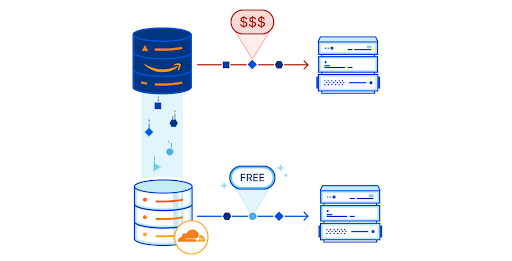
We’re excited to announce Cloudflare R2 Storage! By giving developers the ability to store large amounts of unstructured data, we’re expanding what’s possible with Cloudflare while slashing the egress bandwidth fees associated with typical cloud storage services to zero.

Cloudflare R2 Storage includes full S3 API compatibility, working with existing tools and applications as built.

Let’s get into the R2 details.

R2 means “Really Requestable”

Object Storage, sometimes referred to as blob storage, stores arbitrarily large, unstructured files. Object storage is well suited to storing everything from media files or log files to application-specific metadata, all retrievable with consistent latency, high durability, and limitless capacity.

The most familiar API for Object Storage, and the API R2 implements, is Amazon’s Simple Storage Service (S3). When S3 launched in 2006, cloud storage services were a godsend for developers. It didn’t happen overnight, but over the last fifteen years, developers have embraced cloud storage and its promise of infinite storage space.

As transformative as cloud storage has been, a downside emerged: actually getting your data back. Over time, companies have amassed massive amounts of data on cloud provider networks. When they go to retrieve that data, they’re hit with massive egress fees that don’t correspond to any customer value — just a tax developers have grown accustomed to paying.

Enter R2.

Announcing Cloudflare R2 Storage: Rapid and Reliable Object Storage, minus the egress fees

Traditional object storage charges developers for three things: bandwidth, storage size and storage operations.

R2 builds on Cloudflare’s commitment to the Bandwidth Alliance, providing zero-cost egress for stored objects — no matter your request rate.  Egress bandwidth is often the largest charge for developers utilizing object storage and is also the hardest charge to predict.  Eliminating it is a huge win for open-access to data stored in the cloud.

That doesn’t mean we are shifting bandwidth costs elsewhere. Cloudflare R2 will be priced at $0.015 per GB of data stored per month — significantly cheaper than major incumbent providers.

Infrequent access to objects is often trivial for providers to support yet incurs the same per-operation charges. We don’t think it’s fair that typical object storage bills a developer making one request a second the same rate as an enterprise making thousands of requests a second — or frequently a higher rate when considering negotiated volume discounts.

On the flip side, providers designed for infrequent access typically can’t scale to heavy usage.

R2 will zero-rate infrequent storage operations under a threshold — currently planned to be in the single digit requests per second range. Above this range, R2 will charge significantly less per-operation than the major providers. Our object storage will be extremely inexpensive for infrequent access and yet capable of and cheaper than major incumbent providers at scale.

This cheaper price doesn’t come with reduced scalability. Behind the scenes, R2 automatically and intelligently manages the tiering of data to drive both performance at peak load and low-cost for infrequently requested objects.  We’ve gotten rid of complex, manual tiering policies in favor of what developers have always wanted out of object storage: limitless scale at the lowest possible cost.

R2 means “Repositioning Records”

Zero egress means you can get objects out easily, but what about putting objects in? Migrating data across cloud providers, even if they both support the complete S3 API, is error-prone and costly.

To make this easy for you, without requiring you to change any of your tooling, Cloudflare R2 will include automatic migration from other S3-compatible cloud storage services. Migrations are designed to be dead simple. After specifying an existing storage bucket, R2 will serve requests for objects from the existing bucket, egressing the object only once before copying and serving from R2. Our easy-to-use migrator will reduce egress costs from the second you turn it on in the Cloudflare dashboard.

Announcing Cloudflare R2 Storage: Rapid and Reliable Object Storage, minus the egress fees

Our vision for R2 includes multi-region storage that automatically replicates objects to the locations they’re frequently requested from. As with Durable Objects, we plan on introducing jurisdictional restrictions that allow developers to comply with complex data sovereignty requirements via a simple API.

R2 means “Ridiculously Reliable”

The core of what makes Object Storage great is reliability — we designed R2 for data durability and resilience at its core. R2 will provide 99.999999999% (eleven 9’s) of annual durability, which describes the likelihood of data loss. If you store 1,000,000 objects on R2, you can expect to lose one once every 100,000 years — the same level of durability as other major providers. R2 will be resistant to regional failures, replicating objects multiple times for high availability.

R2 is designed with redundancy across a large number of regions for reliability. We plan on starting from automatic global distribution and adding back region-specific controls for when data has to be stored locally, as described above.

R2 means “Radically Reprogrammable”

R2 is fully integrated with the Cloudflare Workers serverless runtime. You can bind a Worker to a specific bucket, dynamically transforming objects as they are written to or read from storage buckets. The deep integration between Workers and R2 makes building data pipelines and manipulating objects incredibly easy.

Cloudflare R2 is designed to easily integrate with the rest of Cloudflare’s products. As a few examples, our plan is to allow Durable Objects to be configured with R2 as a backup target, and provide automatic integration between R2 and Cloudflare cache to greatly extend cache lifetimes for infrequently changing objects.

What will you be able to build with Cloudflare R2?

There’s a lot you can do with long-term storage, especially with access to the Workers compute platform just alongside it.

For example, streaming data from a large number of IoT devices becomes a breeze with R2. Starting with a Worker to transform and manipulate the data, R2 can ingest large volumes of sensor data and store it at low cost. With no egress fees, it becomes simple to migrate volumes of data to multiple databases and analytics solutions as needed, dramatically reducing storage costs. With the ability to run a Worker on the outgoing data as well, the data pipeline itself is more flexible.

R2 is also a great place for CDN assets and large media files. For large files, R2 can significantly extend cache lifetimes while dramatically slashing egress bills. Combined with the Cache API and Workers, content can be dynamically cached for low-latency access around the globe.

More than anything, R2’s lack of egress bandwidth charges makes it ideal for storing content that’s accessed frequently. Today, R2 scales well to handle heavy request loads, dynamically tiering your objects to provide the best performance at the lowest cost. This dynamic tiering allows us to offer the lowest prices while supporting peak performance — with no user configuration required.

Accessing Cloudflare R2

R2 is currently under development — you can sign up here to join the waitlist for access. We’re excited to work with a number of earlier users to refine and test the product. We’ll be announcing an open beta where any user will be able to sign up for the service soon.

We’re excited to continue to build the product and push towards open beta, and we have big ideas for what the future of storage at Cloudflare’s edge could look like. If you’re a distributed systems engineer who wants to help us build the future of state at the edge, come work with us!

Registrar for Everyone

Post Syndicated from Eric Brown original https://blog.cloudflare.com/registrar-for-everyone/

Registrar for Everyone

Registrar for Everyone

Today, we are excited to announce that all Cloudflare customers now have full Registrar access, including the ability to register new domains.

Second, starting today — and over the course of the next few weeks — we will be introducing over 40 new top-level domains (TLDs). We’re starting with .uk, our most requested country code extension. Initially, customers will only be able to transfer in existing .uk domains from other registrars, but support for new registrations will become available within the next few weeks. In keeping with our at-cost model, .uk domains will be priced at the wholesale registry fee.

A short registrar primer

In the domain name world, there are two key players: registrars and registries. Understandably, the two are often confused. One way to look at it is that registries are the wholesalers and registrars are the retailers. Registries host the centralized database of registered domains within a TLD. They are responsible for establishing the policies and business rules for the TLD. They also set the wholesale price. Registrars sell domains to end users and manage those registrations on an ongoing basis. They set the retail fee, collect payment, provide customer support, and ensure registrations are renewed and kept up to date. They often provide complementary services such as DNS, web hosting, and email.

There are various “types” of registrars. Retail registrars primarily sell to SMBs and individuals. Corporate registrars typically provide services to large enterprises, and often offer brand protection and monitoring services. There are also registrars that focus on the reseller market, essentially enabling other companies to act as domain resellers.

Registrars typically interact with registries using a standard protocol called the Extensible Provisioning Protocol (EPP). While EPP is well-defined in various RFCs, each registry often has its own flavor and uses protocol extensions in support of their specific policies.

Where we started

Cloudflare has operated a registrar for many years. Initially, we became a registrar solely to manage and protect our own mission-critical domains. Over time, we began offering highly secure registration services to some of our customers as well. This evolved into our Custom Domain Protection service. This was a high-end niche service for customers with very specific needs. As we learned more about the registrar space, however, we wanted to expand this service to everyone. We believed that we could provide a highly secure, privacy-focused, and cost-effective registrar for everyone. So, in 2018 we announced the launch of Cloudflare Registrar.

There are two ways to have Cloudflare handle your domain registration: through the registration of a brand-new domain or through the transfer of an existing domain from another registrar. Unlike many new registrars starting from scratch, we had a large and sophisticated customer base. Our customers were already using our DNS services for domains they had registered through other registrars. So, we initially focused on helping them transfer existing domains to Cloudflare. At the time, we estimated that if our customers transferred all of their domains to us, they would collectively save over $50 million per year in registration fees.

And we’ve done just that. Since our launch in 2018, we have transferred in hundreds of thousands of domains. Collectively, it’s saved our customers millions of dollars in annual registration fees.

In 2020, new registrations were launched in beta. Access was first provided to our Biz, Pro, and Enterprise customers by default, and then over the following months we enabled several thousand additional customers who had previously expressed interest.

Transfers are not enough

Part of the reason why we launched our beta for new registrations was the excitement we saw around new domain registrations. Though we intentionally started only with domain transfers, folks began asking for new domain functionality almost immediately. We heard this initially from customers who hadn’t yet purchased a domain. Since they didn’t have anything to transfer in, they would have to go through the somewhat cumbersome process of registering a new domain with another provider and only then transfer their domain to Cloudflare.

As time went by, however, we began to hear requests from our existing Registrar customers.

After all, domain portfolios are not static. Companies, large and small, are continually updating their domain assets. Whether through the development of new products, expansion into new markets, M&A activities, or brand protection, the ability to register new domain names is vitally important. In Q2 of this year, there were 11.7 million new registrations in .com and .net alone. Cloudflare customers have registered over 2 million new domains through other registrars in the first half of this year alone. And these are just the ones we know about!

Today, we’re excited to open up new registrations to all of our customers.r. You no longer need to register new domains at another registrar and then transfer those domains to Cloudflare.

Registering a new domain

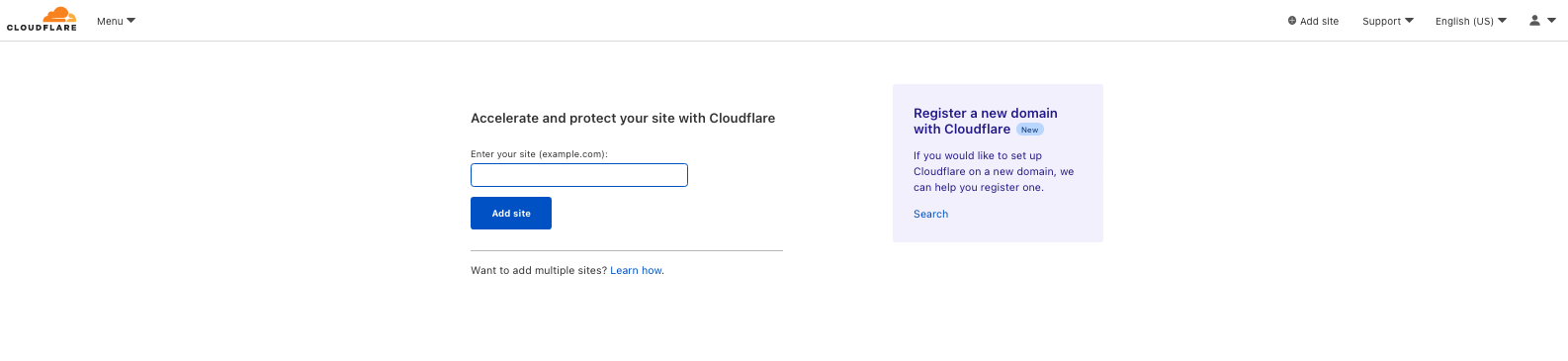
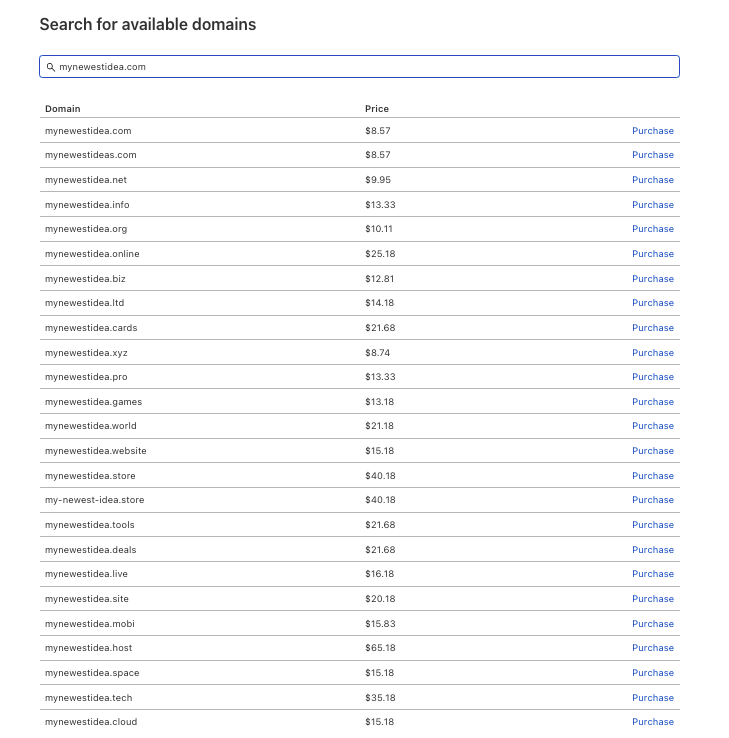
Registering a new domain is simple. Log into the Cloudflare dashboard and click Add a Site. In addition to adding an existing domain, you can now register a new one.

Registrar for Everyone

Start the registration process by entering the domain name or keyword into the search box, and we’ll provide a suggested list of available domains. After making your selection, you’ll need to select one of the plans (FREE is an option) and provide some basic information. Once you check out, we’ll create the zone and add the domain to your account. The entire process can be completed in less than a minute.

What about pricing? It’s important to note that our registrar pricing is “at-cost.” That means we charge our customers exactly what we pay the registry, plus any applicable ICANN transaction fees. In certain cases, the registry fees are in a currency other than US dollars. In those situations, we convert the price we charge our customer to USD based on the current exchange rate. As the exchange rate changes, we periodically update the USD price — but never more often than once per month.

Registrar for Everyone

It’s a big world

Beyond registering new domains, we’ve also recognized the need to expand the list of supported TLDs. Our customer base is already highly diverse and becoming even more so all the time. While .com is often considered the “king” of TLDs — especially within the U.S. — that’s not necessarily the case in other countries. Today, there are over 1,500 top-level domains. There are the legacy TLDs like .com, .net, and .org. There are also over 1,000 “new” TLDs such as .online, .live, and .cloud. There’s even .horse! And there are the country code TLDs, such as .uk, .in, and .au. In many areas of the world, the local country code TLD is much more popular than .com.

We believe we owe it to our customers to provide them with domains in the TLDs that work best for them. We have spent much of our effort in support of legacy and new TLDs. Now, we will be turning our focus towards supporting more country code TLDs.

What’s next

In the coming weeks, you can expect to see us add over 40 new extensions, including .us, .co, .me, and .tv. You can also check out the full list of TLDs we currently support and dates for upcoming launches here.

In the coming months we will be adding even more new extensions, with a focus on country-codes such as .de, .in, .ca, and .au to name just a few. We’re also planning to support premium (non-standard) priced domains, as well as Internationalized Domain Names (IDNs).

It’s just another step on the road to building a better — and more inclusive — Internet. To learn more about Cloudflare Registrar and how to use it, visit our developer documentation.

A Better Internet with UN Global Compact

Post Syndicated from Patrick Day original https://blog.cloudflare.com/cloudflare-and-un-global-compact/

A Better Internet with UN Global Compact

A Better Internet with UN Global Compact

Every year during Birthday Week, we talk about what we mean by our mission to help build a better Internet. We release support for new standards and products that help the global Internet community and give things like unmitigated DDoS Protection away for free. We also think about our role as an active participant in the global community of individuals, companies and governments that make the Internet what it is.

In 2020, we decided to formalize our commitment to being an active partner in the global community by joining the UN Global Compact (UNGC) as a signatory. We share the view that achievement of the Sustainable Development Goals set out in the UN Global Compact are the blueprint for a better and more sustainable future. Today, we are proud to release our first Communication on Progress, which describes how we are integrating UNGC principles across our company and as part of helping build a better Internet.

Shared values, economy, and Internet

In 1999, then UN Secretary General Kofi Annan shared a sober message with business leaders gathered at the World Economic Forum in Davos. He argued that basic protections like human rights, environmental sustainability, and fair labor practices are not just good for the world or good for business, they are fundamental to the long-term stability of a free and open global market.

Mr. Annan also warned that failure to ensure these basic protections could have dire political and economic consequences. Specifically, if governments, non-governmental organizations, and corporations could not translate the same shared values underlying national markets to the newly-created global market, then the global economy would remain fragile and vulnerable. He described how people feeling victimized would be subject to exploitation, including from “all the ‘isms’ of our post-cold-war world: protectionism; populism; nationalism; ethnic chauvinism; fanaticism; and terrorism,” which prey on misery and insecurity.

More than twenty years later, it’s difficult to find issue with Mr. Annan’s message. In fact, we think that human rights, environmental sustainability, fair labor practices, and anti-corruption are not only fundamental to the global economy, but to building a better Internet as well.

A Global Compact

The UN Global Compact (UNGC) is the world’s largest sustainability initiative with over 14,000 members in 162 countries. The UNGC’s mission is to mobilize companies to align their operations and strategies with UN principles and values.

Participants are required to make three commitments: operating responsibly by adhering to the UN Ten Principles, taking strategic action to help advance the UN Sustainable Development Goals (SDGs), and providing annual public reporting on implementation.

The Ten Principles

The UNGC’s first requirement is that companies operate consistent with fundamental responsibilities embodied in the UN Ten Principles, which include human rights, environmental sustainability, labor protections, and anti-corruption. The principles themselves are derived from a series of related UN treaties like the Universal Declaration of Human Rights, the ILO Fundamental Principles on the Rights at Work, the Rio Declaration on Environment and Development, and the UN Convention Against Corruption.

Sustainable Development Goals

The UNGC’s second requirement is for participants to help advance the UN Sustainable Development Goals (SDGs). The SDGs are an urgent call to action for global development that was adopted by all 193 UN member states in 2015. It builds off a number of previous UN development initiatives, including the Earth Summit in 1992, the Millennium Development Goals, the UN Sustainable Development Summit in 2015, and the Paris Agreement on Climate Change. Each of the 17 SDGs includes a broad goal combined with specific targets and indicators, as well as progress reports and other metrics.

Cloudflare is committed to helping advance all the 17 UN SDGs. However, like many companies, we’ve focused our efforts and our COP reporting on the SDGs that are most relevant to our business.

SDG 5 is focused on achieving gender equality and empowering all women and girls. This goal is particularly relevant right now, given the pandemic’s disproportionate impact on women in the workforce. We have long believed in the importance of encouraging a diverse workforce, and have benefited from partnerships with returnship programs that provide opportunities to mothers or people who have taken a career break to care for a loved one. This year, we’ve also taken steps to begin reporting on pay equity and have signed multiple diversity charters like the EU Charter and UK Tech Talent Charter. In conjunction with International Women’s Day, Cloudflare also hosted a full month of events and programs designed to foster community and support the growth and advancement of those who identify as women.

By offering free services to protect organizations around the world that empower women from denial for service attacks (DDoS) and other online threats, Cloudflare’s Project Galileo also helps advance the goal of gender equality. Through Project Galileo, we’ve been proud to work with organizations like the Women in Media Initiative Somalia (WIMISOM), which works to empower female journalists in Somalia, as well as serving at the forefront of campaigns to end violence against women, girls, and children.

SDG 13 is focused on taking urgent action to combat climate change and its impacts. Although Cloudflare has always had efficiency at our core, we are also committed to reducing our environmental impact and making the Internet as a whole more environmentally friendly. To reduce our greenhouse gas emissions, Cloudflare has committed to power its network by 100 percent renewable energy, which we achieved in 2020. We are also committed to removing or mitigating all of our historic greenhouse gas emissions associated with powering our network by 2025.

Earlier this year, Cloudflare also released new products to help our customers reach their own climate and emissions goals. For example, Cloudflare is directing computing workload to locations on its edge network that result in better climate outcomes, providing customers with real-time information on their individual emissions footprints, and providing developers with the option to build webpages on infrastructure powered by 100 percent renewable energy.

Moving Forward

As part of announcing what would ultimately become the UNGC, Secretary General Annan noted that the rise of transnational corporations had created unprecedented opportunities for private entities to move humanity forward. As Cloudflare celebrates another Birthday Week, we’re proud to share all the ways we are helping move toward a better Internet. And as always, we’re just getting started.

Celebrating the community: Yolanda

Post Syndicated from Katie Gouskos original https://www.raspberrypi.org/blog/community-stories-yolanda-payne-educator-equity/

So far in our series of community stories, we’ve collaborated with young people from the UK, India, and Romania who are getting creative with technology to change the world around them.

Yolanda Payne.

Our next community story comes from a highly regarded community member who has been connecting young people with opportunities to learn and create with technology throughout her career. A US-based educator with over twenty years of experience, Yolanda Payne shares our mission to put computing and digital making into the hands of people all over the world.

“The biggest reason I’m so invested in technology is because people invested in me.”

Yolanda Payne

Meet Yolanda

Yolanda Payne is an educator you might recognise from our online courses. Based in Atlanta, Georgia in the USA, she’s passionate about making technology accessible to all and helping young people become technology creators.

Join us in celebrating Yolanda by sharing her story on Twitter, LinkedIn, and Facebook! 

Yolanda says, “The biggest reason I’m so invested in technology is because people invested in me. They saw something that I was good at, showed me opportunities, and so in turn, that was my philosophy in teaching.” 

Yolanda got her first computer at a young age and was hooked instantly: it opened up many new opportunities and led her to choosing a career in education. She says, “The computer gives me the tools to be an artist, it gives me the tools to create things, and if it does that for me, then just imagine what it will do for kids!”

“If you give a teacher a Raspberry Pi and show them these resources, they’re going to be hooked.”

Yolanda Payne

Yolanda has spent her entire professional life dedicated to education. She gained a bachelor’s degree in Elementary Education from Mississippi University for Women; a master’s degree in Instructional Technology from Mississippi State University; and Educational Specialist degrees from the University of Florida and the University of Georgia in Curriculum and Instruction, and in Language and Literacy.

A female computing educator with three female students at laptops in a classroom.

Throughout her twenty-one years as a classroom teacher and her time running Code Clubs, Yolanda found joy in supporting students who have multiple challenges or complex needs, and in seeing them thrive in the subject of computer science. Yolanda points out, “I worked with both students that were considered to be in special education and students that were gifted. And one of the biggest things that I saw that I don’t think people realise, especially about students in special education: they are used to solving problems. […] You’d be very surprised at how real-life problem-solving skills flow very easily into computer science.”

Yolanda now works as a Research Associate at the Georgia Institute of Technology. We are tremendously thankful for her contributions as an educator and an advocate for technology and young people. 

Please join us in celebrating her story by sharing it on Twitter, LinkedIn, and Facebook! 

The post Celebrating the community: Yolanda appeared first on Raspberry Pi.

Разследване на Валя Ахчиева: Задкулисието на боклука

Post Syndicated from Екип на Биволъ original https://bivol.bg/garbage_behind.html

вторник 28 септември 2021


Всички разследват сагата с италианския боклук, стоварила в чертите на град Плевен една грамада от 9 000 тона смесени отпадъци, която стои вече там 2 години! И няма сила, която…

Field Notes: How to Prepare Large Text Files for Processing with Amazon Translate and Amazon Comprehend

Post Syndicated from Veeresh Shringari original https://aws.amazon.com/blogs/architecture/field-notes-how-to-prepare-large-text-files-for-processing-with-amazon-translate-and-amazon-comprehend/

Biopharmaceutical manufacturing is a highly regulated industry where deviation documents are used to optimize manufacturing processes. Deviation documents in biopharmaceutical manufacturing processes are geographically diverse, spanning multiple countries and languages. The document corpus is complex, with additional requirements for complete encryption. Therefore, to reduce downtime and increase process efficiency, it is critical to automate the ingestion and understanding of deviation documents. For this workflow, a large biopharma customer needed to translate and classify documents at their manufacturing site.

The customer’s challenge included translation and classification of paragraph-sized text documents into statement types. First, the tokenizer previously used was failing for certain languages. Second, post-tokenization, big paragraphs were needed to be sliced into sizes smaller than 5,000 bytes to facilitate consumption into Amazon Translate and Amazon Comprehend. Because each sentence and paragraphs were of differing sizes, the customer needed to slice them so that each sentence and paragraph did not lose their context and meaning.

This blog post describes a solution to tokenize text documents into appropriate-sized chunks for easy consumption by Amazon Translate and Amazon Comprehend.

Overview of solution

The solution is divided into the following steps. Text data coming from the AWS Glue output is transformed and stored in Amazon Simple Storage Service (Amazon S3) in a .txt file. This transformed data is passed into the sentence tokenizer with slicing and encryption using AWS Key Management Service (AWS KMS). This data is now ready to be fed into Amazon Translate and Amazon Comprehend, and then to a Bidirectional Encoder Representations from Transformers (BERT) model for clustering. All of the models are developed and managed in Amazon SageMaker.

Prerequisites

For this walkthrough, you should have the following prerequisites:

The architecture in Figure 1 shows a complete document classification and clustering workflow running the sentence tokenizer solution (step 4) as an input to Amazon Translate and Amazon Comprehend. The complete architecture also uses AWS Glue crawlers, Amazon Athena, Amazon S3 , AWS KMS, and SageMaker.

Figure 1. Higher level architecture describing use of the tokenizer in the system

Figure 1. Higher level architecture describing use of the tokenizer in the system

Solution steps

  1. Ingest the streaming data from the daily pharma supply chain incidents from the AWS Glue crawlers and Athena-based view tables. AWS Glue is used for ETL (extract, transform, and load), while Athena helps to analyze the data in Amazon S3 for its integrity.
  2. Ingest the streaming data into Amazon S3, which is AWS KMS encrypted. This limits any unauthorized access to the secured files, as required for the healthcare domain.
  3. Enable the CloudWatch logs. CloudWatch logs help to store, monitor, and access error messages logged by SageMaker.
  4. Open the SageMaker notebook using AWS console, and navigate to the integrated development environment (IDE) with Python notebook.

Solution description

Initialize the Amazon S3 client, and enable the get_execution role.

Figure 2. Code sample to initialize Amazon S3 Client execution roles

Figure 3 shows the code for tokenizing large paragraphs into sentences. This helps to feed a sentence of 5,000 byte chunks to Amazon Translate and Amazon Comprehend. Additionally, in the regulated environment, data at rest and in transition, is encrypted using AWS KMS (using S3 IO object) before chunking into 5,000-byte size files using last-in-first-out (LIFO) process.

Figure 3. Code sample with file chunking function and AWS KMS encryption

Figure 3. Code sample with file chunking function and AWS KMS encryption

Figure 4 shows the function for writing the file chunks to objects in Amazon S3, and objects are AWS KMS encrypted.

Figure 4. Code sample for writing chunked 5,000-byte sized data to Amazon S3

Code sample

The following example code details the tokenizer and chunking tool which we subsequently run through SageMaker:
https://gitlab.aws.dev/shringv/aws-samples-aws-tokenizer-slicing-file

Cleaning up

To avoid incurring future charges, delete the resources (like S3 objects) used for the practice files after you have completed implementation of the solution.

Conclusion

In this blog post, we presented a solution which incorporates sentence-level tokenization with rules governing expected sentence size. The solution includes automation scripts to reduce bigger files into smaller chunked sizes of 5,000 bytes to facilitate Amazon Translate and Amazon Comprehend. The solution is effective for tokenizing and chunking complex environments with multi-language files. Furthermore, the solution uses file exchange security by using AWS KMS, as required by regulated industries.

Field Notes provides hands-on technical guidance from AWS Solutions Architects, consultants, and technical account managers, based on their experiences in the field solving real-world business problems for customers.

AWS achieves FedRAMP P-ATO for 18 additional services in the AWS US East/West and AWS GovCloud (US) Regions

Post Syndicated from Alexis Robinson original https://aws.amazon.com/blogs/security/aws-achieves-fedramp-p-ato-for-18-additional-services-in-the-aws-us-east-west-and-aws-govcloud-us-regions/

We’re pleased to announce that 18 additional AWS services have achieved Provisional Authority to Operate (P-ATO) by the Federal Risk and Authorization Management Program (FedRAMP) Joint Authorization Board (JAB). The following are the 18 additional services with FedRAMP authorization for the US federal government, and organizations with regulated workloads:

  • Amazon Cognito lets you add user sign-up, sign-in, and access control to their web and mobile apps quickly and easily.
  • Amazon Comprehend Medical is a HIPAA-eligible natural language processing (NLP) service that uses machine learning to extract health data from medical text–no machine learning experience is required.
  • Amazon Elastic Kubernetes Service (Amazon EKS) is a managed container service that gives you the flexibility to start, run, and scale Kubernetes applications in the AWS cloud or on-premises.
  • Amazon Pinpoint is a flexible and scalable outbound and inbound marketing communications service.
  • Amazon QuickSight is a scalable, serverless, embeddable, machine learning-powered business intelligence (BI) service built for the cloud that lets you easily create and publish interactive BI dashboards that include Machine Learning-powered insights.
  • Amazon Simple Email Service (Amazon SES) is a cost-effective, flexible, and scalable email service that enables developers to send mail from within any application.
  • Amazon Textract is a machine learning service that automatically extracts text, handwriting, and other data from scanned documents that goes beyond simple optical character recognition (OCR) to identify, understand, and extract data from forms and tables.
  • AWS Backup enables you to centralize and automate data protection across AWS services.
  • AWS CloudHSM is a cloud-based hardware security module (HSM) that enables you to easily generate and use your own encryption keys on the AWS Cloud.
  • AWS CodePipeline is a fully managed continuous delivery service that helps you automate your release pipelines for fast and reliable application and infrastructure updates.
  • AWS Ground Station is a fully managed service that lets you control satellite communications, process data, and scale your operations without having to worry about building or managing your own ground station infrastructure.
  • AWS OpsWorks for Chef Automate and AWS OpsWorks for Puppet Enterprise. AWS OpsWorks for Chef Automate provides a fully managed Chef Automate server and suite of automation tools that give you workflow automation for continuous deployment, automated testing for compliance and security, and a user interface that gives you visibility into your nodes and node statuses. AWS OpsWorks for Puppet Enterprise is a fully managed configuration management service that hosts Puppet Enterprise, a set of automation tools from Puppet for infrastructure and application management.
  • AWS Personal Health Dashboard provides alerts and guidance for AWS events that might affect your environment, and provides proactive and transparent notifications about your specific AWS environment.
  • AWS Resource Groups grants you the ability to organize your AWS resources, and manage and automate tasks on large numbers of resources at one time.
  • AWS Security Hub is a cloud security posture management service that performs security best practice checks, aggregates alerts, and enables automated remediation.
  • AWS Storage Gateway is a set of hybrid cloud storage services that gives you on-premises access to virtually unlimited cloud storage.
  • AWS Systems Manager provides a unified user interface so you can track and resolve operational issues across your AWS applications and resources from a central place.
  • AWS X-Ray helps developers analyze and debug production, distributed applications, such as those built using a microservices architecture.

The following services are now listed on the FedRAMP Marketplace and the AWS Services in Scope by Compliance Program page.

Service authorizations by Region

Service FedRAMP Moderate in AWS US East/West FedRAMP High in AWS GovCloud (US)
Amazon Cognito   ✓
Amazon Comprehend Medical ✓ ✓
Amazon Elastic Kubernetes Service (Amazon EKS)   ✓
Amazon Pinpoint   ✓
Amazon QuickSight   ✓
Amazon Simple Email Service (Amazon SES)   ✓
Amazon Textract ✓ ✓
AWS Backup ✓ ✓
AWS CloudHSM   ✓
AWS CodePipeline ✓ ✓
AWS Ground Station ✓  

AWS OpsWorks for Chef Automate and

AWS OpsWorks for Puppet Enterprise

✓  
AWS Personal Health Dashboard ✓ ✓
AWS Resource Groups ✓  
AWS Security Hub   ✓
AWS Storage Gateway ✓ ✓
AWS Systems Manager ✓ ✓
AWS X-Ray ✓ ✓

 
AWS is continually expanding the scope of our compliance programs to help customers use authorized services for sensitive and regulated workloads. Today, AWS offers 100 AWS services authorized in the AWS US East/West Regions under FedRAMP Moderate Authorization, and 90 services authorized in the AWS GovCloud (US) Regions under FedRAMP High Authorization.

To learn what other public sector customers are doing on AWS, see our Customer Success Stories page. For up-to-date information when new services are added, see our AWS Services in Scope by Compliance Program page.

If you have feedback about this post, submit comments in the Comments section below.

Want more AWS Security how-to content, news, and feature announcements? Follow us on Twitter.

Author

Alexis Robinson

Alexis is the Head of the U.S. Government Security & Compliance Program for AWS. For over 10 years, she has served federal government clients advising on security best practices and conducting cyber and financial assessments. She currently supports the security of the AWS internal environment including cloud services applicable to AWS East/West and AWS GovCloud (US) Regions.

The collective thoughts of the interwebz