ЦИК са публикували адресите и броя гласоподавали за изборите през април. Очаквам да започнат спекулации по темата, затова ще опиша това, което виждам в таблиците на ГРАО предоставени на ЦИК. В следващата ми статия ще се заровя по-подробно в демографските данни.
По списъците има 6641768 гласоподавателя, което е увеличение от 1385 спрямо списъка от октомври 2024-та. Напомням, че в това число се включват всички българи в чужбина независимо кога са напуснали страната или дали са родени там. Те имат ЕГН и лични документи и затова са в списъците, но НСИ не ги брои към населението в страната, защото в последната година не са в България.
Най-голямо увеличение на гласоподавателите има в София – 19714 повече. Увеличение има и в областите Благоевград – 4156, Кърджали – 3143, Варна – 1775 и Бургас – 1451. Най-голямо намаление има в Перник – 3006, следван от Вража, Русе и Велико Търново с малко над 2000.
Има увеличение на секциите, в които ще се гласува в страната – общо 16. По области обаче се забелязва, че в София увеличават с 10 секции, в Пловдив – с 9, а в Бургас – с 2. В Софийска област намаляват с 4, а в Перник, Ловеч, Видин и Смолян – с 1 или 2 секции. Това показва обаче само броят секции. В София на едно място има средно по 5.2 секции, а в Пловдив, Варна и Сливен – по 2 до 2.3. Средното за всички останали е 1.37.
Местата също варират много. Общо 58 места или 0.81% от всички със секции в тях се променят спрямо миналия вот. Макар това да значи едно на всеки 123 места за гласуване да е променено, все пак е добра идея да проверите дали точно вас засяга, особено ако живеете в град. Може лесно да го сторите на страницата на ГРАО с име и ЕГН. (Страницата им ще бъде активна малко преди изборите)
Например, в Благоевградска област. Добавят секция в Благоевград в 2-ро ОУ Димитър Благоев, но махат секции в Петрич на три места – детските градини на ул. Солунска и Цар Симеон и сградата на социално подпомагане на ул. Славянска.
Макар в национален мащаб да има 16 повече секции, общо на 8 по-малко места ще има избори. Единствено в Хасково, Шумен, Сливен, Плевен, Кюстендил и Габрово изглежда няма да има промени. Най-много места Закриват във Варна и Перник – 9 и 8 съответно. Най-много откриват в София – 7 и в Търговище и Велико Търново – по 3.
Като гласоподаватели на секция, най-много има в София – 774, следван от Разград – 708, Пазарджик – 668 и Варна – 646. Най-малко има във Видин – 343. Средно, без да броим София, има 522 гласоподавателя на секция в страната. Ако вземем предвид активността по области през октомври 2024-та, грубо казано 192 души са гласували средно на секция. За сравнение в чужбина средният брой е 178.
Разбира се, всичко това е ужасно трудно да се проследи, тъй като за поредна година ЦИК и ГРАО не публикуват географски координати на секциите независимо, че ги имат. Налични са само адреси, които не са особено полезни, ако не познаваш добре мястото. За адреси на 580 места със секции е отбелязано само „кметството“. 228 – читалището. 140 – клуб на пенсионера. 290 – в някаква вариация на училище Христо Ботев.
Today’s security ecosystem generates a staggering amount of complex telemetry. For instance, processing a single email requires analyzing sender reputation, authentication results, link behavior, infrastructure metadata, and countless other attributes. Simultaneously, Cloud access security broker (CASB) engines continuously scan SaaS environments for signals that detect misconfigurations, risky access, and exposed data.
But while detections have become more sophisticated, explanations have not always kept pace.
Security and IT teams are often aware when something is flagged, but they do not always know, at a glance, why. End users are asked to make real-time decisions about emails that may impact the entire organization, yet they are rarely given clear, contextual guidance in the moment that matters.
Cloudy is our LLM-powered explanation layer, built directly into Cloudflare One. It translates complex machine learning outputs into precise, human-readable guidance for security teams and end users alike. Instead of exposing raw technical signals, Cloudy surfaces the reasoning behind a detection in a way that drives informed action.
For Cloudflare Email Security, this means helping users understand why a message was flagged before they escalate it to the security operations center, or SOC. For Cloudflare CASB, it means helping administrators quickly understand the risk and remediation path for SaaS findings without having to manually assess low-level signals.
This post outlines how we are extending Cloudy across Phishnet and API CASB to improve decision making, reduce unnecessary noise, and turn complex security signals into clear, actionable insight.
Cloudy for Email Security users
When an email is analyzed by Cloudflare Email Security, it is not evaluated by a single signal or model. Instead, a wide range of machine learning models analyze different parts of the message, from sender reputation and message structure to content, links, and behavioral patterns. This model set continues to grow as our machine learning team regularly trains and deploys new detections to keep pace with evolving threats.
Based on this analysis, messages are labeled with outcomes such as Malicious, Suspicious, Spam, Bulk, or Spoof. While these detections have been effective, we consistently heard feedback from customers that it was not always clear why a message was flagged. The decision was correct, they told us — but the reasoning behind it was often opaque to both end users and security teams.
To address this, we introduced the first version of Cloudy: LLM-powered summaries for detections. These summaries translate what our machine learning models are seeing into human readable explanations. Initially, these summaries were available in the Cloudflare dashboard to help SOC teams during investigations. Over the past few months, customer feedback has confirmed that these explanations significantly improve understanding in our detections.
As we continued speaking with customers, another challenge surfaced. Our Phishnet tool allows users to submit messages to the SOC when they believe an email may be suspicious. While this empowers employees to participate in security, many SOC teams told us their queues were being flooded with submissions that turned out to be clean messages.
The result was unnecessary backlog and slower response times for emails that actually required investigation.
At the same time, customers told us that traditional security awareness training was not always enough. Users still struggled to evaluate emails in the moment, when it mattered most. They wanted more contextual guidance directly within the workflow where decisions are made.
This upgrade is designed to address both of these problems. By bringing clearer explanations and contextual education directly into Phishnet, we aim to help users make better decisions while reducing noise for SOC teams, without sacrificing security.
The problem: Some users flag too many emails, while some aren’t cautious enough
As organizations and attack techniques have evolved, so has the role of the end user. Modern email threats increasingly rely on social engineering, subtle impersonation, and psychological pressure which places users directly in the decision path.
In response, users are being asked to act as an additional layer of defense. However, traditional security awareness tools often fall short. Training is typically delivered through periodic sessions or simulated phishing campaigns, disconnected from real messages and real decisions. When users encounter an unfamiliar email, they are left without enough context to confidently assess risk.
This gap commonly leads to one of two outcomes. Some users submit nearly every questionable message to the SOC, creating excessive noise and slowing down investigations. Others interact with messages they should not, simply because nothing in the moment signals clear risk.
By embedding Cloudy directly into Phishnet, we close this gap.
Users receive immediate, contextual explanations that help them understand what Cloudflare is seeing and why a message may be risky. This enables users to make informed decisions at the point of interaction, reduces unnecessary escalations to the SOC, and allows security teams to focus on the messages that truly require attention.
Over time, this approach shifts users from being a source of noise to becoming an effective part of the detection and response workflow. The result: stronger email security, without adding friction or burden to security teams.
Phishnet for Microsoft gets a Cloudy upgrade
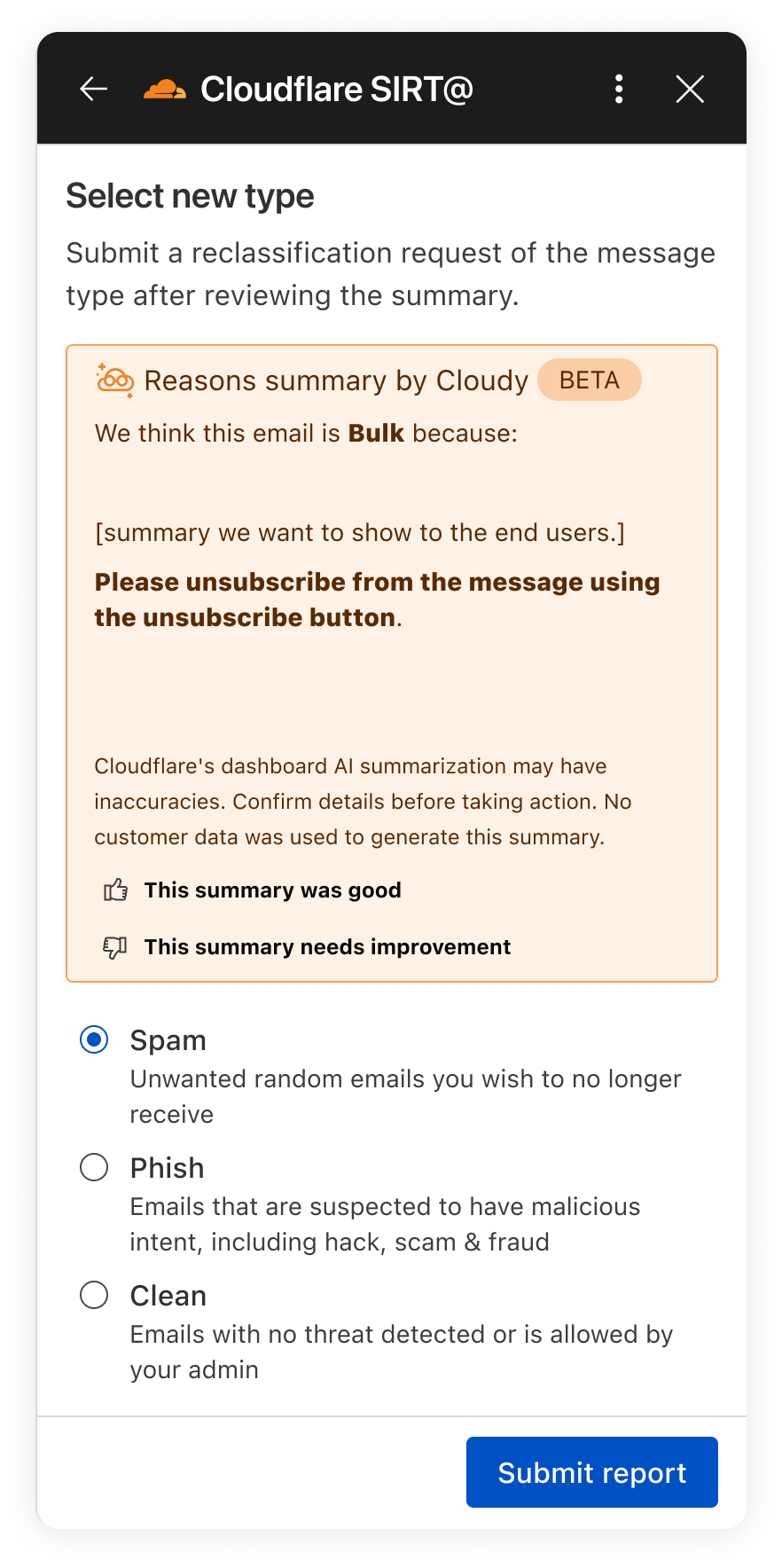
In the next month, we will be upgrading our Phishnet reporting button to extend the Cloudy summaries.
The new Phishnet screens will show Cloudy summaries.
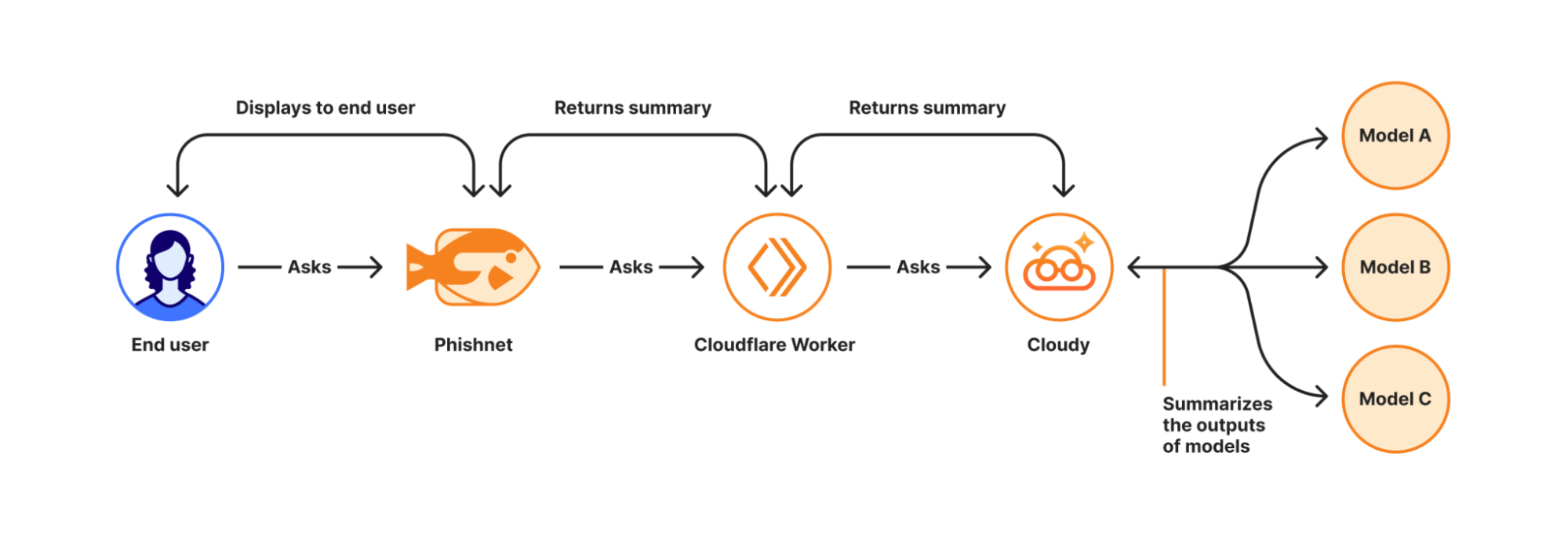
With this upgrade, end users receive a simplified, user-friendly version of Cloudy summaries at the moment they report a message. These summaries are generated in real time using Cloudflare Workers AI and run directly on Cloudflare’s global Workers platform when a user interacts with a message in Phishnet.
When a user clicks the Phishnet reporting button, the request triggers a Workers-based workflow that aggregates structured outputs from multiple detection models associated with that message. These model outputs include signals such as sender reputation, domain and infrastructure characteristics, authentication results, link and content analysis, and behavioral indicators collected during message processing.
The aggregated signals are then passed to Workers AI, where a series of purpose-built prompts generate a natural language explanation. Each prompt is designed to transform low-level detection outputs into a concise and human-readable summary. This process focuses on explanation rather than classification and does not alter the original disposition of the message.
How Cloudy transforms detections into clear explanations.
For this experience, we intentionally redesigned the summaries compared to those shown to administrators in the Cloudflare dashboard. During testing, we found that admin-focused summaries often relied on technical concepts that were difficult for non-technical users to interpret. Terms such as ASNs, IP reputation, or authentication failures required translation.
To ensure end users can understand the summaries, Phishnet emphasizes plain-language explanations while preserving the meaning of the underlying detections.
Signal
What it means
Cloudy translation for end users
SPF Fail
Sender explicitly not authorized by SPF
This email failed a sender verification check.
DKIM Fail
Message signature does not validate
The message integrity check failed, which can be a sign of tampering.
DMARC Fail
DMARC policy check failed
The sender’s domain could not confirm this email is legitimate.
Reply to Mismatch
Reply To differs from From
Replies may go to a different address than the sender shown.
Domain Age
Domain recently registered
The sender domain is newly created, which is common in phishing.
URL Low Reputation
Destination URL has poor reputation
The link destination has signals associated with risk.
Because this workflow runs on the Cloudflare Workers platform, summaries are generated with low latency and at global scale — so users receive immediate feedback at the moment of interaction. This real-time context allows users to better understand why an email may be risky or why it appears safe before deciding whether to escalate it to the SOC.
We are currently beta testing this experience with Microsoft customers to ensure the summaries are accurate and reliable. Cloudy summaries are not trained on customer data. We are also applying additional validation to ensure the generated explanations do not hallucinate. Accuracy is critical at this stage as incorrect guidance could introduce real security risk.
Following the beta period, we plan to expand access to all Microsoft users. We will also bring similar upgrades to the Phishnet sidebar for Google Workspace users later in 2026.
Your CASB findings, explained with Cloudy
But helping end users better understand what makes an email risky is only part of the story. We are also applying Cloudy to the administrative side of security operations, where clarity and speed matter just as much. Beyond Phishnet, Cloudy now translates complex CASB findings into structured explanations that help security and IT teams quickly understand risk, prioritize remediation, and take confident action across their SaaS environments.
API CASB in the wild
Inside Cloudflare One, our SASE platform, CASB connects to the SaaS and cloud tools your teams already use. By talking to providers over API, CASB gives security and IT teams:
A consolidated view of misconfigurations, overshared files, and risky access patterns across apps like Microsoft 365, Google Workspace, Slack, Salesforce, Box, GitHub, Jira, and Confluence (CASB Integrations).
Continuous scanning for new issues as users collaborate, share, and adopt new tools.
Findings that are organized, searchable, and exportable for triage and reporting.
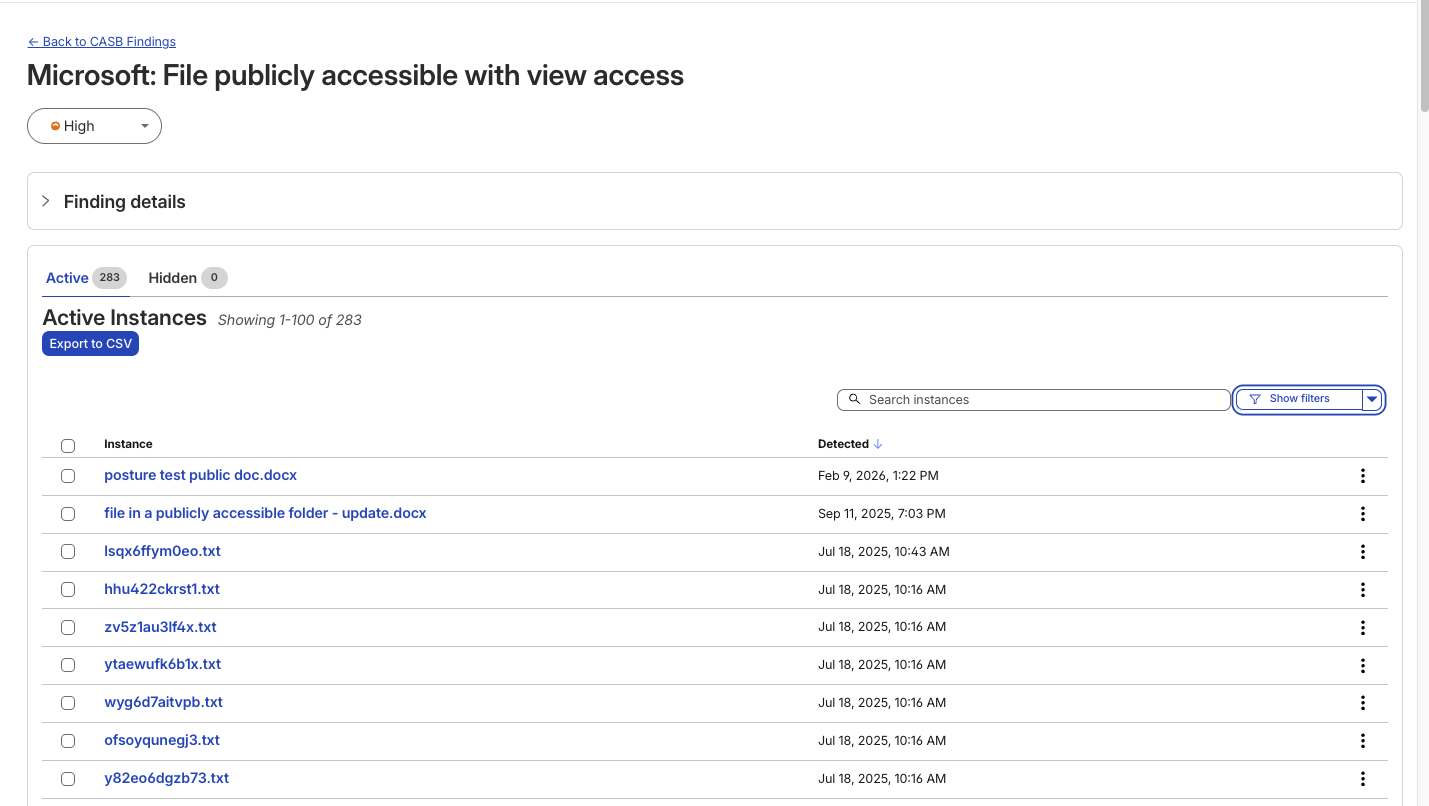
A typical CASB Findings page showing detections for a Microsoft 365 finding.
Making SaaS security straightforward
Until now, understanding what exactly triggered a CASB Finding — the detections that CASB makes across connected SaaS integrations — has been a black box. While the information was there to put together an explanation of why that file, that user, that configuration was triggering a CASB Finding Type, it wasn’t exactly obvious the reason why it was ultimately detected by our system.
With the introduction of Cloudy summaries in CASB, users receive a short description of the detection rationale with the specific details of the match listed out for easy comprehension.
Unlike a simple text summary, Cloudy for CASB provides a structured breakdown designed for immediate remediation. As seen in our beta testing across different providers, from Microsoft 365 to Dropbox, the model consistently parses findings into two distinct sections:
Risk: It identifies exactly why the finding matters. For instance, rather than just noting a ‘Suspended User,’ Cloudy clarifies that this ‘may indicate a compromised account or a user who should no longer have access to company data’.
Guidance: It offers immediate next steps. Instead of generic advice, it suggests specific actions, such as verifying if a suspension was intentional or reviewing an application’s legitimacy before revoking access.
This structure ensures that analysts can understand the gravity of a finding without needing deep expertise in the specific SaaS application involved.
An example Cloudy Summary in a CASB Posture Finding.
Finding Type
Technical Signal
Cloudy Translation (Risk & Guidance)
Identity & Access
Dropbox:
Suspended User
Risk: A suspended user account may indicate a compromised account or a user who should no longer have access to company data.
Guidance: Verify that the suspension is intentional and that the user’s access has been properly revoked.
Shadow IT
Google Workspace:
Installed 3rd-party app
Risk: This installed application with Google Sign In access may pose a risk of unauthorized access to user data.
Guidance: Review the application’s legitimacy and necessity, and consider revoking access if it is no longer needed.
Email Security
Microsoft 365:
Domain DMARC record not present
Risk: The absence of a DMARC record may leave the domain vulnerable to email spoofing and phishing attacks.
Guidance: Configure a DMARC record for the domain to specify how to handle unauthenticated emails.
Data Loss Prevention
Microsoft 365:
File publicly accessible + DLP Match
Risk: This file being shared publicly with edit access may allow unauthorized modifications… especially given the potential sensitive content indicated by the DLP Profile match.
Guidance: Review the file’s content… and consider restricting access if necessary.
We know that when it comes to our customers getting to the bottom of identified security issues, time is of the essence. We believe that any amount of unnecessary uncertainty or lack of clarity around what’s going wrong just puts more time between an imperfect state and one that is more secure.
We built this feature on the same privacy-first foundations as all products at Cloudflare. Cloudy summaries in CASB are generated using Cloudflare Workers AI, ensuring that your data remains within our secure infrastructure during analysis. The models are not trained on your SaaS data, and the summaries are generated ephemerally to aid in triage. This allows your team to leverage the speed of AI without exposing sensitive internal documents or configurations to public models.
What’s next
For Email Security, we will continue to expand how Cloudy supports both administrators and end users. Our focus is on delivering clearer explanations, better in context guidance, and deeper integration into daily workflows.
For CASB, we’re excited to look for opportunities where Cloudy can make it even easier for CASB administrators to understand what’s going on across their cloud and SaaS apps. Keep an eye out as we look to expand Cloudy coverage to allow administrators to query their findings using natural language, further reducing the time it takes to identify and remediate risks.
Looking ahead, this includes richer explanations for additional detection types, tighter feedback loops between user actions and detections, and continued improvements to how users and SOC teams collaborate through Phishnet. Our goal is to make Cloudy a core part of how organizations understand, trust, and act on email security decisions.
We provide all organizations (whether a Cloudflare customer or not) with free access to our Retro Scan tool, allowing them to use our predictive AI models to scan existing inbox messages in Microsoft 365.
Retro Scan will detect and highlight any threats found, enabling organizations to remediate them directly in their email accounts. With these insights, organizations can implement further controls, either using Cloudflare Email Security or their preferred solution, to prevent similar threats from reaching their inboxes in the future.
If you are interested in how Cloudflare can help secure your inboxes, sign up for a phishing risk assessment here.
Email security has always been defined by impermanence. It is a perpetual call-and-response arms race, where defenses are only as strong as the last bypass discovered and attackers iterate relentlessly for even marginal gains. Every control we deploy eventually becomes yesterday’s solution.
What makes this challenge especially difficult is that our biggest weaknesses are, by definition, invisible.
This problem is best illustrated by a classic example from World War II. Mathematician Abraham Wald was tasked with helping Allied engineers decide where to reinforce bomber aircraft. Engineers initially focused on the bullet holes visible on planes returning from missions. Wald pointed out the flaw: they were reinforcing the areas where planes could already take damage and survive. The true vulnerabilities were on the planes that never came back.
Email security faces an identical hurdle: our detection gaps are unseen. By integrating LLMs, we advance email phishing protection and move from reactive to proactive detection improvement.
The limits of reactive defense
Traditional email security systems improve primarily through user-reported misses. For example, if we marked a spam message as clean, customers can send us the original EML to our pipelines for our analysts to analyze and update our models. This feedback loop is necessary and valuable, but it is inherently reactive. It depends on someone noticing a failure after the fact and taking the time to report it.
That means detection improvements are often driven by what attackers already succeeded at, rather than by what they are about to exploit next.
To close this gap, we need a way to systematically observe the “planes that didn’t make it back.”
Mapping the threat landscape with LLMs
Large Language Models (LLMs) hit the mainstream market in late 2022 and early 2023, fundamentally changing how we process unstructured data. At their core, LLMs use deep learning and massive datasets to predict the next token in a sequence, allowing them to understand context and nuance. They are particularly well-suited for email security because they can read natural language and characterize complex concepts (like intent, urgency, and deception) across millions of messages.
Every day, Cloudflare processes millions of unwanted emails. Historically, it was not feasible to deeply characterize each message beyond coarse classifications. Manually mapping emails to nuanced threat vectors simply did not scale.
Now, Cloudflare has integrated LLMs into our email security tools to identify threats before they strike. By using the power of LLMs, as we’ll describe below, we can finally see a clear and comprehensive picture of the evolving threat landscape.
Our LLM-driven categorization shows clear spikes and persistent trends across several distinct categories, including “PrizeNotification” and “SalesOutreach”.
These LLM-generated tags provide Cloudflare analysts with high-fidelity signals in near real time. Tasks that previously required hours of manual investigation and complex querying can now be surfaced automatically, with relevant context attached. This directly increases the velocity at which we can build new targeted Machine Learning models or retrain existing ones to address emerging behaviors.
Because Cloudflare operates at global Internet scale, we can gather these insights earlier than ever before, often before a new technique becomes widely visible through customer-reported misses.
The Sales Outreach threat
One of the clearest patterns we’ve identified using this new intelligence is the continued persistence of malicious messages structured to look like Sales Outreach-style phishing. These emails are designed to mimic legitimate B2B communication, often presenting opportunities to purchase or receive “special deals” on unique items or services, to lure targets into clicking malicious links or providing credentials.
Once LLM categorization surfaced Sales Outreach as a dominant vector, we moved from broad visibility to targeted data collection.
Using LLM-generated tags, we began systematically isolating messages that exhibited Sales Outreach characteristics across our global dataset. This produced a continuously growing, high-precision corpus of real-world examples, including confirmed malicious messages as well as borderline cases that traditional systems struggled to classify. From this corpus, we built a dedicated training pipeline.
First, we curated training data by grouping messages based on shared linguistic and structural traits identified by the LLMs. These traits included persuasive framing, manufactured urgency, transactional language, and subtle forms of social proof.
Next, we focused feature extraction on sentiment and intent rather than static indicators. The model learns how requests are phrased, how credibility is established, and how calls to action are embedded within otherwise normal business conversations.
Finally, we trained a purpose-built sentiment analysis model optimized specifically for Sales Outreach behavior. This avoided overloading a general phishing classifier and allowed us to tune precision and recall for this threat class.
Turning language into enforcement
The output of this model is a risk score that reflects how closely a message aligns with known Sales Outreach attack patterns. That score is evaluated alongside existing signals such as sender reputation, link behavior, and historical context to determine whether a message should be blocked, quarantined, or allowed.
This process is continuous. As attackers adapt their language, newly observed messages are fed back into the pipeline and used to refine the model without waiting for large volumes of user-reported misses. LLMs act as the discovery layer by surfacing new linguistic variants, while the specialized model performs fast and scalable enforcement.
This is what an all-out offensive looks like in practice. It is a feedback loop where large-scale language understanding drives focused, high-precision detection. The result is earlier intervention against a threat class that thrives on subtlety, and fewer malicious sales emails reaching the inbox.
Results of the undertaking
The visibility unlocked by LLM-driven mapping fundamentally changed how we improve detections. Instead of waiting for attackers to succeed and relying on downstream user reports, we gained the ability to identify systemic gaps earlier and address them at the source. This shift from reactive remediation to proactive reinforcement translated directly into measurable customer impact.
The most immediate signal of success was a marked reduction in customer friction. Sales Outreach–related phishing has historically generated a high volume of user-reported misses, largely because these messages closely resemble legitimate business communication and often evade traditional rule-based or reputation-driven systems. As our targeted models came online and were continuously refined using LLM-derived insights, fewer of these messages reached end users in the first place.
The data reflects this change clearly. Average daily Sales Outreach submissions — messages that we labeled as clean but were in fact Sales Outreach phishing emails, flagged by end users — dropped from 965 in Q3 2025 to 769 in Q4 2025, representing a 20.4% reduction in reported missesin a single quarter.
This reduction is not just a metric improvement; it represents thousands fewer disruptive moments per day for security teams and end users alike. Each avoided submission is a phishing attempt that was stopped before it could erode trust, consume analyst time, or force a user to make a security judgment mid-workflow. We have seen this trend continue in Q1 of 2026 with average daily submissions decreasing by two-thirds.
In effect, LLMs allowed us to “see” the planes that never made it back. By illuminating previously invisible failure modes, we were able to reinforce defenses precisely where attackers were concentrating their efforts. The result is a system that improves not only detection rates, but also the day-to-day experience of the people relying on it.
The next front in the arms race
Our work with LLMs is just beginning.
To stay ahead of the next evolution of attacks, we are moving toward a model of total environmental awareness by refining LLM specificity to extract forensic-level detail from every interaction. This granular mapping allows us to identify specific tactical signatures rather than relying on broad labels.
Simultaneously, we are deploying specialized machine learning models purpose-built to hunt for emerging, high-obfuscation vectors at the “fringes” that traditional defenses miss. By leveraging this real-time LLM data as a strategic compass, we can shift our human expertise away from known noise and toward the critical gaps where the next strike is likely to land.
By illuminating the “planes that didn’t make it back,” we are doing more than just reacting to missed email; we are systematically narrowing the battlefield. In the email arms race, the advantage belongs to the side that can see the invisible first.
Ready to enhance your email security?
We provide all organizations (whether a Cloudflare customer or not) with free access to our Retro Scan tool, allowing them to use our predictive AI models to scan existing inbox messages in Microsoft 365.
Retro Scan will detect and highlight any threats found, enabling organizations to remediate them directly in their email accounts. With these insights, organizations can implement further controls, either using Cloudflare Email Security or their preferred solution, to prevent similar threats from reaching their inboxes in the future.
If you are interested in how Cloudflare can help secure your inboxes, sign up for a phishing risk assessment here.
Starting today, Cloudflare CASB customers can do more than see risky file-sharing across their SaaS apps: they can fix it, directly from the Cloudflare One dashboard.
This launch marks a huge advancement for Cloudflare’s Cloud Access Security Broker (CASB). Since its release, Cloudflare’s API-based CASB has focused on providing robust, comprehensive visibility and detection. It also connects to the SaaS tools your business runs on, surfacing misconfigurations, and flagging overshared data before it becomes tomorrow’s incident.
With today’s release of Remediation – a new way to fix problems with just a click, right from the CASB Findings page – CASB begins its next chapter, and moves from telling you what’s wrong to helping you make it right.
An example of a Remediation Action (Remove Public File Sharing) in a CASB Finding.
CASB 101: A single place to see SaaS risk
Inside Cloudflare One, our SASE platform, CASB connects to the SaaS and cloud tools your teams already use. By talking to providers over API, CASB gives security and IT teams:
A consolidated view of misconfigurations, overshared files, and risky access patterns across apps like Microsoft 365, Google Workspace, Slack, Salesforce, Box, GitHub, Jira, and Confluence (CASB Integrations).
Continuous scanning for new issues as users collaborate, share, and adopt new tools.
Findings that are organized, searchable, and exportable for triage and reporting.
But until now, the actual fixing usually happened somewhere else, whether it’s inside each app’s admin UI, or through a ticket to the team that owns that tool. Remediation closes that loop.
Remediation: CASB’s next chapter
The launch of CASB Remediation marks a major shift forward for the product and Cloudflare One, and we have a ton of big updates planned for the next year.
With Remediation, you can fix the highest-impact, most common file risks we see across customers, including:
Public links that let anyone on the Internet view or edit a file.
Files shared company-wide across your tenant or domain, even when just a handful of people should have access.
Files shared outside your organization to personal accounts and external domains.
All of the above, when they also match a DLP Profile. For example, a document full of customer records, credentials, or financial details.
When you trigger the ‘Remove sharing’ Remediation action on a supported finding, CASB immediately moves to remove the risky sharing configuration (for example, the public link or organization-wide access) from the file in question. And crucially, Remediation only removes risky sharing; it doesn’t delete files or change who owns them.
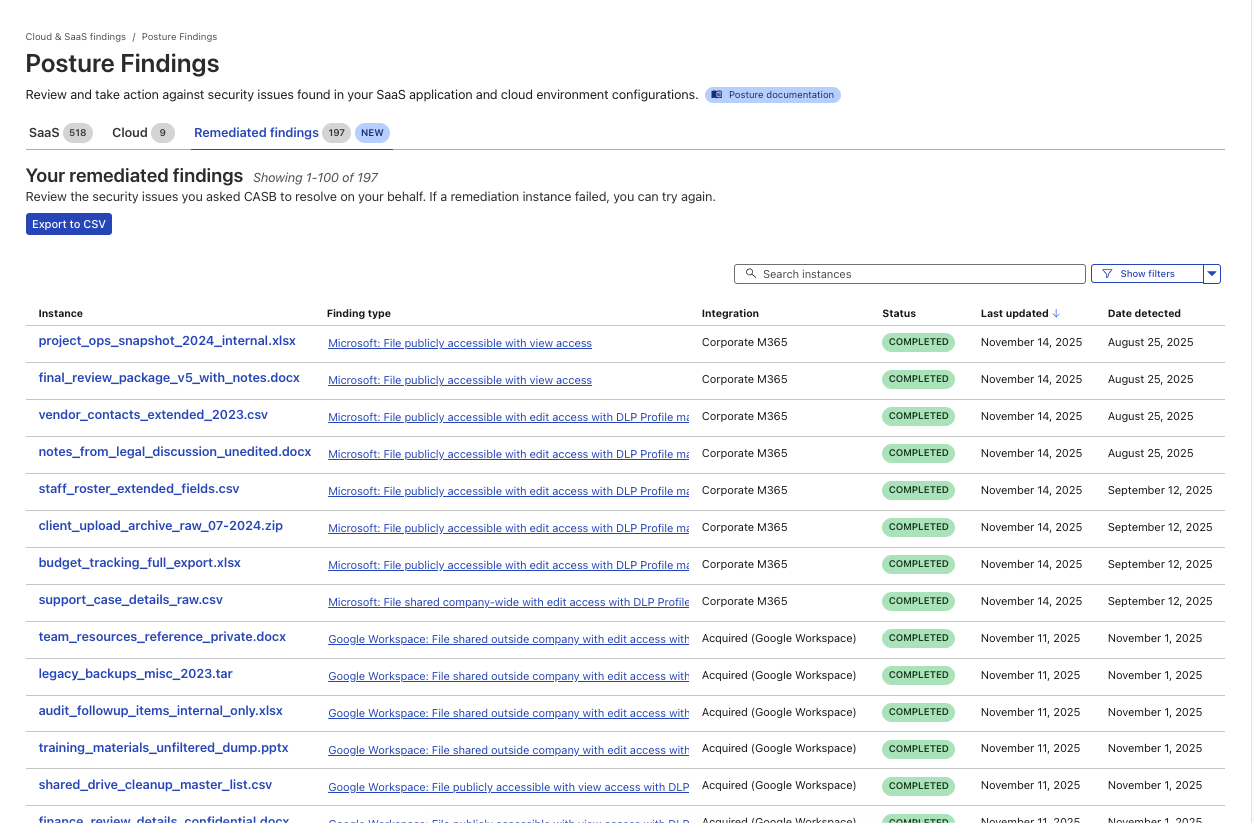
A new page to track the progress and success of Remediated CASB findings.
Two starting points: Microsoft 365 and Google Workspace
We chose to start with Microsoft 365 and Google Workspace because, for many organizations, that’s where the bulk of their business-critical documents live: internal financials, product roadmaps, customer contracts, HR notes, and more.
They’re also where “temporary” sharing tends to linger too long:
A spreadsheet shared “Anyone with the link can edit” for a quick review.
A doc made company-wide for an all-hands, then quietly forgotten.
A sheet of customer records shared to a contractor’s personal email.
For Microsoft 365, that means cleaning up risky shares in places like OneDrive and SharePoint. For Google Workspace, it means tightening sharing on Docs, Sheets, Slides, and other files stored in Drive.
Instead of exporting a CSV of risky files out of CASB, sending it to app owners, and hoping everyone gets around to fixing their share settings, you can drive the clean-up directly from CASB and know when those risks have actually been addressed.
And when you and your team use CASB Remediation, every action is logged in Cloudflare One’s Admin logs, so you can see who took action on which files and when, or export that activity to your security information and event management tool (SIEM).
How it works
When architecting the system that supports CASB Remediations, we knew it had to do three things really well:
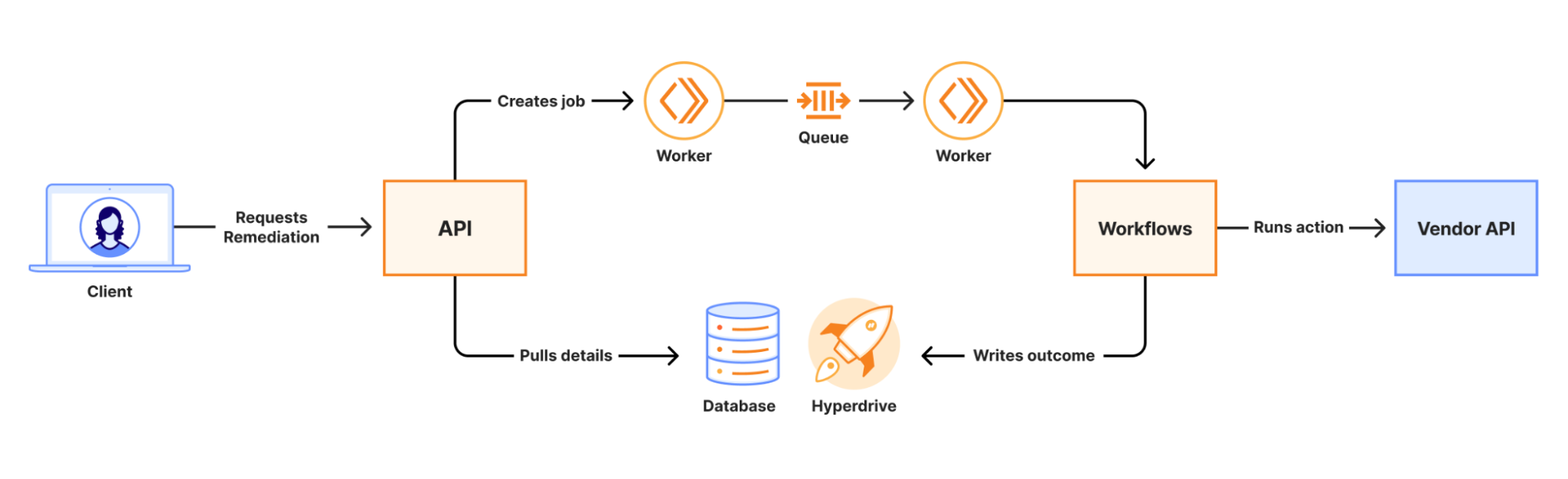
When a remediation job is initiated, an API call is made to a Worker. That Worker writes the job to a Queue which is consumed by a second Worker to kick off a Workflow. Workers KV and Secrets Store are used to securely distribute credentials for use in the Workflow. The Workflow runs a series of steps to collect information and execute third-party API calls to complete the remediation. The final outcome of the action is recorded in a database via Hyperdrive.
At scale, we are guaranteed to encounter 429s from vendor APIs. Workflows’ native retries simplify handling this, and built-in step logging gives visibility into each retry. This means that there was no need for us to build a complex, single-purpose, state-tracking system or dozens of serverless functions for each action.
Performance results from load testing and early access customers have shown strong performance even under heavy load. The average (p50) end-to-end job completion time is 48 seconds, and the p90 is 72 seconds. Durable Execution (via Workflows) has made job management completely hands-off for our team, even when the Workflow encounters issues with third-party APIs. The simplicity of the final system has made troubleshooting issues fast and straightforward.
What’s next for CASB Remediation
File-sharing Remediation for Microsoft 365 and Google Workspace is just the first step.
In the near term, we’re working on bringing our customers new Quarantine actions, which can move or isolate high-risk files to safer locations. We are also introducing Custom Webhook actions, hooks that let you trigger downstream workflows, like ticket creation, chat notifications, or your own automation.
And more broadly, we’re excited to explore ways to make CASB even more of an active control plane:
Autoremediation policies for carefully scoped, policy-driven fixes where you’re comfortable letting CASB take action automatically.
Custom CASB findings so you can define the exact patterns, data types, or access conditions that matter most to your organization.
Bulk Remediation that allows you to remediate many similar findings in a single operation.
Extending Remediation to additional SaaS integrations beyond Microsoft 365 and Google Workspace, so the same experience applies to tools like Box, Dropbox, Salesforce, GitHub, Slack, Atlassian, and more over time.
How to get started
CASB Remediation requires a paid CASB license, but don’t let that stop you from trying CASB out today!
For existing Cloudflare One / CASB customers: Integrate your Microsoft 365 or Google Workspace tenant (or update your existing integration to Read-Write), and start remediating risky shares directly from the side panel within your file sharing-related finding types.
From there, talk to our team about enabling CASB with Remediation for your Microsoft 365 and Google Workspace tenants so you can find and fix overshared files in one place.
We’re excited to see how you use Remediation to clean up long-lived file-sharing risks — and to help shape what CASB’s next generation of remediation capabilities looks like.
Ranker is one of the largest and most complex services at Netflix. Among many things, it powers the personalized rows you see on the Netflix homepage, and runs at an enormous scale. When we looked at CPU profiles for this service, one feature kept standing out: video serendipity scoring — the logic that answers a simple question:
“How different is this new title from what you’ve been watching so far?”
This single feature was consuming about 7.5% of total CPU on each node running the service. What started as a simple idea — “just batch the video scoring feature” — turned into a deeper optimization journey. Along the way we introduced batching, re-architected memory layout and tried various libraries to handle the scoring kernels.
Read on to learn how we achieved the same serendipity scores, but at a meaningfully lower CPU per request, resulting in a reduced cluster footprint.
Problem: The Hotspot in Ranker
At a high level, serendipity scoring works like this: A candidate title and each item in a member’s viewing history are represented as embeddings in a vector space. For each candidate, we compute its similarity against the history embeddings, find the maximum similarity, and convert that into a “novelty” score. That score becomes an input feature to the downstream recommendation logic.
The original implementation was straightforward but expensive. For each candidate we fetch its embedding, loop over the history to compute cosine similarity one pair at a time and track the maximum similarity score. Although it is easy to reason about, at Ranker’s scale, this results in significant sequential work, repeated embedding lookups, scattered memory access, and poor cache locality. Profiling confirmed this.
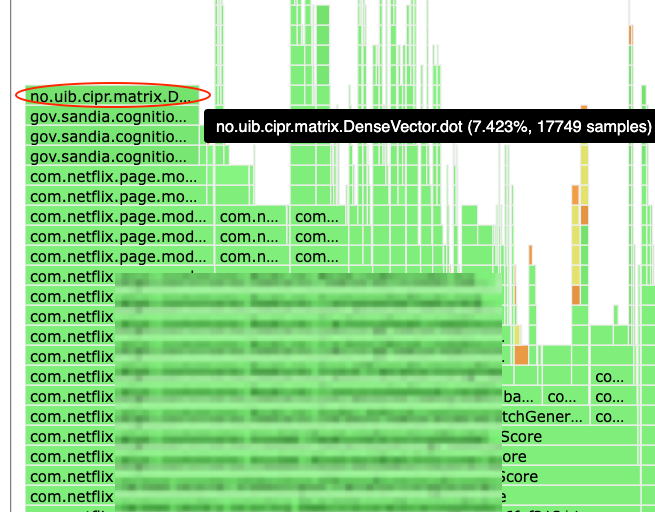
Flamegraph showing inefficient scoring
A flamegraph made it clear: One of the top hotspots in the service was Java dot products inside the serendipity encoder. Algorithmically, the hotspot was a nested loop structure of M candidates × N history items where each pair generates its own cosine similarity i.e. O(M×N) separate dot product operations.
Solution
The Original Implementation: Single video cosine loop
In simplified form the code looked like this:
for (Video candidate : candidates) { Vector c = embedding(candidate); // D-dimensional double maxSim = -1.0;
for (Video h : history) { Vector v = embedding(h); // D-dimensional double sim = cosine(c, v); // dot(c, v) / (||c|| * ||v||) maxSim = Math.max(maxSim, sim); }
The nested for loop with O(M×N) separate dot products brought upon its own overheads. One interesting detail we learned by instrumenting traffic shapes: most requests (about 98%) were single-video, but the remaining 2% were large batch requests. Because those batches were so large, the total volume of videos processed ended up being roughly 50:50 between single and batch jobs. This made batching worth pursuing even if it didn’t help the median request.
Step 1 : Batching, from Nested Loops to Matrix Multiply
The first idea was to stop thinking in terms of “many small dot products” and instead treat the work as a matrix operation. i.e. For batch candidates, implement a data layout to parallelize the math in a single operation i.e. matrix multiply. If D is the embedding dimension:
Pack all candidate embeddings into a matrix A of shape M x D
Pack all history embeddings into a matrix B of shape N x D
Normalize all rows to unit length.
Compute: cosine similarities as [ C = A x B^T ]; where C is an M x N matrix of cosine similarities.
In pseudo‑code:
// Build matrices
double[][] A = new double[M][D]; // candidates
double[][] B = new double[N][D]; // history

for (int i = 0; i < M; i++) {
  A[i] = embedding(candidates[i]).toArray();
}
for (int j = 0; j < N; j++) {
  B[j] = embedding(history[j]).toArray();
}

// Normalize rows to unit vectors
normalizeRows(A);
normalizeRows(B);

// Compute C = A * B^T
double[][] C = matmul(A, B);
C[i][j] = cosine(candidates[i], history[j])

// Derive serendipity
for (int i = 0; i < M; i++) {
  double maxSim = max(C[i][0..N-1]);
  double serendipity = 1.0 - maxSim;
  emitFeature(candidates[i], serendipity);
}
This turns M×N separate dot products into a single matrix multiply, which is exactly what CPUs and optimized kernels are built for. We integrated this into the existing framework by supporting both, encode()for single videos and batchEncode() for batches, while maintaining backward compatibility. At this point it seemed like we were “done”, but we weren't.
Step 2: When Batching Isn’t Enough
Once we had a batched implementation, we ran canaries and saw something surprising: about a 5% performance regression. The algorithm wasn’t the issue — turning M×N separate dot products into a matrix multiplication is mathematically sound. The problem was the overhead we introduced in the first implementation.
Our initial version built double[][] matrices for candidates, history, and results on every batch. Those large, short-lived allocations created GC pressure, and the double[][] layout itself is non-contiguous in memory, which meant extra pointer chasing and worse cache behavior.
On top of that, the first-cut Java matrix multiply was a straightforward scalar implementation, so it couldn’t take advantage of SIMD. In other words, we paid the cost of batching without getting the compute efficiency we were aiming for.
The lesson was immediate: algorithmic improvements don’t matter if the implementation details—memory layout, allocation strategy, and the compute kernel—work against you. That set up the next step for making the data layout cache-friendly and eliminating per-batch allocations before revisiting the matrix multiply kernel.
Step 3: Flat Buffers & ThreadLocal Reuse
We reworked the data layout to be cache-friendly and allocation-light. Instead of double[m][n], we moved to flat double[] buffers in row-major order. That gave us contiguous memory and predictable access patterns. Then we introduced a ThreadLocal<BufferHolder> that owns reusable buffers for candidates, history, and any other scratch space. Buffers grow as needed but never shrink, which avoids per-request allocation while keeping each thread isolated (no contention). A simplified sketch:
class BufferHolder {
  double[] candidatesFlat = new double[0];
  double[] historyFlat = new double[0];

  double[] getCandidatesFlat(int required) {
    if (candidatesFlat.length < required) {
      candidatesFlat = new double[required];
    }
    return candidatesFlat;
  }

  double[] getHistoryFlat(int required) {
    if (historyFlat.length < required) {
      historyFlat = new double[required];
    }
    return historyFlat;
  }
}

private static final ThreadLocal<BufferHolder> threadBuffers =
    ThreadLocal.withInitial(BufferHolder::new);
This change alone made the batched path far more predictable: fewer allocations, less GC pressure, and better cache locality.
Now the remaining question was the one we originally thought we were answering: what’s the best way to do the matrix multiply?
Step 4: BLAS: Great in Tests, Not in Production
The obvious next step was BLAS (Basic Linear Algebra Subprograms). In isolation, microbenchmarks looked promising. But once integrated into the real batch scoring path, the gains didn’t materialize. A few things were working against us:
The default netlib-java path was using F2J (Fortran-to-Java) BLAS rather than a truly native implementation.
Even with native BLAS, we paid overhead for setup and JNI transitions.
Java’s row-major layout doesn’t match the column-major expectations of many BLAS routines, which can introduce conversion and temporary buffers.
Those extra allocations and copies mattered in the full pipeline, especially alongside TensorFlow embedding work.
BLAS was still a useful experiment — it clarified where time was being spent, but it wasn’t the drop-in win we wanted. What we needed was something that stayed pure Java, fit our flat-buffer architecture, and could still exploit SIMD.
Step 5: JDK Vector API to the rescue
A Short Note on the JDK Vector API: The JDK Vector API is an incubating feature that provides a portable way to express data-parallel operations in Java — think “SIMD without intrinsics”. You write in terms of vectors and lanes, and the JIT maps those operations to the best SIMD instructions available on the host CPU (SSE/AVX2/AVX-512), with a scalar fallback when needed. More crucially for us, it’s pure Java: no native dependencies, no JNI transitions, and a development model that looks like normal Java code rather than platform-specific assembly or intrinsics.
This was a particularly good match for our workload because we had already moved embeddings into flat, contiguous double[] buffers, and the hot loop was dominated by large numbers of dot products. The final step was to replace BLAS with a pure-Java SIMD implementation using the JDK Vector API. By this point we already had the right shape for high performance — batching, flat buffers, and ThreadLocal reuse. So the remaining work was to swap out the compute kernel without introducing JNI overhead or platform-specific code. We did that behind a small factory. At class load time, MatMulFactory selects the best available implementation:
If jdk.incubator.vector is available, use a Vector API implementation.
Otherwise, fall back to a scalar implementation with a highly optimized loop-unrolled dot product (implemented by my colleague Patrick Strawderman, inspired by patterns used in Lucene)
In the Vector API implementation, the inner loop computes a dot product by accumulating a * b into a vector accumulator using fma() (fused multiply-add). DoubleVector.SPECIES_PREFERRED lets the runtime pick an appropriate lane width for the machine. Here’s a simplified sketch of the inner loop:
// Vector API path (simplified)
for (int i = 0; i < M; i++) {
  for (int j = 0; j < N; j++) {

  DoubleVector acc = DoubleVector.zero(SPECIES);
    int k = 0;
    // SPECIES.length() (e.g. often 4 doubles on AVX2 and 8 doubles on AVX-512).
    for (; k + SPECIES.length() <= D; k += SPECIES.length()) {
      DoubleVector a = DoubleVector.fromArray(SPECIES, candidatesFlat, i*D + k);
      DoubleVector b = DoubleVector.fromArray(SPECIES, historyFlat,   j*D + k);
      acc = a.fma(b, acc);  // fused multiply-add
    }
    double dot = acc.reduceLanes(VectorOperators.ADD);
    // handle tail k..D-1
    similaritiesFlat[i*N + j] = dot;
  }
}
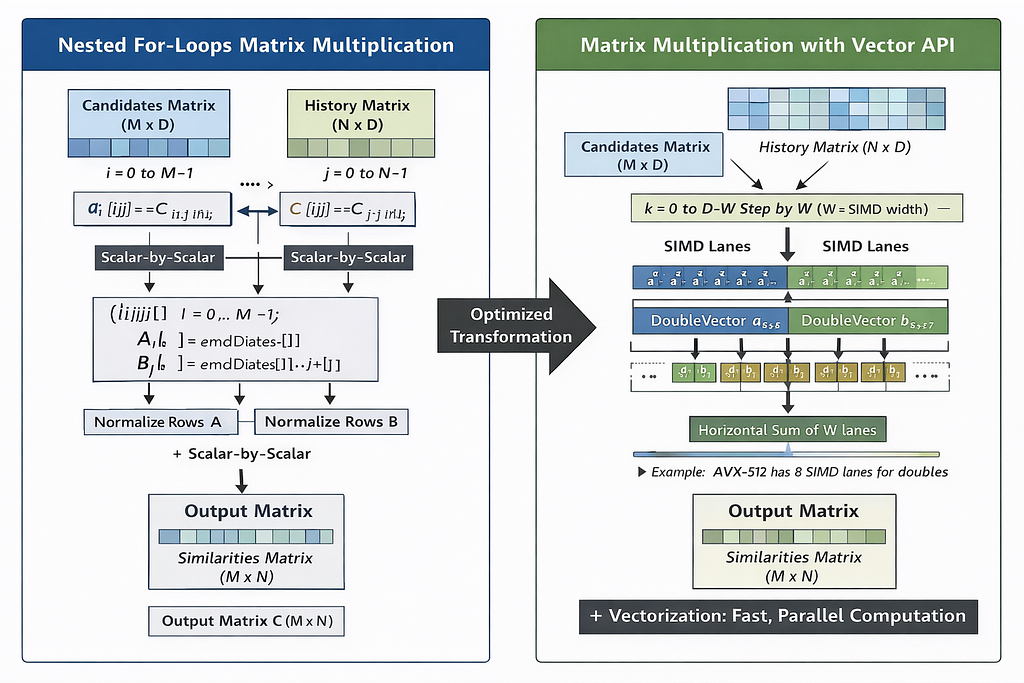
Figure below shows how the Vector API utilizes SIMD hardware to process multiple doubles per instruction (e.g., 4 lanes on AVX2 and 8 lanes on AVX‑512). What used to be many scalar multiply-adds becomes a smaller number of vector fma() operations plus a reduction—same algorithm, much better use of the CPU’s vector units.
Vectorization with SIMD
Fallbacks & Safety: When the Vector API Isn’t Available
Because the Vector API is still incubating, it requires a runtime flag: –add-modules=jdk.incubator.vector We didn’t want correctness or availability to depend on that flag. So we designed the fallback behavior explicitly: At startup, we detect Vector API support and use the SIMD batched matmul when available; otherwise we fall back to an optimized scalar path, with single-video requests continuing to use the per-item implementation.
That gives us a clean operational story: services can opt in to the Vector API for maximum performance, but the system remains safe and predictable without it.
Results in Production:
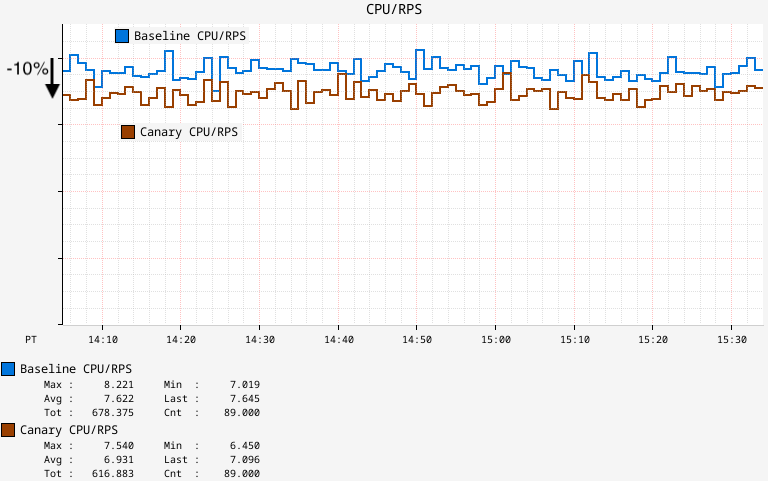
With the full design in place with batching, flat buffers, ThreadLocal reuse, and the Vector API, we ran canaries that run production traffic. We observed a ~7% drop in CPU utilization and ~12% drop in average latency. To normalize across any small throughput differences, we also tracked CPU/RPS (CPU consumed per request-per-second). That metric improved by roughly 10%, meaning we could handle the same traffic with about 10% less CPU, and we saw similar numbers hold after full production rollout.
CPU/RPS on Ranker
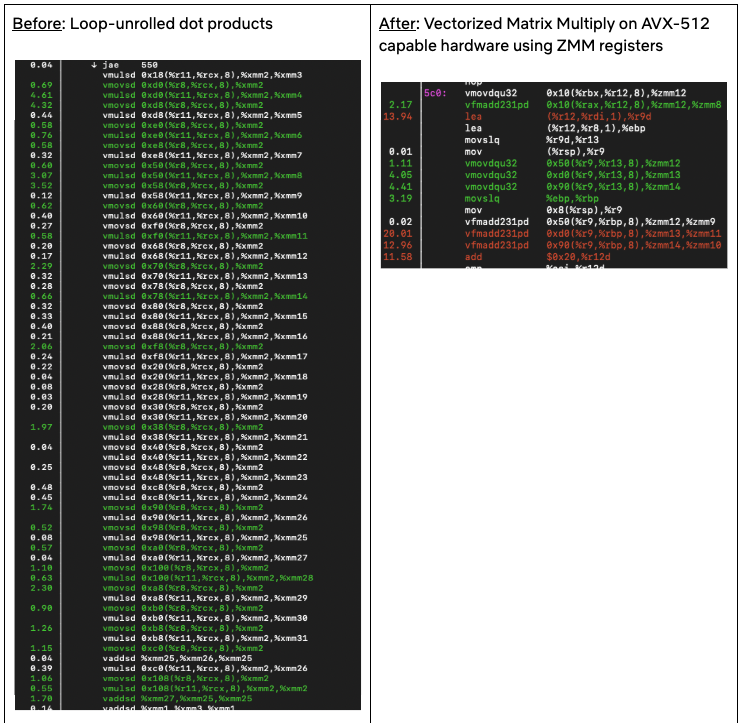
At the function operator level, we saw the CPU drop from the initial 7.5% to a merely ~1% with the optimization in place. At the assembly level, the shift was clear: from loop-unrolled scalar dot products to a vectorized matrix multiply on AVX-512 hardware.
Assembly snippet from batchEncode
Closing Thoughts
This optimization ended up being less about finding the “fastest library” and more about getting the fundamentals right: choosing the right computation shape, keeping data layout cache-friendly, and avoiding overheads that can erase theoretical wins. Once those pieces were in place, the JDK Vector API was a great fit, as it let us express SIMD-style math in pure Java, without JNI, while still keeping a safe fallback path. Another bonus was the low developer overhead: compared to lower-level approaches, the Vector API let us replace a much larger, more complex implementation with a relatively small amount of readable Java code, which made it easier to review, maintain, and iterate on.
Have you tried the Vector API in a real service yet? I’d love to hear what workloads it helped (or didn’t), and what you learned about benchmarking and rollout in production.
There are many applications that need to be able to write multi-block
chunks of data to disk with the assurance that the operation will either
complete successfully or fail altogether — that the write will not be
partially completed (or “torn”), in other words. For years, kernel
developers have worked on providing atomic writes as a way of satisfying
that need; see, for example, sessions from the Linux Storage, Filesystem,
Memory Management, and BPF (LSFMM+BPF) Summit from 2023, 2024,
and 2025 (twice). While atomic directI/O is now supported by some filesystems, atomic bufferedI/O still is not. Filling
that gap seems certain to be a 2026 LSFMM+BPF topic but, thanks to an early
discussion, the shape of a solution might already be coming into focus.
Since the memory is being copied directly from userspace to the
network device, the userspace application has to keep it around
unmodified, until it has finished sending. The sendmsg()
syscall itself is asynchronous, and will return without waiting for
this. Instead, once the memory buffers are no longer needed by the
stack, the kernel will return a notification to userspace that the
buffers can be reused.
Over the past year, Amazon Redshift has introduced capabilities that simplify operations and enhance productivity. Building on this momentum, we’re addressing another common operational challenge that data engineers face daily: managing repetitive data loading operations with similar parameters across multiple data sources. This intermediate-level post introduces AWS Redshift Templates, a new feature that you can use to create reusable command patterns for the COPY command, reducing redundancy and improving consistency across your data operations.
The challenge: Managing repetitive data operations at scale
Meet AnyCompany, a fictional data aggregation company that processes customer transaction data from over 50 retail clients. Each client sends daily delimited text files with similar structures:
While the data format is largely consistent across clients (pipe-delimited files with headers, UTF-8 encoding), the sheer volume of COPY commands required to load this data has become a development and maintenance overhead.
Their data engineering team faces several pain points:
Repetitive parameter specification: Each COPY command requires specifying the same parameters for delimiter, encoding, error handling, and compression settings
Inconsistency risks: With multiple team members writing COPY commands, slight variations in parameters lead to data ingestion failures
Maintenance overhead: When they need to adjust error thresholds or encoding settings, they must update hundreds of individual COPY commands across their extract, transform, and load (ETL) pipelines
Onboarding complexity: New team members struggle to remember all the required parameters and their optimal values
Additionally, a few clients send data in slightly different formats. Some use comma delimiters instead of pipes or have different header configurations. The team needs flexibility to handle these exceptions without completely rewriting their data loading logic.
Introducing Redshift Templates
You can address these challenges by using Redshift Templates to store commonly used parameters for COPY commands as reusable database objects. Think of templates as blueprints for your data operations where you can define your parameters once, then reference them across multiple COPY commands.
Template management best practices
Before exploring implementation scenarios, let’s establish best practices for template management to ensure your templates remain maintainable and secure.
-- Grant specific permissions to roles
GRANT USAGE FOR TEMPLATES IN SCHEMA analytics TO ROLE data_engineers;
GRANT ALTER FOR TEMPLATES IN SCHEMA reporting TO ROLE senior_analysts;
-- Revoke broad permissions
REVOKE ALL ON TEMPLATE analytics.csv_load FROM PUBLIC;
Query the system view to track template usage:
SELECT database_name, schema_name, template_name,
       create_time, last_modified_time
FROM sys_redshift_template;
Document each template, including:
Purpose and use cases
Parameter explanations
Ownership and contact information
Change history
Solution overview
Let’s explore how AnyCompany uses Redshift Templates to streamline their data loading operations.
Scenario 1: Standardizing client data ingestion
AnyCompany receives transaction files from multiple retail clients with consistent formatting. They create a template that encapsulates their standard loading parameters:
-- Create a reusable template for standard client data loads
CREATE TEMPLATE data_ingestion.standard_client_load
FOR COPY
AS
DELIMITER '|'
IGNOREHEADER 1
ENCODING UTF8
MAXERROR 100
COMPUPDATE OFF
STATUPDATE ON
ACCEPTINVCHARS
TRUNCATECOLUMNS;
This template defines their standard approach:
DELIMITER '|' specifies pipe-delimited files
IGNOREHEADER 1 skips the header row
ENCODING UTF8 facilitates proper character encoding
MAXERROR 100 allows up to 100 errors before failing, providing resilience for minor data quality issues
COMPUPDATE OFF helps prevent automatic compression analysis during loading for faster performance
STATUPDATE ON keeps table statistics current for query optimization
ACCEPTINVCHARS replaces invalid UTF-8 characters rather than failing
TRUNCATECOLUMNS truncates data that exceeds column width rather than failing
Now, loading data from a standard client becomes remarkably straightforward:
-- Load transaction data from Client A
COPY transactions_client_a
FROM 's3://amzn-s3-demo-bucket/client-a/transactions/'
IAM_ROLE default
USING TEMPLATE data_ingestion.standard_client_load;
-- Load transaction data from Client B
COPY transactions_client_b
FROM 's3://amzn-s3-demo-bucket/client-b/transactions/'
IAM_ROLE default
USING TEMPLATE data_ingestion.standard_client_load;
-- Load product catalog from Client C
COPY products_client_c
FROM 's3:// amzn-s3-demo-bucket/client-c/products/'
IAM_ROLE default
USING TEMPLATE data_ingestion.standard_client_load;
Notice how clean and maintainable these commands are. Each COPY statement specifies only:
The complex formatting and error handling parameters are neatly encapsulated in the template, facilitating consistency across the data loads.
Scenario 2: Handling client-specific variations with parameter overrides
AnyCompany has two clients (Client D, and E) who send comma-delimited files instead of pipe-delimited files. Rather than creating an entirely separate template, they can override specific parameters while still using the template’s other settings:
-- Load data from Client D with comma delimiter (overriding template)
COPY transactions_client_d
FROM 's3://amzn-s3-demo-bucket/client-d/transactions/'
IAM_ROLE default
DELIMITER ','  -- Override the template's pipe delimiter
USING TEMPLATE data_ingestion.standard_client_load;
-- Load data from Client E with comma delimiter and no header
COPY transactions_client_e
FROM 's3://amzn-s3-demo-bucket/client-e/transactions/'
IAM_ROLE default
DELIMITER ','      -- Override delimiter
IGNOREHEADER 0     -- Override header setting
USING TEMPLATE data_ingestion.standard_client_load;
This demonstrates the Redshift Templates parameter hierarchy:
Command-specific parameters (highest priority): Parameters explicitly specified in your COPY command take precedence
Template parameters (medium priority): Parameters defined in the template are used when not overridden
Amazon Redshift default parameters (lowest priority): Default values apply when neither command nor template specifies a value
This three-tier approach provides the perfect balance between standardization and flexibility. You maintain consistency where it matters while retaining the ability to handle exceptions gracefully.
Scenario 3: Simplified template maintenance
Six months after implementing templates, AnyCompany’s data quality team recommends increasing the error threshold from 100 to 500 to better handle occasional data quality issues from upstream systems. With templates, this change is trivial:
-- Update the template to increase error tolerance
ALTER TEMPLATE data_ingestion.standard_client_load
SET MAXERROR TO 500;
This single command instantly updates the error handling behavior for the future COPY operations using this template without needing to hunt through hundreds of ETL scripts or risking missing updates in some pipelines. They can also add new parameters as their requirements evolve:
-- Add compression parameter to improve load performance
ALTER TEMPLATE data_ingestion.standard_client_load
ADD GZIP;
To remove a template when it’s no longer needed:
DROP TEMPLATE data_ingestion.standard_client_load;
Scenario 4: Environment-specific templates for development and production
AnyCompany maintains separate templates for development and production environments, with different error tolerance levels:
-- Development template with lenient error handling
CREATE TEMPLATE data_ingestion.dev_client_load
FOR COPY
AS
DELIMITER '|'
IGNOREHEADER 1
ENCODING UTF8
MAXERROR 1000        -- More lenient for testing
COMPUPDATE OFF
STATUPDATE OFF;      -- Skip stats updates in dev
-- Production template with strict error handling
CREATE TEMPLATE data_ingestion.prod_client_load
FOR COPY
AS
DELIMITER '|'
IGNOREHEADER 1
ENCODING UTF8
MAXERROR 50          -- Stricter for production
COMPUPDATE OFF
STATUPDATE ON;       -- Keep stats current in prod
This approach helps ensure that data quality issues are caught early in production while allowing flexibility during development and testing.
Key benefits
The key benefits of using templates include:
Consistency and standardization: Templates help maintain consistency across different operations by making sure that the same set of parameters and configurations are used every time. This is particularly valuable in large organizations where multiple users work on the same data pipelines.
Ease of use and timesaving: Instead of manually specifying the parameters for each command execution, users can reference a pre-defined template. This saves time and reduces the chances of errors caused by manual input.
Flexibility with parameter overrides: While templates provide standardization, they don’t sacrifice flexibility. You can override a template parameter directly in your COPY command when handling exceptions or special cases.
Simplified maintenance: When changes need to be made to parameters or configurations, updating the corresponding template propagates the changes across the instances where the template is used. This significantly reduces maintenance effort compared to manually updating each command individually.
Collaboration and knowledge sharing: Templates serve as a knowledge base, capturing best practices and optimized configurations developed by experienced users. This facilitates knowledge sharing and onboarding of new team members, reducing the learning curve and facilitating consistent usage of proven configurations.
Additional use cases across industries
Templates can be used across industries.
Financial services: Standardizing regulatory data loads
A financial institution needs to load transaction data from multiple branches with consistent formatting requirements:
-- Create template for branch transaction loads
CREATE TEMPLATE compliance.branch_transaction_load
FOR COPY
AS
FORMAT CSV
DELIMITER ','
IGNOREHEADER 1
ENCODING UTF8
DATEFORMAT 'YYYY-MM-DD'
TIMEFORMAT 'YYYY-MM-DD HH:MI:SS'
MAXERROR 0           -- Zero tolerance for compliance data
COMPUPDATE OFF;
-- Load data from different branches
COPY branch_transactions_east
FROM 's3://amzn-s3-demo-source-bucket/east-branch/transactions/'
IAM_ROLE default
USING TEMPLATE compliance.branch_transaction_load;
COPY branch_transactions_west
FROM 's3://amzn-s3-demo-source-bucket/west-branch/transactions/'
IAM_ROLE default
USING TEMPLATE compliance.branch_transaction_load;
Healthcare: Loading patient data with strict standards
A healthcare analytics company standardizes their patient data ingestion across multiple hospital systems:
-- Create template for HIPAA-compliant data loads
CREATE TEMPLATE healthcare.patient_data_load
FOR COPY
AS
FORMAT CSV
DELIMITER '|'
IGNOREHEADER 1
ENCODING UTF8
ACCEPTINVCHARS
TRUNCATECOLUMNS
MAXERROR 10
COMPUPDATE OFF;
-- Apply to different hospital systems
COPY hospital_a_patients
FROM 's3://amzn-s3-demo-destination-bucket/hospital-a/patients/'
IAM_ROLE default
USING TEMPLATE healthcare.patient_data_load;
COPY hospital_b_patients
FROM 's3://amzn-s3-demo-destination-bucket/hospital-b/patients/'
IAM_ROLE default
USING TEMPLATE healthcare.patient_data_load;
Retail: JSON data loading standardization
A retail company processes JSON-formatted product catalogs from various suppliers:
-- Create template for JSON product data
CREATE TEMPLATE retail.json_product_load
FOR COPY
AS
FORMAT JSON 'auto'
TIMEFORMAT 'auto'
ENCODING UTF8
MAXERROR 100
COMPUPDATE OFF;
-- Load from different suppliers
COPY products_supplier_a
FROM 's3://amzn-s3-demo-logging-bucket/supplier-a/products/'
IAM_ROLE default
USING TEMPLATE retail.json_product_load;
COPY products_supplier_b
FROM 's3://amzn-s3-demo-logging-bucket/supplier-b/products/'
IAM_ROLE default
USING TEMPLATE retail.json_product_load;
Conclusion
In this post, we introduced Redshift Templates and showed examples of how they can standardize and simplify your data loading operations across different scenarios. By encapsulating common COPY command parameters into reusable database objects, templates help remove repetitive parameter specifications, facilitate consistency across teams, and centralize maintenance. When requirements evolve, a single template update propagates quickly across the operations, reducing operational overhead while maintaining flexibility to override parameters for use cases.
Start using Redshift Templates to transform your data ingestion workflows. Create your first template for your most common data loading pattern, then gradually expand coverage across your pipelines. Your team will immediately benefit from cleaner code, faster onboarding, and simplified maintenance. To learn more about Redshift Templates and explore additional configuration options, see the Amazon Redshift documentation.
This past week, I’ve been deep in the trenches helping customers transform their businesses through AI-DLC (AI-Driven Lifecycle) workshops. Throughout 2026, I’ve had the privilege of facilitating these sessions for numerous customers, guiding them through a structured framework that helps organizations identify, prioritize, and implement AI use cases that deliver measurable business value.
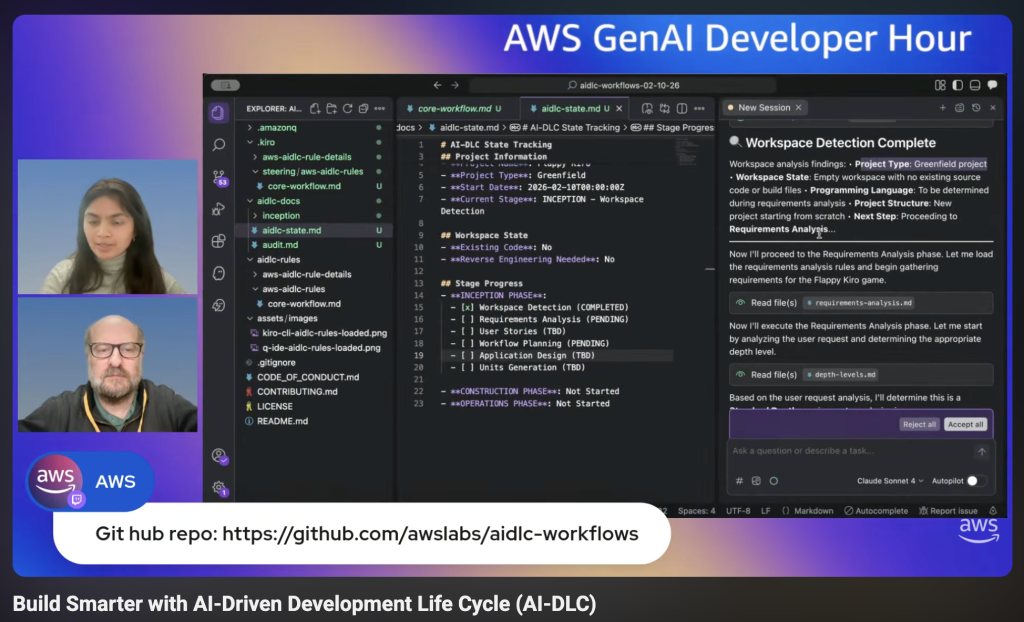
AI-DLC is a methodology that takes companies from AI experimentation to production-ready solutions by aligning technical capabilities with business outcomes. If you’re interested in learning more, check out this blog post that dives deeper into the framework, or watch as Riya Dani teaches me all about AI-DLC on our recent GenAI Developer Hour livestream!
Now, let’s get into this week’s AWS news…
OpenAI and Amazon announced a multi-year strategic partnership to accelerate AI innovation for enterprises, startups, and end consumers around the world. Amazon will invest $50 billion in OpenAI, starting with an initial $15 billion investment and followed by another $35 billion in the coming months when certain conditions are met. AWS and OpenAI are co-creating a Stateful Runtime Environment powered by OpenAI models, available through Amazon Bedrock, which allows developers to keep context, remember prior work, work across software tools and data sources, and access compute.
AWS will serve as the exclusive third-party cloud distribution provider for OpenAI Frontier, enabling organizations to build, deploy, and manage teams of AI agents. OpenAI and AWS are expanding their existing $38 billion multi-year agreement by $100 billion over 8 years, with OpenAI committing to consume approximately 2 gigawatts of Trainium capacity, spanning both Trainium3 and next-generation Trainium4 chips.
Last week’s launches Here are some launches and updates from this past week that caught my attention:
AWS Security Hub Extended offers full-stack enterprise security with curated partner solutions — AWS launched Security Hub Extended, a plan that simplifies procurement, deployment, and integration of full-stack enterprise security solutions including 7AI, Britive, CrowdStrike, Cyera, Island, Noma, Okta, Oligo, Opti, Proofpoint, SailPoint, Splunk, Upwind, and Zscaler. With AWS as the seller of record, customers benefit from pre-negotiated pay-as-you-go pricing, a single bill, no long-term commitments, unified security operations within Security Hub, and unified Level 1 support for AWS Enterprise Support customers.
Transform live video for mobile audiences with AWS Elemental Inference — AWS launched Elemental Inference, a fully managed AI service that automatically transforms live and on-demand video for mobile and social platforms in real time. The service uses AI-powered cropping to create vertical formats optimized for TikTok, Instagram Reels, and YouTube Shorts, and automatically extracts highlight clips with 6-10 second latency. Beta testing showed large media companies achieved 34% or more savings on AI-powered live video workflows. Deep dive into the Fox Sports implementation.
MediaConvert introduces new video probe API — AWS Elemental MediaConvert introduced a free Probe API for quick metadata analysis of media files, reading header metadata to return codec specifications, pixel formats, and color space details without processing video content.
OpenAI-compatible Projects API in Amazon Bedrock — Projects API provides application-level isolation for your generative AI workloads using OpenAI-compatible APIs in the Mantle inference engine in Amazon Bedrock. You can organize and manage your AI applications with improved access control, cost tracking, and observability across your organization.
Amazon Location Service introduces LLM Context — Amazon Location launched curated AI Agent context as a Kiro power, Claude Code plugin, and agent skill in the open Agent Skills format, improving code accuracy and accelerating feature implementation for location-based capabilities.
Amazon EKS Node Monitoring Agent is now open source — The Amazon EKS Node Monitoring Agent is now open source on GitHub, allowing visibility into implementation, customization, and community contributions.
AWS AppConfig integrates with New Relic — AWS AppConfig launched integration with New Relic Workflow Automation for automated, intelligent rollbacks during feature flag deployments, reducing detection-to-remediation time from minutes to seconds.
For a full list of AWS announcements, be sure to keep an eye on the What’s New with AWS page.
Other AWS news Here are some additional posts and resources that you might find interesting:
Introducing Strands Labs — We created Strands Labs as a separate Git organization to support experimental agentic AI projects and push the frontier of agentic development. At launch, we’re making Strands Labs available with three projects. The first is Robots, the second is Robots Sim and the third is AI Functions.
6,000 AWS accounts, three people, one platform: Lessons learned — Architecture blog post on managing massive multi-account environments. Learn how ProGlove implemented a large-scale account-per-tenant model on AWS and how that model shifts complexity from service code to platform operations.
RAG vs GraphRAG: When Agents Hallucinate Answers — This demo builds a travel booking agent with Strands Agents and compares RAG (FAISS) vs GraphRAG (Neo4j) to measure which approach reduces hallucinations when answering queries
New output formats in AWS CLI v2 — You can now use two new features for the AWS Command Line Interface (AWS CLI) v2: structured error output and the “off” output format.
Upcoming AWS events Check your calendar and sign up for upcoming AWS events:
AWS at NVIDIA GTC 2026 — Join us at our AWS sessions, booths, demos, ancillary events in NVIDIA GTC 2026 on March 16 – 19, 2026 in San Jose. You can receive 20% off event passes through AWS and request a 1:1 meeting at GTC.
AWS Summits — Join AWS Summits in 2026, free in-person events where you can explore emerging cloud and AI technologies, learn best practices, and network with industry peers and experts. Upcoming Summits include Paris (April 1), London (April 22), and Bengaluru (April 23–24).
AWS Community Days — Community-led conferences where content is planned, sourced, and delivered by community leaders. Upcoming events include JAWS Days in Tokyo (March 7), Chennai (March 7), Slovakia (March 11), and Pune (March 21).
Version 7.3 of Texinfo, the GNU documentation-formatting system, has been released.
It contains a number of new features, performance improvements, and enhancements.
This is a guest post by Aakash Pradeep, Principal Software Engineer, and Venkatram Bondugula, Software Engineer at Twilio, in partnership with AWS.
Twilio is a cloud communications platform that provides programmable APIs and tools for developers to easily integrate voice, messaging, email, video, and other communication features into their applications and customer engagement workflows.
In this blog series we discuss how we built a multi-engine query platform at Twilio. The first part introduces the use case that led us to build a new platform and why we selected Amazon Athena alongside our open-source Presto implementation. This second part discusses how Twilio’s query infrastructure platform integrates with AWS Lake Formation to provide fine-grained access control to all their data.
At Twilio, we faced critical challenges in managing our multi-engine query platform across a complex data mesh architecture spanning multiple AWS accounts and Lines of Business. We needed a unified permissions model that could work consistently across different query engines like OSS Presto and Amazon Athena, eliminating the fragmented authentication experiences in our infrastructure. The growing demand for secure cross-account data sharing required moving beyond manual, multi-step provisioning processes that depended heavily on human intervention. Additionally, Twilio’s compliance and data stewardship requirements demanded fine-grained access controls at row, column, and cell levels, necessitating a scalable and flexible approach to permission management. By adopting the AWS Glue Data Catalog as our managed metastore and AWS Lake Formation for governance, we implemented Tag-Based Access Control (LF-TBAC) to simplify access management, enabled data sharing through automated workflows, and established a centralized governance framework that provided uniform permissions management across all AWS services.
Transitioning to a managed metastore and governance solutions
We discussed in part 1, how we were looking to move to managed services to alleviate us of the burden of managing the underlying infrastructure of a query platform. Along with our decision to adopt Amazon Athena, we also began to evaluate the adoption of Amazon EMR Serverless for our Spark workloads, which made us aware of the fact that we needed to migrate to a managed solution for our Apache Hive metastore.
We selected the AWS Glue Data Catalog as our managed metastore repository to support our enterprise-wide data mesh architecture. For managing permissions to the Data Catalog assets, we chose AWS Lake Formation, a service that enables data governance and security at scale using familiar database-like permissions. Lake Formation provides a unified permissions model as well as support for enabling data mesh architecture that we were seeking.
Lake Formation’s support for row, column, and cell-level access controls provides the fine-grained access control (FGAC) capabilities required by our compliance and data stewardship policies. Additionally, Lake Formation’s tag-based access control (LF-TBAC) feature allows us to define FGAC permissions based on tags attached to the Data Catalog resources, enabling flexible and scalable permission management.
Integrating Odin with AWS Lake Formation
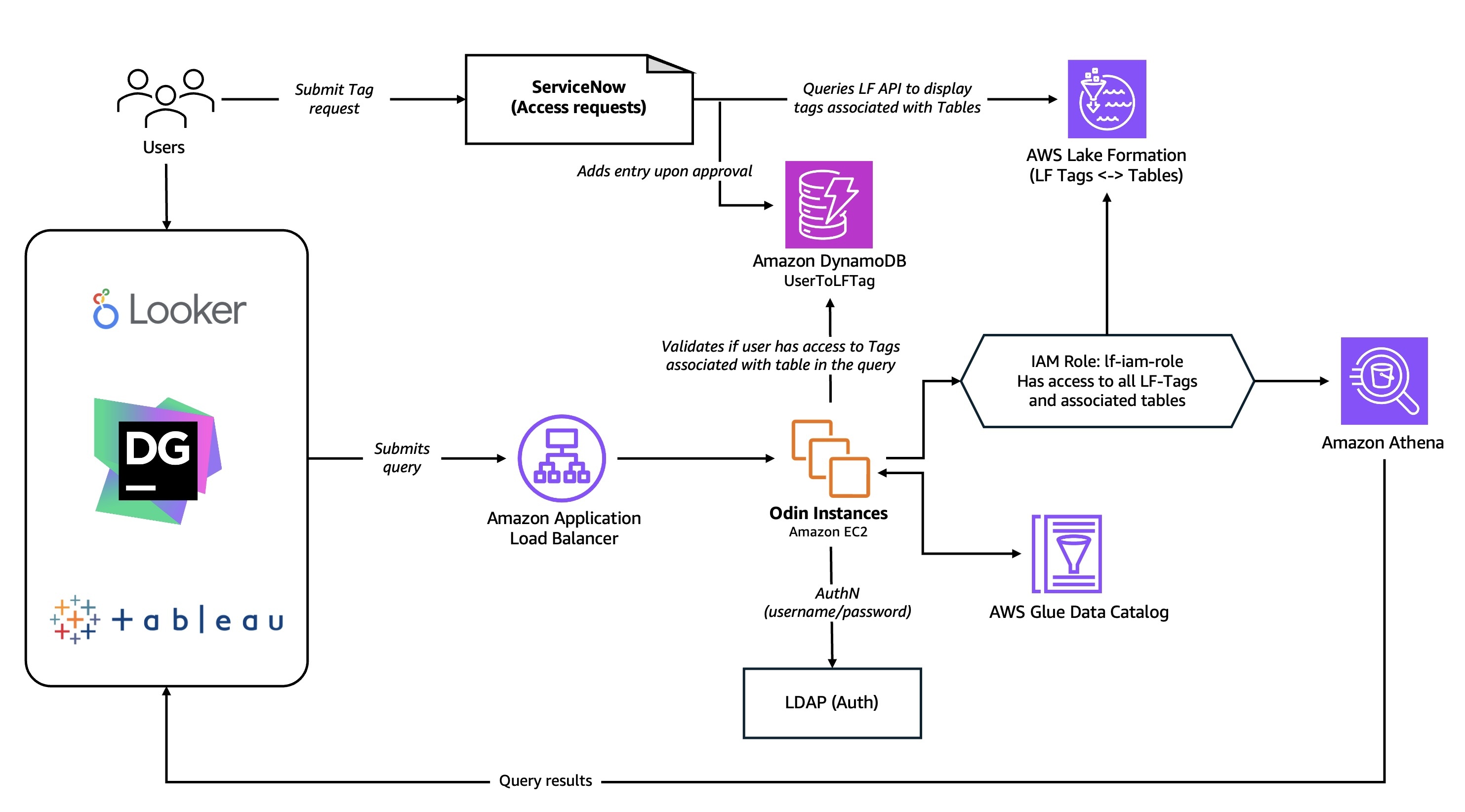
Odin, our Presto-based gateway, serves as a central hub for query processing, managing authentication, routing, and the complete workflow throughout a query’s lifecycle. As the primary interface, Odin enables users to connect through JDBC or APIs from various BI tools, SQL IDEs, and other applications.
Beyond its core routing capabilities, Odin utilizes local caches implemented using Google’s Guava caching library to optimize performance across the platform. Guava delivers efficient in-memory caching for Java applications by storing data locally within the application instance, resulting in significantly faster retrieval times. Odin employs multiple Guava caching layers across various modules to ensure optimal response times for frequently accessed data and metadata.
Building on this performance foundation, Odin implements authentication and authorization layers to ensure secure and controlled access to data across multiple query engines. These security components work together to verify user identities and enforce data access policies, providing a unified security framework that abstracts away the complexities of individual engine implementations while maintaining strict governance standards.
The authentication layer
Different query engines like OSS Presto and Amazon Athena each implement their own authentication mechanisms. To create a consistent user experience, Odin provides a unified authentication layer that shields users from these underlying differences. Currently, Odin’s pluggable authentication system supports LDAP integration, with plans to expand this capability to include Okta authentication using IAM Identity center in the future.
The authorization layer
For data consumers using AWS Analytics services such as AWS Glue, Amazon EMR, and Athena through an IAM federated role-based access, AWS Lake Formation provided critical authorization capabilities for data governance through their existing integrations. However, we needed to extend its capabilities to integrate with OSS Presto. Additionally, our users for the query infrastructure platform were not mapped to an IAM user so would need to build a custom authorization layer in Odin to verify permissions and integrate with Lake Formation. Our challenge was creating a consistent way to control data access across all our query engines.
When a user runs a query, Odin’s authorization layer checks three key pieces of information:
Table details: which database and table the query is accessing
User permissions: what data tags the user has access to
Resource tags: what security tags are attached to the requested table
We store user permissions in Amazon DynamoDB, which allows us to quickly look up what each user can access. By matching the user’s tags with the table’s Lake Formation tags, we can determine if the query should be allowed. To keep things fast, we cache this information temporarily, allowing us to expedite authorization for recent requests.
How the authorization works:
Initial check: First, we see if this user recently ran a similar successful query (within the last 5 minutes).
Gather information: We collect the table details, user permissions, and security tags—first checking our cache, then fetching from AWS Glue Data Catalog and Lake Formation if needed.
Match permissions: We compare the user’s access tags stored in a DynamoDB table against the table’s security tags in Lake Formation.
Make decision: If the user’s permissions match what’s required for their query action (like SELECT or INSERT), access is granted.
This approach allows us to make use of Lake Formation tag-based access control while keeping our authorization logic separate from the individual query engines. By using smart caching and efficient lookups, we can verify permissions in just milliseconds.
Building a data mesh
At Twilio, we have multiple line of business (LoBs) each managing their own data platform infrastructure. The individual platforms are spread across multiple AWS accounts, and primarily store data on Amazon S3 in variety of open table formats, such as Apache Hudi,Apache Iceberg, and Delta Lake. Each platform independently supports analytics and machine learning use cases, however, there was a growing need for secure sharing of data across LoBs. Additionally, we needed to enable self-service discovery and provisioning of access to the data with a centralized governance framework.
Data consumers bring their own AWS accounts and choice of tools, which include not only AWS services such as Amazon Athena, AWS Glue ETL jobs (Spark), and Amazon EMR, but also AWS partner solutions. To improve the process of access fulfillment, data auditability and lowering the operational overhead involved, we needed an automated framework in place that had minimal human intervention and oversight.
Implementing a data subscription workflow
Previously, consumers requiring access to specific data sets would need to go through multiple steps to secure access, which involved several dependencies and manual actions. To simplify this process and provide a self-service capability, we decided to build a custom integration solution between ServiceNow and AWS Lake Formation. At Twilio, ServiceNow is used extensively to automate workflows and build custom applications to connect disparate systems and improve operational efficiency.
We automated key parts of the data access process using Twilio’s standard tools: Git for version control, Terraform for infrastructure management, and custom scripts to execute the necessary AWS actions.
We automated three main use cases:
1. Sharing data between accounts
When one team needs to share data with another team or with our central governance account, the process starts with a Git pull request (PR). This triggers our custom Lake Formation automation tool, which:
Connects to the source AWS account with admin permissions
Sets up data sharing using the security tags (LF-Tags) specified in a YAML configuration file
Creates resource links in the target account so the data appears in their catalog
Updates ServiceNow with the newly shared database and table information
2. Granting permissions to user roles
When users request access to data, our automation tool grants tag-based permissions directly to their IAM roles in Lake Formation. This happens after approval of either a Git PR or ServiceNow ticket.
3. Granting access to individual users
For individual user access requests:
Users submit a request in ServiceNow for specific tables
After approval, ServiceNow calls our internal API that checks relevant Lake Formation tags
A consumer service processes the request, updates the user’s permissions in our DynamoDB table (which Odin uses for authorization checks), and includes retry logic for reliability
Once complete, the service updates the ServiceNow ticket to notify the user
The overall subscription and authorization flow is as shown in the diagram below:
Users submit a request in ServiceNow for access to a database, table, or LF-Tag
The system retrieves the relevant LF-Tags from Lake Formation through our API integration
Upon approval, the automation procedure adds the user to the User-To-Tag DynamoDB table, grants IAM role permissions in Lake Formation, and sets up cross-account sharing via RAM as needed
Users submit SQL query to the Odin presto gateway
Odin authorizes the user through LDAP
Odin parsers the SQL query to identify the tables involved and the action being performed (SELECT, DDL, and more)
Odin validates permissions using the User to LF-Tag mapping and Lake formation grants to authorize the SQL query based on granted permissions
If authorized, Odin routes the query to Amazon Athena or Presto
Using standardized tools and processes to provide self-service capabilities to the users helped us scale the governance framework and support broader use cases. Important capabilities in Lake Formation, such as Tag-based access control (TBAC) and cross-account sharing of data, simplified developing automations and our overall approach to governance.
Lessons learned- Cache is king
“By adopting AWS Glue Data Catalog as our managed metastore and AWS Lake Formation for Tag-Based Access Control, we simplified access management and enabled data sharing by reducing auth overhead to just 6-10 milliseconds through caching and targeted scaling.”
As Odin began handling queries at scale, we encountered performance bottlenecks in our customized authorization process as we had to retrieve information from multiple services, particularly with complex queries spanning multiple tables. The authorization checks involved in the performance bottleneck frequently caused query timeouts which impacted overall system reliability. The root of the problem lay in our sequential authorization workflow: our system first had to parse each query to identify all tables requiring identity verification, then make separate API calls to the AWS Glue Data Catalog and Lake Formation for each table’s permissions. It became clear that we needed to optimize this authentication process to reduce response times and improve the overall query experience.
We also recognized there were different caching needs between our POST operations and GET/DELETE HTTP calls, so we decided to separate them into two different Application Load Balancer (ALB) target groups. For POST requests, which required Lake Formation authentication, we found that concentrating traffic through just 2-3 target instances distributed across multiple Availability Zones (AZ) was more efficient. This approach allowed authentication information to be effectively cached locally on these dedicated instances, dramatically reducing the volume of API calls to the Lake Formation service.
GET and DELETE requests follow a more simplified workflow. Since users have already completed initial authorization, there is no need to continue to perform authorization checks. Although they follow a simpler workflow, these requests have much higher volume with requests numbering into the 10s of millions per hour. Due to this scale, we opted to implement horizontal scaling to scale the target ALB to 10 Amazon EC2 instances to fetch the query history from the DynamoDB table. These EC2 instances make use of local LRU caching with a 5-minute expiration policy for authentication data.
By implementing authentication caching and adopting specialized approaches for different HTTP request types with targeted scaling groups, we successfully reduced Odin’s overall overhead to a maximum of 6-10 milliseconds for both authentication and authorization.
Conclusion and what’s next
In this post, we explored how we enhanced Odin, our unified multi-engine query platform, with authentication and authorization capabilities using AWS Lake Formation and a custom authorization workflow. By using AWS services including Lake Formation, AWS Glue Data Catalog, and Amazon DynamoDB alongside Twilio’s existing infrastructure, we created a scalable self-service governance framework that streamlines user access management, simplifies auditing, and enables seamless data sharing across our complex cloud environment. With this workflow automation, we eliminated operational overhead while building a secure, robust platform that serves as the foundation for Twilio’s data mesh architecture.
Going forward, we are focusing on strengthening our authentication and authorization framework by enabling trusted federation with an identity provider(IdP) through AWS IAM Identity Center, which integrates directly with Lake Formation. Using Trusted Identity Propagation capabilities supported by IAM IDC will allow us to establish a consistent governance flow based on a user identity and will allow us to unlock the full capabilities of AWS Lake Formation such as fine-grained access control with data filters.
As AI agents become part of your development workflows on Amazon Web Services (AWS), you want them to work with your existing AWS Identity and Access Management (IAM) permissions, not force you to build a separate permissions model. At the same time, you need the flexibility to apply different governance controls when an AI agent makes an API call compared to when a developer does it directly. In this post, we show you how to use new standardized IAM context keys for AWS-managed remote Model Context Protocol (MCP) servers, a simplified authorization model that works like the AWS CLI and SDKs you already use, and upcoming VPC endpoint support for network perimeter controls.
Overview
At re:Invent 2025, we launched four AWS-managed remote MCP servers (AWS, EKS, ECS, and SageMaker) in preview. AWS hosts and manages remote MCP servers, removing the need for local installation and maintenance while providing automatic updates, resiliency, scalability, and complete audit logging through AWS CloudTrail. For example, with the AWS MCP Server you can access AWS documentation and execute calls to over 15,000 AWS APIs, helping AI agents perform multi-step tasks like setting up VPCs or configuring Amazon CloudWatch alarms.
We heard from customers that, as AI agents become more integrated into dev workflows, you want these workflows to work with existing AWS permissions without having to reconfigure IAM policies or create separate permissions models for AI. At the same time, you want the flexibility to apply different governance controls for AI actions compared to direct human actions. We recently introduced two standardized IAM context keys (aws:ViaAWSMCPService and aws:CalledViaAWSMCP) that give you this control. These context keys work consistently across all AWS-managed remote MCP servers, so you can implement defense-in-depth security, maintain detailed audit trails, and meet compliance requirements by differentiating between calls using AI solutions and human-initiated actions. In addition, we heard from customers the need to simplify the authorization model. Starting soon, you will no longer need to separate MCP-specific IAM actions (such asaws-mcp:InvokeMCP) to interact with AWS-managed MCP servers. This aligns with how AWS Command Line Interface (AWS CLI) and AWS SDKs work today, reducing configuration overhead, while your existing IAM policies continue to control what actions can be performed. Looking ahead, we’re adding VPC endpoint support for AWS-managed MCP servers so you can connect directly from your VPC, providing enhanced security through two-stage authorization and network perimeter controls for customers who need to enforce identity and network perimeters.
Using IAM to differentiate between human-driven and AI-driven actions
To give you fine-grained control over AI solutions using MCP servers, we’ve introduced two standardized IAM context keys. These keys work consistently across all AWS-managed MCP servers:
aws:ViaAWSMCPService (boolean): Set to true when the request comes through an AWS-managed MCP server. Use this to allow or deny all MCP-initiated actions.
aws:CalledViaAWSMCP (string, single valued): Contains the service principal name of the MCP server (for example, aws-mcp.amazonaws.com, eks-mcp.amazonaws.com, and ecs-mcp.amazonaws.com). Use this to allow or deny actions from specific MCP servers. This context key value will include more MCP servers when new MCP servers are available, allowing you to configure fined grained access to your AWS resources through IAM and SCP policies.
For organizations that want to completely disable MCP server access across their organization or specific organizational units, you can use a service control policy (SCP) to deny all or some actions when accessed through MCP servers:
In another example, you can allow AI agents using AWS MCP Server to read Amazon Simple Storage Service (Amazon S3) buckets but deny delete operations. The AWS MCP Server provides the aws___call_aws tool, which can execute any AWS API operation, including Amazon S3 operations:
You can also restrict access to specific AWS-managed MCP servers. For example, allow EKS operations only when called through the EKS MCP server, not through the AWS MCP server:
Understanding the changes for public endpoint authorization
Based on feedback, we’re simplifying the authorization model to work like the AWS CLI and SDKs you already use. Moving forward, the MCP server adds the standardized IAM context keys (aws:ViaAWSMCPService and aws:CalledViaAWSMCP) to your request and forwards it to the downstream AWS service. The MCP server will still authenticate your request using SigV4 as before. Now, the downstream service performs the authorization check using your existing IAM policies, which can reference these context keys for fine-grained control. This means your AI agents work with your existing AWS credentials and service-level permissions, eliminating the need for separate MCP-specific IAM actions and reducing configuration overhead. The following diagram illustrates how this simplified authorization flow works:
Figure 1: Authorization flow for managed MCP servers.
Using IAM with MCP servers and VPC endpoints
We also heard from customers in regulated industries who need additional network-level controls for AI agent access. Customers in industries like financial services and healthcare require private network communication to meet compliance mandates. To meet these requirements, AWS will also add VPC endpoint support for AWS-managed MCP servers in the future. You can use VPC endpoints to keep all AI agent traffic within your private network, eliminating exposure through the public internet. When you configure a VPC endpoint, the MCP server performs an authorization check at the VPC endpoint level before forwarding requests to downstream AWS services. This creates a defense-in-depth approach where you control access at both the network perimeter (VPC endpoint) and the service level (IAM policies). You can combine VPC endpoints with the aws:ViaAWSMCPService and aws:CalledViaAWSMCP context keys to implement layered security controls that meet your organization’s specific governance and compliance requirements. Additional details on context keys and example patterns will be available when support for VPC endpoints is launched.
Things to consider
When implementing IAM authorization for MCP servers, you need to make decisions about deployment patterns, policy design, and operational practices. Here are key considerations to help you choose the right approach for your organization.
Designing IAM policies: Only give access that is needed, and refine policies and remove unused access over time. Use context keys to differentiate calls using AI solutions from direct developer actions.
Security and compliance: VPC endpoints help meet requirements for private network communication in regulated industries.
Getting started: Start with the deployment pattern that matches your current needs. Begin with restrictive IAM policies and relax them as you understand your AI agents’ requirements. Monitor CloudTrail logs to see what actions your AI agents perform and use the data to refine your policies over time.
Conclusion
You now have the control to govern AI agent access to your AWS resources through AWS-managed MCP Server using the same IAM policies and tools you already trust. The standardized IAM context keys (aws:ViaAWSMCPService and aws:CalledViaAWSMCP) are available across all AWS-managed MCP servers, giving you fine-grained control to differentiate calls using AI solutions from direct developer actions at the service level. In upcoming releases, AWS managed MCP servers will work without separate IAM actions over public endpoints and simplify your IAM policy management. We will also provide support for VPC endpoints with enhanced security through two-stage authorization and network perimeter controls for customers who need additional access restrictions. See the documentation for your specific AWS-managed MCP server to confirm whether it supports the new public endpoint authorization model and VPC endpoints. Whether you’re building AI coding assistants or agentic applications, start implementing these controls today to secure your AI workflows while maintaining the flexibility to define access rules that match your organization’s security posture.
The free and open-source software (FOSS) movements have always been
about giving freedom and power to individuals and organizations;
throughout that history, though, there have also been actors trying
to exploit FOSS to their own advantage. At Configuration Management
Camp (CfgMgmtCamp) 2026 in Ghent, Belgium, Richard Fontana described
the “exploitation paradox” of open source: the recurring
pattern of crises when actors exploit loopholes to restrict freedoms
or gain the upper hand over others in the community. He also talked
about the attempts to close those loopholes as well as the need to
look beyond licenses as a means of keeping freedom alive.
When Anthropic announced Claude Code Security, the market reacted immediately. Several cybersecurity stocks saw sharp drops as speculation spread that AI-powered code security tools could displace traditional security platforms.
The narrative moved quickly: AI is replacing AppSec. AI is automating vulnerability detection. AI will make legacy security tooling redundant. The reality is more nuanced. Claude Code Security is a legitimate signal that AI is reshaping parts of the security landscape. The question is what parts, and what it means for the rest of the stack.
Claude Code Security represents an evolution in AI-assisted static code analysis. It scans codebases, reasons about context, identifies potential vulnerabilities, and proposes fixes for human review. That capability is meaningful, and it reflects the growing role of AI in accelerating software development and improving developer productivity.
What is Claude Code Security
At its core, Claude Code Security enhances static analysis with contextual reasoning. It analyzes source code and attempts to identify vulnerabilities that traditional pattern-matching scanners may miss. It applies verification layers to reduce false positives and presents findings for human validation.
For development teams, this has clear value. It can improve code hygiene earlier in the lifecycle and reduce noise compared to traditional SAST tools. For enterprises, however, secure code is only one layer of risk.
Modern breaches do not rely solely on poorly written functions. They exploit misconfigurations, excessive permissions, identity gaps, runtime behavior, exposed services, and weak operational processes. These risks exist outside the code repository. AI-assisted static analysis improves one part of the equation. It does not replace the broader security stack.
Why the market reaction tells an incomplete story
The drop in cybersecurity stock prices reflects an assumption that better code scanning equals reduced need for detection, response, and exposure management platforms. That assumption overlooks how enterprise security actually functions.
The market’s reaction also reflects a broader belief that this is the beginning of widespread AI-driven displacement in security. That view is partially correct. AI is particularly strong in domains where patterns are well understood and repeatable. Application security vulnerabilities often fall into known classes with predictable root causes. In those bounded problem spaces, displacement is real. But it does not extend uniformly across the full security stack.
Code security addresses vulnerabilities before deployment. Enterprise security addresses behavior after deployment. Detection and response platforms monitor identity misuse, lateral movement, cloud misconfiguration, and attacker tradecraft in live environments. Managed detection and response services provide human expertise to investigate and contain incidents when automated controls are bypassed.
Recent reporting of AI-orchestrated intrusion activity reinforces this distinction, showing how attackers can leverage an AI assistant to automate reconnaissance and exploitation steps at speed.. The issue is not the existence of AI, but the absence of layered controls capable of detecting how that AI is being used. Secure code in isolation does not prevent operational abuse. Runtime visibility and response capability remain essential.
These domains overlap, but they’re not interchangeable. Finding an injection flaw in a code repository doesn’t remove the need to monitor for credential abuse, persistence, or post-compromise behavior in production. From my perspective, there’s a meaningful difference between AI that helps developers write safer code and AI that protects a live environment. One works on source code in a repository before deployment. The other has to handle the real world: identity, behavior, lateral movement, and attacker intent across cross-vendor infrastructure that changes in real time. Both matter, but when we conflate them, we create either a false sense of security or a false sense of disruption.
Where AI does belong in security
AI models and agentic systems should serve as purpose-built engines that improve outcomes in real time. AI innovation is a continuous process, not a one-time product release. Rapid7 has invested heavily in AI-driven workflows across our platform and MDR services. Used correctly, AI accelerates triage, enriches alerts, prioritizes risk, and reduces time to action.
In managed detection and response (MDR) environments, for example, AI-driven workflows can help scale investigations and surface high-confidence insights faster, while keeping analysts firmly in control.
The key distinction is this: AI should amplify human expertise and operational processes, not replace them. That is the philosophy behind how many enterprise platforms are approaching AI today, including the integration of AI features into broader security workflows rather than positioning them as standalone replacements.
⠀
⠀
AI can help developers write safer code and identify risky patterns earlier in the lifecycle. It becomes most valuable when its findings are integrated into a broader security context. Enterprise security requires runtime visibility, identity governance, segmentation, and continuous validation across production environments.
AI-driven code and vulnerability tools should be treated as another high-value source of security telemetry and remediation insight. Just as security operations teams ingest third-party alerts into detection workflows or correlate exposure data from cloud and application security tools into a unified risk view, newer capabilities like Claude Code can contribute meaningful signals. The responsibility of security leadership is to ensure those signals are contextualized within a holistic view of risk across the organization.
Secure development matters. So does understanding how code, infrastructure, identity, and runtime behavior interact. The strongest programs will integrate AI-assisted insights into that wider risk model rather than evaluating them in isolation.
In my work, we’re building AI that sits inside the operational loop of a diverse landscape: triaging alerts, enriching investigations, and helping analysts move faster on what matters. That is very different from scanning code before it ships. The real opportunity is not AI replacing security platforms, but AI making the humans running those platforms dramatically more effective. The companies that get this right will not try to automate away human judgment; they will find ways to scale it.
How security leaders should think about it
For CISOs and senior security leaders, the takeaway should be measured and strategic.
First, recognize the value. AI-assisted code security tools will likely become standard in modern development environments. They can improve quality and reduce certain categories of vulnerability earlier in the lifecycle.
Second, avoid over-indexing on them as a replacement for enterprise controls. Breaches rarely occur because static analysis was unavailable. They occur because exposures persist across identity, infrastructure, and operational layers.
Third, focus on integration. Ask how AI code analysis feeds into broader exposure management. How findings are prioritized. How runtime controls validate that remediations are effective. How detection engineering adapts to new development patterns introduced by AI-generated code.
The path forward to resilience
Security leaders do not need another debate about whether AI changes security. It does. The question is how to incorporate it without distorting risk priorities.
AI-assisted code analysis should be adopted where it delivers clear value: earlier defect detection, faster remediation cycles, and stronger developer feedback loops. That improves engineering outcomes. It does not, on its own, materially reduce enterprise breach risk.
Enterprise risk concentrates elsewhere. It is found in the systemic exposures that emerge in live environments. That includes complex identity estates, misaligned permissions, overexposed services, and the gaps that exist between deployment and continuous monitoring. These are not source code issues; they are operational realities.
As AI accelerates software delivery, it also increases environmental volatility. More code ships. More infrastructure spins up and down. More integrations connect systems that were never designed to operate together. Risk does not disappear. It shifts and compounds.
The priority for CISOs is alignment. Align AI-assisted development controls with exposure management. Align exposure insights with runtime detection. Align detection with disciplined response. That integration determines whether AI becomes a force multiplier or a source of blind spots.
Organizations that treat AI as an enhancement to an already coherent operating model will extract measurable value. Those that treat it as a substitute for layered controls will not.
Security remains an end-to-end discipline. Code is one layer, but resilience is the objective. Author note: Laura Ellis, VP, Data & AI at Rapid7, has written about how agentic AI workflows can help MDR teams improve speed and operational consistency while keeping humans firmly in control. Read more about that approach here.
The collective thoughts of the interwebz
Manage Consent
To provide the best experiences, we use technologies like cookies to store and/or access device information. Consenting to these technologies will allow us to process data such as browsing behavior or unique IDs on this site. Not consenting or withdrawing consent, may adversely affect certain features and functions.
Functional
Always active
The technical storage or access is strictly necessary for the legitimate purpose of enabling the use of a specific service explicitly requested by the subscriber or user, or for the sole purpose of carrying out the transmission of a communication over an electronic communications network.
Preferences
The technical storage or access is necessary for the legitimate purpose of storing preferences that are not requested by the subscriber or user.
Statistics
The technical storage or access that is used exclusively for statistical purposes.The technical storage or access that is used exclusively for anonymous statistical purposes. Without a subpoena, voluntary compliance on the part of your Internet Service Provider, or additional records from a third party, information stored or retrieved for this purpose alone cannot usually be used to identify you.
Marketing
The technical storage or access is required to create user profiles to send advertising, or to track the user on a website or across several websites for similar marketing purposes.